
Bringing you the suggested videos on the bilibili homepage, clean and simple.

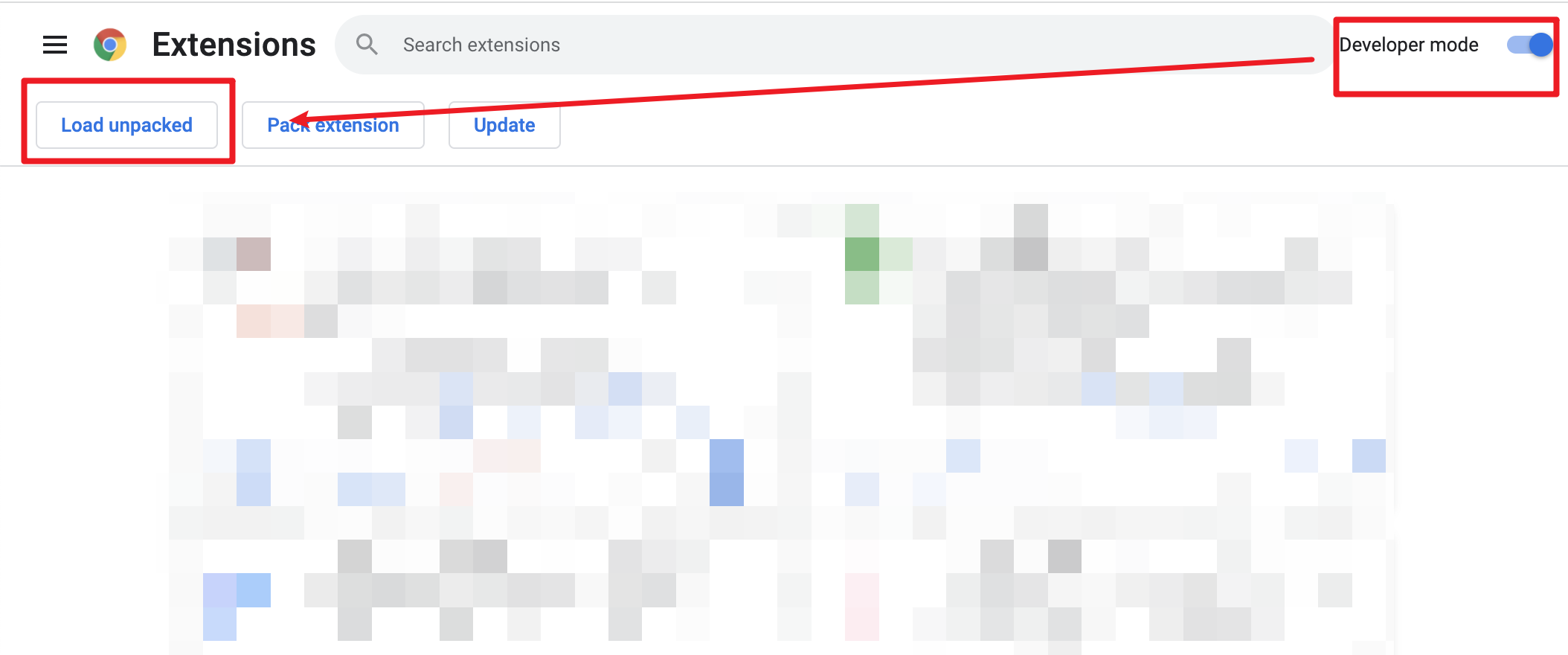 3. Load decompressed exetension folder in your browser
  ## 🚩 Getting started
To get suggested videos on the homepage, click on the `Settings` button in the bottom right corner.
## 🚩 Getting started
To get suggested videos on the homepage, click on the `Settings` button in the bottom right corner.
 Make sure you log in to bilibili first and then click on the `Authorize` button.
 When the `Authorize` button changes to the `Revoke` button, you can get suggested videos based on what you watch.
## 🤔 Authorization & Access Key
https://github.com/indefined/UserScripts/tree/master/bilibiliHome#%E6%8E%88%E6%9D%83%E8%AF%B4%E6%98%8E
## 🔧 Development & build
### Development
```bash
pnpm dev
```
Then **load extension in browser with the `extension/` folder**.
### Build
To build the extension, run
```bash
pnpm build
```
And then pack files under `extension`
## ❤️ Credits
[vitesse-webext](https://github.com/antfu/vitesse-webext)
[UserScripts/bilibiliHome](https://github.com/indefined/UserScripts/tree/master/bilibiliHome)
[Bilibili-Evolved](https://github.com/the1812/Bilibili-Evolved)
[bilibili-API-collect](https://github.com/SocialSisterYi/bilibili-API-collect)
When the `Authorize` button changes to the `Revoke` button, you can get suggested videos based on what you watch.
## 🤔 Authorization & Access Key
https://github.com/indefined/UserScripts/tree/master/bilibiliHome#%E6%8E%88%E6%9D%83%E8%AF%B4%E6%98%8E
## 🔧 Development & build
### Development
```bash
pnpm dev
```
Then **load extension in browser with the `extension/` folder**.
### Build
To build the extension, run
```bash
pnpm build
```
And then pack files under `extension`
## ❤️ Credits
[vitesse-webext](https://github.com/antfu/vitesse-webext)
[UserScripts/bilibiliHome](https://github.com/indefined/UserScripts/tree/master/bilibiliHome)
[Bilibili-Evolved](https://github.com/the1812/Bilibili-Evolved)
[bilibili-API-collect](https://github.com/SocialSisterYi/bilibili-API-collect)