/*
```js*/
let previewImg, previewDiv;
let dirty=false;
if(!ea.verifyMinimumPluginVersion || !ea.verifyMinimumPluginVersion("2.0.11")) {
new Notice("This script requires a newer version of Excalidraw. Please install the latest version.");
return;
}
const outputTypes = {
"html": {
instruction: "Turn this into a single html file using tailwind. Return a single message containing only the html file in a codeblock.",
blocktype: "html"
},
"mermaid": {
instruction: "Return a single message containing only the mermaid diagram in a codeblock.",
blocktype: "mermaid"
},
"svg": {
instruction: "Return a single message containing only the SVG code in an html codeblock.",
blocktype: "svg"
},
"image-gen": {
instruction: "Return a single message with the generated image prompt in a codeblock",
blocktype: "image"
}
}
const systemPrompts = {
"Challenge my thinking": {
prompt: `Your task is to interpret a screenshot of a whiteboard, translating its ideas into a Mermaid graph. The whiteboard will encompass thoughts on a subject. Within the mind map, distinguish ideas that challenge, dispute, or contradict the whiteboard content. Additionally, include concepts that expand, complement, or advance the user's thinking. Utilize the Mermaid graph diagram type and present the resulting Mermaid diagram within a code block. Ensure the Mermaid script excludes the use of parentheses ().`,
type: "mermaid"
},
"Convert sketch to shapes": {
prompt: `Given an image featuring various geometric shapes drawn by the user, your objective is to analyze the input and generate SVG code that accurately represents these shapes. Your output will be the SVG code enclosed in an HTML code block.`,
type: "svg"
},
"Excalidraw sketch": {
prompt: `Given a description of an SVG image from the user, your objective is to generate the corresponding SVG code. Avoid incorporating textual elements within the generated SVG. Your output should be the resulting SVG code enclosed in an HTML code block.`,
type: "svg"
},
"Generate an image from image and prompt": {
prompt: "Your task involves receiving an image and a textual prompt from the user. Your goal is to craft a detailed, accurate, and descriptive narrative of the image, tailored for effective image generation. Utilize the user-provided text prompt to inform and guide your depiction of the image. Ensure the resulting image remains text-free.",
type: "image-gen"
},
"Generate an image from prompt": {
prompt: null,
type: "image-gen"
},
"Generate an image to illustrate a quote": {
prompt: "Your task involves transforming a user-provided quote into a detailed and imaginative illustration. Craft a visual representation that captures the essence of the quote and resonates well with a broad audience. If the Author's name is provided, aim to establish a connection between the illustration and the Author. This can be achieved by referencing a well-known story from the Author, situating the image in the Author's era or setting, or employing other creative methods of association. Additionally, provide preferences for styling, such as the chosen medium and artistic direction, to guide the image creation process. Ensure the resulting image remains text-free. Your task output should comprise a descriptive and detailed narrative aimed at facilitating the creation of a captivating illustration from the quote.",
type: "image-gen"
},
"Visual brainstorm": {
prompt: "Your objective is to interpret a screenshot of a whiteboard, creating an image aimed at sparking further thoughts on the subject. The whiteboard will present diverse ideas about a specific topic. Your generated image should achieve one of two purposes: highlighting concepts that challenge, dispute, or contradict the whiteboard content, or introducing ideas that expand, complement, or enrich the user's thinking. You have the option to include multiple tiles in the resulting image, resembling a sequence akin to a comic strip. Ensure that the image remains devoid of text.",
type: "image-gen"
},
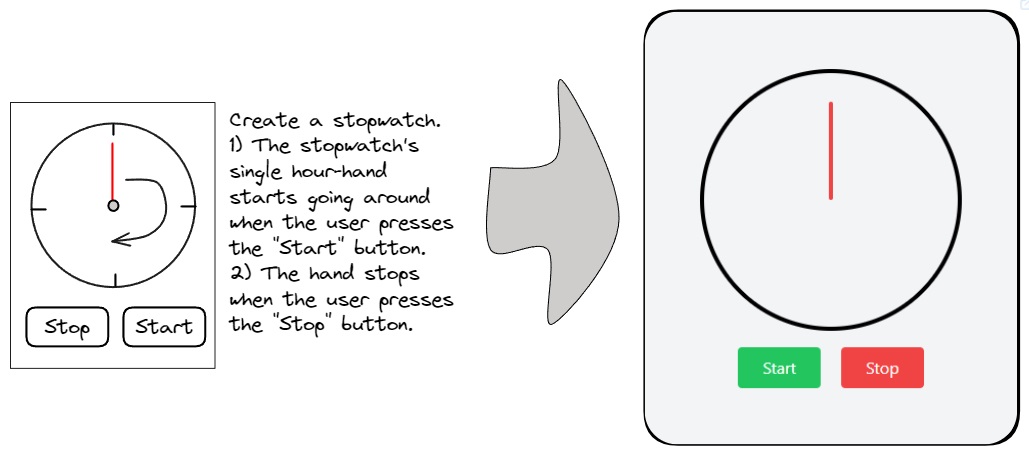
"Wireframe to code": {
prompt: `You are an expert tailwind developer. A user will provide you with a low-fidelity wireframe of an application and you will return a single html file that uses tailwind to create the website. Use creative license to make the application more fleshed out. Write the necessary javascript code. If you need to insert an image, use placehold.co to create a placeholder image.`,
type: "html"
},
}
const IMAGE_WARNING = "The generated image is linked through a temporary OpenAI URL and will be removed in approximately 30 minutes. To save it permanently, choose 'Save image from URL to local file' from the Obsidian Command Palette."
// --------------------------------------
// Initialize values and settings
// --------------------------------------
let settings = ea.getScriptSettings();
if(!settings["Agent's Task"]) {
settings = {
"Agent's Task": "Wireframe to code",
"User Prompt": "",
};
await ea.setScriptSettings(settings);
}
const OPENAI_API_KEY = ea.plugin.settings.openAIAPIToken;
if(!OPENAI_API_KEY || OPENAI_API_KEY === "") {
new Notice("You must first configure your API key in Excalidraw Plugin Settings");
return;
}
const imageModel = ea.plugin.settings.openAIDefaultImageGenerationModel;
let userPrompt = settings["User Prompt"] ?? "";
let agentTask = settings["Agent's Task"];
let imageSize = settings["Image Size"]??"1024x1024";
const validSizes = imageModel === "dall-e-2"
? [`256x256`, `512x512`, `1024x1024`]
: (imageModel === "dall-e-3"
? [`1024x1024`, `1792x1024`, `1024x1792`]
: [`1024x1024`])
if(!validSizes.includes(imageSize)) {
imageSize = "1024x1024";
dirty = true;
}
if(!systemPrompts.hasOwnProperty(agentTask)) {
agentTask = Object.keys(systemPrompts)[0];
}
// --------------------------------------
// Generate Image Blob From Selected Excalidraw Elements
// --------------------------------------
const calculateImageScale = (elements) => {
const bb = ea.getBoundingBox(elements);
const size = (bb.width*bb.height);
const minRatio = Math.sqrt(360000/size);
const maxRatio = Math.sqrt(size/16000000);
return minRatio > 1
? minRatio
: (
maxRatio > 1
? 1/maxRatio
: 1
);
}
const generateCanvasDataURL = async (view, makeSquare=false) => {
await view.forceSave(true); //to ensure recently embedded PNG and other images are saved to file
const viewElements = ea.getViewSelectedElements();
if(viewElements.length === 0) {
return;
}
ea.copyViewElementsToEAforEditing(viewElements, true); //copying the images objects over to EA for PNG generation
if(makeSquare) {
const bb = ea.getBoundingBox(viewElements);
const strokeColor = ea.style.strokeColor;
const backgroundColor = ea.style.backgroundColor;
ea.style.backgroundColor = "transparent";
ea.style.strokeColor = "transparent";
//deliberately not adding a rect if width === height
if(bb.height > bb.width) {
ea.addRect(bb.topX-(bb.height-bb.width)/2, bb.topY,bb.height, bb.height);
}
if(bb.width > bb.height) {
ea.addRect(bb.topX, bb.topY-(bb.width-bb.height)/2,bb.width, bb.width);
}
ea.style.strokeColor = strokeColor;
ea.style.backgroundColor = backgroundColor;
}
const scale = calculateImageScale(ea.getElements());
const loader = ea.getEmbeddedFilesLoader(false);
const exportSettings = {
withBackground: true,
withTheme: true,
};
const dataURL =
await ea.createPNGBase64(
null,
scale,
exportSettings,
loader,
"light",
);
ea.clear();
return dataURL;
}
let imageDataURL = await generateCanvasDataURL(ea.targetView);
// --------------------------------------
// Support functions - embeddable spinner and error
// --------------------------------------
const spinner = await ea.convertStringToDataURL(`