mirror of
https://github.com/zsviczian/obsidian-excalidraw-plugin.git
synced 2025-08-06 05:46:28 +00:00

629 lines
55 KiB
TypeScript
629 lines
55 KiB
TypeScript
export const FIRST_RUN = `
|
|
The Excalidraw Obsidian plugin is much more than "just" a drawing tool. To help you get started here's a showcase of the key Excalidraw plugin features.
|
|
|
|
If you'd like to learn more, please subscribe to my YouTube channel: [Visual PKM](https://www.youtube.com/channel/UCC0gns4a9fhVkGkngvSumAQ) where I regularly share videos about Obsidian-Excalidraw and about tools and techniques for Visual Personal Knowledge Management.
|
|
|
|
Thank you & Enjoy!
|
|
|
|
<div class="excalidraw-videoWrapper"><div>
|
|
<iframe src="https://www.youtube.com/embed/o0exK-xFP3k" title="YouTube video player" frameborder="0" allow="accelerometer; autoplay; clipboard-write; encrypted-media; gyroscope; picture-in-picture" allowfullscreen></iframe>
|
|
</div></div>
|
|
`;
|
|
|
|
export const RELEASE_NOTES: { [k: string]: string } = {
|
|
Intro: `I want to help you keep up with all the updates. After installing each release, you'll be prompted with a summary of new features and fixes. You can disable these popup messages in plugin settings.
|
|
|
|
I develop this plugin as a hobby, spending most of my free time doing this. If you'd like to contribute to the on-going work, I have a simple membership scheme with Bronze, Silver and Gold tiers. Many of you have already bought me a coffee. THANK YOU! It really means a lot to me! If you find this plugin valuable, please consider supporting me.
|
|
|
|
<div class="ex-coffee-div"><a href="https://ko-fi.com/zsolt"><img src="https://cdn.ko-fi.com/cdn/kofi3.png?v=3" height=45></a></div>
|
|
`,
|
|
"1.7.23":`
|
|
# New and improved
|
|
- **Updated Chinese translation**. Thanks, @tswwe!
|
|
- **Improved update for TextElement links**: Until now, when you attached a link to a file to a TextElement using the "Create Link" command, this link did not get updated when the file was renamed or moved. Only links created as markdown links in the TextElement text were updated. Now both approaches work. Keep in mind however, that if you have a link in the TextElemenet text, it will override the link attached to the text element using the create link command. [#566](https://github.com/zsviczian/obsidian-excalidraw-plugin/issues/566)
|
|
- **Transclusion filters markdown comments**: Text transclusion in a TextElement using the ${String.fromCharCode(96)}![[file]]${String.fromCharCode(96)} or ${String.fromCharCode(96)}![[file#section]]${String.fromCharCode(96)} format did not filter out markdown comments in the file placed ${String.fromCharCode(96)}%% inside a comment block %%${String.fromCharCode(96)}. Now they do.
|
|
- **Remove leading '>' from trancluded quotes**: Added a new option in settings under **Links and Transclusion** to remove the leading ${String.fromCharCode(96)}> ${String.fromCharCode(96)} characters from quotes you transclude as a text element in your drawing.
|
|

|
|
- **Added support for ${String.fromCharCode(96)}webp${String.fromCharCode(96)}, ${String.fromCharCode(96)}bmp${String.fromCharCode(96)}, and ${String.fromCharCode(96)}ico${String.fromCharCode(96)} images**. This extends the already supported formats (${String.fromCharCode(96)}jpg${String.fromCharCode(96)}, ${String.fromCharCode(96)}gif${String.fromCharCode(96)}, ${String.fromCharCode(96)}png${String.fromCharCode(96)}, ${String.fromCharCode(96)}svg${String.fromCharCode(96)}).
|
|
- **Added command palette action to reset images to original size**. Select a single image or embedded Excalidraw drawing on your canvas and choose ${String.fromCharCode(96)}Set selected image element size to 100% of original${String.fromCharCode(96)} from the command palette. This function is especially helpful when you combine atomic drawings on a single canvas, keeping each atomic piece in its original excalidraw file (i.e. the way I create [book on a page summaries](https://www.youtube.com/playlist?list=PL6mqgtMZ4NP1-mbCYc3T7mr-unmsIXpEG))
|
|
- The ${String.fromCharCode(96)}async getOriginalImageSize(imageElement: ExcalidrawImageElement): Promise<{width: number; height: number}>${String.fromCharCode(96)} function is also avaiable via ExcalidrawAutomate. You may use this function to resize images to custom scales (e.g. 50% size, or to fit a certain bounding rectangle).
|
|
|
|
# Fixed
|
|
- **Upgraded perfect freehand package to resolve unwanted dots on end of lines** [#5727](https://github.com/excalidraw/excalidraw/pull/5727)
|
|
- **Pinch zoom in View mode opens images** resulting in a very annoying behavior [#837](https://github.com/zsviczian/obsidian-excalidraw-plugin/issues/837)
|
|
- **Embedded files** such as transcluded markdown documents and images **did not honor the Obsidian "New Link Format" setting** (shortest path, relative path, absolute path). [#829](https://github.com/zsviczian/obsidian-excalidraw-plugin/issues/829)
|
|
- **Fixed error with dataview queries involving Excalidraw files**: In case you created a task on an Excalidraw canvas (${String.fromCharCode(96)}docA.md${String.fromCharCode(96)}) by typing ${String.fromCharCode(96)}- [ ] Task [[owner]] #tag${String.fromCharCode(96)}, and then you created a Dataview tasklist in another document (${String.fromCharCode(96)}docB.md${String.fromCharCode(96)}) such that the query criteria matched the task in ${String.fromCharCode(96)}docA.md${String.fromCharCode(96)}, then the task from ${String.fromCharCode(96)}docA.md${String.fromCharCode(96)} only appeared as an empty line when viewing ${String.fromCharCode(96)}docB.md${String.fromCharCode(96)}. If you now embedded ${String.fromCharCode(96)}docB.md${String.fromCharCode(96)} into a third markdown document (${String.fromCharCode(96)}docC.md${String.fromCharCode(96)}), then instead of the contents of ${String.fromCharCode(96)}docB.md${String.fromCharCode(96)} Obsidian rendered ${String.fromCharCode(96)}docA.md${String.fromCharCode(96)}. [#835](https://github.com/zsviczian/obsidian-excalidraw-plugin/issues/835)
|
|
`,
|
|
"1.7.22":`
|
|
# Fixed
|
|
- Text size in sticky notes increased when opening the drawing and when editing a sticky note [#824](https://github.com/zsviczian/obsidian-excalidraw-plugin/issues/824)
|
|
- ToDo rendering did not work properly when there were parsed links in the text
|
|
- Horizontal text alignment in sticky notes did not honor text alignment setting when resizing text. The text was always aligned center even when text alignment was left or right. [#5720](https://github.com/excalidraw/excalidraw/issues/5720)
|
|
`,
|
|
"1.7.21":`
|
|
# New from Excalidraw.com
|
|
- Image-mirroring in export preview and in exported SVG [#5700](https://github.com/excalidraw/excalidraw/pull/5700), [#811](https://github.com/zsviczian/obsidian-excalidraw-plugin/issues/811), [#617](https://github.com/zsviczian/obsidian-excalidraw-plugin/issues/617)
|
|
|
|
# New
|
|
- Ctrl+s will force-save your drawing and update all your transclusions
|
|
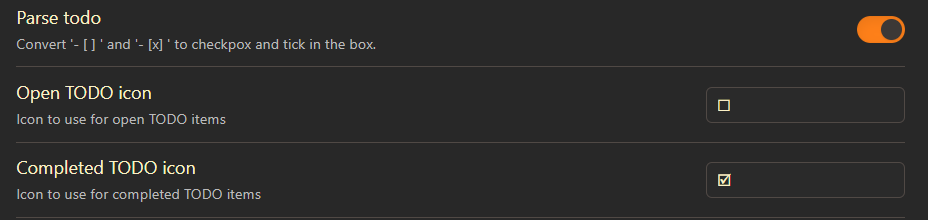
- Added setting to parse ${String.fromCharCode(96)}- [ ] ${String.fromCharCode(96)} and ${String.fromCharCode(96)}- [x] ${String.fromCharCode(96)} todo items. Parsing is disabled by default. This feature can be found under "Links and Transclusions" in Plugin Settings. [#819](https://github.com/zsviczian/obsidian-excalidraw-plugin/issues/819)
|
|
|
|
|
|
|
|
<iframe src="https://user-images.githubusercontent.com/14358394/192151120-3c61c822-0352-4ba7-9900-b38078fb373c.mp4" title="Demo" frameborder="0" allow="accelerometer; autoplay; clipboard-write; encrypted-media; gyroscope; picture-in-picture" allowfullscreen></iframe>
|
|
</div></div>
|
|
|
|
- Added new scripts to the script library
|
|
- [Rename Image](https://github.com/zsviczian/obsidian-excalidraw-plugin/blob/master/ea-scripts/Rename%20Image.md)
|
|
- [Text Arch](https://github.com/zsviczian/obsidian-excalidraw-plugin/blob/master/ea-scripts/Text%20Arch.md)
|
|
|
|
<iframe src="https://user-images.githubusercontent.com/14358394/192151105-78c0115b-4e30-4296-b647-e3c05851a48f.mp4" title="Demo" frameborder="0" allow="accelerometer; autoplay; clipboard-write; encrypted-media; gyroscope; picture-in-picture" allowfullscreen></iframe>
|
|
</div></div>
|
|
|
|
# Fixed
|
|
- Fixed toast message to display script name on press and hold on mobile and iPad.
|
|
- Fixed save error when the embedded image file is not found (i.e. it was moved, renamed, or deleted)
|
|
|
|
`,
|
|
"1.7.20":`
|
|
# New from Excalidraw.com
|
|
- support segment midpoints in line editor [#5641](https://github.com/excalidraw/excalidraw/pull/5641)
|
|
<div class="excalidraw-videoWrapper"><div>
|
|
<iframe src="https://user-images.githubusercontent.com/11256141/187417807-3efeb673-6c96-4744-be0e-70119b0c6839.mp4" title="Demo" frameborder="0" allow="accelerometer; autoplay; clipboard-write; encrypted-media; gyroscope; picture-in-picture" allowfullscreen></iframe>
|
|
</div></div>
|
|
|
|
# Fixed
|
|
- When editing a line or arrow and selecting a tool on the toolbar, the tool jumps back to the selection tool and you need to click again to select the tool [#5703](https://github.com/excalidraw/excalidraw/issues/5703)
|
|
- Minor improvement of autosave, hopefully decreasing occasional lagging
|
|
`,
|
|
"1.7.19":`
|
|
# QoL improvements
|
|
- Reintroduced the help button. I also added the help button to the Tray (in Tray Mode) and moved help to the canvas action panel (in non-TrayMode) because in Obsidian 0.16.0 the status bar hides the help icon.
|
|
- Resetting the canvas with the "Reset Canvas" button will now preserve your custom color palette.
|
|
- I updated the [Set background color of unlclosed line object](https://github.com/zsviczian/obsidian-excalidraw-plugin/blob/master/ea-scripts/Set%20background%20color%20of%20unclosed%20line%20object%20by%20adding%20a%20shadow%20clone.md) script. The script will now add background color to open freedraw objects as well. You no longer need to convert freedraw objects to lines before setting the background color. Check the Script Engine library to download the update.
|
|
|
|
# New in Excalidraw Automate
|
|
- I added the [ColorMaster](https://github.com/lbragile/ColorMaster#readme) library to ExcalidrawAutomate. You can get a CM object by calling ${String.fromCharCode(96)}ExcalidrawAutomate.getCM(<your color comes here>)${String.fromCharCode(96)}. Color master introduces many new ways to manipulate colors from script. I will publish scripts that make use of this new functionality including supporting videos on my YouTube channel in the coming days.
|
|
`,
|
|
"1.7.18":`
|
|
## Critical fix
|
|
- duplicating text elements, adding text elements from the library, and pasting excalidraw text elements results in a corrupted file!!`,
|
|
"1.7.17":`
|
|
## Fixed
|
|
- Block transclusions sometimes got lost when switching between RAW mode and PREVIEW mode. [#769](https://github.com/zsviczian/obsidian-excalidraw-plugin/issues/769)
|
|
|
|
## New
|
|
- Added feature to disable "new Excalidraw version" notification [#770](https://github.com/zsviczian/obsidian-excalidraw-plugin/issues/770)
|
|
- Added option to export both light- and dark-themed images at the same time. If this is enabled Excalidraw will create two files "filename.dark.png" and "filename.light.png" (or .svg depending on your other settings). See practical use case here: [Aadam's Notes](https://notes.aadam.dev/SBYNtPHqsTW9Ck1Kuoxsu/)
|
|
- Added custom export padding for PNG images. Use the frontmatter key ${String.fromCharCode(96)}excalidraw-export-padding${String.fromCharCode(96)} to set the padding at a file level, or set padding for all your files in plugin settings. The new feature replaces the old "SVG Padding" option and applies to both SVG and PNG exports.
|
|
|
|
## ExcalidrawAutomate
|
|
- Added ${String.fromCharCode(96)}padding${String.fromCharCode(96)} to the createPNG function call.
|
|
${String.fromCharCode(96, 96, 96)}typescript
|
|
async createPNG(
|
|
templatePath?: string,
|
|
scale: number = 1,
|
|
exportSettings?: ExportSettings,
|
|
loader?: EmbeddedFilesLoader,
|
|
theme?: string,
|
|
padding?: number,
|
|
)
|
|
${String.fromCharCode(96, 96, 96)}
|
|
`,
|
|
"1.7.16":`
|
|
## Fixed
|
|
- Excalidraw canvas is empty after saving the drawing and re-opening it at a later time. If you accidentally paste Excalidraw elements from the clipboard as the contents of a text element, in certain situations this can corrupt the Excalidraw file and as a result, Excalidraw will load an empty-looking drawing the next time. Changing to markdown view, these files can be repaired, however, to avoid accidental data loss, I have prevented pasting of excalidraw clipboard contents as text elements. [#768](https://github.com/zsviczian/obsidian-excalidraw-plugin/issues/768)
|
|
|
|
## New
|
|
- Add zoom % display in tray-mode [737](https://github.com/zsviczian/obsidian-excalidraw-plugin/issues/737)
|
|
`,
|
|
"1.7.15":`
|
|
## Fixed
|
|
- Canvas turns white when adding point for curved line [#760](https://github.com/zsviczian/obsidian-excalidraw-plugin/issues/760), [#738](https://github.com/zsviczian/obsidian-excalidraw-plugin/issues/738), [#5602](https://github.com/excalidraw/excalidraw/issues/5602)
|
|
`,
|
|
"1.7.14": `
|
|
<div class="excalidraw-videoWrapper"><div>
|
|
<iframe src="https://www.youtube.com/embed/yZQoJg2RCKI" title="YouTube video player" frameborder="0" allow="accelerometer; autoplay; clipboard-write; encrypted-media; gyroscope; picture-in-picture" allowfullscreen></iframe>
|
|
</div></div>
|
|
|
|
## New
|
|
- The ${String.fromCharCode(96)}Copy markdown link for selected element to clipboard${String.fromCharCode(96)} action in the Obsidian menu is now more intelligent. If multiple elements are selected it will copy the Element Reference for the largest element.
|
|
- When referencing an element in a link pointing to an Excalidraw file using the elementId or the section header as the block reference e.g. ${String.fromCharCode(96)}[[file#^elementID]]${String.fromCharCode(96)}, you can now add the ${String.fromCharCode(96)}group=${String.fromCharCode(96)} prefix, e.g. ${String.fromCharCode(96)}[[file#^group=elementID]]${String.fromCharCode(96)} and the ${String.fromCharCode(96)}area=${String.fromCharCode(96)} prefix, e.g. ${String.fromCharCode(96)}[[file#area=Section heading]]${String.fromCharCode(96)}.
|
|
- If the ${String.fromCharCode(96)}group=${String.fromCharCode(96)} prefix is found, Excalidraw will select the group of elements in the same group as the element referenced by the elementID or heading section.
|
|
- If the ${String.fromCharCode(96)}area=${String.fromCharCode(96)} prefix is found, excalidraw will insert a cutout of the image around the referenced element.
|
|
- The ${String.fromCharCode(96)}area=${String.fromCharCode(96)} selector is not supported when embedding Excalidraw as PNG into your markdown documents.
|
|
- I added "Toggle left-handed mode" to the Command Palette. The action is only visible if tray-mode is enabled. It will move the tray from left to right and back. [749](https://github.com/zsviczian/obsidian-excalidraw-plugin/issues/749)
|
|
|
|
## Fixed
|
|
- Zooming with CTRL+Wheel will no longer trigger hover preview.
|
|
- When editing text in a text element CTRL+C will not launch the hover preview in case the mouse pointer is over the text element being edited. Hover preview will only show if the element is not in editing mode.
|
|
- ExcalidrawAutomate did not reliably save changes. This caused issues for example in the "Add link to an existing file and open" script. [#747](https://github.com/zsviczian/obsidian-excalidraw-plugin/issues/747)
|
|
- Create a new folder not working when clicking on a link in Erxcalidraw that points to a file that is in a folder that does not yet exist. [741](https://github.com/zsviczian/obsidian-excalidraw-plugin/issues/741)
|
|
- Downgraded to React 17 due to various stability issues, including [#738](https://github.com/zsviczian/obsidian-excalidraw-plugin/issues/738) and [#747](https://github.com/zsviczian/obsidian-excalidraw-plugin/issues/747)
|
|
|
|
## New in Excalidraw Automate
|
|
- I added two new Excalidraw Automate functions
|
|
${String.fromCharCode(96, 96, 96)}typescript
|
|
/**
|
|
* Gets the groupId for the group that contains all the elements, or null if such a group does not exist
|
|
* @param elements
|
|
* @returns null or the groupId
|
|
*/
|
|
getCommonGroupForElements(elements: ExcalidrawElement[]): string;
|
|
|
|
/**
|
|
* Gets all the elements from elements[] that share one or more groupIds with element.
|
|
* @param element
|
|
* @param elements - typically all the non-deleted elements in the scene
|
|
* @returns
|
|
*/
|
|
getElementsInTheSameGroupWithElement(element: ExcalidrawElement, elements: ExcalidrawElement[]): ExcalidrawElement[];
|
|
${String.fromCharCode(96, 96, 96)}`,
|
|
"1.7.13": `
|
|
## Fix from Excalidraw.com
|
|
- Resize multiple elements from center ([#5560](https://github.com/excalidraw/excalidraw/pull/5560))
|
|
|
|
## Obsidian 0.16.0 compatibility (getting ready, because 0.16.0 will be available to insiders soon)
|
|
- ${String.fromCharCode(96)}Install or update Excalidraw Scripts${String.fromCharCode(96)} was only available via the page header button. Because the page header is hidden by default, the install script action is now available through the pane menu and through the command palette as well.
|
|
- ${String.fromCharCode(96)}Open selected text as link${String.fromCharCode(96)} page header button is now also available via the pane menu
|
|
- ${String.fromCharCode(96)}Open in Adjacent Pane${String.fromCharCode(96)} and ${String.fromCharCode(96)}Open in Main Workspace${String.fromCharCode(96)} Excalidraw plugin settings is fixed
|
|
`,
|
|
"1.7.12": `
|
|
## New from Excalidraw.com:
|
|
- Showing a mid-point for lines and arrows. By touching the mid-point you can easily add an additional point to a two-point line. This is especially helpful when working on a tablet with touch input. ([#5534](https://github.com/excalidraw/excalidraw/pull/5534))
|
|
- Lock angle when editing a line or an arrow with SHIFT pressed. Pressing SHIFT will restrict the edited point to snap to certain discrete angles. ([#5527](https://github.com/excalidraw/excalidraw/pull/5527))
|
|
|
|
## Fixed:
|
|
- Clicking Obsidian search-results pointing to an element on the canvas works again ([#734](https://github.com/zsviczian/obsidian-excalidraw-plugin/issues/734))
|
|
- The feature to allow resizing and rotation of lines and arrows consisting of 3 or more points by showing the bounding box when selected is back ([#5554](https://github.com/excalidraw/excalidraw/pull/5554))
|
|
|
|
## New
|
|
- You can now use the following frontmatter key to allow/prevent automatic export of PNG/SVG images at a file level. This frontmatter will override export settings for the given file. ([#732](https://github.com/zsviczian/obsidian-excalidraw-plugin/issues/732)
|
|
${String.fromCharCode(96)}excalidraw-autoexport: none|both|svg|png${String.fromCharCode(96)}
|
|
`,
|
|
"1.7.11": `
|
|
## Fixed
|
|
- Markdown files embed into the Excalidraw canvas crashed when the embedded markdown file included a nested Markdown embed with a block reference (i.e. the markdown document you are dropping into Excalidraw included a quote you referenced from another file using a ${String.fromCharCode(96)}[[other-file#^blockref]]${String.fromCharCode(96)} block or section reference.
|
|
- Horizontal flipping of arrows and lines broke in 1.7.10. ([#726](https://github.com/zsviczian/obsidian-excalidraw-plugin/issues/726))
|
|
`,
|
|
"1.7.10": `
|
|
## New from Excalidraw.com
|
|
- Improved handling of arrows and lines. ([#5501](https://github.com/excalidraw/excalidraw/pull/5501))
|
|
|
|
## Fixed
|
|
- When opening a document in view-mode or zen-mode the panel buttons no longer flash up for a moment before switching to the desired mode. ([#479](https://github.com/zsviczian/obsidian-excalidraw-plugin/issues/479))
|
|
- The "blinding white screen" no longer flashes up while loading the scene if the scene is dark ([#241](https://github.com/zsviczian/obsidian-excalidraw-plugin/issues/241))
|
|
|
|
## Under the hood
|
|
- Finalized migration to React 18 (no longer showing an error about React 17 compatibility mode in console log)
|
|
`,
|
|
"1.7.9": `
|
|
## New features and fixes from Excalidraw.com:
|
|
- The right-click context menu is now scrollable on smaller screens ([#4030](https://github.com/excalidraw/excalidraw/pull/4030), [#5520](https://github.com/excalidraw/excalidraw/pull/5520))
|
|
- Holding down the shift key while rotating an object will rotate it at discrete angles. Rotation is continuous without the SHIFT key. ([#5500](https://github.com/excalidraw/excalidraw/pull/5500))
|
|
- Improved cursor alignment when resizing an element proportionally (maintain aspect ratio) by holding SHIFT during resizing. ([#5513](https://github.com/excalidraw/excalidraw/pull/5515))
|
|
- Improved freedraw performance during editing (now has proper canvas caching), and no more blurry freedraw shapes when exporting on a higher scale. ([#5481](https://github.com/excalidraw/excalidraw/pull/5481))
|
|
- Sidebar stencil library now correctly scrolls vertically ([#5459](https://github.com/excalidraw/excalidraw/pull/5459))
|
|
|
|
## New in Obsidian:
|
|
- Fullscreen mode on iPad. When there are multiple work panes open, clicking the fullscreen action in the Excalidraw Obsidian menu will hide the other work panes and make Excalidraw fullscreen.
|
|
|
|
## Fixes in Obsidian:
|
|
- Drag&Drop an image from a web browser into Excalidraw ([#697](https://github.com/zsviczian/obsidian-excalidraw-plugin/issues/697))
|
|
- On Obsidian Mobile 1.3.0, when the drawing included an embedded image, switching from markdown-view to Excalidraw-view caused the drawing to disappear (it had to be recovered from backup or synchronization history). ([#715](https://github.com/zsviczian/obsidian-excalidraw-plugin/issues/715))
|
|
- When working on a mobile device (tablet and phone) and using two work panes (one for drawing and the other for editing a markdown document) if you switched focus from the drawing to the markdown document auto-zoom changed the zoom level of the drawing. ([#723](https://github.com/zsviczian/obsidian-excalidraw-plugin/issues/723)), ([#705](https://github.com/zsviczian/obsidian-excalidraw-plugin/issues/705))
|
|
- Actions on the Command Palette to create a new drawing in a new pane or reusing an existing adjacent pane; on the main workspace or in the Hover Editor or Popout window, were not working well. See related settings in plugin settings under "Links and transclusions" ([#718](https://github.com/zsviczian/obsidian-excalidraw-plugin/issues/718))
|
|
- There was a problem with links with section references when the header contained space characters ([#704](https://github.com/zsviczian/obsidian-excalidraw-plugin/issues/704))
|
|
- I added additional controls to avoid the fantom warnings about a problem with saving the Excalidraw file. Hopefully, from now on, you'll see this error less frequently ([#701](https://github.com/zsviczian/obsidian-excalidraw-plugin/issues/701))
|
|
`,
|
|
"1.7.8": `
|
|
# Optimized for Obsidian 0.15.5
|
|
- I reworked how the plugin treats the "More options" menu because the old approach was interfering with Obsidian
|
|
- Did thorough testing of handling of work panes on link click. There are two settings (open in the adjacent pane, and open in the main workspace), and three broad scenarios (Excalidraw in a work pane in the main Obsidian window, Excalidraw in a hover editor, and Excalidraw in an Obsidian popout window). All should work correctly now.
|
|
`,
|
|
"1.7.7": `
|
|
# New
|
|
- Optimized for Obsidian 0.15.4
|
|
- On a desktop, you can now use the META key when clicking on a link and it will open the link in a new popout Window.
|
|
- ([#685](https://github.com/zsviczian/obsidian-excalidraw-plugin/issues/685)) Markdown embeds will now display correctly in Excalidraw even if they include photos and recursive markdown embeds. Unfortunately due to the limitations of Safari the inversion of colors on iPads in dark mode will not work well.
|
|
See an 18 second long demo video [here](https://user-images.githubusercontent.com/14358394/177213263-2a7ef1ca-0614-4190-8955-e830ca6b424b.mp4).
|
|
|
|
|
|
# Fixed
|
|
- ([#683](https://github.com/zsviczian/obsidian-excalidraw-plugin/issues/683)) Copy/Paste Markdown embeds to create another instance of the embed, thus you can reference different sections of the document in your drawing (something I broke in 1.7.6)
|
|
- ([#684](https://github.com/zsviczian/obsidian-excalidraw-plugin/issues/684)) Transclusions incorrectly did not pick up subsections of a section. To understand this change, imagine for example the following document:
|
|
${String.fromCharCode(96, 96, 96)}markdown
|
|
# A
|
|
abc
|
|
# B
|
|
xyz
|
|
## b1
|
|
123
|
|
## b2
|
|
456
|
|
# C
|
|
${String.fromCharCode(96, 96, 96)}
|
|
When you transclude ${String.fromCharCode(96)}![[document#B]]${String.fromCharCode(96)} you expect the following result
|
|
${String.fromCharCode(96, 96, 96)}markdown
|
|
B
|
|
xyz
|
|
|
|
b1
|
|
123
|
|
|
|
b2
|
|
456
|
|
${String.fromCharCode(96, 96, 96)}
|
|
Until this fix you only got
|
|
${String.fromCharCode(96, 96, 96)}markdown
|
|
B
|
|
xyz
|
|
${String.fromCharCode(96, 96, 96)}`,
|
|
"1.7.6": `
|
|
This release is the same as 1.7.5 except for two minor fixes
|
|
- a fix for ExcaliBrain, becuase 1.7.5 broke ExcaliBrain.
|
|
- I left out the release note from 1.7.5.
|
|
|
|
# New
|
|
- Deployed sidebar for libraries panel from excalidraw.com ([#5274](https://github.com/excalidraw/excalidraw/pull/5274)). You can dock the library to the right side depending on the screen real estate available (i.e. does not work on mobiles).
|
|
|
|
# Fixed
|
|
- When copying 2 identical images from one drawing to another, the second image got corrupted in the process ([#672]https://github.com/zsviczian/obsidian-excalidraw-plugin/issues/672)).
|
|
- When making a copy of an equation in a drawing and then without first closing/opening the file, immediately copying the new equation to another drawing, the equation did not get displayed until the file was closed and reopened.
|
|
- Copying a markdown embed from one drawing to another, in the destination the markdown embed appeared without the section/block reference and without the width & height (i.e. these settings had to be done again)
|
|
- Improved the parsing of section references in embeds. When you had ${String.fromCharCode(96)}&${String.fromCharCode(96)} in the section name in a markdown file, when embedding that markdown document into Excalidraw, the section reference did not work as expected ([#681 ](https://github.com/zsviczian/obsidian-excalidraw-plugin/issues/681)).
|
|
- Improved the logic for autosave to better detect changes to the document, and to reduce too frequent export of ${String.fromCharCode(96)}.png${String.fromCharCode(96)} and/or ${String.fromCharCode(96)}.svg${String.fromCharCode(96)} files, when auto export is enabled in plugin settings.
|
|
`,
|
|
"1.7.5": `
|
|
# New
|
|
- Deployed sidebar for libraries panel from excalidraw.com ([#5274](https://github.com/excalidraw/excalidraw/pull/5274)). You can dock the library to the right side depending on the screen real estate available (i.e. does not work on mobiles).
|
|
|
|
# Fixed
|
|
- When copying 2 identical images from one drawing to another, the second image got corrupted in the process ([#672]https://github.com/zsviczian/obsidian-excalidraw-plugin/issues/672)).
|
|
- When making a copy of an equation in a drawing and then without first closing/opening the file, immediately copying the new equation to another drawing, the equation did not get displayed until the file was closed and reopened.
|
|
- Copying a markdown embed from one drawing to another, in the destination the markdown embed appeared without the section/block reference and without the width & height (i.e. these settings had to be done again)
|
|
- Improved the parsing of section references in embeds. When you had ${String.fromCharCode(96)}&${String.fromCharCode(96)} in the section name in a markdown file, when embedding that markdown document into Excalidraw, the section reference did not work as expected ([#681 ](https://github.com/zsviczian/obsidian-excalidraw-plugin/issues/681)).
|
|
- Improved the logic for autosave to better detect changes to the document, and to reduce too frequent export of ${String.fromCharCode(96)}.png${String.fromCharCode(96)} and/or ${String.fromCharCode(96)}.svg${String.fromCharCode(96)} files, when auto export is enabled in plugin settings.
|
|
`,
|
|
"1.7.4": `
|
|
- Obsidian 0.15.3 support dragging and dropping work panes between Obsidian windows.
|
|
- Addressed Obsidian changes affecting the more-options menu.
|
|
- Addressed incompatibility with Obsidian Mobile 1.2.2.
|
|
`,
|
|
"1.7.3": `
|
|
Obsidian 0.15.3 support for dragging and dropping work panes between Obsidian windows.
|
|
`,
|
|
"1.7.2": `
|
|
Due to some of the changes to the code, I highly recommend restarting Obsidian after installing this update to Excalidraw.
|
|
|
|
# Fixed
|
|
- Stability improvements
|
|
- Opening links in new panes and creating new drawings from the file explorer works properly again
|
|
|
|
# New feature
|
|
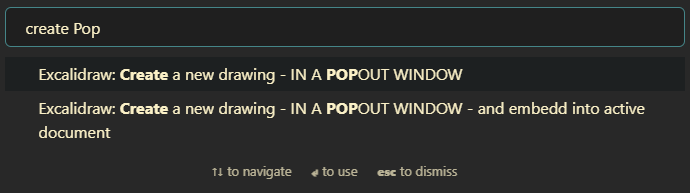
- Two new command palette actions:
|
|
- Create a new drawing - IN A POPOUT WINDOW
|
|
- Create a new drawing - IN A POPOUT WINDOW - and embed into active document
|
|
|
|
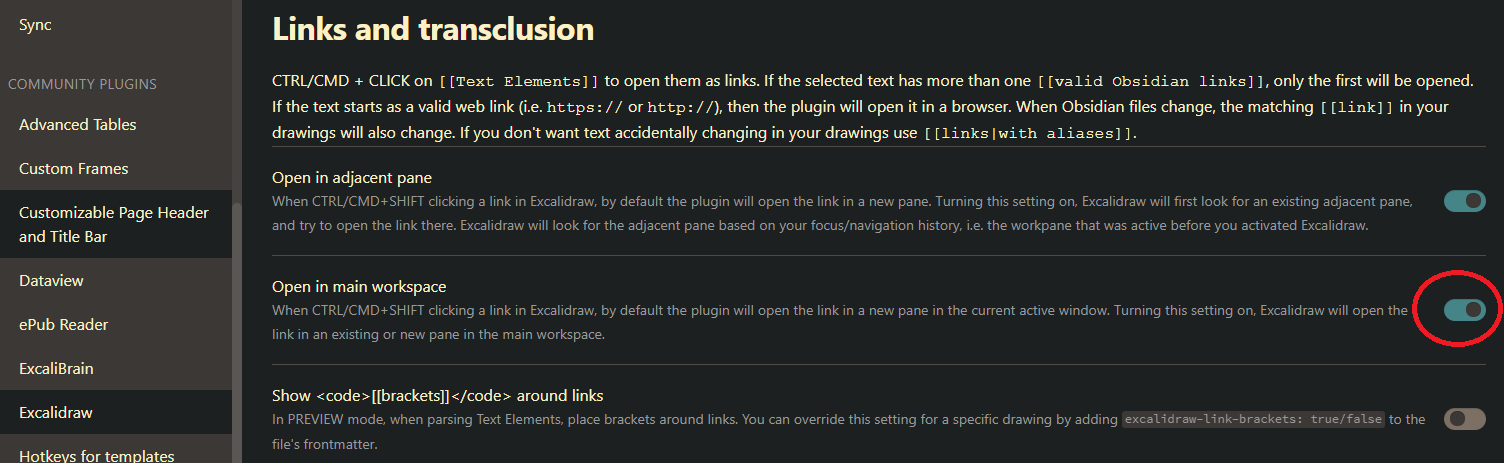
- Added setting to prefer opening the link in the popout window or in the main workspace.
|
|
|
|
`,
|
|
"1.7.1": `
|
|
Support for Obsidian 0.15.0 popout windows. While there are no new features (apart from the popout window support) under the hood there were some major changes required to make this happen.
|
|
`,
|
|
"1.7.0": `
|
|
This is the first test version of Excalidraw Obsidian supporting Obsidian 0.15.0 popout windows. The current technical solution is not really sustainable, it's more of a working concept. I don't expect any real big issues with this version - on the contrary, this works much better with Obsidian 0.15.0 popout windows, but some of the features aren't working as expected in the Obsidian popouts yet. Also as a consequence of Obsidian 0.15.0 compatibility, multiple hover previews are no longer supported.
|
|
`,
|
|
"1.6.34": `
|
|
With 0.15.1 Obsidian is implementing some exciting, but significant changes to how windows are managed. I need to make some heavy/invasive changes to Excalidraw to adapt. The next version of the Excalidraw Plugin will require Obsidian 0.15.1 or newer. If you are not signed up for Obsidian Insider Builds, you will need to wait few weeks until the new Obsidian version will be made public.
|
|
|
|
# Fixed
|
|
- Error saving when the attachments folder exists but with a different letter case (i.e. ATTACHMENTS instead of attachments) [658](https://github.com/zsviczian/obsidian-excalidraw-plugin/issues/658). I added more error tolerance. As a general rule, however, I recommend treating file paths as case-sensitive as some platforms like iOS or LINUX have case-sensitive filenames, and synchronizing your Vault to these platforms will cause you headaches in the future.
|
|
- Text detached from the container if you immediately clicked the text-align buttons on the properties pane while still editing the text in the container for the very first time. [#657](https://github.com/zsviczian/obsidian-excalidraw-plugin/issues/657).
|
|
- Can't add text to the second container if the first container has text and the second container is centered around the first one. [#5300](https://github.com/excalidraw/excalidraw/issues/5300)
|
|
`,
|
|
"1.6.33": `
|
|
# Fixed
|
|
- Under some special circumstances when you embedded a drawing (guest) into another drawing (host), the host did not update when you modified the guest, until you closed Excalidraw completely and reopened the host. [#637](https://github.com/zsviczian/obsidian-excalidraw-plugin/issues/637)
|
|
|
|
# New
|
|
- ExcalidrawAutomate ${String.fromCharCode(96)}addLabelToLine${String.fromCharCode(96)} adds a text label to a line or arrow. Currently this function only works with simple straight 2-point (start & end) lines.
|
|
${String.fromCharCode(96, 96, 96)}typescript
|
|
addLabelToLine(lineId: string, label: string): string
|
|
${String.fromCharCode(96, 96, 96)}
|
|
- ExcalidrawAutomate ${String.fromCharCode(96)}ConnectObjects${String.fromCharCode(96)} now returns the ID of the arrow that was created.`,
|
|
"1.6.32": `
|
|
## Fixed
|
|
- Filenames of embedded images and markdown documents did not get updated if the drawing was open in a work-pane while you changed the filename of the embedded file (image or markdown document) [632](https://github.com/zsviczian/obsidian-excalidraw-plugin/issues/632).
|
|
- When you created a new text element and immediately dragged it, sometimes autosave interrupted the drag action and Excalidraw dropped the element you were dragging [630](https://github.com/zsviczian/obsidian-excalidraw-plugin/issues/630)
|
|
- In some edge cases when you had the drawing open on your desktop and you also opened the same image on your tablet, Sync seemed to work in the background but the changes did not appear on the desktop until you closed and opened the drawing again. [629](https://github.com/zsviczian/obsidian-excalidraw-plugin/issues/629)
|
|
- LaTeX support: Excalidraw must download a javascript library from one of the hosting sites for MathJax tex2svg. It seems that some people do not have access to the URL recommended in the first place by [MathJax](https://docs.mathjax.org/en/latest/web/start.html). If LaTeX formulas do not render correctly in Excalidraw, try changing the source server under Compatibility Settings in Excalidraw Plugin Settings. [628](https://github.com/zsviczian/obsidian-excalidraw-plugin/issues/628)`,
|
|
"1.6.31": `
|
|
Minor update:
|
|
|
|
## Fixes
|
|
- Color picker hotkeys were not working. They are working again [627](https://github.com/zsviczian/obsidian-excalidraw-plugin/issues/627)
|
|
- I updated MathJax (LaTeX) to the newest (3.2.1) release.`,
|
|
"1.6.30": `
|
|
## Fixed
|
|
- The load stencil library button stopped working after 1.6.29 due to an error in the core Excalidraw package. It is now fixed. [#625](https://github.com/zsviczian/obsidian-excalidraw-plugin/issues/625).
|
|
- On iPad (probably other Obsidian mobile devices as well) after opening the command palette the positioning of the pointer was off. From now on, the pointer is automatically re-calibrated every 5 seconds.
|
|
- I improved shared-vault collaboration sync. If the open file has not been saved for the last 5 minutes (i.e. you are not working on the drawing actively), and a newer remote version of the file is received via sync, then the remote file will simply overwrite the local file (i.e. the behavior of Excalidraw Obsidian prior to implementing Shared (Multiplayer) Vault Synchronization support in 1.6.29). This solution will support active collaboration when parties participating are actively editing the drawing, but also caters to the scenario when you open a drawing on one device (e.g. your desktop) and once you are finished editing you do not close the drawing, but simply put your PC to sleep... then later you edit the same drawing on your tablet. When you turn your desktop PC on the next time, the changes you've made on your tablet will be synchronized by Obsidian sync. In this case the changes from your tablet should be honored. If you have not edited the open drawing for more then 5 minutes (like in this scenario) there is no value in running the file comparison between the local version and the received one. This approach reduces the probability of running into sync conflicts.`,
|
|
"1.6.29": `
|
|
## New
|
|
- I implemented sync support inspired by the new [Obsidian Multiplayer Sync](https://youtu.be/ZyCPhbd51eo) feature (available in insider build v0.14.10).
|
|
- To manage expectations, this is not real-time collaboration like on Excalidraw.com. Synchronization is delayed by the frequency of the autosave timer (every 10 secs) and the speed of Obsidian sync. Also if a file has conflicting versions, Obsidian sync may delay the delivery of the changed file.
|
|
- Even if you are not using multiplayer Obsidian Vaults, you may benefit from the improved synchronization, for example when using the freedraw tool on your tablet or phone, and in parallel editing the same drawing (e.g. typing text) on your desktop. I frequently do this in a mind-mapping scenario.
|
|
- If the same Excalidraw sketch is open on multiple devices then Excalidraw will try to merge changes into the open drawing, thus parallel modifications on different devices are possible. If the same element is edited by multiple parties at the same time, then the foreign (received) version will be honored and the local changes lost.
|
|
|
|
## Fixed:
|
|
- Default embed width setting stopped working. [#622](https://github.com/zsviczian/obsidian-excalidraw-plugin/issues/622)
|
|
- The link tooltip gets stuck on screen after Excalidraw closes [#621](https://github.com/zsviczian/obsidian-excalidraw-plugin/issues/621)
|
|
- Layout error when using the Workspaces core plugin. [#28](https://github.com/zsviczian/excalibrain/issues/28)`,
|
|
"1.6.28": `
|
|
## New
|
|
- When dropping a link from a DataView query into Excalidraw the link will honor your "New link format" preferences in Obsidian. It will add the "shortest path when possible", if that is your setting. If the link includes a block or section reference, then the link will automatically include an alias, such that only the filename is displayed (shortest path possible allowing) [#610](https://github.com/zsviczian/obsidian-excalidraw-plugin/issues/610)
|
|
- If Excalidraw is in a Hover Editor and you open a link in another pane by CTRL+SHIFT+Click then the new page will open in the main workspace, and not in a split pane in the hover editor.
|
|
|
|
## Fixed
|
|
- New text elements get de-selected after auto-save [#609](https://github.com/zsviczian/obsidian-excalidraw-plugin/issues/609)
|
|
- Update opacity of bound text when the opacity of the container is updated [#5142](https://github.com/excalidraw/excalidraw/pull/5142)
|
|
- ExcalidrawAutomate: openFileInNewOrAdjacentLeaf() function. This also caused an error when clicking a link in Excalidraw in a hover window, when there were no leaves in the main workspace view.`,
|
|
"1.6.27": `
|
|
## New Features
|
|
- While these new features are benefitial for all Excalidraw Automation projects, the current changes are mainly in support of the [ExcaliBrain](https://youtu.be/O2s-h5VKCas) integration. See detailed [Release Notes](https://github.com/zsviczian/obsidian-excalidraw-plugin/releases/tag/1.6.27) on GitHub.
|
|
`,
|
|
"1.6.26": `
|
|
## Fixed
|
|
- Dragging multiple files onto the canvas will now correctly [#589](https://github.com/zsviczian/obsidian-excalidraw-plugin/issues/589)
|
|
- add multiple links
|
|
- or if you hold the CTRL/(SHIFT on Mac) while dropping the files, then adding multiple images
|
|
- Dropped images and links were not selectable with the selection tool until the file was saved. This is now fixed.
|
|
- Display the linked block/section on link-hover instead of the full page. [#597](https://github.com/zsviczian/obsidian-excalidraw-plugin/issues/597)
|
|
- Hover preview without CTRL/CMD works again. Requires configuration in plugin settings. [#595](https://github.com/zsviczian/obsidian-excalidraw-plugin/issues/595)
|
|
- If you embed the same markdown document into a drawing multiple times, you can now display different sections of the document in each embedded object. [#601](https://github.com/zsviczian/obsidian-excalidraw-plugin/issues/601).
|
|
- If you make a copy of an equation and edit this copy, the original equation will remain unchanged [#593](https://github.com/zsviczian/obsidian-excalidraw-plugin/issues/593)
|
|
|
|
## New Features
|
|
- When you drag files from Dataview-results onto the canvas the obsidian:// urls will be converted into wiki links.[#599](https://github.com/zsviczian/obsidian-excalidraw-plugin/issues/599)
|
|
- I added one more frontmatter key: ${String.fromCharCode(96)}excalidraw-linkbutton-opacity: ${String.fromCharCode(96)} This sets the opacity of the blue link-button in the top right corner of the element, overriding the respective setting in plugin settings. Valid values are numbers between 0 and 1, where 0 means the button is fully transparent.
|
|
|
|
## New Excalidraw Automate Features
|
|
- As part of building the new [ExcaliBrain](https://youtu.be/O2s-h5VKCas) plugin, I've added a number of integration features. See the GitHub [Release Notes](https://github.com/zsviczian/obsidian-excalidraw-plugin/releases/tag/1.6.26) for details.
|
|
`,
|
|
"1.6.25": `
|
|
## Fixed
|
|
- Pinch-zoom in view mode was broken ([#5001](https://github.com/excalidraw/excalidraw/pull/5001))
|
|
- The add image button on iPad was not working ([#5038](https://github.com/excalidraw/excalidraw/pull/5038) & [#584](https://github.com/zsviczian/obsidian-excalidraw-plugin/issues/584))
|
|
|
|
## New Features
|
|
- If Excalidraw is open in a [hover-editor](https://github.com/nothingislost/obsidian-hover-editor) when opening a link in a new pane Excalidraw will now open the link in the main workspace and not by splitting the view inside the hover-editor.
|
|
- Excalidraw ScriptEngine settings
|
|
- Script Engine settings now render HTML descriptions
|
|
- If the ${String.fromCharCode(96)}height${String.fromCharCode(96)} property of a text setting is set, the corresponding text input field will be rendered as a textArea with the specified height.
|
|
`,
|
|
"1.6.24": `
|
|
## Fixed
|
|
- Link fixes:
|
|
- Shift+Click on an element link (i.e. a link attached to a rectangle, ellipse, etc) did not open the link in a new leaf.
|
|
- Clicking a link and opening it in a new leaf will now make the new leaf active and focused after the click.
|
|
- Pointer calibration:
|
|
- Opening an Excalidraw drawing with the [hover-editor](https://github.com/nothingislost/obsidian-hover-editor) and dragging the editor to another location corrupted the calibration of the pointer in Excalidraw. Similarly, when rearranging workspace panes by dragging, Excalidraw lost pointer calibration.
|
|
|
|
## New Features
|
|
### From Excalidraw.com
|
|
- Element locking: The lock and unlock action is in the context menu.
|
|
|
|
### Plugin
|
|
- Any element that has a link, ctrl/cmd+clicking anywhere on the object will trigger the link action. You no longer have to go to the link icon. ([#541](https://github.com/zsviczian/obsidian-excalidraw-plugin/issues/541#issuecomment-1075578365))
|
|
`,
|
|
"1.6.23": `
|
|
## Fixed:
|
|
- I have received some user feedback about cases where the text separated from the sticky note. This version comes with a cleanup algorithm that will try to automatically resolve these issues.
|
|
- Autosave did not notice changes in a very obscure case, when you opened a drawing, resized an element, and without deselecting the element you immediately closed the drawing. ([565](https://github.com/zsviczian/obsidian-excalidraw-plugin/issues/565))
|
|
- CTRL+Enter to create a task did not work in hover-editor when opened from Excalidraw. Now it does! Thanks @pjeby! ([567](https://github.com/zsviczian/obsidian-excalidraw-plugin/pull/567))
|
|
|
|
## New Features
|
|
- If you have the [Obsidian-Latex](https://github.com/xldenis/obsidian-latex) plugin installed, from now Excalidraw will also process the ${String.fromCharCode(
|
|
96,
|
|
)}preambles.sty${String.fromCharCode(
|
|
96,
|
|
)} file. ( [563](https://github.com/zsviczian/obsidian-excalidraw-plugin/issues/563))
|
|
- I added a new setting ${String.fromCharCode(
|
|
96,
|
|
)}Embed & Export >> If found, use the already exported image for preview${String.fromCharCode(
|
|
96,
|
|
)}. This setting works in conjunction with the ${String.fromCharCode(
|
|
96,
|
|
)}Auto-export SVG/PNG${String.fromCharCode(
|
|
96,
|
|
)} settings. If an exported image that matches the file name of the drawing is available, use that image instead of generating a preview image on the fly. This will result in faster previews especially when you have many embedded objects in the drawing, however, it may happen that your latest changes are not displayed and that the image will not automatically match your Obsidian theme in case you have changed the Obsidian theme since the export was created. This setting only applies to embedding images into markdown documents. For a number of reasons, the same approach cannot be used to expedite the loading of drawings with many embedded objects. See release notes for a [demo video](https://github.com/zsviczian/obsidian-excalidraw-plugin/releases/tag/1.6.22).
|
|
`,
|
|
"1.6.22": `
|
|
## Fixed:
|
|
- "Create a new drawing - IN THE CURRENT ACTIVE PANE - and embed into active document" did not work as intended when an Excalidraw pane was already open. [#559](https://github.com/zsviczian/obsidian-excalidraw-plugin/issues/559)
|
|
- [Obsidian-hover-editor](https://github.com/nothingislost/obsidian-hover-editor) related improvements [#555](https://github.com/zsviczian/obsidian-excalidraw-plugin/issues/555):
|
|
- hovering triggered many hover preview windows in quick succession, and in some cases raised dozens of errors in the Developer Console
|
|
- hover-editors were not visible in Excalidraw fullscreen mode
|
|
|
|
## Minor new features:
|
|
- Activating the eraser with key "e" will toggle the active tool and back. So for example if you are drawing a freedraw shape, you can press "e" to delete a few strokes, then press "e" again to continue drawing. On desktop PCs many styluses allow you to configure the pen button to trigger keypress "e".
|
|
- New setting to enable penMode by default.
|
|
- I increased the file size limit for images you paste into Excalidraw from 2MB to 20MB. You should however avoid very large images as they will impact the overall performance of the canvas. ([#557](https://github.com/zsviczian/obsidian-excalidraw-plugin/issues/557))
|
|
`,
|
|
"1.6.21": `
|
|
Before I move on to implementing further features, I spent this week with further stabilizing and debugging the plugin. Hopefully this will result in a smoother, better experince for you all.
|
|
|
|
## Fixed
|
|
- Links in drawings (e.g. text elements or embedded images) were sometimes not updating when the source file was moved or renamed in your Vault. The issue happend when you had the drawing and the linked file open in panes next to each other. This has led to broken links. ([#546](https://github.com/zsviczian/obsidian-excalidraw-plugin/issues/546))
|
|
- To remove complexity and potential error, I have hidden the autosave settings. From now, autosave is now always enabled. Excalidraw will attempt to save your drawing every 10 seconds, or if you are actively engaged in drawing a shape at that very moment (e.g. you are busy with a freedraw line), then autosave will save the drawing at the earliest next opportunity. I imlemented further triggers to save the drawing when there are changes in the drawing and you click outside the drawing canvas. There was a rare error involving text elements, that when happened blocked saving of the file. This error is now properly handeled. Also from now, you will receive a warning message if for any reason save encountered problems.
|
|
- If you have two heading sections in your drawing, e.g. ${String.fromCharCode(
|
|
96,
|
|
)}# Section abc${String.fromCharCode(96)} and ${String.fromCharCode(
|
|
96,
|
|
)}# Section abc def${String.fromCharCode(
|
|
96,
|
|
)}, then referencing ${String.fromCharCode(
|
|
96,
|
|
)}[[#Section abc]]${String.fromCharCode(
|
|
96,
|
|
)} in a link will highlight both text elements when clicking the link. These section references now work as expected. ([#530](https://github.com/zsviczian/obsidian-excalidraw-plugin/issues/530))`,
|
|
"1.6.20": `
|
|
<div class="excalidraw-videoWrapper"><div>
|
|
<iframe src="https://www.youtube.com/embed/U2LkBRBk4LY" title="YouTube video player" frameborder="0" allow="accelerometer; autoplay; clipboard-write; encrypted-media; gyroscope; picture-in-picture" allowfullscreen></iframe>
|
|
</div></div>
|
|
|
|
## Fixed
|
|
- ${String.fromCharCode(96)}ExcalidrawAutomate.create()${String.fromCharCode(
|
|
96,
|
|
)} threw an error [539](https://github.com/zsviczian/obsidian-excalidraw-plugin/issues/539)
|
|
|
|
## New Features
|
|
### From excalidraw.com
|
|
- Bind/unbind text to/from container [4935](https://github.com/excalidraw/excalidraw/pull/4935)
|
|
|
|
### Plugin
|
|
Frontmatter tags to customize image export at a file level [519](https://github.com/zsviczian/obsidian-excalidraw-plugin/issues/519). If these keys are present they will override the default excalidraw embed and export settings.
|
|
- ${String.fromCharCode(
|
|
96,
|
|
)}excalidraw-export-transparent: true${String.fromCharCode(96)}
|
|
- true == Transparent / false == with background.
|
|
- ${String.fromCharCode(96)}excalidraw-export-dark${String.fromCharCode(96)}
|
|
- true == Dark mode / false == light mode.
|
|
- ${String.fromCharCode(96)}excalidraw-export-svgpadding${String.fromCharCode(
|
|
96,
|
|
)}
|
|
- This only affects export to SVG. Specify the export padding for the image
|
|
- ${String.fromCharCode(96)}excalidraw-export-pngscale${String.fromCharCode(96)}
|
|
- This only affects export to PNG. Specify the export scale for the image. The typical range is between 0.5 and 5, but you can experiment with other values as well.
|
|
`,
|
|
"1.6.19": `
|
|
This is a minor update fixing left-handed mode on iOS, and deploying improvements to the new Excalidraw Eraser.
|
|
`,
|
|
"1.6.18": `
|
|
<div class="excalidraw-videoWrapper"><div>
|
|
<iframe src="https://www.youtube.com/embed/4N6efq1DtH0" title="YouTube video player" frameborder="0" allow="accelerometer; autoplay; clipboard-write; encrypted-media; gyroscope; picture-in-picture" allowfullscreen></iframe>
|
|
</div></div>
|
|
|
|
## Fixed
|
|
- Modifying properties of a text element in tray mode. [496](https://github.com/zsviczian/obsidian-excalidraw-plugin/issues/496)
|
|
- Friendly page aliases with iframely should work more reliably now.
|
|
- I further improved resilience of loading from a damaged Excalidraw.md file.
|
|
|
|
## New Features
|
|
### From excalidraw.com
|
|
- Added Eraser [4887](https://github.com/excalidraw/excalidraw/pull/4887)
|
|
|
|
### Plugin
|
|
- New setting for default transcluded-text line-wrap length. This is the default value for "wrapAt" in ${String.fromCharCode(
|
|
96,
|
|
)}![[file#^block]]{wrapAt}${String.fromCharCode(
|
|
96,
|
|
)}. Wrapping text using this feature will insert linebreaks in the transcluded text. An alternative approach is to transclude text inside sticky notes, in which case Excalidraw will automatically take care of text wrapping depending on the sticky note's width. [228](https://github.com/zsviczian/obsidian-excalidraw-plugin/issues/228)
|
|
- New command palette action to toggle fullscreen mode, so you can assign a hotkey.
|
|
- I added basic support for left-handed users. Enable it in plugin settings under the "Display" section. Currently, only affects the position of the tray in tray-mode. [510](https://github.com/zsviczian/obsidian-excalidraw-plugin/issues/510)
|
|
- More flexible filename settings. ⚠ Due to the change, current settings may behave slightly differently compared to before. ⚠ [470](https://github.com/zsviczian/obsidian-excalidraw-plugin/issues/470)
|
|
`,
|
|
"1.6.17": `
|
|
<div class="excalidraw-videoWrapper"><div>
|
|
<iframe src="https://www.youtube.com/embed/Etskjw7a5zo" title="YouTube video player" frameborder="0" allow="accelerometer; autoplay; clipboard-write; encrypted-media; gyroscope; picture-in-picture" allowfullscreen></iframe>
|
|
</div></div>
|
|
|
|
## Fixed
|
|
- Freedraw shape's background color was missing in the SVG export. [#443](https://github.com/zsviczian/obsidian-excalidraw-plugin/issues/443)
|
|
- In rare cases, when you only changed the background color of the drawing or edited the dimensions of an embedded markdown document, or changed an existing LaTeX formula, and then moved to another document in the vault, these changes did not get saved. [#503](https://github.com/zsviczian/obsidian-excalidraw-plugin/issues/503)
|
|
- I resolved an Excalidraw Automate glitch with word wrapping in containers. EA generated containers with fixed line breaks. The same error also affected the conversion of drawings from the "legacy" Excalidraw.com file format.
|
|
- When you allow/disable autosave in settings, this change will immediately take effect for all open Excalidraw workspace leaves. Until now autosave was activated only after you closed and reopened the Excalidraw view. [#502](https://github.com/zsviczian/obsidian-excalidraw-plugin/issues/502)
|
|
- When you create a text element containing a ${String.fromCharCode(
|
|
96,
|
|
96,
|
|
96,
|
|
)}[[markdown link]]${String.fromCharCode(
|
|
96,
|
|
96,
|
|
96,
|
|
)} in raw mode, the new link was parsed nonetheless, and sometimes the link disappeared, leaving only the parsed text without the actual link. Creating links in raw-mode now works correctly.
|
|
|
|
## New Features
|
|
- The most recent 5 custom colors from the canvas are now added as color options to the element stroke and element background palette. [#4843](https://github.com/excalidraw/excalidraw/pull/4843)
|
|
- Vertical text alignment for text in sticky notes [#4852](https://github.com/excalidraw/excalidraw/pull/4852)
|
|
- Markdown embeds into Excalidraw now receive default styling, including that of tables, blockquotes, and code blocks. I also added a new setting and corresponding frontmatter-key to set the border-color for the embedded markdown document. You can override plugin settings at the document level by adding ${String.fromCharCode(
|
|
96,
|
|
96,
|
|
96,
|
|
)}excalidraw-border-color: steelblue${String.fromCharCode(
|
|
96,
|
|
96,
|
|
96,
|
|
)} to the markdown document you want to embed into your drawing. Valid values are css-color-name|#HEXcolor|any-other-html-standard-format.
|
|
- In Obsidian search, when the text you were searching for is found in an Excalidraw document, clicking the link in search-results will open the drawing with the matching text element selected and zoomed.
|
|
- Excalidraw now supports linking to text elements on the canvas and linking to non-text objects.
|
|
1) You can reference text headings just the same as markdown headings in a document
|
|
i.e. you have a text element that includes a valid markdown heading:
|
|
${String.fromCharCode(96, 96, 96)}markdown
|
|
# My Heading
|
|
details...
|
|
${String.fromCharCode(96, 96, 96)}
|
|
or
|
|
${String.fromCharCode(96, 96, 96)}markdown
|
|
text element text
|
|
# my reference
|
|
${String.fromCharCode(96, 96, 96)}
|
|
You can reference these like this respectively: ${String.fromCharCode(
|
|
96,
|
|
96,
|
|
96,
|
|
)}[[#My Heading|display alias]]${String.fromCharCode(
|
|
96,
|
|
96,
|
|
96,
|
|
)} and ${String.fromCharCode(
|
|
96,
|
|
96,
|
|
96,
|
|
)}[[#my reference|alias]]${String.fromCharCode(96, 96, 96)}
|
|
|
|

|
|
|
|
2) You can also reference element ids similar to block references
|
|
- Links take this form ${String.fromCharCode(
|
|
96,
|
|
96,
|
|
96,
|
|
)}[[#^elementID|alias]]${String.fromCharCode(96, 96, 96)}
|
|
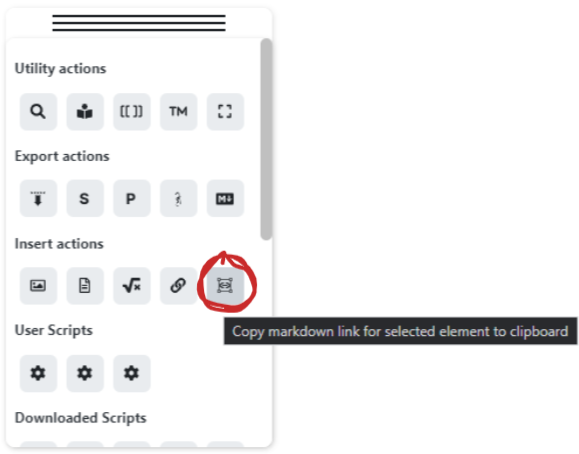
- Linking is supported by a new action on the Obsidian Tools Panel
|
|
|
|
|
|
[Release Notes on GitHub](https://github.com/zsviczian/obsidian-excalidraw-plugin/releases/tag/1.6.17)
|
|
`,
|
|
"1.6.16": `
|
|
<div class="excalidraw-videoWrapper"><div>
|
|
<iframe src="https://www.youtube.com/embed/gMIKXyhS-dM" title="YouTube video player" frameborder="0" allow="accelerometer; autoplay; clipboard-write; encrypted-media; gyroscope; picture-in-picture" allowfullscreen></iframe>
|
|
</div></div>
|
|
|
|
|
|
## Fixed
|
|
- CMD+Drag from the Obsidian File Manager does not work on Mac. You can now use SHIFT+Drag to embed an image or markdown document into a scene. ([#468](https://github.com/zsviczian/obsidian-excalidraw-plugin/issues/468))
|
|
- Excalidraw Compressed JSON is now cut to smaller chunks (64 characters per paragraph, instead of the earlier 1024 characters). This should address search performance issues. ([#484](https://github.com/zsviczian/obsidian-excalidraw-plugin/issues/484))
|
|
|
|
## New Features
|
|
- I added the Obsidian Tools Panel
|
|
- Click the Obsidian button to access the panel.
|
|
- The tools panel contains key plugin commands and user / downloaded Excalidraw scripts.
|
|
- Drag the panel with the handle at the top. Single click on the top to collapse the panel.
|
|
- On Mobile press and hold the drag handle before dragging, to avoid activating the Obsidian slide in menus.
|
|
- On Mobile long touch individual buttons on the panel to access tooltips.
|
|
- Reinstall Excalidraw scripts to get the icons.
|
|
- If you hold down SHIFT while resizing a sticky note, the text size will scale instead of text wrapping. ([Excalidraw tweet](https://twitter.com/aakansha1216/status/1496116528890417155?s=20&t=taXjA6I9Nd0T-C0wYBsG5g))
|
|
- SVG export now includes links ([#4791](https://github.com/excalidraw/excalidraw/pull/4791))
|
|
- Added full screen mode for Obsidian Mobile
|
|
- Release notes
|
|
- disable popup in settings
|
|
- access release notes via the command palette, or the button on the tools panel
|
|
|
|
[Release Notes on GitHub](https://github.com/zsviczian/obsidian-excalidraw-plugin/releases/tag/1.6.16)
|
|
|
|
[](https://ko-fi.com/zsolt)
|
|
`,
|
|
};
|