mirror of
https://github.com/zsviczian/obsidian-excalidraw-plugin.git
synced 2025-08-06 05:46:28 +00:00

353 lines
29 KiB
TypeScript
353 lines
29 KiB
TypeScript
export const FIRST_RUN = `
|
|
The Excalidraw Obsidian plugin is much more than "just" a drawing tool. To help you get started here's a showcase of the key Excalidraw plugin features.
|
|
|
|
If you'd like to learn more, please subscribe to my YouTube channel: [Visual PKM](https://www.youtube.com/channel/UCC0gns4a9fhVkGkngvSumAQ) where I regularly share videos about Obsidian-Excalidraw and about tools and techniques for Visual Personal Knowledge Management.
|
|
|
|
Thank you & Enjoy!
|
|
|
|
<div class="excalidraw-videoWrapper"><div>
|
|
<iframe src="https://www.youtube.com/embed/o0exK-xFP3k" title="YouTube video player" frameborder="0" allow="accelerometer; autoplay; clipboard-write; encrypted-media; gyroscope; picture-in-picture" allowfullscreen></iframe>
|
|
</div></div>
|
|
`;
|
|
|
|
export const RELEASE_NOTES: { [k: string]: string } = {
|
|
Intro: `I want to help you keep up with all the updates. After installing each release, you'll be prompted with a summary of new features and fixes. You can disable these popup messages in plugin settings.
|
|
|
|
I develop this plugin as a hobby, spending most of my free time doing this. If you'd like to contribute to the on-going work, I have a simple membership scheme with Bronze, Silver and Gold tiers. Many of you have already bought me a coffee. THANK YOU! It really means a lot to me! If you find this plugin valuable, please consider supporting me.
|
|
|
|
<div class="ex-coffee-div"><a href="https://ko-fi.com/zsolt"><img src="https://cdn.ko-fi.com/cdn/kofi3.png?v=3" height=45></a></div>
|
|
`,
|
|
"1.7.2": `
|
|
Due to some of the changes to the code, I highly recommend restarting Obsidian after installing this update to Excalidraw.
|
|
|
|
# Fixed
|
|
- Stability improvements
|
|
- Opening links in new panes and creating new drawings from the file explorer works properly again
|
|
|
|
# New feature
|
|
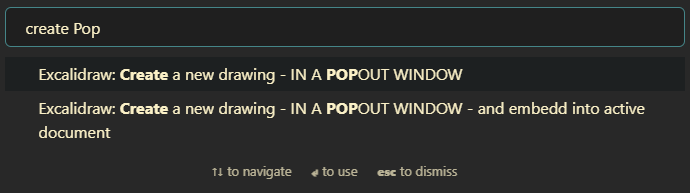
- Two new command palette actions:
|
|
- Create a new drawing - IN A POPOUT WINDOW
|
|
- Create a new drawing - IN A POPOUT WINDOW - and embed into active document
|
|
|
|
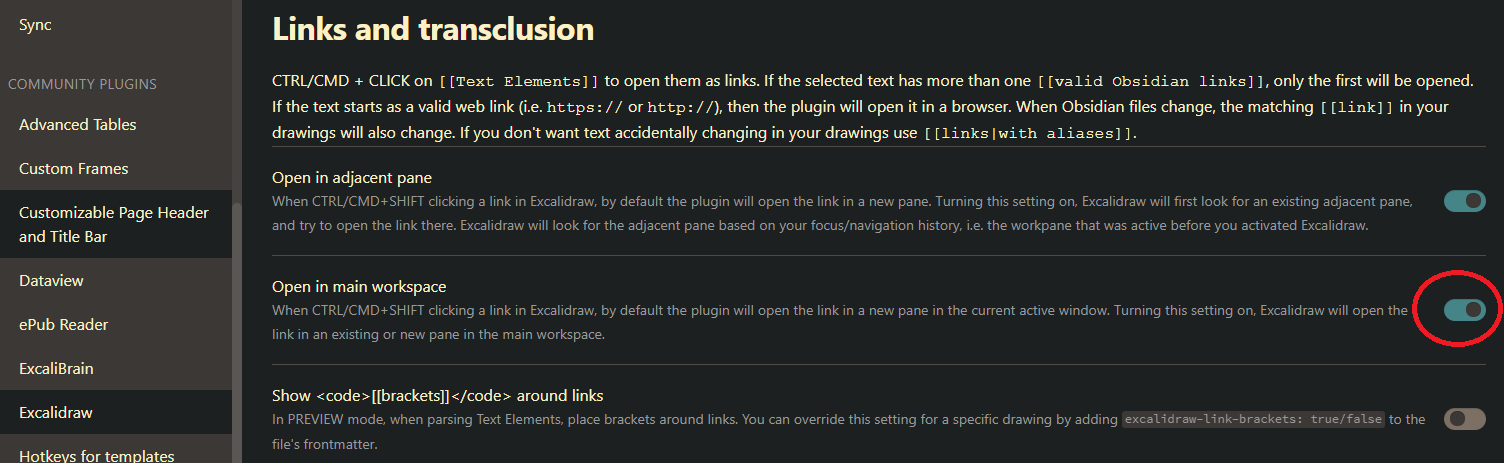
- Added setting to prefer opening the link in the popout window or in the main workspace.
|
|
|
|
`,
|
|
"1.7.1": `
|
|
Support for Obsidian 0.15.0 popout windows. While there are no new features (apart from the popout window support) under the hood there were some major changes required to make this happen.
|
|
`,
|
|
"1.7.0": `
|
|
This is the first test version of Excalidraw Obsidian supporting Obsidian 0.15.0 popout windows. The current technical solution is not really sustainable, it's more of a working concept. I don't expect any real big issues with this version - on the contrary, this works much better with Obsidian 0.15.0 popout windows, but some of the features aren't working as expected in the Obsidian popouts yet. Also as a consequence of Obsidian 0.15.0 compatibility, multiple hover previews are no longer supported.
|
|
`,
|
|
"1.6.34": `
|
|
With 0.15.1 Obsidian is implementing some exciting, but significant changes to how windows are managed. I need to make some heavy/invasive changes to Excalidraw to adapt. The next version of the Excalidraw Plugin will require Obsidian 0.15.1 or newer. If you are not signed up for Obsidian Insider Builds, you will need to wait few weeks until the new Obsidian version will be made public.
|
|
|
|
# Fixed
|
|
- Error saving when the attachments folder exists but with a different letter case (i.e. ATTACHMENTS instead of attachments) [658](https://github.com/zsviczian/obsidian-excalidraw-plugin/issues/658). I added more error tolerance. As a general rule, however, I recommend treating file paths as case-sensitive as some platforms like iOS or LINUX have case-sensitive filenames, and synchronizing your Vault to these platforms will cause you headaches in the future.
|
|
- Text detached from the container if you immediately clicked the text-align buttons on the properties pane while still editing the text in the container for the very first time. [#657](https://github.com/zsviczian/obsidian-excalidraw-plugin/issues/657).
|
|
- Can't add text to the second container if the first container has text and the second container is centered around the first one. [#5300](https://github.com/excalidraw/excalidraw/issues/5300)
|
|
`,
|
|
"1.6.33": `
|
|
# Fixed
|
|
- Under some special circumstances when you embedded a drawing (guest) into another drawing (host), the host did not update when you modified the guest, until you closed Excalidraw completely and reopened the host. [#637](https://github.com/zsviczian/obsidian-excalidraw-plugin/issues/637)
|
|
|
|
# New
|
|
- ExcalidrawAutomate ${String.fromCharCode(96)}addLabelToLine${String.fromCharCode(96)} adds a text label to a line or arrow. Currently this function only works with simple straight 2-point (start & end) lines.
|
|
${String.fromCharCode(96, 96, 96)}typescript
|
|
addLabelToLine(lineId: string, label: string): string
|
|
${String.fromCharCode(96, 96, 96)}
|
|
- ExcalidrawAutomate ${String.fromCharCode(96)}ConnectObjects${String.fromCharCode(96)} now returns the ID of the arrow that was created.`,
|
|
"1.6.32": `
|
|
## Fixed
|
|
- Filenames of embedded images and markdown documents did not get updated if the drawing was open in a work-pane while you changed the filename of the embedded file (image or markdown document) [632](https://github.com/zsviczian/obsidian-excalidraw-plugin/issues/632).
|
|
- When you created a new text element and immediately dragged it, sometimes autosave interrupted the drag action and Excalidraw dropped the element you were dragging [630](https://github.com/zsviczian/obsidian-excalidraw-plugin/issues/630)
|
|
- In some edge cases when you had the drawing open on your desktop and you also opened the same image on your tablet, Sync seemed to work in the background but the changes did not appear on the desktop until you closed and opened the drawing again. [629](https://github.com/zsviczian/obsidian-excalidraw-plugin/issues/629)
|
|
- LaTeX support: Excalidraw must download a javascript library from one of the hosting sites for MathJax tex2svg. It seems that some people do not have access to the URL recommended in the first place by [MathJax](https://docs.mathjax.org/en/latest/web/start.html). If LaTeX formulas do not render correctly in Excalidraw, try changing the source server under Compatibility Settings in Excalidraw Plugin Settings. [628](https://github.com/zsviczian/obsidian-excalidraw-plugin/issues/628)`,
|
|
"1.6.31": `
|
|
Minor update:
|
|
|
|
## Fixes
|
|
- Color picker hotkeys were not working. They are working again [627](https://github.com/zsviczian/obsidian-excalidraw-plugin/issues/627)
|
|
- I updated MathJax (LaTeX) to the newest (3.2.1) release.`,
|
|
"1.6.30": `
|
|
## Fixed
|
|
- The load stencil library button stopped working after 1.6.29 due to an error in the core Excalidraw package. It is now fixed. [#625](https://github.com/zsviczian/obsidian-excalidraw-plugin/issues/625).
|
|
- On iPad (probably other Obsidian mobile devices as well) after opening the command palette the positioning of the pointer was off. From now on, the pointer is automatically re-calibrated every 5 seconds.
|
|
- I improved shared-vault collaboration sync. If the open file has not been saved for the last 5 minutes (i.e. you are not working on the drawing actively), and a newer remote version of the file is received via sync, then the remote file will simply overwrite the local file (i.e. the behavior of Excalidraw Obsidian prior to implementing Shared (Multiplayer) Vault Synchronization support in 1.6.29). This solution will support active collaboration when parties participating are actively editing the drawing, but also caters to the scenario when you open a drawing on one device (e.g. your desktop) and once you are finished editing you do not close the drawing, but simply put your PC to sleep... then later you edit the same drawing on your tablet. When you turn your desktop PC on the next time, the changes you've made on your tablet will be synchronized by Obsidian sync. In this case the changes from your tablet should be honored. If you have not edited the open drawing for more then 5 minutes (like in this scenario) there is no value in running the file comparison between the local version and the received one. This approach reduces the probability of running into sync conflicts.`,
|
|
"1.6.29": `
|
|
## New
|
|
- I implemented sync support inspired by the new [Obsidian Multiplayer Sync](https://youtu.be/ZyCPhbd51eo) feature (available in insider build v0.14.10).
|
|
- To manage expectations, this is not real-time collaboration like on Excalidraw.com. Synchronization is delayed by the frequency of the autosave timer (every 10 secs) and the speed of Obsidian sync. Also if a file has conflicting versions, Obsidian sync may delay the delivery of the changed file.
|
|
- Even if you are not using multiplayer Obsidian Vaults, you may benefit from the improved synchronization, for example when using the freedraw tool on your tablet or phone, and in parallel editing the same drawing (e.g. typing text) on your desktop. I frequently do this in a mind-mapping scenario.
|
|
- If the same Excalidraw sketch is open on multiple devices then Excalidraw will try to merge changes into the open drawing, thus parallel modifications on different devices are possible. If the same element is edited by multiple parties at the same time, then the foreign (received) version will be honored and the local changes lost.
|
|
|
|
## Fixed:
|
|
- Default embed width setting stopped working. [#622](https://github.com/zsviczian/obsidian-excalidraw-plugin/issues/622)
|
|
- The link tooltip gets stuck on screen after Excalidraw closes [#621](https://github.com/zsviczian/obsidian-excalidraw-plugin/issues/621)
|
|
- Layout error when using the Workspaces core plugin. [#28](https://github.com/zsviczian/excalibrain/issues/28)`,
|
|
"1.6.28": `
|
|
## New
|
|
- When dropping a link from a DataView query into Excalidraw the link will honor your "New link format" preferences in Obsidian. It will add the "shortest path when possible", if that is your setting. If the link includes a block or section reference, then the link will automatically include an alias, such that only the filename is displayed (shortest path possible allowing) [#610](https://github.com/zsviczian/obsidian-excalidraw-plugin/issues/610)
|
|
- If Excalidraw is in a Hover Editor and you open a link in another pane by CTRL+SHIFT+Click then the new page will open in the main workspace, and not in a split pane in the hover editor.
|
|
|
|
## Fixed
|
|
- New text elements get de-selected after auto-save [#609](https://github.com/zsviczian/obsidian-excalidraw-plugin/issues/609)
|
|
- Update opacity of bound text when the opacity of the container is updated [#5142](https://github.com/excalidraw/excalidraw/pull/5142)
|
|
- ExcalidrawAutomate: openFileInNewOrAdjacentLeaf() function. This also caused an error when clicking a link in Excalidraw in a hover window, when there were no leaves in the main workspace view.`,
|
|
"1.6.27": `
|
|
## New Features
|
|
- While these new features are benefitial for all Excalidraw Automation projects, the current changes are mainly in support of the [ExcaliBrain](https://youtu.be/O2s-h5VKCas) integration. See detailed [Release Notes](https://github.com/zsviczian/obsidian-excalidraw-plugin/releases/tag/1.6.27) on GitHub.
|
|
`,
|
|
"1.6.26": `
|
|
## Fixed
|
|
- Dragging multiple files onto the canvas will now correctly [#589](https://github.com/zsviczian/obsidian-excalidraw-plugin/issues/589)
|
|
- add multiple links
|
|
- or if you hold the CTRL/(SHIFT on Mac) while dropping the files, then adding multiple images
|
|
- Dropped images and links were not selectable with the selection tool until the file was saved. This is now fixed.
|
|
- Display the linked block/section on link-hover instead of the full page. [#597](https://github.com/zsviczian/obsidian-excalidraw-plugin/issues/597)
|
|
- Hover preview without CTRL/CMD works again. Requires configuration in plugin settings. [#595](https://github.com/zsviczian/obsidian-excalidraw-plugin/issues/595)
|
|
- If you embed the same markdown document into a drawing multiple times, you can now display different sections of the document in each embedded object. [#601](https://github.com/zsviczian/obsidian-excalidraw-plugin/issues/601).
|
|
- If you make a copy of an equation and edit this copy, the original equation will remain unchanged [#593](https://github.com/zsviczian/obsidian-excalidraw-plugin/issues/593)
|
|
|
|
## New Features
|
|
- When you drag files from Dataview-results onto the canvas the obsidian:// urls will be converted into wiki links.[#599](https://github.com/zsviczian/obsidian-excalidraw-plugin/issues/599)
|
|
- I added one more frontmatter key: ${String.fromCharCode(96)}excalidraw-linkbutton-opacity: ${String.fromCharCode(96)} This sets the opacity of the blue link-button in the top right corner of the element, overriding the respective setting in plugin settings. Valid values are numbers between 0 and 1, where 0 means the button is fully transparent.
|
|
|
|
## New Excalidraw Automate Features
|
|
- As part of building the new [ExcaliBrain](https://youtu.be/O2s-h5VKCas) plugin, I've added a number of integration features. See the GitHub [Release Notes](https://github.com/zsviczian/obsidian-excalidraw-plugin/releases/tag/1.6.26) for details.
|
|
`,
|
|
"1.6.25": `
|
|
## Fixed
|
|
- Pinch-zoom in view mode was broken ([#5001](https://github.com/excalidraw/excalidraw/pull/5001))
|
|
- The add image button on iPad was not working ([#5038](https://github.com/excalidraw/excalidraw/pull/5038) & [#584](https://github.com/zsviczian/obsidian-excalidraw-plugin/issues/584))
|
|
|
|
## New Features
|
|
- If Excalidraw is open in a [hover-editor](https://github.com/nothingislost/obsidian-hover-editor) when opening a link in a new pane Excalidraw will now open the link in the main workspace and not by splitting the view inside the hover-editor.
|
|
- Excalidraw ScriptEngine settings
|
|
- Script Engine settings now render HTML descriptions
|
|
- If the ${String.fromCharCode(96)}height${String.fromCharCode(96)} property of a text setting is set, the corresponding text input field will be rendered as a textArea with the specified height.
|
|
`,
|
|
"1.6.24": `
|
|
## Fixed
|
|
- Link fixes:
|
|
- Shift+Click on an element link (i.e. a link attached to a rectangle, ellipse, etc) did not open the link in a new leaf.
|
|
- Clicking a link and opening it in a new leaf will now make the new leaf active and focused after the click.
|
|
- Pointer calibration:
|
|
- Opening an Excalidraw drawing with the [hover-editor](https://github.com/nothingislost/obsidian-hover-editor) and dragging the editor to another location corrupted the calibration of the pointer in Excalidraw. Similarly, when rearranging workspace panes by dragging, Excalidraw lost pointer calibration.
|
|
|
|
## New Features
|
|
### From Excalidraw.com
|
|
- Element locking: The lock and unlock action is in the context menu.
|
|
|
|
### Plugin
|
|
- Any element that has a link, ctrl/cmd+clicking anywhere on the object will trigger the link action. You no longer have to go to the link icon. ([#541](https://github.com/zsviczian/obsidian-excalidraw-plugin/issues/541#issuecomment-1075578365))
|
|
`,
|
|
"1.6.23": `
|
|
## Fixed:
|
|
- I have received some user feedback about cases where the text separated from the sticky note. This version comes with a cleanup algorithm that will try to automatically resolve these issues.
|
|
- Autosave did not notice changes in a very obscure case, when you opened a drawing, resized an element, and without deselecting the element you immediately closed the drawing. ([565](https://github.com/zsviczian/obsidian-excalidraw-plugin/issues/565))
|
|
- CTRL+Enter to create a task did not work in hover-editor when opened from Excalidraw. Now it does! Thanks @pjeby! ([567](https://github.com/zsviczian/obsidian-excalidraw-plugin/pull/567))
|
|
|
|
## New Features
|
|
- If you have the [Obsidian-Latex](https://github.com/xldenis/obsidian-latex) plugin installed, from now Excalidraw will also process the ${String.fromCharCode(
|
|
96,
|
|
)}preambles.sty${String.fromCharCode(
|
|
96,
|
|
)} file. ( [563](https://github.com/zsviczian/obsidian-excalidraw-plugin/issues/563))
|
|
- I added a new setting ${String.fromCharCode(
|
|
96,
|
|
)}Embed & Export >> If found, use the already exported image for preview${String.fromCharCode(
|
|
96,
|
|
)}. This setting works in conjunction with the ${String.fromCharCode(
|
|
96,
|
|
)}Auto-export SVG/PNG${String.fromCharCode(
|
|
96,
|
|
)} settings. If an exported image that matches the file name of the drawing is available, use that image instead of generating a preview image on the fly. This will result in faster previews especially when you have many embedded objects in the drawing, however, it may happen that your latest changes are not displayed and that the image will not automatically match your Obsidian theme in case you have changed the Obsidian theme since the export was created. This setting only applies to embedding images into markdown documents. For a number of reasons, the same approach cannot be used to expedite the loading of drawings with many embedded objects. See release notes for a [demo video](https://github.com/zsviczian/obsidian-excalidraw-plugin/releases/tag/1.6.22).
|
|
`,
|
|
"1.6.22": `
|
|
## Fixed:
|
|
- "Create a new drawing - IN THE CURRENT ACTIVE PANE - and embed into active document" did not work as intended when an Excalidraw pane was already open. [#559](https://github.com/zsviczian/obsidian-excalidraw-plugin/issues/559)
|
|
- [Obsidian-hover-editor](https://github.com/nothingislost/obsidian-hover-editor) related improvements [#555](https://github.com/zsviczian/obsidian-excalidraw-plugin/issues/555):
|
|
- hovering triggered many hover preview windows in quick succession, and in some cases raised dozens of errors in the Developer Console
|
|
- hover-editors were not visible in Excalidraw fullscreen mode
|
|
|
|
## Minor new features:
|
|
- Activating the eraser with key "e" will toggle the active tool and back. So for example if you are drawing a freedraw shape, you can press "e" to delete a few strokes, then press "e" again to continue drawing. On desktop PCs many styluses allow you to configure the pen button to trigger keypress "e".
|
|
- New setting to enable penMode by default.
|
|
- I increased the file size limit for images you paste into Excalidraw from 2MB to 20MB. You should however avoid very large images as they will impact the overall performance of the canvas. ([#557](https://github.com/zsviczian/obsidian-excalidraw-plugin/issues/557))
|
|
`,
|
|
"1.6.21": `
|
|
Before I move on to implementing further features, I spent this week with further stabilizing and debugging the plugin. Hopefully this will result in a smoother, better experince for you all.
|
|
|
|
## Fixed
|
|
- Links in drawings (e.g. text elements or embedded images) were sometimes not updating when the source file was moved or renamed in your Vault. The issue happend when you had the drawing and the linked file open in panes next to each other. This has led to broken links. ([#546](https://github.com/zsviczian/obsidian-excalidraw-plugin/issues/546))
|
|
- To remove complexity and potential error, I have hidden the autosave settings. From now, autosave is now always enabled. Excalidraw will attempt to save your drawing every 10 seconds, or if you are actively engaged in drawing a shape at that very moment (e.g. you are busy with a freedraw line), then autosave will save the drawing at the earliest next opportunity. I imlemented further triggers to save the drawing when there are changes in the drawing and you click outside the drawing canvas. There was a rare error involving text elements, that when happened blocked saving of the file. This error is now properly handeled. Also from now, you will receive a warning message if for any reason save encountered problems.
|
|
- If you have two heading sections in your drawing, e.g. ${String.fromCharCode(
|
|
96,
|
|
)}# Section abc${String.fromCharCode(96)} and ${String.fromCharCode(
|
|
96,
|
|
)}# Section abc def${String.fromCharCode(
|
|
96,
|
|
)}, then referencing ${String.fromCharCode(
|
|
96,
|
|
)}[[#Section abc]]${String.fromCharCode(
|
|
96,
|
|
)} in a link will highlight both text elements when clicking the link. These section references now work as expected. ([#530](https://github.com/zsviczian/obsidian-excalidraw-plugin/issues/530))`,
|
|
"1.6.20": `
|
|
<div class="excalidraw-videoWrapper"><div>
|
|
<iframe src="https://www.youtube.com/embed/U2LkBRBk4LY" title="YouTube video player" frameborder="0" allow="accelerometer; autoplay; clipboard-write; encrypted-media; gyroscope; picture-in-picture" allowfullscreen></iframe>
|
|
</div></div>
|
|
|
|
## Fixed
|
|
- ${String.fromCharCode(96)}ExcalidrawAutomate.create()${String.fromCharCode(
|
|
96,
|
|
)} threw an error [539](https://github.com/zsviczian/obsidian-excalidraw-plugin/issues/539)
|
|
|
|
## New Features
|
|
### From excalidraw.com
|
|
- Bind/unbind text to/from container [4935](https://github.com/excalidraw/excalidraw/pull/4935)
|
|
|
|
### Plugin
|
|
Frontmatter tags to customize image export at a file level [519](https://github.com/zsviczian/obsidian-excalidraw-plugin/issues/519). If these keys are present they will override the default excalidraw embed and export settings.
|
|
- ${String.fromCharCode(
|
|
96,
|
|
)}excalidraw-export-transparent: true${String.fromCharCode(96)}
|
|
- true == Transparent / false == with background.
|
|
- ${String.fromCharCode(96)}excalidraw-export-dark${String.fromCharCode(96)}
|
|
- true == Dark mode / false == light mode.
|
|
- ${String.fromCharCode(96)}excalidraw-export-svgpadding${String.fromCharCode(
|
|
96,
|
|
)}
|
|
- This only affects export to SVG. Specify the export padding for the image
|
|
- ${String.fromCharCode(96)}excalidraw-export-pngscale${String.fromCharCode(96)}
|
|
- This only affects export to PNG. Specify the export scale for the image. The typical range is between 0.5 and 5, but you can experiment with other values as well.
|
|
`,
|
|
"1.6.19": `
|
|
This is a minor update fixing left-handed mode on iOS, and deploying improvements to the new Excalidraw Eraser.
|
|
`,
|
|
"1.6.18": `
|
|
<div class="excalidraw-videoWrapper"><div>
|
|
<iframe src="https://www.youtube.com/embed/4N6efq1DtH0" title="YouTube video player" frameborder="0" allow="accelerometer; autoplay; clipboard-write; encrypted-media; gyroscope; picture-in-picture" allowfullscreen></iframe>
|
|
</div></div>
|
|
|
|
## Fixed
|
|
- Modifying properties of a text element in tray mode. [496](https://github.com/zsviczian/obsidian-excalidraw-plugin/issues/496)
|
|
- Friendly page aliases with iframely should work more reliably now.
|
|
- I further improved resilience of loading from a damaged Excalidraw.md file.
|
|
|
|
## New Features
|
|
### From excalidraw.com
|
|
- Added Eraser [4887](https://github.com/excalidraw/excalidraw/pull/4887)
|
|
|
|
### Plugin
|
|
- New setting for default transcluded-text line-wrap length. This is the default value for "wrapAt" in ${String.fromCharCode(
|
|
96,
|
|
)}![[file#^block]]{wrapAt}${String.fromCharCode(
|
|
96,
|
|
)}. Wrapping text using this feature will insert linebreaks in the transcluded text. An alternative approach is to transclude text inside sticky notes, in which case Excalidraw will automatically take care of text wrapping depending on the sticky note's width. [228](https://github.com/zsviczian/obsidian-excalidraw-plugin/issues/228)
|
|
- New command palette action to toggle fullscreen mode, so you can assign a hotkey.
|
|
- I added basic support for left-handed users. Enable it in plugin settings under the "Display" section. Currently, only affects the position of the tray in tray-mode. [510](https://github.com/zsviczian/obsidian-excalidraw-plugin/issues/510)
|
|
- More flexible filename settings. ⚠ Due to the change, current settings may behave slightly differently compared to before. ⚠ [470](https://github.com/zsviczian/obsidian-excalidraw-plugin/issues/470)
|
|
`,
|
|
"1.6.17": `
|
|
<div class="excalidraw-videoWrapper"><div>
|
|
<iframe src="https://www.youtube.com/embed/Etskjw7a5zo" title="YouTube video player" frameborder="0" allow="accelerometer; autoplay; clipboard-write; encrypted-media; gyroscope; picture-in-picture" allowfullscreen></iframe>
|
|
</div></div>
|
|
|
|
## Fixed
|
|
- Freedraw shape's background color was missing in the SVG export. [#443](https://github.com/zsviczian/obsidian-excalidraw-plugin/issues/443)
|
|
- In rare cases, when you only changed the background color of the drawing or edited the dimensions of an embedded markdown document, or changed an existing LaTeX formula, and then moved to another document in the vault, these changes did not get saved. [#503](https://github.com/zsviczian/obsidian-excalidraw-plugin/issues/503)
|
|
- I resolved an Excalidraw Automate glitch with word wrapping in containers. EA generated containers with fixed line breaks. The same error also affected the conversion of drawings from the "legacy" Excalidraw.com file format.
|
|
- When you allow/disable autosave in settings, this change will immediately take effect for all open Excalidraw workspace leaves. Until now autosave was activated only after you closed and reopened the Excalidraw view. [#502](https://github.com/zsviczian/obsidian-excalidraw-plugin/issues/502)
|
|
- When you create a text element containing a ${String.fromCharCode(
|
|
96,
|
|
96,
|
|
96,
|
|
)}[[markdown link]]${String.fromCharCode(
|
|
96,
|
|
96,
|
|
96,
|
|
)} in raw mode, the new link was parsed nonetheless, and sometimes the link disappeared, leaving only the parsed text without the actual link. Creating links in raw-mode now works correctly.
|
|
|
|
## New Features
|
|
- The most recent 5 custom colors from the canvas are now added as color options to the element stroke and element background palette. [#4843](https://github.com/excalidraw/excalidraw/pull/4843)
|
|
- Vertical text alignment for text in sticky notes [#4852](https://github.com/excalidraw/excalidraw/pull/4852)
|
|
- Markdown embeds into Excalidraw now receive default styling, including that of tables, blockquotes, and code blocks. I also added a new setting and corresponding frontmatter-key to set the border-color for the embedded markdown document. You can override plugin settings at the document level by adding ${String.fromCharCode(
|
|
96,
|
|
96,
|
|
96,
|
|
)}excalidraw-border-color: steelblue${String.fromCharCode(
|
|
96,
|
|
96,
|
|
96,
|
|
)} to the markdown document you want to embed into your drawing. Valid values are css-color-name|#HEXcolor|any-other-html-standard-format.
|
|
- In Obsidian search, when the text you were searching for is found in an Excalidraw document, clicking the link in search-results will open the drawing with the matching text element selected and zoomed.
|
|
- Excalidraw now supports linking to text elements on the canvas and linking to non-text objects.
|
|
1) You can reference text headings just the same as markdown headings in a document
|
|
i.e. you have a text element that includes a valid markdown heading:
|
|
${String.fromCharCode(96, 96, 96)}markdown
|
|
# My Heading
|
|
details...
|
|
${String.fromCharCode(96, 96, 96)}
|
|
or
|
|
${String.fromCharCode(96, 96, 96)}markdown
|
|
text element text
|
|
# my reference
|
|
${String.fromCharCode(96, 96, 96)}
|
|
You can reference these like this respectively: ${String.fromCharCode(
|
|
96,
|
|
96,
|
|
96,
|
|
)}[[#My Heading|display alias]]${String.fromCharCode(
|
|
96,
|
|
96,
|
|
96,
|
|
)} and ${String.fromCharCode(
|
|
96,
|
|
96,
|
|
96,
|
|
)}[[#my reference|alias]]${String.fromCharCode(96, 96, 96)}
|
|
|
|

|
|
|
|
2) You can also reference element ids similar to block references
|
|
- Links take this form ${String.fromCharCode(
|
|
96,
|
|
96,
|
|
96,
|
|
)}[[#^elementID|alias]]${String.fromCharCode(96, 96, 96)}
|
|
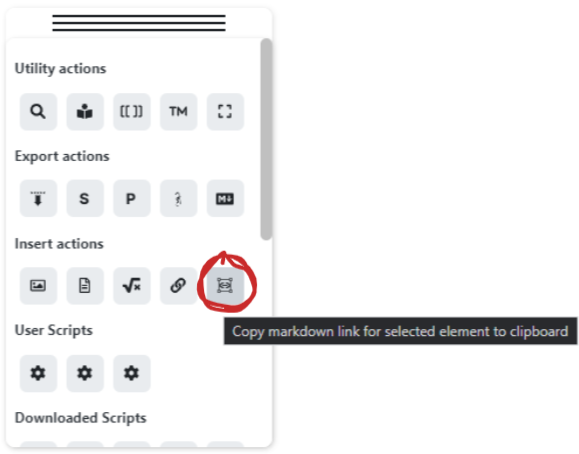
- Linking is supported by a new action on the Obsidian Tools Panel
|
|
|
|
|
|
[Release Notes on GitHub](https://github.com/zsviczian/obsidian-excalidraw-plugin/releases/tag/1.6.17)
|
|
`,
|
|
"1.6.16": `
|
|
<div class="excalidraw-videoWrapper"><div>
|
|
<iframe src="https://www.youtube.com/embed/gMIKXyhS-dM" title="YouTube video player" frameborder="0" allow="accelerometer; autoplay; clipboard-write; encrypted-media; gyroscope; picture-in-picture" allowfullscreen></iframe>
|
|
</div></div>
|
|
|
|
|
|
## Fixed
|
|
- CMD+Drag from the Obsidian File Manager does not work on Mac. You can now use SHIFT+Drag to embed an image or markdown document into a scene. ([#468](https://github.com/zsviczian/obsidian-excalidraw-plugin/issues/468))
|
|
- Excalidraw Compressed JSON is now cut to smaller chunks (64 characters per paragraph, instead of the earlier 1024 characters). This should address search performance issues. ([#484](https://github.com/zsviczian/obsidian-excalidraw-plugin/issues/484))
|
|
|
|
## New Features
|
|
- I added the Obsidian Tools Panel
|
|
- Click the Obsidian button to access the panel.
|
|
- The tools panel contains key plugin commands and user / downloaded Excalidraw scripts.
|
|
- Drag the panel with the handle at the top. Single click on the top to collapse the panel.
|
|
- On Mobile press and hold the drag handle before dragging, to avoid activating the Obsidian slide in menus.
|
|
- On Mobile long touch individual buttons on the panel to access tooltips.
|
|
- Reinstall Excalidraw scripts to get the icons.
|
|
- If you hold down SHIFT while resizing a sticky note, the text size will scale instead of text wrapping. ([Excalidraw tweet](https://twitter.com/aakansha1216/status/1496116528890417155?s=20&t=taXjA6I9Nd0T-C0wYBsG5g))
|
|
- SVG export now includes links ([#4791](https://github.com/excalidraw/excalidraw/pull/4791))
|
|
- Added full screen mode for Obsidian Mobile
|
|
- Release notes
|
|
- disable popup in settings
|
|
- access release notes via the command palette, or the button on the tools panel
|
|
|
|
[Release Notes on GitHub](https://github.com/zsviczian/obsidian-excalidraw-plugin/releases/tag/1.6.16)
|
|
|
|
[](https://ko-fi.com/zsolt)
|
|
`,
|
|
};
|