
4.9 KiB
Contribution Guide
English | 官话 - 简体中文 | 官話 - 繁体中文 | 廣東話
💻 Setting up the Development Environment
This project is built using Vite, please make sure you have Node.js and pnpm installed locally, and it is recommended to use Visual Studio Code for development.
🔧 Developing and Building the Project
Development (Chrome or Edge)
The First Method for Chrome or Edge
Show more
- Run the pnpm command
# Install dependencies
pnpm install

# Create a profile folder for the extension to store the login status
mkdir web-ext-profile

# Run the project
pnpm dev

# After typing this commend, it will automatically open a new Chrome window that opens BiliBili website
pnpm start:chromium
- Every time you change the extension, it will reload, and you can see the changes by refreshing the webpage
The Alternative Method for Chrome or Edge
Show more
- Run the pnpm command
# Install dependencies
pnpm install

# Run the project
pnpm dev
-
Enter
chrome://extensions/(Chrome),edge://extensions/(Edge) in the address bar and press Enter -
Enable
Developer Modeand clickLoad unpacked
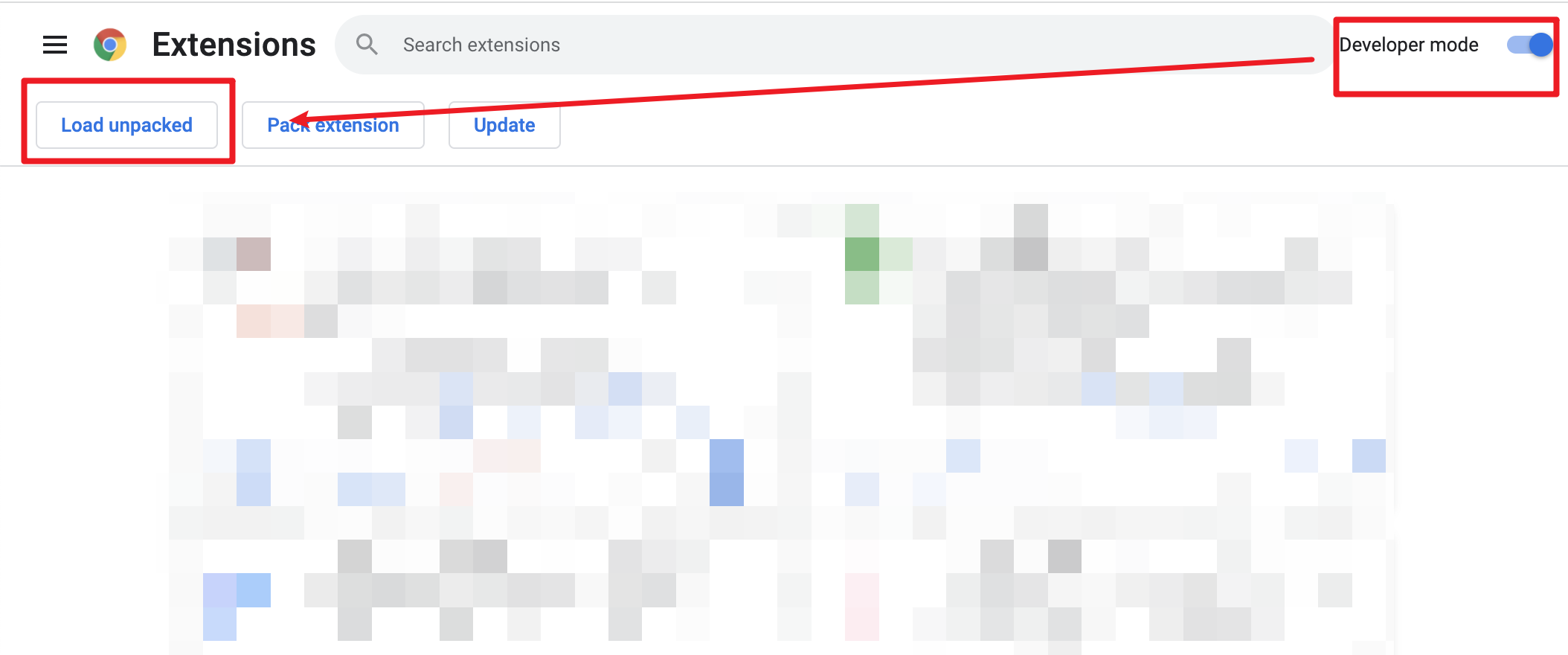
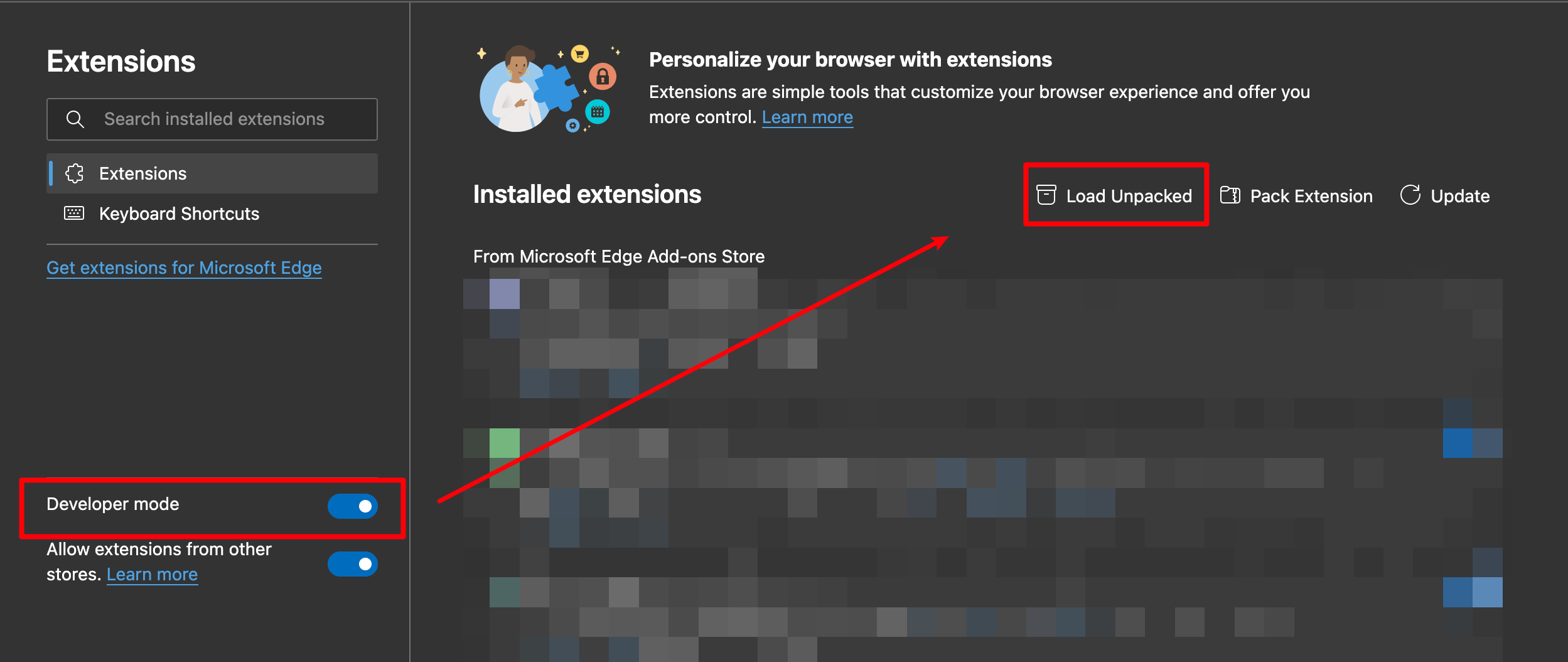
- Load the generated
extension/folder in the browser
After each modification, you need to click the Reload Extensions button and refresh the page to apply the changes.
Building (Chrome or Edge)
To build the extension, run
pnpm build
Then package it to the extension folder
Development (Firefox)
The First Method for Firefox
Show more
- Run the pnpm command
# Install dependencies
pnpm install

# Create a profile folder for the extension to store the login status
mkdir web-ext-profile

# Run the project
pnpm dev

# After typing this commend, it will automatically open a new Firefox window that opens BiliBili website
pnpm start:firefox
- Every time you change the extension, it will reload, and you can see the changes by refreshing the webpage
The Alternative Method for Firefox
Show more
- Run the pnpm command
# Install dependencies
pnpm install

# Run the project
pnpm dev-firefox
- In the browser, enter
about:addons, click onExtensionsand thenDebug Add-ons
- Load the generated
extension-firefox/folder in the browser
Building (Firefox)
To build the extension, run
pnpm build-firefox
Then package it to the extension-firefox folder
🤝 Contribution
About Branches
Permanent Branches
- Main: Use this branch for bug fixes, developing new features, performance improvements, or modifications to internationalization (i18n) files.
Other Temporary Branches
- feat/: This branch is used to submit new features
- doc/: This branch is specifically used for fixing documentation, no functional changes.
- fix/: This branch is specifically used for fixing errors in the dev branch.
Commit Convention
You can also refer to the Angular commit message guidelines
feat: New featurefix: Bug fixdocs: Documentation updatestyle: Changes that do not affect the meaning of the code (white-space, formatting, missing semi-colons, etc)refactor: Code refactoringtest: Add or update testschore: Changes to the build process or toolchainperf: Performance improvementci: Changes to continuous integration/delivery Also welcome to add scope and footer For example:fix(dock): xxxChange descriptionRelated PR: url
I18n
-
When doing translations, if you have a language you are not familiar with, you can use another language that you have translated and point out what language you cannot translate in the pull request.
-
Please MANUALLY MAINTAIN the i18n files!!! Do not use
i18n Allyor other extensions to maintain them. I know you might be confused or might not like this, but usingi18n Allyfor the maintenance will make it uncertain where to place the translations afterward or delete the code comments.