 Hakadao
3d3f57bfc3
Hakadao
3d3f57bfc3
Squashed commit of the following: commit e0d503ef38c5b8d4b19f81368b53b656e6935ff7 Author: Hakadao <a578457889743@gmail.com> Date: Thu Feb 20 16:24:53 2025 +0800 feat(locales): add translation for notifications page drawer option commit 5c4e5aab811c3bf73d2cfc983e646edca66dff55 Author: Hakadao <a578457889743@gmail.com> Date: Thu Feb 20 16:24:32 2025 +0800 chore: udpate commit dd7ff6dfeadd514746e1a10773702387cea3c550 Author: Hakadao <a578457889743@gmail.com> Date: Thu Feb 20 16:13:54 2025 +0800 fix(a-link): disable click event when using modifier key click commit f4801a040b26d6b084168859f2a1e5b9b32ae178 Author: Hakadao <a578457889743@gmail.com> Date: Thu Feb 20 16:06:13 2025 +0800 feat: enhance notifications drawer functionality with custom URL and click handling commit 7e63cd4417572a5455c8dbccc447f8fe37d92c02 Author: Hakadao <a578457889743@gmail.com> Date: Thu Feb 20 15:36:53 2025 +0800 chore: update commit 077c416e1ead6cd9ed249375c6c0c4625b2339ec Author: Hakadao <a578457889743@gmail.com> Date: Thu Feb 20 14:32:28 2025 +0800 fix: add Teleport to NotificationsDrawer for better app integration commit 5e17ed34f68677bfc8423ad3e24ea3cc3afa038e Author: Hakadao <a578457889743@gmail.com> Date: Thu Feb 20 14:26:36 2025 +0800 chore: tweak styles commit 4536347b12ef9e3d0c2ce06c1395ba89fe44fc51 Author: Hakadao <a578457889743@gmail.com> Date: Thu Feb 20 13:52:29 2025 +0800 feat: improve notifications drawer styles commit 022ea89eed4ae5c6953445118dec97acb15cf38e Merge: 17f882e77a513921Author: Hakadao <a578457889743@gmail.com> Date: Thu Feb 20 12:30:04 2025 +0800 Merge branch 'main' into feat/notications-drawer commit 17f882e7cda0b4d74b916592d526f4b1ad5f921d Merge: 4d6154626dd838a8Author: Hakadao <a578457889743@gmail.com> Date: Thu Feb 20 12:18:44 2025 +0800 feat: update notifications drawer style commit 4d6154625af76917aca55970f8c29d0dcd40a416 Author: Hakadao <a578457889743@gmail.com> Date: Wed Feb 19 18:58:24 2025 +0800 feat: notifications drawer
BewlyBewly
English | 官话 - 简体中文 | 官話 - 正體中文 | 廣東話

Just make a few small changes to your Bilibili homepage.
👋 Introduction
Important
BewlyBewly mainly focuses on page adjustments and optimization rather than improving functionally and efficiency.
The dark mode will only be adapted to commonly used pages due to its efficiency and maintenance difficulty, while less frequently used pages will not to be adapted.
Caution
Bewley on the App Store is not uploaded by us and we do not endorse it. Safari is not supported by this project.
Bewley has violated the MIT license used by this project (the original license of this project is not included).
Caution
If you are installing this extension, your browser will probably say that it can read your browser history.
This is because BewlyBewly uses the "tabs" permission, which can also be used to read each tab, allowing it to know the browsing history, but it is not utilized here.
Some browsers will mention the worst-case scenario and the highest risks, ensuring your safety after installation. Additionally, this project is open source, so you can see what exactly what it does.
BewlyBewly is a browser extension for BiliBili that aims to enhance the user experience by redesigning the BiliBili UI. The design is inspired by YouTube, Vision OS, and iOS, resulting in a more visually appealing and user-friendly interface. This project uses the vitesse-webext template for development. Without this template, it may not be possible to develop this project.
⬇️ Installation
Online Installation
Tip
Even in the Edge browser, we strongly recommend you install it in the Chrome web store. In terms of review speed, the Chrome web store is faster than Edge Add-ons.
Additionally, the Chrome Web Store version of BewlyBewly will address and fix critical bugs more quickly.
- Chrome: https://chromewebstore.google.com/detail/bewlybewly/bbbiejemhfihiooipfcjmjmbfdmobobp
- Edge: https://chromewebstore.google.com/detail/bewlybewly/bbbiejemhfihiooipfcjmjmbfdmobobp
- Firefox: https://addons.mozilla.org/en-US/firefox/addon/bewlybewly/
To Firefox users
Warning
When using the Firefox browser, remember to enable all permissions shown in the picture below for normal use of BewlyBewly
Local Installation
CI: Automatically build with the latest code
Releases: Stable version
Edge & Chrome (RECOMMENDED)
Ensure you installed extension.zip .
Opening the edge://extensions page in the Edge or chrome://extensions page in Chrome,
simply drag and drop the downloaded extension.zip file into the browser to complete the installation.
Another installation method for Edge & Chrome
Edge
Ensure you installed extension.zip and decompress this file.
- Type in
edge://extensions/in the address bar and press Enter - Turn on
Developer modethen pressLoad Unpacked
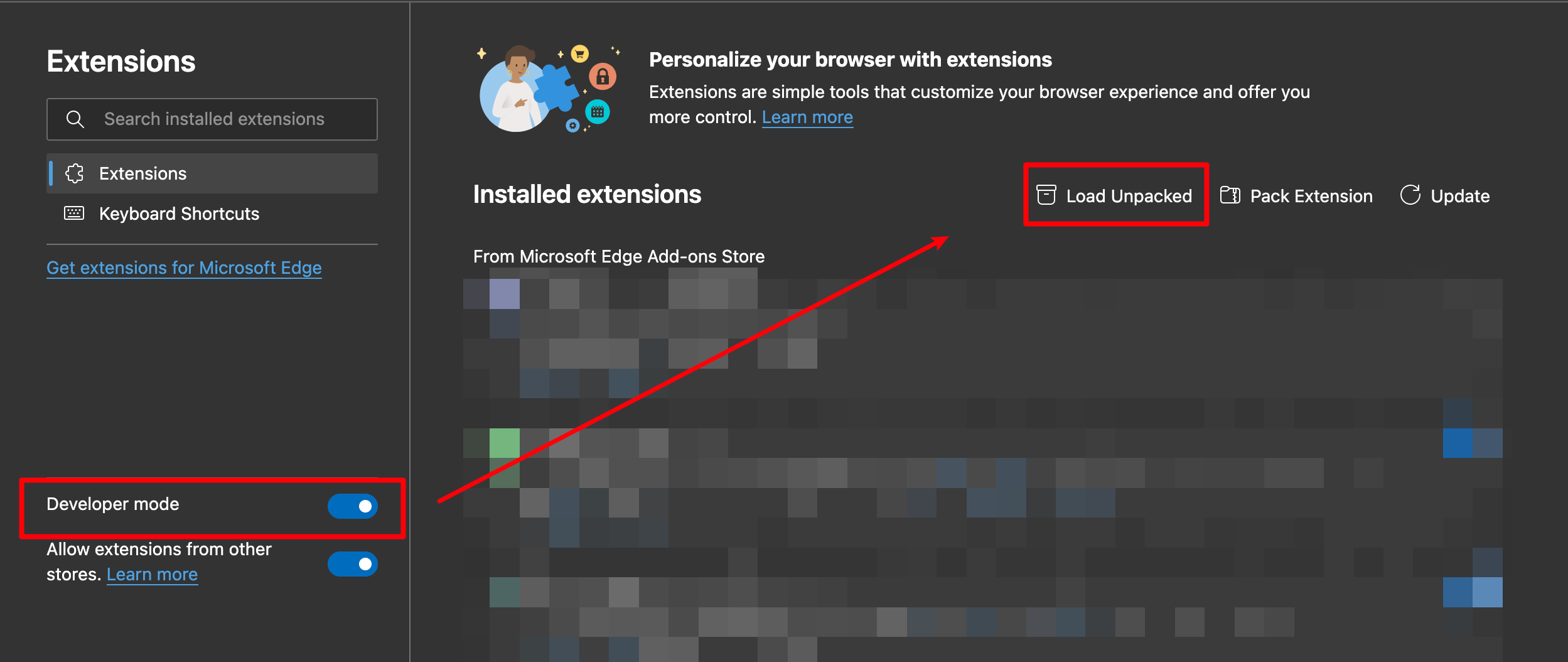
- Load the decompressed extension folder in your browser
Chrome
Ensure you installed extension.zip and decompress this file.
- Type in
chrome://extensions/in the address bar and press Enter - Turn on
Developer modethen pressLoad Unpacked
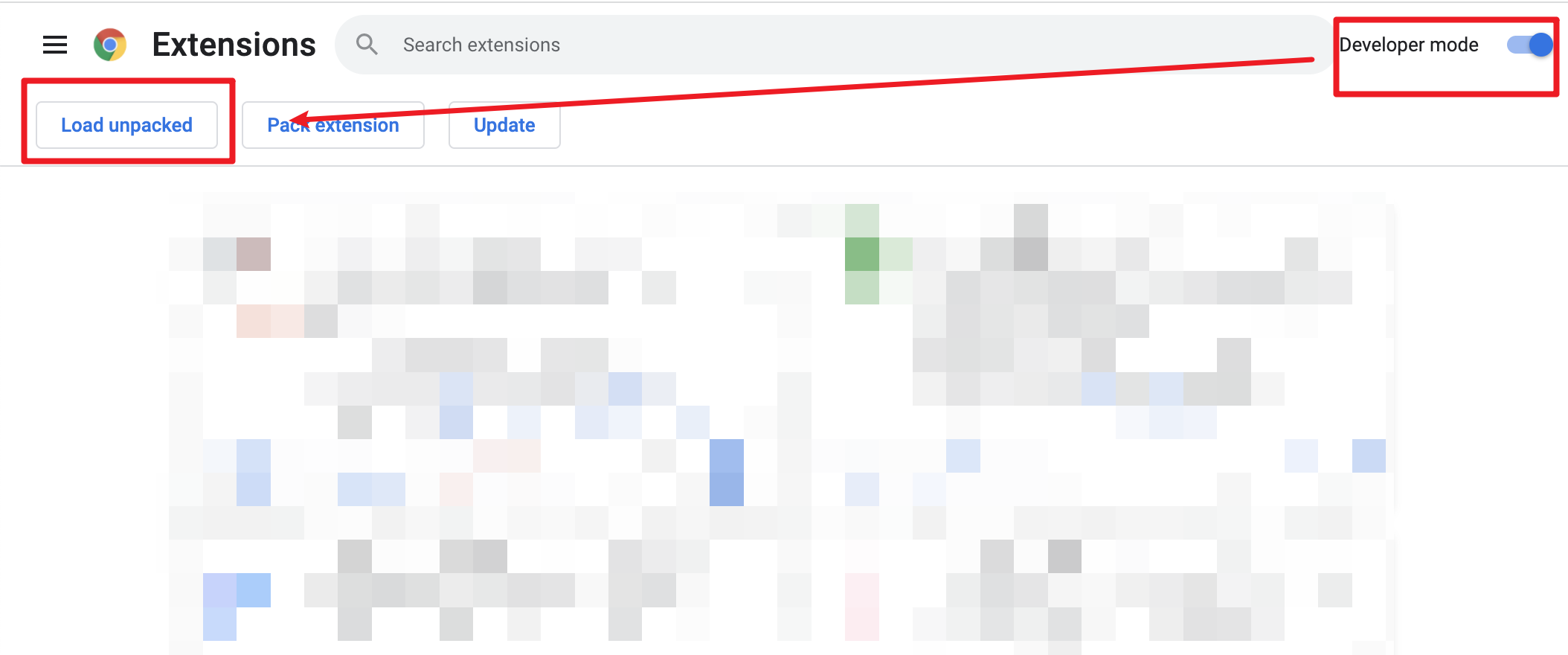
- Load the decompressed extension folder in your browser
🤝 Contribution & Build
See CONTRIBUTING.md
Contributors
❤️ Credits
- vitesse-webext - The template used for this project
- UserScripts/bilibiliHome, bilibili-app-recommend - Reference source for obtaining the access key
- Bilibili-Evolved - Partial implementation of functionalities
- bilibili-API-collect