mirror of
https://github.com/nxtrace/NTrace-core.git
synced 2025-08-12 06:26:39 +00:00
Compare commits
77 Commits
v0.1.5-bet
...
v0.1.11
| Author | SHA1 | Date | |
|---|---|---|---|

|
2084f2c316 | ||
|
|
c9ebf7465a | ||
|
|
f11f9c8234 | ||
|
|
36315c6d9d | ||
|
|
548839f564 | ||
|
|
28c2961490 | ||
|
|
e5fe66b9ab | ||
|
|
aca0ed10b8 | ||
|
|
a7fc2cd5d8 | ||
|
|
a26318ff70 | ||
|
|
251c8aa2e8 | ||
|
|
89f52ca766 | ||
|
|
dfabe225b9 | ||
|
|
97172466ed | ||
|
|
404f0a1c62 | ||
|
|
c59e843495 | ||
|
|
35bc15583e | ||
|
|
ee9111249c | ||
|
|
d7ab206e40 | ||
|
|
6d7eac1e16 | ||
|
|
b8772d4cca | ||
|
|
5c94a19944 | ||
|
|
b7d24d8779 | ||
|
|
f882b87a18 | ||
|
|
9412189a0c | ||
|
|
fbda4fb4ad | ||
|
|
eccc2d1a0b | ||
|
|
31f1947108 | ||
|
|
d864313898 | ||
|
|
cc86712c23 | ||
|
|
668c46cf5a | ||
|
|
8a428c4fb9 | ||
|
|
569cca02d9 | ||
|
|
90e304cf22 | ||
|
|
d6a154deb2 | ||
|
|
e4cacc569e | ||
|
|
4035dd7183 | ||
|
|
1789448d6c | ||
|
|
9df6c2f23c | ||
|
|
a37f31922c | ||
|
|
39917bb732 | ||
|
|
494f2ac819 | ||
|
|
0b09addd17 | ||
|
|
99dffc959c | ||
|
|
c30bcfee11 | ||
|
|
1554565460 | ||
|
|
2a069d7afe | ||
|
|
e6db19f5fd | ||
|
|
5603317fa3 | ||
|
|
3e71926127 | ||
|
|
e8f74c4ad3 | ||
|
|
aad80205c3 | ||
|
|
50cc9858d4 | ||
|
|
27f49f9cd0 | ||
|
|
e4320da08d | ||
|
|
7f16a27580 | ||
|
|
7db77024a3 | ||
|
|
c4ea506c35 | ||
|
|
39e2471845 | ||
|
|
18a9eefec9 | ||
|
|
1b743d1f17 | ||
|
|
3f0b14341a | ||
|
|
2ffd7fdb58 | ||
|
|
8f77050fca | ||
|
|
65652bd4e2 | ||
|
|
4176407a8a | ||
|
|
6bc4abeaf8 | ||
|
|
af0d886a02 | ||
|
|
09fdd2ac37 | ||
|
|
2b9d8176d4 | ||
|
|
ed2f89310f | ||
|
|
bd5a8902d4 | ||
|
|
e2a1bfe8cf | ||
|
|
356b782b3d | ||
|
|
40922ae13a | ||
|
|
8e90795a54 | ||
|
|
bbbb2377e1 |
37
.github/workflows/build.yml
vendored
37
.github/workflows/build.yml
vendored
@@ -14,7 +14,7 @@ jobs:
|
||||
go-version: "1.18"
|
||||
|
||||
- name: Test
|
||||
run: go test -v -coverprofile='coverage.out' -covermode=count ./...
|
||||
run: sudo go test -v -coverprofile='coverage.out' -covermode=count ./...
|
||||
|
||||
Build:
|
||||
needs: test
|
||||
@@ -47,3 +47,38 @@ jobs:
|
||||
dist/nexttrace_freebsd_arm64
|
||||
env:
|
||||
GITHUB_TOKEN: ${{ secrets.GT_Token }}
|
||||
publish-new-formula:
|
||||
# The type of runner that the job will run on
|
||||
runs-on: ubuntu-latest
|
||||
if: startsWith(github.ref, 'refs/tags/v')
|
||||
# Steps represent a sequence of tasks that will be executed as part of the job
|
||||
steps:
|
||||
# Runs a single command using the runners shell
|
||||
- name: config git
|
||||
run: |
|
||||
git config --global user.email "${{ secrets.git_mail }}"
|
||||
git config --global user.name "${{ secrets.git_name }}"
|
||||
- name: Clone repo
|
||||
run: |
|
||||
git clone https://github.com/xgadget-lab/homebrew-nexttrace.git
|
||||
- name: Exec scipt
|
||||
run: |
|
||||
cd homebrew-nexttrace
|
||||
bash genFormula.sh
|
||||
# - name: setup SSH keys and known_hosts
|
||||
# run: |
|
||||
# mkdir -p ~/.ssh
|
||||
# ssh-keyscan github.com >> ~/.ssh/known_hosts
|
||||
# ssh-agent -a $SSH_AUTH_SOCK > /dev/null
|
||||
# ssh-add - <<< "${{ secrets.ID_RSA }}"
|
||||
# env:
|
||||
# SSH_AUTH_SOCK: /tmp/ssh_agent.sock
|
||||
- name: Git Push
|
||||
run: |
|
||||
cd homebrew-nexttrace
|
||||
git commit -am 'Publish a new version with Formula'
|
||||
git remote set-url origin https://${{ secrets.gt_token }}@github.com/xgadget-lab/homebrew-nexttrace.git
|
||||
git push || 1
|
||||
# env:
|
||||
# SSH_AUTH_SOCK: /tmp/ssh_agent.sock
|
||||
- run: echo "🍏 This job's status is ${{ job.status }}."
|
||||
|
||||
45
.github/workflows/publishNewFormula.yml
vendored
Normal file
45
.github/workflows/publishNewFormula.yml
vendored
Normal file
@@ -0,0 +1,45 @@
|
||||
name: Publish New Formula
|
||||
|
||||
# Controls when the action will run. Workflow runs when manually triggered using the UI
|
||||
# or API.
|
||||
on:
|
||||
workflow_dispatch:
|
||||
|
||||
# A workflow run is made up of one or more jobs that can run sequentially or in parallel
|
||||
jobs:
|
||||
# This workflow contains a single job called "greet"
|
||||
publish-new-formula:
|
||||
# The type of runner that the job will run on
|
||||
runs-on: ubuntu-latest
|
||||
|
||||
# Steps represent a sequence of tasks that will be executed as part of the job
|
||||
steps:
|
||||
# Runs a single command using the runners shell
|
||||
- name: config git
|
||||
run: |
|
||||
git config --global user.email "${{ secrets.git_mail }}"
|
||||
git config --global user.name "${{ secrets.git_name }}"
|
||||
- name: Clone repo
|
||||
run: |
|
||||
git clone https://github.com/xgadget-lab/homebrew-nexttrace.git
|
||||
- name: Exec scipt
|
||||
run: |
|
||||
cd homebrew-nexttrace
|
||||
bash genFormula.sh
|
||||
# - name: setup SSH keys and known_hosts
|
||||
# run: |
|
||||
# mkdir -p ~/.ssh
|
||||
# ssh-keyscan github.com >> ~/.ssh/known_hosts
|
||||
# ssh-agent -a $SSH_AUTH_SOCK > /dev/null
|
||||
# ssh-add - <<< "${{ secrets.ID_RSA }}"
|
||||
# env:
|
||||
# SSH_AUTH_SOCK: /tmp/ssh_agent.sock
|
||||
- name: Git Push
|
||||
run: |
|
||||
cd homebrew-nexttrace
|
||||
git commit -am 'Publish a new version with Formula'
|
||||
git remote set-url origin https://${{ secrets.gt_token }}@github.com/xgadget-lab/homebrew-nexttrace.git
|
||||
git push || 1
|
||||
# env:
|
||||
# SSH_AUTH_SOCK: /tmp/ssh_agent.sock
|
||||
- run: echo "🍏 This job's status is ${{ job.status }}."
|
||||
192
README.md
192
README.md
@@ -4,64 +4,61 @@
|
||||
|
||||
</div>
|
||||
|
||||
# NextTrace
|
||||
## NextTrace Lite
|
||||
|
||||
一款开源的可视化路由跟踪工具,使用 Golang 开发。
|
||||
Document Language: English | [简体中文](README_zh_CN.md)
|
||||
|
||||
NextTrace 只是一个实验性项目,不推荐用于生产环境下。对于路由跟踪工具,我们依旧更加推荐 WorstTrace & Besttrace。
|
||||
An open source visual routing tool that pursues light weight, developed using Golang.
|
||||
|
||||
NextTrace has a total of 2 versions, the Lite version focusing on lightweight and the [Enhanced version](#nexttrace-enhanced) which is more enthusiast-oriented.
|
||||
|
||||
## How To Use
|
||||
|
||||
### Automated Install
|
||||
### Automated Installation
|
||||
|
||||
```bash
|
||||
# Note: This Script Only Supports Linux/macOS, Other Unix-Like Systems are UNAVAILABLE
|
||||
curl -Ls https://raw.githubusercontent.com/xgadget-lab/nexttrace/main/nt_install.sh -O && sudo bash nt_install.sh
|
||||
# Linux one-click install script
|
||||
bash <(curl -Ls https://raw.githubusercontent.com/xgadget-lab/nexttrace/main/nt_install.sh)
|
||||
|
||||
# macOS brew install command
|
||||
brew tap xgadget-lab/nexttrace && brew install nexttrace
|
||||
```
|
||||
|
||||
```bash
|
||||
# GHPROXY镜像(在连接raw.githubusercontent.com网络不畅时使用)
|
||||
curl -Ls https://ghproxy.com/https://raw.githubusercontent.com/xgadget-lab/nexttrace/main/nt_install.sh -O && sudo bash nt_install.sh
|
||||
```
|
||||
|
||||
- `Release`里面为很多系统以及不同架构提供了编译好的二进制可执行文件,如果没有可以自行编译。
|
||||
- 一些本项目的必要依赖在`Windows`上`Golang`底层实现不完全,所以目前`NextTrace`在`Windows`平台不可用。
|
||||
|
||||
### Fast Test
|
||||
|
||||
此脚本旨在快速测试服务器的到中国内地的线路,建议新手或者没有自定义`NextTrace`功能需求的用户使用。
|
||||
|
||||
```bash
|
||||
curl -Ls https://raw.githubusercontent.com/xgadget-lab/nexttrace/main/quicklytest.sh -O && sudo bash quicklytest.sh
|
||||
```
|
||||
|
||||
```bash
|
||||
# GHPROXY镜像(在连接raw.githubusercontent.com网络不畅时使用)
|
||||
curl -Ls https://ghproxy.com/https://raw.githubusercontent.com/xgadget-lab/nexttrace/main/quicklytest.sh -O && sudo bash quicklytest.sh
|
||||
```
|
||||
- `Release` provides compiled executables for many systems and architectures, if not, you can compile it yourself.
|
||||
- Some of the necessary dependencies of this project are not fully implemented in `Golang` on `Windows`, so currently `NextTrace` is not available on `Windows` platform.
|
||||
|
||||
### Get Started
|
||||
|
||||
`NextTrace`默认使用`ICMP`协议发起`TraceRoute`请求,该协议同时支持`IPv4`和`IPv6`
|
||||
`NextTrace` uses the `ICMP` protocol to perform TraceRoute requests by default, which supports both `IPv4` and `IPv6`
|
||||
|
||||
```bash
|
||||
# IPv4 ICMP Trace
|
||||
nexttrace 1.0.0.1
|
||||
|
||||
# 表格打印(一次性输出全部跳数,需等待20-40秒)
|
||||
# Form printing (output all hops at one time, wait 20-40 seconds)
|
||||
nexttrace -table 1.0.0.1
|
||||
|
||||
# IPv6 ICMP Trace
|
||||
nexttrace 2606:4700:4700::1111
|
||||
```
|
||||
|
||||
`NextTrace`也可以使用`TCP`和`UDP`协议发起`Traceroute`请求,不过目前只支持`IPv4`
|
||||
`NextTrace` now supports quick testing, and friends who have a one-time backhaul routing test requirement can use it
|
||||
|
||||
```bash
|
||||
# IPv4 ICMP Fast Test (Beijing + Shanghai + Guangzhou + Hangzhou) in China Telecom / Unicom / Mobile / Education Network
|
||||
nexttrace -f
|
||||
|
||||
# You can also use TCP SYN for testing
|
||||
nexttrace -f -T
|
||||
```
|
||||
|
||||
`NextTrace` can also use `TCP` and `UDP` protocols to perform `Traceroute` requests, but these protocols only supports `IPv4` now
|
||||
|
||||
```bash
|
||||
# TCP SYN Trace
|
||||
nexttrace -T www.bing.com
|
||||
|
||||
# 可以自行指定端口[此处为443],默认80端口
|
||||
# You can specify the port by yourself [here is 443], the default port is 80
|
||||
nexttrace -T -p 443 1.0.0.1
|
||||
|
||||
# UDP Trace
|
||||
@@ -70,58 +67,61 @@ nexttrace -U 1.0.0.1
|
||||
nexttrace -U -p 53 1.0.0.1
|
||||
```
|
||||
|
||||
`NextTrace`也同样支持一些进阶功能,如 IP 反向解析、并发数控制、模式切换等
|
||||
`NextTrace` also supports some advanced functions, such as ttl control, concurrent probe packet count control, mode switching, etc.
|
||||
|
||||
```bash
|
||||
# 每一跳发送2个探测包
|
||||
# Send 2 probe packets per hop
|
||||
nexttrace -q 2 www.hkix.net
|
||||
|
||||
# 无并发,每次只发送一个探测包
|
||||
# No concurrent probe packets, only one probe packet is sent at a time
|
||||
nexttrace -r 1 www.hkix.net
|
||||
|
||||
# 打开IP反向解析功能,在IPv6的骨干网定位辅助有较大帮助
|
||||
nexttrace -rdns www.bbix.net
|
||||
# Start Trace with TTL of 5, end at TTL of 10
|
||||
nexttrace -b 5 -m 10 www.decix.net
|
||||
|
||||
# 特色功能:打印Route-Path图
|
||||
# Route-Path图示例:
|
||||
# AS6453 塔塔通信「Singapore『Singapore』」
|
||||
# Turn off the IP reverse parsing function
|
||||
nexttrace -n www.bbix.net
|
||||
|
||||
# Feature: print Route-Path diagram
|
||||
# Route-Path diagram example:
|
||||
# AS6453 Tata Communication「Singapore『Singapore』」
|
||||
# ╭╯
|
||||
# ╰AS9299 Philippine Long Distance Telephone Co.「Philippines『Metro Manila』」
|
||||
# ╭╯
|
||||
# ╰AS36776 Five9 Inc.「Philippines『Metro Manila』」
|
||||
# ╭╯
|
||||
# ╰AS37963 阿里云「ALIDNS.COM『ALIDNS.COM』」
|
||||
# ╰AS37963 Aliyun「ALIDNS.COM『ALIDNS.COM』」
|
||||
nexttrace -report www.time.com.my
|
||||
```
|
||||
|
||||
`NextTrace`支持用户自主选择 IP 数据库(目前支持:`LeoMoeAPI`, `IP.SB`, `IPInfo`, `IPInsight`, `IPAPI.com`)
|
||||
`NextTrace` supports users to select their own IP API (currently supports: `LeoMoeAPI`, `IP.SB`, `IPInfo`, `IPInsight`, `IPAPI.com`)
|
||||
|
||||
```bash
|
||||
# 可以自行指定IP数据库[此处为IP.SB],不指定则默认为LeoMoeAPI
|
||||
# You can specify the IP database by yourself [IP.SB here], if not specified, LeoMoeAPI will be used
|
||||
nexttrace -d IP.SB
|
||||
## 特别的:其中 ipinfo API 需要从ipinfo自行购买服务,如有需要可以clone本项目添加其提供的token自行编译
|
||||
## TOKEN填写路径:ipgeo/tokens.go
|
||||
## 另外:由于IP.SB被滥用比较严重,会经常出现无法查询的问题,请知悉。
|
||||
## IPAPI.com限制调用较为严格,如有查询不到的情况,请几分钟后再试。
|
||||
## Note that the ipinfo API needs users to purchase services from ipinfo. If necessary, you can clone this project, add the token provided by ipinfo and compile it yourself
|
||||
## Fill the token to: ipgeo/tokens.go
|
||||
## Please be aware: Due to the serious abuse of IP.SB, you will often be not able to query IP data from this source
|
||||
## IPAPI.com has a stricter restiction on API calls, if you can't query IP data from this source, please try again in a few minutes.
|
||||
```
|
||||
|
||||
`NextTrace`支持参数混合使用
|
||||
`NextTrace` supports mixed parameters
|
||||
|
||||
```bash
|
||||
Example:
|
||||
nexttrace -d IPInsight -m 20 -p 443 -q 5 -r 20 -rdns 1.1.1.1
|
||||
nexttrace -T -q 2 -r 1 -rdns -table -report 2001:4860:4860::8888
|
||||
nexttrace -T -q 2 -r 1 -table -report 2001:4860:4860::8888
|
||||
```
|
||||
|
||||
### IP 数据库
|
||||
### IP Database
|
||||
|
||||
目前使用的 IP 数据库默认为我们自己搭建的 API 服务,如果后期遇到滥用,我们可能会选择关闭。
|
||||
The IP database is set to our own API service by default. If we encounter abuse, we may choose to close it.
|
||||
|
||||
我们也会在后期开放服务端源代码,您也可以根据该项目的源码自行搭建属于您的 API 服务器。
|
||||
We will also open-source the source code of the server in the near future, therefore you can also build your own API server according to the source code of the project by then.
|
||||
|
||||
NextTrace 所有的的 IP 地理位置`API DEMO`可以参考[这里](https://github.com/xgadget-lab/nexttrace/blob/main/ipgeo/)
|
||||
All NextTrace IP geolocation `API DEMO` can refer to [here](https://github.com/xgadget-lab/nexttrace/blob/main/ipgeo/)
|
||||
|
||||
### 全部用法详见 Usage 菜单
|
||||
### For full usage list, please refer to the usage menu
|
||||
|
||||
```shell
|
||||
Usage of nexttrace:
|
||||
@@ -129,41 +129,55 @@ Usage of nexttrace:
|
||||
Options:
|
||||
-T Use TCP SYN for tracerouting (default port is 80)
|
||||
-U Use UDP Package for tracerouting (default port is 53 in UDP)
|
||||
-V Check Version
|
||||
-V Print Version
|
||||
-b int
|
||||
Set The Begin TTL (default 1)
|
||||
-d string
|
||||
Choose IP Geograph Data Provider [LeoMoeAPI, IP.SB, IPInfo, IPInsight, IPAPI.com] (default "LeoMoeAPI")
|
||||
-f One-Key Fast Traceroute
|
||||
-m int
|
||||
Set the max number of hops (max TTL to be reached). (default 30)
|
||||
-n Disable IP Reverse DNS lookup
|
||||
-p int
|
||||
Set SYN Traceroute Port (default 80)
|
||||
-q int
|
||||
Set the number of probes per each hop. (default 3)
|
||||
-r int
|
||||
Set ParallelRequests number. It should be 1 when there is a multi-routing. (default 18)
|
||||
-rdns
|
||||
Set whether rDNS will be display
|
||||
-table
|
||||
Output trace results as table
|
||||
-report
|
||||
Route Path
|
||||
|
||||
-table
|
||||
Output trace results as table
|
||||
```
|
||||
|
||||
## 项目截图
|
||||
## Project screenshot
|
||||
|
||||
<img src=asset/screenshot.png alt="NextTrace Screenshot" width="683" height="688" />
|
||||

|
||||
|
||||
## FAQ 常见问题
|
||||
## NextTrace Enhanced
|
||||
|
||||
如果你在安装或者使用的时候遇到了问题,我们建议你不要把新建一个 `issue` 作为首选项
|
||||
`NextTrace Enhanced` is an enhanced version for enthusiasts, `Enhanced` provides trace route calls in the form of Web API and a simple Looking Glass webpage with built-in visualization.
|
||||
|
||||
以下是我们推荐的排错流程:
|
||||
The `Enhanced` version supports many functions that the `lite` version does not have, such as the ability to customize the timeout period, and the ability to specify TTL as the starting point for route tracking, etc. For ordinary users, the `lite` version is usually enough.
|
||||
|
||||
1. 查看是否为常见问题 -> [前往 Github Wiki](https://github.com/xgadget-lab/nexttrace/wiki/FAQ---%E5%B8%B8%E8%A7%81%E9%97%AE%E9%A2%98%E8%A7%A3%E7%AD%94)
|
||||
2. 不会软件的参数使用 -> [前往 Github Discussions](https://github.com/xgadget-lab/nexttrace/discussions)
|
||||
3. 疑似 BUG、或者功能建议 -> [前往 Github Issues](https://github.com/xgadget-lab/nexttrace/issues)
|
||||
https://github.com/OwO-Network/nexttrace-enhanced
|
||||
|
||||
## Thanks
|
||||
## FAQ Frequently Asked Questions
|
||||
|
||||
If you encounter problems while installing or using it, we do not recommend you to choose creating an `issue` as a preference
|
||||
|
||||
Here is our recommended troubleshooting process:
|
||||
|
||||
1. Check if it is already in FAQ -> [Go to Github Wiki](https://github.com/xgadget-lab/nexttrace/wiki/FAQ---%E5%B8%B8%E8%A7%81%E9%97%AE%E9%A2%98%E8%A7%A3%E7%AD%94)
|
||||
2. Suspected bug or feature suggestion -> [Go to Github Issues](https://github.com/xgadget-lab/nexttrace/issues)
|
||||
|
||||
## JetBrain Support
|
||||
|
||||
### This Project uses [JetBrain Open-Source Project License](https://jb.gg/OpenSourceSupport). We Proudly Develop By Goland.
|
||||
|
||||

|
||||
|
||||
## Credits
|
||||
|
||||
[Vincent Young](https://github.com/missuo) (i@yyt.moe)
|
||||
|
||||
@@ -181,33 +195,41 @@ Options:
|
||||
|
||||
#### China
|
||||
|
||||
| ISP | 类型 | 数据源 | 占比 |
|
||||
| :------------: | :----: | :-------: | :--: |
|
||||
| 电信/联通/移动 | 骨干网 | NextTrace | 10% |
|
||||
| 电信/联通/移动 | 城域网 | 埃文科技 | 90% |
|
||||
| ISP | Type | Data Source | Proportion |
|
||||
|:---------------------------:|:--------:|:--------------------:|:----------:|
|
||||
| China Telecom/Unicom/Mobile | Backbone | Internet Enthusiasts | 10% |
|
||||
| China Telecom/Unicom/Mobile | Local | Avon Technology | 90% |
|
||||
|
||||
#### WorldWide
|
||||
|
||||
| ISP | 类型 | 数据源 | 占比 |
|
||||
| :-----: | :----: | :-------: | :--: |
|
||||
| Tier-01 | 骨干网 | IPInfo | 2% |
|
||||
| Tier-01 | 骨干网 | 埃文科技 | 3% |
|
||||
| Tier-01 | 骨干网 | IPInSight | 5% |
|
||||
| Tier-01 | 城域网 | IPInSight | 90% |
|
||||
##### Tier 1
|
||||
|
||||
| ISP | 类型 | 数据源 | 占比 |
|
||||
| :----: | :----: | :-------: | :--: |
|
||||
| Others | 骨干网 | IPInSight | 5% |
|
||||
| Others | 城域网 | IPInSight | 95% |
|
||||
| ISP | Type | Data Source | Proportion |
|
||||
|:-------:|:--------:|:---------------:|:----------:|
|
||||
| Tier 1 | Backbone | IPInfo | 2% |
|
||||
| Tier 1 | Backbone | Avon Technology | 3% |
|
||||
| Tier 1 | Backbone | IPInSight | 5% |
|
||||
| Tier 1 | Local | IPInSight | 90% |
|
||||
|
||||
##### General
|
||||
|
||||
| ISP | Type | Data Source | Proportion |
|
||||
|:------:|:--------:|:-----------:|:----------:|
|
||||
| General | Backbone | IPInSight | 5% |
|
||||
| General | Local | IPInSight | 95% |
|
||||
|
||||
### IPv6 Database
|
||||
|
||||
| ISP | 类型 | 数据源 | 占比 |
|
||||
| :-: | :--: | :--------------: | :--: |
|
||||
| All | 全部 | IP2Location Lite | 100% |
|
||||
| ISP | Type | Data Source | Proportion |
|
||||
|:---:|:----:|:----------------:|:----------:|
|
||||
| All | All | IP2Location Lite | 100% |
|
||||
|
||||
This product includes IP2Location LITE data available from <a href="https://lite.ip2location.com">https://lite.ip2location.com</a>.
|
||||
|
||||
### Others
|
||||
|
||||
其他第三方 API 尽管集成在本项目内,但是具体的 TOS 以及 AUP,请详见第三方 API 官网。如遇到 IP 数据错误,也请直接联系他们纠错。
|
||||
Although other third-party APIs are integrated in this project, please refer to the official website of the third-party APIs for specific TOS and AUP. If you encounter IP data errors, please contact them directly to correct them.
|
||||
|
||||
## Star History
|
||||
|
||||
[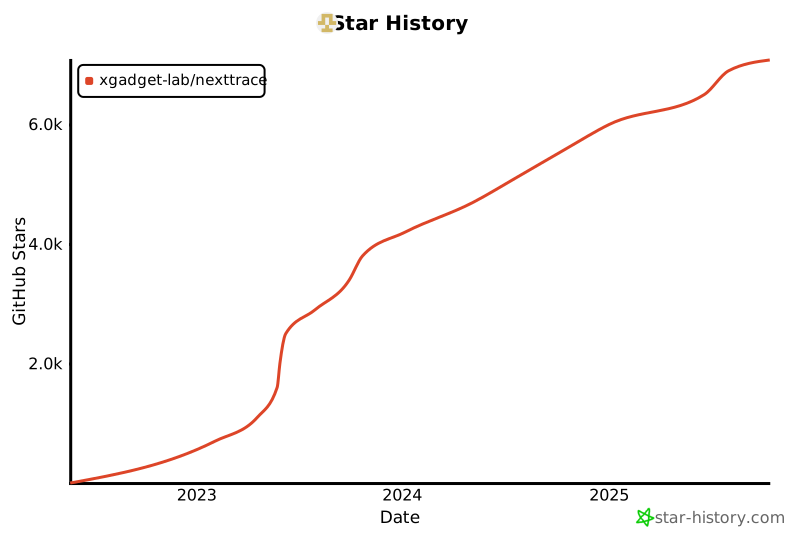](https://star-history.com/#xgadget-lab/nexttrace&Date)
|
||||
|
||||
230
README_zh_CN.md
Normal file
230
README_zh_CN.md
Normal file
@@ -0,0 +1,230 @@
|
||||
<div align="center">
|
||||
|
||||
<img src="asset/logo.png" height="200px" alt="NextTrace Logo"/>
|
||||
|
||||
</div>
|
||||
|
||||
## NextTrace Lite
|
||||
|
||||
一款追求轻量的开源可视化路由跟踪工具,使用 Golang 开发。
|
||||
|
||||
NextTrace 一共有2个版本,专注于轻量的 Lite 版本以及更面向发烧友的 [Enhanced 版本](#nexttrace-enhanced)。
|
||||
|
||||
## How To Use
|
||||
|
||||
### Automated Install
|
||||
|
||||
```bash
|
||||
# Linux 一键安装脚本
|
||||
bash <(curl -Ls https://raw.githubusercontent.com/xgadget-lab/nexttrace/main/nt_install.sh)
|
||||
|
||||
# GHPROXY 镜像(国内使用)
|
||||
bash <(curl -Ls https://ghproxy.com/https://raw.githubusercontent.com/xgadget-lab/nexttrace/main/nt_install.sh)
|
||||
|
||||
# macOS brew 安装命令
|
||||
brew tap xgadget-lab/nexttrace && brew install nexttrace
|
||||
```
|
||||
|
||||
- `Release`里面为很多系统以及不同架构提供了编译好的二进制可执行文件,如果没有可以自行编译。
|
||||
- 一些本项目的必要依赖在`Windows`上`Golang`底层实现不完全,所以目前`NextTrace`在`Windows`平台不可用。
|
||||
|
||||
### Get Started
|
||||
|
||||
`NextTrace` 默认使用`ICMP`协议发起`TraceRoute`请求,该协议同时支持`IPv4`和`IPv6`
|
||||
|
||||
```bash
|
||||
# IPv4 ICMP Trace
|
||||
nexttrace 1.0.0.1
|
||||
|
||||
# 表格打印(一次性输出全部跳数,需等待20-40秒)
|
||||
nexttrace -table 1.0.0.1
|
||||
|
||||
# IPv6 ICMP Trace
|
||||
nexttrace 2606:4700:4700::1111
|
||||
```
|
||||
|
||||
`NextTrace` 现已经支持快速测试,有一次性测试回程路由需求的朋友可以使用
|
||||
```bash
|
||||
# 北上广(电信+联通+移动+教育网)IPv4 ICMP 快速测试
|
||||
nexttrace -f
|
||||
|
||||
# 也可以使用 TCP SYN 而非 ICMP 进行测试
|
||||
nexttrace -f -T
|
||||
```
|
||||
|
||||
`NextTrace` 也可以使用`TCP`和`UDP`协议发起`Traceroute`请求,不过目前只支持`IPv4`
|
||||
|
||||
```bash
|
||||
# TCP SYN Trace
|
||||
nexttrace -T www.bing.com
|
||||
|
||||
# 可以自行指定端口[此处为443],默认80端口
|
||||
nexttrace -T -p 443 1.0.0.1
|
||||
|
||||
# UDP Trace
|
||||
nexttrace -U 1.0.0.1
|
||||
|
||||
nexttrace -U -p 53 1.0.0.1
|
||||
```
|
||||
|
||||
`NextTrace`也同样支持一些进阶功能,如 TTL 控制、并发数控制、模式切换等
|
||||
|
||||
```bash
|
||||
# 每一跳发送2个探测包
|
||||
nexttrace -q 2 www.hkix.net
|
||||
|
||||
# 无并发,每次只发送一个探测包
|
||||
nexttrace -r 1 www.hkix.net
|
||||
|
||||
# 从TTL为5开始发送探测包,直到TTL为10结束
|
||||
nexttrace -b 5 -m 10 www.decix.net
|
||||
|
||||
# 关闭IP反向解析功能
|
||||
nexttrace -n www.bbix.net
|
||||
|
||||
# 特色功能:打印Route-Path图
|
||||
# Route-Path图示例:
|
||||
# AS6453 塔塔通信「Singapore『Singapore』」
|
||||
# ╭╯
|
||||
# ╰AS9299 Philippine Long Distance Telephone Co.「Philippines『Metro Manila』」
|
||||
# ╭╯
|
||||
# ╰AS36776 Five9 Inc.「Philippines『Metro Manila』」
|
||||
# ╭╯
|
||||
# ╰AS37963 阿里云「ALIDNS.COM『ALIDNS.COM』」
|
||||
nexttrace -report www.time.com.my
|
||||
```
|
||||
|
||||
`NextTrace`支持用户自主选择 IP 数据库(目前支持:`LeoMoeAPI`, `IP.SB`, `IPInfo`, `IPInsight`, `IPAPI.com`)
|
||||
|
||||
```bash
|
||||
# 可以自行指定IP数据库[此处为IP.SB],不指定则默认为LeoMoeAPI
|
||||
nexttrace -d IP.SB
|
||||
## 特别的:其中 ipinfo API 需要从ipinfo自行购买服务,如有需要可以clone本项目添加其提供的token自行编译
|
||||
## TOKEN填写路径:ipgeo/tokens.go
|
||||
## 另外:由于IP.SB被滥用比较严重,会经常出现无法查询的问题,请知悉。
|
||||
## IPAPI.com限制调用较为严格,如有查询不到的情况,请几分钟后再试。
|
||||
```
|
||||
|
||||
`NextTrace`支持参数混合使用
|
||||
|
||||
```bash
|
||||
Example:
|
||||
nexttrace -d IPInsight -m 20 -p 443 -q 5 -r 20 -rdns 1.1.1.1
|
||||
nexttrace -T -q 2 -r 1 -table -report 2001:4860:4860::8888
|
||||
```
|
||||
|
||||
### IP 数据库
|
||||
|
||||
目前使用的 IP 数据库默认为我们自己搭建的 API 服务,如果后期遇到滥用,我们可能会选择关闭。
|
||||
|
||||
我们也会在后期开放服务端源代码,您也可以根据该项目的源码自行搭建属于您的 API 服务器。
|
||||
|
||||
NextTrace 所有的的 IP 地理位置`API DEMO`可以参考[这里](https://github.com/xgadget-lab/nexttrace/blob/main/ipgeo/)
|
||||
|
||||
### 全部用法详见 Usage 菜单
|
||||
|
||||
```shell
|
||||
Usage of nexttrace:
|
||||
'nexttrace [options] <hostname>' or 'nexttrace <hostname> [option...]'
|
||||
Options:
|
||||
-T Use TCP SYN for tracerouting (default port is 80)
|
||||
-U Use UDP Package for tracerouting (default port is 53 in UDP)
|
||||
-V Print Version
|
||||
-b int
|
||||
Set The Begin TTL (default 1)
|
||||
-d string
|
||||
Choose IP Geograph Data Provider [LeoMoeAPI, IP.SB, IPInfo, IPInsight, IPAPI.com] (default "LeoMoeAPI")
|
||||
-f One-Key Fast Traceroute
|
||||
-m int
|
||||
Set the max number of hops (max TTL to be reached). (default 30)
|
||||
-n Disable IP Reverse DNS lookup
|
||||
-p int
|
||||
Set SYN Traceroute Port (default 80)
|
||||
-q int
|
||||
Set the number of probes per each hop. (default 3)
|
||||
-r int
|
||||
Set ParallelRequests number. It should be 1 when there is a multi-routing. (default 18)
|
||||
-report
|
||||
Route Path
|
||||
-table
|
||||
Output trace results as table
|
||||
|
||||
```
|
||||
|
||||
## 项目截图
|
||||
|
||||

|
||||
|
||||
## NextTrace Enhanced
|
||||
|
||||
`NextTrace Enhanced` 是面向发烧友的增强版,`Enhanced`提供Web API形式的路由跟踪调用,以及一个简单的自带可视化的Looking Glass网页。
|
||||
|
||||
`Enhanced` 版本支持很多`lite`版本没有的功能,如能够自定义设置超时时间,也能指定TTL作为起点进行路由跟踪等,对于普通用户来说,通常`lite`版本已经足够完成大部分需要。
|
||||
|
||||
https://github.com/OwO-Network/nexttrace-enhanced
|
||||
|
||||
## FAQ 常见问题
|
||||
|
||||
如果你在安装或者使用的时候遇到了问题,我们建议你不要把新建一个 `issue` 作为首选项
|
||||
|
||||
以下是我们推荐的排错流程:
|
||||
|
||||
1. 查看是否为常见问题 -> [前往 Github Wiki](https://github.com/xgadget-lab/nexttrace/wiki/FAQ---%E5%B8%B8%E8%A7%81%E9%97%AE%E9%A2%98%E8%A7%A3%E7%AD%94)
|
||||
2. 疑似 BUG、或者功能建议 -> [前往 Github Issues](https://github.com/xgadget-lab/nexttrace/issues)
|
||||
|
||||
## Thanks
|
||||
|
||||
[Vincent Young](https://github.com/missuo) (i@yyt.moe)
|
||||
|
||||
[Sam Sam](https://github.com/samleong123) (samsam123@samsam123.name.my)
|
||||
|
||||
[tsosunchia](https://github.com/tsosunchia)
|
||||
|
||||
[waiting4new](https://github.com/waiting4new)
|
||||
|
||||
[FFEE_CO](https://github.com/fkx4-p)
|
||||
|
||||
## IP Database Copyright
|
||||
|
||||
### IPv4 Database
|
||||
|
||||
#### China
|
||||
|
||||
| ISP | 类型 | 数据源 | 占比 |
|
||||
| :------------: | :----: | :-------: | :--: |
|
||||
| 电信/联通/移动 | 骨干网 | 网络爱好者 | 10% |
|
||||
| 电信/联通/移动 | 城域网 | 埃文科技 | 90% |
|
||||
|
||||
|
||||
- 参与骨干网维护的朋友都是网络爱好者群体,尽管我们多名志愿者通过自己的网络进行了大量的勘测,但是由于信息不足,依旧存在很多错误。
|
||||
- 对于更高精度的朋友,我们依旧强烈推荐IPIP.NET,他们开发的Besttrace是目前质量最好的路由可视化软件,我们多数爱好者能有今天这样的骨干网初步认知都是归功于他们,在此特表感谢。
|
||||
|
||||
#### WorldWide
|
||||
|
||||
##### Tier 01
|
||||
|
||||
| ISP | 类型 | 数据源 | 占比 |
|
||||
| :-----: | :----: | :-------: | :--: |
|
||||
| Tier-01 | 骨干网 | IPInfo | 2% |
|
||||
| Tier-01 | 骨干网 | 埃文科技 | 3% |
|
||||
| Tier-01 | 骨干网 | IPInSight | 5% |
|
||||
| Tier-01 | 城域网 | IPInSight | 90% |
|
||||
|
||||
##### Other ISP
|
||||
|
||||
| ISP | 类型 | 数据源 | 占比 |
|
||||
| :----: | :----: | :-------: | :--: |
|
||||
| Others | 骨干网 | IPInSight | 5% |
|
||||
| Others | 城域网 | IPInSight | 95% |
|
||||
|
||||
### IPv6 Database
|
||||
|
||||
| ISP | 类型 | 数据源 | 占比 |
|
||||
| :-: | :--: | :--------------: | :--: |
|
||||
| All | 全部 | IP2Location Lite | 100% |
|
||||
|
||||
This product includes IP2Location LITE data available from <a href="https://lite.ip2location.com">https://lite.ip2location.com</a>.
|
||||
|
||||
### Others
|
||||
|
||||
其他第三方 API 尽管集成在本项目内,但是具体的 TOS 以及 AUP,请详见第三方 API 官网。如遇到 IP 数据错误,也请直接联系他们纠错。
|
||||
1
_config.yml
Normal file
1
_config.yml
Normal file
@@ -0,0 +1 @@
|
||||
theme: jekyll-theme-cayman
|
||||

Binary file not shown.
|
Before Width: | Height: | Size: 907 KiB After Width: | Height: | Size: 1.3 MiB |
@@ -1,31 +0,0 @@
|
||||
package config
|
||||
|
||||
import "os"
|
||||
|
||||
type tracerConfig struct {
|
||||
Token `yaml:"Token"`
|
||||
Preference `yaml:"Preference"`
|
||||
}
|
||||
|
||||
type Token struct {
|
||||
LeoMoeAPI string `yaml:"LeoMoeAPI"`
|
||||
IPInfo string `yaml:"IPInfo"`
|
||||
}
|
||||
|
||||
type Preference struct {
|
||||
AlwaysRoutePath bool `yaml:"AlwaysRoutePath"`
|
||||
}
|
||||
|
||||
type configPath func() (string, error)
|
||||
|
||||
func configFromRunDir() (string, error) {
|
||||
return "./", nil
|
||||
}
|
||||
|
||||
func configFromUserHomeDir() (string, error) {
|
||||
dir, err := os.UserHomeDir()
|
||||
if err != nil {
|
||||
return "", err
|
||||
}
|
||||
return dir + "/.nexttrace/", nil
|
||||
}
|
||||
@@ -1,18 +0,0 @@
|
||||
package config
|
||||
|
||||
import (
|
||||
"testing"
|
||||
"log"
|
||||
)
|
||||
|
||||
func TestReadConfig(t *testing.T) {
|
||||
if res, err := Read(); err != nil {
|
||||
log.Println(err)
|
||||
} else {
|
||||
log.Println(res)
|
||||
}
|
||||
}
|
||||
|
||||
func TestGenerateConfig(t *testing.T) {
|
||||
Generate()
|
||||
}
|
||||
@@ -1,94 +0,0 @@
|
||||
package config
|
||||
|
||||
import (
|
||||
"os"
|
||||
"io/ioutil"
|
||||
"fmt"
|
||||
"gopkg.in/yaml.v2"
|
||||
)
|
||||
|
||||
func pathExists(path string) (bool, error) {
|
||||
_, err := os.Stat(path)
|
||||
if err == nil {
|
||||
return true, nil
|
||||
}
|
||||
if os.IsNotExist(err) {
|
||||
return false, nil
|
||||
}
|
||||
return false, err
|
||||
}
|
||||
|
||||
func writeFile(content []byte) error {
|
||||
var err error
|
||||
var path string
|
||||
path, err = configFromUserHomeDir()
|
||||
if err != nil {
|
||||
path, err = configFromRunDir()
|
||||
if err != nil {
|
||||
return err
|
||||
}
|
||||
}
|
||||
|
||||
if exist, _ := pathExists(path); !exist {
|
||||
err := os.Mkdir(path, os.ModePerm)
|
||||
if err != nil {
|
||||
return err
|
||||
}
|
||||
}
|
||||
|
||||
if err = ioutil.WriteFile(path + "ntraceConfig.yml", []byte(content), 0644); err != nil{
|
||||
return err
|
||||
}
|
||||
|
||||
return nil
|
||||
}
|
||||
|
||||
func Generate() (*tracerConfig, error) {
|
||||
var leotoken string
|
||||
var iPInfoToken string
|
||||
var routePathEnable string
|
||||
|
||||
fmt.Println("这是一个配置向导,我们会帮助您生成配置文件,它是一次性的,除非您主动要求重新生成,否则它将不会再出现")
|
||||
|
||||
fmt.Println("请输入您的LeoMoeAPI Token,如果您没有,请到 Telegram Bot @NextTraceBot 获取一个")
|
||||
fmt.Scanln(&leotoken)
|
||||
if leotoken == "" {
|
||||
fmt.Println("检测到您的输入为空,您将使用公共Token。这意味着您将和所有使用此Token的客户端共用每分钟150次IP查询的额度")
|
||||
leotoken = "NextTraceDemo"
|
||||
}
|
||||
|
||||
fmt.Println("请输入您的IPInfo Token,如果您不需要使用IPInfo,可以直接回车")
|
||||
fmt.Scanln(&iPInfoToken)
|
||||
|
||||
token := Token{
|
||||
LeoMoeAPI: leotoken,
|
||||
IPInfo: iPInfoToken,
|
||||
}
|
||||
|
||||
var preference Preference
|
||||
fmt.Print("您是否希望在每次Traceroute结束后显示Route-Path图? (y/n)")
|
||||
fmt.Scanln(&routePathEnable)
|
||||
if routePathEnable == "n" || routePathEnable == "N" || routePathEnable == "no" || routePathEnable == "No" || routePathEnable == "NO" {
|
||||
preference = Preference{AlwaysRoutePath: false}
|
||||
} else {
|
||||
preference = Preference{AlwaysRoutePath: true}
|
||||
}
|
||||
|
||||
finalConfig := tracerConfig{
|
||||
Token: token,
|
||||
Preference: preference,
|
||||
}
|
||||
|
||||
yamlData, err := yaml.Marshal(&finalConfig)
|
||||
|
||||
if err != nil {
|
||||
return nil, err
|
||||
}
|
||||
|
||||
if err = writeFile(yamlData); err != nil {
|
||||
return nil, err
|
||||
} else {
|
||||
fmt.Println("配置文件创建成功")
|
||||
return &finalConfig, nil
|
||||
}
|
||||
}
|
||||
@@ -1,47 +0,0 @@
|
||||
package config
|
||||
|
||||
import (
|
||||
"io/ioutil"
|
||||
"log"
|
||||
"gopkg.in/yaml.v2"
|
||||
)
|
||||
|
||||
func (c *tracerConfig) Parse(data []byte) error {
|
||||
return yaml.Unmarshal(data, c)
|
||||
}
|
||||
|
||||
func readFile(cp configPath) ([]byte, error) {
|
||||
var content []byte
|
||||
path, err := cp()
|
||||
if err != nil {
|
||||
log.Println(err)
|
||||
return nil, err
|
||||
}
|
||||
content, err = ioutil.ReadFile(path + "ntraceConfig.yml")
|
||||
if err != nil {
|
||||
return nil, err
|
||||
}
|
||||
return content, nil
|
||||
}
|
||||
|
||||
func Read() (*tracerConfig, error) {
|
||||
var data []byte
|
||||
var err error
|
||||
|
||||
data, err = readFile(configFromRunDir)
|
||||
|
||||
if err != nil {
|
||||
data, err = readFile(configFromUserHomeDir)
|
||||
|
||||
if err != nil {
|
||||
return nil, err
|
||||
}
|
||||
}
|
||||
|
||||
var config tracerConfig
|
||||
if err := config.Parse(data); err != nil {
|
||||
return nil, err
|
||||
}
|
||||
|
||||
return &config, err
|
||||
}
|
||||
152
fast_trace/basic.go
Normal file
152
fast_trace/basic.go
Normal file
@@ -0,0 +1,152 @@
|
||||
package fastTrace
|
||||
|
||||
type AllLocationCollection struct {
|
||||
Beijing BackBoneCollection
|
||||
Shanghai BackBoneCollection
|
||||
Guangzhou BackBoneCollection
|
||||
Hangzhou BackBoneCollection
|
||||
Hefei BackBoneCollection
|
||||
Changsha BackBoneCollection
|
||||
}
|
||||
|
||||
type BackBoneCollection struct {
|
||||
Location string
|
||||
CT163 ISPCollection
|
||||
CTCN2 ISPCollection
|
||||
CU169 ISPCollection
|
||||
CU9929 ISPCollection
|
||||
CM ISPCollection
|
||||
EDU ISPCollection
|
||||
CST ISPCollection
|
||||
}
|
||||
|
||||
type ISPCollection struct {
|
||||
ISPName string
|
||||
IP string
|
||||
}
|
||||
|
||||
const (
|
||||
CT163 string = "电信 163 AS4134"
|
||||
CTCN2 string = "电信 CN2 AS4809"
|
||||
CU169 string = "联通 169 AS4837"
|
||||
CU9929 string = "联通 A网 AS9929"
|
||||
CM string = "移动 骨干网 AS9808"
|
||||
EDU string = "教育网 CERNET AS4538"
|
||||
)
|
||||
|
||||
var TestIPsCollection = AllLocationCollection{
|
||||
Beijing: Beijing,
|
||||
Shanghai: Shanghai,
|
||||
Guangzhou: Guangzhou,
|
||||
Hangzhou: Hangzhou,
|
||||
Hefei: Hefei,
|
||||
}
|
||||
|
||||
var Beijing = BackBoneCollection{
|
||||
Location: "北京",
|
||||
CT163: ISPCollection{
|
||||
ISPName: CT163,
|
||||
IP: "106.37.67.1",
|
||||
},
|
||||
|
||||
CU169: ISPCollection{
|
||||
ISPName: CU169,
|
||||
IP: "123.125.96.156",
|
||||
},
|
||||
|
||||
CM: ISPCollection{
|
||||
ISPName: CM,
|
||||
IP: "211.136.25.153",
|
||||
},
|
||||
|
||||
EDU: ISPCollection{
|
||||
ISPName: EDU,
|
||||
IP: "101.6.15.130",
|
||||
},
|
||||
}
|
||||
|
||||
var Shanghai = BackBoneCollection{
|
||||
Location: "上海",
|
||||
CT163: ISPCollection{
|
||||
ISPName: CT163,
|
||||
IP: "101.226.28.198",
|
||||
},
|
||||
|
||||
CTCN2: ISPCollection{
|
||||
ISPName: CTCN2,
|
||||
IP: "58.32.4.1",
|
||||
},
|
||||
|
||||
CU169: ISPCollection{
|
||||
ISPName: CU169,
|
||||
IP: "139.226.206.150",
|
||||
},
|
||||
|
||||
CU9929: ISPCollection{
|
||||
ISPName: CU9929,
|
||||
IP: "210.13.86.1",
|
||||
},
|
||||
|
||||
CM: ISPCollection{
|
||||
ISPName: CM,
|
||||
IP: "120.204.34.85",
|
||||
},
|
||||
|
||||
EDU: ISPCollection{
|
||||
ISPName: EDU,
|
||||
IP: "202.120.58.155",
|
||||
},
|
||||
}
|
||||
|
||||
var Guangzhou = BackBoneCollection{
|
||||
Location: "广州",
|
||||
CT163: ISPCollection{
|
||||
ISPName: CT163,
|
||||
IP: "106.37.67.1",
|
||||
},
|
||||
|
||||
CU169: ISPCollection{
|
||||
ISPName: CU169,
|
||||
IP: "157.18.0.22",
|
||||
},
|
||||
|
||||
CM: ISPCollection{
|
||||
ISPName: CM,
|
||||
IP: "120.198.26.254",
|
||||
},
|
||||
}
|
||||
|
||||
var Hangzhou = BackBoneCollection{
|
||||
Location: "杭州",
|
||||
CT163: ISPCollection{
|
||||
ISPName: CT163,
|
||||
IP: "61.164.23.196",
|
||||
},
|
||||
CU169: ISPCollection{
|
||||
ISPName: CU169,
|
||||
IP: "60.12.244.1",
|
||||
},
|
||||
CM: ISPCollection{
|
||||
ISPName: CM,
|
||||
IP: "112.17.224.98",
|
||||
},
|
||||
// 浙江大学 教育网
|
||||
EDU: ISPCollection{
|
||||
ISPName: EDU,
|
||||
IP: "210.32.2.1",
|
||||
},
|
||||
}
|
||||
|
||||
var Hefei = BackBoneCollection{
|
||||
Location: "合肥",
|
||||
// 中国科学技术大学 教育网
|
||||
EDU: ISPCollection{
|
||||
ISPName: EDU,
|
||||
IP: "202.38.64.1",
|
||||
},
|
||||
// 中国科学技术大学 科技网
|
||||
CST: ISPCollection{
|
||||
ISPName: "中国科学技术大学 科技网 AS7497",
|
||||
IP: "210.72.22.2",
|
||||
},
|
||||
}
|
||||
123
fast_trace/fast_trace.go
Normal file
123
fast_trace/fast_trace.go
Normal file
@@ -0,0 +1,123 @@
|
||||
package fastTrace
|
||||
|
||||
import (
|
||||
"fmt"
|
||||
"log"
|
||||
"net"
|
||||
"time"
|
||||
|
||||
"github.com/xgadget-lab/nexttrace/ipgeo"
|
||||
"github.com/xgadget-lab/nexttrace/printer"
|
||||
"github.com/xgadget-lab/nexttrace/trace"
|
||||
)
|
||||
|
||||
type FastTracer struct {
|
||||
TracerouteMethod trace.Method
|
||||
}
|
||||
|
||||
func (f *FastTracer) tracert(location string, ispCollection ISPCollection) {
|
||||
fmt.Printf("%s『%s %s 』%s\n", printer.YELLOW_PREFIX, location, ispCollection.ISPName, printer.RESET_PREFIX)
|
||||
fmt.Printf("traceroute to %s, 30 hops max, 32 byte packets\n", ispCollection.IP)
|
||||
ip := net.ParseIP(ispCollection.IP)
|
||||
var conf = trace.Config{
|
||||
BeginHop: 1,
|
||||
DestIP: ip,
|
||||
DestPort: 80,
|
||||
MaxHops: 30,
|
||||
NumMeasurements: 3,
|
||||
ParallelRequests: 18,
|
||||
RDns: true,
|
||||
IPGeoSource: ipgeo.GetSource("LeoMoeAPI"),
|
||||
Timeout: 1 * time.Second,
|
||||
}
|
||||
|
||||
if f.TracerouteMethod == trace.ICMPTrace {
|
||||
conf.RealtimePrinter = printer.RealtimePrinter
|
||||
}
|
||||
|
||||
res, err := trace.Traceroute(f.TracerouteMethod, conf)
|
||||
|
||||
if err != nil {
|
||||
log.Fatal(err)
|
||||
}
|
||||
|
||||
if f.TracerouteMethod == trace.TCPTrace {
|
||||
printer.TracerouteTablePrinter(res)
|
||||
// 单次测试结束阻塞 3 秒,仅阻塞 TCP
|
||||
<-time.After(time.Second * 3)
|
||||
}
|
||||
println()
|
||||
}
|
||||
|
||||
func (f *FastTracer) testAll() {
|
||||
f.testCT()
|
||||
println()
|
||||
f.testCU()
|
||||
println()
|
||||
f.testCM()
|
||||
println()
|
||||
f.testEDU()
|
||||
}
|
||||
|
||||
func (f *FastTracer) testCT() {
|
||||
f.tracert(TestIPsCollection.Beijing.Location, TestIPsCollection.Beijing.CT163)
|
||||
f.tracert(TestIPsCollection.Shanghai.Location, TestIPsCollection.Shanghai.CT163)
|
||||
f.tracert(TestIPsCollection.Shanghai.Location, TestIPsCollection.Shanghai.CTCN2)
|
||||
f.tracert(TestIPsCollection.Hangzhou.Location, TestIPsCollection.Hangzhou.CT163)
|
||||
f.tracert(TestIPsCollection.Guangzhou.Location, TestIPsCollection.Guangzhou.CT163)
|
||||
}
|
||||
|
||||
func (f *FastTracer) testCU() {
|
||||
f.tracert(TestIPsCollection.Beijing.Location, TestIPsCollection.Beijing.CU169)
|
||||
f.tracert(TestIPsCollection.Shanghai.Location, TestIPsCollection.Shanghai.CU169)
|
||||
f.tracert(TestIPsCollection.Shanghai.Location, TestIPsCollection.Shanghai.CU9929)
|
||||
f.tracert(TestIPsCollection.Hangzhou.Location, TestIPsCollection.Hangzhou.CU169)
|
||||
f.tracert(TestIPsCollection.Guangzhou.Location, TestIPsCollection.Guangzhou.CU169)
|
||||
}
|
||||
|
||||
func (f *FastTracer) testCM() {
|
||||
f.tracert(TestIPsCollection.Beijing.Location, TestIPsCollection.Beijing.CM)
|
||||
f.tracert(TestIPsCollection.Shanghai.Location, TestIPsCollection.Shanghai.CM)
|
||||
f.tracert(TestIPsCollection.Hangzhou.Location, TestIPsCollection.Hangzhou.CM)
|
||||
f.tracert(TestIPsCollection.Guangzhou.Location, TestIPsCollection.Guangzhou.CM)
|
||||
}
|
||||
|
||||
func (f *FastTracer) testEDU() {
|
||||
f.tracert(TestIPsCollection.Beijing.Location, TestIPsCollection.Beijing.EDU)
|
||||
f.tracert(TestIPsCollection.Shanghai.Location, TestIPsCollection.Shanghai.EDU)
|
||||
f.tracert(TestIPsCollection.Hangzhou.Location, TestIPsCollection.Hangzhou.EDU)
|
||||
// 科技网暂时算在EDU里面,等拿到了足够多的数据再分离出去,单独用于测试
|
||||
f.tracert(TestIPsCollection.Hefei.Location, TestIPsCollection.Hefei.CST)
|
||||
}
|
||||
|
||||
func FastTest(tm bool) {
|
||||
var c string
|
||||
|
||||
fmt.Println("您想测试哪些ISP的路由?\n1. 国内四网\n2. 电信\n3. 联通\n4. 移动\n5. 教育网")
|
||||
fmt.Print("请选择选项:")
|
||||
fmt.Scanln(&c)
|
||||
|
||||
ft := FastTracer{}
|
||||
|
||||
if !tm {
|
||||
ft.TracerouteMethod = trace.ICMPTrace
|
||||
fmt.Println("您将默认使用ICMP协议进行路由跟踪,如果您想使用TCP SYN进行路由跟踪,可以加入 -T 参数")
|
||||
} else {
|
||||
ft.TracerouteMethod = trace.TCPTrace
|
||||
}
|
||||
|
||||
switch c {
|
||||
case "1":
|
||||
ft.testAll()
|
||||
case "2":
|
||||
ft.testCT()
|
||||
case "3":
|
||||
ft.testCU()
|
||||
case "4":
|
||||
ft.testCM()
|
||||
case "5":
|
||||
ft.testEDU()
|
||||
default:
|
||||
ft.testAll()
|
||||
}
|
||||
}
|
||||
15
fast_trace/fast_trace_test.go
Normal file
15
fast_trace/fast_trace_test.go
Normal file
@@ -0,0 +1,15 @@
|
||||
package fastTrace
|
||||
|
||||
import (
|
||||
"testing"
|
||||
|
||||
"github.com/xgadget-lab/nexttrace/trace"
|
||||
)
|
||||
|
||||
// ICMP Use Too Many Time to Wait So we don't test it.
|
||||
func TestTCPTrace(t *testing.T) {
|
||||
ft := FastTracer{}
|
||||
ft.TracerouteMethod = trace.TCPTrace
|
||||
ft.testCM()
|
||||
ft.testEDU()
|
||||
}
|
||||
2
go.mod
2
go.mod
@@ -11,7 +11,7 @@ require (
|
||||
require (
|
||||
github.com/mattn/go-colorable v0.1.9 // indirect
|
||||
github.com/mattn/go-isatty v0.0.14 // indirect
|
||||
gopkg.in/yaml.v2 v2.4.0 // indirect
|
||||
gopkg.in/yaml.v2 v2.4.0 // direct
|
||||
)
|
||||
|
||||
require (
|
||||
|
||||
@@ -27,7 +27,7 @@ func TestIPInfo(t *testing.T) {
|
||||
res, err := IPInfo("1.1.1.1")
|
||||
assert.Nil(t, err)
|
||||
assert.NotNil(t, res)
|
||||
assert.NotEmpty(t, res.Country)
|
||||
// assert.NotEmpty(t, res.Country)
|
||||
assert.NotEmpty(t, res.City)
|
||||
assert.NotEmpty(t, res.Prov)
|
||||
}
|
||||
|
||||
@@ -20,9 +20,17 @@ func IPInfo(ip string) (*IPGeoData, error) {
|
||||
|
||||
res := gjson.ParseBytes(body)
|
||||
|
||||
var country string
|
||||
|
||||
if res.Get("country").String() == "HK" || res.Get("country").String() == "TW" {
|
||||
country = "CN"
|
||||
}
|
||||
|
||||
return &IPGeoData{
|
||||
Country: res.Get("country").String(),
|
||||
City: res.Get("city").String(),
|
||||
Prov: res.Get("region").String(),
|
||||
Asnumber: res.Get("asn").Get("asn").String(),
|
||||
Country: country,
|
||||
City: res.Get("city").String(),
|
||||
Prov: res.Get("region").String(),
|
||||
Isp: res.Get("asn").Get("domain").String(),
|
||||
}, nil
|
||||
}
|
||||
|
||||
@@ -17,8 +17,14 @@ func LeoIP(ip string) (*IPGeoData, error) {
|
||||
if err != nil {
|
||||
return nil, err
|
||||
}
|
||||
|
||||
res := gjson.ParseBytes(body)
|
||||
|
||||
if res.Get("Message").String() != "" {
|
||||
return &IPGeoData{
|
||||
Asnumber: res.Get("Message").String(),
|
||||
}, nil
|
||||
}
|
||||
|
||||
return &IPGeoData{
|
||||
Asnumber: res.Get("asnumber").String(),
|
||||
Country: res.Get("country").String(),
|
||||
|
||||
@@ -1,7 +1,5 @@
|
||||
package ipgeo
|
||||
|
||||
import "github.com/xgadget-lab/nexttrace/config"
|
||||
|
||||
type tokenData struct {
|
||||
ipinsight string
|
||||
ipinfo string
|
||||
@@ -13,9 +11,3 @@ var token = tokenData{
|
||||
ipinfo: "",
|
||||
ipleo: "NextTraceDemo",
|
||||
}
|
||||
|
||||
|
||||
func SetToken(c config.Token) {
|
||||
token.ipleo = c.LeoMoeAPI
|
||||
token.ipinfo = c.IPInfo
|
||||
}
|
||||
|
||||
48
main.go
48
main.go
@@ -4,11 +4,12 @@ import (
|
||||
"flag"
|
||||
"fmt"
|
||||
"log"
|
||||
"net"
|
||||
"os"
|
||||
"strings"
|
||||
"time"
|
||||
|
||||
"github.com/xgadget-lab/nexttrace/config"
|
||||
fastTrace "github.com/xgadget-lab/nexttrace/fast_trace"
|
||||
"github.com/xgadget-lab/nexttrace/ipgeo"
|
||||
"github.com/xgadget-lab/nexttrace/printer"
|
||||
"github.com/xgadget-lab/nexttrace/reporter"
|
||||
@@ -17,6 +18,7 @@ import (
|
||||
)
|
||||
|
||||
var fSet = flag.NewFlagSet("", flag.ExitOnError)
|
||||
var fastTest = fSet.Bool("f", false, "One-Key Fast Traceroute")
|
||||
var tcpSYNFlag = fSet.Bool("T", false, "Use TCP SYN for tracerouting (default port is 80)")
|
||||
var udpPackageFlag = fSet.Bool("U", false, "Use UDP Package for tracerouting (default port is 53 in UDP)")
|
||||
var port = fSet.Int("p", 80, "Set SYN Traceroute Port")
|
||||
@@ -24,10 +26,11 @@ var numMeasurements = fSet.Int("q", 3, "Set the number of probes per each hop.")
|
||||
var parallelRequests = fSet.Int("r", 18, "Set ParallelRequests number. It should be 1 when there is a multi-routing.")
|
||||
var maxHops = fSet.Int("m", 30, "Set the max number of hops (max TTL to be reached).")
|
||||
var dataOrigin = fSet.String("d", "LeoMoeAPI", "Choose IP Geograph Data Provider [LeoMoeAPI, IP.SB, IPInfo, IPInsight, IPAPI.com]")
|
||||
var rdnsenable = fSet.Bool("rdns", false, "Set whether rDNS will be display")
|
||||
var noRdns = fSet.Bool("n", false, "Disable IP Reverse DNS lookup")
|
||||
var routePath = fSet.Bool("report", false, "Route Path")
|
||||
var tablePrint = fSet.Bool("table", false, "Output trace results as table")
|
||||
var ver = fSet.Bool("V", false, "Check Version")
|
||||
var beginHop = fSet.Int("b", 1, "Set The Begin TTL")
|
||||
var ver = fSet.Bool("V", false, "Print Version")
|
||||
|
||||
func printArgHelp() {
|
||||
fmt.Println("\nArgs Error\nUsage : 'nexttrace [option...] HOSTNAME' or 'nexttrace HOSTNAME [option...]'\nOPTIONS: [-VTU] [-d DATAORIGIN.STR ] [ -m TTL ] [ -p PORT ] [ -q PROBES.COUNT ] [ -r PARALLELREQUESTS.COUNT ] [-rdns] [ -table ] -report")
|
||||
@@ -42,6 +45,8 @@ func flagApply() string {
|
||||
if len(os.Args) < 2 {
|
||||
printArgHelp()
|
||||
}
|
||||
|
||||
// flag parse
|
||||
if !strings.HasPrefix(os.Args[1], "-") {
|
||||
target = os.Args[1]
|
||||
fSet.Parse(os.Args[2:])
|
||||
@@ -49,9 +54,18 @@ func flagApply() string {
|
||||
fSet.Parse(os.Args[1:])
|
||||
target = fSet.Arg(0)
|
||||
}
|
||||
|
||||
// Print Version
|
||||
if *ver {
|
||||
os.Exit(0)
|
||||
}
|
||||
|
||||
// -f Fast Test
|
||||
if *fastTest {
|
||||
fastTrace.FastTest(*tcpSYNFlag)
|
||||
os.Exit(0)
|
||||
}
|
||||
|
||||
if target == "" {
|
||||
printArgHelp()
|
||||
}
|
||||
@@ -66,17 +80,14 @@ func main() {
|
||||
log.Fatalln("Traceroute requires root/sudo privileges.")
|
||||
}
|
||||
|
||||
configData, err := config.Read();
|
||||
var ip net.IP
|
||||
|
||||
if err != nil {
|
||||
if configData, err = config.Generate(); err != nil {
|
||||
log.Fatal(err)
|
||||
}
|
||||
if *tcpSYNFlag || *udpPackageFlag {
|
||||
ip = util.DomainLookUp(domain, true)
|
||||
} else {
|
||||
ip = util.DomainLookUp(domain, false)
|
||||
}
|
||||
|
||||
ipgeo.SetToken(configData.Token)
|
||||
|
||||
ip := util.DomainLookUp(domain)
|
||||
printer.PrintTraceRouteNav(ip, domain, *dataOrigin)
|
||||
|
||||
var m trace.Method = ""
|
||||
@@ -95,17 +106,18 @@ func main() {
|
||||
}
|
||||
|
||||
var conf = trace.Config{
|
||||
BeginHop: *beginHop,
|
||||
DestIP: ip,
|
||||
DestPort: *port,
|
||||
MaxHops: *maxHops,
|
||||
NumMeasurements: *numMeasurements,
|
||||
ParallelRequests: *parallelRequests,
|
||||
RDns: *rdnsenable,
|
||||
RDns: !*noRdns,
|
||||
IPGeoSource: ipgeo.GetSource(*dataOrigin),
|
||||
Timeout: 2 * time.Second,
|
||||
Timeout: 1 * time.Second,
|
||||
}
|
||||
|
||||
if m == trace.ICMPTrace && !*tablePrint {
|
||||
if !*tablePrint {
|
||||
conf.RealtimePrinter = printer.RealtimePrinter
|
||||
}
|
||||
|
||||
@@ -115,15 +127,11 @@ func main() {
|
||||
log.Fatalln(err)
|
||||
}
|
||||
|
||||
if (*tcpSYNFlag && *udpPackageFlag) || *tablePrint {
|
||||
if *tablePrint {
|
||||
printer.TracerouteTablePrinter(res)
|
||||
} else if *tcpSYNFlag || *udpPackageFlag {
|
||||
printer.TraceroutePrinter(res)
|
||||
}
|
||||
|
||||
p := configData.Preference
|
||||
|
||||
if *routePath || p.AlwaysRoutePath {
|
||||
if *routePath {
|
||||
r := reporter.New(res, ip.String())
|
||||
r.Print()
|
||||
}
|
||||
|
||||
332
nt_install.sh
332
nt_install.sh
@@ -1,297 +1,127 @@
|
||||
#!/bin/bash
|
||||
|
||||
auto=False
|
||||
#是否忽略一切警告,按默认执行
|
||||
if [[ $1 == "--auto" ]]; then
|
||||
auto=True
|
||||
echo "自动运行中"
|
||||
fi
|
||||
|
||||
usrPath="/usr/local/bin"
|
||||
|
||||
function red() {
|
||||
echo -e "\033[31m""${1}""\033[0m"
|
||||
}
|
||||
Green_font="\033[32m"
|
||||
Yellow_font="\033[33m"
|
||||
Red_font="\033[31m"
|
||||
Font_suffix="\033[0m"
|
||||
Info="${Green_font}[Info]${Font_suffix}"
|
||||
Error="${Red_font}[Error]${Font_suffix}"
|
||||
Tips="${Green_font}[Tips]${Font_suffix}"
|
||||
Temp_path="/var/tmp/nexttrace"
|
||||
|
||||
checkRootPermit() {
|
||||
[[ $EUID -ne 0 ]] && red "请使用sudo/root权限运行本脚本" && exit 1
|
||||
[[ $EUID -ne 0 ]] && echo -e "${Error} 请使用sudo/root权限运行本脚本" && exit 1
|
||||
}
|
||||
|
||||
checkSystemArch() {
|
||||
arch=$(uname -m)
|
||||
case $arch in
|
||||
'x86_64')
|
||||
archParam='amd64'
|
||||
;;
|
||||
'mips')
|
||||
archParam='mips'
|
||||
;;
|
||||
'arm64' | 'aarch64')
|
||||
arch=$(uname -m)
|
||||
if [[ $arch == "x86_64" ]]; then
|
||||
archParam="amd64"
|
||||
fi
|
||||
|
||||
if [[ $arch == "aarch64" ]]; then
|
||||
archParam="arm64"
|
||||
;;
|
||||
'armv7l')
|
||||
archParam='armv7'
|
||||
;;
|
||||
'i386')
|
||||
archParam="386"
|
||||
;;
|
||||
*)
|
||||
red "未知的系统架构,请联系开发者."
|
||||
exit 1
|
||||
;;
|
||||
esac
|
||||
fi
|
||||
}
|
||||
|
||||
checkSystemDistribution() {
|
||||
case "$OSTYPE" in
|
||||
darwin*)
|
||||
osDistribution="darwin"
|
||||
downPath="/var/tmp/nexttrace"
|
||||
;;
|
||||
linux*)
|
||||
case "$OSTYPE" in
|
||||
linux*)
|
||||
osDistribution="linux"
|
||||
downPath="/var/tmp/nexttrace"
|
||||
downPath="/usr/local/bin/nexttrace"
|
||||
;;
|
||||
*)
|
||||
red "安装脚本暂不支持的操作系统: $OSTYPE"
|
||||
*)
|
||||
echo "unknown: $OSTYPE"
|
||||
exit 1
|
||||
;;
|
||||
esac
|
||||
esac
|
||||
}
|
||||
|
||||
getLocation() {
|
||||
red "正在获取地理位置信息..."
|
||||
countryCode=$(curl -s "http://ip-api.com/line/?fields=countryCode")
|
||||
if [ "$countryCode" == "CN" ]; then
|
||||
if [[ $auto == True ]]; then
|
||||
URLprefix="https://ghproxy.com/"
|
||||
else
|
||||
read -r -p "检测到国内网络环境,是否使用镜像下载以加速(n/y)[y]" input
|
||||
case $input in
|
||||
[yY][eE][sS] | [yY])
|
||||
URLprefix="https://ghproxy.com/"
|
||||
;;
|
||||
countryCode=$(curl -s "http://ip-api.com/line/?fields=countryCode")
|
||||
}
|
||||
|
||||
[nN][oO] | [nN])
|
||||
URLprefix=""
|
||||
red "您选择了不使用镜像,下载可能会变得异常缓慢,或者失败"
|
||||
;;
|
||||
|
||||
*)
|
||||
URLprefix="https://ghproxy.com/"
|
||||
;;
|
||||
esac
|
||||
installWgetPackage() {
|
||||
echo -e "${Info} wget 正在安装中..."
|
||||
# try apt
|
||||
apt -h &> /dev/null
|
||||
if [ $? -eq 0 ]; then
|
||||
# 先更新一下数据源,有些机器数据源比较老可能会404
|
||||
apt update -y &> /dev/null
|
||||
apt install wget -y &> /dev/null
|
||||
fi
|
||||
fi
|
||||
|
||||
# try yum
|
||||
yum -h &> /dev/null
|
||||
if [ $? -eq 0 ]; then
|
||||
yum install wget -y &> /dev/null
|
||||
fi
|
||||
|
||||
# try dnf
|
||||
dnf -h &> /dev/null
|
||||
if [ $? -eq 0 ]; then
|
||||
dnf install wget -y &> /dev/null
|
||||
fi
|
||||
|
||||
# try pacman
|
||||
pacman -h &> /dev/null
|
||||
if [ $? -eq 0 ]; then
|
||||
pacman -Sy
|
||||
pacman -S wget
|
||||
fi
|
||||
|
||||
}
|
||||
|
||||
ask_if() {
|
||||
local choice=""
|
||||
red "${1}"
|
||||
read -r choice
|
||||
[[ $choice == y ]] && return 0 || return 1
|
||||
}
|
||||
|
||||
#检查脚本更新
|
||||
check_script_update() {
|
||||
if [[ ${osDistribution} == "darwin" ]]; then
|
||||
[ "$(md5 <"${BASH_SOURCE[0]}")" == "$(curl -sL ${URLprefix}"https://raw.githubusercontent.com/xgadget-lab/nexttrace/main/nt_install.sh" | md5)" ] && return 1 || return 0
|
||||
else
|
||||
[ "$(md5sum "${BASH_SOURCE[0]}" | awk '{print $1}')" == "$(md5sum <(curl -sL ${URLprefix}"https://raw.githubusercontent.com/xgadget-lab/nexttrace/main/nt_install.sh") | awk '{print $1}')" ] && return 1 || return 0
|
||||
fi
|
||||
}
|
||||
|
||||
#更新脚本
|
||||
update_script() {
|
||||
if curl -sL -o "${BASH_SOURCE[0]}" ${URLprefix}"https://raw.githubusercontent.com/xgadget-lab/nexttrace/main/nt_install.sh" || curl -sL -o "${BASH_SOURCE[0]}" ${URLprefix}"https://raw.githubusercontent.com/xgadget-lab/nexttrace/main/nt_install.sh"; then
|
||||
red "nt_install.sh更新完成,正在重启脚本..."
|
||||
exec bash "${BASH_SOURCE[0]}" --auto
|
||||
else
|
||||
red "更新nt_install.sh失败!"
|
||||
exit 1
|
||||
fi
|
||||
}
|
||||
|
||||
ask_update_script() {
|
||||
if check_script_update; then
|
||||
red "nt_install.sh可升级"
|
||||
[[ $auto == True ]] && update_script
|
||||
ask_if "是否升级脚本?(n/y):[n]" && update_script
|
||||
else
|
||||
red "nt_install.sh已经是最新版本"
|
||||
fi
|
||||
}
|
||||
|
||||
checkPackageManger() {
|
||||
if [[ ${osDistribution} == "darwin" ]]; then
|
||||
# brew update
|
||||
PACKAGE_MANAGEMENT_INSTALL='brew install'
|
||||
PACKAGE_MANAGEMENT_REMOVE='brew uninstall'
|
||||
return 0
|
||||
fi
|
||||
if [[ "$(which apt)" ]]; then
|
||||
apt-get update
|
||||
PACKAGE_MANAGEMENT_INSTALL='apt-get -y --no-install-recommends install'
|
||||
PACKAGE_MANAGEMENT_REMOVE='apt-get purge'
|
||||
elif [[ "$(which dnf)" ]]; then
|
||||
dnf check-update
|
||||
PACKAGE_MANAGEMENT_INSTALL='dnf -y install'
|
||||
PACKAGE_MANAGEMENT_REMOVE='dnf remove'
|
||||
elif [[ "$(which yum)" ]]; then
|
||||
PACKAGE_MANAGEMENT_INSTALL='yum -y install'
|
||||
PACKAGE_MANAGEMENT_REMOVE='yum remove'
|
||||
elif [[ "$(which zypper)" ]]; then
|
||||
zypper refresh
|
||||
PACKAGE_MANAGEMENT_INSTALL='zypper install -y --no-recommends'
|
||||
PACKAGE_MANAGEMENT_REMOVE='zypper remove'
|
||||
elif [[ "$(which pacman)" ]]; then
|
||||
PACKAGE_MANAGEMENT_INSTALL='pacman -Syu --noconfirm'
|
||||
PACKAGE_MANAGEMENT_REMOVE='pacman -Rsn'
|
||||
else
|
||||
red "error: The script does not support the package manager in this operating system."
|
||||
exit 1
|
||||
fi
|
||||
}
|
||||
|
||||
install_software() {
|
||||
package_name="$1"
|
||||
which "$package_name" >/dev/null 2>&1 && return
|
||||
[[ ${osDistribution} == "darwin" ]] && echo -e "由于macOS brew的权限限制,请以非root权限执行下面一行提示的命令后再次运行本脚本(注意不要在该命令加sudo!):\nbrew update && ${PACKAGE_MANAGEMENT_INSTALL} $package_name " && exit 0
|
||||
red "${package_name} 正在安装中...(此步骤时间可能较长,请耐心等待)"
|
||||
if ${PACKAGE_MANAGEMENT_INSTALL} "$package_name"; then
|
||||
red "info: $package_name is installed."
|
||||
else
|
||||
red "error: Installation of $package_name failed, please check your network."
|
||||
exit 1
|
||||
fi
|
||||
}
|
||||
|
||||
checkVersion() {
|
||||
which nexttrace >/dev/null 2>&1 || return
|
||||
red "正在检查版本..."
|
||||
version=$(curl -sL https://api.github.com/repos/xgadget-lab/nexttrace/releases/latest | jq -r '.tag_name')
|
||||
if [[ $version == "" ]]; then
|
||||
red "获取版本失败,请检查网络连接"
|
||||
exit 1
|
||||
fi
|
||||
currentVersion=$(nexttrace -V | head -n 1 | awk '{print $2}')
|
||||
if [[ $currentVersion == "$version" ]]; then
|
||||
red "当前版本已是最新版本"
|
||||
exit 0
|
||||
fi
|
||||
red "当前最新release版本:${version}"
|
||||
red "您当前的版本:${currentVersion}"
|
||||
if [[ $auto == True ]]; then
|
||||
return 0
|
||||
fi
|
||||
read -r -p "是否更新软件? (n/y):[n]" input
|
||||
case $input in
|
||||
[yY][eE][sS] | [yY])
|
||||
return 0
|
||||
;;
|
||||
[nN][oO] | [nN])
|
||||
red "您选择了取消更新,脚本即将退出"
|
||||
exit 1
|
||||
;;
|
||||
*)
|
||||
red "您选择了取消更新,脚本即将退出"
|
||||
exit 1
|
||||
;;
|
||||
esac
|
||||
checkWgetPackage() {
|
||||
wget -h &> /dev/null
|
||||
if [ $? -ne 0 ]; then
|
||||
installWgetPackage
|
||||
fi
|
||||
}
|
||||
|
||||
downloadBinrayFile() {
|
||||
red "正在获取最新版的 NextTrace 发行版文件信息..."
|
||||
# 简单说明一下,Github提供了一个API,可以获取最新发行版本的二进制文件下载地址(对应的是browser_download_url),根据刚刚测得的osDistribution、archParam,获取对应的下载地址
|
||||
# red nexttrace_${osDistribution}_${archParam}
|
||||
latestURL=$(curl -s https://api.github.com/repos/xgadget-lab/nexttrace/releases/latest | jq ".assets[] | select(.name == \"nexttrace_${osDistribution}_${archParam}\") | .browser_download_url")
|
||||
latestURL=${latestURL:1:$((${#latestURL} - 1 - 1))}
|
||||
# if [ "$countryCode" == "CN" ]; then
|
||||
# if [[ $auto == True ]]; then
|
||||
# latestURL="https://ghproxy.com/"$latestURL
|
||||
# else
|
||||
# read -r -p "检测到国内网络环境,是否使用镜像下载以加速(n/y)[y]" input
|
||||
# case $input in
|
||||
# [yY][eE][sS] | [yY])
|
||||
# latestURL="https://ghproxy.com/"$latestURL
|
||||
# ;;
|
||||
|
||||
# [nN][oO] | [nN])
|
||||
# red "您选择了不使用镜像,下载可能会变得异常缓慢,或者失败"
|
||||
# ;;
|
||||
|
||||
# *)
|
||||
# latestURL="https://ghproxy.com/"$latestURL
|
||||
# ;;
|
||||
# esac
|
||||
# fi
|
||||
# fi
|
||||
latestURL=$URLprefix$latestURL
|
||||
|
||||
red "正在下载 NextTrace 二进制文件..."
|
||||
if wget -O ${downPath} "${latestURL}"; then
|
||||
red "NextTrace 现在已经在您的系统中可用"
|
||||
echo -e "${Info} 获取最新版的 NextTrace 发行版文件信息"
|
||||
# 简单说明一下,Github提供了一个API,可以获取最新发行版本的二进制文件下载地址(对应的是browser_download_url),根据刚刚测得的osDistribution、archParam,获取对应的下载地址
|
||||
latestURL=$(curl -s https://api.github.com/repos/xgadget-lab/nexttrace/releases/latest | grep -i "browser_download_url.*${osDistribution}.*${archParam}" | awk -F '"' '{print $4}')
|
||||
|
||||
if [ "$countryCode" == "CN" ]; then
|
||||
echo -e "${Info} 检测到国内环境,正在使用镜像下载"
|
||||
latestURL="https://ghproxy.com/"$latestURL
|
||||
fi
|
||||
|
||||
echo -e "${Info} 正在下载 NextTrace 二进制文件..."
|
||||
wget -O ${Temp_path} ${latestURL} &> /dev/null
|
||||
if [ $? -eq 0 ];
|
||||
then
|
||||
changeMode
|
||||
mv ${downPath} ${usrPath}
|
||||
else
|
||||
red "NextTrace 下载失败,请检查您的网络是否正常"
|
||||
mv ${Temp_path} ${downPath}
|
||||
echo -e "${Info} NextTrace 现在已经在您的系统中可用"
|
||||
else
|
||||
echo -e "${Error} NextTrace 下载失败,请检查您的网络是否正常"
|
||||
exit 1
|
||||
fi
|
||||
fi
|
||||
}
|
||||
|
||||
changeMode() {
|
||||
chmod +x ${downPath}
|
||||
[[ ${osDistribution} == "darwin" ]] && xattr -r -d com.apple.quarantine ${downPath}
|
||||
chmod +x ${Temp_path} &> /dev/null
|
||||
}
|
||||
|
||||
runBinrayFileHelp() {
|
||||
if [ -e ${usrPath} ]; then
|
||||
${usrPath}/nexttrace -h
|
||||
fi
|
||||
red "You may need to execute a command to remove dependent software: $PACKAGE_MANAGEMENT_REMOVE wget jq"
|
||||
}
|
||||
|
||||
addCronTask() {
|
||||
read -r -p "是否添加自动更新任务?(n/y):[n]" input
|
||||
case $input in
|
||||
[yY][eE][sS] | [yY])
|
||||
if [[ ${osDistribution} == "darwin" ]]; then
|
||||
crontab -l >crontab.bak 2>/dev/null
|
||||
sed -i '' '/nt_install.sh/d' crontab.bak
|
||||
elif [[ ${osDistribution} == "linux" ]]; then
|
||||
crontab -l >crontab.bak 2>/dev/null
|
||||
sed -i '/nt_install.sh/d' crontab.bak
|
||||
else
|
||||
red "暂不支持您的系统,无法自动添加crontab任务"
|
||||
return
|
||||
if [ -e ${downPath} ]; then
|
||||
${downPath} -V
|
||||
echo -e "${Tips} 一切准备就绪!使用命令 nexttrace 1.1.1.1 开始您的第一次路由测试吧~ 更多进阶命令玩法可以用 nexttrace -h 查看哦\n 关于软件卸载,因为nexttrace是绿色版单文件,卸载只需输入命令 rm /usr/local/bin/nexttrace 即可"
|
||||
fi
|
||||
echo "1 1 * * * $(dirname "$(readlink -f "$0")")/nt_install.sh --auto >> /var/log/nt_install.log" >>crontab.bak
|
||||
crontab crontab.bak
|
||||
rm -f crontab.bak
|
||||
;;
|
||||
[nN][oO] | [nN])
|
||||
red "您选择了不添加自动更新任务,您也可以通过命令 再次执行此脚本 手动更新"
|
||||
;;
|
||||
*)
|
||||
red "您选择了不添加自动更新任务,您可以通过命令 再次执行此脚本 手动更新"
|
||||
;;
|
||||
esac
|
||||
}
|
||||
|
||||
# Check Procedure
|
||||
checkRootPermit
|
||||
checkSystemDistribution
|
||||
checkSystemArch
|
||||
getLocation
|
||||
ask_update_script
|
||||
checkPackageManger
|
||||
install_software wget
|
||||
install_software jq
|
||||
checkVersion
|
||||
checkWgetPackage
|
||||
|
||||
# Download Procedure
|
||||
getLocation
|
||||
downloadBinrayFile
|
||||
|
||||
# Run Procedure
|
||||
runBinrayFileHelp
|
||||
[[ $auto != True ]] && addCronTask
|
||||
|
||||
@@ -9,18 +9,27 @@ import (
|
||||
"github.com/xgadget-lab/nexttrace/ipgeo"
|
||||
)
|
||||
|
||||
var dataOrigin string
|
||||
// var dataOrigin string
|
||||
|
||||
func TraceroutePrinter(res *trace.Result) {
|
||||
for i, hop := range res.Hops {
|
||||
fmt.Print(i + 1)
|
||||
for _, h := range hop {
|
||||
HopPrinter(h)
|
||||
}
|
||||
}
|
||||
}
|
||||
// func TraceroutePrinter(res *trace.Result) {
|
||||
// for i, hop := range res.Hops {
|
||||
// fmt.Print(i + 1)
|
||||
// for _, h := range hop {
|
||||
// HopPrinter(h)
|
||||
// }
|
||||
// }
|
||||
// }
|
||||
|
||||
func HopPrinter(h trace.Hop) {
|
||||
const (
|
||||
RED_PREFIX = "\033[1;31m"
|
||||
GREEN_PREFIX = "\033[1;32m"
|
||||
YELLOW_PREFIX = "\033[1;33m"
|
||||
BLUE_PREFIX = "\033[1;34m"
|
||||
CYAN_PREFIX = "\033[1;36m"
|
||||
RESET_PREFIX = "\033[0m"
|
||||
)
|
||||
|
||||
func HopPrinter(h trace.Hop, info HopInfo) {
|
||||
if h.Address == nil {
|
||||
fmt.Println("\t*")
|
||||
} else {
|
||||
@@ -35,8 +44,22 @@ func HopPrinter(h trace.Hop) {
|
||||
if h.Geo != nil {
|
||||
txt += " " + formatIpGeoData(h.Address.String(), h.Geo)
|
||||
}
|
||||
switch info {
|
||||
case IXP:
|
||||
fmt.Print(CYAN_PREFIX)
|
||||
case PoP:
|
||||
fmt.Print(CYAN_PREFIX)
|
||||
case Peer:
|
||||
fmt.Print(YELLOW_PREFIX)
|
||||
case Aboard:
|
||||
fmt.Print(GREEN_PREFIX)
|
||||
}
|
||||
|
||||
fmt.Println(txt)
|
||||
|
||||
if info != General {
|
||||
fmt.Print(RESET_PREFIX)
|
||||
}
|
||||
}
|
||||
}
|
||||
|
||||
@@ -62,9 +85,6 @@ func formatIpGeoData(ip string, data *ipgeo.IPGeoData) string {
|
||||
if data.Owner == "" {
|
||||
data.Owner = data.Isp
|
||||
}
|
||||
if data.District != "" {
|
||||
data.City = data.City + ", " + data.District
|
||||
}
|
||||
if data.Prov == "" && data.City == "" {
|
||||
// anyCast或是骨干网数据不应该有国家信息
|
||||
data.Owner = data.Owner + ", " + data.Owner
|
||||
|
||||
@@ -2,16 +2,17 @@ package printer
|
||||
|
||||
import (
|
||||
"errors"
|
||||
"github.com/xgadget-lab/nexttrace/ipgeo"
|
||||
"github.com/xgadget-lab/nexttrace/trace"
|
||||
"github.com/xgadget-lab/nexttrace/util"
|
||||
"net"
|
||||
"testing"
|
||||
"time"
|
||||
|
||||
"github.com/xgadget-lab/nexttrace/ipgeo"
|
||||
"github.com/xgadget-lab/nexttrace/trace"
|
||||
"github.com/xgadget-lab/nexttrace/util"
|
||||
)
|
||||
|
||||
func TestPrintTraceRouteNav(t *testing.T) {
|
||||
PrintTraceRouteNav(util.DomainLookUp("1.1.1.1"), "1.1.1.1", "dataOrigin")
|
||||
PrintTraceRouteNav(util.DomainLookUp("1.1.1.1", false), "1.1.1.1", "dataOrigin")
|
||||
}
|
||||
|
||||
var testGeo = &ipgeo.IPGeoData{
|
||||
@@ -89,9 +90,9 @@ var testResult = &trace.Result{
|
||||
},
|
||||
}
|
||||
|
||||
func TestTraceroutePrinter(t *testing.T) {
|
||||
TraceroutePrinter(testResult)
|
||||
}
|
||||
// func TestTraceroutePrinter(t *testing.T) {
|
||||
// TraceroutePrinter(testResult)
|
||||
// }
|
||||
|
||||
func TestTracerouteTablePrinter(t *testing.T) {
|
||||
TracerouteTablePrinter(testResult)
|
||||
|
||||
@@ -2,14 +2,103 @@ package printer
|
||||
|
||||
import (
|
||||
"fmt"
|
||||
"strings"
|
||||
|
||||
"github.com/xgadget-lab/nexttrace/trace"
|
||||
)
|
||||
|
||||
func RealtimePrinter(res *trace.Result, ttl int) {
|
||||
fmt.Print(ttl + 1)
|
||||
type HopInfo int
|
||||
|
||||
const (
|
||||
General HopInfo = 0
|
||||
IXP HopInfo = 1
|
||||
Peer HopInfo = 2
|
||||
PoP HopInfo = 3
|
||||
Aboard HopInfo = 4
|
||||
)
|
||||
|
||||
func findLatestAvailableHop(res *trace.Result, ttl int, probesIndex int) int {
|
||||
for ttl > 0 {
|
||||
// 查找上一个跃点是不是有效结果
|
||||
ttl--
|
||||
// 判断此TTL跃点是否有效并判断地理位置结构体是否已经初始化
|
||||
if len(res.Hops[ttl]) != 0 && res.Hops[ttl][probesIndex].Success && res.Hops[ttl][probesIndex].Geo != nil {
|
||||
// TTL虽有效,但地理位置API没有能够正确返回数据,依旧不能视为有效数据
|
||||
if res.Hops[ttl][probesIndex].Geo.Country == "" {
|
||||
// 跳过继续寻找上一个有效跃点
|
||||
continue
|
||||
}
|
||||
return ttl
|
||||
}
|
||||
}
|
||||
// 没找到
|
||||
return -1
|
||||
}
|
||||
|
||||
func unifyName(name string) string {
|
||||
if name == "China" || name == "CN" {
|
||||
return "中国"
|
||||
} else if name == "Hong kong" || name == "香港" || name == "Central and Western" {
|
||||
return "中国香港"
|
||||
} else if name == "Taiwan" || name == "台湾" {
|
||||
return "中国台湾"
|
||||
} else {
|
||||
return name
|
||||
}
|
||||
}
|
||||
|
||||
func chinaISPPeer(hostname string) bool {
|
||||
var keyWords = []string{"china", "ct", "cu", "cm", "cnc", "4134", "4837", "4809", "9929"}
|
||||
for _, k := range keyWords {
|
||||
if strings.Contains(strings.ToLower(hostname), k) {
|
||||
return true
|
||||
}
|
||||
}
|
||||
return false
|
||||
}
|
||||
|
||||
func chinaMainland(h trace.Hop) bool {
|
||||
if unifyName(h.Geo.Country) == "中国" && unifyName(h.Geo.Prov) != "中国香港" && unifyName(h.Geo.Prov) != "中国台湾" {
|
||||
return true
|
||||
} else {
|
||||
return false
|
||||
}
|
||||
}
|
||||
|
||||
func makeHopsType(res *trace.Result, ttl int) map[int]HopInfo {
|
||||
// 创建一个字典,存放所有当前TTL的跃点类型集合
|
||||
hopProbesMap := make(map[int]HopInfo)
|
||||
for i := range res.Hops[ttl] {
|
||||
HopPrinter(res.Hops[ttl][i])
|
||||
// 判断是否res.Hops[ttl][i]是一个有效的跃点并且地理位置信息已经初始化
|
||||
if res.Hops[ttl][i].Success && res.Hops[ttl][i].Geo != nil {
|
||||
if availableTTL := findLatestAvailableHop(res, ttl, i); availableTTL != -1 {
|
||||
switch {
|
||||
case strings.Contains(res.Hops[ttl][i].Geo.District, "IXP") || strings.Contains(strings.ToLower(res.Hops[ttl][i].Hostname), "ix"):
|
||||
hopProbesMap[i] = IXP
|
||||
case strings.Contains(res.Hops[ttl][i].Geo.District, "Peer") || chinaISPPeer(res.Hops[ttl][i].Hostname):
|
||||
hopProbesMap[i] = Peer
|
||||
case strings.Contains(res.Hops[ttl][i].Geo.District, "PoP"):
|
||||
hopProbesMap[i] = PoP
|
||||
// 2个有效跃点必须都为有效数据,如果当前跳没有地理位置信息或者为局域网,不能视为有效节点
|
||||
case res.Hops[availableTTL][i].Geo.Country != "LAN Address" && res.Hops[ttl][i].Geo.Country != "LAN Address" && res.Hops[ttl][i].Geo.Country != "" &&
|
||||
// 一个跃点在中国大陆,另外一个跃点在其他地区,则可以推断出数据包跨境
|
||||
chinaMainland(res.Hops[availableTTL][i]) != chinaMainland(res.Hops[ttl][i]):
|
||||
// TODO: 将先后2跳跃点信息汇报给API,以完善相关数据
|
||||
hopProbesMap[i] = Aboard
|
||||
}
|
||||
} else {
|
||||
hopProbesMap[i] = General
|
||||
}
|
||||
}
|
||||
}
|
||||
|
||||
return hopProbesMap
|
||||
}
|
||||
|
||||
func RealtimePrinter(res *trace.Result, ttl int) {
|
||||
fmt.Print(ttl + 1)
|
||||
hopsTypeMap := makeHopsType(res, ttl)
|
||||
for i := range res.Hops[ttl] {
|
||||
HopPrinter(res.Hops[ttl][i], hopsTypeMap[i])
|
||||
}
|
||||
}
|
||||
|
||||
311
quicklytest.sh
311
quicklytest.sh
@@ -1,311 +0,0 @@
|
||||
#!/bin/bash
|
||||
|
||||
Green_font="\033[32m" && Red_font="\033[31m" && Font_suffix="\033[0m"
|
||||
Info="${Green_font}[Info]${Font_suffix}"
|
||||
Error="${Red_font}[Error]${Font_suffix}"
|
||||
echo -e "${Green_font}
|
||||
#======================================
|
||||
# Project: NextTrace https://github.com/xgadget-lab/nexttrace
|
||||
# Copyright Notice:
|
||||
# This script is ported from @KANIKIG https://github.com/KANIKIG/
|
||||
# The developer team made some modifications to adapt to NextTrace under the GPL-3.0 LICENSE
|
||||
# NextTrace:
|
||||
# XGadget-lab Leo (leo.moe) & Vincent (vincent.moe) & zhshch (xzhsh.ch)
|
||||
# IP Geo Data Provider: LeoMoeAPI
|
||||
#======================================
|
||||
${Font_suffix}"
|
||||
|
||||
check_root() {
|
||||
[[ "$(id -u)" != "0" ]] && echo -e "${Error} must be root user !" && exit 1
|
||||
}
|
||||
|
||||
checkNexttrace() {
|
||||
if $(which nexttrace >/dev/null 2>&1); then
|
||||
echo -e "${Info} 您已安装NextTrace,是否检查更新?"
|
||||
if ask_if "输入n/y以选择:[n]"; then
|
||||
echo -e "${Info} 正在检查更新..."
|
||||
else
|
||||
return
|
||||
fi
|
||||
else
|
||||
echo -e "${Info} 您未安装NextTrace,正在开始安装..."
|
||||
mkdir -p ~/.nexttrace/
|
||||
cat >~/.nexttrace/ntraceConfig.yml <<EOF
|
||||
Token:
|
||||
LeoMoeAPI: NextTraceDemo
|
||||
IPInfo: ""
|
||||
Preference:
|
||||
AlwaysRoutePath: true
|
||||
EOF
|
||||
fi
|
||||
if curl -sL -O ${URLprefix}"https://raw.githubusercontent.com/xgadget-lab/nexttrace/main/nt_install.sh" || curl -sL -O ${URLprefix}"https://raw.githubusercontent.com/xgadget-lab/nexttrace/main/nt_install.sh"; then
|
||||
bash nt_install.sh #--auto #>/dev/null
|
||||
fi
|
||||
}
|
||||
|
||||
getLocation() {
|
||||
echo -e "${Info} 正在获取地理位置信息..."
|
||||
countryCode=$(curl -s "http://ip-api.com/line/?fields=countryCode")
|
||||
if [ "$countryCode" == "CN" ]; then
|
||||
read -r -p "检测到国内网络环境,是否使用镜像下载以加速(n/y)[y]" input
|
||||
case $input in
|
||||
[yY][eE][sS] | [yY])
|
||||
URLprefix="https://ghproxy.com/"
|
||||
;;
|
||||
|
||||
[nN][oO] | [nN])
|
||||
URLprefix=""
|
||||
echo -e "${Info} 您选择了不使用镜像,下载可能会变得异常缓慢,或者失败"
|
||||
;;
|
||||
|
||||
*)
|
||||
URLprefix="https://ghproxy.com/"
|
||||
;;
|
||||
esac
|
||||
fi
|
||||
}
|
||||
|
||||
ask_if() {
|
||||
local choice=""
|
||||
echo -e "${Info} $1"
|
||||
read -r choice
|
||||
[[ $choice == y ]] && return 0
|
||||
return 1
|
||||
}
|
||||
|
||||
checkSystemDistribution() {
|
||||
case "$OSTYPE" in
|
||||
darwin*)
|
||||
osDistribution="darwin"
|
||||
;;
|
||||
linux*)
|
||||
osDistribution="linux"
|
||||
;;
|
||||
*)
|
||||
echo -e "${Info} unknown: $OSTYPE"
|
||||
exit 1
|
||||
;;
|
||||
esac
|
||||
}
|
||||
|
||||
#检查脚本更新
|
||||
check_script_update() {
|
||||
if [[ ${osDistribution} == "darwin" ]]; then
|
||||
[ "$(md5 <"${BASH_SOURCE[0]}")" == "$(curl -sL ${URLprefix}"https://raw.githubusercontent.com/xgadget-lab/nexttrace/main/quicklytest.sh" | md5)" ] && return 1 || return 0
|
||||
else
|
||||
[ "$(md5sum "${BASH_SOURCE[0]}" | awk '{print $1}')" == "$(md5sum <(curl -sL ${URLprefix}"https://raw.githubusercontent.com/xgadget-lab/nexttrace/main/quicklytest.sh") | awk '{print $1}')" ] && return 1 || return 0
|
||||
fi
|
||||
}
|
||||
|
||||
#更新脚本
|
||||
update_script() {
|
||||
if curl -sL -o "${BASH_SOURCE[0]}" ${URLprefix}"https://raw.githubusercontent.com/xgadget-lab/nexttrace/main/quicklytest.sh" || curl -sL -o "${BASH_SOURCE[0]}" ${URLprefix}"https://raw.githubusercontent.com/xgadget-lab/nexttrace/main/quicklytest.sh"; then
|
||||
echo -e "${Info} quickylytest.sh更新完成,正在重启脚本..."
|
||||
exec bash "${BASH_SOURCE[0]}"
|
||||
else
|
||||
echo -e "${Info} 更新quickylytest.sh失败!"
|
||||
exit 1
|
||||
fi
|
||||
}
|
||||
|
||||
ask_update_script() {
|
||||
if check_script_update; then
|
||||
echo -e "${Info} quickylytest.sh可升级"
|
||||
ask_if "是否升级脚本?(n/y)[n]" && update_script
|
||||
else
|
||||
echo -e "${Info} quickylytest.sh已经是最新版本"
|
||||
fi
|
||||
}
|
||||
|
||||
check_mode() {
|
||||
echo -e "${Info} Nexttrace目前支持以下三种协议发起Traceroute请求:\n1.ICMP\n2.TCP(速度最快,但部分节点不支持)\n3.UDP\n(IPv6暂只支持ICMP模式)" && read -r -p "输入数字以选择:" node
|
||||
|
||||
while [[ ! "${node}" =~ ^[1-3]$ ]]; do
|
||||
echo -e "${Error} 无效输入"
|
||||
echo -e "${Info} 请重新选择" && read -r -p "输入数字以选择:" node
|
||||
done
|
||||
|
||||
[[ "${node}" == "1" ]] && TRACECMD="nexttrace"
|
||||
[[ "${node}" == "2" ]] && TRACECMD="nexttrace -T"
|
||||
[[ "${node}" == "3" ]] && TRACECMD="nexttrace -U"
|
||||
|
||||
echo -e "${Info} 结果是否制表?(制表模式为非实时显示)"
|
||||
if ask_if "输入n/y以选择模式:[n]"; then
|
||||
TRACECMD=${TRACECMD}" -rdns -table"
|
||||
# ##Route-Path功能还未完善,临时替代:
|
||||
# [[ "${node}" == "2" ]] && TRACECMD=${TRACECMD}" -report"
|
||||
# ##
|
||||
else
|
||||
TRACECMD=${TRACECMD}" -rdns"
|
||||
# ##Route-Path功能还未完善,临时替代:
|
||||
# [[ "${node}" == "1" ]] && TRACECMD=${TRACECMD}" -report"
|
||||
# [[ "${node}" == "2" ]] && TRACECMD=${TRACECMD}" -report"
|
||||
# ##
|
||||
fi
|
||||
|
||||
# echo -e "${Info} 是否输出Route-Path?"
|
||||
# ask_if "输入n/y以选择模式:[n]" && TRACECMD=${TRACECMD}" -report"
|
||||
|
||||
}
|
||||
|
||||
test_single() {
|
||||
echo -e "${Info} 请输入你要测试的目标 ip :"
|
||||
read -r -p "输入 ip 地址:" ip
|
||||
|
||||
while [[ -z "${ip}" ]]; do
|
||||
echo -e "${Error} 无效输入"
|
||||
echo -e "${Info} 请重新输入" && read -r -p "输入 ip 地址:" ip
|
||||
done
|
||||
|
||||
${TRACECMD} "${ip}" | grep -v -E 'NextTrace|XGadget-lab|Data\ Provider'
|
||||
|
||||
repeat_test_single
|
||||
}
|
||||
|
||||
repeat_test_single() {
|
||||
echo -e "${Info} 是否继续测试其他目标 ip ?"
|
||||
if ask_if "输入n/y以选择:[n]"; then
|
||||
test_single
|
||||
else
|
||||
echo -e "${Info} 退出脚本 ..." && exit 0
|
||||
fi
|
||||
}
|
||||
|
||||
test_alternative() {
|
||||
select_alternative
|
||||
set_alternative
|
||||
result_alternative
|
||||
}
|
||||
|
||||
select_alternative() {
|
||||
echo -e "${Info} 选择需要测速的目标网络: \n1.中国电信\n2.中国联通\n3.中国移动\n4.教育网"
|
||||
read -r -p "输入数字以选择:" ISP
|
||||
|
||||
while [[ ! "${ISP}" =~ ^[1-4]$ ]]; do
|
||||
echo -e "${Error} 无效输入"
|
||||
echo -e "${Info} 请重新选择" && read -r -p "输入数字以选择:" ISP
|
||||
done
|
||||
}
|
||||
|
||||
set_alternative() {
|
||||
[[ "${ISP}" == "1" ]] && node_1
|
||||
[[ "${ISP}" == "2" ]] && node_2
|
||||
[[ "${ISP}" == "3" ]] && node_3
|
||||
[[ "${ISP}" == "4" ]] && node_4
|
||||
}
|
||||
|
||||
node_1() {
|
||||
echo -e "1.上海电信(天翼云)\n2.厦门电信CN2\n3.北京电信\n4.江苏电信\n5.广东深圳电信\n6.广州电信(天翼云)\n7.浙江电信" && read -r -p "输入数字以选择:" node
|
||||
|
||||
while [[ ! "${node}" =~ ^[1-7]$ ]]; do
|
||||
echo -e "${Error} 无效输入"
|
||||
echo -e "${Info} 请重新选择" && read -r -p "输入数字以选择:" node
|
||||
done
|
||||
|
||||
[[ "${node}" == "1" ]] && ISP_name="上海电信" && ip=101.89.132.9
|
||||
[[ "${node}" == "2" ]] && ISP_name="厦门电信CN2" && ip=117.28.254.129
|
||||
[[ "${node}" == "3" ]] && ISP_name="北京电信" && ip=120.92.180.135
|
||||
[[ "${node}" == "4" ]] && ISP_name="江苏电信" && ip=221.229.173.233
|
||||
[[ "${node}" == "5" ]] && ISP_name="广东深圳电信" && ip=116.6.211.41
|
||||
[[ "${node}" == "6" ]] && ISP_name="广州电信(天翼云)" && ip=14.215.116.1
|
||||
[[ "${node}" == "7" ]] && ISP_name="浙江电信" && ip=115.236.169.86
|
||||
}
|
||||
|
||||
node_2() {
|
||||
echo -e "1.上海联通\n2.重庆联通\n3.北京联通\n4.安徽合肥联通\n5.江苏南京联通\n6.浙江杭州联通\n7.广东联通" && read -r -p "输入数字以选择:" node
|
||||
|
||||
while [[ ! "${node}" =~ ^[1-7]$ ]]; do
|
||||
echo -e "${Error} 无效输入"
|
||||
echo -e "${Info} 请重新选择" && read -r -p "输入数字以选择:" node
|
||||
done
|
||||
|
||||
[[ "${node}" == "1" ]] && ISP_name="上海联通" && ip=220.196.252.174
|
||||
[[ "${node}" == "2" ]] && ISP_name="重庆联通" && ip=113.207.32.65
|
||||
[[ "${node}" == "3" ]] && ISP_name="北京联通" && ip=202.106.54.150
|
||||
[[ "${node}" == "4" ]] && ISP_name="安徽合肥联通" && ip=112.122.10.26
|
||||
[[ "${node}" == "5" ]] && ISP_name="江苏联通" && ip=112.85.231.129
|
||||
[[ "${node}" == "6" ]] && ISP_name="浙江联通" && ip=60.12.214.156
|
||||
[[ "${node}" == "7" ]] && ISP_name="广东联通" && ip=58.252.2.194
|
||||
}
|
||||
|
||||
node_3() {
|
||||
echo -e "1.上海移动\n2.四川成都移动\n3.北京移动\n4.浙江杭州移动\n5.广东移动\n6.江苏移动\n7.浙江移动" && read -r -p "输入数字以选择:" node
|
||||
|
||||
while [[ ! "${node}" =~ ^[1-7]$ ]]; do
|
||||
echo -e "${Error} 无效输入"
|
||||
echo -e "${Info} 请重新选择" && read -r -p "输入数字以选择:" node
|
||||
done
|
||||
|
||||
[[ "${node}" == "1" ]] && ISP_name="上海移动" && ip=117.184.42.114
|
||||
[[ "${node}" == "2" ]] && ISP_name="四川成都移动" && ip=183.221.247.9
|
||||
[[ "${node}" == "3" ]] && ISP_name="北京移动" && ip=111.13.217.125
|
||||
[[ "${node}" == "4" ]] && ISP_name="浙江移动" && ip=183.246.69.139
|
||||
[[ "${node}" == "5" ]] && ISP_name="广东移动" && ip=221.179.44.57
|
||||
[[ "${node}" == "6" ]] && ISP_name="江苏移动" && ip=120.195.6.129
|
||||
[[ "${node}" == "7" ]] && ISP_name="浙江移动" && ip=183.246.69.139
|
||||
}
|
||||
|
||||
node_4() {
|
||||
ISP_name="北京教育网" && ip=211.68.69.240
|
||||
}
|
||||
|
||||
result_alternative() {
|
||||
echo -e "${Info} 测试路由 到 ${ISP_name} 中 ..."
|
||||
${TRACECMD} ${ip} | grep -v -E 'NextTrace|XGadget-lab|Data\ Provider'
|
||||
echo -e "${Info} 测试路由 到 ${ISP_name} 完成 !"
|
||||
|
||||
repeat_test_alternative
|
||||
}
|
||||
|
||||
repeat_test_alternative() {
|
||||
echo -e "${Info} 是否继续测试其他节点?"
|
||||
if ask_if "输入n/y以选择:[n]"; then
|
||||
test_alternative
|
||||
else
|
||||
echo -e "${Info} 退出脚本 ..." && exit 0
|
||||
fi
|
||||
}
|
||||
|
||||
test_all() {
|
||||
result_all '116.6.211.41' '广东东莞CN2'
|
||||
|
||||
result_all '101.95.110.149' '上海电信'
|
||||
|
||||
result_all '112.85.231.129' '江苏徐州联通'
|
||||
|
||||
result_all '120.199.239.1' '浙江杭州移动'
|
||||
|
||||
result_all '211.68.69.240' '北京教育网'
|
||||
|
||||
echo -e "${Info} 四网路由快速测试 已完成 !"
|
||||
}
|
||||
|
||||
result_all() {
|
||||
ISP_name=$2
|
||||
echo -e "${Info} 测试路由 到 ${ISP_name} 中 ..."
|
||||
${TRACECMD} "${1}" | grep -v -E 'NextTrace|XGadget-lab|Data\ Provider'
|
||||
echo -e "${Info} 测试路由 到 ${ISP_name} 完成 !"
|
||||
}
|
||||
|
||||
check_root
|
||||
checkSystemDistribution
|
||||
getLocation
|
||||
ask_update_script
|
||||
checkNexttrace
|
||||
check_mode
|
||||
echo -e "${Info} 选择你要使用的功能: "
|
||||
echo -e "1.选择一个节点进行测试\n2.四网路由快速测试\n3.手动输入 ip 进行测试"
|
||||
read -r -p "输入数字以选择:" function
|
||||
|
||||
while [[ ! "${function}" =~ ^[1-3]$ ]]; do
|
||||
echo -e "${Error} 缺少或无效输入"
|
||||
echo -e "${Info} 请重新选择" && read -r -p "输入数字以选择:" function
|
||||
done
|
||||
|
||||
if [[ "${function}" == "1" ]]; then
|
||||
test_alternative
|
||||
elif [[ "${function}" == "2" ]]; then
|
||||
test_all
|
||||
else
|
||||
test_single
|
||||
fi
|
||||
@@ -1,6 +1,7 @@
|
||||
package trace
|
||||
|
||||
import (
|
||||
"encoding/binary"
|
||||
"log"
|
||||
"net"
|
||||
"os"
|
||||
@@ -44,7 +45,7 @@ func (t *ICMPTracer) Execute() (*Result, error) {
|
||||
|
||||
go t.listenICMP()
|
||||
|
||||
for ttl := 1; ttl <= t.MaxHops; ttl++ {
|
||||
for ttl := t.BeginHop; ttl <= t.MaxHops; ttl++ {
|
||||
if t.final != -1 && ttl > t.final {
|
||||
break
|
||||
}
|
||||
@@ -74,8 +75,14 @@ func (t *ICMPTracer) listenICMP() {
|
||||
if msg.N == nil {
|
||||
continue
|
||||
}
|
||||
// 抢在ICMP解析包之前先判断是否和目的地IP一致
|
||||
// Leo 注释:我是伞兵,traceroute 居然忘了做包校验...
|
||||
|
||||
if binary.BigEndian.Uint16(msg.Msg[32:34]) != uint16(os.Getpid()&0xffff) {
|
||||
// 如果类型为应答消息,且应答消息包的进程ID与主进程相同时不跳过
|
||||
if msg.Msg[0] != 0 || binary.BigEndian.Uint16(msg.Msg[4:6]) != uint16(os.Getpid()&0xffff) {
|
||||
continue
|
||||
}
|
||||
}
|
||||
|
||||
dstip := net.IP(msg.Msg[24:28])
|
||||
if dstip.Equal(t.DestIP) || dstip.Equal(net.IPv4zero) {
|
||||
// 匹配再继续解析包,否则直接丢弃
|
||||
|
||||
@@ -44,7 +44,7 @@ func (t *ICMPTracerv6) Execute() (*Result, error) {
|
||||
|
||||
go t.listenICMP()
|
||||
|
||||
for ttl := 1; ttl <= t.MaxHops; ttl++ {
|
||||
for ttl := t.BeginHop; ttl <= t.MaxHops; ttl++ {
|
||||
if t.final != -1 && ttl > t.final {
|
||||
break
|
||||
}
|
||||
|
||||
@@ -63,15 +63,27 @@ func (t *TCPTracer) Execute() (*Result, error) {
|
||||
|
||||
t.sem = semaphore.NewWeighted(int64(t.ParallelRequests))
|
||||
|
||||
for ttl := 1; ttl <= t.MaxHops; ttl++ {
|
||||
for ttl := t.BeginHop; ttl <= t.MaxHops; ttl++ {
|
||||
// 如果到达最终跳,则退出
|
||||
if t.final != -1 && ttl > t.final {
|
||||
break
|
||||
}
|
||||
for i := 0; i < t.NumMeasurements; i++ {
|
||||
t.wg.Add(1)
|
||||
go t.send(ttl)
|
||||
|
||||
}
|
||||
if t.RealtimePrinter != nil {
|
||||
// 对于实时模式,应该按照TTL进行并发请求
|
||||
t.wg.Wait()
|
||||
t.RealtimePrinter(&t.res, ttl-1)
|
||||
}
|
||||
time.Sleep(1 * time.Millisecond)
|
||||
}
|
||||
t.wg.Wait()
|
||||
// 如果是表格模式,则一次性并发请求
|
||||
if t.RealtimePrinter == nil {
|
||||
t.wg.Wait()
|
||||
}
|
||||
t.res.reduce(t.final)
|
||||
|
||||
return &t.res, nil
|
||||
|
||||
@@ -16,6 +16,7 @@ var (
|
||||
)
|
||||
|
||||
type Config struct {
|
||||
BeginHop int
|
||||
MaxHops int
|
||||
NumMeasurements int
|
||||
ParallelRequests int
|
||||
|
||||
19
trace/udp.go
19
trace/udp.go
@@ -53,13 +53,26 @@ func (t *UDPTracer) Execute() (*Result, error) {
|
||||
|
||||
t.sem = semaphore.NewWeighted(int64(t.ParallelRequests))
|
||||
for ttl := 1; ttl <= t.MaxHops; ttl++ {
|
||||
// 如果到达最终跳,则退出
|
||||
if t.final != -1 && ttl > t.final {
|
||||
break
|
||||
}
|
||||
for i := 0; i < t.NumMeasurements; i++ {
|
||||
t.wg.Add(1)
|
||||
go t.send(ttl)
|
||||
}
|
||||
}
|
||||
|
||||
t.wg.Wait()
|
||||
}
|
||||
if t.RealtimePrinter != nil {
|
||||
// 对于实时模式,应该按照TTL进行并发请求
|
||||
t.wg.Wait()
|
||||
t.RealtimePrinter(&t.res, ttl-1)
|
||||
}
|
||||
time.Sleep(1 * time.Millisecond)
|
||||
}
|
||||
// 如果是表格模式,则一次性并发请求
|
||||
if t.RealtimePrinter == nil {
|
||||
t.wg.Wait()
|
||||
}
|
||||
t.res.reduce(t.final)
|
||||
|
||||
return &t.res, nil
|
||||
|
||||
21
util/util.go
21
util/util.go
@@ -25,7 +25,7 @@ func LocalIPPort(dstip net.IP) (net.IP, int) {
|
||||
return nil, -1
|
||||
}
|
||||
|
||||
func DomainLookUp(host string) net.IP {
|
||||
func DomainLookUp(host string, ipv4Only bool) net.IP {
|
||||
ips, err := net.LookupIP(host)
|
||||
if err != nil {
|
||||
fmt.Println("Domain " + host + " Lookup Fail.")
|
||||
@@ -36,17 +36,20 @@ func DomainLookUp(host string) net.IP {
|
||||
var ipv6Flag = false
|
||||
|
||||
for _, ip := range ips {
|
||||
ipSlice = append(ipSlice, ip)
|
||||
// 仅返回ipv4的ip
|
||||
// if ip.To4() != nil {
|
||||
// ipSlice = append(ipSlice, ip)
|
||||
// } else {
|
||||
// ipv6Flag = true
|
||||
// }
|
||||
if ipv4Only {
|
||||
// 仅返回ipv4的ip
|
||||
if ip.To4() != nil {
|
||||
ipSlice = append(ipSlice, ip)
|
||||
} else {
|
||||
ipv6Flag = true
|
||||
}
|
||||
} else {
|
||||
ipSlice = append(ipSlice, ip)
|
||||
}
|
||||
}
|
||||
|
||||
if ipv6Flag {
|
||||
fmt.Println("[Info] IPv6 Traceroute is not supported right now.")
|
||||
fmt.Println("[Info] IPv6 TCP/UDP Traceroute is not supported right now.")
|
||||
if len(ipSlice) == 0 {
|
||||
os.Exit(0)
|
||||
}
|
||||
|
||||
Reference in New Issue
Block a user