mirror of
https://github.com/nxtrace/NTrace-core.git
synced 2025-08-12 06:26:39 +00:00

230 lines
8.4 KiB
Markdown
230 lines
8.4 KiB
Markdown
<div align="center">
|
|
|
|
<img src="asset/logo.png" height="200px" alt="NextTrace Logo"/>
|
|
|
|
</div>
|
|
|
|
## NextTrace Lite
|
|
|
|
Document Language: English | [简体中文](README_zh_CN.md)
|
|
|
|
An open source visual routing tool that pursues light weight, developed using Golang.
|
|
|
|
NextTrace has a total of 2 versions, the Lite version focusing on lightweight and the [Enhanced version](#nexttrace-enhanced) which is more enthusiast-oriented.
|
|
|
|
PS: Our Lite version does not provide OSM based geolocation visualization, we provide this parameter in the enhanced version if needed.
|
|
|
|
## IP Data Copyright
|
|
|
|
NextTrace 重点在于研究 Go 语言 Traceroute 的实现,其 LeoMoeAPI 的地理位置信息并没有原始数据的支撑,故也不可能有商用版本。
|
|
|
|
LeoMoeAPI 的数据受到多家数据源的版权限制,**仅供路由跟踪地理位置的展示参考使用**,我们不对数据提供准度做任何保证,如用于其他用途后果自负,特此告知。
|
|
|
|
NextTrace focuses on Golang Traceroute implementations, and its LeoMoeAPI geolocation information is not supported by raw data, so a commercial version is not possible.
|
|
|
|
The LeoMoeAPI data is subject to copyright restrictions from multiple data sources, and is only used for the purpose of displaying the geolocation of route tracing.
|
|
|
|
## How To Use
|
|
|
|
### Automated Installation
|
|
|
|
```bash
|
|
# Linux one-click install script
|
|
bash <(curl -Ls https://raw.githubusercontent.com/sjlleo/nexttrace/main/nt_install.sh)
|
|
|
|
# macOS brew install command
|
|
brew tap xgadget-lab/nexttrace && brew install nexttrace
|
|
```
|
|
|
|
Windows users please go to [Release Page](https://github.com/sjlleo/nexttrace/releases/latest) directly and download exe file.
|
|
|
|
- `Release` provides compiled executables for many systems and architectures, if not, you can compile it yourself.
|
|
- Some of the necessary dependencies of this project are not fully implemented in `Golang` on `Windows`, so currently `NextTrace` is experimental on `Windows` platform.
|
|
|
|
### Get Started
|
|
|
|
`NextTrace` uses the `ICMP` protocol to perform TraceRoute requests by default, which supports both `IPv4` and `IPv6`
|
|
|
|
```bash
|
|
# IPv4 ICMP Trace
|
|
nexttrace 1.0.0.1
|
|
|
|
# Form printing (output all hops at one time, wait 20-40 seconds)
|
|
nexttrace -table 1.0.0.1
|
|
|
|
# IPv6 ICMP Trace
|
|
nexttrace 2606:4700:4700::1111
|
|
```
|
|
|
|
`NextTrace` now supports quick testing, and friends who have a one-time backhaul routing test requirement can use it
|
|
|
|
```bash
|
|
# IPv4 ICMP Fast Test (Beijing + Shanghai + Guangzhou + Hangzhou) in China Telecom / Unicom / Mobile / Education Network
|
|
nexttrace -f
|
|
|
|
# You can also use TCP SYN for testing
|
|
nexttrace -f -T
|
|
```
|
|
|
|
`NextTrace` already supports route tracing for specified Network Devices
|
|
|
|
```bash
|
|
# Use eth0 network interface
|
|
nexttrace -D eth0 2606:4700:4700::1111
|
|
|
|
# Use eth0 network interface's IP
|
|
# When using the network interface's IP for route tracing, note that the IP type to be traced should be the same as network interface's IP type (e.g. both IPv4)
|
|
nexttrace -S 204.98.134.56 9.9.9.9
|
|
```
|
|
|
|
`NextTrace` can also use `TCP` and `UDP` protocols to perform `Traceroute` requests, but these protocols only supports `IPv4` now
|
|
|
|
```bash
|
|
# TCP SYN Trace
|
|
nexttrace -T www.bing.com
|
|
|
|
# You can specify the port by yourself [here is 443], the default port is 80
|
|
nexttrace -T -p 443 1.0.0.1
|
|
|
|
# UDP Trace
|
|
nexttrace -U 1.0.0.1
|
|
|
|
nexttrace -U -p 53 1.0.0.1
|
|
```
|
|
|
|
`NextTrace` also supports some advanced functions, such as ttl control, concurrent probe packet count control, mode switching, etc.
|
|
|
|
```bash
|
|
# Send 2 probe packets per hop
|
|
nexttrace -q 2 www.hkix.net
|
|
|
|
# No concurrent probe packets, only one probe packet is sent at a time
|
|
nexttrace -r 1 www.hkix.net
|
|
|
|
# Start Trace with TTL of 5, end at TTL of 10
|
|
nexttrace -b 5 -m 10 www.decix.net
|
|
|
|
# Turn off the IP reverse parsing function
|
|
nexttrace -n www.bbix.net
|
|
|
|
# Feature: print Route-Path diagram
|
|
# Route-Path diagram example:
|
|
# AS6453 Tata Communication「Singapore『Singapore』」
|
|
# ╭╯
|
|
# ╰AS9299 Philippine Long Distance Telephone Co.「Philippines『Metro Manila』」
|
|
# ╭╯
|
|
# ╰AS36776 Five9 Inc.「Philippines『Metro Manila』」
|
|
# ╭╯
|
|
# ╰AS37963 Aliyun「ALIDNS.COM『ALIDNS.COM』」
|
|
nexttrace -report www.time.com.my
|
|
```
|
|
|
|
`NextTrace` supports users to select their own IP API (currently supports: `LeoMoeAPI`, `IP.SB`, `IPInfo`, `IPInsight`, `IPAPI.com`)
|
|
|
|
```bash
|
|
# You can specify the IP database by yourself [IP.SB here], if not specified, LeoMoeAPI will be used
|
|
nexttrace -d IP.SB
|
|
## Note that the ipinfo API needs users to purchase services from ipinfo. If necessary, you can clone this project, add the token provided by ipinfo and compile it yourself
|
|
## Fill the token to: ipgeo/tokens.go
|
|
## Please be aware: Due to the serious abuse of IP.SB, you will often be not able to query IP data from this source
|
|
## IPAPI.com has a stricter restiction on API calls, if you can't query IP data from this source, please try again in a few minutes.
|
|
```
|
|
|
|
`NextTrace` supports mixed parameters
|
|
|
|
```bash
|
|
Example:
|
|
nexttrace -d IPInsight -m 20 -p 443 -q 5 -r 20 -rdns 1.1.1.1
|
|
nexttrace -T -q 2 -r 1 -table -report 2001:4860:4860::8888
|
|
```
|
|
|
|
### IP Database
|
|
|
|
#### We use [bgp.tools](https://bgp.tools) as a data provider for routing tables.
|
|
|
|
NextTrace BackEnd is now open-source.
|
|
|
|
https://github.com/sjlleo/nexttrace-backend
|
|
|
|
All NextTrace IP geolocation `API DEMO` can refer to [here](https://github.com/xgadget-lab/nexttrace/blob/main/ipgeo/)
|
|
|
|
### For full usage list, please refer to the usage menu
|
|
|
|
```shell
|
|
Usage of nexttrace:
|
|
'nexttrace [options] <hostname>' or 'nexttrace <hostname> [option...]'
|
|
Options:
|
|
-T Use TCP SYN for tracerouting (default port is 80)
|
|
-U Use UDP Package for tracerouting (default port is 53 in UDP)
|
|
-V Print Version
|
|
-b int
|
|
Set The Begin TTL (default 1)
|
|
-d string
|
|
Choose IP Geograph Data Provider [LeoMoeAPI, IP.SB, IPInfo, IPInsight, IPAPI.com] (default "LeoMoeAPI")
|
|
-f One-Key Fast Traceroute
|
|
-m int
|
|
Set the max number of hops (max TTL to be reached). (default 30)
|
|
-n Disable IP Reverse DNS lookup
|
|
-p int
|
|
Set SYN Traceroute Port (default 80)
|
|
-q int
|
|
Set the number of probes per each hop. (default 3)
|
|
-r int
|
|
Set ParallelRequests number. It should be 1 when there is a multi-routing. (default 18)
|
|
-report
|
|
Route Path
|
|
-table
|
|
Output trace results as table
|
|
```
|
|
|
|
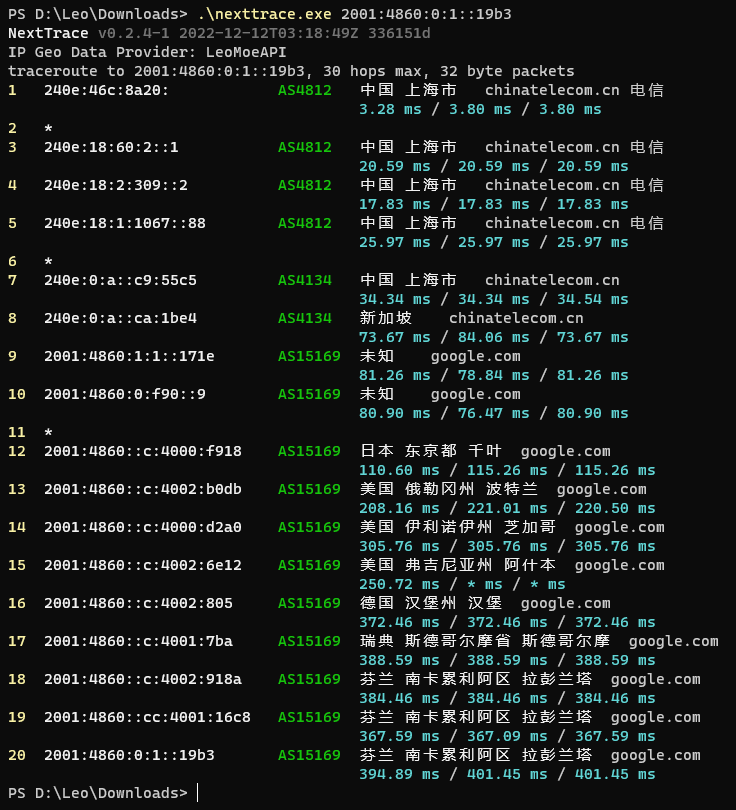
## Project screenshot
|
|
|
|
|
|
|
|
## NextTrace Enhanced
|
|
|
|
`NextTrace Enhanced` is an enhanced version for enthusiasts, `Enhanced` provides trace route calls in the form of Web API and a simple Looking Glass webpage with built-in visualization.
|
|
|
|
The `Enhanced` version supports many functions that the `lite` version does not have, such as the ability to customize the timeout period, and the ability to specify TTL as the starting point for route tracking, etc. For ordinary users, the `lite` version is usually enough.
|
|
|
|
https://github.com/OwO-Network/nexttrace-enhanced
|
|
|
|
#
|
|
|
|
## FAQ Frequently Asked Questions
|
|
|
|
If you encounter problems while installing or using it, we do not recommend you to choose creating an `issue` as a preference
|
|
|
|
Here is our recommended troubleshooting process:
|
|
|
|
1. Check if it is already in FAQ -> [Go to Github Wiki](https://github.com/xgadget-lab/nexttrace/wiki/FAQ---%E5%B8%B8%E8%A7%81%E9%97%AE%E9%A2%98%E8%A7%A3%E7%AD%94)
|
|
2. Suspected bug or feature suggestion -> [Go to Github Issues](https://github.com/xgadget-lab/nexttrace/issues)
|
|
|
|
## JetBrain Support
|
|
|
|
#### This Project uses [JetBrain Open-Source Project License](https://jb.gg/OpenSourceSupport). We Proudly Develop By Goland.
|
|
|
|
<img src="https://resources.jetbrains.com/storage/products/company/brand/logos/GoLand.png" title="" alt="GoLand logo" width="331">
|
|
|
|
## Credits
|
|
|
|
BGP.TOOLS provided some data support for this project and we would like to express our sincere gratitude.
|
|
|
|
[Vincent Young](https://github.com/missuo) (i@yyt.moe)
|
|
|
|
[Sam Sam](https://github.com/samleong123) (samsam123@samsam123.name.my)
|
|
|
|
[tsosunchia](https://github.com/tsosunchia)
|
|
|
|
[waiting4new](https://github.com/waiting4new)
|
|
|
|
[FFEE_CO](https://github.com/fkx4-p)
|
|
|
|
### Others
|
|
|
|
Although other third-party APIs are integrated in this project, please refer to the official website of the third-party APIs for specific TOS and AUP. If you encounter IP data errors, please contact them directly to correct them.
|
|
|
|
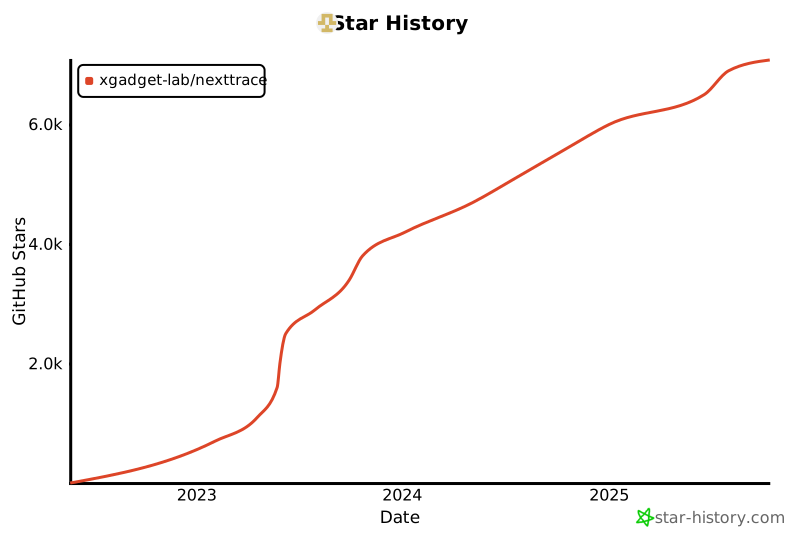
## Star History
|
|
|
|
[](https://star-history.com/#xgadget-lab/nexttrace&Date)
|