mirror of
https://github.com/nxtrace/NTrace-core.git
synced 2025-08-12 06:26:39 +00:00

557 lines
24 KiB
Markdown
557 lines
24 KiB
Markdown
<div align="center">
|
||
|
||
<img src="asset/logo.png" height="200px" alt="NextTrace Logo"/>
|
||
|
||
</div>
|
||
|
||
<h1 align="center">
|
||
<br>NextTrace<br>
|
||
</h1>
|
||
|
||
|
||
<h4 align="center">一款追求轻量化的开源可视化路由跟踪工具。</h4>
|
||
|
||
---------------------------------------
|
||
|
||
<h6 align="center">主页:www.nxtrace.org</h6>
|
||
|
||
<p align="center">
|
||
<a href="https://github.com/nxtrace/Ntrace-V1/actions">
|
||
<img src="https://img.shields.io/github/actions/workflow/status/nxtrace/Ntrace-V1/build.yml?branch=main&style=flat-square" alt="Github Actions">
|
||
</a>
|
||
<a href="https://goreportcard.com/report/github.com/nxtrace/Ntrace-V1">
|
||
<img src="https://goreportcard.com/badge/github.com/nxtrace/Ntrace-V1?style=flat-square">
|
||
</a>
|
||
<a href="https://www.nxtrace.org/downloads">
|
||
<img src="https://img.shields.io/github/release/nxtrace/Ntrace-V1/all.svg?style=flat-square">
|
||
</a>
|
||
</p>
|
||
|
||
## IAAS Sponsor
|
||
|
||
<div style="text-align: center;">
|
||
<a href="https://dmit.io">
|
||
<img src="https://assets.nxtrace.org/dmit.svg" width="170.7" height="62.9">
|
||
</a>
|
||
|
||
<a href="https://misaka.io" >
|
||
<img src="https://assets.nxtrace.org/misaka.svg" width="170.7" height="62.9">
|
||
</a>
|
||
|
||
<a href="https://portal.saltyfish.io" >
|
||
<img src="https://assets.nxtrace.org/snapstack.svg" width="170.7" height="62.9">
|
||
</a>
|
||
</div>
|
||
|
||
|
||
|
||
我们非常感谢 [DMIT](https://dmit.io)、 [Misaka](https://misaka.io) 和 [SnapStack](https://portal.saltyfish.io) 提供了支持本项目所需的网络基础设施。
|
||
|
||
## How To Use
|
||
|
||
Document Language: [English](README.md) | 简体中文
|
||
|
||
⚠️ 请注意:我们欢迎来自社区的PR提交,但是请将您的PR提交至 [NTrace-V1](https://github.com/nxtrace/NTrace-V1) 仓库,而不是 [NTrace-core](https://github.com/nxtrace/NTrace-core) 仓库。<br>
|
||
关于NTrace-V1和NTrace-core两个仓库的说明:<br>
|
||
二者将大体上保持一致。所有的开发工作均在NTrace-V1仓库中进行。NTrace-V1仓库首先发布新版本,在稳定运行一段时间后(时长不定),我们会把版本同步至NTrace-core。这意味着NTrace-V1仓库充当了一个“测试版”的角色。<br>
|
||
请注意,版本同步也存在例外。如果NTrace-V1的某个版本出现了严重的bug,NTrace-core会跳过这一有缺陷的版本,直接同步到下一个修复了该问题的版本。
|
||
|
||
### Before Using
|
||
|
||
使用 NextTrace 之前,我们建议您先阅读 [#IP 数据以及精准度说明](https://github.com/nxtrace/NTrace-core/blob/main/README_zh_CN.md#ip-%E6%95%B0%E6%8D%AE%E4%BB%A5%E5%8F%8A%E7%B2%BE%E5%87%86%E5%BA%A6%E8%AF%B4%E6%98%8E),在了解您自己的对数据精准度需求以后再进行抉择。
|
||
|
||
### Automated Install
|
||
|
||
* Linux
|
||
* 一键安装脚本
|
||
|
||
```shell
|
||
curl nxtrace.org/nt | bash
|
||
```
|
||
|
||
* Arch Linux AUR 安装命令
|
||
* 直接下载bin包(仅支持amd64)
|
||
|
||
```shell
|
||
yay -S nexttrace-bin
|
||
```
|
||
* 从源码构建(仅支持amd64)
|
||
|
||
```shell
|
||
yay -S nexttrace
|
||
```
|
||
* AUR 的构建分别由 ouuan, huyz 维护
|
||
* Linuxbrew 安装命令
|
||
|
||
同macOS Homebrew安装方法(homebrew-core版仅支持amd64)
|
||
* Deepin 安装命令
|
||
|
||
```shell
|
||
apt install nexttrace
|
||
```
|
||
* Termux 安装命令
|
||
|
||
```shell
|
||
pkg install nexttrace-enhanced
|
||
```
|
||
|
||
|
||
* macOS
|
||
* macOS Homebrew 安装命令
|
||
* homebrew-core版
|
||
|
||
```shell
|
||
brew install nexttrace
|
||
```
|
||
* 本仓库ACTIONS自动构建版(更新更快)
|
||
|
||
```shell
|
||
brew tap nxtrace/nexttrace && brew install nxtrace/nexttrace/nexttrace
|
||
```
|
||
* homebrew-core 构建由 chenrui333 维护,请注意该版本更新可能会落后仓库Action自动构建版本
|
||
|
||
* Windows
|
||
* Windows Scoop 安装命令
|
||
* scoop-extras版
|
||
|
||
```powershell
|
||
scoop bucket add extras && scoop install extras/nexttrace
|
||
```
|
||
|
||
* scoop-extra 由 soenggam 维护
|
||
|
||
请注意,以上多种安装方式的仓库均由开源爱好者自行维护,不保证可用性和及时更新,如遇到问题请联系仓库维护者解决,或使用本项目官方编译提供的二进制包。
|
||
|
||
### Manual Install
|
||
* 下载预编译的可执行程序
|
||
|
||
对于以上方法没有涵盖的用户,请直接前往 [Release](https://www.nxtrace.org/downloads) 下载编译后的二进制可执行文件。
|
||
|
||
* `Release`里面为很多系统以及不同架构提供了编译好的二进制可执行文件,如果没有可以自行编译。
|
||
* 一些本项目的必要依赖在`Windows`上`Golang`底层实现不完全,所以目前`NextTrace`在`Windows`平台出于实验性支持阶段。
|
||
|
||
* 从源码安装
|
||
|
||
您可在自行安装Go >= 1.20后,使用以下命令安装
|
||
|
||
```shell
|
||
go install github.com/nxtrace/NTrace-core@latest
|
||
```
|
||
*由于go.mod文件声明和文件目录冲突的问题,你不能用go install命令安装 `NTrace-V1` 版本*
|
||
安装后可执行文件在`$GOPATH/bin`目录下,如果您没有设置`GOPATH`,则在`$HOME/go/bin`目录下。
|
||
安装后二进制文件名称与项目名称保持一致,你需要将下文中的 `nexttrace` 命令替换为 `NTrace-core` 使用
|
||
如果你希望与下文命令保持一致,可以在执行 `go install` 命令后重命名二进制文件
|
||
|
||
```shell
|
||
mv $GOPATH/bin/NTrace-core $GOPATH/bin/nexttrace
|
||
```
|
||
|
||
|
||
### Get Started
|
||
|
||
`NextTrace` 默认使用`ICMP`协议发起`TraceRoute`请求,该协议同时支持`IPv4`和`IPv6`
|
||
|
||
```bash
|
||
# IPv4 ICMP Trace
|
||
nexttrace 1.0.0.1
|
||
# URL
|
||
nexttrace http://example.com:8080/index.html?q=1
|
||
|
||
# 表格打印,使用 --table / -t 参数,将实时显示结果
|
||
nexttrace --table 1.0.0.1
|
||
|
||
# 一个方便供机器读取转化的模式
|
||
nexttrace --raw 1.0.0.1
|
||
nexttrace --json 1.0.0.1
|
||
|
||
# 只进行IPv4/IPv6解析,且当多个IP时自动选择第一个IP
|
||
nexttrace --ipv4 g.co
|
||
nexttrace --ipv6 g.co
|
||
|
||
# IPv6 ICMP Trace
|
||
nexttrace 2606:4700:4700::1111
|
||
|
||
# 禁用路径可视化 使用 --map / -M 参数
|
||
nexttrace koreacentral.blob.core.windows.net
|
||
# MapTrace URL: https://api.nxtrace.org/tracemap/html/c14e439e-3250-5310-8965-42a1e3545266.html
|
||
|
||
# 禁用MPLS显示 使用 --disable-mpls / -e 参数 或 NEXTTRACE_DISABLEMPLS 环境变量
|
||
nexttrace --disable-mpls example.com
|
||
export NEXTTRACE_DISABLEMPLS=1
|
||
```
|
||
|
||
PS: 路由可视化的绘制模块由 [@tsosunchia](https://github.com/tsosunchia) 同学编写,具体代码可在 [tsosunchia/traceMap](https://github.com/tsosunchia/traceMap) 查看
|
||
|
||
需要注意的是,在 LeoMoeAPI 2.0 中,由于新增了了地理位置数据,**我们已经弃用 traceMap 插件中 OpenStreetMap API 的在线查询的部分,并且使用自己数据库内的位置信息**。
|
||
|
||
路由可视化功能因为需要每个 Hop 的地理位置坐标,而第三方 API 通常不提供此类信息,所以此功能目前只支持搭配 LeoMoeAPI 使用。
|
||
|
||
`NextTrace` 现已经支持快速测试,有一次性测试回程路由需求的朋友可以使用
|
||
|
||
```bash
|
||
# 北上广(电信+联通+移动+教育网)IPv4 / IPv6 ICMP 快速测试
|
||
nexttrace --fast-trace
|
||
|
||
# 也可以使用 TCP SYN 而非 ICMP 进行测试
|
||
nexttrace --fast-trace --tcp
|
||
|
||
# 也可以通过自定义的IP/DOMAIN列表文件进行快速测试
|
||
nexttrace --file /path/to/your/iplist.txt
|
||
# 自定义的IP/DOMAIN列表文件格式
|
||
## 一行一个IP/DOMAIN + 空格 + 描述信息(可选)
|
||
## 例如:
|
||
## 106.37.67.1 北京电信
|
||
## 240e:928:101:31a::1 北京电信
|
||
## bj.10086.cn 北京移动
|
||
## 2409:8080:0:1::1
|
||
## 223.5.5.5
|
||
```
|
||
|
||
`NextTrace` 已支持指定网卡进行路由跟踪
|
||
|
||
```bash
|
||
# 请注意 Lite 版本此参数不能和快速测试联用,如有需要请使用 enhanced 版本
|
||
# 使用 eth0 网卡
|
||
nexttrace --dev eth0 2606:4700:4700::1111
|
||
|
||
# 使用 eth0 网卡IP
|
||
# 网卡 IP 可以使用 ip a 或者 ifconfig 获取
|
||
# 使用网卡IP进行路由跟踪时需要注意跟踪的IP类型应该和网卡IP类型一致(如都为 IPv4)
|
||
nexttrace --source 204.98.134.56 9.9.9.9
|
||
```
|
||
|
||
`NextTrace` 也可以使用`TCP`和`UDP`协议发起`Traceroute`请求,不过目前`UDP`只支持`IPv4`
|
||
|
||
```bash
|
||
# TCP SYN Trace
|
||
nexttrace --tcp www.bing.com
|
||
|
||
# 可以自行指定端口[此处为443],默认80端口
|
||
nexttrace --tcp --port 443 2001:4860:4860::8888
|
||
|
||
# UDP Trace
|
||
nexttrace --udp 1.0.0.1
|
||
|
||
# 可以自行指定端口[此处为5353],默认33494端口
|
||
nexttrace --udp --port 5353 1.0.0.1
|
||
```
|
||
|
||
`NextTrace`也同样支持一些进阶功能,如 TTL 控制、并发数控制、模式切换等
|
||
|
||
```bash
|
||
# 每一跳发送2个探测包
|
||
nexttrace --queries 2 www.hkix.net
|
||
|
||
# 无并发,每次只发送一个探测包
|
||
nexttrace --parallel-requests 1 www.hkix.net
|
||
|
||
# 从TTL为5开始发送探测包,直到TTL为10结束
|
||
nexttrace --first 5 --max-hops 10 www.decix.net
|
||
# 此外还提供了一个ENV,可以设置是否隐匿目的IP
|
||
export NEXTTRACE_ENABLEHIDDENDSTIP=1
|
||
|
||
# 关闭IP反向解析功能
|
||
nexttrace --no-rdns www.bbix.net
|
||
|
||
# 设置载荷大小为1024字节
|
||
nexttrace --psize 1024 example.com
|
||
|
||
# 设置载荷大小以及DF标志进行TCP Trace
|
||
nexttrace --psize 1024 --dont-fragment --tcp example.com
|
||
|
||
# 特色功能:打印Route-Path图
|
||
# Route-Path图示例:
|
||
# AS6453 塔塔通信「Singapore『Singapore』」
|
||
# ╭╯
|
||
# ╰AS9299 Philippine Long Distance Telephone Co.「Philippines『Metro Manila』」
|
||
# ╭╯
|
||
# ╰AS36776 Five9 Inc.「Philippines『Metro Manila』」
|
||
# ╭╯
|
||
# ╰AS37963 阿里云「ALIDNS.COM『ALIDNS.COM』」
|
||
nexttrace --route-path www.time.com.my
|
||
# 禁止色彩输出
|
||
nexttrace --nocolor 1.1.1.1
|
||
# 或者使用环境变量
|
||
export NO_COLOR=1
|
||
```
|
||
|
||
`NextTrace`支持用户自主选择 IP 数据库(目前支持:`LeoMoeAPI`, `IP.SB`, `IPInfo`, `IPInsight`, `IPAPI.com`, `Ip2region`, `IPInfoLocal`, `CHUNZHEN`)
|
||
|
||
```bash
|
||
# 可以自行指定IP数据库[此处为IP-API.com],不指定则默认为LeoMoeAPI
|
||
nexttrace --data-provider ip-api.com
|
||
## 特别的: 其中 ipinfo 和 IPInsight API 对于免费版查询有频率限制,可从这些服务商自行购买服务以解除限制,如有需要可以 clone 本项目添加其提供的 token 自行编译
|
||
## TOKEN填写路径:ipgeo/tokens.go
|
||
## 特别的: 对于离线库 IPInfoLocal,请自行下载并命名为 ipinfoLocal.mmdb (可以从这里下载:https://ipinfo.io/signup?ref=free-database-downloads)
|
||
## 对于离线库 Ip2region 可NextTrace自动下载,也可自行下载并命名为 ip2region.db
|
||
## 另外:由于IP.SB被滥用比较严重,会经常出现无法查询的问题,请知悉。
|
||
## IP-API.com限制调用较为严格,如有查询不到的情况,请几分钟后再试。
|
||
|
||
# 纯真IP数据库默认使用 http://127.0.0.1:2060 作为查询接口,如需自定义请使用环境变量
|
||
export NEXTTRACE_CHUNZHENURL=http://127.0.0.1:2060
|
||
## 可使用 https://github.com/freshcn/qqwry 自行搭建纯真IP数据库服务
|
||
|
||
# 也可以通过设置环境变量来指定默认IP数据库
|
||
export NEXTTRACE_DATAPROVIDER=ipinfo
|
||
```
|
||
|
||
`NextTrace`支持使用混合参数和简略参数
|
||
|
||
```bash
|
||
Example:
|
||
nexttrace --data-provider ip-api.com --max-hops 20 --tcp --port 443 --queries 5 --no-rdns 1.1.1.1
|
||
nexttrace -tcp --queries 2 --parallel-requests 1 --table --route-path 2001:4860:4860::8888
|
||
|
||
Equivalent to:
|
||
nexttrace -d ip-api.com -m 20 -T -p 443 -q 5 -n 1.1.1.1
|
||
nexttrace -T -q 2 --parallel-requests 1 -t -P 2001:4860:4860::8888
|
||
```
|
||
|
||
### 全部用法详见 Usage 菜单
|
||
|
||
```shell
|
||
Usage: nexttrace [-h|--help] [-4|--ipv4] [-6|--ipv6] [-T|--tcp] [-U|--udp]
|
||
[-F|--fast-trace] [-p|--port <integer>] [-q|--queries
|
||
<integer>] [--parallel-requests <integer>] [-m|--max-hops
|
||
<integer>] [-d|--data-provider
|
||
(Ip2region|ip2region|IP.SB|ip.sb|IPInfo|ipinfo|IPInsight|ipinsight|IPAPI.com|ip-api.com|IPInfoLocal|ipinfolocal|chunzhen|LeoMoeAPI|leomoeapi|disable-geoip)]
|
||
[--pow-provider (api.nxtrace.org|sakura)] [-n|--no-rdns]
|
||
[-a|--always-rdns] [-P|--route-path] [-r|--report] [--dn42]
|
||
[-o|--output] [-t|--table] [--raw] [-j|--json] [-c|--classic]
|
||
[-f|--first <integer>] [-M|--map] [-e|--disable-mpls]
|
||
[-v|--version] [-s|--source "<value>"] [-D|--dev "<value>"]
|
||
[-z|--send-time <integer>] [-i|--ttl-time <integer>]
|
||
[--timeout <integer>] [--psize <integer>]
|
||
[_positionalArg_nexttrace_32 "<value>"] [--dot-server
|
||
(dnssb|aliyun|dnspod|google|cloudflare)] [-g|--language
|
||
(en|cn)] [--file "<value>"] [-C|--nocolor]
|
||
|
||
Arguments:
|
||
|
||
-h --help Print help information
|
||
-4 --ipv4 Use IPv4 only
|
||
-6 --ipv6 Use IPv6 only
|
||
-T --tcp Use TCP SYN for tracerouting (default port
|
||
is 80)
|
||
-U --udp Use UDP SYN for tracerouting (default port
|
||
is 33494)
|
||
-F --fast-trace One-Key Fast Trace to China ISPs
|
||
-p --port Set the destination port to use. With
|
||
default of 80 for "tcp", 33494 for "udp"
|
||
-q --queries Set the number of probes per each hop.
|
||
Default: 3
|
||
--parallel-requests Set ParallelRequests number. It should be
|
||
1 when there is a multi-routing. Default:
|
||
18
|
||
-m --max-hops Set the max number of hops (max TTL to be
|
||
reached). Default: 30
|
||
-d --data-provider Choose IP Geograph Data Provider [IP.SB,
|
||
IPInfo, IPInsight, IP-API.com, Ip2region,
|
||
IPInfoLocal, CHUNZHEN, disable-geoip].
|
||
Default: LeoMoeAPI
|
||
--pow-provider Choose PoW Provider [api.nxtrace.org,
|
||
sakura] For China mainland users, please
|
||
use sakura. Default: api.nxtrace.org
|
||
-n --no-rdns Do not resolve IP addresses to their
|
||
domain names
|
||
-a --always-rdns Always resolve IP addresses to their
|
||
domain names
|
||
-P --route-path Print traceroute hop path by ASN and
|
||
location
|
||
-r --report output using report mode
|
||
--dn42 DN42 Mode
|
||
-o --output Write trace result to file
|
||
(RealTimePrinter ONLY)
|
||
-t --table Output trace results as table
|
||
--raw An Output Easy to Parse
|
||
-j --json Output trace results as JSON
|
||
-c --classic Classic Output trace results like
|
||
BestTrace
|
||
-f --first Start from the first_ttl hop (instead from
|
||
1). Default: 1
|
||
-M --map Disable Print Trace Map
|
||
-e --disable-mpls Disable MPLS
|
||
-v --version Print version info and exit
|
||
-s --source Use source src_addr for outgoing packets
|
||
-D --dev Use the following Network Devices as the
|
||
source address in outgoing packets
|
||
-z --send-time Set how many [milliseconds] between
|
||
sending each packet.. Useful when some
|
||
routers use rate-limit for ICMP messages.
|
||
Default: 50
|
||
-i --ttl-time Set how many [milliseconds] between
|
||
sending packets groups by TTL. Useful when
|
||
some routers use rate-limit for ICMP
|
||
messages. Default: 50
|
||
--timeout The number of [milliseconds] to keep probe
|
||
sockets open before giving up on the
|
||
connection.. Default: 1000
|
||
--psize Set the payload size. Default: 52
|
||
--_positionalArg_nexttrace_32 IP Address or domain name
|
||
--dot-server Use DoT Server for DNS Parse [dnssb,
|
||
aliyun, dnspod, google, cloudflare]
|
||
-g --language Choose the language for displaying [en,
|
||
cn]. Default: cn
|
||
--file Read IP Address or domain name from file
|
||
-C --nocolor Disable Colorful Output
|
||
--dont-fragment Set the Don't Fragment bit (IPv4 TCP
|
||
only). Default: false
|
||
```
|
||
|
||
## 项目截图
|
||
|
||

|
||
|
||

|
||
|
||
## 第三方 IP 数据库 API 开发接口
|
||
|
||
NextTrace 所有的的 IP 地理位置 `API DEMO` 可以参考[这里](https://github.com/nxtrace/NTrace-core/blob/main/ipgeo/)
|
||
|
||
你可以在这里添加你自己的 API 接口,为了 NextTrace 能够正确显示你接口中的内容,请参考 `leo.go` 中所需要的信息
|
||
|
||
✨NextTrace `LeoMoeAPI` 的后端 Demo
|
||
|
||
[GitHub - sjlleo/nexttrace-backend: NextTrace BackEnd](https://github.com/sjlleo/nexttrace-backend)
|
||
|
||
NextTrace `LeoMoeAPI`现已使用Proof of Work(POW)机制来防止滥用,其中NextTrace作为客户端引入了powclient库,POW CLIENT/SERVER均已开源,欢迎大家使用。(POW模块相关问题请发到对应的仓库)
|
||
- [GitHub - tsosunchia/powclient: Proof of Work CLIENT for NextTrace](https://github.com/tsosunchia/powclient)
|
||
- [GitHub - tsosunchia/powserver: Proof of Work SERVER for NextTrace](https://github.com/tsosunchia/powserver)
|
||
|
||
对于中国大陆用户,可以使用 [Nya Labs](https://natfrp.com) 提供的位于大陆的POW服务器优化访问速度
|
||
```shell
|
||
#使用方法任选其一
|
||
#1. 在环境变量中设置
|
||
export NEXTTRACE_POWPROVIDER=sakura
|
||
#2. 在命令行中设置
|
||
nexttrace --pow-provider sakura
|
||
```
|
||
|
||
## OpenTrace
|
||
|
||
`OpenTrace`是 @Archeb 开发的`NextTrace`的跨平台`GUI`版本,带来您熟悉但更强大的用户体验。
|
||
该软件仍然处于早期开发阶段,可能存在许多缺陷和错误,需要您宝贵的使用反馈。
|
||
|
||
[https://github.com/Archeb/opentrace](https://github.com/Archeb/opentrace)
|
||
|
||
## NEXTTRACE WEB API
|
||
|
||
`NextTraceWebApi`是一个`MTR`风格的`NextTrace`网页版服务端实现,提供了包括`Docker`在内多种部署方式。
|
||
|
||
[https://github.com/nxtrace/nexttracewebapi](https://github.com/nxtrace/nexttracewebapi)
|
||
|
||
## NextTraceroute
|
||
|
||
`NextTraceroute`,一款默认使用`NextTrace API`的免`root`安卓版路由跟踪应用,由 @surfaceocean 开发。
|
||
感谢所有测试用户的热情支持,本应用已经通过封闭测试,正式进入 Google Play 商店。
|
||
|
||
[https://github.com/nxtrace/NextTraceroute](https://github.com/nxtrace/NextTraceroute)
|
||
<a href='https://play.google.com/store/apps/details?id=com.surfaceocean.nexttraceroute&pcampaignid=pcampaignidMKT-Other-global-all-co-prtnr-py-PartBadge-Mar2515-1'><img alt='Get it on Google Play' width="128" height="48" src='https://play.google.com/intl/en_us/badges/static/images/badges/en_badge_web_generic.png'/></a>
|
||
|
||
## JetBrain Support
|
||
|
||
本项目受 [JetBrain Open-Source Project License](https://jb.gg/OpenSourceSupport) 支持。 很高兴使用`Goland`作为我们的开发工具。
|
||
|
||
<img src="https://resources.jetbrains.com/storage/products/company/brand/logos/GoLand.png" title="" alt="GoLand logo" width="331">
|
||
|
||
## Credits
|
||
|
||
[Gubo](https://www.gubo.org) 靠谱主机推荐
|
||
|
||
[IPInfo](https://ipinfo.io) 无偿提供了本项目大部分数据支持
|
||
|
||
[BGP.TOOLS](https://bgp.tools) 无偿提供了本项目的一些数据支持
|
||
|
||
[PeeringDB](https://www.peeringdb.com) 无偿提供了本项目的一些数据支持
|
||
|
||
[sjlleo](https://github.com/sjlleo) 项目永远的领导者、创始人及核心贡献者
|
||
|
||
[tsosunchia](https://github.com/tsosunchia) 项目现任管理、基础设施运维及核心贡献者
|
||
|
||
[Vincent Young](https://github.com/missuo)
|
||
|
||
[zhshch2002](https://github.com/zhshch2002)
|
||
|
||
[Sam Sam](https://github.com/samleong123)
|
||
|
||
[waiting4new](https://github.com/waiting4new)
|
||
|
||
[FFEE_CO](https://github.com/fkx4-p)
|
||
|
||
[bobo liu](https://github.com/fakeboboliu)
|
||
|
||
[YekongTAT](https://github.com/isyekong)
|
||
|
||
## Others
|
||
|
||
其他第三方 API 尽管集成在本项目内,但是具体的 TOS 以及 AUP,请详见第三方 API 官网。如遇到 IP 数据错误,也请直接联系他们纠错。
|
||
|
||
如何获取最新commit的新鲜出炉的二进制可执行文件?
|
||
>请前往GitHub Actions中最新一次 [Build & Release](https://github.com/nxtrace/Ntrace-V1/actions/workflows/build.yml) workflow.
|
||
|
||
## IP 数据以及精准度说明
|
||
|
||
对于IP相关信息的纠错反馈,我们目前开放了两个渠道:
|
||
>- 本项目的GITHUB ISSUES区中的[IP 错误报告汇总帖](https://github.com/orgs/nxtrace/discussions/222)
|
||
>- 本项目的纠错专用邮箱: `correction@nxtrace.org` (请注意此邮箱仅供IP相关信息纠错专用,其他反馈请发送ISSUE)
|
||
|
||
NextTrace 有多个数据源可以选择,目前默认使用的 LeoMoeAPI 为我们项目维护的数据源。
|
||
|
||
该项目由 OwO Network 的 [Missuo](https://github.com/missuo) && [Leo](https://github.com/sjlleo) 发起,由 [Zhshch](https://github.com/zhshch2002/) 完成最早期架构的编写和指导,后由 Leo 完成了大部分开发工作,现主要交由 [tsosunchia](https://github.com/tsosunchia) 完成后续的二开和维护工作。
|
||
|
||
LeoMoeAPI 是 [Leo](https://github.com/sjlleo) 的作品,归属于 Leo Network,由 [Leo](https://github.com/sjlleo) 完成整套后端 API 编写,该接口未经允许不可用于任何第三方用途。
|
||
|
||
LeoMoeAPI 早期数据主要来自 IPInsight、IPInfo,随着项目发展,越来越多的志愿者参与进了这个项目。目前 LeoMoeAPI 有近一半的数据是社区提供的,而另外一半主要来自于包含 IPInfo、IPData、BigDataCloud、IPGeoLocation 在内的多个第三方数据。
|
||
|
||
LeoMoeAPI 的骨干网数据有近 70% 是社区自发反馈又或者是项目组成员校准的,这给本项目的路由跟踪基础功能带来了一定的保证,但是全球骨干网的体量庞大,我们并无能力如 IPIP 等商业公司拥有海量监测节点,这使得 LeoMoeAPI 的数据精准度无法和形如 BestTrace(IPIP)相提并论。
|
||
|
||
LeoMoeAPI 已经尽力校准了比较常见的骨干网路由,这部分在测试的时候经常会命中,但是如果遇到封闭型 ISP 的路由,大概率可以遇到错误,此类数据不仅是我们,哪怕 IPInsight、IPInfo 也无法正确定位,目前只有 IPIP 能够标记正确,如对此类数据的精确性有着非常高的要求,请务必使用 BestTrace 作为首选。
|
||
|
||
我们不保证我们的数据一定会及时更新,也不保证数据的精确性,我们希望您在发现数据错误的时候可以前往 issue 页面提交错误报告,谢谢。
|
||
|
||
当您使用 LeoMoeAPI 即视为您已经完全了解 NextTrace LeoMoeAPI 的数据精确性,并且同意如果您引用 LeoMoeAPI 其中的数据从而引发的一切问题,均由您自己承担。
|
||
|
||
## DN42 模式使用说明
|
||
|
||
使用这个模式需要您配置 2 个文件,分别是 geofeed.csv 以及 ptr.csv
|
||
|
||
当您初次运行 DN42 模式,NT 会为您生成 nt_config.yaml 文件,您可以自定义 2 个文件的存放位置,默认应该存放在 NT 的运行目录下
|
||
|
||
### GeoFeed
|
||
|
||
对于 geofeed.csv 来说,格式如下:
|
||
```
|
||
IP_CDIR,LtdCode,ISO3166-2,CityName,ASN,IPWhois
|
||
```
|
||
|
||
比如,您可以这么写:
|
||
|
||
```
|
||
58.215.96.0/20,CN,CN-JS,Wuxi,23650,CHINANET-JS
|
||
```
|
||
|
||
如果您有一个大段作为骨干网使用,您也可以不写地理位置信息,如下:
|
||
|
||
```
|
||
202.97.0.0/16,,,4134,CHINANET-BACKBONE
|
||
```
|
||
|
||
### PTR
|
||
|
||
对于 ptr.csv 来说,格式如下:
|
||
```
|
||
IATA_CODE,LtdCode,RegionName,CityName
|
||
```
|
||
|
||
比如对于美国洛杉矶,您可以这么写
|
||
|
||
```
|
||
LAX,US,California,Los Anegles
|
||
```
|
||
|
||
需要注意的是,NextTrace 支持自动匹配 CSV 中的城市名,如果您的 PTR 记录中有 `losangeles`,您可以只添加上面一条记录就可以正常识别并读取。
|
||
|
||
## Star History
|
||
|
||
[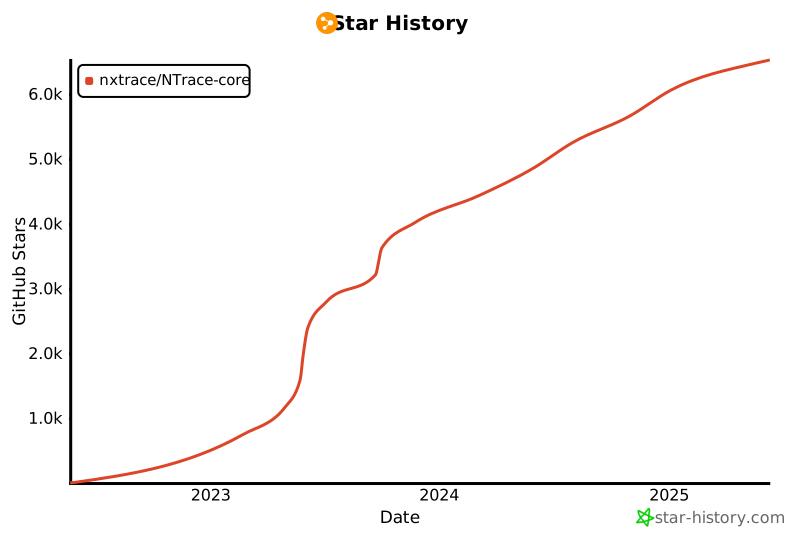](https://star-history.com/#nxtrace/NTrace-core&Date)
|