mirror of
https://github.com/zsviczian/obsidian-excalidraw-plugin.git
synced 2025-08-06 05:46:28 +00:00
Compare commits
7 Commits
| Author | SHA1 | Date | |
|---|---|---|---|

|
2d16b59ea3 | ||
|
|
b292ca0fa3 | ||
|
|
95c21c2d5e | ||
|
|
7e45a0f952 | ||
|
|
7c8460646a | ||
|
|
8badc3eb8f | ||
|
|
ad98d114e1 |
@@ -26,7 +26,7 @@ Please upgrade to Obsidian v0.12.19 or higher to get the latest release.
|
||||
- Compatibility features to auto-export and keep in sync markdown excalidraw files and legacy .excalidraw files.
|
||||
- Experimental feature to add custom TAG to file explorer to mark drawing files.
|
||||
- Enable / disable autosave.
|
||||
- You can customize the size and position of the embedded images using the `[[image.excalidraw|100]]`, `[[image.excalidraw|100x100]]`, `[[image.excalidraw|100|left]]`, `[[image.excalidraw|right-wrap]]`, formatting options. `[[<filename.excalidraw>|<width>x<height>|<alignment>]]`. You can add your custom alignment via CSS. Any text that appears in `<alignment>` will be added to the rendered SVG element style and to the wrapper DIV element. Check below and styles.css for more insight.
|
||||
- You can customize the size and position of the embedded images using the `![[image.excalidraw|100]]`, `![[image.excalidraw|100x100]]`, `![[image.excalidraw|100|left]]`, `![[image.excalidraw|right-wrap]]`, formatting options. `![[<filename.excalidraw>|<width>x<height>|<alignment>]]`. You can add your custom alignment via CSS. Any text that appears in `<alignment>` will be added to the rendered SVG element style and to the wrapper DIV element. Check below and styles.css for more insight.
|
||||
- Supports hyperlinks e.g. `https://zsolt.blog`, `[Obsidian](https://obsidian.md)`, and internal links e.g. `[[My file in vault|Alias]]` in drawing text.
|
||||
- Links will update when files are moved or renamed, if you have the Obsidian setting Files & Links/Automatically Update Internal Links enabled.
|
||||
- Links in drawings will show up in backlinks of documents
|
||||
|
||||
@@ -176,6 +176,11 @@ export interface ExcalidrawAutomate {
|
||||
b: readonly [number, number],
|
||||
gap?: number, //if given, element is inflated by this value
|
||||
): Point[];
|
||||
|
||||
//See OCR plugin for example on how to use scriptSettings
|
||||
activeScript: string; //Set automatically by the ScriptEngine
|
||||
getScriptSettings(): {}; //Returns script settings. Saves settings in plugin settings, under the activeScript key
|
||||
setScriptSettings(settings:any):Promise<void>; //sets script settings.
|
||||
}
|
||||
```
|
||||
|
||||
|
||||
@@ -3,6 +3,8 @@
|
||||
|
||||
Download this file and save to your Obsidian Vault including the first line, or open it in "Raw" and copy the entire contents to Obsidian.
|
||||
|
||||
|
||||
|
||||
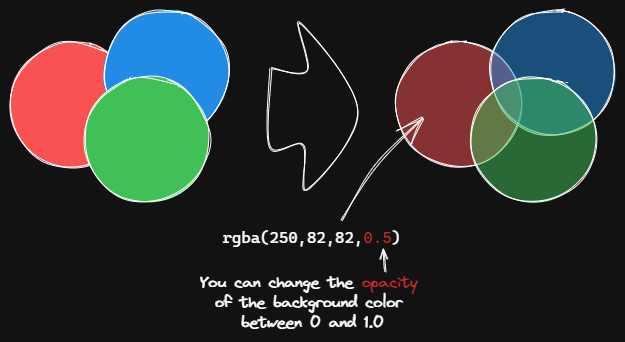
This script changes the opacity of the background color of the selected boxes.
|
||||
|
||||
The default background color in Excalidraw is so dark that the text is hard to read. You can lighten the color a bit by setting transparency. And you can tweak the transparency over and over again until you're happy with it.
|
||||
|
||||
@@ -5,12 +5,12 @@ Download this file and save to your Obsidian Vault including the first line, or
|
||||
|
||||

|
||||
|
||||
THIS SCRIPT REQUIRES EXCALIDRAW 1.5.15
|
||||
|
||||
The script will
|
||||
1) send the selected image file to [taskbone.com](https://taskbone.com) to exctract the text from the image, and
|
||||
2) will add the text to your drawing as a text element
|
||||
|
||||
⚠ Don't forget to paste your token into the script after the first run. ⚠
|
||||
|
||||
I recommend also installing the [Transfer TextElements to Excalidraw markdown metadata](Transfer%20TextElements%20to%20Excalidraw%20markdown%20metadata.md) script as well.
|
||||
|
||||
The script is based on [@schlundd](https://github.com/schlundd)'s [Obsidian-OCR-Plugin](https://github.com/schlundd/obsidian-ocr-plugin)
|
||||
@@ -20,11 +20,14 @@ https://zsviczian.github.io/obsidian-excalidraw-plugin/ExcalidrawScriptsEngine.h
|
||||
|
||||
```javascript
|
||||
*/
|
||||
let token = ""; //paste token in-between the quotation marks "xxxxxxxxxx"
|
||||
const curVersion = app.plugins.manifests["obsidian-excalidraw-plugin"].version;
|
||||
if(curVersion < "1.5.15") new Notice("please update Excalidraw plugin to the latest version");
|
||||
|
||||
let token = ea.getScriptSettings()?.token;
|
||||
const BASE_URL = "https://ocr.taskbone.com";
|
||||
|
||||
//get new token if token was not provided
|
||||
if (token==="") {
|
||||
if (!token) {
|
||||
const tokenResponse = await fetch(
|
||||
BASE_URL + "/get-new-token", {
|
||||
method: 'post'
|
||||
@@ -32,9 +35,7 @@ if (token==="") {
|
||||
if (tokenResponse.status === 200) {
|
||||
jsonResponse = await tokenResponse.json();
|
||||
token = jsonResponse.token;
|
||||
navigator.clipboard.writeText(token);
|
||||
notice("Please update the ScriptEngine script with the Token.\n\nToken is on the clipboard and in Developer Console.");
|
||||
console.log({token});
|
||||
ea.setScriptSettings({token});
|
||||
} else {
|
||||
notice(`Taskbone OCR Error: ${tokenResponse.status}\nPlease try again later.`);
|
||||
return;
|
||||
|
||||
@@ -31,7 +31,7 @@ Open the script you are interested in and save it to your Obsidian Vault includi
|
||||
|[Font Family](Font%20Family.md)|Sets font family of the text block (Virgil, Helvetica, Cascadia). Useful if you want to set a keyboard shortcut for selecting font family.||[@zsviczian](https://github.com/zsviczian)|
|
||||
|[Grid](Grid.md)|The default grid size in Excalidraw is 20. Currently there is no way to change the grid size via the user interface. This script offers a way to bridge this gap.||[@zsviczian](https://github.com/zsviczian)|
|
||||
|[Lighten background color](Lighten%20background%20color.md)|This script lightens the background color of the selected element by 2% at a time. You can use this script several times until you are satisfied. It is recommended to set a shortcut key for this script so that you can quickly try to DARKEN and LIGHTEN the color effect.In contrast to the `Modify background color opacity` script, the advantage is that the background color of the element is not affected by the canvas color, and the color value does not appear in a strange rgba() form.||[@1-2-3](https://github.com/1-2-3)|
|
||||
|[Modify background color opacity](Modify%20background%20color%20opacity.md)|This script changes the opacity of the background color of the selected boxes. The default background color in Excalidraw is so dark that the text is hard to read. You can lighten the color a bit by setting transparency. And you can tweak the transparency over and over again until you're happy with it. Although excalidraw has the opacity option in its native property Settings, it also changes the transparency of the border. Use this script to change only the opacity of the background color without affecting the border.||[@1-2-3](https://github.com/1-2-3)|
|
||||
|[Modify background color opacity](Modify%20background%20color%20opacity.md)|This script changes the opacity of the background color of the selected boxes. The default background color in Excalidraw is so dark that the text is hard to read. You can lighten the color a bit by setting transparency. And you can tweak the transparency over and over again until you're happy with it. Although excalidraw has the opacity option in its native property Settings, it also changes the transparency of the border. Use this script to change only the opacity of the background color without affecting the border.||[@1-2-3](https://github.com/1-2-3)|
|
||||
|[Modify stroke width of selected elements](Modify%20stroke%20width%20of%20selected%20elements.md)|This script will set the stroke width of selected elements. This is helpful, for example, when you scale freedraw sketches and want to reduce or increase their line width.||[@zsviczian](https://github.com/zsviczian)|
|
||||
|[OCR - Optical Character Recognition](OCR%20-%20Optical%20Character%20Recognition.md)|The script will 1) send the selected image file to [taskbone.com](https://taskbone.com) to exctract the text from the image, and 2) will add the text to your drawing as a text element.||[@zsviczian](https://github.com/zsviczian)|
|
||||
|[Reverse arrows](Reverse%20arrows.md)|Reverse the direction of **arrows** within the scope of selected elements.||[@zsviczian](https://github.com/zsviczian)|
|
||||
|
||||
@@ -159,7 +159,7 @@ https://raw.githubusercontent.com/zsviczian/obsidian-excalidraw-plugin/master/ea
|
||||
```excalidraw-script-install
|
||||
https://raw.githubusercontent.com/zsviczian/obsidian-excalidraw-plugin/master/ea-scripts/Modify%20background%20color%20opacity.md
|
||||
```
|
||||
<table><tr valign='top'><td class="label">Author</td><td class="data"><a href='https://github.com/1-2-3'>@1-2-3</a></td></tr><tr valign='top'><td class="label">Source</td><td class="data"><a href='https://github.com/zsviczian/obsidian-excalidraw-plugin/blob/master/ea-scripts/Modify%20background%20color%20opacity.md'>File on GitHub</a></td></tr><tr valign='top'><td class="label">Description</td><td class="data">This script changes the opacity of the background color of the selected boxes. The default background color in Excalidraw is so dark that the text is hard to read. You can lighten the color a bit by setting transparency. And you can tweak the transparency over and over again until you're happy with it. Although excalidraw has the opacity option in its native property Settings, it also changes the transparency of the border. Use this script to change only the opacity of the background color without affecting the border.</td></tr></table>
|
||||
<table><tr valign='top'><td class="label">Author</td><td class="data"><a href='https://github.com/1-2-3'>@1-2-3</a></td></tr><tr valign='top'><td class="label">Source</td><td class="data"><a href='https://github.com/zsviczian/obsidian-excalidraw-plugin/blob/master/ea-scripts/Modify%20background%20color%20opacity.md'>File on GitHub</a></td></tr><tr valign='top'><td class="label">Description</td><td class="data">This script changes the opacity of the background color of the selected boxes. The default background color in Excalidraw is so dark that the text is hard to read. You can lighten the color a bit by setting transparency. And you can tweak the transparency over and over again until you're happy with it. Although excalidraw has the opacity option in its native property Settings, it also changes the transparency of the border. Use this script to change only the opacity of the background color without affecting the border.<br><img src='https://raw.githubusercontent.com/zsviczian/obsidian-excalidraw-plugin/master/images/scripts-modify-background-color-opacity.png'></td></tr></table>
|
||||
|
||||
## Modify stroke width of selected elements
|
||||
```excalidraw-script-install
|
||||
@@ -171,7 +171,7 @@ https://raw.githubusercontent.com/zsviczian/obsidian-excalidraw-plugin/master/ea
|
||||
```excalidraw-script-install
|
||||
https://raw.githubusercontent.com/zsviczian/obsidian-excalidraw-plugin/master/ea-scripts/OCR%20-%20Optical%20Character%20Recognition.md
|
||||
```
|
||||
<table><tr valign='top'><td class="label">Author</td><td class="data"><a href='https://github.com/zsviczian'>@zsviczian</a></td></tr><tr valign='top'><td class="label">Source</td><td class="data"><a href='https://github.com/zsviczian/obsidian-excalidraw-plugin/blob/master/ea-scripts/OCR%20-%20Optical%20Character%20Recognition.md'>File on GitHub</a></td></tr><tr valign='top'><td class="label">Description</td><td class="data">The script will 1) send the selected image file to [taskbone.com](https://taskbone.com) to exctract the text from the image, and 2) will add the text to your drawing as a text element.<br><mark>⚠ Note that you will need to manually paste your token into the script after the first run! ⚠</mark><br><img src='https://raw.githubusercontent.com/zsviczian/obsidian-excalidraw-plugin/master/images/scripts-ocr.jpg'><br><iframe width="560" height="315" src="https://www.youtube.com/embed/W2NMzR8s4eE" title="YouTube video player" frameborder="0" allow="accelerometer; autoplay; clipboard-write; encrypted-media; gyroscope; picture-in-picture" allowfullscreen></iframe></td></tr></table>
|
||||
<table><tr valign='top'><td class="label">Author</td><td class="data"><a href='https://github.com/zsviczian'>@zsviczian</a></td></tr><tr valign='top'><td class="label">Source</td><td class="data"><a href='https://github.com/zsviczian/obsidian-excalidraw-plugin/blob/master/ea-scripts/OCR%20-%20Optical%20Character%20Recognition.md'>File on GitHub</a></td></tr><tr valign='top'><td class="label">Description</td><td class="data">REQUIRES EXCALIDRAW 1.5.15<br>The script will 1) send the selected image file to [taskbone.com](https://taskbone.com) to exctract the text from the image, and 2) will add the text to your drawing as a text element.<br><mark>⚠ Note that you will need to manually paste your token into the script after the first run! ⚠</mark><br><img src='https://raw.githubusercontent.com/zsviczian/obsidian-excalidraw-plugin/master/images/scripts-ocr.jpg'><br><iframe width="560" height="315" src="https://www.youtube.com/embed/W2NMzR8s4eE" title="YouTube video player" frameborder="0" allow="accelerometer; autoplay; clipboard-write; encrypted-media; gyroscope; picture-in-picture" allowfullscreen></iframe></td></tr></table>
|
||||
|
||||
## Reverse arrows
|
||||
```excalidraw-script-install
|
||||
@@ -207,4 +207,4 @@ https://raw.githubusercontent.com/zsviczian/obsidian-excalidraw-plugin/master/ea
|
||||
```excalidraw-script-install
|
||||
https://raw.githubusercontent.com/zsviczian/obsidian-excalidraw-plugin/master/ea-scripts/Zoom%20to%20Fit%20Selected%20Elements.md
|
||||
```
|
||||
<table><tr valign='top'><td class="label">Author</td><td class="data"><a href='https://github.com/zsviczian'>@zsviczian</a></td></tr><tr valign='top'><td class="label">Source</td><td class="data"><a href='https://github.com/zsviczian/obsidian-excalidraw-plugin/blob/master/ea-scripts/Zoom%20to%20Fit%20Selected%20Elements.md'>File on GitHub</a></td></tr><tr valign='top'><td class="label">Description</td><td class="data">Similar to Excalidraw standard SHIFT+2 feature: Zoom to fit selected elements, but with the ability to zoom to 1000%. Inspiration: [#272](https://github.com/zsviczian/obsidian-excalidraw-plugin/issues/272)</td></tr></table>
|
||||
<table><tr valign='top'><td class="label">Author</td><td class="data"><a href='https://github.com/zsviczian'>@zsviczian</a></td></tr><tr valign='top'><td class="label">Source</td><td class="data"><a href='https://github.com/zsviczian/obsidian-excalidraw-plugin/blob/master/ea-scripts/Zoom%20to%20Fit%20Selected%20Elements.md'>File on GitHub</a></td></tr><tr valign='top'><td class="label">Description</td><td class="data">Similar to Excalidraw standard SHIFT+2 feature: Zoom to fit selected elements, but with the ability to zoom to 1000%. Inspiration: [#272](https://github.com/zsviczian/obsidian-excalidraw-plugin/issues/272)</td></tr></table>
|
||||
|
||||
BIN
images/scripts-modify-background-color-opacity.png
Normal file
BIN
images/scripts-modify-background-color-opacity.png
Normal file

Binary file not shown.
|
After Width: | Height: | Size: 53 KiB |
@@ -1,7 +1,7 @@
|
||||
{
|
||||
"id": "obsidian-excalidraw-plugin",
|
||||
"name": "Excalidraw",
|
||||
"version": "1.5.14",
|
||||
"version": "1.5.15",
|
||||
"minAppVersion": "0.12.16",
|
||||
"description": "An Obsidian plugin to edit and view Excalidraw drawings",
|
||||
"author": "Zsolt Viczian",
|
||||
|
||||
@@ -39,12 +39,6 @@ declare type ConnectionPoint = "top" | "bottom" | "left" | "right" | null;
|
||||
const GAP = 4;
|
||||
|
||||
export interface ExcalidrawAutomate {
|
||||
renderMarkdown(
|
||||
markdown: string,
|
||||
el: HTMLElement,
|
||||
sourcePath: string,
|
||||
component: Component,
|
||||
): Promise<void>;
|
||||
plugin: ExcalidrawPlugin;
|
||||
elementsDict: {}; //contains the ExcalidrawElements currently edited in Automate indexed by el.id
|
||||
imagesDict: {}; //the images files including DataURL, indexed by fileId
|
||||
@@ -217,6 +211,11 @@ export interface ExcalidrawAutomate {
|
||||
b: readonly [number, number],
|
||||
gap?: number, //if given, element is inflated by this value
|
||||
): Point[];
|
||||
|
||||
//See OCR plugin for example on how to use scriptSettings
|
||||
activeScript: string; //Set automatically by the ScriptEngine
|
||||
getScriptSettings(): {}; //Returns script settings. Saves settings in plugin settings, under the activeScript key
|
||||
setScriptSettings(settings:any):Promise<void>; //sets script settings.
|
||||
}
|
||||
|
||||
declare let window: any;
|
||||
@@ -225,20 +224,7 @@ export async function initExcalidrawAutomate(
|
||||
plugin: ExcalidrawPlugin,
|
||||
): Promise<ExcalidrawAutomate> {
|
||||
window.ExcalidrawAutomate = {
|
||||
renderMarkdown(
|
||||
markdown: string,
|
||||
el: HTMLElement,
|
||||
sourcePath: string,
|
||||
component: Component,
|
||||
): Promise<void> {
|
||||
return MarkdownRenderer.renderMarkdown(
|
||||
markdown,
|
||||
el,
|
||||
sourcePath,
|
||||
component,
|
||||
);
|
||||
},
|
||||
plugin,
|
||||
plugin: plugin,
|
||||
elementsDict: {},
|
||||
imagesDict: {},
|
||||
style: {
|
||||
@@ -988,6 +974,7 @@ export async function initExcalidrawAutomate(
|
||||
},
|
||||
reset() {
|
||||
this.clear();
|
||||
this.activeScript = null;
|
||||
this.style.strokeColor = "#000000";
|
||||
this.style.backgroundColor = "transparent";
|
||||
this.style.angle = 0;
|
||||
@@ -1256,6 +1243,16 @@ export async function initExcalidrawAutomate(
|
||||
): Point[] {
|
||||
return intersectElementWithLine(element, a, b, gap);
|
||||
},
|
||||
activeScript: null,
|
||||
getScriptSettings(): {} {
|
||||
if(!this.activeScript) return null;
|
||||
return this.plugin.settings.scriptEngineSettings[this.activeScript];
|
||||
},
|
||||
async setScriptSettings(settings:any): Promise<void> {
|
||||
if(!this.activeScript) return null;
|
||||
this.plugin.settings.scriptEngineSettings[this.activeScript] = settings;
|
||||
await this.plugin.saveSettings();
|
||||
},
|
||||
};
|
||||
await initFonts();
|
||||
return window.ExcalidrawAutomate;
|
||||
|
||||
@@ -46,6 +46,7 @@ import {
|
||||
} from "./ExcalidrawData";
|
||||
import {
|
||||
checkAndCreateFolder,
|
||||
checkExcalidrawVersion,
|
||||
//debug,
|
||||
download,
|
||||
embedFontsInSVG,
|
||||
@@ -723,6 +724,7 @@ export default class ExcalidrawView extends TextFileView {
|
||||
|
||||
private isLoaded: boolean = false;
|
||||
async setViewData(data: string, clear: boolean = false) {
|
||||
checkExcalidrawVersion(this.app);
|
||||
this.isLoaded = false;
|
||||
if (clear) {
|
||||
this.clear();
|
||||
|
||||
481
src/MarkdownPostProcessor.ts
Normal file
481
src/MarkdownPostProcessor.ts
Normal file
@@ -0,0 +1,481 @@
|
||||
import { settings } from "cluster";
|
||||
import { MarkdownPostProcessorContext, MetadataCache, TFile, Vault } from "obsidian";
|
||||
import { CTRL_OR_CMD, RERENDER_EVENT } from "./constants";
|
||||
import { EmbeddedFilesLoader } from "./EmbeddedFileLoader";
|
||||
import { createPNG, createSVG } from "./ExcalidrawAutomate";
|
||||
import { ExportSettings } from "./ExcalidrawView";
|
||||
import ExcalidrawPlugin from "./main";
|
||||
import { embedFontsInSVG, getIMGFilename, isObsidianThemeDark, splitFolderAndFilename, svgToBase64 } from "./Utils";
|
||||
|
||||
interface imgElementAttributes {
|
||||
file?: TFile;
|
||||
fname: string; //Excalidraw filename
|
||||
fwidth: string; //Display width of image
|
||||
fheight: string; //Display height of image
|
||||
style: string; //css style to apply to IMG element
|
||||
}
|
||||
|
||||
let plugin: ExcalidrawPlugin;
|
||||
let vault: Vault;
|
||||
let metadataCache: MetadataCache;
|
||||
|
||||
export const initializeMarkdownPostProcessor = (p:ExcalidrawPlugin) => {
|
||||
plugin = p;
|
||||
vault = p.app.vault;
|
||||
metadataCache = p.app.metadataCache;
|
||||
}
|
||||
|
||||
|
||||
|
||||
/**
|
||||
* Generates an img element with the drawing encoded as a base64 SVG or a PNG (depending on settings)
|
||||
* @param parts {imgElementAttributes} - display properties of the image
|
||||
* @returns {Promise<HTMLElement>} - the IMG HTML element containing the image
|
||||
*/
|
||||
const getIMG = async (
|
||||
imgAttributes: imgElementAttributes,
|
||||
): Promise<HTMLElement> => {
|
||||
let file = imgAttributes.file;
|
||||
if (!imgAttributes.file) {
|
||||
const f = vault.getAbstractFileByPath(imgAttributes.fname);
|
||||
if (!(f && f instanceof TFile)) {
|
||||
return null;
|
||||
}
|
||||
file = f;
|
||||
}
|
||||
|
||||
const exportSettings: ExportSettings = {
|
||||
withBackground: plugin.settings.exportWithBackground,
|
||||
withTheme: plugin.settings.exportWithTheme,
|
||||
};
|
||||
const img = createEl("img");
|
||||
let style = `max-width:${imgAttributes.fwidth}px !important; width:100%;`;
|
||||
if (imgAttributes.fheight) {
|
||||
style += `height:${imgAttributes.fheight}px;`;
|
||||
}
|
||||
img.setAttribute("style", style);
|
||||
img.addClass(imgAttributes.style);
|
||||
|
||||
const theme = plugin.settings.previewMatchObsidianTheme
|
||||
? isObsidianThemeDark()
|
||||
? "dark"
|
||||
: "light"
|
||||
: !plugin.settings.exportWithTheme
|
||||
? "light"
|
||||
: undefined;
|
||||
if (theme) {
|
||||
exportSettings.withTheme = true;
|
||||
}
|
||||
const loader = new EmbeddedFilesLoader(
|
||||
plugin,
|
||||
theme ? theme === "dark" : undefined,
|
||||
);
|
||||
|
||||
if (!plugin.settings.displaySVGInPreview) {
|
||||
const width = parseInt(imgAttributes.fwidth);
|
||||
let scale = 1;
|
||||
if (width >= 600) {
|
||||
scale = 2;
|
||||
}
|
||||
if (width >= 1200) {
|
||||
scale = 3;
|
||||
}
|
||||
if (width >= 1800) {
|
||||
scale = 4;
|
||||
}
|
||||
if (width >= 2400) {
|
||||
scale = 5;
|
||||
}
|
||||
const png = await createPNG(
|
||||
file.path,
|
||||
scale,
|
||||
exportSettings,
|
||||
loader,
|
||||
theme,
|
||||
null,
|
||||
null,
|
||||
[],
|
||||
plugin,
|
||||
);
|
||||
//const png = await getPNG(JSON_parse(scene),exportSettings, scale);
|
||||
if (!png) {
|
||||
return null;
|
||||
}
|
||||
img.src = URL.createObjectURL(png);
|
||||
return img;
|
||||
}
|
||||
const svgSnapshot = (
|
||||
await createSVG(
|
||||
file.path,
|
||||
true,
|
||||
exportSettings,
|
||||
loader,
|
||||
theme,
|
||||
null,
|
||||
null,
|
||||
[],
|
||||
plugin,
|
||||
)
|
||||
).outerHTML;
|
||||
let svg: SVGSVGElement = null;
|
||||
const el = document.createElement("div");
|
||||
el.innerHTML = svgSnapshot;
|
||||
const firstChild = el.firstChild;
|
||||
if (firstChild instanceof SVGSVGElement) {
|
||||
svg = firstChild;
|
||||
}
|
||||
if (!svg) {
|
||||
return null;
|
||||
}
|
||||
svg = embedFontsInSVG(svg);
|
||||
svg.removeAttribute("width");
|
||||
svg.removeAttribute("height");
|
||||
img.setAttribute("src", svgToBase64(svg.outerHTML));
|
||||
return img;
|
||||
};
|
||||
|
||||
const createImageDiv = async (
|
||||
attr: imgElementAttributes,
|
||||
): Promise<HTMLDivElement> => {
|
||||
const img = await getIMG(attr);
|
||||
return createDiv(attr.style, (el) => {
|
||||
el.append(img);
|
||||
el.setAttribute("src", attr.file.path);
|
||||
if (attr.fwidth) {
|
||||
el.setAttribute("w", attr.fwidth);
|
||||
}
|
||||
if (attr.fheight) {
|
||||
el.setAttribute("h", attr.fheight);
|
||||
}
|
||||
el.onClickEvent((ev) => {
|
||||
if (
|
||||
ev.target instanceof Element &&
|
||||
ev.target.tagName.toLowerCase() != "img"
|
||||
) {
|
||||
return;
|
||||
}
|
||||
const src = el.getAttribute("src");
|
||||
if (src) {
|
||||
plugin.openDrawing(
|
||||
vault.getAbstractFileByPath(src) as TFile,
|
||||
ev[CTRL_OR_CMD],
|
||||
);
|
||||
} //.ctrlKey||ev.metaKey);
|
||||
});
|
||||
el.addEventListener(RERENDER_EVENT, async (e) => {
|
||||
e.stopPropagation();
|
||||
el.empty();
|
||||
const img = await getIMG({
|
||||
fname: el.getAttribute("src"),
|
||||
fwidth: el.getAttribute("w"),
|
||||
fheight: el.getAttribute("h"),
|
||||
style: el.getAttribute("class"),
|
||||
});
|
||||
el.append(img);
|
||||
});
|
||||
});
|
||||
};
|
||||
|
||||
|
||||
|
||||
const processInternalEmbeds = async (
|
||||
embeddedItems:NodeListOf<Element>|[HTMLElement],
|
||||
ctx: MarkdownPostProcessorContext,
|
||||
) => {
|
||||
//if not, then we are processing a non-excalidraw file in reading mode
|
||||
//in that cases embedded files will be displayed in an .internal-embed container
|
||||
const attr: imgElementAttributes = {
|
||||
fname: "",
|
||||
fheight: "",
|
||||
fwidth: "",
|
||||
style: "",
|
||||
};
|
||||
let alt: string;
|
||||
let parts;
|
||||
let file: TFile;
|
||||
|
||||
//Iterating through all the containers to check which one is an excalidraw drawing
|
||||
//This is a for loop instead of embeddedItems.forEach() because createImageDiv at the end
|
||||
//is awaited, otherwise excalidraw images would not display in the Kanban plugin
|
||||
for (const maybeDrawing of embeddedItems) {
|
||||
//check to see if the file in the src attribute exists
|
||||
attr.fname = maybeDrawing.getAttribute("src");
|
||||
file = metadataCache.getFirstLinkpathDest(
|
||||
attr.fname?.split("#")[0],
|
||||
ctx.sourcePath,
|
||||
);
|
||||
|
||||
//if the embeddedFile exits and it is an Excalidraw file
|
||||
//then lets replace the .internal-embed with the generated PNG or SVG image
|
||||
if (file && file instanceof TFile && plugin.isExcalidrawFile(file)) {
|
||||
attr.fwidth = maybeDrawing.getAttribute("width")
|
||||
? maybeDrawing.getAttribute("width")
|
||||
: plugin.settings.width;
|
||||
attr.fheight = maybeDrawing.getAttribute("height");
|
||||
alt = maybeDrawing.getAttribute("alt");
|
||||
if (alt == attr.fname) {
|
||||
alt = "";
|
||||
} //when the filename starts with numbers followed by a space Obsidian recognizes the filename as alt-text
|
||||
attr.style = "excalidraw-svg";
|
||||
if (alt) {
|
||||
//for some reason Obsidian renders ![]() in a DIV and ![[]] in a SPAN
|
||||
//also the alt-text of the DIV does not include the alt-text of the image
|
||||
//thus need to add an additional "|" character when its a SPAN
|
||||
if (maybeDrawing.tagName.toLowerCase() == "span") {
|
||||
alt = `|${alt}`;
|
||||
}
|
||||
//1:width, 2:height, 3:style 1 2 3
|
||||
parts = alt.match(/[^\|]*\|?(\d*%?)x?(\d*%?)\|?(.*)/);
|
||||
attr.fwidth = parts[1] ? parts[1] : plugin.settings.width;
|
||||
attr.fheight = parts[2];
|
||||
if (parts[3] != attr.fname) {
|
||||
attr.style = `excalidraw-svg${parts[3] ? `-${parts[3]}` : ""}`;
|
||||
}
|
||||
}
|
||||
|
||||
attr.fname = file?.path;
|
||||
attr.file = file;
|
||||
const div = await createImageDiv(attr);
|
||||
maybeDrawing.parentElement.replaceChild(div, maybeDrawing);
|
||||
}
|
||||
}
|
||||
}
|
||||
|
||||
|
||||
const tmpObsidianWYSIWYG = async (
|
||||
el: HTMLElement,
|
||||
ctx: MarkdownPostProcessorContext,
|
||||
) => {
|
||||
if (!ctx.frontmatter) {
|
||||
return;
|
||||
}
|
||||
if (!ctx.frontmatter.hasOwnProperty("excalidraw-plugin")) {
|
||||
return;
|
||||
}
|
||||
//@ts-ignore
|
||||
if (ctx.remainingNestLevel < 4) {
|
||||
return;
|
||||
}
|
||||
if (!el.querySelector(".frontmatter")) {
|
||||
el.style.display = "none";
|
||||
return;
|
||||
}
|
||||
const attr: imgElementAttributes = {
|
||||
fname: ctx.sourcePath,
|
||||
fheight: "",
|
||||
fwidth: plugin.settings.width,
|
||||
style: "excalidraw-svg",
|
||||
};
|
||||
|
||||
attr.file = metadataCache.getFirstLinkpathDest(
|
||||
ctx.sourcePath,
|
||||
"",
|
||||
);
|
||||
|
||||
el.empty();
|
||||
|
||||
if(!plugin.settings.experimentalLivePreview) {
|
||||
el.appendChild(await createImageDiv(attr));
|
||||
return;
|
||||
}
|
||||
|
||||
const div = createDiv();
|
||||
el.appendChild(div);
|
||||
|
||||
//The timeout gives time for obsidian to attach el to the displayed document
|
||||
//Once the element is attached, I can traverse up the dom tree to find .internal-embed
|
||||
//If internal embed is not found, it means the that the excalidraw.md file
|
||||
//is being rendered in "reading" mode. In that case, the image with the default width
|
||||
//specified in setting should be displayed
|
||||
//if .internal-embed is found, then contents is replaced with the image using the
|
||||
//alt, width, and height attributes of .internal-embed to size and style the image
|
||||
setTimeout(async ()=>{
|
||||
let internalEmbedDiv:HTMLElement = div;
|
||||
while(!internalEmbedDiv.hasClass("internal-embed") && internalEmbedDiv.parentElement) {
|
||||
internalEmbedDiv = internalEmbedDiv.parentElement;
|
||||
}
|
||||
|
||||
if(!internalEmbedDiv.hasClass("internal-embed")) {
|
||||
el.empty();
|
||||
el.appendChild(await createImageDiv(attr));
|
||||
return;
|
||||
}
|
||||
|
||||
internalEmbedDiv.empty();
|
||||
|
||||
const basename = splitFolderAndFilename(attr.fname).basename;
|
||||
const setAttr = () => {
|
||||
const hasWidth = internalEmbedDiv.getAttribute("width")!=="";
|
||||
const hasHeight = internalEmbedDiv.getAttribute("height")!=="";
|
||||
if(hasWidth)
|
||||
attr.fwidth = internalEmbedDiv.getAttribute("width");
|
||||
if(hasHeight)
|
||||
attr.fheight = internalEmbedDiv.getAttribute("height");
|
||||
const alt = internalEmbedDiv.getAttribute("alt");
|
||||
const hasAttr = alt && alt!=="" && alt!==basename;
|
||||
if(hasAttr) {
|
||||
//1:width, 2:height, 3:style 1 2 3
|
||||
const parts = alt.match(/(\d*%?)x?(\d*%?)\|?(.*)/);
|
||||
attr.fwidth = parts[1] ? parts[1] : plugin.settings.width;
|
||||
attr.fheight = parts[2];
|
||||
if (parts[3] != attr.fname) {
|
||||
attr.style = `excalidraw-svg${parts[3] ? `-${parts[3]}` : ""}`;
|
||||
}
|
||||
}
|
||||
if(!hasWidth && !hasHeight && !hasAttr) {
|
||||
attr.fheight = "";
|
||||
attr.fwidth = plugin.settings.width;
|
||||
attr.style = "excalidraw-svg";
|
||||
}
|
||||
}
|
||||
|
||||
const createImgElement = async () => {
|
||||
setAttr();
|
||||
const imgDiv = await createImageDiv(attr);
|
||||
internalEmbedDiv.appendChild(imgDiv);
|
||||
}
|
||||
await createImgElement();
|
||||
|
||||
//timer to avoid the image flickering when the user is typing
|
||||
let timer:NodeJS.Timeout = null;
|
||||
const observer = new MutationObserver((m) => {
|
||||
if(!["alt","width","height"].contains(m[0]?.attributeName)) {
|
||||
return;
|
||||
}
|
||||
if(timer) clearTimeout(timer);
|
||||
timer = setTimeout(() => {
|
||||
timer = null;
|
||||
setAttr();
|
||||
internalEmbedDiv.empty();
|
||||
createImgElement();
|
||||
},500);
|
||||
});
|
||||
observer.observe(internalEmbedDiv, {
|
||||
attributes: true, //configure it to listen to attribute changes
|
||||
});
|
||||
},300);
|
||||
};
|
||||
|
||||
|
||||
/**
|
||||
*
|
||||
* @param el
|
||||
* @param ctx
|
||||
*/
|
||||
export const markdownPostProcessor = async (
|
||||
el: HTMLElement,
|
||||
ctx: MarkdownPostProcessorContext,
|
||||
) => {
|
||||
//check to see if we are rendering in editing mode of live preview
|
||||
//if yes, then there should be no .internal-embed containers
|
||||
const embeddedItems = el.querySelectorAll(".internal-embed");
|
||||
if (embeddedItems.length === 0) {
|
||||
tmpObsidianWYSIWYG(el, ctx);
|
||||
return;
|
||||
}
|
||||
|
||||
//If the file being processed is an excalidraw file,
|
||||
//then I want to hide all embedded items as these will be
|
||||
//transcluded text element or some other transcluded content inside the Excalidraw file
|
||||
//in reading mode these elements should be hidden
|
||||
if (ctx.frontmatter?.hasOwnProperty("excalidraw-plugin")) {
|
||||
el.style.display = "none";
|
||||
return;
|
||||
}
|
||||
|
||||
await processInternalEmbeds( embeddedItems,ctx);
|
||||
|
||||
};
|
||||
|
||||
/**
|
||||
* internal-link quick preview
|
||||
* @param e
|
||||
* @returns
|
||||
*/
|
||||
export const hoverEvent = (e: any) => {
|
||||
if (!e.linktext) {
|
||||
plugin.hover.linkText = null;
|
||||
return;
|
||||
}
|
||||
plugin.hover.linkText = e.linktext;
|
||||
plugin.hover.sourcePath = e.sourcePath;
|
||||
};
|
||||
|
||||
//monitoring for div.popover.hover-popover.file-embed.is-loaded to be added to the DOM tree
|
||||
export const observer = new MutationObserver(async (m) => {
|
||||
if (m.length == 0) {
|
||||
return;
|
||||
}
|
||||
if (!plugin.hover.linkText) {
|
||||
return;
|
||||
}
|
||||
const file = metadataCache.getFirstLinkpathDest(
|
||||
plugin.hover.linkText,
|
||||
plugin.hover.sourcePath ? plugin.hover.sourcePath : "",
|
||||
);
|
||||
if (!file) {
|
||||
return;
|
||||
}
|
||||
if (!(file instanceof TFile)) {
|
||||
return;
|
||||
}
|
||||
if (file.extension !== "excalidraw") {
|
||||
return;
|
||||
}
|
||||
|
||||
const svgFileName = getIMGFilename(file.path, "svg");
|
||||
const svgFile = vault.getAbstractFileByPath(svgFileName);
|
||||
if (svgFile && svgFile instanceof TFile) {
|
||||
return;
|
||||
} //If auto export SVG or PNG is enabled it will be inserted at the top of the excalidraw file. No need to manually insert hover preview
|
||||
|
||||
const pngFileName = getIMGFilename(file.path, "png");
|
||||
const pngFile = vault.getAbstractFileByPath(pngFileName);
|
||||
if (pngFile && pngFile instanceof TFile) {
|
||||
return;
|
||||
} //If auto export SVG or PNG is enabled it will be inserted at the top of the excalidraw file. No need to manually insert hover preview
|
||||
|
||||
if (!plugin.hover.linkText) {
|
||||
return;
|
||||
}
|
||||
if (m.length != 1) {
|
||||
return;
|
||||
}
|
||||
if (m[0].addedNodes.length != 1) {
|
||||
return;
|
||||
}
|
||||
if (
|
||||
//@ts-ignore
|
||||
m[0].addedNodes[0].className !=
|
||||
"popover hover-popover file-embed is-loaded"
|
||||
) {
|
||||
return;
|
||||
}
|
||||
const node = m[0].addedNodes[0];
|
||||
node.empty();
|
||||
|
||||
//this div will be on top of original DIV. By stopping the propagation of the click
|
||||
//I prevent the default Obsidian feature of openning the link in the native app
|
||||
const img = await getIMG({
|
||||
file,
|
||||
fname: file.path,
|
||||
fwidth: "300",
|
||||
fheight: null,
|
||||
style: "excalidraw-svg",
|
||||
});
|
||||
const div = createDiv("", async (el) => {
|
||||
el.appendChild(img);
|
||||
el.setAttribute("src", file.path);
|
||||
el.onClickEvent((ev) => {
|
||||
ev.stopImmediatePropagation();
|
||||
const src = el.getAttribute("src");
|
||||
if (src) {
|
||||
plugin.openDrawing(
|
||||
vault.getAbstractFileByPath(src) as TFile,
|
||||
ev[CTRL_OR_CMD],
|
||||
);
|
||||
} //.ctrlKey||ev.metaKey);
|
||||
});
|
||||
});
|
||||
node.appendChild(div);
|
||||
});
|
||||
@@ -153,16 +153,19 @@ export class ScriptEngine {
|
||||
return;
|
||||
}
|
||||
|
||||
this.plugin.ea.activeScript = this.getScriptName(f);
|
||||
|
||||
//https://stackoverflow.com/questions/45381204/get-asyncfunction-constructor-in-typescript changed tsconfig to es2017
|
||||
//https://developer.mozilla.org/en-US/docs/Web/JavaScript/Reference/Global_Objects/AsyncFunction
|
||||
const AsyncFunction = Object.getPrototypeOf(async () => {}).constructor;
|
||||
|
||||
return await new AsyncFunction("ea", "utils", script)(this.plugin.ea, {
|
||||
const result = await new AsyncFunction("ea", "utils", script)(this.plugin.ea, {
|
||||
inputPrompt: (header: string, placeholder?: string, value?: string) =>
|
||||
ScriptEngine.inputPrompt(this.plugin.app, header, placeholder, value),
|
||||
suggester: (displayItems: string[], items: string[]) =>
|
||||
ScriptEngine.suggester(this.plugin.app, displayItems, items),
|
||||
});
|
||||
this.plugin.ea.activeScript = null;
|
||||
return result;
|
||||
}
|
||||
|
||||
public static async inputPrompt(
|
||||
|
||||
16
src/Utils.ts
16
src/Utils.ts
@@ -2,6 +2,7 @@ import { exportToSvg, exportToBlob } from "@zsviczian/excalidraw";
|
||||
import {
|
||||
App,
|
||||
normalizePath,
|
||||
Notice,
|
||||
TAbstractFile,
|
||||
TFolder,
|
||||
Vault,
|
||||
@@ -26,6 +27,21 @@ declare module "obsidian" {
|
||||
}
|
||||
}
|
||||
|
||||
|
||||
let versionUpdateChecked = false;
|
||||
export const checkExcalidrawVersion = async (app:App) => {
|
||||
if(versionUpdateChecked) return;
|
||||
versionUpdateChecked = true;
|
||||
//@ts-ignore
|
||||
const manifest = app.plugins.manifests["obsidian-excalidraw-plugin"];
|
||||
//@ts-ignore
|
||||
const latestVersion = await app.plugins.getLatestVersion("obsidian-excalidraw-plugin",manifest)
|
||||
if(latestVersion>manifest.version) {
|
||||
new Notice(`A newer version of Excalidraw is available in Community Plugins. You are using ${manifest.version}. The latest version is ${latestVersion}`);
|
||||
}
|
||||
setTimeout(()=>versionUpdateChecked=false,28800000);//reset after 8 hours
|
||||
}
|
||||
|
||||
/**
|
||||
* Splits a full path including a folderpath and a filename into separate folderpath and filename components
|
||||
* @param filepath
|
||||
|
||||
@@ -271,6 +271,10 @@ export default {
|
||||
FILETAG_NAME: "Set the type indicator for excalidraw.md files",
|
||||
FILETAG_DESC: "The text or emojii to display as type indicator.",
|
||||
INSERT_EMOJI: "Insert an emoji",
|
||||
LIVEPREVIEW_NAME: "Immersive image embedding in live preview editing mode",
|
||||
LIVEPREVIEW_DESC: "Turn this on to support image embedding styles such as ![[drawing|width|style]] in live preview editing mode. " +
|
||||
"The setting will not effect the currently open documents. You need close the open documents and re-open them for the change " +
|
||||
"to take effect.",
|
||||
|
||||
//openDrawings.ts
|
||||
SELECT_FILE: "Select a file then press enter.",
|
||||
|
||||
374
src/main.ts
374
src/main.ts
@@ -72,12 +72,14 @@ import {
|
||||
getNewUniqueFilepath,
|
||||
isObsidianThemeDark,
|
||||
log,
|
||||
splitFolderAndFilename,
|
||||
svgToBase64,
|
||||
} from "./Utils";
|
||||
import { OneOffs } from "./OneOffs";
|
||||
import { FileId } from "@zsviczian/excalidraw/types/element/types";
|
||||
import { EmbeddedFilesLoader } from "./EmbeddedFileLoader";
|
||||
import { ScriptEngine } from "./Scripts";
|
||||
import { hoverEvent, initializeMarkdownPostProcessor, markdownPostProcessor, observer } from "./MarkdownPostProcessor";
|
||||
|
||||
declare module "obsidian" {
|
||||
interface App {
|
||||
@@ -368,380 +370,14 @@ export default class ExcalidrawPlugin extends Plugin {
|
||||
* Displays a transcluded .excalidraw image in markdown preview mode
|
||||
*/
|
||||
private addMarkdownPostProcessor() {
|
||||
interface imgElementAttributes {
|
||||
file?: TFile;
|
||||
fname: string; //Excalidraw filename
|
||||
fwidth: string; //Display width of image
|
||||
fheight: string; //Display height of image
|
||||
style: string; //css style to apply to IMG element
|
||||
}
|
||||
|
||||
/**
|
||||
* Generates an img element with the drawing encoded as a base64 SVG or a PNG (depending on settings)
|
||||
* @param parts {imgElementAttributes} - display properties of the image
|
||||
* @returns {Promise<HTMLElement>} - the IMG HTML element containing the image
|
||||
*/
|
||||
const getIMG = async (
|
||||
imgAttributes: imgElementAttributes,
|
||||
): Promise<HTMLElement> => {
|
||||
let file = imgAttributes.file;
|
||||
if (!imgAttributes.file) {
|
||||
const f = this.app.vault.getAbstractFileByPath(imgAttributes.fname);
|
||||
if (!(f && f instanceof TFile)) {
|
||||
return null;
|
||||
}
|
||||
file = f;
|
||||
}
|
||||
|
||||
const exportSettings: ExportSettings = {
|
||||
withBackground: this.settings.exportWithBackground,
|
||||
withTheme: this.settings.exportWithTheme,
|
||||
};
|
||||
const img = createEl("img");
|
||||
let style = `max-width:${imgAttributes.fwidth}px !important; width:100%;`;
|
||||
if (imgAttributes.fheight) {
|
||||
style += `height:${imgAttributes.fheight}px;`;
|
||||
}
|
||||
img.setAttribute("style", style);
|
||||
img.addClass(imgAttributes.style);
|
||||
|
||||
const theme = this.settings.previewMatchObsidianTheme
|
||||
? isObsidianThemeDark()
|
||||
? "dark"
|
||||
: "light"
|
||||
: !this.settings.exportWithTheme
|
||||
? "light"
|
||||
: undefined;
|
||||
if (theme) {
|
||||
exportSettings.withTheme = true;
|
||||
}
|
||||
const loader = new EmbeddedFilesLoader(
|
||||
this,
|
||||
theme ? theme === "dark" : undefined,
|
||||
);
|
||||
|
||||
if (!this.settings.displaySVGInPreview) {
|
||||
const width = parseInt(imgAttributes.fwidth);
|
||||
let scale = 1;
|
||||
if (width >= 600) {
|
||||
scale = 2;
|
||||
}
|
||||
if (width >= 1200) {
|
||||
scale = 3;
|
||||
}
|
||||
if (width >= 1800) {
|
||||
scale = 4;
|
||||
}
|
||||
if (width >= 2400) {
|
||||
scale = 5;
|
||||
}
|
||||
const png = await createPNG(
|
||||
file.path,
|
||||
scale,
|
||||
exportSettings,
|
||||
loader,
|
||||
theme,
|
||||
null,
|
||||
null,
|
||||
[],
|
||||
this,
|
||||
);
|
||||
//const png = await getPNG(JSON_parse(scene),exportSettings, scale);
|
||||
if (!png) {
|
||||
return null;
|
||||
}
|
||||
img.src = URL.createObjectURL(png);
|
||||
return img;
|
||||
}
|
||||
const svgSnapshot = (
|
||||
await createSVG(
|
||||
file.path,
|
||||
true,
|
||||
exportSettings,
|
||||
loader,
|
||||
theme,
|
||||
null,
|
||||
null,
|
||||
[],
|
||||
this,
|
||||
)
|
||||
).outerHTML;
|
||||
let svg: SVGSVGElement = null;
|
||||
const el = document.createElement("div");
|
||||
el.innerHTML = svgSnapshot;
|
||||
const firstChild = el.firstChild;
|
||||
if (firstChild instanceof SVGSVGElement) {
|
||||
svg = firstChild;
|
||||
}
|
||||
if (!svg) {
|
||||
return null;
|
||||
}
|
||||
svg = embedFontsInSVG(svg);
|
||||
svg.removeAttribute("width");
|
||||
svg.removeAttribute("height");
|
||||
img.setAttribute("src", svgToBase64(svg.outerHTML));
|
||||
return img;
|
||||
};
|
||||
|
||||
const createImageDiv = async (
|
||||
attr: imgElementAttributes,
|
||||
): Promise<HTMLDivElement> => {
|
||||
const img = await getIMG(attr);
|
||||
return createDiv(attr.style, (el) => {
|
||||
el.append(img);
|
||||
el.setAttribute("src", attr.file.path);
|
||||
if (attr.fwidth) {
|
||||
el.setAttribute("w", attr.fwidth);
|
||||
}
|
||||
if (attr.fheight) {
|
||||
el.setAttribute("h", attr.fheight);
|
||||
}
|
||||
el.onClickEvent((ev) => {
|
||||
if (
|
||||
ev.target instanceof Element &&
|
||||
ev.target.tagName.toLowerCase() != "img"
|
||||
) {
|
||||
return;
|
||||
}
|
||||
const src = el.getAttribute("src");
|
||||
if (src) {
|
||||
this.openDrawing(
|
||||
this.app.vault.getAbstractFileByPath(src) as TFile,
|
||||
ev[CTRL_OR_CMD],
|
||||
);
|
||||
} //.ctrlKey||ev.metaKey);
|
||||
});
|
||||
el.addEventListener(RERENDER_EVENT, async (e) => {
|
||||
e.stopPropagation();
|
||||
el.empty();
|
||||
const img = await getIMG({
|
||||
fname: el.getAttribute("src"),
|
||||
fwidth: el.getAttribute("w"),
|
||||
fheight: el.getAttribute("h"),
|
||||
style: el.getAttribute("class"),
|
||||
});
|
||||
el.append(img);
|
||||
});
|
||||
});
|
||||
};
|
||||
|
||||
const tmpObsidianWYSIWYG = async (
|
||||
el: HTMLElement,
|
||||
ctx: MarkdownPostProcessorContext,
|
||||
) => {
|
||||
if (!ctx.frontmatter) {
|
||||
return;
|
||||
}
|
||||
if (!ctx.frontmatter.hasOwnProperty("excalidraw-plugin")) {
|
||||
return;
|
||||
}
|
||||
//@ts-ignore
|
||||
if (ctx.remainingNestLevel < 4) {
|
||||
return;
|
||||
}
|
||||
if (!el.querySelector(".frontmatter")) {
|
||||
el.style.display = "none";
|
||||
return;
|
||||
}
|
||||
const attr: imgElementAttributes = {
|
||||
fname: ctx.sourcePath,
|
||||
fheight: "",
|
||||
fwidth: this.settings.width,
|
||||
style: "excalidraw-svg",
|
||||
};
|
||||
|
||||
attr.file = this.app.metadataCache.getFirstLinkpathDest(
|
||||
ctx.sourcePath,
|
||||
"",
|
||||
);
|
||||
const div = await createImageDiv(attr);
|
||||
el.childNodes.forEach(
|
||||
(child: HTMLElement) => (child.style.display = "none"),
|
||||
);
|
||||
el.appendChild(div);
|
||||
};
|
||||
|
||||
/**
|
||||
*
|
||||
* @param el
|
||||
* @param ctx
|
||||
*/
|
||||
const markdownPostProcessor = async (
|
||||
el: HTMLElement,
|
||||
ctx: MarkdownPostProcessorContext,
|
||||
) => {
|
||||
//check to see if we are rendering in editing mode of live preview
|
||||
//if yes, then there should be no .internal-embed containers
|
||||
const embeddedItems = el.querySelectorAll(".internal-embed");
|
||||
if (embeddedItems.length === 0) {
|
||||
tmpObsidianWYSIWYG(el, ctx);
|
||||
return;
|
||||
}
|
||||
|
||||
//If the file being processed is an excalidraw file,
|
||||
//then I want to hide all embedded items as these will be
|
||||
//transcluded text element or some other transcluded content inside the Excalidraw file
|
||||
//in reading mode these elements should be hidden
|
||||
if (ctx.frontmatter?.hasOwnProperty("excalidraw-plugin")) {
|
||||
el.style.display = "none";
|
||||
return;
|
||||
}
|
||||
|
||||
//if not, then we are processing a non-excalidraw file in reading mode
|
||||
//in that cases embedded files will be displayed in an .internal-embed container
|
||||
const attr: imgElementAttributes = {
|
||||
fname: "",
|
||||
fheight: "",
|
||||
fwidth: "",
|
||||
style: "",
|
||||
};
|
||||
let alt: string;
|
||||
let parts;
|
||||
let file: TFile;
|
||||
|
||||
//Iterating through all the containers to check which one is an excalidraw drawing
|
||||
//This is a for loop instead of embeddedItems.forEach() because createImageDiv at the end
|
||||
//is awaited, otherwise excalidraw images would not display in the Kanban plugin
|
||||
for (const maybeDrawing of embeddedItems) {
|
||||
//check to see if the file in the src attribute exists
|
||||
attr.fname = maybeDrawing.getAttribute("src");
|
||||
file = this.app.metadataCache.getFirstLinkpathDest(
|
||||
attr.fname?.split("#")[0],
|
||||
ctx.sourcePath,
|
||||
);
|
||||
|
||||
//if the embeddedFile exits and it is an Excalidraw file
|
||||
//then lets replace the .internal-embed with the generated PNG or SVG image
|
||||
if (file && file instanceof TFile && this.isExcalidrawFile(file)) {
|
||||
attr.fwidth = maybeDrawing.getAttribute("width")
|
||||
? maybeDrawing.getAttribute("width")
|
||||
: this.settings.width;
|
||||
attr.fheight = maybeDrawing.getAttribute("height");
|
||||
alt = maybeDrawing.getAttribute("alt");
|
||||
if (alt == attr.fname) {
|
||||
alt = "";
|
||||
} //when the filename starts with numbers followed by a space Obsidian recognizes the filename as alt-text
|
||||
attr.style = "excalidraw-svg";
|
||||
if (alt) {
|
||||
//for some reason Obsidian renders ![]() in a DIV and ![[]] in a SPAN
|
||||
//also the alt-text of the DIV does not include the alt-text of the image
|
||||
//thus need to add an additional "|" character when its a SPAN
|
||||
if (maybeDrawing.tagName.toLowerCase() == "span") {
|
||||
alt = `|${alt}`;
|
||||
}
|
||||
//1:width, 2:height, 3:style 1 2 3
|
||||
parts = alt.match(/[^\|]*\|?(\d*%?)x?(\d*%?)\|?(.*)/);
|
||||
attr.fwidth = parts[1] ? parts[1] : this.settings.width;
|
||||
attr.fheight = parts[2];
|
||||
if (parts[3] != attr.fname) {
|
||||
attr.style = `excalidraw-svg${parts[3] ? `-${parts[3]}` : ""}`;
|
||||
}
|
||||
}
|
||||
|
||||
attr.fname = file?.path;
|
||||
attr.file = file;
|
||||
const div = await createImageDiv(attr);
|
||||
maybeDrawing.parentElement.replaceChild(div, maybeDrawing);
|
||||
}
|
||||
}
|
||||
};
|
||||
|
||||
initializeMarkdownPostProcessor(this);
|
||||
this.registerMarkdownPostProcessor(markdownPostProcessor);
|
||||
|
||||
/**
|
||||
* internal-link quick preview
|
||||
* @param e
|
||||
* @returns
|
||||
*/
|
||||
const hoverEvent = (e: any) => {
|
||||
if (!e.linktext) {
|
||||
this.hover.linkText = null;
|
||||
return;
|
||||
}
|
||||
this.hover.linkText = e.linktext;
|
||||
this.hover.sourcePath = e.sourcePath;
|
||||
};
|
||||
// internal-link quick preview
|
||||
this.registerEvent(this.app.workspace.on("hover-link", hoverEvent));
|
||||
|
||||
//monitoring for div.popover.hover-popover.file-embed.is-loaded to be added to the DOM tree
|
||||
this.observer = new MutationObserver(async (m) => {
|
||||
if (m.length == 0) {
|
||||
return;
|
||||
}
|
||||
if (!this.hover.linkText) {
|
||||
return;
|
||||
}
|
||||
const file = this.app.metadataCache.getFirstLinkpathDest(
|
||||
this.hover.linkText,
|
||||
this.hover.sourcePath ? this.hover.sourcePath : "",
|
||||
);
|
||||
if (!file) {
|
||||
return;
|
||||
}
|
||||
if (!(file instanceof TFile)) {
|
||||
return;
|
||||
}
|
||||
if (file.extension !== "excalidraw") {
|
||||
return;
|
||||
}
|
||||
|
||||
const svgFileName = getIMGFilename(file.path, "svg");
|
||||
const svgFile = this.app.vault.getAbstractFileByPath(svgFileName);
|
||||
if (svgFile && svgFile instanceof TFile) {
|
||||
return;
|
||||
} //If auto export SVG or PNG is enabled it will be inserted at the top of the excalidraw file. No need to manually insert hover preview
|
||||
|
||||
const pngFileName = getIMGFilename(file.path, "png");
|
||||
const pngFile = this.app.vault.getAbstractFileByPath(pngFileName);
|
||||
if (pngFile && pngFile instanceof TFile) {
|
||||
return;
|
||||
} //If auto export SVG or PNG is enabled it will be inserted at the top of the excalidraw file. No need to manually insert hover preview
|
||||
|
||||
if (!this.hover.linkText) {
|
||||
return;
|
||||
}
|
||||
if (m.length != 1) {
|
||||
return;
|
||||
}
|
||||
if (m[0].addedNodes.length != 1) {
|
||||
return;
|
||||
}
|
||||
if (
|
||||
//@ts-ignore
|
||||
m[0].addedNodes[0].className !=
|
||||
"popover hover-popover file-embed is-loaded"
|
||||
) {
|
||||
return;
|
||||
}
|
||||
const node = m[0].addedNodes[0];
|
||||
node.empty();
|
||||
|
||||
//this div will be on top of original DIV. By stopping the propagation of the click
|
||||
//I prevent the default Obsidian feature of openning the link in the native app
|
||||
const img = await getIMG({
|
||||
file,
|
||||
fname: file.path,
|
||||
fwidth: "300",
|
||||
fheight: null,
|
||||
style: "excalidraw-svg",
|
||||
});
|
||||
const div = createDiv("", async (el) => {
|
||||
el.appendChild(img);
|
||||
el.setAttribute("src", file.path);
|
||||
el.onClickEvent((ev) => {
|
||||
ev.stopImmediatePropagation();
|
||||
const src = el.getAttribute("src");
|
||||
if (src) {
|
||||
this.openDrawing(
|
||||
this.app.vault.getAbstractFileByPath(src) as TFile,
|
||||
ev[CTRL_OR_CMD],
|
||||
);
|
||||
} //.ctrlKey||ev.metaKey);
|
||||
});
|
||||
});
|
||||
node.appendChild(div);
|
||||
});
|
||||
|
||||
this.observer = observer;
|
||||
this.observer.observe(document, { childList: true, subtree: true });
|
||||
}
|
||||
|
||||
|
||||
@@ -45,6 +45,7 @@ export interface ExcalidrawSettings {
|
||||
compatibilityMode: boolean;
|
||||
experimentalFileType: boolean;
|
||||
experimentalFileTag: string;
|
||||
experimentalLivePreview: boolean;
|
||||
loadCount: number; //version 1.2 migration counter
|
||||
drawingOpenCount: number;
|
||||
library: string;
|
||||
@@ -58,6 +59,7 @@ export interface ExcalidrawSettings {
|
||||
mdFont: string;
|
||||
mdFontColor: string;
|
||||
mdCSS: string;
|
||||
scriptEngineSettings: {};
|
||||
}
|
||||
|
||||
export const DEFAULT_SETTINGS: ExcalidrawSettings = {
|
||||
@@ -94,6 +96,7 @@ export const DEFAULT_SETTINGS: ExcalidrawSettings = {
|
||||
syncExcalidraw: false,
|
||||
experimentalFileType: false,
|
||||
experimentalFileTag: "✏️",
|
||||
experimentalLivePreview: true,
|
||||
compatibilityMode: false,
|
||||
loadCount: 0,
|
||||
drawingOpenCount: 0,
|
||||
@@ -113,6 +116,7 @@ export const DEFAULT_SETTINGS: ExcalidrawSettings = {
|
||||
mdFont: "Virgil",
|
||||
mdFontColor: "Black",
|
||||
mdCSS: "",
|
||||
scriptEngineSettings: {},
|
||||
};
|
||||
|
||||
export class ExcalidrawSettingTab extends PluginSettingTab {
|
||||
@@ -826,5 +830,18 @@ export class ExcalidrawSettingTab extends PluginSettingTab {
|
||||
this.applySettingsUpdate();
|
||||
}),
|
||||
);
|
||||
|
||||
new Setting(containerEl)
|
||||
.setName(t("LIVEPREVIEW_NAME"))
|
||||
.setDesc(t("LIVEPREVIEW_DESC"))
|
||||
.addToggle((toggle) =>
|
||||
toggle
|
||||
.setValue(this.plugin.settings.experimentalLivePreview)
|
||||
.onChange(async (value) => {
|
||||
this.plugin.settings.experimentalLivePreview = value;
|
||||
this.applySettingsUpdate();
|
||||
}),
|
||||
);
|
||||
|
||||
}
|
||||
}
|
||||
|
||||
@@ -35,6 +35,10 @@ img.excalidraw-svg-right {
|
||||
float: right;
|
||||
}
|
||||
|
||||
.excalidraw-svg-center {
|
||||
text-align: center;
|
||||
}
|
||||
|
||||
img.excalidraw-svg-left {
|
||||
float: left;
|
||||
}
|
||||
|
||||
@@ -1,4 +1,4 @@
|
||||
{
|
||||
"1.5.14": "0.12.16",
|
||||
"1.5.15": "0.12.16",
|
||||
"1.4.2": "0.11.13"
|
||||
}
|
||||
|
||||
Reference in New Issue
Block a user