mirror of
https://github.com/zsviczian/obsidian-excalidraw-plugin.git
synced 2025-08-06 05:46:28 +00:00
Compare commits
76 Commits
| Author | SHA1 | Date | |
|---|---|---|---|

|
8834762004 | ||
|
|
48477c7ee9 | ||
|
|
f0f65fb9a3 | ||
|
|
26e12e8cec | ||
|
|
fa2fe5e462 | ||
|
|
83a70828ae | ||
|
|
b2e246bdf4 | ||
|
|
fd0f39c214 | ||
|
|
2862fbc983 | ||
|
|
5f42ed8f8d | ||
|
|
afe01bf660 | ||
|
|
646b63e3dd | ||
|
|
e0266c6731 | ||
|
|
d577c3d121 | ||
|
|
d6f2303160 | ||
|
|
9625b624d1 | ||
|
|
c330415ca8 | ||
|
|
e52c4c4403 | ||
|
|
d5c6ce5c33 | ||
|
|
0a3d49408a | ||
|
|
4b3c5e9859 | ||
|
|
1bbb785ce8 | ||
|
|
cef882642e | ||
|
|
560807285f | ||
|
|
a2f6801e5f | ||
|
|
1ca8e48278 | ||
|
|
c7acb45f85 | ||
|
|
902eda0d79 | ||
|
|
0141790985 | ||
|
|
7b98a48f5b | ||
|
|
f4bdc56d71 | ||
|
|
83eac25e6d | ||
|
|
dd144bd173 | ||
|
|
ce30c0db0b | ||
|
|
fe9a9d6aa2 | ||
|
|
58ed3f8e0a | ||
|
|
e5f04faa6e | ||
|
|
9753613ae2 | ||
|
|
3736c2ca5a | ||
|
|
083fdead73 | ||
|
|
7a2509911b | ||
|
|
d5e01a8c23 | ||
|
|
a25eebfa28 | ||
|
|
1aa092fcc4 | ||
|
|
23e6e2e33f | ||
|
|
e93684a555 | ||
|
|
226b7477a9 | ||
|
|
a8d9931477 | ||
|
|
d4e1737758 | ||
|
|
94adea8095 | ||
|
|
8492850d12 | ||
|
|
dc03fed415 | ||
|
|
2a0623cb93 | ||
|
|
ec4915e88c | ||
|
|
b60618c514 | ||
|
|
635930eccb | ||
|
|
654d12f2a1 | ||
|
|
51f7438fe7 | ||
|
|
13ed74bf73 | ||
|
|
2327b138eb | ||
|
|
87f91d5156 | ||
|
|
cbe6197782 | ||
|
|
5335dc0860 | ||
|
|
6096eefe06 | ||
|
|
18b755a937 | ||
|
|
8d9e62b621 | ||
|
|
5c303a5787 | ||
|
|
8b0c015359 | ||
|
|
8eee8ba69c | ||
|
|
70d0e0ec30 | ||
|
|
6c07235c9b | ||
|
|
62f4dddc8d | ||
|
|
61c6865ad2 | ||
|
|
a85b5f7a36 | ||
|
|
30350c6fec | ||
|
|
857f41ad07 |
4
.gitignore
vendored
4
.gitignore
vendored
@@ -12,3 +12,7 @@ main.js
|
||||
stats.html
|
||||
hot-reload.bat
|
||||
data.json
|
||||
lib
|
||||
|
||||
#VSCode
|
||||
.vscode
|
||||
11
README.md
11
README.md
@@ -7,6 +7,7 @@ Please upgrade to Obsidian v0.12.19 or higher to get the latest release.
|
||||
# Video walkthrough
|
||||
| | | |
|
||||
|----|----|----|
|
||||
|[](https://youtu.be/o0exK-xFP3k)| | |
|
||||
|[](https://youtu.be/UxJLLYtgDKE)|[](https://youtu.be/sY4FoflGaiM)|[](https://youtu.be/Iy_oVTq12Gw)|
|
||||
|[](https://youtu.be/QOL1KF7-kdc)|[](https://youtu.be/aSgcbfspvfo)|[](https://youtu.be/MaJ5jJwBRWs)|
|
||||
|[](https://youtu.be/MXzeCOEExNo)|[](https://youtu.be/R0IAg0s-wQE)|[](https://youtu.be/ibdS7ykwpW4)|
|
||||
@@ -14,8 +15,8 @@ Please upgrade to Obsidian v0.12.19 or higher to get the latest release.
|
||||
|[](https://youtu.be/r08wk-58DPk)|[](https://youtu.be/tsecSfnTMow)|[](https://youtu.be/K6qZkTz8GHs)|
|
||||
|[](https://youtu.be/hePJcObHIso)|[](https://youtu.be/NOuddK6xrr8)|[](https://youtu.be/lzYdOQ6z8F0)|
|
||||
|[](https://youtu.be/eKFmrSQhFA4)|[](https://youtu.be/qbPIAZguJeo)|[](https://youtu.be/2Y8OhkGiTHg)|
|
||||
|[](https://youtu.be/2v9TZmQNO8c)|[](https://youtu.be/xHPGWR3m0c8)||
|
||||
|
||||
|[](https://youtu.be/2v9TZmQNO8c)|[](https://youtu.be/xHPGWR3m0c8)|[](https://youtu.be/gMIKXyhS-dM)|
|
||||
|[](https://youtu.be/Etskjw7a5zo)|[](https://youtu.be/4N6efq1DtH0)|[](https://youtu.be/U2LkBRBk4LY)|
|
||||
|
||||
# Key features
|
||||
- The plugin aims to integrate Excalidraw seamlessly into Obsidian including Command Palette actions, File Explorer features, Option Menu commands, and the Ribbon Button.
|
||||
@@ -64,6 +65,11 @@ Please upgrade to Obsidian v0.12.19 or higher to get the latest release.
|
||||
- `excalidraw-url-prefix: "🌐"` preview prefix for external links
|
||||
- `excalidraw-link-brackets: true|false` whether or not to display brackets around links in preview
|
||||
- `excalidraw-default-mode: view|zen` Open this document in view mode or zen mode by defult. Default view mode is excellent for presentation slides.
|
||||
- Frontmatter tags to customize image export at a file level [519](https://github.com/zsviczian/obsidian-excalidraw-plugin/issues/519). If these keys are present they will override the default excalidraw embed and export settings.
|
||||
- `excalidraw-export-transparent: true`: true == Transparent / false == with background.
|
||||
- `excalidraw-export-dark`: true == Dark mode / false == light mode.
|
||||
- `excalidraw-export-svgpadding`: This only affects export to SVG. Specify the export padding for the image
|
||||
- `excalidraw-export-pngscale`: This only affects export to PNG. Specify the export scale for the image. The typical range is between 0.5 and 5, but you can experiment with other values as well.
|
||||
- Embed complete markdown files into your drawings
|
||||
- Drag from the desired file from the Obsidian file explorer and hold down CTRL/CMD while dropping the file onto the canvas.
|
||||
- Use the command palette action: `Insert markdown file from vault`
|
||||
@@ -73,6 +79,7 @@ Please upgrade to Obsidian v0.12.19 or higher to get the latest release.
|
||||
- You can control appearance of the embedded markdown file on a file by file bases by adding the following front matter keys to your markdown document:
|
||||
- `excalidraw-font: Virgil|Cascadia|font_file_name.extension`
|
||||
- `excalidraw-font-color: css-color-name|#HEXcolor|any-other-html-standard-format`, you can find css color names [here](https://www.w3schools.com/colors/colors_names.asp).
|
||||
- `excalidraw-border-color: css-color-name|#HEXcolor|any-other-html-standard-format`
|
||||
- `excalidraw-css: "css-filename|css snippet"`
|
||||
- Switch to markdown view or use CTRL/CMD+ALT/OPT click on the image to edit properties of the embed: `[[filename#^blockref|WIDTHxMAXHEIGHT]]`
|
||||
- Includes full [QuickAdd](https://github.com/chhoumann/quickadd), [Templater](https://silentvoid13.github.io/Templater/) and [Dataview](https://blacksmithgu.github.io/obsidian-dataview/docs/api/intro/) support through ExcalidrawAutomate. Check out the [detailed help + examples](https://zsviczian.github.io/obsidian-excalidraw-plugin/). I also have a [YouTube ExcalidrawAutomate Playlist](https://www.youtube.com/playlist?list=PL6mqgtMZ4NP1IR4nXxSlMA4PA5E-qpyHZ) with lots of examples.
|
||||
|
||||
@@ -45,7 +45,7 @@ ea.style.strokeColor = "rgba(70,130,180,0.05)"
|
||||
ea.style.strokeWidth = 2;
|
||||
ea.style.roughness = 0;
|
||||
|
||||
if(elements.lenght===1 && elements[0].type !== "text") {
|
||||
if(elements.length===1 && elements[0].type !== "text") {
|
||||
ea.copyViewElementsToEAforEditing(elements);
|
||||
ea.getElements()[0].link = link;
|
||||
} else {
|
||||
@@ -62,4 +62,4 @@ if(openInCurrentPane) {
|
||||
app.workspace.openLinkText(file.path,ea.targetView.file.path,false);
|
||||
return;
|
||||
}
|
||||
ea.openFileInNewOrAdjacentLeaf(file);
|
||||
ea.openFileInNewOrAdjacentLeaf(file);
|
||||
|
||||
@@ -71,7 +71,7 @@ ea.style.strokeColor = "rgba(70,130,180,0.05)"
|
||||
ea.style.strokeWidth = 2;
|
||||
ea.style.roughness = 0;
|
||||
|
||||
if(elements.lenght===1 && elements[0].type !== "text") {
|
||||
if(elements.length===1 && elements[0].type !== "text") {
|
||||
ea.copyViewElementsToEAforEditing(elements);
|
||||
ea.getElements()[0].link = link;
|
||||
} else {
|
||||
|
||||
@@ -66,20 +66,30 @@ for (var i = 0; i < topGroups.length; i++) {
|
||||
if (groupWith < maxGroupWidth) {
|
||||
const distance = maxGroupWidth - groupWith;
|
||||
const perRectDistance = distance / rects.length;
|
||||
const textsWithRectIndex = [];
|
||||
for (var j = 0; j < rects.length; j++) {
|
||||
const rect = rects[j];
|
||||
const rectLeft = rect.x;
|
||||
const rectTop = rect.y;
|
||||
const rectRight = rect.x + rect.width;
|
||||
const rectBottom = rect.y + rect.height;
|
||||
|
||||
|
||||
const textsWithRect = texts.filter(text => text.x >= rectLeft && text.x <= rectRight
|
||||
&& text.y >= rectTop && text.y <= rectBottom);
|
||||
|
||||
textsWithRectIndex[j] = textsWithRect;
|
||||
}
|
||||
for (var j = 0; j < rects.length; j++) {
|
||||
const rect = rects[j];
|
||||
rect.x = rect.x + perRectDistance * j - perRectDistance / 2;
|
||||
rect.width += perRectDistance;
|
||||
|
||||
const textsWithRect = texts.filter(text => text.x >= rectLeft && text.x <= rectRight
|
||||
&& text.y >= rectTop && text.y <= rectBottom);
|
||||
for(const text of textsWithRect) {
|
||||
text.x = text.x + perRectDistance * j;
|
||||
const textsWithRect = textsWithRectIndex[j];
|
||||
|
||||
if(textsWithRect) {
|
||||
for(const text of textsWithRect) {
|
||||
text.x = text.x + perRectDistance * j;
|
||||
}
|
||||
}
|
||||
|
||||
// recalculate the position of the points
|
||||
|
||||
@@ -66,6 +66,7 @@ for (var i = 0; i < topGroups.length; i++) {
|
||||
if (groupWith < maxGroupHeight) {
|
||||
const distance = maxGroupHeight - groupWith;
|
||||
const perRectDistance = distance / rects.length;
|
||||
const textsWithRectIndex = [];
|
||||
for (var j = 0; j < rects.length; j++) {
|
||||
const rect = rects[j];
|
||||
const rectLeft = rect.x;
|
||||
@@ -73,13 +74,22 @@ for (var i = 0; i < topGroups.length; i++) {
|
||||
const rectRight = rect.x + rect.width;
|
||||
const rectBottom = rect.y + rect.height;
|
||||
|
||||
const textsWithRect = texts.filter(text => text.x >= rectLeft && text.x <= rectRight
|
||||
&& text.y >= rectTop && text.y <= rectBottom);
|
||||
|
||||
textsWithRectIndex[j] = textsWithRect;
|
||||
}
|
||||
for (var j = 0; j < rects.length; j++) {
|
||||
const rect = rects[j];
|
||||
rect.y = rect.y + perRectDistance * j - perRectDistance / 2;
|
||||
rect.height += perRectDistance;
|
||||
|
||||
const textsWithRect = texts.filter(text => text.x >= rectLeft && text.x <= rectRight
|
||||
&& text.y >= rectTop && text.y <= rectBottom);
|
||||
for(const text of textsWithRect) {
|
||||
text.y = text.y + perRectDistance * j;
|
||||
const textsWithRect = textsWithRectIndex[j];
|
||||
|
||||
if(textsWithRect) {
|
||||
for(const text of textsWithRect) {
|
||||
text.y = text.y + perRectDistance * j;
|
||||
}
|
||||
}
|
||||
|
||||
// recalculate the position of the points
|
||||
|
||||
@@ -47,7 +47,9 @@ if(rememberLastDistance) {
|
||||
}
|
||||
const elements=ea.getViewSelectedElements();
|
||||
const topGroups = ea.getMaximumGroups(elements)
|
||||
.filter(els => !(els.length === 1 && els[0].type ==="arrow")); // ignore individual arrows
|
||||
.filter(els => !(els.length === 1 && els[0].type ==="arrow")) // ignore individual arrows
|
||||
.filter(els => !(els.length === 1 && (els[0].containerId))); // ignore text in stickynote
|
||||
|
||||
const groups = topGroups.sort((lha,rha) => lha[0].x - rha[0].x);
|
||||
|
||||
for(var i=0; i<groups.length; i++) {
|
||||
|
||||
@@ -58,7 +58,8 @@ if(rememberLastDistance) {
|
||||
}
|
||||
const elements=ea.getViewSelectedElements();
|
||||
const topGroups = ea.getMaximumGroups(elements)
|
||||
.filter(els => !(els.length === 1 && els[0].type ==="arrow")); // ignore individual arrows
|
||||
.filter(els => !(els.length === 1 && els[0].type ==="arrow")) // ignore individual arrows
|
||||
.filter(els => !(els.length === 1 && (els[0].containerId))); // ignore text in stickynote
|
||||
|
||||
if(topGroups.length <= 1) {
|
||||
new Notice("At least 2 or more elements or groups should be selected.");
|
||||
|
||||
@@ -46,7 +46,9 @@ if(rememberLastSpacing) {
|
||||
}
|
||||
const elements=ea.getViewSelectedElements();
|
||||
const topGroups = ea.getMaximumGroups(elements)
|
||||
.filter(els => !(els.length === 1 && els[0].type ==="arrow")); // ignore individual arrows
|
||||
.filter(els => !(els.length === 1 && els[0].type ==="arrow")) // ignore individual arrows
|
||||
.filter(els => !(els.length === 1 && (els[0].containerId))); // ignore text in stickynote
|
||||
|
||||
const groups = topGroups.sort((lha,rha) => lha[0].x - rha[0].x);
|
||||
|
||||
for(var i=0; i<groups.length; i++) {
|
||||
|
||||
@@ -48,7 +48,9 @@ if(rememberLastDistance) {
|
||||
}
|
||||
const elements=ea.getViewSelectedElements();
|
||||
const topGroups = ea.getMaximumGroups(elements)
|
||||
.filter(els => !(els.length === 1 && els[0].type ==="arrow")); // ignore individual arrows
|
||||
.filter(els => !(els.length === 1 && els[0].type ==="arrow")) // ignore individual arrows
|
||||
.filter(els => !(els.length === 1 && (els[0].containerId))); // ignore text in stickynote
|
||||
|
||||
const groups = topGroups.sort((lha,rha) => lha[0].y - rha[0].y);
|
||||
|
||||
for(var i=0; i<groups.length; i++) {
|
||||
|
||||
@@ -46,7 +46,9 @@ if(rememberLastSpacing) {
|
||||
}
|
||||
const elements=ea.getViewSelectedElements();
|
||||
const topGroups = ea.getMaximumGroups(elements)
|
||||
.filter(els => !(els.length === 1 && els[0].type ==="arrow")); // ignore individual arrows
|
||||
.filter(els => !(els.length === 1 && els[0].type ==="arrow")) // ignore individual arrows
|
||||
.filter(els => !(els.length === 1 && (els[0].containerId))); // ignore text in stickynote
|
||||
|
||||
const groups = topGroups.sort((lha,rha) => lha[0].y - rha[0].y);
|
||||
|
||||
for(var i=0; i<groups.length; i++) {
|
||||
|
||||
@@ -7,6 +7,24 @@ Tips: If you are drawing a flowchart, you can use `Normalize Selected Arrows` sc
|
||||
|
||||
```javascript
|
||||
*/
|
||||
if(!ea.verifyMinimumPluginVersion || !ea.verifyMinimumPluginVersion("1.5.21")) {
|
||||
new Notice("This script requires a newer version of Excalidraw. Please install the latest version.");
|
||||
return;
|
||||
}
|
||||
settings = ea.getScriptSettings();
|
||||
//set default values on first run
|
||||
if(!settings["Gap"]) {
|
||||
settings = {
|
||||
"Gap" : {
|
||||
value: 8,
|
||||
description: "The value of the gap between the connection line and the element, which must be greater than 0. If you want the connector to be next to the element, set it to 1."
|
||||
}
|
||||
};
|
||||
ea.setScriptSettings(settings);
|
||||
}
|
||||
|
||||
let gapValue = settings["Gap"].value;
|
||||
|
||||
const selectedIndividualArrows = ea.getMaximumGroups(ea.getViewSelectedElements())
|
||||
.reduce((result, group) => (group.length === 1 && (group[0].type === 'arrow' || group[0].type === 'line')) ?
|
||||
[...result, group[0]] : result, []);
|
||||
@@ -17,23 +35,23 @@ for(const arrow of selectedIndividualArrows) {
|
||||
const endBindingEl = allElements.filter(el => el.id === (arrow.endBinding||{}).elementId)[0];
|
||||
|
||||
if(startBindingEl) {
|
||||
recalculateStartPointOfLine(arrow, startBindingEl, endBindingEl);
|
||||
recalculateStartPointOfLine(arrow, startBindingEl, endBindingEl, gapValue);
|
||||
}
|
||||
if(endBindingEl) {
|
||||
recalculateEndPointOfLine(arrow, endBindingEl, startBindingEl);
|
||||
recalculateEndPointOfLine(arrow, endBindingEl, startBindingEl, gapValue);
|
||||
}
|
||||
}
|
||||
|
||||
ea.copyViewElementsToEAforEditing(selectedIndividualArrows);
|
||||
await ea.addElementsToView(false,false);
|
||||
|
||||
function recalculateStartPointOfLine(line, el, elB) {
|
||||
function recalculateStartPointOfLine(line, el, elB, gapValue) {
|
||||
const aX = el.x + el.width/2;
|
||||
const bX = (line.points.length <=2 && elB) ? elB.x + elB.width/2 : line.x + line.points[1][0];
|
||||
const aY = el.y + el.height/2;
|
||||
const bY = (line.points.length <=2 && elB) ? elB.y + elB.height/2 : line.y + line.points[1][1];
|
||||
|
||||
line.startBinding.gap = 8;
|
||||
line.startBinding.gap = gapValue;
|
||||
line.startBinding.focus = 0;
|
||||
const intersectA = ea.intersectElementWithLine(
|
||||
el,
|
||||
@@ -53,13 +71,13 @@ function recalculateStartPointOfLine(line, el, elB) {
|
||||
}
|
||||
}
|
||||
|
||||
function recalculateEndPointOfLine(line, el, elB) {
|
||||
function recalculateEndPointOfLine(line, el, elB, gapValue) {
|
||||
const aX = el.x + el.width/2;
|
||||
const bX = (line.points.length <=2 && elB) ? elB.x + elB.width/2 : line.x + line.points[line.points.length-2][0];
|
||||
const aY = el.y + el.height/2;
|
||||
const bY = (line.points.length <=2 && elB) ? elB.y + elB.height/2 : line.y + line.points[line.points.length-2][1];
|
||||
|
||||
line.endBinding.gap = 8;
|
||||
line.endBinding.gap = gapValue;
|
||||
line.endBinding.focus = 0;
|
||||
const intersectA = ea.intersectElementWithLine(
|
||||
el,
|
||||
|
||||
@@ -55,6 +55,7 @@ Open the script you are interested in and save it to your Obsidian Vault includi
|
||||
|[Set stroke width of selected elements](Set%20Stroke%20Width%20of%20Selected%20Elements.md)|This script will set the stroke width of selected elements. This is helpful, for example, when you scale freedraw sketches and want to reduce or increase their line width.||[@zsviczian](https://github.com/zsviczian)|
|
||||
|[Split text by lines](Split%20text%20by%20lines.md)|Split lines of text into separate text elements for easier reorganization||[@zsviczian](https://github.com/zsviczian)|
|
||||
|[Set Text Alignment](Set%20Text%20Alignment.md)|Sets text alignment of text block (cetner, right, left). Useful if you want to set a keyboard shortcut for selecting text alignment.||[@zsviczian](https://github.com/zsviczian)|
|
||||
|[TheBrain-navigation](TheBrain-navigation.md)|An Excalidraw based graph user interface for your Vault. Requires the [Dataview plugin](https://github.com/blacksmithgu/obsidian-dataview). Generates a graph view similar to that of [TheBrain](https://TheBrain.com) plex. Watch introduction to this script on [YouTube](https://youtu.be/plYobK-VufM).|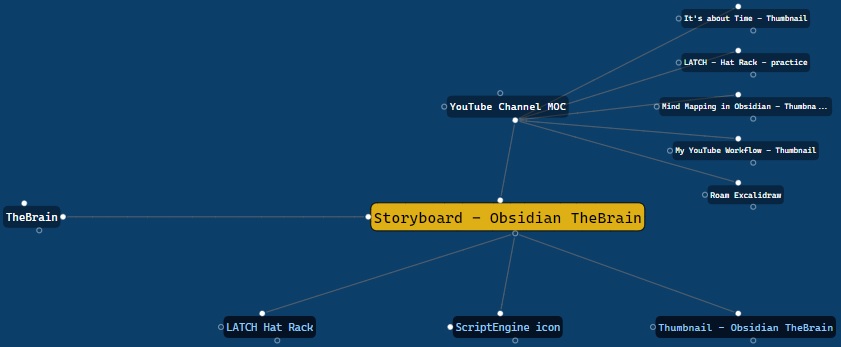|[@zsviczian](https://github.com/zsviczian)|
|
||||
|[Toggle Fullscreen on Mobile](Toggle%20Fullscreen%20on%20Mobile.md)|Hides Obsidian workspace leaf padding and header (based on option in settings, default is "hide header" = false) which will take Excalidraw to full screen. ⚠ Note that if the header is not visible, it will be very difficult to invoke the command palette to end full screen. Only hide the header if you have a keyboard or you've practiced opening command palette!||[@zsviczian](https://github.com/zsviczian)|
|
||||
|[Transfer TextElements to Excalidraw markdown metadata](Transfer%20TextElements%20to%20Excalidraw%20markdown%20metadata.md)|The script will delete the selected text elements from the canvas and will copy the text from these text elements into the Excalidraw markdown file as metadata. This means, that the text will no longer be visible in the drawing, however you will be able to search for the text in Obsidian and find the drawing containing this image.||[@zsviczian](https://github.com/zsviczian)|
|
||||
|[Zoom to Fit Selected Elements](Zoom%20to%20Fit%20Selected%20Elements.md)|Similar to Excalidraw standard SHIFT+2 feature: Zoom to fit selected elements, but with the ability to zoom to 1000%. Inspiration: [#272](https://github.com/zsviczian/obsidian-excalidraw-plugin/issues/272)||[@zsviczian](https://github.com/zsviczian)|
|
||||
|
||||
@@ -1,7 +1,7 @@
|
||||
/*
|
||||

|
||||
|
||||
iOS scribble helper for better handwriting experience with text elements. If no elements are selected then the creates a text element at pointer position and you can use the edit box to modify the text with scribble. If a text element is selected then opens the input prompt where you can modify this text with scribble.
|
||||
iOS scribble helper for better handwriting experience with text elements. If no elements are selected then the script creates a text element at the pointer position and you can use the edit box to modify the text with scribble. If a text element is selected then the script opens the input prompt where you can modify this text with scribble.
|
||||
|
||||
```javascript
|
||||
*/
|
||||
|
||||
1080
ea-scripts/TheBrain-navigation.md
Normal file
1080
ea-scripts/TheBrain-navigation.md
Normal file
File diff suppressed because it is too large
Load Diff
1
ea-scripts/TheBrain-navigation.svg
Normal file
1
ea-scripts/TheBrain-navigation.svg
Normal file

@@ -0,0 +1 @@
|
||||
<svg xmlns="http://www.w3.org/2000/svg" viewBox="0 0 512 512"><path d="M380.6 365.6C401.1 379.9 416 404.3 416 432C416 476.2 380.2 512 336 512C291.8 512 256 476.2 256 432C256 423.6 257.3 415.4 259.7 407.8L114.1 280.4C103.8 285.3 92.21 288 80 288C35.82 288 0 252.2 0 208C0 163.8 35.82 128 80 128C101.9 128 121.7 136.8 136.2 151.1L320 77.52C321.3 34.48 356.6 0 400 0C444.2 0 480 35.82 480 80C480 117.9 453.7 149.6 418.4 157.9L380.6 365.6zM156.3 232.2L301.9 359.6C306.9 357.3 312.1 355.4 317.6 354.1L355.4 146.4C351.2 143.6 347.4 140.4 343.8 136.9L159.1 210.5C159.7 218 158.5 225.3 156.3 232.2V232.2z"/></svg>
|
||||
|
After Width: | Height: | Size: 605 B |
1
ea-scripts/directory-info.json
Normal file
1
ea-scripts/directory-info.json
Normal file
File diff suppressed because one or more lines are too long
@@ -1,330 +1,337 @@
|
||||
If you are enjoying the Excalidraw plugin then please support my work and enthusiasm by buying me a coffee on [https://ko-fi/zsolt](https://ko-fi.com/zsolt).
|
||||
|
||||
[<img src="https://user-images.githubusercontent.com/14358394/115450238-f39e8100-a21b-11eb-89d0-fa4b82cdbce8.png" class="coffee">](https://ko-fi.com/zsolt)
|
||||
|
||||
---
|
||||
|
||||
Jump ahead to the [[#List of available scripts]]
|
||||
|
||||
# Intorducing Excalidraw Automate Script Engine
|
||||
<iframe width="560" height="315" src="https://www.youtube.com/embed/hePJcObHIso" title="YouTube video player" frameborder="0" allow="accelerometer; autoplay; clipboard-write; encrypted-media; gyroscope; picture-in-picture" allowfullscreen></iframe>
|
||||
|
||||
Script Engine scripts are installed in the `Downloaded` subfolder of the `Excalidraw Automate script folder` specified in plugin settings.
|
||||
|
||||
In the `Command Palette` installed scripts are prefixed with `Downloaded/`, thus you can always know if you are executing a local script of your own, or one that you have downloaded from GitHub.
|
||||
|
||||
## Attention developers and hobby hackers
|
||||
<img src='https://raw.githubusercontent.com/zsviczian/obsidian-excalidraw-plugin/master/images/hobby-programmer.svg' align='left' style='background-color:whitesmoke; width:80px; margin-right:15px; margin-bottom:10px;'/>
|
||||
If you want to modify scripts, I recommend moving them to the `Excalidraw Automate script folder` or a different subfolder under the script folder. Scripts in the `Downloaded` folder will be overwritten when you click the `Update this script` button. Note also, that at this time, I do not check if the script file has been updated on GitHub, thus the `Update this script` button is always visible once you have installed a script, not only when an update is availble (hope to build this feature in the future).
|
||||
|
||||
I would love to include your contribution in the script library. If you have a script of your own that you would like to share with the community, please open a [PR](https://github.com/zsviczian/obsidian-excalidraw-plugin/pulls) on GitHub. Be sure to include the following in your pull request
|
||||
- The [script file](https://github.com/zsviczian/obsidian-excalidraw-plugin/tree/master/ea-scripts) with a self explanetory name. The name of the file will be the name of the script in the Command Palette.
|
||||
- An [image](https://github.com/zsviczian/obsidian-excalidraw-plugin/tree/master/images) explaining the scripts purpose. Remember a picture speaks thousand words!
|
||||
- An update to this file [ea-scripts/index.md](https://github.com/zsviczian/obsidian-excalidraw-plugin/blob/master/ea-scripts/index.md)
|
||||
|
||||
---
|
||||
|
||||
# List of available scripts
|
||||
| | |
|
||||
|----|-----|
|
||||
|<div><img src="https://raw.githubusercontent.com/zsviczian/obsidian-excalidraw-plugin/master/ea-scripts/Add%20Connector%20Point.svg"></div>|[[#Add Connector Point]]|
|
||||
|<div><img src="https://raw.githubusercontent.com/zsviczian/obsidian-excalidraw-plugin/master/ea-scripts/Add%20Link%20to%20Existing%20File%20and%20Open.svg"/></div>|[[#Add Link to Existing File and Open]]|
|
||||
|<div><img src="https://raw.githubusercontent.com/zsviczian/obsidian-excalidraw-plugin/master/ea-scripts/Add%20Link%20to%20New%20Page%20and%20Open.svg"/></div>|[[#Add Link to New Page and Open]]|
|
||||
|<div><img src="https://raw.githubusercontent.com/zsviczian/obsidian-excalidraw-plugin/master/ea-scripts/Add%20Next%20Step%20in%20Process.svg"/></div>|[[#Add Next Step in Process]]|
|
||||
|<div><img src="https://raw.githubusercontent.com/zsviczian/obsidian-excalidraw-plugin/master/ea-scripts/Box%20Each%20Selected%20Groups.svg"/></div>|[[#Box Each Selected Groups]]|
|
||||
|<div><img src="https://raw.githubusercontent.com/zsviczian/obsidian-excalidraw-plugin/master/ea-scripts/Box%20Selected%20Elements.svg"/></div>|[[#Box Selected Elements]]|
|
||||
|<div><img src="https://raw.githubusercontent.com/zsviczian/obsidian-excalidraw-plugin/master/ea-scripts/Change%20shape%20of%20selected%20elements.svg"/></div>|[[#Change shape of selected elements]]|
|
||||
|<div><img src="https://raw.githubusercontent.com/zsviczian/obsidian-excalidraw-plugin/master/ea-scripts/Connect%20elements.svg"/></div>|[[#Connect elements]]|
|
||||
|<div><img src="https://raw.githubusercontent.com/zsviczian/obsidian-excalidraw-plugin/master/ea-scripts/Convert%20freedraw%20to%20line.svg"/></div>|[[#Convert freedraw to line]]|
|
||||
|<div><img src="https://raw.githubusercontent.com/zsviczian/obsidian-excalidraw-plugin/master/ea-scripts/Convert%20selected%20text%20elements%20to%20sticky%20notes.svg"/></div>|[[#Convert selected text elements to sticky notes]]|
|
||||
|<div><img src="https://raw.githubusercontent.com/zsviczian/obsidian-excalidraw-plugin/master/ea-scripts/Convert%20text%20to%20link%20with%20folder%20and%20alias.svg"/></div>|[[#Convert text to link with folder and alias]]|
|
||||
|<div><img src="https://raw.githubusercontent.com/zsviczian/obsidian-excalidraw-plugin/master/ea-scripts/Copy%20Selected%20Element%20Styles%20to%20Global.svg"/></div>|[[#Copy Selected Element Styles to Global]]|
|
||||
|<div><img src="https://raw.githubusercontent.com/zsviczian/obsidian-excalidraw-plugin/master/ea-scripts/Create%20new%20markdown%20file%20and%20embed%20into%20active%20drawing.svg"/></div>|[[#Create new markdown file and embed into active drawing]]|
|
||||
|<div><img src="https://raw.githubusercontent.com/zsviczian/obsidian-excalidraw-plugin/master/ea-scripts/Darken%20background%20color.svg"/></div>|[[#Darken background color]]|
|
||||
|<div><img src="https://raw.githubusercontent.com/zsviczian/obsidian-excalidraw-plugin/master/ea-scripts/Elbow%20connectors.svg"/></div>|[[#Elbow connectors]]|
|
||||
|<div><img src="https://raw.githubusercontent.com/zsviczian/obsidian-excalidraw-plugin/master/ea-scripts/Expand%20rectangles%20horizontally%20keep%20text%20centered.svg"/></div>|[[#Expand rectangles horizontally keep text centered]]|
|
||||
|<div><img src="https://raw.githubusercontent.com/zsviczian/obsidian-excalidraw-plugin/master/ea-scripts/Expand%20rectangles%20horizontally.svg"/></div>|[[#Expand rectangles horizontally]]|
|
||||
|<div><img src="https://raw.githubusercontent.com/zsviczian/obsidian-excalidraw-plugin/master/ea-scripts/Expand%20rectangles%20vertically%20keep%20text%20centered.svg"/></div>|[[#Expand rectangles vertically keep text centered]]|
|
||||
|<div><img src="https://raw.githubusercontent.com/zsviczian/obsidian-excalidraw-plugin/master/ea-scripts/Expand%20rectangles%20vertically.svg"/></div>|[[#Expand rectangles vertically]]|
|
||||
|<div><img src="https://raw.githubusercontent.com/zsviczian/obsidian-excalidraw-plugin/master/ea-scripts/Fixed%20horizontal%20distance%20between%20centers.svg"/></div>|[[#Fixed horizontal distance between centers]]|
|
||||
|<div><img src="https://raw.githubusercontent.com/zsviczian/obsidian-excalidraw-plugin/master/ea-scripts/Fixed%20inner%20distance.svg"/></div>|[[#Fixed inner distance]]|
|
||||
|<div><img src="https://raw.githubusercontent.com/zsviczian/obsidian-excalidraw-plugin/master/ea-scripts/Fixed%20spacing.svg"/></div>|[[#Fixed spacing]]|
|
||||
|<div><img src="https://raw.githubusercontent.com/zsviczian/obsidian-excalidraw-plugin/master/ea-scripts/Fixed%20vertical%20distance%20between%20centers.svg"/></div>|[[#Fixed vertical distance between centers]]|
|
||||
|<div><img src="https://raw.githubusercontent.com/zsviczian/obsidian-excalidraw-plugin/master/ea-scripts/Fixed%20vertical%20distance.svg"/></div>|[[#Fixed vertical distance]]|
|
||||
|<div><img src="https://raw.githubusercontent.com/zsviczian/obsidian-excalidraw-plugin/master/ea-scripts/Lighten%20background%20color.svg"/></div>|[[#Lighten background color]]|
|
||||
|<div><img src="https://raw.githubusercontent.com/zsviczian/obsidian-excalidraw-plugin/master/ea-scripts/Modify%20background%20color%20opacity.svg"/></div>|[[#Modify background color opacity]]|
|
||||
|<div><img src="https://raw.githubusercontent.com/zsviczian/obsidian-excalidraw-plugin/master/ea-scripts/Normalize%20Selected%20Arrows.svg"/></div>|[[#Normalize Selected Arrows]]|
|
||||
|<div><img src="https://raw.githubusercontent.com/zsviczian/obsidian-excalidraw-plugin/master/ea-scripts/OCR%20-%20Optical%20Character%20Recognition.svg"/></div>|[[#OCR - Optical Character Recognition]]|
|
||||
|<div><img src="https://raw.githubusercontent.com/zsviczian/obsidian-excalidraw-plugin/master/ea-scripts/Organic%20Line.svg"/></div>|[[#Organic Line]]|
|
||||
|<div><img src="https://raw.githubusercontent.com/zsviczian/obsidian-excalidraw-plugin/master/ea-scripts/Repeat%20Elements.svg"/></div>|[[#Repeat Elements]]|
|
||||
|<div><img src="https://raw.githubusercontent.com/zsviczian/obsidian-excalidraw-plugin/master/ea-scripts/Reverse%20arrows.svg"/></div>|[[#Reverse arrows]]|
|
||||
|<div><img src="https://raw.githubusercontent.com/zsviczian/obsidian-excalidraw-plugin/master/ea-scripts/Scribble%20Helper.svg"/></div>|[[#Scribble Helper]]|
|
||||
|<div><img src="https://raw.githubusercontent.com/zsviczian/obsidian-excalidraw-plugin/master/ea-scripts/Select%20Elements%20of%20Type.svg"/></div>|[[#Select Elements of Type]]|
|
||||
|<div><img src="https://raw.githubusercontent.com/zsviczian/obsidian-excalidraw-plugin/master/ea-scripts/Set%20background%20color%20of%20unclosed%20line%20object%20by%20adding%20a%20shadow%20clone.svg"/></div>|[[#Set background color of unclosed line object by adding a shadow clone]]|
|
||||
|<div><img src="https://raw.githubusercontent.com/zsviczian/obsidian-excalidraw-plugin/master/ea-scripts/Set%20Dimensions.svg"/></div>|[[#Set Dimensions]]|
|
||||
|<div><img src="https://raw.githubusercontent.com/zsviczian/obsidian-excalidraw-plugin/master/ea-scripts/Set%20Font%20Family.svg"/></div>|[[#Set Font Family]]|
|
||||
|<div><img src="https://raw.githubusercontent.com/zsviczian/obsidian-excalidraw-plugin/master/ea-scripts/Set%20Grid.svg"/></div>|[[#Set Grid]]|
|
||||
|<div><img src="https://raw.githubusercontent.com/zsviczian/obsidian-excalidraw-plugin/master/ea-scripts/Set%20Link%20Alias.svg"/></div>|[[#Set Link Alias]]|
|
||||
|<div><img src="https://raw.githubusercontent.com/zsviczian/obsidian-excalidraw-plugin/master/ea-scripts/Set%20Stroke%20Width%20of%20Selected%20Elements.svg"/></div>|[[#Set Stroke Width of Selected Elements]]|
|
||||
|<div><img src="https://raw.githubusercontent.com/zsviczian/obsidian-excalidraw-plugin/master/ea-scripts/Set%20Text%20Alignment.svg"/></div>|[[#Set Text Alignment]]|
|
||||
|<div><img src="https://raw.githubusercontent.com/zsviczian/obsidian-excalidraw-plugin/master/ea-scripts/Split%20text%20by%20lines.svg"/></div>|[[#Split text by lines]]|
|
||||
|<div><img src="https://raw.githubusercontent.com/zsviczian/obsidian-excalidraw-plugin/master/ea-scripts/Transfer%20TextElements%20to%20Excalidraw%20markdown%20metadata.svg"/></div>|[[#Transfer TextElements to Excalidraw markdown metadata]]|
|
||||
|<div><img src="https://raw.githubusercontent.com/zsviczian/obsidian-excalidraw-plugin/master/ea-scripts/Zoom%20to%20Fit%20Selected%20Elements.svg"/></div>|[[#Zoom to Fit Selected Elements]]|
|
||||
|
||||
## Add Connector Point
|
||||
```excalidraw-script-install
|
||||
https://raw.githubusercontent.com/zsviczian/obsidian-excalidraw-plugin/master/ea-scripts/Add%20Connector%20Point.md
|
||||
```
|
||||
<table><tr valign='top'><td class="label">Author</td><td class="data"><a href='https://github.com/zsviczian'>@zsviczian</a></td></tr><tr valign='top'><td class="label">Source</td><td class="data"><a href='https://github.com/zsviczian/obsidian-excalidraw-plugin/blob/master/ea-scripts/Add%20Connector%20Point.md'>File on GitHub</a></td></tr><tr valign='top'><td class="label">Description</td><td class="data">This script will add a small circle to the top left of each text element in the selection and add the text and the "connector point" to a group. You can use the connector points to link text elements with an arrow (in for example a Wardley Map).<br><img src='https://raw.githubusercontent.com/zsviczian/obsidian-excalidraw-plugin/master/images/scripts-bullet-point.jpg'></td></tr></table>
|
||||
|
||||
## Add Link to Existing File and Open
|
||||
```excalidraw-script-install
|
||||
https://raw.githubusercontent.com/zsviczian/obsidian-excalidraw-plugin/master/ea-scripts/Add%20Link%20to%20Existing%20File%20and%20Open.md
|
||||
```
|
||||
<table><tr valign='top'><td class="label">Author</td><td class="data"><a href='https://github.com/zsviczian'>@zsviczian</a></td></tr><tr valign='top'><td class="label">Source</td><td class="data"><a href='https://github.com/zsviczian/obsidian-excalidraw-plugin/blob/master/ea-scripts/Add%20Link%20to%20Existing%20File%20and%20Open.md'>File on GitHub</a></td></tr><tr valign='top'><td class="label">Description</td><td class="data">Prompts for a file from the vault. Adds a link to the selected element pointing to the selected file. You can control in settings to open the file in the current active pane or an adjacent pane.<br><img src='https://raw.githubusercontent.com/zsviczian/obsidian-excalidraw-plugin/master/images/scripts-add-link-and-open.jpg'></td></tr></table>
|
||||
|
||||
## Add Link to New Page and Open
|
||||
```excalidraw-script-install
|
||||
https://raw.githubusercontent.com/zsviczian/obsidian-excalidraw-plugin/master/ea-scripts/Add%20Link%20to%20New%20Page%20and%20Open.md
|
||||
```
|
||||
<table><tr valign='top'><td class="label">Author</td><td class="data"><a href='https://github.com/zsviczian'>@zsviczian</a></td></tr><tr valign='top'><td class="label">Source</td><td class="data"><a href='https://github.com/zsviczian/obsidian-excalidraw-plugin/blob/master/ea-scripts/Add%20Link%20to%20New%20Page%20and%20Open.md'>File on GitHub</a></td></tr><tr valign='top'><td class="label">Description</td><td class="data">Prompts for filename. Offers option to create and open a new Markdown or Excalidraw document. Adds link pointing to the new file, to the selected objects in the drawing. You can control in settings to open the file in the current active pane or an adjacent pane.<br><img src='https://raw.githubusercontent.com/zsviczian/obsidian-excalidraw-plugin/master/images/scripts-add-link-to-new-page-and-pen.jpg'></td></tr></table>
|
||||
|
||||
## Add Next Step in Process
|
||||
```excalidraw-script-install
|
||||
https://raw.githubusercontent.com/zsviczian/obsidian-excalidraw-plugin/master/ea-scripts/Add%20Next%20Step%20in%20Process.md
|
||||
```
|
||||
<table><tr valign='top'><td class="label">Author</td><td class="data"><a href='https://github.com/zsviczian'>@zsviczian</a></td></tr><tr valign='top'><td class="label">Source</td><td class="data"><a href='https://github.com/zsviczian/obsidian-excalidraw-plugin/blob/master/ea-scripts/Add%20Next%20Step%20in%20Process.md'>File on GitHub</a></td></tr><tr valign='top'><td class="label">Description</td><td class="data">This script will prompt you for the title of the process step, then will create a stick note with the text. If an element is selected then the script will connect this new step with an arrow to the previous step (the selected element). If no element is selected, then the script assumes this is the first step in the process and will only output the sticky note with the text that was entered.<br><img src='https://raw.githubusercontent.com/zsviczian/obsidian-excalidraw-plugin/master/images/scripts-add-process-step.jpg'></td></tr></table>
|
||||
|
||||
## Box Each Selected Groups
|
||||
```excalidraw-script-install
|
||||
https://raw.githubusercontent.com/zsviczian/obsidian-excalidraw-plugin/master/ea-scripts/Box%20Each%20Selected%20Groups.md
|
||||
```
|
||||
<table><tr valign='top'><td class="label">Author</td><td class="data"><a href='https://github.com/1-2-3'>@1-2-3</a></td></tr><tr valign='top'><td class="label">Source</td><td class="data"><a href='https://github.com/zsviczian/obsidian-excalidraw-plugin/blob/master/ea-scripts/Box%20Each%20Selected%20Groups.md'>File on GitHub</a></td></tr><tr valign='top'><td class="label">Description</td><td class="data">This script will add encapsulating boxes around each of the currently selected groups in Excalidraw.<br><img src='https://raw.githubusercontent.com/zsviczian/obsidian-excalidraw-plugin/master/images/scripts-box-each-selected-groups.png'></td></tr></table>
|
||||
|
||||
## Box Selected Elements
|
||||
```excalidraw-script-install
|
||||
https://raw.githubusercontent.com/zsviczian/obsidian-excalidraw-plugin/master/ea-scripts/Box%20Selected%20Elements.md
|
||||
```
|
||||
<table><tr valign='top'><td class="label">Author</td><td class="data"><a href='https://github.com/zsviczian'>@zsviczian</a></td></tr><tr valign='top'><td class="label">Source</td><td class="data"><a href='https://github.com/zsviczian/obsidian-excalidraw-plugin/blob/master/ea-scripts/Box%20Selected%20Elements.md'>File on GitHub</a></td></tr><tr valign='top'><td class="label">Description</td><td class="data">This script will add an encapsulating box around the currently selected elements in Excalidraw.<br><img src='https://raw.githubusercontent.com/zsviczian/obsidian-excalidraw-plugin/master/images/scripts-box-elements.jpg'></td></tr></table>
|
||||
|
||||
## Change shape of selected elements
|
||||
```excalidraw-script-install
|
||||
https://raw.githubusercontent.com/zsviczian/obsidian-excalidraw-plugin/master/ea-scripts/Change%20shape%20of%20selected%20elements.md
|
||||
```
|
||||
<table><tr valign='top'><td class="label">Author</td><td class="data"><a href='https://github.com/zsviczian'>@zsviczian</a></td></tr><tr valign='top'><td class="label">Source</td><td class="data"><a href='https://github.com/zsviczian/obsidian-excalidraw-plugin/blob/master/ea-scripts/Change%20shape%20of%20selected%20elements.md'>File on GitHub</a></td></tr><tr valign='top'><td class="label">Description</td><td class="data">The script allows you to change the shape of selected Rectangles, Diamonds and Ellipses.<br><img src='https://raw.githubusercontent.com/zsviczian/obsidian-excalidraw-plugin/master/images/scripts-change-shape.jpg'></td></tr></table>
|
||||
|
||||
## Connect elements
|
||||
```excalidraw-script-install
|
||||
https://raw.githubusercontent.com/zsviczian/obsidian-excalidraw-plugin/master/ea-scripts/Connect%20elements.md
|
||||
```
|
||||
<table><tr valign='top'><td class="label">Author</td><td class="data"><a href='https://github.com/zsviczian'>@zsviczian</a></td></tr><tr valign='top'><td class="label">Source</td><td class="data"><a href='https://github.com/zsviczian/obsidian-excalidraw-plugin/blob/master/ea-scripts/Connect%20elements.md'>File on GitHub</a></td></tr><tr valign='top'><td class="label">Description</td><td class="data">This script will connect two objects with an arrow. If either of the objects are a set of grouped elements (e.g. a text element grouped with an encapsulating rectangle), the script will identify these groups, and connect the arrow to the largest object in the group (assuming you want to connect the arrow to the box around the text element).<br><img src='https://raw.githubusercontent.com/zsviczian/obsidian-excalidraw-plugin/master/images/scripts-connect-elements.jpg'></td></tr></table>
|
||||
|
||||
## Convert freedraw to line
|
||||
```excalidraw-script-install
|
||||
https://raw.githubusercontent.com/zsviczian/obsidian-excalidraw-plugin/master/ea-scripts/Convert%20freedraw%20to%20line.md
|
||||
```
|
||||
<table><tr valign='top'><td class="label">Author</td><td class="data"><a href='https://github.com/zsviczian'>@zsviczian</a></td></tr><tr valign='top'><td class="label">Source</td><td class="data"><a href='https://github.com/zsviczian/obsidian-excalidraw-plugin/blob/master/ea-scripts/Convert%20freedraw%20to%20line.md'>File on GitHub</a></td></tr><tr valign='top'><td class="label">Description</td><td class="data">Convert selected freedraw objects into editable lines. This will allow you to adjust your drawings by dragging line points and will also allow you to select shape fill in case of enclosed lines. You can adjust conversion point density in settings.<br><img src='https://raw.githubusercontent.com/zsviczian/obsidian-excalidraw-plugin/master/images/scripts-convert-freedraw-to-line.jpg'></td></tr></table>
|
||||
|
||||
## Convert selected text elements to sticky notes
|
||||
```excalidraw-script-install
|
||||
https://raw.githubusercontent.com/zsviczian/obsidian-excalidraw-plugin/master/ea-scripts/Convert%20selected%20text%20elements%20to%20sticky%20notes.md
|
||||
```
|
||||
<table><tr valign='top'><td class="label">Author</td><td class="data"><a href='https://github.com/zsviczian'>@zsviczian</a></td></tr><tr valign='top'><td class="label">Source</td><td class="data"><a href='https://github.com/zsviczian/obsidian-excalidraw-plugin/blob/master/ea-scripts/Convert%20selected%20text%20elements%20to%20sticky%20notes.md'>File on GitHub</a></td></tr><tr valign='top'><td class="label">Description</td><td class="data">Converts selected plain text elements to sticky notes with transparent background and transparent stroke color (default setting, can be changed in plugin settings). Essentially converts text element into a wrappable format.<br><img src='https://raw.githubusercontent.com/zsviczian/obsidian-excalidraw-plugin/master/images/scripts-textelement-to-transparent-stickynote.png'></td></tr></table>
|
||||
|
||||
## Convert text to link with folder and alias
|
||||
```excalidraw-script-install
|
||||
https://raw.githubusercontent.com/zsviczian/obsidian-excalidraw-plugin/master/ea-scripts/Convert%20text%20to%20link%20with%20folder%20and%20alias.md
|
||||
```
|
||||
<table><tr valign='top'><td class="label">Author</td><td class="data"><a href='https://github.com/zsviczian'>@zsviczian</a></td></tr><tr valign='top'><td class="label">Source</td><td class="data"><a href='https://github.com/zsviczian/obsidian-excalidraw-plugin/blob/master/ea-scripts/Convert%20text%20to%20link%20with%20folder%20and%20alias.md'>File on GitHub</a></td></tr><tr valign='top'><td class="label">Description</td><td class="data">Converts text elements to links pointing to a file in a selected folder and with the alias set as the original text. The script will prompt the user to select an existing folder from the vault.<br><code>original text</code> - <code>[[selected folder/original text|original text]]</code></td></tr></table>
|
||||
|
||||
## Copy Selected Element Styles to Global
|
||||
```excalidraw-script-install
|
||||
https://raw.githubusercontent.com/zsviczian/obsidian-excalidraw-plugin/master/ea-scripts/Copy%20Selected%20Element%20Styles%20to%20Global.md
|
||||
```
|
||||
<table><tr valign='top'><td class="label">Author</td><td class="data"><a href='https://github.com/1-2-3'>@1-2-3</a></td></tr><tr valign='top'><td class="label">Source</td><td class="data"><a href='https://github.com/zsviczian/obsidian-excalidraw-plugin/blob/master/ea-scripts/Copy%20Selected%20Element%20Styles%20to%20Global.md'>File on GitHub</a></td></tr><tr valign='top'><td class="label">Description</td><td class="data">This script will copy styles of any selected element into Excalidraw's global styles.<br><img src='https://raw.githubusercontent.com/zsviczian/obsidian-excalidraw-plugin/master/images/scripts-copy-selected-element-styles-to-global.png'></td></tr></table>
|
||||
|
||||
## Create new markdown file and embed into active drawing
|
||||
```excalidraw-script-install
|
||||
https://raw.githubusercontent.com/zsviczian/obsidian-excalidraw-plugin/master/ea-scripts/Create%20new%20markdown%20file%20and%20embed%20into%20active%20drawing.md
|
||||
```
|
||||
<table><tr valign='top'><td class="label">Author</td><td class="data"><a href='https://github.com/zsviczian'>@zsviczian</a></td></tr><tr valign='top'><td class="label">Source</td><td class="data"><a href='https://github.com/zsviczian/obsidian-excalidraw-plugin/blob/master/ea-scripts/Create%20new%20markdown%20file%20and%20embed%20into%20active%20drawing.md'>File on GitHub</a></td></tr><tr valign='top'><td class="label">Description</td><td class="data">The script will prompt you for a filename, then create a new markdown document with the file name provided, open the new markdown document in an adjacent pane, and embed the markdown document into the active Excalidraw drawing.<br><img src='https://raw.githubusercontent.com/zsviczian/obsidian-excalidraw-plugin/master/images/scripts-create-and-embed-new-markdown-file.jpg'></td></tr></table>
|
||||
|
||||
## Darken background color
|
||||
```excalidraw-script-install
|
||||
https://raw.githubusercontent.com/zsviczian/obsidian-excalidraw-plugin/master/ea-scripts/Darken%20background%20color.md
|
||||
```
|
||||
<table><tr valign='top'><td class="label">Author</td><td class="data"><a href='https://github.com/1-2-3'>@1-2-3</a></td></tr><tr valign='top'><td class="label">Source</td><td class="data"><a href='https://github.com/zsviczian/obsidian-excalidraw-plugin/blob/master/ea-scripts/Darken%20background%20color.md'>File on GitHub</a></td></tr><tr valign='top'><td class="label">Description</td><td class="data">This script darkens the background color of the selected element by 2% at a time. You can use this script several times until you are satisfied. It is recommended to set a shortcut key for this script so that you can quickly try to DARKEN and LIGHTEN the color effect. In contrast to the `Modify background color opacity` script, the advantage is that the background color of the element is not affected by the canvas color, and the color value does not appear in a strange rgba() form.<br><img src='https://raw.githubusercontent.com/zsviczian/obsidian-excalidraw-plugin/master/images/darken-lighten-background-color.png'></td></tr></table>
|
||||
|
||||
## Elbow connectors
|
||||
```excalidraw-script-install
|
||||
https://raw.githubusercontent.com/zsviczian/obsidian-excalidraw-plugin/master/ea-scripts/Elbow%20connectors.md
|
||||
```
|
||||
<table><tr valign='top'><td class="label">Author</td><td class="data"><a href='https://github.com/1-2-3'>@1-2-3</a></td></tr><tr valign='top'><td class="label">Source</td><td class="data"><a href='https://github.com/zsviczian/obsidian-excalidraw-plugin/blob/master/ea-scripts/Elbow%20connectors.md'>File on GitHub</a></td></tr><tr valign='top'><td class="label">Description</td><td class="data">This script converts the selected connectors to elbows.<br><img src='https://raw.githubusercontent.com/zsviczian/obsidian-excalidraw-plugin/master/images/elbow-connectors.png'></td></tr></table>
|
||||
|
||||
## Expand rectangles horizontally keep text centered
|
||||
```excalidraw-script-install
|
||||
https://raw.githubusercontent.com/zsviczian/obsidian-excalidraw-plugin/master/ea-scripts/Expand%20rectangles%20horizontally%20keep%20text%20centered.md
|
||||
```
|
||||
<table><tr valign='top'><td class="label">Author</td><td class="data"><a href='https://github.com/1-2-3'>@1-2-3</a></td></tr><tr valign='top'><td class="label">Source</td><td class="data"><a href='https://github.com/zsviczian/obsidian-excalidraw-plugin/blob/master/ea-scripts/Expand%20rectangles%20horizontally%20keep%20text%20centered.md'>File on GitHub</a></td></tr><tr valign='top'><td class="label">Description</td><td class="data">This script expands the width of the selected rectangles until they are all the same width and keep the text centered.<br><img src='https://raw.githubusercontent.com/zsviczian/obsidian-excalidraw-plugin/master/images/scripts-expand-rectangles.gif'></td></tr></table>
|
||||
|
||||
## Expand rectangles horizontally
|
||||
```excalidraw-script-install
|
||||
https://raw.githubusercontent.com/zsviczian/obsidian-excalidraw-plugin/master/ea-scripts/Expand%20rectangles%20horizontally.md
|
||||
```
|
||||
<table><tr valign='top'><td class="label">Author</td><td class="data"><a href='https://github.com/1-2-3'>@1-2-3</a></td></tr><tr valign='top'><td class="label">Source</td><td class="data"><a href='https://github.com/zsviczian/obsidian-excalidraw-plugin/blob/master/ea-scripts/Expand%20rectangles%20horizontally.md'>File on GitHub</a></td></tr><tr valign='top'><td class="label">Description</td><td class="data">This script expands the width of the selected rectangles until they are all the same width.<br><img src='https://raw.githubusercontent.com/zsviczian/obsidian-excalidraw-plugin/master/images/scripts-expand-rectangles.gif'></td></tr></table>
|
||||
|
||||
## Expand rectangles vertically keep text centered
|
||||
```excalidraw-script-install
|
||||
https://raw.githubusercontent.com/zsviczian/obsidian-excalidraw-plugin/master/ea-scripts/Expand%20rectangles%20vertically%20keep%20text%20centered.md
|
||||
```
|
||||
<table><tr valign='top'><td class="label">Author</td><td class="data"><a href='https://github.com/1-2-3'>@1-2-3</a></td></tr><tr valign='top'><td class="label">Source</td><td class="data"><a href='https://github.com/zsviczian/obsidian-excalidraw-plugin/blob/master/ea-scripts/Expand%20rectangles%20vertically%20keep%20text%20centered.md'>File on GitHub</a></td></tr><tr valign='top'><td class="label">Description</td><td class="data">This script expands the height of the selected rectangles until they are all the same height and keep the text centered.<br><img src='https://raw.githubusercontent.com/zsviczian/obsidian-excalidraw-plugin/master/images/scripts-expand-rectangles.gif'></td></tr></table>
|
||||
|
||||
## Expand rectangles vertically
|
||||
```excalidraw-script-install
|
||||
https://raw.githubusercontent.com/zsviczian/obsidian-excalidraw-plugin/master/ea-scripts/Expand%20rectangles%20vertically.md
|
||||
```
|
||||
<table><tr valign='top'><td class="label">Author</td><td class="data"><a href='https://github.com/1-2-3'>@1-2-3</a></td></tr><tr valign='top'><td class="label">Source</td><td class="data"><a href='https://github.com/zsviczian/obsidian-excalidraw-plugin/blob/master/ea-scripts/Expand%20rectangles%20vertically.md'>File on GitHub</a></td></tr><tr valign='top'><td class="label">Description</td><td class="data">This script expands the height of the selected rectangles until they are all the same height.<br><img src='https://raw.githubusercontent.com/zsviczian/obsidian-excalidraw-plugin/master/images/scripts-expand-rectangles.gif'></td></tr></table>
|
||||
|
||||
## Fixed horizontal distance between centers
|
||||
```excalidraw-script-install
|
||||
https://raw.githubusercontent.com/zsviczian/obsidian-excalidraw-plugin/master/ea-scripts/Fixed%20horizontal%20distance%20between%20centers.md
|
||||
```
|
||||
<table><tr valign='top'><td class="label">Author</td><td class="data"><a href='https://github.com/1-2-3'>@1-2-3</a></td></tr><tr valign='top'><td class="label">Source</td><td class="data"><a href='https://github.com/zsviczian/obsidian-excalidraw-plugin/blob/master/ea-scripts/Fixed%20horizontal%20distance%20between%20centers.md'>File on GitHub</a></td></tr><tr valign='top'><td class="label">Description</td><td class="data">This script arranges the selected elements horizontally with a fixed center spacing.<br><img src='https://raw.githubusercontent.com/zsviczian/obsidian-excalidraw-plugin/master/images/scripts-fixed-horizontal-distance-between-centers.png'></td></tr></table>
|
||||
|
||||
## Fixed inner distance
|
||||
```excalidraw-script-install
|
||||
https://raw.githubusercontent.com/zsviczian/obsidian-excalidraw-plugin/master/ea-scripts/Fixed%20inner%20distance.md
|
||||
```
|
||||
<table><tr valign='top'><td class="label">Author</td><td class="data"><a href='https://github.com/1-2-3'>@1-2-3</a></td></tr><tr valign='top'><td class="label">Source</td><td class="data"><a href='https://github.com/zsviczian/obsidian-excalidraw-plugin/blob/master/ea-scripts/Fixed%20inner%20distance.md'>File on GitHub</a></td></tr><tr valign='top'><td class="label">Description</td><td class="data">This script arranges selected elements and groups with a fixed inner distance.<br><img src='https://raw.githubusercontent.com/zsviczian/obsidian-excalidraw-plugin/master/images/scripts-fixed-inner-distance.png'></td></tr></table>
|
||||
|
||||
## Fixed spacing
|
||||
```excalidraw-script-install
|
||||
https://raw.githubusercontent.com/zsviczian/obsidian-excalidraw-plugin/master/ea-scripts/Fixed%20spacing.md
|
||||
```
|
||||
<table><tr valign='top'><td class="label">Author</td><td class="data"><a href='https://github.com/1-2-3'>@1-2-3</a></td></tr><tr valign='top'><td class="label">Source</td><td class="data"><a href='https://github.com/zsviczian/obsidian-excalidraw-plugin/blob/master/ea-scripts/Fixed%20spacing.md'>File on GitHub</a></td></tr><tr valign='top'><td class="label">Description</td><td class="data">The script arranges the selected elements horizontally with a fixed spacing. When we create an architecture diagram or mind map, we often need to arrange a large number of elements in a fixed spacing. `Fixed spacing` and `Fixed vertical Distance` scripts can save us a lot of time.<br><img src='https://raw.githubusercontent.com/zsviczian/obsidian-excalidraw-plugin/master/images/scripts-fix-space-demo.png'></td></tr></table>
|
||||
|
||||
## Fixed vertical distance between centers
|
||||
```excalidraw-script-install
|
||||
https://raw.githubusercontent.com/zsviczian/obsidian-excalidraw-plugin/master/ea-scripts/Fixed%20vertical%20distance%20between%20centers.md
|
||||
```
|
||||
<table><tr valign='top'><td class="label">Author</td><td class="data"><a href='https://github.com/1-2-3'>@1-2-3</a></td></tr><tr valign='top'><td class="label">Source</td><td class="data"><a href='https://github.com/zsviczian/obsidian-excalidraw-plugin/blob/master/ea-scripts/Fixed%20vertical%20distance%20between%20centers.md'>File on GitHub</a></td></tr><tr valign='top'><td class="label">Description</td><td class="data">This script arranges the selected elements vertically with a fixed center spacing.<br><img src='https://raw.githubusercontent.com/zsviczian/obsidian-excalidraw-plugin/master/images/scripts-fixed-vertical-distance-between-centers.png'></td></tr></table>
|
||||
|
||||
## Fixed vertical distance
|
||||
```excalidraw-script-install
|
||||
https://raw.githubusercontent.com/zsviczian/obsidian-excalidraw-plugin/master/ea-scripts/Fixed%20vertical%20distance.md
|
||||
```
|
||||
<table><tr valign='top'><td class="label">Author</td><td class="data"><a href='https://github.com/1-2-3'>@1-2-3</a></td></tr><tr valign='top'><td class="label">Source</td><td class="data"><a href='https://github.com/zsviczian/obsidian-excalidraw-plugin/blob/master/ea-scripts/Fixed%20vertical%20distance.md'>File on GitHub</a></td></tr><tr valign='top'><td class="label">Description</td><td class="data">The script arranges the selected elements vertically with a fixed spacing. When we create an architecture diagram or mind map, we often need to arrange a large number of elements in a fixed spacing. `Fixed spacing` and `Fixed vertical Distance` scripts can save us a lot of time.<br><img src='https://raw.githubusercontent.com/zsviczian/obsidian-excalidraw-plugin/master/images/scripts-fixed-vertical-distance.png'></td></tr></table>
|
||||
|
||||
## Lighten background color
|
||||
```excalidraw-script-install
|
||||
https://raw.githubusercontent.com/zsviczian/obsidian-excalidraw-plugin/master/ea-scripts/Lighten%20background%20color.md
|
||||
```
|
||||
<table><tr valign='top'><td class="label">Author</td><td class="data"><a href='https://github.com/1-2-3'>@1-2-3</a></td></tr><tr valign='top'><td class="label">Source</td><td class="data"><a href='https://github.com/zsviczian/obsidian-excalidraw-plugin/blob/master/ea-scripts/Lighten%20background%20color.md'>File on GitHub</a></td></tr><tr valign='top'><td class="label">Description</td><td class="data">This script lightens the background color of the selected element by 2% at a time. You can use this script several times until you are satisfied. It is recommended to set a shortcut key for this script so that you can quickly try to DARKEN and LIGHTEN the color effect.In contrast to the `Modify background color opacity` script, the advantage is that the background color of the element is not affected by the canvas color, and the color value does not appear in a strange rgba() form.<br><img src='https://raw.githubusercontent.com/zsviczian/obsidian-excalidraw-plugin/master/images/darken-lighten-background-color.png'></td></tr></table>
|
||||
|
||||
## Modify background color opacity
|
||||
```excalidraw-script-install
|
||||
https://raw.githubusercontent.com/zsviczian/obsidian-excalidraw-plugin/master/ea-scripts/Modify%20background%20color%20opacity.md
|
||||
```
|
||||
<table><tr valign='top'><td class="label">Author</td><td class="data"><a href='https://github.com/1-2-3'>@1-2-3</a></td></tr><tr valign='top'><td class="label">Source</td><td class="data"><a href='https://github.com/zsviczian/obsidian-excalidraw-plugin/blob/master/ea-scripts/Modify%20background%20color%20opacity.md'>File on GitHub</a></td></tr><tr valign='top'><td class="label">Description</td><td class="data">This script changes the opacity of the background color of the selected boxes. The default background color in Excalidraw is so dark that the text is hard to read. You can lighten the color a bit by setting transparency. And you can tweak the transparency over and over again until you're happy with it. Although excalidraw has the opacity option in its native property Settings, it also changes the transparency of the border. Use this script to change only the opacity of the background color without affecting the border.<br><img src='https://raw.githubusercontent.com/zsviczian/obsidian-excalidraw-plugin/master/images/scripts-modify-background-color-opacity.png'></td></tr></table>
|
||||
|
||||
## Normalize Selected Arrows
|
||||
```excalidraw-script-install
|
||||
https://raw.githubusercontent.com/zsviczian/obsidian-excalidraw-plugin/master/ea-scripts/Normalize%20Selected%20Arrows.md
|
||||
```
|
||||
<table><tr valign='top'><td class="label">Author</td><td class="data"><a href='https://github.com/1-2-3'>@1-2-3</a></td></tr><tr valign='top'><td class="label">Source</td><td class="data"><a href='https://github.com/zsviczian/obsidian-excalidraw-plugin/blob/master/ea-scripts/Normalize%20Selected%20Arrows.md'>File on GitHub</a></td></tr><tr valign='top'><td class="label">Description</td><td class="data">This script will reset the start and end positions of the selected arrows. The arrow will point to the center of the connected box and will have a gap of 8px from the box.<br><img src='https://raw.githubusercontent.com/zsviczian/obsidian-excalidraw-plugin/master/images/scripts-normalize-selected-arrows.png'></td></tr></table>
|
||||
|
||||
## OCR - Optical Character Recognition
|
||||
```excalidraw-script-install
|
||||
https://raw.githubusercontent.com/zsviczian/obsidian-excalidraw-plugin/master/ea-scripts/OCR%20-%20Optical%20Character%20Recognition.md
|
||||
```
|
||||
<table><tr valign='top'><td class="label">Author</td><td class="data"><a href='https://github.com/zsviczian'>@zsviczian</a></td></tr><tr valign='top'><td class="label">Source</td><td class="data"><a href='https://github.com/zsviczian/obsidian-excalidraw-plugin/blob/master/ea-scripts/OCR%20-%20Optical%20Character%20Recognition.md'>File on GitHub</a></td></tr><tr valign='top'><td class="label">Description</td><td class="data">REQUIRES EXCALIDRAW 1.5.15<br>The script will 1) send the selected image file to [taskbone.com](https://taskbone.com) to exctract the text from the image, and 2) will add the text to your drawing as a text element.<br><mark>⚠ Note that you will need to manually paste your token into the script after the first run! ⚠</mark><br><img src='https://raw.githubusercontent.com/zsviczian/obsidian-excalidraw-plugin/master/images/scripts-ocr.jpg'><br><iframe width="560" height="315" src="https://www.youtube.com/embed/W2NMzR8s4eE" title="YouTube video player" frameborder="0" allow="accelerometer; autoplay; clipboard-write; encrypted-media; gyroscope; picture-in-picture" allowfullscreen></iframe></td></tr></table>
|
||||
|
||||
## Organic Line
|
||||
```excalidraw-script-install
|
||||
https://raw.githubusercontent.com/zsviczian/obsidian-excalidraw-plugin/master/ea-scripts/Organic%20Line.md
|
||||
```
|
||||
<table><tr valign='top'><td class="label">Author</td><td class="data"><a href='https://github.com/zsviczian'>@zsviczian</a></td></tr><tr valign='top'><td class="label">Source</td><td class="data"><a href='https://github.com/zsviczian/obsidian-excalidraw-plugin/blob/master/ea-scripts/Organic%20Line.md'>File on GitHub</a></td></tr><tr valign='top'><td class="label">Description</td><td class="data">Converts selected freedraw lines such that pencil pressure will decrease from maximum to minimum from the beginning of the line to its end. The resulting line is placed at the back of the layers, under all other items. Helpful when drawing organic mindmaps.<br><img src='https://raw.githubusercontent.com/zsviczian/obsidian-excalidraw-plugin/master/images/scripts-organic-line.jpg'></td></tr></table>
|
||||
|
||||
## Repeat Elements
|
||||
```excalidraw-script-install
|
||||
https://raw.githubusercontent.com/zsviczian/obsidian-excalidraw-plugin/master/ea-scripts/Repeat%20Elements.md
|
||||
```
|
||||
<table><tr valign='top'><td class="label">Author</td><td class="data"><a href='https://github.com/1-2-3'>@1-2-3</a></td></tr><tr valign='top'><td class="label">Source</td><td class="data"><a href='https://github.com/zsviczian/obsidian-excalidraw-plugin/blob/master/ea-scripts/Repeat%20Elements.md'>File on GitHub</a></td></tr><tr valign='top'><td class="label">Description</td><td class="data">This script will detect the difference between 2 selected elements, including position, size, angle, stroke and background color, and create several elements that repeat these differences based on the number of repetitions entered by the user.<br><img src='https://raw.githubusercontent.com/zsviczian/obsidian-excalidraw-plugin/master/images/scripts-repeat-elements.png'></td></tr></table>
|
||||
|
||||
## Reverse arrows
|
||||
```excalidraw-script-install
|
||||
https://raw.githubusercontent.com/zsviczian/obsidian-excalidraw-plugin/master/ea-scripts/Reverse%20arrows.md
|
||||
```
|
||||
<table><tr valign='top'><td class="label">Author</td><td class="data"><a href='https://github.com/zsviczian'>@zsviczian</a></td></tr><tr valign='top'><td class="label">Source</td><td class="data"><a href='https://github.com/zsviczian/obsidian-excalidraw-plugin/blob/master/ea-scripts/Reverse%20arrows.md'>File on GitHub</a></td></tr><tr valign='top'><td class="label">Description</td><td class="data">Reverse the direction of **arrows** within the scope of selected elements.<br><img src='https://raw.githubusercontent.com/zsviczian/obsidian-excalidraw-plugin/master/images/scripts-reverse-arrow.jpg'></td></tr></table>
|
||||
|
||||
## Scribble Helper
|
||||
```excalidraw-script-install
|
||||
https://raw.githubusercontent.com/zsviczian/obsidian-excalidraw-plugin/master/ea-scripts/Scribble%20Helper.md
|
||||
```
|
||||
<table><tr valign='top'><td class="label">Author</td><td class="data"><a href='https://github.com/zsviczian'>@zsviczian</a></td></tr><tr valign='top'><td class="label">Source</td><td class="data"><a href='https://github.com/zsviczian/obsidian-excalidraw-plugin/blob/master/ea-scripts/Scribble%20Helper.md'>File on GitHub</a></td></tr><tr valign='top'><td class="label">Description</td><td class="data">iOS scribble helper for better handwriting experience with text elements. If no elements are selected then the creates a text element at pointer position and you can use the edit box to modify the text with scribble. If a text element is selected then opens the input prompt where you can modify this text with scribble.<br><img src='https://raw.githubusercontent.com/zsviczian/obsidian-excalidraw-plugin/master/images/scripts-scribble-helper.jpg'></td></tr></table>
|
||||
|
||||
## Select Elements of Type
|
||||
```excalidraw-script-install
|
||||
https://raw.githubusercontent.com/zsviczian/obsidian-excalidraw-plugin/master/ea-scripts/Select%20Elements%20of%20Type.md
|
||||
```
|
||||
<table><tr valign='top'><td class="label">Author</td><td class="data"><a href='https://github.com/zsviczian'>@zsviczian</a></td></tr><tr valign='top'><td class="label">Source</td><td class="data"><a href='https://github.com/zsviczian/obsidian-excalidraw-plugin/blob/master/ea-scripts/Select%20Elements%20of%20Type.md'>File on GitHub</a></td></tr><tr valign='top'><td class="label">Description</td><td class="data">Prompts you with a list of the different element types in the active image. Only elements of the selected type will be selected on the canvas. If nothing is selected when running the script, then the script will process all the elements on the canvas. If some elements are selected when the script is executed, then the script will only process the selected elements.<br>The script is useful when, for example, you want to bring to front all the arrows, or want to change the color of all the text elements, etc.<br><img src='https://raw.githubusercontent.com/zsviczian/obsidian-excalidraw-plugin/master/images/scripts-select-element-of-type.jpg'></td></tr></table>
|
||||
|
||||
## Set background color of unclosed line object by adding a shadow clone
|
||||
```excalidraw-script-install
|
||||
https://raw.githubusercontent.com/zsviczian/obsidian-excalidraw-plugin/master/ea-scripts/Set%20background%20color%20of%20unclosed%20line%20object%20by%20adding%20a%20shadow%20clone.md
|
||||
```
|
||||
<table><tr valign='top'><td class="label">Author</td><td class="data"><a href='https://github.com/zsviczian'>@zsviczian</a></td></tr><tr valign='top'><td class="label">Source</td><td class="data"><a href='https://github.com/zsviczian/obsidian-excalidraw-plugin/blob/master/ea-scripts/Set%20background%20color%20of%20unclosed%20line%20object%20by%20adding%20a%20shadow%20clone.md'>File on GitHub</a></td></tr><tr valign='top'><td class="label">Description</td><td class="data">Use this script to set the background color of unclosed (i.e. open) line objects by creating a clone of the object. The script will set the stroke color of the clone to transparent and will add a straight line to close the object. Use settings to define the default background color, the fill style, and the strokeWidth of the clone. By default the clone will be grouped with the original object, you can disable this also in settings.<br><img src='https://raw.githubusercontent.com/zsviczian/obsidian-excalidraw-plugin/master/images/scripts-set-background-color-of-unclosed-line.jpg'></td></tr></table>
|
||||
|
||||
## Set Dimensions
|
||||
```excalidraw-script-install
|
||||
https://raw.githubusercontent.com/zsviczian/obsidian-excalidraw-plugin/master/ea-scripts/Set%20Dimensions.md
|
||||
```
|
||||
<table><tr valign='top'><td class="label">Author</td><td class="data"><a href='https://github.com/zsviczian'>@zsviczian</a></td></tr><tr valign='top'><td class="label">Source</td><td class="data"><a href='https://github.com/zsviczian/obsidian-excalidraw-plugin/blob/master/ea-scripts/Set%20Dimensions.md'>File on GitHub</a></td></tr><tr valign='top'><td class="label">Description</td><td class="data">Currently there is no way to specify the exact location and size of objects in Excalidraw. You can bridge this gap with the following simple script.<br><img src='https://raw.githubusercontent.com/zsviczian/obsidian-excalidraw-plugin/master/images/scripts-dimensions.jpg'></td></tr></table>
|
||||
|
||||
## Set Font Family
|
||||
```excalidraw-script-install
|
||||
https://raw.githubusercontent.com/zsviczian/obsidian-excalidraw-plugin/master/ea-scripts/Set%20Font%20Family.md
|
||||
```
|
||||
<table><tr valign='top'><td class="label">Author</td><td class="data"><a href='https://github.com/zsviczian'>@zsviczian</a></td></tr><tr valign='top'><td class="label">Source</td><td class="data"><a href='https://github.com/zsviczian/obsidian-excalidraw-plugin/blob/master/ea-scripts/Set%20Font%20Family.md'>File on GitHub</a></td></tr><tr valign='top'><td class="label">Description</td><td class="data">Sets font family of the text block (Virgil, Helvetica, Cascadia). Useful if you want to set a keyboard shortcut for selecting font family.<br><img src='https://raw.githubusercontent.com/zsviczian/obsidian-excalidraw-plugin/master/images/scripts-font-family.jpg'></td></tr></table>
|
||||
|
||||
## Set Grid
|
||||
```excalidraw-script-install
|
||||
https://raw.githubusercontent.com/zsviczian/obsidian-excalidraw-plugin/master/ea-scripts/Set%20Grid.md
|
||||
```
|
||||
<table><tr valign='top'><td class="label">Author</td><td class="data"><a href='https://github.com/zsviczian'>@zsviczian</a></td></tr><tr valign='top'><td class="label">Source</td><td class="data"><a href='https://github.com/zsviczian/obsidian-excalidraw-plugin/blob/master/ea-scripts/Set%20Grid.md'>File on GitHub</a></td></tr><tr valign='top'><td class="label">Description</td><td class="data">The default grid size in Excalidraw is 20. Currently there is no way to change the grid size via the user interface. This script offers a way to bridge this gap.<br><img src='https://raw.githubusercontent.com/zsviczian/obsidian-excalidraw-plugin/master/images/scripts-grid.jpg'></td></tr></table>
|
||||
|
||||
## Set Link Alias
|
||||
```excalidraw-script-install
|
||||
https://raw.githubusercontent.com/zsviczian/obsidian-excalidraw-plugin/master/ea-scripts/Set%20Link%20Alias.md
|
||||
```
|
||||
<table><tr valign='top'><td class="label">Author</td><td class="data"><a href='https://github.com/zsviczian'>@zsviczian</a></td></tr><tr valign='top'><td class="label">Source</td><td class="data"><a href='https://github.com/zsviczian/obsidian-excalidraw-plugin/blob/master/ea-scripts/Set%20Link%20Alias.md'>File on GitHub</a></td></tr><tr valign='top'><td class="label">Description</td><td class="data">Iterates all of the links in the selected TextElements and prompts the user to set or modify the alias for each link found.<br><img src='https://raw.githubusercontent.com/zsviczian/obsidian-excalidraw-plugin/master/images/scripts-set-link-alias.jpg'></td></tr></table>
|
||||
|
||||
## Set Stroke Width of Selected Elements
|
||||
```excalidraw-script-install
|
||||
https://raw.githubusercontent.com/zsviczian/obsidian-excalidraw-plugin/master/ea-scripts/Set%20Stroke%20Width%20of%20Selected%20Elements.md
|
||||
```
|
||||
<table><tr valign='top'><td class="label">Author</td><td class="data"><a href='https://github.com/zsviczian'>@zsviczian</a></td></tr><tr valign='top'><td class="label">Source</td><td class="data"><a href='https://github.com/zsviczian/obsidian-excalidraw-plugin/blob/master/ea-scripts/Set%20Stroke%20Width%20of%20Selected%20Elements.md'>File on GitHub</a></td></tr><tr valign='top'><td class="label">Description</td><td class="data">This script will set the stroke width of selected elements. This is helpful, for example, when you scale freedraw sketches and want to reduce or increase their line width.<br><img src='https://raw.githubusercontent.com/zsviczian/obsidian-excalidraw-plugin/master/images/scripts-stroke-width.jpg'></td></tr></table>
|
||||
|
||||
## Set Text Alignment
|
||||
```excalidraw-script-install
|
||||
https://raw.githubusercontent.com/zsviczian/obsidian-excalidraw-plugin/master/ea-scripts/Set%20Text%20Alignment.md
|
||||
```
|
||||
<table><tr valign='top'><td class="label">Author</td><td class="data"><a href='https://github.com/zsviczian'>@zsviczian</a></td></tr><tr valign='top'><td class="label">Source</td><td class="data"><a href='https://github.com/zsviczian/obsidian-excalidraw-plugin/blob/master/ea-scripts/Set%20Text%20Alignment.md'>File on GitHub</a></td></tr><tr valign='top'><td class="label">Description</td><td class="data">Sets text alignment of text block (cetner, right, left). Useful if you want to set a keyboard shortcut for selecting text alignment.<br><img src='https://raw.githubusercontent.com/zsviczian/obsidian-excalidraw-plugin/master/images/scripts-text-align.jpg'></td></tr></table>
|
||||
|
||||
## Split text by lines
|
||||
```excalidraw-script-install
|
||||
https://raw.githubusercontent.com/zsviczian/obsidian-excalidraw-plugin/master/ea-scripts/Split%20text%20by%20lines.md
|
||||
```
|
||||
<table><tr valign='top'><td class="label">Author</td><td class="data"><a href='https://github.com/zsviczian'>@zsviczian</a></td></tr><tr valign='top'><td class="label">Source</td><td class="data"><a href='https://github.com/zsviczian/obsidian-excalidraw-plugin/blob/master/ea-scripts/Split%20text%20by%20lines.md'>File on GitHub</a></td></tr><tr valign='top'><td class="label">Description</td><td class="data">Split lines of text into separate text elements for easier reorganization<br><img src='https://raw.githubusercontent.com/zsviczian/obsidian-excalidraw-plugin/master/images/scripts-split-lines.jpg'></td></tr></table>
|
||||
|
||||
## Transfer TextElements to Excalidraw markdown metadata
|
||||
```excalidraw-script-install
|
||||
https://raw.githubusercontent.com/zsviczian/obsidian-excalidraw-plugin/master/ea-scripts/Transfer%20TextElements%20to%20Excalidraw%20markdown%20metadata.md
|
||||
```
|
||||
<table><tr valign='top'><td class="label">Author</td><td class="data"><a href='https://github.com/zsviczian'>@zsviczian</a></td></tr><tr valign='top'><td class="label">Source</td><td class="data"><a href='https://github.com/zsviczian/obsidian-excalidraw-plugin/blob/master/ea-scripts/Transfer%20TextElements%20to%20Excalidraw%20markdown%20metadata.md'>File on GitHub</a></td></tr><tr valign='top'><td class="label">Description</td><td class="data">The script will delete the selected text elements from the canvas and will copy the text from these text elements into the Excalidraw markdown file as metadata. This means, that the text will no longer be visible in the drawing, however you will be able to search for the text in Obsidian and find the drawing containing this image.<br><img src='https://raw.githubusercontent.com/zsviczian/obsidian-excalidraw-plugin/master/images/scripts-text-to-metadata.jpg'></td></tr></table>
|
||||
|
||||
## Zoom to Fit Selected Elements
|
||||
```excalidraw-script-install
|
||||
https://raw.githubusercontent.com/zsviczian/obsidian-excalidraw-plugin/master/ea-scripts/Zoom%20to%20Fit%20Selected%20Elements.md
|
||||
```
|
||||
<table><tr valign='top'><td class="label">Author</td><td class="data"><a href='https://github.com/zsviczian'>@zsviczian</a></td></tr><tr valign='top'><td class="label">Source</td><td class="data"><a href='https://github.com/zsviczian/obsidian-excalidraw-plugin/blob/master/ea-scripts/Zoom%20to%20Fit%20Selected%20Elements.md'>File on GitHub</a></td></tr><tr valign='top'><td class="label">Description</td><td class="data">Similar to Excalidraw standard SHIFT+2 feature: Zoom to fit selected elements, but with the ability to zoom to 1000%. Inspiration: [#272](https://github.com/zsviczian/obsidian-excalidraw-plugin/issues/272)</td></tr></table>
|
||||
If you are enjoying the Excalidraw plugin then please support my work and enthusiasm by buying me a coffee on [https://ko-fi/zsolt](https://ko-fi.com/zsolt).
|
||||
|
||||
[<img src="https://user-images.githubusercontent.com/14358394/115450238-f39e8100-a21b-11eb-89d0-fa4b82cdbce8.png" class="coffee">](https://ko-fi.com/zsolt)
|
||||
|
||||
---
|
||||
|
||||
Jump ahead to the [[#List of available scripts]]
|
||||
|
||||
# Intorducing Excalidraw Automate Script Engine
|
||||
<iframe width="560" height="315" src="https://www.youtube.com/embed/hePJcObHIso" title="YouTube video player" frameborder="0" allow="accelerometer; autoplay; clipboard-write; encrypted-media; gyroscope; picture-in-picture" allowfullscreen></iframe>
|
||||
|
||||
Script Engine scripts are installed in the `Downloaded` subfolder of the `Excalidraw Automate script folder` specified in plugin settings.
|
||||
|
||||
In the `Command Palette` installed scripts are prefixed with `Downloaded/`, thus you can always know if you are executing a local script of your own, or one that you have downloaded from GitHub.
|
||||
|
||||
## Attention developers and hobby hackers
|
||||
<img src='https://raw.githubusercontent.com/zsviczian/obsidian-excalidraw-plugin/master/images/hobby-programmer.svg' align='left' style='background-color:whitesmoke; width:80px; margin-right:15px; margin-bottom:10px;'/>
|
||||
If you want to modify scripts, I recommend moving them to the `Excalidraw Automate script folder` or a different subfolder under the script folder. Scripts in the `Downloaded` folder will be overwritten when you click the `Update this script` button. Note also, that at this time, I do not check if the script file has been updated on GitHub, thus the `Update this script` button is always visible once you have installed a script, not only when an update is availble (hope to build this feature in the future).
|
||||
|
||||
I would love to include your contribution in the script library. If you have a script of your own that you would like to share with the community, please open a [PR](https://github.com/zsviczian/obsidian-excalidraw-plugin/pulls) on GitHub. Be sure to include the following in your pull request
|
||||
- The [script file](https://github.com/zsviczian/obsidian-excalidraw-plugin/tree/master/ea-scripts) with a self explanetory name. The name of the file will be the name of the script in the Command Palette.
|
||||
- An [image](https://github.com/zsviczian/obsidian-excalidraw-plugin/tree/master/images) explaining the scripts purpose. Remember a picture speaks thousand words!
|
||||
- An update to this file [ea-scripts/index.md](https://github.com/zsviczian/obsidian-excalidraw-plugin/blob/master/ea-scripts/index.md)
|
||||
|
||||
---
|
||||
|
||||
# List of available scripts
|
||||
| | |
|
||||
|----|-----|
|
||||
|<div><img src="https://raw.githubusercontent.com/zsviczian/obsidian-excalidraw-plugin/master/ea-scripts/Add%20Connector%20Point.svg"></div>|[[#Add Connector Point]]|
|
||||
|<div><img src="https://raw.githubusercontent.com/zsviczian/obsidian-excalidraw-plugin/master/ea-scripts/Add%20Link%20to%20Existing%20File%20and%20Open.svg"/></div>|[[#Add Link to Existing File and Open]]|
|
||||
|<div><img src="https://raw.githubusercontent.com/zsviczian/obsidian-excalidraw-plugin/master/ea-scripts/Add%20Link%20to%20New%20Page%20and%20Open.svg"/></div>|[[#Add Link to New Page and Open]]|
|
||||
|<div><img src="https://raw.githubusercontent.com/zsviczian/obsidian-excalidraw-plugin/master/ea-scripts/Add%20Next%20Step%20in%20Process.svg"/></div>|[[#Add Next Step in Process]]|
|
||||
|<div><img src="https://raw.githubusercontent.com/zsviczian/obsidian-excalidraw-plugin/master/ea-scripts/Box%20Each%20Selected%20Groups.svg"/></div>|[[#Box Each Selected Groups]]|
|
||||
|<div><img src="https://raw.githubusercontent.com/zsviczian/obsidian-excalidraw-plugin/master/ea-scripts/Box%20Selected%20Elements.svg"/></div>|[[#Box Selected Elements]]|
|
||||
|<div><img src="https://raw.githubusercontent.com/zsviczian/obsidian-excalidraw-plugin/master/ea-scripts/Change%20shape%20of%20selected%20elements.svg"/></div>|[[#Change shape of selected elements]]|
|
||||
|<div><img src="https://raw.githubusercontent.com/zsviczian/obsidian-excalidraw-plugin/master/ea-scripts/Connect%20elements.svg"/></div>|[[#Connect elements]]|
|
||||
|<div><img src="https://raw.githubusercontent.com/zsviczian/obsidian-excalidraw-plugin/master/ea-scripts/Convert%20freedraw%20to%20line.svg"/></div>|[[#Convert freedraw to line]]|
|
||||
|<div><img src="https://raw.githubusercontent.com/zsviczian/obsidian-excalidraw-plugin/master/ea-scripts/Convert%20selected%20text%20elements%20to%20sticky%20notes.svg"/></div>|[[#Convert selected text elements to sticky notes]]|
|
||||
|<div><img src="https://raw.githubusercontent.com/zsviczian/obsidian-excalidraw-plugin/master/ea-scripts/Convert%20text%20to%20link%20with%20folder%20and%20alias.svg"/></div>|[[#Convert text to link with folder and alias]]|
|
||||
|<div><img src="https://raw.githubusercontent.com/zsviczian/obsidian-excalidraw-plugin/master/ea-scripts/Copy%20Selected%20Element%20Styles%20to%20Global.svg"/></div>|[[#Copy Selected Element Styles to Global]]|
|
||||
|<div><img src="https://raw.githubusercontent.com/zsviczian/obsidian-excalidraw-plugin/master/ea-scripts/Create%20new%20markdown%20file%20and%20embed%20into%20active%20drawing.svg"/></div>|[[#Create new markdown file and embed into active drawing]]|
|
||||
|<div><img src="https://raw.githubusercontent.com/zsviczian/obsidian-excalidraw-plugin/master/ea-scripts/Darken%20background%20color.svg"/></div>|[[#Darken background color]]|
|
||||
|<div><img src="https://raw.githubusercontent.com/zsviczian/obsidian-excalidraw-plugin/master/ea-scripts/Elbow%20connectors.svg"/></div>|[[#Elbow connectors]]|
|
||||
|<div><img src="https://raw.githubusercontent.com/zsviczian/obsidian-excalidraw-plugin/master/ea-scripts/Expand%20rectangles%20horizontally%20keep%20text%20centered.svg"/></div>|[[#Expand rectangles horizontally keep text centered]]|
|
||||
|<div><img src="https://raw.githubusercontent.com/zsviczian/obsidian-excalidraw-plugin/master/ea-scripts/Expand%20rectangles%20horizontally.svg"/></div>|[[#Expand rectangles horizontally]]|
|
||||
|<div><img src="https://raw.githubusercontent.com/zsviczian/obsidian-excalidraw-plugin/master/ea-scripts/Expand%20rectangles%20vertically%20keep%20text%20centered.svg"/></div>|[[#Expand rectangles vertically keep text centered]]|
|
||||
|<div><img src="https://raw.githubusercontent.com/zsviczian/obsidian-excalidraw-plugin/master/ea-scripts/Expand%20rectangles%20vertically.svg"/></div>|[[#Expand rectangles vertically]]|
|
||||
|<div><img src="https://raw.githubusercontent.com/zsviczian/obsidian-excalidraw-plugin/master/ea-scripts/Fixed%20horizontal%20distance%20between%20centers.svg"/></div>|[[#Fixed horizontal distance between centers]]|
|
||||
|<div><img src="https://raw.githubusercontent.com/zsviczian/obsidian-excalidraw-plugin/master/ea-scripts/Fixed%20inner%20distance.svg"/></div>|[[#Fixed inner distance]]|
|
||||
|<div><img src="https://raw.githubusercontent.com/zsviczian/obsidian-excalidraw-plugin/master/ea-scripts/Fixed%20spacing.svg"/></div>|[[#Fixed spacing]]|
|
||||
|<div><img src="https://raw.githubusercontent.com/zsviczian/obsidian-excalidraw-plugin/master/ea-scripts/Fixed%20vertical%20distance%20between%20centers.svg"/></div>|[[#Fixed vertical distance between centers]]|
|
||||
|<div><img src="https://raw.githubusercontent.com/zsviczian/obsidian-excalidraw-plugin/master/ea-scripts/Fixed%20vertical%20distance.svg"/></div>|[[#Fixed vertical distance]]|
|
||||
|<div><img src="https://raw.githubusercontent.com/zsviczian/obsidian-excalidraw-plugin/master/ea-scripts/Lighten%20background%20color.svg"/></div>|[[#Lighten background color]]|
|
||||
|<div><img src="https://raw.githubusercontent.com/zsviczian/obsidian-excalidraw-plugin/master/ea-scripts/Modify%20background%20color%20opacity.svg"/></div>|[[#Modify background color opacity]]|
|
||||
|<div><img src="https://raw.githubusercontent.com/zsviczian/obsidian-excalidraw-plugin/master/ea-scripts/Normalize%20Selected%20Arrows.svg"/></div>|[[#Normalize Selected Arrows]]|
|
||||
|<div><img src="https://raw.githubusercontent.com/zsviczian/obsidian-excalidraw-plugin/master/ea-scripts/OCR%20-%20Optical%20Character%20Recognition.svg"/></div>|[[#OCR - Optical Character Recognition]]|
|
||||
|<div><img src="https://raw.githubusercontent.com/zsviczian/obsidian-excalidraw-plugin/master/ea-scripts/Organic%20Line.svg"/></div>|[[#Organic Line]]|
|
||||
|<div><img src="https://raw.githubusercontent.com/zsviczian/obsidian-excalidraw-plugin/master/ea-scripts/Repeat%20Elements.svg"/></div>|[[#Repeat Elements]]|
|
||||
|<div><img src="https://raw.githubusercontent.com/zsviczian/obsidian-excalidraw-plugin/master/ea-scripts/Reverse%20arrows.svg"/></div>|[[#Reverse arrows]]|
|
||||
|<div><img src="https://raw.githubusercontent.com/zsviczian/obsidian-excalidraw-plugin/master/ea-scripts/Scribble%20Helper.svg"/></div>|[[#Scribble Helper]]|
|
||||
|<div><img src="https://raw.githubusercontent.com/zsviczian/obsidian-excalidraw-plugin/master/ea-scripts/Select%20Elements%20of%20Type.svg"/></div>|[[#Select Elements of Type]]|
|
||||
|<div><img src="https://raw.githubusercontent.com/zsviczian/obsidian-excalidraw-plugin/master/ea-scripts/Set%20background%20color%20of%20unclosed%20line%20object%20by%20adding%20a%20shadow%20clone.svg"/></div>|[[#Set background color of unclosed line object by adding a shadow clone]]|
|
||||
|<div><img src="https://raw.githubusercontent.com/zsviczian/obsidian-excalidraw-plugin/master/ea-scripts/Set%20Dimensions.svg"/></div>|[[#Set Dimensions]]|
|
||||
|<div><img src="https://raw.githubusercontent.com/zsviczian/obsidian-excalidraw-plugin/master/ea-scripts/Set%20Font%20Family.svg"/></div>|[[#Set Font Family]]|
|
||||
|<div><img src="https://raw.githubusercontent.com/zsviczian/obsidian-excalidraw-plugin/master/ea-scripts/Set%20Grid.svg"/></div>|[[#Set Grid]]|
|
||||
|<div><img src="https://raw.githubusercontent.com/zsviczian/obsidian-excalidraw-plugin/master/ea-scripts/Set%20Link%20Alias.svg"/></div>|[[#Set Link Alias]]|
|
||||
|<div><img src="https://raw.githubusercontent.com/zsviczian/obsidian-excalidraw-plugin/master/ea-scripts/Set%20Stroke%20Width%20of%20Selected%20Elements.svg"/></div>|[[#Set Stroke Width of Selected Elements]]|
|
||||
|<div><img src="https://raw.githubusercontent.com/zsviczian/obsidian-excalidraw-plugin/master/ea-scripts/Set%20Text%20Alignment.svg"/></div>|[[#Set Text Alignment]]|
|
||||
|<div><img src="https://raw.githubusercontent.com/zsviczian/obsidian-excalidraw-plugin/master/ea-scripts/Split%20text%20by%20lines.svg"/></div>|[[#Split text by lines]]|
|
||||
|<div><img src="https://raw.githubusercontent.com/zsviczian/obsidian-excalidraw-plugin/master/ea-scripts/TheBrain-navigation.svg"/></div>|[[#TheBrain-navigation]]|
|
||||
|<div><img src="https://raw.githubusercontent.com/zsviczian/obsidian-excalidraw-plugin/master/ea-scripts/Transfer%20TextElements%20to%20Excalidraw%20markdown%20metadata.svg"/></div>|[[#Transfer TextElements to Excalidraw markdown metadata]]|
|
||||
|<div><img src="https://raw.githubusercontent.com/zsviczian/obsidian-excalidraw-plugin/master/ea-scripts/Zoom%20to%20Fit%20Selected%20Elements.svg"/></div>|[[#Zoom to Fit Selected Elements]]|
|
||||
|
||||
## Add Connector Point
|
||||
```excalidraw-script-install
|
||||
https://raw.githubusercontent.com/zsviczian/obsidian-excalidraw-plugin/master/ea-scripts/Add%20Connector%20Point.md
|
||||
```
|
||||
<table><tr valign='top'><td class="label">Author</td><td class="data"><a href='https://github.com/zsviczian'>@zsviczian</a></td></tr><tr valign='top'><td class="label">Source</td><td class="data"><a href='https://github.com/zsviczian/obsidian-excalidraw-plugin/blob/master/ea-scripts/Add%20Connector%20Point.md'>File on GitHub</a></td></tr><tr valign='top'><td class="label">Description</td><td class="data">This script will add a small circle to the top left of each text element in the selection and add the text and the "connector point" to a group. You can use the connector points to link text elements with an arrow (in for example a Wardley Map).<br><img src='https://raw.githubusercontent.com/zsviczian/obsidian-excalidraw-plugin/master/images/scripts-bullet-point.jpg'></td></tr></table>
|
||||
|
||||
## Add Link to Existing File and Open
|
||||
```excalidraw-script-install
|
||||
https://raw.githubusercontent.com/zsviczian/obsidian-excalidraw-plugin/master/ea-scripts/Add%20Link%20to%20Existing%20File%20and%20Open.md
|
||||
```
|
||||
<table><tr valign='top'><td class="label">Author</td><td class="data"><a href='https://github.com/zsviczian'>@zsviczian</a></td></tr><tr valign='top'><td class="label">Source</td><td class="data"><a href='https://github.com/zsviczian/obsidian-excalidraw-plugin/blob/master/ea-scripts/Add%20Link%20to%20Existing%20File%20and%20Open.md'>File on GitHub</a></td></tr><tr valign='top'><td class="label">Description</td><td class="data">Prompts for a file from the vault. Adds a link to the selected element pointing to the selected file. You can control in settings to open the file in the current active pane or an adjacent pane.<br><img src='https://raw.githubusercontent.com/zsviczian/obsidian-excalidraw-plugin/master/images/scripts-add-link-and-open.jpg'></td></tr></table>
|
||||
|
||||
## Add Link to New Page and Open
|
||||
```excalidraw-script-install
|
||||
https://raw.githubusercontent.com/zsviczian/obsidian-excalidraw-plugin/master/ea-scripts/Add%20Link%20to%20New%20Page%20and%20Open.md
|
||||
```
|
||||
<table><tr valign='top'><td class="label">Author</td><td class="data"><a href='https://github.com/zsviczian'>@zsviczian</a></td></tr><tr valign='top'><td class="label">Source</td><td class="data"><a href='https://github.com/zsviczian/obsidian-excalidraw-plugin/blob/master/ea-scripts/Add%20Link%20to%20New%20Page%20and%20Open.md'>File on GitHub</a></td></tr><tr valign='top'><td class="label">Description</td><td class="data">Prompts for filename. Offers option to create and open a new Markdown or Excalidraw document. Adds link pointing to the new file, to the selected objects in the drawing. You can control in settings to open the file in the current active pane or an adjacent pane.<br><img src='https://raw.githubusercontent.com/zsviczian/obsidian-excalidraw-plugin/master/images/scripts-add-link-to-new-page-and-pen.jpg'></td></tr></table>
|
||||
|
||||
## Add Next Step in Process
|
||||
```excalidraw-script-install
|
||||
https://raw.githubusercontent.com/zsviczian/obsidian-excalidraw-plugin/master/ea-scripts/Add%20Next%20Step%20in%20Process.md
|
||||
```
|
||||
<table><tr valign='top'><td class="label">Author</td><td class="data"><a href='https://github.com/zsviczian'>@zsviczian</a></td></tr><tr valign='top'><td class="label">Source</td><td class="data"><a href='https://github.com/zsviczian/obsidian-excalidraw-plugin/blob/master/ea-scripts/Add%20Next%20Step%20in%20Process.md'>File on GitHub</a></td></tr><tr valign='top'><td class="label">Description</td><td class="data">This script will prompt you for the title of the process step, then will create a stick note with the text. If an element is selected then the script will connect this new step with an arrow to the previous step (the selected element). If no element is selected, then the script assumes this is the first step in the process and will only output the sticky note with the text that was entered.<br><img src='https://raw.githubusercontent.com/zsviczian/obsidian-excalidraw-plugin/master/images/scripts-add-process-step.jpg'></td></tr></table>
|
||||
|
||||
## Box Each Selected Groups
|
||||
```excalidraw-script-install
|
||||
https://raw.githubusercontent.com/zsviczian/obsidian-excalidraw-plugin/master/ea-scripts/Box%20Each%20Selected%20Groups.md
|
||||
```
|
||||
<table><tr valign='top'><td class="label">Author</td><td class="data"><a href='https://github.com/1-2-3'>@1-2-3</a></td></tr><tr valign='top'><td class="label">Source</td><td class="data"><a href='https://github.com/zsviczian/obsidian-excalidraw-plugin/blob/master/ea-scripts/Box%20Each%20Selected%20Groups.md'>File on GitHub</a></td></tr><tr valign='top'><td class="label">Description</td><td class="data">This script will add encapsulating boxes around each of the currently selected groups in Excalidraw.<br><img src='https://raw.githubusercontent.com/zsviczian/obsidian-excalidraw-plugin/master/images/scripts-box-each-selected-groups.png'></td></tr></table>
|
||||
|
||||
## Box Selected Elements
|
||||
```excalidraw-script-install
|
||||
https://raw.githubusercontent.com/zsviczian/obsidian-excalidraw-plugin/master/ea-scripts/Box%20Selected%20Elements.md
|
||||
```
|
||||
<table><tr valign='top'><td class="label">Author</td><td class="data"><a href='https://github.com/zsviczian'>@zsviczian</a></td></tr><tr valign='top'><td class="label">Source</td><td class="data"><a href='https://github.com/zsviczian/obsidian-excalidraw-plugin/blob/master/ea-scripts/Box%20Selected%20Elements.md'>File on GitHub</a></td></tr><tr valign='top'><td class="label">Description</td><td class="data">This script will add an encapsulating box around the currently selected elements in Excalidraw.<br><img src='https://raw.githubusercontent.com/zsviczian/obsidian-excalidraw-plugin/master/images/scripts-box-elements.jpg'></td></tr></table>
|
||||
|
||||
## Change shape of selected elements
|
||||
```excalidraw-script-install
|
||||
https://raw.githubusercontent.com/zsviczian/obsidian-excalidraw-plugin/master/ea-scripts/Change%20shape%20of%20selected%20elements.md
|
||||
```
|
||||
<table><tr valign='top'><td class="label">Author</td><td class="data"><a href='https://github.com/zsviczian'>@zsviczian</a></td></tr><tr valign='top'><td class="label">Source</td><td class="data"><a href='https://github.com/zsviczian/obsidian-excalidraw-plugin/blob/master/ea-scripts/Change%20shape%20of%20selected%20elements.md'>File on GitHub</a></td></tr><tr valign='top'><td class="label">Description</td><td class="data">The script allows you to change the shape of selected Rectangles, Diamonds and Ellipses.<br><img src='https://raw.githubusercontent.com/zsviczian/obsidian-excalidraw-plugin/master/images/scripts-change-shape.jpg'></td></tr></table>
|
||||
|
||||
## Connect elements
|
||||
```excalidraw-script-install
|
||||
https://raw.githubusercontent.com/zsviczian/obsidian-excalidraw-plugin/master/ea-scripts/Connect%20elements.md
|
||||
```
|
||||
<table><tr valign='top'><td class="label">Author</td><td class="data"><a href='https://github.com/zsviczian'>@zsviczian</a></td></tr><tr valign='top'><td class="label">Source</td><td class="data"><a href='https://github.com/zsviczian/obsidian-excalidraw-plugin/blob/master/ea-scripts/Connect%20elements.md'>File on GitHub</a></td></tr><tr valign='top'><td class="label">Description</td><td class="data">This script will connect two objects with an arrow. If either of the objects are a set of grouped elements (e.g. a text element grouped with an encapsulating rectangle), the script will identify these groups, and connect the arrow to the largest object in the group (assuming you want to connect the arrow to the box around the text element).<br><img src='https://raw.githubusercontent.com/zsviczian/obsidian-excalidraw-plugin/master/images/scripts-connect-elements.jpg'></td></tr></table>
|
||||
|
||||
## Convert freedraw to line
|
||||
```excalidraw-script-install
|
||||
https://raw.githubusercontent.com/zsviczian/obsidian-excalidraw-plugin/master/ea-scripts/Convert%20freedraw%20to%20line.md
|
||||
```
|
||||
<table><tr valign='top'><td class="label">Author</td><td class="data"><a href='https://github.com/zsviczian'>@zsviczian</a></td></tr><tr valign='top'><td class="label">Source</td><td class="data"><a href='https://github.com/zsviczian/obsidian-excalidraw-plugin/blob/master/ea-scripts/Convert%20freedraw%20to%20line.md'>File on GitHub</a></td></tr><tr valign='top'><td class="label">Description</td><td class="data">Convert selected freedraw objects into editable lines. This will allow you to adjust your drawings by dragging line points and will also allow you to select shape fill in case of enclosed lines. You can adjust conversion point density in settings.<br><img src='https://raw.githubusercontent.com/zsviczian/obsidian-excalidraw-plugin/master/images/scripts-convert-freedraw-to-line.jpg'></td></tr></table>
|
||||
|
||||
## Convert selected text elements to sticky notes
|
||||
```excalidraw-script-install
|
||||
https://raw.githubusercontent.com/zsviczian/obsidian-excalidraw-plugin/master/ea-scripts/Convert%20selected%20text%20elements%20to%20sticky%20notes.md
|
||||
```
|
||||
<table><tr valign='top'><td class="label">Author</td><td class="data"><a href='https://github.com/zsviczian'>@zsviczian</a></td></tr><tr valign='top'><td class="label">Source</td><td class="data"><a href='https://github.com/zsviczian/obsidian-excalidraw-plugin/blob/master/ea-scripts/Convert%20selected%20text%20elements%20to%20sticky%20notes.md'>File on GitHub</a></td></tr><tr valign='top'><td class="label">Description</td><td class="data">Converts selected plain text elements to sticky notes with transparent background and transparent stroke color (default setting, can be changed in plugin settings). Essentially converts text element into a wrappable format.<br><img src='https://raw.githubusercontent.com/zsviczian/obsidian-excalidraw-plugin/master/images/scripts-textelement-to-transparent-stickynote.png'></td></tr></table>
|
||||
|
||||
## Convert text to link with folder and alias
|
||||
```excalidraw-script-install
|
||||
https://raw.githubusercontent.com/zsviczian/obsidian-excalidraw-plugin/master/ea-scripts/Convert%20text%20to%20link%20with%20folder%20and%20alias.md
|
||||
```
|
||||
<table><tr valign='top'><td class="label">Author</td><td class="data"><a href='https://github.com/zsviczian'>@zsviczian</a></td></tr><tr valign='top'><td class="label">Source</td><td class="data"><a href='https://github.com/zsviczian/obsidian-excalidraw-plugin/blob/master/ea-scripts/Convert%20text%20to%20link%20with%20folder%20and%20alias.md'>File on GitHub</a></td></tr><tr valign='top'><td class="label">Description</td><td class="data">Converts text elements to links pointing to a file in a selected folder and with the alias set as the original text. The script will prompt the user to select an existing folder from the vault.<br><code>original text</code> - <code>[[selected folder/original text|original text]]</code></td></tr></table>
|
||||
|
||||
## Copy Selected Element Styles to Global
|
||||
```excalidraw-script-install
|
||||
https://raw.githubusercontent.com/zsviczian/obsidian-excalidraw-plugin/master/ea-scripts/Copy%20Selected%20Element%20Styles%20to%20Global.md
|
||||
```
|
||||
<table><tr valign='top'><td class="label">Author</td><td class="data"><a href='https://github.com/1-2-3'>@1-2-3</a></td></tr><tr valign='top'><td class="label">Source</td><td class="data"><a href='https://github.com/zsviczian/obsidian-excalidraw-plugin/blob/master/ea-scripts/Copy%20Selected%20Element%20Styles%20to%20Global.md'>File on GitHub</a></td></tr><tr valign='top'><td class="label">Description</td><td class="data">This script will copy styles of any selected element into Excalidraw's global styles.<br><img src='https://raw.githubusercontent.com/zsviczian/obsidian-excalidraw-plugin/master/images/scripts-copy-selected-element-styles-to-global.png'></td></tr></table>
|
||||
|
||||
## Create new markdown file and embed into active drawing
|
||||
```excalidraw-script-install
|
||||
https://raw.githubusercontent.com/zsviczian/obsidian-excalidraw-plugin/master/ea-scripts/Create%20new%20markdown%20file%20and%20embed%20into%20active%20drawing.md
|
||||
```
|
||||
<table><tr valign='top'><td class="label">Author</td><td class="data"><a href='https://github.com/zsviczian'>@zsviczian</a></td></tr><tr valign='top'><td class="label">Source</td><td class="data"><a href='https://github.com/zsviczian/obsidian-excalidraw-plugin/blob/master/ea-scripts/Create%20new%20markdown%20file%20and%20embed%20into%20active%20drawing.md'>File on GitHub</a></td></tr><tr valign='top'><td class="label">Description</td><td class="data">The script will prompt you for a filename, then create a new markdown document with the file name provided, open the new markdown document in an adjacent pane, and embed the markdown document into the active Excalidraw drawing.<br><img src='https://raw.githubusercontent.com/zsviczian/obsidian-excalidraw-plugin/master/images/scripts-create-and-embed-new-markdown-file.jpg'></td></tr></table>
|
||||
|
||||
## Darken background color
|
||||
```excalidraw-script-install
|
||||
https://raw.githubusercontent.com/zsviczian/obsidian-excalidraw-plugin/master/ea-scripts/Darken%20background%20color.md
|
||||
```
|
||||
<table><tr valign='top'><td class="label">Author</td><td class="data"><a href='https://github.com/1-2-3'>@1-2-3</a></td></tr><tr valign='top'><td class="label">Source</td><td class="data"><a href='https://github.com/zsviczian/obsidian-excalidraw-plugin/blob/master/ea-scripts/Darken%20background%20color.md'>File on GitHub</a></td></tr><tr valign='top'><td class="label">Description</td><td class="data">This script darkens the background color of the selected element by 2% at a time. You can use this script several times until you are satisfied. It is recommended to set a shortcut key for this script so that you can quickly try to DARKEN and LIGHTEN the color effect. In contrast to the `Modify background color opacity` script, the advantage is that the background color of the element is not affected by the canvas color, and the color value does not appear in a strange rgba() form.<br><img src='https://raw.githubusercontent.com/zsviczian/obsidian-excalidraw-plugin/master/images/darken-lighten-background-color.png'></td></tr></table>
|
||||
|
||||
## Elbow connectors
|
||||
```excalidraw-script-install
|
||||
https://raw.githubusercontent.com/zsviczian/obsidian-excalidraw-plugin/master/ea-scripts/Elbow%20connectors.md
|
||||
```
|
||||
<table><tr valign='top'><td class="label">Author</td><td class="data"><a href='https://github.com/1-2-3'>@1-2-3</a></td></tr><tr valign='top'><td class="label">Source</td><td class="data"><a href='https://github.com/zsviczian/obsidian-excalidraw-plugin/blob/master/ea-scripts/Elbow%20connectors.md'>File on GitHub</a></td></tr><tr valign='top'><td class="label">Description</td><td class="data">This script converts the selected connectors to elbows.<br><img src='https://raw.githubusercontent.com/zsviczian/obsidian-excalidraw-plugin/master/images/elbow-connectors.png'></td></tr></table>
|
||||
|
||||
## Expand rectangles horizontally keep text centered
|
||||
```excalidraw-script-install
|
||||
https://raw.githubusercontent.com/zsviczian/obsidian-excalidraw-plugin/master/ea-scripts/Expand%20rectangles%20horizontally%20keep%20text%20centered.md
|
||||
```
|
||||
<table><tr valign='top'><td class="label">Author</td><td class="data"><a href='https://github.com/1-2-3'>@1-2-3</a></td></tr><tr valign='top'><td class="label">Source</td><td class="data"><a href='https://github.com/zsviczian/obsidian-excalidraw-plugin/blob/master/ea-scripts/Expand%20rectangles%20horizontally%20keep%20text%20centered.md'>File on GitHub</a></td></tr><tr valign='top'><td class="label">Description</td><td class="data">This script expands the width of the selected rectangles until they are all the same width and keep the text centered.<br><img src='https://raw.githubusercontent.com/zsviczian/obsidian-excalidraw-plugin/master/images/scripts-expand-rectangles.gif'></td></tr></table>
|
||||
|
||||
## Expand rectangles horizontally
|
||||
```excalidraw-script-install
|
||||
https://raw.githubusercontent.com/zsviczian/obsidian-excalidraw-plugin/master/ea-scripts/Expand%20rectangles%20horizontally.md
|
||||
```
|
||||
<table><tr valign='top'><td class="label">Author</td><td class="data"><a href='https://github.com/1-2-3'>@1-2-3</a></td></tr><tr valign='top'><td class="label">Source</td><td class="data"><a href='https://github.com/zsviczian/obsidian-excalidraw-plugin/blob/master/ea-scripts/Expand%20rectangles%20horizontally.md'>File on GitHub</a></td></tr><tr valign='top'><td class="label">Description</td><td class="data">This script expands the width of the selected rectangles until they are all the same width.<br><img src='https://raw.githubusercontent.com/zsviczian/obsidian-excalidraw-plugin/master/images/scripts-expand-rectangles.gif'></td></tr></table>
|
||||
|
||||
## Expand rectangles vertically keep text centered
|
||||
```excalidraw-script-install
|
||||
https://raw.githubusercontent.com/zsviczian/obsidian-excalidraw-plugin/master/ea-scripts/Expand%20rectangles%20vertically%20keep%20text%20centered.md
|
||||
```
|
||||
<table><tr valign='top'><td class="label">Author</td><td class="data"><a href='https://github.com/1-2-3'>@1-2-3</a></td></tr><tr valign='top'><td class="label">Source</td><td class="data"><a href='https://github.com/zsviczian/obsidian-excalidraw-plugin/blob/master/ea-scripts/Expand%20rectangles%20vertically%20keep%20text%20centered.md'>File on GitHub</a></td></tr><tr valign='top'><td class="label">Description</td><td class="data">This script expands the height of the selected rectangles until they are all the same height and keep the text centered.<br><img src='https://raw.githubusercontent.com/zsviczian/obsidian-excalidraw-plugin/master/images/scripts-expand-rectangles.gif'></td></tr></table>
|
||||
|
||||
## Expand rectangles vertically
|
||||
```excalidraw-script-install
|
||||
https://raw.githubusercontent.com/zsviczian/obsidian-excalidraw-plugin/master/ea-scripts/Expand%20rectangles%20vertically.md
|
||||
```
|
||||
<table><tr valign='top'><td class="label">Author</td><td class="data"><a href='https://github.com/1-2-3'>@1-2-3</a></td></tr><tr valign='top'><td class="label">Source</td><td class="data"><a href='https://github.com/zsviczian/obsidian-excalidraw-plugin/blob/master/ea-scripts/Expand%20rectangles%20vertically.md'>File on GitHub</a></td></tr><tr valign='top'><td class="label">Description</td><td class="data">This script expands the height of the selected rectangles until they are all the same height.<br><img src='https://raw.githubusercontent.com/zsviczian/obsidian-excalidraw-plugin/master/images/scripts-expand-rectangles.gif'></td></tr></table>
|
||||
|
||||
## Fixed horizontal distance between centers
|
||||
```excalidraw-script-install
|
||||
https://raw.githubusercontent.com/zsviczian/obsidian-excalidraw-plugin/master/ea-scripts/Fixed%20horizontal%20distance%20between%20centers.md
|
||||
```
|
||||
<table><tr valign='top'><td class="label">Author</td><td class="data"><a href='https://github.com/1-2-3'>@1-2-3</a></td></tr><tr valign='top'><td class="label">Source</td><td class="data"><a href='https://github.com/zsviczian/obsidian-excalidraw-plugin/blob/master/ea-scripts/Fixed%20horizontal%20distance%20between%20centers.md'>File on GitHub</a></td></tr><tr valign='top'><td class="label">Description</td><td class="data">This script arranges the selected elements horizontally with a fixed center spacing.<br><img src='https://raw.githubusercontent.com/zsviczian/obsidian-excalidraw-plugin/master/images/scripts-fixed-horizontal-distance-between-centers.png'></td></tr></table>
|
||||
|
||||
## Fixed inner distance
|
||||
```excalidraw-script-install
|
||||
https://raw.githubusercontent.com/zsviczian/obsidian-excalidraw-plugin/master/ea-scripts/Fixed%20inner%20distance.md
|
||||
```
|
||||
<table><tr valign='top'><td class="label">Author</td><td class="data"><a href='https://github.com/1-2-3'>@1-2-3</a></td></tr><tr valign='top'><td class="label">Source</td><td class="data"><a href='https://github.com/zsviczian/obsidian-excalidraw-plugin/blob/master/ea-scripts/Fixed%20inner%20distance.md'>File on GitHub</a></td></tr><tr valign='top'><td class="label">Description</td><td class="data">This script arranges selected elements and groups with a fixed inner distance.<br><img src='https://raw.githubusercontent.com/zsviczian/obsidian-excalidraw-plugin/master/images/scripts-fixed-inner-distance.png'></td></tr></table>
|
||||
|
||||
## Fixed spacing
|
||||
```excalidraw-script-install
|
||||
https://raw.githubusercontent.com/zsviczian/obsidian-excalidraw-plugin/master/ea-scripts/Fixed%20spacing.md
|
||||
```
|
||||
<table><tr valign='top'><td class="label">Author</td><td class="data"><a href='https://github.com/1-2-3'>@1-2-3</a></td></tr><tr valign='top'><td class="label">Source</td><td class="data"><a href='https://github.com/zsviczian/obsidian-excalidraw-plugin/blob/master/ea-scripts/Fixed%20spacing.md'>File on GitHub</a></td></tr><tr valign='top'><td class="label">Description</td><td class="data">The script arranges the selected elements horizontally with a fixed spacing. When we create an architecture diagram or mind map, we often need to arrange a large number of elements in a fixed spacing. `Fixed spacing` and `Fixed vertical Distance` scripts can save us a lot of time.<br><img src='https://raw.githubusercontent.com/zsviczian/obsidian-excalidraw-plugin/master/images/scripts-fix-space-demo.png'></td></tr></table>
|
||||
|
||||
## Fixed vertical distance between centers
|
||||
```excalidraw-script-install
|
||||
https://raw.githubusercontent.com/zsviczian/obsidian-excalidraw-plugin/master/ea-scripts/Fixed%20vertical%20distance%20between%20centers.md
|
||||
```
|
||||
<table><tr valign='top'><td class="label">Author</td><td class="data"><a href='https://github.com/1-2-3'>@1-2-3</a></td></tr><tr valign='top'><td class="label">Source</td><td class="data"><a href='https://github.com/zsviczian/obsidian-excalidraw-plugin/blob/master/ea-scripts/Fixed%20vertical%20distance%20between%20centers.md'>File on GitHub</a></td></tr><tr valign='top'><td class="label">Description</td><td class="data">This script arranges the selected elements vertically with a fixed center spacing.<br><img src='https://raw.githubusercontent.com/zsviczian/obsidian-excalidraw-plugin/master/images/scripts-fixed-vertical-distance-between-centers.png'></td></tr></table>
|
||||
|
||||
## Fixed vertical distance
|
||||
```excalidraw-script-install
|
||||
https://raw.githubusercontent.com/zsviczian/obsidian-excalidraw-plugin/master/ea-scripts/Fixed%20vertical%20distance.md
|
||||
```
|
||||
<table><tr valign='top'><td class="label">Author</td><td class="data"><a href='https://github.com/1-2-3'>@1-2-3</a></td></tr><tr valign='top'><td class="label">Source</td><td class="data"><a href='https://github.com/zsviczian/obsidian-excalidraw-plugin/blob/master/ea-scripts/Fixed%20vertical%20distance.md'>File on GitHub</a></td></tr><tr valign='top'><td class="label">Description</td><td class="data">The script arranges the selected elements vertically with a fixed spacing. When we create an architecture diagram or mind map, we often need to arrange a large number of elements in a fixed spacing. `Fixed spacing` and `Fixed vertical Distance` scripts can save us a lot of time.<br><img src='https://raw.githubusercontent.com/zsviczian/obsidian-excalidraw-plugin/master/images/scripts-fixed-vertical-distance.png'></td></tr></table>
|
||||
|
||||
## Lighten background color
|
||||
```excalidraw-script-install
|
||||
https://raw.githubusercontent.com/zsviczian/obsidian-excalidraw-plugin/master/ea-scripts/Lighten%20background%20color.md
|
||||
```
|
||||
<table><tr valign='top'><td class="label">Author</td><td class="data"><a href='https://github.com/1-2-3'>@1-2-3</a></td></tr><tr valign='top'><td class="label">Source</td><td class="data"><a href='https://github.com/zsviczian/obsidian-excalidraw-plugin/blob/master/ea-scripts/Lighten%20background%20color.md'>File on GitHub</a></td></tr><tr valign='top'><td class="label">Description</td><td class="data">This script lightens the background color of the selected element by 2% at a time. You can use this script several times until you are satisfied. It is recommended to set a shortcut key for this script so that you can quickly try to DARKEN and LIGHTEN the color effect.In contrast to the `Modify background color opacity` script, the advantage is that the background color of the element is not affected by the canvas color, and the color value does not appear in a strange rgba() form.<br><img src='https://raw.githubusercontent.com/zsviczian/obsidian-excalidraw-plugin/master/images/darken-lighten-background-color.png'></td></tr></table>
|
||||
|
||||
## Modify background color opacity
|
||||
```excalidraw-script-install
|
||||
https://raw.githubusercontent.com/zsviczian/obsidian-excalidraw-plugin/master/ea-scripts/Modify%20background%20color%20opacity.md
|
||||
```
|
||||
<table><tr valign='top'><td class="label">Author</td><td class="data"><a href='https://github.com/1-2-3'>@1-2-3</a></td></tr><tr valign='top'><td class="label">Source</td><td class="data"><a href='https://github.com/zsviczian/obsidian-excalidraw-plugin/blob/master/ea-scripts/Modify%20background%20color%20opacity.md'>File on GitHub</a></td></tr><tr valign='top'><td class="label">Description</td><td class="data">This script changes the opacity of the background color of the selected boxes. The default background color in Excalidraw is so dark that the text is hard to read. You can lighten the color a bit by setting transparency. And you can tweak the transparency over and over again until you're happy with it. Although excalidraw has the opacity option in its native property Settings, it also changes the transparency of the border. Use this script to change only the opacity of the background color without affecting the border.<br><img src='https://raw.githubusercontent.com/zsviczian/obsidian-excalidraw-plugin/master/images/scripts-modify-background-color-opacity.png'></td></tr></table>
|
||||
|
||||
## Normalize Selected Arrows
|
||||
```excalidraw-script-install
|
||||
https://raw.githubusercontent.com/zsviczian/obsidian-excalidraw-plugin/master/ea-scripts/Normalize%20Selected%20Arrows.md
|
||||
```
|
||||
<table><tr valign='top'><td class="label">Author</td><td class="data"><a href='https://github.com/1-2-3'>@1-2-3</a></td></tr><tr valign='top'><td class="label">Source</td><td class="data"><a href='https://github.com/zsviczian/obsidian-excalidraw-plugin/blob/master/ea-scripts/Normalize%20Selected%20Arrows.md'>File on GitHub</a></td></tr><tr valign='top'><td class="label">Description</td><td class="data">This script will reset the start and end positions of the selected arrows. The arrow will point to the center of the connected box and will have a gap of 8px from the box.<br><img src='https://raw.githubusercontent.com/zsviczian/obsidian-excalidraw-plugin/master/images/scripts-normalize-selected-arrows.png'></td></tr></table>
|
||||
|
||||
## OCR - Optical Character Recognition
|
||||
```excalidraw-script-install
|
||||
https://raw.githubusercontent.com/zsviczian/obsidian-excalidraw-plugin/master/ea-scripts/OCR%20-%20Optical%20Character%20Recognition.md
|
||||
```
|
||||
<table><tr valign='top'><td class="label">Author</td><td class="data"><a href='https://github.com/zsviczian'>@zsviczian</a></td></tr><tr valign='top'><td class="label">Source</td><td class="data"><a href='https://github.com/zsviczian/obsidian-excalidraw-plugin/blob/master/ea-scripts/OCR%20-%20Optical%20Character%20Recognition.md'>File on GitHub</a></td></tr><tr valign='top'><td class="label">Description</td><td class="data">REQUIRES EXCALIDRAW 1.5.15<br>The script will 1) send the selected image file to [taskbone.com](https://taskbone.com) to exctract the text from the image, and 2) will add the text to your drawing as a text element.<br><mark>⚠ Note that you will need to manually paste your token into the script after the first run! ⚠</mark><br><img src='https://raw.githubusercontent.com/zsviczian/obsidian-excalidraw-plugin/master/images/scripts-ocr.jpg'><br><iframe width="560" height="315" src="https://www.youtube.com/embed/W2NMzR8s4eE" title="YouTube video player" frameborder="0" allow="accelerometer; autoplay; clipboard-write; encrypted-media; gyroscope; picture-in-picture" allowfullscreen></iframe></td></tr></table>
|
||||
|
||||
## Organic Line
|
||||
```excalidraw-script-install
|
||||
https://raw.githubusercontent.com/zsviczian/obsidian-excalidraw-plugin/master/ea-scripts/Organic%20Line.md
|
||||
```
|
||||
<table><tr valign='top'><td class="label">Author</td><td class="data"><a href='https://github.com/zsviczian'>@zsviczian</a></td></tr><tr valign='top'><td class="label">Source</td><td class="data"><a href='https://github.com/zsviczian/obsidian-excalidraw-plugin/blob/master/ea-scripts/Organic%20Line.md'>File on GitHub</a></td></tr><tr valign='top'><td class="label">Description</td><td class="data">Converts selected freedraw lines such that pencil pressure will decrease from maximum to minimum from the beginning of the line to its end. The resulting line is placed at the back of the layers, under all other items. Helpful when drawing organic mindmaps.<br><img src='https://raw.githubusercontent.com/zsviczian/obsidian-excalidraw-plugin/master/images/scripts-organic-line.jpg'></td></tr></table>
|
||||
|
||||
## Repeat Elements
|
||||
```excalidraw-script-install
|
||||
https://raw.githubusercontent.com/zsviczian/obsidian-excalidraw-plugin/master/ea-scripts/Repeat%20Elements.md
|
||||
```
|
||||
<table><tr valign='top'><td class="label">Author</td><td class="data"><a href='https://github.com/1-2-3'>@1-2-3</a></td></tr><tr valign='top'><td class="label">Source</td><td class="data"><a href='https://github.com/zsviczian/obsidian-excalidraw-plugin/blob/master/ea-scripts/Repeat%20Elements.md'>File on GitHub</a></td></tr><tr valign='top'><td class="label">Description</td><td class="data">This script will detect the difference between 2 selected elements, including position, size, angle, stroke and background color, and create several elements that repeat these differences based on the number of repetitions entered by the user.<br><img src='https://raw.githubusercontent.com/zsviczian/obsidian-excalidraw-plugin/master/images/scripts-repeat-elements.png'></td></tr></table>
|
||||
|
||||
## Reverse arrows
|
||||
```excalidraw-script-install
|
||||
https://raw.githubusercontent.com/zsviczian/obsidian-excalidraw-plugin/master/ea-scripts/Reverse%20arrows.md
|
||||
```
|
||||
<table><tr valign='top'><td class="label">Author</td><td class="data"><a href='https://github.com/zsviczian'>@zsviczian</a></td></tr><tr valign='top'><td class="label">Source</td><td class="data"><a href='https://github.com/zsviczian/obsidian-excalidraw-plugin/blob/master/ea-scripts/Reverse%20arrows.md'>File on GitHub</a></td></tr><tr valign='top'><td class="label">Description</td><td class="data">Reverse the direction of **arrows** within the scope of selected elements.<br><img src='https://raw.githubusercontent.com/zsviczian/obsidian-excalidraw-plugin/master/images/scripts-reverse-arrow.jpg'></td></tr></table>
|
||||
|
||||
## Scribble Helper
|
||||
```excalidraw-script-install
|
||||
https://raw.githubusercontent.com/zsviczian/obsidian-excalidraw-plugin/master/ea-scripts/Scribble%20Helper.md
|
||||
```
|
||||
<table><tr valign='top'><td class="label">Author</td><td class="data"><a href='https://github.com/zsviczian'>@zsviczian</a></td></tr><tr valign='top'><td class="label">Source</td><td class="data"><a href='https://github.com/zsviczian/obsidian-excalidraw-plugin/blob/master/ea-scripts/Scribble%20Helper.md'>File on GitHub</a></td></tr><tr valign='top'><td class="label">Description</td><td class="data">iOS scribble helper for better handwriting experience with text elements. If no elements are selected then the creates a text element at pointer position and you can use the edit box to modify the text with scribble. If a text element is selected then opens the input prompt where you can modify this text with scribble.<br><img src='https://raw.githubusercontent.com/zsviczian/obsidian-excalidraw-plugin/master/images/scripts-scribble-helper.jpg'></td></tr></table>
|
||||
|
||||
## Select Elements of Type
|
||||
```excalidraw-script-install
|
||||
https://raw.githubusercontent.com/zsviczian/obsidian-excalidraw-plugin/master/ea-scripts/Select%20Elements%20of%20Type.md
|
||||
```
|
||||
<table><tr valign='top'><td class="label">Author</td><td class="data"><a href='https://github.com/zsviczian'>@zsviczian</a></td></tr><tr valign='top'><td class="label">Source</td><td class="data"><a href='https://github.com/zsviczian/obsidian-excalidraw-plugin/blob/master/ea-scripts/Select%20Elements%20of%20Type.md'>File on GitHub</a></td></tr><tr valign='top'><td class="label">Description</td><td class="data">Prompts you with a list of the different element types in the active image. Only elements of the selected type will be selected on the canvas. If nothing is selected when running the script, then the script will process all the elements on the canvas. If some elements are selected when the script is executed, then the script will only process the selected elements.<br>The script is useful when, for example, you want to bring to front all the arrows, or want to change the color of all the text elements, etc.<br><img src='https://raw.githubusercontent.com/zsviczian/obsidian-excalidraw-plugin/master/images/scripts-select-element-of-type.jpg'></td></tr></table>
|
||||
|
||||
## Set background color of unclosed line object by adding a shadow clone
|
||||
```excalidraw-script-install
|
||||
https://raw.githubusercontent.com/zsviczian/obsidian-excalidraw-plugin/master/ea-scripts/Set%20background%20color%20of%20unclosed%20line%20object%20by%20adding%20a%20shadow%20clone.md
|
||||
```
|
||||
<table><tr valign='top'><td class="label">Author</td><td class="data"><a href='https://github.com/zsviczian'>@zsviczian</a></td></tr><tr valign='top'><td class="label">Source</td><td class="data"><a href='https://github.com/zsviczian/obsidian-excalidraw-plugin/blob/master/ea-scripts/Set%20background%20color%20of%20unclosed%20line%20object%20by%20adding%20a%20shadow%20clone.md'>File on GitHub</a></td></tr><tr valign='top'><td class="label">Description</td><td class="data">Use this script to set the background color of unclosed (i.e. open) line objects by creating a clone of the object. The script will set the stroke color of the clone to transparent and will add a straight line to close the object. Use settings to define the default background color, the fill style, and the strokeWidth of the clone. By default the clone will be grouped with the original object, you can disable this also in settings.<br><img src='https://raw.githubusercontent.com/zsviczian/obsidian-excalidraw-plugin/master/images/scripts-set-background-color-of-unclosed-line.jpg'></td></tr></table>
|
||||
|
||||
## Set Dimensions
|
||||
```excalidraw-script-install
|
||||
https://raw.githubusercontent.com/zsviczian/obsidian-excalidraw-plugin/master/ea-scripts/Set%20Dimensions.md
|
||||
```
|
||||
<table><tr valign='top'><td class="label">Author</td><td class="data"><a href='https://github.com/zsviczian'>@zsviczian</a></td></tr><tr valign='top'><td class="label">Source</td><td class="data"><a href='https://github.com/zsviczian/obsidian-excalidraw-plugin/blob/master/ea-scripts/Set%20Dimensions.md'>File on GitHub</a></td></tr><tr valign='top'><td class="label">Description</td><td class="data">Currently there is no way to specify the exact location and size of objects in Excalidraw. You can bridge this gap with the following simple script.<br><img src='https://raw.githubusercontent.com/zsviczian/obsidian-excalidraw-plugin/master/images/scripts-dimensions.jpg'></td></tr></table>
|
||||
|
||||
## Set Font Family
|
||||
```excalidraw-script-install
|
||||
https://raw.githubusercontent.com/zsviczian/obsidian-excalidraw-plugin/master/ea-scripts/Set%20Font%20Family.md
|
||||
```
|
||||
<table><tr valign='top'><td class="label">Author</td><td class="data"><a href='https://github.com/zsviczian'>@zsviczian</a></td></tr><tr valign='top'><td class="label">Source</td><td class="data"><a href='https://github.com/zsviczian/obsidian-excalidraw-plugin/blob/master/ea-scripts/Set%20Font%20Family.md'>File on GitHub</a></td></tr><tr valign='top'><td class="label">Description</td><td class="data">Sets font family of the text block (Virgil, Helvetica, Cascadia). Useful if you want to set a keyboard shortcut for selecting font family.<br><img src='https://raw.githubusercontent.com/zsviczian/obsidian-excalidraw-plugin/master/images/scripts-font-family.jpg'></td></tr></table>
|
||||
|
||||
## Set Grid
|
||||
```excalidraw-script-install
|
||||
https://raw.githubusercontent.com/zsviczian/obsidian-excalidraw-plugin/master/ea-scripts/Set%20Grid.md
|
||||
```
|
||||
<table><tr valign='top'><td class="label">Author</td><td class="data"><a href='https://github.com/zsviczian'>@zsviczian</a></td></tr><tr valign='top'><td class="label">Source</td><td class="data"><a href='https://github.com/zsviczian/obsidian-excalidraw-plugin/blob/master/ea-scripts/Set%20Grid.md'>File on GitHub</a></td></tr><tr valign='top'><td class="label">Description</td><td class="data">The default grid size in Excalidraw is 20. Currently there is no way to change the grid size via the user interface. This script offers a way to bridge this gap.<br><img src='https://raw.githubusercontent.com/zsviczian/obsidian-excalidraw-plugin/master/images/scripts-grid.jpg'></td></tr></table>
|
||||
|
||||
## Set Link Alias
|
||||
```excalidraw-script-install
|
||||
https://raw.githubusercontent.com/zsviczian/obsidian-excalidraw-plugin/master/ea-scripts/Set%20Link%20Alias.md
|
||||
```
|
||||
<table><tr valign='top'><td class="label">Author</td><td class="data"><a href='https://github.com/zsviczian'>@zsviczian</a></td></tr><tr valign='top'><td class="label">Source</td><td class="data"><a href='https://github.com/zsviczian/obsidian-excalidraw-plugin/blob/master/ea-scripts/Set%20Link%20Alias.md'>File on GitHub</a></td></tr><tr valign='top'><td class="label">Description</td><td class="data">Iterates all of the links in the selected TextElements and prompts the user to set or modify the alias for each link found.<br><img src='https://raw.githubusercontent.com/zsviczian/obsidian-excalidraw-plugin/master/images/scripts-set-link-alias.jpg'></td></tr></table>
|
||||
|
||||
## Set Stroke Width of Selected Elements
|
||||
```excalidraw-script-install
|
||||
https://raw.githubusercontent.com/zsviczian/obsidian-excalidraw-plugin/master/ea-scripts/Set%20Stroke%20Width%20of%20Selected%20Elements.md
|
||||
```
|
||||
<table><tr valign='top'><td class="label">Author</td><td class="data"><a href='https://github.com/zsviczian'>@zsviczian</a></td></tr><tr valign='top'><td class="label">Source</td><td class="data"><a href='https://github.com/zsviczian/obsidian-excalidraw-plugin/blob/master/ea-scripts/Set%20Stroke%20Width%20of%20Selected%20Elements.md'>File on GitHub</a></td></tr><tr valign='top'><td class="label">Description</td><td class="data">This script will set the stroke width of selected elements. This is helpful, for example, when you scale freedraw sketches and want to reduce or increase their line width.<br><img src='https://raw.githubusercontent.com/zsviczian/obsidian-excalidraw-plugin/master/images/scripts-stroke-width.jpg'></td></tr></table>
|
||||
|
||||
## Set Text Alignment
|
||||
```excalidraw-script-install
|
||||
https://raw.githubusercontent.com/zsviczian/obsidian-excalidraw-plugin/master/ea-scripts/Set%20Text%20Alignment.md
|
||||
```
|
||||
<table><tr valign='top'><td class="label">Author</td><td class="data"><a href='https://github.com/zsviczian'>@zsviczian</a></td></tr><tr valign='top'><td class="label">Source</td><td class="data"><a href='https://github.com/zsviczian/obsidian-excalidraw-plugin/blob/master/ea-scripts/Set%20Text%20Alignment.md'>File on GitHub</a></td></tr><tr valign='top'><td class="label">Description</td><td class="data">Sets text alignment of text block (cetner, right, left). Useful if you want to set a keyboard shortcut for selecting text alignment.<br><img src='https://raw.githubusercontent.com/zsviczian/obsidian-excalidraw-plugin/master/images/scripts-text-align.jpg'></td></tr></table>
|
||||
|
||||
## Split text by lines
|
||||
```excalidraw-script-install
|
||||
https://raw.githubusercontent.com/zsviczian/obsidian-excalidraw-plugin/master/ea-scripts/Split%20text%20by%20lines.md
|
||||
```
|
||||
<table><tr valign='top'><td class="label">Author</td><td class="data"><a href='https://github.com/zsviczian'>@zsviczian</a></td></tr><tr valign='top'><td class="label">Source</td><td class="data"><a href='https://github.com/zsviczian/obsidian-excalidraw-plugin/blob/master/ea-scripts/Split%20text%20by%20lines.md'>File on GitHub</a></td></tr><tr valign='top'><td class="label">Description</td><td class="data">Split lines of text into separate text elements for easier reorganization<br><img src='https://raw.githubusercontent.com/zsviczian/obsidian-excalidraw-plugin/master/images/scripts-split-lines.jpg'></td></tr></table>
|
||||
|
||||
## TheBrain-navigation
|
||||
```excalidraw-script-install
|
||||
https://raw.githubusercontent.com/zsviczian/obsidian-excalidraw-plugin/master/ea-scripts/TheBrain-navigation.md
|
||||
```
|
||||
<table><tr valign='top'><td class="label">Author</td><td class="data"><a href='https://github.com/zsviczian'>@zsviczian</a></td></tr><tr valign='top'><td class="label">Source</td><td class="data"><a href='https://github.com/zsviczian/obsidian-excalidraw-plugin/blob/master/ea-scripts/TheBrain-navigation.md'>File on GitHub</a></td></tr><tr valign='top'><td class="label">Description</td><td class="data">An Excalidraw based graph user interface for your Vault. Requires the <a href="https://github.com/blacksmithgu/obsidian-dataview">Dataview plugin</a>. Generates a graph view similar to that of <a href="https://TheBrain.com">TheBrain</a> plex.<br>Watch an introduction to this script on <a href="https://youtu.be/plYobK-VufM">YouTube</a>.<br><img src='https://raw.githubusercontent.com/zsviczian/obsidian-excalidraw-plugin/master/images/TheBrain.jpg'></td></tr></table>
|
||||
|
||||
## Transfer TextElements to Excalidraw markdown metadata
|
||||
```excalidraw-script-install
|
||||
https://raw.githubusercontent.com/zsviczian/obsidian-excalidraw-plugin/master/ea-scripts/Transfer%20TextElements%20to%20Excalidraw%20markdown%20metadata.md
|
||||
```
|
||||
<table><tr valign='top'><td class="label">Author</td><td class="data"><a href='https://github.com/zsviczian'>@zsviczian</a></td></tr><tr valign='top'><td class="label">Source</td><td class="data"><a href='https://github.com/zsviczian/obsidian-excalidraw-plugin/blob/master/ea-scripts/Transfer%20TextElements%20to%20Excalidraw%20markdown%20metadata.md'>File on GitHub</a></td></tr><tr valign='top'><td class="label">Description</td><td class="data">The script will delete the selected text elements from the canvas and will copy the text from these text elements into the Excalidraw markdown file as metadata. This means, that the text will no longer be visible in the drawing, however you will be able to search for the text in Obsidian and find the drawing containing this image.<br><img src='https://raw.githubusercontent.com/zsviczian/obsidian-excalidraw-plugin/master/images/scripts-text-to-metadata.jpg'></td></tr></table>
|
||||
|
||||
## Zoom to Fit Selected Elements
|
||||
```excalidraw-script-install
|
||||
https://raw.githubusercontent.com/zsviczian/obsidian-excalidraw-plugin/master/ea-scripts/Zoom%20to%20Fit%20Selected%20Elements.md
|
||||
```
|
||||
<table><tr valign='top'><td class="label">Author</td><td class="data"><a href='https://github.com/zsviczian'>@zsviczian</a></td></tr><tr valign='top'><td class="label">Source</td><td class="data"><a href='https://github.com/zsviczian/obsidian-excalidraw-plugin/blob/master/ea-scripts/Zoom%20to%20Fit%20Selected%20Elements.md'>File on GitHub</a></td></tr><tr valign='top'><td class="label">Description</td><td class="data">Similar to Excalidraw standard SHIFT+2 feature: Zoom to fit selected elements, but with the ability to zoom to 1000%. Inspiration: [#272](https://github.com/zsviczian/obsidian-excalidraw-plugin/issues/272)</td></tr></table>
|
||||
|
||||
@@ -316,6 +316,12 @@ https://raw.githubusercontent.com/zsviczian/obsidian-excalidraw-plugin/master/ea
|
||||
```
|
||||
<table><tr valign='top'><td class="label">Author</td><td class="data"><a href='https://github.com/zsviczian'>@zsviczian</a></td></tr><tr valign='top'><td class="label">Source</td><td class="data"><a href='https://github.com/zsviczian/obsidian-excalidraw-plugin/blob/master/ea-scripts/Split%20text%20by%20lines.md'>File on GitHub</a></td></tr><tr valign='top'><td class="label">Description</td><td class="data">Split lines of text into separate text elements for easier reorganization<br><img src='https://raw.githubusercontent.com/zsviczian/obsidian-excalidraw-plugin/master/images/scripts-split-lines.jpg'></td></tr></table>
|
||||
|
||||
## TheBrain-navigation
|
||||
```excalidraw-script-install
|
||||
https://raw.githubusercontent.com/zsviczian/obsidian-excalidraw-plugin/master/ea-scripts/TheBrain-navigation.md
|
||||
```
|
||||
<table><tr valign='top'><td class="label">Author</td><td class="data"><a href='https://github.com/zsviczian'>@zsviczian</a></td></tr><tr valign='top'><td class="label">Source</td><td class="data"><a href='https://github.com/zsviczian/obsidian-excalidraw-plugin/blob/master/ea-scripts/TheBrain-navigation.md'>File on GitHub</a></td></tr><tr valign='top'><td class="label">Description</td><td class="data">An Excalidraw based graph user interface for your Vault. Requires the <a href='https://github.com/SkepticMystic/breadcrumbs'>Breadcrumbs plugin</a> to be installed and configured as well. Generates a user interface similar to that of <a href='https://TheBrain.com'>TheBrain</a>. Watch this introduction to this script on <a href='https://youtu.be/J4T5KHERH_o'>YouTube</a>.<br><img src='https://raw.githubusercontent.com/zsviczian/obsidian-excalidraw-plugin/master/images/TheBrain.jpg'></td></tr></table>
|
||||
|
||||
## Toggle Fullscreen on Mobile
|
||||
```excalidraw-script-install
|
||||
https://raw.githubusercontent.com/zsviczian/obsidian-excalidraw-plugin/master/ea-scripts/Toggle%20Fullscreen%20on%20Mobile.md
|
||||
|
||||
BIN
images/TheBrain.jpg
Normal file
BIN
images/TheBrain.jpg
Normal file

Binary file not shown.
|
After Width: | Height: | Size: 42 KiB |
@@ -1,7 +1,7 @@
|
||||
{
|
||||
"id": "obsidian-excalidraw-plugin",
|
||||
"name": "Excalidraw",
|
||||
"version": "1.6.16",
|
||||
"version": "1.6.27",
|
||||
"minAppVersion": "0.12.16",
|
||||
"description": "An Obsidian plugin to edit and view Excalidraw drawings",
|
||||
"author": "Zsolt Viczian",
|
||||
|
||||
22
package.json
22
package.json
@@ -1,18 +1,23 @@
|
||||
{
|
||||
"name": "obsidian-excalidraw-plugin",
|
||||
"version": "1.6.13",
|
||||
"version": "1.6.27",
|
||||
"description": "This is an Obsidian.md plugin that lets you view and edit Excalidraw drawings",
|
||||
"main": "main.js",
|
||||
"main": "lib/index.js",
|
||||
"types": "lib/index.d.ts",
|
||||
"files": [
|
||||
"lib/**/*"
|
||||
],
|
||||
"scripts": {
|
||||
"dev": "cross-env NODE_ENV=development rollup --config rollup.config.js -w",
|
||||
"build": "cross-env NODE_ENV=production rollup --config rollup.config.js && terser main.js --compress toplevel=true,passes=2 --output main.js",
|
||||
"lib": "cross-env NODE_ENV=lib rollup --config rollup.config.js -w",
|
||||
"code:fix": "eslint --max-warnings=0 --ext .ts,.tsx ./src --fix"
|
||||
},
|
||||
"keywords": [],
|
||||
"author": "",
|
||||
"license": "MIT",
|
||||
"dependencies": {
|
||||
"@zsviczian/excalidraw": "0.11.0-obsidian-2",
|
||||
"@zsviczian/excalidraw": "0.11.0-obsidian-16",
|
||||
"monkey-around": "^2.3.0",
|
||||
"react": "^17.0.2",
|
||||
"react-dom": "^17.0.2",
|
||||
@@ -31,19 +36,24 @@
|
||||
"@rollup/plugin-node-resolve": "^13.1.3",
|
||||
"@rollup/plugin-replace": "^3.0.1",
|
||||
"@rollup/plugin-typescript": "^8.3.0",
|
||||
"rollup-plugin-typescript2": "^0.31.2",
|
||||
"rollup-plugin-web-worker-loader": "^1.6.1",
|
||||
"@types/js-beautify": "^1.13.3",
|
||||
"@types/node": "^15.12.4",
|
||||
"@types/react-dom": "^17.0.11",
|
||||
"@zerollup/ts-transform-paths": "^1.7.18",
|
||||
"@popperjs/core": "^2.11.2",
|
||||
"cross-env": "^7.0.3",
|
||||
"html2canvas": "^1.4.0",
|
||||
"nanoid": "^3.1.31",
|
||||
"obsidian": "^0.13.21",
|
||||
"rollup": "^2.66.0",
|
||||
"rollup-plugin-visualizer": "^5.5.4",
|
||||
"obsidian": "^0.14.6",
|
||||
"rollup": "^2.70.1",
|
||||
"rollup-plugin-visualizer": "^5.6.0",
|
||||
"rollup-plugin-terser": "^7.0.2",
|
||||
"rollup-plugin-copy": "^3.4.0",
|
||||
"tslib": "^2.3.1",
|
||||
"typescript": "^4.5.5",
|
||||
"ttypescript": "^1.5.13",
|
||||
"eslint-config-prettier": "8.3.0",
|
||||
"eslint-plugin-prettier": "^4.0.0",
|
||||
"prettier": "^2.5.1",
|
||||
|
||||
@@ -5,19 +5,35 @@ import { env } from "process";
|
||||
import babel from '@rollup/plugin-babel';
|
||||
import replace from "@rollup/plugin-replace";
|
||||
import { terser } from "rollup-plugin-terser";
|
||||
import copy from "rollup-plugin-copy";
|
||||
import ttypescript from "ttypescript";
|
||||
import typescript2 from "rollup-plugin-typescript2";
|
||||
import webWorker from "rollup-plugin-web-worker-loader";
|
||||
|
||||
const isProd = (process.env.NODE_ENV === "production");
|
||||
console.log("Is production", isProd);
|
||||
|
||||
export default {
|
||||
input: 'src/Main.ts',
|
||||
const BASE_CONFIG = {
|
||||
input: 'src/main.ts',
|
||||
external: ['obsidian'],
|
||||
}
|
||||
|
||||
const getRollupPlugins = (tsconfig, ...plugins) =>
|
||||
[
|
||||
typescript2(tsconfig),
|
||||
nodeResolve({ browser: true }),
|
||||
commonjs(),
|
||||
webWorker({ inline: true, forceInline: true, targetPlatform: "browser" }),
|
||||
].concat(plugins);
|
||||
|
||||
const BUILD_CONFIG = {
|
||||
...BASE_CONFIG,
|
||||
output: {
|
||||
dir: '.',
|
||||
sourcemap: 'inline',
|
||||
format: 'cjs',
|
||||
exports: 'default',
|
||||
},
|
||||
external: ['obsidian'],
|
||||
plugins: [
|
||||
replace({
|
||||
preventAssignment: true,
|
||||
@@ -33,4 +49,28 @@ export default {
|
||||
terser({toplevel: true, compress: {passes: 2}})
|
||||
] : []
|
||||
],
|
||||
};
|
||||
}
|
||||
|
||||
const LIB_CONFIG = {
|
||||
...BASE_CONFIG,
|
||||
input: "src/index.ts",
|
||||
output: {
|
||||
dir: "lib",
|
||||
sourcemap: true,
|
||||
format: "cjs",
|
||||
name: "Excalidraw (Library)",
|
||||
},
|
||||
plugins: getRollupPlugins(
|
||||
{ tsconfig: "tsconfig-lib.json", typescript: ttypescript },
|
||||
copy({ targets: [{ src: "src/*.d.ts", dest: "lib/typings" }] })
|
||||
),
|
||||
}
|
||||
|
||||
let config = [];
|
||||
if(process.env.NODE_ENV === "lib") {
|
||||
config.push(LIB_CONFIG);
|
||||
} else {
|
||||
config.push(BUILD_CONFIG);
|
||||
}
|
||||
|
||||
export default config;
|
||||
36
scripts/ea-scripts-with-modified-dates.md
Normal file
36
scripts/ea-scripts-with-modified-dates.md
Normal file
@@ -0,0 +1,36 @@
|
||||
<%*
|
||||
/*
|
||||
```javascript
|
||||
*/
|
||||
|
||||
const executeRequest = async(url) => JSON.parse(await request({url}));
|
||||
|
||||
fileList = await executeRequest(
|
||||
"https://api.github.com/repos/zsviczian/obsidian-excalidraw-plugin/contents/ea-scripts"
|
||||
);
|
||||
if(!fileList || fileList.length === 0) return;
|
||||
|
||||
const msgHead = "https://api.github.com/repos/zsviczian/obsidian-excalidraw-plugin/commits?path=ea-scripts%2F";
|
||||
const msgTail = "&page=1&per_page=1";
|
||||
const filesWithDates = [];
|
||||
for(f of fileList.filter((f)=>f.type==="file")) {
|
||||
const fname = f.name;
|
||||
const data = await executeRequest(
|
||||
msgHead + encodeURI(fname) + msgTail
|
||||
);
|
||||
if(!data || data.length===0 || !data[0].commit?.committer?.date)
|
||||
console.log("Commit missing: " + fname);
|
||||
else {
|
||||
const mtime = new Date(data[0].commit.committer.date) / 1;
|
||||
filesWithDates.push({fname, mtime});
|
||||
}
|
||||
};
|
||||
const jsonData = JSON.stringify(filesWithDates);
|
||||
|
||||
const dirFileName = "directory-info.json";
|
||||
let file = app.vault.getAbstractFileByPath(dirFileName);
|
||||
if(!file)
|
||||
app.vault.create(dirFileName,jsonData);
|
||||
else
|
||||
app.vault.modify(file,jsonData);
|
||||
%>
|
||||
@@ -3,7 +3,9 @@ import { BinaryFileData, DataURL } from "@zsviczian/excalidraw/types/types";
|
||||
import { App, MarkdownRenderer, Notice, TFile } from "obsidian";
|
||||
import {
|
||||
CASCADIA_FONT,
|
||||
DEFAULT_MD_EMBED_CSS,
|
||||
fileid,
|
||||
FRONTMATTER_KEY_BORDERCOLOR,
|
||||
FRONTMATTER_KEY_FONT,
|
||||
FRONTMATTER_KEY_FONTCOLOR,
|
||||
FRONTMATTER_KEY_MD_STYLE,
|
||||
@@ -16,16 +18,21 @@ import { ExcalidrawData, getTransclusion } from "./ExcalidrawData";
|
||||
import { ExportSettings } from "./ExcalidrawView";
|
||||
import { t } from "./lang/helpers";
|
||||
import { tex2dataURL } from "./LaTeX";
|
||||
import ExcalidrawPlugin from "./Main";
|
||||
import ExcalidrawPlugin from "./main";
|
||||
import {
|
||||
errorlog,
|
||||
getDataURL,
|
||||
getExportTheme,
|
||||
getFontDataURL,
|
||||
getImageSize,
|
||||
getLinkParts,
|
||||
getSVGPadding,
|
||||
getWithBackground,
|
||||
hasExportBackground,
|
||||
hasExportTheme,
|
||||
LinkParts,
|
||||
svgToBase64,
|
||||
} from "./Utils";
|
||||
} from "./utils/Utils";
|
||||
|
||||
export declare type MimeType =
|
||||
| "image/svg+xml"
|
||||
@@ -155,7 +162,6 @@ export class EmbeddedFile {
|
||||
|
||||
export class EmbeddedFilesLoader {
|
||||
private plugin: ExcalidrawPlugin;
|
||||
private processedFiles: Map<string, number> = new Map<string, number>();
|
||||
private isDark: boolean;
|
||||
public terminate = false;
|
||||
public uid: string;
|
||||
@@ -166,7 +172,7 @@ export class EmbeddedFilesLoader {
|
||||
this.uid = nanoid();
|
||||
}
|
||||
|
||||
public async getObsidianImage(inFile: TFile | EmbeddedFile): Promise<{
|
||||
public async getObsidianImage(inFile: TFile | EmbeddedFile, depth: number): Promise<{
|
||||
mimeType: MimeType;
|
||||
fileId: FileId;
|
||||
dataURL: DataURL;
|
||||
@@ -189,15 +195,7 @@ export class EmbeddedFilesLoader {
|
||||
width: this.plugin.settings.mdSVGwidth,
|
||||
height: this.plugin.settings.mdSVGmaxHeight,
|
||||
};
|
||||
//to block infinite loop of recursive loading of images
|
||||
const count = this.processedFiles.has(file.path)
|
||||
? this.processedFiles.get(file.path)
|
||||
: 0;
|
||||
if (file.extension === "md" && count > 2) {
|
||||
new Notice(t("INFINITE_LOOP_WARNING") + file.path, 6000);
|
||||
return null;
|
||||
}
|
||||
this.processedFiles.set(file.path, count + 1);
|
||||
|
||||
let hasSVGwithBitmap = false;
|
||||
const app = this.plugin.app;
|
||||
const isExcalidrawFile = this.plugin.isExcalidrawFile(file);
|
||||
@@ -214,20 +212,27 @@ export class EmbeddedFilesLoader {
|
||||
|
||||
const getExcalidrawSVG = async (isDark: boolean) => {
|
||||
//debug({where:"EmbeddedFileLoader.getExcalidrawSVG",uid:this.uid,file:file.name});
|
||||
const forceTheme = hasExportTheme(this.plugin, file)
|
||||
? getExportTheme(this.plugin, file, "light")
|
||||
: undefined;
|
||||
const exportSettings: ExportSettings = {
|
||||
withBackground: false,
|
||||
withTheme: false,
|
||||
withBackground: hasExportBackground(this.plugin, file)
|
||||
? getWithBackground(this.plugin, file)
|
||||
: false,
|
||||
withTheme: !!forceTheme,
|
||||
};
|
||||
const svg = await createSVG(
|
||||
file.path,
|
||||
true,
|
||||
exportSettings,
|
||||
this,
|
||||
null,
|
||||
forceTheme,
|
||||
null,
|
||||
null,
|
||||
[],
|
||||
this.plugin,
|
||||
depth+1,
|
||||
getSVGPadding(this.plugin, file),
|
||||
);
|
||||
//https://stackoverflow.com/questions/51154171/remove-css-filter-on-child-elements
|
||||
const imageList = svg.querySelectorAll(
|
||||
@@ -302,11 +307,16 @@ export class EmbeddedFilesLoader {
|
||||
public async loadSceneFiles(
|
||||
excalidrawData: ExcalidrawData,
|
||||
addFiles: Function,
|
||||
depth:number
|
||||
) {
|
||||
if(depth > 4) {
|
||||
new Notice(t("INFINITE_LOOP_WARNING")+depth.toString(), 6000);
|
||||
return;
|
||||
}
|
||||
const entries = excalidrawData.getFileEntries();
|
||||
//debug({where:"EmbeddedFileLoader.loadSceneFiles",uid:this.uid,isDark:this.isDark,sceneTheme:excalidrawData.scene.appState.theme});
|
||||
if (this.isDark === undefined) {
|
||||
this.isDark = excalidrawData.scene.appState.theme === "dark";
|
||||
this.isDark = excalidrawData?.scene?.appState?.theme === "dark";
|
||||
}
|
||||
let entry;
|
||||
const files: FileData[] = [];
|
||||
@@ -314,7 +324,7 @@ export class EmbeddedFilesLoader {
|
||||
const embeddedFile: EmbeddedFile = entry.value[1];
|
||||
if (!embeddedFile.isLoaded(this.isDark)) {
|
||||
//debug({where:"EmbeddedFileLoader.loadSceneFiles",uid:this.uid,status:"embedded Files are not loaded"});
|
||||
const data = await this.getObsidianImage(embeddedFile);
|
||||
const data = await this.getObsidianImage(embeddedFile, depth);
|
||||
if (data) {
|
||||
files.push({
|
||||
mimeType: data.mimeType,
|
||||
@@ -381,7 +391,8 @@ const convertMarkdownToSVG = async (
|
||||
): Promise<DataURL> => {
|
||||
//1.
|
||||
//get the markdown text
|
||||
let text = (await getTransclusion(linkParts, plugin.app, file)).contents;
|
||||
const transclusion = await getTransclusion(linkParts, plugin.app, file);
|
||||
let text = (transclusion.leadingHashes??"") + transclusion.contents;
|
||||
if (text === "") {
|
||||
text =
|
||||
"# Empty markdown file\nCTRL+Click here to open the file for editing in the current active pane, or CTRL+SHIFT+Click to open it in an adjacent pane.";
|
||||
@@ -430,20 +441,27 @@ const convertMarkdownToSVG = async (
|
||||
frontmatterCSSisAfile = true;
|
||||
}
|
||||
}
|
||||
if (
|
||||
!frontmatterCSSisAfile &&
|
||||
plugin.settings.mdCSS &&
|
||||
plugin.settings.mdCSS != ""
|
||||
) {
|
||||
const f = plugin.app.metadataCache.getFirstLinkpathDest(
|
||||
plugin.settings.mdCSS,
|
||||
file.path,
|
||||
);
|
||||
if (f) {
|
||||
style += `\n${await plugin.app.vault.read(f)}`;
|
||||
if (!frontmatterCSSisAfile) {
|
||||
if (plugin.settings.mdCSS && plugin.settings.mdCSS !== "") {
|
||||
const f = plugin.app.metadataCache.getFirstLinkpathDest(
|
||||
plugin.settings.mdCSS,
|
||||
file.path,
|
||||
);
|
||||
style += f ? `\n${await plugin.app.vault.read(f)}` : DEFAULT_MD_EMBED_CSS;
|
||||
} else {
|
||||
style += DEFAULT_MD_EMBED_CSS;
|
||||
}
|
||||
}
|
||||
|
||||
const borderColor = fileCache?.frontmatter
|
||||
? fileCache.frontmatter[FRONTMATTER_KEY_BORDERCOLOR] ??
|
||||
plugin.settings.mdBorderColor
|
||||
: plugin.settings.mdBorderColor;
|
||||
|
||||
if (borderColor && borderColor !== "" && !style.match(/svg/i)) {
|
||||
style += `svg{border:2px solid;color:${borderColor};transform:scale(.95)}`;
|
||||
}
|
||||
|
||||
//3.
|
||||
//SVG helper functions
|
||||
//the SVG will first have ~infinite height. After sizing this will be reduced
|
||||
@@ -470,9 +488,7 @@ const convertMarkdownToSVG = async (
|
||||
}
|
||||
mdDIV.style.overflow = "auto";
|
||||
mdDIV.style.display = "block";
|
||||
if (fontColor && fontColor != "") {
|
||||
mdDIV.style.color = fontColor;
|
||||
}
|
||||
mdDIV.style.color = fontColor && fontColor !== "" ? fontColor : "initial";
|
||||
|
||||
await MarkdownRenderer.renderMarkdown(text, mdDIV, file.path, plugin);
|
||||
mdDIV
|
||||
|
||||
File diff suppressed because it is too large
Load Diff
@@ -5,7 +5,7 @@
|
||||
originalText: this is the text without added linebreaks for wrapping. This will be parsed or markup depending on view mode
|
||||
rawText: text with original markdown markup and without the added linebreaks for wrapping
|
||||
*/
|
||||
import { App, Notice, TFile } from "obsidian";
|
||||
import { App, TFile } from "obsidian";
|
||||
import {
|
||||
nanoid,
|
||||
FRONTMATTER_KEY_CUSTOM_PREFIX,
|
||||
@@ -14,22 +14,25 @@ import {
|
||||
FRONTMATTER_KEY_DEFAULT_MODE,
|
||||
fileid,
|
||||
REG_BLOCK_REF_CLEAN,
|
||||
FRONTMATTER_KEY_LINKBUTTON_OPACITY,
|
||||
FRONTMATTER_KEY_ONLOAD_SCRIPT,
|
||||
} from "./Constants";
|
||||
import { measureText } from "./ExcalidrawAutomate";
|
||||
import ExcalidrawPlugin from "./Main";
|
||||
import { _measureText } from "./ExcalidrawAutomate";
|
||||
import ExcalidrawPlugin from "./main";
|
||||
import { JSON_parse } from "./Constants";
|
||||
import { TextMode } from "./ExcalidrawView";
|
||||
import {
|
||||
compress,
|
||||
decompress,
|
||||
getAttachmentsFolderAndFilePath,
|
||||
//getBakPath,
|
||||
getBinaryFileFromDataURL,
|
||||
getExportTheme,
|
||||
getLinkParts,
|
||||
isObsidianThemeDark,
|
||||
hasExportTheme,
|
||||
LinkParts,
|
||||
wrapText,
|
||||
} from "./Utils";
|
||||
} from "./utils/Utils";
|
||||
import { getAttachmentsFolderAndFilePath, isObsidianThemeDark } from "./utils/ObsidianUtils";
|
||||
import {
|
||||
ExcalidrawElement,
|
||||
ExcalidrawImageElement,
|
||||
@@ -37,7 +40,6 @@ import {
|
||||
} from "@zsviczian/excalidraw/types/element/types";
|
||||
import { BinaryFiles, SceneData } from "@zsviczian/excalidraw/types/types";
|
||||
import { EmbeddedFile } from "./EmbeddedFileLoader";
|
||||
import { t } from "./lang/helpers";
|
||||
|
||||
type SceneDataWithFiles = SceneData & { files: BinaryFiles };
|
||||
|
||||
@@ -74,10 +76,13 @@ export const REGEX_LINK = {
|
||||
? parts.value[5]
|
||||
: parts.value[6];
|
||||
},
|
||||
getWrapLength: (parts: IteratorResult<RegExpMatchArray, any>): number => {
|
||||
getWrapLength: (
|
||||
parts: IteratorResult<RegExpMatchArray, any>,
|
||||
defaultWrap: number,
|
||||
): number => {
|
||||
const len = parseInt(parts.value[8]);
|
||||
if (isNaN(len)) {
|
||||
return null;
|
||||
return defaultWrap > 0 ? defaultWrap : null;
|
||||
}
|
||||
return len;
|
||||
},
|
||||
@@ -235,35 +240,130 @@ export class ExcalidrawData {
|
||||
/**
|
||||
* 1.5.4: for backward compatibility following the release of container bound text elements and the depreciation boundElementIds field
|
||||
*/
|
||||
private convert_boundElementIds_to_boundElements() {
|
||||
if (!this.scene) {
|
||||
private initializeNonInitializedFields() {
|
||||
if (!this.scene || !this.scene.elements) {
|
||||
return;
|
||||
}
|
||||
for (let i = 0; i < this.scene.elements?.length; i++) {
|
||||
//convert .boundElementIds to boundElements
|
||||
if (this.scene.elements[i].boundElementIds) {
|
||||
if (!this.scene.elements[i].boundElements) {
|
||||
this.scene.elements[i].boundElements = [];
|
||||
|
||||
const elements = this.scene.elements;
|
||||
for (const el of elements) {
|
||||
if (el.boundElements) {
|
||||
const map = new Map<string, string>();
|
||||
el.boundElements.forEach((item: { id: string; type: string }) => {
|
||||
map.set(item.id, item.type);
|
||||
});
|
||||
const boundElements = Array.from(map, ([id, type]) => ({ id, type }));
|
||||
if (boundElements.length !== el.boundElements.length) {
|
||||
el.boundElements = boundElements;
|
||||
}
|
||||
this.scene.elements[i].boundElements = this.scene.elements[
|
||||
i
|
||||
].boundElements.concat(
|
||||
this.scene.elements[i].boundElementIds.map((id: string) => ({
|
||||
}
|
||||
|
||||
//convert .boundElementIds to boundElements
|
||||
if (el.boundElementIds) {
|
||||
if (!el.boundElements) {
|
||||
el.boundElements = [];
|
||||
}
|
||||
el.boundElements = el.boundElements.concat(
|
||||
el.boundElementIds.map((id: string) => ({
|
||||
type: "arrow",
|
||||
id,
|
||||
})),
|
||||
);
|
||||
delete this.scene.elements[i].boundElementIds;
|
||||
delete el.boundElementIds;
|
||||
}
|
||||
|
||||
//add containerId to TextElements if missing
|
||||
if (
|
||||
this.scene.elements[i].type === "text" &&
|
||||
!this.scene.elements[i].containerId
|
||||
) {
|
||||
this.scene.elements[i].containerId = null;
|
||||
if (el.type === "text" && !el.containerId) {
|
||||
el.containerId = null;
|
||||
}
|
||||
|
||||
//https://github.com/zsviczian/obsidian-excalidraw-plugin/issues/494
|
||||
if (el.x === null) {
|
||||
el.x = 0;
|
||||
}
|
||||
if (el.y === null) {
|
||||
el.y = 0;
|
||||
}
|
||||
if (el.startBinding?.focus === null) {
|
||||
el.startBinding.focus = 0;
|
||||
}
|
||||
if (el.endBinding?.focus === null) {
|
||||
el.endBinding.focus = 0;
|
||||
}
|
||||
|
||||
//https://github.com/zsviczian/obsidian-excalidraw-plugin/issues/497
|
||||
if (el.fontSize === null) {
|
||||
el.fontSize = 20;
|
||||
}
|
||||
}
|
||||
|
||||
//https://github.com/zsviczian/obsidian-excalidraw-plugin/issues/569
|
||||
try {
|
||||
//Fix text elements that point to a container, but the container does not point back
|
||||
const textElWithOneWayLinkToContainer = elements.filter(
|
||||
(textEl: any) =>
|
||||
textEl.type === "text" &&
|
||||
textEl.containerId &&
|
||||
elements.some(
|
||||
(container: any) =>
|
||||
container.id === textEl.containerId &&
|
||||
container.boundElements.length > 0 &&
|
||||
container.boundElements.some(
|
||||
(boundEl: any) =>
|
||||
boundEl.type === "text" &&
|
||||
boundEl.id !== textEl.id &&
|
||||
boundEl.id.length > 8,
|
||||
),
|
||||
),
|
||||
);
|
||||
//if(textElWithOneWayLinkToContainer.length>0) log({message: "cleanup", textElWithOneWayLinkToContainer});
|
||||
textElWithOneWayLinkToContainer.forEach((textEl: any) => {
|
||||
try {
|
||||
const container = elements.filter(
|
||||
(container: any) => container.id === textEl.containerId,
|
||||
)[0];
|
||||
const boundEl = container.boundElements.filter(
|
||||
(boundEl: any) =>
|
||||
!(
|
||||
boundEl.type === "text" &&
|
||||
!elements.some((el: any) => el.id === boundEl.id)
|
||||
),
|
||||
);
|
||||
container.boundElements = [{ id: textEl.id, type: "text" }].concat(
|
||||
boundEl,
|
||||
);
|
||||
} catch (e) {}
|
||||
});
|
||||
|
||||
//Remove from bound elements references that do not exist in the scene
|
||||
const containers = elements.filter(
|
||||
(container: any) =>
|
||||
container.boundElements && container.boundElements.length > 0,
|
||||
);
|
||||
containers.forEach((container: any) => {
|
||||
const filteredBoundElements = container.boundElements.filter(
|
||||
(boundEl: any) => elements.some((el: any) => el.id === boundEl.id),
|
||||
);
|
||||
if (filteredBoundElements.length !== container.boundElements.length) {
|
||||
//log({message: "cleanup",oldBound: container.boundElements, newBound: filteredBoundElements});
|
||||
container.boundElements = filteredBoundElements;
|
||||
}
|
||||
});
|
||||
|
||||
//Clear the containerId for textElements if the referenced container does not exist in the scene
|
||||
elements
|
||||
.filter(
|
||||
(textEl: any) =>
|
||||
textEl.type === "text" &&
|
||||
textEl.containerId &&
|
||||
!elements.some(
|
||||
(container: any) => container.id === textEl.containerId,
|
||||
),
|
||||
)
|
||||
.forEach((textEl: any) => {
|
||||
textEl.containerId = null;
|
||||
}); // log({message:"cleanup",textEl})});
|
||||
} catch {}
|
||||
}
|
||||
|
||||
/**
|
||||
@@ -347,11 +447,17 @@ export class ExcalidrawData {
|
||||
this.scene.files = {}; //loading legacy scenes that do not yet have the files attribute.
|
||||
}
|
||||
|
||||
if (this.plugin.settings.matchThemeAlways) {
|
||||
if (hasExportTheme(this.plugin, this.file)) {
|
||||
this.scene.appState.theme = getExportTheme(
|
||||
this.plugin,
|
||||
this.file,
|
||||
"light",
|
||||
);
|
||||
} else if (this.plugin.settings.matchThemeAlways) {
|
||||
this.scene.appState.theme = isObsidianThemeDark() ? "dark" : "light";
|
||||
}
|
||||
|
||||
this.convert_boundElementIds_to_boundElements();
|
||||
this.initializeNonInitializedFields();
|
||||
|
||||
data = data.substring(0, sceneJSONandPOS.pos);
|
||||
|
||||
@@ -359,7 +465,7 @@ export class ExcalidrawData {
|
||||
//The .excalidraw JSON is modified to reflect the MD in case of difference
|
||||
//Read the text elements into the textElements Map
|
||||
let position = data.search(/(^%%\n)?# Text Elements\n/m);
|
||||
if (position == -1) {
|
||||
if (position === -1) {
|
||||
await this.setTextMode(textMode, false);
|
||||
this.loaded = true;
|
||||
return true; //Text Elements header does not exist
|
||||
@@ -378,24 +484,30 @@ export class ExcalidrawData {
|
||||
const text = data.substring(position, parts.value.index);
|
||||
const id: string = parts.value[1];
|
||||
const textEl = this.scene.elements.filter((el: any) => el.id === id)[0];
|
||||
if (textEl.type !== "text") {
|
||||
//markdown link attached to elements
|
||||
textEl.link = text;
|
||||
this.elementLinks.set(id, text);
|
||||
} else {
|
||||
const wrapAt = estimateMaxLineLen(textEl.text, textEl.originalText);
|
||||
const parseRes = await this.parse(text);
|
||||
this.textElements.set(id, {
|
||||
raw: text,
|
||||
parsed: parseRes.parsed,
|
||||
wrapAt,
|
||||
});
|
||||
if (parseRes.link) {
|
||||
textEl.link = parseRes.link;
|
||||
}
|
||||
//this will set the rawText field of text elements imported from files before 1.3.14, and from other instances of Excalidraw
|
||||
if (textEl && (!textEl.rawText || textEl.rawText === "")) {
|
||||
textEl.rawText = text;
|
||||
if (textEl) {
|
||||
if (textEl.type !== "text") {
|
||||
//markdown link attached to elements
|
||||
if (textEl.link !== text) {
|
||||
textEl.link = text;
|
||||
textEl.version++;
|
||||
textEl.versionNonce++;
|
||||
}
|
||||
this.elementLinks.set(id, text);
|
||||
} else {
|
||||
const wrapAt = estimateMaxLineLen(textEl.text, textEl.originalText);
|
||||
const parseRes = await this.parse(text);
|
||||
this.textElements.set(id, {
|
||||
raw: text,
|
||||
parsed: parseRes.parsed,
|
||||
wrapAt,
|
||||
});
|
||||
if (parseRes.link) {
|
||||
textEl.link = parseRes.link;
|
||||
}
|
||||
//this will set the rawText field of text elements imported from files before 1.3.14, and from other instances of Excalidraw
|
||||
if (textEl && (!textEl.rawText || textEl.rawText === "")) {
|
||||
textEl.rawText = text;
|
||||
}
|
||||
}
|
||||
}
|
||||
position = parts.value.index + BLOCKREF_LEN;
|
||||
@@ -454,7 +566,7 @@ export class ExcalidrawData {
|
||||
if (!this.scene.files) {
|
||||
this.scene.files = {}; //loading legacy scenes without the files element
|
||||
}
|
||||
this.convert_boundElementIds_to_boundElements();
|
||||
this.initializeNonInitializedFields();
|
||||
if (this.plugin.settings.matchThemeAlways) {
|
||||
this.scene.appState.theme = isObsidianThemeDark() ? "dark" : "light";
|
||||
}
|
||||
@@ -480,7 +592,7 @@ export class ExcalidrawData {
|
||||
forceUpdate: boolean = false,
|
||||
) {
|
||||
if (forceUpdate || newText != sceneTextElement.text) {
|
||||
const measure = measureText(
|
||||
const measure = _measureText(
|
||||
newText,
|
||||
sceneTextElement.fontSize,
|
||||
sceneTextElement.fontFamily,
|
||||
@@ -598,23 +710,22 @@ export class ExcalidrawData {
|
||||
dirty = true;
|
||||
id = nanoid();
|
||||
jsonString = jsonString.replaceAll(te.id, id); //brute force approach to replace all occurances (e.g. links, groups,etc.)
|
||||
}
|
||||
if (te.id.length > 8 && this.textElements.has(te.id)) {
|
||||
//element was created with onBeforeTextSubmit
|
||||
const t = this.textElements.get(te.id);
|
||||
this.textElements.set(id, {
|
||||
raw: t.raw,
|
||||
parsed: t.parsed,
|
||||
wrapAt: t.wrapAt,
|
||||
});
|
||||
this.textElements.delete(te.id); //delete the old ID from the Map
|
||||
dirty = true;
|
||||
} else if (!this.textElements.has(id)) {
|
||||
dirty = true;
|
||||
const raw = te.rawText && te.rawText !== "" ? te.rawText : te.text; //this is for compatibility with drawings created before the rawText change on ExcalidrawTextElement
|
||||
const wrapAt = estimateMaxLineLen(te.text, te.originalText);
|
||||
this.textElements.set(id, { raw, parsed: null, wrapAt });
|
||||
this.parseasync(id, raw, wrapAt);
|
||||
if (this.textElements.has(te.id)) {
|
||||
//element was created with onBeforeTextSubmit
|
||||
const t = this.textElements.get(te.id);
|
||||
this.textElements.set(id, {
|
||||
raw: t.raw,
|
||||
parsed: t.parsed,
|
||||
wrapAt: t.wrapAt,
|
||||
});
|
||||
this.textElements.delete(te.id); //delete the old ID from the Map
|
||||
}
|
||||
if (!this.textElements.has(id)) {
|
||||
const raw = te.rawText && te.rawText !== "" ? te.rawText : te.text; //this is for compatibility with drawings created before the rawText change on ExcalidrawTextElement
|
||||
const wrapAt = estimateMaxLineLen(te.text, te.originalText);
|
||||
this.textElements.set(id, { raw, parsed: null, wrapAt });
|
||||
this.parseasync(id, raw, wrapAt);
|
||||
}
|
||||
}
|
||||
}
|
||||
if (dirty) {
|
||||
@@ -694,13 +805,13 @@ export class ExcalidrawData {
|
||||
public async getTransclusion(
|
||||
link: string,
|
||||
): Promise<{ contents: string; lineNum: number }> {
|
||||
const linkParts = getLinkParts(link);
|
||||
const linkParts = getLinkParts(link, this.file);
|
||||
const file = this.app.metadataCache.getFirstLinkpathDest(
|
||||
linkParts.path,
|
||||
this.file.path,
|
||||
);
|
||||
return await getTransclusion(
|
||||
getLinkParts(link),
|
||||
linkParts,
|
||||
this.app,
|
||||
file,
|
||||
this.plugin.settings.pageTransclusionCharLimit,
|
||||
@@ -741,7 +852,10 @@ export class ExcalidrawData {
|
||||
text.substring(position, parts.value.index) +
|
||||
wrapText(
|
||||
contents,
|
||||
REGEX_LINK.getWrapLength(parts),
|
||||
REGEX_LINK.getWrapLength(
|
||||
parts,
|
||||
this.plugin.settings.wordWrappingDefault,
|
||||
),
|
||||
this.plugin.settings.forceWrap,
|
||||
);
|
||||
} else {
|
||||
@@ -909,6 +1023,35 @@ export class ExcalidrawData {
|
||||
return false;
|
||||
}
|
||||
|
||||
//assing new fileId to duplicate equation and markdown files
|
||||
//https://github.com/zsviczian/obsidian-excalidraw-plugin/issues/601
|
||||
//https://github.com/zsviczian/obsidian-excalidraw-plugin/issues/593
|
||||
//https://github.com/zsviczian/obsidian-excalidraw-plugin/issues/297
|
||||
const processedIds = new Set<string>();
|
||||
fileIds.forEach(fileId=>{
|
||||
if(processedIds.has(fileId)) {
|
||||
const file = this.files.get(fileId as FileId);
|
||||
const equation = this.equations.get(fileId as FileId);
|
||||
//images should have a single reference, but equations and markdown embeds should have as many as instances of the file in the scene
|
||||
if(file && file.file.extension !== "md") {
|
||||
return;
|
||||
}
|
||||
const newId = fileid();
|
||||
//scene.files[newId] = {...scene.files[fileId]};
|
||||
(scene.elements.filter((el:ExcalidrawImageElement)=>el.fileId === fileId)[0] as any).fileId = newId;
|
||||
dirty = true;
|
||||
processedIds.add(newId);
|
||||
if(file) {
|
||||
this.files.set(newId as FileId,new EmbeddedFile(this.plugin,this.file.path,file.linkParts.original))
|
||||
}
|
||||
if(equation) {
|
||||
this.equations.set(newId as FileId, equation);
|
||||
}
|
||||
}
|
||||
processedIds.add(fileId);
|
||||
});
|
||||
|
||||
|
||||
for (const key of Object.keys(scene.files)) {
|
||||
if (!(this.hasFile(key as FileId) || this.hasEquation(key as FileId))) {
|
||||
dirty = true;
|
||||
@@ -957,7 +1100,7 @@ export class ExcalidrawData {
|
||||
}
|
||||
|
||||
//https://github.com/zsviczian/obsidian-excalidraw-plugin/issues/297
|
||||
const equations = new Set<string>();
|
||||
/*const equations = new Set<string>();
|
||||
const duplicateEqs = new Set<string>();
|
||||
for (const key of fileIds) {
|
||||
if (this.hasEquation(key as FileId)) {
|
||||
@@ -983,7 +1126,7 @@ export class ExcalidrawData {
|
||||
dirty = true;
|
||||
}
|
||||
}
|
||||
}
|
||||
}*/
|
||||
|
||||
return dirty;
|
||||
}
|
||||
@@ -1113,6 +1256,29 @@ export class ExcalidrawData {
|
||||
}
|
||||
}
|
||||
|
||||
public getLinkOpacity(): number {
|
||||
const fileCache = this.app.metadataCache.getFileCache(this.file);
|
||||
let opacity = this.plugin.settings.linkOpacity;
|
||||
if (
|
||||
fileCache?.frontmatter &&
|
||||
fileCache.frontmatter[FRONTMATTER_KEY_LINKBUTTON_OPACITY] != null
|
||||
) {
|
||||
opacity = fileCache.frontmatter[FRONTMATTER_KEY_LINKBUTTON_OPACITY];
|
||||
}
|
||||
return opacity;
|
||||
}
|
||||
|
||||
public getOnLoadScript(): string {
|
||||
const fileCache = this.app.metadataCache.getFileCache(this.file);
|
||||
if (
|
||||
fileCache?.frontmatter &&
|
||||
fileCache.frontmatter[FRONTMATTER_KEY_ONLOAD_SCRIPT] != null
|
||||
) {
|
||||
return fileCache.frontmatter[FRONTMATTER_KEY_ONLOAD_SCRIPT];
|
||||
}
|
||||
return null;
|
||||
}
|
||||
|
||||
private setLinkPrefix(): boolean {
|
||||
const linkPrefix = this.linkPrefix;
|
||||
const fileCache = this.app.metadataCache.getFileCache(this.file);
|
||||
@@ -1260,7 +1426,7 @@ export const getTransclusion = async (
|
||||
app: App,
|
||||
file: TFile,
|
||||
charCountLimit?: number,
|
||||
): Promise<{ contents: string; lineNum: number }> => {
|
||||
): Promise<{ contents: string; lineNum: number; leadingHashes?: string; }> => {
|
||||
//file-name#^blockref
|
||||
//1 2 3
|
||||
|
||||
@@ -1313,10 +1479,21 @@ export const getTransclusion = async (
|
||||
let startPos: number = null;
|
||||
let lineNum: number = 0;
|
||||
let endPos: number = null;
|
||||
let depth:number = 1;
|
||||
for (let i = 0; i < headings.length; i++) {
|
||||
if (startPos && !endPos) {
|
||||
let j = i;
|
||||
while (j<headings.length && headings[j].node.depth>depth) {j++};
|
||||
if(j === headings.length && headings[j-1].node.depth > depth) {
|
||||
return {
|
||||
leadingHashes: "#".repeat(depth)+" ",
|
||||
contents: contents.substring(startPos).trim(),
|
||||
lineNum
|
||||
};
|
||||
}
|
||||
endPos = headings[i].node.position.start.offset - 1;
|
||||
return {
|
||||
leadingHashes: "#".repeat(depth)+" ",
|
||||
contents: contents.substring(startPos, endPos).trim(),
|
||||
lineNum,
|
||||
};
|
||||
@@ -1334,11 +1511,16 @@ export const getTransclusion = async (
|
||||
: false))
|
||||
) {
|
||||
startPos = headings[i].node.children[0]?.position.start.offset; //
|
||||
depth = headings[i].node.depth;
|
||||
lineNum = headings[i].node.children[0]?.position.start.line; //
|
||||
}
|
||||
}
|
||||
if (startPos) {
|
||||
return { contents: contents.substring(startPos).trim(), lineNum };
|
||||
return {
|
||||
leadingHashes: "#".repeat(depth) + " ",
|
||||
contents: contents.substring(startPos).trim(),
|
||||
lineNum
|
||||
};
|
||||
}
|
||||
return { contents: linkParts.original.trim(), lineNum: 0 };
|
||||
};
|
||||
|
||||
File diff suppressed because it is too large
Load Diff
34
src/LaTeX.ts
34
src/LaTeX.ts
@@ -1,11 +1,13 @@
|
||||
import { DataURL } from "@zsviczian/excalidraw/types/types";
|
||||
import ExcalidrawView from "./ExcalidrawView";
|
||||
import ExcalidrawPlugin from "./Main";
|
||||
import ExcalidrawPlugin from "./main";
|
||||
import { FileData, MimeType } from "./EmbeddedFileLoader";
|
||||
import { FileId } from "@zsviczian/excalidraw/types/element/types";
|
||||
import { getImageSize, sleep, svgToBase64 } from "./Utils";
|
||||
import { getImageSize, log, sleep, svgToBase64 } from "./utils/Utils";
|
||||
import { fileid } from "./Constants";
|
||||
import html2canvas from "html2canvas";
|
||||
import { count } from "console";
|
||||
import { Notice } from "obsidian";
|
||||
|
||||
declare let window: any;
|
||||
|
||||
@@ -42,15 +44,37 @@ export async function tex2dataURL(
|
||||
size: { height: number; width: number };
|
||||
}> {
|
||||
//if network is slow, or not available, or mathjax has not yet fully loaded
|
||||
let counter = 0;
|
||||
while (!plugin.mathjax && !plugin.mathjaxLoaderFinished && counter < 10) {
|
||||
log({ where: "tex2dataURL", counter });
|
||||
await sleep(100);
|
||||
counter++;
|
||||
}
|
||||
|
||||
//it is not clear why this works, but it seems that after loading the plugin sometimes only the third attempt is successful.
|
||||
try {
|
||||
return await mathjaxSVG(tex, plugin);
|
||||
} catch (e) {
|
||||
await sleep(200); //grace period for mathjax to load, if not, then we go for the slower fallback
|
||||
await sleep(100);
|
||||
try {
|
||||
return await mathjaxSVG(tex, plugin);
|
||||
} catch (e) {
|
||||
//fallback
|
||||
return await mathjaxImage2html(tex);
|
||||
await sleep(100);
|
||||
try {
|
||||
return await mathjaxSVG(tex, plugin);
|
||||
} catch (e) {
|
||||
if (plugin.mathjax) {
|
||||
new Notice(
|
||||
"Unknown error loading LaTeX. Using fallback solution. Try closing and reopening this drawing.",
|
||||
);
|
||||
} else {
|
||||
new Notice(
|
||||
"LaTeX support did not load. Using fallback solution. Try checking your network connection.",
|
||||
);
|
||||
}
|
||||
//fallback
|
||||
return await mathjaxImage2html(tex);
|
||||
}
|
||||
}
|
||||
}
|
||||
}
|
||||
|
||||
@@ -8,14 +8,19 @@ import { CTRL_OR_CMD, RERENDER_EVENT } from "./Constants";
|
||||
import { EmbeddedFilesLoader } from "./EmbeddedFileLoader";
|
||||
import { createPNG, createSVG } from "./ExcalidrawAutomate";
|
||||
import { ExportSettings } from "./ExcalidrawView";
|
||||
import ExcalidrawPlugin from "./Main";
|
||||
import ExcalidrawPlugin from "./main";
|
||||
import {getIMGFilename,} from "./utils/FileUtils";
|
||||
import {
|
||||
embedFontsInSVG,
|
||||
getIMGFilename,
|
||||
isObsidianThemeDark,
|
||||
splitFolderAndFilename,
|
||||
getExportTheme,
|
||||
getQuickImagePreview,
|
||||
getSVGPadding,
|
||||
getWithBackground,
|
||||
hasExportTheme,
|
||||
svgToBase64,
|
||||
} from "./Utils";
|
||||
} from "./utils/Utils";
|
||||
import { isObsidianThemeDark } from "./utils/ObsidianUtils";
|
||||
import { splitFolderAndFilename } from "./utils/FileUtils";
|
||||
|
||||
interface imgElementAttributes {
|
||||
file?: TFile;
|
||||
@@ -63,9 +68,13 @@ const getIMG = async (
|
||||
// https://github.com/zsviczian/obsidian-excalidraw-plugin/issues/387
|
||||
imgAttributes.style = imgAttributes.style.replaceAll(" ", "-");
|
||||
|
||||
const forceTheme = hasExportTheme(plugin, file)
|
||||
? getExportTheme(plugin, file, "light")
|
||||
: undefined;
|
||||
|
||||
const exportSettings: ExportSettings = {
|
||||
withBackground: plugin.settings.exportWithBackground,
|
||||
withTheme: plugin.settings.exportWithTheme,
|
||||
withBackground: getWithBackground(plugin, file),
|
||||
withTheme: forceTheme ? true : plugin.settings.exportWithTheme,
|
||||
};
|
||||
const img = createEl("img");
|
||||
let style = `max-width:${imgAttributes.fwidth}px !important; width:100%;`;
|
||||
@@ -75,13 +84,15 @@ const getIMG = async (
|
||||
img.setAttribute("style", style);
|
||||
img.addClass(imgAttributes.style);
|
||||
|
||||
const theme = plugin.settings.previewMatchObsidianTheme
|
||||
? isObsidianThemeDark()
|
||||
? "dark"
|
||||
: "light"
|
||||
: !plugin.settings.exportWithTheme
|
||||
? "light"
|
||||
: undefined;
|
||||
const theme =
|
||||
forceTheme ??
|
||||
(plugin.settings.previewMatchObsidianTheme
|
||||
? isObsidianThemeDark()
|
||||
? "dark"
|
||||
: "light"
|
||||
: !plugin.settings.exportWithTheme
|
||||
? "light"
|
||||
: undefined);
|
||||
if (theme) {
|
||||
exportSettings.withTheme = true;
|
||||
}
|
||||
@@ -105,23 +116,32 @@ const getIMG = async (
|
||||
if (width >= 2400) {
|
||||
scale = 5;
|
||||
}
|
||||
const png = await createPNG(
|
||||
file.path,
|
||||
scale,
|
||||
exportSettings,
|
||||
loader,
|
||||
theme,
|
||||
null,
|
||||
null,
|
||||
[],
|
||||
plugin,
|
||||
);
|
||||
|
||||
const png =
|
||||
(await getQuickImagePreview(plugin, file.path, "png")) ??
|
||||
(await createPNG(
|
||||
file.path,
|
||||
scale,
|
||||
exportSettings,
|
||||
loader,
|
||||
theme,
|
||||
null,
|
||||
null,
|
||||
[],
|
||||
plugin,
|
||||
0
|
||||
));
|
||||
if (!png) {
|
||||
return null;
|
||||
}
|
||||
img.src = URL.createObjectURL(png);
|
||||
return img;
|
||||
}
|
||||
const quickSVG = await getQuickImagePreview(plugin, file.path, "svg");
|
||||
if (quickSVG) {
|
||||
img.setAttribute("src", svgToBase64(quickSVG));
|
||||
return img;
|
||||
}
|
||||
const svgSnapshot = (
|
||||
await createSVG(
|
||||
file.path,
|
||||
@@ -133,6 +153,8 @@ const getIMG = async (
|
||||
null,
|
||||
[],
|
||||
plugin,
|
||||
0,
|
||||
getSVGPadding(plugin, file),
|
||||
)
|
||||
).outerHTML;
|
||||
let svg: SVGSVGElement = null;
|
||||
@@ -466,7 +488,8 @@ export const observer = new MutationObserver(async (m) => {
|
||||
}
|
||||
if (
|
||||
//@ts-ignore
|
||||
m[0].addedNodes[0].className != "popover hover-popover file-embed is-loaded"
|
||||
!m[0].addedNodes[0].classNames !=
|
||||
"popover hover-popover file-embed is-loaded"
|
||||
) {
|
||||
return;
|
||||
}
|
||||
|
||||
@@ -1,56 +0,0 @@
|
||||
export const FIRST_RUN = `
|
||||
The Excalidraw Obsidian plugin is much more than "just" a drawing tool. To help you get started here's a showcase of the key Excalidraw plugin features.
|
||||
|
||||
If you'd like to learn more, please subscribe to my YouTube channel: [Visual PKM](https://www.youtube.com/channel/UCC0gns4a9fhVkGkngvSumAQ) where I regularly share videos about Obsidian-Excalidraw and about tools and techniques for Visual Personal Knowledge Management.
|
||||
|
||||
Thank you & Enjoy!
|
||||
|
||||
<div class="excalidraw-videoWrapper"><div>
|
||||
<iframe src="https://www.youtube.com/embed/sY4FoflGaiM" title="YouTube video player" frameborder="0" allow="accelerometer; autoplay; clipboard-write; encrypted-media; gyroscope; picture-in-picture" allowfullscreen></iframe>
|
||||
</div></div>
|
||||
`;
|
||||
|
||||
export const RELEASE_NOTES: { [k: string]: string } = {
|
||||
Intro: `I want to make it easier for you to keep up with all the updates.
|
||||
Going forward, after installing each release, you'll be prompted with a message summarizing the key new features and fixes.
|
||||
You can disable this in plugin-settings. The release change log is also available on [GitHub](https://github.com/zsviczian/obsidian-excalidraw-plugin/releases).
|
||||
|
||||
Since March 2021, I've spent most of my free time building this plugin. By now, this means well over 100 workdays worth of my time (assuming 8-hour days).
|
||||
I am grateful to all of you who have already bought me a coffee. THANK YOU! This means a lot to me!
|
||||
|
||||
I still have many-many ideas for making Obsidian Excalidraw better.
|
||||
I will continue to keep all the features of the plugin free. If, however, you'd like to contribute to the on-going development of the plugin, I am introducing a simple membership scheme, with Insider, Supporter and VIP tiers.
|
||||
If you find this plugin valuable, please consider clicking the button below.
|
||||
|
||||
<div class="ex-coffee-div"><a href="https://ko-fi.com/zsolt"><img src="https://cdn.ko-fi.com/cdn/kofi3.png?v=3" height=45></a></div>
|
||||
`,
|
||||
"1.6.16": `
|
||||
<div class="excalidraw-videoWrapper"><div>
|
||||
<iframe src="https://www.youtube.com/embed/gMIKXyhS-dM" title="YouTube video player" frameborder="0" allow="accelerometer; autoplay; clipboard-write; encrypted-media; gyroscope; picture-in-picture" allowfullscreen></iframe>
|
||||
</div></div>
|
||||
|
||||
|
||||
## Fixed
|
||||
- CMD+Drag from the Obsidian File Manager does not work on Mac. You can now use SHIFT+Drag to embed an image or markdown document into a scene. ([#468](https://github.com/zsviczian/obsidian-excalidraw-plugin/issues/468))
|
||||
- Excalidraw Compressed JSON is now cut to smaller chunks (64 characters per paragraph, instead of the earlier 1024 characters). This should address search performance issues. ([#484](https://github.com/zsviczian/obsidian-excalidraw-plugin/issues/484))
|
||||
|
||||
## New Features
|
||||
- I added the Obsidian Tools Panel
|
||||
- Click the Obsidian button to access the panel.
|
||||
- The tools panel contains key plugin commands and user / downloaded Excalidraw scripts.
|
||||
- Drag the panel with the handle at the top. Single click on the top to collapse the panel.
|
||||
- On Mobile press and hold the drag handle before dragging, to avoid activating the Obsidian slide in menus.
|
||||
- On Mobile long touch individual buttons on the panel to access tooltips.
|
||||
- Reinstall Excalidraw scripts to get the icons.
|
||||
- If you hold down SHIFT while resizing a sticky note, the text size will scale instead of text wrapping. ([Excalidraw tweet](https://twitter.com/aakansha1216/status/1496116528890417155?s=20&t=taXjA6I9Nd0T-C0wYBsG5g))
|
||||
- SVG export now includes links ([#4791](https://github.com/excalidraw/excalidraw/pull/4791))
|
||||
- Added full screen mode for Obsidian Mobile
|
||||
- Release notes
|
||||
- disable popup in settings
|
||||
- access release notes via the command palette, or the button on the tools panel
|
||||
|
||||
[Release Notes on GitHub](https://github.com/zsviczian/obsidian-excalidraw-plugin/releases/tag/1.6.16)
|
||||
|
||||
[](https://ko-fi.com/zsolt)
|
||||
`,
|
||||
};
|
||||
@@ -1,9 +1,4 @@
|
||||
import { App, Modal, TFile } from "obsidian";
|
||||
import { FRONTMATTER_KEY } from "./Constants";
|
||||
import { ExcalidrawData, getJSON } from "./ExcalidrawData";
|
||||
import { getTextMode, TextMode } from "./ExcalidrawView";
|
||||
import ExcalidrawPlugin from "./Main";
|
||||
import { errorlog, log } from "./Utils";
|
||||
import ExcalidrawPlugin from "./main";
|
||||
|
||||
export class OneOffs {
|
||||
private plugin: ExcalidrawPlugin;
|
||||
|
||||
@@ -1,17 +1,16 @@
|
||||
import {
|
||||
App,
|
||||
Instruction,
|
||||
Notice,
|
||||
TAbstractFile,
|
||||
TFile,
|
||||
WorkspaceLeaf,
|
||||
} from "obsidian";
|
||||
import { fileURLToPath } from "url";
|
||||
import { PLUGIN_ID, VIEW_TYPE_EXCALIDRAW } from "./Constants";
|
||||
import ExcalidrawView from "./ExcalidrawView";
|
||||
import ExcalidrawPlugin from "./Main";
|
||||
import { GenericInputPrompt, GenericSuggester } from "./Prompt";
|
||||
import { getIMGFilename, splitFolderAndFilename } from "./Utils";
|
||||
import ExcalidrawPlugin from "./main";
|
||||
import { GenericInputPrompt, GenericSuggester } from "./dialogs/Prompt";
|
||||
import { getIMGFilename } from "./utils/FileUtils";
|
||||
import { splitFolderAndFilename } from "./utils/FileUtils";
|
||||
|
||||
export type ScriptIconMap = {
|
||||
[key: string]: { name: string; svgString: string };
|
||||
@@ -171,7 +170,12 @@ export class ScriptEngine {
|
||||
}
|
||||
const view = this.plugin.app.workspace.activeLeaf.view;
|
||||
if (view instanceof ExcalidrawView) {
|
||||
this.executeScript(view, f);
|
||||
(async()=>{
|
||||
const script = await this.plugin.app.vault.read(f);
|
||||
if(script) {
|
||||
this.executeScript(view, script, scriptName);
|
||||
}
|
||||
})()
|
||||
return true;
|
||||
}
|
||||
return false;
|
||||
@@ -207,18 +211,13 @@ export class ScriptEngine {
|
||||
delete app.commands.commands[commandId];
|
||||
}
|
||||
|
||||
async executeScript(view: ExcalidrawView, f: TFile) {
|
||||
if (!view || !f) {
|
||||
async executeScript(view: ExcalidrawView, script: string, title: string) {
|
||||
if (!view || !script || !title) {
|
||||
return;
|
||||
}
|
||||
this.plugin.ea.reset();
|
||||
this.plugin.ea.setView(view);
|
||||
const script = await this.plugin.app.vault.read(f);
|
||||
if (!script) {
|
||||
return;
|
||||
}
|
||||
|
||||
this.plugin.ea.activeScript = this.getScriptName(f);
|
||||
this.plugin.ea.activeScript = title;
|
||||
|
||||
//https://stackoverflow.com/questions/45381204/get-asyncfunction-constructor-in-typescript changed tsconfig to es2017
|
||||
//https://developer.mozilla.org/en-US/docs/Web/JavaScript/Reference/Global_Objects/AsyncFunction
|
||||
|
||||
@@ -22,12 +22,20 @@ export const REG_BLOCK_REF_CLEAN =
|
||||
export const IMAGE_TYPES = ["jpeg", "jpg", "png", "gif", "svg"];
|
||||
export const MAX_IMAGE_SIZE = 500;
|
||||
export const FRONTMATTER_KEY = "excalidraw-plugin";
|
||||
export const FRONTMATTER_KEY_EXPORT_TRANSPARENT =
|
||||
"excalidraw-export-transparent";
|
||||
export const FRONTMATTER_KEY_EXPORT_DARK = "excalidraw-export-dark";
|
||||
export const FRONTMATTER_KEY_EXPORT_SVGPADDING = "excalidraw-export-svgpadding";
|
||||
export const FRONTMATTER_KEY_EXPORT_PNGSCALE = "excalidraw-export-pngscale";
|
||||
export const FRONTMATTER_KEY_CUSTOM_PREFIX = "excalidraw-link-prefix";
|
||||
export const FRONTMATTER_KEY_CUSTOM_URL_PREFIX = "excalidraw-url-prefix";
|
||||
export const FRONTMATTER_KEY_CUSTOM_LINK_BRACKETS = "excalidraw-link-brackets";
|
||||
export const FRONTMATTER_KEY_ONLOAD_SCRIPT = "excalidraw-onload-script";
|
||||
export const FRONTMATTER_KEY_LINKBUTTON_OPACITY = "excalidraw-linkbutton-opacity";
|
||||
export const FRONTMATTER_KEY_DEFAULT_MODE = "excalidraw-default-mode";
|
||||
export const FRONTMATTER_KEY_FONT = "excalidraw-font";
|
||||
export const FRONTMATTER_KEY_FONTCOLOR = "excalidraw-font-color";
|
||||
export const FRONTMATTER_KEY_BORDERCOLOR = "excalidraw-border-color";
|
||||
export const FRONTMATTER_KEY_MD_STYLE = "excalidraw-css";
|
||||
export const LOCAL_PROTOCOL = "md://";
|
||||
export const VIEW_TYPE_EXCALIDRAW = "excalidraw";
|
||||
@@ -43,6 +51,7 @@ export const FRONTMATTER = [
|
||||
"---",
|
||||
"",
|
||||
`${FRONTMATTER_KEY}: parsed`,
|
||||
"tags: [excalidraw]",
|
||||
"",
|
||||
"---",
|
||||
"==⚠ Switch to EXCALIDRAW VIEW in the MORE OPTIONS menu of this document. ⚠==",
|
||||
@@ -197,6 +206,7 @@ COLOR_NAMES.set("white", "#ffffff");
|
||||
COLOR_NAMES.set("whitesmoke", "#f5f5f5");
|
||||
COLOR_NAMES.set("yellow", "#ffff00");
|
||||
COLOR_NAMES.set("yellowgreen", "#9acd32");
|
||||
export const DEFAULT_MD_EMBED_CSS = `.excalidraw-md-host{padding:0px 10px}.excalidraw-md-footer{height:5px}foreignObject{background-color:transparent}p{display:block;margin-block-start:1em;margin-block-end:1em;margin-inline-start:0px;margin-inline-end:0px;color:inherit}table,tr,th,td{color:inherit;border:1px solid;border-collapse:collapse;padding:3px}th{font-weight:bold;border-bottom:double;background-color:silver}.copy-code-button{display:none}code[class*=language-],pre[class*=language-]{color:#393a34;font-family:"Consolas","Bitstream Vera Sans Mono","Courier New",Courier,monospace;direction:ltr;text-align:left;white-space:pre;word-spacing:normal;word-break:normal;font-size:.9em;line-height:1.2em;-moz-tab-size:4;-o-tab-size:4;tab-size:4;-webkit-hyphens:none;-moz-hyphens:none;-ms-hyphens:none;hyphens:none}pre>code[class*=language-]{font-size:1em}pre[class*=language-]::-moz-selection,pre[class*=language-] ::-moz-selection,code[class*=language-]::-moz-selection,code[class*=language-] ::-moz-selection{background:#C1DEF1}pre[class*=language-]::selection,pre[class*=language-] ::selection,code[class*=language-]::selection,code[class*=language-] ::selection{background:#C1DEF1}pre[class*=language-]{padding:1em;margin:.5em 0;overflow:auto;background-color:#0000001a}:not(pre)>code[class*=language-]{padding:.2em;padding-top:1px;padding-bottom:1px;background:#f8f8f8;border:1px solid #dddddd}.token.comment,.token.prolog,.token.doctype,.token.cdata{color:green;font-style:italic}.token.namespace{opacity:.7}.token.string{color:#a31515}.token.punctuation,.token.operator{color:#393a34}.token.url,.token.symbol,.token.number,.token.boolean,.token.variable,.token.constant,.token.inserted{color:#36acaa}.token.atrule,.token.keyword,.token.attr-value,.language-autohotkey .token.selector,.language-json .token.boolean,.language-json .token.number,code[class*=language-css]{color:#00f}.token.function{color:#393a34}.token.deleted,.language-autohotkey .token.tag{color:#9a050f}.token.selector,.language-autohotkey .token.keyword{color:#00009f}.token.important{color:#e90}.token.important,.token.bold{font-weight:bold}.token.italic{font-style:italic}.token.class-name,.language-json .token.property{color:#2b91af}.token.tag,.token.selector{color:maroon}.token.attr-name,.token.property,.token.regex,.token.entity{color:red}.token.directive.tag .tag{background:#ffff00;color:#393a34}.line-numbers.line-numbers .line-numbers-rows{border-right-color:#a5a5a5}.line-numbers .line-numbers-rows>span:before{color:#2b91af}.line-highlight.line-highlight{background:rgba(193,222,241,.2);background:-webkit-linear-gradient(left,rgba(193,222,241,.2) 70%,rgba(221,222,241,0));background:linear-gradient(to right,rgba(193,222,241,.2) 70%,rgba(221,222,241,0))}blockquote{ font-style:italic;background-color:rgb(46,43,42,0.1);margin:0;margin-left:1em;border-radius:0 4px 4px 0;border:1px solid hsl(0,80%,32%);border-left-width:8px;border-top-width:0px;border-right-width:0px;border-bottom-width:0px;padding:10px 20px;margin-inline-start:30px;margin-inline-end:30px;}`;
|
||||
export const SCRIPTENGINE_ICON = `<g transform="translate(-8,-8)"><path d="M24.318 37.983c-1.234-1.232-8.433-3.903-7.401-7.387 1.057-3.484 9.893-12.443 13.669-13.517 3.776-1.074 6.142 6.523 9.012 7.073 2.87.55 6.797-1.572 8.207-3.694 1.384-2.148-3.147-7.413.15-9.168 3.298-1.755 16.389-2.646 19.611-1.284 3.247 1.363-1.611 7.335-.151 9.483 1.46 2.148 6.067 3.746 8.836 3.38 2.769-.368 4.154-6.733 7.728-5.633 3.575 1.1 12.36 8.828 13.67 12.233 1.308 3.406-5.186 5.423-5.79 8.2-.58 2.75-.026 6.705 2.265 8.355 2.266 1.65 9.642-1.78 11.404 1.598 1.762 3.38 1.007 15.35-.806 18.651-1.787 3.353-7.753-.367-9.969 1.31-2.215 1.65-3.901 5.92-3.373 8.67.504 2.777 7.754 4.48 6.445 7.885C96.49 87.543 87.15 95.454 83.5 96.685c-3.65 1.231-4.96-4.741-7.577-5.16-2.593-.393-6.57.707-8.03 2.75-1.436 2.017 2.668 7.806-.63 9.483-3.323 1.676-15.759 2.226-19.157.655-3.373-1.598.554-7.964-1.108-10.138-1.687-2.174-6.394-3.431-9.012-2.907-2.643.55-3.273 7.282-6.747 6.103-3.499-1.126-12.788-9.535-14.172-13.019-1.36-3.484 5.437-5.108 5.966-7.858.529-2.777-.68-7.073-2.744-8.697-2.064-1.624-7.93 2.41-9.642-1.126-1.737-3.537-2.441-16.765-.654-20.118 1.787-3.3 9.062 1.598 11.429.183 2.366-1.44 2.316-7.282 2.769-8.749m.126-.104c-1.234-1.232-8.433-3.903-7.401-7.387 1.057-3.484 9.893-12.443 13.669-13.517 3.776-1.074 6.142 6.523 9.012 7.073 2.87.55 6.797-1.572 8.207-3.694 1.384-2.148-3.147-7.413.15-9.168 3.298-1.755 16.389-2.646 19.611-1.284 3.247 1.363-1.611 7.335-.151 9.483 1.46 2.148 6.067 3.746 8.836 3.38 2.769-.368 4.154-6.733 7.728-5.633 3.575 1.1 12.36 8.828 13.67 12.233 1.308 3.406-5.186 5.423-5.79 8.2-.58 2.75-.026 6.705 2.265 8.355 2.266 1.65 9.642-1.78 11.404 1.598 1.762 3.38 1.007 15.35-.806 18.651-1.787 3.353-7.753-.367-9.969 1.31-2.215 1.65-3.901 5.92-3.373 8.67.504 2.777 7.754 4.48 6.445 7.885C96.49 87.543 87.15 95.454 83.5 96.685c-3.65 1.231-4.96-4.741-7.577-5.16-2.593-.393-6.57.707-8.03 2.75-1.436 2.017 2.668 7.806-.63 9.483-3.323 1.676-15.759 2.226-19.157.655-3.373-1.598.554-7.964-1.108-10.138-1.687-2.174-6.394-3.431-9.012-2.907-2.643.55-3.273 7.282-6.747 6.103-3.499-1.126-12.788-9.535-14.172-13.019-1.36-3.484 5.437-5.108 5.966-7.858.529-2.777-.68-7.073-2.744-8.697-2.064-1.624-7.93 2.41-9.642-1.126-1.737-3.537-2.441-16.765-.654-20.118 1.787-3.3 9.062 1.598 11.429.183 2.366-1.44 2.316-7.282 2.769-8.749" fill="none" stroke-width="2" stroke-linecap="round" stroke="currentColor"/><path d="M81.235 56.502a23.3 23.3 0 0 1-1.46 8.068 20.785 20.785 0 0 1-1.762 3.72 24.068 24.068 0 0 1-5.337 6.26 22.575 22.575 0 0 1-3.449 2.358 23.726 23.726 0 0 1-7.803 2.803 24.719 24.719 0 0 1-8.333 0 24.102 24.102 0 0 1-4.028-1.074 23.71 23.71 0 0 1-3.776-1.729 23.259 23.259 0 0 1-6.369-5.265 23.775 23.775 0 0 1-2.416-3.353 24.935 24.935 0 0 1-1.762-3.72 23.765 23.765 0 0 1-1.083-3.981 23.454 23.454 0 0 1 0-8.173c.252-1.336.604-2.698 1.083-3.956a24.935 24.935 0 0 1 1.762-3.72 22.587 22.587 0 0 1 2.416-3.378c.881-1.048 1.888-2.017 2.946-2.908a24.38 24.38 0 0 1 3.423-2.357 23.71 23.71 0 0 1 3.776-1.73 21.74 21.74 0 0 1 4.028-1.047 23.437 23.437 0 0 1 8.333 0 24.282 24.282 0 0 1 7.803 2.777 26.198 26.198 0 0 1 3.45 2.357 24.62 24.62 0 0 1 5.336 6.287 20.785 20.785 0 0 1 1.762 3.72 21.32 21.32 0 0 1 1.083 3.955c.251 1.336.302 3.405.377 4.086.05.681.05-.68 0 0" fill="none" stroke-width="4" stroke-linecap="round" stroke="currentColor"/><path d="M69.404 56.633c-6.596-3.3-13.216-6.6-19.51-9.744m19.51 9.744c-6.747-3.379-13.493-6.758-19.51-9.744m0 0v19.489m0-19.49v19.49m0 0c4.355-2.148 8.71-4.322 19.51-9.745m-19.51 9.745c3.978-1.965 7.93-3.956 19.51-9.745m0 0h0m0 0h0" fill="currentColor" stroke-linecap="round" stroke="currentColor" stroke-width="4"/></g>`;
|
||||
export const DISK_ICON_NAME = "disk";
|
||||
export const DISK_ICON = `<path fill="none" stroke="currentColor" fill="#fff" d="M0 0h100v100H0z"/><path fill="none" stroke="currentColor" d="M20.832 4.168c21.824.145 43.645.289 74.68.5m-74.68-.5c17.09.113 34.176.227 74.68.5m0 0c.094 27.3.191 54.602.32 91.164m-.32-91.164c.113 32.633.23 65.27.32 91.164m0 0H4.168m91.664 0H4.168m0 0v-75m0 75v-75m0 0L20.832 4.168M4.168 20.832L20.832 4.168M20.832 4.168h58.336m-58.336 0h58.336m0 0v25m0-25v25m0 0H20.832m58.336 0H20.832m0 0v-25m0 25v-25" stroke-width="1.66668" /><path fill="none" stroke="currentColor" d="M29.168 4.168h16.664v16.664H29.168"/><path fill="none" stroke="currentColor" d="M29.168 4.168h16.664m-16.664 0h16.664m0 0v16.664m0-16.664v16.664m0 0H29.168m16.664 0H29.168m0 0V4.168m0 16.664V4.168M12.5 54.168h75m-75 0h75m0 0v41.664m0-41.664v41.664m0 0h-75m75 0h-75m0 0V54.168m0 41.664V54.168M20.832 62.5c20.11-.18 40.219-.36 55.68-.5m-55.68.5c14.656-.133 29.313-.262 55.68-.5M20.832 71.332c13.098-.117 26.2-.234 55.68-.5m-55.68.5l55.68-.5M21.117 79.582c20.645-.184 41.285-.371 55.68-.5m-55.68.5c18.153-.16 36.301-.324 55.68-.5" stroke-width="1.66668"/>`;
|
||||
|
||||
@@ -6,14 +6,14 @@ import {
|
||||
EditorSuggestTriggerInfo,
|
||||
TFile,
|
||||
} from "obsidian";
|
||||
import { FRONTMATTER_KEYS_INFO } from "./SuggestorInfo";
|
||||
import { FRONTMATTER_KEYS_INFO } from "./SuggesterInfo";
|
||||
import {
|
||||
EXCALIDRAW_AUTOMATE_INFO,
|
||||
EXCALIDRAW_SCRIPTENGINE_INFO,
|
||||
} from "./SuggestorInfo";
|
||||
import type ExcalidrawPlugin from "./Main";
|
||||
} from "./SuggesterInfo";
|
||||
import type ExcalidrawPlugin from "../main";
|
||||
|
||||
export class FieldSuggestor extends EditorSuggest<string> {
|
||||
export class FieldSuggester extends EditorSuggest<string> {
|
||||
plugin: ExcalidrawPlugin;
|
||||
suggestType: "ea" | "excalidraw" | "utils";
|
||||
latestTriggerInfo: EditorSuggestTriggerInfo;
|
||||
@@ -28,7 +28,7 @@ export class FieldSuggestor extends EditorSuggest<string> {
|
||||
editor: Editor,
|
||||
_: TFile,
|
||||
): EditorSuggestTriggerInfo | null {
|
||||
if (this.plugin.settings.fieldSuggestor) {
|
||||
if (this.plugin.settings.fieldSuggester) {
|
||||
const sub = editor.getLine(cursor.line).substring(0, cursor.ch);
|
||||
const match =
|
||||
sub.match(/^excalidraw-(.*)$/)?.[1] ??
|
||||
@@ -11,7 +11,7 @@ import {
|
||||
SuggestModal,
|
||||
Scope,
|
||||
} from "obsidian";
|
||||
import { t } from "./lang/helpers";
|
||||
import { t } from "../lang/helpers";
|
||||
import { createPopper, Instance as PopperInstance } from "@popperjs/core";
|
||||
|
||||
class Suggester<T> {
|
||||
@@ -1,9 +1,9 @@
|
||||
import { App, FuzzySuggestModal, TFile } from "obsidian";
|
||||
import { fileURLToPath } from "url";
|
||||
import { IMAGE_TYPES, REG_LINKINDEX_INVALIDCHARS } from "./Constants";
|
||||
import ExcalidrawView from "./ExcalidrawView";
|
||||
import { t } from "./lang/helpers";
|
||||
import ExcalidrawPlugin from "./Main";
|
||||
import { IMAGE_TYPES, REG_LINKINDEX_INVALIDCHARS } from "../Constants";
|
||||
import ExcalidrawView from "../ExcalidrawView";
|
||||
import { t } from "../lang/helpers";
|
||||
import ExcalidrawPlugin from "../main";
|
||||
|
||||
export class InsertImageDialog extends FuzzySuggestModal<TFile> {
|
||||
public app: App;
|
||||
@@ -1,6 +1,6 @@
|
||||
import { App, FuzzySuggestModal, TFile } from "obsidian";
|
||||
import { REG_LINKINDEX_INVALIDCHARS } from "./Constants";
|
||||
import { t } from "./lang/helpers";
|
||||
import { REG_LINKINDEX_INVALIDCHARS } from "../Constants";
|
||||
import { t } from "../lang/helpers";
|
||||
|
||||
export class InsertLinkDialog extends FuzzySuggestModal<TFile> {
|
||||
public app: App;
|
||||
@@ -23,11 +23,13 @@ export class InsertLinkDialog extends FuzzySuggestModal<TFile> {
|
||||
|
||||
getItems(): any[] {
|
||||
//https://github.com/zsviczian/obsidian-excalidraw-plugin/issues/422
|
||||
return this.app.metadataCache
|
||||
//@ts-ignore
|
||||
.getLinkSuggestions()
|
||||
//@ts-ignore
|
||||
.filter((x) => !x.path.match(REG_LINKINDEX_INVALIDCHARS));
|
||||
return (
|
||||
this.app.metadataCache
|
||||
//@ts-ignore
|
||||
.getLinkSuggestions()
|
||||
//@ts-ignore
|
||||
.filter((x) => !x.path.match(REG_LINKINDEX_INVALIDCHARS))
|
||||
);
|
||||
}
|
||||
|
||||
getItemText(item: any): string {
|
||||
@@ -1,7 +1,7 @@
|
||||
import { App, FuzzySuggestModal, TFile } from "obsidian";
|
||||
import ExcalidrawView from "./ExcalidrawView";
|
||||
import { t } from "./lang/helpers";
|
||||
import ExcalidrawPlugin from "./Main";
|
||||
import ExcalidrawView from "../ExcalidrawView";
|
||||
import { t } from "../lang/helpers";
|
||||
import ExcalidrawPlugin from "../main";
|
||||
|
||||
export class InsertMDDialog extends FuzzySuggestModal<TFile> {
|
||||
public app: App;
|
||||
276
src/dialogs/Messages.ts
Normal file
276
src/dialogs/Messages.ts
Normal file
@@ -0,0 +1,276 @@
|
||||
export const FIRST_RUN = `
|
||||
The Excalidraw Obsidian plugin is much more than "just" a drawing tool. To help you get started here's a showcase of the key Excalidraw plugin features.
|
||||
|
||||
If you'd like to learn more, please subscribe to my YouTube channel: [Visual PKM](https://www.youtube.com/channel/UCC0gns4a9fhVkGkngvSumAQ) where I regularly share videos about Obsidian-Excalidraw and about tools and techniques for Visual Personal Knowledge Management.
|
||||
|
||||
Thank you & Enjoy!
|
||||
|
||||
<div class="excalidraw-videoWrapper"><div>
|
||||
<iframe src="https://www.youtube.com/embed/o0exK-xFP3k" title="YouTube video player" frameborder="0" allow="accelerometer; autoplay; clipboard-write; encrypted-media; gyroscope; picture-in-picture" allowfullscreen></iframe>
|
||||
</div></div>
|
||||
`;
|
||||
|
||||
export const RELEASE_NOTES: { [k: string]: string } = {
|
||||
Intro: `I want to help you keep up with all the updates. After installing each release, you'll be prompted with a summary of new features and fixes. You can disable these popup messages in plugin settings.
|
||||
|
||||
I develop this plugin as a hobby, spending most of my free time doing this. If you'd like to contribute to the on-going work, I have a simple membership scheme with Bronze, Silver and Gold tiers. Many of you have already bought me a coffee. THANK YOU! It really means a lot to me! If you find this plugin valuable, please consider supporting me.
|
||||
|
||||
<div class="ex-coffee-div"><a href="https://ko-fi.com/zsolt"><img src="https://cdn.ko-fi.com/cdn/kofi3.png?v=3" height=45></a></div>
|
||||
`,
|
||||
"1.6.27": `
|
||||
## New Features
|
||||
- While these new features are benefitial for all Excalidraw Automation projects, the current changes are mainly in support of the [ExcaliBrain](https://youtu.be/O2s-h5VKCas) integration. See detailed [Release Notes](https://github.com/zsviczian/obsidian-excalidraw-plugin/releases/tag/1.6.27) on GitHub.
|
||||
`,
|
||||
"1.6.26": `
|
||||
## Fixed
|
||||
- Dragging multiple files onto the canvas will now correctly [#589](https://github.com/zsviczian/obsidian-excalidraw-plugin/issues/589)
|
||||
- add multiple links
|
||||
- or if you hold the CTRL/(SHIFT on Mac) while dropping the files, then adding multiple images
|
||||
- Dropped images and links were not selectable with the selection tool until the file was saved. This is now fixed.
|
||||
- Display the linked block/section on link-hover instead of the full page. [#597](https://github.com/zsviczian/obsidian-excalidraw-plugin/issues/597)
|
||||
- Hover preview without CTRL/CMD works again. Requires configuration in plugin settings. [#595](https://github.com/zsviczian/obsidian-excalidraw-plugin/issues/595)
|
||||
- If you embed the same markdown document into a drawing multiple times, you can now display different sections of the document in each embedded object. [#601](https://github.com/zsviczian/obsidian-excalidraw-plugin/issues/601).
|
||||
- If you make a copy of an equation and edit this copy, the original equation will remain unchanged [#593](https://github.com/zsviczian/obsidian-excalidraw-plugin/issues/593)
|
||||
|
||||
## New Features
|
||||
- When you drag files from Dataview-results onto the canvas the obsidian:// urls will be converted into wiki links.[#599](https://github.com/zsviczian/obsidian-excalidraw-plugin/issues/599)
|
||||
- I added one more frontmatter key: ${String.fromCharCode(96)}excalidraw-linkbutton-opacity: ${String.fromCharCode(96)} This sets the opacity of the blue link-button in the top right corner of the element, overriding the respective setting in plugin settings. Valid values are numbers between 0 and 1, where 0 means the button is fully transparent.
|
||||
|
||||
## New Excalidraw Automate Features
|
||||
- As part of building the new [ExcaliBrain](https://youtu.be/O2s-h5VKCas) plugin, I've added a number of integration features. See the GitHub [Release Notes](https://github.com/zsviczian/obsidian-excalidraw-plugin/releases/tag/1.6.26) for details.
|
||||
`,
|
||||
"1.6.25": `
|
||||
## Fixed
|
||||
- Pinch-zoom in view mode was broken ([#5001](https://github.com/excalidraw/excalidraw/pull/5001))
|
||||
- The add image button on iPad was not working ([#5038](https://github.com/excalidraw/excalidraw/pull/5038) & [#584](https://github.com/zsviczian/obsidian-excalidraw-plugin/issues/584))
|
||||
|
||||
## New Features
|
||||
- If Excalidraw is open in a [hover-editor](https://github.com/nothingislost/obsidian-hover-editor) when opening a link in a new pane Excalidraw will now open the link in the main workspace and not by splitting the view inside the hover-editor.
|
||||
- Excalidraw ScriptEngine settings
|
||||
- Script Engine settings now render HTML descriptions
|
||||
- If the ${String.fromCharCode(96)}height${String.fromCharCode(96)} property of a text setting is set, the corresponding text input field will be rendered as a textArea with the specified height.
|
||||
`,
|
||||
"1.6.24": `
|
||||
## Fixed
|
||||
- Link fixes:
|
||||
- Shift+Click on an element link (i.e. a link attached to a rectangle, ellipse, etc) did not open the link in a new leaf.
|
||||
- Clicking a link and opening it in a new leaf will now make the new leaf active and focused after the click.
|
||||
- Pointer calibration:
|
||||
- Opening an Excalidraw drawing with the [hover-editor](https://github.com/nothingislost/obsidian-hover-editor) and dragging the editor to another location corrupted the calibration of the pointer in Excalidraw. Similarly, when rearranging workspace panes by dragging, Excalidraw lost pointer calibration.
|
||||
|
||||
## New Features
|
||||
### From Excalidraw.com
|
||||
- Element locking: The lock and unlock action is in the context menu.
|
||||
|
||||
### Plugin
|
||||
- Any element that has a link, ctrl/cmd+clicking anywhere on the object will trigger the link action. You no longer have to go to the link icon. ([#541](https://github.com/zsviczian/obsidian-excalidraw-plugin/issues/541#issuecomment-1075578365))
|
||||
`,
|
||||
"1.6.23": `
|
||||
## Fixed:
|
||||
- I have received some user feedback about cases where the text separated from the sticky note. This version comes with a cleanup algorithm that will try to automatically resolve these issues.
|
||||
- Autosave did not notice changes in a very obscure case, when you opened a drawing, resized an element, and without deselecting the element you immediately closed the drawing. ([565](https://github.com/zsviczian/obsidian-excalidraw-plugin/issues/565))
|
||||
- CTRL+Enter to create a task did not work in hover-editor when opened from Excalidraw. Now it does! Thanks @pjeby! ([567](https://github.com/zsviczian/obsidian-excalidraw-plugin/pull/567))
|
||||
|
||||
## New Features
|
||||
- If you have the [Obsidian-Latex](https://github.com/xldenis/obsidian-latex) plugin installed, from now Excalidraw will also process the ${String.fromCharCode(
|
||||
96,
|
||||
)}preambles.sty${String.fromCharCode(
|
||||
96,
|
||||
)} file. ( [563](https://github.com/zsviczian/obsidian-excalidraw-plugin/issues/563))
|
||||
- I added a new setting ${String.fromCharCode(
|
||||
96,
|
||||
)}Embed & Export >> If found, use the already exported image for preview${String.fromCharCode(
|
||||
96,
|
||||
)}. This setting works in conjunction with the ${String.fromCharCode(
|
||||
96,
|
||||
)}Auto-export SVG/PNG${String.fromCharCode(
|
||||
96,
|
||||
)} settings. If an exported image that matches the file name of the drawing is available, use that image instead of generating a preview image on the fly. This will result in faster previews especially when you have many embedded objects in the drawing, however, it may happen that your latest changes are not displayed and that the image will not automatically match your Obsidian theme in case you have changed the Obsidian theme since the export was created. This setting only applies to embedding images into markdown documents. For a number of reasons, the same approach cannot be used to expedite the loading of drawings with many embedded objects. See release notes for a [demo video](https://github.com/zsviczian/obsidian-excalidraw-plugin/releases/tag/1.6.22).
|
||||
`,
|
||||
"1.6.22": `
|
||||
## Fixed:
|
||||
- "Create a new drawing - IN THE CURRENT ACTIVE PANE - and embed into active document" did not work as intended when an Excalidraw pane was already open. [#559](https://github.com/zsviczian/obsidian-excalidraw-plugin/issues/559)
|
||||
- [Obsidian-hover-editor](https://github.com/nothingislost/obsidian-hover-editor) related improvements [#555](https://github.com/zsviczian/obsidian-excalidraw-plugin/issues/555):
|
||||
- hovering triggered many hover preview windows in quick succession, and in some cases raised dozens of errors in the Developer Console
|
||||
- hover-editors were not visible in Excalidraw fullscreen mode
|
||||
|
||||
## Minor new features:
|
||||
- Activating the eraser with key "e" will toggle the active tool and back. So for example if you are drawing a freedraw shape, you can press "e" to delete a few strokes, then press "e" again to continue drawing. On desktop PCs many styluses allow you to configure the pen button to trigger keypress "e".
|
||||
- New setting to enable penMode by default.
|
||||
- I increased the file size limit for images you paste into Excalidraw from 2MB to 20MB. You should however avoid very large images as they will impact the overall performance of the canvas. ([#557](https://github.com/zsviczian/obsidian-excalidraw-plugin/issues/557))
|
||||
`,
|
||||
"1.6.21": `
|
||||
Before I move on to implementing further features, I spent this week with further stabilizing and debugging the plugin. Hopefully this will result in a smoother, better experince for you all.
|
||||
|
||||
## Fixed
|
||||
- Links in drawings (e.g. text elements or embedded images) were sometimes not updating when the source file was moved or renamed in your Vault. The issue happend when you had the drawing and the linked file open in panes next to each other. This has led to broken links. ([#546](https://github.com/zsviczian/obsidian-excalidraw-plugin/issues/546))
|
||||
- To remove complexity and potential error, I have hidden the autosave settings. From now, autosave is now always enabled. Excalidraw will attempt to save your drawing every 10 seconds, or if you are actively engaged in drawing a shape at that very moment (e.g. you are busy with a freedraw line), then autosave will save the drawing at the earliest next opportunity. I imlemented further triggers to save the drawing when there are changes in the drawing and you click outside the drawing canvas. There was a rare error involving text elements, that when happened blocked saving of the file. This error is now properly handeled. Also from now, you will receive a warning message if for any reason save encountered problems.
|
||||
- If you have two heading sections in your drawing, e.g. ${String.fromCharCode(
|
||||
96,
|
||||
)}# Section abc${String.fromCharCode(96)} and ${String.fromCharCode(
|
||||
96,
|
||||
)}# Section abc def${String.fromCharCode(
|
||||
96,
|
||||
)}, then referencing ${String.fromCharCode(
|
||||
96,
|
||||
)}[[#Section abc]]${String.fromCharCode(
|
||||
96,
|
||||
)} in a link will highlight both text elements when clicking the link. These section references now work as expected. ([#530](https://github.com/zsviczian/obsidian-excalidraw-plugin/issues/530))`,
|
||||
"1.6.20": `
|
||||
<div class="excalidraw-videoWrapper"><div>
|
||||
<iframe src="https://www.youtube.com/embed/U2LkBRBk4LY" title="YouTube video player" frameborder="0" allow="accelerometer; autoplay; clipboard-write; encrypted-media; gyroscope; picture-in-picture" allowfullscreen></iframe>
|
||||
</div></div>
|
||||
|
||||
## Fixed
|
||||
- ${String.fromCharCode(96)}ExcalidrawAutomate.create()${String.fromCharCode(
|
||||
96,
|
||||
)} threw an error [539](https://github.com/zsviczian/obsidian-excalidraw-plugin/issues/539)
|
||||
|
||||
## New Features
|
||||
### From excalidraw.com
|
||||
- Bind/unbind text to/from container [4935](https://github.com/excalidraw/excalidraw/pull/4935)
|
||||
|
||||
### Plugin
|
||||
Frontmatter tags to customize image export at a file level [519](https://github.com/zsviczian/obsidian-excalidraw-plugin/issues/519). If these keys are present they will override the default excalidraw embed and export settings.
|
||||
- ${String.fromCharCode(
|
||||
96,
|
||||
)}excalidraw-export-transparent: true${String.fromCharCode(96)}
|
||||
- true == Transparent / false == with background.
|
||||
- ${String.fromCharCode(96)}excalidraw-export-dark${String.fromCharCode(96)}
|
||||
- true == Dark mode / false == light mode.
|
||||
- ${String.fromCharCode(96)}excalidraw-export-svgpadding${String.fromCharCode(
|
||||
96,
|
||||
)}
|
||||
- This only affects export to SVG. Specify the export padding for the image
|
||||
- ${String.fromCharCode(96)}excalidraw-export-pngscale${String.fromCharCode(96)}
|
||||
- This only affects export to PNG. Specify the export scale for the image. The typical range is between 0.5 and 5, but you can experiment with other values as well.
|
||||
`,
|
||||
"1.6.19": `
|
||||
This is a minor update fixing left-handed mode on iOS, and deploying improvements to the new Excalidraw Eraser.
|
||||
`,
|
||||
"1.6.18": `
|
||||
<div class="excalidraw-videoWrapper"><div>
|
||||
<iframe src="https://www.youtube.com/embed/4N6efq1DtH0" title="YouTube video player" frameborder="0" allow="accelerometer; autoplay; clipboard-write; encrypted-media; gyroscope; picture-in-picture" allowfullscreen></iframe>
|
||||
</div></div>
|
||||
|
||||
## Fixed
|
||||
- Modifying properties of a text element in tray mode. [496](https://github.com/zsviczian/obsidian-excalidraw-plugin/issues/496)
|
||||
- Friendly page aliases with iframely should work more reliably now.
|
||||
- I further improved resilience of loading from a damaged Excalidraw.md file.
|
||||
|
||||
## New Features
|
||||
### From excalidraw.com
|
||||
- Added Eraser [4887](https://github.com/excalidraw/excalidraw/pull/4887)
|
||||
|
||||
### Plugin
|
||||
- New setting for default transcluded-text line-wrap length. This is the default value for "wrapAt" in ${String.fromCharCode(
|
||||
96,
|
||||
)}![[file#^block]]{wrapAt}${String.fromCharCode(
|
||||
96,
|
||||
)}. Wrapping text using this feature will insert linebreaks in the transcluded text. An alternative approach is to transclude text inside sticky notes, in which case Excalidraw will automatically take care of text wrapping depending on the sticky note's width. [228](https://github.com/zsviczian/obsidian-excalidraw-plugin/issues/228)
|
||||
- New command palette action to toggle fullscreen mode, so you can assign a hotkey.
|
||||
- I added basic support for left-handed users. Enable it in plugin settings under the "Display" section. Currently, only affects the position of the tray in tray-mode. [510](https://github.com/zsviczian/obsidian-excalidraw-plugin/issues/510)
|
||||
- More flexible filename settings. ⚠ Due to the change, current settings may behave slightly differently compared to before. ⚠ [470](https://github.com/zsviczian/obsidian-excalidraw-plugin/issues/470)
|
||||
`,
|
||||
"1.6.17": `
|
||||
<div class="excalidraw-videoWrapper"><div>
|
||||
<iframe src="https://www.youtube.com/embed/Etskjw7a5zo" title="YouTube video player" frameborder="0" allow="accelerometer; autoplay; clipboard-write; encrypted-media; gyroscope; picture-in-picture" allowfullscreen></iframe>
|
||||
</div></div>
|
||||
|
||||
## Fixed
|
||||
- Freedraw shape's background color was missing in the SVG export. [#443](https://github.com/zsviczian/obsidian-excalidraw-plugin/issues/443)
|
||||
- In rare cases, when you only changed the background color of the drawing or edited the dimensions of an embedded markdown document, or changed an existing LaTeX formula, and then moved to another document in the vault, these changes did not get saved. [#503](https://github.com/zsviczian/obsidian-excalidraw-plugin/issues/503)
|
||||
- I resolved an Excalidraw Automate glitch with word wrapping in containers. EA generated containers with fixed line breaks. The same error also affected the conversion of drawings from the "legacy" Excalidraw.com file format.
|
||||
- When you allow/disable autosave in settings, this change will immediately take effect for all open Excalidraw workspace leaves. Until now autosave was activated only after you closed and reopened the Excalidraw view. [#502](https://github.com/zsviczian/obsidian-excalidraw-plugin/issues/502)
|
||||
- When you create a text element containing a ${String.fromCharCode(
|
||||
96,
|
||||
96,
|
||||
96,
|
||||
)}[[markdown link]]${String.fromCharCode(
|
||||
96,
|
||||
96,
|
||||
96,
|
||||
)} in raw mode, the new link was parsed nonetheless, and sometimes the link disappeared, leaving only the parsed text without the actual link. Creating links in raw-mode now works correctly.
|
||||
|
||||
## New Features
|
||||
- The most recent 5 custom colors from the canvas are now added as color options to the element stroke and element background palette. [#4843](https://github.com/excalidraw/excalidraw/pull/4843)
|
||||
- Vertical text alignment for text in sticky notes [#4852](https://github.com/excalidraw/excalidraw/pull/4852)
|
||||
- Markdown embeds into Excalidraw now receive default styling, including that of tables, blockquotes, and code blocks. I also added a new setting and corresponding frontmatter-key to set the border-color for the embedded markdown document. You can override plugin settings at the document level by adding ${String.fromCharCode(
|
||||
96,
|
||||
96,
|
||||
96,
|
||||
)}excalidraw-border-color: steelblue${String.fromCharCode(
|
||||
96,
|
||||
96,
|
||||
96,
|
||||
)} to the markdown document you want to embed into your drawing. Valid values are css-color-name|#HEXcolor|any-other-html-standard-format.
|
||||
- In Obsidian search, when the text you were searching for is found in an Excalidraw document, clicking the link in search-results will open the drawing with the matching text element selected and zoomed.
|
||||
- Excalidraw now supports linking to text elements on the canvas and linking to non-text objects.
|
||||
1) You can reference text headings just the same as markdown headings in a document
|
||||
i.e. you have a text element that includes a valid markdown heading:
|
||||
${String.fromCharCode(96, 96, 96)}markdown
|
||||
# My Heading
|
||||
details...
|
||||
${String.fromCharCode(96, 96, 96)}
|
||||
or
|
||||
${String.fromCharCode(96, 96, 96)}markdown
|
||||
text element text
|
||||
# my reference
|
||||
${String.fromCharCode(96, 96, 96)}
|
||||
You can reference these like this respectively: ${String.fromCharCode(
|
||||
96,
|
||||
96,
|
||||
96,
|
||||
)}[[#My Heading|display alias]]${String.fromCharCode(
|
||||
96,
|
||||
96,
|
||||
96,
|
||||
)} and ${String.fromCharCode(
|
||||
96,
|
||||
96,
|
||||
96,
|
||||
)}[[#my reference|alias]]${String.fromCharCode(96, 96, 96)}
|
||||
|
||||

|
||||
|
||||
2) You can also reference element ids similar to block references
|
||||
- Links take this form ${String.fromCharCode(
|
||||
96,
|
||||
96,
|
||||
96,
|
||||
)}[[#^elementID|alias]]${String.fromCharCode(96, 96, 96)}
|
||||
- Linking is supported by a new action on the Obsidian Tools Panel
|
||||
|
||||
|
||||
[Release Notes on GitHub](https://github.com/zsviczian/obsidian-excalidraw-plugin/releases/tag/1.6.17)
|
||||
`,
|
||||
"1.6.16": `
|
||||
<div class="excalidraw-videoWrapper"><div>
|
||||
<iframe src="https://www.youtube.com/embed/gMIKXyhS-dM" title="YouTube video player" frameborder="0" allow="accelerometer; autoplay; clipboard-write; encrypted-media; gyroscope; picture-in-picture" allowfullscreen></iframe>
|
||||
</div></div>
|
||||
|
||||
|
||||
## Fixed
|
||||
- CMD+Drag from the Obsidian File Manager does not work on Mac. You can now use SHIFT+Drag to embed an image or markdown document into a scene. ([#468](https://github.com/zsviczian/obsidian-excalidraw-plugin/issues/468))
|
||||
- Excalidraw Compressed JSON is now cut to smaller chunks (64 characters per paragraph, instead of the earlier 1024 characters). This should address search performance issues. ([#484](https://github.com/zsviczian/obsidian-excalidraw-plugin/issues/484))
|
||||
|
||||
## New Features
|
||||
- I added the Obsidian Tools Panel
|
||||
- Click the Obsidian button to access the panel.
|
||||
- The tools panel contains key plugin commands and user / downloaded Excalidraw scripts.
|
||||
- Drag the panel with the handle at the top. Single click on the top to collapse the panel.
|
||||
- On Mobile press and hold the drag handle before dragging, to avoid activating the Obsidian slide in menus.
|
||||
- On Mobile long touch individual buttons on the panel to access tooltips.
|
||||
- Reinstall Excalidraw scripts to get the icons.
|
||||
- If you hold down SHIFT while resizing a sticky note, the text size will scale instead of text wrapping. ([Excalidraw tweet](https://twitter.com/aakansha1216/status/1496116528890417155?s=20&t=taXjA6I9Nd0T-C0wYBsG5g))
|
||||
- SVG export now includes links ([#4791](https://github.com/excalidraw/excalidraw/pull/4791))
|
||||
- Added full screen mode for Obsidian Mobile
|
||||
- Release notes
|
||||
- disable popup in settings
|
||||
- access release notes via the command palette, or the button on the tools panel
|
||||
|
||||
[Release Notes on GitHub](https://github.com/zsviczian/obsidian-excalidraw-plugin/releases/tag/1.6.16)
|
||||
|
||||
[](https://ko-fi.com/zsolt)
|
||||
`,
|
||||
};
|
||||
@@ -1,7 +1,7 @@
|
||||
import { App, FuzzySuggestModal, TFile } from "obsidian";
|
||||
import ExcalidrawPlugin from "./Main";
|
||||
import { EMPTY_MESSAGE } from "./Constants";
|
||||
import { t } from "./lang/helpers";
|
||||
import ExcalidrawPlugin from "../main";
|
||||
import { EMPTY_MESSAGE } from "../Constants";
|
||||
import { t } from "../lang/helpers";
|
||||
|
||||
export enum openDialogAction {
|
||||
openFile,
|
||||
@@ -9,9 +9,10 @@ import {
|
||||
TFile,
|
||||
Notice,
|
||||
} from "obsidian";
|
||||
import ExcalidrawView from "./ExcalidrawView";
|
||||
import ExcalidrawPlugin from "./Main";
|
||||
import { getNewOrAdjacentLeaf, sleep } from "./Utils";
|
||||
import ExcalidrawView from "../ExcalidrawView";
|
||||
import ExcalidrawPlugin from "../main";
|
||||
import { sleep } from "../utils/Utils";
|
||||
import { getNewOrAdjacentLeaf } from "../utils/ObsidianUtils";
|
||||
|
||||
export class Prompt extends Modal {
|
||||
private promptEl: HTMLInputElement;
|
||||
@@ -1,5 +1,5 @@
|
||||
import { App, MarkdownRenderer, Modal } from "obsidian";
|
||||
import ExcalidrawPlugin from "./Main";
|
||||
import ExcalidrawPlugin from "../main";
|
||||
import { FIRST_RUN, RELEASE_NOTES } from "./Messages";
|
||||
|
||||
export class ReleaseNotes extends Modal {
|
||||
@@ -16,14 +16,14 @@ export class ReleaseNotes extends Modal {
|
||||
onOpen(): void {
|
||||
this.contentEl.classList.add("excalidraw-release");
|
||||
this.containerEl.classList.add(".excalidraw-release");
|
||||
this.titleEl.setText(`Welcome to Excalidraw ${this.version??""}`);
|
||||
this.titleEl.setText(`Welcome to Excalidraw ${this.version ?? ""}`);
|
||||
this.createForm();
|
||||
}
|
||||
|
||||
async onClose() {
|
||||
this.contentEl.empty();
|
||||
await this.plugin.loadSettings();
|
||||
this.plugin.settings.previousRelease =
|
||||
this.plugin.settings.previousRelease =
|
||||
//@ts-ignore
|
||||
this.app.plugins.manifests["obsidian-excalidraw-plugin"].version;
|
||||
await this.plugin.saveSettings();
|
||||
@@ -31,13 +31,13 @@ export class ReleaseNotes extends Modal {
|
||||
|
||||
async createForm() {
|
||||
let prevRelease = this.plugin.settings.previousRelease;
|
||||
prevRelease = (this.version===prevRelease) ? "0" : prevRelease;
|
||||
prevRelease = this.version === prevRelease ? "0" : prevRelease;
|
||||
const message = this.version
|
||||
? Object.keys(RELEASE_NOTES)
|
||||
.filter((key) => key > prevRelease)
|
||||
.map((key: string) => `# ${key}\n${RELEASE_NOTES[key]}`)
|
||||
.slice(0, 10)
|
||||
.join("\n\n")
|
||||
.slice(0, 6)
|
||||
.join("\n\n---\n")
|
||||
: FIRST_RUN;
|
||||
await MarkdownRenderer.renderMarkdown(
|
||||
message,
|
||||
@@ -46,7 +46,6 @@ export class ReleaseNotes extends Modal {
|
||||
this.plugin,
|
||||
);
|
||||
|
||||
|
||||
this.contentEl.createEl("p", { text: "" }, (el) => {
|
||||
//files manually follow one of two options:
|
||||
el.style.textAlign = "right";
|
||||
@@ -1,6 +1,6 @@
|
||||
import { MarkdownRenderer, Modal, Notice, request } from "obsidian";
|
||||
import ExcalidrawPlugin from "./Main";
|
||||
import { errorlog, log } from "./Utils";
|
||||
import ExcalidrawPlugin from "../main";
|
||||
import { errorlog, log } from "../utils/Utils";
|
||||
|
||||
const URL =
|
||||
"https://raw.githubusercontent.com/zsviczian/obsidian-excalidraw-plugin/master/ea-scripts/index-new.md";
|
||||
@@ -1,22 +1,11 @@
|
||||
import {
|
||||
FRONTMATTER_KEY,
|
||||
FRONTMATTER_KEY_CUSTOM_LINK_BRACKETS,
|
||||
FRONTMATTER_KEY_CUSTOM_PREFIX,
|
||||
FRONTMATTER_KEY_CUSTOM_URL_PREFIX,
|
||||
FRONTMATTER_KEY_DEFAULT_MODE,
|
||||
FRONTMATTER_KEY_FONT,
|
||||
FRONTMATTER_KEY_FONTCOLOR,
|
||||
FRONTMATTER_KEY_MD_STYLE,
|
||||
} from "./Constants";
|
||||
|
||||
type SuggestorInfo = {
|
||||
type SuggesterInfo = {
|
||||
field: string;
|
||||
code: string;
|
||||
desc: string;
|
||||
after: string;
|
||||
};
|
||||
|
||||
export const EXCALIDRAW_AUTOMATE_INFO: SuggestorInfo[] = [
|
||||
export const EXCALIDRAW_AUTOMATE_INFO: SuggesterInfo[] = [
|
||||
{
|
||||
field: "plugin",
|
||||
code: null,
|
||||
@@ -487,7 +476,7 @@ export const EXCALIDRAW_AUTOMATE_INFO: SuggestorInfo[] = [
|
||||
},
|
||||
];
|
||||
|
||||
export const EXCALIDRAW_SCRIPTENGINE_INFO: SuggestorInfo[] = [
|
||||
export const EXCALIDRAW_SCRIPTENGINE_INFO: SuggesterInfo[] = [
|
||||
{
|
||||
field: "inputPrompt",
|
||||
code: "inputPrompt: (header: string, placeholder?: string, value?: string, buttons?: [{caption:string, action:Function}]);",
|
||||
@@ -505,7 +494,7 @@ export const EXCALIDRAW_SCRIPTENGINE_INFO: SuggestorInfo[] = [
|
||||
},
|
||||
];
|
||||
|
||||
export const FRONTMATTER_KEYS_INFO: SuggestorInfo[] = [
|
||||
export const FRONTMATTER_KEYS_INFO: SuggesterInfo[] = [
|
||||
{
|
||||
field: "plugin",
|
||||
code: null,
|
||||
@@ -536,16 +525,35 @@ export const FRONTMATTER_KEYS_INFO: SuggestorInfo[] = [
|
||||
desc: "Specifies how Excalidraw should open by default. Valid values are: view|zen",
|
||||
after: ": view",
|
||||
},
|
||||
{
|
||||
field: "linkbutton-opacity",
|
||||
code: null,
|
||||
desc: "The opacity of the blue link button in the top right of the element overriding the respective setting in plugin settings. "+
|
||||
"Valid values are between 0 and 1, where 0 means the button is transparent.",
|
||||
after: ": 0.5",
|
||||
},
|
||||
{
|
||||
field: "onload-script",
|
||||
code: null,
|
||||
desc: "The value of this field will be executed as javascript code using the Script Engine environment. Use this to initiate custom actions or logic when loading your drawing.",
|
||||
after: ': "new Notice(`Hello World!\\n\\nFile: ${ea.targetView.file.basename}`);"',
|
||||
},
|
||||
{
|
||||
field: "font",
|
||||
code: null,
|
||||
desc: "This key applies to Markdown Embeds. You can control the appearance of the embedded markdown file on a file by file bases by adding the this front matter keys to your markdown document. Valid values are: Virgil|Cascadia|font_file_name.extension",
|
||||
desc: "This key applies to Markdown Embeds. You can control the appearance of the embedded markdown file on a file by file bases by adding the this frontmatter key to your markdown document. Valid values are: Virgil|Cascadia|font_file_name.extension",
|
||||
after: ": Virgil",
|
||||
},
|
||||
{
|
||||
field: "font-color",
|
||||
code: null,
|
||||
desc: "This key applies to Markdown Embeds. You can control the appearance of the embedded markdown file on a file by file bases by adding the this front matter keys to your markdown document. Valid values are: css-color-name|#HEXcolor|any-other-html-standard-format",
|
||||
desc: "This key applies to Markdown Embeds. You can control the appearance of the embedded markdown file on a file by file bases by adding the this frontmatter key to your markdown document. Valid values are: css-color-name|#HEXcolor|any-other-html-standard-format",
|
||||
after: ": SteelBlue",
|
||||
},
|
||||
{
|
||||
field: "border-color",
|
||||
code: null,
|
||||
desc: "This key applies to Markdown Embeds. You can control the appearance of the embedded markdown file on a file by file bases by adding the this frontmatter key to your markdown document. Valid values are: css-color-name|#HEXcolor|any-other-html-standard-format",
|
||||
after: ": SteelBlue",
|
||||
},
|
||||
{
|
||||
@@ -554,4 +562,28 @@ export const FRONTMATTER_KEYS_INFO: SuggestorInfo[] = [
|
||||
desc: 'This key applies to Markdown Embeds. You can control the appearance of the embedded markdown file on a file by file bases by adding the this front matter keys to your markdown document. Valid values are: "css-filename|css snippet"',
|
||||
after: ': ""',
|
||||
},
|
||||
{
|
||||
field: "export-transparent",
|
||||
code: null,
|
||||
desc: "If this key is present it will override the default excalidraw embed and export setting. true == Transparent / false == with background",
|
||||
after: ": true",
|
||||
},
|
||||
{
|
||||
field: "export-dark",
|
||||
code: null,
|
||||
desc: "If this key is present it will override the default excalidraw embed and export setting. true == Dark mode / false == light mode",
|
||||
after: ": true",
|
||||
},
|
||||
{
|
||||
field: "export-svgpadding",
|
||||
code: null,
|
||||
desc: "If this key is present it will override the default excalidraw embed and export setting. This only affects export to SVG. Specify the export padding for the image.",
|
||||
after: ": 5",
|
||||
},
|
||||
{
|
||||
field: "export-pngscale",
|
||||
code: null,
|
||||
desc: "If this key is present it will override the default excalidraw embed and export setting. This only affects export to PNG. Specify the export scale for the image. The typical range is between 0.5 and 5, but you can experiment with other values as well.",
|
||||
after: ": 1",
|
||||
},
|
||||
];
|
||||
13
src/index.ts
Normal file
13
src/index.ts
Normal file
@@ -0,0 +1,13 @@
|
||||
import "obsidian";
|
||||
//import { ExcalidrawAutomate } from "./ExcalidrawAutomate";
|
||||
export {ExcalidrawAutomateInterface} from "./types";
|
||||
export type { ExcalidrawBindableElement, ExcalidrawElement, FileId, FillStyle, StrokeSharpness, StrokeStyle } from "@zsviczian/excalidraw/types/element/types";
|
||||
export type { Point } from "@zsviczian/excalidraw/types/types";
|
||||
export const getEA = (view?:any): any => {
|
||||
try {
|
||||
return window.ExcalidrawAutomate.getAPI(view);
|
||||
} catch(e) {
|
||||
console.log({message: "Excalidraw not available", fn: getEA});
|
||||
return null;
|
||||
}
|
||||
}
|
||||
@@ -1,7 +1,7 @@
|
||||
//Solution copied from obsidian-kanban: https://github.com/mgmeyers/obsidian-kanban/blob/44118e25661bff9ebfe54f71ae33805dc88ffa53/src/lang/helpers.ts
|
||||
|
||||
import { moment } from "obsidian";
|
||||
import { errorlog } from "src/Utils";
|
||||
import { errorlog } from "src/utils/Utils";
|
||||
import ar from "./locale/ar";
|
||||
import cz from "./locale/cz";
|
||||
import da from "./locale/da";
|
||||
|
||||
@@ -38,6 +38,10 @@ export default {
|
||||
EXPORT_PNG: "Save as PNG next to the current file",
|
||||
TOGGLE_LOCK: "Toggle Text Element edit RAW/PREVIEW",
|
||||
DELETE_FILE: "Delete selected Image or Markdown file from Obsidian Vault",
|
||||
INSERT_LINK_TO_ELEMENT:
|
||||
"Copy markdown link for selected element to clipboard",
|
||||
INSERT_LINK_TO_ELEMENT_ERROR: "Select a single element in the scene",
|
||||
INSERT_LINK_TO_ELEMENT_READY: "Link is READY and available on the clipboard",
|
||||
INSERT_LINK: "Insert link to file",
|
||||
INSERT_IMAGE: "Insert image from vault",
|
||||
INSERT_MD: "Insert markdown file from vault",
|
||||
@@ -59,8 +63,6 @@ export default {
|
||||
"Select a an ImageElement, or select a TextElement that contains an internal or external link.\n" +
|
||||
"SHIFT CLICK this button to open the link in a new pane.\n" +
|
||||
"CTRL/CMD CLICK the Image or TextElement on the canvas has the same effect!",
|
||||
TEXT_ELEMENT_EMPTY:
|
||||
"No ImageElement is selected or TextElement is empty, or [[valid-link|alias]]</code> or <code>[alias](valid-link) is not found",
|
||||
FILENAME_INVALID_CHARS:
|
||||
'File name cannot contain any of the following characters: * " \\ < > : | ? #',
|
||||
FILE_DOES_NOT_EXIST:
|
||||
@@ -79,7 +81,7 @@ export default {
|
||||
RELEASE_NOTES_NAME: "Display Release Notes after update",
|
||||
RELEASE_NOTES_DESC:
|
||||
"<b>Toggle ON:</b> Display release notes each time you update Excalidraw to a newer version.<br>" +
|
||||
"<b>Toggle OFF:</b> Silent mode. You can still read release notes on [GitHub](https://github.com/zsviczian/obsidian-excalidraw-plugin/releases).",
|
||||
"<b>Toggle OFF:</b> Silent mode. You can still read release notes on <a href='https://github.com/zsviczian/obsidian-excalidraw-plugin/releases'>GitHub</a>.",
|
||||
FOLDER_NAME: "Excalidraw folder",
|
||||
FOLDER_DESC:
|
||||
"Default location for new drawings. If empty, drawings will be created in the Vault root.",
|
||||
@@ -93,8 +95,8 @@ export default {
|
||||
TEMPLATE_DESC:
|
||||
"Full filepath to the Excalidraw template. " +
|
||||
"E.g.: If your template is in the default Excalidraw folder and it's name is " +
|
||||
"Template.md, the setting would be: Excalidraw/Template.md (or just Excalidraw/Template - you may ommit the .md file extension" +
|
||||
"If you are using Excalidraw in compatibility mode, then your template must be a legacy excalidraw file as well " +
|
||||
"Template.md, the setting would be: Excalidraw/Template.md (or just Excalidraw/Template - you may omit the .md file extension). " +
|
||||
"If you are using Excalidraw in compatibility mode, then your template must be a legacy Excalidraw file as well " +
|
||||
"such as Excalidraw/Template.excalidraw.",
|
||||
SCRIPT_FOLDER_NAME: "Excalidraw Automate script folder",
|
||||
SCRIPT_FOLDER_DESC:
|
||||
@@ -123,26 +125,38 @@ export default {
|
||||
"The time interval between saves. Autosave will skip if there are no changes in the drawing.",
|
||||
FILENAME_HEAD: "Filename",
|
||||
FILENAME_DESC:
|
||||
"<p>The auto-generated filename consists of a prefix and a date. " +
|
||||
"e.g.'Drawing 2021-05-24 12.58.07'.</p>" +
|
||||
"<p>Click this link for the <a href='https://momentjs.com/docs/#/displaying/format/'>" +
|
||||
"date and time format reference</a>.</p>",
|
||||
FILENAME_SAMPLE: "The current file format is: <b>",
|
||||
FILENAME_SAMPLE: "Filename for a new drawing is: ",
|
||||
FILENAME_EMBED_SAMPLE: "Filename for a new embedded drawing is: ",
|
||||
FILENAME_PREFIX_NAME: "Filename prefix",
|
||||
FILENAME_PREFIX_DESC: "The first part of the filename",
|
||||
FILENAME_PREFIX_EMBED_NAME: "Filename prefix for embedded files",
|
||||
FILENAME_PREFIX_EMBED_NAME:
|
||||
"Filename prefix when embedding a new drawing into a markdown note",
|
||||
FILENAME_PREFIX_EMBED_DESC:
|
||||
"Name of the newly inserted drawing should start with the name of the active note " +
|
||||
"when using the command palette action: 'Create a new drawing and embed into active document'. " +
|
||||
"On: yes, Off: not",
|
||||
FILENAME_DATE_NAME: "Filename date",
|
||||
FILENAME_DATE_DESC: "The second part of the filename",
|
||||
"Should the filename of the newly inserted drawing start with the name of the active markdown note " +
|
||||
"when using the command palette action: <code>Create a new drawing and embed into active document</code>? " +
|
||||
"ON: Yes, OFF: Not",
|
||||
FILENAME_POSTFIX_NAME:
|
||||
"Custom text after markdown Note's name when embedding",
|
||||
FILENAME_POSTFIX_DESC:
|
||||
"Effects filename only when embedding into a markdown document. This is text will be inserted after the note's name, but before the date.",
|
||||
FILENAME_DATE_NAME: "Filename Date",
|
||||
FILENAME_DATE_DESC:
|
||||
"The last part of the filename. Leave empty if you do not want a date.",
|
||||
FILENAME_EXCALIDRAW_EXTENSION_NAME: ".excalidraw.md or .md",
|
||||
FILENAME_EXCALIDRAW_EXTENSION_DESC:
|
||||
"This setting does not apply if you use Excalidraw in compatibility mode, " +
|
||||
"i.e. you are not using Excalidraw markdown files. Toggle ON = filename ends with .excalidraw.md, Toggle OFF = filename ends with .md",
|
||||
/*SVG_IN_MD_NAME: "SVG Snapshot to markdown file",
|
||||
SVG_IN_MD_DESC: "If the switch is 'on' Excalidraw will include an SVG snapshot in the markdown file. "+
|
||||
"When SVG snapshots are saved to the Excalidraw.md file, drawings that include large png, jpg, gif images may take extreme long time to open in markdown view. " +
|
||||
"On the other hand, SVG snapshots provide some level of platform independence and longevity to your drawings. Even if Excalidraw will no longer exist, the snapshot " +
|
||||
"can be opened with an app that reads SVGs. In addition hover previews will be less resource intensive if SVG snapshots are enabled.",*/
|
||||
DISPLAY_HEAD: "Display",
|
||||
LEFTHANDED_MODE_NAME: "Left-handed mode",
|
||||
LEFTHANDED_MODE_DESC:
|
||||
"Currently only has effect in tray-mode. If turned on, the tray will be on the right side.",
|
||||
MATCH_THEME_NAME: "New drawing to match Obsidian theme",
|
||||
MATCH_THEME_DESC:
|
||||
"If theme is dark, new drawing will be created in dark mode. This does not apply when you use a template for new drawings. " +
|
||||
@@ -155,8 +169,11 @@ export default {
|
||||
"If this option is enabled open Excalidraw pane will switch to light/dark mode when Obsidian theme changes. ",
|
||||
DEFAULT_OPEN_MODE_NAME: "Default mode when opening Excalidraw",
|
||||
DEFAULT_OPEN_MODE_DESC:
|
||||
"Specifies the mode how Excalidraw opens: Normal, Zen, or View mode. You may also set this behaviour on a file level by " +
|
||||
"Specifies the mode how Excalidraw opens: Normal, Zen, or View mode. You may also set this behavior on a file level by " +
|
||||
"adding the excalidraw-default-mode frontmatter key with a value of: normal,view, or zen to your document.",
|
||||
DEFAULT_PEN_MODE_NAME: "Pen mode",
|
||||
DEFAULT_PEN_MODE_DESC:
|
||||
"Should pen mode be automatically enabled when opening Excalidraw?",
|
||||
ZOOM_TO_FIT_NAME: "Zoom to fit on view resize",
|
||||
ZOOM_TO_FIT_DESC: "Zoom to fit drawing when the pane is resized",
|
||||
ZOOM_TO_FIT_MAX_LEVEL_NAME: "Zoom to fit max ZOOM level",
|
||||
@@ -193,7 +210,9 @@ export default {
|
||||
}${FRONTMATTER_KEY_CUSTOM_URL_PREFIX}: "🌐 "</code> to the file's frontmatter.`,
|
||||
HOVERPREVIEW_NAME: "Hover preview without CTRL/CMD key",
|
||||
HOVERPREVIEW_DESC:
|
||||
"Toggle On: Hover preview for [[wiki links]] is shown immedately, without the need to hold the CTRL/CMD key.<br>Toggle Off: Hover preview is shown only when you hold the CTRL/CMD key while hovering the link.",
|
||||
"<b>Toggle On</b>: In Exalidraw <u>view mode</u> the hover preview for [[wiki links]] will be shown immediately, without the need to hold the CTRL/CMD key. " +
|
||||
"In Excalidraw <u>normal mode</u>, the preview will be shown immediately only when hovering the blue link icon in the top right of the element.<br> " +
|
||||
"<b>Toggle Off</b>: Hover preview is shown only when you hold the CTRL/CMD key while hovering the link.",
|
||||
LINKOPACITY_NAME: "Opacity of link icon",
|
||||
LINKOPACITY_DESC:
|
||||
"Opacity of the link indicator icon in the top right corner of an element. 1 is opaque, 0 is transparent.",
|
||||
@@ -207,6 +226,11 @@ export default {
|
||||
"Number specifies the character count where the text should be wrapped. " +
|
||||
"Set the text wrapping behavior of transcluded text. Turn this ON to force-wrap " +
|
||||
"text (i.e. no overflow), or OFF to soft-wrap text (at the nearest whitespace).",
|
||||
TRANSCLUSION_DEFAULT_WRAP_NAME: "Transclusion word wrap default",
|
||||
TRANSCLUSION_DEFAULT_WRAP_DESC:
|
||||
"You can set manually set/override word wrapping length using the `![[page#^block]]{NUMBER}` format. " +
|
||||
"Normally you will not want to set a default, because if you transclude text inside a sticky note, then Excalidraw will automatically take care of word wrapping. " +
|
||||
"Set this value to `0` if you do not want to set a default. ",
|
||||
PAGE_TRANSCLUSION_CHARCOUNT_NAME: "Page transclusion max char count",
|
||||
PAGE_TRANSCLUSION_CHARCOUNT_DESC:
|
||||
"The maximum number of characters to display from the page when transcluding an entire page with the " +
|
||||
@@ -216,7 +240,7 @@ export default {
|
||||
"Use the <code>http://iframely.server.crestify.com/iframely?url=</code> to get title of page when dropping a link into Excalidraw",
|
||||
MD_HEAD: "Markdown-embed settings",
|
||||
MD_HEAD_DESC:
|
||||
"You can transclude formatted markdown documents into drawings as images CTRL/CMD drop from the file explorer or using " +
|
||||
"You can transclude formatted markdown documents into drawings as images CTRL(Shift on Mac) drop from the file explorer or using " +
|
||||
"the command palette action.",
|
||||
MD_TRANSCLUDE_WIDTH_NAME: "Default width of a transcluded markdown document",
|
||||
MD_TRANSCLUDE_WIDTH_DESC:
|
||||
@@ -226,7 +250,7 @@ export default {
|
||||
MD_TRANSCLUDE_HEIGHT_NAME:
|
||||
"Default maximum height of a transcluded markdown document",
|
||||
MD_TRANSCLUDE_HEIGHT_DESC:
|
||||
"The embedded image will be as high as the markdown text requries, but not higher than this value. " +
|
||||
"The embedded image will be as high as the markdown text requires, but not higher than this value. " +
|
||||
"You can override this value by editing the embedded image link in markdown view mode with the following syntax <code>[[filename#^blockref|WIDTHxMAXHEIGHT]]</code>.",
|
||||
MD_DEFAULT_FONT_NAME:
|
||||
"The default font typeface to use for embedded markdown files.",
|
||||
@@ -236,18 +260,32 @@ export default {
|
||||
MD_DEFAULT_COLOR_NAME:
|
||||
"The default font color to use for embedded markdown files.",
|
||||
MD_DEFAULT_COLOR_DESC:
|
||||
'Set this to allowed css color names e.g. "steelblue" (https://www.w3schools.com/colors/colors_names.asp), or a valid hexadecimal color e.g. "#e67700". ' +
|
||||
'You can override this setting by adding the following frontmatter-key to the embedded markdown file: "excalidraw-font-color: color_name_or_rgbhex"',
|
||||
'Set this to any valid css color name e.g. "steelblue" (<a href="https://www.w3schools.com/colors/colors_names.asp">color names</a>), or a valid hexadecimal color e.g. "#e67700", ' +
|
||||
"or any other valid css color string. You can override this setting by adding the following frontmatter-key to the embedded markdown file: <code>excalidraw-font-color: steelblue</code>",
|
||||
MD_DEFAULT_BORDER_COLOR_NAME:
|
||||
"The default border color to use for embedded markdown files.",
|
||||
MD_DEFAULT_BORDER_COLOR_DESC:
|
||||
'Set this to any valid css color name e.g. "steelblue" (<a href="https://www.w3schools.com/colors/colors_names.asp">color names</a>), or a valid hexadecimal color e.g. "#e67700", ' +
|
||||
"or any other valid css color string. You can override this setting by adding the following frontmatter-key to the embedded markdown file: <code>excalidraw-border-color: gray</code>. " +
|
||||
"Leave empty if you don't want a border. ",
|
||||
MD_CSS_NAME: "CSS file",
|
||||
MD_CSS_DESC:
|
||||
"The filename of the CSS to apply to markdown embeds. Provide the filename with extension (e.g. 'md-embed.css'). The css file may also be a plain " +
|
||||
"markdown file (e.g. 'md-embed-css.md'), just make sure the content is written using valid css syntax. " +
|
||||
"If you need to look at the HTML code you are applying the CSS to, then open Obsidian Developer Console (CTRL+SHIFT+i) and type in the follwoing command: " +
|
||||
"If you need to look at the HTML code you are applying the CSS to, then open Obsidian Developer Console (CTRL+SHIFT+i) and type in the following command: " +
|
||||
'"ExcalidrawAutomate.mostRecentMarkdownSVG". This will display the most recent SVG generated by Excalidraw. ' +
|
||||
"Setting the font-family in the css is has limitations. By default only your operating system's standard fonts are available (see README for details). " +
|
||||
"You can add one custom font beyond that using the setting above. " +
|
||||
'You can override this css setting by adding the following frontmatter-key to the embedded markdown file: "excalidraw-css: css_file_in_valut|css-snippet".',
|
||||
'You can override this css setting by adding the following frontmatter-key to the embedded markdown file: "excalidraw-css: css_file_in_vault|css-snippet".',
|
||||
EMBED_HEAD: "Embed & Export",
|
||||
EMBED_REUSE_EXPORTED_IMAGE_NAME:
|
||||
"If found, use the already exported image for preview",
|
||||
EMBED_REUSE_EXPORTED_IMAGE_DESC:
|
||||
"This setting works in conjunction with the Auto-export SVG/PNG setting. If an exported image that matches the file name of the drawing " +
|
||||
"is available, use that image instead of generating a preview image on the fly. This will result in faster previews especially when you have many embedded objects in the drawing, however, " +
|
||||
"it may happen that your latest changes are not displayed and that the image will not automatically match your Obsidian theme in case you have changed the " +
|
||||
"Obsidian theme since the export was created. This setting only applies to embedding images into markdown documents. " +
|
||||
"For a number of reasons, the same approach cannot be used to expedite the loading of drawings with many embedded objects. See demonstration <a href='https://github.com/zsviczian/obsidian-excalidraw-plugin/releases/tag/1.6.23' target='_blank'>here</a>.",
|
||||
EMBED_PREVIEW_SVG_NAME: "Display SVG in markdown preview",
|
||||
EMBED_PREVIEW_SVG_DESC:
|
||||
"The default is to display drawings as SVG images in the markdown preview. Turning this feature off, the markdown preview will display the drawing as an embedded PNG image.",
|
||||
@@ -262,7 +300,7 @@ export default {
|
||||
"<code>[[drawing.excalidraw|100x100]]</code> format.",
|
||||
EMBED_TYPE_NAME: "Type of file to insert into the document",
|
||||
EMBED_TYPE_DESC:
|
||||
"When you embed an image into a document using the command palette this setting will specify if Excalidraw should embed the original excalidraw file " +
|
||||
"When you embed an image into a document using the command palette this setting will specify if Excalidraw should embed the original Excalidraw file " +
|
||||
"or a PNG or an SVG copy. You need to enable auto-export PNG / SVG (see below under Export Settings) for those image types to be available in the dropdown. For drawings that do not have a " +
|
||||
"a corresponding PNG or SVG readily available the command palette action will insert a broken link. You need to open the original drawing and initiate export manually. " +
|
||||
"This option will not autogenerate PNG/SVG files, but will simply reference the already existing files.",
|
||||
@@ -291,8 +329,8 @@ export default {
|
||||
EXPORT_SVG_DESC:
|
||||
"Automatically create an SVG export of your drawing matching the title of your file. " +
|
||||
"The plugin will save the *.SVG file in the same folder as the drawing. " +
|
||||
"Embed the .svg file into your documents instead of excalidraw making you embeds platform independent. " +
|
||||
"While the auto-export switch is on, this file will get updated every time you edit the excalidraw drawing with the matching name.",
|
||||
"Embed the .svg file into your documents instead of Excalidraw making you embeds platform independent. " +
|
||||
"While the auto-export switch is on, this file will get updated every time you edit the Excalidraw drawing with the matching name.",
|
||||
EXPORT_PNG_NAME: "Auto-export PNG",
|
||||
EXPORT_PNG_DESC: "Same as the auto-export SVG, but for *.PNG",
|
||||
COMPATIBILITY_HEAD: "Compatibility features",
|
||||
@@ -311,15 +349,15 @@ export default {
|
||||
EXPERIMENTAL_HEAD: "Experimental features",
|
||||
EXPERIMENTAL_DESC:
|
||||
"Some of these setting will not take effect immediately, only when the File Explorer is refreshed, or Obsidian restarted.",
|
||||
FIELD_SUGGESTOR_NAME: "Enable Field Suggestor",
|
||||
FIELD_SUGGESTOR_DESC:
|
||||
"Field Suggestor borrowed from Breadcrumbs and Templater plugins. The Field Suggestor will show an autocomplete menu " +
|
||||
FIELD_SUGGESTER_NAME: "Enable Field Suggester",
|
||||
FIELD_SUGGESTER_DESC:
|
||||
"Field Suggester borrowed from Breadcrumbs and Templater plugins. The Field Suggester will show an autocomplete menu " +
|
||||
"when you type <code>excalidraw-</code> or <code>ea.</code> with function description as hints on the individual items in the list.",
|
||||
FILETYPE_NAME: "Display type (✏️) for excalidraw.md files in File Explorer",
|
||||
FILETYPE_DESC:
|
||||
"Excalidraw files will receive an indicator using the emojii or text defined in the next setting.",
|
||||
"Excalidraw files will receive an indicator using the emoji or text defined in the next setting.",
|
||||
FILETAG_NAME: "Set the type indicator for excalidraw.md files",
|
||||
FILETAG_DESC: "The text or emojii to display as type indicator.",
|
||||
FILETAG_DESC: "The text or emoji to display as type indicator.",
|
||||
INSERT_EMOJI: "Insert an emoji",
|
||||
LIVEPREVIEW_NAME: "Immersive image embedding in live preview editing mode",
|
||||
LIVEPREVIEW_DESC:
|
||||
@@ -329,13 +367,13 @@ export default {
|
||||
ENABLE_FOURTH_FONT_NAME: "Enable fourth font option",
|
||||
ENABLE_FOURTH_FONT_DESC:
|
||||
"By turning this on, you will see a fourth font button on the properties panel for text elements. " +
|
||||
"Files that use this fourth font will (partly) lose their paltform independence. " +
|
||||
"Depending on the cutom font set in settings, they will look differently when loaded in another vault, or at a later time. " +
|
||||
"Files that use this fourth font will (partly) lose their platform independence. " +
|
||||
"Depending on the custom font set in settings, they will look differently when loaded in another vault, or at a later time. " +
|
||||
"Also the 4th font will display as system default font on excalidraw.com, or other Excalidraw versions.",
|
||||
FOURTH_FONT_NAME: "Forth font file",
|
||||
FOURTH_FONT_DESC:
|
||||
"Select a .ttf, .woff or .woff2 font file from your vault to use as the fourth font. " +
|
||||
"If no file is selected excalidraw will use the Virgil font by default.",
|
||||
"If no file is selected, Excalidraw will use the Virgil font by default.",
|
||||
SCRIPT_SETTINGS_HEAD: "Settings for installed Scripts",
|
||||
|
||||
//openDrawings.ts
|
||||
@@ -363,4 +401,5 @@ export default {
|
||||
//ObsidianMenu.tsx
|
||||
GOTO_FULLSCREEN: "Goto fullscreen mode",
|
||||
EXIT_FULLSCREEN: "Exit fullscreen mode",
|
||||
TOGGLE_FULLSCREEN: "Toggle fullscreen mode",
|
||||
};
|
||||
|
||||
@@ -9,219 +9,282 @@ export default {
|
||||
// main.ts
|
||||
INSTALL_SCRIPT: "安装此脚本",
|
||||
UPDATE_SCRIPT: "发现可用更新 - 点击安装",
|
||||
CHECKING_SCRIPT: "检查更新 - 点击重新安装",
|
||||
CHECKING_SCRIPT: "检查脚本更新 - 点击重新安装",
|
||||
UNABLETOCHECK_SCRIPT: "检查更新失败 - 点击重新安装",
|
||||
UPTODATE_SCRIPT: "已安装最新脚本 - 点击重新安装",
|
||||
OPEN_AS_EXCALIDRAW: "打开为 Excalidraw 绘图",
|
||||
OPEN_AS_EXCALIDRAW: "打开为 Excalidraw 绘图(Excalidraw 模式)",
|
||||
TOGGLE_MODE: "在 Excalidraw 和 Markdown 模式之间切换",
|
||||
CONVERT_NOTE_TO_EXCALIDRAW: "转换空白笔记为 Excalidraw 绘图",
|
||||
CONVERT_EXCALIDRAW: "转换 *.excalidraw 为 *.md 文件",
|
||||
CREATE_NEW: "新建 Excalidraw 绘图",
|
||||
CONVERT_FILE_KEEP_EXT: "*.excalidraw 格式 => *.excalidraw.md 格式",
|
||||
CONVERT_FILE_REPLACE_EXT: "*.excalidraw 格式 => *.md (兼容 Logseq) 格式",
|
||||
CONVERT_FILE_KEEP_EXT: "*.excalidraw => *.excalidraw.md",
|
||||
CONVERT_FILE_REPLACE_EXT: "*.excalidraw => *.md (兼容 Logseq)",
|
||||
DOWNLOAD_LIBRARY: "导出 stencil 库为 *.excalidrawlib 文件",
|
||||
OPEN_EXISTING_NEW_PANE: "在新面板中打开已有的绘图",
|
||||
OPEN_EXISTING_ACTIVE_PANE: "在当前面板中打开已有的绘图",
|
||||
TRANSCLUDE: "嵌入绘图到该文档",
|
||||
TRANSCLUDE_MOST_RECENT: "嵌入最近编辑的绘图到该文档",
|
||||
NEW_IN_NEW_PANE: "在新面板中新建绘图",
|
||||
NEW_IN_ACTIVE_PANE: "在当前面板中新建绘图",
|
||||
NEW_IN_NEW_PANE_EMBED: "在新面板中新建绘图,并嵌入到当前文档",
|
||||
NEW_IN_ACTIVE_PANE_EMBED: "在当前面板中新建绘图,并嵌入到当前文档",
|
||||
OPEN_EXISTING_NEW_PANE: "打开已有的绘图(在新面板)",
|
||||
OPEN_EXISTING_ACTIVE_PANE: "打开已有的绘图(在当前面板)",
|
||||
TRANSCLUDE: "插入(嵌入)绘图到当前文档",
|
||||
TRANSCLUDE_MOST_RECENT: "插入(嵌入)最近编辑的绘图到当前文档",
|
||||
NEW_IN_NEW_PANE: "新建绘图(在新面板)",
|
||||
NEW_IN_ACTIVE_PANE: "新建绘图(在当前面板)",
|
||||
NEW_IN_NEW_PANE_EMBED: "新建绘图(在新面板),并插入(嵌入)到当前文档",
|
||||
NEW_IN_ACTIVE_PANE_EMBED: "新建绘图(在当前面板),并插入(嵌入)到当前文档",
|
||||
EXPORT_SVG: "导出 SVG 文件到当前目录",
|
||||
EXPORT_PNG: "导出 PNG 文件到当前目录",
|
||||
TOGGLE_LOCK: "切换文本元素的原文/预览模式",
|
||||
DELETE_FILE: "从 Obsidian 库文件夹中删除所选图像或 Markdown 文件",
|
||||
INSERT_LINK: "插入链接到该绘图",
|
||||
INSERT_IMAGE: "插入库文件夹里的图像到该绘图",
|
||||
INSERT_MD: "将库文件夹里的 Markdown 文件以图像形式嵌入到该绘图",
|
||||
INSERT_LATEX: "插入 LaTeX 公式到该绘图",
|
||||
ENTER_LATEX:
|
||||
"输入 LaTeX 表达式(示例: \\binom{n}{k} = \\frac{n!}{k!(n-k)!} )",
|
||||
DELETE_FILE: "删除所选的图像或以图像形式嵌入的 Markdown 文档(包括其源文件)",
|
||||
INSERT_LINK_TO_ELEMENT: "复制所选元素(以链接形式)",
|
||||
INSERT_LINK_TO_ELEMENT_ERROR: "未选择画布里的单个元素",
|
||||
INSERT_LINK_TO_ELEMENT_READY: "链接已生成并复制到剪贴板",
|
||||
INSERT_LINK: "插入(链接)文件到当前绘图",
|
||||
INSERT_IMAGE: "插入(以图像形式嵌入)图像到当前绘图",
|
||||
INSERT_MD: "插入(以图像形式嵌入) Markdown 文档到当前绘图",
|
||||
INSERT_LATEX: "插入 LaTeX 公式",
|
||||
ENTER_LATEX: "输入 LaTeX 表达式",
|
||||
READ_RELEASE_NOTES: "阅读本插件的最新发行版本说明",
|
||||
TRAY_MODE: "切换绘图工具属性页的面板(Panel)/托盘(Tray)模式",
|
||||
SEARCH: "搜索文本",
|
||||
|
||||
//ExcalidrawView.ts
|
||||
INSTALL_SCRIPT_BUTTON: "安装或更新 Excalidraw 自动化脚本",
|
||||
OPEN_AS_MD: "打开为 Markdown 文件",
|
||||
SAVE_AS_PNG: "导出 PNG 到当前目录(按住 CTRL/CMD 指定导出位置)",
|
||||
SAVE_AS_SVG: "导出 SVG 到当前目录(按住 CTRL/CMD 指定导出位置)",
|
||||
OPEN_LINK:
|
||||
"将所选文本作为链接打开 \n(按住 SHIFT 并点击此命令可在新面板打开)",
|
||||
OPEN_AS_MD: "打开为 Markdown 文件(Markdown 模式)",
|
||||
SAVE_AS_PNG: "导出 PNG 到当前目录(按住 CTRL/CMD 设定导出路径)",
|
||||
SAVE_AS_SVG: "导出 SVG 到当前目录(按住 CTRL/CMD 设定导出路径)",
|
||||
OPEN_LINK: "打开所选元素里的链接 \n(按住 SHIFT 在新面板打开)",
|
||||
EXPORT_EXCALIDRAW: "导出为 .Excalidraw 文件",
|
||||
LINK_BUTTON_CLICK_NO_TEXT:
|
||||
"请选择一个含有内部链接或外部链接的图形或文本元素。\n" +
|
||||
"请选择一个含有链接的图形或文本元素。\n" +
|
||||
"按住 SHIFT 并点击此按钮可在新面板中打开链接。\n" +
|
||||
"也可以在画布中按住 CTRL/CMD 并点击图形或文本元素!",
|
||||
"您也可以直接在画布中按住 CTRL/CMD 并点击图形或文本元素来打开链接。",
|
||||
TEXT_ELEMENT_EMPTY:
|
||||
"未选中图形或文本元素,或者元素不包含有效的链接([[链接|缩写]] 或 [缩写](链接))",
|
||||
FILENAME_INVALID_CHARS: '文件名不能含有以下符号: * " \\ < > : | ?',
|
||||
"未选中图形或文本元素,或者元素不包含有效的链接([[链接|别名]] 或 [别名](链接))",
|
||||
FILENAME_INVALID_CHARS: '文件名不能含有以下符号: * " \\ < > : | ? #',
|
||||
FILE_DOES_NOT_EXIST:
|
||||
"文件不存在。按住 ALT(或 ALT + SHIFT)并点击链接来创建新文件。",
|
||||
FORCE_SAVE: "强制保存并更新相邻面板。\n(注意:自动保存功能始终是开启的)",
|
||||
RAW: "含链接的文本元素正以原文模式显示。\n点击切换到预览模式",
|
||||
PARSED: "含链接的文本元素正以预览模式显示。\n点击切换到原文模式",
|
||||
FORCE_SAVE:
|
||||
"立刻保存该绘图,并更新其他嵌入了该绘图的面板。\n(详见插件设置中的定期保存选项)",
|
||||
RAW: "文本元素正以原文(RAW)模式显示链接。\n点击切换到预览(PREVIEW)模式",
|
||||
PARSED:
|
||||
"文本元素正以预览(PREVIEW)模式显示链接。\n点击切换到原文(RAW)模式",
|
||||
NOFILE: "Excalidraw(没有文件)",
|
||||
COMPATIBILITY_MODE:
|
||||
"*.excalidraw 文件以兼容模式打开。转换为新格式以获得完整的插件功能。",
|
||||
CONVERT_FILE: "转换为新格式",
|
||||
|
||||
//settings.ts
|
||||
RELEASE_NOTES_NAME: "显示更新说明",
|
||||
RELEASE_NOTES_DESC:
|
||||
"<b>开启:</b>每次更新本插件后,显示最新发行版本的说明。<br>" +
|
||||
"<b>关闭:</b>您仍可以在 <a href='https://github.com/zsviczian/obsidian-excalidraw-plugin/releases'>GitHub</a> 上阅读更新说明。",
|
||||
FOLDER_NAME: "Excalidraw 文件夹",
|
||||
FOLDER_DESC: "新绘图的默认位置。如果此处为空,将在库的根目录中创建绘图。",
|
||||
FOLDER_DESC: "新绘图的默认存储路径。若为空,将在库的根目录中创建新绘图。",
|
||||
FOLDER_EMBED_NAME: "将 Excalidraw 文件夹用于“新建绘图”命令创建的绘图",
|
||||
FOLDER_EMBED_DESC:
|
||||
"在命令面板中执行“新建绘图,并插入(嵌入)到当前文档”之类命令时," +
|
||||
"新绘图的存储路径。<br>" +
|
||||
"<b>开启:</b>使用 Excalidraw 文件夹。 <b>关闭:</b>使用 Obsidian 设置的新附件默认位置。",
|
||||
TEMPLATE_NAME: "Excalidraw 模板文件",
|
||||
TEMPLATE_DESC:
|
||||
"Excalidraw 模板文件的完整路径。" +
|
||||
"示例:如果您的模板在默认的 Excalidraw 文件夹中且文件名是" +
|
||||
"Template.md,则此项应设为 Excalidraw/Template.md。" +
|
||||
"如果您在兼容模式下使用 Excalidraw,那么您的模板也必须是旧格式的 excalidraw 文件," +
|
||||
"Excalidraw 模板文件的完整路径。<br>" +
|
||||
"如果您的模板在默认的 Excalidraw 文件夹中且文件名是 " +
|
||||
"Template.md,则此项应设为 Excalidraw/Template.md(也可省略 .md 扩展名,即 Excalidraw/Template)。<br>" +
|
||||
"如果您在兼容模式下使用 Excalidraw,那么您的模板文件也必须是旧的 *.excalidraw 格式," +
|
||||
"例如 Excalidraw/Template.excalidraw。",
|
||||
SCRIPT_FOLDER_NAME: "Excalidraw 自动化脚本的文件夹",
|
||||
SCRIPT_FOLDER_DESC:
|
||||
"此文件夹用于存放 Excalidraw 自动化脚本。" +
|
||||
"您可以在 Obsidian 命令面板中执行这些脚本。" +
|
||||
"您可以为喜欢的脚本分配快捷键,就像为其他 Obsidian 命令分配快捷键一样。" +
|
||||
"您可以在 Obsidian 命令面板中执行这些脚本," +
|
||||
"还可以为喜欢的脚本分配快捷键,就像为其他 Obsidian 命令分配快捷键一样。<br>" +
|
||||
"该项不能设为库的根目录。",
|
||||
AUTOSAVE_NAME: "自动保存",
|
||||
COMPRESS_NAME: "压缩 Excalidraw JSON",
|
||||
COMPRESS_DESC:
|
||||
"Excalidraw 绘图文件默认将元素记录为 JSON 格式。开启此项,可将元素的 JSON 数据以 BASE64 编码" +
|
||||
"(使用 <a href='https://pieroxy.net/blog/pages/lz-string/index.html'>LZ-String</a> 算法)。" +
|
||||
"这样做的好处是:一方面可以避免原来的明文 JSON 数据干扰 Obsidian 的文本搜索结果," +
|
||||
"另一方面减小了绘图文件的体积。<br>" +
|
||||
"当您通过功能区按钮或命令将绘图切换成 Markdown 模式时," +
|
||||
"数据将被解码回 JSON 格式以便阅读和编辑;" +
|
||||
"而当您切换回 Excalidraw 模式时,数据就会被再次编码。<br>" +
|
||||
"开启此项后,对于之前已存在的未压缩的绘图文件," +
|
||||
"需要重新打开并保存它们才能生效。",
|
||||
AUTOSAVE_NAME: "定期保存",
|
||||
AUTOSAVE_DESC:
|
||||
"每 30 秒自动保存编辑中的绘图。这个功能主要是为了防止在手机端(安卓)上的“滑动切换应用”操作可能" +
|
||||
"导致的数据丢失,因为我无法在手机应用被终止时及时保存绘图。桌面端用户一般不需要开启此功能,因为" +
|
||||
"在桌面端,只要关闭 Excalidraw 或 Obsidian,或者移动焦点到其他面板,就会自动触发一次保存,开启" +
|
||||
"此功能反而可能会干扰绘图流程。",
|
||||
"定期保存当前绘图。此功能专为移动设备设计 —— " +
|
||||
"在桌面端,当您关闭 Excalidraw 或 Obsidian,或者移动焦点到其他面板的时候,软件是会自动保存的;" +
|
||||
"但是在手机或平板上通过滑动手势退出 Obsidian 时,可能无法顺利触发自动保存。因此我添加了定期保存功能作为弥补。",
|
||||
AUTOSAVE_INTERVAL_NAME: "定期保存的时间间隔",
|
||||
AUTOSAVE_INTERVAL_DESC:
|
||||
"每隔多长时间执行一次保存。如果当前绘图没有发生改变,将不会进行定期保存。",
|
||||
FILENAME_HEAD: "文件名",
|
||||
FILENAME_DESC:
|
||||
"<p>自动生成的文件名由前缀和日期两部分组成。" +
|
||||
"例如 'Drawing 2021-05-24 12.58.07'。</p>" +
|
||||
"<p>可参考<a href='https://momentjs.com/docs/#/displaying/format/'>" +
|
||||
"日期和时间格式说明</a>来进行修改。</p>",
|
||||
FILENAME_SAMPLE: "当前文件名的格式为:<b>",
|
||||
"<p>点击阅读" +
|
||||
"<a href='https://momentjs.com/docs/#/displaying/format/'>日期和时间格式参考</a>。</p>",
|
||||
FILENAME_SAMPLE: "当前设置下,新绘图的文件名形如:",
|
||||
FILENAME_EMBED_SAMPLE: "“新建绘图”命令创建的绘图的文件名形如:",
|
||||
FILENAME_PREFIX_NAME: "文件名前缀",
|
||||
FILENAME_PREFIX_DESC: "文件名的第一部分",
|
||||
FILENAME_PREFIX_EMBED_NAME: "“新建绘图”命令创建的绘图的文件名前缀",
|
||||
FILENAME_PREFIX_EMBED_DESC:
|
||||
"若开启此项," +
|
||||
"则在命令面板中执行“新建绘图,并插入(嵌入)到当前文档”之类命令时," +
|
||||
"创建的绘图文件名将以当前文档名作为开头。",
|
||||
FILENAME_POSTFIX_NAME: "“新建绘图”命令创建的绘图的文件名后缀",
|
||||
FILENAME_POSTFIX_DESC:
|
||||
"介于文件名前缀和文件名日期之间的文本。仅对“新建绘图”命令创建的绘图生效。",
|
||||
FILENAME_DATE_NAME: "文件名日期",
|
||||
FILENAME_DATE_DESC: "文件名的第二部分",
|
||||
FILENAME_DATE_DESC: "文件名的最后一部分",
|
||||
FILENAME_EXCALIDRAW_EXTENSION_NAME: "文件扩展名(.excalidraw.md 或 .md)",
|
||||
FILENAME_EXCALIDRAW_EXTENSION_DESC:
|
||||
"该选项在兼容模式(即非 Excalidraw 专用 Markdown 文件)下不会生效。<br>" +
|
||||
"<b>开启:</b>使用 .excalidraw.md 作为扩展名;<b>关闭:</b>使用 .md 作为扩展名。",
|
||||
/*SVG_IN_MD_NAME: "SVG Snapshot to markdown file",
|
||||
SVG_IN_MD_DESC: "If the switch is 'on' Excalidraw will include an SVG snapshot in the markdown file. "+
|
||||
"When SVG snapshots are saved to the Excalidraw.md file, drawings that include large png, jpg, gif images may take extreme long time to open in markdown view. " +
|
||||
"On the other hand, SVG snapshots provide some level of platform independence and longevity to your drawings. Even if Excalidraw will no longer exist, the snapshot " +
|
||||
"can be opened with an app that reads SVGs. In addition hover previews will be less resource intensive if SVG snapshots are enabled.",*/
|
||||
DISPLAY_HEAD: "显示",
|
||||
LEFTHANDED_MODE_NAME: "左手模式",
|
||||
LEFTHANDED_MODE_DESC:
|
||||
"目前只影响托盘模式下,绘图工具属性页的位置。若开启此项,则托盘处于右侧。",
|
||||
MATCH_THEME_NAME: "使新建的绘图匹配 Obsidian 主题",
|
||||
MATCH_THEME_DESC:
|
||||
"如果 Obsidian 使用黑暗主题,新建的绘图文件也将使用黑暗主题。" +
|
||||
"但如果设置了模板,新建的绘图文件将跟随模板主题。此功能不会作用于已有的绘图。",
|
||||
"如果 Obsidian 使用黑暗主题,新建的绘图文件也将使用黑暗主题。<br>" +
|
||||
"但是若设置了模板,新建的绘图文件将跟随模板主题;另外,此功能不会作用于已有的绘图。",
|
||||
MATCH_THEME_ALWAYS_NAME: "使已有的绘图匹配 Obsidian 主题",
|
||||
MATCH_THEME_ALWAYS_DESC:
|
||||
"如果 Obsidian 使用黑暗主题,则绘图文件也将以黑暗主题打开;反之亦然。",
|
||||
MATCH_THEME_TRIGGER_NAME: "Excalidraw 主题跟随 Obsidian 主题变化",
|
||||
MATCH_THEME_TRIGGER_DESC:
|
||||
"开启此项,则更改 Obsidian 的黑暗/明亮主题时,当前打开的 Excalidraw 面板的主题会随之改变。",
|
||||
"开启此项,则切换 Obsidian 的黑暗/明亮主题时,当前活动的 Excalidraw 面板的主题会随之改变。",
|
||||
DEFAULT_OPEN_MODE_NAME: "Excalidraw 的默认运行模式",
|
||||
DEFAULT_OPEN_MODE_DESC:
|
||||
"设置 Excalidraw 的运行模式:普通模式,真模式,或者阅读模式。你也可以为某个文件单独设置此项," +
|
||||
"方法是在其 Frontmatter 中添加名为 excalidraw-default-mode 的键,其值为:normal, zen 或者 view。",
|
||||
ZOOM_TO_FIT_NAME: "自动缩放以适应视图调整",
|
||||
"设置 Excalidraw 的运行模式:普通模式,禅模式,或者阅读模式。<br>" +
|
||||
"您可为某个绘图单独设置此项,方法是在其 Frontmatter 中添加形如 <code>excalidraw-default-mode: normal/zen/view</code> 的键值对。",
|
||||
ZOOM_TO_FIT_NAME: "自动缩放以适应面板调整",
|
||||
ZOOM_TO_FIT_DESC: "调整面板大小时,自适应地缩放画布",
|
||||
ZOOM_TO_FIT_MAX_LEVEL_NAME: "自动缩放的最大级别",
|
||||
ZOOM_TO_FIT_MAX_LEVEL_NAME: "自动缩放的最高级别",
|
||||
ZOOM_TO_FIT_MAX_LEVEL_DESC:
|
||||
"自动缩放画布时,允许放大的最高级别。该项不能低于 0.5(50%),不能超过 10(1000%)。",
|
||||
LINKS_HEAD: "链接 & 嵌入到绘图中的文档",
|
||||
"自动缩放画布时,允许放大的最高级别。该值不能低于 0.5(50%)且不能超过 10(1000%)。",
|
||||
LINKS_HEAD: "链接(Links) & 嵌入到绘图中的文档(Transclusion)",
|
||||
LINKS_DESC:
|
||||
"按住 CTRL/CMD 并点击包含 [[链接]] 的文本元素来打开链接。" +
|
||||
"如果所选文本元素包含多个 [[链接]] ,只会打开第一个链接。" +
|
||||
"如果所选文本元素包含 URL 链接 (如 https:// or http://)," +
|
||||
"插件会在浏览器中打开超链接。" +
|
||||
"链接的源文件被重命名时,绘图中相应的 [[链接]] 也会同步更新。" +
|
||||
"若你不愿绘图中的链接文本因此而变化,可用 [[链接|别名]] 来替代。",
|
||||
"按住 CTRL/CMD 并点击包含 <code>[[链接]]</code> 的文本元素可以打开其中的链接。" +
|
||||
"如果所选文本元素包含多个 <code>[[有效的 Obsidian 链接]]</code> ,只会打开第一个链接;" +
|
||||
"如果所选文本元素包含有效的 URL 链接 (如 <code>https://</code> 或 <code>http://</code>)," +
|
||||
"插件会在浏览器中打开 URL 链接。<br>" +
|
||||
"链接的源文件被重命名时,绘图中相应的 <code>[[链接]]</code> 也会同步更新。" +
|
||||
"若您不愿绘图中的链接文本因此而变化,可用 <code>[[链接|别名]]</code> 来使用别名。",
|
||||
ADJACENT_PANE_NAME: "在相邻面板中打开",
|
||||
ADJACENT_PANE_DESC:
|
||||
"按住 CTRL/CMD + SHIFT 并点击链接时,插件默认会在新面板中打开该链接。" +
|
||||
"按住 CTRL/CMD + SHIFT 并点击链接时,插件默认会在新面板中打开该链接。<br>" +
|
||||
"若开启此项,Excalidraw 会先尝试寻找已有的相邻面板(按照右侧、左侧、上方、下方的顺序)," +
|
||||
"并在其中打开链接。如果找不到," +
|
||||
"再在新面板中打开链接。",
|
||||
LINK_BRACKETS_NAME: "在链接两侧显示 [[中括号]]",
|
||||
LINK_BRACKETS_NAME: "在链接的两侧显示 [[中括号]]",
|
||||
LINK_BRACKETS_DESC: `${
|
||||
"预览模式下,渲染文本元素时,在链接两侧显示中括号。" +
|
||||
"您可以在绘图文件的 Frontmatter 中加入 '"
|
||||
}${FRONTMATTER_KEY_CUSTOM_LINK_BRACKETS}: true/false' 来为其单独设置此项。`,
|
||||
LINK_PREFIX_NAME: "链接前缀",
|
||||
"文本元素处于预览模式时,在链接的两侧显示中括号。<br>" +
|
||||
"您可为某个绘图单独设置此项,方法是在其 Frontmatter 中添加形如 <code>"
|
||||
}${FRONTMATTER_KEY_CUSTOM_LINK_BRACKETS}: true/false</code> 的键值对。`,
|
||||
LINK_PREFIX_NAME: "链接的前缀",
|
||||
LINK_PREFIX_DESC: `${
|
||||
"预览模式下,如果文本元素包含链接,则添加这些字符作为前缀。" +
|
||||
"您可以在绘图文件的 Frontmatter 中加入 '"
|
||||
}${FRONTMATTER_KEY_CUSTOM_PREFIX}: "📍 "' 来为其单独设置此项。`,
|
||||
URL_PREFIX_NAME: "URL 前缀",
|
||||
"文本元素处于预览模式时,如果其中包含链接,则添加此前缀。<br>" +
|
||||
"您可为某个绘图单独设置此项,方法是在其 Frontmatter 中添加形如 <code>"
|
||||
}${FRONTMATTER_KEY_CUSTOM_PREFIX}: "📍 "</code> 的键值对。`,
|
||||
URL_PREFIX_NAME: "URL 的前缀",
|
||||
URL_PREFIX_DESC: `${
|
||||
"预览模式下,如果文本元素包含 URL 链接,则为其添加这些字符作为前缀。" +
|
||||
"您可以在绘图文件的 Frontmatter 中加入 '"
|
||||
}${FRONTMATTER_KEY_CUSTOM_URL_PREFIX}: "🌐 "' 来为其单独设置此项。`,
|
||||
"预览模式下,如果文本元素包含 URL 链接,则添加此前缀。<br>" +
|
||||
"您可为某个绘图单独设置此项,方法是在其 Frontmatter 中添加形如 <code>"
|
||||
}${FRONTMATTER_KEY_CUSTOM_URL_PREFIX}: "🌐 "</code> 的键值对。`,
|
||||
HOVERPREVIEW_NAME: "鼠标悬停预览链接",
|
||||
HOVERPREVIEW_DESC:
|
||||
"<b>开启:</b>鼠标悬停在 <code>[[链接]]</code> 上即可预览。<br><b>关闭:</b>鼠标悬停在 <code>[[链接]]</code> 上,并且按住 CTRL/CMD 时进行预览。",
|
||||
LINKOPACITY_NAME: "链接标识的透明度",
|
||||
LINKOPACITY_DESC:
|
||||
"含有链接的元素,其右上角的链接标识的透明度。介于 0(全透明)到 1(不透明)之间。",
|
||||
LINK_CTRL_CLICK_NAME:
|
||||
"按住 CTRL/CMD 并点击含有 [[链接]] 或 [ ](链接) 的文本来打开链接",
|
||||
"按住 CTRL/CMD 并点击含有 [[链接]] 或 [别名](链接) 的文本来打开链接",
|
||||
LINK_CTRL_CLICK_DESC:
|
||||
"如果此功能影响到您使用某些原版 Excalidraw 功能,可将其关闭。" +
|
||||
"关闭后,您只能通过绘图面板标题栏中的链接按钮来打开链接。",
|
||||
TRANSCLUSION_WRAP_NAME: "嵌入到绘图中的文档的折行方式",
|
||||
TRANSCLUSION_WRAP_NAME: "嵌入文档(Translusion)的折行方式",
|
||||
TRANSCLUSION_WRAP_DESC:
|
||||
"中的 number 表示嵌入的文本溢出时,在第几个字符处进行折行。" +
|
||||
"中的 number 表示嵌入的文本溢出时,在第几个字符处进行折行。<br>" +
|
||||
"此开关控制具体的折行方式。若开启,则严格在 number 处折行,禁止溢出;" +
|
||||
"若关闭,则允许在 number 位置后最近的空格处折行。",
|
||||
PAGE_TRANSCLUSION_CHARCOUNT_NAME: "嵌入到绘图中的文档的最大显示字符数",
|
||||
TRANSCLUSION_DEFAULT_WRAP_NAME: "嵌入文档(Translusion)的默认折行位置",
|
||||
TRANSCLUSION_DEFAULT_WRAP_DESC:
|
||||
"除了通过 <code>![[doc#^block]]{number}</code> 中的 number 来控制折行位置,您也可以在此设置 number 的默认值。<br>" +
|
||||
"一般设为 0 即可,表示不设置固定的默认值,这样当您需要嵌入文档到便签中时," +
|
||||
"Excalidraw 能更好地帮您自动处理。",
|
||||
PAGE_TRANSCLUSION_CHARCOUNT_NAME: "嵌入文档(Translusion)的最大显示字符数",
|
||||
PAGE_TRANSCLUSION_CHARCOUNT_DESC:
|
||||
"以 ![[Markdown文档]] 的形式将文档嵌入到绘图中时," +
|
||||
"以 <code>![[Markdown 文档]]</code> 的形式将文档嵌入到绘图中时," +
|
||||
"该文档在绘图中可显示的最大字符数量。",
|
||||
GET_URL_TITLE_NAME: "使用 iframly 获取页面标题",
|
||||
GET_URL_TITLE_DESC:
|
||||
"拖放链接到 Excalidraw 时,使用 http://iframely.server.crestify.com/iframely?url= 来获取页面的标题",
|
||||
MD_HEAD: "以图像形式嵌入到绘图中的 Markdown 文档",
|
||||
"拖放链接到 Excalidraw 时,使用 <code>http://iframely.server.crestify.com/iframely?url=</code> 来获取页面的标题。",
|
||||
MD_HEAD: "以图像形式嵌入到绘图中的 Markdown 文档(MD-Embed)",
|
||||
MD_HEAD_DESC:
|
||||
"你可以将 Markdown 文档以图像的形式嵌入到绘图中," +
|
||||
"方法是按住 CTRL/CMD 并从文件管理器中把文档拖入绘图,或者使用命令面板。",
|
||||
MD_TRANSCLUDE_WIDTH_NAME: "以图像形式嵌入到绘图中的 Markdown 文档的默认宽度",
|
||||
"您可以将 Markdown 文档以图像(而非链接)的形式嵌入到绘图中," +
|
||||
"方法是按住 CTRL/CMD 并从文件管理器中把文档拖入绘图,或者使用命令面板里的相关命令。",
|
||||
MD_TRANSCLUDE_WIDTH_NAME: "MD-Embed 的默认宽度",
|
||||
MD_TRANSCLUDE_WIDTH_DESC:
|
||||
"以图像形式嵌入到绘图中的 Markdown 文档的宽度。该选项会影响到折行,以及生成的图像元素的宽度。" +
|
||||
"您可以将绘图打开为 Markdown 文件,用 [[文档名#标题|宽度x最大高度]] 的形式," +
|
||||
"来单独为该嵌入的文档设定此项。",
|
||||
MD_TRANSCLUDE_HEIGHT_NAME:
|
||||
"以图像形式嵌入到绘图中的 Markdown 文档的默认最大高度",
|
||||
"MD-Embed 图像的宽度。该选项会影响到折行,以及图像元素的宽度。<br>" +
|
||||
"您可为绘图中的某个 MD-Embed 单独设置此项,方法是将绘图切换至 Markdown 模式," +
|
||||
"并修改相应的 <code>[[Embed文件名#标题|宽度x最大高度]]</code>。",
|
||||
MD_TRANSCLUDE_HEIGHT_NAME: "MD-Embed 的默认最大高度",
|
||||
MD_TRANSCLUDE_HEIGHT_DESC:
|
||||
"以图像形式嵌入到绘图中的 Markdown 文档产生的图像高度取决于文档内容的多少,但最大不会超过该值。" +
|
||||
"您可以将绘图打开为 Markdown 文件,用 [[文档名#^块引ID|宽度x最大高度]] 的形式,来单独为该嵌入的文档设定此项。",
|
||||
MD_DEFAULT_FONT_NAME: "以图像形式嵌入到绘图中的 Markdown 文档的默认字体",
|
||||
"MD-Embed 图像的高度取决于文档内容的多少,但最大不会超过该值。<br>" +
|
||||
"您可为绘图中的某个 MD-Embed 单独设置此项,方法是将绘图切换至 Markdown 模式,并修改相应的 <code>[[Embed文件名#^块引ID|宽度x最大高度]]</code>。",
|
||||
MD_DEFAULT_FONT_NAME: "MD-Embed 的默认字体",
|
||||
MD_DEFAULT_FONT_DESC:
|
||||
"可以设为 Virgil,Casadia 或其他 .ttf/.woff/.woff2 字体文件(如 MyFont.woff2)。" +
|
||||
'您可以在该 Markdown 文档的 Frontmatter 中添加形如 "excalidraw-font: 字体或文件名" 的键值对,来为其单独设定此项。',
|
||||
MD_DEFAULT_COLOR_NAME: "以图像形式嵌入到绘图中的 Markdown 文档的默认文本颜色",
|
||||
"可以设为 <code>Virgil</code>,<code>Casadia</code> 或其他有效的 .ttf/.woff/.woff2 字体文件(如 <code>我的字体.woff2</code>)。<br>" +
|
||||
"您可为某个 MD-Embed 单独设置此项,方法是在其源文件的 Frontmatter 中添加形如 <code>excalidraw-font: 字体名或文件名</code> 的键值对。",
|
||||
MD_DEFAULT_COLOR_NAME: "MD-Embed 的默认文本颜色",
|
||||
MD_DEFAULT_COLOR_DESC:
|
||||
"设为 css 颜色名,如 steelblue(参考 https://www.w3schools.com/colors/colors_names.asp),或者有效的 16 进制颜色值,例如 #e67700。</p>" +
|
||||
'您可以在该 Markdown 文档的 Frontmatter 中添加形如 "excalidraw-font-color: 颜色名或颜色值" 的键值对,来为其单独设定此项。',
|
||||
MD_CSS_NAME: "CSS 文件",
|
||||
"可以填写 HTML 颜色名,如 steelblue(参考 <a href='https://www.w3schools.com/colors/colors_names.asp'>HTML Color Names</a>),或者有效的 16 进制颜色值,例如 #e67700,或者任何其他有效的 CSS 颜色。<br>" +
|
||||
"您可为某个 MD-Embed 单独设置此项,方法是在其源文件的 Frontmatter 中添加形如 <code>excalidraw-font-color: steelblue</code> 的键值对。",
|
||||
MD_DEFAULT_BORDER_COLOR_NAME: "MD-Embed 的默认边框颜色",
|
||||
MD_DEFAULT_BORDER_COLOR_DESC:
|
||||
"可以填写 HTML 颜色名,如 steelblue(参考 <a href='https://www.w3schools.com/colors/colors_names.asp'>HTML Color Names</a>),或者有效的 16 进制颜色值,例如 #e67700,或者任何其他有效的 CSS 颜色。<br>" +
|
||||
"您可为某个 MD-Embed 单独设置此项,方法是在其源文件的 Frontmatter 中添加形如 <code>excalidraw-border-color: gray</code> 的键值对。<br>" +
|
||||
"如果您不想要边框,请留空。",
|
||||
MD_CSS_NAME: "MD-Embed 的默认 CSS 样式表",
|
||||
MD_CSS_DESC:
|
||||
"以图像形式嵌入 Markdown 文档到绘图中时所使用的 CSS 文件名。需包含扩展名,例如 md-embed.css。" +
|
||||
"也可以使用 Markdown 文件(如 md-embed-css.md),但其内容应符合 CSS 语法。" +
|
||||
"MD-Embed 图像所采用的 CSS 样式表文件名。需包含扩展名,例如 md-embed.css。" +
|
||||
"允许使用 Markdown 文件(如 md-embed-css.md),但其内容应符合 CSS 语法。<br>" +
|
||||
"如果您要查询 CSS 所作用的 HTML 节点,请在 Obsidian 开发者控制台(CTRL+SHIFT+i)中键入命令:" +
|
||||
'"ExcalidrawAutomate.mostRecentMarkdownSVG" —— 这将显示 Excalidraw 最近生成的 SVG。' +
|
||||
"<code>ExcalidrawAutomate.mostRecentMarkdownSVG</code> —— 这将显示 Excalidraw 最近生成的 SVG。<br>" +
|
||||
"此外,在 CSS 中不能任意地设置字体,您一般只能使用系统默认的标准字体(详见 README)," +
|
||||
"但可以通过前面的设置来额外添加一个自定义字体。" +
|
||||
'您可以在该 Markdown 文档的 Frontmatter 中添加形如 "excalidraw-css: 库中的CSS文件或CSS片段" 的键值对,来为其单独设定此项。',
|
||||
EMBED_HEAD: "嵌入到文档中的绘图 & 导出",
|
||||
EMBED_PREVIEW_SVG_NAME: "预览图采用 SVG 格式",
|
||||
"但可以通过上面的设置来额外添加一个自定义字体。<br>" +
|
||||
"您可为某个 MD-Embed 单独设置此项,方法是在其源文件的 Frontmatter 中添加形如 <code>excalidraw-css: 库中的CSS文件或CSS片段</code> 的键值对。",
|
||||
EMBED_HEAD: "嵌入到文档中的绘图(Embed) & 导出",
|
||||
EMBED_PREVIEW_SVG_NAME: "在 Markdown 阅读视图下显示 SVG 格式的预览图",
|
||||
EMBED_PREVIEW_SVG_DESC:
|
||||
"默认情况下 Obsidian 的 Markdown 阅读视图会将嵌入到文档中的绘图显示为 SVG 格式的预览图。关闭此项,则显示为 PNG 格式。",
|
||||
"Obsidian 的 Markdown 阅读视图默认会将嵌入的绘图显示为 SVG 格式的预览图。若关闭此项,则显示为 PNG 格式。",
|
||||
PREVIEW_MATCH_OBSIDIAN_NAME: "预览图匹配 Obsidian 主题",
|
||||
PREVIEW_MATCH_OBSIDIAN_DESC:
|
||||
"开启此项,则当 Obsidian 处于黑暗模式时,嵌入到文档中的绘图的预览图也会以黑暗模式渲染;" +
|
||||
"当 Obsidian 处于明亮模式时,嵌入到文档中的绘图的预览图也会以明亮模式渲染。您可能还需要关闭“导出的图像包含背景”开关,来获得与 Obsidian 更加协调的观感。",
|
||||
"开启此项,则当 Obsidian 处于黑暗模式时,预览图也会以黑暗模式渲染;" +
|
||||
"当 Obsidian 处于明亮模式时,的预览图也会以明亮模式渲染。<br>您可能还需要关闭“导出的图像包含背景”开关,来获得与 Obsidian 更加协调的观感。",
|
||||
EMBED_WIDTH_NAME: "预览图的默认宽度",
|
||||
EMBED_WIDTH_DESC:
|
||||
"嵌入到文档中的绘图的预览图的默认宽度。此项仅作用于嵌入到文档中的 excalidraw 绘图,不影响嵌入到文档中的其他图像。" +
|
||||
"您可以用 ![[drawing.excalidraw|100]] 或 [[drawing.excalidraw|100x100]]" +
|
||||
"的形式来为某幅绘图的单独设定预览图宽度。",
|
||||
EMBED_TYPE_NAME: "绘图嵌入到文档时的类型",
|
||||
"该选项同时作用于 Obsidian 实时预览模式下的编辑视图和阅读视图,以及鼠标悬停时的预览图。<br>" +
|
||||
"您可为嵌入到文档中的某个绘图单独设置此项," +
|
||||
"方法是修改相应的链接格式为形如 <code>![[drawing.excalidraw|100]]</code> 或 <code>[[drawing.excalidraw|100x100]]</code> 的格式。",
|
||||
EMBED_TYPE_NAME: "“嵌入绘图到当前文档”命令的源文件类型",
|
||||
EMBED_TYPE_DESC:
|
||||
"通过命令面板嵌入绘图时,要嵌入原始的绘图文件,还是嵌入 PNG 或 SVG 副本。" +
|
||||
"你需要开启下方的“自动导出 PNG/SVG”等开关,才能在该下拉框中选择 PNG 或 SVG 副本。" +
|
||||
"如果绘图文件缺少对应的 PNG 或 SVG 副本,命令面板将会插入一条损坏的链接,这时你需要打开原始绘图并手动导出副本 —— " +
|
||||
"该选项不会自动生成 PNG/SVG 副本,只会引用已经存在的 PNG/SVG 副本。",
|
||||
EXPORT_PNG_SCALE_NAME: "PNG 导出图像比例",
|
||||
"在命令面板中执行“嵌入绘图到当前文档”之类命令时,要嵌入绘图文件,还是嵌入其 PNG 或 SVG 副本。<br>" +
|
||||
"如果您想在该下拉框中选择 PNG 或 SVG 副本,需要先开启下方的“自动导出 PNG 格式副本”或“自动导出 SVG 格式副本”开关。" +
|
||||
"若您选择了嵌入 PNG 或 SVG 副本,当绘图缺少对应的 PNG 或 SVG 副本时,该命令将会插入一条损坏的链接,您需要打开绘图文件并手动导出副本才能修复 —— " +
|
||||
"该选项不会帮您自动生成 PNG/SVG 副本,而只会引用已经存在的 PNG/SVG 副本。",
|
||||
EMBED_WIKILINK_NAME: "“嵌入绘图到当前文档”命令产生的链接类型",
|
||||
EMBED_WIKILINK_DESC:
|
||||
"<b>开启:</b>将产生 <code>![[Wiki 链接]]</code>。<b>关闭:</b>将产生 <code></code>。",
|
||||
EXPORT_PNG_SCALE_NAME: "导出 PNG 图像的比例",
|
||||
EXPORT_PNG_SCALE_DESC: "导出的 PNG 图像的大小比例",
|
||||
EXPORT_BACKGROUND_NAME: "导出的图像包含背景",
|
||||
EXPORT_BACKGROUND_DESC: "如果关闭,将导出透明背景的图像。",
|
||||
EXPORT_SVG_PADDING_NAME: "导出 SVG 图像的边距",
|
||||
EXPORT_SVG_PADDING_DESC:
|
||||
"导出的 PNG 图像的空白边距(像素)。增加该值,可以避免在导出 SVG 图像时,过于靠近画布边缘的图形被裁掉。",
|
||||
EXPORT_THEME_NAME: "导出的图像包含主题",
|
||||
EXPORT_THEME_DESC:
|
||||
"导出与绘图的黑暗/明亮主题匹配的图像。" +
|
||||
@@ -231,42 +294,47 @@ export default {
|
||||
EXPORT_SYNC_DESC:
|
||||
"打开后,当绘图文件被重命名时,插件将同步更新同文件夹下的同名 .SVG 和 .PNG 文件。" +
|
||||
"当绘图文件被删除时,插件将自动删除同文件夹下的同名 .SVG 和 .PNG 文件。",
|
||||
EXPORT_SVG_NAME: "自动导出 SVG",
|
||||
EXPORT_SVG_NAME: "自动导出 SVG 格式副本",
|
||||
EXPORT_SVG_DESC:
|
||||
"自动导出和绘图文件同名的 SVG 文件。" +
|
||||
"插件会将 SVG 文件保存到绘图文件所在的文件夹中。" +
|
||||
"在文档中嵌入这个 SVG 文件,相比直接嵌入绘图文件,具有更强的跨平台能力。" +
|
||||
"此开关开启时,每次您编辑 excalidraw 绘图,相应的 SVG 文件都会同步更新。",
|
||||
EXPORT_PNG_NAME: "自动导出 PNG",
|
||||
EXPORT_PNG_DESC: "类似于自动导出 SVG,但导出格式为 *.PNG",
|
||||
COMPATIBILITY_HEAD: "兼容特性",
|
||||
EXPORT_EXCALIDRAW_NAME: "自动导出 Excalidraw 文件",
|
||||
EXPORT_EXCALIDRAW_DESC: "类似于自动导出 SVG,但导出格式为 *.Excalidraw",
|
||||
SYNC_EXCALIDRAW_NAME: "同步同一绘图的两种格式",
|
||||
"自动导出和绘图文件同名的 SVG 格式副本。" +
|
||||
"插件会将副本保存到绘图文件所在的文件夹中。" +
|
||||
"在文档中嵌入这个 SVG 文件,相比直接嵌入绘图文件,具有更强的跨平台能力。<br>" +
|
||||
"此开关开启时,每次您编辑 Excalidraw 绘图,其 SVG 文件副本都会同步更新。",
|
||||
EXPORT_PNG_NAME: "自动导出 PNG 格式副本",
|
||||
EXPORT_PNG_DESC: "和“自动导出 SVG 格式副本”类似,但是导出格式为 *.PNG。",
|
||||
COMPATIBILITY_HEAD: "兼容性设置",
|
||||
EXPORT_EXCALIDRAW_NAME: "自动导出 Excalidraw 格式副本",
|
||||
EXPORT_EXCALIDRAW_DESC:
|
||||
"和“自动导出 SVG 格式副本”类似,但是导出格式为 *.excalidraw。",
|
||||
SYNC_EXCALIDRAW_NAME: "保持同一绘图的新旧格式文件内容一致",
|
||||
SYNC_EXCALIDRAW_DESC:
|
||||
"如果 *.excalidraw 格式文件的修改日期比 *.md 格式文件更新," +
|
||||
"则根据 .excalidraw 文件来更新 .md 文件中的绘图",
|
||||
"如果旧格式(*.excalidraw)绘图文件的修改日期比新格式(*.md)更新," +
|
||||
"则根据旧格式文件的内容来更新新格式文件。",
|
||||
COMPATIBILITY_MODE_NAME: "以旧格式创建新绘图",
|
||||
COMPATIBILITY_MODE_DESC:
|
||||
"开启此功能后,您通过功能区按钮、命令面板、" +
|
||||
"文件浏览器等创建的绘图都将是旧的 *.excalidraw 格式。此外," +
|
||||
"当您打开旧格式绘图文件时将不再收到提醒消息。",
|
||||
"文件浏览器等创建的绘图都将是旧格式(*.excalidraw)。" +
|
||||
"此外,您打开旧格式绘图文件时将不再收到提醒消息。",
|
||||
EXPERIMENTAL_HEAD: "实验性功能",
|
||||
EXPERIMENTAL_DESC:
|
||||
"这些设置不会立即生效,需要刷新文件资源管理器或者重新启动 Obsidian 才会生效。",
|
||||
FILETYPE_NAME: "在文件浏览器中为 Excalidraw 绘图文件添加类型标识符(如 ✏️)",
|
||||
"以下部分设置不会立即生效,需要刷新文件资源管理器或者重启 Obsidian 才会生效。",
|
||||
FIELD_SUGGESTER_NAME: "开启 Field Suggester",
|
||||
FIELD_SUGGESTER_DESC:
|
||||
"开启后,当您在编辑器中输入 <code>excalidraw-</code> 或者 <code>ea.</code> 时,会弹出一个带有函数说明的自动补全提示菜单。<br>" +
|
||||
"该功能借鉴了 Breadcrumbs 和 Templater 插件。",
|
||||
FILETYPE_NAME: "在文件浏览器中为 excalidraw.md 文件添加类型标识符(如 ✏️)",
|
||||
FILETYPE_DESC: "可通过下一项设置来自定义类型标识符。",
|
||||
FILETAG_NAME: "设置 Excalidraw 绘图文件的类型标识符",
|
||||
FILETAG_NAME: "excalidraw.md 文件的类型标识符",
|
||||
FILETAG_DESC: "要显示为类型标识符的 emoji 或文本。",
|
||||
INSERT_EMOJI: "插入 emoji",
|
||||
LIVEPREVIEW_NAME: "在实时预览编辑模式中,嵌入到文档中的绘图以图像的方式渲染",
|
||||
LIVEPREVIEW_NAME: "嵌入绘图到文档时,模拟嵌入图像的语法",
|
||||
LIVEPREVIEW_DESC:
|
||||
"开启此项,则可在实时预览编辑模式中,用形如 ![[绘图|宽度|样式]] 的方式来嵌入绘图。" +
|
||||
"开启此项,则可在 Obsidian 实时预览模式的编辑视图下,用形如 <code>![[绘图|宽度|样式]]</code> 的语法来嵌入绘图。<br>" +
|
||||
"该选项不会在已打开的文档中立刻生效 —— " +
|
||||
"你需要重新打开此文档来使其生效。",
|
||||
ENABLE_FOURTH_FONT_NAME: "为文本元素启用本地字体",
|
||||
ENABLE_FOURTH_FONT_DESC:
|
||||
"开启此项后,文本元素的属性面板里会多出一个本地字体按钮。" +
|
||||
"开启此项后,文本元素的属性面板里会多出一个本地字体按钮。<br>" +
|
||||
"使用了本地字体的绘图文件,将会失去一部分跨平台能力 —— " +
|
||||
"若将绘图文件移动到其他库中打开,显示效果可能会截然不同;" +
|
||||
"若在 excalidraw.com 或者其他版本的 Excalidraw 中打开,使用本地字体的文本会变回系统默认字体。",
|
||||
@@ -274,18 +342,30 @@ export default {
|
||||
FOURTH_FONT_DESC:
|
||||
"选择库文件夹中的一个 .ttf, .woff 或 .woff2 字体文件作为本地字体文件。" +
|
||||
"若未选择文件,则使用默认的 Virgil 字体。",
|
||||
SCRIPT_SETTINGS_HEAD: "已安装脚本的设置",
|
||||
|
||||
//openDrawings.ts
|
||||
SELECT_FILE: "选择一个文件后按回车。",
|
||||
NO_MATCH: "无法匹配到你所查询的文件。",
|
||||
SELECT_FILE_TO_LINK: "选择要插入链接的文件。",
|
||||
SELECT_DRAWING: "选择想要插入的绘图",
|
||||
NO_MATCH: "查询不到匹配的文件。",
|
||||
SELECT_FILE_TO_LINK: "选择要插入(链接)到当前绘图中的文件。",
|
||||
SELECT_DRAWING: "选择要插入(以图像形式嵌入)到当前绘图中的图像。",
|
||||
TYPE_FILENAME: "键入要选择的绘图名称。",
|
||||
SELECT_FILE_OR_TYPE_NEW: "选择已有绘图,或者新绘图的类型,然后按回车。",
|
||||
SELECT_TO_EMBED: "选择要插入到当前文档中的绘图。",
|
||||
SELECT_MD: "选择想要插入的 Markdown 文档",
|
||||
SELECT_TO_EMBED: "选择要插入(嵌入)到当前文档中的绘图。",
|
||||
SELECT_MD: "选择要插入(以图像形式嵌入)到当前绘图中的 Markdown 文档。",
|
||||
|
||||
//EmbeddedFileLoader.ts
|
||||
INFINITE_LOOP_WARNING:
|
||||
"EXCALIDRAW 警告\n停止加载嵌入的图像,因为此文件中存在死循环:\n",
|
||||
|
||||
//Scripts.ts
|
||||
SCRIPT_EXECUTION_ERROR: "脚本运行错误。请在开发者控制台中查看错误信息。",
|
||||
|
||||
//ExcalidrawData.ts
|
||||
LOAD_FROM_BACKUP: "Excalidraw 文件已损坏。尝试从备份文件中加载。",
|
||||
|
||||
//ObsidianMenu.tsx
|
||||
GOTO_FULLSCREEN: "进入全屏模式",
|
||||
EXIT_FULLSCREEN: "退出全屏模式",
|
||||
TOGGLE_FULLSCREEN: "切换全屏模式",
|
||||
};
|
||||
|
||||
354
src/main.ts
354
src/main.ts
@@ -13,7 +13,6 @@ import {
|
||||
ViewState,
|
||||
Notice,
|
||||
loadMathJax,
|
||||
Scope,
|
||||
request,
|
||||
MetadataCache,
|
||||
FrontMatterCache,
|
||||
@@ -43,7 +42,7 @@ import {
|
||||
VIRGIL_FONT,
|
||||
VIRGIL_DATAURL,
|
||||
} from "./Constants";
|
||||
import ExcalidrawView, { ExportSettings, TextMode } from "./ExcalidrawView";
|
||||
import ExcalidrawView, { TextMode } from "./ExcalidrawView";
|
||||
import {
|
||||
changeThemeOfExcalidrawMD,
|
||||
getMarkdownDrawingSection,
|
||||
@@ -53,10 +52,10 @@ import {
|
||||
DEFAULT_SETTINGS,
|
||||
ExcalidrawSettingTab,
|
||||
} from "./Settings";
|
||||
import { openDialogAction, OpenFileDialog } from "./OpenDrawing";
|
||||
import { InsertLinkDialog } from "./InsertLinkDialog";
|
||||
import { InsertImageDialog } from "./InsertImageDialog";
|
||||
import { InsertMDDialog } from "./InsertMDDialog";
|
||||
import { openDialogAction, OpenFileDialog } from "./dialogs/OpenDrawing";
|
||||
import { InsertLinkDialog } from "./dialogs/InsertLinkDialog";
|
||||
import { InsertImageDialog } from "./dialogs/InsertImageDialog";
|
||||
import { InsertMDDialog } from "./dialogs/InsertMDDialog";
|
||||
import {
|
||||
initExcalidrawAutomate,
|
||||
destroyExcalidrawAutomate,
|
||||
@@ -64,23 +63,26 @@ import {
|
||||
insertLaTeXToView,
|
||||
search,
|
||||
} from "./ExcalidrawAutomate";
|
||||
import { Prompt } from "./Prompt";
|
||||
import { Prompt } from "./dialogs/Prompt";
|
||||
import { around } from "monkey-around";
|
||||
import { t } from "./lang/helpers";
|
||||
import {
|
||||
checkAndCreateFolder,
|
||||
download,
|
||||
errorlog,
|
||||
getAttachmentsFolderAndFilePath,
|
||||
getFontDataURL,
|
||||
getDrawingFilename,
|
||||
getEmbedFilename,
|
||||
getIMGFilename,
|
||||
getIMGPathFromExcalidrawFile,
|
||||
getNewUniqueFilepath,
|
||||
getPNG,
|
||||
isObsidianThemeDark,
|
||||
} from "./utils/FileUtils";
|
||||
import {
|
||||
getFontDataURL,
|
||||
errorlog,
|
||||
log,
|
||||
setLeftHandedMode,
|
||||
sleep,
|
||||
} from "./Utils";
|
||||
} from "./utils/Utils";
|
||||
import { getAttachmentsFolderAndFilePath, isObsidianThemeDark } from "./utils/ObsidianUtils";
|
||||
//import { OneOffs } from "./OneOffs";
|
||||
import { FileId } from "@zsviczian/excalidraw/types/element/types";
|
||||
import { ScriptEngine } from "./Scripts";
|
||||
@@ -90,13 +92,20 @@ import {
|
||||
markdownPostProcessor,
|
||||
observer,
|
||||
} from "./MarkdownPostProcessor";
|
||||
import { FieldSuggestor } from "./FieldSuggestor";
|
||||
import { ReleaseNotes } from "./ReleaseNotes";
|
||||
import { FieldSuggester } from "./dialogs/FieldSuggester";
|
||||
import { ReleaseNotes } from "./dialogs/ReleaseNotes";
|
||||
import { debug } from "./utils/Utils";
|
||||
|
||||
declare module "obsidian" {
|
||||
interface App {
|
||||
isMobile(): boolean;
|
||||
}
|
||||
interface Keymap {
|
||||
getRootScope(): Scope;
|
||||
}
|
||||
interface Scope {
|
||||
keys: any[];
|
||||
}
|
||||
interface Workspace {
|
||||
on(
|
||||
name: "hover-link",
|
||||
@@ -115,7 +124,7 @@ export default class ExcalidrawPlugin extends Plugin {
|
||||
public insertLinkDialog: InsertLinkDialog;
|
||||
public insertImageDialog: InsertImageDialog;
|
||||
public insertMDDialog: InsertMDDialog;
|
||||
private activeExcalidrawView: ExcalidrawView = null;
|
||||
public activeExcalidrawView: ExcalidrawView = null;
|
||||
public lastActiveExcalidrawFilePath: string = null;
|
||||
public hover: { linkText: string; sourcePath: string } = {
|
||||
linkText: null,
|
||||
@@ -124,6 +133,9 @@ export default class ExcalidrawPlugin extends Plugin {
|
||||
private observer: MutationObserver;
|
||||
private themeObserver: MutationObserver;
|
||||
private fileExplorerObserver: MutationObserver;
|
||||
private modalContainerObserver: MutationObserver;
|
||||
private workspaceDrawerLeftObserver: MutationObserver;
|
||||
private workspaceDrawerRightObserver: MutationObserver;
|
||||
public opencount: number = 0;
|
||||
public ea: ExcalidrawAutomate;
|
||||
//A master list of fileIds to facilitate copy / paste
|
||||
@@ -132,6 +144,7 @@ export default class ExcalidrawPlugin extends Plugin {
|
||||
public equationsMaster: Map<FileId, string> = null; //fileId, formula
|
||||
public mathjax: any = null;
|
||||
private mathjaxDiv: HTMLDivElement = null;
|
||||
public mathjaxLoaderFinished: boolean = false;
|
||||
public scriptEngine: ScriptEngine;
|
||||
public fourthFontDef: string = VIRGIL_FONT;
|
||||
constructor(app: App, manifest: PluginManifest) {
|
||||
@@ -169,7 +182,7 @@ export default class ExcalidrawPlugin extends Plugin {
|
||||
this.registerCommands();
|
||||
this.registerEventListeners();
|
||||
this.initializeFourthFont();
|
||||
this.registerEditorSuggest(new FieldSuggestor(this));
|
||||
this.registerEditorSuggest(new FieldSuggester(this));
|
||||
|
||||
//inspiration taken from kanban:
|
||||
//https://github.com/mgmeyers/obsidian-kanban/blob/44118e25661bff9ebfe54f71ae33805dc88ffa53/src/main.ts#L267
|
||||
@@ -205,7 +218,6 @@ export default class ExcalidrawPlugin extends Plugin {
|
||||
this.switchToExcalidarwAfterLoad();
|
||||
|
||||
this.loadMathJax();
|
||||
//this.loadTesseract();
|
||||
|
||||
const self = this;
|
||||
this.app.workspace.onLayoutReady(() => {
|
||||
@@ -245,41 +257,58 @@ export default class ExcalidrawPlugin extends Plugin {
|
||||
}
|
||||
|
||||
private loadMathJax() {
|
||||
//loading Obsidian MathJax as fallback
|
||||
this.app.workspace.onLayoutReady(() => {
|
||||
loadMathJax();
|
||||
const self = this;
|
||||
this.app.workspace.onLayoutReady(async () => {
|
||||
//loading Obsidian MathJax as fallback
|
||||
await loadMathJax();
|
||||
try {
|
||||
self.mathjaxDiv = document.body.createDiv();
|
||||
self.mathjaxDiv.title = "Excalidraw MathJax Support";
|
||||
self.mathjaxDiv.style.display = "none";
|
||||
|
||||
const iframe = self.mathjaxDiv.createEl("iframe");
|
||||
iframe.title = "Excalidraw MathJax Support";
|
||||
const doc = iframe.contentWindow.document;
|
||||
|
||||
const script = doc.createElement("script");
|
||||
script.type = "text/javascript";
|
||||
script.onload = () => {
|
||||
const win = iframe.contentWindow;
|
||||
//@ts-ignore
|
||||
win.MathJax.startup.pagePromise.then(async () => {
|
||||
//https://github.com/xldenis/obsidian-latex/blob/master/main.ts
|
||||
const file = self.app.vault.getAbstractFileByPath("preamble.sty");
|
||||
const preamble: string =
|
||||
file && file instanceof TFile
|
||||
? await self.app.vault.read(file)
|
||||
: null;
|
||||
try {
|
||||
if (preamble) {
|
||||
//@ts-ignore
|
||||
await win.MathJax.tex2svg(preamble);
|
||||
}
|
||||
} catch (e) {
|
||||
errorlog({
|
||||
where: self.loadMathJax,
|
||||
description: "Unexpected error while loading preamble.sty",
|
||||
error: e,
|
||||
});
|
||||
}
|
||||
//@ts-ignore
|
||||
self.mathjax = win.MathJax;
|
||||
self.mathjaxLoaderFinished = true;
|
||||
});
|
||||
};
|
||||
script.src = "https://cdn.jsdelivr.net/npm/mathjax@3/es5/tex-svg.js";
|
||||
//script.src = MATHJAX_DATAURL;
|
||||
doc.head.appendChild(script);
|
||||
} catch {
|
||||
new Notice("Excalidraw: Error initializing LaTeX support");
|
||||
self.mathjaxLoaderFinished = true;
|
||||
}
|
||||
});
|
||||
|
||||
this.mathjaxDiv = document.body.createDiv();
|
||||
this.mathjaxDiv.title = "Excalidraw MathJax Support";
|
||||
this.mathjaxDiv.style.display = "none";
|
||||
const iframe = this.mathjaxDiv.createEl("iframe");
|
||||
const doc = iframe.contentWindow.document;
|
||||
const script = doc.createElement("script");
|
||||
script.type = "text/javascript";
|
||||
script.onload = () => {
|
||||
const win = iframe.contentWindow;
|
||||
//@ts-ignore
|
||||
win.MathJax.startup.pagePromise.then(() => {
|
||||
//@ts-ignore
|
||||
this.mathjax = win.MathJax;
|
||||
});
|
||||
};
|
||||
|
||||
script.src = "https://cdn.jsdelivr.net/npm/mathjax@3/es5/tex-svg.js";
|
||||
//script.src = MATHJAX_DATAURL;
|
||||
doc.head.appendChild(script);
|
||||
}
|
||||
|
||||
/* private loadTesseract() {
|
||||
//@ts-ignore
|
||||
if(typeof Tesseract !== "undefined") return;
|
||||
const script = window.document.createElement("script");
|
||||
script.type = "text/javascript";
|
||||
script.src = "https://unpkg.com/tesseract.js@v2.1.5/dist/tesseract.min.js";
|
||||
document.head.appendChild(script);
|
||||
}*/
|
||||
|
||||
private switchToExcalidarwAfterLoad() {
|
||||
const self = this;
|
||||
this.app.workspace.onLayoutReady(() => {
|
||||
@@ -433,27 +462,22 @@ export default class ExcalidrawPlugin extends Plugin {
|
||||
return;
|
||||
}
|
||||
|
||||
const checkModifyDate = async (
|
||||
const files = new Map<string, number>();
|
||||
JSON.parse(
|
||||
await request({
|
||||
url: "https://raw.githubusercontent.com/zsviczian/obsidian-excalidraw-plugin/master/ea-scripts/directory-info.json",
|
||||
}),
|
||||
).forEach((f: any) => files.set(f.fname, f.mtime));
|
||||
|
||||
const checkModifyDate = (
|
||||
gitFilename: string,
|
||||
file: TFile,
|
||||
): Promise<"ERROR" | "UPDATE" | "UPTODATE"> => {
|
||||
const msgHead =
|
||||
"https://api.github.com/repos/zsviczian/obsidian-excalidraw-plugin/commits?path=ea-scripts%2F";
|
||||
const msgTail = "&page=1&per_page=1";
|
||||
const data = await request({
|
||||
url: msgHead + encodeURI(gitFilename) + msgTail,
|
||||
});
|
||||
if (!data) {
|
||||
): "ERROR" | "UPDATE" | "UPTODATE" => {
|
||||
if (files.size === 0 || !files.has(gitFilename)) {
|
||||
//setButtonText("ERROR");
|
||||
return "ERROR";
|
||||
}
|
||||
const result = JSON.parse(data);
|
||||
if (result.length === 0 || !result[0]?.commit?.committer?.date) {
|
||||
//setButtonText("ERROR");
|
||||
return "ERROR";
|
||||
}
|
||||
//@ts-ignore
|
||||
const mtime = new Date(result[0].commit.committer.date) / 1;
|
||||
const mtime = files.get(gitFilename);
|
||||
if (!file || mtime > file.stat.mtime) {
|
||||
//setButtonText("UPDATE");
|
||||
return "UPDATE";
|
||||
@@ -461,8 +485,8 @@ export default class ExcalidrawPlugin extends Plugin {
|
||||
return "UPTODATE";
|
||||
};
|
||||
|
||||
const scriptButtonText = await checkModifyDate(fname, scriptFile);
|
||||
const svgButtonText = await checkModifyDate(
|
||||
const scriptButtonText = checkModifyDate(fname, scriptFile);
|
||||
const svgButtonText = checkModifyDate(
|
||||
getIMGFilename(fname, "svg"),
|
||||
!svgFile || !(svgFile instanceof TFile) ? null : svgFile,
|
||||
);
|
||||
@@ -607,7 +631,10 @@ export default class ExcalidrawPlugin extends Plugin {
|
||||
this.insertMDDialog = new InsertMDDialog(this);
|
||||
|
||||
this.addRibbonIcon(ICON_NAME, t("CREATE_NEW"), async (e) => {
|
||||
this.createAndOpenDrawing(this.getNextDefaultFilename(), e[CTRL_OR_CMD]); //.ctrlKey||e.metaKey);
|
||||
this.createAndOpenDrawing(
|
||||
getDrawingFilename(this.settings),
|
||||
e[CTRL_OR_CMD],
|
||||
); //.ctrlKey||e.metaKey);
|
||||
});
|
||||
|
||||
const fileMenuHandlerCreateNew = (menu: Menu, file: TFile) => {
|
||||
@@ -623,7 +650,7 @@ export default class ExcalidrawPlugin extends Plugin {
|
||||
);
|
||||
}
|
||||
this.createAndOpenDrawing(
|
||||
this.getNextDefaultFilename(),
|
||||
getDrawingFilename(this.settings),
|
||||
false,
|
||||
folderpath,
|
||||
);
|
||||
@@ -728,7 +755,7 @@ export default class ExcalidrawPlugin extends Plugin {
|
||||
id: "excalidraw-autocreate",
|
||||
name: t("NEW_IN_NEW_PANE"),
|
||||
callback: () => {
|
||||
this.createAndOpenDrawing(this.getNextDefaultFilename(), true);
|
||||
this.createAndOpenDrawing(getDrawingFilename(this.settings), true);
|
||||
},
|
||||
});
|
||||
|
||||
@@ -736,7 +763,7 @@ export default class ExcalidrawPlugin extends Plugin {
|
||||
id: "excalidraw-autocreate-on-current",
|
||||
name: t("NEW_IN_ACTIVE_PANE"),
|
||||
callback: () => {
|
||||
this.createAndOpenDrawing(this.getNextDefaultFilename(), false);
|
||||
this.createAndOpenDrawing(getDrawingFilename(this.settings), false);
|
||||
},
|
||||
});
|
||||
|
||||
@@ -745,16 +772,10 @@ export default class ExcalidrawPlugin extends Plugin {
|
||||
if (!activeView) {
|
||||
return;
|
||||
}
|
||||
const prefix = this.settings.drawingEmbedPrefixWithFilename
|
||||
? `${activeView.file.basename}_`
|
||||
: "";
|
||||
const date = window
|
||||
.moment()
|
||||
.format(this.settings.drawingFilenameDateTime);
|
||||
const extension = this.settings.compatibilityMode
|
||||
? ".excalidraw"
|
||||
: ".excalidraw.md";
|
||||
const filename = prefix + date + extension;
|
||||
const filename = getEmbedFilename(
|
||||
activeView.file.basename,
|
||||
this.settings,
|
||||
);
|
||||
const folder = this.settings.embedUseExcalidrawFolder
|
||||
? null
|
||||
: (
|
||||
@@ -831,6 +852,29 @@ export default class ExcalidrawPlugin extends Plugin {
|
||||
},
|
||||
});
|
||||
|
||||
this.addCommand({
|
||||
id: "fullscreen",
|
||||
name: t("TOGGLE_FULLSCREEN"),
|
||||
checkCallback: (checking: boolean) => {
|
||||
if (checking) {
|
||||
return (
|
||||
this.app.workspace.activeLeaf.view.getViewType() ===
|
||||
VIEW_TYPE_EXCALIDRAW
|
||||
);
|
||||
}
|
||||
const view = this.app.workspace.activeLeaf.view;
|
||||
if (view instanceof ExcalidrawView) {
|
||||
if (view.isFullscreen()) {
|
||||
view.exitFullscreen();
|
||||
} else {
|
||||
view.gotoFullscreen();
|
||||
}
|
||||
return true;
|
||||
}
|
||||
return false;
|
||||
},
|
||||
});
|
||||
|
||||
/* this.addCommand({
|
||||
id: "ocr",
|
||||
name: "Test OCR",//t("EXPORT_PNG"),
|
||||
@@ -979,6 +1023,24 @@ export default class ExcalidrawPlugin extends Plugin {
|
||||
},
|
||||
});
|
||||
|
||||
this.addCommand({
|
||||
id: "insert-link-to-element",
|
||||
hotkeys: [{ modifiers: ["Ctrl" || "Meta", "Shift"], key: "k" }],
|
||||
name: t("INSERT_LINK_TO_ELEMENT"),
|
||||
checkCallback: (checking: boolean) => {
|
||||
if (checking) {
|
||||
const view = this.app.workspace.activeLeaf.view;
|
||||
return view instanceof ExcalidrawView;
|
||||
}
|
||||
const view = this.app.workspace.activeLeaf.view;
|
||||
if (view instanceof ExcalidrawView) {
|
||||
view.copyLinkToSelectedElementToClipboard();
|
||||
return true;
|
||||
}
|
||||
return false;
|
||||
},
|
||||
});
|
||||
|
||||
this.addCommand({
|
||||
id: "insert-image",
|
||||
name: t("INSERT_IMAGE"),
|
||||
@@ -1158,7 +1220,7 @@ export default class ExcalidrawPlugin extends Plugin {
|
||||
): Promise<TFile> {
|
||||
const data = await this.app.vault.read(file);
|
||||
const filename =
|
||||
file.name.substr(0, file.name.lastIndexOf(".excalidraw")) +
|
||||
file.name.substring(0, file.name.lastIndexOf(".excalidraw")) +
|
||||
(replaceExtension ? ".md" : ".excalidraw.md");
|
||||
const fname = getNewUniqueFilepath(
|
||||
this.app.vault,
|
||||
@@ -1472,15 +1534,10 @@ export default class ExcalidrawPlugin extends Plugin {
|
||||
self.popScope = null;
|
||||
}
|
||||
if (newActiveviewEV) {
|
||||
//@ts-ignore
|
||||
const scope = new Scope(self.app.scope);
|
||||
scope.register(["Mod"], "Enter", () => true);
|
||||
//@ts-ignore
|
||||
self.app.keymap.pushScope(scope);
|
||||
self.popScope = () => {
|
||||
//@ts-ignore
|
||||
self.app.keymap.popScope(scope);
|
||||
};
|
||||
const scope = this.app.keymap.getRootScope();
|
||||
const handler = scope.register(["Mod"], "Enter", () => true);
|
||||
scope.keys.unshift(scope.keys.pop()); // Force our handler to the front of the list
|
||||
self.popScope = () => scope.unregister(handler);
|
||||
}
|
||||
};
|
||||
self.registerEvent(
|
||||
@@ -1490,6 +1547,8 @@ export default class ExcalidrawPlugin extends Plugin {
|
||||
),
|
||||
);
|
||||
|
||||
self.addFileSaveTriggerEventHandlers();
|
||||
|
||||
const metaCache: MetadataCache = self.app.metadataCache;
|
||||
//@ts-ignore
|
||||
metaCache.getCachedFiles().forEach((filename: string) => {
|
||||
@@ -1512,6 +1571,93 @@ export default class ExcalidrawPlugin extends Plugin {
|
||||
});
|
||||
}
|
||||
|
||||
addFileSaveTriggerEventHandlers() {
|
||||
//https://github.com/zsviczian/obsidian-excalidraw-plugin/issues/551
|
||||
const onClickEventSaveActiveDrawing = (e: PointerEvent) => {
|
||||
if (
|
||||
!this.activeExcalidrawView ||
|
||||
!this.activeExcalidrawView.semaphores.dirty ||
|
||||
//@ts-ignore
|
||||
e.target?.className === "excalidraw__canvas"
|
||||
) {
|
||||
return;
|
||||
}
|
||||
this.activeExcalidrawView.save();
|
||||
};
|
||||
this.registerEvent(
|
||||
this.app.workspace.on("click", onClickEventSaveActiveDrawing),
|
||||
);
|
||||
|
||||
const onFileMenuEventSaveActiveDrawing = () => {
|
||||
if (
|
||||
!this.activeExcalidrawView ||
|
||||
!this.activeExcalidrawView.semaphores.dirty
|
||||
) {
|
||||
return;
|
||||
}
|
||||
this.activeExcalidrawView.save();
|
||||
};
|
||||
this.registerEvent(
|
||||
this.app.workspace.on("file-menu", onFileMenuEventSaveActiveDrawing),
|
||||
);
|
||||
|
||||
//The user clicks settings, or "open another vault", or the command palette
|
||||
this.modalContainerObserver = new MutationObserver(
|
||||
async (m: MutationRecord[]) => {
|
||||
if (
|
||||
m.length !== 1 ||
|
||||
m[0].type !== "childList" ||
|
||||
m[0].addedNodes.length !== 1 ||
|
||||
!this.activeExcalidrawView ||
|
||||
!this.activeExcalidrawView.semaphores.dirty
|
||||
) {
|
||||
return;
|
||||
}
|
||||
this.activeExcalidrawView.save();
|
||||
},
|
||||
);
|
||||
this.modalContainerObserver.observe(document.body, {
|
||||
childList: true,
|
||||
});
|
||||
|
||||
//when the user activates the sliding drawers on Obsidian Mobile
|
||||
const leftWorkspaceDrawer = document.querySelector(
|
||||
".workspace-drawer.mod-left",
|
||||
);
|
||||
const rightWorkspaceDrawer = document.querySelector(
|
||||
".workspace-drawer.mod-right",
|
||||
);
|
||||
if (leftWorkspaceDrawer || rightWorkspaceDrawer) {
|
||||
const action = async (m: MutationRecord[]) => {
|
||||
if (
|
||||
m[0].oldValue !== "display: none;" ||
|
||||
!this.activeExcalidrawView ||
|
||||
!this.activeExcalidrawView.semaphores.dirty
|
||||
) {
|
||||
return;
|
||||
}
|
||||
this.activeExcalidrawView.save();
|
||||
};
|
||||
const options = {
|
||||
attributeOldValue: true,
|
||||
attributeFilter: ["style"],
|
||||
};
|
||||
|
||||
if (leftWorkspaceDrawer) {
|
||||
this.workspaceDrawerLeftObserver = new MutationObserver(action);
|
||||
this.workspaceDrawerLeftObserver.observe(leftWorkspaceDrawer, options);
|
||||
}
|
||||
|
||||
if (rightWorkspaceDrawer) {
|
||||
this.workspaceDrawerRightObserver = new MutationObserver(action);
|
||||
this.workspaceDrawerRightObserver.observe(
|
||||
rightWorkspaceDrawer,
|
||||
options,
|
||||
);
|
||||
}
|
||||
}
|
||||
}
|
||||
|
||||
updateFileCache(
|
||||
file: TFile,
|
||||
frontmatter?: FrontMatterCache,
|
||||
@@ -1539,6 +1685,13 @@ export default class ExcalidrawPlugin extends Plugin {
|
||||
}
|
||||
this.observer.disconnect();
|
||||
this.themeObserver.disconnect();
|
||||
this.modalContainerObserver.disconnect();
|
||||
if (this.workspaceDrawerLeftObserver) {
|
||||
this.workspaceDrawerLeftObserver.disconnect();
|
||||
}
|
||||
if (this.workspaceDrawerRightObserver) {
|
||||
this.workspaceDrawerRightObserver.disconnect();
|
||||
}
|
||||
if (this.fileExplorerObserver) {
|
||||
this.fileExplorerObserver.disconnect();
|
||||
}
|
||||
@@ -1601,6 +1754,9 @@ export default class ExcalidrawPlugin extends Plugin {
|
||||
|
||||
public async loadSettings() {
|
||||
this.settings = Object.assign({}, DEFAULT_SETTINGS, await this.loadData());
|
||||
setLeftHandedMode(this.settings.isLeftHanded);
|
||||
this.settings.autosave = true;
|
||||
this.settings.autosaveInterval = 10000;
|
||||
}
|
||||
|
||||
async saveSettings() {
|
||||
@@ -1635,12 +1791,8 @@ export default class ExcalidrawPlugin extends Plugin {
|
||||
}
|
||||
|
||||
public openDrawing(drawingFile: TFile, onNewPane: boolean) {
|
||||
const leaves = this.app.workspace.getLeavesOfType(VIEW_TYPE_EXCALIDRAW);
|
||||
let leaf: WorkspaceLeaf = null;
|
||||
|
||||
if (leaves?.length > 0) {
|
||||
leaf = leaves[0];
|
||||
}
|
||||
if (!leaf) {
|
||||
leaf = this.app.workspace.activeLeaf;
|
||||
}
|
||||
@@ -1659,14 +1811,6 @@ export default class ExcalidrawPlugin extends Plugin {
|
||||
});
|
||||
}
|
||||
|
||||
private getNextDefaultFilename(): string {
|
||||
return (
|
||||
this.settings.drawingFilenamePrefix +
|
||||
window.moment().format(this.settings.drawingFilenameDateTime) +
|
||||
(this.settings.compatibilityMode ? ".excalidraw" : ".excalidraw.md")
|
||||
);
|
||||
}
|
||||
|
||||
public async getBlankDrawing(): Promise<string> {
|
||||
const template = this.app.metadataCache.getFirstLinkpathDest(
|
||||
normalizePath(this.settings.templateFilePath),
|
||||
@@ -1724,7 +1868,7 @@ export default class ExcalidrawPlugin extends Plugin {
|
||||
id = nanoid();
|
||||
data = data.replaceAll(te.id, id); //brute force approach to replace all occurances.
|
||||
}
|
||||
outString += `${te.text} ^${id}\n\n`;
|
||||
outString += `${te.originalText ?? te.text} ^${id}\n\n`;
|
||||
}
|
||||
return (
|
||||
outString +
|
||||
|
||||
File diff suppressed because one or more lines are too long
@@ -1,5 +1,5 @@
|
||||
import * as React from "react";
|
||||
import ExcalidrawView, { TextMode } from "./ExcalidrawView";
|
||||
import ExcalidrawView from "../ExcalidrawView";
|
||||
|
||||
type ButtonProps = {
|
||||
title: string;
|
||||
@@ -32,12 +32,12 @@ export class ActionButton extends React.Component<ButtonProps, ButtonState> {
|
||||
}}
|
||||
className="ToolIcon_type_button ToolIcon_size_small ToolIcon_type_button--show ToolIcon"
|
||||
title={this.props.title}
|
||||
onClick={() => {
|
||||
onClick={(event: React.MouseEvent<HTMLButtonElement, MouseEvent>) => {
|
||||
if (this.toastMessageTimeout) {
|
||||
window.clearTimeout(this.toastMessageTimeout);
|
||||
this.toastMessageTimeout = 0;
|
||||
}
|
||||
this.props.action();
|
||||
this.props.action(event);
|
||||
}}
|
||||
onPointerDown={() => {
|
||||
this.toastMessageTimeout = window.setTimeout(
|
||||
@@ -255,4 +255,35 @@ export const ICONS = {
|
||||
<path d="M618.1 97.67c-13.02-4.375-27.45 .1562-35.72 11.16L464 266.7l-118.4-157.8c-8.266-11.03-22.64-15.56-35.72-11.16C296.8 102 288 114.2 288 128v256c0 17.69 14.33 32 32 32s32-14.31 32-32v-160l86.41 115.2c12.06 16.12 39.13 16.12 51.19 0L576 224v160c0 17.69 14.33 32 32 32s32-14.31 32-32v-256C640 114.2 631.2 102 618.1 97.67zM224 96.01H32c-17.67 0-32 14.31-32 32s14.33 32 32 32h64v223.1c0 17.69 14.33 31.99 32 31.99s32-14.3 32-31.99V160h64c17.67 0 32-14.31 32-32S241.7 96.01 224 96.01z" />
|
||||
</svg>
|
||||
),
|
||||
copyElementLink: (
|
||||
<svg
|
||||
xmlns="http://www.w3.org/2000/svg"
|
||||
viewBox="0 0 260 260"
|
||||
aria-hidden="true"
|
||||
focusable="false"
|
||||
role="img"
|
||||
>
|
||||
<path
|
||||
stroke="var(--icon-fill-color)"
|
||||
fill="none"
|
||||
strokeLinecap="round"
|
||||
strokeWidth="8"
|
||||
d="M10 10h40m-40 0h40m0 0v40m0-40v40m0 0H10m40 0H10m0 0V10m0 40V10M210 10h40m-40 0h40m0 0v40m0-40v40m0 0h-40m40 0h-40m0 0V10m0 40V10M210 210h40m-40 0h40m0 0v40m0-40v40m0 0h-40m40 0h-40m0 0v-40m0 40v-40M10 210h40m-40 0h40m0 0v40m0-40v40m0 0H10m40 0H10m0 0v-40m0 40v-40M30 210V50m0 160V50M50 30h160M50 30h160M230 50v160m0-160v160M50 230h160m-160 0h160"
|
||||
/>
|
||||
<path
|
||||
stroke="var(--icon-fill-color)"
|
||||
fill="none"
|
||||
strokeLinecap="round"
|
||||
strokeWidth="16"
|
||||
d="M110 90c-6.67 1.67-30 3.11-40 10-10 6.89-20 21.37-20 31.37S60 153.56 70 160c10 6.44 33.33 8.33 40 10m0-80c-6.67 1.67-30 3.11-40 10-10 6.89-20 21.37-20 31.37S60 153.56 70 160c10 6.44 33.33 8.33 40 10M150 90c6.67 1.67 30 3.11 40 10 10 6.89 20 21.37 20 31.37s-10 22.19-20 28.63c-10 6.44-33.33 8.33-40 10m0-80c6.67 1.67 30 3.11 40 10 10 6.89 20 21.37 20 31.37s-10 22.19-20 28.63c-10 6.44-33.33 8.33-40 10"
|
||||
/>
|
||||
<path
|
||||
stroke="var(--icon-fill-color)"
|
||||
fill="none"
|
||||
strokeLinecap="round"
|
||||
strokeWidth="16"
|
||||
d="M89.868 130.198c13.36-.03 66.78-.17 80.13-.2m-80.13.2c13.36-.03 66.78-.17 80.13-.2"
|
||||
/>
|
||||
</svg>
|
||||
),
|
||||
};
|
||||
@@ -1,15 +1,8 @@
|
||||
import { AppState } from "@zsviczian/excalidraw/types/types";
|
||||
import clsx from "clsx";
|
||||
import { Notice, TFile } from "obsidian";
|
||||
import * as React from "react";
|
||||
import { ICONS } from "./ActionIcons";
|
||||
import { SCRIPT_INSTALL_FOLDER } from "./Constants";
|
||||
import { insertLaTeXToView, search } from "./ExcalidrawAutomate";
|
||||
import ExcalidrawView, { TextMode } from "./ExcalidrawView";
|
||||
import { t } from "./lang/helpers";
|
||||
import ExcalidrawPlugin from "./Main";
|
||||
import { ScriptIconMap } from "./Scripts";
|
||||
import { getIMGFilename } from "./Utils";
|
||||
import ExcalidrawPlugin from "../main";
|
||||
|
||||
|
||||
export class ObsidianMenu {
|
||||
plugin: ExcalidrawPlugin;
|
||||
@@ -3,13 +3,13 @@ import { Notice, TFile } from "obsidian";
|
||||
import * as React from "react";
|
||||
import { ActionButton } from "./ActionButton";
|
||||
import { ICONS } from "./ActionIcons";
|
||||
import { SCRIPT_INSTALL_FOLDER } from "./Constants";
|
||||
import { insertLaTeXToView, search } from "./ExcalidrawAutomate";
|
||||
import ExcalidrawView, { TextMode } from "./ExcalidrawView";
|
||||
import { t } from "./lang/helpers";
|
||||
import { ReleaseNotes } from "./ReleaseNotes";
|
||||
import { ScriptIconMap } from "./Scripts";
|
||||
import { getIMGFilename } from "./Utils";
|
||||
import { SCRIPT_INSTALL_FOLDER } from "../Constants";
|
||||
import { insertLaTeXToView, search } from "../ExcalidrawAutomate";
|
||||
import ExcalidrawView, { TextMode } from "../ExcalidrawView";
|
||||
import { t } from "../lang/helpers";
|
||||
import { ReleaseNotes } from "../dialogs/ReleaseNotes";
|
||||
import { ScriptIconMap } from "../Scripts";
|
||||
import { getIMGFilename } from "../utils/FileUtils";
|
||||
|
||||
const dark = '<svg style="stroke:#ced4da;#212529;color:#ced4da;fill:#ced4da" ';
|
||||
const light = '<svg style="stroke:#212529;color:#212529;fill:#212529" ';
|
||||
@@ -277,7 +277,7 @@ export class ToolsPanel extends React.Component<PanelProps, PanelState> {
|
||||
title={t("READ_RELEASE_NOTES")}
|
||||
action={() => {
|
||||
const version: string =
|
||||
//@ts-ignore
|
||||
//@ts-ignore
|
||||
this.props.view.app.plugins.manifests[
|
||||
"obsidian-excalidraw-plugin"
|
||||
].version;
|
||||
@@ -463,6 +463,15 @@ export class ToolsPanel extends React.Component<PanelProps, PanelState> {
|
||||
icon={ICONS.insertLink}
|
||||
view={this.props.view}
|
||||
/>
|
||||
<ActionButton
|
||||
key={"link-to-element"}
|
||||
title={t("INSERT_LINK_TO_ELEMENT")}
|
||||
action={() => {
|
||||
this.props.view.copyLinkToSelectedElementToClipboard();
|
||||
}}
|
||||
icon={ICONS.copyElementLink}
|
||||
view={this.props.view}
|
||||
/>
|
||||
</div>
|
||||
</fieldset>
|
||||
{this.renderScriptButtons(false)}
|
||||
@@ -511,13 +520,14 @@ export class ToolsPanel extends React.Component<PanelProps, PanelState> {
|
||||
)
|
||||
: this.state.scriptIconMap[key].name
|
||||
}
|
||||
action={() => {
|
||||
action={async () => {
|
||||
const f =
|
||||
this.props.view.app.vault.getAbstractFileByPath(key);
|
||||
if (f && f instanceof TFile) {
|
||||
this.props.view.plugin.scriptEngine.executeScript(
|
||||
this.props.view,
|
||||
f,
|
||||
await this.props.view.plugin.app.vault.read(f),
|
||||
this.props.view.plugin.scriptEngine.getScriptName(f)
|
||||
);
|
||||
}
|
||||
}}
|
||||
256
src/settings.ts
256
src/settings.ts
@@ -9,7 +9,14 @@ import {
|
||||
import { VIEW_TYPE_EXCALIDRAW } from "./Constants";
|
||||
import ExcalidrawView from "./ExcalidrawView";
|
||||
import { t } from "./lang/helpers";
|
||||
import type ExcalidrawPlugin from "./Main";
|
||||
import type ExcalidrawPlugin from "./main";
|
||||
import {
|
||||
getDrawingFilename,
|
||||
getEmbedFilename,
|
||||
} from "./utils/FileUtils";
|
||||
import {
|
||||
setLeftHandedMode,
|
||||
} from "./utils/Utils";
|
||||
|
||||
export interface ExcalidrawSettings {
|
||||
folder: string;
|
||||
@@ -21,14 +28,19 @@ export interface ExcalidrawSettings {
|
||||
autosaveInterval: number;
|
||||
drawingFilenamePrefix: string;
|
||||
drawingEmbedPrefixWithFilename: boolean;
|
||||
drawingFilnameEmbedPostfix: string;
|
||||
drawingFilenameDateTime: string;
|
||||
useExcalidrawExtension: boolean;
|
||||
displaySVGInPreview: boolean;
|
||||
displayExportedImageIfAvailable: boolean;
|
||||
previewMatchObsidianTheme: boolean;
|
||||
width: string;
|
||||
isLeftHanded: boolean;
|
||||
matchTheme: boolean;
|
||||
matchThemeAlways: boolean;
|
||||
matchThemeTrigger: boolean;
|
||||
defaultMode: string;
|
||||
defaultPenMode: "never" | "mobile" | "always";
|
||||
zoomToFitOnResize: boolean;
|
||||
zoomToFitMaxLevel: number;
|
||||
openInAdjacentPane: boolean;
|
||||
@@ -40,6 +52,7 @@ export interface ExcalidrawSettings {
|
||||
allowCtrlClick: boolean; //if disabled only the link button in the view header will open links
|
||||
forceWrap: boolean;
|
||||
pageTransclusionCharLimit: number;
|
||||
wordWrappingDefault: number;
|
||||
iframelyAllowed: boolean;
|
||||
pngExportScale: number;
|
||||
exportWithTheme: boolean;
|
||||
@@ -58,7 +71,7 @@ export interface ExcalidrawSettings {
|
||||
experimentalLivePreview: boolean;
|
||||
experimentalEnableFourthFont: boolean;
|
||||
experimantalFourthFont: string;
|
||||
fieldSuggestor: boolean;
|
||||
fieldSuggester: boolean;
|
||||
//loadCount: number; //version 1.2 migration counter
|
||||
drawingOpenCount: number;
|
||||
library: string;
|
||||
@@ -71,8 +84,19 @@ export interface ExcalidrawSettings {
|
||||
mdSVGmaxHeight: number;
|
||||
mdFont: string;
|
||||
mdFontColor: string;
|
||||
mdBorderColor: string;
|
||||
mdCSS: string;
|
||||
scriptEngineSettings: {};
|
||||
scriptEngineSettings: {
|
||||
[key:string]: {
|
||||
[key:string]: {
|
||||
value?:string,
|
||||
hidden?: boolean,
|
||||
description?: string,
|
||||
valueset?: string[],
|
||||
height?: number,
|
||||
}
|
||||
}
|
||||
};
|
||||
defaultTrayMode: boolean;
|
||||
previousRelease: string;
|
||||
showReleaseNotes: boolean;
|
||||
@@ -88,14 +112,19 @@ export const DEFAULT_SETTINGS: ExcalidrawSettings = {
|
||||
autosaveInterval: 15000,
|
||||
drawingFilenamePrefix: "Drawing ",
|
||||
drawingEmbedPrefixWithFilename: true,
|
||||
drawingFilnameEmbedPostfix: " ",
|
||||
drawingFilenameDateTime: "YYYY-MM-DD HH.mm.ss",
|
||||
useExcalidrawExtension: true,
|
||||
displaySVGInPreview: true,
|
||||
displayExportedImageIfAvailable: false,
|
||||
previewMatchObsidianTheme: false,
|
||||
width: "400",
|
||||
isLeftHanded: false,
|
||||
matchTheme: false,
|
||||
matchThemeAlways: false,
|
||||
matchThemeTrigger: false,
|
||||
defaultMode: "normal",
|
||||
defaultPenMode: "never",
|
||||
zoomToFitOnResize: true,
|
||||
zoomToFitMaxLevel: 2,
|
||||
linkPrefix: "📍",
|
||||
@@ -107,6 +136,7 @@ export const DEFAULT_SETTINGS: ExcalidrawSettings = {
|
||||
allowCtrlClick: true,
|
||||
forceWrap: false,
|
||||
pageTransclusionCharLimit: 200,
|
||||
wordWrappingDefault: 0,
|
||||
iframelyAllowed: true,
|
||||
pngExportScale: 1,
|
||||
exportWithTheme: true,
|
||||
@@ -124,7 +154,7 @@ export const DEFAULT_SETTINGS: ExcalidrawSettings = {
|
||||
experimentalLivePreview: true,
|
||||
experimentalEnableFourthFont: false,
|
||||
experimantalFourthFont: "Virgil",
|
||||
fieldSuggestor: true,
|
||||
fieldSuggester: true,
|
||||
compatibilityMode: false,
|
||||
//loadCount: 0,
|
||||
drawingOpenCount: 0,
|
||||
@@ -143,6 +173,7 @@ export const DEFAULT_SETTINGS: ExcalidrawSettings = {
|
||||
mdSVGmaxHeight: 800,
|
||||
mdFont: "Virgil",
|
||||
mdFontColor: "Black",
|
||||
mdBorderColor: "Black",
|
||||
mdCSS: "",
|
||||
scriptEngineSettings: {},
|
||||
defaultTrayMode: false,
|
||||
@@ -299,11 +330,16 @@ export class ExcalidrawSettingTab extends PluginSettingTab {
|
||||
});
|
||||
|
||||
const getFilenameSample = () => {
|
||||
return `${
|
||||
t("FILENAME_SAMPLE") +
|
||||
this.plugin.settings.drawingFilenamePrefix +
|
||||
window.moment().format(this.plugin.settings.drawingFilenameDateTime)
|
||||
}</b>`;
|
||||
return `${t(
|
||||
"FILENAME_SAMPLE",
|
||||
)}<a href='https://www.youtube.com/channel/UCC0gns4a9fhVkGkngvSumAQ' target='_blank'>${getDrawingFilename(
|
||||
this.plugin.settings,
|
||||
)}</a></b><br>${t(
|
||||
"FILENAME_EMBED_SAMPLE",
|
||||
)}<a href='https://www.youtube.com/channel/UCC0gns4a9fhVkGkngvSumAQ' target='_blank'>${getEmbedFilename(
|
||||
"{NOTE_NAME}",
|
||||
this.plugin.settings,
|
||||
)}</a></b>`;
|
||||
};
|
||||
|
||||
const filenameEl = containerEl.createEl("p", { text: "" });
|
||||
@@ -335,6 +371,25 @@ export class ExcalidrawSettingTab extends PluginSettingTab {
|
||||
.setValue(this.plugin.settings.drawingEmbedPrefixWithFilename)
|
||||
.onChange(async (value) => {
|
||||
this.plugin.settings.drawingEmbedPrefixWithFilename = value;
|
||||
filenameEl.innerHTML = getFilenameSample();
|
||||
this.applySettingsUpdate();
|
||||
}),
|
||||
);
|
||||
|
||||
new Setting(containerEl)
|
||||
.setName(t("FILENAME_POSTFIX_NAME"))
|
||||
.setDesc(fragWithHTML(t("FILENAME_POSTFIX_DESC")))
|
||||
.addText((text) =>
|
||||
text
|
||||
.setPlaceholder("")
|
||||
.setValue(this.plugin.settings.drawingFilnameEmbedPostfix)
|
||||
.onChange(async (value) => {
|
||||
this.plugin.settings.drawingFilnameEmbedPostfix = value.replaceAll(
|
||||
/[<>:"/\\|?*]/g,
|
||||
"_",
|
||||
);
|
||||
text.setValue(this.plugin.settings.drawingFilnameEmbedPostfix);
|
||||
filenameEl.innerHTML = getFilenameSample();
|
||||
this.applySettingsUpdate();
|
||||
}),
|
||||
);
|
||||
@@ -357,43 +412,34 @@ export class ExcalidrawSettingTab extends PluginSettingTab {
|
||||
}),
|
||||
);
|
||||
|
||||
let autosaveDropdown: DropdownComponent;
|
||||
|
||||
new Setting(containerEl)
|
||||
.setName(t("AUTOSAVE_NAME"))
|
||||
.setDesc(fragWithHTML(t("AUTOSAVE_DESC")))
|
||||
.setName(t("FILENAME_EXCALIDRAW_EXTENSION_NAME"))
|
||||
.setDesc(fragWithHTML(t("FILENAME_EXCALIDRAW_EXTENSION_DESC")))
|
||||
.addToggle((toggle) =>
|
||||
toggle
|
||||
.setValue(this.plugin.settings.autosave)
|
||||
.setValue(this.plugin.settings.useExcalidrawExtension)
|
||||
.onChange(async (value) => {
|
||||
this.plugin.settings.autosave = value;
|
||||
autosaveDropdown.setDisabled(!value);
|
||||
this.plugin.settings.useExcalidrawExtension = value;
|
||||
filenameEl.innerHTML = getFilenameSample();
|
||||
this.applySettingsUpdate();
|
||||
}),
|
||||
);
|
||||
|
||||
new Setting(containerEl)
|
||||
.setName(t("AUTOSAVE_INTERVAL_NAME"))
|
||||
.setDesc(fragWithHTML(t("AUTOSAVE_INTERVAL_DESC")))
|
||||
.addDropdown(async (d: DropdownComponent) => {
|
||||
autosaveDropdown = d;
|
||||
d.addOption("15000", "15 seconds");
|
||||
d.addOption("30000", "30 seconds");
|
||||
d.addOption("60000", "1 minute");
|
||||
d.addOption("120000", "2 minutes");
|
||||
d.addOption("180000", "3 minutes");
|
||||
d.addOption("240000", "4 minutes");
|
||||
d.addOption("300000", "5 minutes");
|
||||
d.setValue(this.plugin.settings.autosaveInterval.toString()).onChange(
|
||||
(value) => {
|
||||
this.plugin.settings.autosaveInterval = parseInt(value);
|
||||
this.applySettingsUpdate(true);
|
||||
},
|
||||
);
|
||||
});
|
||||
|
||||
this.containerEl.createEl("h1", { text: t("DISPLAY_HEAD") });
|
||||
|
||||
new Setting(containerEl)
|
||||
.setName(t("LEFTHANDED_MODE_NAME"))
|
||||
.setDesc(fragWithHTML(t("LEFTHANDED_MODE_DESC")))
|
||||
.addToggle((toggle) =>
|
||||
toggle
|
||||
.setValue(this.plugin.settings.isLeftHanded)
|
||||
.onChange(async (value) => {
|
||||
this.plugin.settings.isLeftHanded = value;
|
||||
setLeftHandedMode(value);
|
||||
this.applySettingsUpdate();
|
||||
}),
|
||||
);
|
||||
|
||||
new Setting(containerEl)
|
||||
.setName(t("MATCH_THEME_NAME"))
|
||||
.setDesc(fragWithHTML(t("MATCH_THEME_DESC")))
|
||||
@@ -445,6 +491,21 @@ export class ExcalidrawSettingTab extends PluginSettingTab {
|
||||
}),
|
||||
);
|
||||
|
||||
new Setting(containerEl)
|
||||
.setName(t("DEFAULT_PEN_MODE_NAME"))
|
||||
.setDesc(fragWithHTML(t("DEFAULT_PEN_MODE_DESC")))
|
||||
.addDropdown((dropdown) =>
|
||||
dropdown
|
||||
.addOption("never", "Never")
|
||||
.addOption("mobile", "On Obsidian Mobile")
|
||||
.addOption("always", "Always")
|
||||
.setValue(this.plugin.settings.defaultPenMode)
|
||||
.onChange(async (value: "never" | "always" | "mobile") => {
|
||||
this.plugin.settings.defaultPenMode = value;
|
||||
this.applySettingsUpdate();
|
||||
}),
|
||||
);
|
||||
|
||||
new Setting(containerEl)
|
||||
.setName(t("ZOOM_TO_FIT_NAME"))
|
||||
.setDesc(fragWithHTML(t("ZOOM_TO_FIT_DESC")))
|
||||
@@ -478,7 +539,7 @@ export class ExcalidrawSettingTab extends PluginSettingTab {
|
||||
el.style.textAlign = "right";
|
||||
el.innerText = ` ${this.plugin.settings.zoomToFitMaxLevel.toString()}`;
|
||||
});
|
||||
|
||||
|
||||
this.containerEl.createEl("h1", { text: t("LINKS_HEAD") });
|
||||
this.containerEl.createEl(
|
||||
"span",
|
||||
@@ -625,6 +686,33 @@ export class ExcalidrawSettingTab extends PluginSettingTab {
|
||||
}),
|
||||
);
|
||||
|
||||
new Setting(containerEl)
|
||||
.setName(t("TRANSCLUSION_DEFAULT_WRAP_NAME"))
|
||||
.setDesc(fragWithHTML(t("TRANSCLUSION_DEFAULT_WRAP_DESC")))
|
||||
.addText((text) =>
|
||||
text
|
||||
.setPlaceholder("Enter a number")
|
||||
.setValue(this.plugin.settings.wordWrappingDefault.toString())
|
||||
.onChange(async (value) => {
|
||||
const intVal = parseInt(value);
|
||||
if (isNaN(intVal) && value !== "") {
|
||||
text.setValue(
|
||||
this.plugin.settings.wordWrappingDefault.toString(),
|
||||
);
|
||||
return;
|
||||
}
|
||||
this.requestEmbedUpdate = true;
|
||||
if (value === "") {
|
||||
this.plugin.settings.wordWrappingDefault = 0;
|
||||
this.applySettingsUpdate(true);
|
||||
return;
|
||||
}
|
||||
this.plugin.settings.wordWrappingDefault = intVal;
|
||||
text.setValue(this.plugin.settings.wordWrappingDefault.toString());
|
||||
this.applySettingsUpdate(true);
|
||||
}),
|
||||
);
|
||||
|
||||
new Setting(containerEl)
|
||||
.setName(t("GET_URL_TITLE_NAME"))
|
||||
.setDesc(fragWithHTML(t("GET_URL_TITLE_DESC")))
|
||||
@@ -725,6 +813,20 @@ export class ExcalidrawSettingTab extends PluginSettingTab {
|
||||
}),
|
||||
);
|
||||
|
||||
new Setting(containerEl)
|
||||
.setName(t("MD_DEFAULT_BORDER_COLOR_NAME"))
|
||||
.setDesc(fragWithHTML(t("MD_DEFAULT_BORDER_COLOR_DESC")))
|
||||
.addText((text) =>
|
||||
text
|
||||
.setPlaceholder("CSS Color-name|RGB-HEX")
|
||||
.setValue(this.plugin.settings.mdBorderColor)
|
||||
.onChange((value) => {
|
||||
this.requestReloadDrawings = true;
|
||||
this.plugin.settings.mdBorderColor = value;
|
||||
this.applySettingsUpdate(true);
|
||||
}),
|
||||
);
|
||||
|
||||
new Setting(containerEl)
|
||||
.setName(t("MD_CSS_NAME"))
|
||||
.setDesc(fragWithHTML(t("MD_CSS_DESC")))
|
||||
@@ -753,6 +855,18 @@ export class ExcalidrawSettingTab extends PluginSettingTab {
|
||||
}),
|
||||
);
|
||||
|
||||
new Setting(containerEl)
|
||||
.setName(t("EMBED_REUSE_EXPORTED_IMAGE_NAME"))
|
||||
.setDesc(fragWithHTML(t("EMBED_REUSE_EXPORTED_IMAGE_DESC")))
|
||||
.addToggle((toggle) =>
|
||||
toggle
|
||||
.setValue(this.plugin.settings.displayExportedImageIfAvailable)
|
||||
.onChange(async (value) => {
|
||||
this.plugin.settings.displayExportedImageIfAvailable = value;
|
||||
this.applySettingsUpdate();
|
||||
}),
|
||||
);
|
||||
|
||||
new Setting(containerEl)
|
||||
.setName(t("PREVIEW_MATCH_OBSIDIAN_NAME"))
|
||||
.setDesc(fragWithHTML(t("PREVIEW_MATCH_OBSIDIAN_DESC")))
|
||||
@@ -965,6 +1079,7 @@ export class ExcalidrawSettingTab extends PluginSettingTab {
|
||||
.setValue(this.plugin.settings.compatibilityMode)
|
||||
.onChange(async (value) => {
|
||||
this.plugin.settings.compatibilityMode = value;
|
||||
filenameEl.innerHTML = getFilenameSample();
|
||||
this.applySettingsUpdate();
|
||||
}),
|
||||
);
|
||||
@@ -997,13 +1112,13 @@ export class ExcalidrawSettingTab extends PluginSettingTab {
|
||||
this.containerEl.createEl("p", { text: t("EXPERIMENTAL_DESC") });
|
||||
|
||||
new Setting(containerEl)
|
||||
.setName(t("FIELD_SUGGESTOR_NAME"))
|
||||
.setDesc(fragWithHTML(t("FIELD_SUGGESTOR_DESC")))
|
||||
.setName(t("FIELD_SUGGESTER_NAME"))
|
||||
.setDesc(fragWithHTML(t("FIELD_SUGGESTER_DESC")))
|
||||
.addToggle((toggle) =>
|
||||
toggle
|
||||
.setValue(this.plugin.settings.fieldSuggestor)
|
||||
.setValue(this.plugin.settings.fieldSuggester)
|
||||
.onChange(async (value) => {
|
||||
this.plugin.settings.fieldSuggestor = value;
|
||||
this.plugin.settings.fieldSuggester = value;
|
||||
this.applySettingsUpdate();
|
||||
}),
|
||||
);
|
||||
@@ -1080,6 +1195,9 @@ export class ExcalidrawSettingTab extends PluginSettingTab {
|
||||
);
|
||||
});
|
||||
|
||||
//-------------------------------------
|
||||
//Script settings
|
||||
//-------------------------------------
|
||||
const scripts = this.plugin.scriptEngine
|
||||
.getListofScripts()
|
||||
?.map((f) => this.plugin.scriptEngine.getScriptName(f));
|
||||
@@ -1087,6 +1205,18 @@ export class ExcalidrawSettingTab extends PluginSettingTab {
|
||||
Object.keys(this.plugin.settings.scriptEngineSettings).length > 0 &&
|
||||
scripts
|
||||
) {
|
||||
const textAreaHeight = (scriptName: string, variableName: string): any => {
|
||||
const variable =
|
||||
//@ts-ignore
|
||||
this.plugin.settings.scriptEngineSettings[scriptName][variableName];
|
||||
switch (typeof variable) {
|
||||
case "object":
|
||||
return variable.height;
|
||||
default:
|
||||
return null;
|
||||
}
|
||||
};
|
||||
|
||||
const getValue = (scriptName: string, variableName: string): any => {
|
||||
const variable =
|
||||
//@ts-ignore
|
||||
@@ -1131,7 +1261,7 @@ export class ExcalidrawSettingTab extends PluginSettingTab {
|
||||
) => {
|
||||
new Setting(containerEl)
|
||||
.setName(variableName)
|
||||
.setDesc(description ?? "")
|
||||
.setDesc(fragWithHTML(description ?? ""))
|
||||
.addToggle((toggle) =>
|
||||
toggle
|
||||
.setValue(getValue(scriptName, variableName))
|
||||
@@ -1155,7 +1285,7 @@ export class ExcalidrawSettingTab extends PluginSettingTab {
|
||||
) {
|
||||
new Setting(containerEl)
|
||||
.setName(variableName)
|
||||
.setDesc(description ?? "")
|
||||
.setDesc(fragWithHTML(description ?? ""))
|
||||
.addDropdown((dropdown) => {
|
||||
valueset.forEach((val: any) =>
|
||||
dropdown.addOption(val.toString(), val.toString()),
|
||||
@@ -1168,17 +1298,33 @@ export class ExcalidrawSettingTab extends PluginSettingTab {
|
||||
});
|
||||
});
|
||||
} else {
|
||||
new Setting(containerEl)
|
||||
.setName(variableName)
|
||||
.setDesc(description ?? "")
|
||||
.addText((text) =>
|
||||
text
|
||||
.setValue(getValue(scriptName, variableName))
|
||||
.onChange(async (value) => {
|
||||
setValue(scriptName, variableName, value);
|
||||
this.applySettingsUpdate();
|
||||
}),
|
||||
);
|
||||
if(textAreaHeight(scriptName, variableName)) {
|
||||
new Setting(containerEl)
|
||||
.setName(variableName)
|
||||
.setDesc(fragWithHTML(description ?? ""))
|
||||
.addTextArea((text) => {
|
||||
text.inputEl.style.minHeight = textAreaHeight(scriptName, variableName);
|
||||
text.inputEl.style.minWidth = "400px";
|
||||
text
|
||||
.setValue(getValue(scriptName, variableName))
|
||||
.onChange(async (value) => {
|
||||
setValue(scriptName, variableName, value);
|
||||
this.applySettingsUpdate();
|
||||
});
|
||||
});
|
||||
} else {
|
||||
new Setting(containerEl)
|
||||
.setName(variableName)
|
||||
.setDesc(fragWithHTML(description ?? ""))
|
||||
.addText((text) =>
|
||||
text
|
||||
.setValue(getValue(scriptName, variableName))
|
||||
.onChange(async (value) => {
|
||||
setValue(scriptName, variableName, value);
|
||||
this.applySettingsUpdate();
|
||||
}),
|
||||
);
|
||||
}
|
||||
}
|
||||
};
|
||||
|
||||
@@ -1189,7 +1335,7 @@ export class ExcalidrawSettingTab extends PluginSettingTab {
|
||||
) => {
|
||||
new Setting(containerEl)
|
||||
.setName(variableName)
|
||||
.setDesc(description ?? "")
|
||||
.setDesc(fragWithHTML(description ?? ""))
|
||||
.addText((text) =>
|
||||
text
|
||||
.setPlaceholder("Enter a number")
|
||||
|
||||
229
src/types.d.ts
vendored
Normal file
229
src/types.d.ts
vendored
Normal file
@@ -0,0 +1,229 @@
|
||||
import { ExcalidrawBindableElement, ExcalidrawElement, FileId, FillStyle, NonDeletedExcalidrawElement, StrokeSharpness, StrokeStyle } from "@zsviczian/excalidraw/types/element/types";
|
||||
import { Point } from "@zsviczian/excalidraw/types/types";
|
||||
import { TFile, WorkspaceLeaf } from "obsidian";
|
||||
import { EmbeddedFilesLoader } from "./EmbeddedFileLoader";
|
||||
import { ExcalidrawAutomate } from "./ExcalidrawAutomate";
|
||||
import ExcalidrawView, { ExportSettings } from "./ExcalidrawView";
|
||||
import ExcalidrawPlugin from "./main";
|
||||
|
||||
export type ConnectionPoint = "top" | "bottom" | "left" | "right" | null;
|
||||
|
||||
export interface ExcalidrawAutomateInterface {
|
||||
plugin: ExcalidrawPlugin;
|
||||
elementsDict: {[key:string]:any}; //contains the ExcalidrawElements currently edited in Automate indexed by el.id
|
||||
imagesDict: {[key: FileId]: any}; //the images files including DataURL, indexed by fileId
|
||||
style: {
|
||||
strokeColor: string; //https://www.w3schools.com/colors/default.asp
|
||||
backgroundColor: string;
|
||||
angle: number; //radian
|
||||
fillStyle: FillStyle; //type FillStyle = "hachure" | "cross-hatch" | "solid"
|
||||
strokeWidth: number;
|
||||
strokeStyle: StrokeStyle; //type StrokeStyle = "solid" | "dashed" | "dotted"
|
||||
roughness: number;
|
||||
opacity: number;
|
||||
strokeSharpness: StrokeSharpness; //type StrokeSharpness = "round" | "sharp"
|
||||
fontFamily: number; //1: Virgil, 2:Helvetica, 3:Cascadia, 4:LocalFont
|
||||
fontSize: number;
|
||||
textAlign: string; //"left"|"right"|"center"
|
||||
verticalAlign: string; //"top"|"bottom"|"middle" :for future use, has no effect currently
|
||||
startArrowHead: string; //"triangle"|"dot"|"arrow"|"bar"|null
|
||||
endArrowHead: string;
|
||||
};
|
||||
canvas: {
|
||||
theme: string; //"dark"|"light"
|
||||
viewBackgroundColor: string;
|
||||
gridSize: number;
|
||||
};
|
||||
getAPI(view?:ExcalidrawView):ExcalidrawAutomate;
|
||||
setFillStyle(val: number): void; //0:"hachure", 1:"cross-hatch" 2:"solid"
|
||||
setStrokeStyle(val: number): void; //0:"solid", 1:"dashed", 2:"dotted"
|
||||
setStrokeSharpness(val: number): void; //0:"round", 1:"sharp"
|
||||
setFontFamily(val: number): void; //1: Virgil, 2:Helvetica, 3:Cascadia
|
||||
setTheme(val: number): void; //0:"light", 1:"dark"
|
||||
addToGroup(objectIds: []): string;
|
||||
toClipboard(templatePath?: string): void;
|
||||
getElements(): ExcalidrawElement[]; //get all elements from ExcalidrawAutomate elementsDict
|
||||
getElement(id: string): ExcalidrawElement; //get single element from ExcalidrawAutomate elementsDict
|
||||
create(params?: {
|
||||
//create a drawing and save it to filename
|
||||
filename?: string; //if null: default filename as defined in Excalidraw settings
|
||||
foldername?: string; //if null: default folder as defined in Excalidraw settings
|
||||
templatePath?: string;
|
||||
onNewPane?: boolean;
|
||||
frontmatterKeys?: {
|
||||
"excalidraw-plugin"?: "raw" | "parsed";
|
||||
"excalidraw-link-prefix"?: string;
|
||||
"excalidraw-link-brackets"?: boolean;
|
||||
"excalidraw-url-prefix"?: string;
|
||||
};
|
||||
}): Promise<string>;
|
||||
createSVG(
|
||||
templatePath?: string,
|
||||
embedFont?: boolean,
|
||||
exportSettings?: ExportSettings, //use ExcalidrawAutomate.getExportSettings(boolean,boolean)
|
||||
loader?: EmbeddedFilesLoader, //use ExcalidrawAutomate.getEmbeddedFilesLoader(boolean?)
|
||||
theme?: string,
|
||||
padding?: number
|
||||
): Promise<SVGSVGElement>;
|
||||
createPNG(
|
||||
templatePath?: string,
|
||||
scale?: number,
|
||||
exportSettings?: ExportSettings, //use ExcalidrawAutomate.getExportSettings(boolean,boolean)
|
||||
loader?: EmbeddedFilesLoader, //use ExcalidrawAutomate.getEmbeddedFilesLoader(boolean?)
|
||||
theme?: string,
|
||||
): Promise<any>;
|
||||
wrapText(text: string, lineLen: number): string;
|
||||
addRect(topX: number, topY: number, width: number, height: number): string;
|
||||
addDiamond(topX: number, topY: number, width: number, height: number): string;
|
||||
addEllipse(topX: number, topY: number, width: number, height: number): string;
|
||||
addBlob(topX: number, topY: number, width: number, height: number): string;
|
||||
addText(
|
||||
topX: number,
|
||||
topY: number,
|
||||
text: string,
|
||||
formatting?: {
|
||||
wrapAt?: number;
|
||||
width?: number;
|
||||
height?: number;
|
||||
textAlign?: string;
|
||||
box?: boolean | "box" | "blob" | "ellipse" | "diamond"; //if !null, text will be boxed
|
||||
boxPadding?: number;
|
||||
},
|
||||
id?: string,
|
||||
): string;
|
||||
addLine(points: [[x: number, y: number]]): string;
|
||||
addArrow(
|
||||
points: [[x: number, y: number]],
|
||||
formatting?: {
|
||||
startArrowHead?: string;
|
||||
endArrowHead?: string;
|
||||
startObjectId?: string;
|
||||
endObjectId?: string;
|
||||
},
|
||||
): string;
|
||||
addImage(topX: number, topY: number, imageFile: TFile): Promise<string>;
|
||||
addLaTex(topX: number, topY: number, tex: string): Promise<string>;
|
||||
connectObjects(
|
||||
objectA: string,
|
||||
connectionA: ConnectionPoint, //type ConnectionPoint = "top" | "bottom" | "left" | "right" | null
|
||||
objectB: string,
|
||||
connectionB: ConnectionPoint, //when passed null, Excalidraw will automatically decide
|
||||
formatting?: {
|
||||
numberOfPoints?: number; //points on the line. Default is 0 ie. line will only have a start and end point
|
||||
startArrowHead?: string; //"triangle"|"dot"|"arrow"|"bar"|null
|
||||
endArrowHead?: string; //"triangle"|"dot"|"arrow"|"bar"|null
|
||||
padding?: number;
|
||||
},
|
||||
): void;
|
||||
clear(): void; //clear elementsDict and imagesDict only
|
||||
reset(): void; //clear() + reset all style values to default
|
||||
isExcalidrawFile(f: TFile): boolean; //returns true if MD file is an Excalidraw file
|
||||
//view manipulation
|
||||
targetView: ExcalidrawView; //the view currently edited
|
||||
setView(view: ExcalidrawView | "first" | "active"): ExcalidrawView;
|
||||
getExcalidrawAPI(): any; //https://github.com/excalidraw/excalidraw/tree/master/src/packages/excalidraw#ref
|
||||
getViewElements(): ExcalidrawElement[]; //get elements in View
|
||||
deleteViewElements(el: ExcalidrawElement[]): boolean;
|
||||
getViewSelectedElement(): ExcalidrawElement; //get the selected element in the view, if more are selected, get the first
|
||||
getViewSelectedElements(): ExcalidrawElement[];
|
||||
getViewFileForImageElement(el: ExcalidrawElement): TFile | null; //Returns the TFile file handle for the image element
|
||||
copyViewElementsToEAforEditing(elements: ExcalidrawElement[]): void; //copies elements from view to elementsDict for editing
|
||||
viewToggleFullScreen(forceViewMode?: boolean): void;
|
||||
connectObjectWithViewSelectedElement( //connect an object to the selected element in the view
|
||||
objectA: string, //see connectObjects
|
||||
connectionA: ConnectionPoint,
|
||||
connectionB: ConnectionPoint,
|
||||
formatting?: {
|
||||
numberOfPoints?: number;
|
||||
startArrowHead?: string;
|
||||
endArrowHead?: string;
|
||||
padding?: number;
|
||||
},
|
||||
): boolean;
|
||||
addElementsToView( //Adds elements from elementsDict to the current view
|
||||
repositionToCursor?: boolean, //default is false
|
||||
save?: boolean, //default is true
|
||||
//newElementsOnTop controls whether elements created with ExcalidrawAutomate
|
||||
//are added at the bottom of the stack or the top of the stack of elements already in the view
|
||||
//Note that elements copied to the view with copyViewElementsToEAforEditing retain their
|
||||
//position in the stack of elements in the view even if modified using EA
|
||||
newElementsOnTop?: boolean, //default is false, i.e. the new elements get to the bottom of the stack
|
||||
): Promise<boolean>;
|
||||
registerThisAsViewEA():boolean;
|
||||
deregisterThisAsViewEA():boolean;
|
||||
onViewUnloadHook(view: ExcalidrawView): void;
|
||||
onViewModeChangeHook(isViewModeEnabled:boolean, view: ExcalidrawView, ea: ExcalidrawAutomate): void;
|
||||
onLinkHoverHook(
|
||||
element: NonDeletedExcalidrawElement,
|
||||
linkText: string,
|
||||
view: ExcalidrawView,
|
||||
ea: ExcalidrawAutomate
|
||||
):boolean;
|
||||
onLinkClickHook(
|
||||
element: ExcalidrawElement,
|
||||
linkText: string,
|
||||
event: MouseEvent,
|
||||
view: ExcalidrawView,
|
||||
ea: ExcalidrawAutomate
|
||||
): boolean;
|
||||
onDropHook(data: {
|
||||
//if set Excalidraw will call this function onDrop events
|
||||
ea: ExcalidrawAutomate;
|
||||
event: React.DragEvent<HTMLDivElement>;
|
||||
draggable: any; //Obsidian draggable object
|
||||
type: "file" | "text" | "unknown";
|
||||
payload: {
|
||||
files: TFile[]; //TFile[] array of dropped files
|
||||
text: string; //string
|
||||
};
|
||||
excalidrawFile: TFile; //the file receiving the drop event
|
||||
view: ExcalidrawView; //the excalidraw view receiving the drop
|
||||
pointerPosition: { x: number; y: number }; //the pointer position on canvas at the time of drop
|
||||
}): boolean; //a return of true will stop the default onDrop processing in Excalidraw
|
||||
mostRecentMarkdownSVG: SVGSVGElement; //Markdown renderer will drop a copy of the most recent SVG here for debugging purposes
|
||||
getEmbeddedFilesLoader(isDark?: boolean): EmbeddedFilesLoader; //utility function to generate EmbeddedFilesLoader object
|
||||
getExportSettings( //utility function to generate ExportSettings object
|
||||
withBackground: boolean,
|
||||
withTheme: boolean,
|
||||
): ExportSettings;
|
||||
getBoundingBox(elements: ExcalidrawElement[]): {
|
||||
//get bounding box of elements
|
||||
topX: number; //bounding box is the box encapsulating all of the elements completely
|
||||
topY: number;
|
||||
width: number;
|
||||
height: number;
|
||||
};
|
||||
//elements grouped by the highest level groups
|
||||
getMaximumGroups(elements: ExcalidrawElement[]): ExcalidrawElement[][];
|
||||
//gets the largest element from a group. useful when a text element is grouped with a box, and you want to connect an arrow to the box
|
||||
getLargestElement(elements: ExcalidrawElement[]): ExcalidrawElement;
|
||||
// Returns 2 or 0 intersection points between line going through `a` and `b`
|
||||
// and the `element`, in ascending order of distance from `a`.
|
||||
intersectElementWithLine(
|
||||
element: ExcalidrawBindableElement,
|
||||
a: readonly [number, number],
|
||||
b: readonly [number, number],
|
||||
gap?: number, //if given, element is inflated by this value
|
||||
): Point[];
|
||||
|
||||
//See OCR plugin for example on how to use scriptSettings
|
||||
activeScript: string; //Set automatically by the ScriptEngine
|
||||
getScriptSettings(): {}; //Returns script settings. Saves settings in plugin settings, under the activeScript key
|
||||
setScriptSettings(settings: any): Promise<void>; //sets script settings.
|
||||
openFileInNewOrAdjacentLeaf(file: TFile): WorkspaceLeaf; //Open a file in a new workspaceleaf or reuse an existing adjacent leaf depending on Excalidraw Plugin Settings
|
||||
measureText(text: string): { width: number; height: number }; //measure text size based on current style settings
|
||||
//verifyMinimumPluginVersion returns true if plugin version is >= than required
|
||||
//recommended use:
|
||||
//if(!ea.verifyMinimumPluginVersion || !ea.verifyMinimumPluginVersion("1.5.20")) {new Notice("message");return;}
|
||||
verifyMinimumPluginVersion(requiredVersion: string): boolean;
|
||||
isExcalidrawView(view: any): boolean;
|
||||
selectElementsInView(elements: ExcalidrawElement[]): void; //sets selection in view
|
||||
generateElementId(): string; //returns an 8 character long random id
|
||||
cloneElement(element: ExcalidrawElement): ExcalidrawElement; //Returns a clone of the element with a new id
|
||||
moveViewElementToZIndex(elementId: number, newZIndex: number): void; //Moves the element to a specific position in the z-index
|
||||
hexStringToRgb(color: string): number[];
|
||||
rgbToHexString(color: number[]): string;
|
||||
hslToRgb(color: number[]): number[];
|
||||
rgbToHsl(color: number[]): number[];
|
||||
colorNameToHex(color: string): string;
|
||||
}
|
||||
134
src/utils/FileUtils.ts
Normal file
134
src/utils/FileUtils.ts
Normal file
@@ -0,0 +1,134 @@
|
||||
import { normalizePath, TAbstractFile, TFolder, Vault } from "obsidian";
|
||||
import { ExcalidrawSettings } from "src/Settings";
|
||||
|
||||
/**
|
||||
* Splits a full path including a folderpath and a filename into separate folderpath and filename components
|
||||
* @param filepath
|
||||
*/
|
||||
|
||||
export function splitFolderAndFilename(filepath: string): {
|
||||
folderpath: string;
|
||||
filename: string;
|
||||
basename: string;
|
||||
} {
|
||||
const lastIndex = filepath.lastIndexOf("/");
|
||||
const filename = lastIndex == -1 ? filepath : filepath.substring(lastIndex + 1);
|
||||
return {
|
||||
folderpath: normalizePath(filepath.substring(0, lastIndex)),
|
||||
filename,
|
||||
basename: filename.replace(/\.[^/.]+$/, ""),
|
||||
};
|
||||
}
|
||||
|
||||
/**
|
||||
* Download data as file from Obsidian, to store on local device
|
||||
* @param encoding
|
||||
* @param data
|
||||
* @param filename
|
||||
*/
|
||||
export function download(encoding: string, data: any, filename: string) {
|
||||
const element = document.createElement("a");
|
||||
element.setAttribute("href", (encoding ? `${encoding},` : "") + data);
|
||||
element.setAttribute("download", filename);
|
||||
element.style.display = "none";
|
||||
document.body.appendChild(element);
|
||||
element.click();
|
||||
document.body.removeChild(element);
|
||||
}
|
||||
|
||||
/**
|
||||
* Generates the image filename based on the excalidraw filename
|
||||
* @param excalidrawPath - Full filepath of ExclidrawFile
|
||||
* @param newExtension - extension of IMG file in ".extension" format
|
||||
* @returns
|
||||
*/
|
||||
export function getIMGPathFromExcalidrawFile(
|
||||
excalidrawPath: string,
|
||||
newExtension: string,
|
||||
): string {
|
||||
const isLegacyFile: boolean = excalidrawPath.endsWith(".excalidraw");
|
||||
const replaceExtension: string = isLegacyFile ? ".excalidraw" : ".md";
|
||||
return (
|
||||
excalidrawPath.substring(0, excalidrawPath.lastIndexOf(replaceExtension)) +
|
||||
newExtension
|
||||
);
|
||||
}
|
||||
|
||||
/**
|
||||
* Create new file, if file already exists find first unique filename by adding a number to the end of the filename
|
||||
* @param filename
|
||||
* @param folderpath
|
||||
* @returns
|
||||
*/
|
||||
export function getNewUniqueFilepath(
|
||||
vault: Vault,
|
||||
filename: string,
|
||||
folderpath: string,
|
||||
): string {
|
||||
let fname = normalizePath(`${folderpath}/${filename}`);
|
||||
let file: TAbstractFile = vault.getAbstractFileByPath(fname);
|
||||
let i = 0;
|
||||
const extension = filename.endsWith(".excalidraw.md")
|
||||
? ".excalidraw.md"
|
||||
: filename.slice(filename.lastIndexOf("."));
|
||||
while (file) {
|
||||
fname = normalizePath(
|
||||
`${folderpath}/${filename.slice(
|
||||
0,
|
||||
filename.lastIndexOf(extension),
|
||||
)}_${i}${extension}`,
|
||||
);
|
||||
i++;
|
||||
file = vault.getAbstractFileByPath(fname);
|
||||
}
|
||||
return fname;
|
||||
}
|
||||
|
||||
export function getDrawingFilename(settings: ExcalidrawSettings): string {
|
||||
return (
|
||||
settings.drawingFilenamePrefix +
|
||||
(settings.drawingFilenameDateTime !== ""
|
||||
? window.moment().format(settings.drawingFilenameDateTime)
|
||||
: "") +
|
||||
(settings.compatibilityMode
|
||||
? ".excalidraw"
|
||||
: settings.useExcalidrawExtension
|
||||
? ".excalidraw.md"
|
||||
: ".md")
|
||||
);
|
||||
}
|
||||
|
||||
export function getEmbedFilename(
|
||||
notename: string,
|
||||
settings: ExcalidrawSettings,
|
||||
): string {
|
||||
return (
|
||||
(settings.drawingEmbedPrefixWithFilename ? notename : "") +
|
||||
settings.drawingFilnameEmbedPostfix +
|
||||
(settings.drawingFilenameDateTime !== ""
|
||||
? window.moment().format(settings.drawingFilenameDateTime)
|
||||
: "") +
|
||||
(settings.compatibilityMode
|
||||
? ".excalidraw"
|
||||
: settings.useExcalidrawExtension
|
||||
? ".excalidraw.md"
|
||||
: ".md")
|
||||
);
|
||||
}
|
||||
|
||||
/**
|
||||
* Open or create a folderpath if it does not exist
|
||||
* @param folderpath
|
||||
*/
|
||||
export async function checkAndCreateFolder(vault: Vault, folderpath: string) {
|
||||
folderpath = normalizePath(folderpath);
|
||||
const folder = vault.getAbstractFileByPath(folderpath);
|
||||
if (folder && folder instanceof TFolder) {
|
||||
return;
|
||||
}
|
||||
await vault.createFolder(folderpath);
|
||||
}
|
||||
|
||||
export function getIMGFilename(path: string, extension: string): string {
|
||||
return `${path.substring(0, path.lastIndexOf("."))}.${extension}`;
|
||||
}
|
||||
107
src/utils/GetElementAtPointer.ts
Normal file
107
src/utils/GetElementAtPointer.ts
Normal file
@@ -0,0 +1,107 @@
|
||||
import { ExcalidrawElement, ExcalidrawImageElement, ExcalidrawTextElement } from "@zsviczian/excalidraw/types/element/types";
|
||||
import { REGEX_LINK, REG_LINKINDEX_HYPERLINK } from "src/ExcalidrawData";
|
||||
import ExcalidrawView, { TextMode } from "src/ExcalidrawView";
|
||||
import { rotatedDimensions } from "./Utils";
|
||||
|
||||
export const getElementsAtPointer = (
|
||||
pointer: any,
|
||||
elements: ExcalidrawElement[],
|
||||
type?: string,
|
||||
): ExcalidrawElement[] => {
|
||||
return elements.filter((e: ExcalidrawElement) => {
|
||||
if (type && e.type !== type) {
|
||||
return false;
|
||||
}
|
||||
const [x, y, w, h] = rotatedDimensions(e);
|
||||
return (
|
||||
x <= pointer.x &&
|
||||
x + w >= pointer.x &&
|
||||
y <= pointer.y &&
|
||||
y + h >= pointer.y
|
||||
);
|
||||
});
|
||||
};
|
||||
|
||||
export const getTextElementAtPointer = (pointer: any, view: ExcalidrawView) => {
|
||||
const api = view.excalidrawAPI;
|
||||
if (!api) {
|
||||
return { id: null, text: null };
|
||||
}
|
||||
const elements = getElementsAtPointer(
|
||||
pointer,
|
||||
api.getSceneElements(),
|
||||
"text",
|
||||
) as ExcalidrawTextElement[];
|
||||
if (elements.length == 0) {
|
||||
return { id: null, text: null };
|
||||
}
|
||||
if (elements.length === 1) {
|
||||
return { id: elements[0].id, text: elements[0].text };
|
||||
}
|
||||
//if more than 1 text elements are at the location, look for one that has a link
|
||||
const elementsWithLinks = elements.filter(
|
||||
(e: ExcalidrawTextElement) => {
|
||||
const text: string =
|
||||
view.textMode === TextMode.parsed
|
||||
? view.excalidrawData.getRawText(e.id)
|
||||
: e.text;
|
||||
if (!text) {
|
||||
return false;
|
||||
}
|
||||
if (text.match(REG_LINKINDEX_HYPERLINK)) {
|
||||
return true;
|
||||
}
|
||||
const parts = REGEX_LINK.getRes(text).next();
|
||||
if (!parts.value) {
|
||||
return false;
|
||||
}
|
||||
return true;
|
||||
},
|
||||
);
|
||||
//if there are no text elements with links, return the first element without a link
|
||||
if (elementsWithLinks.length == 0) {
|
||||
return { id: elements[0].id, text: elements[0].text };
|
||||
}
|
||||
//if there are still multiple text elements with links on top of each other, return the first
|
||||
return { id: elementsWithLinks[0].id, text: elementsWithLinks[0].text };
|
||||
};
|
||||
|
||||
export const getImageElementAtPointer = (pointer: any, view: ExcalidrawView) => {
|
||||
const api = view.excalidrawAPI;
|
||||
if (!api) {
|
||||
return;
|
||||
}
|
||||
const elements = getElementsAtPointer(
|
||||
pointer,
|
||||
api.getSceneElements(),
|
||||
"image",
|
||||
) as ExcalidrawImageElement[];
|
||||
if (elements.length === 0) {
|
||||
return { id: null, fileId: null };
|
||||
}
|
||||
if (elements.length >= 1) {
|
||||
return { id: elements[0].id, fileId: elements[0].fileId };
|
||||
}
|
||||
//if more than 1 image elements are at the location, return the first
|
||||
};
|
||||
|
||||
export const getElementWithLinkAtPointer = (pointer: any, view: ExcalidrawView) => {
|
||||
const api = view.excalidrawAPI;
|
||||
if (!api) {
|
||||
return;
|
||||
}
|
||||
const elements = (
|
||||
getElementsAtPointer(
|
||||
pointer,
|
||||
api.getSceneElements(),
|
||||
) as ExcalidrawImageElement[]
|
||||
).filter((el) => el.link);
|
||||
|
||||
if (elements.length === 0) {
|
||||
return { id: null, text: null };
|
||||
}
|
||||
|
||||
if (elements.length >= 1) {
|
||||
return { id: elements[0].id, text: elements[0].link };
|
||||
}
|
||||
};
|
||||
93
src/utils/ObsidianUtils.ts
Normal file
93
src/utils/ObsidianUtils.ts
Normal file
@@ -0,0 +1,93 @@
|
||||
import {
|
||||
App,
|
||||
normalizePath, WorkspaceLeaf
|
||||
} from "obsidian";
|
||||
import ExcalidrawPlugin from "../main";
|
||||
import { checkAndCreateFolder, splitFolderAndFilename } from "./FileUtils";
|
||||
|
||||
export const getParentOfClass = (element: HTMLElement, cssClass: string):HTMLElement | null => {
|
||||
let parent = element.parentElement;
|
||||
while (
|
||||
parent &&
|
||||
!(parent instanceof window.HTMLBodyElement) &&
|
||||
!parent.classList.contains(cssClass)
|
||||
) {
|
||||
parent = parent.parentElement;
|
||||
}
|
||||
return parent.classList.contains(cssClass) ? parent : null;
|
||||
};
|
||||
|
||||
export const getNewOrAdjacentLeaf = (
|
||||
plugin: ExcalidrawPlugin,
|
||||
leaf: WorkspaceLeaf
|
||||
): WorkspaceLeaf => {
|
||||
const inHoverEditorLeaf = leaf.view?.containerEl
|
||||
? getParentOfClass(leaf.view.containerEl, "popover") !== null
|
||||
: false;
|
||||
|
||||
if (inHoverEditorLeaf) {
|
||||
const mainLeaves = app.workspace.getLayout().main.children.filter((c:any) => c.type === "leaf");
|
||||
if(mainLeaves.length === 0) {
|
||||
//@ts-ignore
|
||||
return leafToUse = app.workspace.createLeafInParent(app.workspace.rootSplit);
|
||||
}
|
||||
const targetLeaf = app.workspace.getLeafById(mainLeaves[0].id);
|
||||
if (plugin.settings.openInAdjacentPane) {
|
||||
return targetLeaf;
|
||||
}
|
||||
return plugin.app.workspace.createLeafBySplit(targetLeaf);
|
||||
}
|
||||
|
||||
if (plugin.settings.openInAdjacentPane) {
|
||||
let leafToUse = plugin.app.workspace.getAdjacentLeafInDirection(
|
||||
leaf,
|
||||
"right"
|
||||
);
|
||||
if (!leafToUse) {
|
||||
leafToUse = plugin.app.workspace.getAdjacentLeafInDirection(leaf, "left");
|
||||
}
|
||||
if (!leafToUse) {
|
||||
leafToUse = plugin.app.workspace.getAdjacentLeafInDirection(
|
||||
leaf,
|
||||
"bottom"
|
||||
);
|
||||
}
|
||||
if (!leafToUse) {
|
||||
leafToUse = plugin.app.workspace.getAdjacentLeafInDirection(leaf, "top");
|
||||
}
|
||||
if (!leafToUse) {
|
||||
leafToUse = plugin.app.workspace.createLeafBySplit(leaf);
|
||||
}
|
||||
return leafToUse;
|
||||
}
|
||||
return plugin.app.workspace.createLeafBySplit(leaf);
|
||||
};
|
||||
|
||||
export const getAttachmentsFolderAndFilePath = async (
|
||||
app: App,
|
||||
activeViewFilePath: string,
|
||||
newFileName: string
|
||||
): Promise<{ folder: string; filepath: string; }> => {
|
||||
let folder = app.vault.getConfig("attachmentFolderPath");
|
||||
// folder == null: save to vault root
|
||||
// folder == "./" save to same folder as current file
|
||||
// folder == "folder" save to specific folder in vault
|
||||
// folder == "./folder" save to specific subfolder of current active folder
|
||||
if (folder && folder.startsWith("./")) {
|
||||
// folder relative to current file
|
||||
const activeFileFolder = `${splitFolderAndFilename(activeViewFilePath).folderpath}/`;
|
||||
folder = normalizePath(activeFileFolder + folder.substring(2));
|
||||
}
|
||||
if (!folder) {
|
||||
folder = "";
|
||||
}
|
||||
await checkAndCreateFolder(app.vault, folder);
|
||||
return {
|
||||
folder,
|
||||
filepath: normalizePath(
|
||||
folder === "" ? newFileName : `${folder}/${newFileName}`
|
||||
),
|
||||
};
|
||||
};
|
||||
|
||||
export const isObsidianThemeDark = () => document.body.classList.contains("theme-dark");
|
||||
@@ -1,13 +1,9 @@
|
||||
import { exportToSvg, exportToBlob } from "@zsviczian/excalidraw";
|
||||
import {
|
||||
App,
|
||||
normalizePath,
|
||||
Notice,
|
||||
request,
|
||||
TAbstractFile,
|
||||
TFolder,
|
||||
Vault,
|
||||
WorkspaceLeaf,
|
||||
TFile,
|
||||
} from "obsidian";
|
||||
import { Random } from "roughjs/bin/math";
|
||||
import { DataURL, Zoom } from "@zsviczian/excalidraw/types/types";
|
||||
@@ -16,11 +12,16 @@ import {
|
||||
REG_BLOCK_REF_CLEAN,
|
||||
VIRGIL_FONT,
|
||||
PLUGIN_ID,
|
||||
} from "./Constants";
|
||||
import ExcalidrawPlugin from "./Main";
|
||||
FRONTMATTER_KEY_EXPORT_DARK,
|
||||
FRONTMATTER_KEY_EXPORT_TRANSPARENT,
|
||||
FRONTMATTER_KEY_EXPORT_SVGPADDING,
|
||||
FRONTMATTER_KEY_EXPORT_PNGSCALE,
|
||||
} from "../Constants";
|
||||
import ExcalidrawPlugin from "../main";
|
||||
import { ExcalidrawElement } from "@zsviczian/excalidraw/types/element/types";
|
||||
import { ExportSettings } from "./ExcalidrawView";
|
||||
import { ExportSettings } from "../ExcalidrawView";
|
||||
import { compressToBase64, decompressFromBase64 } from "lz-string";
|
||||
import { getIMGFilename } from "./FileUtils";
|
||||
|
||||
declare module "obsidian" {
|
||||
interface Workspace {
|
||||
@@ -73,103 +74,6 @@ export const checkExcalidrawVersion = async (app: App) => {
|
||||
setTimeout(() => (versionUpdateChecked = false), 28800000); //reset after 8 hours
|
||||
};
|
||||
|
||||
/**
|
||||
* Splits a full path including a folderpath and a filename into separate folderpath and filename components
|
||||
* @param filepath
|
||||
*/
|
||||
export function splitFolderAndFilename(filepath: string): {
|
||||
folderpath: string;
|
||||
filename: string;
|
||||
basename: string;
|
||||
} {
|
||||
const lastIndex = filepath.lastIndexOf("/");
|
||||
const filename =
|
||||
lastIndex == -1 ? filepath : filepath.substring(lastIndex + 1);
|
||||
return {
|
||||
folderpath: normalizePath(filepath.substring(0, lastIndex)),
|
||||
filename,
|
||||
basename: filename.replace(/\.[^/.]+$/, ""),
|
||||
};
|
||||
}
|
||||
|
||||
/**
|
||||
* Download data as file from Obsidian, to store on local device
|
||||
* @param encoding
|
||||
* @param data
|
||||
* @param filename
|
||||
*/
|
||||
export function download(encoding: string, data: any, filename: string) {
|
||||
const element = document.createElement("a");
|
||||
element.setAttribute("href", (encoding ? `${encoding},` : "") + data);
|
||||
element.setAttribute("download", filename);
|
||||
element.style.display = "none";
|
||||
document.body.appendChild(element);
|
||||
element.click();
|
||||
document.body.removeChild(element);
|
||||
}
|
||||
|
||||
/**
|
||||
* Generates the image filename based on the excalidraw filename
|
||||
* @param excalidrawPath - Full filepath of ExclidrawFile
|
||||
* @param newExtension - extension of IMG file in ".extension" format
|
||||
* @returns
|
||||
*/
|
||||
export function getIMGPathFromExcalidrawFile(
|
||||
excalidrawPath: string,
|
||||
newExtension: string,
|
||||
): string {
|
||||
const isLegacyFile: boolean = excalidrawPath.endsWith(".excalidraw");
|
||||
const replaceExtension: string = isLegacyFile ? ".excalidraw" : ".md";
|
||||
return (
|
||||
excalidrawPath.substring(0, excalidrawPath.lastIndexOf(replaceExtension)) +
|
||||
newExtension
|
||||
);
|
||||
}
|
||||
|
||||
/*export function getBakPath(file:TFile):string {
|
||||
const re = new RegExp(`${file.name}$`,"g");
|
||||
return file.path.replace(re,`.${file.name}.bak`);
|
||||
}*/
|
||||
|
||||
/**
|
||||
* Create new file, if file already exists find first unique filename by adding a number to the end of the filename
|
||||
* @param filename
|
||||
* @param folderpath
|
||||
* @returns
|
||||
*/
|
||||
export function getNewUniqueFilepath(
|
||||
vault: Vault,
|
||||
filename: string,
|
||||
folderpath: string,
|
||||
): string {
|
||||
let fname = normalizePath(`${folderpath}/${filename}`);
|
||||
let file: TAbstractFile = vault.getAbstractFileByPath(fname);
|
||||
let i = 0;
|
||||
while (file) {
|
||||
fname = normalizePath(
|
||||
`${folderpath}/${filename.slice(
|
||||
0,
|
||||
filename.lastIndexOf("."),
|
||||
)}_${i}${filename.slice(filename.lastIndexOf("."))}`,
|
||||
);
|
||||
i++;
|
||||
file = vault.getAbstractFileByPath(fname);
|
||||
}
|
||||
return fname;
|
||||
}
|
||||
|
||||
/**
|
||||
* Open or create a folderpath if it does not exist
|
||||
* @param folderpath
|
||||
*/
|
||||
export async function checkAndCreateFolder(vault: Vault, folderpath: string) {
|
||||
folderpath = normalizePath(folderpath);
|
||||
const folder = vault.getAbstractFileByPath(folderpath);
|
||||
if (folder && folder instanceof TFolder) {
|
||||
return;
|
||||
}
|
||||
await vault.createFolder(folderpath);
|
||||
}
|
||||
|
||||
const random = new Random(Date.now());
|
||||
export const randomInteger = () => Math.floor(random.next() * 2 ** 31);
|
||||
@@ -290,35 +194,6 @@ export const viewportCoordsToSceneCoords = (
|
||||
return { x, y };
|
||||
};
|
||||
|
||||
export const getNewOrAdjacentLeaf = (
|
||||
plugin: ExcalidrawPlugin,
|
||||
leaf: WorkspaceLeaf,
|
||||
): WorkspaceLeaf => {
|
||||
if (plugin.settings.openInAdjacentPane) {
|
||||
let leafToUse = plugin.app.workspace.getAdjacentLeafInDirection(
|
||||
leaf,
|
||||
"right",
|
||||
);
|
||||
if (!leafToUse) {
|
||||
leafToUse = plugin.app.workspace.getAdjacentLeafInDirection(leaf, "left");
|
||||
}
|
||||
if (!leafToUse) {
|
||||
leafToUse = plugin.app.workspace.getAdjacentLeafInDirection(
|
||||
leaf,
|
||||
"bottom",
|
||||
);
|
||||
}
|
||||
if (!leafToUse) {
|
||||
leafToUse = plugin.app.workspace.getAdjacentLeafInDirection(leaf, "top");
|
||||
}
|
||||
if (!leafToUse) {
|
||||
leafToUse = plugin.app.workspace.createLeafBySplit(leaf);
|
||||
}
|
||||
return leafToUse;
|
||||
}
|
||||
return plugin.app.workspace.createLeafBySplit(leaf);
|
||||
};
|
||||
|
||||
export const getDataURL = async (
|
||||
file: ArrayBuffer,
|
||||
mimeType: string,
|
||||
@@ -380,35 +255,6 @@ export const getBinaryFileFromDataURL = (dataURL: string): ArrayBuffer => {
|
||||
return bytes.buffer;
|
||||
};
|
||||
|
||||
export const getAttachmentsFolderAndFilePath = async (
|
||||
app: App,
|
||||
activeViewFilePath: string,
|
||||
newFileName: string,
|
||||
): Promise<{ folder: string; filepath: string }> => {
|
||||
let folder = app.vault.getConfig("attachmentFolderPath");
|
||||
// folder == null: save to vault root
|
||||
// folder == "./" save to same folder as current file
|
||||
// folder == "folder" save to specific folder in vault
|
||||
// folder == "./folder" save to specific subfolder of current active folder
|
||||
if (folder && folder.startsWith("./")) {
|
||||
// folder relative to current file
|
||||
const activeFileFolder = `${
|
||||
splitFolderAndFilename(activeViewFilePath).folderpath
|
||||
}/`;
|
||||
folder = normalizePath(activeFileFolder + folder.substring(2));
|
||||
}
|
||||
if (!folder) {
|
||||
folder = "";
|
||||
}
|
||||
await checkAndCreateFolder(app.vault, folder);
|
||||
return {
|
||||
folder,
|
||||
filepath: normalizePath(
|
||||
folder === "" ? newFileName : `${folder}/${newFileName}`,
|
||||
),
|
||||
};
|
||||
};
|
||||
|
||||
export const getSVG = async (
|
||||
scene: any,
|
||||
exportSettings: ExportSettings,
|
||||
@@ -461,6 +307,27 @@ export const getPNG = async (
|
||||
}
|
||||
};
|
||||
|
||||
export const getQuickImagePreview = async (
|
||||
plugin: ExcalidrawPlugin,
|
||||
path: string,
|
||||
extension: "png" | "svg",
|
||||
): Promise<any> => {
|
||||
if (!plugin.settings.displayExportedImageIfAvailable) {
|
||||
return null;
|
||||
}
|
||||
const imagePath = getIMGFilename(path, extension);
|
||||
const file = plugin.app.vault.getAbstractFileByPath(imagePath);
|
||||
if (!file || !(file instanceof TFile)) {
|
||||
return null;
|
||||
}
|
||||
switch (extension) {
|
||||
case "png":
|
||||
return await plugin.app.vault.readBinary(file);
|
||||
default:
|
||||
return await plugin.app.vault.read(file);
|
||||
}
|
||||
};
|
||||
|
||||
export const embedFontsInSVG = (
|
||||
svg: SVGSVGElement,
|
||||
plugin: ExcalidrawPlugin,
|
||||
@@ -522,12 +389,18 @@ export const scaleLoadedImage = (
|
||||
}
|
||||
};
|
||||
|
||||
export const isObsidianThemeDark = () =>
|
||||
document.body.classList.contains("theme-dark");
|
||||
|
||||
export function getIMGFilename(path: string, extension: string): string {
|
||||
return `${path.substring(0, path.lastIndexOf("."))}.${extension}`;
|
||||
}
|
||||
export const setLeftHandedMode = (isLeftHanded: boolean) => {
|
||||
const newStylesheet = document.createElement("style");
|
||||
newStylesheet.id = "excalidraw-letf-handed";
|
||||
newStylesheet.textContent = `.excalidraw .App-bottom-bar{justify-content:flex-end;}`;
|
||||
const oldStylesheet = document.getElementById(newStylesheet.id);
|
||||
if (oldStylesheet) {
|
||||
document.head.removeChild(oldStylesheet);
|
||||
}
|
||||
if (isLeftHanded) {
|
||||
document.head.appendChild(newStylesheet);
|
||||
}
|
||||
};
|
||||
|
||||
export type LinkParts = {
|
||||
original: string;
|
||||
@@ -538,12 +411,12 @@ export type LinkParts = {
|
||||
height: number;
|
||||
};
|
||||
|
||||
export const getLinkParts = (fname: string): LinkParts => {
|
||||
const REG = /(^[^#\|]+)#?(\^)?([^\|]*)?\|?(\d*)x?(\d*)/;
|
||||
export const getLinkParts = (fname: string, file?: TFile): LinkParts => {
|
||||
const REG = /(^[^#\|]*)#?(\^)?([^\|]*)?\|?(\d*)x?(\d*)/;
|
||||
const parts = fname.match(REG);
|
||||
return {
|
||||
original: fname,
|
||||
path: parts[1],
|
||||
path: file && parts[1] === "" ? file.path : parts[1],
|
||||
isBlockRef: parts[2] === "^",
|
||||
ref: parts[3]?.replaceAll(REG_BLOCK_REF_CLEAN, ""),
|
||||
width: parts[4] ? parseInt(parts[4]) : undefined,
|
||||
@@ -559,13 +432,117 @@ export const decompress = (data: string): string => {
|
||||
return decompressFromBase64(data.replaceAll("\n", "").replaceAll("\r", ""));
|
||||
};
|
||||
|
||||
export const hasExportTheme = (
|
||||
plugin: ExcalidrawPlugin,
|
||||
file: TFile,
|
||||
): boolean => {
|
||||
if (file) {
|
||||
const fileCache = plugin.app.metadataCache.getFileCache(file);
|
||||
if (
|
||||
fileCache?.frontmatter &&
|
||||
fileCache.frontmatter[FRONTMATTER_KEY_EXPORT_DARK] != null
|
||||
) {
|
||||
return true;
|
||||
}
|
||||
}
|
||||
return false;
|
||||
};
|
||||
|
||||
export const getExportTheme = (
|
||||
plugin: ExcalidrawPlugin,
|
||||
file: TFile,
|
||||
theme: string,
|
||||
): string => {
|
||||
if (file) {
|
||||
const fileCache = plugin.app.metadataCache.getFileCache(file);
|
||||
if (
|
||||
fileCache?.frontmatter &&
|
||||
fileCache.frontmatter[FRONTMATTER_KEY_EXPORT_DARK] != null
|
||||
) {
|
||||
return fileCache.frontmatter[FRONTMATTER_KEY_EXPORT_DARK]
|
||||
? "dark"
|
||||
: "light";
|
||||
}
|
||||
}
|
||||
return plugin.settings.exportWithTheme ? theme : "light";
|
||||
};
|
||||
|
||||
export const hasExportBackground = (
|
||||
plugin: ExcalidrawPlugin,
|
||||
file: TFile,
|
||||
): boolean => {
|
||||
if (file) {
|
||||
const fileCache = plugin.app.metadataCache.getFileCache(file);
|
||||
if (
|
||||
fileCache?.frontmatter &&
|
||||
fileCache.frontmatter[FRONTMATTER_KEY_EXPORT_TRANSPARENT] != null
|
||||
) {
|
||||
return true;
|
||||
}
|
||||
}
|
||||
return false;
|
||||
};
|
||||
|
||||
export const getWithBackground = (
|
||||
plugin: ExcalidrawPlugin,
|
||||
file: TFile,
|
||||
): boolean => {
|
||||
if (file) {
|
||||
const fileCache = plugin.app.metadataCache.getFileCache(file);
|
||||
if (
|
||||
fileCache?.frontmatter &&
|
||||
fileCache.frontmatter[FRONTMATTER_KEY_EXPORT_TRANSPARENT] != null
|
||||
) {
|
||||
return !fileCache.frontmatter[FRONTMATTER_KEY_EXPORT_TRANSPARENT];
|
||||
}
|
||||
}
|
||||
return plugin.settings.exportWithBackground;
|
||||
};
|
||||
|
||||
export const getSVGPadding = (
|
||||
plugin: ExcalidrawPlugin,
|
||||
file: TFile,
|
||||
): number => {
|
||||
if (file) {
|
||||
const fileCache = plugin.app.metadataCache.getFileCache(file);
|
||||
if (
|
||||
fileCache?.frontmatter &&
|
||||
fileCache.frontmatter[FRONTMATTER_KEY_EXPORT_SVGPADDING] != null
|
||||
) {
|
||||
const val = parseInt(
|
||||
fileCache.frontmatter[FRONTMATTER_KEY_EXPORT_SVGPADDING],
|
||||
);
|
||||
if (!isNaN(val)) {
|
||||
return val;
|
||||
}
|
||||
}
|
||||
}
|
||||
return plugin.settings.exportPaddingSVG;
|
||||
};
|
||||
|
||||
export const getPNGScale = (plugin: ExcalidrawPlugin, file: TFile): number => {
|
||||
if (file) {
|
||||
const fileCache = plugin.app.metadataCache.getFileCache(file);
|
||||
if (
|
||||
fileCache?.frontmatter &&
|
||||
fileCache.frontmatter[FRONTMATTER_KEY_EXPORT_PNGSCALE] != null
|
||||
) {
|
||||
const val = parseFloat(
|
||||
fileCache.frontmatter[FRONTMATTER_KEY_EXPORT_PNGSCALE],
|
||||
);
|
||||
if (!isNaN(val) && val > 0) {
|
||||
return val;
|
||||
}
|
||||
}
|
||||
}
|
||||
return plugin.settings.pngExportScale;
|
||||
};
|
||||
|
||||
export const errorlog = (data: {}) => {
|
||||
console.error({ plugin: "Excalidraw", ...data });
|
||||
};
|
||||
|
||||
export const sleep = async (ms: number) => {
|
||||
return new Promise((resolve) => setTimeout(resolve, ms));
|
||||
};
|
||||
export const sleep = async (ms: number) => new Promise((resolve) => setTimeout(resolve, ms));
|
||||
|
||||
export const log = console.log.bind(window.console);
|
||||
export const debug = console.log.bind(window.console);
|
||||
10
tsconfig-lib.json
Normal file
10
tsconfig-lib.json
Normal file
@@ -0,0 +1,10 @@
|
||||
{
|
||||
"extends": "./tsconfig.json",
|
||||
"compilerOptions": {
|
||||
"declaration": true,
|
||||
"outDir": "lib",
|
||||
"plugins": [{ "transform": "@zerollup/ts-transform-paths" }],
|
||||
},
|
||||
"include": ["src/**/*.ts"],
|
||||
"exclude": ["src/test/**/*", "lib/**/*"]
|
||||
}
|
||||
@@ -1,8 +1,7 @@
|
||||
{
|
||||
"compilerOptions": {
|
||||
"baseUrl": ".",
|
||||
"inlineSourceMap": true,
|
||||
"inlineSources": true,
|
||||
"sourceMap": true,
|
||||
"module": "es2015",
|
||||
"target": "es2017",
|
||||
"allowJs": true,
|
||||
@@ -20,6 +19,6 @@
|
||||
},
|
||||
"include": [
|
||||
"**/*.ts",
|
||||
"**/*.tsx", "src/OpenDrawing.ts"
|
||||
"**/*.tsx", "src/Dialogs/OpenDrawing.ts"
|
||||
]
|
||||
}
|
||||
@@ -1,4 +1,4 @@
|
||||
{
|
||||
"1.6.16": "0.12.16",
|
||||
"1.6.27": "0.12.16",
|
||||
"1.4.2": "0.11.13"
|
||||
}
|
||||
|
||||
304
yarn.lock
304
yarn.lock
@@ -1090,6 +1090,18 @@
|
||||
"style-mod" "^4.0.0"
|
||||
"w3c-keyname" "^2.2.4"
|
||||
|
||||
"@cspotcode/source-map-consumer@0.8.0":
|
||||
"integrity" "sha512-41qniHzTU8yAGbCp04ohlmSrZf8bkf/iJsl3V0dRGsQN/5GFfx+LbCSsCpp2gqrqjTVg/K6O8ycoV35JIwAzAg=="
|
||||
"resolved" "https://registry.npmjs.org/@cspotcode/source-map-consumer/-/source-map-consumer-0.8.0.tgz"
|
||||
"version" "0.8.0"
|
||||
|
||||
"@cspotcode/source-map-support@0.7.0":
|
||||
"integrity" "sha512-X4xqRHqN8ACt2aHVe51OxeA2HjbcL4MqFqXkrmQszJ1NOUuUu5u6Vqx/0lZSVNku7velL5FC/s5uEAj1lsBMhA=="
|
||||
"resolved" "https://registry.npmjs.org/@cspotcode/source-map-support/-/source-map-support-0.7.0.tgz"
|
||||
"version" "0.7.0"
|
||||
dependencies:
|
||||
"@cspotcode/source-map-consumer" "0.8.0"
|
||||
|
||||
"@csstools/normalize.css@*":
|
||||
"integrity" "sha512-M0qqxAcwCsIVfpFQSlGN5XjXWu8l5JDZN+fPt1LeW5SZexQTgnaEvgXAY+CeygRw0EeppWHi12JxESWiWrB0Sg=="
|
||||
"resolved" "https://registry.npmjs.org/@csstools/normalize.css/-/normalize.css-12.0.0.tgz"
|
||||
@@ -1438,6 +1450,14 @@
|
||||
"estree-walker" "^1.0.1"
|
||||
"picomatch" "^2.2.2"
|
||||
|
||||
"@rollup/pluginutils@^4.1.2":
|
||||
"integrity" "sha512-iKnFXr7NkdZAIHiIWE+BX5ULi/ucVFYWD6TbAV+rZctiRTY2PL6tsIKhoIOaoskiWAkgu+VsbXgUVDNLHf+InQ=="
|
||||
"resolved" "https://registry.npmjs.org/@rollup/pluginutils/-/pluginutils-4.2.1.tgz"
|
||||
"version" "4.2.1"
|
||||
dependencies:
|
||||
"estree-walker" "^2.0.1"
|
||||
"picomatch" "^2.2.2"
|
||||
|
||||
"@rushstack/eslint-patch@^1.1.0":
|
||||
"integrity" "sha512-JLo+Y592QzIE+q7Dl2pMUtt4q8SKYI5jDrZxrozEQxnGVOyYE+GWK9eLkwTaeN9DDctlaRAQ3TBmzZ1qdLE30A=="
|
||||
"resolved" "https://registry.npmjs.org/@rushstack/eslint-patch/-/eslint-patch-1.1.0.tgz"
|
||||
@@ -1580,6 +1600,26 @@
|
||||
"resolved" "https://registry.npmjs.org/@trysound/sax/-/sax-0.2.0.tgz"
|
||||
"version" "0.2.0"
|
||||
|
||||
"@tsconfig/node10@^1.0.7":
|
||||
"integrity" "sha512-6XFfSQmMgq0CFLY1MslA/CPUfhIL919M1rMsa5lP2P097N2Wd1sSX0tx1u4olM16fLNhtHZpRhedZJphNJqmZg=="
|
||||
"resolved" "https://registry.npmjs.org/@tsconfig/node10/-/node10-1.0.8.tgz"
|
||||
"version" "1.0.8"
|
||||
|
||||
"@tsconfig/node12@^1.0.7":
|
||||
"integrity" "sha512-/yBMcem+fbvhSREH+s14YJi18sp7J9jpuhYByADT2rypfajMZZN4WQ6zBGgBKp53NKmqI36wFYDb3yaMPurITw=="
|
||||
"resolved" "https://registry.npmjs.org/@tsconfig/node12/-/node12-1.0.9.tgz"
|
||||
"version" "1.0.9"
|
||||
|
||||
"@tsconfig/node14@^1.0.0":
|
||||
"integrity" "sha512-509r2+yARFfHHE7T6Puu2jjkoycftovhXRqW328PDXTVGKihlb1P8Z9mMZH04ebyajfRY7dedfGynlrFHJUQCg=="
|
||||
"resolved" "https://registry.npmjs.org/@tsconfig/node14/-/node14-1.0.1.tgz"
|
||||
"version" "1.0.1"
|
||||
|
||||
"@tsconfig/node16@^1.0.2":
|
||||
"integrity" "sha512-eZxlbI8GZscaGS7kkc/trHTT5xgrjH3/1n2JDwusC9iahPKWMRvRjJSAN5mCXviuTGQ/lHnhvv8Q1YTpnfz9gA=="
|
||||
"resolved" "https://registry.npmjs.org/@tsconfig/node16/-/node16-1.0.2.tgz"
|
||||
"version" "1.0.2"
|
||||
|
||||
"@types/babel__core@^7.0.0", "@types/babel__core@^7.1.14", "@types/babel__core@^7.1.9":
|
||||
"integrity" "sha512-zGZJzzBUVDo/eV6KgbE0f0ZI7dInEYvo12Rb70uNQDshC3SkRMb67ja0GgRHZgAX3Za6rhaWlvbDO8rrGyAb1g=="
|
||||
"resolved" "https://registry.npmjs.org/@types/babel__core/-/babel__core-7.1.14.tgz"
|
||||
@@ -1695,6 +1735,21 @@
|
||||
"@types/qs" "*"
|
||||
"@types/serve-static" "*"
|
||||
|
||||
"@types/fs-extra@^8.0.1":
|
||||
"integrity" "sha512-SvSrYXfWSc7R4eqnOzbQF4TZmfpNSM9FrSWLU3EUnWBuyZqNBOrv1B1JA3byUDPUl9z4Ab3jeZG2eDdySlgNMg=="
|
||||
"resolved" "https://registry.npmjs.org/@types/fs-extra/-/fs-extra-8.1.2.tgz"
|
||||
"version" "8.1.2"
|
||||
dependencies:
|
||||
"@types/node" "*"
|
||||
|
||||
"@types/glob@^7.1.1":
|
||||
"integrity" "sha512-ZUxbzKl0IfJILTS6t7ip5fQQM/J3TJYubDm3nMbgubNNYS62eXeUpoLUC8/7fJNiFYHTrGPQn7hspDUzIHX3UA=="
|
||||
"resolved" "https://registry.npmjs.org/@types/glob/-/glob-7.2.0.tgz"
|
||||
"version" "7.2.0"
|
||||
dependencies:
|
||||
"@types/minimatch" "*"
|
||||
"@types/node" "*"
|
||||
|
||||
"@types/graceful-fs@^4.1.2":
|
||||
"integrity" "sha512-anKkLmZZ+xm4p8JWBf4hElkM4XR+EZeA2M9BAkkTldmcyDY4mbdIJnRghDJH3Ov5ooY7/UAoENtmdMSkaAd7Cw=="
|
||||
"resolved" "https://registry.npmjs.org/@types/graceful-fs/-/graceful-fs-4.1.5.tgz"
|
||||
@@ -1758,6 +1813,11 @@
|
||||
"resolved" "https://registry.npmjs.org/@types/mime/-/mime-1.3.2.tgz"
|
||||
"version" "1.3.2"
|
||||
|
||||
"@types/minimatch@*":
|
||||
"integrity" "sha512-Klz949h02Gz2uZCMGwDUSDS1YBlTdDDgbWHi+81l29tQALUtvz4rAYi5uoVhE5Lagoq6DeqAUlbrHvW/mXDgdQ=="
|
||||
"resolved" "https://registry.npmjs.org/@types/minimatch/-/minimatch-3.0.5.tgz"
|
||||
"version" "3.0.5"
|
||||
|
||||
"@types/node@*", "@types/node@^15.12.4":
|
||||
"integrity" "sha512-zrNj1+yqYF4WskCMOHwN+w9iuD12+dGm0rQ35HLl9/Ouuq52cEtd0CH9qMgrdNmi5ejC1/V7vKEXYubB+65DkA=="
|
||||
"resolved" "https://registry.npmjs.org/@types/node/-/node-15.12.4.tgz"
|
||||
@@ -2132,10 +2192,33 @@
|
||||
"resolved" "https://registry.npmjs.org/@xtuc/long/-/long-4.2.2.tgz"
|
||||
"version" "4.2.2"
|
||||
|
||||
"@zsviczian/excalidraw@0.11.0-obsidian-2":
|
||||
"integrity" "sha512-UHeuRETf1F5ZCbSWg5203RQKJJm9TJQUGBnbZCgVdr5mZjDyq8zkyVuuxQG94txr3SL6QhKi8gFsJrCA2dpFug=="
|
||||
"resolved" "https://registry.npmjs.org/@zsviczian/excalidraw/-/excalidraw-0.11.0-obsidian-2.tgz"
|
||||
"version" "0.11.0-obsidian-2"
|
||||
"@yarn-tool/resolve-package@^1.0.40":
|
||||
"integrity" "sha512-RJcBGTVywUqYGRtGkPSgJC/ozf0wK/xjUy66tXkbpL35U0o1oef4S0v23euxA/CiukqBWr2fRGtGY6FidESdTg=="
|
||||
"resolved" "https://registry.npmjs.org/@yarn-tool/resolve-package/-/resolve-package-1.0.46.tgz"
|
||||
"version" "1.0.46"
|
||||
dependencies:
|
||||
"pkg-dir" "< 6 >= 5"
|
||||
"tslib" "^2.3.1"
|
||||
"upath2" "^3.1.12"
|
||||
|
||||
"@zerollup/ts-helpers@^1.7.18":
|
||||
"integrity" "sha512-S9zN+y+i5yN/evfWquzSO3lubqPXIsPQf6p9OiPMpRxDx/0totPLF39XoRw48Dav5dSvbIE8D2eAPpXXJxvKwg=="
|
||||
"resolved" "https://registry.npmjs.org/@zerollup/ts-helpers/-/ts-helpers-1.7.18.tgz"
|
||||
"version" "1.7.18"
|
||||
dependencies:
|
||||
"resolve" "^1.12.0"
|
||||
|
||||
"@zerollup/ts-transform-paths@^1.7.18":
|
||||
"integrity" "sha512-YPVUxvWQVzRx1OBN0Pmkd58+R9FcfUJuwTaPUSoi5rKxuXMtxevTXdfi0w5mEaIH8b0DfL+wg0wFDHiJE+S2zA=="
|
||||
"resolved" "https://registry.npmjs.org/@zerollup/ts-transform-paths/-/ts-transform-paths-1.7.18.tgz"
|
||||
"version" "1.7.18"
|
||||
dependencies:
|
||||
"@zerollup/ts-helpers" "^1.7.18"
|
||||
|
||||
"@zsviczian/excalidraw@0.11.0-obsidian-16":
|
||||
"integrity" "sha512-KVCWC7T31tXo6xfXY6AnGsDEl1j7BVwh3eSwoyn4MTS5UbhD5X0rwB8F6Yl1bdxKbrmnqQV98IKLsdgtfuHoVQ=="
|
||||
"resolved" "https://registry.npmjs.org/@zsviczian/excalidraw/-/excalidraw-0.11.0-obsidian-16.tgz"
|
||||
"version" "0.11.0-obsidian-16"
|
||||
dependencies:
|
||||
"dotenv" "10.0.0"
|
||||
|
||||
@@ -2184,6 +2267,11 @@
|
||||
"resolved" "https://registry.npmjs.org/acorn-walk/-/acorn-walk-7.2.0.tgz"
|
||||
"version" "7.2.0"
|
||||
|
||||
"acorn-walk@^8.1.1":
|
||||
"integrity" "sha512-k+iyHEuPgSw6SbuDpGQM+06HQUa04DZ3o+F6CSzXMvvI5KMvnaEqXe+YVe555R9nn6GPt404fos4wcgpw12SDA=="
|
||||
"resolved" "https://registry.npmjs.org/acorn-walk/-/acorn-walk-8.2.0.tgz"
|
||||
"version" "8.2.0"
|
||||
|
||||
"acorn@^6.0.0 || ^7.0.0 || ^8.0.0", "acorn@^8", "acorn@^8.2.4", "acorn@^8.4.1", "acorn@^8.5.0", "acorn@^8.6.0":
|
||||
"integrity" "sha512-V/LGr1APy+PXIwKebEWrkZPwoeoF+w1jiOBUmuxuiUIaOHtob8Qc9BTrYo7VuI5fR8tqsy+buA2WFooR5olqvQ=="
|
||||
"resolved" "https://registry.npmjs.org/acorn/-/acorn-8.7.0.tgz"
|
||||
@@ -2345,6 +2433,11 @@
|
||||
"normalize-path" "^3.0.0"
|
||||
"picomatch" "^2.0.4"
|
||||
|
||||
"arg@^4.1.0":
|
||||
"integrity" "sha512-58S9QDqG0Xx27YwPSt9fJxivjYl432YCwfDMfZ+71RAqUrZef7LrKQZ3LHLOwCS4FLNBplP533Zx895SeOCHvA=="
|
||||
"resolved" "https://registry.npmjs.org/arg/-/arg-4.1.3.tgz"
|
||||
"version" "4.1.3"
|
||||
|
||||
"arg@^5.0.1":
|
||||
"integrity" "sha512-e0hDa9H2Z9AwFkk2qDlwhoMYE4eToKarchkQHovNdLTCYMHZHeRjI71crOh+dio4K6u1IcwubQqo79Ga4CyAQA=="
|
||||
"resolved" "https://registry.npmjs.org/arg/-/arg-5.0.1.tgz"
|
||||
@@ -2960,6 +3053,11 @@
|
||||
"resolved" "https://registry.npmjs.org/colord/-/colord-2.9.2.tgz"
|
||||
"version" "2.9.2"
|
||||
|
||||
"colorette@^1.1.0":
|
||||
"integrity" "sha512-Y2oEozpomLn7Q3HFP7dpww7AtMJplbM9lGZP6RDfHqmbeRjiwRg4n6VM6j4KLmRke85uWEI7JqF17f3pqdRA0g=="
|
||||
"resolved" "https://registry.npmjs.org/colorette/-/colorette-1.4.0.tgz"
|
||||
"version" "1.4.0"
|
||||
|
||||
"colorette@^2.0.10":
|
||||
"integrity" "sha512-hUewv7oMjCp+wkBv5Rm0v87eJhq4woh5rSR+42YSQJKecCqgIqNkZ6lAlQms/BwHPJA5NKMRlpxPRv0n8HQW6g=="
|
||||
"resolved" "https://registry.npmjs.org/colorette/-/colorette-2.0.16.tgz"
|
||||
@@ -3111,6 +3209,11 @@
|
||||
"path-type" "^4.0.0"
|
||||
"yaml" "^1.10.0"
|
||||
|
||||
"create-require@^1.1.0":
|
||||
"integrity" "sha512-dcKFX3jn0MpIaXjisoRvexIJVEKzaq7z2rZKxf+MSr9TkdmHmsU4m2lcLojrj/FHl8mk5VxMmYA+ftRkP/3oKQ=="
|
||||
"resolved" "https://registry.npmjs.org/create-require/-/create-require-1.1.1.tgz"
|
||||
"version" "1.1.1"
|
||||
|
||||
"cross-env@^7.0.3":
|
||||
"integrity" "sha512-+/HKd6EgcQCJGh2PSjZuUitQBQynKor4wrFbRg4DtAgS1aWO+gU52xpH7M9ScGgXSYmAVS9bIJ8EzuaGw0oNAw=="
|
||||
"resolved" "https://registry.npmjs.org/cross-env/-/cross-env-7.0.3.tgz"
|
||||
@@ -3517,6 +3620,11 @@
|
||||
"resolved" "https://registry.npmjs.org/diff-sequences/-/diff-sequences-27.4.0.tgz"
|
||||
"version" "27.4.0"
|
||||
|
||||
"diff@^4.0.1":
|
||||
"integrity" "sha512-58lmxKSA4BNyLz+HHMUzlOEpg09FV+ev6ZMe3vJihgdxzgcwZ8VoEEPmALCZG9LmqfVoNMMKpttIYTVG6uDY7A=="
|
||||
"resolved" "https://registry.npmjs.org/diff/-/diff-4.0.2.tgz"
|
||||
"version" "4.0.2"
|
||||
|
||||
"dir-glob@^3.0.1":
|
||||
"integrity" "sha512-WkrWp9GR4KXfKGYzOLmTuGVi1UWFfws377n9cc55/tb6DuqyF6pcQ5AbiHEshaDpY9v6oaSr2XCDidGmMwdzIA=="
|
||||
"resolved" "https://registry.npmjs.org/dir-glob/-/dir-glob-3.0.1.tgz"
|
||||
@@ -4191,7 +4299,7 @@
|
||||
"resolved" "https://registry.npmjs.org/fast-diff/-/fast-diff-1.2.0.tgz"
|
||||
"version" "1.2.0"
|
||||
|
||||
"fast-glob@^3.2.7", "fast-glob@^3.2.9":
|
||||
"fast-glob@^3.0.3", "fast-glob@^3.2.7", "fast-glob@^3.2.9":
|
||||
"integrity" "sha512-xrO3+1bxSo3ZVHAnqzyuewYT6aMFHRAd4Kcs92MAonjwQZLsK9d0SF1IyQ3k5PoirxTW0Oe/RqFgMQ6TcNE5Ew=="
|
||||
"resolved" "https://registry.npmjs.org/fast-glob/-/fast-glob-3.2.11.tgz"
|
||||
"version" "3.2.11"
|
||||
@@ -4280,7 +4388,7 @@
|
||||
"statuses" "~1.5.0"
|
||||
"unpipe" "~1.0.0"
|
||||
|
||||
"find-cache-dir@^3.3.1":
|
||||
"find-cache-dir@^3.3.1", "find-cache-dir@^3.3.2":
|
||||
"integrity" "sha512-wXZV5emFEjrridIgED11OoUKLxiYjAcqot/NJdAkOhlJ+vGzwhOAfcG5OX1jP+S0PcjEn8bdMJv+g2jwQ3Onig=="
|
||||
"resolved" "https://registry.npmjs.org/find-cache-dir/-/find-cache-dir-3.3.2.tgz"
|
||||
"version" "3.3.2"
|
||||
@@ -4397,6 +4505,15 @@
|
||||
"jsonfile" "^6.0.1"
|
||||
"universalify" "^2.0.0"
|
||||
|
||||
"fs-extra@^8.1.0":
|
||||
"integrity" "sha512-yhlQgA6mnOJUKOsRUFsgJdQCvkKhcz8tlZG5HBQfReYZy46OwLcY+Zia0mtdHsOo9y/hP+CxMN0TU9QxoOtG4g=="
|
||||
"resolved" "https://registry.npmjs.org/fs-extra/-/fs-extra-8.1.0.tgz"
|
||||
"version" "8.1.0"
|
||||
dependencies:
|
||||
"graceful-fs" "^4.2.0"
|
||||
"jsonfile" "^4.0.0"
|
||||
"universalify" "^0.1.0"
|
||||
|
||||
"fs-extra@^9.0.0":
|
||||
"integrity" "sha512-hcg3ZmepS30/7BSFqRvoo3DOMQu7IjqxO5nCDt+zM9XWjb33Wg7ziNT+Qvqbuc3+gWpzO02JubVyk2G4Zvo1OQ=="
|
||||
"resolved" "https://registry.npmjs.org/fs-extra/-/fs-extra-9.1.0.tgz"
|
||||
@@ -4564,6 +4681,20 @@
|
||||
"merge2" "^1.4.1"
|
||||
"slash" "^3.0.0"
|
||||
|
||||
"globby@10.0.1":
|
||||
"integrity" "sha512-sSs4inE1FB2YQiymcmTv6NWENryABjUNPeWhOvmn4SjtKybglsyPZxFB3U1/+L1bYi0rNZDqCLlHyLYDl1Pq5A=="
|
||||
"resolved" "https://registry.npmjs.org/globby/-/globby-10.0.1.tgz"
|
||||
"version" "10.0.1"
|
||||
dependencies:
|
||||
"@types/glob" "^7.1.1"
|
||||
"array-union" "^2.1.0"
|
||||
"dir-glob" "^3.0.1"
|
||||
"fast-glob" "^3.0.3"
|
||||
"glob" "^7.1.3"
|
||||
"ignore" "^5.1.1"
|
||||
"merge2" "^1.2.3"
|
||||
"slash" "^3.0.0"
|
||||
|
||||
"graceful-fs@^4.1.2", "graceful-fs@^4.1.6", "graceful-fs@^4.2.0", "graceful-fs@^4.2.4", "graceful-fs@^4.2.6", "graceful-fs@^4.2.9":
|
||||
"integrity" "sha512-NtNxqUcXgpW2iMrfqSfR73Glt39K+BLwWsPs94yR63v45T0Wbej7eRmL5cWfwEgqXnmjQp3zaJTshdRW/qC2ZQ=="
|
||||
"resolved" "https://registry.npmjs.org/graceful-fs/-/graceful-fs-4.2.9.tgz"
|
||||
@@ -4808,6 +4939,11 @@
|
||||
"resolved" "https://registry.npmjs.org/ignore/-/ignore-4.0.6.tgz"
|
||||
"version" "4.0.6"
|
||||
|
||||
"ignore@^5.1.1":
|
||||
"integrity" "sha512-CmxgYGiEPCLhfLnpPp1MoRmifwEIOgjcHXxOBjv7mY96c+eWScsOP9c112ZyLdWHi0FxHjI+4uVhKYp/gcdRmQ=="
|
||||
"resolved" "https://registry.npmjs.org/ignore/-/ignore-5.2.0.tgz"
|
||||
"version" "5.2.0"
|
||||
|
||||
"ignore@^5.1.8":
|
||||
"integrity" "sha512-2zeMQpbKz5dhZ9IwL0gbxSW5w0NK/MSAMtNuhgIHEPmaU3vPdKPL0UdvUCXs5SS4JAwsBxysK5sFMW8ocFiVjQ=="
|
||||
"resolved" "https://registry.npmjs.org/ignore/-/ignore-5.1.9.tgz"
|
||||
@@ -5019,6 +5155,11 @@
|
||||
"resolved" "https://registry.npmjs.org/is-plain-obj/-/is-plain-obj-3.0.0.tgz"
|
||||
"version" "3.0.0"
|
||||
|
||||
"is-plain-object@^3.0.0":
|
||||
"integrity" "sha512-Xnpx182SBMrr/aBik8y+GuR4U1L9FqMSojwDQwPMmxyC6bvEqly9UBCxhauBF5vNh2gwWJNX6oDV7O+OM4z34g=="
|
||||
"resolved" "https://registry.npmjs.org/is-plain-object/-/is-plain-object-3.0.1.tgz"
|
||||
"version" "3.0.1"
|
||||
|
||||
"is-potential-custom-element-name@^1.0.1":
|
||||
"integrity" "sha512-bCYeRA2rVibKZd+s2625gGnGF/t7DSqDs4dP7CrLA1m7jKWz6pps0LpYLJN8Q64HtmPKJ1hrN3nzPNKFEKOUiQ=="
|
||||
"resolved" "https://registry.npmjs.org/is-potential-custom-element-name/-/is-potential-custom-element-name-1.0.1.tgz"
|
||||
@@ -5687,6 +5828,13 @@
|
||||
dependencies:
|
||||
"minimist" "^1.2.5"
|
||||
|
||||
"jsonfile@^4.0.0":
|
||||
"integrity" "sha1-h3Gq4HmbZAdrdmQPygWPnBDjPss="
|
||||
"resolved" "https://registry.npmjs.org/jsonfile/-/jsonfile-4.0.0.tgz"
|
||||
"version" "4.0.0"
|
||||
optionalDependencies:
|
||||
"graceful-fs" "^4.1.6"
|
||||
|
||||
"jsonfile@^6.0.1":
|
||||
"integrity" "sha512-5dgndWOriYSm5cnYaJNhalLNDKOqFwyDB/rr1E9ZsGciGvKPs8R2xYGCacuf3z6K1YKDz182fd+fY3cn3pMqXQ=="
|
||||
"resolved" "https://registry.npmjs.org/jsonfile/-/jsonfile-6.1.0.tgz"
|
||||
@@ -5895,6 +6043,11 @@
|
||||
dependencies:
|
||||
"semver" "^6.0.0"
|
||||
|
||||
"make-error@^1.1.1":
|
||||
"integrity" "sha512-s8UhlNe7vPKomQhC1qFelMokr/Sc3AgNbso3n74mVPA5LTZwkB9NlXf4XPamLxJE8h0gh73rM94xvwRT2CVInw=="
|
||||
"resolved" "https://registry.npmjs.org/make-error/-/make-error-1.3.6.tgz"
|
||||
"version" "1.3.6"
|
||||
|
||||
"makeerror@1.0.12":
|
||||
"integrity" "sha512-JmqCvUhmt43madlpFzG4BQzG2Z3m6tvQDNKdClZnO3VbIudJYmxsT0FNJMeiB2+JTSlTQTSbU8QdesVmwJcmLg=="
|
||||
"resolved" "https://registry.npmjs.org/makeerror/-/makeerror-1.0.12.tgz"
|
||||
@@ -5934,7 +6087,7 @@
|
||||
"resolved" "https://registry.npmjs.org/merge-stream/-/merge-stream-2.0.0.tgz"
|
||||
"version" "2.0.0"
|
||||
|
||||
"merge2@^1.3.0", "merge2@^1.4.1":
|
||||
"merge2@^1.2.3", "merge2@^1.3.0", "merge2@^1.4.1":
|
||||
"integrity" "sha512-8q7VEgMJW4J8tcfVPy8g09NcQwZdbwFEqhe/WZkoIzjn/3TGDwtOCYtXGxA3O8tPzpczCCDgv+P2P5y00ZJOOg=="
|
||||
"resolved" "https://registry.npmjs.org/merge2/-/merge2-1.4.1.tgz"
|
||||
"version" "1.4.1"
|
||||
@@ -6005,10 +6158,10 @@
|
||||
dependencies:
|
||||
"minimist" "^1.2.5"
|
||||
|
||||
"moment@2.29.1":
|
||||
"integrity" "sha512-kHmoybcPV8Sqy59DwNDY3Jefr64lK/by/da0ViFcuA4DH0vQg5Q6Ze5VimxkfQNSC+Mls/Kx53s7TjP1RhFEDQ=="
|
||||
"resolved" "https://registry.npmjs.org/moment/-/moment-2.29.1.tgz"
|
||||
"version" "2.29.1"
|
||||
"moment@2.29.2":
|
||||
"integrity" "sha512-UgzG4rvxYpN15jgCmVJwac49h9ly9NurikMWGPdVxm8GZD6XjkKPxDTjQQ43gtGgnV3X0cAyWDdP2Wexoquifg=="
|
||||
"resolved" "https://registry.npmjs.org/moment/-/moment-2.29.2.tgz"
|
||||
"version" "2.29.2"
|
||||
|
||||
"monkey-around@^2.3.0":
|
||||
"integrity" "sha512-QWcCUWjqE/MCk9cXlSKZ1Qc486LD439xw/Ak8Nt6l2PuL9+yrc9TJakt7OHDuOqPRYY4nTWBAEFKn32PE/SfXA=="
|
||||
@@ -6209,15 +6362,15 @@
|
||||
"define-properties" "^1.1.3"
|
||||
"es-abstract" "^1.19.1"
|
||||
|
||||
"obsidian@^0.13.21":
|
||||
"integrity" "sha512-ifrX4TclHZMlxRQt6mMYolucw3yy6VEbm/l/tl/BNTBT5uTHruP+k39DQ4wqPSeQApkR6VKlx/pY/DnSxqLOXw=="
|
||||
"resolved" "https://registry.npmjs.org/obsidian/-/obsidian-0.13.21.tgz"
|
||||
"version" "0.13.21"
|
||||
"obsidian@^0.14.6":
|
||||
"integrity" "sha512-oXPJ8Zt10WhN19bk5l4mZuXRZbbdT1QoMgxGGJ0bB7UcJa0bozDzugS5L/QiV9gDoujpUPxDWNVahEel6r0Fpw=="
|
||||
"resolved" "https://registry.npmjs.org/obsidian/-/obsidian-0.14.6.tgz"
|
||||
"version" "0.14.6"
|
||||
dependencies:
|
||||
"@codemirror/state" "^0.19.6"
|
||||
"@codemirror/view" "^0.19.31"
|
||||
"@types/codemirror" "0.0.108"
|
||||
"moment" "2.29.1"
|
||||
"moment" "2.29.2"
|
||||
|
||||
"obuf@^1.0.0", "obuf@^1.1.2":
|
||||
"integrity" "sha512-PX1wu0AmAdPqOL1mWhqmlOd8kOIZQwGZw6rh7uby9fTc5lhaOWFLX3I6R1hrF9k3zUY40e6igsLGkDXK92LJNg=="
|
||||
@@ -6427,6 +6580,13 @@
|
||||
"resolved" "https://registry.npmjs.org/path-is-absolute/-/path-is-absolute-1.0.1.tgz"
|
||||
"version" "1.0.1"
|
||||
|
||||
"path-is-network-drive@^1.0.13":
|
||||
"integrity" "sha512-Hg74mRN6mmXV+gTm3INjFK40ncAmC/Lo4qoQaSZ+GT3hZzlKdWQSqAjqyPeW0SvObP2W073WyYEBWY9d3wOm3A=="
|
||||
"resolved" "https://registry.npmjs.org/path-is-network-drive/-/path-is-network-drive-1.0.13.tgz"
|
||||
"version" "1.0.13"
|
||||
dependencies:
|
||||
"tslib" "^2.3.1"
|
||||
|
||||
"path-key@^3.0.0", "path-key@^3.1.0":
|
||||
"integrity" "sha512-ojmeN0qd+y0jszEtoY48r0Peq5dwMEkIlCOu6Q5f41lfkswXuKtYrhgoTpLnyIcHm24Uhqx+5Tqm2InSwLhE6Q=="
|
||||
"resolved" "https://registry.npmjs.org/path-key/-/path-key-3.1.1.tgz"
|
||||
@@ -6437,6 +6597,13 @@
|
||||
"resolved" "https://registry.npmjs.org/path-parse/-/path-parse-1.0.7.tgz"
|
||||
"version" "1.0.7"
|
||||
|
||||
"path-strip-sep@^1.0.10":
|
||||
"integrity" "sha512-JpCy+8LAJQQTO1bQsb/84s1g+/Stm3h39aOpPRBQ/paMUGVPPZChLTOTKHoaCkc/6sKuF7yVsnq5Pe1S6xQGcA=="
|
||||
"resolved" "https://registry.npmjs.org/path-strip-sep/-/path-strip-sep-1.0.10.tgz"
|
||||
"version" "1.0.10"
|
||||
dependencies:
|
||||
"tslib" "^2.3.1"
|
||||
|
||||
"path-to-regexp@0.1.7":
|
||||
"integrity" "sha1-32BBeABfUi8V60SQ5yR6G/qmf4w="
|
||||
"resolved" "https://registry.npmjs.org/path-to-regexp/-/path-to-regexp-0.1.7.tgz"
|
||||
@@ -6479,6 +6646,13 @@
|
||||
dependencies:
|
||||
"find-up" "^4.0.0"
|
||||
|
||||
"pkg-dir@< 6 >= 5":
|
||||
"integrity" "sha512-NPE8TDbzl/3YQYY7CSS228s3g2ollTFnc+Qi3tqmqJp9Vg2ovUpixcJEo2HJScN2Ez+kEaal6y70c0ehqJBJeA=="
|
||||
"resolved" "https://registry.npmjs.org/pkg-dir/-/pkg-dir-5.0.0.tgz"
|
||||
"version" "5.0.0"
|
||||
dependencies:
|
||||
"find-up" "^5.0.0"
|
||||
|
||||
"pkg-up@^3.1.0":
|
||||
"integrity" "sha512-nDywThFk1i4BQK4twPQ6TA4RT8bDY96yeuCVBWL3ePARCiEKDRSrNGbFIgUJpLp+XeIR65v8ra7WuJOFUBtkMA=="
|
||||
"resolved" "https://registry.npmjs.org/pkg-up/-/pkg-up-3.1.0.tgz"
|
||||
@@ -7463,7 +7637,7 @@
|
||||
"resolved" "https://registry.npmjs.org/resolve.exports/-/resolve.exports-1.1.0.tgz"
|
||||
"version" "1.1.0"
|
||||
|
||||
"resolve@^1.14.2", "resolve@^1.17.0", "resolve@^1.19.0", "resolve@^1.20.0", "resolve@^1.21.0":
|
||||
"resolve@^1.12.0", "resolve@^1.14.2", "resolve@^1.17.0", "resolve@^1.19.0", "resolve@^1.20.0", "resolve@^1.21.0", "resolve@>=1.9.0":
|
||||
"integrity" "sha512-lfEImVbnolPuaSZuLQ52cAxPBHeI77sPwCOWRdy12UG/CNa8an7oBHH1R+Fp1/mUqSJi4c8TIP6FOIPSZAUrEQ=="
|
||||
"resolved" "https://registry.npmjs.org/resolve/-/resolve-1.21.1.tgz"
|
||||
"version" "1.21.1"
|
||||
@@ -7497,6 +7671,17 @@
|
||||
dependencies:
|
||||
"glob" "^7.1.3"
|
||||
|
||||
"rollup-plugin-copy@^3.4.0":
|
||||
"integrity" "sha512-rGUmYYsYsceRJRqLVlE9FivJMxJ7X6jDlP79fmFkL8sJs7VVMSVyA2yfyL+PGyO/vJs4A87hwhgVfz61njI+uQ=="
|
||||
"resolved" "https://registry.npmjs.org/rollup-plugin-copy/-/rollup-plugin-copy-3.4.0.tgz"
|
||||
"version" "3.4.0"
|
||||
dependencies:
|
||||
"@types/fs-extra" "^8.0.1"
|
||||
"colorette" "^1.1.0"
|
||||
"fs-extra" "^8.1.0"
|
||||
"globby" "10.0.1"
|
||||
"is-plain-object" "^3.0.0"
|
||||
|
||||
"rollup-plugin-terser@^7.0.0", "rollup-plugin-terser@^7.0.2":
|
||||
"integrity" "sha512-w3iIaU4OxcF52UUXiZNsNeuXIMDvFrr+ZXK6bFZ0Q60qyVfq4uLptoS4bbq3paG3x216eQllFZX7zt6TIImguQ=="
|
||||
"resolved" "https://registry.npmjs.org/rollup-plugin-terser/-/rollup-plugin-terser-7.0.2.tgz"
|
||||
@@ -7507,20 +7692,37 @@
|
||||
"serialize-javascript" "^4.0.0"
|
||||
"terser" "^5.0.0"
|
||||
|
||||
"rollup-plugin-visualizer@^5.5.4":
|
||||
"integrity" "sha512-CJQFUuZ75S1daGEkk62UH7lL6UFCoP86Sn/iz4gXBdamdwFeD5nPGCHHXfXCrly/wNgQOYTH7cdcxk4+OG3Xjw=="
|
||||
"resolved" "https://registry.npmjs.org/rollup-plugin-visualizer/-/rollup-plugin-visualizer-5.5.4.tgz"
|
||||
"version" "5.5.4"
|
||||
"rollup-plugin-typescript2@^0.31.2":
|
||||
"integrity" "sha512-hRwEYR1C8xDGVVMFJQdEVnNAeWRvpaY97g5mp3IeLnzhNXzSVq78Ye/BJ9PAaUfN4DXa/uDnqerifMOaMFY54Q=="
|
||||
"resolved" "https://registry.npmjs.org/rollup-plugin-typescript2/-/rollup-plugin-typescript2-0.31.2.tgz"
|
||||
"version" "0.31.2"
|
||||
dependencies:
|
||||
"@rollup/pluginutils" "^4.1.2"
|
||||
"@yarn-tool/resolve-package" "^1.0.40"
|
||||
"find-cache-dir" "^3.3.2"
|
||||
"fs-extra" "^10.0.0"
|
||||
"resolve" "^1.20.0"
|
||||
"tslib" "^2.3.1"
|
||||
|
||||
"rollup-plugin-visualizer@^5.6.0":
|
||||
"integrity" "sha512-CKcc8GTUZjC+LsMytU8ocRr/cGZIfMR7+mdy4YnlyetlmIl/dM8BMnOEpD4JPIGt+ZVW7Db9ZtSsbgyeBH3uTA=="
|
||||
"resolved" "https://registry.npmjs.org/rollup-plugin-visualizer/-/rollup-plugin-visualizer-5.6.0.tgz"
|
||||
"version" "5.6.0"
|
||||
dependencies:
|
||||
"nanoid" "^3.1.32"
|
||||
"open" "^8.4.0"
|
||||
"source-map" "^0.7.3"
|
||||
"yargs" "^17.3.1"
|
||||
|
||||
"rollup@^1.20.0 || ^2.0.0", "rollup@^1.20.0||^2.0.0", "rollup@^2.0.0", "rollup@^2.14.0", "rollup@^2.38.3", "rollup@^2.42.0", "rollup@^2.43.1", "rollup@^2.66.0":
|
||||
"integrity" "sha512-L6mKOkdyP8HK5kKJXaiWG7KZDumPJjuo1P+cfyHOJPNNTK3Moe7zCH5+fy7v8pVmHXtlxorzaBjvkBMB23s98g=="
|
||||
"resolved" "https://registry.npmjs.org/rollup/-/rollup-2.66.0.tgz"
|
||||
"version" "2.66.0"
|
||||
"rollup-plugin-web-worker-loader@^1.6.1":
|
||||
"integrity" "sha512-4QywQSz1NXFHKdyiou16mH3ijpcfLtLGOrAqvAqu1Gx+P8+zj+3gwC2BSL/VW1d+LW4nIHC8F7d7OXhs9UdR2A=="
|
||||
"resolved" "https://registry.npmjs.org/rollup-plugin-web-worker-loader/-/rollup-plugin-web-worker-loader-1.6.1.tgz"
|
||||
"version" "1.6.1"
|
||||
|
||||
"rollup@^1.20.0 || ^2.0.0", "rollup@^1.20.0||^2.0.0", "rollup@^1.9.2 || ^2.0.0", "rollup@^2.0.0", "rollup@^2.14.0", "rollup@^2.38.3", "rollup@^2.42.0", "rollup@^2.43.1", "rollup@^2.70.1", "rollup@>=1.26.3":
|
||||
"integrity" "sha512-CRYsI5EuzLbXdxC6RnYhOuRdtz4bhejPMSWjsFLfVM/7w/85n2szZv6yExqUXsBdz5KT8eoubeyDUDjhLHEslA=="
|
||||
"resolved" "https://registry.npmjs.org/rollup/-/rollup-2.70.1.tgz"
|
||||
"version" "2.70.1"
|
||||
optionalDependencies:
|
||||
"fsevents" "~2.3.2"
|
||||
|
||||
@@ -8323,6 +8525,25 @@
|
||||
"resolved" "https://registry.npmjs.org/tryer/-/tryer-1.0.1.tgz"
|
||||
"version" "1.0.1"
|
||||
|
||||
"ts-node@>=8.0.2", "ts-node@>=9.0.0":
|
||||
"integrity" "sha512-TbIGS4xgJoX2i3do417KSaep1uRAW/Lu+WAL2doDHC0D6ummjirVOXU5/7aiZotbQ5p1Zp9tP7U6cYhA0O7M8A=="
|
||||
"resolved" "https://registry.npmjs.org/ts-node/-/ts-node-10.7.0.tgz"
|
||||
"version" "10.7.0"
|
||||
dependencies:
|
||||
"@cspotcode/source-map-support" "0.7.0"
|
||||
"@tsconfig/node10" "^1.0.7"
|
||||
"@tsconfig/node12" "^1.0.7"
|
||||
"@tsconfig/node14" "^1.0.0"
|
||||
"@tsconfig/node16" "^1.0.2"
|
||||
"acorn" "^8.4.1"
|
||||
"acorn-walk" "^8.1.1"
|
||||
"arg" "^4.1.0"
|
||||
"create-require" "^1.1.0"
|
||||
"diff" "^4.0.1"
|
||||
"make-error" "^1.1.1"
|
||||
"v8-compile-cache-lib" "^3.0.0"
|
||||
"yn" "3.1.1"
|
||||
|
||||
"tsconfig-paths@^3.12.0":
|
||||
"integrity" "sha512-e5adrnOYT6zqVnWqZu7i/BQ3BnhzvGbjEjejFXO20lKIKpwTaupkCPgEfv4GZK1IBciJUEhYs3J3p75FdaTFVg=="
|
||||
"resolved" "https://registry.npmjs.org/tsconfig-paths/-/tsconfig-paths-3.12.0.tgz"
|
||||
@@ -8350,6 +8571,13 @@
|
||||
dependencies:
|
||||
"tslib" "^1.8.1"
|
||||
|
||||
"ttypescript@^1.5.13":
|
||||
"integrity" "sha512-KT/RBfGGlVJFqEI8cVvI3nMsmYcFvPSZh8bU0qX+pAwbi7/ABmYkzn7l/K8skw0xmYjVCoyaV6WLsBQxdadybQ=="
|
||||
"resolved" "https://registry.npmjs.org/ttypescript/-/ttypescript-1.5.13.tgz"
|
||||
"version" "1.5.13"
|
||||
dependencies:
|
||||
"resolve" ">=1.9.0"
|
||||
|
||||
"type-check@^0.4.0", "type-check@~0.4.0":
|
||||
"integrity" "sha512-XleUoc9uwGXqjWwXaUTZAmzMcFZ5858QA2vvx1Ur5xIcixXIP+8LnFDgRplU30us6teqdlskFfu+ae4K79Ooew=="
|
||||
"resolved" "https://registry.npmjs.org/type-check/-/type-check-0.4.0.tgz"
|
||||
@@ -8399,7 +8627,7 @@
|
||||
dependencies:
|
||||
"is-typedarray" "^1.0.0"
|
||||
|
||||
"typescript@^3.2.1 || ^4", "typescript@^4.5.5", "typescript@>= 2.7", "typescript@>=2.8.0 || >= 3.2.0-dev || >= 3.3.0-dev || >= 3.4.0-dev || >= 3.5.0-dev || >= 3.6.0-dev || >= 3.6.0-beta || >= 3.7.0-dev || >= 3.7.0-beta", "typescript@>=3.7.0":
|
||||
"typescript@^3.2.1 || ^4", "typescript@^4.5.5", "typescript@>= 2.7", "typescript@>=2.4.0", "typescript@>=2.7", "typescript@>=2.8.0 || >= 3.2.0-dev || >= 3.3.0-dev || >= 3.4.0-dev || >= 3.5.0-dev || >= 3.6.0-dev || >= 3.6.0-beta || >= 3.7.0-dev || >= 3.7.0-beta", "typescript@>=3.2.2", "typescript@>=3.7.0", "typescript@>=3.7.2":
|
||||
"integrity" "sha512-TCTIul70LyWe6IJWT8QSYeA54WQe8EjQFU4wY52Fasj5UKx88LNYKCgBEHcOMOrFF1rKGbD8v/xcNWVUq9SymA=="
|
||||
"resolved" "https://registry.npmjs.org/typescript/-/typescript-4.5.5.tgz"
|
||||
"version" "4.5.5"
|
||||
@@ -8444,6 +8672,11 @@
|
||||
dependencies:
|
||||
"crypto-random-string" "^2.0.0"
|
||||
|
||||
"universalify@^0.1.0":
|
||||
"integrity" "sha512-rBJeI5CXAlmy1pV+617WB9J63U6XcazHHF2f2dbJix4XzpUF0RS3Zbj0FGIOCAva5P/d/GBOYaACQ1w+0azUkg=="
|
||||
"resolved" "https://registry.npmjs.org/universalify/-/universalify-0.1.2.tgz"
|
||||
"version" "0.1.2"
|
||||
|
||||
"universalify@^0.1.2":
|
||||
"integrity" "sha512-rBJeI5CXAlmy1pV+617WB9J63U6XcazHHF2f2dbJix4XzpUF0RS3Zbj0FGIOCAva5P/d/GBOYaACQ1w+0azUkg=="
|
||||
"resolved" "https://registry.npmjs.org/universalify/-/universalify-0.1.2.tgz"
|
||||
@@ -8469,6 +8702,15 @@
|
||||
"resolved" "https://registry.npmjs.org/upath/-/upath-1.2.0.tgz"
|
||||
"version" "1.2.0"
|
||||
|
||||
"upath2@^3.1.12":
|
||||
"integrity" "sha512-yC3eZeCyCXFWjy7Nu4pgjLhXNYjuzuUmJiRgSSw6TJp8Emc+E4951HGPJf+bldFC5SL7oBLeNbtm1fGzXn2gxw=="
|
||||
"resolved" "https://registry.npmjs.org/upath2/-/upath2-3.1.12.tgz"
|
||||
"version" "3.1.12"
|
||||
dependencies:
|
||||
"path-is-network-drive" "^1.0.13"
|
||||
"path-strip-sep" "^1.0.10"
|
||||
"tslib" "^2.3.1"
|
||||
|
||||
"uri-js@^4.2.2":
|
||||
"integrity" "sha512-7rKUyy33Q1yc98pQ1DAmLtwX109F7TIfWlW1Ydo8Wl1ii1SeHieeh0HHfPeL2fMXK6z0s8ecKs9frCuLJvndBg=="
|
||||
"resolved" "https://registry.npmjs.org/uri-js/-/uri-js-4.4.1.tgz"
|
||||
@@ -8513,6 +8755,11 @@
|
||||
"resolved" "https://registry.npmjs.org/uuid/-/uuid-8.3.2.tgz"
|
||||
"version" "8.3.2"
|
||||
|
||||
"v8-compile-cache-lib@^3.0.0":
|
||||
"integrity" "sha512-wa7YjyUGfNZngI/vtK0UHAN+lgDCxBPCylVXGp0zu59Fz5aiGtNXaq3DhIov063MorB+VfufLh3JlF2KdTK3xg=="
|
||||
"resolved" "https://registry.npmjs.org/v8-compile-cache-lib/-/v8-compile-cache-lib-3.0.1.tgz"
|
||||
"version" "3.0.1"
|
||||
|
||||
"v8-compile-cache@^2.0.3":
|
||||
"integrity" "sha512-l8lCEmLcLYZh4nbunNZvQCJc5pv7+RCwa8q/LdUx8u7lsWvPDKmpodJAJNwkAhJC//dFY48KuIEmjtd4RViDrA=="
|
||||
"resolved" "https://registry.npmjs.org/v8-compile-cache/-/v8-compile-cache-2.3.0.tgz"
|
||||
@@ -9043,6 +9290,11 @@
|
||||
"y18n" "^5.0.5"
|
||||
"yargs-parser" "^21.0.0"
|
||||
|
||||
"yn@3.1.1":
|
||||
"integrity" "sha512-Ux4ygGWsu2c7isFWe8Yu1YluJmqVhxqK2cLXNQA5AcC3QfbGNpM7fu0Y8b/z16pXLnFxZYvWhd3fhBY9DLmC6Q=="
|
||||
"resolved" "https://registry.npmjs.org/yn/-/yn-3.1.1.tgz"
|
||||
"version" "3.1.1"
|
||||
|
||||
"yocto-queue@^0.1.0":
|
||||
"integrity" "sha512-rVksvsnNCdJ/ohGc6xgPwyN8eheCxsiLM8mxuE/t/mOVqJewPuO1miLpTHQiRgTKCLexL4MeAFVagts7HmNZ2Q=="
|
||||
"resolved" "https://registry.npmjs.org/yocto-queue/-/yocto-queue-0.1.0.tgz"
|
||||
|
||||
Reference in New Issue
Block a user