mirror of
https://github.com/zsviczian/obsidian-excalidraw-plugin.git
synced 2025-08-06 05:46:28 +00:00
Compare commits
30 Commits
1.6.22
...
1.6.25-bet
| Author | SHA1 | Date | |
|---|---|---|---|

|
afe01bf660 | ||
|
|
646b63e3dd | ||
|
|
e0266c6731 | ||
|
|
d577c3d121 | ||
|
|
d6f2303160 | ||
|
|
9625b624d1 | ||
|
|
c330415ca8 | ||
|
|
e52c4c4403 | ||
|
|
d5c6ce5c33 | ||
|
|
0a3d49408a | ||
|
|
4b3c5e9859 | ||
|
|
1bbb785ce8 | ||
|
|
cef882642e | ||
|
|
560807285f | ||
|
|
a2f6801e5f | ||
|
|
1ca8e48278 | ||
|
|
c7acb45f85 | ||
|
|
902eda0d79 | ||
|
|
0141790985 | ||
|
|
7b98a48f5b | ||
|
|
f4bdc56d71 | ||
|
|
83eac25e6d | ||
|
|
dd144bd173 | ||
|
|
ce30c0db0b | ||
|
|
fe9a9d6aa2 | ||
|
|
58ed3f8e0a | ||
|
|
e5f04faa6e | ||
|
|
9753613ae2 | ||
|
|
3736c2ca5a | ||
|
|
083fdead73 |
@@ -55,6 +55,7 @@ Open the script you are interested in and save it to your Obsidian Vault includi
|
||||
|[Set stroke width of selected elements](Set%20Stroke%20Width%20of%20Selected%20Elements.md)|This script will set the stroke width of selected elements. This is helpful, for example, when you scale freedraw sketches and want to reduce or increase their line width.||[@zsviczian](https://github.com/zsviczian)|
|
||||
|[Split text by lines](Split%20text%20by%20lines.md)|Split lines of text into separate text elements for easier reorganization||[@zsviczian](https://github.com/zsviczian)|
|
||||
|[Set Text Alignment](Set%20Text%20Alignment.md)|Sets text alignment of text block (cetner, right, left). Useful if you want to set a keyboard shortcut for selecting text alignment.||[@zsviczian](https://github.com/zsviczian)|
|
||||
|[TheBrain-navigation](TheBrain-navigation.md)|An Excalidraw based graph user interface for your Vault. Requires the [Breadcrumbs plugin](https://github.com/SkepticMystic/breadcrumbs) to be installed and configured as well. Generates a user interface similar to that of [TheBrain](https://TheBrain.com). Watch this introduction to this script on [YouTube](https://youtu.be/J4T5KHERH_o).|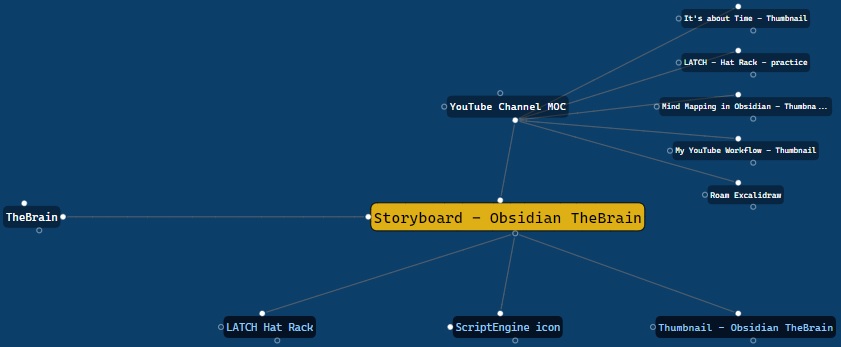|[@zsviczian](https://github.com/zsviczian)|
|
||||
|[Toggle Fullscreen on Mobile](Toggle%20Fullscreen%20on%20Mobile.md)|Hides Obsidian workspace leaf padding and header (based on option in settings, default is "hide header" = false) which will take Excalidraw to full screen. ⚠ Note that if the header is not visible, it will be very difficult to invoke the command palette to end full screen. Only hide the header if you have a keyboard or you've practiced opening command palette!||[@zsviczian](https://github.com/zsviczian)|
|
||||
|[Transfer TextElements to Excalidraw markdown metadata](Transfer%20TextElements%20to%20Excalidraw%20markdown%20metadata.md)|The script will delete the selected text elements from the canvas and will copy the text from these text elements into the Excalidraw markdown file as metadata. This means, that the text will no longer be visible in the drawing, however you will be able to search for the text in Obsidian and find the drawing containing this image.||[@zsviczian](https://github.com/zsviczian)|
|
||||
|[Zoom to Fit Selected Elements](Zoom%20to%20Fit%20Selected%20Elements.md)|Similar to Excalidraw standard SHIFT+2 feature: Zoom to fit selected elements, but with the ability to zoom to 1000%. Inspiration: [#272](https://github.com/zsviczian/obsidian-excalidraw-plugin/issues/272)||[@zsviczian](https://github.com/zsviczian)|
|
||||
|
||||
@@ -1,7 +1,7 @@
|
||||
/*
|
||||

|
||||
|
||||
iOS scribble helper for better handwriting experience with text elements. If no elements are selected then the creates a text element at pointer position and you can use the edit box to modify the text with scribble. If a text element is selected then opens the input prompt where you can modify this text with scribble.
|
||||
iOS scribble helper for better handwriting experience with text elements. If no elements are selected then the script creates a text element at the pointer position and you can use the edit box to modify the text with scribble. If a text element is selected then the script opens the input prompt where you can modify this text with scribble.
|
||||
|
||||
```javascript
|
||||
*/
|
||||
|
||||
753
ea-scripts/TheBrain-navigation.md
Normal file
753
ea-scripts/TheBrain-navigation.md
Normal file
@@ -0,0 +1,753 @@
|
||||
/*
|
||||
|
||||
An Excalidraw based graph user interface for your Vault. Requires the [Breadcrumbs plugin](https://github.com/SkepticMystic/breadcrumbs) to be installed and configured as well. Generates a user interface similar to that of [TheBrain](https://TheBrain.com).
|
||||
|
||||
Watch introduction to this script on [YouTube](https://youtu.be/J4T5KHERH_o).
|
||||
|
||||

|
||||
|
||||
```javascript
|
||||
*/
|
||||
|
||||
if(!ea.verifyMinimumPluginVersion || !ea.verifyMinimumPluginVersion("1.6.24")) {
|
||||
new Notice("This script requires a newer version of Excalidraw. Please install the latest version.");
|
||||
return;
|
||||
}
|
||||
|
||||
if(!BCAPI) {
|
||||
new Notice("Breadcrumbs API not found! Install and activate the Breadcrumbs plugin",4000);
|
||||
return;
|
||||
}
|
||||
|
||||
const EVENT = "active-leaf-change";
|
||||
|
||||
const removeEventHandler = () => {
|
||||
app.workspace.off(EVENT,window.brainGraphEventHandler);
|
||||
if(isBoolean(window.excalidrawView?.linksAlwaysOpenInANewPane)) {
|
||||
window.excalidrawView.linksAlwaysOpenInANewPane = false;
|
||||
const ea = ExcalidrawAutomate;
|
||||
ea.setView(window.excalidrawView);
|
||||
if(ea.targetView?.getExcalidrawAPI) {
|
||||
ea.getExcalidrawAPI().updateScene({appState:{viewModeEnabled:false}});
|
||||
}
|
||||
}
|
||||
delete window.excalidrawView;
|
||||
delete window.excalidrawFile;
|
||||
delete window.lastfilePath;
|
||||
new Notice("Brain Graph Off")
|
||||
setTimeout(()=>delete window.brainGraphEventHandler);
|
||||
}
|
||||
|
||||
//Turn off event handler if it is already running
|
||||
if(window.brainGraphEventHandler) {
|
||||
removeEventHandler();
|
||||
return;
|
||||
}
|
||||
|
||||
//-------------------------------------------------------
|
||||
// Settings
|
||||
//-------------------------------------------------------
|
||||
|
||||
settings = ea.getScriptSettings();
|
||||
//set default values on first run
|
||||
if(!settings["Max number of nodes/domain"]) {
|
||||
settings = {
|
||||
"Confirmation prompt at startup": {
|
||||
value: true,
|
||||
description: "Prompt me to confirm starting of the script because it will overwrite the current active drawing. " +
|
||||
"You can disable this warning by turning off this switch"
|
||||
},
|
||||
"Max number of nodes/domain": {
|
||||
value: 40,
|
||||
description: "Maximum number of items to show in each domain: parents, children, siblings, jumps."
|
||||
},
|
||||
"Infer non-Breadcrumbs links": {
|
||||
value: true,
|
||||
description: "Links on the page are children, backlinks to the page are parents. Breadcrumbs take priority."
|
||||
},
|
||||
"Hide attachments": {
|
||||
value: true,
|
||||
description: "Hide attachments. Will only have an effect if Infer non-Breadcrumbs links is turned on."
|
||||
},
|
||||
"Font family": {
|
||||
value: "Code",
|
||||
valueset: ["Hand-drawn","Normal","Code","Fourth (custom) Font"]
|
||||
},
|
||||
"Stroke roughness": {
|
||||
value: "Architect",
|
||||
valueset: ["Architect", "Artist", "Cartoonist"]
|
||||
},
|
||||
"Rectangle stroke sharpness": {
|
||||
value: "round",
|
||||
valueset: ["sharp", "round"]
|
||||
},
|
||||
"Central font size": {
|
||||
value: 30,
|
||||
description: "Font size of the central node"
|
||||
},
|
||||
"Font size": {
|
||||
value: 20,
|
||||
description: "Font size of jumps, children and parents"
|
||||
},
|
||||
"Siblings font size": {
|
||||
value: 15,
|
||||
description: "Font size of siblings"
|
||||
},
|
||||
"Max label length": {
|
||||
value: 30,
|
||||
description: "Maximum number of characters to display from node title. Longer nodes will end with '...'"
|
||||
},
|
||||
"Padding": {
|
||||
value: 10,
|
||||
description: "Padding of the node rectangle"
|
||||
},
|
||||
"Gate offset": {
|
||||
value: 15,
|
||||
description: "The offset to the left and right of the parent and child gates."
|
||||
},
|
||||
"Gate radius": {
|
||||
value: 5,
|
||||
description: "The radius of the 3 small circles (alias: gates) serving as connection points for nodes"
|
||||
},
|
||||
"Canvas color": {
|
||||
value: "hsl(208, 80%, 23%)",
|
||||
description: "Any legal HTML color (#000000, rgb, color-name, etc.)."
|
||||
},
|
||||
"Gate color": {
|
||||
value: "white",
|
||||
description: "Any legal HTML color (#000000, rgb, color-name, etc.)."
|
||||
},
|
||||
"Link color": {
|
||||
value: "hsl(0, 0%, 41%)",
|
||||
description: "Any legal HTML color (#000000, rgb, color-name, etc.)."
|
||||
},
|
||||
"Central-node background color": {
|
||||
value: "#dfaf16",
|
||||
description: "Any legal HTML color (#000000, rgb, color-name, etc.)."
|
||||
},
|
||||
"Central-node color": {
|
||||
value: "black",
|
||||
description: "Any legal HTML color (#000000, rgb, color-name, etc.)."
|
||||
},
|
||||
"Breadcrumbs-node background color": {
|
||||
value: "rgba(0,0,0,0.4)",
|
||||
description: "Any legal HTML color (#000000, rgb, color-name, etc.)."
|
||||
},
|
||||
"Breadcrumbs-node color": {
|
||||
value: "white",
|
||||
description: "Any legal HTML color (#000000, rgb, color-name, etc.)."
|
||||
},
|
||||
"Non-breadcrumbs-node background color": {
|
||||
value: "rgba(0,0,5,0.7)",
|
||||
description: "Any legal HTML color (#000000, rgb, color-name, etc.)."
|
||||
},
|
||||
"Non-breadcrumbs-node color": {
|
||||
value: "hsl(208, 80%, 77%)",
|
||||
description: "Any legal HTML color (#000000, rgb, color-name, etc.)."
|
||||
},
|
||||
"Virtual-node background color": {
|
||||
value: "rgba(255,0,0,0.4)",
|
||||
description: "Any legal HTML color (#000000, rgb, color-name, etc.)."
|
||||
},
|
||||
"Virtual-node color": {
|
||||
value: "white",
|
||||
description: "Any legal HTML color (#000000, rgb, color-name, etc.)."
|
||||
}
|
||||
};
|
||||
};
|
||||
ea.setScriptSettings(settings);
|
||||
|
||||
const SHOW_CONFIRMATION_PROMPT = settings["Confirmation prompt at startup"].value;
|
||||
const MAX_ITEMS = Math.floor(settings["Max number of nodes/domain"].value)??40;
|
||||
const INCLUDE_OBSIDIAN_LINKS = settings["Infer non-Breadcrumbs links"].value;
|
||||
const HIDE_ATTACHMENTS = settings["Hide attachments"].value;
|
||||
const FONT_FAMILY = settings["Font family"].value === "Hand-drawn"
|
||||
? 1
|
||||
: settings["Font family"].value === "Normal"
|
||||
? 2
|
||||
: settings["Font family"].value === "Code"
|
||||
? 3
|
||||
: 4;
|
||||
const STROKE_ROUGHNESS = settings["Stroke roughness"].value === "Architect"
|
||||
? 0
|
||||
: settings["Stroke roughness"].value === "Artist"
|
||||
? 1
|
||||
: 2;
|
||||
const STROKE_SHARPNESS = settings["Rectangle stroke sharpness"].value;
|
||||
const CENTRAL_FONT_SIZE = Math.floor(settings["Central font size"].value)??30;
|
||||
const FONT_SIZE = Math.floor(settings["Font size"].value)??20;
|
||||
const DISTANT_FONT_SIZE = Math.floor(settings["Siblings font size"].value)??15;
|
||||
const MAX_LABEL_LENGTH = Math.floor(settings["Max label length"].value)??30;
|
||||
const PADDING = Math.floor(settings["Padding"].value)??10;
|
||||
const GATE_OFFSET = Math.floor(settings["Gate offset"].value)??15;
|
||||
const GATE_RADIUS = Math.floor(settings["Gate radius"].value)??5;
|
||||
const BG_COLOR = settings["Canvas color"].value;
|
||||
const GATE_COLOR = settings["Gate color"].value;
|
||||
const LINK_COLOR = settings["Link color"].value;
|
||||
const CENTRAL_NODE_BG_COLOR = settings["Central-node background color"].value;
|
||||
const CENTRAL_NODE_COLOR = settings["Central-node color"].value;
|
||||
const NODE_BG_COLOR = settings["Breadcrumbs-node background color"].value;
|
||||
const NODE_COLOR = settings["Breadcrumbs-node color"].value;
|
||||
const OBSIDIAN_NODE_BG_COLOR = settings["Non-breadcrumbs-node background color"].value;
|
||||
const OBSIDIAN_NODE_COLOR = settings["Non-breadcrumbs-node color"].value;
|
||||
const VIRTUAL_NODE_BG_COLOR = settings["Virtual-node background color"].value;
|
||||
const VIRTUAL_NODE_COLOR = settings["Virtual-node color"].value;
|
||||
|
||||
//-------------------------------------------------------
|
||||
// Initialization
|
||||
//-------------------------------------------------------
|
||||
|
||||
if(SHOW_CONFIRMATION_PROMPT) {
|
||||
const result = await utils.inputPrompt("This will overwrite the current active drawing","type: 'ok' to Continue");
|
||||
if(result !== "ok") return;
|
||||
}
|
||||
|
||||
const measureText = (text,fontSize) => {
|
||||
ea.style.fontSize = fontSize;
|
||||
return ea.measureText(text);
|
||||
}
|
||||
|
||||
ea.style.fontFamily = FONT_FAMILY;
|
||||
const TEXT_SIZE = measureText("m".repeat(MAX_LABEL_LENGTH+3),FONT_SIZE);
|
||||
const NODE_WIDTH = TEXT_SIZE.width + 3 * PADDING;
|
||||
const NODE_HEIGHT = 2 * (TEXT_SIZE.height + 2 * PADDING);
|
||||
|
||||
ea.getExcalidrawAPI().updateScene({
|
||||
appState: {
|
||||
viewModeEnabled:true,
|
||||
theme: "light",
|
||||
viewBackgroundColor: BG_COLOR
|
||||
},
|
||||
elements:[]
|
||||
});
|
||||
|
||||
ea.style.strokeColor = NODE_COLOR;
|
||||
ea.addText(0,0,"Open a document in another pane and click it to get started.\n\nIf you do not see the Breadcrumbs as expected,\ntry refreshing the index in BC matrix view.\n\nFor best experience enable 'Open in adjacent pane'\nin Excalidraw settings under 'Links and Transclusion'.", {textAlign:"center"});
|
||||
await ea.addElementsToView();
|
||||
ea.getExcalidrawAPI().zoomToFit();
|
||||
|
||||
window.excalidrawView = ea.targetView;
|
||||
window.excalidrawFile = ea.targetView.file;
|
||||
|
||||
ea.targetView.linksAlwaysOpenInANewPane = true;
|
||||
|
||||
new Notice("Brain Graph On");
|
||||
|
||||
//-------------------------------------------------------
|
||||
// Supporting functions and classes
|
||||
//-------------------------------------------------------
|
||||
const getMatrixNeighbours = (node) => {
|
||||
try {
|
||||
return BCAPI.getMatrixNeighbours(node);
|
||||
} catch {
|
||||
return null
|
||||
}
|
||||
}
|
||||
|
||||
const joinRealsAndImplieds = (data) => {
|
||||
result = new Set();
|
||||
data.reals.forEach(i=>result.add(i.to));
|
||||
data.implieds.forEach(i=>result.add(i.to));
|
||||
return Array.from(result);
|
||||
}
|
||||
|
||||
const distinct = (data) => Array.from(new Set(data));
|
||||
|
||||
class Layout {
|
||||
constructor(spec) {
|
||||
this.spec = spec;
|
||||
this.nodes = [];
|
||||
this.renderedNodes = [];
|
||||
}
|
||||
|
||||
layout(columns = this.spec.columns) {
|
||||
const generateLayoutVector = (pattern) => {
|
||||
const res = [];
|
||||
let cur = 1;
|
||||
let state = true;
|
||||
pattern
|
||||
.map(p => Math.floor(p))
|
||||
.forEach(cnt => {
|
||||
for(let i=0;i<cnt;i++) res.push(state ? null : cur++);
|
||||
state = !state;
|
||||
});
|
||||
return res;
|
||||
}
|
||||
|
||||
const getRowLayout = (items) => items%2
|
||||
? generateLayoutVector([(columns-items)/2,items,(columns-items)/2])
|
||||
: generateLayoutVector([(columns-items)/2,items/2,1,items/2,(columns-items)/2]);
|
||||
|
||||
const sortedNodes = this.nodes.sort((a,b) => a.label.toLowerCase() < b.label.toLowerCase() ? -1 : 1)
|
||||
const itemCount = sortedNodes.length;
|
||||
if(itemCount === 0) return;
|
||||
const rowCount = Math.ceil(itemCount / columns);
|
||||
this.renderedNodes = Array(rowCount).fill().map((_,i) =>
|
||||
(i+1 < rowCount) || (itemCount % columns === 0)
|
||||
? Array(columns).fill().map((_,j) => sortedNodes[i*columns+j]) //full row
|
||||
: getRowLayout(itemCount % columns).map(idx => idx ? sortedNodes[i*columns+idx-1]:null));
|
||||
}
|
||||
|
||||
render() {
|
||||
this.layout();
|
||||
const rows = this.renderedNodes.length;
|
||||
const height = rows * this.spec.rowHeight;
|
||||
const top = (this.spec.top === null && this.spec.bottom === null) //unconstrained
|
||||
? this.spec.origoY - height/2
|
||||
: this.spec.top !== null
|
||||
? (this.spec.origoY - height/2) < this.spec.top //top constrained
|
||||
? this.spec.top
|
||||
: this.spec.origoY - height/2
|
||||
: (this.spec.origoY + height/2) > this.spec.bottom //bottom constrained
|
||||
? this.spec.bottom - height
|
||||
: this.spec.origoY - height/2;
|
||||
const center00 = {
|
||||
x: this.spec.origoX - (this.spec.columns === 1 ? 0 : (this.spec.columns-1)/2*this.spec.columnWidth),
|
||||
y: top
|
||||
};
|
||||
this.renderedNodes.forEach((nodes,row) =>
|
||||
nodes.forEach((node,idx) => {
|
||||
if(!node) return;
|
||||
node.setCenter({
|
||||
x: center00.x + idx*this.spec.columnWidth,
|
||||
y: center00.y + row*this.spec.rowHeight
|
||||
});
|
||||
node.render();
|
||||
})
|
||||
);
|
||||
}
|
||||
}
|
||||
|
||||
class Node {
|
||||
constructor(spec) {
|
||||
this.spec = spec;
|
||||
const label = spec.file?.basename??spec.nodeTitle;
|
||||
this.label = label.length > spec.maxLabelLength
|
||||
? label.substring(0,spec.maxLabelLength-1) + "..."
|
||||
: label;
|
||||
this.labelSize = measureText(this.label, spec.fontSize);
|
||||
}
|
||||
|
||||
setCenter(center) {
|
||||
this.center = center;
|
||||
}
|
||||
|
||||
render() {
|
||||
ea.style.fontSize = this.spec.fontSize;
|
||||
ea.style.strokeColor = this.spec.file
|
||||
? this.spec.nodeColor
|
||||
: this.spec.virtualNodeColor;
|
||||
ea.style.backgroundColor = "transparent";
|
||||
this.id = ea.addText(
|
||||
this.center.x - this.labelSize.width / 2,
|
||||
this.center.y - this.labelSize.height / 2,
|
||||
this.label,
|
||||
{
|
||||
wrapAt: this.spec.maxLabelLength+5,
|
||||
textAlign: "center",
|
||||
box: true,
|
||||
boxPadding: this.spec.padding
|
||||
}
|
||||
);
|
||||
const box = ea.getElement(this.id);
|
||||
box.link = `[[${this.spec.file?.path??this.spec.nodeTitle}]]`;
|
||||
box.backgroundColor = this.spec.file
|
||||
? this.spec.backgroundColor
|
||||
: this.spec.virtualNodeBGColor;
|
||||
box.strokeColor = this.spec.borderColor;
|
||||
|
||||
ea.style.strokeColor = this.spec.gateColor;
|
||||
ea.style.backgroundColor = this.spec.hasJumps ? this.spec.gateColor : "transparent";
|
||||
this.jumpGateId = ea.addEllipse(
|
||||
this.spec.jumpOnLeft
|
||||
? this.center.x - this.spec.gateRadius * 2 - this.spec.padding - this.labelSize.width / 2
|
||||
: this.center.x + this.spec.padding + this.labelSize.width / 2,
|
||||
this.center.y - this.spec.gateRadius,
|
||||
this.spec.gateRadius * 2,
|
||||
this.spec.gateRadius * 2
|
||||
);
|
||||
ea.style.backgroundColor = this.spec.hasParents ? this.spec.gateColor : "transparent";
|
||||
this.parentGateId = ea.addEllipse(
|
||||
this.center.x - this.spec.gateRadius - this.spec.gateOffset,
|
||||
this.center.y - 2 * this.spec.gateRadius - this.spec.padding - this.labelSize.height / 2,
|
||||
this.spec.gateRadius * 2,
|
||||
this.spec.gateRadius * 2
|
||||
);
|
||||
ea.style.backgroundColor = this.spec.hasChildren ? this.spec.gateColor : "transparent";
|
||||
this.childGateId = ea.addEllipse(
|
||||
this.center.x - this.spec.gateRadius + this.spec.gateOffset,
|
||||
this.center.y + this.spec.padding + this.labelSize.height / 2,
|
||||
this.spec.gateRadius * 2,
|
||||
this.spec.gateRadius * 2
|
||||
);
|
||||
|
||||
ea.addToGroup([this.jumpGateId,this.parentGateId,this.childGateId,this.id, box.boundElements[0].id]);
|
||||
}
|
||||
}
|
||||
|
||||
const addNodes = (nodesMap, root, nodes, layout, options) => {
|
||||
nodes.forEach(nodeTitle => {
|
||||
const node = new Node({
|
||||
nodeTitle,
|
||||
file: app.metadataCache.getFirstLinkpathDest(nodeTitle,root.path),
|
||||
hasChildren: false,
|
||||
hasParents: false,
|
||||
hasJumps: false,
|
||||
...options
|
||||
});
|
||||
nodesMap.set(nodeTitle,node);
|
||||
layout.nodes.push(node);
|
||||
});
|
||||
}
|
||||
|
||||
//-------------------------------------------------------
|
||||
// Event handler
|
||||
//-------------------------------------------------------
|
||||
window.brainGraphEventHandler = async (leaf) => {
|
||||
//sleep for 100ms
|
||||
await new Promise((resolve) => setTimeout(resolve, 100));
|
||||
|
||||
//terminate event handler if view no longer exists or file has changed
|
||||
if(!window.excalidrawView?.file || window.excalidrawView.file.path !== window.excalidrawFile?.path) {
|
||||
removeEventHandler();
|
||||
return;
|
||||
}
|
||||
|
||||
//need to reinitialize ea because in the event handler ea provided by the script engine will no longer be available
|
||||
ea = ExcalidrawAutomate;
|
||||
ea.reset();
|
||||
ea.setView(window.excalidrawView);
|
||||
ea.style.fontFamily = FONT_FAMILY;
|
||||
ea.style.roughness = STROKE_ROUGHNESS;
|
||||
ea.style.strokeSharpness = STROKE_SHARPNESS;
|
||||
|
||||
if(!leaf?.view?.file) return;
|
||||
const file = leaf.view.file;
|
||||
|
||||
if (file.path === window.excalidrawFile.path) return; //brainview drawing is active
|
||||
|
||||
if(window.lastfilePath && window.lastfilePath === file.path) return; //don't reload the file if it has not changed
|
||||
window.lastfilePath = file.path;
|
||||
|
||||
ea.getExcalidrawAPI().updateScene({elements:[]});
|
||||
const centralNodeTitle = file.extension === "md" ? file.basename : file.name;
|
||||
|
||||
ea.style.verticalAlign = "middle";
|
||||
ea.style.strokeSharpness = "round";
|
||||
ea.style.fillStyle = "solid";
|
||||
|
||||
const rootFile = app.metadataCache.getFirstLinkpathDest(centralNodeTitle,"")
|
||||
const bc = getMatrixNeighbours(centralNodeTitle);
|
||||
|
||||
const parents = bc ? joinRealsAndImplieds(bc.up).filter(n=>n!==centralNodeTitle).slice(0,MAX_ITEMS) : [];
|
||||
const children = bc ? joinRealsAndImplieds(bc.down).filter(n=>n!==centralNodeTitle).slice(0,MAX_ITEMS) : [];
|
||||
const jumps = bc ? distinct(
|
||||
joinRealsAndImplieds(bc.next)
|
||||
.concat(joinRealsAndImplieds(bc.prev))
|
||||
).filter(n=>n!==centralNodeTitle)
|
||||
.slice(0,MAX_ITEMS) : [];
|
||||
const siblings = bc ? joinRealsAndImplieds(bc.same).filter(n=>n!==centralNodeTitle).slice(0,MAX_ITEMS) : []; //see breadcrumbs settings to finetune siblings
|
||||
|
||||
bclinks = new Set(parents.concat(children).concat(jumps).concat(siblings).concat([centralNodeTitle]));
|
||||
//adding links from the document, not explicitly declared as a breadcrumbs
|
||||
//this code assumes unique filenames (like breadcrumbs, thus will not handle non unique files well)
|
||||
const forwardLinks = INCLUDE_OBSIDIAN_LINKS
|
||||
? distinct(app.metadataCache
|
||||
.getLinks()[rootFile.path]?.map(l=>app.metadataCache.getFirstLinkpathDest(l.link,rootFile.path))
|
||||
.filter(f=>f && (!HIDE_ATTACHMENTS || f.extension === "md"))
|
||||
.map(f=>f.extension === "md" ? f.basename : f.name)
|
||||
.filter(l=>!bclinks.has(l))??[].slice(0,MAX_ITEMS))
|
||||
: [];
|
||||
const forwardLinksSet = new Set(forwardLinks);
|
||||
const backLinks = INCLUDE_OBSIDIAN_LINKS
|
||||
? distinct(Object
|
||||
.keys(app.metadataCache.getBacklinksForFile(rootFile)?.data??{})
|
||||
.map(l=>app.metadataCache.getFirstLinkpathDest(l,rootFile.path))
|
||||
.filter(f=>f && f.path !== window.excalidrawFile.path && (!HIDE_ATTACHMENTS || f.extension === "md"))
|
||||
.map(f=>f.extension === "md" ? f.basename : f.name)
|
||||
.filter(l=>!bclinks.has(l) && !forwardLinksSet.has(l))
|
||||
.slice(0,MAX_ITEMS))
|
||||
: [];
|
||||
const backLinksSet = new Set(backLinks);
|
||||
|
||||
const nodesMap = new Map();
|
||||
const linksMap = new Map();
|
||||
|
||||
const lCenter = new Layout({
|
||||
origoX: 0,
|
||||
origoY: 0,
|
||||
top: null,
|
||||
bottom: null,
|
||||
columns: 1,
|
||||
columnWidth: NODE_WIDTH,
|
||||
rowHeight: NODE_HEIGHT
|
||||
});
|
||||
|
||||
const manyChildren = (children.length + forwardLinks.length) >10;
|
||||
const manySiblings = siblings.length > 10;
|
||||
const singleParent = (parents.length + backLinks.length) <= 1
|
||||
|
||||
const lChildren = new Layout({
|
||||
origoX: 0,
|
||||
origoY: 2.5 * NODE_HEIGHT,
|
||||
top: 2.5 * NODE_HEIGHT - NODE_HEIGHT/2,
|
||||
bottom: null,
|
||||
columns: manyChildren ? 5 : 3,
|
||||
columnWidth: NODE_WIDTH,
|
||||
rowHeight: NODE_HEIGHT
|
||||
});
|
||||
|
||||
const lJumps = new Layout({
|
||||
origoX: (manyChildren ? -3 : -2) * NODE_WIDTH,
|
||||
origoY: 0,
|
||||
top: null,
|
||||
bottom: null,
|
||||
columns: 1,
|
||||
columnWidth: NODE_WIDTH,
|
||||
rowHeight: NODE_HEIGHT
|
||||
});
|
||||
|
||||
const lParents = new Layout({
|
||||
origoX: 0,
|
||||
origoY: -2.5 * NODE_HEIGHT,
|
||||
top: null,
|
||||
bottom: -2.5 * NODE_HEIGHT + NODE_HEIGHT/2,
|
||||
columns: 3,
|
||||
columnWidth: NODE_WIDTH,
|
||||
rowHeight: NODE_HEIGHT
|
||||
});
|
||||
|
||||
const lSiblings = new Layout({
|
||||
origoX: NODE_WIDTH * ((singleParent ? 0 : 1) + (manySiblings ? 2 : 1)),
|
||||
origoY: -2.5 * NODE_HEIGHT,
|
||||
top: null,
|
||||
bottom: NODE_HEIGHT,
|
||||
columns: (manySiblings ? 3 : 1),
|
||||
columnWidth: NODE_WIDTH,
|
||||
rowHeight: NODE_HEIGHT
|
||||
})
|
||||
|
||||
const rootNode = new Node({
|
||||
file: rootFile,
|
||||
hasChildren: false,
|
||||
hasParents: false,
|
||||
hasJumps: false,
|
||||
fontSize: CENTRAL_FONT_SIZE,
|
||||
jumpOnLeft: true,
|
||||
maxLabelLength: 2*MAX_LABEL_LENGTH,
|
||||
gateRadius: GATE_RADIUS,
|
||||
gateOffset: GATE_OFFSET,
|
||||
padding: PADDING,
|
||||
nodeColor: CENTRAL_NODE_COLOR,
|
||||
gateColor: GATE_COLOR,
|
||||
borderColor: CENTRAL_NODE_COLOR,
|
||||
backgroundColor: CENTRAL_NODE_BG_COLOR,
|
||||
virtualNodeBGColor: VIRTUAL_NODE_BG_COLOR
|
||||
});
|
||||
nodesMap.set(rootFile.basename,rootNode);
|
||||
lCenter.nodes.push(rootNode);
|
||||
|
||||
addNodes(
|
||||
nodesMap,
|
||||
rootFile,
|
||||
parents,
|
||||
lParents,
|
||||
{
|
||||
fontSize: FONT_SIZE,
|
||||
jumpOnLeft: true,
|
||||
maxLabelLength: MAX_LABEL_LENGTH,
|
||||
gateRadius: GATE_RADIUS,
|
||||
gateOffset: GATE_OFFSET,
|
||||
padding: PADDING,
|
||||
nodeColor: NODE_COLOR,
|
||||
gateColor: GATE_COLOR,
|
||||
borderColor: "transparent",
|
||||
backgroundColor: NODE_BG_COLOR,
|
||||
virtualNodeColor: VIRTUAL_NODE_COLOR,
|
||||
virtualNodeBGColor: VIRTUAL_NODE_BG_COLOR
|
||||
}
|
||||
);
|
||||
|
||||
addNodes(
|
||||
nodesMap,
|
||||
rootFile,
|
||||
backLinks,
|
||||
lParents,
|
||||
{
|
||||
fontSize: FONT_SIZE,
|
||||
jumpOnLeft: true,
|
||||
maxLabelLength: MAX_LABEL_LENGTH,
|
||||
gateRadius: GATE_RADIUS,
|
||||
gateOffset: GATE_OFFSET,
|
||||
padding: PADDING,
|
||||
nodeColor: OBSIDIAN_NODE_COLOR,
|
||||
gateColor: GATE_COLOR,
|
||||
borderColor: "transparent",
|
||||
backgroundColor: OBSIDIAN_NODE_BG_COLOR,
|
||||
virtualNodeColor: VIRTUAL_NODE_COLOR,
|
||||
virtualNodeBGColor: VIRTUAL_NODE_BG_COLOR
|
||||
}
|
||||
);
|
||||
|
||||
|
||||
addNodes(
|
||||
nodesMap,
|
||||
rootFile,
|
||||
children,
|
||||
lChildren,
|
||||
{
|
||||
fontSize: FONT_SIZE,
|
||||
jumpOnLeft: true,
|
||||
maxLabelLength: MAX_LABEL_LENGTH,
|
||||
gateRadius: GATE_RADIUS,
|
||||
gateOffset: GATE_OFFSET,
|
||||
padding: PADDING,
|
||||
nodeColor: NODE_COLOR,
|
||||
gateColor: GATE_COLOR,
|
||||
borderColor: "transparent",
|
||||
backgroundColor: NODE_BG_COLOR,
|
||||
virtualNodeColor: VIRTUAL_NODE_COLOR,
|
||||
virtualNodeBGColor: VIRTUAL_NODE_BG_COLOR
|
||||
}
|
||||
);
|
||||
|
||||
addNodes(
|
||||
nodesMap,
|
||||
rootFile,
|
||||
forwardLinks,
|
||||
lChildren,
|
||||
{
|
||||
fontSize: FONT_SIZE,
|
||||
jumpOnLeft: true,
|
||||
maxLabelLength: MAX_LABEL_LENGTH,
|
||||
gateRadius: GATE_RADIUS,
|
||||
gateOffset: GATE_OFFSET,
|
||||
padding: PADDING,
|
||||
nodeColor: OBSIDIAN_NODE_COLOR,
|
||||
gateColor: GATE_COLOR,
|
||||
borderColor: "transparent",
|
||||
backgroundColor: OBSIDIAN_NODE_BG_COLOR,
|
||||
virtualNodeColor: VIRTUAL_NODE_COLOR,
|
||||
virtualNodeBGColor: VIRTUAL_NODE_BG_COLOR
|
||||
}
|
||||
);
|
||||
|
||||
|
||||
addNodes(
|
||||
nodesMap,
|
||||
rootFile,
|
||||
jumps,
|
||||
lJumps,
|
||||
{
|
||||
fontSize: FONT_SIZE,
|
||||
jumpOnLeft: false,
|
||||
maxLabelLength: MAX_LABEL_LENGTH,
|
||||
gateRadius: GATE_RADIUS,
|
||||
gateOffset: GATE_OFFSET,
|
||||
padding: PADDING,
|
||||
nodeColor: NODE_COLOR,
|
||||
gateColor: GATE_COLOR,
|
||||
borderColor: "transparent",
|
||||
backgroundColor: NODE_BG_COLOR,
|
||||
virtualNodeColor: VIRTUAL_NODE_COLOR,
|
||||
virtualNodeBGColor: VIRTUAL_NODE_BG_COLOR
|
||||
}
|
||||
);
|
||||
|
||||
addNodes(
|
||||
nodesMap,
|
||||
rootFile,
|
||||
siblings,
|
||||
lSiblings,
|
||||
{
|
||||
fontSize: DISTANT_FONT_SIZE,
|
||||
jumpOnLeft: true,
|
||||
maxLabelLength: MAX_LABEL_LENGTH,
|
||||
gateRadius: GATE_RADIUS,
|
||||
gateOffset: GATE_OFFSET,
|
||||
padding: PADDING,
|
||||
nodeColor: NODE_COLOR,
|
||||
gateColor: GATE_COLOR,
|
||||
borderColor: "transparent",
|
||||
backgroundColor: NODE_BG_COLOR,
|
||||
virtualNodeColor: VIRTUAL_NODE_COLOR,
|
||||
virtualNodeBGColor: VIRTUAL_NODE_BG_COLOR
|
||||
}
|
||||
);
|
||||
|
||||
Array.from(nodesMap.keys()).forEach(nodeTitle => {
|
||||
const node = nodesMap.get(nodeTitle);
|
||||
const bc = getMatrixNeighbours(nodeTitle);
|
||||
const parent = forwardLinksSet.has(nodeTitle) ? [rootFile.basename] : [];
|
||||
const parents = bc ? joinRealsAndImplieds(bc.up).concat(parent) : parent;
|
||||
const child = backLinksSet.has(nodeTitle) ? [rootFile.basename] : []
|
||||
const children = bc ? joinRealsAndImplieds(bc.down).concat(child) : child;
|
||||
const jumps = bc ? distinct(joinRealsAndImplieds(bc.next).concat(joinRealsAndImplieds(bc.prev))) : [];
|
||||
//siblings are left out in this case on purpose
|
||||
|
||||
node.spec.hasChildren = children.length>0;
|
||||
node.spec.hasParents = parents.length>0;
|
||||
node.spec.hasJumps = jumps.length>0;
|
||||
|
||||
const addLinks = (nodes,relation) => nodes.forEach(n => {
|
||||
if(!nodesMap.has(n)) return;
|
||||
if(linksMap.has(`${nodeTitle}/${n}`)) return;
|
||||
linksMap.set(`${nodeTitle}/${n}`,relation);
|
||||
linksMap.set(`${n}/${nodeTitle}`,null);
|
||||
});
|
||||
|
||||
addLinks(parents,["parent","child"]);
|
||||
addLinks(children, ["child","parent"]);
|
||||
addLinks(jumps, ["jump","jump"]);
|
||||
});
|
||||
|
||||
lCenter.render();
|
||||
lParents.render();
|
||||
lChildren.render();
|
||||
lJumps.render();
|
||||
lSiblings.render();
|
||||
|
||||
const getGate = (key,value) => (value === "parent")
|
||||
? nodesMap.get(key).parentGateId
|
||||
: (value === "child")
|
||||
? nodesMap.get(key).childGateId
|
||||
: nodesMap.get(key).jumpGateId;
|
||||
|
||||
ea.style.strokeColor = LINK_COLOR;
|
||||
for([key,value] of linksMap) {
|
||||
if(value) {
|
||||
const k=key.split("/");
|
||||
const gate1 = getGate(k[0],value[0]);
|
||||
const gate2 = getGate(k[1],value[1]);
|
||||
ea.connectObjects(gate1, null, gate2, null, { startArrowHead: null, endArrowHead: null });
|
||||
}
|
||||
}
|
||||
|
||||
elements = ea.getElements();
|
||||
ea.getExcalidrawAPI().updateScene({
|
||||
elements: elements.filter(
|
||||
el=>el.type==="arrow"
|
||||
).concat(elements.filter(el=>el.type!=="arrow"))
|
||||
})
|
||||
ea.getExcalidrawAPI().zoomToFit();
|
||||
}
|
||||
|
||||
app.workspace.on(EVENT, window.brainGraphEventHandler);
|
||||
|
||||
const mdLeaf = app.workspace.getLeavesOfType("markdown");
|
||||
if(mdLeaf.length>0) {
|
||||
window.brainGraphEventHandler(mdLeaf[0]);
|
||||
return;
|
||||
}
|
||||
|
||||
const mdExcalidrawLeaf = app.workspace.getLeavesOfType("excalidraw").filter(l=>l!==ea.targetView.leaf);
|
||||
if(mdExcalidrawLeaf.length>0) {
|
||||
window.brainGraphEventHandler(mdExcalidrawLeaf[0]);
|
||||
return;
|
||||
}
|
||||
|
||||
const mdImageLeaf = app.workspace.getLeavesOfType("image");
|
||||
if(mdImageLeaf.length>0) {
|
||||
window.brainGraphEventHandler(mdImageLeaf[0]);
|
||||
return;
|
||||
}
|
||||
1
ea-scripts/TheBrain-navigation.svg
Normal file
1
ea-scripts/TheBrain-navigation.svg
Normal file

@@ -0,0 +1 @@
|
||||
<svg xmlns="http://www.w3.org/2000/svg" viewBox="0 0 512 512"><path d="M380.6 365.6C401.1 379.9 416 404.3 416 432C416 476.2 380.2 512 336 512C291.8 512 256 476.2 256 432C256 423.6 257.3 415.4 259.7 407.8L114.1 280.4C103.8 285.3 92.21 288 80 288C35.82 288 0 252.2 0 208C0 163.8 35.82 128 80 128C101.9 128 121.7 136.8 136.2 151.1L320 77.52C321.3 34.48 356.6 0 400 0C444.2 0 480 35.82 480 80C480 117.9 453.7 149.6 418.4 157.9L380.6 365.6zM156.3 232.2L301.9 359.6C306.9 357.3 312.1 355.4 317.6 354.1L355.4 146.4C351.2 143.6 347.4 140.4 343.8 136.9L159.1 210.5C159.7 218 158.5 225.3 156.3 232.2V232.2z"/></svg>
|
||||
|
After Width: | Height: | Size: 605 B |
File diff suppressed because one or more lines are too long
@@ -1,330 +1,337 @@
|
||||
If you are enjoying the Excalidraw plugin then please support my work and enthusiasm by buying me a coffee on [https://ko-fi/zsolt](https://ko-fi.com/zsolt).
|
||||
|
||||
[<img src="https://user-images.githubusercontent.com/14358394/115450238-f39e8100-a21b-11eb-89d0-fa4b82cdbce8.png" class="coffee">](https://ko-fi.com/zsolt)
|
||||
|
||||
---
|
||||
|
||||
Jump ahead to the [[#List of available scripts]]
|
||||
|
||||
# Intorducing Excalidraw Automate Script Engine
|
||||
<iframe width="560" height="315" src="https://www.youtube.com/embed/hePJcObHIso" title="YouTube video player" frameborder="0" allow="accelerometer; autoplay; clipboard-write; encrypted-media; gyroscope; picture-in-picture" allowfullscreen></iframe>
|
||||
|
||||
Script Engine scripts are installed in the `Downloaded` subfolder of the `Excalidraw Automate script folder` specified in plugin settings.
|
||||
|
||||
In the `Command Palette` installed scripts are prefixed with `Downloaded/`, thus you can always know if you are executing a local script of your own, or one that you have downloaded from GitHub.
|
||||
|
||||
## Attention developers and hobby hackers
|
||||
<img src='https://raw.githubusercontent.com/zsviczian/obsidian-excalidraw-plugin/master/images/hobby-programmer.svg' align='left' style='background-color:whitesmoke; width:80px; margin-right:15px; margin-bottom:10px;'/>
|
||||
If you want to modify scripts, I recommend moving them to the `Excalidraw Automate script folder` or a different subfolder under the script folder. Scripts in the `Downloaded` folder will be overwritten when you click the `Update this script` button. Note also, that at this time, I do not check if the script file has been updated on GitHub, thus the `Update this script` button is always visible once you have installed a script, not only when an update is availble (hope to build this feature in the future).
|
||||
|
||||
I would love to include your contribution in the script library. If you have a script of your own that you would like to share with the community, please open a [PR](https://github.com/zsviczian/obsidian-excalidraw-plugin/pulls) on GitHub. Be sure to include the following in your pull request
|
||||
- The [script file](https://github.com/zsviczian/obsidian-excalidraw-plugin/tree/master/ea-scripts) with a self explanetory name. The name of the file will be the name of the script in the Command Palette.
|
||||
- An [image](https://github.com/zsviczian/obsidian-excalidraw-plugin/tree/master/images) explaining the scripts purpose. Remember a picture speaks thousand words!
|
||||
- An update to this file [ea-scripts/index.md](https://github.com/zsviczian/obsidian-excalidraw-plugin/blob/master/ea-scripts/index.md)
|
||||
|
||||
---
|
||||
|
||||
# List of available scripts
|
||||
| | |
|
||||
|----|-----|
|
||||
|<div><img src="https://raw.githubusercontent.com/zsviczian/obsidian-excalidraw-plugin/master/ea-scripts/Add%20Connector%20Point.svg"></div>|[[#Add Connector Point]]|
|
||||
|<div><img src="https://raw.githubusercontent.com/zsviczian/obsidian-excalidraw-plugin/master/ea-scripts/Add%20Link%20to%20Existing%20File%20and%20Open.svg"/></div>|[[#Add Link to Existing File and Open]]|
|
||||
|<div><img src="https://raw.githubusercontent.com/zsviczian/obsidian-excalidraw-plugin/master/ea-scripts/Add%20Link%20to%20New%20Page%20and%20Open.svg"/></div>|[[#Add Link to New Page and Open]]|
|
||||
|<div><img src="https://raw.githubusercontent.com/zsviczian/obsidian-excalidraw-plugin/master/ea-scripts/Add%20Next%20Step%20in%20Process.svg"/></div>|[[#Add Next Step in Process]]|
|
||||
|<div><img src="https://raw.githubusercontent.com/zsviczian/obsidian-excalidraw-plugin/master/ea-scripts/Box%20Each%20Selected%20Groups.svg"/></div>|[[#Box Each Selected Groups]]|
|
||||
|<div><img src="https://raw.githubusercontent.com/zsviczian/obsidian-excalidraw-plugin/master/ea-scripts/Box%20Selected%20Elements.svg"/></div>|[[#Box Selected Elements]]|
|
||||
|<div><img src="https://raw.githubusercontent.com/zsviczian/obsidian-excalidraw-plugin/master/ea-scripts/Change%20shape%20of%20selected%20elements.svg"/></div>|[[#Change shape of selected elements]]|
|
||||
|<div><img src="https://raw.githubusercontent.com/zsviczian/obsidian-excalidraw-plugin/master/ea-scripts/Connect%20elements.svg"/></div>|[[#Connect elements]]|
|
||||
|<div><img src="https://raw.githubusercontent.com/zsviczian/obsidian-excalidraw-plugin/master/ea-scripts/Convert%20freedraw%20to%20line.svg"/></div>|[[#Convert freedraw to line]]|
|
||||
|<div><img src="https://raw.githubusercontent.com/zsviczian/obsidian-excalidraw-plugin/master/ea-scripts/Convert%20selected%20text%20elements%20to%20sticky%20notes.svg"/></div>|[[#Convert selected text elements to sticky notes]]|
|
||||
|<div><img src="https://raw.githubusercontent.com/zsviczian/obsidian-excalidraw-plugin/master/ea-scripts/Convert%20text%20to%20link%20with%20folder%20and%20alias.svg"/></div>|[[#Convert text to link with folder and alias]]|
|
||||
|<div><img src="https://raw.githubusercontent.com/zsviczian/obsidian-excalidraw-plugin/master/ea-scripts/Copy%20Selected%20Element%20Styles%20to%20Global.svg"/></div>|[[#Copy Selected Element Styles to Global]]|
|
||||
|<div><img src="https://raw.githubusercontent.com/zsviczian/obsidian-excalidraw-plugin/master/ea-scripts/Create%20new%20markdown%20file%20and%20embed%20into%20active%20drawing.svg"/></div>|[[#Create new markdown file and embed into active drawing]]|
|
||||
|<div><img src="https://raw.githubusercontent.com/zsviczian/obsidian-excalidraw-plugin/master/ea-scripts/Darken%20background%20color.svg"/></div>|[[#Darken background color]]|
|
||||
|<div><img src="https://raw.githubusercontent.com/zsviczian/obsidian-excalidraw-plugin/master/ea-scripts/Elbow%20connectors.svg"/></div>|[[#Elbow connectors]]|
|
||||
|<div><img src="https://raw.githubusercontent.com/zsviczian/obsidian-excalidraw-plugin/master/ea-scripts/Expand%20rectangles%20horizontally%20keep%20text%20centered.svg"/></div>|[[#Expand rectangles horizontally keep text centered]]|
|
||||
|<div><img src="https://raw.githubusercontent.com/zsviczian/obsidian-excalidraw-plugin/master/ea-scripts/Expand%20rectangles%20horizontally.svg"/></div>|[[#Expand rectangles horizontally]]|
|
||||
|<div><img src="https://raw.githubusercontent.com/zsviczian/obsidian-excalidraw-plugin/master/ea-scripts/Expand%20rectangles%20vertically%20keep%20text%20centered.svg"/></div>|[[#Expand rectangles vertically keep text centered]]|
|
||||
|<div><img src="https://raw.githubusercontent.com/zsviczian/obsidian-excalidraw-plugin/master/ea-scripts/Expand%20rectangles%20vertically.svg"/></div>|[[#Expand rectangles vertically]]|
|
||||
|<div><img src="https://raw.githubusercontent.com/zsviczian/obsidian-excalidraw-plugin/master/ea-scripts/Fixed%20horizontal%20distance%20between%20centers.svg"/></div>|[[#Fixed horizontal distance between centers]]|
|
||||
|<div><img src="https://raw.githubusercontent.com/zsviczian/obsidian-excalidraw-plugin/master/ea-scripts/Fixed%20inner%20distance.svg"/></div>|[[#Fixed inner distance]]|
|
||||
|<div><img src="https://raw.githubusercontent.com/zsviczian/obsidian-excalidraw-plugin/master/ea-scripts/Fixed%20spacing.svg"/></div>|[[#Fixed spacing]]|
|
||||
|<div><img src="https://raw.githubusercontent.com/zsviczian/obsidian-excalidraw-plugin/master/ea-scripts/Fixed%20vertical%20distance%20between%20centers.svg"/></div>|[[#Fixed vertical distance between centers]]|
|
||||
|<div><img src="https://raw.githubusercontent.com/zsviczian/obsidian-excalidraw-plugin/master/ea-scripts/Fixed%20vertical%20distance.svg"/></div>|[[#Fixed vertical distance]]|
|
||||
|<div><img src="https://raw.githubusercontent.com/zsviczian/obsidian-excalidraw-plugin/master/ea-scripts/Lighten%20background%20color.svg"/></div>|[[#Lighten background color]]|
|
||||
|<div><img src="https://raw.githubusercontent.com/zsviczian/obsidian-excalidraw-plugin/master/ea-scripts/Modify%20background%20color%20opacity.svg"/></div>|[[#Modify background color opacity]]|
|
||||
|<div><img src="https://raw.githubusercontent.com/zsviczian/obsidian-excalidraw-plugin/master/ea-scripts/Normalize%20Selected%20Arrows.svg"/></div>|[[#Normalize Selected Arrows]]|
|
||||
|<div><img src="https://raw.githubusercontent.com/zsviczian/obsidian-excalidraw-plugin/master/ea-scripts/OCR%20-%20Optical%20Character%20Recognition.svg"/></div>|[[#OCR - Optical Character Recognition]]|
|
||||
|<div><img src="https://raw.githubusercontent.com/zsviczian/obsidian-excalidraw-plugin/master/ea-scripts/Organic%20Line.svg"/></div>|[[#Organic Line]]|
|
||||
|<div><img src="https://raw.githubusercontent.com/zsviczian/obsidian-excalidraw-plugin/master/ea-scripts/Repeat%20Elements.svg"/></div>|[[#Repeat Elements]]|
|
||||
|<div><img src="https://raw.githubusercontent.com/zsviczian/obsidian-excalidraw-plugin/master/ea-scripts/Reverse%20arrows.svg"/></div>|[[#Reverse arrows]]|
|
||||
|<div><img src="https://raw.githubusercontent.com/zsviczian/obsidian-excalidraw-plugin/master/ea-scripts/Scribble%20Helper.svg"/></div>|[[#Scribble Helper]]|
|
||||
|<div><img src="https://raw.githubusercontent.com/zsviczian/obsidian-excalidraw-plugin/master/ea-scripts/Select%20Elements%20of%20Type.svg"/></div>|[[#Select Elements of Type]]|
|
||||
|<div><img src="https://raw.githubusercontent.com/zsviczian/obsidian-excalidraw-plugin/master/ea-scripts/Set%20background%20color%20of%20unclosed%20line%20object%20by%20adding%20a%20shadow%20clone.svg"/></div>|[[#Set background color of unclosed line object by adding a shadow clone]]|
|
||||
|<div><img src="https://raw.githubusercontent.com/zsviczian/obsidian-excalidraw-plugin/master/ea-scripts/Set%20Dimensions.svg"/></div>|[[#Set Dimensions]]|
|
||||
|<div><img src="https://raw.githubusercontent.com/zsviczian/obsidian-excalidraw-plugin/master/ea-scripts/Set%20Font%20Family.svg"/></div>|[[#Set Font Family]]|
|
||||
|<div><img src="https://raw.githubusercontent.com/zsviczian/obsidian-excalidraw-plugin/master/ea-scripts/Set%20Grid.svg"/></div>|[[#Set Grid]]|
|
||||
|<div><img src="https://raw.githubusercontent.com/zsviczian/obsidian-excalidraw-plugin/master/ea-scripts/Set%20Link%20Alias.svg"/></div>|[[#Set Link Alias]]|
|
||||
|<div><img src="https://raw.githubusercontent.com/zsviczian/obsidian-excalidraw-plugin/master/ea-scripts/Set%20Stroke%20Width%20of%20Selected%20Elements.svg"/></div>|[[#Set Stroke Width of Selected Elements]]|
|
||||
|<div><img src="https://raw.githubusercontent.com/zsviczian/obsidian-excalidraw-plugin/master/ea-scripts/Set%20Text%20Alignment.svg"/></div>|[[#Set Text Alignment]]|
|
||||
|<div><img src="https://raw.githubusercontent.com/zsviczian/obsidian-excalidraw-plugin/master/ea-scripts/Split%20text%20by%20lines.svg"/></div>|[[#Split text by lines]]|
|
||||
|<div><img src="https://raw.githubusercontent.com/zsviczian/obsidian-excalidraw-plugin/master/ea-scripts/Transfer%20TextElements%20to%20Excalidraw%20markdown%20metadata.svg"/></div>|[[#Transfer TextElements to Excalidraw markdown metadata]]|
|
||||
|<div><img src="https://raw.githubusercontent.com/zsviczian/obsidian-excalidraw-plugin/master/ea-scripts/Zoom%20to%20Fit%20Selected%20Elements.svg"/></div>|[[#Zoom to Fit Selected Elements]]|
|
||||
|
||||
## Add Connector Point
|
||||
```excalidraw-script-install
|
||||
https://raw.githubusercontent.com/zsviczian/obsidian-excalidraw-plugin/master/ea-scripts/Add%20Connector%20Point.md
|
||||
```
|
||||
<table><tr valign='top'><td class="label">Author</td><td class="data"><a href='https://github.com/zsviczian'>@zsviczian</a></td></tr><tr valign='top'><td class="label">Source</td><td class="data"><a href='https://github.com/zsviczian/obsidian-excalidraw-plugin/blob/master/ea-scripts/Add%20Connector%20Point.md'>File on GitHub</a></td></tr><tr valign='top'><td class="label">Description</td><td class="data">This script will add a small circle to the top left of each text element in the selection and add the text and the "connector point" to a group. You can use the connector points to link text elements with an arrow (in for example a Wardley Map).<br><img src='https://raw.githubusercontent.com/zsviczian/obsidian-excalidraw-plugin/master/images/scripts-bullet-point.jpg'></td></tr></table>
|
||||
|
||||
## Add Link to Existing File and Open
|
||||
```excalidraw-script-install
|
||||
https://raw.githubusercontent.com/zsviczian/obsidian-excalidraw-plugin/master/ea-scripts/Add%20Link%20to%20Existing%20File%20and%20Open.md
|
||||
```
|
||||
<table><tr valign='top'><td class="label">Author</td><td class="data"><a href='https://github.com/zsviczian'>@zsviczian</a></td></tr><tr valign='top'><td class="label">Source</td><td class="data"><a href='https://github.com/zsviczian/obsidian-excalidraw-plugin/blob/master/ea-scripts/Add%20Link%20to%20Existing%20File%20and%20Open.md'>File on GitHub</a></td></tr><tr valign='top'><td class="label">Description</td><td class="data">Prompts for a file from the vault. Adds a link to the selected element pointing to the selected file. You can control in settings to open the file in the current active pane or an adjacent pane.<br><img src='https://raw.githubusercontent.com/zsviczian/obsidian-excalidraw-plugin/master/images/scripts-add-link-and-open.jpg'></td></tr></table>
|
||||
|
||||
## Add Link to New Page and Open
|
||||
```excalidraw-script-install
|
||||
https://raw.githubusercontent.com/zsviczian/obsidian-excalidraw-plugin/master/ea-scripts/Add%20Link%20to%20New%20Page%20and%20Open.md
|
||||
```
|
||||
<table><tr valign='top'><td class="label">Author</td><td class="data"><a href='https://github.com/zsviczian'>@zsviczian</a></td></tr><tr valign='top'><td class="label">Source</td><td class="data"><a href='https://github.com/zsviczian/obsidian-excalidraw-plugin/blob/master/ea-scripts/Add%20Link%20to%20New%20Page%20and%20Open.md'>File on GitHub</a></td></tr><tr valign='top'><td class="label">Description</td><td class="data">Prompts for filename. Offers option to create and open a new Markdown or Excalidraw document. Adds link pointing to the new file, to the selected objects in the drawing. You can control in settings to open the file in the current active pane or an adjacent pane.<br><img src='https://raw.githubusercontent.com/zsviczian/obsidian-excalidraw-plugin/master/images/scripts-add-link-to-new-page-and-pen.jpg'></td></tr></table>
|
||||
|
||||
## Add Next Step in Process
|
||||
```excalidraw-script-install
|
||||
https://raw.githubusercontent.com/zsviczian/obsidian-excalidraw-plugin/master/ea-scripts/Add%20Next%20Step%20in%20Process.md
|
||||
```
|
||||
<table><tr valign='top'><td class="label">Author</td><td class="data"><a href='https://github.com/zsviczian'>@zsviczian</a></td></tr><tr valign='top'><td class="label">Source</td><td class="data"><a href='https://github.com/zsviczian/obsidian-excalidraw-plugin/blob/master/ea-scripts/Add%20Next%20Step%20in%20Process.md'>File on GitHub</a></td></tr><tr valign='top'><td class="label">Description</td><td class="data">This script will prompt you for the title of the process step, then will create a stick note with the text. If an element is selected then the script will connect this new step with an arrow to the previous step (the selected element). If no element is selected, then the script assumes this is the first step in the process and will only output the sticky note with the text that was entered.<br><img src='https://raw.githubusercontent.com/zsviczian/obsidian-excalidraw-plugin/master/images/scripts-add-process-step.jpg'></td></tr></table>
|
||||
|
||||
## Box Each Selected Groups
|
||||
```excalidraw-script-install
|
||||
https://raw.githubusercontent.com/zsviczian/obsidian-excalidraw-plugin/master/ea-scripts/Box%20Each%20Selected%20Groups.md
|
||||
```
|
||||
<table><tr valign='top'><td class="label">Author</td><td class="data"><a href='https://github.com/1-2-3'>@1-2-3</a></td></tr><tr valign='top'><td class="label">Source</td><td class="data"><a href='https://github.com/zsviczian/obsidian-excalidraw-plugin/blob/master/ea-scripts/Box%20Each%20Selected%20Groups.md'>File on GitHub</a></td></tr><tr valign='top'><td class="label">Description</td><td class="data">This script will add encapsulating boxes around each of the currently selected groups in Excalidraw.<br><img src='https://raw.githubusercontent.com/zsviczian/obsidian-excalidraw-plugin/master/images/scripts-box-each-selected-groups.png'></td></tr></table>
|
||||
|
||||
## Box Selected Elements
|
||||
```excalidraw-script-install
|
||||
https://raw.githubusercontent.com/zsviczian/obsidian-excalidraw-plugin/master/ea-scripts/Box%20Selected%20Elements.md
|
||||
```
|
||||
<table><tr valign='top'><td class="label">Author</td><td class="data"><a href='https://github.com/zsviczian'>@zsviczian</a></td></tr><tr valign='top'><td class="label">Source</td><td class="data"><a href='https://github.com/zsviczian/obsidian-excalidraw-plugin/blob/master/ea-scripts/Box%20Selected%20Elements.md'>File on GitHub</a></td></tr><tr valign='top'><td class="label">Description</td><td class="data">This script will add an encapsulating box around the currently selected elements in Excalidraw.<br><img src='https://raw.githubusercontent.com/zsviczian/obsidian-excalidraw-plugin/master/images/scripts-box-elements.jpg'></td></tr></table>
|
||||
|
||||
## Change shape of selected elements
|
||||
```excalidraw-script-install
|
||||
https://raw.githubusercontent.com/zsviczian/obsidian-excalidraw-plugin/master/ea-scripts/Change%20shape%20of%20selected%20elements.md
|
||||
```
|
||||
<table><tr valign='top'><td class="label">Author</td><td class="data"><a href='https://github.com/zsviczian'>@zsviczian</a></td></tr><tr valign='top'><td class="label">Source</td><td class="data"><a href='https://github.com/zsviczian/obsidian-excalidraw-plugin/blob/master/ea-scripts/Change%20shape%20of%20selected%20elements.md'>File on GitHub</a></td></tr><tr valign='top'><td class="label">Description</td><td class="data">The script allows you to change the shape of selected Rectangles, Diamonds and Ellipses.<br><img src='https://raw.githubusercontent.com/zsviczian/obsidian-excalidraw-plugin/master/images/scripts-change-shape.jpg'></td></tr></table>
|
||||
|
||||
## Connect elements
|
||||
```excalidraw-script-install
|
||||
https://raw.githubusercontent.com/zsviczian/obsidian-excalidraw-plugin/master/ea-scripts/Connect%20elements.md
|
||||
```
|
||||
<table><tr valign='top'><td class="label">Author</td><td class="data"><a href='https://github.com/zsviczian'>@zsviczian</a></td></tr><tr valign='top'><td class="label">Source</td><td class="data"><a href='https://github.com/zsviczian/obsidian-excalidraw-plugin/blob/master/ea-scripts/Connect%20elements.md'>File on GitHub</a></td></tr><tr valign='top'><td class="label">Description</td><td class="data">This script will connect two objects with an arrow. If either of the objects are a set of grouped elements (e.g. a text element grouped with an encapsulating rectangle), the script will identify these groups, and connect the arrow to the largest object in the group (assuming you want to connect the arrow to the box around the text element).<br><img src='https://raw.githubusercontent.com/zsviczian/obsidian-excalidraw-plugin/master/images/scripts-connect-elements.jpg'></td></tr></table>
|
||||
|
||||
## Convert freedraw to line
|
||||
```excalidraw-script-install
|
||||
https://raw.githubusercontent.com/zsviczian/obsidian-excalidraw-plugin/master/ea-scripts/Convert%20freedraw%20to%20line.md
|
||||
```
|
||||
<table><tr valign='top'><td class="label">Author</td><td class="data"><a href='https://github.com/zsviczian'>@zsviczian</a></td></tr><tr valign='top'><td class="label">Source</td><td class="data"><a href='https://github.com/zsviczian/obsidian-excalidraw-plugin/blob/master/ea-scripts/Convert%20freedraw%20to%20line.md'>File on GitHub</a></td></tr><tr valign='top'><td class="label">Description</td><td class="data">Convert selected freedraw objects into editable lines. This will allow you to adjust your drawings by dragging line points and will also allow you to select shape fill in case of enclosed lines. You can adjust conversion point density in settings.<br><img src='https://raw.githubusercontent.com/zsviczian/obsidian-excalidraw-plugin/master/images/scripts-convert-freedraw-to-line.jpg'></td></tr></table>
|
||||
|
||||
## Convert selected text elements to sticky notes
|
||||
```excalidraw-script-install
|
||||
https://raw.githubusercontent.com/zsviczian/obsidian-excalidraw-plugin/master/ea-scripts/Convert%20selected%20text%20elements%20to%20sticky%20notes.md
|
||||
```
|
||||
<table><tr valign='top'><td class="label">Author</td><td class="data"><a href='https://github.com/zsviczian'>@zsviczian</a></td></tr><tr valign='top'><td class="label">Source</td><td class="data"><a href='https://github.com/zsviczian/obsidian-excalidraw-plugin/blob/master/ea-scripts/Convert%20selected%20text%20elements%20to%20sticky%20notes.md'>File on GitHub</a></td></tr><tr valign='top'><td class="label">Description</td><td class="data">Converts selected plain text elements to sticky notes with transparent background and transparent stroke color (default setting, can be changed in plugin settings). Essentially converts text element into a wrappable format.<br><img src='https://raw.githubusercontent.com/zsviczian/obsidian-excalidraw-plugin/master/images/scripts-textelement-to-transparent-stickynote.png'></td></tr></table>
|
||||
|
||||
## Convert text to link with folder and alias
|
||||
```excalidraw-script-install
|
||||
https://raw.githubusercontent.com/zsviczian/obsidian-excalidraw-plugin/master/ea-scripts/Convert%20text%20to%20link%20with%20folder%20and%20alias.md
|
||||
```
|
||||
<table><tr valign='top'><td class="label">Author</td><td class="data"><a href='https://github.com/zsviczian'>@zsviczian</a></td></tr><tr valign='top'><td class="label">Source</td><td class="data"><a href='https://github.com/zsviczian/obsidian-excalidraw-plugin/blob/master/ea-scripts/Convert%20text%20to%20link%20with%20folder%20and%20alias.md'>File on GitHub</a></td></tr><tr valign='top'><td class="label">Description</td><td class="data">Converts text elements to links pointing to a file in a selected folder and with the alias set as the original text. The script will prompt the user to select an existing folder from the vault.<br><code>original text</code> - <code>[[selected folder/original text|original text]]</code></td></tr></table>
|
||||
|
||||
## Copy Selected Element Styles to Global
|
||||
```excalidraw-script-install
|
||||
https://raw.githubusercontent.com/zsviczian/obsidian-excalidraw-plugin/master/ea-scripts/Copy%20Selected%20Element%20Styles%20to%20Global.md
|
||||
```
|
||||
<table><tr valign='top'><td class="label">Author</td><td class="data"><a href='https://github.com/1-2-3'>@1-2-3</a></td></tr><tr valign='top'><td class="label">Source</td><td class="data"><a href='https://github.com/zsviczian/obsidian-excalidraw-plugin/blob/master/ea-scripts/Copy%20Selected%20Element%20Styles%20to%20Global.md'>File on GitHub</a></td></tr><tr valign='top'><td class="label">Description</td><td class="data">This script will copy styles of any selected element into Excalidraw's global styles.<br><img src='https://raw.githubusercontent.com/zsviczian/obsidian-excalidraw-plugin/master/images/scripts-copy-selected-element-styles-to-global.png'></td></tr></table>
|
||||
|
||||
## Create new markdown file and embed into active drawing
|
||||
```excalidraw-script-install
|
||||
https://raw.githubusercontent.com/zsviczian/obsidian-excalidraw-plugin/master/ea-scripts/Create%20new%20markdown%20file%20and%20embed%20into%20active%20drawing.md
|
||||
```
|
||||
<table><tr valign='top'><td class="label">Author</td><td class="data"><a href='https://github.com/zsviczian'>@zsviczian</a></td></tr><tr valign='top'><td class="label">Source</td><td class="data"><a href='https://github.com/zsviczian/obsidian-excalidraw-plugin/blob/master/ea-scripts/Create%20new%20markdown%20file%20and%20embed%20into%20active%20drawing.md'>File on GitHub</a></td></tr><tr valign='top'><td class="label">Description</td><td class="data">The script will prompt you for a filename, then create a new markdown document with the file name provided, open the new markdown document in an adjacent pane, and embed the markdown document into the active Excalidraw drawing.<br><img src='https://raw.githubusercontent.com/zsviczian/obsidian-excalidraw-plugin/master/images/scripts-create-and-embed-new-markdown-file.jpg'></td></tr></table>
|
||||
|
||||
## Darken background color
|
||||
```excalidraw-script-install
|
||||
https://raw.githubusercontent.com/zsviczian/obsidian-excalidraw-plugin/master/ea-scripts/Darken%20background%20color.md
|
||||
```
|
||||
<table><tr valign='top'><td class="label">Author</td><td class="data"><a href='https://github.com/1-2-3'>@1-2-3</a></td></tr><tr valign='top'><td class="label">Source</td><td class="data"><a href='https://github.com/zsviczian/obsidian-excalidraw-plugin/blob/master/ea-scripts/Darken%20background%20color.md'>File on GitHub</a></td></tr><tr valign='top'><td class="label">Description</td><td class="data">This script darkens the background color of the selected element by 2% at a time. You can use this script several times until you are satisfied. It is recommended to set a shortcut key for this script so that you can quickly try to DARKEN and LIGHTEN the color effect. In contrast to the `Modify background color opacity` script, the advantage is that the background color of the element is not affected by the canvas color, and the color value does not appear in a strange rgba() form.<br><img src='https://raw.githubusercontent.com/zsviczian/obsidian-excalidraw-plugin/master/images/darken-lighten-background-color.png'></td></tr></table>
|
||||
|
||||
## Elbow connectors
|
||||
```excalidraw-script-install
|
||||
https://raw.githubusercontent.com/zsviczian/obsidian-excalidraw-plugin/master/ea-scripts/Elbow%20connectors.md
|
||||
```
|
||||
<table><tr valign='top'><td class="label">Author</td><td class="data"><a href='https://github.com/1-2-3'>@1-2-3</a></td></tr><tr valign='top'><td class="label">Source</td><td class="data"><a href='https://github.com/zsviczian/obsidian-excalidraw-plugin/blob/master/ea-scripts/Elbow%20connectors.md'>File on GitHub</a></td></tr><tr valign='top'><td class="label">Description</td><td class="data">This script converts the selected connectors to elbows.<br><img src='https://raw.githubusercontent.com/zsviczian/obsidian-excalidraw-plugin/master/images/elbow-connectors.png'></td></tr></table>
|
||||
|
||||
## Expand rectangles horizontally keep text centered
|
||||
```excalidraw-script-install
|
||||
https://raw.githubusercontent.com/zsviczian/obsidian-excalidraw-plugin/master/ea-scripts/Expand%20rectangles%20horizontally%20keep%20text%20centered.md
|
||||
```
|
||||
<table><tr valign='top'><td class="label">Author</td><td class="data"><a href='https://github.com/1-2-3'>@1-2-3</a></td></tr><tr valign='top'><td class="label">Source</td><td class="data"><a href='https://github.com/zsviczian/obsidian-excalidraw-plugin/blob/master/ea-scripts/Expand%20rectangles%20horizontally%20keep%20text%20centered.md'>File on GitHub</a></td></tr><tr valign='top'><td class="label">Description</td><td class="data">This script expands the width of the selected rectangles until they are all the same width and keep the text centered.<br><img src='https://raw.githubusercontent.com/zsviczian/obsidian-excalidraw-plugin/master/images/scripts-expand-rectangles.gif'></td></tr></table>
|
||||
|
||||
## Expand rectangles horizontally
|
||||
```excalidraw-script-install
|
||||
https://raw.githubusercontent.com/zsviczian/obsidian-excalidraw-plugin/master/ea-scripts/Expand%20rectangles%20horizontally.md
|
||||
```
|
||||
<table><tr valign='top'><td class="label">Author</td><td class="data"><a href='https://github.com/1-2-3'>@1-2-3</a></td></tr><tr valign='top'><td class="label">Source</td><td class="data"><a href='https://github.com/zsviczian/obsidian-excalidraw-plugin/blob/master/ea-scripts/Expand%20rectangles%20horizontally.md'>File on GitHub</a></td></tr><tr valign='top'><td class="label">Description</td><td class="data">This script expands the width of the selected rectangles until they are all the same width.<br><img src='https://raw.githubusercontent.com/zsviczian/obsidian-excalidraw-plugin/master/images/scripts-expand-rectangles.gif'></td></tr></table>
|
||||
|
||||
## Expand rectangles vertically keep text centered
|
||||
```excalidraw-script-install
|
||||
https://raw.githubusercontent.com/zsviczian/obsidian-excalidraw-plugin/master/ea-scripts/Expand%20rectangles%20vertically%20keep%20text%20centered.md
|
||||
```
|
||||
<table><tr valign='top'><td class="label">Author</td><td class="data"><a href='https://github.com/1-2-3'>@1-2-3</a></td></tr><tr valign='top'><td class="label">Source</td><td class="data"><a href='https://github.com/zsviczian/obsidian-excalidraw-plugin/blob/master/ea-scripts/Expand%20rectangles%20vertically%20keep%20text%20centered.md'>File on GitHub</a></td></tr><tr valign='top'><td class="label">Description</td><td class="data">This script expands the height of the selected rectangles until they are all the same height and keep the text centered.<br><img src='https://raw.githubusercontent.com/zsviczian/obsidian-excalidraw-plugin/master/images/scripts-expand-rectangles.gif'></td></tr></table>
|
||||
|
||||
## Expand rectangles vertically
|
||||
```excalidraw-script-install
|
||||
https://raw.githubusercontent.com/zsviczian/obsidian-excalidraw-plugin/master/ea-scripts/Expand%20rectangles%20vertically.md
|
||||
```
|
||||
<table><tr valign='top'><td class="label">Author</td><td class="data"><a href='https://github.com/1-2-3'>@1-2-3</a></td></tr><tr valign='top'><td class="label">Source</td><td class="data"><a href='https://github.com/zsviczian/obsidian-excalidraw-plugin/blob/master/ea-scripts/Expand%20rectangles%20vertically.md'>File on GitHub</a></td></tr><tr valign='top'><td class="label">Description</td><td class="data">This script expands the height of the selected rectangles until they are all the same height.<br><img src='https://raw.githubusercontent.com/zsviczian/obsidian-excalidraw-plugin/master/images/scripts-expand-rectangles.gif'></td></tr></table>
|
||||
|
||||
## Fixed horizontal distance between centers
|
||||
```excalidraw-script-install
|
||||
https://raw.githubusercontent.com/zsviczian/obsidian-excalidraw-plugin/master/ea-scripts/Fixed%20horizontal%20distance%20between%20centers.md
|
||||
```
|
||||
<table><tr valign='top'><td class="label">Author</td><td class="data"><a href='https://github.com/1-2-3'>@1-2-3</a></td></tr><tr valign='top'><td class="label">Source</td><td class="data"><a href='https://github.com/zsviczian/obsidian-excalidraw-plugin/blob/master/ea-scripts/Fixed%20horizontal%20distance%20between%20centers.md'>File on GitHub</a></td></tr><tr valign='top'><td class="label">Description</td><td class="data">This script arranges the selected elements horizontally with a fixed center spacing.<br><img src='https://raw.githubusercontent.com/zsviczian/obsidian-excalidraw-plugin/master/images/scripts-fixed-horizontal-distance-between-centers.png'></td></tr></table>
|
||||
|
||||
## Fixed inner distance
|
||||
```excalidraw-script-install
|
||||
https://raw.githubusercontent.com/zsviczian/obsidian-excalidraw-plugin/master/ea-scripts/Fixed%20inner%20distance.md
|
||||
```
|
||||
<table><tr valign='top'><td class="label">Author</td><td class="data"><a href='https://github.com/1-2-3'>@1-2-3</a></td></tr><tr valign='top'><td class="label">Source</td><td class="data"><a href='https://github.com/zsviczian/obsidian-excalidraw-plugin/blob/master/ea-scripts/Fixed%20inner%20distance.md'>File on GitHub</a></td></tr><tr valign='top'><td class="label">Description</td><td class="data">This script arranges selected elements and groups with a fixed inner distance.<br><img src='https://raw.githubusercontent.com/zsviczian/obsidian-excalidraw-plugin/master/images/scripts-fixed-inner-distance.png'></td></tr></table>
|
||||
|
||||
## Fixed spacing
|
||||
```excalidraw-script-install
|
||||
https://raw.githubusercontent.com/zsviczian/obsidian-excalidraw-plugin/master/ea-scripts/Fixed%20spacing.md
|
||||
```
|
||||
<table><tr valign='top'><td class="label">Author</td><td class="data"><a href='https://github.com/1-2-3'>@1-2-3</a></td></tr><tr valign='top'><td class="label">Source</td><td class="data"><a href='https://github.com/zsviczian/obsidian-excalidraw-plugin/blob/master/ea-scripts/Fixed%20spacing.md'>File on GitHub</a></td></tr><tr valign='top'><td class="label">Description</td><td class="data">The script arranges the selected elements horizontally with a fixed spacing. When we create an architecture diagram or mind map, we often need to arrange a large number of elements in a fixed spacing. `Fixed spacing` and `Fixed vertical Distance` scripts can save us a lot of time.<br><img src='https://raw.githubusercontent.com/zsviczian/obsidian-excalidraw-plugin/master/images/scripts-fix-space-demo.png'></td></tr></table>
|
||||
|
||||
## Fixed vertical distance between centers
|
||||
```excalidraw-script-install
|
||||
https://raw.githubusercontent.com/zsviczian/obsidian-excalidraw-plugin/master/ea-scripts/Fixed%20vertical%20distance%20between%20centers.md
|
||||
```
|
||||
<table><tr valign='top'><td class="label">Author</td><td class="data"><a href='https://github.com/1-2-3'>@1-2-3</a></td></tr><tr valign='top'><td class="label">Source</td><td class="data"><a href='https://github.com/zsviczian/obsidian-excalidraw-plugin/blob/master/ea-scripts/Fixed%20vertical%20distance%20between%20centers.md'>File on GitHub</a></td></tr><tr valign='top'><td class="label">Description</td><td class="data">This script arranges the selected elements vertically with a fixed center spacing.<br><img src='https://raw.githubusercontent.com/zsviczian/obsidian-excalidraw-plugin/master/images/scripts-fixed-vertical-distance-between-centers.png'></td></tr></table>
|
||||
|
||||
## Fixed vertical distance
|
||||
```excalidraw-script-install
|
||||
https://raw.githubusercontent.com/zsviczian/obsidian-excalidraw-plugin/master/ea-scripts/Fixed%20vertical%20distance.md
|
||||
```
|
||||
<table><tr valign='top'><td class="label">Author</td><td class="data"><a href='https://github.com/1-2-3'>@1-2-3</a></td></tr><tr valign='top'><td class="label">Source</td><td class="data"><a href='https://github.com/zsviczian/obsidian-excalidraw-plugin/blob/master/ea-scripts/Fixed%20vertical%20distance.md'>File on GitHub</a></td></tr><tr valign='top'><td class="label">Description</td><td class="data">The script arranges the selected elements vertically with a fixed spacing. When we create an architecture diagram or mind map, we often need to arrange a large number of elements in a fixed spacing. `Fixed spacing` and `Fixed vertical Distance` scripts can save us a lot of time.<br><img src='https://raw.githubusercontent.com/zsviczian/obsidian-excalidraw-plugin/master/images/scripts-fixed-vertical-distance.png'></td></tr></table>
|
||||
|
||||
## Lighten background color
|
||||
```excalidraw-script-install
|
||||
https://raw.githubusercontent.com/zsviczian/obsidian-excalidraw-plugin/master/ea-scripts/Lighten%20background%20color.md
|
||||
```
|
||||
<table><tr valign='top'><td class="label">Author</td><td class="data"><a href='https://github.com/1-2-3'>@1-2-3</a></td></tr><tr valign='top'><td class="label">Source</td><td class="data"><a href='https://github.com/zsviczian/obsidian-excalidraw-plugin/blob/master/ea-scripts/Lighten%20background%20color.md'>File on GitHub</a></td></tr><tr valign='top'><td class="label">Description</td><td class="data">This script lightens the background color of the selected element by 2% at a time. You can use this script several times until you are satisfied. It is recommended to set a shortcut key for this script so that you can quickly try to DARKEN and LIGHTEN the color effect.In contrast to the `Modify background color opacity` script, the advantage is that the background color of the element is not affected by the canvas color, and the color value does not appear in a strange rgba() form.<br><img src='https://raw.githubusercontent.com/zsviczian/obsidian-excalidraw-plugin/master/images/darken-lighten-background-color.png'></td></tr></table>
|
||||
|
||||
## Modify background color opacity
|
||||
```excalidraw-script-install
|
||||
https://raw.githubusercontent.com/zsviczian/obsidian-excalidraw-plugin/master/ea-scripts/Modify%20background%20color%20opacity.md
|
||||
```
|
||||
<table><tr valign='top'><td class="label">Author</td><td class="data"><a href='https://github.com/1-2-3'>@1-2-3</a></td></tr><tr valign='top'><td class="label">Source</td><td class="data"><a href='https://github.com/zsviczian/obsidian-excalidraw-plugin/blob/master/ea-scripts/Modify%20background%20color%20opacity.md'>File on GitHub</a></td></tr><tr valign='top'><td class="label">Description</td><td class="data">This script changes the opacity of the background color of the selected boxes. The default background color in Excalidraw is so dark that the text is hard to read. You can lighten the color a bit by setting transparency. And you can tweak the transparency over and over again until you're happy with it. Although excalidraw has the opacity option in its native property Settings, it also changes the transparency of the border. Use this script to change only the opacity of the background color without affecting the border.<br><img src='https://raw.githubusercontent.com/zsviczian/obsidian-excalidraw-plugin/master/images/scripts-modify-background-color-opacity.png'></td></tr></table>
|
||||
|
||||
## Normalize Selected Arrows
|
||||
```excalidraw-script-install
|
||||
https://raw.githubusercontent.com/zsviczian/obsidian-excalidraw-plugin/master/ea-scripts/Normalize%20Selected%20Arrows.md
|
||||
```
|
||||
<table><tr valign='top'><td class="label">Author</td><td class="data"><a href='https://github.com/1-2-3'>@1-2-3</a></td></tr><tr valign='top'><td class="label">Source</td><td class="data"><a href='https://github.com/zsviczian/obsidian-excalidraw-plugin/blob/master/ea-scripts/Normalize%20Selected%20Arrows.md'>File on GitHub</a></td></tr><tr valign='top'><td class="label">Description</td><td class="data">This script will reset the start and end positions of the selected arrows. The arrow will point to the center of the connected box and will have a gap of 8px from the box.<br><img src='https://raw.githubusercontent.com/zsviczian/obsidian-excalidraw-plugin/master/images/scripts-normalize-selected-arrows.png'></td></tr></table>
|
||||
|
||||
## OCR - Optical Character Recognition
|
||||
```excalidraw-script-install
|
||||
https://raw.githubusercontent.com/zsviczian/obsidian-excalidraw-plugin/master/ea-scripts/OCR%20-%20Optical%20Character%20Recognition.md
|
||||
```
|
||||
<table><tr valign='top'><td class="label">Author</td><td class="data"><a href='https://github.com/zsviczian'>@zsviczian</a></td></tr><tr valign='top'><td class="label">Source</td><td class="data"><a href='https://github.com/zsviczian/obsidian-excalidraw-plugin/blob/master/ea-scripts/OCR%20-%20Optical%20Character%20Recognition.md'>File on GitHub</a></td></tr><tr valign='top'><td class="label">Description</td><td class="data">REQUIRES EXCALIDRAW 1.5.15<br>The script will 1) send the selected image file to [taskbone.com](https://taskbone.com) to exctract the text from the image, and 2) will add the text to your drawing as a text element.<br><mark>⚠ Note that you will need to manually paste your token into the script after the first run! ⚠</mark><br><img src='https://raw.githubusercontent.com/zsviczian/obsidian-excalidraw-plugin/master/images/scripts-ocr.jpg'><br><iframe width="560" height="315" src="https://www.youtube.com/embed/W2NMzR8s4eE" title="YouTube video player" frameborder="0" allow="accelerometer; autoplay; clipboard-write; encrypted-media; gyroscope; picture-in-picture" allowfullscreen></iframe></td></tr></table>
|
||||
|
||||
## Organic Line
|
||||
```excalidraw-script-install
|
||||
https://raw.githubusercontent.com/zsviczian/obsidian-excalidraw-plugin/master/ea-scripts/Organic%20Line.md
|
||||
```
|
||||
<table><tr valign='top'><td class="label">Author</td><td class="data"><a href='https://github.com/zsviczian'>@zsviczian</a></td></tr><tr valign='top'><td class="label">Source</td><td class="data"><a href='https://github.com/zsviczian/obsidian-excalidraw-plugin/blob/master/ea-scripts/Organic%20Line.md'>File on GitHub</a></td></tr><tr valign='top'><td class="label">Description</td><td class="data">Converts selected freedraw lines such that pencil pressure will decrease from maximum to minimum from the beginning of the line to its end. The resulting line is placed at the back of the layers, under all other items. Helpful when drawing organic mindmaps.<br><img src='https://raw.githubusercontent.com/zsviczian/obsidian-excalidraw-plugin/master/images/scripts-organic-line.jpg'></td></tr></table>
|
||||
|
||||
## Repeat Elements
|
||||
```excalidraw-script-install
|
||||
https://raw.githubusercontent.com/zsviczian/obsidian-excalidraw-plugin/master/ea-scripts/Repeat%20Elements.md
|
||||
```
|
||||
<table><tr valign='top'><td class="label">Author</td><td class="data"><a href='https://github.com/1-2-3'>@1-2-3</a></td></tr><tr valign='top'><td class="label">Source</td><td class="data"><a href='https://github.com/zsviczian/obsidian-excalidraw-plugin/blob/master/ea-scripts/Repeat%20Elements.md'>File on GitHub</a></td></tr><tr valign='top'><td class="label">Description</td><td class="data">This script will detect the difference between 2 selected elements, including position, size, angle, stroke and background color, and create several elements that repeat these differences based on the number of repetitions entered by the user.<br><img src='https://raw.githubusercontent.com/zsviczian/obsidian-excalidraw-plugin/master/images/scripts-repeat-elements.png'></td></tr></table>
|
||||
|
||||
## Reverse arrows
|
||||
```excalidraw-script-install
|
||||
https://raw.githubusercontent.com/zsviczian/obsidian-excalidraw-plugin/master/ea-scripts/Reverse%20arrows.md
|
||||
```
|
||||
<table><tr valign='top'><td class="label">Author</td><td class="data"><a href='https://github.com/zsviczian'>@zsviczian</a></td></tr><tr valign='top'><td class="label">Source</td><td class="data"><a href='https://github.com/zsviczian/obsidian-excalidraw-plugin/blob/master/ea-scripts/Reverse%20arrows.md'>File on GitHub</a></td></tr><tr valign='top'><td class="label">Description</td><td class="data">Reverse the direction of **arrows** within the scope of selected elements.<br><img src='https://raw.githubusercontent.com/zsviczian/obsidian-excalidraw-plugin/master/images/scripts-reverse-arrow.jpg'></td></tr></table>
|
||||
|
||||
## Scribble Helper
|
||||
```excalidraw-script-install
|
||||
https://raw.githubusercontent.com/zsviczian/obsidian-excalidraw-plugin/master/ea-scripts/Scribble%20Helper.md
|
||||
```
|
||||
<table><tr valign='top'><td class="label">Author</td><td class="data"><a href='https://github.com/zsviczian'>@zsviczian</a></td></tr><tr valign='top'><td class="label">Source</td><td class="data"><a href='https://github.com/zsviczian/obsidian-excalidraw-plugin/blob/master/ea-scripts/Scribble%20Helper.md'>File on GitHub</a></td></tr><tr valign='top'><td class="label">Description</td><td class="data">iOS scribble helper for better handwriting experience with text elements. If no elements are selected then the creates a text element at pointer position and you can use the edit box to modify the text with scribble. If a text element is selected then opens the input prompt where you can modify this text with scribble.<br><img src='https://raw.githubusercontent.com/zsviczian/obsidian-excalidraw-plugin/master/images/scripts-scribble-helper.jpg'></td></tr></table>
|
||||
|
||||
## Select Elements of Type
|
||||
```excalidraw-script-install
|
||||
https://raw.githubusercontent.com/zsviczian/obsidian-excalidraw-plugin/master/ea-scripts/Select%20Elements%20of%20Type.md
|
||||
```
|
||||
<table><tr valign='top'><td class="label">Author</td><td class="data"><a href='https://github.com/zsviczian'>@zsviczian</a></td></tr><tr valign='top'><td class="label">Source</td><td class="data"><a href='https://github.com/zsviczian/obsidian-excalidraw-plugin/blob/master/ea-scripts/Select%20Elements%20of%20Type.md'>File on GitHub</a></td></tr><tr valign='top'><td class="label">Description</td><td class="data">Prompts you with a list of the different element types in the active image. Only elements of the selected type will be selected on the canvas. If nothing is selected when running the script, then the script will process all the elements on the canvas. If some elements are selected when the script is executed, then the script will only process the selected elements.<br>The script is useful when, for example, you want to bring to front all the arrows, or want to change the color of all the text elements, etc.<br><img src='https://raw.githubusercontent.com/zsviczian/obsidian-excalidraw-plugin/master/images/scripts-select-element-of-type.jpg'></td></tr></table>
|
||||
|
||||
## Set background color of unclosed line object by adding a shadow clone
|
||||
```excalidraw-script-install
|
||||
https://raw.githubusercontent.com/zsviczian/obsidian-excalidraw-plugin/master/ea-scripts/Set%20background%20color%20of%20unclosed%20line%20object%20by%20adding%20a%20shadow%20clone.md
|
||||
```
|
||||
<table><tr valign='top'><td class="label">Author</td><td class="data"><a href='https://github.com/zsviczian'>@zsviczian</a></td></tr><tr valign='top'><td class="label">Source</td><td class="data"><a href='https://github.com/zsviczian/obsidian-excalidraw-plugin/blob/master/ea-scripts/Set%20background%20color%20of%20unclosed%20line%20object%20by%20adding%20a%20shadow%20clone.md'>File on GitHub</a></td></tr><tr valign='top'><td class="label">Description</td><td class="data">Use this script to set the background color of unclosed (i.e. open) line objects by creating a clone of the object. The script will set the stroke color of the clone to transparent and will add a straight line to close the object. Use settings to define the default background color, the fill style, and the strokeWidth of the clone. By default the clone will be grouped with the original object, you can disable this also in settings.<br><img src='https://raw.githubusercontent.com/zsviczian/obsidian-excalidraw-plugin/master/images/scripts-set-background-color-of-unclosed-line.jpg'></td></tr></table>
|
||||
|
||||
## Set Dimensions
|
||||
```excalidraw-script-install
|
||||
https://raw.githubusercontent.com/zsviczian/obsidian-excalidraw-plugin/master/ea-scripts/Set%20Dimensions.md
|
||||
```
|
||||
<table><tr valign='top'><td class="label">Author</td><td class="data"><a href='https://github.com/zsviczian'>@zsviczian</a></td></tr><tr valign='top'><td class="label">Source</td><td class="data"><a href='https://github.com/zsviczian/obsidian-excalidraw-plugin/blob/master/ea-scripts/Set%20Dimensions.md'>File on GitHub</a></td></tr><tr valign='top'><td class="label">Description</td><td class="data">Currently there is no way to specify the exact location and size of objects in Excalidraw. You can bridge this gap with the following simple script.<br><img src='https://raw.githubusercontent.com/zsviczian/obsidian-excalidraw-plugin/master/images/scripts-dimensions.jpg'></td></tr></table>
|
||||
|
||||
## Set Font Family
|
||||
```excalidraw-script-install
|
||||
https://raw.githubusercontent.com/zsviczian/obsidian-excalidraw-plugin/master/ea-scripts/Set%20Font%20Family.md
|
||||
```
|
||||
<table><tr valign='top'><td class="label">Author</td><td class="data"><a href='https://github.com/zsviczian'>@zsviczian</a></td></tr><tr valign='top'><td class="label">Source</td><td class="data"><a href='https://github.com/zsviczian/obsidian-excalidraw-plugin/blob/master/ea-scripts/Set%20Font%20Family.md'>File on GitHub</a></td></tr><tr valign='top'><td class="label">Description</td><td class="data">Sets font family of the text block (Virgil, Helvetica, Cascadia). Useful if you want to set a keyboard shortcut for selecting font family.<br><img src='https://raw.githubusercontent.com/zsviczian/obsidian-excalidraw-plugin/master/images/scripts-font-family.jpg'></td></tr></table>
|
||||
|
||||
## Set Grid
|
||||
```excalidraw-script-install
|
||||
https://raw.githubusercontent.com/zsviczian/obsidian-excalidraw-plugin/master/ea-scripts/Set%20Grid.md
|
||||
```
|
||||
<table><tr valign='top'><td class="label">Author</td><td class="data"><a href='https://github.com/zsviczian'>@zsviczian</a></td></tr><tr valign='top'><td class="label">Source</td><td class="data"><a href='https://github.com/zsviczian/obsidian-excalidraw-plugin/blob/master/ea-scripts/Set%20Grid.md'>File on GitHub</a></td></tr><tr valign='top'><td class="label">Description</td><td class="data">The default grid size in Excalidraw is 20. Currently there is no way to change the grid size via the user interface. This script offers a way to bridge this gap.<br><img src='https://raw.githubusercontent.com/zsviczian/obsidian-excalidraw-plugin/master/images/scripts-grid.jpg'></td></tr></table>
|
||||
|
||||
## Set Link Alias
|
||||
```excalidraw-script-install
|
||||
https://raw.githubusercontent.com/zsviczian/obsidian-excalidraw-plugin/master/ea-scripts/Set%20Link%20Alias.md
|
||||
```
|
||||
<table><tr valign='top'><td class="label">Author</td><td class="data"><a href='https://github.com/zsviczian'>@zsviczian</a></td></tr><tr valign='top'><td class="label">Source</td><td class="data"><a href='https://github.com/zsviczian/obsidian-excalidraw-plugin/blob/master/ea-scripts/Set%20Link%20Alias.md'>File on GitHub</a></td></tr><tr valign='top'><td class="label">Description</td><td class="data">Iterates all of the links in the selected TextElements and prompts the user to set or modify the alias for each link found.<br><img src='https://raw.githubusercontent.com/zsviczian/obsidian-excalidraw-plugin/master/images/scripts-set-link-alias.jpg'></td></tr></table>
|
||||
|
||||
## Set Stroke Width of Selected Elements
|
||||
```excalidraw-script-install
|
||||
https://raw.githubusercontent.com/zsviczian/obsidian-excalidraw-plugin/master/ea-scripts/Set%20Stroke%20Width%20of%20Selected%20Elements.md
|
||||
```
|
||||
<table><tr valign='top'><td class="label">Author</td><td class="data"><a href='https://github.com/zsviczian'>@zsviczian</a></td></tr><tr valign='top'><td class="label">Source</td><td class="data"><a href='https://github.com/zsviczian/obsidian-excalidraw-plugin/blob/master/ea-scripts/Set%20Stroke%20Width%20of%20Selected%20Elements.md'>File on GitHub</a></td></tr><tr valign='top'><td class="label">Description</td><td class="data">This script will set the stroke width of selected elements. This is helpful, for example, when you scale freedraw sketches and want to reduce or increase their line width.<br><img src='https://raw.githubusercontent.com/zsviczian/obsidian-excalidraw-plugin/master/images/scripts-stroke-width.jpg'></td></tr></table>
|
||||
|
||||
## Set Text Alignment
|
||||
```excalidraw-script-install
|
||||
https://raw.githubusercontent.com/zsviczian/obsidian-excalidraw-plugin/master/ea-scripts/Set%20Text%20Alignment.md
|
||||
```
|
||||
<table><tr valign='top'><td class="label">Author</td><td class="data"><a href='https://github.com/zsviczian'>@zsviczian</a></td></tr><tr valign='top'><td class="label">Source</td><td class="data"><a href='https://github.com/zsviczian/obsidian-excalidraw-plugin/blob/master/ea-scripts/Set%20Text%20Alignment.md'>File on GitHub</a></td></tr><tr valign='top'><td class="label">Description</td><td class="data">Sets text alignment of text block (cetner, right, left). Useful if you want to set a keyboard shortcut for selecting text alignment.<br><img src='https://raw.githubusercontent.com/zsviczian/obsidian-excalidraw-plugin/master/images/scripts-text-align.jpg'></td></tr></table>
|
||||
|
||||
## Split text by lines
|
||||
```excalidraw-script-install
|
||||
https://raw.githubusercontent.com/zsviczian/obsidian-excalidraw-plugin/master/ea-scripts/Split%20text%20by%20lines.md
|
||||
```
|
||||
<table><tr valign='top'><td class="label">Author</td><td class="data"><a href='https://github.com/zsviczian'>@zsviczian</a></td></tr><tr valign='top'><td class="label">Source</td><td class="data"><a href='https://github.com/zsviczian/obsidian-excalidraw-plugin/blob/master/ea-scripts/Split%20text%20by%20lines.md'>File on GitHub</a></td></tr><tr valign='top'><td class="label">Description</td><td class="data">Split lines of text into separate text elements for easier reorganization<br><img src='https://raw.githubusercontent.com/zsviczian/obsidian-excalidraw-plugin/master/images/scripts-split-lines.jpg'></td></tr></table>
|
||||
|
||||
## Transfer TextElements to Excalidraw markdown metadata
|
||||
```excalidraw-script-install
|
||||
https://raw.githubusercontent.com/zsviczian/obsidian-excalidraw-plugin/master/ea-scripts/Transfer%20TextElements%20to%20Excalidraw%20markdown%20metadata.md
|
||||
```
|
||||
<table><tr valign='top'><td class="label">Author</td><td class="data"><a href='https://github.com/zsviczian'>@zsviczian</a></td></tr><tr valign='top'><td class="label">Source</td><td class="data"><a href='https://github.com/zsviczian/obsidian-excalidraw-plugin/blob/master/ea-scripts/Transfer%20TextElements%20to%20Excalidraw%20markdown%20metadata.md'>File on GitHub</a></td></tr><tr valign='top'><td class="label">Description</td><td class="data">The script will delete the selected text elements from the canvas and will copy the text from these text elements into the Excalidraw markdown file as metadata. This means, that the text will no longer be visible in the drawing, however you will be able to search for the text in Obsidian and find the drawing containing this image.<br><img src='https://raw.githubusercontent.com/zsviczian/obsidian-excalidraw-plugin/master/images/scripts-text-to-metadata.jpg'></td></tr></table>
|
||||
|
||||
## Zoom to Fit Selected Elements
|
||||
```excalidraw-script-install
|
||||
https://raw.githubusercontent.com/zsviczian/obsidian-excalidraw-plugin/master/ea-scripts/Zoom%20to%20Fit%20Selected%20Elements.md
|
||||
```
|
||||
<table><tr valign='top'><td class="label">Author</td><td class="data"><a href='https://github.com/zsviczian'>@zsviczian</a></td></tr><tr valign='top'><td class="label">Source</td><td class="data"><a href='https://github.com/zsviczian/obsidian-excalidraw-plugin/blob/master/ea-scripts/Zoom%20to%20Fit%20Selected%20Elements.md'>File on GitHub</a></td></tr><tr valign='top'><td class="label">Description</td><td class="data">Similar to Excalidraw standard SHIFT+2 feature: Zoom to fit selected elements, but with the ability to zoom to 1000%. Inspiration: [#272](https://github.com/zsviczian/obsidian-excalidraw-plugin/issues/272)</td></tr></table>
|
||||
If you are enjoying the Excalidraw plugin then please support my work and enthusiasm by buying me a coffee on [https://ko-fi/zsolt](https://ko-fi.com/zsolt).
|
||||
|
||||
[<img src="https://user-images.githubusercontent.com/14358394/115450238-f39e8100-a21b-11eb-89d0-fa4b82cdbce8.png" class="coffee">](https://ko-fi.com/zsolt)
|
||||
|
||||
---
|
||||
|
||||
Jump ahead to the [[#List of available scripts]]
|
||||
|
||||
# Intorducing Excalidraw Automate Script Engine
|
||||
<iframe width="560" height="315" src="https://www.youtube.com/embed/hePJcObHIso" title="YouTube video player" frameborder="0" allow="accelerometer; autoplay; clipboard-write; encrypted-media; gyroscope; picture-in-picture" allowfullscreen></iframe>
|
||||
|
||||
Script Engine scripts are installed in the `Downloaded` subfolder of the `Excalidraw Automate script folder` specified in plugin settings.
|
||||
|
||||
In the `Command Palette` installed scripts are prefixed with `Downloaded/`, thus you can always know if you are executing a local script of your own, or one that you have downloaded from GitHub.
|
||||
|
||||
## Attention developers and hobby hackers
|
||||
<img src='https://raw.githubusercontent.com/zsviczian/obsidian-excalidraw-plugin/master/images/hobby-programmer.svg' align='left' style='background-color:whitesmoke; width:80px; margin-right:15px; margin-bottom:10px;'/>
|
||||
If you want to modify scripts, I recommend moving them to the `Excalidraw Automate script folder` or a different subfolder under the script folder. Scripts in the `Downloaded` folder will be overwritten when you click the `Update this script` button. Note also, that at this time, I do not check if the script file has been updated on GitHub, thus the `Update this script` button is always visible once you have installed a script, not only when an update is availble (hope to build this feature in the future).
|
||||
|
||||
I would love to include your contribution in the script library. If you have a script of your own that you would like to share with the community, please open a [PR](https://github.com/zsviczian/obsidian-excalidraw-plugin/pulls) on GitHub. Be sure to include the following in your pull request
|
||||
- The [script file](https://github.com/zsviczian/obsidian-excalidraw-plugin/tree/master/ea-scripts) with a self explanetory name. The name of the file will be the name of the script in the Command Palette.
|
||||
- An [image](https://github.com/zsviczian/obsidian-excalidraw-plugin/tree/master/images) explaining the scripts purpose. Remember a picture speaks thousand words!
|
||||
- An update to this file [ea-scripts/index.md](https://github.com/zsviczian/obsidian-excalidraw-plugin/blob/master/ea-scripts/index.md)
|
||||
|
||||
---
|
||||
|
||||
# List of available scripts
|
||||
| | |
|
||||
|----|-----|
|
||||
|<div><img src="https://raw.githubusercontent.com/zsviczian/obsidian-excalidraw-plugin/master/ea-scripts/Add%20Connector%20Point.svg"></div>|[[#Add Connector Point]]|
|
||||
|<div><img src="https://raw.githubusercontent.com/zsviczian/obsidian-excalidraw-plugin/master/ea-scripts/Add%20Link%20to%20Existing%20File%20and%20Open.svg"/></div>|[[#Add Link to Existing File and Open]]|
|
||||
|<div><img src="https://raw.githubusercontent.com/zsviczian/obsidian-excalidraw-plugin/master/ea-scripts/Add%20Link%20to%20New%20Page%20and%20Open.svg"/></div>|[[#Add Link to New Page and Open]]|
|
||||
|<div><img src="https://raw.githubusercontent.com/zsviczian/obsidian-excalidraw-plugin/master/ea-scripts/Add%20Next%20Step%20in%20Process.svg"/></div>|[[#Add Next Step in Process]]|
|
||||
|<div><img src="https://raw.githubusercontent.com/zsviczian/obsidian-excalidraw-plugin/master/ea-scripts/Box%20Each%20Selected%20Groups.svg"/></div>|[[#Box Each Selected Groups]]|
|
||||
|<div><img src="https://raw.githubusercontent.com/zsviczian/obsidian-excalidraw-plugin/master/ea-scripts/Box%20Selected%20Elements.svg"/></div>|[[#Box Selected Elements]]|
|
||||
|<div><img src="https://raw.githubusercontent.com/zsviczian/obsidian-excalidraw-plugin/master/ea-scripts/Change%20shape%20of%20selected%20elements.svg"/></div>|[[#Change shape of selected elements]]|
|
||||
|<div><img src="https://raw.githubusercontent.com/zsviczian/obsidian-excalidraw-plugin/master/ea-scripts/Connect%20elements.svg"/></div>|[[#Connect elements]]|
|
||||
|<div><img src="https://raw.githubusercontent.com/zsviczian/obsidian-excalidraw-plugin/master/ea-scripts/Convert%20freedraw%20to%20line.svg"/></div>|[[#Convert freedraw to line]]|
|
||||
|<div><img src="https://raw.githubusercontent.com/zsviczian/obsidian-excalidraw-plugin/master/ea-scripts/Convert%20selected%20text%20elements%20to%20sticky%20notes.svg"/></div>|[[#Convert selected text elements to sticky notes]]|
|
||||
|<div><img src="https://raw.githubusercontent.com/zsviczian/obsidian-excalidraw-plugin/master/ea-scripts/Convert%20text%20to%20link%20with%20folder%20and%20alias.svg"/></div>|[[#Convert text to link with folder and alias]]|
|
||||
|<div><img src="https://raw.githubusercontent.com/zsviczian/obsidian-excalidraw-plugin/master/ea-scripts/Copy%20Selected%20Element%20Styles%20to%20Global.svg"/></div>|[[#Copy Selected Element Styles to Global]]|
|
||||
|<div><img src="https://raw.githubusercontent.com/zsviczian/obsidian-excalidraw-plugin/master/ea-scripts/Create%20new%20markdown%20file%20and%20embed%20into%20active%20drawing.svg"/></div>|[[#Create new markdown file and embed into active drawing]]|
|
||||
|<div><img src="https://raw.githubusercontent.com/zsviczian/obsidian-excalidraw-plugin/master/ea-scripts/Darken%20background%20color.svg"/></div>|[[#Darken background color]]|
|
||||
|<div><img src="https://raw.githubusercontent.com/zsviczian/obsidian-excalidraw-plugin/master/ea-scripts/Elbow%20connectors.svg"/></div>|[[#Elbow connectors]]|
|
||||
|<div><img src="https://raw.githubusercontent.com/zsviczian/obsidian-excalidraw-plugin/master/ea-scripts/Expand%20rectangles%20horizontally%20keep%20text%20centered.svg"/></div>|[[#Expand rectangles horizontally keep text centered]]|
|
||||
|<div><img src="https://raw.githubusercontent.com/zsviczian/obsidian-excalidraw-plugin/master/ea-scripts/Expand%20rectangles%20horizontally.svg"/></div>|[[#Expand rectangles horizontally]]|
|
||||
|<div><img src="https://raw.githubusercontent.com/zsviczian/obsidian-excalidraw-plugin/master/ea-scripts/Expand%20rectangles%20vertically%20keep%20text%20centered.svg"/></div>|[[#Expand rectangles vertically keep text centered]]|
|
||||
|<div><img src="https://raw.githubusercontent.com/zsviczian/obsidian-excalidraw-plugin/master/ea-scripts/Expand%20rectangles%20vertically.svg"/></div>|[[#Expand rectangles vertically]]|
|
||||
|<div><img src="https://raw.githubusercontent.com/zsviczian/obsidian-excalidraw-plugin/master/ea-scripts/Fixed%20horizontal%20distance%20between%20centers.svg"/></div>|[[#Fixed horizontal distance between centers]]|
|
||||
|<div><img src="https://raw.githubusercontent.com/zsviczian/obsidian-excalidraw-plugin/master/ea-scripts/Fixed%20inner%20distance.svg"/></div>|[[#Fixed inner distance]]|
|
||||
|<div><img src="https://raw.githubusercontent.com/zsviczian/obsidian-excalidraw-plugin/master/ea-scripts/Fixed%20spacing.svg"/></div>|[[#Fixed spacing]]|
|
||||
|<div><img src="https://raw.githubusercontent.com/zsviczian/obsidian-excalidraw-plugin/master/ea-scripts/Fixed%20vertical%20distance%20between%20centers.svg"/></div>|[[#Fixed vertical distance between centers]]|
|
||||
|<div><img src="https://raw.githubusercontent.com/zsviczian/obsidian-excalidraw-plugin/master/ea-scripts/Fixed%20vertical%20distance.svg"/></div>|[[#Fixed vertical distance]]|
|
||||
|<div><img src="https://raw.githubusercontent.com/zsviczian/obsidian-excalidraw-plugin/master/ea-scripts/Lighten%20background%20color.svg"/></div>|[[#Lighten background color]]|
|
||||
|<div><img src="https://raw.githubusercontent.com/zsviczian/obsidian-excalidraw-plugin/master/ea-scripts/Modify%20background%20color%20opacity.svg"/></div>|[[#Modify background color opacity]]|
|
||||
|<div><img src="https://raw.githubusercontent.com/zsviczian/obsidian-excalidraw-plugin/master/ea-scripts/Normalize%20Selected%20Arrows.svg"/></div>|[[#Normalize Selected Arrows]]|
|
||||
|<div><img src="https://raw.githubusercontent.com/zsviczian/obsidian-excalidraw-plugin/master/ea-scripts/OCR%20-%20Optical%20Character%20Recognition.svg"/></div>|[[#OCR - Optical Character Recognition]]|
|
||||
|<div><img src="https://raw.githubusercontent.com/zsviczian/obsidian-excalidraw-plugin/master/ea-scripts/Organic%20Line.svg"/></div>|[[#Organic Line]]|
|
||||
|<div><img src="https://raw.githubusercontent.com/zsviczian/obsidian-excalidraw-plugin/master/ea-scripts/Repeat%20Elements.svg"/></div>|[[#Repeat Elements]]|
|
||||
|<div><img src="https://raw.githubusercontent.com/zsviczian/obsidian-excalidraw-plugin/master/ea-scripts/Reverse%20arrows.svg"/></div>|[[#Reverse arrows]]|
|
||||
|<div><img src="https://raw.githubusercontent.com/zsviczian/obsidian-excalidraw-plugin/master/ea-scripts/Scribble%20Helper.svg"/></div>|[[#Scribble Helper]]|
|
||||
|<div><img src="https://raw.githubusercontent.com/zsviczian/obsidian-excalidraw-plugin/master/ea-scripts/Select%20Elements%20of%20Type.svg"/></div>|[[#Select Elements of Type]]|
|
||||
|<div><img src="https://raw.githubusercontent.com/zsviczian/obsidian-excalidraw-plugin/master/ea-scripts/Set%20background%20color%20of%20unclosed%20line%20object%20by%20adding%20a%20shadow%20clone.svg"/></div>|[[#Set background color of unclosed line object by adding a shadow clone]]|
|
||||
|<div><img src="https://raw.githubusercontent.com/zsviczian/obsidian-excalidraw-plugin/master/ea-scripts/Set%20Dimensions.svg"/></div>|[[#Set Dimensions]]|
|
||||
|<div><img src="https://raw.githubusercontent.com/zsviczian/obsidian-excalidraw-plugin/master/ea-scripts/Set%20Font%20Family.svg"/></div>|[[#Set Font Family]]|
|
||||
|<div><img src="https://raw.githubusercontent.com/zsviczian/obsidian-excalidraw-plugin/master/ea-scripts/Set%20Grid.svg"/></div>|[[#Set Grid]]|
|
||||
|<div><img src="https://raw.githubusercontent.com/zsviczian/obsidian-excalidraw-plugin/master/ea-scripts/Set%20Link%20Alias.svg"/></div>|[[#Set Link Alias]]|
|
||||
|<div><img src="https://raw.githubusercontent.com/zsviczian/obsidian-excalidraw-plugin/master/ea-scripts/Set%20Stroke%20Width%20of%20Selected%20Elements.svg"/></div>|[[#Set Stroke Width of Selected Elements]]|
|
||||
|<div><img src="https://raw.githubusercontent.com/zsviczian/obsidian-excalidraw-plugin/master/ea-scripts/Set%20Text%20Alignment.svg"/></div>|[[#Set Text Alignment]]|
|
||||
|<div><img src="https://raw.githubusercontent.com/zsviczian/obsidian-excalidraw-plugin/master/ea-scripts/Split%20text%20by%20lines.svg"/></div>|[[#Split text by lines]]|
|
||||
|<div><img src="https://raw.githubusercontent.com/zsviczian/obsidian-excalidraw-plugin/master/ea-scripts/TheBrain-navigation.svg"/></div>|[[#TheBrain-navigation]]|
|
||||
|<div><img src="https://raw.githubusercontent.com/zsviczian/obsidian-excalidraw-plugin/master/ea-scripts/Transfer%20TextElements%20to%20Excalidraw%20markdown%20metadata.svg"/></div>|[[#Transfer TextElements to Excalidraw markdown metadata]]|
|
||||
|<div><img src="https://raw.githubusercontent.com/zsviczian/obsidian-excalidraw-plugin/master/ea-scripts/Zoom%20to%20Fit%20Selected%20Elements.svg"/></div>|[[#Zoom to Fit Selected Elements]]|
|
||||
|
||||
## Add Connector Point
|
||||
```excalidraw-script-install
|
||||
https://raw.githubusercontent.com/zsviczian/obsidian-excalidraw-plugin/master/ea-scripts/Add%20Connector%20Point.md
|
||||
```
|
||||
<table><tr valign='top'><td class="label">Author</td><td class="data"><a href='https://github.com/zsviczian'>@zsviczian</a></td></tr><tr valign='top'><td class="label">Source</td><td class="data"><a href='https://github.com/zsviczian/obsidian-excalidraw-plugin/blob/master/ea-scripts/Add%20Connector%20Point.md'>File on GitHub</a></td></tr><tr valign='top'><td class="label">Description</td><td class="data">This script will add a small circle to the top left of each text element in the selection and add the text and the "connector point" to a group. You can use the connector points to link text elements with an arrow (in for example a Wardley Map).<br><img src='https://raw.githubusercontent.com/zsviczian/obsidian-excalidraw-plugin/master/images/scripts-bullet-point.jpg'></td></tr></table>
|
||||
|
||||
## Add Link to Existing File and Open
|
||||
```excalidraw-script-install
|
||||
https://raw.githubusercontent.com/zsviczian/obsidian-excalidraw-plugin/master/ea-scripts/Add%20Link%20to%20Existing%20File%20and%20Open.md
|
||||
```
|
||||
<table><tr valign='top'><td class="label">Author</td><td class="data"><a href='https://github.com/zsviczian'>@zsviczian</a></td></tr><tr valign='top'><td class="label">Source</td><td class="data"><a href='https://github.com/zsviczian/obsidian-excalidraw-plugin/blob/master/ea-scripts/Add%20Link%20to%20Existing%20File%20and%20Open.md'>File on GitHub</a></td></tr><tr valign='top'><td class="label">Description</td><td class="data">Prompts for a file from the vault. Adds a link to the selected element pointing to the selected file. You can control in settings to open the file in the current active pane or an adjacent pane.<br><img src='https://raw.githubusercontent.com/zsviczian/obsidian-excalidraw-plugin/master/images/scripts-add-link-and-open.jpg'></td></tr></table>
|
||||
|
||||
## Add Link to New Page and Open
|
||||
```excalidraw-script-install
|
||||
https://raw.githubusercontent.com/zsviczian/obsidian-excalidraw-plugin/master/ea-scripts/Add%20Link%20to%20New%20Page%20and%20Open.md
|
||||
```
|
||||
<table><tr valign='top'><td class="label">Author</td><td class="data"><a href='https://github.com/zsviczian'>@zsviczian</a></td></tr><tr valign='top'><td class="label">Source</td><td class="data"><a href='https://github.com/zsviczian/obsidian-excalidraw-plugin/blob/master/ea-scripts/Add%20Link%20to%20New%20Page%20and%20Open.md'>File on GitHub</a></td></tr><tr valign='top'><td class="label">Description</td><td class="data">Prompts for filename. Offers option to create and open a new Markdown or Excalidraw document. Adds link pointing to the new file, to the selected objects in the drawing. You can control in settings to open the file in the current active pane or an adjacent pane.<br><img src='https://raw.githubusercontent.com/zsviczian/obsidian-excalidraw-plugin/master/images/scripts-add-link-to-new-page-and-pen.jpg'></td></tr></table>
|
||||
|
||||
## Add Next Step in Process
|
||||
```excalidraw-script-install
|
||||
https://raw.githubusercontent.com/zsviczian/obsidian-excalidraw-plugin/master/ea-scripts/Add%20Next%20Step%20in%20Process.md
|
||||
```
|
||||
<table><tr valign='top'><td class="label">Author</td><td class="data"><a href='https://github.com/zsviczian'>@zsviczian</a></td></tr><tr valign='top'><td class="label">Source</td><td class="data"><a href='https://github.com/zsviczian/obsidian-excalidraw-plugin/blob/master/ea-scripts/Add%20Next%20Step%20in%20Process.md'>File on GitHub</a></td></tr><tr valign='top'><td class="label">Description</td><td class="data">This script will prompt you for the title of the process step, then will create a stick note with the text. If an element is selected then the script will connect this new step with an arrow to the previous step (the selected element). If no element is selected, then the script assumes this is the first step in the process and will only output the sticky note with the text that was entered.<br><img src='https://raw.githubusercontent.com/zsviczian/obsidian-excalidraw-plugin/master/images/scripts-add-process-step.jpg'></td></tr></table>
|
||||
|
||||
## Box Each Selected Groups
|
||||
```excalidraw-script-install
|
||||
https://raw.githubusercontent.com/zsviczian/obsidian-excalidraw-plugin/master/ea-scripts/Box%20Each%20Selected%20Groups.md
|
||||
```
|
||||
<table><tr valign='top'><td class="label">Author</td><td class="data"><a href='https://github.com/1-2-3'>@1-2-3</a></td></tr><tr valign='top'><td class="label">Source</td><td class="data"><a href='https://github.com/zsviczian/obsidian-excalidraw-plugin/blob/master/ea-scripts/Box%20Each%20Selected%20Groups.md'>File on GitHub</a></td></tr><tr valign='top'><td class="label">Description</td><td class="data">This script will add encapsulating boxes around each of the currently selected groups in Excalidraw.<br><img src='https://raw.githubusercontent.com/zsviczian/obsidian-excalidraw-plugin/master/images/scripts-box-each-selected-groups.png'></td></tr></table>
|
||||
|
||||
## Box Selected Elements
|
||||
```excalidraw-script-install
|
||||
https://raw.githubusercontent.com/zsviczian/obsidian-excalidraw-plugin/master/ea-scripts/Box%20Selected%20Elements.md
|
||||
```
|
||||
<table><tr valign='top'><td class="label">Author</td><td class="data"><a href='https://github.com/zsviczian'>@zsviczian</a></td></tr><tr valign='top'><td class="label">Source</td><td class="data"><a href='https://github.com/zsviczian/obsidian-excalidraw-plugin/blob/master/ea-scripts/Box%20Selected%20Elements.md'>File on GitHub</a></td></tr><tr valign='top'><td class="label">Description</td><td class="data">This script will add an encapsulating box around the currently selected elements in Excalidraw.<br><img src='https://raw.githubusercontent.com/zsviczian/obsidian-excalidraw-plugin/master/images/scripts-box-elements.jpg'></td></tr></table>
|
||||
|
||||
## Change shape of selected elements
|
||||
```excalidraw-script-install
|
||||
https://raw.githubusercontent.com/zsviczian/obsidian-excalidraw-plugin/master/ea-scripts/Change%20shape%20of%20selected%20elements.md
|
||||
```
|
||||
<table><tr valign='top'><td class="label">Author</td><td class="data"><a href='https://github.com/zsviczian'>@zsviczian</a></td></tr><tr valign='top'><td class="label">Source</td><td class="data"><a href='https://github.com/zsviczian/obsidian-excalidraw-plugin/blob/master/ea-scripts/Change%20shape%20of%20selected%20elements.md'>File on GitHub</a></td></tr><tr valign='top'><td class="label">Description</td><td class="data">The script allows you to change the shape of selected Rectangles, Diamonds and Ellipses.<br><img src='https://raw.githubusercontent.com/zsviczian/obsidian-excalidraw-plugin/master/images/scripts-change-shape.jpg'></td></tr></table>
|
||||
|
||||
## Connect elements
|
||||
```excalidraw-script-install
|
||||
https://raw.githubusercontent.com/zsviczian/obsidian-excalidraw-plugin/master/ea-scripts/Connect%20elements.md
|
||||
```
|
||||
<table><tr valign='top'><td class="label">Author</td><td class="data"><a href='https://github.com/zsviczian'>@zsviczian</a></td></tr><tr valign='top'><td class="label">Source</td><td class="data"><a href='https://github.com/zsviczian/obsidian-excalidraw-plugin/blob/master/ea-scripts/Connect%20elements.md'>File on GitHub</a></td></tr><tr valign='top'><td class="label">Description</td><td class="data">This script will connect two objects with an arrow. If either of the objects are a set of grouped elements (e.g. a text element grouped with an encapsulating rectangle), the script will identify these groups, and connect the arrow to the largest object in the group (assuming you want to connect the arrow to the box around the text element).<br><img src='https://raw.githubusercontent.com/zsviczian/obsidian-excalidraw-plugin/master/images/scripts-connect-elements.jpg'></td></tr></table>
|
||||
|
||||
## Convert freedraw to line
|
||||
```excalidraw-script-install
|
||||
https://raw.githubusercontent.com/zsviczian/obsidian-excalidraw-plugin/master/ea-scripts/Convert%20freedraw%20to%20line.md
|
||||
```
|
||||
<table><tr valign='top'><td class="label">Author</td><td class="data"><a href='https://github.com/zsviczian'>@zsviczian</a></td></tr><tr valign='top'><td class="label">Source</td><td class="data"><a href='https://github.com/zsviczian/obsidian-excalidraw-plugin/blob/master/ea-scripts/Convert%20freedraw%20to%20line.md'>File on GitHub</a></td></tr><tr valign='top'><td class="label">Description</td><td class="data">Convert selected freedraw objects into editable lines. This will allow you to adjust your drawings by dragging line points and will also allow you to select shape fill in case of enclosed lines. You can adjust conversion point density in settings.<br><img src='https://raw.githubusercontent.com/zsviczian/obsidian-excalidraw-plugin/master/images/scripts-convert-freedraw-to-line.jpg'></td></tr></table>
|
||||
|
||||
## Convert selected text elements to sticky notes
|
||||
```excalidraw-script-install
|
||||
https://raw.githubusercontent.com/zsviczian/obsidian-excalidraw-plugin/master/ea-scripts/Convert%20selected%20text%20elements%20to%20sticky%20notes.md
|
||||
```
|
||||
<table><tr valign='top'><td class="label">Author</td><td class="data"><a href='https://github.com/zsviczian'>@zsviczian</a></td></tr><tr valign='top'><td class="label">Source</td><td class="data"><a href='https://github.com/zsviczian/obsidian-excalidraw-plugin/blob/master/ea-scripts/Convert%20selected%20text%20elements%20to%20sticky%20notes.md'>File on GitHub</a></td></tr><tr valign='top'><td class="label">Description</td><td class="data">Converts selected plain text elements to sticky notes with transparent background and transparent stroke color (default setting, can be changed in plugin settings). Essentially converts text element into a wrappable format.<br><img src='https://raw.githubusercontent.com/zsviczian/obsidian-excalidraw-plugin/master/images/scripts-textelement-to-transparent-stickynote.png'></td></tr></table>
|
||||
|
||||
## Convert text to link with folder and alias
|
||||
```excalidraw-script-install
|
||||
https://raw.githubusercontent.com/zsviczian/obsidian-excalidraw-plugin/master/ea-scripts/Convert%20text%20to%20link%20with%20folder%20and%20alias.md
|
||||
```
|
||||
<table><tr valign='top'><td class="label">Author</td><td class="data"><a href='https://github.com/zsviczian'>@zsviczian</a></td></tr><tr valign='top'><td class="label">Source</td><td class="data"><a href='https://github.com/zsviczian/obsidian-excalidraw-plugin/blob/master/ea-scripts/Convert%20text%20to%20link%20with%20folder%20and%20alias.md'>File on GitHub</a></td></tr><tr valign='top'><td class="label">Description</td><td class="data">Converts text elements to links pointing to a file in a selected folder and with the alias set as the original text. The script will prompt the user to select an existing folder from the vault.<br><code>original text</code> - <code>[[selected folder/original text|original text]]</code></td></tr></table>
|
||||
|
||||
## Copy Selected Element Styles to Global
|
||||
```excalidraw-script-install
|
||||
https://raw.githubusercontent.com/zsviczian/obsidian-excalidraw-plugin/master/ea-scripts/Copy%20Selected%20Element%20Styles%20to%20Global.md
|
||||
```
|
||||
<table><tr valign='top'><td class="label">Author</td><td class="data"><a href='https://github.com/1-2-3'>@1-2-3</a></td></tr><tr valign='top'><td class="label">Source</td><td class="data"><a href='https://github.com/zsviczian/obsidian-excalidraw-plugin/blob/master/ea-scripts/Copy%20Selected%20Element%20Styles%20to%20Global.md'>File on GitHub</a></td></tr><tr valign='top'><td class="label">Description</td><td class="data">This script will copy styles of any selected element into Excalidraw's global styles.<br><img src='https://raw.githubusercontent.com/zsviczian/obsidian-excalidraw-plugin/master/images/scripts-copy-selected-element-styles-to-global.png'></td></tr></table>
|
||||
|
||||
## Create new markdown file and embed into active drawing
|
||||
```excalidraw-script-install
|
||||
https://raw.githubusercontent.com/zsviczian/obsidian-excalidraw-plugin/master/ea-scripts/Create%20new%20markdown%20file%20and%20embed%20into%20active%20drawing.md
|
||||
```
|
||||
<table><tr valign='top'><td class="label">Author</td><td class="data"><a href='https://github.com/zsviczian'>@zsviczian</a></td></tr><tr valign='top'><td class="label">Source</td><td class="data"><a href='https://github.com/zsviczian/obsidian-excalidraw-plugin/blob/master/ea-scripts/Create%20new%20markdown%20file%20and%20embed%20into%20active%20drawing.md'>File on GitHub</a></td></tr><tr valign='top'><td class="label">Description</td><td class="data">The script will prompt you for a filename, then create a new markdown document with the file name provided, open the new markdown document in an adjacent pane, and embed the markdown document into the active Excalidraw drawing.<br><img src='https://raw.githubusercontent.com/zsviczian/obsidian-excalidraw-plugin/master/images/scripts-create-and-embed-new-markdown-file.jpg'></td></tr></table>
|
||||
|
||||
## Darken background color
|
||||
```excalidraw-script-install
|
||||
https://raw.githubusercontent.com/zsviczian/obsidian-excalidraw-plugin/master/ea-scripts/Darken%20background%20color.md
|
||||
```
|
||||
<table><tr valign='top'><td class="label">Author</td><td class="data"><a href='https://github.com/1-2-3'>@1-2-3</a></td></tr><tr valign='top'><td class="label">Source</td><td class="data"><a href='https://github.com/zsviczian/obsidian-excalidraw-plugin/blob/master/ea-scripts/Darken%20background%20color.md'>File on GitHub</a></td></tr><tr valign='top'><td class="label">Description</td><td class="data">This script darkens the background color of the selected element by 2% at a time. You can use this script several times until you are satisfied. It is recommended to set a shortcut key for this script so that you can quickly try to DARKEN and LIGHTEN the color effect. In contrast to the `Modify background color opacity` script, the advantage is that the background color of the element is not affected by the canvas color, and the color value does not appear in a strange rgba() form.<br><img src='https://raw.githubusercontent.com/zsviczian/obsidian-excalidraw-plugin/master/images/darken-lighten-background-color.png'></td></tr></table>
|
||||
|
||||
## Elbow connectors
|
||||
```excalidraw-script-install
|
||||
https://raw.githubusercontent.com/zsviczian/obsidian-excalidraw-plugin/master/ea-scripts/Elbow%20connectors.md
|
||||
```
|
||||
<table><tr valign='top'><td class="label">Author</td><td class="data"><a href='https://github.com/1-2-3'>@1-2-3</a></td></tr><tr valign='top'><td class="label">Source</td><td class="data"><a href='https://github.com/zsviczian/obsidian-excalidraw-plugin/blob/master/ea-scripts/Elbow%20connectors.md'>File on GitHub</a></td></tr><tr valign='top'><td class="label">Description</td><td class="data">This script converts the selected connectors to elbows.<br><img src='https://raw.githubusercontent.com/zsviczian/obsidian-excalidraw-plugin/master/images/elbow-connectors.png'></td></tr></table>
|
||||
|
||||
## Expand rectangles horizontally keep text centered
|
||||
```excalidraw-script-install
|
||||
https://raw.githubusercontent.com/zsviczian/obsidian-excalidraw-plugin/master/ea-scripts/Expand%20rectangles%20horizontally%20keep%20text%20centered.md
|
||||
```
|
||||
<table><tr valign='top'><td class="label">Author</td><td class="data"><a href='https://github.com/1-2-3'>@1-2-3</a></td></tr><tr valign='top'><td class="label">Source</td><td class="data"><a href='https://github.com/zsviczian/obsidian-excalidraw-plugin/blob/master/ea-scripts/Expand%20rectangles%20horizontally%20keep%20text%20centered.md'>File on GitHub</a></td></tr><tr valign='top'><td class="label">Description</td><td class="data">This script expands the width of the selected rectangles until they are all the same width and keep the text centered.<br><img src='https://raw.githubusercontent.com/zsviczian/obsidian-excalidraw-plugin/master/images/scripts-expand-rectangles.gif'></td></tr></table>
|
||||
|
||||
## Expand rectangles horizontally
|
||||
```excalidraw-script-install
|
||||
https://raw.githubusercontent.com/zsviczian/obsidian-excalidraw-plugin/master/ea-scripts/Expand%20rectangles%20horizontally.md
|
||||
```
|
||||
<table><tr valign='top'><td class="label">Author</td><td class="data"><a href='https://github.com/1-2-3'>@1-2-3</a></td></tr><tr valign='top'><td class="label">Source</td><td class="data"><a href='https://github.com/zsviczian/obsidian-excalidraw-plugin/blob/master/ea-scripts/Expand%20rectangles%20horizontally.md'>File on GitHub</a></td></tr><tr valign='top'><td class="label">Description</td><td class="data">This script expands the width of the selected rectangles until they are all the same width.<br><img src='https://raw.githubusercontent.com/zsviczian/obsidian-excalidraw-plugin/master/images/scripts-expand-rectangles.gif'></td></tr></table>
|
||||
|
||||
## Expand rectangles vertically keep text centered
|
||||
```excalidraw-script-install
|
||||
https://raw.githubusercontent.com/zsviczian/obsidian-excalidraw-plugin/master/ea-scripts/Expand%20rectangles%20vertically%20keep%20text%20centered.md
|
||||
```
|
||||
<table><tr valign='top'><td class="label">Author</td><td class="data"><a href='https://github.com/1-2-3'>@1-2-3</a></td></tr><tr valign='top'><td class="label">Source</td><td class="data"><a href='https://github.com/zsviczian/obsidian-excalidraw-plugin/blob/master/ea-scripts/Expand%20rectangles%20vertically%20keep%20text%20centered.md'>File on GitHub</a></td></tr><tr valign='top'><td class="label">Description</td><td class="data">This script expands the height of the selected rectangles until they are all the same height and keep the text centered.<br><img src='https://raw.githubusercontent.com/zsviczian/obsidian-excalidraw-plugin/master/images/scripts-expand-rectangles.gif'></td></tr></table>
|
||||
|
||||
## Expand rectangles vertically
|
||||
```excalidraw-script-install
|
||||
https://raw.githubusercontent.com/zsviczian/obsidian-excalidraw-plugin/master/ea-scripts/Expand%20rectangles%20vertically.md
|
||||
```
|
||||
<table><tr valign='top'><td class="label">Author</td><td class="data"><a href='https://github.com/1-2-3'>@1-2-3</a></td></tr><tr valign='top'><td class="label">Source</td><td class="data"><a href='https://github.com/zsviczian/obsidian-excalidraw-plugin/blob/master/ea-scripts/Expand%20rectangles%20vertically.md'>File on GitHub</a></td></tr><tr valign='top'><td class="label">Description</td><td class="data">This script expands the height of the selected rectangles until they are all the same height.<br><img src='https://raw.githubusercontent.com/zsviczian/obsidian-excalidraw-plugin/master/images/scripts-expand-rectangles.gif'></td></tr></table>
|
||||
|
||||
## Fixed horizontal distance between centers
|
||||
```excalidraw-script-install
|
||||
https://raw.githubusercontent.com/zsviczian/obsidian-excalidraw-plugin/master/ea-scripts/Fixed%20horizontal%20distance%20between%20centers.md
|
||||
```
|
||||
<table><tr valign='top'><td class="label">Author</td><td class="data"><a href='https://github.com/1-2-3'>@1-2-3</a></td></tr><tr valign='top'><td class="label">Source</td><td class="data"><a href='https://github.com/zsviczian/obsidian-excalidraw-plugin/blob/master/ea-scripts/Fixed%20horizontal%20distance%20between%20centers.md'>File on GitHub</a></td></tr><tr valign='top'><td class="label">Description</td><td class="data">This script arranges the selected elements horizontally with a fixed center spacing.<br><img src='https://raw.githubusercontent.com/zsviczian/obsidian-excalidraw-plugin/master/images/scripts-fixed-horizontal-distance-between-centers.png'></td></tr></table>
|
||||
|
||||
## Fixed inner distance
|
||||
```excalidraw-script-install
|
||||
https://raw.githubusercontent.com/zsviczian/obsidian-excalidraw-plugin/master/ea-scripts/Fixed%20inner%20distance.md
|
||||
```
|
||||
<table><tr valign='top'><td class="label">Author</td><td class="data"><a href='https://github.com/1-2-3'>@1-2-3</a></td></tr><tr valign='top'><td class="label">Source</td><td class="data"><a href='https://github.com/zsviczian/obsidian-excalidraw-plugin/blob/master/ea-scripts/Fixed%20inner%20distance.md'>File on GitHub</a></td></tr><tr valign='top'><td class="label">Description</td><td class="data">This script arranges selected elements and groups with a fixed inner distance.<br><img src='https://raw.githubusercontent.com/zsviczian/obsidian-excalidraw-plugin/master/images/scripts-fixed-inner-distance.png'></td></tr></table>
|
||||
|
||||
## Fixed spacing
|
||||
```excalidraw-script-install
|
||||
https://raw.githubusercontent.com/zsviczian/obsidian-excalidraw-plugin/master/ea-scripts/Fixed%20spacing.md
|
||||
```
|
||||
<table><tr valign='top'><td class="label">Author</td><td class="data"><a href='https://github.com/1-2-3'>@1-2-3</a></td></tr><tr valign='top'><td class="label">Source</td><td class="data"><a href='https://github.com/zsviczian/obsidian-excalidraw-plugin/blob/master/ea-scripts/Fixed%20spacing.md'>File on GitHub</a></td></tr><tr valign='top'><td class="label">Description</td><td class="data">The script arranges the selected elements horizontally with a fixed spacing. When we create an architecture diagram or mind map, we often need to arrange a large number of elements in a fixed spacing. `Fixed spacing` and `Fixed vertical Distance` scripts can save us a lot of time.<br><img src='https://raw.githubusercontent.com/zsviczian/obsidian-excalidraw-plugin/master/images/scripts-fix-space-demo.png'></td></tr></table>
|
||||
|
||||
## Fixed vertical distance between centers
|
||||
```excalidraw-script-install
|
||||
https://raw.githubusercontent.com/zsviczian/obsidian-excalidraw-plugin/master/ea-scripts/Fixed%20vertical%20distance%20between%20centers.md
|
||||
```
|
||||
<table><tr valign='top'><td class="label">Author</td><td class="data"><a href='https://github.com/1-2-3'>@1-2-3</a></td></tr><tr valign='top'><td class="label">Source</td><td class="data"><a href='https://github.com/zsviczian/obsidian-excalidraw-plugin/blob/master/ea-scripts/Fixed%20vertical%20distance%20between%20centers.md'>File on GitHub</a></td></tr><tr valign='top'><td class="label">Description</td><td class="data">This script arranges the selected elements vertically with a fixed center spacing.<br><img src='https://raw.githubusercontent.com/zsviczian/obsidian-excalidraw-plugin/master/images/scripts-fixed-vertical-distance-between-centers.png'></td></tr></table>
|
||||
|
||||
## Fixed vertical distance
|
||||
```excalidraw-script-install
|
||||
https://raw.githubusercontent.com/zsviczian/obsidian-excalidraw-plugin/master/ea-scripts/Fixed%20vertical%20distance.md
|
||||
```
|
||||
<table><tr valign='top'><td class="label">Author</td><td class="data"><a href='https://github.com/1-2-3'>@1-2-3</a></td></tr><tr valign='top'><td class="label">Source</td><td class="data"><a href='https://github.com/zsviczian/obsidian-excalidraw-plugin/blob/master/ea-scripts/Fixed%20vertical%20distance.md'>File on GitHub</a></td></tr><tr valign='top'><td class="label">Description</td><td class="data">The script arranges the selected elements vertically with a fixed spacing. When we create an architecture diagram or mind map, we often need to arrange a large number of elements in a fixed spacing. `Fixed spacing` and `Fixed vertical Distance` scripts can save us a lot of time.<br><img src='https://raw.githubusercontent.com/zsviczian/obsidian-excalidraw-plugin/master/images/scripts-fixed-vertical-distance.png'></td></tr></table>
|
||||
|
||||
## Lighten background color
|
||||
```excalidraw-script-install
|
||||
https://raw.githubusercontent.com/zsviczian/obsidian-excalidraw-plugin/master/ea-scripts/Lighten%20background%20color.md
|
||||
```
|
||||
<table><tr valign='top'><td class="label">Author</td><td class="data"><a href='https://github.com/1-2-3'>@1-2-3</a></td></tr><tr valign='top'><td class="label">Source</td><td class="data"><a href='https://github.com/zsviczian/obsidian-excalidraw-plugin/blob/master/ea-scripts/Lighten%20background%20color.md'>File on GitHub</a></td></tr><tr valign='top'><td class="label">Description</td><td class="data">This script lightens the background color of the selected element by 2% at a time. You can use this script several times until you are satisfied. It is recommended to set a shortcut key for this script so that you can quickly try to DARKEN and LIGHTEN the color effect.In contrast to the `Modify background color opacity` script, the advantage is that the background color of the element is not affected by the canvas color, and the color value does not appear in a strange rgba() form.<br><img src='https://raw.githubusercontent.com/zsviczian/obsidian-excalidraw-plugin/master/images/darken-lighten-background-color.png'></td></tr></table>
|
||||
|
||||
## Modify background color opacity
|
||||
```excalidraw-script-install
|
||||
https://raw.githubusercontent.com/zsviczian/obsidian-excalidraw-plugin/master/ea-scripts/Modify%20background%20color%20opacity.md
|
||||
```
|
||||
<table><tr valign='top'><td class="label">Author</td><td class="data"><a href='https://github.com/1-2-3'>@1-2-3</a></td></tr><tr valign='top'><td class="label">Source</td><td class="data"><a href='https://github.com/zsviczian/obsidian-excalidraw-plugin/blob/master/ea-scripts/Modify%20background%20color%20opacity.md'>File on GitHub</a></td></tr><tr valign='top'><td class="label">Description</td><td class="data">This script changes the opacity of the background color of the selected boxes. The default background color in Excalidraw is so dark that the text is hard to read. You can lighten the color a bit by setting transparency. And you can tweak the transparency over and over again until you're happy with it. Although excalidraw has the opacity option in its native property Settings, it also changes the transparency of the border. Use this script to change only the opacity of the background color without affecting the border.<br><img src='https://raw.githubusercontent.com/zsviczian/obsidian-excalidraw-plugin/master/images/scripts-modify-background-color-opacity.png'></td></tr></table>
|
||||
|
||||
## Normalize Selected Arrows
|
||||
```excalidraw-script-install
|
||||
https://raw.githubusercontent.com/zsviczian/obsidian-excalidraw-plugin/master/ea-scripts/Normalize%20Selected%20Arrows.md
|
||||
```
|
||||
<table><tr valign='top'><td class="label">Author</td><td class="data"><a href='https://github.com/1-2-3'>@1-2-3</a></td></tr><tr valign='top'><td class="label">Source</td><td class="data"><a href='https://github.com/zsviczian/obsidian-excalidraw-plugin/blob/master/ea-scripts/Normalize%20Selected%20Arrows.md'>File on GitHub</a></td></tr><tr valign='top'><td class="label">Description</td><td class="data">This script will reset the start and end positions of the selected arrows. The arrow will point to the center of the connected box and will have a gap of 8px from the box.<br><img src='https://raw.githubusercontent.com/zsviczian/obsidian-excalidraw-plugin/master/images/scripts-normalize-selected-arrows.png'></td></tr></table>
|
||||
|
||||
## OCR - Optical Character Recognition
|
||||
```excalidraw-script-install
|
||||
https://raw.githubusercontent.com/zsviczian/obsidian-excalidraw-plugin/master/ea-scripts/OCR%20-%20Optical%20Character%20Recognition.md
|
||||
```
|
||||
<table><tr valign='top'><td class="label">Author</td><td class="data"><a href='https://github.com/zsviczian'>@zsviczian</a></td></tr><tr valign='top'><td class="label">Source</td><td class="data"><a href='https://github.com/zsviczian/obsidian-excalidraw-plugin/blob/master/ea-scripts/OCR%20-%20Optical%20Character%20Recognition.md'>File on GitHub</a></td></tr><tr valign='top'><td class="label">Description</td><td class="data">REQUIRES EXCALIDRAW 1.5.15<br>The script will 1) send the selected image file to [taskbone.com](https://taskbone.com) to exctract the text from the image, and 2) will add the text to your drawing as a text element.<br><mark>⚠ Note that you will need to manually paste your token into the script after the first run! ⚠</mark><br><img src='https://raw.githubusercontent.com/zsviczian/obsidian-excalidraw-plugin/master/images/scripts-ocr.jpg'><br><iframe width="560" height="315" src="https://www.youtube.com/embed/W2NMzR8s4eE" title="YouTube video player" frameborder="0" allow="accelerometer; autoplay; clipboard-write; encrypted-media; gyroscope; picture-in-picture" allowfullscreen></iframe></td></tr></table>
|
||||
|
||||
## Organic Line
|
||||
```excalidraw-script-install
|
||||
https://raw.githubusercontent.com/zsviczian/obsidian-excalidraw-plugin/master/ea-scripts/Organic%20Line.md
|
||||
```
|
||||
<table><tr valign='top'><td class="label">Author</td><td class="data"><a href='https://github.com/zsviczian'>@zsviczian</a></td></tr><tr valign='top'><td class="label">Source</td><td class="data"><a href='https://github.com/zsviczian/obsidian-excalidraw-plugin/blob/master/ea-scripts/Organic%20Line.md'>File on GitHub</a></td></tr><tr valign='top'><td class="label">Description</td><td class="data">Converts selected freedraw lines such that pencil pressure will decrease from maximum to minimum from the beginning of the line to its end. The resulting line is placed at the back of the layers, under all other items. Helpful when drawing organic mindmaps.<br><img src='https://raw.githubusercontent.com/zsviczian/obsidian-excalidraw-plugin/master/images/scripts-organic-line.jpg'></td></tr></table>
|
||||
|
||||
## Repeat Elements
|
||||
```excalidraw-script-install
|
||||
https://raw.githubusercontent.com/zsviczian/obsidian-excalidraw-plugin/master/ea-scripts/Repeat%20Elements.md
|
||||
```
|
||||
<table><tr valign='top'><td class="label">Author</td><td class="data"><a href='https://github.com/1-2-3'>@1-2-3</a></td></tr><tr valign='top'><td class="label">Source</td><td class="data"><a href='https://github.com/zsviczian/obsidian-excalidraw-plugin/blob/master/ea-scripts/Repeat%20Elements.md'>File on GitHub</a></td></tr><tr valign='top'><td class="label">Description</td><td class="data">This script will detect the difference between 2 selected elements, including position, size, angle, stroke and background color, and create several elements that repeat these differences based on the number of repetitions entered by the user.<br><img src='https://raw.githubusercontent.com/zsviczian/obsidian-excalidraw-plugin/master/images/scripts-repeat-elements.png'></td></tr></table>
|
||||
|
||||
## Reverse arrows
|
||||
```excalidraw-script-install
|
||||
https://raw.githubusercontent.com/zsviczian/obsidian-excalidraw-plugin/master/ea-scripts/Reverse%20arrows.md
|
||||
```
|
||||
<table><tr valign='top'><td class="label">Author</td><td class="data"><a href='https://github.com/zsviczian'>@zsviczian</a></td></tr><tr valign='top'><td class="label">Source</td><td class="data"><a href='https://github.com/zsviczian/obsidian-excalidraw-plugin/blob/master/ea-scripts/Reverse%20arrows.md'>File on GitHub</a></td></tr><tr valign='top'><td class="label">Description</td><td class="data">Reverse the direction of **arrows** within the scope of selected elements.<br><img src='https://raw.githubusercontent.com/zsviczian/obsidian-excalidraw-plugin/master/images/scripts-reverse-arrow.jpg'></td></tr></table>
|
||||
|
||||
## Scribble Helper
|
||||
```excalidraw-script-install
|
||||
https://raw.githubusercontent.com/zsviczian/obsidian-excalidraw-plugin/master/ea-scripts/Scribble%20Helper.md
|
||||
```
|
||||
<table><tr valign='top'><td class="label">Author</td><td class="data"><a href='https://github.com/zsviczian'>@zsviczian</a></td></tr><tr valign='top'><td class="label">Source</td><td class="data"><a href='https://github.com/zsviczian/obsidian-excalidraw-plugin/blob/master/ea-scripts/Scribble%20Helper.md'>File on GitHub</a></td></tr><tr valign='top'><td class="label">Description</td><td class="data">iOS scribble helper for better handwriting experience with text elements. If no elements are selected then the creates a text element at pointer position and you can use the edit box to modify the text with scribble. If a text element is selected then opens the input prompt where you can modify this text with scribble.<br><img src='https://raw.githubusercontent.com/zsviczian/obsidian-excalidraw-plugin/master/images/scripts-scribble-helper.jpg'></td></tr></table>
|
||||
|
||||
## Select Elements of Type
|
||||
```excalidraw-script-install
|
||||
https://raw.githubusercontent.com/zsviczian/obsidian-excalidraw-plugin/master/ea-scripts/Select%20Elements%20of%20Type.md
|
||||
```
|
||||
<table><tr valign='top'><td class="label">Author</td><td class="data"><a href='https://github.com/zsviczian'>@zsviczian</a></td></tr><tr valign='top'><td class="label">Source</td><td class="data"><a href='https://github.com/zsviczian/obsidian-excalidraw-plugin/blob/master/ea-scripts/Select%20Elements%20of%20Type.md'>File on GitHub</a></td></tr><tr valign='top'><td class="label">Description</td><td class="data">Prompts you with a list of the different element types in the active image. Only elements of the selected type will be selected on the canvas. If nothing is selected when running the script, then the script will process all the elements on the canvas. If some elements are selected when the script is executed, then the script will only process the selected elements.<br>The script is useful when, for example, you want to bring to front all the arrows, or want to change the color of all the text elements, etc.<br><img src='https://raw.githubusercontent.com/zsviczian/obsidian-excalidraw-plugin/master/images/scripts-select-element-of-type.jpg'></td></tr></table>
|
||||
|
||||
## Set background color of unclosed line object by adding a shadow clone
|
||||
```excalidraw-script-install
|
||||
https://raw.githubusercontent.com/zsviczian/obsidian-excalidraw-plugin/master/ea-scripts/Set%20background%20color%20of%20unclosed%20line%20object%20by%20adding%20a%20shadow%20clone.md
|
||||
```
|
||||
<table><tr valign='top'><td class="label">Author</td><td class="data"><a href='https://github.com/zsviczian'>@zsviczian</a></td></tr><tr valign='top'><td class="label">Source</td><td class="data"><a href='https://github.com/zsviczian/obsidian-excalidraw-plugin/blob/master/ea-scripts/Set%20background%20color%20of%20unclosed%20line%20object%20by%20adding%20a%20shadow%20clone.md'>File on GitHub</a></td></tr><tr valign='top'><td class="label">Description</td><td class="data">Use this script to set the background color of unclosed (i.e. open) line objects by creating a clone of the object. The script will set the stroke color of the clone to transparent and will add a straight line to close the object. Use settings to define the default background color, the fill style, and the strokeWidth of the clone. By default the clone will be grouped with the original object, you can disable this also in settings.<br><img src='https://raw.githubusercontent.com/zsviczian/obsidian-excalidraw-plugin/master/images/scripts-set-background-color-of-unclosed-line.jpg'></td></tr></table>
|
||||
|
||||
## Set Dimensions
|
||||
```excalidraw-script-install
|
||||
https://raw.githubusercontent.com/zsviczian/obsidian-excalidraw-plugin/master/ea-scripts/Set%20Dimensions.md
|
||||
```
|
||||
<table><tr valign='top'><td class="label">Author</td><td class="data"><a href='https://github.com/zsviczian'>@zsviczian</a></td></tr><tr valign='top'><td class="label">Source</td><td class="data"><a href='https://github.com/zsviczian/obsidian-excalidraw-plugin/blob/master/ea-scripts/Set%20Dimensions.md'>File on GitHub</a></td></tr><tr valign='top'><td class="label">Description</td><td class="data">Currently there is no way to specify the exact location and size of objects in Excalidraw. You can bridge this gap with the following simple script.<br><img src='https://raw.githubusercontent.com/zsviczian/obsidian-excalidraw-plugin/master/images/scripts-dimensions.jpg'></td></tr></table>
|
||||
|
||||
## Set Font Family
|
||||
```excalidraw-script-install
|
||||
https://raw.githubusercontent.com/zsviczian/obsidian-excalidraw-plugin/master/ea-scripts/Set%20Font%20Family.md
|
||||
```
|
||||
<table><tr valign='top'><td class="label">Author</td><td class="data"><a href='https://github.com/zsviczian'>@zsviczian</a></td></tr><tr valign='top'><td class="label">Source</td><td class="data"><a href='https://github.com/zsviczian/obsidian-excalidraw-plugin/blob/master/ea-scripts/Set%20Font%20Family.md'>File on GitHub</a></td></tr><tr valign='top'><td class="label">Description</td><td class="data">Sets font family of the text block (Virgil, Helvetica, Cascadia). Useful if you want to set a keyboard shortcut for selecting font family.<br><img src='https://raw.githubusercontent.com/zsviczian/obsidian-excalidraw-plugin/master/images/scripts-font-family.jpg'></td></tr></table>
|
||||
|
||||
## Set Grid
|
||||
```excalidraw-script-install
|
||||
https://raw.githubusercontent.com/zsviczian/obsidian-excalidraw-plugin/master/ea-scripts/Set%20Grid.md
|
||||
```
|
||||
<table><tr valign='top'><td class="label">Author</td><td class="data"><a href='https://github.com/zsviczian'>@zsviczian</a></td></tr><tr valign='top'><td class="label">Source</td><td class="data"><a href='https://github.com/zsviczian/obsidian-excalidraw-plugin/blob/master/ea-scripts/Set%20Grid.md'>File on GitHub</a></td></tr><tr valign='top'><td class="label">Description</td><td class="data">The default grid size in Excalidraw is 20. Currently there is no way to change the grid size via the user interface. This script offers a way to bridge this gap.<br><img src='https://raw.githubusercontent.com/zsviczian/obsidian-excalidraw-plugin/master/images/scripts-grid.jpg'></td></tr></table>
|
||||
|
||||
## Set Link Alias
|
||||
```excalidraw-script-install
|
||||
https://raw.githubusercontent.com/zsviczian/obsidian-excalidraw-plugin/master/ea-scripts/Set%20Link%20Alias.md
|
||||
```
|
||||
<table><tr valign='top'><td class="label">Author</td><td class="data"><a href='https://github.com/zsviczian'>@zsviczian</a></td></tr><tr valign='top'><td class="label">Source</td><td class="data"><a href='https://github.com/zsviczian/obsidian-excalidraw-plugin/blob/master/ea-scripts/Set%20Link%20Alias.md'>File on GitHub</a></td></tr><tr valign='top'><td class="label">Description</td><td class="data">Iterates all of the links in the selected TextElements and prompts the user to set or modify the alias for each link found.<br><img src='https://raw.githubusercontent.com/zsviczian/obsidian-excalidraw-plugin/master/images/scripts-set-link-alias.jpg'></td></tr></table>
|
||||
|
||||
## Set Stroke Width of Selected Elements
|
||||
```excalidraw-script-install
|
||||
https://raw.githubusercontent.com/zsviczian/obsidian-excalidraw-plugin/master/ea-scripts/Set%20Stroke%20Width%20of%20Selected%20Elements.md
|
||||
```
|
||||
<table><tr valign='top'><td class="label">Author</td><td class="data"><a href='https://github.com/zsviczian'>@zsviczian</a></td></tr><tr valign='top'><td class="label">Source</td><td class="data"><a href='https://github.com/zsviczian/obsidian-excalidraw-plugin/blob/master/ea-scripts/Set%20Stroke%20Width%20of%20Selected%20Elements.md'>File on GitHub</a></td></tr><tr valign='top'><td class="label">Description</td><td class="data">This script will set the stroke width of selected elements. This is helpful, for example, when you scale freedraw sketches and want to reduce or increase their line width.<br><img src='https://raw.githubusercontent.com/zsviczian/obsidian-excalidraw-plugin/master/images/scripts-stroke-width.jpg'></td></tr></table>
|
||||
|
||||
## Set Text Alignment
|
||||
```excalidraw-script-install
|
||||
https://raw.githubusercontent.com/zsviczian/obsidian-excalidraw-plugin/master/ea-scripts/Set%20Text%20Alignment.md
|
||||
```
|
||||
<table><tr valign='top'><td class="label">Author</td><td class="data"><a href='https://github.com/zsviczian'>@zsviczian</a></td></tr><tr valign='top'><td class="label">Source</td><td class="data"><a href='https://github.com/zsviczian/obsidian-excalidraw-plugin/blob/master/ea-scripts/Set%20Text%20Alignment.md'>File on GitHub</a></td></tr><tr valign='top'><td class="label">Description</td><td class="data">Sets text alignment of text block (cetner, right, left). Useful if you want to set a keyboard shortcut for selecting text alignment.<br><img src='https://raw.githubusercontent.com/zsviczian/obsidian-excalidraw-plugin/master/images/scripts-text-align.jpg'></td></tr></table>
|
||||
|
||||
## Split text by lines
|
||||
```excalidraw-script-install
|
||||
https://raw.githubusercontent.com/zsviczian/obsidian-excalidraw-plugin/master/ea-scripts/Split%20text%20by%20lines.md
|
||||
```
|
||||
<table><tr valign='top'><td class="label">Author</td><td class="data"><a href='https://github.com/zsviczian'>@zsviczian</a></td></tr><tr valign='top'><td class="label">Source</td><td class="data"><a href='https://github.com/zsviczian/obsidian-excalidraw-plugin/blob/master/ea-scripts/Split%20text%20by%20lines.md'>File on GitHub</a></td></tr><tr valign='top'><td class="label">Description</td><td class="data">Split lines of text into separate text elements for easier reorganization<br><img src='https://raw.githubusercontent.com/zsviczian/obsidian-excalidraw-plugin/master/images/scripts-split-lines.jpg'></td></tr></table>
|
||||
|
||||
## TheBrain-navigation
|
||||
```excalidraw-script-install
|
||||
https://raw.githubusercontent.com/zsviczian/obsidian-excalidraw-plugin/master/ea-scripts/TheBrain-navigation.md
|
||||
```
|
||||
<table><tr valign='top'><td class="label">Author</td><td class="data"><a href='https://github.com/zsviczian'>@zsviczian</a></td></tr><tr valign='top'><td class="label">Source</td><td class="data"><a href='https://github.com/zsviczian/obsidian-excalidraw-plugin/blob/master/ea-scripts/TheBrain-navigation.md'>File on GitHub</a></td></tr><tr valign='top'><td class="label">Description</td><td class="data">An Excalidraw based graph user interface for your Vault. Requires the <a href='https://github.com/SkepticMystic/breadcrumbs'>Breadcrumbs plugin</a> to be installed and configured as well. Generates a user interface similar to that of <a href='https://TheBrain.com'>TheBrain</a>. Watch this introduction to this script on <a href='https://youtu.be/J4T5KHERH_o'>YouTube</a>.<br><img src='https://raw.githubusercontent.com/zsviczian/obsidian-excalidraw-plugin/master/images/TheBrain.jpg'></td></tr></table>
|
||||
|
||||
## Transfer TextElements to Excalidraw markdown metadata
|
||||
```excalidraw-script-install
|
||||
https://raw.githubusercontent.com/zsviczian/obsidian-excalidraw-plugin/master/ea-scripts/Transfer%20TextElements%20to%20Excalidraw%20markdown%20metadata.md
|
||||
```
|
||||
<table><tr valign='top'><td class="label">Author</td><td class="data"><a href='https://github.com/zsviczian'>@zsviczian</a></td></tr><tr valign='top'><td class="label">Source</td><td class="data"><a href='https://github.com/zsviczian/obsidian-excalidraw-plugin/blob/master/ea-scripts/Transfer%20TextElements%20to%20Excalidraw%20markdown%20metadata.md'>File on GitHub</a></td></tr><tr valign='top'><td class="label">Description</td><td class="data">The script will delete the selected text elements from the canvas and will copy the text from these text elements into the Excalidraw markdown file as metadata. This means, that the text will no longer be visible in the drawing, however you will be able to search for the text in Obsidian and find the drawing containing this image.<br><img src='https://raw.githubusercontent.com/zsviczian/obsidian-excalidraw-plugin/master/images/scripts-text-to-metadata.jpg'></td></tr></table>
|
||||
|
||||
## Zoom to Fit Selected Elements
|
||||
```excalidraw-script-install
|
||||
https://raw.githubusercontent.com/zsviczian/obsidian-excalidraw-plugin/master/ea-scripts/Zoom%20to%20Fit%20Selected%20Elements.md
|
||||
```
|
||||
<table><tr valign='top'><td class="label">Author</td><td class="data"><a href='https://github.com/zsviczian'>@zsviczian</a></td></tr><tr valign='top'><td class="label">Source</td><td class="data"><a href='https://github.com/zsviczian/obsidian-excalidraw-plugin/blob/master/ea-scripts/Zoom%20to%20Fit%20Selected%20Elements.md'>File on GitHub</a></td></tr><tr valign='top'><td class="label">Description</td><td class="data">Similar to Excalidraw standard SHIFT+2 feature: Zoom to fit selected elements, but with the ability to zoom to 1000%. Inspiration: [#272](https://github.com/zsviczian/obsidian-excalidraw-plugin/issues/272)</td></tr></table>
|
||||
|
||||
@@ -316,6 +316,12 @@ https://raw.githubusercontent.com/zsviczian/obsidian-excalidraw-plugin/master/ea
|
||||
```
|
||||
<table><tr valign='top'><td class="label">Author</td><td class="data"><a href='https://github.com/zsviczian'>@zsviczian</a></td></tr><tr valign='top'><td class="label">Source</td><td class="data"><a href='https://github.com/zsviczian/obsidian-excalidraw-plugin/blob/master/ea-scripts/Split%20text%20by%20lines.md'>File on GitHub</a></td></tr><tr valign='top'><td class="label">Description</td><td class="data">Split lines of text into separate text elements for easier reorganization<br><img src='https://raw.githubusercontent.com/zsviczian/obsidian-excalidraw-plugin/master/images/scripts-split-lines.jpg'></td></tr></table>
|
||||
|
||||
## TheBrain-navigation
|
||||
```excalidraw-script-install
|
||||
https://raw.githubusercontent.com/zsviczian/obsidian-excalidraw-plugin/master/ea-scripts/TheBrain-navigation.md
|
||||
```
|
||||
<table><tr valign='top'><td class="label">Author</td><td class="data"><a href='https://github.com/zsviczian'>@zsviczian</a></td></tr><tr valign='top'><td class="label">Source</td><td class="data"><a href='https://github.com/zsviczian/obsidian-excalidraw-plugin/blob/master/ea-scripts/TheBrain-navigation.md'>File on GitHub</a></td></tr><tr valign='top'><td class="label">Description</td><td class="data">An Excalidraw based graph user interface for your Vault. Requires the <a href='https://github.com/SkepticMystic/breadcrumbs'>Breadcrumbs plugin</a> to be installed and configured as well. Generates a user interface similar to that of <a href='https://TheBrain.com'>TheBrain</a>. Watch this introduction to this script on <a href='https://youtu.be/J4T5KHERH_o'>YouTube</a>.<br><img src='https://raw.githubusercontent.com/zsviczian/obsidian-excalidraw-plugin/master/images/TheBrain.jpg'></td></tr></table>
|
||||
|
||||
## Toggle Fullscreen on Mobile
|
||||
```excalidraw-script-install
|
||||
https://raw.githubusercontent.com/zsviczian/obsidian-excalidraw-plugin/master/ea-scripts/Toggle%20Fullscreen%20on%20Mobile.md
|
||||
|
||||
BIN
images/TheBrain.jpg
Normal file
BIN
images/TheBrain.jpg
Normal file

Binary file not shown.
|
After Width: | Height: | Size: 42 KiB |
@@ -1,7 +1,7 @@
|
||||
{
|
||||
"id": "obsidian-excalidraw-plugin",
|
||||
"name": "Excalidraw",
|
||||
"version": "1.6.22",
|
||||
"version": "1.6.24",
|
||||
"minAppVersion": "0.12.16",
|
||||
"description": "An Obsidian plugin to edit and view Excalidraw drawings",
|
||||
"author": "Zsolt Viczian",
|
||||
|
||||
@@ -12,7 +12,7 @@
|
||||
"author": "",
|
||||
"license": "MIT",
|
||||
"dependencies": {
|
||||
"@zsviczian/excalidraw": "0.11.0-obsidian-8",
|
||||
"@zsviczian/excalidraw": "0.11.0-obsidian-9",
|
||||
"monkey-around": "^2.3.0",
|
||||
"react": "^17.0.2",
|
||||
"react-dom": "^17.0.2",
|
||||
@@ -38,9 +38,9 @@
|
||||
"cross-env": "^7.0.3",
|
||||
"html2canvas": "^1.4.0",
|
||||
"nanoid": "^3.1.31",
|
||||
"obsidian": "^0.13.21",
|
||||
"rollup": "^2.66.0",
|
||||
"rollup-plugin-visualizer": "^5.5.4",
|
||||
"obsidian": "^0.14.4",
|
||||
"rollup": "^2.70.1",
|
||||
"rollup-plugin-visualizer": "^5.6.0",
|
||||
"rollup-plugin-terser": "^7.0.2",
|
||||
"tslib": "^2.3.1",
|
||||
"typescript": "^4.5.5",
|
||||
|
||||
@@ -32,7 +32,7 @@ import {
|
||||
hasExportTheme,
|
||||
LinkParts,
|
||||
svgToBase64,
|
||||
} from "./Utils";
|
||||
} from "./utils/Utils";
|
||||
|
||||
export declare type MimeType =
|
||||
| "image/svg+xml"
|
||||
@@ -221,14 +221,14 @@ export class EmbeddedFilesLoader {
|
||||
|
||||
const getExcalidrawSVG = async (isDark: boolean) => {
|
||||
//debug({where:"EmbeddedFileLoader.getExcalidrawSVG",uid:this.uid,file:file.name});
|
||||
const forceTheme = hasExportTheme(this.plugin,file)
|
||||
? getExportTheme(this.plugin,file,"light")
|
||||
: undefined;
|
||||
const forceTheme = hasExportTheme(this.plugin, file)
|
||||
? getExportTheme(this.plugin, file, "light")
|
||||
: undefined;
|
||||
const exportSettings: ExportSettings = {
|
||||
withBackground: hasExportBackground(this.plugin,file)
|
||||
? getWithBackground(this.plugin,file)
|
||||
withBackground: hasExportBackground(this.plugin, file)
|
||||
? getWithBackground(this.plugin, file)
|
||||
: false,
|
||||
withTheme: forceTheme?true:false,
|
||||
withTheme: !!forceTheme,
|
||||
};
|
||||
const svg = await createSVG(
|
||||
file.path,
|
||||
@@ -240,7 +240,7 @@ export class EmbeddedFilesLoader {
|
||||
null,
|
||||
[],
|
||||
this.plugin,
|
||||
getSVGPadding(this.plugin,file)
|
||||
getSVGPadding(this.plugin, file),
|
||||
);
|
||||
//https://stackoverflow.com/questions/51154171/remove-css-filter-on-child-elements
|
||||
const imageList = svg.querySelectorAll(
|
||||
@@ -443,28 +443,26 @@ const convertMarkdownToSVG = async (
|
||||
frontmatterCSSisAfile = true;
|
||||
}
|
||||
}
|
||||
if(!frontmatterCSSisAfile) {
|
||||
if (!frontmatterCSSisAfile) {
|
||||
if (plugin.settings.mdCSS && plugin.settings.mdCSS !== "") {
|
||||
const f = plugin.app.metadataCache.getFirstLinkpathDest(
|
||||
plugin.settings.mdCSS,
|
||||
file.path,
|
||||
);
|
||||
style += f
|
||||
? `\n${await plugin.app.vault.read(f)}`
|
||||
: DEFAULT_MD_EMBED_CSS;
|
||||
style += f ? `\n${await plugin.app.vault.read(f)}` : DEFAULT_MD_EMBED_CSS;
|
||||
} else {
|
||||
style += DEFAULT_MD_EMBED_CSS;
|
||||
}
|
||||
}
|
||||
|
||||
const borderColor = fileCache?.frontmatter
|
||||
? fileCache.frontmatter[FRONTMATTER_KEY_BORDERCOLOR] ??
|
||||
plugin.settings.mdBorderColor
|
||||
: plugin.settings.mdBorderColor;
|
||||
|
||||
if(borderColor && borderColor !== "" && !style.match(/svg/i)) {
|
||||
? fileCache.frontmatter[FRONTMATTER_KEY_BORDERCOLOR] ??
|
||||
plugin.settings.mdBorderColor
|
||||
: plugin.settings.mdBorderColor;
|
||||
|
||||
if (borderColor && borderColor !== "" && !style.match(/svg/i)) {
|
||||
style += `svg{border:2px solid;color:${borderColor};transform:scale(.95)}`;
|
||||
}
|
||||
}
|
||||
|
||||
//3.
|
||||
//SVG helper functions
|
||||
@@ -492,8 +490,7 @@ const convertMarkdownToSVG = async (
|
||||
}
|
||||
mdDIV.style.overflow = "auto";
|
||||
mdDIV.style.display = "block";
|
||||
mdDIV.style.color = (fontColor && fontColor !== "")
|
||||
? fontColor : "initial";
|
||||
mdDIV.style.color = fontColor && fontColor !== "" ? fontColor : "initial";
|
||||
|
||||
await MarkdownRenderer.renderMarkdown(text, mdDIV, file.path, plugin);
|
||||
mdDIV
|
||||
|
||||
File diff suppressed because it is too large
Load Diff
@@ -22,16 +22,15 @@ import { TextMode } from "./ExcalidrawView";
|
||||
import {
|
||||
compress,
|
||||
decompress,
|
||||
getAttachmentsFolderAndFilePath,
|
||||
//getBakPath,
|
||||
getBinaryFileFromDataURL,
|
||||
getExportTheme,
|
||||
getLinkParts,
|
||||
hasExportTheme,
|
||||
isObsidianThemeDark,
|
||||
LinkParts,
|
||||
wrapText,
|
||||
} from "./Utils";
|
||||
} from "./utils/Utils";
|
||||
import { getAttachmentsFolderAndFilePath, isObsidianThemeDark } from "./utils/ObsidianUtils";
|
||||
import {
|
||||
ExcalidrawElement,
|
||||
ExcalidrawImageElement,
|
||||
@@ -75,7 +74,10 @@ export const REGEX_LINK = {
|
||||
? parts.value[5]
|
||||
: parts.value[6];
|
||||
},
|
||||
getWrapLength: (parts: IteratorResult<RegExpMatchArray, any>, defaultWrap:number): number => {
|
||||
getWrapLength: (
|
||||
parts: IteratorResult<RegExpMatchArray, any>,
|
||||
defaultWrap: number,
|
||||
): number => {
|
||||
const len = parseInt(parts.value[8]);
|
||||
if (isNaN(len)) {
|
||||
return defaultWrap > 0 ? defaultWrap : null;
|
||||
@@ -243,14 +245,13 @@ export class ExcalidrawData {
|
||||
|
||||
const elements = this.scene.elements;
|
||||
for (const el of elements) {
|
||||
|
||||
if(el.boundElements) {
|
||||
const map = new Map<string,string>();
|
||||
el.boundElements.forEach((item:{id:string,type:string}) => {
|
||||
map.set(item.id,item.type);
|
||||
if (el.boundElements) {
|
||||
const map = new Map<string, string>();
|
||||
el.boundElements.forEach((item: { id: string; type: string }) => {
|
||||
map.set(item.id, item.type);
|
||||
});
|
||||
const boundElements = Array.from(map, ([id, type]) => ({ id, type }));
|
||||
if(boundElements.length !== el.boundElements.length) {
|
||||
if (boundElements.length !== el.boundElements.length) {
|
||||
el.boundElements = boundElements;
|
||||
}
|
||||
}
|
||||
@@ -270,22 +271,97 @@ export class ExcalidrawData {
|
||||
}
|
||||
|
||||
//add containerId to TextElements if missing
|
||||
if (
|
||||
el.type === "text" &&
|
||||
!el.containerId
|
||||
) {
|
||||
if (el.type === "text" && !el.containerId) {
|
||||
el.containerId = null;
|
||||
}
|
||||
|
||||
//https://github.com/zsviczian/obsidian-excalidraw-plugin/issues/494
|
||||
if(el.x===null) el.x=0;
|
||||
if(el.y===null) el.y=0;
|
||||
if(el.startBinding?.focus===null) el.startBinding.focus=0;
|
||||
if(el.endBinding?.focus===null) el.endBinding.focus=0;
|
||||
if (el.x === null) {
|
||||
el.x = 0;
|
||||
}
|
||||
if (el.y === null) {
|
||||
el.y = 0;
|
||||
}
|
||||
if (el.startBinding?.focus === null) {
|
||||
el.startBinding.focus = 0;
|
||||
}
|
||||
if (el.endBinding?.focus === null) {
|
||||
el.endBinding.focus = 0;
|
||||
}
|
||||
|
||||
//https://github.com/zsviczian/obsidian-excalidraw-plugin/issues/497
|
||||
if(el.fontSize===null) el.fontSize=20;
|
||||
if (el.fontSize === null) {
|
||||
el.fontSize = 20;
|
||||
}
|
||||
}
|
||||
|
||||
//https://github.com/zsviczian/obsidian-excalidraw-plugin/issues/569
|
||||
try {
|
||||
//Fix text elements that point to a container, but the container does not point back
|
||||
const textElWithOneWayLinkToContainer = elements.filter(
|
||||
(textEl: any) =>
|
||||
textEl.type === "text" &&
|
||||
textEl.containerId &&
|
||||
elements.some(
|
||||
(container: any) =>
|
||||
container.id === textEl.containerId &&
|
||||
container.boundElements.length > 0 &&
|
||||
container.boundElements.some(
|
||||
(boundEl: any) =>
|
||||
boundEl.type === "text" &&
|
||||
boundEl.id !== textEl.id &&
|
||||
boundEl.id.length > 8,
|
||||
),
|
||||
),
|
||||
);
|
||||
//if(textElWithOneWayLinkToContainer.length>0) log({message: "cleanup", textElWithOneWayLinkToContainer});
|
||||
textElWithOneWayLinkToContainer.forEach((textEl: any) => {
|
||||
try {
|
||||
const container = elements.filter(
|
||||
(container: any) => container.id === textEl.containerId,
|
||||
)[0];
|
||||
const boundEl = container.boundElements.filter(
|
||||
(boundEl: any) =>
|
||||
!(
|
||||
boundEl.type === "text" &&
|
||||
!elements.some((el: any) => el.id === boundEl.id)
|
||||
),
|
||||
);
|
||||
container.boundElements = [{ id: textEl.id, type: "text" }].concat(
|
||||
boundEl,
|
||||
);
|
||||
} catch (e) {}
|
||||
});
|
||||
|
||||
//Remove from bound elements references that do not exist in the scene
|
||||
const containers = elements.filter(
|
||||
(container: any) =>
|
||||
container.boundElements && container.boundElements.length > 0,
|
||||
);
|
||||
containers.forEach((container: any) => {
|
||||
const filteredBoundElements = container.boundElements.filter(
|
||||
(boundEl: any) => elements.some((el: any) => el.id === boundEl.id),
|
||||
);
|
||||
if (filteredBoundElements.length !== container.boundElements.length) {
|
||||
//log({message: "cleanup",oldBound: container.boundElements, newBound: filteredBoundElements});
|
||||
container.boundElements = filteredBoundElements;
|
||||
}
|
||||
});
|
||||
|
||||
//Clear the containerId for textElements if the referenced container does not exist in the scene
|
||||
elements
|
||||
.filter(
|
||||
(textEl: any) =>
|
||||
textEl.type === "text" &&
|
||||
textEl.containerId &&
|
||||
!elements.some(
|
||||
(container: any) => container.id === textEl.containerId,
|
||||
),
|
||||
)
|
||||
.forEach((textEl: any) => {
|
||||
textEl.containerId = null;
|
||||
}); // log({message:"cleanup",textEl})});
|
||||
} catch {}
|
||||
}
|
||||
|
||||
/**
|
||||
@@ -369,8 +445,12 @@ export class ExcalidrawData {
|
||||
this.scene.files = {}; //loading legacy scenes that do not yet have the files attribute.
|
||||
}
|
||||
|
||||
if(hasExportTheme(this.plugin,this.file)) {
|
||||
this.scene.appState.theme = getExportTheme(this.plugin,this.file,"light");
|
||||
if (hasExportTheme(this.plugin, this.file)) {
|
||||
this.scene.appState.theme = getExportTheme(
|
||||
this.plugin,
|
||||
this.file,
|
||||
"light",
|
||||
);
|
||||
} else if (this.plugin.settings.matchThemeAlways) {
|
||||
this.scene.appState.theme = isObsidianThemeDark() ? "dark" : "light";
|
||||
}
|
||||
@@ -405,7 +485,7 @@ export class ExcalidrawData {
|
||||
if (textEl) {
|
||||
if (textEl.type !== "text") {
|
||||
//markdown link attached to elements
|
||||
if(textEl.link!==text) {
|
||||
if (textEl.link !== text) {
|
||||
textEl.link = text;
|
||||
textEl.version++;
|
||||
textEl.versionNonce++;
|
||||
@@ -628,7 +708,8 @@ export class ExcalidrawData {
|
||||
dirty = true;
|
||||
id = nanoid();
|
||||
jsonString = jsonString.replaceAll(te.id, id); //brute force approach to replace all occurances (e.g. links, groups,etc.)
|
||||
if (this.textElements.has(te.id)) { //element was created with onBeforeTextSubmit
|
||||
if (this.textElements.has(te.id)) {
|
||||
//element was created with onBeforeTextSubmit
|
||||
const t = this.textElements.get(te.id);
|
||||
this.textElements.set(id, {
|
||||
raw: t.raw,
|
||||
@@ -769,7 +850,10 @@ export class ExcalidrawData {
|
||||
text.substring(position, parts.value.index) +
|
||||
wrapText(
|
||||
contents,
|
||||
REGEX_LINK.getWrapLength(parts,this.plugin.settings.wordWrappingDefault),
|
||||
REGEX_LINK.getWrapLength(
|
||||
parts,
|
||||
this.plugin.settings.wordWrappingDefault,
|
||||
),
|
||||
this.plugin.settings.forceWrap,
|
||||
);
|
||||
} else {
|
||||
|
||||
File diff suppressed because it is too large
Load Diff
32
src/LaTeX.ts
32
src/LaTeX.ts
@@ -3,9 +3,11 @@ import ExcalidrawView from "./ExcalidrawView";
|
||||
import ExcalidrawPlugin from "./main";
|
||||
import { FileData, MimeType } from "./EmbeddedFileLoader";
|
||||
import { FileId } from "@zsviczian/excalidraw/types/element/types";
|
||||
import { getImageSize, sleep, svgToBase64 } from "./Utils";
|
||||
import { getImageSize, log, sleep, svgToBase64 } from "./utils/Utils";
|
||||
import { fileid } from "./Constants";
|
||||
import html2canvas from "html2canvas";
|
||||
import { count } from "console";
|
||||
import { Notice } from "obsidian";
|
||||
|
||||
declare let window: any;
|
||||
|
||||
@@ -42,15 +44,37 @@ export async function tex2dataURL(
|
||||
size: { height: number; width: number };
|
||||
}> {
|
||||
//if network is slow, or not available, or mathjax has not yet fully loaded
|
||||
let counter = 0;
|
||||
while (!plugin.mathjax && !plugin.mathjaxLoaderFinished && counter < 10) {
|
||||
log({ where: "tex2dataURL", counter });
|
||||
await sleep(100);
|
||||
counter++;
|
||||
}
|
||||
|
||||
//it is not clear why this works, but it seems that after loading the plugin sometimes only the third attempt is successful.
|
||||
try {
|
||||
return await mathjaxSVG(tex, plugin);
|
||||
} catch (e) {
|
||||
await sleep(200); //grace period for mathjax to load, if not, then we go for the slower fallback
|
||||
await sleep(100);
|
||||
try {
|
||||
return await mathjaxSVG(tex, plugin);
|
||||
} catch (e) {
|
||||
//fallback
|
||||
return await mathjaxImage2html(tex);
|
||||
await sleep(100);
|
||||
try {
|
||||
return await mathjaxSVG(tex, plugin);
|
||||
} catch (e) {
|
||||
if (plugin.mathjax) {
|
||||
new Notice(
|
||||
"Unknown error loading LaTeX. Using fallback solution. Try closing and reopening this drawing.",
|
||||
);
|
||||
} else {
|
||||
new Notice(
|
||||
"LaTeX support did not load. Using fallback solution. Try checking your network connection.",
|
||||
);
|
||||
}
|
||||
//fallback
|
||||
return await mathjaxImage2html(tex);
|
||||
}
|
||||
}
|
||||
}
|
||||
}
|
||||
|
||||
@@ -9,17 +9,18 @@ import { EmbeddedFilesLoader } from "./EmbeddedFileLoader";
|
||||
import { createPNG, createSVG } from "./ExcalidrawAutomate";
|
||||
import { ExportSettings } from "./ExcalidrawView";
|
||||
import ExcalidrawPlugin from "./main";
|
||||
import {getIMGFilename,} from "./utils/FileUtils";
|
||||
import {
|
||||
embedFontsInSVG,
|
||||
getExportTheme,
|
||||
getIMGFilename,
|
||||
getQuickImagePreview,
|
||||
getSVGPadding,
|
||||
getWithBackground,
|
||||
hasExportTheme,
|
||||
isObsidianThemeDark,
|
||||
splitFolderAndFilename,
|
||||
svgToBase64,
|
||||
} from "./Utils";
|
||||
} from "./utils/Utils";
|
||||
import { isObsidianThemeDark } from "./utils/ObsidianUtils";
|
||||
import { splitFolderAndFilename } from "./utils/FileUtils";
|
||||
|
||||
interface imgElementAttributes {
|
||||
file?: TFile;
|
||||
@@ -67,13 +68,13 @@ const getIMG = async (
|
||||
// https://github.com/zsviczian/obsidian-excalidraw-plugin/issues/387
|
||||
imgAttributes.style = imgAttributes.style.replaceAll(" ", "-");
|
||||
|
||||
const forceTheme = hasExportTheme(plugin,file)
|
||||
? getExportTheme(plugin,file,"light")
|
||||
const forceTheme = hasExportTheme(plugin, file)
|
||||
? getExportTheme(plugin, file, "light")
|
||||
: undefined;
|
||||
|
||||
const exportSettings: ExportSettings = {
|
||||
withBackground: getWithBackground(plugin,file),
|
||||
withTheme: forceTheme?true:plugin.settings.exportWithTheme,
|
||||
withBackground: getWithBackground(plugin, file),
|
||||
withTheme: forceTheme ? true : plugin.settings.exportWithTheme,
|
||||
};
|
||||
const img = createEl("img");
|
||||
let style = `max-width:${imgAttributes.fwidth}px !important; width:100%;`;
|
||||
@@ -83,13 +84,15 @@ const getIMG = async (
|
||||
img.setAttribute("style", style);
|
||||
img.addClass(imgAttributes.style);
|
||||
|
||||
const theme = forceTheme??(plugin.settings.previewMatchObsidianTheme
|
||||
? isObsidianThemeDark()
|
||||
? "dark"
|
||||
: "light"
|
||||
: !plugin.settings.exportWithTheme
|
||||
? "light"
|
||||
: undefined);
|
||||
const theme =
|
||||
forceTheme ??
|
||||
(plugin.settings.previewMatchObsidianTheme
|
||||
? isObsidianThemeDark()
|
||||
? "dark"
|
||||
: "light"
|
||||
: !plugin.settings.exportWithTheme
|
||||
? "light"
|
||||
: undefined);
|
||||
if (theme) {
|
||||
exportSettings.withTheme = true;
|
||||
}
|
||||
@@ -113,23 +116,31 @@ const getIMG = async (
|
||||
if (width >= 2400) {
|
||||
scale = 5;
|
||||
}
|
||||
const png = await createPNG(
|
||||
file.path,
|
||||
scale,
|
||||
exportSettings,
|
||||
loader,
|
||||
theme,
|
||||
null,
|
||||
null,
|
||||
[],
|
||||
plugin,
|
||||
);
|
||||
|
||||
const png =
|
||||
(await getQuickImagePreview(plugin, file.path, "png")) ??
|
||||
(await createPNG(
|
||||
file.path,
|
||||
scale,
|
||||
exportSettings,
|
||||
loader,
|
||||
theme,
|
||||
null,
|
||||
null,
|
||||
[],
|
||||
plugin,
|
||||
));
|
||||
if (!png) {
|
||||
return null;
|
||||
}
|
||||
img.src = URL.createObjectURL(png);
|
||||
return img;
|
||||
}
|
||||
const quickSVG = await getQuickImagePreview(plugin, file.path, "svg");
|
||||
if (quickSVG) {
|
||||
img.setAttribute("src", svgToBase64(quickSVG));
|
||||
return img;
|
||||
}
|
||||
const svgSnapshot = (
|
||||
await createSVG(
|
||||
file.path,
|
||||
@@ -141,7 +152,7 @@ const getIMG = async (
|
||||
null,
|
||||
[],
|
||||
plugin,
|
||||
getSVGPadding(plugin,file),
|
||||
getSVGPadding(plugin, file),
|
||||
)
|
||||
).outerHTML;
|
||||
let svg: SVGSVGElement = null;
|
||||
@@ -475,7 +486,8 @@ export const observer = new MutationObserver(async (m) => {
|
||||
}
|
||||
if (
|
||||
//@ts-ignore
|
||||
!m[0].addedNodes[0].classNames != "popover hover-popover file-embed is-loaded"
|
||||
!m[0].addedNodes[0].classNames !=
|
||||
"popover hover-popover file-embed is-loaded"
|
||||
) {
|
||||
return;
|
||||
}
|
||||
|
||||
@@ -1,9 +1,4 @@
|
||||
import { App, Modal, TFile } from "obsidian";
|
||||
import { FRONTMATTER_KEY } from "./Constants";
|
||||
import { ExcalidrawData, getJSON } from "./ExcalidrawData";
|
||||
import { getTextMode, TextMode } from "./ExcalidrawView";
|
||||
import ExcalidrawPlugin from "./main";
|
||||
import { errorlog, log } from "./Utils";
|
||||
|
||||
export class OneOffs {
|
||||
private plugin: ExcalidrawPlugin;
|
||||
|
||||
@@ -1,17 +1,16 @@
|
||||
import {
|
||||
App,
|
||||
Instruction,
|
||||
Notice,
|
||||
TAbstractFile,
|
||||
TFile,
|
||||
WorkspaceLeaf,
|
||||
} from "obsidian";
|
||||
import { fileURLToPath } from "url";
|
||||
import { PLUGIN_ID, VIEW_TYPE_EXCALIDRAW } from "./Constants";
|
||||
import ExcalidrawView from "./ExcalidrawView";
|
||||
import ExcalidrawPlugin from "./main";
|
||||
import { GenericInputPrompt, GenericSuggester } from "./Prompt";
|
||||
import { getIMGFilename, splitFolderAndFilename } from "./Utils";
|
||||
import { GenericInputPrompt, GenericSuggester } from "./dialogs/Prompt";
|
||||
import { getIMGFilename } from "./utils/FileUtils";
|
||||
import { splitFolderAndFilename } from "./utils/FileUtils";
|
||||
|
||||
export type ScriptIconMap = {
|
||||
[key: string]: { name: string; svgString: string };
|
||||
|
||||
@@ -22,7 +22,8 @@ export const REG_BLOCK_REF_CLEAN =
|
||||
export const IMAGE_TYPES = ["jpeg", "jpg", "png", "gif", "svg"];
|
||||
export const MAX_IMAGE_SIZE = 500;
|
||||
export const FRONTMATTER_KEY = "excalidraw-plugin";
|
||||
export const FRONTMATTER_KEY_EXPORT_TRANSPARENT = "excalidraw-export-transparent";
|
||||
export const FRONTMATTER_KEY_EXPORT_TRANSPARENT =
|
||||
"excalidraw-export-transparent";
|
||||
export const FRONTMATTER_KEY_EXPORT_DARK = "excalidraw-export-dark";
|
||||
export const FRONTMATTER_KEY_EXPORT_SVGPADDING = "excalidraw-export-svgpadding";
|
||||
export const FRONTMATTER_KEY_EXPORT_PNGSCALE = "excalidraw-export-pngscale";
|
||||
|
||||
@@ -6,14 +6,14 @@ import {
|
||||
EditorSuggestTriggerInfo,
|
||||
TFile,
|
||||
} from "obsidian";
|
||||
import { FRONTMATTER_KEYS_INFO } from "./SuggestorInfo";
|
||||
import { FRONTMATTER_KEYS_INFO } from "./SuggesterInfo";
|
||||
import {
|
||||
EXCALIDRAW_AUTOMATE_INFO,
|
||||
EXCALIDRAW_SCRIPTENGINE_INFO,
|
||||
} from "./SuggestorInfo";
|
||||
import type ExcalidrawPlugin from "./main";
|
||||
} from "./SuggesterInfo";
|
||||
import type ExcalidrawPlugin from "../main";
|
||||
|
||||
export class FieldSuggestor extends EditorSuggest<string> {
|
||||
export class FieldSuggester extends EditorSuggest<string> {
|
||||
plugin: ExcalidrawPlugin;
|
||||
suggestType: "ea" | "excalidraw" | "utils";
|
||||
latestTriggerInfo: EditorSuggestTriggerInfo;
|
||||
@@ -28,7 +28,7 @@ export class FieldSuggestor extends EditorSuggest<string> {
|
||||
editor: Editor,
|
||||
_: TFile,
|
||||
): EditorSuggestTriggerInfo | null {
|
||||
if (this.plugin.settings.fieldSuggestor) {
|
||||
if (this.plugin.settings.fieldSuggester) {
|
||||
const sub = editor.getLine(cursor.line).substring(0, cursor.ch);
|
||||
const match =
|
||||
sub.match(/^excalidraw-(.*)$/)?.[1] ??
|
||||
@@ -11,7 +11,7 @@ import {
|
||||
SuggestModal,
|
||||
Scope,
|
||||
} from "obsidian";
|
||||
import { t } from "./lang/helpers";
|
||||
import { t } from "../lang/helpers";
|
||||
import { createPopper, Instance as PopperInstance } from "@popperjs/core";
|
||||
|
||||
class Suggester<T> {
|
||||
@@ -1,9 +1,9 @@
|
||||
import { App, FuzzySuggestModal, TFile } from "obsidian";
|
||||
import { fileURLToPath } from "url";
|
||||
import { IMAGE_TYPES, REG_LINKINDEX_INVALIDCHARS } from "./Constants";
|
||||
import ExcalidrawView from "./ExcalidrawView";
|
||||
import { t } from "./lang/helpers";
|
||||
import ExcalidrawPlugin from "./main";
|
||||
import { IMAGE_TYPES, REG_LINKINDEX_INVALIDCHARS } from "../Constants";
|
||||
import ExcalidrawView from "../ExcalidrawView";
|
||||
import { t } from "../lang/helpers";
|
||||
import ExcalidrawPlugin from "../main";
|
||||
|
||||
export class InsertImageDialog extends FuzzySuggestModal<TFile> {
|
||||
public app: App;
|
||||
@@ -1,6 +1,6 @@
|
||||
import { App, FuzzySuggestModal, TFile } from "obsidian";
|
||||
import { REG_LINKINDEX_INVALIDCHARS } from "./Constants";
|
||||
import { t } from "./lang/helpers";
|
||||
import { REG_LINKINDEX_INVALIDCHARS } from "../Constants";
|
||||
import { t } from "../lang/helpers";
|
||||
|
||||
export class InsertLinkDialog extends FuzzySuggestModal<TFile> {
|
||||
public app: App;
|
||||
@@ -23,11 +23,13 @@ export class InsertLinkDialog extends FuzzySuggestModal<TFile> {
|
||||
|
||||
getItems(): any[] {
|
||||
//https://github.com/zsviczian/obsidian-excalidraw-plugin/issues/422
|
||||
return this.app.metadataCache
|
||||
//@ts-ignore
|
||||
.getLinkSuggestions()
|
||||
//@ts-ignore
|
||||
.filter((x) => !x.path.match(REG_LINKINDEX_INVALIDCHARS));
|
||||
return (
|
||||
this.app.metadataCache
|
||||
//@ts-ignore
|
||||
.getLinkSuggestions()
|
||||
//@ts-ignore
|
||||
.filter((x) => !x.path.match(REG_LINKINDEX_INVALIDCHARS))
|
||||
);
|
||||
}
|
||||
|
||||
getItemText(item: any): string {
|
||||
@@ -1,7 +1,7 @@
|
||||
import { App, FuzzySuggestModal, TFile } from "obsidian";
|
||||
import ExcalidrawView from "./ExcalidrawView";
|
||||
import { t } from "./lang/helpers";
|
||||
import ExcalidrawPlugin from "./main";
|
||||
import ExcalidrawView from "../ExcalidrawView";
|
||||
import { t } from "../lang/helpers";
|
||||
import ExcalidrawPlugin from "../main";
|
||||
|
||||
export class InsertMDDialog extends FuzzySuggestModal<TFile> {
|
||||
public app: App;
|
||||
@@ -17,7 +17,44 @@ I develop this plugin as a hobby, spending most of my free time doing this. If y
|
||||
|
||||
<div class="ex-coffee-div"><a href="https://ko-fi.com/zsolt"><img src="https://cdn.ko-fi.com/cdn/kofi3.png?v=3" height=45></a></div>
|
||||
`,
|
||||
"1.6.22": `
|
||||
"1.6.24": `
|
||||
## Fixed
|
||||
- Link fixes:
|
||||
- Shift+Click on an element link (i.e. a link attached to a rectangle, ellipse, etc) did not open the link in a new leaf.
|
||||
- Clicking a link and opening it in a new leaf will now make the new leaf active and focused after the click.
|
||||
- Pointer calibration:
|
||||
- Opening an Excalidraw drawing with the [hover-editor](https://github.com/nothingislost/obsidian-hover-editor) and dragging the editor to another location corrupted the calibration of the pointer in Excalidraw. Similarly, when rearranging workspace panes by dragging, Excalidraw lost pointer calibration.
|
||||
|
||||
## New Features
|
||||
### From Excalidraw.com
|
||||
- Element locking: The lock and unlock action is in the context menu.
|
||||
|
||||
### Plugin
|
||||
- Any element that has a link, ctrl/cmd+clicking anywhere on the object will trigger the link action. You no longer have to go to the link icon. ([#541](https://github.com/zsviczian/obsidian-excalidraw-plugin/issues/541#issuecomment-1075578365))
|
||||
`,
|
||||
"1.6.23": `
|
||||
## Fixed:
|
||||
- I have received some user feedback about cases where the text separated from the sticky note. This version comes with a cleanup algorithm that will try to automatically resolve these issues.
|
||||
- Autosave did not notice changes in a very obscure case, when you opened a drawing, resized an element, and without deselecting the element you immediately closed the drawing. ([565](https://github.com/zsviczian/obsidian-excalidraw-plugin/issues/565))
|
||||
- CTRL+Enter to create a task did not work in hover-editor when opened from Excalidraw. Now it does! Thanks @pjeby! ([567](https://github.com/zsviczian/obsidian-excalidraw-plugin/pull/567))
|
||||
|
||||
## New Features
|
||||
- If you have the [Obsidian-Latex](https://github.com/xldenis/obsidian-latex) plugin installed, from now Excalidraw will also process the ${String.fromCharCode(
|
||||
96,
|
||||
)}preambles.sty${String.fromCharCode(
|
||||
96,
|
||||
)} file. ( [563](https://github.com/zsviczian/obsidian-excalidraw-plugin/issues/563))
|
||||
- I added a new setting ${String.fromCharCode(
|
||||
96,
|
||||
)}Embed & Export >> If found, use the already exported image for preview${String.fromCharCode(
|
||||
96,
|
||||
)}. This setting works in conjunction with the ${String.fromCharCode(
|
||||
96,
|
||||
)}Auto-export SVG/PNG${String.fromCharCode(
|
||||
96,
|
||||
)} settings. If an exported image that matches the file name of the drawing is available, use that image instead of generating a preview image on the fly. This will result in faster previews especially when you have many embedded objects in the drawing, however, it may happen that your latest changes are not displayed and that the image will not automatically match your Obsidian theme in case you have changed the Obsidian theme since the export was created. This setting only applies to embedding images into markdown documents. For a number of reasons, the same approach cannot be used to expedite the loading of drawings with many embedded objects. See release notes for a [demo video](https://github.com/zsviczian/obsidian-excalidraw-plugin/releases/tag/1.6.22).
|
||||
`,
|
||||
"1.6.22": `
|
||||
## Fixed:
|
||||
- "Create a new drawing - IN THE CURRENT ACTIVE PANE - and embed into active document" did not work as intended when an Excalidraw pane was already open. [#559](https://github.com/zsviczian/obsidian-excalidraw-plugin/issues/559)
|
||||
- [Obsidian-hover-editor](https://github.com/nothingislost/obsidian-hover-editor) related improvements [#555](https://github.com/zsviczian/obsidian-excalidraw-plugin/issues/555):
|
||||
@@ -29,20 +66,32 @@ I develop this plugin as a hobby, spending most of my free time doing this. If y
|
||||
- New setting to enable penMode by default.
|
||||
- I increased the file size limit for images you paste into Excalidraw from 2MB to 20MB. You should however avoid very large images as they will impact the overall performance of the canvas. ([#557](https://github.com/zsviczian/obsidian-excalidraw-plugin/issues/557))
|
||||
`,
|
||||
"1.6.21": `
|
||||
"1.6.21": `
|
||||
Before I move on to implementing further features, I spent this week with further stabilizing and debugging the plugin. Hopefully this will result in a smoother, better experince for you all.
|
||||
|
||||
## Fixed
|
||||
- Links in drawings (e.g. text elements or embedded images) were sometimes not updating when the source file was moved or renamed in your Vault. The issue happend when you had the drawing and the linked file open in panes next to each other. This has led to broken links. ([#546](https://github.com/zsviczian/obsidian-excalidraw-plugin/issues/546))
|
||||
- To remove complexity and potential error, I have hidden the autosave settings. From now, autosave is now always enabled. Excalidraw will attempt to save your drawing every 10 seconds, or if you are actively engaged in drawing a shape at that very moment (e.g. you are busy with a freedraw line), then autosave will save the drawing at the earliest next opportunity. I imlemented further triggers to save the drawing when there are changes in the drawing and you click outside the drawing canvas. There was a rare error involving text elements, that when happened blocked saving of the file. This error is now properly handeled. Also from now, you will receive a warning message if for any reason save encountered problems.
|
||||
- If you have two heading sections in your drawing, e.g. ${String.fromCharCode(96)}# Section abc${String.fromCharCode(96)} and ${String.fromCharCode(96)}# Section abc def${String.fromCharCode(96)}, then referencing ${String.fromCharCode(96)}[[#Section abc]]${String.fromCharCode(96)} in a link will highlight both text elements when clicking the link. These section references now work as expected. ([#530](https://github.com/zsviczian/obsidian-excalidraw-plugin/issues/530))`,
|
||||
"1.6.20": `
|
||||
- If you have two heading sections in your drawing, e.g. ${String.fromCharCode(
|
||||
96,
|
||||
)}# Section abc${String.fromCharCode(96)} and ${String.fromCharCode(
|
||||
96,
|
||||
)}# Section abc def${String.fromCharCode(
|
||||
96,
|
||||
)}, then referencing ${String.fromCharCode(
|
||||
96,
|
||||
)}[[#Section abc]]${String.fromCharCode(
|
||||
96,
|
||||
)} in a link will highlight both text elements when clicking the link. These section references now work as expected. ([#530](https://github.com/zsviczian/obsidian-excalidraw-plugin/issues/530))`,
|
||||
"1.6.20": `
|
||||
<div class="excalidraw-videoWrapper"><div>
|
||||
<iframe src="https://www.youtube.com/embed/U2LkBRBk4LY" title="YouTube video player" frameborder="0" allow="accelerometer; autoplay; clipboard-write; encrypted-media; gyroscope; picture-in-picture" allowfullscreen></iframe>
|
||||
</div></div>
|
||||
|
||||
## Fixed
|
||||
- ${String.fromCharCode(96)}ExcalidrawAutomate.create()${String.fromCharCode(96)} threw an error [539](https://github.com/zsviczian/obsidian-excalidraw-plugin/issues/539)
|
||||
- ${String.fromCharCode(96)}ExcalidrawAutomate.create()${String.fromCharCode(
|
||||
96,
|
||||
)} threw an error [539](https://github.com/zsviczian/obsidian-excalidraw-plugin/issues/539)
|
||||
|
||||
## New Features
|
||||
### From excalidraw.com
|
||||
@@ -50,19 +99,23 @@ Before I move on to implementing further features, I spent this week with furthe
|
||||
|
||||
### Plugin
|
||||
Frontmatter tags to customize image export at a file level [519](https://github.com/zsviczian/obsidian-excalidraw-plugin/issues/519). If these keys are present they will override the default excalidraw embed and export settings.
|
||||
- ${String.fromCharCode(96)}excalidraw-export-transparent: true${String.fromCharCode(96)}
|
||||
- ${String.fromCharCode(
|
||||
96,
|
||||
)}excalidraw-export-transparent: true${String.fromCharCode(96)}
|
||||
- true == Transparent / false == with background.
|
||||
- ${String.fromCharCode(96)}excalidraw-export-dark${String.fromCharCode(96)}
|
||||
- true == Dark mode / false == light mode.
|
||||
- ${String.fromCharCode(96)}excalidraw-export-svgpadding${String.fromCharCode(96)}
|
||||
- ${String.fromCharCode(96)}excalidraw-export-svgpadding${String.fromCharCode(
|
||||
96,
|
||||
)}
|
||||
- This only affects export to SVG. Specify the export padding for the image
|
||||
- ${String.fromCharCode(96)}excalidraw-export-pngscale${String.fromCharCode(96)}
|
||||
- This only affects export to PNG. Specify the export scale for the image. The typical range is between 0.5 and 5, but you can experiment with other values as well.
|
||||
`,
|
||||
"1.6.19": `
|
||||
"1.6.19": `
|
||||
This is a minor update fixing left-handed mode on iOS, and deploying improvements to the new Excalidraw Eraser.
|
||||
`,
|
||||
"1.6.18": `
|
||||
"1.6.18": `
|
||||
<div class="excalidraw-videoWrapper"><div>
|
||||
<iframe src="https://www.youtube.com/embed/4N6efq1DtH0" title="YouTube video player" frameborder="0" allow="accelerometer; autoplay; clipboard-write; encrypted-media; gyroscope; picture-in-picture" allowfullscreen></iframe>
|
||||
</div></div>
|
||||
@@ -77,12 +130,16 @@ This is a minor update fixing left-handed mode on iOS, and deploying improvement
|
||||
- Added Eraser [4887](https://github.com/excalidraw/excalidraw/pull/4887)
|
||||
|
||||
### Plugin
|
||||
- New setting for default transcluded-text line-wrap length. This is the default value for "wrapAt" in ${String.fromCharCode(96)}![[file#^block]]{wrapAt}${String.fromCharCode(96)}. Wrapping text using this feature will insert linebreaks in the transcluded text. An alternative approach is to transclude text inside sticky notes, in which case Excalidraw will automatically take care of text wrapping depending on the sticky note's width. [228](https://github.com/zsviczian/obsidian-excalidraw-plugin/issues/228)
|
||||
- New setting for default transcluded-text line-wrap length. This is the default value for "wrapAt" in ${String.fromCharCode(
|
||||
96,
|
||||
)}![[file#^block]]{wrapAt}${String.fromCharCode(
|
||||
96,
|
||||
)}. Wrapping text using this feature will insert linebreaks in the transcluded text. An alternative approach is to transclude text inside sticky notes, in which case Excalidraw will automatically take care of text wrapping depending on the sticky note's width. [228](https://github.com/zsviczian/obsidian-excalidraw-plugin/issues/228)
|
||||
- New command palette action to toggle fullscreen mode, so you can assign a hotkey.
|
||||
- I added basic support for left-handed users. Enable it in plugin settings under the "Display" section. Currently, only affects the position of the tray in tray-mode. [510](https://github.com/zsviczian/obsidian-excalidraw-plugin/issues/510)
|
||||
- More flexible filename settings. ⚠ Due to the change, current settings may behave slightly differently compared to before. ⚠ [470](https://github.com/zsviczian/obsidian-excalidraw-plugin/issues/470)
|
||||
`,
|
||||
"1.6.17": `
|
||||
"1.6.17": `
|
||||
<div class="excalidraw-videoWrapper"><div>
|
||||
<iframe src="https://www.youtube.com/embed/Etskjw7a5zo" title="YouTube video player" frameborder="0" allow="accelerometer; autoplay; clipboard-write; encrypted-media; gyroscope; picture-in-picture" allowfullscreen></iframe>
|
||||
</div></div>
|
||||
@@ -92,31 +149,63 @@ This is a minor update fixing left-handed mode on iOS, and deploying improvement
|
||||
- In rare cases, when you only changed the background color of the drawing or edited the dimensions of an embedded markdown document, or changed an existing LaTeX formula, and then moved to another document in the vault, these changes did not get saved. [#503](https://github.com/zsviczian/obsidian-excalidraw-plugin/issues/503)
|
||||
- I resolved an Excalidraw Automate glitch with word wrapping in containers. EA generated containers with fixed line breaks. The same error also affected the conversion of drawings from the "legacy" Excalidraw.com file format.
|
||||
- When you allow/disable autosave in settings, this change will immediately take effect for all open Excalidraw workspace leaves. Until now autosave was activated only after you closed and reopened the Excalidraw view. [#502](https://github.com/zsviczian/obsidian-excalidraw-plugin/issues/502)
|
||||
- When you create a text element containing a ${String.fromCharCode(96,96,96)}[[markdown link]]${String.fromCharCode(96,96,96)} in raw mode, the new link was parsed nonetheless, and sometimes the link disappeared, leaving only the parsed text without the actual link. Creating links in raw-mode now works correctly.
|
||||
- When you create a text element containing a ${String.fromCharCode(
|
||||
96,
|
||||
96,
|
||||
96,
|
||||
)}[[markdown link]]${String.fromCharCode(
|
||||
96,
|
||||
96,
|
||||
96,
|
||||
)} in raw mode, the new link was parsed nonetheless, and sometimes the link disappeared, leaving only the parsed text without the actual link. Creating links in raw-mode now works correctly.
|
||||
|
||||
## New Features
|
||||
- The most recent 5 custom colors from the canvas are now added as color options to the element stroke and element background palette. [#4843](https://github.com/excalidraw/excalidraw/pull/4843)
|
||||
- Vertical text alignment for text in sticky notes [#4852](https://github.com/excalidraw/excalidraw/pull/4852)
|
||||
- Markdown embeds into Excalidraw now receive default styling, including that of tables, blockquotes, and code blocks. I also added a new setting and corresponding frontmatter-key to set the border-color for the embedded markdown document. You can override plugin settings at the document level by adding ${String.fromCharCode(96,96,96)}excalidraw-border-color: steelblue${String.fromCharCode(96,96,96)} to the markdown document you want to embed into your drawing. Valid values are css-color-name|#HEXcolor|any-other-html-standard-format.
|
||||
- Markdown embeds into Excalidraw now receive default styling, including that of tables, blockquotes, and code blocks. I also added a new setting and corresponding frontmatter-key to set the border-color for the embedded markdown document. You can override plugin settings at the document level by adding ${String.fromCharCode(
|
||||
96,
|
||||
96,
|
||||
96,
|
||||
)}excalidraw-border-color: steelblue${String.fromCharCode(
|
||||
96,
|
||||
96,
|
||||
96,
|
||||
)} to the markdown document you want to embed into your drawing. Valid values are css-color-name|#HEXcolor|any-other-html-standard-format.
|
||||
- In Obsidian search, when the text you were searching for is found in an Excalidraw document, clicking the link in search-results will open the drawing with the matching text element selected and zoomed.
|
||||
- Excalidraw now supports linking to text elements on the canvas and linking to non-text objects.
|
||||
1) You can reference text headings just the same as markdown headings in a document
|
||||
i.e. you have a text element that includes a valid markdown heading:
|
||||
${String.fromCharCode(96,96,96)}markdown
|
||||
${String.fromCharCode(96, 96, 96)}markdown
|
||||
# My Heading
|
||||
details...
|
||||
${String.fromCharCode(96,96,96)}
|
||||
${String.fromCharCode(96, 96, 96)}
|
||||
or
|
||||
${String.fromCharCode(96,96,96)}markdown
|
||||
${String.fromCharCode(96, 96, 96)}markdown
|
||||
text element text
|
||||
# my reference
|
||||
${String.fromCharCode(96,96,96)}
|
||||
You can reference these like this respectively: ${String.fromCharCode(96,96,96)}[[#My Heading|display alias]]${String.fromCharCode(96,96,96)} and ${String.fromCharCode(96,96,96)}[[#my reference|alias]]${String.fromCharCode(96,96,96)}
|
||||
${String.fromCharCode(96, 96, 96)}
|
||||
You can reference these like this respectively: ${String.fromCharCode(
|
||||
96,
|
||||
96,
|
||||
96,
|
||||
)}[[#My Heading|display alias]]${String.fromCharCode(
|
||||
96,
|
||||
96,
|
||||
96,
|
||||
)} and ${String.fromCharCode(
|
||||
96,
|
||||
96,
|
||||
96,
|
||||
)}[[#my reference|alias]]${String.fromCharCode(96, 96, 96)}
|
||||
|
||||

|
||||
|
||||
2) You can also reference element ids similar to block references
|
||||
- Links take this form ${String.fromCharCode(96,96,96)}[[#^elementID|alias]]${String.fromCharCode(96,96,96)}
|
||||
- Links take this form ${String.fromCharCode(
|
||||
96,
|
||||
96,
|
||||
96,
|
||||
)}[[#^elementID|alias]]${String.fromCharCode(96, 96, 96)}
|
||||
- Linking is supported by a new action on the Obsidian Tools Panel
|
||||
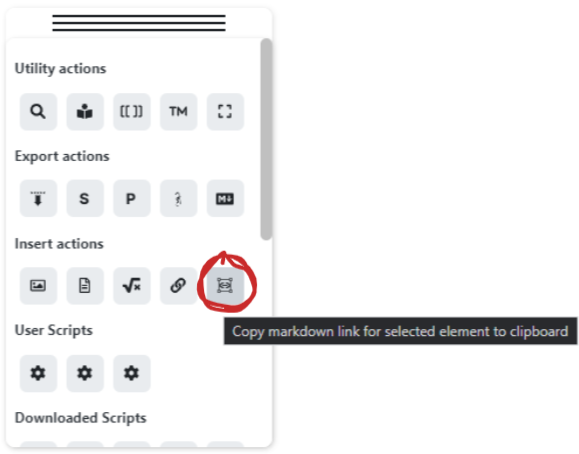
|
||||
|
||||
@@ -1,7 +1,7 @@
|
||||
import { App, FuzzySuggestModal, TFile } from "obsidian";
|
||||
import ExcalidrawPlugin from "./main";
|
||||
import { EMPTY_MESSAGE } from "./Constants";
|
||||
import { t } from "./lang/helpers";
|
||||
import ExcalidrawPlugin from "../main";
|
||||
import { EMPTY_MESSAGE } from "../Constants";
|
||||
import { t } from "../lang/helpers";
|
||||
|
||||
export enum openDialogAction {
|
||||
openFile,
|
||||
@@ -9,9 +9,10 @@ import {
|
||||
TFile,
|
||||
Notice,
|
||||
} from "obsidian";
|
||||
import ExcalidrawView from "./ExcalidrawView";
|
||||
import ExcalidrawPlugin from "./main";
|
||||
import { getNewOrAdjacentLeaf, sleep } from "./Utils";
|
||||
import ExcalidrawView from "../ExcalidrawView";
|
||||
import ExcalidrawPlugin from "../main";
|
||||
import { sleep } from "../utils/Utils";
|
||||
import { getNewOrAdjacentLeaf } from "../utils/ObsidianUtils";
|
||||
|
||||
export class Prompt extends Modal {
|
||||
private promptEl: HTMLInputElement;
|
||||
@@ -1,5 +1,5 @@
|
||||
import { App, MarkdownRenderer, Modal } from "obsidian";
|
||||
import ExcalidrawPlugin from "./main";
|
||||
import ExcalidrawPlugin from "../main";
|
||||
import { FIRST_RUN, RELEASE_NOTES } from "./Messages";
|
||||
|
||||
export class ReleaseNotes extends Modal {
|
||||
@@ -16,14 +16,14 @@ export class ReleaseNotes extends Modal {
|
||||
onOpen(): void {
|
||||
this.contentEl.classList.add("excalidraw-release");
|
||||
this.containerEl.classList.add(".excalidraw-release");
|
||||
this.titleEl.setText(`Welcome to Excalidraw ${this.version??""}`);
|
||||
this.titleEl.setText(`Welcome to Excalidraw ${this.version ?? ""}`);
|
||||
this.createForm();
|
||||
}
|
||||
|
||||
async onClose() {
|
||||
this.contentEl.empty();
|
||||
await this.plugin.loadSettings();
|
||||
this.plugin.settings.previousRelease =
|
||||
this.plugin.settings.previousRelease =
|
||||
//@ts-ignore
|
||||
this.app.plugins.manifests["obsidian-excalidraw-plugin"].version;
|
||||
await this.plugin.saveSettings();
|
||||
@@ -31,7 +31,7 @@ export class ReleaseNotes extends Modal {
|
||||
|
||||
async createForm() {
|
||||
let prevRelease = this.plugin.settings.previousRelease;
|
||||
prevRelease = (this.version===prevRelease) ? "0" : prevRelease;
|
||||
prevRelease = this.version === prevRelease ? "0" : prevRelease;
|
||||
const message = this.version
|
||||
? Object.keys(RELEASE_NOTES)
|
||||
.filter((key) => key > prevRelease)
|
||||
@@ -46,7 +46,6 @@ export class ReleaseNotes extends Modal {
|
||||
this.plugin,
|
||||
);
|
||||
|
||||
|
||||
this.contentEl.createEl("p", { text: "" }, (el) => {
|
||||
//files manually follow one of two options:
|
||||
el.style.textAlign = "right";
|
||||
@@ -1,6 +1,6 @@
|
||||
import { MarkdownRenderer, Modal, Notice, request } from "obsidian";
|
||||
import ExcalidrawPlugin from "./main";
|
||||
import { errorlog, log } from "./Utils";
|
||||
import ExcalidrawPlugin from "../main";
|
||||
import { errorlog, log } from "../utils/Utils";
|
||||
|
||||
const URL =
|
||||
"https://raw.githubusercontent.com/zsviczian/obsidian-excalidraw-plugin/master/ea-scripts/index-new.md";
|
||||
@@ -1,22 +1,11 @@
|
||||
import {
|
||||
FRONTMATTER_KEY,
|
||||
FRONTMATTER_KEY_CUSTOM_LINK_BRACKETS,
|
||||
FRONTMATTER_KEY_CUSTOM_PREFIX,
|
||||
FRONTMATTER_KEY_CUSTOM_URL_PREFIX,
|
||||
FRONTMATTER_KEY_DEFAULT_MODE,
|
||||
FRONTMATTER_KEY_FONT,
|
||||
FRONTMATTER_KEY_FONTCOLOR,
|
||||
FRONTMATTER_KEY_MD_STYLE,
|
||||
} from "./Constants";
|
||||
|
||||
type SuggestorInfo = {
|
||||
type SuggesterInfo = {
|
||||
field: string;
|
||||
code: string;
|
||||
desc: string;
|
||||
after: string;
|
||||
};
|
||||
|
||||
export const EXCALIDRAW_AUTOMATE_INFO: SuggestorInfo[] = [
|
||||
export const EXCALIDRAW_AUTOMATE_INFO: SuggesterInfo[] = [
|
||||
{
|
||||
field: "plugin",
|
||||
code: null,
|
||||
@@ -487,7 +476,7 @@ export const EXCALIDRAW_AUTOMATE_INFO: SuggestorInfo[] = [
|
||||
},
|
||||
];
|
||||
|
||||
export const EXCALIDRAW_SCRIPTENGINE_INFO: SuggestorInfo[] = [
|
||||
export const EXCALIDRAW_SCRIPTENGINE_INFO: SuggesterInfo[] = [
|
||||
{
|
||||
field: "inputPrompt",
|
||||
code: "inputPrompt: (header: string, placeholder?: string, value?: string, buttons?: [{caption:string, action:Function}]);",
|
||||
@@ -505,7 +494,7 @@ export const EXCALIDRAW_SCRIPTENGINE_INFO: SuggestorInfo[] = [
|
||||
},
|
||||
];
|
||||
|
||||
export const FRONTMATTER_KEYS_INFO: SuggestorInfo[] = [
|
||||
export const FRONTMATTER_KEYS_INFO: SuggesterInfo[] = [
|
||||
{
|
||||
field: "plugin",
|
||||
code: null,
|
||||
@@ -1,7 +1,7 @@
|
||||
//Solution copied from obsidian-kanban: https://github.com/mgmeyers/obsidian-kanban/blob/44118e25661bff9ebfe54f71ae33805dc88ffa53/src/lang/helpers.ts
|
||||
|
||||
import { moment } from "obsidian";
|
||||
import { errorlog } from "src/Utils";
|
||||
import { errorlog } from "src/utils/Utils";
|
||||
import ar from "./locale/ar";
|
||||
import cz from "./locale/cz";
|
||||
import da from "./locale/da";
|
||||
|
||||
@@ -38,7 +38,8 @@ export default {
|
||||
EXPORT_PNG: "Save as PNG next to the current file",
|
||||
TOGGLE_LOCK: "Toggle Text Element edit RAW/PREVIEW",
|
||||
DELETE_FILE: "Delete selected Image or Markdown file from Obsidian Vault",
|
||||
INSERT_LINK_TO_ELEMENT: "Copy markdown link for selected element to clipboard",
|
||||
INSERT_LINK_TO_ELEMENT:
|
||||
"Copy markdown link for selected element to clipboard",
|
||||
INSERT_LINK_TO_ELEMENT_ERROR: "Select a single element in the scene",
|
||||
INSERT_LINK_TO_ELEMENT_READY: "Link is READY and available on the clipboard",
|
||||
INSERT_LINK: "Insert link to file",
|
||||
@@ -62,8 +63,6 @@ export default {
|
||||
"Select a an ImageElement, or select a TextElement that contains an internal or external link.\n" +
|
||||
"SHIFT CLICK this button to open the link in a new pane.\n" +
|
||||
"CTRL/CMD CLICK the Image or TextElement on the canvas has the same effect!",
|
||||
TEXT_ELEMENT_EMPTY:
|
||||
"No ImageElement is selected or TextElement is empty, or [[valid-link|alias]]</code> or <code>[alias](valid-link) is not found",
|
||||
FILENAME_INVALID_CHARS:
|
||||
'File name cannot contain any of the following characters: * " \\ < > : | ? #',
|
||||
FILE_DOES_NOT_EXIST:
|
||||
@@ -82,7 +81,7 @@ export default {
|
||||
RELEASE_NOTES_NAME: "Display Release Notes after update",
|
||||
RELEASE_NOTES_DESC:
|
||||
"<b>Toggle ON:</b> Display release notes each time you update Excalidraw to a newer version.<br>" +
|
||||
"<b>Toggle OFF:</b> Silent mode. You can still read release notes on [GitHub](https://github.com/zsviczian/obsidian-excalidraw-plugin/releases).",
|
||||
"<b>Toggle OFF:</b> Silent mode. You can still read release notes on <a href='https://github.com/zsviczian/obsidian-excalidraw-plugin/releases'>GitHub</a>.",
|
||||
FOLDER_NAME: "Excalidraw folder",
|
||||
FOLDER_DESC:
|
||||
"Default location for new drawings. If empty, drawings will be created in the Vault root.",
|
||||
@@ -96,8 +95,8 @@ export default {
|
||||
TEMPLATE_DESC:
|
||||
"Full filepath to the Excalidraw template. " +
|
||||
"E.g.: If your template is in the default Excalidraw folder and it's name is " +
|
||||
"Template.md, the setting would be: Excalidraw/Template.md (or just Excalidraw/Template - you may ommit the .md file extension" +
|
||||
"If you are using Excalidraw in compatibility mode, then your template must be a legacy excalidraw file as well " +
|
||||
"Template.md, the setting would be: Excalidraw/Template.md (or just Excalidraw/Template - you may omit the .md file extension). " +
|
||||
"If you are using Excalidraw in compatibility mode, then your template must be a legacy Excalidraw file as well " +
|
||||
"such as Excalidraw/Template.excalidraw.",
|
||||
SCRIPT_FOLDER_NAME: "Excalidraw Automate script folder",
|
||||
SCRIPT_FOLDER_DESC:
|
||||
@@ -132,17 +131,22 @@ export default {
|
||||
FILENAME_EMBED_SAMPLE: "Filename for a new embedded drawing is: ",
|
||||
FILENAME_PREFIX_NAME: "Filename prefix",
|
||||
FILENAME_PREFIX_DESC: "The first part of the filename",
|
||||
FILENAME_PREFIX_EMBED_NAME: "Filename prefix when embedding a new drawing into a markdown note",
|
||||
FILENAME_PREFIX_EMBED_NAME:
|
||||
"Filename prefix when embedding a new drawing into a markdown note",
|
||||
FILENAME_PREFIX_EMBED_DESC:
|
||||
"Should the filename of the newly inserted drawing start with the name of the active markdown note " +
|
||||
"when using the command palette action: <code>Create a new drawing and embed into active document</code>? " +
|
||||
"ON: Yes, OFF: Not",
|
||||
FILENAME_POSTFIX_NAME: "Custom text after markdown Note's name when embedding",
|
||||
FILENAME_POSTFIX_DESC: "Effects filename only when embedding into a markdown document. This is text will be inserted after the note's name, but before the date.",
|
||||
FILENAME_POSTFIX_NAME:
|
||||
"Custom text after markdown Note's name when embedding",
|
||||
FILENAME_POSTFIX_DESC:
|
||||
"Effects filename only when embedding into a markdown document. This is text will be inserted after the note's name, but before the date.",
|
||||
FILENAME_DATE_NAME: "Filename Date",
|
||||
FILENAME_DATE_DESC: "The last part of the filename. Leave empty if you do not want a date.",
|
||||
FILENAME_DATE_DESC:
|
||||
"The last part of the filename. Leave empty if you do not want a date.",
|
||||
FILENAME_EXCALIDRAW_EXTENSION_NAME: ".excalidraw.md or .md",
|
||||
FILENAME_EXCALIDRAW_EXTENSION_DESC: "This setting does not apply if you use Excalidraw in compatibility mode, " +
|
||||
FILENAME_EXCALIDRAW_EXTENSION_DESC:
|
||||
"This setting does not apply if you use Excalidraw in compatibility mode, " +
|
||||
"i.e. you are not using Excalidraw markdown files. Toggle ON = filename ends with .excalidraw.md, Toggle OFF = filename ends with .md",
|
||||
/*SVG_IN_MD_NAME: "SVG Snapshot to markdown file",
|
||||
SVG_IN_MD_DESC: "If the switch is 'on' Excalidraw will include an SVG snapshot in the markdown file. "+
|
||||
@@ -151,7 +155,8 @@ export default {
|
||||
"can be opened with an app that reads SVGs. In addition hover previews will be less resource intensive if SVG snapshots are enabled.",*/
|
||||
DISPLAY_HEAD: "Display",
|
||||
LEFTHANDED_MODE_NAME: "Left-handed mode",
|
||||
LEFTHANDED_MODE_DESC: "Currently only has effect in tray-mode. If turned on, the tray will be on the right side.",
|
||||
LEFTHANDED_MODE_DESC:
|
||||
"Currently only has effect in tray-mode. If turned on, the tray will be on the right side.",
|
||||
MATCH_THEME_NAME: "New drawing to match Obsidian theme",
|
||||
MATCH_THEME_DESC:
|
||||
"If theme is dark, new drawing will be created in dark mode. This does not apply when you use a template for new drawings. " +
|
||||
@@ -164,10 +169,11 @@ export default {
|
||||
"If this option is enabled open Excalidraw pane will switch to light/dark mode when Obsidian theme changes. ",
|
||||
DEFAULT_OPEN_MODE_NAME: "Default mode when opening Excalidraw",
|
||||
DEFAULT_OPEN_MODE_DESC:
|
||||
"Specifies the mode how Excalidraw opens: Normal, Zen, or View mode. You may also set this behaviour on a file level by " +
|
||||
"Specifies the mode how Excalidraw opens: Normal, Zen, or View mode. You may also set this behavior on a file level by " +
|
||||
"adding the excalidraw-default-mode frontmatter key with a value of: normal,view, or zen to your document.",
|
||||
DEFAULT_PEN_MODE_NAME: "Pen mode",
|
||||
DEFAULT_PEN_MODE_DESC: "Should pen mode be automatically enabled when opening excalidraw?",
|
||||
DEFAULT_PEN_MODE_DESC:
|
||||
"Should pen mode be automatically enabled when opening Excalidraw?",
|
||||
ZOOM_TO_FIT_NAME: "Zoom to fit on view resize",
|
||||
ZOOM_TO_FIT_DESC: "Zoom to fit drawing when the pane is resized",
|
||||
ZOOM_TO_FIT_MAX_LEVEL_NAME: "Zoom to fit max ZOOM level",
|
||||
@@ -204,7 +210,7 @@ export default {
|
||||
}${FRONTMATTER_KEY_CUSTOM_URL_PREFIX}: "🌐 "</code> to the file's frontmatter.`,
|
||||
HOVERPREVIEW_NAME: "Hover preview without CTRL/CMD key",
|
||||
HOVERPREVIEW_DESC:
|
||||
"Toggle On: Hover preview for [[wiki links]] is shown immedately, without the need to hold the CTRL/CMD key.<br>Toggle Off: Hover preview is shown only when you hold the CTRL/CMD key while hovering the link.",
|
||||
"Toggle On: Hover preview for [[wiki links]] is shown immediately, without the need to hold the CTRL/CMD key.<br>Toggle Off: Hover preview is shown only when you hold the CTRL/CMD key while hovering the link.",
|
||||
LINKOPACITY_NAME: "Opacity of link icon",
|
||||
LINKOPACITY_DESC:
|
||||
"Opacity of the link indicator icon in the top right corner of an element. 1 is opaque, 0 is transparent.",
|
||||
@@ -232,7 +238,7 @@ export default {
|
||||
"Use the <code>http://iframely.server.crestify.com/iframely?url=</code> to get title of page when dropping a link into Excalidraw",
|
||||
MD_HEAD: "Markdown-embed settings",
|
||||
MD_HEAD_DESC:
|
||||
"You can transclude formatted markdown documents into drawings as images CTRL/CMD drop from the file explorer or using " +
|
||||
"You can transclude formatted markdown documents into drawings as images CTRL(Shift on Mac) drop from the file explorer or using " +
|
||||
"the command palette action.",
|
||||
MD_TRANSCLUDE_WIDTH_NAME: "Default width of a transcluded markdown document",
|
||||
MD_TRANSCLUDE_WIDTH_DESC:
|
||||
@@ -242,7 +248,7 @@ export default {
|
||||
MD_TRANSCLUDE_HEIGHT_NAME:
|
||||
"Default maximum height of a transcluded markdown document",
|
||||
MD_TRANSCLUDE_HEIGHT_DESC:
|
||||
"The embedded image will be as high as the markdown text requries, but not higher than this value. " +
|
||||
"The embedded image will be as high as the markdown text requires, but not higher than this value. " +
|
||||
"You can override this value by editing the embedded image link in markdown view mode with the following syntax <code>[[filename#^blockref|WIDTHxMAXHEIGHT]]</code>.",
|
||||
MD_DEFAULT_FONT_NAME:
|
||||
"The default font typeface to use for embedded markdown files.",
|
||||
@@ -253,23 +259,31 @@ export default {
|
||||
"The default font color to use for embedded markdown files.",
|
||||
MD_DEFAULT_COLOR_DESC:
|
||||
'Set this to any valid css color name e.g. "steelblue" (<a href="https://www.w3schools.com/colors/colors_names.asp">color names</a>), or a valid hexadecimal color e.g. "#e67700", ' +
|
||||
'or any other valid css color string. You can override this setting by adding the following frontmatter-key to the embedded markdown file: <code>excalidraw-font-color: steelblue</code>',
|
||||
"or any other valid css color string. You can override this setting by adding the following frontmatter-key to the embedded markdown file: <code>excalidraw-font-color: steelblue</code>",
|
||||
MD_DEFAULT_BORDER_COLOR_NAME:
|
||||
"The default border color to use for embedded markdown files.",
|
||||
MD_DEFAULT_BORDER_COLOR_DESC:
|
||||
'Set this to any valid css color name e.g. "steelblue" (<a href="https://www.w3schools.com/colors/colors_names.asp">color names</a>), or a valid hexadecimal color e.g. "#e67700", ' +
|
||||
'or any other valid css color string. You can override this setting by adding the following frontmatter-key to the embedded markdown file: <code>excalidraw-border-color: gray</code>. ' +
|
||||
"or any other valid css color string. You can override this setting by adding the following frontmatter-key to the embedded markdown file: <code>excalidraw-border-color: gray</code>. " +
|
||||
"Leave empty if you don't want a border. ",
|
||||
MD_CSS_NAME: "CSS file",
|
||||
MD_CSS_DESC:
|
||||
"The filename of the CSS to apply to markdown embeds. Provide the filename with extension (e.g. 'md-embed.css'). The css file may also be a plain " +
|
||||
"markdown file (e.g. 'md-embed-css.md'), just make sure the content is written using valid css syntax. " +
|
||||
"If you need to look at the HTML code you are applying the CSS to, then open Obsidian Developer Console (CTRL+SHIFT+i) and type in the follwoing command: " +
|
||||
"If you need to look at the HTML code you are applying the CSS to, then open Obsidian Developer Console (CTRL+SHIFT+i) and type in the following command: " +
|
||||
'"ExcalidrawAutomate.mostRecentMarkdownSVG". This will display the most recent SVG generated by Excalidraw. ' +
|
||||
"Setting the font-family in the css is has limitations. By default only your operating system's standard fonts are available (see README for details). " +
|
||||
"You can add one custom font beyond that using the setting above. " +
|
||||
'You can override this css setting by adding the following frontmatter-key to the embedded markdown file: "excalidraw-css: css_file_in_valut|css-snippet".',
|
||||
'You can override this css setting by adding the following frontmatter-key to the embedded markdown file: "excalidraw-css: css_file_in_vault|css-snippet".',
|
||||
EMBED_HEAD: "Embed & Export",
|
||||
EMBED_REUSE_EXPORTED_IMAGE_NAME:
|
||||
"If found, use the already exported image for preview",
|
||||
EMBED_REUSE_EXPORTED_IMAGE_DESC:
|
||||
"This setting works in conjunction with the Auto-export SVG/PNG setting. If an exported image that matches the file name of the drawing " +
|
||||
"is available, use that image instead of generating a preview image on the fly. This will result in faster previews especially when you have many embedded objects in the drawing, however, " +
|
||||
"it may happen that your latest changes are not displayed and that the image will not automatically match your Obsidian theme in case you have changed the " +
|
||||
"Obsidian theme since the export was created. This setting only applies to embedding images into markdown documents. " +
|
||||
"For a number of reasons, the same approach cannot be used to expedite the loading of drawings with many embedded objects. See demonstration <a href='https://github.com/zsviczian/obsidian-excalidraw-plugin/releases/tag/1.6.23' target='_blank'>here</a>.",
|
||||
EMBED_PREVIEW_SVG_NAME: "Display SVG in markdown preview",
|
||||
EMBED_PREVIEW_SVG_DESC:
|
||||
"The default is to display drawings as SVG images in the markdown preview. Turning this feature off, the markdown preview will display the drawing as an embedded PNG image.",
|
||||
@@ -284,7 +298,7 @@ export default {
|
||||
"<code>[[drawing.excalidraw|100x100]]</code> format.",
|
||||
EMBED_TYPE_NAME: "Type of file to insert into the document",
|
||||
EMBED_TYPE_DESC:
|
||||
"When you embed an image into a document using the command palette this setting will specify if Excalidraw should embed the original excalidraw file " +
|
||||
"When you embed an image into a document using the command palette this setting will specify if Excalidraw should embed the original Excalidraw file " +
|
||||
"or a PNG or an SVG copy. You need to enable auto-export PNG / SVG (see below under Export Settings) for those image types to be available in the dropdown. For drawings that do not have a " +
|
||||
"a corresponding PNG or SVG readily available the command palette action will insert a broken link. You need to open the original drawing and initiate export manually. " +
|
||||
"This option will not autogenerate PNG/SVG files, but will simply reference the already existing files.",
|
||||
@@ -313,8 +327,8 @@ export default {
|
||||
EXPORT_SVG_DESC:
|
||||
"Automatically create an SVG export of your drawing matching the title of your file. " +
|
||||
"The plugin will save the *.SVG file in the same folder as the drawing. " +
|
||||
"Embed the .svg file into your documents instead of excalidraw making you embeds platform independent. " +
|
||||
"While the auto-export switch is on, this file will get updated every time you edit the excalidraw drawing with the matching name.",
|
||||
"Embed the .svg file into your documents instead of Excalidraw making you embeds platform independent. " +
|
||||
"While the auto-export switch is on, this file will get updated every time you edit the Excalidraw drawing with the matching name.",
|
||||
EXPORT_PNG_NAME: "Auto-export PNG",
|
||||
EXPORT_PNG_DESC: "Same as the auto-export SVG, but for *.PNG",
|
||||
COMPATIBILITY_HEAD: "Compatibility features",
|
||||
@@ -333,15 +347,15 @@ export default {
|
||||
EXPERIMENTAL_HEAD: "Experimental features",
|
||||
EXPERIMENTAL_DESC:
|
||||
"Some of these setting will not take effect immediately, only when the File Explorer is refreshed, or Obsidian restarted.",
|
||||
FIELD_SUGGESTOR_NAME: "Enable Field Suggestor",
|
||||
FIELD_SUGGESTOR_DESC:
|
||||
"Field Suggestor borrowed from Breadcrumbs and Templater plugins. The Field Suggestor will show an autocomplete menu " +
|
||||
FIELD_SUGGESTER_NAME: "Enable Field Suggester",
|
||||
FIELD_SUGGESTER_DESC:
|
||||
"Field Suggester borrowed from Breadcrumbs and Templater plugins. The Field Suggester will show an autocomplete menu " +
|
||||
"when you type <code>excalidraw-</code> or <code>ea.</code> with function description as hints on the individual items in the list.",
|
||||
FILETYPE_NAME: "Display type (✏️) for excalidraw.md files in File Explorer",
|
||||
FILETYPE_DESC:
|
||||
"Excalidraw files will receive an indicator using the emojii or text defined in the next setting.",
|
||||
"Excalidraw files will receive an indicator using the emoji or text defined in the next setting.",
|
||||
FILETAG_NAME: "Set the type indicator for excalidraw.md files",
|
||||
FILETAG_DESC: "The text or emojii to display as type indicator.",
|
||||
FILETAG_DESC: "The text or emoji to display as type indicator.",
|
||||
INSERT_EMOJI: "Insert an emoji",
|
||||
LIVEPREVIEW_NAME: "Immersive image embedding in live preview editing mode",
|
||||
LIVEPREVIEW_DESC:
|
||||
@@ -351,13 +365,13 @@ export default {
|
||||
ENABLE_FOURTH_FONT_NAME: "Enable fourth font option",
|
||||
ENABLE_FOURTH_FONT_DESC:
|
||||
"By turning this on, you will see a fourth font button on the properties panel for text elements. " +
|
||||
"Files that use this fourth font will (partly) lose their paltform independence. " +
|
||||
"Depending on the cutom font set in settings, they will look differently when loaded in another vault, or at a later time. " +
|
||||
"Files that use this fourth font will (partly) lose their platform independence. " +
|
||||
"Depending on the custom font set in settings, they will look differently when loaded in another vault, or at a later time. " +
|
||||
"Also the 4th font will display as system default font on excalidraw.com, or other Excalidraw versions.",
|
||||
FOURTH_FONT_NAME: "Forth font file",
|
||||
FOURTH_FONT_DESC:
|
||||
"Select a .ttf, .woff or .woff2 font file from your vault to use as the fourth font. " +
|
||||
"If no file is selected excalidraw will use the Virgil font by default.",
|
||||
"If no file is selected, Excalidraw will use the Virgil font by default.",
|
||||
SCRIPT_SETTINGS_HEAD: "Settings for installed Scripts",
|
||||
|
||||
//openDrawings.ts
|
||||
|
||||
@@ -9,12 +9,9 @@ export default {
|
||||
// main.ts
|
||||
INSTALL_SCRIPT: "安装此脚本",
|
||||
UPDATE_SCRIPT: "发现可用更新 - 点击安装",
|
||||
CHECKING_SCRIPT:
|
||||
"检查脚本更新 - 点击重新安装",
|
||||
UNABLETOCHECK_SCRIPT:
|
||||
"检查更新失败 - 点击重新安装",
|
||||
UPTODATE_SCRIPT:
|
||||
"已安装最新脚本 - 点击重新安装",
|
||||
CHECKING_SCRIPT: "检查脚本更新 - 点击重新安装",
|
||||
UNABLETOCHECK_SCRIPT: "检查更新失败 - 点击重新安装",
|
||||
UPTODATE_SCRIPT: "已安装最新脚本 - 点击重新安装",
|
||||
OPEN_AS_EXCALIDRAW: "打开为 Excalidraw 绘图(Excalidraw 模式)",
|
||||
TOGGLE_MODE: "在 Excalidraw 和 Markdown 模式之间切换",
|
||||
CONVERT_NOTE_TO_EXCALIDRAW: "转换空白笔记为 Excalidraw 绘图",
|
||||
@@ -24,16 +21,13 @@ export default {
|
||||
CONVERT_FILE_REPLACE_EXT: "*.excalidraw => *.md (兼容 Logseq)",
|
||||
DOWNLOAD_LIBRARY: "导出 stencil 库为 *.excalidrawlib 文件",
|
||||
OPEN_EXISTING_NEW_PANE: "打开已有的绘图(在新面板)",
|
||||
OPEN_EXISTING_ACTIVE_PANE:
|
||||
"打开已有的绘图(在当前面板)",
|
||||
OPEN_EXISTING_ACTIVE_PANE: "打开已有的绘图(在当前面板)",
|
||||
TRANSCLUDE: "插入(嵌入)绘图到当前文档",
|
||||
TRANSCLUDE_MOST_RECENT: "插入(嵌入)最近编辑的绘图到当前文档",
|
||||
NEW_IN_NEW_PANE: "新建绘图(在新面板)",
|
||||
NEW_IN_ACTIVE_PANE: "新建绘图(在当前面板)",
|
||||
NEW_IN_NEW_PANE_EMBED:
|
||||
"新建绘图(在新面板),并插入(嵌入)到当前文档",
|
||||
NEW_IN_ACTIVE_PANE_EMBED:
|
||||
"新建绘图(在当前面板),并插入(嵌入)到当前文档",
|
||||
NEW_IN_NEW_PANE_EMBED: "新建绘图(在新面板),并插入(嵌入)到当前文档",
|
||||
NEW_IN_ACTIVE_PANE_EMBED: "新建绘图(在当前面板),并插入(嵌入)到当前文档",
|
||||
EXPORT_SVG: "导出 SVG 文件到当前目录",
|
||||
EXPORT_PNG: "导出 PNG 文件到当前目录",
|
||||
TOGGLE_LOCK: "切换文本元素的原文/预览模式",
|
||||
@@ -44,8 +38,7 @@ export default {
|
||||
INSERT_LINK: "插入(链接)文件到当前绘图",
|
||||
INSERT_IMAGE: "插入(以图像形式嵌入)图像到当前绘图",
|
||||
INSERT_MD: "插入(以图像形式嵌入) Markdown 文档到当前绘图",
|
||||
INSERT_LATEX:
|
||||
"插入 LaTeX 公式",
|
||||
INSERT_LATEX: "插入 LaTeX 公式",
|
||||
ENTER_LATEX: "输入 LaTeX 表达式",
|
||||
READ_RELEASE_NOTES: "阅读本插件的最新发行版本说明",
|
||||
TRAY_MODE: "切换绘图工具属性页的面板(Panel)/托盘(Tray)模式",
|
||||
@@ -64,8 +57,7 @@ export default {
|
||||
"您也可以直接在画布中按住 CTRL/CMD 并点击图形或文本元素来打开链接。",
|
||||
TEXT_ELEMENT_EMPTY:
|
||||
"未选中图形或文本元素,或者元素不包含有效的链接([[链接|别名]] 或 [别名](链接))",
|
||||
FILENAME_INVALID_CHARS:
|
||||
'文件名不能含有以下符号: * " \\ < > : | ? #',
|
||||
FILENAME_INVALID_CHARS: '文件名不能含有以下符号: * " \\ < > : | ? #',
|
||||
FILE_DOES_NOT_EXIST:
|
||||
"文件不存在。按住 ALT(或 ALT + SHIFT)并点击链接来创建新文件。",
|
||||
FORCE_SAVE:
|
||||
@@ -84,10 +76,8 @@ export default {
|
||||
"<b>开启:</b>每次更新本插件后,显示最新发行版本的说明。<br>" +
|
||||
"<b>关闭:</b>您仍可以在 <a href='https://github.com/zsviczian/obsidian-excalidraw-plugin/releases'>GitHub</a> 上阅读更新说明。",
|
||||
FOLDER_NAME: "Excalidraw 文件夹",
|
||||
FOLDER_DESC:
|
||||
"新绘图的默认存储路径。若为空,将在库的根目录中创建新绘图。",
|
||||
FOLDER_EMBED_NAME:
|
||||
"将 Excalidraw 文件夹用于“新建绘图”命令创建的绘图",
|
||||
FOLDER_DESC: "新绘图的默认存储路径。若为空,将在库的根目录中创建新绘图。",
|
||||
FOLDER_EMBED_NAME: "将 Excalidraw 文件夹用于“新建绘图”命令创建的绘图",
|
||||
FOLDER_EMBED_DESC:
|
||||
"在命令面板中执行“新建绘图,并插入(嵌入)到当前文档”之类命令时," +
|
||||
"新绘图的存储路径。<br>" +
|
||||
@@ -138,11 +128,13 @@ export default {
|
||||
"则在命令面板中执行“新建绘图,并插入(嵌入)到当前文档”之类命令时," +
|
||||
"创建的绘图文件名将以当前文档名作为开头。",
|
||||
FILENAME_POSTFIX_NAME: "“新建绘图”命令创建的绘图的文件名后缀",
|
||||
FILENAME_POSTFIX_DESC: "介于文件名前缀和文件名日期之间的文本。仅对“新建绘图”命令创建的绘图生效。",
|
||||
FILENAME_POSTFIX_DESC:
|
||||
"介于文件名前缀和文件名日期之间的文本。仅对“新建绘图”命令创建的绘图生效。",
|
||||
FILENAME_DATE_NAME: "文件名日期",
|
||||
FILENAME_DATE_DESC: "文件名的最后一部分",
|
||||
FILENAME_EXCALIDRAW_EXTENSION_NAME: "文件扩展名(.excalidraw.md 或 .md)",
|
||||
FILENAME_EXCALIDRAW_EXTENSION_DESC: "该选项在兼容模式(即非 Excalidraw 专用 Markdown 文件)下不会生效。<br>" +
|
||||
FILENAME_EXCALIDRAW_EXTENSION_DESC:
|
||||
"该选项在兼容模式(即非 Excalidraw 专用 Markdown 文件)下不会生效。<br>" +
|
||||
"<b>开启:</b>使用 .excalidraw.md 作为扩展名;<b>关闭:</b>使用 .md 作为扩展名。",
|
||||
/*SVG_IN_MD_NAME: "SVG Snapshot to markdown file",
|
||||
SVG_IN_MD_DESC: "If the switch is 'on' Excalidraw will include an SVG snapshot in the markdown file. "+
|
||||
@@ -151,7 +143,8 @@ export default {
|
||||
"can be opened with an app that reads SVGs. In addition hover previews will be less resource intensive if SVG snapshots are enabled.",*/
|
||||
DISPLAY_HEAD: "显示",
|
||||
LEFTHANDED_MODE_NAME: "左手模式",
|
||||
LEFTHANDED_MODE_DESC: "目前只影响托盘模式下,绘图工具属性页的位置。若开启此项,则托盘处于右侧。",
|
||||
LEFTHANDED_MODE_DESC:
|
||||
"目前只影响托盘模式下,绘图工具属性页的位置。若开启此项,则托盘处于右侧。",
|
||||
MATCH_THEME_NAME: "使新建的绘图匹配 Obsidian 主题",
|
||||
MATCH_THEME_DESC:
|
||||
"如果 Obsidian 使用黑暗主题,新建的绘图文件也将使用黑暗主题。<br>" +
|
||||
@@ -237,23 +230,19 @@ export default {
|
||||
"MD-Embed 图像的宽度。该选项会影响到折行,以及图像元素的宽度。<br>" +
|
||||
"您可为绘图中的某个 MD-Embed 单独设置此项,方法是将绘图切换至 Markdown 模式," +
|
||||
"并修改相应的 <code>[[Embed文件名#标题|宽度x最大高度]]</code>。",
|
||||
MD_TRANSCLUDE_HEIGHT_NAME:
|
||||
"MD-Embed 的默认最大高度",
|
||||
MD_TRANSCLUDE_HEIGHT_NAME: "MD-Embed 的默认最大高度",
|
||||
MD_TRANSCLUDE_HEIGHT_DESC:
|
||||
"MD-Embed 图像的高度取决于文档内容的多少,但最大不会超过该值。<br>" +
|
||||
"您可为绘图中的某个 MD-Embed 单独设置此项,方法是将绘图切换至 Markdown 模式,并修改相应的 <code>[[Embed文件名#^块引ID|宽度x最大高度]]</code>。",
|
||||
MD_DEFAULT_FONT_NAME:
|
||||
"MD-Embed 的默认字体",
|
||||
MD_DEFAULT_FONT_NAME: "MD-Embed 的默认字体",
|
||||
MD_DEFAULT_FONT_DESC:
|
||||
"可以设为 <code>Virgil</code>,<code>Casadia</code> 或其他有效的 .ttf/.woff/.woff2 字体文件(如 <code>我的字体.woff2</code>)。<br>" +
|
||||
"您可为某个 MD-Embed 单独设置此项,方法是在其源文件的 Frontmatter 中添加形如 <code>excalidraw-font: 字体名或文件名</code> 的键值对。",
|
||||
MD_DEFAULT_COLOR_NAME:
|
||||
"MD-Embed 的默认文本颜色",
|
||||
MD_DEFAULT_COLOR_NAME: "MD-Embed 的默认文本颜色",
|
||||
MD_DEFAULT_COLOR_DESC:
|
||||
"可以填写 HTML 颜色名,如 steelblue(参考 <a href='https://www.w3schools.com/colors/colors_names.asp'>HTML Color Names</a>),或者有效的 16 进制颜色值,例如 #e67700,或者任何其他有效的 CSS 颜色。<br>" +
|
||||
"您可为某个 MD-Embed 单独设置此项,方法是在其源文件的 Frontmatter 中添加形如 <code>excalidraw-font-color: steelblue</code> 的键值对。",
|
||||
MD_DEFAULT_BORDER_COLOR_NAME:
|
||||
"MD-Embed 的默认边框颜色",
|
||||
MD_DEFAULT_BORDER_COLOR_NAME: "MD-Embed 的默认边框颜色",
|
||||
MD_DEFAULT_BORDER_COLOR_DESC:
|
||||
"可以填写 HTML 颜色名,如 steelblue(参考 <a href='https://www.w3schools.com/colors/colors_names.asp'>HTML Color Names</a>),或者有效的 16 进制颜色值,例如 #e67700,或者任何其他有效的 CSS 颜色。<br>" +
|
||||
"您可为某个 MD-Embed 单独设置此项,方法是在其源文件的 Frontmatter 中添加形如 <code>excalidraw-border-color: gray</code> 的键值对。<br>" +
|
||||
@@ -292,8 +281,7 @@ export default {
|
||||
EXPORT_PNG_SCALE_NAME: "导出 PNG 图像的比例",
|
||||
EXPORT_PNG_SCALE_DESC: "导出的 PNG 图像的大小比例",
|
||||
EXPORT_BACKGROUND_NAME: "导出的图像包含背景",
|
||||
EXPORT_BACKGROUND_DESC:
|
||||
"如果关闭,将导出透明背景的图像。",
|
||||
EXPORT_BACKGROUND_DESC: "如果关闭,将导出透明背景的图像。",
|
||||
EXPORT_SVG_PADDING_NAME: "导出 SVG 图像的边距",
|
||||
EXPORT_SVG_PADDING_DESC:
|
||||
"导出的 PNG 图像的空白边距(像素)。增加该值,可以避免在导出 SVG 图像时,过于靠近画布边缘的图形被裁掉。",
|
||||
@@ -302,8 +290,7 @@ export default {
|
||||
"导出与绘图的黑暗/明亮主题匹配的图像。" +
|
||||
"如果关闭,在黑暗主题下导出的图像将和明亮主题一样。",
|
||||
EXPORT_HEAD: "导出设置",
|
||||
EXPORT_SYNC_NAME:
|
||||
"保持 .SVG 和 .PNG 文件名与绘图文件同步",
|
||||
EXPORT_SYNC_NAME: "保持 .SVG 和 .PNG 文件名与绘图文件同步",
|
||||
EXPORT_SYNC_DESC:
|
||||
"打开后,当绘图文件被重命名时,插件将同步更新同文件夹下的同名 .SVG 和 .PNG 文件。" +
|
||||
"当绘图文件被删除时,插件将自动删除同文件夹下的同名 .SVG 和 .PNG 文件。",
|
||||
@@ -317,9 +304,9 @@ export default {
|
||||
EXPORT_PNG_DESC: "和“自动导出 SVG 格式副本”类似,但是导出格式为 *.PNG。",
|
||||
COMPATIBILITY_HEAD: "兼容性设置",
|
||||
EXPORT_EXCALIDRAW_NAME: "自动导出 Excalidraw 格式副本",
|
||||
EXPORT_EXCALIDRAW_DESC: "和“自动导出 SVG 格式副本”类似,但是导出格式为 *.excalidraw。",
|
||||
SYNC_EXCALIDRAW_NAME:
|
||||
"保持同一绘图的新旧格式文件内容一致",
|
||||
EXPORT_EXCALIDRAW_DESC:
|
||||
"和“自动导出 SVG 格式副本”类似,但是导出格式为 *.excalidraw。",
|
||||
SYNC_EXCALIDRAW_NAME: "保持同一绘图的新旧格式文件内容一致",
|
||||
SYNC_EXCALIDRAW_DESC:
|
||||
"如果旧格式(*.excalidraw)绘图文件的修改日期比新格式(*.md)更新," +
|
||||
"则根据旧格式文件的内容来更新新格式文件。",
|
||||
@@ -331,13 +318,12 @@ export default {
|
||||
EXPERIMENTAL_HEAD: "实验性功能",
|
||||
EXPERIMENTAL_DESC:
|
||||
"以下部分设置不会立即生效,需要刷新文件资源管理器或者重启 Obsidian 才会生效。",
|
||||
FIELD_SUGGESTOR_NAME: "开启 Field Suggestor",
|
||||
FIELD_SUGGESTOR_DESC:
|
||||
FIELD_SUGGESTER_NAME: "开启 Field Suggester",
|
||||
FIELD_SUGGESTER_DESC:
|
||||
"开启后,当您在编辑器中输入 <code>excalidraw-</code> 或者 <code>ea.</code> 时,会弹出一个带有函数说明的自动补全提示菜单。<br>" +
|
||||
"该功能借鉴了 Breadcrumbs 和 Templater 插件。",
|
||||
FILETYPE_NAME: "在文件浏览器中为 excalidraw.md 文件添加类型标识符(如 ✏️)",
|
||||
FILETYPE_DESC:
|
||||
"可通过下一项设置来自定义类型标识符。",
|
||||
FILETYPE_DESC: "可通过下一项设置来自定义类型标识符。",
|
||||
FILETAG_NAME: "excalidraw.md 文件的类型标识符",
|
||||
FILETAG_DESC: "要显示为类型标识符的 emoji 或文本。",
|
||||
INSERT_EMOJI: "插入 emoji",
|
||||
@@ -364,8 +350,7 @@ export default {
|
||||
SELECT_FILE_TO_LINK: "选择要插入(链接)到当前绘图中的文件。",
|
||||
SELECT_DRAWING: "选择要插入(以图像形式嵌入)到当前绘图中的图像。",
|
||||
TYPE_FILENAME: "键入要选择的绘图名称。",
|
||||
SELECT_FILE_OR_TYPE_NEW:
|
||||
"选择已有绘图,或者新绘图的类型,然后按回车。",
|
||||
SELECT_FILE_OR_TYPE_NEW: "选择已有绘图,或者新绘图的类型,然后按回车。",
|
||||
SELECT_TO_EMBED: "选择要插入(嵌入)到当前文档中的绘图。",
|
||||
SELECT_MD: "选择要插入(以图像形式嵌入)到当前绘图中的 Markdown 文档。",
|
||||
|
||||
@@ -374,8 +359,7 @@ export default {
|
||||
"EXCALIDRAW 警告\n停止加载嵌入的图像,因为此文件中存在死循环:\n",
|
||||
|
||||
//Scripts.ts
|
||||
SCRIPT_EXECUTION_ERROR:
|
||||
"脚本运行错误。请在开发者控制台中查看错误信息。",
|
||||
SCRIPT_EXECUTION_ERROR: "脚本运行错误。请在开发者控制台中查看错误信息。",
|
||||
|
||||
//ExcalidrawData.ts
|
||||
LOAD_FROM_BACKUP: "Excalidraw 文件已损坏。尝试从备份文件中加载。",
|
||||
|
||||
3918
src/main.ts
3918
src/main.ts
File diff suppressed because it is too large
Load Diff
File diff suppressed because one or more lines are too long
@@ -1,5 +1,5 @@
|
||||
import * as React from "react";
|
||||
import ExcalidrawView, { TextMode } from "./ExcalidrawView";
|
||||
import ExcalidrawView from "../ExcalidrawView";
|
||||
|
||||
type ButtonProps = {
|
||||
title: string;
|
||||
@@ -256,16 +256,34 @@ export const ICONS = {
|
||||
</svg>
|
||||
),
|
||||
copyElementLink: (
|
||||
<svg
|
||||
<svg
|
||||
xmlns="http://www.w3.org/2000/svg"
|
||||
viewBox="0 0 260 260"
|
||||
aria-hidden="true"
|
||||
focusable="false"
|
||||
role="img"
|
||||
role="img"
|
||||
>
|
||||
<path stroke="var(--icon-fill-color)" fill="none" strokeLinecap="round" strokeWidth="8" d="M10 10h40m-40 0h40m0 0v40m0-40v40m0 0H10m40 0H10m0 0V10m0 40V10M210 10h40m-40 0h40m0 0v40m0-40v40m0 0h-40m40 0h-40m0 0V10m0 40V10M210 210h40m-40 0h40m0 0v40m0-40v40m0 0h-40m40 0h-40m0 0v-40m0 40v-40M10 210h40m-40 0h40m0 0v40m0-40v40m0 0H10m40 0H10m0 0v-40m0 40v-40M30 210V50m0 160V50M50 30h160M50 30h160M230 50v160m0-160v160M50 230h160m-160 0h160"/>
|
||||
<path stroke="var(--icon-fill-color)" fill="none" strokeLinecap="round" strokeWidth="16" d="M110 90c-6.67 1.67-30 3.11-40 10-10 6.89-20 21.37-20 31.37S60 153.56 70 160c10 6.44 33.33 8.33 40 10m0-80c-6.67 1.67-30 3.11-40 10-10 6.89-20 21.37-20 31.37S60 153.56 70 160c10 6.44 33.33 8.33 40 10M150 90c6.67 1.67 30 3.11 40 10 10 6.89 20 21.37 20 31.37s-10 22.19-20 28.63c-10 6.44-33.33 8.33-40 10m0-80c6.67 1.67 30 3.11 40 10 10 6.89 20 21.37 20 31.37s-10 22.19-20 28.63c-10 6.44-33.33 8.33-40 10"/>
|
||||
<path stroke="var(--icon-fill-color)" fill="none" strokeLinecap="round" strokeWidth="16" d="M89.868 130.198c13.36-.03 66.78-.17 80.13-.2m-80.13.2c13.36-.03 66.78-.17 80.13-.2"/>
|
||||
<path
|
||||
stroke="var(--icon-fill-color)"
|
||||
fill="none"
|
||||
strokeLinecap="round"
|
||||
strokeWidth="8"
|
||||
d="M10 10h40m-40 0h40m0 0v40m0-40v40m0 0H10m40 0H10m0 0V10m0 40V10M210 10h40m-40 0h40m0 0v40m0-40v40m0 0h-40m40 0h-40m0 0V10m0 40V10M210 210h40m-40 0h40m0 0v40m0-40v40m0 0h-40m40 0h-40m0 0v-40m0 40v-40M10 210h40m-40 0h40m0 0v40m0-40v40m0 0H10m40 0H10m0 0v-40m0 40v-40M30 210V50m0 160V50M50 30h160M50 30h160M230 50v160m0-160v160M50 230h160m-160 0h160"
|
||||
/>
|
||||
<path
|
||||
stroke="var(--icon-fill-color)"
|
||||
fill="none"
|
||||
strokeLinecap="round"
|
||||
strokeWidth="16"
|
||||
d="M110 90c-6.67 1.67-30 3.11-40 10-10 6.89-20 21.37-20 31.37S60 153.56 70 160c10 6.44 33.33 8.33 40 10m0-80c-6.67 1.67-30 3.11-40 10-10 6.89-20 21.37-20 31.37S60 153.56 70 160c10 6.44 33.33 8.33 40 10M150 90c6.67 1.67 30 3.11 40 10 10 6.89 20 21.37 20 31.37s-10 22.19-20 28.63c-10 6.44-33.33 8.33-40 10m0-80c6.67 1.67 30 3.11 40 10 10 6.89 20 21.37 20 31.37s-10 22.19-20 28.63c-10 6.44-33.33 8.33-40 10"
|
||||
/>
|
||||
<path
|
||||
stroke="var(--icon-fill-color)"
|
||||
fill="none"
|
||||
strokeLinecap="round"
|
||||
strokeWidth="16"
|
||||
d="M89.868 130.198c13.36-.03 66.78-.17 80.13-.2m-80.13.2c13.36-.03 66.78-.17 80.13-.2"
|
||||
/>
|
||||
</svg>
|
||||
)
|
||||
),
|
||||
};
|
||||
@@ -1,15 +1,8 @@
|
||||
import { AppState } from "@zsviczian/excalidraw/types/types";
|
||||
import clsx from "clsx";
|
||||
import { Notice, TFile } from "obsidian";
|
||||
import * as React from "react";
|
||||
import { ICONS } from "./ActionIcons";
|
||||
import { SCRIPT_INSTALL_FOLDER } from "./Constants";
|
||||
import { insertLaTeXToView, search } from "./ExcalidrawAutomate";
|
||||
import ExcalidrawView, { TextMode } from "./ExcalidrawView";
|
||||
import { t } from "./lang/helpers";
|
||||
import ExcalidrawPlugin from "./main";
|
||||
import { ScriptIconMap } from "./Scripts";
|
||||
import { getIMGFilename } from "./Utils";
|
||||
import ExcalidrawPlugin from "../main";
|
||||
|
||||
|
||||
export class ObsidianMenu {
|
||||
plugin: ExcalidrawPlugin;
|
||||
@@ -3,13 +3,13 @@ import { Notice, TFile } from "obsidian";
|
||||
import * as React from "react";
|
||||
import { ActionButton } from "./ActionButton";
|
||||
import { ICONS } from "./ActionIcons";
|
||||
import { SCRIPT_INSTALL_FOLDER } from "./Constants";
|
||||
import { insertLaTeXToView, search } from "./ExcalidrawAutomate";
|
||||
import ExcalidrawView, { TextMode } from "./ExcalidrawView";
|
||||
import { t } from "./lang/helpers";
|
||||
import { ReleaseNotes } from "./ReleaseNotes";
|
||||
import { ScriptIconMap } from "./Scripts";
|
||||
import { getIMGFilename } from "./Utils";
|
||||
import { SCRIPT_INSTALL_FOLDER } from "../Constants";
|
||||
import { insertLaTeXToView, search } from "../ExcalidrawAutomate";
|
||||
import ExcalidrawView, { TextMode } from "../ExcalidrawView";
|
||||
import { t } from "../lang/helpers";
|
||||
import { ReleaseNotes } from "../dialogs/ReleaseNotes";
|
||||
import { ScriptIconMap } from "../Scripts";
|
||||
import { getIMGFilename } from "../utils/FileUtils";
|
||||
|
||||
const dark = '<svg style="stroke:#ced4da;#212529;color:#ced4da;fill:#ced4da" ';
|
||||
const light = '<svg style="stroke:#212529;color:#212529;fill:#212529" ';
|
||||
@@ -277,7 +277,7 @@ export class ToolsPanel extends React.Component<PanelProps, PanelState> {
|
||||
title={t("READ_RELEASE_NOTES")}
|
||||
action={() => {
|
||||
const version: string =
|
||||
//@ts-ignore
|
||||
//@ts-ignore
|
||||
this.props.view.app.plugins.manifests[
|
||||
"obsidian-excalidraw-plugin"
|
||||
].version;
|
||||
116
src/settings.ts
116
src/settings.ts
@@ -5,13 +5,18 @@ import {
|
||||
PluginSettingTab,
|
||||
Setting,
|
||||
TFile,
|
||||
WorkspaceLeaf,
|
||||
} from "obsidian";
|
||||
import { VIEW_TYPE_EXCALIDRAW } from "./Constants";
|
||||
import ExcalidrawView from "./ExcalidrawView";
|
||||
import { t } from "./lang/helpers";
|
||||
import type ExcalidrawPlugin from "./main";
|
||||
import { getDrawingFilename, getEmbedFilename, setLeftHandedMode } from "./Utils";
|
||||
import {
|
||||
getDrawingFilename,
|
||||
getEmbedFilename,
|
||||
} from "./utils/FileUtils";
|
||||
import {
|
||||
setLeftHandedMode,
|
||||
} from "./utils/Utils";
|
||||
|
||||
export interface ExcalidrawSettings {
|
||||
folder: string;
|
||||
@@ -27,6 +32,7 @@ export interface ExcalidrawSettings {
|
||||
drawingFilenameDateTime: string;
|
||||
useExcalidrawExtension: boolean;
|
||||
displaySVGInPreview: boolean;
|
||||
displayExportedImageIfAvailable: boolean;
|
||||
previewMatchObsidianTheme: boolean;
|
||||
width: string;
|
||||
isLeftHanded: boolean;
|
||||
@@ -34,7 +40,7 @@ export interface ExcalidrawSettings {
|
||||
matchThemeAlways: boolean;
|
||||
matchThemeTrigger: boolean;
|
||||
defaultMode: string;
|
||||
defaultPenMode: "never"|"mobile"|"always";
|
||||
defaultPenMode: "never" | "mobile" | "always";
|
||||
zoomToFitOnResize: boolean;
|
||||
zoomToFitMaxLevel: number;
|
||||
openInAdjacentPane: boolean;
|
||||
@@ -65,7 +71,7 @@ export interface ExcalidrawSettings {
|
||||
experimentalLivePreview: boolean;
|
||||
experimentalEnableFourthFont: boolean;
|
||||
experimantalFourthFont: string;
|
||||
fieldSuggestor: boolean;
|
||||
fieldSuggester: boolean;
|
||||
//loadCount: number; //version 1.2 migration counter
|
||||
drawingOpenCount: number;
|
||||
library: string;
|
||||
@@ -100,6 +106,7 @@ export const DEFAULT_SETTINGS: ExcalidrawSettings = {
|
||||
drawingFilenameDateTime: "YYYY-MM-DD HH.mm.ss",
|
||||
useExcalidrawExtension: true,
|
||||
displaySVGInPreview: true,
|
||||
displayExportedImageIfAvailable: false,
|
||||
previewMatchObsidianTheme: false,
|
||||
width: "400",
|
||||
isLeftHanded: false,
|
||||
@@ -137,7 +144,7 @@ export const DEFAULT_SETTINGS: ExcalidrawSettings = {
|
||||
experimentalLivePreview: true,
|
||||
experimentalEnableFourthFont: false,
|
||||
experimantalFourthFont: "Virgil",
|
||||
fieldSuggestor: true,
|
||||
fieldSuggester: true,
|
||||
compatibilityMode: false,
|
||||
//loadCount: 0,
|
||||
drawingOpenCount: 0,
|
||||
@@ -313,12 +320,16 @@ export class ExcalidrawSettingTab extends PluginSettingTab {
|
||||
});
|
||||
|
||||
const getFilenameSample = () => {
|
||||
return t("FILENAME_SAMPLE") + "<a href='https://www.youtube.com/channel/UCC0gns4a9fhVkGkngvSumAQ' target='_blank'>" +
|
||||
getDrawingFilename(this.plugin.settings) +
|
||||
"</a></b><br>" +
|
||||
t("FILENAME_EMBED_SAMPLE") + "<a href='https://www.youtube.com/channel/UCC0gns4a9fhVkGkngvSumAQ' target='_blank'>" +
|
||||
getEmbedFilename("{NOTE_NAME}",this.plugin.settings) +
|
||||
"</a></b>";
|
||||
return `${t(
|
||||
"FILENAME_SAMPLE",
|
||||
)}<a href='https://www.youtube.com/channel/UCC0gns4a9fhVkGkngvSumAQ' target='_blank'>${getDrawingFilename(
|
||||
this.plugin.settings,
|
||||
)}</a></b><br>${t(
|
||||
"FILENAME_EMBED_SAMPLE",
|
||||
)}<a href='https://www.youtube.com/channel/UCC0gns4a9fhVkGkngvSumAQ' target='_blank'>${getEmbedFilename(
|
||||
"{NOTE_NAME}",
|
||||
this.plugin.settings,
|
||||
)}</a></b>`;
|
||||
};
|
||||
|
||||
const filenameEl = containerEl.createEl("p", { text: "" });
|
||||
@@ -371,8 +382,8 @@ export class ExcalidrawSettingTab extends PluginSettingTab {
|
||||
filenameEl.innerHTML = getFilenameSample();
|
||||
this.applySettingsUpdate();
|
||||
}),
|
||||
);
|
||||
|
||||
);
|
||||
|
||||
new Setting(containerEl)
|
||||
.setName(t("FILENAME_DATE_NAME"))
|
||||
.setDesc(fragWithHTML(t("FILENAME_DATE_DESC")))
|
||||
@@ -390,8 +401,8 @@ export class ExcalidrawSettingTab extends PluginSettingTab {
|
||||
this.applySettingsUpdate();
|
||||
}),
|
||||
);
|
||||
|
||||
new Setting(containerEl)
|
||||
|
||||
new Setting(containerEl)
|
||||
.setName(t("FILENAME_EXCALIDRAW_EXTENSION_NAME"))
|
||||
.setDesc(fragWithHTML(t("FILENAME_EXCALIDRAW_EXTENSION_DESC")))
|
||||
.addToggle((toggle) =>
|
||||
@@ -419,7 +430,6 @@ export class ExcalidrawSettingTab extends PluginSettingTab {
|
||||
}),
|
||||
);
|
||||
|
||||
|
||||
new Setting(containerEl)
|
||||
.setName(t("MATCH_THEME_NAME"))
|
||||
.setDesc(fragWithHTML(t("MATCH_THEME_DESC")))
|
||||
@@ -480,11 +490,11 @@ export class ExcalidrawSettingTab extends PluginSettingTab {
|
||||
.addOption("mobile", "On Obsidian Mobile")
|
||||
.addOption("always", "Always")
|
||||
.setValue(this.plugin.settings.defaultPenMode)
|
||||
.onChange(async (value: "never"|"always"|"mobile") => {
|
||||
.onChange(async (value: "never" | "always" | "mobile") => {
|
||||
this.plugin.settings.defaultPenMode = value;
|
||||
this.applySettingsUpdate();
|
||||
}),
|
||||
);
|
||||
);
|
||||
|
||||
new Setting(containerEl)
|
||||
.setName(t("ZOOM_TO_FIT_NAME"))
|
||||
@@ -667,33 +677,31 @@ export class ExcalidrawSettingTab extends PluginSettingTab {
|
||||
);
|
||||
|
||||
new Setting(containerEl)
|
||||
.setName(t("TRANSCLUSION_DEFAULT_WRAP_NAME"))
|
||||
.setDesc(fragWithHTML(t("TRANSCLUSION_DEFAULT_WRAP_DESC")))
|
||||
.addText((text) =>
|
||||
text
|
||||
.setPlaceholder("Enter a number")
|
||||
.setValue(this.plugin.settings.wordWrappingDefault.toString())
|
||||
.onChange(async (value) => {
|
||||
const intVal = parseInt(value);
|
||||
if (isNaN(intVal) && value !== "") {
|
||||
text.setValue(
|
||||
this.plugin.settings.wordWrappingDefault.toString(),
|
||||
);
|
||||
return;
|
||||
}
|
||||
this.requestEmbedUpdate = true;
|
||||
if (value === "") {
|
||||
this.plugin.settings.wordWrappingDefault = 0;
|
||||
.setName(t("TRANSCLUSION_DEFAULT_WRAP_NAME"))
|
||||
.setDesc(fragWithHTML(t("TRANSCLUSION_DEFAULT_WRAP_DESC")))
|
||||
.addText((text) =>
|
||||
text
|
||||
.setPlaceholder("Enter a number")
|
||||
.setValue(this.plugin.settings.wordWrappingDefault.toString())
|
||||
.onChange(async (value) => {
|
||||
const intVal = parseInt(value);
|
||||
if (isNaN(intVal) && value !== "") {
|
||||
text.setValue(
|
||||
this.plugin.settings.wordWrappingDefault.toString(),
|
||||
);
|
||||
return;
|
||||
}
|
||||
this.requestEmbedUpdate = true;
|
||||
if (value === "") {
|
||||
this.plugin.settings.wordWrappingDefault = 0;
|
||||
this.applySettingsUpdate(true);
|
||||
return;
|
||||
}
|
||||
this.plugin.settings.wordWrappingDefault = intVal;
|
||||
text.setValue(this.plugin.settings.wordWrappingDefault.toString());
|
||||
this.applySettingsUpdate(true);
|
||||
return;
|
||||
}
|
||||
this.plugin.settings.wordWrappingDefault = intVal;
|
||||
text.setValue(
|
||||
this.plugin.settings.wordWrappingDefault.toString(),
|
||||
);
|
||||
this.applySettingsUpdate(true);
|
||||
}),
|
||||
);
|
||||
}),
|
||||
);
|
||||
|
||||
new Setting(containerEl)
|
||||
.setName(t("GET_URL_TITLE_NAME"))
|
||||
@@ -837,6 +845,18 @@ export class ExcalidrawSettingTab extends PluginSettingTab {
|
||||
}),
|
||||
);
|
||||
|
||||
new Setting(containerEl)
|
||||
.setName(t("EMBED_REUSE_EXPORTED_IMAGE_NAME"))
|
||||
.setDesc(fragWithHTML(t("EMBED_REUSE_EXPORTED_IMAGE_DESC")))
|
||||
.addToggle((toggle) =>
|
||||
toggle
|
||||
.setValue(this.plugin.settings.displayExportedImageIfAvailable)
|
||||
.onChange(async (value) => {
|
||||
this.plugin.settings.displayExportedImageIfAvailable = value;
|
||||
this.applySettingsUpdate();
|
||||
}),
|
||||
);
|
||||
|
||||
new Setting(containerEl)
|
||||
.setName(t("PREVIEW_MATCH_OBSIDIAN_NAME"))
|
||||
.setDesc(fragWithHTML(t("PREVIEW_MATCH_OBSIDIAN_DESC")))
|
||||
@@ -1082,13 +1102,13 @@ export class ExcalidrawSettingTab extends PluginSettingTab {
|
||||
this.containerEl.createEl("p", { text: t("EXPERIMENTAL_DESC") });
|
||||
|
||||
new Setting(containerEl)
|
||||
.setName(t("FIELD_SUGGESTOR_NAME"))
|
||||
.setDesc(fragWithHTML(t("FIELD_SUGGESTOR_DESC")))
|
||||
.setName(t("FIELD_SUGGESTER_NAME"))
|
||||
.setDesc(fragWithHTML(t("FIELD_SUGGESTER_DESC")))
|
||||
.addToggle((toggle) =>
|
||||
toggle
|
||||
.setValue(this.plugin.settings.fieldSuggestor)
|
||||
.setValue(this.plugin.settings.fieldSuggester)
|
||||
.onChange(async (value) => {
|
||||
this.plugin.settings.fieldSuggestor = value;
|
||||
this.plugin.settings.fieldSuggester = value;
|
||||
this.applySettingsUpdate();
|
||||
}),
|
||||
);
|
||||
|
||||
134
src/utils/FileUtils.ts
Normal file
134
src/utils/FileUtils.ts
Normal file
@@ -0,0 +1,134 @@
|
||||
import { normalizePath, TAbstractFile, TFolder, Vault } from "obsidian";
|
||||
import { ExcalidrawSettings } from "src/Settings";
|
||||
|
||||
/**
|
||||
* Splits a full path including a folderpath and a filename into separate folderpath and filename components
|
||||
* @param filepath
|
||||
*/
|
||||
|
||||
export function splitFolderAndFilename(filepath: string): {
|
||||
folderpath: string;
|
||||
filename: string;
|
||||
basename: string;
|
||||
} {
|
||||
const lastIndex = filepath.lastIndexOf("/");
|
||||
const filename = lastIndex == -1 ? filepath : filepath.substring(lastIndex + 1);
|
||||
return {
|
||||
folderpath: normalizePath(filepath.substring(0, lastIndex)),
|
||||
filename,
|
||||
basename: filename.replace(/\.[^/.]+$/, ""),
|
||||
};
|
||||
}
|
||||
|
||||
/**
|
||||
* Download data as file from Obsidian, to store on local device
|
||||
* @param encoding
|
||||
* @param data
|
||||
* @param filename
|
||||
*/
|
||||
export function download(encoding: string, data: any, filename: string) {
|
||||
const element = document.createElement("a");
|
||||
element.setAttribute("href", (encoding ? `${encoding},` : "") + data);
|
||||
element.setAttribute("download", filename);
|
||||
element.style.display = "none";
|
||||
document.body.appendChild(element);
|
||||
element.click();
|
||||
document.body.removeChild(element);
|
||||
}
|
||||
|
||||
/**
|
||||
* Generates the image filename based on the excalidraw filename
|
||||
* @param excalidrawPath - Full filepath of ExclidrawFile
|
||||
* @param newExtension - extension of IMG file in ".extension" format
|
||||
* @returns
|
||||
*/
|
||||
export function getIMGPathFromExcalidrawFile(
|
||||
excalidrawPath: string,
|
||||
newExtension: string,
|
||||
): string {
|
||||
const isLegacyFile: boolean = excalidrawPath.endsWith(".excalidraw");
|
||||
const replaceExtension: string = isLegacyFile ? ".excalidraw" : ".md";
|
||||
return (
|
||||
excalidrawPath.substring(0, excalidrawPath.lastIndexOf(replaceExtension)) +
|
||||
newExtension
|
||||
);
|
||||
}
|
||||
|
||||
/**
|
||||
* Create new file, if file already exists find first unique filename by adding a number to the end of the filename
|
||||
* @param filename
|
||||
* @param folderpath
|
||||
* @returns
|
||||
*/
|
||||
export function getNewUniqueFilepath(
|
||||
vault: Vault,
|
||||
filename: string,
|
||||
folderpath: string,
|
||||
): string {
|
||||
let fname = normalizePath(`${folderpath}/${filename}`);
|
||||
let file: TAbstractFile = vault.getAbstractFileByPath(fname);
|
||||
let i = 0;
|
||||
const extension = filename.endsWith(".excalidraw.md")
|
||||
? ".excalidraw.md"
|
||||
: filename.slice(filename.lastIndexOf("."));
|
||||
while (file) {
|
||||
fname = normalizePath(
|
||||
`${folderpath}/${filename.slice(
|
||||
0,
|
||||
filename.lastIndexOf(extension),
|
||||
)}_${i}${extension}`,
|
||||
);
|
||||
i++;
|
||||
file = vault.getAbstractFileByPath(fname);
|
||||
}
|
||||
return fname;
|
||||
}
|
||||
|
||||
export function getDrawingFilename(settings: ExcalidrawSettings): string {
|
||||
return (
|
||||
settings.drawingFilenamePrefix +
|
||||
(settings.drawingFilenameDateTime !== ""
|
||||
? window.moment().format(settings.drawingFilenameDateTime)
|
||||
: "") +
|
||||
(settings.compatibilityMode
|
||||
? ".excalidraw"
|
||||
: settings.useExcalidrawExtension
|
||||
? ".excalidraw.md"
|
||||
: ".md")
|
||||
);
|
||||
}
|
||||
|
||||
export function getEmbedFilename(
|
||||
notename: string,
|
||||
settings: ExcalidrawSettings,
|
||||
): string {
|
||||
return (
|
||||
(settings.drawingEmbedPrefixWithFilename ? notename : "") +
|
||||
settings.drawingFilnameEmbedPostfix +
|
||||
(settings.drawingFilenameDateTime !== ""
|
||||
? window.moment().format(settings.drawingFilenameDateTime)
|
||||
: "") +
|
||||
(settings.compatibilityMode
|
||||
? ".excalidraw"
|
||||
: settings.useExcalidrawExtension
|
||||
? ".excalidraw.md"
|
||||
: ".md")
|
||||
);
|
||||
}
|
||||
|
||||
/**
|
||||
* Open or create a folderpath if it does not exist
|
||||
* @param folderpath
|
||||
*/
|
||||
export async function checkAndCreateFolder(vault: Vault, folderpath: string) {
|
||||
folderpath = normalizePath(folderpath);
|
||||
const folder = vault.getAbstractFileByPath(folderpath);
|
||||
if (folder && folder instanceof TFolder) {
|
||||
return;
|
||||
}
|
||||
await vault.createFolder(folderpath);
|
||||
}
|
||||
|
||||
export function getIMGFilename(path: string, extension: string): string {
|
||||
return `${path.substring(0, path.lastIndexOf("."))}.${extension}`;
|
||||
}
|
||||
107
src/utils/GetElementAtPointer.ts
Normal file
107
src/utils/GetElementAtPointer.ts
Normal file
@@ -0,0 +1,107 @@
|
||||
import { ExcalidrawElement, ExcalidrawImageElement, ExcalidrawTextElement } from "@zsviczian/excalidraw/types/element/types";
|
||||
import { REGEX_LINK, REG_LINKINDEX_HYPERLINK } from "src/ExcalidrawData";
|
||||
import ExcalidrawView, { TextMode } from "src/ExcalidrawView";
|
||||
import { rotatedDimensions } from "./Utils";
|
||||
|
||||
export const getElementsAtPointer = (
|
||||
pointer: any,
|
||||
elements: ExcalidrawElement[],
|
||||
type?: string,
|
||||
): ExcalidrawElement[] => {
|
||||
return elements.filter((e: ExcalidrawElement) => {
|
||||
if (type && e.type !== type) {
|
||||
return false;
|
||||
}
|
||||
const [x, y, w, h] = rotatedDimensions(e);
|
||||
return (
|
||||
x <= pointer.x &&
|
||||
x + w >= pointer.x &&
|
||||
y <= pointer.y &&
|
||||
y + h >= pointer.y
|
||||
);
|
||||
});
|
||||
};
|
||||
|
||||
export const getTextElementAtPointer = (pointer: any, view: ExcalidrawView) => {
|
||||
const api = view.excalidrawAPI;
|
||||
if (!api) {
|
||||
return { id: null, text: null };
|
||||
}
|
||||
const elements = getElementsAtPointer(
|
||||
pointer,
|
||||
api.getSceneElements(),
|
||||
"text",
|
||||
) as ExcalidrawTextElement[];
|
||||
if (elements.length == 0) {
|
||||
return { id: null, text: null };
|
||||
}
|
||||
if (elements.length === 1) {
|
||||
return { id: elements[0].id, text: elements[0].text };
|
||||
}
|
||||
//if more than 1 text elements are at the location, look for one that has a link
|
||||
const elementsWithLinks = elements.filter(
|
||||
(e: ExcalidrawTextElement) => {
|
||||
const text: string =
|
||||
view.textMode === TextMode.parsed
|
||||
? view.excalidrawData.getRawText(e.id)
|
||||
: e.text;
|
||||
if (!text) {
|
||||
return false;
|
||||
}
|
||||
if (text.match(REG_LINKINDEX_HYPERLINK)) {
|
||||
return true;
|
||||
}
|
||||
const parts = REGEX_LINK.getRes(text).next();
|
||||
if (!parts.value) {
|
||||
return false;
|
||||
}
|
||||
return true;
|
||||
},
|
||||
);
|
||||
//if there are no text elements with links, return the first element without a link
|
||||
if (elementsWithLinks.length == 0) {
|
||||
return { id: elements[0].id, text: elements[0].text };
|
||||
}
|
||||
//if there are still multiple text elements with links on top of each other, return the first
|
||||
return { id: elementsWithLinks[0].id, text: elementsWithLinks[0].text };
|
||||
};
|
||||
|
||||
export const getImageElementAtPointer = (pointer: any, view: ExcalidrawView) => {
|
||||
const api = view.excalidrawAPI;
|
||||
if (!api) {
|
||||
return;
|
||||
}
|
||||
const elements = getElementsAtPointer(
|
||||
pointer,
|
||||
api.getSceneElements(),
|
||||
"image",
|
||||
) as ExcalidrawImageElement[];
|
||||
if (elements.length === 0) {
|
||||
return { id: null, fileId: null };
|
||||
}
|
||||
if (elements.length >= 1) {
|
||||
return { id: elements[0].id, fileId: elements[0].fileId };
|
||||
}
|
||||
//if more than 1 image elements are at the location, return the first
|
||||
};
|
||||
|
||||
export const getElementWithLinkAtPointer = (pointer: any, view: ExcalidrawView) => {
|
||||
const api = view.excalidrawAPI;
|
||||
if (!api) {
|
||||
return;
|
||||
}
|
||||
const elements = (
|
||||
getElementsAtPointer(
|
||||
pointer,
|
||||
api.getSceneElements(),
|
||||
) as ExcalidrawImageElement[]
|
||||
).filter((el) => el.link);
|
||||
|
||||
if (elements.length === 0) {
|
||||
return { id: null, text: null };
|
||||
}
|
||||
|
||||
if (elements.length >= 1) {
|
||||
return { id: elements[0].id, text: elements[0].link };
|
||||
}
|
||||
};
|
||||
93
src/utils/ObsidianUtils.ts
Normal file
93
src/utils/ObsidianUtils.ts
Normal file
@@ -0,0 +1,93 @@
|
||||
import {
|
||||
App,
|
||||
normalizePath, WorkspaceLeaf
|
||||
} from "obsidian";
|
||||
import ExcalidrawPlugin from "../main";
|
||||
import { checkAndCreateFolder, splitFolderAndFilename } from "./FileUtils";
|
||||
|
||||
export const getParentOfClass = (element: HTMLElement, cssClass: string):HTMLElement | null => {
|
||||
let parent = element.parentElement;
|
||||
while (
|
||||
parent &&
|
||||
!(parent instanceof window.HTMLBodyElement) &&
|
||||
!parent.classList.contains(cssClass)
|
||||
) {
|
||||
parent = parent.parentElement;
|
||||
}
|
||||
return parent.classList.contains(cssClass) ? parent : null;
|
||||
};
|
||||
|
||||
export const getNewOrAdjacentLeaf = (
|
||||
plugin: ExcalidrawPlugin,
|
||||
leaf: WorkspaceLeaf
|
||||
): WorkspaceLeaf => {
|
||||
const inHoverEditorLeaf = leaf.view?.containerEl
|
||||
? getParentOfClass(leaf.view.containerEl, "popover") !== null
|
||||
: false;
|
||||
|
||||
if (inHoverEditorLeaf) {
|
||||
const mainLeaves = app.workspace.getLayout().main.children.filter((c:any) => c.type === "leaf");
|
||||
if(mainLeaves.length === 0) {
|
||||
//@ts-ignore
|
||||
return leafToUse = app.workspace.createLeafInParent(app.workspace.rootSplit);
|
||||
}
|
||||
const targetLeaf = app.workspace.getLeafById(mainLeaves[0].id);
|
||||
if (plugin.settings.openInAdjacentPane) {
|
||||
return targetLeaf;
|
||||
}
|
||||
return plugin.app.workspace.createLeafBySplit(targetLeaf);
|
||||
}
|
||||
|
||||
if (plugin.settings.openInAdjacentPane) {
|
||||
let leafToUse = plugin.app.workspace.getAdjacentLeafInDirection(
|
||||
leaf,
|
||||
"right"
|
||||
);
|
||||
if (!leafToUse) {
|
||||
leafToUse = plugin.app.workspace.getAdjacentLeafInDirection(leaf, "left");
|
||||
}
|
||||
if (!leafToUse) {
|
||||
leafToUse = plugin.app.workspace.getAdjacentLeafInDirection(
|
||||
leaf,
|
||||
"bottom"
|
||||
);
|
||||
}
|
||||
if (!leafToUse) {
|
||||
leafToUse = plugin.app.workspace.getAdjacentLeafInDirection(leaf, "top");
|
||||
}
|
||||
if (!leafToUse) {
|
||||
leafToUse = plugin.app.workspace.createLeafBySplit(leaf);
|
||||
}
|
||||
return leafToUse;
|
||||
}
|
||||
return plugin.app.workspace.createLeafBySplit(leaf);
|
||||
};
|
||||
|
||||
export const getAttachmentsFolderAndFilePath = async (
|
||||
app: App,
|
||||
activeViewFilePath: string,
|
||||
newFileName: string
|
||||
): Promise<{ folder: string; filepath: string; }> => {
|
||||
let folder = app.vault.getConfig("attachmentFolderPath");
|
||||
// folder == null: save to vault root
|
||||
// folder == "./" save to same folder as current file
|
||||
// folder == "folder" save to specific folder in vault
|
||||
// folder == "./folder" save to specific subfolder of current active folder
|
||||
if (folder && folder.startsWith("./")) {
|
||||
// folder relative to current file
|
||||
const activeFileFolder = `${splitFolderAndFilename(activeViewFilePath).folderpath}/`;
|
||||
folder = normalizePath(activeFileFolder + folder.substring(2));
|
||||
}
|
||||
if (!folder) {
|
||||
folder = "";
|
||||
}
|
||||
await checkAndCreateFolder(app.vault, folder);
|
||||
return {
|
||||
folder,
|
||||
filepath: normalizePath(
|
||||
folder === "" ? newFileName : `${folder}/${newFileName}`
|
||||
),
|
||||
};
|
||||
};
|
||||
|
||||
export const isObsidianThemeDark = () => document.body.classList.contains("theme-dark");
|
||||
@@ -1,14 +1,9 @@
|
||||
import { exportToSvg, exportToBlob } from "@zsviczian/excalidraw";
|
||||
import {
|
||||
App,
|
||||
normalizePath,
|
||||
Notice,
|
||||
request,
|
||||
TAbstractFile,
|
||||
TFile,
|
||||
TFolder,
|
||||
Vault,
|
||||
WorkspaceLeaf,
|
||||
} from "obsidian";
|
||||
import { Random } from "roughjs/bin/math";
|
||||
import { DataURL, Zoom } from "@zsviczian/excalidraw/types/types";
|
||||
@@ -21,12 +16,12 @@ import {
|
||||
FRONTMATTER_KEY_EXPORT_TRANSPARENT,
|
||||
FRONTMATTER_KEY_EXPORT_SVGPADDING,
|
||||
FRONTMATTER_KEY_EXPORT_PNGSCALE,
|
||||
} from "./Constants";
|
||||
import ExcalidrawPlugin from "./main";
|
||||
} from "../Constants";
|
||||
import ExcalidrawPlugin from "../main";
|
||||
import { ExcalidrawElement } from "@zsviczian/excalidraw/types/element/types";
|
||||
import { ExportSettings } from "./ExcalidrawView";
|
||||
import { ExportSettings } from "../ExcalidrawView";
|
||||
import { compressToBase64, decompressFromBase64 } from "lz-string";
|
||||
import { ExcalidrawSettings } from "./Settings";
|
||||
import { getIMGFilename } from "./FileUtils";
|
||||
|
||||
declare module "obsidian" {
|
||||
interface Workspace {
|
||||
@@ -79,134 +74,6 @@ export const checkExcalidrawVersion = async (app: App) => {
|
||||
setTimeout(() => (versionUpdateChecked = false), 28800000); //reset after 8 hours
|
||||
};
|
||||
|
||||
/**
|
||||
* Splits a full path including a folderpath and a filename into separate folderpath and filename components
|
||||
* @param filepath
|
||||
*/
|
||||
export function splitFolderAndFilename(filepath: string): {
|
||||
folderpath: string;
|
||||
filename: string;
|
||||
basename: string;
|
||||
} {
|
||||
const lastIndex = filepath.lastIndexOf("/");
|
||||
const filename =
|
||||
lastIndex == -1 ? filepath : filepath.substring(lastIndex + 1);
|
||||
return {
|
||||
folderpath: normalizePath(filepath.substring(0, lastIndex)),
|
||||
filename,
|
||||
basename: filename.replace(/\.[^/.]+$/, ""),
|
||||
};
|
||||
}
|
||||
|
||||
/**
|
||||
* Download data as file from Obsidian, to store on local device
|
||||
* @param encoding
|
||||
* @param data
|
||||
* @param filename
|
||||
*/
|
||||
export function download(encoding: string, data: any, filename: string) {
|
||||
const element = document.createElement("a");
|
||||
element.setAttribute("href", (encoding ? `${encoding},` : "") + data);
|
||||
element.setAttribute("download", filename);
|
||||
element.style.display = "none";
|
||||
document.body.appendChild(element);
|
||||
element.click();
|
||||
document.body.removeChild(element);
|
||||
}
|
||||
|
||||
/**
|
||||
* Generates the image filename based on the excalidraw filename
|
||||
* @param excalidrawPath - Full filepath of ExclidrawFile
|
||||
* @param newExtension - extension of IMG file in ".extension" format
|
||||
* @returns
|
||||
*/
|
||||
export function getIMGPathFromExcalidrawFile(
|
||||
excalidrawPath: string,
|
||||
newExtension: string,
|
||||
): string {
|
||||
const isLegacyFile: boolean = excalidrawPath.endsWith(".excalidraw");
|
||||
const replaceExtension: string = isLegacyFile ? ".excalidraw" : ".md";
|
||||
return (
|
||||
excalidrawPath.substring(0, excalidrawPath.lastIndexOf(replaceExtension)) +
|
||||
newExtension
|
||||
);
|
||||
}
|
||||
|
||||
/*export function getBakPath(file:TFile):string {
|
||||
const re = new RegExp(`${file.name}$`,"g");
|
||||
return file.path.replace(re,`.${file.name}.bak`);
|
||||
}*/
|
||||
|
||||
/**
|
||||
* Create new file, if file already exists find first unique filename by adding a number to the end of the filename
|
||||
* @param filename
|
||||
* @param folderpath
|
||||
* @returns
|
||||
*/
|
||||
export function getNewUniqueFilepath(
|
||||
vault: Vault,
|
||||
filename: string,
|
||||
folderpath: string,
|
||||
): string {
|
||||
let fname = normalizePath(`${folderpath}/${filename}`);
|
||||
let file: TAbstractFile = vault.getAbstractFileByPath(fname);
|
||||
let i = 0;
|
||||
const extension = filename.endsWith(".excalidraw.md")
|
||||
? ".excalidraw.md"
|
||||
: filename.slice(filename.lastIndexOf("."))
|
||||
while (file) {
|
||||
fname = normalizePath(
|
||||
`${folderpath}/${filename.slice(
|
||||
0,
|
||||
filename.lastIndexOf(extension),
|
||||
)}_${i}${extension}`,
|
||||
);
|
||||
i++;
|
||||
file = vault.getAbstractFileByPath(fname);
|
||||
}
|
||||
return fname;
|
||||
}
|
||||
|
||||
export function getDrawingFilename(settings:ExcalidrawSettings):string {
|
||||
return settings.drawingFilenamePrefix +
|
||||
(settings.drawingFilenameDateTime !== ""
|
||||
? window.moment().format(settings.drawingFilenameDateTime)
|
||||
: "") +
|
||||
(settings.compatibilityMode
|
||||
? ".excalidraw"
|
||||
: settings.useExcalidrawExtension
|
||||
? ".excalidraw.md"
|
||||
: ".md")
|
||||
}
|
||||
|
||||
export function getEmbedFilename(notename: string, settings:ExcalidrawSettings):string {
|
||||
return (
|
||||
settings.drawingEmbedPrefixWithFilename
|
||||
? notename
|
||||
: "") +
|
||||
settings.drawingFilnameEmbedPostfix +
|
||||
(settings.drawingFilenameDateTime !== ""
|
||||
? window.moment().format(settings.drawingFilenameDateTime)
|
||||
: "") +
|
||||
(settings.compatibilityMode
|
||||
? ".excalidraw"
|
||||
: settings.useExcalidrawExtension
|
||||
? ".excalidraw.md"
|
||||
: ".md")
|
||||
}
|
||||
|
||||
/**
|
||||
* Open or create a folderpath if it does not exist
|
||||
* @param folderpath
|
||||
*/
|
||||
export async function checkAndCreateFolder(vault: Vault, folderpath: string) {
|
||||
folderpath = normalizePath(folderpath);
|
||||
const folder = vault.getAbstractFileByPath(folderpath);
|
||||
if (folder && folder instanceof TFolder) {
|
||||
return;
|
||||
}
|
||||
await vault.createFolder(folderpath);
|
||||
}
|
||||
|
||||
const random = new Random(Date.now());
|
||||
export const randomInteger = () => Math.floor(random.next() * 2 ** 31);
|
||||
@@ -327,35 +194,6 @@ export const viewportCoordsToSceneCoords = (
|
||||
return { x, y };
|
||||
};
|
||||
|
||||
export const getNewOrAdjacentLeaf = (
|
||||
plugin: ExcalidrawPlugin,
|
||||
leaf: WorkspaceLeaf,
|
||||
): WorkspaceLeaf => {
|
||||
if (plugin.settings.openInAdjacentPane) {
|
||||
let leafToUse = plugin.app.workspace.getAdjacentLeafInDirection(
|
||||
leaf,
|
||||
"right",
|
||||
);
|
||||
if (!leafToUse) {
|
||||
leafToUse = plugin.app.workspace.getAdjacentLeafInDirection(leaf, "left");
|
||||
}
|
||||
if (!leafToUse) {
|
||||
leafToUse = plugin.app.workspace.getAdjacentLeafInDirection(
|
||||
leaf,
|
||||
"bottom",
|
||||
);
|
||||
}
|
||||
if (!leafToUse) {
|
||||
leafToUse = plugin.app.workspace.getAdjacentLeafInDirection(leaf, "top");
|
||||
}
|
||||
if (!leafToUse) {
|
||||
leafToUse = plugin.app.workspace.createLeafBySplit(leaf);
|
||||
}
|
||||
return leafToUse;
|
||||
}
|
||||
return plugin.app.workspace.createLeafBySplit(leaf);
|
||||
};
|
||||
|
||||
export const getDataURL = async (
|
||||
file: ArrayBuffer,
|
||||
mimeType: string,
|
||||
@@ -417,35 +255,6 @@ export const getBinaryFileFromDataURL = (dataURL: string): ArrayBuffer => {
|
||||
return bytes.buffer;
|
||||
};
|
||||
|
||||
export const getAttachmentsFolderAndFilePath = async (
|
||||
app: App,
|
||||
activeViewFilePath: string,
|
||||
newFileName: string,
|
||||
): Promise<{ folder: string; filepath: string }> => {
|
||||
let folder = app.vault.getConfig("attachmentFolderPath");
|
||||
// folder == null: save to vault root
|
||||
// folder == "./" save to same folder as current file
|
||||
// folder == "folder" save to specific folder in vault
|
||||
// folder == "./folder" save to specific subfolder of current active folder
|
||||
if (folder && folder.startsWith("./")) {
|
||||
// folder relative to current file
|
||||
const activeFileFolder = `${
|
||||
splitFolderAndFilename(activeViewFilePath).folderpath
|
||||
}/`;
|
||||
folder = normalizePath(activeFileFolder + folder.substring(2));
|
||||
}
|
||||
if (!folder) {
|
||||
folder = "";
|
||||
}
|
||||
await checkAndCreateFolder(app.vault, folder);
|
||||
return {
|
||||
folder,
|
||||
filepath: normalizePath(
|
||||
folder === "" ? newFileName : `${folder}/${newFileName}`,
|
||||
),
|
||||
};
|
||||
};
|
||||
|
||||
export const getSVG = async (
|
||||
scene: any,
|
||||
exportSettings: ExportSettings,
|
||||
@@ -498,6 +307,27 @@ export const getPNG = async (
|
||||
}
|
||||
};
|
||||
|
||||
export const getQuickImagePreview = async (
|
||||
plugin: ExcalidrawPlugin,
|
||||
path: string,
|
||||
extension: "png" | "svg",
|
||||
): Promise<any> => {
|
||||
if (!plugin.settings.displayExportedImageIfAvailable) {
|
||||
return null;
|
||||
}
|
||||
const imagePath = getIMGFilename(path, extension);
|
||||
const file = plugin.app.vault.getAbstractFileByPath(imagePath);
|
||||
if (!file || !(file instanceof TFile)) {
|
||||
return null;
|
||||
}
|
||||
switch (extension) {
|
||||
case "png":
|
||||
return await plugin.app.vault.readBinary(file);
|
||||
default:
|
||||
return await plugin.app.vault.read(file);
|
||||
}
|
||||
};
|
||||
|
||||
export const embedFontsInSVG = (
|
||||
svg: SVGSVGElement,
|
||||
plugin: ExcalidrawPlugin,
|
||||
@@ -567,16 +397,10 @@ export const setLeftHandedMode = (isLeftHanded: boolean) => {
|
||||
if (oldStylesheet) {
|
||||
document.head.removeChild(oldStylesheet);
|
||||
}
|
||||
if(isLeftHanded)
|
||||
if (isLeftHanded) {
|
||||
document.head.appendChild(newStylesheet);
|
||||
}
|
||||
|
||||
export const isObsidianThemeDark = () =>
|
||||
document.body.classList.contains("theme-dark");
|
||||
|
||||
export function getIMGFilename(path: string, extension: string): string {
|
||||
return `${path.substring(0, path.lastIndexOf("."))}.${extension}`;
|
||||
}
|
||||
}
|
||||
};
|
||||
|
||||
export type LinkParts = {
|
||||
original: string;
|
||||
@@ -587,7 +411,7 @@ export type LinkParts = {
|
||||
height: number;
|
||||
};
|
||||
|
||||
export const getLinkParts = (fname: string, file?:TFile): LinkParts => {
|
||||
export const getLinkParts = (fname: string, file?: TFile): LinkParts => {
|
||||
const REG = /(^[^#\|]*)#?(\^)?([^\|]*)?\|?(\d*)x?(\d*)/;
|
||||
const parts = fname.match(REG);
|
||||
return {
|
||||
@@ -608,8 +432,11 @@ export const decompress = (data: string): string => {
|
||||
return decompressFromBase64(data.replaceAll("\n", "").replaceAll("\r", ""));
|
||||
};
|
||||
|
||||
export const hasExportTheme = (plugin: ExcalidrawPlugin, file: TFile):boolean => {
|
||||
if(file) {
|
||||
export const hasExportTheme = (
|
||||
plugin: ExcalidrawPlugin,
|
||||
file: TFile,
|
||||
): boolean => {
|
||||
if (file) {
|
||||
const fileCache = plugin.app.metadataCache.getFileCache(file);
|
||||
if (
|
||||
fileCache?.frontmatter &&
|
||||
@@ -619,10 +446,14 @@ export const hasExportTheme = (plugin: ExcalidrawPlugin, file: TFile):boolean =>
|
||||
}
|
||||
}
|
||||
return false;
|
||||
}
|
||||
};
|
||||
|
||||
export const getExportTheme = (plugin: ExcalidrawPlugin, file: TFile, theme: string):string => {
|
||||
if(file) {
|
||||
export const getExportTheme = (
|
||||
plugin: ExcalidrawPlugin,
|
||||
file: TFile,
|
||||
theme: string,
|
||||
): string => {
|
||||
if (file) {
|
||||
const fileCache = plugin.app.metadataCache.getFileCache(file);
|
||||
if (
|
||||
fileCache?.frontmatter &&
|
||||
@@ -630,14 +461,17 @@ export const getExportTheme = (plugin: ExcalidrawPlugin, file: TFile, theme: str
|
||||
) {
|
||||
return fileCache.frontmatter[FRONTMATTER_KEY_EXPORT_DARK]
|
||||
? "dark"
|
||||
: "light"
|
||||
: "light";
|
||||
}
|
||||
}
|
||||
return plugin.settings.exportWithTheme ? theme : "light";
|
||||
}
|
||||
};
|
||||
|
||||
export const hasExportBackground = (plugin: ExcalidrawPlugin, file: TFile):boolean => {
|
||||
if(file) {
|
||||
export const hasExportBackground = (
|
||||
plugin: ExcalidrawPlugin,
|
||||
file: TFile,
|
||||
): boolean => {
|
||||
if (file) {
|
||||
const fileCache = plugin.app.metadataCache.getFileCache(file);
|
||||
if (
|
||||
fileCache?.frontmatter &&
|
||||
@@ -647,54 +481,62 @@ export const hasExportBackground = (plugin: ExcalidrawPlugin, file: TFile):boole
|
||||
}
|
||||
}
|
||||
return false;
|
||||
}
|
||||
};
|
||||
|
||||
export const getWithBackground = (plugin: ExcalidrawPlugin, file: TFile):boolean => {
|
||||
if(file) {
|
||||
export const getWithBackground = (
|
||||
plugin: ExcalidrawPlugin,
|
||||
file: TFile,
|
||||
): boolean => {
|
||||
if (file) {
|
||||
const fileCache = plugin.app.metadataCache.getFileCache(file);
|
||||
if (
|
||||
fileCache?.frontmatter &&
|
||||
fileCache.frontmatter[FRONTMATTER_KEY_EXPORT_TRANSPARENT] != null
|
||||
) {
|
||||
return fileCache.frontmatter[FRONTMATTER_KEY_EXPORT_TRANSPARENT]
|
||||
? false
|
||||
: true
|
||||
return !fileCache.frontmatter[FRONTMATTER_KEY_EXPORT_TRANSPARENT];
|
||||
}
|
||||
}
|
||||
return plugin.settings.exportWithBackground;
|
||||
}
|
||||
};
|
||||
|
||||
export const getSVGPadding = (plugin: ExcalidrawPlugin, file: TFile):number => {
|
||||
if(file) {
|
||||
export const getSVGPadding = (
|
||||
plugin: ExcalidrawPlugin,
|
||||
file: TFile,
|
||||
): number => {
|
||||
if (file) {
|
||||
const fileCache = plugin.app.metadataCache.getFileCache(file);
|
||||
if (
|
||||
fileCache?.frontmatter &&
|
||||
fileCache.frontmatter[FRONTMATTER_KEY_EXPORT_SVGPADDING] != null
|
||||
) {
|
||||
const val = parseInt(fileCache.frontmatter[FRONTMATTER_KEY_EXPORT_SVGPADDING]);
|
||||
if(!isNaN(val)) {
|
||||
const val = parseInt(
|
||||
fileCache.frontmatter[FRONTMATTER_KEY_EXPORT_SVGPADDING],
|
||||
);
|
||||
if (!isNaN(val)) {
|
||||
return val;
|
||||
}
|
||||
}
|
||||
}
|
||||
return plugin.settings.exportPaddingSVG;
|
||||
}
|
||||
return plugin.settings.exportPaddingSVG;
|
||||
};
|
||||
|
||||
export const getPNGScale = (plugin: ExcalidrawPlugin, file: TFile):number => {
|
||||
if(file) {
|
||||
export const getPNGScale = (plugin: ExcalidrawPlugin, file: TFile): number => {
|
||||
if (file) {
|
||||
const fileCache = plugin.app.metadataCache.getFileCache(file);
|
||||
if (
|
||||
fileCache?.frontmatter &&
|
||||
fileCache.frontmatter[FRONTMATTER_KEY_EXPORT_PNGSCALE] != null
|
||||
) {
|
||||
const val = parseFloat(fileCache.frontmatter[FRONTMATTER_KEY_EXPORT_PNGSCALE]);
|
||||
if(!isNaN(val) && val>0) {
|
||||
const val = parseFloat(
|
||||
fileCache.frontmatter[FRONTMATTER_KEY_EXPORT_PNGSCALE],
|
||||
);
|
||||
if (!isNaN(val) && val > 0) {
|
||||
return val;
|
||||
}
|
||||
}
|
||||
}
|
||||
return plugin.settings.pngExportScale;
|
||||
}
|
||||
return plugin.settings.pngExportScale;
|
||||
};
|
||||
|
||||
export const errorlog = (data: {}) => {
|
||||
console.error({ plugin: "Excalidraw", ...data });
|
||||
@@ -20,6 +20,6 @@
|
||||
},
|
||||
"include": [
|
||||
"**/*.ts",
|
||||
"**/*.tsx", "src/OpenDrawing.ts"
|
||||
"**/*.tsx", "src/Dialogs/OpenDrawing.ts"
|
||||
]
|
||||
}
|
||||
@@ -1,4 +1,4 @@
|
||||
{
|
||||
"1.6.22": "0.12.16",
|
||||
"1.6.24": "0.12.16",
|
||||
"1.4.2": "0.11.13"
|
||||
}
|
||||
|
||||
32
yarn.lock
32
yarn.lock
@@ -2132,10 +2132,10 @@
|
||||
"resolved" "https://registry.npmjs.org/@xtuc/long/-/long-4.2.2.tgz"
|
||||
"version" "4.2.2"
|
||||
|
||||
"@zsviczian/excalidraw@0.11.0-obsidian-8":
|
||||
"integrity" "sha512-LXkg07MAXNOlLGDdzuLhFO3o8vYx7JMlz/bm5LOYJYW6gJF8q7LZ5CnUWo96jK8WVy1tshVtMDrUFJAybUYbVA=="
|
||||
"resolved" "https://registry.npmjs.org/@zsviczian/excalidraw/-/excalidraw-0.11.0-obsidian-8.tgz"
|
||||
"version" "0.11.0-obsidian-8"
|
||||
"@zsviczian/excalidraw@0.11.0-obsidian-9":
|
||||
"integrity" "sha512-SDrQNkxxzdWHbhTiJSLJ7Wb2/F4jKc69BtnaujCHxxg1AObVTcjmaZMFr2NixVjjn5Rk22BrZSflhnXVUw1eRw=="
|
||||
"resolved" "https://registry.npmjs.org/@zsviczian/excalidraw/-/excalidraw-0.11.0-obsidian-9.tgz"
|
||||
"version" "0.11.0-obsidian-9"
|
||||
dependencies:
|
||||
"dotenv" "10.0.0"
|
||||
|
||||
@@ -6209,10 +6209,10 @@
|
||||
"define-properties" "^1.1.3"
|
||||
"es-abstract" "^1.19.1"
|
||||
|
||||
"obsidian@^0.13.21":
|
||||
"integrity" "sha512-ifrX4TclHZMlxRQt6mMYolucw3yy6VEbm/l/tl/BNTBT5uTHruP+k39DQ4wqPSeQApkR6VKlx/pY/DnSxqLOXw=="
|
||||
"resolved" "https://registry.npmjs.org/obsidian/-/obsidian-0.13.21.tgz"
|
||||
"version" "0.13.21"
|
||||
"obsidian@^0.14.4":
|
||||
"integrity" "sha512-lWU1w/NlXuswAa35ImAbyElLOOno1C13KCZE19kqtcxSPIquvi5Fzy8zBbQ6ZRZZvkvftUiToCp5lcZFRMGxrQ=="
|
||||
"resolved" "https://registry.npmjs.org/obsidian/-/obsidian-0.14.4.tgz"
|
||||
"version" "0.14.4"
|
||||
dependencies:
|
||||
"@codemirror/state" "^0.19.6"
|
||||
"@codemirror/view" "^0.19.31"
|
||||
@@ -7507,20 +7507,20 @@
|
||||
"serialize-javascript" "^4.0.0"
|
||||
"terser" "^5.0.0"
|
||||
|
||||
"rollup-plugin-visualizer@^5.5.4":
|
||||
"integrity" "sha512-CJQFUuZ75S1daGEkk62UH7lL6UFCoP86Sn/iz4gXBdamdwFeD5nPGCHHXfXCrly/wNgQOYTH7cdcxk4+OG3Xjw=="
|
||||
"resolved" "https://registry.npmjs.org/rollup-plugin-visualizer/-/rollup-plugin-visualizer-5.5.4.tgz"
|
||||
"version" "5.5.4"
|
||||
"rollup-plugin-visualizer@^5.6.0":
|
||||
"integrity" "sha512-CKcc8GTUZjC+LsMytU8ocRr/cGZIfMR7+mdy4YnlyetlmIl/dM8BMnOEpD4JPIGt+ZVW7Db9ZtSsbgyeBH3uTA=="
|
||||
"resolved" "https://registry.npmjs.org/rollup-plugin-visualizer/-/rollup-plugin-visualizer-5.6.0.tgz"
|
||||
"version" "5.6.0"
|
||||
dependencies:
|
||||
"nanoid" "^3.1.32"
|
||||
"open" "^8.4.0"
|
||||
"source-map" "^0.7.3"
|
||||
"yargs" "^17.3.1"
|
||||
|
||||
"rollup@^1.20.0 || ^2.0.0", "rollup@^1.20.0||^2.0.0", "rollup@^2.0.0", "rollup@^2.14.0", "rollup@^2.38.3", "rollup@^2.42.0", "rollup@^2.43.1", "rollup@^2.66.0":
|
||||
"integrity" "sha512-L6mKOkdyP8HK5kKJXaiWG7KZDumPJjuo1P+cfyHOJPNNTK3Moe7zCH5+fy7v8pVmHXtlxorzaBjvkBMB23s98g=="
|
||||
"resolved" "https://registry.npmjs.org/rollup/-/rollup-2.66.0.tgz"
|
||||
"version" "2.66.0"
|
||||
"rollup@^1.20.0 || ^2.0.0", "rollup@^1.20.0||^2.0.0", "rollup@^2.0.0", "rollup@^2.14.0", "rollup@^2.38.3", "rollup@^2.42.0", "rollup@^2.43.1", "rollup@^2.70.1":
|
||||
"integrity" "sha512-CRYsI5EuzLbXdxC6RnYhOuRdtz4bhejPMSWjsFLfVM/7w/85n2szZv6yExqUXsBdz5KT8eoubeyDUDjhLHEslA=="
|
||||
"resolved" "https://registry.npmjs.org/rollup/-/rollup-2.70.1.tgz"
|
||||
"version" "2.70.1"
|
||||
optionalDependencies:
|
||||
"fsevents" "~2.3.2"
|
||||
|
||||
|
||||
Reference in New Issue
Block a user