mirror of
https://github.com/zsviczian/obsidian-excalidraw-plugin.git
synced 2025-08-06 05:46:28 +00:00
Compare commits
9 Commits
| Author | SHA1 | Date | |
|---|---|---|---|

|
7f45dad610 | ||
|
|
0e1ee0dde2 | ||
|
|
6c7b63cbdf | ||
|
|
bca7010394 | ||
|
|
3565a5bf94 | ||
|
|
f089911e02 | ||
|
|
992af2b5ca | ||
|
|
f85fc124d9 | ||
|
|
961e75a12d |
10
README.md
10
README.md
@@ -17,9 +17,7 @@ Please upgrade to Obsidian v0.12.19 or higher to get the latest release.
|
||||
|[](https://youtu.be/eKFmrSQhFA4)|[](https://youtu.be/qbPIAZguJeo)|[](https://youtu.be/2Y8OhkGiTHg)|
|
||||
|[](https://youtu.be/2v9TZmQNO8c)|[](https://youtu.be/xHPGWR3m0c8)|[](https://youtu.be/gMIKXyhS-dM)|
|
||||
|[](https://youtu.be/Etskjw7a5zo)|[](https://youtu.be/4N6efq1DtH0)|[](https://youtu.be/U2LkBRBk4LY)|
|
||||
| [](https://youtu.be/qiKuqMcNWgU)| | |
|
||||
|
||||
|
||||
| [](https://youtu.be/qiKuqMcNWgU)|[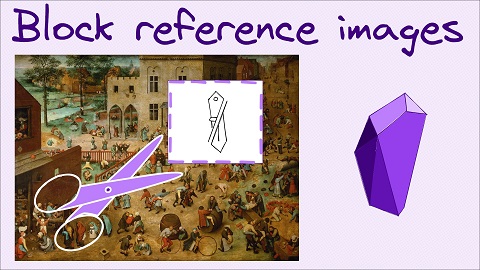](https://youtu.be/yZQoJg2RCKI)| |
|
||||
|
||||
|
||||
# Key features
|
||||
@@ -59,6 +57,12 @@ Please upgrade to Obsidian v0.12.19 or higher to get the latest release.
|
||||
- On iOS and Android you can add images from your camera by pressing the add image button in Excalidraw.
|
||||
- You can copy/paste images into your drawing. Images will be saved in your vault.
|
||||
- You can drag and drop images as explained above.
|
||||
- Block referencing parts of images
|
||||
- When referencing an element on the canvas in a link pointing to an Excalidraw file using the elementId or the section header (i.e. a Text Element containing the `# <Section title>`) - e.g. `[[file#^elementID]]`, you can add the `group=` prefix, e.g. `[[file#^group=elementID]]` or the `area=` prefix, e.g. `[[file#area=Section heading]]`.
|
||||
- If the `group=` prefix is found Excalidraw will select the group of elements in the same group as the element referenced by the elementID (block reference) or the section heading.
|
||||
- If the `area=` prefix is found Excalidraw will insert a cutout of the image around the referenced element.
|
||||
- Note that the `area=` selector is not supported when embedding Excalidraw as PNG into your markdown documents.
|
||||
- Referencing the elementID of a text element without the `group=` or `area=` prefix will transclude the element as plain text. Referencing a non-Text Element (e.g. rectangle, ellipse, etc.) without the `group=` or `area=` prefix will result in an Obsidian error since these elementIds are not present in the Excalidraw markdown file as block references.
|
||||
- Since 1.2.0 Drawing files are stored in Markdown files
|
||||
- You can add tags to drawings
|
||||
- You can add metadata to the YAML front matter of drawings
|
||||
|
||||
@@ -15,7 +15,7 @@ settings = ea.getScriptSettings();
|
||||
if(!settings["Border color"]) {
|
||||
settings = {
|
||||
"Border color" : {
|
||||
value: "#000000",
|
||||
value: "transparent",
|
||||
description: "Any legal HTML color (#000000, rgb, color-name, etc.). Set to 'transparent' for transparent color."
|
||||
},
|
||||
"Background color" : {
|
||||
|
||||
@@ -3,13 +3,28 @@ Click to watch the intro video:
|
||||
|
||||
[](https://youtu.be/hePJcObHIso)
|
||||
|
||||
> **Warning**
|
||||
> There is an easier way to install/manage scripts than what is shown in this video
|
||||
|
||||
See the [Excalidraw Script Engine](https://zsviczian.github.io/obsidian-excalidraw-plugin/ExcalidrawScriptsEngine.html) documentation for more details.
|
||||
|
||||
## How to install scripts into your Obsidian Vault
|
||||
To install one of the built-in scripts:
|
||||
- Open up an excalidraw drawing in Obsidian
|
||||
- In the pane dropdown menu select "Install or update Excalidraw Scripts"
|
||||
- Click on one of the available scripts
|
||||
- Click on "Install this script" (note if the script is already installed you will instead see an option to update it)
|
||||
- Restart Obsidian so the script will be picked up
|
||||
|
||||
Note: By default this will install the script into your vault in the `Excalidraw/Scripts/Downloaded` folder
|
||||
|
||||
<details><summary>Manual installation of scripts</summary>
|
||||
|
||||
Open the script you are interested in and save it to your Obsidian Vault including the first line `/*`, or open it in "Raw" and copy the entire contents to Obsidian.
|
||||
|
||||

|
||||
|
||||
</details>
|
||||
|
||||
## List of available scripts
|
||||
|Title|Description|Icon|Contributor|
|
||||
|
||||
@@ -1,7 +1,7 @@
|
||||
{
|
||||
"id": "obsidian-excalidraw-plugin",
|
||||
"name": "Excalidraw",
|
||||
"version": "1.7.14",
|
||||
"version": "1.7.16",
|
||||
"minAppVersion": "0.15.6",
|
||||
"description": "An Obsidian plugin to edit and view Excalidraw drawings",
|
||||
"author": "Zsolt Viczian",
|
||||
|
||||
@@ -18,7 +18,7 @@
|
||||
"license": "MIT",
|
||||
"dependencies": {
|
||||
"@types/lz-string": "^1.3.34",
|
||||
"@zsviczian/excalidraw": "0.12.0-obsidian-5",
|
||||
"@zsviczian/excalidraw": "0.12.0-obsidian-7",
|
||||
"clsx": "^1.1.1",
|
||||
"lz-string": "^1.4.4",
|
||||
"monkey-around": "^2.3.0",
|
||||
|
||||
@@ -3012,6 +3012,14 @@ export default class ExcalidrawView extends TextFileView {
|
||||
originalText: string,
|
||||
isDeleted: boolean,
|
||||
): [string, string, string] => {
|
||||
const FORBIDDEN_TEXT = `{"type":"excalidraw/clipboard","elements":[{"`;
|
||||
if(text.startsWith(FORBIDDEN_TEXT)) {
|
||||
return [
|
||||
"PASTING EXCALIDRAW ELEMENTS AS A TEXT ELEMENT IS NOT ALLOWED",
|
||||
"PASTING EXCALIDRAW ELEMENTS AS A TEXT ELEMENT IS NOT ALLOWED",
|
||||
null
|
||||
];
|
||||
}
|
||||
const api = this.excalidrawAPI;
|
||||
if (!api) {
|
||||
return [null, null, null];
|
||||
@@ -3240,6 +3248,7 @@ export default class ExcalidrawView extends TextFileView {
|
||||
|
||||
const observer = React.useRef(
|
||||
new ResizeObserver((entries) => {
|
||||
if(!toolsPanelRef || !toolsPanelRef.current) return;
|
||||
const { width, height } = entries[0].contentRect;
|
||||
const dx = toolsPanelRef.current.onRightEdge
|
||||
? toolsPanelRef.current.previousWidth - width
|
||||
@@ -3251,7 +3260,7 @@ export default class ExcalidrawView extends TextFileView {
|
||||
}),
|
||||
);
|
||||
React.useEffect(() => {
|
||||
if (toolsPanelRef.current) {
|
||||
if (toolsPanelRef?.current) {
|
||||
observer.current.observe(toolsPanelRef.current.containerRef.current);
|
||||
}
|
||||
return () => {
|
||||
|
||||
@@ -17,6 +17,17 @@ I develop this plugin as a hobby, spending most of my free time doing this. If y
|
||||
|
||||
<div class="ex-coffee-div"><a href="https://ko-fi.com/zsolt"><img src="https://cdn.ko-fi.com/cdn/kofi3.png?v=3" height=45></a></div>
|
||||
`,
|
||||
"1.7.16":`
|
||||
# Fixed
|
||||
- Excalidraw canvas is empty after saving the drawing and re-opening it at a later time. If you accidentally paste Excalidraw elements from the clipboard as the contents of a text element, in certain situations this can corrupt the Excalidraw file and as a result, Excalidraw will load an empty-looking drawing the next time. Changing to markdown view, these files can be repaired, however, to avoid accidental data loss, I have prevented pasting of excalidraw clipboard contents as text elements. [#768](https://github.com/zsviczian/obsidian-excalidraw-plugin/issues/768)
|
||||
|
||||
# New
|
||||
- Add zoom % display in tray-mode [737](https://github.com/zsviczian/obsidian-excalidraw-plugin/issues/737)
|
||||
`,
|
||||
"1.7.15":`
|
||||
# Fixed
|
||||
- Canvas turns white when adding point for curved line [#760](https://github.com/zsviczian/obsidian-excalidraw-plugin/issues/760), [#738](https://github.com/zsviczian/obsidian-excalidraw-plugin/issues/738), [#5602](https://github.com/excalidraw/excalidraw/issues/5602)
|
||||
`,
|
||||
"1.7.14": `
|
||||
<div class="excalidraw-videoWrapper"><div>
|
||||
<iframe src="https://www.youtube.com/embed/yZQoJg2RCKI" title="YouTube video player" frameborder="0" allow="accelerometer; autoplay; clipboard-write; encrypted-media; gyroscope; picture-in-picture" allowfullscreen></iframe>
|
||||
|
||||
@@ -2216,10 +2216,10 @@
|
||||
dependencies:
|
||||
"@zerollup/ts-helpers" "^1.7.18"
|
||||
|
||||
"@zsviczian/excalidraw@0.12.0-obsidian-5":
|
||||
"integrity" "sha512-AZQzqlxNbwk+BoKn3R10Xo/V+JoYwJ1mJ9+khUTSsavS7s41xRmA+6k+tKAPa+ce4PSEzZnXg8ZrxTUuNQBxxA=="
|
||||
"resolved" "https://registry.npmjs.org/@zsviczian/excalidraw/-/excalidraw-0.12.0-obsidian-5.tgz"
|
||||
"version" "0.12.0-obsidian-5"
|
||||
"@zsviczian/excalidraw@0.12.0-obsidian-7":
|
||||
"integrity" "sha512-U/2FvzZdzSJp5Aurs3wMYp4dSC5BZpa6Yv0L6pXlEfaMVuLMFPp+mrJBt+d7xhGHRREd/o/tjxHdt3vIjHmAXA=="
|
||||
"resolved" "https://registry.npmjs.org/@zsviczian/excalidraw/-/excalidraw-0.12.0-obsidian-7.tgz"
|
||||
"version" "0.12.0-obsidian-7"
|
||||
|
||||
"abab@^2.0.3", "abab@^2.0.5":
|
||||
"integrity" "sha512-9IK9EadsbHo6jLWIpxpR6pL0sazTXV6+SQv25ZB+F7Bj9mJNaOc4nCRabwd5M/JwmUa8idz6Eci6eKfJryPs6Q=="
|
||||
|
||||
Reference in New Issue
Block a user