mirror of
https://github.com/zsviczian/obsidian-excalidraw-plugin.git
synced 2025-08-06 05:46:28 +00:00
Compare commits
38 Commits
| Author | SHA1 | Date | |
|---|---|---|---|
 zsviczian zsviczian
|
d280b33073 | ||
|
zsviczian
|
d1ab6bb7a1 | ||
|
zsviczian
|
146d04ea64 | ||
|
zsviczian
|
fd46a3f8ac | ||
|
zsviczian
|
9974ca1e2e | ||
|
Felix
|
2c8a733359 | ||
|
zsviczian
|
4c9eeb9a61 | ||
|
zsviczian
|
de23be8c2d | ||
|
zsviczian
|
bb25a1fde9 | ||
|
zsviczian
|
9267c27bc5 | ||
|
zsviczian
|
591f073413 | ||
|
Andreas Deininger
|
9c28c1ee00 | ||
|
zsviczian
|
120d41ea2f | ||
|
zsviczian
|
80b24a45ad | ||
|
zsviczian
|
e8db9cbff6 | ||
|
zsviczian
|
5db4f8dd95 | ||
|
zsviczian
|
820b2ff6c4 | ||
|
zsviczian
|
596102fb68 | ||
|
zsviczian
|
fa5c63b224 | ||
|
zsviczian
|
aa66b8f716 | ||
|
zsviczian
|
c06cdfcfa0 | ||
|
zsviczian
|
e6943cf7f5 | ||
|
zsviczian
|
b3a2f067ab | ||
|
zsviczian
|
35407cf13d | ||
|
BenMoon
|
d671faf712 | ||
|
zsviczian
|
815ad559ac | ||
|
zsviczian
|
d2cf594756 | ||
|
zsviczian
|
6709f6cf87 | ||
|
zsviczian
|
f463f79222 | ||
|
zsviczian
|
51cf3a9219 | ||
|
zsviczian
|
8700405af8 | ||
|
thxnder
|
d1d082b4f9 | ||
|
zsviczian
|
6dd9d1a056 | ||
|
zsviczian
|
46b03725e9 | ||
|
zsviczian
|
65d6577b28 | ||
|
zsviczian
|
97967f5b70 | ||
|
zsviczian
|
9323e1fad4 | ||
|
zsviczian
|
3e4e741b54 |
+1
-1
@@ -195,7 +195,7 @@ This is relevant when setting a fix height using the `addText()` function.
|
||||
### startArrowHead, endArrowHead
|
||||
String. Valid values are "arrow", "bar", "dot", and "none". Specifies the beginning and ending of an arrow.
|
||||
|
||||
This is relavant when using the `addArrow()` and the `connectObjects()` functions.
|
||||
This is relevant when using the `addArrow()` and the `connectObjects()` functions.
|
||||
|
||||
## canvas
|
||||
Sets the properties of the canvas.
|
||||
|
||||
@@ -7,6 +7,9 @@ The Obsidian-Excalidraw plugin integrates [Excalidraw](https://excalidraw.com/),
|
||||
<a href="https://youtu.be/o0exK-xFP3k" target="_blank"><img src="https://user-images.githubusercontent.com/14358394/156931370-aa4d88de-c4a8-46cc-aeb2-dc09aa0bea39.jpg" width="300"/></a>
|
||||
<a href="https://youtu.be/QKnQgSjJVuc" target="_blank"><img src="https://raw.githubusercontent.com/zsviczian/obsidian-excalidraw-plugin/master/images/thumbnail-getting-started.jpg" width="300"/></a>
|
||||
|
||||
### Here's my complete catalog of videos:
|
||||
<a href="https://excalidraw-obsidian.online/Hobbies/Excalidraw+Blog/Catalogue+of+Videos"><img width="380" alt="image" src="https://github.com/zsviczian/obsidian-excalidraw-plugin/assets/14358394/2577e5ad-7a21-4c62-acd5-4fe80c8a8a95"></a>
|
||||
<br>
|
||||
|
||||
<details><summary>10 Part (slightly outdated) Video Walkthrough</summary>
|
||||
<a href="https://youtu.be/sY4FoflGaiM" target="_blank"><img src="https://user-images.githubusercontent.com/14358394/125160304-7f211180-e17c-11eb-8363-c52723de1ffd.jpg" width="100" style="vertical-align: middle;"/> 1 Getting Started</a><br>
|
||||
|
||||
Vendored
+6
-6
@@ -35,7 +35,7 @@ export declare class ExcalidrawAutomate {
|
||||
*/
|
||||
newFilePrompt(newFileNameOrPath: string, shouldOpenNewFile: boolean, targetPane?: PaneTarget, parentFile?: TFile): Promise<TFile | null>;
|
||||
/**
|
||||
* Generates a new Obsidian Leaf following Excalidraw plugin settings such as open in Main Workspace or not, open in adjacent pane if avaialble, etc.
|
||||
* Generates a new Obsidian Leaf following Excalidraw plugin settings such as open in Main Workspace or not, open in adjacent pane if available, etc.
|
||||
* @param origo // the currently active leaf, the origin of the new leaf
|
||||
* @param targetPane //type PaneTarget = "active-pane"|"new-pane"|"popout-window"|"new-tab"|"md-properties";
|
||||
* @returns
|
||||
@@ -148,7 +148,7 @@ export declare class ExcalidrawAutomate {
|
||||
}>;
|
||||
/**
|
||||
* get all elements from ExcalidrawAutomate elementsDict
|
||||
* @returns elements from elemenetsDict
|
||||
* @returns elements from elementsDict
|
||||
*/
|
||||
getElements(): ExcalidrawElement[];
|
||||
/**
|
||||
@@ -698,25 +698,25 @@ export declare class ExcalidrawAutomate {
|
||||
*/
|
||||
moveViewElementToZIndex(elementId: number, newZIndex: number): void;
|
||||
/**
|
||||
* Depricated. Use getCM / ColorMaster instead
|
||||
* Deprecated. Use getCM / ColorMaster instead
|
||||
* @param color
|
||||
* @returns
|
||||
*/
|
||||
hexStringToRgb(color: string): number[];
|
||||
/**
|
||||
* Depricated. Use getCM / ColorMaster instead
|
||||
* Deprecated. Use getCM / ColorMaster instead
|
||||
* @param color
|
||||
* @returns
|
||||
*/
|
||||
rgbToHexString(color: number[]): string;
|
||||
/**
|
||||
* Depricated. Use getCM / ColorMaster instead
|
||||
* Deprecated. Use getCM / ColorMaster instead
|
||||
* @param color
|
||||
* @returns
|
||||
*/
|
||||
hslToRgb(color: number[]): number[];
|
||||
/**
|
||||
* Depricated. Use getCM / ColorMaster instead
|
||||
* Deprecated. Use getCM / ColorMaster instead
|
||||
* @param color
|
||||
* @returns
|
||||
*/
|
||||
|
||||
@@ -42,7 +42,7 @@ export declare class ExcalidrawAutomate {
|
||||
*/
|
||||
newFilePrompt(newFileNameOrPath: string, shouldOpenNewFile: boolean, targetPane?: PaneTarget, parentFile?: TFile): Promise<TFile | null>;
|
||||
/**
|
||||
* Generates a new Obsidian Leaf following Excalidraw plugin settings such as open in Main Workspace or not, open in adjacent pane if avaialble, etc.
|
||||
* Generates a new Obsidian Leaf following Excalidraw plugin settings such as open in Main Workspace or not, open in adjacent pane if available, etc.
|
||||
* @param origo // the currently active leaf, the origin of the new leaf
|
||||
* @param targetPane //type PaneTarget = "active-pane"|"new-pane"|"popout-window"|"new-tab"|"md-properties";
|
||||
* @returns
|
||||
@@ -155,7 +155,7 @@ export declare class ExcalidrawAutomate {
|
||||
}>;
|
||||
/**
|
||||
* get all elements from ExcalidrawAutomate elementsDict
|
||||
* @returns elements from elemenetsDict
|
||||
* @returns elements from elementsDict
|
||||
*/
|
||||
getElements(): ExcalidrawElement[];
|
||||
/**
|
||||
@@ -705,25 +705,25 @@ export declare class ExcalidrawAutomate {
|
||||
*/
|
||||
moveViewElementToZIndex(elementId: number, newZIndex: number): void;
|
||||
/**
|
||||
* Depricated. Use getCM / ColorMaster instead
|
||||
* Deprecated. Use getCM / ColorMaster instead
|
||||
* @param color
|
||||
* @returns
|
||||
*/
|
||||
hexStringToRgb(color: string): number[];
|
||||
/**
|
||||
* Depricated. Use getCM / ColorMaster instead
|
||||
* Deprecated. Use getCM / ColorMaster instead
|
||||
* @param color
|
||||
* @returns
|
||||
*/
|
||||
rgbToHexString(color: number[]): string;
|
||||
/**
|
||||
* Depricated. Use getCM / ColorMaster instead
|
||||
* Deprecated. Use getCM / ColorMaster instead
|
||||
* @param color
|
||||
* @returns
|
||||
*/
|
||||
hslToRgb(color: number[]): number[];
|
||||
/**
|
||||
* Depricated. Use getCM / ColorMaster instead
|
||||
* Deprecated. Use getCM / ColorMaster instead
|
||||
* @param color
|
||||
* @returns
|
||||
*/
|
||||
|
||||
@@ -88,4 +88,4 @@ This is relevant when setting a fix height using the `addText()` function.
|
||||
### startArrowHead, endArrowHead
|
||||
String. Valid values are "arrow", "bar", "dot", and "none". Specifies the beginning and ending of an arrow.
|
||||
|
||||
This is relavant when using the `addArrow()` and the `connectObjects()` functions.
|
||||
This is relevant when using the `addArrow()` and the `connectObjects()` functions.
|
||||
+4
-4
@@ -22,7 +22,7 @@ Places the generated drawing to the clipboard. Useful when you don't want to cre
|
||||
```typescript
|
||||
getElements():ExcalidrawElement[];
|
||||
```
|
||||
Returns the elements in ExcalidrawAutomate as an array of ExcalidrawElements. This format is usefull when working with ExcalidrawRef.
|
||||
Returns the elements in ExcalidrawAutomate as an array of ExcalidrawElements. This format is useful when working with ExcalidrawRef.
|
||||
|
||||
### getElement()
|
||||
```typescript
|
||||
@@ -156,7 +156,7 @@ You first need to set the view calling `setView()`.
|
||||
|
||||
Gets the array of selected elements in the scene. Returns [] if no elements are selected.
|
||||
|
||||
Note: you can call `getExcalidrawAPI().getSceneElements()` to retreive all the elements in the scene.
|
||||
Note: you can call `getExcalidrawAPI().getSceneElements()` to retrieve all the elements in the scene.
|
||||
|
||||
#### viewToggleFullScreen()
|
||||
```typescript
|
||||
@@ -178,7 +178,7 @@ Same as `connectObjects()`, but ObjectB is the currently selected element in the
|
||||
async addElementsToView(repositionToCursor:boolean=false, save:boolean=false):Promise<boolean>
|
||||
```
|
||||
Adds elements created with ExcalidrawAutomate to the target ExcalidrawView.
|
||||
`repositionToCursor` dafault is false
|
||||
`repositionToCursor` default is false
|
||||
- true: the elements will be moved such that the center point of the elements will be aligned with the current position of the pointer on ExcalidrawView. You can point and place elements to a desired location in your drawing using this switch.
|
||||
- false: elements will be positioned as defined by the x&y coordinates of each element.
|
||||
|
||||
@@ -204,7 +204,7 @@ onDropHook (data: {
|
||||
```
|
||||
|
||||
Callback function triggered when an draggable item is dropped on Excalidraw.
|
||||
The function should return a boolean value. True if the drop was handled by the hook and futher native processing should be stopped, and false if Excalidraw should continue with the processing of the drop.
|
||||
The function should return a boolean value. True if the drop was handled by the hook and further native processing should be stopped, and false if Excalidraw should continue with the processing of the drop.
|
||||
type of drop can be one of:
|
||||
- "file" if a file from Obsidian file explorer is dropped onto Excalidraw. In this case payload.files will contain the list of files dropped.
|
||||
- "text" if a link (e.g. url, or wiki link) or other text is dropped. In this case payload.text will contain the received string
|
||||
|
||||
@@ -21,7 +21,7 @@ This will allow you to assign hotkeys to your favorite scripts just like to any
|
||||
|
||||
## Script development
|
||||
An Excalidraw script will automatically receive two objects:
|
||||
- `ea`: The Script Enginge will initialize the `ea` object including setting the active view to the View from which the script was called.
|
||||
- `ea`: The Script Engine will initialize the `ea` object including setting the active view to the View from which the script was called.
|
||||
- `utils`: I have borrowed functions exposed on utils from [QuickAdd](https://github.com/chhoumann/quickadd/blob/master/docs/QuickAddAPI.md), though currently not all QuickAdd utility functions are implemented in Excalidraw. As of now, these are the available functions. See the example below for details.
|
||||
- `inputPrompt: (header: string, placeholder?: string, value?: string, buttons?: [{caption:string, action:Function}])`
|
||||
- Opens a prompt that asks for an input. Returns a string with the input.
|
||||
|
||||
+1
-1
@@ -8,7 +8,7 @@ With a little work, using ExcalidrawAutomate you can generate simple mindmaps, b
|
||||
## API documentation
|
||||
- **start here** [Introduction to the API](API/introduction.md)
|
||||
- [Overview of Attributes and Functions](API/attributes_functions_overview.md)
|
||||
- [Element Sytle](API/element_style.md)
|
||||
- [Element Style](API/element_style.md)
|
||||
- [Canvas Style](API/canvas_style.md)
|
||||
- [Adding Objects](API/objects.md)
|
||||
- [Utility Functions](API/utility.md)
|
||||
|
||||
@@ -4,7 +4,7 @@
|
||||
THIS SCRIPT REQUIRES EXCALIDRAW 1.5.15
|
||||
|
||||
The script will
|
||||
1) send the selected image file to [taskbone.com](https://taskbone.com) to exctract the text from the image, and
|
||||
1) send the selected image file to [taskbone.com](https://taskbone.com) to extract the text from the image, and
|
||||
2) will add the text to your drawing as a text element
|
||||
|
||||
I recommend also installing the [Transfer TextElements to Excalidraw markdown metadata](Transfer%20TextElements%20to%20Excalidraw%20markdown%20metadata.md) script as well.
|
||||
|
||||
@@ -15,7 +15,7 @@ In the `Command Palette` installed scripts are prefixed with `Downloaded/`, thus
|
||||
|
||||
## Attention developers and hobby hackers
|
||||
<img src='https://raw.githubusercontent.com/zsviczian/obsidian-excalidraw-plugin/master/images/hobby-programmer.svg' align='left' style='background-color:whitesmoke; width:80px; margin-right:15px; margin-bottom:10px;'/>
|
||||
If you want to modify scripts, I recommend moving them to the `Excalidraw Automate script folder` or a different subfolder under the script folder. Scripts in the `Downloaded` folder will be overwritten when you click the `Update this script` button. Note also, that at this time, I do not check if the script file has been updated on GitHub, thus the `Update this script` button is always visible once you have installed a script, not only when an update is availble (hope to build this feature in the future).
|
||||
If you want to modify scripts, I recommend moving them to the `Excalidraw Automate script folder` or a different subfolder under the script folder. Scripts in the `Downloaded` folder will be overwritten when you click the `Update this script` button. Note also, that at this time, I do not check if the script file has been updated on GitHub, thus the `Update this script` button is always visible once you have installed a script, not only when an update is available (hope to build this feature in the future).
|
||||
|
||||
I would love to include your contribution in the script library. If you have a script of your own that you would like to share with the community, please open a [PR](https://github.com/zsviczian/obsidian-excalidraw-plugin/pulls) on GitHub. Be sure to include the following in your pull request
|
||||
- The [script file](https://github.com/zsviczian/obsidian-excalidraw-plugin/tree/master/ea-scripts) with a self explanetory name. The name of the file will be the name of the script in the Command Palette.
|
||||
@@ -243,7 +243,7 @@ https://raw.githubusercontent.com/zsviczian/obsidian-excalidraw-plugin/master/ea
|
||||
```excalidraw-script-install
|
||||
https://raw.githubusercontent.com/zsviczian/obsidian-excalidraw-plugin/master/ea-scripts/OCR%20-%20Optical%20Character%20Recognition.md
|
||||
```
|
||||
<table><tr valign='top'><td class="label">Author</td><td class="data"><a href='https://github.com/zsviczian'>@zsviczian</a></td></tr><tr valign='top'><td class="label">Source</td><td class="data"><a href='https://github.com/zsviczian/obsidian-excalidraw-plugin/blob/master/ea-scripts/OCR%20-%20Optical%20Character%20Recognition.md'>File on GitHub</a></td></tr><tr valign='top'><td class="label">Description</td><td class="data">REQUIRES EXCALIDRAW 1.5.15<br>The script will 1) send the selected image file to [taskbone.com](https://taskbone.com) to exctract the text from the image, and 2) will add the text to your drawing as a text element.<br><mark>⚠ Note that you will need to manually paste your token into the script after the first run! ⚠</mark><br><img src='https://raw.githubusercontent.com/zsviczian/obsidian-excalidraw-plugin/master/images/scripts-ocr.jpg'><br><iframe width="560" height="315" src="https://www.youtube.com/embed/W2NMzR8s4eE" title="YouTube video player" frameborder="0" allow="accelerometer; autoplay; clipboard-write; encrypted-media; gyroscope; picture-in-picture" allowfullscreen></iframe></td></tr></table>
|
||||
<table><tr valign='top'><td class="label">Author</td><td class="data"><a href='https://github.com/zsviczian'>@zsviczian</a></td></tr><tr valign='top'><td class="label">Source</td><td class="data"><a href='https://github.com/zsviczian/obsidian-excalidraw-plugin/blob/master/ea-scripts/OCR%20-%20Optical%20Character%20Recognition.md'>File on GitHub</a></td></tr><tr valign='top'><td class="label">Description</td><td class="data">REQUIRES EXCALIDRAW 1.5.15<br>The script will 1) send the selected image file to [taskbone.com](https://taskbone.com) to extract the text from the image, and 2) will add the text to your drawing as a text element.<br><mark>⚠ Note that you will need to manually paste your token into the script after the first run! ⚠</mark><br><img src='https://raw.githubusercontent.com/zsviczian/obsidian-excalidraw-plugin/master/images/scripts-ocr.jpg'><br><iframe width="560" height="315" src="https://www.youtube.com/embed/W2NMzR8s4eE" title="YouTube video player" frameborder="0" allow="accelerometer; autoplay; clipboard-write; encrypted-media; gyroscope; picture-in-picture" allowfullscreen></iframe></td></tr></table>
|
||||
|
||||
## Organic Line
|
||||
```excalidraw-script-install
|
||||
|
||||
@@ -1,8 +1,8 @@
|
||||
/*
|
||||
With This Script it is possible to make boolean Operations on Shapes.
|
||||
The style of the resulting shape will be the style of the highest ranking Element that was used.
|
||||
The ranking of the elemtns is based on their background. The "denser" the background, the higher the ranking (the order of backgroundstyles is shown below). If they have the same background the opacity will decide. If thats also the same its decided by the order they were created.
|
||||
The ranking is also important for the diffrence operation, so a tranparent object for example will cut a hole into a solid object.
|
||||
The ranking of the elements is based on their background. The "denser" the background, the higher the ranking (the order of backgroundstyles is shown below). If they have the same background the opacity will decide. If thats also the same its decided by the order they were created.
|
||||
The ranking is also important for the difference operation, so a transparent object for example will cut a hole into a solid object.
|
||||
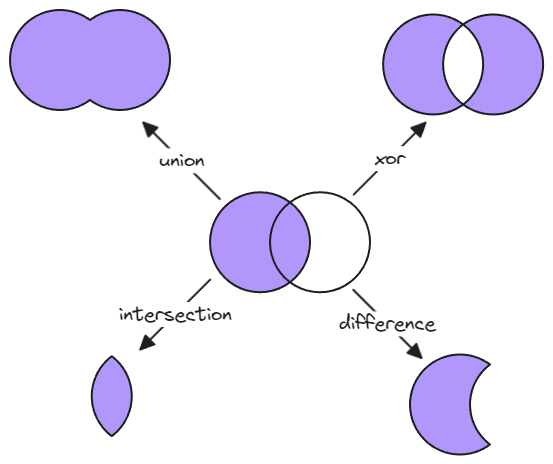
|
||||

|
||||
|
||||
@@ -29,7 +29,7 @@ if(elements.length === 0) {
|
||||
}
|
||||
|
||||
const PolyBool = ea.getPolyBool();
|
||||
const polyboolAction = await utils.suggester(["union (a + b)", "intersect (a && b)", "diffrence (a - b)", "reversed diffrence (b - a)", "xor"], [
|
||||
const polyboolAction = await utils.suggester(["union (a + b)", "intersect (a && b)", "difference (a - b)", "reversed difference (b - a)", "xor"], [
|
||||
PolyBool.union, PolyBool.intersect, PolyBool.difference, PolyBool.differenceRev, PolyBool.xor
|
||||
], "What would you like todo with the object");
|
||||
|
||||
|
||||
@@ -0,0 +1,75 @@
|
||||
/*
|
||||
Adds a rounded mask to the image by adding a full cover black mask and a rounded rectangle white mask. The script is also useful for adding just a black mask. In this case, run the script, then delete the white mask and add your custom white mask.
|
||||
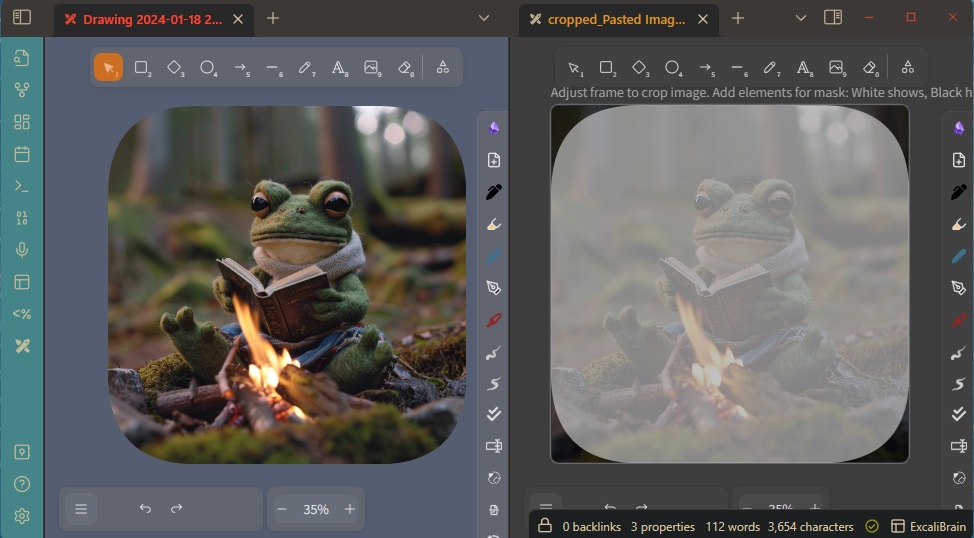
|
||||
```js*/
|
||||
if(!ea.verifyMinimumPluginVersion || !ea.verifyMinimumPluginVersion("2.0.18")) {
|
||||
new Notice("This script requires a newer version of Excalidraw. Please install the latest version.");
|
||||
return;
|
||||
}
|
||||
|
||||
if(!ea.isExcalidrawMaskFile()) {
|
||||
new Notice("This script only works with Mask Files");
|
||||
return;
|
||||
}
|
||||
|
||||
const frames = ea.getViewElements().filter(el=>el.type==="frame")
|
||||
if(frames.length !== 1) {
|
||||
new Notice("Multiple frames found");
|
||||
return;
|
||||
}
|
||||
const frame = frames[0];
|
||||
ea.copyViewElementsToEAforEditing(ea.getViewElements().filter(el=>el.frameId === frame.id));
|
||||
const frameId = ea.generateElementId();
|
||||
ea.style.fillStyle = "solid";
|
||||
ea.style.roughness = 0;
|
||||
ea.style.strokeColor = "transparent";
|
||||
ea.style.strokeWidth = 0.1;
|
||||
ea.style.opacity = 50;
|
||||
|
||||
let blackEl = ea.getViewElements().find(el=>el.id === "allblack");
|
||||
let whiteEl = ea.getViewElements().find(el=>el.id === "whiteovr");
|
||||
|
||||
if(blackEl && whiteEl) {
|
||||
ea.copyViewElementsToEAforEditing([blackEl, whiteEl]);
|
||||
} else
|
||||
if (blackEl && !whiteEl) {
|
||||
ea.copyViewElementsToEAforEditing([blackEl]);
|
||||
ea.style.backgroundColor = "white";
|
||||
ea.addRect(frame.x,frame.y,frame.width,frame.height, "whiteovr");
|
||||
} else
|
||||
if (!blackEl && whiteEl) {
|
||||
ea.style.backgroundColor = "black";
|
||||
ea.addRect(frame.x-2,frame.y-2,frame.width+4,frame.height+4, "allblack");
|
||||
ea.copyViewElementsToEAforEditing([whiteEl]);
|
||||
} else {
|
||||
ea.style.backgroundColor = "black";
|
||||
ea.addRect(frame.x-2,frame.y-2,frame.width+4,frame.height+4, "allblack");
|
||||
ea.style.backgroundColor = "white";
|
||||
ea.addRect(frame.x,frame.y,frame.width,frame.height, "whiteovr");
|
||||
}
|
||||
blackEl = ea.getElement("allblack");
|
||||
whiteEl = ea.getElement("whiteovr");
|
||||
|
||||
//this "magic" is required to ensure the frame element is above in sequence of the new rectangle elements
|
||||
ea.getElements().forEach(el=>{el.frameId = frameId});
|
||||
ea.copyViewElementsToEAforEditing(ea.getViewElements().filter(el=>el.id === frame.id));
|
||||
const newFrame = ea.getElement(frame.id);
|
||||
newFrame.id = frameId;
|
||||
ea.elementsDict[frameId] = newFrame;
|
||||
ea.copyViewElementsToEAforEditing(ea.getViewElements().filter(el=>el.id === frame.id));
|
||||
ea.getElement(frame.id).isDeleted = true;
|
||||
|
||||
let curve = await utils.inputPrompt(
|
||||
"Set roundess",
|
||||
"Positive whole number",
|
||||
`${whiteEl.roundness?.value ?? "500"}`
|
||||
);
|
||||
|
||||
if(!curve) return;
|
||||
curve = parseInt(curve);
|
||||
if(isNaN(curve) || curve < 0) {
|
||||
new Notice ("Roudness is not a valid positive whole number");
|
||||
return;
|
||||
}
|
||||
whiteEl.roundness = {type: 3, value: curve};
|
||||
ea.addElementsToView(false,false,true);
|
||||

@@ -0,0 +1 @@
|
||||
<svg xmlns="http://www.w3.org/2000/svg" width="24" height="24" viewBox="0 0 24 24" fill="none" stroke="currentColor" stroke-width="2" stroke-linecap="round" stroke-linejoin="round" class="lucide lucide-squircle"><path fill="none" d="M12 3c7.2 0 9 1.8 9 9s-1.8 9-9 9-9-1.8-9-9 1.8-9 9-9"/></svg>
|
||||
|
After Width: | Height: | Size: 294 B |
@@ -0,0 +1,15 @@
|
||||
/*
|
||||
You can set a custom zoom level with this script. This allows you to set a zoom level below 10% or set the zoom level to a specific value. Note however, that Excalidraw has a bug under 10% zoom, and a phantom copy of your image may appear on screen. If this happens, increase the zoom and the phantom should disappear, if it doesn't then close and open the drawing.
|
||||
|
||||
```js*/
|
||||
const api = ea.getExcalidrawAPI();
|
||||
const appState = api.getAppState();
|
||||
const zoomStr = await utils.inputPrompt("Zoom [%]",null,`${appState.zoom.value*100}%`);
|
||||
if(!zoomStr) return;
|
||||
const zoomNum = parseFloat(zoomStr.match(/^\d*/)[0]);
|
||||
if(isNaN(zoomNum)) {
|
||||
new Notice("You must provide a number");
|
||||
return;
|
||||
}
|
||||
|
||||
ea.getExcalidrawAPI().updateScene({appState:{zoom:{value: zoomNum/100 }}});
|
||||

@@ -0,0 +1 @@
|
||||
<svg xmlns="http://www.w3.org/2000/svg" width="24" height="24" viewBox="0 0 24 24" fill="none" stroke="currentColor" stroke-width="2" stroke-linecap="round" stroke-linejoin="round" class="lucide lucide-scan-search"><g stroke-width="2"><path d="M3 7V5a2 2 0 0 1 2-2h2"/><path d="M17 3h2a2 2 0 0 1 2 2v2"/><path d="M21 17v2a2 2 0 0 1-2 2h-2"/><path d="M7 21H5a2 2 0 0 1-2-2v-2"/><circle cx="12" cy="12" r="3"/><path d="m16 16-1.9-1.9"/></g></svg>
|
||||
|
After Width: | Height: | Size: 444 B |
@@ -166,15 +166,21 @@ const newPath = await ea.create ({
|
||||
silent: !window.ExcalidrawDeconstructElements.openDeconstructedImage
|
||||
});
|
||||
|
||||
setTimeout(async ()=>{
|
||||
const file = app.metadataCache.getFirstLinkpathDest(newPath,"");
|
||||
ea.deleteViewElements(els);
|
||||
ea.clear();
|
||||
await ea.addImage(bb.topX,bb.topY,file,false, shouldAnchor);
|
||||
await ea.addElementsToView(false, true, true);
|
||||
ea.getExcalidrawAPI().history.clear(); //to avoid undo/redo messing up the decomposition
|
||||
},1000);
|
||||
let f = app.vault.getAbstractFileByPath(newPath);
|
||||
let counter = 0;
|
||||
while((!f || !ea.isExcalidrawFile(f)) && counter++<100) {
|
||||
await sleep(50);
|
||||
f = app.vault.getAbstractFileByPath(newPath);
|
||||
}
|
||||
|
||||
if(!f || !ea.isExcalidrawFile(f)) {
|
||||
new Notice("Something went wrong");
|
||||
return;
|
||||
}
|
||||
ea.getElements().forEach(el=>el.isDeleted = true);
|
||||
await ea.addImage(bb.topX,bb.topY,f,false, shouldAnchor);
|
||||
await ea.addElementsToView(false, true, true);
|
||||
ea.getExcalidrawAPI().history.clear();
|
||||
if(!window.ExcalidrawDeconstructElements.openDeconstructedImage) {
|
||||
new Notice("Deconstruction ready");
|
||||
}
|
||||
}
|
||||
|
||||
+21
-5
@@ -26,6 +26,10 @@ const outputTypes = {
|
||||
"image-gen": {
|
||||
instruction: "Return a single message with the generated image prompt in a codeblock",
|
||||
blocktype: "image"
|
||||
},
|
||||
"image-gen-silent": {
|
||||
instruction: "Return a single message with the generated image prompt in a codeblock",
|
||||
blocktype: "image-silent"
|
||||
},
|
||||
"image-edit": {
|
||||
instruction: "",
|
||||
@@ -49,6 +53,12 @@ const systemPrompts = {
|
||||
type: "svg",
|
||||
help: "Convert text prompts into simple icons inserted as Excalidraw elements. Expect only a text prompt. Experimental and may not produce good drawings."
|
||||
},
|
||||
|
||||
"Create a stick figure": {
|
||||
prompt: "You will receive a prompt from the user. Your task involves drawing a simple stick figure or a scene involving a few stick figures based on the user's prompt. Create the stickfigure based on the following style description. DO NOT add any detail, just use it AS-IS: Create a simple stick figure character with a large round head and a face in the style of sketchy caricatures. The stick figure should have a rudimentary body composed of straight lines representing the arms and legs. Hands and toes should be should be represented with round shapes, do not add details such as fingers or toes. Use fine lines, smooth curves, rounded shapes. The stick figure should retain a playful and childlike simplicity, reminiscent of a doodle someone might draw on the corner of a notebook page. Create a black and white drawing, a hand-drawn figure on white background.",
|
||||
type: "image-gen",
|
||||
help: "Send only the text prompt to OpenAI. Provide a detailed description; OpenAI will enrich your prompt automatically. To avoid it, start your prompt like this 'DO NOT add any detail, just use it AS-IS:'"
|
||||
},
|
||||
"Edit an image": {
|
||||
prompt: null,
|
||||
type: "image-edit",
|
||||
@@ -69,6 +79,11 @@ const systemPrompts = {
|
||||
type: "image-gen",
|
||||
help: "ExcaliAI will create an image prompt to illustrate your text input - a quote - with GPT, then generate an image using Dall-e. In case you include the Author's name, GPT will try to generate an image that in some way references the Author."
|
||||
},
|
||||
"Generate 4 icon-variants based on input image": {
|
||||
prompt: "Given a simple sketch and an optional text prompt from the user, your task is to generate a descriptive narrative tailored for effective image generation, capturing the style of the sketch. Utilize the text prompt to guide the description. Your objective is to instruct DALL-E to create a collage of four minimalist black and white hand-drawn pencil sketches in a 2x2 matrix format. Each sketch should convert the user's sketch into simple artistic SVG icons with transparent backgrounds. Ensure the resulting images remain text-free, maintaining a minimalist, easy-to-understand style, and omit framing borders. Only include a pencil in the drawing if it is explicitely metioned in the user prompt or included in the sketch.",
|
||||
type: "image-gen-silent",
|
||||
help: "Generate a collage of 4 icons based on the drawing using ChatGPT-Vision and Dall-e. You may provide a contextual text-prompt to improve accuracy of interpretation."
|
||||
},
|
||||
"Visual brainstorm": {
|
||||
prompt: "Your objective is to interpret a screenshot of a whiteboard, creating an image aimed at sparking further thoughts on the subject. The whiteboard will present diverse ideas about a specific topic. Your generated image should achieve one of two purposes: highlighting concepts that challenge, dispute, or contradict the whiteboard content, or introducing ideas that expand, complement, or enrich the user's thinking. You have the option to include multiple tiles in the resulting image, resembling a sequence akin to a comic strip. Ensure that the image remains devoid of text.",
|
||||
type: "image-gen",
|
||||
@@ -319,7 +334,7 @@ const setMermaidDataToStorage = (mermaidDefinition) => {
|
||||
// --------------------------------------
|
||||
// Submit Prompt
|
||||
// --------------------------------------
|
||||
const generateImage = async(text, spinnerID, bb) => {
|
||||
const generateImage = async(text, spinnerID, bb, silent=false) => {
|
||||
const requestObject = {
|
||||
text,
|
||||
imageGenerationProperties: {
|
||||
@@ -342,7 +357,7 @@ const generateImage = async(text, spinnerID, bb) => {
|
||||
const imageID = await ea.addImage(spinner.x, spinner.y, result.json.data[0].url);
|
||||
const imageEl = ea.getElement(imageID);
|
||||
const revisedPrompt = result.json.data[0].revised_prompt;
|
||||
if(revisedPrompt) {
|
||||
if(revisedPrompt && !silent) {
|
||||
ea.style.fontSize = 16;
|
||||
const rectID = ea.addText(imageEl.x+15, imageEl.y + imageEl.height + 50, revisedPrompt, {
|
||||
width: imageEl.width-30,
|
||||
@@ -356,6 +371,7 @@ const generateImage = async(text, spinnerID, bb) => {
|
||||
}
|
||||
|
||||
await ea.addElementsToView(false, true, true);
|
||||
if(silent) return;
|
||||
ea.getExcalidrawAPI().setToast({
|
||||
message: IMAGE_WARNING,
|
||||
duration: 15000,
|
||||
@@ -371,7 +387,7 @@ const run = async (text) => {
|
||||
|
||||
const systemPrompt = systemPrompts[agentTask];
|
||||
const outputType = outputTypes[systemPrompt.type];
|
||||
const isImageGenRequest = outputType.blocktype === "image";
|
||||
const isImageGenRequest = outputType.blocktype === "image" || outputType.blocktype === "image-silent";
|
||||
const isImageEditRequest = systemPrompt.type === "image-edit";
|
||||
|
||||
if(isImageEditRequest) {
|
||||
@@ -473,7 +489,7 @@ const run = async (text) => {
|
||||
}
|
||||
|
||||
if(isImageGenRequest) {
|
||||
generateImage(content,spinnerID,bb);
|
||||
generateImage(content,spinnerID,bb,outputType.blocktype === "image-silent");
|
||||
return;
|
||||
}
|
||||
|
||||
@@ -519,7 +535,7 @@ const run = async (text) => {
|
||||
// --------------------------------------
|
||||
let previewDiv;
|
||||
const fragWithHTML = (html) => createFragment((frag) => (frag.createDiv().innerHTML = html));
|
||||
const isImageGenerationTask = () => systemPrompts[agentTask].type === "image-gen" || systemPrompts[agentTask].type === "image-edit";
|
||||
const isImageGenerationTask = () => systemPrompts[agentTask].type === "image-gen" || systemPrompts[agentTask].type === "image-gen-silent" || systemPrompts[agentTask].type === "image-edit";
|
||||
const addPreviewImage = () => {
|
||||
if(!previewDiv) return;
|
||||
previewDiv.empty();
|
||||
|
||||
@@ -77,7 +77,7 @@ const systemPrompts = {
|
||||
"Wireframe to code": {
|
||||
prompt: `You are an expert tailwind developer. A user will provide you with a low-fidelity wireframe of an application and you will return a single html file that uses tailwind to create the website. Use creative license to make the application more fleshed out. Write the necessary javascript code. If you need to insert an image, use placehold.co to create a placeholder image.`,
|
||||
type: "html",
|
||||
help: "Use GPT Visions to interpret the wireframe and generate a web application. YOu may copy the resulting code from the active embeddable's top left menu."
|
||||
help: "Use GPT Visions to interpret the wireframe and generate a web application. You may copy the resulting code from the active embeddable's top left menu."
|
||||
},
|
||||
}
|
||||
|
||||
@@ -464,7 +464,7 @@ const run = async (text) => {
|
||||
return;
|
||||
}
|
||||
|
||||
//exctract codeblock and display result
|
||||
//extract codeblock and display result
|
||||
let content = ea.extractCodeBlocks(result.json.choices[0]?.message?.content)[0]?.data;
|
||||
|
||||
if(!content) {
|
||||
|
||||
@@ -631,7 +631,7 @@ modal.onOpen = async () => {
|
||||
.addDropdown(dropdown=>dropdown
|
||||
.addOption("none","None")
|
||||
.addOption("top-down","Top down")
|
||||
.addOption("bottom-up","Bootom up")
|
||||
.addOption("bottom-up","Bottom up")
|
||||
.addOption("center-out","Center out")
|
||||
.addOption("center-in","Center in")
|
||||
.setValue(vDirection)
|
||||
|
||||
@@ -33,8 +33,20 @@ const invertColor = (color) => {
|
||||
}
|
||||
}
|
||||
|
||||
const invertPaletteColors = (palette) => Object.keys(palette).forEach(key => palette[key] = invertColor(palette[key]));
|
||||
Object.keys(colorPalette).forEach(key => invertPaletteColors(colorPalette[key]));
|
||||
function invertColorsRecursively(obj) {
|
||||
if (typeof obj === 'string') {
|
||||
return invertColor(obj);
|
||||
} else if (Array.isArray(obj)) {
|
||||
return obj.map(item => invertColorsRecursively(item));
|
||||
} else if (typeof obj === 'object' && obj !== null) {
|
||||
const result = {};
|
||||
Object.keys(obj).forEach(key => result[key] = invertColorsRecursively(obj[key]));
|
||||
return result;
|
||||
} else {
|
||||
return obj;
|
||||
}
|
||||
}
|
||||
colorPalette = invertColorsRecursively(colorPalette);
|
||||
|
||||
ea.copyViewElementsToEAforEditing(ea.getViewElements());
|
||||
ea.getElements().forEach(el=>{
|
||||
|
||||
@@ -58,7 +58,7 @@ Open the script you are interested in and save it to your Obsidian Vault includi
|
||||
|[Mindmap connector](Mindmap%20connector.md)|This script creates mindmap like lines (only right side and down available currently) for selected elements. The line will start according to the creation time of the elements. So you should create the header element first.|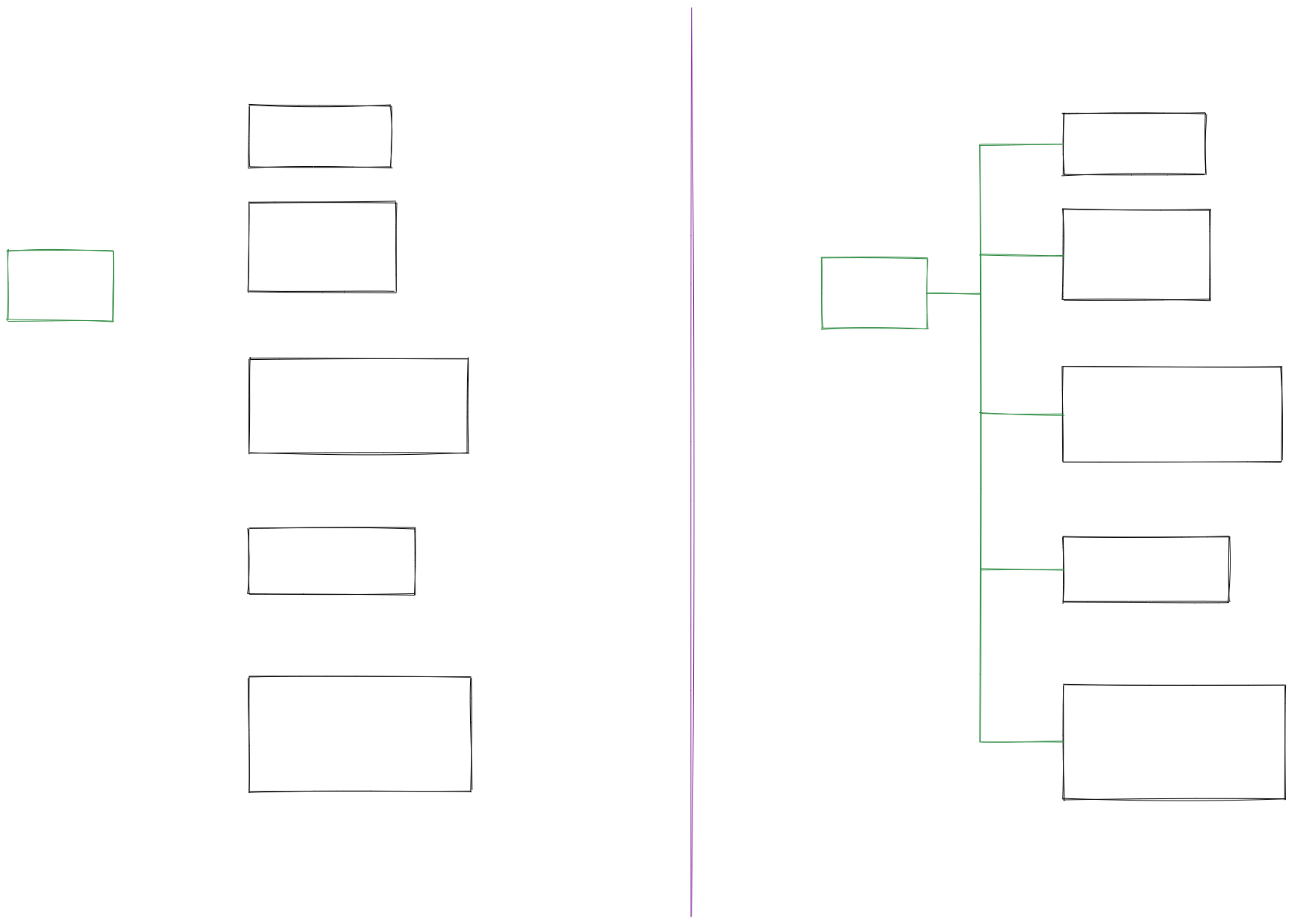|[@xllowl](https://github.com/xllowl)|
|
||||
|[Modify background color opacity](Modify%20background%20color%20opacity.md)|This script changes the opacity of the background color of the selected boxes. The default background color in Excalidraw is so dark that the text is hard to read. You can lighten the color a bit by setting transparency. And you can tweak the transparency over and over again until you're happy with it. Although excalidraw has the opacity option in its native property Settings, it also changes the transparency of the border. Use this script to change only the opacity of the background color without affecting the border.|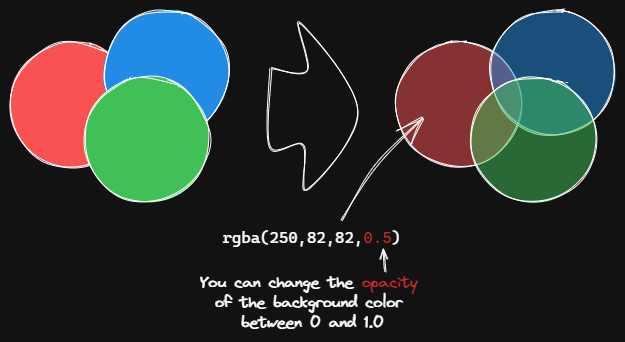|[@1-2-3](https://github.com/1-2-3)|
|
||||
|[Normalize Selected Arrows](Normalize%20Selected%20Arrows.md)|This script will reset the start and end positions of the selected arrows. The arrow will point to the center of the connected box and will have a gap of 8px from the box.|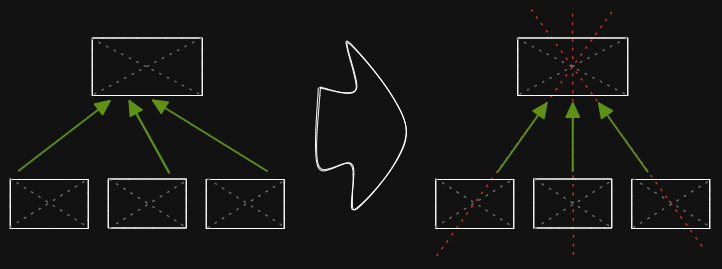|[@1-2-3](https://github.com/1-2-3)|
|
||||
|[OCR - Optical Character Recognition](OCR%20-%20Optical%20Character%20Recognition.md)|The script will 1) send the selected image file to [taskbone.com](https://taskbone.com) to exctract the text from the image, and 2) will add the text to your drawing as a text element.||[@zsviczian](https://github.com/zsviczian)|
|
||||
|[OCR - Optical Character Recognition](OCR%20-%20Optical%20Character%20Recognition.md)|The script will 1) send the selected image file to [taskbone.com](https://taskbone.com) to extract the text from the image, and 2) will add the text to your drawing as a text element.||[@zsviczian](https://github.com/zsviczian)|
|
||||
|[Organic Line](Organic%20Line.md)|Converts selected freedraw lines such that pencil pressure will decrease from maximum to minimum from the beginning of the line to its end. The resulting line is placed at the back of the layers, under all other items. Helpful when drawing organic mindmaps.|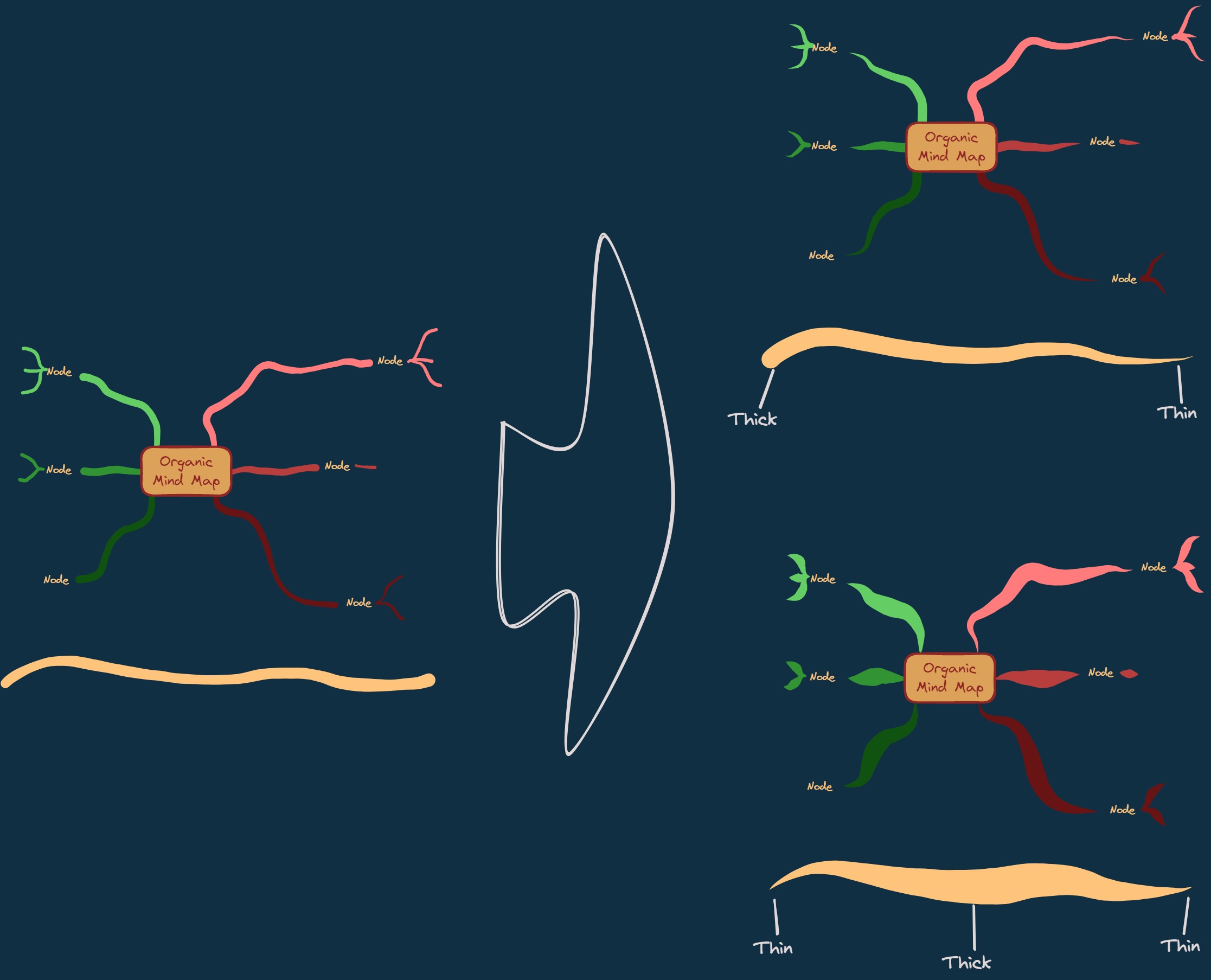|[@zsviczian](https://github.com/zsviczian)|
|
||||
|[Repeat Elements](Repeat%20Elements.md)|This script will detect the difference between 2 selected elements, including position, size, angle, stroke and background color, and create several elements that repeat these differences based on the number of repetitions entered by the user.|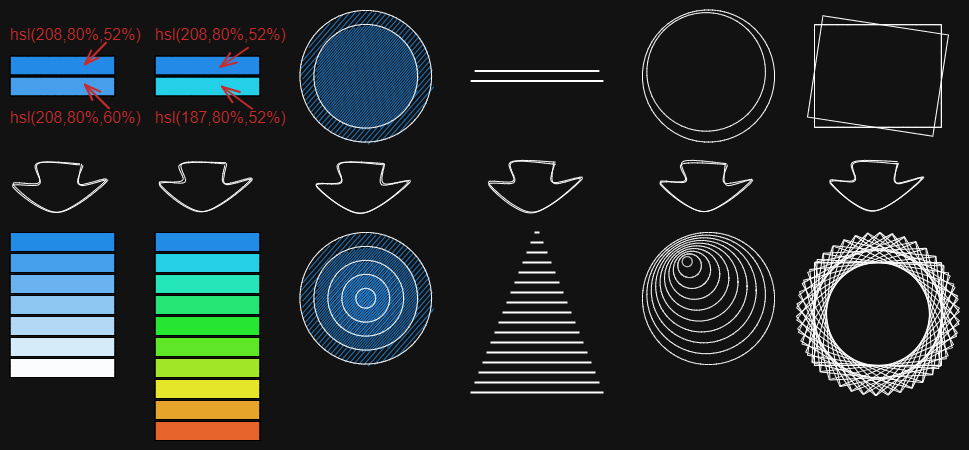|[@1-2-3](https://github.com/1-2-3)|
|
||||
|[Reverse arrows](Reverse%20arrows.md)|Reverse the direction of **arrows** within the scope of selected elements.||[@zsviczian](https://github.com/zsviczian)|
|
||||
|
||||
@@ -19,7 +19,7 @@ if(!config && (elements.length !==1)) {
|
||||
}
|
||||
}
|
||||
|
||||
const {angle, backgroundColor, fillStyle, fontFamily, fontSize, height, width, opacity, roughness, roundness, strokeColor, strokeStyle, strokeWidth, type, startArrowhead, endArrowhead} = ea.getViewSelectedElement();
|
||||
const {angle, backgroundColor, fillStyle, fontFamily, fontSize, height, width, opacity, roughness, roundness, strokeColor, strokeStyle, strokeWidth, type, startArrowhead, endArrowhead, fileId} = ea.getViewSelectedElement();
|
||||
|
||||
const fragWithHTML = (html) => createFragment((frag) => (frag.createDiv().innerHTML = html));
|
||||
|
||||
@@ -43,7 +43,8 @@ const run = () => {
|
||||
((typeof config.strokeWidth === "undefined") || (el.strokeWidth === config.strokeWidth)) &&
|
||||
((typeof config.type === "undefined") || (el.type === config.type)) &&
|
||||
((typeof config.startArrowhead === "undefined") || (el.startArrowhead === config.startArrowhead)) &&
|
||||
((typeof config.endArrowhead === "undefined") || (el.endArrowhead === config.endArrowhead))
|
||||
((typeof config.endArrowhead === "undefined") || (el.endArrowhead === config.endArrowhead)) &&
|
||||
((typeof config.fileId === "undefined") || (el.fileId === config.fileId))
|
||||
)
|
||||
ea.selectElementsInView(selectedElements);
|
||||
delete window.ExcalidrawSelectConfig;
|
||||
@@ -97,6 +98,7 @@ const selectAttributesToCopy = () => {
|
||||
{name: "End arrowhead", key: "endArrowhead"},
|
||||
{name: "Height", key: "height"},
|
||||
{name: "Width", key: "width"},
|
||||
{name: "ImageID", key: "fileId"},
|
||||
];
|
||||
|
||||
attributes.forEach(attr => {
|
||||
@@ -165,7 +167,7 @@ const selectAttributesToCopy = () => {
|
||||
});
|
||||
|
||||
|
||||
//Add Toggle for the rest of the attirbutes. Organize attributes into a logical sequence or groups by adding
|
||||
//Add Toggle for the rest of the attributes. Organize attributes into a logical sequence or groups by adding
|
||||
//configModal.contentEl.createEl("h") or similar to the code
|
||||
|
||||
new ea.obsidian.Setting(configModal.contentEl)
|
||||
|
||||
@@ -305,11 +305,11 @@ const scrollToNextRect = async ({left,top,right,bottom,nextZoom},steps = TRANSIT
|
||||
zoom:{value:zoom.value-zoomStep*i},
|
||||
}
|
||||
});
|
||||
const ellapsed = Date.now()-startTimer;
|
||||
if(ellapsed > TRANSITION_DELAY) {
|
||||
const elapsed = Date.now()-startTimer;
|
||||
if(elapsed > TRANSITION_DELAY) {
|
||||
i = i<steps ? steps : steps+1;
|
||||
} else {
|
||||
const timeProgress = ellapsed / TRANSITION_DELAY;
|
||||
const timeProgress = elapsed / TRANSITION_DELAY;
|
||||
i=Math.min(Math.round(steps*timeProgress),steps)
|
||||
await sleep(FRAME_SLEEP);
|
||||
}
|
||||
|
||||
@@ -18,10 +18,10 @@ elements.forEach((el)=>{
|
||||
ea.style.strokeColor = el.strokeColor;
|
||||
ea.style.fontFamily = el.fontFamily;
|
||||
ea.style.fontSize = el.fontSize;
|
||||
const text = el.text.split("\n");
|
||||
const text = el.rawText.split("\n");
|
||||
for(i=0;i<text.length;i++) {
|
||||
ea.addText(el.x,el.y+i*el.height/text.length,text[i]);
|
||||
ea.addText(el.x,el.y+i*el.height/text.length,text[i].trim());
|
||||
}
|
||||
});
|
||||
ea.addElementsToView(false,false);
|
||||
ea.addElementsToView(false,false,true);
|
||||
ea.deleteViewElements(elements);
|
||||
@@ -46,4 +46,4 @@ for(i=0;i<el.text.length;i++) {
|
||||
objectIDs.push(ea.addText(x,y,character));
|
||||
}
|
||||
ea.addToGroup(objectIDs);
|
||||
ea.addElementsToView(true);
|
||||
ea.addElementsToView(true, false, true);
|
||||
File diff suppressed because one or more lines are too long
+22
-2
@@ -15,7 +15,7 @@ In the `Command Palette` installed scripts are prefixed with `Downloaded/`, thus
|
||||
|
||||
## Attention developers and hobby hackers
|
||||
<img src='https://raw.githubusercontent.com/zsviczian/obsidian-excalidraw-plugin/master/images/hobby-programmer.svg' align='left' style='background-color:whitesmoke; width:80px; margin-right:15px; margin-bottom:10px;'/>
|
||||
If you want to modify scripts, I recommend moving them to the `Excalidraw Automate script folder` or a different subfolder under the script folder. Scripts in the `Downloaded` folder will be overwritten when you click the `Update this script` button. Note also, that at this time, I do not check if the script file has been updated on GitHub, thus the `Update this script` button is always visible once you have installed a script, not only when an update is availble (hope to build this feature in the future).
|
||||
If you want to modify scripts, I recommend moving them to the `Excalidraw Automate script folder` or a different subfolder under the script folder. Scripts in the `Downloaded` folder will be overwritten when you click the `Update this script` button. Note also, that at this time, I do not check if the script file has been updated on GitHub, thus the `Update this script` button is always visible once you have installed a script, not only when an update is available (hope to build this feature in the future).
|
||||
|
||||
I would love to include your contribution in the script library. If you have a script of your own that you would like to share with the community, please open a [PR](https://github.com/zsviczian/obsidian-excalidraw-plugin/pulls) on GitHub. Be sure to include the following in your pull request
|
||||
- The [script file](https://github.com/zsviczian/obsidian-excalidraw-plugin/tree/master/ea-scripts) with a self explanetory name. The name of the file will be the name of the script in the Command Palette.
|
||||
@@ -116,6 +116,7 @@ I would love to include your contribution in the script library. If you have a s
|
||||
|----|-----|
|
||||
|<div><img src="https://raw.githubusercontent.com/zsviczian/obsidian-excalidraw-plugin/master/ea-scripts/Auto%20Draw%20for%20Pen.svg"/></div>|[[#Auto Draw for Pen]]|
|
||||
|<div><img src="https://raw.githubusercontent.com/zsviczian/obsidian-excalidraw-plugin/master/ea-scripts/Boolean%20Operations.svg"/></div>|[[#Boolean Operations]]|
|
||||
|<div><img src="https://raw.githubusercontent.com/zsviczian/obsidian-excalidraw-plugin/master/ea-scripts/Custom%20Zoom.svg"/></div>|[[#Custom Zoom]]|
|
||||
|<div><img src="https://raw.githubusercontent.com/zsviczian/obsidian-excalidraw-plugin/master/ea-scripts/Copy%20Selected%20Element%20Styles%20to%20Global.svg"/></div>|[[#Copy Selected Element Styles to Global]]|
|
||||
|<div><img src="https://raw.githubusercontent.com/zsviczian/obsidian-excalidraw-plugin/master/ea-scripts/ExcaliAI.svg"/></div>|[[#ExcaliAI]]|
|
||||
|<div><img src="https://raw.githubusercontent.com/zsviczian/obsidian-excalidraw-plugin/master/ea-scripts/GPT-Draw-a-UI.svg"/></div>|[[#GPT Draw-a-UI]]|
|
||||
@@ -146,6 +147,13 @@ I would love to include your contribution in the script library. If you have a s
|
||||
|<div><img src="https://raw.githubusercontent.com/zsviczian/obsidian-excalidraw-plugin/master/ea-scripts/Convert%20freedraw%20to%20line.svg"/></div>|[[#Convert freedraw to line]]|
|
||||
|<div><img src="https://raw.githubusercontent.com/zsviczian/obsidian-excalidraw-plugin/master/ea-scripts/Deconstruct%20selected%20elements%20into%20new%20drawing.svg"/></div>|[[#Deconstruct selected elements into new drawing]]|
|
||||
|
||||
## Masking and cropping
|
||||
**Keywords**: Crop, Mask, Transform images
|
||||
|
||||
| | |
|
||||
|----|-----|
|
||||
|<div><img src="https://raw.githubusercontent.com/zsviczian/obsidian-excalidraw-plugin/master/ea-scripts/Crop%20Vintage%20Mask.svg"/></div>|[[#Crop Vintage Mask]]|
|
||||
|
||||
---
|
||||
|
||||
# Description and Installation
|
||||
@@ -190,7 +198,7 @@ https://raw.githubusercontent.com/zsviczian/obsidian-excalidraw-plugin/master/ea
|
||||
```excalidraw-script-install
|
||||
https://raw.githubusercontent.com/zsviczian/obsidian-excalidraw-plugin/master/ea-scripts/Boolean%20Operations.md
|
||||
```
|
||||
<table><tr valign='top'><td class="label">Author</td><td class="data"><a href='https://github.com/GColoy'>@GColoy</a></td></tr><tr valign='top'><td class="label">Source</td><td class="data"><a href='https://github.com/zsviczian/obsidian-excalidraw-plugin/blob/master/ea-scripts/Boolean%20Operations.md'>File on GitHub</a></td></tr><tr valign='top'><td class="label">Description</td><td class="data">With This Script it is possible to make boolean Operations on Shapes.<br>The style of the resulting shape will be the style of the highest ranking Element that was used.<br>The ranking of the elemtns is based on their background. The "denser" the background, the higher the ranking (the order of backgroundstyles is shown below). If they have the same background the opacity will decide. If thats also the same its decided by the order they were created.<br>The ranking is also important for the diffrence operation, so a tranparent object for example will cut a hole into a solid object.<br><img src='https://raw.githubusercontent.com/zsviczian/obsidian-excalidraw-plugin/master/images/scripts-boolean-operations-showcase.png'><br><img src='https://raw.githubusercontent.com/zsviczian/obsidian-excalidraw-plugin/master/images/scripts-boolean-operations-element-ranking.png'></td></tr></table>
|
||||
<table><tr valign='top'><td class="label">Author</td><td class="data"><a href='https://github.com/GColoy'>@GColoy</a></td></tr><tr valign='top'><td class="label">Source</td><td class="data"><a href='https://github.com/zsviczian/obsidian-excalidraw-plugin/blob/master/ea-scripts/Boolean%20Operations.md'>File on GitHub</a></td></tr><tr valign='top'><td class="label">Description</td><td class="data">With This Script it is possible to make boolean Operations on Shapes.<br>The style of the resulting shape will be the style of the highest ranking Element that was used.<br>The ranking of the elements is based on their background. The "denser" the background, the higher the ranking (the order of backgroundstyles is shown below). If they have the same background the opacity will decide. If thats also the same its decided by the order they were created.<br>The ranking is also important for the difference operation, so a transparent object for example will cut a hole into a solid object.<br><img src='https://raw.githubusercontent.com/zsviczian/obsidian-excalidraw-plugin/master/images/scripts-boolean-operations-showcase.png'><br><img src='https://raw.githubusercontent.com/zsviczian/obsidian-excalidraw-plugin/master/images/scripts-boolean-operations-element-ranking.png'></td></tr></table>
|
||||
|
||||
|
||||
## Box Each Selected Groups
|
||||
@@ -259,6 +267,18 @@ https://raw.githubusercontent.com/zsviczian/obsidian-excalidraw-plugin/master/ea
|
||||
```
|
||||
<table><tr valign='top'><td class="label">Author</td><td class="data"><a href='https://github.com/zsviczian'>@zsviczian</a></td></tr><tr valign='top'><td class="label">Source</td><td class="data"><a href='https://github.com/zsviczian/obsidian-excalidraw-plugin/blob/master/ea-scripts/Create%20new%20markdown%20file%20and%20embed%20into%20active%20drawing.md'>File on GitHub</a></td></tr><tr valign='top'><td class="label">Description</td><td class="data">The script will prompt you for a filename, then create a new markdown document with the file name provided, open the new markdown document in an adjacent pane, and embed the markdown document into the active Excalidraw drawing.<br><img src='https://raw.githubusercontent.com/zsviczian/obsidian-excalidraw-plugin/master/images/scripts-create-and-embed-new-markdown-file.jpg'></td></tr></table>
|
||||
|
||||
## Crop Vintage Mask
|
||||
```excalidraw-script-install
|
||||
https://raw.githubusercontent.com/zsviczian/obsidian-excalidraw-plugin/master/ea-scripts/Crop%20Vintage%20Mask.md
|
||||
```
|
||||
<table><tr valign='top'><td class="label">Author</td><td class="data"><a href='https://github.com/zsviczian'>@zsviczian</a></td></tr><tr valign='top'><td class="label">Source</td><td class="data"><a href='https://github.com/zsviczian/obsidian-excalidraw-plugin/blob/master/ea-scripts/Crop%20Vintage%20Mask.md'>File on GitHub</a></td></tr><tr valign='top'><td class="label">Description</td><td class="data">Adds a rounded mask to the image by adding a full cover black mask and a rounded rectangle white mask. The script is also useful for adding just a black mask. In this case, run the script, then delete the white mask and add your custom white mask.<br><img src='https://raw.githubusercontent.com/zsviczian/obsidian-excalidraw-plugin/master/images/scripts-crop-vintage.jpg'></td></tr></table>
|
||||
|
||||
## Custom Zoom
|
||||
```excalidraw-script-install
|
||||
https://raw.githubusercontent.com/zsviczian/obsidian-excalidraw-plugin/master/ea-scripts/Custom%20Zoom.md
|
||||
```
|
||||
<table><tr valign='top'><td class="label">Author</td><td class="data"><a href='https://github.com/zsviczian'>@zsviczian</a></td></tr><tr valign='top'><td class="label">Source</td><td class="data"><a href='https://github.com/zsviczian/obsidian-excalidraw-plugin/blob/master/ea-scripts/Custom%20Zoom.md'>File on GitHub</a></td></tr><tr valign='top'><td class="label">Description</td><td class="data">You can set a custom zoom level with this script. This allows you to set a zoom level below 10% or set the zoom level to a specific value. Note however, that Excalidraw has a bug under 10% zoom... a phantom copy of your image may appear on screen. If this happens, increase the zoom and the phantom should disappear, if it doesn't, then close and open the drawing.</td></tr></table>
|
||||
|
||||
## Darken background color
|
||||
```excalidraw-script-install
|
||||
https://raw.githubusercontent.com/zsviczian/obsidian-excalidraw-plugin/master/ea-scripts/Darken%20background%20color.md
|
||||
|
||||

Binary file not shown.
|
After Width: | Height: | Size: 116 KiB |

Binary file not shown.
|
After Width: | Height: | Size: 37 KiB |
+2
-2
@@ -1,7 +1,7 @@
|
||||
{
|
||||
"id": "obsidian-excalidraw-plugin",
|
||||
"name": "Excalidraw",
|
||||
"version": "2.0.12",
|
||||
"version": "2.0.24",
|
||||
"minAppVersion": "1.1.6",
|
||||
"description": "An Obsidian plugin to edit and view Excalidraw drawings",
|
||||
"author": "Zsolt Viczian",
|
||||
@@ -9,4 +9,4 @@
|
||||
"fundingUrl": "https://ko-fi.com/zsolt",
|
||||
"helpUrl": "https://github.com/zsviczian/obsidian-excalidraw-plugin#readme",
|
||||
"isDesktopOnly": false
|
||||
}
|
||||
}
|
||||
+10
-11
@@ -1,6 +1,6 @@
|
||||
{
|
||||
"name": "obsidian-excalidraw-plugin",
|
||||
"version": "1.9.15",
|
||||
"version": "2.0.14",
|
||||
"description": "This is an Obsidian.md plugin that lets you view and edit Excalidraw drawings",
|
||||
"main": "lib/index.js",
|
||||
"types": "lib/index.d.ts",
|
||||
@@ -18,23 +18,22 @@
|
||||
"author": "",
|
||||
"license": "MIT",
|
||||
"dependencies": {
|
||||
"@zsviczian/excalidraw": "0.17.1-obsidian-8",
|
||||
"@popperjs/core": "^2.11.8",
|
||||
"@zsviczian/excalidraw": "0.17.1-obsidian-17",
|
||||
"chroma-js": "^2.4.2",
|
||||
"clsx": "^2.0.0",
|
||||
"colormaster": "^1.2.1",
|
||||
"gl-matrix": "^3.4.3",
|
||||
"lucide-react": "^0.263.1",
|
||||
"mathjax-full": "^3.2.2",
|
||||
"monkey-around": "^2.3.0",
|
||||
"nanoid": "^4.0.2",
|
||||
"polybooljs": "^1.2.0",
|
||||
"react": "^18.2.0",
|
||||
"react-dom": "^18.2.0",
|
||||
"roughjs": "^4.5.2",
|
||||
"@popperjs/core": "^2.11.8",
|
||||
"nanoid": "^4.0.2",
|
||||
"lucide-react": "^0.263.1",
|
||||
"mathjax-full": "^3.2.2"
|
||||
"roughjs": "^4.5.2"
|
||||
},
|
||||
"devDependencies": {
|
||||
"lz-string": "^1.5.0",
|
||||
"@babel/core": "^7.22.9",
|
||||
"@babel/preset-env": "^7.22.10",
|
||||
"@babel/preset-react": "^7.22.5",
|
||||
@@ -52,8 +51,10 @@
|
||||
"@types/react-dom": "^18.2.18",
|
||||
"@zerollup/ts-transform-paths": "^1.7.18",
|
||||
"cross-env": "^7.0.3",
|
||||
"cssnano": "^6.0.2",
|
||||
"eslint-config-prettier": "^9.0.0",
|
||||
"eslint-plugin-prettier": "^5.0.0",
|
||||
"lz-string": "^1.5.0",
|
||||
"obsidian": "^1.4.0",
|
||||
"prettier": "^3.0.1",
|
||||
"rollup": "^2.70.1",
|
||||
@@ -64,9 +65,7 @@
|
||||
"rollup-plugin-web-worker-loader": "^1.6.1",
|
||||
"tslib": "^2.6.1",
|
||||
"ttypescript": "^1.5.15",
|
||||
"typescript": "^5.2.2",
|
||||
"cssnano": "^6.0.2"
|
||||
|
||||
"typescript": "^5.2.2"
|
||||
},
|
||||
"resolutions": {
|
||||
"@typescript-eslint/typescript-estree": "5.3.0"
|
||||
|
||||
+2
-2
@@ -50,10 +50,10 @@ const manifest = isLib ? {} : JSON.parse(manifestStr);
|
||||
const packageString = isLib
|
||||
? ""
|
||||
: ';' + lzstring_pkg +
|
||||
'const EXCALIDRAW_PACKAGES = "' + LZString.compressToBase64(react_pkg + reactdom_pkg + excalidraw_pkg) + '";' +
|
||||
'\nconst EXCALIDRAW_PACKAGES = "' + LZString.compressToBase64(react_pkg + reactdom_pkg + excalidraw_pkg) + '";\n' +
|
||||
'const {react, reactDOM, excalidrawLib} = window.eval.call(window, `(function() {' +
|
||||
'${LZString.decompressFromBase64(EXCALIDRAW_PACKAGES)};' +
|
||||
'return {react:React, reactDOM:ReactDOM, excalidrawLib: ExcalidrawLib};})();`);' +
|
||||
'return {react:React, reactDOM:ReactDOM, excalidrawLib: ExcalidrawLib};})();`);\n' +
|
||||
'const PLUGIN_VERSION="'+manifest.version+'";';
|
||||
|
||||
const BASE_CONFIG = {
|
||||
|
||||
+13
-12
@@ -12,13 +12,10 @@ import {
|
||||
import {
|
||||
DEFAULT_MD_EMBED_CSS,
|
||||
fileid,
|
||||
FRONTMATTER_KEY_BORDERCOLOR,
|
||||
FRONTMATTER_KEY_FONT,
|
||||
FRONTMATTER_KEY_FONTCOLOR,
|
||||
FRONTMATTER_KEY_MD_STYLE,
|
||||
IMAGE_TYPES,
|
||||
nanoid,
|
||||
THEME_FILTER,
|
||||
FRONTMATTER_KEYS,
|
||||
} from "./constants/constants";
|
||||
import { createSVG } from "./ExcalidrawAutomate";
|
||||
import { ExcalidrawData, getTransclusion } from "./ExcalidrawData";
|
||||
@@ -40,6 +37,7 @@ import {
|
||||
hasExportTheme,
|
||||
LinkParts,
|
||||
svgToBase64,
|
||||
isMaskFile,
|
||||
} from "./utils/Utils";
|
||||
import { ValueOf } from "./types";
|
||||
import { getMermaidImageElements, getMermaidText, shouldRenderMermaid } from "./utils/MermaidUtils";
|
||||
@@ -349,6 +347,7 @@ export class EmbeddedFilesLoader {
|
||||
elements?: ExcalidrawElement[];
|
||||
}) : Promise<{dataURL: DataURL, hasSVGwithBitmap:boolean}> {
|
||||
//debug({where:"EmbeddedFileLoader.getExcalidrawSVG",uid:this.uid,file:file.name});
|
||||
const isMask = isMaskFile(this.plugin, file);
|
||||
const forceTheme = hasExportTheme(this.plugin, file)
|
||||
? getExportTheme(this.plugin, file, "light")
|
||||
: undefined;
|
||||
@@ -357,6 +356,7 @@ export class EmbeddedFilesLoader {
|
||||
? getWithBackground(this.plugin, file)
|
||||
: false,
|
||||
withTheme: !!forceTheme,
|
||||
isMask,
|
||||
};
|
||||
const svg = replaceSVGColors(
|
||||
await createSVG(
|
||||
@@ -528,7 +528,8 @@ export class EmbeddedFilesLoader {
|
||||
addFiles: (files: FileData[], isDark: boolean, final?: boolean) => void,
|
||||
depth:number
|
||||
) {
|
||||
if(depth > 4) {
|
||||
|
||||
if(depth > 7) {
|
||||
new Notice(t("INFINITE_LOOP_WARNING")+depth.toString(), 6000);
|
||||
return;
|
||||
}
|
||||
@@ -562,7 +563,7 @@ export class EmbeddedFilesLoader {
|
||||
}
|
||||
//files.push(fileData);
|
||||
}
|
||||
} else if (embeddedFile.isSVGwithBitmap) {
|
||||
} /*else if (embeddedFile.isSVGwithBitmap) {
|
||||
const fileData = {
|
||||
mimeType: embeddedFile.mimeType,
|
||||
id: entry.value[0],
|
||||
@@ -579,7 +580,7 @@ export class EmbeddedFilesLoader {
|
||||
catch(e) {
|
||||
errorlog({ where: "EmbeddedFileLoader.loadSceneFiles", error: e });
|
||||
}
|
||||
}
|
||||
}*/
|
||||
}
|
||||
|
||||
let equation;
|
||||
@@ -745,9 +746,9 @@ export class EmbeddedFilesLoader {
|
||||
let fontName = plugin.settings.mdFont;
|
||||
if (
|
||||
fileCache?.frontmatter &&
|
||||
Boolean(fileCache.frontmatter[FRONTMATTER_KEY_FONT])
|
||||
Boolean(fileCache.frontmatter[FRONTMATTER_KEYS["font"].name])
|
||||
) {
|
||||
fontName = fileCache.frontmatter[FRONTMATTER_KEY_FONT];
|
||||
fontName = fileCache.frontmatter[FRONTMATTER_KEYS["font"].name];
|
||||
}
|
||||
switch (fontName) {
|
||||
case "Virgil":
|
||||
@@ -776,12 +777,12 @@ export class EmbeddedFilesLoader {
|
||||
}
|
||||
|
||||
const fontColor = fileCache?.frontmatter
|
||||
? fileCache.frontmatter[FRONTMATTER_KEY_FONTCOLOR] ??
|
||||
? fileCache.frontmatter[FRONTMATTER_KEYS["font-color"].name] ??
|
||||
plugin.settings.mdFontColor
|
||||
: plugin.settings.mdFontColor;
|
||||
|
||||
let style = fileCache?.frontmatter
|
||||
? fileCache.frontmatter[FRONTMATTER_KEY_MD_STYLE] ?? ""
|
||||
? fileCache.frontmatter[FRONTMATTER_KEYS["md-css"].name] ?? ""
|
||||
: "";
|
||||
let frontmatterCSSisAfile = false;
|
||||
if (style && style != "") {
|
||||
@@ -804,7 +805,7 @@ export class EmbeddedFilesLoader {
|
||||
}
|
||||
|
||||
const borderColor = fileCache?.frontmatter
|
||||
? fileCache.frontmatter[FRONTMATTER_KEY_BORDERCOLOR] ??
|
||||
? fileCache.frontmatter[FRONTMATTER_KEYS["border-color"].name] ??
|
||||
plugin.settings.mdBorderColor
|
||||
: plugin.settings.mdBorderColor;
|
||||
|
||||
|
||||
+169
-38
@@ -10,10 +10,11 @@ import {
|
||||
ExcalidrawTextElement,
|
||||
StrokeRoundness,
|
||||
RoundnessType,
|
||||
ExcalidrawFrameElement,
|
||||
} from "@zsviczian/excalidraw/types/excalidraw/element/types";
|
||||
import { Editor, normalizePath, Notice, OpenViewState, RequestUrlResponse, TFile, TFolder, WorkspaceLeaf } from "obsidian";
|
||||
import * as obsidian_module from "obsidian";
|
||||
import ExcalidrawView, { ExportSettings, TextMode } from "src/ExcalidrawView";
|
||||
import ExcalidrawView, { ExportSettings, TextMode, getTextMode } from "src/ExcalidrawView";
|
||||
import { ExcalidrawData, getMarkdownDrawingSection, REGEX_LINK } from "src/ExcalidrawData";
|
||||
import {
|
||||
FRONTMATTER,
|
||||
@@ -37,6 +38,7 @@ import {
|
||||
} from "src/constants/constants";
|
||||
import { blobToBase64, checkAndCreateFolder, getDrawingFilename, getNewUniqueFilepath, } from "src/utils/FileUtils";
|
||||
import {
|
||||
arrayToMap,
|
||||
//debug,
|
||||
embedFontsInSVG,
|
||||
errorlog,
|
||||
@@ -45,12 +47,13 @@ import {
|
||||
getLinkParts,
|
||||
getPNG,
|
||||
getSVG,
|
||||
isMaskFile,
|
||||
isVersionNewerThanOther,
|
||||
log,
|
||||
scaleLoadedImage,
|
||||
wrapTextAtCharLength,
|
||||
} from "src/utils/Utils";
|
||||
import { getAttachmentsFolderAndFilePath, getLeaf, getNewOrAdjacentLeaf, isObsidianThemeDark } from "src/utils/ObsidianUtils";
|
||||
import { getAttachmentsFolderAndFilePath, getLeaf, getNewOrAdjacentLeaf, isObsidianThemeDark, openLeaf } from "src/utils/ObsidianUtils";
|
||||
import { AppState, BinaryFileData, DataURL, ExcalidrawImperativeAPI, Point } from "@zsviczian/excalidraw/types/excalidraw/types";
|
||||
import { EmbeddedFile, EmbeddedFilesLoader, FileData } from "src/EmbeddedFileLoader";
|
||||
import { tex2dataURL } from "src/LaTeX";
|
||||
@@ -85,7 +88,9 @@ import {
|
||||
postOpenAI as _postOpenAI,
|
||||
extractCodeBlocks as _extractCodeBlocks,
|
||||
} from "./utils/AIUtils";
|
||||
import { EXCALIDRAW_AUTOMATE_INFO } from "./dialogs/SuggesterInfo";
|
||||
import { EXCALIDRAW_AUTOMATE_INFO, EXCALIDRAW_SCRIPTENGINE_INFO } from "./dialogs/SuggesterInfo";
|
||||
import { CropImage } from "./utils/CropImage";
|
||||
import { has } from "./svgToExcalidraw/attributes";
|
||||
|
||||
extendPlugins([
|
||||
HarmonyPlugin,
|
||||
@@ -126,7 +131,7 @@ export class ExcalidrawAutomate {
|
||||
|
||||
public help(target: Function | string) {
|
||||
if (!target) {
|
||||
console.log("Usage: ea.help(ea.functionName) or ea.help('propertyName')");
|
||||
console.log("Usage: ea.help(ea.functionName) or ea.help('propertyName') or ea.help('utils.functionName') - notice property name and utils function name is in quotes");
|
||||
return;
|
||||
}
|
||||
|
||||
@@ -135,15 +140,27 @@ export class ExcalidrawAutomate {
|
||||
if (typeof target === 'function') {
|
||||
funcInfo = EXCALIDRAW_AUTOMATE_INFO.find((info) => info.field === target.name);
|
||||
} else if (typeof target === 'string') {
|
||||
funcInfo = EXCALIDRAW_AUTOMATE_INFO.find((info) => info.field === target);
|
||||
let stringTarget:string = target;
|
||||
stringTarget = stringTarget.startsWith("utils.") ? stringTarget.substring(6) : stringTarget;
|
||||
stringTarget = stringTarget.startsWith("ea.") ? stringTarget.substring(3) : stringTarget;
|
||||
funcInfo = EXCALIDRAW_AUTOMATE_INFO.find((info) => info.field === stringTarget);
|
||||
if(!funcInfo) {
|
||||
funcInfo = EXCALIDRAW_SCRIPTENGINE_INFO.find((info) => info.field === stringTarget);
|
||||
}
|
||||
}
|
||||
|
||||
if(!funcInfo) {
|
||||
console.log("Usage: ea.help(ea.functionName) or\nea.help('propertyName') - notice property name is in quotes");
|
||||
console.log("Usage: ea.help(ea.functionName) or ea.help('propertyName') or ea.help('utils.functionName') - notice property name and utils function name is in quotes");
|
||||
return;
|
||||
}
|
||||
|
||||
let isMissing = true;
|
||||
if (funcInfo.code) {
|
||||
isMissing = false;
|
||||
console.log(`Declaration: ${funcInfo.code}`);
|
||||
}
|
||||
if (funcInfo.desc) {
|
||||
isMissing = false;
|
||||
const formattedDesc = funcInfo.desc
|
||||
.replaceAll("<br>", "\n")
|
||||
.replace(/<code>(.*?)<\/code>/g, '%c\u200b$1%c') // Zero-width space
|
||||
@@ -151,10 +168,9 @@ export class ExcalidrawAutomate {
|
||||
.replace(/<a onclick='window\.open\("(.*?)"\)'>(.*?)<\/a>/g, (_, href, text) => `%c\u200b${text}%c\u200b (link: ${href})`); // Zero-width non-joiner
|
||||
|
||||
const styles = Array.from({ length: (formattedDesc.match(/%c/g) || []).length }, (_, i) => i % 2 === 0 ? 'color: #007bff;' : '');
|
||||
|
||||
console.log(`Declaration: ${funcInfo.code}`);
|
||||
console.log(`Description: ${formattedDesc}`, ...styles);
|
||||
} else {
|
||||
}
|
||||
if (isMissing) {
|
||||
console.log("Description not available for this function.");
|
||||
}
|
||||
}
|
||||
@@ -281,7 +297,7 @@ export class ExcalidrawAutomate {
|
||||
}
|
||||
|
||||
/**
|
||||
* Generates a new Obsidian Leaf following Excalidraw plugin settings such as open in Main Workspace or not, open in adjacent pane if avaialble, etc.
|
||||
* Generates a new Obsidian Leaf following Excalidraw plugin settings such as open in Main Workspace or not, open in adjacent pane if available, etc.
|
||||
* @param origo // the currently active leaf, the origin of the new leaf
|
||||
* @param targetPane //type PaneTarget = "active-pane"|"new-pane"|"popout-window"|"new-tab"|"md-properties";
|
||||
* @returns
|
||||
@@ -319,6 +335,17 @@ export class ExcalidrawAutomate {
|
||||
return null;
|
||||
}
|
||||
|
||||
public isExcalidrawMaskFile(file?:TFile): boolean {
|
||||
if(file) {
|
||||
return this.isExcalidrawFile(file) && isMaskFile(this.plugin, file);
|
||||
}
|
||||
if (!this.targetView || !this.targetView?.file) {
|
||||
errorMessage("targetView not set", "isMaskFile()");
|
||||
return null;
|
||||
}
|
||||
return isMaskFile(this.plugin, this.targetView.file);
|
||||
}
|
||||
|
||||
plugin: ExcalidrawPlugin;
|
||||
elementsDict: {[key:string]:any}; //contains the ExcalidrawElements currently edited in Automate indexed by el.id
|
||||
imagesDict: {[key: FileId]: any}; //the images files including DataURL, indexed by fileId
|
||||
@@ -521,7 +548,7 @@ export class ExcalidrawAutomate {
|
||||
|
||||
/**
|
||||
* get all elements from ExcalidrawAutomate elementsDict
|
||||
* @returns elements from elemenetsDict
|
||||
* @returns elements from elementsDict
|
||||
*/
|
||||
getElements(): Mutable<ExcalidrawElement>[] {
|
||||
const elements = [];
|
||||
@@ -567,6 +594,8 @@ export class ExcalidrawAutomate {
|
||||
"excalidraw-onload-script"?: string;
|
||||
"excalidraw-linkbutton-opacity"?: number;
|
||||
"excalidraw-autoexport"?: boolean;
|
||||
"excalidraw-mask"?: boolean;
|
||||
"cssclasses"?: string;
|
||||
};
|
||||
plaintext?: string; //text to insert above the `# Text Elements` section
|
||||
}): Promise<string> {
|
||||
@@ -678,7 +707,24 @@ export class ExcalidrawAutomate {
|
||||
if(item.latex) {
|
||||
outString += `${key}: $$${item.latex}$$\n`;
|
||||
} else {
|
||||
outString += `${key}: [[${item.file}]]\n`;
|
||||
if(item.file) {
|
||||
if(item.file instanceof TFile) {
|
||||
outString += `${key}: [[${item.file.path}]]\n`;
|
||||
} else {
|
||||
outString += `${key}: [[${item.file}]]\n`;
|
||||
}
|
||||
} else {
|
||||
const hyperlinkSplit = item.hyperlink.split("#");
|
||||
const file = this.plugin.app.vault.getAbstractFileByPath(hyperlinkSplit[0]);
|
||||
if(file && file instanceof TFile) {
|
||||
const hasFileRef = hyperlinkSplit.length === 2
|
||||
outString += hasFileRef
|
||||
? `${key}: [[${file.path}#${hyperlinkSplit[1]}]]\n`
|
||||
: `${key}: [[${file.path}]]\n`;
|
||||
} else {
|
||||
outString += `${key}: ${item.hyperlink}\n`;
|
||||
}
|
||||
}
|
||||
}
|
||||
})
|
||||
return outString;
|
||||
@@ -705,6 +751,14 @@ export class ExcalidrawAutomate {
|
||||
}
|
||||
};
|
||||
|
||||
/* getCropImageObject(): CropImage {
|
||||
const scene = this.targetView.getScene();
|
||||
return new CropImage(
|
||||
scene.elements,
|
||||
scene.files,
|
||||
);
|
||||
}*/
|
||||
|
||||
/**
|
||||
*
|
||||
* @param templatePath
|
||||
@@ -735,6 +789,7 @@ export class ExcalidrawAutomate {
|
||||
exportSettings = {
|
||||
withBackground: this.plugin.settings.exportWithBackground,
|
||||
withTheme: true,
|
||||
isMask: false,
|
||||
};
|
||||
}
|
||||
if (!loader) {
|
||||
@@ -791,6 +846,7 @@ export class ExcalidrawAutomate {
|
||||
exportSettings = {
|
||||
withBackground: this.plugin.settings.exportWithBackground,
|
||||
withTheme: true,
|
||||
isMask: false,
|
||||
};
|
||||
}
|
||||
if (!loader) {
|
||||
@@ -950,10 +1006,33 @@ export class ExcalidrawAutomate {
|
||||
* @param topY
|
||||
* @param width
|
||||
* @param height
|
||||
* @param name: the display name of the frame
|
||||
* @returns
|
||||
*/
|
||||
addRect(topX: number, topY: number, width: number, height: number): string {
|
||||
const id = nanoid();
|
||||
addFrame(topX: number, topY: number, width: number, height: number, name?: string): string {
|
||||
const id = this.addRect(topX, topY, width, height);
|
||||
const frame = this.getElement(id) as Mutable<ExcalidrawFrameElement>;
|
||||
frame.type = "frame";
|
||||
frame.backgroundColor = "transparent";
|
||||
frame.strokeColor = "#000";
|
||||
frame.strokeStyle = "solid";
|
||||
frame.strokeWidth = 2;
|
||||
frame.roughness = 0;
|
||||
frame.roundness = null;
|
||||
if(name) frame.name = name;
|
||||
return id;
|
||||
}
|
||||
|
||||
/**
|
||||
*
|
||||
* @param topX
|
||||
* @param topY
|
||||
* @param width
|
||||
* @param height
|
||||
* @returns
|
||||
*/
|
||||
addRect(topX: number, topY: number, width: number, height: number, id?: string): string {
|
||||
if(!id) id = nanoid();
|
||||
this.elementsDict[id] = this.boxedElement(
|
||||
id,
|
||||
"rectangle",
|
||||
@@ -978,8 +1057,9 @@ export class ExcalidrawAutomate {
|
||||
topY: number,
|
||||
width: number,
|
||||
height: number,
|
||||
id?: string,
|
||||
): string {
|
||||
const id = nanoid();
|
||||
if(!id) id = nanoid();
|
||||
this.elementsDict[id] = this.boxedElement(
|
||||
id,
|
||||
"diamond",
|
||||
@@ -1004,8 +1084,9 @@ export class ExcalidrawAutomate {
|
||||
topY: number,
|
||||
width: number,
|
||||
height: number,
|
||||
id?: string,
|
||||
): string {
|
||||
const id = nanoid();
|
||||
if(!id) id = nanoid();
|
||||
this.elementsDict[id] = this.boxedElement(
|
||||
id,
|
||||
"ellipse",
|
||||
@@ -1025,7 +1106,7 @@ export class ExcalidrawAutomate {
|
||||
* @param height
|
||||
* @returns
|
||||
*/
|
||||
addBlob(topX: number, topY: number, width: number, height: number): string {
|
||||
addBlob(topX: number, topY: number, width: number, height: number, id?: string): string {
|
||||
const b = height * 0.5; //minor axis of the ellipsis
|
||||
const a = width * 0.5; //major axis of the ellipsis
|
||||
const sx = a / 9;
|
||||
@@ -1064,7 +1145,7 @@ export class ExcalidrawAutomate {
|
||||
}
|
||||
return p;
|
||||
};
|
||||
const id = this.addLine(scale(p));
|
||||
id = this.addLine(scale(p), id);
|
||||
this.elementsDict[id] = repositionElementsToCursor(
|
||||
[this.getElement(id)],
|
||||
{ x: topX, y: topY },
|
||||
@@ -1205,9 +1286,9 @@ export class ExcalidrawAutomate {
|
||||
* @param points
|
||||
* @returns
|
||||
*/
|
||||
addLine(points: [[x: number, y: number]]): string {
|
||||
addLine(points: [[x: number, y: number]], id?: string): string {
|
||||
const box = getLineBox(points);
|
||||
const id = nanoid();
|
||||
id = id ?? nanoid();
|
||||
this.elementsDict[id] = {
|
||||
points: normalizeLinePoints(points),
|
||||
lastCommittedPoint: null,
|
||||
@@ -1234,9 +1315,10 @@ export class ExcalidrawAutomate {
|
||||
startObjectId?: string;
|
||||
endObjectId?: string;
|
||||
},
|
||||
id?: string,
|
||||
): string {
|
||||
const box = getLineBox(points);
|
||||
const id = nanoid();
|
||||
id = id ?? nanoid();
|
||||
const startPoint = points[0];
|
||||
const endPoint = points[points.length - 1];
|
||||
this.elementsDict[id] = {
|
||||
@@ -1348,7 +1430,7 @@ export class ExcalidrawAutomate {
|
||||
async addImage(
|
||||
topX: number,
|
||||
topY: number,
|
||||
imageFile: TFile | string,
|
||||
imageFile: TFile | string, //string may also be an Obsidian filepath with a reference such as folder/path/my.pdf#page=2
|
||||
scale: boolean = true, //default is true which will scale the image to MAX_IMAGE_SIZE, false will insert image at 100% of its size
|
||||
anchor: boolean = true, //only has effect if scale is false. If anchor is true the image path will include |100%, if false the image will be inserted at 100%, but if resized by the user it won't pop back to 100% the next time Excalidraw is opened.
|
||||
): Promise<string> {
|
||||
@@ -1795,10 +1877,32 @@ export class ExcalidrawAutomate {
|
||||
elements.forEach((el) => {
|
||||
this.elementsDict[el.id] = cloneElement(el);
|
||||
if(el.type === "image") {
|
||||
this.imagesDict[el.fileId] = sceneFiles?.[el.fileId];
|
||||
const ef = this.targetView.excalidrawData.getFile(el.fileId);
|
||||
const imageWithRef = ef && ef.file && ef.linkParts && ef.linkParts.ref;
|
||||
const equation = this.targetView.excalidrawData.getEquation(el.fileId);
|
||||
const sceneFile = sceneFiles?.[el.fileId];
|
||||
this.imagesDict[el.fileId] = {
|
||||
mimeType: sceneFile.mimeType,
|
||||
id: el.fileId,
|
||||
dataURL: sceneFile.dataURL,
|
||||
created: sceneFile.created,
|
||||
...ef ? {
|
||||
isHyperLink: ef.isHyperLink || imageWithRef,
|
||||
hyperlink: imageWithRef ? `${ef.file.path}#${ef.linkParts.ref}` : ef.hyperlink,
|
||||
file: imageWithRef ? null : ef.file,
|
||||
hasSVGwithBitmap: ef.isSVGwithBitmap,
|
||||
latex: null,
|
||||
} : {},
|
||||
...equation ? {
|
||||
file: null,
|
||||
isHyperLink: false,
|
||||
hyperlink: null,
|
||||
hasSVGwithBitmap: false,
|
||||
latex: equation.latex,
|
||||
} : {},
|
||||
};
|
||||
}
|
||||
});
|
||||
|
||||
} else {
|
||||
elements.forEach((el) => {
|
||||
this.elementsDict[el.id] = cloneElement(el);
|
||||
@@ -2091,6 +2195,19 @@ export class ExcalidrawAutomate {
|
||||
color: string,
|
||||
) => void = null;
|
||||
|
||||
/**
|
||||
* If set, this callback is triggered whenever a drawing is exported to SVG.
|
||||
* The string returned will replace the link in the exported SVG.
|
||||
* The hook is only executed if the link is to a file internal to Obsidian
|
||||
* see: https://github.com/zsviczian/obsidian-excalidraw-plugin/issues/1605
|
||||
*/
|
||||
onUpdateElementLinkForExportHook: (data: {
|
||||
originalLink: string,
|
||||
obsidianLink: string,
|
||||
linkedFile: TFile | null,
|
||||
hostFile: TFile,
|
||||
}) => string = null;
|
||||
|
||||
/**
|
||||
* utility function to generate EmbeddedFilesLoader object
|
||||
* @param isDark
|
||||
@@ -2109,8 +2226,9 @@ export class ExcalidrawAutomate {
|
||||
getExportSettings(
|
||||
withBackground: boolean,
|
||||
withTheme: boolean,
|
||||
isMask: boolean = false,
|
||||
): ExportSettings {
|
||||
return { withBackground, withTheme };
|
||||
return { withBackground, withTheme, isMask };
|
||||
};
|
||||
|
||||
/**
|
||||
@@ -2140,7 +2258,7 @@ export class ExcalidrawAutomate {
|
||||
* @returns
|
||||
*/
|
||||
getMaximumGroups(elements: ExcalidrawElement[]): ExcalidrawElement[][] {
|
||||
return getMaximumGroups(elements);
|
||||
return getMaximumGroups(elements, arrayToMap(elements));
|
||||
};
|
||||
|
||||
/**
|
||||
@@ -2274,8 +2392,13 @@ export class ExcalidrawAutomate {
|
||||
if (!this.targetView) {
|
||||
return null;
|
||||
}
|
||||
const leaf = getNewOrAdjacentLeaf(this.plugin, this.targetView.leaf);
|
||||
leaf.openFile(file, openState ?? {active: true});
|
||||
|
||||
const {leaf, promise} = openLeaf({
|
||||
plugin: this.plugin,
|
||||
fnGetLeaf: () => getNewOrAdjacentLeaf(this.plugin, this.targetView.leaf),
|
||||
file,
|
||||
openState: openState ?? {active: true}
|
||||
});
|
||||
return leaf;
|
||||
};
|
||||
|
||||
@@ -2415,7 +2538,7 @@ export class ExcalidrawAutomate {
|
||||
};
|
||||
|
||||
/**
|
||||
* Depricated. Use getCM / ColorMaster instead
|
||||
* Deprecated. Use getCM / ColorMaster instead
|
||||
* @param color
|
||||
* @returns
|
||||
*/
|
||||
@@ -2425,7 +2548,7 @@ export class ExcalidrawAutomate {
|
||||
};
|
||||
|
||||
/**
|
||||
* Depricated. Use getCM / ColorMaster instead
|
||||
* Deprecated. Use getCM / ColorMaster instead
|
||||
* @param color
|
||||
* @returns
|
||||
*/
|
||||
@@ -2435,7 +2558,7 @@ export class ExcalidrawAutomate {
|
||||
};
|
||||
|
||||
/**
|
||||
* Depricated. Use getCM / ColorMaster instead
|
||||
* Deprecated. Use getCM / ColorMaster instead
|
||||
* @param color
|
||||
* @returns
|
||||
*/
|
||||
@@ -2445,7 +2568,7 @@ export class ExcalidrawAutomate {
|
||||
};
|
||||
|
||||
/**
|
||||
* Depricated. Use getCM / ColorMaster instead
|
||||
* Deprecated. Use getCM / ColorMaster instead
|
||||
* @param color
|
||||
* @returns
|
||||
*/
|
||||
@@ -2622,13 +2745,11 @@ async function getTemplate(
|
||||
};
|
||||
}
|
||||
|
||||
const parsed =
|
||||
data.search("excalidraw-plugin: parsed\n") > -1 ||
|
||||
data.search("excalidraw-plugin: locked\n") > -1; //locked for backward compatibility
|
||||
const textMode = getTextMode(data);
|
||||
await excalidrawData.loadData(
|
||||
data,
|
||||
file,
|
||||
parsed ? TextMode.parsed : TextMode.raw,
|
||||
textMode,
|
||||
);
|
||||
|
||||
let trimLocation = data.search("# Text Elements\n");
|
||||
@@ -2759,6 +2880,7 @@ export async function createPNG(
|
||||
withBackground:
|
||||
exportSettings?.withBackground ?? plugin.settings.exportWithBackground,
|
||||
withTheme: exportSettings?.withTheme ?? plugin.settings.exportWithTheme,
|
||||
isMask: exportSettings?.isMask ?? false,
|
||||
},
|
||||
padding,
|
||||
scale,
|
||||
@@ -2788,7 +2910,15 @@ export const updateElementLinksToObsidianLinks = ({elements, hostFile}:{
|
||||
if(!file) {
|
||||
return el;
|
||||
}
|
||||
const link = app.getObsidianUrl(file);
|
||||
let link = app.getObsidianUrl(file);
|
||||
if(window.ExcalidrawAutomate?.onUpdateElementLinkForExportHook) {
|
||||
link = window.ExcalidrawAutomate.onUpdateElementLinkForExportHook({
|
||||
originalLink: el.link,
|
||||
obsidianLink: link,
|
||||
linkedFile: file,
|
||||
hostFile: hostFile
|
||||
});
|
||||
}
|
||||
const newElement: Mutable<ExcalidrawElement> = cloneElement(el);
|
||||
newElement.link = link;
|
||||
return newElement;
|
||||
@@ -2856,6 +2986,7 @@ export async function createSVG(
|
||||
withBackground:
|
||||
exportSettings?.withBackground ?? plugin.settings.exportWithBackground,
|
||||
withTheme,
|
||||
isMask: exportSettings?.isMask ?? false,
|
||||
},
|
||||
padding,
|
||||
null,
|
||||
@@ -2952,7 +3083,7 @@ function errorMessage(message: string, source: string) {
|
||||
errorlog({
|
||||
where: "ExcalidrawAutomate",
|
||||
source,
|
||||
message: "this function is not avalable on Obsidian Mobile",
|
||||
message: "this function is not available on Obsidian Mobile",
|
||||
});
|
||||
break;
|
||||
default:
|
||||
|
||||
+23
-27
@@ -8,15 +8,7 @@
|
||||
import { App, Notice, TFile } from "obsidian";
|
||||
import {
|
||||
nanoid,
|
||||
FRONTMATTER_KEY_CUSTOM_PREFIX,
|
||||
FRONTMATTER_KEY_CUSTOM_LINK_BRACKETS,
|
||||
FRONTMATTER_KEY_CUSTOM_URL_PREFIX,
|
||||
FRONTMATTER_KEY_DEFAULT_MODE,
|
||||
fileid,
|
||||
FRONTMATTER_KEY_LINKBUTTON_OPACITY,
|
||||
FRONTMATTER_KEY_ONLOAD_SCRIPT,
|
||||
FRONTMATTER_KEY_AUTOEXPORT,
|
||||
FRONTMATTER_KEY_EMBEDDABLE_THEME,
|
||||
DEVICE,
|
||||
EMBEDDABLE_THEME_FRONTMATTER_VALUES,
|
||||
getBoundTextMaxWidth,
|
||||
@@ -25,6 +17,7 @@ import {
|
||||
wrapText,
|
||||
ERROR_IFRAME_CONVERSION_CANCELED,
|
||||
JSON_parse,
|
||||
FRONTMATTER_KEYS,
|
||||
} from "./constants/constants";
|
||||
import { _measureText } from "./ExcalidrawAutomate";
|
||||
import ExcalidrawPlugin from "./main";
|
||||
@@ -321,7 +314,10 @@ export class ExcalidrawData {
|
||||
map.set(item.id, item.type);
|
||||
alreadyHasText = true;
|
||||
} else {
|
||||
elements.find((el:ExcalidrawElement)=>el.id===item.id).containerId = null;
|
||||
const elementToClean = elements.find((el:ExcalidrawElement)=>el.id===item.id);
|
||||
if(elementToClean) { //https://github.com/zsviczian/obsidian-excalidraw-plugin/issues/1600
|
||||
elementToClean.containerId = null;
|
||||
}
|
||||
}
|
||||
} else {
|
||||
map.set(item.id, item.type);
|
||||
@@ -826,7 +822,7 @@ export class ExcalidrawData {
|
||||
if (el.id.length > 8) {
|
||||
result = true;
|
||||
id = nanoid();
|
||||
jsonString = jsonString.replaceAll(el.id, id); //brute force approach to replace all occurances (e.g. links, groups,etc.)
|
||||
jsonString = jsonString.replaceAll(el.id, id); //brute force approach to replace all occurrences (e.g. links, groups,etc.)
|
||||
}
|
||||
this.elementLinks.set(id, el.link);
|
||||
}
|
||||
@@ -860,7 +856,7 @@ export class ExcalidrawData {
|
||||
delete this.selectedElementIds[te.id];
|
||||
this.selectedElementIds[id] = true;
|
||||
}
|
||||
jsonString = jsonString.replaceAll(te.id, id); //brute force approach to replace all occurances (e.g. links, groups,etc.)
|
||||
jsonString = jsonString.replaceAll(te.id, id); //brute force approach to replace all occurrences (e.g. links, groups,etc.)
|
||||
if (this.textElements.has(te.id)) {
|
||||
//element was created with onBeforeTextSubmit
|
||||
const text = this.textElements.get(te.id);
|
||||
@@ -1480,9 +1476,9 @@ export class ExcalidrawData {
|
||||
: this.plugin.settings.defaultMode;
|
||||
if (
|
||||
fileCache?.frontmatter &&
|
||||
fileCache.frontmatter[FRONTMATTER_KEY_DEFAULT_MODE] != null
|
||||
fileCache.frontmatter[FRONTMATTER_KEYS["default-mode"].name] != null
|
||||
) {
|
||||
mode = fileCache.frontmatter[FRONTMATTER_KEY_DEFAULT_MODE];
|
||||
mode = fileCache.frontmatter[FRONTMATTER_KEYS["default-mode"].name];
|
||||
}
|
||||
|
||||
switch (mode) {
|
||||
@@ -1500,9 +1496,9 @@ export class ExcalidrawData {
|
||||
let opacity = this.plugin.settings.linkOpacity;
|
||||
if (
|
||||
fileCache?.frontmatter &&
|
||||
fileCache.frontmatter[FRONTMATTER_KEY_LINKBUTTON_OPACITY] != null
|
||||
fileCache.frontmatter[FRONTMATTER_KEYS["linkbutton-opacity"].name] != null
|
||||
) {
|
||||
opacity = fileCache.frontmatter[FRONTMATTER_KEY_LINKBUTTON_OPACITY];
|
||||
opacity = fileCache.frontmatter[FRONTMATTER_KEYS["linkbutton-opacity"].name];
|
||||
}
|
||||
return opacity;
|
||||
}
|
||||
@@ -1511,9 +1507,9 @@ export class ExcalidrawData {
|
||||
const fileCache = this.app.metadataCache.getFileCache(this.file);
|
||||
if (
|
||||
fileCache?.frontmatter &&
|
||||
fileCache.frontmatter[FRONTMATTER_KEY_ONLOAD_SCRIPT] != null
|
||||
fileCache.frontmatter[FRONTMATTER_KEYS["onload-script"].name] != null
|
||||
) {
|
||||
return fileCache.frontmatter[FRONTMATTER_KEY_ONLOAD_SCRIPT];
|
||||
return fileCache.frontmatter[FRONTMATTER_KEYS["onload-script"].name];
|
||||
}
|
||||
return null;
|
||||
}
|
||||
@@ -1523,9 +1519,9 @@ export class ExcalidrawData {
|
||||
const fileCache = this.app.metadataCache.getFileCache(this.file);
|
||||
if (
|
||||
fileCache?.frontmatter &&
|
||||
fileCache.frontmatter[FRONTMATTER_KEY_CUSTOM_PREFIX] != null
|
||||
fileCache.frontmatter[FRONTMATTER_KEYS["link-prefix"].name] != null
|
||||
) {
|
||||
this.linkPrefix = fileCache.frontmatter[FRONTMATTER_KEY_CUSTOM_PREFIX];
|
||||
this.linkPrefix = fileCache.frontmatter[FRONTMATTER_KEYS["link-prefix"].name];
|
||||
} else {
|
||||
this.linkPrefix = this.plugin.settings.linkPrefix;
|
||||
}
|
||||
@@ -1537,9 +1533,9 @@ export class ExcalidrawData {
|
||||
const fileCache = this.app.metadataCache.getFileCache(this.file);
|
||||
if (
|
||||
fileCache?.frontmatter &&
|
||||
fileCache.frontmatter[FRONTMATTER_KEY_CUSTOM_URL_PREFIX] != null
|
||||
fileCache.frontmatter[FRONTMATTER_KEYS["url-prefix"].name] != null
|
||||
) {
|
||||
this.urlPrefix = fileCache.frontmatter[FRONTMATTER_KEY_CUSTOM_URL_PREFIX];
|
||||
this.urlPrefix = fileCache.frontmatter[FRONTMATTER_KEYS["url-prefix"].name];
|
||||
} else {
|
||||
this.urlPrefix = this.plugin.settings.urlPrefix;
|
||||
}
|
||||
@@ -1550,9 +1546,9 @@ export class ExcalidrawData {
|
||||
const fileCache = this.app.metadataCache.getFileCache(this.file);
|
||||
if (
|
||||
fileCache?.frontmatter &&
|
||||
fileCache.frontmatter[FRONTMATTER_KEY_AUTOEXPORT] != null
|
||||
fileCache.frontmatter[FRONTMATTER_KEYS["autoexport"].name] != null
|
||||
) {
|
||||
switch ((fileCache.frontmatter[FRONTMATTER_KEY_AUTOEXPORT]).toLowerCase()) {
|
||||
switch ((fileCache.frontmatter[FRONTMATTER_KEYS["autoexport"].name]).toLowerCase()) {
|
||||
case "none": this.autoexportPreference = AutoexportPreference.none; break;
|
||||
case "both": this.autoexportPreference = AutoexportPreference.both; break;
|
||||
case "png": this.autoexportPreference = AutoexportPreference.png; break;
|
||||
@@ -1569,9 +1565,9 @@ export class ExcalidrawData {
|
||||
const fileCache = this.app.metadataCache.getFileCache(this.file);
|
||||
if (
|
||||
fileCache?.frontmatter &&
|
||||
fileCache.frontmatter[FRONTMATTER_KEY_EMBEDDABLE_THEME] != null
|
||||
fileCache.frontmatter[FRONTMATTER_KEYS["iframe-theme"].name] != null
|
||||
) {
|
||||
this.embeddableTheme = fileCache.frontmatter[FRONTMATTER_KEY_EMBEDDABLE_THEME].toLowerCase();
|
||||
this.embeddableTheme = fileCache.frontmatter[FRONTMATTER_KEYS["iframe-theme"].name].toLowerCase();
|
||||
if (!EMBEDDABLE_THEME_FRONTMATTER_VALUES.includes(this.embeddableTheme)) {
|
||||
this.embeddableTheme = "default";
|
||||
}
|
||||
@@ -1586,10 +1582,10 @@ export class ExcalidrawData {
|
||||
const fileCache = this.app.metadataCache.getFileCache(this.file);
|
||||
if (
|
||||
fileCache?.frontmatter &&
|
||||
fileCache.frontmatter[FRONTMATTER_KEY_CUSTOM_LINK_BRACKETS] != null
|
||||
fileCache.frontmatter[FRONTMATTER_KEYS["link-brackets"].name] != null
|
||||
) {
|
||||
this.showLinkBrackets =
|
||||
fileCache.frontmatter[FRONTMATTER_KEY_CUSTOM_LINK_BRACKETS] != false;
|
||||
fileCache.frontmatter[FRONTMATTER_KEYS["link-brackets"].name] != false;
|
||||
} else {
|
||||
this.showLinkBrackets = this.plugin.settings.showLinkBrackets;
|
||||
}
|
||||
|
||||
Vendored
+2
-1
@@ -1,7 +1,7 @@
|
||||
import { RestoredDataState } from "@zsviczian/excalidraw/types/excalidraw/data/restore";
|
||||
import { ImportedDataState } from "@zsviczian/excalidraw/types/excalidraw/data/types";
|
||||
import { BoundingBox } from "@zsviczian/excalidraw/types/excalidraw/element/bounds";
|
||||
import { ExcalidrawBindableElement, ExcalidrawElement, ExcalidrawFrameElement, ExcalidrawTextElement, FontFamilyValues, FontString, NonDeleted, NonDeletedExcalidrawElement, Theme } from "@zsviczian/excalidraw/types/excalidraw/element/types";
|
||||
import { ElementsMap, ExcalidrawBindableElement, ExcalidrawElement, ExcalidrawFrameElement, ExcalidrawTextElement, FontFamilyValues, FontString, NonDeleted, NonDeletedExcalidrawElement, Theme } from "@zsviczian/excalidraw/types/excalidraw/element/types";
|
||||
import { AppState, BinaryFiles, ExportOpts, Point, Zoom } from "@zsviczian/excalidraw/types/excalidraw/types";
|
||||
import { Mutable } from "@zsviczian/excalidraw/types/excalidraw/utility-types";
|
||||
|
||||
@@ -89,6 +89,7 @@ declare namespace ExcalidrawLib {
|
||||
|
||||
function getMaximumGroups(
|
||||
elements: ExcalidrawElement[],
|
||||
elementsMap: ElementsMap,
|
||||
): ExcalidrawElement[][];
|
||||
|
||||
function measureText(
|
||||
|
||||
+205
-131
@@ -35,16 +35,12 @@ import {
|
||||
ICON_NAME,
|
||||
DISK_ICON_NAME,
|
||||
SCRIPTENGINE_ICON_NAME,
|
||||
FRONTMATTER_KEY,
|
||||
TEXT_DISPLAY_RAW_ICON_NAME,
|
||||
TEXT_DISPLAY_PARSED_ICON_NAME,
|
||||
IMAGE_TYPES,
|
||||
REG_LINKINDEX_INVALIDCHARS,
|
||||
KEYCODE,
|
||||
FRONTMATTER_KEY_EXPORT_PADDING,
|
||||
FRONTMATTER_KEY_EXPORT_PNGSCALE,
|
||||
FRONTMATTER_KEY_EXPORT_DARK,
|
||||
FRONTMATTER_KEY_EXPORT_TRANSPARENT,
|
||||
FRONTMATTER_KEYS,
|
||||
DEVICE,
|
||||
GITHUB_RELEASES,
|
||||
EXPORT_IMG_ICON_NAME,
|
||||
@@ -54,6 +50,7 @@ import {
|
||||
obsidianToExcalidrawMap,
|
||||
MAX_IMAGE_SIZE,
|
||||
fileid,
|
||||
sceneCoordsToViewportCoords,
|
||||
} from "./constants/constants";
|
||||
import ExcalidrawPlugin from "./main";
|
||||
import {
|
||||
@@ -97,16 +94,16 @@ import {
|
||||
hasExportTheme,
|
||||
scaleLoadedImage,
|
||||
svgToBase64,
|
||||
updateFrontmatterInString,
|
||||
hyperlinkIsImage,
|
||||
hyperlinkIsYouTubeLink,
|
||||
getYouTubeThumbnailLink,
|
||||
isContainer,
|
||||
fragWithHTML,
|
||||
isMaskFile,
|
||||
} from "./utils/Utils";
|
||||
import { getLeaf, getParentOfClass, obsidianPDFQuoteWithRef } from "./utils/ObsidianUtils";
|
||||
import { getLeaf, getParentOfClass, obsidianPDFQuoteWithRef, openLeaf } from "./utils/ObsidianUtils";
|
||||
import { splitFolderAndFilename } from "./utils/FileUtils";
|
||||
import { ConfirmationPrompt, GenericInputPrompt, NewFileActions, Prompt } from "./dialogs/Prompt";
|
||||
import { ConfirmationPrompt, GenericInputPrompt, NewFileActions, Prompt, linkPrompt } from "./dialogs/Prompt";
|
||||
import { ClipboardData } from "@zsviczian/excalidraw/types/excalidraw/clipboard";
|
||||
import { updateEquation } from "./LaTeX";
|
||||
import {
|
||||
@@ -127,7 +124,7 @@ import { anyModifierKeysPressed, emulateKeysForLinkClick, webbrowserDragModifier
|
||||
import { setDynamicStyle } from "./utils/DynamicStyling";
|
||||
import { InsertPDFModal } from "./dialogs/InsertPDFModal";
|
||||
import { CustomEmbeddable, renderWebView } from "./customEmbeddable";
|
||||
import { getLinkTextFromLink, insertEmbeddableToView, insertImageToView } from "./utils/ExcalidrawViewUtils";
|
||||
import { getExcalidrawFileForwardLinks, getLinkTextFromLink, insertEmbeddableToView, insertImageToView, openExternalLink, openTagSearch } from "./utils/ExcalidrawViewUtils";
|
||||
import { imageCache } from "./utils/ImageCache";
|
||||
import { CanvasNodeFactory, ObsidianCanvasNode } from "./utils/CanvasNodeFactory";
|
||||
import { EmbeddableMenu } from "./menu/EmbeddableActionsMenu";
|
||||
@@ -166,6 +163,7 @@ interface WorkspaceItemExt extends WorkspaceItem {
|
||||
export interface ExportSettings {
|
||||
withBackground: boolean;
|
||||
withTheme: boolean;
|
||||
isMask: boolean;
|
||||
}
|
||||
|
||||
const HIDE = "excalidraw-hidden";
|
||||
@@ -262,6 +260,7 @@ export default class ExcalidrawView extends TextFileView {
|
||||
public canvasNodeFactory: CanvasNodeFactory;
|
||||
private embeddableRefs = new Map<ExcalidrawElement["id"], HTMLIFrameElement | HTMLWebViewElement>();
|
||||
private embeddableLeafRefs = new Map<ExcalidrawElement["id"], any>();
|
||||
// private scrollYBeforeKeyboard: number = null;
|
||||
|
||||
public semaphores: {
|
||||
popoutUnload: boolean; //the unloaded Excalidraw view was the last leaf in the popout window
|
||||
@@ -426,6 +425,7 @@ export default class ExcalidrawView extends TextFileView {
|
||||
const exportSettings: ExportSettings = {
|
||||
withBackground: ed ? !ed.transparent : getWithBackground(this.plugin, this.file),
|
||||
withTheme: true,
|
||||
isMask: isMaskFile(this.plugin, this.file),
|
||||
};
|
||||
|
||||
return await getSVG(
|
||||
@@ -504,6 +504,7 @@ export default class ExcalidrawView extends TextFileView {
|
||||
const exportSettings: ExportSettings = {
|
||||
withBackground: ed ? !ed.transparent : getWithBackground(this.plugin, this.file),
|
||||
withTheme: true,
|
||||
isMask: isMaskFile(this.plugin, this.file),
|
||||
};
|
||||
return await getPNG(
|
||||
{
|
||||
@@ -730,14 +731,14 @@ export default class ExcalidrawView extends TextFileView {
|
||||
if (!this.compatibilityMode) {
|
||||
const keys:[string,string][] = this.exportDialog?.dirty && this.exportDialog?.saveSettings
|
||||
? [
|
||||
[FRONTMATTER_KEY_EXPORT_PADDING, this.exportDialog.padding.toString()],
|
||||
[FRONTMATTER_KEY_EXPORT_PNGSCALE, this.exportDialog.scale.toString()],
|
||||
[FRONTMATTER_KEY_EXPORT_DARK, this.exportDialog.theme === "dark" ? "true" : "false"],
|
||||
[FRONTMATTER_KEY_EXPORT_TRANSPARENT, this.exportDialog.transparent ? "true" : "false"],
|
||||
[FRONTMATTER_KEY, this.textMode === TextMode.raw ? "raw" : "parsed"]
|
||||
[FRONTMATTER_KEYS["export-padding"].name, this.exportDialog.padding.toString()],
|
||||
[FRONTMATTER_KEYS["export-pngscale"].name, this.exportDialog.scale.toString()],
|
||||
[FRONTMATTER_KEYS["export-dark"].name, this.exportDialog.theme === "dark" ? "true" : "false"],
|
||||
[FRONTMATTER_KEYS["export-transparent"].name, this.exportDialog.transparent ? "true" : "false"],
|
||||
[FRONTMATTER_KEYS["plugin"].name, this.textMode === TextMode.raw ? "raw" : "parsed"]
|
||||
]
|
||||
: [
|
||||
[FRONTMATTER_KEY, this.textMode === TextMode.raw ? "raw" : "parsed"]
|
||||
[FRONTMATTER_KEYS["plugin"].name, this.textMode === TextMode.raw ? "raw" : "parsed"]
|
||||
];
|
||||
|
||||
if(this.exportDialog?.dirty) {
|
||||
@@ -806,27 +807,37 @@ export default class ExcalidrawView extends TextFileView {
|
||||
}
|
||||
|
||||
const hide = (el:HTMLElement) => {
|
||||
while(el && !el.hasClass("workspace-split")) {
|
||||
let tmpEl = el;
|
||||
while(tmpEl && !tmpEl.hasClass("workspace-split")) {
|
||||
el.addClass(SHOW);
|
||||
el = el.parentElement;
|
||||
el = tmpEl;
|
||||
tmpEl = el.parentElement;
|
||||
}
|
||||
if(el) {
|
||||
el.addClass(SHOW);
|
||||
el.querySelectorAll(`div.workspace-split:not(.${SHOW})`).forEach(el=>el.addClass(SHOW));
|
||||
el.querySelectorAll(`div.workspace-split:not(.${SHOW})`).forEach(node=>{
|
||||
if(node !== el) node.addClass(SHOW);
|
||||
});
|
||||
el.querySelector(`div.workspace-leaf-content.${SHOW} > .view-header`).addClass(SHOW);
|
||||
el.querySelectorAll(`div.workspace-tab-container.${SHOW} > div.workspace-leaf:not(.${SHOW})`).forEach(el=>el.addClass(SHOW));
|
||||
el.querySelectorAll(`div.workspace-tabs.${SHOW} > div.workspace-tab-header-container`).forEach(el=>el.addClass(SHOW));
|
||||
el.querySelectorAll(`div.workspace-split.${SHOW} > div.workspace-tabs:not(.${SHOW})`).forEach(el=>el.addClass(SHOW));
|
||||
el.querySelectorAll(`div.workspace-tab-container.${SHOW} > div.workspace-leaf:not(.${SHOW})`).forEach(node=>node.addClass(SHOW));
|
||||
el.querySelectorAll(`div.workspace-tabs.${SHOW} > div.workspace-tab-header-container`).forEach(node=>node.addClass(SHOW));
|
||||
el.querySelectorAll(`div.workspace-split.${SHOW} > div.workspace-tabs:not(.${SHOW})`).forEach(node=>node.addClass(SHOW));
|
||||
}
|
||||
const doc = this.ownerDocument;
|
||||
doc.body.querySelectorAll(`div.workspace-split:not(.${SHOW})`).forEach(el=>el.addClass(HIDE));
|
||||
doc.body.querySelectorAll(`div.workspace-split:not(.${SHOW})`).forEach(node=>{
|
||||
if(node !== tmpEl) {
|
||||
node.addClass(HIDE);
|
||||
} else {
|
||||
node.addClass(SHOW);
|
||||
}
|
||||
});
|
||||
doc.body.querySelector(`div.workspace-leaf-content.${SHOW} > .view-header`).addClass(HIDE);
|
||||
doc.body.querySelectorAll(`div.workspace-tab-container.${SHOW} > div.workspace-leaf:not(.${SHOW})`).forEach(el=>el.addClass(HIDE));
|
||||
doc.body.querySelectorAll(`div.workspace-tabs.${SHOW} > div.workspace-tab-header-container`).forEach(el=>el.addClass(HIDE));
|
||||
doc.body.querySelectorAll(`div.workspace-split.${SHOW} > div.workspace-tabs:not(.${SHOW})`).forEach(el=>el.addClass(HIDE));
|
||||
doc.body.querySelectorAll(`div.workspace-ribbon`).forEach(el=>el.addClass(HIDE));
|
||||
doc.body.querySelectorAll(`div.mobile-navbar`).forEach(el=>el.addClass(HIDE));
|
||||
doc.body.querySelectorAll(`div.status-bar`).forEach(el=>el.addClass(HIDE));
|
||||
doc.body.querySelectorAll(`div.workspace-tab-container.${SHOW} > div.workspace-leaf:not(.${SHOW})`).forEach(node=>node.addClass(HIDE));
|
||||
doc.body.querySelectorAll(`div.workspace-tabs.${SHOW} > div.workspace-tab-header-container`).forEach(node=>node.addClass(HIDE));
|
||||
doc.body.querySelectorAll(`div.workspace-split.${SHOW} > div.workspace-tabs:not(.${SHOW})`).forEach(node=>node.addClass(HIDE));
|
||||
doc.body.querySelectorAll(`div.workspace-ribbon`).forEach(node=>node.addClass(HIDE));
|
||||
doc.body.querySelectorAll(`div.mobile-navbar`).forEach(node=>node.addClass(HIDE));
|
||||
doc.body.querySelectorAll(`div.status-bar`).forEach(node=>node.addClass(HIDE));
|
||||
}
|
||||
|
||||
hide(this.contentEl);
|
||||
@@ -876,84 +887,6 @@ export default class ExcalidrawView extends TextFileView {
|
||||
return false;
|
||||
}
|
||||
|
||||
openExternalLink(link:string, element?: ExcalidrawElement):boolean {
|
||||
if (link.match(/^cmd:\/\/.*/)) {
|
||||
const cmd = link.replace("cmd://", "");
|
||||
//@ts-ignore
|
||||
this.app.commands.executeCommandById(cmd);
|
||||
return true;
|
||||
}
|
||||
if (link.match(REG_LINKINDEX_HYPERLINK)) {
|
||||
window.open(link, "_blank");
|
||||
return true;
|
||||
}
|
||||
return false;
|
||||
}
|
||||
|
||||
openTagSearch(link:string) {
|
||||
const tags = link
|
||||
.matchAll(/#([\p{Letter}\p{Emoji_Presentation}\p{Number}\/_-]+)/gu)
|
||||
.next();
|
||||
if (!tags.value || tags.value.length < 2) {
|
||||
return;
|
||||
}
|
||||
const search = app.workspace.getLeavesOfType("search");
|
||||
if (search.length == 0) {
|
||||
return;
|
||||
}
|
||||
//@ts-ignore
|
||||
search[0].view.setQuery(`tag:${tags.value[1]}`);
|
||||
this.app.workspace.revealLeaf(search[0]);
|
||||
|
||||
if (this.isFullscreen()) {
|
||||
this.exitFullscreen();
|
||||
}
|
||||
return;
|
||||
}
|
||||
|
||||
async linkPrompt(linkText:string):Promise<[file:TFile, linkText:string, subpath: string]> {
|
||||
const partsArray = REGEX_LINK.getResList(linkText);
|
||||
let subpath: string = null;
|
||||
let file: TFile = null;
|
||||
let parts = partsArray[0];
|
||||
if (partsArray.length > 1) {
|
||||
parts = await ScriptEngine.suggester(
|
||||
this.app,
|
||||
partsArray.filter(p=>Boolean(p.value)).map(p => {
|
||||
const alias = REGEX_LINK.getAliasOrLink(p);
|
||||
return alias === "100%" ? REGEX_LINK.getLink(p) : alias;
|
||||
}),
|
||||
partsArray.filter(p=>Boolean(p.value)),
|
||||
"Select link to open"
|
||||
);
|
||||
if(!parts) return;
|
||||
}
|
||||
if(!parts) return;
|
||||
|
||||
if (!parts.value) {
|
||||
this.openTagSearch(linkText);
|
||||
return;
|
||||
}
|
||||
|
||||
linkText = REGEX_LINK.getLink(parts);
|
||||
if(this.openExternalLink(linkText)) return;
|
||||
|
||||
if (linkText.search("#") > -1) {
|
||||
const linkParts = getLinkParts(linkText, this.file);
|
||||
subpath = `#${linkParts.isBlockRef ? "^" : ""}${linkParts.ref}`;
|
||||
linkText = linkParts.path;
|
||||
}
|
||||
if (linkText.match(REG_LINKINDEX_INVALIDCHARS)) {
|
||||
new Notice(t("FILENAME_INVALID_CHARS"), 4000);
|
||||
return;
|
||||
}
|
||||
file = this.app.metadataCache.getFirstLinkpathDest(
|
||||
linkText,
|
||||
this.file.path,
|
||||
);
|
||||
return [file, linkText, subpath];
|
||||
}
|
||||
|
||||
async linkClick(
|
||||
ev: MouseEvent | null,
|
||||
selectedText: SelectedElementWithLink,
|
||||
@@ -988,9 +921,9 @@ export default class ExcalidrawView extends TextFileView {
|
||||
const id = selectedText.id??selectedElementWithLink.id;
|
||||
const el = this.excalidrawAPI.getSceneElements().filter((el:ExcalidrawElement)=>el.id === id)[0];
|
||||
if(this.handleLinkHookCall(el,linkText,ev)) return;
|
||||
if(this.openExternalLink(linkText)) return;
|
||||
if(openExternalLink(linkText, this.app)) return;
|
||||
|
||||
const result = await this.linkPrompt(linkText);
|
||||
const result = await linkPrompt(linkText, this.app, this);
|
||||
if(!result) return;
|
||||
[file, linkText, subpath] = result;
|
||||
}
|
||||
@@ -1071,16 +1004,23 @@ export default class ExcalidrawView extends TextFileView {
|
||||
let secondOrderLinks: string = " ";
|
||||
|
||||
const backlinks = this.app.metadataCache?.getBacklinksForFile(ef.file)?.data;
|
||||
if(backlinks) {
|
||||
const secondOrderLinksSet = new Set<string>();
|
||||
if(backlinks && this.plugin.settings.showSecondOrderLinks) {
|
||||
const linkPaths = Object.keys(backlinks)
|
||||
.filter(path => (path !== this.file.path) && (path !== ef.file.path))
|
||||
.map(path => {
|
||||
const filepathParts = splitFolderAndFilename(path);
|
||||
if(secondOrderLinksSet.has(path)) return "";
|
||||
secondOrderLinksSet.add(path);
|
||||
return `[[${path}|Second Order Link: ${filepathParts.basename}]]`;
|
||||
});
|
||||
secondOrderLinks += linkPaths.join(" ");
|
||||
}
|
||||
|
||||
if(this.plugin.settings.showSecondOrderLinks && this.plugin.isExcalidrawFile(ef.file)) {
|
||||
secondOrderLinks += getExcalidrawFileForwardLinks(this.app, ef.file, secondOrderLinksSet);
|
||||
}
|
||||
|
||||
const linkString = (ef.isHyperLink || ef.isLocalLink
|
||||
? `[](${ef.hyperlink}) `
|
||||
: `[[${ef.linkParts.original}]] `
|
||||
@@ -1090,10 +1030,9 @@ export default class ExcalidrawView extends TextFileView {
|
||||
: imageElement.link
|
||||
: "");
|
||||
|
||||
const result = await this.linkPrompt(linkString + secondOrderLinks);
|
||||
const result = await linkPrompt(linkString + secondOrderLinks, this.app, this);
|
||||
if(!result) return;
|
||||
[file, linkText, subpath] = result;
|
||||
|
||||
}
|
||||
}
|
||||
|
||||
@@ -1123,15 +1062,15 @@ export default class ExcalidrawView extends TextFileView {
|
||||
if(this.linksAlwaysOpenInANewPane && !anyModifierKeysPressed(keys)) {
|
||||
keys = emulateKeysForLinkClick("new-pane");
|
||||
}
|
||||
const leaf = getLeaf(this.plugin,this.leaf,keys);
|
||||
|
||||
try {
|
||||
//@ts-ignore
|
||||
const drawIO = app.plugins.plugins["drawio-obsidian"];
|
||||
const drawIO = this.app.plugins.plugins["drawio-obsidian"];
|
||||
if(drawIO && drawIO._loaded) {
|
||||
if(file.extension === "svg") {
|
||||
const svg = await this.app.vault.cachedRead(file);
|
||||
if(/(<|\<)(mxfile|mxgraph)/i.test(svg)) {
|
||||
const leaf = getLeaf(this.plugin,this.leaf,keys);
|
||||
leaf.setViewState({
|
||||
type: "diagram-edit",
|
||||
state: {
|
||||
@@ -1145,11 +1084,17 @@ export default class ExcalidrawView extends TextFileView {
|
||||
} catch(e) {
|
||||
console.error(e);
|
||||
}
|
||||
|
||||
await leaf.openFile(file, {
|
||||
active: !this.linksAlwaysOpenInANewPane,
|
||||
...subpath ? { eState: { subpath } } : {}
|
||||
|
||||
const {leaf, promise} = openLeaf({
|
||||
plugin: this.plugin,
|
||||
fnGetLeaf: () => getLeaf(this.plugin,this.leaf,keys),
|
||||
file,
|
||||
openState: {
|
||||
active: !this.linksAlwaysOpenInANewPane,
|
||||
...subpath ? { eState: { subpath } } : {}
|
||||
}
|
||||
}); //if file exists open file and jump to reference
|
||||
await promise;
|
||||
//view.app.workspace.setActiveLeaf(leaf, true, true); //0.15.4 ExcaliBrain focus issue
|
||||
} catch (e) {
|
||||
new Notice(e, 4000);
|
||||
@@ -1726,6 +1671,19 @@ export default class ExcalidrawView extends TextFileView {
|
||||
this.isLoaded = false;
|
||||
if(!this.file) return;
|
||||
if(this.plugin.settings.showNewVersionNotification) checkExcalidrawVersion(app);
|
||||
if(isMaskFile(this.plugin,this.file)) {
|
||||
const notice = new Notice(t("MASK_FILE_NOTICE"), 5000);
|
||||
//add click and hold event listner to the notice
|
||||
let noticeTimeout:NodeJS.Timeout = null;
|
||||
notice.noticeEl.addEventListener("pointerdown", (ev:MouseEvent) => {
|
||||
noticeTimeout = setTimeout(()=>{
|
||||
window.open("https://youtu.be/uHFd0XoHRxE");
|
||||
},1000);
|
||||
})
|
||||
notice.noticeEl.addEventListener("pointerup", (ev:TouchEvent) => {
|
||||
clearTimeout(noticeTimeout);
|
||||
})
|
||||
}
|
||||
if (clear) {
|
||||
this.clear();
|
||||
}
|
||||
@@ -1775,14 +1733,14 @@ export default class ExcalidrawView extends TextFileView {
|
||||
let counter = 0;
|
||||
const timestamp = Date.now();
|
||||
while (!imageCache.isReady() && confirmation) {
|
||||
const message = `You've been now wating for <b>${Math.round((Date.now()-timestamp)/1000)}</b> seconds. `
|
||||
const message = `You've been now waiting for <b>${Math.round((Date.now()-timestamp)/1000)}</b> seconds. `
|
||||
imageCache.initializationNotice = true;
|
||||
const confirmationPrompt = new ConfirmationPrompt(plugin,
|
||||
`${counter>0
|
||||
? counter%4 === 0
|
||||
? message + "The CACHE is still loading.<br><br>"
|
||||
: counter%4 === 1
|
||||
? message + "Watch the top rigth corner for the notification.<br><br>"
|
||||
? message + "Watch the top right corner for the notification.<br><br>"
|
||||
: counter%4 === 2
|
||||
? message + "I really, really hope the backup will work for you! <br><br>"
|
||||
: message + "I am sorry, it is taking a while, there is not much I can do... <br><br>"
|
||||
@@ -2458,7 +2416,7 @@ export default class ExcalidrawView extends TextFileView {
|
||||
this.selectedTextElement = null;
|
||||
return retval;
|
||||
}
|
||||
return { id: null, text: null };
|
||||
//return { id: null, text: null };
|
||||
}
|
||||
const selectedElement = api
|
||||
.getSceneElements()
|
||||
@@ -2519,7 +2477,7 @@ export default class ExcalidrawView extends TextFileView {
|
||||
this.selectedImageElement = null;
|
||||
return retval;
|
||||
}
|
||||
return { id: null, fileId: null };
|
||||
//return { id: null, fileId: null };
|
||||
}
|
||||
const selectedElement = api
|
||||
.getSceneElements()
|
||||
@@ -2566,7 +2524,7 @@ export default class ExcalidrawView extends TextFileView {
|
||||
this.selectedElementWithLink = null;
|
||||
return retval;
|
||||
}
|
||||
return { id: null, text: null };
|
||||
//return { id: null, text: null };
|
||||
}
|
||||
const selectedElement = api
|
||||
.getSceneElements()
|
||||
@@ -3923,7 +3881,7 @@ export default class ExcalidrawView extends TextFileView {
|
||||
|
||||
let event = e?.detail?.nativeEvent;
|
||||
if(this.handleLinkHookCall(element,element.link,event)) return;
|
||||
if(this.openExternalLink(element.link, !isSHIFT(event) && !isWinCTRLorMacCMD(event) && !isWinMETAorMacCTRL(event) && !isWinALTorMacOPT(event) ? element : undefined)) return;
|
||||
if(openExternalLink(element.link, this.app, !isSHIFT(event) && !isWinCTRLorMacCMD(event) && !isWinMETAorMacCTRL(event) && !isWinALTorMacOPT(event) ? element : undefined)) return;
|
||||
|
||||
//if element is type text and element has multiple links, then submit the element text to linkClick to trigger link suggester
|
||||
if(element.type === "text") {
|
||||
@@ -3986,9 +3944,9 @@ export default class ExcalidrawView extends TextFileView {
|
||||
}
|
||||
|
||||
}
|
||||
}
|
||||
}
|
||||
|
||||
public getSingleSelectedImageWithURL(): {imageEl: ExcalidrawImageElement, embeddedFile: EmbeddedFile} {
|
||||
public getSingleSelectedImage(): {imageEl: ExcalidrawImageElement, embeddedFile: EmbeddedFile} {
|
||||
if(!this.excalidrawAPI) return null;
|
||||
const els = this.getViewSelectedElements().filter(el=>el.type==="image");
|
||||
if(els.length !== 1) {
|
||||
@@ -3996,7 +3954,6 @@ export default class ExcalidrawView extends TextFileView {
|
||||
}
|
||||
const el = els[0] as ExcalidrawImageElement;
|
||||
const imageFile = this.excalidrawData.getFile(el.fileId);
|
||||
if(!imageFile.isHyperLink) return null;
|
||||
return {imageEl: el, embeddedFile: imageFile};
|
||||
}
|
||||
|
||||
@@ -4117,11 +4074,61 @@ export default class ExcalidrawView extends TextFileView {
|
||||
]);
|
||||
}
|
||||
|
||||
if(appState.viewModeEnabled) {
|
||||
const isLaserOn = appState.activeTool?.type === "laser";
|
||||
contextMenuActions.push([
|
||||
renderContextMenuAction(
|
||||
isLaserOn ? t("LASER_OFF") : t("LASER_ON"),
|
||||
() => {
|
||||
api.setActiveTool({type: isLaserOn ? "selection" : "laser"});
|
||||
},
|
||||
onClose
|
||||
),
|
||||
]);
|
||||
}
|
||||
|
||||
if(!appState.viewModeEnabled) {
|
||||
const selectedTextElements = this.getViewSelectedElements().filter(el=>el.type === "text");
|
||||
if(selectedTextElements.length===1) {
|
||||
const selectedTextElement = selectedTextElements[0] as ExcalidrawTextElement;
|
||||
this.excalidrawData.getParsedText(selectedTextElement.id);
|
||||
const containerElement = (this.getViewElements() as ExcalidrawElement[]).find(el=>el.id === selectedTextElement.containerId);
|
||||
|
||||
//if the text element in the container no longer has a link associated with it...
|
||||
if(
|
||||
containerElement &&
|
||||
selectedTextElement.link &&
|
||||
this.excalidrawData.getParsedText(selectedTextElement.id)[1] === selectedTextElement.rawText
|
||||
) {
|
||||
contextMenuActions.push([
|
||||
renderContextMenuAction(
|
||||
t("REMOVE_LINK"),
|
||||
() => {
|
||||
const ea = getEA(this) as ExcalidrawAutomate;
|
||||
ea.copyViewElementsToEAforEditing([selectedTextElement]);
|
||||
const el = ea.getElement(selectedTextElement.id) as Mutable<ExcalidrawTextElement>;
|
||||
el.link = null;
|
||||
ea.addElementsToView(false);
|
||||
},
|
||||
onClose
|
||||
),
|
||||
]);
|
||||
}
|
||||
|
||||
if(containerElement) {
|
||||
contextMenuActions.push([
|
||||
renderContextMenuAction(
|
||||
t("SELECT_TEXTELEMENT_ONLY"),
|
||||
() => {
|
||||
setTimeout(()=>
|
||||
(this.excalidrawAPI as ExcalidrawImperativeAPI).selectElements([selectedTextElement])
|
||||
);
|
||||
},
|
||||
onClose
|
||||
),
|
||||
]);
|
||||
}
|
||||
|
||||
if(!containerElement || (containerElement && containerElement.type !== "arrow")) {
|
||||
contextMenuActions.push([
|
||||
renderContextMenuAction(
|
||||
@@ -4135,19 +4142,38 @@ export default class ExcalidrawView extends TextFileView {
|
||||
}
|
||||
}
|
||||
|
||||
const img = this.getSingleSelectedImageWithURL();
|
||||
if(img) {
|
||||
const img = this.getSingleSelectedImage();
|
||||
if(img && img.embeddedFile?.isHyperLink) {
|
||||
contextMenuActions.push([
|
||||
renderContextMenuAction(
|
||||
t("CONVERT_URL_TO_FILE"),
|
||||
() => {
|
||||
this.convertImageElWithURLToLocalFile(img);
|
||||
setTimeout(()=>this.convertImageElWithURLToLocalFile(img));
|
||||
},
|
||||
onClose
|
||||
),
|
||||
]);
|
||||
}
|
||||
|
||||
if(img && img.embeddedFile && img.embeddedFile.mimeType === "image/svg+xml") {
|
||||
contextMenuActions.push([
|
||||
renderContextMenuAction(
|
||||
t("IMPORT_SVG_CONTEXTMENU"),
|
||||
() => {
|
||||
const base64Content = img.embeddedFile.getImage(false).split(',')[1];
|
||||
// Decoding the base64 content
|
||||
const svg = atob(base64Content);
|
||||
if(!svg || svg === "") return;
|
||||
const ea = getEA(this) as ExcalidrawAutomate;
|
||||
ea.importSVG(svg);
|
||||
ea.addToGroup(ea.getElements().map(el=>el.id));
|
||||
ea.addElementsToView(true, true, true,true);
|
||||
},
|
||||
onClose
|
||||
),
|
||||
]);
|
||||
}
|
||||
|
||||
contextMenuActions.push([
|
||||
renderContextMenuAction(
|
||||
t("UNIVERSAL_ADD_FILE"),
|
||||
@@ -4445,6 +4471,7 @@ export default class ExcalidrawView extends TextFileView {
|
||||
height: undefined,
|
||||
});
|
||||
|
||||
|
||||
React.useEffect(() => {
|
||||
this.toolsPanelRef = toolsPanelRef;
|
||||
this.embeddableMenuRef = embeddableMenuRef;
|
||||
@@ -4453,6 +4480,7 @@ export default class ExcalidrawView extends TextFileView {
|
||||
this.excalidrawWrapperRef = excalidrawWrapperRef;
|
||||
}, []);
|
||||
|
||||
|
||||
React.useEffect(() => {
|
||||
setDimensions({
|
||||
width: this.contentEl.clientWidth,
|
||||
@@ -4464,7 +4492,54 @@ export default class ExcalidrawView extends TextFileView {
|
||||
const width = this.contentEl.clientWidth;
|
||||
const height = this.contentEl.clientHeight;
|
||||
if(width === 0 || height === 0) return;
|
||||
|
||||
//this is an aweful hack to prevent the keyboard pushing the canvas out of view.
|
||||
//The issue is that contrary to Excalidraw.com where the page is simply pushed up, in
|
||||
//Obsidian the leaf has a fixed top. As a consequence the top of excalidrawWrapperDiv does not get pushed out of view
|
||||
//but shirnks. But the text area is positioned relative to excalidrawWrapperDiv and consequently does not fit, which
|
||||
//the distorts the whole layout.
|
||||
//I hope to grow up one day and clean up this mess of a workaround, that resets the top of excalidrawWrapperDiv
|
||||
//to a negative value, and manually scrolls back elements that were scrolled off screen
|
||||
//I tried updating setDimensions with the value for top... but setting top and height using setDimensions did not do the trick
|
||||
//I found that adding and removing this style solves the issue.
|
||||
//...again, just aweful, but works.
|
||||
const st = this.excalidrawAPI.getAppState();
|
||||
const isKeyboardOutEvent = st.editingElement?.type === "text";
|
||||
const isKeyboardBackEvent = this.semaphores.isEditingText && !isKeyboardOutEvent;
|
||||
if(isKeyboardOutEvent) {
|
||||
const self = this;
|
||||
const appToolHeight = (self.contentEl.querySelector(".Island.App-toolbar") as HTMLElement)?.clientHeight ?? 0;
|
||||
const editingElViewY = sceneCoordsToViewportCoords({sceneX:0, sceneY:st.editingElement.y}, st).y;
|
||||
const scrollViewY = sceneCoordsToViewportCoords({sceneX:0, sceneY:-st.scrollY}, st).y;
|
||||
const delta = editingElViewY - scrollViewY;
|
||||
const isElementAboveKeyboard = height > (delta + appToolHeight*2)
|
||||
const excalidrawWrapper = this.excalidrawWrapperRef.current;
|
||||
console.log({isElementAboveKeyboard});
|
||||
if(excalidrawWrapper && !isElementAboveKeyboard) {
|
||||
excalidrawWrapper.style.top = `${-(st.height - height)}px`;
|
||||
excalidrawWrapper.style.height = `${st.height}px`;
|
||||
self.excalidrawContainer?.querySelector(".App-bottom-bar")?.scrollIntoView();
|
||||
//@ts-ignore
|
||||
self.headerEl?.scrollIntoView();
|
||||
}
|
||||
}
|
||||
if(isKeyboardBackEvent) {
|
||||
const excalidrawWrapper = this.excalidrawWrapperRef.current;
|
||||
const appButtonBar = this.excalidrawContainer?.querySelector(".App-bottom-bar");
|
||||
//@ts-ignore
|
||||
const headerEl = this.headerEl;
|
||||
if(excalidrawWrapper) {
|
||||
excalidrawWrapper.style.top = "";
|
||||
excalidrawWrapper.style.height = "";
|
||||
appButtonBar?.scrollIntoView();
|
||||
headerEl?.scrollIntoView();
|
||||
}
|
||||
}
|
||||
//end of aweful hack
|
||||
|
||||
|
||||
setDimensions({ width, height });
|
||||
|
||||
if (this.toolsPanelRef && this.toolsPanelRef.current) {
|
||||
this.toolsPanelRef.current.updatePosition();
|
||||
}
|
||||
@@ -4612,7 +4687,7 @@ export default class ExcalidrawView extends TextFileView {
|
||||
if (containers.length > 0) {
|
||||
if (this.initialContainerSizeUpdate) {
|
||||
//updateContainerSize will bump scene version which will trigger a false autosave
|
||||
//after load, which will lead to a ping-pong between two syncronizing devices
|
||||
//after load, which will lead to a ping-pong between two synchronizing devices
|
||||
this.semaphores.justLoaded = true;
|
||||
}
|
||||
api.updateContainerSize(containers);
|
||||
@@ -4975,7 +5050,6 @@ export default class ExcalidrawView extends TextFileView {
|
||||
return embeddable.leaf.view.editor;
|
||||
}
|
||||
}
|
||||
app.workspace.openLinkText
|
||||
return null;
|
||||
}
|
||||
}
|
||||
|
||||
+5
-1
@@ -14,6 +14,7 @@ import { getImageSize, svgToBase64 } from "./utils/Utils";
|
||||
import { fileid } from "./constants/constants";
|
||||
import { TFile } from "obsidian";
|
||||
import { MathDocument } from "mathjax-full/js/core/MathDocument";
|
||||
import { stripVTControlCharacters } from "util";
|
||||
|
||||
export const updateEquation = async (
|
||||
equation: string,
|
||||
@@ -86,13 +87,16 @@ export async function tex2dataURL(
|
||||
if(svg.width.baseVal.valueInSpecifiedUnits < 2) {
|
||||
svg.width.baseVal.valueAsString = `${(svg.width.baseVal.valueInSpecifiedUnits+1).toFixed(3)}ex`;
|
||||
}
|
||||
const img = svgToBase64(svg.outerHTML);
|
||||
svg.width.baseVal.valueAsString = (svg.width.baseVal.valueInSpecifiedUnits * 10).toFixed(3);
|
||||
svg.height.baseVal.valueAsString = (svg.height.baseVal.valueInSpecifiedUnits * 10).toFixed(3);
|
||||
const dataURL = svgToBase64(svg.outerHTML);
|
||||
return {
|
||||
mimeType: "image/svg+xml",
|
||||
fileId: fileid() as FileId,
|
||||
dataURL: dataURL as DataURL,
|
||||
created: Date.now(),
|
||||
size: await getImageSize(dataURL),
|
||||
size: await getImageSize(img),
|
||||
};
|
||||
}
|
||||
} catch (e) {
|
||||
|
||||
@@ -1,6 +1,7 @@
|
||||
import {
|
||||
MarkdownPostProcessorContext,
|
||||
MetadataCache,
|
||||
PaneType,
|
||||
TFile,
|
||||
Vault,
|
||||
} from "obsidian";
|
||||
@@ -19,12 +20,15 @@ import {
|
||||
getWithBackground,
|
||||
hasExportTheme,
|
||||
convertSVGStringToElement,
|
||||
isMaskFile,
|
||||
} from "./utils/Utils";
|
||||
import { getParentOfClass, isObsidianThemeDark, getFileCSSClasses } from "./utils/ObsidianUtils";
|
||||
import { linkClickModifierType } from "./utils/ModifierkeyHelper";
|
||||
import { ImageKey, imageCache } from "./utils/ImageCache";
|
||||
import { FILENAMEPARTS, PreviewImageType } from "./utils/UtilTypes";
|
||||
import { CustomMutationObserver, isDebugMode } from "./utils/DebugHelper";
|
||||
import { getExcalidrawFileForwardLinks } from "./utils/ExcalidrawViewUtils";
|
||||
import { linkPrompt } from "./dialogs/Prompt";
|
||||
|
||||
interface imgElementAttributes {
|
||||
file?: TFile;
|
||||
@@ -41,11 +45,20 @@ let metadataCache: MetadataCache;
|
||||
const getDefaultWidth = (plugin: ExcalidrawPlugin): string => {
|
||||
const width = parseInt(plugin.settings.width);
|
||||
if (isNaN(width) || width === 0 || width === null) {
|
||||
if(getDefaultHeight(plugin)!=="") return "";
|
||||
return "400";
|
||||
}
|
||||
return plugin.settings.width;
|
||||
};
|
||||
|
||||
const getDefaultHeight = (plugin: ExcalidrawPlugin): string => {
|
||||
const height = parseInt(plugin.settings.height);
|
||||
if (isNaN(height) || height === 0 || height === null) {
|
||||
return "";
|
||||
}
|
||||
return plugin.settings.height;
|
||||
};
|
||||
|
||||
export const initializeMarkdownPostProcessor = (p: ExcalidrawPlugin) => {
|
||||
plugin = p;
|
||||
vault = p.app.vault;
|
||||
@@ -119,9 +132,14 @@ const setStyle = ({element,imgAttributes,onCanvas}:{
|
||||
onCanvas: boolean,
|
||||
}
|
||||
) => {
|
||||
let style = `max-width:${imgAttributes.fwidth}${imgAttributes.fwidth.match(/\d$/) ? "px":""}; `; //width:100%;`; //removed !important https://github.com/zsviczian/obsidian-excalidraw-plugin/issues/886
|
||||
let style = "";
|
||||
if(imgAttributes.fwidth) {
|
||||
style = `max-width:${imgAttributes.fwidth}${imgAttributes.fwidth.match(/\d$/) ? "px":""}; `; //width:100%;`; //removed !important https://github.com/zsviczian/obsidian-excalidraw-plugin/issues/886
|
||||
} else {
|
||||
style = "width: fit-content;"
|
||||
}
|
||||
if (imgAttributes.fheight) {
|
||||
style += `height:${imgAttributes.fheight}px;`;
|
||||
style += `${imgAttributes.fwidth?"min-":"max-"}height:${imgAttributes.fheight}px;`;
|
||||
}
|
||||
if(!onCanvas) element.setAttribute("style", style);
|
||||
element.classList.add(...Array.from(imgAttributes.style))
|
||||
@@ -272,6 +290,7 @@ const getIMG = async (
|
||||
const exportSettings: ExportSettings = {
|
||||
withBackground: getWithBackground(plugin, file),
|
||||
withTheme: forceTheme ? true : plugin.settings.exportWithTheme,
|
||||
isMask: isMaskFile(plugin, file),
|
||||
};
|
||||
|
||||
const theme =
|
||||
@@ -354,12 +373,31 @@ const createImgElement = async (
|
||||
if (src) {
|
||||
const srcParts = src.match(/([^#]*)(.*)/);
|
||||
if(!srcParts) return;
|
||||
plugin.openDrawing(
|
||||
vault.getAbstractFileByPath(srcParts[1]) as TFile,
|
||||
linkClickModifierType(ev),
|
||||
true,
|
||||
srcParts[2],
|
||||
);
|
||||
const f = vault.getAbstractFileByPath(srcParts[1]) as TFile;
|
||||
const linkModifier = linkClickModifierType(ev);
|
||||
if (plugin.isExcalidrawFile(f) && isMaskFile(plugin, f)) {
|
||||
(async () => {
|
||||
const linkString = `[[${f.path}${srcParts[2]?"#"+srcParts[2]:""}]] ${getExcalidrawFileForwardLinks(plugin.app, f, new Set<string>())}`;
|
||||
const result = await linkPrompt(linkString, plugin.app);
|
||||
if(!result) return;
|
||||
const [file, linkText, subpath] = result;
|
||||
if(plugin.isExcalidrawFile(file)) {
|
||||
plugin.openDrawing(file,linkModifier, true, subpath);
|
||||
return;
|
||||
}
|
||||
let paneType: boolean | PaneType = false;
|
||||
switch(linkModifier) {
|
||||
case "active-pane": paneType = false; break;
|
||||
case "new-pane": paneType = "split"; break;
|
||||
case "popout-window": paneType = "window"; break;
|
||||
case "new-tab": paneType = "tab"; break;
|
||||
case "md-properties": paneType = "tab"; break;
|
||||
}
|
||||
plugin.app.workspace.openLinkText(linkText,"",paneType,subpath ? {eState: {subpath}} : {});
|
||||
})()
|
||||
return;
|
||||
}
|
||||
plugin.openDrawing(f,linkModifier,true,srcParts[2]);
|
||||
} //.ctrlKey||ev.metaKey);
|
||||
};
|
||||
//https://github.com/zsviczian/obsidian-excalidraw-plugin/issues/1003
|
||||
@@ -486,9 +524,11 @@ const processInternalEmbed = async (internalEmbedEl: Element, file: TFile ):Prom
|
||||
internalEmbedEl.addClass("image-embed");
|
||||
|
||||
attr.fwidth = internalEmbedEl.getAttribute("width")
|
||||
? internalEmbedEl.getAttribute("width")
|
||||
: getDefaultWidth(plugin);
|
||||
attr.fheight = internalEmbedEl.getAttribute("height");
|
||||
? internalEmbedEl.getAttribute("width")
|
||||
: getDefaultWidth(plugin);
|
||||
attr.fheight = internalEmbedEl.getAttribute("height")
|
||||
? internalEmbedEl.getAttribute("height")
|
||||
: getDefaultHeight(plugin);
|
||||
let alt = internalEmbedEl.getAttribute("alt");
|
||||
attr.style = ["excalidraw-svg"];
|
||||
processAltText(src.split("#")[0],alt,attr);
|
||||
@@ -572,7 +612,7 @@ const tmpObsidianWYSIWYG = async (
|
||||
|
||||
const attr: imgElementAttributes = {
|
||||
fname: ctx.sourcePath,
|
||||
fheight: "",
|
||||
fheight: getDefaultHeight(plugin),
|
||||
fwidth: getDefaultWidth(plugin),
|
||||
style: ["excalidraw-svg"],
|
||||
};
|
||||
@@ -585,8 +625,21 @@ const tmpObsidianWYSIWYG = async (
|
||||
//We are processing the markdown preview of an actual Excalidraw file
|
||||
//the excalidraw file in markdown preview mode
|
||||
const isFrontmatterDiv = Boolean(el.querySelector(".frontmatter"));
|
||||
el.empty();
|
||||
if(!isFrontmatterDiv) {
|
||||
let areaPreview = false;
|
||||
if(Boolean(ctx.frontmatter)) {
|
||||
el.empty();
|
||||
} else {
|
||||
const warningEl = el.querySelector("div>h3[data-heading^='Unable to find section #^");
|
||||
if(warningEl) {
|
||||
const ref = warningEl.getAttr("data-heading").match(/Unable to find section (#\^(?:group=|area=|frame=)[^ ]*)/)?.[1];
|
||||
if(ref) {
|
||||
attr.fname = file.path + ref;
|
||||
areaPreview = true;
|
||||
}
|
||||
}
|
||||
|
||||
}
|
||||
if(!isFrontmatterDiv && !areaPreview) {
|
||||
if(el.parentElement === containerEl) containerEl.removeChild(el);
|
||||
return;
|
||||
}
|
||||
@@ -751,7 +804,7 @@ const legacyExcalidrawPopoverObserverFn: MutationCallback = async (m) => {
|
||||
node.empty();
|
||||
|
||||
//this div will be on top of original DIV. By stopping the propagation of the click
|
||||
//I prevent the default Obsidian feature of openning the link in the native app
|
||||
//I prevent the default Obsidian feature of opening the link in the native app
|
||||
const img = await getIMG({
|
||||
file,
|
||||
fname: file.path,
|
||||
|
||||
+24
-20
@@ -143,25 +143,29 @@ export const IMAGE_TYPES = ["jpeg", "jpg", "png", "gif", "svg", "webp", "bmp", "
|
||||
export const ANIMATED_IMAGE_TYPES = ["gif", "webp", "apng", "svg"];
|
||||
export const EXPORT_TYPES = ["svg", "dark.svg", "light.svg", "png", "dark.png", "light.png"];
|
||||
export const MAX_IMAGE_SIZE = 500;
|
||||
export const FRONTMATTER_KEY = "excalidraw-plugin";
|
||||
export const FRONTMATTER_KEY_EXPORT_TRANSPARENT =
|
||||
"excalidraw-export-transparent";
|
||||
export const FRONTMATTER_KEY_EXPORT_DARK = "excalidraw-export-dark";
|
||||
export const FRONTMATTER_KEY_EXPORT_SVGPADDING = "excalidraw-export-svgpadding"; //depricated
|
||||
export const FRONTMATTER_KEY_EXPORT_PADDING = "excalidraw-export-padding";
|
||||
export const FRONTMATTER_KEY_EXPORT_PNGSCALE = "excalidraw-export-pngscale";
|
||||
export const FRONTMATTER_KEY_CUSTOM_PREFIX = "excalidraw-link-prefix";
|
||||
export const FRONTMATTER_KEY_CUSTOM_URL_PREFIX = "excalidraw-url-prefix";
|
||||
export const FRONTMATTER_KEY_CUSTOM_LINK_BRACKETS = "excalidraw-link-brackets";
|
||||
export const FRONTMATTER_KEY_ONLOAD_SCRIPT = "excalidraw-onload-script";
|
||||
export const FRONTMATTER_KEY_LINKBUTTON_OPACITY = "excalidraw-linkbutton-opacity";
|
||||
export const FRONTMATTER_KEY_DEFAULT_MODE = "excalidraw-default-mode";
|
||||
export const FRONTMATTER_KEY_FONT = "excalidraw-font";
|
||||
export const FRONTMATTER_KEY_FONTCOLOR = "excalidraw-font-color";
|
||||
export const FRONTMATTER_KEY_BORDERCOLOR = "excalidraw-border-color";
|
||||
export const FRONTMATTER_KEY_MD_STYLE = "excalidraw-css";
|
||||
export const FRONTMATTER_KEY_AUTOEXPORT = "excalidraw-autoexport"
|
||||
export const FRONTMATTER_KEY_EMBEDDABLE_THEME = "excalidraw-iframe-theme";
|
||||
|
||||
export const FRONTMATTER_KEYS:{[key:string]: {name: string, type: string, depricated?:boolean}} = {
|
||||
"plugin": {name: "excalidraw-plugin", type: "text"},
|
||||
"export-transparent": {name: "excalidraw-export-transparent", type: "checkbox"},
|
||||
"mask": {name: "excalidraw-mask", type: "checkbox"},
|
||||
"export-dark": {name: "excalidraw-export-dark", type: "checkbox"},
|
||||
"export-svgpadding": {name: "excalidraw-export-svgpadding", type: "number", depricated: true},
|
||||
"export-padding": {name: "excalidraw-export-padding", type: "number"},
|
||||
"export-pngscale": {name: "excalidraw-export-pngscale", type: "number"},
|
||||
"link-prefix": {name: "excalidraw-link-prefix", type: "text"},
|
||||
"url-prefix": {name: "excalidraw-url-prefix", type: "text"},
|
||||
"link-brackets": {name: "excalidraw-link-brackets", type: "checkbox"},
|
||||
"onload-script": {name: "excalidraw-onload-script", type: "text"},
|
||||
"linkbutton-opacity": {name: "excalidraw-linkbutton-opacity", type: "number"},
|
||||
"default-mode": {name: "excalidraw-default-mode", type: "text"},
|
||||
"font": {name: "excalidraw-font", type: "text"},
|
||||
"font-color": {name: "excalidraw-font-color", type: "text"},
|
||||
"border-color": {name: "excalidraw-border-color", type: "text"},
|
||||
"md-css": {name: "excalidraw-css", type: "text"},
|
||||
"autoexport": {name: "excalidraw-autoexport", type: "checkbox"},
|
||||
"iframe-theme": {name: "excalidraw-iframe-theme", type: "text"},
|
||||
};
|
||||
|
||||
export const EMBEDDABLE_THEME_FRONTMATTER_VALUES = ["light", "dark", "auto", "dafault"];
|
||||
export const VIEW_TYPE_EXCALIDRAW = "excalidraw";
|
||||
export const ICON_NAME = "excalidraw-icon";
|
||||
@@ -175,7 +179,7 @@ export const DARK_BLANK_DRAWING =
|
||||
export const FRONTMATTER = [
|
||||
"---",
|
||||
"",
|
||||
`${FRONTMATTER_KEY}: parsed`,
|
||||
`${FRONTMATTER_KEYS["plugin"].name}: parsed`,
|
||||
"tags: [excalidraw]",
|
||||
"",
|
||||
"---",
|
||||
|
||||
File diff suppressed because one or more lines are too long
@@ -280,12 +280,12 @@ function RenderObsidianView(
|
||||
: "transparent";
|
||||
canvasNode?.style.setProperty("--canvas-border", color);
|
||||
canvasNode?.style.setProperty("--canvas-color", color);
|
||||
canvasNodeContainer?.style.setProperty("border-color", color);
|
||||
//canvasNodeContainer?.style.setProperty("border-color", color);
|
||||
} else if(!(mdProps?.borderMatchElement ?? true)) {
|
||||
const color = ea.getCM(mdProps.borderColor).alphaTo((mdProps.borderOpacity??100)/100).stringHEX();
|
||||
canvasNode?.style.setProperty("--canvas-border", color);
|
||||
canvasNode?.style.setProperty("--canvas-color", color);
|
||||
canvasNodeContainer?.style.setProperty("border-color", color);
|
||||
//canvasNodeContainer?.style.setProperty("border-color", color);
|
||||
}
|
||||
}
|
||||
|
||||
|
||||
@@ -3,6 +3,8 @@ import { REG_LINKINDEX_INVALIDCHARS } from "../constants/constants";
|
||||
import ExcalidrawView from "../ExcalidrawView";
|
||||
import { t } from "../lang/helpers";
|
||||
import ExcalidrawPlugin from "../main";
|
||||
import { getEA } from "src";
|
||||
import { ExcalidrawAutomate } from "src/ExcalidrawAutomate";
|
||||
|
||||
export class ImportSVGDialog extends FuzzySuggestModal<TFile> {
|
||||
public app: App;
|
||||
@@ -38,12 +40,11 @@ export class ImportSVGDialog extends FuzzySuggestModal<TFile> {
|
||||
|
||||
async onChooseItem(item: TFile, event: KeyboardEvent): Promise<void> {
|
||||
if(!item) return;
|
||||
const ea = this.plugin.ea;
|
||||
ea.reset();
|
||||
ea.setView(this.view);
|
||||
const ea = getEA(this.view) as ExcalidrawAutomate;
|
||||
const svg = await app.vault.read(item);
|
||||
if(!svg || svg === "") return;
|
||||
ea.importSVG(svg);
|
||||
ea.addToGroup(ea.getElements().map(el=>el.id));
|
||||
ea.addElementsToView(true, true, true,true);
|
||||
}
|
||||
|
||||
|
||||
@@ -162,6 +162,19 @@ export class InsertPDFModal extends Modal {
|
||||
numPagesMessage.innerHTML = `There are <b>${numPages}</b> pages in the selected document.`;
|
||||
}
|
||||
|
||||
let pageRangesTextComponent: TextComponent
|
||||
let importPagesMessage: HTMLParagraphElement;
|
||||
|
||||
const rangeOnChange = (value:string) => {
|
||||
const pages = this.createPageListFromString(value);
|
||||
if(pages.length > 15) {
|
||||
importPagesMessage.innerHTML = `You are importing <b>${pages.length}</b> pages. ⚠️ This may take a while. ⚠️`;
|
||||
} else {
|
||||
importPagesMessage.innerHTML = `You are importing <b>${pages.length}</b> pages.`;
|
||||
}
|
||||
importButtonMessages();
|
||||
}
|
||||
|
||||
const setFile = async (file: TFile) => {
|
||||
if(this.pdfDoc) await this.pdfDoc.destroy();
|
||||
this.pdfDoc = null;
|
||||
@@ -171,6 +184,8 @@ export class InsertPDFModal extends Modal {
|
||||
this.pdfFile = file;
|
||||
if(this.pdfDoc) {
|
||||
numPages = this.pdfDoc.numPages;
|
||||
pageRangesTextComponent.setValue(`1-${numPages}`);
|
||||
rangeOnChange(`1-${numPages}`);
|
||||
importButtonMessages();
|
||||
numPagesMessages();
|
||||
this.getPageDimensions(this.pdfDoc);
|
||||
@@ -190,23 +205,14 @@ export class InsertPDFModal extends Modal {
|
||||
|
||||
numPagesMessage = ce.createEl("p", {text: ""});
|
||||
numPagesMessages();
|
||||
let importPagesMessage: HTMLParagraphElement;
|
||||
let pageRangesTextComponent: TextComponent
|
||||
new Setting(ce)
|
||||
.setName("Pages to import")
|
||||
.setDesc("e.g.: 1,3-5,7,9-10")
|
||||
.addText(text => {
|
||||
pageRangesTextComponent = text;
|
||||
text
|
||||
.setPlaceholder("e.g.: 1,3-5,7,9-10")
|
||||
.onChange((value) => {
|
||||
const pages = this.createPageListFromString(value);
|
||||
if(pages.length > 15) {
|
||||
importPagesMessage.innerHTML = `You are importing <b>${pages.length}</b> pages. ⚠️ This may take a while. ⚠️`;
|
||||
} else {
|
||||
importPagesMessage.innerHTML = `You are importing <b>${pages.length}</b> pages.`;
|
||||
}
|
||||
importButtonMessages();
|
||||
})
|
||||
.setValue("")
|
||||
.onChange((value) => rangeOnChange(value))
|
||||
text.inputEl.style.width = "100%";
|
||||
})
|
||||
importPagesMessage = ce.createEl("p", {text: ""});
|
||||
|
||||
+168
-1
@@ -17,6 +17,173 @@ I develop this plugin as a hobby, spending my free time doing this. If you find
|
||||
|
||||
<div class="ex-coffee-div"><a href="https://ko-fi.com/zsolt"><img src="https://cdn.ko-fi.com/cdn/kofi3.png?v=3" height=45></a></div>
|
||||
`,
|
||||
"2.0.24":`
|
||||
Quality of Life Fixes!
|
||||
|
||||
## Fixed
|
||||
- Text editing issue on mobile devices with an on-screen keyboard is now fixed 🥳. Previously, Excalidraw's UI fell apart when the keyboard was activated, and often even after you stopped editing, the canvas positioning was off. I hope to have solved the issue (we'll see after your testing and feedback!). This is one of those cases that seems insignificant but took enormous effort. It took me 2.5 full days of net time to figure out the root cause and the solution (this is not an exaggeration).
|
||||
- Tool buttons did not get selected on the first click.
|
||||
- Images flicker on Forced Save.
|
||||
- Hover preview fixes:
|
||||
- ${String.fromCharCode(96)}area=${String.fromCharCode(96)}, ${String.fromCharCode(96)}group=${String.fromCharCode(96)}, ${String.fromCharCode(96)}frame=${String.fromCharCode(96)} references now display the part of the image as expected in hover preview (showed an empty preview until now).
|
||||
- Block and section references to notes on the "back side of the drawing" now correctly show up in hover preview (showed an empty preview until now).
|
||||
|
||||
## New
|
||||
- Default height setting in Plugin Settings. Thanks @leoccyao! [#1612](https://github.com/zsviczian/obsidian-excalidraw-plugin/pull/1612)
|
||||
`,
|
||||
"2.0.23":`
|
||||
## New
|
||||
- Additional arrowheads (Circle, Circle Outline, Diamond, Diamond Outline, Triangle Outline) are now available via element properties.
|
||||
- Setting under "Links and Transclusions" to show/hide second-order links
|
||||
|
||||
## Fixed
|
||||
- some styling issues with dynamic styles (e.g.: text color of context menu)
|
||||
|
||||
## New in ExcalidrawAutomate
|
||||
- Excalidraw Publish Support: New hook to modify the link in the exported SVGs. This is useful when you want to export SVGs to your website. If set, this callback is triggered whenever a drawing is exported to SVG. The string returned by the hook will replace the link in the exported SVG. The hook is only executed if the link is to a file internal to Obsidian. [1605](https://github.com/zsviczian/obsidian-excalidraw-plugin/issues/1605)
|
||||
${String.fromCharCode(96,96,96)}js
|
||||
onUpdateElementLinkForExportHook: (data: {
|
||||
* originalLink: string,
|
||||
* obsidianLink: string,
|
||||
* linkedFile: TFile | null,
|
||||
* hostFile: TFile,
|
||||
* }) => string = null;
|
||||
${String.fromCharCode(96,96,96)}
|
||||
`,
|
||||
"2.0.22":`
|
||||
## Fixed
|
||||
- BUG: Unable to load obsidian excalidraw plugin on ipad 15.x or older [#1525](https://github.com/zsviczian/obsidian-excalidraw-plugin/issues/1525)
|
||||
- BUG: ea.help does not display help if only function signature is available [#1601](https://github.com/zsviczian/obsidian-excalidraw-plugin/issues/1601)
|
||||
`,
|
||||
"2.0.21":`
|
||||
## New/changed
|
||||
**"Focus on Existing Tab"**
|
||||
- New Setting: Disabled by default.
|
||||
- Prevents multiple instances of the same drawing from opening when clicking on links within Excalidraw.
|
||||
- Overrides the "Reuse Adjacent Pane" option when the file is already open.
|
||||
- Accessible under "Links, Transclusions, and TODOs" in plugin settings.
|
||||
|
||||
**Enhanced Context Menu Functions for Text Containers**
|
||||
- Two new context menu functions added for containers with a text element:
|
||||
- Right-click to select the text element only, allowing independent color changes from the container.
|
||||
- Remove orphaned element links when the text element has a link but no longer includes a link in the text.
|
||||
|
||||
**Improved Laser Pointer Activation**
|
||||
- Laser pointer activation on double tap in view mode removed due to interference with link navigation and other features.
|
||||
- When the drawing is in "view" mode, laser pointer activation now available via long-press/right-click context menu.
|
||||
- Alternatively, activate the laser pointer with "k" if you have a keyboard.
|
||||
|
||||
## Fixed
|
||||
- **Older iOS and Android webview support**: Rebuilt all packages and dependencies with Node 18, hoping to address (sorry I can't reproduce/test these issues myself) compatibility issues with older iPad OS versions, up to 15.7. [#1525](https://github.com/zsviczian/obsidian-excalidraw-plugin/issues/1525), and Android [1598](https://github.com/zsviczian/obsidian-excalidraw-plugin/issues/1598)
|
||||
- **Double-click navigation**: Fixed the issue where double-clicking an embedded image did not navigate to the link in view mode.
|
||||
- **ExcaliBrain new file creation**: Resolved the issue with new file creation from ExcaliBrain. [#201](https://github.com/zsviczian/excalibrain/issues/201)
|
||||
- **Canvas immersive style**: Removed Canvas immersive embedding style support from the Excalidraw stylesheet to address performance issues experienced by some users with various Obsidian themes. If you require this feature, you can add a CSS snippet with the provided code.
|
||||
|
||||
${String.fromCharCode(96,96,96)}css
|
||||
.canvas-node:not(.is-editing):has(.excalidraw-canvas-immersive) {
|
||||
::-webkit-scrollbar,
|
||||
::-webkit-scrollbar-horizontal {
|
||||
display: none;
|
||||
}
|
||||
background-color: transparent !important;
|
||||
}
|
||||
|
||||
.canvas-node:not(.is-editing) .canvas-node-container:has(.excalidraw-canvas-immersive) {
|
||||
border: unset;
|
||||
box-shadow: unset;
|
||||
}
|
||||
${String.fromCharCode(96,96,96)}
|
||||
`,
|
||||
"2.0.20":`
|
||||
## Fixed in ExcalidrawAutomate
|
||||
- Regression: ${String.fromCharCode(96)}ea.getMaximumGroups(elements)${String.fromCharCode(96)} stopped working after the 2.0.19 update. [#1576](https://github.com/zsviczian/obsidian-excalidraw-plugin/issues/1576)
|
||||
`,
|
||||
"2.0.19":`
|
||||
<div class="excalidraw-videoWrapper"><div>
|
||||
<iframe src="https://www.youtube.com/embed/4wp6vLiIdGM" title="YouTube video player" frameborder="0" allow="accelerometer; autoplay; clipboard-write; encrypted-media; gyroscope; picture-in-picture" allowfullscreen></iframe>
|
||||
</div></div>
|
||||
|
||||
## Fixed
|
||||
- When updating Excalidraw, some open drawings weren't automatically reopening. I hope I got this fixed (note this change will only have an effect when you receive the update after this).
|
||||
- In dark mode, the frame header is challenging to see when modified [#1568](https://github.com/zsviczian/obsidian-excalidraw-plugin/issues/1568).
|
||||
|
||||
## New
|
||||
- Crop PDF pages:
|
||||
- Available in Excalidraw, Markdown Notes, and on the Canvas.
|
||||
- Crop the active page from the embedded PDF viewer and insert the cropped image into the current view, both in Excalidraw and on Canvas.
|
||||
- New Command Palette Action: "Insert active PDF page as image." This action is functional in Excalidraw. If an embedded Obsidian-PDF-viewer is present, executing this command will insert the active page as an image into the Excalidraw scene.
|
||||
- Two new settings introduced:
|
||||
- "Basic" section allows setting the folder for crop files.
|
||||
- "Saving/filename" section enables setting the prefix for crop files.
|
||||
- PDF import now defaults to importing all pages.
|
||||
- Rounded corners now available for images.
|
||||
- Second-order links now encompass forward links from embedded Excalidraw Files.
|
||||
- Clicking a cropped file in a markdown note or on Canvas will prompt to open the original file, not just the cropper.
|
||||
`,
|
||||
"2.0.18":`
|
||||
## New
|
||||
|
||||
<div style="text-align: center;">
|
||||
<a data-tooltip-position="top" aria-label="https://youtube.com/shorts/ST6h4uaXmnY" rel="noopener" class="external-link" href="https://youtube.com/shorts/ST6h4uaXmnY" target="_blank">
|
||||
<img src="https://raw.githubusercontent.com/zsviczian/obsidian-excalidraw-plugin/master/images/vintage-mask.png" referrerpolicy="no-referrer" style="width: 150px; margin: 0 auto;">
|
||||
</a>
|
||||
</div>
|
||||
|
||||
- [Crop Vintage Mask Script](https://github.com/zsviczian/obsidian-excalidraw-plugin/blob/master/ea-scripts/Crop%20Vintage%20Mask.md) adds rounded corner mask to cropped images. Install it from the script library.
|
||||
- Advanced Setting: Modify image zoom memory limit for sharper zoom. See under "Non-Excalidraw.com Supported Features" in settings.
|
||||
- Laser Pointer will not activate on double-click in ExcaliBrain
|
||||
|
||||
## Fixed
|
||||
- Resolved cropping issue with rotated images.
|
||||
|
||||
## New in ExcalidrawAutomate
|
||||
- You can now specify elementId to add functions: addLine, addArrow, addRect, etc.
|
||||
- ea.help() now provides help on Script Engine utils functions as well
|
||||
- ea.isExcalidrawMask(file?:TFile) will return true if the currently open view or the supplied file is an Excalidraw Mask file.
|
||||
`,
|
||||
"2.0.17":`
|
||||
## Fixed
|
||||
- Image cropping now supports dark mode
|
||||
- Image cropping/carve out was not working reliably in some cases [#1546](https://github.com/zsviczian/obsidian-excalidraw-plugin/issues/1546)
|
||||
- Masking a mirrored image resulted in an off-positioned mask
|
||||
|
||||
## New
|
||||
- Context menu action to convert SVG to Excalidraw strokes
|
||||
- Updated Chinese translation (Thank you @tswwe)
|
||||
`,
|
||||
"2.0.16":`
|
||||
## Fixed
|
||||
- Image cropping did not work consistently with large image files on lower-powered devices [#1538](https://github.com/zsviczian/obsidian-excalidraw-plugin/issues/1538).
|
||||
- Mermaid editor was not working when Excalidraw was open in an Obsidian popout window [#1503](https://github.com/zsviczian/obsidian-excalidraw-plugin/issues/1503)
|
||||
`,
|
||||
"2.0.15":`
|
||||
<div class="excalidraw-videoWrapper"><div>
|
||||
<iframe src="https://www.youtube.com/embed/uHFd0XoHRxE" title="YouTube video player" frameborder="0" allow="accelerometer; autoplay; clipboard-write; encrypted-media; gyroscope; picture-in-picture" allowfullscreen></iframe>
|
||||
</div></div>
|
||||
|
||||
## New
|
||||
- Crop and Mask Images in Excalidraw, Canvas, and Markdown. (Inspired by @bonecast [#4566](https://github.com/excalidraw/excalidraw/issues/4566))
|
||||
- Draw metadata around images but hide it on the export.
|
||||
|
||||
## Fixed
|
||||
- Freedraw closed circles (2nd attempt)
|
||||
- Interactive Markdown embeddable border-color (setting did not have an effect)
|
||||
`,
|
||||
"2.0.14":`
|
||||
## New
|
||||
- Stylus button now activates the eraser function. Note: This feature is supported for styluses that comply with industry-standard button events. Unfortunately, Samsung SPEN and Apple Pencil do not support this functionality.
|
||||
|
||||
## Fixed
|
||||
- Improved handwriting quality. I have resolved the long-standing issue of closing the loop when ends of the line are close, making an "u" into an "o" ([#1529](https://github.com/zsviczian/obsidian-excalidraw-plugin/issues/1529) and [#6303](https://github.com/excalidraw/excalidraw/issues/6303)).
|
||||
- Improved Excalidraw's full-screen mode behavior. Access it via the Obsidian Command Palette or the full-screen button on the Obsidian Tools Panel ([#1528](https://github.com/zsviczian/obsidian-excalidraw-plugin/issues/1528)).
|
||||
- Fixed color picker overlapping with the Obsidian mobile toolbar on Obsidian-Mobile.
|
||||
- Corrected display issues with alternative font sizes (Fibonacci and Zoom relative) in the element properties panel when editing a text element (refer to [2.0.11 Release Notes](https://github.com/zsviczian/obsidian-excalidraw-plugin/releases/tag/2.0.11) for details about the font-size Easter Egg).
|
||||
- Resolved the issue where Excalidraw SVG exports containing LaTeX were not loading correctly into Inkscape ([#1519](https://github.com/zsviczian/obsidian-excalidraw-plugin/pull/1519)). Thanks to 🙏@HyunggyuJang for the contribution.
|
||||
`,
|
||||
"2.0.13":`
|
||||
## Fixed
|
||||
- Excalidraw crashes if you paste an image and right-click on canvas immediately after pasting.
|
||||
`,
|
||||
"2.0.12":`
|
||||
## Fixed
|
||||
- Stencil library not working [#1516](https://github.com/zsviczian/obsidian-excalidraw-plugin/issues/1516), [#1517](https://github.com/zsviczian/obsidian-excalidraw-plugin/issues/1517)
|
||||
@@ -766,7 +933,7 @@ ${String.fromCharCode(96,96,96)}`,
|
||||
## New
|
||||
- New scripts by @threethan:
|
||||
- [Auto Draw for Pen](https://github.com/zsviczian/obsidian-excalidraw-plugin/blob/master/ea-scripts/Auto%20Draw%20for%20Pen.md): Automatically switches between the select and draw tools, based on whether a pen is being used. Supports most pens including Apple Pencil.
|
||||
- [Hardware Eraser Support](https://github.com/zsviczian/obsidian-excalidraw-plugin/blob/master/ea-scripts/Hardware%20Eraser%20Support.md): Adds support for pen inversion, a.k.a. the hardware eraser on the back of your pen. Supports Windows based styluses. Does not suppoprt Apple Pencil or S-Pen.
|
||||
- [Hardware Eraser Support](https://github.com/zsviczian/obsidian-excalidraw-plugin/blob/master/ea-scripts/Hardware%20Eraser%20Support.md): Adds support for pen inversion, a.k.a. the hardware eraser on the back of your pen. Supports Windows based styluses. Does not support Apple Pencil or S-Pen.
|
||||
- Added separate buttons to support copying link, area or group references to objects on the drawing. [#1063](https://github.com/zsviczian/obsidian-excalidraw-plugin/issues/1063). See [this video](https://youtu.be/yZQoJg2RCKI) for more details on how this works.
|
||||
- Hover preview will no longer trigger for image files (.png, .svg, .jpg, .gif, .webp, .bmp, .ico, .excalidraw)
|
||||
- Minor updates to the [Slideshow](https://github.com/zsviczian/obsidian-excalidraw-plugin/blob/master/ea-scripts/Slideshow.md) script. You can download the updated script from the Excalidraw script library. The slideshow will now correctly run also when initiated in a popout window. When the drawing is in a popout window, the slideshow will not be full screen, but will only occupy the popout window. If you run the slideshow from the main Obsidian workspace, it will be displayed in full-screen mode.
|
||||
|
||||
@@ -393,7 +393,7 @@ export class PenSettingsModal extends Modal {
|
||||
let spSetting: Setting;
|
||||
|
||||
new Setting(ce)
|
||||
.setName("Pressure sensitve pen?")
|
||||
.setName("Pressure sensitive pen?")
|
||||
.setDesc(fragWithHTML(`<b>toggle on</b>: pressure sensitive<br><b>toggle off</b>: constant pressure`))
|
||||
.addToggle(toggle =>
|
||||
toggle
|
||||
|
||||
+56
-6
@@ -11,14 +11,17 @@ import {
|
||||
} from "obsidian";
|
||||
import ExcalidrawView from "../ExcalidrawView";
|
||||
import ExcalidrawPlugin from "../main";
|
||||
import { escapeRegExp, sleep } from "../utils/Utils";
|
||||
import { getLeaf } from "../utils/ObsidianUtils";
|
||||
import { escapeRegExp, getLinkParts, sleep } from "../utils/Utils";
|
||||
import { getLeaf, openLeaf } from "../utils/ObsidianUtils";
|
||||
import { checkAndCreateFolder, splitFolderAndFilename } from "src/utils/FileUtils";
|
||||
import { KeyEvent, isWinCTRLorMacCMD } from "src/utils/ModifierkeyHelper";
|
||||
import { t } from "src/lang/helpers";
|
||||
import { ExcalidrawElement, getEA } from "src";
|
||||
import { ExcalidrawAutomate } from "src/ExcalidrawAutomate";
|
||||
import { MAX_IMAGE_SIZE } from "src/constants/constants";
|
||||
import { MAX_IMAGE_SIZE, REG_LINKINDEX_INVALIDCHARS } from "src/constants/constants";
|
||||
import { REGEX_LINK } from "src/ExcalidrawData";
|
||||
import { ScriptEngine } from "src/Scripts";
|
||||
import { openExternalLink, openTagSearch } from "src/utils/ExcalidrawViewUtils";
|
||||
|
||||
export type ButtonDefinition = { caption: string; tooltip?:string; action: Function };
|
||||
|
||||
@@ -496,7 +499,7 @@ export class NewFileActions extends Modal {
|
||||
this.view = view;
|
||||
this.openNewFile = openNewFile;
|
||||
this.sourceElement = sourceElement;
|
||||
if(!parentFile) this.parentFile = view.file;
|
||||
this.parentFile = parentFile ?? view.file;
|
||||
this.waitForClose = new Promise<TFile|null>((resolve, reject) => {
|
||||
this.resolvePromise = resolve;
|
||||
this.rejectPromise = reject;
|
||||
@@ -512,8 +515,12 @@ export class NewFileActions extends Modal {
|
||||
if (!file || !this.openNewFile) {
|
||||
return;
|
||||
}
|
||||
const leaf = getLeaf(this.plugin,this.view.leaf,this.keys)
|
||||
leaf.openFile(file, {active:true});
|
||||
openLeaf({
|
||||
plugin: this.plugin,
|
||||
fnGetLeaf: () => getLeaf(this.plugin,this.view.leaf,this.keys),
|
||||
file,
|
||||
openState: { active: true },
|
||||
});
|
||||
}
|
||||
|
||||
onClose() {
|
||||
@@ -693,3 +700,46 @@ export class ConfirmationPrompt extends Modal {
|
||||
}
|
||||
}
|
||||
}
|
||||
|
||||
export const linkPrompt = async (linkText:string, app: App, view?: ExcalidrawView):Promise<[file:TFile, linkText:string, subpath: string]> => {
|
||||
const partsArray = REGEX_LINK.getResList(linkText);
|
||||
let subpath: string = null;
|
||||
let file: TFile = null;
|
||||
let parts = partsArray[0];
|
||||
if (partsArray.length > 1) {
|
||||
parts = await ScriptEngine.suggester(
|
||||
app,
|
||||
partsArray.filter(p=>Boolean(p.value)).map(p => {
|
||||
const alias = REGEX_LINK.getAliasOrLink(p);
|
||||
return alias === "100%" ? REGEX_LINK.getLink(p) : alias;
|
||||
}),
|
||||
partsArray.filter(p=>Boolean(p.value)),
|
||||
"Select link to open"
|
||||
);
|
||||
if(!parts) return;
|
||||
}
|
||||
if(!parts) return;
|
||||
|
||||
if (!parts.value) {
|
||||
openTagSearch(linkText, app);
|
||||
return;
|
||||
}
|
||||
|
||||
linkText = REGEX_LINK.getLink(parts);
|
||||
if(openExternalLink(linkText, app)) return;
|
||||
|
||||
if (linkText.search("#") > -1) {
|
||||
const linkParts = getLinkParts(linkText, view ? view.file : undefined);
|
||||
subpath = `#${linkParts.isBlockRef ? "^" : ""}${linkParts.ref}`;
|
||||
linkText = linkParts.path;
|
||||
}
|
||||
if (linkText.match(REG_LINKINDEX_INVALIDCHARS)) {
|
||||
new Notice(t("FILENAME_INVALID_CHARS"), 4000);
|
||||
return;
|
||||
}
|
||||
file = app.metadataCache.getFirstLinkpathDest(
|
||||
linkText,
|
||||
view ? view.file.path : "",
|
||||
);
|
||||
return [file, linkText, subpath];
|
||||
}
|
||||
@@ -16,6 +16,12 @@ export const EXCALIDRAW_AUTOMATE_INFO: SuggesterInfo[] = [
|
||||
desc: "Utility function that provides help about ExcalidrawAutomate functions and properties. I recommend calling this function from Developer Console to print out help to the console.",
|
||||
after: "",
|
||||
},
|
||||
{
|
||||
field:"isExcalidrawMaskFile",
|
||||
code:"isExcalidrawMaskFile(file?:TFile): boolean;",
|
||||
desc:"Returns true if the file is an Excalidraw Mask file. If file is not provided, the function will use ea.targetView.file",
|
||||
after:"",
|
||||
},
|
||||
{
|
||||
field: "plugin",
|
||||
code: null,
|
||||
@@ -180,8 +186,23 @@ export const EXCALIDRAW_AUTOMATE_INFO: SuggesterInfo[] = [
|
||||
},
|
||||
{
|
||||
field: "create",
|
||||
code: 'async create(params?: {filename?: string, foldername?: string, templatePath?: string, onNewPane?: boolean, silent?: boolean, frontmatterKeys?: { "excalidraw-plugin"?: "raw" | "parsed", "excalidraw-link-prefix"?: string, "excalidraw-link-brackets"?: boolean, "excalidraw-url-prefix"?: string,},}): Promise<string>;',
|
||||
desc: "Create a drawing and save it to filename.\nIf filename is null: default filename as defined in Excalidraw settings.\nIf folder is null: default folder as defined in Excalidraw settings\nReturns the path to the created file",
|
||||
code: 'async create(params?: {filename?: string, foldername?: string, templatePath?: string, onNewPane?: boolean, silent?: boolean, frontmatterKeys?: {},}): Promise<string>;',
|
||||
desc: "Create a drawing and save it to filename.\nIf filename is null: default filename as defined in Excalidraw settings.\nIf folder is null: default folder as defined in Excalidraw settings\nReturns the path to the created file.\n" +
|
||||
'frontmatterKeys: {\n' +
|
||||
' "excalidraw-plugin"?: "raw" | "parsed";\n' +
|
||||
' "excalidraw-link-prefix"?: string;\n' +
|
||||
' "excalidraw-link-brackets"?: boolean;\n' +
|
||||
' "excalidraw-url-prefix"?: string;\n' +
|
||||
' "excalidraw-export-transparent"?: boolean;\n' +
|
||||
' "excalidraw-export-dark"?: boolean;\n' +
|
||||
' "excalidraw-export-padding"?: number;\n' +
|
||||
' "excalidraw-export-pngscale"?: number;\n' +
|
||||
' "excalidraw-default-mode"?: "view" | "zen";\n' +
|
||||
' "excalidraw-onload-script"?: string;\n' +
|
||||
' "excalidraw-linkbutton-opacity"?: number;\n' +
|
||||
' "excalidraw-autoexport"?: boolean;\n' +
|
||||
' "excalidraw-mask"?: boolean;\n' +
|
||||
' "cssclasses"?: string;\n}',
|
||||
after: "",
|
||||
},
|
||||
{
|
||||
@@ -210,25 +231,25 @@ export const EXCALIDRAW_AUTOMATE_INFO: SuggesterInfo[] = [
|
||||
},
|
||||
{
|
||||
field: "addRect",
|
||||
code: "addRect(topX: number, topY: number, width: number, height: number): string;",
|
||||
code: "addRect(topX: number, topY: number, width: number, height: number, id?:string): string;",
|
||||
desc: null,
|
||||
after: "",
|
||||
},
|
||||
{
|
||||
field: "addDiamond",
|
||||
code: "addDiamond(topX: number, topY: number, width: number, height: number): string;",
|
||||
code: "addDiamond(topX: number, topY: number, width: number, height: number, id?:string): string;",
|
||||
desc: null,
|
||||
after: "",
|
||||
},
|
||||
{
|
||||
field: "addEllipse",
|
||||
code: "addEllipse(topX: number, topY: number, width: number, height: number): string;",
|
||||
code: "addEllipse(topX: number, topY: number, width: number, height: number, id?:string): string;",
|
||||
desc: null,
|
||||
after: "",
|
||||
},
|
||||
{
|
||||
field: "addBlob",
|
||||
code: "addBlob(topX: number, topY: number, width: number, height: number): string;",
|
||||
code: "addBlob(topX: number, topY: number, width: number, height: number, id?: string): string;",
|
||||
desc: null,
|
||||
after: "",
|
||||
},
|
||||
@@ -246,20 +267,20 @@ export const EXCALIDRAW_AUTOMATE_INFO: SuggesterInfo[] = [
|
||||
},
|
||||
{
|
||||
field: "addLine",
|
||||
code: "addLine(points: [[x: number, y: number]]): string;",
|
||||
code: "addLine(points: [[x: number, y: number]], id?:string): string;",
|
||||
desc: null,
|
||||
after: "",
|
||||
},
|
||||
{
|
||||
field: "addArrow",
|
||||
code: "addArrow(points: [[x: number, y: number]], formatting?: { startArrowHead?: string; endArrowHead?: string; startObjectId?: string; endObjectId?: string;},): string;",
|
||||
code: "addArrow(points: [[x: number, y: number]], formatting?: { startArrowHead?: string; endArrowHead?: string; startObjectId?: string; endObjectId?: string;}, id?:string): string;",
|
||||
desc: `valid values for startArrowHead and endArrowHead are: "arrow"|"bar"|"circle"|"circle_outline"|"triangle"|"triangle_outline"|"diamond"|"diamond_outline"|null`,
|
||||
after: "",
|
||||
},
|
||||
{
|
||||
field: "addImage",
|
||||
code: "async addImage(topX: number, topY: number, imageFile: TFile, scale?: boolean, anchor?: boolean): Promise<string>;",
|
||||
desc: "set scale to false if you want to embed the image at 100% of its original size. Default is true which will insert a scaled image. anchor will only be evaluated if scale is false. anchor true will add |100% to the end of the filename, resulting in an image that will always pop back to 100% when the source file is updated or when the Excalidraw file is reopened. ",
|
||||
code: "async addImage(topX: number, topY: number, imageFile: TFile|string, scale?: boolean, anchor?: boolean): Promise<string>;",
|
||||
desc: "imageFile may be a TFile or a string that contains a hyperlink. imageFile may also be an obsidian filepath including a reference eg.: 'path/my.pdf#page=3'\nSet scale to false if you want to embed the image at 100% of its original size. Default is true which will insert a scaled image.\nanchor will only be evaluated if scale is false. anchor true will add |100% to the end of the filename, resulting in an image that will always pop back to 100% when the source file is updated or when the Excalidraw file is reopened.",
|
||||
after: "",
|
||||
},
|
||||
{
|
||||
@@ -574,7 +595,7 @@ export const EXCALIDRAW_AUTOMATE_INFO: SuggesterInfo[] = [
|
||||
{
|
||||
field: "getleaf",
|
||||
code: "getLeaf(origo: WorkspaceLeaf, targetPane?: PaneTarget): WorkspaceLeaf;",
|
||||
desc: "Generates a new Obsidian Leaf following Excalidraw plugin settings such as open in Main Workspace or not, open in adjacent pane if avaialble, etc.<br>" +
|
||||
desc: "Generates a new Obsidian Leaf following Excalidraw plugin settings such as open in Main Workspace or not, open in adjacent pane if available, etc.<br>" +
|
||||
"@param origo: the currently active leaf, the origin of the new leaf<br>" +
|
||||
'@param targetPane: <code>type PaneTarget = "active-pane"|"new-pane"|"popout-window"|"new-tab"|"md-properties";',
|
||||
after: "",
|
||||
@@ -622,7 +643,7 @@ export const EXCALIDRAW_AUTOMATE_INFO: SuggesterInfo[] = [
|
||||
},
|
||||
{
|
||||
field: "postOpenAI",
|
||||
code: "async postOpenAI(requst: AIRequest): Promise<RequestUrlResponse>",
|
||||
code: "async postOpenAI(request: AIRequest): Promise<RequestUrlResponse>",
|
||||
desc:
|
||||
"This asynchronous function should be awaited. It posts the supplied request to the OpenAI API and returns the response.<br>" +
|
||||
"The response is a dictionary with the following keys:<br><code>{image, text, instruction, systemPrompt, responseType}</code><br>"+
|
||||
@@ -804,6 +825,10 @@ export const FRONTMATTER_KEYS_INFO: SuggesterInfo[] = [
|
||||
desc: "Override iFrame theme plugin-settings for this file. 'match' will match the Excalidraw theme, 'default' will match the obsidian theme. Valid values are\ndark\nlight\nauto\ndefault",
|
||||
after: ": auto",
|
||||
},
|
||||
|
||||
|
||||
{
|
||||
field: "mask",
|
||||
code: null,
|
||||
desc: "If this key is present the drawing will be handled as a mask to crop an image.",
|
||||
after: ": true",
|
||||
},
|
||||
];
|
||||
|
||||
+37
-7
@@ -1,8 +1,6 @@
|
||||
import {
|
||||
DEVICE,
|
||||
FRONTMATTER_KEY_CUSTOM_LINK_BRACKETS,
|
||||
FRONTMATTER_KEY_CUSTOM_PREFIX,
|
||||
FRONTMATTER_KEY_CUSTOM_URL_PREFIX,
|
||||
FRONTMATTER_KEYS,
|
||||
} from "src/constants/constants";
|
||||
import { labelALT, labelCTRL, labelMETA, labelSHIFT } from "src/utils/ModifierkeyHelper";
|
||||
|
||||
@@ -66,6 +64,7 @@ export default {
|
||||
INSERT_COMMAND: "Insert Obsidian Command as a link",
|
||||
INSERT_IMAGE: "Insert image or Excalidraw drawing from your vault",
|
||||
IMPORT_SVG: "Import an SVG file as Excalidraw strokes (limited SVG support, TEXT currently not supported)",
|
||||
IMPORT_SVG_CONTEXTMENU: "Convert SVG to strokes - with limitations",
|
||||
INSERT_MD: "Insert markdown file from vault",
|
||||
INSERT_PDF: "Insert PDF file from vault",
|
||||
UNIVERSAL_ADD_FILE: "Insert ANY file",
|
||||
@@ -76,11 +75,14 @@ export default {
|
||||
RUN_OCR: "OCR: Grab text from freedraw scribble and pictures to clipboard",
|
||||
TRAY_MODE: "Toggle property-panel tray-mode",
|
||||
SEARCH: "Search for text in drawing",
|
||||
CROP_IMAGE: "Crop and mask image",
|
||||
INSERT_ACTIVE_PDF_PAGE_AS_IMAGE: "Insert active PDF page as image",
|
||||
RESET_IMG_TO_100: "Set selected image element size to 100% of original",
|
||||
TEMPORARY_DISABLE_AUTOSAVE: "Disable autosave until next time Obsidian starts (only set this if you know what you are doing)",
|
||||
TEMPORARY_ENABLE_AUTOSAVE: "Enable autosave",
|
||||
|
||||
//ExcalidrawView.ts
|
||||
MASK_FILE_NOTICE: "This is a mask file. It is used to crop images and mask out parts of the image. Press and hold notice to open the help video.",
|
||||
INSTALL_SCRIPT_BUTTON: "Install or update Excalidraw Scripts",
|
||||
OPEN_AS_MD: "Open as Markdown",
|
||||
EXPORT_IMAGE: `Export Image`,
|
||||
@@ -103,10 +105,14 @@ export default {
|
||||
BACKUP_RESTORED: "Backup restored",
|
||||
CACHE_NOT_READY: "I apologize for the inconvenience, but an error occurred while loading your file.<br><br><mark>Having a little patience can save you a lot of time...</mark><br><br>The plugin has a backup cache, but it appears that you have just started Obsidian. Initializing the Backup Cache may take some time, usually up to a minute or more depending on your device's performance. You will receive a notification in the top right corner when the cache initialization is complete.<br><br>Please press OK to attempt loading the file again and check if the cache has finished initializing. If you see a completely empty file behind this message, I recommend waiting until the backup cache is ready before proceeding. Alternatively, you can choose Cancel to manually correct your file.<br>",
|
||||
OBSIDIAN_TOOLS_PANEL: "Obsidian Tools Panel",
|
||||
ERROR_SAVING_IMAGE: "Unknown error occured while fetching the image. It could be that for some reason the image is not available or rejected the fetch request from Obsidian",
|
||||
ERROR_SAVING_IMAGE: "Unknown error occurred while fetching the image. It could be that for some reason the image is not available or rejected the fetch request from Obsidian",
|
||||
WARNING_PASTING_ELEMENT_AS_TEXT: "PASTING EXCALIDRAW ELEMENTS AS A TEXT ELEMENT IS NOT ALLOWED",
|
||||
USE_INSERT_FILE_MODAL: "Use 'Insert Any File' to embed a markdown note",
|
||||
CONVERT_TO_MARKDOWN: "Convert to file...",
|
||||
SELECT_TEXTELEMENT_ONLY: "Select text element only (not container)",
|
||||
REMOVE_LINK: "Remove text element link",
|
||||
LASER_ON: "Enable laser pointer",
|
||||
LASER_OFF: "Disable laser pointer",
|
||||
|
||||
//settings.ts
|
||||
RELEASE_NOTES_NAME: "Display Release Notes after update",
|
||||
@@ -123,6 +129,13 @@ export default {
|
||||
FOLDER_NAME: "Excalidraw folder",
|
||||
FOLDER_DESC:
|
||||
"Default location for new drawings. If empty, drawings will be created in the Vault root.",
|
||||
CROP_PREFIX_NAME: "Crop file prefix",
|
||||
CROP_PREFIX_DESC:
|
||||
"The first part of the filename for new drawings created when cropping an image. " +
|
||||
"If empty the default 'cropped_' will be used.",
|
||||
CROP_FOLDER_NAME: "Crop file folder",
|
||||
CROP_FOLDER_DESC:
|
||||
"Default location for new drawings created when cropping an image. If empty, drawings will be created following the Vault attachments settings.",
|
||||
FOLDER_EMBED_NAME:
|
||||
"Use Excalidraw folder when embedding a drawing into the active document",
|
||||
FOLDER_EMBED_DESC:
|
||||
@@ -297,6 +310,13 @@ FILENAME_HEAD: "Filename",
|
||||
"These settings are different for Apple and non-Apple. If you use Obsidian on multiple platforms, you'll need to make the settings separately. "+
|
||||
"The toggles follow the order of " +
|
||||
(DEVICE.isIOS || DEVICE.isMacOS ? "SHIFT, CMD, OPT, CONTROL." : "SHIFT, CTRL, ALT, META (Windows key)."),
|
||||
FOCUS_ON_EXISTING_TAB_NAME: "Focus on Existing Tab",
|
||||
FOCUS_ON_EXISTING_TAB_DESC: "When opening a link, Excalidraw will focus on the existing tab if the file is already open. " +
|
||||
"Enabling this setting overrides 'Reuse Adjacent Pane' when the file is already open.",
|
||||
SECOND_ORDER_LINKS_NAME: "Show second-order links",
|
||||
SECOND_ORDER_LINKS_DESC: "Show links when clicking on a link in Excalidraw. Second-order link are backlinks pointing to the link being clicked. " +
|
||||
"When using image icons to connect similar notes, second order links allow you to get to related notes in one click instead of two. " +
|
||||
"See <a href='https://youtube.com/shorts/O_1ls9c6wBY?feature=share'>YT Short</a> to understand.",
|
||||
ADJACENT_PANE_NAME: "Reuse adjacent pane",
|
||||
ADJACENT_PANE_DESC:
|
||||
`When ${labelCTRL()}+${labelALT()} clicking a link in Excalidraw, by default the plugin will open the link in a new pane. ` +
|
||||
@@ -311,17 +331,17 @@ FILENAME_HEAD: "Filename",
|
||||
LINK_BRACKETS_DESC: `${
|
||||
"In PREVIEW mode, when parsing Text Elements, place brackets around links. " +
|
||||
"You can override this setting for a specific drawing by adding <code>"
|
||||
}${FRONTMATTER_KEY_CUSTOM_LINK_BRACKETS}: true/false</code> to the file's frontmatter.`,
|
||||
}${FRONTMATTER_KEYS["link-brackets"].name}: true/false</code> to the file's frontmatter.`,
|
||||
LINK_PREFIX_NAME: "Link prefix",
|
||||
LINK_PREFIX_DESC: `${
|
||||
"In PREVIEW mode, if the Text Element contains a link, precede the text with these characters. " +
|
||||
"You can override this setting for a specific drawing by adding <code>"
|
||||
}${FRONTMATTER_KEY_CUSTOM_PREFIX}: "📍 "</code> to the file's frontmatter.`,
|
||||
}${FRONTMATTER_KEYS["link-prefix"].name}: "📍 "</code> to the file's frontmatter.`,
|
||||
URL_PREFIX_NAME: "URL prefix",
|
||||
URL_PREFIX_DESC: `${
|
||||
"In PREVIEW mode, if the Text Element contains a URL link, precede the text with these characters. " +
|
||||
"You can override this setting for a specific drawing by adding <code>"
|
||||
}${FRONTMATTER_KEY_CUSTOM_URL_PREFIX}: "🌐 "</code> to the file's frontmatter.`,
|
||||
}${FRONTMATTER_KEYS["url-prefix"].name}: "🌐 "</code> to the file's frontmatter.`,
|
||||
PARSE_TODO_NAME: "Parse todo",
|
||||
PARSE_TODO_DESC: "Convert '- [ ] ' and '- [x] ' to checkbox and tick in the box.",
|
||||
TODO_NAME: "Open TODO icon",
|
||||
@@ -449,6 +469,11 @@ FILENAME_HEAD: "Filename",
|
||||
"The default width of an embedded drawing. This applies to live preview edit and reading mode, as well as to hover previews. You can specify a custom " +
|
||||
"width when embedding an image using the <code>![[drawing.excalidraw|100]]</code> or " +
|
||||
"<code>[[drawing.excalidraw|100x100]]</code> format.",
|
||||
EMBED_HEIGHT_NAME: "Default height of embedded (transcluded) image",
|
||||
EMBED_HEIGHT_DESC:
|
||||
"The default height of an embedded drawing. This applies to live preview edit and reading mode, as well as to hover previews. You can specify a custom " +
|
||||
"height when embedding an image using the <code>![[drawing.excalidraw|100]]</code> or " +
|
||||
"<code>[[drawing.excalidraw|100x100]]</code> format.",
|
||||
EMBED_TYPE_NAME: "Type of file to insert into the document",
|
||||
EMBED_TYPE_DESC:
|
||||
"When you embed an image into a document using the command palette this setting will specify if Excalidraw should embed the original Excalidraw file " +
|
||||
@@ -527,6 +552,11 @@ FILENAME_HEAD: "Filename",
|
||||
NONSTANDARD_HEAD: "Non-Excalidraw.com supported features",
|
||||
NONSTANDARD_DESC: `These settings in the "Non-Excalidraw.com Supported Features" section provide customization options beyond the default Excalidraw.com features. These features are not available on excalidraw.com. When exporting the drawing to Excalidraw.com these features will appear different.
|
||||
You can configure the number of custom pens displayed next to the Obsidian Menu on the canvas, allowing you to choose from a range of options. Additionally, you can enable a fourth font option, which adds a fourth font button to the properties panel for text elements. `,
|
||||
RENDER_TWEAK_HEAD: "Rendering tweaks",
|
||||
MAX_IMAGE_ZOOM_IN_NAME: "Maximum image zoom in resolution",
|
||||
MAX_IMAGE_ZOOM_IN_DESC: "To save on memory and because Apple Safari (Obsidian on iOS) has some hard-coded limitations, Excalidraw.com limits the max resolution of images and large objects when zooming in. You can override this limitation using a multiplicator. " +
|
||||
"This means you are multiplying the limit set by default in Excalidraw, the larger the multiplier the better the image zoom in resolution will be, and the more memory it will consume. " +
|
||||
"I recommend playing with multiple values for this setting. You know you've hit the wall, when zooming in to a larger PNG image suddenly the image disappears from view. The default value is 1. The setting has no effect on iOS.",
|
||||
CUSTOM_PEN_HEAD: "Custom pens",
|
||||
CUSTOM_PEN_NAME: "Number of custom pens",
|
||||
CUSTOM_PEN_DESC: "You will see these pens next to the Obsidian Menu on the canvas. You can customize the pens on the canvas by long-pressing the pen button.",
|
||||
|
||||
+183
-46
@@ -1,14 +1,18 @@
|
||||
import {
|
||||
DEVICE,
|
||||
FRONTMATTER_KEY_CUSTOM_LINK_BRACKETS,
|
||||
FRONTMATTER_KEY_CUSTOM_PREFIX,
|
||||
FRONTMATTER_KEY_CUSTOM_URL_PREFIX,
|
||||
FRONTMATTER_KEYS,
|
||||
} from "src/constants/constants";
|
||||
import { labelALT, labelCTRL, labelMETA, labelSHIFT } from "src/utils/ModifierkeyHelper";
|
||||
|
||||
// 简体中文
|
||||
export default {
|
||||
// main.ts
|
||||
CONVERT_URL_TO_FILE: "从 URL 下载图像到本地",
|
||||
UNZIP_CURRENT_FILE: "解压当前 Excalidraw 文件",
|
||||
PUBLISH_SVG_CHECK: "Obsidian Publish: 搜索过期的 SVG 和 PNG 导出文件",
|
||||
EMBEDDABLE_PROPERTIES: "Embeddable 元素设置",
|
||||
EMBEDDABLE_RELATIVE_ZOOM: "使元素的缩放等级等于当前画布的缩放等级",
|
||||
OPEN_IMAGE_SOURCE: "打开 Excalidraw 绘图文件",
|
||||
INSTALL_SCRIPT: "安装此脚本",
|
||||
UPDATE_SCRIPT: "有可用更新 - 点击安装",
|
||||
CHECKING_SCRIPT:
|
||||
@@ -43,7 +47,7 @@ export default {
|
||||
"新建绘图 - 于当前面板 - 并将其嵌入(形如 ![[drawing]])到当前 Markdown 文档中",
|
||||
NEW_IN_POPOUT_WINDOW_EMBED: "新建绘图 - 于新窗口 - 并将其嵌入(形如 ![[drawing]])到当前 Markdown 文档中",
|
||||
TOGGLE_LOCK: "文本元素:原文模式(RAW)⟺ 预览模式(PREVIEW)",
|
||||
DELETE_FILE: "从库中删除所选图像或 MD-Embed 的源文件",
|
||||
DELETE_FILE: "从库中删除所选图像(或以图像形式嵌入绘图中的 Markdown)的源文件",
|
||||
INSERT_LINK_TO_ELEMENT:
|
||||
`复制所选元素为内部链接(形如 [[file#^id]] )。\n按住 ${labelCTRL()} 可复制元素所在分组为内部链接(形如 [[file#^group=id]] )。\n按住 ${labelSHIFT()} 可复制所选元素所在区域为内部链接(形如 [[file#^area=id]] )。\n按住 ${labelALT()} 可观看视频演示。`,
|
||||
INSERT_LINK_TO_ELEMENT_GROUP:
|
||||
@@ -57,23 +61,26 @@ export default {
|
||||
INSERT_LINK_TO_ELEMENT_ERROR: "未选择画布里的单个元素",
|
||||
INSERT_LINK_TO_ELEMENT_READY: "链接已生成并复制到剪贴板",
|
||||
INSERT_LINK: "插入任意文件(以内部链接形式嵌入,形如 [[drawing]] )到当前绘图中",
|
||||
INSERT_COMMAND: "插入 Obsidian 命令(以内部链接形式嵌入)到当前绘图中",
|
||||
INSERT_IMAGE: "插入图像或 Excalidraw 绘图(以图像形式嵌入)到当前绘图中",
|
||||
IMPORT_SVG: "从 SVG 文件导入图形元素到当前绘图中(暂不支持文本元素)",
|
||||
INSERT_MD: "插入 Markdown 文档(以图像形式嵌入)到当前绘图中",
|
||||
INSERT_PDF: "插入 PDF 文档(以图像形式嵌入)到当前绘图中",
|
||||
UNIVERSAL_ADD_FILE: "插入任意文件(以 Embeddable 形式嵌入)到当前绘图中",
|
||||
UNIVERSAL_ADD_FILE: "插入任意文件(以交互形式嵌入,或者以图像形式嵌入)到当前绘图中",
|
||||
INSERT_LATEX:
|
||||
`插入 LaTeX 公式到当前绘图。按住 ${labelALT()} 可观看视频演示。`,
|
||||
`插入 LaTeX 公式到当前绘图`,
|
||||
ENTER_LATEX: "输入 LaTeX 表达式",
|
||||
READ_RELEASE_NOTES: "阅读本插件的更新说明",
|
||||
RUN_OCR: "OCR:识别涂鸦和图片里的文本并复制到剪贴板",
|
||||
TRAY_MODE: "绘图工具属性页:面板模式 ⟺ 托盘模式",
|
||||
SEARCH: "搜索文本",
|
||||
CROP_IMAGE: "裁剪与蒙版",
|
||||
RESET_IMG_TO_100: "重设图像元素的尺寸为 100%",
|
||||
TEMPORARY_DISABLE_AUTOSAVE: "临时禁用自动保存功能,直到本次 Obsidian 退出(小白慎用!)",
|
||||
TEMPORARY_ENABLE_AUTOSAVE: "启用自动保存功能",
|
||||
|
||||
//ExcalidrawView.ts
|
||||
MASK_FILE_NOTICE: "这是一个蒙版图像。长按本提示来观看视频讲解。",
|
||||
INSTALL_SCRIPT_BUTTON: "安装或更新 Excalidraw 脚本",
|
||||
OPEN_AS_MD: "打开为 Markdown 文档",
|
||||
EXPORT_IMAGE: `导出为图像`,
|
||||
@@ -98,7 +105,8 @@ export default {
|
||||
OBSIDIAN_TOOLS_PANEL: "Obsidian 工具面板",
|
||||
ERROR_SAVING_IMAGE: "获取图像时发生未知错误",
|
||||
WARNING_PASTING_ELEMENT_AS_TEXT: "你不能将 Excalidraw 元素粘贴为文本元素!",
|
||||
USE_INSERT_FILE_MODAL: "使用“插入任意文件(以 iFrame 形式嵌入)”功能来嵌入 Markdown 文档",
|
||||
USE_INSERT_FILE_MODAL: "使用“插入任意文件”功能来嵌入 Markdown 文档",
|
||||
CONVERT_TO_MARKDOWN: "转存为 Markdown 文档(并嵌入为 MD-Embeddable)",
|
||||
|
||||
//settings.ts
|
||||
RELEASE_NOTES_NAME: "显示更新说明",
|
||||
@@ -110,6 +118,8 @@ export default {
|
||||
"<b>开启:</b>当本插件存在可用更新时,显示通知。<br>" +
|
||||
"<b>关闭:</b>您需要手动检查本插件的更新(设置 - 第三方插件 - 检查更新)。",
|
||||
|
||||
BASIC_HEAD: "基本",
|
||||
BASIC_DESC: `包括:更新说明,更新提示,新绘图文件、模板文件、脚本文件的存储路径等的设置。`,
|
||||
FOLDER_NAME: "Excalidraw 文件夹",
|
||||
FOLDER_DESC:
|
||||
"新绘图的默认存储路径。若为空,将在库的根目录中创建新绘图。",
|
||||
@@ -118,10 +128,10 @@ export default {
|
||||
FOLDER_EMBED_DESC:
|
||||
"在命令面板中执行“新建绘图”系列命令时," +
|
||||
"新建的绘图文件的存储路径。<br>" +
|
||||
"<b>开启:</b>使用 Excalidraw 文件夹。 <br><b>关闭:</b>使用 Obsidian 设置的新附件默认位置。",
|
||||
"<b>开启:</b>使用上面的 Excalidraw 文件夹。 <br><b>关闭:</b>使用 Obsidian 设置的新附件默认位置。",
|
||||
TEMPLATE_NAME: "Excalidraw 模板文件",
|
||||
TEMPLATE_DESC:
|
||||
"Excalidraw 模板文件的完整路径。<br>" +
|
||||
"Excalidraw 模板文件的存储路径。<br>" +
|
||||
"如果您的模板在默认的 Excalidraw 文件夹中且文件名是 " +
|
||||
"Template.md,则此项应设为 Excalidraw/Template.md(也可省略 .md 扩展名,即 Excalidraw/Template)。<br>" +
|
||||
"如果您在兼容模式下使用 Excalidraw,那么您的模板文件也必须是旧的 *.excalidraw 格式," +
|
||||
@@ -132,7 +142,39 @@ export default {
|
||||
"您可以在 Obsidian 命令面板中执行这些脚本," +
|
||||
"还可以为喜欢的脚本分配快捷键,就像为其他 Obsidian 命令分配快捷键一样。<br>" +
|
||||
"该项不能设为库的根目录。",
|
||||
AI_HEAD: "AI(实验性)",
|
||||
AI_DESC: `OpenAI GPT API 的设置。 ` +
|
||||
`目前 OpenAI API 还处于测试中,您需要在自己的。` +
|
||||
`OpenAI 账户中充值至少 5 美元后才能生成 API key,` +
|
||||
`然后就可以在 Excalidraw 中配置并使用 AI。`,
|
||||
AI_OPENAI_TOKEN_NAME: "OpenAI API key",
|
||||
AI_OPENAI_TOKEN_DESC:
|
||||
"您可以访问您的<a href='https://platform.openai.com/api-keys'> OpenAI 账户</a>来获取自己的 OpenAI API key。",
|
||||
AI_OPENAI_TOKEN_PLACEHOLDER: "OpenAI API key",
|
||||
AI_OPENAI_DEFAULT_MODEL_NAME: "默认的文本 AI 模型",
|
||||
AI_OPENAI_DEFAULT_MODEL_DESC:
|
||||
"使用哪个 AI 模型来生成文本。请填写有效的 OpenAI 模型名称。" +
|
||||
"您可访问<a href='https://platform.openai.com/docs/models'> OpenAI 网站</a>了解更多模型信息。",
|
||||
AI_OPENAI_DEFAULT_MODEL_PLACEHOLDER: "gpt-3.5-turbo-1106",
|
||||
AI_OPENAI_DEFAULT_IMAGE_MODEL_NAME: "默认的图像 AI 模型",
|
||||
AI_OPENAI_DEFAULT_IMAGE_MODEL_DESC:
|
||||
"使用哪个 AI 模型来生成图像(在编辑和调整图像时会强制使用 dall-e-2 模型," +
|
||||
"因为目前只有该模型支持编辑和调整图像)。" +
|
||||
"请填写有效的 OpenAI 模型名称。" +
|
||||
"您可访问<a href='https://platform.openai.com/docs/models'>OpenAI 网站</a>了解更多模型信息。",
|
||||
AI_OPENAI_DEFAULT_IMAGE_MODEL_PLACEHOLDER: "dall-e-3",
|
||||
AI_OPENAI_DEFAULT_VISION_MODEL_NAME: "默认的 AI 视觉模型",
|
||||
AI_OPENAI_DEFAULT_VISION_MODEL_DESC:
|
||||
"根据文本生成图像时,使用哪个 AI 视觉模型。请填写有效的 OpenAI 模型名称。" +
|
||||
"您可访问<a href='https://platform.openai.com/docs/models'> OpenAI 网站</a>了解更多模型信息。",
|
||||
AI_OPENAI_DEFAULT_API_URL_NAME: "OpenAI API URL",
|
||||
AI_OPENAI_DEFAULT_API_URL_DESC:
|
||||
"默认的 OpenAI API URL。请填写有效的 OpenAI API URL。" +
|
||||
"Excalidraw 会通过该 URL 发送 API 请求给 OpenAI。我没有对此选项做任何错误处理,请谨慎修改。",
|
||||
AI_OPENAI_DEFAULT_IMAGE_API_URL_NAME: "OpenAI Image Generation API URL",
|
||||
AI_OPENAI_DEFAULT_VISION_MODEL_PLACEHOLDER: "gpt-4-vision-preview",
|
||||
SAVING_HEAD: "保存",
|
||||
SAVING_DESC: "包括:压缩,自动保存的时间间隔,文件的命名格式和扩展名等的设置。",
|
||||
COMPRESS_NAME: "压缩 Excalidraw JSON",
|
||||
COMPRESS_DESC:
|
||||
"Excalidraw 绘图文件默认将元素记录为 JSON 格式。开启此项,可将元素的 JSON 数据以 BASE64 编码" +
|
||||
@@ -180,19 +222,20 @@ FILENAME_HEAD: "文件名",
|
||||
FILENAME_EXCALIDRAW_EXTENSION_DESC:
|
||||
"该选项在兼容模式(即非 Excalidraw 专用 Markdown 文件)下不会生效。<br>" +
|
||||
"<b>开启:</b>使用 .excalidraw.md 作为扩展名。<br><b>关闭:</b>使用 .md 作为扩展名。",
|
||||
DISPLAY_HEAD: "显示",
|
||||
DISPLAY_HEAD: "界面 & 行为",
|
||||
DISPLAY_DESC: "包括:左手模式,主题匹配,缩放,激光笔工具,修饰键等的设置。",
|
||||
DYNAMICSTYLE_NAME: "动态样式",
|
||||
DYNAMICSTYLE_DESC:
|
||||
"根据画布颜色调节 Excalidraw 界面颜色",
|
||||
"根据画布颜色自动调节 Excalidraw 界面颜色",
|
||||
LEFTHANDED_MODE_NAME: "左手模式",
|
||||
LEFTHANDED_MODE_DESC:
|
||||
"目前只在托盘模式下生效。若开启此项,则托盘(绘图工具属性页)将位于右侧。" +
|
||||
"<br><b>开启:</b>左手模式。<br><b>关闭:</b>右手模式。",
|
||||
IFRAME_MATCH_THEME_NAME: "使 MD-Embed 匹配 Excalidraw 主题",
|
||||
IFRAME_MATCH_THEME_NAME: "使 Embeddable 匹配 Excalidraw 主题",
|
||||
IFRAME_MATCH_THEME_DESC:
|
||||
"<b>开启:</b>当你的 Obsidian 和 Excalidraw 一个使用黑暗主题、一个使用明亮主题时," +
|
||||
"开启此项,MD-Embed 将会匹配 Excalidraw 主题。<br>" +
|
||||
"<b>关闭:</b>如果你想要 MD-Embed 匹配 Obsidian 主题,请关闭此项。",
|
||||
"<b>开启:</b>当 Obsidian 和 Excalidraw 一个使用黑暗主题、一个使用明亮主题时," +
|
||||
"开启此项后,以交互形式嵌入到绘图中的元素(Embeddable) 将会匹配 Excalidraw 主题。<br>" +
|
||||
"<b>关闭:</b>如果您想要 Embeddable 匹配 Obsidian 主题,请关闭此项。",
|
||||
MATCH_THEME_NAME: "使新建的绘图匹配 Obsidian 主题",
|
||||
MATCH_THEME_DESC:
|
||||
"如果 Obsidian 使用黑暗主题,新建的绘图文件也将使用黑暗主题。<br>" +
|
||||
@@ -213,7 +256,8 @@ FILENAME_HEAD: "文件名",
|
||||
DEFAULT_PEN_MODE_NAME: "触控笔模式(Pen mode)",
|
||||
DEFAULT_PEN_MODE_DESC:
|
||||
"打开绘图时,是否自动开启触控笔模式?",
|
||||
|
||||
THEME_HEAD: "主题和样式",
|
||||
ZOOM_HEAD: "缩放",
|
||||
DEFAULT_PINCHZOOM_NAME: "允许在触控笔模式下进行双指缩放",
|
||||
DEFAULT_PINCHZOOM_DESC:
|
||||
"在触控笔模式下使用自由画笔工具时,双指缩放可能造成干扰。<br>" +
|
||||
@@ -232,7 +276,14 @@ FILENAME_HEAD: "文件名",
|
||||
ZOOM_TO_FIT_MAX_LEVEL_NAME: "自动缩放的最高级别",
|
||||
ZOOM_TO_FIT_MAX_LEVEL_DESC:
|
||||
"自动缩放画布时,允许放大的最高级别。该值不能低于 0.5(50%)且不能超过 10(1000%)。",
|
||||
LINKS_HEAD: "链接(Links) & 以内部链接形式嵌入到绘图中的 Markdown 文档(Transclusion)",
|
||||
LASER_HEAD: "激光笔工具(More Tools > Laser pointer)",
|
||||
LASER_COLOR: "激光笔颜色",
|
||||
LASER_DECAY_TIME_NAME: "激光笔消失时间",
|
||||
LASER_DECAY_TIME_DESC: "单位是毫秒,默认是 1000(即 1 秒)。",
|
||||
LASER_DECAY_LENGTH_NAME: "激光笔轨迹长度",
|
||||
LASER_DECAY_LENGTH_DESC: "默认是 50。",
|
||||
LINKS_HEAD: "链接 & 以内部链接形式嵌入到绘图中的 Markdown 文档(MD-Transclusion)& 待办任务(Todo)",
|
||||
LINKS_HEAD_DESC: "包括:链接的打开和显示,MD-Transclusion 的显示,Todo 的显示等设置。",
|
||||
LINKS_DESC:
|
||||
`按住 ${labelCTRL()} 并点击包含 <code>[[链接]]</code> 的文本元素可以打开其中的链接。` +
|
||||
"如果所选文本元素包含多个 <code>[[有效的内部链接]]</code> ,只会打开第一个链接;" +
|
||||
@@ -240,6 +291,12 @@ FILENAME_HEAD: "文件名",
|
||||
"插件会在浏览器中打开链接。<br>" +
|
||||
"链接的源文件被重命名时,绘图中相应的 <code>[[内部链接]]</code> 也会同步更新。" +
|
||||
"若您不愿绘图中的链接外观因此而变化,可使用 <code>[[内部链接|别名]]</code>。",
|
||||
DRAG_MODIFIER_NAME: "修饰键",
|
||||
DRAG_MODIFIER_DESC: "在您按住点击链接或拖放元素时,可以触发某些行为。您可以为这些行为添加修饰键。" +
|
||||
"Excalidraw 不会检查您的设置是否合理,因此请谨慎设置,避免冲突。" +
|
||||
"以下选项在苹果和非苹果设备上区别很大,如果您在多个硬件平台上使用 Obsidian,需要分别进行设置。"+
|
||||
"选项里的 4 个开关依次代表 " +
|
||||
(DEVICE.isIOS || DEVICE.isMacOS ? "SHIFT, CMD, OPT, CONTROL." : "SHIFT, CTRL, ALT, META (Win 键)。"),
|
||||
ADJACENT_PANE_NAME: "在相邻面板中打开",
|
||||
ADJACENT_PANE_DESC:
|
||||
`按住 ${labelCTRL()}+${labelSHIFT()} 并点击绘图里的内部链接时,插件默认会在新面板中打开该链接。<br>` +
|
||||
@@ -254,17 +311,17 @@ FILENAME_HEAD: "文件名",
|
||||
LINK_BRACKETS_DESC: `${
|
||||
"文本元素处于预览(PREVIEW)模式时,在内部链接的两侧显示中括号。<br>" +
|
||||
"您可为某个绘图单独设置此项,方法是在其 frontmatter 中添加形如 <code>"
|
||||
}${FRONTMATTER_KEY_CUSTOM_LINK_BRACKETS}: true/false</code> 的键值对。`,
|
||||
}${FRONTMATTER_KEYS["link-brackets"].name}: true/false</code> 的键值对。`,
|
||||
LINK_PREFIX_NAME: "内部链接的前缀",
|
||||
LINK_PREFIX_DESC: `${
|
||||
"文本元素处于预览(PREVIEW)模式时,如果其中包含链接,则添加此前缀。<br>" +
|
||||
"您可为某个绘图单独设置此项,方法是在其 frontmatter 中添加形如 <code>"
|
||||
}${FRONTMATTER_KEY_CUSTOM_PREFIX}: "📍 "</code> 的键值对。`,
|
||||
}${FRONTMATTER_KEYS["link-prefix"].name}: "📍 "</code> 的键值对。`,
|
||||
URL_PREFIX_NAME: "外部链接的前缀",
|
||||
URL_PREFIX_DESC: `${
|
||||
"文本元素处于预览(PREVIEW)模式时,如果其中包含外部链接,则添加此前缀。<br>" +
|
||||
"您可为某个绘图单独设置此项,方法是在其 frontmatter 中添加形如 <code>"
|
||||
}${FRONTMATTER_KEY_CUSTOM_URL_PREFIX}: "🌐 "</code> 的键值对。`,
|
||||
}${FRONTMATTER_KEYS["url-prefix"].name}: "🌐 "</code> 的键值对。`,
|
||||
PARSE_TODO_NAME: "待办任务(Todo)",
|
||||
PARSE_TODO_DESC: "将文本元素中的 <code>- [ ]</code> 和 <code>- [x]</code> 前缀显示为方框。",
|
||||
TODO_NAME: "未完成项目",
|
||||
@@ -284,31 +341,35 @@ FILENAME_HEAD: "文件名",
|
||||
LINK_CTRL_CLICK_DESC:
|
||||
"如果此功能影响到您使用某些原版 Excalidraw 功能,可将其关闭。" +
|
||||
"关闭后,您只能通过绘图面板标题栏中的链接按钮来打开链接。",
|
||||
TRANSCLUSION_WRAP_NAME: "Transclusion 的折行方式",
|
||||
TRANSCLUSION_WRAP_NAME: "MD-Transclusion 的折行方式",
|
||||
TRANSCLUSION_WRAP_DESC:
|
||||
"中的 number 表示嵌入的文本溢出时,在第几个字符处进行折行。<br>" +
|
||||
"此开关控制具体的折行方式。若开启,则严格在 number 处折行,禁止溢出;" +
|
||||
"若关闭,则允许在 number 位置后最近的空格处折行。",
|
||||
TRANSCLUSION_DEFAULT_WRAP_NAME: "Transclusion 的默认折行位置",
|
||||
TRANSCLUSION_DEFAULT_WRAP_NAME: "MD-Transclusion 的默认折行位置",
|
||||
TRANSCLUSION_DEFAULT_WRAP_DESC:
|
||||
"除了通过 <code>![[doc#^block]]{number}</code> 中的 number 来控制折行位置,您也可以在此设置 number 的默认值。<br>" +
|
||||
"一般设为 0 即可,表示不设置固定的默认值,这样当您需要嵌入文档到便签中时," +
|
||||
"Excalidraw 能更好地帮您自动处理。",
|
||||
PAGE_TRANSCLUSION_CHARCOUNT_NAME: "Transclusion 的最大显示字符数",
|
||||
PAGE_TRANSCLUSION_CHARCOUNT_NAME: "MD-Transclusion 的最大显示字符数",
|
||||
PAGE_TRANSCLUSION_CHARCOUNT_DESC:
|
||||
"以 <code>![[内部链接]]</code> 或 <code></code> 的形式将文档以文本形式嵌入到绘图中时," +
|
||||
"该文档在绘图中可显示的最大字符数量。",
|
||||
QUOTE_TRANSCLUSION_REMOVE_NAME: "隐藏 Transclusion 行首的引用符号",
|
||||
QUOTE_TRANSCLUSION_REMOVE_DESC: "不显示 Transclusion 中每一行行首的 > 符号,以提高纯文本 Transclusion 的可读性。<br>" +
|
||||
QUOTE_TRANSCLUSION_REMOVE_NAME: "隐藏 MD-Transclusion 行首的引用符号",
|
||||
QUOTE_TRANSCLUSION_REMOVE_DESC: "不显示 MD-Transclusion 中每一行行首的 > 符号,以提高纯文本 MD-Transclusion 的可读性。<br>" +
|
||||
"<b>开启:</b>隐藏 > 符号<br><b>关闭:</b>不隐藏 > 符号(注意,由于 Obsidian API 的原因,首行行首的 > 符号不会被隐藏)",
|
||||
GET_URL_TITLE_NAME: "使用 iframly 获取页面标题",
|
||||
GET_URL_TITLE_DESC:
|
||||
"拖放链接到 Excalidraw 时,使用 <code>http://iframely.server.crestify.com/iframely?url=</code> 来获取页面的标题。",
|
||||
PDF_TO_IMAGE: "以图像形式嵌入到绘图中的 PDF 文档",
|
||||
PDF_TO_IMAGE_SCALE_NAME: "分辨率",
|
||||
PDF_TO_IMAGE_SCALE_DESC: "分辨率越高,图像越清晰,但内存占用也越大。" +
|
||||
"此外,如果您想要复制这些图像到 Excalidraw.com,可能会超出其 2MB 大小的限制。",
|
||||
EMBED_TOEXCALIDRAW_HEAD: "嵌入到绘图中的文件",
|
||||
EMBED_TOEXCALIDRAW_DESC: "包括:以图像形式嵌入到绘图中的 PDF 文档、以交互形式嵌入到绘图中的 Markdown 文档(MD-Embeddable)、以图像形式嵌入的 Markdown 文档(MD-Embed)等。",
|
||||
MD_HEAD: "以图像形式嵌入到绘图中的 Markdown 文档(MD-Embed)",
|
||||
MD_HEAD_DESC:
|
||||
"除了 Transclusion,您还可以将 Markdown 文档以图像形式嵌入到绘图中。" +
|
||||
`方法是按住 ${labelCTRL()} 并从文件管理器中把文档拖入绘图,或者执行“以图像形式嵌入”系列命令。`,
|
||||
|
||||
MD_EMBED_CUSTOMDATA_HEAD_NAME: "以交互形式嵌入到绘图中的 Markdown 文档(MD-Embeddable)",
|
||||
MD_EMBED_CUSTOMDATA_HEAD_DESC: `这些选项不会影响到已存在的 MD-Embeddable。MD-Embeddable 的主题风格在“显示 & 行为”小节设置。`,
|
||||
MD_TRANSCLUDE_WIDTH_NAME: "MD-Embed 的默认宽度",
|
||||
MD_TRANSCLUDE_WIDTH_DESC:
|
||||
"MD-Embed 的宽度。该选项会影响到折行,以及图像元素的宽度。<br>" +
|
||||
@@ -344,16 +405,24 @@ FILENAME_HEAD: "文件名",
|
||||
"此外,在 CSS 中不能任意地设置字体,您一般只能使用系统默认的标准字体(详见 README)," +
|
||||
"但可以通过上面的设置来额外添加一个自定义字体。<br>" +
|
||||
"您可为某个 MD-Embed 单独设置此项,方法是在其源文件的 frontmatter 中添加形如 <code>excalidraw-css: 库中的CSS文件或CSS片段</code> 的键值对。",
|
||||
EMBED_HEAD: "嵌入到 Markdown 文档中的绘图 & 导出",
|
||||
EMBED_CACHING: "启用预览图",
|
||||
EMBED_SIZING: "预览图的尺寸",
|
||||
EMBED_THEME_BACKGROUND: "预览图的主题和背景色",
|
||||
EMBED_IMAGE_CACHE_NAME: "为嵌入到 Markdown 文档中的绘图创建预览图",
|
||||
EMBED_IMAGE_CACHE_DESC: "为嵌入到文档中的绘图创建预览图。可提高下次嵌入的速度。" +
|
||||
EMBED_HEAD: "嵌入到 Markdown 文档中的绘图",
|
||||
EMBED_DESC: `包括:嵌入到 Markdown 文档中的绘图的预览图类型(SVG、PNG)、源文件类型(Excalidraw 绘图文件、SVG、PNG)、缓存、图像大小、图像主题,以及嵌入的语法等。
|
||||
此外,还有自动导出 SVG 或 PNG 文件并保持与绘图文件状态同步的设置。`,
|
||||
EMBED_CANVAS: "Obsidian 白板支持",
|
||||
EMBED_CANVAS_NAME: "沉浸式嵌入",
|
||||
EMBED_CANVAS_DESC:
|
||||
"当嵌入绘图到 Obsidian 白板中时,隐藏元素的边界和背景。" +
|
||||
"注意:如果想要背景完全透明,您依然需要在 Excalidraw 中设置“导出的图像不包含背景”。",
|
||||
EMBED_CACHING: "预览图缓存",
|
||||
EXPORT_SUBHEAD: "导出",
|
||||
EMBED_SIZING: "图像尺寸",
|
||||
EMBED_THEME_BACKGROUND: "图像的主题和背景色",
|
||||
EMBED_IMAGE_CACHE_NAME: "为嵌入到 Markdown 文档中的绘图创建预览图缓存",
|
||||
EMBED_IMAGE_CACHE_DESC: "可提高下次嵌入的速度。" +
|
||||
"但如果绘图中又嵌入了子绘图,当子绘图改变时,您需要打开子绘图并手动保存,才能够更新父绘图的预览图。",
|
||||
EMBED_IMAGE_CACHE_CLEAR: "清除预览图",
|
||||
EMBED_IMAGE_CACHE_CLEAR: "清除缓存",
|
||||
BACKUP_CACHE_CLEAR: "清除备份",
|
||||
BACKUP_CACHE_CLEAR_CONFIRMATION: "该操作将删除所有绘图文件的备份。备份是绘图文件损坏时的一种补救手段。每次您打开 Obsidian 时,本插件会自动清理无用的备份。您确定要删除所有备份吗?",
|
||||
BACKUP_CACHE_CLEAR_CONFIRMATION: "该操作将删除所有绘图文件的备份。备份是绘图文件损坏时的一种补救手段。每次您打开 Obsidian 时,本插件会自动清理无用的备份。您确定要现在删除所有备份吗?",
|
||||
EMBED_REUSE_EXPORTED_IMAGE_NAME:
|
||||
"将之前已导出的图像作为预览图",
|
||||
EMBED_REUSE_EXPORTED_IMAGE_DESC:
|
||||
@@ -368,7 +437,7 @@ FILENAME_HEAD: "文件名",
|
||||
"<b>关闭:</b>为嵌入到 Markdown 文档中的绘图生成 <a href='' target='_blank'>PNG</a> 格式的预览图。注意:PNG 格式预览图不支持某些 <a href='https://www.youtube.com/watch?v=yZQoJg2RCKI&t=633s' target='_blank'>绘图元素的块引用特性</a>。",*/
|
||||
EMBED_PREVIEW_IMAGETYPE_NAME: "预览图的格式",
|
||||
EMBED_PREVIEW_IMAGETYPE_DESC:
|
||||
"<b>原始 SVG:</b>高品质、可交互。<br>" +
|
||||
"<b>Native SVG:</b>高品质、可交互。<br>" +
|
||||
"<b>SVG:</b>高品质、不可交互。<br>" +
|
||||
"<b>PNG:</b>高性能、<a href='https://www.youtube.com/watch?v=yZQoJg2RCKI&t=633s' target='_blank'>不可交互</a>。",
|
||||
PREVIEW_MATCH_OBSIDIAN_NAME: "预览图匹配 Obsidian 主题",
|
||||
@@ -386,6 +455,11 @@ FILENAME_HEAD: "文件名",
|
||||
"如果您想选择 PNG 或 SVG 副本,需要先开启下方的“自动导出 PNG 副本”或“自动导出 SVG 副本”。<br>" +
|
||||
"如果您选择了 PNG 或 SVG 副本,当副本不存在时,该命令将会插入一条损坏的链接,您需要打开绘图文件并手动导出副本才能修复 —— " +
|
||||
"也就是说,该选项不会自动帮您生成 PNG/SVG 副本,而只会引用已有的 PNG/SVG 副本。",
|
||||
EMBED_MARKDOWN_COMMENT_NAME: "Embed link to drawing as comment",
|
||||
EMBED_MARKDOWN_COMMENT_DESC:
|
||||
"Embed the link to the original Excalidraw file as a markdown link under the image, e.g.:<code>%%[[drawing.excalidraw]]%%</code>.<br>" +
|
||||
"Instead of adding a markdown comment you may also select the embedded SVG or PNG line and use the command palette action: " +
|
||||
"'<code>Excalidraw: Open Excalidraw drawing</code>' to open the drawing.",
|
||||
EMBED_WIKILINK_NAME: "“嵌入绘图到当前 Markdown 文档中”系列命令产生的内部链接类型",
|
||||
EMBED_WIKILINK_DESC:
|
||||
"<b>开启:</b>将产生 <code>![[Wiki 链接]]</code>。<b>关闭:</b>将产生 <code></code>。",
|
||||
@@ -423,6 +497,14 @@ FILENAME_HEAD: "文件名",
|
||||
EXPORT_BOTH_DARK_AND_LIGHT_DESC: "若开启,Excalidraw 将导出两个文件:filename.dark.png(或 filename.dark.svg)和 filename.light.png(或 filename.light.svg)。<br>"+
|
||||
"该选项可作用于“自动导出 SVG 副本”、“自动导出 PNG 副本”,以及其他的手动的导出命令。",
|
||||
COMPATIBILITY_HEAD: "兼容性设置",
|
||||
COMPATIBILITY_DESC: "如果没有特殊原因(例如您想同时在 VSCode / Logseq 和 Obsidian 中使用 Excalidraw),建议您使用 markdown 格式的绘图文件,而不是旧的 excalidraw.com 格式,因为本插件的很多功能在旧格式中无法使用。",
|
||||
SLIDING_PANES_NAME: "Sliding panes 插件支持",
|
||||
SLIDING_PANES_DESC:
|
||||
"设置此项后需要重启 Obsidian 才能生效。<br>" +
|
||||
"如果您使用 <a href='https://github.com/deathau/sliding-panes-obsidian' target='_blank'>Sliding Panes 插件</a>," +
|
||||
"您可以开启此项来使 Excalidraw 绘图兼容此插件。<br>" +
|
||||
"注意,开启后会产生一些与 Obsidian 工作空间的兼容性问题。<br>" +
|
||||
"另外,Obsidian 现在已经原生支持 Stack Tabs(堆叠标签),基本实现了 Sliding Panes 插件的功能。",
|
||||
EXPORT_EXCALIDRAW_NAME: "自动导出 Excalidraw 旧格式副本",
|
||||
EXPORT_EXCALIDRAW_DESC: "和“自动导出 SVG 副本”类似,但是导出格式为 *.excalidraw。",
|
||||
SYNC_EXCALIDRAW_NAME:
|
||||
@@ -432,6 +514,7 @@ FILENAME_HEAD: "文件名",
|
||||
"则根据旧格式文件的内容来更新新格式文件。",
|
||||
COMPATIBILITY_MODE_NAME: "以旧格式创建新绘图",
|
||||
COMPATIBILITY_MODE_DESC:
|
||||
"⚠️ 慎用!99.9% 的情况下您不需要开启此项。" +
|
||||
"开启此功能后,您通过功能区按钮、命令面板、" +
|
||||
"文件浏览器等创建的绘图都将是旧格式(*.excalidraw)。" +
|
||||
"此外,您打开旧格式绘图文件时将不再收到警告消息。",
|
||||
@@ -442,16 +525,31 @@ FILENAME_HEAD: "文件名",
|
||||
LATEX_DEFAULT_NAME: "插入 LaTeX 时的默认表达式",
|
||||
LATEX_DEFAULT_DESC: "允许留空。允许使用类似 <code>\\color{white}</code> 的格式化表达式。",
|
||||
NONSTANDARD_HEAD: "非 Excalidraw.com 官方支持的特性",
|
||||
NONSTANDARD_DESC: "这些特性不受 Excalidraw.com 官方支持。当导出绘图到 Excalidraw.com 时,这些特性将会发生变化。",
|
||||
CUSTOM_PEN_NAME: "自定义画笔的数量",
|
||||
CUSTOM_PEN_DESC: "在画布上的 Obsidian 菜单旁边切换自定义画笔。长按画笔按钮可以修改其样式。",
|
||||
EXPERIMENTAL_HEAD: "实验性功能",
|
||||
EXPERIMENTAL_DESC:
|
||||
"以下部分设置不会立即生效,需要刷新文件资源管理器或者重启 Obsidian 才会生效。",
|
||||
NONSTANDARD_DESC: `这些特性不受 Excalidraw.com 官方支持。如果以 Excalidraw.com 格式导出绘图,这些特性将会发生不可预知的变化。
|
||||
包括:自定义画笔工具的数量,自定义字体等。`,
|
||||
CUSTOM_PEN_HEAD: "自定义画笔",
|
||||
CUSTOM_PEN_NAME: "自定义画笔工具的数量",
|
||||
CUSTOM_PEN_DESC: "在画布上的 Obsidian 菜单按钮旁边切换自定义画笔。长按画笔按钮可以修改其样式。",
|
||||
EXPERIMENTAL_HEAD: "杂项",
|
||||
EXPERIMENTAL_DESC: `包括:默认的 LaTeX 公式,字段建议,绘图文件的类型标识符,OCR 等设置。`,
|
||||
EA_HEAD: "Excalidraw 自动化",
|
||||
EA_DESC:
|
||||
"ExcalidrawAutomate 是用于 Excalidraw 自动化脚本的 API,但是目前说明文档还不够完善," +
|
||||
"建议阅读 <a href='https://github.com/zsviczian/obsidian-excalidraw-plugin/blob/master/docs/API/ExcalidrawAutomate.d.ts'>ExcalidrawAutomate.d.ts</a> 文件源码," +
|
||||
"参考 <a href='https://zsviczian.github.io/obsidian-excalidraw-plugin/'>ExcalidrawAutomate How-to</a> 网页(不过该网页" +
|
||||
"有一段时间未更新了),并开启下方的字段建议。字段建议功能能够在您键入时提示可用的" +
|
||||
"函数及相应的参数,而且附带描述,相当于最新的“文档”。",
|
||||
FIELD_SUGGESTER_NAME: "开启字段建议",
|
||||
FIELD_SUGGESTER_DESC:
|
||||
"开启后,当您在编辑器中输入 <code>excalidraw-</code> 或者 <code>ea.</code> 时,会弹出一个带有函数说明的自动补全提示菜单。<br>" +
|
||||
"该功能借鉴了 Breadcrumbs 和 Templater 插件。",
|
||||
STARTUP_SCRIPT_NAME: "起动脚本",
|
||||
STARTUP_SCRIPT_DESC:
|
||||
"插件启动时将自动执行该脚本。可用于为您的 Excalidraw 自动化脚本设置钩子。" +
|
||||
"起动脚本请用 javascript 代码编写,并保存为 Markdown 格式。",
|
||||
STARTUP_SCRIPT_BUTTON_CREATE: "创建起动脚本",
|
||||
STARTUP_SCRIPT_BUTTON_OPEN: "打开起动脚本",
|
||||
STARTUP_SCRIPT_EXISTS: "起动脚本已存在",
|
||||
FILETYPE_NAME: "在文件浏览器中为 excalidraw.md 文件添加类型标识符(如 ✏️)",
|
||||
FILETYPE_DESC:
|
||||
"可通过下一项设置来自定义类型标识符。",
|
||||
@@ -463,6 +561,7 @@ FILENAME_HEAD: "文件名",
|
||||
"开启此项,则可在 Obsidian 实时预览模式的编辑视图下,用形如 <code>![[绘图|宽度|样式]]</code> 的语法来嵌入绘图。<br>" +
|
||||
"该选项不会在已打开的文档中立刻生效 —— " +
|
||||
"你需要重新打开此文档来使其生效。",
|
||||
CUSTOM_FONT_HEAD: "自定义字体",
|
||||
ENABLE_FOURTH_FONT_NAME: "为文本元素启用本地字体",
|
||||
ENABLE_FOURTH_FONT_DESC:
|
||||
"开启此项后,文本元素的属性面板里会多出一个本地字体按钮。<br>" +
|
||||
@@ -474,13 +573,14 @@ FILENAME_HEAD: "文件名",
|
||||
"选择库文件夹中的一个 .ttf, .woff 或 .woff2 字体文件作为本地字体文件。" +
|
||||
"若未选择文件,则使用默认的 Virgil 字体。",
|
||||
SCRIPT_SETTINGS_HEAD: "已安装脚本的设置",
|
||||
SCRIPT_SETTINGS_DESC: "有些 Excalidraw 自动化脚本包含设置项,当执行这些脚本时,它们会在该列表下添加设置项。",
|
||||
TASKBONE_HEAD: "Taskbone OCR(光学符号识别)",
|
||||
TASKBONE_DESC: "这是一个将 OCR 融入 Excalidraw 的实验性功能。请注意,Taskbone 是一项独立的外部服务,而不是由 Excalidraw 或 Obsidian-excalidraw-plugin 项目提供的。" +
|
||||
"OCR 能够对画布上用自由画笔工具写下的涂鸦或者嵌入的图像进行文本识别,并将识别出来的文本写入绘图文件的 frontmatter,同时复制到剪贴板。" +
|
||||
"之所以要写入 frontmatter 是为了便于您在 Obsidian 中能够搜索到这些文本。" +
|
||||
"注意,识别的过程不是在本地进行的,而是通过在线 API,图像会被上传到 taskbone 的服务器(仅用于识别目的)。如果您介意,请不要使用这个功能。",
|
||||
TASKBONE_ENABLE_NAME: "启用 Taskbone",
|
||||
TASKBONE_ENABLE_DESC: "启用这个功能意味着你同意 Taskbone <a href='https://www.taskbone.com/legal/terms/' target='_blank'>条款及细则</a> 以及 " +
|
||||
TASKBONE_ENABLE_DESC: "启用意味着您同意 Taskbone <a href='https://www.taskbone.com/legal/terms/' target='_blank'>条款及细则</a> 以及 " +
|
||||
"<a href='https://www.taskbone.com/legal/privacy/' target='_blank'>隐私政策</a>.",
|
||||
TASKBONE_APIKEY_NAME: "Taskbone API Key",
|
||||
TASKBONE_APIKEY_DESC: "Taskbone 的免费 API key 提供了一定数量的每月识别次数。如果您非常频繁地使用此功能,或者想要支持 " +
|
||||
@@ -489,9 +589,12 @@ FILENAME_HEAD: "文件名",
|
||||
|
||||
//openDrawings.ts
|
||||
SELECT_FILE: "选择一个文件后按回车。",
|
||||
SELECT_COMMAND: "选择一个命令后按回车。",
|
||||
SELECT_FILE_WITH_OPTION_TO_SCALE: `选择一个文件后按回车,或者 ${labelSHIFT()}+${labelMETA()}+ENTER 以 100% 尺寸插入。`,
|
||||
NO_MATCH: "查询不到匹配的文件。",
|
||||
NO_MATCHING_COMMAND: "查询不到匹配的命令。",
|
||||
SELECT_FILE_TO_LINK: "选择要插入(以内部链接形式嵌入)到当前绘图中的文件。",
|
||||
SELECT_COMMAND_PLACEHOLDER: "选择要插入到当前绘图中的命令。",
|
||||
SELECT_DRAWING: "选择要插入(以图像形式嵌入)到当前绘图中的图像或绘图文件。",
|
||||
TYPE_FILENAME: "键入要选择的绘图名称。",
|
||||
SELECT_FILE_OR_TYPE_NEW:
|
||||
@@ -528,8 +631,32 @@ FILENAME_HEAD: "文件名",
|
||||
NARROW_TO_BLOCK: "缩放至块",
|
||||
SHOW_ENTIRE_FILE: "显示全部",
|
||||
ZOOM_TO_FIT: "缩放至合适大小",
|
||||
RELOAD: "重载",
|
||||
RELOAD: "重载链接",
|
||||
OPEN_IN_BROWSER: "在浏览器中打开",
|
||||
PROPERTIES: "属性",
|
||||
COPYCODE: "复制源文件",
|
||||
|
||||
//EmbeddableSettings.tsx
|
||||
ES_TITLE: "Embeddable 元素设置",
|
||||
ES_RENAME: "重命名",
|
||||
ES_ZOOM: "缩放",
|
||||
ES_YOUTUBE_START: "YouTube 起始时间",
|
||||
ES_YOUTUBE_START_DESC: "ss, mm:ss, hh:mm:ss",
|
||||
ES_YOUTUBE_START_INVALID: "YouTube 起始时间无效。请检查格式并重试",
|
||||
ES_FILENAME_VISIBLE: "显示文件名",
|
||||
ES_BACKGROUND_HEAD: "背景色",
|
||||
ES_BACKGROUND_MATCH_ELEMENT: "匹配元素背景色",
|
||||
ES_BACKGROUND_MATCH_CANVAS: "匹配画布背景色",
|
||||
ES_BACKGROUND_COLOR: "背景色",
|
||||
ES_BORDER_HEAD: "边框颜色",
|
||||
ES_BORDER_COLOR: "边框颜色",
|
||||
ES_BORDER_MATCH_ELEMENT: "匹配元素边框颜色",
|
||||
ES_BACKGROUND_OPACITY: "背景透明度",
|
||||
ES_BORDER_OPACITY: "边框透明度",
|
||||
ES_EMBEDDABLE_SETTINGS: "MD-Embeddable 设置",
|
||||
ES_USE_OBSIDIAN_DEFAULTS: "使用 Obsidian 默认设置",
|
||||
ES_ZOOM_100_RELATIVE_DESC: "使元素的缩放等级等于当前画布的缩放等级",
|
||||
ES_ZOOM_100: "Relative 100%",
|
||||
|
||||
//Prompts.ts
|
||||
PROMPT_FILE_DOES_NOT_EXIST: "文件不存在。要创建吗?",
|
||||
@@ -538,7 +665,11 @@ FILENAME_HEAD: "文件名",
|
||||
PROMPT_TITLE_NEW_FILE: "新建文件",
|
||||
PROMPT_TITLE_CONFIRMATION: "确认",
|
||||
PROMPT_BUTTON_CREATE_EXCALIDRAW: "创建 Excalidraw 绘图",
|
||||
PROMPT_BUTTON_CREATE_EXCALIDRAW_ARIA: "创建 Excalidraw 绘图并在新页签中打开",
|
||||
PROMPT_BUTTON_CREATE_MARKDOWN: "创建 Markdown 文档",
|
||||
PROMPT_BUTTON_CREATE_MARKDOWN_ARIA: "创建 Markdown 文档并在新页签中打开",
|
||||
PROMPT_BUTTON_EMBED_MARKDOWN: "嵌入",
|
||||
PROMPT_BUTTON_EMBED_MARKDOWN_ARIA: "将所选元素替换为 MD-Embeddable",
|
||||
PROMPT_BUTTON_NEVERMIND: "算了",
|
||||
PROMPT_BUTTON_OK: "OK",
|
||||
PROMPT_BUTTON_CANCEL: "取消",
|
||||
@@ -547,4 +678,10 @@ FILENAME_HEAD: "文件名",
|
||||
PROMPT_BUTTON_INSERT_LINK: "插入内部链接",
|
||||
PROMPT_BUTTON_UPPERCASE: "大写",
|
||||
|
||||
//ModifierKeySettings
|
||||
WEB_BROWSER_DRAG_ACTION: "从浏览器拖进来时",
|
||||
LOCAL_FILE_DRAG_ACTION: "从本地文件系统拖进来时",
|
||||
INTERNAL_DRAG_ACTION: "在 Obsidian 内部拖放时",
|
||||
PANE_TARGET: "点击链接时",
|
||||
DEFAULT_ACTION_DESC: "无修饰键时的行为:",
|
||||
};
|
||||
|
||||
+284
-44
@@ -29,7 +29,7 @@ import {
|
||||
SCRIPTENGINE_ICON,
|
||||
SCRIPTENGINE_ICON_NAME,
|
||||
RERENDER_EVENT,
|
||||
FRONTMATTER_KEY,
|
||||
FRONTMATTER_KEYS,
|
||||
FRONTMATTER,
|
||||
JSON_parse,
|
||||
nanoid,
|
||||
@@ -40,13 +40,11 @@ import {
|
||||
EXPORT_IMG_ICON_NAME,
|
||||
EXPORT_IMG_ICON,
|
||||
LOCALE,
|
||||
fileid,
|
||||
IMAGE_TYPES,
|
||||
} from "./constants/constants";
|
||||
import {
|
||||
VIRGIL_FONT,
|
||||
VIRGIL_DATAURL,
|
||||
CASCADIA_FONT,
|
||||
ASSISTANT_FONT,
|
||||
FONTS_STYLE_ID,
|
||||
} from "./constants/constFonts";
|
||||
import ExcalidrawView, { TextMode, getTextMode } from "./ExcalidrawView";
|
||||
@@ -55,7 +53,6 @@ import {
|
||||
getMarkdownDrawingSection,
|
||||
ExcalidrawData,
|
||||
REGEX_LINK,
|
||||
getExcalidrawMarkdownHeaderSection
|
||||
} from "./ExcalidrawData";
|
||||
import {
|
||||
ExcalidrawSettings,
|
||||
@@ -81,11 +78,14 @@ import { t } from "./lang/helpers";
|
||||
import {
|
||||
checkAndCreateFolder,
|
||||
download,
|
||||
getCropFileNameAndFolder,
|
||||
getDrawingFilename,
|
||||
getEmbedFilename,
|
||||
getIMGFilename,
|
||||
getLink,
|
||||
getNewUniqueFilepath,
|
||||
getURLImageExtension,
|
||||
splitFolderAndFilename,
|
||||
} from "./utils/FileUtils";
|
||||
import {
|
||||
getFontDataURL,
|
||||
@@ -98,7 +98,7 @@ import {
|
||||
isCallerFromTemplaterPlugin,
|
||||
decompress,
|
||||
} from "./utils/Utils";
|
||||
import { extractSVGPNGFileName, getAttachmentsFolderAndFilePath, getNewOrAdjacentLeaf, getParentOfClass, isObsidianThemeDark } from "./utils/ObsidianUtils";
|
||||
import { extractSVGPNGFileName, getActivePDFPageNumberFromPDFView, getAttachmentsFolderAndFilePath, getNewOrAdjacentLeaf, getParentOfClass, isObsidianThemeDark, openLeaf } from "./utils/ObsidianUtils";
|
||||
import { ExcalidrawElement, ExcalidrawEmbeddableElement, ExcalidrawImageElement, ExcalidrawTextElement, FileId } from "@zsviczian/excalidraw/types/excalidraw/element/types";
|
||||
import { ScriptEngine } from "./Scripts";
|
||||
import {
|
||||
@@ -124,10 +124,11 @@ import { PublishOutOfDateFilesDialog } from "./dialogs/PublishOutOfDateFiles";
|
||||
import { EmbeddableSettings } from "./dialogs/EmbeddableSettings";
|
||||
import { processLinkText } from "./utils/CustomEmbeddableUtils";
|
||||
import { getEA } from "src";
|
||||
import { BinaryFileData, DataURL, ExcalidrawImperativeAPI } from "@zsviczian/excalidraw/types/excalidraw/types";
|
||||
import { ExcalidrawImperativeAPI } from "@zsviczian/excalidraw/types/excalidraw/types";
|
||||
import { Mutable } from "@zsviczian/excalidraw/types/excalidraw/utility-types";
|
||||
import { CustomMutationObserver, durationTreshold, isDebugMode } from "./utils/DebugHelper";
|
||||
import de from "./lang/locale/de";
|
||||
import { carveOutImage, carveOutPDF, createImageCropperFile, CROPPED_PREFIX } from "./utils/CarveOut";
|
||||
import { ExcalidrawConfig } from "./utils/ExcalidrawConfig";
|
||||
|
||||
declare const EXCALIDRAW_PACKAGES:string;
|
||||
declare const react:any;
|
||||
@@ -137,6 +138,7 @@ declare const PLUGIN_VERSION:string;
|
||||
declare var LZString: any;
|
||||
|
||||
export default class ExcalidrawPlugin extends Plugin {
|
||||
public excalidrawConfig: ExcalidrawConfig;
|
||||
public taskbone: Taskbone;
|
||||
private excalidrawFiles: Set<TFile> = new Set<TFile>();
|
||||
public excalidrawFileModes: { [file: string]: string } = {};
|
||||
@@ -190,6 +192,14 @@ export default class ExcalidrawPlugin extends Plugin {
|
||||
return LOCALE;
|
||||
}
|
||||
|
||||
get window(): Window {
|
||||
return window;
|
||||
};
|
||||
|
||||
get document(): Document {
|
||||
return document;
|
||||
};
|
||||
|
||||
public getPackage(win:Window):Packages {
|
||||
if(win===window) {
|
||||
return {react, reactDOM, excalidrawLib};
|
||||
@@ -239,13 +249,14 @@ export default class ExcalidrawPlugin extends Plugin {
|
||||
// Register the modified event
|
||||
super.registerEvent(event);
|
||||
}
|
||||
|
||||
|
||||
async onload() {
|
||||
addIcon(ICON_NAME, EXCALIDRAW_ICON);
|
||||
addIcon(SCRIPTENGINE_ICON_NAME, SCRIPTENGINE_ICON);
|
||||
addIcon(EXPORT_IMG_ICON_NAME, EXPORT_IMG_ICON);
|
||||
|
||||
await this.loadSettings({reEnableAutosave:true});
|
||||
this.excalidrawConfig = new ExcalidrawConfig(this);
|
||||
await loadMermaid();
|
||||
|
||||
this.addSettingTab(new ExcalidrawSettingTab(this.app, this));
|
||||
@@ -271,6 +282,7 @@ export default class ExcalidrawPlugin extends Plugin {
|
||||
this.runStartupScript();
|
||||
this.initializeFonts();
|
||||
this.registerEditorSuggest(new FieldSuggester(this));
|
||||
this.setPropertyTypes();
|
||||
|
||||
//inspiration taken from kanban:
|
||||
//https://github.com/mgmeyers/obsidian-kanban/blob/44118e25661bff9ebfe54f71ae33805dc88ffa53/src/main.ts#L267
|
||||
@@ -302,6 +314,17 @@ export default class ExcalidrawPlugin extends Plugin {
|
||||
this.taskbone = new Taskbone(this);
|
||||
}
|
||||
|
||||
private setPropertyTypes() {
|
||||
const app = this.app;
|
||||
this.app.workspace.onLayoutReady(() => {
|
||||
Object.keys(FRONTMATTER_KEYS).forEach((key) => {
|
||||
if(FRONTMATTER_KEYS[key].depricated === true) return;
|
||||
const {name, type} = FRONTMATTER_KEYS[key];
|
||||
app.metadataTypeManager.setType(name,type);
|
||||
});
|
||||
});
|
||||
}
|
||||
|
||||
public initializeFonts() {
|
||||
this.app.workspace.onLayoutReady(async () => {
|
||||
const font = await getFontDataURL(
|
||||
@@ -801,8 +824,8 @@ export default class ExcalidrawPlugin extends Plugin {
|
||||
checkCallback: (checking: boolean) => {
|
||||
const view = this.app.workspace.getActiveViewOfType(ExcalidrawView);
|
||||
if(!view) return false;
|
||||
const img = view.getSingleSelectedImageWithURL();
|
||||
if(!img) return false;
|
||||
const img = view.getSingleSelectedImage();
|
||||
if(!img || !img.embeddedFile?.isHyperLink) return false;
|
||||
if(checking) return true;
|
||||
view.convertImageElWithURLToLocalFile(img);
|
||||
},
|
||||
@@ -1531,6 +1554,210 @@ export default class ExcalidrawPlugin extends Plugin {
|
||||
}
|
||||
})
|
||||
|
||||
this.addCommand({
|
||||
id: "insert-active-pdfpage",
|
||||
name: t("INSERT_ACTIVE_PDF_PAGE_AS_IMAGE"),
|
||||
checkCallback: (checking:boolean) => {
|
||||
const excalidrawView = this.app.workspace.getActiveViewOfType(ExcalidrawView);
|
||||
if(!excalidrawView) return false;
|
||||
const embeddables = excalidrawView.getViewSelectedElements().filter(el=>el.type==="embeddable");
|
||||
if(embeddables.length !== 1) {
|
||||
if(checking) return false;
|
||||
new Notice("Select a single PDF embeddable and try again");
|
||||
return false;
|
||||
}
|
||||
const isPDF = excalidrawView.getEmbeddableLeafElementById(embeddables[0].id)?.leaf?.view?.getViewType() === "pdf"
|
||||
if(!isPDF) return false;
|
||||
const page = getActivePDFPageNumberFromPDFView(excalidrawView.getEmbeddableLeafElementById(embeddables[0].id)?.leaf?.view);
|
||||
if(!page) return false;
|
||||
if(checking) return true;
|
||||
|
||||
const embeddableEl = embeddables[0] as ExcalidrawEmbeddableElement;
|
||||
const ea = new ExcalidrawAutomate(this,excalidrawView);
|
||||
//@ts-ignore
|
||||
const pdfFile: TFile = excalidrawView.getEmbeddableLeafElementById(embeddableEl.id)?.leaf?.view?.file;
|
||||
(async () => {
|
||||
const imgID = await ea.addImage(embeddableEl.x + embeddableEl.width + 10, embeddableEl.y, `${pdfFile?.path}#page=${page}`, false, false);
|
||||
const imgEl = ea.getElement(imgID) as Mutable<ExcalidrawImageElement>;
|
||||
const imageAspectRatio = imgEl.width / imgEl.height;
|
||||
if(imageAspectRatio > 1) {
|
||||
imgEl.width = embeddableEl.width;
|
||||
imgEl.height = embeddableEl.width / imageAspectRatio;
|
||||
} else {
|
||||
imgEl.height = embeddableEl.height;
|
||||
imgEl.width = embeddableEl.height * imageAspectRatio;
|
||||
}
|
||||
ea.addElementsToView(false, true, true);
|
||||
})()
|
||||
}
|
||||
})
|
||||
|
||||
this.addCommand({
|
||||
id: "crop-image",
|
||||
name: t("CROP_IMAGE"),
|
||||
checkCallback: (checking:boolean) => {
|
||||
const excalidrawView = this.app.workspace.getActiveViewOfType(ExcalidrawView);
|
||||
const markdownView = this.app.workspace.getActiveViewOfType(MarkdownView);
|
||||
const canvasView:any = this.app.workspace.activeLeaf?.view;
|
||||
const isCanvas = canvasView && canvasView.getViewType() === "canvas";
|
||||
if(!excalidrawView && !markdownView && !isCanvas) return false;
|
||||
|
||||
if(excalidrawView) {
|
||||
if(!excalidrawView.excalidrawAPI) return false;
|
||||
const embeddables = excalidrawView.getViewSelectedElements().filter(el=>el.type==="embeddable");
|
||||
const imageEls = excalidrawView.getViewSelectedElements().filter(el=>el.type==="image");
|
||||
const isPDF = (imageEls.length === 0 && embeddables.length === 1 && excalidrawView.getEmbeddableLeafElementById(embeddables[0].id)?.leaf?.view?.getViewType() === "pdf")
|
||||
const isImage = (imageEls.length === 1 && embeddables.length === 0)
|
||||
|
||||
if(!isPDF && !isImage) {
|
||||
if(checking) return false;
|
||||
new Notice("Select a single image element or single PDF embeddable and try again");
|
||||
return false;
|
||||
}
|
||||
|
||||
//@ts-ignore
|
||||
const page = isPDF ? getActivePDFPageNumberFromPDFView(excalidrawView.getEmbeddableLeafElementById(embeddables[0].id)?.leaf?.view) : undefined;
|
||||
if(isPDF && !page) {
|
||||
return false;
|
||||
}
|
||||
|
||||
if(checking) return true;
|
||||
|
||||
if(isPDF) {
|
||||
const embeddableEl = embeddables[0] as ExcalidrawEmbeddableElement;
|
||||
const ea = new ExcalidrawAutomate(this,excalidrawView);
|
||||
//@ts-ignore
|
||||
const pdfFile: TFile = excalidrawView.getEmbeddableLeafElementById(embeddableEl.id)?.leaf?.view?.file;
|
||||
carveOutPDF(ea, embeddableEl, `${pdfFile?.path}#page=${page}`, pdfFile);
|
||||
return;
|
||||
}
|
||||
|
||||
const imageEl = imageEls[0] as ExcalidrawImageElement;
|
||||
(async () => {
|
||||
let ef = excalidrawView.excalidrawData.getFile(imageEl.fileId);
|
||||
|
||||
if(!ef) {
|
||||
await excalidrawView.save();
|
||||
await sleep(500);
|
||||
ef = excalidrawView.excalidrawData.getFile(imageEl.fileId);
|
||||
if(!ef) {
|
||||
new Notice("Select a single image element and try again");
|
||||
return false;
|
||||
}
|
||||
}
|
||||
const ea = new ExcalidrawAutomate(this,excalidrawView);
|
||||
carveOutImage(ea, imageEl);
|
||||
})();
|
||||
}
|
||||
|
||||
const carveout = async (isFile: boolean, sourceFile: TFile, imageFile: TFile, imageURL: string, replacer: Function, ref?: string) => {
|
||||
const ea = getEA() as ExcalidrawAutomate;
|
||||
const imageID = await ea.addImage(
|
||||
0, 0,
|
||||
isFile
|
||||
? ((isFile && imageFile.extension === "pdf" && ref) ? `${imageFile.path}#${ref}` : imageFile)
|
||||
: imageURL,
|
||||
false, false
|
||||
);
|
||||
if(!imageID) {
|
||||
new Notice(`Can't load image\n\n${imageURL}`);
|
||||
return;
|
||||
}
|
||||
|
||||
let fnBase = "";
|
||||
let imageLink = "";
|
||||
if(isFile) {
|
||||
fnBase = imageFile.basename;
|
||||
imageLink = ref
|
||||
? `[[${imageFile.path}#${ref}]]`
|
||||
: `[[${imageFile.path}]]`;
|
||||
} else {
|
||||
imageLink = imageURL;
|
||||
const imagename = imageURL.match(/^.*\/([^?]*)\??.*$/)?.[1];
|
||||
fnBase = imagename.substring(0,imagename.lastIndexOf("."));
|
||||
}
|
||||
|
||||
const {folderpath, filename} = await getCropFileNameAndFolder(this,sourceFile.path,fnBase)
|
||||
const newFile = await createImageCropperFile(ea,imageID,imageLink,folderpath,filename);
|
||||
if(!newFile) return;
|
||||
const link = this.app.metadataCache.fileToLinktext(newFile,sourceFile.path, true);
|
||||
replacer(link, newFile);
|
||||
}
|
||||
|
||||
if(isCanvas) {
|
||||
const selectedNodes:any = [];
|
||||
canvasView.canvas.nodes.forEach((node:any) => {
|
||||
if(node.nodeEl.hasClass("is-focused")) selectedNodes.push(node);
|
||||
})
|
||||
if(selectedNodes.length !== 1) return false;
|
||||
const node = selectedNodes[0];
|
||||
let extension = "";
|
||||
let isExcalidraw = false;
|
||||
if(node.file) {
|
||||
extension = node.file.extension;
|
||||
isExcalidraw = this.isExcalidrawFile(node.file);
|
||||
}
|
||||
if(node.url) {
|
||||
extension = getURLImageExtension(node.url);
|
||||
}
|
||||
const page = extension === "pdf" ? getActivePDFPageNumberFromPDFView(node?.child) : undefined;
|
||||
if(!page && !IMAGE_TYPES.contains(extension) && !isExcalidraw) return false;
|
||||
if(checking) return true;
|
||||
|
||||
const replacer = (link:string, file: TFile) => {
|
||||
if(node.file) {
|
||||
(node.file.extension === "pdf")
|
||||
? node.canvas.createFileNode({pos:{x:node.x + node.width + 10,y: node.y}, file})
|
||||
: node.setFile(file);
|
||||
}
|
||||
if(node.url) {
|
||||
node.canvas.createFileNode({pos:{x:node.x + 20,y: node.y+20}, file});
|
||||
}
|
||||
}
|
||||
carveout(Boolean(node.file), canvasView.file, node.file, node.url, replacer, page ? `page=${page}` : undefined);
|
||||
}
|
||||
|
||||
if (markdownView) {
|
||||
const editor = markdownView.editor;
|
||||
const cursor = editor.getCursor();
|
||||
const line = editor.getLine(cursor.line);
|
||||
const parts = REGEX_LINK.getResList(line);
|
||||
if(parts.length === 0) return false;
|
||||
const imgpath = REGEX_LINK.getLink(parts[0]);
|
||||
const imagePathParts = imgpath.split("#");
|
||||
const hasRef = imagePathParts.length === 2;
|
||||
const imageFile = this.app.metadataCache.getFirstLinkpathDest(
|
||||
hasRef ? imagePathParts[0] : imgpath,
|
||||
markdownView.file.path
|
||||
);
|
||||
const isFile = (imageFile && imageFile instanceof TFile);
|
||||
const isExcalidraw = isFile ? this.isExcalidrawFile(imageFile) : false;
|
||||
let imagepath = isFile ? imageFile.path : "";
|
||||
let extension = isFile ? imageFile.extension : "";
|
||||
if(imgpath.match(/^https?|file/)) {
|
||||
imagepath = imgpath;
|
||||
extension = getURLImageExtension(imgpath);
|
||||
}
|
||||
if(imagepath === "") return false;
|
||||
if(extension !== "pdf" && !IMAGE_TYPES.contains(extension) && !isExcalidraw) return false;
|
||||
if(checking) return true;
|
||||
const ref = imagePathParts[1];
|
||||
const replacer = (link:string) => {
|
||||
const lineparts = line.split(parts[0].value[0])
|
||||
const pdfLink = isFile && ref
|
||||
? "\n" + getLink(this ,{
|
||||
embed: false,
|
||||
alias: `${imageFile.basename}, ${ref.replace("="," ")}`,
|
||||
path:`${imageFile.path}#${ref}`
|
||||
})
|
||||
: "";
|
||||
editor.setLine(cursor.line,lineparts[0] + getLink(this ,{embed: true, path:link}) + pdfLink + lineparts[1]);
|
||||
}
|
||||
carveout(isFile, markdownView.file, imageFile, imagepath, replacer, ref);
|
||||
}
|
||||
}
|
||||
})
|
||||
|
||||
this.addCommand({
|
||||
id: "insert-image",
|
||||
name: t("INSERT_IMAGE"),
|
||||
@@ -1840,7 +2067,7 @@ export default class ExcalidrawPlugin extends Plugin {
|
||||
const leaf = view.leaf;
|
||||
if (!view.file) return;
|
||||
const cache = this.app.metadataCache.getFileCache(file);
|
||||
if (!cache?.frontmatter || !cache.frontmatter[FRONTMATTER_KEY]) return;
|
||||
if (!cache?.frontmatter || !cache.frontmatter[FRONTMATTER_KEYS["plugin"].name]) return;
|
||||
|
||||
menu.addItem(item => item
|
||||
.setTitle(t("OPEN_AS_EXCALIDRAW"))
|
||||
@@ -1860,7 +2087,7 @@ export default class ExcalidrawPlugin extends Plugin {
|
||||
if (!leaf || !(leaf.view instanceof MarkdownView)) return;
|
||||
if (!(file instanceof TFile)) return;
|
||||
const cache = this.app.metadataCache.getFileCache(file);
|
||||
if (!cache?.frontmatter || !cache.frontmatter[FRONTMATTER_KEY]) return;
|
||||
if (!cache?.frontmatter || !cache.frontmatter[FRONTMATTER_KEYS["plugin"].name]) return;
|
||||
|
||||
menu.addItem(item => {
|
||||
item
|
||||
@@ -1914,7 +2141,7 @@ export default class ExcalidrawPlugin extends Plugin {
|
||||
// Then check for the excalidraw frontMatterKey
|
||||
const cache = app.metadataCache.getCache(state.state.file);
|
||||
|
||||
if (cache?.frontmatter && cache.frontmatter[FRONTMATTER_KEY]) {
|
||||
if (cache?.frontmatter && cache.frontmatter[FRONTMATTER_KEYS["plugin"].name]) {
|
||||
// If we have it, force the view type to excalidraw
|
||||
const newState = {
|
||||
...state,
|
||||
@@ -2272,7 +2499,7 @@ export default class ExcalidrawPlugin extends Plugin {
|
||||
metaCache.getCachedFiles().forEach((filename: string) => {
|
||||
const fm = metaCache.getCache(filename)?.frontmatter;
|
||||
if (
|
||||
(fm && typeof fm[FRONTMATTER_KEY] !== "undefined") ||
|
||||
(fm && typeof fm[FRONTMATTER_KEYS["plugin"].name] !== "undefined") ||
|
||||
filename.match(/\.excalidraw$/)
|
||||
) {
|
||||
self.updateFileCache(
|
||||
@@ -2413,7 +2640,7 @@ export default class ExcalidrawPlugin extends Plugin {
|
||||
frontmatter?: FrontMatterCache,
|
||||
deleted: boolean = false,
|
||||
) {
|
||||
if (frontmatter && typeof frontmatter[FRONTMATTER_KEY] !== "undefined") {
|
||||
if (frontmatter && typeof frontmatter[FRONTMATTER_KEYS["plugin"].name] !== "undefined") {
|
||||
this.excalidrawFiles.add(file);
|
||||
return;
|
||||
}
|
||||
@@ -2425,6 +2652,15 @@ export default class ExcalidrawPlugin extends Plugin {
|
||||
}
|
||||
|
||||
onunload() {
|
||||
const excalidrawLeaves = this.app.workspace.getLeavesOfType(VIEW_TYPE_EXCALIDRAW);
|
||||
excalidrawLeaves.forEach(async (leaf) => {
|
||||
const ev: ExcalidrawView = leaf.view as ExcalidrawView;
|
||||
console.log(ev.file.name, ev.semaphores.dirty);
|
||||
await this.setMarkdownView(leaf);
|
||||
//@ts-ignore
|
||||
console.log(leaf?.view?.file);
|
||||
});
|
||||
|
||||
document.body.removeChild(this.textMeasureDiv);
|
||||
this.stylesManager.unload();
|
||||
this.removeFonts();
|
||||
@@ -2450,12 +2686,6 @@ export default class ExcalidrawPlugin extends Plugin {
|
||||
if (this.fileExplorerObserver) {
|
||||
this.fileExplorerObserver.disconnect();
|
||||
}
|
||||
const excalidrawLeaves =
|
||||
this.app.workspace.getLeavesOfType(VIEW_TYPE_EXCALIDRAW);
|
||||
excalidrawLeaves.forEach((leaf) => {
|
||||
this.setMarkdownView(leaf);
|
||||
});
|
||||
|
||||
Object.values(this.packageMap).forEach((p:Packages)=>{
|
||||
delete p.excalidrawLib;
|
||||
delete p.reactDOM;
|
||||
@@ -2610,29 +2840,37 @@ export default class ExcalidrawPlugin extends Plugin {
|
||||
subpath?: string,
|
||||
justCreated: boolean = false
|
||||
) {
|
||||
if(location === "md-properties") {
|
||||
location = "new-tab";
|
||||
}
|
||||
let leaf: WorkspaceLeaf;
|
||||
if(location === "popout-window") {
|
||||
leaf = app.workspace.openPopoutLeaf();
|
||||
}
|
||||
if(location === "new-tab") {
|
||||
leaf = app.workspace.getLeaf('tab');
|
||||
}
|
||||
if(!leaf) {
|
||||
leaf = this.app.workspace.getLeaf(false);
|
||||
if ((leaf.view.getViewType() !== 'empty') && (location === "new-pane")) {
|
||||
leaf = getNewOrAdjacentLeaf(this, leaf)
|
||||
|
||||
const fnGetLeaf = ():WorkspaceLeaf => {
|
||||
if(location === "md-properties") {
|
||||
location = "new-tab";
|
||||
}
|
||||
let leaf: WorkspaceLeaf;
|
||||
if(location === "popout-window") {
|
||||
leaf = app.workspace.openPopoutLeaf();
|
||||
}
|
||||
if(location === "new-tab") {
|
||||
leaf = app.workspace.getLeaf('tab');
|
||||
}
|
||||
if(!leaf) {
|
||||
leaf = this.app.workspace.getLeaf(false);
|
||||
if ((leaf.view.getViewType() !== 'empty') && (location === "new-pane")) {
|
||||
leaf = getNewOrAdjacentLeaf(this, leaf)
|
||||
}
|
||||
}
|
||||
return leaf;
|
||||
}
|
||||
|
||||
leaf.openFile(
|
||||
drawingFile,
|
||||
!subpath || subpath === ""
|
||||
const {leaf, promise} = openLeaf({
|
||||
plugin: this,
|
||||
fnGetLeaf: () => fnGetLeaf(),
|
||||
file: drawingFile,
|
||||
openState:!subpath || subpath === ""
|
||||
? {active}
|
||||
: { active, eState: { subpath } }
|
||||
).then(()=>{
|
||||
});
|
||||
|
||||
promise.then(()=>{
|
||||
if(justCreated && this.ea.onFileCreateHook) {
|
||||
try {
|
||||
this.ea.onFileCreateHook({
|
||||
@@ -2702,7 +2940,7 @@ export default class ExcalidrawPlugin extends Plugin {
|
||||
//also Excalidraw IDs are inconveniently long
|
||||
if (te.id.length > 8) {
|
||||
id = nanoid();
|
||||
data = data.replaceAll(te.id, id); //brute force approach to replace all occurances.
|
||||
data = data.replaceAll(te.id, id); //brute force approach to replace all occurrences.
|
||||
}
|
||||
outString += `${te.originalText ?? te.text} ^${id}\n\n`;
|
||||
}
|
||||
@@ -2757,10 +2995,12 @@ export default class ExcalidrawPlugin extends Plugin {
|
||||
public async setMarkdownView(leaf: WorkspaceLeaf) {
|
||||
const state = leaf.view.getState();
|
||||
|
||||
await leaf.setViewState({
|
||||
//Note v2.0.19: I have absolutely no idea why I thought this is necessary. Removing this.
|
||||
//This was added in 1.4.2 but there is no hint in Release notes why.
|
||||
/*await leaf.setViewState({
|
||||
type: VIEW_TYPE_EXCALIDRAW,
|
||||
state: { file: null },
|
||||
});
|
||||
});*/
|
||||
|
||||
await leaf.setViewState(
|
||||
{
|
||||
@@ -2786,7 +3026,7 @@ export default class ExcalidrawPlugin extends Plugin {
|
||||
return true;
|
||||
}
|
||||
const fileCache = f ? this.app.metadataCache.getFileCache(f) : null;
|
||||
return !!fileCache?.frontmatter && !!fileCache.frontmatter[FRONTMATTER_KEY];
|
||||
return !!fileCache?.frontmatter && !!fileCache.frontmatter[FRONTMATTER_KEYS["plugin"].name];
|
||||
}
|
||||
|
||||
public async exportLibrary() {
|
||||
|
||||
@@ -1,4 +1,4 @@
|
||||
import { Copy, Globe, RotateCcw, Scan, Settings } from "lucide-react";
|
||||
import { Copy, Crop, Globe, RotateCcw, Scan, Settings } from "lucide-react";
|
||||
import * as React from "react";
|
||||
import { PenStyle } from "src/PenTypes";
|
||||
|
||||
@@ -29,6 +29,7 @@ export const ICONS = {
|
||||
Reload: (<RotateCcw />),
|
||||
Copy: (<Copy /> ),
|
||||
Globe: (<Globe />),
|
||||
Crop: (<Crop />),
|
||||
ZoomToSelectedElement: (<Scan />),
|
||||
Properties: (<Settings />),
|
||||
ZoomToSection: (
|
||||
|
||||
@@ -12,6 +12,7 @@ import { REGEX_LINK, REG_LINKINDEX_HYPERLINK } from "src/ExcalidrawData";
|
||||
import { processLinkText, useDefaultExcalidrawFrame } from "src/utils/CustomEmbeddableUtils";
|
||||
import { cleanSectionHeading } from "src/utils/ObsidianUtils";
|
||||
import { EmbeddableSettings } from "src/dialogs/EmbeddableSettings";
|
||||
import { openExternalLink } from "src/utils/ExcalidrawViewUtils";
|
||||
|
||||
export class EmbeddableMenu {
|
||||
|
||||
@@ -154,12 +155,12 @@ export class EmbeddableMenu {
|
||||
title={t("NARROW_TO_BLOCK")}
|
||||
action={async () => {
|
||||
if(!file) return;
|
||||
const paragrphs = (await app.metadataCache.blockCache
|
||||
const paragraphs = (await app.metadataCache.blockCache
|
||||
.getForFile({ isCancelled: () => false },file))
|
||||
.blocks.filter((b: any) => b.display && b.node?.type === "paragraph");
|
||||
const values = ["entire-file"].concat(paragrphs);
|
||||
const values = ["entire-file"].concat(paragraphs);
|
||||
const display = [t("SHOW_ENTIRE_FILE")].concat(
|
||||
paragrphs.map((b: any) => `${b.node?.id ? `#^${b.node.id}: ` : ``}${b.display.trim()}`));
|
||||
paragraphs.map((b: any) => `${b.node?.id ? `#^${b.node.id}: ` : ``}${b.display.trim()}`));
|
||||
|
||||
const selectedBlock = await ScriptEngine.suggester(
|
||||
app, display, values, "Select section from document"
|
||||
@@ -257,10 +258,11 @@ export class EmbeddableMenu {
|
||||
key={"Open"}
|
||||
title={t("OPEN_IN_BROWSER")}
|
||||
action={() => {
|
||||
view.openExternalLink(
|
||||
openExternalLink(
|
||||
!iframe.src.startsWith("https://www.youtube.com") && !iframe.src.startsWith("https://player.vimeo.com")
|
||||
? iframe.src
|
||||
: element.link
|
||||
? iframe.src
|
||||
: element.link,
|
||||
view.app
|
||||
);
|
||||
}}
|
||||
icon={ICONS.Globe}
|
||||
|
||||
+13
-2
@@ -14,6 +14,7 @@ import { ExcalidrawImperativeAPI } from "@zsviczian/excalidraw/types/excalidraw/
|
||||
import { isWinALTorMacOPT, isWinCTRLorMacCMD, isSHIFT } from "src/utils/ModifierkeyHelper";
|
||||
import { InsertPDFModal } from "src/dialogs/InsertPDFModal";
|
||||
import { ExportDialog } from "src/dialogs/ExportDialog";
|
||||
import { openExternalLink } from "src/utils/ExcalidrawViewUtils";
|
||||
|
||||
declare const PLUGIN_VERSION:string;
|
||||
const dark = '<svg style="stroke:#ced4da;#212529;color:#ced4da;fill:#ced4da" ';
|
||||
@@ -505,7 +506,7 @@ export class ToolsPanel extends React.Component<PanelProps, PanelState> {
|
||||
title={t("INSERT_LATEX")}
|
||||
action={(e) => {
|
||||
if(isWinALTorMacOPT(e)) {
|
||||
this.props.view.openExternalLink("https://youtu.be/r08wk-58DPk");
|
||||
openExternalLink("https://youtu.be/r08wk-58DPk", this.props.view.app);
|
||||
return;
|
||||
}
|
||||
this.props.centerPointer();
|
||||
@@ -532,7 +533,7 @@ export class ToolsPanel extends React.Component<PanelProps, PanelState> {
|
||||
title={t("INSERT_LINK_TO_ELEMENT")}
|
||||
action={(e:React.MouseEvent<HTMLButtonElement, MouseEvent>) => {
|
||||
if(isWinALTorMacOPT(e)) {
|
||||
this.props.view.openExternalLink("https://youtu.be/yZQoJg2RCKI");
|
||||
openExternalLink("https://youtu.be/yZQoJg2RCKI", this.props.view.app);
|
||||
return;
|
||||
}
|
||||
this.props.view.copyLinkToSelectedElementToClipboard(
|
||||
@@ -551,6 +552,16 @@ export class ToolsPanel extends React.Component<PanelProps, PanelState> {
|
||||
icon={ICONS.importSVG}
|
||||
view={this.props.view}
|
||||
/>
|
||||
<ActionButton
|
||||
key={"crop-image"}
|
||||
title={t("CROP_IMAGE")}
|
||||
action={(e:React.MouseEvent<HTMLButtonElement, MouseEvent>) => {
|
||||
// @ts-ignore
|
||||
this.props.view.app.commands.executeCommandById("obsidian-excalidraw-plugin:crop-image")
|
||||
}}
|
||||
icon={ICONS.Crop}
|
||||
view={this.props.view}
|
||||
/>
|
||||
</div>
|
||||
</fieldset>
|
||||
{this.renderScriptButtons(false)}
|
||||
|
||||
@@ -75,6 +75,7 @@ export default class Taskbone {
|
||||
const exportSettings: ExportSettings = {
|
||||
withBackground: true,
|
||||
withTheme: true,
|
||||
isMask: false,
|
||||
};
|
||||
|
||||
const img =
|
||||
|
||||
+109
-1
@@ -33,9 +33,11 @@ import { EmbeddalbeMDFileCustomDataSettingsComponent } from "./dialogs/Embeddabl
|
||||
import { startupScript } from "./constants/starutpscript";
|
||||
import { ModifierKeySet, ModifierSetType } from "./utils/ModifierkeyHelper";
|
||||
import { ModifierKeySettingsComponent } from "./dialogs/ModifierKeySettings";
|
||||
import { CROPPED_PREFIX } from "./utils/CarveOut";
|
||||
|
||||
export interface ExcalidrawSettings {
|
||||
folder: string;
|
||||
cropFolder: string;
|
||||
embedUseExcalidrawFolder: boolean;
|
||||
templateFilePath: string;
|
||||
scriptFolderPath: string;
|
||||
@@ -49,12 +51,14 @@ export interface ExcalidrawSettings {
|
||||
drawingFilnameEmbedPostfix: string;
|
||||
drawingFilenameDateTime: string;
|
||||
useExcalidrawExtension: boolean;
|
||||
cropPrefix: string;
|
||||
displaySVGInPreview: boolean; //No longer used since 1.9.13
|
||||
previewImageType: PreviewImageType; //Introduced with 1.9.13
|
||||
allowImageCache: boolean;
|
||||
displayExportedImageIfAvailable: boolean;
|
||||
previewMatchObsidianTheme: boolean;
|
||||
width: string;
|
||||
height: string;
|
||||
dynamicStyling: DynamicStyle;
|
||||
isLeftHanded: boolean;
|
||||
iframeMatchExcalidrawTheme: boolean;
|
||||
@@ -69,6 +73,8 @@ export interface ExcalidrawSettings {
|
||||
zoomToFitOnResize: boolean;
|
||||
zoomToFitMaxLevel: number;
|
||||
openInAdjacentPane: boolean;
|
||||
showSecondOrderLinks: boolean;
|
||||
focusOnFileTab: boolean;
|
||||
openInMainWorkspace: boolean;
|
||||
showLinkBrackets: boolean;
|
||||
linkPrefix: string;
|
||||
@@ -170,12 +176,14 @@ export interface ExcalidrawSettings {
|
||||
Win: Record<ModifierSetType, ModifierKeySet>,
|
||||
},
|
||||
slidingPanesSupport: boolean;
|
||||
areaZoomLimit: number;
|
||||
}
|
||||
|
||||
declare const PLUGIN_VERSION:string;
|
||||
|
||||
export const DEFAULT_SETTINGS: ExcalidrawSettings = {
|
||||
folder: "Excalidraw",
|
||||
cropFolder: "",
|
||||
embedUseExcalidrawFolder: false,
|
||||
templateFilePath: "Excalidraw/Template.excalidraw",
|
||||
scriptFolderPath: "Excalidraw/Scripts",
|
||||
@@ -189,12 +197,14 @@ export const DEFAULT_SETTINGS: ExcalidrawSettings = {
|
||||
drawingFilnameEmbedPostfix: " ",
|
||||
drawingFilenameDateTime: "YYYY-MM-DD HH.mm.ss",
|
||||
useExcalidrawExtension: true,
|
||||
cropPrefix: CROPPED_PREFIX,
|
||||
displaySVGInPreview: undefined,
|
||||
previewImageType: undefined,
|
||||
allowImageCache: true,
|
||||
displayExportedImageIfAvailable: false,
|
||||
previewMatchObsidianTheme: false,
|
||||
width: "400",
|
||||
height: "",
|
||||
dynamicStyling: "colorful",
|
||||
isLeftHanded: false,
|
||||
iframeMatchExcalidrawTheme: true,
|
||||
@@ -216,6 +226,8 @@ export const DEFAULT_SETTINGS: ExcalidrawSettings = {
|
||||
hoverPreviewWithoutCTRL: false,
|
||||
linkOpacity: 1,
|
||||
openInAdjacentPane: false,
|
||||
showSecondOrderLinks: true,
|
||||
focusOnFileTab: false,
|
||||
openInMainWorkspace: true,
|
||||
showLinkBrackets: true,
|
||||
allowCtrlClick: true,
|
||||
@@ -402,6 +414,7 @@ export const DEFAULT_SETTINGS: ExcalidrawSettings = {
|
||||
},
|
||||
},
|
||||
slidingPanesSupport: false,
|
||||
areaZoomLimit: 1,
|
||||
};
|
||||
|
||||
export class ExcalidrawSettingTab extends PluginSettingTab {
|
||||
@@ -550,6 +563,19 @@ export class ExcalidrawSettingTab extends PluginSettingTab {
|
||||
}),
|
||||
);
|
||||
|
||||
new Setting(detailsEl)
|
||||
.setName(t("CROP_FOLDER_NAME"))
|
||||
.setDesc(fragWithHTML(t("CROP_FOLDER_DESC")))
|
||||
.addText((text) =>
|
||||
text
|
||||
.setPlaceholder("e.g.: Excalidraw/Cropped")
|
||||
.setValue(this.plugin.settings.cropFolder)
|
||||
.onChange(async (value) => {
|
||||
this.plugin.settings.cropFolder = value;
|
||||
this.applySettingsUpdate();
|
||||
}),
|
||||
);
|
||||
|
||||
new Setting(detailsEl)
|
||||
.setName(t("TEMPLATE_NAME"))
|
||||
.setDesc(fragWithHTML(t("TEMPLATE_DESC")))
|
||||
@@ -747,6 +773,22 @@ export class ExcalidrawSettingTab extends PluginSettingTab {
|
||||
);
|
||||
|
||||
|
||||
new Setting(detailsEl)
|
||||
.setName(t("CROP_PREFIX_NAME"))
|
||||
.setDesc(fragWithHTML(t("CROP_PREFIX_DESC")))
|
||||
.addText((text) =>
|
||||
text
|
||||
.setPlaceholder("e.g.: Cropped_ ")
|
||||
.setValue(this.plugin.settings.cropPrefix)
|
||||
.onChange(async (value) => {
|
||||
this.plugin.settings.cropPrefix = value.replaceAll(
|
||||
/[<>:"/\\|?*]/g,
|
||||
"_",
|
||||
);
|
||||
text.setValue(this.plugin.settings.cropPrefix);
|
||||
this.applySettingsUpdate();
|
||||
}),
|
||||
);
|
||||
//------------------------------------------------
|
||||
// AI Settings
|
||||
//------------------------------------------------
|
||||
@@ -1132,6 +1174,18 @@ export class ExcalidrawSettingTab extends PluginSettingTab {
|
||||
(el) => (el.innerHTML = t("LINKS_DESC")),
|
||||
);
|
||||
|
||||
new Setting(detailsEl)
|
||||
.setName(t("SECOND_ORDER_LINKS_NAME"))
|
||||
.setDesc(fragWithHTML(t("SECOND_ORDER_LINKS_DESC")))
|
||||
.addToggle((toggle) =>
|
||||
toggle
|
||||
.setValue(this.plugin.settings.showSecondOrderLinks)
|
||||
.onChange(async (value) => {
|
||||
this.plugin.settings.showSecondOrderLinks = value;
|
||||
this.applySettingsUpdate();
|
||||
}),
|
||||
);
|
||||
|
||||
new Setting(detailsEl)
|
||||
.setName(t("ADJACENT_PANE_NAME"))
|
||||
.setDesc(fragWithHTML(t("ADJACENT_PANE_DESC")))
|
||||
@@ -1143,7 +1197,18 @@ export class ExcalidrawSettingTab extends PluginSettingTab {
|
||||
this.applySettingsUpdate();
|
||||
}),
|
||||
);
|
||||
|
||||
|
||||
new Setting(detailsEl)
|
||||
.setName(t("FOCUS_ON_EXISTING_TAB_NAME"))
|
||||
.setDesc(fragWithHTML(t("FOCUS_ON_EXISTING_TAB_DESC")))
|
||||
.addToggle((toggle) =>
|
||||
toggle
|
||||
.setValue(this.plugin.settings.focusOnFileTab)
|
||||
.onChange(async (value) => {
|
||||
this.plugin.settings.focusOnFileTab = value;
|
||||
this.applySettingsUpdate();
|
||||
}),
|
||||
);
|
||||
|
||||
new Setting(detailsEl)
|
||||
.setName(t("MAINWORKSPACE_PANE_NAME"))
|
||||
@@ -1567,6 +1632,20 @@ export class ExcalidrawSettingTab extends PluginSettingTab {
|
||||
}),
|
||||
);
|
||||
|
||||
new Setting(detailsEl)
|
||||
.setName(t("EMBED_HEIGHT_NAME"))
|
||||
.setDesc(fragWithHTML(t("EMBED_HEIGHT_DESC")))
|
||||
.addText((text) =>
|
||||
text
|
||||
.setPlaceholder("e.g.: 400")
|
||||
.setValue(this.plugin.settings.height)
|
||||
.onChange(async (value) => {
|
||||
this.plugin.settings.height = value;
|
||||
this.applySettingsUpdate();
|
||||
this.requestEmbedUpdate = true;
|
||||
}),
|
||||
);
|
||||
|
||||
let scaleText: HTMLDivElement;
|
||||
|
||||
new Setting(detailsEl)
|
||||
@@ -1924,6 +2003,35 @@ export class ExcalidrawSettingTab extends PluginSettingTab {
|
||||
cls: "excalidraw-setting-h1",
|
||||
});
|
||||
|
||||
detailsEl = nonstandardDetailsEl.createEl("details");
|
||||
detailsEl.createEl("summary", {
|
||||
text: t("RENDER_TWEAK_HEAD"),
|
||||
cls: "excalidraw-setting-h3",
|
||||
});
|
||||
|
||||
let areaZoomText: HTMLDivElement;
|
||||
|
||||
new Setting(detailsEl)
|
||||
.setName(t("MAX_IMAGE_ZOOM_IN_NAME"))
|
||||
.setDesc(fragWithHTML(t("MAX_IMAGE_ZOOM_IN_DESC")))
|
||||
.addSlider((slider) =>
|
||||
slider
|
||||
.setLimits(1, 10, 0.5)
|
||||
.setValue(this.plugin.settings.areaZoomLimit)
|
||||
.onChange(async (value) => {
|
||||
areaZoomText.innerText = ` ${value.toString()}`;
|
||||
this.plugin.settings.areaZoomLimit = value;
|
||||
this.applySettingsUpdate();
|
||||
this.plugin.excalidrawConfig.updateValues();
|
||||
}),
|
||||
)
|
||||
.settingEl.createDiv("", (el) => {
|
||||
areaZoomText = el;
|
||||
el.style.minWidth = "2.3em";
|
||||
el.style.textAlign = "right";
|
||||
el.innerText = ` ${this.plugin.settings.areaZoomLimit.toString()}`;
|
||||
});
|
||||
|
||||
detailsEl = nonstandardDetailsEl.createEl("details");
|
||||
detailsEl.createEl("summary", {
|
||||
text: t("CUSTOM_PEN_HEAD"),
|
||||
|
||||
Vendored
+4
@@ -35,6 +35,9 @@ declare module "obsidian" {
|
||||
internalPlugins: any;
|
||||
isMobile(): boolean;
|
||||
getObsidianUrl(file:TFile): string;
|
||||
metadataTypeManager: {
|
||||
setType(name:string, type:string): void;
|
||||
};
|
||||
}
|
||||
interface Keymap {
|
||||
getRootScope(): Scope;
|
||||
@@ -60,5 +63,6 @@ declare module "obsidian" {
|
||||
}
|
||||
interface MetadataCache {
|
||||
getBacklinksForFile(file: TFile): any;
|
||||
getLinks(): { [id: string]: Array<{ link: string; displayText: string; original: string; position: any }> };
|
||||
}
|
||||
}
|
||||
@@ -0,0 +1,211 @@
|
||||
import { ExcalidrawEmbeddableElement, ExcalidrawFrameElement, ExcalidrawImageElement } from "@zsviczian/excalidraw/types/excalidraw/element/types";
|
||||
import { Mutable } from "@zsviczian/excalidraw/types/excalidraw/utility-types";
|
||||
import { getEA } from "src";
|
||||
import { ExcalidrawAutomate } from "src/ExcalidrawAutomate";
|
||||
import { getCropFileNameAndFolder, splitFolderAndFilename } from "./FileUtils";
|
||||
import { Notice, TFile } from "obsidian";
|
||||
import ExcalidrawView from "src/ExcalidrawView";
|
||||
import { ExcalidrawImperativeAPI } from "@zsviczian/excalidraw/types/excalidraw/types";
|
||||
|
||||
export const CROPPED_PREFIX = "cropped_";
|
||||
|
||||
export const carveOutImage = async (sourceEA: ExcalidrawAutomate, viewImageEl: ExcalidrawImageElement) => {
|
||||
if(!viewImageEl?.fileId) return;
|
||||
if(!sourceEA?.targetView) return;
|
||||
|
||||
const targetEA = getEA(sourceEA.targetView) as ExcalidrawAutomate;
|
||||
|
||||
targetEA.copyViewElementsToEAforEditing([viewImageEl],true);
|
||||
const {height, width} = await sourceEA.getOriginalImageSize(viewImageEl);
|
||||
|
||||
if(!height || !width || height === 0 || width === 0) return;
|
||||
|
||||
const newImage = targetEA.getElement(viewImageEl.id) as Mutable<ExcalidrawImageElement>;
|
||||
newImage.x = 0;
|
||||
newImage.y = 0;
|
||||
newImage.width = width;
|
||||
newImage.height = height;
|
||||
const scale = newImage.scale;
|
||||
const angle = newImage.angle;
|
||||
newImage.scale = [1,1];
|
||||
newImage.angle = 0;
|
||||
|
||||
const ef = sourceEA.targetView.excalidrawData.getFile(viewImageEl.fileId);
|
||||
let imageLink = "";
|
||||
let fname = "";
|
||||
if(ef.file) {
|
||||
fname = ef.file.basename;
|
||||
const ref = ef.linkParts?.ref ? `#${ef.linkParts.ref}` : ``;
|
||||
imageLink = `[[${ef.file.path}${ref}]]`;
|
||||
} else {
|
||||
const imagename = ef.hyperlink?.match(/^.*\/([^?]*)\??.*$/)?.[1];
|
||||
imageLink = ef.hyperlink;
|
||||
fname = viewImageEl
|
||||
? imagename.substring(0,imagename.lastIndexOf("."))
|
||||
: "_image";
|
||||
}
|
||||
|
||||
const {folderpath, filename} = await getCropFileNameAndFolder(sourceEA.plugin,sourceEA.targetView.file.path,fname);
|
||||
|
||||
const file = await createImageCropperFile(targetEA, newImage.id, imageLink, folderpath, filename);
|
||||
if(!file) return;
|
||||
|
||||
//console.log(await app.vault.read(file));
|
||||
sourceEA.clear();
|
||||
sourceEA.copyViewElementsToEAforEditing([viewImageEl]);
|
||||
const sourceImageEl = sourceEA.getElement(viewImageEl.id) as Mutable<ExcalidrawImageElement>;
|
||||
sourceImageEl.isDeleted = true;
|
||||
|
||||
const replacingImageID = await sourceEA.addImage(sourceImageEl.x, sourceImageEl.y, file, true);
|
||||
const replacingImage = sourceEA.getElement(replacingImageID) as Mutable<ExcalidrawImageElement>;
|
||||
replacingImage.width = sourceImageEl.width;
|
||||
replacingImage.height = sourceImageEl.height;
|
||||
replacingImage.scale = scale;
|
||||
replacingImage.angle = angle;
|
||||
sourceEA.addElementsToView(false, true, true);
|
||||
}
|
||||
|
||||
export const carveOutPDF = async (sourceEA: ExcalidrawAutomate, embeddableEl: ExcalidrawEmbeddableElement, pdfPathWithPage: string, pdfFile: TFile) => {
|
||||
if(!embeddableEl || !pdfPathWithPage || !sourceEA?.targetView) return;
|
||||
|
||||
const targetEA = getEA(sourceEA.targetView) as ExcalidrawAutomate;
|
||||
|
||||
const {height, width} = embeddableEl;
|
||||
|
||||
if(!height || !width || height === 0 || width === 0) return;
|
||||
|
||||
const imageId = await targetEA.addImage(0,0, pdfPathWithPage);
|
||||
const newImage = targetEA.getElement(imageId) as Mutable<ExcalidrawImageElement>;
|
||||
newImage.x = 0;
|
||||
newImage.y = 0;
|
||||
newImage.width = width;
|
||||
newImage.height = height;
|
||||
const angle = embeddableEl.angle;
|
||||
|
||||
const fname = pdfFile.basename;
|
||||
const imageLink = `[[${pdfPathWithPage}]]`;
|
||||
|
||||
const {folderpath, filename} = await getCropFileNameAndFolder(sourceEA.plugin,sourceEA.targetView.file.path,fname);
|
||||
|
||||
const file = await createImageCropperFile(targetEA, newImage.id, imageLink, folderpath, filename);
|
||||
if(!file) return;
|
||||
|
||||
//console.log(await app.vault.read(file));
|
||||
sourceEA.clear();
|
||||
const replacingImageID = await sourceEA.addImage(embeddableEl.x + embeddableEl.width + 10, embeddableEl.y, file, true);
|
||||
const replacingImage = sourceEA.getElement(replacingImageID) as Mutable<ExcalidrawImageElement>;
|
||||
const imageAspectRatio = replacingImage.width / replacingImage.height;
|
||||
if(imageAspectRatio > 1) {
|
||||
replacingImage.width = embeddableEl.width;
|
||||
replacingImage.height = replacingImage.width / imageAspectRatio;
|
||||
} else {
|
||||
replacingImage.height = embeddableEl.height;
|
||||
replacingImage.width = replacingImage.height * imageAspectRatio;
|
||||
}
|
||||
replacingImage.angle = angle;
|
||||
sourceEA.addElementsToView(false, true, true);
|
||||
}
|
||||
|
||||
|
||||
export const createImageCropperFile = async (targetEA: ExcalidrawAutomate, imageID: string, imageLink:string, foldername: string, filename: string): Promise<TFile> => {
|
||||
const vault = targetEA.plugin.app.vault;
|
||||
const newImage = targetEA.getElement(imageID) as Mutable<ExcalidrawImageElement>;
|
||||
const { width, height } = newImage;
|
||||
const isPDF = imageLink.match(/\[\[([^#]*)#.*]]/)?.[1]?.endsWith(".pdf");
|
||||
|
||||
newImage.opacity = 100;
|
||||
newImage.locked = true;
|
||||
newImage.link = imageLink;
|
||||
|
||||
const frameID = targetEA.addFrame(0,0,width,height,"Adjust frame to crop image. Add elements for mask: White shows, Black hides.");
|
||||
const frame = targetEA.getElement(frameID) as Mutable<ExcalidrawFrameElement>;
|
||||
frame.link = imageLink;
|
||||
|
||||
newImage.frameId = frameID;
|
||||
|
||||
targetEA.style.opacity = 50;
|
||||
targetEA.style.fillStyle = "solid";
|
||||
targetEA.style.strokeStyle = "solid";
|
||||
targetEA.style.strokeColor = "black";
|
||||
targetEA.style.backgroundColor = "black";
|
||||
targetEA.style.roughness = 0;
|
||||
targetEA.style.roundness = null;
|
||||
targetEA.canvas.theme = "light";
|
||||
targetEA.canvas.viewBackgroundColor = isPDF ? "#5d5d5d" : "#3d3d3d";
|
||||
|
||||
const templateFile = app.vault.getAbstractFileByPath(targetEA.plugin.settings.templateFilePath);
|
||||
if(templateFile && templateFile instanceof TFile) {
|
||||
const {appState} = await targetEA.getSceneFromFile(templateFile);
|
||||
if(appState) {
|
||||
targetEA.style.fontFamily = appState.currentItemFontFamily;
|
||||
targetEA.style.fontSize = appState.currentItemFontSize;
|
||||
}
|
||||
}
|
||||
|
||||
const newPath = await targetEA.create ({
|
||||
filename,
|
||||
foldername,
|
||||
onNewPane: true,
|
||||
frontmatterKeys: {
|
||||
"excalidraw-mask": true,
|
||||
"excalidraw-export-dark": false,
|
||||
"excalidraw-export-padding": 0,
|
||||
"excalidraw-export-transparent": true,
|
||||
...isPDF ? {"cssclasses": "excalidraw-cropped-pdfpage"} : {},
|
||||
}
|
||||
});
|
||||
|
||||
//console.log({newPath});
|
||||
|
||||
//wait for file to be created/indexed by Obsidian
|
||||
let file = vault.getAbstractFileByPath(newPath);
|
||||
let counter = 0;
|
||||
while((!file || !targetEA.isExcalidrawFile(file as TFile)) && counter < 50) {
|
||||
await sleep(100);
|
||||
file = vault.getAbstractFileByPath(newPath);
|
||||
counter++;
|
||||
}
|
||||
//console.log({counter, file});
|
||||
if(!file || !(file instanceof TFile)) {
|
||||
new Notice("File not found. NewExcalidraw Drawing is taking too long to create. Please try again.");
|
||||
return;
|
||||
}
|
||||
|
||||
/*
|
||||
//wait for the new ExcalidrawView to open and initialize
|
||||
counter = 0;
|
||||
let newView = workspace.getActiveViewOfType(ExcalidrawView) as ExcalidrawView;
|
||||
while(
|
||||
(workspace.getActiveFile() !== file ||
|
||||
newView?.file !== file ||
|
||||
!newView?.isLoaded ||
|
||||
!Boolean(newView?.excalidrawAPI)) &&
|
||||
counter < 100
|
||||
) {
|
||||
await sleep(100);
|
||||
newView = workspace.getActiveViewOfType(ExcalidrawView) as ExcalidrawView;
|
||||
counter++;
|
||||
}
|
||||
//console.log({counter});
|
||||
if(newView?.file !== file || !newView?.isLoaded ||!Boolean(newView?.excalidrawAPI)) {
|
||||
new Notice("View did not initialize. NewExcalidraw Drawing is taking too long to open. Please try again.");
|
||||
return;
|
||||
}
|
||||
|
||||
//wait for the image to load to the new view
|
||||
const api = newView.excalidrawAPI as ExcalidrawImperativeAPI;
|
||||
counter = 0;
|
||||
while(Object.keys(api.getFiles()).length === 0 && counter < 100) {
|
||||
await sleep(100);
|
||||
counter++;
|
||||
}
|
||||
|
||||
if(Object.keys(api.getFiles()).length === 0) {
|
||||
new Notice("Image did not load to the view. NewExcalidraw Drawing is taking too long to load. Please try again.");
|
||||
return;
|
||||
}
|
||||
*/
|
||||
//console.log({counter, path: workspace.getActiveFile()?.path, newView, files: api.getFiles()});
|
||||
|
||||
return file;
|
||||
}
|
||||
@@ -0,0 +1,183 @@
|
||||
import { ExcalidrawElement, FileId } from "@zsviczian/excalidraw/types/excalidraw/element/types";
|
||||
import { BinaryFileData } from "@zsviczian/excalidraw/types/excalidraw/types";
|
||||
import { Mutable } from "@zsviczian/excalidraw/types/excalidraw/utility-types";
|
||||
import { Notice } from "obsidian";
|
||||
|
||||
import { getEA } from "src";
|
||||
import { ExcalidrawAutomate, cloneElement } from "src/ExcalidrawAutomate";
|
||||
import { ExportSettings } from "src/ExcalidrawView";
|
||||
import { embedFontsInSVG } from "./Utils";
|
||||
import { nanoid } from "src/constants/constants";
|
||||
|
||||
export class CropImage {
|
||||
private imageEA: ExcalidrawAutomate;
|
||||
private maskEA: ExcalidrawAutomate;
|
||||
private bbox: {topX: number, topY: number, width: number, height: number};
|
||||
|
||||
constructor (
|
||||
private elements: ExcalidrawElement[],
|
||||
files: Map<FileId,BinaryFileData>,
|
||||
) {
|
||||
const imageEA = getEA() as ExcalidrawAutomate;
|
||||
this.imageEA = imageEA;
|
||||
const maskEA = getEA() as ExcalidrawAutomate;
|
||||
this.maskEA = maskEA;
|
||||
|
||||
this.bbox = imageEA.getBoundingBox(elements);
|
||||
//this makes both the image and the mask the same size
|
||||
//Adding the bounding element first so it is at the bottom of the layers - does not override the image.
|
||||
this.setBoundingEl(imageEA, "transparent");
|
||||
this.setBoundingEl(maskEA, "white"); //the bbox should not mask the image. White lets everything through.
|
||||
|
||||
elements.forEach(el => {
|
||||
const newEl = cloneElement(el) as Mutable<ExcalidrawElement>;
|
||||
if(el.type !== "image" && el.type !== "frame") {
|
||||
newEl.opacity = 100;
|
||||
maskEA.elementsDict[el.id] = newEl;
|
||||
}
|
||||
if(el.type === "image") {
|
||||
imageEA.elementsDict[el.id] = newEl;
|
||||
}
|
||||
})
|
||||
|
||||
Object.values(files).forEach(file => {
|
||||
imageEA.imagesDict[file.id] = file;
|
||||
})
|
||||
}
|
||||
|
||||
private setBoundingEl(ea: ExcalidrawAutomate, bgColor: string) {
|
||||
const {topX, topY, width, height} = this.bbox;
|
||||
ea.style.backgroundColor = bgColor;
|
||||
ea.style.strokeColor = "transparent";
|
||||
//@ts-ignore: Setting this to string "0" will produce a rectangle with zero stroke width
|
||||
ea.style.strokeWidth = "0";
|
||||
ea.style.strokeStyle = "solid";
|
||||
ea.style.fillStyle = "solid";
|
||||
ea.style.roughness = 0;
|
||||
ea.addRect(topX, topY, width, height);
|
||||
}
|
||||
|
||||
private getViewBoxAndSize(): {viewBox: string, vbWidth: number, vbHeight: number, width: number, height: number} {
|
||||
const frames = this.elements.filter(el=>el.type === "frame");
|
||||
if(frames.length > 1) {
|
||||
new Notice("Multiple frames are not supported for image cropping. Discarding frames from mask.");
|
||||
}
|
||||
const images = this.imageEA.getElements().filter(el=>el.type === "image");
|
||||
const {x: frameX, y: frameY, width: frameWidth, height: frameHeight} = frames.length === 1
|
||||
? frames[0]
|
||||
: mapToXY(this.imageEA.getBoundingBox(images));
|
||||
const {topX, topY, width, height} = this.bbox;
|
||||
return {
|
||||
viewBox: `${frameX-topX} ${frameY-topY} ${frameWidth} ${frameHeight}`,
|
||||
vbWidth: frameWidth,
|
||||
vbHeight: frameHeight,
|
||||
width,
|
||||
height,
|
||||
}
|
||||
}
|
||||
|
||||
private async getMaskSVG():Promise<{style: string, mask: string}> {
|
||||
const exportSettings:ExportSettings = {
|
||||
withBackground: false,
|
||||
withTheme: false,
|
||||
isMask: false,
|
||||
}
|
||||
|
||||
const maskSVG = await this.maskEA.createSVG(null,false,exportSettings,null,null,0);
|
||||
const defs = maskSVG.querySelector("defs");
|
||||
const styleEl = maskSVG.querySelector("style");
|
||||
const style = styleEl ? styleEl.outerHTML : "";
|
||||
defs.parentElement.removeChild(defs);
|
||||
return {style, mask:maskSVG.innerHTML};
|
||||
}
|
||||
|
||||
private async getImage() {
|
||||
const exportSettings:ExportSettings = {
|
||||
withBackground: false,
|
||||
withTheme: false,
|
||||
isMask: false,
|
||||
}
|
||||
const images = Object.values(this.imageEA.imagesDict);
|
||||
if(images.length === 1) {
|
||||
return images[0].dataURL;
|
||||
}
|
||||
return await this.imageEA.createPNGBase64(null,1,exportSettings,null,null,0);
|
||||
const imageSVG = await this.imageEA.createSVG(null,false,exportSettings,null,null,0);
|
||||
const svgData = new XMLSerializer().serializeToString(imageSVG);
|
||||
return `data:image/svg+xml;base64,${btoa(unescape(encodeURIComponent(svgData)))}`;
|
||||
// const blob = new Blob([svgString], { type: 'image/svg+xml' });
|
||||
// return `data:image/svg+xml;base64,${await blobToBase64(blob)}`;
|
||||
}
|
||||
|
||||
private async buildSVG(): Promise<SVGSVGElement> {
|
||||
if(this.imageEA.getElements().filter(el=>el.type === "image").length === 0) {
|
||||
new Notice("No image found. Cannot crop.");
|
||||
return;
|
||||
}
|
||||
const maskID = nanoid();
|
||||
const imageID = nanoid();
|
||||
const {viewBox, vbWidth, vbHeight, width, height} = this.getViewBoxAndSize();
|
||||
const parser = new DOMParser();
|
||||
const {style, mask} = await this.getMaskSVG();
|
||||
const svgString = `<svg version="1.1" xmlns="http://www.w3.org/2000/svg" xmlns:xlink="http://www.w3.org/1999/xlink" viewBox="${viewBox}" width="${vbWidth}" height="${vbHeight}">\n` +
|
||||
`<symbol id="${imageID}"><image width="100%" height="100%" href="${await this.getImage()}"/></symbol>\n` +
|
||||
`<defs>${style}\n<mask id="${maskID}" x="0" y="0" width="${width}" height="${height}" maskUnits="userSpaceOnUse">\n${mask}\n</mask>\n</defs>\n` +
|
||||
`<use x="0" y="0" width="${width}" height="${height}" mask="url(#${maskID})" mask-type="alpha" href="#${imageID}"/>\n</svg>`;
|
||||
return parser.parseFromString(
|
||||
svgString,
|
||||
"image/svg+xml",
|
||||
).firstElementChild as SVGSVGElement
|
||||
|
||||
}
|
||||
|
||||
async getCroppedPNG(): Promise<Blob> {
|
||||
//@ts-ignore
|
||||
const PLUGIN = app.plugins.plugins["obsidian-excalidraw-plugin"];
|
||||
const svg = embedFontsInSVG(await this.buildSVG(), PLUGIN);
|
||||
return new Promise((resolve, reject) => {
|
||||
const svgData = new XMLSerializer().serializeToString(svg);
|
||||
const canvas = document.createElement('canvas');
|
||||
const context = canvas.getContext('2d');
|
||||
|
||||
if (!context) {
|
||||
reject('Unable to get 2D context');
|
||||
return;
|
||||
}
|
||||
|
||||
canvas.width = svg.width.baseVal.value;
|
||||
canvas.height = svg.height.baseVal.value;
|
||||
|
||||
const image = new Image();
|
||||
image.onload = () => {
|
||||
context.clearRect(0, 0, canvas.width, canvas.height);
|
||||
context.drawImage(image, 0, 0);
|
||||
|
||||
canvas.toBlob(
|
||||
(blob) => {
|
||||
if (blob) {
|
||||
resolve(blob);
|
||||
} else {
|
||||
reject(new Error('Failed to convert to PNG'));
|
||||
}
|
||||
},
|
||||
'image/png',
|
||||
1 // image quality (0 - 1)
|
||||
);
|
||||
};
|
||||
image.src = `data:image/svg+xml;base64,${btoa(unescape(encodeURIComponent(svgData)))}`;
|
||||
});
|
||||
}
|
||||
|
||||
async getCroppedSVG() {
|
||||
return await this.buildSVG();
|
||||
}
|
||||
}
|
||||
|
||||
const mapToXY = ({topX, topY, width, height}: {topX: number, topY: number, width: number, height: number}): {x: number, y: number, width: number, height: number} => {
|
||||
return {
|
||||
x: topX,
|
||||
y: topY,
|
||||
width,
|
||||
height,
|
||||
}
|
||||
}
|
||||
@@ -98,7 +98,6 @@ export const setDynamicStyle = (
|
||||
[`--color-gray-50`]: str(text), //frame
|
||||
[`--color-surface-highlight`]: str(gray1()),
|
||||
//[`--color-gray-30`]: str(gray1),
|
||||
[`--color-gray-80`]: str(isDark?text.lighterBy(15):text.darkerBy(15)), //frame
|
||||
[`--sidebar-border-color`]: str(gray1()),
|
||||
[`--color-primary-light`]: str(accent().lighterBy(step)),
|
||||
[`--button-hover-bg`]: str(gray1()),
|
||||
@@ -113,6 +112,7 @@ export const setDynamicStyle = (
|
||||
[`--h4-color`]: str(text),
|
||||
[`color`]: str(text),
|
||||
[`--select-highlight-color`]: str(gray1()),
|
||||
[`--color-gray-80`]: str(isDark?text.darkerBy(40):text.lighterBy(40)), //frame
|
||||
};
|
||||
|
||||
const styleString = Object.keys(styleObject)
|
||||
@@ -130,7 +130,7 @@ export const setDynamicStyle = (
|
||||
const frameColor = {
|
||||
stroke: str(isDark?gray2().lighterBy(15):gray2().darkerBy(15)),
|
||||
fill: str((isDark?gray2().lighterBy(30):gray2().darkerBy(30)).alphaTo(0.2)),
|
||||
nameColor: str(isDark?gray2().lighterBy(40):gray2().darkerBy(40)),
|
||||
nameColor: str(isDark?gray2().lighterBy(50):gray2().darkerBy(50)),
|
||||
}
|
||||
const scene = api.getSceneElements();
|
||||
scene.filter(el=>el.type==="frame").forEach((e:ExcalidrawFrameElement)=>{
|
||||
|
||||
@@ -0,0 +1,17 @@
|
||||
import { DEVICE } from "src/constants/constants";
|
||||
import ExcalidrawPlugin from "src/main";
|
||||
|
||||
export class ExcalidrawConfig {
|
||||
public areaLimit: number = 16777216;
|
||||
public widthHeightLimit: number = 32767;
|
||||
|
||||
constructor(private plugin: ExcalidrawPlugin) {
|
||||
this.updateValues();
|
||||
}
|
||||
|
||||
updateValues() {
|
||||
if(DEVICE.isIOS) return;
|
||||
this.areaLimit = 16777216*this.plugin.settings.areaZoomLimit; //this.plugin.settings.areaLimit;
|
||||
this.widthHeightLimit = 32767*this.plugin.settings.areaZoomLimit; //his.plugin.settings.widthHeightLimit;
|
||||
}
|
||||
}
|
||||
@@ -1,8 +1,11 @@
|
||||
|
||||
import { MAX_IMAGE_SIZE, IMAGE_TYPES, ANIMATED_IMAGE_TYPES } from "src/constants/constants";
|
||||
import { TFile } from "obsidian";
|
||||
import { App, TFile } from "obsidian";
|
||||
import { ExcalidrawAutomate } from "src/ExcalidrawAutomate";
|
||||
import { REGEX_LINK, REG_LINKINDEX_HYPERLINK } from "src/ExcalidrawData";
|
||||
import ExcalidrawView from "src/ExcalidrawView";
|
||||
import { ExcalidrawElement } from "@zsviczian/excalidraw/types/excalidraw/element/types";
|
||||
import { getLinkParts } from "./Utils";
|
||||
|
||||
export const insertImageToView = async (
|
||||
ea: ExcalidrawAutomate,
|
||||
@@ -61,4 +64,58 @@ export const getLinkTextFromLink = (text: string): string => {
|
||||
if (linktext.match(REG_LINKINDEX_HYPERLINK)) return;
|
||||
|
||||
return linktext;
|
||||
}
|
||||
|
||||
export const openTagSearch = (link:string, app: App, view?: ExcalidrawView) => {
|
||||
const tags = link
|
||||
.matchAll(/#([\p{Letter}\p{Emoji_Presentation}\p{Number}\/_-]+)/gu)
|
||||
.next();
|
||||
if (!tags.value || tags.value.length < 2) {
|
||||
return;
|
||||
}
|
||||
const search = app.workspace.getLeavesOfType("search");
|
||||
if (search.length == 0) {
|
||||
return;
|
||||
}
|
||||
//@ts-ignore
|
||||
search[0].view.setQuery(`tag:${tags.value[1]}`);
|
||||
app.workspace.revealLeaf(search[0]);
|
||||
|
||||
if (view && view.isFullscreen()) {
|
||||
view.exitFullscreen();
|
||||
}
|
||||
return;
|
||||
}
|
||||
|
||||
export const openExternalLink = (link:string, app: App, element?: ExcalidrawElement):boolean => {
|
||||
if (link.match(/^cmd:\/\/.*/)) {
|
||||
const cmd = link.replace("cmd://", "");
|
||||
//@ts-ignore
|
||||
app.commands.executeCommandById(cmd);
|
||||
return true;
|
||||
}
|
||||
if (link.match(REG_LINKINDEX_HYPERLINK)) {
|
||||
window.open(link, "_blank");
|
||||
return true;
|
||||
}
|
||||
return false;
|
||||
}
|
||||
|
||||
export const getExcalidrawFileForwardLinks = (app: App, excalidrawFile: TFile, secondOrderLinksSet: Set<string>):string => {
|
||||
let secondOrderLinks = "";
|
||||
const forwardLinks = app.metadataCache.getLinks()[excalidrawFile.path];
|
||||
if(forwardLinks && forwardLinks.length > 0) {
|
||||
const linkset = new Set<string>();
|
||||
forwardLinks.forEach(link => {
|
||||
const linkparts = getLinkParts(link.link);
|
||||
const f = app.metadataCache.getFirstLinkpathDest(linkparts.path, excalidrawFile.path);
|
||||
if(f && f.path !== excalidrawFile.path) {
|
||||
if(secondOrderLinksSet.has(f.path)) return;
|
||||
secondOrderLinksSet.add(f.path);
|
||||
linkset.add(`[[${f.path}${linkparts.ref?"#"+linkparts.ref:""}|Second Order Link: ${f.basename}]]`);
|
||||
}
|
||||
});
|
||||
secondOrderLinks = [...linkset].join(" ");
|
||||
}
|
||||
return secondOrderLinks;
|
||||
}
|
||||
@@ -5,6 +5,9 @@ import { IMAGE_MIME_TYPES, MimeType } from "src/EmbeddedFileLoader";
|
||||
import { ExcalidrawSettings } from "src/settings";
|
||||
import { errorlog, getDataURL } from "./Utils";
|
||||
import ExcalidrawPlugin from "src/main";
|
||||
import ExcalidrawView from "src/ExcalidrawView";
|
||||
import { CROPPED_PREFIX } from "./CarveOut";
|
||||
import { getAttachmentsFolderAndFilePath } from "./ObsidianUtils";
|
||||
|
||||
/**
|
||||
* Splits a full path including a folderpath and a filename into separate folderpath and filename components
|
||||
@@ -370,4 +373,17 @@ export const getLink = (
|
||||
return plugin.settings.embedWikiLink
|
||||
? `${embed ? "!" : ""}[[${path}${alias ? `|${alias}` : ""}]]`
|
||||
: `${embed ? "!" : ""}[${alias ?? ""}](${encodeURI(path)})`
|
||||
}
|
||||
|
||||
export const getCropFileNameAndFolder = async (plugin: ExcalidrawPlugin, hostPath: string, baseNewFileName: string):Promise<{folderpath: string, filename: string}> => {
|
||||
let prefix = plugin.settings.cropPrefix;
|
||||
if(!prefix || prefix.trim() === "") prefix = CROPPED_PREFIX;
|
||||
const filename = prefix + baseNewFileName + ".md";
|
||||
if(!plugin.settings.cropFolder || plugin.settings.cropFolder.trim() === "") {
|
||||
const folderpath = (await getAttachmentsFolderAndFilePath(plugin.app, hostPath, filename)).folder;
|
||||
return {folderpath, filename};
|
||||
}
|
||||
const folderpath = normalizePath(plugin.settings.cropFolder);
|
||||
await checkAndCreateFolder(folderpath);
|
||||
return {folderpath, filename};
|
||||
}
|
||||
@@ -1,6 +1,6 @@
|
||||
import {
|
||||
App,
|
||||
normalizePath, parseFrontMatterEntry, TFile, Workspace, WorkspaceLeaf, WorkspaceSplit
|
||||
normalizePath, OpenViewState, parseFrontMatterEntry, TFile, View, Workspace, WorkspaceLeaf, WorkspaceSplit
|
||||
} from "obsidian";
|
||||
import ExcalidrawPlugin from "../main";
|
||||
import { checkAndCreateFolder, splitFolderAndFilename } from "./FileUtils";
|
||||
@@ -254,4 +254,38 @@ export const getFileCSSClasses = (
|
||||
return [];
|
||||
}
|
||||
return [];
|
||||
}
|
||||
|
||||
//@ts-ignore
|
||||
export const getActivePDFPageNumberFromPDFView = (view: View): number => view?.viewer?.child?.pdfViewer?.page;
|
||||
|
||||
export const openLeaf = ({
|
||||
plugin,
|
||||
fnGetLeaf,
|
||||
file,
|
||||
openState
|
||||
}:{
|
||||
plugin: ExcalidrawPlugin,
|
||||
fnGetLeaf: ()=>WorkspaceLeaf,
|
||||
file: TFile,
|
||||
openState?: OpenViewState
|
||||
}) : {
|
||||
leaf: WorkspaceLeaf
|
||||
promise: Promise<void>
|
||||
} => {
|
||||
let leaf:WorkspaceLeaf = null;
|
||||
if (plugin.settings.focusOnFileTab) {
|
||||
plugin.app.workspace.iterateAllLeaves((l) => {
|
||||
if(leaf) return;
|
||||
//@ts-ignore
|
||||
if (l?.view?.file === file) {
|
||||
plugin.app.workspace.setActiveLeaf(l,{focus: true});
|
||||
leaf = l;
|
||||
}
|
||||
});
|
||||
if(leaf) return {leaf, promise: Promise.resolve()};
|
||||
}
|
||||
leaf = fnGetLeaf();
|
||||
const promise = leaf.openFile(file, openState);
|
||||
return {leaf, promise};
|
||||
}
|
||||
+89
-42
@@ -13,14 +13,10 @@ import {
|
||||
VIRGIL_FONT,
|
||||
} from "src/constants/constFonts";
|
||||
import {
|
||||
FRONTMATTER_KEY_EXPORT_DARK,
|
||||
FRONTMATTER_KEY_EXPORT_TRANSPARENT,
|
||||
FRONTMATTER_KEY_EXPORT_SVGPADDING,
|
||||
FRONTMATTER_KEY_EXPORT_PNGSCALE,
|
||||
FRONTMATTER_KEY_EXPORT_PADDING,
|
||||
exportToSvg,
|
||||
exportToBlob,
|
||||
IMAGE_TYPES
|
||||
IMAGE_TYPES,
|
||||
FRONTMATTER_KEYS,
|
||||
} from "../constants/constants";
|
||||
import ExcalidrawPlugin from "../main";
|
||||
import { ExcalidrawElement } from "@zsviczian/excalidraw/types/excalidraw/element/types";
|
||||
@@ -32,6 +28,7 @@ import { FILENAMEPARTS } from "./UtilTypes";
|
||||
import { Mutable } from "@zsviczian/excalidraw/types/excalidraw/utility-types";
|
||||
import { cleanBlockRef, cleanSectionHeading, getFileCSSClasses } from "./ObsidianUtils";
|
||||
import { updateElementLinksToObsidianLinks } from "src/ExcalidrawAutomate";
|
||||
import { CropImage } from "./CropImage";
|
||||
|
||||
|
||||
declare const PLUGIN_VERSION:string;
|
||||
@@ -271,26 +268,34 @@ export const getSVG = async (
|
||||
});
|
||||
}
|
||||
|
||||
elements = srcFile
|
||||
? updateElementLinksToObsidianLinks({
|
||||
elements,
|
||||
hostFile: srcFile,
|
||||
})
|
||||
: elements;
|
||||
|
||||
try {
|
||||
const svg = await exportToSvg({
|
||||
elements: srcFile
|
||||
? updateElementLinksToObsidianLinks({
|
||||
elements,
|
||||
hostFile: srcFile,
|
||||
})
|
||||
: elements,
|
||||
appState: {
|
||||
exportBackground: exportSettings.withBackground,
|
||||
exportWithDarkMode: exportSettings.withTheme
|
||||
? scene.appState?.theme != "light"
|
||||
: false,
|
||||
...scene.appState,
|
||||
},
|
||||
files: scene.files,
|
||||
exportPadding: padding,
|
||||
exportingFrame: null,
|
||||
renderEmbeddables: true,
|
||||
});
|
||||
let svg: SVGSVGElement;
|
||||
if(exportSettings.isMask) {
|
||||
const cropObject = new CropImage(elements, scene.files);
|
||||
svg = await cropObject.getCroppedSVG();
|
||||
} else {
|
||||
svg = await exportToSvg({
|
||||
elements,
|
||||
appState: {
|
||||
exportBackground: exportSettings.withBackground,
|
||||
exportWithDarkMode: exportSettings.withTheme
|
||||
? scene.appState?.theme != "light"
|
||||
: false,
|
||||
...scene.appState,
|
||||
},
|
||||
files: scene.files,
|
||||
exportPadding: padding,
|
||||
exportingFrame: null,
|
||||
renderEmbeddables: true,
|
||||
});
|
||||
}
|
||||
if(svg) {
|
||||
svg.addClass("excalidraw-svg");
|
||||
if(srcFile instanceof TFile) {
|
||||
@@ -321,8 +326,13 @@ export const getPNG = async (
|
||||
exportSettings: ExportSettings,
|
||||
padding: number,
|
||||
scale: number = 1,
|
||||
) => {
|
||||
): Promise<Blob> => {
|
||||
try {
|
||||
if(exportSettings.isMask) {
|
||||
const cropObject = new CropImage(scene.elements, scene.files);
|
||||
return await cropObject.getCroppedPNG();
|
||||
}
|
||||
|
||||
return await exportToBlob({
|
||||
elements: scene.elements,
|
||||
appState: {
|
||||
@@ -384,10 +394,15 @@ export const embedFontsInSVG = (
|
||||
svg.querySelector("text[font-family^='LocalFont']") != null;
|
||||
const defs = svg.querySelector("defs");
|
||||
if (defs && (includesCascadia || includesVirgil || includesLocalFont || includesAssistant)) {
|
||||
defs.innerHTML = `<style>${includesVirgil ? VIRGIL_FONT : ""}${
|
||||
let style = defs.querySelector("style");
|
||||
if (!style) {
|
||||
style = document.createElement("style");
|
||||
defs.appendChild(style);
|
||||
}
|
||||
style.innerHTML = `${includesVirgil ? VIRGIL_FONT : ""}${
|
||||
includesCascadia ? CASCADIA_FONT : ""}${
|
||||
includesAssistant ? ASSISTANT_FONT : ""
|
||||
}${includesLocalFont ? plugin.fourthFontDef : ""}</style>`;
|
||||
}${includesLocalFont ? plugin.fourthFontDef : ""}`;
|
||||
}
|
||||
return svg;
|
||||
};
|
||||
@@ -520,6 +535,22 @@ export const decompress = (data: string): string => {
|
||||
return LZString.decompressFromBase64(data.replaceAll("\n", "").replaceAll("\r", ""));
|
||||
};
|
||||
|
||||
export const isMaskFile = (
|
||||
plugin: ExcalidrawPlugin,
|
||||
file: TFile,
|
||||
): boolean => {
|
||||
if (file) {
|
||||
const fileCache = plugin.app.metadataCache.getFileCache(file);
|
||||
if (
|
||||
fileCache?.frontmatter &&
|
||||
fileCache.frontmatter[FRONTMATTER_KEYS["mask"].name] != null
|
||||
) {
|
||||
return Boolean(fileCache.frontmatter[FRONTMATTER_KEYS["mask"].name]);
|
||||
}
|
||||
}
|
||||
return false;
|
||||
};
|
||||
|
||||
export const hasExportTheme = (
|
||||
plugin: ExcalidrawPlugin,
|
||||
file: TFile,
|
||||
@@ -528,7 +559,7 @@ export const hasExportTheme = (
|
||||
const fileCache = plugin.app.metadataCache.getFileCache(file);
|
||||
if (
|
||||
fileCache?.frontmatter &&
|
||||
fileCache.frontmatter[FRONTMATTER_KEY_EXPORT_DARK] != null
|
||||
fileCache.frontmatter[FRONTMATTER_KEYS["export-dark"].name] != null
|
||||
) {
|
||||
return true;
|
||||
}
|
||||
@@ -545,9 +576,9 @@ export const getExportTheme = (
|
||||
const fileCache = plugin.app.metadataCache.getFileCache(file);
|
||||
if (
|
||||
fileCache?.frontmatter &&
|
||||
fileCache.frontmatter[FRONTMATTER_KEY_EXPORT_DARK] != null
|
||||
fileCache.frontmatter[FRONTMATTER_KEYS["export-dark"].name] != null
|
||||
) {
|
||||
return fileCache.frontmatter[FRONTMATTER_KEY_EXPORT_DARK]
|
||||
return fileCache.frontmatter[FRONTMATTER_KEYS["export-dark"].name]
|
||||
? "dark"
|
||||
: "light";
|
||||
}
|
||||
@@ -563,7 +594,7 @@ export const hasExportBackground = (
|
||||
const fileCache = plugin.app.metadataCache.getFileCache(file);
|
||||
if (
|
||||
fileCache?.frontmatter &&
|
||||
fileCache.frontmatter[FRONTMATTER_KEY_EXPORT_TRANSPARENT] != null
|
||||
fileCache.frontmatter[FRONTMATTER_KEYS["export-transparent"].name] != null
|
||||
) {
|
||||
return true;
|
||||
}
|
||||
@@ -579,9 +610,9 @@ export const getWithBackground = (
|
||||
const fileCache = plugin.app.metadataCache.getFileCache(file);
|
||||
if (
|
||||
fileCache?.frontmatter &&
|
||||
fileCache.frontmatter[FRONTMATTER_KEY_EXPORT_TRANSPARENT] != null
|
||||
fileCache.frontmatter[FRONTMATTER_KEYS["export-transparent"].name] != null
|
||||
) {
|
||||
return !fileCache.frontmatter[FRONTMATTER_KEY_EXPORT_TRANSPARENT];
|
||||
return !fileCache.frontmatter[FRONTMATTER_KEYS["export-transparent"].name];
|
||||
}
|
||||
}
|
||||
return plugin.settings.exportWithBackground;
|
||||
@@ -595,19 +626,19 @@ export const getExportPadding = (
|
||||
const fileCache = plugin.app.metadataCache.getFileCache(file);
|
||||
if(!fileCache?.frontmatter) return plugin.settings.exportPaddingSVG;
|
||||
|
||||
if (fileCache.frontmatter[FRONTMATTER_KEY_EXPORT_PADDING] != null) {
|
||||
if (fileCache.frontmatter[FRONTMATTER_KEYS["export-padding"].name] != null) {
|
||||
const val = parseInt(
|
||||
fileCache.frontmatter[FRONTMATTER_KEY_EXPORT_PADDING],
|
||||
fileCache.frontmatter[FRONTMATTER_KEYS["export-padding"].name],
|
||||
);
|
||||
if (!isNaN(val)) {
|
||||
return val;
|
||||
}
|
||||
}
|
||||
|
||||
//depricated. Retained for backward compatibility
|
||||
if (fileCache.frontmatter[FRONTMATTER_KEY_EXPORT_SVGPADDING] != null) {
|
||||
//deprecated. Retained for backward compatibility
|
||||
if (fileCache.frontmatter[FRONTMATTER_KEYS["export-svgpadding"].name] != null) {
|
||||
const val = parseInt(
|
||||
fileCache.frontmatter[FRONTMATTER_KEY_EXPORT_SVGPADDING],
|
||||
fileCache.frontmatter[FRONTMATTER_KEYS["export-svgpadding"].name],
|
||||
);
|
||||
if (!isNaN(val)) {
|
||||
return val;
|
||||
@@ -623,10 +654,10 @@ export const getPNGScale = (plugin: ExcalidrawPlugin, file: TFile): number => {
|
||||
const fileCache = plugin.app.metadataCache.getFileCache(file);
|
||||
if (
|
||||
fileCache?.frontmatter &&
|
||||
fileCache.frontmatter[FRONTMATTER_KEY_EXPORT_PNGSCALE] != null
|
||||
fileCache.frontmatter[FRONTMATTER_KEYS["export-pngscale"].name] != null
|
||||
) {
|
||||
const val = parseFloat(
|
||||
fileCache.frontmatter[FRONTMATTER_KEY_EXPORT_PNGSCALE],
|
||||
fileCache.frontmatter[FRONTMATTER_KEYS["export-pngscale"].name],
|
||||
);
|
||||
if (!isNaN(val) && val > 0) {
|
||||
return val;
|
||||
@@ -803,4 +834,20 @@ export const addIframe = (containerEl: HTMLElement, link:string, startAt?: numbe
|
||||
sandbox: "allow-forms allow-presentation allow-same-origin allow-scripts allow-modals",
|
||||
},
|
||||
});
|
||||
}
|
||||
}
|
||||
|
||||
/**
|
||||
* Transforms array of objects containing `id` attribute,
|
||||
* or array of ids (strings), into a Map, keyd by `id`.
|
||||
*/
|
||||
export const arrayToMap = <T extends { id: string } | string>(
|
||||
items: readonly T[] | Map<string, T>,
|
||||
) => {
|
||||
if (items instanceof Map) {
|
||||
return items;
|
||||
}
|
||||
return items.reduce((acc: Map<string, T>, element) => {
|
||||
acc.set(typeof element === "string" ? element : element.id, element);
|
||||
return acc;
|
||||
}, new Map());
|
||||
};
|
||||
+28
@@ -7,6 +7,7 @@
|
||||
height: 100%;
|
||||
margin: 0px;
|
||||
background-color: white;
|
||||
position:relative;
|
||||
}
|
||||
|
||||
.context-menu-option__shortcut {
|
||||
@@ -484,6 +485,8 @@ hr.excalidraw-setting-hr {
|
||||
}
|
||||
}
|
||||
|
||||
/*
|
||||
//https://github.com/zsviczian/obsidian-excalidraw-plugin/issues/1456
|
||||
.canvas-node:not(.is-editing):has(.excalidraw-canvas-immersive) {
|
||||
::-webkit-scrollbar,
|
||||
::-webkit-scrollbar-horizontal {
|
||||
@@ -496,6 +499,7 @@ hr.excalidraw-setting-hr {
|
||||
border: unset;
|
||||
box-shadow: unset;
|
||||
}
|
||||
*/
|
||||
|
||||
.excalidraw .canvas-node .ex-md-font-hand-drawn {
|
||||
--font-text: "Virgil";
|
||||
@@ -531,4 +535,28 @@ hr.excalidraw-setting-hr {
|
||||
.excalidraw__embeddable-container .workspace-leaf-content .audio-container,
|
||||
.excalidraw__embeddable-container .workspace-leaf-content .video-container {
|
||||
display: flex;
|
||||
}
|
||||
|
||||
.excalidraw__embeddable-container .canvas-node-container {
|
||||
border: 2px solid var(--canvas-color);
|
||||
}
|
||||
|
||||
.excalidraw__embeddable-container .canvas-node {
|
||||
--shadow-border-themed-inset: inset 0 0 0 1px rgb(var(--canvas-color));;
|
||||
--shadow-border-themed: 0 0 0 2px rgb(var(--canvas-color));
|
||||
}
|
||||
|
||||
.excalidraw__embeddable-container .canvas-node.is-selected.is-themed .canvas-node-container,
|
||||
.excalidraw__embeddable-container .canvas-node.is-focused.is-themed .canvas-node-container {
|
||||
border-color: var(--canvas-color);
|
||||
}
|
||||
|
||||
img.excalidraw-cropped-pdfpage,
|
||||
.excalidraw-cropped-pdfpage svg {
|
||||
background-color: white;
|
||||
}
|
||||
|
||||
.excalidraw .pdf-toolbar,
|
||||
.excalidraw .pdf-container {
|
||||
width: 100%;
|
||||
}
|
||||
Reference in New Issue
Block a user