mirror of
https://github.com/zsviczian/obsidian-excalidraw-plugin.git
synced 2026-11-27 06:32:42 +00:00
Compare commits
| Author | SHA1 | Date | |
|---|---|---|---|
 zsviczian |
f7ef047ebd | ||
|
zsviczian
|
e167dd21c3 | ||
|
zsviczian
|
8baa3aa0e4 | ||
|
zsviczian
|
615f66393e | ||
|
dmscode
|
c621a96179 | ||
|
Rick Lan
|
65b88ab67d | ||
|
zsviczian
|
691c2fdc3e | ||
|
zsviczian
|
79979d38e4 | ||
|
zsviczian
|
536479c3d9 | ||
|
zsviczian
|
1065551196 | ||
|
zsviczian
|
3105d5533c | ||
|
zsviczian
|
4cff3f013b | ||
|
zsviczian
|
4a3e527605 | ||
|
zsviczian
|
fd592e9325 | ||
|
zsviczian
|
7ad928ccdc | ||
|
zsviczian
|
e9f632e4db | ||
|
zsviczian
|
6689d9497c | ||
|
zsviczian
|
3e86419421 | ||
|
dmscode
|
d2d4f16ebd | ||
|
zsviczian
|
e574d84b84 | ||
|
zsviczian
|
8f3ace89ea | ||
|
zsviczian
|
e4e4a07aa8 | ||
|
dmscode
|
7a90bf753f | ||
|
Joakim31
|
6221d985ac | ||
|
zsviczian
|
41065ce9f9 | ||
|
zsviczian
|
351977f0d3 | ||
|
zsviczian
|
01b0b64a08 | ||
|
Joakim31
|
938e93cc43 | ||
|
Michael Naumov
|
cebcd2b43c | ||
|
zsviczian
|
80b6e30040 | ||
|
zsviczian
|
6e92a6a399 | ||
|
zsviczian
|
992ae8b238 | ||
|
zsviczian
|
5cd07e7766 | ||
|
zsviczian
|
07817a4d2d | ||
|
zsviczian
|
a22bb4c58c | ||
|
zsviczian
|
43e00a51be | ||
|
zsviczian
|
049b5bfa85 | ||
|
zsviczian
|
743afa73b4 | ||
|
zsviczian
|
6469eec051 | ||
|
zsviczian
|
9f46821a41 | ||
|
dmscode
|
1fb3a47bdc | ||
|
稻米鼠
|
bcd0cdda65 | ||
|
zsviczian
|
207fea3f57 | ||
|
Rick Lan
|
e55ba3cc21 | ||
|
PlayerMiller109
|
71c87a7630 | ||
|
dmscode
|
e598a91f43 | ||
|
zsviczian
|
972fe1baea | ||
|
zsviczian
|
d7e1268afa | ||
|
zsviczian
|
7a3b937ea7 | ||
|
dmscode
|
c850cd15ae | ||
|
zsviczian
|
e9f70fd09e | ||
|
zsviczian
|
2083443dfe | ||
|
zsviczian
|
69d9b8c1c9 | ||
|
duianto
|
65f4c9f3b3 | ||
|
dmscode
|
b89a106523 |
No files matched your search
@@ -10,10 +10,10 @@ body:
|
||||
I am a one-person team working on this plugin as a part-time hobby. Please help me manage the workload by following these guidelines. **Support requests that don't include enough details may be closed without review**.
|
||||
|
||||
Before submitting a support request, please:
|
||||
1. **Review the [documentation](https://github.com/zsviczian/obsidian-excalidraw-plugin/wiki)** – your question may already be answered.
|
||||
2. **[Search issues](https://github.com/zsviczian/obsidian-excalidraw-plugin/issues) (including closed ones)** to see if your question has already been addressed.
|
||||
3. **[Watch the Feature Walkthrough Video](https://youtu.be/P_Q6avJGoWI)**: As it infact answers 90% of the typical questions I receive
|
||||
4. **[Consult NotebookLM with your question](https://excalidraw-obsidian.online/WIKI/09+Video+Transcripts/Videos/Turn+any+YouTube+Channel+into+your+AI+Mentor+-+Obsidian+is+the+ultimate+automation+workbench+for+PKM)**
|
||||
1. **[Consult NotebookLM with your question](https://notebooklm.google.com/notebook/42d76a2f-c11d-4002-9286-1683c43d0ab0)**
|
||||
2. **Review the [documentation](https://github.com/zsviczian/obsidian-excalidraw-plugin/wiki)** – your question may already be answered.
|
||||
3. **[Search issues](https://github.com/zsviczian/obsidian-excalidraw-plugin/issues) (including closed ones)** to see if your question has already been addressed.
|
||||
4. **[Watch the Feature Walkthrough Video](https://youtu.be/P_Q6avJGoWI)**: As it infact answers 90% of the typical questions I receive
|
||||
|
||||
- type: markdown
|
||||
attributes:
|
||||
|
||||
@@ -11,9 +11,9 @@ body:
|
||||
|
||||
Before creating a bug report, please:
|
||||
1. **Review recent [release notes](https://github.com/zsviczian/obsidian-excalidraw-plugin/releases)** – maybe there is already an answer.
|
||||
2. **[Search issues](https://github.com/zsviczian/obsidian-excalidraw-plugin/issues) (including closed ones)** to see if there is anything similar.
|
||||
3. **[Watch the Feature Walkthrough Video](https://youtu.be/P_Q6avJGoWI)**: As it infact answers 90% of the typical questions I receive
|
||||
4. **[Consult NotebookLM with your question](https://excalidraw-obsidian.online/WIKI/09+Video+Transcripts/Videos/Turn+any+YouTube+Channel+into+your+AI+Mentor+-+Obsidian+is+the+ultimate+automation+workbench+for+PKM)** Here's the [direct link to a preloaded NotebookLM](https://notebooklm.google.com/notebook/42d76a2f-c11d-4002-9286-1683c43d0ab0)
|
||||
2. **[Consult NotebookLM with your question](https://notebooklm.google.com/notebook/42d76a2f-c11d-4002-9286-1683c43d0ab0)**
|
||||
3. **[Search issues](https://github.com/zsviczian/obsidian-excalidraw-plugin/issues) (including closed ones)** to see if there is anything similar.
|
||||
4. **[Watch the Feature Walkthrough Video](https://youtu.be/P_Q6avJGoWI)**: As it infact answers 90% of the typical questions I receive
|
||||
|
||||
- type: markdown
|
||||
attributes:
|
||||
|
||||
@@ -7,6 +7,8 @@ body:
|
||||
value: |
|
||||
🛠️ **Important: Please Read Before Submitting a Feature Request** 🛠️
|
||||
|
||||
Before you go further, please chat with [NotebookLM](https://notebooklm.google.com/notebook/42d76a2f-c11d-4002-9286-1683c43d0ab0), it may very well be that the feature you are looking for is already there, or you can find a suitable workaround.
|
||||
|
||||
I develop Excalidraw primarily as a hobby, and I prioritize features that I personally use regularly. Features I don't use often break without me noticing, which is why the plugin is as stable as it is—because I rely on it every day.
|
||||
|
||||
**Your task isn't just to describe the feature you want, but to sell me on the idea**. If I'm not convinced that the feature would significantly benefit my own workflow, it's unlikely I'll spend my free hobby time on it.
|
||||
|
||||
@@ -6,6 +6,8 @@
|
||||
|
||||
The Obsidian-Excalidraw plugin integrates [Excalidraw](https://excalidraw.com/), a feature rich sketching tool, into Obsidian. You can store and edit Excalidraw files in your vault, you can embed drawings into your documents, and you can link to documents and other drawings to/and from Excalidraw. For a showcase of Excalidraw features, please read my blog post [here](https://www.zsolt.blog/2021/03/showcasing-excalidraw.html) and/or watch the videos below.
|
||||
|
||||
Excalidraw for Obsidian keeps evolving; it is extremely feature‑rich and can feel intimidating at first. The Video Walkthrough below should ease that initial overwhelm. For a comprehensive, searchable knowledge base covering features, settings, scripting, workflows, and visual thinking methods, explore the public [NotebookLM workbook](https://notebooklm.google.com/notebook/42d76a2f-c11d-4002-9286-1683c43d0ab0) (a must‑have learning resource). If you are curious about the Visual PKM philosophy behind the plugin, consider my book [Sketch Your Mind](https://sketch-your-mind.com/) and the [Visual Thinking Workshops](https://visual-thinking-workshop.com/). Finally, keep the [Excalidraw Plugin Wiki](https://excalidraw-obsidian.online/) at hand—it is an essential companion.
|
||||
|
||||
## Video Walkthrough
|
||||
<a href="https://youtu.be/P_Q6avJGoWI" target="_blank"><img src="https://github.com/zsviczian/obsidian-excalidraw-plugin/assets/14358394/da34bb33-7610-45e6-b36f-cb7a02a9141b" width="300"/></a>
|
||||
<a href="https://youtu.be/o0exK-xFP3k" target="_blank"><img src="https://user-images.githubusercontent.com/14358394/156931370-aa4d88de-c4a8-46cc-aeb2-dc09aa0bea39.jpg" width="300"/></a>
|
||||
|
||||
@@ -0,0 +1,204 @@
|
||||
/*
|
||||
Palm Guard: A mobile-friendly drawing mode for Excalidraw that prevents accidental palm touches by hiding UI controls and entering fullscreen mode. Perfect for drawing with a stylus on tablets.
|
||||
|
||||
Features:
|
||||
- Enters fullscreen to maximize drawing space (configurable in plugin script settings)
|
||||
- Hides all UI controls to prevent accidental taps
|
||||
- Provides a minimal floating toolbar with toggle visibility button
|
||||
- Enables a completely distraction-free canvas even on desktop devices by hiding the main toolbar and all chrome while keeping a tiny movable toggle control (addresses immersive canvas / beyond Zen Mode request)
|
||||
- Draggable toolbar can be positioned anywhere on screen
|
||||
- Exit Palm Guard mode with a single tap
|
||||
- Press the hotkey you configured for this script in Obsidian's Hotkey settings (e.g., ALT+X) to toggle UI visibility; if no hotkey is set, use the on-screen toggle button.
|
||||
|
||||

|
||||
|
||||
```js
|
||||
*/
|
||||
|
||||
if(!ea.verifyMinimumPluginVersion || !ea.verifyMinimumPluginVersion("2.14.2")) {
|
||||
new Notice("This script requires a newer version of Excalidraw. Please install the latest version.");
|
||||
return;
|
||||
}
|
||||
|
||||
async function run() {
|
||||
if(window.excalidrawPalmGuard) {
|
||||
window.excalidrawPalmGuard()
|
||||
return;
|
||||
}
|
||||
const modal = new ea.FloatingModal(ea.plugin.app);
|
||||
const FULLSCREEN = "Goto fullscreen?";
|
||||
let settings = ea.getScriptSettings() || {};
|
||||
if(!settings[FULLSCREEN]) {
|
||||
settings[FULLSCREEN] = { value: true };
|
||||
await ea.setScriptSettings(settings);
|
||||
}
|
||||
|
||||
//added only to clean up settings if someone installed the initial version of the script
|
||||
const HOTKEY_MODIFIERS = "PalmGuard Toggle UI Hotkey Modifiers";
|
||||
const HOTKEY_KEY = "PalmGuard Toggle UI Hotkey Key";
|
||||
if(settings[HOTKEY_MODIFIERS] || settings[HOTKEY_KEY]) {
|
||||
delete settings[HOTKEY_MODIFIERS];
|
||||
delete settings[HOTKEY_KEY];
|
||||
await ea.setScriptSettings(settings);
|
||||
}
|
||||
|
||||
const enableFullscreen = settings[FULLSCREEN].value;
|
||||
|
||||
// Initialize state
|
||||
let uiHidden = true;
|
||||
let currentIcon = "eye";
|
||||
const toolbar = ea.targetView.contentEl.querySelector(".excalidraw > .Island");
|
||||
let toolbarActive = toolbar?.style.display === "block";
|
||||
let prevHiddenState = false;
|
||||
|
||||
// Function to toggle UI visibility
|
||||
const toggleUIVisibility = (hidden) => {
|
||||
if(hidden === prevHiddenState) return hidden;
|
||||
prevHiddenState = hidden;
|
||||
try{
|
||||
const topBar = ea.targetView.containerEl.querySelector(".App-top-bar");
|
||||
const bottomBar = ea.targetView.containerEl.querySelector(".App-bottom-bar");
|
||||
const sidebarToggle = ea.targetView.containerEl.querySelector(".sidebar-toggle");
|
||||
const plugins = ea.targetView.containerEl.querySelector(".plugins-container");
|
||||
|
||||
if(hidden) {
|
||||
if (toolbarActive && (toolbar?.style.display === "none")) {
|
||||
toolbarActive = false;
|
||||
}
|
||||
if (toolbarActive = toolbar?.style.display === "block") {
|
||||
toolbarActive = true;
|
||||
};
|
||||
}
|
||||
|
||||
const display = hidden ? "none" : "";
|
||||
|
||||
if (topBar) topBar.style.display = display;
|
||||
if (bottomBar) bottomBar.style.display = display;
|
||||
if (sidebarToggle) sidebarToggle.style.display = display;
|
||||
if (plugins) plugins.style.display = display;
|
||||
if (toolbarActive) toolbar.style.display = hidden ? "none" : "block";
|
||||
modal.modalEl.style.opacity = hidden ? "0.4" : "0.8";
|
||||
} catch {};
|
||||
return hidden;
|
||||
};
|
||||
|
||||
// Enter fullscreen view mode
|
||||
if(enableFullscreen) ea.targetView.gotoFullscreen();
|
||||
setTimeout(()=>toggleUIVisibility(true),100);
|
||||
|
||||
// Create floating toolbar modal
|
||||
Object.assign(modal.modalEl.style, {
|
||||
width: "fit-content",
|
||||
minWidth: "fit-content",
|
||||
height: "fit-content",
|
||||
minHeight: "fit-content",
|
||||
paddingBottom: "4px",
|
||||
paddingTop: "16px",
|
||||
paddingRight: "4px",
|
||||
paddingLeft: "4px"
|
||||
});
|
||||
|
||||
modal.headerEl.style.display = "none";
|
||||
// Configure modal
|
||||
modal.titleEl.setText(""); // No title for minimal UI
|
||||
|
||||
// Create modal content
|
||||
modal.contentEl.createDiv({ cls: "palm-guard-toolbar" }, div => {
|
||||
const container = div.createDiv({
|
||||
attr: {
|
||||
style: "display: flex; flex-direction: column; background-color: var(--background-secondary); border-radius: 4px;"
|
||||
}
|
||||
});
|
||||
|
||||
// Button container
|
||||
const buttonContainer = container.createDiv({
|
||||
attr: {
|
||||
style: "display: flex; flex-wrap: wrap; gap: 4px; justify-content: center;"
|
||||
}
|
||||
});
|
||||
|
||||
// Toggle UI visibility button
|
||||
const toggleButton = buttonContainer.createEl("button", {
|
||||
cls: "palm-guard-btn clickable-icon",
|
||||
attr: {
|
||||
style: "background-color: var(--interactive-accent); color: var(--text-on-accent);"
|
||||
}
|
||||
});
|
||||
toggleButton.innerHTML = ea.obsidian.getIcon("eye").outerHTML;
|
||||
// Keyboard hotkey listener (only acts if hotkey configured)
|
||||
window.excalidrawPalmGuard = () => toggleButton.click();
|
||||
toggleButton.addEventListener("click", () => {
|
||||
uiHidden = !uiHidden;
|
||||
toggleUIVisibility(uiHidden);
|
||||
|
||||
// Toggle icon
|
||||
currentIcon = uiHidden ? "eye" : "eye-off";
|
||||
toggleButton.innerHTML = ea.obsidian.getIcon(currentIcon).outerHTML;
|
||||
});
|
||||
|
||||
// Exit button
|
||||
const exitButton = buttonContainer.createEl("button", {
|
||||
cls: "palm-guard-btn clickable-icon",
|
||||
attr: {
|
||||
style: "background-color: var(--background-secondary-alt); color: var(--text-normal);"
|
||||
}
|
||||
});
|
||||
exitButton.innerHTML = ea.obsidian.getIcon("cross").outerHTML;
|
||||
|
||||
exitButton.addEventListener("click", () => {
|
||||
modal.close();
|
||||
});
|
||||
|
||||
// Add CSS
|
||||
div.createEl("style", {
|
||||
text: `
|
||||
.palm-guard-btn:hover {
|
||||
filter: brightness(1.1);
|
||||
}
|
||||
.modal-close-button {
|
||||
display: none;
|
||||
}
|
||||
.palm-guard-btn {
|
||||
display: flex;
|
||||
justify-content: center;
|
||||
align-items: center;
|
||||
padding: 4px;
|
||||
border-radius: 10%;
|
||||
width: 2em;
|
||||
height: 2em;
|
||||
cursor: pointer;
|
||||
}
|
||||
`
|
||||
});
|
||||
});
|
||||
|
||||
const autocloseTimer = setInterval(()=>{
|
||||
if(!ea.targetView) modal.close();
|
||||
},1000);
|
||||
|
||||
// Handle modal close (exit Palm Guard mode)
|
||||
modal.onClose = () => {
|
||||
// Show all UI elements
|
||||
toggleUIVisibility(false);
|
||||
|
||||
// Exit fullscreen
|
||||
if(ea.targetView && enableFullscreen) ea.targetView.exitFullscreen();
|
||||
clearInterval(autocloseTimer);
|
||||
delete window.excalidrawPalmGuard;
|
||||
};
|
||||
|
||||
// Open the modal
|
||||
modal.open();
|
||||
|
||||
// Position the modal in the top left initially
|
||||
setTimeout(() => {
|
||||
const modalEl = modal.modalEl;
|
||||
const rect = ea.targetView.contentEl.getBoundingClientRect();
|
||||
if (modalEl) {
|
||||
modalEl.style.left = `${rect.left+10}px`;
|
||||
modalEl.style.top = `${rect.top+10}px`;
|
||||
}
|
||||
}, 100);
|
||||
}
|
||||
|
||||
run();
|
||||

@@ -0,0 +1 @@
|
||||
<svg xmlns="http://www.w3.org/2000/svg" width="24" height="24" viewBox="0 0 24 24" fill="none" stroke="currentColor" stroke-width="2" stroke-linecap="round" stroke-linejoin="round" class="skip"><path d="M18 11V6a2 2 0 0 0-2-2a2 2 0 0 0-2 2"/><path d="M14 10V4a2 2 0 0 0-2-2a2 2 0 0 0-2 2v2"/><path d="M10 10.5V6a2 2 0 0 0-2-2a2 2 0 0 0-2 2v8"/><path d="M18 8a2 2 0 1 1 4 0v6a8 8 0 0 1-8 8h-2c-2.8 0-4.5-.86-5.99-2.34l-3.6-3.6a2 2 0 0 1 2.83-2.82L7 15"/></svg>
|
||||
|
After Width: | Height: | Size: 459 B |
@@ -0,0 +1,740 @@
|
||||
/*
|
||||
|
||||
Export Excalidraw to PDF Pages: Define printable page areas using frames, then export each frame as a separate page in a multi-page PDF. Perfect for turning your Excalidraw drawings into printable notes, handouts, or booklets. Supports standard and custom page sizes, margins, and easy frame arrangement.
|
||||
|
||||
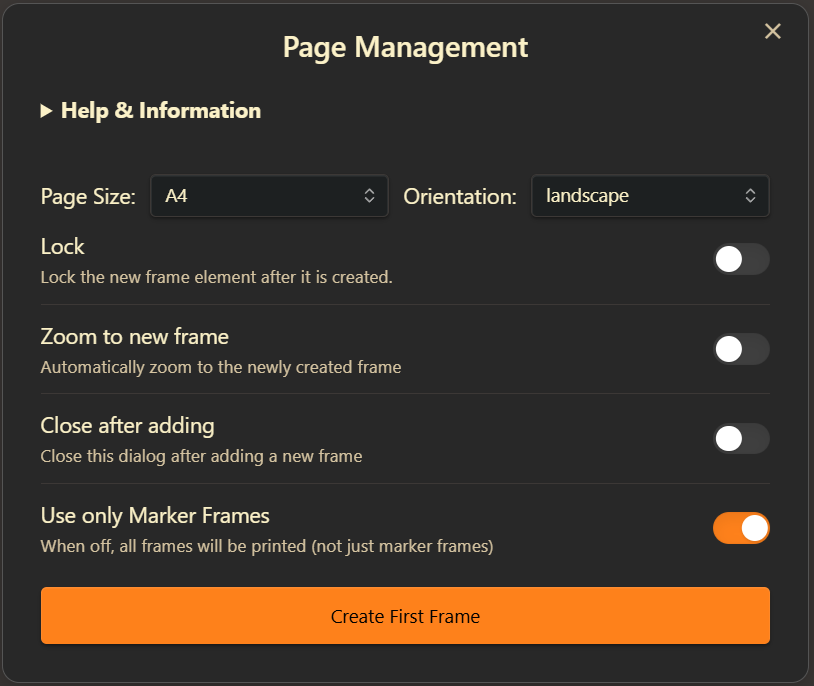
|
||||
|
||||
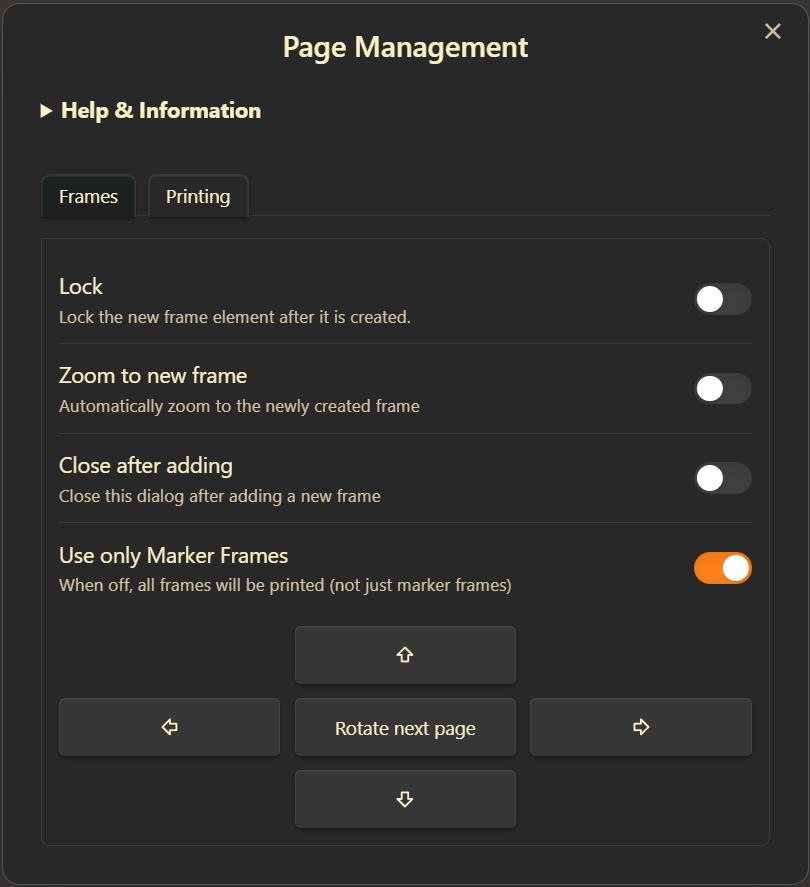
|
||||
|
||||

|
||||
|
||||
```js
|
||||
*/
|
||||
|
||||
if(!ea.verifyMinimumPluginVersion || !ea.verifyMinimumPluginVersion("2.14.3")) {
|
||||
new Notice("This script requires a newer version of Excalidraw. Please install the latest version.");
|
||||
return;
|
||||
}
|
||||
|
||||
async function run() {
|
||||
// Help text for the script
|
||||
const HELP_TEXT = `
|
||||
**Easily split your Excalidraw drawing into printable pages!**
|
||||
|
||||
If you find this script helpful, consider [buying me a coffee](https://ko-fi.com/zsolt). Thank you.
|
||||
|
||||
---
|
||||
|
||||
### How it works
|
||||
|
||||
- **Define Pages:** Use frames to mark out each page area in your drawing. You can create the first frame with this script (choose a standard size or orientation), or draw your own frame for a custom page size.
|
||||
- **Add More Pages:** Select a frame, then use the arrow buttons to add new frames next to it. All new frames will match the size of the selected one.
|
||||
- **Rename Frames:** You can rename frames as you like. When exporting to PDF, pages will be ordered alphabetically by frame name.
|
||||
|
||||
---
|
||||
|
||||
### Important Notes
|
||||
|
||||
- **Same Size & Orientation:** All frames must have the same size and orientation (e.g., all A4 Portrait) to export to PDF. Excalidraw currently does not support PDFs with different-sized pages.
|
||||
- **Custom Sizes:** If you draw your own frame, the PDF will use that exact size—great for custom page layouts!
|
||||
- **Margins:** If you set a margin, the page size stays the same, but your content will shrink to fit inside the printable area.
|
||||
- **No Frame Borders/Titles in Print:** Frame borders and frame titles will *not* appear in the PDF.
|
||||
- **No Frame Clipping:** The script disables frame clipping for this drawing.
|
||||
- **Templates:** You can save a template document with prearranged frames (even locked ones) for reuse.
|
||||
- **Lock Frames:** Frames only define print areas—they don't "contain" elements. Locking frames is recommended to prevent accidental movement.
|
||||
- **Outside Content:** Anything outside the frames will *not* appear in the PDF.
|
||||
|
||||
---
|
||||
|
||||
### Printing
|
||||
|
||||
- **Export to PDF:** Click the printer button to export each frame as a separate page in a PDF.
|
||||
- **Order:** Pages are exported in alphabetical order of frame names.
|
||||
|
||||
---
|
||||
|
||||
### Settings
|
||||
|
||||
You can also access script settings at the bottom of Excalidraw Plugin settings. The script stores your preferences for:
|
||||
- Locking new frames after creation
|
||||
- Zooming to new frames
|
||||
- Closing the dialog after adding a frame
|
||||
- Default page size and orientation
|
||||
- Print margin
|
||||
|
||||
---
|
||||
|
||||
**Tip:** For more on templates, see [Mastering Excalidraw Templates](https://youtu.be/jgUpYznHP9A). For referencing pages in markdown, see [Image Fragments](https://youtu.be/sjZfdqpxqsg) and [Image Block References](https://youtu.be/yZQoJg2RCKI).
|
||||
`;
|
||||
|
||||
// Enable frame rendering
|
||||
const st = ea.getExcalidrawAPI().getAppState();
|
||||
const {enabled, clip, name, outline} = st.frameRendering;
|
||||
if(!enabled || clip || !name || !outline) {
|
||||
ea.viewUpdateScene({
|
||||
appState: {
|
||||
frameRendering: {
|
||||
enabled: true,
|
||||
clip: false,
|
||||
name: true,
|
||||
outline: true
|
||||
}
|
||||
}
|
||||
});
|
||||
}
|
||||
|
||||
// Page size options (using standard sizes from ExcalidrawAutomate)
|
||||
const PAGE_SIZES = [
|
||||
"A0", "A1", "A2", "A3", "A4", "A5", "A6",
|
||||
"Letter", "Legal", "Tabloid", "Ledger"
|
||||
];
|
||||
|
||||
const PAGE_ORIENTATIONS = ["portrait", "landscape"];
|
||||
|
||||
// Margin sizes in points
|
||||
const MARGINS = {
|
||||
"none": 0,
|
||||
"tiny": 10,
|
||||
"normal": 60,
|
||||
};
|
||||
|
||||
// Initialize settings
|
||||
let settings = ea.getScriptSettings();
|
||||
let dirty = false;
|
||||
|
||||
// Define setting keys
|
||||
const PAGE_SIZE = "Page size";
|
||||
const ORIENTATION = "Page orientation";
|
||||
const MARGIN = "Print-margin";
|
||||
const LOCK_FRAME = "Lock frame after it is created";
|
||||
const SHOULD_ZOOM = "Should zoom after adding page";
|
||||
const SHOULD_CLOSE = "Should close after adding page";
|
||||
const PRINT_EMPTY = "Print empty pages";
|
||||
|
||||
// Set default values on first run
|
||||
if (!settings[PAGE_SIZE]) {
|
||||
settings = {};
|
||||
settings[PAGE_SIZE] = { value: "A4", valueset: PAGE_SIZES };
|
||||
settings[ORIENTATION] = { value: "portrait", valueset: PAGE_ORIENTATIONS };
|
||||
settings[MARGIN] = { value: "none", valueset: Object.keys(MARGINS)};
|
||||
settings[SHOULD_ZOOM] = { value: false };
|
||||
settings[SHOULD_CLOSE] = { value: false };
|
||||
settings[LOCK_FRAME] = { value: true };
|
||||
settings[PRINT_EMPTY] = { value: false };
|
||||
dirty = true;
|
||||
}
|
||||
|
||||
//once off correction. In the first version I incorrectly used valueSet with wrong casing.
|
||||
if(settings[PAGE_SIZE].valueSet) {
|
||||
settings[PAGE_SIZE].valueset = settings[PAGE_SIZE].valueSet;
|
||||
delete settings[PAGE_SIZE].valueSet;
|
||||
settings[ORIENTATION].valueset = settings[ORIENTATION].valueSet;
|
||||
delete settings[ORIENTATION].valueSet;
|
||||
settings[MARGIN].valueset = settings[MARGIN].valueSet;
|
||||
delete settings[MARGIN].valueSet;
|
||||
dirty = true;
|
||||
}
|
||||
|
||||
if(!settings[LOCK_FRAME]) {
|
||||
settings[LOCK_FRAME] = { value: true };
|
||||
dirty = true;
|
||||
}
|
||||
|
||||
if(!settings[PRINT_EMPTY]) {
|
||||
settings[PRINT_EMPTY] = { value: false };
|
||||
dirty = true;
|
||||
}
|
||||
|
||||
const getSortedFrames = () => ea.getViewElements()
|
||||
.filter(el => el.type === "frame")
|
||||
.sort((a, b) => {
|
||||
const nameA = a.name || "";
|
||||
const nameB = b.name || "";
|
||||
return nameA.localeCompare(nameB);
|
||||
});
|
||||
|
||||
// Find existing page frames and determine next page number
|
||||
const findExistingPages = (selectLastFrame = false) => {
|
||||
const frameElements = getSortedFrames();
|
||||
|
||||
// Extract page numbers from frame names
|
||||
const pageNumbers = frameElements
|
||||
.map(frame => {
|
||||
const match = frame.name?.match(/Page\s+(\d+)/i);
|
||||
return match ? parseInt(match[1]) : 0;
|
||||
})
|
||||
.filter(num => !isNaN(num));
|
||||
|
||||
// Find the highest page number
|
||||
const nextPageNumber = pageNumbers.length > 0
|
||||
? Math.max(...pageNumbers) + 1
|
||||
: 1;
|
||||
|
||||
if(selectLastFrame && frameElements.length > 0) {
|
||||
ea.selectElementsInView([frameElements[frameElements.length-1]]);
|
||||
}
|
||||
|
||||
return {
|
||||
frames: frameElements,
|
||||
nextPageNumber: nextPageNumber
|
||||
};
|
||||
};
|
||||
|
||||
// Check if there are frames in the scene and if a frame is selected
|
||||
let existingFrames = ea.getViewElements().filter(el => el.type === "frame");
|
||||
let selectedFrame = ea.getViewSelectedElements().find(el => el.type === "frame");
|
||||
const hasFrames = existingFrames.length > 0;
|
||||
if(hasFrames && !selectedFrame) {
|
||||
if(st.activeLockedId && existingFrames.find(f=>f.id === st.activeLockedId)) {
|
||||
selectedFrame = existingFrames.find(f=>f.id === st.activeLockedId);
|
||||
ea.viewUpdateScene({ appState: { activeLockedId: null }});
|
||||
ea.selectElementsInView([selectedFrame]);
|
||||
} else {
|
||||
findExistingPages(true);
|
||||
selectedFrame = ea.getViewSelectedElements().find(el => el.type === "frame");
|
||||
}
|
||||
}
|
||||
|
||||
const hasSelectedFrame = !!selectedFrame;
|
||||
const modal = new ea.FloatingModal(ea.plugin.app);
|
||||
let lockFrame = settings[LOCK_FRAME].value;
|
||||
let shouldClose = settings[SHOULD_CLOSE].value;
|
||||
let shouldZoom = settings[SHOULD_ZOOM].value;
|
||||
let printEmptyPages = settings[PRINT_EMPTY].value;
|
||||
|
||||
// Show notice if there are frames but none selected
|
||||
if (hasFrames && !hasSelectedFrame) {
|
||||
new Notice("Select a frame before running the script", 7000);
|
||||
return;
|
||||
}
|
||||
|
||||
// Create the first frame
|
||||
const createFirstFrame = async (pageSize, orientation) => {
|
||||
// Use ExcalidrawAutomate's built-in function to get page dimensions
|
||||
const dimensions = ea.getPagePDFDimensions(pageSize, orientation);
|
||||
|
||||
if (!dimensions) {
|
||||
new Notice("Invalid page size selected");
|
||||
return;
|
||||
}
|
||||
|
||||
// Save settings when creating first frame
|
||||
if (settings[PAGE_SIZE].value !== pageSize) {
|
||||
settings[PAGE_SIZE].value = pageSize;
|
||||
dirty = true;
|
||||
}
|
||||
|
||||
if (settings[ORIENTATION].value !== orientation) {
|
||||
settings[ORIENTATION].value = orientation;
|
||||
dirty = true;
|
||||
}
|
||||
|
||||
// Format page number with leading zero
|
||||
const pageName = "Page 01";
|
||||
|
||||
// Calculate position to center the frame
|
||||
const appState = ea.getExcalidrawAPI().getAppState();
|
||||
const x = (appState.width - dimensions.width) / 2;
|
||||
const y = (appState.height - dimensions.height) / 2;
|
||||
|
||||
return await addFrameElement(x, y, dimensions.width, dimensions.height, pageName, true);
|
||||
};
|
||||
|
||||
// Add new page frame
|
||||
const addPage = async (direction, pageSize, orientation) => {
|
||||
selectedFrame = ea.getViewSelectedElements().find(el => el.type === "frame");
|
||||
if (!selectedFrame) {
|
||||
const { activeLockedId } = ea.getExcalidrawAPI().getAppState();
|
||||
if(activeLockedId) {
|
||||
selectedFrame = ea.getViewElements().find(el=>el.id === activeLockedId && el.type === "frame");
|
||||
}
|
||||
if (!selectedFrame) return;
|
||||
}
|
||||
ea.viewUpdateScene({appState: {activeLockedId: null}});
|
||||
|
||||
const { frames, nextPageNumber } = findExistingPages();
|
||||
|
||||
// Get dimensions from selected frame
|
||||
const dimensions = {
|
||||
width: selectedFrame.width,
|
||||
height: selectedFrame.height
|
||||
};
|
||||
|
||||
// Format page number with leading zero
|
||||
const pageName = `Page ${nextPageNumber.toString().padStart(2, '0')}`;
|
||||
|
||||
// Calculate position based on direction and selected frame
|
||||
let x = 0;
|
||||
let y = 0;
|
||||
|
||||
switch (direction) {
|
||||
case "right":
|
||||
x = selectedFrame.x + selectedFrame.width;
|
||||
y = selectedFrame.y;
|
||||
break;
|
||||
case "left":
|
||||
x = selectedFrame.x - dimensions.width;
|
||||
y = selectedFrame.y;
|
||||
break;
|
||||
case "down":
|
||||
x = selectedFrame.x;
|
||||
y = selectedFrame.y + selectedFrame.height;
|
||||
break;
|
||||
case "up":
|
||||
x = selectedFrame.x;
|
||||
y = selectedFrame.y - dimensions.height;
|
||||
break;
|
||||
}
|
||||
|
||||
return await addFrameElement(x, y, dimensions.width, dimensions.height, pageName);
|
||||
};
|
||||
|
||||
addFrameElement = async (x, y, width, height, pageName, repositionToCursor = false) => {
|
||||
const frameId = ea.addFrame(x, y, width, height, pageName);
|
||||
if(lockFrame) {
|
||||
ea.getElement(frameId).locked = true;
|
||||
}
|
||||
await ea.addElementsToView(repositionToCursor);
|
||||
const addedFrame = ea.getViewElements().find(el => el.id === frameId);
|
||||
if(shouldZoom) {
|
||||
ea.viewZoomToElements(true, [addedFrame]);
|
||||
} else {
|
||||
ea.selectElementsInView([addedFrame]);
|
||||
}
|
||||
|
||||
//ready for the next frame
|
||||
ea.clear();
|
||||
selectedFrame = addedFrame;
|
||||
if(shouldClose) {
|
||||
modal.close();
|
||||
}
|
||||
return addedFrame;
|
||||
}
|
||||
|
||||
const translateToZero = ({ top, left, bottom, right }, padding=0) => {
|
||||
const {topX, topY, width, height} = ea.getBoundingBox(ea.getViewElements());
|
||||
const newTop = top - (topY - padding);
|
||||
const newLeft = left - (topX - padding);
|
||||
const newBottom = bottom - (topY - padding);
|
||||
const newRight = right - (topX - padding);
|
||||
|
||||
return {
|
||||
top: newTop,
|
||||
left: newLeft,
|
||||
bottom: newBottom,
|
||||
right: newRight,
|
||||
};
|
||||
}
|
||||
|
||||
// NEW: detect if any non-frame element overlaps the given area
|
||||
const hasElementsInArea = ({top, left, bottom, right}) => {
|
||||
return ea.getViewElements()
|
||||
.filter(el => el.type !== "frame")
|
||||
.some(el => {
|
||||
const {topX, topY, width, height} = ea.getBoundingBox([el]);
|
||||
const elLeft = topX;
|
||||
const elTop = topY;
|
||||
const elRight = topX + width;
|
||||
const elBottom = topY + height;
|
||||
// overlap exists if rectangles intersect
|
||||
return !(elLeft >= right || elRight <= left || elTop >= bottom || elBottom <= top);
|
||||
});
|
||||
};
|
||||
|
||||
// Check if all frames have the same size
|
||||
const checkFrameSizes = (frames) => {
|
||||
if (frames.length <= 1) return true;
|
||||
|
||||
const referenceWidth = frames[0].width;
|
||||
const referenceHeight = frames[0].height;
|
||||
|
||||
return frames.every(frame =>
|
||||
Math.abs(frame.width - referenceWidth) < 1 &&
|
||||
Math.abs(frame.height - referenceHeight) < 1
|
||||
);
|
||||
};
|
||||
|
||||
// Print frames to PDF
|
||||
const printToPDF = async (marginSize) => {
|
||||
const margin = MARGINS[marginSize] || 0;
|
||||
|
||||
// Save margin setting
|
||||
if (settings[MARGIN].value !== marginSize) {
|
||||
settings[MARGIN].value = marginSize;
|
||||
dirty = true;
|
||||
}
|
||||
|
||||
// Get all frame elements and sort by name
|
||||
const frames = getSortedFrames();
|
||||
|
||||
if (frames.length === 0) {
|
||||
new Notice("No frames found to print");
|
||||
return;
|
||||
}
|
||||
|
||||
// Check if all frames have the same size
|
||||
if (!checkFrameSizes(frames)) {
|
||||
new Notice("Only same sized pages are supported currently", 7000);
|
||||
return;
|
||||
}
|
||||
|
||||
// Create a notice during processing
|
||||
const notice = new Notice("Preparing PDF, please wait...", 0);
|
||||
|
||||
// Create SVGs for each frame
|
||||
const svgPages = [];
|
||||
|
||||
const svgScene = await ea.createViewSVG({
|
||||
withBackground: true,
|
||||
theme: st.theme,
|
||||
frameRendering: { enabled: false, name: false, outline: false, clip: false },
|
||||
padding: 0,
|
||||
selectedOnly: false,
|
||||
skipInliningFonts: false,
|
||||
embedScene: false,
|
||||
});
|
||||
|
||||
for (const frame of frames) {
|
||||
// NEW: skip empty frames unless user opted to print them
|
||||
const area = {
|
||||
top: frame.y,
|
||||
left: frame.x,
|
||||
bottom: frame.y + frame.height,
|
||||
right: frame.x + frame.width,
|
||||
};
|
||||
if(!printEmptyPages && !hasElementsInArea(area)) continue;
|
||||
|
||||
const { top, left, bottom, right } = translateToZero(area);
|
||||
|
||||
//always create the new SVG in the main Obsidian workspace (not the popout window, if present)
|
||||
const host = window.createDiv();
|
||||
host.innerHTML = svgScene.outerHTML;
|
||||
const clonedSVG = host.firstElementChild;
|
||||
const width = Math.abs(left-right);
|
||||
const height = Math.abs(top-bottom);
|
||||
clonedSVG.setAttribute("viewBox", `${left} ${top} ${width} ${height}`);
|
||||
clonedSVG.setAttribute("width", `${width}`);
|
||||
clonedSVG.setAttribute("height", `${height}`);
|
||||
svgPages.push(clonedSVG);
|
||||
}
|
||||
|
||||
// NEW: abort if nothing to print
|
||||
if(svgPages.length === 0) {
|
||||
notice.hide();
|
||||
new Notice("No pages to print (all selected frames are empty)");
|
||||
notice.hide();
|
||||
return;
|
||||
}
|
||||
|
||||
// Use dimensions from the first frame
|
||||
const width = frames[0].width;
|
||||
const height = frames[0].height;
|
||||
|
||||
// Create PDF
|
||||
await ea.createPDF({
|
||||
SVG: svgPages,
|
||||
scale: { fitToPage: true },
|
||||
pageProps: {
|
||||
dimensions: { width, height },
|
||||
backgroundColor: "#ffffff",
|
||||
margin: {
|
||||
left: margin,
|
||||
right: margin,
|
||||
top: margin,
|
||||
bottom: margin
|
||||
},
|
||||
alignment: "center"
|
||||
},
|
||||
filename: ea.targetView.file.basename + "-pages.pdf"
|
||||
});
|
||||
notice.hide();
|
||||
};
|
||||
|
||||
// -----------------------
|
||||
// Create a floating modal
|
||||
// -----------------------
|
||||
|
||||
modal.titleEl.setText("Page Management");
|
||||
modal.titleEl.style.textAlign = "center";
|
||||
|
||||
// Handle save settings on modal close
|
||||
modal.onClose = () => {
|
||||
if (dirty) {
|
||||
ea.setScriptSettings(settings);
|
||||
}
|
||||
};
|
||||
|
||||
// Create modal content
|
||||
modal.contentEl.createDiv({ cls: "excalidraw-page-manager" }, div => {
|
||||
const container = div.createDiv({
|
||||
attr: {
|
||||
style: "display: flex; flex-direction: column; gap: 15px; padding: 10px;"
|
||||
}
|
||||
});
|
||||
|
||||
// Add help section at the top
|
||||
const helpDiv = container.createDiv({
|
||||
attr: {
|
||||
style: "margin-bottom: 10px;"
|
||||
}
|
||||
});
|
||||
|
||||
helpDiv.createEl("details", {}, (details) => {
|
||||
details.createEl("summary", {
|
||||
text: "Help & Information",
|
||||
attr: {
|
||||
style: "cursor: pointer; font-weight: bold; margin-bottom: 10px;"
|
||||
}
|
||||
});
|
||||
|
||||
details.createEl("div", {
|
||||
attr: {
|
||||
style: "padding: 10px; border: 1px solid var(--background-modifier-border); border-radius: 4px; margin-top: 8px; font-size: 0.9em; max-height: 300px; overflow-y: auto;"
|
||||
}
|
||||
}, div => {
|
||||
ea.obsidian.MarkdownRenderer.render(ea.plugin.app, HELP_TEXT, div, "", ea.plugin)
|
||||
});
|
||||
});
|
||||
|
||||
let pageSizeDropdown, orientationDropdown, marginDropdown;
|
||||
|
||||
// Settings section - only show for first frame creation
|
||||
if (!hasFrames) {
|
||||
const settingsContainer = container.createDiv({
|
||||
attr: {
|
||||
style: "display: grid; grid-template-columns: auto 1fr; gap: 10px; align-items: center;"
|
||||
}
|
||||
});
|
||||
|
||||
// Page size dropdown
|
||||
settingsContainer.createEl("label", { text: "Page Size:" });
|
||||
pageSizeDropdown = settingsContainer.createEl("select", {
|
||||
cls: "dropdown",
|
||||
attr: { style: "width: 100%;" }
|
||||
});
|
||||
|
||||
PAGE_SIZES.forEach(size => {
|
||||
pageSizeDropdown.createEl("option", { text: size, value: size });
|
||||
});
|
||||
pageSizeDropdown.value = settings[PAGE_SIZE].value;
|
||||
|
||||
// Orientation dropdown
|
||||
settingsContainer.createEl("label", { text: "Orientation:" });
|
||||
orientationDropdown = settingsContainer.createEl("select", {
|
||||
cls: "dropdown",
|
||||
attr: { style: "width: 100%;" }
|
||||
});
|
||||
|
||||
PAGE_ORIENTATIONS.forEach(orientation => {
|
||||
orientationDropdown.createEl("option", { text: orientation, value: orientation });
|
||||
});
|
||||
orientationDropdown.value = settings[ORIENTATION].value;
|
||||
}
|
||||
|
||||
// Show margin settings only if frames exist
|
||||
if (hasFrames) {
|
||||
const marginContainer = container.createDiv({
|
||||
attr: {
|
||||
style: "display: grid; grid-template-columns: auto 1fr; gap: 10px; align-items: center;"
|
||||
}
|
||||
});
|
||||
|
||||
// Margin dropdown (for printing)
|
||||
marginContainer.createEl("label", { text: "Print Margin:" });
|
||||
marginDropdown = marginContainer.createEl("select", {
|
||||
cls: "dropdown",
|
||||
attr: { style: "width: 100%;" }
|
||||
});
|
||||
|
||||
Object.keys(MARGINS).forEach(margin => {
|
||||
marginDropdown.createEl("option", { text: margin, value: margin });
|
||||
});
|
||||
marginDropdown.value = settings[MARGIN].value;
|
||||
}
|
||||
|
||||
// Add checkboxes for zoom and modal behavior only when frames exist
|
||||
const optionsContainer = container.createDiv({
|
||||
attr: {
|
||||
style: "margin-top: 10px;"
|
||||
}
|
||||
});
|
||||
|
||||
new ea.obsidian.Setting(optionsContainer)
|
||||
.setName("Lock")
|
||||
.setDesc("Lock the new frame element after it is created.")
|
||||
.addToggle(toggle => {
|
||||
toggle.setValue(lockFrame)
|
||||
.onChange(value => {
|
||||
lockFrame = value;
|
||||
if (settings[LOCK_FRAME].value !== value) {
|
||||
settings[LOCK_FRAME].value = value;
|
||||
dirty = true;
|
||||
}
|
||||
});
|
||||
});
|
||||
|
||||
// Zoom to added frame checkbox
|
||||
new ea.obsidian.Setting(optionsContainer)
|
||||
.setName("Zoom to new frame")
|
||||
.setDesc("Automatically zoom to the newly created frame")
|
||||
.addToggle(toggle => {
|
||||
toggle.setValue(shouldZoom)
|
||||
.onChange(value => {
|
||||
shouldZoom = value;
|
||||
if (settings[SHOULD_ZOOM].value !== value) {
|
||||
settings[SHOULD_ZOOM].value = value;
|
||||
dirty = true;
|
||||
}
|
||||
});
|
||||
});
|
||||
|
||||
// Close after adding checkbox
|
||||
new ea.obsidian.Setting(optionsContainer)
|
||||
.setName("Close after adding")
|
||||
.setDesc("Close this dialog after adding a new frame")
|
||||
.addToggle(toggle => {
|
||||
toggle.setValue(shouldClose)
|
||||
.onChange(value => {
|
||||
shouldClose = value;
|
||||
if (settings[SHOULD_CLOSE].value !== value) {
|
||||
settings[SHOULD_CLOSE].value = value;
|
||||
dirty = true;
|
||||
}
|
||||
});
|
||||
});
|
||||
|
||||
// NEW toggle: Print empty pages
|
||||
new ea.obsidian.Setting(optionsContainer)
|
||||
.setName("Print empty pages")
|
||||
.setDesc("Include frames with no content in the PDF")
|
||||
.addToggle(toggle => {
|
||||
toggle.setValue(printEmptyPages)
|
||||
.onChange(value => {
|
||||
printEmptyPages = value;
|
||||
if(settings[PRINT_EMPTY].value !== value) {
|
||||
settings[PRINT_EMPTY].value = value;
|
||||
dirty = true;
|
||||
}
|
||||
});
|
||||
});
|
||||
|
||||
// Buttons section
|
||||
const buttonContainer = container.createDiv({
|
||||
attr: {
|
||||
style: "display: grid; grid-template-columns: repeat(3, 1fr); gap: 10px; margin-top: 10px;"
|
||||
}
|
||||
});
|
||||
|
||||
if (!hasFrames) {
|
||||
// First frame creation button (centered)
|
||||
const createFirstBtn = buttonContainer.createEl("button", {
|
||||
cls: "page-btn",
|
||||
attr: {
|
||||
style: "grid-column: 1 / span 3; height: 40px; background-color: var(--interactive-accent); color: var(--text-on-accent);"
|
||||
}
|
||||
});
|
||||
createFirstBtn.textContent = "Create First Frame";
|
||||
createFirstBtn.addEventListener("click", async () => {
|
||||
const tmpShouldClose = shouldClose;
|
||||
shouldClose = true;
|
||||
await createFirstFrame(pageSizeDropdown.value, orientationDropdown.value);
|
||||
shouldClose = tmpShouldClose;
|
||||
if(!shouldClose) run();
|
||||
});
|
||||
} else if (hasSelectedFrame) {
|
||||
// Only show navigation buttons and print when a frame is selected
|
||||
|
||||
// Up button (in middle of top row)
|
||||
const upBtn = buttonContainer.createEl("button", {
|
||||
cls: "page-btn",
|
||||
attr: {
|
||||
style: "grid-column: 2; grid-row: 1; height: 40px;"
|
||||
}
|
||||
});
|
||||
upBtn.innerHTML = ea.obsidian.getIcon("arrow-big-up").outerHTML;
|
||||
upBtn.addEventListener("click", async () => {
|
||||
await addPage("up");
|
||||
});
|
||||
|
||||
// Add empty space
|
||||
buttonContainer.createDiv({
|
||||
attr: { style: "grid-column: 3; grid-row: 1;" }
|
||||
});
|
||||
|
||||
// Left button
|
||||
const leftBtn = buttonContainer.createEl("button", {
|
||||
cls: "page-btn",
|
||||
attr: { style: "grid-column: 1; grid-row: 2; height: 40px;" }
|
||||
});
|
||||
leftBtn.innerHTML = ea.obsidian.getIcon("arrow-big-left").outerHTML;
|
||||
leftBtn.addEventListener("click", async () => {
|
||||
await addPage("left");
|
||||
});
|
||||
|
||||
// Print button (center)
|
||||
const printBtn = buttonContainer.createEl("button", {
|
||||
cls: "page-btn",
|
||||
attr: {
|
||||
style: "grid-column: 2; grid-row: 2; height: 40px; background-color: var(--interactive-accent);"
|
||||
}
|
||||
});
|
||||
printBtn.innerHTML = ea.obsidian.getIcon("printer").outerHTML;
|
||||
printBtn.addEventListener("click", async () => {
|
||||
await printToPDF(marginDropdown.value);
|
||||
});
|
||||
|
||||
// Right button
|
||||
const rightBtn = buttonContainer.createEl("button", {
|
||||
cls: "page-btn",
|
||||
attr: { style: "grid-column: 3; grid-row: 2; height: 40px;" }
|
||||
});
|
||||
rightBtn.innerHTML = ea.obsidian.getIcon("arrow-big-right").outerHTML;
|
||||
rightBtn.addEventListener("click", async () => {
|
||||
await addPage("right");
|
||||
});
|
||||
|
||||
// Down button (in middle of bottom row)
|
||||
const downBtn = buttonContainer.createEl("button", {
|
||||
cls: "page-btn",
|
||||
attr: { style: "grid-column: 2; grid-row: 3; height: 40px;" }
|
||||
});
|
||||
downBtn.innerHTML = ea.obsidian.getIcon("arrow-big-down").outerHTML;
|
||||
downBtn.addEventListener("click", async () => {
|
||||
await addPage("down");
|
||||
});
|
||||
|
||||
// Add empty space
|
||||
buttonContainer.createDiv({
|
||||
attr: { style: "grid-column: 1; grid-row: 3;" }
|
||||
});
|
||||
}
|
||||
|
||||
// Add CSS
|
||||
div.createEl("style", {
|
||||
text: `
|
||||
.page-btn {
|
||||
display: flex;
|
||||
justify-content: center;
|
||||
align-items: center;
|
||||
cursor: pointer;
|
||||
border-radius: 4px;
|
||||
}
|
||||
.page-btn:hover {
|
||||
background-color: var(--interactive-hover);
|
||||
}
|
||||
.dropdown {
|
||||
height: 30px;
|
||||
background-color: var(--background-secondary);
|
||||
color: var(--text-normal);
|
||||
border-radius: 4px;
|
||||
border: 1px solid var(--background-modifier-border);
|
||||
padding: 0 10px;
|
||||
}
|
||||
`
|
||||
});
|
||||
});
|
||||
|
||||
modal.open();
|
||||
}
|
||||
|
||||
run();
|
||||

@@ -0,0 +1 @@
|
||||
<svg class="skip" xmlns="http://www.w3.org/2000/svg" width="24" height="24" viewBox="0 0 24 24" fill="none" stroke="currentColor" stroke-width="2" stroke-linecap="round" stroke-linejoin="round"><path d="M6 18H4a2 2 0 0 1-2-2v-5a2 2 0 0 1 2-2h16a2 2 0 0 1 2 2v5a2 2 0 0 1-2 2h-2"/><path d="M6 9V3a1 1 0 0 1 1-1h10a1 1 0 0 1 1 1v6"/><rect x="6" y="14" width="12" height="8" rx="1"/></svg>
|
||||
|
After Width: | Height: | Size: 386 B |
+17
-21
@@ -7,28 +7,23 @@ This script modifies the color lightness/hue/saturation/transparency of selected
|
||||
- The color of SVG elements and nested Excalidraw drawings will only be mapped. When mapping colors, the original image remains unchanged, only a mapping table is created and the image is recolored during rendering of your Excalidraw screen. In case you want to make manual changes you can also edit the mapping in Markdown View Mode under `## Embedded Files`
|
||||
|
||||
If you select only a single SVG or nested Excalidraw element, then the script offers an additional feature. You can map colors one by one in the image.
|
||||
```js*/
|
||||
```js
|
||||
*/
|
||||
|
||||
const HELP_TEXT = `
|
||||
<ul>
|
||||
<li dir="auto">Select SVG images, nested Excalidraw drawings and/or regular Excalidraw elements</li>
|
||||
<li dir="auto">For a single selected image, you can map colors individually in the color mapping section</li>
|
||||
<li dir="auto">For Excalidraw elements: stroke and background colors are modified permanently</li>
|
||||
<li dir="auto">For SVG/nested drawings: original files stay unchanged, color mapping is stored under <code>## Embedded Files</code></li>
|
||||
<li dir="auto">Using color maps helps maintain links between drawings while allowing different color themes</li>
|
||||
<li dir="auto">Sliders work on relative scale - the amount of change is applied to current values</li>
|
||||
<li dir="auto">Unlike Excalidraw's opacity setting which affects the whole element:
|
||||
<ul>
|
||||
<li dir="auto">Shade Master can set different opacity for stroke vs background</li>
|
||||
<li dir="auto">Note: SVG/nested drawing colors are mapped at color name level, thus "black" is different from "#000000"</li>
|
||||
<li dir="auto">Additionally if the same color is used as fill and stroke the color can only be mapped once</li>
|
||||
</ul>
|
||||
</li>
|
||||
<li dir="auto">This is an experimental script - contributions welcome on GitHub via PRs</li>
|
||||
</ul>
|
||||
<div class="excalidraw-videoWrapper"><div>
|
||||
<iframe src="https://www.youtube.com/embed/ISuORbVKyhQ" title="YouTube video player" frameborder="0" allow="accelerometer; autoplay; clipboard-write; encrypted-media; gyroscope; picture-in-picture" allowfullscreen></iframe>
|
||||
</div></div>
|
||||
- Select SVG images, nested Excalidraw drawings and/or regular Excalidraw elements
|
||||
- For a single selected image, you can map colors individually in the color mapping section
|
||||
- For Excalidraw elements: stroke and background colors are modified permanently
|
||||
- For SVG/nested drawings: original files stay unchanged, color mapping is stored under \`## Embedded Files\`
|
||||
- Using color maps helps maintain links between drawings while allowing different color themes
|
||||
- Sliders work on relative scale - the amount of change is applied to current values
|
||||
- Unlike Excalidraw's opacity setting which affects the whole element:
|
||||
- Shade Master can set different opacity for stroke vs background
|
||||
- **Note:** SVG/nested drawing colors are mapped at color name level, thus "black" is different from "#000000"
|
||||
- Additionally if the same color is used as fill and stroke the color can only be mapped once
|
||||
- This is an experimental script - contributions welcome on GitHub via PRs
|
||||
|
||||

|
||||
`;
|
||||
|
||||
if(!ea.verifyMinimumPluginVersion || !ea.verifyMinimumPluginVersion("2.7.2")) {
|
||||
@@ -343,7 +338,8 @@ function showModal() {
|
||||
const helpDetailsDiv = helpDiv.createEl("div", {
|
||||
attr: { style: "margin-top: 0em; " }
|
||||
});
|
||||
helpDetailsDiv.innerHTML = HELP_TEXT;
|
||||
//helpDetailsDiv.innerHTML = HELP_TEXT;
|
||||
await ea.obsidian.MarkdownRenderer.render(ea.plugin.app, HELP_TEXT, helpDetailsDiv, "", ea.plugin);
|
||||
|
||||
const component = new ea.obsidian.Setting(contentEl)
|
||||
.setName(FORMAT)
|
||||
|
||||
@@ -1 +1 @@
|
||||
[{"fname":"Mindmap connector.md","mtime":1658686599427},{"fname":"Mindmap connector.svg","mtime":1658686599427},{"fname":"Add Connector Point.md","mtime":1735420748564},{"fname":"Add Connector Point.svg","mtime":1645944722000},{"fname":"Add Link to Existing File and Open.md","mtime":1647807918345},{"fname":"Add Link to Existing File and Open.svg","mtime":1645964261000},{"fname":"Add Link to New Page and Open.md","mtime":1654168862138},{"fname":"Add Link to New Page and Open.svg","mtime":1645960639000},{"fname":"Add Next Step in Process.md","mtime":1688304760357},{"fname":"Add Next Step in Process.svg","mtime":1645960639000},{"fname":"Box Each Selected Groups.md","mtime":1645305706000},{"fname":"Box Each Selected Groups.svg","mtime":1645967510000},{"fname":"Box Selected Elements.md","mtime":1645305706000},{"fname":"Box Selected Elements.svg","mtime":1645960639000},{"fname":"Change shape of selected elements.md","mtime":1652701169236},{"fname":"Change shape of selected elements.svg","mtime":1645960775000},{"fname":"Connect elements.md","mtime":1645305706000},{"fname":"Connect elements.svg","mtime":1645960639000},{"fname":"Convert freedraw to line.md","mtime":1645305706000},{"fname":"Convert freedraw to line.svg","mtime":1645960639000},{"fname":"Convert selected text elements to sticky notes.md","mtime":1670169501383},{"fname":"Convert selected text elements to sticky notes.svg","mtime":1645960639000},{"fname":"Convert text to link with folder and alias.md","mtime":1641639819000},{"fname":"Convert text to link with folder and alias.svg","mtime":1645960639000},{"fname":"Copy Selected Element Styles to Global.md","mtime":1642232088000},{"fname":"Copy Selected Element Styles to Global.svg","mtime":1645960639000},{"fname":"Create new markdown file and embed into active drawing.md","mtime":1640866935000},{"fname":"Create new markdown file and embed into active drawing.svg","mtime":1645960639000},{"fname":"Darken background color.md","mtime":1663059051059},{"fname":"Darken background color.svg","mtime":1645960639000},{"fname":"Elbow connectors.md","mtime":1671126911490},{"fname":"Elbow connectors.svg","mtime":1645960639000},{"fname":"Expand rectangles horizontally keep text centered.md","mtime":1646563692000},{"fname":"Expand rectangles horizontally keep text centered.svg","mtime":1645967510000},{"fname":"Expand rectangles horizontally.md","mtime":1644950235000},{"fname":"Expand rectangles horizontally.svg","mtime":1645967510000},{"fname":"Expand rectangles vertically keep text centered.md","mtime":1646563692000},{"fname":"Expand rectangles vertically keep text centered.svg","mtime":1645967510000},{"fname":"Expand rectangles vertically.md","mtime":1658686599427},{"fname":"Expand rectangles vertically.svg","mtime":1645967510000},{"fname":"Fixed horizontal distance between centers.md","mtime":1646743234000},{"fname":"Fixed horizontal distance between centers.svg","mtime":1645960639000},{"fname":"Fixed inner distance.md","mtime":1646743234000},{"fname":"Fixed inner distance.svg","mtime":1645960639000},{"fname":"Fixed spacing.md","mtime":1646743234000},{"fname":"Fixed spacing.svg","mtime":1645967510000},{"fname":"Fixed vertical distance between centers.md","mtime":1646743234000},{"fname":"Fixed vertical distance between centers.svg","mtime":1645967510000},{"fname":"Fixed vertical distance.md","mtime":1646743234000},{"fname":"Fixed vertical distance.svg","mtime":1645967510000},{"fname":"Lighten background color.md","mtime":1663059051059},{"fname":"Lighten background color.svg","mtime":1645959546000},{"fname":"Modify background color opacity.md","mtime":1644924415000},{"fname":"Modify background color opacity.svg","mtime":1645944722000},{"fname":"Normalize Selected Arrows.md","mtime":1670403743278},{"fname":"Normalize Selected Arrows.svg","mtime":1645960639000},{"fname":"Organic Line.md","mtime":1672920172531},{"fname":"Organic Line.svg","mtime":1645964261000},{"fname":"Organic Line Legacy.md","mtime":1690607372668},{"fname":"Organic Line Legacy.svg","mtime":1690607372668},{"fname":"README.md","mtime":1645175700000},{"fname":"Repeat Elements.md","mtime":1663059051059},{"fname":"Repeat Elements.svg","mtime":1645960639000},{"fname":"Reverse arrows.md","mtime":1645305706000},{"fname":"Reverse arrows.svg","mtime":1645960639000},{"fname":"Scribble Helper.md","mtime":1747585400113},{"fname":"Scribble Helper.svg","mtime":1645944722000},{"fname":"Select Elements of Type.md","mtime":1643464321000},{"fname":"Select Elements of Type.svg","mtime":1645960639000},{"fname":"Set Dimensions.md","mtime":1645305706000},{"fname":"Set Dimensions.svg","mtime":1645944722000},{"fname":"Set Font Family.md","mtime":1645305706000},{"fname":"Set Font Family.svg","mtime":1645944722000},{"fname":"Set Grid.md","mtime":1693725826368},{"fname":"Set Grid.svg","mtime":1645960639000},{"fname":"Set Link Alias.md","mtime":1645305706000},{"fname":"Set Link Alias.svg","mtime":1645960639000},{"fname":"Set Stroke Width of Selected Elements.md","mtime":1748189277Line truncated
|
||||
@@ -47,6 +47,7 @@ I would love to include your contribution in the script library. If you have a s
|
||||
|<div><img src="https://raw.githubusercontent.com/zsviczian/obsidian-excalidraw-plugin/master/ea-scripts/Golden%20Ratio.svg"/></div>|[[#Golden Ratio]]|
|
||||
|<div><img src="https://raw.githubusercontent.com/zsviczian/obsidian-excalidraw-plugin/master/ea-scripts/Grid%20Selected%20Images.svg"/></div>|[[#Grid selected images]]|
|
||||
|<div><img src="https://raw.githubusercontent.com/zsviczian/obsidian-excalidraw-plugin/master/ea-scripts/Mindmap%20format.svg"/></div>|[[#Mindmap format]]|
|
||||
|<div><img src="https://raw.githubusercontent.com/zsviczian/obsidian-excalidraw-plugin/master/ea-scripts/Printable%20Layout%20Wizard.svg"/></div>|[[#Printable Layout Wizard]]|
|
||||
|<div><img src="https://raw.githubusercontent.com/zsviczian/obsidian-excalidraw-plugin/master/ea-scripts/Zoom%20to%20Fit%20Selected%20Elements.svg"/></div>|[[#Zoom to Fit Selected Elements]]|
|
||||
|
||||
## Connectors and Arrows
|
||||
@@ -123,6 +124,7 @@ I would love to include your contribution in the script library. If you have a s
|
||||
|<div><img src="https://raw.githubusercontent.com/zsviczian/obsidian-excalidraw-plugin/master/ea-scripts/Excalidraw%20Writing%20Machine.svg"/></div>|[[#Excalidraw Writing Machine]]|
|
||||
|<div><img src="https://raw.githubusercontent.com/zsviczian/obsidian-excalidraw-plugin/master/ea-scripts/GPT-Draw-a-UI.svg"/></div>|[[#GPT Draw-a-UI]]|
|
||||
|<div><img src="https://raw.githubusercontent.com/zsviczian/obsidian-excalidraw-plugin/master/ea-scripts/Palette%20loader.svg"/></div>|[[#Palette Loader]]|
|
||||
|<div><img src="https://raw.githubusercontent.com/zsviczian/obsidian-excalidraw-plugin/master/ea-scripts/Palm%20Guard.svg"/></div>|[[#Palm Guard]]|
|
||||
|<div><img src="https://raw.githubusercontent.com/zsviczian/obsidian-excalidraw-plugin/master/ea-scripts/PDF%20Page%20Text%20to%20Clipboard.svg"/></div>|[[#PDF Page Text to Clipboard]]|
|
||||
|<div><img src="https://raw.githubusercontent.com/zsviczian/obsidian-excalidraw-plugin/master/ea-scripts/Rename%20Image.svg"/></div>|[[#Rename Image]]|
|
||||
|<div><img src="https://raw.githubusercontent.com/zsviczian/obsidian-excalidraw-plugin/master/ea-scripts/Repeat%20Elements.svg"/></div>|[[#Repeat Elements]]|
|
||||
@@ -467,6 +469,14 @@ https://raw.githubusercontent.com/zsviczian/obsidian-excalidraw-plugin/master/ea
|
||||
```
|
||||
<table><tr valign='top'><td class="label">Author</td><td class="data"><a href='https://github.com/zsviczian'>@zsviczian</a></td></tr><tr valign='top'><td class="label">Source</td><td class="data"><a href='https://github.com/zsviczian/obsidian-excalidraw-plugin/blob/master/ea-scripts/Palette%20loader.md'>File on GitHub</a></td></tr><tr valign='top'><td class="label">Description</td><td class="data">Design your palette at <a href="http://paletton.com/" target="_blank">paletton.com</a> Once you are happy with your colors, click Tables/Export in the bottom right of the screen. Then click "Color swatches/as Sketch Palette", and copy the contents of the page to a markdown file in the palette folder of your vault (default is Excalidraw/Palette)<br><img src='https://raw.githubusercontent.com/zsviczian/obsidian-excalidraw-plugin/master/images/scripts-sketch-palette-loader-1.jpg'></td></tr></table>
|
||||
|
||||
## Palm Guard
|
||||
```excalidraw-script-install
|
||||
https://raw.githubusercontent.com/zsviczian/obsidian-excalidraw-plugin/master/ea-scripts/Palm%20Guard.md
|
||||
```
|
||||
<table><tr valign='top'><td class="label">Author</td><td class="data"><a href='https://github.com/zsviczian'>@zsviczian</a></td></tr>
|
||||
<tr valign='top'><td class="label">Source</td><td class="data"><a href='https://github.com/zsviczian/obsidian-excalidraw-plugin/blob/master/ea-scripts/Palm%20Guard.md'>File on GitHub</a></td></tr>
|
||||
<tr valign='top'><td class="label">Description</td><td class="data">Mobile & desktop palm‑rejection and distraction‑free drawing mode: optionally enters fullscreen, hides ALL Excalidraw UI chrome (top toolbar, side / bottom bars, plugin panels) for a clean / zen / immersive / kiosk / focus mode canvas. Provides a tiny draggable micro toolbar (toggle visibility + exit) so you gain maximum drawing area while preventing accidental palm taps. Uses the hotkey you assign in Obsidian’s Hotkey settings for this script to instantly show / hide controls (if no hotkey is set, use the on‑screen toggle). Ideal for stylus sketching, presentations, screen recording, split‑view space saving, or anyone searching for: palm rejection, hide toolbar, hide UI controls, clean mode, distraction free Excalidraw.<br><iframe width="400" height="225" src="https://www.youtube.com/embed/A_udjVjgWN0" title="YouTube video player" frameborder="0" allow="accelerometer; autoplay; clipboard-write; encrypted-media; gyroscope; picture-in-picture" allowfullscreen></iframe><br><a href='https://youtu.be/A_udjVjgWN0' target='_blank'>Link to video on YouTube</a></td></tr></table>
|
||||
|
||||
## PDF Page Text to Clipboard
|
||||
```excalidraw-script-install
|
||||
https://raw.githubusercontent.com/zsviczian/obsidian-excalidraw-plugin/master/ea-scripts/PDF%20Page%20Text%20to%20Clipboard.md
|
||||
@@ -632,6 +642,12 @@ https://raw.githubusercontent.com/zsviczian/obsidian-excalidraw-plugin/master/ea
|
||||
```
|
||||
<table><tr valign='top'><td class="label">Author</td><td class="data"><a href='https://github.com/zsviczian'>@zsviczian</a></td></tr><tr valign='top'><td class="label">Source</td><td class="data"><a href='https://github.com/zsviczian/obsidian-excalidraw-plugin/blob/master/ea-scripts/Uniform%20size.md'>File on GitHub</a></td></tr><tr valign='top'><td class="label">Description</td><td class="data"><img src="https://raw.githubusercontent.com/zsviczian/obsidian-excalidraw-plugin/master/images/scripts-uniform-size.jpg"><br>The script will standardize the sizes of rectangles, diamonds and ellipses adjusting all the elements to match the largest width and height within the group.</td></tr></table>
|
||||
|
||||
# Printable Layout Wizard
|
||||
```excalidraw-script-install
|
||||
https://raw.githubusercontent.com/zsviczian/obsidian-excalidraw-plugin/master/ea-scripts/Printable%20Layout%20Wizard.md
|
||||
```
|
||||
<table><tr valign='top'><td class="label">Author</td><td class="data"><a href='https://github.com/zsviczian'>@zsviczian</a></td></tr><tr valign='top'><td class="label">Source</td><td class="data"><a href='https://github.com/zsviczian/obsidian-excalidraw-plugin/blob/master/ea-scripts/Printable%20Layout%20Wizard.md'>File on GitHub</a></td></tr><tr valign='top'><td class="label">Description</td><td class="data">Export Excalidraw to PDF Pages: Define printable page areas using frames, then export each frame as a separate page in a multi-page PDF. Perfect for turning your Excalidraw drawings into printable notes, handouts, or booklets. Supports standard and custom page sizes, margins, and easy frame arrangement.<br><iframe width="400" height="225" src="https://www.youtube.com/embed/29EWeglRm7" title="YouTube video player" frameborder="0" allow="accelerometer; autoplay; clipboard-write; encrypted-media; gyroscope; picture-in-picture" allowfullscreen></iframe><br><a href='https://youtu.be/29EWeglRm7' target='_blank'>Link to video on YouTube</a><br><img src="https://raw.githubusercontent.com/zsviczian/obsidian-excalidraw-plugin/master/images/scripts-layout-wizard-01.png" style="max-width: 400px;"><br><img src="https://raw.githubusercontent.com/zsviczian/obsidian-excalidraw-plugin/master/images/scripts-layout-wizard-02.png" style="max-width: 400px;"></td></tr></table>
|
||||
|
||||
## Zoom to Fit Selected Elements
|
||||
```excalidraw-script-install
|
||||
https://raw.githubusercontent.com/zsviczian/obsidian-excalidraw-plugin/master/ea-scripts/Zoom%20to%20Fit%20Selected%20Elements.md
|
||||
|
||||

Binary file not shown.
|
After Width: | Height: | Size: 101 KiB |

Binary file not shown.
|
After Width: | Height: | Size: 97 KiB |
+1
-1
@@ -1,7 +1,7 @@
|
||||
{
|
||||
"id": "obsidian-excalidraw-plugin",
|
||||
"name": "Excalidraw",
|
||||
"version": "2.13.1",
|
||||
"version": "2.14.3",
|
||||
"minAppVersion": "1.5.7",
|
||||
"description": "An Obsidian plugin to edit and view Excalidraw drawings",
|
||||
"author": "Zsolt Viczian",
|
||||
|
||||
Generated
+4
-4
@@ -11,7 +11,7 @@
|
||||
"dependencies": {
|
||||
"@popperjs/core": "^2.11.8",
|
||||
"@zsviczian/colormaster": "^1.2.2",
|
||||
"@zsviczian/excalidraw": "0.18.0-25",
|
||||
"@zsviczian/excalidraw": "0.18.0-27",
|
||||
"chroma-js": "^3.1.2",
|
||||
"clsx": "^2.0.0",
|
||||
"es6-promise-pool": "2.5.0",
|
||||
@@ -3494,9 +3494,9 @@
|
||||
"license": "MIT"
|
||||
},
|
||||
"node_modules/@zsviczian/excalidraw": {
|
||||
"version": "0.18.0-25",
|
||||
"resolved": "https://registry.npmjs.org/@zsviczian/excalidraw/-/excalidraw-0.18.0-25.tgz",
|
||||
"integrity": "sha512-aZKkzm1ENNUpwf9ANR+RA34fk2FYZNheHWNFj9CkNig/28bsS/MSVntWJNbk1qcqEQOdxhJkRhVN6NYlUtAZjA==",
|
||||
"version": "0.18.0-27",
|
||||
"resolved": "https://registry.npmjs.org/@zsviczian/excalidraw/-/excalidraw-0.18.0-27.tgz",
|
||||
"integrity": "sha512-cigzCO65+EB+Y4G9LYEK/kVf2R3nNqNjEhGWqi5tZ0AcHEKPsMHAn6CtU36V6crRdojZLtyg5RASIdkxy4zZCA==",
|
||||
"dependencies": {
|
||||
"@braintree/sanitize-url": "6.0.2",
|
||||
"@excalidraw/random-username": "1.1.0",
|
||||
|
||||
+3
-2
@@ -16,14 +16,15 @@
|
||||
"build:mathjax": "cd MathjaxToSVG && npm run build",
|
||||
"build:all": "npm run build:mathjax && npm run build",
|
||||
"dev:mathjax": "cd MathjaxToSVG && npm run dev",
|
||||
"dev:all": "npm run dev:mathjax && npm run dev"
|
||||
"dev:all": "npm run dev:mathjax && npm run dev",
|
||||
"doc": "node scripts/generate-script-library.js"
|
||||
},
|
||||
"keywords": [],
|
||||
"author": "",
|
||||
"license": "MIT",
|
||||
"dependencies": {
|
||||
"@popperjs/core": "^2.11.8",
|
||||
"@zsviczian/excalidraw": "0.18.0-25",
|
||||
"@zsviczian/excalidraw": "0.18.0-30",
|
||||
"chroma-js": "^3.1.2",
|
||||
"clsx": "^2.0.0",
|
||||
"@zsviczian/colormaster": "^1.2.2",
|
||||
|
||||
+1
-1
@@ -49,7 +49,7 @@ const jsxRuntimeShim = `
|
||||
|
||||
const mathjaxtosvg_pkg = isLib ? "" : fs.readFileSync("./MathjaxToSVG/dist/index.js", "utf8");
|
||||
|
||||
const LANGUAGES = ['ru', 'zh-cn']; //english is not compressed as it is always loaded by default
|
||||
const LANGUAGES = ['ru', 'zh-cn', 'zh-tw', 'es']; //english is not compressed as it is always loaded by default
|
||||
|
||||
function trimLastSemicolon(input) {
|
||||
if (input.endsWith(";")) {
|
||||
|
||||
@@ -0,0 +1,105 @@
|
||||
/* eslint-disable no-console */
|
||||
const fs = require('fs');
|
||||
const path = require('path');
|
||||
|
||||
const ROOT = path.resolve(__dirname, '..');
|
||||
const EA_SCRIPTS_DIR = path.join(ROOT, 'ea-scripts');
|
||||
const INDEX_NEW = path.join(EA_SCRIPTS_DIR, 'index-new.md');
|
||||
const DIST_DIR = path.join(ROOT, 'dist');
|
||||
const OUTPUT_FILE = path.join(DIST_DIR, 'Excalidraw Script Library.md');
|
||||
|
||||
const INTRO = `# Excalidraw Script Library
|
||||
|
||||
This file is an automatically generated knowledge base intended for Retrieval Augmented Generation (RAG) and other AI-assisted workflows (e.g. NotebookLM or local embeddings tools).
|
||||
Its purpose:
|
||||
- Provide a single, query-friendly corpus of all Excalidraw Automate scripts.
|
||||
- Serve as a practical pattern and snippet library for developers learning Excalidraw Automate.
|
||||
- Preserve original source side by side with the higher-level index (index-new.md) to improve semantic recall.
|
||||
- Enable AI tools to answer questions about how to manipulate the Excalidraw canvas, elements, styling, or integration features by referencing real, working examples.
|
||||
|
||||
Content structure:
|
||||
1. Intro (this section)
|
||||
2. The curated script overview (index-new.md)
|
||||
3. Raw source of every *.md script in /ea-scripts (each fenced code block is auto-closed to ensure well‑formed aggregation)
|
||||
|
||||
Generated on: ${new Date().toISOString()}
|
||||
|
||||
---
|
||||
|
||||
`;
|
||||
|
||||
/**
|
||||
* Returns true if content contains at least one line starting with ```
|
||||
* and has an odd number of fences (unbalanced).
|
||||
*/
|
||||
function needsClosingFence(content) {
|
||||
const fenceCount = (content.match(/^```/gm) || []).length;
|
||||
return fenceCount > 0 && fenceCount % 2 === 1;
|
||||
}
|
||||
|
||||
function main() {
|
||||
console.log('[script-library] Generating Excalidraw Script Library...');
|
||||
if (!fs.existsSync(EA_SCRIPTS_DIR)) {
|
||||
console.error('ea-scripts directory not found:', EA_SCRIPTS_DIR);
|
||||
process.exit(1);
|
||||
}
|
||||
if (!fs.existsSync(INDEX_NEW)) {
|
||||
console.error('index-new.md not found:', INDEX_NEW);
|
||||
process.exit(1);
|
||||
}
|
||||
if (!fs.existsSync(DIST_DIR)) {
|
||||
fs.mkdirSync(DIST_DIR, { recursive: true });
|
||||
}
|
||||
|
||||
let output = INTRO;
|
||||
|
||||
console.log('[script-library] Adding index-new.md');
|
||||
const indexNewContent = fs.readFileSync(INDEX_NEW, 'utf8');
|
||||
output += `<!-- BEGIN index-new.md -->\n${indexNewContent.trim()}\n<!-- END index-new.md -->\n\n`;
|
||||
output += `---\n\n# Script Sources\n`;
|
||||
|
||||
// Collect *.md files (non-recursive) excluding index-new.md
|
||||
const files = fs
|
||||
.readdirSync(EA_SCRIPTS_DIR, { withFileTypes: true })
|
||||
.filter(
|
||||
(d) =>
|
||||
d.isFile() &&
|
||||
d.name.endsWith('.md') &&
|
||||
d.name.toLowerCase() !== 'index-new.md'
|
||||
)
|
||||
.map((d) => d.name)
|
||||
.sort((a, b) => a.localeCompare(b, 'en', { sensitivity: 'base' }));
|
||||
|
||||
for (const file of files) {
|
||||
const full = path.join(EA_SCRIPTS_DIR, file);
|
||||
let content = fs.readFileSync(full, 'utf8');
|
||||
|
||||
output += `\n---\n\n## ${file}\n`;
|
||||
output += `<!-- Source: ea-scripts/${file} -->\n\n`;
|
||||
|
||||
// Normalize line endings
|
||||
content = content.replace(/\r\n/g, '\n');
|
||||
|
||||
output += content.trimEnd() + '\n';
|
||||
|
||||
if (needsClosingFence(content)) {
|
||||
output += '```\n';
|
||||
console.log(`[script-library] Added missing closing fence to ${file}`);
|
||||
} else {
|
||||
console.log(`[script-library] Added ${file} (no fence fix needed)`);
|
||||
}
|
||||
}
|
||||
|
||||
fs.writeFileSync(OUTPUT_FILE, output, 'utf8');
|
||||
console.log('[script-library] Wrote:', OUTPUT_FILE);
|
||||
console.log('[script-library] Done.');
|
||||
}
|
||||
|
||||
if (require.main === module) {
|
||||
try {
|
||||
main();
|
||||
} catch (e) {
|
||||
console.error('[script-library] Failed:', e);
|
||||
process.exit(1);
|
||||
}
|
||||
}
|
||||
@@ -79,7 +79,7 @@ export const obsidianToExcalidrawMap: { [key: string]: string } = {
|
||||
'ur': 'ur-PK', // Assuming Pakistan for Urdu
|
||||
'vi': 'vi-VN',
|
||||
'zh': 'zh-CN',
|
||||
'zh-TW': 'zh-TW',
|
||||
'zh-tw': 'zh-TW',
|
||||
};
|
||||
|
||||
|
||||
@@ -262,6 +262,7 @@ export const FRONTMATTER_KEYS:{[key:string]: {name: string, type: string, depric
|
||||
"iframe-theme": {name: "excalidraw-iframe-theme", type: "text", depricated: true},
|
||||
"embeddable-theme": {name: "excalidraw-embeddable-theme", type: "text"},
|
||||
"open-as-markdown": {name: "excalidraw-open-md", type: "checkbox"},
|
||||
"embed-as-markdown": {name: "excalidraw-embed-md", type: "checkbox"},
|
||||
};
|
||||
|
||||
export const CaptureUpdateAction = {
|
||||
|
||||
@@ -709,7 +709,7 @@ export class CommandManager {
|
||||
}
|
||||
const view = this.app.workspace.getActiveViewOfType(ExcalidrawView);
|
||||
if (view) {
|
||||
showFrameSettings(getEA(view));
|
||||
showFrameSettings(view);
|
||||
return true;
|
||||
}
|
||||
return false;
|
||||
|
||||
@@ -710,7 +710,7 @@ const isTextOnlyEmbed = (internalEmbedEl: Element):boolean => {
|
||||
if(!src) return true; //technically this does not mean this is a text only embed, but still should abort further processing
|
||||
const fnameParts = getEmbeddedFilenameParts(src);
|
||||
return !(fnameParts.hasArearef || fnameParts.hasGroupref || fnameParts.hasFrameref || fnameParts.hasClippedFrameref) &&
|
||||
(fnameParts.hasBlockref || fnameParts.hasSectionref)
|
||||
(fnameParts.hasBlockref || fnameParts.hasSectionref) && fnameParts.blockref !== "as-image"
|
||||
}
|
||||
|
||||
const tmpObsidianWYSIWYG = async (
|
||||
@@ -724,6 +724,9 @@ const tmpObsidianWYSIWYG = async (
|
||||
const file = app.vault.getAbstractFileByPath(ctx.sourcePath);
|
||||
if(!(file instanceof TFile)) return;
|
||||
if(!plugin.isExcalidrawFile(file)) return;
|
||||
if(ctx.frontmatter?.["excalidraw-embed-md"]) {
|
||||
return;
|
||||
}
|
||||
|
||||
//@ts-ignore
|
||||
if (ctx.remainingNestLevel < 4) {
|
||||
|
||||
+101
-16
@@ -3,8 +3,10 @@ import {
|
||||
ButtonComponent,
|
||||
DropdownComponent,
|
||||
getIcon,
|
||||
htmlToMarkdown,
|
||||
Modifier,
|
||||
normalizePath,
|
||||
Notice,
|
||||
PluginSettingTab,
|
||||
Setting,
|
||||
TextComponent,
|
||||
@@ -44,6 +46,7 @@ import { HotkeyEditor } from "src/shared/Dialogs/HotkeyEditor";
|
||||
import { getExcalidrawViews } from "src/utils/obsidianUtils";
|
||||
import { createSliderWithText } from "src/utils/sliderUtils";
|
||||
import { PDFExportSettingsComponent, PDFExportSettings } from "src/shared/Dialogs/PDFExportSettingsComponent";
|
||||
import { ContentSearcher } from "src/shared/components/ContentSearcher";
|
||||
|
||||
export interface ExcalidrawSettings {
|
||||
disableDoubleClickTextEditing: boolean;
|
||||
@@ -103,6 +106,9 @@ export interface ExcalidrawSettings {
|
||||
zoomToFitOnOpen: boolean;
|
||||
zoomToFitOnResize: boolean;
|
||||
zoomToFitMaxLevel: number;
|
||||
zoomStep: number; // % increment per zoom action (e.g. mouse wheel)
|
||||
zoomMin: number; // minimum zoom percentage
|
||||
zoomMax: number; // maximum zoom percentage
|
||||
openInAdjacentPane: boolean;
|
||||
showSecondOrderLinks: boolean;
|
||||
focusOnFileTab: boolean;
|
||||
@@ -288,6 +294,9 @@ export const DEFAULT_SETTINGS: ExcalidrawSettings = {
|
||||
zoomToFitOnOpen: true,
|
||||
zoomToFitOnResize: true,
|
||||
zoomToFitMaxLevel: 2,
|
||||
zoomStep: 0.05,
|
||||
zoomMin: 0.1,
|
||||
zoomMax: 30,
|
||||
linkPrefix: "📍",
|
||||
urlPrefix: "🌐",
|
||||
parseTODO: false,
|
||||
@@ -604,6 +613,31 @@ export class ExcalidrawSettingTab extends PluginSettingTab {
|
||||
containerEl.addClass("excalidraw-settings");
|
||||
this.containerEl.empty();
|
||||
|
||||
// ------------------------------------------------
|
||||
// Search and Settings to Clipboard
|
||||
// ------------------------------------------------
|
||||
|
||||
const notebookLMLinkContainer = createDiv("setting-item-description excalidraw-settings-links-container");
|
||||
new ContentSearcher(containerEl, notebookLMLinkContainer);
|
||||
notebookLMLinkContainer.createEl("a",{
|
||||
href: "https://notebooklm.google.com/notebook/42d76a2f-c11d-4002-9286-1683c43d0ab0",
|
||||
attr: {
|
||||
"aria-label": t("NOTEBOOKLM_LINK_ARIA"),
|
||||
"style": "margin: auto;"
|
||||
}},
|
||||
(a)=> {
|
||||
//Lucide: message-circle-question-mark
|
||||
a.innerHTML = `<svg xmlns="http://www.w3.org/2000/svg" width="24" height="24" viewBox="0 0 24 24" fill="none" stroke="currentColor" stroke-width="2" stroke-linecap="round" stroke-linejoin="round" class="lucide lucide-message-circle-question-mark-icon lucide-message-circle-question-mark"><path d="M7.9 20A9 9 0 1 0 4 16.1L2 22Z"/><path d="M9.09 9a3 3 0 0 1 5.83 1c0 2-3 3-3 3"/><path d="M12 17h.01"/></svg>${
|
||||
t("NOTEBOOKLM_LINK_TEXT")
|
||||
}`;
|
||||
}
|
||||
);
|
||||
|
||||
|
||||
// ------------------------------------------------
|
||||
// Promo links
|
||||
// ------------------------------------------------
|
||||
|
||||
const coffeeDiv = containerEl.createDiv("coffee");
|
||||
coffeeDiv.addClass("ex-coffee-div");
|
||||
const coffeeLink = coffeeDiv.createEl("a", {
|
||||
@@ -618,41 +652,53 @@ export class ExcalidrawSettingTab extends PluginSettingTab {
|
||||
|
||||
const iconLinks = [
|
||||
{
|
||||
icon: `<svg xmlns="http://www.w3.org/2000/svg" viewBox="0 0 24 24" fill="none" stroke="currentColor" stroke-width="2" stroke-linecap="round" stroke-linejoin="round"><path d="M15 22v-4a4.8 4.8 0 0 0-1-3.5c3 0 6-2 6-5.5.08-1.25-.27-2.48-1-3.5.28-1.15.28-2.35 0-3.5 0 0-1 0-3 1.5-2.64-.5-5.36-.5-8 0C6 2 5 2 5 2c-.3 1.15-.3 2.35 0 3.5A5.403 5.403 0 0 0 4 9c0 3.5 3 5.5 6 5.5-.39.49-.68 1.05-.85 1.65-.17.6-.22 1.23-.15 1.85v4"></path><path d="M9 18c-4.51 2-5-2-7-2"></path></svg>`,
|
||||
icon: getIcon("bug").outerHTML,
|
||||
href: "https://github.com/zsviczian/obsidian-excalidraw-plugin/issues",
|
||||
aria: "Report bugs and raise feature requsts on the plugin's GitHub page",
|
||||
text: "Bugs and Feature Requests",
|
||||
aria: t("LINKS_BUGS_ARIA"),
|
||||
text: t("LINKS_BUGS"),
|
||||
},
|
||||
{
|
||||
icon: getIcon("globe").outerHTML,
|
||||
href: "https://excalidraw-obsidian.online/",
|
||||
aria: t("LINKS_WIKI_ARIA"),
|
||||
text: t("LINKS_WIKI"),
|
||||
},
|
||||
{
|
||||
icon: `<svg xmlns="http://www.w3.org/2000/svg" viewBox="0 0 24 24" fill="none" stroke="currentColor" stroke-width="2" stroke-linecap="round" stroke-linejoin="round"><path d="M12 19c-2.3 0-6.4-.2-8.1-.6-.7-.2-1.2-.7-1.4-1.4-.3-1.1-.5-3.4-.5-5s.2-3.9.5-5c.2-.7.7-1.2 1.4-1.4C5.6 5.2 9.7 5 12 5s6.4.2 8.1.6c.7.2 1.2.7 1.4 1.4.3 1.1.5 3.4.5 5s-.2 3.9-.5 5c-.2.7-.7 1.2-1.4 1.4-1.7.4-5.8.6-8.1.6 0 0 0 0 0 0z"></path><polygon points="10 15 15 12 10 9"></polygon></svg>`,
|
||||
icon: getIcon("youtube").outerHTML,
|
||||
href: "https://www.youtube.com/@VisualPKM",
|
||||
aria: "Check out my YouTube channel to learn about Visual Thinking and Excalidraw",
|
||||
text: "Visual PKM on YouTube",
|
||||
aria: t("LINKS_YT_ARIA"),
|
||||
text: t("LINKS_YT"),
|
||||
},
|
||||
{
|
||||
icon: `<svg xmlns="http://www.w3.org/2000/svg" fill="currentColor" stroke="none" strokeWidth="2" stroke-linecap="round" stroke-linejoin="round" viewBox="0 0 640 512"><path d="M524.531,69.836a1.5,1.5,0,0,0-.764-.7A485.065,485.065,0,0,0,404.081,32.03a1.816,1.816,0,0,0-1.923.91,337.461,337.461,0,0,0-14.9,30.6,447.848,447.848,0,0,0-134.426,0,309.541,309.541,0,0,0-15.135-30.6,1.89,1.89,0,0,0-1.924-.91A483.689,483.689,0,0,0,116.085,69.137a1.712,1.712,0,0,0-.788.676C39.068,183.651,18.186,294.69,28.43,404.354a2.016,2.016,0,0,0,.765,1.375A487.666,487.666,0,0,0,176.02,479.918a1.9,1.9,0,0,0,2.063-.676A348.2,348.2,0,0,0,208.12,430.4a1.86,1.86,0,0,0-1.019-2.588,321.173,321.173,0,0,1-45.868-21.853,1.885,1.885,0,0,1-.185-3.126c3.082-2.309,6.166-4.711,9.109-7.137a1.819,1.819,0,0,1,1.9-.256c96.229,43.917,200.41,43.917,295.5,0a1.812,1.812,0,0,1,1.924.233c2.944,2.426,6.027,4.851,9.132,7.16a1.884,1.884,0,0,1-.162,3.126,301.407,301.407,0,0,1-45.89,21.83,1.875,1.875,0,0,0-1,2.611,391.055,391.055,0,0,0,30.014,48.815,1.864,1.864,0,0,0,2.063.7A486.048,486.048,0,0,0,610.7,405.729a1.882,1.882,0,0,0,.765-1.352C623.729,277.594,590.933,167.465,524.531,69.836ZM222.491,337.58c-28.972,0-52.844-26.587-52.844-59.239S193.056,219.1,222.491,219.1c29.665,0,53.306,26.82,52.843,59.239C275.334,310.993,251.924,337.58,222.491,337.58Zm195.38,0c-28.971,0-52.843-26.587-52.843-59.239S388.437,219.1,417.871,219.1c29.667,0,53.307,26.82,52.844,59.239C470.715,310.993,447.538,337.58,417.871,337.58Z"/></svg>`,
|
||||
href: "https://discord.gg/DyfAXFwUHc",
|
||||
aria: "Join the Visual Thinking Workshop Discord Server",
|
||||
text: "Community on Discord",
|
||||
aria: t("LINKS_DISCORD_ARIA"),
|
||||
text: t("LINKS_DISCORD"),
|
||||
},
|
||||
{
|
||||
icon: `<svg xmlns="http://www.w3.org/2000/svg" viewBox="0 0 24 24" fill="none" stroke="currentColor" stroke-width="2" stroke-linecap="round" stroke-linejoin="round"><path d="M22 4s-.7 2.1-2 3.4c1.6 10-9.4 17.3-18 11.6 2.2.1 4.4-.6 6-2C3 15.5.5 9.6 3 5c2.2 2.6 5.6 4.1 9 4-.9-4.2 4-6.6 7-3.8 1.1 0 3-1.2 3-1.2z"></path></svg>`,
|
||||
icon: getIcon("twitter").outerHTML,
|
||||
href: "https://twitter.com/zsviczian",
|
||||
aria: "Follow me on Twitter",
|
||||
text: "Follow me on Twitter",
|
||||
aria: t("LINKS_TWITTER"),
|
||||
text: t("LINKS_TWITTER"),
|
||||
},
|
||||
{
|
||||
icon: getIcon("graduation-cap").outerHTML,
|
||||
href: "https://visual-thinking-workshop.com",
|
||||
aria: "Learn about Visual PKM, Excalidraw, Obsidian, ExcaliBrain and more",
|
||||
text: "Join the Visual Thinking Workshop",
|
||||
}
|
||||
aria: t("LINKS_VTW_ARIA"),
|
||||
text: t("LINKS_VTW"),
|
||||
},
|
||||
{
|
||||
icon: getIcon("book").outerHTML,
|
||||
href: "https://sketch-your-mind.com",
|
||||
aria: t("LINKS_BOOK_ARIA"),
|
||||
text: t("LINKS_BOOK"),
|
||||
},
|
||||
];
|
||||
|
||||
const linksEl = containerEl.createDiv("setting-item-description excalidraw-settings-links-container");
|
||||
iconLinks.forEach(({ icon, href, aria, text }) => {
|
||||
linksEl.createEl("a",{href, attr: { "aria-label": aria }}, (a)=> {
|
||||
a.innerHTML = icon + text;
|
||||
a.innerHTML = icon + text;
|
||||
});
|
||||
});
|
||||
|
||||
@@ -1385,6 +1431,45 @@ export class ExcalidrawSettingTab extends PluginSettingTab {
|
||||
}
|
||||
})
|
||||
|
||||
createSliderWithText(detailsEl, {
|
||||
name: t("ZOOM_STEP_NAME"),
|
||||
desc: t("ZOOM_STEP_DESC"),
|
||||
value: this.plugin.settings.zoomStep*100,
|
||||
min: 1,
|
||||
max: 25,
|
||||
step: 1,
|
||||
onChange: (value) => {
|
||||
this.plugin.settings.zoomStep = value/100;
|
||||
this.applySettingsUpdate();
|
||||
}
|
||||
})
|
||||
|
||||
createSliderWithText(detailsEl, {
|
||||
name: t("ZOOM_MIN_NAME"),
|
||||
desc: t("ZOOM_MIN_DESC"),
|
||||
value: this.plugin.settings.zoomMin*100,
|
||||
min: 1,
|
||||
max: 50,
|
||||
step: 1,
|
||||
onChange: (value) => {
|
||||
this.plugin.settings.zoomMin = value/100;
|
||||
this.applySettingsUpdate();
|
||||
}
|
||||
})
|
||||
|
||||
createSliderWithText(detailsEl, {
|
||||
name: t("ZOOM_MAX_NAME"),
|
||||
desc: t("ZOOM_MAX_DESC"),
|
||||
value: this.plugin.settings.zoomMax*100,
|
||||
min: 500,
|
||||
max: 6000,
|
||||
step: 100,
|
||||
onChange: (value) => {
|
||||
this.plugin.settings.zoomMax = value/100;
|
||||
this.applySettingsUpdate();
|
||||
}
|
||||
})
|
||||
|
||||
// ------------------------------------------------
|
||||
// Pen
|
||||
// ------------------------------------------------
|
||||
@@ -2535,7 +2620,7 @@ export class ExcalidrawSettingTab extends PluginSettingTab {
|
||||
// Non-excalidraw.com supported features
|
||||
// ------------------------------------------------
|
||||
containerEl.createEl("hr", { cls: "excalidraw-setting-hr" });
|
||||
containerEl.createDiv({ text: t("NONSTANDARD_DESC"), cls: "setting-item-description" });
|
||||
containerEl.createDiv( { text: t("NONSTANDARD_DESC"), cls: "setting-item-description" });
|
||||
detailsEl = this.containerEl.createEl("details");
|
||||
const nonstandardDetailsEl = detailsEl;
|
||||
detailsEl.createEl("summary", {
|
||||
|
||||
@@ -0,0 +1,149 @@
|
||||
/**
|
||||
* Language Pack Diff Checker Script
|
||||
*
|
||||
* Purpose:
|
||||
* Compare src/lang/locale/en.ts and a target language file (e.g. zh-cn.ts), output missing and extra keys.
|
||||
* Output is color-coded:
|
||||
* - Green: Key exists in en.ts but missing in the target language file
|
||||
* - Red: Key exists in the target language file but not in en.ts
|
||||
* - Yellow: The same key exists in both files but the line numbers are different
|
||||
*
|
||||
* Dependencies:
|
||||
* Node.js environment, no extra dependencies required.
|
||||
*
|
||||
* Usage:
|
||||
* 1. Open a terminal in this file's directory (or project root).
|
||||
* 2. Run:
|
||||
* node src/lang/langDiffWithEn.js zh-cn
|
||||
* # or node src/lang/langDiffWithEn.js ja
|
||||
* # The argument is the language file name (without extension), default is zh-cn
|
||||
*
|
||||
* Output:
|
||||
* + (green): Key exists in en.ts but missing in the target language file
|
||||
* - (red): Key exists in the target language file but not in en.ts
|
||||
* ! (yellow): The same key exists in both files but the line numbers are different
|
||||
* If there is no output, the two files have identical keys.
|
||||
*/
|
||||
/**
|
||||
* 语言包差异检测脚本
|
||||
*
|
||||
* 用途:
|
||||
* 比较 src/lang/locale/en.ts 与指定语言文件(如 zh-cn.ts)中的 key,输出缺失和多余的 key。
|
||||
* 输出内容会用不同颜色区分:
|
||||
* - 绿色:en.ts 有但目标语言缺失的 key
|
||||
* - 红色:目标语言有但 en.ts 没有的 key
|
||||
* - 黄色:相同的 key 所在的行号不相同
|
||||
*
|
||||
* 依赖:
|
||||
* Node.js 环境,无需额外依赖。
|
||||
*
|
||||
* 用法:
|
||||
* 1. 在命令行进入本文件所在目录(或项目根目录)。
|
||||
* 2. 运行:
|
||||
* node src/lang/langDiffWithEn.js zh-cn
|
||||
* # 或 node src/lang/langDiffWithEn.js ja
|
||||
* # 参数为语言文件名(不带扩展名),默认为 zh-cn
|
||||
*
|
||||
* 输出说明:
|
||||
* + 开头(绿色):en.ts 有但目标语言缺失的 key
|
||||
* - 开头(红色):目标语言有但 en.ts 没有的 key
|
||||
* ! 开头(黄色):相同的 key 所在的行号不相同
|
||||
* 若无输出则表示两个文件 key 完全一致。
|
||||
*/
|
||||
|
||||
const fs = require("fs");
|
||||
const path = require("path");
|
||||
|
||||
/**
|
||||
* 读取 locale 文件夹下指定语言和 en.ts 文件,逐行解析键值和行号
|
||||
* @param lang 语言文件名(不含扩展名),如 zh-cn
|
||||
* @returns { en: Record<string, {value: string, line: number}>, lang: Record<string, {value: string, line: number}> }
|
||||
*/
|
||||
function readLocaleFiles(lang = "zh-cn") {
|
||||
// 构造 locale 目录路径
|
||||
const localeDir = path.join(__dirname, "./locale");
|
||||
// 获取 en.ts 文件路径
|
||||
const enFile = path.join(localeDir, "en.ts");
|
||||
// 获取指定语言文件路径
|
||||
const langFile = path.join(localeDir, `${lang}.ts`);
|
||||
/**
|
||||
* 解析指定的语言文件,提取每个 key 的值和所在行号
|
||||
* @param file 文件路径
|
||||
* @returns {Record<string, {value: string, line: number}>}
|
||||
*/
|
||||
const parse = (file) => {
|
||||
// 读取文件内容并按行分割
|
||||
const lines = fs.readFileSync(file, "utf8").split(/\r?\n/);
|
||||
const result = {};
|
||||
let inExport = false;
|
||||
for (let i = 0; i < lines.length; i++) {
|
||||
const line = lines[i];
|
||||
// 检查是否进入 export default 块
|
||||
if (!inExport && line.includes("export default")) {
|
||||
inExport = true;
|
||||
continue;
|
||||
}
|
||||
if (!inExport) continue;
|
||||
// 匹配 key: "value", 格式的行
|
||||
const m = line.match(/^\s*([A-Z0-9_]+)\s*:\s*.*?,?$/);
|
||||
if (m) {
|
||||
let key = m[1];
|
||||
// 保存 key 及其所在行号
|
||||
result[key] = i + 1;
|
||||
}
|
||||
}
|
||||
return result;
|
||||
};
|
||||
// 返回 en 和指定语言的解析结果
|
||||
return {
|
||||
en: parse(enFile),
|
||||
lang: parse(langFile),
|
||||
};
|
||||
}
|
||||
|
||||
/**
|
||||
* 比较 en 和 lang 的 key/value,输出差异
|
||||
*/
|
||||
|
||||
function diffLang(lang = "zh-cn") {
|
||||
const { en, lang: l } = readLocaleFiles(lang);
|
||||
const allKeys = new Set([...Object.keys(en), ...Object.keys(l)]);
|
||||
const diffs = [];
|
||||
for (const key of allKeys) {
|
||||
if (!(key in en)) {
|
||||
diffs.push(`- ${key}: ${l[key]}`);
|
||||
} else if (!(key in l)) {
|
||||
diffs.push(`+ ${key}: ${en[key]}`);
|
||||
} else {
|
||||
if (en[key] !== l[key]) {
|
||||
diffs.push(`! ${key}: en: ${en[key]} <--> lang: ${l[key]}`);
|
||||
}
|
||||
}
|
||||
}
|
||||
return diffs;
|
||||
}
|
||||
|
||||
// CLI
|
||||
if (require.main === module) {
|
||||
const lang = process.argv[2] || "zh-cn";
|
||||
const diffs = diffLang(lang);
|
||||
if (diffs.length === 0) {
|
||||
console.log(`语言文件 ${lang} 与 en.ts 无差异`);
|
||||
} else {
|
||||
diffs.forEach((line) => {
|
||||
if (line.startsWith("+")) {
|
||||
// 绿色
|
||||
console.log("\x1b[32m%s\x1b[0m", line);
|
||||
} else if (line.startsWith("-")) {
|
||||
// 红色
|
||||
console.log("\x1b[31m%s\x1b[0m", line);
|
||||
} else if (line.startsWith("!")) {
|
||||
// 黄色
|
||||
console.log("\x1b[33m%s\x1b[0m", line);
|
||||
} else {
|
||||
// 默认
|
||||
console.log(line);
|
||||
}
|
||||
});
|
||||
}
|
||||
}
|
||||
+48
-15
@@ -158,10 +158,11 @@ export default {
|
||||
CONVERT_FILE: "Convert to new format",
|
||||
BACKUP_AVAILABLE: "We encountered an error while loading your drawing. This might have occurred if Obsidian unexpectedly closed during a save operation. For example, if you accidentally closed Obsidian on your mobile device while saving.<br><br><b>GOOD NEWS:</b> Fortunately, a local backup is available. However, please note that if you last modified this drawing on a different device (e.g., tablet) and you are now on your desktop, that other device likely has a more recent backup.<br><br>I recommend trying to open the drawing on your other device first and restore the backup from its local storage.<br><br>Would you like to load the backup?",
|
||||
BACKUP_RESTORED: "Backup restored",
|
||||
BACKUP_SAVE_AS_FILE: "This drawing is empty. A non-empty backup is avalable. Would you like to resture it as a new file and open it in a new tab?",
|
||||
BACKUP_SAVE_AS_FILE: "This drawing is empty. A non-empty backup is available. Would you like to restore it as a new file and open it in a new tab?",
|
||||
BACKUP_SAVE: "Restore",
|
||||
BACKUP_DELETE: "Delete Backup",
|
||||
BACKUP_CANCEL: "Cancel", CACHE_NOT_READY: "I apologize for the inconvenience, but an error occurred while loading your file.<br><br><mark>Having a little patience can save you a lot of time...</mark><br><br>The plugin has a backup cache, but it appears that you have just started Obsidian. Initializing the Backup Cache may take some time, usually up to a minute or more depending on your device's performance. You will receive a notification in the top right corner when the cache initialization is complete.<br><br>Please press OK to attempt loading the file again and check if the cache has finished initializing. If you see a completely empty file behind this message, I recommend waiting until the backup cache is ready before proceeding. Alternatively, you can choose Cancel to manually correct your file.<br>",
|
||||
BACKUP_CANCEL: "Cancel",
|
||||
CACHE_NOT_READY: "I apologize for the inconvenience, but an error occurred while loading your file.<br><br><mark>Having a little patience can save you a lot of time...</mark><br><br>The plugin has a backup cache, but it appears that you have just started Obsidian. Initializing the Backup Cache may take some time, usually up to a minute or more depending on your device's performance. You will receive a notification in the top right corner when the cache initialization is complete.<br><br>Please press OK to attempt loading the file again and check if the cache has finished initializing. If you see a completely empty file behind this message, I recommend waiting until the backup cache is ready before proceeding. Alternatively, you can choose Cancel to manually correct your file.<br>",
|
||||
OBSIDIAN_TOOLS_PANEL: "Obsidian Tools Panel",
|
||||
ERROR_SAVING_IMAGE: "Unknown error occurred while fetching the image. It could be that for some reason the image is not available or rejected the fetch request from Obsidian",
|
||||
WARNING_PASTING_ELEMENT_AS_TEXT: "PASTING EXCALIDRAW ELEMENTS AS A TEXT ELEMENT IS NOT ALLOWED",
|
||||
@@ -191,7 +192,32 @@ export default {
|
||||
SAVE_IS_TAKING_LONG: "Saving your previous file is taking a long time. Please wait...",
|
||||
SAVE_IS_TAKING_VERY_LONG: "For better performance, consider splitting large drawings into several smaller files.",
|
||||
|
||||
//ContentSearcher.ts
|
||||
SEARCH_COPIED_TO_CLIPBOARD: "Markdown ready on clipboard",
|
||||
SEARCH_COPY_TO_CLIPBOARD_ARIA: "Copy the entire dialog to the clipboard as Markdown. Ideal for use with tools like ChatGPT to search and understand.",
|
||||
SEARCH_SHOWHIDE_ARIA: "Show/Hide search bar",
|
||||
SEARCH_NEXT: "Next",
|
||||
SEARCH_PREVIOUS: "Previous",
|
||||
|
||||
|
||||
|
||||
//settings.ts
|
||||
NOTEBOOKLM_LINK_ARIA: "Ask NotebookLM for help about the plugin. This model is pre-loaded with all my video transcripts, release notes and other helpful content. Chat with NotebookLM to explore my 250+ videos and the Excalidraw documentation.",
|
||||
NOTEBOOKLM_LINK_TEXT: "Learn the Plugin. Access the NotebookLM knowledgebase.",
|
||||
LINKS_BUGS_ARIA: "Report bugs and raise feature requsts on the plugin's GitHub page",
|
||||
LINKS_BUGS: "Report Bugs",
|
||||
LINKS_YT_ARIA: "Check out my YouTube channel to learn about Visual Thinking and Excalidraw",
|
||||
LINKS_YT: "Learn on YouTube",
|
||||
LINKS_DISCORD_ARIA: "Join the Visual Thinking Workshop Discord Server",
|
||||
LINKS_DISCORD: "Join the Community",
|
||||
LINKS_TWITTER: "Follow me",
|
||||
LINKS_VTW_ARIA: "Learn about Visual PKM, Excalidraw, Obsidian, ExcaliBrain and more",
|
||||
LINKS_VTW: "Join a Workshop",
|
||||
LINKS_BOOK_ARIA: "Read Sketch Your Mind, my book on Visual Thinking",
|
||||
LINKS_BOOK: "Read the Book",
|
||||
LINKS_WIKI: "Plugin Wiki",
|
||||
LINKS_WIKI_ARIA: "Explore the Excalidraw Plugin Wiki",
|
||||
|
||||
RELEASE_NOTES_NAME: "Display Release Notes after update",
|
||||
RELEASE_NOTES_DESC:
|
||||
"<b><u>Toggle ON:</u></b> Display release notes each time you update Excalidraw to a newer version.<br>" +
|
||||
@@ -209,7 +235,7 @@ export default {
|
||||
CROP_SUFFIX_NAME: "Crop file suffix",
|
||||
CROP_SUFFIX_DESC:
|
||||
"The last part of the filename for new drawings created when cropping an image. " +
|
||||
"Leave empty if you don't need a sufix.",
|
||||
"Leave empty if you don't need a suffix.",
|
||||
CROP_PREFIX_NAME: "Crop file prefix",
|
||||
CROP_PREFIX_DESC:
|
||||
"The first part of the filename for new drawings created when cropping an image. " +
|
||||
@@ -224,7 +250,7 @@ export default {
|
||||
"Leave empty if you don't need a prefix.",
|
||||
ANNOTATE_PRESERVE_SIZE_NAME: "Preserve image size when annotating",
|
||||
ANNOTATE_PRESERVE_SIZE_DESC:
|
||||
"When annotating an image in markdown the replacment image link will include the width of the original image.",
|
||||
"When annotating an image in markdown the replacement image link will include the width of the original image.",
|
||||
CROP_FOLDER_NAME: "Crop file folder (CaSE senSItive!)",
|
||||
CROP_FOLDER_DESC:
|
||||
"Default location for new drawings created when cropping an image. If empty, drawings will be created following the Vault attachments settings.",
|
||||
@@ -244,7 +270,7 @@ export default {
|
||||
"Template.md, the setting would be: Excalidraw/Template.md (or just Excalidraw/Template - you may omit the .md file extension). " +
|
||||
"If you are using Excalidraw in compatibility mode, then your template must be a legacy Excalidraw file as well " +
|
||||
"such as Excalidraw/Template.excalidraw. <br><b>Template Folder:</b> You can also set a folder as your template. " +
|
||||
"In this case you will be prompted which tempalte to use when creating a new drawing.<br>" +
|
||||
"In this case you will be prompted which template to use when creating a new drawing.<br>" +
|
||||
"<b>Pro Tip:</b> If you are using the Obsidian Templater plugin, you can add Templater code to your different Excalidraw " +
|
||||
"templates to automate configuration of your drawings.",
|
||||
SCRIPT_FOLDER_NAME: "Excalidraw Automate script folder (CASE SeNSitiVE!)",
|
||||
@@ -318,7 +344,7 @@ export default {
|
||||
"Excalidraw will also save the file when closing a workspace tab or navigating within Obsidian, but away from the active Excalidraw tab (i.e. tapping on the Obsidian ribbon or checking backlinks, etc.). " +
|
||||
"Excalidraw will not be able to save your work when terminating Obsidian directly (i.e. swiping it away). Also note, that when you switch apps on a Mobile device, sometimes Android and iOS closes " +
|
||||
"Obsidian in the background to save system resources. In such a case Excalidraw will not be able to save the latest changes.",
|
||||
FILENAME_HEAD: "Filename",
|
||||
FILENAME_HEAD: "Filename",
|
||||
FILENAME_DESC:
|
||||
"<p>Click this link for the <a href='https://momentjs.com/docs/#/displaying/format/'>" +
|
||||
"date and time format reference</a>.</p>",
|
||||
@@ -356,7 +382,7 @@ FILENAME_HEAD: "Filename",
|
||||
LEFTHANDED_MODE_NAME: "Left-handed mode",
|
||||
LEFTHANDED_MODE_DESC:
|
||||
"Currently only has effect in tray-mode. If turned on, the tray will be on the right side." +
|
||||
"<br><b><u>Toggle ON:</u></b> Left-handed mode.<br><b><u>Toggle OFF:</u></b> Right-handed moded",
|
||||
"<br><b><u>Toggle ON:</u></b> Left-handed mode.<br><b><u>Toggle OFF:</u></b> Right-handed mode.",
|
||||
IFRAME_MATCH_THEME_NAME: "Markdown embeds to match Excalidraw theme",
|
||||
IFRAME_MATCH_THEME_DESC:
|
||||
"<b><u>Toggle ON:</u></b> Set this to true if for example you are using Obsidian in dark-mode but use excalidraw with a light background. " +
|
||||
@@ -393,7 +419,8 @@ FILENAME_HEAD: "Filename",
|
||||
SHOW_DRAWING_OR_MD_IN_HOVER_PREVIEW_DESC:
|
||||
"...even if the file has the <b>excalidraw-open-md: true</b> frontmatter key.<br>" +
|
||||
"When this setting is off and the file is set to open in md by default, the hover preview will show the " +
|
||||
"markdown side of the document.",
|
||||
"markdown side of the document.<br>" +
|
||||
"Note: <b>excalidraw-open-md</b> is different from <b>excalidraw-embed-md</b>. If <b>excalidraw-embed-md</b> is set to true, the hover preview will always show the markdown side, regardless of this setting. To force image rendering when embedding, use <code>![[drawing#^as-image]]</code> in your markdown file.",
|
||||
SHOW_DRAWING_OR_MD_IN_READING_MODE_NAME: "Render as image when in markdown reading mode of an Excalidraw file",
|
||||
SHOW_DRAWING_OR_MD_IN_READING_MODE_DESC:
|
||||
"When you are in markdown reading mode (aka. reading the back side of the drawing) should the Excalidraw drawing be rendered as an image? " +
|
||||
@@ -410,7 +437,7 @@ FILENAME_HEAD: "Filename",
|
||||
"⚠️ You must close and reopen the Excalidraw/markdown file for changes to take effect. ⚠️",
|
||||
HOTKEY_OVERRIDE_HEAD: "Hotkey overrides",
|
||||
HOTKEY_OVERRIDE_DESC: `Some of the Excalidraw hotkeys such as <code>${labelCTRL()}+Enter</code> to edit text or <code>${labelCTRL()}+K</code> to create an element link ` +
|
||||
"conflict with Obsidian hotkey settings. The hotkey combinations you add below will override Obsidian's hotkey settings while useing Excalidraw, thus " +
|
||||
"conflict with Obsidian hotkey settings. The hotkey combinations you add below will override Obsidian's hotkey settings while using Excalidraw, thus " +
|
||||
`you can add <code>${labelCTRL()}+G</code> if you want to default to Group Object in Excalidraw instead of opening Graph View.`,
|
||||
THEME_HEAD: "Theme and styling",
|
||||
ZOOM_HEAD: "Zoom",
|
||||
@@ -432,6 +459,12 @@ FILENAME_HEAD: "Filename",
|
||||
ZOOM_TO_FIT_MAX_LEVEL_NAME: "Zoom to fit max ZOOM level",
|
||||
ZOOM_TO_FIT_MAX_LEVEL_DESC:
|
||||
"Set the maximum level to which zoom to fit will enlarge the drawing. Minimum is 0.5 (50%) and maximum is 10 (1000%).",
|
||||
ZOOM_STEP_NAME: "Zoom increment",
|
||||
ZOOM_STEP_DESC: "Zoom increment (in percentage points) for actions like mouse wheel zoom. Smaller values give finer control but may require excessive scrolling. Default: 5%.",
|
||||
ZOOM_MIN_NAME: "Minimum zoom",
|
||||
ZOOM_MIN_DESC: "How far you can zoom out (fit more of the drawing on screen). Default: 10%. Values below 10% were historically unstable—lower with caution and reset to 10% if issues occur.",
|
||||
ZOOM_MAX_NAME: "Maximum zoom",
|
||||
ZOOM_MAX_DESC: "Upper zoom limit. Default: 3000%. Usually no need to change; included for completeness.",
|
||||
PEN_HEAD: "Pen",
|
||||
GRID_HEAD: "Grid",
|
||||
GRID_DYNAMIC_COLOR_NAME: "Dynamic grid color",
|
||||
@@ -545,7 +578,7 @@ FILENAME_HEAD: "Filename",
|
||||
"Use the <code>http://iframely.server.crestify.com/iframely?url=</code> to get title of page when dropping a link into Excalidraw",
|
||||
PDF_TO_IMAGE: "PDF to Image",
|
||||
PDF_TO_IMAGE_SCALE_NAME: "PDF to Image conversion scale",
|
||||
PDF_TO_IMAGE_SCALE_DESC: "Sets the resolution of the image that is generated from the PDF page. Higher resolution will result in bigger images in memory and consequently a higher load on your system (slower performance), but sharper imagee. " +
|
||||
PDF_TO_IMAGE_SCALE_DESC: "Sets the resolution of the image that is generated from the PDF page. Higher resolution will result in bigger images in memory and consequently a higher load on your system (slower performance), but sharper image. " +
|
||||
"Additionally, if you want to copy PDF pages (as images) to Excalidraw.com, the bigger image size may result in exceeding the 2MB limit on Excalidraw.com.",
|
||||
EMBED_TOEXCALIDRAW_HEAD: "Embed files into Excalidraw",
|
||||
EMBED_TOEXCALIDRAW_DESC: "In the Embed Files section of Excalidraw Settings, you can configure how various files are embedded into Excalidraw. This includes options for embedding interactive markdown files, PDFs, and markdown files as images.",
|
||||
@@ -705,7 +738,7 @@ FILENAME_HEAD: "Filename",
|
||||
DUMMY_TEXT_ELEMENT_LINT_SUPPORT_NAME: "Linter compatibility",
|
||||
DUMMY_TEXT_ELEMENT_LINT_SUPPORT_DESC: "Excalidraw is sensitive to the file structure below <code># Excalidraw Data</code>. Automatic linting of documents can create errors in Excalidraw Data. " +
|
||||
"While I've made some effort to make the data loading resilient to " +
|
||||
"lint changes, this solution is not foolproof.<br><mark>The best is to avoid liniting or otherwise automatically changing Excalidraw documents using different plugins.</mark><br>" +
|
||||
"lint changes, this solution is not foolproof.<br><mark>The best is to avoid linting or otherwise automatically changing Excalidraw documents using different plugins.</mark><br>" +
|
||||
"Use this setting if for good reasons you have decided to ignore my recommendation and configured linting of Excalidraw files.<br> " +
|
||||
"The <code>## Text Elements</code> section is sensitive to empty lines. A common linting approach is to add an empty line after section headings. In case of Excalidraw this will break/change the first text element in your drawing. " +
|
||||
"To overcome this, you can enable this setting. When enabled, Excalidraw will add a dummy element to the beginning of <code>## Text Elements</code> that the linter can safely modify." ,
|
||||
@@ -822,10 +855,10 @@ FILENAME_HEAD: "Filename",
|
||||
<strong>Note:</strong> If you're using Obsidian Sync and want to synchronize these font files across your devices, ensure that Obsidian Sync is set to synchronize "All other file types".`,
|
||||
LOAD_CHINESE_FONTS_NAME: "Load Chinese fonts from file at startup",
|
||||
LOAD_JAPANESE_FONTS_NAME: "Load Japanese fonts from file at startup",
|
||||
LOAD_KOREAN_FONTS_NAME: "Load Korean fonts frome file at startup",
|
||||
LOAD_KOREAN_FONTS_NAME: "Load Korean fonts from file at startup",
|
||||
SCRIPT_SETTINGS_HEAD: "Settings for installed Scripts",
|
||||
SCRIPT_SETTINGS_DESC: "Some of the Excalidraw Automate Scripts include settings. Settings are organized by script. Settings will only become visible in this list after you have executed the newly downloaded script once.",
|
||||
TASKBONE_HEAD: "Taskbone Optical Character Recogntion",
|
||||
TASKBONE_HEAD: "Taskbone Optical Character Recognition",
|
||||
TASKBONE_DESC: "This is an experimental integration of optical character recognition into Excalidraw. Please note, that taskbone is an independent external service not provided by Excalidraw, nor the Excalidraw-Obsidian plugin project. " +
|
||||
"The OCR service will grab legible text from freedraw lines and embedded pictures on your canvas and place the recognized text in the frontmatter of your drawing as well as onto clipboard. " +
|
||||
"Having the text in the frontmatter will enable you to search in Obsidian for the text contents of these. " +
|
||||
@@ -834,7 +867,7 @@ FILENAME_HEAD: "Filename",
|
||||
TASKBONE_ENABLE_DESC: "By enabling this service your agree to the Taskbone <a href='https://www.taskbone.com/legal/terms/' target='_blank'>Terms and Conditions</a> and the " +
|
||||
"<a href='https://www.taskbone.com/legal/privacy/' target='_blank'>Privacy Policy</a>.",
|
||||
TASKBONE_APIKEY_NAME: "Taskbone API Key",
|
||||
TASKBONE_APIKEY_DESC: "Taskbone offers a free service with a reasonable number of scans per month. If you want to use this feature more frequently, or you want to supoprt " +
|
||||
TASKBONE_APIKEY_DESC: "Taskbone offers a free service with a reasonable number of scans per month. If you want to use this feature more frequently, or you want to support " +
|
||||
"the developer of Taskbone (as you can imagine, there is no such thing as 'free', providing this awesome OCR service costs some money to the developer of Taskbone), you can " +
|
||||
"purchase a paid API key from <a href='https://www.taskbone.com/' target='_blank'>taskbone.com</a>. In case you have purchased a key, simply overwrite this auto generated free-tier API-key with your paid key.",
|
||||
|
||||
@@ -879,7 +912,7 @@ FILENAME_HEAD: "Filename",
|
||||
|
||||
//ExcalidrawData.ts
|
||||
LOAD_FROM_BACKUP: "Excalidraw file was corrupted. Loading from backup file.",
|
||||
FONT_LOAD_SLOW: "Loading Fonts...\n\n This is taking longer than expected. If this delay occurs regulary then you may download the fonts locally to your Vault. \n\n" +
|
||||
FONT_LOAD_SLOW: "Loading Fonts...\n\n This is taking longer than expected. If this delay occurs regularly then you may download the fonts locally to your Vault. \n\n" +
|
||||
"(click=dismiss, right-click=Info)",
|
||||
FONT_INFO_TITLE: "Starting v2.5.3 fonts load from the Internet",
|
||||
FONT_INFO_DETAILED: `
|
||||
|
||||
+1157
-2
File diff suppressed because it is too large.
Load diff
@@ -158,9 +158,11 @@ export default {
|
||||
CONVERT_FILE: "转换为新格式",
|
||||
BACKUP_AVAILABLE: "加载绘图文件时出错,可能是由于 Obsidian 在上次保存时意外退出了(手机上更容易发生这种意外)。<br><br><b>好消息:</b>这台设备上存在备份。您是否想要恢复本设备上的备份?<br><br>(我建议您先尝试在最近使用过的其他设备上打开该绘图,以检查是否有更新的备份。)",
|
||||
BACKUP_RESTORED: "已恢复备份",
|
||||
BACKUP_SAVE_AS_FILE : "此绘图为空,但有一个较大的备份可用。您是否想将其另存为新文件,并在新标签页中打开?" ,
|
||||
DO_YOU_WANT_TO_DELETE_THE_BACKUP : "该备份[未]作为恢复文件保存到您的存储库中。您是否想删除备份数据?" ,
|
||||
CACHE_NOT_READY: "抱歉,加载绘图文件时出错。<br><br><mark>现在有耐心,将来更省心。</mark><br><br>该插件有备份机制,但您似乎刚刚打开 Obsidian,需要等待一分钟或更长的时间来读取缓存。缓存读取完毕时,您将会在右上角收到提示。<br><br>请点击 OK 并耐心等待缓存,或者选择点击取消后手动修复你的文件。<br>",
|
||||
BACKUP_SAVE_AS_FILE : "此绘图为空。存在一个非空的备份。您是否希望将其恢复为新文件并在新标签页中打开?" ,
|
||||
BACKUP_SAVE : "恢复" ,
|
||||
BACKUP_DELETE : "删除备份" ,
|
||||
BACKUP_CANCEL : "取消" ,
|
||||
CACHE_NOT_READY : "很抱歉给您带来不便,加载文件时发生了错误。<br><br><mark>稍作等待可能会节省您大量时间……</mark><br><br>插件有一个备份缓存,但似乎您刚刚启动了 Obsidian。初始化备份缓存可能需要一些时间,通常取决于设备性能,可能需要一分钟或更长时间。当缓存初始化完成时,您会在右上角收到通知。<br><br>请按“确定”尝试重新加载文件,并检查缓存是否已完成初始化。如果在此消息后看到一个完全空白的文件,我建议等待备份缓存准备就绪后再继续操作。或者,您也可以选择“取消”以手动修复您的文件。<br>" ,
|
||||
OBSIDIAN_TOOLS_PANEL: "Obsidian 工具面板",
|
||||
ERROR_SAVING_IMAGE: "获取图像时发生未知错误。可能是由于某种原因,图像不可用或拒绝了 Obsidian 的获取请求。",
|
||||
WARNING_PASTING_ELEMENT_AS_TEXT: "你不能将 Excalidraw 元素粘贴为文本元素!",
|
||||
@@ -190,7 +192,32 @@ export default {
|
||||
SAVE_IS_TAKING_LONG: "保存您之前的文件花费的时间较长,请稍候...",
|
||||
SAVE_IS_TAKING_VERY_LONG: "为了更好的性能,请考虑将大型绘图拆分成几个较小的文件。",
|
||||
|
||||
//ContentSearcher.ts
|
||||
SEARCH_COPIED_TO_CLIPBOARD: "Markdown 已复制到剪贴板",
|
||||
SEARCH_COPY_TO_CLIPBOARD_ARIA: "将整个对话框复制为 Markdown 到剪贴板。非常适合搭配 ChatGPT 等工具进行搜索和理解。",
|
||||
SEARCH_SHOWHIDE_ARIA : "显示/隐藏搜索栏" ,
|
||||
SEARCH_NEXT: "下一个",
|
||||
SEARCH_PREVIOUS: "上一个",
|
||||
|
||||
|
||||
|
||||
//settings.ts
|
||||
NOTEBOOKLM_LINK_ARIA : "向 NotebookLM 咨询有关插件的帮助。此模型已预加载我的所有视频转录、发布说明以及其他有用内容。与 NotebookLM 聊天,探索我的 250+ 视频以及 Excalidraw 文档。" ,
|
||||
NOTEBOOKLM_LINK_TEXT : "了解插件。访问 NotebookLM 知识库。" ,
|
||||
LINKS_BUGS_ARIA: "在插件的 GitHub 页面报告错误和提交功能请求",
|
||||
LINKS_BUGS: "报告错误",
|
||||
LINKS_YT_ARIA: "访问我的 YouTube 频道学习视觉思维和 Excalidraw",
|
||||
LINKS_YT: "在 YouTube 学习",
|
||||
LINKS_DISCORD_ARIA: "加入视觉思维研讨会 Discord 服务器",
|
||||
LINKS_DISCORD: "加入社区",
|
||||
LINKS_TWITTER: "关注我",
|
||||
LINKS_VTW_ARIA: "了解视觉知识管理、Excalidraw、Obsidian、ExcaliBrain 等内容",
|
||||
LINKS_VTW: "参加研讨会",
|
||||
LINKS_BOOK_ARIA: "阅读我的视觉思维著作《Sketch Your Mind》",
|
||||
LINKS_BOOK: "阅读书籍",
|
||||
LINKS_WIKI : "插件 Wiki" ,
|
||||
LINKS_WIKI_ARIA : "探索 Excalidraw 插件 Wiki" ,
|
||||
|
||||
RELEASE_NOTES_NAME: "显示更新说明",
|
||||
RELEASE_NOTES_DESC:
|
||||
"<b>开启:</b>每次更新本插件后,显示最新发行版本的说明。<br>" +
|
||||
@@ -317,7 +344,7 @@ export default {
|
||||
"当 Obsidian 应用内的焦点离开活动文档(如关闭工作空间、点击菜单栏、切换到其他页签或面板等)的时候,也会触发自动保存。" +
|
||||
"直接退出 Obsidian 应用(在应用切换器中划掉)不会触发自动保存。此外,当您切换到其他应用时,有时候" +
|
||||
"系统会自动清理 Obsidian 后台以释放资源。这种情况下,自动保存会失效。",
|
||||
FILENAME_HEAD: "文件名",
|
||||
FILENAME_HEAD: "文件名",
|
||||
FILENAME_DESC:
|
||||
"<p>点击阅读" +
|
||||
"<a href='https://momentjs.com/docs/#/displaying/format/'>日期和时间格式参考</a>。</p>",
|
||||
@@ -388,11 +415,12 @@ FILENAME_HEAD: "文件名",
|
||||
SHOW_PEN_MODE_FREEDRAW_CROSSHAIR_DESC:
|
||||
"在触控笔模式下使用涂鸦功能会显示十字准星 <b><u>打开:</u></b> 显示 <b><u>关闭:</u></b> 隐藏<br>"+
|
||||
"效果取决于设备。十字准星通常在绘图板、MS Surface 上可见。但在 iOS 上不可见。",
|
||||
SHOW_DRAWING_OR_MD_IN_HOVER_PREVIEW_NAME: "在鼠标悬停预览时将 Excalidraw 文件渲染文图片",
|
||||
SHOW_DRAWING_OR_MD_IN_HOVER_PREVIEW_NAME: "在鼠标悬停预览时将 Excalidraw 文件渲染为图片",
|
||||
SHOW_DRAWING_OR_MD_IN_HOVER_PREVIEW_DESC:
|
||||
"...即使文件具有 `<b>excalidraw-open-md: true</b>` frontmatter 属性。<br>" +
|
||||
"当此设置关闭且文件默认设置为以 md 格式打开时,悬停预览将显示文档的 Markdown 部分(背景笔记)。" +
|
||||
"",
|
||||
"<br>" +
|
||||
"注意:<b>excalidraw-open-md</b> 与 <b>excalidraw-embed-md</b> 是不同的。如果 <b>excalidraw-embed-md</b> 设置为 true,则悬停预览始终显示 markdown 部分,而不受此设置影响。要在嵌入时强制图像渲染,请在你的 markdown 文件中使用 <code>![[drawing#^as-image]]</code>。" ,
|
||||
SHOW_DRAWING_OR_MD_IN_READING_MODE_NAME: "Excalidraw 文件在 Markdown 阅读模式下渲染为图片",
|
||||
SHOW_DRAWING_OR_MD_IN_READING_MODE_DESC:
|
||||
"当您处于 Markdown 阅读模式(即查看绘图的背景笔记)时,Excalidraw 绘图是否应该渲染为图像?" +
|
||||
@@ -431,6 +459,12 @@ FILENAME_HEAD: "文件名",
|
||||
ZOOM_TO_FIT_MAX_LEVEL_NAME: "自动缩放的最高级别",
|
||||
ZOOM_TO_FIT_MAX_LEVEL_DESC:
|
||||
"自动缩放画布时,允许放大的最高级别。该值不能低于 0.5(50%)且不能超过 10(1000%)。",
|
||||
ZOOM_STEP_NAME : "缩放增量" ,
|
||||
ZOOM_STEP_DESC : "用于鼠标滚轮缩放等操作的缩放增量(以百分比为单位)。值越小,控制越精细,但可能需要过多滚动。默认值:5%。" ,
|
||||
ZOOM_MIN_NAME : "最小缩放" ,
|
||||
ZOOM_MIN_DESC : "屏幕上可缩小到的最小比例(显示更多绘图内容)。默认值:10%。历史上低于 10% 的值可能会导致不稳定问题,建议谨慎调整,并在出现问题时重置为 10%。" ,
|
||||
ZOOM_MAX_NAME : "最大缩放" ,
|
||||
ZOOM_MAX_DESC : "缩放的上限值。默认值:3000%。通常不需要修改,仅供完整性考虑而设置。" ,
|
||||
PEN_HEAD: "手写笔",
|
||||
GRID_HEAD: "网格",
|
||||
GRID_DYNAMIC_COLOR_NAME: "动态网格颜色",
|
||||
@@ -920,8 +954,12 @@ FILENAME_HEAD: "文件名",
|
||||
|
||||
//IFrameActionsMenu.tsx
|
||||
NARROW_TO_HEADING: "缩放至标题",
|
||||
PIN_VIEW: "锁定视图",
|
||||
DO_NOT_PIN_VIEW: "取消锁定视图",
|
||||
NARROW_TO_BLOCK: "缩放至块",
|
||||
SHOW_ENTIRE_FILE: "显示全部",
|
||||
SELECT_SECTION: "从文档选择章节",
|
||||
SELECT_VIEW: "从 base 选择视图",
|
||||
ZOOM_TO_FIT: "缩放至合适大小",
|
||||
RELOAD: "重载链接",
|
||||
OPEN_IN_BROWSER: "在浏览器中打开",
|
||||
|
||||
+1158
-2
File diff suppressed because it is too large.
Load diff
@@ -0,0 +1,204 @@
|
||||
import { App, Modal } from "obsidian";
|
||||
|
||||
export class FloatingModal extends Modal {
|
||||
private dragging = false;
|
||||
private offsetX = 0;
|
||||
private offsetY = 0;
|
||||
private pointerDownHandler: (e: PointerEvent | TouchEvent) => void;
|
||||
private pointerMoveHandler: (e: PointerEvent | TouchEvent) => void;
|
||||
private pointerUpHandler: () => void;
|
||||
|
||||
private disableKeyCapture = true; // new flag: when true, let keystrokes pass through to workspace
|
||||
private previousActive: HTMLElement | null = null; // stores element focused before opening
|
||||
private escListener: (e: KeyboardEvent) => void;
|
||||
|
||||
constructor(app: App) {
|
||||
super(app);
|
||||
|
||||
// Initialize event handlers with proper binding
|
||||
this.pointerDownHandler = this.handlePointerDown.bind(this);
|
||||
this.pointerMoveHandler = this.handlePointerMove.bind(this);
|
||||
this.pointerUpHandler = this.handlePointerUp.bind(this);
|
||||
this.escListener = this.handleEscKey.bind(this);
|
||||
}
|
||||
|
||||
private handlePointerDown(e: PointerEvent | TouchEvent): void {
|
||||
// Get the target element
|
||||
const target = e.target as HTMLElement;
|
||||
|
||||
// Ignore if clicking on interactive elements
|
||||
if (
|
||||
target instanceof HTMLInputElement ||
|
||||
target instanceof HTMLTextAreaElement ||
|
||||
target instanceof HTMLSelectElement ||
|
||||
target instanceof HTMLButtonElement ||
|
||||
target.closest(".clickable-icon")
|
||||
) {
|
||||
return;
|
||||
}
|
||||
|
||||
// For touch events, prevent default behavior to avoid Obsidian's handling
|
||||
if (e.type === "touchstart") {
|
||||
e.preventDefault();
|
||||
e.stopPropagation();
|
||||
|
||||
if ((e as TouchEvent).touches.length !== 1) return;
|
||||
|
||||
const touch = (e as TouchEvent).touches[0];
|
||||
this.dragging = true;
|
||||
const { modalEl } = this;
|
||||
this.offsetX = touch.clientX - modalEl.getBoundingClientRect().left;
|
||||
this.offsetY = touch.clientY - modalEl.getBoundingClientRect().top;
|
||||
|
||||
// Add touch-specific event listeners
|
||||
document.addEventListener("touchmove", this.pointerMoveHandler as (e: TouchEvent) => void, {
|
||||
passive: false,
|
||||
});
|
||||
document.addEventListener("touchend", this.pointerUpHandler);
|
||||
document.addEventListener("touchcancel", this.pointerUpHandler);
|
||||
} else {
|
||||
// Handle pointer events
|
||||
this.dragging = true;
|
||||
const { modalEl } = this;
|
||||
const pointerEvent = e as PointerEvent;
|
||||
this.offsetX = pointerEvent.clientX - modalEl.getBoundingClientRect().left;
|
||||
this.offsetY = pointerEvent.clientY - modalEl.getBoundingClientRect().top;
|
||||
|
||||
// Add pointer-specific event listeners
|
||||
document.addEventListener("pointermove", this.pointerMoveHandler as (e: PointerEvent) => void);
|
||||
document.addEventListener("pointerup", this.pointerUpHandler);
|
||||
// Capture the pointer to ensure we get events even when outside the target
|
||||
target.setPointerCapture(pointerEvent.pointerId);
|
||||
}
|
||||
}
|
||||
|
||||
private handlePointerMove(e: PointerEvent | TouchEvent): void {
|
||||
if (!this.dragging) return;
|
||||
const { modalEl } = this;
|
||||
|
||||
// Prevent default behavior
|
||||
e.preventDefault();
|
||||
if (e.type === "touchmove") e.stopPropagation();
|
||||
|
||||
let clientX, clientY;
|
||||
|
||||
if (e.type === "touchmove") {
|
||||
const touch = (e as TouchEvent).touches[0];
|
||||
clientX = touch.clientX;
|
||||
clientY = touch.clientY;
|
||||
} else {
|
||||
const pointerEvent = e as PointerEvent;
|
||||
clientX = pointerEvent.clientX;
|
||||
clientY = pointerEvent.clientY;
|
||||
}
|
||||
|
||||
const x = clientX - this.offsetX;
|
||||
const y = clientY - this.offsetY;
|
||||
|
||||
// Position the modal element
|
||||
modalEl.style.left = `${x}px`;
|
||||
modalEl.style.top = `${y}px`;
|
||||
modalEl.style.transform = "none"; // Remove centering transform
|
||||
}
|
||||
|
||||
private handlePointerUp(): void {
|
||||
this.dragging = false;
|
||||
// Remove all event listeners
|
||||
document.removeEventListener("pointermove", this.pointerMoveHandler as (e: PointerEvent) => void);
|
||||
document.removeEventListener("pointerup", this.pointerUpHandler);
|
||||
document.removeEventListener("touchmove", this.pointerMoveHandler as (e: TouchEvent) => void);
|
||||
document.removeEventListener("touchend", this.pointerUpHandler);
|
||||
document.removeEventListener("touchcancel", this.pointerUpHandler);
|
||||
}
|
||||
|
||||
private handleEscKey(e: KeyboardEvent) {
|
||||
if (e.key === "Escape") {
|
||||
// Optionally stop propagation if you do not want other handlers firing
|
||||
e.stopPropagation();
|
||||
this.close();
|
||||
}
|
||||
}
|
||||
|
||||
open(): void {
|
||||
super.open();
|
||||
// NEW: capture previously focused element & release Obsidian modal key trapping
|
||||
if (this.disableKeyCapture) {
|
||||
this.previousActive = document.activeElement as HTMLElement | null;
|
||||
try {
|
||||
// @ts-ignore pop modal's key scope so keys are not intercepted
|
||||
this.app.keymap.popScope(this.scope);
|
||||
} catch {}
|
||||
try {
|
||||
// @ts-ignore prevent automatic selection / focus restoration
|
||||
this.shouldRestoreSelection = false;
|
||||
} catch {}
|
||||
}
|
||||
setTimeout(() => {
|
||||
//@ts-ignore
|
||||
const { containerEl, modalEl, bgEl, headerEl } = this;
|
||||
containerEl.style.pointerEvents = "none";
|
||||
if (bgEl) bgEl.style.display = "none";
|
||||
if (headerEl) headerEl.style.pointerEvents = "none";
|
||||
|
||||
// Set initial position and make modal draggable
|
||||
if (modalEl) {
|
||||
modalEl.style.pointerEvents = "auto";
|
||||
// Position absolute is needed for custom positioning
|
||||
modalEl.style.position = "absolute";
|
||||
|
||||
// Center the modal initially
|
||||
const rect = modalEl.getBoundingClientRect();
|
||||
const centerX = window.innerWidth / 2 - rect.width / 2;
|
||||
const centerY = window.innerHeight / 2 - rect.height / 2;
|
||||
|
||||
modalEl.style.left = `${centerX}px`;
|
||||
modalEl.style.top = `${centerY}px`;
|
||||
modalEl.style.transform = "none";
|
||||
const modalStyle = window.getComputedStyle(modalEl);
|
||||
modalEl.style.borderBottomLeftRadius = modalStyle.borderTopLeftRadius;
|
||||
modalEl.style.borderBottomRightRadius = modalStyle.borderTopRightRadius;
|
||||
|
||||
// Add event listeners for both pointer and touch events
|
||||
modalEl.addEventListener("pointerdown", this.pointerDownHandler as (e: PointerEvent) => void);
|
||||
modalEl.addEventListener("touchstart", this.pointerDownHandler as (e: TouchEvent) => void, {
|
||||
passive: false,
|
||||
});
|
||||
|
||||
if (this.disableKeyCapture) {
|
||||
// Prevent the modal from stealing focus
|
||||
modalEl.setAttr("tabindex", "-1");
|
||||
// Refocus previous element (if still in DOM)
|
||||
if (this.previousActive?.isConnected) {
|
||||
this.previousActive.focus({ preventScroll: true });
|
||||
}
|
||||
// Stop key events originating inside the modal from bubbling back
|
||||
modalEl.addEventListener("keydown", (ev) => ev.stopPropagation(), { capture: true });
|
||||
}
|
||||
// Add ESC listener (capture to run before underlying workspace)
|
||||
document.addEventListener("keydown", this.escListener, { capture: true });
|
||||
}
|
||||
});
|
||||
}
|
||||
|
||||
close(): void {
|
||||
// Optional: restore previous focus if body ended up focused
|
||||
if (this.disableKeyCapture && this.previousActive?.isConnected && document.activeElement === document.body) {
|
||||
try { this.previousActive.focus({ preventScroll: true }); } catch {}
|
||||
}
|
||||
const { modalEl } = this;
|
||||
// Clean up event listeners
|
||||
if (modalEl) {
|
||||
modalEl.removeEventListener("pointerdown", this.pointerDownHandler as (e: PointerEvent) => void);
|
||||
modalEl.removeEventListener("touchstart", this.pointerDownHandler as (e: TouchEvent) => void);
|
||||
}
|
||||
// Remove any remaining document event listeners
|
||||
this.handlePointerUp();
|
||||
document.removeEventListener("keydown", this.escListener);
|
||||
|
||||
super.close();
|
||||
}
|
||||
|
||||
// (Optional helper if you want to toggle later)
|
||||
enableKeyCapture() { this.disableKeyCapture = false; }
|
||||
disableKeyCaptureFn() { this.disableKeyCapture = true; }
|
||||
}
|
||||
@@ -1,12 +1,15 @@
|
||||
import { ExcalidrawAutomate } from "src/shared/ExcalidrawAutomate";
|
||||
import { t } from "src/lang/helpers";
|
||||
import { CaptureUpdateAction } from "src/constants/constants";
|
||||
import { FloatingModal } from "./FloatingModal";
|
||||
import ExcalidrawView from "src/view/ExcalidrawView";
|
||||
import { Setting } from "obsidian";
|
||||
|
||||
export const showFrameSettings = (ea: ExcalidrawAutomate) => {
|
||||
const {enabled, clip, name, outline} = ea.getExcalidrawAPI().getAppState().frameRendering;
|
||||
export const showFrameSettings = (view: ExcalidrawView) => {
|
||||
const {enabled, clip, name, outline} = view.excalidrawAPI.getAppState().frameRendering;
|
||||
|
||||
// Create modal dialog
|
||||
const frameSettingsModal = new ea.obsidian.Modal(ea.plugin.app);
|
||||
const frameSettingsModal = new FloatingModal(view.app);
|
||||
|
||||
frameSettingsModal.onOpen = () => {
|
||||
const {contentEl} = frameSettingsModal;
|
||||
@@ -16,7 +19,7 @@ export const showFrameSettings = (ea: ExcalidrawAutomate) => {
|
||||
const settings = { enabled, clip, name, outline };
|
||||
|
||||
// Add toggles
|
||||
const enableFramesSetting = new ea.obsidian.Setting(contentEl)
|
||||
const enableFramesSetting = new Setting(contentEl)
|
||||
.setName(t("FRAME_SETTINGS_ENABLE"))
|
||||
.addToggle(toggle => toggle
|
||||
.setValue(settings.enabled)
|
||||
@@ -28,21 +31,21 @@ export const showFrameSettings = (ea: ExcalidrawAutomate) => {
|
||||
})
|
||||
);
|
||||
|
||||
const displayFrameNameSetting = new ea.obsidian.Setting(contentEl)
|
||||
const displayFrameNameSetting = new Setting(contentEl)
|
||||
.setName(t("FRAME_SETTIGNS_NAME"))
|
||||
.addToggle(toggle => toggle
|
||||
.setValue(settings.name)
|
||||
.onChange(value => settings.name = value)
|
||||
);
|
||||
|
||||
const displayFrameOutlineSetting = new ea.obsidian.Setting(contentEl)
|
||||
const displayFrameOutlineSetting = new Setting(contentEl)
|
||||
.setName(t("FRAME_SETTINGS_OUTLINE"))
|
||||
.addToggle(toggle => toggle
|
||||
.setValue(settings.outline)
|
||||
.onChange(value => settings.outline = value)
|
||||
);
|
||||
|
||||
const enableFrameClippingSetting = new ea.obsidian.Setting(contentEl)
|
||||
const enableFrameClippingSetting = new Setting(contentEl)
|
||||
.setName(t("FRAME_SETTINGS_CLIP"))
|
||||
.addToggle(toggle => toggle
|
||||
.setValue(settings.clip)
|
||||
@@ -55,12 +58,12 @@ export const showFrameSettings = (ea: ExcalidrawAutomate) => {
|
||||
hideComponent(enableFrameClippingSetting, !settings.enabled);
|
||||
|
||||
// Add OK button
|
||||
new ea.obsidian.Setting(contentEl)
|
||||
new Setting(contentEl)
|
||||
.addButton(button => button
|
||||
.setButtonText("OK")
|
||||
.onClick(() => {
|
||||
// Update appState with new settings
|
||||
ea.viewUpdateScene({
|
||||
view.updateScene({
|
||||
// @ts-ignore
|
||||
appState: {
|
||||
frameRendering: settings
|
||||
@@ -72,9 +75,6 @@ export const showFrameSettings = (ea: ExcalidrawAutomate) => {
|
||||
);
|
||||
};
|
||||
|
||||
frameSettingsModal.onClose = () => {
|
||||
ea.destroy();
|
||||
}
|
||||
frameSettingsModal.open();
|
||||
};
|
||||
|
||||
|
||||
@@ -17,6 +17,61 @@ I build this plugin in my free time, as a labor of love. Curious about the philo
|
||||
|
||||
<div class="ex-coffee-div"><a href="https://ko-fi.com/zsolt"><img src="https://storage.ko-fi.com/cdn/kofi6.png?v=6" border="0" alt="Buy Me a Coffee at ko-fi.com" height=45></a></div>
|
||||
`,
|
||||
"2.14.3":`
|
||||
<div class="excalidraw-videoWrapper"><div>
|
||||
<iframe src="https://www.youtube.com/embed/29EWeglRm7s" title="YouTube video player" frameborder="0" allow="accelerometer; autoplay; clipboard-write; encrypted-media; gyroscope; picture-in-picture" allowfullscreen></iframe>
|
||||
</div></div>
|
||||
|
||||
Updated the Printable Layout Wizard script with the option to exclude empty pages.
|
||||
|
||||
## Fixed
|
||||
- If a frame is locked, elements created over the frame or dragged over the frame should not be auto-added to the frame. [#9850](https://github.com/excalidraw/excalidraw/issues/9850)
|
||||
|
||||
## Fixed in ExcalidrawAutomate
|
||||
- Not all AppState properties were being correctly copied to the template when creating a new drawing with ea.create() [#2440](https://github.com/zsviczian/obsidian-excalidraw-plugin/issues/2440)
|
||||
`,
|
||||
"2.14.2":`
|
||||
## Fixed
|
||||
- Converting Markdown to Excalidraw ("Back of note"/"Convert markdown to ExcaliDrawing") no longer appends T00:00:00.000Z to an existing date frontmatter field and handles merging of lists such as tags intelligently [#2414](https://github.com/zsviczian/obsidian-excalidraw-plugin/issues/2414)
|
||||
- Multi‑point line creation on touchscreens (tap–tap–tap) produced a horizontal line after using a pen. Fixed. [#9840](https://github.com/excalidraw/excalidraw/pull/9840#issuecomment-3165319266)
|
||||
|
||||
## New
|
||||
- Zoom settings (Settings → Excalidraw → Appearance and Behavior → Zoom) [#2434](https://github.com/zsviczian/obsidian-excalidraw-plugin/issues/2434):
|
||||
- Zoom increment (default 5%) to fine‑tune mouse wheel / gesture precision.
|
||||
- Minimum zoom (default 10%) controls how far you can zoom out (below 10% may be unstable—use with caution).
|
||||
- Maximum zoom (default 3000%) defines the upper zoom limit.
|
||||
- Palm Guard script (in script store): Mobile-friendly drawing mode for stylus users. Enters fullscreen, hides UI, shows a draggable minimal toolbar (toggle + exit) to prevent accidental palm taps; single tap to exit. Inspired by [#2409](https://github.com/zsviczian/obsidian-excalidraw-plugin/issues/2409)
|
||||
|
||||
<div class="excalidraw-videoWrapper"><div>
|
||||
<iframe src="https://www.youtube.com/embed/A_udjVjgWN0" title="YouTube video player" frameborder="0" allow="accelerometer; autoplay; clipboard-write; encrypted-media; gyroscope; picture-in-picture" allowfullscreen></iframe>
|
||||
</div></div>
|
||||
|
||||
## ExcalidrawAutomate
|
||||
- Improved \`FloatingModal\` behavior. Floating Modal now does not trap keyboard events, the header element does not block "X" button in the top right corner, all four corners are rounded on Mobile Devices.
|
||||
|
||||
`,
|
||||
"2.14.1":`
|
||||
## Fixed
|
||||
- Excalidraw broke Obsidian's UI in Arabic, Persian, and Hebrew due to LTR, RTL conflict. [#2423](https://github.com/zsviczian/obsidian-excalidraw-plugin/issues/2423)
|
||||
- Styling issues impacting native Obsidian search/replace dialogs. [#2420](https://github.com/zsviczian/obsidian-excalidraw-plugin/issues/2420)
|
||||
- Now using native Obsidian attachment location function. 🙏 [mnaoumov](https://github.com/mnaoumov) [#2421](https://github.com/zsviczian/obsidian-excalidraw-plugin/pull/2421), potentially fixes [#179](https://github.com/RainCat1998/obsidian-custom-attachment-location/issues/179) of the Obsidian Custom Attachment Location plugin issue.
|
||||
|
||||
## New
|
||||
- New frontmatter option \`excalidraw-embed-md\`. When set to \`true\`, embedding the drawing into a markdown note will render the "back of the note" (its markdown content) instead of rendering it as an image.
|
||||
- If you want to always display the drawing as an image, even when \`excalidraw-embed-md\` is enabled, use the special embed syntax: \`![[drawing#^as-image]]\`. Here, \`as-image\` is a phantom block reference that forces image rendering.
|
||||
- Added Spanish translation by [@Joakim31](https://github.com/Joakim31) [#2425](https://github.com/zsviczian/obsidian-excalidraw-plugin/pull/2425)
|
||||
- Incremental minor updates from the main [Excalidraw project](https://github.com/excalidraw/excalidraw).
|
||||
`,
|
||||
"2.14.0":`
|
||||
## A Big "Small" Update
|
||||
- Added search to Excalidraw Settings, plus added a link to access the public NotebookLM workbook pre-loaded with everything about the plugin
|
||||
- New Taiwan-idiomatic Traditional Chinese translation by [@rlan](https://github.com/rlan) [#2413](https://github.com/zsviczian/obsidian-excalidraw-plugin/pull/2413)
|
||||
`,
|
||||
"2.13.2":`
|
||||
## New
|
||||
- Excalidraw now properly supports drag and drop of obsidian links from Bases.
|
||||
- ExcalidrawAutomate exposes a new class: \`FloatingModal\`. This is a modified version of the Obsidian.Modal class that allows the modal to be dragged around the screen and that does not dim the background. You can use it to create custom dialogs that behave like Obsidian modals but with more flexibility.
|
||||
`,
|
||||
"2.13.1":`
|
||||
## New
|
||||
- Support for Obsidian bases as embeddables in Excalidraw.
|
||||
|
||||
@@ -16,17 +16,23 @@ export class ReleaseNotes extends Modal {
|
||||
}
|
||||
|
||||
onOpen(): void {
|
||||
//@ts-ignore
|
||||
const { containerEl, contentEl, titleEl, headerEl } = this;
|
||||
//this.contentEl.classList.add("excalidraw-release");
|
||||
this.containerEl.classList.add("excalidraw-release");
|
||||
this.titleEl.setText(`Welcome to Excalidraw ${this.version ?? ""}`);
|
||||
containerEl.classList.add("excalidraw-release");
|
||||
titleEl.setText(`Welcome to Excalidraw ${this.version ?? ""}`);
|
||||
this.createForm();
|
||||
|
||||
if(headerEl) headerEl.style.pointerEvents = "none"; // Disable pointer events on header to allow clicks through
|
||||
}
|
||||
|
||||
async onClose() {
|
||||
this.contentEl.empty();
|
||||
await this.plugin.loadSettings();
|
||||
this.plugin.settings.previousRelease = PLUGIN_VERSION
|
||||
await this.plugin.saveSettings();
|
||||
if(this.plugin.settings.previousRelease !== PLUGIN_VERSION) {
|
||||
this.plugin.settings.previousRelease = PLUGIN_VERSION;
|
||||
await this.plugin.saveSettings();
|
||||
}
|
||||
}
|
||||
|
||||
async createForm() {
|
||||
@@ -39,7 +45,8 @@ export class ReleaseNotes extends Modal {
|
||||
.slice(0, 10)
|
||||
.join("\n\n---\n")
|
||||
: FIRST_RUN;
|
||||
await MarkdownRenderer.renderMarkdown(
|
||||
await MarkdownRenderer.render(
|
||||
this.app,
|
||||
message,
|
||||
this.contentEl,
|
||||
"",
|
||||
|
||||
@@ -1,80 +1,27 @@
|
||||
import { MarkdownRenderer, Modal, Notice, request } from "obsidian";
|
||||
import ExcalidrawPlugin from "../../core/main";
|
||||
import { errorlog, escapeRegExp } from "../../utils/utils";
|
||||
import { errorlog } from "../../utils/utils";
|
||||
import { log } from "src/utils/debugHelper";
|
||||
import { ContentSearcher } from "../components/ContentSearcher";
|
||||
|
||||
const URL =
|
||||
"https://raw.githubusercontent.com/zsviczian/obsidian-excalidraw-plugin/master/ea-scripts/index-new.md";
|
||||
|
||||
export class ScriptInstallPrompt extends Modal {
|
||||
private contentDiv: HTMLDivElement;
|
||||
|
||||
constructor(private plugin: ExcalidrawPlugin) {
|
||||
super(plugin.app);
|
||||
// this.titleEl.setText(t("INSTAL_MODAL_TITLE"));
|
||||
}
|
||||
|
||||
async onOpen(): Promise<void> {
|
||||
const searchBarWrapper = document.createElement("div");
|
||||
searchBarWrapper.classList.add('search-bar-wrapper');
|
||||
|
||||
|
||||
const searchBar = document.createElement("input");
|
||||
searchBar.type = "text";
|
||||
searchBar.id = "search-bar";
|
||||
searchBar.placeholder = "Search...";
|
||||
//searchBar.style.width = "calc(100% - 120px)"; // space for the buttons and hit count
|
||||
|
||||
const nextButton = document.createElement("button");
|
||||
nextButton.textContent = "→";
|
||||
nextButton.onclick = () => this.navigateSearchResults("next");
|
||||
|
||||
const prevButton = document.createElement("button");
|
||||
prevButton.textContent = "←";
|
||||
prevButton.onclick = () => this.navigateSearchResults("previous");
|
||||
|
||||
const hitCount = document.createElement("span");
|
||||
hitCount.id = "hit-count";
|
||||
hitCount.classList.add('hit-count');
|
||||
|
||||
searchBarWrapper.appendChild(prevButton);
|
||||
searchBarWrapper.appendChild(nextButton);
|
||||
searchBarWrapper.appendChild(searchBar);
|
||||
searchBarWrapper.appendChild(hitCount);
|
||||
|
||||
this.contentEl.prepend(searchBarWrapper);
|
||||
|
||||
searchBar.addEventListener("input", (e) => {
|
||||
this.clearHighlights();
|
||||
const searchTerm = (e.target as HTMLInputElement).value;
|
||||
|
||||
if (searchTerm && searchTerm.length > 0) {
|
||||
this.highlightSearchTerm(searchTerm);
|
||||
const totalHits = this.contentDiv.querySelectorAll("mark.search-highlight").length;
|
||||
hitCount.textContent = totalHits > 0 ? `1/${totalHits}` : "";
|
||||
setTimeout(()=>this.navigateSearchResults("next"));
|
||||
} else {
|
||||
hitCount.textContent = "";
|
||||
}
|
||||
});
|
||||
|
||||
|
||||
searchBar.addEventListener("keydown", (e) => {
|
||||
// If Ctrl/Cmd + F is pressed, focus on search bar
|
||||
if ((e.ctrlKey || e.metaKey) && e.key === "f") {
|
||||
e.preventDefault();
|
||||
searchBar.focus();
|
||||
}
|
||||
// If Enter is pressed, navigate to next result
|
||||
else if (e.key === "Enter") {
|
||||
e.preventDefault();
|
||||
this.navigateSearchResults(e.shiftKey ? "previous" : "next");
|
||||
}
|
||||
});
|
||||
|
||||
this.contentEl.classList.add("excalidraw-scriptengine-install");
|
||||
this.contentDiv = document.createElement("div");
|
||||
this.contentEl.appendChild(this.contentDiv);
|
||||
|
||||
new ContentSearcher(this.contentDiv);
|
||||
|
||||
this.containerEl.classList.add("excalidraw-scriptengine-install");
|
||||
try {
|
||||
const source = await request({ url: URL });
|
||||
@@ -111,99 +58,6 @@ export class ScriptInstallPrompt extends Modal {
|
||||
}
|
||||
}
|
||||
|
||||
highlightSearchTerm(searchTerm: string): void {
|
||||
// Create a walker to traverse text nodes
|
||||
const walker = document.createTreeWalker(
|
||||
this.contentDiv,
|
||||
NodeFilter.SHOW_TEXT,
|
||||
{
|
||||
acceptNode: (node: Text) => {
|
||||
return node.nodeValue!.toLowerCase().includes(searchTerm.toLowerCase()) ?
|
||||
NodeFilter.FILTER_ACCEPT :
|
||||
NodeFilter.FILTER_REJECT;
|
||||
}
|
||||
}
|
||||
);
|
||||
|
||||
const nodesToReplace: Text[] = [];
|
||||
while (walker.nextNode()) {
|
||||
nodesToReplace.push(walker.currentNode as Text);
|
||||
}
|
||||
|
||||
nodesToReplace.forEach(node => {
|
||||
const nodeContent = node.nodeValue!;
|
||||
const newNode = document.createDocumentFragment();
|
||||
|
||||
let lastIndex = 0;
|
||||
let match;
|
||||
const regex = new RegExp(escapeRegExp(searchTerm), 'gi');
|
||||
|
||||
// Iterate over all matches in the text node
|
||||
while ((match = regex.exec(nodeContent)) !== null) {
|
||||
const before = document.createTextNode(nodeContent.slice(lastIndex, match.index));
|
||||
const highlighted = document.createElement('mark');
|
||||
highlighted.className = 'search-highlight';
|
||||
highlighted.textContent = match[0];
|
||||
highlighted.classList.add('search-result');
|
||||
|
||||
newNode.appendChild(before);
|
||||
newNode.appendChild(highlighted);
|
||||
|
||||
lastIndex = regex.lastIndex;
|
||||
}
|
||||
newNode.appendChild(document.createTextNode(nodeContent.slice(lastIndex)));
|
||||
node.replaceWith(newNode);
|
||||
});
|
||||
}
|
||||
|
||||
|
||||
clearHighlights(): void {
|
||||
this.contentDiv.querySelectorAll("mark.search-highlight").forEach((el) => {
|
||||
el.outerHTML = el.innerHTML;
|
||||
});
|
||||
}
|
||||
|
||||
navigateSearchResults(direction: "next" | "previous"): void {
|
||||
const highlights: HTMLElement[] = Array.from(
|
||||
this.contentDiv.querySelectorAll("mark.search-highlight")
|
||||
);
|
||||
|
||||
if (highlights.length === 0) return;
|
||||
|
||||
const currentActiveIndex = highlights.findIndex((highlight) =>
|
||||
highlight.classList.contains("active-highlight")
|
||||
);
|
||||
|
||||
if (currentActiveIndex !== -1) {
|
||||
highlights[currentActiveIndex].classList.remove("active-highlight");
|
||||
highlights[currentActiveIndex].style.border = "none";
|
||||
}
|
||||
|
||||
let nextActiveIndex = 0;
|
||||
if (direction === "next") {
|
||||
nextActiveIndex =
|
||||
currentActiveIndex === highlights.length - 1
|
||||
? 0
|
||||
: currentActiveIndex + 1;
|
||||
} else if (direction === "previous") {
|
||||
nextActiveIndex =
|
||||
currentActiveIndex === 0
|
||||
? highlights.length - 1
|
||||
: currentActiveIndex - 1;
|
||||
}
|
||||
|
||||
const nextActiveHighlight = highlights[nextActiveIndex];
|
||||
nextActiveHighlight.classList.add("active-highlight");
|
||||
nextActiveHighlight.scrollIntoView({
|
||||
behavior: "smooth",
|
||||
block: "nearest",
|
||||
});
|
||||
|
||||
// Update the hit count
|
||||
const hitCount = document.getElementById("hit-count");
|
||||
hitCount.textContent = `${nextActiveIndex + 1}/${highlights.length}`;
|
||||
}
|
||||
|
||||
onClose(): void {
|
||||
this.contentEl.empty();
|
||||
}
|
||||
|
||||
@@ -31,6 +31,12 @@ export const EXCALIDRAW_AUTOMATE_INFO: SuggesterInfo[] = [
|
||||
desc: "The ExcalidrawPlugin object",
|
||||
after: "",
|
||||
},
|
||||
{
|
||||
field: "FloatingModal",
|
||||
code: null,
|
||||
desc: "A modified version of the Obsidian.Modal class that allows the modal to be dragged around the screen and that does not dim the background.",
|
||||
after: "",
|
||||
},
|
||||
{
|
||||
field: "elementsDict",
|
||||
code: null,
|
||||
@@ -1061,6 +1067,13 @@ export const FRONTMATTER_KEYS_INFO: SuggesterInfo[] = [
|
||||
desc: "If this key is present the file will be opened as a markdown file in the editor",
|
||||
after: ": true",
|
||||
},
|
||||
{
|
||||
field: "embed-md",
|
||||
code: null,
|
||||
desc: "If this key is present, when embedding the ![[image]] into a markdown document, it will be embedded as markdown, not as an image.\n" +
|
||||
"If however you embed ![[image#^as-image]], i.e. you reference the 'as-image' block, then the image will be embedded as an image.",
|
||||
after: ": true",
|
||||
},
|
||||
{
|
||||
field: "autoexport",
|
||||
code: null,
|
||||
|
||||
@@ -88,6 +88,7 @@ import { exportToPDF, getMarginValue, getPageDimensions, PageDimensions, PageOri
|
||||
import { FrameRenderingOptions } from "src/types/utilTypes";
|
||||
import { CaptureUpdateAction } from "src/constants/constants";
|
||||
import { AutoexportConfig } from "src/types/excalidrawViewTypes";
|
||||
import { FloatingModal } from "./Dialogs/FloatingModal";
|
||||
|
||||
extendPlugins([
|
||||
HarmonyPlugin,
|
||||
@@ -170,6 +171,15 @@ export class ExcalidrawAutomate {
|
||||
return obsidian_module;
|
||||
};
|
||||
|
||||
/**
|
||||
* This is a modified version of the Obsidian.Modal class
|
||||
* that allows the modal to be dragged around the screen
|
||||
* and that does not dim the background.
|
||||
*/
|
||||
get FloatingModal() {
|
||||
return FloatingModal;
|
||||
}
|
||||
|
||||
/**
|
||||
* Retrieves the laser pointer settings from the plugin.
|
||||
* @returns {Object} The laser pointer settings.
|
||||
@@ -822,59 +832,60 @@ export class ExcalidrawAutomate {
|
||||
frontmatter = mergeMarkdownFiles(template.frontmatter,frontmatter);
|
||||
}
|
||||
|
||||
const templateAppstate = template?.appState ?? {};
|
||||
Object.keys(templateAppstate).forEach((key) => {
|
||||
if(templateAppstate[key] === undefined) {
|
||||
delete templateAppstate[key];
|
||||
}
|
||||
});
|
||||
const scene = {
|
||||
type: "excalidraw",
|
||||
version: 2,
|
||||
source: GITHUB_RELEASES+PLUGIN_VERSION,
|
||||
elements,
|
||||
appState: {
|
||||
theme: template?.appState?.theme ?? this.canvas.theme,
|
||||
...templateAppstate,
|
||||
theme: templateAppstate.theme ?? this.canvas.theme,
|
||||
viewBackgroundColor:
|
||||
template?.appState?.viewBackgroundColor ??
|
||||
templateAppstate.viewBackgroundColor ??
|
||||
this.canvas.viewBackgroundColor,
|
||||
currentItemStrokeColor:
|
||||
template?.appState?.currentItemStrokeColor ??
|
||||
templateAppstate.currentItemStrokeColor ??
|
||||
this.style.strokeColor,
|
||||
currentItemBackgroundColor:
|
||||
template?.appState?.currentItemBackgroundColor ??
|
||||
templateAppstate.currentItemBackgroundColor ??
|
||||
this.style.backgroundColor,
|
||||
currentItemFillStyle:
|
||||
template?.appState?.currentItemFillStyle ?? this.style.fillStyle,
|
||||
templateAppstate.currentItemFillStyle ?? this.style.fillStyle,
|
||||
currentItemStrokeWidth:
|
||||
template?.appState?.currentItemStrokeWidth ??
|
||||
templateAppstate.currentItemStrokeWidth ??
|
||||
this.style.strokeWidth,
|
||||
currentItemStrokeStyle:
|
||||
template?.appState?.currentItemStrokeStyle ??
|
||||
templateAppstate.currentItemStrokeStyle ??
|
||||
this.style.strokeStyle,
|
||||
currentItemRoughness:
|
||||
template?.appState?.currentItemRoughness ?? this.style.roughness,
|
||||
templateAppstate.currentItemRoughness ?? this.style.roughness,
|
||||
currentItemOpacity:
|
||||
template?.appState?.currentItemOpacity ?? this.style.opacity,
|
||||
templateAppstate.currentItemOpacity ?? this.style.opacity,
|
||||
currentItemFontFamily:
|
||||
template?.appState?.currentItemFontFamily ?? this.style.fontFamily,
|
||||
templateAppstate.currentItemFontFamily ?? this.style.fontFamily,
|
||||
currentItemFontSize:
|
||||
template?.appState?.currentItemFontSize ?? this.style.fontSize,
|
||||
templateAppstate.currentItemFontSize ?? this.style.fontSize,
|
||||
currentItemTextAlign:
|
||||
template?.appState?.currentItemTextAlign ?? this.style.textAlign,
|
||||
templateAppstate.currentItemTextAlign ?? this.style.textAlign,
|
||||
currentItemStartArrowhead:
|
||||
template?.appState?.currentItemStartArrowhead ??
|
||||
templateAppstate.currentItemStartArrowhead ??
|
||||
this.style.startArrowHead,
|
||||
currentItemEndArrowhead:
|
||||
template?.appState?.currentItemEndArrowhead ??
|
||||
templateAppstate.currentItemEndArrowhead ??
|
||||
this.style.endArrowHead,
|
||||
currentItemRoundness: //type StrokeRoundness = "round" | "sharp"
|
||||
template?.appState?.currentItemLinearStrokeSharpness ?? //legacy compatibility
|
||||
template?.appState?.currentItemStrokeSharpness ?? //legacy compatibility
|
||||
template?.appState?.currentItemRoundness ??
|
||||
currentItemRoundness:
|
||||
templateAppstate.currentItemLinearStrokeSharpness ??
|
||||
templateAppstate.currentItemStrokeSharpness ??
|
||||
templateAppstate.currentItemRoundness ??
|
||||
this.style.roundness ? "round":"sharp",
|
||||
gridSize: template?.appState?.gridSize ?? this.canvas.gridSize,
|
||||
colorPalette: template?.appState?.colorPalette ?? this.colorPalette,
|
||||
...template?.appState?.frameRendering
|
||||
? {frameRendering: template.appState.frameRendering}
|
||||
: {},
|
||||
...template?.appState?.objectsSnapModeEnabled
|
||||
? {objectsSnapModeEnabled: template.appState.objectsSnapModeEnabled}
|
||||
: {},
|
||||
gridSize: templateAppstate.gridSize ?? this.canvas.gridSize,
|
||||
colorPalette: templateAppstate.colorPalette ?? this.colorPalette,
|
||||
},
|
||||
files: template?.files ?? {},
|
||||
};
|
||||
@@ -1670,6 +1681,7 @@ export class ExcalidrawAutomate {
|
||||
);
|
||||
|
||||
if(dimensions && !formatting?.width) {
|
||||
|
||||
textElement.width = dimensions.width;
|
||||
textElement.height = dimensions.height;
|
||||
textElement.x = dimensions.x;
|
||||
|
||||
@@ -191,7 +191,7 @@ export class ScriptEngine {
|
||||
...this.scriptIconMap,
|
||||
};
|
||||
const splitname = splitFolderAndFilename(name)
|
||||
this.scriptIconMap[scriptPath] = { name:splitname.filename, group: splitname.folderpath === "/" ? "" : splitname.folderpath, svgString };
|
||||
this.scriptIconMap[scriptPath] = { name:splitname.filename, group: splitname.folderpath, svgString };
|
||||
this.updateToolPannels();
|
||||
}
|
||||
|
||||
|
||||
@@ -0,0 +1,306 @@
|
||||
import { t } from "src/lang/helpers";
|
||||
import { escapeRegExp } from "../../utils/utils";
|
||||
// @ts-ignore
|
||||
import { getIcon, htmlToMarkdown, Notice } from "obsidian";
|
||||
|
||||
export class ContentSearcher {
|
||||
private contentDiv: HTMLElement;
|
||||
private searchBar: HTMLInputElement;
|
||||
private prevButton: HTMLButtonElement;
|
||||
private nextButton: HTMLButtonElement;
|
||||
private exportMarkdown: HTMLButtonElement;
|
||||
private showHideButton: HTMLButtonElement;
|
||||
private customElemenentContainer: HTMLDivElement;
|
||||
private inputContainer: HTMLDivElement;
|
||||
private customElement: HTMLElement;
|
||||
private hitCount: HTMLSpanElement;
|
||||
private searchBarWrapper: HTMLDivElement;
|
||||
|
||||
constructor(contentDiv: HTMLElement, customElement?: HTMLElement) {
|
||||
this.contentDiv = contentDiv;
|
||||
this.customElement = customElement;
|
||||
this.createSearchElements();
|
||||
this.setupEventListeners();
|
||||
contentDiv.prepend(this.getSearchBarWrapper());
|
||||
}
|
||||
|
||||
/**
|
||||
* Creates search UI elements styled like Obsidian's native search
|
||||
*/
|
||||
private createSearchElements(): void {
|
||||
this.searchBarWrapper = createDiv("excalidraw-search document-search-container");
|
||||
const documentSearch = createDiv("document-search");
|
||||
this.inputContainer = createDiv("search-input-container document-search-input");
|
||||
this.searchBar = createEl("input",{type: "text", placeholder: "Find..."});
|
||||
this.hitCount = createDiv("document-search-count");
|
||||
|
||||
this.inputContainer.appendChild(this.searchBar);
|
||||
this.inputContainer.appendChild(this.hitCount);
|
||||
const buttonContainer = createDiv("document-search-buttons");
|
||||
|
||||
this.prevButton = createEl("button", {
|
||||
cls: ["clickable-icon", "document-search-button"],
|
||||
attr: {
|
||||
"aria-label": t("SEARCH_PREVIOUS"),
|
||||
"data-tooltip-position": "top",
|
||||
},
|
||||
type: "button",
|
||||
});
|
||||
this.prevButton.innerHTML = getIcon("arrow-up").outerHTML;
|
||||
|
||||
this.nextButton = createEl("button", {
|
||||
cls: ["clickable-icon", "document-search-button"],
|
||||
attr: {
|
||||
"aria-label": t("SEARCH_NEXT"),
|
||||
"data-tooltip-position": "top",
|
||||
},
|
||||
type: "button",
|
||||
});
|
||||
this.nextButton.innerHTML = getIcon("arrow-down").outerHTML;
|
||||
|
||||
this.exportMarkdown = createEl("button", {
|
||||
cls: ["clickable-icon", "document-search-button"],
|
||||
attr: {
|
||||
"aria-label": t("SEARCH_COPY_TO_CLIPBOARD_ARIA"),
|
||||
"data-tooltip-position": "top",
|
||||
},
|
||||
type: "button",
|
||||
});
|
||||
this.exportMarkdown.innerHTML = getIcon("clipboard-copy").outerHTML;
|
||||
|
||||
this.showHideButton = createEl("button", {
|
||||
cls: ["clickable-icon", "document-search-button", "search-visible"],
|
||||
attr: {
|
||||
"aria-label": t("SEARCH_SHOWHIDE_ARIA"),
|
||||
"data-tooltip-position": "top",
|
||||
},
|
||||
type: "button",
|
||||
});
|
||||
this.showHideButton.innerHTML = getIcon("minimize-2").outerHTML;
|
||||
|
||||
buttonContainer.appendChild(this.prevButton);
|
||||
buttonContainer.appendChild(this.nextButton);
|
||||
buttonContainer.appendChild(this.exportMarkdown);
|
||||
buttonContainer.appendChild(this.showHideButton);
|
||||
|
||||
documentSearch.appendChild(this.inputContainer);
|
||||
documentSearch.appendChild(buttonContainer);
|
||||
|
||||
this.searchBarWrapper.appendChild(documentSearch);
|
||||
|
||||
this.customElemenentContainer = createDiv();
|
||||
if(this.customElement) {
|
||||
this.customElemenentContainer.appendChild(this.customElement);
|
||||
this.searchBarWrapper.appendChild(this.customElemenentContainer)
|
||||
}
|
||||
}
|
||||
|
||||
/**
|
||||
* Attach event listeners to search elements
|
||||
*/
|
||||
private setupEventListeners(): void {
|
||||
this.nextButton.onclick = () => this.navigateSearchResults("next");
|
||||
this.prevButton.onclick = () => this.navigateSearchResults("previous");
|
||||
this.exportMarkdown.onclick = () => {
|
||||
// Get the full HTML content first
|
||||
const fullHtml = this.contentDiv.outerHTML;
|
||||
|
||||
// Find the index of the first <hr> element
|
||||
const startIndex = fullHtml.indexOf('<hr');
|
||||
|
||||
// Extract HTML from the first <hr> element onwards
|
||||
const html = startIndex > -1 ? fullHtml.substring(startIndex) : fullHtml;
|
||||
|
||||
function replaceHeading(html:string,level:number):string {
|
||||
const re = new RegExp(`<summary class="excalidraw-setting-h${level}">([^<]+)<\/summary>`,"g");
|
||||
return html.replaceAll(re,`<summary class="excalidraw-setting-h${level}"><h${level}>$1</h${level}></summary>`);
|
||||
}
|
||||
|
||||
let x = replaceHeading(html,1);
|
||||
x = replaceHeading(x,2);
|
||||
x = replaceHeading(x,3);
|
||||
x = replaceHeading(x,4);
|
||||
x = x.replaceAll(/<div class="setting-item-name">([^<]+)<\/div>/g,"<h5>$1</h5>");
|
||||
|
||||
const md = htmlToMarkdown(x);
|
||||
window.navigator.clipboard.writeText(md);
|
||||
new Notice(t("SEARCH_COPIED_TO_CLIPBOARD"));
|
||||
};
|
||||
this.showHideButton.onclick = () => {
|
||||
const setOpacity = (value:string|null) => {
|
||||
this.inputContainer.style.opacity = value;
|
||||
this.prevButton.style.opacity = value;
|
||||
this.nextButton.style.opacity = value;
|
||||
this.exportMarkdown.style.opacity = value;
|
||||
this.customElemenentContainer.style.opacity = value;
|
||||
}
|
||||
if(this.showHideButton.hasClass("search-visible")) {
|
||||
this.showHideButton.removeClass("search-visible");
|
||||
this.showHideButton.addClass("search-hidden");
|
||||
this.searchBarWrapper.style.backgroundColor = "transparent";
|
||||
setOpacity("0");
|
||||
this.showHideButton.innerHTML = getIcon("maximize-2").outerHTML;
|
||||
} else {
|
||||
this.showHideButton.removeClass("search-hidden");
|
||||
this.showHideButton.addClass("search-visible");
|
||||
this.searchBarWrapper.style.backgroundColor = null;
|
||||
setOpacity(null);
|
||||
this.showHideButton.innerHTML = getIcon("minimize-2").outerHTML;
|
||||
}
|
||||
}
|
||||
|
||||
this.searchBar.addEventListener("input", (e) => {
|
||||
this.clearHighlights();
|
||||
const searchTerm = (e.target as HTMLInputElement).value;
|
||||
|
||||
if (searchTerm && searchTerm.length > 0) {
|
||||
this.highlightSearchTerm(searchTerm);
|
||||
const totalHits = this.contentDiv.querySelectorAll("mark.search-highlight").length;
|
||||
this.hitCount.textContent = totalHits > 0 ? `1 / ${totalHits}` : "";
|
||||
setTimeout(() => this.navigateSearchResults("next"));
|
||||
} else {
|
||||
this.hitCount.textContent = "";
|
||||
}
|
||||
});
|
||||
|
||||
this.searchBar.addEventListener("keydown", (e) => {
|
||||
// If Ctrl/Cmd + F is pressed, focus on search bar
|
||||
if ((e.ctrlKey || e.metaKey) && e.key === "f") {
|
||||
e.preventDefault();
|
||||
this.searchBar.focus();
|
||||
}
|
||||
// If Enter is pressed, navigate to next result
|
||||
else if (e.key === "Enter") {
|
||||
e.preventDefault();
|
||||
this.navigateSearchResults(e.shiftKey ? "previous" : "next");
|
||||
}
|
||||
});
|
||||
}
|
||||
|
||||
/**
|
||||
* Get the search bar wrapper element to add to the DOM
|
||||
*/
|
||||
public getSearchBarWrapper(): HTMLElement {
|
||||
return this.searchBarWrapper;
|
||||
}
|
||||
|
||||
/**
|
||||
* Highlight all instances of the search term in the content
|
||||
*/
|
||||
public highlightSearchTerm(searchTerm: string): void {
|
||||
// Create a walker to traverse text nodes
|
||||
const walker = document.createTreeWalker(
|
||||
this.contentDiv,
|
||||
NodeFilter.SHOW_TEXT,
|
||||
{
|
||||
acceptNode: (node: Text) => {
|
||||
return node.nodeValue!.toLowerCase().includes(searchTerm.toLowerCase()) ?
|
||||
NodeFilter.FILTER_ACCEPT :
|
||||
NodeFilter.FILTER_REJECT;
|
||||
}
|
||||
}
|
||||
);
|
||||
|
||||
const nodesToReplace: Text[] = [];
|
||||
while (walker.nextNode()) {
|
||||
nodesToReplace.push(walker.currentNode as Text);
|
||||
}
|
||||
|
||||
nodesToReplace.forEach(node => {
|
||||
const nodeContent = node.nodeValue!;
|
||||
const newNode = document.createDocumentFragment();
|
||||
|
||||
let lastIndex = 0;
|
||||
let match;
|
||||
const regex = new RegExp(escapeRegExp(searchTerm), 'gi');
|
||||
|
||||
// Iterate over all matches in the text node
|
||||
while ((match = regex.exec(nodeContent)) !== null) {
|
||||
const before = document.createTextNode(nodeContent.slice(lastIndex, match.index));
|
||||
const highlighted = document.createElement('mark');
|
||||
highlighted.className = 'search-highlight';
|
||||
highlighted.textContent = match[0];
|
||||
highlighted.classList.add('search-result');
|
||||
|
||||
newNode.appendChild(before);
|
||||
newNode.appendChild(highlighted);
|
||||
|
||||
lastIndex = regex.lastIndex;
|
||||
}
|
||||
newNode.appendChild(document.createTextNode(nodeContent.slice(lastIndex)));
|
||||
node.replaceWith(newNode);
|
||||
});
|
||||
}
|
||||
|
||||
/**
|
||||
* Remove all search highlights
|
||||
*/
|
||||
public clearHighlights(): void {
|
||||
this.contentDiv.querySelectorAll("mark.search-highlight").forEach((el) => {
|
||||
el.outerHTML = el.innerHTML;
|
||||
});
|
||||
}
|
||||
|
||||
/**
|
||||
* Navigate to next or previous search result
|
||||
*/
|
||||
public navigateSearchResults(direction: "next" | "previous"): void {
|
||||
const highlights: HTMLElement[] = Array.from(
|
||||
this.contentDiv.querySelectorAll("mark.search-highlight")
|
||||
);
|
||||
|
||||
if (highlights.length === 0) return;
|
||||
|
||||
const currentActiveIndex = highlights.findIndex((highlight) =>
|
||||
highlight.classList.contains("active-highlight")
|
||||
);
|
||||
|
||||
if (currentActiveIndex !== -1) {
|
||||
highlights[currentActiveIndex].classList.remove("active-highlight");
|
||||
highlights[currentActiveIndex].style.border = "none";
|
||||
}
|
||||
|
||||
let nextActiveIndex = 0;
|
||||
if (direction === "next") {
|
||||
nextActiveIndex =
|
||||
currentActiveIndex === highlights.length - 1
|
||||
? 0
|
||||
: currentActiveIndex + 1;
|
||||
} else if (direction === "previous") {
|
||||
nextActiveIndex =
|
||||
currentActiveIndex === 0
|
||||
? highlights.length - 1
|
||||
: currentActiveIndex - 1;
|
||||
}
|
||||
|
||||
const nextActiveHighlight = highlights[nextActiveIndex];
|
||||
nextActiveHighlight.classList.add("active-highlight");
|
||||
|
||||
// Expand all parent details elements
|
||||
this.expandParentDetails(nextActiveHighlight);
|
||||
|
||||
// Use setTimeout to ensure DOM has time to update after expanding details
|
||||
setTimeout(() => {
|
||||
nextActiveHighlight.scrollIntoView({
|
||||
behavior: "smooth",
|
||||
block: "nearest",
|
||||
});
|
||||
}, 100);
|
||||
|
||||
// Update the hit count
|
||||
this.hitCount.textContent = `${nextActiveIndex + 1} / ${highlights.length}`;
|
||||
}
|
||||
|
||||
/**
|
||||
* Expand all parent <details> elements to make the element visible
|
||||
*/
|
||||
private expandParentDetails(element: HTMLElement): void {
|
||||
let parent = element.parentElement;
|
||||
while (parent) {
|
||||
if (parent.tagName === "DETAILS") {
|
||||
parent.setAttribute("open", "");
|
||||
}
|
||||
parent = parent.parentElement;
|
||||
}
|
||||
}
|
||||
}
|
||||
@@ -2,7 +2,7 @@ import { ExcalidrawEmbeddableElement, ExcalidrawFrameElement, ExcalidrawImageEle
|
||||
import { Mutable } from "@zsviczian/excalidraw/types/common/src/utility-types";
|
||||
import { getEA } from "src/core";
|
||||
import { ExcalidrawAutomate } from "src/shared/ExcalidrawAutomate";
|
||||
import { getCropFileNameAndFolder, getListOfTemplateFiles, splitFolderAndFilename } from "./fileUtils";
|
||||
import { getCropFileNameAndFolder, getListOfTemplateFiles } from "./fileUtils";
|
||||
import { Notice, TFile } from "obsidian";
|
||||
import { Radians } from "@zsviczian/excalidraw/types/math/src/types";
|
||||
|
||||
|
||||
@@ -11,7 +11,7 @@ import ExcalidrawView from "src/view/ExcalidrawView";
|
||||
/**
|
||||
* Splits a full path including a folderpath and a filename into separate folderpath and filename components
|
||||
* @param filepath
|
||||
* @returns folderpath will be normalized. This means "/" for root folder and no trailing "/" for other folders
|
||||
* @returns returns "" for root folder and normalized path for subfolders (no trailing "/", e.g. "folder/subfolder")
|
||||
*/
|
||||
type ImageExtension = keyof typeof IMAGE_MIME_TYPES;
|
||||
|
||||
@@ -23,11 +23,13 @@ export function splitFolderAndFilename(filepath: string): {
|
||||
} {
|
||||
const lastIndex = filepath.lastIndexOf("/");
|
||||
const filename = lastIndex == -1 ? filepath : filepath.substring(lastIndex + 1);
|
||||
const lastDotIndex = filename.lastIndexOf(".");
|
||||
const folderpath = filepath.substring(0, lastIndex);
|
||||
return {
|
||||
folderpath: normalizePath(filepath.substring(0, lastIndex)),
|
||||
folderpath: folderpath ? normalizePath(folderpath) : "",
|
||||
filename,
|
||||
basename: filename.replace(/\.[^/.]+$/, ""),
|
||||
extension: filename.substring(filename.lastIndexOf(".") + 1),
|
||||
extension: lastDotIndex > 0 ? filename.substring(lastDotIndex + 1) : "",
|
||||
};
|
||||
}
|
||||
|
||||
@@ -540,7 +542,7 @@ export async function importFileToVault(app: App, fname: string, content: string
|
||||
|
||||
export async function createOrOverwriteFile(app: App, path: string, content: string | ArrayBuffer | Blob): Promise<TFile> {
|
||||
const {folderpath} = splitFolderAndFilename(path);
|
||||
if(folderpath && folderpath !== "/") {
|
||||
if(folderpath) {
|
||||
await checkAndCreateFolder(folderpath);
|
||||
}
|
||||
const file = app.vault.getAbstractFileByPath(normalizePath(path));
|
||||
|
||||
+85
-54
@@ -3,10 +3,10 @@ import {
|
||||
Editor,
|
||||
FrontMatterCache,
|
||||
MarkdownView,
|
||||
normalizePath, OpenViewState, parseFrontMatterEntry, TFile, View, ViewState, Workspace, WorkspaceLeaf, WorkspaceSplit
|
||||
OpenViewState, parseFrontMatterEntry, TFile, View, ViewState, Workspace, WorkspaceLeaf, WorkspaceSplit
|
||||
} from "obsidian";
|
||||
import ExcalidrawPlugin from "../core/main";
|
||||
import { checkAndCreateFolder, splitFolderAndFilename } from "./fileUtils";
|
||||
import { splitFolderAndFilename } from "./fileUtils";
|
||||
import { linkClickModifierType, ModifierKeys } from "./modifierkeyHelper";
|
||||
import { DEVICE, EXCALIDRAW_PLUGIN, REG_BLOCK_REF_CLEAN, REG_SECTION_REF_CLEAN, VIEW_TYPE_EXCALIDRAW } from "src/constants/constants";
|
||||
import yaml from "js-yaml";
|
||||
@@ -174,25 +174,13 @@ export const getAttachmentsFolderAndFilePath = async (
|
||||
activeViewFilePath: string,
|
||||
newFileName: string
|
||||
): Promise<{ folder: string; filepath: string; }> => {
|
||||
let folder = app.vault.getConfig("attachmentFolderPath");
|
||||
// folder == null: save to vault root
|
||||
// folder == "./" save to same folder as current file
|
||||
// folder == "folder" save to specific folder in vault
|
||||
// folder == "./folder" save to specific subfolder of current active folder
|
||||
if (folder && folder.startsWith("./")) {
|
||||
// folder relative to current file
|
||||
const activeFileFolder = `${splitFolderAndFilename(activeViewFilePath).folderpath}/`;
|
||||
folder = normalizePath(activeFileFolder + folder.substring(2));
|
||||
}
|
||||
if (!folder || folder === "/") {
|
||||
folder = "";
|
||||
}
|
||||
await checkAndCreateFolder(folder);
|
||||
const { basename, extension } = splitFolderAndFilename(newFileName);
|
||||
const activeViewFile = app.vault.getFileByPath(activeViewFilePath);
|
||||
const attachmentFilePath = await app.vault.getAvailablePathForAttachments(basename, extension, activeViewFile);
|
||||
const { folderpath } = splitFolderAndFilename(attachmentFilePath);
|
||||
return {
|
||||
folder,
|
||||
filepath: normalizePath(
|
||||
folder === "" ? newFileName : `${folder}/${newFileName}`
|
||||
),
|
||||
folder: folderpath,
|
||||
filepath: attachmentFilePath
|
||||
};
|
||||
};
|
||||
|
||||
@@ -308,50 +296,93 @@ export const openLeaf = ({
|
||||
}
|
||||
|
||||
export function mergeMarkdownFiles (template: string, target: string): string {
|
||||
// Extract frontmatter from the template
|
||||
const templateFrontmatterEnd = template.indexOf('---', 4); // Find end of frontmatter
|
||||
const templateFrontmatter = template.substring(4, templateFrontmatterEnd).trim();
|
||||
const templateContent = template.substring(templateFrontmatterEnd + 3); // Skip frontmatter and ---
|
||||
|
||||
// Parse template frontmatter
|
||||
const templateFrontmatterObj: FrontMatterCache = yaml.load(templateFrontmatter) || {};
|
||||
// Template frontmatter
|
||||
const templateFrontmatterEnd = template.indexOf('---', 4);
|
||||
const templateFrontmatterRaw = template.substring(4, templateFrontmatterEnd).trim();
|
||||
const templateContent = template.substring(templateFrontmatterEnd + 3);
|
||||
const templateFrontmatterObj: FrontMatterCache = yaml.load(templateFrontmatterRaw) || {};
|
||||
|
||||
// Extract frontmatter from the target if it exists
|
||||
let targetFrontmatterObj: FrontMatterCache = {};
|
||||
let targetContent = '';
|
||||
if (target.startsWith('---\n') && target.indexOf('---\n', 4) > 0) {
|
||||
const targetFrontmatterEnd = target.indexOf('---\n', 4); // Find end of frontmatter
|
||||
const targetFrontmatter = target.substring(4, targetFrontmatterEnd).trim();
|
||||
targetContent = target.substring(targetFrontmatterEnd + 3); // Skip frontmatter and ---
|
||||
const hasTargetFM = target.startsWith('---\n') && target.indexOf('---\n', 4) > 0;
|
||||
if (hasTargetFM) {
|
||||
const targetFrontmatterEnd = target.indexOf('---\n', 4);
|
||||
let targetFrontmatterRaw = target.substring(4, targetFrontmatterEnd).replace(/\s+$/,''); // keep as-is
|
||||
const targetContent = target.substring(targetFrontmatterEnd + 3);
|
||||
|
||||
// Parse target frontmatter
|
||||
targetFrontmatterObj = yaml.load(targetFrontmatter) || {};
|
||||
const targetFrontmatterObj: FrontMatterCache = yaml.load(targetFrontmatterRaw) || {};
|
||||
|
||||
// 1. Merge array keys present in both (target has precedence for ordering)
|
||||
const mergeArrayKeys = Object.keys(templateFrontmatterObj)
|
||||
.filter(k => Array.isArray(templateFrontmatterObj[k]) && Array.isArray(targetFrontmatterObj[k]));
|
||||
|
||||
if (mergeArrayKeys.length) {
|
||||
for (const k of mergeArrayKeys) {
|
||||
const tArr = targetFrontmatterObj[k] as any[];
|
||||
const tplArr = templateFrontmatterObj[k] as any[];
|
||||
const merged = [...tArr, ...tplArr.filter(v => !tArr.includes(v))];
|
||||
// Produce YAML for just this key
|
||||
const mergedYaml = yaml.dump({ [k]: merged }).trimEnd();
|
||||
targetFrontmatterRaw = replaceYamlKeyBlock(targetFrontmatterRaw, k, mergedYaml) ?? targetFrontmatterRaw;
|
||||
}
|
||||
}
|
||||
|
||||
// 2. Append only missing keys (not present in target)
|
||||
const newKeys: Record<string, any> = {};
|
||||
for (const k of Object.keys(templateFrontmatterObj)) {
|
||||
if (!(k in targetFrontmatterObj)) {
|
||||
newKeys[k] = templateFrontmatterObj[k];
|
||||
}
|
||||
}
|
||||
|
||||
const appended = Object.keys(newKeys).length
|
||||
? targetFrontmatterRaw + '\n' + yaml.dump(newKeys).trimEnd()
|
||||
: targetFrontmatterRaw;
|
||||
|
||||
return `---\n${appended}\n---\n${targetContent}\n\n${templateContent.trim()}\n`;
|
||||
} else {
|
||||
// If target doesn't have frontmatter, consider the entire content as target content
|
||||
targetContent = target.trim();
|
||||
// No frontmatter in target: use template FM + target content + template content
|
||||
const targetContent = target.trim();
|
||||
const templateFMYaml = yaml.dump(templateFrontmatterObj).trimEnd();
|
||||
return `---\n${templateFMYaml}\n---\n${targetContent}\n\n${templateContent.trim()}\n`;
|
||||
}
|
||||
};
|
||||
|
||||
// Merge frontmatter with target values taking precedence
|
||||
const mergedFrontmatter: FrontMatterCache = { ...templateFrontmatterObj };
|
||||
|
||||
// Merge arrays by combining and removing duplicates
|
||||
for (const key in targetFrontmatterObj) {
|
||||
if (Array.isArray(targetFrontmatterObj[key]) && Array.isArray(mergedFrontmatter[key])) {
|
||||
const combinedArray = [...new Set([...mergedFrontmatter[key], ...targetFrontmatterObj[key]])];
|
||||
mergedFrontmatter[key] = combinedArray;
|
||||
} else {
|
||||
mergedFrontmatter[key] = targetFrontmatterObj[key];
|
||||
// Helper: replace a top-level YAML key block (line-based, avoids partial matches causing duplicates)
|
||||
function replaceYamlKeyBlock(src: string, key: string, newBlock: string): string | null {
|
||||
const lines = src.split(/\r?\n/);
|
||||
let start = -1;
|
||||
for (let i = 0; i < lines.length; i++) {
|
||||
if (new RegExp(`^${escapeRegex(key)}\\s*:`).test(lines[i])) {
|
||||
start = i;
|
||||
break;
|
||||
}
|
||||
}
|
||||
if (start === -1) return null;
|
||||
|
||||
// Convert merged frontmatter back to YAML
|
||||
const mergedFrontmatterYaml = yaml.dump(mergedFrontmatter);
|
||||
let end = start + 1;
|
||||
while (end < lines.length) {
|
||||
const line = lines[end];
|
||||
if (line.trim() === "") { // blank line ends block (retain blank after replacement)
|
||||
break;
|
||||
}
|
||||
if (/^[^\s].*?:/.test(line)) { // next top-level key
|
||||
break;
|
||||
}
|
||||
if (!/^\s/.test(line)) { // safety: non-indented (shouldn't happen)
|
||||
break;
|
||||
}
|
||||
end++;
|
||||
}
|
||||
|
||||
// Concatenate frontmatter and content
|
||||
const mergedMarkdown = `---\n${mergedFrontmatterYaml}---\n${targetContent}\n\n${templateContent.trim()}\n`;
|
||||
const before = lines.slice(0, start);
|
||||
const after = lines.slice(end);
|
||||
const replaced = [...before, newBlock, ...after].join('\n');
|
||||
|
||||
return mergedMarkdown;
|
||||
};
|
||||
return replaced;
|
||||
}
|
||||
|
||||
function escapeRegex(s: string) {
|
||||
return s.replace(/[.*+?^${}()|[\]\\]/g, '\\$&');
|
||||
}
|
||||
|
||||
export const editorInsertText = (editor: Editor, text: string)=> {
|
||||
const cursor = editor.getCursor();
|
||||
|
||||
+1
-1
@@ -47,7 +47,7 @@ declare module "obsidian" {
|
||||
): WorkspaceLeaf;
|
||||
}
|
||||
interface Vault {
|
||||
getConfig(option: "attachmentFolderPath"): string;
|
||||
getAvailablePathForAttachments(filename: string, extension: string, file: TFile | null): Promise<string>
|
||||
}
|
||||
}
|
||||
|
||||
|
||||
@@ -155,7 +155,6 @@ import { ImageInfo } from "src/types/excalidrawAutomateTypes";
|
||||
import { exportPNG, exportPNGToClipboard, exportSVG, exportToPDF, getMarginValue, getPageDimensions, PageOrientation, PageSize } from "src/utils/exportUtils";
|
||||
import { FrameRenderingOptions } from "src/types/utilTypes";
|
||||
import { CaptureUpdateAction } from "src/constants/constants";
|
||||
import { Backpack } from "lucide-react";
|
||||
|
||||
const EMBEDDABLE_SEMAPHORE_TIMEOUT = 2000;
|
||||
const PREVENT_RELOAD_TIMEOUT = 2000;
|
||||
@@ -4041,7 +4040,11 @@ export default class ExcalidrawView extends TextFileView implements HoverParent{
|
||||
if(st.newElement?.type === "freedraw") {
|
||||
this.freedrawLastActiveTimestamp = Date.now();
|
||||
}
|
||||
if (st.newElement || st.editingTextElement || st.editingLinearElement) {
|
||||
if (
|
||||
st.newElement ||
|
||||
st.editingTextElement ||
|
||||
(st.selectedLinearElement && st.selectedLinearElement.isEditing)
|
||||
) {
|
||||
this.plugin.wasPenModeActivePreviously = st.penMode;
|
||||
}
|
||||
this.viewModeEnabled = st.viewModeEnabled;
|
||||
@@ -4083,7 +4086,7 @@ export default class ExcalidrawView extends TextFileView implements HoverParent{
|
||||
/*st.resizingElement === null &&
|
||||
st.newElement === null &&
|
||||
st.editingGroupId === null &&*/
|
||||
st.editingLinearElement === null
|
||||
(st.selectedLinearElement === null || !st.selectedLinearElement.isEditing)
|
||||
) {
|
||||
this.checkSceneVersion(et);
|
||||
}
|
||||
|
||||
@@ -134,6 +134,7 @@ export class DropManager {
|
||||
// Obsidian internal drag event
|
||||
//---------------------------------------------------------------------------------
|
||||
switch (draggable?.type) {
|
||||
case "link":
|
||||
case "file":
|
||||
if (!onDropHook("file", [draggable.file], null)) {
|
||||
const file:TFile = draggable.file;
|
||||
|
||||
+106
-25
@@ -431,25 +431,6 @@ div.excalidraw-draginfo {
|
||||
margin: auto;
|
||||
}
|
||||
|
||||
.modal-content.excalidraw-scriptengine-install .search-bar-wrapper {
|
||||
position: sticky;
|
||||
top: 1rem;
|
||||
margin-right: 1rem;
|
||||
display: flex;
|
||||
align-items: center;
|
||||
gap: 5px;
|
||||
flex-wrap: nowrap;
|
||||
z-index: 10;
|
||||
background: var(--background-secondary);
|
||||
padding: 0.5rem;
|
||||
border-bottom: 1px solid var(--background-modifier-border);
|
||||
float: right;
|
||||
max-width: 28rem;
|
||||
}
|
||||
|
||||
div.search-bar-wrapper input {
|
||||
margin-right: -0.5rem;
|
||||
}
|
||||
|
||||
.modal-content.excalidraw-scriptengine-install .hit-count {
|
||||
margin-left: 0.5em;
|
||||
@@ -641,20 +622,27 @@ textarea.excalidraw-wysiwyg, .excalidraw input {
|
||||
}
|
||||
|
||||
.excalidraw-settings-links-container {
|
||||
display: flex; /* Align SVG and text horizontally */
|
||||
align-items: center; /* Center SVG and text vertically */
|
||||
text-decoration: none; /* Remove underline from links */
|
||||
color: inherit; /* Inherit text color */
|
||||
text-align: center;
|
||||
align-items: center;
|
||||
color: inherit;
|
||||
display: flex;
|
||||
gap: .3em;
|
||||
text-align: center;
|
||||
text-decoration: none;
|
||||
flex-wrap: wrap;
|
||||
justify-content: center;
|
||||
flex-direction: row;
|
||||
}
|
||||
|
||||
.excalidraw-settings-links-container a {
|
||||
display: flex; /* Align children horizontally */
|
||||
align-items: center; /* Center items vertically */
|
||||
text-align: left;
|
||||
margin-right: 4px;
|
||||
margin-left: 4px;
|
||||
}
|
||||
|
||||
.excalidraw-settings-links-container svg {
|
||||
.excalidraw-settings-links-container svg,
|
||||
.ex-setting-actions-container svg {
|
||||
margin-right: 8px;
|
||||
height: 30px;
|
||||
width: 30px;
|
||||
@@ -776,3 +764,96 @@ textarea.excalidraw-wysiwyg, .excalidraw input {
|
||||
.excalidraw-prompt-buttonbar-bottom > div:last-child {
|
||||
margin-left: auto;
|
||||
}
|
||||
|
||||
.excalidraw-search.document-search-container {
|
||||
display: flex;
|
||||
flex-direction: column;
|
||||
background: var(--background-secondary);
|
||||
border-radius: 8px;
|
||||
box-shadow: 0 1px 4px 0 rgba(0,0,0,0.10);
|
||||
padding: 0.5em 0.8em;
|
||||
margin-bottom: 2em;
|
||||
min-width: 18rem;
|
||||
position: sticky;
|
||||
top: 1rem;
|
||||
margin-right: 1rem;
|
||||
margin-left: 1rem;
|
||||
}
|
||||
|
||||
.excalidraw-search .document-search {
|
||||
align-items: center;
|
||||
max-width: none;
|
||||
}
|
||||
|
||||
.excalidraw-search .search-input-container.document-search-input {
|
||||
display: flex;
|
||||
align-items: center;
|
||||
flex: 1 1 auto;
|
||||
background: var(--background-primary);
|
||||
border-radius: 6px;
|
||||
border: 1px solid var(--background-modifier-border);
|
||||
min-width: 0;
|
||||
}
|
||||
|
||||
.excalidraw-search .search-input-container .clickable-icon {
|
||||
display: flex;
|
||||
align-items: center;
|
||||
color: var(--text-faint);
|
||||
}
|
||||
|
||||
.excalidraw-search .search-input-container input[type="text"] {
|
||||
background: transparent;
|
||||
border: none;
|
||||
outline: none;
|
||||
color: var(--text-normal);
|
||||
font-size: 1em;
|
||||
flex: 1 1 auto;
|
||||
padding: 0.1em 2em;
|
||||
margin: 0;
|
||||
}
|
||||
|
||||
.excalidraw-search .document-search-count {
|
||||
margin-left: 0.5em;
|
||||
color: var(--text-faint);
|
||||
font-size: 0.95em;
|
||||
white-space: nowrap;
|
||||
min-width: 3.5em;
|
||||
text-align: right;
|
||||
}
|
||||
|
||||
.excalidraw-search .document-search-buttons {
|
||||
display: flex;
|
||||
align-items: center;
|
||||
gap: 2px;
|
||||
}
|
||||
|
||||
.excalidraw-search .document-search-button {
|
||||
background: none;
|
||||
border: none;
|
||||
outline: none;
|
||||
box-shadow: none;
|
||||
padding: 0.1em 0.2em;
|
||||
margin: 0 1px;
|
||||
border-radius: 4px;
|
||||
cursor: pointer;
|
||||
color: var(--text-faint);
|
||||
transition: background 0.15s;
|
||||
height: 2em;
|
||||
width: 2em;
|
||||
display: flex;
|
||||
align-items: center;
|
||||
justify-content: center;
|
||||
}
|
||||
|
||||
.excalidraw-search .document-search-button:hover, .excalidraw-search .document-search-button:focus {
|
||||
background: var(--background-modifier-hover);
|
||||
color: var(--text-accent);
|
||||
}
|
||||
|
||||
.excalidraw-search .document-search-button svg {
|
||||
width: 1.3em;
|
||||
height: 1.3em;
|
||||
stroke: currentColor;
|
||||
fill: none;
|
||||
pointer-events: none;
|
||||
}
|
||||
Reference in new issue
Block a user