Compare commits
164 Commits
Image-Elem
...
1.5.12
| Author | SHA1 | Date | |
|---|---|---|---|

|
c9b9b64513 | ||
|
|
ea202763be | ||
|
|
1c86308ee3 | ||
|
|
66936975dd | ||
|
|
d70c290658 | ||
|
|
be45a0dfb6 | ||
|
|
98a76d464b | ||
|
|
2edd25c298 | ||
|
|
ca7d9576b4 | ||
|
|
110cb60e00 | ||
|
|
83764410f0 | ||
|
|
c7154d531f | ||
|
|
aafedba989 | ||
|
|
9269b52057 | ||
|
|
1ce44c2d55 | ||
|
|
1796402ced | ||
|
|
f350895817 | ||
|
|
46db9ccbbf | ||
|
|
1123a3bd81 | ||
|
|
79c62edbe7 | ||
|
|
76faf3011b | ||
|
|
d0d6fbad12 | ||
|
|
3ba6292d6f | ||
|
|
adad32b641 | ||
|
|
35bb2368fe | ||
|
|
2c63a24c81 | ||
|
|
db17b91418 | ||
|
|
47b9b16588 | ||
|
|
5194ced50c | ||
|
|
9eaf22305a | ||
|
|
6392bcd06e | ||
|
|
b6c5bfb20a | ||
|
|
4328537034 | ||
|
|
49f7c47064 | ||
|
|
fec9d083e7 | ||
|
|
b8374a6b0b | ||
|
|
a30c6bbf48 | ||
|
|
f85246f894 | ||
|
|
585640ff2e | ||
|
|
17f6c7d2ac | ||
|
|
896a31d02a | ||
|
|
c54c133ba0 | ||
|
|
7c01da8731 | ||
|
|
489b53f0f6 | ||
|
|
73dd39905e | ||
|
|
2e843f65ed | ||
|
|
b18ddc6407 | ||
|
|
2359dd7f56 | ||
|
|
060e86d7ff | ||
|
|
3995e792fe | ||
|
|
68391e5163 | ||
|
|
cce4475577 | ||
|
|
73c8b1aa33 | ||
|
|
b8d0b47a9d | ||
|
|
0684ff13cc | ||
|
|
1b28cd0e82 | ||
|
|
09e8e64a2f | ||
|
|
b166d3cef9 | ||
|
|
06c3ba0b8f | ||
|
|
ba7c39be74 | ||
|
|
a844244450 | ||
|
|
bd6f9b7a1d | ||
|
|
6b87016cb3 | ||
|
|
e632a3c665 | ||
|
|
d2b25441c3 | ||
|
|
41cca8e68d | ||
|
|
ca3394a2fc | ||
|
|
daeb61e858 | ||
|
|
c39ff3f3e2 | ||
|
|
f4a045b476 | ||
|
|
d7f8429d91 | ||
|
|
d4c16b7d04 | ||
|
|
e4f8506d24 | ||
|
|
4f82b5cb0d | ||
|
|
8298434f80 | ||
|
|
7336936fca | ||
|
|
5692006d19 | ||
|
|
9cd82dcd2e | ||
|
|
e6f011b641 | ||
|
|
70f7f0d938 | ||
|
|
3f5389cf29 | ||
|
|
c126920f25 | ||
|
|
8c1521be71 | ||
|
|
3c00fcaf80 | ||
|
|
53f7353fa3 | ||
|
|
446e8b12c5 | ||
|
|
78a5320df4 | ||
|
|
1a3b206398 | ||
|
|
1014934604 | ||
|
|
dd92b3b6d5 | ||
|
|
f9f2f6425c | ||
|
|
1a7f133773 | ||
|
|
179882543a | ||
|
|
45988df24a | ||
|
|
a0135b5942 | ||
|
|
9a8376bd93 | ||
|
|
b8af6e1447 | ||
|
|
a42f853c00 | ||
|
|
581013b1b3 | ||
|
|
4181c1e3f7 | ||
|
|
c6bd787700 | ||
|
|
fd8128599c | ||
|
|
c324ed9618 | ||
|
|
cc7227d164 | ||
|
|
c75e7fb76c | ||
|
|
6d3eb20ff1 | ||
|
|
a603e4eeac | ||
|
|
ac260925dd | ||
|
|
1a2e7ac23f | ||
|
|
1eb9b88f4b | ||
|
|
a7814f383a | ||
|
|
54e6d47df0 | ||
|
|
55ea1cf121 | ||
|
|
a2982f3406 | ||
|
|
633ff1fea8 | ||
|
|
3312df0743 | ||
|
|
0722bb8133 | ||
|
|
c9be4d95d7 | ||
|
|
023ddcec39 | ||
|
|
9255643646 | ||
|
|
36ead43102 | ||
|
|
f61d000326 | ||
|
|
9bb254dc48 | ||
|
|
5023ed46f5 | ||
|
|
73616e5084 | ||
|
|
f7bbe2e446 | ||
|
|
94c3011435 | ||
|
|
b348def6f6 | ||
|
|
d57c59e9eb | ||
|
|
3ed25c221e | ||
|
|
e0895d00ae | ||
|
|
9e5cce2f6f | ||
|
|
200c2631cb | ||
|
|
272204263d | ||
|
|
16b5472024 | ||
|
|
d6a4350e1e | ||
|
|
3602fbb807 | ||
|
|
ecce315924 | ||
|
|
eee470dad5 | ||
|
|
636c4bcafe | ||
|
|
4eb2b293e2 | ||
|
|
08528d9a88 | ||
|
|
3e9ef99226 | ||
|
|
f50ecd95c3 | ||
|
|
8b477a0e16 | ||
|
|
78891a1065 | ||
|
|
b428cb7eed | ||
|
|
b20c1bed5a | ||
|
|
f24c41eace | ||
|
|
d33cf5ddd5 | ||
|
|
41491079be | ||
|
|
5345c63672 | ||
|
|
06acf09a85 | ||
|
|
ce6d983b38 | ||
|
|
bb6c0b54ff | ||
|
|
571dae52d3 | ||
|
|
e6b5b0d125 | ||
|
|
8a1cf72095 | ||
|
|
f02425dcac | ||
|
|
6e3cf60eab | ||
|
|
32fdbf9dc2 | ||
|
|
1aed684ebe | ||
|
|
1ad791d9bc | ||
|
|
bb9925024d |
4
.eslintignore
Normal file
@@ -0,0 +1,4 @@
|
||||
node_modules/
|
||||
.github/
|
||||
docs/
|
||||
images/
|
||||
7
.eslintrc.json
Normal file
@@ -0,0 +1,7 @@
|
||||
{
|
||||
"extends": ["@excalidraw/eslint-config"],
|
||||
"rules": {
|
||||
"import/no-anonymous-default-export": "off",
|
||||
"no-restricted-globals": "off"
|
||||
}
|
||||
}
|
||||
78
README.md
@@ -1,58 +1,57 @@
|
||||
The Obsidian-Excalidraw plugin integrates [Excalidraw](https://excalidraw.com/), a feature rich sketching tool, into Obsidian. You can store and edit Excalidraw files in your vault, you can embed drawings into your documents, and you can link to documents and other drawings to/and from Excalidraw. For a showcase of Excalidraw features, please read my blog post [here](https://www.zsolt.blog/2021/03/showcasing-excalidraw.html) and/or watch the videos below.
|
||||
|
||||
Please upgrade to Obsidian v0.12.19 or higher to get the latest release.
|
||||
|
||||

|
||||
|
||||
# Important notice to the 1.2.0 update
|
||||
|
||||
This version comes with tons of new features and possibilities.
|
||||
|
||||
Drawings you've created with version 1.1.x need to be converted to take advantage of the new features. If you want, you can also continue to use your exisiting drawings in compatibility mode (e.g. if you use Logseq and Obsidian in parallel). During conversion your existing `*.excalidraw` files will be replaced with new `*.excalidraw.md` files.
|
||||
|
||||
## Conversion and compatibility
|
||||
To convert files you have the following options:
|
||||
- Click `CONVERT FILES` in the migration dialog when installing 1.2.0
|
||||
- In the Command Palette select `Excalidraw: Convert *.excalidraw files to *.excalidraw.md files` to convert all `*.excalidraw` files to `*.excalidraw.md` files.
|
||||
- To convert files individually:
|
||||
- Right click an `*.excalidraw` file in File Explorer and select one of the following options:
|
||||
- `*.excalidraw => *.excalidraw.md`
|
||||
- `*.excalidraw => *.md (Logseq compatibility)`: This option will retain the original *.excalidraw file next to the new Obsidian format. Make sure you also enable additional `Compatibility features` in `Settings` for a full solution.
|
||||
- Open a legacy `*.excalidraw` file and select `Convert to new format` from the `Options Menu` in the Excalidraw view.
|
||||
|
||||
# Video walkthrough
|
||||
| | | |
|
||||
|----|----|----|
|
||||
|[](https://youtu.be/UxJLLYtgDKE)|[](https://youtu.be/sY4FoflGaiM)|[](https://youtu.be/Iy_oVTq12Gw)|
|
||||
|[](https://youtu.be/QOL1KF7-kdc)|[](https://youtu.be/aSgcbfspvfo)|[](https://youtu.be/MaJ5jJwBRWs)|
|
||||
|[](https://youtu.be/MXzeCOEExNo)|[](https://youtu.be/R0IAg0s-wQE)|[](https://youtu.be/ibdS7ykwpW4)|
|
||||
|[](https://youtu.be/VRZVujfVab0)|[](https://youtu.be/D1iBYo1_jjc)||
|
||||
|[](https://youtu.be/VRZVujfVab0)|[](https://youtu.be/D1iBYo1_jjc)|[](https://www.youtube.com/watch?v=_c_0zpBJ4Xc&)|
|
||||
|[](https://youtu.be/r08wk-58DPk)|[](https://youtu.be/tsecSfnTMow)|[](https://youtu.be/K6qZkTz8GHs)|
|
||||
|[](https://youtu.be/hePJcObHIso)|[](https://youtu.be/NOuddK6xrr8)||
|
||||
|
||||
|
||||
# Key features
|
||||
- The plugin aims to integrate Excalidraw seemlessly into Obsidian including Command Palette actions, File Explorer features, Option Menu commands, and the Ribbon Button.
|
||||
- CTRL+Click on the ribbon button, or in the file explorer to create / open drawings in a new pane.
|
||||
- Settings will allow you to customzie Excalidraw to your needs:
|
||||
- The plugin aims to integrate Excalidraw seamlessly into Obsidian including Command Palette actions, File Explorer features, Option Menu commands, and the Ribbon Button.
|
||||
- CTRL/CMD+Click on the ribbon button, or in the file explorer to create / open drawings in a new pane.
|
||||
- Settings will allow you to customize Excalidraw to your needs:
|
||||
- Default folder for new drawings and define custom filename pattern for new drawings.
|
||||
- Template for new drawings. The template will restore stroke properties. This means you can set up defaults in your template for stroke color, stroke width, opacity, font family, font size, fill style, stroke style, etc. This also applies to ExcalidrawAutomate.
|
||||
- If portability is important to you: Auto-export SVG and/or PNG files including keep-in-sync feature so you can embed svg/png into your documents instead of embedding excalidraw files.
|
||||
- If portability is important to you: Auto-export SVG and/or PNG files including keep-in-sync feature so you can embed SVG/PNG into your documents instead of embedding excalidraw files.
|
||||
- Specify the default width of embedded drawings.
|
||||
- Compatibility features to auto-export and keep in sync markdown excalidraw files and legacy .excalidraw files.
|
||||
- Experimental feature to add custom TAG to file expolorer to mark drawing files.
|
||||
- Experimental feature to add custom TAG to file explorer to mark drawing files.
|
||||
- Enable / disable autosave.
|
||||
- You can customize the size and position of the embedded images using the `[[image.excalidraw|100]]`, `[[image.excalidraw|100x100]]`, `[[image.excalidraw|100|left]]`, `[[image.excalidraw|right-wrap]]`, formatting options. `[[<filename.excalidraw>|<width>x<height>|<alignment>]]`. You can add your custom alignment via css. Any text that appears in `<alignment>` will be added to the rendered SVG element style and to the wrapper DIV element. Check below and styles.css for more insight.
|
||||
- You can customize the size and position of the embedded images using the `[[image.excalidraw|100]]`, `[[image.excalidraw|100x100]]`, `[[image.excalidraw|100|left]]`, `[[image.excalidraw|right-wrap]]`, formatting options. `[[<filename.excalidraw>|<width>x<height>|<alignment>]]`. You can add your custom alignment via CSS. Any text that appears in `<alignment>` will be added to the rendered SVG element style and to the wrapper DIV element. Check below and styles.css for more insight.
|
||||
- Supports hyperlinks e.g. `https://zsolt.blog`, `[Obsidian](https://obsidian.md)`, and internal links e.g. `[[My file in vault|Alias]]` in drawing text.
|
||||
- Links will update when files are moved or renamed, if you have the Obsidian setting Files & Links/Automatically Update Internal Links enalbled.
|
||||
- Links will update when files are moved or renamed, if you have the Obsidian setting Files & Links/Automatically Update Internal Links enabled.
|
||||
- Links in drawings will show up in backlinks of documents
|
||||
- Transclusions are supported
|
||||
- `![[myfile#^blockref]]` will convert in the drawing into the transcluded text of the block
|
||||
- `![[myfile#section]]` also works, this will transclude the section
|
||||
- you can also specify word wrapping for transcluded text by adding the max character count in curly brackets right after the transclusion e.g. `![[myfile#^blockref]]{40}` will wrap text at 40 characters.
|
||||
- For convenience you can also use the command palette to insert links into drawings
|
||||
- CTRL/META + hover to bring up the Obsidian quick preview for the link. (On Mac it is CTRL+CMD+hover).
|
||||
- CTRL/META + CLICK a text element to open it as a link.
|
||||
- CTRL/META + ALT + CLICK to create the file (if it does not yet exist) and open it
|
||||
- CTRL/META + SHIFT + CLICK to open the file in a new pane
|
||||
- CTRL/META + ALT + SHIFT + CLICK to create the file (if it does not yet exist) and open it in a new pane
|
||||
- CTRL/CMD + hover to bring up the Obsidian quick preview for the link. (On Mac it is CTRL+CMD+hover).
|
||||
- CTRL/CMD + CLICK a text element to open it as a link.
|
||||
- CTRL/CMD + ALT + CLICK to create the file (if it does not yet exist) and open it
|
||||
- CTRL/CMD + SHIFT + CLICK to open the file in a new pane
|
||||
- CTRL/CMD + ALT + SHIFT + CLICK to create the file (if it does not yet exist) and open it in a new pane
|
||||
- Using the block reference you can also reference & transclude text that appears on drawings, in other documents
|
||||
- Insert LaTex symbols and simple formulas using the Command Palette action "Insert LaTeX-symbol". Some symbols may not display properly using the "Hand-drawn" font. If that is the case try using the "Normal" or "Code" fonts.
|
||||
- Insert LaTeX formulas using the Command Palette action "Insert LaTeX formula". You can edit formulas either in Markdown view, or by CTRL/CMD + Click on the formula.
|
||||
- Drag & Drop support
|
||||
- You can drag files from the Obsidian file explorer and they will become links to those files in Excalidraw.
|
||||
- Dragging image files (PNG, SVG, JPG, Excalidraw) from obsidian files explorer while pressing the CTRL/CMD button will embed the image into your drawing.
|
||||
- You can drag and drop images from outside obsidian onto Excalidraw. These images will be embedded into your drawing and saved to Obsidian.
|
||||
- You can drag and drop text from Markdown views onto Excalidraw.
|
||||
- You can drag and drop web addresses from your browser and they will become links.
|
||||
- Image support
|
||||
- On iOS and Android you can add images from your camera by pressing the add image button in Excalidraw.
|
||||
- You can copy/paste images into your drawing. Images will be saved in your vault.
|
||||
- You can drag and drop images as explained above.
|
||||
- Since 1.2.0 Drawing files are stored in Markdown files
|
||||
- You can add tags to drawings
|
||||
- You can add metadata to the YAML front matter of drawings
|
||||
@@ -62,18 +61,29 @@ To convert files you have the following options:
|
||||
- `excalidraw-link-prefix: "📍"` preview prefix for internal links
|
||||
- `excalidraw-url-prefix: "🌐"` preview prefix for external links
|
||||
- `excalidraw-link-brackets: true|false` whether or not to display brackets around links in preview
|
||||
- Includes full [Templater](https://silentvoid13.github.io/Templater/) and [Dataview](https://blacksmithgu.github.io/obsidian-dataview/docs/api/intro/) support through ExcalidrawAutomate. Check out the [detailed help + examples](https://zsviczian.github.io/obsidian-excalidraw-plugin/)
|
||||
- Embed complete markdown files into your drawings
|
||||
- Drag from the desired file from the Obsidian file explorer and hold down CTRL/CMD while dropping the file onto the canvas.
|
||||
- Use the command palette action: `Insert markdown file from vault`
|
||||
- Use custom woff, woff2 or TTF font to display the document, you can set the default font to use under Excalidraw Settings.
|
||||
- You can set a custom css for rendering the snapshot image of your markdown document. Only operating system standard fonts are supported as the font-family ([Win10](https://docs.microsoft.com/en-us/typography/fonts/windows_10_font_list), [Mac & iOS](https://developer.apple.com/fonts/system-fonts/)), plus you can set one additional custom font using the setting explained above. (for a demonstration watch this [video](https://youtu.be/K6qZkTz8GHs) and check out this [sample css](https://github.com/zsviczian/obsidian-excalidraw-plugin/discussions/281)).
|
||||
- To help with styling you can observe the SVG snapshot of the markdown document created by Excalidraw. Open Obsidian Developer Console (CTRL+Shift+i) and execute the following command: `ExcalidrawAutomate.mostRecentMarkdownSVG`
|
||||
- You can control appearance of the embedded markdown file on a file by file bases by adding the following front matter keys to your markdown document:
|
||||
- `excalidraw-font: Virgil|Cascadia|font_file_name.extension`
|
||||
- `excalidraw-font-color: css-color-name|#HEXcolor|any-other-html-standard-format`, you can find css color names [here](https://www.w3schools.com/colors/colors_names.asp).
|
||||
- `excalidraw-css: "css-filename|css snippet"`
|
||||
- Switch to markdown view or use CTRL/CMD+ALT/OPT click on the image to edit properties of the embed: `[[filename#^blockref|WIDTHxMAXHEIGHT]]`
|
||||
- Includes full [QuickAdd](https://github.com/chhoumann/quickadd), [Templater](https://silentvoid13.github.io/Templater/) and [Dataview](https://blacksmithgu.github.io/obsidian-dataview/docs/api/intro/) support through ExcalidrawAutomate. Check out the [detailed help + examples](https://zsviczian.github.io/obsidian-excalidraw-plugin/). I also have a [YouTube ExcalidrawAutomate Playlist](https://www.youtube.com/playlist?list=PL6mqgtMZ4NP1IR4nXxSlMA4PA5E-qpyHZ) with lots of examples.
|
||||
- Since 1.5.0 you can easily execute ExcalidrawAutomate macros and assign command palette shortcuts to them, using the ScriptEngine. You will find an intro video and a growing library of ready to install scripts [here](https://github.com/zsviczian/obsidian-excalidraw-plugin/tree/master/ea-scripts).
|
||||
- REQUIRES AN OBSIDIAN SYNC SUBSCRIPTION: Full drawing file history and synchronization between devices
|
||||
- Multilanguage support: if you'd like to help out by translating the plugin, please get in contact with me.
|
||||
|
||||
# Known issues
|
||||
- Mobile support
|
||||
- Positioning of the pen gets misaligned after you open the command palette.
|
||||
- Partially mitigated in 1.0.10 by the introduction of autosave: Your drawing will not be saved when you terminate the mobile app by closing the Obsidian task.
|
||||
- Text elements "jumps off screen" when editing, if drawing is zoomed in and text element does not fit the visible screen area. I am working on a resolution.
|
||||
|
||||
# Tips and tricks
|
||||
- If you want to sketch in fullscreen, I recommend installing the [Fullscreen Focus Mode](https://github.com/razumihin/obsidian-fullscreen-plugin) plugin.
|
||||
- [Ozan's Image in Editor Plugin](https://github.com/ozntel/oz-image-in-editor-obsidian). In a nice collaboration with Ozan, his Image-in-Editor plugin now supports Excalidraw. I recommend installing his plugin to display drawings also in Edit mode. Note that Ozan's plugin will only display Excalidraw drawings if the link ends with `.md` or `.excalidraw`. i.e. the following drawing will show in Edit Mode `![[My Drawing.md]]`, but wiki links such as `[[My Drawing]]` will not.
|
||||
- [Ozan's Image in Editor Plugin](https://github.com/ozntel/oz-image-in-editor-obsidian). In a nice collaboration with Ozan, his Image-in-Editor plugin now supports Excalidraw. I recommend installing his plugin to display drawings also in Edit mode.
|
||||
|
||||
# Feedback, questions, ideas, problems
|
||||
Join the conversation about the Excalidraw plugin on [forum.obsidian.md](https://forum.obsidian.md/t/excalidraw-full-featured-sketching-plugin-in-obsidian)
|
||||
|
||||
@@ -3,136 +3,179 @@
|
||||
Here's the interface implemented by ExcalidrawAutomate:
|
||||
|
||||
```typescript
|
||||
export interface ExcalidrawAutomate extends Window {
|
||||
ExcalidrawAutomate: {
|
||||
plugin: ExcalidrawPlugin;
|
||||
elementsDict: {};
|
||||
style: {
|
||||
strokeColor: string;
|
||||
backgroundColor: string;
|
||||
angle: number;
|
||||
fillStyle: FillStyle;
|
||||
strokeWidth: number;
|
||||
storkeStyle: StrokeStyle;
|
||||
roughness: number;
|
||||
opacity: number;
|
||||
strokeSharpness: StrokeSharpness;
|
||||
fontFamily: number;
|
||||
fontSize: number;
|
||||
textAlign: string;
|
||||
verticalAlign: string;
|
||||
startArrowHead: string;
|
||||
endArrowHead: string;
|
||||
}
|
||||
canvas: {
|
||||
theme: string,
|
||||
viewBackgroundColor: string,
|
||||
gridSize: number
|
||||
};
|
||||
setFillStyle (val:number): void;
|
||||
setStrokeStyle (val:number): void;
|
||||
setStrokeSharpness (val:number): void;
|
||||
setFontFamily (val:number): void;
|
||||
setTheme (val:number): void;
|
||||
addToGroup (objectIds:[]):string;
|
||||
toClipboard (templatePath?:string): void;
|
||||
getElements ():ExcalidrawElement[];
|
||||
getElement (id:string):ExcalidrawElement;
|
||||
create (
|
||||
params?: {
|
||||
filename?: string,
|
||||
foldername?:string,
|
||||
templatePath?:string,
|
||||
onNewPane?: boolean,
|
||||
frontmatterKeys?:{
|
||||
"excalidraw-plugin"?: "raw"|"parsed",
|
||||
"excalidraw-link-prefix"?: string,
|
||||
"excalidraw-link-brackets"?: boolean,
|
||||
"excalidraw-url-prefix"?: string
|
||||
}
|
||||
}
|
||||
):Promise<string>;
|
||||
createSVG (templatePath?:string):Promise<SVGSVGElement>;
|
||||
createPNG (templatePath?:string):Promise<any>;
|
||||
wrapText (text:string, lineLen:number):string;
|
||||
addRect (topX:number, topY:number, width:number, height:number):string;
|
||||
addDiamond (topX:number, topY:number, width:number, height:number):string;
|
||||
addEllipse (topX:number, topY:number, width:number, height:number):string;
|
||||
addBlob (topX:number, topY:number, width:number, height:number):string;
|
||||
addText (
|
||||
topX:number,
|
||||
topY:number,
|
||||
text:string,
|
||||
formatting?: {
|
||||
wrapAt?:number,
|
||||
width?:number,
|
||||
height?:number,
|
||||
textAlign?: string,
|
||||
box?: "box"|"blob"|"ellipse"|"diamond",
|
||||
boxPadding?: number
|
||||
},
|
||||
id?:string
|
||||
):string;
|
||||
addLine(points: [[x:number,y:number]]):string;
|
||||
addArrow (
|
||||
points: [[x:number,y:number]],
|
||||
formatting?: {
|
||||
startArrowHead?:string,
|
||||
endArrowHead?:string,
|
||||
startObjectId?:string,
|
||||
endObjectId?:string
|
||||
}
|
||||
):string ;
|
||||
connectObjects (
|
||||
objectA: string,
|
||||
connectionA: ConnectionPoint,
|
||||
objectB: string,
|
||||
connectionB: ConnectionPoint,
|
||||
formatting?: {
|
||||
numberOfPoints?: number,
|
||||
startArrowHead?:string,
|
||||
endArrowHead?:string,
|
||||
padding?: number
|
||||
}
|
||||
):void;
|
||||
clear (): void;
|
||||
reset (): void;
|
||||
isExcalidrawFile (f:TFile): boolean;
|
||||
//view manipulation
|
||||
targetView: ExcalidrawView;
|
||||
setView (view:ExcalidrawView|"first"|"active"):ExcalidrawView;
|
||||
getExcalidrawAPI ():any;
|
||||
getViewElements ():ExcalidrawElement[];
|
||||
deleteViewElements (el: ExcalidrawElement[]):boolean;
|
||||
getViewSelectedElement( ):ExcalidrawElement;
|
||||
getViewSelectedElements ():ExcalidrawElement[];
|
||||
viewToggleFullScreen (forceViewMode?:boolean):void;
|
||||
connectObjectWithViewSelectedElement (
|
||||
objectA:string,
|
||||
connectionA: ConnectionPoint,
|
||||
connectionB: ConnectionPoint,
|
||||
formatting?: {
|
||||
numberOfPoints?: number,
|
||||
startArrowHead?:string,
|
||||
endArrowHead?:string,
|
||||
padding?: number
|
||||
}
|
||||
):boolean;
|
||||
addElementsToView (repositionToCursor:boolean, save:boolean):Promise<boolean>;
|
||||
onDropHook (data: {
|
||||
ea: ExcalidrawAutomate,
|
||||
event: React.DragEvent<HTMLDivElement>,
|
||||
draggable: any, //Obsidian draggable object
|
||||
type: "file"|"text"|"unknown",
|
||||
payload: {
|
||||
files: TFile[], //TFile[] array of dropped files
|
||||
text: string, //string
|
||||
},
|
||||
excalidrawFile: TFile, //the file receiving the drop event
|
||||
view: ExcalidrawView, //the excalidraw view receiving the drop
|
||||
pointerPosition: {x:number, y:number} //the pointer position on canvas at the time of drop
|
||||
}):boolean;
|
||||
export interface ExcalidrawAutomate {
|
||||
plugin: ExcalidrawPlugin;
|
||||
elementsDict: {}; //contains the ExcalidrawElements currently edited in Automate indexed by el.id
|
||||
imagesDict: {}; //the images files including DataURL, indexed by fileId
|
||||
style: {
|
||||
strokeColor: string; //https://www.w3schools.com/colors/default.asp
|
||||
backgroundColor: string;
|
||||
angle: number; //radian
|
||||
fillStyle: FillStyle; //type FillStyle = "hachure" | "cross-hatch" | "solid"
|
||||
strokeWidth: number;
|
||||
strokeStyle: StrokeStyle; //type StrokeStyle = "solid" | "dashed" | "dotted"
|
||||
roughness: number;
|
||||
opacity: number;
|
||||
strokeSharpness: StrokeSharpness; //type StrokeSharpness = "round" | "sharp"
|
||||
fontFamily: number; //1: Virgil, 2:Helvetica, 3:Cascadia
|
||||
fontSize: number;
|
||||
textAlign: string; //"left"|"right"|"center"
|
||||
verticalAlign: string; //"top"|"bottom"|"middle" :for future use, has no effect currently
|
||||
startArrowHead: string; //"triangle"|"dot"|"arrow"|"bar"|null
|
||||
endArrowHead: string;
|
||||
};
|
||||
canvas: {
|
||||
theme: string; //"dark"|"light"
|
||||
viewBackgroundColor: string;
|
||||
gridSize: number;
|
||||
};
|
||||
setFillStyle(val: number): void; //0:"hachure", 1:"cross-hatch" 2:"solid"
|
||||
setStrokeStyle(val: number): void; //0:"solid", 1:"dashed", 2:"dotted"
|
||||
setStrokeSharpness(val: number): void; //0:"round", 1:"sharp"
|
||||
setFontFamily(val: number): void; //1: Virgil, 2:Helvetica, 3:Cascadia
|
||||
setTheme(val: number): void; //0:"light", 1:"dark"
|
||||
addToGroup(objectIds: []): string;
|
||||
toClipboard(templatePath?: string): void;
|
||||
getElements(): ExcalidrawElement[]; //get all elements from ExcalidrawAutomate elementsDict
|
||||
getElement(id: string): ExcalidrawElement; //get single element from ExcalidrawAutomate elementsDict
|
||||
create(params?: {
|
||||
//create a drawing and save it to filename
|
||||
filename?: string; //if null: default filename as defined in Excalidraw settings
|
||||
foldername?: string; //if null: default folder as defined in Excalidraw settings
|
||||
templatePath?: string;
|
||||
onNewPane?: boolean;
|
||||
frontmatterKeys?: {
|
||||
"excalidraw-plugin"?: "raw" | "parsed";
|
||||
"excalidraw-link-prefix"?: string;
|
||||
"excalidraw-link-brackets"?: boolean;
|
||||
"excalidraw-url-prefix"?: string;
|
||||
};
|
||||
}): Promise<string>;
|
||||
createSVG(
|
||||
templatePath?: string,
|
||||
embedFont?: boolean,
|
||||
exportSettings?: ExportSettings, //use ExcalidrawAutomate.getExportSettings(boolean,boolean)
|
||||
loader?: EmbeddedFilesLoader, //use ExcalidrawAutomate.getEmbeddedFilesLoader(boolean?)
|
||||
theme?: string,
|
||||
): Promise<SVGSVGElement>;
|
||||
createPNG(
|
||||
templatePath?: string,
|
||||
scale?: number,
|
||||
exportSettings?: ExportSettings, //use ExcalidrawAutomate.getExportSettings(boolean,boolean)
|
||||
loader?: EmbeddedFilesLoader, //use ExcalidrawAutomate.getEmbeddedFilesLoader(boolean?)
|
||||
theme?: string,
|
||||
): Promise<any>;
|
||||
wrapText(text: string, lineLen: number): string;
|
||||
addRect(topX: number, topY: number, width: number, height: number): string;
|
||||
addDiamond(topX: number, topY: number, width: number, height: number): string;
|
||||
addEllipse(topX: number, topY: number, width: number, height: number): string;
|
||||
addBlob(topX: number, topY: number, width: number, height: number): string;
|
||||
addText(
|
||||
topX: number,
|
||||
topY: number,
|
||||
text: string,
|
||||
formatting?: {
|
||||
wrapAt?: number;
|
||||
width?: number;
|
||||
height?: number;
|
||||
textAlign?: string;
|
||||
box?: boolean | "box" | "blob" | "ellipse" | "diamond"; //if !null, text will be boxed
|
||||
boxPadding?: number;
|
||||
},
|
||||
id?: string,
|
||||
): string;
|
||||
addLine(points: [[x: number, y: number]]): string;
|
||||
addArrow(
|
||||
points: [[x: number, y: number]],
|
||||
formatting?: {
|
||||
startArrowHead?: string;
|
||||
endArrowHead?: string;
|
||||
startObjectId?: string;
|
||||
endObjectId?: string;
|
||||
},
|
||||
): string;
|
||||
addImage(topX: number, topY: number, imageFile: TFile): Promise<string>;
|
||||
addLaTex(topX: number, topY: number, tex: string): Promise<string>;
|
||||
connectObjects(
|
||||
objectA: string,
|
||||
connectionA: ConnectionPoint, //type ConnectionPoint = "top" | "bottom" | "left" | "right" | null
|
||||
objectB: string,
|
||||
connectionB: ConnectionPoint, //when passed null, Excalidraw will automatically decide
|
||||
formatting?: {
|
||||
numberOfPoints?: number; //points on the line. Default is 0 ie. line will only have a start and end point
|
||||
startArrowHead?: string; //"triangle"|"dot"|"arrow"|"bar"|null
|
||||
endArrowHead?: string; //"triangle"|"dot"|"arrow"|"bar"|null
|
||||
padding?: number;
|
||||
},
|
||||
): void;
|
||||
clear(): void; //clear elementsDict and imagesDict only
|
||||
reset(): void; //clear() + reset all style values to default
|
||||
isExcalidrawFile(f: TFile): boolean; //returns true if MD file is an Excalidraw file
|
||||
//view manipulation
|
||||
targetView: ExcalidrawView; //the view currently edited
|
||||
setView(view: ExcalidrawView | "first" | "active"): ExcalidrawView;
|
||||
getExcalidrawAPI(): any; //https://github.com/excalidraw/excalidraw/tree/master/src/packages/excalidraw#ref
|
||||
getViewElements(): ExcalidrawElement[]; //get elements in View
|
||||
deleteViewElements(el: ExcalidrawElement[]): boolean;
|
||||
getViewSelectedElement(): ExcalidrawElement; //get the selected element in the view, if more are selected, get the first
|
||||
getViewSelectedElements(): ExcalidrawElement[];
|
||||
getViewFileForImageElement(el: ExcalidrawElement): TFile | null; //Returns the TFile file handle for the image element
|
||||
copyViewElementsToEAforEditing(elements: ExcalidrawElement[]): void; //copies elements from view to elementsDict for editing
|
||||
viewToggleFullScreen(forceViewMode?: boolean): void;
|
||||
connectObjectWithViewSelectedElement( //connect an object to the selected element in the view
|
||||
objectA: string, //see connectObjects
|
||||
connectionA: ConnectionPoint,
|
||||
connectionB: ConnectionPoint,
|
||||
formatting?: {
|
||||
numberOfPoints?: number;
|
||||
startArrowHead?: string;
|
||||
endArrowHead?: string;
|
||||
padding?: number;
|
||||
},
|
||||
): boolean;
|
||||
addElementsToView( //Adds elements from elementsDict to the current view
|
||||
repositionToCursor: boolean,
|
||||
save: boolean,
|
||||
): Promise<boolean>;
|
||||
onDropHook(data: {
|
||||
//if set Excalidraw will call this function onDrop events
|
||||
ea: ExcalidrawAutomate;
|
||||
event: React.DragEvent<HTMLDivElement>;
|
||||
draggable: any; //Obsidian draggable object
|
||||
type: "file" | "text" | "unknown";
|
||||
payload: {
|
||||
files: TFile[]; //TFile[] array of dropped files
|
||||
text: string; //string
|
||||
};
|
||||
excalidrawFile: TFile; //the file receiving the drop event
|
||||
view: ExcalidrawView; //the excalidraw view receiving the drop
|
||||
pointerPosition: { x: number; y: number }; //the pointer position on canvas at the time of drop
|
||||
}): boolean; //a return of true will stop the default onDrop processing in Excalidraw
|
||||
mostRecentMarkdownSVG: SVGSVGElement; //Markdown renderer will drop a copy of the most recent SVG here for debugging purposes
|
||||
getEmbeddedFilesLoader(isDark?: boolean): EmbeddedFilesLoader; //utility function to generate EmbeddedFilesLoader object
|
||||
getExportSettings( //utility function to generate ExportSettings object
|
||||
withBackground: boolean,
|
||||
withTheme: boolean,
|
||||
): ExportSettings;
|
||||
getBoundingBox(elements: ExcalidrawElement[]): {
|
||||
//get bounding box of elements
|
||||
topX: number; //bounding box is the box encapsulating all of the elements completely
|
||||
topY: number;
|
||||
width: number;
|
||||
height: number;
|
||||
};
|
||||
//elements grouped by the highest level groups
|
||||
getMaximumGroups(elements: ExcalidrawElement[]): ExcalidrawElement[][];
|
||||
//gets the largest element from a group. useful when a text element is grouped with a box, and you want to connect an arrow to the box
|
||||
getLargestElement(elements: ExcalidrawElement[]): ExcalidrawElement;
|
||||
// Returns 2 or 0 intersection points between line going through `a` and `b`
|
||||
// and the `element`, in ascending order of distance from `a`.
|
||||
intersectElementWithLine(
|
||||
element: ExcalidrawBindableElement,
|
||||
a: readonly [number, number],
|
||||
b: readonly [number, number],
|
||||
gap?: number, //if given, element is inflated by this value
|
||||
): Point[];
|
||||
}
|
||||
```
|
||||
|
||||
|
||||
@@ -1,6 +1,6 @@
|
||||
# [◀ Excalidraw Automate How To](../readme.md)
|
||||
## Introduction to the API
|
||||
You can access Excalidraw Automate via the ExcalidrawAutomate object. I recommend starting your Automate scripts with the following code:
|
||||
You can access Excalidraw Automate via the ExcalidrawAutomate object. I recommend starting Templater, DataView and QuickAdd scripts with the following code:
|
||||
|
||||
*Use CTRL+Shift+V to paste code into Obsidian!*
|
||||
```javascript
|
||||
@@ -8,10 +8,12 @@ const ea = ExcalidrawAutomate;
|
||||
ea.reset();
|
||||
```
|
||||
|
||||
The first line creates a practical constant so you can avoid writing ExcalidrawAutomate 100x times.
|
||||
The first line creates a constant so you can avoid writing ExcalidrawAutomate 100x times.
|
||||
|
||||
The second line resets ExcalidrawAutomate to defaults. This is important as you will not know which template you executed before, thus you won't know what state you left Excalidraw in.
|
||||
|
||||
**⚠ Note:** In case you are using the Excalidraw plugin's built in [Scripting Engine](../ExcalidrawScriptsEngine.md), the engine will take care of initializing the `ea` object.
|
||||
|
||||
### Basic logic of using Excalidraw Automate
|
||||
1. Set the styling of the elements you want to draw
|
||||
2. Add elements. As you add elements, each new element is added one layer above the previous, thus in case of overlapping objects the later one will be on the top of the prior one.
|
||||
@@ -19,7 +21,7 @@ The second line resets ExcalidrawAutomate to defaults. This is important as you
|
||||
|
||||
You can change the styling between adding different elements. My logic for separating element styling and creation is based on the assumption that you will probably set a stroke color, stroke style, stroke roughness, etc. and draw most of your elements using that. There would be no point in setting all these parameters each time you add an element.
|
||||
|
||||
### Before we dive deeper, here are three a simple example Templater scripts
|
||||
### Before we dive deeper, here are three a simple example [Templater](https://github.com/SilentVoid13/Templater) scripts
|
||||
#### Create a new drawing with custom name, in a custom folder, using a template
|
||||
This simple script gives you significant additional flexibility over Excalidraw Plugin settings to name your drawings, place them into folders, and to apply templates.
|
||||
|
||||
|
||||
@@ -29,11 +29,11 @@ function crawl(subtasks) {
|
||||
return size;
|
||||
}
|
||||
|
||||
const tasks = dv.page("Demo.md").file.tasks[0];
|
||||
const tasks = dv.page("FamilyTree.md").file.tasks[0];
|
||||
tasks["size"] = crawl(tasks.subtasks);
|
||||
|
||||
const width = 300;
|
||||
const height = 100;
|
||||
const height = 150;
|
||||
const ea = ExcalidrawAutomate;
|
||||
ea.reset();
|
||||
|
||||
@@ -56,7 +56,7 @@ function buildMindmap(subtasks, depth, offset, parentObjectID) {
|
||||
|
||||
}
|
||||
|
||||
tasks["objectID"] = ea.addText(width*1.5,width,tasks.text,{box:true, textAlign:"center"});
|
||||
tasks["objectID"] = ea.addText(width*1.5,height*(tasks.size-1),tasks.text,{box:true, textAlign:"center"});
|
||||
buildMindmap(tasks.subtasks, 2, 0, tasks.objectID);
|
||||
|
||||
ea.createSVG().then((svg)=>dv.span(svg.outerHTML));
|
||||
|
||||
257
docs/ExcalidrawScriptsEngine.md
Normal file
@@ -0,0 +1,257 @@
|
||||
# [◀ Excalidraw Automate How To](./readme.md)
|
||||
|
||||
[](https://youtu.be/hePJcObHIso)
|
||||
|
||||
## Introduction
|
||||
Place your ExcalidrawAutomate Scripts into the folder defined in Excalidraw Settings. The Scripts folder may not be the root folder of your Vault.
|
||||
|
||||

|
||||
|
||||
EA scripts may be markdown files, plain text files, or .js files. The only requirement is that they must contain valid JavaScript code.
|
||||
|
||||

|
||||
|
||||
You will be able to access your scripts from Excalidraw via the Obsidian Command Palette.
|
||||
|
||||

|
||||
|
||||
This will allow you to assign hotkeys to your favorite scripts just like to any other Obsidian command.
|
||||
|
||||

|
||||
|
||||
## Script development
|
||||
An Excalidraw script will automatically receive two objects:
|
||||
- `ea`: The Script Enginge will initialize the `ea` object including setting the active view to the View from which the script was called.
|
||||
- `utils`: I have borrowed functions exposed on utils from [QuickAdd](https://github.com/chhoumann/quickadd/blob/master/docs/QuickAddAPI.md), though currently not all QuickAdd utility functions are implemented in Excalidraw. As of now, these are the available functions. See the example below for details.
|
||||
- `inputPrompt: (header: string, placeholder?: string, value?: string)`
|
||||
- Opens a prompt that asks for an input. Returns a string with the input.
|
||||
- You need to await the result of inputPrompt.
|
||||
- `suggester: (displayItems: string[], actualItems: string[])`
|
||||
- Opens a suggester. Displays the displayItems, but you map these the other values with actualItems. Returns the selected value.
|
||||
- You need to await the result of suggester.
|
||||
|
||||
---------
|
||||
|
||||
## Example Excalidraw Automate Scripts
|
||||
|
||||
These scripts are available as downloadable `.md` files on GitHub in [this](https://github.com/zsviczian/obsidian-excalidraw-plugin/tree/master/ea-scripts) folder 📂.
|
||||
|
||||
### Add box around selected elements
|
||||
|
||||

|
||||
|
||||
This script will add an encapsulating box around the currently selected elements in Excalidraw
|
||||
```javascript
|
||||
//uncomment if you want a prompt for custom padding
|
||||
//const padding = parseInt (await utils.inputPrompt("padding?","number","10"));
|
||||
const padding = 10
|
||||
elements = ea.getViewSelectedElements();
|
||||
const box = ea.getBoundingBox(elements);
|
||||
color = ea
|
||||
.getExcalidrawAPI()
|
||||
.getAppState()
|
||||
.currentItemStrokeColor;
|
||||
//uncomment if you want to set the stroke to a random color
|
||||
//color = '#'+(Math.random()*0xFFFFFF<<0).toString(16).padStart(6,"0");
|
||||
ea.style.strokeColor = color;
|
||||
id = ea.addRect(
|
||||
box.topX - padding,
|
||||
box.topY - padding,
|
||||
box.width + 2*padding,
|
||||
box.height + 2*padding
|
||||
);
|
||||
ea.copyViewElementsToEAforEditing(elements);
|
||||
ea.addToGroup([id].concat(elements.map((el)=>el.id)));
|
||||
ea.addElementsToView(false);
|
||||
```
|
||||
|
||||
----
|
||||
|
||||
### Connect selected elements with an arrow
|
||||
|
||||
|
||||
|
||||
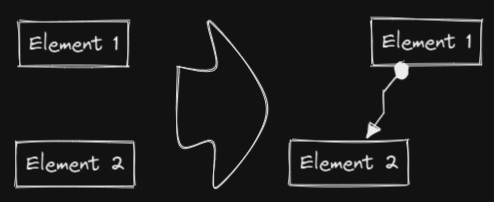
This script will connect two objects with an arrow. If either of the objects are a set of grouped elements (e.g. a text element grouped with an encapsulating rectangle), the script will identify these groups, and connect the arrow to the largest object in the group (assuming you want to connect the arrow to the box around the text element).
|
||||
```javascript
|
||||
const elements = ea.getViewSelectedElements();
|
||||
ea.copyViewElementsToEAforEditing(elements);
|
||||
const groups = ea.getMaximumGroups(elements);
|
||||
if(groups.length !== 2) return;
|
||||
els = [
|
||||
ea.getLargestElement(groups[0]),
|
||||
ea.getLargestElement(groups[1])
|
||||
];
|
||||
ea.connectObjects(
|
||||
els[0].id,
|
||||
null,
|
||||
els[1].id,
|
||||
null,
|
||||
{numberOfPoints:2}
|
||||
);
|
||||
ea.addElementsToView();
|
||||
```
|
||||
|
||||
----
|
||||
### Reverse selected arrows
|
||||
|
||||

|
||||
|
||||
Reverse the direction of **arrows** within the scope of selected elements.
|
||||
|
||||
```javascript
|
||||
elements = ea.getViewSelectedElements().filter((el)=>el.type==="arrow");
|
||||
if(!elements || elements.length===0) return;
|
||||
elements.forEach((el)=>{
|
||||
const start = el.startArrowhead;
|
||||
el.startArrowhead = el.endArrowhead;
|
||||
el.endArrowhead = start;
|
||||
});
|
||||
ea.copyViewElementsToEAforEditing(elements);
|
||||
ea.addElementsToView();
|
||||
```
|
||||
|
||||
----
|
||||
|
||||
### Set line width of selected elements
|
||||
|
||||

|
||||
|
||||
This is helpful, for example, when you scale freedraw sketches and want to reduce or increase their line width.
|
||||
```javascript
|
||||
let width = (ea.getViewSelectedElement().strokeWidth??1).toString();
|
||||
width = await utils.inputPrompt("Width?","number",width);
|
||||
const elements=ea.getViewSelectedElements();
|
||||
ea.copyViewElementsToEAforEditing(elements);
|
||||
ea.getElements().forEach((el)=>el.strokeWidth=width);
|
||||
ea.addElementsToView();
|
||||
```
|
||||
|
||||
----
|
||||
|
||||
### Set grid size
|
||||
|
||||

|
||||
|
||||
The default grid size in Excalidraw is 20. Currently there is no way to change the grid size via the user interface.
|
||||
```javascript
|
||||
const grid = parseInt(await utils.inputPrompt("Grid size?",null,"20"));
|
||||
const api = ea.getExcalidrawAPI();
|
||||
let appState = api.getAppState();
|
||||
appState.gridSize = grid;
|
||||
api.updateScene({
|
||||
appState,
|
||||
commitToHistory:false
|
||||
});
|
||||
```
|
||||
|
||||
----
|
||||
|
||||
### Set element dimensions and position
|
||||
|
||||

|
||||
|
||||
Currently there is no way to specify the exact location and size of objects in Excalidraw. You can bridge this gap with the following simple script.
|
||||
```javascript
|
||||
const elements = ea.getViewSelectedElements();
|
||||
if(elements.length === 0) return;
|
||||
const el = ea.getLargestElement(elements);
|
||||
const sizeIn = [el.x,el.y,el.width,el.height].join(",");
|
||||
let res = await utils.inputPrompt("x,y,width,height?",null,sizeIn);
|
||||
res = res.split(",");
|
||||
if(res.length !== 4) return;
|
||||
let size = [];
|
||||
for (v of res) {
|
||||
const i = parseInt(v);
|
||||
if(isNaN(i)) return;
|
||||
size.push(i);
|
||||
}
|
||||
el.x = size[0];
|
||||
el.y = size[1];
|
||||
el.width = size[2];
|
||||
el.height = size[3];
|
||||
ea.copyViewElementsToEAforEditing([el]);
|
||||
ea.addElementsToView();
|
||||
```
|
||||
|
||||
----
|
||||
|
||||
### Bullet points
|
||||
|
||||

|
||||
|
||||
This script will add a small circle to the top left of each text element in the selection and add the text and the "bullet point" into a group.
|
||||
```javascript
|
||||
elements = ea.getViewSelectedElements().filter((el)=>el.type==="text");
|
||||
ea.copyViewElementsToEAforEditing(elements);
|
||||
const padding = 10;
|
||||
elements.forEach((el)=>{
|
||||
ea.style.strokeColor = el.strokeColor;
|
||||
const size = el.fontSize/2;
|
||||
const ellipseId = ea.addEllipse(
|
||||
el.x-padding-size,
|
||||
el.y+size/2,
|
||||
size,
|
||||
size
|
||||
);
|
||||
ea.addToGroup([el.id,ellipseId]);
|
||||
});
|
||||
ea.addElementsToView();
|
||||
```
|
||||
|
||||
----
|
||||
|
||||
### Split text by lines
|
||||
**!!!Requires Excalidraw 1.5.1 or higher**
|
||||
|
||||

|
||||
|
||||
Split lines of text into separate text elements for easier reorganization
|
||||
```javascript
|
||||
elements = ea.getViewSelectedElements().filter((el)=>el.type==="text");
|
||||
elements.forEach((el)=>{
|
||||
ea.style.strokeColor = el.strokeColor;
|
||||
ea.style.fontFamily = el.fontFamily;
|
||||
ea.style.fontSize = el.fontSize;
|
||||
const text = el.text.split("\n");
|
||||
for(i=0;i<text.length;i++) {
|
||||
ea.addText(el.x,el.y+i*el.height/text.length,text[i]);
|
||||
}
|
||||
});
|
||||
ea.addElementsToView();
|
||||
ea.deleteViewElements(elements);
|
||||
```
|
||||
|
||||
----
|
||||
|
||||
### Set Text Alignment
|
||||
|
||||

|
||||
|
||||
Sets text alignment of text block (cetner, right, left). Useful if you want to set a keyboard shortcut for selecting text alignment.
|
||||
```javascript
|
||||
elements = ea.getViewSelectedElements().filter((el)=>el.type==="text");
|
||||
if(elements.length===0) return;
|
||||
let align = ["left","right","center"];
|
||||
align = await utils.suggester(align,align);
|
||||
elements.forEach((el)=>el.textAlign = align);
|
||||
ea.copyViewElementsToEAforEditing(elements);
|
||||
ea.addElementsToView();
|
||||
```
|
||||
|
||||
----
|
||||
|
||||
### Set Font Family
|
||||
|
||||

|
||||
|
||||
Sets font family of the text block (Virgil, Helvetica, Cascadia). Useful if you want to set a keyboard shortcut for selecting font family.
|
||||
```javascript
|
||||
elements = ea.getViewSelectedElements().filter((el)=>el.type==="text");
|
||||
if(elements.length===0) return;
|
||||
let font = ["Virgil","Helvetica","Cascadia"];
|
||||
font = parseInt(await utils.suggester(font,["1","2","3"]));
|
||||
if (isNaN(font)) return;
|
||||
elements.forEach((el)=>el.fontFamily = font);
|
||||
ea.copyViewElementsToEAforEditing(elements);
|
||||
ea.addElementsToView();
|
||||
```
|
||||
@@ -1 +1 @@
|
||||
theme: jekyll-theme-leap-day
|
||||
theme: jekyll-theme-hacker
|
||||
@@ -1,18 +1,21 @@
|
||||
# Excalidraw Automate How To
|
||||
|
||||
Excalidraw Automate allows you to create Excalidraw drawings using the [Templater](https://silentvoid13.github.io/Templater/docs/) plugin, and to generate embedded SVG and PNG images using [DataviewJS](https://blacksmithgu.github.io/obsidian-dataview/docs/api/intro/)
|
||||
Use ExcalidrawAutomate to create or manipulate Excalidraw drawings using the [ExcalidrawAutomate Script Engine](ExcalidrawScriptsEngine.md), the [Templater](https://silentvoid13.github.io/Templater/docs/) or the [QuickAdd](https://github.com/chhoumann/quickadd) plugins, and to generate embedded SVG and PNG images using [DataviewJS](https://blacksmithgu.github.io/obsidian-dataview/docs/api/intro/)
|
||||
|
||||
With a little work, using Excalidraw Automate you can generate simple mindmaps, build a family tree, fill out SVG forms, create customized charts, etc. based on documents in your vault.
|
||||
With a little work, using ExcalidrawAutomate you can generate simple mindmaps, build a family tree, fill out SVG forms, create customized charts, or automate simple tasks (i.e. create macros) in Excalidraw.
|
||||

|
||||
|
||||
## API documentation
|
||||
- [Introduction to the API](API/introduction.md)
|
||||
- **start here** [Introduction to the API](API/introduction.md)
|
||||
- [Overview of Attributes and Functions](API/attributes_functions_overview.md)
|
||||
- [Element Sytle](API/element_style.md)
|
||||
- [Canvas Style](API/canvas_style.md)
|
||||
- [Adding Objects](API/objects.md)
|
||||
- [Utility Functions](API/utility.md)
|
||||
|
||||
## ExcalidrawAutomate Script Engine
|
||||
I recommend using the Scripts Engine for "Macro" like automation, when you want to automate a few simple steps, such as adding a box around a text element, or connecting two objects with an arrow, or setting line width or the grid to a custom value.
|
||||
- [ExcalidrawAutomate Script Engine](ExcalidrawScriptsEngine.md).
|
||||
|
||||
## Examples
|
||||
- **Templater**
|
||||
|
||||
36
ea-scripts/Box Selected Elements.md
Normal file
@@ -0,0 +1,36 @@
|
||||
/*
|
||||
|
||||

|
||||
|
||||
Download this file and save to your Obsidian Vault including the first line, or open it in "Raw" and copy the entire contents to Obsidian.
|
||||
|
||||

|
||||
|
||||
This script will add an encapsulating box around the currently selected elements in Excalidraw.
|
||||
|
||||
See documentation for more details:
|
||||
https://zsviczian.github.io/obsidian-excalidraw-plugin/ExcalidrawScriptsEngine.html
|
||||
|
||||
```javascript
|
||||
*/
|
||||
//uncomment if you want a prompt for custom padding
|
||||
//const padding = parseInt (await utils.inputPrompt("padding?","number","10"));
|
||||
const padding = 10
|
||||
elements = ea.getViewSelectedElements();
|
||||
const box = ea.getBoundingBox(elements);
|
||||
color = ea
|
||||
.getExcalidrawAPI()
|
||||
.getAppState()
|
||||
.currentItemStrokeColor;
|
||||
//uncomment for random color:
|
||||
//color = '#'+(Math.random()*0xFFFFFF<<0).toString(16).padStart(6,"0");
|
||||
ea.style.strokeColor = color;
|
||||
id = ea.addRect(
|
||||
box.topX - padding,
|
||||
box.topY - padding,
|
||||
box.width + 2*padding,
|
||||
box.height + 2*padding
|
||||
);
|
||||
ea.copyViewElementsToEAforEditing(elements);
|
||||
ea.addToGroup([id].concat(elements.map((el)=>el.id)));
|
||||
ea.addElementsToView(false);
|
||||
30
ea-scripts/Bullet Point.md
Normal file
@@ -0,0 +1,30 @@
|
||||
/*
|
||||
|
||||

|
||||
|
||||
Download this file and save to your Obsidian Vault including the first line, or open it in "Raw" and copy the entire contents to Obsidian.
|
||||
|
||||

|
||||
|
||||
This script will add a small circle to the top left of each text element in the selection and add the text and the "bullet point" into a group.
|
||||
|
||||
See documentation for more details:
|
||||
https://zsviczian.github.io/obsidian-excalidraw-plugin/ExcalidrawScriptsEngine.html
|
||||
|
||||
```javascript
|
||||
*/
|
||||
elements = ea.getViewSelectedElements().filter((el)=>el.type==="text");
|
||||
ea.copyViewElementsToEAforEditing(elements);
|
||||
const padding = 10;
|
||||
elements.forEach((el)=>{
|
||||
ea.style.strokeColor = el.strokeColor;
|
||||
const size = el.fontSize/2;
|
||||
const ellipseId = ea.addEllipse(
|
||||
el.x-padding-size,
|
||||
el.y+size/2,
|
||||
size,
|
||||
size
|
||||
);
|
||||
ea.addToGroup([el.id,ellipseId]);
|
||||
});
|
||||
ea.addElementsToView();
|
||||
35
ea-scripts/Connect elements.md
Normal file
@@ -0,0 +1,35 @@
|
||||
/*
|
||||
|
||||

|
||||
|
||||
Download this file and save to your Obsidian Vault including the first line, or open it in "Raw" and copy the entire contents to Obsidian.
|
||||
|
||||

|
||||
|
||||
This script will connect two objects with an arrow. If either of the objects are a set of grouped elements (e.g. a text element grouped with an encapsulating rectangle), the script will identify these groups, and connect the arrow to the largest object in the group (assuming you want to connect the arrow to the box around the text element).
|
||||
|
||||
See documentation for more details:
|
||||
https://zsviczian.github.io/obsidian-excalidraw-plugin/ExcalidrawScriptsEngine.html
|
||||
|
||||
```javascript
|
||||
*/
|
||||
const elements = ea.getViewSelectedElements();
|
||||
ea.copyViewElementsToEAforEditing(elements);
|
||||
const groups = ea.getMaximumGroups(elements);
|
||||
if(groups.length !== 2) return;
|
||||
els = [
|
||||
ea.getLargestElement(groups[0]),
|
||||
ea.getLargestElement(groups[1])
|
||||
];
|
||||
ea.connectObjects(
|
||||
els[0].id,
|
||||
null,
|
||||
els[1].id,
|
||||
null,
|
||||
{
|
||||
endArrowHead: "triangle",
|
||||
startArrowHead: "dot",
|
||||
numberOfPoints: 2
|
||||
}
|
||||
);
|
||||
ea.addElementsToView();
|
||||
29
ea-scripts/Convert text to link with folder and alias.md
Normal file
@@ -0,0 +1,29 @@
|
||||
/*
|
||||

|
||||
|
||||
Download this file and save to your Obsidian Vault including the first line, or open it in "Raw" and copy the entire contents to Obsidian.
|
||||
|
||||
Converts text elements to links pointing to a file in a selected folder and with the alias set as the original text. The script will prompt the user to select an existing folder from the vault.
|
||||
`original text` => `[[selected folder/original text|original text]]`
|
||||
|
||||
See documentation for more details:
|
||||
https://zsviczian.github.io/obsidian-excalidraw-plugin/ExcalidrawScriptsEngine.html
|
||||
|
||||
```javascript
|
||||
*/
|
||||
folders = new Set();
|
||||
app.vault.getFiles().forEach((f)=>
|
||||
folders.add(f.path.substring(0,f.path.lastIndexOf("/")))
|
||||
);
|
||||
|
||||
f = Array.from(folders);
|
||||
folder = await utils.suggester(f,f);
|
||||
folder = folder === "" ? folder : folder + "/";
|
||||
|
||||
elements = ea.getViewSelectedElements().filter((el)=>el.type==="text");
|
||||
|
||||
elements.forEach((el)=>{
|
||||
el.rawText = "[["+folder+el.rawText+"|"+el.rawText+"]]";
|
||||
})
|
||||
ea.copyViewElementsToEAforEditing(elements);
|
||||
ea.addElementsToView();
|
||||
@@ -0,0 +1,21 @@
|
||||
/*
|
||||
|
||||

|
||||
|
||||
Download this file and save to your Obsidian Vault including the first line, or open it in "Raw" and copy the entire contents to Obsidian.
|
||||
|
||||
|
||||
|
||||
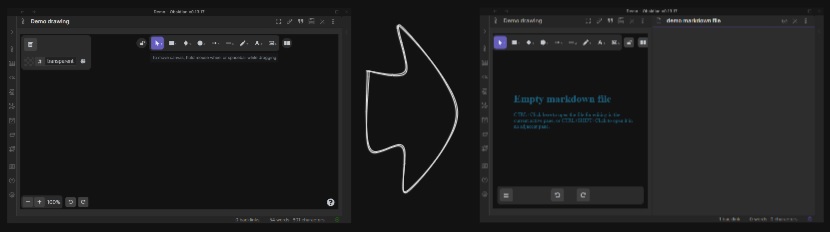
The script will prompt you for a filename, then create a new markdown document with the file name provided, open the new markdown document in an adjacent pane, and embed the markdown document into the active Excalidraw drawing.
|
||||
|
||||
See documentation for more details:
|
||||
https://zsviczian.github.io/obsidian-excalidraw-plugin/ExcalidrawScriptsEngine.html
|
||||
|
||||
```javascript
|
||||
*/
|
||||
let folder = ea.targetView.file.path;
|
||||
folder = folder.lastIndexOf("/")===-1?"":folder.substring(0,folder.lastIndexOf("/"))+"/";
|
||||
const fname = await utils.inputPrompt("Filename for new file","Filename",folder);
|
||||
const file = await app.fileManager.createAndOpenMarkdownFile(fname,true);
|
||||
await ea.addImage(0,0,file);
|
||||
ea.addElementsToView(true,true);
|
||||
289
ea-scripts/Darken background color.md
Normal file
@@ -0,0 +1,289 @@
|
||||
/*
|
||||

|
||||
|
||||
Download this file and save to your Obsidian Vault including the first line, or open it in "Raw" and copy the entire contents to Obsidian.
|
||||
|
||||

|
||||
|
||||
This script darkens the background color of the selected element by 2% at a time.
|
||||
|
||||
You can use this script several times until you are satisfied. It is recommended to set a shortcut key for this script so that you can quickly try to DARKEN and LIGHTEN the color effect.
|
||||
|
||||
In contrast to the `Modify background color opacity` script, the advantage is that the background color of the element is not affected by the canvas color, and the color value does not appear in a strange rgba() form.
|
||||
|
||||
The color conversion method was copied from [color-convert](https://github.com/Qix-/color-convert).
|
||||
|
||||
```javascript
|
||||
*/
|
||||
|
||||
const elements = ea
|
||||
.getViewSelectedElements()
|
||||
.filter((el) =>
|
||||
["rectangle", "ellipse", "diamond", "image"].includes(el.type)
|
||||
);
|
||||
ea.copyViewElementsToEAforEditing(elements);
|
||||
for (const el of ea.getElements()) {
|
||||
const color = colorNameToHex(el.backgroundColor);
|
||||
const rgbColor = /^#?([a-f\d]{2})([a-f\d]{2})([a-f\d]{2})$/i.exec(color);
|
||||
if (rgbColor) {
|
||||
const r = parseInt(rgbColor[1], 16);
|
||||
const g = parseInt(rgbColor[2], 16);
|
||||
const b = parseInt(rgbColor[3], 16);
|
||||
const originalRgb = [r, g, b];
|
||||
const hsl = rgbToHsl(originalRgb);
|
||||
const step = 2;
|
||||
const newLightness = hsl[2] - step;
|
||||
if (newLightness > 0) {
|
||||
hsl[2] = newLightness;
|
||||
}
|
||||
const newRgb = hslToRgb(hsl);
|
||||
el.backgroundColor = "#" + rgbToHexString(newRgb);
|
||||
}
|
||||
}
|
||||
ea.addElementsToView();
|
||||
|
||||
function rgbToHexString(args) {
|
||||
const integer =
|
||||
((Math.round(args[0]) & 0xff) << 16) +
|
||||
((Math.round(args[1]) & 0xff) << 8) +
|
||||
(Math.round(args[2]) & 0xff);
|
||||
|
||||
const string = integer.toString(16).toUpperCase();
|
||||
return "000000".substring(string.length) + string;
|
||||
}
|
||||
|
||||
function hslToRgb(hsl) {
|
||||
const h = hsl[0] / 360;
|
||||
const s = hsl[1] / 100;
|
||||
const l = hsl[2] / 100;
|
||||
let t2;
|
||||
let t3;
|
||||
let val;
|
||||
|
||||
if (s === 0) {
|
||||
val = l * 255;
|
||||
return [val, val, val];
|
||||
}
|
||||
|
||||
if (l < 0.5) {
|
||||
t2 = l * (1 + s);
|
||||
} else {
|
||||
t2 = l + s - l * s;
|
||||
}
|
||||
|
||||
const t1 = 2 * l - t2;
|
||||
|
||||
const rgb = [0, 0, 0];
|
||||
for (let i = 0; i < 3; i++) {
|
||||
t3 = h + (1 / 3) * -(i - 1);
|
||||
if (t3 < 0) {
|
||||
t3++;
|
||||
}
|
||||
|
||||
if (t3 > 1) {
|
||||
t3--;
|
||||
}
|
||||
|
||||
if (6 * t3 < 1) {
|
||||
val = t1 + (t2 - t1) * 6 * t3;
|
||||
} else if (2 * t3 < 1) {
|
||||
val = t2;
|
||||
} else if (3 * t3 < 2) {
|
||||
val = t1 + (t2 - t1) * (2 / 3 - t3) * 6;
|
||||
} else {
|
||||
val = t1;
|
||||
}
|
||||
|
||||
rgb[i] = val * 255;
|
||||
}
|
||||
|
||||
return rgb;
|
||||
}
|
||||
|
||||
function rgbToHsl(rgb) {
|
||||
const r = rgb[0] / 255;
|
||||
const g = rgb[1] / 255;
|
||||
const b = rgb[2] / 255;
|
||||
const min = Math.min(r, g, b);
|
||||
const max = Math.max(r, g, b);
|
||||
const delta = max - min;
|
||||
let h;
|
||||
let s;
|
||||
|
||||
if (max === min) {
|
||||
h = 0;
|
||||
} else if (r === max) {
|
||||
h = (g - b) / delta;
|
||||
} else if (g === max) {
|
||||
h = 2 + (b - r) / delta;
|
||||
} else if (b === max) {
|
||||
h = 4 + (r - g) / delta;
|
||||
}
|
||||
|
||||
h = Math.min(h * 60, 360);
|
||||
|
||||
if (h < 0) {
|
||||
h += 360;
|
||||
}
|
||||
|
||||
const l = (min + max) / 2;
|
||||
|
||||
if (max === min) {
|
||||
s = 0;
|
||||
} else if (l <= 0.5) {
|
||||
s = delta / (max + min);
|
||||
} else {
|
||||
s = delta / (2 - max - min);
|
||||
}
|
||||
|
||||
return [h, s * 100, l * 100];
|
||||
}
|
||||
|
||||
function colorNameToHex(color) {
|
||||
const colors = {
|
||||
aliceblue: "#f0f8ff",
|
||||
antiquewhite: "#faebd7",
|
||||
aqua: "#00ffff",
|
||||
aquamarine: "#7fffd4",
|
||||
azure: "#f0ffff",
|
||||
beige: "#f5f5dc",
|
||||
bisque: "#ffe4c4",
|
||||
black: "#000000",
|
||||
blanchedalmond: "#ffebcd",
|
||||
blue: "#0000ff",
|
||||
blueviolet: "#8a2be2",
|
||||
brown: "#a52a2a",
|
||||
burlywood: "#deb887",
|
||||
cadetblue: "#5f9ea0",
|
||||
chartreuse: "#7fff00",
|
||||
chocolate: "#d2691e",
|
||||
coral: "#ff7f50",
|
||||
cornflowerblue: "#6495ed",
|
||||
cornsilk: "#fff8dc",
|
||||
crimson: "#dc143c",
|
||||
cyan: "#00ffff",
|
||||
darkblue: "#00008b",
|
||||
darkcyan: "#008b8b",
|
||||
darkgoldenrod: "#b8860b",
|
||||
darkgray: "#a9a9a9",
|
||||
darkgreen: "#006400",
|
||||
darkkhaki: "#bdb76b",
|
||||
darkmagenta: "#8b008b",
|
||||
darkolivegreen: "#556b2f",
|
||||
darkorange: "#ff8c00",
|
||||
darkorchid: "#9932cc",
|
||||
darkred: "#8b0000",
|
||||
darksalmon: "#e9967a",
|
||||
darkseagreen: "#8fbc8f",
|
||||
darkslateblue: "#483d8b",
|
||||
darkslategray: "#2f4f4f",
|
||||
darkturquoise: "#00ced1",
|
||||
darkviolet: "#9400d3",
|
||||
deeppink: "#ff1493",
|
||||
deepskyblue: "#00bfff",
|
||||
dimgray: "#696969",
|
||||
dodgerblue: "#1e90ff",
|
||||
firebrick: "#b22222",
|
||||
floralwhite: "#fffaf0",
|
||||
forestgreen: "#228b22",
|
||||
fuchsia: "#ff00ff",
|
||||
gainsboro: "#dcdcdc",
|
||||
ghostwhite: "#f8f8ff",
|
||||
gold: "#ffd700",
|
||||
goldenrod: "#daa520",
|
||||
gray: "#808080",
|
||||
green: "#008000",
|
||||
greenyellow: "#adff2f",
|
||||
honeydew: "#f0fff0",
|
||||
hotpink: "#ff69b4",
|
||||
"indianred ": "#cd5c5c",
|
||||
indigo: "#4b0082",
|
||||
ivory: "#fffff0",
|
||||
khaki: "#f0e68c",
|
||||
lavender: "#e6e6fa",
|
||||
lavenderblush: "#fff0f5",
|
||||
lawngreen: "#7cfc00",
|
||||
lemonchiffon: "#fffacd",
|
||||
lightblue: "#add8e6",
|
||||
lightcoral: "#f08080",
|
||||
lightcyan: "#e0ffff",
|
||||
lightgoldenrodyellow: "#fafad2",
|
||||
lightgrey: "#d3d3d3",
|
||||
lightgreen: "#90ee90",
|
||||
lightpink: "#ffb6c1",
|
||||
lightsalmon: "#ffa07a",
|
||||
lightseagreen: "#20b2aa",
|
||||
lightskyblue: "#87cefa",
|
||||
lightslategray: "#778899",
|
||||
lightsteelblue: "#b0c4de",
|
||||
lightyellow: "#ffffe0",
|
||||
lime: "#00ff00",
|
||||
limegreen: "#32cd32",
|
||||
linen: "#faf0e6",
|
||||
magenta: "#ff00ff",
|
||||
maroon: "#800000",
|
||||
mediumaquamarine: "#66cdaa",
|
||||
mediumblue: "#0000cd",
|
||||
mediumorchid: "#ba55d3",
|
||||
mediumpurple: "#9370d8",
|
||||
mediumseagreen: "#3cb371",
|
||||
mediumslateblue: "#7b68ee",
|
||||
mediumspringgreen: "#00fa9a",
|
||||
mediumturquoise: "#48d1cc",
|
||||
mediumvioletred: "#c71585",
|
||||
midnightblue: "#191970",
|
||||
mintcream: "#f5fffa",
|
||||
mistyrose: "#ffe4e1",
|
||||
moccasin: "#ffe4b5",
|
||||
navajowhite: "#ffdead",
|
||||
navy: "#000080",
|
||||
oldlace: "#fdf5e6",
|
||||
olive: "#808000",
|
||||
olivedrab: "#6b8e23",
|
||||
orange: "#ffa500",
|
||||
orangered: "#ff4500",
|
||||
orchid: "#da70d6",
|
||||
palegoldenrod: "#eee8aa",
|
||||
palegreen: "#98fb98",
|
||||
paleturquoise: "#afeeee",
|
||||
palevioletred: "#d87093",
|
||||
papayawhip: "#ffefd5",
|
||||
peachpuff: "#ffdab9",
|
||||
peru: "#cd853f",
|
||||
pink: "#ffc0cb",
|
||||
plum: "#dda0dd",
|
||||
powderblue: "#b0e0e6",
|
||||
purple: "#800080",
|
||||
rebeccapurple: "#663399",
|
||||
red: "#ff0000",
|
||||
rosybrown: "#bc8f8f",
|
||||
royalblue: "#4169e1",
|
||||
saddlebrown: "#8b4513",
|
||||
salmon: "#fa8072",
|
||||
sandybrown: "#f4a460",
|
||||
seagreen: "#2e8b57",
|
||||
seashell: "#fff5ee",
|
||||
sienna: "#a0522d",
|
||||
silver: "#c0c0c0",
|
||||
skyblue: "#87ceeb",
|
||||
slateblue: "#6a5acd",
|
||||
slategray: "#708090",
|
||||
snow: "#fffafa",
|
||||
springgreen: "#00ff7f",
|
||||
steelblue: "#4682b4",
|
||||
tan: "#d2b48c",
|
||||
teal: "#008080",
|
||||
thistle: "#d8bfd8",
|
||||
tomato: "#ff6347",
|
||||
turquoise: "#40e0d0",
|
||||
violet: "#ee82ee",
|
||||
wheat: "#f5deb3",
|
||||
white: "#ffffff",
|
||||
whitesmoke: "#f5f5f5",
|
||||
yellow: "#ffff00",
|
||||
yellowgreen: "#9acd32",
|
||||
};
|
||||
if (typeof colors[color.toLowerCase()] != "undefined")
|
||||
return colors[color.toLowerCase()];
|
||||
return color;
|
||||
}
|
||||
34
ea-scripts/Dimensions.md
Normal file
@@ -0,0 +1,34 @@
|
||||
/*
|
||||
|
||||

|
||||
|
||||
Download this file and save to your Obsidian Vault including the first line, or open it in "Raw" and copy the entire contents to Obsidian.
|
||||
|
||||

|
||||
|
||||
Currently there is no way to specify the exact location and size of objects in Excalidraw. You can bridge this gap with the following simple script.
|
||||
|
||||
See documentation for more details:
|
||||
https://zsviczian.github.io/obsidian-excalidraw-plugin/ExcalidrawScriptsEngine.html
|
||||
|
||||
```javascript
|
||||
*/
|
||||
const elements = ea.getViewSelectedElements();
|
||||
if(elements.length === 0) return;
|
||||
const el = ea.getLargestElement(elements);
|
||||
const sizeIn = [el.x,el.y,el.width,el.height].join(",");
|
||||
let res = await utils.inputPrompt("x,y,width,height?",null,sizeIn);
|
||||
res = res.split(",");
|
||||
if(res.length !== 4) return;
|
||||
let size = [];
|
||||
for (v of res) {
|
||||
const i = parseInt(v);
|
||||
if(isNaN(i)) return;
|
||||
size.push(i);
|
||||
}
|
||||
el.x = size[0];
|
||||
el.y = size[1];
|
||||
el.width = size[2];
|
||||
el.height = size[3];
|
||||
ea.copyViewElementsToEAforEditing([el]);
|
||||
ea.addElementsToView();
|
||||
56
ea-scripts/Elbow connectors.md
Normal file
@@ -0,0 +1,56 @@
|
||||
/*
|
||||
|
||||

|
||||
|
||||
Download this file and save to your Obsidian Vault including the first line, or open it in "Raw" and copy the entire contents to Obsidian.
|
||||
|
||||
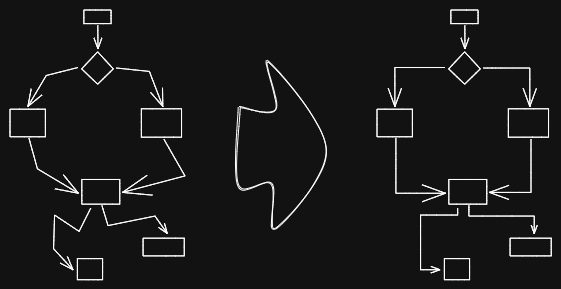
|
||||
|
||||
This script converts the selected connectors to elbows.
|
||||
|
||||
See documentation for more details:
|
||||
https://zsviczian.github.io/obsidian-excalidraw-plugin/ExcalidrawScriptsEngine.html
|
||||
|
||||
```javascript
|
||||
*/
|
||||
const elements = ea.getViewSelectedElements();
|
||||
|
||||
const lines = elements.filter((el)=>el.type==="arrow" || el.type==="line");
|
||||
|
||||
for (const line of lines) {
|
||||
if (line.points.length >= 3) {
|
||||
for (var i = 0; i < line.points.length - 2; i++) {
|
||||
var p1;
|
||||
var p3;
|
||||
if (line.points[i][0] < line.points[i + 2][0]) {
|
||||
p1 = line.points[i];
|
||||
p3 = line.points[i+2];
|
||||
} else {
|
||||
p1 = line.points[i + 2];
|
||||
p3 = line.points[i];
|
||||
}
|
||||
const p2 = line.points[i + 1];
|
||||
|
||||
if (p1[0] === p3[0]) {
|
||||
continue;
|
||||
}
|
||||
|
||||
const k = (p3[1] - p1[1]) / (p3[0] - p1[0]);
|
||||
const b = p1[1] - k * p1[0];
|
||||
|
||||
y0 = k * p2[0] + b;
|
||||
const up = p2[1] < y0;
|
||||
|
||||
if ((k > 0 && !up) || (k < 0 && up)) {
|
||||
p2[0] = p1[0];
|
||||
p2[1] = p3[1];
|
||||
} else {
|
||||
p2[0] = p3[0];
|
||||
p2[1] = p1[1];
|
||||
}
|
||||
}
|
||||
}
|
||||
}
|
||||
|
||||
ea.copyViewElementsToEAforEditing(lines);
|
||||
ea.addElementsToView();
|
||||
@@ -0,0 +1,75 @@
|
||||
/*
|
||||
|
||||

|
||||
|
||||
Download this file and save to your Obsidian Vault including the first line, or open it in "Raw" and copy the entire contents to Obsidian.
|
||||
|
||||

|
||||
|
||||
This script expands the width of the selected rectangles until they are all the same width and keep the text centered.
|
||||
|
||||
See documentation for more details:
|
||||
https://zsviczian.github.io/obsidian-excalidraw-plugin/ExcalidrawScriptsEngine.html
|
||||
|
||||
```javascript
|
||||
*/
|
||||
|
||||
const elements = ea.getViewSelectedElements();
|
||||
const topGroups = ea.getMaximumGroups(elements);
|
||||
|
||||
const groupWidths = topGroups
|
||||
.map((g) =>
|
||||
g.reduce(
|
||||
(pre, cur, i) => {
|
||||
if (i === 0) {
|
||||
return {
|
||||
minLeft: cur.x,
|
||||
maxRight: cur.x + cur.width,
|
||||
index: i,
|
||||
};
|
||||
} else {
|
||||
return {
|
||||
minLeft: cur.x < pre.minLeft ? cur.x : pre.minLeft,
|
||||
maxRight:
|
||||
cur.x + cur.width > pre.maxRight
|
||||
? cur.x + cur.width
|
||||
: pre.maxRight,
|
||||
index: i,
|
||||
};
|
||||
}
|
||||
},
|
||||
{ minLeft: 0, maxRight: 0 }
|
||||
)
|
||||
)
|
||||
.map((r) => {
|
||||
r.width = r.maxRight - r.minLeft;
|
||||
return r;
|
||||
});
|
||||
|
||||
const maxGroupWidth = Math.max(...groupWidths.map((g) => g.width));
|
||||
|
||||
for (var i = 0; i < topGroups.length; i++) {
|
||||
const rects = topGroups[i]
|
||||
.filter((el) => el.type === "rectangle")
|
||||
.sort((lha, rha) => lha.x - rha.x);
|
||||
const texts = topGroups[i]
|
||||
.filter((el) => el.type === "text")
|
||||
.sort((lha, rha) => lha.x - rha.x);
|
||||
const groupWith = groupWidths[i].width;
|
||||
if (groupWith < maxGroupWidth) {
|
||||
const distance = maxGroupWidth - groupWith;
|
||||
const perRectDistance = distance / rects.length;
|
||||
for (var j = 0; j < rects.length; j++) {
|
||||
const rect = rects[j];
|
||||
rect.x = rect.x + perRectDistance * j - perRectDistance / 2;
|
||||
rect.width += perRectDistance;
|
||||
}
|
||||
for (var j = 0; j < texts.length; j++) {
|
||||
const text = texts[j];
|
||||
text.x = text.x + perRectDistance * j;
|
||||
}
|
||||
}
|
||||
}
|
||||
|
||||
ea.copyViewElementsToEAforEditing(elements);
|
||||
ea.addElementsToView();
|
||||
76
ea-scripts/Expand rectangles horizontally.md
Normal file
@@ -0,0 +1,76 @@
|
||||
/*
|
||||
|
||||

|
||||
|
||||
Download this file and save to your Obsidian Vault including the first line, or open it in "Raw" and copy the entire contents to Obsidian.
|
||||
|
||||

|
||||
|
||||
This script expands the width of the selected rectangles until they are all the same width.
|
||||
|
||||
See documentation for more details:
|
||||
https://zsviczian.github.io/obsidian-excalidraw-plugin/ExcalidrawScriptsEngine.html
|
||||
|
||||
```javascript
|
||||
*/
|
||||
|
||||
const elements = ea.getViewSelectedElements();
|
||||
const topGroups = ea.getMaximumGroups(elements);
|
||||
|
||||
const groupWidths = topGroups
|
||||
.map((g) =>
|
||||
g.reduce(
|
||||
(pre, cur, i) => {
|
||||
if (i === 0) {
|
||||
return {
|
||||
minLeft: cur.x,
|
||||
maxRight: cur.x + cur.width,
|
||||
index: i,
|
||||
};
|
||||
} else {
|
||||
return {
|
||||
minLeft: cur.x < pre.minLeft ? cur.x : pre.minLeft,
|
||||
maxRight:
|
||||
cur.x + cur.width > pre.maxRight
|
||||
? cur.x + cur.width
|
||||
: pre.maxRight,
|
||||
index: i,
|
||||
};
|
||||
}
|
||||
},
|
||||
{ minLeft: 0, maxRight: 0 }
|
||||
)
|
||||
)
|
||||
.map((r) => {
|
||||
r.width = r.maxRight - r.minLeft;
|
||||
return r;
|
||||
});
|
||||
|
||||
const maxGroupWidth = Math.max(...groupWidths.map((g) => g.width));
|
||||
|
||||
for (var i = 0; i < topGroups.length; i++) {
|
||||
const rects = topGroups[i]
|
||||
.filter((el) => el.type === "rectangle")
|
||||
.sort((lha, rha) => lha.x - rha.x);
|
||||
const texts = topGroups[i]
|
||||
.filter((el) => el.type === "text")
|
||||
.sort((lha, rha) => lha.x - rha.x);
|
||||
const groupWith = groupWidths[i].width;
|
||||
if (groupWith < maxGroupWidth) {
|
||||
const distance = maxGroupWidth - groupWith;
|
||||
const perRectDistance = distance / rects.length;
|
||||
for (var j = 0; j < rects.length; j++) {
|
||||
const rect = rects[j];
|
||||
rect.x = rect.x + perRectDistance * j;
|
||||
rect.width += perRectDistance;
|
||||
}
|
||||
for (var j = 0; j < texts.length; j++) {
|
||||
const text = texts[j];
|
||||
text.x = text.x + perRectDistance * j;
|
||||
}
|
||||
}
|
||||
}
|
||||
|
||||
ea.copyViewElementsToEAforEditing(elements);
|
||||
ea.addElementsToView();
|
||||
|
||||
@@ -0,0 +1,75 @@
|
||||
/*
|
||||
|
||||

|
||||
|
||||
Download this file and save to your Obsidian Vault including the first line, or open it in "Raw" and copy the entire contents to Obsidian.
|
||||
|
||||

|
||||
|
||||
This script expands the height of the selected rectangles until they are all the same height and keep the text centered.
|
||||
|
||||
See documentation for more details:
|
||||
https://zsviczian.github.io/obsidian-excalidraw-plugin/ExcalidrawScriptsEngine.html
|
||||
|
||||
```javascript
|
||||
*/
|
||||
|
||||
const elements = ea.getViewSelectedElements();
|
||||
const topGroups = ea.getMaximumGroups(elements);
|
||||
|
||||
const groupHeights = topGroups
|
||||
.map((g) =>
|
||||
g.reduce(
|
||||
(pre, cur, i) => {
|
||||
if (i === 0) {
|
||||
return {
|
||||
minTop: cur.y,
|
||||
maxBottom: cur.y + cur.height,
|
||||
index: i,
|
||||
};
|
||||
} else {
|
||||
return {
|
||||
minTop: cur.y < pre.minTop ? cur.y : pre.minTop,
|
||||
maxBottom:
|
||||
cur.y + cur.height > pre.maxBottom
|
||||
? cur.y + cur.height
|
||||
: pre.maxBottom,
|
||||
index: i,
|
||||
};
|
||||
}
|
||||
},
|
||||
{ minTop: 0, maxBottom: 0 }
|
||||
)
|
||||
)
|
||||
.map((r) => {
|
||||
r.height = r.maxBottom - r.minTop;
|
||||
return r;
|
||||
});
|
||||
|
||||
const maxGroupHeight = Math.max(...groupHeights.map((g) => g.height));
|
||||
|
||||
for (var i = 0; i < topGroups.length; i++) {
|
||||
const rects = topGroups[i]
|
||||
.filter((el) => el.type === "rectangle")
|
||||
.sort((lha, rha) => lha.y - rha.y);
|
||||
const texts = topGroups[i]
|
||||
.filter((el) => el.type === "text")
|
||||
.sort((lha, rha) => lha.y - rha.y);
|
||||
const groupWith = groupHeights[i].height;
|
||||
if (groupWith < maxGroupHeight) {
|
||||
const distance = maxGroupHeight - groupWith;
|
||||
const perRectDistance = distance / rects.length;
|
||||
for (var j = 0; j < rects.length; j++) {
|
||||
const rect = rects[j];
|
||||
rect.y = rect.y + perRectDistance * j - perRectDistance / 2;
|
||||
rect.height += perRectDistance;
|
||||
}
|
||||
for (var j = 0; j < texts.length; j++) {
|
||||
const text = texts[j];
|
||||
text.y = text.y + perRectDistance * j;
|
||||
}
|
||||
}
|
||||
}
|
||||
|
||||
ea.copyViewElementsToEAforEditing(elements);
|
||||
ea.addElementsToView();
|
||||
73
ea-scripts/Expand rectangles vertically.md
Normal file
@@ -0,0 +1,73 @@
|
||||
/*
|
||||
|
||||

|
||||
|
||||
Download this file and save to your Obsidian Vault including the first line, or open it in "Raw" and copy the entire contents to Obsidian.
|
||||
|
||||

|
||||
|
||||
This script expands the height of the selected rectangles until they are all the same height.
|
||||
|
||||
```javascript
|
||||
*/
|
||||
|
||||
const elements = ea.getViewSelectedElements();
|
||||
const topGroups = ea.getMaximumGroups(elements);
|
||||
|
||||
const groupHeights = topGroups
|
||||
.map((g) =>
|
||||
g.reduce(
|
||||
(pre, cur, i) => {
|
||||
if (i === 0) {
|
||||
return {
|
||||
minTop: cur.y,
|
||||
maxBottom: cur.y + cur.height,
|
||||
index: i,
|
||||
};
|
||||
} else {
|
||||
return {
|
||||
minTop: cur.y < pre.minTop ? cur.y : pre.minTop,
|
||||
maxBottom:
|
||||
cur.y + cur.height > pre.maxBottom
|
||||
? cur.y + cur.height
|
||||
: pre.maxBottom,
|
||||
index: i,
|
||||
};
|
||||
}
|
||||
},
|
||||
{ minTop: 0, maxBottom: 0 }
|
||||
)
|
||||
)
|
||||
.map((r) => {
|
||||
r.height = r.maxBottom - r.minTop;
|
||||
return r;
|
||||
});
|
||||
|
||||
const maxGroupHeight = Math.max(...groupHeights.map((g) => g.height));
|
||||
|
||||
for (var i = 0; i < topGroups.length; i++) {
|
||||
const rects = topGroups[i]
|
||||
.filter((el) => el.type === "rectangle")
|
||||
.sort((lha, rha) => lha.y - rha.y);
|
||||
const texts = topGroups[i]
|
||||
.filter((el) => el.type === "text")
|
||||
.sort((lha, rha) => lha.y - rha.y);
|
||||
const groupWith = groupHeights[i].height;
|
||||
if (groupWith < maxGroupHeight) {
|
||||
const distance = maxGroupHeight - groupWith;
|
||||
const perRectDistance = distance / rects.length;
|
||||
for (var j = 0; j < rects.length; j++) {
|
||||
const rect = rects[j];
|
||||
rect.y = rect.y + perRectDistance * j;
|
||||
rect.height += perRectDistance;
|
||||
}
|
||||
for (var j = 0; j < texts.length; j++) {
|
||||
const text = texts[j];
|
||||
text.y = text.y + perRectDistance * j;
|
||||
}
|
||||
}
|
||||
}
|
||||
|
||||
ea.copyViewElementsToEAforEditing(elements);
|
||||
ea.addElementsToView();
|
||||
|
||||
34
ea-scripts/Fixed spacing.md
Normal file
@@ -0,0 +1,34 @@
|
||||
/*
|
||||

|
||||
|
||||
Download this file and save to your Obsidian Vault including the first line, or open it in "Raw" and copy the entire contents to Obsidian.
|
||||
|
||||
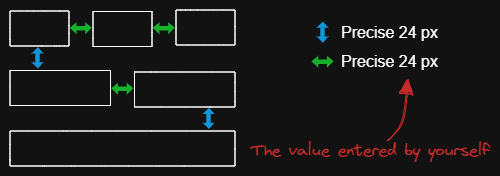
|
||||
|
||||
The script arranges the selected elements horizontally with a fixed spacing.
|
||||
|
||||
When we create an architecture diagram or mind map, we often need to arrange a large number of elements in a fixed spacing. `Fixed spacing` and `Fixed vertical Distance` scripts can save us a lot of time.
|
||||
|
||||
```javascript
|
||||
*/
|
||||
const spacing = parseInt (await utils.inputPrompt("spacing?","number","8"));
|
||||
const elements=ea.getViewSelectedElements();
|
||||
const topGroups = ea.getMaximumGroups(elements);
|
||||
const groups = topGroups.sort((lha,rha) => lha[0].x - rha[0].x);
|
||||
|
||||
for(var i=0; i<groups.length; i++) {
|
||||
if(i > 0) {
|
||||
const preGroup = groups[i-1];
|
||||
const curGroup = groups[i];
|
||||
|
||||
const preRight = Math.max(...preGroup.map(el => el.x + el.width));
|
||||
const curLeft = Math.min(...curGroup.map(el => el.x));
|
||||
const distance = curLeft - preRight - spacing;
|
||||
|
||||
for(const curEl of curGroup) {
|
||||
curEl.x = curEl.x - distance;
|
||||
}
|
||||
}
|
||||
}
|
||||
ea.copyViewElementsToEAforEditing(elements);
|
||||
ea.addElementsToView();
|
||||
34
ea-scripts/Fixed vertical distance.md
Normal file
@@ -0,0 +1,34 @@
|
||||
/*
|
||||

|
||||
|
||||
Download this file and save to your Obsidian Vault including the first line, or open it in "Raw" and copy the entire contents to Obsidian.
|
||||
|
||||
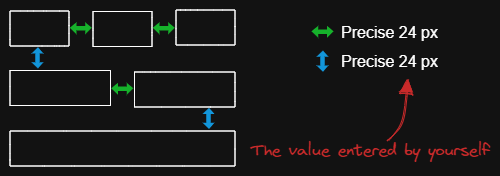
|
||||
|
||||
The script arranges the selected elements vertically with a fixed spacing.
|
||||
|
||||
When we create an architecture diagram or mind map, we often need to arrange a large number of elements in a fixed spacing. `Fixed spacing` and `Fixed vertical Distance` scripts can save us a lot of time.
|
||||
|
||||
```javascript
|
||||
*/
|
||||
const spacing = parseInt (await utils.inputPrompt("spacing?","number","8"));
|
||||
const elements=ea.getViewSelectedElements();
|
||||
const topGroups = ea.getMaximumGroups(elements);
|
||||
const groups = topGroups.sort((lha,rha) => lha[0].y - rha[0].y);
|
||||
|
||||
for(var i=0; i<groups.length; i++) {
|
||||
if(i > 0) {
|
||||
const preGroup = groups[i-1];
|
||||
const curGroup = groups[i];
|
||||
|
||||
const preBottom = Math.max(...preGroup.map(el => el.y + el.height));
|
||||
const curTop = Math.min(...curGroup.map(el => el.y));
|
||||
const distance = curTop - preBottom - spacing;
|
||||
|
||||
for(const curEl of curGroup) {
|
||||
curEl.y = curEl.y - distance;
|
||||
}
|
||||
}
|
||||
}
|
||||
ea.copyViewElementsToEAforEditing(elements);
|
||||
ea.addElementsToView();
|
||||
22
ea-scripts/Font Family.md
Normal file
@@ -0,0 +1,22 @@
|
||||
/*
|
||||

|
||||
|
||||
Download this file and save to your Obsidian Vault including the first line, or open it in "Raw" and copy the entire contents to Obsidian.
|
||||
|
||||

|
||||
|
||||
Sets font family of the text block (Virgil, Helvetica, Cascadia). Useful if you want to set a keyboard shortcut for selecting font family.
|
||||
|
||||
See documentation for more details:
|
||||
https://zsviczian.github.io/obsidian-excalidraw-plugin/ExcalidrawScriptsEngine.html
|
||||
|
||||
```javascript
|
||||
*/
|
||||
elements = ea.getViewSelectedElements().filter((el)=>el.type==="text");
|
||||
if(elements.length===0) return;
|
||||
let font = ["Virgil","Helvetica","Cascadia"];
|
||||
font = parseInt(await utils.suggester(font,["1","2","3"]));
|
||||
if (isNaN(font)) return;
|
||||
elements.forEach((el)=>el.fontFamily = font);
|
||||
ea.copyViewElementsToEAforEditing(elements);
|
||||
ea.addElementsToView();
|
||||
24
ea-scripts/Grid.md
Normal file
@@ -0,0 +1,24 @@
|
||||
/*
|
||||
|
||||

|
||||
|
||||
Download this file and save to your Obsidian Vault including the first line, or open it in "Raw" and copy the entire contents to Obsidian.
|
||||
|
||||

|
||||
|
||||
The default grid size in Excalidraw is 20. Currently there is no way to change the grid size via the user interface. This script offers a way to bridge this gap.
|
||||
|
||||
See documentation for more details:
|
||||
https://zsviczian.github.io/obsidian-excalidraw-plugin/ExcalidrawScriptsEngine.html
|
||||
|
||||
```javascript
|
||||
*/
|
||||
const grid = parseInt(await utils.inputPrompt("Grid size?",null,"20"));
|
||||
if(isNaN(grid)) return; //this is to avoid passing an illegal value to Excalidraw
|
||||
const api = ea.getExcalidrawAPI();
|
||||
let appState = api.getAppState();
|
||||
appState.gridSize = grid;
|
||||
api.updateScene({
|
||||
appState,
|
||||
commitToHistory:false
|
||||
});
|
||||
289
ea-scripts/Lighten background color.md
Normal file
@@ -0,0 +1,289 @@
|
||||
/*
|
||||

|
||||
|
||||
Download this file and save to your Obsidian Vault including the first line, or open it in "Raw" and copy the entire contents to Obsidian.
|
||||
|
||||

|
||||
|
||||
This script lightens the background color of the selected element by 2% at a time.
|
||||
|
||||
You can use this script several times until you are satisfied. It is recommended to set a shortcut key for this script so that you can quickly try to DARKEN and LIGHTEN the color effect.
|
||||
|
||||
In contrast to the `Modify background color opacity` script, the advantage is that the background color of the element is not affected by the canvas color, and the color value does not appear in a strange rgba() form.
|
||||
|
||||
The color conversion method was copied from [color-convert](https://github.com/Qix-/color-convert).
|
||||
|
||||
```javascript
|
||||
*/
|
||||
|
||||
const elements = ea
|
||||
.getViewSelectedElements()
|
||||
.filter((el) =>
|
||||
["rectangle", "ellipse", "diamond", "image"].includes(el.type)
|
||||
);
|
||||
ea.copyViewElementsToEAforEditing(elements);
|
||||
for (const el of ea.getElements()) {
|
||||
const color = colorNameToHex(el.backgroundColor);
|
||||
const rgbColor = /^#?([a-f\d]{2})([a-f\d]{2})([a-f\d]{2})$/i.exec(color);
|
||||
if (rgbColor) {
|
||||
const r = parseInt(rgbColor[1], 16);
|
||||
const g = parseInt(rgbColor[2], 16);
|
||||
const b = parseInt(rgbColor[3], 16);
|
||||
const originalRgb = [r, g, b];
|
||||
const hsl = rgbToHsl(originalRgb);
|
||||
const step = 2;
|
||||
const newLightness = hsl[2] + step;
|
||||
if (newLightness < 100) {
|
||||
hsl[2] = newLightness;
|
||||
}
|
||||
const newRgb = hslToRgb(hsl);
|
||||
el.backgroundColor = "#" + rgbToHexString(newRgb);
|
||||
}
|
||||
}
|
||||
ea.addElementsToView();
|
||||
|
||||
function rgbToHexString(args) {
|
||||
const integer =
|
||||
((Math.round(args[0]) & 0xff) << 16) +
|
||||
((Math.round(args[1]) & 0xff) << 8) +
|
||||
(Math.round(args[2]) & 0xff);
|
||||
|
||||
const string = integer.toString(16).toUpperCase();
|
||||
return "000000".substring(string.length) + string;
|
||||
}
|
||||
|
||||
function hslToRgb(hsl) {
|
||||
const h = hsl[0] / 360;
|
||||
const s = hsl[1] / 100;
|
||||
const l = hsl[2] / 100;
|
||||
let t2;
|
||||
let t3;
|
||||
let val;
|
||||
|
||||
if (s === 0) {
|
||||
val = l * 255;
|
||||
return [val, val, val];
|
||||
}
|
||||
|
||||
if (l < 0.5) {
|
||||
t2 = l * (1 + s);
|
||||
} else {
|
||||
t2 = l + s - l * s;
|
||||
}
|
||||
|
||||
const t1 = 2 * l - t2;
|
||||
|
||||
const rgb = [0, 0, 0];
|
||||
for (let i = 0; i < 3; i++) {
|
||||
t3 = h + (1 / 3) * -(i - 1);
|
||||
if (t3 < 0) {
|
||||
t3++;
|
||||
}
|
||||
|
||||
if (t3 > 1) {
|
||||
t3--;
|
||||
}
|
||||
|
||||
if (6 * t3 < 1) {
|
||||
val = t1 + (t2 - t1) * 6 * t3;
|
||||
} else if (2 * t3 < 1) {
|
||||
val = t2;
|
||||
} else if (3 * t3 < 2) {
|
||||
val = t1 + (t2 - t1) * (2 / 3 - t3) * 6;
|
||||
} else {
|
||||
val = t1;
|
||||
}
|
||||
|
||||
rgb[i] = val * 255;
|
||||
}
|
||||
|
||||
return rgb;
|
||||
}
|
||||
|
||||
function rgbToHsl(rgb) {
|
||||
const r = rgb[0] / 255;
|
||||
const g = rgb[1] / 255;
|
||||
const b = rgb[2] / 255;
|
||||
const min = Math.min(r, g, b);
|
||||
const max = Math.max(r, g, b);
|
||||
const delta = max - min;
|
||||
let h;
|
||||
let s;
|
||||
|
||||
if (max === min) {
|
||||
h = 0;
|
||||
} else if (r === max) {
|
||||
h = (g - b) / delta;
|
||||
} else if (g === max) {
|
||||
h = 2 + (b - r) / delta;
|
||||
} else if (b === max) {
|
||||
h = 4 + (r - g) / delta;
|
||||
}
|
||||
|
||||
h = Math.min(h * 60, 360);
|
||||
|
||||
if (h < 0) {
|
||||
h += 360;
|
||||
}
|
||||
|
||||
const l = (min + max) / 2;
|
||||
|
||||
if (max === min) {
|
||||
s = 0;
|
||||
} else if (l <= 0.5) {
|
||||
s = delta / (max + min);
|
||||
} else {
|
||||
s = delta / (2 - max - min);
|
||||
}
|
||||
|
||||
return [h, s * 100, l * 100];
|
||||
}
|
||||
|
||||
function colorNameToHex(color) {
|
||||
const colors = {
|
||||
aliceblue: "#f0f8ff",
|
||||
antiquewhite: "#faebd7",
|
||||
aqua: "#00ffff",
|
||||
aquamarine: "#7fffd4",
|
||||
azure: "#f0ffff",
|
||||
beige: "#f5f5dc",
|
||||
bisque: "#ffe4c4",
|
||||
black: "#000000",
|
||||
blanchedalmond: "#ffebcd",
|
||||
blue: "#0000ff",
|
||||
blueviolet: "#8a2be2",
|
||||
brown: "#a52a2a",
|
||||
burlywood: "#deb887",
|
||||
cadetblue: "#5f9ea0",
|
||||
chartreuse: "#7fff00",
|
||||
chocolate: "#d2691e",
|
||||
coral: "#ff7f50",
|
||||
cornflowerblue: "#6495ed",
|
||||
cornsilk: "#fff8dc",
|
||||
crimson: "#dc143c",
|
||||
cyan: "#00ffff",
|
||||
darkblue: "#00008b",
|
||||
darkcyan: "#008b8b",
|
||||
darkgoldenrod: "#b8860b",
|
||||
darkgray: "#a9a9a9",
|
||||
darkgreen: "#006400",
|
||||
darkkhaki: "#bdb76b",
|
||||
darkmagenta: "#8b008b",
|
||||
darkolivegreen: "#556b2f",
|
||||
darkorange: "#ff8c00",
|
||||
darkorchid: "#9932cc",
|
||||
darkred: "#8b0000",
|
||||
darksalmon: "#e9967a",
|
||||
darkseagreen: "#8fbc8f",
|
||||
darkslateblue: "#483d8b",
|
||||
darkslategray: "#2f4f4f",
|
||||
darkturquoise: "#00ced1",
|
||||
darkviolet: "#9400d3",
|
||||
deeppink: "#ff1493",
|
||||
deepskyblue: "#00bfff",
|
||||
dimgray: "#696969",
|
||||
dodgerblue: "#1e90ff",
|
||||
firebrick: "#b22222",
|
||||
floralwhite: "#fffaf0",
|
||||
forestgreen: "#228b22",
|
||||
fuchsia: "#ff00ff",
|
||||
gainsboro: "#dcdcdc",
|
||||
ghostwhite: "#f8f8ff",
|
||||
gold: "#ffd700",
|
||||
goldenrod: "#daa520",
|
||||
gray: "#808080",
|
||||
green: "#008000",
|
||||
greenyellow: "#adff2f",
|
||||
honeydew: "#f0fff0",
|
||||
hotpink: "#ff69b4",
|
||||
"indianred ": "#cd5c5c",
|
||||
indigo: "#4b0082",
|
||||
ivory: "#fffff0",
|
||||
khaki: "#f0e68c",
|
||||
lavender: "#e6e6fa",
|
||||
lavenderblush: "#fff0f5",
|
||||
lawngreen: "#7cfc00",
|
||||
lemonchiffon: "#fffacd",
|
||||
lightblue: "#add8e6",
|
||||
lightcoral: "#f08080",
|
||||
lightcyan: "#e0ffff",
|
||||
lightgoldenrodyellow: "#fafad2",
|
||||
lightgrey: "#d3d3d3",
|
||||
lightgreen: "#90ee90",
|
||||
lightpink: "#ffb6c1",
|
||||
lightsalmon: "#ffa07a",
|
||||
lightseagreen: "#20b2aa",
|
||||
lightskyblue: "#87cefa",
|
||||
lightslategray: "#778899",
|
||||
lightsteelblue: "#b0c4de",
|
||||
lightyellow: "#ffffe0",
|
||||
lime: "#00ff00",
|
||||
limegreen: "#32cd32",
|
||||
linen: "#faf0e6",
|
||||
magenta: "#ff00ff",
|
||||
maroon: "#800000",
|
||||
mediumaquamarine: "#66cdaa",
|
||||
mediumblue: "#0000cd",
|
||||
mediumorchid: "#ba55d3",
|
||||
mediumpurple: "#9370d8",
|
||||
mediumseagreen: "#3cb371",
|
||||
mediumslateblue: "#7b68ee",
|
||||
mediumspringgreen: "#00fa9a",
|
||||
mediumturquoise: "#48d1cc",
|
||||
mediumvioletred: "#c71585",
|
||||
midnightblue: "#191970",
|
||||
mintcream: "#f5fffa",
|
||||
mistyrose: "#ffe4e1",
|
||||
moccasin: "#ffe4b5",
|
||||
navajowhite: "#ffdead",
|
||||
navy: "#000080",
|
||||
oldlace: "#fdf5e6",
|
||||
olive: "#808000",
|
||||
olivedrab: "#6b8e23",
|
||||
orange: "#ffa500",
|
||||
orangered: "#ff4500",
|
||||
orchid: "#da70d6",
|
||||
palegoldenrod: "#eee8aa",
|
||||
palegreen: "#98fb98",
|
||||
paleturquoise: "#afeeee",
|
||||
palevioletred: "#d87093",
|
||||
papayawhip: "#ffefd5",
|
||||
peachpuff: "#ffdab9",
|
||||
peru: "#cd853f",
|
||||
pink: "#ffc0cb",
|
||||
plum: "#dda0dd",
|
||||
powderblue: "#b0e0e6",
|
||||
purple: "#800080",
|
||||
rebeccapurple: "#663399",
|
||||
red: "#ff0000",
|
||||
rosybrown: "#bc8f8f",
|
||||
royalblue: "#4169e1",
|
||||
saddlebrown: "#8b4513",
|
||||
salmon: "#fa8072",
|
||||
sandybrown: "#f4a460",
|
||||
seagreen: "#2e8b57",
|
||||
seashell: "#fff5ee",
|
||||
sienna: "#a0522d",
|
||||
silver: "#c0c0c0",
|
||||
skyblue: "#87ceeb",
|
||||
slateblue: "#6a5acd",
|
||||
slategray: "#708090",
|
||||
snow: "#fffafa",
|
||||
springgreen: "#00ff7f",
|
||||
steelblue: "#4682b4",
|
||||
tan: "#d2b48c",
|
||||
teal: "#008080",
|
||||
thistle: "#d8bfd8",
|
||||
tomato: "#ff6347",
|
||||
turquoise: "#40e0d0",
|
||||
violet: "#ee82ee",
|
||||
wheat: "#f5deb3",
|
||||
white: "#ffffff",
|
||||
whitesmoke: "#f5f5f5",
|
||||
yellow: "#ffff00",
|
||||
yellowgreen: "#9acd32",
|
||||
};
|
||||
if (typeof colors[color.toLowerCase()] != "undefined")
|
||||
return colors[color.toLowerCase()];
|
||||
return color;
|
||||
}
|
||||
182
ea-scripts/Modify background color opacity.md
Normal file
@@ -0,0 +1,182 @@
|
||||
/*
|
||||

|
||||
|
||||
Download this file and save to your Obsidian Vault including the first line, or open it in "Raw" and copy the entire contents to Obsidian.
|
||||
|
||||
This script changes the opacity of the background color of the selected boxes.
|
||||
|
||||
The default background color in Excalidraw is so dark that the text is hard to read. You can lighten the color a bit by setting transparency. And you can tweak the transparency over and over again until you're happy with it.
|
||||
|
||||
Although excalidraw has the opacity option in its native property Settings, it also changes the transparency of the border. Use this script to change only the opacity of the background color without affecting the border.
|
||||
|
||||
```javascript
|
||||
*/
|
||||
const alpha = parseFloat(await utils.inputPrompt("Background color opacity?","number","0.6"));
|
||||
const elements=ea.getViewSelectedElements().filter((el)=>["rectangle","ellipse","diamond","line","image"].includes(el.type));
|
||||
ea.copyViewElementsToEAforEditing(elements);
|
||||
ea.getElements().forEach((el)=>{
|
||||
const color = colorNameToHex(el.backgroundColor);
|
||||
const rgbColor = /^#?([a-f\d]{2})([a-f\d]{2})([a-f\d]{2})$/i.exec(color);
|
||||
if(rgbColor) {
|
||||
const r = parseInt(rgbColor[1], 16);
|
||||
const g = parseInt(rgbColor[2], 16);
|
||||
const b = parseInt(rgbColor[3], 16);
|
||||
el.backgroundColor=`rgba(${r},${g},${b},${alpha})`;
|
||||
}
|
||||
else {
|
||||
const rgbaColor = /^rgba\((\d+,\d+,\d+,)(\d*\.?\d*)\)$/i.exec(color);
|
||||
if(rgbaColor) {
|
||||
el.backgroundColor=`rgba(${rgbaColor[1]}${alpha})`;
|
||||
}
|
||||
}
|
||||
});
|
||||
ea.addElementsToView();
|
||||
|
||||
function colorNameToHex(color) {
|
||||
const colors = {
|
||||
"aliceblue":"#f0f8ff",
|
||||
"antiquewhite":"#faebd7",
|
||||
"aqua":"#00ffff",
|
||||
"aquamarine":"#7fffd4",
|
||||
"azure":"#f0ffff",
|
||||
"beige":"#f5f5dc",
|
||||
"bisque":"#ffe4c4",
|
||||
"black":"#000000",
|
||||
"blanchedalmond":"#ffebcd",
|
||||
"blue":"#0000ff",
|
||||
"blueviolet":"#8a2be2",
|
||||
"brown":"#a52a2a",
|
||||
"burlywood":"#deb887",
|
||||
"cadetblue":"#5f9ea0",
|
||||
"chartreuse":"#7fff00",
|
||||
"chocolate":"#d2691e",
|
||||
"coral":"#ff7f50",
|
||||
"cornflowerblue":"#6495ed",
|
||||
"cornsilk":"#fff8dc",
|
||||
"crimson":"#dc143c",
|
||||
"cyan":"#00ffff",
|
||||
"darkblue":"#00008b",
|
||||
"darkcyan":"#008b8b",
|
||||
"darkgoldenrod":"#b8860b",
|
||||
"darkgray":"#a9a9a9",
|
||||
"darkgreen":"#006400",
|
||||
"darkkhaki":"#bdb76b",
|
||||
"darkmagenta":"#8b008b",
|
||||
"darkolivegreen":"#556b2f",
|
||||
"darkorange":"#ff8c00",
|
||||
"darkorchid":"#9932cc",
|
||||
"darkred":"#8b0000",
|
||||
"darksalmon":"#e9967a",
|
||||
"darkseagreen":"#8fbc8f",
|
||||
"darkslateblue":"#483d8b",
|
||||
"darkslategray":"#2f4f4f",
|
||||
"darkturquoise":"#00ced1",
|
||||
"darkviolet":"#9400d3",
|
||||
"deeppink":"#ff1493",
|
||||
"deepskyblue":"#00bfff",
|
||||
"dimgray":"#696969",
|
||||
"dodgerblue":"#1e90ff",
|
||||
"firebrick":"#b22222",
|
||||
"floralwhite":"#fffaf0",
|
||||
"forestgreen":"#228b22",
|
||||
"fuchsia":"#ff00ff",
|
||||
"gainsboro":"#dcdcdc",
|
||||
"ghostwhite":"#f8f8ff",
|
||||
"gold":"#ffd700",
|
||||
"goldenrod":"#daa520",
|
||||
"gray":"#808080",
|
||||
"green":"#008000",
|
||||
"greenyellow":"#adff2f",
|
||||
"honeydew":"#f0fff0",
|
||||
"hotpink":"#ff69b4",
|
||||
"indianred ":"#cd5c5c",
|
||||
"indigo":"#4b0082",
|
||||
"ivory":"#fffff0",
|
||||
"khaki":"#f0e68c",
|
||||
"lavender":"#e6e6fa",
|
||||
"lavenderblush":"#fff0f5",
|
||||
"lawngreen":"#7cfc00",
|
||||
"lemonchiffon":"#fffacd",
|
||||
"lightblue":"#add8e6",
|
||||
"lightcoral":"#f08080",
|
||||
"lightcyan":"#e0ffff",
|
||||
"lightgoldenrodyellow":"#fafad2",
|
||||
"lightgrey":"#d3d3d3",
|
||||
"lightgreen":"#90ee90",
|
||||
"lightpink":"#ffb6c1",
|
||||
"lightsalmon":"#ffa07a",
|
||||
"lightseagreen":"#20b2aa",
|
||||
"lightskyblue":"#87cefa",
|
||||
"lightslategray":"#778899",
|
||||
"lightsteelblue":"#b0c4de",
|
||||
"lightyellow":"#ffffe0",
|
||||
"lime":"#00ff00",
|
||||
"limegreen":"#32cd32",
|
||||
"linen":"#faf0e6",
|
||||
"magenta":"#ff00ff",
|
||||
"maroon":"#800000",
|
||||
"mediumaquamarine":"#66cdaa",
|
||||
"mediumblue":"#0000cd",
|
||||
"mediumorchid":"#ba55d3",
|
||||
"mediumpurple":"#9370d8",
|
||||
"mediumseagreen":"#3cb371",
|
||||
"mediumslateblue":"#7b68ee",
|
||||
"mediumspringgreen":"#00fa9a",
|
||||
"mediumturquoise":"#48d1cc",
|
||||
"mediumvioletred":"#c71585",
|
||||
"midnightblue":"#191970",
|
||||
"mintcream":"#f5fffa",
|
||||
"mistyrose":"#ffe4e1",
|
||||
"moccasin":"#ffe4b5",
|
||||
"navajowhite":"#ffdead",
|
||||
"navy":"#000080",
|
||||
"oldlace":"#fdf5e6",
|
||||
"olive":"#808000",
|
||||
"olivedrab":"#6b8e23",
|
||||
"orange":"#ffa500",
|
||||
"orangered":"#ff4500",
|
||||
"orchid":"#da70d6",
|
||||
"palegoldenrod":"#eee8aa",
|
||||
"palegreen":"#98fb98",
|
||||
"paleturquoise":"#afeeee",
|
||||
"palevioletred":"#d87093",
|
||||
"papayawhip":"#ffefd5",
|
||||
"peachpuff":"#ffdab9",
|
||||
"peru":"#cd853f",
|
||||
"pink":"#ffc0cb",
|
||||
"plum":"#dda0dd",
|
||||
"powderblue":"#b0e0e6",
|
||||
"purple":"#800080",
|
||||
"rebeccapurple":"#663399",
|
||||
"red":"#ff0000",
|
||||
"rosybrown":"#bc8f8f",
|
||||
"royalblue":"#4169e1",
|
||||
"saddlebrown":"#8b4513",
|
||||
"salmon":"#fa8072",
|
||||
"sandybrown":"#f4a460",
|
||||
"seagreen":"#2e8b57",
|
||||
"seashell":"#fff5ee",
|
||||
"sienna":"#a0522d",
|
||||
"silver":"#c0c0c0",
|
||||
"skyblue":"#87ceeb",
|
||||
"slateblue":"#6a5acd",
|
||||
"slategray":"#708090",
|
||||
"snow":"#fffafa",
|
||||
"springgreen":"#00ff7f",
|
||||
"steelblue":"#4682b4",
|
||||
"tan":"#d2b48c",
|
||||
"teal":"#008080",
|
||||
"thistle":"#d8bfd8",
|
||||
"tomato":"#ff6347",
|
||||
"turquoise":"#40e0d0",
|
||||
"violet":"#ee82ee",
|
||||
"wheat":"#f5deb3",
|
||||
"white":"#ffffff",
|
||||
"whitesmoke":"#f5f5f5",
|
||||
"yellow":"#ffff00",
|
||||
"yellowgreen":"#9acd32"
|
||||
};
|
||||
if (typeof colors[color.toLowerCase()] != 'undefined')
|
||||
return colors[color.toLowerCase()];
|
||||
return color;
|
||||
}
|
||||
21
ea-scripts/Modify stroke width of selected elements.md
Normal file
@@ -0,0 +1,21 @@
|
||||
/*
|
||||
|
||||

|
||||
|
||||
Download this file and save to your Obsidian Vault including the first line, or open it in "Raw" and copy the entire contents to Obsidian.
|
||||
|
||||

|
||||
|
||||
This script will set the stroke width of selected elements. This is helpful, for example, when you scale freedraw sketches and want to reduce or increase their line width.
|
||||
|
||||
See documentation for more details:
|
||||
https://zsviczian.github.io/obsidian-excalidraw-plugin/ExcalidrawScriptsEngine.html
|
||||
|
||||
```javascript
|
||||
*/
|
||||
let width = (ea.getViewSelectedElement().strokeWidth??1).toString();
|
||||
width = await utils.inputPrompt("Width?","number",width);
|
||||
const elements=ea.getViewSelectedElements();
|
||||
ea.copyViewElementsToEAforEditing(elements);
|
||||
ea.getElements().forEach((el)=>el.strokeWidth=width);
|
||||
ea.addElementsToView();
|
||||
120
ea-scripts/OCR - Optical Character Recognition.md
Normal file
@@ -0,0 +1,120 @@
|
||||
/*
|
||||

|
||||
|
||||
Download this file and save to your Obsidian Vault including the first line, or open it in "Raw" and copy the entire contents to Obsidian.
|
||||
|
||||

|
||||
|
||||
The script will
|
||||
1) send the selected image file to [taskbone.com](https://taskbone.com) to exctract the text from the image, and
|
||||
2) will add the text to your drawing as a text element
|
||||
|
||||
⚠ Don't forget to paste your token into the script after the first run. ⚠
|
||||
|
||||
I recommend also installing the [Transfer TextElements to Excalidraw markdown metadata](Transfer%20TextElements%20to%20Excalidraw%20markdown%20metadata.md) script as well.
|
||||
|
||||
The script is based on [@schlundd](https://github.com/schlundd)'s [Obsidian-OCR-Plugin](https://github.com/schlundd/obsidian-ocr-plugin)
|
||||
|
||||
See ScriptEngine documentation for more details:
|
||||
https://zsviczian.github.io/obsidian-excalidraw-plugin/ExcalidrawScriptsEngine.html
|
||||
|
||||
```javascript
|
||||
*/
|
||||
let token = ""; //paste token in-between the quotation marks "xxxxxxxxxx"
|
||||
const BASE_URL = "https://ocr.taskbone.com";
|
||||
|
||||
//get new token if token was not provided
|
||||
if (token==="") {
|
||||
const tokenResponse = await fetch(
|
||||
BASE_URL + "/get-new-token", {
|
||||
method: 'post'
|
||||
});
|
||||
if (tokenResponse.status === 200) {
|
||||
jsonResponse = await tokenResponse.json();
|
||||
token = jsonResponse.token;
|
||||
navigator.clipboard.writeText(token);
|
||||
notice("Please update the ScriptEngine script with the Token.\n\nToken is on the clipboard and in Developer Console.");
|
||||
console.log({token});
|
||||
} else {
|
||||
notice(`Taskbone OCR Error: ${tokenResponse.status}\nPlease try again later.`);
|
||||
return;
|
||||
}
|
||||
}
|
||||
|
||||
//get image element
|
||||
//if multiple image elements were selected prompt user to choose
|
||||
const imageElements = ea.getViewSelectedElements().filter((el)=>el.type==="image");
|
||||
|
||||
//need to save the view to ensure recently pasted images are saved as files
|
||||
await ea.targetView.save();
|
||||
|
||||
let selectedImageElement = null;
|
||||
switch (imageElements.length) {
|
||||
case 0:
|
||||
return;
|
||||
case 1:
|
||||
selectedImageElement = imageElements[0];
|
||||
break;
|
||||
default:
|
||||
const files = imageElements.map((el)=>ea.getViewFileForImageElement(el));
|
||||
selectedImageElement = await utils.suggester(files.map((f)=>f.name),imageElements);
|
||||
break;
|
||||
}
|
||||
|
||||
if(!selectedImageElement) {
|
||||
notice("No image element was selected");
|
||||
return;
|
||||
}
|
||||
const imageFile = ea.getViewFileForImageElement(selectedImageElement);
|
||||
if(!imageFile) {
|
||||
notice("Can read image file");
|
||||
return;
|
||||
}
|
||||
|
||||
//Execute the OCR
|
||||
let text = null;
|
||||
const fileBuffer = await app.vault.readBinary(imageFile);
|
||||
const formData = new FormData();
|
||||
formData.append("image", new Blob([fileBuffer]))
|
||||
try {
|
||||
const response = await fetch(
|
||||
BASE_URL + "/get-text", {
|
||||
headers: {
|
||||
Authorization: "Bearer " + token
|
||||
},
|
||||
method: "post",
|
||||
body: formData
|
||||
});
|
||||
if (response.status == 200) {
|
||||
jsonResponse = await response.json();
|
||||
text = jsonResponse?.text;
|
||||
} else {
|
||||
notice(`Could not read Text from ${file.path}:\n Error: ${response.status}`);
|
||||
return;
|
||||
}
|
||||
} catch (error) {
|
||||
notice(`The OCR service seems unavailable right now. Please try again later.`);
|
||||
return;
|
||||
}
|
||||
|
||||
if(!text) {
|
||||
notice("No text found");
|
||||
return;
|
||||
}
|
||||
console.log({text});
|
||||
|
||||
//add text element to drawing
|
||||
const id = ea.addText(selectedImageElement.x,selectedImageElement.y+selectedImageElement.height,text);
|
||||
await ea.addElementsToView();
|
||||
const API = ea.getExcalidrawAPI();
|
||||
st = API.getAppState();
|
||||
st.selectedElementIds = {};
|
||||
st.selectedElementIds[id] = true;
|
||||
API.updateScene({appState: st});
|
||||
API.zoomToFit(ea.getViewSelectedElements(),1);
|
||||
|
||||
//utility function
|
||||
function notice(message) {
|
||||
new Notice(message,10000);
|
||||
console.log(message);
|
||||
}
|
||||
41
ea-scripts/README.md
Normal file
@@ -0,0 +1,41 @@
|
||||
# Excalidraw Script Engine scripts library
|
||||
Click to watch the intro video:
|
||||
|
||||
[](https://youtu.be/hePJcObHIso)
|
||||
|
||||
See the [Excalidraw Script Engine](https://zsviczian.github.io/obsidian-excalidraw-plugin/ExcalidrawScriptsEngine.html) documentation for more details.
|
||||
|
||||
## How to install scripts into your Obsidian Vault
|
||||
Open the script you are interested in and save it to your Obsidian Vault including the first line `/*`, or open it in "Raw" and copy the entire contents to Obsidian.
|
||||
|
||||

|
||||
|
||||
|
||||
## List of available scripts
|
||||
|Title|Description|Icon|Contributor|
|
||||
|----|----|----|----|
|
||||
|[Box Selected Elements](Box%20Selected%20Elements.md)|This script will add an encapsulating box around the currently selected elements in Excalidraw.||[@zsviczian](https://github.com/zsviczian)|
|
||||
|[Bullet Point](Bullet%20Point.md)|This script will add a small circle to the top left of each text element in the selection and add the text and the "bullet point" into a group.||[@zsviczian](https://github.com/zsviczian)|
|
||||
|[Connect elements](Connect%20elements.md)|This script will connect two objects with an arrow. If either of the objects are a set of grouped elements (e.g. a text element grouped with an encapsulating rectangle), the script will identify these groups, and connect the arrow to the largest object in the group (assuming you want to connect the arrow to the box around the text element).||[@zsviczian](https://github.com/zsviczian)|
|
||||
|[Convert text to link with folder and alias](Convert%20text%20to%20link%20with%20folder%20and%20alias.md)|Converts text elements to links pointing to a file in a selected folder and with the alias set as the original text. The script will prompt the user to select an existing folder from the vault.|`original text` => `[[selected folder/original text\|original text]]`|[@zsviczian](https://github.com/zsviczian)|
|
||||
|[Create new markdown file and embed into active drawing](Create%20new%20markdown%20file%20and%20embed%20into%20active%20drawing.md)|The script will prompt you for a filename, then create a new markdown document with the file name provided, open the new markdown document in an adjacent pane, and embed the markdown document into the active Excalidraw drawing.||[@zsviczian](https://github.com/zsviczian)|
|
||||
|[Darken background color](Darken%20background%20color.md)|This script darkens the background color of the selected element by 2% at a time. You can use this script several times until you are satisfied. It is recommended to set a shortcut key for this script so that you can quickly try to DARKEN and LIGHTEN the color effect. In contrast to the `Modify background color opacity` script, the advantage is that the background color of the element is not affected by the canvas color, and the color value does not appear in a strange rgba() form.||[@1-2-3](https://github.com/1-2-3)|
|
||||
|[Dimensions](Dimensions.md)|Currently there is no way to specify the exact location and size of objects in Excalidraw. You can bridge this gap with the following simple script.||[@zsviczian](https://github.com/zsviczian)|
|
||||
|[Elbow connectors](Elbow%20connectors.md)|This script converts the selected connectors to elbows.||[@1-2-3](https://github.com/1-2-3)|
|
||||
|[Expand rectangles horizontally keep text centered](Expand%20rectangles%20horizontally%20keep%20text20%centered.md)|This script expands the width of the selected rectangles until they are all the same width and keep the text centered.||[@1-2-3](https://github.com/1-2-3)|
|
||||
|[Expand rectangles horizontally](Expand%20rectangles%20horizontally.md)|This script expands the width of the selected rectangles until they are all the same width.||[@1-2-3](https://github.com/1-2-3)|
|
||||
|[Expand rectangles vertically keep text centered](Expand%20rectangles%20vertically%20keep%20text%20centered.md)|This script expands the height of the selected rectangles until they are all the same height and keep the text centered.||[@1-2-3](https://github.com/1-2-3)|
|
||||
|[Expand rectangles vertically](Expand%20rectangles%20vertically.md)|This script expands the height of the selected rectangles until they are all the same height.||[@1-2-3](https://github.com/1-2-3)|
|
||||
|[Fixed spacing](Fixed%20spacing.md)|The script arranges the selected elements horizontally with a fixed spacing. When we create an architecture diagram or mind map, we often need to arrange a large number of elements in a fixed spacing. `Fixed spacing` and `Fixed vertical Distance` scripts can save us a lot of time.||[@1-2-3](https://github.com/1-2-3)|
|
||||
|[Fixed vertical distance](Fixed%20vertical%20distance.md)|The script arranges the selected elements vertically with a fixed spacing. When we create an architecture diagram or mind map, we often need to arrange a large number of elements in a fixed spacing. `Fixed spacing` and `Fixed vertical Distance` scripts can save us a lot of time.||[@1-2-3](https://github.com/1-2-3)|
|
||||
|[Font Family](Font%20Family.md)|Sets font family of the text block (Virgil, Helvetica, Cascadia). Useful if you want to set a keyboard shortcut for selecting font family.||[@zsviczian](https://github.com/zsviczian)|
|
||||
|[Grid](Grid.md)|The default grid size in Excalidraw is 20. Currently there is no way to change the grid size via the user interface. This script offers a way to bridge this gap.||[@zsviczian](https://github.com/zsviczian)|
|
||||
|[Lighten background color](Lighten%20background%20color.md)|This script lightens the background color of the selected element by 2% at a time. You can use this script several times until you are satisfied. It is recommended to set a shortcut key for this script so that you can quickly try to DARKEN and LIGHTEN the color effect.In contrast to the `Modify background color opacity` script, the advantage is that the background color of the element is not affected by the canvas color, and the color value does not appear in a strange rgba() form.||[@1-2-3](https://github.com/1-2-3)|
|
||||
|[Modify background color opacity](Modify%20background%20color%20opacity.md)|This script changes the opacity of the background color of the selected boxes. The default background color in Excalidraw is so dark that the text is hard to read. You can lighten the color a bit by setting transparency. And you can tweak the transparency over and over again until you're happy with it. Although excalidraw has the opacity option in its native property Settings, it also changes the transparency of the border. Use this script to change only the opacity of the background color without affecting the border.||[@1-2-3](https://github.com/1-2-3)|
|
||||
|[Modify stroke width of selected elements](Modify%20stroke%20width%20of%20selected%20elements.md)|This script will set the stroke width of selected elements. This is helpful, for example, when you scale freedraw sketches and want to reduce or increase their line width.||[@zsviczian](https://github.com/zsviczian)|
|
||||
|[OCR - Optical Character Recognition](OCR%20-%20Optical%20Character%20Recognition.md)|The script will 1) send the selected image file to [taskbone.com](https://taskbone.com) to exctract the text from the image, and 2) will add the text to your drawing as a text element.||[@zsviczian](https://github.com/zsviczian)|
|
||||
|[Reverse arrows](Reverse%20arrows.md)|Reverse the direction of **arrows** within the scope of selected elements.||[@zsviczian](https://github.com/zsviczian)|
|
||||
|[Split text by lines](Split%20text%20by%20lines.md)|Split lines of text into separate text elements for easier reorganization||[@zsviczian](https://github.com/zsviczian)|
|
||||
|[Text Align](Text%20Align.md)|Sets text alignment of text block (cetner, right, left). Useful if you want to set a keyboard shortcut for selecting text alignment.||[@zsviczian](https://github.com/zsviczian)|
|
||||
|[Transfer TextElements to Excalidraw markdown metadata](Transfer%20TextElements%20to%20Excalidraw%20markdown%20metadata.md)|The script will delete the selected text elements from the canvas and will copy the text from these text elements into the Excalidraw markdown file as metadata. This means, that the text will no longer be visible in the drawing, however you will be able to search for the text in Obsidian and find the drawing containing this image.||[@zsviczian](https://github.com/zsviczian)|
|
||||
|[Zoom to Fit Selected Elements](Zoom%20to%20Fit%20Selected%20Elements.md)|Similar to Excalidraw standard SHIFT+2 feature: Zoom to fit selected elements, but with the ability to zoom to 1000%. Inspiration: [#272](https://github.com/zsviczian/obsidian-excalidraw-plugin/issues/272)||[@zsviczian](https://github.com/zsviczian)|
|
||||
23
ea-scripts/Reverse arrows.md
Normal file
@@ -0,0 +1,23 @@
|
||||
/*
|
||||

|
||||
|
||||
Download this file and save to your Obsidian Vault including the first line, or open it in "Raw" and copy the entire contents to Obsidian.
|
||||
|
||||

|
||||
|
||||
Reverse the direction of **arrows** within the scope of selected elements.
|
||||
|
||||
See documentation for more details:
|
||||
https://zsviczian.github.io/obsidian-excalidraw-plugin/ExcalidrawScriptsEngine.html
|
||||
|
||||
```javascript
|
||||
*/
|
||||
elements = ea.getViewSelectedElements().filter((el)=>el.type==="arrow");
|
||||
if(!elements || elements.length===0) return;
|
||||
elements.forEach((el)=>{
|
||||
const start = el.startArrowhead;
|
||||
el.startArrowhead = el.endArrowhead;
|
||||
el.endArrowhead = start;
|
||||
});
|
||||
ea.copyViewElementsToEAforEditing(elements);
|
||||
ea.addElementsToView();
|
||||
27
ea-scripts/Split text by lines.md
Normal file
@@ -0,0 +1,27 @@
|
||||
/*
|
||||
## requires Excalidraw 1.5.1 or higher
|
||||

|
||||
|
||||
Download this file and save to your Obsidian Vault including the first line, or open it in "Raw" and copy the entire contents to Obsidian.
|
||||
|
||||

|
||||
|
||||
Split lines of text into separate text elements for easier reorganization
|
||||
|
||||
See documentation for more details:
|
||||
https://zsviczian.github.io/obsidian-excalidraw-plugin/ExcalidrawScriptsEngine.html
|
||||
|
||||
```javascript
|
||||
*/
|
||||
elements = ea.getViewSelectedElements().filter((el)=>el.type==="text");
|
||||
elements.forEach((el)=>{
|
||||
ea.style.strokeColor = el.strokeColor;
|
||||
ea.style.fontFamily = el.fontFamily;
|
||||
ea.style.fontSize = el.fontSize;
|
||||
const text = el.text.split("\n");
|
||||
for(i=0;i<text.length;i++) {
|
||||
ea.addText(el.x,el.y+i*el.height/text.length,text[i]);
|
||||
}
|
||||
});
|
||||
ea.addElementsToView();
|
||||
ea.deleteViewElements(elements);
|
||||
21
ea-scripts/Text Align.md
Normal file
@@ -0,0 +1,21 @@
|
||||
/*
|
||||

|
||||
|
||||
Download this file and save to your Obsidian Vault including the first line, or open it in "Raw" and copy the entire contents to Obsidian.
|
||||
|
||||

|
||||
|
||||
Sets text alignment of text block (cetner, right, left). Useful if you want to set a keyboard shortcut for selecting text alignment.
|
||||
|
||||
See documentation for more details:
|
||||
https://zsviczian.github.io/obsidian-excalidraw-plugin/ExcalidrawScriptsEngine.html
|
||||
|
||||
```javascript
|
||||
*/
|
||||
elements = ea.getViewSelectedElements().filter((el)=>el.type==="text");
|
||||
if(elements.length===0) return;
|
||||
let align = ["left","right","center"];
|
||||
align = await utils.suggester(align,align);
|
||||
elements.forEach((el)=>el.textAlign = align);
|
||||
ea.copyViewElementsToEAforEditing(elements);
|
||||
ea.addElementsToView();
|
||||
@@ -0,0 +1,44 @@
|
||||
/*
|
||||

|
||||
|
||||
Download this file and save to your Obsidian Vault including the first line, or open it in "Raw" and copy the entire contents to Obsidian.
|
||||
|
||||

|
||||
|
||||
The script will delete the selected text elements from the canvas and will copy the text from these text elements into the Excalidraw markdown file as metadata. This means, that the text will no longer be visible in the drawing, however you will be able to search for the text in Obsidian and find the drawing containing this image.
|
||||
|
||||
See ScriptEngine documentation for more details:
|
||||
https://zsviczian.github.io/obsidian-excalidraw-plugin/ExcalidrawScriptsEngine.html
|
||||
|
||||
```javascript
|
||||
*/
|
||||
//get text elements
|
||||
|
||||
const textElements = ea.getViewSelectedElements().filter((el)=>el.type==="text");
|
||||
|
||||
if(textElements.length===0) {
|
||||
notice("No text elements were selected")
|
||||
return;
|
||||
}
|
||||
|
||||
metadata = "# Metadata\n" + textElements
|
||||
.map((el)=>el.rawText.replaceAll(/%|\^/g,"_")) //cleaning these characters for safety, might not be needed
|
||||
.join("/n") + "\n";
|
||||
|
||||
ea.deleteViewElements(textElements);
|
||||
await ea.targetView.save();
|
||||
data = await app.vault.read(ea.targetView.file);
|
||||
splitAfterFrontmatter = data.split(/(^---[\w\W]*?---\n)/);
|
||||
if(splitAfterFrontmatter.length !== 3) {
|
||||
notice("Error locating frontmatter in markdown file");
|
||||
console.log({file:ea.targetView.file});
|
||||
return;
|
||||
}
|
||||
newData = splitAfterFrontmatter[1]+metadata+splitAfterFrontmatter[2]
|
||||
await app.vault.modify(ea.targetView.file,newData);
|
||||
|
||||
//utility function
|
||||
function notice(message) {
|
||||
new Notice(message);
|
||||
console.log(message);
|
||||
}
|
||||
15
ea-scripts/Zoom to Fit Selected Elements.md
Normal file
@@ -0,0 +1,15 @@
|
||||
/*
|
||||

|
||||
|
||||
Download this file and save to your Obsidian Vault including the first line, or open it in "Raw" and copy the entire contents to Obsidian.
|
||||
|
||||
Similar to Excalidraw standard SHIFT+2 feature: Zoom to fit selected elements, but with the ability to zoom to 1000%. Inspiration: [#272](https://github.com/zsviczian/obsidian-excalidraw-plugin/issues/272)
|
||||
|
||||
See documentation for more details:
|
||||
https://zsviczian.github.io/obsidian-excalidraw-plugin/ExcalidrawScriptsEngine.html
|
||||
|
||||
```javascript
|
||||
*/
|
||||
elements = ea.getViewSelectedElements();
|
||||
api = ea.getExcalidrawAPI();
|
||||
api.zoomToFit(elements,10);
|
||||
@@ -1,3 +1,4 @@
|
||||
{
|
||||
"minify": true
|
||||
"minifyWhitespace": true,
|
||||
"minifySyntax":true
|
||||
}
|
||||
BIN
images/darken-lighten-background-color.png
Normal file

|
After Width: | Height: | Size: 30 KiB |
BIN
images/elbow-connectors.png
Normal file

|
After Width: | Height: | Size: 23 KiB |
BIN
images/scripts-box-elements.jpg
Normal file

|
After Width: | Height: | Size: 11 KiB |
BIN
images/scripts-bullet-point.jpg
Normal file

|
After Width: | Height: | Size: 18 KiB |
BIN
images/scripts-connect-elements.jpg
Normal file

|
After Width: | Height: | Size: 16 KiB |
BIN
images/scripts-create-and-embed-new-markdown-file.jpg
Normal file

|
After Width: | Height: | Size: 23 KiB |
BIN
images/scripts-dimensions.jpg
Normal file

|
After Width: | Height: | Size: 30 KiB |
BIN
images/scripts-download-raw.jpg
Normal file

|
After Width: | Height: | Size: 8.7 KiB |
BIN
images/scripts-expand-rectangles.gif
Normal file

|
After Width: | Height: | Size: 864 KiB |
BIN
images/scripts-fix-space-demo.png
Normal file

|
After Width: | Height: | Size: 13 KiB |
BIN
images/scripts-fixed-vertical-distance.png
Normal file

|
After Width: | Height: | Size: 13 KiB |
BIN
images/scripts-font-family.jpg
Normal file

|
After Width: | Height: | Size: 28 KiB |
BIN
images/scripts-grid.jpg
Normal file

|
After Width: | Height: | Size: 16 KiB |
BIN
images/scripts-ocr.jpg
Normal file

|
After Width: | Height: | Size: 44 KiB |
BIN
images/scripts-reverse-arrow.jpg
Normal file

|
After Width: | Height: | Size: 34 KiB |
BIN
images/scripts-split-lines.jpg
Normal file

|
After Width: | Height: | Size: 33 KiB |
BIN
images/scripts-stroke-width.jpg
Normal file

|
After Width: | Height: | Size: 27 KiB |
BIN
images/scripts-text-align.jpg
Normal file

|
After Width: | Height: | Size: 30 KiB |
BIN
images/scripts-text-to-metadata.jpg
Normal file

|
After Width: | Height: | Size: 110 KiB |
@@ -1,8 +1,8 @@
|
||||
{
|
||||
"id": "obsidian-excalidraw-plugin",
|
||||
"name": "Excalidraw",
|
||||
"version": "1.3.20",
|
||||
"minAppVersion": "0.12.0",
|
||||
"version": "1.5.12",
|
||||
"minAppVersion": "0.12.16",
|
||||
"description": "An Obsidian plugin to edit and view Excalidraw drawings",
|
||||
"author": "Zsolt Viczian",
|
||||
"authorUrl": "https://zsolt.blog",
|
||||
|
||||
22
package.json
@@ -5,13 +5,14 @@
|
||||
"main": "main.js",
|
||||
"scripts": {
|
||||
"dev": "cross-env NODE_ENV=development rollup --config rollup.config.js -w",
|
||||
"build": "cross-env NODE_ENV=production rollup --config rollup.config.js"
|
||||
"build": "cross-env NODE_ENV=production rollup --config rollup.config.js",
|
||||
"code:fix": "eslint --max-warnings=0 --ext .ts,.tsx ./src --fix"
|
||||
},
|
||||
"keywords": [],
|
||||
"author": "",
|
||||
"license": "MIT",
|
||||
"dependencies": {
|
||||
"@zsviczian/excalidraw": "0.10.0-obsidian-2",
|
||||
"@zsviczian/excalidraw": "0.10.0-obsidian-33",
|
||||
"monkey-around": "^2.2.0",
|
||||
"react": "^17.0.2",
|
||||
"react-dom": "^17.0.2",
|
||||
@@ -31,12 +32,21 @@
|
||||
"@types/node": "^15.12.4",
|
||||
"@types/react-dom": "^17.0.9",
|
||||
"cross-env": "^7.0.3",
|
||||
"js-beautify": "1.13.3",
|
||||
"html2canvas": "^1.3.2",
|
||||
"nanoid": "^3.1.23",
|
||||
"obsidian": "^0.12.16",
|
||||
"obsidian": "^0.13.11",
|
||||
"rollup": "^2.52.3",
|
||||
"rollup-plugin-visualizer": "^5.5.2",
|
||||
"tslib": "^2.3.1",
|
||||
"typescript": "^4.4.3"
|
||||
}
|
||||
"typescript": "^4.4.3",
|
||||
"eslint-config-prettier": "8.3.0",
|
||||
"eslint-plugin-prettier": "3.3.1",
|
||||
"prettier": "2.5.0",
|
||||
"@excalidraw/eslint-config": "1.0.0",
|
||||
"@excalidraw/prettier-config": "1.0.2"
|
||||
},
|
||||
"resolutions": {
|
||||
"@typescript-eslint/typescript-estree": "5.3.0"
|
||||
},
|
||||
"prettier": "@excalidraw/prettier-config"
|
||||
}
|
||||
|
||||
584
src/EmbeddedFileLoader.ts
Normal file
@@ -0,0 +1,584 @@
|
||||
import { FileId } from "@zsviczian/excalidraw/types/element/types";
|
||||
import { BinaryFileData, DataURL } from "@zsviczian/excalidraw/types/types";
|
||||
import { App, MarkdownRenderer, Notice, TFile } from "obsidian";
|
||||
import {
|
||||
CASCADIA_FONT,
|
||||
fileid,
|
||||
FRONTMATTER_KEY_FONT,
|
||||
FRONTMATTER_KEY_FONTCOLOR,
|
||||
FRONTMATTER_KEY_MD_STYLE,
|
||||
IMAGE_TYPES,
|
||||
nanoid,
|
||||
VIRGIL_FONT,
|
||||
} from "./constants";
|
||||
import { createSVG } from "./ExcalidrawAutomate";
|
||||
import { ExcalidrawData, getTransclusion } from "./ExcalidrawData";
|
||||
import { ExportSettings } from "./ExcalidrawView";
|
||||
import { t } from "./lang/helpers";
|
||||
import { tex2dataURL } from "./LaTeX";
|
||||
import ExcalidrawPlugin from "./main";
|
||||
import {
|
||||
errorlog,
|
||||
getImageSize,
|
||||
getLinkParts,
|
||||
LinkParts,
|
||||
svgToBase64,
|
||||
} from "./Utils";
|
||||
|
||||
export declare type MimeType =
|
||||
| "image/svg+xml"
|
||||
| "image/png"
|
||||
| "image/jpeg"
|
||||
| "image/gif"
|
||||
| "application/octet-stream";
|
||||
export type FileData = BinaryFileData & {
|
||||
size: Size;
|
||||
hasSVGwithBitmap: boolean;
|
||||
};
|
||||
|
||||
export type Size = {
|
||||
height: number;
|
||||
width: number;
|
||||
};
|
||||
|
||||
export class EmbeddedFile {
|
||||
public file: TFile = null;
|
||||
public isSVGwithBitmap: boolean = false;
|
||||
private img: string = ""; //base64
|
||||
private imgInverted: string = ""; //base64
|
||||
public mtime: number = 0; //modified time of the image
|
||||
private plugin: ExcalidrawPlugin;
|
||||
public mimeType: MimeType = "application/octet-stream";
|
||||
public size: Size = { height: 0, width: 0 };
|
||||
public linkParts: LinkParts;
|
||||
|
||||
constructor(plugin: ExcalidrawPlugin, hostPath: string, imgPath: string) {
|
||||
this.plugin = plugin;
|
||||
this.resetImage(hostPath, imgPath);
|
||||
}
|
||||
|
||||
public resetImage(hostPath: string, imgPath: string) {
|
||||
this.imgInverted = this.img = "";
|
||||
this.mtime = 0;
|
||||
this.linkParts = getLinkParts(imgPath);
|
||||
if (!this.linkParts.path) {
|
||||
new Notice(`Excalidraw Error\nIncorrect embedded filename: ${imgPath}`);
|
||||
return;
|
||||
}
|
||||
if (!this.linkParts.width) {
|
||||
this.linkParts.width = this.plugin.settings.mdSVGwidth;
|
||||
}
|
||||
if (!this.linkParts.height) {
|
||||
this.linkParts.height = this.plugin.settings.mdSVGmaxHeight;
|
||||
}
|
||||
this.file = this.plugin.app.metadataCache.getFirstLinkpathDest(
|
||||
this.linkParts.path,
|
||||
hostPath,
|
||||
);
|
||||
if (!this.file) {
|
||||
new Notice(
|
||||
`Excalidraw Warning: could not find image file: ${imgPath}`,
|
||||
5000,
|
||||
);
|
||||
}
|
||||
}
|
||||
|
||||
private fileChanged(): boolean {
|
||||
if (!this.file) {
|
||||
return false;
|
||||
}
|
||||
return this.mtime != this.file.stat.mtime;
|
||||
}
|
||||
|
||||
public setImage(
|
||||
imgBase64: string,
|
||||
mimeType: MimeType,
|
||||
size: Size,
|
||||
isDark: boolean,
|
||||
isSVGwithBitmap: boolean,
|
||||
) {
|
||||
if (!this.file) {
|
||||
return;
|
||||
}
|
||||
if (this.fileChanged()) {
|
||||
this.imgInverted = this.img = "";
|
||||
}
|
||||
this.mtime = this.file.stat.mtime;
|
||||
this.size = size;
|
||||
this.mimeType = mimeType;
|
||||
switch (isDark && isSVGwithBitmap) {
|
||||
case true:
|
||||
this.imgInverted = imgBase64;
|
||||
break;
|
||||
case false:
|
||||
this.img = imgBase64;
|
||||
break; //bitmaps and SVGs without an embedded bitmap do not need a negative image
|
||||
}
|
||||
this.isSVGwithBitmap = isSVGwithBitmap;
|
||||
}
|
||||
|
||||
public isLoaded(isDark: boolean): boolean {
|
||||
if (!this.file) {
|
||||
return true;
|
||||
}
|
||||
if (this.fileChanged()) {
|
||||
return false;
|
||||
}
|
||||
if (this.isSVGwithBitmap && isDark) {
|
||||
return this.imgInverted !== "";
|
||||
}
|
||||
return this.img !== "";
|
||||
}
|
||||
|
||||
public getImage(isDark: boolean) {
|
||||
if (!this.file) {
|
||||
return "";
|
||||
}
|
||||
if (isDark && this.isSVGwithBitmap) {
|
||||
return this.imgInverted;
|
||||
}
|
||||
return this.img; //images that are not SVGwithBitmap, only the light string is stored, since inverted and non-inverted are ===
|
||||
}
|
||||
}
|
||||
|
||||
export class EmbeddedFilesLoader {
|
||||
private plugin: ExcalidrawPlugin;
|
||||
private processedFiles: Map<string, number> = new Map<string, number>();
|
||||
private isDark: boolean;
|
||||
public terminate = false;
|
||||
public uid: string;
|
||||
|
||||
constructor(plugin: ExcalidrawPlugin, isDark?: boolean) {
|
||||
this.plugin = plugin;
|
||||
this.isDark = isDark;
|
||||
this.uid = nanoid();
|
||||
}
|
||||
|
||||
public async getObsidianImage(inFile: TFile | EmbeddedFile): Promise<{
|
||||
mimeType: MimeType;
|
||||
fileId: FileId;
|
||||
dataURL: DataURL;
|
||||
created: number;
|
||||
hasSVGwithBitmap: boolean;
|
||||
size: { height: number; width: number };
|
||||
}> {
|
||||
if (!this.plugin || !inFile) {
|
||||
return null;
|
||||
}
|
||||
const file: TFile = inFile instanceof EmbeddedFile ? inFile.file : inFile;
|
||||
const linkParts =
|
||||
inFile instanceof EmbeddedFile
|
||||
? inFile.linkParts
|
||||
: {
|
||||
original: file.path,
|
||||
path: file.path,
|
||||
isBlockRef: false,
|
||||
ref: null,
|
||||
width: this.plugin.settings.mdSVGwidth,
|
||||
height: this.plugin.settings.mdSVGmaxHeight,
|
||||
};
|
||||
//to block infinite loop of recursive loading of images
|
||||
const count = this.processedFiles.has(file.path)
|
||||
? this.processedFiles.get(file.path)
|
||||
: 0;
|
||||
if (file.extension === "md" && count > 2) {
|
||||
new Notice(t("INFINITE_LOOP_WARNING") + file.path, 6000);
|
||||
return null;
|
||||
}
|
||||
this.processedFiles.set(file.path, count + 1);
|
||||
let hasSVGwithBitmap = false;
|
||||
const app = this.plugin.app;
|
||||
const isExcalidrawFile = this.plugin.isExcalidrawFile(file);
|
||||
if (
|
||||
!(
|
||||
IMAGE_TYPES.contains(file.extension) ||
|
||||
isExcalidrawFile ||
|
||||
file.extension === "md"
|
||||
)
|
||||
) {
|
||||
return null;
|
||||
}
|
||||
const ab = await app.vault.readBinary(file);
|
||||
|
||||
const getExcalidrawSVG = async (isDark: boolean) => {
|
||||
//debug({where:"EmbeddedFileLoader.getExcalidrawSVG",uid:this.uid,file:file.name});
|
||||
const exportSettings: ExportSettings = {
|
||||
withBackground: false,
|
||||
withTheme: false,
|
||||
};
|
||||
const svg = await createSVG(
|
||||
file.path,
|
||||
true,
|
||||
exportSettings,
|
||||
this,
|
||||
null,
|
||||
null,
|
||||
null,
|
||||
[],
|
||||
this.plugin,
|
||||
);
|
||||
//https://stackoverflow.com/questions/51154171/remove-css-filter-on-child-elements
|
||||
const imageList = svg.querySelectorAll(
|
||||
"image:not([href^='data:image/svg'])",
|
||||
);
|
||||
if (imageList.length > 0) {
|
||||
hasSVGwithBitmap = true;
|
||||
}
|
||||
if (hasSVGwithBitmap && isDark) {
|
||||
const THEME_FILTER = "invert(100%) hue-rotate(180deg) saturate(1.25)";
|
||||
imageList.forEach((i) => {
|
||||
const id = i.parentElement?.id;
|
||||
svg.querySelectorAll(`use[href='#${id}']`).forEach((u) => {
|
||||
u.setAttribute("filter", THEME_FILTER);
|
||||
});
|
||||
});
|
||||
}
|
||||
if (!hasSVGwithBitmap && svg.getAttribute("hasbitmap")) {
|
||||
hasSVGwithBitmap = true;
|
||||
}
|
||||
const dURL = svgToBase64(svg.outerHTML) as DataURL;
|
||||
return dURL as DataURL;
|
||||
};
|
||||
|
||||
const excalidrawSVG = isExcalidrawFile
|
||||
? await getExcalidrawSVG(this.isDark)
|
||||
: null;
|
||||
let mimeType: MimeType = "image/svg+xml";
|
||||
if (!isExcalidrawFile) {
|
||||
switch (file.extension) {
|
||||
case "png":
|
||||
mimeType = "image/png";
|
||||
break;
|
||||
case "jpeg":
|
||||
mimeType = "image/jpeg";
|
||||
break;
|
||||
case "jpg":
|
||||
mimeType = "image/jpeg";
|
||||
break;
|
||||
case "gif":
|
||||
mimeType = "image/gif";
|
||||
break;
|
||||
case "svg":
|
||||
case "md":
|
||||
mimeType = "image/svg+xml";
|
||||
break;
|
||||
default:
|
||||
mimeType = "application/octet-stream";
|
||||
}
|
||||
}
|
||||
const dataURL =
|
||||
excalidrawSVG ??
|
||||
(file.extension === "svg"
|
||||
? await getSVGData(app, file)
|
||||
: file.extension === "md"
|
||||
? await convertMarkdownToSVG(this.plugin, file, linkParts)
|
||||
: await getDataURL(ab, mimeType));
|
||||
const size = await getImageSize(
|
||||
excalidrawSVG ??
|
||||
(file.extension === "md" ? dataURL : app.vault.getResourcePath(file)),
|
||||
);
|
||||
return {
|
||||
mimeType,
|
||||
fileId: await generateIdFromFile(ab),
|
||||
dataURL,
|
||||
created: file.stat.mtime,
|
||||
hasSVGwithBitmap,
|
||||
size,
|
||||
};
|
||||
}
|
||||
|
||||
public async loadSceneFiles(
|
||||
excalidrawData: ExcalidrawData,
|
||||
addFiles: Function,
|
||||
) {
|
||||
const entries = excalidrawData.getFileEntries();
|
||||
//debug({where:"EmbeddedFileLoader.loadSceneFiles",uid:this.uid,isDark:this.isDark,sceneTheme:excalidrawData.scene.appState.theme});
|
||||
if (this.isDark === undefined) {
|
||||
this.isDark = excalidrawData.scene.appState.theme === "dark";
|
||||
}
|
||||
let entry;
|
||||
const files: FileData[] = [];
|
||||
while (!this.terminate && !(entry = entries.next()).done) {
|
||||
const embeddedFile: EmbeddedFile = entry.value[1];
|
||||
if (!embeddedFile.isLoaded(this.isDark)) {
|
||||
//debug({where:"EmbeddedFileLoader.loadSceneFiles",uid:this.uid,status:"embedded Files are not loaded"});
|
||||
const data = await this.getObsidianImage(embeddedFile);
|
||||
if (data) {
|
||||
files.push({
|
||||
mimeType: data.mimeType,
|
||||
id: entry.value[0],
|
||||
dataURL: data.dataURL,
|
||||
created: data.created,
|
||||
size: data.size,
|
||||
hasSVGwithBitmap: data.hasSVGwithBitmap,
|
||||
});
|
||||
}
|
||||
} else if (embeddedFile.isSVGwithBitmap) {
|
||||
files.push({
|
||||
mimeType: embeddedFile.mimeType,
|
||||
id: entry.value[0],
|
||||
dataURL: embeddedFile.getImage(this.isDark) as DataURL,
|
||||
created: embeddedFile.mtime,
|
||||
size: embeddedFile.size,
|
||||
hasSVGwithBitmap: embeddedFile.isSVGwithBitmap,
|
||||
});
|
||||
}
|
||||
}
|
||||
|
||||
let equation;
|
||||
const equations = excalidrawData.getEquationEntries();
|
||||
while (!this.terminate && !(equation = equations.next()).done) {
|
||||
if (!excalidrawData.getEquation(equation.value[0]).isLoaded) {
|
||||
const latex = equation.value[1].latex;
|
||||
const data = await tex2dataURL(latex, this.plugin);
|
||||
if (data) {
|
||||
files.push({
|
||||
mimeType: data.mimeType,
|
||||
id: equation.value[0],
|
||||
dataURL: data.dataURL,
|
||||
created: data.created,
|
||||
size: data.size,
|
||||
hasSVGwithBitmap: false,
|
||||
});
|
||||
}
|
||||
}
|
||||
}
|
||||
|
||||
if (this.terminate) {
|
||||
return;
|
||||
}
|
||||
//debug({where:"EmbeddedFileLoader.loadSceneFiles",uid:this.uid,status:"add Files"});
|
||||
try {
|
||||
//in try block because by the time files are loaded the user may have closed the view
|
||||
addFiles(files, this.isDark);
|
||||
} catch (e) {
|
||||
errorlog({ where: "EmbeddedFileLoader.loadSceneFiles", error: e });
|
||||
}
|
||||
}
|
||||
}
|
||||
|
||||
const getSVGData = async (app: App, file: TFile): Promise<DataURL> => {
|
||||
const svg = await app.vault.read(file);
|
||||
return svgToBase64(svg) as DataURL;
|
||||
};
|
||||
|
||||
const convertMarkdownToSVG = async (
|
||||
plugin: ExcalidrawPlugin,
|
||||
file: TFile,
|
||||
linkParts: LinkParts,
|
||||
): Promise<DataURL> => {
|
||||
//1.
|
||||
//get the markdown text
|
||||
let text = (await getTransclusion(linkParts, plugin.app, file)).contents;
|
||||
if(text==="") {
|
||||
text = "# Empty markdown file\nCTRL+Click here to open the file for editing in the current active pane, or CTRL+SHIFT+Click to open it in an adjacent pane.";
|
||||
}
|
||||
|
||||
//2.
|
||||
//get styles
|
||||
const fileCache = plugin.app.metadataCache.getFileCache(file);
|
||||
let fontDef: string;
|
||||
let fontName = plugin.settings.mdFont;
|
||||
if (
|
||||
fileCache?.frontmatter &&
|
||||
fileCache.frontmatter[FRONTMATTER_KEY_FONT] != null
|
||||
) {
|
||||
fontName = fileCache.frontmatter[FRONTMATTER_KEY_FONT];
|
||||
}
|
||||
switch (fontName) {
|
||||
case "Virgil":
|
||||
fontDef = VIRGIL_FONT;
|
||||
break;
|
||||
case "Cascadia":
|
||||
fontDef = CASCADIA_FONT;
|
||||
break;
|
||||
case "":
|
||||
fontDef = "";
|
||||
break;
|
||||
default:
|
||||
const f = plugin.app.metadataCache.getFirstLinkpathDest(
|
||||
fontName,
|
||||
file.path,
|
||||
);
|
||||
if (f) {
|
||||
const ab = await plugin.app.vault.readBinary(f);
|
||||
const mimeType = f.extension.startsWith("woff")
|
||||
? "application/font-woff"
|
||||
: "font/truetype";
|
||||
fontName = f.basename;
|
||||
fontDef = ` @font-face {font-family: "${fontName}";src: url("${await getDataURL(
|
||||
ab,
|
||||
mimeType,
|
||||
)}") format("${f.extension === "ttf" ? "truetype" : f.extension}");}`;
|
||||
const split = fontDef.split(";base64,", 2);
|
||||
fontDef = `${split[0]};charset=utf-8;base64,${split[1]}`;
|
||||
} else {
|
||||
fontDef = "";
|
||||
}
|
||||
}
|
||||
|
||||
const fontColor = fileCache?.frontmatter
|
||||
? fileCache.frontmatter[FRONTMATTER_KEY_FONTCOLOR] ??
|
||||
plugin.settings.mdFontColor
|
||||
: plugin.settings.mdFontColor;
|
||||
|
||||
let style = fileCache?.frontmatter
|
||||
? fileCache.frontmatter[FRONTMATTER_KEY_MD_STYLE] ?? ""
|
||||
: "";
|
||||
let frontmatterCSSisAfile = false;
|
||||
if (style && style != "") {
|
||||
const f = plugin.app.metadataCache.getFirstLinkpathDest(style, file.path);
|
||||
if (f) {
|
||||
style = await plugin.app.vault.read(f);
|
||||
frontmatterCSSisAfile = true;
|
||||
}
|
||||
}
|
||||
if (
|
||||
!frontmatterCSSisAfile &&
|
||||
plugin.settings.mdCSS &&
|
||||
plugin.settings.mdCSS != ""
|
||||
) {
|
||||
const f = plugin.app.metadataCache.getFirstLinkpathDest(
|
||||
plugin.settings.mdCSS,
|
||||
file.path,
|
||||
);
|
||||
if (f) {
|
||||
style += `\n${await plugin.app.vault.read(f)}`;
|
||||
}
|
||||
}
|
||||
|
||||
//3.
|
||||
//SVG helper functions
|
||||
//the SVG will first have ~infinite height. After sizing this will be reduced
|
||||
let svgStyle = ` width="${linkParts.width}px" height="100000"`;
|
||||
let foreignObjectStyle = ` width="${linkParts.width}px" height="100%"`;
|
||||
|
||||
const svg = (xml: string, xmlFooter: string, style?: string) =>
|
||||
`<svg xmlns="http://www.w3.org/2000/svg"${svgStyle}>${
|
||||
style ? `<style>${style}</style>` : ""
|
||||
}<foreignObject x="0" y="0"${foreignObjectStyle}>${xml}${
|
||||
xmlFooter //https://github.com/zsviczian/obsidian-excalidraw-plugin/issues/286#issuecomment-982179639
|
||||
}</foreignObject>${
|
||||
fontDef !== "" ? `<defs><style>${fontDef}</style></defs>` : ""
|
||||
}</svg>`;
|
||||
|
||||
//4.
|
||||
//create document div - this will be the contents of the foreign object
|
||||
const mdDIV = createDiv();
|
||||
mdDIV.setAttribute("xmlns", "http://www.w3.org/1999/xhtml");
|
||||
mdDIV.setAttribute("class", "excalidraw-md-host");
|
||||
// mdDIV.setAttribute("style",style);
|
||||
if (fontName !== "") {
|
||||
mdDIV.style.fontFamily = fontName;
|
||||
}
|
||||
mdDIV.style.overflow = "auto";
|
||||
mdDIV.style.display = "block";
|
||||
if (fontColor && fontColor != "") {
|
||||
mdDIV.style.color = fontColor;
|
||||
}
|
||||
|
||||
await MarkdownRenderer.renderMarkdown(text, mdDIV, file.path, plugin);
|
||||
mdDIV
|
||||
.querySelectorAll(":scope > *[class^='frontmatter']")
|
||||
.forEach((el) => mdDIV.removeChild(el));
|
||||
|
||||
//5.1
|
||||
//get SVG size.
|
||||
//First I need to create a fully self contained copy of the document to convert
|
||||
//blank styles into inline styles using computedStyle
|
||||
const iframeHost = document.body.createDiv();
|
||||
iframeHost.style.display = "none";
|
||||
const iframe = iframeHost.createEl("iframe");
|
||||
const iframeDoc = iframe.contentWindow.document;
|
||||
if (style) {
|
||||
const styleEl = iframeDoc.createElement("style");
|
||||
styleEl.type = "text/css";
|
||||
styleEl.innerHTML = style;
|
||||
iframeDoc.head.appendChild(styleEl);
|
||||
}
|
||||
const stylingDIV = iframeDoc.importNode(mdDIV, true);
|
||||
iframeDoc.body.appendChild(stylingDIV);
|
||||
const footerDIV = createDiv();
|
||||
footerDIV.setAttribute("class", "excalidraw-md-footer");
|
||||
iframeDoc.body.appendChild(footerDIV);
|
||||
|
||||
iframeDoc.body.querySelectorAll("*").forEach((el: HTMLElement) => {
|
||||
const elementStyle = el.style;
|
||||
const computedStyle = window.getComputedStyle(el);
|
||||
let style = "";
|
||||
for (const prop in elementStyle) {
|
||||
if (elementStyle.hasOwnProperty(prop)) {
|
||||
style += `${prop}: ${computedStyle[prop]};`;
|
||||
}
|
||||
}
|
||||
el.setAttribute("style", style);
|
||||
});
|
||||
|
||||
const xmlINiframe = new XMLSerializer().serializeToString(stylingDIV);
|
||||
const xmlFooter = new XMLSerializer().serializeToString(footerDIV);
|
||||
document.body.removeChild(iframeHost);
|
||||
|
||||
//5.2
|
||||
//get SVG size
|
||||
const parser = new DOMParser();
|
||||
const doc = parser.parseFromString(
|
||||
svg(xmlINiframe, xmlFooter),
|
||||
"image/svg+xml",
|
||||
);
|
||||
const svgEl = doc.firstElementChild;
|
||||
const host = createDiv();
|
||||
host.appendChild(svgEl);
|
||||
document.body.appendChild(host);
|
||||
const footerHeight = svgEl.querySelector(
|
||||
".excalidraw-md-footer",
|
||||
).scrollHeight;
|
||||
const height =
|
||||
svgEl.querySelector(".excalidraw-md-host").scrollHeight + footerHeight;
|
||||
const svgHeight = height <= linkParts.height ? height : linkParts.height;
|
||||
document.body.removeChild(host);
|
||||
|
||||
//finalize SVG
|
||||
svgStyle = ` width="${linkParts.width}px" height="${svgHeight}px"`;
|
||||
foreignObjectStyle = ` width="${linkParts.width}px" height="${svgHeight}px"`;
|
||||
mdDIV.style.height = `${svgHeight - footerHeight}px`;
|
||||
mdDIV.style.overflow = "hidden";
|
||||
const xml = new XMLSerializer().serializeToString(mdDIV);
|
||||
const finalSVG = svg(xml, '<div class="excalidraw-md-footer"></div>', style);
|
||||
plugin.ea.mostRecentMarkdownSVG = parser.parseFromString(
|
||||
finalSVG,
|
||||
"image/svg+xml",
|
||||
).firstElementChild as SVGSVGElement;
|
||||
return svgToBase64(finalSVG) as DataURL;
|
||||
};
|
||||
|
||||
const getDataURL = async (
|
||||
file: ArrayBuffer,
|
||||
mimeType: string,
|
||||
): Promise<DataURL> => {
|
||||
return new Promise((resolve, reject) => {
|
||||
const reader = new FileReader();
|
||||
reader.onload = () => {
|
||||
const dataURL = reader.result as DataURL;
|
||||
resolve(dataURL);
|
||||
};
|
||||
reader.onerror = (error) => reject(error);
|
||||
reader.readAsDataURL(new Blob([new Uint8Array(file)], { type: mimeType }));
|
||||
});
|
||||
};
|
||||
|
||||
const generateIdFromFile = async (file: ArrayBuffer): Promise<FileId> => {
|
||||
let id: FileId;
|
||||
try {
|
||||
const hashBuffer = await window.crypto.subtle.digest("SHA-1", file);
|
||||
id =
|
||||
// convert buffer to byte array
|
||||
Array.from(new Uint8Array(hashBuffer))
|
||||
// convert to hex string
|
||||
.map((byte) => byte.toString(16).padStart(2, "0"))
|
||||
.join("") as FileId;
|
||||
} catch (error) {
|
||||
errorlog({ where: "EmbeddedFileLoader.generateIdFromFile", error });
|
||||
id = fileid() as FileId;
|
||||
}
|
||||
return id;
|
||||
};
|
||||
53
src/InsertImageDialog.ts
Normal file
@@ -0,0 +1,53 @@
|
||||
import { App, FuzzySuggestModal, TFile } from "obsidian";
|
||||
import { IMAGE_TYPES } from "./constants";
|
||||
import ExcalidrawView from "./ExcalidrawView";
|
||||
import { t } from "./lang/helpers";
|
||||
import ExcalidrawPlugin from "./main";
|
||||
|
||||
export class InsertImageDialog extends FuzzySuggestModal<TFile> {
|
||||
public app: App;
|
||||
public plugin: ExcalidrawPlugin;
|
||||
private view: ExcalidrawView;
|
||||
|
||||
constructor(plugin: ExcalidrawPlugin) {
|
||||
super(plugin.app);
|
||||
this.plugin = plugin;
|
||||
this.app = plugin.app;
|
||||
this.limit = 20;
|
||||
this.setInstructions([
|
||||
{
|
||||
command: t("SELECT_FILE"),
|
||||
purpose: "",
|
||||
},
|
||||
]);
|
||||
this.setPlaceholder(t("SELECT_DRAWING"));
|
||||
this.emptyStateText = t("NO_MATCH");
|
||||
}
|
||||
|
||||
getItems(): TFile[] {
|
||||
return (this.app.vault.getFiles() || []).filter(
|
||||
(f: TFile) =>
|
||||
IMAGE_TYPES.contains(f.extension) || this.plugin.isExcalidrawFile(f),
|
||||
);
|
||||
}
|
||||
|
||||
getItemText(item: TFile): string {
|
||||
return item.path;
|
||||
}
|
||||
|
||||
onChooseItem(item: TFile): void {
|
||||
const ea = this.plugin.ea;
|
||||
ea.reset();
|
||||
ea.setView(this.view);
|
||||
ea.canvas.theme = this.view.excalidrawAPI.getAppState().theme;
|
||||
(async () => {
|
||||
await ea.addImage(0, 0, item);
|
||||
ea.addElementsToView(true, false);
|
||||
})();
|
||||
}
|
||||
|
||||
public start(view: ExcalidrawView) {
|
||||
this.view = view;
|
||||
this.open();
|
||||
}
|
||||
}
|
||||
@@ -1,43 +1,49 @@
|
||||
import {
|
||||
App,
|
||||
FuzzySuggestModal,
|
||||
TFile
|
||||
} from "obsidian";
|
||||
import {t} from './lang/helpers'
|
||||
|
||||
export class InsertLinkDialog extends FuzzySuggestModal<TFile> {
|
||||
public app: App;
|
||||
private addText: Function;
|
||||
private drawingPath: string;
|
||||
|
||||
constructor(app: App) {
|
||||
super(app);
|
||||
this.app = app;
|
||||
this.limit = 20;
|
||||
this.setInstructions([{
|
||||
command: t("SELECT_FILE"),
|
||||
purpose: "",
|
||||
}]);
|
||||
this.setPlaceholder(t("SELECT_FILE_TO_LINK"));
|
||||
this.emptyStateText = t("NO_MATCH");
|
||||
}
|
||||
|
||||
getItems(): TFile[] {
|
||||
return this.app.vault.getFiles();
|
||||
}
|
||||
|
||||
getItemText(item: TFile): string {
|
||||
return item.path;
|
||||
}
|
||||
|
||||
onChooseItem(item: TFile, _evt: MouseEvent | KeyboardEvent): void {
|
||||
const filepath = this.app.metadataCache.fileToLinktext(item,this.drawingPath,true);
|
||||
this.addText("[["+filepath+"]]");
|
||||
}
|
||||
|
||||
public start(drawingPath:string, addText: Function) {
|
||||
this.addText = addText;
|
||||
this.drawingPath = drawingPath;
|
||||
this.open();
|
||||
}
|
||||
}
|
||||
import { App, FuzzySuggestModal, TFile } from "obsidian";
|
||||
import { t } from "./lang/helpers";
|
||||
|
||||
export class InsertLinkDialog extends FuzzySuggestModal<TFile> {
|
||||
public app: App;
|
||||
private addText: Function;
|
||||
private drawingPath: string;
|
||||
|
||||
constructor(app: App) {
|
||||
super(app);
|
||||
this.app = app;
|
||||
this.limit = 20;
|
||||
this.setInstructions([
|
||||
{
|
||||
command: t("SELECT_FILE"),
|
||||
purpose: "",
|
||||
},
|
||||
]);
|
||||
this.setPlaceholder(t("SELECT_FILE_TO_LINK"));
|
||||
this.emptyStateText = t("NO_MATCH");
|
||||
}
|
||||
|
||||
getItems(): any[] {
|
||||
//@ts-ignore
|
||||
return this.app.metadataCache.getLinkSuggestions();
|
||||
}
|
||||
|
||||
getItemText(item: any): string {
|
||||
return item.path + (item.alias ? `|${item.alias}` : "");
|
||||
}
|
||||
|
||||
onChooseItem(item: any): void {
|
||||
let filepath = item.path;
|
||||
if (item.file) {
|
||||
filepath = this.app.metadataCache.fileToLinktext(
|
||||
item.file,
|
||||
this.drawingPath,
|
||||
true,
|
||||
);
|
||||
}
|
||||
this.addText(`[[${filepath + (item.alias ? `|${item.alias}` : "")}]]`);
|
||||
}
|
||||
|
||||
public start(drawingPath: string, addText: Function) {
|
||||
this.addText = addText;
|
||||
this.drawingPath = drawingPath;
|
||||
this.open();
|
||||
}
|
||||
}
|
||||
|
||||
50
src/InsertMDDialog.ts
Normal file
@@ -0,0 +1,50 @@
|
||||
import { App, FuzzySuggestModal, TFile } from "obsidian";
|
||||
import ExcalidrawView from "./ExcalidrawView";
|
||||
import { t } from "./lang/helpers";
|
||||
import ExcalidrawPlugin from "./main";
|
||||
|
||||
export class InsertMDDialog extends FuzzySuggestModal<TFile> {
|
||||
public app: App;
|
||||
public plugin: ExcalidrawPlugin;
|
||||
private view: ExcalidrawView;
|
||||
|
||||
constructor(plugin: ExcalidrawPlugin) {
|
||||
super(plugin.app);
|
||||
this.plugin = plugin;
|
||||
this.app = plugin.app;
|
||||
this.limit = 20;
|
||||
this.setInstructions([
|
||||
{
|
||||
command: t("SELECT_FILE"),
|
||||
purpose: "",
|
||||
},
|
||||
]);
|
||||
this.setPlaceholder(t("SELECT_MD"));
|
||||
this.emptyStateText = t("NO_MATCH");
|
||||
}
|
||||
|
||||
getItems(): TFile[] {
|
||||
return (this.app.vault.getFiles() || []).filter(
|
||||
(f: TFile) => f.extension === "md" && !this.plugin.isExcalidrawFile(f),
|
||||
);
|
||||
}
|
||||
|
||||
getItemText(item: TFile): string {
|
||||
return item.path;
|
||||
}
|
||||
|
||||
onChooseItem(item: TFile): void {
|
||||
const ea = this.plugin.ea;
|
||||
ea.reset();
|
||||
ea.setView(this.view);
|
||||
(async () => {
|
||||
await ea.addImage(0, 0, item);
|
||||
ea.addElementsToView(true, false);
|
||||
})();
|
||||
}
|
||||
|
||||
public start(view: ExcalidrawView) {
|
||||
this.view = view;
|
||||
this.open();
|
||||
}
|
||||
}
|
||||
114
src/LaTeX.ts
Normal file
@@ -0,0 +1,114 @@
|
||||
import { DataURL } from "@zsviczian/excalidraw/types/types";
|
||||
import ExcalidrawView from "./ExcalidrawView";
|
||||
import ExcalidrawPlugin from "./main";
|
||||
import { FileData, MimeType } from "./EmbeddedFileLoader";
|
||||
import { FileId } from "@zsviczian/excalidraw/types/element/types";
|
||||
import { getImageSize, sleep, svgToBase64 } from "./Utils";
|
||||
import { fileid } from "./constants";
|
||||
import html2canvas from "html2canvas";
|
||||
|
||||
declare let window: any;
|
||||
|
||||
export const updateEquation = async (
|
||||
equation: string,
|
||||
fileId: string,
|
||||
view: ExcalidrawView,
|
||||
addFiles: Function,
|
||||
plugin: ExcalidrawPlugin,
|
||||
) => {
|
||||
const data = await tex2dataURL(equation, plugin);
|
||||
if (data) {
|
||||
const files: FileData[] = [];
|
||||
files.push({
|
||||
mimeType: data.mimeType,
|
||||
id: fileId as FileId,
|
||||
dataURL: data.dataURL,
|
||||
created: data.created,
|
||||
size: data.size,
|
||||
hasSVGwithBitmap: false,
|
||||
});
|
||||
addFiles(files, view);
|
||||
}
|
||||
};
|
||||
|
||||
export async function tex2dataURL(
|
||||
tex: string,
|
||||
plugin: ExcalidrawPlugin,
|
||||
): Promise<{
|
||||
mimeType: MimeType;
|
||||
fileId: FileId;
|
||||
dataURL: DataURL;
|
||||
created: number;
|
||||
size: { height: number; width: number };
|
||||
}> {
|
||||
//if network is slow, or not available, or mathjax has not yet fully loaded
|
||||
try {
|
||||
return await mathjaxSVG(tex, plugin);
|
||||
} catch (e) {
|
||||
await sleep(200); //grace period for mathjax to load, if not, then we go for the slower fallback
|
||||
try {
|
||||
return await mathjaxSVG(tex, plugin);
|
||||
} catch (e) {
|
||||
//fallback
|
||||
return await mathjaxImage2html(tex);
|
||||
}
|
||||
}
|
||||
}
|
||||
|
||||
async function mathjaxSVG(
|
||||
tex: string,
|
||||
plugin: ExcalidrawPlugin,
|
||||
): Promise<{
|
||||
mimeType: MimeType;
|
||||
fileId: FileId;
|
||||
dataURL: DataURL;
|
||||
created: number;
|
||||
size: { height: number; width: number };
|
||||
}> {
|
||||
const eq = plugin.mathjax.tex2svg(tex, { display: true, scale: 4 });
|
||||
const svg = eq.querySelector("svg");
|
||||
if (svg) {
|
||||
const dataURL = svgToBase64(svg.outerHTML);
|
||||
return {
|
||||
mimeType: "image/svg+xml",
|
||||
fileId: fileid() as FileId,
|
||||
dataURL: dataURL as DataURL,
|
||||
created: Date.now(),
|
||||
size: await getImageSize(dataURL),
|
||||
};
|
||||
}
|
||||
return null;
|
||||
}
|
||||
|
||||
async function mathjaxImage2html(tex: string): Promise<{
|
||||
mimeType: MimeType;
|
||||
fileId: FileId;
|
||||
dataURL: DataURL;
|
||||
created: number;
|
||||
size: { height: number; width: number };
|
||||
}> {
|
||||
const div = document.body.createDiv();
|
||||
div.style.display = "table"; //this will ensure div fits width of formula exactly
|
||||
//@ts-ignore
|
||||
|
||||
const eq = window.MathJax.tex2chtml(tex, { display: true, scale: 4 }); //scale to ensure good resolution
|
||||
eq.style.margin = "3px";
|
||||
eq.style.color = "black";
|
||||
|
||||
//ipad support - removing mml as that was causing phantom double-image blur.
|
||||
const el = eq.querySelector("mjx-assistive-mml");
|
||||
if (el) {
|
||||
el.parentElement.removeChild(el);
|
||||
}
|
||||
div.appendChild(eq);
|
||||
window.MathJax.typeset();
|
||||
const canvas = await html2canvas(div, { backgroundColor: null }); //transparent
|
||||
document.body.removeChild(div);
|
||||
return {
|
||||
mimeType: "image/png",
|
||||
fileId: fileid() as FileId,
|
||||
dataURL: canvas.toDataURL() as DataURL,
|
||||
created: Date.now(),
|
||||
size: { height: canvas.height, width: canvas.width },
|
||||
};
|
||||
}
|
||||
@@ -1,54 +0,0 @@
|
||||
import { App, Modal } from "obsidian";
|
||||
import { t } from "./lang/helpers";
|
||||
import ExcalidrawPlugin from "./main";
|
||||
|
||||
export class MigrationPrompt extends Modal {
|
||||
private plugin: ExcalidrawPlugin;
|
||||
|
||||
constructor(app: App, plugin:ExcalidrawPlugin) {
|
||||
super(app);
|
||||
this.plugin = plugin;
|
||||
}
|
||||
|
||||
onOpen(): void {
|
||||
this.titleEl.setText("Welcome to Excalidraw 1.2");
|
||||
this.createForm();
|
||||
}
|
||||
|
||||
onClose(): void {
|
||||
this.contentEl.empty();
|
||||
}
|
||||
|
||||
createForm(): void {
|
||||
const div = this.contentEl.createDiv();
|
||||
div.addClass("excalidraw-prompt-div");
|
||||
div.style.maxWidth = "600px";
|
||||
div.createEl('p',{text: "This version comes with tons of new features and possibilities. Please read the description in Community Plugins to find out more."});
|
||||
div.createEl('p',{text: ""} , (el) => {
|
||||
el.innerHTML = "Drawings you've created with version 1.1.x need to be converted to take advantage of the new features. You can also continue to use them in compatibility mode. "+
|
||||
"During conversion your old *.excalidraw files will be replaced with new *.excalidraw.md files.";
|
||||
});
|
||||
div.createEl('p',{text: ""}, (el) => {//files manually follow one of two options:
|
||||
el.innerHTML = "To convert your drawings you have the following options:<br><ul>" +
|
||||
"<li>Click <code>CONVERT FILES</code> now to convert all of your *.excalidraw files, or if you prefer to make a backup first, then click <code>CANCEL</code>.</li>" +
|
||||
"<li>In the Command Palette select <code>Excalidraw: Convert *.excalidraw files to *.excalidraw.md files</code></li>" +
|
||||
"<li>Right click an <code>*.excalidraw</code> file in File Explorer and select one of the following options to convert files one by one: <ul>"+
|
||||
"<li><code>*.excalidraw => *.excalidraw.md</code></li>"+
|
||||
"<li><code>*.excalidraw => *.md (Logseq compatibility)</code>. This option will retain the original *.excalidraw file next to the new Obsidian format. " +
|
||||
"Make sure you also enable <code>Compatibility features</code> in Settings for a full solution.</li></ul></li>" +
|
||||
"<li>Open a drawing in compatibility mode and select <code>Convert to new format</code> from the <code>Options Menu</code></li></ul>";
|
||||
});
|
||||
div.createEl('p',{text: "This message will only appear maximum 3 times in case you have *.excalidraw files in your Vault."});
|
||||
const bConvert = div.createEl('button', {text: "CONVERT FILES"});
|
||||
bConvert.onclick = (ev)=>{
|
||||
this.plugin.convertExcalidrawToMD();
|
||||
this.close();
|
||||
};
|
||||
const bCancel = div.createEl('button', {text: "CANCEL"});
|
||||
bCancel.onclick = (ev)=>{
|
||||
this.close();
|
||||
};
|
||||
|
||||
}
|
||||
|
||||
}
|
||||
371
src/OneOffs.ts
Normal file
@@ -0,0 +1,371 @@
|
||||
import { App, Modal, TFile } from "obsidian";
|
||||
import { FRONTMATTER_KEY } from "./constants";
|
||||
import { ExcalidrawData, getJSON } from "./ExcalidrawData";
|
||||
import { getTextMode, TextMode } from "./ExcalidrawView";
|
||||
import ExcalidrawPlugin from "./main";
|
||||
import { errorlog, log } from "./Utils";
|
||||
|
||||
export class OneOffs {
|
||||
private plugin: ExcalidrawPlugin;
|
||||
|
||||
constructor(plugin: ExcalidrawPlugin) {
|
||||
this.plugin = plugin;
|
||||
}
|
||||
|
||||
public patchCommentBlock() {
|
||||
//This is a once off cleanup process to remediate incorrectly placed comment %% before # Text Elements
|
||||
if (!this.plugin.settings.patchCommentBlock) {
|
||||
return;
|
||||
}
|
||||
const plugin = this.plugin;
|
||||
|
||||
log(
|
||||
`${window
|
||||
.moment()
|
||||
.format("HH:mm:ss")}: Excalidraw will patch drawings in 5 minutes`,
|
||||
);
|
||||
setTimeout(async () => {
|
||||
await plugin.loadSettings();
|
||||
if (!plugin.settings.patchCommentBlock) {
|
||||
log(
|
||||
`${window
|
||||
.moment()
|
||||
.format(
|
||||
"HH:mm:ss",
|
||||
)}: Excalidraw patching aborted because synched data.json is already patched`,
|
||||
);
|
||||
return;
|
||||
}
|
||||
log(
|
||||
`${window
|
||||
.moment()
|
||||
.format("HH:mm:ss")}: Excalidraw is starting the patching process`,
|
||||
);
|
||||
let i = 0;
|
||||
const excalidrawFiles = plugin.app.vault.getFiles();
|
||||
for (const f of (excalidrawFiles || []).filter((f: TFile) =>
|
||||
plugin.isExcalidrawFile(f),
|
||||
)) {
|
||||
if (
|
||||
f.extension !== "excalidraw" && //legacy files do not need to be touched
|
||||
plugin.app.workspace.getActiveFile() !== f
|
||||
) {
|
||||
//file is currently being edited
|
||||
let drawing = await plugin.app.vault.read(f);
|
||||
const orig_drawing = drawing;
|
||||
drawing = drawing.replaceAll("\r\n", "\n").replaceAll("\r", "\n"); //Win, Mac, Linux compatibility
|
||||
drawing = drawing.replace(
|
||||
"\n%%\n# Text Elements\n",
|
||||
"\n# Text Elements\n",
|
||||
);
|
||||
if (drawing.search("\n%%\n# Drawing\n") === -1) {
|
||||
const sceneJSONandPOS = getJSON(drawing);
|
||||
drawing = `${drawing.substr(
|
||||
0,
|
||||
sceneJSONandPOS.pos,
|
||||
)}\n%%\n# Drawing\n\`\`\`json\n${sceneJSONandPOS.scene}\n\`\`\`%%`;
|
||||
}
|
||||
if (drawing !== orig_drawing) {
|
||||
i++;
|
||||
log(`Excalidraw patched: ${f.path}`);
|
||||
await plugin.app.vault.modify(f, drawing);
|
||||
}
|
||||
}
|
||||
}
|
||||
plugin.settings.patchCommentBlock = false;
|
||||
plugin.saveSettings();
|
||||
log(
|
||||
`${window
|
||||
.moment()
|
||||
.format("HH:mm:ss")}: Excalidraw patched in total ${i} files`,
|
||||
);
|
||||
}, 300000); //5 minutes
|
||||
}
|
||||
|
||||
public migrationNotice() {
|
||||
if (this.plugin.settings.loadCount > 0) {
|
||||
return;
|
||||
}
|
||||
const plugin = this.plugin;
|
||||
|
||||
plugin.app.workspace.onLayoutReady(async () => {
|
||||
plugin.settings.loadCount++;
|
||||
plugin.saveSettings();
|
||||
const files = plugin.app.vault
|
||||
.getFiles()
|
||||
.filter((f) => f.extension === "excalidraw");
|
||||
if (files.length > 0) {
|
||||
const prompt = new MigrationPrompt(plugin.app, plugin);
|
||||
prompt.open();
|
||||
}
|
||||
});
|
||||
}
|
||||
|
||||
public imageElementLaunchNotice() {
|
||||
if (!this.plugin.settings.imageElementNotice) {
|
||||
return;
|
||||
}
|
||||
const plugin = this.plugin;
|
||||
|
||||
plugin.app.workspace.onLayoutReady(async () => {
|
||||
const prompt = new ImageElementNotice(plugin.app, plugin);
|
||||
prompt.open();
|
||||
});
|
||||
}
|
||||
|
||||
public wysiwygPatch() {
|
||||
if (this.plugin.settings.patchCommentBlock) {
|
||||
return;
|
||||
} //the comment block patch needs to happen first (unlikely that someone has waited this long with the update...)
|
||||
//This is a once off process to patch excalidraw files remediate incorrectly placed comment %% before # Text Elements
|
||||
if (
|
||||
!(
|
||||
this.plugin.settings.runWYSIWYGpatch ||
|
||||
this.plugin.settings.fixInfinitePreviewLoop
|
||||
)
|
||||
) {
|
||||
return;
|
||||
}
|
||||
const plugin = this.plugin;
|
||||
|
||||
log(
|
||||
`${window
|
||||
.moment()
|
||||
.format(
|
||||
"HH:mm:ss",
|
||||
)}: Excalidraw will patch drawings to support WYSIWYG in 7 minutes`,
|
||||
);
|
||||
setTimeout(async () => {
|
||||
await plugin.loadSettings();
|
||||
if (
|
||||
!(
|
||||
this.plugin.settings.runWYSIWYGpatch ||
|
||||
this.plugin.settings.fixInfinitePreviewLoop
|
||||
)
|
||||
) {
|
||||
log(
|
||||
`${window
|
||||
.moment()
|
||||
.format(
|
||||
"HH:mm:ss",
|
||||
)}: Excalidraw patching aborted because synched data.json is already patched`,
|
||||
);
|
||||
return;
|
||||
}
|
||||
log(
|
||||
`${window
|
||||
.moment()
|
||||
.format("HH:mm:ss")}: Excalidraw is starting the patching process`,
|
||||
);
|
||||
let i = 0;
|
||||
const excalidrawFiles = plugin.app.vault.getFiles();
|
||||
for (const f of (excalidrawFiles || []).filter((f: TFile) =>
|
||||
plugin.isExcalidrawFile(f),
|
||||
)) {
|
||||
if (
|
||||
f.extension !== "excalidraw" && //legacy files do not need to be touched
|
||||
plugin.app.workspace.getActiveFile() !== f
|
||||
) {
|
||||
//file is currently being edited
|
||||
try {
|
||||
const excalidrawData = new ExcalidrawData(plugin);
|
||||
const data = await plugin.app.vault.read(f);
|
||||
const textMode = getTextMode(data);
|
||||
await excalidrawData.loadData(data, f, textMode);
|
||||
|
||||
let trimLocation = data.search(/(^%%\n)?# Text Elements\n/m);
|
||||
if (trimLocation == -1) {
|
||||
trimLocation = data.search(/(%%\n)?# Drawing\n/);
|
||||
}
|
||||
if (trimLocation > -1) {
|
||||
let header = data
|
||||
.substring(0, trimLocation)
|
||||
.replace(
|
||||
/excalidraw-plugin:\s.*\n/,
|
||||
`${FRONTMATTER_KEY}: ${
|
||||
textMode == TextMode.raw ? "raw\n" : "parsed\n"
|
||||
}`,
|
||||
);
|
||||
|
||||
header = header.replace(
|
||||
/cssclass:[\s]*excalidraw-hide-preview-text[\s]*\n/,
|
||||
"",
|
||||
);
|
||||
|
||||
const REG_IMG = /(^---[\w\W]*?---\n)(!\[\[.*?]]\n(%%\n)?)/m; //(%%\n)? because of 1.4.8-beta... to be backward compatible with anyone who installed that version
|
||||
if (header.match(REG_IMG)) {
|
||||
header = header.replace(REG_IMG, "$1");
|
||||
}
|
||||
const newData = header + excalidrawData.generateMD();
|
||||
|
||||
if (data !== newData) {
|
||||
i++;
|
||||
log(`Excalidraw patched: ${f.path}`);
|
||||
await plugin.app.vault.modify(f, newData);
|
||||
}
|
||||
}
|
||||
} catch (e) {
|
||||
errorlog({
|
||||
where: "OneOffs.wysiwygPatch",
|
||||
message: `Unable to process: ${f.path}`,
|
||||
error: e,
|
||||
});
|
||||
}
|
||||
}
|
||||
}
|
||||
plugin.settings.runWYSIWYGpatch = false;
|
||||
plugin.settings.fixInfinitePreviewLoop = false;
|
||||
plugin.saveSettings();
|
||||
log(
|
||||
`${window
|
||||
.moment()
|
||||
.format("HH:mm:ss")}: Excalidraw patched in total ${i} files`,
|
||||
);
|
||||
}, 420000); //7 minutes
|
||||
}
|
||||
}
|
||||
|
||||
class MigrationPrompt extends Modal {
|
||||
private plugin: ExcalidrawPlugin;
|
||||
|
||||
constructor(app: App, plugin: ExcalidrawPlugin) {
|
||||
super(app);
|
||||
this.plugin = plugin;
|
||||
}
|
||||
|
||||
onOpen(): void {
|
||||
this.titleEl.setText("Welcome to Excalidraw 1.2");
|
||||
this.createForm();
|
||||
}
|
||||
|
||||
onClose(): void {
|
||||
this.contentEl.empty();
|
||||
}
|
||||
|
||||
createForm(): void {
|
||||
const div = this.contentEl.createDiv();
|
||||
// div.addClass("excalidraw-prompt-div");
|
||||
// div.style.maxWidth = "600px";
|
||||
div.createEl("p", {
|
||||
text: "This version comes with tons of new features and possibilities. Please read the description in Community Plugins to find out more.",
|
||||
});
|
||||
div.createEl("p", { text: "" }, (el) => {
|
||||
el.innerHTML =
|
||||
"Drawings you've created with version 1.1.x need to be converted to take advantage of the new features. You can also continue to use them in compatibility mode. " +
|
||||
"During conversion your old *.excalidraw files will be replaced with new *.excalidraw.md files.";
|
||||
});
|
||||
div.createEl("p", { text: "" }, (el) => {
|
||||
//files manually follow one of two options:
|
||||
el.innerHTML =
|
||||
"To convert your drawings you have the following options:<br><ul>" +
|
||||
"<li>Click <code>CONVERT FILES</code> now to convert all of your *.excalidraw files, or if you prefer to make a backup first, then click <code>CANCEL</code>.</li>" +
|
||||
"<li>In the Command Palette select <code>Excalidraw: Convert *.excalidraw files to *.excalidraw.md files</code></li>" +
|
||||
"<li>Right click an <code>*.excalidraw</code> file in File Explorer and select one of the following options to convert files one by one: <ul>" +
|
||||
"<li><code>*.excalidraw => *.excalidraw.md</code></li>" +
|
||||
"<li><code>*.excalidraw => *.md (Logseq compatibility)</code>. This option will retain the original *.excalidraw file next to the new Obsidian format. " +
|
||||
"Make sure you also enable <code>Compatibility features</code> in Settings for a full solution.</li></ul></li>" +
|
||||
"<li>Open a drawing in compatibility mode and select <code>Convert to new format</code> from the <code>Options Menu</code></li></ul>";
|
||||
});
|
||||
div.createEl("p", {
|
||||
text: "This message will only appear maximum 3 times in case you have *.excalidraw files in your Vault.",
|
||||
});
|
||||
const bConvert = div.createEl("button", { text: "CONVERT FILES" });
|
||||
bConvert.onclick = () => {
|
||||
this.plugin.convertExcalidrawToMD();
|
||||
this.close();
|
||||
};
|
||||
const bCancel = div.createEl("button", { text: "CANCEL" });
|
||||
bCancel.onclick = () => {
|
||||
this.close();
|
||||
};
|
||||
}
|
||||
}
|
||||
|
||||
class ImageElementNotice extends Modal {
|
||||
private plugin: ExcalidrawPlugin;
|
||||
private saveChanges: boolean = false;
|
||||
|
||||
constructor(app: App, plugin: ExcalidrawPlugin) {
|
||||
super(app);
|
||||
this.plugin = plugin;
|
||||
}
|
||||
|
||||
onOpen(): void {
|
||||
this.titleEl.setText("Image Elements have arrived!");
|
||||
this.createForm();
|
||||
}
|
||||
|
||||
async onClose() {
|
||||
this.contentEl.empty();
|
||||
if (!this.saveChanges) {
|
||||
return;
|
||||
}
|
||||
await this.plugin.loadSettings();
|
||||
this.plugin.settings.imageElementNotice = false;
|
||||
this.plugin.saveSettings();
|
||||
}
|
||||
|
||||
createForm(): void {
|
||||
const div = this.contentEl.createDiv();
|
||||
//div.addClass("excalidraw-prompt-div");
|
||||
//div.style.maxWidth = "600px";
|
||||
|
||||
div.createEl("p", { text: "" }, (el) => {
|
||||
el.innerHTML =
|
||||
"Welcome to Obsidian-Excalidraw 1.4! I've added Image Elements. " +
|
||||
"Please watch the video below to learn how to use this new feature.";
|
||||
});
|
||||
|
||||
div.createEl("p", { text: "" }, (el) => {
|
||||
el.innerHTML =
|
||||
"<u>⚠ WARNING:</u> Opening new drawings with an older version of the plugin will lead to loss of images. " +
|
||||
"Update the plugin on all your devices.";
|
||||
});
|
||||
|
||||
div.createEl("p", { text: "" }, (el) => {
|
||||
el.innerHTML =
|
||||
"Since March, I have spent most of my free time building this plugin. Close to 75 workdays worth of my time (assuming 8-hour days). " +
|
||||
"Some of you have already bought me a coffee. THANK YOU! Your support really means a lot to me! If you have not yet done so, please consider clicking the button below.";
|
||||
});
|
||||
|
||||
const coffeeDiv = div.createDiv("coffee");
|
||||
coffeeDiv.addClass("ex-coffee-div");
|
||||
const coffeeLink = coffeeDiv.createEl("a", {
|
||||
href: "https://ko-fi.com/zsolt",
|
||||
});
|
||||
const coffeeImg = coffeeLink.createEl("img", {
|
||||
attr: {
|
||||
src: "https://cdn.ko-fi.com/cdn/kofi3.png?v=3",
|
||||
},
|
||||
});
|
||||
coffeeImg.height = 45;
|
||||
|
||||
div.createEl("p", { text: "" }, (el) => {
|
||||
//files manually follow one of two options:
|
||||
el.style.textAlign = "center";
|
||||
el.innerHTML =
|
||||
'<iframe width="560" height="315" src="https://www.youtube.com/embed/_c_0zpBJ4Xc?start=20" title="YouTube video player" ' +
|
||||
'frameborder="0" allow="accelerometer; autoplay; clipboard-write; encrypted-media; gyroscope; picture-in-picture" ' +
|
||||
"allowfullscreen></iframe>";
|
||||
});
|
||||
|
||||
div.createEl("p", { text: "" }, (el) => {
|
||||
//files manually follow one of two options:
|
||||
el.style.textAlign = "right";
|
||||
|
||||
const bOk = el.createEl("button", { text: "OK - Don't show this again" });
|
||||
bOk.onclick = () => {
|
||||
this.saveChanges = true;
|
||||
this.close();
|
||||
};
|
||||
|
||||
const bCancel = el.createEl("button", {
|
||||
text: "CANCEL - Read next time",
|
||||
});
|
||||
bCancel.onclick = () => {
|
||||
this.saveChanges = false;
|
||||
this.close();
|
||||
};
|
||||
});
|
||||
}
|
||||
}
|
||||
310
src/Prompt.ts
@@ -1,45 +1,265 @@
|
||||
import { App, Modal } from "obsidian";
|
||||
|
||||
export class Prompt extends Modal {
|
||||
private promptEl: HTMLInputElement;
|
||||
private resolve: (value: string) => void;
|
||||
|
||||
constructor(app: App, private prompt_text: string, private default_value: string, private placeholder:string) {
|
||||
super(app);
|
||||
}
|
||||
|
||||
onOpen(): void {
|
||||
this.titleEl.setText(this.prompt_text);
|
||||
this.createForm();
|
||||
}
|
||||
|
||||
onClose(): void {
|
||||
this.contentEl.empty();
|
||||
}
|
||||
|
||||
createForm(): void {
|
||||
const div = this.contentEl.createDiv();
|
||||
div.addClass("excalidarw-prompt-div");
|
||||
|
||||
const form = div.createEl("form");
|
||||
form.addClass("excalidraw-prompt-form");
|
||||
form.type = "submit";
|
||||
form.onsubmit = (e: Event) => {
|
||||
e.preventDefault();
|
||||
this.resolve(this.promptEl.value);
|
||||
this.close();
|
||||
}
|
||||
|
||||
this.promptEl = form.createEl("input");
|
||||
this.promptEl.type = "text";
|
||||
this.promptEl.placeholder = this.placeholder;
|
||||
this.promptEl.value = this.default_value ?? "";
|
||||
this.promptEl.addClass("excalidraw-prompt-input")
|
||||
this.promptEl.select();
|
||||
}
|
||||
|
||||
async openAndGetValue(resolve: (value: string) => void): Promise<void> {
|
||||
this.resolve = resolve;
|
||||
this.open();
|
||||
}
|
||||
}
|
||||
import {
|
||||
App,
|
||||
ButtonComponent,
|
||||
Modal,
|
||||
TextComponent,
|
||||
FuzzyMatch,
|
||||
FuzzySuggestModal,
|
||||
} from "obsidian";
|
||||
|
||||
export class Prompt extends Modal {
|
||||
private promptEl: HTMLInputElement;
|
||||
private resolve: (value: string) => void;
|
||||
|
||||
constructor(
|
||||
app: App,
|
||||
private prompt_text: string,
|
||||
private default_value?: string,
|
||||
private placeholder?: string,
|
||||
private prompt_desc?: string,
|
||||
) {
|
||||
super(app);
|
||||
}
|
||||
|
||||
onOpen(): void {
|
||||
this.titleEl.setText(this.prompt_text);
|
||||
this.createForm();
|
||||
}
|
||||
|
||||
onClose(): void {
|
||||
this.contentEl.empty();
|
||||
}
|
||||
|
||||
createForm(): void {
|
||||
let div = this.contentEl.createDiv();
|
||||
div.addClass("excalidraw-prompt-div");
|
||||
if (this.prompt_desc) {
|
||||
div = div.createDiv();
|
||||
div.style.width = "100%";
|
||||
const p = div.createEl("p");
|
||||
p.innerHTML = this.prompt_desc;
|
||||
}
|
||||
const form = div.createEl("form");
|
||||
form.addClass("excalidraw-prompt-form");
|
||||
form.type = "submit";
|
||||
form.onsubmit = (e: Event) => {
|
||||
e.preventDefault();
|
||||
this.resolve(this.promptEl.value);
|
||||
this.close();
|
||||
};
|
||||
|
||||
this.promptEl = form.createEl("input");
|
||||
this.promptEl.type = "text";
|
||||
this.promptEl.placeholder = this.placeholder;
|
||||
this.promptEl.value = this.default_value ?? "";
|
||||
this.promptEl.addClass("excalidraw-prompt-input");
|
||||
this.promptEl.select();
|
||||
}
|
||||
|
||||
async openAndGetValue(resolve: (value: string) => void): Promise<void> {
|
||||
this.resolve = resolve;
|
||||
this.open();
|
||||
}
|
||||
}
|
||||
|
||||
export class GenericInputPrompt extends Modal {
|
||||
public waitForClose: Promise<string>;
|
||||
|
||||
private resolvePromise: (input: string) => void;
|
||||
private rejectPromise: (reason?: any) => void;
|
||||
private didSubmit: boolean = false;
|
||||
private inputComponent: TextComponent;
|
||||
private input: string;
|
||||
private readonly placeholder: string;
|
||||
|
||||
public static Prompt(
|
||||
app: App,
|
||||
header: string,
|
||||
placeholder?: string,
|
||||
value?: string,
|
||||
): Promise<string> {
|
||||
const newPromptModal = new GenericInputPrompt(
|
||||
app,
|
||||
header,
|
||||
placeholder,
|
||||
value,
|
||||
);
|
||||
return newPromptModal.waitForClose;
|
||||
}
|
||||
|
||||
protected constructor(
|
||||
app: App,
|
||||
private header: string,
|
||||
placeholder?: string,
|
||||
value?: string,
|
||||
) {
|
||||
super(app);
|
||||
this.placeholder = placeholder;
|
||||
this.input = value;
|
||||
|
||||
this.waitForClose = new Promise<string>((resolve, reject) => {
|
||||
this.resolvePromise = resolve;
|
||||
this.rejectPromise = reject;
|
||||
});
|
||||
|
||||
this.display();
|
||||
this.open();
|
||||
}
|
||||
|
||||
private display() {
|
||||
this.contentEl.empty();
|
||||
this.titleEl.textContent = this.header;
|
||||
|
||||
const mainContentContainer: HTMLDivElement = this.contentEl.createDiv();
|
||||
this.inputComponent = this.createInputField(
|
||||
mainContentContainer,
|
||||
this.placeholder,
|
||||
this.input,
|
||||
);
|
||||
this.createButtonBar(mainContentContainer);
|
||||
}
|
||||
|
||||
protected createInputField(
|
||||
container: HTMLElement,
|
||||
placeholder?: string,
|
||||
value?: string,
|
||||
) {
|
||||
const textComponent = new TextComponent(container);
|
||||
|
||||
textComponent.inputEl.style.width = "100%";
|
||||
textComponent
|
||||
.setPlaceholder(placeholder ?? "")
|
||||
.setValue(value ?? "")
|
||||
.onChange((value) => (this.input = value))
|
||||
.inputEl.addEventListener("keydown", this.submitEnterCallback);
|
||||
|
||||
return textComponent;
|
||||
}
|
||||
|
||||
private createButton(
|
||||
container: HTMLElement,
|
||||
text: string,
|
||||
callback: (evt: MouseEvent) => any,
|
||||
) {
|
||||
const btn = new ButtonComponent(container);
|
||||
btn.setButtonText(text).onClick(callback);
|
||||
|
||||
return btn;
|
||||
}
|
||||
|
||||
private createButtonBar(mainContentContainer: HTMLDivElement) {
|
||||
const buttonBarContainer: HTMLDivElement = mainContentContainer.createDiv();
|
||||
this.createButton(
|
||||
buttonBarContainer,
|
||||
"Ok",
|
||||
this.submitClickCallback,
|
||||
).setCta().buttonEl.style.marginRight = "0";
|
||||
this.createButton(buttonBarContainer, "Cancel", this.cancelClickCallback);
|
||||
|
||||
buttonBarContainer.style.display = "flex";
|
||||
buttonBarContainer.style.flexDirection = "row-reverse";
|
||||
buttonBarContainer.style.justifyContent = "flex-start";
|
||||
buttonBarContainer.style.marginTop = "1rem";
|
||||
}
|
||||
|
||||
private submitClickCallback = () => this.submit();
|
||||
private cancelClickCallback = () => this.cancel();
|
||||
|
||||
private submitEnterCallback = (evt: KeyboardEvent) => {
|
||||
if (evt.key === "Enter") {
|
||||
evt.preventDefault();
|
||||
this.submit();
|
||||
}
|
||||
};
|
||||
|
||||
private submit() {
|
||||
this.didSubmit = true;
|
||||
|
||||
this.close();
|
||||
}
|
||||
|
||||
private cancel() {
|
||||
this.close();
|
||||
}
|
||||
|
||||
private resolveInput() {
|
||||
if (!this.didSubmit) {
|
||||
this.rejectPromise("No input given.");
|
||||
} else {
|
||||
this.resolvePromise(this.input);
|
||||
}
|
||||
}
|
||||
|
||||
private removeInputListener() {
|
||||
this.inputComponent.inputEl.removeEventListener(
|
||||
"keydown",
|
||||
this.submitEnterCallback,
|
||||
);
|
||||
}
|
||||
|
||||
onOpen() {
|
||||
super.onOpen();
|
||||
|
||||
this.inputComponent.inputEl.focus();
|
||||
this.inputComponent.inputEl.select();
|
||||
}
|
||||
|
||||
onClose() {
|
||||
super.onClose();
|
||||
this.resolveInput();
|
||||
this.removeInputListener();
|
||||
}
|
||||
}
|
||||
|
||||
export class GenericSuggester extends FuzzySuggestModal<string> {
|
||||
private resolvePromise: (value: string) => void;
|
||||
private rejectPromise: (reason?: any) => void;
|
||||
public promise: Promise<string>;
|
||||
private resolved: boolean;
|
||||
|
||||
public static Suggest(app: App, displayItems: string[], items: string[]) {
|
||||
const newSuggester = new GenericSuggester(app, displayItems, items);
|
||||
return newSuggester.promise;
|
||||
}
|
||||
|
||||
public constructor(
|
||||
app: App,
|
||||
private displayItems: string[],
|
||||
private items: string[],
|
||||
) {
|
||||
super(app);
|
||||
|
||||
this.promise = new Promise<string>((resolve, reject) => {
|
||||
this.resolvePromise = resolve;
|
||||
this.rejectPromise = reject;
|
||||
});
|
||||
|
||||
this.open();
|
||||
}
|
||||
|
||||
getItemText(item: string): string {
|
||||
return this.displayItems[this.items.indexOf(item)];
|
||||
}
|
||||
|
||||
getItems(): string[] {
|
||||
return this.items;
|
||||
}
|
||||
|
||||
selectSuggestion(value: FuzzyMatch<string>, evt: MouseEvent | KeyboardEvent) {
|
||||
this.resolved = true;
|
||||
super.selectSuggestion(value, evt);
|
||||
}
|
||||
|
||||
onChooseItem(item: string): void {
|
||||
this.resolved = true;
|
||||
this.resolvePromise(item);
|
||||
}
|
||||
|
||||
onClose() {
|
||||
super.onClose();
|
||||
|
||||
if (!this.resolved) {
|
||||
this.rejectPromise("no input given.");
|
||||
}
|
||||
}
|
||||
}
|
||||
|
||||
167
src/Scripts.ts
Normal file
@@ -0,0 +1,167 @@
|
||||
import { App, TAbstractFile, TFile } from "obsidian";
|
||||
import { VIEW_TYPE_EXCALIDRAW } from "./constants";
|
||||
import ExcalidrawView from "./ExcalidrawView";
|
||||
import ExcalidrawPlugin from "./main";
|
||||
import { GenericInputPrompt, GenericSuggester } from "./Prompt";
|
||||
import { splitFolderAndFilename } from "./Utils";
|
||||
|
||||
export class ScriptEngine {
|
||||
private plugin: ExcalidrawPlugin;
|
||||
private scriptPath: string;
|
||||
|
||||
constructor(plugin: ExcalidrawPlugin) {
|
||||
this.plugin = plugin;
|
||||
this.loadScripts();
|
||||
this.registerEventHandlers();
|
||||
}
|
||||
|
||||
registerEventHandlers() {
|
||||
const deleteEventHandler = async (file: TFile) => {
|
||||
if (!(file instanceof TFile)) {
|
||||
return;
|
||||
}
|
||||
if (!file.path.startsWith(this.scriptPath)) {
|
||||
return;
|
||||
}
|
||||
this.unloadScript(file.basename);
|
||||
};
|
||||
this.plugin.registerEvent(
|
||||
this.plugin.app.vault.on("delete", deleteEventHandler),
|
||||
);
|
||||
|
||||
const createEventHandler = async (file: TFile) => {
|
||||
if (!(file instanceof TFile)) {
|
||||
return;
|
||||
}
|
||||
if (!file.path.startsWith(this.scriptPath)) {
|
||||
return;
|
||||
}
|
||||
this.loadScript(file);
|
||||
};
|
||||
this.plugin.registerEvent(
|
||||
this.plugin.app.vault.on("create", createEventHandler),
|
||||
);
|
||||
|
||||
const renameEventHandler = async (file: TAbstractFile, oldPath: string) => {
|
||||
if (!(file instanceof TFile)) {
|
||||
return;
|
||||
}
|
||||
const oldFileIsScript = oldPath.startsWith(this.scriptPath);
|
||||
const newFileIsScript = file.path.startsWith(this.scriptPath);
|
||||
if (oldFileIsScript) {
|
||||
this.unloadScript(splitFolderAndFilename(oldPath).basename);
|
||||
}
|
||||
if (newFileIsScript) {
|
||||
this.loadScript(file);
|
||||
}
|
||||
};
|
||||
this.plugin.registerEvent(
|
||||
this.plugin.app.vault.on("rename", renameEventHandler),
|
||||
);
|
||||
}
|
||||
|
||||
updateScriptPath() {
|
||||
if (this.scriptPath === this.plugin.settings.scriptFolderPath) {
|
||||
return;
|
||||
}
|
||||
this.unloadScripts();
|
||||
this.loadScripts();
|
||||
}
|
||||
|
||||
loadScripts() {
|
||||
const app = this.plugin.app;
|
||||
this.scriptPath = this.plugin.settings.scriptFolderPath;
|
||||
const scripts = app.vault
|
||||
.getFiles()
|
||||
.filter((f: TFile) => f.path.startsWith(this.scriptPath));
|
||||
scripts.forEach((f) => this.loadScript(f));
|
||||
}
|
||||
|
||||
loadScript(f: TFile) {
|
||||
this.plugin.addCommand({
|
||||
id: f.basename,
|
||||
name: `(Script) ${f.basename}`,
|
||||
checkCallback: (checking: boolean) => {
|
||||
if (checking) {
|
||||
return (
|
||||
this.plugin.app.workspace.activeLeaf.view.getViewType() ==
|
||||
VIEW_TYPE_EXCALIDRAW
|
||||
);
|
||||
}
|
||||
const view = this.plugin.app.workspace.activeLeaf.view;
|
||||
if (view instanceof ExcalidrawView) {
|
||||
this.executeScript(view, f);
|
||||
return true;
|
||||
}
|
||||
return false;
|
||||
},
|
||||
});
|
||||
}
|
||||
|
||||
unloadScripts() {
|
||||
const app = this.plugin.app;
|
||||
const scripts = app.vault
|
||||
.getFiles()
|
||||
.filter((f: TFile) => f.path.startsWith(this.scriptPath));
|
||||
scripts.forEach((f) => this.unloadScript(f.basename));
|
||||
}
|
||||
|
||||
unloadScript(basename: string) {
|
||||
const app = this.plugin.app;
|
||||
const commandId = `obsidian-excalidraw-plugin:${basename}`;
|
||||
// @ts-ignore
|
||||
if (!app.commands.commands[commandId]) {
|
||||
return;
|
||||
}
|
||||
// @ts-ignore
|
||||
delete app.commands.commands[commandId];
|
||||
}
|
||||
|
||||
async executeScript(view: ExcalidrawView, f: TFile) {
|
||||
if (!view || !f) {
|
||||
return;
|
||||
}
|
||||
this.plugin.ea.reset();
|
||||
this.plugin.ea.setView(view);
|
||||
const script = await this.plugin.app.vault.read(f);
|
||||
if (!script) {
|
||||
return;
|
||||
}
|
||||
|
||||
//https://stackoverflow.com/questions/45381204/get-asyncfunction-constructor-in-typescript changed tsconfig to es2017
|
||||
//https://developer.mozilla.org/en-US/docs/Web/JavaScript/Reference/Global_Objects/AsyncFunction
|
||||
const AsyncFunction = Object.getPrototypeOf(async () => {}).constructor;
|
||||
|
||||
return await new AsyncFunction("ea", "utils", script)(this.plugin.ea, {
|
||||
inputPrompt: (header: string, placeholder?: string, value?: string) =>
|
||||
ScriptEngine.inputPrompt(this.plugin.app, header, placeholder, value),
|
||||
suggester: (displayItems: string[], items: string[]) =>
|
||||
ScriptEngine.suggester(this.plugin.app, displayItems, items),
|
||||
});
|
||||
}
|
||||
|
||||
public static async inputPrompt(
|
||||
app: App,
|
||||
header: string,
|
||||
placeholder?: string,
|
||||
value?: string,
|
||||
) {
|
||||
try {
|
||||
return await GenericInputPrompt.Prompt(app, header, placeholder, value);
|
||||
} catch {
|
||||
return undefined;
|
||||
}
|
||||
}
|
||||
|
||||
public static async suggester(
|
||||
app: App,
|
||||
displayItems: string[],
|
||||
items: string[],
|
||||
) {
|
||||
try {
|
||||
return await GenericSuggester.Suggest(app, displayItems, items);
|
||||
} catch {
|
||||
return undefined;
|
||||
}
|
||||
}
|
||||
}
|
||||
877
src/Utils.ts
@@ -1,416 +1,461 @@
|
||||
import Excalidraw,{exportToSvg} from "@zsviczian/excalidraw";
|
||||
import { App, normalizePath, TAbstractFile, TFile, TFolder, Vault, WorkspaceLeaf } from "obsidian";
|
||||
import { Random } from "roughjs/bin/math";
|
||||
import { BinaryFileData, DataURL, Zoom } from "@zsviczian/excalidraw/types/types";
|
||||
import { nanoid } from "nanoid";
|
||||
import { CASCADIA_FONT, IMAGE_TYPES, VIRGIL_FONT } from "./constants";
|
||||
import {ExcalidrawAutomate} from './ExcalidrawAutomate';
|
||||
import ExcalidrawPlugin from "./main";
|
||||
import { ExcalidrawElement, FileId } from "@zsviczian/excalidraw/types/element/types";
|
||||
import { ExportSettings } from "./ExcalidrawView";
|
||||
import { ExcalidrawSettings } from "./settings";
|
||||
import { html_beautify } from "js-beautify"
|
||||
|
||||
declare module "obsidian" {
|
||||
interface Workspace {
|
||||
getAdjacentLeafInDirection(leaf: WorkspaceLeaf, direction: string): WorkspaceLeaf;
|
||||
}
|
||||
interface Vault {
|
||||
getConfig(option:"attachmentFolderPath"): string;
|
||||
}
|
||||
}
|
||||
|
||||
declare let window: ExcalidrawAutomate;
|
||||
|
||||
export declare type MimeType = "image/svg+xml" | "image/png" | "image/jpeg" | "image/gif" | "application/octet-stream";
|
||||
|
||||
/**
|
||||
* Splits a full path including a folderpath and a filename into separate folderpath and filename components
|
||||
* @param filepath
|
||||
*/
|
||||
export function splitFolderAndFilename(filepath: string):{folderpath: string, filename: string} {
|
||||
let folderpath: string, filename:string;
|
||||
const lastIndex = filepath.lastIndexOf("/");
|
||||
return {
|
||||
folderpath: normalizePath(filepath.substr(0,lastIndex)),
|
||||
filename: lastIndex==-1 ? filepath : filepath.substr(lastIndex+1),
|
||||
};
|
||||
}
|
||||
|
||||
/**
|
||||
* Download data as file from Obsidian, to store on local device
|
||||
* @param encoding
|
||||
* @param data
|
||||
* @param filename
|
||||
*/
|
||||
export function download(encoding:string,data:any,filename:string) {
|
||||
let element = document.createElement('a');
|
||||
element.setAttribute('href', (encoding ? encoding + ',' : '') + data);
|
||||
element.setAttribute('download', filename);
|
||||
element.style.display = 'none';
|
||||
document.body.appendChild(element);
|
||||
element.click();
|
||||
document.body.removeChild(element);
|
||||
}
|
||||
|
||||
/**
|
||||
* Generates the image filename based on the excalidraw filename
|
||||
* @param excalidrawPath - Full filepath of ExclidrawFile
|
||||
* @param newExtension - extension of IMG file in ".extension" format
|
||||
* @returns
|
||||
*/
|
||||
export function getIMGPathFromExcalidrawFile (excalidrawPath:string,newExtension:string):string {
|
||||
const isLegacyFile:boolean = excalidrawPath.endsWith(".excalidraw");
|
||||
const replaceExtension:string = isLegacyFile ? ".excalidraw" : ".md";
|
||||
return excalidrawPath.substring(0,excalidrawPath.lastIndexOf(replaceExtension)) + newExtension;
|
||||
}
|
||||
|
||||
/**
|
||||
* Create new file, if file already exists find first unique filename by adding a number to the end of the filename
|
||||
* @param filename
|
||||
* @param folderpath
|
||||
* @returns
|
||||
*/
|
||||
export function getNewUniqueFilepath(vault:Vault, filename:string, folderpath:string):string {
|
||||
let fname = normalizePath(folderpath +'/'+ filename);
|
||||
let file:TAbstractFile = vault.getAbstractFileByPath(fname);
|
||||
let i = 0;
|
||||
while(file) {
|
||||
fname = normalizePath(folderpath + '/' + filename.slice(0,filename.lastIndexOf("."))+"_"+i+filename.slice(filename.lastIndexOf(".")));
|
||||
i++;
|
||||
file = vault.getAbstractFileByPath(fname);
|
||||
}
|
||||
return fname;
|
||||
}
|
||||
|
||||
/**
|
||||
* Open or create a folderpath if it does not exist
|
||||
* @param folderpath
|
||||
*/
|
||||
export async function checkAndCreateFolder(vault:Vault,folderpath:string) {
|
||||
folderpath = normalizePath(folderpath);
|
||||
let folder = vault.getAbstractFileByPath(folderpath);
|
||||
if(folder && folder instanceof TFolder) return;
|
||||
await vault.createFolder(folderpath);
|
||||
}
|
||||
|
||||
let random = new Random(Date.now());
|
||||
export const randomInteger = () => Math.floor(random.next() * 2 ** 31);
|
||||
|
||||
//https://macromates.com/blog/2006/wrapping-text-with-regular-expressions/
|
||||
export function wrapText(text:string, lineLen:number, forceWrap:boolean=false):string {
|
||||
if(!lineLen) return text;
|
||||
let outstring = "";
|
||||
if(forceWrap) {
|
||||
for(const t of text.split("\n")) {
|
||||
const v = t.match(new RegExp('(.){1,'+lineLen+'}','g'));
|
||||
outstring += v ? v.join("\n")+"\n" : "\n";
|
||||
}
|
||||
return outstring.replace(/\n$/, '');
|
||||
}
|
||||
|
||||
// 1 2 3 4
|
||||
const reg = new RegExp(`(.{1,${lineLen}})(\\s+|$\\n?)|([^\\s]+)(\\s+|$\\n?)`,'gm');
|
||||
const res = text.matchAll(reg);
|
||||
let parts;
|
||||
while(!(parts = res.next()).done) {
|
||||
outstring += parts.value[1] ? parts.value[1].trimEnd() : parts.value[3].trimEnd();
|
||||
const newLine1 = parts.value[2]?.includes("\n");
|
||||
const newLine2 = parts.value[4]?.includes("\n");
|
||||
if(newLine1) outstring += parts.value[2];
|
||||
if(newLine2) outstring += parts.value[4];
|
||||
if(!(newLine1 || newLine2)) outstring += "\n";
|
||||
}
|
||||
return outstring.replace(/\n$/, '');
|
||||
}
|
||||
|
||||
const rotate = (
|
||||
pointX: number,
|
||||
pointY: number,
|
||||
centerX: number,
|
||||
centerY: number,
|
||||
angle: number,
|
||||
): [number, number] =>
|
||||
// 𝑎′𝑥=(𝑎𝑥−𝑐𝑥)cos𝜃−(𝑎𝑦−𝑐𝑦)sin𝜃+𝑐𝑥
|
||||
// 𝑎′𝑦=(𝑎𝑥−𝑐𝑥)sin𝜃+(𝑎𝑦−𝑐𝑦)cos𝜃+𝑐𝑦.
|
||||
// https://math.stackexchange.com/questions/2204520/how-do-i-rotate-a-line-segment-in-a-specific-point-on-the-line
|
||||
[
|
||||
(pointX - centerX) * Math.cos(angle) - (pointY - centerY) * Math.sin(angle) + centerX,
|
||||
(pointX - centerX) * Math.sin(angle) + (pointY - centerY) * Math.cos(angle) + centerY,
|
||||
];
|
||||
|
||||
export const rotatedDimensions = (
|
||||
element: ExcalidrawElement
|
||||
): [number, number, number, number] => {
|
||||
if(element.angle===0) [element.x,element.y,element.width,element.height];
|
||||
const centerX = element.x+element.width/2;
|
||||
const centerY = element.y+element.height/2;
|
||||
const [left,top] = rotate(element.x,element.y,centerX,centerY,element.angle);
|
||||
const [right,bottom] = rotate(element.x+element.width,element.y+element.height,centerX,centerY,element.angle);
|
||||
return [
|
||||
left<right ? left : right,
|
||||
top<bottom ? top : bottom,
|
||||
Math.abs(left-right),
|
||||
Math.abs(top-bottom)
|
||||
];
|
||||
}
|
||||
|
||||
|
||||
export const viewportCoordsToSceneCoords = (
|
||||
{ clientX, clientY }: { clientX: number; clientY: number },
|
||||
{
|
||||
zoom,
|
||||
offsetLeft,
|
||||
offsetTop,
|
||||
scrollX,
|
||||
scrollY,
|
||||
}: {
|
||||
zoom: Zoom;
|
||||
offsetLeft: number;
|
||||
offsetTop: number;
|
||||
scrollX: number;
|
||||
scrollY: number;
|
||||
},
|
||||
) => {
|
||||
const invScale = 1 / zoom.value;
|
||||
const x = (clientX - zoom.translation.x - offsetLeft) * invScale - scrollX;
|
||||
const y = (clientY - zoom.translation.y - offsetTop) * invScale - scrollY;
|
||||
return { x, y };
|
||||
};
|
||||
|
||||
export const getNewOrAdjacentLeaf = (plugin: ExcalidrawPlugin, leaf: WorkspaceLeaf):WorkspaceLeaf => {
|
||||
if(plugin.settings.openInAdjacentPane) {
|
||||
let leafToUse = plugin.app.workspace.getAdjacentLeafInDirection(leaf, "right");
|
||||
if(!leafToUse){leafToUse = plugin.app.workspace.getAdjacentLeafInDirection(leaf, "left");}
|
||||
if(!leafToUse){leafToUse = plugin.app.workspace.getAdjacentLeafInDirection(leaf, "bottom");}
|
||||
if(!leafToUse){leafToUse = plugin.app.workspace.getAdjacentLeafInDirection(leaf, "top");}
|
||||
if(!leafToUse){leafToUse = plugin.app.workspace.createLeafBySplit(leaf);}
|
||||
return leafToUse;
|
||||
}
|
||||
return plugin.app.workspace.createLeafBySplit(leaf);
|
||||
}
|
||||
|
||||
export const getObsidianImage = async (app: App, file: TFile)
|
||||
:Promise<{
|
||||
mimeType: MimeType,
|
||||
fileId: FileId,
|
||||
dataURL: DataURL,
|
||||
created: number,
|
||||
size: {height: number, width: number},
|
||||
}> => {
|
||||
if(!app || !file) return null;
|
||||
const isExcalidrawFile = window.ExcalidrawAutomate.isExcalidrawFile(file);
|
||||
if (!(IMAGE_TYPES.contains(file.extension) || isExcalidrawFile)) {
|
||||
return null;
|
||||
}
|
||||
const ab = await app.vault.readBinary(file);
|
||||
const excalidrawSVG = isExcalidrawFile
|
||||
? svgToBase64((await window.ExcalidrawAutomate.createSVG(file.path,true)).outerHTML) as DataURL
|
||||
: null;
|
||||
let mimeType:MimeType = "image/svg+xml";
|
||||
if (!isExcalidrawFile) {
|
||||
switch (file.extension) {
|
||||
case "png": mimeType = "image/png";break;
|
||||
case "jpeg":mimeType = "image/jpeg";break;
|
||||
case "jpg": mimeType = "image/jpeg";break;
|
||||
case "gif": mimeType = "image/gif";break;
|
||||
case "svg": mimeType = "image/svg+xml";break;
|
||||
default: mimeType = "application/octet-stream";
|
||||
}
|
||||
}
|
||||
return {
|
||||
mimeType: mimeType,
|
||||
fileId: await generateIdFromFile(ab),
|
||||
dataURL: excalidrawSVG ?? (file.extension==="svg" ? await getSVGData(app,file) : await getDataURL(ab)),
|
||||
created: file.stat.mtime,
|
||||
size: await getImageSize(app,excalidrawSVG??app.vault.getResourcePath(file))
|
||||
}
|
||||
}
|
||||
|
||||
|
||||
const getSVGData = async (app: App, file: TFile): Promise<DataURL> => {
|
||||
const svg = await app.vault.read(file);
|
||||
return svgToBase64(svg) as DataURL;
|
||||
}
|
||||
|
||||
export const svgToBase64 = (svg:string):string => {
|
||||
return "data:image/svg+xml;base64,"+btoa(unescape(encodeURIComponent(svg.replaceAll(" "," "))));
|
||||
}
|
||||
const getDataURL = async (file: ArrayBuffer): Promise<DataURL> => {
|
||||
return new Promise((resolve, reject) => {
|
||||
const reader = new FileReader();
|
||||
reader.onload = () => {
|
||||
const dataURL = reader.result as DataURL;
|
||||
resolve(dataURL);
|
||||
};
|
||||
reader.onerror = (error) => reject(error);
|
||||
reader.readAsDataURL(new Blob([new Uint8Array(file)]));
|
||||
});
|
||||
};
|
||||
|
||||
const generateIdFromFile = async (file: ArrayBuffer):Promise<FileId> => {
|
||||
let id: FileId;
|
||||
try {
|
||||
const hashBuffer = await window.crypto.subtle.digest(
|
||||
"SHA-1",
|
||||
file,
|
||||
);
|
||||
id =
|
||||
// convert buffer to byte array
|
||||
Array.from(new Uint8Array(hashBuffer))
|
||||
// convert to hex string
|
||||
.map((byte) => byte.toString(16).padStart(2, "0"))
|
||||
.join("") as FileId;
|
||||
} catch (error) {
|
||||
console.error(error);
|
||||
id = nanoid(40) as FileId;
|
||||
}
|
||||
return id;
|
||||
};
|
||||
|
||||
const getImageSize = async (app: App, src:string):Promise<{height:number, width:number}> => {
|
||||
return new Promise((resolve, reject) => {
|
||||
let img = new Image()
|
||||
img.onload = () => resolve({height: img.height, width:img.width});
|
||||
img.onerror = reject;
|
||||
img.src = src;
|
||||
})
|
||||
}
|
||||
|
||||
export const getBinaryFileFromDataURL = (dataURL:string):ArrayBuffer => {
|
||||
if(!dataURL) return null;
|
||||
const parts = dataURL.matchAll(/base64,(.*)/g).next();
|
||||
const binary_string = window.atob(parts.value[1]);
|
||||
const len = binary_string.length;
|
||||
const bytes = new Uint8Array(len);
|
||||
for (var i = 0; i < len; i++) {
|
||||
bytes[i] = binary_string.charCodeAt(i);
|
||||
}
|
||||
return bytes.buffer;
|
||||
}
|
||||
|
||||
export const getAttachmentsFolderAndFilePath = async (app:App, activeViewFilePath:string, newFileName:string):Promise<[string,string]> => {
|
||||
let folder = app.vault.getConfig("attachmentFolderPath");
|
||||
// folder == null: save to vault root
|
||||
// folder == "./" save to same folder as current file
|
||||
// folder == "folder" save to specific folder in vault
|
||||
// folder == "./folder" save to specific subfolder of current active folder
|
||||
if(folder && folder.startsWith("./")) { // folder relative to current file
|
||||
const activeFileFolder = splitFolderAndFilename(activeViewFilePath).folderpath + "/";
|
||||
folder = normalizePath(activeFileFolder + folder.substring(2));
|
||||
}
|
||||
if(!folder) folder = "";
|
||||
await checkAndCreateFolder(app.vault,folder);
|
||||
return [folder,normalizePath(folder + "/" + newFileName)];
|
||||
}
|
||||
|
||||
export const getSVG = async (scene:any, exportSettings:ExportSettings):Promise<SVGSVGElement> => {
|
||||
try {
|
||||
return exportToSvg({
|
||||
elements: scene.elements,
|
||||
appState: {
|
||||
exportBackground: exportSettings.withBackground,
|
||||
exportWithDarkMode: exportSettings.withTheme ? (scene.appState?.theme=="light" ? false : true) : false,
|
||||
... scene.appState,},
|
||||
files: scene.files,
|
||||
exportPadding:10,
|
||||
});
|
||||
} catch (error) {
|
||||
return null;
|
||||
}
|
||||
}
|
||||
|
||||
export const generateSVGString = async (scene:any, settings: ExcalidrawSettings):Promise<string> => {
|
||||
const exportSettings: ExportSettings = {
|
||||
withBackground: settings.exportWithBackground,
|
||||
withTheme: settings.exportWithTheme
|
||||
}
|
||||
const svg = await getSVG(scene,exportSettings);
|
||||
if(svg) {
|
||||
|
||||
return html_beautify(svg.outerHTML,{"indent_with_tabs": true});
|
||||
}
|
||||
return null;
|
||||
}
|
||||
|
||||
export const getPNG = async (scene:any, exportSettings:ExportSettings, scale:number = 1) => {
|
||||
try {
|
||||
return await Excalidraw.exportToBlob({
|
||||
elements: scene.elements,
|
||||
appState: {
|
||||
exportBackground: exportSettings.withBackground,
|
||||
exportWithDarkMode: exportSettings.withTheme ? (scene.appState?.theme=="light" ? false : true) : false,
|
||||
... scene.appState,},
|
||||
files: scene.files,
|
||||
mimeType: "image/png",
|
||||
exportWithDarkMode: "true",
|
||||
metadata: "Generated by Excalidraw-Obsidian plugin",
|
||||
getDimensions: (width:number, height:number) => ({ width:width*scale, height:height*scale, scale:scale })
|
||||
});
|
||||
} catch (error) {
|
||||
return null;
|
||||
}
|
||||
}
|
||||
|
||||
export const embedFontsInSVG = (svg:SVGSVGElement):SVGSVGElement => {
|
||||
//replace font references with base64 fonts
|
||||
const includesVirgil = svg.querySelector("text[font-family^='Virgil']") != null;
|
||||
const includesCascadia = svg.querySelector("text[font-family^='Cascadia']") != null;
|
||||
const defs = svg.querySelector("defs");
|
||||
if (defs && (includesCascadia || includesVirgil)) {
|
||||
defs.innerHTML = "<style>" + (includesVirgil ? VIRGIL_FONT : "") + (includesCascadia ? CASCADIA_FONT : "")+"</style>";
|
||||
}
|
||||
return svg;
|
||||
}
|
||||
|
||||
|
||||
export const loadSceneFiles = async (app:App, filesMap: Map<FileId, string>,addFiles:Function) => {
|
||||
const entries = filesMap.entries();
|
||||
let entry;
|
||||
let files:BinaryFileData[] = [];
|
||||
while(!(entry = entries.next()).done) {
|
||||
const file = app.vault.getAbstractFileByPath(entry.value[1]);
|
||||
if(file && file instanceof TFile) {
|
||||
const data = await getObsidianImage(app,file);
|
||||
files.push({
|
||||
mimeType : data.mimeType,
|
||||
id: entry.value[0],
|
||||
dataURL: data.dataURL,
|
||||
created: data.created,
|
||||
//@ts-ignore
|
||||
size: data.size,
|
||||
});
|
||||
}
|
||||
}
|
||||
|
||||
try { //in try block because by the time files are loaded the user may have closed the view
|
||||
addFiles(files);
|
||||
} catch(e) {
|
||||
|
||||
}
|
||||
}
|
||||
|
||||
export const scaleLoadedImage = (scene:any, files:any):[boolean,any] => {
|
||||
let dirty = false;
|
||||
for(const f of files) {
|
||||
const [w_image,h_image] = [f.size.width,f.size.height];
|
||||
const imageAspectRatio = f.size.width/f.size.height;
|
||||
scene
|
||||
.elements
|
||||
.filter((e:any)=>(e.type === "image" && e.fileId === f.id))
|
||||
.forEach((el:any)=>{
|
||||
const [w_old,h_old] = [el.width,el.height];
|
||||
const elementAspectRatio = w_old/h_old;
|
||||
if(imageAspectRatio != elementAspectRatio) {
|
||||
dirty = true;
|
||||
const h_new = Math.sqrt(w_old*h_old*h_image/w_image);
|
||||
const w_new = Math.sqrt(w_old*h_old*w_image/h_image);
|
||||
el.height = h_new;
|
||||
el.width = w_new;
|
||||
el.y += (h_old-h_new)/2;
|
||||
el.x += (w_old-w_new)/2;
|
||||
}
|
||||
});
|
||||
return [dirty,scene];
|
||||
}
|
||||
}
|
||||
import { exportToSvg, exportToBlob } from "@zsviczian/excalidraw";
|
||||
import {
|
||||
App,
|
||||
normalizePath,
|
||||
TAbstractFile,
|
||||
TFolder,
|
||||
Vault,
|
||||
WorkspaceLeaf,
|
||||
} from "obsidian";
|
||||
import { Random } from "roughjs/bin/math";
|
||||
import { Zoom } from "@zsviczian/excalidraw/types/types";
|
||||
import { CASCADIA_FONT, REG_BLOCK_REF_CLEAN, VIRGIL_FONT } from "./constants";
|
||||
import ExcalidrawPlugin from "./main";
|
||||
import { ExcalidrawElement } from "@zsviczian/excalidraw/types/element/types";
|
||||
import { ExportSettings } from "./ExcalidrawView";
|
||||
|
||||
declare module "obsidian" {
|
||||
interface Workspace {
|
||||
getAdjacentLeafInDirection(
|
||||
leaf: WorkspaceLeaf,
|
||||
direction: string,
|
||||
): WorkspaceLeaf;
|
||||
}
|
||||
interface Vault {
|
||||
getConfig(option: "attachmentFolderPath"): string;
|
||||
}
|
||||
}
|
||||
|
||||
/**
|
||||
* Splits a full path including a folderpath and a filename into separate folderpath and filename components
|
||||
* @param filepath
|
||||
*/
|
||||
export function splitFolderAndFilename(filepath: string): {
|
||||
folderpath: string;
|
||||
filename: string;
|
||||
basename: string;
|
||||
} {
|
||||
const lastIndex = filepath.lastIndexOf("/");
|
||||
const filename = lastIndex == -1 ? filepath : filepath.substr(lastIndex + 1);
|
||||
return {
|
||||
folderpath: normalizePath(filepath.substr(0, lastIndex)),
|
||||
filename,
|
||||
basename: filename.replace(/\.[^/.]+$/, ""),
|
||||
};
|
||||
}
|
||||
|
||||
/**
|
||||
* Download data as file from Obsidian, to store on local device
|
||||
* @param encoding
|
||||
* @param data
|
||||
* @param filename
|
||||
*/
|
||||
export function download(encoding: string, data: any, filename: string) {
|
||||
const element = document.createElement("a");
|
||||
element.setAttribute("href", (encoding ? `${encoding},` : "") + data);
|
||||
element.setAttribute("download", filename);
|
||||
element.style.display = "none";
|
||||
document.body.appendChild(element);
|
||||
element.click();
|
||||
document.body.removeChild(element);
|
||||
}
|
||||
|
||||
/**
|
||||
* Generates the image filename based on the excalidraw filename
|
||||
* @param excalidrawPath - Full filepath of ExclidrawFile
|
||||
* @param newExtension - extension of IMG file in ".extension" format
|
||||
* @returns
|
||||
*/
|
||||
export function getIMGPathFromExcalidrawFile(
|
||||
excalidrawPath: string,
|
||||
newExtension: string,
|
||||
): string {
|
||||
const isLegacyFile: boolean = excalidrawPath.endsWith(".excalidraw");
|
||||
const replaceExtension: string = isLegacyFile ? ".excalidraw" : ".md";
|
||||
return (
|
||||
excalidrawPath.substring(0, excalidrawPath.lastIndexOf(replaceExtension)) +
|
||||
newExtension
|
||||
);
|
||||
}
|
||||
|
||||
/**
|
||||
* Create new file, if file already exists find first unique filename by adding a number to the end of the filename
|
||||
* @param filename
|
||||
* @param folderpath
|
||||
* @returns
|
||||
*/
|
||||
export function getNewUniqueFilepath(
|
||||
vault: Vault,
|
||||
filename: string,
|
||||
folderpath: string,
|
||||
): string {
|
||||
let fname = normalizePath(`${folderpath}/${filename}`);
|
||||
let file: TAbstractFile = vault.getAbstractFileByPath(fname);
|
||||
let i = 0;
|
||||
while (file) {
|
||||
fname = normalizePath(
|
||||
`${folderpath}/${filename.slice(
|
||||
0,
|
||||
filename.lastIndexOf("."),
|
||||
)}_${i}${filename.slice(filename.lastIndexOf("."))}`,
|
||||
);
|
||||
i++;
|
||||
file = vault.getAbstractFileByPath(fname);
|
||||
}
|
||||
return fname;
|
||||
}
|
||||
|
||||
/**
|
||||
* Open or create a folderpath if it does not exist
|
||||
* @param folderpath
|
||||
*/
|
||||
export async function checkAndCreateFolder(vault: Vault, folderpath: string) {
|
||||
folderpath = normalizePath(folderpath);
|
||||
const folder = vault.getAbstractFileByPath(folderpath);
|
||||
if (folder && folder instanceof TFolder) {
|
||||
return;
|
||||
}
|
||||
await vault.createFolder(folderpath);
|
||||
}
|
||||
|
||||
const random = new Random(Date.now());
|
||||
export const randomInteger = () => Math.floor(random.next() * 2 ** 31);
|
||||
|
||||
//https://macromates.com/blog/2006/wrapping-text-with-regular-expressions/
|
||||
export function wrapText(
|
||||
text: string,
|
||||
lineLen: number,
|
||||
forceWrap: boolean = false,
|
||||
tolerance: number = 0,
|
||||
): string {
|
||||
if (!lineLen) {
|
||||
return text;
|
||||
}
|
||||
let outstring = "";
|
||||
if (forceWrap) {
|
||||
for (const t of text.split("\n")) {
|
||||
const v = t.match(new RegExp(`(.){1,${lineLen}}`, "g"));
|
||||
outstring += v ? `${v.join("\n")}\n` : "\n";
|
||||
}
|
||||
return outstring.replace(/\n$/, "");
|
||||
}
|
||||
|
||||
// 1 2 3 4
|
||||
const reg = new RegExp(
|
||||
`(.{1,${lineLen}})(\\s+|$\\n?)|([^\\s]{1,${
|
||||
lineLen + tolerance
|
||||
}})(\\s+|$\\n?)?`,
|
||||
//`(.{1,${lineLen}})(\\s+|$\\n?)|([^\\s]+)(\\s+|$\\n?)`,
|
||||
"gm",
|
||||
);
|
||||
const res = text.matchAll(reg);
|
||||
let parts;
|
||||
while (!(parts = res.next()).done) {
|
||||
outstring += parts.value[1]
|
||||
? parts.value[1].trimEnd()
|
||||
: parts.value[3].trimEnd();
|
||||
const newLine =
|
||||
(parts.value[2] ? parts.value[2].split("\n").length - 1 : 0) +
|
||||
(parts.value[4] ? parts.value[4].split("\n").length - 1 : 0);
|
||||
outstring += "\n".repeat(newLine);
|
||||
if (newLine === 0) {
|
||||
outstring += "\n";
|
||||
}
|
||||
}
|
||||
return outstring.replace(/\n$/, "");
|
||||
}
|
||||
|
||||
const rotate = (
|
||||
pointX: number,
|
||||
pointY: number,
|
||||
centerX: number,
|
||||
centerY: number,
|
||||
angle: number,
|
||||
): [number, number] =>
|
||||
// 𝑎′𝑥=(𝑎𝑥−𝑐𝑥)cos𝜃−(𝑎𝑦−𝑐𝑦)sin𝜃+𝑐𝑥
|
||||
// 𝑎′𝑦=(𝑎𝑥−𝑐𝑥)sin𝜃+(𝑎𝑦−𝑐𝑦)cos𝜃+𝑐𝑦.
|
||||
// https://math.stackexchange.com/questions/2204520/how-do-i-rotate-a-line-segment-in-a-specific-point-on-the-line
|
||||
[
|
||||
(pointX - centerX) * Math.cos(angle) -
|
||||
(pointY - centerY) * Math.sin(angle) +
|
||||
centerX,
|
||||
(pointX - centerX) * Math.sin(angle) +
|
||||
(pointY - centerY) * Math.cos(angle) +
|
||||
centerY,
|
||||
];
|
||||
|
||||
export const rotatedDimensions = (
|
||||
element: ExcalidrawElement,
|
||||
): [number, number, number, number] => {
|
||||
if (element.angle === 0) {
|
||||
return [element.x, element.y, element.width, element.height];
|
||||
}
|
||||
const centerX = element.x + element.width / 2;
|
||||
const centerY = element.y + element.height / 2;
|
||||
const [left, top] = rotate(
|
||||
element.x,
|
||||
element.y,
|
||||
centerX,
|
||||
centerY,
|
||||
element.angle,
|
||||
);
|
||||
const [right, bottom] = rotate(
|
||||
element.x + element.width,
|
||||
element.y + element.height,
|
||||
centerX,
|
||||
centerY,
|
||||
element.angle,
|
||||
);
|
||||
return [
|
||||
left < right ? left : right,
|
||||
top < bottom ? top : bottom,
|
||||
Math.abs(left - right),
|
||||
Math.abs(top - bottom),
|
||||
];
|
||||
};
|
||||
|
||||
export const viewportCoordsToSceneCoords = (
|
||||
{ clientX, clientY }: { clientX: number; clientY: number },
|
||||
{
|
||||
zoom,
|
||||
offsetLeft,
|
||||
offsetTop,
|
||||
scrollX,
|
||||
scrollY,
|
||||
}: {
|
||||
zoom: Zoom;
|
||||
offsetLeft: number;
|
||||
offsetTop: number;
|
||||
scrollX: number;
|
||||
scrollY: number;
|
||||
},
|
||||
) => {
|
||||
const invScale = 1 / zoom.value;
|
||||
const x = (clientX - zoom.translation.x - offsetLeft) * invScale - scrollX;
|
||||
const y = (clientY - zoom.translation.y - offsetTop) * invScale - scrollY;
|
||||
return { x, y };
|
||||
};
|
||||
|
||||
export const getNewOrAdjacentLeaf = (
|
||||
plugin: ExcalidrawPlugin,
|
||||
leaf: WorkspaceLeaf,
|
||||
): WorkspaceLeaf => {
|
||||
if (plugin.settings.openInAdjacentPane) {
|
||||
let leafToUse = plugin.app.workspace.getAdjacentLeafInDirection(
|
||||
leaf,
|
||||
"right",
|
||||
);
|
||||
if (!leafToUse) {
|
||||
leafToUse = plugin.app.workspace.getAdjacentLeafInDirection(leaf, "left");
|
||||
}
|
||||
if (!leafToUse) {
|
||||
leafToUse = plugin.app.workspace.getAdjacentLeafInDirection(
|
||||
leaf,
|
||||
"bottom",
|
||||
);
|
||||
}
|
||||
if (!leafToUse) {
|
||||
leafToUse = plugin.app.workspace.getAdjacentLeafInDirection(leaf, "top");
|
||||
}
|
||||
if (!leafToUse) {
|
||||
leafToUse = plugin.app.workspace.createLeafBySplit(leaf);
|
||||
}
|
||||
return leafToUse;
|
||||
}
|
||||
return plugin.app.workspace.createLeafBySplit(leaf);
|
||||
};
|
||||
|
||||
export const svgToBase64 = (svg: string): string => {
|
||||
return `data:image/svg+xml;base64,${btoa(
|
||||
unescape(encodeURIComponent(svg.replaceAll(" ", " "))),
|
||||
)}`;
|
||||
};
|
||||
|
||||
export const getBinaryFileFromDataURL = (dataURL: string): ArrayBuffer => {
|
||||
if (!dataURL) {
|
||||
return null;
|
||||
}
|
||||
const parts = dataURL.matchAll(/base64,(.*)/g).next();
|
||||
const binary_string = window.atob(parts.value[1]);
|
||||
const len = binary_string.length;
|
||||
const bytes = new Uint8Array(len);
|
||||
for (let i = 0; i < len; i++) {
|
||||
bytes[i] = binary_string.charCodeAt(i);
|
||||
}
|
||||
return bytes.buffer;
|
||||
};
|
||||
|
||||
export const getAttachmentsFolderAndFilePath = async (
|
||||
app: App,
|
||||
activeViewFilePath: string,
|
||||
newFileName: string,
|
||||
): Promise<{ folder: string; filepath: string }> => {
|
||||
let folder = app.vault.getConfig("attachmentFolderPath");
|
||||
// folder == null: save to vault root
|
||||
// folder == "./" save to same folder as current file
|
||||
// folder == "folder" save to specific folder in vault
|
||||
// folder == "./folder" save to specific subfolder of current active folder
|
||||
if (folder && folder.startsWith("./")) {
|
||||
// folder relative to current file
|
||||
const activeFileFolder = `${
|
||||
splitFolderAndFilename(activeViewFilePath).folderpath
|
||||
}/`;
|
||||
folder = normalizePath(activeFileFolder + folder.substring(2));
|
||||
}
|
||||
if (!folder) {
|
||||
folder = "";
|
||||
}
|
||||
await checkAndCreateFolder(app.vault, folder);
|
||||
return {
|
||||
folder,
|
||||
filepath: normalizePath(`${folder}/${newFileName}`),
|
||||
};
|
||||
};
|
||||
|
||||
export const getSVG = async (
|
||||
scene: any,
|
||||
exportSettings: ExportSettings,
|
||||
): Promise<SVGSVGElement> => {
|
||||
try {
|
||||
return await exportToSvg({
|
||||
elements: scene.elements,
|
||||
appState: {
|
||||
exportBackground: exportSettings.withBackground,
|
||||
exportWithDarkMode: exportSettings.withTheme
|
||||
? scene.appState?.theme != "light"
|
||||
: false,
|
||||
...scene.appState,
|
||||
},
|
||||
files: scene.files,
|
||||
exportPadding: 10,
|
||||
});
|
||||
} catch (error) {
|
||||
return null;
|
||||
}
|
||||
};
|
||||
|
||||
export const getPNG = async (
|
||||
scene: any,
|
||||
exportSettings: ExportSettings,
|
||||
scale: number = 1,
|
||||
) => {
|
||||
try {
|
||||
return await exportToBlob({
|
||||
elements: scene.elements,
|
||||
appState: {
|
||||
exportBackground: exportSettings.withBackground,
|
||||
exportWithDarkMode: exportSettings.withTheme
|
||||
? scene.appState?.theme != "light"
|
||||
: false,
|
||||
...scene.appState,
|
||||
},
|
||||
files: scene.files,
|
||||
mimeType: "image/png",
|
||||
getDimensions: (width: number, height: number) => ({
|
||||
width: width * scale,
|
||||
height: height * scale,
|
||||
scale,
|
||||
}),
|
||||
});
|
||||
} catch (error) {
|
||||
errorlog({ where: "Utils.getPNG", error });
|
||||
return null;
|
||||
}
|
||||
};
|
||||
|
||||
export const embedFontsInSVG = (svg: SVGSVGElement): SVGSVGElement => {
|
||||
//replace font references with base64 fonts
|
||||
const includesVirgil =
|
||||
svg.querySelector("text[font-family^='Virgil']") != null;
|
||||
const includesCascadia =
|
||||
svg.querySelector("text[font-family^='Cascadia']") != null;
|
||||
const defs = svg.querySelector("defs");
|
||||
if (defs && (includesCascadia || includesVirgil)) {
|
||||
defs.innerHTML = `<style>${includesVirgil ? VIRGIL_FONT : ""}${
|
||||
includesCascadia ? CASCADIA_FONT : ""
|
||||
}</style>`;
|
||||
}
|
||||
return svg;
|
||||
};
|
||||
|
||||
export const getImageSize = async (
|
||||
src: string,
|
||||
): Promise<{ height: number; width: number }> => {
|
||||
return new Promise((resolve, reject) => {
|
||||
const img = new Image();
|
||||
img.onload = () => resolve({ height: img.height, width: img.width });
|
||||
img.onerror = reject;
|
||||
img.src = src;
|
||||
});
|
||||
};
|
||||
|
||||
export const scaleLoadedImage = (
|
||||
scene: any,
|
||||
files: any,
|
||||
): { dirty: boolean; scene: any } => {
|
||||
let dirty = false;
|
||||
if (!files || !scene) {
|
||||
return { dirty, scene };
|
||||
}
|
||||
for (const f of files) {
|
||||
const [w_image, h_image] = [f.size.width, f.size.height];
|
||||
const imageAspectRatio = f.size.width / f.size.height;
|
||||
scene.elements
|
||||
.filter((e: any) => e.type === "image" && e.fileId === f.id)
|
||||
.forEach((el: any) => {
|
||||
const [w_old, h_old] = [el.width, el.height];
|
||||
const elementAspectRatio = w_old / h_old;
|
||||
if (imageAspectRatio != elementAspectRatio) {
|
||||
dirty = true;
|
||||
const h_new = Math.sqrt((w_old * h_old * h_image) / w_image);
|
||||
const w_new = Math.sqrt((w_old * h_old * w_image) / h_image);
|
||||
el.height = h_new;
|
||||
el.width = w_new;
|
||||
el.y += (h_old - h_new) / 2;
|
||||
el.x += (w_old - w_new) / 2;
|
||||
}
|
||||
});
|
||||
return { dirty, scene };
|
||||
}
|
||||
};
|
||||
|
||||
export const isObsidianThemeDark = () =>
|
||||
document.body.classList.contains("theme-dark");
|
||||
|
||||
export function getIMGFilename(path: string, extension: string): string {
|
||||
return `${path.substring(0, path.lastIndexOf("."))}.${extension}`;
|
||||
}
|
||||
|
||||
export type LinkParts = {
|
||||
original: string;
|
||||
path: string;
|
||||
isBlockRef: boolean;
|
||||
ref: string;
|
||||
width: number;
|
||||
height: number;
|
||||
};
|
||||
|
||||
export const getLinkParts = (fname: string): LinkParts => {
|
||||
const REG = /(^[^#\|]+)#?(\^)?([^\|]*)?\|?(\d*)x?(\d*)/;
|
||||
const parts = fname.match(REG);
|
||||
return {
|
||||
original: fname,
|
||||
path: parts[1],
|
||||
isBlockRef: parts[2] === "^",
|
||||
ref: parts[3]?.replaceAll(REG_BLOCK_REF_CLEAN, ""),
|
||||
width: parts[4] ? parseInt(parts[4]) : undefined,
|
||||
height: parts[5] ? parseInt(parts[5]) : undefined,
|
||||
};
|
||||
};
|
||||
|
||||
export const errorlog = (data: {}) => {
|
||||
console.error({ plugin: "Excalidraw", ...data });
|
||||
};
|
||||
|
||||
export const sleep = async (ms: number) => {
|
||||
return new Promise((resolve) => setTimeout(resolve, ms));
|
||||
};
|
||||
|
||||
export const log = console.log.bind(window.console);
|
||||
export const debug = console.log.bind(window.console);
|
||||
//export const debug = function(){};
|
||||
|
||||
@@ -1,6 +1,7 @@
|
||||
//Solution copied from obsidian-kanban: https://github.com/mgmeyers/obsidian-kanban/blob/44118e25661bff9ebfe54f71ae33805dc88ffa53/src/lang/helpers.ts
|
||||
|
||||
import { moment } from "obsidian";
|
||||
import { errorlog } from "src/Utils";
|
||||
import ar from "./locale/ar";
|
||||
import cz from "./locale/cz";
|
||||
import da from "./locale/da";
|
||||
@@ -55,7 +56,11 @@ const locale = localeMap[moment.locale()];
|
||||
|
||||
export function t(str: keyof typeof en): string {
|
||||
if (!locale) {
|
||||
console.error("Error: Excalidraw locale not found", moment.locale());
|
||||
errorlog({
|
||||
where: "helpers.t",
|
||||
message: "Error: Excalidraw locale not found",
|
||||
locale: moment.locale(),
|
||||
});
|
||||
}
|
||||
|
||||
return (locale && locale[str]) || en[str];
|
||||
|
||||
@@ -1,3 +1,3 @@
|
||||
// العربية
|
||||
|
||||
export default {};
|
||||
export default {};
|
||||
|
||||
@@ -1,3 +1,3 @@
|
||||
// čeština
|
||||
|
||||
export default {};
|
||||
export default {};
|
||||
|
||||
@@ -1,3 +1,3 @@
|
||||
// Dansk
|
||||
|
||||
export default {};
|
||||
export default {};
|
||||
|
||||
@@ -1,170 +1,283 @@
|
||||
import { FRONTMATTER_KEY_CUSTOM_LINK_BRACKETS, FRONTMATTER_KEY_CUSTOM_PREFIX, FRONTMATTER_KEY_CUSTOM_URL_PREFIX } from "src/constants";
|
||||
|
||||
// English
|
||||
export default {
|
||||
// main.ts
|
||||
OPEN_AS_EXCALIDRAW: "Open as Excalidraw Drawing",
|
||||
TOGGLE_MODE: "Toggle between Excalidraw and Markdown mode",
|
||||
CONVERT_NOTE_TO_EXCALIDRAW: "Convert empty note to Excalidraw Drawing",
|
||||
CONVERT_EXCALIDRAW: "Convert *.excalidraw to *.md files",
|
||||
CREATE_NEW : "New Excalidraw drawing",
|
||||
CONVERT_FILE_KEEP_EXT: "*.excalidraw => *.excalidraw.md",
|
||||
CONVERT_FILE_REPLACE_EXT: "*.excalidraw => *.md (Logseq compatibility)",
|
||||
DOWNLOAD_LIBRARY: "Export stencil library as an *.excalidrawlib file",
|
||||
OPEN_EXISTING_NEW_PANE: "Open an existing drawing - IN A NEW PANE",
|
||||
OPEN_EXISTING_ACTIVE_PANE: "Open an existing drawing - IN THE CURRENT ACTIVE PANE",
|
||||
TRANSCLUDE: "Transclude (embed) a drawing",
|
||||
TRANSCLUDE_MOST_RECENT: "Transclude (embed) the most recently edited drawing",
|
||||
NEW_IN_NEW_PANE: "Create a new drawing - IN A NEW PANE",
|
||||
NEW_IN_ACTIVE_PANE: "Create a new drawing - IN THE CURRENT ACTIVE PANE",
|
||||
NEW_IN_NEW_PANE_EMBED: "Create a new drawing - IN A NEW PANE - and embed into active document",
|
||||
NEW_IN_ACTIVE_PANE_EMBED: "Create a new drawing - IN THE CURRENT ACTIVE PANE - and embed into active document",
|
||||
EXPORT_SVG: "Save as SVG next to the current file",
|
||||
EXPORT_PNG: "Save as PNG next to the current file",
|
||||
TOGGLE_LOCK: "Toggle Text Element edit RAW/PREVIEW",
|
||||
INSERT_LINK: "Insert link to file",
|
||||
INSERT_LATEX: "Insert LaTeX-symbol (e.g. $\\theta$)",
|
||||
ENTER_LATEX: "Enter a valid LaTeX expression",
|
||||
|
||||
//ExcalidrawView.ts
|
||||
OPEN_AS_MD: "Open as Markdown",
|
||||
SAVE_AS_PNG: "Save as PNG into Vault (CTRL/META+CLICK to export)",
|
||||
SAVE_AS_SVG: "Save as SVG into Vault (CTRL/META+CLICK to export)",
|
||||
OPEN_LINK: "Open selected text as link\n(SHIFT+CLICK to open in a new pane)",
|
||||
EXPORT_EXCALIDRAW: "Export to an .Excalidraw file",
|
||||
LINK_BUTTON_CLICK_NO_TEXT: 'Select a an ImageElement, or select a TextElement that contains an internal or external link.\n'+
|
||||
'SHIFT CLICK this button to open the link in a new pane.\n'+
|
||||
'CTRL/META CLICK the Image or TextElement on the canvas has the same effect!',
|
||||
TEXT_ELEMENT_EMPTY: "No ImageElement is selected or TextElement is empty, or [[valid-link|alias]] or [alias](valid-link) is not found",
|
||||
FILENAME_INVALID_CHARS: 'File name cannot contain any of the following characters: * " \\ < > : | ?',
|
||||
FILE_DOES_NOT_EXIST: "File does not exist. Hold down ALT (or ALT+SHIFT) and CLICK link button to create a new file.",
|
||||
FORCE_SAVE: "Force-save to update transclusions in adjacent panes.\n(Please note, that autosave is always on)",
|
||||
RAW: "Change to PREVIEW mode (only effects text-elements with links or transclusions)",
|
||||
PARSED: "Change to RAW mode (only effects text-elements with links or transclusions)",
|
||||
NOFILE: "Excalidraw (no file)",
|
||||
COMPATIBILITY_MODE: "*.excalidraw file opened in compatibility mode. Convert to new format for full plugin functionality.",
|
||||
CONVERT_FILE: "Convert to new format",
|
||||
DRAWING_CONTAINS_IMAGE: "Warning! The drawing contains image elements. Depending on the number and size of the images, " +
|
||||
"loading Markdown View may take a while. Please be patient. ",
|
||||
|
||||
//settings.ts
|
||||
FOLDER_NAME: "Excalidraw folder",
|
||||
FOLDER_DESC: "Default location for new drawings. If empty, drawings will be created in the Vault root.",
|
||||
TEMPLATE_NAME: "Excalidraw template file",
|
||||
TEMPLATE_DESC: "Full filepath to the Excalidraw template. " +
|
||||
"E.g.: If your template is in the default Excalidraw folder and it's name is " +
|
||||
"Template.md, the setting would be: Excalidraw/Template.md (or just Excalidraw/Template - you may ommit the .md file extension" +
|
||||
"If you are using Excalidraw in compatibility mode, then your template must be a legacy excalidraw file as well " +
|
||||
"such as Excalidraw/Template.excalidraw.",
|
||||
AUTOSAVE_NAME: "Autosave",
|
||||
AUTOSAVE_DESC: "Automatically save the active drawing every 30 seconds. Save normally happens when you close Excalidraw or Obsidian, or move "+
|
||||
"focus to another pane. In rare cases autosave may slightly disrupt your drawing flow. I created this feature with mobile " +
|
||||
"phones in mind (I only have experience with Android), where 'swiping out Obsidian to close it' led to some data loss, and because " +
|
||||
"I wasn't able to force save on application termination on mobiles. If you use Excalidraw on a desktop this is likely not needed.",
|
||||
FILENAME_HEAD: "Filename",
|
||||
FILENAME_DESC: "<p>The auto-generated filename consists of a prefix and a date. " +
|
||||
"e.g.'Drawing 2021-05-24 12.58.07'.</p>"+
|
||||
"<p>Click this link for the <a href='https://momentjs.com/docs/#/displaying/format/'>"+
|
||||
"date and time format reference</a>.</p>",
|
||||
FILENAME_SAMPLE: "The current file format is: <b>",
|
||||
FILENAME_PREFIX_NAME: "Filename prefix",
|
||||
FILENAME_PREFIX_DESC: "The first part of the filename",
|
||||
FILENAME_DATE_NAME: "Filename date",
|
||||
FILENAME_DATE_DESC: "The second part of the filename",
|
||||
DISPLAY_HEAD: "Display",
|
||||
MATCH_THEME_NAME: "New drawing to match Obsidian theme",
|
||||
MATCH_THEME_DESC: "If theme is dark, new drawing will be created in dark mode. This does not apply when you use a template for new drawings. " +
|
||||
"Also this will not effect when you open an existing drawing. Those will follow the theme of the template/drawing respectively.",
|
||||
ZOOM_TO_FIT_NAME: "Zoom to fit on view resize",
|
||||
ZOOM_TO_FIT_DESC: "Zoom to fit drawing when the pane is resized",
|
||||
LINKS_HEAD: "Links and transclusion",
|
||||
LINKS_DESC: "CTRL/META + CLICK on Text Elements to open them as links. " +
|
||||
"If the selected text has more than one [[valid Obsidian links]], only the first will be opened. " +
|
||||
"If the text starts as a valid web link (i.e. https:// or http://), then " +
|
||||
"the plugin will open it in a browser. " +
|
||||
"When Obsidian files change, the matching [[link]] in your drawings will also change. " +
|
||||
"If you don't want text accidentally changing in your drawings use [[links|with aliases]].",
|
||||
ADJACENT_PANE_NAME: "Open in adjacent pane",
|
||||
ADJACENT_PANE_DESC: "When CTRL+SHIFT clicking a link in Excalidraw by default the plugin will open the link in a new pane. " +
|
||||
"Turning this setting on, Excalidraw will first look for an existing adjacent pane, and try to open the link there. " +
|
||||
"Excalidraw will first look too the right, then to the left, then down, then up. If no pane is found, Excalidraw will open " +
|
||||
"a new pane.",
|
||||
LINK_BRACKETS_NAME: "Show [[brackets]] around links",
|
||||
LINK_BRACKETS_DESC: "In PREVIEW mode, when parsing Text Elements, place brackets around links. " +
|
||||
"You can override this setting for a specific drawing by adding '" + FRONTMATTER_KEY_CUSTOM_LINK_BRACKETS +
|
||||
": true/false' to the file\'s frontmatter.",
|
||||
LINK_PREFIX_NAME:"Link prefix",
|
||||
LINK_PREFIX_DESC:"In PREVIEW mode, if the Text Element contains a link, precede the text with these characters. " +
|
||||
"You can override this setting for a specific drawing by adding \'" + FRONTMATTER_KEY_CUSTOM_PREFIX +
|
||||
': "📍 "\' to the file\'s frontmatter.',
|
||||
URL_PREFIX_NAME:"URL prefix",
|
||||
URL_PREFIX_DESC:"In PREVIEW mode, if the Text Element contains a URL link, precede the text with these characters. " +
|
||||
"You can override this setting for a specific drawing by adding \'" + FRONTMATTER_KEY_CUSTOM_URL_PREFIX +
|
||||
': "🌐 "\' to the file\'s frontmatter.',
|
||||
LINK_CTRL_CLICK_NAME: "CTRL + CLICK on text to open them as links",
|
||||
LINK_CTRL_CLICK_DESC: "You can turn this feature off if it interferes with default Excalidraw features you want to use. If " +
|
||||
"this is turned off, only the link button in the title bar of the drawing pane will open links.",
|
||||
TRANSCLUSION_WRAP_NAME: "Overflow wrap behavior of transcluded text",
|
||||
TRANSCLUSION_WRAP_DESC: "Number specifies the character count where the text should be wrapped. " +
|
||||
"Set the text wrapping behavior of transcluded text. Turn this ON to force-wrap " +
|
||||
"text (i.e. no overflow), or OFF to soft-wrap text (at the nearest whitespace).",
|
||||
PAGE_TRANSCLUSION_CHARCOUNT_NAME: "Page transclusion max char count",
|
||||
PAGE_TRANSCLUSION_CHARCOUNT_DESC: "The maximum number of characters to display from the page when transcluding an entire page with the "+
|
||||
"![[markdown page]] format.",
|
||||
EMBED_HEAD: "Embed & Export",
|
||||
EMBED_PREVIEW_SVG_NAME: "Display SVG in markdown preview",
|
||||
EMBED_PREVIEW_SVG_DESC: "The default is to display drawings as SVG images in the markdown preview. Turning this feature off, the markdown preview will display the drawing as an embedded PNG image.",
|
||||
EMBED_WIDTH_NAME: "Default width of embedded (transcluded) image",
|
||||
EMBED_WIDTH_DESC: "Only relevant if embed type is excalidraw. Has no effect on PNG and SVG embeds. The default width of an embedded drawing. You can specify a custom " +
|
||||
"width when embedding an image using the ![[drawing.excalidraw|100]] or " +
|
||||
"[[drawing.excalidraw|100x100]] format.",
|
||||
EMBED_TYPE_NAME: "Type of file to insert into the document",
|
||||
EMBED_TYPE_DESC: "When you embed an image into a document using the command palette this setting will specify if Excalidraw should embed the original excalidraw file "+
|
||||
"or a PNG or an SVG copy. You need to enable auto-export PNG / SVG (see below under Export Settings) for those image types to be available in the dropdown. For drawings that do not have a " +
|
||||
"a correspondign PNG or SVG readily available the command palette action will insert a broken link. You need to open the original drawing and initiate export manually. " +
|
||||
"This option will not autogenerate PNG/SVG files, but will simply reference the already existing files.",
|
||||
EXPORT_PNG_SCALE_NAME: "PNG export image scale",
|
||||
EXPORT_PNG_SCALE_DESC: "The size-scale of the exported PNG image",
|
||||
EXPORT_BACKGROUND_NAME: "Export image with background",
|
||||
EXPORT_BACKGROUND_DESC: "If turned off, the exported image will be transparent.",
|
||||
EXPORT_THEME_NAME: "Export image with theme",
|
||||
EXPORT_THEME_DESC: "Export the image matching the dark/light theme of your drawing. If turned off, " +
|
||||
"drawings created in drak mode will appear as they would in light mode.",
|
||||
EXPORT_HEAD: "Export Settings",
|
||||
EXPORT_SYNC_NAME:"Keep the .SVG and/or .PNG filenames in sync with the drawing file",
|
||||
EXPORT_SYNC_DESC:"When turned on, the plugin will automaticaly update the filename of the .SVG and/or .PNG files when the drawing in the same folder (and same name) is renamed. " +
|
||||
"The plugin will also automatically delete the .SVG and/or .PNG files when the drawing in the same folder (and same name) is deleted. ",
|
||||
EXPORT_SVG_NAME: "Auto-export SVG",
|
||||
EXPORT_SVG_DESC: "Automatically create an SVG export of your drawing matching the title of your file. " +
|
||||
"The plugin will save the *.SVG file in the same folder as the drawing. "+
|
||||
"Embed the .svg file into your documents instead of excalidraw making you embeds platform independent. " +
|
||||
"While the auto-export switch is on, this file will get updated every time you edit the excalidraw drawing with the matching name.",
|
||||
EXPORT_PNG_NAME: "Auto-export PNG",
|
||||
EXPORT_PNG_DESC: "Same as the auto-export SVG, but for *.PNG",
|
||||
COMPATIBILITY_HEAD: "Compatibility features",
|
||||
EXPORT_EXCALIDRAW_NAME: "Auto-export Excalidraw",
|
||||
EXPORT_EXCALIDRAW_DESC: "Same as the auto-export SVG, but for *.Excalidraw",
|
||||
SYNC_EXCALIDRAW_NAME: "Sync *.excalidraw with *.md version of the same drawing",
|
||||
SYNC_EXCALIDRAW_DESC: "If the modified date of the *.excalidraw file is more recent than the modified date of the *.md file " +
|
||||
"then update the drawing in the .md file based on the .excalidraw file",
|
||||
COMPATIBILITY_MODE_NAME: "New drawings as legacy files",
|
||||
COMPATIBILITY_MODE_DESC: "By enabling this feature drawings you create with the ribbon icon, the command palette actions, "+
|
||||
"and the file explorer are going to be all legacy *.excalidraw files. This setting will also turn off the reminder message " +
|
||||
"when you open a legacy file for editing.",
|
||||
EXPERIMENTAL_HEAD: "Experimental features",
|
||||
EXPERIMENTAL_DESC: "These setting will not take effect immediately, only when the File Explorer is refreshed, or Obsidian restarted.",
|
||||
FILETYPE_NAME: "Display type (✏️) for excalidraw.md files in File Explorer",
|
||||
FILETYPE_DESC: "Excalidraw files will receive an indicator using the emojii or text defined in the next setting.",
|
||||
FILETAG_NAME: "Set the type indicator for excalidraw.md files",
|
||||
FILETAG_DESC: "The text or emojii to display as type indicator.",
|
||||
INSERT_EMOJI: "Insert an emoji",
|
||||
|
||||
|
||||
//openDrawings.ts
|
||||
SELECT_FILE: "Select a file then press enter.",
|
||||
NO_MATCH: "No file matches your query.",
|
||||
SELECT_FILE_TO_LINK: "Select the file you want to insert the link for.",
|
||||
TYPE_FILENAME: "Type name of drawing to select.",
|
||||
SELECT_FILE_OR_TYPE_NEW: "Select existing drawing or type name of a new drawing then press Enter.",
|
||||
SELECT_TO_EMBED: "Select the drawing to insert into active document.",
|
||||
};
|
||||
import {
|
||||
FRONTMATTER_KEY_CUSTOM_LINK_BRACKETS,
|
||||
FRONTMATTER_KEY_CUSTOM_PREFIX,
|
||||
FRONTMATTER_KEY_CUSTOM_URL_PREFIX,
|
||||
} from "src/constants";
|
||||
|
||||
// English
|
||||
export default {
|
||||
// main.ts
|
||||
OPEN_AS_EXCALIDRAW: "Open as Excalidraw Drawing",
|
||||
TOGGLE_MODE: "Toggle between Excalidraw and Markdown mode",
|
||||
CONVERT_NOTE_TO_EXCALIDRAW: "Convert empty note to Excalidraw Drawing",
|
||||
CONVERT_EXCALIDRAW: "Convert *.excalidraw to *.md files",
|
||||
CREATE_NEW: "New Excalidraw drawing",
|
||||
CONVERT_FILE_KEEP_EXT: "*.excalidraw => *.excalidraw.md",
|
||||
CONVERT_FILE_REPLACE_EXT: "*.excalidraw => *.md (Logseq compatibility)",
|
||||
DOWNLOAD_LIBRARY: "Export stencil library as an *.excalidrawlib file",
|
||||
OPEN_EXISTING_NEW_PANE: "Open an existing drawing - IN A NEW PANE",
|
||||
OPEN_EXISTING_ACTIVE_PANE:
|
||||
"Open an existing drawing - IN THE CURRENT ACTIVE PANE",
|
||||
TRANSCLUDE: "Transclude (embed) a drawing",
|
||||
TRANSCLUDE_MOST_RECENT: "Transclude (embed) the most recently edited drawing",
|
||||
NEW_IN_NEW_PANE: "Create a new drawing - IN A NEW PANE",
|
||||
NEW_IN_ACTIVE_PANE: "Create a new drawing - IN THE CURRENT ACTIVE PANE",
|
||||
NEW_IN_NEW_PANE_EMBED:
|
||||
"Create a new drawing - IN A NEW PANE - and embed into active document",
|
||||
NEW_IN_ACTIVE_PANE_EMBED:
|
||||
"Create a new drawing - IN THE CURRENT ACTIVE PANE - and embed into active document",
|
||||
EXPORT_SVG: "Save as SVG next to the current file",
|
||||
EXPORT_PNG: "Save as PNG next to the current file",
|
||||
TOGGLE_LOCK: "Toggle Text Element edit RAW/PREVIEW",
|
||||
DELETE_FILE: "Delete selected Image or Markdown file from Obsidian Vault",
|
||||
INSERT_LINK: "Insert link to file",
|
||||
INSERT_IMAGE: "Insert image from vault",
|
||||
INSERT_MD: "Insert markdown file from vault",
|
||||
INSERT_LATEX:
|
||||
"Insert LaTeX formula (e.g. \\binom{n}{k} = \\frac{n!}{k!(n-k)!})",
|
||||
ENTER_LATEX: "Enter a valid LaTeX expression",
|
||||
|
||||
//ExcalidrawView.ts
|
||||
OPEN_AS_MD: "Open as Markdown",
|
||||
SAVE_AS_PNG: "Save as PNG into Vault (CTRL/CMD+CLICK to export)",
|
||||
SAVE_AS_SVG: "Save as SVG into Vault (CTRL/CMD+CLICK to export)",
|
||||
OPEN_LINK: "Open selected text as link\n(SHIFT+CLICK to open in a new pane)",
|
||||
EXPORT_EXCALIDRAW: "Export to an .Excalidraw file",
|
||||
LINK_BUTTON_CLICK_NO_TEXT:
|
||||
"Select a an ImageElement, or select a TextElement that contains an internal or external link.\n" +
|
||||
"SHIFT CLICK this button to open the link in a new pane.\n" +
|
||||
"CTRL/CMD CLICK the Image or TextElement on the canvas has the same effect!",
|
||||
TEXT_ELEMENT_EMPTY:
|
||||
"No ImageElement is selected or TextElement is empty, or [[valid-link|alias]] or [alias](valid-link) is not found",
|
||||
FILENAME_INVALID_CHARS:
|
||||
'File name cannot contain any of the following characters: * " \\ < > : | ?',
|
||||
FILE_DOES_NOT_EXIST:
|
||||
"File does not exist. Hold down ALT (or ALT+SHIFT) and CLICK link button to create a new file.",
|
||||
FORCE_SAVE:
|
||||
"Force-save to update transclusions in adjacent panes.\n(Please note, that autosave is always on)",
|
||||
RAW: "Change to PREVIEW mode (only effects text-elements with links or transclusions)",
|
||||
PARSED:
|
||||
"Change to RAW mode (only effects text-elements with links or transclusions)",
|
||||
NOFILE: "Excalidraw (no file)",
|
||||
COMPATIBILITY_MODE:
|
||||
"*.excalidraw file opened in compatibility mode. Convert to new format for full plugin functionality.",
|
||||
CONVERT_FILE: "Convert to new format",
|
||||
|
||||
//settings.ts
|
||||
FOLDER_NAME: "Excalidraw folder",
|
||||
FOLDER_DESC:
|
||||
"Default location for new drawings. If empty, drawings will be created in the Vault root.",
|
||||
TEMPLATE_NAME: "Excalidraw template file",
|
||||
TEMPLATE_DESC:
|
||||
"Full filepath to the Excalidraw template. " +
|
||||
"E.g.: If your template is in the default Excalidraw folder and it's name is " +
|
||||
"Template.md, the setting would be: Excalidraw/Template.md (or just Excalidraw/Template - you may ommit the .md file extension" +
|
||||
"If you are using Excalidraw in compatibility mode, then your template must be a legacy excalidraw file as well " +
|
||||
"such as Excalidraw/Template.excalidraw.",
|
||||
SCRIPT_FOLDER_NAME: "Excalidraw Automate script folder",
|
||||
SCRIPT_FOLDER_DESC:
|
||||
"The files you place in this folder will be treated as Excalidraw Automate scripts. " +
|
||||
"You can access your scripts from Excalidraw via the Obsidian Command Palette. Assign " +
|
||||
"hotkeys to your favorite scripts just like to any other Obsidian command. " +
|
||||
"The folder may not be the root folder of your Vault. ",
|
||||
AUTOSAVE_NAME: "Autosave",
|
||||
AUTOSAVE_DESC:
|
||||
"Automatically save the active drawing every 30 seconds. Save normally happens when you close Excalidraw or Obsidian, or move " +
|
||||
"focus to another pane. In rare cases autosave may slightly disrupt your drawing flow. I created this feature with mobile " +
|
||||
"phones in mind (I only have experience with Android), where 'swiping out Obsidian to close it' led to some data loss, and because " +
|
||||
"I wasn't able to force save on application termination on mobiles. If you use Excalidraw on a desktop this is likely not needed.",
|
||||
FILENAME_HEAD: "Filename",
|
||||
FILENAME_DESC:
|
||||
"<p>The auto-generated filename consists of a prefix and a date. " +
|
||||
"e.g.'Drawing 2021-05-24 12.58.07'.</p>" +
|
||||
"<p>Click this link for the <a href='https://momentjs.com/docs/#/displaying/format/'>" +
|
||||
"date and time format reference</a>.</p>",
|
||||
FILENAME_SAMPLE: "The current file format is: <b>",
|
||||
FILENAME_PREFIX_NAME: "Filename prefix",
|
||||
FILENAME_PREFIX_DESC: "The first part of the filename",
|
||||
FILENAME_DATE_NAME: "Filename date",
|
||||
FILENAME_DATE_DESC: "The second part of the filename",
|
||||
/*SVG_IN_MD_NAME: "SVG Snapshot to markdown file",
|
||||
SVG_IN_MD_DESC: "If the switch is 'on' Excalidraw will include an SVG snapshot in the markdown file. "+
|
||||
"When SVG snapshots are saved to the Excalidraw.md file, drawings that include large png, jpg, gif images may take extreme long time to open in markdown view. " +
|
||||
"On the other hand, SVG snapshots provide some level of platform independence and longevity to your drawings. Even if Excalidraw will no longer exist, the snapshot " +
|
||||
"can be opened with an app that reads SVGs. In addition hover previews will be less resource intensive if SVG snapshots are enabled.",*/
|
||||
DISPLAY_HEAD: "Display",
|
||||
MATCH_THEME_NAME: "New drawing to match Obsidian theme",
|
||||
MATCH_THEME_DESC:
|
||||
"If theme is dark, new drawing will be created in dark mode. This does not apply when you use a template for new drawings. " +
|
||||
"Also this will not effect when you open an existing drawing. Those will follow the theme of the template/drawing respectively.",
|
||||
MATCH_THEME_ALWAYS_NAME: "Existing drawings to match Obsidian theme",
|
||||
MATCH_THEME_ALWAYS_DESC:
|
||||
"If theme is dark, drawings will be opened in dark mode. If your theme is light, they will be opened in light mode. ",
|
||||
MATCH_THEME_TRIGGER_NAME: "Excalidraw to follow when Obsidian Theme changes",
|
||||
MATCH_THEME_TRIGGER_DESC:
|
||||
"If this option is enabled open Excalidraw pane will switch to light/dark mode when Obsidian theme changes. ",
|
||||
DEFAULT_OPEN_MODE_NAME: "Default mode when opening Excalidraw",
|
||||
DEFAULT_OPEN_MODE_DESC:
|
||||
"Specifies the mode how Excalidraw opens: Normal, Zen, or View mode. You may also set this behaviour on a file level by " +
|
||||
"adding the excalidraw-default-mode frontmatter key with a value of: normal,view, or zen to your document.",
|
||||
ZOOM_TO_FIT_NAME: "Zoom to fit on view resize",
|
||||
ZOOM_TO_FIT_DESC: "Zoom to fit drawing when the pane is resized",
|
||||
ZOOM_TO_FIT_MAX_LEVEL_NAME: "Zoom to fit max ZOOM level",
|
||||
ZOOM_TO_FIT_MAX_LEVEL_DESC:
|
||||
"Set the maximum level to which zoom to fit will enlarge the drawing. Minimum is 0.5 (50%) and maximum is 10 (1000%).",
|
||||
LINKS_HEAD: "Links and transclusion",
|
||||
LINKS_DESC:
|
||||
"CTRL/CMD + CLICK on [[Text Elements]] to open them as links. " +
|
||||
"If the selected text has more than one [[valid Obsidian links]], only the first will be opened. " +
|
||||
"If the text starts as a valid web link (i.e. https:// or http://), then " +
|
||||
"the plugin will open it in a browser. " +
|
||||
"When Obsidian files change, the matching [[link]] in your drawings will also change. " +
|
||||
"If you don't want text accidentally changing in your drawings use [[links|with aliases]].",
|
||||
ADJACENT_PANE_NAME: "Open in adjacent pane",
|
||||
ADJACENT_PANE_DESC:
|
||||
"When CTRL/CMD+SHIFT clicking a link in Excalidraw by default the plugin will open the link in a new pane. " +
|
||||
"Turning this setting on, Excalidraw will first look for an existing adjacent pane, and try to open the link there. " +
|
||||
"Excalidraw will first look too the right, then to the left, then down, then up. If no pane is found, Excalidraw will open " +
|
||||
"a new pane.",
|
||||
LINK_BRACKETS_NAME: "Show [[brackets]] around links",
|
||||
LINK_BRACKETS_DESC: `${
|
||||
"In PREVIEW mode, when parsing Text Elements, place brackets around links. " +
|
||||
"You can override this setting for a specific drawing by adding '"
|
||||
}${FRONTMATTER_KEY_CUSTOM_LINK_BRACKETS}: true/false' to the file's frontmatter.`,
|
||||
LINK_PREFIX_NAME: "Link prefix",
|
||||
LINK_PREFIX_DESC: `${
|
||||
"In PREVIEW mode, if the Text Element contains a link, precede the text with these characters. " +
|
||||
"You can override this setting for a specific drawing by adding '"
|
||||
}${FRONTMATTER_KEY_CUSTOM_PREFIX}: "📍 "' to the file's frontmatter.`,
|
||||
URL_PREFIX_NAME: "URL prefix",
|
||||
URL_PREFIX_DESC: `${
|
||||
"In PREVIEW mode, if the Text Element contains a URL link, precede the text with these characters. " +
|
||||
"You can override this setting for a specific drawing by adding '"
|
||||
}${FRONTMATTER_KEY_CUSTOM_URL_PREFIX}: "🌐 "' to the file's frontmatter.`,
|
||||
LINK_CTRL_CLICK_NAME:
|
||||
"CTRL/CMD + CLICK on text with [[links]] or [](links) to open them",
|
||||
LINK_CTRL_CLICK_DESC:
|
||||
"You can turn this feature off if it interferes with default Excalidraw features you want to use. If " +
|
||||
"this is turned off, only the link button in the title bar of the drawing pane will open links.",
|
||||
TRANSCLUSION_WRAP_NAME: "Overflow wrap behavior of transcluded text",
|
||||
TRANSCLUSION_WRAP_DESC:
|
||||
"Number specifies the character count where the text should be wrapped. " +
|
||||
"Set the text wrapping behavior of transcluded text. Turn this ON to force-wrap " +
|
||||
"text (i.e. no overflow), or OFF to soft-wrap text (at the nearest whitespace).",
|
||||
PAGE_TRANSCLUSION_CHARCOUNT_NAME: "Page transclusion max char count",
|
||||
PAGE_TRANSCLUSION_CHARCOUNT_DESC:
|
||||
"The maximum number of characters to display from the page when transcluding an entire page with the " +
|
||||
"![[markdown page]] format.",
|
||||
GET_URL_TITLE_NAME: "Use iframely to resolve page title",
|
||||
GET_URL_TITLE_DESC:
|
||||
"Use the http://iframely.server.crestify.com/iframely?url= to get title of page when dropping a link into Excalidraw",
|
||||
MD_HEAD: "Markdown-embed settings",
|
||||
MD_HEAD_DESC:
|
||||
"You can transclude formatted markdown documents into drawings as images CTRL/CMD drop from the file explorer or using " +
|
||||
"the command palette action.",
|
||||
MD_TRANSCLUDE_WIDTH_NAME: "Default width of a transcluded markdown document",
|
||||
MD_TRANSCLUDE_WIDTH_DESC:
|
||||
"The width of the markdown page. This effects the word wrapping when transcluding longer paragraphs, and the width of " +
|
||||
"the image element. You can override the default width of " +
|
||||
"an embedded file using the [[filename#heading|WIDTHxMAXHEIGHT]] syntax in markdown view mode under embedded files.",
|
||||
MD_TRANSCLUDE_HEIGHT_NAME:
|
||||
"Default maximum height of a transcluded markdown document",
|
||||
MD_TRANSCLUDE_HEIGHT_DESC:
|
||||
"The embedded image will be as high as the markdown text requries, but not higher than this value. " +
|
||||
"You can override this value by editing the embedded image link in markdown view mode with the following syntax [[filename#^blockref|WIDTHxMAXHEIGHT]].",
|
||||
MD_DEFAULT_FONT_NAME:
|
||||
"The default font typeface to use for embedded markdown files.",
|
||||
MD_DEFAULT_FONT_DESC:
|
||||
'Set this value to "Virgil" or "Cascadia" or the filename of a valid .ttf, .woff, or .woff2 font e.g. "MyFont.woff2" ' +
|
||||
'You can override this setting by adding the following frontmatter-key to the embedded markdown file: "excalidraw-font: font_or_filename"',
|
||||
MD_DEFAULT_COLOR_NAME:
|
||||
"The default font color to use for embedded markdown files.",
|
||||
MD_DEFAULT_COLOR_DESC:
|
||||
'Set this to allowed css color names e.g. "steelblue" (https://www.w3schools.com/colors/colors_names.asp), or a valid hexadecimal color e.g. "#e67700". ' +
|
||||
'You can override this setting by adding the following frontmatter-key to the embedded markdown file: "excalidraw-font-color: color_name_or_rgbhex"',
|
||||
MD_CSS_NAME: "CSS file",
|
||||
MD_CSS_DESC:
|
||||
"The filename of the CSS to apply to markdown embeds. Provide the filename with extension (e.g. 'md-embed.css'). The css file may also be a plain " +
|
||||
"markdown file (e.g. 'md-embed-css.md'), just make sure the content is written using valid css syntax. " +
|
||||
"If you need to look at the HTML code you are applying the CSS to, then open Obsidian Developer Console (CTRL+SHIFT+i) and type in the follwoing command: " +
|
||||
'"ExcalidrawAutomate.mostRecentMarkdownSVG". This will display the most recent SVG generated by Excalidraw. ' +
|
||||
"Setting the font-family in the css is has limitations. By default only your operating system's standard fonts are available (see README for details). " +
|
||||
"You can add one custom font beyond that using the setting above. " +
|
||||
'You can override this css setting by adding the following frontmatter-key to the embedded markdown file: "excalidraw-css: css_file_in_valut|css-snippet".',
|
||||
EMBED_HEAD: "Embed & Export",
|
||||
EMBED_PREVIEW_SVG_NAME: "Display SVG in markdown preview",
|
||||
EMBED_PREVIEW_SVG_DESC:
|
||||
"The default is to display drawings as SVG images in the markdown preview. Turning this feature off, the markdown preview will display the drawing as an embedded PNG image.",
|
||||
PREVIEW_MATCH_OBSIDIAN_NAME: "Excalidraw preview to match Obsidian theme",
|
||||
PREVIEW_MATCH_OBSIDIAN_DESC:
|
||||
"Image preview in documents should match the Obsidian theme. If enabled, when Obsidian is in dark mode, Excalidraw images will render in dark mode. " +
|
||||
"When Obsidian is in light mode, Excalidraw will render light mode as well. You may want to switch 'Export image with background' off for a more Obsidian-integrated look and feel.",
|
||||
EMBED_WIDTH_NAME: "Default width of embedded (transcluded) image",
|
||||
EMBED_WIDTH_DESC:
|
||||
"Only relevant if embed type is excalidraw. Has no effect on PNG and SVG embeds. The default width of an embedded drawing. You can specify a custom " +
|
||||
"width when embedding an image using the ![[drawing.excalidraw|100]] or " +
|
||||
"[[drawing.excalidraw|100x100]] format.",
|
||||
EMBED_TYPE_NAME: "Type of file to insert into the document",
|
||||
EMBED_TYPE_DESC:
|
||||
"When you embed an image into a document using the command palette this setting will specify if Excalidraw should embed the original excalidraw file " +
|
||||
"or a PNG or an SVG copy. You need to enable auto-export PNG / SVG (see below under Export Settings) for those image types to be available in the dropdown. For drawings that do not have a " +
|
||||
"a corresponding PNG or SVG readily available the command palette action will insert a broken link. You need to open the original drawing and initiate export manually. " +
|
||||
"This option will not autogenerate PNG/SVG files, but will simply reference the already existing files.",
|
||||
EXPORT_PNG_SCALE_NAME: "PNG export image scale",
|
||||
EXPORT_PNG_SCALE_DESC: "The size-scale of the exported PNG image",
|
||||
EXPORT_BACKGROUND_NAME: "Export image with background",
|
||||
EXPORT_BACKGROUND_DESC:
|
||||
"If turned off, the exported image will be transparent.",
|
||||
EXPORT_THEME_NAME: "Export image with theme",
|
||||
EXPORT_THEME_DESC:
|
||||
"Export the image matching the dark/light theme of your drawing. If turned off, " +
|
||||
"drawings created in dark mode will appear as they would in light mode.",
|
||||
EXPORT_HEAD: "Export Settings",
|
||||
EXPORT_SYNC_NAME:
|
||||
"Keep the .SVG and/or .PNG filenames in sync with the drawing file",
|
||||
EXPORT_SYNC_DESC:
|
||||
"When turned on, the plugin will automatically update the filename of the .SVG and/or .PNG files when the drawing in the same folder (and same name) is renamed. " +
|
||||
"The plugin will also automatically delete the .SVG and/or .PNG files when the drawing in the same folder (and same name) is deleted. ",
|
||||
EXPORT_SVG_NAME: "Auto-export SVG",
|
||||
EXPORT_SVG_DESC:
|
||||
"Automatically create an SVG export of your drawing matching the title of your file. " +
|
||||
"The plugin will save the *.SVG file in the same folder as the drawing. " +
|
||||
"Embed the .svg file into your documents instead of excalidraw making you embeds platform independent. " +
|
||||
"While the auto-export switch is on, this file will get updated every time you edit the excalidraw drawing with the matching name.",
|
||||
EXPORT_PNG_NAME: "Auto-export PNG",
|
||||
EXPORT_PNG_DESC: "Same as the auto-export SVG, but for *.PNG",
|
||||
COMPATIBILITY_HEAD: "Compatibility features",
|
||||
EXPORT_EXCALIDRAW_NAME: "Auto-export Excalidraw",
|
||||
EXPORT_EXCALIDRAW_DESC: "Same as the auto-export SVG, but for *.Excalidraw",
|
||||
SYNC_EXCALIDRAW_NAME:
|
||||
"Sync *.excalidraw with *.md version of the same drawing",
|
||||
SYNC_EXCALIDRAW_DESC:
|
||||
"If the modified date of the *.excalidraw file is more recent than the modified date of the *.md file " +
|
||||
"then update the drawing in the .md file based on the .excalidraw file",
|
||||
COMPATIBILITY_MODE_NAME: "New drawings as legacy files",
|
||||
COMPATIBILITY_MODE_DESC:
|
||||
"By enabling this feature drawings you create with the ribbon icon, the command palette actions, " +
|
||||
"and the file explorer are going to be all legacy *.excalidraw files. This setting will also turn off the reminder message " +
|
||||
"when you open a legacy file for editing.",
|
||||
EXPERIMENTAL_HEAD: "Experimental features",
|
||||
EXPERIMENTAL_DESC:
|
||||
"These setting will not take effect immediately, only when the File Explorer is refreshed, or Obsidian restarted.",
|
||||
FILETYPE_NAME: "Display type (✏️) for excalidraw.md files in File Explorer",
|
||||
FILETYPE_DESC:
|
||||
"Excalidraw files will receive an indicator using the emojii or text defined in the next setting.",
|
||||
FILETAG_NAME: "Set the type indicator for excalidraw.md files",
|
||||
FILETAG_DESC: "The text or emojii to display as type indicator.",
|
||||
INSERT_EMOJI: "Insert an emoji",
|
||||
|
||||
//openDrawings.ts
|
||||
SELECT_FILE: "Select a file then press enter.",
|
||||
NO_MATCH: "No file matches your query.",
|
||||
SELECT_FILE_TO_LINK: "Select the file you want to insert the link for.",
|
||||
SELECT_DRAWING: "Select the drawing you want to insert",
|
||||
TYPE_FILENAME: "Type name of drawing to select.",
|
||||
SELECT_FILE_OR_TYPE_NEW:
|
||||
"Select existing drawing or type name of a new drawing then press Enter.",
|
||||
SELECT_TO_EMBED: "Select the drawing to insert into active document.",
|
||||
SELECT_MD: "Select the markdown document you want to insert",
|
||||
|
||||
//EmbeddedFileLoader.ts
|
||||
INFINITE_LOOP_WARNING:
|
||||
"EXCALIDRAW WARNING\nAborted loading embedded images due to infinite loop in file:\n",
|
||||
};
|
||||
|
||||
@@ -1,3 +1,3 @@
|
||||
// Español
|
||||
|
||||
export default {};
|
||||
export default {};
|
||||
|
||||
@@ -1,3 +1,3 @@
|
||||
// français
|
||||
|
||||
export default {};
|
||||
export default {};
|
||||
|
||||
@@ -1,3 +1,3 @@
|
||||
// हिन्दी
|
||||
|
||||
export default {};
|
||||
export default {};
|
||||
|
||||
@@ -1,3 +1,3 @@
|
||||
// Bahasa Indonesia
|
||||
|
||||
export default {};
|
||||
export default {};
|
||||
|
||||
@@ -1,3 +1,3 @@
|
||||
// 한국어
|
||||
|
||||
export default {};
|
||||
export default {};
|
||||
|
||||
@@ -1,3 +1,3 @@
|
||||
// Nederlands
|
||||
|
||||
export default {};
|
||||
export default {};
|
||||
|
||||
@@ -1,3 +1,3 @@
|
||||
// Norsk
|
||||
|
||||
export default {};
|
||||
export default {};
|
||||
|
||||
@@ -1,3 +1,3 @@
|
||||
// język polski
|
||||
// język polski
|
||||
|
||||
export default {};
|
||||
export default {};
|
||||
|
||||
@@ -1,3 +1,3 @@
|
||||
// Português
|
||||
|
||||
export default {};
|
||||
export default {};
|
||||
|
||||
@@ -1,3 +1,3 @@
|
||||
// Română
|
||||
|
||||
export default {};
|
||||
export default {};
|
||||
|
||||
@@ -1,3 +1,3 @@
|
||||
// русский
|
||||
|
||||
export default {};
|
||||
export default {};
|
||||
|
||||
@@ -1,3 +1,3 @@
|
||||
// Türkçe
|
||||
|
||||
export default {};
|
||||
export default {};
|
||||
|
||||
@@ -1,140 +1,161 @@
|
||||
// 简体中文
|
||||
|
||||
import { FRONTMATTER_KEY_CUSTOM_LINK_BRACKETS, FRONTMATTER_KEY_CUSTOM_PREFIX } from "src/constants";
|
||||
|
||||
export default {
|
||||
// main.ts
|
||||
OPEN_AS_EXCALIDRAW: "打开为 Excalidraw 绘图",
|
||||
TOGGLE_MODE: "在 Excalidraw 和 Markdown 模式之间切换",
|
||||
CONVERT_NOTE_TO_EXCALIDRAW: "转换空白笔记为 Excalidraw 绘图",
|
||||
CONVERT_EXCALIDRAW: "转换 *.excalidraw 为 *.md 文件",
|
||||
CREATE_NEW : "新建 Excalidraw 绘图",
|
||||
CONVERT_FILE_KEEP_EXT: "*.excalidraw 格式 => *.excalidraw.md 格式",
|
||||
CONVERT_FILE_REPLACE_EXT: "*.excalidraw 格式 => *.md (Logseq compatibility) 格式",
|
||||
DOWNLOAD_LIBRARY: "导出 stencil 库为 *.excalidrawlib 文件",
|
||||
OPEN_EXISTING_NEW_PANE: "在新面板中打开已存在的绘图",
|
||||
OPEN_EXISTING_ACTIVE_PANE: "在当前面板中打开已存在的绘图",
|
||||
TRANSCLUDE: "嵌入绘图",
|
||||
TRANSCLUDE_MOST_RECENT: "嵌入最近编辑的绘图",
|
||||
NEW_IN_NEW_PANE: "在新面板中创建已存在的绘图",
|
||||
NEW_IN_ACTIVE_PANE: "在当前面板中创建已存在的绘图",
|
||||
NEW_IN_NEW_PANE_EMBED: "在新面板中创建已存在的绘图且嵌入到当前笔记中",
|
||||
NEW_IN_ACTIVE_PANE_EMBED: "在当前面板中创建已存在的绘图且嵌入到当前笔记中",
|
||||
EXPORT_SVG: "导出 SVG 文件到当前文件的目录中",
|
||||
EXPORT_PNG: "导出 PNG 文件到当前文件的目录中",
|
||||
TOGGLE_LOCK: "切换文本元素锁定模式",
|
||||
INSERT_LINK: "在文件中插入链接",
|
||||
INSERT_LATEX: "在文件中插入 LaTeX 符号 (e.g. $\\theta$)",
|
||||
ENTER_LATEX: "输入一个 LaTeX 表达式",
|
||||
|
||||
//ExcalidrawView.ts
|
||||
OPEN_AS_MD: "打开为 Markdown 文件",
|
||||
SAVE_AS_PNG: "保存成 PNG 文件到库里(CTRL/META 加左键点击来指定导出位置)",
|
||||
SAVE_AS_SVG: "保存成 SVG 文件到库里(CTRL/META 加左键点击来指定导出位置)",
|
||||
OPEN_LINK: "以链接的方式打开文本 \n(按住 SHIFT 来在新面板中打开)",
|
||||
EXPORT_EXCALIDRAW: "导出为 .Excalidraw 文件",
|
||||
LINK_BUTTON_CLICK_NO_TEXT: '选择带有外部链接或内部链接的文本。\n'+
|
||||
'SHIFT 加左键点击按钮来在新面板中打开链接。\n'+
|
||||
'CTRL/META 加左键在画布中点击文本元素也可以打开对应的链接。',
|
||||
TEXT_ELEMENT_EMPTY: "文本元素没有链接任何东西.",
|
||||
FILENAME_INVALID_CHARS: '文件名不能包含以下符号: * " \\ < > : | ?',
|
||||
FILE_DOES_NOT_EXIST: "文件不存在。按住 ALT(或者 ALT + SHIFT)加左键点击来创建新文件。",
|
||||
FORCE_SAVE: "强制保存以更新相邻面板中的嵌入。\n(请注意,自动保存始终处于开启状态)",
|
||||
RAW: "文本元素正以原文模式显示。 单击按钮更改为预览模式。",
|
||||
PARSED: "文本元素正以预览模式显示。 单击按钮更改为原文模式。",
|
||||
NOFILE: "Excalidraw (没有文件)",
|
||||
COMPATIBILITY_MODE: "*.excalidraw 文件以兼容模式打开。转换为新格式以获得完整的插件功能。",
|
||||
CONVERT_FILE: "转换为新格式",
|
||||
|
||||
//settings.ts
|
||||
FOLDER_NAME: "Excalidraw 文件夹",
|
||||
FOLDER_DESC: "新绘图的默认位置。如果此处为空,将在 Vault 根目录中创建绘图。",
|
||||
TEMPLATE_NAME: "Excalidraw 模板文件",
|
||||
TEMPLATE_DESC: "Excalidraw 模板的完整文件路径。" +
|
||||
"例如:如果您的模板在默认的 Excalidraw 文件夹中且它的名称是" +
|
||||
"Template.md,你应当设置为:Excalidraw/Template.md。" +
|
||||
"如果您在兼容模式下使用 Excalidraw,那么您的模板也必须是旧的 excalidraw 文件," +
|
||||
"例如 Excalidraw/Template.excalidraw。",
|
||||
AUTOSAVE_NAME: "自动保存",
|
||||
AUTOSAVE_DESC: "每 30 秒自动保存编辑中的绘图。当您关闭 Excalidraw 或 Obsidian 或焦点移动到另一个面板时,通常会引发保存"+
|
||||
"在极少数情况下自动保存可能会稍微扰乱绘图流程。我在创建此功能时考虑到了手机端(安卓)," +
|
||||
"其中“滑到另一个应用程序”会导致一些数据丢失,并且因为我无法在手机上的应用程序" +
|
||||
" 终止时强制保存。如果您在桌面上使用 Excalidraw,这你可以关掉它。",
|
||||
FILENAME_HEAD: "文件名",
|
||||
FILENAME_DESC: "<p>自动生成的文件名包括一个前缀和一个日期。" +
|
||||
"例如 'Drawing 2021-05-24 12.58.07'。</p>"+
|
||||
"<p>点击<a href='https://momentjs.com/docs/#/displaying/format/'>"+
|
||||
"日期和时间格式参考</a>来查看如何修改。</p>",
|
||||
FILENAME_SAMPLE: "当前文件名的格式为:<b>",
|
||||
FILENAME_PREFIX_NAME: "文件名前缀",
|
||||
FILENAME_PREFIX_DESC: "文件名的第一部分",
|
||||
FILENAME_DATE_NAME: "文件名日期",
|
||||
FILENAME_DATE_DESC: "文件名的第二部分",
|
||||
LINKS_HEAD: "链接",
|
||||
LINKS_DESC: "CTRL/META 加左键点击文本元素来打开链接。" +
|
||||
"如果选中的文本指向多个双链,只会打开其中第一个。" +
|
||||
"如果选中的文本为超链接 (i.e. https:// or http://),然后" +
|
||||
"插件会在浏览器中打开超链接。" +
|
||||
"当对应的文件名修改时,匹配的链接也会修改。" +
|
||||
"如果你不希望你自己的链接文本突然修改,用别名来替代",
|
||||
LINK_BRACKETS_NAME: "在链接上显示双链符号[[",
|
||||
LINK_BRACKETS_DESC: "在预览(锁定)模式,当解析文本元素,在链接左右展示中括号。" +
|
||||
"你可以在文件的 Frontmatter 中加入'" + FRONTMATTER_KEY_CUSTOM_LINK_BRACKETS +
|
||||
": true/false' 来单独控制某个文件。",
|
||||
LINK_PREFIX_NAME:"链接前缀",
|
||||
LINK_PREFIX_DESC:"在预览(锁定)模式,如果文本元素包含链接,在文本之前加上这些字符。" +
|
||||
"你可以在文件的 Frontmatter 中加入 \'" + FRONTMATTER_KEY_CUSTOM_PREFIX +
|
||||
': "👉 "\' 单独更改',
|
||||
LINK_CTRL_CLICK_NAME: "CTRL 加左键点击文本来打开链接",
|
||||
LINK_CTRL_CLICK_DESC: "如果此功能干扰了您要使用的 Excalidraw 功能,您可以将其关闭。 如果" +
|
||||
"关闭此选项,则只有绘图标题栏中的链接按钮可以让你打开链接。",
|
||||
EMBED_HEAD: "嵌入 & 导出",
|
||||
EMBED_WIDTH_NAME: "嵌入图像的默认宽度",
|
||||
EMBED_WIDTH_DESC: "嵌入图形的默认宽度。您可以在使用" +
|
||||
"![[drawing.excalidraw|100]] 或 [[drawing.excalidraw|100x100]]" +
|
||||
"格式指定嵌入图像时的宽度。",
|
||||
EXPORT_PNG_SCALE_NAME: "PNG 导出图像比例",
|
||||
EXPORT_PNG_SCALE_DESC: "导出的 PNG 图像的大小比例",
|
||||
EXPORT_BACKGROUND_NAME: "导出带有背景的图像",
|
||||
EXPORT_BACKGROUND_DESC: "如果关闭,导出的图像的背景将是透明的。",
|
||||
EXPORT_THEME_NAME: "导出带有主题的图像",
|
||||
EXPORT_THEME_DESC: "导出与绘图的暗/亮主题匹配的图像。" +
|
||||
"如果关闭,在深色模式下导出的绘图将和浅色模式下导出的图像一样",
|
||||
EXPORT_HEAD: "导出设置",
|
||||
EXPORT_SYNC_NAME:"保持 .SVG 和/或 .PNG 文件名与绘图文件同步",
|
||||
EXPORT_SYNC_DESC:"打开后,当同一文件夹且同名的绘图被重命名时,插件将自动更新对应的 .SVG 和/或 .PNG 文件的文件名。" +
|
||||
"当同一文件夹的同一名称的绘图被删除时,该插件还将自动删除对应的 .SVG 和/或 .PNG 文件。",
|
||||
EXPORT_SVG_NAME: "自动导出 SVG",
|
||||
EXPORT_SVG_DESC: "自动导出和你文件同名的 SVG 文件" +
|
||||
"插件会将 SVG 文件保存到对应的 Excalidraw 所在的文件夹中"+
|
||||
"将 .svg 文件嵌入到文档中,而不是 excalidraw,使您嵌入的页面独立开来" +
|
||||
"当自动导出开关打开时,每次您编辑对应的 excalidraw 绘图时,此文件都会更新。",
|
||||
EXPORT_PNG_NAME: "自动导出 PNG",
|
||||
EXPORT_PNG_DESC: "和自动导出 SVG 一样,但面向 *.PNG",
|
||||
COMPATIBILITY_HEAD: "兼容特性",
|
||||
EXPORT_EXCALIDRAW_NAME: "自动导出 Excalidraw 文件",
|
||||
EXPORT_EXCALIDRAW_DESC: "和自动导出 SVG 一样,但面向 *.Excalidraw",
|
||||
SYNC_EXCALIDRAW_NAME: "同步 .md 格式以及 .excalidraw 格式",
|
||||
SYNC_EXCALIDRAW_DESC: "如果 *.excalidraw 文件的修改比 *.md 文件的修改更新" +
|
||||
",会根据 .excalidraw 文件更新 .md 文件中的绘图",
|
||||
COMPATIBILITY_MODE_NAME: "以旧格式创建新绘图",
|
||||
COMPATIBILITY_MODE_DESC: "通过启用此功能图形,您可以使用功能区图标、命令面板操作、 "+
|
||||
"并且文件浏览器将仍旧保留 *.excalidraw 文件。 此设置还将" +
|
||||
"关闭你打开旧格式绘图时的提醒消息",
|
||||
EXPERIMENTAL_HEAD: "实验性特性",
|
||||
EXPERIMENTAL_DESC: "这些设置不会立即生效,只有在刷新文件资源管理器或重新启动 Obsidian 时才会生效。",
|
||||
FILETYPE_NAME: "在文件浏览器中给所有的 Excalidraw 文件加上 ✏️ 标识符",
|
||||
FILETYPE_DESC: "Excalidraw 文件将使用下一个设置中定义的表情符号或文本来做标识。",
|
||||
FILETAG_NAME: "给 Excalidraw 文件设置标识符",
|
||||
FILETAG_DESC: "要显示为标识符的文本或表情符号。",
|
||||
|
||||
|
||||
|
||||
//openDrawings.ts
|
||||
SELECT_FILE: "选择一个文件后按回车。",
|
||||
NO_MATCH: "没有文件匹配你的索引。",
|
||||
SELECT_FILE_TO_LINK: "选择要为其插入链接的文件。",
|
||||
TYPE_FILENAME: "键入要选择的绘图名称。",
|
||||
SELECT_FILE_OR_TYPE_NEW: "选择现有绘图或新绘图的类型名称,然后按回车。",
|
||||
SELECT_TO_EMBED: "选择要插入到当前文档中的绘图。",
|
||||
};
|
||||
// 简体中文
|
||||
|
||||
import {
|
||||
FRONTMATTER_KEY_CUSTOM_LINK_BRACKETS,
|
||||
FRONTMATTER_KEY_CUSTOM_PREFIX,
|
||||
} from "src/constants";
|
||||
|
||||
export default {
|
||||
// main.ts
|
||||
OPEN_AS_EXCALIDRAW: "打开为 Excalidraw 绘图",
|
||||
TOGGLE_MODE: "在 Excalidraw 和 Markdown 模式之间切换",
|
||||
CONVERT_NOTE_TO_EXCALIDRAW: "转换空白笔记为 Excalidraw 绘图",
|
||||
CONVERT_EXCALIDRAW: "转换 *.excalidraw 为 *.md 文件",
|
||||
CREATE_NEW: "新建 Excalidraw 绘图",
|
||||
CONVERT_FILE_KEEP_EXT: "*.excalidraw 格式 => *.excalidraw.md 格式",
|
||||
CONVERT_FILE_REPLACE_EXT:
|
||||
"*.excalidraw 格式 => *.md (Logseq compatibility) 格式",
|
||||
DOWNLOAD_LIBRARY: "导出 stencil 库为 *.excalidrawlib 文件",
|
||||
OPEN_EXISTING_NEW_PANE: "在新面板中打开已存在的绘图",
|
||||
OPEN_EXISTING_ACTIVE_PANE: "在当前面板中打开已存在的绘图",
|
||||
TRANSCLUDE: "嵌入绘图",
|
||||
TRANSCLUDE_MOST_RECENT: "嵌入最近编辑的绘图",
|
||||
NEW_IN_NEW_PANE: "在新面板中创建已存在的绘图",
|
||||
NEW_IN_ACTIVE_PANE: "在当前面板中创建已存在的绘图",
|
||||
NEW_IN_NEW_PANE_EMBED: "在新面板中创建已存在的绘图且嵌入到当前笔记中",
|
||||
NEW_IN_ACTIVE_PANE_EMBED: "在当前面板中创建已存在的绘图且嵌入到当前笔记中",
|
||||
EXPORT_SVG: "导出 SVG 文件到当前文件的目录中",
|
||||
EXPORT_PNG: "导出 PNG 文件到当前文件的目录中",
|
||||
TOGGLE_LOCK: "切换文本元素锁定模式",
|
||||
INSERT_LINK: "在文件中插入链接",
|
||||
INSERT_LATEX: "在文件中插入 LaTeX 符号 (e.g. $\\theta$)",
|
||||
ENTER_LATEX: "输入一个 LaTeX 表达式",
|
||||
|
||||
//ExcalidrawView.ts
|
||||
OPEN_AS_MD: "打开为 Markdown 文件",
|
||||
SAVE_AS_PNG: "保存成 PNG 文件到库里(CTRL/CMD 加左键点击来指定导出位置)",
|
||||
SAVE_AS_SVG: "保存成 SVG 文件到库里(CTRL/CMD 加左键点击来指定导出位置)",
|
||||
OPEN_LINK: "以链接的方式打开文本 \n(按住 SHIFT 来在新面板中打开)",
|
||||
EXPORT_EXCALIDRAW: "导出为 .Excalidraw 文件",
|
||||
LINK_BUTTON_CLICK_NO_TEXT:
|
||||
"选择带有外部链接或内部链接的文本。\n" +
|
||||
"SHIFT 加左键点击按钮来在新面板中打开链接。\n" +
|
||||
"CTRL/CMD 加左键在画布中点击文本元素也可以打开对应的链接。",
|
||||
TEXT_ELEMENT_EMPTY: "文本元素没有链接任何东西.",
|
||||
FILENAME_INVALID_CHARS: '文件名不能包含以下符号: * " \\ < > : | ?',
|
||||
FILE_DOES_NOT_EXIST:
|
||||
"文件不存在。按住 ALT(或者 ALT + SHIFT)加左键点击来创建新文件。",
|
||||
FORCE_SAVE:
|
||||
"强制保存以更新相邻面板中的嵌入。\n(请注意,自动保存始终处于开启状态)",
|
||||
RAW: "文本元素正以原文模式显示。 单击按钮更改为预览模式。",
|
||||
PARSED: "文本元素正以预览模式显示。 单击按钮更改为原文模式。",
|
||||
NOFILE: "Excalidraw (没有文件)",
|
||||
COMPATIBILITY_MODE:
|
||||
"*.excalidraw 文件以兼容模式打开。转换为新格式以获得完整的插件功能。",
|
||||
CONVERT_FILE: "转换为新格式",
|
||||
|
||||
//settings.ts
|
||||
FOLDER_NAME: "Excalidraw 文件夹",
|
||||
FOLDER_DESC: "新绘图的默认位置。如果此处为空,将在 Vault 根目录中创建绘图。",
|
||||
TEMPLATE_NAME: "Excalidraw 模板文件",
|
||||
TEMPLATE_DESC:
|
||||
"Excalidraw 模板的完整文件路径。" +
|
||||
"例如:如果您的模板在默认的 Excalidraw 文件夹中且它的名称是" +
|
||||
"Template.md,你应当设置为:Excalidraw/Template.md。" +
|
||||
"如果您在兼容模式下使用 Excalidraw,那么您的模板也必须是旧的 excalidraw 文件," +
|
||||
"例如 Excalidraw/Template.excalidraw。",
|
||||
AUTOSAVE_NAME: "自动保存",
|
||||
AUTOSAVE_DESC:
|
||||
"每 30 秒自动保存编辑中的绘图。当您关闭 Excalidraw 或 Obsidian 或焦点移动到另一个面板时,通常会引发保存" +
|
||||
"在极少数情况下自动保存可能会稍微扰乱绘图流程。我在创建此功能时考虑到了手机端(安卓)," +
|
||||
"其中“滑到另一个应用程序”会导致一些数据丢失,并且因为我无法在手机上的应用程序" +
|
||||
" 终止时强制保存。如果您在桌面上使用 Excalidraw,这你可以关掉它。",
|
||||
FILENAME_HEAD: "文件名",
|
||||
FILENAME_DESC:
|
||||
"<p>自动生成的文件名包括一个前缀和一个日期。" +
|
||||
"例如 'Drawing 2021-05-24 12.58.07'。</p>" +
|
||||
"<p>点击<a href='https://momentjs.com/docs/#/displaying/format/'>" +
|
||||
"日期和时间格式参考</a>来查看如何修改。</p>",
|
||||
FILENAME_SAMPLE: "当前文件名的格式为:<b>",
|
||||
FILENAME_PREFIX_NAME: "文件名前缀",
|
||||
FILENAME_PREFIX_DESC: "文件名的第一部分",
|
||||
FILENAME_DATE_NAME: "文件名日期",
|
||||
FILENAME_DATE_DESC: "文件名的第二部分",
|
||||
LINKS_HEAD: "链接",
|
||||
LINKS_DESC:
|
||||
"CTRL/CMD 加左键点击文本元素来打开链接。" +
|
||||
"如果选中的文本指向多个双链,只会打开其中第一个。" +
|
||||
"如果选中的文本为超链接 (i.e. https:// or http://),然后" +
|
||||
"插件会在浏览器中打开超链接。" +
|
||||
"当对应的文件名修改时,匹配的链接也会修改。" +
|
||||
"如果你不希望你自己的链接文本突然修改,用别名来替代",
|
||||
LINK_BRACKETS_NAME: "在链接上显示双链符号[[",
|
||||
LINK_BRACKETS_DESC: `${
|
||||
"在预览(锁定)模式,当解析文本元素,在链接左右展示中括号。" +
|
||||
"你可以在文件的 Frontmatter 中加入'"
|
||||
}${FRONTMATTER_KEY_CUSTOM_LINK_BRACKETS}: true/false' 来单独控制某个文件。`,
|
||||
LINK_PREFIX_NAME: "链接前缀",
|
||||
LINK_PREFIX_DESC: `${
|
||||
"在预览(锁定)模式,如果文本元素包含链接,在文本之前加上这些字符。" +
|
||||
"你可以在文件的 Frontmatter 中加入 '"
|
||||
}${FRONTMATTER_KEY_CUSTOM_PREFIX}: "👉 "' 单独更改`,
|
||||
LINK_CTRL_CLICK_NAME: "CTRL/CMD 加左键点击文本来打开链接",
|
||||
LINK_CTRL_CLICK_DESC:
|
||||
"如果此功能干扰了您要使用的 Excalidraw 功能,您可以将其关闭。 如果" +
|
||||
"关闭此选项,则只有绘图标题栏中的链接按钮可以让你打开链接。",
|
||||
EMBED_HEAD: "嵌入 & 导出",
|
||||
EMBED_WIDTH_NAME: "嵌入图像的默认宽度",
|
||||
EMBED_WIDTH_DESC:
|
||||
"嵌入图形的默认宽度。您可以在使用" +
|
||||
"![[drawing.excalidraw|100]] 或 [[drawing.excalidraw|100x100]]" +
|
||||
"格式指定嵌入图像时的宽度。",
|
||||
EXPORT_PNG_SCALE_NAME: "PNG 导出图像比例",
|
||||
EXPORT_PNG_SCALE_DESC: "导出的 PNG 图像的大小比例",
|
||||
EXPORT_BACKGROUND_NAME: "导出带有背景的图像",
|
||||
EXPORT_BACKGROUND_DESC: "如果关闭,导出的图像的背景将是透明的。",
|
||||
EXPORT_THEME_NAME: "导出带有主题的图像",
|
||||
EXPORT_THEME_DESC:
|
||||
"导出与绘图的暗/亮主题匹配的图像。" +
|
||||
"如果关闭,在深色模式下导出的绘图将和浅色模式下导出的图像一样",
|
||||
EXPORT_HEAD: "导出设置",
|
||||
EXPORT_SYNC_NAME: "保持 .SVG 和/或 .PNG 文件名与绘图文件同步",
|
||||
EXPORT_SYNC_DESC:
|
||||
"打开后,当同一文件夹且同名的绘图被重命名时,插件将自动更新对应的 .SVG 和/或 .PNG 文件的文件名。" +
|
||||
"当同一文件夹的同一名称的绘图被删除时,该插件还将自动删除对应的 .SVG 和/或 .PNG 文件。",
|
||||
EXPORT_SVG_NAME: "自动导出 SVG",
|
||||
EXPORT_SVG_DESC:
|
||||
"自动导出和你文件同名的 SVG 文件" +
|
||||
"插件会将 SVG 文件保存到对应的 Excalidraw 所在的文件夹中" +
|
||||
"将 .svg 文件嵌入到文档中,而不是 excalidraw,使您嵌入的页面独立开来" +
|
||||
"当自动导出开关打开时,每次您编辑对应的 excalidraw 绘图时,此文件都会更新。",
|
||||
EXPORT_PNG_NAME: "自动导出 PNG",
|
||||
EXPORT_PNG_DESC: "和自动导出 SVG 一样,但面向 *.PNG",
|
||||
COMPATIBILITY_HEAD: "兼容特性",
|
||||
EXPORT_EXCALIDRAW_NAME: "自动导出 Excalidraw 文件",
|
||||
EXPORT_EXCALIDRAW_DESC: "和自动导出 SVG 一样,但面向 *.Excalidraw",
|
||||
SYNC_EXCALIDRAW_NAME: "同步 .md 格式以及 .excalidraw 格式",
|
||||
SYNC_EXCALIDRAW_DESC:
|
||||
"如果 *.excalidraw 文件的修改比 *.md 文件的修改更新" +
|
||||
",会根据 .excalidraw 文件更新 .md 文件中的绘图",
|
||||
COMPATIBILITY_MODE_NAME: "以旧格式创建新绘图",
|
||||
COMPATIBILITY_MODE_DESC:
|
||||
"启用此功能后,你使用功能区图标、命令面板、" +
|
||||
"或文件浏览器创建的绘图都将是旧格式 *.excalidraw 文件。 此设置还将" +
|
||||
"关闭你打开并编辑旧格式绘图文件时的提醒消息",
|
||||
EXPERIMENTAL_HEAD: "实验性特性",
|
||||
EXPERIMENTAL_DESC:
|
||||
"这些设置不会立即生效,只有在刷新文件资源管理器或重新启动 Obsidian 时才会生效。",
|
||||
FILETYPE_NAME: "在文件浏览器中给所有的 Excalidraw 文件加上 ✏️ 标识符",
|
||||
FILETYPE_DESC:
|
||||
"Excalidraw 文件将使用下一个设置中定义的表情符号或文本来做标识。",
|
||||
FILETAG_NAME: "给 Excalidraw 文件设置标识符",
|
||||
FILETAG_DESC: "要显示为标识符的文本或表情符号。",
|
||||
|
||||
//openDrawings.ts
|
||||
SELECT_FILE: "选择一个文件后按回车。",
|
||||
NO_MATCH: "没有文件匹配你的索引。",
|
||||
SELECT_FILE_TO_LINK: "选择要为其插入链接的文件。",
|
||||
TYPE_FILENAME: "键入要选择的绘图名称。",
|
||||
SELECT_FILE_OR_TYPE_NEW: "选择现有绘图或新绘图的类型名称,然后按回车。",
|
||||
SELECT_TO_EMBED: "选择要插入到当前文档中的绘图。",
|
||||
};
|
||||
|
||||
@@ -1,3 +1,3 @@
|
||||
// 繁體中文
|
||||
|
||||
export default {};
|
||||
export default {};
|
||||
|
||||
2923
src/main.ts
6
src/mathjax.ts
Normal file
@@ -1,81 +1,81 @@
|
||||
import {
|
||||
App,
|
||||
FuzzySuggestModal,
|
||||
TFile
|
||||
} from "obsidian";
|
||||
import ExcalidrawPlugin from './main';
|
||||
import {
|
||||
EMPTY_MESSAGE,
|
||||
} from './constants';
|
||||
import {t} from './lang/helpers'
|
||||
|
||||
export enum openDialogAction {
|
||||
openFile,
|
||||
insertLinkToDrawing,
|
||||
}
|
||||
|
||||
export class OpenFileDialog extends FuzzySuggestModal<TFile> {
|
||||
public app: App;
|
||||
private plugin: ExcalidrawPlugin;
|
||||
private action: openDialogAction;
|
||||
private onNewPane: boolean;
|
||||
|
||||
constructor(app: App, plugin: ExcalidrawPlugin) {
|
||||
super(app);
|
||||
this.app = app;
|
||||
this.action = openDialogAction.openFile;
|
||||
this.plugin = plugin;
|
||||
this.onNewPane = false;
|
||||
this.limit = 20;
|
||||
this.setInstructions([{
|
||||
command: t("TYPE_FILENAME"),
|
||||
purpose: "",
|
||||
}]);
|
||||
|
||||
this.inputEl.onkeyup = (e) => {
|
||||
if(e.key=="Enter" && this.action == openDialogAction.openFile) {
|
||||
if (this.containerEl.innerText.includes(EMPTY_MESSAGE)) {
|
||||
this.plugin.createDrawing(this.plugin.settings.folder+'/'+this.inputEl.value+'.excalidraw.md', this.onNewPane);
|
||||
this.close();
|
||||
}
|
||||
}
|
||||
};
|
||||
}
|
||||
|
||||
getItems(): TFile[] {
|
||||
const excalidrawFiles = this.app.vault.getFiles();
|
||||
return (excalidrawFiles || []).filter((f:TFile) => this.plugin.isExcalidrawFile(f));
|
||||
}
|
||||
|
||||
getItemText(item: TFile): string {
|
||||
return item.path;
|
||||
}
|
||||
|
||||
onChooseItem(item: TFile, _evt: MouseEvent | KeyboardEvent): void {
|
||||
switch(this.action) {
|
||||
case(openDialogAction.openFile):
|
||||
this.plugin.openDrawing(item, this.onNewPane);
|
||||
break;
|
||||
case(openDialogAction.insertLinkToDrawing):
|
||||
this.plugin.embedDrawing(item.path);
|
||||
break;
|
||||
}
|
||||
}
|
||||
|
||||
public start(action:openDialogAction, onNewPane: boolean): void {
|
||||
this.action = action;
|
||||
this.onNewPane = onNewPane;
|
||||
switch(action) {
|
||||
case (openDialogAction.openFile):
|
||||
this.emptyStateText = EMPTY_MESSAGE;
|
||||
this.setPlaceholder(t("SELECT_FILE_OR_TYPE_NEW"));
|
||||
break;
|
||||
case (openDialogAction.insertLinkToDrawing):
|
||||
this.emptyStateText = t("NO_MATCH");
|
||||
this.setPlaceholder(t("SELECT_TO_EMBED"));
|
||||
break;
|
||||
}
|
||||
this.open();
|
||||
}
|
||||
|
||||
}
|
||||
import { App, FuzzySuggestModal, TFile } from "obsidian";
|
||||
import ExcalidrawPlugin from "./main";
|
||||
import { EMPTY_MESSAGE } from "./constants";
|
||||
import { t } from "./lang/helpers";
|
||||
|
||||
export enum openDialogAction {
|
||||
openFile,
|
||||
insertLinkToDrawing,
|
||||
}
|
||||
|
||||
export class OpenFileDialog extends FuzzySuggestModal<TFile> {
|
||||
public app: App;
|
||||
private plugin: ExcalidrawPlugin;
|
||||
private action: openDialogAction;
|
||||
private onNewPane: boolean;
|
||||
|
||||
constructor(app: App, plugin: ExcalidrawPlugin) {
|
||||
super(app);
|
||||
this.app = app;
|
||||
this.action = openDialogAction.openFile;
|
||||
this.plugin = plugin;
|
||||
this.onNewPane = false;
|
||||
this.limit = 20;
|
||||
this.setInstructions([
|
||||
{
|
||||
command: t("TYPE_FILENAME"),
|
||||
purpose: "",
|
||||
},
|
||||
]);
|
||||
|
||||
this.inputEl.onkeyup = (e) => {
|
||||
if (e.key == "Enter" && this.action == openDialogAction.openFile) {
|
||||
if (this.containerEl.innerText.includes(EMPTY_MESSAGE)) {
|
||||
this.plugin.createAndOpenDrawing(
|
||||
`${this.plugin.settings.folder}/${this.inputEl.value}.excalidraw.md`,
|
||||
this.onNewPane,
|
||||
);
|
||||
this.close();
|
||||
}
|
||||
}
|
||||
};
|
||||
}
|
||||
|
||||
getItems(): TFile[] {
|
||||
const excalidrawFiles = this.app.vault.getFiles();
|
||||
return (excalidrawFiles || []).filter((f: TFile) =>
|
||||
this.plugin.isExcalidrawFile(f),
|
||||
);
|
||||
}
|
||||
|
||||
getItemText(item: TFile): string {
|
||||
return item.path;
|
||||
}
|
||||
|
||||
onChooseItem(item: TFile): void {
|
||||
switch (this.action) {
|
||||
case openDialogAction.openFile:
|
||||
this.plugin.openDrawing(item, this.onNewPane);
|
||||
break;
|
||||
case openDialogAction.insertLinkToDrawing:
|
||||
this.plugin.embedDrawing(item.path);
|
||||
break;
|
||||
}
|
||||
}
|
||||
|
||||
public start(action: openDialogAction, onNewPane: boolean): void {
|
||||
this.action = action;
|
||||
this.onNewPane = onNewPane;
|
||||
switch (action) {
|
||||
case openDialogAction.openFile:
|
||||
this.emptyStateText = EMPTY_MESSAGE;
|
||||
this.setPlaceholder(t("SELECT_FILE_OR_TYPE_NEW"));
|
||||
break;
|
||||
case openDialogAction.insertLinkToDrawing:
|
||||
this.emptyStateText = t("NO_MATCH");
|
||||
this.setPlaceholder(t("SELECT_TO_EMBED"));
|
||||
break;
|
||||
}
|
||||
this.open();
|
||||
}
|
||||
}
|
||||
|
||||
1348
src/settings.ts
@@ -51,7 +51,7 @@ button.ToolIcon_type_button[title="Export"] {
|
||||
|
||||
.excalidraw-prompt-div {
|
||||
display: flex;
|
||||
max-width: 600px;
|
||||
max-width: 800px;
|
||||
}
|
||||
|
||||
.excalidraw-prompt-form {
|
||||
|
||||
@@ -4,7 +4,7 @@
|
||||
"inlineSourceMap": true,
|
||||
"inlineSources": true,
|
||||
"module": "ESNext",
|
||||
"target": "es6",
|
||||
"target": "es2017",
|
||||
"allowJs": true,
|
||||
"noImplicitAny": true,
|
||||
"moduleResolution": "node",
|
||||
@@ -12,7 +12,7 @@
|
||||
"lib": [
|
||||
"dom",
|
||||
"scripthost",
|
||||
"es2020",
|
||||
"es2017",
|
||||
"esnext",
|
||||
"DOM.Iterable"
|
||||
],
|
||||
|
||||
@@ -1,3 +1,4 @@
|
||||
{
|
||||
"1.3.20": "0.11.13"
|
||||
"1.5.12": "0.12.16",
|
||||
"1.4.2": "0.11.13"
|
||||
}
|
||||
|
||||