mirror of
https://github.com/zsviczian/obsidian-excalidraw-plugin.git
synced 2025-08-06 05:46:28 +00:00

158 lines
5.0 KiB
Markdown
158 lines
5.0 KiB
Markdown
/*
|
||
|
||
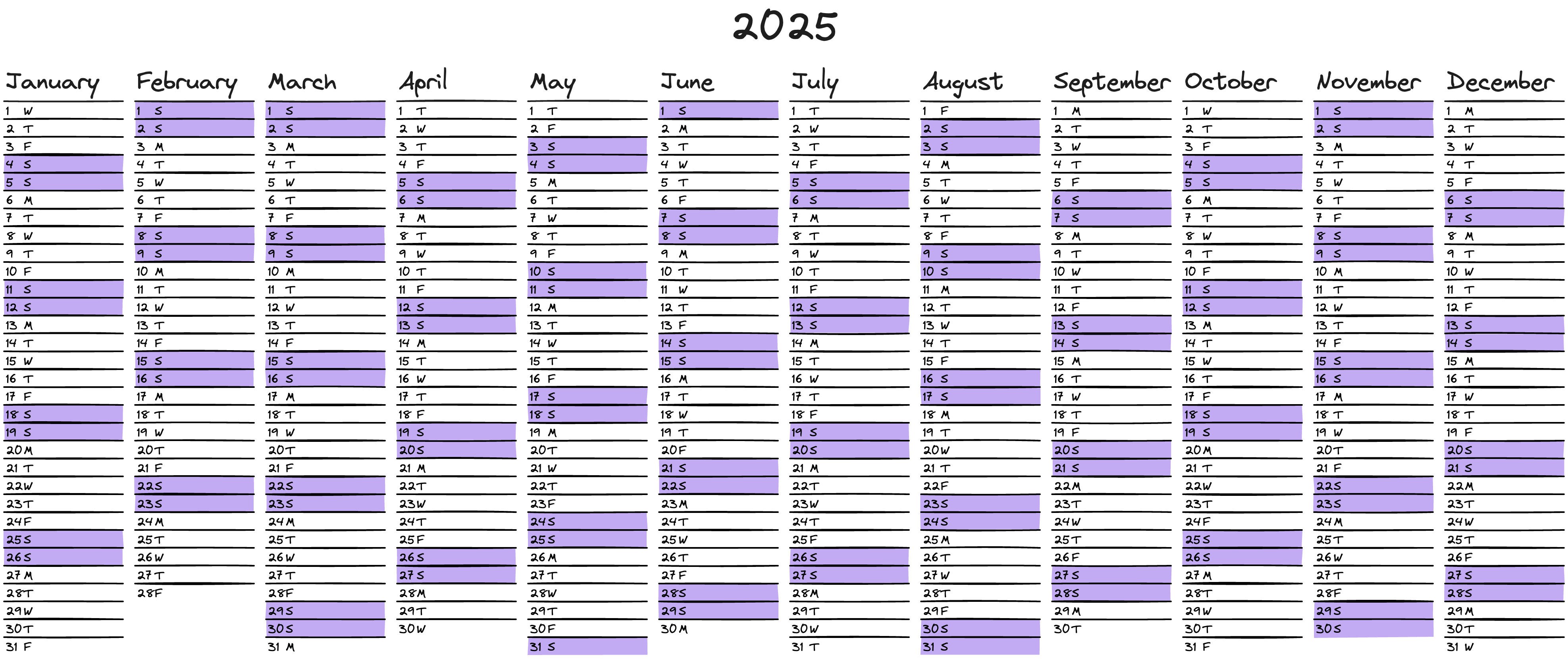
This script generates a complete calendar for a specified year, visually distinguishing weekends from weekdays through color coding.
|
||
|
||
|
||
|
||
## Customizable Colors
|
||
|
||
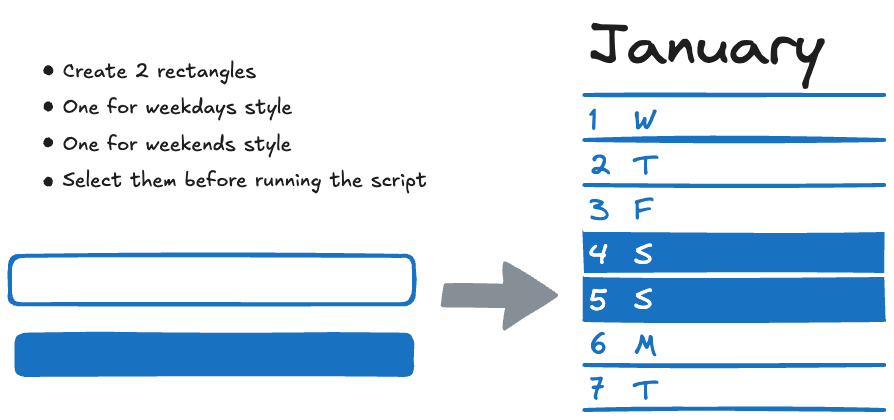
You can personalize the calendar’s appearance by defining your own colors:
|
||
|
||
1. Create two rectangles in your design.
|
||
2. Select both rectangles before running the script:
|
||
• The **fill and stroke colors of the first rectangle** will be applied to weekdays.
|
||
• The **fill and stroke colors of the second rectangle** will be used for weekends.
|
||
|
||
If no rectangle are selected, the default color schema will be used (white and purple).
|
||
|
||
|
||
|
||
```javascript
|
||
*/
|
||
|
||
ea.reset();
|
||
|
||
// -------------------------------------
|
||
// Constants initiation
|
||
// -------------------------------------
|
||
|
||
const RECT_WIDTH = 300; // day width
|
||
const RECT_HEIGHT = 45; // day height
|
||
const START_X = 0; // X start position
|
||
const START_Y = 0; // PY start position
|
||
const MONTH_SPACING = 30; // space between months
|
||
const DAY_SPACING = 0; // space between days
|
||
const DAY_NAME_SPACING = 45; // space between day number and day letters
|
||
const DAY_NAME_AND_NUMBER_X_MARGIN = 5;
|
||
const MONTH_NAME_SPACING = -40;
|
||
const YEAR_X = (RECT_WIDTH + MONTH_SPACING) * 6 - 150;
|
||
const YEAR_Y = -200;
|
||
|
||
let COLOR_WEEKEND = "#c3abf3";
|
||
let COLOR_WEEKDAY = "#ffffff";
|
||
const COLOR_DAY_STROKE = "none";
|
||
let STROKE_DAY = 4;
|
||
let FILLSTYLE_DAY = "solid";
|
||
|
||
const FONT_SIZE_MONTH = 60;
|
||
const FONT_SIZE_DAY = 30;
|
||
const FONT_SIZE_YEAR = 100;
|
||
|
||
const LINE_STROKE_SIZE = 4;
|
||
let LINE_STROKE_COLOR_WEEKDAY = "black";
|
||
let LINE_STROKE_COLOR_WEEKEND = "black";
|
||
|
||
const SATURDAY = 6;
|
||
const SUNDAY = 0;
|
||
const JANUARY = 0;
|
||
const FIRST_DAY_OF_THE_MONTH = 1;
|
||
|
||
const DAY_NAME_AND_NUMBER_Y_MARGIN = (RECT_HEIGHT - FONT_SIZE_DAY) / 2;
|
||
|
||
// -------------------------------------
|
||
|
||
// ask for requested Year
|
||
// Default value is the current year
|
||
let requestedYear = parseFloat(new Date().getFullYear());
|
||
requestedYear = parseFloat(await utils.inputPrompt("Year ?", requestedYear, requestedYear));
|
||
if(isNaN(requestedYear)) {
|
||
new Notice("Invalid number");
|
||
return;
|
||
}
|
||
|
||
// -------------------------------------
|
||
// Use selected element for the calendar style
|
||
// -------------------------------------
|
||
|
||
let elements = ea.getViewSelectedElements();
|
||
if (elements.length>=1){
|
||
COLOR_WEEKDAY = elements[0].backgroundColor;
|
||
FILLSTYLE_DAY = elements[0].fillStyle;
|
||
STROKE_DAY = elements[0].strokeWidth;
|
||
LINE_STROKE_COLOR_WEEKDAY = elements[0].strokeColor;
|
||
|
||
}
|
||
if (elements.length>=2){
|
||
COLOR_WEEKEND = elements[1].backgroundColor;
|
||
LINE_STROKE_COLOR_WEEKEND = elements[1].strokeColor;
|
||
}
|
||
|
||
|
||
|
||
|
||
|
||
|
||
// get the first day of the current year (01/01)
|
||
var firstDayOfYear = new Date(requestedYear, JANUARY, FIRST_DAY_OF_THE_MONTH);
|
||
|
||
var currentDay = firstDayOfYear
|
||
|
||
// write year number
|
||
let calendarYear = firstDayOfYear.getFullYear();
|
||
ea.style.fontSize = FONT_SIZE_YEAR;
|
||
ea.addText(START_X + YEAR_X, START_Y + YEAR_Y, String(calendarYear));
|
||
|
||
|
||
// while we do not reach the end of the year iterate on all the day of the current year
|
||
do {
|
||
|
||
var curentDayOfTheMonth = currentDay.getDate();
|
||
var currentMonth = currentDay.getMonth();
|
||
var isWeekend = currentDay.getDay() == SATURDAY || currentDay.getDay() == SUNDAY;
|
||
|
||
// set background color if it's a weekend or weekday
|
||
ea.style.backgroundColor = isWeekend ? COLOR_WEEKEND : COLOR_WEEKDAY ;
|
||
|
||
|
||
ea.style.strokeColor = COLOR_DAY_STROKE;
|
||
ea.style.fillStyle = FILLSTYLE_DAY;
|
||
ea.style.strokeWidth = STROKE_DAY;
|
||
|
||
|
||
let x = START_X + currentMonth * (RECT_WIDTH + MONTH_SPACING);
|
||
let y = START_Y + curentDayOfTheMonth * (RECT_HEIGHT + DAY_SPACING);
|
||
|
||
// only one time per month
|
||
if(curentDayOfTheMonth == FIRST_DAY_OF_THE_MONTH) {
|
||
|
||
// add month name
|
||
ea.style.fontSize = FONT_SIZE_MONTH;
|
||
ea.addText(x + DAY_NAME_AND_NUMBER_X_MARGIN, START_Y+MONTH_NAME_SPACING, currentDay.toLocaleString('default', { month: 'long' }));
|
||
}
|
||
|
||
// Add day rectangle
|
||
ea.style.fontSize = FONT_SIZE_DAY;
|
||
ea.addRect(x, y, RECT_WIDTH, RECT_HEIGHT);
|
||
|
||
// set stroke color based on weekday
|
||
ea.style.strokeColor = isWeekend ? LINE_STROKE_COLOR_WEEKEND : LINE_STROKE_COLOR_WEEKDAY;
|
||
|
||
// add line between days
|
||
//ea.style.strokeColor = LINE_STROKE_COLOR_WEEKDAY;
|
||
ea.style.strokeWidth = LINE_STROKE_SIZE;
|
||
ea.addLine([[x,y],[x+RECT_WIDTH, y]]);
|
||
|
||
|
||
// add day number
|
||
ea.addText(x + DAY_NAME_AND_NUMBER_X_MARGIN, y + DAY_NAME_AND_NUMBER_Y_MARGIN, String(curentDayOfTheMonth));
|
||
// add day name
|
||
ea.addText(x + DAY_NAME_AND_NUMBER_X_MARGIN + DAY_NAME_SPACING, y + DAY_NAME_AND_NUMBER_Y_MARGIN, String(currentDay.toLocaleString('default', { weekday: 'narrow' })));
|
||
|
||
// go to the next day
|
||
currentDay.setDate(currentDay.getDate() + 1);
|
||
|
||
} while (!(currentDay.getMonth() == JANUARY && currentDay.getDate() == FIRST_DAY_OF_THE_MONTH)) // stop if we reach the 01/01 of the next year
|
||
|
||
|
||
await ea.addElementsToView(false, false, true);
|