mirror of
https://github.com/zsviczian/obsidian-excalidraw-plugin.git
synced 2025-08-06 05:46:28 +00:00

11 KiB
11 KiB
/*
if(!ea.verifyMinimumPluginVersion || !ea.verifyMinimumPluginVersion("2.0.4")) {
  new Notice("This script requires a newer version of Excalidraw. Please install the latest version.");
  return;
}

// --------------------------------------
// Initialize values and settings
// --------------------------------------
let settings = ea.getScriptSettings();

if(!settings["Custom System Prompts"]) {
  settings = {
    "Custom System Prompts" : {},
    "Agent's Task": "Wireframe to code",
    "Output Type": "html"
  };
  await ea.setScriptSettings(settings);
}

const instructions = {
  "html": "Turn this into a single html file using tailwind. Return a single message containing only the html file in a codeblock.",
  "mermaid": "Challenge my thinking. Return a single message containing only the mermaid diagram in a codeblock."
}

const defaultSystemPrompts = {
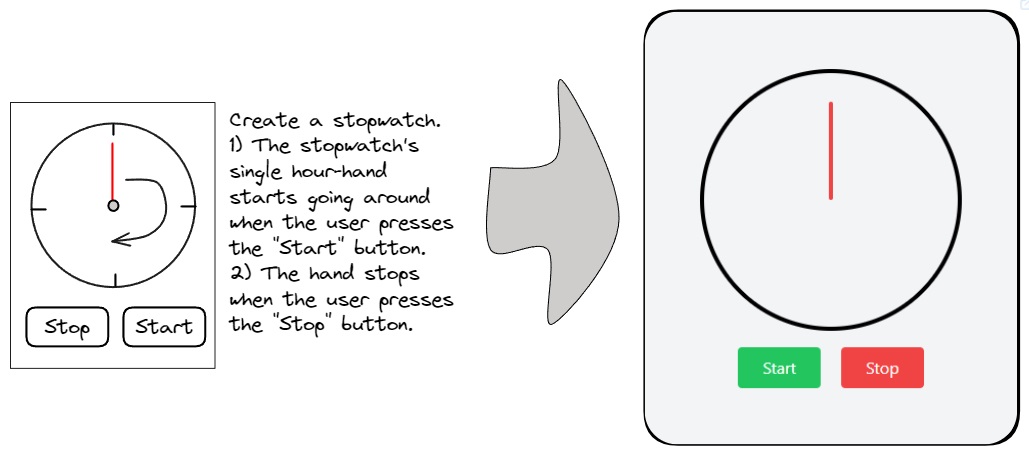
  "Wireframe to code": `You are an expert tailwind developer. A user will provide you with a low-fidelity wireframe of an application and you will return a single html file that uses tailwind to create the website. Use creative license to make the application more fleshed out. Write the necessary javascript code. If you need to insert an image, use placehold.co to create a placeholder image.`,
  "Challenge my thinking": `The user will provide you with a screenshot of a whiteboard. Your task is to generate a mermaid graph based on the whiteboard and return the resulting mermaid code in a codeblock. The whiteboard will cover ideas about a subject. On the mindmap identify ideas that challenge, dispute, and contradict what is on the whiteboard, as well as also include ideas that extend, add-to, build-on, and takes the thinking of the user further. Use the graph diagram type. Return a single message containing only the mermaid diagram in a codeblock. Avoid the use of () parenthesis in the mermaid script.`
}

const OPENAI_API_KEY = ea.plugin.settings.openAIAPIToken;
if(!OPENAI_API_KEY || OPENAI_API_KEY === "") {
  new Notice("You must first configure your API key in Excalidraw Plugin Settings");
  return;
}

let customSystemPrompts = settings["Custom System Prompts"];
let agentTask = settings["Agent's Task"];
let outputType = settings["Output Type"];
if (!Object.keys(instructions).includes(outputType)) {
  outputType = "html";
}
let allSystemPrompts = {
  ...defaultSystemPrompts,
  ...customSystemPrompts
};
if(!allSystemPrompts.hasOwnProperty(agentTask)) {
  agentTask = Object.keys(defaultSystemPrompts)[0];
}

// --------------------------------------
// Generate image
// --------------------------------------
const getRequestObjFromSelectedElements = async (view) => {
    await view.forceSave(true);
    const viewElements = ea.getViewSelectedElements();
    if(viewElements.length === 0) {
      new Notice ("Aborting because there is nothing selected.",4000);
      return;
    }
    ea.copyViewElementsToEAforEditing(viewElements, true);
    const bb = ea.getBoundingBox(viewElements);
    const size = (bb.width*bb.height);
    const minRatio = Math.sqrt(360000/size);
    const maxRatio = Math.sqrt(size/16000000);
    const scale = minRatio > 1
      ? minRatio
      : (
          maxRatio > 1
          ? 1/maxRatio
          : 1
        );

    const loader = ea.getEmbeddedFilesLoader(false);
    const exportSettings = {
      withBackground: true,
      withTheme: true,
    };

    const dataURL =
      await ea.createPNGBase64(
        null,
        scale,
        exportSettings,
        loader,
        "light",
      );
    ea.clear();
    return { image: dataURL };
  }

// --------------------------------------
// Submit Prompt
// --------------------------------------
const run = async () => {
  const requestObject = await getRequestObjFromSelectedElements(ea.targetView);
  requestObject.systemPrompt = allSystemPrompts[agentTask];
  requestObject.instruction = instructions[outputType];

  const spinner = await ea.convertStringToDataURL(`
  <html><head><style>
    html, body {width: 100%; height: 100%; color: ${ea.getExcalidrawAPI().getAppState().theme === "dark" ? "white" : "black"};}
    body {display: flex; align-items: center; justify-content: center; flex-direction: column; gap: 1rem; overflow: hidden;}
    .Spinner {display: flex; align-items: center; justify-content: center; margin-left: auto; margin-right: auto;}
    .Spinner svg {animation: rotate 1.6s linear infinite; transform-origin: center center; width: 40px; height: 40px;}
    .Spinner circle {stroke: currentColor; animation: dash 1.6s linear 0s infinite; stroke-linecap: round;}
    @keyframes rotate {100% {transform: rotate(360deg);}}
    @keyframes dash {0% {stroke-dasharray: 1, 300; stroke-dashoffset: 0;} 50% {stroke-dasharray: 150, 300; stroke-dashoffset: -200;} 100% {stroke-dasharray: 1, 300; stroke-dashoffset: -280;}}
  </style></head><body>
    <div class="Spinner">
      <svg viewBox="0 0 100 100">
        <circle cx="50" cy="50" r="46" stroke-width="8" fill="none" stroke-miter-limit="10"/>
      </svg>
    </div>
    <div>Generating...</div>
  </body></html>`);

  const bb = ea.getBoundingBox(ea.getViewSelectedElements());
  const id = ea.addEmbeddable(bb.topX+bb.width+100,bb.topY-(720-bb.height)/2,550,720,spinner);
  await ea.addElementsToView(false,true);
  ea.clear();
  const embeddable = ea.getViewElements().filter(el=>el.id===id);
  ea.copyViewElementsToEAforEditing(embeddable);
  const els = ea.getViewSelectedElements();
  ea.viewZoomToElements(false, els.concat(embeddable));

  //Get result from GPT

  const result = await ea.postOpenAI(requestObject);

  const errorMessage = async () => {
    const error = "Something went wrong! Check developer console for more.";
    const errorDataURL = await ea.convertStringToDataURL(`
      <html><head><style>
        html, body {height: 100%;}
        body {display: flex; flex-direction: column; align-items: center; justify-content: center; color: red;}
        h1, h3 {margin-top: 0;margin-bottom: 0.5rem;}
      </style></head><body>
        <h1>Error!</h1>
        <h3>${error}</h3>
      </body></html>`);
    new Notice (error);
    ea.getElement(id).link = errorDataURL;
    ea.addElementsToView(false,true);
  }

  if(!result?.json?.hasOwnProperty("choices")) {
    await errorMessage();
    return;
  }

  console.log(result, result.json);
  let content = ea.extractCodeBlocks(result.json.choices[0]?.message?.content)[0]?.data;

  if(!content) {
    await errorMessage();
    return;
  }

  try {
    switch(outputType) {
      case "html":
        ea.getElement(id).link = await ea.convertStringToDataURL(content);
        ea.addElementsToView(false,true);
        break;
      case "mermaid":
        if(content.startsWith("mermaid")) {
          content = content.replace(/^mermaid/,"").trim();
        }
        ea.getElement(id).isDeleted = true;
        try {
          await ea.addMermaid(content);
        } catch (e) {
          ea.addText(0,0,content);
        }
        ea.targetView.currentPosition = {x: bb.topX+bb.width+100, y: bb.topY-bb.height-100};
        await ea.addElementsToView(true, false);
        ea.clear();
        if(content.startsWith("graph LR") || content.startsWith("graph TD")) {
          try {
            if(content.startsWith("graph LR") || content.startsWith("flowchart LR")) {
              content = content.replaceAll("graph LR", "graph TD");
              content = content.replaceAll("flowchart LR", "flowchart TD");
              await ea.addMermaid(content);
            } else if (content.startsWith("graph TD") || content.startsWith("flowchart TD")) {
              content = content.replaceAll("graph TD", "graph LR");
              content = content.replaceAll("flowchart TD", "flowchart LR");
              await ea.addMermaid(content);
            }
          } catch (e) {
            ea.addText(0,0,content);
          }
          ea.targetView.currentPosition = {x: bb.topX-100, y: bb.topY + 100};
          ea.addElementsToView(true, true);
        }
        break;
    }
  } catch(e) {
    await errorMessage();
    return;
  }
}

// --------------------------------------
// User Interface
// --------------------------------------
const fragWithHTML = (html) => createFragment((frag) => (frag.createDiv().innerHTML = html));

const configModal = new ea.obsidian.Modal(app);
let dirty=false;
configModal.onOpen = () => {
  const contentEl = configModal.contentEl;
  contentEl.createEl("h1", {text: "ExcaliAI"});

  let textArea, promptTitle;

  new ea.obsidian.Setting(contentEl)
    .setName("Select Prompt")
    .addDropdown(dropdown=>{
      Object.keys(allSystemPrompts).forEach(key=>dropdown.addOption(key,key));
      dropdown
      .setValue(agentTask)
      .onChange(value => {
        dirty = true;
        agentTask = value;
        textArea.setValue(allSystemPrompts[value]);
        //promptTitle.setValue(value);
      });
   })

  new ea.obsidian.Setting(contentEl)
    .setName("Select response type")
    .addDropdown(dropdown=>{
      Object.keys(instructions).forEach(key=>dropdown.addOption(key,key));
      dropdown
      .setValue(outputType)
      .onChange(value => {
        dirty = true;
        outputType = value;
      });
   })

  contentEl.createEl("h3", {text: "Customize Prompt"});
/*  const titleSetting = new ea.obsidian.Setting(contentEl)
    .addText(text => {
      promptTitle = text;
      text.inputEl.style.width = "100%";
      text.setValue(agentTask);
    })
  titleSetting.nameEl.style.display = "none";
  titleSetting.descEl.style.display = "none";
  titleSetting.infoEl.style.display = "none";
*/
  const textAreaSetting = new ea.obsidian.Setting(contentEl)
    .addTextArea(text => {
       textArea = text;
       text.inputEl.style.minHeight = "10em";
       text.inputEl.style.minWidth = "400px";
       text.inputEl.style.width = "100%";
       text.setValue(allSystemPrompts[agentTask]);
       text.onChange(value => {
  //     dirty = true;
         //Needs further work
         allSystemPrompts[agentTask] = value;
       })
    })
  textAreaSetting.nameEl.style.display = "none";
  textAreaSetting.descEl.style.display = "none";
  textAreaSetting.infoEl.style.display = "none";

  new ea.obsidian.Setting(contentEl)
    .addButton(button =>
      button
      .setButtonText("Run")
      .onClick((event)=>{
        setTimeout(()=>{run()},500); //Obsidian crashes otherwise, likely has to do with requesting an new frame for react
        configModal.close();
      })
    );
}

configModal.onClose = () => {
  if(dirty) {
    settings["Custom System Prompts"] = customSystemPrompts;
    settings["Agent's Task"] = agentTask;
    settings["Output Type"] = outputType;
    ea.setScriptSettings(settings);
  }
}

configModal.open();