mirror of
https://github.com/zsviczian/obsidian-excalidraw-plugin.git
synced 2025-08-06 05:46:28 +00:00

21 KiB
21 KiB
/*
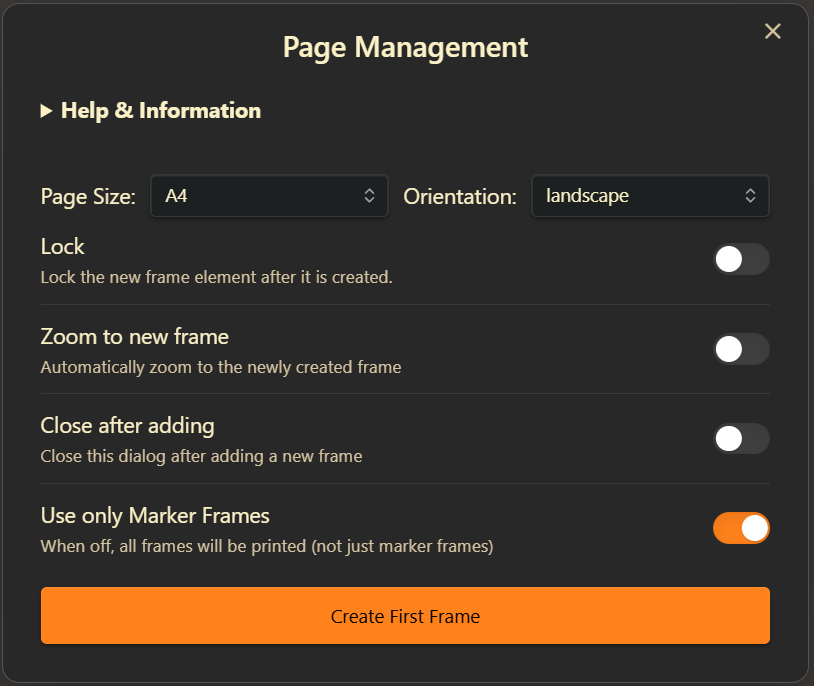
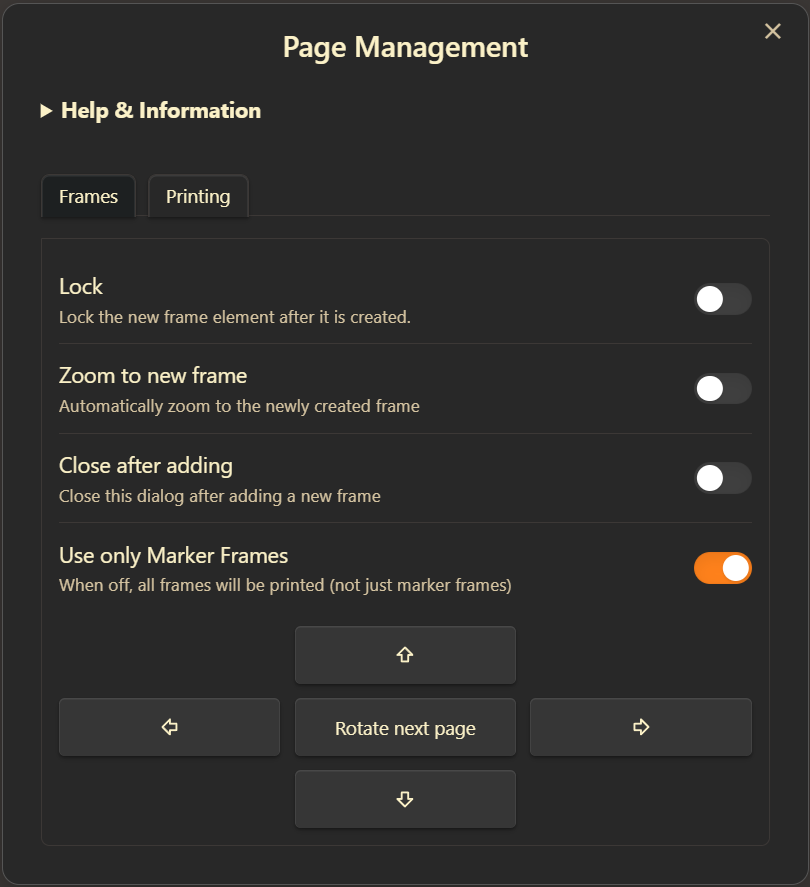
Export Excalidraw to PDF Pages: Define printable page areas using frames, then export each frame as a separate page in a multi-page PDF. Perfect for turning your Excalidraw drawings into printable notes, handouts, or booklets. Supports standard and custom page sizes, margins, and easy frame arrangement.
*/


async function run() {
  // Help text for the script
  const HELP_TEXT = `
**Easily split your Excalidraw drawing into printable pages!**

If you find this script helpful, consider [buying me a coffee](https://ko-fi.com/zsolt). Thank you.

---

### How it works

- **Define Pages:** Use frames to mark out each page area in your drawing. You can create the first frame with this script (choose a standard size or orientation), or draw your own frame for a custom page size.
- **Add More Pages:** Select a frame, then use the arrow buttons to add new frames next to it. All new frames will match the size of the selected one.
- **Rename Frames:** You can rename frames as you like. When exporting to PDF, pages will be ordered alphabetically by frame name.

---

### Important Notes

- **Same Size & Orientation:** All frames must have the same size and orientation (e.g., all A4 Portrait) to export to PDF. Excalidraw currently does not support PDFs with different-sized pages.
- **Custom Sizes:** If you draw your own frame, the PDF will use that exact size—great for custom page layouts!
- **Margins:** If you set a margin, the page size stays the same, but your content will shrink to fit inside the printable area.
- **No Frame Borders/Titles in Print:** Frame borders and frame titles will *not* appear in the PDF.
- **No Frame Clipping:** The script disables frame clipping for this drawing.
- **Templates:** You can save a template document with prearranged frames (even locked ones) for reuse.
- **Lock Frames:** Frames only define print areas—they don't "contain" elements. Locking frames is recommended to prevent accidental movement.
- **Outside Content:** Anything outside the frames will *not* appear in the PDF.

---

### Printing

- **Export to PDF:** Click the printer button to export each frame as a separate page in a PDF.
- **Order:** Pages are exported in alphabetical order of frame names.

---

### Settings

You can also access script settings at the bottom of Excalidraw Plugin settings. The script stores your preferences for:
- Locking new frames after creation
- Zooming to new frames
- Closing the dialog after adding a frame
- Default page size and orientation
- Print margin

---

**Tip:** For more on templates, see [Mastering Excalidraw Templates](https://youtu.be/jgUpYznHP9A). For referencing pages in markdown, see [Image Fragments](https://youtu.be/sjZfdqpxqsg) and [Image Block References](https://youtu.be/yZQoJg2RCKI).
`;

  // Enable frame rendering
  const st = ea.getExcalidrawAPI().getAppState();
  const {enabled, clip, name, outline} = st.frameRendering;
  if(!enabled || clip || !name || !outline) {
    ea.viewUpdateScene({
      appState: {
        frameRendering: {
          enabled: true,
          clip: false,
          name: true,
          outline: true
        }
      }
    });
  }

  // Page size options (using standard sizes from ExcalidrawAutomate)
  const PAGE_SIZES = [
    "A0", "A1", "A2", "A3", "A4", "A5", "A6",
    "Letter", "Legal", "Tabloid", "Ledger"
  ];

  const PAGE_ORIENTATIONS = ["portrait", "landscape"];

  // Margin sizes in points
  const MARGINS = {
    "none": 0,
    "tiny": 10,
    "normal": 60,
  };

  // Initialize settings
  let settings = ea.getScriptSettings();
  let dirty = false;

  // Define setting keys
  const PAGE_SIZE = "Page size";
  const ORIENTATION = "Page orientation";
  const MARGIN = "Print-margin";
  const LOCK_FRAME = "Lock frame after it is created";
  const SHOULD_ZOOM = "Should zoom after adding page";
  const SHOULD_CLOSE = "Should close after adding page";

  // Set default values on first run
  if (!settings[PAGE_SIZE]) {
    settings = {};
    settings[PAGE_SIZE] = { value: "A4", valueSet: PAGE_SIZES };
    settings[ORIENTATION] = { value: "portrait", valueSet: PAGE_ORIENTATIONS };
    settings[MARGIN] = { value: "none", valueSet: Object.keys(MARGINS)};
    settings[SHOULD_ZOOM] = { value: false };
    settings[SHOULD_CLOSE] = { value: false };
    settings[LOCK_FRAME] = { value: true };
    await ea.setScriptSettings(settings);
  }

const getSortedFrames = () => ea.getViewElements()
    .filter(el => el.type === "frame")
    .sort((a, b) => {
      const nameA = a.name || "";
      const nameB = b.name || "";
      return nameA.localeCompare(nameB);
    });

  // Find existing page frames and determine next page number
  const findExistingPages = (selectLastFrame = false) => {
    const frameElements = getSortedFrames();

    // Extract page numbers from frame names
    const pageNumbers = frameElements
      .map(frame => {
        const match = frame.name?.match(/Page\s+(\d+)/i);
        return match ? parseInt(match[1]) : 0;
      })
      .filter(num => !isNaN(num));

    // Find the highest page number
    const nextPageNumber = pageNumbers.length > 0
      ? Math.max(...pageNumbers) + 1
      : 1;

    if(selectLastFrame && frameElements.length > 0) {
      ea.selectElementsInView([frameElements[frameElements.length-1]]);
    }

    return {
      frames: frameElements,
      nextPageNumber: nextPageNumber
    };
  };

  // Check if there are frames in the scene and if a frame is selected
  let existingFrames = ea.getViewElements().filter(el => el.type === "frame");
  let selectedFrame = ea.getViewSelectedElements().find(el => el.type === "frame");
  const hasFrames = existingFrames.length > 0;
  if(hasFrames && !selectedFrame) {
    if(st.activeLockedId && existingFrames.find(f=>f.id === st.activeLockedId)) {
      selectedFrame = existingFrames.find(f=>f.id === st.activeLockedId);
      ea.viewUpdateScene({ appState: { activeLockedId: null }});
      ea.selectElementsInView([selectedFrame]);
    } else {
      findExistingPages(true);
      selectedFrame = ea.getViewSelectedElements().find(el => el.type === "frame");
    }
  }
  const hasSelectedFrame = !!selectedFrame;
  const modal = new ea.FloatingModal(ea.plugin.app);
  let lockFrame = !!settings[LOCK_FRAME]?.value;
  let shouldClose = settings[SHOULD_CLOSE].value;
  let shouldZoom = settings[SHOULD_ZOOM].value;

  // Show notice if there are frames but none selected
  if (hasFrames && !hasSelectedFrame) {
    new Notice("Select a frame before running the script", 7000);
    return;
  }

  // Create the first frame
  const createFirstFrame = async (pageSize, orientation) => {
    // Use ExcalidrawAutomate's built-in function to get page dimensions
    const dimensions = ea.getPagePDFDimensions(pageSize, orientation);

    if (!dimensions) {
      new Notice("Invalid page size selected");
      return;
    }

    // Save settings when creating first frame
    if (settings[PAGE_SIZE].value !== pageSize) {
      settings[PAGE_SIZE].value = pageSize;
      dirty = true;
    }

    if (settings[ORIENTATION].value !== orientation) {
      settings[ORIENTATION].value = orientation;
      dirty = true;
    }

    // Format page number with leading zero
    const pageName = "Page 01";

    // Calculate position to center the frame
    const appState = ea.getExcalidrawAPI().getAppState();
    const x = (appState.width - dimensions.width) / 2;
    const y = (appState.height - dimensions.height) / 2;

    return await addFrameElement(x, y, dimensions.width, dimensions.height, pageName, true);
  };

  // Add new page frame
  const addPage = async (direction, pageSize, orientation) => {
    selectedFrame = ea.getViewSelectedElements().find(el => el.type === "frame");
    if (!selectedFrame) return;

    const { frames, nextPageNumber } = findExistingPages();

    // Get dimensions from selected frame
    const dimensions = {
      width: selectedFrame.width,
      height: selectedFrame.height
    };

    // Format page number with leading zero
    const pageName = `Page ${nextPageNumber.toString().padStart(2, '0')}`;

    // Calculate position based on direction and selected frame
    let x = 0;
    let y = 0;

    switch (direction) {
      case "right":
        x = selectedFrame.x + selectedFrame.width;
        y = selectedFrame.y;
        break;
      case "left":
        x = selectedFrame.x - dimensions.width;
        y = selectedFrame.y;
        break;
      case "down":
        x = selectedFrame.x;
        y = selectedFrame.y + selectedFrame.height;
        break;
      case "up":
        x = selectedFrame.x;
        y = selectedFrame.y - dimensions.height;
        break;
    }

    return await addFrameElement(x, y, dimensions.width, dimensions.height, pageName);
  };

  addFrameElement = async (x, y, width, height, pageName, repositionToCursor = false) => {
    const frameId = ea.addFrame(x, y, width, height, pageName);
    if(lockFrame) {
      ea.getElement(frameId).locked = true;
    }
    await ea.addElementsToView(repositionToCursor);
    const addedFrame = ea.getViewElements().find(el => el.id === frameId);
    if(shouldZoom) {
      ea.viewZoomToElements(true, [addedFrame]);
    } else {
      ea.selectElementsInView([addedFrame]);
    }

    //ready for the next frame
    ea.clear();
    selectedFrame = addedFrame;
    if(shouldClose) {
      modal.close();
    }
    return addedFrame;
  }

  const translateToZero = ({ top, left, bottom, right }, padding=0) => {
    const {topX, topY, width, height} = ea.getBoundingBox(ea.getViewElements());
    const newTop = top - (topY - padding);
    const newLeft = left - (topX - padding);
    const newBottom = bottom - (topY - padding);
    const newRight = right - (topX - padding);

    return {
      top: newTop,
      left: newLeft,
      bottom: newBottom,
      right: newRight,
    };
  }

  // Check if all frames have the same size
  const checkFrameSizes = (frames) => {
    if (frames.length <= 1) return true;

    const referenceWidth = frames[0].width;
    const referenceHeight = frames[0].height;

    return frames.every(frame =>
      Math.abs(frame.width - referenceWidth) < 1 &&
      Math.abs(frame.height - referenceHeight) < 1
    );
  };

  // Print frames to PDF
  const printToPDF = async (marginSize) => {
    const margin = MARGINS[marginSize] || 0;

    // Save margin setting
    if (settings[MARGIN].value !== marginSize) {
      settings[MARGIN].value = marginSize;
      dirty = true;
    }

    // Get all frame elements and sort by name
    const frames = getSortedFrames();

    if (frames.length === 0) {
      new Notice("No frames found to print");
      return;
    }

    // Check if all frames have the same size
    if (!checkFrameSizes(frames)) {
      new Notice("Only same sized pages are supported currently", 7000);
      return;
    }

    // Create a notice during processing
    const notice = new Notice("Preparing PDF, please wait...", 0);

    // Create SVGs for each frame
    const svgPages = [];

    const svgScene = await ea.createViewSVG({
      withBackground: true,
      theme: st.theme,
      frameRendering: { enabled: false, name: false, outline: false, clip: false },
      padding: 0,
      selectedOnly: false,
      skipInliningFonts: false,
      embedScene: false,
    });

    for (const frame of frames) {
      const  { top, left, bottom, right } = translateToZero({
        top: frame.y,
        left: frame.x,
        bottom: frame.y + frame.height,
        right: frame.x + frame.width,
      });

      //always create the new SVG in the main Obsidian workspace (not the popout window, if present)
      const host = window.createDiv();
      host.innerHTML = svgScene.outerHTML;
      const clonedSVG = host.firstElementChild;
      const width = Math.abs(left-right);
      const height = Math.abs(top-bottom);
      clonedSVG.setAttribute("viewBox", `${left} ${top} ${width} ${height}`);
      clonedSVG.setAttribute("width", `${width}`);
      clonedSVG.setAttribute("height", `${height}`);
      svgPages.push(clonedSVG);
    }

    // Use dimensions from the first frame
    const width = frames[0].width;
    const height = frames[0].height;

    // Create PDF
    await ea.createPDF({
      SVG: svgPages,
      scale: { fitToPage: true },
      pageProps: {
        dimensions: { width, height },
        backgroundColor: "#ffffff",
        margin: {
          left: margin,
          right: margin,
          top: margin,
          bottom: margin
        },
        alignment: "center"
      },
      filename: ea.targetView.file.basename + "-pages.pdf"
    });
    notice.hide();
  };

  // -----------------------
  // Create a floating modal
  // -----------------------

  modal.titleEl.setText("Page Management");
  modal.titleEl.style.textAlign = "center";

  // Handle save settings on modal close
  modal.onClose = () => {
    if (dirty) {
      ea.setScriptSettings(settings);
    }
  };

  // Create modal content
  modal.contentEl.createDiv({ cls: "excalidraw-page-manager" }, div => {
    const container = div.createDiv({
      attr: {
        style: "display: flex; flex-direction: column; gap: 15px; padding: 10px;"
      }
    });

    // Add help section at the top
    const helpDiv = container.createDiv({
      attr: {
        style: "margin-bottom: 10px;"
      }
    });

    helpDiv.createEl("details", {}, (details) => {
      details.createEl("summary", {
        text: "Help & Information",
        attr: {
          style: "cursor: pointer; font-weight: bold; margin-bottom: 10px;"
        }
      });

      details.createEl("div", {
        attr: {
          style: "padding: 10px; border: 1px solid var(--background-modifier-border); border-radius: 4px; margin-top: 8px; font-size: 0.9em; max-height: 300px; overflow-y: auto;"
        }
      }, div => {
        ea.obsidian.MarkdownRenderer.render(ea.plugin.app, HELP_TEXT, div, "", ea.plugin)
      });
    });

    let pageSizeDropdown, orientationDropdown, marginDropdown;

    // Settings section - only show for first frame creation
    if (!hasFrames) {
      const settingsContainer = container.createDiv({
        attr: {
          style: "display: grid; grid-template-columns: auto 1fr; gap: 10px; align-items: center;"
        }
      });

      // Page size dropdown
      settingsContainer.createEl("label", { text: "Page Size:" });
      pageSizeDropdown = settingsContainer.createEl("select", {
        cls: "dropdown",
        attr: { style: "width: 100%;" }
      });

      PAGE_SIZES.forEach(size => {
        pageSizeDropdown.createEl("option", { text: size, value: size });
      });
      pageSizeDropdown.value = settings[PAGE_SIZE].value;

      // Orientation dropdown
      settingsContainer.createEl("label", { text: "Orientation:" });
      orientationDropdown = settingsContainer.createEl("select", {
        cls: "dropdown",
        attr: { style: "width: 100%;" }
      });

      PAGE_ORIENTATIONS.forEach(orientation => {
        orientationDropdown.createEl("option", { text: orientation, value: orientation });
      });
      orientationDropdown.value = settings[ORIENTATION].value;
    }

    // Show margin settings only if frames exist
    if (hasFrames) {
      const marginContainer = container.createDiv({
        attr: {
          style: "display: grid; grid-template-columns: auto 1fr; gap: 10px; align-items: center;"
        }
      });

      // Margin dropdown (for printing)
      marginContainer.createEl("label", { text: "Print Margin:" });
      marginDropdown = marginContainer.createEl("select", {
        cls: "dropdown",
        attr: { style: "width: 100%;" }
      });

      Object.keys(MARGINS).forEach(margin => {
        marginDropdown.createEl("option", { text: margin, value: margin });
      });
      marginDropdown.value = settings[MARGIN].value;
    }

    // Add checkboxes for zoom and modal behavior only when frames exist
    const optionsContainer = container.createDiv({
      attr: {
        style: "margin-top: 10px;"
      }
    });

    new ea.obsidian.Setting(optionsContainer)
      .setName("Lock")
      .setDesc("Lock the new frame element after it is created.")
      .addToggle(toggle => {
        toggle.setValue(lockFrame)
          .onChange(value => {
            lockFrame = value;
            if (settings[LOCK_FRAME].value !== value) {
              settings[LOCK_FRAME].value = value;
              dirty = true;
            }
          });
      });

    // Zoom to added frame checkbox
    new ea.obsidian.Setting(optionsContainer)
      .setName("Zoom to new frame")
      .setDesc("Automatically zoom to the newly created frame")
      .addToggle(toggle => {
        toggle.setValue(shouldZoom)
          .onChange(value => {
            shouldZoom = value;
            if (settings[SHOULD_ZOOM].value !== value) {
              settings[SHOULD_ZOOM].value = value;
              dirty = true;
            }
          });
      });

    // Close after adding checkbox
    new ea.obsidian.Setting(optionsContainer)
      .setName("Close after adding")
      .setDesc("Close this dialog after adding a new frame")
      .addToggle(toggle => {
        toggle.setValue(shouldClose)
          .onChange(value => {
            shouldClose = value;
            if (settings[SHOULD_CLOSE].value !== value) {
              settings[SHOULD_CLOSE].value = value;
              dirty = true;
            }
          });
      });

    // Buttons section
    const buttonContainer = container.createDiv({
      attr: {
        style: "display: grid; grid-template-columns: repeat(3, 1fr); gap: 10px; margin-top: 10px;"
      }
    });

    if (!hasFrames) {
      // First frame creation button (centered)
      const createFirstBtn = buttonContainer.createEl("button", {
        cls: "page-btn",
        attr: {
          style: "grid-column: 1 / span 3; height: 40px; background-color: var(--interactive-accent); color: var(--text-on-accent);"
        }
      });
      createFirstBtn.textContent = "Create First Frame";
      createFirstBtn.addEventListener("click", async () => {
        const tmpShouldClose = shouldClose;
        shouldClose = true;
        await createFirstFrame(pageSizeDropdown.value, orientationDropdown.value);
        shouldClose = tmpShouldClose;
        if(!shouldClose) run();
      });
    } else if (hasSelectedFrame) {
      // Only show navigation buttons and print when a frame is selected

      // Up button (in middle of top row)
      const upBtn = buttonContainer.createEl("button", {
        cls: "page-btn",
        attr: {
          style: "grid-column: 2; grid-row: 1; height: 40px;"
        }
      });
      upBtn.innerHTML = ea.obsidian.getIcon("arrow-big-up").outerHTML;
      upBtn.addEventListener("click", async () => {
        await addPage("up");
      });

      // Add empty space
      buttonContainer.createDiv({
        attr: { style: "grid-column: 3; grid-row: 1;" }
      });

      // Left button
      const leftBtn = buttonContainer.createEl("button", {
        cls: "page-btn",
        attr: { style: "grid-column: 1; grid-row: 2; height: 40px;" }
      });
      leftBtn.innerHTML = ea.obsidian.getIcon("arrow-big-left").outerHTML;
      leftBtn.addEventListener("click", async () => {
        await addPage("left");
      });

      // Print button (center)
      const printBtn = buttonContainer.createEl("button", {
        cls: "page-btn",
        attr: {
          style: "grid-column: 2; grid-row: 2; height: 40px; background-color: var(--interactive-accent);"
        }
      });
      printBtn.innerHTML = ea.obsidian.getIcon("printer").outerHTML;
      printBtn.addEventListener("click", async () => {
        await printToPDF(marginDropdown.value);
      });

      // Right button
      const rightBtn = buttonContainer.createEl("button", {
        cls: "page-btn",
        attr: { style: "grid-column: 3; grid-row: 2; height: 40px;" }
      });
      rightBtn.innerHTML = ea.obsidian.getIcon("arrow-big-right").outerHTML;
      rightBtn.addEventListener("click", async () => {
        await addPage("right");
      });

      // Down button (in middle of bottom row)
      const downBtn = buttonContainer.createEl("button", {
        cls: "page-btn",
        attr: { style: "grid-column: 2; grid-row: 3; height: 40px;" }
      });
      downBtn.innerHTML = ea.obsidian.getIcon("arrow-big-down").outerHTML;
      downBtn.addEventListener("click", async () => {
        await addPage("down");
      });

      // Add empty space
      buttonContainer.createDiv({
        attr: { style: "grid-column: 1; grid-row: 3;" }
      });
    }

    // Add CSS
    div.createEl("style", {
      text: `
        .page-btn {
          display: flex;
          justify-content: center;
          align-items: center;
          cursor: pointer;
          border-radius: 4px;
        }
        .page-btn:hover {
          background-color: var(--interactive-hover);
        }
        .dropdown {
          height: 30px;
          background-color: var(--background-secondary);
          color: var(--text-normal);
          border-radius: 4px;
          border: 1px solid var(--background-modifier-border);
          padding: 0 10px;
        }
      `
    });
  });

  modal.open();
}

run();