If you are enjoying the Excalidraw plugin then please support my work and enthusiasm by buying me a coffee on https://ko-fi/zsolt.

Jump ahead to the #List of available scripts
Introducing Excalidraw Automate Script Engine
Script Engine scripts are installed in the Downloaded subfolder of the Excalidraw Automate script folder specified in plugin settings.
In the Command Palette installed scripts are prefixed with Downloaded/, thus you can always know if you are executing a local script of your own, or one that you have downloaded from GitHub.
Attention developers and hobby hackers
If you want to modify scripts, I recommend moving them to the `Excalidraw Automate script folder` or a different subfolder under the script folder. Scripts in the `Downloaded` folder will be overwritten when you click the `Update this script` button. Note also, that at this time, I do not check if the script file has been updated on GitHub, thus the `Update this script` button is always visible once you have installed a script, not only when an update is availble (hope to build this feature in the future).
I would love to include your contribution in the script library. If you have a script of your own that you would like to share with the community, please open a PR on GitHub. Be sure to include the following in your pull request
- The script file with a self explanetory name. The name of the file will be the name of the script in the Command Palette.
- An image explaining the scripts purpose. Remember a picture speaks thousand words!
- An update to this file ea-scripts/index.md
List of available scripts
Add Connector Point
| Author | @zsviczian |
| Source | File on GitHub |
| Description | This script will add a small circle to the top left of each text element in the selection and add the text and the "connector point" to a group. You can use the connector points to link text elements with an arrow (in for example a Wardley Map).
 |
Add Link to Existing File and Open
| Author | @zsviczian |
| Source | File on GitHub |
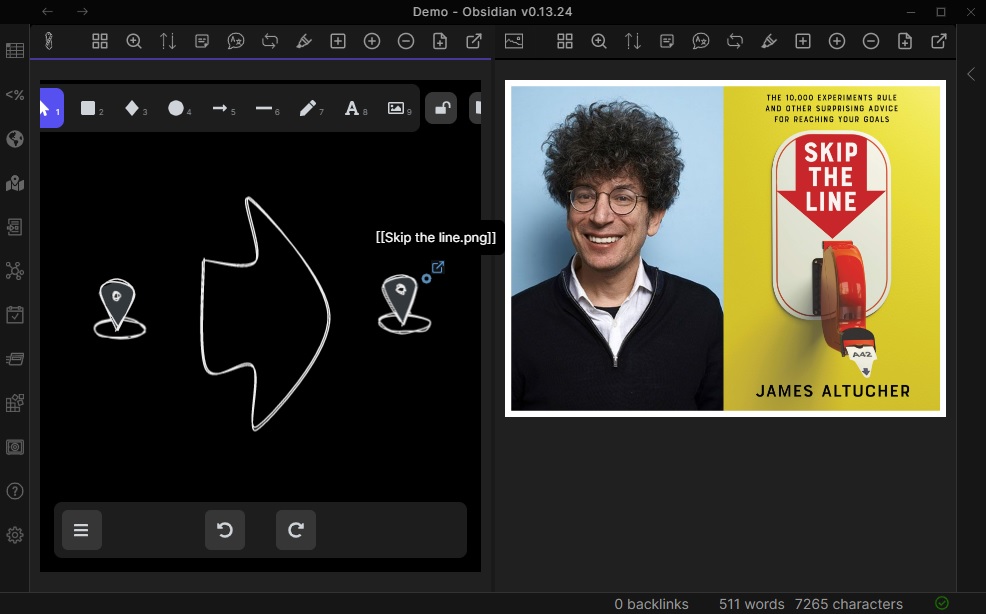
| Description | Prompts for a file from the vault. Adds a link to the selected element pointing to the selected file. You can control in settings to open the file in the current active pane or an adjacent pane.
 |
Add Link to New Page and Open
| Author | @zsviczian |
| Source | File on GitHub |
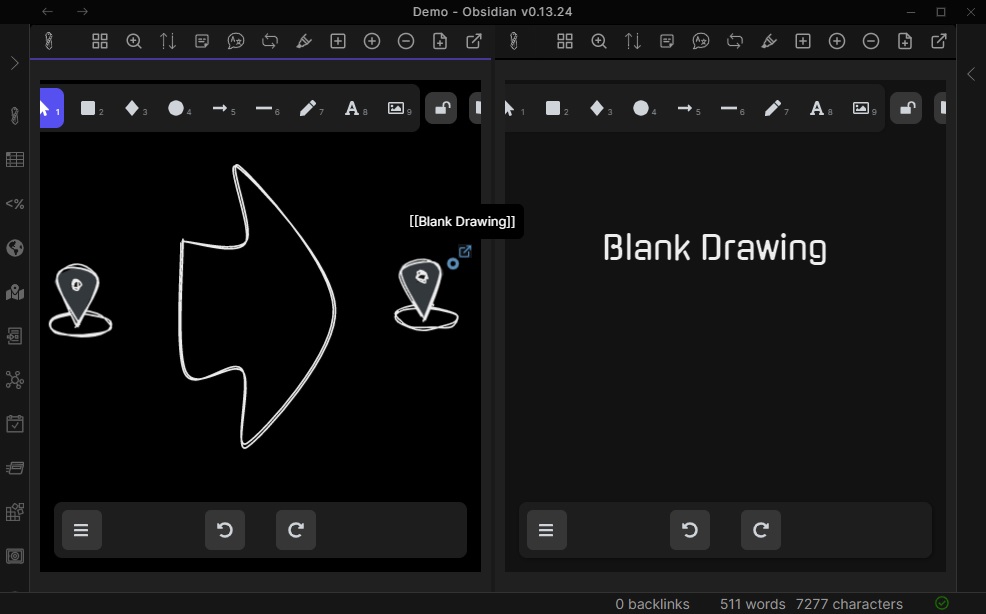
| Description | Prompts for filename. Offers option to create and open a new Markdown or Excalidraw document. Adds link pointing to the new file, to the selected objects in the drawing. You can control in settings to open the file in the current active pane or an adjacent pane.
 |
Add Next Step in Process
| Author | @zsviczian |
| Source | File on GitHub |
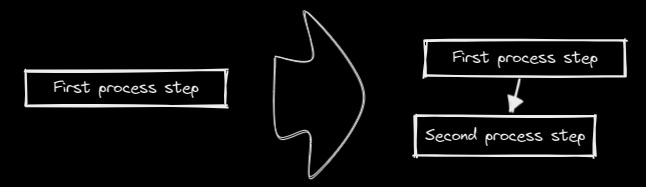
| Description | This script will prompt you for the title of the process step, then will create a stick note with the text. If an element is selected then the script will connect this new step with an arrow to the previous step (the selected element). If no element is selected, then the script assumes this is the first step in the process and will only output the sticky note with the text that was entered.
 |
Box Each Selected Groups
| Author | @1-2-3 |
| Source | File on GitHub |
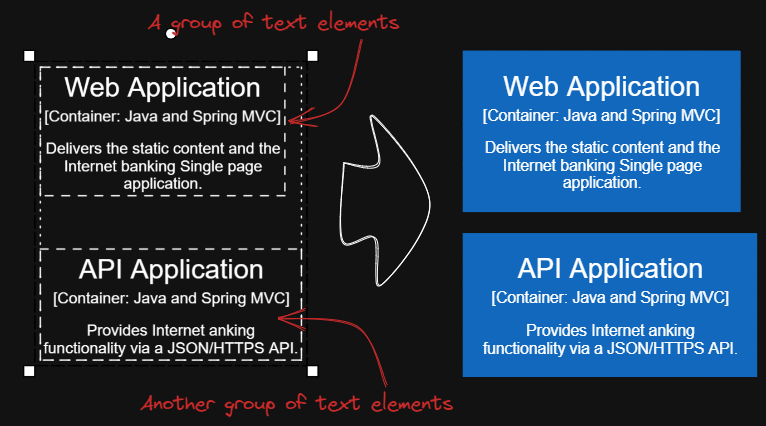
| Description | This script will add encapsulating boxes around each of the currently selected groups in Excalidraw.
 |
Box Selected Elements
| Author | @zsviczian |
| Source | File on GitHub |
| Description | This script will add an encapsulating box around the currently selected elements in Excalidraw.
 |
Change shape of selected elements
| Author | @zsviczian |
| Source | File on GitHub |
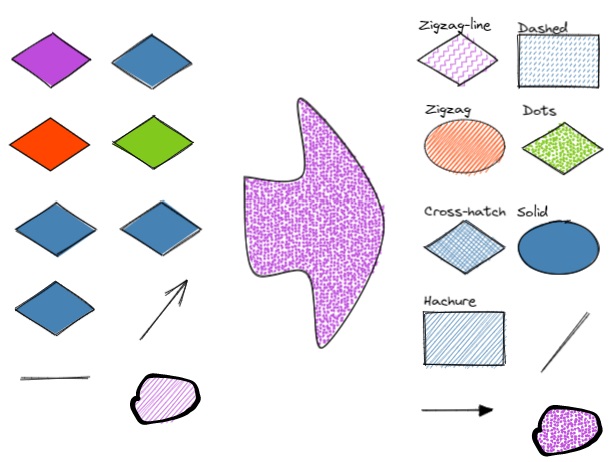
| Description | The script allows you to change the shape of selected Rectangles, Diamonds and Ellipses.
 |
Connect elements
| Author | @zsviczian |
| Source | File on GitHub |
| Description | This script will connect two objects with an arrow. If either of the objects are a set of grouped elements (e.g. a text element grouped with an encapsulating rectangle), the script will identify these groups, and connect the arrow to the largest object in the group (assuming you want to connect the arrow to the box around the text element).
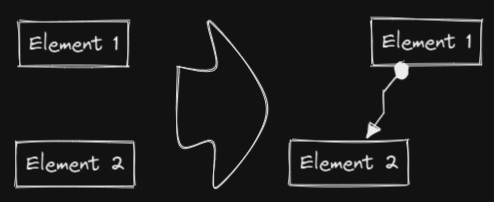 |
Convert freedraw to line
| Author | @zsviczian |
| Source | File on GitHub |
| Description | Convert selected freedraw objects into editable lines. This will allow you to adjust your drawings by dragging line points and will also allow you to select shape fill in case of enclosed lines. You can adjust conversion point density in settings.
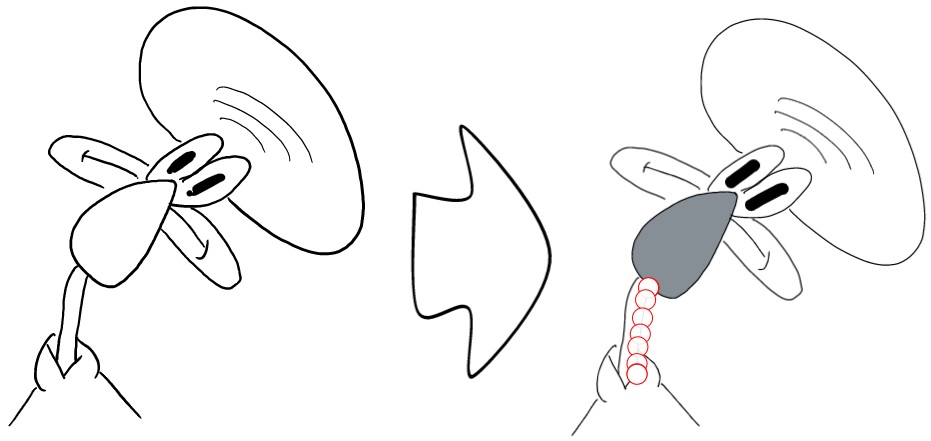 |
Convert selected text elements to sticky notes
| Author | @zsviczian |
| Source | File on GitHub |
| Description | Converts selected plain text elements to sticky notes with transparent background and transparent stroke color (default setting, can be changed in plugin settings). Essentially converts text element into a wrappable format.
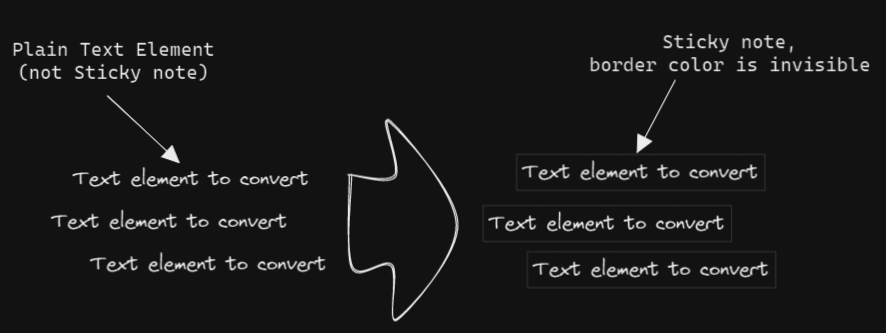 |
Convert text to link with folder and alias
| Author | @zsviczian |
| Source | File on GitHub |
| Description | Converts text elements to links pointing to a file in a selected folder and with the alias set as the original text. The script will prompt the user to select an existing folder from the vault.
original text - [[selected folder/original text|original text]] |
Copy Selected Element Styles to Global
| Author | @1-2-3 |
| Source | File on GitHub |
| Description | This script will copy styles of any selected element into Excalidraw's global styles.
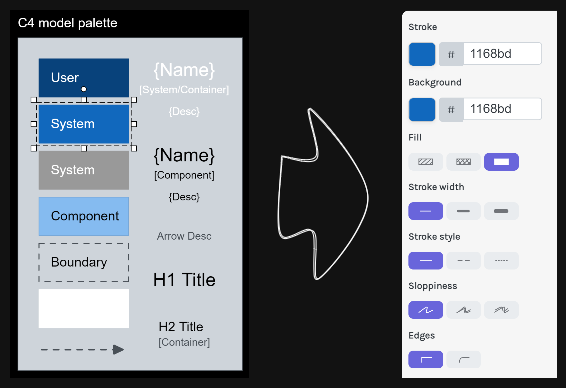 |
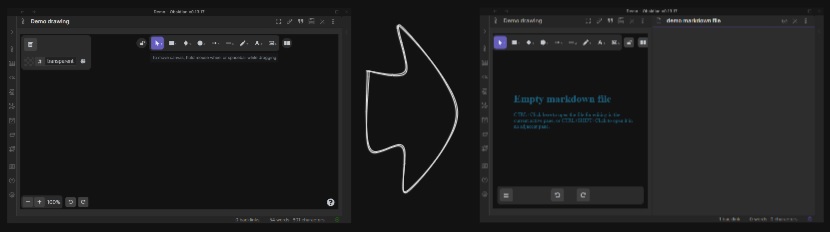
Create new markdown file and embed into active drawing
| Author | @zsviczian |
| Source | File on GitHub |
| Description | The script will prompt you for a filename, then create a new markdown document with the file name provided, open the new markdown document in an adjacent pane, and embed the markdown document into the active Excalidraw drawing.
 |
Darken background color
| Author | @1-2-3 |
| Source | File on GitHub |
| Description | This script darkens the background color of the selected element by 2% at a time. You can use this script several times until you are satisfied. It is recommended to set a shortcut key for this script so that you can quickly try to DARKEN and LIGHTEN the color effect. In contrast to the `Modify background color opacity` script, the advantage is that the background color of the element is not affected by the canvas color, and the color value does not appear in a strange rgba() form.
 |
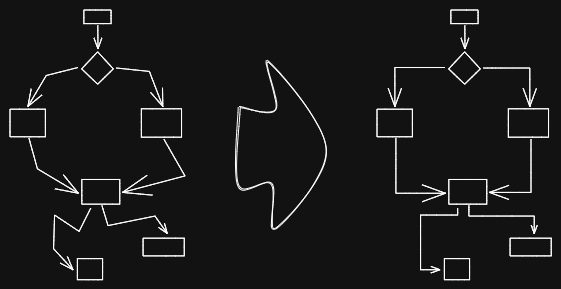
Elbow connectors
Expand rectangles horizontally keep text centered
| Author | @1-2-3 |
| Source | File on GitHub |
| Description | This script expands the width of the selected rectangles until they are all the same width and keep the text centered.
 |
Expand rectangles horizontally
| Author | @1-2-3 |
| Source | File on GitHub |
| Description | This script expands the width of the selected rectangles until they are all the same width.
|
Expand rectangles vertically keep text centered
| Author | @1-2-3 |
| Source | File on GitHub |
| Description | This script expands the height of the selected rectangles until they are all the same height and keep the text centered.
|
Expand rectangles vertically
| Author | @1-2-3 |
| Source | File on GitHub |
| Description | This script expands the height of the selected rectangles until they are all the same height.
|
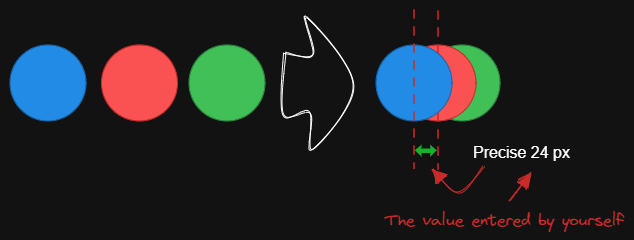
Fixed horizontal distance between centers
| Author | @1-2-3 |
| Source | File on GitHub |
| Description | This script arranges the selected elements horizontally with a fixed center spacing.
 |
Fixed inner distance
| Author | @1-2-3 |
| Source | File on GitHub |
| Description | This script arranges selected elements and groups with a fixed inner distance.
 |
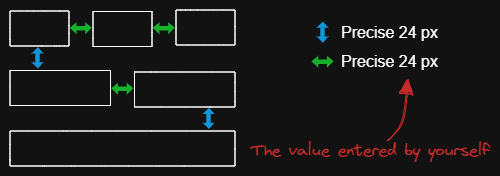
Fixed spacing
| Author | @1-2-3 |
| Source | File on GitHub |
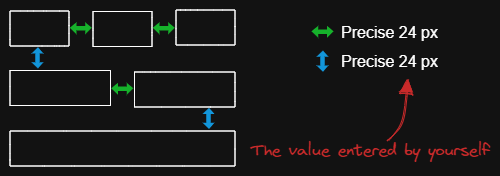
| Description | The script arranges the selected elements horizontally with a fixed spacing. When we create an architecture diagram or mind map, we often need to arrange a large number of elements in a fixed spacing. `Fixed spacing` and `Fixed vertical Distance` scripts can save us a lot of time.
 |
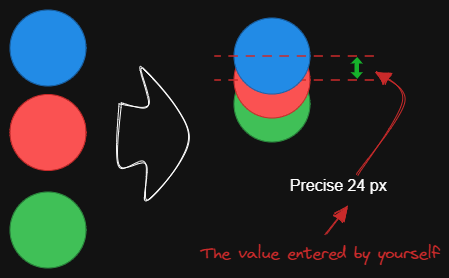
Fixed vertical distance between centers
| Author | @1-2-3 |
| Source | File on GitHub |
| Description | This script arranges the selected elements vertically with a fixed center spacing.
 |
Fixed vertical distance
| Author | @1-2-3 |
| Source | File on GitHub |
| Description | The script arranges the selected elements vertically with a fixed spacing. When we create an architecture diagram or mind map, we often need to arrange a large number of elements in a fixed spacing. `Fixed spacing` and `Fixed vertical Distance` scripts can save us a lot of time.
 |
Lighten background color
| Author | @1-2-3 |
| Source | File on GitHub |
| Description | This script lightens the background color of the selected element by 2% at a time. You can use this script several times until you are satisfied. It is recommended to set a shortcut key for this script so that you can quickly try to DARKEN and LIGHTEN the color effect.In contrast to the `Modify background color opacity` script, the advantage is that the background color of the element is not affected by the canvas color, and the color value does not appear in a strange rgba() form.
|
Mindmap connector
| Author | @xllowl |
| Source | File on GitHub |
| Description | This script creates mindmap like lines(only right side available). The line will starts according to the creation time of the elements. So you may need to create the header element first.
 |
Modify background color opacity
| Author | @1-2-3 |
| Source | File on GitHub |
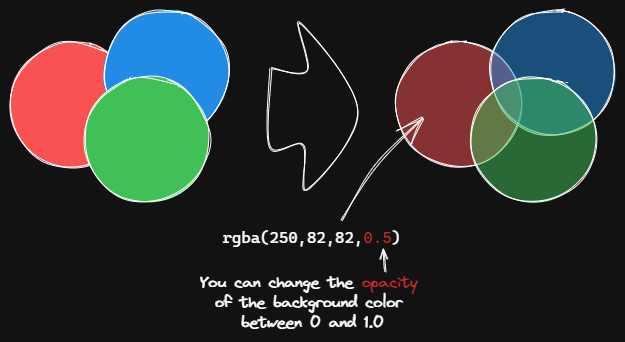
| Description | This script changes the opacity of the background color of the selected boxes. The default background color in Excalidraw is so dark that the text is hard to read. You can lighten the color a bit by setting transparency. And you can tweak the transparency over and over again until you're happy with it. Although excalidraw has the opacity option in its native property Settings, it also changes the transparency of the border. Use this script to change only the opacity of the background color without affecting the border.
 |
Normalize Selected Arrows
| Author | @1-2-3 |
| Source | File on GitHub |
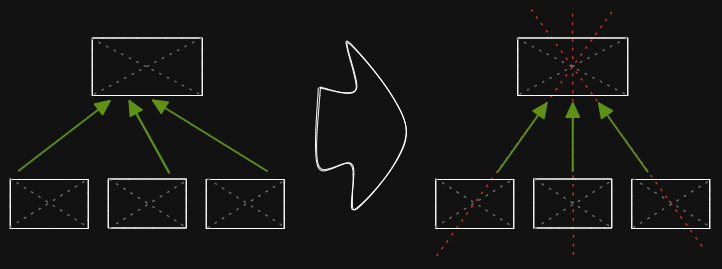
| Description | This script will reset the start and end positions of the selected arrows. The arrow will point to the center of the connected box and will have a gap of 8px from the box.
 |
OCR - Optical Character Recognition
| Author | @zsviczian |
| Source | File on GitHub |
| Description | REQUIRES EXCALIDRAW 1.5.15
The script will 1) send the selected image file to [taskbone.com](https://taskbone.com) to exctract the text from the image, and 2) will add the text to your drawing as a text element.
⚠ Note that you will need to manually paste your token into the script after the first run! ⚠

|
Organic Line
| Author | @zsviczian |
| Source | File on GitHub |
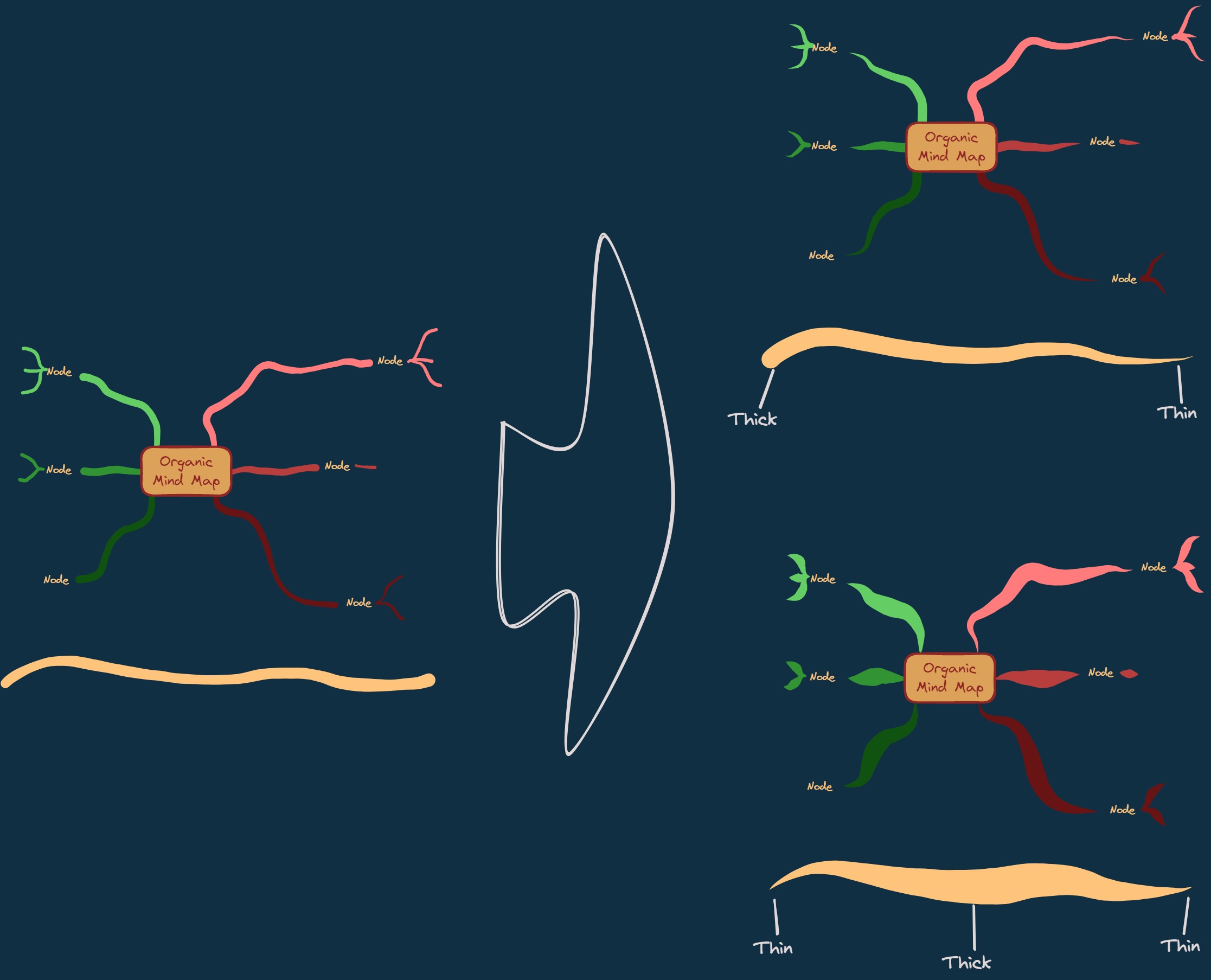
| Description | Converts selected freedraw lines such that pencil pressure will decrease from maximum to minimum from the beginning of the line to its end. The resulting line is placed at the back of the layers, under all other items. Helpful when drawing organic mindmaps.
 |
Repeat Elements
| Author | @1-2-3 |
| Source | File on GitHub |
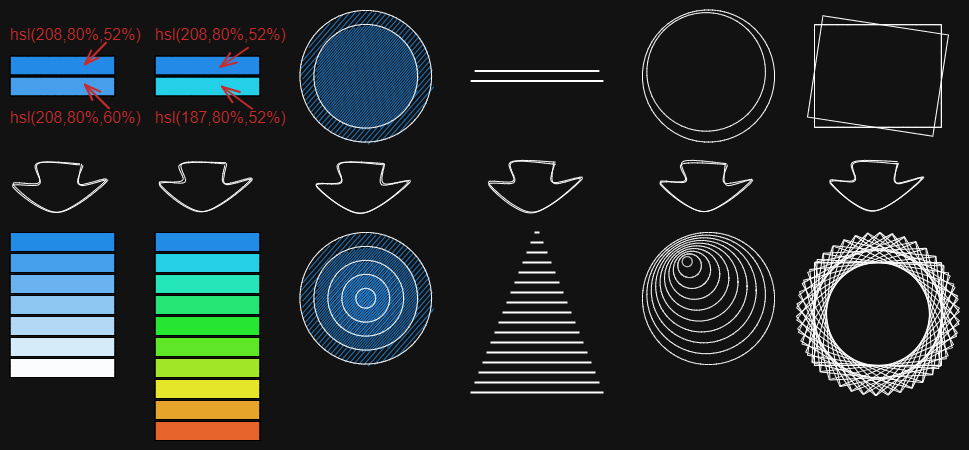
| Description | This script will detect the difference between 2 selected elements, including position, size, angle, stroke and background color, and create several elements that repeat these differences based on the number of repetitions entered by the user.
 |
Reverse arrows
| Author | @zsviczian |
| Source | File on GitHub |
| Description | Reverse the direction of **arrows** within the scope of selected elements.
 |
Scribble Helper
| Author | @zsviczian |
| Source | File on GitHub |
| Description | iOS scribble helper for better handwriting experience with text elements. If no elements are selected then the creates a text element at pointer position and you can use the edit box to modify the text with scribble. If a text element is selected then opens the input prompt where you can modify this text with scribble.
 |
Select Elements of Type
| Author | @zsviczian |
| Source | File on GitHub |
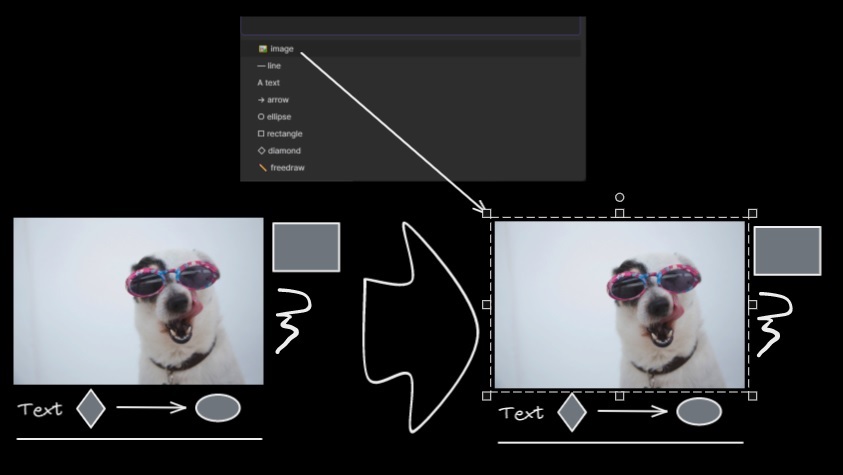
| Description | Prompts you with a list of the different element types in the active image. Only elements of the selected type will be selected on the canvas. If nothing is selected when running the script, then the script will process all the elements on the canvas. If some elements are selected when the script is executed, then the script will only process the selected elements.
The script is useful when, for example, you want to bring to front all the arrows, or want to change the color of all the text elements, etc.
 |
Set background color of unclosed line object by adding a shadow clone
| Author | @zsviczian |
| Source | File on GitHub |
| Description | Use this script to set the background color of unclosed (i.e. open) line objects by creating a clone of the object. The script will set the stroke color of the clone to transparent and will add a straight line to close the object. Use settings to define the default background color, the fill style, and the strokeWidth of the clone. By default the clone will be grouped with the original object, you can disable this also in settings.
 |
Set Dimensions
| Author | @zsviczian |
| Source | File on GitHub |
| Description | Currently there is no way to specify the exact location and size of objects in Excalidraw. You can bridge this gap with the following simple script.
 |
Set Font Family
| Author | @zsviczian |
| Source | File on GitHub |
| Description | Sets font family of the text block (Virgil, Helvetica, Cascadia). Useful if you want to set a keyboard shortcut for selecting font family.
 |
Set Grid
| Author | @zsviczian |
| Source | File on GitHub |
| Description | The default grid size in Excalidraw is 20. Currently there is no way to change the grid size via the user interface. This script offers a way to bridge this gap.
 |
Set Link Alias
| Author | @zsviczian |
| Source | File on GitHub |
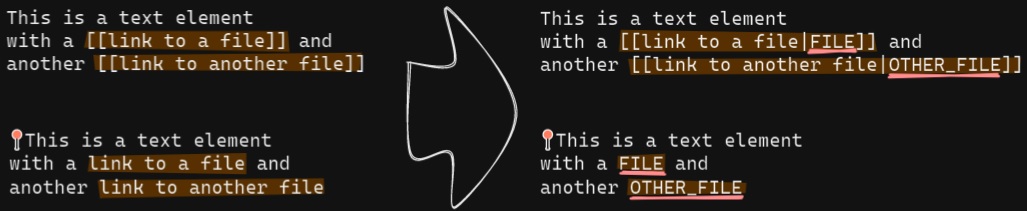
| Description | Iterates all of the links in the selected TextElements and prompts the user to set or modify the alias for each link found.
 |
Set Stroke Width of Selected Elements
| Author | @zsviczian |
| Source | File on GitHub |
| Description | This script will set the stroke width of selected elements. This is helpful, for example, when you scale freedraw sketches and want to reduce or increase their line width.
 |
Set Text Alignment
| Author | @zsviczian |
| Source | File on GitHub |
| Description | Sets text alignment of text block (cetner, right, left). Useful if you want to set a keyboard shortcut for selecting text alignment.
 |
Split text by lines
| Author | @zsviczian |
| Source | File on GitHub |
| Description | Split lines of text into separate text elements for easier reorganization
 |
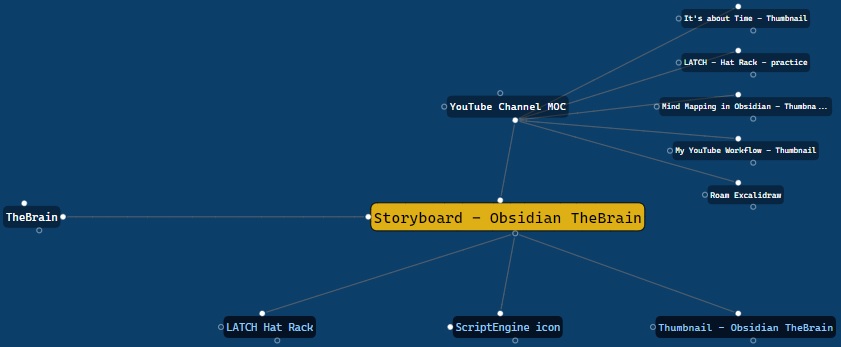
TheBrain-navigation
Toggle Fullscreen on Mobile
| Author | @zsviczian |
| Source | File on GitHub |
| Description | Hides Obsidian workspace leaf padding and header (based on option in settings, default is "hide header" = false) which will take Excalidraw to full screen. ⚠ Note that if the header is not visible, it will be very difficult to invoke the command palette to end full screen. Only hide the header if you have a keyboard or you've practiced opening command palette!
 |
Transfer TextElements to Excalidraw markdown metadata
| Author | @zsviczian |
| Source | File on GitHub |
| Description | The script will delete the selected text elements from the canvas and will copy the text from these text elements into the Excalidraw markdown file as metadata. This means, that the text will no longer be visible in the drawing, however you will be able to search for the text in Obsidian and find the drawing containing this image.
 |
Zoom to Fit Selected Elements