mirror of
https://github.com/zsviczian/obsidian-excalidraw-plugin.git
synced 2025-08-06 05:46:28 +00:00

27 KiB
27 KiB
/*
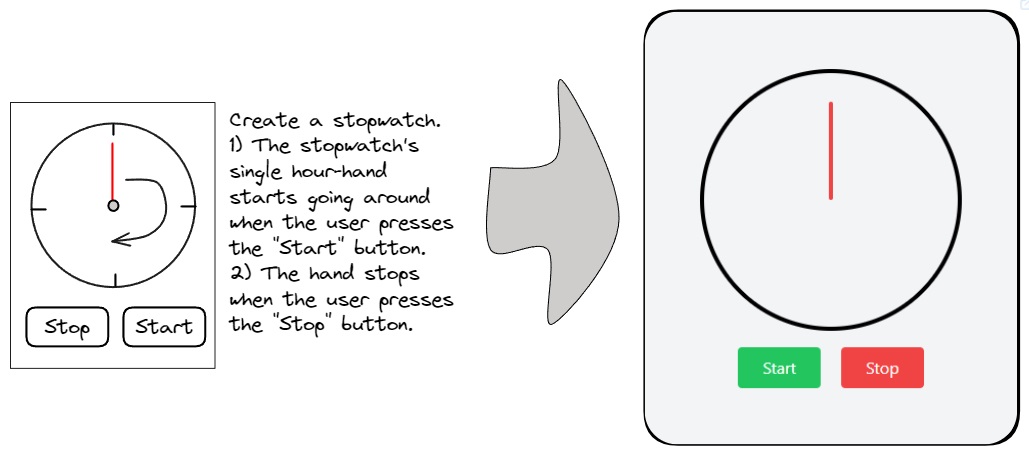
let dirty=false;

if(!ea.verifyMinimumPluginVersion || !ea.verifyMinimumPluginVersion("2.0.12")) {
  new Notice("This script requires a newer version of Excalidraw. Please install the latest version.");
  return;
}

const outputTypes = {
  "html": {
    instruction: "Turn this into a single html file using tailwind. Return a single message containing only the html file in a codeblock.",
    blocktype: "html"
  },
  "mermaid": {
    instruction: "Return a single message containing only the mermaid diagram in a codeblock.",
    blocktype: "mermaid"
  },
  "svg": {
    instruction: "Return a single message containing only the SVG code in an html codeblock.",
    blocktype: "svg"
  },
  "image-gen": {
    instruction: "Return a single message with the generated image prompt in a codeblock",
    blocktype: "image"
  },
  "image-edit": {
    instruction: "",
    blocktype: "image"
  }
}

const systemPrompts = {
  "Challenge my thinking": {
    prompt: `Your task is to interpret a screenshot of a whiteboard, translating its ideas into a Mermaid graph. The whiteboard will encompass thoughts on a subject. Within the mind map, distinguish ideas that challenge, dispute, or contradict the whiteboard content. Additionally, include concepts that expand, complement, or advance the user's thinking. Utilize the Mermaid graph diagram type and present the resulting Mermaid diagram within a code block. Ensure the Mermaid script excludes the use of parentheses ().`,
    type: "mermaid",
    help: "Translate your image and optional text prompt into a Mermaid mindmap. If there are conversion errors, edit the Mermaid script under 'More Tools'."
  },
  "Convert sketch to shapes": {
    prompt: `Given an image featuring various geometric shapes drawn by the user, your objective is to analyze the input and generate SVG code that accurately represents these shapes. Your output will be the SVG code enclosed in an HTML code block.`,
    type: "svg",
    help: "Convert selected scribbles into shapes; works better with fewer shapes. Experimental and may not produce good drawings."
  },
  "Create a simple Excalidraw icon": {
    prompt: `Given a description of an SVG image from the user, your objective is to generate the corresponding SVG code. Avoid incorporating textual elements within the generated SVG. Your output should be the resulting SVG code enclosed in an HTML code block.`,
    type: "svg",
    help: "Convert text prompts into simple icons inserted as Excalidraw elements. Expect only a text prompt. Experimental and may not produce good drawings."
  },
  "Edit an image": {
    prompt: null,
    type: "image-edit",
    help: "Image elements will be used as the Image. Shapes on top of the image will be the Mask. Use the prompt to instruct Dall-e about the changes. Dall-e-2 model will be used."
  },
  "Generate an image from image and prompt": {
    prompt: "Your task involves receiving an image and a textual prompt from the user. Your goal is to craft a detailed, accurate, and descriptive narrative of the image, tailored for effective image generation. Utilize the user-provided text prompt to inform and guide your depiction of the image. Ensure the resulting image remains text-free.",
    type: "image-gen",
    help: "Generate an image based on the drawing and prompt using ChatGPT-Vision and Dall-e. Provide a contextual text-prompt for accurate interpretation."
  },
  "Generate an image from prompt": {
    prompt: null,
    type: "image-gen",
    help: "Send only the text prompt to OpenAI. Provide a detailed description; OpenAI will enrich your prompt automatically. To avoid it, start your prompt like this 'DO NOT add any detail, just use it AS-IS:'"
  },
  "Generate an image to illustrate a quote": {
    prompt: "Your task involves transforming a user-provided quote into a detailed and imaginative illustration. Craft a visual representation that captures the essence of the quote and resonates well with a broad audience. If the Author's name is provided, aim to establish a connection between the illustration and the Author. This can be achieved by referencing a well-known story from the Author, situating the image in the Author's era or setting, or employing other creative methods of association. Additionally, provide preferences for styling, such as the chosen medium and artistic direction, to guide the image creation process. Ensure the resulting image remains text-free. Your task output should comprise a descriptive and detailed narrative aimed at facilitating the creation of a captivating illustration from the quote.",
    type: "image-gen",
    help: "ExcaliAI will create an image prompt to illustrate your text input - a quote - with GPT, then generate an image using Dall-e.  In case you include the Author's name, GPT will try to generate an image that in some way references the Author."
  },
  "Visual brainstorm": {
    prompt: "Your objective is to interpret a screenshot of a whiteboard, creating an image aimed at sparking further thoughts on the subject. The whiteboard will present diverse ideas about a specific topic. Your generated image should achieve one of two purposes: highlighting concepts that challenge, dispute, or contradict the whiteboard content, or introducing ideas that expand, complement, or enrich the user's thinking. You have the option to include multiple tiles in the resulting image, resembling a sequence akin to a comic strip. Ensure that the image remains devoid of text.",
    type: "image-gen",
    help: "Use ChatGPT Visions and Dall-e to create an image based on your text prompt and image to spark new ideas."
  },
  "Wireframe to code": {
    prompt: `You are an expert tailwind developer. A user will provide you with a low-fidelity wireframe of an application and you will return a single html file that uses tailwind to create the website. Use creative license to make the application more fleshed out. Write the necessary javascript code. If you need to insert an image, use placehold.co to create a placeholder image.`,
    type: "html",
    help: "Use GPT Visions to interpret the wireframe and generate a web application. YOu may copy the resulting code from the active embeddable's top left menu."
  },
}

const IMAGE_WARNING = "The generated image is linked through a temporary OpenAI URL and will be removed in approximately 30 minutes. To save it permanently, choose 'Save image from URL to local file' from the Obsidian Command Palette."
// --------------------------------------
// Initialize values and settings
// --------------------------------------
let settings = ea.getScriptSettings();

if(!settings["Agent's Task"]) {
  settings = {
    "Agent's Task": "Wireframe to code",
    "User Prompt": "",
  };
  await ea.setScriptSettings(settings);
}

const OPENAI_API_KEY = ea.plugin.settings.openAIAPIToken;
if(!OPENAI_API_KEY || OPENAI_API_KEY === "") {
  new Notice("You must first configure your API key in Excalidraw Plugin Settings");
  return;
}

let userPrompt = settings["User Prompt"] ?? "";
let agentTask = settings["Agent's Task"];
let imageSize = settings["Image Size"]??"1024x1024";

if(!systemPrompts.hasOwnProperty(agentTask)) {
  agentTask = Object.keys(systemPrompts)[0];
}
let imageModel, valideSizes;

const setImageModelAndSizes = () => {
  imageModel = systemPrompts[agentTask].type === "image-edit"
    ? "dall-e-2"
    : ea.plugin.settings.openAIDefaultImageGenerationModel;
  validSizes = imageModel === "dall-e-2"
    ? [`256x256`, `512x512`, `1024x1024`]
    : (imageModel === "dall-e-3"
      ? [`1024x1024`, `1792x1024`, `1024x1792`]
      : [`1024x1024`])
  if(!validSizes.includes(imageSize)) {
    imageSize = "1024x1024";
    dirty = true;
  }
}
setImageModelAndSizes();

// --------------------------------------
// Generate Image Blob From Selected Excalidraw Elements
// --------------------------------------
const calculateImageScale = (elements) => {
  const bb = ea.getBoundingBox(elements);
  const size = (bb.width*bb.height);
  const minRatio = Math.sqrt(360000/size);
  const maxRatio = Math.sqrt(size/16000000);
  return minRatio > 1
    ? minRatio
    : (
        maxRatio > 1
        ? 1/maxRatio
        : 1
      );
}

const createMask = async (dataURL) => {
  return new Promise((resolve, reject) => {
    const img = new Image();

    img.onload = () => {
      const canvas = document.createElement('canvas');
      canvas.width = img.width;
      canvas.height = img.height;

      const ctx = canvas.getContext('2d');
      ctx.drawImage(img, 0, 0);

      const imageData = ctx.getImageData(0, 0, canvas.width, canvas.height);
      const data = imageData.data;

      for (let i = 0; i < data.length; i += 4) {
        // If opaque (alpha > 0), make it transparent
        if (data[i + 3] > 0) {
          data[i + 3] = 0; // Set alpha to 0 (transparent)
        } else if (data[i + 3] === 0) {
          // If fully transparent, make it red
          data[i] = 255; // Red
          data[i + 1] = 0; // Green
          data[i + 2] = 0; // Blue
          data[i + 3] = 255; // make it opaque
        }
      }

      ctx.putImageData(imageData, 0, 0);
      const maskDataURL = canvas.toDataURL();

      resolve(maskDataURL);
    };

    img.onerror = error => {
      reject(error);
    };

    img.src = dataURL;
  });
}

//https://platform.openai.com/docs/api-reference/images/createEdit
//dall-e-2 image edit only works on square images
//if targetDalleImageEdit === true then the image and the mask will be returned in two separate dataURLs
let squareBB;

const generateCanvasDataURL = async (view, targetDalleImageEdit=false) => {
  let PADDING = 5;
  await view.forceSave(true); //to ensure recently embedded PNG and other images are saved to file
  const viewElements = ea.getViewSelectedElements();
  if(viewElements.length === 0) {
    return {imageDataURL: null, maskDataURL: null} ;
  }
  ea.copyViewElementsToEAforEditing(viewElements, true); //copying the images objects over to EA for PNG generation

  let maskDataURL;
  const loader = ea.getEmbeddedFilesLoader(false);
  let scale = calculateImageScale(ea.getElements());
  const bb = ea.getBoundingBox(viewElements);
  if(ea.getElements()
    .filter(el=>el.type==="image")
    .some(el=>Math.round(el.width) === Math.round(bb.width) && Math.round(el.height) === Math.round(bb.height))
  ) { PADDING = 0; }

  let exportSettings = {withBackground: true, withTheme: true};

  if(targetDalleImageEdit) {
    PADDING = 0;
    const strokeColor = ea.style.strokeColor;
    const backgroundColor = ea.style.backgroundColor;
    ea.style.backgroundColor = "transparent";
    ea.style.strokeColor = "transparent";
    let rectID;
    if(bb.height > bb.width) {
      rectID = ea.addRect(bb.topX-(bb.height-bb.width)/2, bb.topY,bb.height, bb.height);
    }
    if(bb.width > bb.height) {
      rectID = ea.addRect(bb.topX, bb.topY-(bb.width-bb.height)/2,bb.width, bb.width);
    }
    if(bb.height === bb.width) {
      rectID = ea.addRect(bb.topX, bb.topY, bb.width, bb.height);
    }
    const rect = ea.getElement(rectID);
    squareBB = {topX: rect.x-PADDING, topY: rect.y-PADDING, width: rect.width + 2*PADDING, height: rect.height + 2*PADDING};
    ea.style.strokeColor = strokeColor;
    ea.style.backgroundColor = backgroundColor;
    ea.getElements().filter(el=>el.type === "image").forEach(el=>{el.isDeleted = true});

    dalleWidth = parseInt(imageSize.split("x")[0]);
    scale = dalleWidth/squareBB.width;
    exportSettings = {withBackground: false, withTheme: true};
    maskDataURL= await ea.createPNGBase64(
      null, scale, exportSettings, loader, "light", PADDING
    );
    maskDataURL = await createMask(maskDataURL)
    ea.getElements().filter(el=>el.type === "image").forEach(el=>{el.isDeleted = false});
    ea.getElements().filter(el=>el.type !== "image" && el.id !== rectID).forEach(el=>{el.isDeleted = true});
  }

  const imageDataURL = await ea.createPNGBase64(
    null, scale, exportSettings, loader, "light", PADDING
  );
  ea.clear();
  return {imageDataURL, maskDataURL};
}

let {imageDataURL, maskDataURL} = await generateCanvasDataURL(ea.targetView, systemPrompts[agentTask].type === "image-edit");

// --------------------------------------
// Support functions - embeddable spinner and error
// --------------------------------------
const spinner = await ea.convertStringToDataURL(`
  <html><head><style>
    html, body {width: 100%; height: 100%; color: ${ea.getExcalidrawAPI().getAppState().theme === "dark" ? "white" : "black"};}
    body {display: flex; align-items: center; justify-content: center; flex-direction: column; gap: 1rem; overflow: hidden;}
    .Spinner {display: flex; align-items: center; justify-content: center; margin-left: auto; margin-right: auto;}
    .Spinner svg {animation: rotate 1.6s linear infinite; transform-origin: center center; width: 40px; height: 40px;}
    .Spinner circle {stroke: currentColor; animation: dash 1.6s linear 0s infinite; stroke-linecap: round;}
    @keyframes rotate {100% {transform: rotate(360deg);}}
    @keyframes dash {
      0% {stroke-dasharray: 1, 300; stroke-dashoffset: 0;}
      50% {stroke-dasharray: 150, 300; stroke-dashoffset: -200;}
      100% {stroke-dasharray: 1, 300; stroke-dashoffset: -280;}
    }
  </style></head><body>
    <div class="Spinner">
      <svg viewBox="0 0 100 100">
        <circle cx="50" cy="50" r="46" stroke-width="8" fill="none" stroke-miter-limit="10"/>
      </svg>
    </div>
    <div>Generating...</div>
  </body></html>`);

  const errorMessage = async (spinnerID, message) => {
    const error = "Something went wrong! Check developer console for more.";
    const details = message ? `<p>${message}</p>` : "";
    const errorDataURL = await ea.convertStringToDataURL(`
      <html><head><style>
        html, body {height: 100%;}
        body {display: flex; flex-direction: column; align-items: center; justify-content: center; color: red;}
        h1, h3 {margin-top: 0;margin-bottom: 0.5rem;}
      </style></head><body>
        <h1>Error!</h1>
        <h3>${error}</h3>${details}
      </body></html>`);
    new Notice (error);
    ea.getElement(spinnerID).link = errorDataURL;
    ea.addElementsToView(false,true);
  }

// --------------------------------------
// Utility to write Mermaid to dialog
// --------------------------------------
const EDITOR_LS_KEYS = {
  OAI_API_KEY: "excalidraw-oai-api-key",
  MERMAID_TO_EXCALIDRAW: "mermaid-to-excalidraw",
  PUBLISH_LIBRARY: "publish-library-data",
};

const setMermaidDataToStorage = (mermaidDefinition) => {
  try {
    window.localStorage.setItem(
      EDITOR_LS_KEYS.MERMAID_TO_EXCALIDRAW,
      JSON.stringify(mermaidDefinition)
    );
    return true;
  } catch (error) {
    console.warn(`localStorage.setItem error: ${error.message}`);
    return false;
  }
};

// --------------------------------------
// Submit Prompt
// --------------------------------------
const generateImage = async(text, spinnerID, bb) => {
  const requestObject = {
    text,
    imageGenerationProperties: {
      size: imageSize,
      //quality: "standard", //not supported by dall-e-2
      n:1,
    },
  };

  const result = await ea.postOpenAI(requestObject);
  console.log({result, json:result?.json});

  if(!result?.json?.data?.[0]?.url) {
    await errorMessage(spinnerID, result?.json?.error?.message);
    return;
  }

  const spinner = ea.getElement(spinnerID)
  spinner.isDeleted = true;
  const imageID = await ea.addImage(spinner.x, spinner.y, result.json.data[0].url);
  const imageEl = ea.getElement(imageID);
  const revisedPrompt = result.json.data[0].revised_prompt;
  if(revisedPrompt) {
    ea.style.fontSize = 16;
    const rectID = ea.addText(imageEl.x+15, imageEl.y + imageEl.height + 50, revisedPrompt, {
      width: imageEl.width-30,
      textAlign: "center",
      textVerticalAlign: "top",
      box: true,
    })
    ea.getElement(rectID).strokeColor = "transparent";
    ea.getElement(rectID).backgroundColor = "transparent";
    ea.addToGroup(ea.getElements().filter(el=>el.id !== spinnerID).map(el=>el.id));
  }

  await ea.addElementsToView(false, true, true);
  ea.getExcalidrawAPI().setToast({
    message: IMAGE_WARNING,
    duration: 15000,
    closable: true
  });
}

const run = async (text) => {
  if(!text && !imageDataURL) {
    new Notice("No prompt, aborting");
    return;
  }

  const systemPrompt = systemPrompts[agentTask];
  const outputType = outputTypes[systemPrompt.type];
  const isImageGenRequest = outputType.blocktype === "image";
  const isImageEditRequest = systemPrompt.type === "image-edit";

  if(isImageEditRequest) {
    if(!text) {
      new Notice("You must provide a text prompt with instructions for how the image should be modified");
      return;
    }
    if(!imageDataURL || !maskDataURL) {
      new Notice("You must provide an image and a mask");
      return;
    }
  }

  //place spinner next to selected elements
  const bb = ea.getBoundingBox(ea.getViewSelectedElements());
  const spinnerID = ea.addEmbeddable(bb.topX+bb.width+100,bb.topY-(720-bb.height)/2,550,720,spinner);

  //this block is in an async call using the isEACompleted flag because otherwise during debug Obsidian
  //goes black (not freezes, but does not get a new frame for some reason)
  //palcing this in an async call solves this issue
  //If you know why this is happening and can offer a better solution, please reach out to @zsviczian
  let isEACompleted = false;
  setTimeout(async()=>{
    await ea.addElementsToView(false,true);
    ea.clear();
    const embeddable = ea.getViewElements().filter(el=>el.id===spinnerID);
    ea.copyViewElementsToEAforEditing(embeddable);
    const els = ea.getViewSelectedElements();
    ea.viewZoomToElements(false, els.concat(embeddable));
    isEACompleted = true;
  });

  if(isImageGenRequest && !systemPrompt.prompt && !isImageEditRequest) {
    generateImage(text,spinnerID,bb);
    return;
  }

  const requestObject = isImageEditRequest
  ? {
      ...imageDataURL ? {image: imageDataURL} : {},
      ...(text && text.trim() !== "") ? {text} : {},
      imageGenerationProperties: {
        size: imageSize,
        //quality: "standard", //not supported by dall-e-2
        n:1,
        mask: maskDataURL,
      },
    }
  : {
      ...imageDataURL ? {image: imageDataURL} : {},
      ...(text && text.trim() !== "") ? {text} : {},
      systemPrompt: systemPrompt.prompt,
      instruction: outputType.instruction,
    }

  //Get result from GPT
  const result = await ea.postOpenAI(requestObject);
  console.log({result, json:result?.json});

  //checking that EA has completed. Because the postOpenAI call is an async await
  //I don't expect EA not to be completed by now. However the devil never sleeps.
  //This (the insomnia of the Devil) is why I have a watchdog here as well
  let counter = 0
  while(!isEACompleted && counter++<10) sleep(50);
  if(!isEACompleted) {
    await errorMessage(spinnerID, "Unexpected issue with ExcalidrawAutomate");
    return;
  }

  if(isImageEditRequest) {
    if(!result?.json?.data?.[0]?.url) {
      await errorMessage(spinnerID, result?.json?.error?.message);
      return;
    }

    const spinner = ea.getElement(spinnerID)
    spinner.isDeleted = true;
    const imageID = await ea.addImage(spinner.x, spinner.y, result.json.data[0].url);
    await ea.addElementsToView(false, true, true);
    ea.getExcalidrawAPI().setToast({
      message: IMAGE_WARNING,
      duration: 15000,
      closable: true
    });
    return;
  }

  if(!result?.json?.hasOwnProperty("choices")) {
    await errorMessage(spinnerID, result?.json?.error?.message);
    return;
  }

  //exctract codeblock and display result
  let content = ea.extractCodeBlocks(result.json.choices[0]?.message?.content)[0]?.data;

  if(!content) {
    await errorMessage(spinnerID);
    return;
  }

  if(isImageGenRequest) {
    generateImage(content,spinnerID,bb);
    return;
  }

  switch(outputType.blocktype) {
    case "html":
      ea.getElement(spinnerID).link = await ea.convertStringToDataURL(content);
      ea.addElementsToView(false,true);
      break;
    case "svg":
      ea.getElement(spinnerID).isDeleted = true;
      ea.importSVG(content);
      ea.addToGroup(ea.getElements().map(el=>el.id));
      if(ea.getViewSelectedElements().length>0) {
        ea.targetView.currentPosition = {x: bb.topX+bb.width+100, y: bb.topY};
      }
      ea.addElementsToView(true, false);
      break;
    case "mermaid":
      if(content.startsWith("mermaid")) {
        content = content.replace(/^mermaid/,"").trim();
      }

      try {
        result = await ea.addMermaid(content);
        if(typeof result === "string") {
          await errorMessage(spinnerID, "Open [More Tools / Mermaid to Excalidraw] to manually fix the received mermaid script<br><br>" + result);
          return;
        }
      } catch (e) {
        ea.addText(0,0,content);
      }
      ea.getElement(spinnerID).isDeleted = true;
      ea.targetView.currentPosition = {x: bb.topX+bb.width+100, y: bb.topY-bb.height};
      await ea.addElementsToView(true, false);
      setMermaidDataToStorage(content);
      new Notice("Open More Tools/Mermaid to Excalidraw in the top tools menu to edit the generated diagram",8000);
      break;
  }
}

// --------------------------------------
// User Interface
// --------------------------------------
let previewDiv;
const fragWithHTML = (html) => createFragment((frag) => (frag.createDiv().innerHTML = html));
const isImageGenerationTask = () => systemPrompts[agentTask].type === "image-gen" || systemPrompts[agentTask].type === "image-edit";
const addPreviewImage = () => {
  if(!previewDiv) return;
  previewDiv.empty();
  previewDiv.createEl("img",{
    attr: {
      style: `max-width: 100%;max-height: 30vh;`,
      src: imageDataURL,
    }
  });
  if(maskDataURL) {
    previewDiv.createEl("img",{
      attr: {
        style: `max-width: 100%;max-height: 30vh;`,
        src: maskDataURL,
      }
    });
  }
}

const configModal = new ea.obsidian.Modal(app);
configModal.modalEl.style.width="100%";
configModal.modalEl.style.maxWidth="1000px";

configModal.onOpen = async () => {
  const contentEl = configModal.contentEl;
  contentEl.createEl("h1", {text: "ExcaliAI"});

  let systemPromptTextArea, systemPromptDiv, imageSizeSetting, imageSizeSettingDropdown, helpEl;

  new ea.obsidian.Setting(contentEl)
    .setName("What would you like to do?")
    .addDropdown(dropdown=>{
      Object.keys(systemPrompts).forEach(key=>dropdown.addOption(key,key));
      dropdown
      .setValue(agentTask)
      .onChange(async (value) => {
        dirty = true;
        const prevTask = agentTask;
        agentTask = value;
        if(
          (systemPrompts[prevTask].type === "image-edit" && systemPrompts[value].type !== "image-edit") ||
          (systemPrompts[prevTask].type !== "image-edit" && systemPrompts[value].type === "image-edit")
        ) {
          ({imageDataURL, maskDataURL} = await generateCanvasDataURL(ea.targetView, systemPrompts[value].type === "image-edit"));
          addPreviewImage();
          setImageModelAndSizes();
          while (imageSizeSettingDropdown.selectEl.options.length > 0) { imageSizeSettingDropdown.selectEl.remove(0); }
          validSizes.forEach(size=>imageSizeSettingDropdown.addOption(size,size));
          imageSizeSettingDropdown.setValue(imageSize);
        }
        imageSizeSetting.settingEl.style.display = isImageGenerationTask() ? "" : "none";
        const prompt = systemPrompts[value].prompt;
        helpEl.innerHTML = `<b>Help: </b>` + systemPrompts[value].help;
        if(prompt) {
          systemPromptDiv.style.display = "";
          systemPromptTextArea.setValue(systemPrompts[value].prompt);
        } else {
          systemPromptDiv.style.display = "none";
        }
      });
   })

  helpEl = contentEl.createEl("p");
  helpEl.innerHTML = `<b>Help: </b>` + systemPrompts[agentTask].help;

  systemPromptDiv = contentEl.createDiv();
  systemPromptDiv.createEl("h4", {text: "Customize System Prompt"});
  systemPromptDiv.createEl("span", {text: "Unless you know what you are doing I do not recommend changing the system prompt"})
  const systemPromptSetting = new ea.obsidian.Setting(systemPromptDiv)
    .addTextArea(text => {
       systemPromptTextArea = text;
       const prompt = systemPrompts[agentTask].prompt;
       text.inputEl.style.minHeight = "10em";
       text.inputEl.style.width = "100%";
       text.setValue(prompt);
       text.onChange(value => {
         systemPrompts[value].prompt = value;
       });
       if(!prompt) systemPromptDiv.style.display = "none";
    })
  systemPromptSetting.nameEl.style.display = "none";
  systemPromptSetting.descEl.style.display = "none";
  systemPromptSetting.infoEl.style.display = "none";

  contentEl.createEl("h4", {text: "User Prompt"});
  const userPromptSetting = new ea.obsidian.Setting(contentEl)
    .addTextArea(text => {
       text.inputEl.style.minHeight = "10em";
       text.inputEl.style.width = "100%";
       text.setValue(userPrompt);
       text.onChange(value => {
         userPrompt = value;
         dirty = true;
       })
    })
  userPromptSetting.nameEl.style.display = "none";
  userPromptSetting.descEl.style.display = "none";
  userPromptSetting.infoEl.style.display = "none";

  imageSizeSetting = new ea.obsidian.Setting(contentEl)
    .setName("Select image size")
    .setDesc(fragWithHTML("<mark>⚠️ Important ⚠️</mark>: " + IMAGE_WARNING))
    .addDropdown(dropdown=>{
      validSizes.forEach(size=>dropdown.addOption(size,size));
      imageSizeSettingDropdown = dropdown;
      dropdown
        .setValue(imageSize)
        .onChange(async (value) => {
          dirty = true;
          imageSize = value;
          if(systemPrompts[agentTask].type === "image-edit") {
            ({imageDataURL, maskDataURL} = await generateCanvasDataURL(ea.targetView, true));
            addPreviewImage();
          }
        });
   })
   imageSizeSetting.settingEl.style.display = isImageGenerationTask() ? "" : "none";

  if(imageDataURL) {
    previewDiv = contentEl.createDiv({
      attr: {
        style: "text-align: center;",
      }
    });
    addPreviewImage();
  } else {
    contentEl.createEl("h4", {text: "No elements are selected from your canvas"});
    contentEl.createEl("span", {text: "Because there are no Excalidraw elements selected on the canvas, only the text prompt will be sent to OpenAI."});
  }

  new ea.obsidian.Setting(contentEl)
    .addButton(button =>
      button
      .setButtonText("Run")
      .onClick((event)=>{
        run(userPrompt); //Obsidian crashes otherwise, likely has to do with requesting an new frame for react
        configModal.close();
      })
    );
}

configModal.onClose = () => {
  if(dirty) {
    settings["User Prompt"] = userPrompt;
    settings["Agent's Task"] = agentTask;
    settings["Image Size"] = imageSize;
    ea.setScriptSettings(settings);
  }
}

configModal.open();