
3.0 KiB
/*

Download this file and save to your Obsidian Vault including the first line, or open it in "Raw" and copy the entire contents to Obsidian.
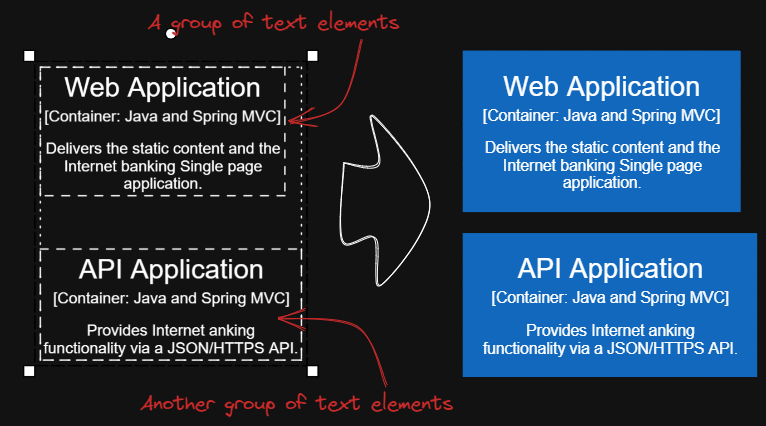
This script will add encapsulating boxes around each of the currently selected groups in Excalidraw.
You can focus on content creation first, and then batch add consistent style boxes to each group of text.
Tips 1: You can copy the desired style to the global state using script Copy Selected Element Style to Global, then add boxes with the same global style using script Box Each Selected Groups.
Tips 2: Next you can use scripts Expand rectangles horizontally keep text centered and Expand rectangles vertically keep text centered to make the boxes the same size, if you wish.
Tips 3: If you want the left and right margins to be different from the top and bottom margins, input something like 32,16, this will create a box with left and right margins of 32 and top and bottom margins of 16.
See documentation for more details: https://zsviczian.github.io/obsidian-excalidraw-plugin/ExcalidrawScriptsEngine.html
*/
const paddingStr = await utils.inputPrompt("padding?","string","8");
var paddingLR = 0;
var paddingTB = 0;
if(paddingStr.indexOf(',') > 0) {
	const paddingParts = paddingStr.split(',');
	paddingLR = parseInt(paddingParts[0]);
	paddingTB = parseInt(paddingParts[1]);
}
else {
	paddingLR = paddingTB = parseInt(paddingStr);
}

if(isNaN(paddingLR) || isNaN(paddingTB)) {
	return;
}

const elements = ea.getViewSelectedElements();
const groups = ea.getMaximumGroups(elements);

for(const elements of groups) {
	if(elements.length === 1 && elements[0].type ==="arrow" || elements[0].type==="line") {
		// individual arrows or lines are not affected
		continue;
	}
	const box = ea.getBoundingBox(elements);
	color = ea
			.getExcalidrawAPI()
			.getAppState()
			.currentItemStrokeColor;
	// use current stroke with and style
	const appState = ea.getExcalidrawAPI().getAppState();
	const strokeWidth = appState.currentItemStrokeWidth;
	const strokeStyle = appState.currentItemStrokeStyle;
	const strokeSharpness = appState.currentItemStrokeSharpness;
	const roughness = appState.currentItemRoughness;
	const fillStyle = appState.currentItemFillStyle;
	const backgroundColor = appState.currentItemBackgroundColor;
	ea.style.strokeWidth = strokeWidth;
	ea.style.strokeStyle = strokeStyle;
	ea.style.strokeSharpness = strokeSharpness;
	ea.style.roughness = roughness;
	ea.style.fillStyle = fillStyle;
	ea.style.backgroundColor = backgroundColor;
	ea.style.strokeColor = color;

	const id = ea.addRect(
		box.topX - paddingLR,
		box.topY - paddingTB,
		box.width + 2*paddingLR,
		box.height + 2*paddingTB
	);
	ea.copyViewElementsToEAforEditing(elements);
	ea.addToGroup([id].concat(elements.map((el)=>el.id)));
	ea.addElementsToView(false);
	ea.reset();
}