mirror of
https://github.com/zsviczian/obsidian-excalidraw-plugin.git
synced 2025-08-06 05:46:28 +00:00

750 lines
24 KiB
Markdown
750 lines
24 KiB
Markdown
/*
|
|
|
|
<iframe width="560" height="315" src="https://www.youtube.com/embed/JwgtCrIVeEU" title="YouTube video player" frameborder="0" allow="accelerometer; autoplay; clipboard-write; encrypted-media; gyroscope; picture-in-picture" allowfullscreen></iframe>
|
|
|
|
|
|
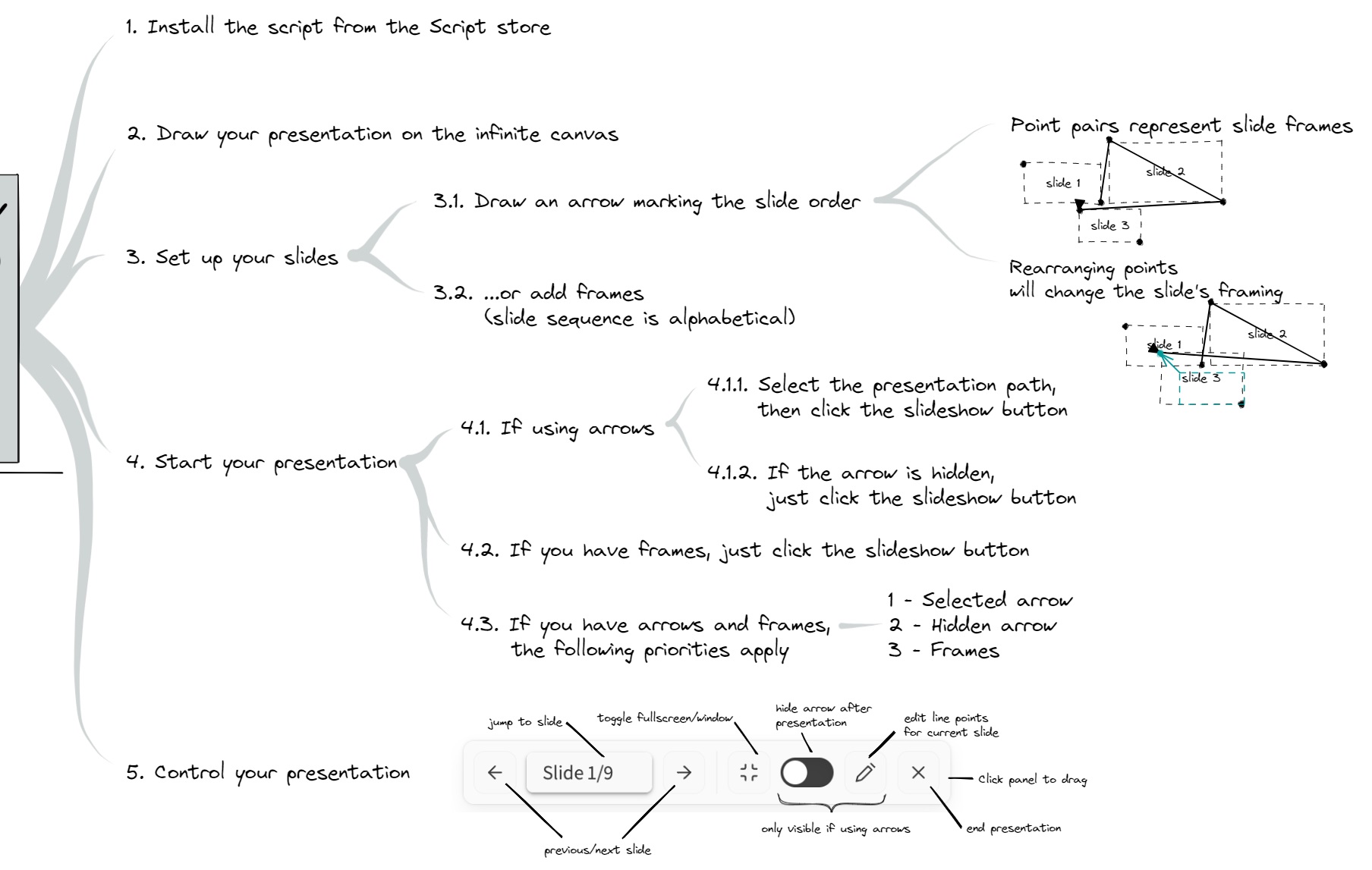
The script will convert your drawing into a slideshow presentation.
|
|
If you select an arrow or line element, the script will use that as the presentation path.
|
|
If you select nothing, but the file has a hidden presentation path, the script will use that for determining the slide sequence.
|
|
If there are frames, the script will use the frames for the presentation. Frames are played in alphabetical order of their titles.
|
|
|
|
```javascript
|
|
*/
|
|
if(!ea.verifyMinimumPluginVersion || !ea.verifyMinimumPluginVersion("1.9.23")) {
|
|
new Notice("This script requires a newer version of Excalidraw. Please install the latest version.");
|
|
return;
|
|
}
|
|
|
|
const hostLeaf = ea.targetView.leaf;
|
|
const hostView = hostLeaf.view;
|
|
const statusBarElement = document.querySelector("div.status-bar");
|
|
const ctrlKey = ea.targetView.modifierKeyDown.ctrlKey || ea.targetView.modifierKeyDown.metaKey;
|
|
const altKey = ea.targetView.modifierKeyDown.altKey || ctrlKey;
|
|
|
|
//-------------------------------
|
|
//constants
|
|
//-------------------------------
|
|
const TRANSITION_STEP_COUNT = 100;
|
|
const TRANSITION_DELAY = 1000; //maximum time for transition between slides in milliseconds
|
|
const FRAME_SLEEP = 1; //milliseconds
|
|
const EDIT_ZOOMOUT = 0.7; //70% of original slide zoom, set to a value between 1 and 0
|
|
const FADE_LEVEL = 0.15; //opacity of the slideshow controls after fade delay (value between 0 and 1)
|
|
//using outerHTML because the SVG object returned by Obsidin is in the main workspace window
|
|
//but excalidraw might be open in a popout window which has a different document object
|
|
const SVG_COG = ea.obsidian.getIcon("lucide-settings").outerHTML;
|
|
const SVG_FINISH = ea.obsidian.getIcon("lucide-x").outerHTML;
|
|
const SVG_RIGHT_ARROW = ea.obsidian.getIcon("lucide-arrow-right").outerHTML;
|
|
const SVG_LEFT_ARROW = ea.obsidian.getIcon("lucide-arrow-left").outerHTML;
|
|
const SVG_EDIT = ea.obsidian.getIcon("lucide-pencil").outerHTML;
|
|
const SVG_MAXIMIZE = ea.obsidian.getIcon("lucide-maximize").outerHTML;
|
|
const SVG_MINIMIZE = ea.obsidian.getIcon("lucide-minimize").outerHTML;
|
|
const SVG_LASER_ON = ea.obsidian.getIcon("lucide-hand").outerHTML;
|
|
const SVG_LASER_OFF = ea.obsidian.getIcon("lucide-wand").outerHTML;
|
|
|
|
//-------------------------------
|
|
//utility & convenience functions
|
|
//-------------------------------
|
|
let isLaserOn = false;
|
|
let slide = 0;
|
|
let isFullscreen = false;
|
|
const ownerDocument = ea.targetView.ownerDocument;
|
|
const startFullscreen = !altKey;
|
|
//The plugin and Obsidian App run in the window object
|
|
//When Excalidraw is open in a popout window, the Excalidraw component will run in the ownerWindow
|
|
//and in this case ownerWindow !== window
|
|
//For this reason event handlers are distributed between window and owner window depending on their role
|
|
const ownerWindow = ea.targetView.ownerWindow;
|
|
const excalidrawAPI = ea.getExcalidrawAPI();
|
|
const frameRenderingOriginalState = excalidrawAPI.getAppState().frameRendering;
|
|
const contentEl = ea.targetView.contentEl;
|
|
const sleep = async (ms) => new Promise((resolve) => ownerWindow.setTimeout(resolve, ms));
|
|
const getFrameName = (name, index) => name ?? `Frame ${(index+1).toString().padStart(2, '0')}`;
|
|
|
|
//-------------------------------
|
|
//clean up potential clutter from previous run
|
|
//-------------------------------
|
|
window.removePresentationEventHandlers?.();
|
|
|
|
//1. check if line or arrow is selected, if not check if frames are available, if not inform the user and terminate presentation
|
|
let presentationPathLineEl = ea.getViewElements()
|
|
.filter(el=>["line","arrow"].contains(el.type) && el.customData?.slideshow)[0];
|
|
|
|
const frameClones = [];
|
|
ea.getViewElements().filter(el=>el.type==="frame").forEach(f=>frameClones.push(ea.cloneElement(f)));
|
|
for(i=0;i<frameClones.length;i++) {
|
|
frameClones[i].name = getFrameName(frameClones[i].name,i);
|
|
}
|
|
let frames = frameClones
|
|
.sort((el1,el2)=> el1.name > el2.name ? 1:-1);
|
|
|
|
let presentationPathType = "line"; // "frame"
|
|
const selectedEl = ea.getViewSelectedElement();
|
|
let shouldHideArrowAfterPresentation = true; //this controls if the hide arrow button is available in settings
|
|
if(presentationPathLineEl && selectedEl && ["line","arrow"].contains(selectedEl.type)) {
|
|
excalidrawAPI.setToast({
|
|
message:"Using selected line instead of hidden line. Note that there is a hidden presentation path for this drawing. Run the slideshow script without selecting any elements to access the hidden presentation path",
|
|
duration: 5000,
|
|
closable: true
|
|
})
|
|
shouldHideArrowAfterPresentation = false;
|
|
presentationPathLineEl = selectedEl;
|
|
}
|
|
if(!presentationPathLineEl) presentationPathLineEl = selectedEl;
|
|
if(!presentationPathLineEl || !["line","arrow"].contains(presentationPathLineEl.type)) {
|
|
if(frames.length > 0) {
|
|
presentationPathType = "frame";
|
|
} else {
|
|
excalidrawAPI.setToast({
|
|
message:"Please select the line or arrow for the presentation path or add frames.",
|
|
duration: 3000,
|
|
closable: true
|
|
})
|
|
return;
|
|
}
|
|
}
|
|
|
|
//---------------------------------------------
|
|
// generate slides[] array
|
|
//---------------------------------------------
|
|
let slides = [];
|
|
|
|
if(presentationPathType === "line") {
|
|
const getLineSlideRect = ({pointA, pointB}) => {
|
|
const x1 = presentationPathLineEl.x+pointA[0];
|
|
const y1 = presentationPathLineEl.y+pointA[1];
|
|
const x2 = presentationPathLineEl.x+pointB[0];
|
|
const y2 = presentationPathLineEl.y+pointB[1];
|
|
return { x1, y1, x2, y2};
|
|
}
|
|
|
|
const slideCount = Math.floor(presentationPathLineEl.points.length/2)-1;
|
|
for(i=0;i<=slideCount;i++) {
|
|
slides.push(getLineSlideRect({
|
|
pointA:presentationPathLineEl.points[i*2],
|
|
pointB:presentationPathLineEl.points[i*2+1]
|
|
}))
|
|
}
|
|
}
|
|
|
|
if(presentationPathType === "frame") {
|
|
for(frame of frames) {
|
|
slides.push({
|
|
x1: frame.x,
|
|
y1: frame.y,
|
|
x2: frame.x + frame.width,
|
|
y2: frame.y + frame.height
|
|
});
|
|
}
|
|
if(frameRenderingOriginalState.enabled) {
|
|
excalidrawAPI.updateScene({
|
|
appState: {
|
|
frameRendering: {
|
|
...frameRenderingOriginalState,
|
|
enabled: false
|
|
}
|
|
}
|
|
});
|
|
}
|
|
}
|
|
|
|
//---------------------------------------
|
|
// Toggle fullscreen
|
|
//---------------------------------------
|
|
let toggleFullscreenButton;
|
|
let controlPanelEl;
|
|
let selectSlideDropdown;
|
|
|
|
const resetControlPanelElPosition = () => {
|
|
if(!controlPanelEl) return;
|
|
const top = contentEl.innerHeight;
|
|
const left = contentEl.innerWidth/2;
|
|
controlPanelEl.style.top = `calc(${top}px - var(--default-button-size)*2)`;
|
|
controlPanelEl.style.left = `calc(${left}px - var(--default-button-size)*5)`;
|
|
slide--;
|
|
navigate("fwd");
|
|
}
|
|
|
|
const waitForExcalidrawResize = async () => {
|
|
await sleep(100);
|
|
const deltaWidth = () => Math.abs(contentEl.clientWidth-excalidrawAPI.getAppState().width);
|
|
const deltaHeight = () => Math.abs(contentEl.clientHeight-excalidrawAPI.getAppState().height);
|
|
let watchdog = 0;
|
|
while ((deltaWidth()>50 || deltaHeight()>50) && watchdog++<20) await sleep(50); //wait for Excalidraw to resize to fullscreen
|
|
}
|
|
|
|
let preventFullscreenExit = true;
|
|
const gotoFullscreen = async () => {
|
|
if(isFullscreen) return;
|
|
preventFullscreenExit = true;
|
|
if(app.isMobile) {
|
|
ea.viewToggleFullScreen();
|
|
} else {
|
|
await contentEl.webkitRequestFullscreen();
|
|
}
|
|
await waitForExcalidrawResize();
|
|
const layerUIWrapper = contentEl.querySelector(".layer-ui__wrapper");
|
|
if(!layerUIWrapper.hasClass("excalidraw-hidden")) layerUIWrapper.addClass("excalidraw-hidden");
|
|
if(toggleFullscreenButton) toggleFullscreenButton.innerHTML = SVG_MINIMIZE;
|
|
resetControlPanelElPosition();
|
|
isFullscreen = true;
|
|
}
|
|
|
|
const exitFullscreen = async () => {
|
|
if(!isFullscreen) return;
|
|
preventFullscreenExit = true;
|
|
if(!app.isMobile && ownerDocument?.fullscreenElement) await ownerDocument.exitFullscreen();
|
|
if(app.isMobile) ea.viewToggleFullScreen();
|
|
if(toggleFullscreenButton) toggleFullscreenButton.innerHTML = SVG_MAXIMIZE;
|
|
await waitForExcalidrawResize();
|
|
resetControlPanelElPosition();
|
|
isFullscreen = false;
|
|
}
|
|
|
|
const toggleFullscreen = async () => {
|
|
if (isFullscreen) {
|
|
await exitFullscreen();
|
|
} else {
|
|
await gotoFullscreen();
|
|
}
|
|
}
|
|
|
|
//-----------------------------------------------------
|
|
// hide the arrow for the duration of the presentation
|
|
// and save the arrow color before doing so
|
|
//-----------------------------------------------------
|
|
let isHidden;
|
|
let originalProps;
|
|
const toggleArrowVisibility = async (setToHidden) => {
|
|
ea.clear();
|
|
ea.copyViewElementsToEAforEditing(ea.getViewElements().filter(el=>el.id === presentationPathLineEl.id));
|
|
const el = ea.getElement(presentationPathLineEl.id);
|
|
el.strokeColor = "transparent";
|
|
el.backgroundColor = "transparent";
|
|
const customData = el.customData;
|
|
if(setToHidden && shouldHideArrowAfterPresentation) {
|
|
el.locked = true;
|
|
el.customData = {
|
|
...customData,
|
|
slideshow: {
|
|
originalProps,
|
|
hidden: true
|
|
}
|
|
}
|
|
isHidden = true;
|
|
} else {
|
|
if(customData) delete el.customData.slideshow;
|
|
isHidden = false;
|
|
}
|
|
await ea.addElementsToView();
|
|
}
|
|
|
|
if(presentationPathType==="line") {
|
|
originalProps = presentationPathLineEl.customData?.slideshow?.hidden
|
|
? presentationPathLineEl.customData.slideshow.originalProps
|
|
: {
|
|
strokeColor: presentationPathLineEl.strokeColor,
|
|
backgroundColor: presentationPathLineEl.backgroundColor,
|
|
locked: presentationPathLineEl.locked,
|
|
};
|
|
isHidden = presentationPathLineEl.customData?.slideshow?.hidden ?? false;
|
|
}
|
|
|
|
//-----------------------------
|
|
// scroll-to-location functions
|
|
//-----------------------------
|
|
const getNavigationRect = ({ x1, y1, x2, y2 }) => {
|
|
const { width, height } = excalidrawAPI.getAppState();
|
|
const ratioX = width / Math.abs(x1 - x2);
|
|
const ratioY = height / Math.abs(y1 - y2);
|
|
let ratio = Math.min(Math.max(ratioX, ratioY), 10);
|
|
|
|
const scaledWidth = Math.abs(x1 - x2) * ratio;
|
|
const scaledHeight = Math.abs(y1 - y2) * ratio;
|
|
|
|
if (scaledWidth > width || scaledHeight > height) {
|
|
ratio = Math.min(width / Math.abs(x1 - x2), height / Math.abs(y1 - y2));
|
|
}
|
|
|
|
const deltaX = (width / ratio - Math.abs(x1 - x2)) / 2;
|
|
const deltaY = (height / ratio - Math.abs(y1 - y2)) / 2;
|
|
|
|
return {
|
|
left: (x1 < x2 ? x1 : x2) - deltaX,
|
|
top: (y1 < y2 ? y1 : y2) - deltaY,
|
|
right: (x1 < x2 ? x2 : x1) + deltaX,
|
|
bottom: (y1 < y2 ? y2 : y1) + deltaY,
|
|
nextZoom: ratio,
|
|
};
|
|
};
|
|
|
|
const getNextSlideRect = (forward) => {
|
|
slide = forward
|
|
? slide < slides.length-1 ? slide + 1 : 0
|
|
: slide <= 0 ? slides.length-1 : slide - 1;
|
|
return getNavigationRect(slides[slide]);
|
|
}
|
|
|
|
let busy = false;
|
|
const scrollToNextRect = async ({left,top,right,bottom,nextZoom},steps = TRANSITION_STEP_COUNT) => {
|
|
const startTimer = Date.now();
|
|
let watchdog = 0;
|
|
while(busy && watchdog++<15) await sleep(100);
|
|
if(busy && watchdog >= 15) return;
|
|
busy = true;
|
|
excalidrawAPI.updateScene({appState:{shouldCacheIgnoreZoom:true}});
|
|
const {scrollX, scrollY, zoom} = excalidrawAPI.getAppState();
|
|
const zoomStep = (zoom.value-nextZoom)/steps;
|
|
const xStep = (left+scrollX)/steps;
|
|
const yStep = (top+scrollY)/steps;
|
|
let i=1;
|
|
while(i<=steps) {
|
|
excalidrawAPI.updateScene({
|
|
appState: {
|
|
scrollX:scrollX-(xStep*i),
|
|
scrollY:scrollY-(yStep*i),
|
|
zoom:{value:zoom.value-zoomStep*i},
|
|
}
|
|
});
|
|
const ellapsed = Date.now()-startTimer;
|
|
if(ellapsed > TRANSITION_DELAY) {
|
|
i = i<steps ? steps : steps+1;
|
|
} else {
|
|
const timeProgress = ellapsed / TRANSITION_DELAY;
|
|
i=Math.min(Math.round(steps*timeProgress),steps)
|
|
await sleep(FRAME_SLEEP);
|
|
}
|
|
}
|
|
excalidrawAPI.updateScene({appState:{shouldCacheIgnoreZoom:false}});
|
|
if(isLaserOn) {
|
|
excalidrawAPI.setActiveTool({type: "laser"});
|
|
}
|
|
busy = false;
|
|
}
|
|
|
|
const navigate = async (dir) => {
|
|
const forward = dir === "fwd";
|
|
const prevSlide = slide;
|
|
const nextRect = getNextSlideRect(forward);
|
|
|
|
//exit if user navigates from last slide forward or first slide backward
|
|
const shouldExit = forward
|
|
? slide<=prevSlide
|
|
: slide>=prevSlide;
|
|
if(shouldExit) {
|
|
exitPresentation();
|
|
return;
|
|
}
|
|
if(selectSlideDropdown) selectSlideDropdown.value = slide+1;
|
|
await scrollToNextRect(nextRect);
|
|
}
|
|
|
|
const navigateToSlide = (slideNumber) => {
|
|
if(slideNumber > slides.length) slideNumber = slides.length;
|
|
if(slideNumber < 1) slideNumber = 1;
|
|
slide = slideNumber - 2;
|
|
navigate("fwd");
|
|
}
|
|
|
|
//--------------------------------------
|
|
// Slideshow control panel
|
|
//--------------------------------------
|
|
let controlPanelFadeTimout = 0;
|
|
const setFadeTimeout = (delay) => {
|
|
delay = delay ?? TRANSITION_DELAY;
|
|
controlPanelFadeTimeout = ownerWindow.setTimeout(()=>{
|
|
controlPanelFadeTimout = 0;
|
|
if(ownerDocument.activeElement === selectSlideDropdown) {
|
|
setFadeTimeout(delay);
|
|
return;
|
|
}
|
|
controlPanelEl.style.opacity = FADE_LEVEL;
|
|
},delay);
|
|
}
|
|
const clearFadeTimeout = () => {
|
|
if(controlPanelFadeTimeout) {
|
|
ownerWindow.clearTimeout(controlPanelFadeTimeout);
|
|
controlPanelFadeTimeout = 0;
|
|
}
|
|
controlPanelEl.style.opacity = 1;
|
|
}
|
|
|
|
const createPresentationNavigationPanel = () => {
|
|
//create slideshow controlpanel container
|
|
const top = contentEl.innerHeight;
|
|
const left = contentEl.innerWidth/2;
|
|
controlPanelEl = contentEl.querySelector(".excalidraw").createDiv({
|
|
cls: ["excalidraw-presentation-panel"],
|
|
attr: {
|
|
style: `
|
|
width: fit-content;
|
|
z-index:5;
|
|
position: absolute;
|
|
top:calc(${top}px - var(--default-button-size)*2);
|
|
left:calc(${left}px - var(--default-button-size)*5);`
|
|
}
|
|
});
|
|
setFadeTimeout(TRANSITION_DELAY*3);
|
|
|
|
const panelColumn = controlPanelEl.createDiv({
|
|
cls: "panelColumn",
|
|
});
|
|
|
|
panelColumn.createDiv({
|
|
cls: ["Island", "buttonList"],
|
|
attr: {
|
|
style: `
|
|
max-width: unset;
|
|
justify-content: space-between;
|
|
height: calc(var(--default-button-size)*1.5);
|
|
width: 100%;
|
|
background: var(--island-bg-color);
|
|
display: flex;
|
|
align-items: center;`,
|
|
}
|
|
}, el=>{
|
|
el.createEl("style",
|
|
{ text: ` select:focus { box-shadow: var(--input-shadow);} `});
|
|
el.createEl("button",{
|
|
attr: {
|
|
style: `
|
|
margin-left: calc(var(--default-button-size)*0.25);`,
|
|
"aria-label": "Previous slide",
|
|
title: "Previous slide"
|
|
}
|
|
}, button => {
|
|
button.innerHTML = SVG_LEFT_ARROW;
|
|
button.onclick = () => navigate("bkwd")
|
|
});
|
|
selectSlideDropdown = el.createEl("select", {
|
|
attr: {
|
|
style: `
|
|
font-size: inherit;
|
|
background-color: var(--island-bg-color);
|
|
border: none;
|
|
color: var(--color-gray-100);
|
|
cursor: pointer;
|
|
}`,
|
|
title: "Navigate to slide"
|
|
}
|
|
}, selectEl => {
|
|
for (let i = 0; i < slides.length; i++) {
|
|
const option = document.createElement("option");
|
|
option.text = (presentationPathType === "frame")
|
|
? `${frames[i].name}/${slides.length}`
|
|
: option.text = `Slide ${i + 1}/${slides.length}`;
|
|
option.value = i + 1;
|
|
selectEl.add(option);
|
|
}
|
|
selectEl.addEventListener("change", () => {
|
|
const selectedSlideNumber = parseInt(selectEl.value);
|
|
selectEl.blur();
|
|
navigateToSlide(selectedSlideNumber);
|
|
});
|
|
});
|
|
el.createEl("button",{
|
|
attr: {
|
|
title: "Next slide"
|
|
},
|
|
}, button => {
|
|
button.innerHTML = SVG_RIGHT_ARROW;
|
|
button.onclick = () => navigate("fwd");
|
|
});
|
|
el.createDiv({
|
|
attr: {
|
|
style: `
|
|
width: 1px;
|
|
height: var(--default-button-size);
|
|
background-color: var(--default-border-color);
|
|
margin: 0px auto;`
|
|
}
|
|
});
|
|
|
|
el.createEl("button",{
|
|
attr: {
|
|
title: "Toggle Laser Pointer and Panning Mode"
|
|
}
|
|
}, button => {
|
|
button.innerHTML = isLaserOn ? SVG_LASER_ON : SVG_LASER_OFF;
|
|
button.onclick = () => {
|
|
isLaserOn = !isLaserOn;
|
|
excalidrawAPI.setActiveTool({
|
|
type: isLaserOn ? "laser" : "selection"
|
|
})
|
|
button.innerHTML = isLaserOn ? SVG_LASER_ON : SVG_LASER_OFF;
|
|
}
|
|
});
|
|
|
|
el.createEl("button",{
|
|
attr: {
|
|
title: "Toggle fullscreen. If you hold ALT/OPT when starting the presentation it will not go fullscreen."
|
|
},
|
|
}, button => {
|
|
toggleFullscreenButton = button;
|
|
button.innerHTML = isFullscreen ? SVG_MINIMIZE : SVG_MAXIMIZE;
|
|
button.onclick = () => toggleFullscreen();
|
|
});
|
|
if(presentationPathType === "line") {
|
|
if(shouldHideArrowAfterPresentation) {
|
|
new ea.obsidian.ToggleComponent(el)
|
|
.setValue(isHidden)
|
|
.onChange(value => {
|
|
if(value) {
|
|
excalidrawAPI.setToast({
|
|
message:"The presentation path remain hidden after the presentation. No need to select the line again. Just click the slideshow button to start the next presentation.",
|
|
duration: 5000,
|
|
closable: true
|
|
})
|
|
}
|
|
toggleArrowVisibility(value);
|
|
})
|
|
.toggleEl.setAttribute("title","Arrow visibility. ON: hidden after presentation, OFF: visible after presentation");
|
|
}
|
|
el.createEl("button",{
|
|
attr: {
|
|
title: "Edit slide"
|
|
},
|
|
}, button => {
|
|
button.innerHTML = SVG_EDIT;
|
|
button.onclick = () => {
|
|
if(shouldHideArrowAfterPresentation) toggleArrowVisibility(false);
|
|
exitPresentation(true);
|
|
}
|
|
});
|
|
}
|
|
el.createEl("button",{
|
|
attr: {
|
|
style: `
|
|
margin-right: calc(var(--default-button-size)*0.25);`,
|
|
title: "End presentation"
|
|
}
|
|
}, button => {
|
|
button.innerHTML = SVG_FINISH;
|
|
button.onclick = () => exitPresentation()
|
|
});
|
|
});
|
|
}
|
|
|
|
//--------------------
|
|
// keyboard navigation
|
|
//--------------------
|
|
const keydownListener = (e) => {
|
|
if(hostLeaf !== app.workspace.activeLeaf) return;
|
|
if(hostLeaf.width === 0 && hostLeaf.height === 0) return;
|
|
e.preventDefault();
|
|
switch(e.key) {
|
|
case "Escape":
|
|
exitPresentation();
|
|
break;
|
|
case "ArrowRight":
|
|
case "ArrowDown":
|
|
navigate("fwd");
|
|
break;
|
|
case "ArrowLeft":
|
|
case "ArrowUp":
|
|
navigate("bkwd");
|
|
break;
|
|
case "End":
|
|
slide = slides.length - 2;
|
|
navigate("fwd");
|
|
break;
|
|
case "Home":
|
|
slide = -1;
|
|
navigate("fwd");
|
|
break;
|
|
case "e":
|
|
if(presentationPathType !== "line") return;
|
|
(async ()=>{
|
|
await toggleArrowVisibility(false);
|
|
exitPresentation(true);
|
|
})()
|
|
break;
|
|
}
|
|
}
|
|
|
|
//---------------------
|
|
// slideshow panel drag
|
|
//---------------------
|
|
let posX1 = posY1 = posX2 = posY2 = 0;
|
|
|
|
const updatePosition = (deltaY = 0, deltaX = 0) => {
|
|
const {
|
|
offsetTop,
|
|
offsetLeft,
|
|
clientWidth: width,
|
|
clientHeight: height,
|
|
} = controlPanelEl;
|
|
controlPanelEl.style.top = (offsetTop - deltaY) + 'px';
|
|
controlPanelEl.style.left = (offsetLeft - deltaX) + 'px';
|
|
}
|
|
|
|
const onPointerUp = () => {
|
|
ownerWindow.removeEventListener('pointermove', onDrag, true);
|
|
}
|
|
|
|
const onPointerDown = (e) => {
|
|
clearFadeTimeout();
|
|
setFadeTimeout();
|
|
const now = Date.now();
|
|
posX2 = e.clientX;
|
|
posY2 = e.clientY;
|
|
ownerWindow.addEventListener('pointermove', onDrag, true);
|
|
}
|
|
|
|
const onDrag = (e) => {
|
|
e.preventDefault();
|
|
posX1 = posX2 - e.clientX;
|
|
posY1 = posY2 - e.clientY;
|
|
posX2 = e.clientX;
|
|
posY2 = e.clientY;
|
|
updatePosition(posY1, posX1);
|
|
}
|
|
|
|
const onMouseEnter = () => {
|
|
clearFadeTimeout();
|
|
}
|
|
|
|
const onMouseLeave = () => {
|
|
setFadeTimeout();
|
|
}
|
|
|
|
const fullscreenListener = (e) => {
|
|
if(preventFullscreenExit) {
|
|
preventFullscreenExit = false;
|
|
return;
|
|
}
|
|
e.preventDefault();
|
|
exitPresentation();
|
|
}
|
|
|
|
const initializeEventListners = () => {
|
|
ownerWindow.addEventListener('keydown',keydownListener);
|
|
controlPanelEl.addEventListener('pointerdown', onPointerDown, false);
|
|
controlPanelEl.addEventListener('mouseenter', onMouseEnter, false);
|
|
controlPanelEl.addEventListener('mouseleave', onMouseLeave, false);
|
|
ownerWindow.addEventListener('pointerup', onPointerUp, false);
|
|
|
|
//event listners for terminating the presentation
|
|
window.removePresentationEventHandlers = () => {
|
|
ea.onLinkClickHook = null;
|
|
controlPanelEl.removeEventListener('pointerdown', onPointerDown, false);
|
|
controlPanelEl.removeEventListener('mouseenter', onMouseEnter, false);
|
|
controlPanelEl.removeEventListener('mouseleave', onMouseLeave, false);
|
|
controlPanelEl.parentElement?.removeChild(controlPanelEl);
|
|
if(!app.isMobile) {
|
|
contentEl.removeEventListener('webkitfullscreenchange', fullscreenListener);
|
|
contentEl.removeEventListener('fullscreenchange', fullscreenListener);
|
|
}
|
|
ownerWindow.removeEventListener('keydown',keydownListener);
|
|
ownerWindow.removeEventListener('pointerup',onPointerUp);
|
|
contentEl.querySelector(".layer-ui__wrapper")?.removeClass("excalidraw-hidden");
|
|
delete window.removePresentationEventHandlers;
|
|
}
|
|
|
|
ea.onLinkClickHook = () => {
|
|
exitPresentation();
|
|
return true;
|
|
};
|
|
|
|
if(!app.isMobile) {
|
|
contentEl.addEventListener('webkitfullscreenchange', fullscreenListener);
|
|
contentEl.addEventListener('fullscreenchange', fullscreenListener);
|
|
}
|
|
}
|
|
|
|
//----------------------------
|
|
// Exit presentation
|
|
//----------------------------
|
|
const exitPresentation = async (openForEdit = false) => {
|
|
//this is a hack, not sure why ea loses target view when other scripts are executed while the presentation is running
|
|
ea.targetView = hostView;
|
|
isLaserOn = false;
|
|
statusBarElement.style.display = "inherit";
|
|
if(openForEdit) ea.targetView.preventAutozoom();
|
|
await exitFullscreen();
|
|
await waitForExcalidrawResize();
|
|
ea.setViewModeEnabled(false);
|
|
if(presentationPathType === "line") {
|
|
ea.clear();
|
|
ea.copyViewElementsToEAforEditing(ea.getViewElements().filter(el=>el.id === presentationPathLineEl.id));
|
|
const el = ea.getElement(presentationPathLineEl.id);
|
|
if(!isHidden) {
|
|
el.strokeColor = originalProps.strokeColor;
|
|
el.backgroundProps = originalProps.backgroundColor;
|
|
el.locked = openForEdit ? false : originalProps.locked;
|
|
}
|
|
await ea.addElementsToView();
|
|
if(!isHidden) ea.selectElementsInView([el]);
|
|
if(openForEdit) {
|
|
let nextRect = getNextSlideRect(--slide);
|
|
const offsetW = (nextRect.right-nextRect.left)*(1-EDIT_ZOOMOUT)/2;
|
|
const offsetH = (nextRect.bottom-nextRect.top)*(1-EDIT_ZOOMOUT)/2
|
|
nextRect = {
|
|
left: nextRect.left-offsetW,
|
|
right: nextRect.right+offsetW,
|
|
top: nextRect.top-offsetH,
|
|
bottom: nextRect.bottom+offsetH,
|
|
nextZoom: nextRect.nextZoom*EDIT_ZOOMOUT > 0.1 ? nextRect.nextZoom*EDIT_ZOOMOUT : 0.1 //0.1 is the minimu zoom value
|
|
};
|
|
await scrollToNextRect(nextRect,1);
|
|
excalidrawAPI.startLineEditor(
|
|
ea.getViewSelectedElement(),
|
|
[slide*2,slide*2+1]
|
|
);
|
|
}
|
|
} else {
|
|
if(frameRenderingOriginalState.enabled) {
|
|
excalidrawAPI.updateScene({
|
|
appState: {
|
|
frameRendering: {
|
|
...frameRenderingOriginalState,
|
|
enabled: true
|
|
}
|
|
}
|
|
});
|
|
}
|
|
}
|
|
window.removePresentationEventHandlers?.();
|
|
ownerWindow.setTimeout(()=>{
|
|
//Resets pointer offsets. Ugly solution.
|
|
//During testing offsets were wrong after presentation, but don't know why.
|
|
//This should solve it even if they are wrong.
|
|
hostView.refresh();
|
|
excalidrawAPI.setActiveTool({type: "selection"});
|
|
})
|
|
}
|
|
|
|
//--------------------------
|
|
// Start presentation or open presentation settings on double click
|
|
//--------------------------
|
|
const start = async () => {
|
|
statusBarElement.style.display = "none";
|
|
ea.setViewModeEnabled(true);
|
|
createPresentationNavigationPanel();
|
|
initializeEventListners();
|
|
if(startFullscreen) {
|
|
await gotoFullscreen();
|
|
} else {
|
|
resetControlPanelElPosition();
|
|
}
|
|
if(presentationPathType === "line") await toggleArrowVisibility(isHidden);
|
|
}
|
|
|
|
const timestamp = Date.now();
|
|
if(window.ExcalidrawSlideshow && (window.ExcalidrawSlideshow.script === utils.scriptFile.path) && (timestamp - window.ExcalidrawSlideshow.timestamp <400) ) {
|
|
if(window.ExcalidrawSlideshowStartTimer) {
|
|
window.clearTimeout(window.ExcalidrawSlideshowStartTimer);
|
|
delete window.ExcalidrawSlideshowStartTimer;
|
|
}
|
|
await start();
|
|
} else {
|
|
if(window.ExcalidrawSlideshowStartTimer) {
|
|
window.clearTimeout(window.ExcalidrawSlideshowStartTimer);
|
|
delete window.ExcalidrawSlideshowStartTimer;
|
|
}
|
|
window.ExcalidrawSlideshow = {
|
|
script: utils.scriptFile.path,
|
|
timestamp
|
|
};
|
|
window.ExcalidrawSlideshowStartTimer = window.setTimeout(start,500);
|
|
}
|