mirror of
https://github.com/zsviczian/obsidian-excalidraw-plugin.git
synced 2025-08-06 05:46:28 +00:00

2.0 KiB
2.0 KiB
/*
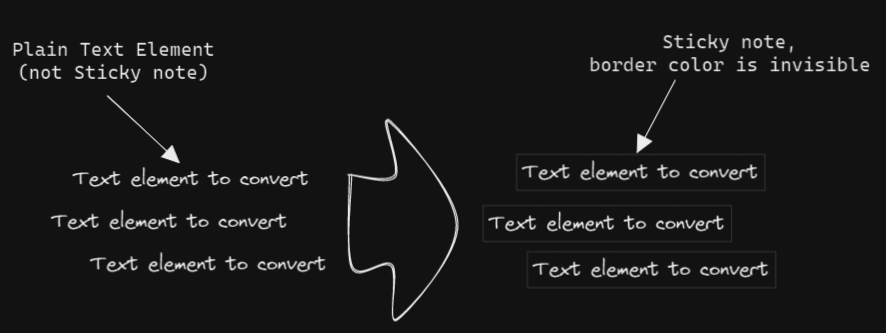
Converts selected plain text elements to sticky notes with transparent background and transparent stroke color. Essentially converts text element into a wrappable format.
*/
if(!ea.verifyMinimumPluginVersion || !ea.verifyMinimumPluginVersion("1.5.21")) {
  new Notice("This script requires a newer version of Excalidraw. Please install the latest version.");
  return;
}

settings = ea.getScriptSettings();
//set default values on first run
if(!settings["Border color"]) {
	settings = {
	  "Border color" : {
			value: "#000000",
      description: "Any legal HTML color (#000000, rgb, color-name, etc.). Set to 'transparent' for transparent color."
		},
		"Background color" : {
			value: "transparent",
      description: "Background color of the sticky note. Set to 'transparent' for transparent color."
		},
		"Background fill style" : {
			value: "solid",
      description: "Fill style of the sticky note",
		  valueset: ["hachure","cross-hatch","solid"]
		}
	};
	ea.setScriptSettings(settings);
}

const strokeColor = settings["Border color"].value;
const backgroundColor = settings["Background color"].value;
const fillStyle = settings["Background fill style"].value;

elements = ea.getViewSelectedElements()
             .filter((el)=>(el.type==="text")&&(el.containerId===null));
if(elements.length===0) return;
ea.style.strokeColor = strokeColor;
ea.style.backgroundColor = backgroundColor;
ea.style.fillStyle = fillStyle;
const padding = 6;
let boxes = [];
elements.forEach((el)=>{
  const id = ea.addRect(el.x-padding,el.y-padding,el.width+2*padding,el.height+2*padding);
  boxes.push(id);
  ea.getElement(id).boundElements=[{type:"text",id:el.id}];
  el.containerId = id;
});
ea.copyViewElementsToEAforEditing(elements);
await ea.addElementsToView(false,false);
ea.selectElementsInView(ea.getViewElements().filter(el=>boxes.includes(el.id)));