mirror of
https://github.com/zsviczian/obsidian-excalidraw-plugin.git
synced 2025-08-06 05:46:28 +00:00

73 lines
4.8 KiB
Markdown
73 lines
4.8 KiB
Markdown
## Obsidian Excalidraw Plugin
|
|
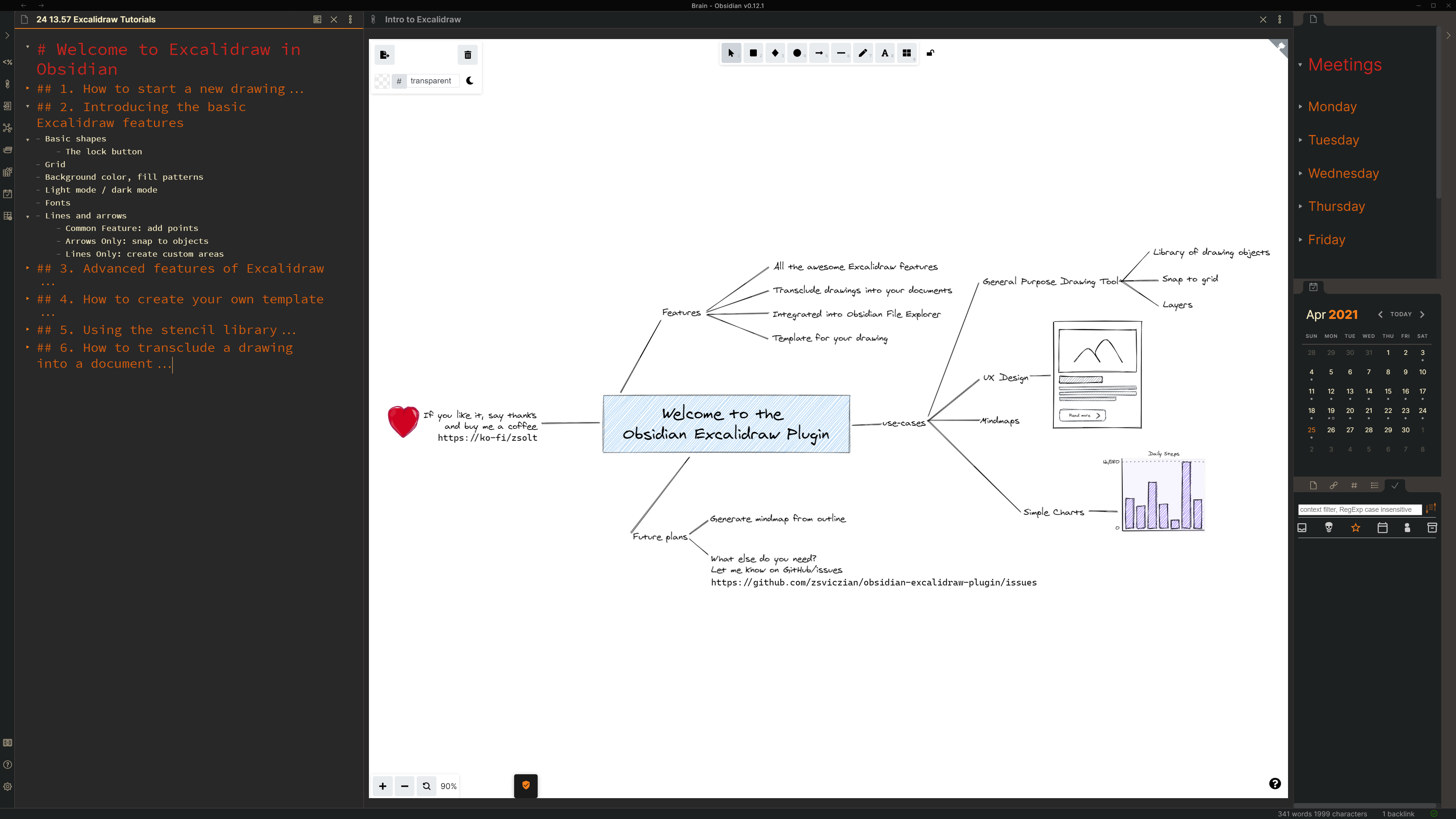
The Obsidian-Excalidraw plugin integrates [Excalidraw](https://excalidraw.com/), a feature rich sketching tool, into Obsidian. You can store and edit Excalidraw files in your vault and you can transclude drawings into your documents. For a showcase of Excalidraw features, please read my blog post [here](https://www.zsolt.blog/2021/03/showcasing-excalidraw.html).
|
|
|
|
|
|
|
|
### See details of the 1.0.6 release including a short video, futher below
|
|
|
|
### Key features
|
|
- The plugin adds the following actions to the command palette:
|
|
- To create a new drawing
|
|
- To find and edit existing drawings in your vault,
|
|
- To embed (transclude) a drawing into a document, and
|
|
- To export a drawing as PNG or SVG.
|
|
- You can also use the file explorer in your vault to open Excalidraw files and the ribbon button to create a new drawing.
|
|
- Open settings to set up a default folder for new drawings.
|
|
- Set up a Template by creating a drawing, customizing it the way you like it, and specifying the file as the template in settings.
|
|
- The plugin saves drawings to your vault as a file with the *.excalidraw* file extension.
|
|
- You can customize the size and position of the embedded image using the [[image.excalidraw|100]], [[image.excalidraw|100x100]], [[image.excalidraw|100|left]] or [[image.excalidraw|right]], format.
|
|
- You can setup Excalidraw to automatically export SVG and/or PNG files for your drawings, and to keep those in sync with your drawing.
|
|
|
|
### How to?
|
|
#### Part 1: Intro to Obsidian-Excalidraw - Start a new drawing (3:12)
|
|
[](https://youtu.be/i-hIfY-Ecjg)
|
|
#### Part 2: Intro to Obsidian-Excalidraw - Basic features (6:06)
|
|
[](https://youtu.be/-dk7pvdl-H0)
|
|
#### Part 3: Intro to Obsidian-Excalidraw - Advanced features (3:26)
|
|
[](https://youtu.be/2cKlEwo8WU0)
|
|
#### Part 4: Intro to Obsidian-Excalidraw - Setting up a template (1:45)
|
|
[](https://youtu.be/oNPYZEpmuJ8)
|
|
#### Part 5: Intro to Obsidian-Excalidraw - Stencil Library (3:16)
|
|
[](https://youtu.be/rLx-9FvlzgI)
|
|
#### Part 6: Intro to Obsidian-Excalidraw: Embedding drawings (2:08)
|
|
[](https://youtu.be/JQeJ-Hh-xAI)
|
|
|
|
### 1.0.6 update
|
|
[](https://youtu.be/ipZPbcP2B0M)
|
|
|
|
#### SVG styling when embedding using a code block
|
|
- new formatting option for the code block embedding
|
|
- Valid values: left, right, center... but really anything after the last |.
|
|
Here is the corresponding CSS:
|
|
```
|
|
.excalidraw-svg-left {
|
|
float: left;
|
|
}
|
|
|
|
.excalidraw-svg-right {
|
|
float: right;
|
|
}
|
|
|
|
.excalidraw-svg-center {
|
|
}
|
|
|
|
.excalidraw-svg {
|
|
}
|
|
```
|
|
|
|
|
|
### Known issues
|
|
- On mobile (iOS and Android): As you draw left to right it opens left sidebar. Draw right to left, opens right sidebar. Draw down, opens commands palette. So seems open is emulating the gestures, even when drawing towards the center. I understand that the issue will be resolved in the next release of Obsidian mobile.
|
|
- I have seen two cases when adding a stencil library did not work. In both cases the end solution was a reinstall of Obsidian. The root cause is not clear, but may be due to the incremental updates of Obsidian from an early version.
|
|
|
|
### Feedback, questions, ideas, problems
|
|
By clicking [here](https://github.com/zsviczian/obsidian-excalidraw-plugin/issues) you can create an issue to report a bug, suggest an improvement for this plugin, ask a question, etc.
|
|
|
|
### Support
|
|
If you want to support me and my work, you can donate me a little something.
|
|
|
|
[<img style="float:left" src="https://user-images.githubusercontent.com/14358394/115450238-f39e8100-a21b-11eb-89d0-fa4b82cdbce8.png" width="200">](https://ko-fi.com/zsolt)
|
|
|
|
|
|
[https://ko-fi/zsolt](https://ko-fi.com/zsolt)
|