mirror of
https://github.com/zfile-dev/zfile.git
synced 2025-04-19 05:34:52 +00:00

91 lines
3.9 KiB
Markdown
91 lines
3.9 KiB
Markdown
<div style="text-align: center">
|
||
<a href="https://zfile.vip" target="_blank" rel="noopener noreferrer">
|
||
<img style="margin: auto; width: 100px; display: block" src="/img/logo-zfile.png" alt="ZFile" />
|
||
</a>
|
||
<p>ZFile 是一个适用于个人或小团队的在线网盘程序,可以将多种存储类型统一管理,再也不用登录各种网站管理文件,现在你只需要在 ZFile 中畅快使用!</p>
|
||
<div>
|
||
<img alt="last commit" src="https://shields.io/github/last-commit/zhaojun1998/zfile.svg?style=flat-square"/>
|
||
<img alt="downloads" src="https://shields.io/github/downloads/zhaojun1998/zfile/total?style=flat-square"/>
|
||
<img alt="release version" src="https://shields.io/github/v/release/zhaojun1998/zfile?style=flat-square"/>
|
||
<img alt="commit activity" src="https://shields.io/github/commit-activity/y/zhaojun1998/zfile?style=flat-square"/>
|
||
<img alt="open issues" src="https://shields.io/github/issues/zhaojun1998/zfile?style=flat-square"/>
|
||
<img alt="closed issues" src="https://shields.io/github/issues-closed-raw/zhaojun1998/zfile?style=flat-square"/>
|
||
<img alt="forks" src="https://shields.io/github/forks/zhaojun1998/zfile?style=flat-square"/>
|
||
<img alt="stars" src="https://shields.io/github/stars/zhaojun1998/zfile?style=flat-square"/>
|
||
<img alt="watchers" src="https://shields.io/github/watchers/zhaojun1998/zfile?style=flat-square"/>
|
||
</div>
|
||
<span>
|
||
<a href="https://zfile.vip">官网</a>
|
||
<span> | </span>
|
||
<a href="https://docs.zfile.vip">文档</a>
|
||
<span> | </span>
|
||
<a href="https://demo.zfile.vip">预览地址</a>
|
||
</span>
|
||
</div>
|
||
|
||
## 系统特色
|
||
|
||
- Docker、Docker Compose 支持(amd64, arm64)。
|
||
- 支持对文件生成直链、短链(可设过期时间)。
|
||
- 响应式设计,支持手机、平板、电脑等多种设备访问。
|
||
- 支持多用户功能,可分配给指定用户指定存储源或目录。
|
||
- 支持在线浏览图片、播放音视频,文本文件、Office、Obj(3d)等文件类型。
|
||
- 支持对接 S3、OneDrive、SharePoint、Google Drive、多吉云、又拍云、本地存储、FTP、SFTP 等存储源。
|
||
- 支持常用快捷键,`Ctrl + A` 全选,`Ctrl + 左键` 多选,`Shift + 左键` 范围选择,`Esc` 取消全选等。
|
||
- 支持限速下载(捐赠版)
|
||
- 支持限制指定用户可查看、上传的文件类型(捐赠版)
|
||
|
||
## 快速开始
|
||
|
||
一键脚本安装:
|
||
|
||
```bash
|
||
curl -sSL https://docs.zfile.vip/install.sh -o install.sh && chmod +x install.sh && ./install.sh
|
||
```
|
||
|
||
更多安装方式请参考 [安装文档](https://docs.zfile.vip/install/)
|
||
|
||
|
||
## 功能预览
|
||
|
||
### 文件列表
|
||

|
||
### 画廊模式
|
||

|
||
### 视频预览
|
||

|
||
### 文本预览
|
||

|
||
### 音频预览
|
||

|
||
### PDF 预览
|
||

|
||
### Office 预览
|
||

|
||
### 3d 文件预览
|
||

|
||
### 生成直链
|
||

|
||
### 页面设置
|
||

|
||
### 后台设置-登录
|
||

|
||
### 后台设置-存储源列表
|
||

|
||
### 后台设置-添加存储源(本地存储)
|
||

|
||
### 后台设置-用户管理
|
||

|
||
### 后台设置-显示设置
|
||

|
||
|
||
## 支持作者
|
||
|
||
如果本项目对你有帮助,请作者喝杯咖啡吧。
|
||
|
||
<img src="https://cdn.jun6.net/2021/03/27/152704e91f13d.png" width="400" alt="赞助我">
|
||
|
||
## Star History
|
||
|
||
[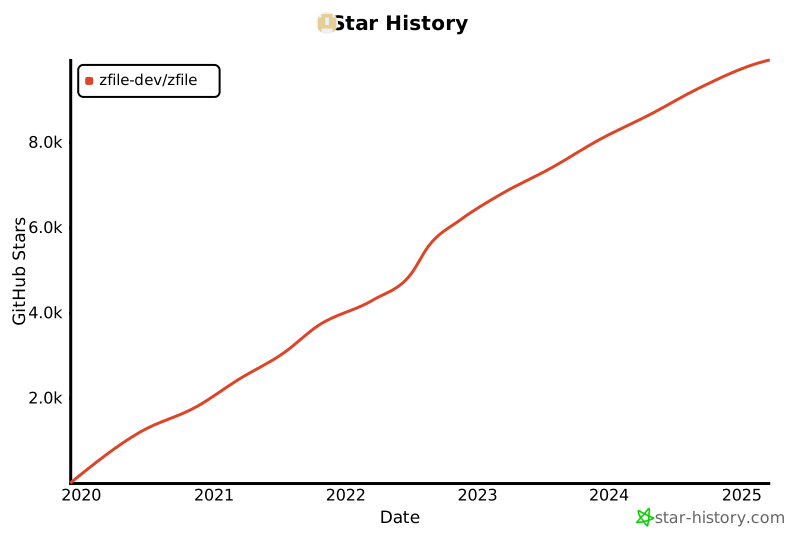](https://star-history.com/#zfile-dev/zfile&Date)
|