mirror of
https://github.com/zsviczian/obsidian-excalidraw-plugin.git
synced 2025-08-06 05:46:28 +00:00
Compare commits
6 Commits
| Author | SHA1 | Date | |
|---|---|---|---|
 zsviczian zsviczian
|
00de9d639b | ||
|
zsviczian
|
5a66c78428 | ||
|
zsviczian
|
d1be193125 | ||
|
zsviczian
|
f4c8d21a33 | ||
|
zsviczian
|
d588f749d2 | ||
|
dmscode
|
c1f909427b |
@@ -69,10 +69,15 @@ const result = polyboolAction({
|
||||
const polygonHierachy = subordinateInnerPolygons(result.regions);
|
||||
drawPolygonHierachy(polygonHierachy);
|
||||
ea.deleteViewElements(elements);
|
||||
setPolygonTrue();
|
||||
ea.addElementsToView(false,false,true);
|
||||
return;
|
||||
|
||||
|
||||
function setPolygonTrue() {
|
||||
ea.getElements().filter(el=>el.type==="line").forEach(el => {
|
||||
el.polygon = true;
|
||||
});
|
||||
}
|
||||
|
||||
function traceElement(element) {
|
||||
const diamondPath = (diamond) => [
|
||||
|
||||
@@ -2,8 +2,8 @@
|
||||
|
||||
This script splits an ellipse at any point where a line intersects it. If no lines are selected, it will use every line that intersects the ellipse. Otherwise, it will only use the selected lines. If there is no intersecting line, the ellipse will be converted into a line object.
|
||||
There is also the option to close the object along the cut, which will close the cut in the shape of the line.
|
||||

|
||||

|
||||
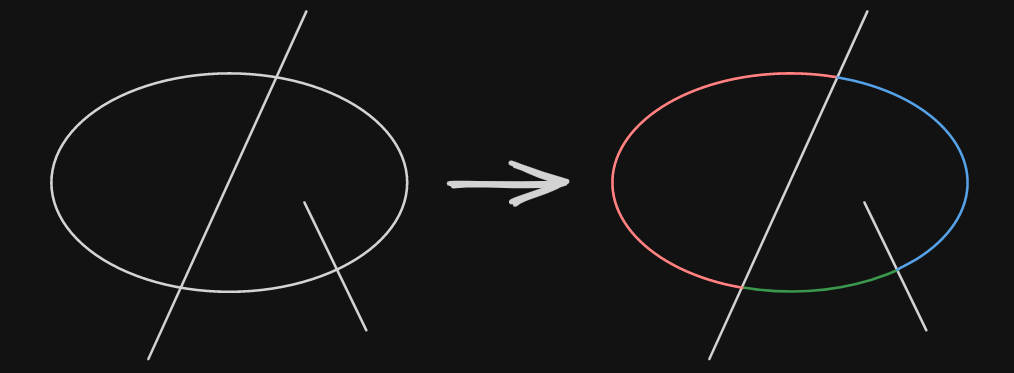
|
||||

|
||||
Tip: To use an ellipse as the cutting object, you first have to use this script on it, since it will convert the ellipse into a line.
|
||||
|
||||
|
||||
@@ -54,6 +54,7 @@ angles.forEach((angle, key) => {
|
||||
|
||||
const lineId = ea.addLine(points);
|
||||
const line = ea.getElement(lineId);
|
||||
if (closeObject && cuttingLine) line.polygon = true;
|
||||
line.frameId = ellipse.frameId;
|
||||
line.groupIds = ellipse.groupIds;
|
||||
});
|
||||
|
||||
+1
-1
@@ -1,7 +1,7 @@
|
||||
{
|
||||
"id": "obsidian-excalidraw-plugin",
|
||||
"name": "Excalidraw",
|
||||
"version": "2.11.0",
|
||||
"version": "2.12.0-beta-1",
|
||||
"minAppVersion": "1.1.6",
|
||||
"description": "An Obsidian plugin to edit and view Excalidraw drawings",
|
||||
"author": "Zsolt Viczian",
|
||||
|
||||
+1
-1
@@ -1,7 +1,7 @@
|
||||
{
|
||||
"id": "obsidian-excalidraw-plugin",
|
||||
"name": "Excalidraw",
|
||||
"version": "2.11.0",
|
||||
"version": "2.11.1",
|
||||
"minAppVersion": "1.1.6",
|
||||
"description": "An Obsidian plugin to edit and view Excalidraw drawings",
|
||||
"author": "Zsolt Viczian",
|
||||
|
||||
Generated
+4
-4
@@ -11,7 +11,7 @@
|
||||
"dependencies": {
|
||||
"@popperjs/core": "^2.11.8",
|
||||
"@zsviczian/colormaster": "^1.2.2",
|
||||
"@zsviczian/excalidraw": "0.18.0-12",
|
||||
"@zsviczian/excalidraw": "0.18.0-14",
|
||||
"chroma-js": "^2.4.2",
|
||||
"clsx": "^2.0.0",
|
||||
"es6-promise-pool": "2.5.0",
|
||||
@@ -3198,9 +3198,9 @@
|
||||
"license": "MIT"
|
||||
},
|
||||
"node_modules/@zsviczian/excalidraw": {
|
||||
"version": "0.18.0-12",
|
||||
"resolved": "https://registry.npmjs.org/@zsviczian/excalidraw/-/excalidraw-0.18.0-12.tgz",
|
||||
"integrity": "sha512-/jAR1aGtnkYO4fT4wBUhItrWAnu1otF4UksOxO96r2za51kB5vc9z5lPdVDGctuchaPU4MuyeC8cVk3K2iNKzw==",
|
||||
"version": "0.18.0-14",
|
||||
"resolved": "https://registry.npmjs.org/@zsviczian/excalidraw/-/excalidraw-0.18.0-14.tgz",
|
||||
"integrity": "sha512-LXmlImnsYxXzObnO0YxPNl4+TeLyM5BhIwUUGxdL/GY+Ru4tTzbwGf7l5GaVsWejrCYvVWM6j/wDwJuL6V1s9Q==",
|
||||
"dependencies": {
|
||||
"@braintree/sanitize-url": "6.0.2",
|
||||
"@excalidraw/random-username": "1.1.0",
|
||||
|
||||
+1
-1
@@ -23,7 +23,7 @@
|
||||
"license": "MIT",
|
||||
"dependencies": {
|
||||
"@popperjs/core": "^2.11.8",
|
||||
"@zsviczian/excalidraw": "0.18.0-13",
|
||||
"@zsviczian/excalidraw": "0.18.0-15",
|
||||
"chroma-js": "^2.4.2",
|
||||
"clsx": "^2.0.0",
|
||||
"@zsviczian/colormaster": "^1.2.2",
|
||||
|
||||
@@ -1078,6 +1078,10 @@ export default class ExcalidrawPlugin extends Plugin {
|
||||
this.eventManager.onActiveLeafChangeHandler(leaf);
|
||||
}
|
||||
|
||||
public setDebounceActiveLeafChangeHandler() {
|
||||
this.eventManager.setDebounceActiveLeafChangeHandler();
|
||||
}
|
||||
|
||||
public registerHotkeyOverrides() {
|
||||
//this is repeated here because the same function is called when settings is closed after hotkeys have changed
|
||||
if (this.popScope) {
|
||||
|
||||
@@ -1038,8 +1038,13 @@ export class CommandManager {
|
||||
x:Math.max(0,centerX - width/2 + view.ownerWindow.screenX),
|
||||
y:Math.max(0,centerY - height/2 + view.ownerWindow.screenY),
|
||||
}
|
||||
|
||||
const focusOnFileTab = this.settings.focusOnFileTab;
|
||||
//override focusOnFileTab for popout windows
|
||||
if(DEVICE.isDesktop) {
|
||||
this.settings.focusOnFileTab = false;
|
||||
}
|
||||
this.plugin.openDrawing(ef.file, DEVICE.isMobile ? "new-tab":"popout-window", true, undefined, false, {x,y,width,height});
|
||||
this.settings.focusOnFileTab = focusOnFileTab;
|
||||
}
|
||||
})
|
||||
|
||||
|
||||
@@ -21,6 +21,7 @@ export class EventManager {
|
||||
private removeEventLisnters:(()=>void)[] = []; //only used if I register an event directly, not via Obsidian's registerEvent
|
||||
private previouslyActiveLeaf: WorkspaceLeaf;
|
||||
private splitViewLeafSwitchTimestamp: number = 0;
|
||||
private debunceActiveLeafChangeHandlerTimer: number|null = null;
|
||||
|
||||
get settings() {
|
||||
return this.plugin.settings;
|
||||
@@ -103,6 +104,15 @@ export class EventManager {
|
||||
this.plugin.registerEvent(this.plugin.app.workspace.on("editor-menu", this.onEditorMenuHandler.bind(this)));
|
||||
}
|
||||
|
||||
public setDebounceActiveLeafChangeHandler() {
|
||||
if(this.debunceActiveLeafChangeHandlerTimer) {
|
||||
window.clearTimeout(this.debunceActiveLeafChangeHandlerTimer);
|
||||
}
|
||||
this.debunceActiveLeafChangeHandlerTimer = window.setTimeout(() => {
|
||||
this.debunceActiveLeafChangeHandlerTimer = null;
|
||||
}, 50);
|
||||
}
|
||||
|
||||
private onLayoutChangeHandler() {
|
||||
getExcalidrawViews(this.app).forEach(excalidrawView=>excalidrawView.refresh());
|
||||
}
|
||||
@@ -164,6 +174,10 @@ export class EventManager {
|
||||
(process.env.NODE_ENV === 'development') && DEBUGGING && debug(this.onActiveLeafChangeHandler,`onActiveLeafChangeEventHandler`, leaf);
|
||||
//https://github.com/zsviczian/obsidian-excalidraw-plugin/issues/723
|
||||
|
||||
if(this.debunceActiveLeafChangeHandlerTimer) {
|
||||
return;
|
||||
}
|
||||
|
||||
//In Obsidian 1.8.x the active excalidraw leaf is obscured by an empty leaf without a parent
|
||||
//This hack resolves it
|
||||
if(this.app.workspace.activeLeaf === leaf && isUnwantedLeaf(leaf)) {
|
||||
|
||||
@@ -44,7 +44,7 @@ export default {
|
||||
TRANSCLUDE_MOST_RECENT: "Embed the most recently edited drawing",
|
||||
TOGGLE_LEFTHANDED_MODE: "Toggle left-handed mode",
|
||||
TOGGLE_SPLASHSCREEN: "Show splash screen in new drawings",
|
||||
FLIP_IMAGE: "Open the back-of-the-note of the selected excalidraw image",
|
||||
FLIP_IMAGE: "Open the back-of-the-note for the selected image in a popout window",
|
||||
NEW_IN_NEW_PANE: "Create new drawing - IN AN ADJACENT WINDOW",
|
||||
NEW_IN_NEW_TAB: "Create new drawing - IN A NEW TAB",
|
||||
NEW_IN_ACTIVE_PANE: "Create new drawing - IN THE CURRENT ACTIVE WINDOW",
|
||||
@@ -463,7 +463,7 @@ FILENAME_HEAD: "Filename",
|
||||
|
||||
FOCUS_ON_EXISTING_TAB_NAME: "Focus on Existing Tab",
|
||||
FOCUS_ON_EXISTING_TAB_DESC: "When opening a link, Excalidraw will focus on the existing tab if the file is already open. " +
|
||||
"Enabling this setting overrides 'Reuse Adjacent Pane' when the file is already open.",
|
||||
"Enabling this setting overrides 'Reuse Adjacent Pane' when the file is already open except for the 'Open the back-of-the-note of the selected excalidraw image' command palette action.",
|
||||
SECOND_ORDER_LINKS_NAME: "Show second-order links",
|
||||
SECOND_ORDER_LINKS_DESC: "Show links when clicking on a link in Excalidraw. Second-order link are backlinks pointing to the link being clicked. " +
|
||||
"When using image icons to connect similar notes, second order links allow you to get to related notes in one click instead of two. " +
|
||||
|
||||
@@ -961,6 +961,7 @@ FILENAME_HEAD: "文件名",
|
||||
PROMPT_BUTTON_INSERT_SPACE: "插入空格",
|
||||
PROMPT_BUTTON_INSERT_LINK: "插入内部链接",
|
||||
PROMPT_BUTTON_UPPERCASE: "大写",
|
||||
PROMPT_BUTTON_SPECIAL_CHARS : "特殊字符" ,
|
||||
PROMPT_SELECT_TEMPLATE: "选择一个模板",
|
||||
|
||||
//ModifierKeySettings
|
||||
|
||||
@@ -88,9 +88,13 @@ export class ExportDialog extends Modal {
|
||||
this.selectedOnlySetting = null;
|
||||
this.containerEl.remove();
|
||||
}
|
||||
|
||||
get isSelectedOnly(): boolean {
|
||||
return this.hasSelectedElements && this.exportSelectedOnly;
|
||||
}
|
||||
|
||||
updateBoundingBox() {
|
||||
if(this.hasSelectedElements && this.exportSelectedOnly) {
|
||||
if(this.isSelectedOnly) {
|
||||
this.boundingBox = this.ea.getBoundingBox(this.view.getViewSelectedElements());
|
||||
} else {
|
||||
this.boundingBox = this.ea.getBoundingBox(this.ea.getViewElements());
|
||||
@@ -368,12 +372,12 @@ export class ExportDialog extends Modal {
|
||||
});
|
||||
bPNG.onclick = () => {
|
||||
if(isScreenshot) {
|
||||
//allow dialot to close before taking screenshot
|
||||
//allow dialog to close before taking screenshot
|
||||
setTimeout(async () => {
|
||||
const png = await captureScreenshot(this.view, {
|
||||
zoom: this.scale,
|
||||
margin: this.padding,
|
||||
selectedOnly: this.exportSelectedOnly,
|
||||
selectedOnly: this.isSelectedOnly,
|
||||
theme: this.theme
|
||||
});
|
||||
if(png) {
|
||||
@@ -381,7 +385,7 @@ export class ExportDialog extends Modal {
|
||||
}
|
||||
});
|
||||
} else {
|
||||
this.view.exportPNG(this.embedScene, this.hasSelectedElements && this.exportSelectedOnly);
|
||||
this.view.exportPNG(this.embedScene, this.isSelectedOnly);
|
||||
}
|
||||
this.close();
|
||||
};
|
||||
@@ -398,7 +402,7 @@ export class ExportDialog extends Modal {
|
||||
const png = await captureScreenshot(this.view, {
|
||||
zoom: this.scale,
|
||||
margin: this.padding,
|
||||
selectedOnly: this.exportSelectedOnly,
|
||||
selectedOnly: this.isSelectedOnly,
|
||||
theme: this.theme
|
||||
});
|
||||
if(png) {
|
||||
@@ -406,7 +410,7 @@ export class ExportDialog extends Modal {
|
||||
}
|
||||
});
|
||||
} else {
|
||||
this.view.savePNG(this.view.getScene(this.hasSelectedElements && this.exportSelectedOnly));
|
||||
this.view.savePNG(this.view.getScene(this.isSelectedOnly));
|
||||
}
|
||||
this.close();
|
||||
};
|
||||
@@ -417,12 +421,12 @@ export class ExportDialog extends Modal {
|
||||
});
|
||||
bPNGClipboard.onclick = async () => {
|
||||
if(isScreenshot) {
|
||||
//allow dialot to close before taking screenshot
|
||||
//allow dialog to close before taking screenshot
|
||||
setTimeout(async () => {
|
||||
const png = await captureScreenshot(this.view, {
|
||||
zoom: this.scale,
|
||||
margin: this.padding,
|
||||
selectedOnly: this.exportSelectedOnly,
|
||||
selectedOnly: this.isSelectedOnly,
|
||||
theme: this.theme
|
||||
});
|
||||
if(png) {
|
||||
@@ -430,7 +434,7 @@ export class ExportDialog extends Modal {
|
||||
}
|
||||
});
|
||||
} else {
|
||||
this.view.exportPNGToClipboard(this.embedScene, this.hasSelectedElements && this.exportSelectedOnly);
|
||||
this.view.exportPNGToClipboard(this.embedScene, this.isSelectedOnly);
|
||||
}
|
||||
this.close();
|
||||
};
|
||||
@@ -452,7 +456,7 @@ export class ExportDialog extends Modal {
|
||||
cls: "excalidraw-export-button"
|
||||
});
|
||||
bSVG.onclick = () => {
|
||||
this.view.exportSVG(this.embedScene, this.hasSelectedElements && this.exportSelectedOnly);
|
||||
this.view.exportSVG(this.embedScene, this.isSelectedOnly);
|
||||
this.close();
|
||||
};
|
||||
}
|
||||
@@ -462,7 +466,7 @@ export class ExportDialog extends Modal {
|
||||
cls: "excalidraw-export-button"
|
||||
});
|
||||
bSVGVault.onclick = () => {
|
||||
this.view.saveSVG(this.view.getScene(this.hasSelectedElements && this.exportSelectedOnly));
|
||||
this.view.saveSVG(this.view.getScene(this.isSelectedOnly));
|
||||
this.close();
|
||||
};
|
||||
|
||||
@@ -471,7 +475,7 @@ export class ExportDialog extends Modal {
|
||||
cls: "excalidraw-export-button"
|
||||
});
|
||||
bSVGClipboard.onclick = async () => {
|
||||
const svg = await this.view.getSVG(this.embedScene, this.hasSelectedElements && this.exportSelectedOnly);
|
||||
const svg = await this.view.getSVG(this.embedScene, this.isSelectedOnly);
|
||||
exportSVGToClipboard(svg);
|
||||
this.close();
|
||||
};
|
||||
@@ -504,7 +508,7 @@ export class ExportDialog extends Modal {
|
||||
});
|
||||
bPDFExport.onclick = () => {
|
||||
this.view.exportPDF(
|
||||
this.hasSelectedElements && this.exportSelectedOnly,
|
||||
this.isSelectedOnly,
|
||||
this.pageSize,
|
||||
this.pageOrientation
|
||||
);
|
||||
|
||||
@@ -16,6 +16,27 @@ export const RELEASE_NOTES: { [k: string]: string } = {
|
||||
I build this plugin in my free time, as a labor of love. Curious about the philosophy behind it? Check out [📕 Sketch Your Mind](https://sketch-your-mind.com). If you find it valuable, say THANK YOU or…
|
||||
|
||||
<div class="ex-coffee-div"><a href="https://ko-fi.com/zsolt"><img src="https://storage.ko-fi.com/cdn/kofi6.png?v=6" border="0" alt="Buy Me a Coffee at ko-fi.com" height=45></a></div>
|
||||
`,
|
||||
"2.12.0": `
|
||||
## Fixed
|
||||
- Dynamic styling was not working when there were frames in the scene.
|
||||
- Minor fix for the screenshot feature. This fix also solves the long-standing issue of the window control buttons (close, minimize, maximize) being visible in full-screen mode.
|
||||
- When ALT/OPT + dragging an Embeddable object, the object dragging was not working properly at times, resulting in an empty embeddable object (instead of dragging the element).
|
||||
|
||||
## New
|
||||
- Line polygons. Draw a closed line shape, and it will snap to a polygon. [#9477](https://github.com/excalidraw/excalidraw/pull/9477)
|
||||
- I updated the Split Ellipse and Boolean Operations Scripts to support this new feature.
|
||||
- If you enter line editor mode by CTRL/CMD + clicking on the line, the lock-point will be marked for easier editing. Look for the polygon action on the elements panel to break the polygon if required.
|
||||
- Override "Focus on Existing Tab" setting for the "Open the back-of-the-note for the selected image in a popout window" action. "Open the back-of-the-note" will open a new popout every time.
|
||||
`,
|
||||
"2.11.1": `
|
||||
## Fixed:
|
||||
- The new "Screenshot" option in the Export Image dialog was not working properly. [#2339](https://github.com/zsviczian/obsidian-excalidraw-plugin/issues/2339)
|
||||
|
||||
## New from Excalidraw.com
|
||||
- Quarter snap points for diamonds [#9387](https://github.com/excalidraw/excalidraw/pull/9387)
|
||||
- Precise highlights for bindings [#9472](https://github.com/excalidraw/excalidraw/pull/9472)
|
||||
|
||||
`,
|
||||
"2.11.0": `
|
||||
## New
|
||||
|
||||
@@ -6,7 +6,6 @@ import { DynamicStyle } from "src/types/types";
|
||||
import { cloneElement } from "./excalidrawAutomateUtils";
|
||||
import { ExcalidrawFrameElement } from "@zsviczian/excalidraw/types/element/src/types";
|
||||
import { addAppendUpdateCustomData } from "./utils";
|
||||
import { mutateElement } from "src/constants/constants";
|
||||
import { CaptureUpdateAction } from "src/constants/constants";
|
||||
|
||||
export const setDynamicStyle = (
|
||||
@@ -176,7 +175,7 @@ export const setDynamicStyle = (
|
||||
) {
|
||||
return;
|
||||
}
|
||||
mutateElement(e,{customData: f.customData});
|
||||
(view.excalidrawAPI as ExcalidrawImperativeAPI).mutateElement(e,{customData: f.customData});
|
||||
});
|
||||
|
||||
view.updateScene({
|
||||
|
||||
+68
-43
@@ -1,5 +1,4 @@
|
||||
import { ExcalidrawImperativeAPI } from "@zsviczian/excalidraw/types/excalidraw/types";
|
||||
import { request } from "http";
|
||||
import { Notice } from "obsidian";
|
||||
import { DEVICE } from "src/constants/constants";
|
||||
import { getEA } from "src/core";
|
||||
@@ -20,12 +19,18 @@ export async function captureScreenshot(view: ExcalidrawView, options: Screensho
|
||||
return null;
|
||||
}
|
||||
|
||||
(view.excalidrawAPI as ExcalidrawImperativeAPI).setForceRenderAllEmbeddables(true);
|
||||
|
||||
const wasFullscreen = view.isFullscreen();
|
||||
if (!wasFullscreen) {
|
||||
view.gotoFullscreen();
|
||||
}
|
||||
const api = view.excalidrawAPI as ExcalidrawImperativeAPI;
|
||||
api.setForceRenderAllEmbeddables(true);
|
||||
options.selectedOnly = options.selectedOnly && (view.getViewSelectedElements().length > 0);
|
||||
const remote = window.require("electron").remote;
|
||||
const scene = view.getScene();
|
||||
const viewSelectedElements = view.getViewSelectedElements();
|
||||
const selectedIDs = new Set(options.selectedOnly ? viewSelectedElements.map(el => el.id) : []);
|
||||
const elementsToInclude = options.selectedOnly
|
||||
? view.getViewSelectedElements()
|
||||
: view.getViewElements();
|
||||
const includedElementIDs = new Set(elementsToInclude.map(el => el.id));
|
||||
const savedOpacity: { id: string; opacity: number }[] = [];
|
||||
const ea = getEA(view) as ExcalidrawAutomate;
|
||||
|
||||
@@ -39,7 +44,7 @@ export async function captureScreenshot(view: ExcalidrawView, options: Screensho
|
||||
const devicePixelRatio = window.devicePixelRatio || 1;
|
||||
|
||||
if (options.selectedOnly) {
|
||||
ea.copyViewElementsToEAforEditing(ea.getViewElements().filter(el => !selectedIDs.has(el.id)));
|
||||
ea.copyViewElementsToEAforEditing(view.getViewElements().filter(el=>!includedElementIDs.has(el.id)));
|
||||
ea.getElements().forEach(el => {
|
||||
savedOpacity.push({
|
||||
id: el.id,
|
||||
@@ -52,7 +57,7 @@ export async function captureScreenshot(view: ExcalidrawView, options: Screensho
|
||||
}
|
||||
}
|
||||
|
||||
let boundingBox = ea.getBoundingBox(options.selectedOnly ? viewSelectedElements : scene.elements);
|
||||
let boundingBox = ea.getBoundingBox(elementsToInclude);
|
||||
boundingBox = {
|
||||
topX: Math.ceil(boundingBox.topX),
|
||||
topY: Math.ceil(boundingBox.topY),
|
||||
@@ -61,8 +66,8 @@ export async function captureScreenshot(view: ExcalidrawView, options: Screensho
|
||||
}
|
||||
|
||||
const margin = options.margin;
|
||||
const availableWidth = Math.floor(view.excalidrawAPI.getAppState().width);
|
||||
const availableHeight = Math.floor(view.excalidrawAPI.getAppState().height);
|
||||
const availableWidth = Math.floor(api.getAppState().width);
|
||||
const availableHeight = Math.floor(api.getAppState().height);
|
||||
|
||||
// Apply zoom to the total dimensions
|
||||
const totalWidth = Math.ceil(boundingBox.width * options.zoom + margin * 2);
|
||||
@@ -89,7 +94,7 @@ export async function captureScreenshot(view: ExcalidrawView, options: Screensho
|
||||
viewModeEnabled,
|
||||
linkOpacity,
|
||||
theme,
|
||||
} = view.excalidrawAPI.getAppState();
|
||||
} = api.getAppState();
|
||||
return {
|
||||
scrollX,
|
||||
scrollY,
|
||||
@@ -123,10 +128,11 @@ export async function captureScreenshot(view: ExcalidrawView, options: Screensho
|
||||
|
||||
// Hide UI elements (must be after changing to view mode)
|
||||
const container = view.excalidrawWrapperRef.current;
|
||||
const layerUIWrapper = container.querySelector(".layer-ui__wrapper");
|
||||
const layerUIWrapperOriginalDisplay = layerUIWrapper.style.display;
|
||||
layerUIWrapper.style.display = "none";
|
||||
|
||||
let layerUIWrapperOriginalDisplay = "block";
|
||||
let appBottonBarOriginalDisplay = "block";
|
||||
let layerUIWrapper: HTMLElement | null = null;
|
||||
let appBottomBar: HTMLElement | null = null;
|
||||
|
||||
const originalStyle = {
|
||||
width: container.style.width,
|
||||
height: container.style.height,
|
||||
@@ -153,10 +159,12 @@ export async function captureScreenshot(view: ExcalidrawView, options: Screensho
|
||||
},
|
||||
});
|
||||
|
||||
await sleep(50); // wait for frame to render
|
||||
|
||||
await sleep(200); // wait for frame to render
|
||||
|
||||
// Prepare to collect tile images as data URLs
|
||||
const rect = container.getBoundingClientRect();
|
||||
const { left,top } = container.getBoundingClientRect();
|
||||
//const { offsetLeft, offsetTop } = api.getAppState();
|
||||
|
||||
const tiles = [];
|
||||
|
||||
for (let row = 0; row < rows; row++) {
|
||||
@@ -176,16 +184,30 @@ export async function captureScreenshot(view: ExcalidrawView, options: Screensho
|
||||
height: tileHeight
|
||||
},
|
||||
});
|
||||
|
||||
await sleep(50);
|
||||
|
||||
await sleep(250);
|
||||
|
||||
//set tileWidth/tileHeight will reset the button bar
|
||||
layerUIWrapper = container.querySelector(".layer-ui__wrapper");
|
||||
appBottomBar = container.querySelector(".App-bottom-bar");
|
||||
if (layerUIWrapper) {
|
||||
layerUIWrapperOriginalDisplay = layerUIWrapper.style.display;
|
||||
layerUIWrapper.style.display = "none";
|
||||
}
|
||||
if (appBottomBar) {
|
||||
appBottonBarOriginalDisplay = appBottomBar.style.display;
|
||||
appBottomBar.style.display = "none";
|
||||
}
|
||||
|
||||
await sleep(50);
|
||||
|
||||
// Calculate the exact width/height for this tile
|
||||
const captureWidth = col === cols - 1 ? adjustedTotalWidth - tileWidth * (cols - 1) : tileWidth;
|
||||
const captureHeight = row === rows - 1 ? adjustedTotalHeight - tileHeight * (rows - 1) : tileHeight;
|
||||
|
||||
const image = await remote.getCurrentWebContents().capturePage({
|
||||
x: rect.left * devicePixelRatio,
|
||||
y: rect.top * devicePixelRatio,
|
||||
x: left, //offsetLeft,
|
||||
y: top, //offsetTop,
|
||||
width: captureWidth * devicePixelRatio,
|
||||
height: captureHeight * devicePixelRatio,
|
||||
});
|
||||
@@ -243,31 +265,34 @@ export async function captureScreenshot(view: ExcalidrawView, options: Screensho
|
||||
new Notice(t("SCREENSHOT_ERROR"));
|
||||
return null;
|
||||
} finally {
|
||||
// Restore opacity for selected elements if necessary
|
||||
if (options.selectedOnly && savedOpacity.length > 0) {
|
||||
ea.clear();
|
||||
ea.copyViewElementsToEAforEditing(view.getViewElements().filter(el => !includedElementIDs.has(el.id)));
|
||||
savedOpacity.forEach(x => {
|
||||
ea.getElement(x.id).opacity = x.opacity;
|
||||
});
|
||||
await ea.addElementsToView(false, false, false, false);
|
||||
}
|
||||
|
||||
// Restore browser zoom to its original value
|
||||
webContents.setZoomFactor(originalZoomFactor);
|
||||
|
||||
// Restore UI elements
|
||||
try {
|
||||
const container = view.excalidrawWrapperRef.current;
|
||||
const layerUIWrapper = container.querySelector(".layer-ui__wrapper");
|
||||
if (layerUIWrapper) {
|
||||
layerUIWrapper.style.display = layerUIWrapperOriginalDisplay;
|
||||
}
|
||||
|
||||
// Restore original state
|
||||
restoreState(savedState);
|
||||
|
||||
// Restore opacity for selected elements if necessary
|
||||
if (options.selectedOnly && savedOpacity.length > 0) {
|
||||
ea.clear();
|
||||
ea.copyViewElementsToEAforEditing(ea.getViewElements().filter(el => !selectedIDs.has(el.id)));
|
||||
savedOpacity.forEach(x => {
|
||||
ea.getElement(x.id).opacity = x.opacity;
|
||||
});
|
||||
await ea.addElementsToView(false, false, false, false);
|
||||
}
|
||||
} catch (e) {
|
||||
console.error("Error in cleanup:", e);
|
||||
if (layerUIWrapper) {
|
||||
layerUIWrapper.style.display = layerUIWrapperOriginalDisplay;
|
||||
}
|
||||
|
||||
if (appBottomBar) {
|
||||
appBottomBar.style.display = appBottonBarOriginalDisplay;
|
||||
}
|
||||
|
||||
// Restore original state
|
||||
restoreState(savedState);
|
||||
|
||||
if(!wasFullscreen) {
|
||||
view.exitFullscreen();
|
||||
}
|
||||
|
||||
}
|
||||
}
|
||||
|
||||
@@ -1158,6 +1158,7 @@ export default class ExcalidrawView extends TextFileView implements HoverParent{
|
||||
doc.body.querySelectorAll(`div.workspace-ribbon`).forEach(node=>node.addClass(HIDE));
|
||||
doc.body.querySelectorAll(`div.mobile-navbar`).forEach(node=>node.addClass(HIDE));
|
||||
doc.body.querySelectorAll(`div.status-bar`).forEach(node=>node.addClass(HIDE));
|
||||
doc.body.querySelectorAll(`div.titlebar`).forEach(node=>node.addClass(HIDE));
|
||||
}
|
||||
|
||||
hide(this.contentEl);
|
||||
|
||||
@@ -185,6 +185,7 @@ function RenderObsidianView(
|
||||
rootSplit.containerEl.style.width = '100%';
|
||||
rootSplit.containerEl.style.height = '100%';
|
||||
rootSplit.containerEl.style.borderRadius = "var(--embeddable-radius)";
|
||||
view.plugin.setDebounceActiveLeafChangeHandler();
|
||||
leafRef.current = {
|
||||
leaf: view.app.workspace.createLeafInParent(rootSplit, 0),
|
||||
node: null,
|
||||
|
||||
Reference in New Issue
Block a user