mirror of
https://github.com/zsviczian/obsidian-excalidraw-plugin.git
synced 2025-08-06 05:46:28 +00:00
Compare commits
1 Commits
| Author | SHA1 | Date | |
|---|---|---|---|
 zsviczian zsviczian
|
00de9d639b |
@@ -69,10 +69,15 @@ const result = polyboolAction({
|
||||
const polygonHierachy = subordinateInnerPolygons(result.regions);
|
||||
drawPolygonHierachy(polygonHierachy);
|
||||
ea.deleteViewElements(elements);
|
||||
setPolygonTrue();
|
||||
ea.addElementsToView(false,false,true);
|
||||
return;
|
||||
|
||||
|
||||
function setPolygonTrue() {
|
||||
ea.getElements().filter(el=>el.type==="line").forEach(el => {
|
||||
el.polygon = true;
|
||||
});
|
||||
}
|
||||
|
||||
function traceElement(element) {
|
||||
const diamondPath = (diamond) => [
|
||||
|
||||
@@ -2,8 +2,8 @@
|
||||
|
||||
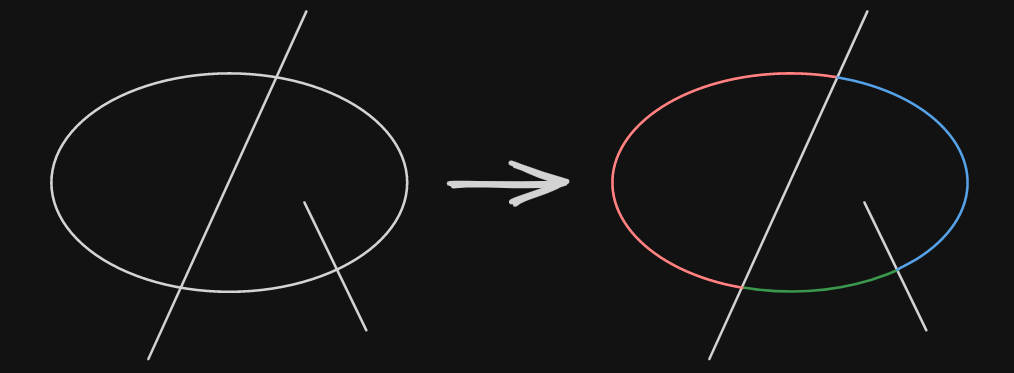
This script splits an ellipse at any point where a line intersects it. If no lines are selected, it will use every line that intersects the ellipse. Otherwise, it will only use the selected lines. If there is no intersecting line, the ellipse will be converted into a line object.
|
||||
There is also the option to close the object along the cut, which will close the cut in the shape of the line.
|
||||

|
||||

|
||||
|
||||

|
||||
Tip: To use an ellipse as the cutting object, you first have to use this script on it, since it will convert the ellipse into a line.
|
||||
|
||||
|
||||
@@ -54,6 +54,7 @@ angles.forEach((angle, key) => {
|
||||
|
||||
const lineId = ea.addLine(points);
|
||||
const line = ea.getElement(lineId);
|
||||
if (closeObject && cuttingLine) line.polygon = true;
|
||||
line.frameId = ellipse.frameId;
|
||||
line.groupIds = ellipse.groupIds;
|
||||
});
|
||||
|
||||
+1
-1
@@ -1,7 +1,7 @@
|
||||
{
|
||||
"id": "obsidian-excalidraw-plugin",
|
||||
"name": "Excalidraw",
|
||||
"version": "2.11.2-beta",
|
||||
"version": "2.12.0-beta-1",
|
||||
"minAppVersion": "1.1.6",
|
||||
"description": "An Obsidian plugin to edit and view Excalidraw drawings",
|
||||
"author": "Zsolt Viczian",
|
||||
|
||||
@@ -1038,8 +1038,13 @@ export class CommandManager {
|
||||
x:Math.max(0,centerX - width/2 + view.ownerWindow.screenX),
|
||||
y:Math.max(0,centerY - height/2 + view.ownerWindow.screenY),
|
||||
}
|
||||
|
||||
const focusOnFileTab = this.settings.focusOnFileTab;
|
||||
//override focusOnFileTab for popout windows
|
||||
if(DEVICE.isDesktop) {
|
||||
this.settings.focusOnFileTab = false;
|
||||
}
|
||||
this.plugin.openDrawing(ef.file, DEVICE.isMobile ? "new-tab":"popout-window", true, undefined, false, {x,y,width,height});
|
||||
this.settings.focusOnFileTab = focusOnFileTab;
|
||||
}
|
||||
})
|
||||
|
||||
|
||||
@@ -44,7 +44,7 @@ export default {
|
||||
TRANSCLUDE_MOST_RECENT: "Embed the most recently edited drawing",
|
||||
TOGGLE_LEFTHANDED_MODE: "Toggle left-handed mode",
|
||||
TOGGLE_SPLASHSCREEN: "Show splash screen in new drawings",
|
||||
FLIP_IMAGE: "Open the back-of-the-note of the selected excalidraw image",
|
||||
FLIP_IMAGE: "Open the back-of-the-note for the selected image in a popout window",
|
||||
NEW_IN_NEW_PANE: "Create new drawing - IN AN ADJACENT WINDOW",
|
||||
NEW_IN_NEW_TAB: "Create new drawing - IN A NEW TAB",
|
||||
NEW_IN_ACTIVE_PANE: "Create new drawing - IN THE CURRENT ACTIVE WINDOW",
|
||||
@@ -463,7 +463,7 @@ FILENAME_HEAD: "Filename",
|
||||
|
||||
FOCUS_ON_EXISTING_TAB_NAME: "Focus on Existing Tab",
|
||||
FOCUS_ON_EXISTING_TAB_DESC: "When opening a link, Excalidraw will focus on the existing tab if the file is already open. " +
|
||||
"Enabling this setting overrides 'Reuse Adjacent Pane' when the file is already open.",
|
||||
"Enabling this setting overrides 'Reuse Adjacent Pane' when the file is already open except for the 'Open the back-of-the-note of the selected excalidraw image' command palette action.",
|
||||
SECOND_ORDER_LINKS_NAME: "Show second-order links",
|
||||
SECOND_ORDER_LINKS_DESC: "Show links when clicking on a link in Excalidraw. Second-order link are backlinks pointing to the link being clicked. " +
|
||||
"When using image icons to connect similar notes, second order links allow you to get to related notes in one click instead of two. " +
|
||||
|
||||
@@ -17,12 +17,17 @@ I build this plugin in my free time, as a labor of love. Curious about the philo
|
||||
|
||||
<div class="ex-coffee-div"><a href="https://ko-fi.com/zsolt"><img src="https://storage.ko-fi.com/cdn/kofi6.png?v=6" border="0" alt="Buy Me a Coffee at ko-fi.com" height=45></a></div>
|
||||
`,
|
||||
"2.11.2": `
|
||||
"2.12.0": `
|
||||
## Fixed
|
||||
- Dynamic styling was not working when there were frames in the scene.
|
||||
- Minor fix for the screenshot feature. This fix also solves the long-standing issue of the window control buttons (close, minimize, maximize) being visible in full-screen mode.
|
||||
- When ALT/OPT + dragging an Embeddable object, the object dragging was not working properly at times, resulting in an empty embeddable object (instead of dragging the element).
|
||||
|
||||
## New
|
||||
- Line polygons. Draw a closed line shape, and it will snap to a polygon. [#9477](https://github.com/excalidraw/excalidraw/pull/9477)
|
||||
- I updated the Split Ellipse and Boolean Operations Scripts to support this new feature.
|
||||
- If you enter line editor mode by CTRL/CMD + clicking on the line, the lock-point will be marked for easier editing. Look for the polygon action on the elements panel to break the polygon if required.
|
||||
- Override "Focus on Existing Tab" setting for the "Open the back-of-the-note for the selected image in a popout window" action. "Open the back-of-the-note" will open a new popout every time.
|
||||
`,
|
||||
"2.11.1": `
|
||||
## Fixed:
|
||||
|
||||
Reference in New Issue
Block a user