mirror of
https://github.com/zsviczian/obsidian-excalidraw-plugin.git
synced 2025-08-06 05:46:28 +00:00
Compare commits
27 Commits
2.11.2-bet
...
2.12.4
| Author | SHA1 | Date | |
|---|---|---|---|

|
e5438c1e56 | ||
|
|
7e2ef3f115 | ||
|
|
ad091df4d9 | ||
|
|
0837c017a1 | ||
|
|
32d0301366 | ||
|
|
5accd657d9 | ||
|
|
8da97a63e0 | ||
|
|
a5d7731533 | ||
|
|
acb83fd697 | ||
|
|
271f21f85a | ||
|
|
371fb54787 | ||
|
|
3f19f9771a | ||
|
|
5a8596d113 | ||
|
|
6edd8b9a4e | ||
|
|
778346b0dd | ||
|
|
85ac633263 | ||
|
|
ff404e4dd6 | ||
|
|
d0845a7d68 | ||
|
|
954eaefe29 | ||
|
|
175b202a6f | ||
|
|
b77b4df56d | ||
|
|
dd7abe2547 | ||
|
|
cac27fb936 | ||
|
|
d9aef84e13 | ||
|
|
c6a81bef24 | ||
|
|
6824a1aa68 | ||
|
|
00de9d639b |
17
.devcontainer/devcontainer.json
Normal file
17
.devcontainer/devcontainer.json
Normal file
@@ -0,0 +1,17 @@
|
||||
{
|
||||
"name": "Node.js 20",
|
||||
"image": "mcr.microsoft.com/devcontainers/javascript-node:20",
|
||||
"features": {
|
||||
"ghcr.io/devcontainers/features/node:1": {
|
||||
"version": "20"
|
||||
}
|
||||
},
|
||||
"postCreateCommand": "npm install",
|
||||
"customizations": {
|
||||
"vscode": {
|
||||
"extensions": [
|
||||
"ms-vscode.vscode-typescript-next"
|
||||
]
|
||||
}
|
||||
}
|
||||
}
|
||||
2
.github/ISSUE_TEMPLATE/bug_report.yml
vendored
2
.github/ISSUE_TEMPLATE/bug_report.yml
vendored
@@ -13,7 +13,7 @@ body:
|
||||
1. **Review recent [release notes](https://github.com/zsviczian/obsidian-excalidraw-plugin/releases)** – maybe there is already an answer.
|
||||
2. **[Search issues](https://github.com/zsviczian/obsidian-excalidraw-plugin/issues) (including closed ones)** to see if there is anything similar.
|
||||
3. **[Watch the Feature Walkthrough Video](https://youtu.be/P_Q6avJGoWI)**: As it infact answers 90% of the typical questions I receive
|
||||
4. **[Consult NotebookLM with your question](https://excalidraw-obsidian.online/WIKI/09+Video+Transcripts/Videos/Turn+any+YouTube+Channel+into+your+AI+Mentor+-+Obsidian+is+the+ultimate+automation+workbench+for+PKM)**
|
||||
4. **[Consult NotebookLM with your question](https://excalidraw-obsidian.online/WIKI/09+Video+Transcripts/Videos/Turn+any+YouTube+Channel+into+your+AI+Mentor+-+Obsidian+is+the+ultimate+automation+workbench+for+PKM)** Here's the [direct link to a preloaded NotebookLM](https://notebooklm.google.com/notebook/42d76a2f-c11d-4002-9286-1683c43d0ab0)
|
||||
|
||||
- type: markdown
|
||||
attributes:
|
||||
|
||||
7
.github/dependabot.yml
vendored
Normal file
7
.github/dependabot.yml
vendored
Normal file
@@ -0,0 +1,7 @@
|
||||
version: 2
|
||||
updates:
|
||||
- package-ecosystem: "npm"
|
||||
directory: "/"
|
||||
schedule:
|
||||
interval: "weekly"
|
||||
target-branch: "master"
|
||||
@@ -23,8 +23,8 @@ const elements = ea.getViewSelectedElements().filter(
|
||||
el.groupIds.some(id => id.startsWith(ShadowGroupMarker)) ||
|
||||
(["line", "arrow"].includes(el.type) && el.roundness === null)
|
||||
);
|
||||
if(elements.length === 0) {
|
||||
new Notice ("Select ellipses, rectangles or diamonds");
|
||||
if(elements.length < 2) {
|
||||
new Notice ("Select ellipses, rectangles, diamonds; or lines and arrows with sharp edges");
|
||||
return;
|
||||
}
|
||||
|
||||
@@ -69,10 +69,15 @@ const result = polyboolAction({
|
||||
const polygonHierachy = subordinateInnerPolygons(result.regions);
|
||||
drawPolygonHierachy(polygonHierachy);
|
||||
ea.deleteViewElements(elements);
|
||||
setPolygonTrue();
|
||||
ea.addElementsToView(false,false,true);
|
||||
return;
|
||||
|
||||
|
||||
function setPolygonTrue() {
|
||||
ea.getElements().filter(el=>el.type==="line").forEach(el => {
|
||||
el.polygon = true;
|
||||
});
|
||||
}
|
||||
|
||||
function traceElement(element) {
|
||||
const diamondPath = (diamond) => [
|
||||
|
||||
@@ -109,9 +109,18 @@ async function editExistingTextElement(elements) {
|
||||
ea.copyViewElementsToEAforEditing(elements);
|
||||
const el = ea.getElements()[0];
|
||||
ea.style.strokeColor = el.strokeColor;
|
||||
const text = await utils.inputPrompt(
|
||||
"Edit text","",elements[0].rawText,undefined,5,true,customControls,true,true
|
||||
);
|
||||
const text = await utils.inputPrompt({
|
||||
header: "Edit text",
|
||||
placeholder: "",
|
||||
value: elements[0].rawText,
|
||||
//buttons: undefined,
|
||||
lines: 5,
|
||||
displayEditorButtons: true,
|
||||
customComponents: customControls,
|
||||
blockPointerInputOutsideModal: true,
|
||||
controlsOnTop: true
|
||||
});
|
||||
|
||||
windowOpen = false;
|
||||
if(!text) return;
|
||||
|
||||
|
||||
@@ -2,8 +2,8 @@
|
||||
|
||||
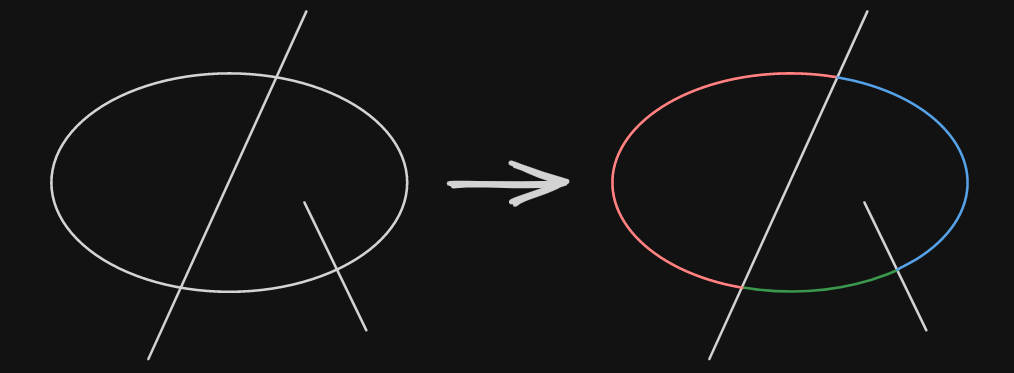
This script splits an ellipse at any point where a line intersects it. If no lines are selected, it will use every line that intersects the ellipse. Otherwise, it will only use the selected lines. If there is no intersecting line, the ellipse will be converted into a line object.
|
||||
There is also the option to close the object along the cut, which will close the cut in the shape of the line.
|
||||

|
||||

|
||||
|
||||

|
||||
Tip: To use an ellipse as the cutting object, you first have to use this script on it, since it will convert the ellipse into a line.
|
||||
|
||||
|
||||
@@ -54,6 +54,7 @@ angles.forEach((angle, key) => {
|
||||
|
||||
const lineId = ea.addLine(points);
|
||||
const line = ea.getElement(lineId);
|
||||
if (closeObject && cuttingLine) line.polygon = true;
|
||||
line.frameId = ellipse.frameId;
|
||||
line.groupIds = ellipse.groupIds;
|
||||
});
|
||||
|
||||
@@ -1,49 +0,0 @@
|
||||
/*
|
||||
|
||||
|
||||
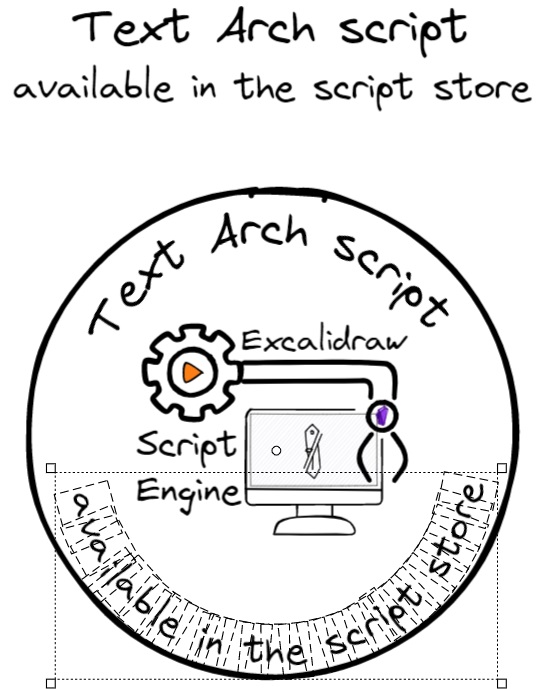
Fit a text to the arch of a circle. The script will prompt you for the radius of the circle and then split your text to individual letters and place each letter to the arch defined by the radius. Setting a lower radius value will increase the arching of the text. Note that the arched-text will no longer be editable as a text element and it will no longer function as a markdown link. Emojis are currently not supported.
|
||||
|
||||
```javascript
|
||||
*/
|
||||
el = ea.getViewSelectedElement();
|
||||
if(!el || el.type!=="text") {
|
||||
new Notice("Please select a text element");
|
||||
return;
|
||||
}
|
||||
|
||||
ea.style.fontSize = el.fontSize;
|
||||
ea.style.fontFamily = el.fontFamily;
|
||||
ea.style.strokeColor = el.strokeColor;
|
||||
ea.style.opacity = el.opacity;
|
||||
|
||||
const r = parseInt (await utils.inputPrompt("The radius of the arch you'd like to fit the text to","number","150"));
|
||||
const archAbove = await utils.suggester(["Arch above","Arch below"],[true,false]);
|
||||
|
||||
if(isNaN(r)) {
|
||||
new Notice("The radius is not a number");
|
||||
return;
|
||||
}
|
||||
|
||||
circlePoint = (angle) => archAbove
|
||||
? [
|
||||
r * Math.sin(angle),
|
||||
-r * Math.cos(angle)
|
||||
]
|
||||
: [
|
||||
-r * Math.sin(angle),
|
||||
r * Math.cos(angle)
|
||||
];
|
||||
|
||||
let rot = (archAbove ? -0.5 : 0.5) * ea.measureText(el.text).width/r;
|
||||
|
||||
let objectIDs = [];
|
||||
for(i=0;i<el.text.length;i++) {
|
||||
const character = el.text.substring(i,i+1);
|
||||
const width = ea.measureText(character).width;
|
||||
ea.style.angle = rot;
|
||||
const [x,y] = circlePoint(rot);
|
||||
rot += (archAbove ? 1 : -1) *width / r;
|
||||
objectIDs.push(ea.addText(x,y,character));
|
||||
}
|
||||
ea.addToGroup(objectIDs);
|
||||
ea.addElementsToView(true, false, true);
|
||||
1078
ea-scripts/Text to Path.md
Normal file
1078
ea-scripts/Text to Path.md
Normal file
File diff suppressed because it is too large
Load Diff

|
Before Width: | Height: | Size: 327 B After Width: | Height: | Size: 327 B |
476
ea-scripts/To Line.md
Normal file
476
ea-scripts/To Line.md
Normal file
@@ -0,0 +1,476 @@
|
||||
/**
|
||||
* Converts an ellipse element to a line element
|
||||
* @param {Object} ellipse - The ellipse element to convert
|
||||
* @param {number} pointDensity - Optional number of points to generate (defaults to 64)
|
||||
* @returns {string} The ID of the created line element
|
||||
```js*/
|
||||
function ellipseToLine(ellipse, pointDensity = 64) {
|
||||
if (!ellipse || ellipse.type !== "ellipse") {
|
||||
throw new Error("Input must be an ellipse element");
|
||||
}
|
||||
|
||||
// Calculate points along the ellipse perimeter
|
||||
const stepSize = (Math.PI * 2) / pointDensity;
|
||||
const points = drawEllipse(
|
||||
ellipse.x,
|
||||
ellipse.y,
|
||||
ellipse.width,
|
||||
ellipse.height,
|
||||
ellipse.angle,
|
||||
0,
|
||||
Math.PI * 2,
|
||||
stepSize
|
||||
);
|
||||
|
||||
// Save original styling to apply to the new line
|
||||
const originalStyling = {
|
||||
strokeColor: ellipse.strokeColor,
|
||||
strokeWidth: ellipse.strokeWidth,
|
||||
backgroundColor: ellipse.backgroundColor,
|
||||
fillStyle: ellipse.fillStyle,
|
||||
roughness: ellipse.roughness,
|
||||
strokeSharpness: ellipse.strokeSharpness,
|
||||
frameId: ellipse.frameId,
|
||||
groupIds: [...ellipse.groupIds],
|
||||
opacity: ellipse.opacity
|
||||
};
|
||||
|
||||
// Use current style
|
||||
const prevStyle = {...ea.style};
|
||||
|
||||
// Apply ellipse styling to the line
|
||||
ea.style.strokeColor = originalStyling.strokeColor;
|
||||
ea.style.strokeWidth = originalStyling.strokeWidth;
|
||||
ea.style.backgroundColor = originalStyling.backgroundColor;
|
||||
ea.style.fillStyle = originalStyling.fillStyle;
|
||||
ea.style.roughness = originalStyling.roughness;
|
||||
ea.style.strokeSharpness = originalStyling.strokeSharpness;
|
||||
ea.style.opacity = originalStyling.opacity;
|
||||
|
||||
// Create the line and close it
|
||||
const lineId = ea.addLine(points);
|
||||
const line = ea.getElement(lineId);
|
||||
|
||||
// Make it a polygon to close the path
|
||||
line.polygon = true;
|
||||
|
||||
// Transfer grouping and frame information
|
||||
line.frameId = originalStyling.frameId;
|
||||
line.groupIds = originalStyling.groupIds;
|
||||
|
||||
// Restore previous style
|
||||
ea.style = prevStyle;
|
||||
|
||||
return lineId;
|
||||
|
||||
// Helper function from the Split Ellipse script
|
||||
function drawEllipse(x, y, width, height, angle = 0, start = 0, end = Math.PI*2, step = Math.PI/32) {
|
||||
const ellipse = (t) => {
|
||||
const spanningVector = rotateVector([width/2*Math.cos(t), height/2*Math.sin(t)], angle);
|
||||
const baseVector = [x+width/2, y+height/2];
|
||||
return addVectors([baseVector, spanningVector]);
|
||||
}
|
||||
|
||||
if(end <= start) end = end + Math.PI*2;
|
||||
|
||||
let points = [];
|
||||
const almostEnd = end - step/2;
|
||||
for (let t = start; t < almostEnd; t = t + step) {
|
||||
points.push(ellipse(t));
|
||||
}
|
||||
points.push(ellipse(end));
|
||||
return points;
|
||||
}
|
||||
|
||||
function rotateVector(vec, ang) {
|
||||
var cos = Math.cos(ang);
|
||||
var sin = Math.sin(ang);
|
||||
return [vec[0] * cos - vec[1] * sin, vec[0] * sin + vec[1] * cos];
|
||||
}
|
||||
|
||||
function addVectors(vectors) {
|
||||
return vectors.reduce((acc, vec) => [acc[0] + vec[0], acc[1] + vec[1]], [0, 0]);
|
||||
}
|
||||
}
|
||||
|
||||
/**
|
||||
* Converts a rectangle element to a line element
|
||||
* @param {Object} rectangle - The rectangle element to convert
|
||||
* @param {number} pointDensity - Optional number of points to generate for curved segments (defaults to 16)
|
||||
* @returns {string} The ID of the created line element
|
||||
*/
|
||||
function rectangleToLine(rectangle, pointDensity = 16) {
|
||||
if (!rectangle || rectangle.type !== "rectangle") {
|
||||
throw new Error("Input must be a rectangle element");
|
||||
}
|
||||
|
||||
// Save original styling to apply to the new line
|
||||
const originalStyling = {
|
||||
strokeColor: rectangle.strokeColor,
|
||||
strokeWidth: rectangle.strokeWidth,
|
||||
backgroundColor: rectangle.backgroundColor,
|
||||
fillStyle: rectangle.fillStyle,
|
||||
roughness: rectangle.roughness,
|
||||
strokeSharpness: rectangle.strokeSharpness,
|
||||
frameId: rectangle.frameId,
|
||||
groupIds: [...rectangle.groupIds],
|
||||
opacity: rectangle.opacity
|
||||
};
|
||||
|
||||
// Use current style
|
||||
const prevStyle = {...ea.style};
|
||||
|
||||
// Apply rectangle styling to the line
|
||||
ea.style.strokeColor = originalStyling.strokeColor;
|
||||
ea.style.strokeWidth = originalStyling.strokeWidth;
|
||||
ea.style.backgroundColor = originalStyling.backgroundColor;
|
||||
ea.style.fillStyle = originalStyling.fillStyle;
|
||||
ea.style.roughness = originalStyling.roughness;
|
||||
ea.style.strokeSharpness = originalStyling.strokeSharpness;
|
||||
ea.style.opacity = originalStyling.opacity;
|
||||
|
||||
// Calculate points for the rectangle perimeter
|
||||
const points = generateRectanglePoints(rectangle, pointDensity);
|
||||
|
||||
// Create the line and close it
|
||||
const lineId = ea.addLine(points);
|
||||
const line = ea.getElement(lineId);
|
||||
|
||||
// Make it a polygon to close the path
|
||||
line.polygon = true;
|
||||
|
||||
// Transfer grouping and frame information
|
||||
line.frameId = originalStyling.frameId;
|
||||
line.groupIds = originalStyling.groupIds;
|
||||
|
||||
// Restore previous style
|
||||
ea.style = prevStyle;
|
||||
|
||||
return lineId;
|
||||
|
||||
// Helper function to generate rectangle points with optional rounded corners
|
||||
function generateRectanglePoints(rectangle, pointDensity) {
|
||||
const { x, y, width, height, angle = 0 } = rectangle;
|
||||
const centerX = x + width / 2;
|
||||
const centerY = y + height / 2;
|
||||
|
||||
// If no roundness, create a simple rectangle
|
||||
if (!rectangle.roundness) {
|
||||
const corners = [
|
||||
[x, y], // top-left
|
||||
[x + width, y], // top-right
|
||||
[x + width, y + height], // bottom-right
|
||||
[x, y + height], // bottom-left
|
||||
[x,y] //origo
|
||||
];
|
||||
|
||||
// Apply rotation if needed
|
||||
if (angle !== 0) {
|
||||
return corners.map(point => rotatePoint(point, [centerX, centerY], angle));
|
||||
}
|
||||
return corners;
|
||||
}
|
||||
|
||||
// Handle rounded corners
|
||||
const points = [];
|
||||
|
||||
// Calculate corner radius using Excalidraw's algorithm
|
||||
const cornerRadius = getCornerRadius(Math.min(width, height), rectangle);
|
||||
const clampedRadius = Math.min(cornerRadius, width / 2, height / 2);
|
||||
|
||||
// Corner positions
|
||||
const topLeft = [x + clampedRadius, y + clampedRadius];
|
||||
const topRight = [x + width - clampedRadius, y + clampedRadius];
|
||||
const bottomRight = [x + width - clampedRadius, y + height - clampedRadius];
|
||||
const bottomLeft = [x + clampedRadius, y + height - clampedRadius];
|
||||
|
||||
// Add top-left corner arc
|
||||
points.push(...createArc(
|
||||
topLeft[0], topLeft[1], clampedRadius, Math.PI, Math.PI * 1.5, pointDensity));
|
||||
|
||||
// Add top edge
|
||||
points.push([x + clampedRadius, y], [x + width - clampedRadius, y]);
|
||||
|
||||
// Add top-right corner arc
|
||||
points.push(...createArc(
|
||||
topRight[0], topRight[1], clampedRadius, Math.PI * 1.5, Math.PI * 2, pointDensity));
|
||||
|
||||
// Add right edge
|
||||
points.push([x + width, y + clampedRadius], [x + width, y + height - clampedRadius]);
|
||||
|
||||
// Add bottom-right corner arc
|
||||
points.push(...createArc(
|
||||
bottomRight[0], bottomRight[1], clampedRadius, 0, Math.PI * 0.5, pointDensity));
|
||||
|
||||
// Add bottom edge
|
||||
points.push([x + width - clampedRadius, y + height], [x + clampedRadius, y + height]);
|
||||
|
||||
// Add bottom-left corner arc
|
||||
points.push(...createArc(
|
||||
bottomLeft[0], bottomLeft[1], clampedRadius, Math.PI * 0.5, Math.PI, pointDensity));
|
||||
|
||||
// Add left edge
|
||||
points.push([x, y + height - clampedRadius], [x, y + clampedRadius]);
|
||||
|
||||
// Apply rotation if needed
|
||||
if (angle !== 0) {
|
||||
return points.map(point => rotatePoint(point, [centerX, centerY], angle));
|
||||
}
|
||||
|
||||
return points;
|
||||
}
|
||||
|
||||
// Helper function to create an arc of points
|
||||
function createArc(centerX, centerY, radius, startAngle, endAngle, pointDensity) {
|
||||
const points = [];
|
||||
const angleStep = (endAngle - startAngle) / pointDensity;
|
||||
|
||||
for (let i = 0; i <= pointDensity; i++) {
|
||||
const angle = startAngle + i * angleStep;
|
||||
const x = centerX + radius * Math.cos(angle);
|
||||
const y = centerY + radius * Math.sin(angle);
|
||||
points.push([x, y]);
|
||||
}
|
||||
|
||||
return points;
|
||||
}
|
||||
|
||||
// Helper function to rotate a point around a center
|
||||
function rotatePoint(point, center, angle) {
|
||||
const sin = Math.sin(angle);
|
||||
const cos = Math.cos(angle);
|
||||
|
||||
// Translate point to origin
|
||||
const x = point[0] - center[0];
|
||||
const y = point[1] - center[1];
|
||||
|
||||
// Rotate point
|
||||
const xNew = x * cos - y * sin;
|
||||
const yNew = x * sin + y * cos;
|
||||
|
||||
// Translate point back
|
||||
return [xNew + center[0], yNew + center[1]];
|
||||
}
|
||||
}
|
||||
|
||||
function getCornerRadius(x, element) {
|
||||
const fixedRadiusSize = element.roundness?.value ?? 32;
|
||||
const CUTOFF_SIZE = fixedRadiusSize / 0.25;
|
||||
if (x <= CUTOFF_SIZE) {
|
||||
return x * 0.25;
|
||||
}
|
||||
return fixedRadiusSize;
|
||||
}
|
||||
|
||||
/**
|
||||
* Converts a diamond element to a line element
|
||||
* @param {Object} diamond - The diamond element to convert
|
||||
* @param {number} pointDensity - Optional number of points to generate for curved segments (defaults to 16)
|
||||
* @returns {string} The ID of the created line element
|
||||
*/
|
||||
function diamondToLine(diamond, pointDensity = 16) {
|
||||
if (!diamond || diamond.type !== "diamond") {
|
||||
throw new Error("Input must be a diamond element");
|
||||
}
|
||||
|
||||
// Save original styling to apply to the new line
|
||||
const originalStyling = {
|
||||
strokeColor: diamond.strokeColor,
|
||||
strokeWidth: diamond.strokeWidth,
|
||||
backgroundColor: diamond.backgroundColor,
|
||||
fillStyle: diamond.fillStyle,
|
||||
roughness: diamond.roughness,
|
||||
strokeSharpness: diamond.strokeSharpness,
|
||||
frameId: diamond.frameId,
|
||||
groupIds: [...diamond.groupIds],
|
||||
opacity: diamond.opacity
|
||||
};
|
||||
|
||||
// Use current style
|
||||
const prevStyle = {...ea.style};
|
||||
|
||||
// Apply diamond styling to the line
|
||||
ea.style.strokeColor = originalStyling.strokeColor;
|
||||
ea.style.strokeWidth = originalStyling.strokeWidth;
|
||||
ea.style.backgroundColor = originalStyling.backgroundColor;
|
||||
ea.style.fillStyle = originalStyling.fillStyle;
|
||||
ea.style.roughness = originalStyling.roughness;
|
||||
ea.style.strokeSharpness = originalStyling.strokeSharpness;
|
||||
ea.style.opacity = originalStyling.opacity;
|
||||
|
||||
// Calculate points for the diamond perimeter
|
||||
const points = generateDiamondPoints(diamond, pointDensity);
|
||||
|
||||
// Create the line and close it
|
||||
const lineId = ea.addLine(points);
|
||||
const line = ea.getElement(lineId);
|
||||
|
||||
// Make it a polygon to close the path
|
||||
line.polygon = true;
|
||||
|
||||
// Transfer grouping and frame information
|
||||
line.frameId = originalStyling.frameId;
|
||||
line.groupIds = originalStyling.groupIds;
|
||||
|
||||
// Restore previous style
|
||||
ea.style = prevStyle;
|
||||
|
||||
return lineId;
|
||||
|
||||
function generateDiamondPoints(diamond, pointDensity) {
|
||||
const { x, y, width, height, angle = 0 } = diamond;
|
||||
const cx = x + width / 2;
|
||||
const cy = y + height / 2;
|
||||
|
||||
// Diamond corners
|
||||
const top = [cx, y];
|
||||
const right = [x + width, cy];
|
||||
const bottom = [cx, y + height];
|
||||
const left = [x, cy];
|
||||
|
||||
if (!diamond.roundness) {
|
||||
const corners = [top, right, bottom, left, top];
|
||||
if (angle !== 0) {
|
||||
return corners.map(pt => rotatePoint(pt, [cx, cy], angle));
|
||||
}
|
||||
return corners;
|
||||
}
|
||||
|
||||
// Clamp radius
|
||||
const r = Math.min(
|
||||
getCornerRadius(Math.min(width, height) / 2, diamond),
|
||||
width / 2,
|
||||
height / 2
|
||||
);
|
||||
|
||||
// For a diamond, the rounded corner is a *bezier* between the two adjacent edge points, not a circular arc.
|
||||
// Excalidraw uses a quadratic bezier for each corner, with the control point at the corner itself.
|
||||
|
||||
// Calculate edge directions
|
||||
function sub(a, b) { return [a[0] - b[0], a[1] - b[1]]; }
|
||||
function add(a, b) { return [a[0] + b[0], a[1] + b[1]]; }
|
||||
function norm([x, y]) {
|
||||
const len = Math.hypot(x, y);
|
||||
return [x / len, y / len];
|
||||
}
|
||||
function scale([x, y], s) { return [x * s, y * s]; }
|
||||
|
||||
// For each corner, move along both adjacent edges by r to get arc endpoints
|
||||
// Order: top, right, bottom, left
|
||||
const corners = [top, right, bottom, left];
|
||||
const next = [right, bottom, left, top];
|
||||
const prev = [left, top, right, bottom];
|
||||
|
||||
// For each corner, calculate the two points where the straight segments meet the arc
|
||||
const arcPoints = [];
|
||||
for (let i = 0; i < 4; ++i) {
|
||||
const c = corners[i];
|
||||
const n = next[i];
|
||||
const p = prev[i];
|
||||
const toNext = norm(sub(n, c));
|
||||
const toPrev = norm(sub(p, c));
|
||||
arcPoints.push([
|
||||
add(c, scale(toPrev, r)), // start of arc (from previous edge)
|
||||
add(c, scale(toNext, r)), // end of arc (to next edge)
|
||||
c // control point for bezier
|
||||
]);
|
||||
}
|
||||
|
||||
// Helper: quadratic bezier between p0 and p2 with control p1
|
||||
function bezier(p0, p1, p2, density) {
|
||||
const pts = [];
|
||||
for (let i = 0; i <= density; ++i) {
|
||||
const t = i / density;
|
||||
const mt = 1 - t;
|
||||
pts.push([
|
||||
mt*mt*p0[0] + 2*mt*t*p1[0] + t*t*p2[0],
|
||||
mt*mt*p0[1] + 2*mt*t*p1[1] + t*t*p2[1]
|
||||
]);
|
||||
}
|
||||
return pts;
|
||||
}
|
||||
|
||||
// Build path: for each corner, straight line to arc start, then bezier to arc end using corner as control
|
||||
let pts = [];
|
||||
for (let i = 0; i < 4; ++i) {
|
||||
const prevArc = arcPoints[(i + 3) % 4];
|
||||
const arc = arcPoints[i];
|
||||
if (i === 0) {
|
||||
pts.push(arc[0]);
|
||||
} else {
|
||||
pts.push(arc[0]);
|
||||
}
|
||||
// Quadratic bezier from arc[0] to arc[1] with control at arc[2] (the corner)
|
||||
pts.push(...bezier(arc[0], arc[2], arc[1], pointDensity));
|
||||
}
|
||||
pts.push(arcPoints[0][0]); // close
|
||||
|
||||
if (angle !== 0) {
|
||||
return pts.map(pt => rotatePoint(pt, [cx, cy], angle));
|
||||
}
|
||||
return pts;
|
||||
}
|
||||
|
||||
// Helper function to create an arc between two points
|
||||
function createArcBetweenPoints(startPoint, endPoint, centerX, centerY, pointDensity) {
|
||||
const startAngle = Math.atan2(startPoint[1] - centerY, startPoint[0] - centerX);
|
||||
const endAngle = Math.atan2(endPoint[1] - centerY, endPoint[0] - centerX);
|
||||
|
||||
// Ensure angles are in correct order for arc drawing
|
||||
let adjustedEndAngle = endAngle;
|
||||
if (endAngle < startAngle) {
|
||||
adjustedEndAngle += 2 * Math.PI;
|
||||
}
|
||||
|
||||
const points = [];
|
||||
const angleStep = (adjustedEndAngle - startAngle) / pointDensity;
|
||||
|
||||
// Start with the straight line to arc start
|
||||
points.push(startPoint);
|
||||
|
||||
// Create arc points
|
||||
for (let i = 1; i < pointDensity; i++) {
|
||||
const angle = startAngle + i * angleStep;
|
||||
const distance = Math.hypot(startPoint[0] - centerX, startPoint[1] - centerY);
|
||||
const x = centerX + distance * Math.cos(angle);
|
||||
const y = centerY + distance * Math.sin(angle);
|
||||
points.push([x, y]);
|
||||
}
|
||||
|
||||
// Add the end point of the arc
|
||||
points.push(endPoint);
|
||||
|
||||
return points;
|
||||
}
|
||||
|
||||
// Helper function to rotate a point around a center
|
||||
function rotatePoint(point, center, angle) {
|
||||
const sin = Math.sin(angle);
|
||||
const cos = Math.cos(angle);
|
||||
|
||||
// Translate point to origin
|
||||
const x = point[0] - center[0];
|
||||
const y = point[1] - center[1];
|
||||
|
||||
// Rotate point
|
||||
const xNew = x * cos - y * sin;
|
||||
const yNew = x * sin + y * cos;
|
||||
|
||||
// Translate point back
|
||||
return [xNew + center[0], yNew + center[1]];
|
||||
}
|
||||
}
|
||||
|
||||
const el = ea.getViewSelectedElement();
|
||||
switch (el.type) {
|
||||
case "rectangle":
|
||||
rectangleToLine(el);
|
||||
break;
|
||||
case "ellipse":
|
||||
ellipseToLine(el);
|
||||
break;
|
||||
case "diamond":
|
||||
diamondToLine(el);
|
||||
break;
|
||||
}
|
||||
ea.addElementsToView();
|
||||
File diff suppressed because one or more lines are too long
@@ -73,8 +73,8 @@ I would love to include your contribution in the script library. If you have a s
|
||||
|<div><img src="https://raw.githubusercontent.com/zsviczian/obsidian-excalidraw-plugin/master/ea-scripts/Set%20Font%20Family.svg"/></div>|[[#Set Font Family]]|
|
||||
|<div><img src="https://raw.githubusercontent.com/zsviczian/obsidian-excalidraw-plugin/master/ea-scripts/Set%20Text%20Alignment.svg"/></div>|[[#Set Text Alignment]]|
|
||||
|<div><img src="https://raw.githubusercontent.com/zsviczian/obsidian-excalidraw-plugin/master/ea-scripts/Split%20text%20by%20lines.svg"/></div>|[[#Split text by lines]]|
|
||||
|<div><img src="https://raw.githubusercontent.com/zsviczian/obsidian-excalidraw-plugin/master/ea-scripts/Text%20Arch.svg"/></div>|[[#Text Arch]]|
|
||||
|<div><img src="https://raw.githubusercontent.com/zsviczian/obsidian-excalidraw-plugin/master/ea-scripts/Text%20Aura.svg"/></div>|[[#Text Aura]]|
|
||||
|<div><img src="https://raw.githubusercontent.com/zsviczian/obsidian-excalidraw-plugin/master/ea-scripts/Text%20to%20Path.svg"/></div>|[[#Text to Path]]|
|
||||
|<div><img src="https://raw.githubusercontent.com/zsviczian/obsidian-excalidraw-plugin/master/ea-scripts/Text%20to%20Sticky%20Notes.svg"/></div>|[[#Text to Sticky Notes]]|
|
||||
|
||||
## Styling and Appearance
|
||||
@@ -596,18 +596,24 @@ https://raw.githubusercontent.com/zsviczian/obsidian-excalidraw-plugin/master/ea
|
||||
```
|
||||
<table><tr valign='top'><td class="label">Author</td><td class="data"><a href='https://github.com/zsviczian'>@zsviczian</a></td></tr><tr valign='top'><td class="label">Source</td><td class="data"><a href='https://github.com/zsviczian/obsidian-excalidraw-plugin/blob/master/ea-scripts/Split%20text%20by%20lines.md'>File on GitHub</a></td></tr><tr valign='top'><td class="label">Description</td><td class="data">Split lines of text into separate text elements for easier reorganization<br><img src='https://raw.githubusercontent.com/zsviczian/obsidian-excalidraw-plugin/master/images/scripts-split-lines.jpg'></td></tr></table>
|
||||
|
||||
## Text Arch
|
||||
```excalidraw-script-install
|
||||
https://raw.githubusercontent.com/zsviczian/obsidian-excalidraw-plugin/master/ea-scripts/Text%20Arch.md
|
||||
```
|
||||
<table><tr valign='top'><td class="label">Author</td><td class="data"><a href='https://github.com/zsviczian'>@zsviczian</a></td></tr><tr valign='top'><td class="label">Source</td><td class="data"><a href='https://github.com/zsviczian/obsidian-excalidraw-plugin/blob/master/ea-scripts/Text%20Arch.md'>File on GitHub</a></td></tr><tr valign='top'><td class="label">Description</td><td class="data">Fit a text to the arch of a circle. The script will prompt you for the radius of the circle and then split your text to individual letters and place each letter to the arch defined by the radius. Setting a lower radius value will increase the arching of the text. Note that the arched-text will no longer be editable as a text element and it will no longer function as a markdown link. Emojis are currently not supported.<br><img src='https://raw.githubusercontent.com/zsviczian/obsidian-excalidraw-plugin/master/images/text-arch.jpg'></td></tr></table>
|
||||
|
||||
## Text Aura
|
||||
```excalidraw-script-install
|
||||
https://raw.githubusercontent.com/zsviczian/obsidian-excalidraw-plugin/master/ea-scripts/Text%20Aura.md
|
||||
```
|
||||
<table><tr valign='top'><td class="label">Author</td><td class="data"><a href='https://github.com/zsviczian'>@zsviczian</a></td></tr><tr valign='top'><td class="label">Source</td><td class="data"><a href='https://github.com/zsviczian/obsidian-excalidraw-plugin/blob/master/ea-scripts/Text%20Aura.md'>File on GitHub</a></td></tr><tr valign='top'><td class="label">Description</td><td class="data">Select a single text element, or a text element in a container. The container must have a transparent background.<br>The script will add an aura to the text by adding 4 copies of the text each with the inverted stroke color of the original text element and with a very small X and Y offset. The resulting 4 + 1 (original) text elements or containers will be grouped.<br>If you copy a color string on the clipboard before running the script, the script will use that color instead of the inverted color.<br><img src='https://raw.githubusercontent.com/zsviczian/obsidian-excalidraw-plugin/master/images/scripts-text-aura.jpg'></td></tr></table>
|
||||
|
||||
## Text to Path
|
||||
```excalidraw-script-install
|
||||
https://raw.githubusercontent.com/zsviczian/obsidian-excalidraw-plugin/master/ea-scripts/Text%20to%20Path.md
|
||||
```
|
||||
<table><tr valign='top'><td class="label">Author</td><td class="data"><a href='https://github.com/zsviczian'>@zsviczian</a></td></tr><tr valign='top'><td class="label">Source</td><td class="data"><a href='https://github.com/zsviczian/obsidian-excalidraw-plugin/blob/master/ea-scripts/Text%20to%20Path.md'>File on GitHub</a></td></tr><tr valign='top'><td class="label">Description</td><td class="data">This script allows you to fit a text element along a selected path: line, arrow, freedraw, ellipse, rectangle, or diamond. You can select either a path or a text element, or both:<br><br>
|
||||
- If only a path is selected, you will be prompted to provide the text.<br>
|
||||
- If only a text element is selected and it was previously fitted to a path, the script will use the original path if it is still present in the scene.<br>
|
||||
- If both a text and a path are selected, the script will fit the text to the selected path.<br><br>
|
||||
If the path is a perfect circle, you will be prompted to choose whether to fit the text above or below the circle.<br><br>
|
||||
After fitting, the text will no longer be editable as a standard text element or function as a markdown link. Emojis are not supported.<br>
|
||||
<img src='https://raw.githubusercontent.com/zsviczian/obsidian-excalidraw-plugin/master/images/scripts-text-to-path.jpg'></td></tr></table>
|
||||
|
||||
## Toggle Grid
|
||||
```excalidraw-script-install
|
||||
https://raw.githubusercontent.com/zsviczian/obsidian-excalidraw-plugin/master/ea-scripts/Toggle%20Grid.md
|
||||
|
||||
BIN
images/scripts-text-to-path.jpg
Normal file
BIN
images/scripts-text-to-path.jpg
Normal file

Binary file not shown.
|
After Width: | Height: | Size: 23 KiB |

Binary file not shown.
|
Before Width: | Height: | Size: 95 KiB |
@@ -1,7 +1,7 @@
|
||||
{
|
||||
"id": "obsidian-excalidraw-plugin",
|
||||
"name": "Excalidraw",
|
||||
"version": "2.11.2-beta",
|
||||
"version": "2.12.4",
|
||||
"minAppVersion": "1.1.6",
|
||||
"description": "An Obsidian plugin to edit and view Excalidraw drawings",
|
||||
"author": "Zsolt Viczian",
|
||||
|
||||
@@ -1,7 +1,7 @@
|
||||
{
|
||||
"id": "obsidian-excalidraw-plugin",
|
||||
"name": "Excalidraw",
|
||||
"version": "2.11.1",
|
||||
"version": "2.12.4",
|
||||
"minAppVersion": "1.1.6",
|
||||
"description": "An Obsidian plugin to edit and view Excalidraw drawings",
|
||||
"author": "Zsolt Viczian",
|
||||
|
||||
3395
package-lock.json
generated
3395
package-lock.json
generated
File diff suppressed because it is too large
Load Diff
10
package.json
10
package.json
@@ -21,9 +21,9 @@
|
||||
"keywords": [],
|
||||
"author": "",
|
||||
"license": "MIT",
|
||||
"dependencies": {
|
||||
"dependencies": {
|
||||
"@popperjs/core": "^2.11.8",
|
||||
"@zsviczian/excalidraw": "0.18.0-15",
|
||||
"@zsviczian/excalidraw": "0.18.0-23",
|
||||
"chroma-js": "^2.4.2",
|
||||
"clsx": "^2.0.0",
|
||||
"@zsviczian/colormaster": "^1.2.2",
|
||||
@@ -89,5 +89,9 @@
|
||||
"resolutions": {
|
||||
"@typescript-eslint/typescript-estree": "5.3.0"
|
||||
},
|
||||
"prettier": "@excalidraw/prettier-config"
|
||||
"prettier": "@excalidraw/prettier-config",
|
||||
"engines": {
|
||||
"node": ">=20.0.0",
|
||||
"npm": ">=10.0.0"
|
||||
}
|
||||
}
|
||||
|
||||
@@ -566,7 +566,7 @@ export default class ExcalidrawPlugin extends Plugin {
|
||||
}
|
||||
}
|
||||
this.packageManager.getPackageMap().forEach(({excalidrawLib}) => {
|
||||
(excalidrawLib as typeof ExcalidrawLib).registerLocalFont({metrics: fontMetrics as any, icon: null}, fourthFontDataURL);
|
||||
(excalidrawLib as typeof ExcalidrawLib).registerLocalFont({metrics: fontMetrics as any}, fourthFontDataURL);
|
||||
});
|
||||
// Add fonts to open Obsidian documents
|
||||
for(const ownerDocument of this.getOpenObsidianDocuments()) {
|
||||
|
||||
@@ -1038,8 +1038,13 @@ export class CommandManager {
|
||||
x:Math.max(0,centerX - width/2 + view.ownerWindow.screenX),
|
||||
y:Math.max(0,centerY - height/2 + view.ownerWindow.screenY),
|
||||
}
|
||||
|
||||
const focusOnFileTab = this.settings.focusOnFileTab;
|
||||
//override focusOnFileTab for popout windows
|
||||
if(DEVICE.isDesktop) {
|
||||
this.settings.focusOnFileTab = false;
|
||||
}
|
||||
this.plugin.openDrawing(ef.file, DEVICE.isMobile ? "new-tab":"popout-window", true, undefined, false, {x,y,width,height});
|
||||
this.settings.focusOnFileTab = focusOnFileTab;
|
||||
}
|
||||
})
|
||||
|
||||
|
||||
@@ -69,7 +69,9 @@ export interface ExcalidrawSettings {
|
||||
drawingFilnameEmbedPostfix: string;
|
||||
drawingFilenameDateTime: string;
|
||||
useExcalidrawExtension: boolean;
|
||||
cropSuffix: string;
|
||||
cropPrefix: string;
|
||||
annotateSuffix: string;
|
||||
annotatePrefix: string;
|
||||
annotatePreserveSize: boolean;
|
||||
displaySVGInPreview: boolean; //No longer used since 1.9.13
|
||||
@@ -252,7 +254,9 @@ export const DEFAULT_SETTINGS: ExcalidrawSettings = {
|
||||
drawingFilnameEmbedPostfix: " ",
|
||||
drawingFilenameDateTime: "YYYY-MM-DD HH.mm.ss",
|
||||
useExcalidrawExtension: true,
|
||||
cropSuffix: "",
|
||||
cropPrefix: CROPPED_PREFIX,
|
||||
annotateSuffix: "",
|
||||
annotatePrefix: ANNOTATED_PREFIX,
|
||||
annotatePreserveSize: false,
|
||||
displaySVGInPreview: undefined,
|
||||
@@ -320,7 +324,7 @@ export const DEFAULT_SETTINGS: ExcalidrawSettings = {
|
||||
experimentalFileTag: "✏️",
|
||||
experimentalLivePreview: true,
|
||||
fadeOutExcalidrawMarkup: false,
|
||||
loadPropertySuggestions: true,
|
||||
loadPropertySuggestions: false,
|
||||
experimentalEnableFourthFont: false,
|
||||
experimantalFourthFont: "Virgil",
|
||||
addDummyTextElement: false,
|
||||
@@ -956,7 +960,7 @@ export class ExcalidrawSettingTab extends PluginSettingTab {
|
||||
.setDesc(fragWithHTML(t("CROP_PREFIX_DESC")))
|
||||
.addText((text) =>
|
||||
text
|
||||
.setPlaceholder("e.g.: Cropped_ ")
|
||||
.setPlaceholder("e.g.: cropped_")
|
||||
.setValue(this.plugin.settings.cropPrefix)
|
||||
.onChange(async (value) => {
|
||||
this.plugin.settings.cropPrefix = value.replaceAll(
|
||||
@@ -968,12 +972,29 @@ export class ExcalidrawSettingTab extends PluginSettingTab {
|
||||
}),
|
||||
);
|
||||
|
||||
new Setting(detailsEl)
|
||||
.setName(t("CROP_SUFFIX_NAME"))
|
||||
.setDesc(fragWithHTML(t("CROP_SUFFIX_DESC")))
|
||||
.addText((text) =>
|
||||
text
|
||||
.setPlaceholder("e.g.: _cropped")
|
||||
.setValue(this.plugin.settings.cropSuffix)
|
||||
.onChange(async (value) => {
|
||||
this.plugin.settings.cropSuffix = value.replaceAll(
|
||||
/[<>:"/\\|?*]/g,
|
||||
"_",
|
||||
);
|
||||
text.setValue(this.plugin.settings.cropSuffix);
|
||||
this.applySettingsUpdate();
|
||||
}),
|
||||
);
|
||||
|
||||
new Setting(detailsEl)
|
||||
.setName(t("ANNOTATE_PREFIX_NAME"))
|
||||
.setDesc(fragWithHTML(t("ANNOTATE_PREFIX_DESC")))
|
||||
.addText((text) =>
|
||||
text
|
||||
.setPlaceholder("e.g.: Annotated_ ")
|
||||
.setPlaceholder("e.g.: annotated_")
|
||||
.setValue(this.plugin.settings.annotatePrefix)
|
||||
.onChange(async (value) => {
|
||||
this.plugin.settings.annotatePrefix = value.replaceAll(
|
||||
@@ -984,7 +1005,24 @@ export class ExcalidrawSettingTab extends PluginSettingTab {
|
||||
this.applySettingsUpdate();
|
||||
}),
|
||||
);
|
||||
|
||||
|
||||
new Setting(detailsEl)
|
||||
.setName(t("ANNOTATE_SUFFIX_NAME"))
|
||||
.setDesc(fragWithHTML(t("ANNOTATE_SUFFIX_DESC")))
|
||||
.addText((text) =>
|
||||
text
|
||||
.setPlaceholder("e.g.: _annotated")
|
||||
.setValue(this.plugin.settings.annotateSuffix)
|
||||
.onChange(async (value) => {
|
||||
this.plugin.settings.annotateSuffix = value.replaceAll(
|
||||
/[<>:"/\\|?*]/g,
|
||||
"_",
|
||||
);
|
||||
text.setValue(this.plugin.settings.annotateSuffix);
|
||||
this.applySettingsUpdate();
|
||||
}),
|
||||
);
|
||||
|
||||
new Setting(detailsEl)
|
||||
.setName(t("ANNOTATE_PRESERVE_SIZE_NAME"))
|
||||
.setDesc(fragWithHTML(t("ANNOTATE_PRESERVE_SIZE_DESC")))
|
||||
|
||||
@@ -44,7 +44,7 @@ export default {
|
||||
TRANSCLUDE_MOST_RECENT: "Embed the most recently edited drawing",
|
||||
TOGGLE_LEFTHANDED_MODE: "Toggle left-handed mode",
|
||||
TOGGLE_SPLASHSCREEN: "Show splash screen in new drawings",
|
||||
FLIP_IMAGE: "Open the back-of-the-note of the selected excalidraw image",
|
||||
FLIP_IMAGE: "Open the back-of-the-note for the selected image in a popout window",
|
||||
NEW_IN_NEW_PANE: "Create new drawing - IN AN ADJACENT WINDOW",
|
||||
NEW_IN_NEW_TAB: "Create new drawing - IN A NEW TAB",
|
||||
NEW_IN_ACTIVE_PANE: "Create new drawing - IN THE CURRENT ACTIVE WINDOW",
|
||||
@@ -203,14 +203,22 @@ export default {
|
||||
FOLDER_NAME: "Excalidraw folder (CAsE sEnsITive!)",
|
||||
FOLDER_DESC:
|
||||
"Default location for new drawings. If empty, drawings will be created in the Vault root.",
|
||||
CROP_SUFFIX_NAME: "Crop file suffix",
|
||||
CROP_SUFFIX_DESC:
|
||||
"The last part of the filename for new drawings created when cropping an image. " +
|
||||
"Leave empty if you don't need a sufix.",
|
||||
CROP_PREFIX_NAME: "Crop file prefix",
|
||||
CROP_PREFIX_DESC:
|
||||
"The first part of the filename for new drawings created when cropping an image. " +
|
||||
"If empty the default 'cropped_' will be used.",
|
||||
"Leave empty if you don't need a prefix.",
|
||||
ANNOTATE_SUFFIX_NAME: "Annotation file suffix",
|
||||
ANNOTATE_SUFFIX_DESC:
|
||||
"The last part of the filename for new drawings created when annotating an image. " +
|
||||
"Leave empty if you don't need a suffix.",
|
||||
ANNOTATE_PREFIX_NAME: "Annotation file prefix",
|
||||
ANNOTATE_PREFIX_DESC:
|
||||
"The first part of the filename for new drawings created when annotating an image. " +
|
||||
"If empty the default 'annotated_' will be used.",
|
||||
"Leave empty if you don't need a prefix.",
|
||||
ANNOTATE_PRESERVE_SIZE_NAME: "Preserve image size when annotating",
|
||||
ANNOTATE_PRESERVE_SIZE_DESC:
|
||||
"When annotating an image in markdown the replacment image link will include the width of the original image.",
|
||||
@@ -463,7 +471,7 @@ FILENAME_HEAD: "Filename",
|
||||
|
||||
FOCUS_ON_EXISTING_TAB_NAME: "Focus on Existing Tab",
|
||||
FOCUS_ON_EXISTING_TAB_DESC: "When opening a link, Excalidraw will focus on the existing tab if the file is already open. " +
|
||||
"Enabling this setting overrides 'Reuse Adjacent Pane' when the file is already open.",
|
||||
"Enabling this setting overrides 'Reuse Adjacent Pane' when the file is already open except for the 'Open the back-of-the-note of the selected excalidraw image' command palette action.",
|
||||
SECOND_ORDER_LINKS_NAME: "Show second-order links",
|
||||
SECOND_ORDER_LINKS_DESC: "Show links when clicking on a link in Excalidraw. Second-order link are backlinks pointing to the link being clicked. " +
|
||||
"When using image icons to connect similar notes, second order links allow you to get to related notes in one click instead of two. " +
|
||||
@@ -749,7 +757,7 @@ FILENAME_HEAD: "Filename",
|
||||
"ExcalidrawAutomate is a scripting and automation API for Excalidraw. Unfortunately, the documentation of the API is sparse. " +
|
||||
"I recommend reading the <a href='https://github.com/zsviczian/obsidian-excalidraw-plugin/blob/master/docs/API/ExcalidrawAutomate.d.ts'>ExcalidrawAutomate.d.ts</a> file, " +
|
||||
"visiting the <a href='https://zsviczian.github.io/obsidian-excalidraw-plugin/'>ExcalidrawAutomate How-to</a> page - though the information " +
|
||||
"here has not been updated for a long while -, and finally to enable the field suggester below. The field suggester will show you the available " +
|
||||
"here has not been updated for a long while -, and finally to enable the field suggester below. The field suggester will show you the available " +
|
||||
"functions, their parameters and short description as you type. The field suggester is the most up-to-date documentation of the API.",
|
||||
FIELD_SUGGESTER_NAME: "Enable Field Suggester",
|
||||
FIELD_SUGGESTER_DESC:
|
||||
@@ -991,6 +999,7 @@ FILENAME_HEAD: "Filename",
|
||||
|
||||
//Utils.ts
|
||||
UPDATE_AVAILABLE: `A newer version of Excalidraw is available in Community Plugins.\n\nYou are using ${PLUGIN_VERSION}.\nThe latest is`,
|
||||
SCRIPT_UPDATES_AVAILABLE: `Script updates available - check the script store.\n\n${DEVICE.isDesktop ? `This message is available in console.log (${DEVICE.isMacOS ? "CMD+OPT+i" : "CTRL+SHIFT+i"})\n\n` : ""}If you have organized scripts into subfolders under the script store folder and have multiple copies of the same script, you may need to clean up unused versions to clear this alert. For private copies of scripts that should not be updated, store them outside the script store folder.`,
|
||||
ERROR_PNG_TOO_LARGE: "Error exporting PNG - PNG too large, try a smaller resolution",
|
||||
|
||||
//modifierkeyHelper.ts
|
||||
|
||||
@@ -44,7 +44,7 @@ export default {
|
||||
TRANSCLUDE_MOST_RECENT: "嵌入最近编辑过的绘图(形如 ![[drawing]])到当前 Markdown 文档中",
|
||||
TOGGLE_LEFTHANDED_MODE: "切换为左手模式",
|
||||
TOGGLE_SPLASHSCREEN: "在新绘图中显示启动画面",
|
||||
FLIP_IMAGE: "打开当前所选 excalidraw 图像的“背景笔记”",
|
||||
FLIP_IMAGE: "在弹出窗口中打开当前所选图像的“背景笔记”",
|
||||
NEW_IN_NEW_PANE: "新建绘图 - 于新面板",
|
||||
NEW_IN_NEW_TAB: "新建绘图 - 于新页签",
|
||||
NEW_IN_ACTIVE_PANE: "新建绘图 - 于当前面板",
|
||||
@@ -203,14 +203,22 @@ export default {
|
||||
FOLDER_NAME: "Excalidraw 文件夹(區分大小寫!)",
|
||||
FOLDER_DESC:
|
||||
"新绘图的默认存储路径。若为空,将在库的根目录中创建新绘图。",
|
||||
CROP_SUFFIX_NAME : "裁剪文件后缀" ,
|
||||
CROP_SUFFIX_DESC :
|
||||
"为裁剪图像时创建的新图纸文件名的最后部分。" +
|
||||
"如果不需要后缀,请留空。" ,
|
||||
CROP_PREFIX_NAME: "剪贴文件的前缀",
|
||||
CROP_PREFIX_DESC:
|
||||
"当剪贴图片进来时保存的文件名的前缀。 " +
|
||||
"留空则使用 'cropped_'",
|
||||
"如果不需要前缀,请留空。" ,
|
||||
ANNOTATE_SUFFIX_NAME : "注释文件后缀" ,
|
||||
ANNOTATE_SUFFIX_DESC :
|
||||
"为注释图像时创建的新绘图文件名的最后部分。" +
|
||||
"如果不需要后缀,请留空。" ,
|
||||
ANNOTATE_PREFIX_NAME: "标注文件的前缀",
|
||||
ANNOTATE_PREFIX_DESC:
|
||||
"在标注图像时创建新绘图的文件名的第一部分。" +
|
||||
"留空则使用'annotated_'",
|
||||
"如果不需要前缀,请留空。" ,
|
||||
ANNOTATE_PRESERVE_SIZE_NAME: "在标注时保留图像尺寸",
|
||||
ANNOTATE_PRESERVE_SIZE_DESC:
|
||||
"当在 Markdown 中标注图像时,替换后的图像链接将包含原始图像的宽度。",
|
||||
@@ -463,7 +471,7 @@ FILENAME_HEAD: "文件名",
|
||||
|
||||
FOCUS_ON_EXISTING_TAB_NAME: "聚焦于当前标签页",
|
||||
FOCUS_ON_EXISTING_TAB_DESC: "当打开一个链接时,如果该文件已经打开,Excalidraw 将会聚焦到现有的标签页上 " +
|
||||
"启用这个设置会在文件已经打开的情况下覆盖“重用相邻窗格”的设置。",
|
||||
"启用此设置时,如果文件已打开,将覆盖“重用相邻窗格”,但“打开所选 Excalidraw 图像的背影笔记”命令面板操作除外。",
|
||||
SECOND_ORDER_LINKS_NAME: "显示二级链接",
|
||||
SECOND_ORDER_LINKS_DESC: "在 Excalidraw 中点击链接时显示链接。二级链接是指指向被点击链接的反向链接" +
|
||||
"当使用图标连接相似的笔记时,二级链接可以让你直接到达相关笔记,而不需要两次点击。" +
|
||||
@@ -991,6 +999,7 @@ FILENAME_HEAD: "文件名",
|
||||
|
||||
//Utils.ts
|
||||
UPDATE_AVAILABLE: `Excalidraw 的新版本已在社区插件中可用。\n\n您正在使用 ${PLUGIN_VERSION}。\n最新版本是`,
|
||||
SCRIPT_UPDATES_AVAILABLE : `脚本更新可用 - 请检查脚本存储。\n\n ${ DEVICE . isDesktop ? `此消息可在控制台日志中查看 ( ${ DEVICE . isMacOS ? "CMD+OPT+i" : "CTRL+SHIFT+i" } )\n\n` : "" } 如果您已将脚本组织到脚本存储文件夹下的子文件夹中,并且存在同一脚本的多个副本,可能需要清理未使用的版本以消除此警报。对于不需要更新的私人脚本副本,请将它们存储在脚本存储文件夹之外。` ,
|
||||
ERROR_PNG_TOO_LARGE: "导出 PNG 时出错 - PNG 文件过大,请尝试较小的分辨率",
|
||||
|
||||
// ModifierkeyHelper.ts
|
||||
|
||||
@@ -17,12 +17,70 @@ I build this plugin in my free time, as a labor of love. Curious about the philo
|
||||
|
||||
<div class="ex-coffee-div"><a href="https://ko-fi.com/zsolt"><img src="https://storage.ko-fi.com/cdn/kofi6.png?v=6" border="0" alt="Buy Me a Coffee at ko-fi.com" height=45></a></div>
|
||||
`,
|
||||
"2.11.2": `
|
||||
"2.12.4":`
|
||||
## Fixed
|
||||
- Dynamic styling was not working when there were frames in the scene.
|
||||
- Minor fix for the screenshot feature. This fix also solves the long-standing issue of the window control buttons (close, minimize, maximize) being visible in full-screen mode.
|
||||
- When ALT/OPT + dragging an Embeddable object, the object dragging was not working properly at times, resulting in an empty embeddable object (instead of dragging the element).
|
||||
- ExaliBrain did not render after the 2.12.3 update. [#2384](https://github.com/zsviczian/obsidian-excalidraw-plugin/issues/2384)
|
||||
`,
|
||||
"2.12.3":`
|
||||
## Minor fixes
|
||||
- Includes all recent updates and fixes from excalidraw.com
|
||||
- Fixed issue with line editor snapping out of edit mode
|
||||
- Fixed long-standing issue with wireframe to code calling a deprecated OpenAI endpoint
|
||||
- "Load Excalidraw Properties into Obsidian Suggester" setting now defaults to false for new installations. [#2380](https://github.com/zsviczian/obsidian-excalidraw-plugin/issues/2380)
|
||||
- Taskbone OCR result does not get saved to frontmatter in some cases [#1123](https://github.com/zsviczian/obsidian-excalidraw-plugin/issues/1123)
|
||||
|
||||
## New
|
||||
- If the cropped file or annotated file prefix is set to empty, there will now be no prefix added to the file name. Additionally, now you can also set a suffix to the file name. [#2370](https://github.com/zsviczian/obsidian-excalidraw-plugin/issues/2370)
|
||||
`,
|
||||
"2.12.2": `
|
||||
## Fixed
|
||||
- BUG: Excalidraw theme changes to Light from Dark when clicking line element node [#2360](https://github.com/zsviczian/obsidian-excalidraw-plugin/issues/2360)
|
||||
`,
|
||||
"2.12.1": `
|
||||
## New
|
||||
- "Text to Path" text input window is now draggable.
|
||||
|
||||
## Fixed
|
||||
- Minor fixes to the Polygon line feature introduced in 2.12.0. [#9580](https://github.com/excalidraw/excalidraw/pull/9580)
|
||||
- Fix new Improved Unlock UI, where if a lock element was over an unlocked element, the unlocked element was not selectable. [#9582](https://github.com/excalidraw/excalidraw/pull/9582)
|
||||
- Fixed ghost point issue when moving a shape after dragging a point in the line editor [#9530](https://github.com/excalidraw/excalidraw/pull/9530)
|
||||
|
||||
## New in ExcalidrawAutomate
|
||||
${String.fromCharCode(96,96,96)}js
|
||||
untils.inputPrompt({
|
||||
header: string,
|
||||
placeholder?: string,
|
||||
value?: string,
|
||||
buttons?: { caption: string; tooltip?:string; action: Function }[],
|
||||
lines?: number,
|
||||
displayEditorButtons?: boolean,
|
||||
customComponents?: (container: HTMLElement) => void,
|
||||
blockPointerInputOutsideModal?: boolean,
|
||||
controlsOnTop?: boolean,
|
||||
draggable?: boolean,
|
||||
});
|
||||
${String.fromCharCode(96,96,96)}
|
||||
`,
|
||||
"2.12.0": `
|
||||
<div class="excalidraw-videoWrapper"><div>
|
||||
<iframe src="https://www.youtube.com/embed/-fldh3cE2gs" title="YouTube video player" frameborder="0" allow="accelerometer; autoplay; clipboard-write; encrypted-media; gyroscope; picture-in-picture" allowfullscreen></iframe>
|
||||
</div></div>
|
||||
|
||||
## Fixed
|
||||
|
||||
- Dynamic styling was not working when frames were present in the scene.
|
||||
- Minor fix to the screenshot feature. This also resolves the long-standing issue where window control buttons (close, minimize, maximize) appeared in full-screen mode.
|
||||
- Fixed an issue where ALT/OPT + dragging an embeddable object sometimes failed, resulting in an empty object instead of dragging the element.
|
||||
|
||||
## New
|
||||
|
||||
- **Line Polygons**: Draw a closed line shape, and it will automatically snap into a polygon. [#9477](https://github.com/excalidraw/excalidraw/pull/9477)
|
||||
- Updated the Split Ellipse and Boolean Operations scripts to support this feature.
|
||||
- When entering line editor mode (CTRL/CMD + click), the lock point is now marked for easier editing. You can break the polygon using the polygon action in the elements panel.
|
||||
- **Popout Override**: The "Open the back-of-the-note for the selected image in a popout window" action now overrides the "Focus on Existing Tab" setting and always opens a new popout.
|
||||
- **Text Arch Enhancements**: The Text Arch script now supports fitting text to a wider range of paths and shapes. Text can also be edited and refitted to different paths.
|
||||
- **Improved Unlock UI**: Single-clicking a locked element now shows an unlock button. [#9546](https://github.com/excalidraw/excalidraw/pull/9546)
|
||||
- **Script Update Alerts**: On startup, Excalidraw will notify you if any installed scripts have available updates.
|
||||
`,
|
||||
"2.11.1": `
|
||||
## Fixed:
|
||||
|
||||
@@ -98,6 +98,8 @@ export class GenericInputPrompt extends Modal {
|
||||
private customComponents: (container: HTMLElement) => void;
|
||||
private blockPointerInputOutsideModal: boolean = false;
|
||||
private controlsOnTop: boolean = false;
|
||||
private draggable: boolean = false;
|
||||
private cleanupDragListeners: (() => void) | null = null;
|
||||
|
||||
public static Prompt(
|
||||
view: ExcalidrawView,
|
||||
@@ -112,6 +114,7 @@ export class GenericInputPrompt extends Modal {
|
||||
customComponents?: (container: HTMLElement) => void,
|
||||
blockPointerInputOutsideModal?: boolean,
|
||||
controlsOnTop?: boolean,
|
||||
draggable?: boolean,
|
||||
): Promise<string> {
|
||||
const newPromptModal = new GenericInputPrompt(
|
||||
view,
|
||||
@@ -126,6 +129,7 @@ export class GenericInputPrompt extends Modal {
|
||||
customComponents,
|
||||
blockPointerInputOutsideModal,
|
||||
controlsOnTop,
|
||||
draggable,
|
||||
);
|
||||
return newPromptModal.waitForClose;
|
||||
}
|
||||
@@ -143,6 +147,7 @@ export class GenericInputPrompt extends Modal {
|
||||
customComponents?: (container: HTMLElement) => void,
|
||||
blockPointerInputOutsideModal?: boolean,
|
||||
controlsOnTop?: boolean,
|
||||
draggable?: boolean,
|
||||
) {
|
||||
super(app);
|
||||
this.view = view;
|
||||
@@ -155,6 +160,7 @@ export class GenericInputPrompt extends Modal {
|
||||
this.customComponents = customComponents;
|
||||
this.blockPointerInputOutsideModal = blockPointerInputOutsideModal ?? false;
|
||||
this.controlsOnTop = controlsOnTop ?? false;
|
||||
this.draggable = draggable ?? false;
|
||||
|
||||
this.waitForClose = new Promise<string>((resolve, reject) => {
|
||||
this.resolvePromise = resolve;
|
||||
@@ -473,12 +479,137 @@ export class GenericInputPrompt extends Modal {
|
||||
super.onOpen();
|
||||
this.inputComponent.inputEl.focus();
|
||||
this.inputComponent.inputEl.select();
|
||||
|
||||
if (this.draggable) {
|
||||
this.makeModalDraggable();
|
||||
}
|
||||
}
|
||||
|
||||
private makeModalDraggable() {
|
||||
let isDragging = false;
|
||||
let startX: number, startY: number, initialX: number, initialY: number;
|
||||
let activeElement: HTMLElement | null = null;
|
||||
let cursorPosition: { start: number; end: number } | null = null;
|
||||
|
||||
const modalEl = this.modalEl;
|
||||
const header = modalEl.querySelector('.modal-titlebar') || modalEl.querySelector('.modal-title') || modalEl;
|
||||
(header as HTMLElement).style.cursor = 'move';
|
||||
|
||||
// Track focus changes to store the last focused interactive element
|
||||
const onFocusIn = (e: FocusEvent) => {
|
||||
const target = e.target as HTMLElement;
|
||||
if (target && (target.tagName === 'SELECT' || target.tagName === 'INPUT' || target.tagName === 'TEXTAREA' || target.tagName === 'BUTTON')) {
|
||||
activeElement = target;
|
||||
// Store cursor position for input/textarea elements (but not for number inputs)
|
||||
if (target.tagName === 'TEXTAREA' ||
|
||||
(target.tagName === 'INPUT' && (target as HTMLInputElement).type !== 'number')) {
|
||||
const inputEl = target as HTMLInputElement | HTMLTextAreaElement;
|
||||
cursorPosition = {
|
||||
start: inputEl.selectionStart || 0,
|
||||
end: inputEl.selectionEnd || 0
|
||||
};
|
||||
} else {
|
||||
cursorPosition = null;
|
||||
}
|
||||
}
|
||||
};
|
||||
|
||||
const onPointerDown = (e: PointerEvent) => {
|
||||
const target = e.target as HTMLElement;
|
||||
|
||||
// Don't allow dragging if clicking on interactive controls
|
||||
if (target.tagName === 'INPUT' ||
|
||||
target.tagName === 'TEXTAREA' ||
|
||||
target.tagName === 'BUTTON' ||
|
||||
target.tagName === 'SELECT' ||
|
||||
target.closest('button') ||
|
||||
target.closest('input') ||
|
||||
target.closest('textarea') ||
|
||||
target.closest('select')) {
|
||||
return;
|
||||
}
|
||||
|
||||
// Allow dragging from header or modal content areas
|
||||
if (!header.contains(target) && !modalEl.querySelector('.modal-content')?.contains(target)) {
|
||||
return;
|
||||
}
|
||||
|
||||
isDragging = true;
|
||||
startX = e.clientX;
|
||||
startY = e.clientY;
|
||||
const rect = modalEl.getBoundingClientRect();
|
||||
initialX = rect.left;
|
||||
initialY = rect.top;
|
||||
|
||||
modalEl.style.position = 'absolute';
|
||||
modalEl.style.margin = '0';
|
||||
modalEl.style.left = `${initialX}px`;
|
||||
modalEl.style.top = `${initialY}px`;
|
||||
};
|
||||
|
||||
const onPointerMove = (e: PointerEvent) => {
|
||||
if (!isDragging) return;
|
||||
|
||||
const dx = e.clientX - startX;
|
||||
const dy = e.clientY - startY;
|
||||
|
||||
modalEl.style.left = `${initialX + dx}px`;
|
||||
modalEl.style.top = `${initialY + dy}px`;
|
||||
};
|
||||
|
||||
const onPointerUp = () => {
|
||||
if (!isDragging) return;
|
||||
isDragging = false;
|
||||
|
||||
// Restore focus and cursor position
|
||||
if (activeElement && activeElement.isConnected) {
|
||||
// Use setTimeout to ensure the pointer event is fully processed
|
||||
setTimeout(() => {
|
||||
activeElement.focus();
|
||||
|
||||
// Restore cursor position for input/textarea elements (but not for number inputs)
|
||||
if (cursorPosition &&
|
||||
(activeElement.tagName === 'TEXTAREA' ||
|
||||
(activeElement.tagName === 'INPUT' && (activeElement as HTMLInputElement).type !== 'number'))) {
|
||||
const inputEl = activeElement as HTMLInputElement | HTMLTextAreaElement;
|
||||
inputEl.setSelectionRange(cursorPosition.start, cursorPosition.end);
|
||||
}
|
||||
}, 0);
|
||||
}
|
||||
};
|
||||
|
||||
// Initialize activeElement with the main input field
|
||||
activeElement = this.inputComponent.inputEl;
|
||||
cursorPosition = {
|
||||
start: this.inputComponent.inputEl.selectionStart || 0,
|
||||
end: this.inputComponent.inputEl.selectionEnd || 0
|
||||
};
|
||||
|
||||
// Set up event listeners
|
||||
modalEl.addEventListener('focusin', onFocusIn);
|
||||
modalEl.addEventListener('pointerdown', onPointerDown);
|
||||
document.addEventListener('pointermove', onPointerMove);
|
||||
document.addEventListener('pointerup', onPointerUp);
|
||||
|
||||
// Store cleanup function for use in onClose
|
||||
this.cleanupDragListeners = () => {
|
||||
modalEl.removeEventListener('focusin', onFocusIn);
|
||||
modalEl.removeEventListener('pointerdown', onPointerDown);
|
||||
document.removeEventListener('pointermove', onPointerMove);
|
||||
document.removeEventListener('pointerup', onPointerUp);
|
||||
};
|
||||
}
|
||||
|
||||
onClose() {
|
||||
super.onClose();
|
||||
this.resolveInput();
|
||||
this.removeInputListener();
|
||||
|
||||
// Clean up drag listeners to prevent memory leaks
|
||||
if (this.cleanupDragListeners) {
|
||||
this.cleanupDragListeners();
|
||||
this.cleanupDragListeners = null;
|
||||
}
|
||||
}
|
||||
}
|
||||
|
||||
|
||||
@@ -956,7 +956,7 @@ export const EXCALIDRAW_SCRIPTENGINE_INFO: SuggesterInfo[] = [
|
||||
"controlsOnTop when set to true will move all the buttons to the top of the modal, leaving the text area at the bottom. This feature was developed for Scribble Helper script to avoid your palm pressing buttons while scribbling.\n"+
|
||||
"buttons.action(input: string) => string\nThe button action function will receive the actual input string. If action returns null, input will be unchanged. If action returns a string, input will receive that value when the promise is resolved. " +
|
||||
"example:\n<code>let fileType = '';\nconst filename = await utils.inputPrompt (\n 'Filename',\n '',\n '',\n, [\n {\n caption: 'Markdown',\n action: ()=>{fileType='md';return;}\n },\n {\n caption: 'Excalidraw',\n action: ()=>{fileType='ex';return;}\n }\n ]\n);</code>",
|
||||
after: `({header: string, placeholder?: string, value?: string, buttons?: {caption:string, tooltip?:string, action:Function}[], lines?: number, displayEditorButtons?: boolean, customComponents?: (container: HTMLElement) => void, blockPointerInputOutsideModal?: boolean, controlsOnTop?: boolean})`,
|
||||
after: `({\n header: "",\n placeholder: undefined, //string\n value: undefined, //string\n buttons: [{ //optional, may leave undefined\n caption: "", //string\n tooltip: undefined, //string\n action: (input)=>{} //Function\n }],\n lines: undefined, //number\n displayEditorButtons: undefined, //boolean\n customComponents: undefined, //(container: HTMLElement) => void\n blockPointerInputOutsideModal: undefined, //boolean\n controlsOnTop: undefined, //boolean\n draggable: undefined, //boolean\n});`,
|
||||
},
|
||||
{
|
||||
field: "suggester",
|
||||
|
||||
@@ -1715,6 +1715,7 @@ export class ExcalidrawAutomate {
|
||||
id = id ?? nanoid();
|
||||
const startPoint = points[0] as GlobalPoint;
|
||||
const endPoint = points[points.length - 1] as GlobalPoint;
|
||||
const elementsMap = arrayToMap(this.getElements());
|
||||
this.elementsDict[id] = {
|
||||
points: normalizeLinePoints(points),
|
||||
lastCommittedPoint: null,
|
||||
@@ -1723,6 +1724,7 @@ export class ExcalidrawAutomate {
|
||||
focus: formatting?.startObjectId
|
||||
? determineFocusDistance(
|
||||
this.getElement(formatting?.startObjectId) as ExcalidrawBindableElement,
|
||||
elementsMap,
|
||||
endPoint,
|
||||
startPoint,
|
||||
)
|
||||
@@ -1734,6 +1736,7 @@ export class ExcalidrawAutomate {
|
||||
focus: formatting?.endObjectId
|
||||
? determineFocusDistance(
|
||||
this.getElement(formatting?.endObjectId) as ExcalidrawBindableElement,
|
||||
elementsMap,
|
||||
startPoint,
|
||||
endPoint,
|
||||
)
|
||||
|
||||
@@ -114,7 +114,7 @@ export default class Taskbone {
|
||||
if(addToFrontmatter) {
|
||||
fe.setKey("taskbone-ocr",text);
|
||||
view.data = fe.data;
|
||||
view.save(false);
|
||||
view.save(false, true, true);
|
||||
}
|
||||
window.navigator.clipboard.writeText(text);
|
||||
new Notice(`I placed the recognized text onto the system clipboard${addToFrontmatter?" and to document properties":""}.`);
|
||||
|
||||
@@ -281,6 +281,7 @@ export class ScriptEngine {
|
||||
customComponents?: (container: HTMLElement) => void,
|
||||
blockPointerInputOutsideModal?: boolean,
|
||||
controlsOnTop?: boolean,
|
||||
draggable?: boolean,
|
||||
) => {
|
||||
if (typeof header === "object") {
|
||||
const options = header as InputPromptOptions;
|
||||
@@ -293,6 +294,7 @@ export class ScriptEngine {
|
||||
customComponents = options.customComponents;
|
||||
blockPointerInputOutsideModal = options.blockPointerInputOutsideModal;
|
||||
controlsOnTop = options.controlsOnTop;
|
||||
draggable = options.draggable;
|
||||
}
|
||||
return ScriptEngine.inputPrompt(
|
||||
view,
|
||||
@@ -307,6 +309,7 @@ export class ScriptEngine {
|
||||
customComponents,
|
||||
blockPointerInputOutsideModal,
|
||||
controlsOnTop,
|
||||
draggable
|
||||
);
|
||||
},
|
||||
suggester: (
|
||||
@@ -353,6 +356,7 @@ export class ScriptEngine {
|
||||
customComponents?: (container: HTMLElement) => void,
|
||||
blockPointerInputOutsideModal?: boolean,
|
||||
controlsOnTop?: boolean,
|
||||
draggable: boolean = false,
|
||||
) {
|
||||
try {
|
||||
return await GenericInputPrompt.Prompt(
|
||||
@@ -367,7 +371,8 @@ export class ScriptEngine {
|
||||
displayEditorButtons,
|
||||
customComponents,
|
||||
blockPointerInputOutsideModal,
|
||||
controlsOnTop
|
||||
controlsOnTop,
|
||||
draggable
|
||||
);
|
||||
} catch {
|
||||
return undefined;
|
||||
|
||||
16
src/types/excalidrawLib.d.ts
vendored
16
src/types/excalidrawLib.d.ts
vendored
@@ -1,8 +1,8 @@
|
||||
import { RestoredDataState } from "@zsviczian/excalidraw/types/excalidraw/data/restore";
|
||||
import { ImportedDataState } from "@zsviczian/excalidraw/types/excalidraw/data/types";
|
||||
import { BoundingBox } from "@zsviczian/excalidraw/types/excalidraw/element/bounds";
|
||||
import { BoundingBox } from "@zsviczian/excalidraw/types/element/src";
|
||||
import { ElementsMap, ExcalidrawBindableElement, ExcalidrawElement, ExcalidrawFrameElement, ExcalidrawFrameLikeElement, ExcalidrawTextContainer, ExcalidrawTextElement, FontFamilyValues, FontString, NonDeleted, NonDeletedExcalidrawElement, Theme } from "@zsviczian/excalidraw/types/element/src/types";
|
||||
import { FontMetadata } from "@zsviczian/excalidraw/types/excalidraw/fonts/FontMetadata";
|
||||
import { FontMetadata } from "@zsviczian/excalidraw/types/common/src";
|
||||
import { AppState, BinaryFiles, DataURL, GenerateDiagramToCode, Zoom } from "@zsviczian/excalidraw/types/excalidraw/types";
|
||||
import { Mutable } from "@zsviczian/excalidraw/types/common/src/utility-types";
|
||||
import { GlobalPoint } from "@zsviczian/excalidraw/types/math/src/types";
|
||||
@@ -52,7 +52,7 @@ type EmbeddedLink =
|
||||
declare namespace ExcalidrawLib {
|
||||
type ElementUpdate<TElement extends ExcalidrawElement> = Omit<
|
||||
Partial<TElement>,
|
||||
"id" | "version" | "versionNonce"
|
||||
"id" | "updated"
|
||||
>;
|
||||
|
||||
type ExportOpts = {
|
||||
@@ -108,6 +108,7 @@ declare namespace ExcalidrawLib {
|
||||
|
||||
function determineFocusDistance(
|
||||
element: ExcalidrawBindableElement,
|
||||
elementsMap: ElementsMap,
|
||||
a: GlobalPoint,
|
||||
b: GlobalPoint,
|
||||
): number;
|
||||
@@ -146,6 +147,15 @@ declare namespace ExcalidrawLib {
|
||||
elementsMap: ElementsMap,
|
||||
): ExcalidrawElement[][];
|
||||
|
||||
function getFontMetrics(fontFamily: ExcalidrawTextElement["fontFamily"], fontSize?:number): {
|
||||
unitsPerEm: number,
|
||||
ascender: number,
|
||||
descender: number,
|
||||
lineHeight: number,
|
||||
baseline: number,
|
||||
fontString: string
|
||||
}
|
||||
|
||||
function measureText(
|
||||
text: string,
|
||||
font: FontString,
|
||||
|
||||
@@ -27,6 +27,7 @@ export interface ViewSemaphores {
|
||||
//flag to prevent overwriting the changes the user makes in an embeddable view editing the back side of the drawing
|
||||
embeddableIsEditingSelf: boolean;
|
||||
popoutUnload: boolean; //the unloaded Excalidraw view was the last leaf in the popout window
|
||||
viewloaded: boolean; //onLayoutReady in view.onload has completed.
|
||||
viewunload: boolean;
|
||||
//first time initialization of the view
|
||||
scriptsReady: boolean;
|
||||
|
||||
@@ -10,4 +10,5 @@ export interface InputPromptOptions {
|
||||
customComponents?: (container: HTMLElement) => void,
|
||||
blockPointerInputOutsideModal?: boolean,
|
||||
controlsOnTop?: boolean,
|
||||
draggable?: boolean,
|
||||
}
|
||||
@@ -63,11 +63,12 @@ export function setFileToLocalGraph(app: App, file: TFile) {
|
||||
if (l.view?.getViewType() === "localgraph") lgv = l.view;
|
||||
});
|
||||
try {
|
||||
if (lgv) {
|
||||
//@ts-ignore
|
||||
lgv.loadFile(file);
|
||||
//@ts-ignore
|
||||
const loadFile = lgv?.loadFile;
|
||||
if (loadFile) {
|
||||
loadFile(file);
|
||||
}
|
||||
} catch (e) {
|
||||
console.error(e);
|
||||
}
|
||||
}
|
||||
}
|
||||
|
||||
@@ -698,14 +698,14 @@ export const getTextElementsMatchingQuery = (
|
||||
el.type === "text" &&
|
||||
query.some((q) => {
|
||||
if (exactMatch) {
|
||||
const text = el.rawText.toLowerCase().split("\n")[0].trim();
|
||||
const text = el.customData?.text2Path?.text ?? el.rawText.toLowerCase().split("\n")[0].trim();
|
||||
const m = text.match(/^#*(# .*)/);
|
||||
if (!m || m.length !== 2) {
|
||||
return false;
|
||||
}
|
||||
return m[1] === q.toLowerCase();
|
||||
}
|
||||
const text = el.rawText.toLowerCase().replaceAll("\n", " ").trim();
|
||||
const text = el.customData?.text2Path?.text ?? el.rawText.toLowerCase().replaceAll("\n", " ").trim();
|
||||
return text.match(q.toLowerCase()); //to distinguish between "# frame" and "# frame 1" https://github.com/zsviczian/obsidian-excalidraw-plugin/issues/530
|
||||
}));
|
||||
}
|
||||
|
||||
@@ -405,8 +405,8 @@ export const getAliasWithSize = (alias: string, size: string): string => {
|
||||
|
||||
export const getCropFileNameAndFolder = async (plugin: ExcalidrawPlugin, hostPath: string, baseNewFileName: string):Promise<{folderpath: string, filename: string}> => {
|
||||
let prefix = plugin.settings.cropPrefix || "";
|
||||
if(prefix.trim() === "") prefix = CROPPED_PREFIX;
|
||||
const filename = prefix + baseNewFileName + ".md";
|
||||
let suffix = plugin.settings.cropSuffix || "";
|
||||
const filename = prefix + baseNewFileName + suffix + ".md";
|
||||
if(!plugin.settings.cropFolder || plugin.settings.cropFolder.trim() === "") {
|
||||
const folderpath = (await getAttachmentsFolderAndFilePath(plugin.app, hostPath, filename)).folder;
|
||||
return {folderpath, filename};
|
||||
@@ -418,8 +418,8 @@ export const getCropFileNameAndFolder = async (plugin: ExcalidrawPlugin, hostPat
|
||||
|
||||
export const getAnnotationFileNameAndFolder = async (plugin: ExcalidrawPlugin, hostPath: string, baseNewFileName: string):Promise<{folderpath: string, filename: string}> => {
|
||||
let prefix = plugin.settings.annotatePrefix || "";
|
||||
if(prefix.trim() === "") prefix = ANNOTATED_PREFIX;
|
||||
const filename = prefix + baseNewFileName + ".md";
|
||||
let suffix = plugin.settings.annotateSuffix || "";
|
||||
const filename = prefix + baseNewFileName + suffix + ".md";
|
||||
if(!plugin.settings.annotateFolder || plugin.settings.annotateFolder.trim() === "") {
|
||||
const folderpath = (await getAttachmentsFolderAndFilePath(plugin.app, hostPath, filename)).folder;
|
||||
return {folderpath, filename};
|
||||
|
||||
@@ -1,4 +1,4 @@
|
||||
import { THEME } from "../constants/constants";
|
||||
import { EXCALIDRAW_PLUGIN, THEME } from "../constants/constants";
|
||||
import type { Theme } from "@zsviczian/excalidraw/types/element/src/types";
|
||||
import type { DataURL } from "@zsviczian/excalidraw/types/excalidraw/types";
|
||||
import type { OpenAIInput, OpenAIOutput } from "@zsviczian/excalidraw/types/excalidraw/data/ai/types";
|
||||
@@ -43,7 +43,7 @@ export async function diagramToHTML({
|
||||
theme?: Theme;
|
||||
}) {
|
||||
const body: OpenAIInput.ChatCompletionCreateParamsBase = {
|
||||
model: "gpt-4-vision-preview",
|
||||
model: EXCALIDRAW_PLUGIN.settings.openAIDefaultVisionModel,
|
||||
// 4096 are max output tokens allowed for `gpt-4-vision-preview` currently
|
||||
max_tokens: 4096,
|
||||
temperature: 0.1,
|
||||
|
||||
@@ -16,6 +16,7 @@ import {
|
||||
getCommonBoundingBox,
|
||||
DEVICE,
|
||||
getContainerElement,
|
||||
SCRIPT_INSTALL_FOLDER,
|
||||
} from "../constants/constants";
|
||||
import ExcalidrawPlugin from "../core/main";
|
||||
import { ExcalidrawElement, ExcalidrawImageElement, ExcalidrawTextElement, ImageCrop } from "@zsviczian/excalidraw/types/element/src/types";
|
||||
@@ -33,6 +34,7 @@ import Pool from "es6-promise-pool";
|
||||
import { FileData } from "../shared/EmbeddedFileLoader";
|
||||
import { t } from "src/lang/helpers";
|
||||
import ExcalidrawScene from "src/shared/svgToExcalidraw/elements/ExcalidrawScene";
|
||||
import { log } from "./debugHelper";
|
||||
|
||||
declare const PLUGIN_VERSION:string;
|
||||
declare var LZString: any;
|
||||
@@ -82,6 +84,9 @@ export async function checkExcalidrawVersion() {
|
||||
t("UPDATE_AVAILABLE") + ` ${latestVersion}`,
|
||||
);
|
||||
}
|
||||
|
||||
// Check for script updates
|
||||
await checkScriptUpdates();
|
||||
} catch (e) {
|
||||
console.log({ where: "Utils/checkExcalidrawVersion", error: e });
|
||||
}
|
||||
@@ -91,6 +96,56 @@ export async function checkExcalidrawVersion() {
|
||||
}, 28800000); //reset after 8 hours
|
||||
};
|
||||
|
||||
async function checkScriptUpdates() {
|
||||
try {
|
||||
if (!EXCALIDRAW_PLUGIN?.settings?.scriptFolderPath) {
|
||||
return;
|
||||
}
|
||||
|
||||
const folder = `${EXCALIDRAW_PLUGIN.settings.scriptFolderPath}/${SCRIPT_INSTALL_FOLDER}/`;
|
||||
const installedScripts = EXCALIDRAW_PLUGIN.app.vault.getFiles()
|
||||
.filter(f => f.path.startsWith(folder) && f.extension === "md");
|
||||
|
||||
if (installedScripts.length === 0) {
|
||||
return;
|
||||
}
|
||||
|
||||
// Get directory info from GitHub
|
||||
const files = new Map<string, number>();
|
||||
const directoryInfo = JSON.parse(
|
||||
await request({
|
||||
url: "https://raw.githubusercontent.com/zsviczian/obsidian-excalidraw-plugin/master/ea-scripts/directory-info.json",
|
||||
}),
|
||||
);
|
||||
directoryInfo.forEach((f: any) => files.set(f.fname, f.mtime));
|
||||
|
||||
if (files.size === 0) {
|
||||
return;
|
||||
}
|
||||
|
||||
// Check if any installed scripts have updates
|
||||
const updates:string[] = [];
|
||||
let hasUpdates = false;
|
||||
for (const scriptFile of installedScripts) {
|
||||
const filename = scriptFile.name;
|
||||
if (files.has(filename)) {
|
||||
const mtime = files.get(filename);
|
||||
if (mtime > scriptFile.stat.mtime) {
|
||||
updates.push(scriptFile.path.split(folder)?.[1]?.split(".md")[0]);
|
||||
hasUpdates = true;
|
||||
}
|
||||
}
|
||||
}
|
||||
|
||||
if (hasUpdates) {
|
||||
const message = `${t("SCRIPT_UPDATES_AVAILABLE")}\n\n${updates.sort().join("\n")}`;
|
||||
new Notice(message,8000+updates.length*1000);
|
||||
log(message);
|
||||
}
|
||||
} catch (e) {
|
||||
console.log({ where: "Utils/checkScriptUpdates", error: e });
|
||||
}
|
||||
}
|
||||
|
||||
const random = new Random(Date.now());
|
||||
export function randomInteger () {
|
||||
|
||||
@@ -315,6 +315,7 @@ export default class ExcalidrawView extends TextFileView implements HoverParent{
|
||||
warnAboutLinearElementLinkClick: true,
|
||||
embeddableIsEditingSelf: false,
|
||||
popoutUnload: false,
|
||||
viewloaded: false,
|
||||
viewunload: false,
|
||||
scriptsReady: false,
|
||||
justLoaded: false,
|
||||
@@ -1656,8 +1657,8 @@ export default class ExcalidrawView extends TextFileView implements HoverParent{
|
||||
if(!Boolean(this?.plugin?.activeLeafChangeEventHandler)) return;
|
||||
if (Boolean(this.plugin.activeLeafChangeEventHandler) && (this?.app?.workspace?.activeLeaf === this.leaf)) {
|
||||
this.plugin.activeLeafChangeEventHandler(this.leaf);
|
||||
}
|
||||
this.canvasNodeFactory.initialize();
|
||||
}
|
||||
await this.canvasNodeFactory.initialize();
|
||||
this.contentEl.addClass("excalidraw-view");
|
||||
//https://github.com/zsviczian/excalibrain/issues/28
|
||||
await this.addSlidingPanesListner(); //awaiting this because when using workspaces, onLayoutReady comes too early
|
||||
@@ -1694,6 +1695,7 @@ export default class ExcalidrawView extends TextFileView implements HoverParent{
|
||||
this.registerDomEvent(this.ownerWindow, "keyup", onKeyUp, false);
|
||||
//this.registerDomEvent(this.contentEl, "mouseleave", onBlurOrLeave, false); //https://github.com/zsviczian/obsidian-excalidraw-plugin/issues/2004
|
||||
this.registerDomEvent(this.ownerWindow, "blur", onBlurOrLeave, false);
|
||||
this.semaphores.viewloaded = true;
|
||||
});
|
||||
|
||||
this.setupAutosaveTimer();
|
||||
@@ -2359,7 +2361,7 @@ export default class ExcalidrawView extends TextFileView implements HoverParent{
|
||||
}
|
||||
await this.plugin.awaitInit();
|
||||
let counter = 0;
|
||||
while ((!this.file || !this.plugin.fourthFontLoaded) && counter++<50) await sleep(50);
|
||||
while ((!this.semaphores.viewloaded || !this.file || !this.plugin.fourthFontLoaded) && counter++<50) await sleep(50);
|
||||
if(!this.file) return;
|
||||
this.compatibilityMode = this.file.extension === "excalidraw";
|
||||
await this.plugin.loadSettings();
|
||||
@@ -2516,6 +2518,7 @@ export default class ExcalidrawView extends TextFileView implements HoverParent{
|
||||
if (!this.excalidrawAPI) {
|
||||
return;
|
||||
}
|
||||
|
||||
const loader = new EmbeddedFilesLoader(this.plugin);
|
||||
|
||||
const runLoader = (l: EmbeddedFilesLoader) => {
|
||||
@@ -2703,7 +2706,7 @@ export default class ExcalidrawView extends TextFileView implements HoverParent{
|
||||
if(this.getSceneVersion(inData.scene.elements) !== this.previousSceneVersion) {
|
||||
this.setDirty(3);
|
||||
}
|
||||
this.updateScene({elements: sceneElements, storeAction: "capture"});
|
||||
this.updateScene({elements: sceneElements, captureUpdate: CaptureUpdateAction.IMMEDIATELY});
|
||||
if(reloadFiles.size>0) {
|
||||
this.loadSceneFiles(false,reloadFiles);
|
||||
}
|
||||
|
||||
@@ -494,7 +494,7 @@ export class ToolsPanel extends React.Component<PanelProps, PanelState> {
|
||||
display: this.state.minimized ? "none" : "block",
|
||||
}}
|
||||
>
|
||||
<div className="panelColumn">
|
||||
<div className="selected-shape-actions">
|
||||
<fieldset>
|
||||
<legend>Utility actions</legend>
|
||||
<div className="buttonList buttonListIcon">
|
||||
|
||||
@@ -50,17 +50,17 @@ export class CanvasNodeFactory {
|
||||
}
|
||||
|
||||
public async initialize() {
|
||||
//@ts-ignore
|
||||
const app = this.view.app;
|
||||
const canvasPlugin = app.internalPlugins.plugins["canvas"];
|
||||
|
||||
if(!canvasPlugin._loaded) {
|
||||
await canvasPlugin.load();
|
||||
}
|
||||
const doc = this.view.ownerDocument;
|
||||
const rootSplit:WorkspaceSplit = new (WorkspaceSplit as ConstructableWorkspaceSplit)(this.view.app.workspace, "vertical");
|
||||
rootSplit.getRoot = () => this.view.app.workspace[doc === document ? 'rootSplit' : 'floatingSplit'];
|
||||
const rootSplit:WorkspaceSplit = new (WorkspaceSplit as ConstructableWorkspaceSplit)(app.workspace, "vertical");
|
||||
rootSplit.getRoot = () => app.workspace[doc === document ? 'rootSplit' : 'floatingSplit'];
|
||||
rootSplit.getContainer = () => getContainerForDocument(doc);
|
||||
this.leaf = this.view.app.workspace.createLeafInParent(rootSplit, 0);
|
||||
this.leaf = app.workspace.createLeafInParent(rootSplit, 0);
|
||||
this.canvas = canvasPlugin.views.canvas(this.leaf).canvas;
|
||||
this.initialized = true;
|
||||
}
|
||||
|
||||
@@ -349,6 +349,10 @@ label.color-input-container > input {
|
||||
overflow-y: auto;
|
||||
}
|
||||
|
||||
.excalidraw .App-mobile-menu {
|
||||
width: 12.5rem !important;
|
||||
}
|
||||
|
||||
.excalidraw .panelColumn .buttonList {
|
||||
max-width: 13rem;
|
||||
}
|
||||
|
||||
Reference in New Issue
Block a user