mirror of
https://github.com/zsviczian/obsidian-excalidraw-plugin.git
synced 2025-08-06 05:46:28 +00:00
Compare commits
31 Commits
| Author | SHA1 | Date | |
|---|---|---|---|

|
ba69f4319f | ||
|
|
5b755db673 | ||
|
|
2e0ce819a9 | ||
|
|
be03026360 | ||
|
|
d0385563e2 | ||
|
|
91e84cc41a | ||
|
|
f308cfe907 | ||
|
|
0c4919547f | ||
|
|
c0eb85abf5 | ||
|
|
73b31627f3 | ||
|
|
241a1c7301 | ||
|
|
4182098730 | ||
|
|
389387aa6e | ||
|
|
381401f175 | ||
|
|
cca4158295 | ||
|
|
d4ebf68bb5 | ||
|
|
c9b9b64513 | ||
|
|
ea202763be | ||
|
|
1c86308ee3 | ||
|
|
66936975dd | ||
|
|
d70c290658 | ||
|
|
be45a0dfb6 | ||
|
|
98a76d464b | ||
|
|
2edd25c298 | ||
|
|
ca7d9576b4 | ||
|
|
110cb60e00 | ||
|
|
83764410f0 | ||
|
|
c7154d531f | ||
|
|
aafedba989 | ||
|
|
9269b52057 | ||
|
|
1ce44c2d55 |
@@ -12,7 +12,7 @@ Please upgrade to Obsidian v0.12.19 or higher to get the latest release.
|
||||
|[](https://youtu.be/MXzeCOEExNo)|[](https://youtu.be/R0IAg0s-wQE)|[](https://youtu.be/ibdS7ykwpW4)|
|
||||
|[](https://youtu.be/VRZVujfVab0)|[](https://youtu.be/D1iBYo1_jjc)|[](https://www.youtube.com/watch?v=_c_0zpBJ4Xc&)|
|
||||
|[](https://youtu.be/r08wk-58DPk)|[](https://youtu.be/tsecSfnTMow)|[](https://youtu.be/K6qZkTz8GHs)|
|
||||
|[](https://youtu.be/hePJcObHIso)|[](https://youtu.be/NOuddK6xrr8)||
|
||||
|[](https://youtu.be/hePJcObHIso)|[](https://youtu.be/NOuddK6xrr8)|[](https://youtu.be/lzYdOQ6z8F0)|
|
||||
|
||||
|
||||
# Key features
|
||||
@@ -73,6 +73,7 @@ Please upgrade to Obsidian v0.12.19 or higher to get the latest release.
|
||||
- `excalidraw-css: "css-filename|css snippet"`
|
||||
- Switch to markdown view or use CTRL/CMD+ALT/OPT click on the image to edit properties of the embed: `[[filename#^blockref|WIDTHxMAXHEIGHT]]`
|
||||
- Includes full [QuickAdd](https://github.com/chhoumann/quickadd), [Templater](https://silentvoid13.github.io/Templater/) and [Dataview](https://blacksmithgu.github.io/obsidian-dataview/docs/api/intro/) support through ExcalidrawAutomate. Check out the [detailed help + examples](https://zsviczian.github.io/obsidian-excalidraw-plugin/). I also have a [YouTube ExcalidrawAutomate Playlist](https://www.youtube.com/playlist?list=PL6mqgtMZ4NP1IR4nXxSlMA4PA5E-qpyHZ) with lots of examples.
|
||||
- Since 1.5.0 you can easily execute ExcalidrawAutomate macros and assign command palette shortcuts to them, using the ScriptEngine. You will find an intro video and a growing library of ready to install scripts [here](https://github.com/zsviczian/obsidian-excalidraw-plugin/tree/master/ea-scripts).
|
||||
- REQUIRES AN OBSIDIAN SYNC SUBSCRIPTION: Full drawing file history and synchronization between devices
|
||||
- Multilanguage support: if you'd like to help out by translating the plugin, please get in contact with me.
|
||||
|
||||
|
||||
@@ -3,6 +3,8 @@
|
||||
|
||||
Download this file and save to your Obsidian Vault including the first line, or open it in "Raw" and copy the entire contents to Obsidian.
|
||||
|
||||
|
||||
|
||||
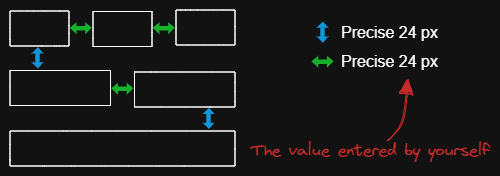
The script arranges the selected elements horizontally with a fixed spacing.
|
||||
|
||||
When we create an architecture diagram or mind map, we often need to arrange a large number of elements in a fixed spacing. `Fixed spacing` and `Fixed vertical Distance` scripts can save us a lot of time.
|
||||
|
||||
@@ -3,6 +3,8 @@
|
||||
|
||||
Download this file and save to your Obsidian Vault including the first line, or open it in "Raw" and copy the entire contents to Obsidian.
|
||||
|
||||
|
||||
|
||||
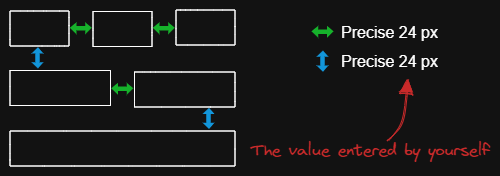
The script arranges the selected elements vertically with a fixed spacing.
|
||||
|
||||
When we create an architecture diagram or mind map, we often need to arrange a large number of elements in a fixed spacing. `Fixed spacing` and `Fixed vertical Distance` scripts can save us a lot of time.
|
||||
|
||||
120
ea-scripts/OCR - Optical Character Recognition.md
Normal file
120
ea-scripts/OCR - Optical Character Recognition.md
Normal file
@@ -0,0 +1,120 @@
|
||||
/*
|
||||

|
||||
|
||||
Download this file and save to your Obsidian Vault including the first line, or open it in "Raw" and copy the entire contents to Obsidian.
|
||||
|
||||

|
||||
|
||||
The script will
|
||||
1) send the selected image file to [taskbone.com](https://taskbone.com) to exctract the text from the image, and
|
||||
2) will add the text to your drawing as a text element
|
||||
|
||||
⚠ Don't forget to paste your token into the script after the first run. ⚠
|
||||
|
||||
I recommend also installing the [Transfer TextElements to Excalidraw markdown metadata](Transfer%20TextElements%20to%20Excalidraw%20markdown%20metadata.md) script as well.
|
||||
|
||||
The script is based on [@schlundd](https://github.com/schlundd)'s [Obsidian-OCR-Plugin](https://github.com/schlundd/obsidian-ocr-plugin)
|
||||
|
||||
See ScriptEngine documentation for more details:
|
||||
https://zsviczian.github.io/obsidian-excalidraw-plugin/ExcalidrawScriptsEngine.html
|
||||
|
||||
```javascript
|
||||
*/
|
||||
let token = ""; //paste token in-between the quotation marks "xxxxxxxxxx"
|
||||
const BASE_URL = "https://ocr.taskbone.com";
|
||||
|
||||
//get new token if token was not provided
|
||||
if (token==="") {
|
||||
const tokenResponse = await fetch(
|
||||
BASE_URL + "/get-new-token", {
|
||||
method: 'post'
|
||||
});
|
||||
if (tokenResponse.status === 200) {
|
||||
jsonResponse = await tokenResponse.json();
|
||||
token = jsonResponse.token;
|
||||
navigator.clipboard.writeText(token);
|
||||
notice("Please update the ScriptEngine script with the Token.\n\nToken is on the clipboard and in Developer Console.");
|
||||
console.log({token});
|
||||
} else {
|
||||
notice(`Taskbone OCR Error: ${tokenResponse.status}\nPlease try again later.`);
|
||||
return;
|
||||
}
|
||||
}
|
||||
|
||||
//get image element
|
||||
//if multiple image elements were selected prompt user to choose
|
||||
const imageElements = ea.getViewSelectedElements().filter((el)=>el.type==="image");
|
||||
|
||||
//need to save the view to ensure recently pasted images are saved as files
|
||||
await ea.targetView.save();
|
||||
|
||||
let selectedImageElement = null;
|
||||
switch (imageElements.length) {
|
||||
case 0:
|
||||
return;
|
||||
case 1:
|
||||
selectedImageElement = imageElements[0];
|
||||
break;
|
||||
default:
|
||||
const files = imageElements.map((el)=>ea.getViewFileForImageElement(el));
|
||||
selectedImageElement = await utils.suggester(files.map((f)=>f.name),imageElements);
|
||||
break;
|
||||
}
|
||||
|
||||
if(!selectedImageElement) {
|
||||
notice("No image element was selected");
|
||||
return;
|
||||
}
|
||||
const imageFile = ea.getViewFileForImageElement(selectedImageElement);
|
||||
if(!imageFile) {
|
||||
notice("Can read image file");
|
||||
return;
|
||||
}
|
||||
|
||||
//Execute the OCR
|
||||
let text = null;
|
||||
const fileBuffer = await app.vault.readBinary(imageFile);
|
||||
const formData = new FormData();
|
||||
formData.append("image", new Blob([fileBuffer]))
|
||||
try {
|
||||
const response = await fetch(
|
||||
BASE_URL + "/get-text", {
|
||||
headers: {
|
||||
Authorization: "Bearer " + token
|
||||
},
|
||||
method: "post",
|
||||
body: formData
|
||||
});
|
||||
if (response.status == 200) {
|
||||
jsonResponse = await response.json();
|
||||
text = jsonResponse?.text;
|
||||
} else {
|
||||
notice(`Could not read Text from ${file.path}:\n Error: ${response.status}`);
|
||||
return;
|
||||
}
|
||||
} catch (error) {
|
||||
notice(`The OCR service seems unavailable right now. Please try again later.`);
|
||||
return;
|
||||
}
|
||||
|
||||
if(!text) {
|
||||
notice("No text found");
|
||||
return;
|
||||
}
|
||||
console.log({text});
|
||||
|
||||
//add text element to drawing
|
||||
const id = ea.addText(selectedImageElement.x,selectedImageElement.y+selectedImageElement.height,text);
|
||||
await ea.addElementsToView();
|
||||
const API = ea.getExcalidrawAPI();
|
||||
st = API.getAppState();
|
||||
st.selectedElementIds = {};
|
||||
st.selectedElementIds[id] = true;
|
||||
API.updateScene({appState: st});
|
||||
API.zoomToFit(ea.getViewSelectedElements(),1);
|
||||
|
||||
//utility function
|
||||
function notice(message) {
|
||||
new Notice(message,10000);
|
||||
console.log(message);
|
||||
}
|
||||
@@ -1,7 +1,11 @@
|
||||
# Excalidraw Script Engine scripts library
|
||||
Click to watch the intro video:
|
||||
|
||||
[](https://youtu.be/hePJcObHIso)
|
||||
|
||||
See the [Excalidraw Script Engine](https://zsviczian.github.io/obsidian-excalidraw-plugin/ExcalidrawScriptsEngine.html) documentation for more details.
|
||||
|
||||
## How to install
|
||||
## How to install scripts into your Obsidian Vault
|
||||
Open the script you are interested in and save it to your Obsidian Vault including the first line `/*`, or open it in "Raw" and copy the entire contents to Obsidian.
|
||||
|
||||

|
||||
@@ -22,14 +26,17 @@ Open the script you are interested in and save it to your Obsidian Vault includi
|
||||
|[Expand rectangles horizontally](Expand%20rectangles%20horizontally.md)|This script expands the width of the selected rectangles until they are all the same width.||[@1-2-3](https://github.com/1-2-3)|
|
||||
|[Expand rectangles vertically keep text centered](Expand%20rectangles%20vertically%20keep%20text%20centered.md)|This script expands the height of the selected rectangles until they are all the same height and keep the text centered.||[@1-2-3](https://github.com/1-2-3)|
|
||||
|[Expand rectangles vertically](Expand%20rectangles%20vertically.md)|This script expands the height of the selected rectangles until they are all the same height.||[@1-2-3](https://github.com/1-2-3)|
|
||||
|[Fixed spacing](Fixed%20spacing.md)|The script arranges the selected elements horizontally with a fixed spacing. When we create an architecture diagram or mind map, we often need to arrange a large number of elements in a fixed spacing. `Fixed spacing` and `Fixed vertical Distance` scripts can save us a lot of time.||[@1-2-3](https://github.com/1-2-3)|
|
||||
|[Fixed vertical distance](Fixed%20vertical%20distance.md)|The script arranges the selected elements vertically with a fixed spacing. When we create an architecture diagram or mind map, we often need to arrange a large number of elements in a fixed spacing. `Fixed spacing` and `Fixed vertical Distance` scripts can save us a lot of time.||[@1-2-3](https://github.com/1-2-3)|
|
||||
|[Fixed spacing](Fixed%20spacing.md)|The script arranges the selected elements horizontally with a fixed spacing. When we create an architecture diagram or mind map, we often need to arrange a large number of elements in a fixed spacing. `Fixed spacing` and `Fixed vertical Distance` scripts can save us a lot of time.||[@1-2-3](https://github.com/1-2-3)|
|
||||
|[Fixed vertical distance](Fixed%20vertical%20distance.md)|The script arranges the selected elements vertically with a fixed spacing. When we create an architecture diagram or mind map, we often need to arrange a large number of elements in a fixed spacing. `Fixed spacing` and `Fixed vertical Distance` scripts can save us a lot of time.||[@1-2-3](https://github.com/1-2-3)|
|
||||
|[Font Family](Font%20Family.md)|Sets font family of the text block (Virgil, Helvetica, Cascadia). Useful if you want to set a keyboard shortcut for selecting font family.||[@zsviczian](https://github.com/zsviczian)|
|
||||
|[Grid](Grid.md)|The default grid size in Excalidraw is 20. Currently there is no way to change the grid size via the user interface. This script offers a way to bridge this gap.||[@zsviczian](https://github.com/zsviczian)|
|
||||
|[Lighten background color](Lighten%20background%20color.md)|This script lightens the background color of the selected element by 2% at a time. You can use this script several times until you are satisfied. It is recommended to set a shortcut key for this script so that you can quickly try to DARKEN and LIGHTEN the color effect.In contrast to the `Modify background color opacity` script, the advantage is that the background color of the element is not affected by the canvas color, and the color value does not appear in a strange rgba() form.||[@1-2-3](https://github.com/1-2-3)|
|
||||
|[Modify background color opacity](Modify%20background%20color%20opacity.md)|This script changes the opacity of the background color of the selected boxes. The default background color in Excalidraw is so dark that the text is hard to read. You can lighten the color a bit by setting transparency. And you can tweak the transparency over and over again until you're happy with it. Although excalidraw has the opacity option in its native property Settings, it also changes the transparency of the border. Use this script to change only the opacity of the background color without affecting the border.||[@1-2-3](https://github.com/1-2-3)|
|
||||
|[Modify stroke width of selected elements](Modify%20stroke%20width%20of%20selected%20elements.md)|This script will set the stroke width of selected elements. This is helpful, for example, when you scale freedraw sketches and want to reduce or increase their line width.||[@zsviczian](https://github.com/zsviczian)|
|
||||
|[OCR - Optical Character Recognition](OCR%20-%20Optical%20Character%20Recognition.md)|The script will 1) send the selected image file to [taskbone.com](https://taskbone.com) to exctract the text from the image, and 2) will add the text to your drawing as a text element.||[@zsviczian](https://github.com/zsviczian)|
|
||||
|[Reverse arrows](Reverse%20arrows.md)|Reverse the direction of **arrows** within the scope of selected elements.||[@zsviczian](https://github.com/zsviczian)|
|
||||
|[Set Link Alias](Set20%Link20%Alias.md)|Iterates all of the links in the selected TextElements and prompts the user to set or modify the alias for each link found.|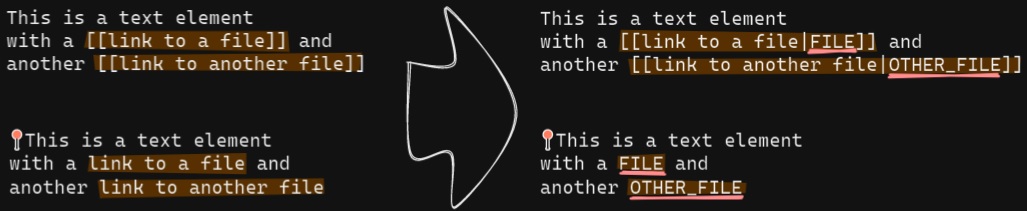|[@zsviczian](https://github.com/zsviczian)|
|
||||
|[Split text by lines](Split%20text%20by%20lines.md)|Split lines of text into separate text elements for easier reorganization||[@zsviczian](https://github.com/zsviczian)|
|
||||
|[Text Align](Text%20Align.md)|Sets text alignment of text block (cetner, right, left). Useful if you want to set a keyboard shortcut for selecting text alignment.||[@zsviczian](https://github.com/zsviczian)|
|
||||
|[Zoom to Fit Selected Elements](Zoom%20to%20Fit%20Selected%20Elements.md)|Similar to Excalidraw standard SHIFT+2 feature: Zoom to fit selected elements, but with the ability to zoom to 1000%. Inspiration: [#272](https://github.com/zsviczian/obsidian-excalidraw-plugin/issues/272)||[@zsviczian](https://github.com/zsviczian)|
|
||||
|[Transfer TextElements to Excalidraw markdown metadata](Transfer%20TextElements%20to%20Excalidraw%20markdown%20metadata.md)|The script will delete the selected text elements from the canvas and will copy the text from these text elements into the Excalidraw markdown file as metadata. This means, that the text will no longer be visible in the drawing, however you will be able to search for the text in Obsidian and find the drawing containing this image.||[@zsviczian](https://github.com/zsviczian)|
|
||||
|[Zoom to Fit Selected Elements](Zoom%20to%20Fit%20Selected%20Elements.md)|Similar to Excalidraw standard SHIFT+2 feature: Zoom to fit selected elements, but with the ability to zoom to 1000%. Inspiration: [#272](https://github.com/zsviczian/obsidian-excalidraw-plugin/issues/272)||[@zsviczian](https://github.com/zsviczian)|
|
||||
|
||||
53
ea-scripts/Set Link Alias.md
Normal file
53
ea-scripts/Set Link Alias.md
Normal file
@@ -0,0 +1,53 @@
|
||||
/*
|
||||

|
||||
|
||||
Download this file and save to your Obsidian Vault including the first line, or open it in "Raw" and copy the entire contents to Obsidian.
|
||||
|
||||

|
||||
|
||||
Iterates all of the links in the selected TextElements and prompts the user to set or modify the alias for each link found.
|
||||
|
||||
See documentation for more details:
|
||||
https://zsviczian.github.io/obsidian-excalidraw-plugin/ExcalidrawScriptsEngine.html
|
||||
|
||||
```javascript
|
||||
*/
|
||||
elements = ea.getViewSelectedElements().filter((el)=>el.type==="text");
|
||||
// `[[markdown links]]`
|
||||
for(el of elements) { //doing for instead of .forEach due to await inputPrompt
|
||||
parts = el.rawText.split(/(\[\[[\w\W]*?]])/);
|
||||
newText = "";
|
||||
for(t of parts) { //doing for instead of .map due to await inputPrompt
|
||||
if(!t.match(/(\[\[[\w\W]*?]])/)) {
|
||||
newText += t;
|
||||
} else {
|
||||
original = t.split(/\[\[|]]/)[1];
|
||||
cut = original.indexOf("|");
|
||||
alias = cut === -1 ? "" : original.substring(cut+1);
|
||||
link = cut === -1 ? original : original.substring(0,cut);
|
||||
alias = await utils.inputPrompt(`Alias for [[${link}]]`,"type alias here",alias);
|
||||
newText += `[[${link}|${alias}]]`;
|
||||
}
|
||||
}
|
||||
el.rawText = newText;
|
||||
};
|
||||
|
||||
// `[wiki](links)`
|
||||
for(el of elements) { //doing for instead of .forEach due to await inputPrompt
|
||||
parts = el.rawText.split(/(\[[\w\W]*?]\([\w\W]*?\))/);
|
||||
newText = "";
|
||||
for(t of parts) { //doing for instead of .map due to await inputPrompt
|
||||
if(!t.match(/(\[[\w\W]*?]\([\w\W]*?\))/)) {
|
||||
newText += t;
|
||||
} else {
|
||||
alias = t.match(/\[([\w\W]*?)]/)[1];
|
||||
link = t.match(/\(([\w\W]*?)\)/)[1];
|
||||
alias = await utils.inputPrompt(`Alias for [[${link}]]`,"type alias here",alias);
|
||||
newText += `[[${link}|${alias}]]`;
|
||||
}
|
||||
}
|
||||
el.rawText = newText;
|
||||
};
|
||||
|
||||
ea.copyViewElementsToEAforEditing(elements);
|
||||
ea.addElementsToView();
|
||||
@@ -0,0 +1,44 @@
|
||||
/*
|
||||

|
||||
|
||||
Download this file and save to your Obsidian Vault including the first line, or open it in "Raw" and copy the entire contents to Obsidian.
|
||||
|
||||

|
||||
|
||||
The script will delete the selected text elements from the canvas and will copy the text from these text elements into the Excalidraw markdown file as metadata. This means, that the text will no longer be visible in the drawing, however you will be able to search for the text in Obsidian and find the drawing containing this image.
|
||||
|
||||
See ScriptEngine documentation for more details:
|
||||
https://zsviczian.github.io/obsidian-excalidraw-plugin/ExcalidrawScriptsEngine.html
|
||||
|
||||
```javascript
|
||||
*/
|
||||
//get text elements
|
||||
|
||||
const textElements = ea.getViewSelectedElements().filter((el)=>el.type==="text");
|
||||
|
||||
if(textElements.length===0) {
|
||||
notice("No text elements were selected")
|
||||
return;
|
||||
}
|
||||
|
||||
metadata = "# Metadata\n" + textElements
|
||||
.map((el)=>el.rawText.replaceAll(/%|\^/g,"_")) //cleaning these characters for safety, might not be needed
|
||||
.join("/n") + "\n";
|
||||
|
||||
ea.deleteViewElements(textElements);
|
||||
await ea.targetView.save();
|
||||
data = await app.vault.read(ea.targetView.file);
|
||||
splitAfterFrontmatter = data.split(/(^---[\w\W]*?---\n)/);
|
||||
if(splitAfterFrontmatter.length !== 3) {
|
||||
notice("Error locating frontmatter in markdown file");
|
||||
console.log({file:ea.targetView.file});
|
||||
return;
|
||||
}
|
||||
newData = splitAfterFrontmatter[1]+metadata+splitAfterFrontmatter[2]
|
||||
await app.vault.modify(ea.targetView.file,newData);
|
||||
|
||||
//utility function
|
||||
function notice(message) {
|
||||
new Notice(message);
|
||||
console.log(message);
|
||||
}
|
||||
210
ea-scripts/index.md
Normal file
210
ea-scripts/index.md
Normal file
@@ -0,0 +1,210 @@
|
||||
If you are enjoying the Excalidraw plugin then please support my work and enthusiasm by buying me a coffee on [https://ko-fi/zsolt](https://ko-fi.com/zsolt).
|
||||
|
||||
[<img src="https://user-images.githubusercontent.com/14358394/115450238-f39e8100-a21b-11eb-89d0-fa4b82cdbce8.png" class="coffee">](https://ko-fi.com/zsolt)
|
||||
|
||||
---
|
||||
|
||||
Jump ahead to the [[#List of available scripts]]
|
||||
|
||||
# Intorducing Excalidraw Automate Script Engine
|
||||
<iframe width="560" height="315" src="https://www.youtube.com/embed/hePJcObHIso" title="YouTube video player" frameborder="0" allow="accelerometer; autoplay; clipboard-write; encrypted-media; gyroscope; picture-in-picture" allowfullscreen></iframe>
|
||||
|
||||
Script Engine scripts are installed in the `Downloaded` subfolder of the `Excalidraw Automate script folder` specified in plugin settings.
|
||||
|
||||
In the `Command Palette` installed scripts are prefixed with `Downloaded/`, thus you can always know if you are executing a local script of your own, or one that you have downloaded from GitHub.
|
||||
|
||||
## Attention developers and hobby hackers
|
||||
<img src='https://raw.githubusercontent.com/zsviczian/obsidian-excalidraw-plugin/master/images/hobby-programmer.svg' align='left' style='background-color:whitesmoke; width:80px; margin-right:15px; margin-bottom:10px;'/>
|
||||
If you want to modify scripts, I recommend moving them to the `Excalidraw Automate script folder` or a different subfolder under the script folder. Scripts in the `Downloaded` folder will be overwritten when you click the `Update this script` button. Note also, that at this time, I do not check if the script file has been updated on GitHub, thus the `Update this script` button is always visible once you have installed a script, not only when an update is availble (hope to build this feature in the future).
|
||||
|
||||
I would love to include your contribution in the script library. If you have a script of your own that you would like to share with the community, please open a [PR](https://github.com/zsviczian/obsidian-excalidraw-plugin/pulls) on GitHub. Be sure to include the following in your pull request
|
||||
- The [script file](https://github.com/zsviczian/obsidian-excalidraw-plugin/tree/master/ea-scripts) with a self explanetory name. The name of the file will be the name of the script in the Command Palette.
|
||||
- An [image](https://github.com/zsviczian/obsidian-excalidraw-plugin/tree/master/images) explaining the scripts purpose. Remember a picture speaks thousand words!
|
||||
- An update to this file [ea-scripts/index.md](https://github.com/zsviczian/obsidian-excalidraw-plugin/blob/master/ea-scripts/index.md)
|
||||
|
||||
---
|
||||
|
||||
# List of available scripts
|
||||
- [[#Box Selected Elements]]
|
||||
- [[#Bullet Point]]
|
||||
- [[#Connect elements]]
|
||||
- [[#Convert text to link with folder and alias]]
|
||||
- [[#Create new markdown file and embed into active drawing]]
|
||||
- [[#Darken background color]]
|
||||
- [[#Dimensions]]
|
||||
- [[#Elbow connectors]]
|
||||
- [[#Expand rectangles horizontally keep text centered]]
|
||||
- [[#Expand rectangles horizontally]]
|
||||
- [[#Expand rectangles vertically keep text centered]]
|
||||
- [[#Expand rectangles vertically]]
|
||||
- [[#Fixed spacing]]
|
||||
- [[#Fixed-vertical distance]]
|
||||
- [[#Font Family]]
|
||||
- [[#Grid]]
|
||||
- [[#Lighten background color]]
|
||||
- [[#Modify background color opacity]]
|
||||
- [[#Modify stroke width of selected elements]]
|
||||
- [[#OCR - Optical Character Recognition]]
|
||||
- [[#Reverse arrows]]
|
||||
- [[#Set Link Alias]]
|
||||
- [[#Split text by lines]]
|
||||
- [[#Text Align]]
|
||||
- [[#Transfer TextElements to Excalidraw markdown metadata]]
|
||||
- [[#Zoom to Fit Selected Elements]]
|
||||
|
||||
|
||||
## Box Selected Elements
|
||||
```excalidraw-script-install
|
||||
https://raw.githubusercontent.com/zsviczian/obsidian-excalidraw-plugin/master/ea-scripts/Box%20Selected%20Elements.md
|
||||
```
|
||||
<table><tr valign='top'><td class="label">Author</td><td class="data"><a href='https://github.com/zsviczian'>@zsviczian</a></td></tr><tr valign='top'><td class="label">Source</td><td class="data"><a href='https://github.com/zsviczian/obsidian-excalidraw-plugin/blob/master/ea-scripts/Box%20Selected%20Elements.md'>File on GitHub</a></td></tr><tr valign='top'><td class="label">Description</td><td class="data">This script will add an encapsulating box around the currently selected elements in Excalidraw.<br><img src='https://raw.githubusercontent.com/zsviczian/obsidian-excalidraw-plugin/master/images/scripts-box-elements.jpg'></td></tr></table>
|
||||
|
||||
## Bullet Point
|
||||
```excalidraw-script-install
|
||||
https://raw.githubusercontent.com/zsviczian/obsidian-excalidraw-plugin/master/ea-scripts/Bullet%20Point.md
|
||||
```
|
||||
<table><tr valign='top'><td class="label">Author</td><td class="data"><a href='https://github.com/zsviczian'>@zsviczian</a></td></tr><tr valign='top'><td class="label">Source</td><td class="data"><a href='https://github.com/zsviczian/obsidian-excalidraw-plugin/blob/master/ea-scripts/Bullet%20Point.md'>File on GitHub</a></td></tr><tr valign='top'><td class="label">Description</td><td class="data">This script will add a small circle to the top left of each text element in the selection and add the text and the "bullet point" into a group.<br><img src='https://raw.githubusercontent.com/zsviczian/obsidian-excalidraw-plugin/master/images/scripts-bullet-point.jpg'></td></tr></table>
|
||||
|
||||
## Connect elements
|
||||
```excalidraw-script-install
|
||||
https://raw.githubusercontent.com/zsviczian/obsidian-excalidraw-plugin/master/ea-scripts/Connect%20elements.md
|
||||
```
|
||||
<table><tr valign='top'><td class="label">Author</td><td class="data"><a href='https://github.com/zsviczian'>@zsviczian</a></td></tr><tr valign='top'><td class="label">Source</td><td class="data"><a href='https://github.com/zsviczian/obsidian-excalidraw-plugin/blob/master/ea-scripts/Connect%20elements.md'>File on GitHub</a></td></tr><tr valign='top'><td class="label">Description</td><td class="data">This script will connect two objects with an arrow. If either of the objects are a set of grouped elements (e.g. a text element grouped with an encapsulating rectangle), the script will identify these groups, and connect the arrow to the largest object in the group (assuming you want to connect the arrow to the box around the text element).<br><img src='https://raw.githubusercontent.com/zsviczian/obsidian-excalidraw-plugin/master/images/scripts-connect-elements.jpg'></td></tr></table>
|
||||
|
||||
## Convert text to link with folder and alias
|
||||
```excalidraw-script-install
|
||||
https://raw.githubusercontent.com/zsviczian/obsidian-excalidraw-plugin/master/ea-scripts/Convert%20text%20to%20link%20with%20folder%20and%20alias.md
|
||||
```
|
||||
<table><tr valign='top'><td class="label">Author</td><td class="data"><a href='https://github.com/zsviczian'>@zsviczian</a></td></tr><tr valign='top'><td class="label">Source</td><td class="data"><a href='https://github.com/zsviczian/obsidian-excalidraw-plugin/blob/master/ea-scripts/Convert%20text%20to%20link%20with%20folder%20and%20alias.md'>File on GitHub</a></td></tr><tr valign='top'><td class="label">Description</td><td class="data">Converts text elements to links pointing to a file in a selected folder and with the alias set as the original text. The script will prompt the user to select an existing folder from the vault.<br><code>original text</code> - <code>[[selected folder/original text|original text]]</code></td></tr></table>
|
||||
|
||||
## Create new markdown file and embed into active drawing
|
||||
```excalidraw-script-install
|
||||
https://raw.githubusercontent.com/zsviczian/obsidian-excalidraw-plugin/master/ea-scripts/Create%20new%20markdown%20file%20and%20embed%20into%20active%20drawing.md
|
||||
```
|
||||
<table><tr valign='top'><td class="label">Author</td><td class="data"><a href='https://github.com/zsviczian'>@zsviczian</a></td></tr><tr valign='top'><td class="label">Source</td><td class="data"><a href='https://github.com/zsviczian/obsidian-excalidraw-plugin/blob/master/ea-scripts/Create%20new%20markdown%20file%20and%20embed%20into%20active%20drawing.md'>File on GitHub</a></td></tr><tr valign='top'><td class="label">Description</td><td class="data">The script will prompt you for a filename, then create a new markdown document with the file name provided, open the new markdown document in an adjacent pane, and embed the markdown document into the active Excalidraw drawing.<br><img src='https://raw.githubusercontent.com/zsviczian/obsidian-excalidraw-plugin/master/images/scripts-create-and-embed-new-markdown-file.jpg'></td></tr></table>
|
||||
|
||||
## Darken background color
|
||||
```excalidraw-script-install
|
||||
https://raw.githubusercontent.com/zsviczian/obsidian-excalidraw-plugin/master/ea-scripts/Darken%20background%20color.md
|
||||
```
|
||||
<table><tr valign='top'><td class="label">Author</td><td class="data"><a href='https://github.com/1-2-3'>@1-2-3</a></td></tr><tr valign='top'><td class="label">Source</td><td class="data"><a href='https://github.com/zsviczian/obsidian-excalidraw-plugin/blob/master/ea-scripts/Darken%20background%20color.md'>File on GitHub</a></td></tr><tr valign='top'><td class="label">Description</td><td class="data">This script darkens the background color of the selected element by 2% at a time. You can use this script several times until you are satisfied. It is recommended to set a shortcut key for this script so that you can quickly try to DARKEN and LIGHTEN the color effect. In contrast to the `Modify background color opacity` script, the advantage is that the background color of the element is not affected by the canvas color, and the color value does not appear in a strange rgba() form.<br><img src='https://raw.githubusercontent.com/zsviczian/obsidian-excalidraw-plugin/master/images/darken-lighten-background-color.png'></td></tr></table>
|
||||
|
||||
## Dimensions
|
||||
```excalidraw-script-install
|
||||
https://raw.githubusercontent.com/zsviczian/obsidian-excalidraw-plugin/master/ea-scripts/Dimensions.md
|
||||
```
|
||||
<table><tr valign='top'><td class="label">Author</td><td class="data"><a href='https://github.com/zsviczian'>@zsviczian</a></td></tr><tr valign='top'><td class="label">Source</td><td class="data"><a href='https://github.com/zsviczian/obsidian-excalidraw-plugin/blob/master/ea-scripts/Dimensions.md'>File on GitHub</a></td></tr><tr valign='top'><td class="label">Description</td><td class="data">Currently there is no way to specify the exact location and size of objects in Excalidraw. You can bridge this gap with the following simple script.<br><img src='https://raw.githubusercontent.com/zsviczian/obsidian-excalidraw-plugin/master/images/scripts-dimensions.jpg'></td></tr></table>
|
||||
|
||||
## Elbow connectors
|
||||
```excalidraw-script-install
|
||||
https://raw.githubusercontent.com/zsviczian/obsidian-excalidraw-plugin/master/ea-scripts/Elbow%20connectors.md
|
||||
```
|
||||
<table><tr valign='top'><td class="label">Author</td><td class="data"><a href='https://github.com/1-2-3'>@1-2-3</a></td></tr><tr valign='top'><td class="label">Source</td><td class="data"><a href='https://github.com/zsviczian/obsidian-excalidraw-plugin/blob/master/ea-scripts/Elbow%20connectors.md'>File on GitHub</a></td></tr><tr valign='top'><td class="label">Description</td><td class="data">This script converts the selected connectors to elbows.<br><img src='https://raw.githubusercontent.com/zsviczian/obsidian-excalidraw-plugin/master/images/elbow-connectors.png'></td></tr></table>
|
||||
|
||||
## Expand rectangles horizontally keep text centered
|
||||
```excalidraw-script-install
|
||||
https://raw.githubusercontent.com/zsviczian/obsidian-excalidraw-plugin/master/ea-scripts/Expand%20rectangles%20horizontally%20keep%20text%20centered.md
|
||||
```
|
||||
<table><tr valign='top'><td class="label">Author</td><td class="data"><a href='https://github.com/1-2-3'>@1-2-3</a></td></tr><tr valign='top'><td class="label">Source</td><td class="data"><a href='https://github.com/zsviczian/obsidian-excalidraw-plugin/blob/master/ea-scripts/Expand%20rectangles%20horizontally%20keep%20text%20centered.md'>File on GitHub</a></td></tr><tr valign='top'><td class="label">Description</td><td class="data">This script expands the width of the selected rectangles until they are all the same width and keep the text centered.<br><img src='https://raw.githubusercontent.com/zsviczian/obsidian-excalidraw-plugin/master/images/scripts-expand-rectangles.gif'></td></tr></table>
|
||||
|
||||
## Expand rectangles horizontally
|
||||
```excalidraw-script-install
|
||||
https://raw.githubusercontent.com/zsviczian/obsidian-excalidraw-plugin/master/ea-scripts/Expand%20rectangles%20horizontally.md
|
||||
```
|
||||
<table><tr valign='top'><td class="label">Author</td><td class="data"><a href='https://github.com/1-2-3'>@1-2-3</a></td></tr><tr valign='top'><td class="label">Source</td><td class="data"><a href='https://github.com/zsviczian/obsidian-excalidraw-plugin/blob/master/ea-scripts/Expand%20rectangles%20horizontally.md'>File on GitHub</a></td></tr><tr valign='top'><td class="label">Description</td><td class="data">This script expands the width of the selected rectangles until they are all the same width.<br><img src='https://raw.githubusercontent.com/zsviczian/obsidian-excalidraw-plugin/master/images/scripts-expand-rectangles.gif'></td></tr></table>
|
||||
|
||||
## Expand rectangles vertically keep text centered
|
||||
```excalidraw-script-install
|
||||
https://raw.githubusercontent.com/zsviczian/obsidian-excalidraw-plugin/master/ea-scripts/Expand%20rectangles%20vertically%20keep%20text%20centered.md
|
||||
```
|
||||
<table><tr valign='top'><td class="label">Author</td><td class="data"><a href='https://github.com/1-2-3'>@1-2-3</a></td></tr><tr valign='top'><td class="label">Source</td><td class="data"><a href='https://github.com/zsviczian/obsidian-excalidraw-plugin/blob/master/ea-scripts/Expand%20rectangles%20vertically%20keep%20text%20centered.md'>File on GitHub</a></td></tr><tr valign='top'><td class="label">Description</td><td class="data">This script expands the height of the selected rectangles until they are all the same height and keep the text centered.<br><img src='https://raw.githubusercontent.com/zsviczian/obsidian-excalidraw-plugin/master/images/scripts-expand-rectangles.gif'></td></tr></table>
|
||||
|
||||
## Expand rectangles vertically
|
||||
```excalidraw-script-install
|
||||
https://raw.githubusercontent.com/zsviczian/obsidian-excalidraw-plugin/master/ea-scripts/Expand%20rectangles%20vertically.md
|
||||
```
|
||||
<table><tr valign='top'><td class="label">Author</td><td class="data"><a href='https://github.com/1-2-3'>@1-2-3</a></td></tr><tr valign='top'><td class="label">Source</td><td class="data"><a href='https://github.com/zsviczian/obsidian-excalidraw-plugin/blob/master/ea-scripts/Expand%20rectangles%20vertically.md'>File on GitHub</a></td></tr><tr valign='top'><td class="label">Description</td><td class="data">This script expands the height of the selected rectangles until they are all the same height.<br><img src='https://raw.githubusercontent.com/zsviczian/obsidian-excalidraw-plugin/master/images/scripts-expand-rectangles.gif'></td></tr></table>
|
||||
|
||||
## Fixed spacing
|
||||
```excalidraw-script-install
|
||||
https://raw.githubusercontent.com/zsviczian/obsidian-excalidraw-plugin/master/ea-scripts/Fixed%20spacing.md
|
||||
```
|
||||
<table><tr valign='top'><td class="label">Author</td><td class="data"><a href='https://github.com/1-2-3'>@1-2-3</a></td></tr><tr valign='top'><td class="label">Source</td><td class="data"><a href='https://github.com/zsviczian/obsidian-excalidraw-plugin/blob/master/ea-scripts/Fixed%20spacing.md'>File on GitHub</a></td></tr><tr valign='top'><td class="label">Description</td><td class="data">The script arranges the selected elements horizontally with a fixed spacing. When we create an architecture diagram or mind map, we often need to arrange a large number of elements in a fixed spacing. `Fixed spacing` and `Fixed vertical Distance` scripts can save us a lot of time.<br><img src='https://raw.githubusercontent.com/zsviczian/obsidian-excalidraw-plugin/master/images/scripts-fix-space-demo.png'></td></tr></table>
|
||||
|
||||
## Fixed vertical distance
|
||||
```excalidraw-script-install
|
||||
https://raw.githubusercontent.com/zsviczian/obsidian-excalidraw-plugin/master/ea-scripts/Fixed%20vertical%20distance.md
|
||||
```
|
||||
<table><tr valign='top'><td class="label">Author</td><td class="data"><a href='https://github.com/1-2-3'>@1-2-3</a></td></tr><tr valign='top'><td class="label">Source</td><td class="data"><a href='https://github.com/zsviczian/obsidian-excalidraw-plugin/blob/master/ea-scripts/Fixed%20vertical%20distance.md'>File on GitHub</a></td></tr><tr valign='top'><td class="label">Description</td><td class="data">The script arranges the selected elements vertically with a fixed spacing. When we create an architecture diagram or mind map, we often need to arrange a large number of elements in a fixed spacing. `Fixed spacing` and `Fixed vertical Distance` scripts can save us a lot of time.<br><img src='https://raw.githubusercontent.com/zsviczian/obsidian-excalidraw-plugin/master/images/scripts-fixed-vertical-distance.png'></td></tr></table>
|
||||
|
||||
## Font Family
|
||||
```excalidraw-script-install
|
||||
https://raw.githubusercontent.com/zsviczian/obsidian-excalidraw-plugin/master/ea-scripts/Font%20Family.md
|
||||
```
|
||||
<table><tr valign='top'><td class="label">Author</td><td class="data"><a href='https://github.com/zsviczian'>@zsviczian</a></td></tr><tr valign='top'><td class="label">Source</td><td class="data"><a href='https://github.com/zsviczian/obsidian-excalidraw-plugin/blob/master/ea-scripts/Font%20Family.md'>File on GitHub</a></td></tr><tr valign='top'><td class="label">Description</td><td class="data">Sets font family of the text block (Virgil, Helvetica, Cascadia). Useful if you want to set a keyboard shortcut for selecting font family.<br><img src='https://raw.githubusercontent.com/zsviczian/obsidian-excalidraw-plugin/master/images/scripts-font-family.jpg'></td></tr></table>
|
||||
|
||||
## Grid
|
||||
```excalidraw-script-install
|
||||
https://raw.githubusercontent.com/zsviczian/obsidian-excalidraw-plugin/master/ea-scripts/Grid.md
|
||||
```
|
||||
<table><tr valign='top'><td class="label">Author</td><td class="data"><a href='https://github.com/zsviczian'>@zsviczian</a></td></tr><tr valign='top'><td class="label">Source</td><td class="data"><a href='https://github.com/zsviczian/obsidian-excalidraw-plugin/blob/master/ea-scripts/Grid.md'>File on GitHub</a></td></tr><tr valign='top'><td class="label">Description</td><td class="data">The default grid size in Excalidraw is 20. Currently there is no way to change the grid size via the user interface. This script offers a way to bridge this gap.<br><img src='https://raw.githubusercontent.com/zsviczian/obsidian-excalidraw-plugin/master/images/scripts-grid.jpg'></td></tr></table>
|
||||
|
||||
## Lighten background color
|
||||
```excalidraw-script-install
|
||||
https://raw.githubusercontent.com/zsviczian/obsidian-excalidraw-plugin/master/ea-scripts/Lighten%20background%20color.md
|
||||
```
|
||||
<table><tr valign='top'><td class="label">Author</td><td class="data"><a href='https://github.com/1-2-3'>@1-2-3</a></td></tr><tr valign='top'><td class="label">Source</td><td class="data"><a href='https://github.com/zsviczian/obsidian-excalidraw-plugin/blob/master/ea-scripts/Lighten%20background%20color.md'>File on GitHub</a></td></tr><tr valign='top'><td class="label">Description</td><td class="data">This script lightens the background color of the selected element by 2% at a time. You can use this script several times until you are satisfied. It is recommended to set a shortcut key for this script so that you can quickly try to DARKEN and LIGHTEN the color effect.In contrast to the `Modify background color opacity` script, the advantage is that the background color of the element is not affected by the canvas color, and the color value does not appear in a strange rgba() form.<br><img src='https://raw.githubusercontent.com/zsviczian/obsidian-excalidraw-plugin/master/images/darken-lighten-background-color.png'></td></tr></table>
|
||||
|
||||
## Modify background color opacity
|
||||
```excalidraw-script-install
|
||||
https://raw.githubusercontent.com/zsviczian/obsidian-excalidraw-plugin/master/ea-scripts/Modify%20background%20color%20opacity.md
|
||||
```
|
||||
<table><tr valign='top'><td class="label">Author</td><td class="data"><a href='https://github.com/1-2-3'>@1-2-3</a></td></tr><tr valign='top'><td class="label">Source</td><td class="data"><a href='https://github.com/zsviczian/obsidian-excalidraw-plugin/blob/master/ea-scripts/Modify%20background%20color%20opacity.md'>File on GitHub</a></td></tr><tr valign='top'><td class="label">Description</td><td class="data">This script changes the opacity of the background color of the selected boxes. The default background color in Excalidraw is so dark that the text is hard to read. You can lighten the color a bit by setting transparency. And you can tweak the transparency over and over again until you're happy with it. Although excalidraw has the opacity option in its native property Settings, it also changes the transparency of the border. Use this script to change only the opacity of the background color without affecting the border.</td></tr></table>
|
||||
|
||||
## Modify stroke width of selected elements
|
||||
```excalidraw-script-install
|
||||
https://raw.githubusercontent.com/zsviczian/obsidian-excalidraw-plugin/master/ea-scripts/Modify%20stroke%20width%20of%20selected%20elements.md
|
||||
```
|
||||
<table><tr valign='top'><td class="label">Author</td><td class="data"><a href='https://github.com/zsviczian'>@zsviczian</a></td></tr><tr valign='top'><td class="label">Source</td><td class="data"><a href='https://github.com/zsviczian/obsidian-excalidraw-plugin/blob/master/ea-scripts/Modify%20stroke%20width%20of%20selected%20elements.md'>File on GitHub</a></td></tr><tr valign='top'><td class="label">Description</td><td class="data">This script will set the stroke width of selected elements. This is helpful, for example, when you scale freedraw sketches and want to reduce or increase their line width.<br><img src='https://raw.githubusercontent.com/zsviczian/obsidian-excalidraw-plugin/master/images/scripts-stroke-width.jpg'></td></tr></table>
|
||||
|
||||
## OCR - Optical Character Recognition
|
||||
```excalidraw-script-install
|
||||
https://raw.githubusercontent.com/zsviczian/obsidian-excalidraw-plugin/master/ea-scripts/OCR%20-%20Optical%20Character%20Recognition.md
|
||||
```
|
||||
<table><tr valign='top'><td class="label">Author</td><td class="data"><a href='https://github.com/zsviczian'>@zsviczian</a></td></tr><tr valign='top'><td class="label">Source</td><td class="data"><a href='https://github.com/zsviczian/obsidian-excalidraw-plugin/blob/master/ea-scripts/OCR%20-%20Optical%20Character%20Recognition.md'>File on GitHub</a></td></tr><tr valign='top'><td class="label">Description</td><td class="data">The script will 1) send the selected image file to [taskbone.com](https://taskbone.com) to exctract the text from the image, and 2) will add the text to your drawing as a text element.<br><mark>⚠ Note that you will need to manually paste your token into the script after the first run! ⚠</mark><br><img src='https://raw.githubusercontent.com/zsviczian/obsidian-excalidraw-plugin/master/images/scripts-ocr.jpg'></td></tr></table>
|
||||
|
||||
## Reverse arrows
|
||||
```excalidraw-script-install
|
||||
https://raw.githubusercontent.com/zsviczian/obsidian-excalidraw-plugin/master/ea-scripts/Reverse%20arrows.md
|
||||
```
|
||||
<table><tr valign='top'><td class="label">Author</td><td class="data"><a href='https://github.com/zsviczian'>@zsviczian</a></td></tr><tr valign='top'><td class="label">Source</td><td class="data"><a href='https://github.com/zsviczian/obsidian-excalidraw-plugin/blob/master/ea-scripts/Reverse%20arrows.md'>File on GitHub</a></td></tr><tr valign='top'><td class="label">Description</td><td class="data">Reverse the direction of **arrows** within the scope of selected elements.<br><img src='https://raw.githubusercontent.com/zsviczian/obsidian-excalidraw-plugin/master/images/scripts-reverse-arrow.jpg'></td></tr></table>
|
||||
|
||||
## Set Link Alias
|
||||
```excalidraw-script-install
|
||||
https://raw.githubusercontent.com/zsviczian/obsidian-excalidraw-plugin/master/ea-scripts/Set%20Link%20Alias.md
|
||||
```
|
||||
<table><tr valign='top'><td class="label">Author</td><td class="data"><a href='https://github.com/zsviczian'>@zsviczian</a></td></tr><tr valign='top'><td class="label">Source</td><td class="data"><a href='https://github.com/zsviczian/obsidian-excalidraw-plugin/blob/master/ea-scripts/Set%20Link%20Alias.md'>File on GitHub</a></td></tr><tr valign='top'><td class="label">Description</td><td class="data">Iterates all of the links in the selected TextElements and prompts the user to set or modify the alias for each link found.<br><img src='https://raw.githubusercontent.com/zsviczian/obsidian-excalidraw-plugin/master/images/scripts-set-link-alias.jpg'></td></tr></table>
|
||||
|
||||
## Split text by lines
|
||||
```excalidraw-script-install
|
||||
https://raw.githubusercontent.com/zsviczian/obsidian-excalidraw-plugin/master/ea-scripts/Split%20text%20by%20lines.md
|
||||
```
|
||||
<table><tr valign='top'><td class="label">Author</td><td class="data"><a href='https://github.com/zsviczian'>@zsviczian</a></td></tr><tr valign='top'><td class="label">Source</td><td class="data"><a href='https://github.com/zsviczian/obsidian-excalidraw-plugin/blob/master/ea-scripts/Split%20text%20by%20lines.md'>File on GitHub</a></td></tr><tr valign='top'><td class="label">Description</td><td class="data">Split lines of text into separate text elements for easier reorganization<br><img src='https://raw.githubusercontent.com/zsviczian/obsidian-excalidraw-plugin/master/images/scripts-split-lines.jpg'></td></tr></table>
|
||||
|
||||
## Text Align
|
||||
```excalidraw-script-install
|
||||
https://raw.githubusercontent.com/zsviczian/obsidian-excalidraw-plugin/master/ea-scripts/Text%20Align.md
|
||||
```
|
||||
<table><tr valign='top'><td class="label">Author</td><td class="data"><a href='https://github.com/zsviczian'>@zsviczian</a></td></tr><tr valign='top'><td class="label">Source</td><td class="data"><a href='https://github.com/zsviczian/obsidian-excalidraw-plugin/blob/master/ea-scripts/Text%20Align.md'>File on GitHub</a></td></tr><tr valign='top'><td class="label">Description</td><td class="data">Sets text alignment of text block (cetner, right, left). Useful if you want to set a keyboard shortcut for selecting text alignment.<br><img src='https://raw.githubusercontent.com/zsviczian/obsidian-excalidraw-plugin/master/images/scripts-text-align.jpg'></td></tr></table>
|
||||
|
||||
## Transfer TextElements to Excalidraw markdown metadata
|
||||
```excalidraw-script-install
|
||||
https://raw.githubusercontent.com/zsviczian/obsidian-excalidraw-plugin/master/ea-scripts/Transfer%20TextElements%20to%20Excalidraw%20markdown%20metadata.md
|
||||
```
|
||||
<table><tr valign='top'><td class="label">Author</td><td class="data"><a href='https://github.com/zsviczian'>@zsviczian</a></td></tr><tr valign='top'><td class="label">Source</td><td class="data"><a href='https://github.com/zsviczian/obsidian-excalidraw-plugin/blob/master/ea-scripts/Transfer%20TextElements%20to%20Excalidraw%20markdown%20metadata.md'>File on GitHub</a></td></tr><tr valign='top'><td class="label">Description</td><td class="data">The script will delete the selected text elements from the canvas and will copy the text from these text elements into the Excalidraw markdown file as metadata. This means, that the text will no longer be visible in the drawing, however you will be able to search for the text in Obsidian and find the drawing containing this image.<br><img src='https://raw.githubusercontent.com/zsviczian/obsidian-excalidraw-plugin/master/images/scripts-text-to-metadata.jpg'></td></tr></table>
|
||||
|
||||
## Zoom to Fit Selected Elements
|
||||
```excalidraw-script-install
|
||||
https://raw.githubusercontent.com/zsviczian/obsidian-excalidraw-plugin/master/ea-scripts/Zoom%20to%20Fit%20Selected%20Elements.md
|
||||
```
|
||||
<table><tr valign='top'><td class="label">Author</td><td class="data"><a href='https://github.com/zsviczian'>@zsviczian</a></td></tr><tr valign='top'><td class="label">Source</td><td class="data"><a href='https://github.com/zsviczian/obsidian-excalidraw-plugin/blob/master/ea-scripts/Zoom%20to%20Fit%20Selected%20Elements.md'>File on GitHub</a></td></tr><tr valign='top'><td class="label">Description</td><td class="data">Similar to Excalidraw standard SHIFT+2 feature: Zoom to fit selected elements, but with the ability to zoom to 1000%. Inspiration: [#272](https://github.com/zsviczian/obsidian-excalidraw-plugin/issues/272)</td></tr></table>
|
||||
1
images/hobby-programmer.svg
Normal file
1
images/hobby-programmer.svg
Normal file

File diff suppressed because one or more lines are too long
|
After Width: | Height: | Size: 6.8 KiB |
BIN
images/scripts-fix-space-demo.png
Normal file
BIN
images/scripts-fix-space-demo.png
Normal file

Binary file not shown.
|
After Width: | Height: | Size: 13 KiB |
BIN
images/scripts-fixed-vertical-distance.png
Normal file
BIN
images/scripts-fixed-vertical-distance.png
Normal file

Binary file not shown.
|
After Width: | Height: | Size: 13 KiB |
BIN
images/scripts-ocr.jpg
Normal file
BIN
images/scripts-ocr.jpg
Normal file

Binary file not shown.
|
After Width: | Height: | Size: 44 KiB |
BIN
images/scripts-set-link-alias.jpg
Normal file
BIN
images/scripts-set-link-alias.jpg
Normal file

Binary file not shown.
|
After Width: | Height: | Size: 56 KiB |
BIN
images/scripts-text-to-metadata.jpg
Normal file
BIN
images/scripts-text-to-metadata.jpg
Normal file

Binary file not shown.
|
After Width: | Height: | Size: 110 KiB |
@@ -1,7 +1,7 @@
|
||||
{
|
||||
"id": "obsidian-excalidraw-plugin",
|
||||
"name": "Excalidraw",
|
||||
"version": "1.5.10",
|
||||
"version": "1.5.13",
|
||||
"minAppVersion": "0.12.16",
|
||||
"description": "An Obsidian plugin to edit and view Excalidraw drawings",
|
||||
"author": "Zsolt Viczian",
|
||||
|
||||
@@ -370,8 +370,9 @@ const convertMarkdownToSVG = async (
|
||||
//1.
|
||||
//get the markdown text
|
||||
let text = (await getTransclusion(linkParts, plugin.app, file)).contents;
|
||||
if(text==="") {
|
||||
text = "# Empty markdown file\nCTRL+Click here to open the file for editing in the current active pane, or CTRL+SHIFT+Click to open it in an adjacent pane.";
|
||||
if (text === "") {
|
||||
text =
|
||||
"# Empty markdown file\nCTRL+Click here to open the file for editing in the current active pane, or CTRL+SHIFT+Click to open it in an adjacent pane.";
|
||||
}
|
||||
|
||||
//2.
|
||||
|
||||
@@ -6,7 +6,7 @@ import {
|
||||
ExcalidrawElement,
|
||||
ExcalidrawBindableElement,
|
||||
} from "@zsviczian/excalidraw/types/element/types";
|
||||
import { normalizePath, TFile } from "obsidian";
|
||||
import { Component, MarkdownRenderer, normalizePath, TFile } from "obsidian";
|
||||
import ExcalidrawView, { ExportSettings, TextMode } from "./ExcalidrawView";
|
||||
import { ExcalidrawData } from "./ExcalidrawData";
|
||||
import {
|
||||
@@ -39,6 +39,12 @@ declare type ConnectionPoint = "top" | "bottom" | "left" | "right" | null;
|
||||
const GAP = 4;
|
||||
|
||||
export interface ExcalidrawAutomate {
|
||||
renderMarkdown(
|
||||
markdown: string,
|
||||
el: HTMLElement,
|
||||
sourcePath: string,
|
||||
component: Component,
|
||||
): Promise<void>;
|
||||
plugin: ExcalidrawPlugin;
|
||||
elementsDict: {}; //contains the ExcalidrawElements currently edited in Automate indexed by el.id
|
||||
imagesDict: {}; //the images files including DataURL, indexed by fileId
|
||||
@@ -219,6 +225,19 @@ export async function initExcalidrawAutomate(
|
||||
plugin: ExcalidrawPlugin,
|
||||
): Promise<ExcalidrawAutomate> {
|
||||
window.ExcalidrawAutomate = {
|
||||
renderMarkdown(
|
||||
markdown: string,
|
||||
el: HTMLElement,
|
||||
sourcePath: string,
|
||||
component: Component,
|
||||
): Promise<void> {
|
||||
return MarkdownRenderer.renderMarkdown(
|
||||
markdown,
|
||||
el,
|
||||
sourcePath,
|
||||
component,
|
||||
);
|
||||
},
|
||||
plugin,
|
||||
elementsDict: {},
|
||||
imagesDict: {},
|
||||
|
||||
@@ -210,6 +210,9 @@ export class ExcalidrawData {
|
||||
file: TFile,
|
||||
textMode: TextMode,
|
||||
): Promise<boolean> {
|
||||
if (!file) {
|
||||
return false;
|
||||
}
|
||||
this.loaded = false;
|
||||
this.textElements = new Map<
|
||||
string,
|
||||
@@ -340,6 +343,9 @@ export class ExcalidrawData {
|
||||
}
|
||||
|
||||
public async loadLegacyData(data: string, file: TFile): Promise<boolean> {
|
||||
if (!file) {
|
||||
return false;
|
||||
}
|
||||
this.compatibilityMode = true;
|
||||
this.file = file;
|
||||
this.textElements = new Map<
|
||||
@@ -992,6 +998,10 @@ export class ExcalidrawData {
|
||||
}
|
||||
if (this.plugin.filesMaster.has(fileId)) {
|
||||
const fileMaster = this.plugin.filesMaster.get(fileId);
|
||||
if (!this.app.vault.getAbstractFileByPath(fileMaster.path)) {
|
||||
this.plugin.filesMaster.delete(fileId);
|
||||
return true;
|
||||
} // the file no longer exists
|
||||
const embeddedFile = new EmbeddedFile(
|
||||
this.plugin,
|
||||
this.file.path,
|
||||
|
||||
@@ -24,6 +24,7 @@ import {
|
||||
VIEW_TYPE_EXCALIDRAW,
|
||||
ICON_NAME,
|
||||
DISK_ICON_NAME,
|
||||
SCRIPTENGINE_ICON_NAME,
|
||||
PNG_ICON_NAME,
|
||||
SVG_ICON_NAME,
|
||||
FRONTMATTER_KEY,
|
||||
@@ -68,6 +69,7 @@ import {
|
||||
EmbeddedFilesLoader,
|
||||
FileData,
|
||||
} from "./EmbeddedFileLoader";
|
||||
import { ScriptInstallPrompt } from "./ScriptInstallPrompt";
|
||||
|
||||
export enum TextMode {
|
||||
parsed,
|
||||
@@ -556,7 +558,10 @@ export default class ExcalidrawView extends TextFileView {
|
||||
}
|
||||
|
||||
onload() {
|
||||
//console.log("ExcalidrawView.onload()");
|
||||
this.addAction(SCRIPTENGINE_ICON_NAME, t("INSTALL_SCRIPT_BUTTON"), () => {
|
||||
new ScriptInstallPrompt(this.plugin).open();
|
||||
});
|
||||
|
||||
this.addAction(DISK_ICON_NAME, t("FORCE_SAVE"), async () => {
|
||||
await this.save(false);
|
||||
this.plugin.triggerEmbedUpdates();
|
||||
|
||||
43
src/ScriptInstallPrompt.ts
Normal file
43
src/ScriptInstallPrompt.ts
Normal file
@@ -0,0 +1,43 @@
|
||||
import { App, MarkdownRenderer, Modal, Notice, request } from "obsidian";
|
||||
import { Url } from "url";
|
||||
import { t } from "./lang/helpers";
|
||||
import ExcalidrawPlugin from "./main";
|
||||
import { errorlog } from "./Utils";
|
||||
|
||||
const URL =
|
||||
"https://raw.githubusercontent.com/zsviczian/obsidian-excalidraw-plugin/master/ea-scripts/index.md";
|
||||
|
||||
export class ScriptInstallPrompt extends Modal {
|
||||
constructor(private plugin: ExcalidrawPlugin) {
|
||||
super(plugin.app);
|
||||
// this.titleEl.setText(t("INSTAL_MODAL_TITLE"));
|
||||
}
|
||||
|
||||
async onOpen(): Promise<void> {
|
||||
this.contentEl.classList.add("excalidraw-scriptengine-install");
|
||||
this.containerEl.classList.add("excalidraw-scriptengine-install");
|
||||
try {
|
||||
const source = await request({ url: URL });
|
||||
await MarkdownRenderer.renderMarkdown(
|
||||
source,
|
||||
this.contentEl,
|
||||
"",
|
||||
this.plugin,
|
||||
);
|
||||
this.contentEl.querySelectorAll("h1[data-heading],h2[data-heading],h3[data-heading]").forEach((el) => {
|
||||
el.setAttribute("id", el.getAttribute("data-heading"));
|
||||
});
|
||||
this.contentEl.querySelectorAll("a.internal-link").forEach((el) => {
|
||||
el.removeAttribute("target");
|
||||
});
|
||||
} catch (e) {
|
||||
errorlog({ where: "ScriptInstallPrompt.onOpen", error: e });
|
||||
new Notice("Could not open ScriptEngine repository");
|
||||
this.close();
|
||||
}
|
||||
}
|
||||
|
||||
onClose(): void {
|
||||
this.contentEl.empty();
|
||||
}
|
||||
}
|
||||
@@ -1,3 +1,4 @@
|
||||
import { sub } from "@zsviczian/excalidraw/types/ga";
|
||||
import { App, TAbstractFile, TFile } from "obsidian";
|
||||
import { VIEW_TYPE_EXCALIDRAW } from "./constants";
|
||||
import ExcalidrawView from "./ExcalidrawView";
|
||||
@@ -78,9 +79,17 @@ export class ScriptEngine {
|
||||
}
|
||||
|
||||
loadScript(f: TFile) {
|
||||
let scriptName = f.basename;
|
||||
const subpath = f.path.split(
|
||||
`${this.plugin.settings.scriptFolderPath}/`,
|
||||
)[1];
|
||||
const lastSlash = subpath.lastIndexOf("/");
|
||||
if (lastSlash > -1) {
|
||||
scriptName = subpath.substring(0, lastSlash + 1) + f.basename;
|
||||
}
|
||||
this.plugin.addCommand({
|
||||
id: f.basename,
|
||||
name: `(Script) ${f.basename}`,
|
||||
name: `(Script) ${scriptName}`,
|
||||
checkCallback: (checking: boolean) => {
|
||||
if (checking) {
|
||||
return (
|
||||
|
||||
@@ -13,6 +13,8 @@ export const nanoid = customAlphabet(
|
||||
export const KEYCODE = {
|
||||
ESC: 27,
|
||||
};
|
||||
export const SCRIPT_INSTALL_CODEBLOCK = "excalidraw-script-install";
|
||||
export const SCRIPT_INSTALL_FOLDER = "Downloaded";
|
||||
export const fileid = customAlphabet("1234567890abcdef", 40);
|
||||
export const REG_LINKINDEX_INVALIDCHARS = /[<>:"\\|?*]/g;
|
||||
export const REG_BLOCK_REF_CLEAN =
|
||||
@@ -51,6 +53,8 @@ export const TEXT_DISPLAY_PARSED_ICON_NAME = "quote-glyph";
|
||||
export const TEXT_DISPLAY_RAW_ICON_NAME = "presentation";
|
||||
export const FULLSCREEN_ICON_NAME = "fullscreen";
|
||||
export const EXIT_FULLSCREEN_ICON_NAME = "exit-fullscreen";
|
||||
export const SCRIPTENGINE_ICON_NAME = "ScriptEngine";
|
||||
export const SCRIPTENGINE_ICON = `<g transform="translate(-8,-8)"><path d="M24.318 37.983c-1.234-1.232-8.433-3.903-7.401-7.387 1.057-3.484 9.893-12.443 13.669-13.517 3.776-1.074 6.142 6.523 9.012 7.073 2.87.55 6.797-1.572 8.207-3.694 1.384-2.148-3.147-7.413.15-9.168 3.298-1.755 16.389-2.646 19.611-1.284 3.247 1.363-1.611 7.335-.151 9.483 1.46 2.148 6.067 3.746 8.836 3.38 2.769-.368 4.154-6.733 7.728-5.633 3.575 1.1 12.36 8.828 13.67 12.233 1.308 3.406-5.186 5.423-5.79 8.2-.58 2.75-.026 6.705 2.265 8.355 2.266 1.65 9.642-1.78 11.404 1.598 1.762 3.38 1.007 15.35-.806 18.651-1.787 3.353-7.753-.367-9.969 1.31-2.215 1.65-3.901 5.92-3.373 8.67.504 2.777 7.754 4.48 6.445 7.885C96.49 87.543 87.15 95.454 83.5 96.685c-3.65 1.231-4.96-4.741-7.577-5.16-2.593-.393-6.57.707-8.03 2.75-1.436 2.017 2.668 7.806-.63 9.483-3.323 1.676-15.759 2.226-19.157.655-3.373-1.598.554-7.964-1.108-10.138-1.687-2.174-6.394-3.431-9.012-2.907-2.643.55-3.273 7.282-6.747 6.103-3.499-1.126-12.788-9.535-14.172-13.019-1.36-3.484 5.437-5.108 5.966-7.858.529-2.777-.68-7.073-2.744-8.697-2.064-1.624-7.93 2.41-9.642-1.126-1.737-3.537-2.441-16.765-.654-20.118 1.787-3.3 9.062 1.598 11.429.183 2.366-1.44 2.316-7.282 2.769-8.749m.126-.104c-1.234-1.232-8.433-3.903-7.401-7.387 1.057-3.484 9.893-12.443 13.669-13.517 3.776-1.074 6.142 6.523 9.012 7.073 2.87.55 6.797-1.572 8.207-3.694 1.384-2.148-3.147-7.413.15-9.168 3.298-1.755 16.389-2.646 19.611-1.284 3.247 1.363-1.611 7.335-.151 9.483 1.46 2.148 6.067 3.746 8.836 3.38 2.769-.368 4.154-6.733 7.728-5.633 3.575 1.1 12.36 8.828 13.67 12.233 1.308 3.406-5.186 5.423-5.79 8.2-.58 2.75-.026 6.705 2.265 8.355 2.266 1.65 9.642-1.78 11.404 1.598 1.762 3.38 1.007 15.35-.806 18.651-1.787 3.353-7.753-.367-9.969 1.31-2.215 1.65-3.901 5.92-3.373 8.67.504 2.777 7.754 4.48 6.445 7.885C96.49 87.543 87.15 95.454 83.5 96.685c-3.65 1.231-4.96-4.741-7.577-5.16-2.593-.393-6.57.707-8.03 2.75-1.436 2.017 2.668 7.806-.63 9.483-3.323 1.676-15.759 2.226-19.157.655-3.373-1.598.554-7.964-1.108-10.138-1.687-2.174-6.394-3.431-9.012-2.907-2.643.55-3.273 7.282-6.747 6.103-3.499-1.126-12.788-9.535-14.172-13.019-1.36-3.484 5.437-5.108 5.966-7.858.529-2.777-.68-7.073-2.744-8.697-2.064-1.624-7.93 2.41-9.642-1.126-1.737-3.537-2.441-16.765-.654-20.118 1.787-3.3 9.062 1.598 11.429.183 2.366-1.44 2.316-7.282 2.769-8.749" fill="none" stroke-width="2" stroke-linecap="round" stroke="currentColor"/><path d="M81.235 56.502a23.3 23.3 0 0 1-1.46 8.068 20.785 20.785 0 0 1-1.762 3.72 24.068 24.068 0 0 1-5.337 6.26 22.575 22.575 0 0 1-3.449 2.358 23.726 23.726 0 0 1-7.803 2.803 24.719 24.719 0 0 1-8.333 0 24.102 24.102 0 0 1-4.028-1.074 23.71 23.71 0 0 1-3.776-1.729 23.259 23.259 0 0 1-6.369-5.265 23.775 23.775 0 0 1-2.416-3.353 24.935 24.935 0 0 1-1.762-3.72 23.765 23.765 0 0 1-1.083-3.981 23.454 23.454 0 0 1 0-8.173c.252-1.336.604-2.698 1.083-3.956a24.935 24.935 0 0 1 1.762-3.72 22.587 22.587 0 0 1 2.416-3.378c.881-1.048 1.888-2.017 2.946-2.908a24.38 24.38 0 0 1 3.423-2.357 23.71 23.71 0 0 1 3.776-1.73 21.74 21.74 0 0 1 4.028-1.047 23.437 23.437 0 0 1 8.333 0 24.282 24.282 0 0 1 7.803 2.777 26.198 26.198 0 0 1 3.45 2.357 24.62 24.62 0 0 1 5.336 6.287 20.785 20.785 0 0 1 1.762 3.72 21.32 21.32 0 0 1 1.083 3.955c.251 1.336.302 3.405.377 4.086.05.681.05-.68 0 0" fill="none" stroke-width="4" stroke-linecap="round" stroke="currentColor"/><path d="M69.404 56.633c-6.596-3.3-13.216-6.6-19.51-9.744m19.51 9.744c-6.747-3.379-13.493-6.758-19.51-9.744m0 0v19.489m0-19.49v19.49m0 0c4.355-2.148 8.71-4.322 19.51-9.745m-19.51 9.745c3.978-1.965 7.93-3.956 19.51-9.745m0 0h0m0 0h0" fill="currentColor" stroke-linecap="round" stroke="currentColor" stroke-width="4"/></g>`;
|
||||
export const DISK_ICON_NAME = "disk";
|
||||
export const DISK_ICON = `<path fill="none" stroke="currentColor" fill="#fff" d="M0 0h100v100H0z"/><path fill="none" stroke="currentColor" d="M20.832 4.168c21.824.145 43.645.289 74.68.5m-74.68-.5c17.09.113 34.176.227 74.68.5m0 0c.094 27.3.191 54.602.32 91.164m-.32-91.164c.113 32.633.23 65.27.32 91.164m0 0H4.168m91.664 0H4.168m0 0v-75m0 75v-75m0 0L20.832 4.168M4.168 20.832L20.832 4.168M20.832 4.168h58.336m-58.336 0h58.336m0 0v25m0-25v25m0 0H20.832m58.336 0H20.832m0 0v-25m0 25v-25" stroke-width="1.66668" /><path fill="none" stroke="currentColor" d="M29.168 4.168h16.664v16.664H29.168"/><path fill="none" stroke="currentColor" d="M29.168 4.168h16.664m-16.664 0h16.664m0 0v16.664m0-16.664v16.664m0 0H29.168m16.664 0H29.168m0 0V4.168m0 16.664V4.168M12.5 54.168h75m-75 0h75m0 0v41.664m0-41.664v41.664m0 0h-75m75 0h-75m0 0V54.168m0 41.664V54.168M20.832 62.5c20.11-.18 40.219-.36 55.68-.5m-55.68.5c14.656-.133 29.313-.262 55.68-.5M20.832 71.332c13.098-.117 26.2-.234 55.68-.5m-55.68.5l55.68-.5M21.117 79.582c20.645-.184 41.285-.371 55.68-.5m-55.68.5c18.153-.16 36.301-.324 55.68-.5" stroke-width="1.66668"/>`;
|
||||
export const PNG_ICON_NAME = "save-png";
|
||||
|
||||
@@ -7,6 +7,8 @@ import {
|
||||
// English
|
||||
export default {
|
||||
// main.ts
|
||||
INSTALL_SCRIPT: "Install this script",
|
||||
UPDATE_SCRIPT: "Update this script",
|
||||
OPEN_AS_EXCALIDRAW: "Open as Excalidraw Drawing",
|
||||
TOGGLE_MODE: "Toggle between Excalidraw and Markdown mode",
|
||||
CONVERT_NOTE_TO_EXCALIDRAW: "Convert empty note to Excalidraw Drawing",
|
||||
@@ -38,6 +40,7 @@ export default {
|
||||
ENTER_LATEX: "Enter a valid LaTeX expression",
|
||||
|
||||
//ExcalidrawView.ts
|
||||
INSTALL_SCRIPT_BUTTON: "Install or update Excalidraw Scripts",
|
||||
OPEN_AS_MD: "Open as Markdown",
|
||||
SAVE_AS_PNG: "Save as PNG into Vault (CTRL/CMD+CLICK to export)",
|
||||
SAVE_AS_SVG: "Save as SVG into Vault (CTRL/CMD+CLICK to export)",
|
||||
|
||||
77
src/main.ts
77
src/main.ts
@@ -15,12 +15,15 @@ import {
|
||||
Notice,
|
||||
loadMathJax,
|
||||
Scope,
|
||||
request,
|
||||
} from "obsidian";
|
||||
import {
|
||||
BLANK_DRAWING,
|
||||
VIEW_TYPE_EXCALIDRAW,
|
||||
EXCALIDRAW_ICON,
|
||||
ICON_NAME,
|
||||
SCRIPTENGINE_ICON,
|
||||
SCRIPTENGINE_ICON_NAME,
|
||||
DISK_ICON,
|
||||
DISK_ICON_NAME,
|
||||
PNG_ICON,
|
||||
@@ -34,6 +37,8 @@ import {
|
||||
nanoid,
|
||||
DARK_BLANK_DRAWING,
|
||||
CTRL_OR_CMD,
|
||||
SCRIPT_INSTALL_CODEBLOCK,
|
||||
SCRIPT_INSTALL_FOLDER,
|
||||
} from "./constants";
|
||||
import ExcalidrawView, { ExportSettings, TextMode } from "./ExcalidrawView";
|
||||
import { getMarkdownDrawingSection } from "./ExcalidrawData";
|
||||
@@ -60,6 +65,7 @@ import {
|
||||
checkAndCreateFolder,
|
||||
download,
|
||||
embedFontsInSVG,
|
||||
errorlog,
|
||||
getAttachmentsFolderAndFilePath,
|
||||
getIMGFilename,
|
||||
getIMGPathFromExcalidrawFile,
|
||||
@@ -124,6 +130,7 @@ export default class ExcalidrawPlugin extends Plugin {
|
||||
|
||||
async onload() {
|
||||
addIcon(ICON_NAME, EXCALIDRAW_ICON);
|
||||
addIcon(SCRIPTENGINE_ICON_NAME, SCRIPTENGINE_ICON);
|
||||
addIcon(DISK_ICON_NAME, DISK_ICON);
|
||||
addIcon(PNG_ICON_NAME, PNG_ICON);
|
||||
addIcon(SVG_ICON_NAME, SVG_ICON);
|
||||
@@ -141,6 +148,7 @@ export default class ExcalidrawPlugin extends Plugin {
|
||||
this.registerExtensions(["excalidraw"], VIEW_TYPE_EXCALIDRAW);
|
||||
|
||||
this.addMarkdownPostProcessor();
|
||||
this.registerInstallCodeblockProcessor();
|
||||
this.addThemeObserver();
|
||||
this.experimentalFileTypeDisplayToggle(this.settings.experimentalFileType);
|
||||
this.registerCommands();
|
||||
@@ -219,6 +227,70 @@ export default class ExcalidrawPlugin extends Plugin {
|
||||
}
|
||||
});
|
||||
}
|
||||
|
||||
private registerInstallCodeblockProcessor() {
|
||||
const codeblockProcessor = async (
|
||||
source: string,
|
||||
el: HTMLElement,
|
||||
ctx: MarkdownPostProcessorContext,
|
||||
plugin: ExcalidrawPlugin,
|
||||
) => {
|
||||
source = source.trim();
|
||||
el.createEl("button", null, (button) => {
|
||||
button.addClass("mod-cta");
|
||||
let decodedURI = source;
|
||||
try{
|
||||
decodedURI = decodeURI(source);
|
||||
} catch(e) {
|
||||
errorlog({
|
||||
where:"ExcalidrawPlugin.registerInstallCodeblockProcessor.codeblockProcessor.onClick",
|
||||
source,
|
||||
error:e,
|
||||
});
|
||||
}
|
||||
const fname = decodedURI.substring(
|
||||
decodedURI.lastIndexOf("/") + 1,
|
||||
);
|
||||
const folder = `${
|
||||
this.settings.scriptFolderPath
|
||||
}/${SCRIPT_INSTALL_FOLDER}`;
|
||||
const path = `${folder}/${fname}`;
|
||||
let f = this.app.vault.getAbstractFileByPath(path);
|
||||
button.setText(f?t("UPDATE_SCRIPT"):t("INSTALL_SCRIPT"));
|
||||
button.onclick = async () => {
|
||||
try {
|
||||
const data = await request({url:source});
|
||||
if(f) {
|
||||
await this.app.vault.modify(f as TFile,data);
|
||||
} else {
|
||||
await checkAndCreateFolder(this.app.vault,folder);
|
||||
f = await this.app.vault.create(path,data);
|
||||
button.setText(t("UPDATE_SCRIPT"))
|
||||
}
|
||||
new Notice(`Installed: ${(f as TFile).basename}`)
|
||||
} catch (e) {
|
||||
new Notice(`Error installing script: ${fname}`);
|
||||
errorlog({
|
||||
where:"ExcalidrawPlugin.registerInstallCodeblockProcessor.codeblockProcessor.onClick",
|
||||
error:e,
|
||||
});
|
||||
}
|
||||
};
|
||||
});
|
||||
};
|
||||
|
||||
this.registerMarkdownCodeBlockProcessor(
|
||||
SCRIPT_INSTALL_CODEBLOCK,
|
||||
async (source, el, ctx) => {
|
||||
el.addEventListener(RERENDER_EVENT, async (e) => {
|
||||
e.stopPropagation();
|
||||
el.empty();
|
||||
codeblockProcessor(source, el, ctx, this);
|
||||
});
|
||||
codeblockProcessor(source, el, ctx, this);
|
||||
},
|
||||
);
|
||||
}
|
||||
|
||||
/**
|
||||
* Displays a transcluded .excalidraw image in markdown preview mode
|
||||
@@ -426,7 +498,6 @@ export default class ExcalidrawPlugin extends Plugin {
|
||||
el: HTMLElement,
|
||||
ctx: MarkdownPostProcessorContext,
|
||||
) => {
|
||||
|
||||
//check to see if we are rendering in editing mode of live preview
|
||||
//if yes, then there should be no .internal-embed containers
|
||||
const embeddedItems = el.querySelectorAll(".internal-embed");
|
||||
@@ -436,7 +507,7 @@ export default class ExcalidrawPlugin extends Plugin {
|
||||
}
|
||||
|
||||
//If the file being processed is an excalidraw file,
|
||||
//then I want to hide all embedded items as these will be
|
||||
//then I want to hide all embedded items as these will be
|
||||
//transcluded text element or some other transcluded content inside the Excalidraw file
|
||||
//in reading mode these elements should be hidden
|
||||
if (ctx.frontmatter?.hasOwnProperty("excalidraw-plugin")) {
|
||||
@@ -1723,7 +1794,7 @@ export default class ExcalidrawPlugin extends Plugin {
|
||||
if (f.extension == "excalidraw") {
|
||||
return true;
|
||||
}
|
||||
const fileCache = this.app.metadataCache.getFileCache(f);
|
||||
const fileCache = f ? this.app.metadataCache.getFileCache(f) : null;
|
||||
return !!fileCache?.frontmatter && !!fileCache.frontmatter[FRONTMATTER_KEY];
|
||||
}
|
||||
}
|
||||
|
||||
@@ -153,6 +153,13 @@ export class ExcalidrawSettingTab extends PluginSettingTab {
|
||||
if (this.requestEmbedUpdate) {
|
||||
this.plugin.triggerEmbedUpdates();
|
||||
}
|
||||
if (
|
||||
this.plugin.settings.scriptFolderPath === "/" ||
|
||||
this.plugin.settings.scriptFolderPath === ""
|
||||
) {
|
||||
this.plugin.settings.scriptFolderPath = "Excalidraw/Scripts";
|
||||
this.plugin.saveSettings();
|
||||
}
|
||||
this.plugin.scriptEngine.updateScriptPath();
|
||||
}
|
||||
|
||||
|
||||
35
styles.css
35
styles.css
@@ -95,3 +95,38 @@ li[data-testid] {
|
||||
margin-bottom: 20px;
|
||||
|
||||
}
|
||||
|
||||
.excalidraw-scriptengine-install td>img {
|
||||
width: 100%;
|
||||
max-width:800px;
|
||||
}
|
||||
|
||||
.excalidraw-scriptengine-install img.coffee {
|
||||
width: 130px;
|
||||
}
|
||||
|
||||
.excalidraw-scriptengine-install tr {
|
||||
vertical-align: top;
|
||||
}
|
||||
|
||||
.excalidraw-scriptengine-install table {
|
||||
max-width: 130ch;
|
||||
}
|
||||
|
||||
.excalidraw-scriptengine-install td.label {
|
||||
width: 11ch;
|
||||
font-weight: bold;
|
||||
padding-right: 5px;
|
||||
}
|
||||
|
||||
.excalidraw-scriptengine-install td.data {
|
||||
width: 100%;
|
||||
}
|
||||
|
||||
.modal-content.excalidraw-scriptengine-install {
|
||||
max-width: 130ch;
|
||||
}
|
||||
|
||||
.excalidraw-scriptengine-install .modal {
|
||||
max-height:90%;
|
||||
}
|
||||
@@ -1,4 +1,4 @@
|
||||
{
|
||||
"1.5.10": "0.12.16",
|
||||
"1.5.13": "0.12.16",
|
||||
"1.4.2": "0.11.13"
|
||||
}
|
||||
|
||||
Reference in New Issue
Block a user