Compare commits
62 Commits
| Author | SHA1 | Date | |
|---|---|---|---|

|
d8a5e26030 | ||
|
|
d6c686d230 | ||
|
|
d7446d20dd | ||
|
|
541db2ca2f | ||
|
|
b0fc21b70a | ||
|
|
0b36759f09 | ||
|
|
c94ebb6bcd | ||
|
|
75e179041d | ||
|
|
3d41690359 | ||
|
|
e3d31f49de | ||
|
|
ee48840421 | ||
|
|
b8b08b3edb | ||
|
|
d1f994a8d1 | ||
|
|
2a8aafeab0 | ||
|
|
d1ab96f9d1 | ||
|
|
1bdf0a8089 | ||
|
|
d8f4d55b76 | ||
|
|
2d16b59ea3 | ||
|
|
b292ca0fa3 | ||
|
|
95c21c2d5e | ||
|
|
7e45a0f952 | ||
|
|
7c8460646a | ||
|
|
8badc3eb8f | ||
|
|
ad98d114e1 | ||
|
|
c90370a606 | ||
|
|
9889567798 | ||
|
|
70ee82bdb1 | ||
|
|
4effb42762 | ||
|
|
176248f33e | ||
|
|
dbb64e5044 | ||
|
|
be7c043871 | ||
|
|
ba69f4319f | ||
|
|
5b755db673 | ||
|
|
2e0ce819a9 | ||
|
|
be03026360 | ||
|
|
d0385563e2 | ||
|
|
91e84cc41a | ||
|
|
f308cfe907 | ||
|
|
0c4919547f | ||
|
|
c0eb85abf5 | ||
|
|
73b31627f3 | ||
|
|
241a1c7301 | ||
|
|
4182098730 | ||
|
|
389387aa6e | ||
|
|
381401f175 | ||
|
|
cca4158295 | ||
|
|
d4ebf68bb5 | ||
|
|
c9b9b64513 | ||
|
|
ea202763be | ||
|
|
1c86308ee3 | ||
|
|
66936975dd | ||
|
|
d70c290658 | ||
|
|
be45a0dfb6 | ||
|
|
98a76d464b | ||
|
|
2edd25c298 | ||
|
|
ca7d9576b4 | ||
|
|
110cb60e00 | ||
|
|
83764410f0 | ||
|
|
c7154d531f | ||
|
|
aafedba989 | ||
|
|
9269b52057 | ||
|
|
1ce44c2d55 |
70
.github/workflows/codeql-analysis.yml
vendored
Normal file
@@ -0,0 +1,70 @@
|
||||
# For most projects, this workflow file will not need changing; you simply need
|
||||
# to commit it to your repository.
|
||||
#
|
||||
# You may wish to alter this file to override the set of languages analyzed,
|
||||
# or to provide custom queries or build logic.
|
||||
#
|
||||
# ******** NOTE ********
|
||||
# We have attempted to detect the languages in your repository. Please check
|
||||
# the `language` matrix defined below to confirm you have the correct set of
|
||||
# supported CodeQL languages.
|
||||
#
|
||||
name: "CodeQL"
|
||||
|
||||
on:
|
||||
push:
|
||||
branches: [ master ]
|
||||
pull_request:
|
||||
# The branches below must be a subset of the branches above
|
||||
branches: [ master ]
|
||||
schedule:
|
||||
- cron: '38 14 * * 4'
|
||||
|
||||
jobs:
|
||||
analyze:
|
||||
name: Analyze
|
||||
runs-on: ubuntu-latest
|
||||
permissions:
|
||||
actions: read
|
||||
contents: read
|
||||
security-events: write
|
||||
|
||||
strategy:
|
||||
fail-fast: false
|
||||
matrix:
|
||||
language: [ 'javascript' ]
|
||||
# CodeQL supports [ 'cpp', 'csharp', 'go', 'java', 'javascript', 'python', 'ruby' ]
|
||||
# Learn more about CodeQL language support at https://git.io/codeql-language-support
|
||||
|
||||
steps:
|
||||
- name: Checkout repository
|
||||
uses: actions/checkout@v2
|
||||
|
||||
# Initializes the CodeQL tools for scanning.
|
||||
- name: Initialize CodeQL
|
||||
uses: github/codeql-action/init@v1
|
||||
with:
|
||||
languages: ${{ matrix.language }}
|
||||
# If you wish to specify custom queries, you can do so here or in a config file.
|
||||
# By default, queries listed here will override any specified in a config file.
|
||||
# Prefix the list here with "+" to use these queries and those in the config file.
|
||||
# queries: ./path/to/local/query, your-org/your-repo/queries@main
|
||||
|
||||
# Autobuild attempts to build any compiled languages (C/C++, C#, or Java).
|
||||
# If this step fails, then you should remove it and run the build manually (see below)
|
||||
- name: Autobuild
|
||||
uses: github/codeql-action/autobuild@v1
|
||||
|
||||
# ℹ️ Command-line programs to run using the OS shell.
|
||||
# 📚 https://git.io/JvXDl
|
||||
|
||||
# ✏️ If the Autobuild fails above, remove it and uncomment the following three lines
|
||||
# and modify them (or add more) to build your code if your project
|
||||
# uses a compiled language
|
||||
|
||||
#- run: |
|
||||
# make bootstrap
|
||||
# make release
|
||||
|
||||
- name: Perform CodeQL Analysis
|
||||
uses: github/codeql-action/analyze@v1
|
||||
@@ -12,7 +12,8 @@ Please upgrade to Obsidian v0.12.19 or higher to get the latest release.
|
||||
|[](https://youtu.be/MXzeCOEExNo)|[](https://youtu.be/R0IAg0s-wQE)|[](https://youtu.be/ibdS7ykwpW4)|
|
||||
|[](https://youtu.be/VRZVujfVab0)|[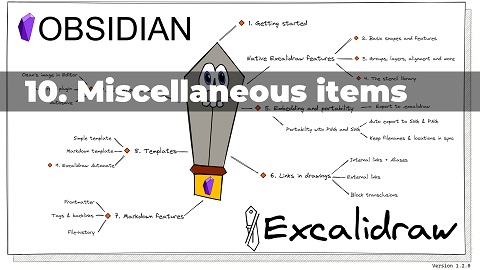](https://youtu.be/D1iBYo1_jjc)|[](https://www.youtube.com/watch?v=_c_0zpBJ4Xc&)|
|
||||
|[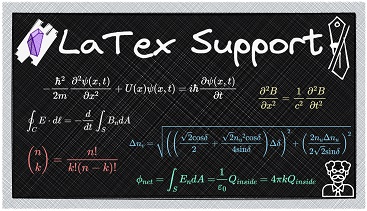](https://youtu.be/r08wk-58DPk)|[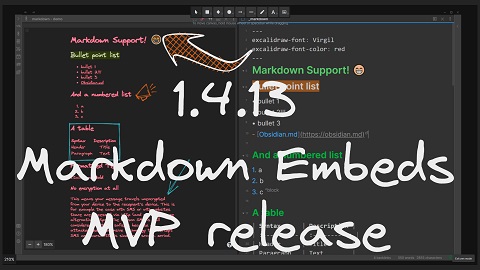](https://youtu.be/tsecSfnTMow)|[](https://youtu.be/K6qZkTz8GHs)|
|
||||
|[](https://youtu.be/hePJcObHIso)|[](https://youtu.be/NOuddK6xrr8)||
|
||||
|[](https://youtu.be/hePJcObHIso)|[](https://youtu.be/NOuddK6xrr8)|[](https://youtu.be/lzYdOQ6z8F0)|
|
||||
|[](https://youtu.be/eKFmrSQhFA4)|||
|
||||
|
||||
|
||||
# Key features
|
||||
@@ -26,7 +27,7 @@ Please upgrade to Obsidian v0.12.19 or higher to get the latest release.
|
||||
- Compatibility features to auto-export and keep in sync markdown excalidraw files and legacy .excalidraw files.
|
||||
- Experimental feature to add custom TAG to file explorer to mark drawing files.
|
||||
- Enable / disable autosave.
|
||||
- You can customize the size and position of the embedded images using the `[[image.excalidraw|100]]`, `[[image.excalidraw|100x100]]`, `[[image.excalidraw|100|left]]`, `[[image.excalidraw|right-wrap]]`, formatting options. `[[<filename.excalidraw>|<width>x<height>|<alignment>]]`. You can add your custom alignment via CSS. Any text that appears in `<alignment>` will be added to the rendered SVG element style and to the wrapper DIV element. Check below and styles.css for more insight.
|
||||
- You can customize the size and position of the embedded images using the `![[image.excalidraw|100]]`, `![[image.excalidraw|100x100]]`, `![[image.excalidraw|100|left]]`, `![[image.excalidraw|right-wrap]]`, formatting options. `![[<filename.excalidraw>|<width>x<height>|<alignment>]]`. You can add your custom alignment via CSS. Any text that appears in `<alignment>` will be added to the rendered SVG element style and to the wrapper DIV element. Check below and styles.css for more insight.
|
||||
- Supports hyperlinks e.g. `https://zsolt.blog`, `[Obsidian](https://obsidian.md)`, and internal links e.g. `[[My file in vault|Alias]]` in drawing text.
|
||||
- Links will update when files are moved or renamed, if you have the Obsidian setting Files & Links/Automatically Update Internal Links enabled.
|
||||
- Links in drawings will show up in backlinks of documents
|
||||
@@ -61,6 +62,7 @@ Please upgrade to Obsidian v0.12.19 or higher to get the latest release.
|
||||
- `excalidraw-link-prefix: "📍"` preview prefix for internal links
|
||||
- `excalidraw-url-prefix: "🌐"` preview prefix for external links
|
||||
- `excalidraw-link-brackets: true|false` whether or not to display brackets around links in preview
|
||||
- `excalidraw-default-mode: view|zen` Open this document in view mode or zen mode by defult. Default view mode is excellent for presentation slides.
|
||||
- Embed complete markdown files into your drawings
|
||||
- Drag from the desired file from the Obsidian file explorer and hold down CTRL/CMD while dropping the file onto the canvas.
|
||||
- Use the command palette action: `Insert markdown file from vault`
|
||||
@@ -73,6 +75,7 @@ Please upgrade to Obsidian v0.12.19 or higher to get the latest release.
|
||||
- `excalidraw-css: "css-filename|css snippet"`
|
||||
- Switch to markdown view or use CTRL/CMD+ALT/OPT click on the image to edit properties of the embed: `[[filename#^blockref|WIDTHxMAXHEIGHT]]`
|
||||
- Includes full [QuickAdd](https://github.com/chhoumann/quickadd), [Templater](https://silentvoid13.github.io/Templater/) and [Dataview](https://blacksmithgu.github.io/obsidian-dataview/docs/api/intro/) support through ExcalidrawAutomate. Check out the [detailed help + examples](https://zsviczian.github.io/obsidian-excalidraw-plugin/). I also have a [YouTube ExcalidrawAutomate Playlist](https://www.youtube.com/playlist?list=PL6mqgtMZ4NP1IR4nXxSlMA4PA5E-qpyHZ) with lots of examples.
|
||||
- Since 1.5.0 you can easily execute ExcalidrawAutomate macros and assign command palette shortcuts to them, using the ScriptEngine. You will find an intro video and a growing library of ready to install scripts [here](https://github.com/zsviczian/obsidian-excalidraw-plugin/tree/master/ea-scripts).
|
||||
- REQUIRES AN OBSIDIAN SYNC SUBSCRIPTION: Full drawing file history and synchronization between devices
|
||||
- Multilanguage support: if you'd like to help out by translating the plugin, please get in contact with me.
|
||||
|
||||
|
||||
@@ -17,7 +17,7 @@ export interface ExcalidrawAutomate {
|
||||
roughness: number;
|
||||
opacity: number;
|
||||
strokeSharpness: StrokeSharpness; //type StrokeSharpness = "round" | "sharp"
|
||||
fontFamily: number; //1: Virgil, 2:Helvetica, 3:Cascadia
|
||||
fontFamily: number; //1: Virgil, 2:Helvetica, 3:Cascadia, 4:LocalFont
|
||||
fontSize: number;
|
||||
textAlign: string; //"left"|"right"|"center"
|
||||
verticalAlign: string; //"top"|"bottom"|"middle" :for future use, has no effect currently
|
||||
@@ -134,8 +134,13 @@ export interface ExcalidrawAutomate {
|
||||
},
|
||||
): boolean;
|
||||
addElementsToView( //Adds elements from elementsDict to the current view
|
||||
repositionToCursor: boolean,
|
||||
save: boolean,
|
||||
repositionToCursor?: boolean, //default is false
|
||||
save?: boolean, //default is true
|
||||
//newElementsOnTop controls whether elements created with ExcalidrawAutomate
|
||||
//are added at the bottom of the stack or the top of the stack of elements already in the view
|
||||
//Note that elements copied to the view with copyViewElementsToEAforEditing retain their
|
||||
//position in the stack of elements in the view even if modified using EA
|
||||
newElementsOnTop?: boolean, //default is false, i.e. the new elements get to the bottom of the stack
|
||||
): Promise<boolean>;
|
||||
onDropHook(data: {
|
||||
//if set Excalidraw will call this function onDrop events
|
||||
@@ -176,6 +181,11 @@ export interface ExcalidrawAutomate {
|
||||
b: readonly [number, number],
|
||||
gap?: number, //if given, element is inflated by this value
|
||||
): Point[];
|
||||
|
||||
//See OCR plugin for example on how to use scriptSettings
|
||||
activeScript: string; //Set automatically by the ScriptEngine
|
||||
getScriptSettings(): {}; //Returns script settings. Saves settings in plugin settings, under the activeScript key
|
||||
setScriptSettings(settings:any):Promise<void>; //sets script settings.
|
||||
}
|
||||
```
|
||||
|
||||
|
||||
78
ea-scripts/Box Each Selected Groups.md
Normal file
@@ -0,0 +1,78 @@
|
||||
/*
|
||||

|
||||
|
||||
Download this file and save to your Obsidian Vault including the first line, or open it in "Raw" and copy the entire contents to Obsidian.
|
||||
|
||||
|
||||
|
||||
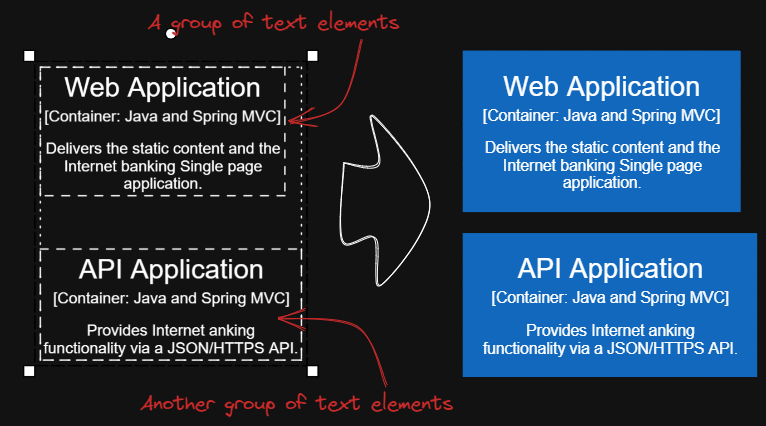
This script will add encapsulating boxes around each of the currently selected groups in Excalidraw.
|
||||
|
||||
You can focus on content creation first, and then batch add consistent style boxes to each group of text.
|
||||
|
||||
Tips 1: You can copy the desired style to the global state using script `Copy Selected Element Style to Global`, then add boxes with the same global style using script `Box Each Selected Groups`.
|
||||
|
||||
Tips 2: Next you can use scripts `Expand rectangles horizontally keep text centered` and `Expand rectangles vertically keep text centered` to make the boxes the same size, if you wish.
|
||||
|
||||
Tips 3: If you want the left and right margins to be different from the top and bottom margins, input something like `32,16`, this will create a box with left and right margins of `32` and top and bottom margins of `16`.
|
||||
|
||||
See documentation for more details:
|
||||
https://zsviczian.github.io/obsidian-excalidraw-plugin/ExcalidrawScriptsEngine.html
|
||||
|
||||
```javascript
|
||||
*/
|
||||
const paddingStr = await utils.inputPrompt("padding?","string","8");
|
||||
var paddingLR = 0;
|
||||
var paddingTB = 0;
|
||||
if(paddingStr.indexOf(',') > 0) {
|
||||
const paddingParts = paddingStr.split(',');
|
||||
paddingLR = parseInt(paddingParts[0]);
|
||||
paddingTB = parseInt(paddingParts[1]);
|
||||
}
|
||||
else {
|
||||
paddingLR = paddingTB = parseInt(paddingStr);
|
||||
}
|
||||
|
||||
if(isNaN(paddingLR) || isNaN(paddingTB)) {
|
||||
return;
|
||||
}
|
||||
|
||||
const elements = ea.getViewSelectedElements();
|
||||
const groups = ea.getMaximumGroups(elements);
|
||||
|
||||
for(const elements of groups) {
|
||||
if(elements.length === 1 && elements[0].type ==="arrow" || elements[0].type==="line") {
|
||||
// individual arrows or lines are not affected
|
||||
continue;
|
||||
}
|
||||
const box = ea.getBoundingBox(elements);
|
||||
color = ea
|
||||
.getExcalidrawAPI()
|
||||
.getAppState()
|
||||
.currentItemStrokeColor;
|
||||
// use current stroke with and style
|
||||
const appState = ea.getExcalidrawAPI().getAppState();
|
||||
const strokeWidth = appState.currentItemStrokeWidth;
|
||||
const strokeStyle = appState.currentItemStrokeStyle;
|
||||
const strokeSharpness = appState.currentItemStrokeSharpness;
|
||||
const roughness = appState.currentItemRoughness;
|
||||
const fillStyle = appState.currentItemFillStyle;
|
||||
const backgroundColor = appState.currentItemBackgroundColor;
|
||||
ea.style.strokeWidth = strokeWidth;
|
||||
ea.style.strokeStyle = strokeStyle;
|
||||
ea.style.strokeSharpness = strokeSharpness;
|
||||
ea.style.roughness = roughness;
|
||||
ea.style.fillStyle = fillStyle;
|
||||
ea.style.backgroundColor = backgroundColor;
|
||||
ea.style.strokeColor = color;
|
||||
|
||||
const id = ea.addRect(
|
||||
box.topX - paddingLR,
|
||||
box.topY - paddingTB,
|
||||
box.width + 2*paddingLR,
|
||||
box.height + 2*paddingTB
|
||||
);
|
||||
ea.copyViewElementsToEAforEditing(elements);
|
||||
ea.addToGroup([id].concat(elements.map((el)=>el.id)));
|
||||
ea.addElementsToView(false);
|
||||
ea.reset();
|
||||
}
|
||||
@@ -13,9 +13,13 @@ https://zsviczian.github.io/obsidian-excalidraw-plugin/ExcalidrawScriptsEngine.h
|
||||
|
||||
```javascript
|
||||
*/
|
||||
//uncomment if you want a prompt for custom padding
|
||||
//const padding = parseInt (await utils.inputPrompt("padding?","number","10"));
|
||||
const padding = 10
|
||||
//uncomment if you don't want a prompt for custom padding
|
||||
//const padding = 10
|
||||
const padding = parseInt (await utils.inputPrompt("padding?","number","10"));
|
||||
if(isNaN(padding)) {
|
||||
new Notice("The padding value provided is not a number");
|
||||
return;
|
||||
}
|
||||
elements = ea.getViewSelectedElements();
|
||||
const box = ea.getBoundingBox(elements);
|
||||
color = ea
|
||||
|
||||
@@ -18,12 +18,15 @@ app.vault.getFiles().forEach((f)=>
|
||||
|
||||
f = Array.from(folders);
|
||||
folder = await utils.suggester(f,f);
|
||||
folder = folder??""; //if exiting suggester with ESC
|
||||
folder = folder === "" ? folder : folder + "/";
|
||||
|
||||
elements = ea.getViewSelectedElements().filter((el)=>el.type==="text");
|
||||
|
||||
elements.forEach((el)=>{
|
||||
el.rawText = "[["+folder+el.rawText+"|"+el.rawText+"]]";
|
||||
el.text = "[["+folder+el.text+"|"+el.text+"]]";
|
||||
el.originalText = "[["+folder+el.originalText+"|"+el.originalText+"]]";
|
||||
})
|
||||
ea.copyViewElementsToEAforEditing(elements);
|
||||
ea.addElementsToView();
|
||||
43
ea-scripts/Copy Selected Element Styles to Global.md
Normal file
@@ -0,0 +1,43 @@
|
||||
/*
|
||||
|
||||

|
||||
|
||||
Download this file and save to your Obsidian Vault including the first line, or open it in "Raw" and copy the entire contents to Obsidian.
|
||||
|
||||
|
||||
|
||||
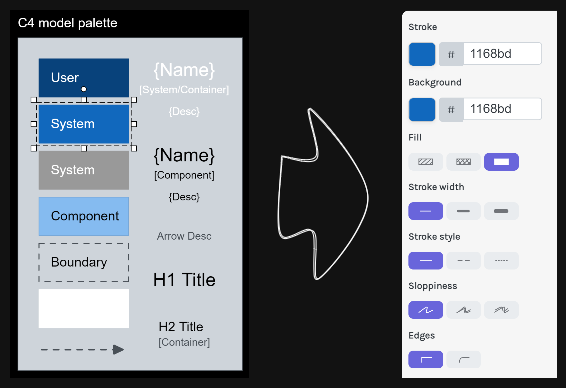
This script will copy styles of any selected element into Excalidraw's global styles.
|
||||
|
||||
After copying the styles of element such as box, text, or arrow using this script, You can then use Excalidraw's box, arrow, and other tools to create several elements with the same style. This is sometimes more convenient than `Copy Styles` and `Paste Styles`, especially when used with the script `Box Each Selected Groups`.
|
||||
|
||||
See documentation for more details:
|
||||
https://zsviczian.github.io/obsidian-excalidraw-plugin/ExcalidrawScriptsEngine.html
|
||||
|
||||
```javascript
|
||||
*/
|
||||
|
||||
const element = ea.getViewSelectedElement();
|
||||
const appState = ea.getExcalidrawAPI().getAppState();
|
||||
|
||||
if(!element) {
|
||||
return;
|
||||
}
|
||||
|
||||
appState.currentItemStrokeWidth = element.strokeWidth;
|
||||
appState.currentItemStrokeStyle = element.strokeStyle;
|
||||
appState.currentItemStrokeSharpness = element.strokeSharpness;
|
||||
appState.currentItemRoughness = element.roughness;
|
||||
appState.currentItemFillStyle = element.fillStyle;
|
||||
appState.currentItemBackgroundColor = element.backgroundColor;
|
||||
appState.currentItemStrokeColor = element.strokeColor;
|
||||
|
||||
if(element.type === 'text') {
|
||||
appState.currentItemFontFamily = element.fontFamily;
|
||||
appState.currentItemFontSize = element.fontSize;
|
||||
appState.currentItemTextAlign = element.textAlign;
|
||||
}
|
||||
|
||||
if(element.type === 'arrow') {
|
||||
appState.currentItemStartArrowhead = element.startArrowhead;
|
||||
appState.currentItemEndArrowhead = element.endArrowhead;
|
||||
}
|
||||
@@ -1,289 +1,289 @@
|
||||
/*
|
||||

|
||||
|
||||
Download this file and save to your Obsidian Vault including the first line, or open it in "Raw" and copy the entire contents to Obsidian.
|
||||
|
||||

|
||||
|
||||
This script darkens the background color of the selected element by 2% at a time.
|
||||
|
||||
You can use this script several times until you are satisfied. It is recommended to set a shortcut key for this script so that you can quickly try to DARKEN and LIGHTEN the color effect.
|
||||
|
||||
In contrast to the `Modify background color opacity` script, the advantage is that the background color of the element is not affected by the canvas color, and the color value does not appear in a strange rgba() form.
|
||||
|
||||
The color conversion method was copied from [color-convert](https://github.com/Qix-/color-convert).
|
||||
|
||||
```javascript
|
||||
*/
|
||||
|
||||
const elements = ea
|
||||
.getViewSelectedElements()
|
||||
.filter((el) =>
|
||||
["rectangle", "ellipse", "diamond", "image"].includes(el.type)
|
||||
);
|
||||
ea.copyViewElementsToEAforEditing(elements);
|
||||
for (const el of ea.getElements()) {
|
||||
const color = colorNameToHex(el.backgroundColor);
|
||||
const rgbColor = /^#?([a-f\d]{2})([a-f\d]{2})([a-f\d]{2})$/i.exec(color);
|
||||
if (rgbColor) {
|
||||
const r = parseInt(rgbColor[1], 16);
|
||||
const g = parseInt(rgbColor[2], 16);
|
||||
const b = parseInt(rgbColor[3], 16);
|
||||
const originalRgb = [r, g, b];
|
||||
const hsl = rgbToHsl(originalRgb);
|
||||
const step = 2;
|
||||
const newLightness = hsl[2] - step;
|
||||
if (newLightness > 0) {
|
||||
hsl[2] = newLightness;
|
||||
}
|
||||
const newRgb = hslToRgb(hsl);
|
||||
el.backgroundColor = "#" + rgbToHexString(newRgb);
|
||||
}
|
||||
}
|
||||
ea.addElementsToView();
|
||||
|
||||
function rgbToHexString(args) {
|
||||
const integer =
|
||||
((Math.round(args[0]) & 0xff) << 16) +
|
||||
((Math.round(args[1]) & 0xff) << 8) +
|
||||
(Math.round(args[2]) & 0xff);
|
||||
|
||||
const string = integer.toString(16).toUpperCase();
|
||||
return "000000".substring(string.length) + string;
|
||||
}
|
||||
|
||||
function hslToRgb(hsl) {
|
||||
const h = hsl[0] / 360;
|
||||
const s = hsl[1] / 100;
|
||||
const l = hsl[2] / 100;
|
||||
let t2;
|
||||
let t3;
|
||||
let val;
|
||||
|
||||
if (s === 0) {
|
||||
val = l * 255;
|
||||
return [val, val, val];
|
||||
}
|
||||
|
||||
if (l < 0.5) {
|
||||
t2 = l * (1 + s);
|
||||
} else {
|
||||
t2 = l + s - l * s;
|
||||
}
|
||||
|
||||
const t1 = 2 * l - t2;
|
||||
|
||||
const rgb = [0, 0, 0];
|
||||
for (let i = 0; i < 3; i++) {
|
||||
t3 = h + (1 / 3) * -(i - 1);
|
||||
if (t3 < 0) {
|
||||
t3++;
|
||||
}
|
||||
|
||||
if (t3 > 1) {
|
||||
t3--;
|
||||
}
|
||||
|
||||
if (6 * t3 < 1) {
|
||||
val = t1 + (t2 - t1) * 6 * t3;
|
||||
} else if (2 * t3 < 1) {
|
||||
val = t2;
|
||||
} else if (3 * t3 < 2) {
|
||||
val = t1 + (t2 - t1) * (2 / 3 - t3) * 6;
|
||||
} else {
|
||||
val = t1;
|
||||
}
|
||||
|
||||
rgb[i] = val * 255;
|
||||
}
|
||||
|
||||
return rgb;
|
||||
}
|
||||
|
||||
function rgbToHsl(rgb) {
|
||||
const r = rgb[0] / 255;
|
||||
const g = rgb[1] / 255;
|
||||
const b = rgb[2] / 255;
|
||||
const min = Math.min(r, g, b);
|
||||
const max = Math.max(r, g, b);
|
||||
const delta = max - min;
|
||||
let h;
|
||||
let s;
|
||||
|
||||
if (max === min) {
|
||||
h = 0;
|
||||
} else if (r === max) {
|
||||
h = (g - b) / delta;
|
||||
} else if (g === max) {
|
||||
h = 2 + (b - r) / delta;
|
||||
} else if (b === max) {
|
||||
h = 4 + (r - g) / delta;
|
||||
}
|
||||
|
||||
h = Math.min(h * 60, 360);
|
||||
|
||||
if (h < 0) {
|
||||
h += 360;
|
||||
}
|
||||
|
||||
const l = (min + max) / 2;
|
||||
|
||||
if (max === min) {
|
||||
s = 0;
|
||||
} else if (l <= 0.5) {
|
||||
s = delta / (max + min);
|
||||
} else {
|
||||
s = delta / (2 - max - min);
|
||||
}
|
||||
|
||||
return [h, s * 100, l * 100];
|
||||
}
|
||||
|
||||
function colorNameToHex(color) {
|
||||
const colors = {
|
||||
aliceblue: "#f0f8ff",
|
||||
antiquewhite: "#faebd7",
|
||||
aqua: "#00ffff",
|
||||
aquamarine: "#7fffd4",
|
||||
azure: "#f0ffff",
|
||||
beige: "#f5f5dc",
|
||||
bisque: "#ffe4c4",
|
||||
black: "#000000",
|
||||
blanchedalmond: "#ffebcd",
|
||||
blue: "#0000ff",
|
||||
blueviolet: "#8a2be2",
|
||||
brown: "#a52a2a",
|
||||
burlywood: "#deb887",
|
||||
cadetblue: "#5f9ea0",
|
||||
chartreuse: "#7fff00",
|
||||
chocolate: "#d2691e",
|
||||
coral: "#ff7f50",
|
||||
cornflowerblue: "#6495ed",
|
||||
cornsilk: "#fff8dc",
|
||||
crimson: "#dc143c",
|
||||
cyan: "#00ffff",
|
||||
darkblue: "#00008b",
|
||||
darkcyan: "#008b8b",
|
||||
darkgoldenrod: "#b8860b",
|
||||
darkgray: "#a9a9a9",
|
||||
darkgreen: "#006400",
|
||||
darkkhaki: "#bdb76b",
|
||||
darkmagenta: "#8b008b",
|
||||
darkolivegreen: "#556b2f",
|
||||
darkorange: "#ff8c00",
|
||||
darkorchid: "#9932cc",
|
||||
darkred: "#8b0000",
|
||||
darksalmon: "#e9967a",
|
||||
darkseagreen: "#8fbc8f",
|
||||
darkslateblue: "#483d8b",
|
||||
darkslategray: "#2f4f4f",
|
||||
darkturquoise: "#00ced1",
|
||||
darkviolet: "#9400d3",
|
||||
deeppink: "#ff1493",
|
||||
deepskyblue: "#00bfff",
|
||||
dimgray: "#696969",
|
||||
dodgerblue: "#1e90ff",
|
||||
firebrick: "#b22222",
|
||||
floralwhite: "#fffaf0",
|
||||
forestgreen: "#228b22",
|
||||
fuchsia: "#ff00ff",
|
||||
gainsboro: "#dcdcdc",
|
||||
ghostwhite: "#f8f8ff",
|
||||
gold: "#ffd700",
|
||||
goldenrod: "#daa520",
|
||||
gray: "#808080",
|
||||
green: "#008000",
|
||||
greenyellow: "#adff2f",
|
||||
honeydew: "#f0fff0",
|
||||
hotpink: "#ff69b4",
|
||||
"indianred ": "#cd5c5c",
|
||||
indigo: "#4b0082",
|
||||
ivory: "#fffff0",
|
||||
khaki: "#f0e68c",
|
||||
lavender: "#e6e6fa",
|
||||
lavenderblush: "#fff0f5",
|
||||
lawngreen: "#7cfc00",
|
||||
lemonchiffon: "#fffacd",
|
||||
lightblue: "#add8e6",
|
||||
lightcoral: "#f08080",
|
||||
lightcyan: "#e0ffff",
|
||||
lightgoldenrodyellow: "#fafad2",
|
||||
lightgrey: "#d3d3d3",
|
||||
lightgreen: "#90ee90",
|
||||
lightpink: "#ffb6c1",
|
||||
lightsalmon: "#ffa07a",
|
||||
lightseagreen: "#20b2aa",
|
||||
lightskyblue: "#87cefa",
|
||||
lightslategray: "#778899",
|
||||
lightsteelblue: "#b0c4de",
|
||||
lightyellow: "#ffffe0",
|
||||
lime: "#00ff00",
|
||||
limegreen: "#32cd32",
|
||||
linen: "#faf0e6",
|
||||
magenta: "#ff00ff",
|
||||
maroon: "#800000",
|
||||
mediumaquamarine: "#66cdaa",
|
||||
mediumblue: "#0000cd",
|
||||
mediumorchid: "#ba55d3",
|
||||
mediumpurple: "#9370d8",
|
||||
mediumseagreen: "#3cb371",
|
||||
mediumslateblue: "#7b68ee",
|
||||
mediumspringgreen: "#00fa9a",
|
||||
mediumturquoise: "#48d1cc",
|
||||
mediumvioletred: "#c71585",
|
||||
midnightblue: "#191970",
|
||||
mintcream: "#f5fffa",
|
||||
mistyrose: "#ffe4e1",
|
||||
moccasin: "#ffe4b5",
|
||||
navajowhite: "#ffdead",
|
||||
navy: "#000080",
|
||||
oldlace: "#fdf5e6",
|
||||
olive: "#808000",
|
||||
olivedrab: "#6b8e23",
|
||||
orange: "#ffa500",
|
||||
orangered: "#ff4500",
|
||||
orchid: "#da70d6",
|
||||
palegoldenrod: "#eee8aa",
|
||||
palegreen: "#98fb98",
|
||||
paleturquoise: "#afeeee",
|
||||
palevioletred: "#d87093",
|
||||
papayawhip: "#ffefd5",
|
||||
peachpuff: "#ffdab9",
|
||||
peru: "#cd853f",
|
||||
pink: "#ffc0cb",
|
||||
plum: "#dda0dd",
|
||||
powderblue: "#b0e0e6",
|
||||
purple: "#800080",
|
||||
rebeccapurple: "#663399",
|
||||
red: "#ff0000",
|
||||
rosybrown: "#bc8f8f",
|
||||
royalblue: "#4169e1",
|
||||
saddlebrown: "#8b4513",
|
||||
salmon: "#fa8072",
|
||||
sandybrown: "#f4a460",
|
||||
seagreen: "#2e8b57",
|
||||
seashell: "#fff5ee",
|
||||
sienna: "#a0522d",
|
||||
silver: "#c0c0c0",
|
||||
skyblue: "#87ceeb",
|
||||
slateblue: "#6a5acd",
|
||||
slategray: "#708090",
|
||||
snow: "#fffafa",
|
||||
springgreen: "#00ff7f",
|
||||
steelblue: "#4682b4",
|
||||
tan: "#d2b48c",
|
||||
teal: "#008080",
|
||||
thistle: "#d8bfd8",
|
||||
tomato: "#ff6347",
|
||||
turquoise: "#40e0d0",
|
||||
violet: "#ee82ee",
|
||||
wheat: "#f5deb3",
|
||||
white: "#ffffff",
|
||||
whitesmoke: "#f5f5f5",
|
||||
yellow: "#ffff00",
|
||||
yellowgreen: "#9acd32",
|
||||
};
|
||||
if (typeof colors[color.toLowerCase()] != "undefined")
|
||||
return colors[color.toLowerCase()];
|
||||
return color;
|
||||
}
|
||||
/*
|
||||

|
||||
|
||||
Download this file and save to your Obsidian Vault including the first line, or open it in "Raw" and copy the entire contents to Obsidian.
|
||||
|
||||

|
||||
|
||||
This script darkens the background color of the selected element by 2% at a time.
|
||||
|
||||
You can use this script several times until you are satisfied. It is recommended to set a shortcut key for this script so that you can quickly try to DARKEN and LIGHTEN the color effect.
|
||||
|
||||
In contrast to the `Modify background color opacity` script, the advantage is that the background color of the element is not affected by the canvas color, and the color value does not appear in a strange rgba() form.
|
||||
|
||||
The color conversion method was copied from [color-convert](https://github.com/Qix-/color-convert).
|
||||
|
||||
```javascript
|
||||
*/
|
||||
|
||||
const elements = ea
|
||||
.getViewSelectedElements()
|
||||
.filter((el) =>
|
||||
["rectangle", "ellipse", "diamond", "image"].includes(el.type)
|
||||
);
|
||||
ea.copyViewElementsToEAforEditing(elements);
|
||||
for (const el of ea.getElements()) {
|
||||
const color = colorNameToHex(el.backgroundColor);
|
||||
const rgbColor = /^#?([a-f\d]{2})([a-f\d]{2})([a-f\d]{2})$/i.exec(color);
|
||||
if (rgbColor) {
|
||||
const r = parseInt(rgbColor[1], 16);
|
||||
const g = parseInt(rgbColor[2], 16);
|
||||
const b = parseInt(rgbColor[3], 16);
|
||||
const originalRgb = [r, g, b];
|
||||
const hsl = rgbToHsl(originalRgb);
|
||||
const step = 2;
|
||||
const newLightness = hsl[2] - step;
|
||||
if (newLightness > 0) {
|
||||
hsl[2] = newLightness;
|
||||
}
|
||||
const newRgb = hslToRgb(hsl);
|
||||
el.backgroundColor = "#" + rgbToHexString(newRgb);
|
||||
}
|
||||
}
|
||||
ea.addElementsToView(false, false);
|
||||
|
||||
function rgbToHexString(args) {
|
||||
const integer =
|
||||
((Math.round(args[0]) & 0xff) << 16) +
|
||||
((Math.round(args[1]) & 0xff) << 8) +
|
||||
(Math.round(args[2]) & 0xff);
|
||||
|
||||
const string = integer.toString(16).toUpperCase();
|
||||
return "000000".substring(string.length) + string;
|
||||
}
|
||||
|
||||
function hslToRgb(hsl) {
|
||||
const h = hsl[0] / 360;
|
||||
const s = hsl[1] / 100;
|
||||
const l = hsl[2] / 100;
|
||||
let t2;
|
||||
let t3;
|
||||
let val;
|
||||
|
||||
if (s === 0) {
|
||||
val = l * 255;
|
||||
return [val, val, val];
|
||||
}
|
||||
|
||||
if (l < 0.5) {
|
||||
t2 = l * (1 + s);
|
||||
} else {
|
||||
t2 = l + s - l * s;
|
||||
}
|
||||
|
||||
const t1 = 2 * l - t2;
|
||||
|
||||
const rgb = [0, 0, 0];
|
||||
for (let i = 0; i < 3; i++) {
|
||||
t3 = h + (1 / 3) * -(i - 1);
|
||||
if (t3 < 0) {
|
||||
t3++;
|
||||
}
|
||||
|
||||
if (t3 > 1) {
|
||||
t3--;
|
||||
}
|
||||
|
||||
if (6 * t3 < 1) {
|
||||
val = t1 + (t2 - t1) * 6 * t3;
|
||||
} else if (2 * t3 < 1) {
|
||||
val = t2;
|
||||
} else if (3 * t3 < 2) {
|
||||
val = t1 + (t2 - t1) * (2 / 3 - t3) * 6;
|
||||
} else {
|
||||
val = t1;
|
||||
}
|
||||
|
||||
rgb[i] = val * 255;
|
||||
}
|
||||
|
||||
return rgb;
|
||||
}
|
||||
|
||||
function rgbToHsl(rgb) {
|
||||
const r = rgb[0] / 255;
|
||||
const g = rgb[1] / 255;
|
||||
const b = rgb[2] / 255;
|
||||
const min = Math.min(r, g, b);
|
||||
const max = Math.max(r, g, b);
|
||||
const delta = max - min;
|
||||
let h;
|
||||
let s;
|
||||
|
||||
if (max === min) {
|
||||
h = 0;
|
||||
} else if (r === max) {
|
||||
h = (g - b) / delta;
|
||||
} else if (g === max) {
|
||||
h = 2 + (b - r) / delta;
|
||||
} else if (b === max) {
|
||||
h = 4 + (r - g) / delta;
|
||||
}
|
||||
|
||||
h = Math.min(h * 60, 360);
|
||||
|
||||
if (h < 0) {
|
||||
h += 360;
|
||||
}
|
||||
|
||||
const l = (min + max) / 2;
|
||||
|
||||
if (max === min) {
|
||||
s = 0;
|
||||
} else if (l <= 0.5) {
|
||||
s = delta / (max + min);
|
||||
} else {
|
||||
s = delta / (2 - max - min);
|
||||
}
|
||||
|
||||
return [h, s * 100, l * 100];
|
||||
}
|
||||
|
||||
function colorNameToHex(color) {
|
||||
const colors = {
|
||||
aliceblue: "#f0f8ff",
|
||||
antiquewhite: "#faebd7",
|
||||
aqua: "#00ffff",
|
||||
aquamarine: "#7fffd4",
|
||||
azure: "#f0ffff",
|
||||
beige: "#f5f5dc",
|
||||
bisque: "#ffe4c4",
|
||||
black: "#000000",
|
||||
blanchedalmond: "#ffebcd",
|
||||
blue: "#0000ff",
|
||||
blueviolet: "#8a2be2",
|
||||
brown: "#a52a2a",
|
||||
burlywood: "#deb887",
|
||||
cadetblue: "#5f9ea0",
|
||||
chartreuse: "#7fff00",
|
||||
chocolate: "#d2691e",
|
||||
coral: "#ff7f50",
|
||||
cornflowerblue: "#6495ed",
|
||||
cornsilk: "#fff8dc",
|
||||
crimson: "#dc143c",
|
||||
cyan: "#00ffff",
|
||||
darkblue: "#00008b",
|
||||
darkcyan: "#008b8b",
|
||||
darkgoldenrod: "#b8860b",
|
||||
darkgray: "#a9a9a9",
|
||||
darkgreen: "#006400",
|
||||
darkkhaki: "#bdb76b",
|
||||
darkmagenta: "#8b008b",
|
||||
darkolivegreen: "#556b2f",
|
||||
darkorange: "#ff8c00",
|
||||
darkorchid: "#9932cc",
|
||||
darkred: "#8b0000",
|
||||
darksalmon: "#e9967a",
|
||||
darkseagreen: "#8fbc8f",
|
||||
darkslateblue: "#483d8b",
|
||||
darkslategray: "#2f4f4f",
|
||||
darkturquoise: "#00ced1",
|
||||
darkviolet: "#9400d3",
|
||||
deeppink: "#ff1493",
|
||||
deepskyblue: "#00bfff",
|
||||
dimgray: "#696969",
|
||||
dodgerblue: "#1e90ff",
|
||||
firebrick: "#b22222",
|
||||
floralwhite: "#fffaf0",
|
||||
forestgreen: "#228b22",
|
||||
fuchsia: "#ff00ff",
|
||||
gainsboro: "#dcdcdc",
|
||||
ghostwhite: "#f8f8ff",
|
||||
gold: "#ffd700",
|
||||
goldenrod: "#daa520",
|
||||
gray: "#808080",
|
||||
green: "#008000",
|
||||
greenyellow: "#adff2f",
|
||||
honeydew: "#f0fff0",
|
||||
hotpink: "#ff69b4",
|
||||
"indianred ": "#cd5c5c",
|
||||
indigo: "#4b0082",
|
||||
ivory: "#fffff0",
|
||||
khaki: "#f0e68c",
|
||||
lavender: "#e6e6fa",
|
||||
lavenderblush: "#fff0f5",
|
||||
lawngreen: "#7cfc00",
|
||||
lemonchiffon: "#fffacd",
|
||||
lightblue: "#add8e6",
|
||||
lightcoral: "#f08080",
|
||||
lightcyan: "#e0ffff",
|
||||
lightgoldenrodyellow: "#fafad2",
|
||||
lightgrey: "#d3d3d3",
|
||||
lightgreen: "#90ee90",
|
||||
lightpink: "#ffb6c1",
|
||||
lightsalmon: "#ffa07a",
|
||||
lightseagreen: "#20b2aa",
|
||||
lightskyblue: "#87cefa",
|
||||
lightslategray: "#778899",
|
||||
lightsteelblue: "#b0c4de",
|
||||
lightyellow: "#ffffe0",
|
||||
lime: "#00ff00",
|
||||
limegreen: "#32cd32",
|
||||
linen: "#faf0e6",
|
||||
magenta: "#ff00ff",
|
||||
maroon: "#800000",
|
||||
mediumaquamarine: "#66cdaa",
|
||||
mediumblue: "#0000cd",
|
||||
mediumorchid: "#ba55d3",
|
||||
mediumpurple: "#9370d8",
|
||||
mediumseagreen: "#3cb371",
|
||||
mediumslateblue: "#7b68ee",
|
||||
mediumspringgreen: "#00fa9a",
|
||||
mediumturquoise: "#48d1cc",
|
||||
mediumvioletred: "#c71585",
|
||||
midnightblue: "#191970",
|
||||
mintcream: "#f5fffa",
|
||||
mistyrose: "#ffe4e1",
|
||||
moccasin: "#ffe4b5",
|
||||
navajowhite: "#ffdead",
|
||||
navy: "#000080",
|
||||
oldlace: "#fdf5e6",
|
||||
olive: "#808000",
|
||||
olivedrab: "#6b8e23",
|
||||
orange: "#ffa500",
|
||||
orangered: "#ff4500",
|
||||
orchid: "#da70d6",
|
||||
palegoldenrod: "#eee8aa",
|
||||
palegreen: "#98fb98",
|
||||
paleturquoise: "#afeeee",
|
||||
palevioletred: "#d87093",
|
||||
papayawhip: "#ffefd5",
|
||||
peachpuff: "#ffdab9",
|
||||
peru: "#cd853f",
|
||||
pink: "#ffc0cb",
|
||||
plum: "#dda0dd",
|
||||
powderblue: "#b0e0e6",
|
||||
purple: "#800080",
|
||||
rebeccapurple: "#663399",
|
||||
red: "#ff0000",
|
||||
rosybrown: "#bc8f8f",
|
||||
royalblue: "#4169e1",
|
||||
saddlebrown: "#8b4513",
|
||||
salmon: "#fa8072",
|
||||
sandybrown: "#f4a460",
|
||||
seagreen: "#2e8b57",
|
||||
seashell: "#fff5ee",
|
||||
sienna: "#a0522d",
|
||||
silver: "#c0c0c0",
|
||||
skyblue: "#87ceeb",
|
||||
slateblue: "#6a5acd",
|
||||
slategray: "#708090",
|
||||
snow: "#fffafa",
|
||||
springgreen: "#00ff7f",
|
||||
steelblue: "#4682b4",
|
||||
tan: "#d2b48c",
|
||||
teal: "#008080",
|
||||
thistle: "#d8bfd8",
|
||||
tomato: "#ff6347",
|
||||
turquoise: "#40e0d0",
|
||||
violet: "#ee82ee",
|
||||
wheat: "#f5deb3",
|
||||
white: "#ffffff",
|
||||
whitesmoke: "#f5f5f5",
|
||||
yellow: "#ffff00",
|
||||
yellowgreen: "#9acd32",
|
||||
};
|
||||
if (typeof colors[color.toLowerCase()] != "undefined")
|
||||
return colors[color.toLowerCase()];
|
||||
return color;
|
||||
}
|
||||
|
||||
@@ -16,7 +16,12 @@ https://zsviczian.github.io/obsidian-excalidraw-plugin/ExcalidrawScriptsEngine.h
|
||||
const elements = ea.getViewSelectedElements();
|
||||
if(elements.length === 0) return;
|
||||
const el = ea.getLargestElement(elements);
|
||||
const sizeIn = [el.x,el.y,el.width,el.height].join(",");
|
||||
const sizeIn = [
|
||||
Math.round(el.x),
|
||||
Math.round(el.y),
|
||||
Math.round(el.width),
|
||||
Math.round(el.height)
|
||||
].join(",");
|
||||
let res = await utils.inputPrompt("x,y,width,height?",null,sizeIn);
|
||||
res = res.split(",");
|
||||
if(res.length !== 4) return;
|
||||
|
||||
@@ -18,8 +18,12 @@ const elements = ea.getViewSelectedElements();
|
||||
const topGroups = ea.getMaximumGroups(elements);
|
||||
|
||||
const groupWidths = topGroups
|
||||
.map((g) =>
|
||||
g.reduce(
|
||||
.map((g) => {
|
||||
if(g.length === 1 && (g[0].type === 'arrow' || g[0].type === 'line')) {
|
||||
// ignore individual lines
|
||||
return { minLeft: 0, maxRight: 0 };
|
||||
}
|
||||
return g.reduce(
|
||||
(pre, cur, i) => {
|
||||
if (i === 0) {
|
||||
return {
|
||||
@@ -39,8 +43,8 @@ const groupWidths = topGroups
|
||||
}
|
||||
},
|
||||
{ minLeft: 0, maxRight: 0 }
|
||||
)
|
||||
)
|
||||
);
|
||||
})
|
||||
.map((r) => {
|
||||
r.width = r.maxRight - r.minLeft;
|
||||
return r;
|
||||
@@ -61,15 +65,22 @@ for (var i = 0; i < topGroups.length; i++) {
|
||||
const perRectDistance = distance / rects.length;
|
||||
for (var j = 0; j < rects.length; j++) {
|
||||
const rect = rects[j];
|
||||
const rectLeft = rect.x;
|
||||
const rectTop = rect.y;
|
||||
const rectRight = rect.x + rect.width;
|
||||
const rectBottom = rect.y + rect.height;
|
||||
|
||||
rect.x = rect.x + perRectDistance * j - perRectDistance / 2;
|
||||
rect.width += perRectDistance;
|
||||
}
|
||||
for (var j = 0; j < texts.length; j++) {
|
||||
const text = texts[j];
|
||||
text.x = text.x + perRectDistance * j;
|
||||
|
||||
const textsWithRect = texts.filter(text => text.x >= rectLeft && text.x <= rectRight
|
||||
&& text.y >= rectTop && text.y <= rectBottom);
|
||||
for(const text of textsWithRect) {
|
||||
text.x = text.x + perRectDistance * j;
|
||||
}
|
||||
}
|
||||
}
|
||||
}
|
||||
|
||||
ea.copyViewElementsToEAforEditing(elements);
|
||||
ea.addElementsToView();
|
||||
ea.addElementsToView(false, false);
|
||||
|
||||
@@ -18,8 +18,12 @@ const elements = ea.getViewSelectedElements();
|
||||
const topGroups = ea.getMaximumGroups(elements);
|
||||
|
||||
const groupWidths = topGroups
|
||||
.map((g) =>
|
||||
g.reduce(
|
||||
.map((g) => {
|
||||
if(g.length === 1 && (g[0].type === 'arrow' || g[0].type === 'line')) {
|
||||
// ignore individual lines
|
||||
return { minLeft: 0, maxRight: 0 };
|
||||
}
|
||||
return g.reduce(
|
||||
(pre, cur, i) => {
|
||||
if (i === 0) {
|
||||
return {
|
||||
@@ -39,8 +43,8 @@ const groupWidths = topGroups
|
||||
}
|
||||
},
|
||||
{ minLeft: 0, maxRight: 0 }
|
||||
)
|
||||
)
|
||||
);
|
||||
})
|
||||
.map((r) => {
|
||||
r.width = r.maxRight - r.minLeft;
|
||||
return r;
|
||||
@@ -52,9 +56,7 @@ for (var i = 0; i < topGroups.length; i++) {
|
||||
const rects = topGroups[i]
|
||||
.filter((el) => el.type === "rectangle")
|
||||
.sort((lha, rha) => lha.x - rha.x);
|
||||
const texts = topGroups[i]
|
||||
.filter((el) => el.type === "text")
|
||||
.sort((lha, rha) => lha.x - rha.x);
|
||||
|
||||
const groupWith = groupWidths[i].width;
|
||||
if (groupWith < maxGroupWidth) {
|
||||
const distance = maxGroupWidth - groupWith;
|
||||
@@ -64,13 +66,9 @@ for (var i = 0; i < topGroups.length; i++) {
|
||||
rect.x = rect.x + perRectDistance * j;
|
||||
rect.width += perRectDistance;
|
||||
}
|
||||
for (var j = 0; j < texts.length; j++) {
|
||||
const text = texts[j];
|
||||
text.x = text.x + perRectDistance * j;
|
||||
}
|
||||
}
|
||||
}
|
||||
|
||||
ea.copyViewElementsToEAforEditing(elements);
|
||||
ea.addElementsToView();
|
||||
ea.addElementsToView(false, false);
|
||||
|
||||
|
||||
@@ -18,8 +18,12 @@ const elements = ea.getViewSelectedElements();
|
||||
const topGroups = ea.getMaximumGroups(elements);
|
||||
|
||||
const groupHeights = topGroups
|
||||
.map((g) =>
|
||||
g.reduce(
|
||||
.map((g) => {
|
||||
if(g.length === 1 && (g[0].type === 'arrow' || g[0].type === 'line')) {
|
||||
// ignore individual lines
|
||||
return { minTop: 0, maxBottom: 0 };
|
||||
}
|
||||
return g.reduce(
|
||||
(pre, cur, i) => {
|
||||
if (i === 0) {
|
||||
return {
|
||||
@@ -39,8 +43,8 @@ const groupHeights = topGroups
|
||||
}
|
||||
},
|
||||
{ minTop: 0, maxBottom: 0 }
|
||||
)
|
||||
)
|
||||
);
|
||||
})
|
||||
.map((r) => {
|
||||
r.height = r.maxBottom - r.minTop;
|
||||
return r;
|
||||
@@ -61,15 +65,22 @@ for (var i = 0; i < topGroups.length; i++) {
|
||||
const perRectDistance = distance / rects.length;
|
||||
for (var j = 0; j < rects.length; j++) {
|
||||
const rect = rects[j];
|
||||
const rectLeft = rect.x;
|
||||
const rectTop = rect.y;
|
||||
const rectRight = rect.x + rect.width;
|
||||
const rectBottom = rect.y + rect.height;
|
||||
|
||||
rect.y = rect.y + perRectDistance * j - perRectDistance / 2;
|
||||
rect.height += perRectDistance;
|
||||
}
|
||||
for (var j = 0; j < texts.length; j++) {
|
||||
const text = texts[j];
|
||||
text.y = text.y + perRectDistance * j;
|
||||
|
||||
const textsWithRect = texts.filter(text => text.x >= rectLeft && text.x <= rectRight
|
||||
&& text.y >= rectTop && text.y <= rectBottom);
|
||||
for(const text of textsWithRect) {
|
||||
text.y = text.y + perRectDistance * j;
|
||||
}
|
||||
}
|
||||
}
|
||||
}
|
||||
|
||||
ea.copyViewElementsToEAforEditing(elements);
|
||||
ea.addElementsToView();
|
||||
ea.addElementsToView(false, false);
|
||||
|
||||
@@ -15,8 +15,12 @@ const elements = ea.getViewSelectedElements();
|
||||
const topGroups = ea.getMaximumGroups(elements);
|
||||
|
||||
const groupHeights = topGroups
|
||||
.map((g) =>
|
||||
g.reduce(
|
||||
.map((g) => {
|
||||
if(g.length === 1 && (g[0].type === 'arrow' || g[0].type === 'line')) {
|
||||
// ignore individual lines
|
||||
return { minTop: 0, maxBottom: 0 };
|
||||
}
|
||||
return g.reduce(
|
||||
(pre, cur, i) => {
|
||||
if (i === 0) {
|
||||
return {
|
||||
@@ -36,8 +40,8 @@ const groupHeights = topGroups
|
||||
}
|
||||
},
|
||||
{ minTop: 0, maxBottom: 0 }
|
||||
)
|
||||
)
|
||||
);
|
||||
})
|
||||
.map((r) => {
|
||||
r.height = r.maxBottom - r.minTop;
|
||||
return r;
|
||||
@@ -49,9 +53,7 @@ for (var i = 0; i < topGroups.length; i++) {
|
||||
const rects = topGroups[i]
|
||||
.filter((el) => el.type === "rectangle")
|
||||
.sort((lha, rha) => lha.y - rha.y);
|
||||
const texts = topGroups[i]
|
||||
.filter((el) => el.type === "text")
|
||||
.sort((lha, rha) => lha.y - rha.y);
|
||||
|
||||
const groupWith = groupHeights[i].height;
|
||||
if (groupWith < maxGroupHeight) {
|
||||
const distance = maxGroupHeight - groupWith;
|
||||
@@ -61,13 +63,9 @@ for (var i = 0; i < topGroups.length; i++) {
|
||||
rect.y = rect.y + perRectDistance * j;
|
||||
rect.height += perRectDistance;
|
||||
}
|
||||
for (var j = 0; j < texts.length; j++) {
|
||||
const text = texts[j];
|
||||
text.y = text.y + perRectDistance * j;
|
||||
}
|
||||
}
|
||||
}
|
||||
|
||||
ea.copyViewElementsToEAforEditing(elements);
|
||||
ea.addElementsToView();
|
||||
ea.addElementsToView(false, false);
|
||||
|
||||
|
||||
@@ -1,32 +1,37 @@
|
||||
/*
|
||||

|
||||
|
||||
Download this file and save to your Obsidian Vault including the first line, or open it in "Raw" and copy the entire contents to Obsidian.
|
||||
|
||||
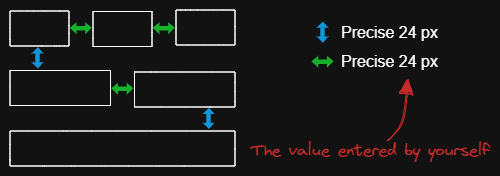
The script arranges the selected elements horizontally with a fixed spacing.
|
||||
|
||||
When we create an architecture diagram or mind map, we often need to arrange a large number of elements in a fixed spacing. `Fixed spacing` and `Fixed vertical Distance` scripts can save us a lot of time.
|
||||
|
||||
```javascript
|
||||
*/
|
||||
const spacing = parseInt (await utils.inputPrompt("spacing?","number","8"));
|
||||
const elements=ea.getViewSelectedElements();
|
||||
const topGroups = ea.getMaximumGroups(elements);
|
||||
const groups = topGroups.sort((lha,rha) => lha[0].x - rha[0].x);
|
||||
|
||||
for(var i=0; i<groups.length; i++) {
|
||||
if(i > 0) {
|
||||
const preGroup = groups[i-1];
|
||||
const curGroup = groups[i];
|
||||
|
||||
const preRight = Math.max(...preGroup.map(el => el.x + el.width));
|
||||
const curLeft = Math.min(...curGroup.map(el => el.x));
|
||||
const distance = curLeft - preRight - spacing;
|
||||
|
||||
for(const curEl of curGroup) {
|
||||
curEl.x = curEl.x - distance;
|
||||
}
|
||||
}
|
||||
}
|
||||
ea.copyViewElementsToEAforEditing(elements);
|
||||
ea.addElementsToView();
|
||||
/*
|
||||

|
||||
|
||||
Download this file and save to your Obsidian Vault including the first line, or open it in "Raw" and copy the entire contents to Obsidian.
|
||||
|
||||
|
||||
|
||||
The script arranges the selected elements horizontally with a fixed spacing.
|
||||
|
||||
When we create an architecture diagram or mind map, we often need to arrange a large number of elements in a fixed spacing. `Fixed spacing` and `Fixed vertical Distance` scripts can save us a lot of time.
|
||||
|
||||
```javascript
|
||||
*/
|
||||
const spacing = parseInt (await utils.inputPrompt("spacing?","number","8"));
|
||||
if(isNaN(spacing)) {
|
||||
return;
|
||||
}
|
||||
const elements=ea.getViewSelectedElements();
|
||||
const topGroups = ea.getMaximumGroups(elements);
|
||||
const groups = topGroups.sort((lha,rha) => lha[0].x - rha[0].x);
|
||||
|
||||
for(var i=0; i<groups.length; i++) {
|
||||
if(i > 0) {
|
||||
const preGroup = groups[i-1];
|
||||
const curGroup = groups[i];
|
||||
|
||||
const preRight = Math.max(...preGroup.map(el => el.x + el.width));
|
||||
const curLeft = Math.min(...curGroup.map(el => el.x));
|
||||
const distance = curLeft - preRight - spacing;
|
||||
|
||||
for(const curEl of curGroup) {
|
||||
curEl.x = curEl.x - distance;
|
||||
}
|
||||
}
|
||||
}
|
||||
ea.copyViewElementsToEAforEditing(elements);
|
||||
ea.addElementsToView(false, false);
|
||||
|
||||
@@ -1,32 +1,37 @@
|
||||
/*
|
||||

|
||||
|
||||
Download this file and save to your Obsidian Vault including the first line, or open it in "Raw" and copy the entire contents to Obsidian.
|
||||
|
||||
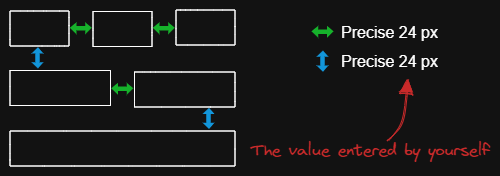
The script arranges the selected elements vertically with a fixed spacing.
|
||||
|
||||
When we create an architecture diagram or mind map, we often need to arrange a large number of elements in a fixed spacing. `Fixed spacing` and `Fixed vertical Distance` scripts can save us a lot of time.
|
||||
|
||||
```javascript
|
||||
*/
|
||||
const spacing = parseInt (await utils.inputPrompt("spacing?","number","8"));
|
||||
const elements=ea.getViewSelectedElements();
|
||||
const topGroups = ea.getMaximumGroups(elements);
|
||||
const groups = topGroups.sort((lha,rha) => lha[0].y - rha[0].y);
|
||||
|
||||
for(var i=0; i<groups.length; i++) {
|
||||
if(i > 0) {
|
||||
const preGroup = groups[i-1];
|
||||
const curGroup = groups[i];
|
||||
|
||||
const preBottom = Math.max(...preGroup.map(el => el.y + el.height));
|
||||
const curTop = Math.min(...curGroup.map(el => el.y));
|
||||
const distance = curTop - preBottom - spacing;
|
||||
|
||||
for(const curEl of curGroup) {
|
||||
curEl.y = curEl.y - distance;
|
||||
}
|
||||
}
|
||||
}
|
||||
ea.copyViewElementsToEAforEditing(elements);
|
||||
ea.addElementsToView();
|
||||
/*
|
||||

|
||||
|
||||
Download this file and save to your Obsidian Vault including the first line, or open it in "Raw" and copy the entire contents to Obsidian.
|
||||
|
||||
|
||||
|
||||
The script arranges the selected elements vertically with a fixed spacing.
|
||||
|
||||
When we create an architecture diagram or mind map, we often need to arrange a large number of elements in a fixed spacing. `Fixed spacing` and `Fixed vertical Distance` scripts can save us a lot of time.
|
||||
|
||||
```javascript
|
||||
*/
|
||||
const spacing = parseInt (await utils.inputPrompt("spacing?","number","8"));
|
||||
if(isNaN(spacing)) {
|
||||
return;
|
||||
}
|
||||
const elements=ea.getViewSelectedElements();
|
||||
const topGroups = ea.getMaximumGroups(elements);
|
||||
const groups = topGroups.sort((lha,rha) => lha[0].y - rha[0].y);
|
||||
|
||||
for(var i=0; i<groups.length; i++) {
|
||||
if(i > 0) {
|
||||
const preGroup = groups[i-1];
|
||||
const curGroup = groups[i];
|
||||
|
||||
const preBottom = Math.max(...preGroup.map(el => el.y + el.height));
|
||||
const curTop = Math.min(...curGroup.map(el => el.y));
|
||||
const distance = curTop - preBottom - spacing;
|
||||
|
||||
for(const curEl of curGroup) {
|
||||
curEl.y = curEl.y - distance;
|
||||
}
|
||||
}
|
||||
}
|
||||
ea.copyViewElementsToEAforEditing(elements);
|
||||
ea.addElementsToView(false, false);
|
||||
|
||||
@@ -1,289 +1,289 @@
|
||||
/*
|
||||

|
||||
|
||||
Download this file and save to your Obsidian Vault including the first line, or open it in "Raw" and copy the entire contents to Obsidian.
|
||||
|
||||

|
||||
|
||||
This script lightens the background color of the selected element by 2% at a time.
|
||||
|
||||
You can use this script several times until you are satisfied. It is recommended to set a shortcut key for this script so that you can quickly try to DARKEN and LIGHTEN the color effect.
|
||||
|
||||
In contrast to the `Modify background color opacity` script, the advantage is that the background color of the element is not affected by the canvas color, and the color value does not appear in a strange rgba() form.
|
||||
|
||||
The color conversion method was copied from [color-convert](https://github.com/Qix-/color-convert).
|
||||
|
||||
```javascript
|
||||
*/
|
||||
|
||||
const elements = ea
|
||||
.getViewSelectedElements()
|
||||
.filter((el) =>
|
||||
["rectangle", "ellipse", "diamond", "image"].includes(el.type)
|
||||
);
|
||||
ea.copyViewElementsToEAforEditing(elements);
|
||||
for (const el of ea.getElements()) {
|
||||
const color = colorNameToHex(el.backgroundColor);
|
||||
const rgbColor = /^#?([a-f\d]{2})([a-f\d]{2})([a-f\d]{2})$/i.exec(color);
|
||||
if (rgbColor) {
|
||||
const r = parseInt(rgbColor[1], 16);
|
||||
const g = parseInt(rgbColor[2], 16);
|
||||
const b = parseInt(rgbColor[3], 16);
|
||||
const originalRgb = [r, g, b];
|
||||
const hsl = rgbToHsl(originalRgb);
|
||||
const step = 2;
|
||||
const newLightness = hsl[2] + step;
|
||||
if (newLightness < 100) {
|
||||
hsl[2] = newLightness;
|
||||
}
|
||||
const newRgb = hslToRgb(hsl);
|
||||
el.backgroundColor = "#" + rgbToHexString(newRgb);
|
||||
}
|
||||
}
|
||||
ea.addElementsToView();
|
||||
|
||||
function rgbToHexString(args) {
|
||||
const integer =
|
||||
((Math.round(args[0]) & 0xff) << 16) +
|
||||
((Math.round(args[1]) & 0xff) << 8) +
|
||||
(Math.round(args[2]) & 0xff);
|
||||
|
||||
const string = integer.toString(16).toUpperCase();
|
||||
return "000000".substring(string.length) + string;
|
||||
}
|
||||
|
||||
function hslToRgb(hsl) {
|
||||
const h = hsl[0] / 360;
|
||||
const s = hsl[1] / 100;
|
||||
const l = hsl[2] / 100;
|
||||
let t2;
|
||||
let t3;
|
||||
let val;
|
||||
|
||||
if (s === 0) {
|
||||
val = l * 255;
|
||||
return [val, val, val];
|
||||
}
|
||||
|
||||
if (l < 0.5) {
|
||||
t2 = l * (1 + s);
|
||||
} else {
|
||||
t2 = l + s - l * s;
|
||||
}
|
||||
|
||||
const t1 = 2 * l - t2;
|
||||
|
||||
const rgb = [0, 0, 0];
|
||||
for (let i = 0; i < 3; i++) {
|
||||
t3 = h + (1 / 3) * -(i - 1);
|
||||
if (t3 < 0) {
|
||||
t3++;
|
||||
}
|
||||
|
||||
if (t3 > 1) {
|
||||
t3--;
|
||||
}
|
||||
|
||||
if (6 * t3 < 1) {
|
||||
val = t1 + (t2 - t1) * 6 * t3;
|
||||
} else if (2 * t3 < 1) {
|
||||
val = t2;
|
||||
} else if (3 * t3 < 2) {
|
||||
val = t1 + (t2 - t1) * (2 / 3 - t3) * 6;
|
||||
} else {
|
||||
val = t1;
|
||||
}
|
||||
|
||||
rgb[i] = val * 255;
|
||||
}
|
||||
|
||||
return rgb;
|
||||
}
|
||||
|
||||
function rgbToHsl(rgb) {
|
||||
const r = rgb[0] / 255;
|
||||
const g = rgb[1] / 255;
|
||||
const b = rgb[2] / 255;
|
||||
const min = Math.min(r, g, b);
|
||||
const max = Math.max(r, g, b);
|
||||
const delta = max - min;
|
||||
let h;
|
||||
let s;
|
||||
|
||||
if (max === min) {
|
||||
h = 0;
|
||||
} else if (r === max) {
|
||||
h = (g - b) / delta;
|
||||
} else if (g === max) {
|
||||
h = 2 + (b - r) / delta;
|
||||
} else if (b === max) {
|
||||
h = 4 + (r - g) / delta;
|
||||
}
|
||||
|
||||
h = Math.min(h * 60, 360);
|
||||
|
||||
if (h < 0) {
|
||||
h += 360;
|
||||
}
|
||||
|
||||
const l = (min + max) / 2;
|
||||
|
||||
if (max === min) {
|
||||
s = 0;
|
||||
} else if (l <= 0.5) {
|
||||
s = delta / (max + min);
|
||||
} else {
|
||||
s = delta / (2 - max - min);
|
||||
}
|
||||
|
||||
return [h, s * 100, l * 100];
|
||||
}
|
||||
|
||||
function colorNameToHex(color) {
|
||||
const colors = {
|
||||
aliceblue: "#f0f8ff",
|
||||
antiquewhite: "#faebd7",
|
||||
aqua: "#00ffff",
|
||||
aquamarine: "#7fffd4",
|
||||
azure: "#f0ffff",
|
||||
beige: "#f5f5dc",
|
||||
bisque: "#ffe4c4",
|
||||
black: "#000000",
|
||||
blanchedalmond: "#ffebcd",
|
||||
blue: "#0000ff",
|
||||
blueviolet: "#8a2be2",
|
||||
brown: "#a52a2a",
|
||||
burlywood: "#deb887",
|
||||
cadetblue: "#5f9ea0",
|
||||
chartreuse: "#7fff00",
|
||||
chocolate: "#d2691e",
|
||||
coral: "#ff7f50",
|
||||
cornflowerblue: "#6495ed",
|
||||
cornsilk: "#fff8dc",
|
||||
crimson: "#dc143c",
|
||||
cyan: "#00ffff",
|
||||
darkblue: "#00008b",
|
||||
darkcyan: "#008b8b",
|
||||
darkgoldenrod: "#b8860b",
|
||||
darkgray: "#a9a9a9",
|
||||
darkgreen: "#006400",
|
||||
darkkhaki: "#bdb76b",
|
||||
darkmagenta: "#8b008b",
|
||||
darkolivegreen: "#556b2f",
|
||||
darkorange: "#ff8c00",
|
||||
darkorchid: "#9932cc",
|
||||
darkred: "#8b0000",
|
||||
darksalmon: "#e9967a",
|
||||
darkseagreen: "#8fbc8f",
|
||||
darkslateblue: "#483d8b",
|
||||
darkslategray: "#2f4f4f",
|
||||
darkturquoise: "#00ced1",
|
||||
darkviolet: "#9400d3",
|
||||
deeppink: "#ff1493",
|
||||
deepskyblue: "#00bfff",
|
||||
dimgray: "#696969",
|
||||
dodgerblue: "#1e90ff",
|
||||
firebrick: "#b22222",
|
||||
floralwhite: "#fffaf0",
|
||||
forestgreen: "#228b22",
|
||||
fuchsia: "#ff00ff",
|
||||
gainsboro: "#dcdcdc",
|
||||
ghostwhite: "#f8f8ff",
|
||||
gold: "#ffd700",
|
||||
goldenrod: "#daa520",
|
||||
gray: "#808080",
|
||||
green: "#008000",
|
||||
greenyellow: "#adff2f",
|
||||
honeydew: "#f0fff0",
|
||||
hotpink: "#ff69b4",
|
||||
"indianred ": "#cd5c5c",
|
||||
indigo: "#4b0082",
|
||||
ivory: "#fffff0",
|
||||
khaki: "#f0e68c",
|
||||
lavender: "#e6e6fa",
|
||||
lavenderblush: "#fff0f5",
|
||||
lawngreen: "#7cfc00",
|
||||
lemonchiffon: "#fffacd",
|
||||
lightblue: "#add8e6",
|
||||
lightcoral: "#f08080",
|
||||
lightcyan: "#e0ffff",
|
||||
lightgoldenrodyellow: "#fafad2",
|
||||
lightgrey: "#d3d3d3",
|
||||
lightgreen: "#90ee90",
|
||||
lightpink: "#ffb6c1",
|
||||
lightsalmon: "#ffa07a",
|
||||
lightseagreen: "#20b2aa",
|
||||
lightskyblue: "#87cefa",
|
||||
lightslategray: "#778899",
|
||||
lightsteelblue: "#b0c4de",
|
||||
lightyellow: "#ffffe0",
|
||||
lime: "#00ff00",
|
||||
limegreen: "#32cd32",
|
||||
linen: "#faf0e6",
|
||||
magenta: "#ff00ff",
|
||||
maroon: "#800000",
|
||||
mediumaquamarine: "#66cdaa",
|
||||
mediumblue: "#0000cd",
|
||||
mediumorchid: "#ba55d3",
|
||||
mediumpurple: "#9370d8",
|
||||
mediumseagreen: "#3cb371",
|
||||
mediumslateblue: "#7b68ee",
|
||||
mediumspringgreen: "#00fa9a",
|
||||
mediumturquoise: "#48d1cc",
|
||||
mediumvioletred: "#c71585",
|
||||
midnightblue: "#191970",
|
||||
mintcream: "#f5fffa",
|
||||
mistyrose: "#ffe4e1",
|
||||
moccasin: "#ffe4b5",
|
||||
navajowhite: "#ffdead",
|
||||
navy: "#000080",
|
||||
oldlace: "#fdf5e6",
|
||||
olive: "#808000",
|
||||
olivedrab: "#6b8e23",
|
||||
orange: "#ffa500",
|
||||
orangered: "#ff4500",
|
||||
orchid: "#da70d6",
|
||||
palegoldenrod: "#eee8aa",
|
||||
palegreen: "#98fb98",
|
||||
paleturquoise: "#afeeee",
|
||||
palevioletred: "#d87093",
|
||||
papayawhip: "#ffefd5",
|
||||
peachpuff: "#ffdab9",
|
||||
peru: "#cd853f",
|
||||
pink: "#ffc0cb",
|
||||
plum: "#dda0dd",
|
||||
powderblue: "#b0e0e6",
|
||||
purple: "#800080",
|
||||
rebeccapurple: "#663399",
|
||||
red: "#ff0000",
|
||||
rosybrown: "#bc8f8f",
|
||||
royalblue: "#4169e1",
|
||||
saddlebrown: "#8b4513",
|
||||
salmon: "#fa8072",
|
||||
sandybrown: "#f4a460",
|
||||
seagreen: "#2e8b57",
|
||||
seashell: "#fff5ee",
|
||||
sienna: "#a0522d",
|
||||
silver: "#c0c0c0",
|
||||
skyblue: "#87ceeb",
|
||||
slateblue: "#6a5acd",
|
||||
slategray: "#708090",
|
||||
snow: "#fffafa",
|
||||
springgreen: "#00ff7f",
|
||||
steelblue: "#4682b4",
|
||||
tan: "#d2b48c",
|
||||
teal: "#008080",
|
||||
thistle: "#d8bfd8",
|
||||
tomato: "#ff6347",
|
||||
turquoise: "#40e0d0",
|
||||
violet: "#ee82ee",
|
||||
wheat: "#f5deb3",
|
||||
white: "#ffffff",
|
||||
whitesmoke: "#f5f5f5",
|
||||
yellow: "#ffff00",
|
||||
yellowgreen: "#9acd32",
|
||||
};
|
||||
if (typeof colors[color.toLowerCase()] != "undefined")
|
||||
return colors[color.toLowerCase()];
|
||||
return color;
|
||||
}
|
||||
/*
|
||||

|
||||
|
||||
Download this file and save to your Obsidian Vault including the first line, or open it in "Raw" and copy the entire contents to Obsidian.
|
||||
|
||||

|
||||
|
||||
This script lightens the background color of the selected element by 2% at a time.
|
||||
|
||||
You can use this script several times until you are satisfied. It is recommended to set a shortcut key for this script so that you can quickly try to DARKEN and LIGHTEN the color effect.
|
||||
|
||||
In contrast to the `Modify background color opacity` script, the advantage is that the background color of the element is not affected by the canvas color, and the color value does not appear in a strange rgba() form.
|
||||
|
||||
The color conversion method was copied from [color-convert](https://github.com/Qix-/color-convert).
|
||||
|
||||
```javascript
|
||||
*/
|
||||
|
||||
const elements = ea
|
||||
.getViewSelectedElements()
|
||||
.filter((el) =>
|
||||
["rectangle", "ellipse", "diamond", "image"].includes(el.type)
|
||||
);
|
||||
ea.copyViewElementsToEAforEditing(elements);
|
||||
for (const el of ea.getElements()) {
|
||||
const color = colorNameToHex(el.backgroundColor);
|
||||
const rgbColor = /^#?([a-f\d]{2})([a-f\d]{2})([a-f\d]{2})$/i.exec(color);
|
||||
if (rgbColor) {
|
||||
const r = parseInt(rgbColor[1], 16);
|
||||
const g = parseInt(rgbColor[2], 16);
|
||||
const b = parseInt(rgbColor[3], 16);
|
||||
const originalRgb = [r, g, b];
|
||||
const hsl = rgbToHsl(originalRgb);
|
||||
const step = 2;
|
||||
const newLightness = hsl[2] + step;
|
||||
if (newLightness < 100) {
|
||||
hsl[2] = newLightness;
|
||||
}
|
||||
const newRgb = hslToRgb(hsl);
|
||||
el.backgroundColor = "#" + rgbToHexString(newRgb);
|
||||
}
|
||||
}
|
||||
ea.addElementsToView(false, false);
|
||||
|
||||
function rgbToHexString(args) {
|
||||
const integer =
|
||||
((Math.round(args[0]) & 0xff) << 16) +
|
||||
((Math.round(args[1]) & 0xff) << 8) +
|
||||
(Math.round(args[2]) & 0xff);
|
||||
|
||||
const string = integer.toString(16).toUpperCase();
|
||||
return "000000".substring(string.length) + string;
|
||||
}
|
||||
|
||||
function hslToRgb(hsl) {
|
||||
const h = hsl[0] / 360;
|
||||
const s = hsl[1] / 100;
|
||||
const l = hsl[2] / 100;
|
||||
let t2;
|
||||
let t3;
|
||||
let val;
|
||||
|
||||
if (s === 0) {
|
||||
val = l * 255;
|
||||
return [val, val, val];
|
||||
}
|
||||
|
||||
if (l < 0.5) {
|
||||
t2 = l * (1 + s);
|
||||
} else {
|
||||
t2 = l + s - l * s;
|
||||
}
|
||||
|
||||
const t1 = 2 * l - t2;
|
||||
|
||||
const rgb = [0, 0, 0];
|
||||
for (let i = 0; i < 3; i++) {
|
||||
t3 = h + (1 / 3) * -(i - 1);
|
||||
if (t3 < 0) {
|
||||
t3++;
|
||||
}
|
||||
|
||||
if (t3 > 1) {
|
||||
t3--;
|
||||
}
|
||||
|
||||
if (6 * t3 < 1) {
|
||||
val = t1 + (t2 - t1) * 6 * t3;
|
||||
} else if (2 * t3 < 1) {
|
||||
val = t2;
|
||||
} else if (3 * t3 < 2) {
|
||||
val = t1 + (t2 - t1) * (2 / 3 - t3) * 6;
|
||||
} else {
|
||||
val = t1;
|
||||
}
|
||||
|
||||
rgb[i] = val * 255;
|
||||
}
|
||||
|
||||
return rgb;
|
||||
}
|
||||
|
||||
function rgbToHsl(rgb) {
|
||||
const r = rgb[0] / 255;
|
||||
const g = rgb[1] / 255;
|
||||
const b = rgb[2] / 255;
|
||||
const min = Math.min(r, g, b);
|
||||
const max = Math.max(r, g, b);
|
||||
const delta = max - min;
|
||||
let h;
|
||||
let s;
|
||||
|
||||
if (max === min) {
|
||||
h = 0;
|
||||
} else if (r === max) {
|
||||
h = (g - b) / delta;
|
||||
} else if (g === max) {
|
||||
h = 2 + (b - r) / delta;
|
||||
} else if (b === max) {
|
||||
h = 4 + (r - g) / delta;
|
||||
}
|
||||
|
||||
h = Math.min(h * 60, 360);
|
||||
|
||||
if (h < 0) {
|
||||
h += 360;
|
||||
}
|
||||
|
||||
const l = (min + max) / 2;
|
||||
|
||||
if (max === min) {
|
||||
s = 0;
|
||||
} else if (l <= 0.5) {
|
||||
s = delta / (max + min);
|
||||
} else {
|
||||
s = delta / (2 - max - min);
|
||||
}
|
||||
|
||||
return [h, s * 100, l * 100];
|
||||
}
|
||||
|
||||
function colorNameToHex(color) {
|
||||
const colors = {
|
||||
aliceblue: "#f0f8ff",
|
||||
antiquewhite: "#faebd7",
|
||||
aqua: "#00ffff",
|
||||
aquamarine: "#7fffd4",
|
||||
azure: "#f0ffff",
|
||||
beige: "#f5f5dc",
|
||||
bisque: "#ffe4c4",
|
||||
black: "#000000",
|
||||
blanchedalmond: "#ffebcd",
|
||||
blue: "#0000ff",
|
||||
blueviolet: "#8a2be2",
|
||||
brown: "#a52a2a",
|
||||
burlywood: "#deb887",
|
||||
cadetblue: "#5f9ea0",
|
||||
chartreuse: "#7fff00",
|
||||
chocolate: "#d2691e",
|
||||
coral: "#ff7f50",
|
||||
cornflowerblue: "#6495ed",
|
||||
cornsilk: "#fff8dc",
|
||||
crimson: "#dc143c",
|
||||
cyan: "#00ffff",
|
||||
darkblue: "#00008b",
|
||||
darkcyan: "#008b8b",
|
||||
darkgoldenrod: "#b8860b",
|
||||
darkgray: "#a9a9a9",
|
||||
darkgreen: "#006400",
|
||||
darkkhaki: "#bdb76b",
|
||||
darkmagenta: "#8b008b",
|
||||
darkolivegreen: "#556b2f",
|
||||
darkorange: "#ff8c00",
|
||||
darkorchid: "#9932cc",
|
||||
darkred: "#8b0000",
|
||||
darksalmon: "#e9967a",
|
||||
darkseagreen: "#8fbc8f",
|
||||
darkslateblue: "#483d8b",
|
||||
darkslategray: "#2f4f4f",
|
||||
darkturquoise: "#00ced1",
|
||||
darkviolet: "#9400d3",
|
||||
deeppink: "#ff1493",
|
||||
deepskyblue: "#00bfff",
|
||||
dimgray: "#696969",
|
||||
dodgerblue: "#1e90ff",
|
||||
firebrick: "#b22222",
|
||||
floralwhite: "#fffaf0",
|
||||
forestgreen: "#228b22",
|
||||
fuchsia: "#ff00ff",
|
||||
gainsboro: "#dcdcdc",
|
||||
ghostwhite: "#f8f8ff",
|
||||
gold: "#ffd700",
|
||||
goldenrod: "#daa520",
|
||||
gray: "#808080",
|
||||
green: "#008000",
|
||||
greenyellow: "#adff2f",
|
||||
honeydew: "#f0fff0",
|
||||
hotpink: "#ff69b4",
|
||||
"indianred ": "#cd5c5c",
|
||||
indigo: "#4b0082",
|
||||
ivory: "#fffff0",
|
||||
khaki: "#f0e68c",
|
||||
lavender: "#e6e6fa",
|
||||
lavenderblush: "#fff0f5",
|
||||
lawngreen: "#7cfc00",
|
||||
lemonchiffon: "#fffacd",
|
||||
lightblue: "#add8e6",
|
||||
lightcoral: "#f08080",
|
||||
lightcyan: "#e0ffff",
|
||||
lightgoldenrodyellow: "#fafad2",
|
||||
lightgrey: "#d3d3d3",
|
||||
lightgreen: "#90ee90",
|
||||
lightpink: "#ffb6c1",
|
||||
lightsalmon: "#ffa07a",
|
||||
lightseagreen: "#20b2aa",
|
||||
lightskyblue: "#87cefa",
|
||||
lightslategray: "#778899",
|
||||
lightsteelblue: "#b0c4de",
|
||||
lightyellow: "#ffffe0",
|
||||
lime: "#00ff00",
|
||||
limegreen: "#32cd32",
|
||||
linen: "#faf0e6",
|
||||
magenta: "#ff00ff",
|
||||
maroon: "#800000",
|
||||
mediumaquamarine: "#66cdaa",
|
||||
mediumblue: "#0000cd",
|
||||
mediumorchid: "#ba55d3",
|
||||
mediumpurple: "#9370d8",
|
||||
mediumseagreen: "#3cb371",
|
||||
mediumslateblue: "#7b68ee",
|
||||
mediumspringgreen: "#00fa9a",
|
||||
mediumturquoise: "#48d1cc",
|
||||
mediumvioletred: "#c71585",
|
||||
midnightblue: "#191970",
|
||||
mintcream: "#f5fffa",
|
||||
mistyrose: "#ffe4e1",
|
||||
moccasin: "#ffe4b5",
|
||||
navajowhite: "#ffdead",
|
||||
navy: "#000080",
|
||||
oldlace: "#fdf5e6",
|
||||
olive: "#808000",
|
||||
olivedrab: "#6b8e23",
|
||||
orange: "#ffa500",
|
||||
orangered: "#ff4500",
|
||||
orchid: "#da70d6",
|
||||
palegoldenrod: "#eee8aa",
|
||||
palegreen: "#98fb98",
|
||||
paleturquoise: "#afeeee",
|
||||
palevioletred: "#d87093",
|
||||
papayawhip: "#ffefd5",
|
||||
peachpuff: "#ffdab9",
|
||||
peru: "#cd853f",
|
||||
pink: "#ffc0cb",
|
||||
plum: "#dda0dd",
|
||||
powderblue: "#b0e0e6",
|
||||
purple: "#800080",
|
||||
rebeccapurple: "#663399",
|
||||
red: "#ff0000",
|
||||
rosybrown: "#bc8f8f",
|
||||
royalblue: "#4169e1",
|
||||
saddlebrown: "#8b4513",
|
||||
salmon: "#fa8072",
|
||||
sandybrown: "#f4a460",
|
||||
seagreen: "#2e8b57",
|
||||
seashell: "#fff5ee",
|
||||
sienna: "#a0522d",
|
||||
silver: "#c0c0c0",
|
||||
skyblue: "#87ceeb",
|
||||
slateblue: "#6a5acd",
|
||||
slategray: "#708090",
|
||||
snow: "#fffafa",
|
||||
springgreen: "#00ff7f",
|
||||
steelblue: "#4682b4",
|
||||
tan: "#d2b48c",
|
||||
teal: "#008080",
|
||||
thistle: "#d8bfd8",
|
||||
tomato: "#ff6347",
|
||||
turquoise: "#40e0d0",
|
||||
violet: "#ee82ee",
|
||||
wheat: "#f5deb3",
|
||||
white: "#ffffff",
|
||||
whitesmoke: "#f5f5f5",
|
||||
yellow: "#ffff00",
|
||||
yellowgreen: "#9acd32",
|
||||
};
|
||||
if (typeof colors[color.toLowerCase()] != "undefined")
|
||||
return colors[color.toLowerCase()];
|
||||
return color;
|
||||
}
|
||||
|
||||
@@ -3,6 +3,8 @@
|
||||
|
||||
Download this file and save to your Obsidian Vault including the first line, or open it in "Raw" and copy the entire contents to Obsidian.
|
||||
|
||||
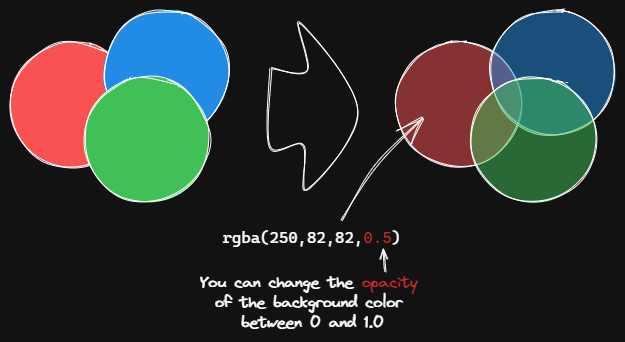
|
||||
|
||||
This script changes the opacity of the background color of the selected boxes.
|
||||
|
||||
The default background color in Excalidraw is so dark that the text is hard to read. You can lighten the color a bit by setting transparency. And you can tweak the transparency over and over again until you're happy with it.
|
||||
@@ -12,6 +14,9 @@ Although excalidraw has the opacity option in its native property Settings, it a
|
||||
```javascript
|
||||
*/
|
||||
const alpha = parseFloat(await utils.inputPrompt("Background color opacity?","number","0.6"));
|
||||
if(isNaN(alpha)) {
|
||||
return;
|
||||
}
|
||||
const elements=ea.getViewSelectedElements().filter((el)=>["rectangle","ellipse","diamond","line","image"].includes(el.type));
|
||||
ea.copyViewElementsToEAforEditing(elements);
|
||||
ea.getElements().forEach((el)=>{
|
||||
@@ -30,7 +35,7 @@ ea.getElements().forEach((el)=>{
|
||||
}
|
||||
}
|
||||
});
|
||||
ea.addElementsToView();
|
||||
ea.addElementsToView(false, false);
|
||||
|
||||
function colorNameToHex(color) {
|
||||
const colors = {
|
||||
|
||||
121
ea-scripts/OCR - Optical Character Recognition.md
Normal file
@@ -0,0 +1,121 @@
|
||||
/*
|
||||

|
||||
|
||||
Download this file and save to your Obsidian Vault including the first line, or open it in "Raw" and copy the entire contents to Obsidian.
|
||||
|
||||

|
||||
|
||||
THIS SCRIPT REQUIRES EXCALIDRAW 1.5.15
|
||||
|
||||
The script will
|
||||
1) send the selected image file to [taskbone.com](https://taskbone.com) to exctract the text from the image, and
|
||||
2) will add the text to your drawing as a text element
|
||||
|
||||
I recommend also installing the [Transfer TextElements to Excalidraw markdown metadata](Transfer%20TextElements%20to%20Excalidraw%20markdown%20metadata.md) script as well.
|
||||
|
||||
The script is based on [@schlundd](https://github.com/schlundd)'s [Obsidian-OCR-Plugin](https://github.com/schlundd/obsidian-ocr-plugin)
|
||||
|
||||
See ScriptEngine documentation for more details:
|
||||
https://zsviczian.github.io/obsidian-excalidraw-plugin/ExcalidrawScriptsEngine.html
|
||||
|
||||
```javascript
|
||||
*/
|
||||
const curVersion = app.plugins.manifests["obsidian-excalidraw-plugin"].version;
|
||||
if(curVersion < "1.5.15") new Notice("please update Excalidraw plugin to the latest version");
|
||||
|
||||
let token = ea.getScriptSettings()?.token;
|
||||
const BASE_URL = "https://ocr.taskbone.com";
|
||||
|
||||
//get new token if token was not provided
|
||||
if (!token) {
|
||||
const tokenResponse = await fetch(
|
||||
BASE_URL + "/get-new-token", {
|
||||
method: 'post'
|
||||
});
|
||||
if (tokenResponse.status === 200) {
|
||||
jsonResponse = await tokenResponse.json();
|
||||
token = jsonResponse.token;
|
||||
ea.setScriptSettings({token});
|
||||
} else {
|
||||
notice(`Taskbone OCR Error: ${tokenResponse.status}\nPlease try again later.`);
|
||||
return;
|
||||
}
|
||||
}
|
||||
|
||||
//get image element
|
||||
//if multiple image elements were selected prompt user to choose
|
||||
const imageElements = ea.getViewSelectedElements().filter((el)=>el.type==="image");
|
||||
|
||||
//need to save the view to ensure recently pasted images are saved as files
|
||||
await ea.targetView.save();
|
||||
|
||||
let selectedImageElement = null;
|
||||
switch (imageElements.length) {
|
||||
case 0:
|
||||
return;
|
||||
case 1:
|
||||
selectedImageElement = imageElements[0];
|
||||
break;
|
||||
default:
|
||||
const files = imageElements.map((el)=>ea.getViewFileForImageElement(el));
|
||||
selectedImageElement = await utils.suggester(files.map((f)=>f.name),imageElements);
|
||||
break;
|
||||
}
|
||||
|
||||
if(!selectedImageElement) {
|
||||
notice("No image element was selected");
|
||||
return;
|
||||
}
|
||||
const imageFile = ea.getViewFileForImageElement(selectedImageElement);
|
||||
if(!imageFile) {
|
||||
notice("Can read image file");
|
||||
return;
|
||||
}
|
||||
|
||||
//Execute the OCR
|
||||
let text = null;
|
||||
const fileBuffer = await app.vault.readBinary(imageFile);
|
||||
const formData = new FormData();
|
||||
formData.append("image", new Blob([fileBuffer]))
|
||||
try {
|
||||
const response = await fetch(
|
||||
BASE_URL + "/get-text", {
|
||||
headers: {
|
||||
Authorization: "Bearer " + token
|
||||
},
|
||||
method: "post",
|
||||
body: formData
|
||||
});
|
||||
if (response.status == 200) {
|
||||
jsonResponse = await response.json();
|
||||
text = jsonResponse?.text;
|
||||
} else {
|
||||
notice(`Could not read Text from ${file.path}:\n Error: ${response.status}`);
|
||||
return;
|
||||
}
|
||||
} catch (error) {
|
||||
notice(`The OCR service seems unavailable right now. Please try again later.`);
|
||||
return;
|
||||
}
|
||||
|
||||
if(!text) {
|
||||
notice("No text found");
|
||||
return;
|
||||
}
|
||||
console.log({text});
|
||||
|
||||
//add text element to drawing
|
||||
const id = ea.addText(selectedImageElement.x,selectedImageElement.y+selectedImageElement.height,text);
|
||||
await ea.addElementsToView();
|
||||
const API = ea.getExcalidrawAPI();
|
||||
st = API.getAppState();
|
||||
st.selectedElementIds = {};
|
||||
st.selectedElementIds[id] = true;
|
||||
API.updateScene({appState: st});
|
||||
API.zoomToFit(ea.getViewSelectedElements(),1);
|
||||
|
||||
//utility function
|
||||
function notice(message) {
|
||||
new Notice(message,10000);
|
||||
console.log(message);
|
||||
}
|
||||
@@ -1,7 +1,11 @@
|
||||
# Excalidraw Script Engine scripts library
|
||||
Click to watch the intro video:
|
||||
|
||||
[](https://youtu.be/hePJcObHIso)
|
||||
|
||||
See the [Excalidraw Script Engine](https://zsviczian.github.io/obsidian-excalidraw-plugin/ExcalidrawScriptsEngine.html) documentation for more details.
|
||||
|
||||
## How to install
|
||||
## How to install scripts into your Obsidian Vault
|
||||
Open the script you are interested in and save it to your Obsidian Vault including the first line `/*`, or open it in "Raw" and copy the entire contents to Obsidian.
|
||||
|
||||

|
||||
@@ -10,10 +14,12 @@ Open the script you are interested in and save it to your Obsidian Vault includi
|
||||
## List of available scripts
|
||||
|Title|Description|Icon|Contributor|
|
||||
|----|----|----|----|
|
||||
|[Box Each Selected Groups](Box%20Each%20Selected%20Groups.md)|This script will add encapsulating boxes around each of the currently selected groups in Excalidraw.||[@1-2-3](https://github.com/1-2-3)|
|
||||
|[Box Selected Elements](Box%20Selected%20Elements.md)|This script will add an encapsulating box around the currently selected elements in Excalidraw.||[@zsviczian](https://github.com/zsviczian)|
|
||||
|[Bullet Point](Bullet%20Point.md)|This script will add a small circle to the top left of each text element in the selection and add the text and the "bullet point" into a group.||[@zsviczian](https://github.com/zsviczian)|
|
||||
|[Connect elements](Connect%20elements.md)|This script will connect two objects with an arrow. If either of the objects are a set of grouped elements (e.g. a text element grouped with an encapsulating rectangle), the script will identify these groups, and connect the arrow to the largest object in the group (assuming you want to connect the arrow to the box around the text element).|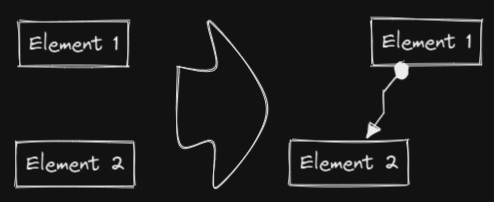|[@zsviczian](https://github.com/zsviczian)|
|
||||
|[Convert text to link with folder and alias](Convert%20text%20to%20link%20with%20folder%20and%20alias.md)|Converts text elements to links pointing to a file in a selected folder and with the alias set as the original text. The script will prompt the user to select an existing folder from the vault.|`original text` => `[[selected folder/original text\|original text]]`|[@zsviczian](https://github.com/zsviczian)|
|
||||
|[Copy Selected Element Styles to Global](Copy%20Selected%20Element%20Styles%20to%20Global)|This script will copy styles of any selected element into Excalidraw's global styles.||[@1-2-3](https://github.com/1-2-3)|
|
||||
|[Create new markdown file and embed into active drawing](Create%20new%20markdown%20file%20and%20embed%20into%20active%20drawing.md)|The script will prompt you for a filename, then create a new markdown document with the file name provided, open the new markdown document in an adjacent pane, and embed the markdown document into the active Excalidraw drawing.|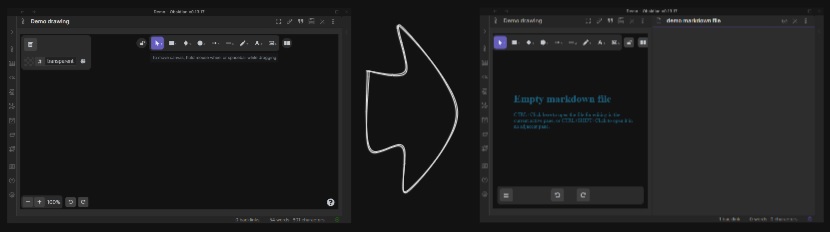|[@zsviczian](https://github.com/zsviczian)|
|
||||
|[Darken background color](Darken%20background%20color.md)|This script darkens the background color of the selected element by 2% at a time. You can use this script several times until you are satisfied. It is recommended to set a shortcut key for this script so that you can quickly try to DARKEN and LIGHTEN the color effect. In contrast to the `Modify background color opacity` script, the advantage is that the background color of the element is not affected by the canvas color, and the color value does not appear in a strange rgba() form.||[@1-2-3](https://github.com/1-2-3)|
|
||||
|[Dimensions](Dimensions.md)|Currently there is no way to specify the exact location and size of objects in Excalidraw. You can bridge this gap with the following simple script.||[@zsviczian](https://github.com/zsviczian)|
|
||||
@@ -22,14 +28,17 @@ Open the script you are interested in and save it to your Obsidian Vault includi
|
||||
|[Expand rectangles horizontally](Expand%20rectangles%20horizontally.md)|This script expands the width of the selected rectangles until they are all the same width.||[@1-2-3](https://github.com/1-2-3)|
|
||||
|[Expand rectangles vertically keep text centered](Expand%20rectangles%20vertically%20keep%20text%20centered.md)|This script expands the height of the selected rectangles until they are all the same height and keep the text centered.||[@1-2-3](https://github.com/1-2-3)|
|
||||
|[Expand rectangles vertically](Expand%20rectangles%20vertically.md)|This script expands the height of the selected rectangles until they are all the same height.||[@1-2-3](https://github.com/1-2-3)|
|
||||
|[Fixed spacing](Fixed%20spacing.md)|The script arranges the selected elements horizontally with a fixed spacing. When we create an architecture diagram or mind map, we often need to arrange a large number of elements in a fixed spacing. `Fixed spacing` and `Fixed vertical Distance` scripts can save us a lot of time.||[@1-2-3](https://github.com/1-2-3)|
|
||||
|[Fixed vertical distance](Fixed%20vertical%20distance.md)|The script arranges the selected elements vertically with a fixed spacing. When we create an architecture diagram or mind map, we often need to arrange a large number of elements in a fixed spacing. `Fixed spacing` and `Fixed vertical Distance` scripts can save us a lot of time.||[@1-2-3](https://github.com/1-2-3)|
|
||||
|[Fixed spacing](Fixed%20spacing.md)|The script arranges the selected elements horizontally with a fixed spacing. When we create an architecture diagram or mind map, we often need to arrange a large number of elements in a fixed spacing. `Fixed spacing` and `Fixed vertical Distance` scripts can save us a lot of time.||[@1-2-3](https://github.com/1-2-3)|
|
||||
|[Fixed vertical distance](Fixed%20vertical%20distance.md)|The script arranges the selected elements vertically with a fixed spacing. When we create an architecture diagram or mind map, we often need to arrange a large number of elements in a fixed spacing. `Fixed spacing` and `Fixed vertical Distance` scripts can save us a lot of time.||[@1-2-3](https://github.com/1-2-3)|
|
||||
|[Font Family](Font%20Family.md)|Sets font family of the text block (Virgil, Helvetica, Cascadia). Useful if you want to set a keyboard shortcut for selecting font family.||[@zsviczian](https://github.com/zsviczian)|
|
||||
|[Grid](Grid.md)|The default grid size in Excalidraw is 20. Currently there is no way to change the grid size via the user interface. This script offers a way to bridge this gap.||[@zsviczian](https://github.com/zsviczian)|
|
||||
|[Lighten background color](Lighten%20background%20color.md)|This script lightens the background color of the selected element by 2% at a time. You can use this script several times until you are satisfied. It is recommended to set a shortcut key for this script so that you can quickly try to DARKEN and LIGHTEN the color effect.In contrast to the `Modify background color opacity` script, the advantage is that the background color of the element is not affected by the canvas color, and the color value does not appear in a strange rgba() form.||[@1-2-3](https://github.com/1-2-3)|
|
||||
|[Modify background color opacity](Modify%20background%20color%20opacity.md)|This script changes the opacity of the background color of the selected boxes. The default background color in Excalidraw is so dark that the text is hard to read. You can lighten the color a bit by setting transparency. And you can tweak the transparency over and over again until you're happy with it. Although excalidraw has the opacity option in its native property Settings, it also changes the transparency of the border. Use this script to change only the opacity of the background color without affecting the border.||[@1-2-3](https://github.com/1-2-3)|
|
||||
|[Modify background color opacity](Modify%20background%20color%20opacity.md)|This script changes the opacity of the background color of the selected boxes. The default background color in Excalidraw is so dark that the text is hard to read. You can lighten the color a bit by setting transparency. And you can tweak the transparency over and over again until you're happy with it. Although excalidraw has the opacity option in its native property Settings, it also changes the transparency of the border. Use this script to change only the opacity of the background color without affecting the border.||[@1-2-3](https://github.com/1-2-3)|
|
||||
|[Modify stroke width of selected elements](Modify%20stroke%20width%20of%20selected%20elements.md)|This script will set the stroke width of selected elements. This is helpful, for example, when you scale freedraw sketches and want to reduce or increase their line width.||[@zsviczian](https://github.com/zsviczian)|
|
||||
|[OCR - Optical Character Recognition](OCR%20-%20Optical%20Character%20Recognition.md)|The script will 1) send the selected image file to [taskbone.com](https://taskbone.com) to exctract the text from the image, and 2) will add the text to your drawing as a text element.||[@zsviczian](https://github.com/zsviczian)|
|
||||
|[Reverse arrows](Reverse%20arrows.md)|Reverse the direction of **arrows** within the scope of selected elements.||[@zsviczian](https://github.com/zsviczian)|
|
||||
|[Set Link Alias](Set20%Link20%Alias.md)|Iterates all of the links in the selected TextElements and prompts the user to set or modify the alias for each link found.|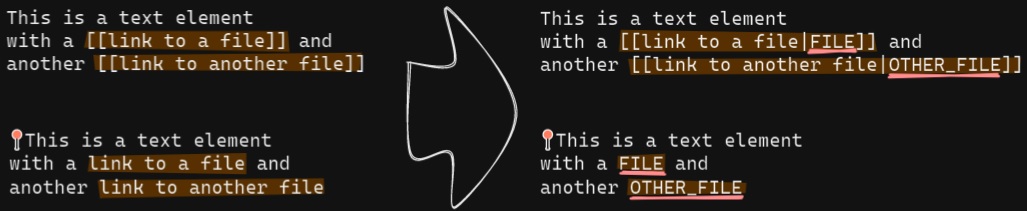|[@zsviczian](https://github.com/zsviczian)|
|
||||
|[Split text by lines](Split%20text%20by%20lines.md)|Split lines of text into separate text elements for easier reorganization||[@zsviczian](https://github.com/zsviczian)|
|
||||
|[Text Align](Text%20Align.md)|Sets text alignment of text block (cetner, right, left). Useful if you want to set a keyboard shortcut for selecting text alignment.||[@zsviczian](https://github.com/zsviczian)|
|
||||
|[Zoom to Fit Selected Elements](Zoom%20to%20Fit%20Selected%20Elements.md)|Similar to Excalidraw standard SHIFT+2 feature: Zoom to fit selected elements, but with the ability to zoom to 1000%. Inspiration: [#272](https://github.com/zsviczian/obsidian-excalidraw-plugin/issues/272)||[@zsviczian](https://github.com/zsviczian)|
|
||||
|[Transfer TextElements to Excalidraw markdown metadata](Transfer%20TextElements%20to%20Excalidraw%20markdown%20metadata.md)|The script will delete the selected text elements from the canvas and will copy the text from these text elements into the Excalidraw markdown file as metadata. This means, that the text will no longer be visible in the drawing, however you will be able to search for the text in Obsidian and find the drawing containing this image.||[@zsviczian](https://github.com/zsviczian)|
|
||||
|[Zoom to Fit Selected Elements](Zoom%20to%20Fit%20Selected%20Elements.md)|Similar to Excalidraw standard SHIFT+2 feature: Zoom to fit selected elements, but with the ability to zoom to 1000%. Inspiration: [#272](https://github.com/zsviczian/obsidian-excalidraw-plugin/issues/272)||[@zsviczian](https://github.com/zsviczian)|
|
||||
|
||||
53
ea-scripts/Set Link Alias.md
Normal file
@@ -0,0 +1,53 @@
|
||||
/*
|
||||

|
||||
|
||||
Download this file and save to your Obsidian Vault including the first line, or open it in "Raw" and copy the entire contents to Obsidian.
|
||||
|
||||

|
||||
|
||||
Iterates all of the links in the selected TextElements and prompts the user to set or modify the alias for each link found.
|
||||
|
||||
See documentation for more details:
|
||||
https://zsviczian.github.io/obsidian-excalidraw-plugin/ExcalidrawScriptsEngine.html
|
||||
|
||||
```javascript
|
||||
*/
|
||||
elements = ea.getViewSelectedElements().filter((el)=>el.type==="text");
|
||||
// `[[markdown links]]`
|
||||
for(el of elements) { //doing for instead of .forEach due to await inputPrompt
|
||||
parts = el.rawText.split(/(\[\[[\w\W]*?]])/);
|
||||
newText = "";
|
||||
for(t of parts) { //doing for instead of .map due to await inputPrompt
|
||||
if(!t.match(/(\[\[[\w\W]*?]])/)) {
|
||||
newText += t;
|
||||
} else {
|
||||
original = t.split(/\[\[|]]/)[1];
|
||||
cut = original.indexOf("|");
|
||||
alias = cut === -1 ? "" : original.substring(cut+1);
|
||||
link = cut === -1 ? original : original.substring(0,cut);
|
||||
alias = await utils.inputPrompt(`Alias for [[${link}]]`,"type alias here",alias);
|
||||
newText += `[[${link}|${alias}]]`;
|
||||
}
|
||||
}
|
||||
el.rawText = newText;
|
||||
};
|
||||
|
||||
// `[wiki](links)`
|
||||
for(el of elements) { //doing for instead of .forEach due to await inputPrompt
|
||||
parts = el.rawText.split(/(\[[\w\W]*?]\([\w\W]*?\))/);
|
||||
newText = "";
|
||||
for(t of parts) { //doing for instead of .map due to await inputPrompt
|
||||
if(!t.match(/(\[[\w\W]*?]\([\w\W]*?\))/)) {
|
||||
newText += t;
|
||||
} else {
|
||||
alias = t.match(/\[([\w\W]*?)]/)[1];
|
||||
link = t.match(/\(([\w\W]*?)\)/)[1];
|
||||
alias = await utils.inputPrompt(`Alias for [[${link}]]`,"type alias here",alias);
|
||||
newText += `[[${link}|${alias}]]`;
|
||||
}
|
||||
}
|
||||
el.rawText = newText;
|
||||
};
|
||||
|
||||
ea.copyViewElementsToEAforEditing(elements);
|
||||
ea.addElementsToView();
|
||||
@@ -0,0 +1,44 @@
|
||||
/*
|
||||

|
||||
|
||||
Download this file and save to your Obsidian Vault including the first line, or open it in "Raw" and copy the entire contents to Obsidian.
|
||||
|
||||

|
||||
|
||||
The script will delete the selected text elements from the canvas and will copy the text from these text elements into the Excalidraw markdown file as metadata. This means, that the text will no longer be visible in the drawing, however you will be able to search for the text in Obsidian and find the drawing containing this image.
|
||||
|
||||
See ScriptEngine documentation for more details:
|
||||
https://zsviczian.github.io/obsidian-excalidraw-plugin/ExcalidrawScriptsEngine.html
|
||||
|
||||
```javascript
|
||||
*/
|
||||
//get text elements
|
||||
|
||||
const textElements = ea.getViewSelectedElements().filter((el)=>el.type==="text");
|
||||
|
||||
if(textElements.length===0) {
|
||||
notice("No text elements were selected")
|
||||
return;
|
||||
}
|
||||
|
||||
metadata = "# Metadata\n" + textElements
|
||||
.map((el)=>el.rawText.replaceAll(/%|\^/g,"_")) //cleaning these characters for safety, might not be needed
|
||||
.join("/n") + "\n";
|
||||
|
||||
ea.deleteViewElements(textElements);
|
||||
await ea.targetView.save();
|
||||
data = await app.vault.read(ea.targetView.file);
|
||||
splitAfterFrontmatter = data.split(/(^---[\w\W]*?---\n)/);
|
||||
if(splitAfterFrontmatter.length !== 3) {
|
||||
notice("Error locating frontmatter in markdown file");
|
||||
console.log({file:ea.targetView.file});
|
||||
return;
|
||||
}
|
||||
newData = splitAfterFrontmatter[1]+metadata+splitAfterFrontmatter[2]
|
||||
await app.vault.modify(ea.targetView.file,newData);
|
||||
|
||||
//utility function
|
||||
function notice(message) {
|
||||
new Notice(message);
|
||||
console.log(message);
|
||||
}
|
||||
223
ea-scripts/index.md
Normal file
@@ -0,0 +1,223 @@
|
||||
If you are enjoying the Excalidraw plugin then please support my work and enthusiasm by buying me a coffee on [https://ko-fi/zsolt](https://ko-fi.com/zsolt).
|
||||
|
||||
[<img src="https://user-images.githubusercontent.com/14358394/115450238-f39e8100-a21b-11eb-89d0-fa4b82cdbce8.png" class="coffee">](https://ko-fi.com/zsolt)
|
||||
|
||||
---
|
||||
|
||||
Jump ahead to the [[#List of available scripts]]
|
||||
|
||||
# Intorducing Excalidraw Automate Script Engine
|
||||
<iframe width="560" height="315" src="https://www.youtube.com/embed/hePJcObHIso" title="YouTube video player" frameborder="0" allow="accelerometer; autoplay; clipboard-write; encrypted-media; gyroscope; picture-in-picture" allowfullscreen></iframe>
|
||||
|
||||
Script Engine scripts are installed in the `Downloaded` subfolder of the `Excalidraw Automate script folder` specified in plugin settings.
|
||||
|
||||
In the `Command Palette` installed scripts are prefixed with `Downloaded/`, thus you can always know if you are executing a local script of your own, or one that you have downloaded from GitHub.
|
||||
|
||||
## Attention developers and hobby hackers
|
||||
<img src='https://raw.githubusercontent.com/zsviczian/obsidian-excalidraw-plugin/master/images/hobby-programmer.svg' align='left' style='background-color:whitesmoke; width:80px; margin-right:15px; margin-bottom:10px;'/>
|
||||
If you want to modify scripts, I recommend moving them to the `Excalidraw Automate script folder` or a different subfolder under the script folder. Scripts in the `Downloaded` folder will be overwritten when you click the `Update this script` button. Note also, that at this time, I do not check if the script file has been updated on GitHub, thus the `Update this script` button is always visible once you have installed a script, not only when an update is availble (hope to build this feature in the future).
|
||||
|
||||
I would love to include your contribution in the script library. If you have a script of your own that you would like to share with the community, please open a [PR](https://github.com/zsviczian/obsidian-excalidraw-plugin/pulls) on GitHub. Be sure to include the following in your pull request
|
||||
- The [script file](https://github.com/zsviczian/obsidian-excalidraw-plugin/tree/master/ea-scripts) with a self explanetory name. The name of the file will be the name of the script in the Command Palette.
|
||||
- An [image](https://github.com/zsviczian/obsidian-excalidraw-plugin/tree/master/images) explaining the scripts purpose. Remember a picture speaks thousand words!
|
||||
- An update to this file [ea-scripts/index.md](https://github.com/zsviczian/obsidian-excalidraw-plugin/blob/master/ea-scripts/index.md)
|
||||
|
||||
---
|
||||
|
||||
# List of available scripts
|
||||
- [[#Box Each Selected Groups]]
|
||||
- [[#Box Selected Elements]]
|
||||
- [[#Bullet Point]]
|
||||
- [[#Connect elements]]
|
||||
- [[#Convert text to link with folder and alias]]
|
||||
- [[#Copy Selected Element Styles to Global]]
|
||||
- [[#Create new markdown file and embed into active drawing]]
|
||||
- [[#Darken background color]]
|
||||
- [[#Dimensions]]
|
||||
- [[#Elbow connectors]]
|
||||
- [[#Expand rectangles horizontally keep text centered]]
|
||||
- [[#Expand rectangles horizontally]]
|
||||
- [[#Expand rectangles vertically keep text centered]]
|
||||
- [[#Expand rectangles vertically]]
|
||||
- [[#Fixed spacing]]
|
||||
- [[#Fixed vertical distance]]
|
||||
- [[#Font Family]]
|
||||
- [[#Grid]]
|
||||
- [[#Lighten background color]]
|
||||
- [[#Modify background color opacity]]
|
||||
- [[#Modify stroke width of selected elements]]
|
||||
- [[#OCR - Optical Character Recognition]]
|
||||
- [[#Reverse arrows]]
|
||||
- [[#Set Link Alias]]
|
||||
- [[#Split text by lines]]
|
||||
- [[#Text Align]]
|
||||
- [[#Transfer TextElements to Excalidraw markdown metadata]]
|
||||
- [[#Zoom to Fit Selected Elements]]
|
||||
|
||||
## Box Each Selected Groups
|
||||
```excalidraw-script-install
|
||||
https://raw.githubusercontent.com/zsviczian/obsidian-excalidraw-plugin/master/ea-scripts/Box%20Each%20Selected%20Groups.md
|
||||
```
|
||||
<table><tr valign='top'><td class="label">Author</td><td class="data"><a href='https://github.com/1-2-3'>@1-2-3</a></td></tr><tr valign='top'><td class="label">Source</td><td class="data"><a href='https://github.com/zsviczian/obsidian-excalidraw-plugin/blob/master/ea-scripts/Box%20Each%20Selected%20Groups.md'>File on GitHub</a></td></tr><tr valign='top'><td class="label">Description</td><td class="data">This script will add encapsulating boxes around each of the currently selected groups in Excalidraw.<br><img src='https://raw.githubusercontent.com/zsviczian/obsidian-excalidraw-plugin/master/images/scripts-box-each-selected-groups.png'></td></tr></table>
|
||||
|
||||
## Box Selected Elements
|
||||
```excalidraw-script-install
|
||||
https://raw.githubusercontent.com/zsviczian/obsidian-excalidraw-plugin/master/ea-scripts/Box%20Selected%20Elements.md
|
||||
```
|
||||
<table><tr valign='top'><td class="label">Author</td><td class="data"><a href='https://github.com/zsviczian'>@zsviczian</a></td></tr><tr valign='top'><td class="label">Source</td><td class="data"><a href='https://github.com/zsviczian/obsidian-excalidraw-plugin/blob/master/ea-scripts/Box%20Selected%20Elements.md'>File on GitHub</a></td></tr><tr valign='top'><td class="label">Description</td><td class="data">This script will add an encapsulating box around the currently selected elements in Excalidraw.<br><img src='https://raw.githubusercontent.com/zsviczian/obsidian-excalidraw-plugin/master/images/scripts-box-elements.jpg'></td></tr></table>
|
||||
|
||||
## Bullet Point
|
||||
```excalidraw-script-install
|
||||
https://raw.githubusercontent.com/zsviczian/obsidian-excalidraw-plugin/master/ea-scripts/Bullet%20Point.md
|
||||
```
|
||||
<table><tr valign='top'><td class="label">Author</td><td class="data"><a href='https://github.com/zsviczian'>@zsviczian</a></td></tr><tr valign='top'><td class="label">Source</td><td class="data"><a href='https://github.com/zsviczian/obsidian-excalidraw-plugin/blob/master/ea-scripts/Bullet%20Point.md'>File on GitHub</a></td></tr><tr valign='top'><td class="label">Description</td><td class="data">This script will add a small circle to the top left of each text element in the selection and add the text and the "bullet point" into a group.<br><img src='https://raw.githubusercontent.com/zsviczian/obsidian-excalidraw-plugin/master/images/scripts-bullet-point.jpg'></td></tr></table>
|
||||
|
||||
## Connect elements
|
||||
```excalidraw-script-install
|
||||
https://raw.githubusercontent.com/zsviczian/obsidian-excalidraw-plugin/master/ea-scripts/Connect%20elements.md
|
||||
```
|
||||
<table><tr valign='top'><td class="label">Author</td><td class="data"><a href='https://github.com/zsviczian'>@zsviczian</a></td></tr><tr valign='top'><td class="label">Source</td><td class="data"><a href='https://github.com/zsviczian/obsidian-excalidraw-plugin/blob/master/ea-scripts/Connect%20elements.md'>File on GitHub</a></td></tr><tr valign='top'><td class="label">Description</td><td class="data">This script will connect two objects with an arrow. If either of the objects are a set of grouped elements (e.g. a text element grouped with an encapsulating rectangle), the script will identify these groups, and connect the arrow to the largest object in the group (assuming you want to connect the arrow to the box around the text element).<br><img src='https://raw.githubusercontent.com/zsviczian/obsidian-excalidraw-plugin/master/images/scripts-connect-elements.jpg'></td></tr></table>
|
||||
|
||||
## Convert text to link with folder and alias
|
||||
```excalidraw-script-install
|
||||
https://raw.githubusercontent.com/zsviczian/obsidian-excalidraw-plugin/master/ea-scripts/Convert%20text%20to%20link%20with%20folder%20and%20alias.md
|
||||
```
|
||||
<table><tr valign='top'><td class="label">Author</td><td class="data"><a href='https://github.com/zsviczian'>@zsviczian</a></td></tr><tr valign='top'><td class="label">Source</td><td class="data"><a href='https://github.com/zsviczian/obsidian-excalidraw-plugin/blob/master/ea-scripts/Convert%20text%20to%20link%20with%20folder%20and%20alias.md'>File on GitHub</a></td></tr><tr valign='top'><td class="label">Description</td><td class="data">Converts text elements to links pointing to a file in a selected folder and with the alias set as the original text. The script will prompt the user to select an existing folder from the vault.<br><code>original text</code> - <code>[[selected folder/original text|original text]]</code></td></tr></table>
|
||||
|
||||
## Copy Selected Element Styles to Global
|
||||
```excalidraw-script-install
|
||||
https://raw.githubusercontent.com/zsviczian/obsidian-excalidraw-plugin/master/ea-scripts/Copy%20Selected%20Element%20Styles%20to%20Global.md
|
||||
```
|
||||
<table><tr valign='top'><td class="label">Author</td><td class="data"><a href='https://github.com/1-2-3'>@1-2-3</a></td></tr><tr valign='top'><td class="label">Source</td><td class="data"><a href='https://github.com/zsviczian/obsidian-excalidraw-plugin/blob/master/ea-scripts/Copy%20Selected%20Element%20Styles%20to%20Global.md'>File on GitHub</a></td></tr><tr valign='top'><td class="label">Description</td><td class="data">This script will copy styles of any selected element into Excalidraw's global styles.<br><img src='https://raw.githubusercontent.com/zsviczian/obsidian-excalidraw-plugin/master/images/scripts-copy-selected-element-styles-to-global.png'></td></tr></table>
|
||||
|
||||
## Create new markdown file and embed into active drawing
|
||||
```excalidraw-script-install
|
||||
https://raw.githubusercontent.com/zsviczian/obsidian-excalidraw-plugin/master/ea-scripts/Create%20new%20markdown%20file%20and%20embed%20into%20active%20drawing.md
|
||||
```
|
||||
<table><tr valign='top'><td class="label">Author</td><td class="data"><a href='https://github.com/zsviczian'>@zsviczian</a></td></tr><tr valign='top'><td class="label">Source</td><td class="data"><a href='https://github.com/zsviczian/obsidian-excalidraw-plugin/blob/master/ea-scripts/Create%20new%20markdown%20file%20and%20embed%20into%20active%20drawing.md'>File on GitHub</a></td></tr><tr valign='top'><td class="label">Description</td><td class="data">The script will prompt you for a filename, then create a new markdown document with the file name provided, open the new markdown document in an adjacent pane, and embed the markdown document into the active Excalidraw drawing.<br><img src='https://raw.githubusercontent.com/zsviczian/obsidian-excalidraw-plugin/master/images/scripts-create-and-embed-new-markdown-file.jpg'></td></tr></table>
|
||||
|
||||
## Darken background color
|
||||
```excalidraw-script-install
|
||||
https://raw.githubusercontent.com/zsviczian/obsidian-excalidraw-plugin/master/ea-scripts/Darken%20background%20color.md
|
||||
```
|
||||
<table><tr valign='top'><td class="label">Author</td><td class="data"><a href='https://github.com/1-2-3'>@1-2-3</a></td></tr><tr valign='top'><td class="label">Source</td><td class="data"><a href='https://github.com/zsviczian/obsidian-excalidraw-plugin/blob/master/ea-scripts/Darken%20background%20color.md'>File on GitHub</a></td></tr><tr valign='top'><td class="label">Description</td><td class="data">This script darkens the background color of the selected element by 2% at a time. You can use this script several times until you are satisfied. It is recommended to set a shortcut key for this script so that you can quickly try to DARKEN and LIGHTEN the color effect. In contrast to the `Modify background color opacity` script, the advantage is that the background color of the element is not affected by the canvas color, and the color value does not appear in a strange rgba() form.<br><img src='https://raw.githubusercontent.com/zsviczian/obsidian-excalidraw-plugin/master/images/darken-lighten-background-color.png'></td></tr></table>
|
||||
|
||||
## Dimensions
|
||||
```excalidraw-script-install
|
||||
https://raw.githubusercontent.com/zsviczian/obsidian-excalidraw-plugin/master/ea-scripts/Dimensions.md
|
||||
```
|
||||
<table><tr valign='top'><td class="label">Author</td><td class="data"><a href='https://github.com/zsviczian'>@zsviczian</a></td></tr><tr valign='top'><td class="label">Source</td><td class="data"><a href='https://github.com/zsviczian/obsidian-excalidraw-plugin/blob/master/ea-scripts/Dimensions.md'>File on GitHub</a></td></tr><tr valign='top'><td class="label">Description</td><td class="data">Currently there is no way to specify the exact location and size of objects in Excalidraw. You can bridge this gap with the following simple script.<br><img src='https://raw.githubusercontent.com/zsviczian/obsidian-excalidraw-plugin/master/images/scripts-dimensions.jpg'></td></tr></table>
|
||||
|
||||
## Elbow connectors
|
||||
```excalidraw-script-install
|
||||
https://raw.githubusercontent.com/zsviczian/obsidian-excalidraw-plugin/master/ea-scripts/Elbow%20connectors.md
|
||||
```
|
||||
<table><tr valign='top'><td class="label">Author</td><td class="data"><a href='https://github.com/1-2-3'>@1-2-3</a></td></tr><tr valign='top'><td class="label">Source</td><td class="data"><a href='https://github.com/zsviczian/obsidian-excalidraw-plugin/blob/master/ea-scripts/Elbow%20connectors.md'>File on GitHub</a></td></tr><tr valign='top'><td class="label">Description</td><td class="data">This script converts the selected connectors to elbows.<br><img src='https://raw.githubusercontent.com/zsviczian/obsidian-excalidraw-plugin/master/images/elbow-connectors.png'></td></tr></table>
|
||||
|
||||
## Expand rectangles horizontally keep text centered
|
||||
```excalidraw-script-install
|
||||
https://raw.githubusercontent.com/zsviczian/obsidian-excalidraw-plugin/master/ea-scripts/Expand%20rectangles%20horizontally%20keep%20text%20centered.md
|
||||
```
|
||||
<table><tr valign='top'><td class="label">Author</td><td class="data"><a href='https://github.com/1-2-3'>@1-2-3</a></td></tr><tr valign='top'><td class="label">Source</td><td class="data"><a href='https://github.com/zsviczian/obsidian-excalidraw-plugin/blob/master/ea-scripts/Expand%20rectangles%20horizontally%20keep%20text%20centered.md'>File on GitHub</a></td></tr><tr valign='top'><td class="label">Description</td><td class="data">This script expands the width of the selected rectangles until they are all the same width and keep the text centered.<br><img src='https://raw.githubusercontent.com/zsviczian/obsidian-excalidraw-plugin/master/images/scripts-expand-rectangles.gif'></td></tr></table>
|
||||
|
||||
## Expand rectangles horizontally
|
||||
```excalidraw-script-install
|
||||
https://raw.githubusercontent.com/zsviczian/obsidian-excalidraw-plugin/master/ea-scripts/Expand%20rectangles%20horizontally.md
|
||||
```
|
||||
<table><tr valign='top'><td class="label">Author</td><td class="data"><a href='https://github.com/1-2-3'>@1-2-3</a></td></tr><tr valign='top'><td class="label">Source</td><td class="data"><a href='https://github.com/zsviczian/obsidian-excalidraw-plugin/blob/master/ea-scripts/Expand%20rectangles%20horizontally.md'>File on GitHub</a></td></tr><tr valign='top'><td class="label">Description</td><td class="data">This script expands the width of the selected rectangles until they are all the same width.<br><img src='https://raw.githubusercontent.com/zsviczian/obsidian-excalidraw-plugin/master/images/scripts-expand-rectangles.gif'></td></tr></table>
|
||||
|
||||
## Expand rectangles vertically keep text centered
|
||||
```excalidraw-script-install
|
||||
https://raw.githubusercontent.com/zsviczian/obsidian-excalidraw-plugin/master/ea-scripts/Expand%20rectangles%20vertically%20keep%20text%20centered.md
|
||||
```
|
||||
<table><tr valign='top'><td class="label">Author</td><td class="data"><a href='https://github.com/1-2-3'>@1-2-3</a></td></tr><tr valign='top'><td class="label">Source</td><td class="data"><a href='https://github.com/zsviczian/obsidian-excalidraw-plugin/blob/master/ea-scripts/Expand%20rectangles%20vertically%20keep%20text%20centered.md'>File on GitHub</a></td></tr><tr valign='top'><td class="label">Description</td><td class="data">This script expands the height of the selected rectangles until they are all the same height and keep the text centered.<br><img src='https://raw.githubusercontent.com/zsviczian/obsidian-excalidraw-plugin/master/images/scripts-expand-rectangles.gif'></td></tr></table>
|
||||
|
||||
## Expand rectangles vertically
|
||||
```excalidraw-script-install
|
||||
https://raw.githubusercontent.com/zsviczian/obsidian-excalidraw-plugin/master/ea-scripts/Expand%20rectangles%20vertically.md
|
||||
```
|
||||
<table><tr valign='top'><td class="label">Author</td><td class="data"><a href='https://github.com/1-2-3'>@1-2-3</a></td></tr><tr valign='top'><td class="label">Source</td><td class="data"><a href='https://github.com/zsviczian/obsidian-excalidraw-plugin/blob/master/ea-scripts/Expand%20rectangles%20vertically.md'>File on GitHub</a></td></tr><tr valign='top'><td class="label">Description</td><td class="data">This script expands the height of the selected rectangles until they are all the same height.<br><img src='https://raw.githubusercontent.com/zsviczian/obsidian-excalidraw-plugin/master/images/scripts-expand-rectangles.gif'></td></tr></table>
|
||||
|
||||
## Fixed spacing
|
||||
```excalidraw-script-install
|
||||
https://raw.githubusercontent.com/zsviczian/obsidian-excalidraw-plugin/master/ea-scripts/Fixed%20spacing.md
|
||||
```
|
||||
<table><tr valign='top'><td class="label">Author</td><td class="data"><a href='https://github.com/1-2-3'>@1-2-3</a></td></tr><tr valign='top'><td class="label">Source</td><td class="data"><a href='https://github.com/zsviczian/obsidian-excalidraw-plugin/blob/master/ea-scripts/Fixed%20spacing.md'>File on GitHub</a></td></tr><tr valign='top'><td class="label">Description</td><td class="data">The script arranges the selected elements horizontally with a fixed spacing. When we create an architecture diagram or mind map, we often need to arrange a large number of elements in a fixed spacing. `Fixed spacing` and `Fixed vertical Distance` scripts can save us a lot of time.<br><img src='https://raw.githubusercontent.com/zsviczian/obsidian-excalidraw-plugin/master/images/scripts-fix-space-demo.png'></td></tr></table>
|
||||
|
||||
## Fixed vertical distance
|
||||
```excalidraw-script-install
|
||||
https://raw.githubusercontent.com/zsviczian/obsidian-excalidraw-plugin/master/ea-scripts/Fixed%20vertical%20distance.md
|
||||
```
|
||||
<table><tr valign='top'><td class="label">Author</td><td class="data"><a href='https://github.com/1-2-3'>@1-2-3</a></td></tr><tr valign='top'><td class="label">Source</td><td class="data"><a href='https://github.com/zsviczian/obsidian-excalidraw-plugin/blob/master/ea-scripts/Fixed%20vertical%20distance.md'>File on GitHub</a></td></tr><tr valign='top'><td class="label">Description</td><td class="data">The script arranges the selected elements vertically with a fixed spacing. When we create an architecture diagram or mind map, we often need to arrange a large number of elements in a fixed spacing. `Fixed spacing` and `Fixed vertical Distance` scripts can save us a lot of time.<br><img src='https://raw.githubusercontent.com/zsviczian/obsidian-excalidraw-plugin/master/images/scripts-fixed-vertical-distance.png'></td></tr></table>
|
||||
|
||||
## Font Family
|
||||
```excalidraw-script-install
|
||||
https://raw.githubusercontent.com/zsviczian/obsidian-excalidraw-plugin/master/ea-scripts/Font%20Family.md
|
||||
```
|
||||
<table><tr valign='top'><td class="label">Author</td><td class="data"><a href='https://github.com/zsviczian'>@zsviczian</a></td></tr><tr valign='top'><td class="label">Source</td><td class="data"><a href='https://github.com/zsviczian/obsidian-excalidraw-plugin/blob/master/ea-scripts/Font%20Family.md'>File on GitHub</a></td></tr><tr valign='top'><td class="label">Description</td><td class="data">Sets font family of the text block (Virgil, Helvetica, Cascadia). Useful if you want to set a keyboard shortcut for selecting font family.<br><img src='https://raw.githubusercontent.com/zsviczian/obsidian-excalidraw-plugin/master/images/scripts-font-family.jpg'></td></tr></table>
|
||||
|
||||
## Grid
|
||||
```excalidraw-script-install
|
||||
https://raw.githubusercontent.com/zsviczian/obsidian-excalidraw-plugin/master/ea-scripts/Grid.md
|
||||
```
|
||||
<table><tr valign='top'><td class="label">Author</td><td class="data"><a href='https://github.com/zsviczian'>@zsviczian</a></td></tr><tr valign='top'><td class="label">Source</td><td class="data"><a href='https://github.com/zsviczian/obsidian-excalidraw-plugin/blob/master/ea-scripts/Grid.md'>File on GitHub</a></td></tr><tr valign='top'><td class="label">Description</td><td class="data">The default grid size in Excalidraw is 20. Currently there is no way to change the grid size via the user interface. This script offers a way to bridge this gap.<br><img src='https://raw.githubusercontent.com/zsviczian/obsidian-excalidraw-plugin/master/images/scripts-grid.jpg'></td></tr></table>
|
||||
|
||||
## Lighten background color
|
||||
```excalidraw-script-install
|
||||
https://raw.githubusercontent.com/zsviczian/obsidian-excalidraw-plugin/master/ea-scripts/Lighten%20background%20color.md
|
||||
```
|
||||
<table><tr valign='top'><td class="label">Author</td><td class="data"><a href='https://github.com/1-2-3'>@1-2-3</a></td></tr><tr valign='top'><td class="label">Source</td><td class="data"><a href='https://github.com/zsviczian/obsidian-excalidraw-plugin/blob/master/ea-scripts/Lighten%20background%20color.md'>File on GitHub</a></td></tr><tr valign='top'><td class="label">Description</td><td class="data">This script lightens the background color of the selected element by 2% at a time. You can use this script several times until you are satisfied. It is recommended to set a shortcut key for this script so that you can quickly try to DARKEN and LIGHTEN the color effect.In contrast to the `Modify background color opacity` script, the advantage is that the background color of the element is not affected by the canvas color, and the color value does not appear in a strange rgba() form.<br><img src='https://raw.githubusercontent.com/zsviczian/obsidian-excalidraw-plugin/master/images/darken-lighten-background-color.png'></td></tr></table>
|
||||
|
||||
## Modify background color opacity
|
||||
```excalidraw-script-install
|
||||
https://raw.githubusercontent.com/zsviczian/obsidian-excalidraw-plugin/master/ea-scripts/Modify%20background%20color%20opacity.md
|
||||
```
|
||||
<table><tr valign='top'><td class="label">Author</td><td class="data"><a href='https://github.com/1-2-3'>@1-2-3</a></td></tr><tr valign='top'><td class="label">Source</td><td class="data"><a href='https://github.com/zsviczian/obsidian-excalidraw-plugin/blob/master/ea-scripts/Modify%20background%20color%20opacity.md'>File on GitHub</a></td></tr><tr valign='top'><td class="label">Description</td><td class="data">This script changes the opacity of the background color of the selected boxes. The default background color in Excalidraw is so dark that the text is hard to read. You can lighten the color a bit by setting transparency. And you can tweak the transparency over and over again until you're happy with it. Although excalidraw has the opacity option in its native property Settings, it also changes the transparency of the border. Use this script to change only the opacity of the background color without affecting the border.<br><img src='https://raw.githubusercontent.com/zsviczian/obsidian-excalidraw-plugin/master/images/scripts-modify-background-color-opacity.png'></td></tr></table>
|
||||
|
||||
## Modify stroke width of selected elements
|
||||
```excalidraw-script-install
|
||||
https://raw.githubusercontent.com/zsviczian/obsidian-excalidraw-plugin/master/ea-scripts/Modify%20stroke%20width%20of%20selected%20elements.md
|
||||
```
|
||||
<table><tr valign='top'><td class="label">Author</td><td class="data"><a href='https://github.com/zsviczian'>@zsviczian</a></td></tr><tr valign='top'><td class="label">Source</td><td class="data"><a href='https://github.com/zsviczian/obsidian-excalidraw-plugin/blob/master/ea-scripts/Modify%20stroke%20width%20of%20selected%20elements.md'>File on GitHub</a></td></tr><tr valign='top'><td class="label">Description</td><td class="data">This script will set the stroke width of selected elements. This is helpful, for example, when you scale freedraw sketches and want to reduce or increase their line width.<br><img src='https://raw.githubusercontent.com/zsviczian/obsidian-excalidraw-plugin/master/images/scripts-stroke-width.jpg'></td></tr></table>
|
||||
|
||||
## OCR - Optical Character Recognition
|
||||
```excalidraw-script-install
|
||||
https://raw.githubusercontent.com/zsviczian/obsidian-excalidraw-plugin/master/ea-scripts/OCR%20-%20Optical%20Character%20Recognition.md
|
||||
```
|
||||
<table><tr valign='top'><td class="label">Author</td><td class="data"><a href='https://github.com/zsviczian'>@zsviczian</a></td></tr><tr valign='top'><td class="label">Source</td><td class="data"><a href='https://github.com/zsviczian/obsidian-excalidraw-plugin/blob/master/ea-scripts/OCR%20-%20Optical%20Character%20Recognition.md'>File on GitHub</a></td></tr><tr valign='top'><td class="label">Description</td><td class="data">REQUIRES EXCALIDRAW 1.5.15<br>The script will 1) send the selected image file to [taskbone.com](https://taskbone.com) to exctract the text from the image, and 2) will add the text to your drawing as a text element.<br><mark>⚠ Note that you will need to manually paste your token into the script after the first run! ⚠</mark><br><img src='https://raw.githubusercontent.com/zsviczian/obsidian-excalidraw-plugin/master/images/scripts-ocr.jpg'><br><iframe width="560" height="315" src="https://www.youtube.com/embed/W2NMzR8s4eE" title="YouTube video player" frameborder="0" allow="accelerometer; autoplay; clipboard-write; encrypted-media; gyroscope; picture-in-picture" allowfullscreen></iframe></td></tr></table>
|
||||
|
||||
## Reverse arrows
|
||||
```excalidraw-script-install
|
||||
https://raw.githubusercontent.com/zsviczian/obsidian-excalidraw-plugin/master/ea-scripts/Reverse%20arrows.md
|
||||
```
|
||||
<table><tr valign='top'><td class="label">Author</td><td class="data"><a href='https://github.com/zsviczian'>@zsviczian</a></td></tr><tr valign='top'><td class="label">Source</td><td class="data"><a href='https://github.com/zsviczian/obsidian-excalidraw-plugin/blob/master/ea-scripts/Reverse%20arrows.md'>File on GitHub</a></td></tr><tr valign='top'><td class="label">Description</td><td class="data">Reverse the direction of **arrows** within the scope of selected elements.<br><img src='https://raw.githubusercontent.com/zsviczian/obsidian-excalidraw-plugin/master/images/scripts-reverse-arrow.jpg'></td></tr></table>
|
||||
|
||||
## Set Link Alias
|
||||
```excalidraw-script-install
|
||||
https://raw.githubusercontent.com/zsviczian/obsidian-excalidraw-plugin/master/ea-scripts/Set%20Link%20Alias.md
|
||||
```
|
||||
<table><tr valign='top'><td class="label">Author</td><td class="data"><a href='https://github.com/zsviczian'>@zsviczian</a></td></tr><tr valign='top'><td class="label">Source</td><td class="data"><a href='https://github.com/zsviczian/obsidian-excalidraw-plugin/blob/master/ea-scripts/Set%20Link%20Alias.md'>File on GitHub</a></td></tr><tr valign='top'><td class="label">Description</td><td class="data">Iterates all of the links in the selected TextElements and prompts the user to set or modify the alias for each link found.<br><img src='https://raw.githubusercontent.com/zsviczian/obsidian-excalidraw-plugin/master/images/scripts-set-link-alias.jpg'></td></tr></table>
|
||||
|
||||
## Split text by lines
|
||||
```excalidraw-script-install
|
||||
https://raw.githubusercontent.com/zsviczian/obsidian-excalidraw-plugin/master/ea-scripts/Split%20text%20by%20lines.md
|
||||
```
|
||||
<table><tr valign='top'><td class="label">Author</td><td class="data"><a href='https://github.com/zsviczian'>@zsviczian</a></td></tr><tr valign='top'><td class="label">Source</td><td class="data"><a href='https://github.com/zsviczian/obsidian-excalidraw-plugin/blob/master/ea-scripts/Split%20text%20by%20lines.md'>File on GitHub</a></td></tr><tr valign='top'><td class="label">Description</td><td class="data">Split lines of text into separate text elements for easier reorganization<br><img src='https://raw.githubusercontent.com/zsviczian/obsidian-excalidraw-plugin/master/images/scripts-split-lines.jpg'></td></tr></table>
|
||||
|
||||
## Text Align
|
||||
```excalidraw-script-install
|
||||
https://raw.githubusercontent.com/zsviczian/obsidian-excalidraw-plugin/master/ea-scripts/Text%20Align.md
|
||||
```
|
||||
<table><tr valign='top'><td class="label">Author</td><td class="data"><a href='https://github.com/zsviczian'>@zsviczian</a></td></tr><tr valign='top'><td class="label">Source</td><td class="data"><a href='https://github.com/zsviczian/obsidian-excalidraw-plugin/blob/master/ea-scripts/Text%20Align.md'>File on GitHub</a></td></tr><tr valign='top'><td class="label">Description</td><td class="data">Sets text alignment of text block (cetner, right, left). Useful if you want to set a keyboard shortcut for selecting text alignment.<br><img src='https://raw.githubusercontent.com/zsviczian/obsidian-excalidraw-plugin/master/images/scripts-text-align.jpg'></td></tr></table>
|
||||
|
||||
## Transfer TextElements to Excalidraw markdown metadata
|
||||
```excalidraw-script-install
|
||||
https://raw.githubusercontent.com/zsviczian/obsidian-excalidraw-plugin/master/ea-scripts/Transfer%20TextElements%20to%20Excalidraw%20markdown%20metadata.md
|
||||
```
|
||||
<table><tr valign='top'><td class="label">Author</td><td class="data"><a href='https://github.com/zsviczian'>@zsviczian</a></td></tr><tr valign='top'><td class="label">Source</td><td class="data"><a href='https://github.com/zsviczian/obsidian-excalidraw-plugin/blob/master/ea-scripts/Transfer%20TextElements%20to%20Excalidraw%20markdown%20metadata.md'>File on GitHub</a></td></tr><tr valign='top'><td class="label">Description</td><td class="data">The script will delete the selected text elements from the canvas and will copy the text from these text elements into the Excalidraw markdown file as metadata. This means, that the text will no longer be visible in the drawing, however you will be able to search for the text in Obsidian and find the drawing containing this image.<br><img src='https://raw.githubusercontent.com/zsviczian/obsidian-excalidraw-plugin/master/images/scripts-text-to-metadata.jpg'></td></tr></table>
|
||||
|
||||
## Zoom to Fit Selected Elements
|
||||
```excalidraw-script-install
|
||||
https://raw.githubusercontent.com/zsviczian/obsidian-excalidraw-plugin/master/ea-scripts/Zoom%20to%20Fit%20Selected%20Elements.md
|
||||
```
|
||||
<table><tr valign='top'><td class="label">Author</td><td class="data"><a href='https://github.com/zsviczian'>@zsviczian</a></td></tr><tr valign='top'><td class="label">Source</td><td class="data"><a href='https://github.com/zsviczian/obsidian-excalidraw-plugin/blob/master/ea-scripts/Zoom%20to%20Fit%20Selected%20Elements.md'>File on GitHub</a></td></tr><tr valign='top'><td class="label">Description</td><td class="data">Similar to Excalidraw standard SHIFT+2 feature: Zoom to fit selected elements, but with the ability to zoom to 1000%. Inspiration: [#272](https://github.com/zsviczian/obsidian-excalidraw-plugin/issues/272)</td></tr></table>
|
||||
1
images/hobby-programmer.svg
Normal file

|
After Width: | Height: | Size: 6.8 KiB |
BIN
images/scripts-box-each-selected-groups.png
Normal file

|
After Width: | Height: | Size: 89 KiB |
BIN
images/scripts-copy-selected-element-styles-to-global.png
Normal file

|
After Width: | Height: | Size: 46 KiB |
BIN
images/scripts-fix-space-demo.png
Normal file

|
After Width: | Height: | Size: 13 KiB |
BIN
images/scripts-fixed-vertical-distance.png
Normal file

|
After Width: | Height: | Size: 13 KiB |
BIN
images/scripts-modify-background-color-opacity.png
Normal file

|
After Width: | Height: | Size: 53 KiB |
BIN
images/scripts-ocr.jpg
Normal file

|
After Width: | Height: | Size: 44 KiB |
BIN
images/scripts-set-link-alias.jpg
Normal file

|
After Width: | Height: | Size: 56 KiB |
BIN
images/scripts-text-to-metadata.jpg
Normal file

|
After Width: | Height: | Size: 110 KiB |
@@ -1,7 +1,7 @@
|
||||
{
|
||||
"id": "obsidian-excalidraw-plugin",
|
||||
"name": "Excalidraw",
|
||||
"version": "1.5.10",
|
||||
"version": "1.5.19",
|
||||
"minAppVersion": "0.12.16",
|
||||
"description": "An Obsidian plugin to edit and view Excalidraw drawings",
|
||||
"author": "Zsolt Viczian",
|
||||
|
||||
@@ -12,7 +12,7 @@
|
||||
"author": "",
|
||||
"license": "MIT",
|
||||
"dependencies": {
|
||||
"@zsviczian/excalidraw": "0.10.0-obsidian-33",
|
||||
"@zsviczian/excalidraw": "0.10.0-obsidian-35",
|
||||
"monkey-around": "^2.2.0",
|
||||
"react": "^17.0.2",
|
||||
"react-dom": "^17.0.2",
|
||||
|
||||
@@ -19,6 +19,8 @@ import { tex2dataURL } from "./LaTeX";
|
||||
import ExcalidrawPlugin from "./main";
|
||||
import {
|
||||
errorlog,
|
||||
getDataURL,
|
||||
getFontDataURL,
|
||||
getImageSize,
|
||||
getLinkParts,
|
||||
LinkParts,
|
||||
@@ -370,8 +372,9 @@ const convertMarkdownToSVG = async (
|
||||
//1.
|
||||
//get the markdown text
|
||||
let text = (await getTransclusion(linkParts, plugin.app, file)).contents;
|
||||
if(text==="") {
|
||||
text = "# Empty markdown file\nCTRL+Click here to open the file for editing in the current active pane, or CTRL+SHIFT+Click to open it in an adjacent pane.";
|
||||
if (text === "") {
|
||||
text =
|
||||
"# Empty markdown file\nCTRL+Click here to open the file for editing in the current active pane, or CTRL+SHIFT+Click to open it in an adjacent pane.";
|
||||
}
|
||||
|
||||
//2.
|
||||
@@ -396,25 +399,9 @@ const convertMarkdownToSVG = async (
|
||||
fontDef = "";
|
||||
break;
|
||||
default:
|
||||
const f = plugin.app.metadataCache.getFirstLinkpathDest(
|
||||
fontName,
|
||||
file.path,
|
||||
);
|
||||
if (f) {
|
||||
const ab = await plugin.app.vault.readBinary(f);
|
||||
const mimeType = f.extension.startsWith("woff")
|
||||
? "application/font-woff"
|
||||
: "font/truetype";
|
||||
fontName = f.basename;
|
||||
fontDef = ` @font-face {font-family: "${fontName}";src: url("${await getDataURL(
|
||||
ab,
|
||||
mimeType,
|
||||
)}") format("${f.extension === "ttf" ? "truetype" : f.extension}");}`;
|
||||
const split = fontDef.split(";base64,", 2);
|
||||
fontDef = `${split[0]};charset=utf-8;base64,${split[1]}`;
|
||||
} else {
|
||||
fontDef = "";
|
||||
}
|
||||
const font = await getFontDataURL(plugin.app,fontName,file.path);
|
||||
fontDef = font.fontDef;
|
||||
fontName = font.fontName;
|
||||
}
|
||||
|
||||
const fontColor = fileCache?.frontmatter
|
||||
@@ -551,21 +538,6 @@ const convertMarkdownToSVG = async (
|
||||
return svgToBase64(finalSVG) as DataURL;
|
||||
};
|
||||
|
||||
const getDataURL = async (
|
||||
file: ArrayBuffer,
|
||||
mimeType: string,
|
||||
): Promise<DataURL> => {
|
||||
return new Promise((resolve, reject) => {
|
||||
const reader = new FileReader();
|
||||
reader.onload = () => {
|
||||
const dataURL = reader.result as DataURL;
|
||||
resolve(dataURL);
|
||||
};
|
||||
reader.onerror = (error) => reject(error);
|
||||
reader.readAsDataURL(new Blob([new Uint8Array(file)], { type: mimeType }));
|
||||
});
|
||||
};
|
||||
|
||||
const generateIdFromFile = async (file: ArrayBuffer): Promise<FileId> => {
|
||||
let id: FileId;
|
||||
try {
|
||||
|
||||
@@ -6,7 +6,7 @@ import {
|
||||
ExcalidrawElement,
|
||||
ExcalidrawBindableElement,
|
||||
} from "@zsviczian/excalidraw/types/element/types";
|
||||
import { normalizePath, TFile } from "obsidian";
|
||||
import { Component, MarkdownRenderer, normalizePath, TFile } from "obsidian";
|
||||
import ExcalidrawView, { ExportSettings, TextMode } from "./ExcalidrawView";
|
||||
import { ExcalidrawData } from "./ExcalidrawData";
|
||||
import {
|
||||
@@ -52,7 +52,7 @@ export interface ExcalidrawAutomate {
|
||||
roughness: number;
|
||||
opacity: number;
|
||||
strokeSharpness: StrokeSharpness; //type StrokeSharpness = "round" | "sharp"
|
||||
fontFamily: number; //1: Virgil, 2:Helvetica, 3:Cascadia
|
||||
fontFamily: number; //1: Virgil, 2:Helvetica, 3:Cascadia, 4:LocalFont
|
||||
fontSize: number;
|
||||
textAlign: string; //"left"|"right"|"center"
|
||||
verticalAlign: string; //"top"|"bottom"|"middle" :for future use, has no effect currently
|
||||
@@ -169,8 +169,13 @@ export interface ExcalidrawAutomate {
|
||||
},
|
||||
): boolean;
|
||||
addElementsToView( //Adds elements from elementsDict to the current view
|
||||
repositionToCursor: boolean,
|
||||
save: boolean,
|
||||
repositionToCursor?: boolean, //default is false
|
||||
save?: boolean, //default is true
|
||||
//newElementsOnTop controls whether elements created with ExcalidrawAutomate
|
||||
//are added at the bottom of the stack or the top of the stack of elements already in the view
|
||||
//Note that elements copied to the view with copyViewElementsToEAforEditing retain their
|
||||
//position in the stack of elements in the view even if modified using EA
|
||||
newElementsOnTop?: boolean, //default is false, i.e. the new elements get to the bottom of the stack
|
||||
): Promise<boolean>;
|
||||
onDropHook(data: {
|
||||
//if set Excalidraw will call this function onDrop events
|
||||
@@ -211,6 +216,11 @@ export interface ExcalidrawAutomate {
|
||||
b: readonly [number, number],
|
||||
gap?: number, //if given, element is inflated by this value
|
||||
): Point[];
|
||||
|
||||
//See OCR plugin for example on how to use scriptSettings
|
||||
activeScript: string; //Set automatically by the ScriptEngine
|
||||
getScriptSettings(): {}; //Returns script settings. Saves settings in plugin settings, under the activeScript key
|
||||
setScriptSettings(settings:any):Promise<void>; //sets script settings.
|
||||
}
|
||||
|
||||
declare let window: any;
|
||||
@@ -219,7 +229,7 @@ export async function initExcalidrawAutomate(
|
||||
plugin: ExcalidrawPlugin,
|
||||
): Promise<ExcalidrawAutomate> {
|
||||
window.ExcalidrawAutomate = {
|
||||
plugin,
|
||||
plugin: plugin,
|
||||
elementsDict: {},
|
||||
imagesDict: {},
|
||||
style: {
|
||||
@@ -279,14 +289,17 @@ export async function initExcalidrawAutomate(
|
||||
setFontFamily(val: number) {
|
||||
switch (val) {
|
||||
case 1:
|
||||
this.style.fontFamily = 1;
|
||||
return getFontFamily(1);
|
||||
this.style.fontFamily = 4;
|
||||
return getFontFamily(4);
|
||||
case 2:
|
||||
this.style.fontFamily = 2;
|
||||
return getFontFamily(2);
|
||||
default:
|
||||
case 3:
|
||||
this.style.strokeSharpness = 3;
|
||||
return getFontFamily(3);
|
||||
default:
|
||||
this.style.strokeSharpness = 1;
|
||||
return getFontFamily(1);
|
||||
}
|
||||
},
|
||||
setTheme(val: number) {
|
||||
@@ -969,6 +982,7 @@ export async function initExcalidrawAutomate(
|
||||
},
|
||||
reset() {
|
||||
this.clear();
|
||||
this.activeScript = null;
|
||||
this.style.strokeColor = "#000000";
|
||||
this.style.backgroundColor = "transparent";
|
||||
this.style.angle = 0;
|
||||
@@ -1170,17 +1184,19 @@ export async function initExcalidrawAutomate(
|
||||
async addElementsToView(
|
||||
repositionToCursor: boolean = false,
|
||||
save: boolean = true,
|
||||
newElementsOnTop: boolean = false
|
||||
): Promise<boolean> {
|
||||
if (!this.targetView || !this.targetView?._loaded) {
|
||||
errorMessage("targetView not set", "addElementsToView()");
|
||||
return false;
|
||||
}
|
||||
const elements = this.getElements();
|
||||
return await this.targetView.addElements(
|
||||
return await this.targetView.addElements(
|
||||
elements,
|
||||
repositionToCursor,
|
||||
save,
|
||||
this.imagesDict,
|
||||
newElementsOnTop
|
||||
);
|
||||
},
|
||||
onDropHook: null,
|
||||
@@ -1237,6 +1253,16 @@ export async function initExcalidrawAutomate(
|
||||
): Point[] {
|
||||
return intersectElementWithLine(element, a, b, gap);
|
||||
},
|
||||
activeScript: null,
|
||||
getScriptSettings(): {} {
|
||||
if(!this.activeScript) return null;
|
||||
return this.plugin.settings.scriptEngineSettings[this.activeScript];
|
||||
},
|
||||
async setScriptSettings(settings:any): Promise<void> {
|
||||
if(!this.activeScript) return null;
|
||||
this.plugin.settings.scriptEngineSettings[this.activeScript] = settings;
|
||||
await this.plugin.saveSettings();
|
||||
},
|
||||
};
|
||||
await initFonts();
|
||||
return window.ExcalidrawAutomate;
|
||||
@@ -1310,6 +1336,8 @@ function getFontFamily(id: number) {
|
||||
return "Helvetica, Segoe UI Emoji";
|
||||
case 3:
|
||||
return "Cascadia, Segoe UI Emoji";
|
||||
case 4:
|
||||
return "LocalFont";
|
||||
}
|
||||
}
|
||||
|
||||
@@ -1523,7 +1551,7 @@ export async function createSVG(
|
||||
if (template?.hasSVGwithBitmap) {
|
||||
svg.setAttribute("hasbitmap", "true");
|
||||
}
|
||||
return embedFont ? embedFontsInSVG(svg) : svg;
|
||||
return embedFont ? embedFontsInSVG(svg,plugin) : svg;
|
||||
}
|
||||
|
||||
function estimateLineBound(points: any): [number, number, number, number] {
|
||||
|
||||
@@ -210,6 +210,9 @@ export class ExcalidrawData {
|
||||
file: TFile,
|
||||
textMode: TextMode,
|
||||
): Promise<boolean> {
|
||||
if (!file) {
|
||||
return false;
|
||||
}
|
||||
this.loaded = false;
|
||||
this.textElements = new Map<
|
||||
string,
|
||||
@@ -340,6 +343,9 @@ export class ExcalidrawData {
|
||||
}
|
||||
|
||||
public async loadLegacyData(data: string, file: TFile): Promise<boolean> {
|
||||
if (!file) {
|
||||
return false;
|
||||
}
|
||||
this.compatibilityMode = true;
|
||||
this.file = file;
|
||||
this.textElements = new Map<
|
||||
@@ -992,6 +998,10 @@ export class ExcalidrawData {
|
||||
}
|
||||
if (this.plugin.filesMaster.has(fileId)) {
|
||||
const fileMaster = this.plugin.filesMaster.get(fileId);
|
||||
if (!this.app.vault.getAbstractFileByPath(fileMaster.path)) {
|
||||
this.plugin.filesMaster.delete(fileId);
|
||||
return true;
|
||||
} // the file no longer exists
|
||||
const embeddedFile = new EmbeddedFile(
|
||||
this.plugin,
|
||||
this.file.path,
|
||||
|
||||
@@ -24,6 +24,7 @@ import {
|
||||
VIEW_TYPE_EXCALIDRAW,
|
||||
ICON_NAME,
|
||||
DISK_ICON_NAME,
|
||||
SCRIPTENGINE_ICON_NAME,
|
||||
PNG_ICON_NAME,
|
||||
SVG_ICON_NAME,
|
||||
FRONTMATTER_KEY,
|
||||
@@ -45,6 +46,7 @@ import {
|
||||
} from "./ExcalidrawData";
|
||||
import {
|
||||
checkAndCreateFolder,
|
||||
checkExcalidrawVersion,
|
||||
//debug,
|
||||
download,
|
||||
embedFontsInSVG,
|
||||
@@ -68,6 +70,7 @@ import {
|
||||
EmbeddedFilesLoader,
|
||||
FileData,
|
||||
} from "./EmbeddedFileLoader";
|
||||
import { ScriptInstallPrompt } from "./ScriptInstallPrompt";
|
||||
|
||||
export enum TextMode {
|
||||
parsed,
|
||||
@@ -149,9 +152,9 @@ export default class ExcalidrawView extends TextFileView {
|
||||
private preventReload: boolean = true;
|
||||
public compatibilityMode: boolean = false;
|
||||
//store key state for view mode link resolution
|
||||
private ctrlKeyDown = false;
|
||||
/*private ctrlKeyDown = false;
|
||||
private shiftKeyDown = false;
|
||||
private altKeyDown = false;
|
||||
private altKeyDown = false;*/
|
||||
|
||||
//https://stackoverflow.com/questions/27132796/is-there-any-javascript-event-fired-when-the-on-screen-keyboard-on-mobile-safari
|
||||
private isEditingText: boolean = false;
|
||||
@@ -202,7 +205,7 @@ export default class ExcalidrawView extends TextFileView {
|
||||
return;
|
||||
}
|
||||
const serializer = new XMLSerializer();
|
||||
const svgString = serializer.serializeToString(embedFontsInSVG(svg));
|
||||
const svgString = serializer.serializeToString(embedFontsInSVG(svg,this.plugin));
|
||||
if (file && file instanceof TFile) {
|
||||
await this.app.vault.modify(file, svgString);
|
||||
} else {
|
||||
@@ -342,7 +345,7 @@ export default class ExcalidrawView extends TextFileView {
|
||||
return;
|
||||
}
|
||||
this.contentEl.requestFullscreen(); //{navigationUI: "hide"});
|
||||
this.excalidrawWrapperRef.current.focus();
|
||||
this.excalidrawWrapperRef.current.firstElementChild?.focus();
|
||||
this.contentEl.setAttribute("style", "padding:0px;margin:0px;");
|
||||
|
||||
this.fullscreenModalObserver = new MutationObserver((m) => {
|
||||
@@ -556,7 +559,10 @@ export default class ExcalidrawView extends TextFileView {
|
||||
}
|
||||
|
||||
onload() {
|
||||
//console.log("ExcalidrawView.onload()");
|
||||
this.addAction(SCRIPTENGINE_ICON_NAME, t("INSTALL_SCRIPT_BUTTON"), () => {
|
||||
new ScriptInstallPrompt(this.plugin).open();
|
||||
});
|
||||
|
||||
this.addAction(DISK_ICON_NAME, t("FORCE_SAVE"), async () => {
|
||||
await this.save(false);
|
||||
this.plugin.triggerEmbedUpdates();
|
||||
@@ -718,6 +724,7 @@ export default class ExcalidrawView extends TextFileView {
|
||||
|
||||
private isLoaded: boolean = false;
|
||||
async setViewData(data: string, clear: boolean = false) {
|
||||
checkExcalidrawVersion(this.app);
|
||||
this.isLoaded = false;
|
||||
if (clear) {
|
||||
this.clear();
|
||||
@@ -816,6 +823,10 @@ export default class ExcalidrawView extends TextFileView {
|
||||
? om.zenModeEnabled
|
||||
: this.excalidrawAPI.getAppState().zenModeEnabled;
|
||||
//debug({where:"ExcalidrawView.loadDrawing",file:this.file.name,dataTheme:excalidrawData.appState.theme,before:"updateScene"})
|
||||
this.excalidrawAPI.setLocalFont(
|
||||
this.plugin.settings.experimentalEnableFourthFont
|
||||
);
|
||||
|
||||
this.excalidrawAPI.updateScene({
|
||||
elements: excalidrawData.elements,
|
||||
appState: {
|
||||
@@ -830,7 +841,8 @@ export default class ExcalidrawView extends TextFileView {
|
||||
this.app.workspace.activeLeaf === this.leaf &&
|
||||
this.excalidrawWrapperRef
|
||||
) {
|
||||
this.excalidrawWrapperRef.current.focus();
|
||||
//.firstElmentChild solves this issue: https://github.com/zsviczian/obsidian-excalidraw-plugin/pull/346
|
||||
this.excalidrawWrapperRef.current?.firstElementChild?.focus();
|
||||
}
|
||||
//debug({where:"ExcalidrawView.loadDrawing",file:this.file.name,before:"this.loadSceneFiles"});
|
||||
this.loadSceneFiles();
|
||||
@@ -999,7 +1011,7 @@ export default class ExcalidrawView extends TextFileView {
|
||||
if (!svg) {
|
||||
return null;
|
||||
}
|
||||
svg = embedFontsInSVG(svg);
|
||||
svg = embedFontsInSVG(svg,this.plugin);
|
||||
download(
|
||||
null,
|
||||
svgToBase64(svg.outerHTML),
|
||||
@@ -1062,6 +1074,10 @@ export default class ExcalidrawView extends TextFileView {
|
||||
this.excalidrawAPI = api;
|
||||
//console.log({where:"ExcalidrawView.React.ReadyPromise"});
|
||||
//debug({where:"ExcalidrawView.React.useEffect",file:this.file.name,before:"this.loadSceneFiles"});
|
||||
this.excalidrawAPI.setLocalFont(
|
||||
this.plugin.settings.experimentalEnableFourthFont
|
||||
);
|
||||
|
||||
this.loadSceneFiles();
|
||||
this.updateContainerSize(null, true);
|
||||
});
|
||||
@@ -1228,6 +1244,7 @@ export default class ExcalidrawView extends TextFileView {
|
||||
repositionToCursor: boolean = false,
|
||||
save: boolean = false,
|
||||
images: any,
|
||||
newElementsOnTop: boolean = false,
|
||||
): Promise<boolean> => {
|
||||
if (!excalidrawRef?.current) {
|
||||
return false;
|
||||
@@ -1274,11 +1291,11 @@ export default class ExcalidrawView extends TextFileView {
|
||||
}
|
||||
|
||||
const st: AppState = this.excalidrawAPI.getAppState();
|
||||
|
||||
//debug({where:"ExcalidrawView.addElements",file:this.file.name,dataTheme:this.excalidrawData.scene.appState.theme,before:"updateScene",state:st})
|
||||
const elements = el.concat(
|
||||
newElements.filter((e) => !removeList.includes(e.id)),
|
||||
);
|
||||
|
||||
const elements =
|
||||
newElementsOnTop
|
||||
? el.concat(newElements.filter((e) => !removeList.includes(e.id)))
|
||||
: (newElements.filter((e) => !removeList.includes(e.id))).concat(el);
|
||||
this.excalidrawAPI.updateScene({
|
||||
elements,
|
||||
appState: st,
|
||||
@@ -1319,7 +1336,7 @@ export default class ExcalidrawView extends TextFileView {
|
||||
this.excalidrawAPI.addFiles(files);
|
||||
}
|
||||
if (save) {
|
||||
this.save(false);
|
||||
await this.save(false); //preventReload=false will ensure that markdown links are paresed and displayed correctly
|
||||
} else {
|
||||
this.dirty = this.file?.path;
|
||||
}
|
||||
@@ -1508,8 +1525,8 @@ export default class ExcalidrawView extends TextFileView {
|
||||
const event = new MouseEvent("click", {
|
||||
ctrlKey: true,
|
||||
metaKey: true,
|
||||
shiftKey: this.shiftKeyDown,
|
||||
altKey: this.altKeyDown,
|
||||
shiftKey: this.plugin.shiftKeyDown,
|
||||
altKey: this.plugin.altKeyDown,
|
||||
});
|
||||
this.handleLinkClick(this, event);
|
||||
selectedTextElement = null;
|
||||
@@ -1519,8 +1536,8 @@ export default class ExcalidrawView extends TextFileView {
|
||||
const event = new MouseEvent("click", {
|
||||
ctrlKey: true,
|
||||
metaKey: true,
|
||||
shiftKey: this.shiftKeyDown,
|
||||
altKey: this.altKeyDown,
|
||||
shiftKey: this.plugin.shiftKeyDown,
|
||||
altKey: this.plugin.altKeyDown,
|
||||
});
|
||||
this.handleLinkClick(this, event);
|
||||
selectedImageElement = null;
|
||||
@@ -1529,6 +1546,73 @@ export default class ExcalidrawView extends TextFileView {
|
||||
|
||||
let mouseEvent: any = null;
|
||||
|
||||
const showHoverPreview = () => {
|
||||
let linktext = "";
|
||||
const selectedElement = getTextElementAtPointer(currentPosition);
|
||||
if (!selectedElement || !selectedElement.text) {
|
||||
const selectedImgElement =
|
||||
getImageElementAtPointer(currentPosition);
|
||||
if (!selectedImgElement || !selectedImgElement.fileId) {
|
||||
return;
|
||||
}
|
||||
if (!this.excalidrawData.hasFile(selectedImgElement.fileId)) {
|
||||
return;
|
||||
}
|
||||
const ef = this.excalidrawData.getFile(
|
||||
selectedImgElement.fileId,
|
||||
);
|
||||
const ref = ef.linkParts.ref
|
||||
? `#${ef.linkParts.isBlockRef ? "^" : ""}${ef.linkParts.ref}`
|
||||
: "";
|
||||
linktext =
|
||||
this.excalidrawData.getFile(selectedImgElement.fileId).file
|
||||
.path + ref;
|
||||
} else {
|
||||
const text: string =
|
||||
this.textMode === TextMode.parsed
|
||||
? this.excalidrawData.getRawText(selectedElement.id)
|
||||
: selectedElement.text;
|
||||
|
||||
if (!text) {
|
||||
return;
|
||||
}
|
||||
if (text.match(REG_LINKINDEX_HYPERLINK)) {
|
||||
return;
|
||||
}
|
||||
|
||||
const parts = REGEX_LINK.getRes(text).next();
|
||||
if (!parts.value) {
|
||||
return;
|
||||
}
|
||||
linktext = REGEX_LINK.getLink(parts); //parts.value[2] ? parts.value[2]:parts.value[6];
|
||||
if (linktext.match(REG_LINKINDEX_HYPERLINK)) {
|
||||
return;
|
||||
}
|
||||
}
|
||||
|
||||
this.plugin.hover.linkText = linktext;
|
||||
this.plugin.hover.sourcePath = this.file.path;
|
||||
hoverPreviewTarget = this.contentEl; //e.target;
|
||||
this.app.workspace.trigger("hover-link", {
|
||||
event: mouseEvent,
|
||||
source: VIEW_TYPE_EXCALIDRAW,
|
||||
hoverParent: hoverPreviewTarget,
|
||||
targetEl: hoverPreviewTarget,
|
||||
linktext: this.plugin.hover.linkText,
|
||||
sourcePath: this.plugin.hover.sourcePath,
|
||||
});
|
||||
hoverPoint = currentPosition;
|
||||
if (this.isFullscreen()) {
|
||||
const self = this;
|
||||
setTimeout(() => {
|
||||
const popover = document.body.querySelector("div.popover");
|
||||
if (popover) {
|
||||
self.contentEl.append(popover);
|
||||
}
|
||||
}, 100);
|
||||
}
|
||||
}
|
||||
|
||||
const excalidrawDiv = React.createElement(
|
||||
"div",
|
||||
{
|
||||
@@ -1545,83 +1629,20 @@ export default class ExcalidrawView extends TextFileView {
|
||||
this.exitFullscreen();
|
||||
}
|
||||
|
||||
/*
|
||||
this.ctrlKeyDown = e[CTRL_OR_CMD]; //.ctrlKey||e.metaKey;
|
||||
this.shiftKeyDown = e.shiftKey;
|
||||
this.altKeyDown = e.altKey;
|
||||
this.altKeyDown = e.altKey;*/
|
||||
|
||||
if (e[CTRL_OR_CMD] && !e.shiftKey && !e.altKey) {
|
||||
//.ctrlKey||e.metaKey) && !e.shiftKey && !e.altKey) {
|
||||
let linktext = "";
|
||||
const selectedElement = getTextElementAtPointer(currentPosition);
|
||||
if (!selectedElement || !selectedElement.text) {
|
||||
const selectedImgElement =
|
||||
getImageElementAtPointer(currentPosition);
|
||||
if (!selectedImgElement || !selectedImgElement.fileId) {
|
||||
return;
|
||||
}
|
||||
if (!this.excalidrawData.hasFile(selectedImgElement.fileId)) {
|
||||
return;
|
||||
}
|
||||
const ef = this.excalidrawData.getFile(
|
||||
selectedImgElement.fileId,
|
||||
);
|
||||
const ref = ef.linkParts.ref
|
||||
? `#${ef.linkParts.isBlockRef ? "^" : ""}${ef.linkParts.ref}`
|
||||
: "";
|
||||
linktext =
|
||||
this.excalidrawData.getFile(selectedImgElement.fileId).file
|
||||
.path + ref;
|
||||
} else {
|
||||
const text: string =
|
||||
this.textMode === TextMode.parsed
|
||||
? this.excalidrawData.getRawText(selectedElement.id)
|
||||
: selectedElement.text;
|
||||
|
||||
if (!text) {
|
||||
return;
|
||||
}
|
||||
if (text.match(REG_LINKINDEX_HYPERLINK)) {
|
||||
return;
|
||||
}
|
||||
|
||||
const parts = REGEX_LINK.getRes(text).next();
|
||||
if (!parts.value) {
|
||||
return;
|
||||
}
|
||||
linktext = REGEX_LINK.getLink(parts); //parts.value[2] ? parts.value[2]:parts.value[6];
|
||||
if (linktext.match(REG_LINKINDEX_HYPERLINK)) {
|
||||
return;
|
||||
}
|
||||
}
|
||||
|
||||
this.plugin.hover.linkText = linktext;
|
||||
this.plugin.hover.sourcePath = this.file.path;
|
||||
hoverPreviewTarget = this.contentEl; //e.target;
|
||||
this.app.workspace.trigger("hover-link", {
|
||||
event: mouseEvent,
|
||||
source: VIEW_TYPE_EXCALIDRAW,
|
||||
hoverParent: hoverPreviewTarget,
|
||||
targetEl: hoverPreviewTarget,
|
||||
linktext: this.plugin.hover.linkText,
|
||||
sourcePath: this.plugin.hover.sourcePath,
|
||||
});
|
||||
hoverPoint = currentPosition;
|
||||
if (this.isFullscreen()) {
|
||||
const self = this;
|
||||
setTimeout(() => {
|
||||
const popover = document.body.querySelector("div.popover");
|
||||
if (popover) {
|
||||
self.contentEl.append(popover);
|
||||
}
|
||||
}, 100);
|
||||
}
|
||||
showHoverPreview();
|
||||
}
|
||||
},
|
||||
onKeyUp: (e: any) => {
|
||||
/* onKeyUp: (e: any) => {
|
||||
this.ctrlKeyDown = e[CTRL_OR_CMD]; //.ctrlKey||e.metaKey;
|
||||
this.shiftKeyDown = e.shiftKey;
|
||||
this.altKeyDown = e.altKey;
|
||||
},
|
||||
},*/
|
||||
onClick: (e: MouseEvent): any => {
|
||||
if (!e[CTRL_OR_CMD]) {
|
||||
return;
|
||||
@@ -1690,7 +1711,7 @@ export default class ExcalidrawView extends TextFileView {
|
||||
blockOnMouseButtonDown = true;
|
||||
|
||||
//ctrl click
|
||||
if (this.ctrlKeyDown) {
|
||||
if (this.plugin.ctrlKeyDown) {
|
||||
handleLinkClick();
|
||||
return;
|
||||
}
|
||||
@@ -1706,6 +1727,9 @@ export default class ExcalidrawView extends TextFileView {
|
||||
if (p.button === "up") {
|
||||
blockOnMouseButtonDown = false;
|
||||
}
|
||||
if (this.plugin.ctrlKeyDown) {
|
||||
showHoverPreview();
|
||||
}
|
||||
},
|
||||
onChange: (et: ExcalidrawElement[], st: AppState) => {
|
||||
viewModeEnabled = st.viewModeEnabled;
|
||||
@@ -1996,7 +2020,7 @@ export default class ExcalidrawView extends TextFileView {
|
||||
return React.createElement(React.Fragment, null, excalidrawDiv);
|
||||
});
|
||||
ReactDOM.render(reactElement, this.contentEl, () => {
|
||||
this.excalidrawWrapperRef.current.focus();
|
||||
this.excalidrawWrapperRef.current.firstElementChild?.focus();
|
||||
this.addFullscreenchangeEvent();
|
||||
});
|
||||
}
|
||||
|
||||
484
src/MarkdownPostProcessor.ts
Normal file
@@ -0,0 +1,484 @@
|
||||
import { settings } from "cluster";
|
||||
import { MarkdownPostProcessorContext, MetadataCache, TFile, Vault } from "obsidian";
|
||||
import { CTRL_OR_CMD, RERENDER_EVENT } from "./constants";
|
||||
import { EmbeddedFilesLoader } from "./EmbeddedFileLoader";
|
||||
import { createPNG, createSVG } from "./ExcalidrawAutomate";
|
||||
import { ExportSettings } from "./ExcalidrawView";
|
||||
import ExcalidrawPlugin from "./main";
|
||||
import { embedFontsInSVG, getIMGFilename, isObsidianThemeDark, splitFolderAndFilename, svgToBase64 } from "./Utils";
|
||||
|
||||
interface imgElementAttributes {
|
||||
file?: TFile;
|
||||
fname: string; //Excalidraw filename
|
||||
fwidth: string; //Display width of image
|
||||
fheight: string; //Display height of image
|
||||
style: string; //css style to apply to IMG element
|
||||
}
|
||||
|
||||
let plugin: ExcalidrawPlugin;
|
||||
let vault: Vault;
|
||||
let metadataCache: MetadataCache;
|
||||
|
||||
export const initializeMarkdownPostProcessor = (p:ExcalidrawPlugin) => {
|
||||
plugin = p;
|
||||
vault = p.app.vault;
|
||||
metadataCache = p.app.metadataCache;
|
||||
}
|
||||
|
||||
|
||||
|
||||
/**
|
||||
* Generates an img element with the drawing encoded as a base64 SVG or a PNG (depending on settings)
|
||||
* @param parts {imgElementAttributes} - display properties of the image
|
||||
* @returns {Promise<HTMLElement>} - the IMG HTML element containing the image
|
||||
*/
|
||||
const getIMG = async (
|
||||
imgAttributes: imgElementAttributes,
|
||||
): Promise<HTMLElement> => {
|
||||
let file = imgAttributes.file;
|
||||
if (!imgAttributes.file) {
|
||||
const f = vault.getAbstractFileByPath(imgAttributes.fname);
|
||||
if (!(f && f instanceof TFile)) {
|
||||
return null;
|
||||
}
|
||||
file = f;
|
||||
}
|
||||
|
||||
const exportSettings: ExportSettings = {
|
||||
withBackground: plugin.settings.exportWithBackground,
|
||||
withTheme: plugin.settings.exportWithTheme,
|
||||
};
|
||||
const img = createEl("img");
|
||||
let style = `max-width:${imgAttributes.fwidth}px !important; width:100%;`;
|
||||
if (imgAttributes.fheight) {
|
||||
style += `height:${imgAttributes.fheight}px;`;
|
||||
}
|
||||
img.setAttribute("style", style);
|
||||
img.addClass(imgAttributes.style);
|
||||
|
||||
const theme = plugin.settings.previewMatchObsidianTheme
|
||||
? isObsidianThemeDark()
|
||||
? "dark"
|
||||
: "light"
|
||||
: !plugin.settings.exportWithTheme
|
||||
? "light"
|
||||
: undefined;
|
||||
if (theme) {
|
||||
exportSettings.withTheme = true;
|
||||
}
|
||||
const loader = new EmbeddedFilesLoader(
|
||||
plugin,
|
||||
theme ? theme === "dark" : undefined,
|
||||
);
|
||||
|
||||
if (!plugin.settings.displaySVGInPreview) {
|
||||
const width = parseInt(imgAttributes.fwidth);
|
||||
let scale = 1;
|
||||
if (width >= 600) {
|
||||
scale = 2;
|
||||
}
|
||||
if (width >= 1200) {
|
||||
scale = 3;
|
||||
}
|
||||
if (width >= 1800) {
|
||||
scale = 4;
|
||||
}
|
||||
if (width >= 2400) {
|
||||
scale = 5;
|
||||
}
|
||||
const png = await createPNG(
|
||||
file.path,
|
||||
scale,
|
||||
exportSettings,
|
||||
loader,
|
||||
theme,
|
||||
null,
|
||||
null,
|
||||
[],
|
||||
plugin,
|
||||
);
|
||||
//const png = await getPNG(JSON_parse(scene),exportSettings, scale);
|
||||
if (!png) {
|
||||
return null;
|
||||
}
|
||||
img.src = URL.createObjectURL(png);
|
||||
return img;
|
||||
}
|
||||
const svgSnapshot = (
|
||||
await createSVG(
|
||||
file.path,
|
||||
true,
|
||||
exportSettings,
|
||||
loader,
|
||||
theme,
|
||||
null,
|
||||
null,
|
||||
[],
|
||||
plugin,
|
||||
)
|
||||
).outerHTML;
|
||||
let svg: SVGSVGElement = null;
|
||||
const el = document.createElement("div");
|
||||
el.innerHTML = svgSnapshot;
|
||||
const firstChild = el.firstChild;
|
||||
if (firstChild instanceof SVGSVGElement) {
|
||||
svg = firstChild;
|
||||
}
|
||||
if (!svg) {
|
||||
return null;
|
||||
}
|
||||
svg = embedFontsInSVG(svg,plugin);
|
||||
svg.removeAttribute("width");
|
||||
svg.removeAttribute("height");
|
||||
img.setAttribute("src", svgToBase64(svg.outerHTML));
|
||||
return img;
|
||||
};
|
||||
|
||||
const createImageDiv = async (
|
||||
attr: imgElementAttributes,
|
||||
): Promise<HTMLDivElement> => {
|
||||
const img = await getIMG(attr);
|
||||
return createDiv(attr.style, (el) => {
|
||||
el.append(img);
|
||||
el.setAttribute("src", attr.file.path);
|
||||
if (attr.fwidth) {
|
||||
el.setAttribute("w", attr.fwidth);
|
||||
}
|
||||
if (attr.fheight) {
|
||||
el.setAttribute("h", attr.fheight);
|
||||
}
|
||||
el.onClickEvent((ev) => {
|
||||
if (
|
||||
ev.target instanceof Element &&
|
||||
ev.target.tagName.toLowerCase() != "img"
|
||||
) {
|
||||
return;
|
||||
}
|
||||
const src = el.getAttribute("src");
|
||||
if (src) {
|
||||
plugin.openDrawing(
|
||||
vault.getAbstractFileByPath(src) as TFile,
|
||||
ev[CTRL_OR_CMD],
|
||||
);
|
||||
} //.ctrlKey||ev.metaKey);
|
||||
});
|
||||
el.addEventListener(RERENDER_EVENT, async (e) => {
|
||||
e.stopPropagation();
|
||||
el.empty();
|
||||
const img = await getIMG({
|
||||
fname: el.getAttribute("src"),
|
||||
fwidth: el.getAttribute("w"),
|
||||
fheight: el.getAttribute("h"),
|
||||
style: el.getAttribute("class"),
|
||||
});
|
||||
el.append(img);
|
||||
});
|
||||
});
|
||||
};
|
||||
|
||||
|
||||
|
||||
const processInternalEmbeds = async (
|
||||
embeddedItems:NodeListOf<Element>|[HTMLElement],
|
||||
ctx: MarkdownPostProcessorContext,
|
||||
) => {
|
||||
//if not, then we are processing a non-excalidraw file in reading mode
|
||||
//in that cases embedded files will be displayed in an .internal-embed container
|
||||
const attr: imgElementAttributes = {
|
||||
fname: "",
|
||||
fheight: "",
|
||||
fwidth: "",
|
||||
style: "",
|
||||
};
|
||||
let alt: string;
|
||||
let parts;
|
||||
let file: TFile;
|
||||
|
||||
//Iterating through all the containers to check which one is an excalidraw drawing
|
||||
//This is a for loop instead of embeddedItems.forEach() because createImageDiv at the end
|
||||
//is awaited, otherwise excalidraw images would not display in the Kanban plugin
|
||||
for (const maybeDrawing of embeddedItems) {
|
||||
//check to see if the file in the src attribute exists
|
||||
attr.fname = maybeDrawing.getAttribute("src");
|
||||
file = metadataCache.getFirstLinkpathDest(
|
||||
attr.fname?.split("#")[0],
|
||||
ctx.sourcePath,
|
||||
);
|
||||
|
||||
//if the embeddedFile exits and it is an Excalidraw file
|
||||
//then lets replace the .internal-embed with the generated PNG or SVG image
|
||||
if (file && file instanceof TFile && plugin.isExcalidrawFile(file)) {
|
||||
attr.fwidth = maybeDrawing.getAttribute("width")
|
||||
? maybeDrawing.getAttribute("width")
|
||||
: plugin.settings.width;
|
||||
attr.fheight = maybeDrawing.getAttribute("height");
|
||||
alt = maybeDrawing.getAttribute("alt");
|
||||
if (alt == attr.fname) {
|
||||
alt = "";
|
||||
} //when the filename starts with numbers followed by a space Obsidian recognizes the filename as alt-text
|
||||
attr.style = "excalidraw-svg";
|
||||
if (alt) {
|
||||
//for some reason Obsidian renders ![]() in a DIV and ![[]] in a SPAN
|
||||
//also the alt-text of the DIV does not include the alt-text of the image
|
||||
//thus need to add an additional "|" character when its a SPAN
|
||||
if (maybeDrawing.tagName.toLowerCase() == "span") {
|
||||
alt = `|${alt}`;
|
||||
}
|
||||
//1:width, 2:height, 3:style 1 2 3
|
||||
parts = alt.match(/[^\|]*\|?(\d*%?)x?(\d*%?)\|?(.*)/);
|
||||
attr.fwidth = parts[1] ? parts[1] : plugin.settings.width;
|
||||
attr.fheight = parts[2];
|
||||
if (parts[3] != attr.fname) {
|
||||
attr.style = `excalidraw-svg${parts[3] ? `-${parts[3]}` : ""}`;
|
||||
}
|
||||
}
|
||||
|
||||
attr.fname = file?.path;
|
||||
attr.file = file;
|
||||
const div = await createImageDiv(attr);
|
||||
maybeDrawing.parentElement.replaceChild(div, maybeDrawing);
|
||||
}
|
||||
}
|
||||
}
|
||||
|
||||
|
||||
const tmpObsidianWYSIWYG = async (
|
||||
el: HTMLElement,
|
||||
ctx: MarkdownPostProcessorContext,
|
||||
) => {
|
||||
if (!ctx.frontmatter) {
|
||||
return;
|
||||
}
|
||||
if (!ctx.frontmatter.hasOwnProperty("excalidraw-plugin")) {
|
||||
return;
|
||||
}
|
||||
//@ts-ignore
|
||||
if (ctx.remainingNestLevel < 4) {
|
||||
return;
|
||||
}
|
||||
if (!el.querySelector(".frontmatter")) {
|
||||
el.style.display = "none";
|
||||
return;
|
||||
}
|
||||
const attr: imgElementAttributes = {
|
||||
fname: ctx.sourcePath,
|
||||
fheight: "",
|
||||
fwidth: plugin.settings.width,
|
||||
style: "excalidraw-svg",
|
||||
};
|
||||
|
||||
attr.file = metadataCache.getFirstLinkpathDest(
|
||||
ctx.sourcePath,
|
||||
"",
|
||||
);
|
||||
|
||||
el.empty();
|
||||
|
||||
if(!plugin.settings.experimentalLivePreview) {
|
||||
el.appendChild(await createImageDiv(attr));
|
||||
return;
|
||||
}
|
||||
|
||||
const div = createDiv();
|
||||
el.appendChild(div);
|
||||
|
||||
//The timeout gives time for obsidian to attach el to the displayed document
|
||||
//Once the element is attached, I can traverse up the dom tree to find .internal-embed
|
||||
//If internal embed is not found, it means the that the excalidraw.md file
|
||||
//is being rendered in "reading" mode. In that case, the image with the default width
|
||||
//specified in setting should be displayed
|
||||
//if .internal-embed is found, then contents is replaced with the image using the
|
||||
//alt, width, and height attributes of .internal-embed to size and style the image
|
||||
setTimeout(async ()=>{
|
||||
let internalEmbedDiv:HTMLElement = div;
|
||||
while(!internalEmbedDiv.hasClass("internal-embed") && internalEmbedDiv.parentElement) {
|
||||
internalEmbedDiv = internalEmbedDiv.parentElement;
|
||||
}
|
||||
|
||||
if(!internalEmbedDiv.hasClass("internal-embed")) {
|
||||
el.empty();
|
||||
el.appendChild(await createImageDiv(attr));
|
||||
return;
|
||||
}
|
||||
|
||||
internalEmbedDiv.empty();
|
||||
|
||||
const basename = splitFolderAndFilename(attr.fname).basename;
|
||||
const setAttr = () => {
|
||||
const hasWidth = internalEmbedDiv.getAttribute("width")!=="";
|
||||
const hasHeight = internalEmbedDiv.getAttribute("height")!=="";
|
||||
if(hasWidth)
|
||||
attr.fwidth = internalEmbedDiv.getAttribute("width");
|
||||
if(hasHeight)
|
||||
attr.fheight = internalEmbedDiv.getAttribute("height");
|
||||
const alt = internalEmbedDiv.getAttribute("alt");
|
||||
const hasAttr = alt
|
||||
&& alt !== ""
|
||||
&& alt !== basename
|
||||
&& alt !== internalEmbedDiv.getAttribute("src");
|
||||
if(hasAttr) {
|
||||
//1:width, 2:height, 3:style 1 2 3
|
||||
const parts = alt.match(/(\d*%?)x?(\d*%?)\|?(.*)/);
|
||||
attr.fwidth = parts[1] ? parts[1] : plugin.settings.width;
|
||||
attr.fheight = parts[2];
|
||||
if (parts[3] != attr.fname) {
|
||||
attr.style = `excalidraw-svg${parts[3] ? `-${parts[3]}` : ""}`;
|
||||
}
|
||||
}
|
||||
if(!hasWidth && !hasHeight && !hasAttr) {
|
||||
attr.fheight = "";
|
||||
attr.fwidth = plugin.settings.width;
|
||||
attr.style = "excalidraw-svg";
|
||||
}
|
||||
}
|
||||
|
||||
const createImgElement = async () => {
|
||||
setAttr();
|
||||
const imgDiv = await createImageDiv(attr);
|
||||
internalEmbedDiv.appendChild(imgDiv);
|
||||
}
|
||||
await createImgElement();
|
||||
|
||||
//timer to avoid the image flickering when the user is typing
|
||||
let timer:NodeJS.Timeout = null;
|
||||
const observer = new MutationObserver((m) => {
|
||||
if(!["alt","width","height"].contains(m[0]?.attributeName)) {
|
||||
return;
|
||||
}
|
||||
if(timer) clearTimeout(timer);
|
||||
timer = setTimeout(() => {
|
||||
timer = null;
|
||||
setAttr();
|
||||
internalEmbedDiv.empty();
|
||||
createImgElement();
|
||||
},500);
|
||||
});
|
||||
observer.observe(internalEmbedDiv, {
|
||||
attributes: true, //configure it to listen to attribute changes
|
||||
});
|
||||
},300);
|
||||
};
|
||||
|
||||
|
||||
/**
|
||||
*
|
||||
* @param el
|
||||
* @param ctx
|
||||
*/
|
||||
export const markdownPostProcessor = async (
|
||||
el: HTMLElement,
|
||||
ctx: MarkdownPostProcessorContext,
|
||||
) => {
|
||||
//check to see if we are rendering in editing mode of live preview
|
||||
//if yes, then there should be no .internal-embed containers
|
||||
const embeddedItems = el.querySelectorAll(".internal-embed");
|
||||
if (embeddedItems.length === 0) {
|
||||
tmpObsidianWYSIWYG(el, ctx);
|
||||
return;
|
||||
}
|
||||
|
||||
//If the file being processed is an excalidraw file,
|
||||
//then I want to hide all embedded items as these will be
|
||||
//transcluded text element or some other transcluded content inside the Excalidraw file
|
||||
//in reading mode these elements should be hidden
|
||||
if (ctx.frontmatter?.hasOwnProperty("excalidraw-plugin")) {
|
||||
el.style.display = "none";
|
||||
return;
|
||||
}
|
||||
|
||||
await processInternalEmbeds( embeddedItems,ctx);
|
||||
|
||||
};
|
||||
|
||||
/**
|
||||
* internal-link quick preview
|
||||
* @param e
|
||||
* @returns
|
||||
*/
|
||||
export const hoverEvent = (e: any) => {
|
||||
if (!e.linktext) {
|
||||
plugin.hover.linkText = null;
|
||||
return;
|
||||
}
|
||||
plugin.hover.linkText = e.linktext;
|
||||
plugin.hover.sourcePath = e.sourcePath;
|
||||
};
|
||||
|
||||
//monitoring for div.popover.hover-popover.file-embed.is-loaded to be added to the DOM tree
|
||||
export const observer = new MutationObserver(async (m) => {
|
||||
if (m.length == 0) {
|
||||
return;
|
||||
}
|
||||
if (!plugin.hover.linkText) {
|
||||
return;
|
||||
}
|
||||
const file = metadataCache.getFirstLinkpathDest(
|
||||
plugin.hover.linkText,
|
||||
plugin.hover.sourcePath ? plugin.hover.sourcePath : "",
|
||||
);
|
||||
if (!file) {
|
||||
return;
|
||||
}
|
||||
if (!(file instanceof TFile)) {
|
||||
return;
|
||||
}
|
||||
if (file.extension !== "excalidraw") {
|
||||
return;
|
||||
}
|
||||
|
||||
const svgFileName = getIMGFilename(file.path, "svg");
|
||||
const svgFile = vault.getAbstractFileByPath(svgFileName);
|
||||
if (svgFile && svgFile instanceof TFile) {
|
||||
return;
|
||||
} //If auto export SVG or PNG is enabled it will be inserted at the top of the excalidraw file. No need to manually insert hover preview
|
||||
|
||||
const pngFileName = getIMGFilename(file.path, "png");
|
||||
const pngFile = vault.getAbstractFileByPath(pngFileName);
|
||||
if (pngFile && pngFile instanceof TFile) {
|
||||
return;
|
||||
} //If auto export SVG or PNG is enabled it will be inserted at the top of the excalidraw file. No need to manually insert hover preview
|
||||
|
||||
if (!plugin.hover.linkText) {
|
||||
return;
|
||||
}
|
||||
if (m.length != 1) {
|
||||
return;
|
||||
}
|
||||
if (m[0].addedNodes.length != 1) {
|
||||
return;
|
||||
}
|
||||
if (
|
||||
//@ts-ignore
|
||||
m[0].addedNodes[0].className !=
|
||||
"popover hover-popover file-embed is-loaded"
|
||||
) {
|
||||
return;
|
||||
}
|
||||
const node = m[0].addedNodes[0];
|
||||
node.empty();
|
||||
|
||||
//this div will be on top of original DIV. By stopping the propagation of the click
|
||||
//I prevent the default Obsidian feature of openning the link in the native app
|
||||
const img = await getIMG({
|
||||
file,
|
||||
fname: file.path,
|
||||
fwidth: "300",
|
||||
fheight: null,
|
||||
style: "excalidraw-svg",
|
||||
});
|
||||
const div = createDiv("", async (el) => {
|
||||
el.appendChild(img);
|
||||
el.setAttribute("src", file.path);
|
||||
el.onClickEvent((ev) => {
|
||||
ev.stopImmediatePropagation();
|
||||
const src = el.getAttribute("src");
|
||||
if (src) {
|
||||
plugin.openDrawing(
|
||||
vault.getAbstractFileByPath(src) as TFile,
|
||||
ev[CTRL_OR_CMD],
|
||||
);
|
||||
} //.ctrlKey||ev.metaKey);
|
||||
});
|
||||
});
|
||||
node.appendChild(div);
|
||||
});
|
||||
51
src/ScriptInstallPrompt.ts
Normal file
@@ -0,0 +1,51 @@
|
||||
import { App, MarkdownRenderer, Modal, Notice, request } from "obsidian";
|
||||
import { Url } from "url";
|
||||
import { t } from "./lang/helpers";
|
||||
import ExcalidrawPlugin from "./main";
|
||||
import { errorlog, log } from "./Utils";
|
||||
|
||||
const URL =
|
||||
"https://raw.githubusercontent.com/zsviczian/obsidian-excalidraw-plugin/master/ea-scripts/index.md";
|
||||
|
||||
export class ScriptInstallPrompt extends Modal {
|
||||
constructor(private plugin: ExcalidrawPlugin) {
|
||||
super(plugin.app);
|
||||
// this.titleEl.setText(t("INSTAL_MODAL_TITLE"));
|
||||
}
|
||||
|
||||
async onOpen(): Promise<void> {
|
||||
this.contentEl.classList.add("excalidraw-scriptengine-install");
|
||||
this.containerEl.classList.add("excalidraw-scriptengine-install");
|
||||
try {
|
||||
const source = await request({ url: URL });
|
||||
if(!source) {
|
||||
new Notice("Error opening the Excalidraw Script Store page. " +
|
||||
"Please double check that you can access the website. " +
|
||||
"I've logged the link in developer console (press CTRL+SHIFT+i)",5000);
|
||||
log(URL);
|
||||
this.close();
|
||||
return;
|
||||
}
|
||||
await MarkdownRenderer.renderMarkdown(
|
||||
source,
|
||||
this.contentEl,
|
||||
"",
|
||||
this.plugin,
|
||||
);
|
||||
this.contentEl.querySelectorAll("h1[data-heading],h2[data-heading],h3[data-heading]").forEach((el) => {
|
||||
el.setAttribute("id", el.getAttribute("data-heading"));
|
||||
});
|
||||
this.contentEl.querySelectorAll("a.internal-link").forEach((el) => {
|
||||
el.removeAttribute("target");
|
||||
});
|
||||
} catch (e) {
|
||||
errorlog({ where: "ScriptInstallPrompt.onOpen", error: e });
|
||||
new Notice("Could not open ScriptEngine repository");
|
||||
this.close();
|
||||
}
|
||||
}
|
||||
|
||||
onClose(): void {
|
||||
this.contentEl.empty();
|
||||
}
|
||||
}
|
||||
@@ -1,3 +1,4 @@
|
||||
import { sub } from "@zsviczian/excalidraw/types/ga";
|
||||
import { App, TAbstractFile, TFile } from "obsidian";
|
||||
import { VIEW_TYPE_EXCALIDRAW } from "./constants";
|
||||
import ExcalidrawView from "./ExcalidrawView";
|
||||
@@ -23,7 +24,7 @@ export class ScriptEngine {
|
||||
if (!file.path.startsWith(this.scriptPath)) {
|
||||
return;
|
||||
}
|
||||
this.unloadScript(file.basename);
|
||||
this.unloadScript(this.getScriptName(file));
|
||||
};
|
||||
this.plugin.registerEvent(
|
||||
this.plugin.app.vault.on("delete", deleteEventHandler),
|
||||
@@ -49,7 +50,7 @@ export class ScriptEngine {
|
||||
const oldFileIsScript = oldPath.startsWith(this.scriptPath);
|
||||
const newFileIsScript = file.path.startsWith(this.scriptPath);
|
||||
if (oldFileIsScript) {
|
||||
this.unloadScript(splitFolderAndFilename(oldPath).basename);
|
||||
this.unloadScript(this.getScriptName(oldPath));
|
||||
}
|
||||
if (newFileIsScript) {
|
||||
this.loadScript(file);
|
||||
@@ -64,23 +65,49 @@ export class ScriptEngine {
|
||||
if (this.scriptPath === this.plugin.settings.scriptFolderPath) {
|
||||
return;
|
||||
}
|
||||
this.unloadScripts();
|
||||
if(this.scriptPath) this.unloadScripts();
|
||||
this.loadScripts();
|
||||
}
|
||||
|
||||
loadScripts() {
|
||||
const app = this.plugin.app;
|
||||
this.scriptPath = this.plugin.settings.scriptFolderPath;
|
||||
if(!app.vault.getAbstractFileByPath(this.scriptPath)) {
|
||||
this.scriptPath = null;
|
||||
return;
|
||||
}
|
||||
const scripts = app.vault
|
||||
.getFiles()
|
||||
.filter((f: TFile) => f.path.startsWith(this.scriptPath));
|
||||
scripts.forEach((f) => this.loadScript(f));
|
||||
}
|
||||
|
||||
getScriptName(f:TFile|string):string {
|
||||
let basename = "";
|
||||
let path = "";
|
||||
if(f instanceof TFile) {
|
||||
basename = f.basename;
|
||||
path = f.path;
|
||||
} else {
|
||||
basename = splitFolderAndFilename(f).basename;
|
||||
path = f;
|
||||
}
|
||||
|
||||
const subpath = path.split(
|
||||
`${this.scriptPath}/`,
|
||||
)[1];
|
||||
const lastSlash = subpath.lastIndexOf("/");
|
||||
if (lastSlash > -1) {
|
||||
return subpath.substring(0, lastSlash + 1) + basename;
|
||||
}
|
||||
return basename;
|
||||
}
|
||||
|
||||
loadScript(f: TFile) {
|
||||
const scriptName = this.getScriptName(f);
|
||||
this.plugin.addCommand({
|
||||
id: f.basename,
|
||||
name: `(Script) ${f.basename}`,
|
||||
id: scriptName,
|
||||
name: `(Script) ${scriptName}`,
|
||||
checkCallback: (checking: boolean) => {
|
||||
if (checking) {
|
||||
return (
|
||||
@@ -103,7 +130,9 @@ export class ScriptEngine {
|
||||
const scripts = app.vault
|
||||
.getFiles()
|
||||
.filter((f: TFile) => f.path.startsWith(this.scriptPath));
|
||||
scripts.forEach((f) => this.unloadScript(f.basename));
|
||||
scripts.forEach((f) => {
|
||||
this.unloadScript(this.getScriptName(f));
|
||||
});
|
||||
}
|
||||
|
||||
unloadScript(basename: string) {
|
||||
@@ -128,16 +157,19 @@ export class ScriptEngine {
|
||||
return;
|
||||
}
|
||||
|
||||
this.plugin.ea.activeScript = this.getScriptName(f);
|
||||
|
||||
//https://stackoverflow.com/questions/45381204/get-asyncfunction-constructor-in-typescript changed tsconfig to es2017
|
||||
//https://developer.mozilla.org/en-US/docs/Web/JavaScript/Reference/Global_Objects/AsyncFunction
|
||||
const AsyncFunction = Object.getPrototypeOf(async () => {}).constructor;
|
||||
|
||||
return await new AsyncFunction("ea", "utils", script)(this.plugin.ea, {
|
||||
const result = await new AsyncFunction("ea", "utils", script)(this.plugin.ea, {
|
||||
inputPrompt: (header: string, placeholder?: string, value?: string) =>
|
||||
ScriptEngine.inputPrompt(this.plugin.app, header, placeholder, value),
|
||||
suggester: (displayItems: string[], items: string[]) =>
|
||||
ScriptEngine.suggester(this.plugin.app, displayItems, items),
|
||||
});
|
||||
this.plugin.ea.activeScript = null;
|
||||
return result;
|
||||
}
|
||||
|
||||
public static async inputPrompt(
|
||||
|
||||
95
src/Utils.ts
@@ -2,13 +2,15 @@ import { exportToSvg, exportToBlob } from "@zsviczian/excalidraw";
|
||||
import {
|
||||
App,
|
||||
normalizePath,
|
||||
Notice,
|
||||
request,
|
||||
TAbstractFile,
|
||||
TFolder,
|
||||
Vault,
|
||||
WorkspaceLeaf,
|
||||
} from "obsidian";
|
||||
import { Random } from "roughjs/bin/math";
|
||||
import { Zoom } from "@zsviczian/excalidraw/types/types";
|
||||
import { DataURL, Zoom } from "@zsviczian/excalidraw/types/types";
|
||||
import { CASCADIA_FONT, REG_BLOCK_REF_CLEAN, VIRGIL_FONT } from "./constants";
|
||||
import ExcalidrawPlugin from "./main";
|
||||
import { ExcalidrawElement } from "@zsviczian/excalidraw/types/element/types";
|
||||
@@ -26,6 +28,42 @@ declare module "obsidian" {
|
||||
}
|
||||
}
|
||||
|
||||
|
||||
let versionUpdateChecked = false;
|
||||
export const checkExcalidrawVersion = async (app:App) => {
|
||||
if(versionUpdateChecked) return;
|
||||
versionUpdateChecked = true;
|
||||
//@ts-ignore
|
||||
const manifest = app.plugins.manifests["obsidian-excalidraw-plugin"];
|
||||
|
||||
try {
|
||||
const gitAPIrequest = async () => {
|
||||
return JSON.parse(await request({
|
||||
url: `https://api.github.com/repos/zsviczian/obsidian-excalidraw-plugin/releases?per_page=5&page=1`,
|
||||
}))
|
||||
}
|
||||
|
||||
const latestVersion = ((await gitAPIrequest())
|
||||
.map((el:any) => {
|
||||
return {
|
||||
version: el.tag_name,
|
||||
published: new Date(el.published_at),
|
||||
};
|
||||
})
|
||||
.filter((el:any) => el.version.match(/^\d+\.\d+\.\d+$/))
|
||||
.sort((el1:any,el2:any)=>el2.published-el1.published))[0].version;
|
||||
|
||||
if(latestVersion>manifest.version) {
|
||||
new Notice(`A newer version of Excalidraw is available in Community Plugins.\n\nYou are using ${manifest.version}.\nThe latest is ${latestVersion}`);
|
||||
}
|
||||
} catch(e) {
|
||||
errorlog({where:"Utils/checkExcalidrawVersion", error:e});
|
||||
}
|
||||
setTimeout(()=>versionUpdateChecked=false,28800000);//reset after 8 hours
|
||||
}
|
||||
|
||||
|
||||
|
||||
/**
|
||||
* Splits a full path including a folderpath and a filename into separate folderpath and filename components
|
||||
* @param filepath
|
||||
@@ -265,6 +303,53 @@ export const getNewOrAdjacentLeaf = (
|
||||
return plugin.app.workspace.createLeafBySplit(leaf);
|
||||
};
|
||||
|
||||
export const getDataURL = async (
|
||||
file: ArrayBuffer,
|
||||
mimeType: string,
|
||||
): Promise<DataURL> => {
|
||||
return new Promise((resolve, reject) => {
|
||||
const reader = new FileReader();
|
||||
reader.onload = () => {
|
||||
const dataURL = reader.result as DataURL;
|
||||
resolve(dataURL);
|
||||
};
|
||||
reader.onerror = (error) => reject(error);
|
||||
reader.readAsDataURL(new Blob([new Uint8Array(file)], { type: mimeType }));
|
||||
});
|
||||
};
|
||||
|
||||
export const getFontDataURL = async (
|
||||
app:App,
|
||||
fontFileName: string,
|
||||
sourcePath: string,
|
||||
name?:string
|
||||
):Promise<{fontDef: string, fontName: string, dataURL: string}> => {
|
||||
let fontDef:string = "";
|
||||
let fontName = "";
|
||||
let dataURL = "";
|
||||
const f = app.metadataCache.getFirstLinkpathDest(
|
||||
fontFileName,
|
||||
sourcePath,
|
||||
);
|
||||
if (f) {
|
||||
const ab = await app.vault.readBinary(f);
|
||||
const mimeType = f.extension.startsWith("woff")
|
||||
? "application/font-woff"
|
||||
: "font/truetype";
|
||||
fontName = name??f.basename;
|
||||
dataURL = await getDataURL(
|
||||
ab,
|
||||
mimeType,
|
||||
);
|
||||
fontDef = ` @font-face {font-family: "${fontName}";src: url("${
|
||||
dataURL
|
||||
}") format("${f.extension === "ttf" ? "truetype" : f.extension}");}`;
|
||||
const split = fontDef.split(";base64,", 2);
|
||||
fontDef = `${split[0]};charset=utf-8;base64,${split[1]}`;
|
||||
}
|
||||
return {fontDef,fontName,dataURL};
|
||||
}
|
||||
|
||||
export const svgToBase64 = (svg: string): string => {
|
||||
return `data:image/svg+xml;base64,${btoa(
|
||||
unescape(encodeURIComponent(svg.replaceAll(" ", " "))),
|
||||
@@ -363,17 +448,19 @@ export const getPNG = async (
|
||||
}
|
||||
};
|
||||
|
||||
export const embedFontsInSVG = (svg: SVGSVGElement): SVGSVGElement => {
|
||||
export const embedFontsInSVG = (svg: SVGSVGElement, plugin: ExcalidrawPlugin): SVGSVGElement => {
|
||||
//replace font references with base64 fonts
|
||||
const includesVirgil =
|
||||
svg.querySelector("text[font-family^='Virgil']") != null;
|
||||
const includesCascadia =
|
||||
svg.querySelector("text[font-family^='Cascadia']") != null;
|
||||
const includesLocalFont =
|
||||
svg.querySelector("text[font-family^='LocalFont']") != null;
|
||||
const defs = svg.querySelector("defs");
|
||||
if (defs && (includesCascadia || includesVirgil)) {
|
||||
if (defs && (includesCascadia || includesVirgil || includesLocalFont)) {
|
||||
defs.innerHTML = `<style>${includesVirgil ? VIRGIL_FONT : ""}${
|
||||
includesCascadia ? CASCADIA_FONT : ""
|
||||
}</style>`;
|
||||
}${includesLocalFont ? plugin.fourthFontDef : ""}</style>`;
|
||||
}
|
||||
return svg;
|
||||
};
|
||||
|
||||
@@ -7,6 +7,11 @@ import {
|
||||
// English
|
||||
export default {
|
||||
// main.ts
|
||||
INSTALL_SCRIPT: "Install this script",
|
||||
UPDATE_SCRIPT: "An update is available - Click to install",
|
||||
CHECKING_SCRIPT: "Checking if a newer version is available - Click to reinstall now",
|
||||
UNABLETOCHECK_SCRIPT: "Update check was unsuccessful - Click to reinstall now",
|
||||
UPTODATE_SCRIPT: "Script is installed and up to date - Click to reinstall now",
|
||||
OPEN_AS_EXCALIDRAW: "Open as Excalidraw Drawing",
|
||||
TOGGLE_MODE: "Toggle between Excalidraw and Markdown mode",
|
||||
CONVERT_NOTE_TO_EXCALIDRAW: "Convert empty note to Excalidraw Drawing",
|
||||
@@ -38,6 +43,7 @@ export default {
|
||||
ENTER_LATEX: "Enter a valid LaTeX expression",
|
||||
|
||||
//ExcalidrawView.ts
|
||||
INSTALL_SCRIPT_BUTTON: "Install or update Excalidraw Scripts",
|
||||
OPEN_AS_MD: "Open as Markdown",
|
||||
SAVE_AS_PNG: "Save as PNG into Vault (CTRL/CMD+CLICK to export)",
|
||||
SAVE_AS_SVG: "Save as SVG into Vault (CTRL/CMD+CLICK to export)",
|
||||
@@ -265,6 +271,19 @@ export default {
|
||||
FILETAG_NAME: "Set the type indicator for excalidraw.md files",
|
||||
FILETAG_DESC: "The text or emojii to display as type indicator.",
|
||||
INSERT_EMOJI: "Insert an emoji",
|
||||
LIVEPREVIEW_NAME: "Immersive image embedding in live preview editing mode",
|
||||
LIVEPREVIEW_DESC: "Turn this on to support image embedding styles such as ![[drawing|width|style]] in live preview editing mode. " +
|
||||
"The setting will not effect the currently open documents. You need close the open documents and re-open them for the change " +
|
||||
"to take effect.",
|
||||
ENABLE_FOURTH_FONT_NAME: "Enable fourth font option",
|
||||
ENABLE_FOURTH_FONT_DESC: "By turning this on, you will see a fourth font button on the properties panel for text elements. " +
|
||||
"Files that use this fourth font will (partly) lose their paltform independence. " +
|
||||
"Depending on the cutom font set in settings, they will look differently when loaded in another vault, or at a later time. " +
|
||||
"Also the 4th font will display as system default font on excalidraw.com, or other Excalidraw versions.",
|
||||
FOURTH_FONT_NAME: "Forth font file",
|
||||
FOURTH_FONT_DESC: "Select a .ttf, .woff or .woff2 font file from your vault to use as the fourth font. " +
|
||||
"If no file is selected excalidraw will use the Virgil font by default.",
|
||||
|
||||
|
||||
//openDrawings.ts
|
||||
SELECT_FILE: "Select a file then press enter.",
|
||||
|
||||
577
src/main.ts
@@ -15,12 +15,15 @@ import {
|
||||
Notice,
|
||||
loadMathJax,
|
||||
Scope,
|
||||
request,
|
||||
} from "obsidian";
|
||||
import {
|
||||
BLANK_DRAWING,
|
||||
VIEW_TYPE_EXCALIDRAW,
|
||||
EXCALIDRAW_ICON,
|
||||
ICON_NAME,
|
||||
SCRIPTENGINE_ICON,
|
||||
SCRIPTENGINE_ICON_NAME,
|
||||
DISK_ICON,
|
||||
DISK_ICON_NAME,
|
||||
PNG_ICON,
|
||||
@@ -34,6 +37,10 @@ import {
|
||||
nanoid,
|
||||
DARK_BLANK_DRAWING,
|
||||
CTRL_OR_CMD,
|
||||
SCRIPT_INSTALL_CODEBLOCK,
|
||||
SCRIPT_INSTALL_FOLDER,
|
||||
VIRGIL_FONT,
|
||||
VIRGIL_DATAURL,
|
||||
} from "./constants";
|
||||
import ExcalidrawView, { ExportSettings, TextMode } from "./ExcalidrawView";
|
||||
import { getMarkdownDrawingSection } from "./ExcalidrawData";
|
||||
@@ -60,18 +67,22 @@ import {
|
||||
checkAndCreateFolder,
|
||||
download,
|
||||
embedFontsInSVG,
|
||||
errorlog,
|
||||
getAttachmentsFolderAndFilePath,
|
||||
getFontDataURL,
|
||||
getIMGFilename,
|
||||
getIMGPathFromExcalidrawFile,
|
||||
getNewUniqueFilepath,
|
||||
isObsidianThemeDark,
|
||||
log,
|
||||
splitFolderAndFilename,
|
||||
svgToBase64,
|
||||
} from "./Utils";
|
||||
import { OneOffs } from "./OneOffs";
|
||||
import { FileId } from "@zsviczian/excalidraw/types/element/types";
|
||||
import { EmbeddedFilesLoader } from "./EmbeddedFileLoader";
|
||||
import { ScriptEngine } from "./Scripts";
|
||||
import { hoverEvent, initializeMarkdownPostProcessor, markdownPostProcessor, observer } from "./MarkdownPostProcessor";
|
||||
|
||||
declare module "obsidian" {
|
||||
interface App {
|
||||
@@ -112,7 +123,7 @@ export default class ExcalidrawPlugin extends Plugin {
|
||||
public mathjax: any = null;
|
||||
private mathjaxDiv: HTMLDivElement = null;
|
||||
public scriptEngine: ScriptEngine;
|
||||
|
||||
public fourthFontDef: string = VIRGIL_FONT;
|
||||
constructor(app: App, manifest: PluginManifest) {
|
||||
super(app, manifest);
|
||||
this.filesMaster = new Map<
|
||||
@@ -124,6 +135,7 @@ export default class ExcalidrawPlugin extends Plugin {
|
||||
|
||||
async onload() {
|
||||
addIcon(ICON_NAME, EXCALIDRAW_ICON);
|
||||
addIcon(SCRIPTENGINE_ICON_NAME, SCRIPTENGINE_ICON);
|
||||
addIcon(DISK_ICON_NAME, DISK_ICON);
|
||||
addIcon(PNG_ICON_NAME, PNG_ICON);
|
||||
addIcon(SVG_ICON_NAME, SVG_ICON);
|
||||
@@ -141,10 +153,12 @@ export default class ExcalidrawPlugin extends Plugin {
|
||||
this.registerExtensions(["excalidraw"], VIEW_TYPE_EXCALIDRAW);
|
||||
|
||||
this.addMarkdownPostProcessor();
|
||||
this.registerInstallCodeblockProcessor();
|
||||
this.addThemeObserver();
|
||||
this.experimentalFileTypeDisplayToggle(this.settings.experimentalFileType);
|
||||
this.registerCommands();
|
||||
this.registerEventListeners();
|
||||
this.initializeFourthFont();
|
||||
|
||||
//inspiration taken from kanban:
|
||||
//https://github.com/mgmeyers/obsidian-kanban/blob/44118e25661bff9ebfe54f71ae33805dc88ffa53/src/main.ts#L267
|
||||
@@ -176,6 +190,31 @@ export default class ExcalidrawPlugin extends Plugin {
|
||||
});
|
||||
}
|
||||
|
||||
public initializeFourthFont() {
|
||||
this.app.workspace.onLayoutReady(async() => {
|
||||
const font = (await getFontDataURL(this.app,this.settings.experimantalFourthFont,"","LocalFont"));
|
||||
const fourthFontDataURL = font.dataURL === "" ? VIRGIL_DATAURL : font.dataURL;
|
||||
this.fourthFontDef = font.fontDef
|
||||
const newStylesheet = document.createElement("style");
|
||||
newStylesheet.id = "local-font-stylesheet";
|
||||
newStylesheet.textContent = `
|
||||
@font-face {
|
||||
font-family: 'LocalFont';
|
||||
src: url("${fourthFontDataURL}");
|
||||
font-display: swap;
|
||||
}
|
||||
`;
|
||||
// replace the old local font <style> element with the one we just created
|
||||
const oldStylesheet = document.getElementById(newStylesheet.id);
|
||||
document.head.appendChild(newStylesheet);
|
||||
if (oldStylesheet) {
|
||||
document.head.removeChild(oldStylesheet);
|
||||
}
|
||||
|
||||
await (document as any).fonts.load(`20px LocalFont`);
|
||||
});
|
||||
}
|
||||
|
||||
private loadMathJax() {
|
||||
//loading Obsidian MathJax as fallback
|
||||
this.app.workspace.onLayoutReady(() => {
|
||||
@@ -219,386 +258,155 @@ export default class ExcalidrawPlugin extends Plugin {
|
||||
}
|
||||
});
|
||||
}
|
||||
|
||||
private registerInstallCodeblockProcessor() {
|
||||
const codeblockProcessor = async (
|
||||
source: string,
|
||||
el: HTMLElement,
|
||||
ctx: MarkdownPostProcessorContext,
|
||||
plugin: ExcalidrawPlugin,
|
||||
) => {
|
||||
|
||||
//Button next to the "List of available scripts" at the top
|
||||
//In try/catch block because this approach is very error prone, depends on
|
||||
//MarkdownRenderer() and index.md structure, in case these are not as
|
||||
//expected this code will break
|
||||
let button2: HTMLButtonElement = null;
|
||||
try {
|
||||
const link:HTMLElement = el.parentElement.querySelector(`a[href="#${
|
||||
el.previousElementSibling.getAttribute("data-heading")}"]`);
|
||||
link.style.paddingRight = "10px";
|
||||
button2 = link.parentElement.createEl("button",null,(b) => {
|
||||
b.setText(t("UPDATE_SCRIPT"));
|
||||
b.addClass("mod-cta");
|
||||
b.style.backgroundColor = "var(--interactive-success)";
|
||||
b.style.display = "none";
|
||||
});
|
||||
} catch(e) {
|
||||
errorlog({where:"this.registerInstallCodeblockProcessor", source, error:e});
|
||||
}
|
||||
|
||||
source = source.trim();
|
||||
el.createEl("button", null, async (button) => {
|
||||
const setButtonText = (text:"CHECKING" | "INSTALL" | "UPTODATE" | "UPDATE" | "ERROR") => {
|
||||
if(button2) button2.style.display = "none";
|
||||
switch(text) {
|
||||
case "CHECKING":
|
||||
button.setText(t("CHECKING_SCRIPT"));
|
||||
button.style.backgroundColor = "var(--interactive-normal)";
|
||||
break;
|
||||
case "INSTALL":
|
||||
button.setText(t("INSTALL_SCRIPT"));
|
||||
button.style.backgroundColor = "var(--interactive-accent)";
|
||||
break;
|
||||
case "UPTODATE":
|
||||
button.setText(t("UPTODATE_SCRIPT"));
|
||||
button.style.backgroundColor = "var(--interactive-normal)";
|
||||
break;
|
||||
case "UPDATE":
|
||||
button.setText(t("UPDATE_SCRIPT"));
|
||||
button.style.backgroundColor = "var(--interactive-success)";
|
||||
if(button2) button2.style.display = null;
|
||||
break;
|
||||
case "ERROR":
|
||||
button.setText(t("UNABLETOCHECK_SCRIPT"));
|
||||
button.style.backgroundColor = "var(--interactive-normal)";
|
||||
break;
|
||||
}
|
||||
}
|
||||
button.addClass("mod-cta");
|
||||
let decodedURI = source;
|
||||
try{
|
||||
decodedURI = decodeURI(source);
|
||||
} catch(e) {
|
||||
errorlog({
|
||||
where:"ExcalidrawPlugin.registerInstallCodeblockProcessor.codeblockProcessor.onClick",
|
||||
source,
|
||||
error:e,
|
||||
});
|
||||
}
|
||||
const fname = decodedURI.substring(
|
||||
decodedURI.lastIndexOf("/") + 1,
|
||||
);
|
||||
const folder = `${
|
||||
this.settings.scriptFolderPath
|
||||
}/${SCRIPT_INSTALL_FOLDER}`;
|
||||
const path = `${folder}/${fname}`;
|
||||
let f = this.app.vault.getAbstractFileByPath(path);
|
||||
setButtonText(f?"CHECKING":"INSTALL");
|
||||
button.onclick = async () => {
|
||||
try {
|
||||
const data = await request({url:source});
|
||||
if(f) {
|
||||
await this.app.vault.modify(f as TFile,data);
|
||||
} else {
|
||||
await checkAndCreateFolder(this.app.vault,folder);
|
||||
f = await this.app.vault.create(path,data);
|
||||
}
|
||||
setButtonText("UPTODATE");
|
||||
new Notice(`Installed: ${(f as TFile).basename}`)
|
||||
} catch (e) {
|
||||
new Notice(`Error installing script: ${fname}`);
|
||||
errorlog({
|
||||
where:"ExcalidrawPlugin.registerInstallCodeblockProcessor.codeblockProcessor.onClick",
|
||||
error:e,
|
||||
});
|
||||
}
|
||||
};
|
||||
if(button2) button2.onclick = button.onclick;
|
||||
|
||||
//check modified date on github
|
||||
//https://superuser.com/questions/1406875/how-to-get-the-latest-commit-date-of-a-file-from-a-given-github-reposotiry
|
||||
if(!f || !(f instanceof TFile)) return;
|
||||
const msgHead = "https://api.github.com/repos/zsviczian/obsidian-excalidraw-plugin/commits?path=ea-scripts%2F";
|
||||
const msgTail = "&page=1&per_page=1";
|
||||
const data = await request({
|
||||
url: msgHead+encodeURI(fname)+msgTail,
|
||||
});
|
||||
if(!data) {
|
||||
setButtonText("ERROR");
|
||||
return;
|
||||
}
|
||||
const result = JSON.parse(data);
|
||||
if(result.length===0 || !result[0]?.commit?.committer?.date) {
|
||||
setButtonText("ERROR");
|
||||
return;
|
||||
}
|
||||
//@ts-ignore
|
||||
const mtime = (new Date(result[0].commit.committer.date))/1;
|
||||
if(mtime > f.stat.mtime) {
|
||||
setButtonText("UPDATE");
|
||||
return;
|
||||
}
|
||||
setButtonText("UPTODATE");
|
||||
});
|
||||
};
|
||||
|
||||
this.registerMarkdownCodeBlockProcessor(
|
||||
SCRIPT_INSTALL_CODEBLOCK,
|
||||
async (source, el, ctx) => {
|
||||
el.addEventListener(RERENDER_EVENT, async (e) => {
|
||||
e.stopPropagation();
|
||||
el.empty();
|
||||
codeblockProcessor(source, el, ctx, this);
|
||||
});
|
||||
codeblockProcessor(source, el, ctx, this);
|
||||
},
|
||||
);
|
||||
}
|
||||
|
||||
/**
|
||||
* Displays a transcluded .excalidraw image in markdown preview mode
|
||||
*/
|
||||
private addMarkdownPostProcessor() {
|
||||
interface imgElementAttributes {
|
||||
file?: TFile;
|
||||
fname: string; //Excalidraw filename
|
||||
fwidth: string; //Display width of image
|
||||
fheight: string; //Display height of image
|
||||
style: string; //css style to apply to IMG element
|
||||
}
|
||||
|
||||
/**
|
||||
* Generates an img element with the drawing encoded as a base64 SVG or a PNG (depending on settings)
|
||||
* @param parts {imgElementAttributes} - display properties of the image
|
||||
* @returns {Promise<HTMLElement>} - the IMG HTML element containing the image
|
||||
*/
|
||||
const getIMG = async (
|
||||
imgAttributes: imgElementAttributes,
|
||||
): Promise<HTMLElement> => {
|
||||
let file = imgAttributes.file;
|
||||
if (!imgAttributes.file) {
|
||||
const f = this.app.vault.getAbstractFileByPath(imgAttributes.fname);
|
||||
if (!(f && f instanceof TFile)) {
|
||||
return null;
|
||||
}
|
||||
file = f;
|
||||
}
|
||||
|
||||
const exportSettings: ExportSettings = {
|
||||
withBackground: this.settings.exportWithBackground,
|
||||
withTheme: this.settings.exportWithTheme,
|
||||
};
|
||||
const img = createEl("img");
|
||||
let style = `max-width:${imgAttributes.fwidth}px !important; width:100%;`;
|
||||
if (imgAttributes.fheight) {
|
||||
style += `height:${imgAttributes.fheight}px;`;
|
||||
}
|
||||
img.setAttribute("style", style);
|
||||
img.addClass(imgAttributes.style);
|
||||
|
||||
const theme = this.settings.previewMatchObsidianTheme
|
||||
? isObsidianThemeDark()
|
||||
? "dark"
|
||||
: "light"
|
||||
: !this.settings.exportWithTheme
|
||||
? "light"
|
||||
: undefined;
|
||||
if (theme) {
|
||||
exportSettings.withTheme = true;
|
||||
}
|
||||
const loader = new EmbeddedFilesLoader(
|
||||
this,
|
||||
theme ? theme === "dark" : undefined,
|
||||
);
|
||||
|
||||
if (!this.settings.displaySVGInPreview) {
|
||||
const width = parseInt(imgAttributes.fwidth);
|
||||
let scale = 1;
|
||||
if (width >= 600) {
|
||||
scale = 2;
|
||||
}
|
||||
if (width >= 1200) {
|
||||
scale = 3;
|
||||
}
|
||||
if (width >= 1800) {
|
||||
scale = 4;
|
||||
}
|
||||
if (width >= 2400) {
|
||||
scale = 5;
|
||||
}
|
||||
const png = await createPNG(
|
||||
file.path,
|
||||
scale,
|
||||
exportSettings,
|
||||
loader,
|
||||
theme,
|
||||
null,
|
||||
null,
|
||||
[],
|
||||
this,
|
||||
);
|
||||
//const png = await getPNG(JSON_parse(scene),exportSettings, scale);
|
||||
if (!png) {
|
||||
return null;
|
||||
}
|
||||
img.src = URL.createObjectURL(png);
|
||||
return img;
|
||||
}
|
||||
const svgSnapshot = (
|
||||
await createSVG(
|
||||
file.path,
|
||||
true,
|
||||
exportSettings,
|
||||
loader,
|
||||
theme,
|
||||
null,
|
||||
null,
|
||||
[],
|
||||
this,
|
||||
)
|
||||
).outerHTML;
|
||||
let svg: SVGSVGElement = null;
|
||||
const el = document.createElement("div");
|
||||
el.innerHTML = svgSnapshot;
|
||||
const firstChild = el.firstChild;
|
||||
if (firstChild instanceof SVGSVGElement) {
|
||||
svg = firstChild;
|
||||
}
|
||||
if (!svg) {
|
||||
return null;
|
||||
}
|
||||
svg = embedFontsInSVG(svg);
|
||||
svg.removeAttribute("width");
|
||||
svg.removeAttribute("height");
|
||||
img.setAttribute("src", svgToBase64(svg.outerHTML));
|
||||
return img;
|
||||
};
|
||||
|
||||
const createImageDiv = async (
|
||||
attr: imgElementAttributes,
|
||||
): Promise<HTMLDivElement> => {
|
||||
const img = await getIMG(attr);
|
||||
return createDiv(attr.style, (el) => {
|
||||
el.append(img);
|
||||
el.setAttribute("src", attr.file.path);
|
||||
if (attr.fwidth) {
|
||||
el.setAttribute("w", attr.fwidth);
|
||||
}
|
||||
if (attr.fheight) {
|
||||
el.setAttribute("h", attr.fheight);
|
||||
}
|
||||
el.onClickEvent((ev) => {
|
||||
if (
|
||||
ev.target instanceof Element &&
|
||||
ev.target.tagName.toLowerCase() != "img"
|
||||
) {
|
||||
return;
|
||||
}
|
||||
const src = el.getAttribute("src");
|
||||
if (src) {
|
||||
this.openDrawing(
|
||||
this.app.vault.getAbstractFileByPath(src) as TFile,
|
||||
ev[CTRL_OR_CMD],
|
||||
);
|
||||
} //.ctrlKey||ev.metaKey);
|
||||
});
|
||||
el.addEventListener(RERENDER_EVENT, async (e) => {
|
||||
e.stopPropagation();
|
||||
el.empty();
|
||||
const img = await getIMG({
|
||||
fname: el.getAttribute("src"),
|
||||
fwidth: el.getAttribute("w"),
|
||||
fheight: el.getAttribute("h"),
|
||||
style: el.getAttribute("class"),
|
||||
});
|
||||
el.append(img);
|
||||
});
|
||||
});
|
||||
};
|
||||
|
||||
const tmpObsidianWYSIWYG = async (
|
||||
el: HTMLElement,
|
||||
ctx: MarkdownPostProcessorContext,
|
||||
) => {
|
||||
if (!ctx.frontmatter) {
|
||||
return;
|
||||
}
|
||||
if (!ctx.frontmatter.hasOwnProperty("excalidraw-plugin")) {
|
||||
return;
|
||||
}
|
||||
//@ts-ignore
|
||||
if (ctx.remainingNestLevel < 4) {
|
||||
return;
|
||||
}
|
||||
if (!el.querySelector(".frontmatter")) {
|
||||
el.style.display = "none";
|
||||
return;
|
||||
}
|
||||
const attr: imgElementAttributes = {
|
||||
fname: ctx.sourcePath,
|
||||
fheight: "",
|
||||
fwidth: this.settings.width,
|
||||
style: "excalidraw-svg",
|
||||
};
|
||||
|
||||
attr.file = this.app.metadataCache.getFirstLinkpathDest(
|
||||
ctx.sourcePath,
|
||||
"",
|
||||
);
|
||||
const div = await createImageDiv(attr);
|
||||
el.childNodes.forEach(
|
||||
(child: HTMLElement) => (child.style.display = "none"),
|
||||
);
|
||||
el.appendChild(div);
|
||||
};
|
||||
|
||||
/**
|
||||
*
|
||||
* @param el
|
||||
* @param ctx
|
||||
*/
|
||||
const markdownPostProcessor = async (
|
||||
el: HTMLElement,
|
||||
ctx: MarkdownPostProcessorContext,
|
||||
) => {
|
||||
|
||||
//check to see if we are rendering in editing mode of live preview
|
||||
//if yes, then there should be no .internal-embed containers
|
||||
const embeddedItems = el.querySelectorAll(".internal-embed");
|
||||
if (embeddedItems.length === 0) {
|
||||
tmpObsidianWYSIWYG(el, ctx);
|
||||
return;
|
||||
}
|
||||
|
||||
//If the file being processed is an excalidraw file,
|
||||
//then I want to hide all embedded items as these will be
|
||||
//transcluded text element or some other transcluded content inside the Excalidraw file
|
||||
//in reading mode these elements should be hidden
|
||||
if (ctx.frontmatter?.hasOwnProperty("excalidraw-plugin")) {
|
||||
el.style.display = "none";
|
||||
return;
|
||||
}
|
||||
|
||||
//if not, then we are processing a non-excalidraw file in reading mode
|
||||
//in that cases embedded files will be displayed in an .internal-embed container
|
||||
const attr: imgElementAttributes = {
|
||||
fname: "",
|
||||
fheight: "",
|
||||
fwidth: "",
|
||||
style: "",
|
||||
};
|
||||
let alt: string;
|
||||
let parts;
|
||||
let file: TFile;
|
||||
|
||||
//Iterating through all the containers to check which one is an excalidraw drawing
|
||||
//This is a for loop instead of embeddedItems.forEach() because createImageDiv at the end
|
||||
//is awaited, otherwise excalidraw images would not display in the Kanban plugin
|
||||
for (const maybeDrawing of embeddedItems) {
|
||||
//check to see if the file in the src attribute exists
|
||||
attr.fname = maybeDrawing.getAttribute("src");
|
||||
file = this.app.metadataCache.getFirstLinkpathDest(
|
||||
attr.fname?.split("#")[0],
|
||||
ctx.sourcePath,
|
||||
);
|
||||
|
||||
//if the embeddedFile exits and it is an Excalidraw file
|
||||
//then lets replace the .internal-embed with the generated PNG or SVG image
|
||||
if (file && file instanceof TFile && this.isExcalidrawFile(file)) {
|
||||
attr.fwidth = maybeDrawing.getAttribute("width")
|
||||
? maybeDrawing.getAttribute("width")
|
||||
: this.settings.width;
|
||||
attr.fheight = maybeDrawing.getAttribute("height");
|
||||
alt = maybeDrawing.getAttribute("alt");
|
||||
if (alt == attr.fname) {
|
||||
alt = "";
|
||||
} //when the filename starts with numbers followed by a space Obsidian recognizes the filename as alt-text
|
||||
attr.style = "excalidraw-svg";
|
||||
if (alt) {
|
||||
//for some reason Obsidian renders ![]() in a DIV and ![[]] in a SPAN
|
||||
//also the alt-text of the DIV does not include the alt-text of the image
|
||||
//thus need to add an additional "|" character when its a SPAN
|
||||
if (maybeDrawing.tagName.toLowerCase() == "span") {
|
||||
alt = `|${alt}`;
|
||||
}
|
||||
//1:width, 2:height, 3:style 1 2 3
|
||||
parts = alt.match(/[^\|]*\|?(\d*%?)x?(\d*%?)\|?(.*)/);
|
||||
attr.fwidth = parts[1] ? parts[1] : this.settings.width;
|
||||
attr.fheight = parts[2];
|
||||
if (parts[3] != attr.fname) {
|
||||
attr.style = `excalidraw-svg${parts[3] ? `-${parts[3]}` : ""}`;
|
||||
}
|
||||
}
|
||||
|
||||
attr.fname = file?.path;
|
||||
attr.file = file;
|
||||
const div = await createImageDiv(attr);
|
||||
maybeDrawing.parentElement.replaceChild(div, maybeDrawing);
|
||||
}
|
||||
}
|
||||
};
|
||||
|
||||
initializeMarkdownPostProcessor(this);
|
||||
this.registerMarkdownPostProcessor(markdownPostProcessor);
|
||||
|
||||
/**
|
||||
* internal-link quick preview
|
||||
* @param e
|
||||
* @returns
|
||||
*/
|
||||
const hoverEvent = (e: any) => {
|
||||
if (!e.linktext) {
|
||||
this.hover.linkText = null;
|
||||
return;
|
||||
}
|
||||
this.hover.linkText = e.linktext;
|
||||
this.hover.sourcePath = e.sourcePath;
|
||||
};
|
||||
// internal-link quick preview
|
||||
this.registerEvent(this.app.workspace.on("hover-link", hoverEvent));
|
||||
|
||||
//monitoring for div.popover.hover-popover.file-embed.is-loaded to be added to the DOM tree
|
||||
this.observer = new MutationObserver(async (m) => {
|
||||
if (m.length == 0) {
|
||||
return;
|
||||
}
|
||||
if (!this.hover.linkText) {
|
||||
return;
|
||||
}
|
||||
const file = this.app.metadataCache.getFirstLinkpathDest(
|
||||
this.hover.linkText,
|
||||
this.hover.sourcePath ? this.hover.sourcePath : "",
|
||||
);
|
||||
if (!file) {
|
||||
return;
|
||||
}
|
||||
if (!(file instanceof TFile)) {
|
||||
return;
|
||||
}
|
||||
if (file.extension !== "excalidraw") {
|
||||
return;
|
||||
}
|
||||
|
||||
const svgFileName = getIMGFilename(file.path, "svg");
|
||||
const svgFile = this.app.vault.getAbstractFileByPath(svgFileName);
|
||||
if (svgFile && svgFile instanceof TFile) {
|
||||
return;
|
||||
} //If auto export SVG or PNG is enabled it will be inserted at the top of the excalidraw file. No need to manually insert hover preview
|
||||
|
||||
const pngFileName = getIMGFilename(file.path, "png");
|
||||
const pngFile = this.app.vault.getAbstractFileByPath(pngFileName);
|
||||
if (pngFile && pngFile instanceof TFile) {
|
||||
return;
|
||||
} //If auto export SVG or PNG is enabled it will be inserted at the top of the excalidraw file. No need to manually insert hover preview
|
||||
|
||||
if (!this.hover.linkText) {
|
||||
return;
|
||||
}
|
||||
if (m.length != 1) {
|
||||
return;
|
||||
}
|
||||
if (m[0].addedNodes.length != 1) {
|
||||
return;
|
||||
}
|
||||
if (
|
||||
//@ts-ignore
|
||||
m[0].addedNodes[0].className !=
|
||||
"popover hover-popover file-embed is-loaded"
|
||||
) {
|
||||
return;
|
||||
}
|
||||
const node = m[0].addedNodes[0];
|
||||
node.empty();
|
||||
|
||||
//this div will be on top of original DIV. By stopping the propagation of the click
|
||||
//I prevent the default Obsidian feature of openning the link in the native app
|
||||
const img = await getIMG({
|
||||
file,
|
||||
fname: file.path,
|
||||
fwidth: "300",
|
||||
fheight: null,
|
||||
style: "excalidraw-svg",
|
||||
});
|
||||
const div = createDiv("", async (el) => {
|
||||
el.appendChild(img);
|
||||
el.setAttribute("src", file.path);
|
||||
el.onClickEvent((ev) => {
|
||||
ev.stopImmediatePropagation();
|
||||
const src = el.getAttribute("src");
|
||||
if (src) {
|
||||
this.openDrawing(
|
||||
this.app.vault.getAbstractFileByPath(src) as TFile,
|
||||
ev[CTRL_OR_CMD],
|
||||
);
|
||||
} //.ctrlKey||ev.metaKey);
|
||||
});
|
||||
});
|
||||
node.appendChild(div);
|
||||
});
|
||||
|
||||
this.observer = observer;
|
||||
this.observer.observe(document, { childList: true, subtree: true });
|
||||
}
|
||||
|
||||
@@ -1318,10 +1126,32 @@ export default class ExcalidrawPlugin extends Plugin {
|
||||
);
|
||||
}
|
||||
|
||||
public ctrlKeyDown:boolean;
|
||||
public shiftKeyDown:boolean;
|
||||
public altKeyDown:boolean;
|
||||
public onKeyUp:any;
|
||||
public onKeyDown:any;
|
||||
|
||||
private popScope: Function = null;
|
||||
private registerEventListeners() {
|
||||
const self = this;
|
||||
this.app.workspace.onLayoutReady(async () => {
|
||||
|
||||
self.onKeyUp = (e:KeyboardEvent) => {
|
||||
self.ctrlKeyDown = e[CTRL_OR_CMD];
|
||||
self.shiftKeyDown = e.shiftKey;
|
||||
self.altKeyDown = e.altKey;
|
||||
}
|
||||
|
||||
self.onKeyDown = (e:KeyboardEvent) => {
|
||||
this.ctrlKeyDown = e[CTRL_OR_CMD];
|
||||
this.shiftKeyDown = e.shiftKey;
|
||||
this.altKeyDown = e.altKey;
|
||||
}
|
||||
|
||||
window.addEventListener("keydown",self.onKeyDown,false);
|
||||
window.addEventListener("keyup",self.onKeyUp,false);
|
||||
|
||||
//watch filename change to rename .svg, .png; to sync to .md; to update links
|
||||
const renameEventHandler = async (
|
||||
file: TAbstractFile,
|
||||
@@ -1494,6 +1324,9 @@ export default class ExcalidrawPlugin extends Plugin {
|
||||
}
|
||||
|
||||
onunload() {
|
||||
window.removeEventListener("keydown",this.onKeyDown,false);
|
||||
window.removeEventListener("keyup",this.onKeyUp,false);
|
||||
|
||||
destroyExcalidrawAutomate();
|
||||
if (this.popScope) {
|
||||
this.popScope();
|
||||
@@ -1723,7 +1556,7 @@ export default class ExcalidrawPlugin extends Plugin {
|
||||
if (f.extension == "excalidraw") {
|
||||
return true;
|
||||
}
|
||||
const fileCache = this.app.metadataCache.getFileCache(f);
|
||||
const fileCache = f ? this.app.metadataCache.getFileCache(f) : null;
|
||||
return !!fileCache?.frontmatter && !!fileCache.frontmatter[FRONTMATTER_KEY];
|
||||
}
|
||||
}
|
||||
|
||||
@@ -4,6 +4,7 @@ import {
|
||||
normalizePath,
|
||||
PluginSettingTab,
|
||||
Setting,
|
||||
TFile,
|
||||
} from "obsidian";
|
||||
import { VIEW_TYPE_EXCALIDRAW } from "./constants";
|
||||
import ExcalidrawView from "./ExcalidrawView";
|
||||
@@ -45,6 +46,9 @@ export interface ExcalidrawSettings {
|
||||
compatibilityMode: boolean;
|
||||
experimentalFileType: boolean;
|
||||
experimentalFileTag: string;
|
||||
experimentalLivePreview: boolean;
|
||||
experimentalEnableFourthFont: boolean;
|
||||
experimantalFourthFont: string;
|
||||
loadCount: number; //version 1.2 migration counter
|
||||
drawingOpenCount: number;
|
||||
library: string;
|
||||
@@ -58,6 +62,7 @@ export interface ExcalidrawSettings {
|
||||
mdFont: string;
|
||||
mdFontColor: string;
|
||||
mdCSS: string;
|
||||
scriptEngineSettings: {};
|
||||
}
|
||||
|
||||
export const DEFAULT_SETTINGS: ExcalidrawSettings = {
|
||||
@@ -94,6 +99,9 @@ export const DEFAULT_SETTINGS: ExcalidrawSettings = {
|
||||
syncExcalidraw: false,
|
||||
experimentalFileType: false,
|
||||
experimentalFileTag: "✏️",
|
||||
experimentalLivePreview: true,
|
||||
experimentalEnableFourthFont: false,
|
||||
experimantalFourthFont: "Virgil",
|
||||
compatibilityMode: false,
|
||||
loadCount: 0,
|
||||
drawingOpenCount: 0,
|
||||
@@ -113,13 +121,14 @@ export const DEFAULT_SETTINGS: ExcalidrawSettings = {
|
||||
mdFont: "Virgil",
|
||||
mdFontColor: "Black",
|
||||
mdCSS: "",
|
||||
scriptEngineSettings: {},
|
||||
};
|
||||
|
||||
export class ExcalidrawSettingTab extends PluginSettingTab {
|
||||
plugin: ExcalidrawPlugin;
|
||||
private requestEmbedUpdate: boolean = false;
|
||||
private requestReloadDrawings: boolean = false;
|
||||
private applyDebounceTimer: number = 0;
|
||||
//private applyDebounceTimer: number = 0;
|
||||
|
||||
constructor(app: App, plugin: ExcalidrawPlugin) {
|
||||
super(app, plugin);
|
||||
@@ -127,17 +136,20 @@ export class ExcalidrawSettingTab extends PluginSettingTab {
|
||||
}
|
||||
|
||||
applySettingsUpdate(requestReloadDrawings: boolean = false) {
|
||||
clearTimeout(this.applyDebounceTimer);
|
||||
const plugin = this.plugin;
|
||||
this.applyDebounceTimer = window.setTimeout(() => {
|
||||
plugin.saveSettings();
|
||||
}, 100);
|
||||
if (requestReloadDrawings) {
|
||||
this.requestReloadDrawings = true;
|
||||
}
|
||||
}
|
||||
|
||||
async hide() {
|
||||
this.plugin.settings.scriptFolderPath = normalizePath(this.plugin.settings.scriptFolderPath);
|
||||
if (
|
||||
this.plugin.settings.scriptFolderPath === "/" ||
|
||||
this.plugin.settings.scriptFolderPath === ""
|
||||
) {
|
||||
this.plugin.settings.scriptFolderPath = "Excalidraw/Scripts";
|
||||
}
|
||||
this.plugin.saveSettings();
|
||||
if (this.requestReloadDrawings) {
|
||||
const exs =
|
||||
this.plugin.app.workspace.getLeavesOfType(VIEW_TYPE_EXCALIDRAW);
|
||||
@@ -209,7 +221,7 @@ export class ExcalidrawSettingTab extends PluginSettingTab {
|
||||
.setPlaceholder("Excalidraw/Scripts")
|
||||
.setValue(this.plugin.settings.scriptFolderPath)
|
||||
.onChange(async (value) => {
|
||||
this.plugin.settings.scriptFolderPath = normalizePath(value);
|
||||
this.plugin.settings.scriptFolderPath = value;
|
||||
this.applySettingsUpdate();
|
||||
}),
|
||||
);
|
||||
@@ -530,18 +542,24 @@ export class ExcalidrawSettingTab extends PluginSettingTab {
|
||||
);
|
||||
|
||||
new Setting(containerEl)
|
||||
.setName(t("MD_DEFAULT_FONT_NAME"))
|
||||
.setDesc(t("MD_DEFAULT_FONT_DESC"))
|
||||
.addText((text) =>
|
||||
text
|
||||
.setPlaceholder("Virgil|Cascadia|Filename")
|
||||
.setValue(this.plugin.settings.mdFont)
|
||||
.setName(t("MD_DEFAULT_FONT_NAME"))
|
||||
.setDesc(t("MD_DEFAULT_FONT_DESC"))
|
||||
.addDropdown(async (d: DropdownComponent) => {
|
||||
d.addOption("Virgil", "Virgil");
|
||||
d.addOption("Cascadia", "Cascadia");
|
||||
this.app.vault.getFiles()
|
||||
.filter((f)=>["ttf", "woff", "woff2"].contains(f.extension))
|
||||
.forEach((f:TFile)=>{
|
||||
d.addOption(f.path,f.name)
|
||||
})
|
||||
d.setValue(this.plugin.settings.mdFont)
|
||||
.onChange((value) => {
|
||||
this.requestReloadDrawings = true;
|
||||
this.plugin.settings.mdFont = value;
|
||||
this.applySettingsUpdate(true);
|
||||
}),
|
||||
);
|
||||
});
|
||||
});
|
||||
|
||||
|
||||
new Setting(containerEl)
|
||||
.setName(t("MD_DEFAULT_COLOR_NAME"))
|
||||
@@ -819,5 +837,50 @@ export class ExcalidrawSettingTab extends PluginSettingTab {
|
||||
this.applySettingsUpdate();
|
||||
}),
|
||||
);
|
||||
|
||||
new Setting(containerEl)
|
||||
.setName(t("LIVEPREVIEW_NAME"))
|
||||
.setDesc(t("LIVEPREVIEW_DESC"))
|
||||
.addToggle((toggle) =>
|
||||
toggle
|
||||
.setValue(this.plugin.settings.experimentalLivePreview)
|
||||
.onChange(async (value) => {
|
||||
this.plugin.settings.experimentalLivePreview = value;
|
||||
this.applySettingsUpdate();
|
||||
}),
|
||||
);
|
||||
|
||||
new Setting(containerEl)
|
||||
.setName(t("ENABLE_FOURTH_FONT_NAME"))
|
||||
.setDesc(t("ENABLE_FOURTH_FONT_DESC"))
|
||||
.addToggle((toggle) =>
|
||||
toggle
|
||||
.setValue(this.plugin.settings.experimentalEnableFourthFont)
|
||||
.onChange(async (value) => {
|
||||
this.requestReloadDrawings = true;
|
||||
this.plugin.settings.experimentalEnableFourthFont = value;
|
||||
this.applySettingsUpdate();
|
||||
}),
|
||||
);
|
||||
|
||||
new Setting(containerEl)
|
||||
.setName(t("FOURTH_FONT_NAME"))
|
||||
.setDesc(t("FOURTH_FONT_DESC"))
|
||||
.addDropdown(async (d: DropdownComponent) => {
|
||||
d.addOption("Virgil", "Virgil");
|
||||
this.app.vault.getFiles()
|
||||
.filter((f)=>["ttf", "woff", "woff2"].contains(f.extension))
|
||||
.forEach((f:TFile)=>{
|
||||
d.addOption(f.path,f.name)
|
||||
})
|
||||
d.setValue(this.plugin.settings.experimantalFourthFont)
|
||||
.onChange((value) => {
|
||||
this.requestReloadDrawings = true;
|
||||
this.plugin.settings.experimantalFourthFont = value;
|
||||
this.applySettingsUpdate(true);
|
||||
this.plugin.initializeFourthFont();
|
||||
});
|
||||
});
|
||||
|
||||
}
|
||||
}
|
||||
|
||||
39
styles.css
@@ -35,6 +35,10 @@ img.excalidraw-svg-right {
|
||||
float: right;
|
||||
}
|
||||
|
||||
.excalidraw-svg-center {
|
||||
text-align: center;
|
||||
}
|
||||
|
||||
img.excalidraw-svg-left {
|
||||
float: left;
|
||||
}
|
||||
@@ -95,3 +99,38 @@ li[data-testid] {
|
||||
margin-bottom: 20px;
|
||||
|
||||
}
|
||||
|
||||
.excalidraw-scriptengine-install td>img {
|
||||
width: 100%;
|
||||
max-width:800px;
|
||||
}
|
||||
|
||||
.excalidraw-scriptengine-install img.coffee {
|
||||
width: 130px;
|
||||
}
|
||||
|
||||
.excalidraw-scriptengine-install tr {
|
||||
vertical-align: top;
|
||||
}
|
||||
|
||||
.excalidraw-scriptengine-install table {
|
||||
max-width: 130ch;
|
||||
}
|
||||
|
||||
.excalidraw-scriptengine-install td.label {
|
||||
width: 11ch;
|
||||
font-weight: bold;
|
||||
padding-right: 5px;
|
||||
}
|
||||
|
||||
.excalidraw-scriptengine-install td.data {
|
||||
width: 100%;
|
||||
}
|
||||
|
||||
.modal-content.excalidraw-scriptengine-install {
|
||||
max-width: 130ch;
|
||||
}
|
||||
|
||||
.excalidraw-scriptengine-install .modal {
|
||||
max-height:90%;
|
||||
}
|
||||
@@ -1,4 +1,4 @@
|
||||
{
|
||||
"1.5.10": "0.12.16",
|
||||
"1.5.19": "0.12.16",
|
||||
"1.4.2": "0.11.13"
|
||||
}
|
||||
|
||||
@@ -1232,10 +1232,10 @@
|
||||
"@typescript-eslint/types" "5.6.0"
|
||||
"eslint-visitor-keys" "^3.0.0"
|
||||
|
||||
"@zsviczian/excalidraw@0.10.0-obsidian-33":
|
||||
"integrity" "sha512-ych61N48QASpcU3YJGX5nCWmnsdku5vsm6RLp7eiE8HzAdGGDFTlbwYg6p+uBw7MeJIu9gQx2hET9Gnx79LFRg=="
|
||||
"resolved" "https://registry.npmjs.org/@zsviczian/excalidraw/-/excalidraw-0.10.0-obsidian-33.tgz"
|
||||
"version" "0.10.0-obsidian-33"
|
||||
"@zsviczian/excalidraw@0.10.0-obsidian-35":
|
||||
"integrity" "sha512-ENNMBqXb1keqZzOlyaMswmpOBh+Drr7EeuZ9sp4psdtFbjHyS3ZmPpQ9EIZEcFd75sbciK2Klu439/ioogC+Yg=="
|
||||
"resolved" "https://registry.npmjs.org/@zsviczian/excalidraw/-/excalidraw-0.10.0-obsidian-35.tgz"
|
||||
"version" "0.10.0-obsidian-35"
|
||||
dependencies:
|
||||
"dotenv" "10.0.0"
|
||||
|
||||
|
||||