Compare commits
197 Commits
| Author | SHA1 | Date | |
|---|---|---|---|

|
1ca87741a5 | ||
|
|
463eb1d228 | ||
|
|
935febf337 | ||
|
|
e4c7fe7fc9 | ||
|
|
e98b1755ee | ||
|
|
bc71bde9b7 | ||
|
|
2dc10af004 | ||
|
|
46d21f53e5 | ||
|
|
44d9b44c88 | ||
|
|
5875f268f4 | ||
|
|
bc1120ac3a | ||
|
|
40a10620c1 | ||
|
|
28295deaa0 | ||
|
|
b783d9b992 | ||
|
|
98df940f52 | ||
|
|
ab3b84a765 | ||
|
|
5fc6905ac7 | ||
|
|
00c7a0e934 | ||
|
|
60ed7f21f6 | ||
|
|
9e0c5c48d4 | ||
|
|
7e76c2b693 | ||
|
|
dd9b363427 | ||
|
|
90b693151a | ||
|
|
d280c7e953 | ||
|
|
b227ad05fd | ||
|
|
cf07458fbb | ||
|
|
c191b7264d | ||
|
|
109fe05302 | ||
|
|
d55bb1a2c4 | ||
|
|
1362c7f416 | ||
|
|
dc718bbfe1 | ||
|
|
3ab2a3d7fc | ||
|
|
494556b501 | ||
|
|
76b767f505 | ||
|
|
8178328ce8 | ||
|
|
766bf25773 | ||
|
|
ccf81efa7b | ||
|
|
4e101f8786 | ||
|
|
05a7ee8270 | ||
|
|
0e5004ae08 | ||
|
|
77f103d46e | ||
|
|
e2ad92a19c | ||
|
|
0eb3bc6798 | ||
|
|
b11cf139a8 | ||
|
|
81ce31dfbf | ||
|
|
e3f7455511 | ||
|
|
321a5e8ea1 | ||
|
|
b16362a6fd | ||
|
|
a52f633755 | ||
|
|
65fe5282c4 | ||
|
|
4efa4866ef | ||
|
|
a11c195ea4 | ||
|
|
9d31de7674 | ||
|
|
bf9e6e0179 | ||
|
|
1638cb7fc7 | ||
|
|
96c4e9a56b | ||
|
|
bfffa9609f | ||
|
|
ba4e3652da | ||
|
|
bb0d49d94f | ||
|
|
55eb54d162 | ||
|
|
2c584b50ec | ||
|
|
830f51e1ec | ||
|
|
259176e7c8 | ||
|
|
4ae38c70bf | ||
|
|
0a2ef2d751 | ||
|
|
1d830526a7 | ||
|
|
71f1072822 | ||
|
|
8029c5d4cd | ||
|
|
962c6a71f7 | ||
|
|
3e0a6e839f | ||
|
|
7aa416766c | ||
|
|
3dae930201 | ||
|
|
379c2d0e52 | ||
|
|
d9a1113f25 | ||
|
|
d0d5677c81 | ||
|
|
a364c0fe45 | ||
|
|
bf9a917af3 | ||
|
|
7d98bf691c | ||
|
|
b927a48eb3 | ||
|
|
7f2af801a9 | ||
|
|
2c2bbc2d62 | ||
|
|
f66cf344da | ||
|
|
6c4169e9c9 | ||
|
|
92f8b68445 | ||
|
|
d0bfd834c8 | ||
|
|
b00737c40a | ||
|
|
59a8fbf909 | ||
|
|
95e3bb0ddf | ||
|
|
7107b478b4 | ||
|
|
cb43187738 | ||
|
|
de8a921c04 | ||
|
|
ef8f3497d2 | ||
|
|
90c66c411c | ||
|
|
bc8a2cb912 | ||
|
|
0429a76b39 | ||
|
|
46cbcc581c | ||
|
|
4fd5c13d1e | ||
|
|
a285e1aeee | ||
|
|
d342dae47d | ||
|
|
ab1e38da81 | ||
|
|
c71a5b2403 | ||
|
|
f8126709cc | ||
|
|
69abe47e9b | ||
|
|
9ea915339e | ||
|
|
b44125773a | ||
|
|
208284405b | ||
|
|
2193bcf5ce | ||
|
|
f35a5bc948 | ||
|
|
7a69fb3570 | ||
|
|
10a710127a | ||
|
|
7055f08c35 | ||
|
|
637174fe3d | ||
|
|
cabc05d2ce | ||
|
|
871d924289 | ||
|
|
b9d8c0fe44 | ||
|
|
656e551ac3 | ||
|
|
053f3fbc08 | ||
|
|
10c16b8df1 | ||
|
|
1fb233c27f | ||
|
|
43175d60f9 | ||
|
|
2d18aa1d73 | ||
|
|
20017f8e8b | ||
|
|
504db44273 | ||
|
|
ffa230e375 | ||
|
|
ac7266eefd | ||
|
|
bda7db0777 | ||
|
|
7605a105ee | ||
|
|
9705799adf | ||
|
|
340c96cfe4 | ||
|
|
114cad2256 | ||
|
|
b64ca8e43d | ||
|
|
94d234cffc | ||
|
|
e1135d13fd | ||
|
|
2bff6d87da | ||
|
|
1e8ef02944 | ||
|
|
d8a5e26030 | ||
|
|
d6c686d230 | ||
|
|
d7446d20dd | ||
|
|
541db2ca2f | ||
|
|
b0fc21b70a | ||
|
|
0b36759f09 | ||
|
|
c94ebb6bcd | ||
|
|
75e179041d | ||
|
|
3d41690359 | ||
|
|
e3d31f49de | ||
|
|
ee48840421 | ||
|
|
b8b08b3edb | ||
|
|
d1f994a8d1 | ||
|
|
2a8aafeab0 | ||
|
|
d1ab96f9d1 | ||
|
|
1bdf0a8089 | ||
|
|
d8f4d55b76 | ||
|
|
2d16b59ea3 | ||
|
|
b292ca0fa3 | ||
|
|
95c21c2d5e | ||
|
|
7e45a0f952 | ||
|
|
7c8460646a | ||
|
|
8badc3eb8f | ||
|
|
ad98d114e1 | ||
|
|
c90370a606 | ||
|
|
9889567798 | ||
|
|
70ee82bdb1 | ||
|
|
4effb42762 | ||
|
|
176248f33e | ||
|
|
dbb64e5044 | ||
|
|
be7c043871 | ||
|
|
ba69f4319f | ||
|
|
5b755db673 | ||
|
|
2e0ce819a9 | ||
|
|
be03026360 | ||
|
|
d0385563e2 | ||
|
|
91e84cc41a | ||
|
|
f308cfe907 | ||
|
|
0c4919547f | ||
|
|
c0eb85abf5 | ||
|
|
73b31627f3 | ||
|
|
241a1c7301 | ||
|
|
4182098730 | ||
|
|
389387aa6e | ||
|
|
381401f175 | ||
|
|
cca4158295 | ||
|
|
d4ebf68bb5 | ||
|
|
c9b9b64513 | ||
|
|
ea202763be | ||
|
|
1c86308ee3 | ||
|
|
66936975dd | ||
|
|
d70c290658 | ||
|
|
be45a0dfb6 | ||
|
|
98a76d464b | ||
|
|
2edd25c298 | ||
|
|
ca7d9576b4 | ||
|
|
110cb60e00 | ||
|
|
83764410f0 | ||
|
|
c7154d531f | ||
|
|
aafedba989 | ||
|
|
9269b52057 | ||
|
|
1ce44c2d55 |
14
.github/ISSUE_TEMPLATE/bug_report.md
vendored
@@ -23,16 +23,10 @@ A clear and concise description of what you expected to happen.
|
||||
**Screenshots**
|
||||
If applicable, add screenshots to help explain your problem.
|
||||
|
||||
**Desktop (please complete the following information):**
|
||||
- OS: [e.g. iOS]
|
||||
- Browser [e.g. chrome, safari]
|
||||
- Version [e.g. 22]
|
||||
|
||||
**Smartphone (please complete the following information):**
|
||||
- Device: [e.g. iPhone6]
|
||||
- OS: [e.g. iOS8.1]
|
||||
- Browser [e.g. stock browser, safari]
|
||||
- Version [e.g. 22]
|
||||
**Environment (please complete the following information):**
|
||||
- OS including version: [e.g. iOS 15.1, Android 9, Windows 11, etc]
|
||||
- Plugin version:
|
||||
- Obsidian version:
|
||||
|
||||
**Additional context**
|
||||
Add any other context about the problem here.
|
||||
|
||||
70
.github/workflows/codeql-analysis.yml
vendored
Normal file
@@ -0,0 +1,70 @@
|
||||
# For most projects, this workflow file will not need changing; you simply need
|
||||
# to commit it to your repository.
|
||||
#
|
||||
# You may wish to alter this file to override the set of languages analyzed,
|
||||
# or to provide custom queries or build logic.
|
||||
#
|
||||
# ******** NOTE ********
|
||||
# We have attempted to detect the languages in your repository. Please check
|
||||
# the `language` matrix defined below to confirm you have the correct set of
|
||||
# supported CodeQL languages.
|
||||
#
|
||||
name: "CodeQL"
|
||||
|
||||
on:
|
||||
push:
|
||||
branches: [ master ]
|
||||
pull_request:
|
||||
# The branches below must be a subset of the branches above
|
||||
branches: [ master ]
|
||||
schedule:
|
||||
- cron: '38 14 * * 4'
|
||||
|
||||
jobs:
|
||||
analyze:
|
||||
name: Analyze
|
||||
runs-on: ubuntu-latest
|
||||
permissions:
|
||||
actions: read
|
||||
contents: read
|
||||
security-events: write
|
||||
|
||||
strategy:
|
||||
fail-fast: false
|
||||
matrix:
|
||||
language: [ 'javascript' ]
|
||||
# CodeQL supports [ 'cpp', 'csharp', 'go', 'java', 'javascript', 'python', 'ruby' ]
|
||||
# Learn more about CodeQL language support at https://git.io/codeql-language-support
|
||||
|
||||
steps:
|
||||
- name: Checkout repository
|
||||
uses: actions/checkout@v2
|
||||
|
||||
# Initializes the CodeQL tools for scanning.
|
||||
- name: Initialize CodeQL
|
||||
uses: github/codeql-action/init@v1
|
||||
with:
|
||||
languages: ${{ matrix.language }}
|
||||
# If you wish to specify custom queries, you can do so here or in a config file.
|
||||
# By default, queries listed here will override any specified in a config file.
|
||||
# Prefix the list here with "+" to use these queries and those in the config file.
|
||||
# queries: ./path/to/local/query, your-org/your-repo/queries@main
|
||||
|
||||
# Autobuild attempts to build any compiled languages (C/C++, C#, or Java).
|
||||
# If this step fails, then you should remove it and run the build manually (see below)
|
||||
- name: Autobuild
|
||||
uses: github/codeql-action/autobuild@v1
|
||||
|
||||
# ℹ️ Command-line programs to run using the OS shell.
|
||||
# 📚 https://git.io/JvXDl
|
||||
|
||||
# ✏️ If the Autobuild fails above, remove it and uncomment the following three lines
|
||||
# and modify them (or add more) to build your code if your project
|
||||
# uses a compiled language
|
||||
|
||||
#- run: |
|
||||
# make bootstrap
|
||||
# make release
|
||||
|
||||
- name: Perform CodeQL Analysis
|
||||
uses: github/codeql-action/analyze@v1
|
||||
@@ -12,7 +12,9 @@ Please upgrade to Obsidian v0.12.19 or higher to get the latest release.
|
||||
|[](https://youtu.be/MXzeCOEExNo)|[](https://youtu.be/R0IAg0s-wQE)|[](https://youtu.be/ibdS7ykwpW4)|
|
||||
|[](https://youtu.be/VRZVujfVab0)|[](https://youtu.be/D1iBYo1_jjc)|[](https://www.youtube.com/watch?v=_c_0zpBJ4Xc&)|
|
||||
|[](https://youtu.be/r08wk-58DPk)|[](https://youtu.be/tsecSfnTMow)|[](https://youtu.be/K6qZkTz8GHs)|
|
||||
|[](https://youtu.be/hePJcObHIso)|[](https://youtu.be/NOuddK6xrr8)||
|
||||
|[](https://youtu.be/hePJcObHIso)|[](https://youtu.be/NOuddK6xrr8)|[](https://youtu.be/lzYdOQ6z8F0)|
|
||||
|[](https://youtu.be/eKFmrSQhFA4)|[](https://youtu.be/qbPIAZguJeo)|[](https://youtu.be/2Y8OhkGiTHg)|
|
||||
|[](https://youtu.be/2v9TZmQNO8c)|[](https://youtu.be/xHPGWR3m0c8)||
|
||||
|
||||
|
||||
# Key features
|
||||
@@ -26,7 +28,7 @@ Please upgrade to Obsidian v0.12.19 or higher to get the latest release.
|
||||
- Compatibility features to auto-export and keep in sync markdown excalidraw files and legacy .excalidraw files.
|
||||
- Experimental feature to add custom TAG to file explorer to mark drawing files.
|
||||
- Enable / disable autosave.
|
||||
- You can customize the size and position of the embedded images using the `[[image.excalidraw|100]]`, `[[image.excalidraw|100x100]]`, `[[image.excalidraw|100|left]]`, `[[image.excalidraw|right-wrap]]`, formatting options. `[[<filename.excalidraw>|<width>x<height>|<alignment>]]`. You can add your custom alignment via CSS. Any text that appears in `<alignment>` will be added to the rendered SVG element style and to the wrapper DIV element. Check below and styles.css for more insight.
|
||||
- You can customize the size and position of the embedded images using the `![[image.excalidraw|100]]`, `![[image.excalidraw|100x100]]`, `![[image.excalidraw|100|left]]`, `![[image.excalidraw|right-wrap]]`, formatting options. `![[<filename.excalidraw>|<width>x<height>|<alignment>]]`. You can add your custom alignment via CSS. Any text that appears in `<alignment>` will be added to the rendered SVG element style and to the wrapper DIV element. See [styles.css](https://github.com/zsviczian/obsidian-excalidraw-plugin/blob/master/styles.css) for more insight.
|
||||
- Supports hyperlinks e.g. `https://zsolt.blog`, `[Obsidian](https://obsidian.md)`, and internal links e.g. `[[My file in vault|Alias]]` in drawing text.
|
||||
- Links will update when files are moved or renamed, if you have the Obsidian setting Files & Links/Automatically Update Internal Links enabled.
|
||||
- Links in drawings will show up in backlinks of documents
|
||||
@@ -61,6 +63,7 @@ Please upgrade to Obsidian v0.12.19 or higher to get the latest release.
|
||||
- `excalidraw-link-prefix: "📍"` preview prefix for internal links
|
||||
- `excalidraw-url-prefix: "🌐"` preview prefix for external links
|
||||
- `excalidraw-link-brackets: true|false` whether or not to display brackets around links in preview
|
||||
- `excalidraw-default-mode: view|zen` Open this document in view mode or zen mode by defult. Default view mode is excellent for presentation slides.
|
||||
- Embed complete markdown files into your drawings
|
||||
- Drag from the desired file from the Obsidian file explorer and hold down CTRL/CMD while dropping the file onto the canvas.
|
||||
- Use the command palette action: `Insert markdown file from vault`
|
||||
@@ -73,6 +76,7 @@ Please upgrade to Obsidian v0.12.19 or higher to get the latest release.
|
||||
- `excalidraw-css: "css-filename|css snippet"`
|
||||
- Switch to markdown view or use CTRL/CMD+ALT/OPT click on the image to edit properties of the embed: `[[filename#^blockref|WIDTHxMAXHEIGHT]]`
|
||||
- Includes full [QuickAdd](https://github.com/chhoumann/quickadd), [Templater](https://silentvoid13.github.io/Templater/) and [Dataview](https://blacksmithgu.github.io/obsidian-dataview/docs/api/intro/) support through ExcalidrawAutomate. Check out the [detailed help + examples](https://zsviczian.github.io/obsidian-excalidraw-plugin/). I also have a [YouTube ExcalidrawAutomate Playlist](https://www.youtube.com/playlist?list=PL6mqgtMZ4NP1IR4nXxSlMA4PA5E-qpyHZ) with lots of examples.
|
||||
- Since 1.5.0 you can easily execute ExcalidrawAutomate macros and assign command palette shortcuts to them, using the ScriptEngine. You will find an intro video and a growing library of ready to install scripts [here](https://github.com/zsviczian/obsidian-excalidraw-plugin/tree/master/ea-scripts).
|
||||
- REQUIRES AN OBSIDIAN SYNC SUBSCRIPTION: Full drawing file history and synchronization between devices
|
||||
- Multilanguage support: if you'd like to help out by translating the plugin, please get in contact with me.
|
||||
|
||||
|
||||
@@ -17,7 +17,7 @@ export interface ExcalidrawAutomate {
|
||||
roughness: number;
|
||||
opacity: number;
|
||||
strokeSharpness: StrokeSharpness; //type StrokeSharpness = "round" | "sharp"
|
||||
fontFamily: number; //1: Virgil, 2:Helvetica, 3:Cascadia
|
||||
fontFamily: number; //1: Virgil, 2:Helvetica, 3:Cascadia, 4:LocalFont
|
||||
fontSize: number;
|
||||
textAlign: string; //"left"|"right"|"center"
|
||||
verticalAlign: string; //"top"|"bottom"|"middle" :for future use, has no effect currently
|
||||
@@ -134,8 +134,13 @@ export interface ExcalidrawAutomate {
|
||||
},
|
||||
): boolean;
|
||||
addElementsToView( //Adds elements from elementsDict to the current view
|
||||
repositionToCursor: boolean,
|
||||
save: boolean,
|
||||
repositionToCursor?: boolean, //default is false
|
||||
save?: boolean, //default is true
|
||||
//newElementsOnTop controls whether elements created with ExcalidrawAutomate
|
||||
//are added at the bottom of the stack or the top of the stack of elements already in the view
|
||||
//Note that elements copied to the view with copyViewElementsToEAforEditing retain their
|
||||
//position in the stack of elements in the view even if modified using EA
|
||||
newElementsOnTop?: boolean, //default is false, i.e. the new elements get to the bottom of the stack
|
||||
): Promise<boolean>;
|
||||
onDropHook(data: {
|
||||
//if set Excalidraw will call this function onDrop events
|
||||
@@ -176,6 +181,26 @@ export interface ExcalidrawAutomate {
|
||||
b: readonly [number, number],
|
||||
gap?: number, //if given, element is inflated by this value
|
||||
): Point[];
|
||||
|
||||
//See OCR plugin for example on how to use scriptSettings
|
||||
activeScript: string; //Set automatically by the ScriptEngine
|
||||
getScriptSettings(): {}; //Returns script settings. Saves settings in plugin settings, under the activeScript key
|
||||
setScriptSettings(settings: any): Promise<void>; //sets script settings.
|
||||
openFileInNewOrAdjacentLeaf(file: TFile): WorkspaceLeaf; //Open a file in a new workspaceleaf or reuse an existing adjacent leaf depending on Excalidraw Plugin Settings
|
||||
measureText(text: string): { width: number; height: number }; //measure text size based on current style settings
|
||||
//verifyMinimumPluginVersion returns true if plugin version is >= than required
|
||||
//recommended use:
|
||||
//if(!ea.verifyMinimumPluginVersion || !ea.verifyMinimumPluginVersion("1.5.20")) {new Notice("message");return;}
|
||||
verifyMinimumPluginVersion(requiredVersion: string): boolean;
|
||||
selectElementsInView(elements: ExcalidrawElement[]): void; //sets selection in view
|
||||
generateElementId(): string; //returns an 8 character long random id
|
||||
cloneElement(element: ExcalidrawElement): ExcalidrawElement; //Returns a clone of the element with a new id
|
||||
moveViewElementToZIndex(elementId:number, newZIndex:number): void; //Moves the element to a specific position in the z-index
|
||||
hexStringToRgb(color: string):number[];
|
||||
rgbToHexString(color: number[]):string;
|
||||
hslToRgb(color: number[]):number[];
|
||||
rgbToHsl(color:number[]):number[];
|
||||
colorNameToHex(color:string):string;
|
||||
}
|
||||
```
|
||||
|
||||
|
||||
@@ -23,12 +23,75 @@ This will allow you to assign hotkeys to your favorite scripts just like to any
|
||||
An Excalidraw script will automatically receive two objects:
|
||||
- `ea`: The Script Enginge will initialize the `ea` object including setting the active view to the View from which the script was called.
|
||||
- `utils`: I have borrowed functions exposed on utils from [QuickAdd](https://github.com/chhoumann/quickadd/blob/master/docs/QuickAddAPI.md), though currently not all QuickAdd utility functions are implemented in Excalidraw. As of now, these are the available functions. See the example below for details.
|
||||
- `inputPrompt: (header: string, placeholder?: string, value?: string)`
|
||||
- `inputPrompt: (header: string, placeholder?: string, value?: string, buttons?: [{caption:string, action:Function}])`
|
||||
- Opens a prompt that asks for an input. Returns a string with the input.
|
||||
- You need to await the result of inputPrompt.
|
||||
- `suggester: (displayItems: string[], actualItems: string[])`
|
||||
- Opens a suggester. Displays the displayItems, but you map these the other values with actualItems. Returns the selected value.
|
||||
- You need to await the result of inputPrompt.
|
||||
- `buttons.action(input: string) => string`. The button action will receive the current input string. If action returns null, the input will be unchanged. If action returns a string, the inputPrompt will resolve to this value.
|
||||
```typescript
|
||||
let fileType = "";
|
||||
const filename = await utils.inputPrompt (
|
||||
"Filename for new document",
|
||||
"Placeholder",
|
||||
"DefaultFilename.md",
|
||||
[
|
||||
{
|
||||
caption: "Markdown",
|
||||
action: ()=>{fileType="md";return;}
|
||||
},
|
||||
{
|
||||
caption: "Excalidraw",
|
||||
action: ()=>{fileType="ex";return;}
|
||||
}
|
||||
]
|
||||
);
|
||||
|
||||
```
|
||||
- `suggester: (displayItems: string[], items: any[], hint?: string, instructions?:Instruction[])`
|
||||
- Opens a suggester. Displays the displayItems and returns the corresponding item from items[].
|
||||
- You need to await the result of suggester.
|
||||
- If the user cancels (ESC), suggester will return `undefined`
|
||||
- Hint and instructions are optional.
|
||||
```typescript
|
||||
interface Instruction {
|
||||
command: string;
|
||||
purpose: string;
|
||||
}
|
||||
```
|
||||
- Scripts may have settings. These settings are stored as part of plugin settings and may be also changed by the user via the Obsidian plugin settings window.
|
||||
- You can access settings for the active script using `ea.getScriptSettings()` and store settings values with `ea.setScriptSettings(settings:any)`
|
||||
- Rules for displaying script settings in plugin settings are:
|
||||
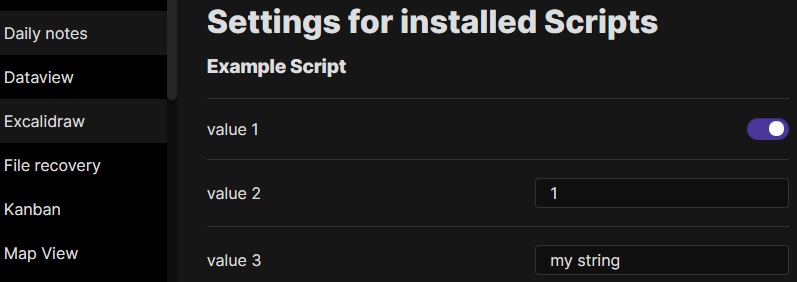
- If the setting is a simple literal (boolean, number, string) these will be displayed as such in settings. The name of the setting will be the key for the value.
|
||||
```javascript
|
||||
ea.setScriptSettings({
|
||||
"value 1": true,
|
||||
"value 2": 1,
|
||||
"value 3": "my string"
|
||||
})
|
||||
```
|
||||
|
||||
- If the setting is an object and follows the below structure then a description and a valueset may also be added. Values may also be hidden from the user using the `hidden` key.
|
||||
```javascript
|
||||
ea.setScriptSettings({
|
||||
"value 1": {
|
||||
"value": true,
|
||||
"description": "This is the description for my boolean value"
|
||||
},
|
||||
"value 2": {
|
||||
"value": 1,
|
||||
"description": "This is the description for my numeric value"
|
||||
},
|
||||
"value 3": {
|
||||
"value": "my string",
|
||||
"description": "This is the description for my string value",
|
||||
"valueset": ["allowed 1","allowed 2","allowed 3"]
|
||||
},
|
||||
"value 4": {
|
||||
"value": "my value",
|
||||
"hidden": true
|
||||
}
|
||||
});
|
||||
```
|
||||
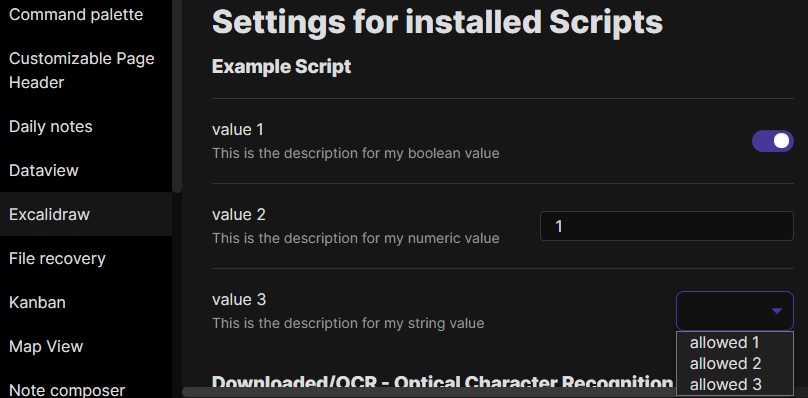
|
||||
|
||||
---------
|
||||
|
||||
@@ -42,16 +105,41 @@ These scripts are available as downloadable `.md` files on GitHub in [this](http
|
||||
|
||||
This script will add an encapsulating box around the currently selected elements in Excalidraw
|
||||
```javascript
|
||||
//uncomment if you want a prompt for custom padding
|
||||
//const padding = parseInt (await utils.inputPrompt("padding?","number","10"));
|
||||
const padding = 10
|
||||
if(!ea.verifyMinimumPluginVersion || !ea.verifyMinimumPluginVersion("1.5.21")) {
|
||||
new Notice("This script requires a newer version of Excalidraw. Please install the latest version.");
|
||||
return;
|
||||
}
|
||||
|
||||
settings = ea.getScriptSettings();
|
||||
//check if settings exist. If not, set default values on first run
|
||||
if(!settings["Default padding"]) {
|
||||
settings = {
|
||||
"Prompt for padding?": true,
|
||||
"Default padding" : {
|
||||
value: 10,
|
||||
description: "Padding between the bounding box of the selected elements, and the box the script creates"
|
||||
}
|
||||
};
|
||||
ea.setScriptSettings(settings);
|
||||
}
|
||||
|
||||
let padding = settings["Default padding"].value;
|
||||
|
||||
if(settings["Prompt for padding?"]) {
|
||||
padding = parseInt (await utils.inputPrompt("padding?","number",padding.toString()));
|
||||
}
|
||||
|
||||
if(isNaN(padding)) {
|
||||
new Notice("The padding value provided is not a number");
|
||||
return;
|
||||
}
|
||||
elements = ea.getViewSelectedElements();
|
||||
const box = ea.getBoundingBox(elements);
|
||||
color = ea
|
||||
.getExcalidrawAPI()
|
||||
.getAppState()
|
||||
.currentItemStrokeColor;
|
||||
//uncomment if you want to set the stroke to a random color
|
||||
//uncomment for random color:
|
||||
//color = '#'+(Math.random()*0xFFFFFF<<0).toString(16).padStart(6,"0");
|
||||
ea.style.strokeColor = color;
|
||||
id = ea.addRect(
|
||||
@@ -73,20 +161,76 @@ ea.addElementsToView(false);
|
||||
|
||||
This script will connect two objects with an arrow. If either of the objects are a set of grouped elements (e.g. a text element grouped with an encapsulating rectangle), the script will identify these groups, and connect the arrow to the largest object in the group (assuming you want to connect the arrow to the box around the text element).
|
||||
```javascript
|
||||
if(!ea.verifyMinimumPluginVersion || !ea.verifyMinimumPluginVersion("1.5.21")) {
|
||||
new Notice("This script requires a newer version of Excalidraw. Please install the latest version.");
|
||||
return;
|
||||
}
|
||||
|
||||
settings = ea.getScriptSettings();
|
||||
//set default values on first run
|
||||
if(!settings["Starting arrowhead"]) {
|
||||
settings = {
|
||||
"Starting arrowhead" : {
|
||||
value: "none",
|
||||
valueset: ["none","arrow","triangle","bar","dot"]
|
||||
},
|
||||
"Ending arrowhead" : {
|
||||
value: "triangle",
|
||||
valueset: ["none","arrow","triangle","bar","dot"]
|
||||
},
|
||||
"Line points" : {
|
||||
value: 1,
|
||||
description: "Number of line points between start and end"
|
||||
}
|
||||
};
|
||||
ea.setScriptSettings(settings);
|
||||
}
|
||||
|
||||
const arrowStart = settings["Starting arrowhead"].value === "none" ? null : settings["Starting arrowhead"].value;
|
||||
const arrowEnd = settings["Ending arrowhead"].value === "none" ? null : settings["Ending arrowhead"].value;
|
||||
const linePoints = Math.floor(settings["Line points"].value);
|
||||
|
||||
const elements = ea.getViewSelectedElements();
|
||||
ea.copyViewElementsToEAforEditing(elements);
|
||||
const groups = ea.getMaximumGroups(elements);
|
||||
if(groups.length !== 2) return;
|
||||
groups = ea.getMaximumGroups(elements);
|
||||
|
||||
if(groups.length !== 2) {
|
||||
//unfortunately getMaxGroups returns duplicated resultset for sticky notes
|
||||
//needs additional filtering
|
||||
cleanGroups=[];
|
||||
idList = [];
|
||||
for (group of groups) {
|
||||
keep = true;
|
||||
for(item of group) if(idList.contains(item.id)) keep = false;
|
||||
if(keep) {
|
||||
cleanGroups.push(group);
|
||||
idList = idList.concat(group.map(el=>el.id))
|
||||
}
|
||||
}
|
||||
if(cleanGroups.length !== 2) return;
|
||||
groups = cleanGroups;
|
||||
}
|
||||
|
||||
els = [
|
||||
ea.getLargestElement(groups[0]),
|
||||
ea.getLargestElement(groups[1])
|
||||
];
|
||||
|
||||
ea.style.strokeColor = els[0].strokeColor;
|
||||
ea.style.strokeWidth = els[0].strokeWidth;
|
||||
ea.style.strokeStyle = els[0].strokeStyle;
|
||||
ea.style.strokeSharpness = els[0].strokeSharpness;
|
||||
|
||||
ea.connectObjects(
|
||||
els[0].id,
|
||||
null,
|
||||
els[1].id,
|
||||
null,
|
||||
{numberOfPoints:2}
|
||||
{
|
||||
endArrowHead: arrowEnd,
|
||||
startArrowHead: arrowStart,
|
||||
numberOfPoints: linePoints
|
||||
}
|
||||
);
|
||||
ea.addElementsToView();
|
||||
```
|
||||
|
||||
@@ -1,9 +1,4 @@
|
||||
/*
|
||||
|
||||

|
||||
|
||||
Download this file and save to your Obsidian Vault including the first line, or open it in "Raw" and copy the entire contents to Obsidian.
|
||||
|
||||

|
||||
|
||||
This script will add a small circle to the top left of each text element in the selection and add the text and the "bullet point" into a group.
|
||||
@@ -27,4 +22,4 @@ elements.forEach((el)=>{
|
||||
);
|
||||
ea.addToGroup([el.id,ellipseId]);
|
||||
});
|
||||
ea.addElementsToView();
|
||||
ea.addElementsToView(false,false);
|
||||
65
ea-scripts/Add Link to Existing File and Open.md
Normal file
@@ -0,0 +1,65 @@
|
||||
/*
|
||||
|
||||
|
||||
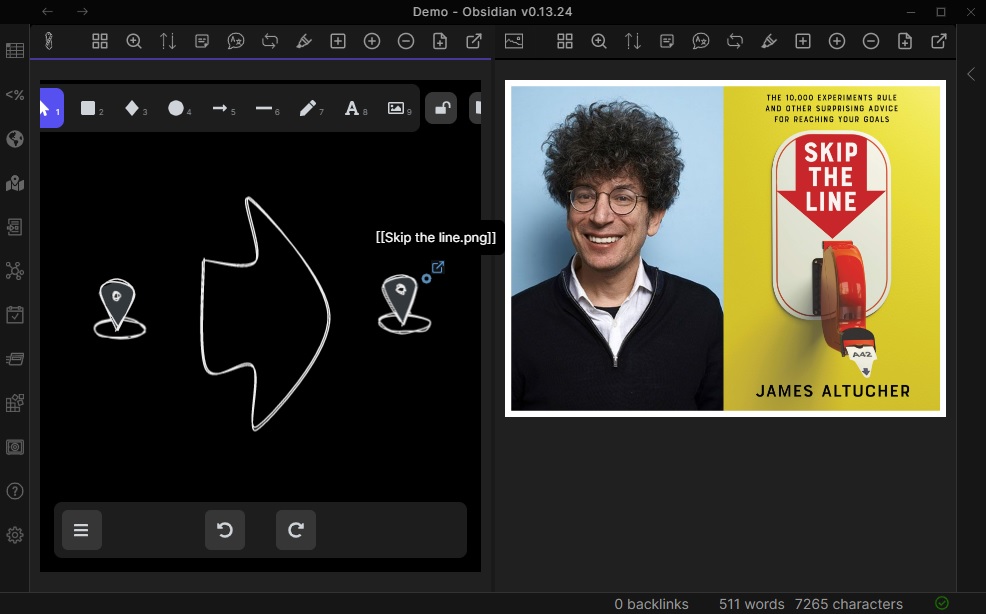
Prompts for a file from the vault. Adds a link to the selected element pointing to the selected file. You can control in settings to open the file in the current active pane or an adjacent pane.
|
||||
|
||||
```javascript
|
||||
*/
|
||||
|
||||
if(!ea.verifyMinimumPluginVersion || !ea.verifyMinimumPluginVersion("1.5.21")) {
|
||||
new Notice("This script requires a newer version of Excalidraw. Please install the latest version.");
|
||||
return;
|
||||
}
|
||||
|
||||
settings = ea.getScriptSettings();
|
||||
|
||||
if(!settings["Open link in active pane"]) {
|
||||
settings = {
|
||||
"Open link in active pane": {
|
||||
value: false,
|
||||
description: "Open the link in the current active pane (on) or a new pane (off)."
|
||||
},
|
||||
...settings
|
||||
};
|
||||
ea.setScriptSettings(settings);
|
||||
}
|
||||
|
||||
const openInCurrentPane = settings["Open link in active pane"].value;
|
||||
|
||||
elements = ea.getViewSelectedElements();
|
||||
if(elements.length === 0) {
|
||||
new Notice("No selected elements");
|
||||
return;
|
||||
}
|
||||
|
||||
const files = app.vault.getFiles()
|
||||
const filePaths = files.map((f)=>f.path);
|
||||
file = await utils.suggester(filePaths,files,"Select a file");
|
||||
|
||||
if(!file) return;
|
||||
|
||||
const link = `[[${app.metadataCache.fileToLinktext(file,ea.targetView.file.path,true)}]]`;
|
||||
|
||||
ea.style.backgroundColor = "transparent";
|
||||
ea.style.strokeColor = "rgba(70,130,180,0.05)"
|
||||
ea.style.strokeWidth = 2;
|
||||
ea.style.roughness = 0;
|
||||
|
||||
if(elements.lenght===1 && elements[0].type !== "text") {
|
||||
ea.copyViewElementsToEAforEditing(elements);
|
||||
ea.getElements()[0].link = link;
|
||||
} else {
|
||||
const b = ea.getBoundingBox(elements);
|
||||
const id = ea.addEllipse(b.topX+b.width-5, b.topY, 5, 5);
|
||||
ea.getElement(id).link = link;
|
||||
ea.copyViewElementsToEAforEditing(elements);
|
||||
ea.addToGroup(elements.map((e)=>e.id).concat([id]));
|
||||
}
|
||||
await ea.addElementsToView(false,true,true);
|
||||
ea.selectElementsInView(ea.getElements());
|
||||
|
||||
if(openInCurrentPane) {
|
||||
app.workspace.openLinkText(file.path,ea.targetView.file.path,false);
|
||||
return;
|
||||
}
|
||||
ea.openFileInNewOrAdjacentLeaf(file);
|
||||
91
ea-scripts/Add Link to New Page and Open.md
Normal file
@@ -0,0 +1,91 @@
|
||||
/*
|
||||
|
||||
|
||||
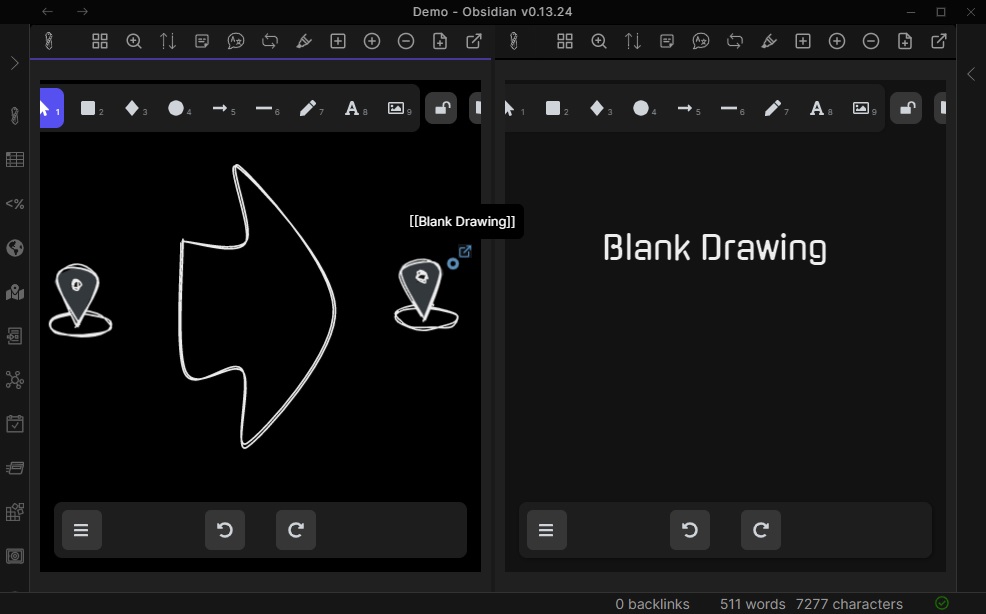
Prompts for filename. Offers option to create and open a new Markdown or Excalidraw document. Adds link pointing to the new file, to the selected objects in the drawing. You can control in settings to open the file in the current active pane or an adjacent pane.
|
||||
|
||||
```javascript
|
||||
*/
|
||||
|
||||
if(!ea.verifyMinimumPluginVersion || !ea.verifyMinimumPluginVersion("1.6.1")) {
|
||||
new Notice("This script requires a newer version of Excalidraw. Please install the latest version.");
|
||||
return;
|
||||
}
|
||||
|
||||
const BLANK_DRAWING = ["---","","excalidraw-plugin: parsed","","---","==⚠ Switch to EXCALIDRAW VIEW in the MORE OPTIONS menu of this document. ⚠==","","","%%","# Drawing","\x60\x60\x60json",'{"type":"excalidraw","version":2,"source":"https://excalidraw.com","elements":[],"appState":{"gridSize":null,"viewBackgroundColor":"#ffffff"}}',"\x60\x60\x60","%%"].join("\n");
|
||||
|
||||
settings = ea.getScriptSettings();
|
||||
|
||||
if(!settings["Open link in active pane"]) {
|
||||
settings = {
|
||||
"Open link in active pane": {
|
||||
value: false,
|
||||
description: "Open the link in the current active pane (on) or a new pane (off)."
|
||||
},
|
||||
...settings
|
||||
};
|
||||
ea.setScriptSettings(settings);
|
||||
}
|
||||
|
||||
const openInCurrentPane = settings["Open link in active pane"].value;
|
||||
|
||||
elements = ea.getViewSelectedElements();
|
||||
if(elements.length === 0) {
|
||||
new Notice("No selected elements");
|
||||
return;
|
||||
}
|
||||
|
||||
const activeFile = ea.targetView.file;
|
||||
const prefix = activeFile.basename;
|
||||
const timestamp = moment(Date.now()).format(ea.plugin.settings.drawingFilenameDateTime);
|
||||
|
||||
let fileType = "";
|
||||
const filename = await utils.inputPrompt (
|
||||
"Filename for new document",
|
||||
"",
|
||||
`${prefix} - ${timestamp}`,
|
||||
[
|
||||
{
|
||||
caption: "Markdown",
|
||||
action: ()=>{fileType="md";return;}
|
||||
},
|
||||
{
|
||||
caption: "Excalidraw",
|
||||
action: ()=>{fileType="ex";return;}
|
||||
}
|
||||
]
|
||||
);
|
||||
|
||||
if(!filename || filename === "") return;
|
||||
const filepath = activeFile.path.replace(activeFile.name,`${filename}.md`);
|
||||
|
||||
const file = await app.fileManager.createNewMarkdownFileFromLinktext(filepath);
|
||||
if(file && fileType==="ex") {
|
||||
await app.vault.modify(file,BLANK_DRAWING);
|
||||
await new Promise(r => setTimeout(r, 100)); //wait for metadata cache to update, so file opens as excalidraw
|
||||
}
|
||||
|
||||
const link = `[[${app.metadataCache.fileToLinktext(file,ea.targetView.file.path,true)}]]`;
|
||||
|
||||
ea.style.backgroundColor = "transparent";
|
||||
ea.style.strokeColor = "rgba(70,130,180,0.05)"
|
||||
ea.style.strokeWidth = 2;
|
||||
ea.style.roughness = 0;
|
||||
|
||||
if(elements.lenght===1 && elements[0].type !== "text") {
|
||||
ea.copyViewElementsToEAforEditing(elements);
|
||||
ea.getElements()[0].link = link;
|
||||
} else {
|
||||
const b = ea.getBoundingBox(elements);
|
||||
const id = ea.addEllipse(b.topX+b.width-5, b.topY, 5, 5);
|
||||
ea.getElement(id).link = link;
|
||||
ea.copyViewElementsToEAforEditing(elements);
|
||||
ea.addToGroup(elements.map((e)=>e.id).concat([id]));
|
||||
}
|
||||
await ea.addElementsToView(false,true,true);
|
||||
ea.selectElementsInView(ea.getElements());
|
||||
|
||||
if(openInCurrentPane) {
|
||||
app.workspace.openLinkText(file.path,ea.targetView.file.path,false);
|
||||
return;
|
||||
}
|
||||
ea.openFileInNewOrAdjacentLeaf(file);
|
||||
133
ea-scripts/Add Next Step in Process.md
Normal file
@@ -0,0 +1,133 @@
|
||||
/*
|
||||
|
||||
|
||||
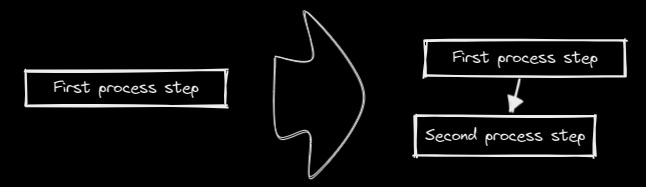
This script will prompt you for the title of the process step, then will create a stick note with the text. If an element is selected then the script will connect this new step with an arrow to the previous step (the selected element). If no element is selected, then the script assumes this is the first step in the process and will only output the sticky note with the text that was entered.
|
||||
|
||||
```javascript
|
||||
*/
|
||||
|
||||
if(!ea.verifyMinimumPluginVersion || !ea.verifyMinimumPluginVersion("1.5.24")) {
|
||||
new Notice("This script requires a newer version of Excalidraw. Please install the latest version.");
|
||||
return;
|
||||
}
|
||||
|
||||
settings = ea.getScriptSettings();
|
||||
//set default values on first run
|
||||
if(!settings["Starting arrowhead"]) {
|
||||
settings = {
|
||||
"Starting arrowhead" : {
|
||||
value: "none",
|
||||
valueset: ["none","arrow","triangle","bar","dot"]
|
||||
},
|
||||
"Ending arrowhead" : {
|
||||
value: "triangle",
|
||||
valueset: ["none","arrow","triangle","bar","dot"]
|
||||
},
|
||||
"Line points" : {
|
||||
value: 0,
|
||||
description: "Number of line points between start and end"
|
||||
},
|
||||
"Gap between elements": {
|
||||
value: 100
|
||||
},
|
||||
"Wrap text at (number of characters)": {
|
||||
value: 25,
|
||||
},
|
||||
"Fix width": {
|
||||
value: true,
|
||||
description: "The object around the text should have fix width to fit the wrapped text"
|
||||
}
|
||||
};
|
||||
ea.setScriptSettings(settings);
|
||||
}
|
||||
|
||||
const arrowStart = settings["Starting arrowhead"].value === "none" ? null : settings["Starting arrowhead"].value;
|
||||
const arrowEnd = settings["Ending arrowhead"].value === "none" ? null : settings["Ending arrowhead"].value;
|
||||
|
||||
// workaround until https://github.com/zsviczian/obsidian-excalidraw-plugin/issues/388 is fixed
|
||||
if (!arrowEnd) ea.style.endArrowHead = null;
|
||||
if (!arrowStart) ea.style.startArrowHead = null;
|
||||
|
||||
const linePoints = Math.floor(settings["Line points"].value);
|
||||
const gapBetweenElements = Math.floor(settings["Gap between elements"].value);
|
||||
const wrapLineLen = Math.floor(settings["Wrap text at (number of characters)"].value);
|
||||
const fixWidth = settings["Fix width"];
|
||||
|
||||
const textPadding = 10;
|
||||
const text = await utils.inputPrompt("Text?");
|
||||
const elements = ea.getViewSelectedElements();
|
||||
const isFirst = (!elements || elements.length === 0);
|
||||
|
||||
const width = ea.measureText("w".repeat(wrapLineLen)).width;
|
||||
|
||||
let id = "";
|
||||
|
||||
if(!isFirst) {
|
||||
const fromElement = ea.getLargestElement(elements);
|
||||
ea.copyViewElementsToEAforEditing([fromElement]);
|
||||
|
||||
const previousTextElements = elements.filter((el)=>el.type==="text");
|
||||
if(previousTextElements.length>0) {
|
||||
const el = previousTextElements[0];
|
||||
ea.style.strokeColor = el.strokeColor;
|
||||
ea.style.fontSize = el.fontSize;
|
||||
ea.style.fontFamily = el.fontFamily;
|
||||
}
|
||||
|
||||
textWidth = ea.measureText(text).width;
|
||||
|
||||
id = ea.addText(
|
||||
fixWidth
|
||||
? fromElement.x+fromElement.width/2-width/2
|
||||
: fromElement.x+fromElement.width/2-textWidth/2-textPadding,
|
||||
fromElement.y+fromElement.height+gapBetweenElements,
|
||||
text,
|
||||
{
|
||||
wrapAt: wrapLineLen,
|
||||
textAlign: "center",
|
||||
box: "rectangle",
|
||||
...fixWidth
|
||||
? {width: width, boxPadding:0}
|
||||
: {boxPadding: textPadding}
|
||||
}
|
||||
);
|
||||
|
||||
ea.connectObjects(
|
||||
fromElement.id,
|
||||
null,
|
||||
id,
|
||||
null,
|
||||
{
|
||||
endArrowHead: arrowEnd,
|
||||
startArrowHead: arrowStart,
|
||||
numberOfPoints: linePoints
|
||||
}
|
||||
);
|
||||
|
||||
const rect = ea.getElement(id);
|
||||
rect.strokeColor = fromElement.strokeColor;
|
||||
rect.strokeWidth = fromElement.strokeWidth;
|
||||
rect.strokeStyle = fromElement.strokeStyle;
|
||||
rect.roughness = fromElement.roughness;
|
||||
rect.strokeSharpness = fromElement.strokeSharpness;
|
||||
rect.backgroundColor = fromElement.backgroundColor;
|
||||
rect.fillStyle = fromElement.fillStyle;
|
||||
|
||||
await ea.addElementsToView(false,false);
|
||||
} else {
|
||||
id = ea.addText(
|
||||
0,
|
||||
0,
|
||||
text,
|
||||
{
|
||||
wrapAt: wrapLineLen,
|
||||
textAlign: "center",
|
||||
box: "rectangle",
|
||||
boxPadding: textPadding,
|
||||
...fixWidth?{width: width}:null
|
||||
}
|
||||
);
|
||||
await ea.addElementsToView(true,false);
|
||||
}
|
||||
|
||||
ea.selectElementsInView([ea.getElement(id)]);
|
||||
181
ea-scripts/Box Each Selected Groups.md
Normal file
@@ -0,0 +1,181 @@
|
||||
/*
|
||||

|
||||
|
||||
Download this file and save to your Obsidian Vault including the first line, or open it in "Raw" and copy the entire contents to Obsidian.
|
||||
|
||||
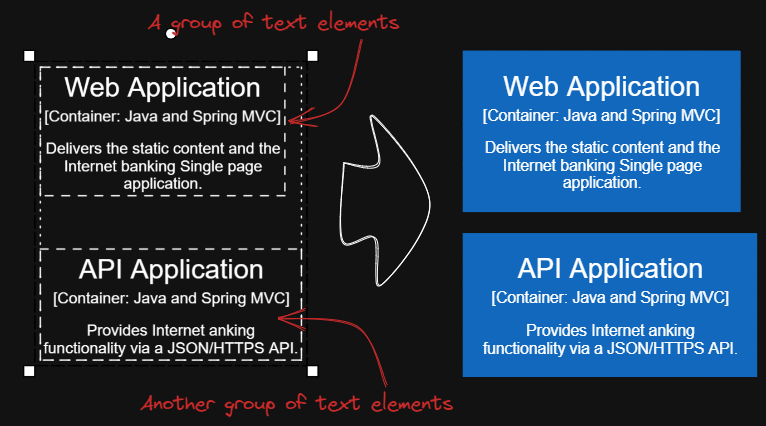
|
||||
|
||||
This script will add encapsulating boxes around each of the currently selected groups in Excalidraw.
|
||||
|
||||
You can focus on content creation first, and then batch add consistent style boxes to each group of text.
|
||||
|
||||
Tips 1: You can copy the desired style to the global state using script `Copy Selected Element Style to Global`, then add boxes with the same global style using script `Box Each Selected Groups`.
|
||||
|
||||
Tips 2: Next you can use scripts `Expand rectangles horizontally keep text centered` and `Expand rectangles vertically keep text centered` to make the boxes the same size, if you wish.
|
||||
|
||||
Tips 3: If you want the left and right margins to be different from the top and bottom margins, input something like `32,16`, this will create a box with left and right margins of `32` and top and bottom margins of `16`.
|
||||
|
||||
See documentation for more details:
|
||||
https://zsviczian.github.io/obsidian-excalidraw-plugin/ExcalidrawScriptsEngine.html
|
||||
|
||||
```javascript
|
||||
*/
|
||||
if(!ea.verifyMinimumPluginVersion || !ea.verifyMinimumPluginVersion("1.5.21")) {
|
||||
new Notice("This script requires a newer version of Excalidraw. Please install the latest version.");
|
||||
return;
|
||||
}
|
||||
settings = ea.getScriptSettings();
|
||||
//set default values on first run
|
||||
if(!settings["Default padding"]) {
|
||||
settings = {
|
||||
"Prompt for padding?": true,
|
||||
"Default padding" : {
|
||||
value: 10,
|
||||
description: "Padding between the bounding box of the selected elements, and the box the script creates"
|
||||
},
|
||||
"Remember last padding?": false
|
||||
};
|
||||
ea.setScriptSettings(settings);
|
||||
}
|
||||
|
||||
let paddingStr = settings["Default padding"].value.toString();
|
||||
const rememberLastPadding = settings["Remember last padding?"];
|
||||
|
||||
if(settings["Prompt for padding?"]) {
|
||||
paddingStr = await utils.inputPrompt("padding?","string",paddingStr);
|
||||
}
|
||||
if(!paddingStr) {
|
||||
return;
|
||||
}
|
||||
if(rememberLastPadding) {
|
||||
settings["Default padding"].value = paddingStr;
|
||||
ea.setScriptSettings(settings);
|
||||
}
|
||||
var paddingLR = 0;
|
||||
var paddingTB = 0;
|
||||
if(paddingStr.indexOf(',') > 0) {
|
||||
const paddingParts = paddingStr.split(',');
|
||||
paddingLR = parseInt(paddingParts[0]);
|
||||
paddingTB = parseInt(paddingParts[1]);
|
||||
}
|
||||
else {
|
||||
paddingLR = paddingTB = parseInt(paddingStr);
|
||||
}
|
||||
|
||||
if(isNaN(paddingLR) || isNaN(paddingTB)) {
|
||||
return;
|
||||
}
|
||||
|
||||
const selectedElements = ea.getViewSelectedElements();
|
||||
const groups = ea.getMaximumGroups(selectedElements);
|
||||
const allIndividualArrows = ea.getMaximumGroups(ea.getViewElements())
|
||||
.reduce((result, group) => (group.length === 1 && (group[0].type === 'arrow' || group[0].type === 'line')) ?
|
||||
[...result, group[0]] : result, []);
|
||||
for(const elements of groups) {
|
||||
if(elements.length === 1 && elements[0].type ==="arrow" || elements[0].type==="line") {
|
||||
// individual arrows or lines are not affected
|
||||
continue;
|
||||
}
|
||||
const box = ea.getBoundingBox(elements);
|
||||
color = ea
|
||||
.getExcalidrawAPI()
|
||||
.getAppState()
|
||||
.currentItemStrokeColor;
|
||||
// use current stroke with and style
|
||||
const appState = ea.getExcalidrawAPI().getAppState();
|
||||
const strokeWidth = appState.currentItemStrokeWidth;
|
||||
const strokeStyle = appState.currentItemStrokeStyle;
|
||||
const strokeSharpness = appState.currentItemStrokeSharpness;
|
||||
const roughness = appState.currentItemRoughness;
|
||||
const fillStyle = appState.currentItemFillStyle;
|
||||
const backgroundColor = appState.currentItemBackgroundColor;
|
||||
ea.style.strokeWidth = strokeWidth;
|
||||
ea.style.strokeStyle = strokeStyle;
|
||||
ea.style.strokeSharpness = strokeSharpness;
|
||||
ea.style.roughness = roughness;
|
||||
ea.style.fillStyle = fillStyle;
|
||||
ea.style.backgroundColor = backgroundColor;
|
||||
ea.style.strokeColor = color;
|
||||
|
||||
const id = ea.addRect(
|
||||
box.topX - paddingLR,
|
||||
box.topY - paddingTB,
|
||||
box.width + 2*paddingLR,
|
||||
box.height + 2*paddingTB
|
||||
);
|
||||
|
||||
// Change the join point in the group to the new box
|
||||
const elementsWithBounded = elements.filter(el => (el.boundElements || []).length > 0);
|
||||
const boundedElementsCollection = elementsWithBounded.reduce((result, el) => [...result, ...el.boundElements], []);
|
||||
for(const el of elementsWithBounded) {
|
||||
el.boundElements = [];
|
||||
}
|
||||
|
||||
const newRect = ea.getElement(id);
|
||||
newRect.boundElements = boundedElementsCollection;
|
||||
|
||||
const elementIds = elements.map(el => el.id);
|
||||
|
||||
const startBindingLines = allIndividualArrows.filter(el => elementIds.includes((el.startBinding||{}).elementId));
|
||||
for(startBindingLine of startBindingLines) {
|
||||
startBindingLine.startBinding.elementId = id;
|
||||
recalculateStartPointOfLine(startBindingLine, newRect);
|
||||
}
|
||||
|
||||
const endBindingLines = allIndividualArrows.filter(el => elementIds.includes((el.endBinding||{}).elementId));
|
||||
for(endBindingLine of endBindingLines) {
|
||||
endBindingLine.endBinding.elementId = id;
|
||||
recalculateEndPointOfLine(endBindingLine, newRect);
|
||||
}
|
||||
|
||||
ea.copyViewElementsToEAforEditing(elements);
|
||||
ea.addToGroup([id].concat(elements.map((el)=>el.id)));
|
||||
}
|
||||
|
||||
await ea.addElementsToView(false,false);
|
||||
|
||||
function recalculateStartPointOfLine(line, el) {
|
||||
const aX = el.x + el.width/2;
|
||||
const bX = line.x + line.points[1][0];
|
||||
const aY = el.y + el.height/2;
|
||||
const bY = line.y + line.points[1][1];
|
||||
|
||||
line.startBinding.gap = 8;
|
||||
line.startBinding.focus = 0;
|
||||
const intersectA = ea.intersectElementWithLine(
|
||||
el,
|
||||
[bX, bY],
|
||||
[aX, aY],
|
||||
line.startBinding.gap
|
||||
);
|
||||
|
||||
if(intersectA.length > 0) {
|
||||
line.points[0] = [0, 0];
|
||||
for(var i = 1; i<line.points.length; i++) {
|
||||
line.points[i][0] -= intersectA[0][0] - line.x;
|
||||
line.points[i][1] -= intersectA[0][1] - line.y;
|
||||
}
|
||||
line.x = intersectA[0][0];
|
||||
line.y = intersectA[0][1];
|
||||
}
|
||||
}
|
||||
|
||||
function recalculateEndPointOfLine(line, el) {
|
||||
const aX = el.x + el.width/2;
|
||||
const bX = line.x + line.points[line.points.length-2][0];
|
||||
const aY = el.y + el.height/2;
|
||||
const bY = line.y + line.points[line.points.length-2][1];
|
||||
|
||||
line.endBinding.gap = 8;
|
||||
line.endBinding.focus = 0;
|
||||
const intersectA = ea.intersectElementWithLine(
|
||||
el,
|
||||
[bX, bY],
|
||||
[aX, aY],
|
||||
line.endBinding.gap
|
||||
);
|
||||
|
||||
if(intersectA.length > 0) {
|
||||
line.points[line.points.length - 1] = [intersectA[0][0] - line.x, intersectA[0][1] - line.y];
|
||||
}
|
||||
}
|
||||
@@ -1,9 +1,4 @@
|
||||
/*
|
||||
|
||||

|
||||
|
||||
Download this file and save to your Obsidian Vault including the first line, or open it in "Raw" and copy the entire contents to Obsidian.
|
||||
|
||||

|
||||
|
||||
This script will add an encapsulating box around the currently selected elements in Excalidraw.
|
||||
@@ -13,9 +8,33 @@ https://zsviczian.github.io/obsidian-excalidraw-plugin/ExcalidrawScriptsEngine.h
|
||||
|
||||
```javascript
|
||||
*/
|
||||
//uncomment if you want a prompt for custom padding
|
||||
//const padding = parseInt (await utils.inputPrompt("padding?","number","10"));
|
||||
const padding = 10
|
||||
if(!ea.verifyMinimumPluginVersion || !ea.verifyMinimumPluginVersion("1.5.21")) {
|
||||
new Notice("This script requires a newer version of Excalidraw. Please install the latest version.");
|
||||
return;
|
||||
}
|
||||
settings = ea.getScriptSettings();
|
||||
//set default values on first run
|
||||
if(!settings["Default padding"]) {
|
||||
settings = {
|
||||
"Prompt for padding?": true,
|
||||
"Default padding" : {
|
||||
value: 10,
|
||||
description: "Padding between the bounding box of the selected elements, and the box the script creates"
|
||||
}
|
||||
};
|
||||
ea.setScriptSettings(settings);
|
||||
}
|
||||
|
||||
let padding = settings["Default padding"].value;
|
||||
|
||||
if(settings["Prompt for padding?"]) {
|
||||
padding = parseInt (await utils.inputPrompt("padding?","number",padding.toString()));
|
||||
}
|
||||
|
||||
if(isNaN(padding)) {
|
||||
new Notice("The padding value provided is not a number");
|
||||
return;
|
||||
}
|
||||
elements = ea.getViewSelectedElements();
|
||||
const box = ea.getBoundingBox(elements);
|
||||
color = ea
|
||||
@@ -33,4 +52,4 @@ id = ea.addRect(
|
||||
);
|
||||
ea.copyViewElementsToEAforEditing(elements);
|
||||
ea.addToGroup([id].concat(elements.map((el)=>el.id)));
|
||||
ea.addElementsToView(false);
|
||||
ea.addElementsToView(false,false);
|
||||
40
ea-scripts/Change shape of selected elements.md
Normal file
@@ -0,0 +1,40 @@
|
||||
/*
|
||||
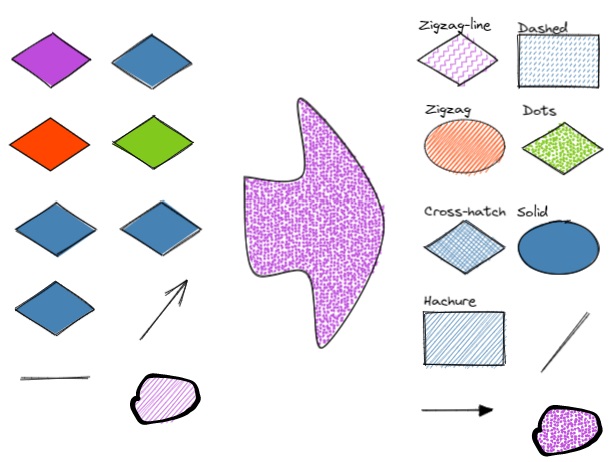
|
||||
|
||||
The script allows you to change the shape of selected Rectangles, Diamonds and Ellipses.
|
||||
|
||||
```javascript
|
||||
*/
|
||||
const boxShapesDispaly=["○ ellipse","□ rectangle","◇ diamond"];
|
||||
const boxShapes=["ellipse","rectangle","diamond"];
|
||||
const lineShapesDispaly=["- line","⭢ arrow"];
|
||||
const lineShapes=["line","arrow"];
|
||||
|
||||
let editedElements = [];
|
||||
|
||||
let elements = ea.getViewSelectedElements().filter(el=>boxShapes.contains(el.type));
|
||||
if (elements.length>0) {
|
||||
newShape = await utils.suggester(boxShapesDispaly, boxShapes, "Change shape of 'box' type elements in selection");
|
||||
if(newShape) {
|
||||
editedElements = elements;
|
||||
elements.forEach(el=>el.type = newShape);
|
||||
}
|
||||
}
|
||||
|
||||
elements = ea.getViewSelectedElements().filter(el=>lineShapes.contains(el.type));
|
||||
if (elements.length>0) {
|
||||
newShape = await utils.suggester(lineShapesDispaly, lineShapes, "Change shape of 'line' type elements in selection");
|
||||
if(newShape) {
|
||||
editedElements = editedElements.concat(elements);
|
||||
elements.forEach((el)=>{
|
||||
el.type = newShape;
|
||||
if(newShape === "arrow") {
|
||||
el.endArrowhead = "triangle";
|
||||
}
|
||||
});
|
||||
}
|
||||
}
|
||||
|
||||
ea.copyViewElementsToEAforEditing(editedElements);
|
||||
|
||||
ea.addElementsToView(false,false);
|
||||
@@ -1,9 +1,4 @@
|
||||
/*
|
||||
|
||||

|
||||
|
||||
Download this file and save to your Obsidian Vault including the first line, or open it in "Raw" and copy the entire contents to Obsidian.
|
||||
|
||||
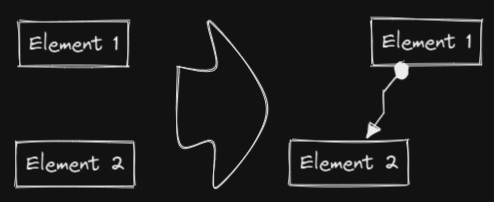
|
||||
|
||||
This script will connect two objects with an arrow. If either of the objects are a set of grouped elements (e.g. a text element grouped with an encapsulating rectangle), the script will identify these groups, and connect the arrow to the largest object in the group (assuming you want to connect the arrow to the box around the text element).
|
||||
@@ -13,23 +8,74 @@ https://zsviczian.github.io/obsidian-excalidraw-plugin/ExcalidrawScriptsEngine.h
|
||||
|
||||
```javascript
|
||||
*/
|
||||
if(!ea.verifyMinimumPluginVersion || !ea.verifyMinimumPluginVersion("1.5.21")) {
|
||||
new Notice("This script requires a newer version of Excalidraw. Please install the latest version.");
|
||||
return;
|
||||
}
|
||||
|
||||
settings = ea.getScriptSettings();
|
||||
//set default values on first run
|
||||
if(!settings["Starting arrowhead"]) {
|
||||
settings = {
|
||||
"Starting arrowhead" : {
|
||||
value: "none",
|
||||
valueset: ["none","arrow","triangle","bar","dot"]
|
||||
},
|
||||
"Ending arrowhead" : {
|
||||
value: "triangle",
|
||||
valueset: ["none","arrow","triangle","bar","dot"]
|
||||
},
|
||||
"Line points" : {
|
||||
value: 1,
|
||||
description: "Number of line points between start and end"
|
||||
}
|
||||
};
|
||||
ea.setScriptSettings(settings);
|
||||
}
|
||||
|
||||
const arrowStart = settings["Starting arrowhead"].value === "none" ? null : settings["Starting arrowhead"].value;
|
||||
const arrowEnd = settings["Ending arrowhead"].value === "none" ? null : settings["Ending arrowhead"].value;
|
||||
const linePoints = Math.floor(settings["Line points"].value);
|
||||
|
||||
|
||||
|
||||
const elements = ea.getViewSelectedElements();
|
||||
ea.copyViewElementsToEAforEditing(elements);
|
||||
const groups = ea.getMaximumGroups(elements);
|
||||
if(groups.length !== 2) return;
|
||||
groups = ea.getMaximumGroups(elements);
|
||||
if(groups.length !== 2) {
|
||||
//unfortunately getMaxGroups returns duplicated resultset for sticky notes
|
||||
//needs additional filtering
|
||||
cleanGroups=[];
|
||||
idList = [];
|
||||
for (group of groups) {
|
||||
keep = true;
|
||||
for(item of group) if(idList.contains(item.id)) keep = false;
|
||||
if(keep) {
|
||||
cleanGroups.push(group);
|
||||
idList = idList.concat(group.map(el=>el.id))
|
||||
}
|
||||
}
|
||||
if(cleanGroups.length !== 2) return;
|
||||
groups = cleanGroups;
|
||||
}
|
||||
els = [
|
||||
ea.getLargestElement(groups[0]),
|
||||
ea.getLargestElement(groups[1])
|
||||
];
|
||||
|
||||
ea.style.strokeColor = els[0].strokeColor;
|
||||
ea.style.strokeWidth = els[0].strokeWidth;
|
||||
ea.style.strokeStyle = els[0].strokeStyle;
|
||||
ea.style.strokeSharpness = els[0].strokeSharpness;
|
||||
ea.connectObjects(
|
||||
els[0].id,
|
||||
null,
|
||||
els[1].id,
|
||||
null,
|
||||
{
|
||||
endArrowHead: "triangle",
|
||||
startArrowHead: "dot",
|
||||
numberOfPoints: 2
|
||||
endArrowHead: arrowEnd,
|
||||
startArrowHead: arrowStart,
|
||||
numberOfPoints: linePoints
|
||||
}
|
||||
);
|
||||
ea.addElementsToView();
|
||||
ea.addElementsToView(false,false,true);
|
||||
64
ea-scripts/Convert freedraw to line.md
Normal file
@@ -0,0 +1,64 @@
|
||||
/*
|
||||
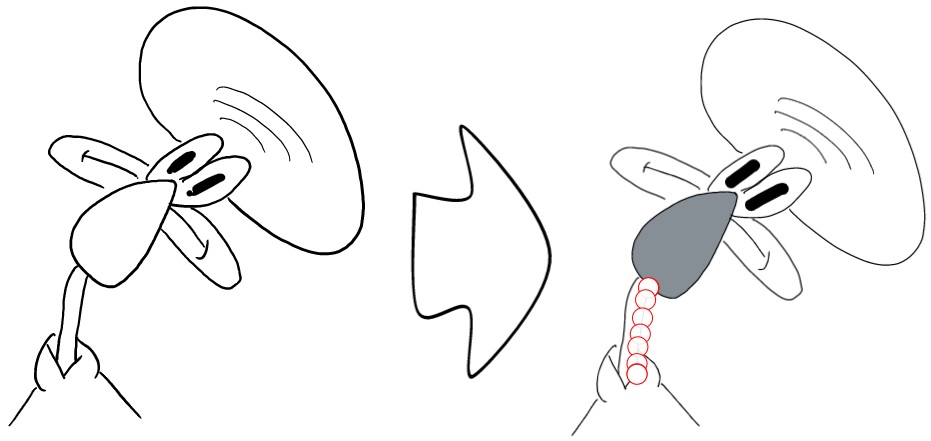
|
||||
|
||||
Convert selected freedraw objects into editable lines. This will allow you to adjust your drawings by dragging line points and will also allow you to select shape fill in case of enclosed lines. You can adjust conversion point density in settings.
|
||||
|
||||
```javascript
|
||||
*/
|
||||
|
||||
if(!ea.verifyMinimumPluginVersion || !ea.verifyMinimumPluginVersion("1.5.21")) {
|
||||
new Notice("This script requires a newer version of Excalidraw. Please install the latest version.");
|
||||
return;
|
||||
}
|
||||
|
||||
settings = ea.getScriptSettings();
|
||||
//set default values on first run
|
||||
if(!settings["Point density"]) {
|
||||
settings = {
|
||||
"Point density" : {
|
||||
value: "7:1",
|
||||
valueset: ["1:1","2:1","3:1","4:1","5:1","6:1","7:1","8:1","9:1","10:1","11:1"],
|
||||
description: "A freedraw object has many points. Converting freedraw to a line with too many points will result in an impractical object that is hard to edit. This setting sepcifies how many points from freedraw should be averaged to form a point on the line"
|
||||
},
|
||||
};
|
||||
ea.setScriptSettings(settings);
|
||||
}
|
||||
|
||||
const scale = settings["Point density"].value;
|
||||
const setSize = parseInt(scale.substring(0,scale.indexOf(":")));
|
||||
|
||||
const elements = ea.getViewSelectedElements().filter(el=>el.type==="freedraw");
|
||||
if(elements.length === 0) {
|
||||
new Notice("No freedraw object is selected");
|
||||
}
|
||||
|
||||
|
||||
ea.style.roughness=0;
|
||||
ea.style.strokeSharpness="round";
|
||||
|
||||
elements.forEach((el)=>{
|
||||
points = [];
|
||||
points.push(el.points[0]);
|
||||
for(i=1;i<el.points.length;i+=setSize) {
|
||||
point = [0,0];
|
||||
count = 0;
|
||||
for(p of el.points.slice(i,i+setSize)) {
|
||||
point = [ point[0]+p[0] , point[1]+p[1] ];
|
||||
count++;
|
||||
}
|
||||
point = [point[0]/count,point[1]/count];
|
||||
points.push(point);
|
||||
}
|
||||
const lineId = ea.addLine(points);
|
||||
const line = ea.getElement(lineId);
|
||||
line.strokeWidth = el.strokeWidth*3;
|
||||
line.strokeColor = el.strokeColor;
|
||||
line.width = el.width;
|
||||
line.height = el.height;
|
||||
line.x = el.x;
|
||||
line.y = el.y;
|
||||
});
|
||||
|
||||
ea.deleteViewElements(elements);
|
||||
await ea.addElementsToView(false,false,true);
|
||||
ea.selectElementsInView(ea.getElements());
|
||||
51
ea-scripts/Convert selected text elements to sticky notes.md
Normal file
@@ -0,0 +1,51 @@
|
||||
/*
|
||||
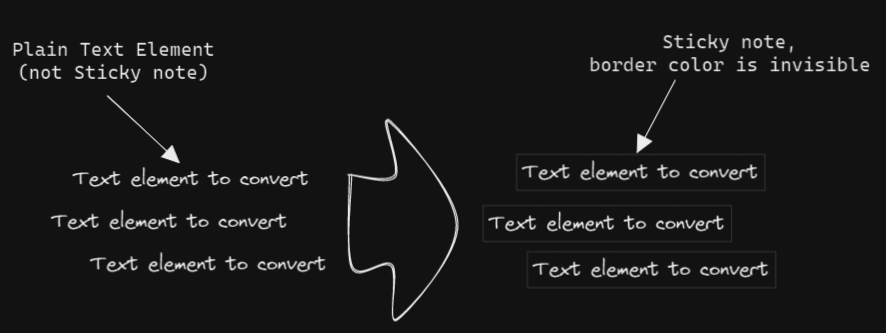
|
||||
|
||||
Converts selected plain text elements to sticky notes with transparent background and transparent stroke color. Essentially converts text element into a wrappable format.
|
||||
|
||||
```javascript
|
||||
*/
|
||||
if(!ea.verifyMinimumPluginVersion || !ea.verifyMinimumPluginVersion("1.5.21")) {
|
||||
new Notice("This script requires a newer version of Excalidraw. Please install the latest version.");
|
||||
return;
|
||||
}
|
||||
|
||||
settings = ea.getScriptSettings();
|
||||
//set default values on first run
|
||||
if(!settings["Border color"]) {
|
||||
settings = {
|
||||
"Border color" : {
|
||||
value: "#000000",
|
||||
description: "Any legal HTML color (#000000, rgb, color-name, etc.). Set to 'transparent' for transparent color."
|
||||
},
|
||||
"Background color" : {
|
||||
value: "transparent",
|
||||
description: "Background color of the sticky note. Set to 'transparent' for transparent color."
|
||||
},
|
||||
"Background fill style" : {
|
||||
value: "solid",
|
||||
description: "Fill style of the sticky note",
|
||||
valueset: ["hachure","cross-hatch","solid"]
|
||||
}
|
||||
};
|
||||
ea.setScriptSettings(settings);
|
||||
}
|
||||
|
||||
const strokeColor = settings["Border color"].value;
|
||||
const backgroundColor = settings["Background color"].value;
|
||||
const fillStyle = settings["Background fill style"].value;
|
||||
|
||||
elements = ea.getViewSelectedElements()
|
||||
.filter((el)=>(el.type==="text")&&(el.containerId===null));
|
||||
if(elements.length===0) return;
|
||||
ea.style.strokeColor = strokeColor;
|
||||
ea.style.backgroundColor = backgroundColor;
|
||||
ea.style.fillStyle = fillStyle;
|
||||
const padding = 6;
|
||||
elements.forEach((el)=>{
|
||||
const id = ea.addRect(el.x-padding,el.y-padding,el.width+2*padding,el.height+2*padding);
|
||||
ea.getElement(id).boundElements=[{type:"text",id:el.id}];
|
||||
el.containerId = id;
|
||||
});
|
||||
ea.copyViewElementsToEAforEditing(elements);
|
||||
ea.addElementsToView(false,false);
|
||||
@@ -18,12 +18,15 @@ app.vault.getFiles().forEach((f)=>
|
||||
|
||||
f = Array.from(folders);
|
||||
folder = await utils.suggester(f,f);
|
||||
folder = folder??""; //if exiting suggester with ESC
|
||||
folder = folder === "" ? folder : folder + "/";
|
||||
|
||||
elements = ea.getViewSelectedElements().filter((el)=>el.type==="text");
|
||||
|
||||
elements.forEach((el)=>{
|
||||
el.rawText = "[["+folder+el.rawText+"|"+el.rawText+"]]";
|
||||
el.text = "[["+folder+el.text+"|"+el.text+"]]";
|
||||
el.originalText = "[["+folder+el.originalText+"|"+el.originalText+"]]";
|
||||
})
|
||||
ea.copyViewElementsToEAforEditing(elements);
|
||||
ea.addElementsToView();
|
||||
43
ea-scripts/Copy Selected Element Styles to Global.md
Normal file
@@ -0,0 +1,43 @@
|
||||
/*
|
||||
|
||||

|
||||
|
||||
Download this file and save to your Obsidian Vault including the first line, or open it in "Raw" and copy the entire contents to Obsidian.
|
||||
|
||||
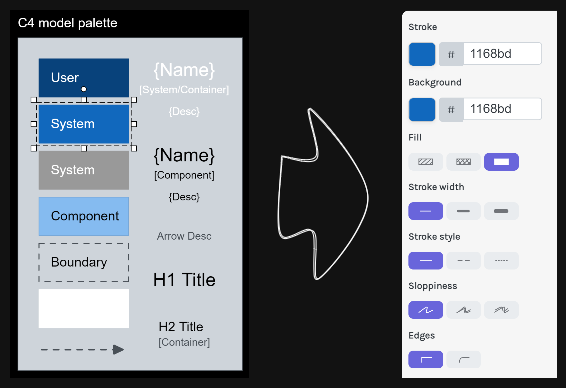
|
||||
|
||||
This script will copy styles of any selected element into Excalidraw's global styles.
|
||||
|
||||
After copying the styles of element such as box, text, or arrow using this script, You can then use Excalidraw's box, arrow, and other tools to create several elements with the same style. This is sometimes more convenient than `Copy Styles` and `Paste Styles`, especially when used with the script `Box Each Selected Groups`.
|
||||
|
||||
See documentation for more details:
|
||||
https://zsviczian.github.io/obsidian-excalidraw-plugin/ExcalidrawScriptsEngine.html
|
||||
|
||||
```javascript
|
||||
*/
|
||||
|
||||
const element = ea.getViewSelectedElement();
|
||||
const appState = ea.getExcalidrawAPI().getAppState();
|
||||
|
||||
if(!element) {
|
||||
return;
|
||||
}
|
||||
|
||||
appState.currentItemStrokeWidth = element.strokeWidth;
|
||||
appState.currentItemStrokeStyle = element.strokeStyle;
|
||||
appState.currentItemStrokeSharpness = element.strokeSharpness;
|
||||
appState.currentItemRoughness = element.roughness;
|
||||
appState.currentItemFillStyle = element.fillStyle;
|
||||
appState.currentItemBackgroundColor = element.backgroundColor;
|
||||
appState.currentItemStrokeColor = element.strokeColor;
|
||||
|
||||
if(element.type === 'text') {
|
||||
appState.currentItemFontFamily = element.fontFamily;
|
||||
appState.currentItemFontSize = element.fontSize;
|
||||
appState.currentItemTextAlign = element.textAlign;
|
||||
}
|
||||
|
||||
if(element.type === 'arrow') {
|
||||
appState.currentItemStartArrowhead = element.startArrowhead;
|
||||
appState.currentItemEndArrowhead = element.endArrowhead;
|
||||
}
|
||||
@@ -1,289 +1,289 @@
|
||||
/*
|
||||

|
||||
|
||||
Download this file and save to your Obsidian Vault including the first line, or open it in "Raw" and copy the entire contents to Obsidian.
|
||||
|
||||

|
||||
|
||||
This script darkens the background color of the selected element by 2% at a time.
|
||||
|
||||
You can use this script several times until you are satisfied. It is recommended to set a shortcut key for this script so that you can quickly try to DARKEN and LIGHTEN the color effect.
|
||||
|
||||
In contrast to the `Modify background color opacity` script, the advantage is that the background color of the element is not affected by the canvas color, and the color value does not appear in a strange rgba() form.
|
||||
|
||||
The color conversion method was copied from [color-convert](https://github.com/Qix-/color-convert).
|
||||
|
||||
```javascript
|
||||
*/
|
||||
|
||||
const elements = ea
|
||||
.getViewSelectedElements()
|
||||
.filter((el) =>
|
||||
["rectangle", "ellipse", "diamond", "image"].includes(el.type)
|
||||
);
|
||||
ea.copyViewElementsToEAforEditing(elements);
|
||||
for (const el of ea.getElements()) {
|
||||
const color = colorNameToHex(el.backgroundColor);
|
||||
const rgbColor = /^#?([a-f\d]{2})([a-f\d]{2})([a-f\d]{2})$/i.exec(color);
|
||||
if (rgbColor) {
|
||||
const r = parseInt(rgbColor[1], 16);
|
||||
const g = parseInt(rgbColor[2], 16);
|
||||
const b = parseInt(rgbColor[3], 16);
|
||||
const originalRgb = [r, g, b];
|
||||
const hsl = rgbToHsl(originalRgb);
|
||||
const step = 2;
|
||||
const newLightness = hsl[2] - step;
|
||||
if (newLightness > 0) {
|
||||
hsl[2] = newLightness;
|
||||
}
|
||||
const newRgb = hslToRgb(hsl);
|
||||
el.backgroundColor = "#" + rgbToHexString(newRgb);
|
||||
}
|
||||
}
|
||||
ea.addElementsToView();
|
||||
|
||||
function rgbToHexString(args) {
|
||||
const integer =
|
||||
((Math.round(args[0]) & 0xff) << 16) +
|
||||
((Math.round(args[1]) & 0xff) << 8) +
|
||||
(Math.round(args[2]) & 0xff);
|
||||
|
||||
const string = integer.toString(16).toUpperCase();
|
||||
return "000000".substring(string.length) + string;
|
||||
}
|
||||
|
||||
function hslToRgb(hsl) {
|
||||
const h = hsl[0] / 360;
|
||||
const s = hsl[1] / 100;
|
||||
const l = hsl[2] / 100;
|
||||
let t2;
|
||||
let t3;
|
||||
let val;
|
||||
|
||||
if (s === 0) {
|
||||
val = l * 255;
|
||||
return [val, val, val];
|
||||
}
|
||||
|
||||
if (l < 0.5) {
|
||||
t2 = l * (1 + s);
|
||||
} else {
|
||||
t2 = l + s - l * s;
|
||||
}
|
||||
|
||||
const t1 = 2 * l - t2;
|
||||
|
||||
const rgb = [0, 0, 0];
|
||||
for (let i = 0; i < 3; i++) {
|
||||
t3 = h + (1 / 3) * -(i - 1);
|
||||
if (t3 < 0) {
|
||||
t3++;
|
||||
}
|
||||
|
||||
if (t3 > 1) {
|
||||
t3--;
|
||||
}
|
||||
|
||||
if (6 * t3 < 1) {
|
||||
val = t1 + (t2 - t1) * 6 * t3;
|
||||
} else if (2 * t3 < 1) {
|
||||
val = t2;
|
||||
} else if (3 * t3 < 2) {
|
||||
val = t1 + (t2 - t1) * (2 / 3 - t3) * 6;
|
||||
} else {
|
||||
val = t1;
|
||||
}
|
||||
|
||||
rgb[i] = val * 255;
|
||||
}
|
||||
|
||||
return rgb;
|
||||
}
|
||||
|
||||
function rgbToHsl(rgb) {
|
||||
const r = rgb[0] / 255;
|
||||
const g = rgb[1] / 255;
|
||||
const b = rgb[2] / 255;
|
||||
const min = Math.min(r, g, b);
|
||||
const max = Math.max(r, g, b);
|
||||
const delta = max - min;
|
||||
let h;
|
||||
let s;
|
||||
|
||||
if (max === min) {
|
||||
h = 0;
|
||||
} else if (r === max) {
|
||||
h = (g - b) / delta;
|
||||
} else if (g === max) {
|
||||
h = 2 + (b - r) / delta;
|
||||
} else if (b === max) {
|
||||
h = 4 + (r - g) / delta;
|
||||
}
|
||||
|
||||
h = Math.min(h * 60, 360);
|
||||
|
||||
if (h < 0) {
|
||||
h += 360;
|
||||
}
|
||||
|
||||
const l = (min + max) / 2;
|
||||
|
||||
if (max === min) {
|
||||
s = 0;
|
||||
} else if (l <= 0.5) {
|
||||
s = delta / (max + min);
|
||||
} else {
|
||||
s = delta / (2 - max - min);
|
||||
}
|
||||
|
||||
return [h, s * 100, l * 100];
|
||||
}
|
||||
|
||||
function colorNameToHex(color) {
|
||||
const colors = {
|
||||
aliceblue: "#f0f8ff",
|
||||
antiquewhite: "#faebd7",
|
||||
aqua: "#00ffff",
|
||||
aquamarine: "#7fffd4",
|
||||
azure: "#f0ffff",
|
||||
beige: "#f5f5dc",
|
||||
bisque: "#ffe4c4",
|
||||
black: "#000000",
|
||||
blanchedalmond: "#ffebcd",
|
||||
blue: "#0000ff",
|
||||
blueviolet: "#8a2be2",
|
||||
brown: "#a52a2a",
|
||||
burlywood: "#deb887",
|
||||
cadetblue: "#5f9ea0",
|
||||
chartreuse: "#7fff00",
|
||||
chocolate: "#d2691e",
|
||||
coral: "#ff7f50",
|
||||
cornflowerblue: "#6495ed",
|
||||
cornsilk: "#fff8dc",
|
||||
crimson: "#dc143c",
|
||||
cyan: "#00ffff",
|
||||
darkblue: "#00008b",
|
||||
darkcyan: "#008b8b",
|
||||
darkgoldenrod: "#b8860b",
|
||||
darkgray: "#a9a9a9",
|
||||
darkgreen: "#006400",
|
||||
darkkhaki: "#bdb76b",
|
||||
darkmagenta: "#8b008b",
|
||||
darkolivegreen: "#556b2f",
|
||||
darkorange: "#ff8c00",
|
||||
darkorchid: "#9932cc",
|
||||
darkred: "#8b0000",
|
||||
darksalmon: "#e9967a",
|
||||
darkseagreen: "#8fbc8f",
|
||||
darkslateblue: "#483d8b",
|
||||
darkslategray: "#2f4f4f",
|
||||
darkturquoise: "#00ced1",
|
||||
darkviolet: "#9400d3",
|
||||
deeppink: "#ff1493",
|
||||
deepskyblue: "#00bfff",
|
||||
dimgray: "#696969",
|
||||
dodgerblue: "#1e90ff",
|
||||
firebrick: "#b22222",
|
||||
floralwhite: "#fffaf0",
|
||||
forestgreen: "#228b22",
|
||||
fuchsia: "#ff00ff",
|
||||
gainsboro: "#dcdcdc",
|
||||
ghostwhite: "#f8f8ff",
|
||||
gold: "#ffd700",
|
||||
goldenrod: "#daa520",
|
||||
gray: "#808080",
|
||||
green: "#008000",
|
||||
greenyellow: "#adff2f",
|
||||
honeydew: "#f0fff0",
|
||||
hotpink: "#ff69b4",
|
||||
"indianred ": "#cd5c5c",
|
||||
indigo: "#4b0082",
|
||||
ivory: "#fffff0",
|
||||
khaki: "#f0e68c",
|
||||
lavender: "#e6e6fa",
|
||||
lavenderblush: "#fff0f5",
|
||||
lawngreen: "#7cfc00",
|
||||
lemonchiffon: "#fffacd",
|
||||
lightblue: "#add8e6",
|
||||
lightcoral: "#f08080",
|
||||
lightcyan: "#e0ffff",
|
||||
lightgoldenrodyellow: "#fafad2",
|
||||
lightgrey: "#d3d3d3",
|
||||
lightgreen: "#90ee90",
|
||||
lightpink: "#ffb6c1",
|
||||
lightsalmon: "#ffa07a",
|
||||
lightseagreen: "#20b2aa",
|
||||
lightskyblue: "#87cefa",
|
||||
lightslategray: "#778899",
|
||||
lightsteelblue: "#b0c4de",
|
||||
lightyellow: "#ffffe0",
|
||||
lime: "#00ff00",
|
||||
limegreen: "#32cd32",
|
||||
linen: "#faf0e6",
|
||||
magenta: "#ff00ff",
|
||||
maroon: "#800000",
|
||||
mediumaquamarine: "#66cdaa",
|
||||
mediumblue: "#0000cd",
|
||||
mediumorchid: "#ba55d3",
|
||||
mediumpurple: "#9370d8",
|
||||
mediumseagreen: "#3cb371",
|
||||
mediumslateblue: "#7b68ee",
|
||||
mediumspringgreen: "#00fa9a",
|
||||
mediumturquoise: "#48d1cc",
|
||||
mediumvioletred: "#c71585",
|
||||
midnightblue: "#191970",
|
||||
mintcream: "#f5fffa",
|
||||
mistyrose: "#ffe4e1",
|
||||
moccasin: "#ffe4b5",
|
||||
navajowhite: "#ffdead",
|
||||
navy: "#000080",
|
||||
oldlace: "#fdf5e6",
|
||||
olive: "#808000",
|
||||
olivedrab: "#6b8e23",
|
||||
orange: "#ffa500",
|
||||
orangered: "#ff4500",
|
||||
orchid: "#da70d6",
|
||||
palegoldenrod: "#eee8aa",
|
||||
palegreen: "#98fb98",
|
||||
paleturquoise: "#afeeee",
|
||||
palevioletred: "#d87093",
|
||||
papayawhip: "#ffefd5",
|
||||
peachpuff: "#ffdab9",
|
||||
peru: "#cd853f",
|
||||
pink: "#ffc0cb",
|
||||
plum: "#dda0dd",
|
||||
powderblue: "#b0e0e6",
|
||||
purple: "#800080",
|
||||
rebeccapurple: "#663399",
|
||||
red: "#ff0000",
|
||||
rosybrown: "#bc8f8f",
|
||||
royalblue: "#4169e1",
|
||||
saddlebrown: "#8b4513",
|
||||
salmon: "#fa8072",
|
||||
sandybrown: "#f4a460",
|
||||
seagreen: "#2e8b57",
|
||||
seashell: "#fff5ee",
|
||||
sienna: "#a0522d",
|
||||
silver: "#c0c0c0",
|
||||
skyblue: "#87ceeb",
|
||||
slateblue: "#6a5acd",
|
||||
slategray: "#708090",
|
||||
snow: "#fffafa",
|
||||
springgreen: "#00ff7f",
|
||||
steelblue: "#4682b4",
|
||||
tan: "#d2b48c",
|
||||
teal: "#008080",
|
||||
thistle: "#d8bfd8",
|
||||
tomato: "#ff6347",
|
||||
turquoise: "#40e0d0",
|
||||
violet: "#ee82ee",
|
||||
wheat: "#f5deb3",
|
||||
white: "#ffffff",
|
||||
whitesmoke: "#f5f5f5",
|
||||
yellow: "#ffff00",
|
||||
yellowgreen: "#9acd32",
|
||||
};
|
||||
if (typeof colors[color.toLowerCase()] != "undefined")
|
||||
return colors[color.toLowerCase()];
|
||||
return color;
|
||||
}
|
||||
/*
|
||||

|
||||
|
||||
Download this file and save to your Obsidian Vault including the first line, or open it in "Raw" and copy the entire contents to Obsidian.
|
||||
|
||||

|
||||
|
||||
This script darkens the background color of the selected element by 2% at a time.
|
||||
|
||||
You can use this script several times until you are satisfied. It is recommended to set a shortcut key for this script so that you can quickly try to DARKEN and LIGHTEN the color effect.
|
||||
|
||||
In contrast to the `Modify background color opacity` script, the advantage is that the background color of the element is not affected by the canvas color, and the color value does not appear in a strange rgba() form.
|
||||
|
||||
The color conversion method was copied from [color-convert](https://github.com/Qix-/color-convert).
|
||||
|
||||
```javascript
|
||||
*/
|
||||
|
||||
const elements = ea
|
||||
.getViewSelectedElements()
|
||||
.filter((el) =>
|
||||
["rectangle", "ellipse", "diamond", "image", "line"].includes(el.type)
|
||||
);
|
||||
ea.copyViewElementsToEAforEditing(elements);
|
||||
for (const el of ea.getElements()) {
|
||||
const color = colorNameToHex(el.backgroundColor);
|
||||
const rgbColor = /^#?([a-f\d]{2})([a-f\d]{2})([a-f\d]{2})$/i.exec(color);
|
||||
if (rgbColor) {
|
||||
const r = parseInt(rgbColor[1], 16);
|
||||
const g = parseInt(rgbColor[2], 16);
|
||||
const b = parseInt(rgbColor[3], 16);
|
||||
const originalRgb = [r, g, b];
|
||||
const hsl = rgbToHsl(originalRgb);
|
||||
const step = 2;
|
||||
const newLightness = hsl[2] - step;
|
||||
if (newLightness > 0) {
|
||||
hsl[2] = newLightness;
|
||||
}
|
||||
const newRgb = hslToRgb(hsl);
|
||||
el.backgroundColor = "#" + rgbToHexString(newRgb);
|
||||
}
|
||||
}
|
||||
await ea.addElementsToView(false, false);
|
||||
|
||||
function rgbToHexString(args) {
|
||||
const integer =
|
||||
((Math.round(args[0]) & 0xff) << 16) +
|
||||
((Math.round(args[1]) & 0xff) << 8) +
|
||||
(Math.round(args[2]) & 0xff);
|
||||
|
||||
const string = integer.toString(16).toUpperCase();
|
||||
return "000000".substring(string.length) + string;
|
||||
}
|
||||
|
||||
function hslToRgb(hsl) {
|
||||
const h = hsl[0] / 360;
|
||||
const s = hsl[1] / 100;
|
||||
const l = hsl[2] / 100;
|
||||
let t2;
|
||||
let t3;
|
||||
let val;
|
||||
|
||||
if (s === 0) {
|
||||
val = l * 255;
|
||||
return [val, val, val];
|
||||
}
|
||||
|
||||
if (l < 0.5) {
|
||||
t2 = l * (1 + s);
|
||||
} else {
|
||||
t2 = l + s - l * s;
|
||||
}
|
||||
|
||||
const t1 = 2 * l - t2;
|
||||
|
||||
const rgb = [0, 0, 0];
|
||||
for (let i = 0; i < 3; i++) {
|
||||
t3 = h + (1 / 3) * -(i - 1);
|
||||
if (t3 < 0) {
|
||||
t3++;
|
||||
}
|
||||
|
||||
if (t3 > 1) {
|
||||
t3--;
|
||||
}
|
||||
|
||||
if (6 * t3 < 1) {
|
||||
val = t1 + (t2 - t1) * 6 * t3;
|
||||
} else if (2 * t3 < 1) {
|
||||
val = t2;
|
||||
} else if (3 * t3 < 2) {
|
||||
val = t1 + (t2 - t1) * (2 / 3 - t3) * 6;
|
||||
} else {
|
||||
val = t1;
|
||||
}
|
||||
|
||||
rgb[i] = val * 255;
|
||||
}
|
||||
|
||||
return rgb;
|
||||
}
|
||||
|
||||
function rgbToHsl(rgb) {
|
||||
const r = rgb[0] / 255;
|
||||
const g = rgb[1] / 255;
|
||||
const b = rgb[2] / 255;
|
||||
const min = Math.min(r, g, b);
|
||||
const max = Math.max(r, g, b);
|
||||
const delta = max - min;
|
||||
let h;
|
||||
let s;
|
||||
|
||||
if (max === min) {
|
||||
h = 0;
|
||||
} else if (r === max) {
|
||||
h = (g - b) / delta;
|
||||
} else if (g === max) {
|
||||
h = 2 + (b - r) / delta;
|
||||
} else if (b === max) {
|
||||
h = 4 + (r - g) / delta;
|
||||
}
|
||||
|
||||
h = Math.min(h * 60, 360);
|
||||
|
||||
if (h < 0) {
|
||||
h += 360;
|
||||
}
|
||||
|
||||
const l = (min + max) / 2;
|
||||
|
||||
if (max === min) {
|
||||
s = 0;
|
||||
} else if (l <= 0.5) {
|
||||
s = delta / (max + min);
|
||||
} else {
|
||||
s = delta / (2 - max - min);
|
||||
}
|
||||
|
||||
return [h, s * 100, l * 100];
|
||||
}
|
||||
|
||||
function colorNameToHex(color) {
|
||||
const colors = {
|
||||
aliceblue: "#f0f8ff",
|
||||
antiquewhite: "#faebd7",
|
||||
aqua: "#00ffff",
|
||||
aquamarine: "#7fffd4",
|
||||
azure: "#f0ffff",
|
||||
beige: "#f5f5dc",
|
||||
bisque: "#ffe4c4",
|
||||
black: "#000000",
|
||||
blanchedalmond: "#ffebcd",
|
||||
blue: "#0000ff",
|
||||
blueviolet: "#8a2be2",
|
||||
brown: "#a52a2a",
|
||||
burlywood: "#deb887",
|
||||
cadetblue: "#5f9ea0",
|
||||
chartreuse: "#7fff00",
|
||||
chocolate: "#d2691e",
|
||||
coral: "#ff7f50",
|
||||
cornflowerblue: "#6495ed",
|
||||
cornsilk: "#fff8dc",
|
||||
crimson: "#dc143c",
|
||||
cyan: "#00ffff",
|
||||
darkblue: "#00008b",
|
||||
darkcyan: "#008b8b",
|
||||
darkgoldenrod: "#b8860b",
|
||||
darkgray: "#a9a9a9",
|
||||
darkgreen: "#006400",
|
||||
darkkhaki: "#bdb76b",
|
||||
darkmagenta: "#8b008b",
|
||||
darkolivegreen: "#556b2f",
|
||||
darkorange: "#ff8c00",
|
||||
darkorchid: "#9932cc",
|
||||
darkred: "#8b0000",
|
||||
darksalmon: "#e9967a",
|
||||
darkseagreen: "#8fbc8f",
|
||||
darkslateblue: "#483d8b",
|
||||
darkslategray: "#2f4f4f",
|
||||
darkturquoise: "#00ced1",
|
||||
darkviolet: "#9400d3",
|
||||
deeppink: "#ff1493",
|
||||
deepskyblue: "#00bfff",
|
||||
dimgray: "#696969",
|
||||
dodgerblue: "#1e90ff",
|
||||
firebrick: "#b22222",
|
||||
floralwhite: "#fffaf0",
|
||||
forestgreen: "#228b22",
|
||||
fuchsia: "#ff00ff",
|
||||
gainsboro: "#dcdcdc",
|
||||
ghostwhite: "#f8f8ff",
|
||||
gold: "#ffd700",
|
||||
goldenrod: "#daa520",
|
||||
gray: "#808080",
|
||||
green: "#008000",
|
||||
greenyellow: "#adff2f",
|
||||
honeydew: "#f0fff0",
|
||||
hotpink: "#ff69b4",
|
||||
"indianred ": "#cd5c5c",
|
||||
indigo: "#4b0082",
|
||||
ivory: "#fffff0",
|
||||
khaki: "#f0e68c",
|
||||
lavender: "#e6e6fa",
|
||||
lavenderblush: "#fff0f5",
|
||||
lawngreen: "#7cfc00",
|
||||
lemonchiffon: "#fffacd",
|
||||
lightblue: "#add8e6",
|
||||
lightcoral: "#f08080",
|
||||
lightcyan: "#e0ffff",
|
||||
lightgoldenrodyellow: "#fafad2",
|
||||
lightgrey: "#d3d3d3",
|
||||
lightgreen: "#90ee90",
|
||||
lightpink: "#ffb6c1",
|
||||
lightsalmon: "#ffa07a",
|
||||
lightseagreen: "#20b2aa",
|
||||
lightskyblue: "#87cefa",
|
||||
lightslategray: "#778899",
|
||||
lightsteelblue: "#b0c4de",
|
||||
lightyellow: "#ffffe0",
|
||||
lime: "#00ff00",
|
||||
limegreen: "#32cd32",
|
||||
linen: "#faf0e6",
|
||||
magenta: "#ff00ff",
|
||||
maroon: "#800000",
|
||||
mediumaquamarine: "#66cdaa",
|
||||
mediumblue: "#0000cd",
|
||||
mediumorchid: "#ba55d3",
|
||||
mediumpurple: "#9370d8",
|
||||
mediumseagreen: "#3cb371",
|
||||
mediumslateblue: "#7b68ee",
|
||||
mediumspringgreen: "#00fa9a",
|
||||
mediumturquoise: "#48d1cc",
|
||||
mediumvioletred: "#c71585",
|
||||
midnightblue: "#191970",
|
||||
mintcream: "#f5fffa",
|
||||
mistyrose: "#ffe4e1",
|
||||
moccasin: "#ffe4b5",
|
||||
navajowhite: "#ffdead",
|
||||
navy: "#000080",
|
||||
oldlace: "#fdf5e6",
|
||||
olive: "#808000",
|
||||
olivedrab: "#6b8e23",
|
||||
orange: "#ffa500",
|
||||
orangered: "#ff4500",
|
||||
orchid: "#da70d6",
|
||||
palegoldenrod: "#eee8aa",
|
||||
palegreen: "#98fb98",
|
||||
paleturquoise: "#afeeee",
|
||||
palevioletred: "#d87093",
|
||||
papayawhip: "#ffefd5",
|
||||
peachpuff: "#ffdab9",
|
||||
peru: "#cd853f",
|
||||
pink: "#ffc0cb",
|
||||
plum: "#dda0dd",
|
||||
powderblue: "#b0e0e6",
|
||||
purple: "#800080",
|
||||
rebeccapurple: "#663399",
|
||||
red: "#ff0000",
|
||||
rosybrown: "#bc8f8f",
|
||||
royalblue: "#4169e1",
|
||||
saddlebrown: "#8b4513",
|
||||
salmon: "#fa8072",
|
||||
sandybrown: "#f4a460",
|
||||
seagreen: "#2e8b57",
|
||||
seashell: "#fff5ee",
|
||||
sienna: "#a0522d",
|
||||
silver: "#c0c0c0",
|
||||
skyblue: "#87ceeb",
|
||||
slateblue: "#6a5acd",
|
||||
slategray: "#708090",
|
||||
snow: "#fffafa",
|
||||
springgreen: "#00ff7f",
|
||||
steelblue: "#4682b4",
|
||||
tan: "#d2b48c",
|
||||
teal: "#008080",
|
||||
thistle: "#d8bfd8",
|
||||
tomato: "#ff6347",
|
||||
turquoise: "#40e0d0",
|
||||
violet: "#ee82ee",
|
||||
wheat: "#f5deb3",
|
||||
white: "#ffffff",
|
||||
whitesmoke: "#f5f5f5",
|
||||
yellow: "#ffff00",
|
||||
yellowgreen: "#9acd32",
|
||||
};
|
||||
if (typeof colors[color.toLowerCase()] != "undefined")
|
||||
return colors[color.toLowerCase()];
|
||||
return color;
|
||||
}
|
||||
|
||||
@@ -1,56 +1,56 @@
|
||||
/*
|
||||
|
||||

|
||||
|
||||
Download this file and save to your Obsidian Vault including the first line, or open it in "Raw" and copy the entire contents to Obsidian.
|
||||
|
||||
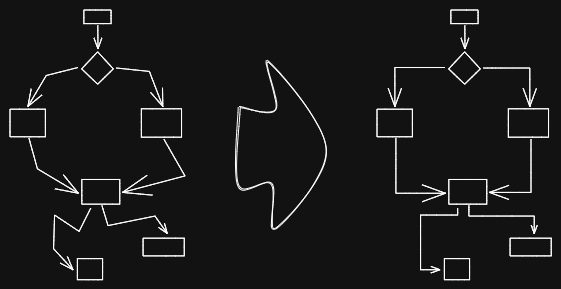
|
||||
|
||||
This script converts the selected connectors to elbows.
|
||||
|
||||
See documentation for more details:
|
||||
https://zsviczian.github.io/obsidian-excalidraw-plugin/ExcalidrawScriptsEngine.html
|
||||
|
||||
```javascript
|
||||
*/
|
||||
const elements = ea.getViewSelectedElements();
|
||||
|
||||
const lines = elements.filter((el)=>el.type==="arrow" || el.type==="line");
|
||||
|
||||
for (const line of lines) {
|
||||
if (line.points.length >= 3) {
|
||||
for (var i = 0; i < line.points.length - 2; i++) {
|
||||
var p1;
|
||||
var p3;
|
||||
if (line.points[i][0] < line.points[i + 2][0]) {
|
||||
p1 = line.points[i];
|
||||
p3 = line.points[i+2];
|
||||
} else {
|
||||
p1 = line.points[i + 2];
|
||||
p3 = line.points[i];
|
||||
}
|
||||
const p2 = line.points[i + 1];
|
||||
|
||||
if (p1[0] === p3[0]) {
|
||||
continue;
|
||||
}
|
||||
|
||||
const k = (p3[1] - p1[1]) / (p3[0] - p1[0]);
|
||||
const b = p1[1] - k * p1[0];
|
||||
|
||||
y0 = k * p2[0] + b;
|
||||
const up = p2[1] < y0;
|
||||
|
||||
if ((k > 0 && !up) || (k < 0 && up)) {
|
||||
p2[0] = p1[0];
|
||||
p2[1] = p3[1];
|
||||
} else {
|
||||
p2[0] = p3[0];
|
||||
p2[1] = p1[1];
|
||||
}
|
||||
}
|
||||
}
|
||||
}
|
||||
|
||||
ea.copyViewElementsToEAforEditing(lines);
|
||||
ea.addElementsToView();
|
||||
/*
|
||||
|
||||

|
||||
|
||||
Download this file and save to your Obsidian Vault including the first line, or open it in "Raw" and copy the entire contents to Obsidian.
|
||||
|
||||

|
||||
|
||||
This script converts the selected connectors to elbows.
|
||||
|
||||
See documentation for more details:
|
||||
https://zsviczian.github.io/obsidian-excalidraw-plugin/ExcalidrawScriptsEngine.html
|
||||
|
||||
```javascript
|
||||
*/
|
||||
const elements = ea.getViewSelectedElements();
|
||||
|
||||
const lines = elements.filter((el)=>el.type==="arrow" || el.type==="line");
|
||||
|
||||
for (const line of lines) {
|
||||
if (line.points.length >= 3) {
|
||||
for (var i = 0; i < line.points.length - 2; i++) {
|
||||
var p1;
|
||||
var p3;
|
||||
if (line.points[i][0] < line.points[i + 2][0]) {
|
||||
p1 = line.points[i];
|
||||
p3 = line.points[i+2];
|
||||
} else {
|
||||
p1 = line.points[i + 2];
|
||||
p3 = line.points[i];
|
||||
}
|
||||
const p2 = line.points[i + 1];
|
||||
|
||||
if (p1[0] === p3[0]) {
|
||||
continue;
|
||||
}
|
||||
|
||||
const k = (p3[1] - p1[1]) / (p3[0] - p1[0]);
|
||||
const b = p1[1] - k * p1[0];
|
||||
|
||||
y0 = k * p2[0] + b;
|
||||
const up = p2[1] < y0;
|
||||
|
||||
if ((k > 0 && !up) || (k < 0 && up)) {
|
||||
p2[0] = p1[0];
|
||||
p2[1] = p3[1];
|
||||
} else {
|
||||
p2[0] = p3[0];
|
||||
p2[1] = p1[1];
|
||||
}
|
||||
}
|
||||
}
|
||||
}
|
||||
|
||||
ea.copyViewElementsToEAforEditing(lines);
|
||||
await ea.addElementsToView(false,false);
|
||||
|
||||
@@ -1,75 +1,146 @@
|
||||
/*
|
||||
|
||||

|
||||
|
||||
Download this file and save to your Obsidian Vault including the first line, or open it in "Raw" and copy the entire contents to Obsidian.
|
||||
|
||||

|
||||
|
||||
This script expands the width of the selected rectangles until they are all the same width and keep the text centered.
|
||||
|
||||
See documentation for more details:
|
||||
https://zsviczian.github.io/obsidian-excalidraw-plugin/ExcalidrawScriptsEngine.html
|
||||
|
||||
```javascript
|
||||
*/
|
||||
|
||||
const elements = ea.getViewSelectedElements();
|
||||
const topGroups = ea.getMaximumGroups(elements);
|
||||
|
||||
const groupWidths = topGroups
|
||||
.map((g) =>
|
||||
g.reduce(
|
||||
(pre, cur, i) => {
|
||||
if (i === 0) {
|
||||
return {
|
||||
minLeft: cur.x,
|
||||
maxRight: cur.x + cur.width,
|
||||
index: i,
|
||||
};
|
||||
} else {
|
||||
return {
|
||||
minLeft: cur.x < pre.minLeft ? cur.x : pre.minLeft,
|
||||
maxRight:
|
||||
cur.x + cur.width > pre.maxRight
|
||||
? cur.x + cur.width
|
||||
: pre.maxRight,
|
||||
index: i,
|
||||
};
|
||||
}
|
||||
},
|
||||
{ minLeft: 0, maxRight: 0 }
|
||||
)
|
||||
)
|
||||
.map((r) => {
|
||||
r.width = r.maxRight - r.minLeft;
|
||||
return r;
|
||||
});
|
||||
|
||||
const maxGroupWidth = Math.max(...groupWidths.map((g) => g.width));
|
||||
|
||||
for (var i = 0; i < topGroups.length; i++) {
|
||||
const rects = topGroups[i]
|
||||
.filter((el) => el.type === "rectangle")
|
||||
.sort((lha, rha) => lha.x - rha.x);
|
||||
const texts = topGroups[i]
|
||||
.filter((el) => el.type === "text")
|
||||
.sort((lha, rha) => lha.x - rha.x);
|
||||
const groupWith = groupWidths[i].width;
|
||||
if (groupWith < maxGroupWidth) {
|
||||
const distance = maxGroupWidth - groupWith;
|
||||
const perRectDistance = distance / rects.length;
|
||||
for (var j = 0; j < rects.length; j++) {
|
||||
const rect = rects[j];
|
||||
rect.x = rect.x + perRectDistance * j - perRectDistance / 2;
|
||||
rect.width += perRectDistance;
|
||||
}
|
||||
for (var j = 0; j < texts.length; j++) {
|
||||
const text = texts[j];
|
||||
text.x = text.x + perRectDistance * j;
|
||||
}
|
||||
}
|
||||
}
|
||||
|
||||
ea.copyViewElementsToEAforEditing(elements);
|
||||
ea.addElementsToView();
|
||||
/*
|
||||
|
||||

|
||||
|
||||
Download this file and save to your Obsidian Vault including the first line, or open it in "Raw" and copy the entire contents to Obsidian.
|
||||
|
||||

|
||||
|
||||
This script expands the width of the selected rectangles until they are all the same width and keep the text centered.
|
||||
|
||||
See documentation for more details:
|
||||
https://zsviczian.github.io/obsidian-excalidraw-plugin/ExcalidrawScriptsEngine.html
|
||||
|
||||
```javascript
|
||||
*/
|
||||
|
||||
const elements = ea.getViewSelectedElements();
|
||||
const topGroups = ea.getMaximumGroups(elements);
|
||||
const allIndividualArrows = ea.getMaximumGroups(ea.getViewElements())
|
||||
.reduce((result, group) => (group.length === 1 && (group[0].type === 'arrow')) ?
|
||||
[...result, group[0]] : result, []);
|
||||
|
||||
const groupWidths = topGroups
|
||||
.map((g) => {
|
||||
if(g.length === 1 && (g[0].type === 'arrow' || g[0].type === 'line')) {
|
||||
// ignore individual lines
|
||||
return { minLeft: 0, maxRight: 0 };
|
||||
}
|
||||
return g.reduce(
|
||||
(pre, cur, i) => {
|
||||
if (i === 0) {
|
||||
return {
|
||||
minLeft: cur.x,
|
||||
maxRight: cur.x + cur.width,
|
||||
index: i,
|
||||
};
|
||||
} else {
|
||||
return {
|
||||
minLeft: cur.x < pre.minLeft ? cur.x : pre.minLeft,
|
||||
maxRight:
|
||||
cur.x + cur.width > pre.maxRight
|
||||
? cur.x + cur.width
|
||||
: pre.maxRight,
|
||||
index: i,
|
||||
};
|
||||
}
|
||||
},
|
||||
{ minLeft: 0, maxRight: 0 }
|
||||
);
|
||||
})
|
||||
.map((r) => {
|
||||
r.width = r.maxRight - r.minLeft;
|
||||
return r;
|
||||
});
|
||||
|
||||
const maxGroupWidth = Math.max(...groupWidths.map((g) => g.width));
|
||||
|
||||
for (var i = 0; i < topGroups.length; i++) {
|
||||
const rects = topGroups[i]
|
||||
.filter((el) => el.type === "rectangle")
|
||||
.sort((lha, rha) => lha.x - rha.x);
|
||||
const texts = topGroups[i]
|
||||
.filter((el) => el.type === "text")
|
||||
.sort((lha, rha) => lha.x - rha.x);
|
||||
const groupWith = groupWidths[i].width;
|
||||
if (groupWith < maxGroupWidth) {
|
||||
const distance = maxGroupWidth - groupWith;
|
||||
const perRectDistance = distance / rects.length;
|
||||
for (var j = 0; j < rects.length; j++) {
|
||||
const rect = rects[j];
|
||||
const rectLeft = rect.x;
|
||||
const rectTop = rect.y;
|
||||
const rectRight = rect.x + rect.width;
|
||||
const rectBottom = rect.y + rect.height;
|
||||
|
||||
rect.x = rect.x + perRectDistance * j - perRectDistance / 2;
|
||||
rect.width += perRectDistance;
|
||||
|
||||
const textsWithRect = texts.filter(text => text.x >= rectLeft && text.x <= rectRight
|
||||
&& text.y >= rectTop && text.y <= rectBottom);
|
||||
for(const text of textsWithRect) {
|
||||
text.x = text.x + perRectDistance * j;
|
||||
}
|
||||
|
||||
// recalculate the position of the points
|
||||
const startBindingLines = allIndividualArrows.filter(el => (el.startBinding||{}).elementId === rect.id);
|
||||
for(startBindingLine of startBindingLines) {
|
||||
recalculateStartPointOfLine(startBindingLine, rect);
|
||||
}
|
||||
|
||||
const endBindingLines = allIndividualArrows.filter(el => (el.endBinding||{}).elementId === rect.id);
|
||||
for(endBindingLine of endBindingLines) {
|
||||
recalculateEndPointOfLine(endBindingLine, rect);
|
||||
}
|
||||
}
|
||||
}
|
||||
}
|
||||
|
||||
ea.copyViewElementsToEAforEditing(elements);
|
||||
await ea.addElementsToView(false, false);
|
||||
|
||||
function recalculateStartPointOfLine(line, el) {
|
||||
const aX = el.x + el.width/2;
|
||||
const bX = line.x + line.points[1][0];
|
||||
const aY = el.y + el.height/2;
|
||||
const bY = line.y + line.points[1][1];
|
||||
|
||||
line.startBinding.gap = 8;
|
||||
line.startBinding.focus = 0;
|
||||
const intersectA = ea.intersectElementWithLine(
|
||||
el,
|
||||
[bX, bY],
|
||||
[aX, aY],
|
||||
line.startBinding.gap
|
||||
);
|
||||
|
||||
if(intersectA.length > 0) {
|
||||
line.points[0] = [0, 0];
|
||||
for(var i = 1; i<line.points.length; i++) {
|
||||
line.points[i][0] -= intersectA[0][0] - line.x;
|
||||
line.points[i][1] -= intersectA[0][1] - line.y;
|
||||
}
|
||||
line.x = intersectA[0][0];
|
||||
line.y = intersectA[0][1];
|
||||
}
|
||||
}
|
||||
|
||||
function recalculateEndPointOfLine(line, el) {
|
||||
const aX = el.x + el.width/2;
|
||||
const bX = line.x + line.points[line.points.length-2][0];
|
||||
const aY = el.y + el.height/2;
|
||||
const bY = line.y + line.points[line.points.length-2][1];
|
||||
|
||||
line.endBinding.gap = 8;
|
||||
line.endBinding.focus = 0;
|
||||
const intersectA = ea.intersectElementWithLine(
|
||||
el,
|
||||
[bX, bY],
|
||||
[aX, aY],
|
||||
line.endBinding.gap
|
||||
);
|
||||
|
||||
if(intersectA.length > 0) {
|
||||
line.points[line.points.length - 1] = [intersectA[0][0] - line.x, intersectA[0][1] - line.y];
|
||||
}
|
||||
}
|
||||
@@ -1,76 +1,133 @@
|
||||
/*
|
||||
|
||||

|
||||
|
||||
Download this file and save to your Obsidian Vault including the first line, or open it in "Raw" and copy the entire contents to Obsidian.
|
||||
|
||||

|
||||
|
||||
This script expands the width of the selected rectangles until they are all the same width.
|
||||
|
||||
See documentation for more details:
|
||||
https://zsviczian.github.io/obsidian-excalidraw-plugin/ExcalidrawScriptsEngine.html
|
||||
|
||||
```javascript
|
||||
*/
|
||||
|
||||
const elements = ea.getViewSelectedElements();
|
||||
const topGroups = ea.getMaximumGroups(elements);
|
||||
|
||||
const groupWidths = topGroups
|
||||
.map((g) =>
|
||||
g.reduce(
|
||||
(pre, cur, i) => {
|
||||
if (i === 0) {
|
||||
return {
|
||||
minLeft: cur.x,
|
||||
maxRight: cur.x + cur.width,
|
||||
index: i,
|
||||
};
|
||||
} else {
|
||||
return {
|
||||
minLeft: cur.x < pre.minLeft ? cur.x : pre.minLeft,
|
||||
maxRight:
|
||||
cur.x + cur.width > pre.maxRight
|
||||
? cur.x + cur.width
|
||||
: pre.maxRight,
|
||||
index: i,
|
||||
};
|
||||
}
|
||||
},
|
||||
{ minLeft: 0, maxRight: 0 }
|
||||
)
|
||||
)
|
||||
.map((r) => {
|
||||
r.width = r.maxRight - r.minLeft;
|
||||
return r;
|
||||
});
|
||||
|
||||
const maxGroupWidth = Math.max(...groupWidths.map((g) => g.width));
|
||||
|
||||
for (var i = 0; i < topGroups.length; i++) {
|
||||
const rects = topGroups[i]
|
||||
.filter((el) => el.type === "rectangle")
|
||||
.sort((lha, rha) => lha.x - rha.x);
|
||||
const texts = topGroups[i]
|
||||
.filter((el) => el.type === "text")
|
||||
.sort((lha, rha) => lha.x - rha.x);
|
||||
const groupWith = groupWidths[i].width;
|
||||
if (groupWith < maxGroupWidth) {
|
||||
const distance = maxGroupWidth - groupWith;
|
||||
const perRectDistance = distance / rects.length;
|
||||
for (var j = 0; j < rects.length; j++) {
|
||||
const rect = rects[j];
|
||||
rect.x = rect.x + perRectDistance * j;
|
||||
rect.width += perRectDistance;
|
||||
}
|
||||
for (var j = 0; j < texts.length; j++) {
|
||||
const text = texts[j];
|
||||
text.x = text.x + perRectDistance * j;
|
||||
}
|
||||
}
|
||||
}
|
||||
|
||||
ea.copyViewElementsToEAforEditing(elements);
|
||||
ea.addElementsToView();
|
||||
|
||||
/*
|
||||
|
||||

|
||||
|
||||
Download this file and save to your Obsidian Vault including the first line, or open it in "Raw" and copy the entire contents to Obsidian.
|
||||
|
||||

|
||||
|
||||
This script expands the width of the selected rectangles until they are all the same width.
|
||||
|
||||
See documentation for more details:
|
||||
https://zsviczian.github.io/obsidian-excalidraw-plugin/ExcalidrawScriptsEngine.html
|
||||
|
||||
```javascript
|
||||
*/
|
||||
|
||||
const elements = ea.getViewSelectedElements();
|
||||
const topGroups = ea.getMaximumGroups(elements);
|
||||
const allIndividualArrows = ea.getMaximumGroups(ea.getViewElements())
|
||||
.reduce((result, group) => (group.length === 1 && (group[0].type === 'arrow' || group[0].type === 'line')) ?
|
||||
[...result, group[0]] : result, []);
|
||||
|
||||
const groupWidths = topGroups
|
||||
.map((g) => {
|
||||
if(g.length === 1 && (g[0].type === 'arrow' || g[0].type === 'line')) {
|
||||
// ignore individual lines
|
||||
return { minLeft: 0, maxRight: 0 };
|
||||
}
|
||||
return g.reduce(
|
||||
(pre, cur, i) => {
|
||||
if (i === 0) {
|
||||
return {
|
||||
minLeft: cur.x,
|
||||
maxRight: cur.x + cur.width,
|
||||
index: i,
|
||||
};
|
||||
} else {
|
||||
return {
|
||||
minLeft: cur.x < pre.minLeft ? cur.x : pre.minLeft,
|
||||
maxRight:
|
||||
cur.x + cur.width > pre.maxRight
|
||||
? cur.x + cur.width
|
||||
: pre.maxRight,
|
||||
index: i,
|
||||
};
|
||||
}
|
||||
},
|
||||
{ minLeft: 0, maxRight: 0 }
|
||||
);
|
||||
})
|
||||
.map((r) => {
|
||||
r.width = r.maxRight - r.minLeft;
|
||||
return r;
|
||||
});
|
||||
|
||||
const maxGroupWidth = Math.max(...groupWidths.map((g) => g.width));
|
||||
|
||||
for (var i = 0; i < topGroups.length; i++) {
|
||||
const rects = topGroups[i]
|
||||
.filter((el) => el.type === "rectangle")
|
||||
.sort((lha, rha) => lha.x - rha.x);
|
||||
|
||||
const groupWith = groupWidths[i].width;
|
||||
if (groupWith < maxGroupWidth) {
|
||||
const distance = maxGroupWidth - groupWith;
|
||||
const perRectDistance = distance / rects.length;
|
||||
for (var j = 0; j < rects.length; j++) {
|
||||
const rect = rects[j];
|
||||
rect.x = rect.x + perRectDistance * j;
|
||||
rect.width += perRectDistance;
|
||||
|
||||
// recalculate the position of the points
|
||||
const startBindingLines = allIndividualArrows.filter(el => (el.startBinding||{}).elementId === rect.id);
|
||||
for(startBindingLine of startBindingLines) {
|
||||
recalculateStartPointOfLine(startBindingLine, rect);
|
||||
}
|
||||
|
||||
const endBindingLines = allIndividualArrows.filter(el => (el.endBinding||{}).elementId === rect.id);
|
||||
for(endBindingLine of endBindingLines) {
|
||||
recalculateEndPointOfLine(endBindingLine, rect);
|
||||
}
|
||||
}
|
||||
}
|
||||
}
|
||||
|
||||
ea.copyViewElementsToEAforEditing(elements);
|
||||
await ea.addElementsToView(false, false);
|
||||
|
||||
function recalculateStartPointOfLine(line, el) {
|
||||
const aX = el.x + el.width/2;
|
||||
const bX = line.x + line.points[1][0];
|
||||
const aY = el.y + el.height/2;
|
||||
const bY = line.y + line.points[1][1];
|
||||
|
||||
line.startBinding.gap = 8;
|
||||
line.startBinding.focus = 0;
|
||||
const intersectA = ea.intersectElementWithLine(
|
||||
el,
|
||||
[bX, bY],
|
||||
[aX, aY],
|
||||
line.startBinding.gap
|
||||
);
|
||||
|
||||
if(intersectA.length > 0) {
|
||||
line.points[0] = [0, 0];
|
||||
for(var i = 1; i<line.points.length; i++) {
|
||||
line.points[i][0] -= intersectA[0][0] - line.x;
|
||||
line.points[i][1] -= intersectA[0][1] - line.y;
|
||||
}
|
||||
line.x = intersectA[0][0];
|
||||
line.y = intersectA[0][1];
|
||||
}
|
||||
}
|
||||
|
||||
function recalculateEndPointOfLine(line, el) {
|
||||
const aX = el.x + el.width/2;
|
||||
const bX = line.x + line.points[line.points.length-2][0];
|
||||
const aY = el.y + el.height/2;
|
||||
const bY = line.y + line.points[line.points.length-2][1];
|
||||
|
||||
line.endBinding.gap = 8;
|
||||
line.endBinding.focus = 0;
|
||||
const intersectA = ea.intersectElementWithLine(
|
||||
el,
|
||||
[bX, bY],
|
||||
[aX, aY],
|
||||
line.endBinding.gap
|
||||
);
|
||||
|
||||
if(intersectA.length > 0) {
|
||||
line.points[line.points.length - 1] = [intersectA[0][0] - line.x, intersectA[0][1] - line.y];
|
||||
}
|
||||
}
|
||||
@@ -1,75 +1,146 @@
|
||||
/*
|
||||
|
||||

|
||||
|
||||
Download this file and save to your Obsidian Vault including the first line, or open it in "Raw" and copy the entire contents to Obsidian.
|
||||
|
||||

|
||||
|
||||
This script expands the height of the selected rectangles until they are all the same height and keep the text centered.
|
||||
|
||||
See documentation for more details:
|
||||
https://zsviczian.github.io/obsidian-excalidraw-plugin/ExcalidrawScriptsEngine.html
|
||||
|
||||
```javascript
|
||||
*/
|
||||
|
||||
const elements = ea.getViewSelectedElements();
|
||||
const topGroups = ea.getMaximumGroups(elements);
|
||||
|
||||
const groupHeights = topGroups
|
||||
.map((g) =>
|
||||
g.reduce(
|
||||
(pre, cur, i) => {
|
||||
if (i === 0) {
|
||||
return {
|
||||
minTop: cur.y,
|
||||
maxBottom: cur.y + cur.height,
|
||||
index: i,
|
||||
};
|
||||
} else {
|
||||
return {
|
||||
minTop: cur.y < pre.minTop ? cur.y : pre.minTop,
|
||||
maxBottom:
|
||||
cur.y + cur.height > pre.maxBottom
|
||||
? cur.y + cur.height
|
||||
: pre.maxBottom,
|
||||
index: i,
|
||||
};
|
||||
}
|
||||
},
|
||||
{ minTop: 0, maxBottom: 0 }
|
||||
)
|
||||
)
|
||||
.map((r) => {
|
||||
r.height = r.maxBottom - r.minTop;
|
||||
return r;
|
||||
});
|
||||
|
||||
const maxGroupHeight = Math.max(...groupHeights.map((g) => g.height));
|
||||
|
||||
for (var i = 0; i < topGroups.length; i++) {
|
||||
const rects = topGroups[i]
|
||||
.filter((el) => el.type === "rectangle")
|
||||
.sort((lha, rha) => lha.y - rha.y);
|
||||
const texts = topGroups[i]
|
||||
.filter((el) => el.type === "text")
|
||||
.sort((lha, rha) => lha.y - rha.y);
|
||||
const groupWith = groupHeights[i].height;
|
||||
if (groupWith < maxGroupHeight) {
|
||||
const distance = maxGroupHeight - groupWith;
|
||||
const perRectDistance = distance / rects.length;
|
||||
for (var j = 0; j < rects.length; j++) {
|
||||
const rect = rects[j];
|
||||
rect.y = rect.y + perRectDistance * j - perRectDistance / 2;
|
||||
rect.height += perRectDistance;
|
||||
}
|
||||
for (var j = 0; j < texts.length; j++) {
|
||||
const text = texts[j];
|
||||
text.y = text.y + perRectDistance * j;
|
||||
}
|
||||
}
|
||||
}
|
||||
|
||||
ea.copyViewElementsToEAforEditing(elements);
|
||||
ea.addElementsToView();
|
||||
/*
|
||||
|
||||

|
||||
|
||||
Download this file and save to your Obsidian Vault including the first line, or open it in "Raw" and copy the entire contents to Obsidian.
|
||||
|
||||

|
||||
|
||||
This script expands the height of the selected rectangles until they are all the same height and keep the text centered.
|
||||
|
||||
See documentation for more details:
|
||||
https://zsviczian.github.io/obsidian-excalidraw-plugin/ExcalidrawScriptsEngine.html
|
||||
|
||||
```javascript
|
||||
*/
|
||||
|
||||
const elements = ea.getViewSelectedElements();
|
||||
const topGroups = ea.getMaximumGroups(elements);
|
||||
const allIndividualArrows = ea.getMaximumGroups(ea.getViewElements())
|
||||
.reduce((result, group) => (group.length === 1 && (group[0].type === 'arrow' || group[0].type === 'line')) ?
|
||||
[...result, group[0]] : result, []);
|
||||
|
||||
const groupHeights = topGroups
|
||||
.map((g) => {
|
||||
if(g.length === 1 && (g[0].type === 'arrow' || g[0].type === 'line')) {
|
||||
// ignore individual lines
|
||||
return { minTop: 0, maxBottom: 0 };
|
||||
}
|
||||
return g.reduce(
|
||||
(pre, cur, i) => {
|
||||
if (i === 0) {
|
||||
return {
|
||||
minTop: cur.y,
|
||||
maxBottom: cur.y + cur.height,
|
||||
index: i,
|
||||
};
|
||||
} else {
|
||||
return {
|
||||
minTop: cur.y < pre.minTop ? cur.y : pre.minTop,
|
||||
maxBottom:
|
||||
cur.y + cur.height > pre.maxBottom
|
||||
? cur.y + cur.height
|
||||
: pre.maxBottom,
|
||||
index: i,
|
||||
};
|
||||
}
|
||||
},
|
||||
{ minTop: 0, maxBottom: 0 }
|
||||
);
|
||||
})
|
||||
.map((r) => {
|
||||
r.height = r.maxBottom - r.minTop;
|
||||
return r;
|
||||
});
|
||||
|
||||
const maxGroupHeight = Math.max(...groupHeights.map((g) => g.height));
|
||||
|
||||
for (var i = 0; i < topGroups.length; i++) {
|
||||
const rects = topGroups[i]
|
||||
.filter((el) => el.type === "rectangle")
|
||||
.sort((lha, rha) => lha.y - rha.y);
|
||||
const texts = topGroups[i]
|
||||
.filter((el) => el.type === "text")
|
||||
.sort((lha, rha) => lha.y - rha.y);
|
||||
const groupWith = groupHeights[i].height;
|
||||
if (groupWith < maxGroupHeight) {
|
||||
const distance = maxGroupHeight - groupWith;
|
||||
const perRectDistance = distance / rects.length;
|
||||
for (var j = 0; j < rects.length; j++) {
|
||||
const rect = rects[j];
|
||||
const rectLeft = rect.x;
|
||||
const rectTop = rect.y;
|
||||
const rectRight = rect.x + rect.width;
|
||||
const rectBottom = rect.y + rect.height;
|
||||
|
||||
rect.y = rect.y + perRectDistance * j - perRectDistance / 2;
|
||||
rect.height += perRectDistance;
|
||||
|
||||
const textsWithRect = texts.filter(text => text.x >= rectLeft && text.x <= rectRight
|
||||
&& text.y >= rectTop && text.y <= rectBottom);
|
||||
for(const text of textsWithRect) {
|
||||
text.y = text.y + perRectDistance * j;
|
||||
}
|
||||
|
||||
// recalculate the position of the points
|
||||
const startBindingLines = allIndividualArrows.filter(el => (el.startBinding||{}).elementId === rect.id);
|
||||
for(startBindingLine of startBindingLines) {
|
||||
recalculateStartPointOfLine(startBindingLine, rect);
|
||||
}
|
||||
|
||||
const endBindingLines = allIndividualArrows.filter(el => (el.endBinding||{}).elementId === rect.id);
|
||||
for(endBindingLine of endBindingLines) {
|
||||
recalculateEndPointOfLine(endBindingLine, rect);
|
||||
}
|
||||
}
|
||||
}
|
||||
}
|
||||
|
||||
ea.copyViewElementsToEAforEditing(elements);
|
||||
await ea.addElementsToView(false, false);
|
||||
|
||||
function recalculateStartPointOfLine(line, el) {
|
||||
const aX = el.x + el.width/2;
|
||||
const bX = line.x + line.points[1][0];
|
||||
const aY = el.y + el.height/2;
|
||||
const bY = line.y + line.points[1][1];
|
||||
|
||||
line.startBinding.gap = 8;
|
||||
line.startBinding.focus = 0;
|
||||
const intersectA = ea.intersectElementWithLine(
|
||||
el,
|
||||
[bX, bY],
|
||||
[aX, aY],
|
||||
line.startBinding.gap
|
||||
);
|
||||
|
||||
if(intersectA.length > 0) {
|
||||
line.points[0] = [0, 0];
|
||||
for(var i = 1; i<line.points.length; i++) {
|
||||
line.points[i][0] -= intersectA[0][0] - line.x;
|
||||
line.points[i][1] -= intersectA[0][1] - line.y;
|
||||
}
|
||||
line.x = intersectA[0][0];
|
||||
line.y = intersectA[0][1];
|
||||
}
|
||||
}
|
||||
|
||||
function recalculateEndPointOfLine(line, el) {
|
||||
const aX = el.x + el.width/2;
|
||||
const bX = line.x + line.points[line.points.length-2][0];
|
||||
const aY = el.y + el.height/2;
|
||||
const bY = line.y + line.points[line.points.length-2][1];
|
||||
|
||||
line.endBinding.gap = 8;
|
||||
line.endBinding.focus = 0;
|
||||
const intersectA = ea.intersectElementWithLine(
|
||||
el,
|
||||
[bX, bY],
|
||||
[aX, aY],
|
||||
line.endBinding.gap
|
||||
);
|
||||
|
||||
if(intersectA.length > 0) {
|
||||
line.points[line.points.length - 1] = [intersectA[0][0] - line.x, intersectA[0][1] - line.y];
|
||||
}
|
||||
}
|
||||
@@ -1,73 +1,131 @@
|
||||
/*
|
||||
|
||||

|
||||
|
||||
Download this file and save to your Obsidian Vault including the first line, or open it in "Raw" and copy the entire contents to Obsidian.
|
||||
|
||||

|
||||
|
||||
This script expands the height of the selected rectangles until they are all the same height.
|
||||
|
||||
```javascript
|
||||
*/
|
||||
|
||||
const elements = ea.getViewSelectedElements();
|
||||
const topGroups = ea.getMaximumGroups(elements);
|
||||
|
||||
const groupHeights = topGroups
|
||||
.map((g) =>
|
||||
g.reduce(
|
||||
(pre, cur, i) => {
|
||||
if (i === 0) {
|
||||
return {
|
||||
minTop: cur.y,
|
||||
maxBottom: cur.y + cur.height,
|
||||
index: i,
|
||||
};
|
||||
} else {
|
||||
return {
|
||||
minTop: cur.y < pre.minTop ? cur.y : pre.minTop,
|
||||
maxBottom:
|
||||
cur.y + cur.height > pre.maxBottom
|
||||
? cur.y + cur.height
|
||||
: pre.maxBottom,
|
||||
index: i,
|
||||
};
|
||||
}
|
||||
},
|
||||
{ minTop: 0, maxBottom: 0 }
|
||||
)
|
||||
)
|
||||
.map((r) => {
|
||||
r.height = r.maxBottom - r.minTop;
|
||||
return r;
|
||||
});
|
||||
|
||||
const maxGroupHeight = Math.max(...groupHeights.map((g) => g.height));
|
||||
|
||||
for (var i = 0; i < topGroups.length; i++) {
|
||||
const rects = topGroups[i]
|
||||
.filter((el) => el.type === "rectangle")
|
||||
.sort((lha, rha) => lha.y - rha.y);
|
||||
const texts = topGroups[i]
|
||||
.filter((el) => el.type === "text")
|
||||
.sort((lha, rha) => lha.y - rha.y);
|
||||
const groupWith = groupHeights[i].height;
|
||||
if (groupWith < maxGroupHeight) {
|
||||
const distance = maxGroupHeight - groupWith;
|
||||
const perRectDistance = distance / rects.length;
|
||||
for (var j = 0; j < rects.length; j++) {
|
||||
const rect = rects[j];
|
||||
rect.y = rect.y + perRectDistance * j;
|
||||
rect.height += perRectDistance;
|
||||
}
|
||||
for (var j = 0; j < texts.length; j++) {
|
||||
const text = texts[j];
|
||||
text.y = text.y + perRectDistance * j;
|
||||
}
|
||||
}
|
||||
}
|
||||
|
||||
ea.copyViewElementsToEAforEditing(elements);
|
||||
ea.addElementsToView();
|
||||
|
||||
/*
|
||||
|
||||

|
||||
|
||||
Download this file and save to your Obsidian Vault including the first line, or open it in "Raw" and copy the entire contents to Obsidian.
|
||||
|
||||

|
||||
|
||||
This script expands the height of the selected rectangles until they are all the same height.
|
||||
|
||||
```javascript
|
||||
*/
|
||||
|
||||
const elements = ea.getViewSelectedElements();
|
||||
const topGroups = ea.getMaximumGroups(elements);
|
||||
const allLines = ea.getViewElements().filter(el => el.type === 'arrow' || el.type === 'line');
|
||||
const allIndividualArrows = ea.getMaximumGroups(ea.getViewElements())
|
||||
.reduce((result, group) => (group.length === 1 && (group[0].type === 'arrow' || group[0].type === 'line')) ?
|
||||
[...result, group[0]] : result, []);
|
||||
|
||||
const groupHeights = topGroups
|
||||
.map((g) => {
|
||||
if(g.length === 1 && (g[0].type === 'arrow' || g[0].type === 'line')) {
|
||||
// ignore individual lines
|
||||
return { minTop: 0, maxBottom: 0 };
|
||||
}
|
||||
return g.reduce(
|
||||
(pre, cur, i) => {
|
||||
if (i === 0) {
|
||||
return {
|
||||
minTop: cur.y,
|
||||
maxBottom: cur.y + cur.height,
|
||||
index: i,
|
||||
};
|
||||
} else {
|
||||
return {
|
||||
minTop: cur.y < pre.minTop ? cur.y : pre.minTop,
|
||||
maxBottom:
|
||||
cur.y + cur.height > pre.maxBottom
|
||||
? cur.y + cur.height
|
||||
: pre.maxBottom,
|
||||
index: i,
|
||||
};
|
||||
}
|
||||
},
|
||||
{ minTop: 0, maxBottom: 0 }
|
||||
);
|
||||
})
|
||||
.map((r) => {
|
||||
r.height = r.maxBottom - r.minTop;
|
||||
return r;
|
||||
});
|
||||
|
||||
const maxGroupHeight = Math.max(...groupHeights.map((g) => g.height));
|
||||
|
||||
for (var i = 0; i < topGroups.length; i++) {
|
||||
const rects = topGroups[i]
|
||||
.filter((el) => el.type === "rectangle")
|
||||
.sort((lha, rha) => lha.y - rha.y);
|
||||
|
||||
const groupWith = groupHeights[i].height;
|
||||
if (groupWith < maxGroupHeight) {
|
||||
const distance = maxGroupHeight - groupWith;
|
||||
const perRectDistance = distance / rects.length;
|
||||
for (var j = 0; j < rects.length; j++) {
|
||||
const rect = rects[j];
|
||||
rect.y = rect.y + perRectDistance * j;
|
||||
rect.height += perRectDistance;
|
||||
|
||||
// recalculate the position of the points
|
||||
const startBindingLines = allIndividualArrows.filter(el => (el.startBinding||{}).elementId === rect.id);
|
||||
for(startBindingLine of startBindingLines) {
|
||||
recalculateStartPointOfLine(startBindingLine, rect);
|
||||
}
|
||||
|
||||
const endBindingLines = allIndividualArrows.filter(el => (el.endBinding||{}).elementId === rect.id);
|
||||
for(endBindingLine of endBindingLines) {
|
||||
recalculateEndPointOfLine(endBindingLine, rect);
|
||||
}
|
||||
}
|
||||
}
|
||||
}
|
||||
|
||||
ea.copyViewElementsToEAforEditing(elements);
|
||||
await ea.addElementsToView(false, false);
|
||||
|
||||
function recalculateStartPointOfLine(line, el) {
|
||||
const aX = el.x + el.width/2;
|
||||
const bX = line.x + line.points[1][0];
|
||||
const aY = el.y + el.height/2;
|
||||
const bY = line.y + line.points[1][1];
|
||||
|
||||
line.startBinding.gap = 8;
|
||||
line.startBinding.focus = 0;
|
||||
const intersectA = ea.intersectElementWithLine(
|
||||
el,
|
||||
[bX, bY],
|
||||
[aX, aY],
|
||||
line.startBinding.gap
|
||||
);
|
||||
|
||||
if(intersectA.length > 0) {
|
||||
line.points[0] = [0, 0];
|
||||
for(var i = 1; i<line.points.length; i++) {
|
||||
line.points[i][0] -= intersectA[0][0] - line.x;
|
||||
line.points[i][1] -= intersectA[0][1] - line.y;
|
||||
}
|
||||
line.x = intersectA[0][0];
|
||||
line.y = intersectA[0][1];
|
||||
}
|
||||
}
|
||||
|
||||
function recalculateEndPointOfLine(line, el) {
|
||||
const aX = el.x + el.width/2;
|
||||
const bX = line.x + line.points[line.points.length-2][0];
|
||||
const aY = el.y + el.height/2;
|
||||
const bY = line.y + line.points[line.points.length-2][1];
|
||||
|
||||
line.endBinding.gap = 8;
|
||||
line.endBinding.focus = 0;
|
||||
const intersectA = ea.intersectElementWithLine(
|
||||
el,
|
||||
[bX, bY],
|
||||
[aX, aY],
|
||||
line.endBinding.gap
|
||||
);
|
||||
|
||||
if(intersectA.length > 0) {
|
||||
line.points[line.points.length - 1] = [intersectA[0][0] - line.x, intersectA[0][1] - line.y];
|
||||
}
|
||||
}
|
||||
72
ea-scripts/Fixed horizontal distance between centers.md
Normal file
@@ -0,0 +1,72 @@
|
||||
/*
|
||||

|
||||
|
||||
Download this file and save to your Obsidian Vault including the first line, or open it in "Raw" and copy the entire contents to Obsidian.
|
||||
|
||||
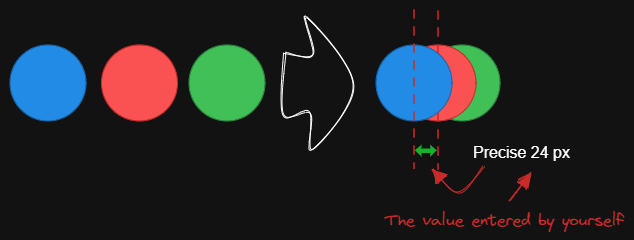
|
||||
|
||||
This script arranges the selected elements horizontally with a fixed center spacing.
|
||||
|
||||
See documentation for more details:
|
||||
https://zsviczian.github.io/obsidian-excalidraw-plugin/ExcalidrawScriptsEngine.html
|
||||
|
||||
```javascript
|
||||
*/
|
||||
if(!ea.verifyMinimumPluginVersion || !ea.verifyMinimumPluginVersion("1.5.21")) {
|
||||
new Notice("This script requires a newer version of Excalidraw. Please install the latest version.");
|
||||
return;
|
||||
}
|
||||
settings = ea.getScriptSettings();
|
||||
//set default values on first run
|
||||
if(!settings["Default distance"]) {
|
||||
settings = {
|
||||
"Prompt for distance?": true,
|
||||
"Default distance" : {
|
||||
value: 10,
|
||||
description: "Fixed horizontal distance between centers"
|
||||
},
|
||||
"Remember last distance?": false
|
||||
};
|
||||
ea.setScriptSettings(settings);
|
||||
}
|
||||
|
||||
let distanceStr = settings["Default distance"].value.toString();
|
||||
const rememberLastDistance = settings["Remember last distance?"];
|
||||
|
||||
if(settings["Prompt for distance?"]) {
|
||||
distanceStr = await utils.inputPrompt("distance?","number",distanceStr);
|
||||
}
|
||||
|
||||
const distance = parseInt(distanceStr);
|
||||
if(isNaN(distance)) {
|
||||
return;
|
||||
}
|
||||
if(rememberLastDistance) {
|
||||
settings["Default distance"].value = distance;
|
||||
ea.setScriptSettings(settings);
|
||||
}
|
||||
const elements=ea.getViewSelectedElements();
|
||||
const topGroups = ea.getMaximumGroups(elements)
|
||||
.filter(els => !(els.length === 1 && els[0].type ==="arrow")); // ignore individual arrows
|
||||
const groups = topGroups.sort((lha,rha) => lha[0].x - rha[0].x);
|
||||
|
||||
for(var i=0; i<groups.length; i++) {
|
||||
if(i > 0) {
|
||||
const preGroup = groups[i-1];
|
||||
const curGroup = groups[i];
|
||||
|
||||
const preLeft = Math.min(...preGroup.map(el => el.x));
|
||||
const preRight = Math.max(...preGroup.map(el => el.x + el.width));
|
||||
const preCenter = preLeft + (preRight - preLeft) / 2;
|
||||
const curLeft = Math.min(...curGroup.map(el => el.x));
|
||||
const curRight = Math.max(...curGroup.map(el => el.x + el.width));
|
||||
const curCenter = curLeft + (curRight - curLeft) / 2;
|
||||
const distanceBetweenCenters = curCenter - preCenter - distance;
|
||||
|
||||
for(const curEl of curGroup) {
|
||||
curEl.x = curEl.x - distanceBetweenCenters;
|
||||
}
|
||||
}
|
||||
}
|
||||
ea.copyViewElementsToEAforEditing(elements);
|
||||
await ea.addElementsToView(false, false);
|
||||
126
ea-scripts/Fixed inner distance.md
Normal file
@@ -0,0 +1,126 @@
|
||||
/*
|
||||

|
||||
|
||||
Download this file and save to your Obsidian Vault including the first line, or open it in "Raw" and copy the entire contents to Obsidian.
|
||||
|
||||

|
||||
|
||||
This script arranges selected elements and groups with a fixed inner distance.
|
||||
|
||||
Tips: You can use the `Box Selected Elements` and `Dimensions` scripts to create rectangles of the desired size, then use the `Change shape of selected elements` script to convert the rectangles to ellipses, and then use the `Fixed inner distance` script regains a desired inner distance.
|
||||
|
||||
Inspiration: #394
|
||||
|
||||
See documentation for more details:
|
||||
https://zsviczian.github.io/obsidian-excalidraw-plugin/ExcalidrawScriptsEngine.html
|
||||
|
||||
```javascript
|
||||
*/
|
||||
if(!ea.verifyMinimumPluginVersion || !ea.verifyMinimumPluginVersion("1.5.21")) {
|
||||
new Notice("This script requires a newer version of Excalidraw. Please install the latest version.");
|
||||
return;
|
||||
}
|
||||
settings = ea.getScriptSettings();
|
||||
//set default values on first run
|
||||
if(!settings["Default distance"]) {
|
||||
settings = {
|
||||
"Prompt for distance?": true,
|
||||
"Default distance" : {
|
||||
value: 10,
|
||||
description: "Fixed horizontal distance between centers"
|
||||
},
|
||||
"Remember last distance?": false
|
||||
};
|
||||
ea.setScriptSettings(settings);
|
||||
}
|
||||
|
||||
let distanceStr = settings["Default distance"].value.toString();
|
||||
const rememberLastDistance = settings["Remember last distance?"];
|
||||
|
||||
if(settings["Prompt for distance?"]) {
|
||||
distanceStr = await utils.inputPrompt("distance?","number",distanceStr);
|
||||
}
|
||||
|
||||
const borders = ["top", "bottom", "left", "right"];
|
||||
const fromBorder = await utils.suggester(borders, borders, "from border?");
|
||||
|
||||
if(!fromBorder) {
|
||||
return;
|
||||
}
|
||||
|
||||
const distance = parseInt(distanceStr);
|
||||
if(isNaN(distance)) {
|
||||
return;
|
||||
}
|
||||
if(rememberLastDistance) {
|
||||
settings["Default distance"].value = distance;
|
||||
ea.setScriptSettings(settings);
|
||||
}
|
||||
const elements=ea.getViewSelectedElements();
|
||||
const topGroups = ea.getMaximumGroups(elements)
|
||||
.filter(els => !(els.length === 1 && els[0].type ==="arrow")); // ignore individual arrows
|
||||
|
||||
if(topGroups.length <= 1) {
|
||||
new Notice("At least 2 or more elements or groups should be selected.");
|
||||
return;
|
||||
}
|
||||
|
||||
if(fromBorder === 'top') {
|
||||
const groups = topGroups.sort((lha,rha) => Math.min(...lha.map(t => t.y)) - Math.min(...rha.map(t => t.y)));
|
||||
const firstGroupTop = Math.min(...groups[0].map(el => el.y));
|
||||
|
||||
for(var i=0; i<groups.length; i++) {
|
||||
if(i > 0) {
|
||||
const curGroup = groups[i];
|
||||
const moveDistance = distance * i;
|
||||
for(const curEl of curGroup) {
|
||||
curEl.y = firstGroupTop + moveDistance;
|
||||
}
|
||||
}
|
||||
}
|
||||
}
|
||||
else if(fromBorder === 'bottom') {
|
||||
const groups = topGroups.sort((lha,rha) => Math.min(...lha.map(t => t.y + t.height)) - Math.min(...rha.map(t => t.y + t.height))).reverse();
|
||||
const firstGroupBottom = Math.max(...groups[0].map(el => el.y + el.height));
|
||||
|
||||
for(var i=0; i<groups.length; i++) {
|
||||
if(i > 0) {
|
||||
const curGroup = groups[i];
|
||||
const moveDistance = distance * i;
|
||||
for(const curEl of curGroup) {
|
||||
curEl.y = firstGroupBottom - moveDistance - curEl.height;
|
||||
}
|
||||
}
|
||||
}
|
||||
}
|
||||
else if(fromBorder === 'left') {
|
||||
const groups = topGroups.sort((lha,rha) => Math.min(...lha.map(t => t.x)) - Math.min(...rha.map(t => t.x)));
|
||||
const firstGroupLeft = Math.min(...groups[0].map(el => el.x));
|
||||
|
||||
for(var i=0; i<groups.length; i++) {
|
||||
if(i > 0) {
|
||||
const curGroup = groups[i];
|
||||
const moveDistance = distance * i;
|
||||
for(const curEl of curGroup) {
|
||||
curEl.x = firstGroupLeft + moveDistance;
|
||||
}
|
||||
}
|
||||
}
|
||||
}
|
||||
else if(fromBorder === 'right') {
|
||||
const groups = topGroups.sort((lha,rha) => Math.min(...lha.map(t => t.x + t.width)) - Math.min(...rha.map(t => t.x + t.width))).reverse();
|
||||
const firstGroupRight = Math.max(...groups[0].map(el => el.x + el.width));
|
||||
|
||||
for(var i=0; i<groups.length; i++) {
|
||||
if(i > 0) {
|
||||
const curGroup = groups[i];
|
||||
const moveDistance = distance * i;
|
||||
for(const curEl of curGroup) {
|
||||
curEl.x = firstGroupRight - moveDistance - curEl.width;
|
||||
}
|
||||
}
|
||||
}
|
||||
}
|
||||
|
||||
ea.copyViewElementsToEAforEditing(elements);
|
||||
await ea.addElementsToView(false, false);
|
||||
@@ -1,32 +1,67 @@
|
||||
/*
|
||||

|
||||
|
||||
Download this file and save to your Obsidian Vault including the first line, or open it in "Raw" and copy the entire contents to Obsidian.
|
||||
|
||||
The script arranges the selected elements horizontally with a fixed spacing.
|
||||
|
||||
When we create an architecture diagram or mind map, we often need to arrange a large number of elements in a fixed spacing. `Fixed spacing` and `Fixed vertical Distance` scripts can save us a lot of time.
|
||||
|
||||
```javascript
|
||||
*/
|
||||
const spacing = parseInt (await utils.inputPrompt("spacing?","number","8"));
|
||||
const elements=ea.getViewSelectedElements();
|
||||
const topGroups = ea.getMaximumGroups(elements);
|
||||
const groups = topGroups.sort((lha,rha) => lha[0].x - rha[0].x);
|
||||
|
||||
for(var i=0; i<groups.length; i++) {
|
||||
if(i > 0) {
|
||||
const preGroup = groups[i-1];
|
||||
const curGroup = groups[i];
|
||||
|
||||
const preRight = Math.max(...preGroup.map(el => el.x + el.width));
|
||||
const curLeft = Math.min(...curGroup.map(el => el.x));
|
||||
const distance = curLeft - preRight - spacing;
|
||||
|
||||
for(const curEl of curGroup) {
|
||||
curEl.x = curEl.x - distance;
|
||||
}
|
||||
}
|
||||
}
|
||||
ea.copyViewElementsToEAforEditing(elements);
|
||||
ea.addElementsToView();
|
||||
/*
|
||||

|
||||
|
||||
Download this file and save to your Obsidian Vault including the first line, or open it in "Raw" and copy the entire contents to Obsidian.
|
||||
|
||||
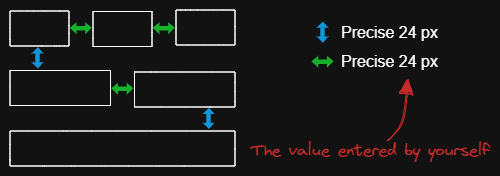
|
||||
|
||||
The script arranges the selected elements horizontally with a fixed spacing.
|
||||
|
||||
When we create an architecture diagram or mind map, we often need to arrange a large number of elements in a fixed spacing. `Fixed spacing` and `Fixed vertical Distance` scripts can save us a lot of time.
|
||||
|
||||
```javascript
|
||||
*/
|
||||
if(!ea.verifyMinimumPluginVersion || !ea.verifyMinimumPluginVersion("1.5.21")) {
|
||||
new Notice("This script requires a newer version of Excalidraw. Please install the latest version.");
|
||||
return;
|
||||
}
|
||||
settings = ea.getScriptSettings();
|
||||
//set default values on first run
|
||||
if(!settings["Default spacing"]) {
|
||||
settings = {
|
||||
"Prompt for spacing?": true,
|
||||
"Default spacing" : {
|
||||
value: 10,
|
||||
description: "Fixed horizontal spacing between elements"
|
||||
},
|
||||
"Remember last spacing?": false
|
||||
};
|
||||
ea.setScriptSettings(settings);
|
||||
}
|
||||
|
||||
let spacingStr = settings["Default spacing"].value.toString();
|
||||
const rememberLastSpacing = settings["Remember last spacing?"];
|
||||
|
||||
if(settings["Prompt for spacing?"]) {
|
||||
spacingStr = await utils.inputPrompt("spacing?","number",spacingStr);
|
||||
}
|
||||
|
||||
const spacing = parseInt(spacingStr);
|
||||
if(isNaN(spacing)) {
|
||||
return;
|
||||
}
|
||||
if(rememberLastSpacing) {
|
||||
settings["Default spacing"].value = spacing;
|
||||
ea.setScriptSettings(settings);
|
||||
}
|
||||
const elements=ea.getViewSelectedElements();
|
||||
const topGroups = ea.getMaximumGroups(elements)
|
||||
.filter(els => !(els.length === 1 && els[0].type ==="arrow")); // ignore individual arrows
|
||||
const groups = topGroups.sort((lha,rha) => lha[0].x - rha[0].x);
|
||||
|
||||
for(var i=0; i<groups.length; i++) {
|
||||
if(i > 0) {
|
||||
const preGroup = groups[i-1];
|
||||
const curGroup = groups[i];
|
||||
|
||||
const preRight = Math.max(...preGroup.map(el => el.x + el.width));
|
||||
const curLeft = Math.min(...curGroup.map(el => el.x));
|
||||
const distance = curLeft - preRight - spacing;
|
||||
|
||||
for(const curEl of curGroup) {
|
||||
curEl.x = curEl.x - distance;
|
||||
}
|
||||
}
|
||||
}
|
||||
ea.copyViewElementsToEAforEditing(elements);
|
||||
await ea.addElementsToView(false, false);
|
||||
|
||||
74
ea-scripts/Fixed vertical distance between centers.md
Normal file
@@ -0,0 +1,74 @@
|
||||
/*
|
||||

|
||||
|
||||
Download this file and save to your Obsidian Vault including the first line, or open it in "Raw" and copy the entire contents to Obsidian.
|
||||
|
||||
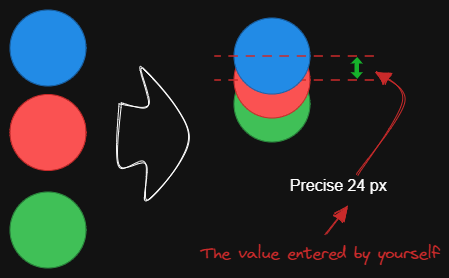
|
||||
|
||||
This script arranges the selected elements vertically with a fixed center spacing.
|
||||
|
||||
See documentation for more details:
|
||||
https://zsviczian.github.io/obsidian-excalidraw-plugin/ExcalidrawScriptsEngine.html
|
||||
|
||||
```javascript
|
||||
*/
|
||||
if(!ea.verifyMinimumPluginVersion || !ea.verifyMinimumPluginVersion("1.5.21")) {
|
||||
new Notice("This script requires a newer version of Excalidraw. Please install the latest version.");
|
||||
return;
|
||||
}
|
||||
|
||||
settings = ea.getScriptSettings();
|
||||
//set default values on first run
|
||||
if(!settings["Default distance"]) {
|
||||
settings = {
|
||||
"Prompt for distance?": true,
|
||||
"Default distance" : {
|
||||
value: 10,
|
||||
description: "Fixed vertical distance between centers"
|
||||
},
|
||||
"Remember last distance?": false
|
||||
};
|
||||
ea.setScriptSettings(settings);
|
||||
}
|
||||
|
||||
let distanceStr = settings["Default distance"].value.toString();
|
||||
const rememberLastDistance = settings["Remember last distance?"];
|
||||
|
||||
if(settings["Prompt for distance?"]) {
|
||||
distanceStr = await utils.inputPrompt("distance?","number",distanceStr);
|
||||
}
|
||||
|
||||
const distance = parseInt(distanceStr);
|
||||
if(isNaN(distance)) {
|
||||
return;
|
||||
}
|
||||
if(rememberLastDistance) {
|
||||
settings["Default distance"].value = distance;
|
||||
ea.setScriptSettings(settings);
|
||||
}
|
||||
const elements=ea.getViewSelectedElements();
|
||||
const topGroups = ea.getMaximumGroups(elements)
|
||||
.filter(els => !(els.length === 1 && els[0].type ==="arrow")); // ignore individual arrows
|
||||
const groups = topGroups.sort((lha,rha) => lha[0].y - rha[0].y);
|
||||
|
||||
for(var i=0; i<groups.length; i++) {
|
||||
if(i > 0) {
|
||||
const preGroup = groups[i-1];
|
||||
const curGroup = groups[i];
|
||||
|
||||
const preTop = Math.min(...preGroup.map(el => el.y));
|
||||
const preBottom = Math.max(...preGroup.map(el => el.y + el.height));
|
||||
const preCenter = preTop + (preBottom - preTop) / 2;
|
||||
const curTop = Math.min(...curGroup.map(el => el.y));
|
||||
const curBottom = Math.max(...curGroup.map(el => el.y + el.height));
|
||||
const curCenter = curTop + (curBottom - curTop) / 2;
|
||||
const distanceBetweenCenters = curCenter - preCenter - distance;
|
||||
|
||||
for(const curEl of curGroup) {
|
||||
curEl.y = curEl.y - distanceBetweenCenters;
|
||||
}
|
||||
}
|
||||
}
|
||||
|
||||
ea.copyViewElementsToEAforEditing(elements);
|
||||
await ea.addElementsToView(false, false);
|
||||
@@ -1,32 +1,67 @@
|
||||
/*
|
||||

|
||||
|
||||
Download this file and save to your Obsidian Vault including the first line, or open it in "Raw" and copy the entire contents to Obsidian.
|
||||
|
||||
The script arranges the selected elements vertically with a fixed spacing.
|
||||
|
||||
When we create an architecture diagram or mind map, we often need to arrange a large number of elements in a fixed spacing. `Fixed spacing` and `Fixed vertical Distance` scripts can save us a lot of time.
|
||||
|
||||
```javascript
|
||||
*/
|
||||
const spacing = parseInt (await utils.inputPrompt("spacing?","number","8"));
|
||||
const elements=ea.getViewSelectedElements();
|
||||
const topGroups = ea.getMaximumGroups(elements);
|
||||
const groups = topGroups.sort((lha,rha) => lha[0].y - rha[0].y);
|
||||
|
||||
for(var i=0; i<groups.length; i++) {
|
||||
if(i > 0) {
|
||||
const preGroup = groups[i-1];
|
||||
const curGroup = groups[i];
|
||||
|
||||
const preBottom = Math.max(...preGroup.map(el => el.y + el.height));
|
||||
const curTop = Math.min(...curGroup.map(el => el.y));
|
||||
const distance = curTop - preBottom - spacing;
|
||||
|
||||
for(const curEl of curGroup) {
|
||||
curEl.y = curEl.y - distance;
|
||||
}
|
||||
}
|
||||
}
|
||||
ea.copyViewElementsToEAforEditing(elements);
|
||||
ea.addElementsToView();
|
||||
/*
|
||||

|
||||
|
||||
Download this file and save to your Obsidian Vault including the first line, or open it in "Raw" and copy the entire contents to Obsidian.
|
||||
|
||||
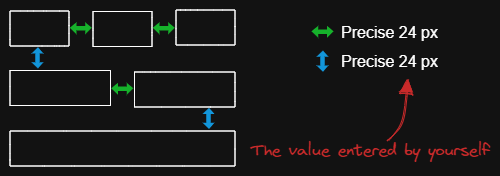
|
||||
|
||||
The script arranges the selected elements vertically with a fixed spacing.
|
||||
|
||||
When we create an architecture diagram or mind map, we often need to arrange a large number of elements in a fixed spacing. `Fixed spacing` and `Fixed vertical Distance` scripts can save us a lot of time.
|
||||
|
||||
```javascript
|
||||
*/
|
||||
if(!ea.verifyMinimumPluginVersion || !ea.verifyMinimumPluginVersion("1.5.21")) {
|
||||
new Notice("This script requires a newer version of Excalidraw. Please install the latest version.");
|
||||
return;
|
||||
}
|
||||
settings = ea.getScriptSettings();
|
||||
//set default values on first run
|
||||
if(!settings["Default spacing"]) {
|
||||
settings = {
|
||||
"Prompt for spacing?": true,
|
||||
"Default spacing" : {
|
||||
value: 10,
|
||||
description: "Fixed vertical spacing between elements"
|
||||
},
|
||||
"Remember last spacing?": false
|
||||
};
|
||||
ea.setScriptSettings(settings);
|
||||
}
|
||||
|
||||
let spacingStr = settings["Default spacing"].value.toString();
|
||||
const rememberLastSpacing = settings["Remember last spacing?"];
|
||||
|
||||
if(settings["Prompt for spacing?"]) {
|
||||
spacingStr = await utils.inputPrompt("spacing?","number",spacingStr);
|
||||
}
|
||||
|
||||
const spacing = parseInt(spacingStr);
|
||||
if(isNaN(spacing)) {
|
||||
return;
|
||||
}
|
||||
if(rememberLastSpacing) {
|
||||
settings["Default spacing"].value = spacing;
|
||||
ea.setScriptSettings(settings);
|
||||
}
|
||||
const elements=ea.getViewSelectedElements();
|
||||
const topGroups = ea.getMaximumGroups(elements)
|
||||
.filter(els => !(els.length === 1 && els[0].type ==="arrow")); // ignore individual arrows
|
||||
const groups = topGroups.sort((lha,rha) => lha[0].y - rha[0].y);
|
||||
|
||||
for(var i=0; i<groups.length; i++) {
|
||||
if(i > 0) {
|
||||
const preGroup = groups[i-1];
|
||||
const curGroup = groups[i];
|
||||
|
||||
const preBottom = Math.max(...preGroup.map(el => el.y + el.height));
|
||||
const curTop = Math.min(...curGroup.map(el => el.y));
|
||||
const distance = curTop - preBottom - spacing;
|
||||
|
||||
for(const curEl of curGroup) {
|
||||
curEl.y = curEl.y - distance;
|
||||
}
|
||||
}
|
||||
}
|
||||
ea.copyViewElementsToEAforEditing(elements);
|
||||
await ea.addElementsToView(false, false);
|
||||
|
||||
@@ -1,289 +1,289 @@
|
||||
/*
|
||||

|
||||
|
||||
Download this file and save to your Obsidian Vault including the first line, or open it in "Raw" and copy the entire contents to Obsidian.
|
||||
|
||||

|
||||
|
||||
This script lightens the background color of the selected element by 2% at a time.
|
||||
|
||||
You can use this script several times until you are satisfied. It is recommended to set a shortcut key for this script so that you can quickly try to DARKEN and LIGHTEN the color effect.
|
||||
|
||||
In contrast to the `Modify background color opacity` script, the advantage is that the background color of the element is not affected by the canvas color, and the color value does not appear in a strange rgba() form.
|
||||
|
||||
The color conversion method was copied from [color-convert](https://github.com/Qix-/color-convert).
|
||||
|
||||
```javascript
|
||||
*/
|
||||
|
||||
const elements = ea
|
||||
.getViewSelectedElements()
|
||||
.filter((el) =>
|
||||
["rectangle", "ellipse", "diamond", "image"].includes(el.type)
|
||||
);
|
||||
ea.copyViewElementsToEAforEditing(elements);
|
||||
for (const el of ea.getElements()) {
|
||||
const color = colorNameToHex(el.backgroundColor);
|
||||
const rgbColor = /^#?([a-f\d]{2})([a-f\d]{2})([a-f\d]{2})$/i.exec(color);
|
||||
if (rgbColor) {
|
||||
const r = parseInt(rgbColor[1], 16);
|
||||
const g = parseInt(rgbColor[2], 16);
|
||||
const b = parseInt(rgbColor[3], 16);
|
||||
const originalRgb = [r, g, b];
|
||||
const hsl = rgbToHsl(originalRgb);
|
||||
const step = 2;
|
||||
const newLightness = hsl[2] + step;
|
||||
if (newLightness < 100) {
|
||||
hsl[2] = newLightness;
|
||||
}
|
||||
const newRgb = hslToRgb(hsl);
|
||||
el.backgroundColor = "#" + rgbToHexString(newRgb);
|
||||
}
|
||||
}
|
||||
ea.addElementsToView();
|
||||
|
||||
function rgbToHexString(args) {
|
||||
const integer =
|
||||
((Math.round(args[0]) & 0xff) << 16) +
|
||||
((Math.round(args[1]) & 0xff) << 8) +
|
||||
(Math.round(args[2]) & 0xff);
|
||||
|
||||
const string = integer.toString(16).toUpperCase();
|
||||
return "000000".substring(string.length) + string;
|
||||
}
|
||||
|
||||
function hslToRgb(hsl) {
|
||||
const h = hsl[0] / 360;
|
||||
const s = hsl[1] / 100;
|
||||
const l = hsl[2] / 100;
|
||||
let t2;
|
||||
let t3;
|
||||
let val;
|
||||
|
||||
if (s === 0) {
|
||||
val = l * 255;
|
||||
return [val, val, val];
|
||||
}
|
||||
|
||||
if (l < 0.5) {
|
||||
t2 = l * (1 + s);
|
||||
} else {
|
||||
t2 = l + s - l * s;
|
||||
}
|
||||
|
||||
const t1 = 2 * l - t2;
|
||||
|
||||
const rgb = [0, 0, 0];
|
||||
for (let i = 0; i < 3; i++) {
|
||||
t3 = h + (1 / 3) * -(i - 1);
|
||||
if (t3 < 0) {
|
||||
t3++;
|
||||
}
|
||||
|
||||
if (t3 > 1) {
|
||||
t3--;
|
||||
}
|
||||
|
||||
if (6 * t3 < 1) {
|
||||
val = t1 + (t2 - t1) * 6 * t3;
|
||||
} else if (2 * t3 < 1) {
|
||||
val = t2;
|
||||
} else if (3 * t3 < 2) {
|
||||
val = t1 + (t2 - t1) * (2 / 3 - t3) * 6;
|
||||
} else {
|
||||
val = t1;
|
||||
}
|
||||
|
||||
rgb[i] = val * 255;
|
||||
}
|
||||
|
||||
return rgb;
|
||||
}
|
||||
|
||||
function rgbToHsl(rgb) {
|
||||
const r = rgb[0] / 255;
|
||||
const g = rgb[1] / 255;
|
||||
const b = rgb[2] / 255;
|
||||
const min = Math.min(r, g, b);
|
||||
const max = Math.max(r, g, b);
|
||||
const delta = max - min;
|
||||
let h;
|
||||
let s;
|
||||
|
||||
if (max === min) {
|
||||
h = 0;
|
||||
} else if (r === max) {
|
||||
h = (g - b) / delta;
|
||||
} else if (g === max) {
|
||||
h = 2 + (b - r) / delta;
|
||||
} else if (b === max) {
|
||||
h = 4 + (r - g) / delta;
|
||||
}
|
||||
|
||||
h = Math.min(h * 60, 360);
|
||||
|
||||
if (h < 0) {
|
||||
h += 360;
|
||||
}
|
||||
|
||||
const l = (min + max) / 2;
|
||||
|
||||
if (max === min) {
|
||||
s = 0;
|
||||
} else if (l <= 0.5) {
|
||||
s = delta / (max + min);
|
||||
} else {
|
||||
s = delta / (2 - max - min);
|
||||
}
|
||||
|
||||
return [h, s * 100, l * 100];
|
||||
}
|
||||
|
||||
function colorNameToHex(color) {
|
||||
const colors = {
|
||||
aliceblue: "#f0f8ff",
|
||||
antiquewhite: "#faebd7",
|
||||
aqua: "#00ffff",
|
||||
aquamarine: "#7fffd4",
|
||||
azure: "#f0ffff",
|
||||
beige: "#f5f5dc",
|
||||
bisque: "#ffe4c4",
|
||||
black: "#000000",
|
||||
blanchedalmond: "#ffebcd",
|
||||
blue: "#0000ff",
|
||||
blueviolet: "#8a2be2",
|
||||
brown: "#a52a2a",
|
||||
burlywood: "#deb887",
|
||||
cadetblue: "#5f9ea0",
|
||||
chartreuse: "#7fff00",
|
||||
chocolate: "#d2691e",
|
||||
coral: "#ff7f50",
|
||||
cornflowerblue: "#6495ed",
|
||||
cornsilk: "#fff8dc",
|
||||
crimson: "#dc143c",
|
||||
cyan: "#00ffff",
|
||||
darkblue: "#00008b",
|
||||
darkcyan: "#008b8b",
|
||||
darkgoldenrod: "#b8860b",
|
||||
darkgray: "#a9a9a9",
|
||||
darkgreen: "#006400",
|
||||
darkkhaki: "#bdb76b",
|
||||
darkmagenta: "#8b008b",
|
||||
darkolivegreen: "#556b2f",
|
||||
darkorange: "#ff8c00",
|
||||
darkorchid: "#9932cc",
|
||||
darkred: "#8b0000",
|
||||
darksalmon: "#e9967a",
|
||||
darkseagreen: "#8fbc8f",
|
||||
darkslateblue: "#483d8b",
|
||||
darkslategray: "#2f4f4f",
|
||||
darkturquoise: "#00ced1",
|
||||
darkviolet: "#9400d3",
|
||||
deeppink: "#ff1493",
|
||||
deepskyblue: "#00bfff",
|
||||
dimgray: "#696969",
|
||||
dodgerblue: "#1e90ff",
|
||||
firebrick: "#b22222",
|
||||
floralwhite: "#fffaf0",
|
||||
forestgreen: "#228b22",
|
||||
fuchsia: "#ff00ff",
|
||||
gainsboro: "#dcdcdc",
|
||||
ghostwhite: "#f8f8ff",
|
||||
gold: "#ffd700",
|
||||
goldenrod: "#daa520",
|
||||
gray: "#808080",
|
||||
green: "#008000",
|
||||
greenyellow: "#adff2f",
|
||||
honeydew: "#f0fff0",
|
||||
hotpink: "#ff69b4",
|
||||
"indianred ": "#cd5c5c",
|
||||
indigo: "#4b0082",
|
||||
ivory: "#fffff0",
|
||||
khaki: "#f0e68c",
|
||||
lavender: "#e6e6fa",
|
||||
lavenderblush: "#fff0f5",
|
||||
lawngreen: "#7cfc00",
|
||||
lemonchiffon: "#fffacd",
|
||||
lightblue: "#add8e6",
|
||||
lightcoral: "#f08080",
|
||||
lightcyan: "#e0ffff",
|
||||
lightgoldenrodyellow: "#fafad2",
|
||||
lightgrey: "#d3d3d3",
|
||||
lightgreen: "#90ee90",
|
||||
lightpink: "#ffb6c1",
|
||||
lightsalmon: "#ffa07a",
|
||||
lightseagreen: "#20b2aa",
|
||||
lightskyblue: "#87cefa",
|
||||
lightslategray: "#778899",
|
||||
lightsteelblue: "#b0c4de",
|
||||
lightyellow: "#ffffe0",
|
||||
lime: "#00ff00",
|
||||
limegreen: "#32cd32",
|
||||
linen: "#faf0e6",
|
||||
magenta: "#ff00ff",
|
||||
maroon: "#800000",
|
||||
mediumaquamarine: "#66cdaa",
|
||||
mediumblue: "#0000cd",
|
||||
mediumorchid: "#ba55d3",
|
||||
mediumpurple: "#9370d8",
|
||||
mediumseagreen: "#3cb371",
|
||||
mediumslateblue: "#7b68ee",
|
||||
mediumspringgreen: "#00fa9a",
|
||||
mediumturquoise: "#48d1cc",
|
||||
mediumvioletred: "#c71585",
|
||||
midnightblue: "#191970",
|
||||
mintcream: "#f5fffa",
|
||||
mistyrose: "#ffe4e1",
|
||||
moccasin: "#ffe4b5",
|
||||
navajowhite: "#ffdead",
|
||||
navy: "#000080",
|
||||
oldlace: "#fdf5e6",
|
||||
olive: "#808000",
|
||||
olivedrab: "#6b8e23",
|
||||
orange: "#ffa500",
|
||||
orangered: "#ff4500",
|
||||
orchid: "#da70d6",
|
||||
palegoldenrod: "#eee8aa",
|
||||
palegreen: "#98fb98",
|
||||
paleturquoise: "#afeeee",
|
||||
palevioletred: "#d87093",
|
||||
papayawhip: "#ffefd5",
|
||||
peachpuff: "#ffdab9",
|
||||
peru: "#cd853f",
|
||||
pink: "#ffc0cb",
|
||||
plum: "#dda0dd",
|
||||
powderblue: "#b0e0e6",
|
||||
purple: "#800080",
|
||||
rebeccapurple: "#663399",
|
||||
red: "#ff0000",
|
||||
rosybrown: "#bc8f8f",
|
||||
royalblue: "#4169e1",
|
||||
saddlebrown: "#8b4513",
|
||||
salmon: "#fa8072",
|
||||
sandybrown: "#f4a460",
|
||||
seagreen: "#2e8b57",
|
||||
seashell: "#fff5ee",
|
||||
sienna: "#a0522d",
|
||||
silver: "#c0c0c0",
|
||||
skyblue: "#87ceeb",
|
||||
slateblue: "#6a5acd",
|
||||
slategray: "#708090",
|
||||
snow: "#fffafa",
|
||||
springgreen: "#00ff7f",
|
||||
steelblue: "#4682b4",
|
||||
tan: "#d2b48c",
|
||||
teal: "#008080",
|
||||
thistle: "#d8bfd8",
|
||||
tomato: "#ff6347",
|
||||
turquoise: "#40e0d0",
|
||||
violet: "#ee82ee",
|
||||
wheat: "#f5deb3",
|
||||
white: "#ffffff",
|
||||
whitesmoke: "#f5f5f5",
|
||||
yellow: "#ffff00",
|
||||
yellowgreen: "#9acd32",
|
||||
};
|
||||
if (typeof colors[color.toLowerCase()] != "undefined")
|
||||
return colors[color.toLowerCase()];
|
||||
return color;
|
||||
}
|
||||
/*
|
||||

|
||||
|
||||
Download this file and save to your Obsidian Vault including the first line, or open it in "Raw" and copy the entire contents to Obsidian.
|
||||
|
||||

|
||||
|
||||
This script lightens the background color of the selected element by 2% at a time.
|
||||
|
||||
You can use this script several times until you are satisfied. It is recommended to set a shortcut key for this script so that you can quickly try to DARKEN and LIGHTEN the color effect.
|
||||
|
||||
In contrast to the `Modify background color opacity` script, the advantage is that the background color of the element is not affected by the canvas color, and the color value does not appear in a strange rgba() form.
|
||||
|
||||
The color conversion method was copied from [color-convert](https://github.com/Qix-/color-convert).
|
||||
|
||||
```javascript
|
||||
*/
|
||||
|
||||
const elements = ea
|
||||
.getViewSelectedElements()
|
||||
.filter((el) =>
|
||||
["rectangle", "ellipse", "diamond", "image", "line"].includes(el.type)
|
||||
);
|
||||
ea.copyViewElementsToEAforEditing(elements);
|
||||
for (const el of ea.getElements()) {
|
||||
const color = colorNameToHex(el.backgroundColor);
|
||||
const rgbColor = /^#?([a-f\d]{2})([a-f\d]{2})([a-f\d]{2})$/i.exec(color);
|
||||
if (rgbColor) {
|
||||
const r = parseInt(rgbColor[1], 16);
|
||||
const g = parseInt(rgbColor[2], 16);
|
||||
const b = parseInt(rgbColor[3], 16);
|
||||
const originalRgb = [r, g, b];
|
||||
const hsl = rgbToHsl(originalRgb);
|
||||
const step = 2;
|
||||
const newLightness = hsl[2] + step;
|
||||
if (newLightness < 100) {
|
||||
hsl[2] = newLightness;
|
||||
}
|
||||
const newRgb = hslToRgb(hsl);
|
||||
el.backgroundColor = "#" + rgbToHexString(newRgb);
|
||||
}
|
||||
}
|
||||
await ea.addElementsToView(false, false);
|
||||
|
||||
function rgbToHexString(args) {
|
||||
const integer =
|
||||
((Math.round(args[0]) & 0xff) << 16) +
|
||||
((Math.round(args[1]) & 0xff) << 8) +
|
||||
(Math.round(args[2]) & 0xff);
|
||||
|
||||
const string = integer.toString(16).toUpperCase();
|
||||
return "000000".substring(string.length) + string;
|
||||
}
|
||||
|
||||
function hslToRgb(hsl) {
|
||||
const h = hsl[0] / 360;
|
||||
const s = hsl[1] / 100;
|
||||
const l = hsl[2] / 100;
|
||||
let t2;
|
||||
let t3;
|
||||
let val;
|
||||
|
||||
if (s === 0) {
|
||||
val = l * 255;
|
||||
return [val, val, val];
|
||||
}
|
||||
|
||||
if (l < 0.5) {
|
||||
t2 = l * (1 + s);
|
||||
} else {
|
||||
t2 = l + s - l * s;
|
||||
}
|
||||
|
||||
const t1 = 2 * l - t2;
|
||||
|
||||
const rgb = [0, 0, 0];
|
||||
for (let i = 0; i < 3; i++) {
|
||||
t3 = h + (1 / 3) * -(i - 1);
|
||||
if (t3 < 0) {
|
||||
t3++;
|
||||
}
|
||||
|
||||
if (t3 > 1) {
|
||||
t3--;
|
||||
}
|
||||
|
||||
if (6 * t3 < 1) {
|
||||
val = t1 + (t2 - t1) * 6 * t3;
|
||||
} else if (2 * t3 < 1) {
|
||||
val = t2;
|
||||
} else if (3 * t3 < 2) {
|
||||
val = t1 + (t2 - t1) * (2 / 3 - t3) * 6;
|
||||
} else {
|
||||
val = t1;
|
||||
}
|
||||
|
||||
rgb[i] = val * 255;
|
||||
}
|
||||
|
||||
return rgb;
|
||||
}
|
||||
|
||||
function rgbToHsl(rgb) {
|
||||
const r = rgb[0] / 255;
|
||||
const g = rgb[1] / 255;
|
||||
const b = rgb[2] / 255;
|
||||
const min = Math.min(r, g, b);
|
||||
const max = Math.max(r, g, b);
|
||||
const delta = max - min;
|
||||
let h;
|
||||
let s;
|
||||
|
||||
if (max === min) {
|
||||
h = 0;
|
||||
} else if (r === max) {
|
||||
h = (g - b) / delta;
|
||||
} else if (g === max) {
|
||||
h = 2 + (b - r) / delta;
|
||||
} else if (b === max) {
|
||||
h = 4 + (r - g) / delta;
|
||||
}
|
||||
|
||||
h = Math.min(h * 60, 360);
|
||||
|
||||
if (h < 0) {
|
||||
h += 360;
|
||||
}
|
||||
|
||||
const l = (min + max) / 2;
|
||||
|
||||
if (max === min) {
|
||||
s = 0;
|
||||
} else if (l <= 0.5) {
|
||||
s = delta / (max + min);
|
||||
} else {
|
||||
s = delta / (2 - max - min);
|
||||
}
|
||||
|
||||
return [h, s * 100, l * 100];
|
||||
}
|
||||
|
||||
function colorNameToHex(color) {
|
||||
const colors = {
|
||||
aliceblue: "#f0f8ff",
|
||||
antiquewhite: "#faebd7",
|
||||
aqua: "#00ffff",
|
||||
aquamarine: "#7fffd4",
|
||||
azure: "#f0ffff",
|
||||
beige: "#f5f5dc",
|
||||
bisque: "#ffe4c4",
|
||||
black: "#000000",
|
||||
blanchedalmond: "#ffebcd",
|
||||
blue: "#0000ff",
|
||||
blueviolet: "#8a2be2",
|
||||
brown: "#a52a2a",
|
||||
burlywood: "#deb887",
|
||||
cadetblue: "#5f9ea0",
|
||||
chartreuse: "#7fff00",
|
||||
chocolate: "#d2691e",
|
||||
coral: "#ff7f50",
|
||||
cornflowerblue: "#6495ed",
|
||||
cornsilk: "#fff8dc",
|
||||
crimson: "#dc143c",
|
||||
cyan: "#00ffff",
|
||||
darkblue: "#00008b",
|
||||
darkcyan: "#008b8b",
|
||||
darkgoldenrod: "#b8860b",
|
||||
darkgray: "#a9a9a9",
|
||||
darkgreen: "#006400",
|
||||
darkkhaki: "#bdb76b",
|
||||
darkmagenta: "#8b008b",
|
||||
darkolivegreen: "#556b2f",
|
||||
darkorange: "#ff8c00",
|
||||
darkorchid: "#9932cc",
|
||||
darkred: "#8b0000",
|
||||
darksalmon: "#e9967a",
|
||||
darkseagreen: "#8fbc8f",
|
||||
darkslateblue: "#483d8b",
|
||||
darkslategray: "#2f4f4f",
|
||||
darkturquoise: "#00ced1",
|
||||
darkviolet: "#9400d3",
|
||||
deeppink: "#ff1493",
|
||||
deepskyblue: "#00bfff",
|
||||
dimgray: "#696969",
|
||||
dodgerblue: "#1e90ff",
|
||||
firebrick: "#b22222",
|
||||
floralwhite: "#fffaf0",
|
||||
forestgreen: "#228b22",
|
||||
fuchsia: "#ff00ff",
|
||||
gainsboro: "#dcdcdc",
|
||||
ghostwhite: "#f8f8ff",
|
||||
gold: "#ffd700",
|
||||
goldenrod: "#daa520",
|
||||
gray: "#808080",
|
||||
green: "#008000",
|
||||
greenyellow: "#adff2f",
|
||||
honeydew: "#f0fff0",
|
||||
hotpink: "#ff69b4",
|
||||
"indianred ": "#cd5c5c",
|
||||
indigo: "#4b0082",
|
||||
ivory: "#fffff0",
|
||||
khaki: "#f0e68c",
|
||||
lavender: "#e6e6fa",
|
||||
lavenderblush: "#fff0f5",
|
||||
lawngreen: "#7cfc00",
|
||||
lemonchiffon: "#fffacd",
|
||||
lightblue: "#add8e6",
|
||||
lightcoral: "#f08080",
|
||||
lightcyan: "#e0ffff",
|
||||
lightgoldenrodyellow: "#fafad2",
|
||||
lightgrey: "#d3d3d3",
|
||||
lightgreen: "#90ee90",
|
||||
lightpink: "#ffb6c1",
|
||||
lightsalmon: "#ffa07a",
|
||||
lightseagreen: "#20b2aa",
|
||||
lightskyblue: "#87cefa",
|
||||
lightslategray: "#778899",
|
||||
lightsteelblue: "#b0c4de",
|
||||
lightyellow: "#ffffe0",
|
||||
lime: "#00ff00",
|
||||
limegreen: "#32cd32",
|
||||
linen: "#faf0e6",
|
||||
magenta: "#ff00ff",
|
||||
maroon: "#800000",
|
||||
mediumaquamarine: "#66cdaa",
|
||||
mediumblue: "#0000cd",
|
||||
mediumorchid: "#ba55d3",
|
||||
mediumpurple: "#9370d8",
|
||||
mediumseagreen: "#3cb371",
|
||||
mediumslateblue: "#7b68ee",
|
||||
mediumspringgreen: "#00fa9a",
|
||||
mediumturquoise: "#48d1cc",
|
||||
mediumvioletred: "#c71585",
|
||||
midnightblue: "#191970",
|
||||
mintcream: "#f5fffa",
|
||||
mistyrose: "#ffe4e1",
|
||||
moccasin: "#ffe4b5",
|
||||
navajowhite: "#ffdead",
|
||||
navy: "#000080",
|
||||
oldlace: "#fdf5e6",
|
||||
olive: "#808000",
|
||||
olivedrab: "#6b8e23",
|
||||
orange: "#ffa500",
|
||||
orangered: "#ff4500",
|
||||
orchid: "#da70d6",
|
||||
palegoldenrod: "#eee8aa",
|
||||
palegreen: "#98fb98",
|
||||
paleturquoise: "#afeeee",
|
||||
palevioletred: "#d87093",
|
||||
papayawhip: "#ffefd5",
|
||||
peachpuff: "#ffdab9",
|
||||
peru: "#cd853f",
|
||||
pink: "#ffc0cb",
|
||||
plum: "#dda0dd",
|
||||
powderblue: "#b0e0e6",
|
||||
purple: "#800080",
|
||||
rebeccapurple: "#663399",
|
||||
red: "#ff0000",
|
||||
rosybrown: "#bc8f8f",
|
||||
royalblue: "#4169e1",
|
||||
saddlebrown: "#8b4513",
|
||||
salmon: "#fa8072",
|
||||
sandybrown: "#f4a460",
|
||||
seagreen: "#2e8b57",
|
||||
seashell: "#fff5ee",
|
||||
sienna: "#a0522d",
|
||||
silver: "#c0c0c0",
|
||||
skyblue: "#87ceeb",
|
||||
slateblue: "#6a5acd",
|
||||
slategray: "#708090",
|
||||
snow: "#fffafa",
|
||||
springgreen: "#00ff7f",
|
||||
steelblue: "#4682b4",
|
||||
tan: "#d2b48c",
|
||||
teal: "#008080",
|
||||
thistle: "#d8bfd8",
|
||||
tomato: "#ff6347",
|
||||
turquoise: "#40e0d0",
|
||||
violet: "#ee82ee",
|
||||
wheat: "#f5deb3",
|
||||
white: "#ffffff",
|
||||
whitesmoke: "#f5f5f5",
|
||||
yellow: "#ffff00",
|
||||
yellowgreen: "#9acd32",
|
||||
};
|
||||
if (typeof colors[color.toLowerCase()] != "undefined")
|
||||
return colors[color.toLowerCase()];
|
||||
return color;
|
||||
}
|
||||
|
||||
@@ -3,6 +3,8 @@
|
||||
|
||||
Download this file and save to your Obsidian Vault including the first line, or open it in "Raw" and copy the entire contents to Obsidian.
|
||||
|
||||
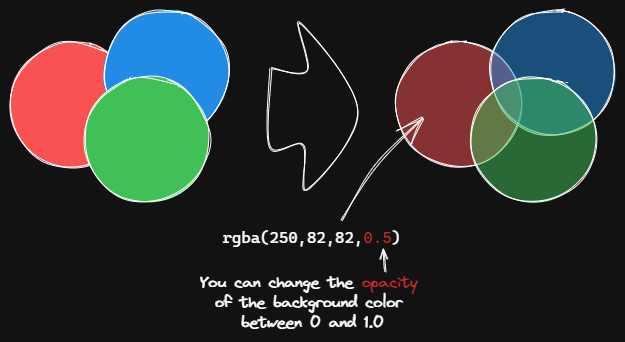
|
||||
|
||||
This script changes the opacity of the background color of the selected boxes.
|
||||
|
||||
The default background color in Excalidraw is so dark that the text is hard to read. You can lighten the color a bit by setting transparency. And you can tweak the transparency over and over again until you're happy with it.
|
||||
@@ -11,7 +13,39 @@ Although excalidraw has the opacity option in its native property Settings, it a
|
||||
|
||||
```javascript
|
||||
*/
|
||||
const alpha = parseFloat(await utils.inputPrompt("Background color opacity?","number","0.6"));
|
||||
if(!ea.verifyMinimumPluginVersion || !ea.verifyMinimumPluginVersion("1.5.21")) {
|
||||
new Notice("This script requires a newer version of Excalidraw. Please install the latest version.");
|
||||
return;
|
||||
}
|
||||
settings = ea.getScriptSettings();
|
||||
//set default values on first run
|
||||
if(!settings["Default opacity"]) {
|
||||
settings = {
|
||||
"Prompt for opacity?": true,
|
||||
"Default opacity" : {
|
||||
value: 0.6,
|
||||
description: "Element's background color transparency"
|
||||
},
|
||||
"Remember last opacity?": false
|
||||
};
|
||||
ea.setScriptSettings(settings);
|
||||
}
|
||||
|
||||
let opacityStr = settings["Default opacity"].value.toString();
|
||||
const rememberLastOpacity = settings["Remember last opacity?"];
|
||||
|
||||
if(settings["Prompt for opacity?"]) {
|
||||
opacityStr = await utils.inputPrompt("Background color opacity?","number",opacityStr);
|
||||
}
|
||||
|
||||
const alpha = parseFloat(opacityStr);
|
||||
if(isNaN(alpha)) {
|
||||
return;
|
||||
}
|
||||
if(rememberLastOpacity) {
|
||||
settings["Default opacity"].value = alpha;
|
||||
ea.setScriptSettings(settings);
|
||||
}
|
||||
const elements=ea.getViewSelectedElements().filter((el)=>["rectangle","ellipse","diamond","line","image"].includes(el.type));
|
||||
ea.copyViewElementsToEAforEditing(elements);
|
||||
ea.getElements().forEach((el)=>{
|
||||
@@ -30,7 +64,7 @@ ea.getElements().forEach((el)=>{
|
||||
}
|
||||
}
|
||||
});
|
||||
ea.addElementsToView();
|
||||
await ea.addElementsToView(false, false);
|
||||
|
||||
function colorNameToHex(color) {
|
||||
const colors = {
|
||||
|
||||
74
ea-scripts/Normalize Selected Arrows.md
Normal file
@@ -0,0 +1,74 @@
|
||||
/*
|
||||
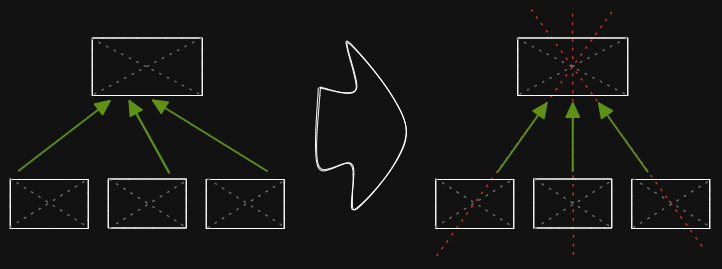
|
||||
|
||||
This script will reset the start and end positions of the selected arrows. The arrow will point to the center of the connected box and will have a gap of 8px from the box.
|
||||
|
||||
Tips: If you are drawing a flowchart, you can use `Normalize Selected Arrows` script to correct the position of the start and end points of the arrows, then use `Elbow connectors` script, and you will get the perfect connecting line!
|
||||
|
||||
```javascript
|
||||
*/
|
||||
const selectedIndividualArrows = ea.getMaximumGroups(ea.getViewSelectedElements())
|
||||
.reduce((result, group) => (group.length === 1 && (group[0].type === 'arrow' || group[0].type === 'line')) ?
|
||||
[...result, group[0]] : result, []);
|
||||
|
||||
const allElements = ea.getViewElements();
|
||||
for(const arrow of selectedIndividualArrows) {
|
||||
const startBindingEl = allElements.filter(el => el.id === (arrow.startBinding||{}).elementId)[0];
|
||||
const endBindingEl = allElements.filter(el => el.id === (arrow.endBinding||{}).elementId)[0];
|
||||
|
||||
if(startBindingEl) {
|
||||
recalculateStartPointOfLine(arrow, startBindingEl, endBindingEl);
|
||||
}
|
||||
if(endBindingEl) {
|
||||
recalculateEndPointOfLine(arrow, endBindingEl, startBindingEl);
|
||||
}
|
||||
}
|
||||
|
||||
ea.copyViewElementsToEAforEditing(selectedIndividualArrows);
|
||||
await ea.addElementsToView(false,false);
|
||||
|
||||
function recalculateStartPointOfLine(line, el, elB) {
|
||||
const aX = el.x + el.width/2;
|
||||
const bX = (line.points.length <=2 && elB) ? elB.x + elB.width/2 : line.x + line.points[1][0];
|
||||
const aY = el.y + el.height/2;
|
||||
const bY = (line.points.length <=2 && elB) ? elB.y + elB.height/2 : line.y + line.points[1][1];
|
||||
|
||||
line.startBinding.gap = 8;
|
||||
line.startBinding.focus = 0;
|
||||
const intersectA = ea.intersectElementWithLine(
|
||||
el,
|
||||
[bX, bY],
|
||||
[aX, aY],
|
||||
line.startBinding.gap
|
||||
);
|
||||
|
||||
if(intersectA.length > 0) {
|
||||
line.points[0] = [0, 0];
|
||||
for(var i = 1; i<line.points.length; i++) {
|
||||
line.points[i][0] -= intersectA[0][0] - line.x;
|
||||
line.points[i][1] -= intersectA[0][1] - line.y;
|
||||
}
|
||||
line.x = intersectA[0][0];
|
||||
line.y = intersectA[0][1];
|
||||
}
|
||||
}
|
||||
|
||||
function recalculateEndPointOfLine(line, el, elB) {
|
||||
const aX = el.x + el.width/2;
|
||||
const bX = (line.points.length <=2 && elB) ? elB.x + elB.width/2 : line.x + line.points[line.points.length-2][0];
|
||||
const aY = el.y + el.height/2;
|
||||
const bY = (line.points.length <=2 && elB) ? elB.y + elB.height/2 : line.y + line.points[line.points.length-2][1];
|
||||
|
||||
line.endBinding.gap = 8;
|
||||
line.endBinding.focus = 0;
|
||||
const intersectA = ea.intersectElementWithLine(
|
||||
el,
|
||||
[bX, bY],
|
||||
[aX, aY],
|
||||
line.endBinding.gap
|
||||
);
|
||||
|
||||
if(intersectA.length > 0) {
|
||||
line.points[line.points.length - 1] = [intersectA[0][0] - line.x, intersectA[0][1] - line.y];
|
||||
}
|
||||
}
|
||||
120
ea-scripts/OCR - Optical Character Recognition.md
Normal file
@@ -0,0 +1,120 @@
|
||||
/*
|
||||

|
||||
|
||||
THIS SCRIPT REQUIRES EXCALIDRAW 1.5.15
|
||||
|
||||
The script will
|
||||
1) send the selected image file to [taskbone.com](https://taskbone.com) to exctract the text from the image, and
|
||||
2) will add the text to your drawing as a text element
|
||||
|
||||
I recommend also installing the [Transfer TextElements to Excalidraw markdown metadata](Transfer%20TextElements%20to%20Excalidraw%20markdown%20metadata.md) script as well.
|
||||
|
||||
The script is based on [@schlundd](https://github.com/schlundd)'s [Obsidian-OCR-Plugin](https://github.com/schlundd/obsidian-ocr-plugin)
|
||||
|
||||
See ScriptEngine documentation for more details:
|
||||
https://zsviczian.github.io/obsidian-excalidraw-plugin/ExcalidrawScriptsEngine.html
|
||||
|
||||
```javascript
|
||||
*/
|
||||
if(!ea.verifyMinimumPluginVersion || !ea.verifyMinimumPluginVersion("1.5.24")) {
|
||||
new Notice("This script requires a newer version of Excalidraw. Please install the latest version.");
|
||||
return;
|
||||
}
|
||||
|
||||
let token = ea.getScriptSettings().token?.value??ea.getScriptSettings().token;
|
||||
const BASE_URL = "https://ocr.taskbone.com";
|
||||
|
||||
//convert setting to 1.5.21 format
|
||||
if(token && !ea.getScriptSettings().token.value) {
|
||||
ea.setScriptSettings({token: {value: token, hidden: true}});
|
||||
}
|
||||
|
||||
//get new token if token was not provided
|
||||
if (!token) {
|
||||
const tokenResponse = await fetch(
|
||||
BASE_URL + "/get-new-token", {
|
||||
method: 'post'
|
||||
});
|
||||
if (tokenResponse.status === 200) {
|
||||
jsonResponse = await tokenResponse.json();
|
||||
token = jsonResponse.token;
|
||||
ea.setScriptSettings({token: {value: token, hidden: true}});
|
||||
} else {
|
||||
notice(`Taskbone OCR Error: ${tokenResponse.status}\nPlease try again later.`);
|
||||
return;
|
||||
}
|
||||
}
|
||||
|
||||
//get image element
|
||||
//if multiple image elements were selected prompt user to choose
|
||||
const imageElements = ea.getViewSelectedElements().filter((el)=>el.type==="image");
|
||||
|
||||
//need to save the view to ensure recently pasted images are saved as files
|
||||
await ea.targetView.save();
|
||||
|
||||
let selectedImageElement = null;
|
||||
switch (imageElements.length) {
|
||||
case 0:
|
||||
return;
|
||||
case 1:
|
||||
selectedImageElement = imageElements[0];
|
||||
break;
|
||||
default:
|
||||
const files = imageElements.map((el)=>ea.getViewFileForImageElement(el));
|
||||
selectedImageElement = await utils.suggester(files.map((f)=>f.name),imageElements);
|
||||
break;
|
||||
}
|
||||
|
||||
if(!selectedImageElement) {
|
||||
notice("No image element was selected");
|
||||
return;
|
||||
}
|
||||
const imageFile = ea.getViewFileForImageElement(selectedImageElement);
|
||||
if(!imageFile) {
|
||||
notice("Can read image file");
|
||||
return;
|
||||
}
|
||||
|
||||
//Execute the OCR
|
||||
let text = null;
|
||||
const fileBuffer = await app.vault.readBinary(imageFile);
|
||||
const formData = new FormData();
|
||||
formData.append("image", new Blob([fileBuffer]))
|
||||
try {
|
||||
const response = await fetch(
|
||||
BASE_URL + "/get-text", {
|
||||
headers: {
|
||||
Authorization: "Bearer " + token
|
||||
},
|
||||
method: "post",
|
||||
body: formData
|
||||
});
|
||||
if (response.status == 200) {
|
||||
jsonResponse = await response.json();
|
||||
text = jsonResponse?.text;
|
||||
} else {
|
||||
notice(`Could not read Text from ${file.path}:\n Error: ${response.status}`);
|
||||
return;
|
||||
}
|
||||
} catch (error) {
|
||||
notice(`The OCR service seems unavailable right now. Please try again later.`);
|
||||
return;
|
||||
}
|
||||
|
||||
if(!text) {
|
||||
notice("No text found");
|
||||
return;
|
||||
}
|
||||
console.log({text});
|
||||
|
||||
//add text element to drawing
|
||||
const id = ea.addText(selectedImageElement.x,selectedImageElement.y+selectedImageElement.height,text);
|
||||
await ea.addElementsToView();
|
||||
ea.selectElementsInView([ea.getElement(id)]);
|
||||
ea.getExcalidrawAPI().zoomToFit(ea.getViewSelectedElements(),1);
|
||||
|
||||
//utility function
|
||||
function notice(message) {
|
||||
new Notice(message,10000);
|
||||
console.log(message);
|
||||
}
|
||||
27
ea-scripts/Organic Line.md
Normal file
@@ -0,0 +1,27 @@
|
||||
/*
|
||||
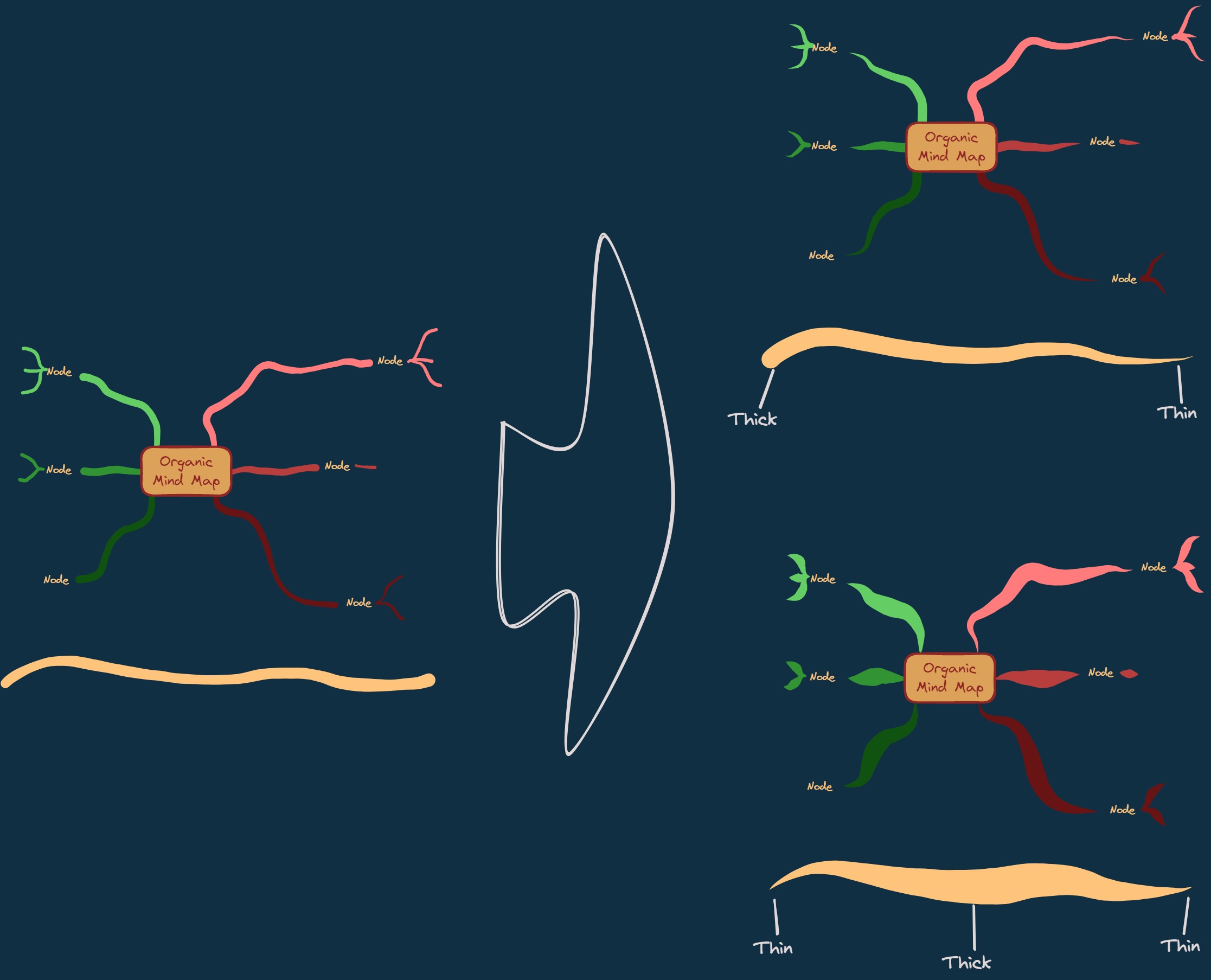
|
||||
|
||||
Converts selected freedraw lines such that pencil pressure will decrease from maximum to minimum from the beginning of the line to its end. The resulting line is placed at the back of the layers, under all other items. Helpful when drawing organic mindmaps.
|
||||
|
||||
```javascript
|
||||
*/
|
||||
let elements = ea.getViewSelectedElements().filter((el)=>["freedraw","line","arrow"].includes(el.type));
|
||||
if(elements.length === 0) {
|
||||
elements = ea.getViewSelectedElements();
|
||||
const len = elements.length;
|
||||
if(len === 0 || ["freedraw","line","arrow"].includes(elements[len].type)) {
|
||||
return;
|
||||
}
|
||||
elements = [elements[len]];
|
||||
}
|
||||
elements.forEach((el)=>{
|
||||
el.simulatePressure = false;
|
||||
el.type = "freedraw";
|
||||
el.pressures = [];
|
||||
const len = el.points.length;
|
||||
for(i=0;i<len;i++)
|
||||
el.pressures.push((len-i)/len);
|
||||
});
|
||||
ea.copyViewElementsToEAforEditing(elements);
|
||||
await ea.addElementsToView(false,false);
|
||||
elements.forEach((el)=>ea.moveViewElementToZIndex(el.id,0));
|
||||
@@ -1,7 +1,11 @@
|
||||
# Excalidraw Script Engine scripts library
|
||||
Click to watch the intro video:
|
||||
|
||||
[](https://youtu.be/hePJcObHIso)
|
||||
|
||||
See the [Excalidraw Script Engine](https://zsviczian.github.io/obsidian-excalidraw-plugin/ExcalidrawScriptsEngine.html) documentation for more details.
|
||||
|
||||
## How to install
|
||||
## How to install scripts into your Obsidian Vault
|
||||
Open the script you are interested in and save it to your Obsidian Vault including the first line `/*`, or open it in "Raw" and copy the entire contents to Obsidian.
|
||||
|
||||

|
||||
@@ -10,26 +14,47 @@ Open the script you are interested in and save it to your Obsidian Vault includi
|
||||
## List of available scripts
|
||||
|Title|Description|Icon|Contributor|
|
||||
|----|----|----|----|
|
||||
|[Add Connector Point](Add%20Connector%20Point.md)|This script will add a small circle to the top left of each text element in the selection and add the text and the "bullet point" into a group.||[@zsviczian](https://github.com/zsviczian)|
|
||||
|[Add Link to Existing File and Open](Add%20Link%20to%20Existing%20File%20and%20Open.md)|Prompts for a file from the vault. Adds a link to the selected element pointing to the selected file. You can control in settings to open the file in the current active pane or an adjacent pane.||[@zsviczian](https://github.com/zsviczian)|
|
||||
|[Add Link to New Page and Open](Add%20Link%20and%20Open%20Page.md)|Prompts for filename. Offers option to create and open a new Markdown or Excalidraw document. Adds link pointing to the new file, to the selected objects in the drawing. You can control in settings to open the file in the current active pane or an adjacent pane.||[@zsviczian](https://github.com/zsviczian)|
|
||||
|[Add Next Step in Process](Add%20Link%20to%20New%20Page%20and%20Open.md)|This script will prompt you for the title of the process step, then will create a stick note with the text. If an element is selected then the script will connect this new step with an arrow to the previous step (the selected element). If no element is selected, then the script assumes this is the first step in the process and will only output the sticky note with the text that was entered.||[@zsviczian](https://github.com/zsviczian)|
|
||||
|[Box Each Selected Groups](Box%20Each%20Selected%20Groups.md)|This script will add encapsulating boxes around each of the currently selected groups in Excalidraw.||[@1-2-3](https://github.com/1-2-3)|
|
||||
|[Box Selected Elements](Box%20Selected%20Elements.md)|This script will add an encapsulating box around the currently selected elements in Excalidraw.||[@zsviczian](https://github.com/zsviczian)|
|
||||
|[Bullet Point](Bullet%20Point.md)|This script will add a small circle to the top left of each text element in the selection and add the text and the "bullet point" into a group.||[@zsviczian](https://github.com/zsviczian)|
|
||||
|[Change shape of selected elements](Change%20shape%20of%20selected%20elements.md)|The script allows you to change the shape of selected Rectangles, Diamonds and Ellipses||[@zsviczian](https://github.com/zsviczian)|
|
||||
|[Connect elements](Connect%20elements.md)|This script will connect two objects with an arrow. If either of the objects are a set of grouped elements (e.g. a text element grouped with an encapsulating rectangle), the script will identify these groups, and connect the arrow to the largest object in the group (assuming you want to connect the arrow to the box around the text element).||[@zsviczian](https://github.com/zsviczian)|
|
||||
|[Convert freedraw to line](https://raw.githubusercontent.com/zsviczian/obsidian-excalidraw-plugin/master/ea-scripts/Convert%20freedraw%20to%20line.md)|Convert selected freedraw objects into editable lines. This will allow you to adjust your drawings by dragging line points and will also allow you to select shape fill in case of enclosed lines. You can adjust conversion point density in settings||[@zsviczian](https://github.com/zsviczian)|
|
||||
|[Convert selected text elements to sticky notes](Convert%20selected%20text%20elements%20to%20sticky%20notes.md)|Converts selected plain text elements to sticky notes with transparent background and transparent stroke color. Essentially converts text element into a wrappable format.||[@zsviczian](https://github.com/zsviczian)|
|
||||
|[Convert text to link with folder and alias](Convert%20text%20to%20link%20with%20folder%20and%20alias.md)|Converts text elements to links pointing to a file in a selected folder and with the alias set as the original text. The script will prompt the user to select an existing folder from the vault.|`original text` => `[[selected folder/original text\|original text]]`|[@zsviczian](https://github.com/zsviczian)|
|
||||
|[Copy Selected Element Styles to Global](Copy%20Selected%20Element%20Styles%20to%20Global)|This script will copy styles of any selected element into Excalidraw's global styles.||[@1-2-3](https://github.com/1-2-3)|
|
||||
|[Create new markdown file and embed into active drawing](Create%20new%20markdown%20file%20and%20embed%20into%20active%20drawing.md)|The script will prompt you for a filename, then create a new markdown document with the file name provided, open the new markdown document in an adjacent pane, and embed the markdown document into the active Excalidraw drawing.||[@zsviczian](https://github.com/zsviczian)|
|
||||
|[Darken background color](Darken%20background%20color.md)|This script darkens the background color of the selected element by 2% at a time. You can use this script several times until you are satisfied. It is recommended to set a shortcut key for this script so that you can quickly try to DARKEN and LIGHTEN the color effect. In contrast to the `Modify background color opacity` script, the advantage is that the background color of the element is not affected by the canvas color, and the color value does not appear in a strange rgba() form.||[@1-2-3](https://github.com/1-2-3)|
|
||||
|[Dimensions](Dimensions.md)|Currently there is no way to specify the exact location and size of objects in Excalidraw. You can bridge this gap with the following simple script.||[@zsviczian](https://github.com/zsviczian)|
|
||||
|[Elbow connectors](Elbow%20connectors.md)|This script converts the selected connectors to elbows.||[@1-2-3](https://github.com/1-2-3)|
|
||||
|[Expand rectangles horizontally keep text centered](Expand%20rectangles%20horizontally%20keep%20text20%centered.md)|This script expands the width of the selected rectangles until they are all the same width and keep the text centered.||[@1-2-3](https://github.com/1-2-3)|
|
||||
|[Expand rectangles horizontally](Expand%20rectangles%20horizontally.md)|This script expands the width of the selected rectangles until they are all the same width.||[@1-2-3](https://github.com/1-2-3)|
|
||||
|[Expand rectangles vertically keep text centered](Expand%20rectangles%20vertically%20keep%20text%20centered.md)|This script expands the height of the selected rectangles until they are all the same height and keep the text centered.||[@1-2-3](https://github.com/1-2-3)|
|
||||
|[Expand rectangles vertically](Expand%20rectangles%20vertically.md)|This script expands the height of the selected rectangles until they are all the same height.||[@1-2-3](https://github.com/1-2-3)|
|
||||
|[Fixed spacing](Fixed%20spacing.md)|The script arranges the selected elements horizontally with a fixed spacing. When we create an architecture diagram or mind map, we often need to arrange a large number of elements in a fixed spacing. `Fixed spacing` and `Fixed vertical Distance` scripts can save us a lot of time.||[@1-2-3](https://github.com/1-2-3)|
|
||||
|[Fixed vertical distance](Fixed%20vertical%20distance.md)|The script arranges the selected elements vertically with a fixed spacing. When we create an architecture diagram or mind map, we often need to arrange a large number of elements in a fixed spacing. `Fixed spacing` and `Fixed vertical Distance` scripts can save us a lot of time.||[@1-2-3](https://github.com/1-2-3)|
|
||||
|[Font Family](Font%20Family.md)|Sets font family of the text block (Virgil, Helvetica, Cascadia). Useful if you want to set a keyboard shortcut for selecting font family.||[@zsviczian](https://github.com/zsviczian)|
|
||||
|[Grid](Grid.md)|The default grid size in Excalidraw is 20. Currently there is no way to change the grid size via the user interface. This script offers a way to bridge this gap.||[@zsviczian](https://github.com/zsviczian)|
|
||||
|[Fixed horizontal distance between centers](Fixed%20horizontal%20distance%20between%20centers.md)|This script arranges the selected elements horizontally with a fixed center spacing.||[@1-2-3](https://github.com/1-2-3)|
|
||||
|[Fixed inner distance](Fixed%20inner%20distance.md)|This script arranges selected elements and groups with a fixed inner distance.||[@1-2-3](https://github.com/1-2-3)|
|
||||
|[Fixed spacing](Fixed%20spacing.md)|The script arranges the selected elements horizontally with a fixed spacing. When we create an architecture diagram or mind map, we often need to arrange a large number of elements in a fixed spacing. `Fixed spacing` and `Fixed vertical Distance` scripts can save us a lot of time.||[@1-2-3](https://github.com/1-2-3)|
|
||||
|[Fixed vertical distance between centers](Fixed%20vertical%20distance%20between%20centers.md)|This script arranges the selected elements vertically with a fixed center spacing.||[@1-2-3](https://github.com/1-2-3)|
|
||||
|[Fixed vertical distance](Fixed%20vertical%20distance.md)|The script arranges the selected elements vertically with a fixed spacing. When we create an architecture diagram or mind map, we often need to arrange a large number of elements in a fixed spacing. `Fixed spacing` and `Fixed vertical Distance` scripts can save us a lot of time.||[@1-2-3](https://github.com/1-2-3)|
|
||||
|[Lighten background color](Lighten%20background%20color.md)|This script lightens the background color of the selected element by 2% at a time. You can use this script several times until you are satisfied. It is recommended to set a shortcut key for this script so that you can quickly try to DARKEN and LIGHTEN the color effect.In contrast to the `Modify background color opacity` script, the advantage is that the background color of the element is not affected by the canvas color, and the color value does not appear in a strange rgba() form.||[@1-2-3](https://github.com/1-2-3)|
|
||||
|[Modify background color opacity](Modify%20background%20color%20opacity.md)|This script changes the opacity of the background color of the selected boxes. The default background color in Excalidraw is so dark that the text is hard to read. You can lighten the color a bit by setting transparency. And you can tweak the transparency over and over again until you're happy with it. Although excalidraw has the opacity option in its native property Settings, it also changes the transparency of the border. Use this script to change only the opacity of the background color without affecting the border.||[@1-2-3](https://github.com/1-2-3)|
|
||||
|[Modify stroke width of selected elements](Modify%20stroke%20width%20of%20selected%20elements.md)|This script will set the stroke width of selected elements. This is helpful, for example, when you scale freedraw sketches and want to reduce or increase their line width.||[@zsviczian](https://github.com/zsviczian)|
|
||||
|[Modify background color opacity](Modify%20background%20color%20opacity.md)|This script changes the opacity of the background color of the selected boxes. The default background color in Excalidraw is so dark that the text is hard to read. You can lighten the color a bit by setting transparency. And you can tweak the transparency over and over again until you're happy with it. Although excalidraw has the opacity option in its native property Settings, it also changes the transparency of the border. Use this script to change only the opacity of the background color without affecting the border.||[@1-2-3](https://github.com/1-2-3)|
|
||||
|[Normalize Selected Arrows](Normalize%20Selected%20Arrows.md)|This script will reset the start and end positions of the selected arrows. The arrow will point to the center of the connected box and will have a gap of 8px from the box.||[@1-2-3](https://github.com/1-2-3)|
|
||||
|[OCR - Optical Character Recognition](OCR%20-%20Optical%20Character%20Recognition.md)|The script will 1) send the selected image file to [taskbone.com](https://taskbone.com) to exctract the text from the image, and 2) will add the text to your drawing as a text element.||[@zsviczian](https://github.com/zsviczian)|
|
||||
|[Organic Line](Organic%20Line.md)|Converts selected freedraw lines such that pencil pressure will decrease from maximum to minimum from the beginning of the line to its end. The resulting line is placed at the back of the layers, under all other items. Helpful when drawing organic mindmaps.||[@zsviczian](https://github.com/zsviczian)|
|
||||
|[Repeat Elements](Repeat%20Elements.md)|This script will detect the difference between 2 selected elements, including position, size, angle, stroke and background color, and create several elements that repeat these differences based on the number of repetitions entered by the user.|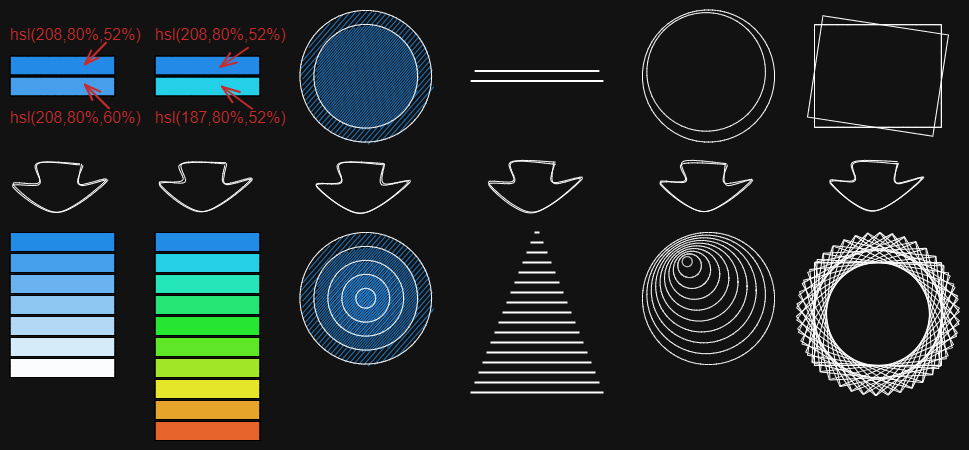|[@1-2-3](https://github.com/1-2-3)|
|
||||
|[Reverse arrows](Reverse%20arrows.md)|Reverse the direction of **arrows** within the scope of selected elements.||[@zsviczian](https://github.com/zsviczian)|
|
||||
|[Scribble Helper](Scribble%20Helper.md)|iOS scribble helper for better handwriting experience with text elements. If no elements are selected then the creates a text element at pointer position and you can use the edit box to modify the text with scribble. If a text element is selected then opens the input prompt where you can modify this text with scribble.||[@zsviczian](https://github.com/zsviczian)|
|
||||
|[Select Elements of Type](Select%20Elements%20of%20Type.md)|Prompts you with a list of the different element types in the active image. Only elements of the selected type will be selected on the canvas. If nothing is selected when running the script, then the script will process all the elements on the canvas. If some elements are selected when the script is executed, then the script will only process the selected elements.<br>The script is useful when, for example, you want to bring to front all the arrows, or want to change the color of all the text elements, etc.||[@zsviczian](https://github.com/zsviczian)|
|
||||
|[Set background color of unclosed line object by adding a shadow clone](Set%20background%20color%20of%20unclosed%20line%20object%20by%20adding%20a%20shadow%20clone.md)|Use this script to set the background color of unclosed (i.e. open) line objects by creating a clone of the object. The script will set the stroke color of the clone to transparent and will add a straight line to close the object. Use settings to define the default background color, the fill style, and the strokeWidth of the clone. By default the clone will be grouped with the original object, you can disable this also in settings.||[@zsviczian](https://github.com/zsviczian)|
|
||||
|[Set Dimensions](Set%20Dimensions.md)|Currently there is no way to specify the exact location and size of objects in Excalidraw. You can bridge this gap with the following simple script.||[@zsviczian](https://github.com/zsviczian)|
|
||||
|[Set Font Family](Set%20Font%20Family.md)|Sets font family of the text block (Virgil, Helvetica, Cascadia). Useful if you want to set a keyboard shortcut for selecting font family.||[@zsviczian](https://github.com/zsviczian)|
|
||||
|[Set Grid](Set%20Grid.md)|The default grid size in Excalidraw is 20. Currently there is no way to change the grid size via the user interface. This script offers a way to bridge this gap.||[@zsviczian](https://github.com/zsviczian)|
|
||||
|[Set Link Alias](Set20%Link20%Alias.md)|Iterates all of the links in the selected TextElements and prompts the user to set or modify the alias for each link found.|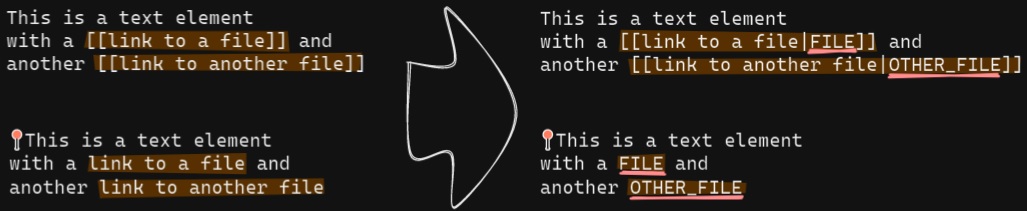|[@zsviczian](https://github.com/zsviczian)|
|
||||
|[Set stroke width of selected elements](Set%20Stroke%20Width%20of%20Selected%20Elements.md)|This script will set the stroke width of selected elements. This is helpful, for example, when you scale freedraw sketches and want to reduce or increase their line width.||[@zsviczian](https://github.com/zsviczian)|
|
||||
|[Split text by lines](Split%20text%20by%20lines.md)|Split lines of text into separate text elements for easier reorganization||[@zsviczian](https://github.com/zsviczian)|
|
||||
|[Text Align](Text%20Align.md)|Sets text alignment of text block (cetner, right, left). Useful if you want to set a keyboard shortcut for selecting text alignment.||[@zsviczian](https://github.com/zsviczian)|
|
||||
|[Zoom to Fit Selected Elements](Zoom%20to%20Fit%20Selected%20Elements.md)|Similar to Excalidraw standard SHIFT+2 feature: Zoom to fit selected elements, but with the ability to zoom to 1000%. Inspiration: [#272](https://github.com/zsviczian/obsidian-excalidraw-plugin/issues/272)||[@zsviczian](https://github.com/zsviczian)|
|
||||
|[Set Text Alignment](Set%20Text%20Alignment.md)|Sets text alignment of text block (cetner, right, left). Useful if you want to set a keyboard shortcut for selecting text alignment.||[@zsviczian](https://github.com/zsviczian)|
|
||||
|[Toggle Fullscreen on Mobile](Toggle%20Fullscreen%20on%20Mobile.md)|Hides Obsidian workspace leaf padding and header (based on option in settings, default is "hide header" = false) which will take Excalidraw to full screen. ⚠ Note that if the header is not visible, it will be very difficult to invoke the command palette to end full screen. Only hide the header if you have a keyboard or you've practiced opening command palette!||[@zsviczian](https://github.com/zsviczian)|
|
||||
|[Transfer TextElements to Excalidraw markdown metadata](Transfer%20TextElements%20to%20Excalidraw%20markdown%20metadata.md)|The script will delete the selected text elements from the canvas and will copy the text from these text elements into the Excalidraw markdown file as metadata. This means, that the text will no longer be visible in the drawing, however you will be able to search for the text in Obsidian and find the drawing containing this image.||[@zsviczian](https://github.com/zsviczian)|
|
||||
|[Zoom to Fit Selected Elements](Zoom%20to%20Fit%20Selected%20Elements.md)|Similar to Excalidraw standard SHIFT+2 feature: Zoom to fit selected elements, but with the ability to zoom to 1000%. Inspiration: [#272](https://github.com/zsviczian/obsidian-excalidraw-plugin/issues/272)||[@zsviczian](https://github.com/zsviczian)|
|
||||
|
||||
378
ea-scripts/Repeat Elements.md
Normal file
@@ -0,0 +1,378 @@
|
||||
/*
|
||||
|
||||

|
||||
|
||||
Download this file and save to your Obsidian Vault including the first line, or open it in "Raw" and copy the entire contents to Obsidian.
|
||||
|
||||

|
||||
|
||||
This script will detect the difference between 2 selected elements, including position, size, angle, stroke and background color, and create several elements that repeat these differences based on the number of repetitions entered by the user.
|
||||
|
||||
See documentation for more details:
|
||||
https://zsviczian.github.io/obsidian-excalidraw-plugin/ExcalidrawScriptsEngine.html
|
||||
|
||||
```javascript
|
||||
*/
|
||||
|
||||
let repeatNum = parseInt(await utils.inputPrompt("repeat times?","number","5"));
|
||||
if(!repeatNum) {
|
||||
new Notice("Please enter a number.");
|
||||
return;
|
||||
}
|
||||
|
||||
const selectedElements = ea.getViewSelectedElements().sort((lha,rha) =>
|
||||
lha.x === rha.x? (lha.y === rha.y?
|
||||
(lha.width === rha.width?
|
||||
(lha.height - rha.height) : lha.width - rha.width)
|
||||
: lha.y - rha.y) : lha.x - rha.x);
|
||||
|
||||
if(selectedElements.length !== 2) {
|
||||
new Notice("Please select 2 elements.");
|
||||
return;
|
||||
}
|
||||
|
||||
if(selectedElements[0].type !== selectedElements[1].type) {
|
||||
new Notice("The selected elements must be of the same type.");
|
||||
return;
|
||||
}
|
||||
|
||||
const xDistance = selectedElements[1].x - selectedElements[0].x;
|
||||
const yDistance = selectedElements[1].y - selectedElements[0].y;
|
||||
const widthDistance = selectedElements[1].width - selectedElements[0].width;
|
||||
const heightDistance = selectedElements[1].height - selectedElements[0].height;
|
||||
const angleDistance = selectedElements[1].angle - selectedElements[0].angle;
|
||||
|
||||
const bgColor1 = colorNameToHex(selectedElements[0].backgroundColor);
|
||||
const rgbBgColor1 = /^#?([a-f\d]{2})([a-f\d]{2})([a-f\d]{2})$/i.exec(bgColor1);
|
||||
const bgColor2 = colorNameToHex(selectedElements[1].backgroundColor);
|
||||
const rgbBgColor2 = /^#?([a-f\d]{2})([a-f\d]{2})([a-f\d]{2})$/i.exec(bgColor2);
|
||||
let bgHDistance = 0;
|
||||
let bgSDistance = 0;
|
||||
let bgLDistance = 0;
|
||||
if(rgbBgColor1 && rgbBgColor2) {
|
||||
const bgHsl1 = rgbToHsl([parseInt(rgbBgColor1[1], 16), parseInt(rgbBgColor1[2], 16), parseInt(rgbBgColor1[3], 16)]);
|
||||
const bgHsl2 = rgbToHsl([parseInt(rgbBgColor2[1], 16), parseInt(rgbBgColor2[2], 16), parseInt(rgbBgColor2[3], 16)]);
|
||||
|
||||
bgHDistance = bgHsl2[0] - bgHsl1[0];
|
||||
bgSDistance = bgHsl2[1] - bgHsl1[1];
|
||||
bgLDistance = bgHsl2[2] - bgHsl1[2];
|
||||
}
|
||||
|
||||
const strokeColor1 = colorNameToHex(selectedElements[0].strokeColor);
|
||||
const rgbStrokeColor1 = /^#?([a-f\d]{2})([a-f\d]{2})([a-f\d]{2})$/i.exec(strokeColor1);
|
||||
const strokeColor2 = colorNameToHex(selectedElements[1].strokeColor);
|
||||
const rgbStrokeColor2 = /^#?([a-f\d]{2})([a-f\d]{2})([a-f\d]{2})$/i.exec(strokeColor2);
|
||||
let strokeHDistance = 0;
|
||||
let strokeSDistance = 0;
|
||||
let strokeLDistance = 0;
|
||||
if(rgbStrokeColor1 && rgbStrokeColor2) {
|
||||
const strokeHsl1 = rgbToHsl([parseInt(rgbStrokeColor1[1], 16), parseInt(rgbStrokeColor1[2], 16), parseInt(rgbStrokeColor1[3], 16)]);
|
||||
const strokeHsl2 = rgbToHsl([parseInt(rgbStrokeColor2[1], 16), parseInt(rgbStrokeColor2[2], 16), parseInt(rgbStrokeColor2[3], 16)]);
|
||||
|
||||
strokeHDistance = strokeHsl2[0] - strokeHsl1[0];
|
||||
strokeSDistance = strokeHsl2[1] - strokeHsl1[1];
|
||||
strokeLDistance = strokeHsl2[2] - strokeHsl1[2];
|
||||
}
|
||||
|
||||
ea.copyViewElementsToEAforEditing(selectedElements);
|
||||
for(let i=0; i<repeatNum; i++) {
|
||||
const newEl = ea.cloneElement(selectedElements[1]);
|
||||
ea.elementsDict[newEl.id] = newEl;
|
||||
newEl.x += xDistance * (i + 1);
|
||||
newEl.y += yDistance * (i + 1);
|
||||
newEl.angle += angleDistance * (i + 1);
|
||||
const originWidth = newEl.width;
|
||||
const originHeight = newEl.height;
|
||||
const newWidth = newEl.width + widthDistance * (i + 1);
|
||||
const newHeight = newEl.height + heightDistance * (i + 1);
|
||||
if(newWidth >= 0 && newHeight >= 0) {
|
||||
if(newEl.type === 'arrow' || newEl.type === 'line' || newEl.type === 'freedraw') {
|
||||
const minX = Math.min(...newEl.points.map(pt => pt[0]));
|
||||
const minY = Math.min(...newEl.points.map(pt => pt[1]));
|
||||
for(let j = 0; j < newEl.points.length; j++) {
|
||||
if(newEl.points[j][0] > minX) {
|
||||
newEl.points[j][0] = newEl.points[j][0] + ((newEl.points[j][0] - minX) / originWidth) * (newWidth - originWidth);
|
||||
}
|
||||
if(newEl.points[j][1] > minY) {
|
||||
newEl.points[j][1] = newEl.points[j][1] + ((newEl.points[j][1] - minY) / originHeight) * (newHeight - originHeight);
|
||||
}
|
||||
}
|
||||
}
|
||||
else {
|
||||
newEl.width = newWidth;
|
||||
newEl.height = newHeight;
|
||||
}
|
||||
}
|
||||
|
||||
if(rgbBgColor1 && rgbBgColor2) {
|
||||
const bgHsl2 = rgbToHsl([parseInt(rgbBgColor2[1], 16), parseInt(rgbBgColor2[2], 16), parseInt(rgbBgColor2[3], 16)]);
|
||||
const newBgH = bgHsl2[0] + bgHDistance * (i + 1);
|
||||
const newBgS = bgHsl2[1] + bgSDistance * (i + 1);
|
||||
const newBgL = bgHsl2[2] + bgLDistance * (i + 1);
|
||||
|
||||
if(newBgH >= 0 && newBgH <= 360 && newBgS >= 0 && newBgS <= 100 && newBgL >= 0 && newBgL <= 100) {
|
||||
const newBgRgb = hslToRgb([newBgH, newBgS, newBgL]);
|
||||
newEl.backgroundColor = "#" + rgbToHexString(newBgRgb);
|
||||
}
|
||||
}
|
||||
|
||||
if(rgbStrokeColor1 && rgbStrokeColor2) {
|
||||
const strokeHsl2 = rgbToHsl([parseInt(rgbStrokeColor2[1], 16), parseInt(rgbStrokeColor2[2], 16), parseInt(rgbStrokeColor2[3], 16)]);
|
||||
const newStrokeH = strokeHsl2[0] + strokeHDistance * (i + 1);
|
||||
const newStrokeS = strokeHsl2[1] + strokeSDistance * (i + 1);
|
||||
const newStrokeL = strokeHsl2[2] + strokeLDistance * (i + 1);
|
||||
|
||||
if(newStrokeH >= 0 && newStrokeH <= 360 && newStrokeS >= 0 && newStrokeS <= 100 && newStrokeL >= 0 && newStrokeL <= 100) {
|
||||
const newStrokeRgb = hslToRgb([newStrokeH, newStrokeS, newStrokeL]);
|
||||
newEl.strokeColor = "#" + rgbToHexString(newStrokeRgb);
|
||||
}
|
||||
}
|
||||
}
|
||||
|
||||
await ea.addElementsToView(false, false, true);
|
||||
|
||||
function rgbToHexString(args) {
|
||||
const integer =
|
||||
((Math.round(args[0]) & 0xff) << 16) +
|
||||
((Math.round(args[1]) & 0xff) << 8) +
|
||||
(Math.round(args[2]) & 0xff);
|
||||
|
||||
const string = integer.toString(16).toUpperCase();
|
||||
return "000000".substring(string.length) + string;
|
||||
}
|
||||
|
||||
function hslToRgb(hsl) {
|
||||
const h = hsl[0] / 360;
|
||||
const s = hsl[1] / 100;
|
||||
const l = hsl[2] / 100;
|
||||
let t2;
|
||||
let t3;
|
||||
let val;
|
||||
|
||||
if (s === 0) {
|
||||
val = l * 255;
|
||||
return [val, val, val];
|
||||
}
|
||||
|
||||
if (l < 0.5) {
|
||||
t2 = l * (1 + s);
|
||||
} else {
|
||||
t2 = l + s - l * s;
|
||||
}
|
||||
|
||||
const t1 = 2 * l - t2;
|
||||
|
||||
const rgb = [0, 0, 0];
|
||||
for (let i = 0; i < 3; i++) {
|
||||
t3 = h + (1 / 3) * -(i - 1);
|
||||
if (t3 < 0) {
|
||||
t3++;
|
||||
}
|
||||
|
||||
if (t3 > 1) {
|
||||
t3--;
|
||||
}
|
||||
|
||||
if (6 * t3 < 1) {
|
||||
val = t1 + (t2 - t1) * 6 * t3;
|
||||
} else if (2 * t3 < 1) {
|
||||
val = t2;
|
||||
} else if (3 * t3 < 2) {
|
||||
val = t1 + (t2 - t1) * (2 / 3 - t3) * 6;
|
||||
} else {
|
||||
val = t1;
|
||||
}
|
||||
|
||||
rgb[i] = val * 255;
|
||||
}
|
||||
|
||||
return rgb;
|
||||
}
|
||||
|
||||
function rgbToHsl(rgb) {
|
||||
const r = rgb[0] / 255;
|
||||
const g = rgb[1] / 255;
|
||||
const b = rgb[2] / 255;
|
||||
const min = Math.min(r, g, b);
|
||||
const max = Math.max(r, g, b);
|
||||
const delta = max - min;
|
||||
let h;
|
||||
let s;
|
||||
|
||||
if (max === min) {
|
||||
h = 0;
|
||||
} else if (r === max) {
|
||||
h = (g - b) / delta;
|
||||
} else if (g === max) {
|
||||
h = 2 + (b - r) / delta;
|
||||
} else if (b === max) {
|
||||
h = 4 + (r - g) / delta;
|
||||
}
|
||||
|
||||
h = Math.min(h * 60, 360);
|
||||
|
||||
if (h < 0) {
|
||||
h += 360;
|
||||
}
|
||||
|
||||
const l = (min + max) / 2;
|
||||
|
||||
if (max === min) {
|
||||
s = 0;
|
||||
} else if (l <= 0.5) {
|
||||
s = delta / (max + min);
|
||||
} else {
|
||||
s = delta / (2 - max - min);
|
||||
}
|
||||
|
||||
return [h, s * 100, l * 100];
|
||||
}
|
||||
|
||||
function colorNameToHex(color) {
|
||||
const colors = {
|
||||
aliceblue: "#f0f8ff",
|
||||
antiquewhite: "#faebd7",
|
||||
aqua: "#00ffff",
|
||||
aquamarine: "#7fffd4",
|
||||
azure: "#f0ffff",
|
||||
beige: "#f5f5dc",
|
||||
bisque: "#ffe4c4",
|
||||
black: "#000000",
|
||||
blanchedalmond: "#ffebcd",
|
||||
blue: "#0000ff",
|
||||
blueviolet: "#8a2be2",
|
||||
brown: "#a52a2a",
|
||||
burlywood: "#deb887",
|
||||
cadetblue: "#5f9ea0",
|
||||
chartreuse: "#7fff00",
|
||||
chocolate: "#d2691e",
|
||||
coral: "#ff7f50",
|
||||
cornflowerblue: "#6495ed",
|
||||
cornsilk: "#fff8dc",
|
||||
crimson: "#dc143c",
|
||||
cyan: "#00ffff",
|
||||
darkblue: "#00008b",
|
||||
darkcyan: "#008b8b",
|
||||
darkgoldenrod: "#b8860b",
|
||||
darkgray: "#a9a9a9",
|
||||
darkgreen: "#006400",
|
||||
darkkhaki: "#bdb76b",
|
||||
darkmagenta: "#8b008b",
|
||||
darkolivegreen: "#556b2f",
|
||||
darkorange: "#ff8c00",
|
||||
darkorchid: "#9932cc",
|
||||
darkred: "#8b0000",
|
||||
darksalmon: "#e9967a",
|
||||
darkseagreen: "#8fbc8f",
|
||||
darkslateblue: "#483d8b",
|
||||
darkslategray: "#2f4f4f",
|
||||
darkturquoise: "#00ced1",
|
||||
darkviolet: "#9400d3",
|
||||
deeppink: "#ff1493",
|
||||
deepskyblue: "#00bfff",
|
||||
dimgray: "#696969",
|
||||
dodgerblue: "#1e90ff",
|
||||
firebrick: "#b22222",
|
||||
floralwhite: "#fffaf0",
|
||||
forestgreen: "#228b22",
|
||||
fuchsia: "#ff00ff",
|
||||
gainsboro: "#dcdcdc",
|
||||
ghostwhite: "#f8f8ff",
|
||||
gold: "#ffd700",
|
||||
goldenrod: "#daa520",
|
||||
gray: "#808080",
|
||||
green: "#008000",
|
||||
greenyellow: "#adff2f",
|
||||
honeydew: "#f0fff0",
|
||||
hotpink: "#ff69b4",
|
||||
"indianred ": "#cd5c5c",
|
||||
indigo: "#4b0082",
|
||||
ivory: "#fffff0",
|
||||
khaki: "#f0e68c",
|
||||
lavender: "#e6e6fa",
|
||||
lavenderblush: "#fff0f5",
|
||||
lawngreen: "#7cfc00",
|
||||
lemonchiffon: "#fffacd",
|
||||
lightblue: "#add8e6",
|
||||
lightcoral: "#f08080",
|
||||
lightcyan: "#e0ffff",
|
||||
lightgoldenrodyellow: "#fafad2",
|
||||
lightgrey: "#d3d3d3",
|
||||
lightgreen: "#90ee90",
|
||||
lightpink: "#ffb6c1",
|
||||
lightsalmon: "#ffa07a",
|
||||
lightseagreen: "#20b2aa",
|
||||
lightskyblue: "#87cefa",
|
||||
lightslategray: "#778899",
|
||||
lightsteelblue: "#b0c4de",
|
||||
lightyellow: "#ffffe0",
|
||||
lime: "#00ff00",
|
||||
limegreen: "#32cd32",
|
||||
linen: "#faf0e6",
|
||||
magenta: "#ff00ff",
|
||||
maroon: "#800000",
|
||||
mediumaquamarine: "#66cdaa",
|
||||
mediumblue: "#0000cd",
|
||||
mediumorchid: "#ba55d3",
|
||||
mediumpurple: "#9370d8",
|
||||
mediumseagreen: "#3cb371",
|
||||
mediumslateblue: "#7b68ee",
|
||||
mediumspringgreen: "#00fa9a",
|
||||
mediumturquoise: "#48d1cc",
|
||||
mediumvioletred: "#c71585",
|
||||
midnightblue: "#191970",
|
||||
mintcream: "#f5fffa",
|
||||
mistyrose: "#ffe4e1",
|
||||
moccasin: "#ffe4b5",
|
||||
navajowhite: "#ffdead",
|
||||
navy: "#000080",
|
||||
oldlace: "#fdf5e6",
|
||||
olive: "#808000",
|
||||
olivedrab: "#6b8e23",
|
||||
orange: "#ffa500",
|
||||
orangered: "#ff4500",
|
||||
orchid: "#da70d6",
|
||||
palegoldenrod: "#eee8aa",
|
||||
palegreen: "#98fb98",
|
||||
paleturquoise: "#afeeee",
|
||||
palevioletred: "#d87093",
|
||||
papayawhip: "#ffefd5",
|
||||
peachpuff: "#ffdab9",
|
||||
peru: "#cd853f",
|
||||
pink: "#ffc0cb",
|
||||
plum: "#dda0dd",
|
||||
powderblue: "#b0e0e6",
|
||||
purple: "#800080",
|
||||
rebeccapurple: "#663399",
|
||||
red: "#ff0000",
|
||||
rosybrown: "#bc8f8f",
|
||||
royalblue: "#4169e1",
|
||||
saddlebrown: "#8b4513",
|
||||
salmon: "#fa8072",
|
||||
sandybrown: "#f4a460",
|
||||
seagreen: "#2e8b57",
|
||||
seashell: "#fff5ee",
|
||||
sienna: "#a0522d",
|
||||
silver: "#c0c0c0",
|
||||
skyblue: "#87ceeb",
|
||||
slateblue: "#6a5acd",
|
||||
slategray: "#708090",
|
||||
snow: "#fffafa",
|
||||
springgreen: "#00ff7f",
|
||||
steelblue: "#4682b4",
|
||||
tan: "#d2b48c",
|
||||
teal: "#008080",
|
||||
thistle: "#d8bfd8",
|
||||
tomato: "#ff6347",
|
||||
turquoise: "#40e0d0",
|
||||
violet: "#ee82ee",
|
||||
wheat: "#f5deb3",
|
||||
white: "#ffffff",
|
||||
whitesmoke: "#f5f5f5",
|
||||
yellow: "#ffff00",
|
||||
yellowgreen: "#9acd32",
|
||||
};
|
||||
if (typeof colors[color.toLowerCase()] != "undefined")
|
||||
return colors[color.toLowerCase()];
|
||||
return color;
|
||||
}
|
||||
@@ -20,4 +20,4 @@ elements.forEach((el)=>{
|
||||
el.endArrowhead = start;
|
||||
});
|
||||
ea.copyViewElementsToEAforEditing(elements);
|
||||
ea.addElementsToView();
|
||||
ea.addElementsToView(false,false);
|
||||
29
ea-scripts/Scribble Helper.md
Normal file
@@ -0,0 +1,29 @@
|
||||
/*
|
||||

|
||||
|
||||
iOS scribble helper for better handwriting experience with text elements. If no elements are selected then the creates a text element at pointer position and you can use the edit box to modify the text with scribble. If a text element is selected then opens the input prompt where you can modify this text with scribble.
|
||||
|
||||
```javascript
|
||||
*/
|
||||
|
||||
|
||||
elements = ea.getViewSelectedElements().filter(el=>el.type==="text");
|
||||
if(elements.length > 1) {
|
||||
new Notice ("Select only 1 or 0 text elements.")
|
||||
return;
|
||||
}
|
||||
|
||||
const text = await utils.inputPrompt("Edit text","",(elements.length === 1)?elements[0].rawText:"");
|
||||
if(!text) return;
|
||||
|
||||
if(elements.length === 1) {
|
||||
ea.copyViewElementsToEAforEditing(elements);
|
||||
ea.getElements()[0].originalText = text;
|
||||
ea.getElements()[0].text = text;
|
||||
ea.getElements()[0].rawText = text;
|
||||
await ea.addElementsToView(false,false);
|
||||
return;
|
||||
}
|
||||
|
||||
ea.addText(0,0,text);
|
||||
await ea.addElementsToView(true, false, true);
|
||||
47
ea-scripts/Select Elements of Type.md
Normal file
@@ -0,0 +1,47 @@
|
||||
/*
|
||||
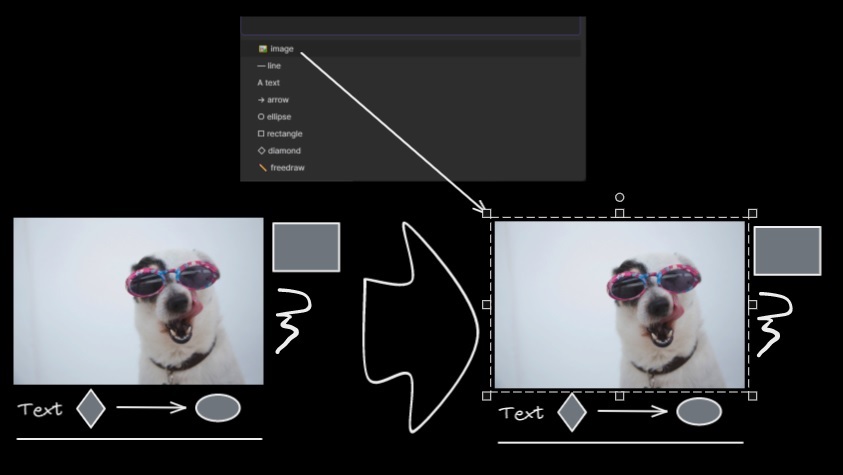
|
||||
Prompts you with a list of the different element types in the active image. Only elements of the selected type will be selected on the canvas. If nothing is selected when running the script, then the script will process all the elements on the canvas. If some elements are selected when the script is executed, then the script will only process the selected elements.
|
||||
|
||||
The script is useful when, for example, you want to bring to front all the arrows, or want to change the color of all the text elements, etc.
|
||||
|
||||
```javascript
|
||||
*/
|
||||
|
||||
if(!ea.verifyMinimumPluginVersion || !ea.verifyMinimumPluginVersion("1.5.24")) {
|
||||
new Notice("This script requires a newer version of Excalidraw. Please install the latest version.");
|
||||
return;
|
||||
}
|
||||
|
||||
let elements = ea.getViewSelectedElements();
|
||||
if(elements.length === 0) elements = ea.getViewElements();
|
||||
if(elements.length === 0) {
|
||||
new Notice("There are no elements in the view");
|
||||
return;
|
||||
}
|
||||
|
||||
typeSet = new Set();
|
||||
elements.forEach(el=>typeSet.add(el.type));
|
||||
let elementType = Array.from(typeSet)[0];
|
||||
|
||||
if(typeSet.size > 1) {
|
||||
elementType = await utils.suggester(
|
||||
Array.from(typeSet).map((item) => {
|
||||
switch(item) {
|
||||
case "line": return "— line";
|
||||
case "ellipse": return "○ ellipse";
|
||||
case "rectangle": return "□ rectangle";
|
||||
case "diamond": return "◇ diamond";
|
||||
case "arrow": return "→ arrow";
|
||||
case "freedraw": return "✎ freedraw";
|
||||
case "image": return "🖼 image";
|
||||
case "text": return "A text";
|
||||
default: return item;
|
||||
}
|
||||
}),
|
||||
Array.from(typeSet)
|
||||
);
|
||||
}
|
||||
|
||||
if(!elementType) return;
|
||||
|
||||
ea.selectElementsInView(elements.filter(el=>el.type === elementType));
|
||||
@@ -16,7 +16,12 @@ https://zsviczian.github.io/obsidian-excalidraw-plugin/ExcalidrawScriptsEngine.h
|
||||
const elements = ea.getViewSelectedElements();
|
||||
if(elements.length === 0) return;
|
||||
const el = ea.getLargestElement(elements);
|
||||
const sizeIn = [el.x,el.y,el.width,el.height].join(",");
|
||||
const sizeIn = [
|
||||
Math.round(el.x),
|
||||
Math.round(el.y),
|
||||
Math.round(el.width),
|
||||
Math.round(el.height)
|
||||
].join(",");
|
||||
let res = await utils.inputPrompt("x,y,width,height?",null,sizeIn);
|
||||
res = res.split(",");
|
||||
if(res.length !== 4) return;
|
||||
@@ -31,4 +36,4 @@ el.y = size[1];
|
||||
el.width = size[2];
|
||||
el.height = size[3];
|
||||
ea.copyViewElementsToEAforEditing([el]);
|
||||
ea.addElementsToView();
|
||||
ea.addElementsToView(false,false);
|
||||
@@ -1,8 +1,4 @@
|
||||
/*
|
||||

|
||||
|
||||
Download this file and save to your Obsidian Vault including the first line, or open it in "Raw" and copy the entire contents to Obsidian.
|
||||
|
||||

|
||||
|
||||
Sets font family of the text block (Virgil, Helvetica, Cascadia). Useful if you want to set a keyboard shortcut for selecting font family.
|
||||
@@ -19,4 +15,4 @@ font = parseInt(await utils.suggester(font,["1","2","3"]));
|
||||
if (isNaN(font)) return;
|
||||
elements.forEach((el)=>el.fontFamily = font);
|
||||
ea.copyViewElementsToEAforEditing(elements);
|
||||
ea.addElementsToView();
|
||||
ea.addElementsToView(false,false);
|
||||
@@ -1,9 +1,4 @@
|
||||
/*
|
||||
|
||||

|
||||
|
||||
Download this file and save to your Obsidian Vault including the first line, or open it in "Raw" and copy the entire contents to Obsidian.
|
||||
|
||||

|
||||
|
||||
The default grid size in Excalidraw is 20. Currently there is no way to change the grid size via the user interface. This script offers a way to bridge this gap.
|
||||
53
ea-scripts/Set Link Alias.md
Normal file
@@ -0,0 +1,53 @@
|
||||
/*
|
||||

|
||||
|
||||
Download this file and save to your Obsidian Vault including the first line, or open it in "Raw" and copy the entire contents to Obsidian.
|
||||
|
||||

|
||||
|
||||
Iterates all of the links in the selected TextElements and prompts the user to set or modify the alias for each link found.
|
||||
|
||||
See documentation for more details:
|
||||
https://zsviczian.github.io/obsidian-excalidraw-plugin/ExcalidrawScriptsEngine.html
|
||||
|
||||
```javascript
|
||||
*/
|
||||
elements = ea.getViewSelectedElements().filter((el)=>el.type==="text");
|
||||
// `[[markdown links]]`
|
||||
for(el of elements) { //doing for instead of .forEach due to await inputPrompt
|
||||
parts = el.rawText.split(/(\[\[[\w\W]*?]])/);
|
||||
newText = "";
|
||||
for(t of parts) { //doing for instead of .map due to await inputPrompt
|
||||
if(!t.match(/(\[\[[\w\W]*?]])/)) {
|
||||
newText += t;
|
||||
} else {
|
||||
original = t.split(/\[\[|]]/)[1];
|
||||
cut = original.indexOf("|");
|
||||
alias = cut === -1 ? "" : original.substring(cut+1);
|
||||
link = cut === -1 ? original : original.substring(0,cut);
|
||||
alias = await utils.inputPrompt(`Alias for [[${link}]]`,"type alias here",alias);
|
||||
newText += `[[${link}|${alias}]]`;
|
||||
}
|
||||
}
|
||||
el.rawText = newText;
|
||||
};
|
||||
|
||||
// `[wiki](links)`
|
||||
for(el of elements) { //doing for instead of .forEach due to await inputPrompt
|
||||
parts = el.rawText.split(/(\[[\w\W]*?]\([\w\W]*?\))/);
|
||||
newText = "";
|
||||
for(t of parts) { //doing for instead of .map due to await inputPrompt
|
||||
if(!t.match(/(\[[\w\W]*?]\([\w\W]*?\))/)) {
|
||||
newText += t;
|
||||
} else {
|
||||
alias = t.match(/\[([\w\W]*?)]/)[1];
|
||||
link = t.match(/\(([\w\W]*?)\)/)[1];
|
||||
alias = await utils.inputPrompt(`Alias for [[${link}]]`,"type alias here",alias);
|
||||
newText += `[[${link}|${alias}]]`;
|
||||
}
|
||||
}
|
||||
el.rawText = newText;
|
||||
};
|
||||
|
||||
ea.copyViewElementsToEAforEditing(elements);
|
||||
ea.addElementsToView(false,false);
|
||||
@@ -1,9 +1,4 @@
|
||||
/*
|
||||
|
||||

|
||||
|
||||
Download this file and save to your Obsidian Vault including the first line, or open it in "Raw" and copy the entire contents to Obsidian.
|
||||
|
||||

|
||||
|
||||
This script will set the stroke width of selected elements. This is helpful, for example, when you scale freedraw sketches and want to reduce or increase their line width.
|
||||
@@ -18,4 +13,4 @@ width = await utils.inputPrompt("Width?","number",width);
|
||||
const elements=ea.getViewSelectedElements();
|
||||
ea.copyViewElementsToEAforEditing(elements);
|
||||
ea.getElements().forEach((el)=>el.strokeWidth=width);
|
||||
ea.addElementsToView();
|
||||
ea.addElementsToView(false,false);
|
||||
@@ -1,8 +1,4 @@
|
||||
/*
|
||||

|
||||
|
||||
Download this file and save to your Obsidian Vault including the first line, or open it in "Raw" and copy the entire contents to Obsidian.
|
||||
|
||||

|
||||
|
||||
Sets text alignment of text block (cetner, right, left). Useful if you want to set a keyboard shortcut for selecting text alignment.
|
||||
@@ -18,4 +14,4 @@ let align = ["left","right","center"];
|
||||
align = await utils.suggester(align,align);
|
||||
elements.forEach((el)=>el.textAlign = align);
|
||||
ea.copyViewElementsToEAforEditing(elements);
|
||||
ea.addElementsToView();
|
||||
ea.addElementsToView(false,false);
|
||||
@@ -0,0 +1,80 @@
|
||||
/*
|
||||

|
||||
|
||||
Use this script to set the background color of unclosed (i.e. open) line objects by creating a clone of the object. The script will set the stroke color of the clone to transparent and will add a straight line to close the object. Use settings to define the default background color, the fill style, and the strokeWidth of the clone. By default the clone will be grouped with the original object, you can disable this also in settings.
|
||||
|
||||
```javascript
|
||||
*/
|
||||
|
||||
if(!ea.verifyMinimumPluginVersion || !ea.verifyMinimumPluginVersion("1.5.26")) {
|
||||
new Notice("This script requires a newer version of Excalidraw. Please install the latest version.");
|
||||
return;
|
||||
}
|
||||
|
||||
settings = ea.getScriptSettings();
|
||||
//set default values on first run
|
||||
if(!settings["Background Color"]) {
|
||||
settings = {
|
||||
"Background Color" : {
|
||||
value: "DimGray",
|
||||
description: "Default background color of the 'shadow' object. Any valid html css color value",
|
||||
},
|
||||
"Fill Style": {
|
||||
value: "hachure",
|
||||
valueset: ["hachure","cross-hatch","solid"],
|
||||
description: "Default fill style of the 'shadow' object."
|
||||
},
|
||||
"Inherit fill stroke width": {
|
||||
value: true,
|
||||
description: "This will impact the densness of the hachure or cross-hatch fill. Use the stroke width of the line object for which the shadow is created. If set to false, the script will use a stroke width of 2."
|
||||
},
|
||||
"Group 'shadow' with original": {
|
||||
value: true,
|
||||
description: "If the toggle is on then the shadow object that is created will be grouped with the unclosed original object."
|
||||
}
|
||||
};
|
||||
ea.setScriptSettings(settings);
|
||||
}
|
||||
|
||||
const inheritStrokeWidth = settings["Inherit fill stroke width"].value;
|
||||
const backgroundColor = settings["Background Color"].value;
|
||||
const fillStyle = settings["Fill Style"].value;
|
||||
const shouldGroup = settings["Group 'shadow' with original"].value;
|
||||
|
||||
const elements = ea.getViewSelectedElements().filter(el=>el.type==="line");
|
||||
if(elements.length === 0) {
|
||||
new Notice("No line object is selected");
|
||||
}
|
||||
|
||||
ea.copyViewElementsToEAforEditing(elements);
|
||||
elementsToMove = [];
|
||||
|
||||
elements.forEach((el)=>{
|
||||
const newEl = ea.cloneElement(el);
|
||||
ea.elementsDict[newEl.id] = newEl;
|
||||
newEl.roughness = 1;
|
||||
if(!inheritStrokeWidth) newEl.strokeWidth = 2;
|
||||
newEl.strokeColor = "transparent";
|
||||
newEl.backgroundColor = backgroundColor;
|
||||
newEl.fillStyle = fillStyle;
|
||||
const i = el.points.length-1;
|
||||
newEl.points.push([
|
||||
//adding an extra point close to the last point in case distance is long from last point to origin and there is a sharp bend. This will avoid a spike due to a tight curve.
|
||||
el.points[i][0]*0.9,
|
||||
el.points[i][1]*0.9,
|
||||
]);
|
||||
newEl.points.push([0,0]);
|
||||
if(shouldGroup) ea.addToGroup([el.id,newEl.id]);
|
||||
elementsToMove.push({fillId: newEl.id, shapeId: el.id});
|
||||
});
|
||||
|
||||
await ea.addElementsToView(false,false);
|
||||
elementsToMove.forEach((x)=>{
|
||||
const viewElements = ea.getViewElements();
|
||||
ea.moveViewElementToZIndex(
|
||||
x.fillId,
|
||||
viewElements.indexOf(viewElements.filter(el=>el.id === x.shapeId)[0])-1
|
||||
)
|
||||
});
|
||||
|
||||
ea.selectElementsInView(ea.getElements());
|
||||
@@ -23,5 +23,5 @@ elements.forEach((el)=>{
|
||||
ea.addText(el.x,el.y+i*el.height/text.length,text[i]);
|
||||
}
|
||||
});
|
||||
ea.addElementsToView();
|
||||
ea.addElementsToView(false,false);
|
||||
ea.deleteViewElements(elements);
|
||||
49
ea-scripts/Toggle Fullscreen on Mobile.md
Normal file
@@ -0,0 +1,49 @@
|
||||
/*
|
||||

|
||||
|
||||
Hides Obsidian workspace leaf padding and header (based on option in settings, default is "hide header" = true) which will take Excalidraw to full screen. ⚠ Note that if the header is not visible, it will be very difficult to invoke the command palette to end full screen. Only hide the header if you have a keyboard or you've practiced opening command palette!
|
||||
|
||||
```javascript
|
||||
*/
|
||||
if(!ea.verifyMinimumPluginVersion || !ea.verifyMinimumPluginVersion("1.5.21")) {
|
||||
new Notice("This script requires a newer version of Excalidraw. Please install the latest version.");
|
||||
return;
|
||||
}
|
||||
|
||||
settings = ea.getScriptSettings();
|
||||
|
||||
if(!settings["Hide header"]) {
|
||||
settings = {
|
||||
"Hide header": {
|
||||
value: false,
|
||||
},
|
||||
...settings
|
||||
};
|
||||
await ea.setScriptSettings(settings);
|
||||
}
|
||||
|
||||
if(!settings["Hide header"].description) {
|
||||
settings["Hide header"].description = "⚠ Note that if the header is not visible, it will be very difficult to invoke the command palette to end full screen. Only hide the header if you have a keyboard or you've practiced opening command palette!";
|
||||
await ea.setScriptSettings(settings);
|
||||
}
|
||||
|
||||
const hideHeader = settings["Hide header"].value;
|
||||
|
||||
const newStylesheet = document.createElement("style");
|
||||
newStylesheet.id = "excalidraw-full-screen";
|
||||
newStylesheet.textContent = `
|
||||
.workspace-leaf-content .view-content {
|
||||
padding: 0px !important;
|
||||
}
|
||||
${hideHeader?`
|
||||
.view-header {
|
||||
height: 1px !important;
|
||||
}`:""}
|
||||
.status-bar {
|
||||
display: none !important;
|
||||
}
|
||||
`;
|
||||
|
||||
const oldStylesheet = document.getElementById(newStylesheet.id);
|
||||
if(oldStylesheet) document.head.removeChild(oldStylesheet);
|
||||
else document.head.appendChild(newStylesheet);
|
||||
@@ -0,0 +1,44 @@
|
||||
/*
|
||||

|
||||
|
||||
Download this file and save to your Obsidian Vault including the first line, or open it in "Raw" and copy the entire contents to Obsidian.
|
||||
|
||||

|
||||
|
||||
The script will delete the selected text elements from the canvas and will copy the text from these text elements into the Excalidraw markdown file as metadata. This means, that the text will no longer be visible in the drawing, however you will be able to search for the text in Obsidian and find the drawing containing this image.
|
||||
|
||||
See ScriptEngine documentation for more details:
|
||||
https://zsviczian.github.io/obsidian-excalidraw-plugin/ExcalidrawScriptsEngine.html
|
||||
|
||||
```javascript
|
||||
*/
|
||||
//get text elements
|
||||
|
||||
const textElements = ea.getViewSelectedElements().filter((el)=>el.type==="text");
|
||||
|
||||
if(textElements.length===0) {
|
||||
notice("No text elements were selected")
|
||||
return;
|
||||
}
|
||||
|
||||
metadata = "# Metadata\n" + textElements
|
||||
.map((el)=>el.rawText.replaceAll(/%|\^/g,"_")) //cleaning these characters for safety, might not be needed
|
||||
.join("/n") + "\n";
|
||||
|
||||
ea.deleteViewElements(textElements);
|
||||
await ea.targetView.save();
|
||||
data = await app.vault.read(ea.targetView.file);
|
||||
splitAfterFrontmatter = data.split(/(^---[\w\W]*?---\n)/);
|
||||
if(splitAfterFrontmatter.length !== 3) {
|
||||
notice("Error locating frontmatter in markdown file");
|
||||
console.log({file:ea.targetView.file});
|
||||
return;
|
||||
}
|
||||
newData = splitAfterFrontmatter[1]+metadata+splitAfterFrontmatter[2]
|
||||
await app.vault.modify(ea.targetView.file,newData);
|
||||
|
||||
//utility function
|
||||
function notice(message) {
|
||||
new Notice(message);
|
||||
console.log(message);
|
||||
}
|
||||
335
ea-scripts/index.md
Normal file
@@ -0,0 +1,335 @@
|
||||
If you are enjoying the Excalidraw plugin then please support my work and enthusiasm by buying me a coffee on [https://ko-fi/zsolt](https://ko-fi.com/zsolt).
|
||||
|
||||
[<img src="https://user-images.githubusercontent.com/14358394/115450238-f39e8100-a21b-11eb-89d0-fa4b82cdbce8.png" class="coffee">](https://ko-fi.com/zsolt)
|
||||
|
||||
---
|
||||
|
||||
Jump ahead to the [[#List of available scripts]]
|
||||
|
||||
# Intorducing Excalidraw Automate Script Engine
|
||||
<iframe width="560" height="315" src="https://www.youtube.com/embed/hePJcObHIso" title="YouTube video player" frameborder="0" allow="accelerometer; autoplay; clipboard-write; encrypted-media; gyroscope; picture-in-picture" allowfullscreen></iframe>
|
||||
|
||||
Script Engine scripts are installed in the `Downloaded` subfolder of the `Excalidraw Automate script folder` specified in plugin settings.
|
||||
|
||||
In the `Command Palette` installed scripts are prefixed with `Downloaded/`, thus you can always know if you are executing a local script of your own, or one that you have downloaded from GitHub.
|
||||
|
||||
## Attention developers and hobby hackers
|
||||
<img src='https://raw.githubusercontent.com/zsviczian/obsidian-excalidraw-plugin/master/images/hobby-programmer.svg' align='left' style='background-color:whitesmoke; width:80px; margin-right:15px; margin-bottom:10px;'/>
|
||||
If you want to modify scripts, I recommend moving them to the `Excalidraw Automate script folder` or a different subfolder under the script folder. Scripts in the `Downloaded` folder will be overwritten when you click the `Update this script` button. Note also, that at this time, I do not check if the script file has been updated on GitHub, thus the `Update this script` button is always visible once you have installed a script, not only when an update is availble (hope to build this feature in the future).
|
||||
|
||||
I would love to include your contribution in the script library. If you have a script of your own that you would like to share with the community, please open a [PR](https://github.com/zsviczian/obsidian-excalidraw-plugin/pulls) on GitHub. Be sure to include the following in your pull request
|
||||
- The [script file](https://github.com/zsviczian/obsidian-excalidraw-plugin/tree/master/ea-scripts) with a self explanetory name. The name of the file will be the name of the script in the Command Palette.
|
||||
- An [image](https://github.com/zsviczian/obsidian-excalidraw-plugin/tree/master/images) explaining the scripts purpose. Remember a picture speaks thousand words!
|
||||
- An update to this file [ea-scripts/index.md](https://github.com/zsviczian/obsidian-excalidraw-plugin/blob/master/ea-scripts/index.md)
|
||||
|
||||
---
|
||||
|
||||
# List of available scripts
|
||||
- [[#Add Connector Point]]
|
||||
- [[#Add Link to Existing File and Open]]
|
||||
- [[#Add Link to New Page and Open]]
|
||||
- [[#Add Next Step in Process]]
|
||||
- [[#Box Each Selected Groups]]
|
||||
- [[#Box Selected Elements]]
|
||||
- [[#Change shape of selected elements]]
|
||||
- [[#Connect elements]]
|
||||
- [[#Convert freedraw to line]]
|
||||
- [[#Convert selected text elements to sticky notes]]
|
||||
- [[#Convert text to link with folder and alias]]
|
||||
- [[#Copy Selected Element Styles to Global]]
|
||||
- [[#Create new markdown file and embed into active drawing]]
|
||||
- [[#Darken background color]]
|
||||
- [[#Elbow connectors]]
|
||||
- [[#Expand rectangles horizontally keep text centered]]
|
||||
- [[#Expand rectangles horizontally]]
|
||||
- [[#Expand rectangles vertically keep text centered]]
|
||||
- [[#Expand rectangles vertically]]
|
||||
- [[#Fixed horizontal distance between centers]]
|
||||
- [[#Fixed inner distance]]
|
||||
- [[#Fixed spacing]]
|
||||
- [[#Fixed vertical distance between centers]]
|
||||
- [[#Fixed vertical distance]]
|
||||
- [[#Lighten background color]]
|
||||
- [[#Modify background color opacity]]
|
||||
- [[#Normalize Selected Arrows]]
|
||||
- [[#OCR - Optical Character Recognition]]
|
||||
- [[#Organic Line]]
|
||||
- [[#Repeat Elements]]
|
||||
- [[#Reverse arrows]]
|
||||
- [[#Scribble Helper]]
|
||||
- [[#Select Elements of Type]]
|
||||
- [[#Set background color of unclosed line object by adding a shadow clone]]
|
||||
- [[#Set Dimensions]]
|
||||
- [[#Set Font Family]]
|
||||
- [[#Set Grid]]
|
||||
- [[#Set Link Alias]]
|
||||
- [[#Set Stroke Width of Selected Elements]]
|
||||
- [[#Set Text Alignment]]
|
||||
- [[#Split text by lines]]
|
||||
- [[#Toggle Fullscreen on Mobile]]
|
||||
- [[#Transfer TextElements to Excalidraw markdown metadata]]
|
||||
- [[#Zoom to Fit Selected Elements]]
|
||||
|
||||
## Add Connector Point
|
||||
```excalidraw-script-install
|
||||
https://raw.githubusercontent.com/zsviczian/obsidian-excalidraw-plugin/master/ea-scripts/Add%20Connector%20Point.md
|
||||
```
|
||||
<table><tr valign='top'><td class="label">Author</td><td class="data"><a href='https://github.com/zsviczian'>@zsviczian</a></td></tr><tr valign='top'><td class="label">Source</td><td class="data"><a href='https://github.com/zsviczian/obsidian-excalidraw-plugin/blob/master/ea-scripts/Add%20Connector%20Point.md'>File on GitHub</a></td></tr><tr valign='top'><td class="label">Description</td><td class="data">This script will add a small circle to the top left of each text element in the selection and add the text and the "connector point" to a group. You can use the connector points to link text elements with an arrow (in for example a Wardley Map).<br><img src='https://raw.githubusercontent.com/zsviczian/obsidian-excalidraw-plugin/master/images/scripts-bullet-point.jpg'></td></tr></table>
|
||||
|
||||
## Add Link to Existing File and Open
|
||||
```excalidraw-script-install
|
||||
https://raw.githubusercontent.com/zsviczian/obsidian-excalidraw-plugin/master/ea-scripts/Add%20Link%20to%20Existing%20File%20and%20Open.md
|
||||
```
|
||||
<table><tr valign='top'><td class="label">Author</td><td class="data"><a href='https://github.com/zsviczian'>@zsviczian</a></td></tr><tr valign='top'><td class="label">Source</td><td class="data"><a href='https://github.com/zsviczian/obsidian-excalidraw-plugin/blob/master/ea-scripts/Add%20Link%20to%20Existing%20File%20and%20Open.md'>File on GitHub</a></td></tr><tr valign='top'><td class="label">Description</td><td class="data">Prompts for a file from the vault. Adds a link to the selected element pointing to the selected file. You can control in settings to open the file in the current active pane or an adjacent pane.<br><img src='https://raw.githubusercontent.com/zsviczian/obsidian-excalidraw-plugin/master/images/scripts-add-link-and-open.jpg'></td></tr></table>
|
||||
|
||||
## Add Link to New Page and Open
|
||||
```excalidraw-script-install
|
||||
https://raw.githubusercontent.com/zsviczian/obsidian-excalidraw-plugin/master/ea-scripts/Add%20Link%20to%20New%20Page%20and%20Open.md
|
||||
```
|
||||
<table><tr valign='top'><td class="label">Author</td><td class="data"><a href='https://github.com/zsviczian'>@zsviczian</a></td></tr><tr valign='top'><td class="label">Source</td><td class="data"><a href='https://github.com/zsviczian/obsidian-excalidraw-plugin/blob/master/ea-scripts/Add%20Link%20to%20New%20Page%20and%20Open.md'>File on GitHub</a></td></tr><tr valign='top'><td class="label">Description</td><td class="data">Prompts for filename. Offers option to create and open a new Markdown or Excalidraw document. Adds link pointing to the new file, to the selected objects in the drawing. You can control in settings to open the file in the current active pane or an adjacent pane.<br><img src='https://raw.githubusercontent.com/zsviczian/obsidian-excalidraw-plugin/master/images/scripts-add-link-to-new-page-and-pen.jpg'></td></tr></table>
|
||||
|
||||
## Add Next Step in Process
|
||||
```excalidraw-script-install
|
||||
https://raw.githubusercontent.com/zsviczian/obsidian-excalidraw-plugin/master/ea-scripts/Add%20Next%20Step%20in%20Process.md
|
||||
```
|
||||
<table><tr valign='top'><td class="label">Author</td><td class="data"><a href='https://github.com/zsviczian'>@zsviczian</a></td></tr><tr valign='top'><td class="label">Source</td><td class="data"><a href='https://github.com/zsviczian/obsidian-excalidraw-plugin/blob/master/ea-scripts/Add%20Next%20Step%20in%20Process.md'>File on GitHub</a></td></tr><tr valign='top'><td class="label">Description</td><td class="data">This script will prompt you for the title of the process step, then will create a stick note with the text. If an element is selected then the script will connect this new step with an arrow to the previous step (the selected element). If no element is selected, then the script assumes this is the first step in the process and will only output the sticky note with the text that was entered.<br><img src='https://raw.githubusercontent.com/zsviczian/obsidian-excalidraw-plugin/master/images/scripts-add-process-step.jpg'></td></tr></table>
|
||||
|
||||
## Box Each Selected Groups
|
||||
```excalidraw-script-install
|
||||
https://raw.githubusercontent.com/zsviczian/obsidian-excalidraw-plugin/master/ea-scripts/Box%20Each%20Selected%20Groups.md
|
||||
```
|
||||
<table><tr valign='top'><td class="label">Author</td><td class="data"><a href='https://github.com/1-2-3'>@1-2-3</a></td></tr><tr valign='top'><td class="label">Source</td><td class="data"><a href='https://github.com/zsviczian/obsidian-excalidraw-plugin/blob/master/ea-scripts/Box%20Each%20Selected%20Groups.md'>File on GitHub</a></td></tr><tr valign='top'><td class="label">Description</td><td class="data">This script will add encapsulating boxes around each of the currently selected groups in Excalidraw.<br><img src='https://raw.githubusercontent.com/zsviczian/obsidian-excalidraw-plugin/master/images/scripts-box-each-selected-groups.png'></td></tr></table>
|
||||
|
||||
## Box Selected Elements
|
||||
```excalidraw-script-install
|
||||
https://raw.githubusercontent.com/zsviczian/obsidian-excalidraw-plugin/master/ea-scripts/Box%20Selected%20Elements.md
|
||||
```
|
||||
<table><tr valign='top'><td class="label">Author</td><td class="data"><a href='https://github.com/zsviczian'>@zsviczian</a></td></tr><tr valign='top'><td class="label">Source</td><td class="data"><a href='https://github.com/zsviczian/obsidian-excalidraw-plugin/blob/master/ea-scripts/Box%20Selected%20Elements.md'>File on GitHub</a></td></tr><tr valign='top'><td class="label">Description</td><td class="data">This script will add an encapsulating box around the currently selected elements in Excalidraw.<br><img src='https://raw.githubusercontent.com/zsviczian/obsidian-excalidraw-plugin/master/images/scripts-box-elements.jpg'></td></tr></table>
|
||||
|
||||
## Change shape of selected elements
|
||||
```excalidraw-script-install
|
||||
https://raw.githubusercontent.com/zsviczian/obsidian-excalidraw-plugin/master/ea-scripts/Change%20shape%20of%20selected%20elements.md
|
||||
```
|
||||
<table><tr valign='top'><td class="label">Author</td><td class="data"><a href='https://github.com/zsviczian'>@zsviczian</a></td></tr><tr valign='top'><td class="label">Source</td><td class="data"><a href='https://github.com/zsviczian/obsidian-excalidraw-plugin/blob/master/ea-scripts/Change%20shape%20of%20selected%20elements.md'>File on GitHub</a></td></tr><tr valign='top'><td class="label">Description</td><td class="data">The script allows you to change the shape of selected Rectangles, Diamonds and Ellipses.<br><img src='https://raw.githubusercontent.com/zsviczian/obsidian-excalidraw-plugin/master/images/scripts-change-shape.jpg'></td></tr></table>
|
||||
|
||||
## Connect elements
|
||||
```excalidraw-script-install
|
||||
https://raw.githubusercontent.com/zsviczian/obsidian-excalidraw-plugin/master/ea-scripts/Connect%20elements.md
|
||||
```
|
||||
<table><tr valign='top'><td class="label">Author</td><td class="data"><a href='https://github.com/zsviczian'>@zsviczian</a></td></tr><tr valign='top'><td class="label">Source</td><td class="data"><a href='https://github.com/zsviczian/obsidian-excalidraw-plugin/blob/master/ea-scripts/Connect%20elements.md'>File on GitHub</a></td></tr><tr valign='top'><td class="label">Description</td><td class="data">This script will connect two objects with an arrow. If either of the objects are a set of grouped elements (e.g. a text element grouped with an encapsulating rectangle), the script will identify these groups, and connect the arrow to the largest object in the group (assuming you want to connect the arrow to the box around the text element).<br><img src='https://raw.githubusercontent.com/zsviczian/obsidian-excalidraw-plugin/master/images/scripts-connect-elements.jpg'></td></tr></table>
|
||||
|
||||
## Convert freedraw to line
|
||||
```excalidraw-script-install
|
||||
https://raw.githubusercontent.com/zsviczian/obsidian-excalidraw-plugin/master/ea-scripts/Convert%20freedraw%20to%20line.md
|
||||
```
|
||||
<table><tr valign='top'><td class="label">Author</td><td class="data"><a href='https://github.com/zsviczian'>@zsviczian</a></td></tr><tr valign='top'><td class="label">Source</td><td class="data"><a href='https://github.com/zsviczian/obsidian-excalidraw-plugin/blob/master/ea-scripts/Convert%20freedraw%20to%20line.md'>File on GitHub</a></td></tr><tr valign='top'><td class="label">Description</td><td class="data">Convert selected freedraw objects into editable lines. This will allow you to adjust your drawings by dragging line points and will also allow you to select shape fill in case of enclosed lines. You can adjust conversion point density in settings.<br><img src='https://raw.githubusercontent.com/zsviczian/obsidian-excalidraw-plugin/master/images/scripts-convert-freedraw-to-line.jpg'></td></tr></table>
|
||||
|
||||
## Convert selected text elements to sticky notes
|
||||
```excalidraw-script-install
|
||||
https://raw.githubusercontent.com/zsviczian/obsidian-excalidraw-plugin/master/ea-scripts/Convert%20selected%20text%20elements%20to%20sticky%20notes.md
|
||||
```
|
||||
<table><tr valign='top'><td class="label">Author</td><td class="data"><a href='https://github.com/zsviczian'>@zsviczian</a></td></tr><tr valign='top'><td class="label">Source</td><td class="data"><a href='https://github.com/zsviczian/obsidian-excalidraw-plugin/blob/master/ea-scripts/Convert%20selected%20text%20elements%20to%20sticky%20notes.md'>File on GitHub</a></td></tr><tr valign='top'><td class="label">Description</td><td class="data">Converts selected plain text elements to sticky notes with transparent background and transparent stroke color (default setting, can be changed in plugin settings). Essentially converts text element into a wrappable format.<br><img src='https://raw.githubusercontent.com/zsviczian/obsidian-excalidraw-plugin/master/images/scripts-textelement-to-transparent-stickynote.png'></td></tr></table>
|
||||
|
||||
## Convert text to link with folder and alias
|
||||
```excalidraw-script-install
|
||||
https://raw.githubusercontent.com/zsviczian/obsidian-excalidraw-plugin/master/ea-scripts/Convert%20text%20to%20link%20with%20folder%20and%20alias.md
|
||||
```
|
||||
<table><tr valign='top'><td class="label">Author</td><td class="data"><a href='https://github.com/zsviczian'>@zsviczian</a></td></tr><tr valign='top'><td class="label">Source</td><td class="data"><a href='https://github.com/zsviczian/obsidian-excalidraw-plugin/blob/master/ea-scripts/Convert%20text%20to%20link%20with%20folder%20and%20alias.md'>File on GitHub</a></td></tr><tr valign='top'><td class="label">Description</td><td class="data">Converts text elements to links pointing to a file in a selected folder and with the alias set as the original text. The script will prompt the user to select an existing folder from the vault.<br><code>original text</code> - <code>[[selected folder/original text|original text]]</code></td></tr></table>
|
||||
|
||||
## Copy Selected Element Styles to Global
|
||||
```excalidraw-script-install
|
||||
https://raw.githubusercontent.com/zsviczian/obsidian-excalidraw-plugin/master/ea-scripts/Copy%20Selected%20Element%20Styles%20to%20Global.md
|
||||
```
|
||||
<table><tr valign='top'><td class="label">Author</td><td class="data"><a href='https://github.com/1-2-3'>@1-2-3</a></td></tr><tr valign='top'><td class="label">Source</td><td class="data"><a href='https://github.com/zsviczian/obsidian-excalidraw-plugin/blob/master/ea-scripts/Copy%20Selected%20Element%20Styles%20to%20Global.md'>File on GitHub</a></td></tr><tr valign='top'><td class="label">Description</td><td class="data">This script will copy styles of any selected element into Excalidraw's global styles.<br><img src='https://raw.githubusercontent.com/zsviczian/obsidian-excalidraw-plugin/master/images/scripts-copy-selected-element-styles-to-global.png'></td></tr></table>
|
||||
|
||||
## Create new markdown file and embed into active drawing
|
||||
```excalidraw-script-install
|
||||
https://raw.githubusercontent.com/zsviczian/obsidian-excalidraw-plugin/master/ea-scripts/Create%20new%20markdown%20file%20and%20embed%20into%20active%20drawing.md
|
||||
```
|
||||
<table><tr valign='top'><td class="label">Author</td><td class="data"><a href='https://github.com/zsviczian'>@zsviczian</a></td></tr><tr valign='top'><td class="label">Source</td><td class="data"><a href='https://github.com/zsviczian/obsidian-excalidraw-plugin/blob/master/ea-scripts/Create%20new%20markdown%20file%20and%20embed%20into%20active%20drawing.md'>File on GitHub</a></td></tr><tr valign='top'><td class="label">Description</td><td class="data">The script will prompt you for a filename, then create a new markdown document with the file name provided, open the new markdown document in an adjacent pane, and embed the markdown document into the active Excalidraw drawing.<br><img src='https://raw.githubusercontent.com/zsviczian/obsidian-excalidraw-plugin/master/images/scripts-create-and-embed-new-markdown-file.jpg'></td></tr></table>
|
||||
|
||||
## Darken background color
|
||||
```excalidraw-script-install
|
||||
https://raw.githubusercontent.com/zsviczian/obsidian-excalidraw-plugin/master/ea-scripts/Darken%20background%20color.md
|
||||
```
|
||||
<table><tr valign='top'><td class="label">Author</td><td class="data"><a href='https://github.com/1-2-3'>@1-2-3</a></td></tr><tr valign='top'><td class="label">Source</td><td class="data"><a href='https://github.com/zsviczian/obsidian-excalidraw-plugin/blob/master/ea-scripts/Darken%20background%20color.md'>File on GitHub</a></td></tr><tr valign='top'><td class="label">Description</td><td class="data">This script darkens the background color of the selected element by 2% at a time. You can use this script several times until you are satisfied. It is recommended to set a shortcut key for this script so that you can quickly try to DARKEN and LIGHTEN the color effect. In contrast to the `Modify background color opacity` script, the advantage is that the background color of the element is not affected by the canvas color, and the color value does not appear in a strange rgba() form.<br><img src='https://raw.githubusercontent.com/zsviczian/obsidian-excalidraw-plugin/master/images/darken-lighten-background-color.png'></td></tr></table>
|
||||
|
||||
## Elbow connectors
|
||||
```excalidraw-script-install
|
||||
https://raw.githubusercontent.com/zsviczian/obsidian-excalidraw-plugin/master/ea-scripts/Elbow%20connectors.md
|
||||
```
|
||||
<table><tr valign='top'><td class="label">Author</td><td class="data"><a href='https://github.com/1-2-3'>@1-2-3</a></td></tr><tr valign='top'><td class="label">Source</td><td class="data"><a href='https://github.com/zsviczian/obsidian-excalidraw-plugin/blob/master/ea-scripts/Elbow%20connectors.md'>File on GitHub</a></td></tr><tr valign='top'><td class="label">Description</td><td class="data">This script converts the selected connectors to elbows.<br><img src='https://raw.githubusercontent.com/zsviczian/obsidian-excalidraw-plugin/master/images/elbow-connectors.png'></td></tr></table>
|
||||
|
||||
## Expand rectangles horizontally keep text centered
|
||||
```excalidraw-script-install
|
||||
https://raw.githubusercontent.com/zsviczian/obsidian-excalidraw-plugin/master/ea-scripts/Expand%20rectangles%20horizontally%20keep%20text%20centered.md
|
||||
```
|
||||
<table><tr valign='top'><td class="label">Author</td><td class="data"><a href='https://github.com/1-2-3'>@1-2-3</a></td></tr><tr valign='top'><td class="label">Source</td><td class="data"><a href='https://github.com/zsviczian/obsidian-excalidraw-plugin/blob/master/ea-scripts/Expand%20rectangles%20horizontally%20keep%20text%20centered.md'>File on GitHub</a></td></tr><tr valign='top'><td class="label">Description</td><td class="data">This script expands the width of the selected rectangles until they are all the same width and keep the text centered.<br><img src='https://raw.githubusercontent.com/zsviczian/obsidian-excalidraw-plugin/master/images/scripts-expand-rectangles.gif'></td></tr></table>
|
||||
|
||||
## Expand rectangles horizontally
|
||||
```excalidraw-script-install
|
||||
https://raw.githubusercontent.com/zsviczian/obsidian-excalidraw-plugin/master/ea-scripts/Expand%20rectangles%20horizontally.md
|
||||
```
|
||||
<table><tr valign='top'><td class="label">Author</td><td class="data"><a href='https://github.com/1-2-3'>@1-2-3</a></td></tr><tr valign='top'><td class="label">Source</td><td class="data"><a href='https://github.com/zsviczian/obsidian-excalidraw-plugin/blob/master/ea-scripts/Expand%20rectangles%20horizontally.md'>File on GitHub</a></td></tr><tr valign='top'><td class="label">Description</td><td class="data">This script expands the width of the selected rectangles until they are all the same width.<br><img src='https://raw.githubusercontent.com/zsviczian/obsidian-excalidraw-plugin/master/images/scripts-expand-rectangles.gif'></td></tr></table>
|
||||
|
||||
## Expand rectangles vertically keep text centered
|
||||
```excalidraw-script-install
|
||||
https://raw.githubusercontent.com/zsviczian/obsidian-excalidraw-plugin/master/ea-scripts/Expand%20rectangles%20vertically%20keep%20text%20centered.md
|
||||
```
|
||||
<table><tr valign='top'><td class="label">Author</td><td class="data"><a href='https://github.com/1-2-3'>@1-2-3</a></td></tr><tr valign='top'><td class="label">Source</td><td class="data"><a href='https://github.com/zsviczian/obsidian-excalidraw-plugin/blob/master/ea-scripts/Expand%20rectangles%20vertically%20keep%20text%20centered.md'>File on GitHub</a></td></tr><tr valign='top'><td class="label">Description</td><td class="data">This script expands the height of the selected rectangles until they are all the same height and keep the text centered.<br><img src='https://raw.githubusercontent.com/zsviczian/obsidian-excalidraw-plugin/master/images/scripts-expand-rectangles.gif'></td></tr></table>
|
||||
|
||||
## Expand rectangles vertically
|
||||
```excalidraw-script-install
|
||||
https://raw.githubusercontent.com/zsviczian/obsidian-excalidraw-plugin/master/ea-scripts/Expand%20rectangles%20vertically.md
|
||||
```
|
||||
<table><tr valign='top'><td class="label">Author</td><td class="data"><a href='https://github.com/1-2-3'>@1-2-3</a></td></tr><tr valign='top'><td class="label">Source</td><td class="data"><a href='https://github.com/zsviczian/obsidian-excalidraw-plugin/blob/master/ea-scripts/Expand%20rectangles%20vertically.md'>File on GitHub</a></td></tr><tr valign='top'><td class="label">Description</td><td class="data">This script expands the height of the selected rectangles until they are all the same height.<br><img src='https://raw.githubusercontent.com/zsviczian/obsidian-excalidraw-plugin/master/images/scripts-expand-rectangles.gif'></td></tr></table>
|
||||
|
||||
## Fixed horizontal distance between centers
|
||||
```excalidraw-script-install
|
||||
https://raw.githubusercontent.com/zsviczian/obsidian-excalidraw-plugin/master/ea-scripts/Fixed%20horizontal%20distance%20between%20centers.md
|
||||
```
|
||||
<table><tr valign='top'><td class="label">Author</td><td class="data"><a href='https://github.com/1-2-3'>@1-2-3</a></td></tr><tr valign='top'><td class="label">Source</td><td class="data"><a href='https://github.com/zsviczian/obsidian-excalidraw-plugin/blob/master/ea-scripts/Fixed%20horizontal%20distance%20between%20centers.md'>File on GitHub</a></td></tr><tr valign='top'><td class="label">Description</td><td class="data">This script arranges the selected elements horizontally with a fixed center spacing.<br><img src='https://raw.githubusercontent.com/zsviczian/obsidian-excalidraw-plugin/master/images/scripts-fixed-horizontal-distance-between-centers.png'></td></tr></table>
|
||||
|
||||
## Fixed inner distance
|
||||
```excalidraw-script-install
|
||||
https://raw.githubusercontent.com/zsviczian/obsidian-excalidraw-plugin/master/ea-scripts/Fixed%20inner%20distance.md
|
||||
```
|
||||
<table><tr valign='top'><td class="label">Author</td><td class="data"><a href='https://github.com/1-2-3'>@1-2-3</a></td></tr><tr valign='top'><td class="label">Source</td><td class="data"><a href='https://github.com/zsviczian/obsidian-excalidraw-plugin/blob/master/ea-scripts/Fixed%20inner%20distance.md'>File on GitHub</a></td></tr><tr valign='top'><td class="label">Description</td><td class="data">This script arranges selected elements and groups with a fixed inner distance.<br><img src='https://raw.githubusercontent.com/zsviczian/obsidian-excalidraw-plugin/master/images/scripts-fixed-inner-distance.png'></td></tr></table>
|
||||
|
||||
## Fixed spacing
|
||||
```excalidraw-script-install
|
||||
https://raw.githubusercontent.com/zsviczian/obsidian-excalidraw-plugin/master/ea-scripts/Fixed%20spacing.md
|
||||
```
|
||||
<table><tr valign='top'><td class="label">Author</td><td class="data"><a href='https://github.com/1-2-3'>@1-2-3</a></td></tr><tr valign='top'><td class="label">Source</td><td class="data"><a href='https://github.com/zsviczian/obsidian-excalidraw-plugin/blob/master/ea-scripts/Fixed%20spacing.md'>File on GitHub</a></td></tr><tr valign='top'><td class="label">Description</td><td class="data">The script arranges the selected elements horizontally with a fixed spacing. When we create an architecture diagram or mind map, we often need to arrange a large number of elements in a fixed spacing. `Fixed spacing` and `Fixed vertical Distance` scripts can save us a lot of time.<br><img src='https://raw.githubusercontent.com/zsviczian/obsidian-excalidraw-plugin/master/images/scripts-fix-space-demo.png'></td></tr></table>
|
||||
|
||||
## Fixed vertical distance between centers
|
||||
```excalidraw-script-install
|
||||
https://raw.githubusercontent.com/zsviczian/obsidian-excalidraw-plugin/master/ea-scripts/Fixed%20vertical%20distance%20between%20centers.md
|
||||
```
|
||||
<table><tr valign='top'><td class="label">Author</td><td class="data"><a href='https://github.com/1-2-3'>@1-2-3</a></td></tr><tr valign='top'><td class="label">Source</td><td class="data"><a href='https://github.com/zsviczian/obsidian-excalidraw-plugin/blob/master/ea-scripts/Fixed%20vertical%20distance%20between%20centers.md'>File on GitHub</a></td></tr><tr valign='top'><td class="label">Description</td><td class="data">This script arranges the selected elements vertically with a fixed center spacing.<br><img src='https://raw.githubusercontent.com/zsviczian/obsidian-excalidraw-plugin/master/images/scripts-fixed-vertical-distance-between-centers.png'></td></tr></table>
|
||||
|
||||
## Fixed vertical distance
|
||||
```excalidraw-script-install
|
||||
https://raw.githubusercontent.com/zsviczian/obsidian-excalidraw-plugin/master/ea-scripts/Fixed%20vertical%20distance.md
|
||||
```
|
||||
<table><tr valign='top'><td class="label">Author</td><td class="data"><a href='https://github.com/1-2-3'>@1-2-3</a></td></tr><tr valign='top'><td class="label">Source</td><td class="data"><a href='https://github.com/zsviczian/obsidian-excalidraw-plugin/blob/master/ea-scripts/Fixed%20vertical%20distance.md'>File on GitHub</a></td></tr><tr valign='top'><td class="label">Description</td><td class="data">The script arranges the selected elements vertically with a fixed spacing. When we create an architecture diagram or mind map, we often need to arrange a large number of elements in a fixed spacing. `Fixed spacing` and `Fixed vertical Distance` scripts can save us a lot of time.<br><img src='https://raw.githubusercontent.com/zsviczian/obsidian-excalidraw-plugin/master/images/scripts-fixed-vertical-distance.png'></td></tr></table>
|
||||
|
||||
## Lighten background color
|
||||
```excalidraw-script-install
|
||||
https://raw.githubusercontent.com/zsviczian/obsidian-excalidraw-plugin/master/ea-scripts/Lighten%20background%20color.md
|
||||
```
|
||||
<table><tr valign='top'><td class="label">Author</td><td class="data"><a href='https://github.com/1-2-3'>@1-2-3</a></td></tr><tr valign='top'><td class="label">Source</td><td class="data"><a href='https://github.com/zsviczian/obsidian-excalidraw-plugin/blob/master/ea-scripts/Lighten%20background%20color.md'>File on GitHub</a></td></tr><tr valign='top'><td class="label">Description</td><td class="data">This script lightens the background color of the selected element by 2% at a time. You can use this script several times until you are satisfied. It is recommended to set a shortcut key for this script so that you can quickly try to DARKEN and LIGHTEN the color effect.In contrast to the `Modify background color opacity` script, the advantage is that the background color of the element is not affected by the canvas color, and the color value does not appear in a strange rgba() form.<br><img src='https://raw.githubusercontent.com/zsviczian/obsidian-excalidraw-plugin/master/images/darken-lighten-background-color.png'></td></tr></table>
|
||||
|
||||
## Modify background color opacity
|
||||
```excalidraw-script-install
|
||||
https://raw.githubusercontent.com/zsviczian/obsidian-excalidraw-plugin/master/ea-scripts/Modify%20background%20color%20opacity.md
|
||||
```
|
||||
<table><tr valign='top'><td class="label">Author</td><td class="data"><a href='https://github.com/1-2-3'>@1-2-3</a></td></tr><tr valign='top'><td class="label">Source</td><td class="data"><a href='https://github.com/zsviczian/obsidian-excalidraw-plugin/blob/master/ea-scripts/Modify%20background%20color%20opacity.md'>File on GitHub</a></td></tr><tr valign='top'><td class="label">Description</td><td class="data">This script changes the opacity of the background color of the selected boxes. The default background color in Excalidraw is so dark that the text is hard to read. You can lighten the color a bit by setting transparency. And you can tweak the transparency over and over again until you're happy with it. Although excalidraw has the opacity option in its native property Settings, it also changes the transparency of the border. Use this script to change only the opacity of the background color without affecting the border.<br><img src='https://raw.githubusercontent.com/zsviczian/obsidian-excalidraw-plugin/master/images/scripts-modify-background-color-opacity.png'></td></tr></table>
|
||||
|
||||
## Normalize Selected Arrows
|
||||
```excalidraw-script-install
|
||||
https://raw.githubusercontent.com/zsviczian/obsidian-excalidraw-plugin/master/ea-scripts/Normalize%20Selected%20Arrows.md
|
||||
```
|
||||
<table><tr valign='top'><td class="label">Author</td><td class="data"><a href='https://github.com/1-2-3'>@1-2-3</a></td></tr><tr valign='top'><td class="label">Source</td><td class="data"><a href='https://github.com/zsviczian/obsidian-excalidraw-plugin/blob/master/ea-scripts/Normalize%20Selected%20Arrows.md'>File on GitHub</a></td></tr><tr valign='top'><td class="label">Description</td><td class="data">This script will reset the start and end positions of the selected arrows. The arrow will point to the center of the connected box and will have a gap of 8px from the box.<br><img src='https://raw.githubusercontent.com/zsviczian/obsidian-excalidraw-plugin/master/images/scripts-normalize-selected-arrows.png'></td></tr></table>
|
||||
|
||||
## OCR - Optical Character Recognition
|
||||
```excalidraw-script-install
|
||||
https://raw.githubusercontent.com/zsviczian/obsidian-excalidraw-plugin/master/ea-scripts/OCR%20-%20Optical%20Character%20Recognition.md
|
||||
```
|
||||
<table><tr valign='top'><td class="label">Author</td><td class="data"><a href='https://github.com/zsviczian'>@zsviczian</a></td></tr><tr valign='top'><td class="label">Source</td><td class="data"><a href='https://github.com/zsviczian/obsidian-excalidraw-plugin/blob/master/ea-scripts/OCR%20-%20Optical%20Character%20Recognition.md'>File on GitHub</a></td></tr><tr valign='top'><td class="label">Description</td><td class="data">REQUIRES EXCALIDRAW 1.5.15<br>The script will 1) send the selected image file to [taskbone.com](https://taskbone.com) to exctract the text from the image, and 2) will add the text to your drawing as a text element.<br><mark>⚠ Note that you will need to manually paste your token into the script after the first run! ⚠</mark><br><img src='https://raw.githubusercontent.com/zsviczian/obsidian-excalidraw-plugin/master/images/scripts-ocr.jpg'><br><iframe width="560" height="315" src="https://www.youtube.com/embed/W2NMzR8s4eE" title="YouTube video player" frameborder="0" allow="accelerometer; autoplay; clipboard-write; encrypted-media; gyroscope; picture-in-picture" allowfullscreen></iframe></td></tr></table>
|
||||
|
||||
## Organic Line
|
||||
```excalidraw-script-install
|
||||
https://raw.githubusercontent.com/zsviczian/obsidian-excalidraw-plugin/master/ea-scripts/Organic%20Line.md
|
||||
```
|
||||
<table><tr valign='top'><td class="label">Author</td><td class="data"><a href='https://github.com/zsviczian'>@zsviczian</a></td></tr><tr valign='top'><td class="label">Source</td><td class="data"><a href='https://github.com/zsviczian/obsidian-excalidraw-plugin/blob/master/ea-scripts/Organic%20Line.md'>File on GitHub</a></td></tr><tr valign='top'><td class="label">Description</td><td class="data">Converts selected freedraw lines such that pencil pressure will decrease from maximum to minimum from the beginning of the line to its end. The resulting line is placed at the back of the layers, under all other items. Helpful when drawing organic mindmaps.<br><img src='https://raw.githubusercontent.com/zsviczian/obsidian-excalidraw-plugin/master/images/scripts-organic-line.jpg'></td></tr></table>
|
||||
|
||||
## Repeat Elements
|
||||
```excalidraw-script-install
|
||||
https://raw.githubusercontent.com/zsviczian/obsidian-excalidraw-plugin/master/ea-scripts/Repeat%20Elements.md
|
||||
```
|
||||
<table><tr valign='top'><td class="label">Author</td><td class="data"><a href='https://github.com/1-2-3'>@1-2-3</a></td></tr><tr valign='top'><td class="label">Source</td><td class="data"><a href='https://github.com/zsviczian/obsidian-excalidraw-plugin/blob/master/ea-scripts/Repeat%20Elements.md'>File on GitHub</a></td></tr><tr valign='top'><td class="label">Description</td><td class="data">This script will detect the difference between 2 selected elements, including position, size, angle, stroke and background color, and create several elements that repeat these differences based on the number of repetitions entered by the user.<br><img src='https://raw.githubusercontent.com/zsviczian/obsidian-excalidraw-plugin/master/images/scripts-repeat-elements.png'></td></tr></table>
|
||||
|
||||
## Reverse arrows
|
||||
```excalidraw-script-install
|
||||
https://raw.githubusercontent.com/zsviczian/obsidian-excalidraw-plugin/master/ea-scripts/Reverse%20arrows.md
|
||||
```
|
||||
<table><tr valign='top'><td class="label">Author</td><td class="data"><a href='https://github.com/zsviczian'>@zsviczian</a></td></tr><tr valign='top'><td class="label">Source</td><td class="data"><a href='https://github.com/zsviczian/obsidian-excalidraw-plugin/blob/master/ea-scripts/Reverse%20arrows.md'>File on GitHub</a></td></tr><tr valign='top'><td class="label">Description</td><td class="data">Reverse the direction of **arrows** within the scope of selected elements.<br><img src='https://raw.githubusercontent.com/zsviczian/obsidian-excalidraw-plugin/master/images/scripts-reverse-arrow.jpg'></td></tr></table>
|
||||
|
||||
## Scribble Helper
|
||||
```excalidraw-script-install
|
||||
https://raw.githubusercontent.com/zsviczian/obsidian-excalidraw-plugin/master/ea-scripts/Scribble%20Helper.md
|
||||
```
|
||||
<table><tr valign='top'><td class="label">Author</td><td class="data"><a href='https://github.com/zsviczian'>@zsviczian</a></td></tr><tr valign='top'><td class="label">Source</td><td class="data"><a href='https://github.com/zsviczian/obsidian-excalidraw-plugin/blob/master/ea-scripts/Scribble%20Helper.md'>File on GitHub</a></td></tr><tr valign='top'><td class="label">Description</td><td class="data">iOS scribble helper for better handwriting experience with text elements. If no elements are selected then the creates a text element at pointer position and you can use the edit box to modify the text with scribble. If a text element is selected then opens the input prompt where you can modify this text with scribble.<br><img src='https://raw.githubusercontent.com/zsviczian/obsidian-excalidraw-plugin/master/images/scripts-scribble-helper.jpg'></td></tr></table>
|
||||
|
||||
## Select Elements of Type
|
||||
```excalidraw-script-install
|
||||
https://raw.githubusercontent.com/zsviczian/obsidian-excalidraw-plugin/master/ea-scripts/Select%20Elements%20of%20Type.md
|
||||
```
|
||||
<table><tr valign='top'><td class="label">Author</td><td class="data"><a href='https://github.com/zsviczian'>@zsviczian</a></td></tr><tr valign='top'><td class="label">Source</td><td class="data"><a href='https://github.com/zsviczian/obsidian-excalidraw-plugin/blob/master/ea-scripts/Select%20Elements%20of%20Type.md'>File on GitHub</a></td></tr><tr valign='top'><td class="label">Description</td><td class="data">Prompts you with a list of the different element types in the active image. Only elements of the selected type will be selected on the canvas. If nothing is selected when running the script, then the script will process all the elements on the canvas. If some elements are selected when the script is executed, then the script will only process the selected elements.<br>The script is useful when, for example, you want to bring to front all the arrows, or want to change the color of all the text elements, etc.<br><img src='https://raw.githubusercontent.com/zsviczian/obsidian-excalidraw-plugin/master/images/scripts-select-element-of-type.jpg'></td></tr></table>
|
||||
|
||||
## Set background color of unclosed line object by adding a shadow clone
|
||||
```excalidraw-script-install
|
||||
https://raw.githubusercontent.com/zsviczian/obsidian-excalidraw-plugin/master/ea-scripts/Set%20background%20color%20of%20unclosed%20line%20object%20by%20adding%20a%20shadow%20clone.md
|
||||
```
|
||||
<table><tr valign='top'><td class="label">Author</td><td class="data"><a href='https://github.com/zsviczian'>@zsviczian</a></td></tr><tr valign='top'><td class="label">Source</td><td class="data"><a href='https://github.com/zsviczian/obsidian-excalidraw-plugin/blob/master/ea-scripts/Set%20background%20color%20of%20unclosed%20line%20object%20by%20adding%20a%20shadow%20clone.md'>File on GitHub</a></td></tr><tr valign='top'><td class="label">Description</td><td class="data">Use this script to set the background color of unclosed (i.e. open) line objects by creating a clone of the object. The script will set the stroke color of the clone to transparent and will add a straight line to close the object. Use settings to define the default background color, the fill style, and the strokeWidth of the clone. By default the clone will be grouped with the original object, you can disable this also in settings.<br><img src='https://raw.githubusercontent.com/zsviczian/obsidian-excalidraw-plugin/master/images/scripts-set-background-color-of-unclosed-line.jpg'></td></tr></table>
|
||||
|
||||
## Set Dimensions
|
||||
```excalidraw-script-install
|
||||
https://raw.githubusercontent.com/zsviczian/obsidian-excalidraw-plugin/master/ea-scripts/Set%20Dimensions.md
|
||||
```
|
||||
<table><tr valign='top'><td class="label">Author</td><td class="data"><a href='https://github.com/zsviczian'>@zsviczian</a></td></tr><tr valign='top'><td class="label">Source</td><td class="data"><a href='https://github.com/zsviczian/obsidian-excalidraw-plugin/blob/master/ea-scripts/Set%20Dimensions.md'>File on GitHub</a></td></tr><tr valign='top'><td class="label">Description</td><td class="data">Currently there is no way to specify the exact location and size of objects in Excalidraw. You can bridge this gap with the following simple script.<br><img src='https://raw.githubusercontent.com/zsviczian/obsidian-excalidraw-plugin/master/images/scripts-dimensions.jpg'></td></tr></table>
|
||||
|
||||
## Set Font Family
|
||||
```excalidraw-script-install
|
||||
https://raw.githubusercontent.com/zsviczian/obsidian-excalidraw-plugin/master/ea-scripts/Set%20Font%20Family.md
|
||||
```
|
||||
<table><tr valign='top'><td class="label">Author</td><td class="data"><a href='https://github.com/zsviczian'>@zsviczian</a></td></tr><tr valign='top'><td class="label">Source</td><td class="data"><a href='https://github.com/zsviczian/obsidian-excalidraw-plugin/blob/master/ea-scripts/Set%20Font%20Family.md'>File on GitHub</a></td></tr><tr valign='top'><td class="label">Description</td><td class="data">Sets font family of the text block (Virgil, Helvetica, Cascadia). Useful if you want to set a keyboard shortcut for selecting font family.<br><img src='https://raw.githubusercontent.com/zsviczian/obsidian-excalidraw-plugin/master/images/scripts-font-family.jpg'></td></tr></table>
|
||||
|
||||
## Set Grid
|
||||
```excalidraw-script-install
|
||||
https://raw.githubusercontent.com/zsviczian/obsidian-excalidraw-plugin/master/ea-scripts/Set%20Grid.md
|
||||
```
|
||||
<table><tr valign='top'><td class="label">Author</td><td class="data"><a href='https://github.com/zsviczian'>@zsviczian</a></td></tr><tr valign='top'><td class="label">Source</td><td class="data"><a href='https://github.com/zsviczian/obsidian-excalidraw-plugin/blob/master/ea-scripts/Set%20Grid.md'>File on GitHub</a></td></tr><tr valign='top'><td class="label">Description</td><td class="data">The default grid size in Excalidraw is 20. Currently there is no way to change the grid size via the user interface. This script offers a way to bridge this gap.<br><img src='https://raw.githubusercontent.com/zsviczian/obsidian-excalidraw-plugin/master/images/scripts-grid.jpg'></td></tr></table>
|
||||
|
||||
## Set Link Alias
|
||||
```excalidraw-script-install
|
||||
https://raw.githubusercontent.com/zsviczian/obsidian-excalidraw-plugin/master/ea-scripts/Set%20Link%20Alias.md
|
||||
```
|
||||
<table><tr valign='top'><td class="label">Author</td><td class="data"><a href='https://github.com/zsviczian'>@zsviczian</a></td></tr><tr valign='top'><td class="label">Source</td><td class="data"><a href='https://github.com/zsviczian/obsidian-excalidraw-plugin/blob/master/ea-scripts/Set%20Link%20Alias.md'>File on GitHub</a></td></tr><tr valign='top'><td class="label">Description</td><td class="data">Iterates all of the links in the selected TextElements and prompts the user to set or modify the alias for each link found.<br><img src='https://raw.githubusercontent.com/zsviczian/obsidian-excalidraw-plugin/master/images/scripts-set-link-alias.jpg'></td></tr></table>
|
||||
|
||||
## Set Stroke Width of Selected Elements
|
||||
```excalidraw-script-install
|
||||
https://raw.githubusercontent.com/zsviczian/obsidian-excalidraw-plugin/master/ea-scripts/Set%20Stroke%20Width%20of%20Selected%20Elements.md
|
||||
```
|
||||
<table><tr valign='top'><td class="label">Author</td><td class="data"><a href='https://github.com/zsviczian'>@zsviczian</a></td></tr><tr valign='top'><td class="label">Source</td><td class="data"><a href='https://github.com/zsviczian/obsidian-excalidraw-plugin/blob/master/ea-scripts/Set%20Stroke%20Width%20of%20Selected%20Elements.md'>File on GitHub</a></td></tr><tr valign='top'><td class="label">Description</td><td class="data">This script will set the stroke width of selected elements. This is helpful, for example, when you scale freedraw sketches and want to reduce or increase their line width.<br><img src='https://raw.githubusercontent.com/zsviczian/obsidian-excalidraw-plugin/master/images/scripts-stroke-width.jpg'></td></tr></table>
|
||||
|
||||
## Set Text Alignment
|
||||
```excalidraw-script-install
|
||||
https://raw.githubusercontent.com/zsviczian/obsidian-excalidraw-plugin/master/ea-scripts/Set%20Text%20Alignment.md
|
||||
```
|
||||
<table><tr valign='top'><td class="label">Author</td><td class="data"><a href='https://github.com/zsviczian'>@zsviczian</a></td></tr><tr valign='top'><td class="label">Source</td><td class="data"><a href='https://github.com/zsviczian/obsidian-excalidraw-plugin/blob/master/ea-scripts/Set%20Text%20Alignment.md'>File on GitHub</a></td></tr><tr valign='top'><td class="label">Description</td><td class="data">Sets text alignment of text block (cetner, right, left). Useful if you want to set a keyboard shortcut for selecting text alignment.<br><img src='https://raw.githubusercontent.com/zsviczian/obsidian-excalidraw-plugin/master/images/scripts-text-align.jpg'></td></tr></table>
|
||||
|
||||
## Split text by lines
|
||||
```excalidraw-script-install
|
||||
https://raw.githubusercontent.com/zsviczian/obsidian-excalidraw-plugin/master/ea-scripts/Split%20text%20by%20lines.md
|
||||
```
|
||||
<table><tr valign='top'><td class="label">Author</td><td class="data"><a href='https://github.com/zsviczian'>@zsviczian</a></td></tr><tr valign='top'><td class="label">Source</td><td class="data"><a href='https://github.com/zsviczian/obsidian-excalidraw-plugin/blob/master/ea-scripts/Split%20text%20by%20lines.md'>File on GitHub</a></td></tr><tr valign='top'><td class="label">Description</td><td class="data">Split lines of text into separate text elements for easier reorganization<br><img src='https://raw.githubusercontent.com/zsviczian/obsidian-excalidraw-plugin/master/images/scripts-split-lines.jpg'></td></tr></table>
|
||||
|
||||
## Toggle Fullscreen on Mobile
|
||||
```excalidraw-script-install
|
||||
https://raw.githubusercontent.com/zsviczian/obsidian-excalidraw-plugin/master/ea-scripts/Toggle%20Fullscreen%20on%20Mobile.md
|
||||
```
|
||||
<table><tr valign='top'><td class="label">Author</td><td class="data"><a href='https://github.com/zsviczian'>@zsviczian</a></td></tr><tr valign='top'><td class="label">Source</td><td class="data"><a href='https://github.com/zsviczian/obsidian-excalidraw-plugin/blob/master/ea-scripts/Toggle%20Fullscreen%20on%20Mobile.md'>File on GitHub</a></td></tr><tr valign='top'><td class="label">Description</td><td class="data">Hides Obsidian workspace leaf padding and header (based on option in settings, default is "hide header" = false) which will take Excalidraw to full screen. ⚠ Note that if the header is not visible, it will be very difficult to invoke the command palette to end full screen. Only hide the header if you have a keyboard or you've practiced opening command palette!<br><img src='https://raw.githubusercontent.com/zsviczian/obsidian-excalidraw-plugin/master/images/ea-toggle-fullscreen.jpg'></td></tr></table>
|
||||
|
||||
## Transfer TextElements to Excalidraw markdown metadata
|
||||
```excalidraw-script-install
|
||||
https://raw.githubusercontent.com/zsviczian/obsidian-excalidraw-plugin/master/ea-scripts/Transfer%20TextElements%20to%20Excalidraw%20markdown%20metadata.md
|
||||
```
|
||||
<table><tr valign='top'><td class="label">Author</td><td class="data"><a href='https://github.com/zsviczian'>@zsviczian</a></td></tr><tr valign='top'><td class="label">Source</td><td class="data"><a href='https://github.com/zsviczian/obsidian-excalidraw-plugin/blob/master/ea-scripts/Transfer%20TextElements%20to%20Excalidraw%20markdown%20metadata.md'>File on GitHub</a></td></tr><tr valign='top'><td class="label">Description</td><td class="data">The script will delete the selected text elements from the canvas and will copy the text from these text elements into the Excalidraw markdown file as metadata. This means, that the text will no longer be visible in the drawing, however you will be able to search for the text in Obsidian and find the drawing containing this image.<br><img src='https://raw.githubusercontent.com/zsviczian/obsidian-excalidraw-plugin/master/images/scripts-text-to-metadata.jpg'></td></tr></table>
|
||||
|
||||
## Zoom to Fit Selected Elements
|
||||
```excalidraw-script-install
|
||||
https://raw.githubusercontent.com/zsviczian/obsidian-excalidraw-plugin/master/ea-scripts/Zoom%20to%20Fit%20Selected%20Elements.md
|
||||
```
|
||||
<table><tr valign='top'><td class="label">Author</td><td class="data"><a href='https://github.com/zsviczian'>@zsviczian</a></td></tr><tr valign='top'><td class="label">Source</td><td class="data"><a href='https://github.com/zsviczian/obsidian-excalidraw-plugin/blob/master/ea-scripts/Zoom%20to%20Fit%20Selected%20Elements.md'>File on GitHub</a></td></tr><tr valign='top'><td class="label">Description</td><td class="data">Similar to Excalidraw standard SHIFT+2 feature: Zoom to fit selected elements, but with the ability to zoom to 1000%. Inspiration: [#272](https://github.com/zsviczian/obsidian-excalidraw-plugin/issues/272)</td></tr></table>
|
||||
@@ -1,4 +1,3 @@
|
||||
{
|
||||
"minifyWhitespace": true,
|
||||
"minifySyntax":true
|
||||
"minify": true
|
||||
}
|
||||
BIN
images/ComplexSettings.jpg
Normal file

|
After Width: | Height: | Size: 69 KiB |
BIN
images/SimpleSettings.jpg
Normal file

|
After Width: | Height: | Size: 38 KiB |
BIN
images/ea-toggle-fullscreen.jpg
Normal file

|
After Width: | Height: | Size: 50 KiB |
1
images/hobby-programmer.svg
Normal file

|
After Width: | Height: | Size: 6.8 KiB |
BIN
images/scripts-add-link-and-open.jpg
Normal file

|
After Width: | Height: | Size: 102 KiB |
BIN
images/scripts-add-link-to-new-page-and-pen.jpg
Normal file

|
After Width: | Height: | Size: 72 KiB |
BIN
images/scripts-add-process-step.jpg
Normal file

|
After Width: | Height: | Size: 18 KiB |
BIN
images/scripts-box-each-selected-groups.png
Normal file

|
After Width: | Height: | Size: 89 KiB |
BIN
images/scripts-change-shape.jpg
Normal file

|
After Width: | Height: | Size: 17 KiB |
BIN
images/scripts-convert-freedraw-to-line.jpg
Normal file

|
After Width: | Height: | Size: 57 KiB |
BIN
images/scripts-copy-selected-element-styles-to-global.png
Normal file

|
After Width: | Height: | Size: 46 KiB |
BIN
images/scripts-fix-space-demo.png
Normal file

|
After Width: | Height: | Size: 13 KiB |
BIN
images/scripts-fixed-horizontal-distance-between-centers.png
Normal file

|
After Width: | Height: | Size: 26 KiB |
BIN
images/scripts-fixed-inner-distance.png
Normal file

|
After Width: | Height: | Size: 62 KiB |
BIN
images/scripts-fixed-vertical-distance-between-centers.png
Normal file

|
After Width: | Height: | Size: 26 KiB |
BIN
images/scripts-fixed-vertical-distance.png
Normal file

|
After Width: | Height: | Size: 13 KiB |
BIN
images/scripts-modify-background-color-opacity.png
Normal file

|
After Width: | Height: | Size: 53 KiB |
BIN
images/scripts-normalize-selected-arrows.png
Normal file

|
After Width: | Height: | Size: 29 KiB |
BIN
images/scripts-ocr.jpg
Normal file

|
After Width: | Height: | Size: 44 KiB |
BIN
images/scripts-organic-line.jpg
Normal file

|
After Width: | Height: | Size: 59 KiB |
BIN
images/scripts-repeat-elements.png
Normal file

|
After Width: | Height: | Size: 156 KiB |
BIN
images/scripts-scribble-helper.jpg
Normal file

|
After Width: | Height: | Size: 12 KiB |
BIN
images/scripts-select-element-of-type.jpg
Normal file

|
After Width: | Height: | Size: 49 KiB |
BIN
images/scripts-set-background-color-of-unclosed-line.jpg
Normal file

|
After Width: | Height: | Size: 45 KiB |
BIN
images/scripts-set-link-alias.jpg
Normal file

|
After Width: | Height: | Size: 56 KiB |
BIN
images/scripts-text-to-metadata.jpg
Normal file

|
After Width: | Height: | Size: 110 KiB |
BIN
images/scripts-textelement-to-transparent-stickynote.png
Normal file

|
After Width: | Height: | Size: 47 KiB |
@@ -1,7 +1,7 @@
|
||||
{
|
||||
"id": "obsidian-excalidraw-plugin",
|
||||
"name": "Excalidraw",
|
||||
"version": "1.5.10",
|
||||
"version": "1.6.14",
|
||||
"minAppVersion": "0.12.16",
|
||||
"description": "An Obsidian plugin to edit and view Excalidraw drawings",
|
||||
"author": "Zsolt Viczian",
|
||||
|
||||
48
package.json
@@ -1,47 +1,51 @@
|
||||
{
|
||||
"name": "obsidian-excalidraw-plugin",
|
||||
"version": "1.3.21",
|
||||
"version": "1.6.13",
|
||||
"description": "This is an Obsidian.md plugin that lets you view and edit Excalidraw drawings",
|
||||
"main": "main.js",
|
||||
"scripts": {
|
||||
"dev": "cross-env NODE_ENV=development rollup --config rollup.config.js -w",
|
||||
"build": "cross-env NODE_ENV=production rollup --config rollup.config.js",
|
||||
"build": "cross-env NODE_ENV=production rollup --config rollup.config.js && terser main.js --compress toplevel=true,passes=2 --output main.js",
|
||||
"code:fix": "eslint --max-warnings=0 --ext .ts,.tsx ./src --fix"
|
||||
},
|
||||
"keywords": [],
|
||||
"author": "",
|
||||
"license": "MIT",
|
||||
"dependencies": {
|
||||
"@zsviczian/excalidraw": "0.10.0-obsidian-33",
|
||||
"monkey-around": "^2.2.0",
|
||||
"@zsviczian/excalidraw": "0.11.0-obsidian-1",
|
||||
"monkey-around": "^2.3.0",
|
||||
"react": "^17.0.2",
|
||||
"react-dom": "^17.0.2",
|
||||
"react-scripts": "^1.1.5",
|
||||
"roughjs": "4.4.1"
|
||||
"react-scripts": "^5.0.0",
|
||||
"roughjs": "^4.5.2",
|
||||
"lz-string": "^1.4.4",
|
||||
"@types/lz-string": "^1.3.34"
|
||||
},
|
||||
"devDependencies": {
|
||||
"@babel/core": "^7.15.5",
|
||||
"@babel/preset-env": "^7.15.6",
|
||||
"@babel/preset-react": "^7.14.5",
|
||||
"@babel/core": "^7.16.12",
|
||||
"@babel/preset-env": "^7.16.11",
|
||||
"@babel/preset-react": "^7.16.7",
|
||||
"@rollup/plugin-babel": "^5.3.0",
|
||||
"@rollup/plugin-commonjs": "^21.0.0",
|
||||
"@rollup/plugin-node-resolve": "^13.0.5",
|
||||
"@rollup/plugin-replace": "^2.4.2",
|
||||
"@rollup/plugin-typescript": "^8.2.5",
|
||||
"@rollup/plugin-commonjs": "^21.0.1",
|
||||
"@rollup/plugin-node-resolve": "^13.1.3",
|
||||
"@rollup/plugin-replace": "^3.0.1",
|
||||
"@rollup/plugin-typescript": "^8.3.0",
|
||||
"@types/js-beautify": "^1.13.3",
|
||||
"@types/node": "^15.12.4",
|
||||
"@types/react-dom": "^17.0.9",
|
||||
"@types/react-dom": "^17.0.11",
|
||||
"@popperjs/core": "^2.11.2",
|
||||
"cross-env": "^7.0.3",
|
||||
"html2canvas": "^1.3.2",
|
||||
"nanoid": "^3.1.23",
|
||||
"obsidian": "^0.13.11",
|
||||
"rollup": "^2.52.3",
|
||||
"rollup-plugin-visualizer": "^5.5.2",
|
||||
"html2canvas": "^1.4.0",
|
||||
"nanoid": "^3.1.31",
|
||||
"obsidian": "^0.13.21",
|
||||
"rollup": "^2.66.0",
|
||||
"rollup-plugin-visualizer": "^5.5.4",
|
||||
"rollup-plugin-terser": "^7.0.2",
|
||||
"tslib": "^2.3.1",
|
||||
"typescript": "^4.4.3",
|
||||
"typescript": "^4.5.5",
|
||||
"eslint-config-prettier": "8.3.0",
|
||||
"eslint-plugin-prettier": "3.3.1",
|
||||
"prettier": "2.5.0",
|
||||
"eslint-plugin-prettier": "^4.0.0",
|
||||
"prettier": "^2.5.1",
|
||||
"@excalidraw/eslint-config": "1.0.0",
|
||||
"@excalidraw/prettier-config": "1.0.2"
|
||||
},
|
||||
|
||||
@@ -5,6 +5,7 @@ import { env } from "process";
|
||||
import babel from '@rollup/plugin-babel';
|
||||
import replace from "@rollup/plugin-replace";
|
||||
import visualizer from "rollup-plugin-visualizer";
|
||||
import { terser } from "rollup-plugin-terser";
|
||||
|
||||
const isProd = (process.env.NODE_ENV === "production");
|
||||
console.log("Is production", isProd);
|
||||
@@ -15,12 +16,10 @@ export default {
|
||||
dir: '.',
|
||||
sourcemap: 'inline',
|
||||
format: 'cjs',
|
||||
exports: 'default'
|
||||
exports: 'default',
|
||||
},
|
||||
external: ['obsidian'],
|
||||
plugins: [
|
||||
typescript({inlineSources: !isProd}),
|
||||
nodeResolve({ browser: true, preferBuiltins: true }),
|
||||
replace({
|
||||
preventAssignment: true,
|
||||
"process.env.NODE_ENV": JSON.stringify(env.NODE_ENV),
|
||||
@@ -29,6 +28,11 @@ export default {
|
||||
exclude: "node_modules/**"
|
||||
}),
|
||||
commonjs(),
|
||||
nodeResolve({ browser: true, preferBuiltins: true }),
|
||||
typescript({inlineSources: !isProd}),
|
||||
visualizer(),
|
||||
]
|
||||
...isProd ? [
|
||||
terser({toplevel: true, compress: {passes: 2}})
|
||||
] : []
|
||||
],
|
||||
};
|
||||
@@ -19,6 +19,8 @@ import { tex2dataURL } from "./LaTeX";
|
||||
import ExcalidrawPlugin from "./main";
|
||||
import {
|
||||
errorlog,
|
||||
getDataURL,
|
||||
getFontDataURL,
|
||||
getImageSize,
|
||||
getLinkParts,
|
||||
LinkParts,
|
||||
@@ -51,6 +53,7 @@ export class EmbeddedFile {
|
||||
public mimeType: MimeType = "application/octet-stream";
|
||||
public size: Size = { height: 0, width: 0 };
|
||||
public linkParts: LinkParts;
|
||||
/*public isHyperlink: boolean = false;*/
|
||||
|
||||
constructor(plugin: ExcalidrawPlugin, hostPath: string, imgPath: string) {
|
||||
this.plugin = plugin;
|
||||
@@ -58,6 +61,12 @@ export class EmbeddedFile {
|
||||
}
|
||||
|
||||
public resetImage(hostPath: string, imgPath: string) {
|
||||
/*if(imgPath.startsWith("https://") || imgPath.startsWith("http://")) {
|
||||
this.img=imgPath;
|
||||
this.imgInverted=imgPath;
|
||||
this.isHyperlink = true;
|
||||
return;
|
||||
}*/
|
||||
this.imgInverted = this.img = "";
|
||||
this.mtime = 0;
|
||||
this.linkParts = getLinkParts(imgPath);
|
||||
@@ -131,6 +140,9 @@ export class EmbeddedFile {
|
||||
}
|
||||
|
||||
public getImage(isDark: boolean) {
|
||||
/*if(this.isHyperlink) {
|
||||
return this.img;
|
||||
}*/
|
||||
if (!this.file) {
|
||||
return "";
|
||||
}
|
||||
@@ -370,8 +382,9 @@ const convertMarkdownToSVG = async (
|
||||
//1.
|
||||
//get the markdown text
|
||||
let text = (await getTransclusion(linkParts, plugin.app, file)).contents;
|
||||
if(text==="") {
|
||||
text = "# Empty markdown file\nCTRL+Click here to open the file for editing in the current active pane, or CTRL+SHIFT+Click to open it in an adjacent pane.";
|
||||
if (text === "") {
|
||||
text =
|
||||
"# Empty markdown file\nCTRL+Click here to open the file for editing in the current active pane, or CTRL+SHIFT+Click to open it in an adjacent pane.";
|
||||
}
|
||||
|
||||
//2.
|
||||
@@ -396,25 +409,9 @@ const convertMarkdownToSVG = async (
|
||||
fontDef = "";
|
||||
break;
|
||||
default:
|
||||
const f = plugin.app.metadataCache.getFirstLinkpathDest(
|
||||
fontName,
|
||||
file.path,
|
||||
);
|
||||
if (f) {
|
||||
const ab = await plugin.app.vault.readBinary(f);
|
||||
const mimeType = f.extension.startsWith("woff")
|
||||
? "application/font-woff"
|
||||
: "font/truetype";
|
||||
fontName = f.basename;
|
||||
fontDef = ` @font-face {font-family: "${fontName}";src: url("${await getDataURL(
|
||||
ab,
|
||||
mimeType,
|
||||
)}") format("${f.extension === "ttf" ? "truetype" : f.extension}");}`;
|
||||
const split = fontDef.split(";base64,", 2);
|
||||
fontDef = `${split[0]};charset=utf-8;base64,${split[1]}`;
|
||||
} else {
|
||||
fontDef = "";
|
||||
}
|
||||
const font = await getFontDataURL(plugin.app, fontName, file.path);
|
||||
fontDef = font.fontDef;
|
||||
fontName = font.fontName;
|
||||
}
|
||||
|
||||
const fontColor = fileCache?.frontmatter
|
||||
@@ -551,21 +548,6 @@ const convertMarkdownToSVG = async (
|
||||
return svgToBase64(finalSVG) as DataURL;
|
||||
};
|
||||
|
||||
const getDataURL = async (
|
||||
file: ArrayBuffer,
|
||||
mimeType: string,
|
||||
): Promise<DataURL> => {
|
||||
return new Promise((resolve, reject) => {
|
||||
const reader = new FileReader();
|
||||
reader.onload = () => {
|
||||
const dataURL = reader.result as DataURL;
|
||||
resolve(dataURL);
|
||||
};
|
||||
reader.onerror = (error) => reject(error);
|
||||
reader.readAsDataURL(new Blob([new Uint8Array(file)], { type: mimeType }));
|
||||
});
|
||||
};
|
||||
|
||||
const generateIdFromFile = async (file: ArrayBuffer): Promise<FileId> => {
|
||||
let id: FileId;
|
||||
try {
|
||||
|
||||
@@ -6,7 +6,7 @@ import {
|
||||
ExcalidrawElement,
|
||||
ExcalidrawBindableElement,
|
||||
} from "@zsviczian/excalidraw/types/element/types";
|
||||
import { normalizePath, TFile } from "obsidian";
|
||||
import { normalizePath, TFile, WorkspaceLeaf } from "obsidian";
|
||||
import ExcalidrawView, { ExportSettings, TextMode } from "./ExcalidrawView";
|
||||
import { ExcalidrawData } from "./ExcalidrawData";
|
||||
import {
|
||||
@@ -14,11 +14,14 @@ import {
|
||||
nanoid,
|
||||
VIEW_TYPE_EXCALIDRAW,
|
||||
MAX_IMAGE_SIZE,
|
||||
PLUGIN_ID,
|
||||
COLOR_NAMES,
|
||||
} from "./constants";
|
||||
import {
|
||||
//debug,
|
||||
embedFontsInSVG,
|
||||
errorlog,
|
||||
getNewOrAdjacentLeaf,
|
||||
getPNG,
|
||||
getSVG,
|
||||
isObsidianThemeDark,
|
||||
@@ -52,7 +55,7 @@ export interface ExcalidrawAutomate {
|
||||
roughness: number;
|
||||
opacity: number;
|
||||
strokeSharpness: StrokeSharpness; //type StrokeSharpness = "round" | "sharp"
|
||||
fontFamily: number; //1: Virgil, 2:Helvetica, 3:Cascadia
|
||||
fontFamily: number; //1: Virgil, 2:Helvetica, 3:Cascadia, 4:LocalFont
|
||||
fontSize: number;
|
||||
textAlign: string; //"left"|"right"|"center"
|
||||
verticalAlign: string; //"top"|"bottom"|"middle" :for future use, has no effect currently
|
||||
@@ -169,8 +172,13 @@ export interface ExcalidrawAutomate {
|
||||
},
|
||||
): boolean;
|
||||
addElementsToView( //Adds elements from elementsDict to the current view
|
||||
repositionToCursor: boolean,
|
||||
save: boolean,
|
||||
repositionToCursor?: boolean, //default is false
|
||||
save?: boolean, //default is true
|
||||
//newElementsOnTop controls whether elements created with ExcalidrawAutomate
|
||||
//are added at the bottom of the stack or the top of the stack of elements already in the view
|
||||
//Note that elements copied to the view with copyViewElementsToEAforEditing retain their
|
||||
//position in the stack of elements in the view even if modified using EA
|
||||
newElementsOnTop?: boolean, //default is false, i.e. the new elements get to the bottom of the stack
|
||||
): Promise<boolean>;
|
||||
onDropHook(data: {
|
||||
//if set Excalidraw will call this function onDrop events
|
||||
@@ -211,6 +219,26 @@ export interface ExcalidrawAutomate {
|
||||
b: readonly [number, number],
|
||||
gap?: number, //if given, element is inflated by this value
|
||||
): Point[];
|
||||
|
||||
//See OCR plugin for example on how to use scriptSettings
|
||||
activeScript: string; //Set automatically by the ScriptEngine
|
||||
getScriptSettings(): {}; //Returns script settings. Saves settings in plugin settings, under the activeScript key
|
||||
setScriptSettings(settings: any): Promise<void>; //sets script settings.
|
||||
openFileInNewOrAdjacentLeaf(file: TFile): WorkspaceLeaf; //Open a file in a new workspaceleaf or reuse an existing adjacent leaf depending on Excalidraw Plugin Settings
|
||||
measureText(text: string): { width: number; height: number }; //measure text size based on current style settings
|
||||
//verifyMinimumPluginVersion returns true if plugin version is >= than required
|
||||
//recommended use:
|
||||
//if(!ea.verifyMinimumPluginVersion || !ea.verifyMinimumPluginVersion("1.5.20")) {new Notice("message");return;}
|
||||
verifyMinimumPluginVersion(requiredVersion: string): boolean;
|
||||
selectElementsInView(elements: ExcalidrawElement[]): void; //sets selection in view
|
||||
generateElementId(): string; //returns an 8 character long random id
|
||||
cloneElement(element: ExcalidrawElement): ExcalidrawElement; //Returns a clone of the element with a new id
|
||||
moveViewElementToZIndex(elementId:number, newZIndex:number): void; //Moves the element to a specific position in the z-index
|
||||
hexStringToRgb(color: string):number[];
|
||||
rgbToHexString(color: number[]):string;
|
||||
hslToRgb(color: number[]):number[];
|
||||
rgbToHsl(color:number[]):number[];
|
||||
colorNameToHex(color:string):string;
|
||||
}
|
||||
|
||||
declare let window: any;
|
||||
@@ -279,14 +307,17 @@ export async function initExcalidrawAutomate(
|
||||
setFontFamily(val: number) {
|
||||
switch (val) {
|
||||
case 1:
|
||||
this.style.fontFamily = 1;
|
||||
return getFontFamily(1);
|
||||
this.style.fontFamily = 4;
|
||||
return getFontFamily(4);
|
||||
case 2:
|
||||
this.style.fontFamily = 2;
|
||||
return getFontFamily(2);
|
||||
default:
|
||||
case 3:
|
||||
this.style.strokeSharpness = 3;
|
||||
return getFontFamily(3);
|
||||
default:
|
||||
this.style.strokeSharpness = 1;
|
||||
return getFontFamily(1);
|
||||
}
|
||||
},
|
||||
setTheme(val: number) {
|
||||
@@ -765,12 +796,15 @@ export async function initExcalidrawAutomate(
|
||||
: 0.1,
|
||||
gap: GAP,
|
||||
},
|
||||
startArrowhead: formatting?.startArrowHead
|
||||
? formatting.startArrowHead
|
||||
: this.style.startArrowHead,
|
||||
endArrowhead: formatting?.endArrowHead
|
||||
? formatting.endArrowHead
|
||||
: this.style.endArrowHead,
|
||||
//https://github.com/zsviczian/obsidian-excalidraw-plugin/issues/388
|
||||
startArrowhead:
|
||||
typeof formatting?.startArrowHead !== "undefined"
|
||||
? formatting.startArrowHead
|
||||
: this.style.startArrowHead,
|
||||
endArrowhead:
|
||||
typeof formatting?.endArrowHead !== "undefined"
|
||||
? formatting.endArrowHead
|
||||
: this.style.endArrowHead,
|
||||
...boxedElement(id, "arrow", points[0][0], points[0][1], box.w, box.h),
|
||||
};
|
||||
if (formatting?.startObjectId) {
|
||||
@@ -969,6 +1003,7 @@ export async function initExcalidrawAutomate(
|
||||
},
|
||||
reset() {
|
||||
this.clear();
|
||||
this.activeScript = null;
|
||||
this.style.strokeColor = "#000000";
|
||||
this.style.backgroundColor = "transparent";
|
||||
this.style.angle = 0;
|
||||
@@ -1112,10 +1147,11 @@ export async function initExcalidrawAutomate(
|
||||
copyViewElementsToEAforEditing(elements: ExcalidrawElement[]): void {
|
||||
elements.forEach((el) => {
|
||||
this.elementsDict[el.id] = {
|
||||
version: el.version + 1,
|
||||
...el,
|
||||
};
|
||||
});
|
||||
version: el.version + 1,
|
||||
updated: Date.now(),
|
||||
versionNonce: Math.floor(Math.random()*1000000000),
|
||||
};});
|
||||
},
|
||||
viewToggleFullScreen(forceViewMode: boolean = false): void {
|
||||
if (this.plugin.app.isMobile) {
|
||||
@@ -1137,14 +1173,9 @@ export async function initExcalidrawAutomate(
|
||||
commitToHistory: false,
|
||||
});
|
||||
}
|
||||
if (
|
||||
document.fullscreenElement ===
|
||||
(this.targetView as ExcalidrawView).contentEl
|
||||
) {
|
||||
document.exitFullscreen();
|
||||
} else {
|
||||
(this.targetView as ExcalidrawView).contentEl.requestFullscreen();
|
||||
}
|
||||
const view = this.targetView as ExcalidrawView;
|
||||
if(view.isFullscreen()) view.exitFullscreen();
|
||||
else view.gotoFullscreen();
|
||||
},
|
||||
connectObjectWithViewSelectedElement(
|
||||
objectA: string,
|
||||
@@ -1170,6 +1201,7 @@ export async function initExcalidrawAutomate(
|
||||
async addElementsToView(
|
||||
repositionToCursor: boolean = false,
|
||||
save: boolean = true,
|
||||
newElementsOnTop: boolean = false,
|
||||
): Promise<boolean> {
|
||||
if (!this.targetView || !this.targetView?._loaded) {
|
||||
errorMessage("targetView not set", "addElementsToView()");
|
||||
@@ -1181,6 +1213,7 @@ export async function initExcalidrawAutomate(
|
||||
repositionToCursor,
|
||||
save,
|
||||
this.imagesDict,
|
||||
newElementsOnTop,
|
||||
);
|
||||
},
|
||||
onDropHook: null,
|
||||
@@ -1237,6 +1270,192 @@ export async function initExcalidrawAutomate(
|
||||
): Point[] {
|
||||
return intersectElementWithLine(element, a, b, gap);
|
||||
},
|
||||
activeScript: null,
|
||||
getScriptSettings(): {} {
|
||||
if (!this.activeScript) {
|
||||
return null;
|
||||
}
|
||||
return this.plugin.settings.scriptEngineSettings[this.activeScript] ?? {};
|
||||
},
|
||||
async setScriptSettings(settings: any): Promise<void> {
|
||||
if (!this.activeScript) {
|
||||
return null;
|
||||
}
|
||||
this.plugin.settings.scriptEngineSettings[this.activeScript] = settings;
|
||||
await this.plugin.saveSettings();
|
||||
},
|
||||
openFileInNewOrAdjacentLeaf(file: TFile): WorkspaceLeaf {
|
||||
if (!file || !(file instanceof TFile)) {
|
||||
return null;
|
||||
}
|
||||
if (!this.targetView) {
|
||||
return null;
|
||||
}
|
||||
const leaf = getNewOrAdjacentLeaf(this.plugin, this.targetView.leaf);
|
||||
leaf.openFile(file);
|
||||
return leaf;
|
||||
},
|
||||
measureText(text: string): { width: number; height: number } {
|
||||
const size = measureText(
|
||||
text,
|
||||
this.style.fontSize,
|
||||
this.style.fontFamily,
|
||||
);
|
||||
return { width: size.w, height: size.h };
|
||||
},
|
||||
verifyMinimumPluginVersion(requiredVersion: string): boolean {
|
||||
const manifest = this.plugin.app.plugins.manifests[PLUGIN_ID];
|
||||
return manifest.version >= requiredVersion;
|
||||
},
|
||||
selectElementsInView(elements: ExcalidrawElement[]):void {
|
||||
if (!this.targetView || !this.targetView?._loaded) {
|
||||
errorMessage("targetView not set", "selectElementsInView()");
|
||||
return;
|
||||
}
|
||||
if (!elements || elements.length===0) {
|
||||
return;
|
||||
}
|
||||
const API = this.getExcalidrawAPI();
|
||||
API.selectElements(elements);
|
||||
},
|
||||
generateElementId(): string {
|
||||
return nanoid();
|
||||
},
|
||||
cloneElement(element: ExcalidrawElement): ExcalidrawElement{
|
||||
const newEl = JSON.parse(JSON.stringify(element));
|
||||
newEl.id = nanoid();
|
||||
return newEl;
|
||||
},
|
||||
moveViewElementToZIndex(elementId:number, newZIndex:number): void {
|
||||
if (!this.targetView || !this.targetView?._loaded) {
|
||||
errorMessage("targetView not set", "moveViewElementToZIndex()");
|
||||
return;
|
||||
}
|
||||
const API = this.getExcalidrawAPI();
|
||||
const elements = this.getViewElements();
|
||||
const elementToMove = elements.filter((el:any)=>el.id===elementId);
|
||||
if (elementToMove.length === 0) {
|
||||
errorMessage(`Element (id: ${elementId}) not found`, "moveViewElementToZIndex");
|
||||
return;
|
||||
}
|
||||
if (newZIndex >= elements.length) {
|
||||
API.bringToFront(elementToMove);
|
||||
return;
|
||||
}
|
||||
if (newZIndex < 0) {
|
||||
API.sendToBack(elementToMove);
|
||||
return;
|
||||
}
|
||||
|
||||
const oldZIndex = elements.indexOf(elementToMove[0]);
|
||||
elements.splice(newZIndex, 0, elements.splice(oldZIndex, 1)[0]);
|
||||
API.updateScene({
|
||||
elements: elements,
|
||||
commitToHistory: true,
|
||||
});
|
||||
},
|
||||
hexStringToRgb(color: string):number[] {
|
||||
const res = /^#?([a-f\d]{2})([a-f\d]{2})([a-f\d]{2})$/i.exec(color);
|
||||
return [parseInt(res[1], 16), parseInt(res[2], 16), parseInt(res[3], 16)];
|
||||
},
|
||||
rgbToHexString(color: number[]):string {
|
||||
const colorInt =
|
||||
((Math.round(color[0]) & 0xff) << 16) +
|
||||
((Math.round(color[1]) & 0xff) << 8) +
|
||||
(Math.round(color[2]) & 0xff);
|
||||
const colorStr = colorInt.toString(16).toLowerCase();
|
||||
return "#"+"000000".substring(colorStr.length) + colorStr;
|
||||
},
|
||||
hslToRgb(color: number[]):number[] {
|
||||
const h = color[0] / 360;
|
||||
const s = color[1] / 100;
|
||||
const l = color[2] / 100;
|
||||
let t2;
|
||||
let t3;
|
||||
let val;
|
||||
|
||||
if (s === 0) {
|
||||
val = l * 255;
|
||||
return [val, val, val];
|
||||
}
|
||||
|
||||
if (l < 0.5) {
|
||||
t2 = l * (1 + s);
|
||||
} else {
|
||||
t2 = l + s - l * s;
|
||||
}
|
||||
|
||||
const t1 = 2 * l - t2;
|
||||
|
||||
const rgb = [0, 0, 0];
|
||||
for (let i = 0; i < 3; i++) {
|
||||
t3 = h + (1 / 3) * -(i - 1);
|
||||
if (t3 < 0) {
|
||||
t3++;
|
||||
}
|
||||
|
||||
if (t3 > 1) {
|
||||
t3--;
|
||||
}
|
||||
|
||||
if (6 * t3 < 1) {
|
||||
val = t1 + (t2 - t1) * 6 * t3;
|
||||
} else if (2 * t3 < 1) {
|
||||
val = t2;
|
||||
} else if (3 * t3 < 2) {
|
||||
val = t1 + (t2 - t1) * (2 / 3 - t3) * 6;
|
||||
} else {
|
||||
val = t1;
|
||||
}
|
||||
|
||||
rgb[i] = val * 255;
|
||||
}
|
||||
return rgb;
|
||||
},
|
||||
rgbToHsl(color:number[]):number[] {
|
||||
const r = color[0] / 255;
|
||||
const g = color[1] / 255;
|
||||
const b = color[2] / 255;
|
||||
const min = Math.min(r, g, b);
|
||||
const max = Math.max(r, g, b);
|
||||
const delta = max - min;
|
||||
let h;
|
||||
let s;
|
||||
|
||||
if (max === min) {
|
||||
h = 0;
|
||||
} else if (r === max) {
|
||||
h = (g - b) / delta;
|
||||
} else if (g === max) {
|
||||
h = 2 + (b - r) / delta;
|
||||
} else if (b === max) {
|
||||
h = 4 + (r - g) / delta;
|
||||
}
|
||||
|
||||
h = Math.min(h * 60, 360);
|
||||
|
||||
if (h < 0) {
|
||||
h += 360;
|
||||
}
|
||||
|
||||
const l = (min + max) / 2;
|
||||
|
||||
if (max === min) {
|
||||
s = 0;
|
||||
} else if (l <= 0.5) {
|
||||
s = delta / (max + min);
|
||||
} else {
|
||||
s = delta / (2 - max - min);
|
||||
}
|
||||
|
||||
return [h, s * 100, l * 100];
|
||||
},
|
||||
colorNameToHex(color:string):string {
|
||||
if (COLOR_NAMES.has(color.toLowerCase().trim())) {
|
||||
return COLOR_NAMES.get(color.toLowerCase().trim());
|
||||
}
|
||||
return color.trim();
|
||||
}
|
||||
};
|
||||
await initFonts();
|
||||
return window.ExcalidrawAutomate;
|
||||
@@ -1285,10 +1504,12 @@ function boxedElement(
|
||||
strokeSharpness: ea.style.strokeSharpness,
|
||||
seed: Math.floor(Math.random() * 100000),
|
||||
version: 1,
|
||||
versionNonce: 1,
|
||||
versionNonce: Math.floor(Math.random()*1000000000),
|
||||
updated: Date.now(),
|
||||
isDeleted: false,
|
||||
groupIds: [] as any,
|
||||
boundElements: [] as any,
|
||||
link: null as string,
|
||||
};
|
||||
}
|
||||
|
||||
@@ -1310,6 +1531,8 @@ function getFontFamily(id: number) {
|
||||
return "Helvetica, Segoe UI Emoji";
|
||||
case 3:
|
||||
return "Cascadia, Segoe UI Emoji";
|
||||
case 4:
|
||||
return "LocalFont";
|
||||
}
|
||||
}
|
||||
|
||||
@@ -1324,6 +1547,9 @@ export function measureText(
|
||||
fontSize: number,
|
||||
fontFamily: number,
|
||||
) {
|
||||
//following odd error with mindmap on iPad while synchornizing with desktop.
|
||||
if(!fontSize) fontSize = 20;
|
||||
if(!fontFamily) fontFamily = 1;
|
||||
const line = document.createElement("div");
|
||||
const body = document.body;
|
||||
line.style.position = "absolute";
|
||||
@@ -1519,11 +1745,12 @@ export async function createSVG(
|
||||
exportSettings?.withBackground ?? plugin.settings.exportWithBackground,
|
||||
withTheme: exportSettings?.withTheme ?? plugin.settings.exportWithTheme,
|
||||
},
|
||||
plugin.settings.exportPaddingSVG,
|
||||
);
|
||||
if (template?.hasSVGwithBitmap) {
|
||||
svg.setAttribute("hasbitmap", "true");
|
||||
}
|
||||
return embedFont ? embedFontsInSVG(svg) : svg;
|
||||
return embedFont ? embedFontsInSVG(svg, plugin) : svg;
|
||||
}
|
||||
|
||||
function estimateLineBound(points: any): [number, number, number, number] {
|
||||
|
||||
123
src/FieldSuggestor.ts
Normal file
@@ -0,0 +1,123 @@
|
||||
import {
|
||||
Editor,
|
||||
EditorPosition,
|
||||
EditorSuggest,
|
||||
EditorSuggestContext,
|
||||
EditorSuggestTriggerInfo,
|
||||
TFile,
|
||||
} from "obsidian";
|
||||
import { FRONTMATTER_KEYS_INFO } from "./SuggestorInfo";
|
||||
import {
|
||||
EXCALIDRAW_AUTOMATE_INFO,
|
||||
EXCALIDRAW_SCRIPTENGINE_INFO,
|
||||
} from "./SuggestorInfo";
|
||||
import type ExcalidrawPlugin from "./main";
|
||||
|
||||
export class FieldSuggestor extends EditorSuggest<string> {
|
||||
plugin: ExcalidrawPlugin;
|
||||
suggestType: "ea" | "excalidraw" | "utils";
|
||||
latestTriggerInfo: EditorSuggestTriggerInfo;
|
||||
|
||||
constructor(plugin: ExcalidrawPlugin) {
|
||||
super(plugin.app);
|
||||
this.plugin = plugin;
|
||||
}
|
||||
|
||||
onTrigger(
|
||||
cursor: EditorPosition,
|
||||
editor: Editor,
|
||||
_: TFile,
|
||||
): EditorSuggestTriggerInfo | null {
|
||||
if (this.plugin.settings.fieldSuggestor) {
|
||||
const sub = editor.getLine(cursor.line).substring(0, cursor.ch);
|
||||
const match =
|
||||
sub.match(/^excalidraw-(.*)$/)?.[1] ??
|
||||
sub.match(/(^ea|\Wea)\.([\w\.]*)$/)?.[2] ??
|
||||
sub.match(/(^utils|\Wutils)\.([\w\.]*)$/)?.[2];
|
||||
if (match !== undefined) {
|
||||
this.suggestType = sub.match(/^excalidraw-(.*)$/)
|
||||
? "excalidraw"
|
||||
: sub.match(/(^ea|\Wea)\.([\w\.]*)$/)
|
||||
? "ea"
|
||||
: "utils";
|
||||
this.latestTriggerInfo = {
|
||||
end: cursor,
|
||||
start: {
|
||||
ch: cursor.ch - match.length,
|
||||
line: cursor.line,
|
||||
},
|
||||
query: match,
|
||||
};
|
||||
return this.latestTriggerInfo;
|
||||
}
|
||||
}
|
||||
return null;
|
||||
}
|
||||
|
||||
getSuggestions = (context: EditorSuggestContext) => {
|
||||
const query = context.query.toLowerCase();
|
||||
const keys =
|
||||
this.suggestType === "ea"
|
||||
? EXCALIDRAW_AUTOMATE_INFO
|
||||
: this.suggestType === "utils"
|
||||
? EXCALIDRAW_SCRIPTENGINE_INFO
|
||||
: FRONTMATTER_KEYS_INFO;
|
||||
return keys
|
||||
.map((sug) => sug.field)
|
||||
.filter((sug) => sug.toLowerCase().includes(query));
|
||||
};
|
||||
|
||||
renderSuggestion(suggestion: string, el: HTMLElement): void {
|
||||
const text = suggestion.replace(
|
||||
this.suggestType === "ea"
|
||||
? "ea."
|
||||
: this.suggestType === "utils"
|
||||
? "utils."
|
||||
: "excalidraw-",
|
||||
"",
|
||||
);
|
||||
const keys =
|
||||
this.suggestType === "ea"
|
||||
? EXCALIDRAW_AUTOMATE_INFO
|
||||
: this.suggestType === "utils"
|
||||
? EXCALIDRAW_SCRIPTENGINE_INFO
|
||||
: FRONTMATTER_KEYS_INFO;
|
||||
const value = keys.find((f) => f.field === suggestion);
|
||||
el.createEl("b", { text});
|
||||
el.createEl("br");
|
||||
if(value.code) {
|
||||
el.createEl("code", { text: value.code });
|
||||
}
|
||||
if(value.desc) {
|
||||
el.createDiv("div",el=>el.innerHTML=value.desc);
|
||||
}
|
||||
}
|
||||
|
||||
selectSuggestion(suggestion: string): void {
|
||||
const { context } = this;
|
||||
if (context) {
|
||||
const keys =
|
||||
this.suggestType === "ea"
|
||||
? EXCALIDRAW_AUTOMATE_INFO
|
||||
: this.suggestType === "utils"
|
||||
? EXCALIDRAW_SCRIPTENGINE_INFO
|
||||
: FRONTMATTER_KEYS_INFO;
|
||||
const replacement = `${suggestion}${
|
||||
keys.find((f) => f.field === suggestion)?.after
|
||||
}`;
|
||||
context.editor.replaceRange(
|
||||
replacement,
|
||||
this.latestTriggerInfo.start,
|
||||
this.latestTriggerInfo.end,
|
||||
);
|
||||
if (this.latestTriggerInfo.start.ch === this.latestTriggerInfo.end.ch) {
|
||||
// Dirty hack to prevent the cursor being at the
|
||||
// beginning of the word after completion,
|
||||
// Not sure what's the cause of this bug.
|
||||
const cursor_pos = this.latestTriggerInfo.end;
|
||||
cursor_pos.ch += replacement.length;
|
||||
context.editor.setCursor(cursor_pos);
|
||||
}
|
||||
}
|
||||
}
|
||||
}
|
||||
460
src/FolderSuggester.ts
Normal file
@@ -0,0 +1,460 @@
|
||||
import {
|
||||
FuzzyMatch,
|
||||
TFile,
|
||||
BlockCache,
|
||||
HeadingCache,
|
||||
CachedMetadata,
|
||||
TextComponent,
|
||||
App,
|
||||
TFolder,
|
||||
FuzzySuggestModal,
|
||||
SuggestModal,
|
||||
Scope
|
||||
} from "obsidian";
|
||||
import { t } from "./lang/helpers";
|
||||
import { createPopper, Instance as PopperInstance } from "@popperjs/core";
|
||||
|
||||
class Suggester<T> {
|
||||
owner: SuggestModal<T>;
|
||||
items: T[];
|
||||
suggestions: HTMLDivElement[];
|
||||
selectedItem: number;
|
||||
containerEl: HTMLElement;
|
||||
constructor(
|
||||
owner: SuggestModal<T>,
|
||||
containerEl: HTMLElement,
|
||||
scope: Scope
|
||||
) {
|
||||
this.containerEl = containerEl;
|
||||
this.owner = owner;
|
||||
containerEl.on(
|
||||
"click",
|
||||
".suggestion-item",
|
||||
this.onSuggestionClick.bind(this)
|
||||
);
|
||||
containerEl.on(
|
||||
"mousemove",
|
||||
".suggestion-item",
|
||||
this.onSuggestionMouseover.bind(this)
|
||||
);
|
||||
|
||||
scope.register([], "ArrowUp", () => {
|
||||
this.setSelectedItem(this.selectedItem - 1, true);
|
||||
return false;
|
||||
});
|
||||
|
||||
scope.register([], "ArrowDown", () => {
|
||||
this.setSelectedItem(this.selectedItem + 1, true);
|
||||
return false;
|
||||
});
|
||||
|
||||
scope.register([], "Enter", (evt) => {
|
||||
this.useSelectedItem(evt);
|
||||
return false;
|
||||
});
|
||||
|
||||
scope.register([], "Tab", (evt) => {
|
||||
this.chooseSuggestion(evt);
|
||||
return false;
|
||||
});
|
||||
}
|
||||
chooseSuggestion(evt: KeyboardEvent) {
|
||||
if (!this.items || !this.items.length) return;
|
||||
const currentValue = this.items[this.selectedItem];
|
||||
if (currentValue) {
|
||||
this.owner.onChooseSuggestion(currentValue, evt);
|
||||
}
|
||||
}
|
||||
onSuggestionClick(event: MouseEvent, el: HTMLDivElement): void {
|
||||
event.preventDefault();
|
||||
if (!this.suggestions || !this.suggestions.length) return;
|
||||
|
||||
const item = this.suggestions.indexOf(el);
|
||||
this.setSelectedItem(item, false);
|
||||
this.useSelectedItem(event);
|
||||
}
|
||||
|
||||
onSuggestionMouseover(event: MouseEvent, el: HTMLDivElement): void {
|
||||
if (!this.suggestions || !this.suggestions.length) return;
|
||||
const item = this.suggestions.indexOf(el);
|
||||
this.setSelectedItem(item, false);
|
||||
}
|
||||
empty() {
|
||||
this.containerEl.empty();
|
||||
}
|
||||
setSuggestions(items: T[]) {
|
||||
this.containerEl.empty();
|
||||
const els: HTMLDivElement[] = [];
|
||||
|
||||
items.forEach((item) => {
|
||||
const suggestionEl = this.containerEl.createDiv("suggestion-item");
|
||||
this.owner.renderSuggestion(item, suggestionEl);
|
||||
els.push(suggestionEl);
|
||||
});
|
||||
this.items = items;
|
||||
this.suggestions = els;
|
||||
this.setSelectedItem(0, false);
|
||||
}
|
||||
useSelectedItem(event: MouseEvent | KeyboardEvent) {
|
||||
if (!this.items || !this.items.length) return;
|
||||
const currentValue = this.items[this.selectedItem];
|
||||
if (currentValue) {
|
||||
this.owner.selectSuggestion(currentValue, event);
|
||||
}
|
||||
}
|
||||
wrap(value: number, size: number): number {
|
||||
return ((value % size) + size) % size;
|
||||
}
|
||||
setSelectedItem(index: number, scroll: boolean) {
|
||||
const nIndex = this.wrap(index, this.suggestions.length);
|
||||
const prev = this.suggestions[this.selectedItem];
|
||||
const next = this.suggestions[nIndex];
|
||||
|
||||
if (prev) prev.removeClass("is-selected");
|
||||
if (next) next.addClass("is-selected");
|
||||
|
||||
this.selectedItem = nIndex;
|
||||
|
||||
if (scroll) {
|
||||
next.scrollIntoView(false);
|
||||
}
|
||||
}
|
||||
}
|
||||
|
||||
export abstract class SuggestionModal<T> extends FuzzySuggestModal<T> {
|
||||
items: T[] = [];
|
||||
suggestions: HTMLDivElement[];
|
||||
popper: PopperInstance;
|
||||
//@ts-ignore
|
||||
scope: Scope = new Scope(this.app.scope);
|
||||
suggester: Suggester<FuzzyMatch<T>>;
|
||||
suggestEl: HTMLDivElement;
|
||||
promptEl: HTMLDivElement;
|
||||
emptyStateText: string = "No match found";
|
||||
limit: number = 100;
|
||||
shouldNotOpen: boolean;
|
||||
constructor(app: App, inputEl: HTMLInputElement, items: T[]) {
|
||||
super(app);
|
||||
this.inputEl = inputEl;
|
||||
this.items = items;
|
||||
|
||||
this.suggestEl = createDiv("suggestion-container");
|
||||
|
||||
this.contentEl = this.suggestEl.createDiv("suggestion");
|
||||
|
||||
this.suggester = new Suggester(this, this.contentEl, this.scope);
|
||||
|
||||
this.scope.register([], "Escape", this.onEscape.bind(this));
|
||||
|
||||
this.inputEl.addEventListener("input", this.onInputChanged.bind(this));
|
||||
this.inputEl.addEventListener("focus", this.onFocus.bind(this));
|
||||
this.inputEl.addEventListener("blur", this.close.bind(this));
|
||||
this.suggestEl.on(
|
||||
"mousedown",
|
||||
".suggestion-container",
|
||||
(event: MouseEvent) => {
|
||||
event.preventDefault();
|
||||
}
|
||||
);
|
||||
}
|
||||
empty() {
|
||||
this.suggester.empty();
|
||||
}
|
||||
onInputChanged(): void {
|
||||
if (this.shouldNotOpen) return;
|
||||
const inputStr = this.modifyInput(this.inputEl.value);
|
||||
const suggestions = this.getSuggestions(inputStr);
|
||||
if (suggestions.length > 0) {
|
||||
this.suggester.setSuggestions(suggestions.slice(0, this.limit));
|
||||
} else {
|
||||
this.onNoSuggestion();
|
||||
}
|
||||
this.open();
|
||||
}
|
||||
onFocus(): void {
|
||||
this.shouldNotOpen = false;
|
||||
this.onInputChanged();
|
||||
}
|
||||
modifyInput(input: string): string {
|
||||
return input;
|
||||
}
|
||||
onNoSuggestion() {
|
||||
this.empty();
|
||||
this.renderSuggestion(
|
||||
null,
|
||||
this.contentEl.createDiv("suggestion-item")
|
||||
);
|
||||
}
|
||||
open(): void {
|
||||
// TODO: Figure out a better way to do this. Idea from Periodic Notes plugin
|
||||
this.app.keymap.pushScope(this.scope);
|
||||
|
||||
document.body.appendChild(this.suggestEl);
|
||||
this.popper = createPopper(this.inputEl, this.suggestEl, {
|
||||
placement: "bottom-start",
|
||||
modifiers: [
|
||||
{
|
||||
name: "offset",
|
||||
options: {
|
||||
offset: [0, 10]
|
||||
}
|
||||
},
|
||||
{
|
||||
name: "flip",
|
||||
options: {
|
||||
fallbackPlacements: ["top"]
|
||||
}
|
||||
}
|
||||
]
|
||||
});
|
||||
}
|
||||
|
||||
onEscape(): void {
|
||||
this.close();
|
||||
this.shouldNotOpen = true;
|
||||
}
|
||||
close(): void {
|
||||
// TODO: Figure out a better way to do this. Idea from Periodic Notes plugin
|
||||
this.app.keymap.popScope(this.scope);
|
||||
|
||||
this.suggester.setSuggestions([]);
|
||||
if (this.popper) {
|
||||
this.popper.destroy();
|
||||
}
|
||||
|
||||
this.suggestEl.detach();
|
||||
}
|
||||
createPrompt(prompts: HTMLSpanElement[]) {
|
||||
if (!this.promptEl)
|
||||
this.promptEl = this.suggestEl.createDiv("prompt-instructions");
|
||||
let prompt = this.promptEl.createDiv("prompt-instruction");
|
||||
for (let p of prompts) {
|
||||
prompt.appendChild(p);
|
||||
}
|
||||
}
|
||||
abstract onChooseItem(item: T, evt: MouseEvent | KeyboardEvent): void;
|
||||
abstract getItemText(arg: T): string;
|
||||
abstract getItems(): T[];
|
||||
}
|
||||
|
||||
export class PathSuggestionModal extends SuggestionModal<
|
||||
TFile | BlockCache | HeadingCache
|
||||
> {
|
||||
file: TFile;
|
||||
files: TFile[];
|
||||
text: TextComponent;
|
||||
cache: CachedMetadata;
|
||||
constructor(app: App, input: TextComponent, items: TFile[]) {
|
||||
super(app, input.inputEl, items);
|
||||
this.files = [...items];
|
||||
this.text = input;
|
||||
//this.getFile();
|
||||
|
||||
|
||||
this.inputEl.addEventListener("input", this.getFile.bind(this));
|
||||
}
|
||||
|
||||
getFile() {
|
||||
const v = this.inputEl.value,
|
||||
file = this.app.metadataCache.getFirstLinkpathDest(
|
||||
v.split(/[\^#]/).shift() || "",
|
||||
""
|
||||
);
|
||||
if (file == this.file) return;
|
||||
this.file = file;
|
||||
if (this.file)
|
||||
this.cache = this.app.metadataCache.getFileCache(this.file);
|
||||
this.onInputChanged();
|
||||
}
|
||||
getItemText(item: TFile | HeadingCache | BlockCache) {
|
||||
if (item instanceof TFile) return item.path;
|
||||
if (Object.prototype.hasOwnProperty.call(item, "heading")) {
|
||||
return (<HeadingCache>item).heading;
|
||||
}
|
||||
if (Object.prototype.hasOwnProperty.call(item, "id")) {
|
||||
return (<BlockCache>item).id;
|
||||
}
|
||||
}
|
||||
onChooseItem(item: TFile | HeadingCache | BlockCache) {
|
||||
if (item instanceof TFile) {
|
||||
this.text.setValue(item.basename);
|
||||
this.file = item;
|
||||
this.cache = this.app.metadataCache.getFileCache(this.file);
|
||||
} else if (Object.prototype.hasOwnProperty.call(item, "heading")) {
|
||||
this.text.setValue(
|
||||
this.file.basename + "#" + (<HeadingCache>item).heading
|
||||
);
|
||||
} else if (Object.prototype.hasOwnProperty.call(item, "id")) {
|
||||
this.text.setValue(
|
||||
this.file.basename + "^" + (<BlockCache>item).id
|
||||
);
|
||||
}
|
||||
}
|
||||
selectSuggestion({ item }: FuzzyMatch<TFile | BlockCache | HeadingCache>) {
|
||||
let link: string;
|
||||
if (item instanceof TFile) {
|
||||
link = item.basename;
|
||||
} else if (Object.prototype.hasOwnProperty.call(item, "heading")) {
|
||||
link = this.file.basename + "#" + (<HeadingCache>item).heading;
|
||||
} else if (Object.prototype.hasOwnProperty.call(item, "id")) {
|
||||
link = this.file.basename + "^" + (<BlockCache>item).id;
|
||||
}
|
||||
|
||||
this.text.setValue(link);
|
||||
this.onClose();
|
||||
|
||||
this.close();
|
||||
}
|
||||
renderSuggestion(
|
||||
result: FuzzyMatch<TFile | BlockCache | HeadingCache>,
|
||||
el: HTMLElement
|
||||
) {
|
||||
let { item, match: matches } = result || {};
|
||||
let content = el.createDiv({
|
||||
cls: "suggestion-content"
|
||||
});
|
||||
if (!item) {
|
||||
content.setText(this.emptyStateText);
|
||||
content.parentElement.addClass("is-selected");
|
||||
return;
|
||||
}
|
||||
|
||||
if (item instanceof TFile) {
|
||||
let pathLength = item.path.length - item.name.length;
|
||||
const matchElements = matches.matches.map((m) => {
|
||||
return createSpan("suggestion-highlight");
|
||||
});
|
||||
for (
|
||||
let i = pathLength;
|
||||
i < item.path.length - item.extension.length - 1;
|
||||
i++
|
||||
) {
|
||||
let match = matches.matches.find((m) => m[0] === i);
|
||||
if (match) {
|
||||
let element = matchElements[matches.matches.indexOf(match)];
|
||||
content.appendChild(element);
|
||||
element.appendText(item.path.substring(match[0], match[1]));
|
||||
|
||||
i += match[1] - match[0] - 1;
|
||||
continue;
|
||||
}
|
||||
|
||||
content.appendText(item.path[i]);
|
||||
}
|
||||
el.createDiv({
|
||||
cls: "suggestion-note",
|
||||
text: item.path
|
||||
});
|
||||
} else if (Object.prototype.hasOwnProperty.call(item, "heading")) {
|
||||
content.setText((<HeadingCache>item).heading);
|
||||
content.prepend(
|
||||
createSpan({
|
||||
cls: "suggestion-flair",
|
||||
text: `H${(<HeadingCache>item).level}`
|
||||
})
|
||||
);
|
||||
} else if (Object.prototype.hasOwnProperty.call(item, "id")) {
|
||||
content.setText((<BlockCache>item).id);
|
||||
}
|
||||
}
|
||||
get headings() {
|
||||
if (!this.file) return [];
|
||||
if (!this.cache) {
|
||||
this.cache = this.app.metadataCache.getFileCache(this.file);
|
||||
}
|
||||
return this.cache.headings || [];
|
||||
}
|
||||
get blocks() {
|
||||
if (!this.file) return [];
|
||||
if (!this.cache) {
|
||||
this.cache = this.app.metadataCache.getFileCache(this.file);
|
||||
}
|
||||
return Object.values(this.cache.blocks || {}) || [];
|
||||
}
|
||||
getItems() {
|
||||
const v = this.inputEl.value;
|
||||
if (/#/.test(v)) {
|
||||
this.modifyInput = (i) => i.split(/#/).pop();
|
||||
return this.headings;
|
||||
} else if (/\^/.test(v)) {
|
||||
this.modifyInput = (i) => i.split(/\^/).pop();
|
||||
return this.blocks;
|
||||
}
|
||||
return this.files;
|
||||
}
|
||||
}
|
||||
|
||||
export class FolderSuggestionModal extends SuggestionModal<TFolder> {
|
||||
text: TextComponent;
|
||||
cache: CachedMetadata;
|
||||
folders: TFolder[];
|
||||
folder: TFolder;
|
||||
constructor(app: App, input: TextComponent, items: TFolder[]) {
|
||||
super(app, input.inputEl, items);
|
||||
this.folders = [...items];
|
||||
this.text = input;
|
||||
|
||||
this.inputEl.addEventListener("input", () => this.getFolder());
|
||||
}
|
||||
getFolder() {
|
||||
const v = this.inputEl.value,
|
||||
folder = this.app.vault.getAbstractFileByPath(v);
|
||||
if (folder == this.folder) return;
|
||||
if (!(folder instanceof TFolder)) return;
|
||||
this.folder = folder;
|
||||
|
||||
this.onInputChanged();
|
||||
}
|
||||
getItemText(item: TFolder) {
|
||||
return item.path;
|
||||
}
|
||||
onChooseItem(item: TFolder) {
|
||||
this.text.setValue(item.path);
|
||||
this.folder = item;
|
||||
}
|
||||
selectSuggestion({ item }: FuzzyMatch<TFolder>) {
|
||||
let link = item.path;
|
||||
|
||||
this.text.setValue(link);
|
||||
this.onClose();
|
||||
|
||||
this.close();
|
||||
}
|
||||
renderSuggestion(result: FuzzyMatch<TFolder>, el: HTMLElement) {
|
||||
let { item, match: matches } = result || {};
|
||||
let content = el.createDiv({
|
||||
cls: "suggestion-content"
|
||||
});
|
||||
if (!item) {
|
||||
content.setText(this.emptyStateText);
|
||||
content.parentElement.addClass("is-selected");
|
||||
return;
|
||||
}
|
||||
|
||||
let pathLength = item.path.length - item.name.length;
|
||||
const matchElements = matches.matches.map((m) => {
|
||||
return createSpan("suggestion-highlight");
|
||||
});
|
||||
for (let i = pathLength; i < item.path.length; i++) {
|
||||
let match = matches.matches.find((m) => m[0] === i);
|
||||
if (match) {
|
||||
let element = matchElements[matches.matches.indexOf(match)];
|
||||
content.appendChild(element);
|
||||
element.appendText(item.path.substring(match[0], match[1]));
|
||||
|
||||
i += match[1] - match[0] - 1;
|
||||
continue;
|
||||
}
|
||||
|
||||
content.appendText(item.path[i]);
|
||||
}
|
||||
el.createDiv({
|
||||
cls: "suggestion-note",
|
||||
text: item.path
|
||||
});
|
||||
}
|
||||
|
||||
getItems() {
|
||||
return this.folders;
|
||||
}
|
||||
}
|
||||
@@ -1,5 +1,6 @@
|
||||
import { App, FuzzySuggestModal, TFile } from "obsidian";
|
||||
import { IMAGE_TYPES } from "./constants";
|
||||
import { fileURLToPath } from "url";
|
||||
import { IMAGE_TYPES, REG_LINKINDEX_INVALIDCHARS } from "./constants";
|
||||
import ExcalidrawView from "./ExcalidrawView";
|
||||
import { t } from "./lang/helpers";
|
||||
import ExcalidrawPlugin from "./main";
|
||||
@@ -27,7 +28,9 @@ export class InsertImageDialog extends FuzzySuggestModal<TFile> {
|
||||
getItems(): TFile[] {
|
||||
return (this.app.vault.getFiles() || []).filter(
|
||||
(f: TFile) =>
|
||||
IMAGE_TYPES.contains(f.extension) || this.plugin.isExcalidrawFile(f),
|
||||
(IMAGE_TYPES.contains(f.extension) || this.plugin.isExcalidrawFile(f)) &&
|
||||
//https://github.com/zsviczian/obsidian-excalidraw-plugin/issues/422
|
||||
!f.path.match(REG_LINKINDEX_INVALIDCHARS),
|
||||
);
|
||||
}
|
||||
|
||||
@@ -42,7 +45,7 @@ export class InsertImageDialog extends FuzzySuggestModal<TFile> {
|
||||
ea.canvas.theme = this.view.excalidrawAPI.getAppState().theme;
|
||||
(async () => {
|
||||
await ea.addImage(0, 0, item);
|
||||
ea.addElementsToView(true, false);
|
||||
ea.addElementsToView(true, false, true);
|
||||
})();
|
||||
}
|
||||
|
||||
|
||||
@@ -1,4 +1,5 @@
|
||||
import { App, FuzzySuggestModal, TFile } from "obsidian";
|
||||
import { REG_LINKINDEX_INVALIDCHARS } from "./constants";
|
||||
import { t } from "./lang/helpers";
|
||||
|
||||
export class InsertLinkDialog extends FuzzySuggestModal<TFile> {
|
||||
@@ -21,8 +22,9 @@ export class InsertLinkDialog extends FuzzySuggestModal<TFile> {
|
||||
}
|
||||
|
||||
getItems(): any[] {
|
||||
//https://github.com/zsviczian/obsidian-excalidraw-plugin/issues/422
|
||||
//@ts-ignore
|
||||
return this.app.metadataCache.getLinkSuggestions();
|
||||
return this.app.metadataCache.getLinkSuggestions().filter(x=>!x.path.match(REG_LINKINDEX_INVALIDCHARS));
|
||||
}
|
||||
|
||||
getItemText(item: any): string {
|
||||
|
||||
@@ -39,7 +39,7 @@ export class InsertMDDialog extends FuzzySuggestModal<TFile> {
|
||||
ea.setView(this.view);
|
||||
(async () => {
|
||||
await ea.addImage(0, 0, item);
|
||||
ea.addElementsToView(true, false);
|
||||
ea.addElementsToView(true, false, true);
|
||||
})();
|
||||
}
|
||||
|
||||
|
||||
498
src/MarkdownPostProcessor.ts
Normal file
@@ -0,0 +1,498 @@
|
||||
import {
|
||||
MarkdownPostProcessorContext,
|
||||
MetadataCache,
|
||||
TFile,
|
||||
Vault,
|
||||
} from "obsidian";
|
||||
import { CTRL_OR_CMD, RERENDER_EVENT } from "./constants";
|
||||
import { EmbeddedFilesLoader } from "./EmbeddedFileLoader";
|
||||
import { createPNG, createSVG } from "./ExcalidrawAutomate";
|
||||
import { ExportSettings } from "./ExcalidrawView";
|
||||
import ExcalidrawPlugin from "./main";
|
||||
import {
|
||||
embedFontsInSVG,
|
||||
getIMGFilename,
|
||||
isObsidianThemeDark,
|
||||
splitFolderAndFilename,
|
||||
svgToBase64,
|
||||
} from "./Utils";
|
||||
|
||||
interface imgElementAttributes {
|
||||
file?: TFile;
|
||||
fname: string; //Excalidraw filename
|
||||
fwidth: string; //Display width of image
|
||||
fheight: string; //Display height of image
|
||||
style: string; //css style to apply to IMG element
|
||||
}
|
||||
|
||||
let plugin: ExcalidrawPlugin;
|
||||
let vault: Vault;
|
||||
let metadataCache: MetadataCache;
|
||||
|
||||
const getDefaultWidth = (plugin: ExcalidrawPlugin):string => {
|
||||
const width = parseInt(plugin.settings.width);
|
||||
if(isNaN(width) || width === 0) return "400";
|
||||
return plugin.settings.width;
|
||||
}
|
||||
|
||||
export const initializeMarkdownPostProcessor = (p: ExcalidrawPlugin) => {
|
||||
plugin = p;
|
||||
vault = p.app.vault;
|
||||
metadataCache = p.app.metadataCache;
|
||||
};
|
||||
|
||||
/**
|
||||
* Generates an img element with the drawing encoded as a base64 SVG or a PNG (depending on settings)
|
||||
* @param parts {imgElementAttributes} - display properties of the image
|
||||
* @returns {Promise<HTMLElement>} - the IMG HTML element containing the image
|
||||
*/
|
||||
const getIMG = async (
|
||||
imgAttributes: imgElementAttributes,
|
||||
): Promise<HTMLElement> => {
|
||||
let file = imgAttributes.file;
|
||||
if (!imgAttributes.file) {
|
||||
const f = vault.getAbstractFileByPath(imgAttributes.fname);
|
||||
if (!(f && f instanceof TFile)) {
|
||||
return null;
|
||||
}
|
||||
file = f;
|
||||
}
|
||||
|
||||
// https://github.com/zsviczian/obsidian-excalidraw-plugin/issues/387
|
||||
imgAttributes.style = imgAttributes.style.replaceAll(" ", "-");
|
||||
|
||||
const exportSettings: ExportSettings = {
|
||||
withBackground: plugin.settings.exportWithBackground,
|
||||
withTheme: plugin.settings.exportWithTheme,
|
||||
};
|
||||
const img = createEl("img");
|
||||
let style = `max-width:${imgAttributes.fwidth}px !important; width:100%;`;
|
||||
if (imgAttributes.fheight) {
|
||||
style += `height:${imgAttributes.fheight}px;`;
|
||||
}
|
||||
img.setAttribute("style", style);
|
||||
img.addClass(imgAttributes.style);
|
||||
|
||||
const theme = plugin.settings.previewMatchObsidianTheme
|
||||
? isObsidianThemeDark()
|
||||
? "dark"
|
||||
: "light"
|
||||
: !plugin.settings.exportWithTheme
|
||||
? "light"
|
||||
: undefined;
|
||||
if (theme) {
|
||||
exportSettings.withTheme = true;
|
||||
}
|
||||
const loader = new EmbeddedFilesLoader(
|
||||
plugin,
|
||||
theme ? theme === "dark" : undefined,
|
||||
);
|
||||
|
||||
if (!plugin.settings.displaySVGInPreview) {
|
||||
const width = parseInt(imgAttributes.fwidth);
|
||||
let scale = 1;
|
||||
if (width >= 600) {
|
||||
scale = 2;
|
||||
}
|
||||
if (width >= 1200) {
|
||||
scale = 3;
|
||||
}
|
||||
if (width >= 1800) {
|
||||
scale = 4;
|
||||
}
|
||||
if (width >= 2400) {
|
||||
scale = 5;
|
||||
}
|
||||
const png = await createPNG(
|
||||
file.path,
|
||||
scale,
|
||||
exportSettings,
|
||||
loader,
|
||||
theme,
|
||||
null,
|
||||
null,
|
||||
[],
|
||||
plugin,
|
||||
);
|
||||
if (!png) {
|
||||
return null;
|
||||
}
|
||||
img.src = URL.createObjectURL(png);
|
||||
return img;
|
||||
}
|
||||
const svgSnapshot = (
|
||||
await createSVG(
|
||||
file.path,
|
||||
true,
|
||||
exportSettings,
|
||||
loader,
|
||||
theme,
|
||||
null,
|
||||
null,
|
||||
[],
|
||||
plugin,
|
||||
)
|
||||
).outerHTML;
|
||||
let svg: SVGSVGElement = null;
|
||||
const el = document.createElement("div");
|
||||
el.innerHTML = svgSnapshot;
|
||||
const firstChild = el.firstChild;
|
||||
if (firstChild instanceof SVGSVGElement) {
|
||||
svg = firstChild;
|
||||
}
|
||||
if (!svg) {
|
||||
return null;
|
||||
}
|
||||
svg = embedFontsInSVG(svg, plugin);
|
||||
svg.removeAttribute("width");
|
||||
svg.removeAttribute("height");
|
||||
img.setAttribute("src", svgToBase64(svg.outerHTML));
|
||||
return img;
|
||||
};
|
||||
|
||||
const createImageDiv = async (
|
||||
attr: imgElementAttributes,
|
||||
): Promise<HTMLDivElement> => {
|
||||
const img = await getIMG(attr);
|
||||
return createDiv(attr.style, (el) => {
|
||||
el.append(img);
|
||||
el.setAttribute("src", attr.file.path);
|
||||
if (attr.fwidth) {
|
||||
el.setAttribute("w", attr.fwidth);
|
||||
}
|
||||
if (attr.fheight) {
|
||||
el.setAttribute("h", attr.fheight);
|
||||
}
|
||||
el.onClickEvent((ev) => {
|
||||
if (
|
||||
ev.target instanceof Element &&
|
||||
ev.target.tagName.toLowerCase() != "img"
|
||||
) {
|
||||
return;
|
||||
}
|
||||
const src = el.getAttribute("src");
|
||||
if (src) {
|
||||
plugin.openDrawing(
|
||||
vault.getAbstractFileByPath(src) as TFile,
|
||||
ev[CTRL_OR_CMD],
|
||||
);
|
||||
} //.ctrlKey||ev.metaKey);
|
||||
});
|
||||
el.addEventListener(RERENDER_EVENT, async (e) => {
|
||||
e.stopPropagation();
|
||||
el.empty();
|
||||
const img = await getIMG({
|
||||
fname: el.getAttribute("src"),
|
||||
fwidth: el.getAttribute("w"),
|
||||
fheight: el.getAttribute("h"),
|
||||
style: el.getAttribute("class"),
|
||||
});
|
||||
el.append(img);
|
||||
});
|
||||
});
|
||||
};
|
||||
|
||||
const processInternalEmbeds = async (
|
||||
embeddedItems: NodeListOf<Element> | [HTMLElement],
|
||||
ctx: MarkdownPostProcessorContext,
|
||||
) => {
|
||||
//if not, then we are processing a non-excalidraw file in reading mode
|
||||
//in that cases embedded files will be displayed in an .internal-embed container
|
||||
const attr: imgElementAttributes = {
|
||||
fname: "",
|
||||
fheight: "",
|
||||
fwidth: "",
|
||||
style: "",
|
||||
};
|
||||
let alt: string;
|
||||
let parts;
|
||||
let file: TFile;
|
||||
|
||||
//Iterating through all the containers to check which one is an excalidraw drawing
|
||||
//This is a for loop instead of embeddedItems.forEach() because createImageDiv at the end
|
||||
//is awaited, otherwise excalidraw images would not display in the Kanban plugin
|
||||
for (const maybeDrawing of embeddedItems) {
|
||||
//check to see if the file in the src attribute exists
|
||||
attr.fname = maybeDrawing.getAttribute("src");
|
||||
file = metadataCache.getFirstLinkpathDest(
|
||||
attr.fname?.split("#")[0],
|
||||
ctx.sourcePath,
|
||||
);
|
||||
|
||||
//if the embeddedFile exits and it is an Excalidraw file
|
||||
//then lets replace the .internal-embed with the generated PNG or SVG image
|
||||
if (file && file instanceof TFile && plugin.isExcalidrawFile(file)) {
|
||||
attr.fwidth = maybeDrawing.getAttribute("width")
|
||||
? maybeDrawing.getAttribute("width")
|
||||
: getDefaultWidth(plugin);
|
||||
attr.fheight = maybeDrawing.getAttribute("height");
|
||||
alt = maybeDrawing.getAttribute("alt");
|
||||
if (alt == attr.fname) {
|
||||
alt = "";
|
||||
} //when the filename starts with numbers followed by a space Obsidian recognizes the filename as alt-text
|
||||
attr.style = "excalidraw-svg";
|
||||
if (alt) {
|
||||
//for some reason Obsidian renders ![]() in a DIV and ![[]] in a SPAN
|
||||
//also the alt-text of the DIV does not include the alt-text of the image
|
||||
//thus need to add an additional "|" character when its a SPAN
|
||||
if (maybeDrawing.tagName.toLowerCase() == "span") {
|
||||
alt = `|${alt}`;
|
||||
}
|
||||
//1:width, 2:height, 3:style 1 2 3
|
||||
parts = alt.match(/[^\|]*\|?(\d*%?)x?(\d*%?)\|?(.*)/);
|
||||
attr.fwidth = parts[1] ? parts[1] : getDefaultWidth(plugin);
|
||||
attr.fheight = parts[2];
|
||||
if (parts[3] != attr.fname) {
|
||||
attr.style = `excalidraw-svg${parts[3] ? `-${parts[3]}` : ""}`;
|
||||
}
|
||||
}
|
||||
attr.fname = file?.path;
|
||||
attr.file = file;
|
||||
const div = await createImageDiv(attr);
|
||||
maybeDrawing.parentElement.replaceChild(div, maybeDrawing);
|
||||
}
|
||||
}
|
||||
};
|
||||
|
||||
const tmpObsidianWYSIWYG = async (
|
||||
el: HTMLElement,
|
||||
ctx: MarkdownPostProcessorContext,
|
||||
) => {
|
||||
if (!ctx.frontmatter) {
|
||||
return;
|
||||
}
|
||||
if (!ctx.frontmatter.hasOwnProperty("excalidraw-plugin")) {
|
||||
return;
|
||||
}
|
||||
//@ts-ignore
|
||||
if (ctx.remainingNestLevel < 4) {
|
||||
return;
|
||||
}
|
||||
if (!el.querySelector(".frontmatter")) {
|
||||
el.style.display = "none";
|
||||
return;
|
||||
}
|
||||
const attr: imgElementAttributes = {
|
||||
fname: ctx.sourcePath,
|
||||
fheight: "",
|
||||
fwidth: getDefaultWidth(plugin),
|
||||
style: "excalidraw-svg",
|
||||
};
|
||||
|
||||
attr.file = metadataCache.getFirstLinkpathDest(ctx.sourcePath, "");
|
||||
|
||||
el.empty();
|
||||
|
||||
if (!plugin.settings.experimentalLivePreview) {
|
||||
el.appendChild(await createImageDiv(attr));
|
||||
return;
|
||||
}
|
||||
|
||||
const div = createDiv();
|
||||
el.appendChild(div);
|
||||
|
||||
//The timeout gives time for obsidian to attach el to the displayed document
|
||||
//Once the element is attached, I can traverse up the dom tree to find .internal-embed
|
||||
//If internal embed is not found, it means the that the excalidraw.md file
|
||||
//is being rendered in "reading" mode. In that case, the image with the default width
|
||||
//specified in setting should be displayed
|
||||
//if .internal-embed is found, then contents is replaced with the image using the
|
||||
//alt, width, and height attributes of .internal-embed to size and style the image
|
||||
setTimeout(async () => {
|
||||
let internalEmbedDiv: HTMLElement = div;
|
||||
while (
|
||||
!internalEmbedDiv.hasClass("internal-embed") &&
|
||||
internalEmbedDiv.parentElement
|
||||
) {
|
||||
internalEmbedDiv = internalEmbedDiv.parentElement;
|
||||
}
|
||||
|
||||
if (!internalEmbedDiv.hasClass("internal-embed")) {
|
||||
el.empty();
|
||||
el.appendChild(await createImageDiv(attr));
|
||||
return;
|
||||
}
|
||||
|
||||
internalEmbedDiv.empty();
|
||||
|
||||
const basename = splitFolderAndFilename(attr.fname).basename;
|
||||
const setAttr = () => {
|
||||
const hasWidth = internalEmbedDiv.getAttribute("width") !== "";
|
||||
const hasHeight = internalEmbedDiv.getAttribute("height") !== "";
|
||||
if (hasWidth) {
|
||||
attr.fwidth = internalEmbedDiv.getAttribute("width");
|
||||
}
|
||||
if (hasHeight) {
|
||||
attr.fheight = internalEmbedDiv.getAttribute("height");
|
||||
}
|
||||
const alt = internalEmbedDiv.getAttribute("alt");
|
||||
const hasAttr =
|
||||
alt &&
|
||||
alt !== "" &&
|
||||
alt !== basename &&
|
||||
alt !== internalEmbedDiv.getAttribute("src");
|
||||
if (hasAttr) {
|
||||
//1:width, 2:height, 3:style 1 2 3
|
||||
const parts = alt.match(/(\d*%?)x?(\d*%?)\|?(.*)/);
|
||||
attr.fwidth = parts[1] ? parts[1] : getDefaultWidth(plugin);
|
||||
attr.fheight = parts[2];
|
||||
if (parts[3] != attr.fname) {
|
||||
attr.style = `excalidraw-svg${parts[3] ? `-${parts[3]}` : ""}`;
|
||||
}
|
||||
}
|
||||
if (!hasWidth && !hasHeight && !hasAttr) {
|
||||
attr.fheight = "";
|
||||
attr.fwidth = getDefaultWidth(plugin);
|
||||
attr.style = "excalidraw-svg";
|
||||
}
|
||||
};
|
||||
|
||||
const createImgElement = async () => {
|
||||
setAttr();
|
||||
const imgDiv = await createImageDiv(attr);
|
||||
internalEmbedDiv.appendChild(imgDiv);
|
||||
};
|
||||
await createImgElement();
|
||||
|
||||
//timer to avoid the image flickering when the user is typing
|
||||
let timer: NodeJS.Timeout = null;
|
||||
const observer = new MutationObserver((m) => {
|
||||
if (!["alt", "width", "height"].contains(m[0]?.attributeName)) {
|
||||
return;
|
||||
}
|
||||
if (timer) {
|
||||
clearTimeout(timer);
|
||||
}
|
||||
timer = setTimeout(() => {
|
||||
timer = null;
|
||||
setAttr();
|
||||
internalEmbedDiv.empty();
|
||||
createImgElement();
|
||||
}, 500);
|
||||
});
|
||||
observer.observe(internalEmbedDiv, {
|
||||
attributes: true, //configure it to listen to attribute changes
|
||||
});
|
||||
}, 300);
|
||||
};
|
||||
|
||||
/**
|
||||
*
|
||||
* @param el
|
||||
* @param ctx
|
||||
*/
|
||||
export const markdownPostProcessor = async (
|
||||
el: HTMLElement,
|
||||
ctx: MarkdownPostProcessorContext,
|
||||
) => {
|
||||
//check to see if we are rendering in editing mode of live preview
|
||||
//if yes, then there should be no .internal-embed containers
|
||||
const embeddedItems = el.querySelectorAll(".internal-embed");
|
||||
if (embeddedItems.length === 0) {
|
||||
tmpObsidianWYSIWYG(el, ctx);
|
||||
return;
|
||||
}
|
||||
|
||||
//If the file being processed is an excalidraw file,
|
||||
//then I want to hide all embedded items as these will be
|
||||
//transcluded text element or some other transcluded content inside the Excalidraw file
|
||||
//in reading mode these elements should be hidden
|
||||
if (ctx.frontmatter?.hasOwnProperty("excalidraw-plugin")) {
|
||||
el.style.display = "none";
|
||||
return;
|
||||
}
|
||||
|
||||
await processInternalEmbeds(embeddedItems, ctx);
|
||||
};
|
||||
|
||||
/**
|
||||
* internal-link quick preview
|
||||
* @param e
|
||||
* @returns
|
||||
*/
|
||||
export const hoverEvent = (e: any) => {
|
||||
if (!e.linktext) {
|
||||
plugin.hover.linkText = null;
|
||||
return;
|
||||
}
|
||||
plugin.hover.linkText = e.linktext;
|
||||
plugin.hover.sourcePath = e.sourcePath;
|
||||
};
|
||||
|
||||
//monitoring for div.popover.hover-popover.file-embed.is-loaded to be added to the DOM tree
|
||||
export const observer = new MutationObserver(async (m) => {
|
||||
if (m.length == 0) {
|
||||
return;
|
||||
}
|
||||
if (!plugin.hover.linkText) {
|
||||
return;
|
||||
}
|
||||
const file = metadataCache.getFirstLinkpathDest(
|
||||
plugin.hover.linkText,
|
||||
plugin.hover.sourcePath ? plugin.hover.sourcePath : "",
|
||||
);
|
||||
if (!file) {
|
||||
return;
|
||||
}
|
||||
if (!(file instanceof TFile)) {
|
||||
return;
|
||||
}
|
||||
if (file.extension !== "excalidraw") {
|
||||
return;
|
||||
}
|
||||
|
||||
const svgFileName = getIMGFilename(file.path, "svg");
|
||||
const svgFile = vault.getAbstractFileByPath(svgFileName);
|
||||
if (svgFile && svgFile instanceof TFile) {
|
||||
return;
|
||||
} //If auto export SVG or PNG is enabled it will be inserted at the top of the excalidraw file. No need to manually insert hover preview
|
||||
|
||||
const pngFileName = getIMGFilename(file.path, "png");
|
||||
const pngFile = vault.getAbstractFileByPath(pngFileName);
|
||||
if (pngFile && pngFile instanceof TFile) {
|
||||
return;
|
||||
} //If auto export SVG or PNG is enabled it will be inserted at the top of the excalidraw file. No need to manually insert hover preview
|
||||
|
||||
if (!plugin.hover.linkText) {
|
||||
return;
|
||||
}
|
||||
if (m.length != 1) {
|
||||
return;
|
||||
}
|
||||
if (m[0].addedNodes.length != 1) {
|
||||
return;
|
||||
}
|
||||
if (
|
||||
//@ts-ignore
|
||||
m[0].addedNodes[0].className != "popover hover-popover file-embed is-loaded"
|
||||
) {
|
||||
return;
|
||||
}
|
||||
const node = m[0].addedNodes[0];
|
||||
node.empty();
|
||||
|
||||
//this div will be on top of original DIV. By stopping the propagation of the click
|
||||
//I prevent the default Obsidian feature of openning the link in the native app
|
||||
const img = await getIMG({
|
||||
file,
|
||||
fname: file.path,
|
||||
fwidth: "300",
|
||||
fheight: null,
|
||||
style: "excalidraw-svg",
|
||||
});
|
||||
const div = createDiv("", async (el) => {
|
||||
el.appendChild(img);
|
||||
el.setAttribute("src", file.path);
|
||||
el.onClickEvent((ev) => {
|
||||
ev.stopImmediatePropagation();
|
||||
const src = el.getAttribute("src");
|
||||
if (src) {
|
||||
plugin.openDrawing(
|
||||
vault.getAbstractFileByPath(src) as TFile,
|
||||
ev[CTRL_OR_CMD],
|
||||
);
|
||||
} //.ctrlKey||ev.metaKey);
|
||||
});
|
||||
});
|
||||
node.appendChild(div);
|
||||
});
|
||||
231
src/Prompt.ts
@@ -5,7 +5,13 @@ import {
|
||||
TextComponent,
|
||||
FuzzyMatch,
|
||||
FuzzySuggestModal,
|
||||
Instruction,
|
||||
TFile,
|
||||
Notice,
|
||||
} from "obsidian";
|
||||
import ExcalidrawView from "./ExcalidrawView";
|
||||
import ExcalidrawPlugin from "./main";
|
||||
import { getNewOrAdjacentLeaf, sleep } from "./Utils";
|
||||
|
||||
export class Prompt extends Modal {
|
||||
private promptEl: HTMLInputElement;
|
||||
@@ -70,6 +76,7 @@ export class GenericInputPrompt extends Modal {
|
||||
private didSubmit: boolean = false;
|
||||
private inputComponent: TextComponent;
|
||||
private input: string;
|
||||
private buttons: [{caption: string, action:Function}];
|
||||
private readonly placeholder: string;
|
||||
|
||||
public static Prompt(
|
||||
@@ -77,12 +84,14 @@ export class GenericInputPrompt extends Modal {
|
||||
header: string,
|
||||
placeholder?: string,
|
||||
value?: string,
|
||||
buttons?: [{caption: string, action: Function}],
|
||||
): Promise<string> {
|
||||
const newPromptModal = new GenericInputPrompt(
|
||||
app,
|
||||
header,
|
||||
placeholder,
|
||||
value,
|
||||
buttons,
|
||||
);
|
||||
return newPromptModal.waitForClose;
|
||||
}
|
||||
@@ -92,10 +101,12 @@ export class GenericInputPrompt extends Modal {
|
||||
private header: string,
|
||||
placeholder?: string,
|
||||
value?: string,
|
||||
buttons?: [{caption: string, action:Function}],
|
||||
) {
|
||||
super(app);
|
||||
this.placeholder = placeholder;
|
||||
this.input = value;
|
||||
this.buttons = buttons;
|
||||
|
||||
this.waitForClose = new Promise<string>((resolve, reject) => {
|
||||
this.resolvePromise = resolve;
|
||||
@@ -143,17 +154,34 @@ export class GenericInputPrompt extends Modal {
|
||||
) {
|
||||
const btn = new ButtonComponent(container);
|
||||
btn.setButtonText(text).onClick(callback);
|
||||
|
||||
return btn;
|
||||
}
|
||||
|
||||
private createButtonBar(mainContentContainer: HTMLDivElement) {
|
||||
const buttonBarContainer: HTMLDivElement = mainContentContainer.createDiv();
|
||||
this.createButton(
|
||||
buttonBarContainer,
|
||||
"Ok",
|
||||
this.submitClickCallback,
|
||||
).setCta().buttonEl.style.marginRight = "0";
|
||||
if(this.buttons && this.buttons.length>0) {
|
||||
let b=null;
|
||||
for(const button of this.buttons) {
|
||||
const btn = new ButtonComponent(buttonBarContainer);
|
||||
btn.setButtonText(button.caption).onClick((evt: MouseEvent) => {
|
||||
const res = button.action(this.input);
|
||||
if(res) {
|
||||
this.input=res;
|
||||
}
|
||||
this.submit();
|
||||
});
|
||||
b = b??btn;
|
||||
}
|
||||
if(b){
|
||||
b.setCta().buttonEl.style.marginRight = "0";
|
||||
}
|
||||
} else {
|
||||
this.createButton(
|
||||
buttonBarContainer,
|
||||
"Ok",
|
||||
this.submitClickCallback,
|
||||
).setCta().buttonEl.style.marginRight = "0";
|
||||
}
|
||||
this.createButton(buttonBarContainer, "Cancel", this.cancelClickCallback);
|
||||
|
||||
buttonBarContainer.style.display = "flex";
|
||||
@@ -174,7 +202,6 @@ export class GenericInputPrompt extends Modal {
|
||||
|
||||
private submit() {
|
||||
this.didSubmit = true;
|
||||
|
||||
this.close();
|
||||
}
|
||||
|
||||
@@ -211,25 +238,43 @@ export class GenericInputPrompt extends Modal {
|
||||
}
|
||||
}
|
||||
|
||||
export class GenericSuggester extends FuzzySuggestModal<string> {
|
||||
private resolvePromise: (value: string) => void;
|
||||
export class GenericSuggester extends FuzzySuggestModal<any> {
|
||||
private resolvePromise: (value: any) => void;
|
||||
private rejectPromise: (reason?: any) => void;
|
||||
public promise: Promise<string>;
|
||||
public promise: Promise<any>;
|
||||
private resolved: boolean;
|
||||
|
||||
public static Suggest(app: App, displayItems: string[], items: string[]) {
|
||||
const newSuggester = new GenericSuggester(app, displayItems, items);
|
||||
public static Suggest(
|
||||
app: App,
|
||||
displayItems: string[],
|
||||
items: string[],
|
||||
hint?: string,
|
||||
instructions?: Instruction[],
|
||||
) {
|
||||
const newSuggester = new GenericSuggester(
|
||||
app,
|
||||
displayItems,
|
||||
items,
|
||||
hint,
|
||||
instructions,
|
||||
);
|
||||
return newSuggester.promise;
|
||||
}
|
||||
|
||||
public constructor(
|
||||
app: App,
|
||||
private displayItems: string[],
|
||||
private items: string[],
|
||||
private items: any[],
|
||||
private hint?: string,
|
||||
private instructions?: Instruction[],
|
||||
) {
|
||||
super(app);
|
||||
|
||||
this.promise = new Promise<string>((resolve, reject) => {
|
||||
this.limit = 20;
|
||||
this.setPlaceholder(this.hint ?? "");
|
||||
if (instructions) {
|
||||
this.setInstructions(this.instructions);
|
||||
}
|
||||
this.promise = new Promise<any>((resolve, reject) => {
|
||||
this.resolvePromise = resolve;
|
||||
this.rejectPromise = reject;
|
||||
});
|
||||
@@ -241,7 +286,7 @@ export class GenericSuggester extends FuzzySuggestModal<string> {
|
||||
return this.displayItems[this.items.indexOf(item)];
|
||||
}
|
||||
|
||||
getItems(): string[] {
|
||||
getItems(): any[] {
|
||||
return this.items;
|
||||
}
|
||||
|
||||
@@ -250,16 +295,164 @@ export class GenericSuggester extends FuzzySuggestModal<string> {
|
||||
super.selectSuggestion(value, evt);
|
||||
}
|
||||
|
||||
onChooseItem(item: string): void {
|
||||
onChooseItem(item: any): void {
|
||||
this.resolved = true;
|
||||
this.resolvePromise(item);
|
||||
}
|
||||
|
||||
onClose() {
|
||||
super.onClose();
|
||||
|
||||
if (!this.resolved) {
|
||||
this.rejectPromise("no input given.");
|
||||
this.rejectPromise(this.inputEl.value);
|
||||
}
|
||||
}
|
||||
}
|
||||
|
||||
class MigrationPrompt extends Modal {
|
||||
private plugin: ExcalidrawPlugin;
|
||||
|
||||
constructor(app: App, plugin: ExcalidrawPlugin) {
|
||||
super(app);
|
||||
this.plugin = plugin;
|
||||
}
|
||||
|
||||
onOpen(): void {
|
||||
this.titleEl.setText("Welcome to Excalidraw 1.2");
|
||||
this.createForm();
|
||||
}
|
||||
|
||||
onClose(): void {
|
||||
this.contentEl.empty();
|
||||
}
|
||||
|
||||
createForm(): void {
|
||||
const div = this.contentEl.createDiv();
|
||||
// div.addClass("excalidraw-prompt-div");
|
||||
// div.style.maxWidth = "600px";
|
||||
div.createEl("p", {
|
||||
text: "This version comes with tons of new features and possibilities. Please read the description in Community Plugins to find out more.",
|
||||
});
|
||||
div.createEl("p", { text: "" }, (el) => {
|
||||
el.innerHTML =
|
||||
"Drawings you've created with version 1.1.x need to be converted to take advantage of the new features. You can also continue to use them in compatibility mode. " +
|
||||
"During conversion your old *.excalidraw files will be replaced with new *.excalidraw.md files.";
|
||||
});
|
||||
div.createEl("p", { text: "" }, (el) => {
|
||||
//files manually follow one of two options:
|
||||
el.innerHTML =
|
||||
"To convert your drawings you have the following options:<br><ul>" +
|
||||
"<li>Click <code>CONVERT FILES</code> now to convert all of your *.excalidraw files, or if you prefer to make a backup first, then click <code>CANCEL</code>.</li>" +
|
||||
"<li>In the Command Palette select <code>Excalidraw: Convert *.excalidraw files to *.excalidraw.md files</code></li>" +
|
||||
"<li>Right click an <code>*.excalidraw</code> file in File Explorer and select one of the following options to convert files one by one: <ul>" +
|
||||
"<li><code>*.excalidraw => *.excalidraw.md</code></li>" +
|
||||
"<li><code>*.excalidraw => *.md (Logseq compatibility)</code>. This option will retain the original *.excalidraw file next to the new Obsidian format. " +
|
||||
"Make sure you also enable <code>Compatibility features</code> in Settings for a full solution.</li></ul></li>" +
|
||||
"<li>Open a drawing in compatibility mode and select <code>Convert to new format</code> from the <code>Options Menu</code></li></ul>";
|
||||
});
|
||||
div.createEl("p", {
|
||||
text: "This message will only appear maximum 3 times in case you have *.excalidraw files in your Vault.",
|
||||
});
|
||||
const bConvert = div.createEl("button", { text: "CONVERT FILES" });
|
||||
bConvert.onclick = () => {
|
||||
this.plugin.convertExcalidrawToMD();
|
||||
this.close();
|
||||
};
|
||||
const bCancel = div.createEl("button", { text: "CANCEL" });
|
||||
bCancel.onclick = () => {
|
||||
this.close();
|
||||
};
|
||||
}
|
||||
}
|
||||
|
||||
export class NewFileActions extends Modal {
|
||||
constructor (
|
||||
private plugin: ExcalidrawPlugin,
|
||||
private path: string,
|
||||
private newPane: boolean,
|
||||
private view: ExcalidrawView,
|
||||
) {
|
||||
super(plugin.app);
|
||||
}
|
||||
|
||||
onOpen(): void {
|
||||
this.createForm();
|
||||
}
|
||||
|
||||
async onClose() {
|
||||
}
|
||||
|
||||
openFile(file: TFile): void {
|
||||
if(!file) return;
|
||||
const leaf = this.newPane
|
||||
? getNewOrAdjacentLeaf(this.plugin, this.view.leaf)
|
||||
: this.view.leaf;
|
||||
leaf.openFile(file);
|
||||
this.app.workspace.setActiveLeaf(leaf, true, true);
|
||||
}
|
||||
|
||||
createForm(): void {
|
||||
this.titleEl.setText("New File");
|
||||
|
||||
this.contentEl.createDiv({
|
||||
cls: "excalidraw-prompt-center",
|
||||
text: "File does not exist. Do you want to create it?"
|
||||
});
|
||||
this.contentEl.createDiv({
|
||||
cls: "excalidraw-prompt-center filepath",
|
||||
text: this.path
|
||||
});
|
||||
|
||||
this.contentEl.createDiv({cls: "excalidraw-prompt-center"}, (el) => {
|
||||
//files manually follow one of two options:
|
||||
el.style.textAlign = "right";
|
||||
|
||||
const checks = ():boolean => {
|
||||
if(!this.path || this.path === "") {
|
||||
new Notice ("Error: Filename for new file may not be empty");
|
||||
return false;
|
||||
}
|
||||
if(!this.view.file) {
|
||||
new Notice ("Unknown error. It seems as if your drawing was closed or the drawing file is missing");
|
||||
return false;
|
||||
}
|
||||
return true;
|
||||
}
|
||||
|
||||
const createFile = async (data:string):Promise<TFile> => {
|
||||
if(!this.path.includes("/")) {
|
||||
const re = new RegExp(`${this.view.file.name}$`,"g");
|
||||
this.path = this.view.file.path.replace(re,this.path)
|
||||
}
|
||||
if(!this.path.match(/\.md$/)) {
|
||||
this.path = this.path+".md";
|
||||
}
|
||||
const f = await this.app.vault.create(this.path,data)
|
||||
return f;
|
||||
}
|
||||
|
||||
const bMd = el.createEl("button", { text: "Create Markdown" });
|
||||
bMd.onclick = async () => {
|
||||
if(!checks) return;
|
||||
const f = await createFile("");
|
||||
this.openFile(f);
|
||||
this.close();
|
||||
};
|
||||
|
||||
const bEx = el.createEl("button", { text: "Create Excalidraw" });
|
||||
bEx.onclick = async () => {
|
||||
if(!checks) return;
|
||||
const f = await createFile(await this.plugin.getBlankDrawing());
|
||||
await sleep(200); //wait for metadata cache to update, so file opens as excalidraw
|
||||
this.openFile(f);
|
||||
this.close();
|
||||
};
|
||||
|
||||
const bCancel = el.createEl("button", {
|
||||
text: "Never Mind",
|
||||
});
|
||||
bCancel.onclick = () => {
|
||||
this.close();
|
||||
};
|
||||
});
|
||||
}
|
||||
}
|
||||
|
||||
54
src/ScriptInstallPrompt.ts
Normal file
@@ -0,0 +1,54 @@
|
||||
import { MarkdownRenderer, Modal, Notice, request } from "obsidian";
|
||||
import ExcalidrawPlugin from "./main";
|
||||
import { errorlog, log } from "./Utils";
|
||||
|
||||
const URL =
|
||||
"https://raw.githubusercontent.com/zsviczian/obsidian-excalidraw-plugin/master/ea-scripts/index.md";
|
||||
|
||||
export class ScriptInstallPrompt extends Modal {
|
||||
constructor(private plugin: ExcalidrawPlugin) {
|
||||
super(plugin.app);
|
||||
// this.titleEl.setText(t("INSTAL_MODAL_TITLE"));
|
||||
}
|
||||
|
||||
async onOpen(): Promise<void> {
|
||||
this.contentEl.classList.add("excalidraw-scriptengine-install");
|
||||
this.containerEl.classList.add("excalidraw-scriptengine-install");
|
||||
try {
|
||||
const source = await request({ url: URL });
|
||||
if (!source) {
|
||||
new Notice(
|
||||
"Error opening the Excalidraw Script Store page. " +
|
||||
"Please double check that you can access the website. " +
|
||||
"I've logged the link in developer console (press CTRL+SHIFT+i)",
|
||||
5000,
|
||||
);
|
||||
log(URL);
|
||||
this.close();
|
||||
return;
|
||||
}
|
||||
await MarkdownRenderer.renderMarkdown(
|
||||
source,
|
||||
this.contentEl,
|
||||
"",
|
||||
this.plugin,
|
||||
);
|
||||
this.contentEl
|
||||
.querySelectorAll("h1[data-heading],h2[data-heading],h3[data-heading]")
|
||||
.forEach((el) => {
|
||||
el.setAttribute("id", el.getAttribute("data-heading"));
|
||||
});
|
||||
this.contentEl.querySelectorAll("a.internal-link").forEach((el) => {
|
||||
el.removeAttribute("target");
|
||||
});
|
||||
} catch (e) {
|
||||
errorlog({ where: "ScriptInstallPrompt.onOpen", error: e });
|
||||
new Notice("Could not open ScriptEngine repository");
|
||||
this.close();
|
||||
}
|
||||
}
|
||||
|
||||
onClose(): void {
|
||||
this.contentEl.empty();
|
||||
}
|
||||
}
|
||||
109
src/Scripts.ts
@@ -1,9 +1,10 @@
|
||||
import { App, TAbstractFile, TFile } from "obsidian";
|
||||
import { VIEW_TYPE_EXCALIDRAW } from "./constants";
|
||||
import { App, Instruction, Notice, TAbstractFile, TFile } from "obsidian";
|
||||
import { PLUGIN_ID, VIEW_TYPE_EXCALIDRAW } from "./constants";
|
||||
import ExcalidrawView from "./ExcalidrawView";
|
||||
import { t } from "./lang/helpers";
|
||||
import ExcalidrawPlugin from "./main";
|
||||
import { GenericInputPrompt, GenericSuggester } from "./Prompt";
|
||||
import { splitFolderAndFilename } from "./Utils";
|
||||
import { errorlog, splitFolderAndFilename } from "./Utils";
|
||||
|
||||
export class ScriptEngine {
|
||||
private plugin: ExcalidrawPlugin;
|
||||
@@ -23,7 +24,7 @@ export class ScriptEngine {
|
||||
if (!file.path.startsWith(this.scriptPath)) {
|
||||
return;
|
||||
}
|
||||
this.unloadScript(file.basename);
|
||||
this.unloadScript(this.getScriptName(file));
|
||||
};
|
||||
this.plugin.registerEvent(
|
||||
this.plugin.app.vault.on("delete", deleteEventHandler),
|
||||
@@ -49,7 +50,7 @@ export class ScriptEngine {
|
||||
const oldFileIsScript = oldPath.startsWith(this.scriptPath);
|
||||
const newFileIsScript = file.path.startsWith(this.scriptPath);
|
||||
if (oldFileIsScript) {
|
||||
this.unloadScript(splitFolderAndFilename(oldPath).basename);
|
||||
this.unloadScript(this.getScriptName(oldPath));
|
||||
}
|
||||
if (newFileIsScript) {
|
||||
this.loadScript(file);
|
||||
@@ -64,23 +65,52 @@ export class ScriptEngine {
|
||||
if (this.scriptPath === this.plugin.settings.scriptFolderPath) {
|
||||
return;
|
||||
}
|
||||
this.unloadScripts();
|
||||
if (this.scriptPath) {
|
||||
this.unloadScripts();
|
||||
}
|
||||
this.loadScripts();
|
||||
}
|
||||
|
||||
loadScripts() {
|
||||
public getListofScripts(): TFile[] {
|
||||
const app = this.plugin.app;
|
||||
this.scriptPath = this.plugin.settings.scriptFolderPath;
|
||||
const scripts = app.vault
|
||||
if (!app.vault.getAbstractFileByPath(this.scriptPath)) {
|
||||
this.scriptPath = null;
|
||||
return;
|
||||
}
|
||||
return app.vault
|
||||
.getFiles()
|
||||
.filter((f: TFile) => f.path.startsWith(this.scriptPath));
|
||||
scripts.forEach((f) => this.loadScript(f));
|
||||
}
|
||||
|
||||
loadScripts() {
|
||||
this.getListofScripts()?.forEach((f) => this.loadScript(f));
|
||||
}
|
||||
|
||||
public getScriptName(f: TFile | string): string {
|
||||
let basename = "";
|
||||
let path = "";
|
||||
if (f instanceof TFile) {
|
||||
basename = f.basename;
|
||||
path = f.path;
|
||||
} else {
|
||||
basename = splitFolderAndFilename(f).basename;
|
||||
path = f;
|
||||
}
|
||||
|
||||
const subpath = path.split(`${this.scriptPath}/`)[1];
|
||||
const lastSlash = subpath.lastIndexOf("/");
|
||||
if (lastSlash > -1) {
|
||||
return subpath.substring(0, lastSlash + 1) + basename;
|
||||
}
|
||||
return basename;
|
||||
}
|
||||
|
||||
loadScript(f: TFile) {
|
||||
const scriptName = this.getScriptName(f);
|
||||
this.plugin.addCommand({
|
||||
id: f.basename,
|
||||
name: `(Script) ${f.basename}`,
|
||||
id: scriptName,
|
||||
name: `(Script) ${scriptName}`,
|
||||
checkCallback: (checking: boolean) => {
|
||||
if (checking) {
|
||||
return (
|
||||
@@ -103,12 +133,14 @@ export class ScriptEngine {
|
||||
const scripts = app.vault
|
||||
.getFiles()
|
||||
.filter((f: TFile) => f.path.startsWith(this.scriptPath));
|
||||
scripts.forEach((f) => this.unloadScript(f.basename));
|
||||
scripts.forEach((f) => {
|
||||
this.unloadScript(this.getScriptName(f));
|
||||
});
|
||||
}
|
||||
|
||||
unloadScript(basename: string) {
|
||||
const app = this.plugin.app;
|
||||
const commandId = `obsidian-excalidraw-plugin:${basename}`;
|
||||
const commandId = `${PLUGIN_ID}:${basename}`;
|
||||
// @ts-ignore
|
||||
if (!app.commands.commands[commandId]) {
|
||||
return;
|
||||
@@ -128,16 +160,36 @@ export class ScriptEngine {
|
||||
return;
|
||||
}
|
||||
|
||||
this.plugin.ea.activeScript = this.getScriptName(f);
|
||||
|
||||
//https://stackoverflow.com/questions/45381204/get-asyncfunction-constructor-in-typescript changed tsconfig to es2017
|
||||
//https://developer.mozilla.org/en-US/docs/Web/JavaScript/Reference/Global_Objects/AsyncFunction
|
||||
const AsyncFunction = Object.getPrototypeOf(async () => {}).constructor;
|
||||
|
||||
return await new AsyncFunction("ea", "utils", script)(this.plugin.ea, {
|
||||
inputPrompt: (header: string, placeholder?: string, value?: string) =>
|
||||
ScriptEngine.inputPrompt(this.plugin.app, header, placeholder, value),
|
||||
suggester: (displayItems: string[], items: string[]) =>
|
||||
ScriptEngine.suggester(this.plugin.app, displayItems, items),
|
||||
});
|
||||
let result = null;
|
||||
//try {
|
||||
result = await new AsyncFunction("ea", "utils", script)(this.plugin.ea, {
|
||||
inputPrompt: (header: string, placeholder?: string, value?: string, buttons?: [{caption:string, action:Function}]) =>
|
||||
ScriptEngine.inputPrompt(this.plugin.app, header, placeholder, value, buttons),
|
||||
suggester: (
|
||||
displayItems: string[],
|
||||
items: any[],
|
||||
hint?: string,
|
||||
instructions?: Instruction[],
|
||||
) =>
|
||||
ScriptEngine.suggester(
|
||||
this.plugin.app,
|
||||
displayItems,
|
||||
items,
|
||||
hint,
|
||||
instructions,
|
||||
),
|
||||
});
|
||||
/*} catch (e) {
|
||||
new Notice(t("SCRIPT_EXECUTION_ERROR"), 4000);
|
||||
errorlog({ script: this.plugin.ea.activeScript, error: e });
|
||||
}*/
|
||||
this.plugin.ea.activeScript = null;
|
||||
return result;
|
||||
}
|
||||
|
||||
public static async inputPrompt(
|
||||
@@ -145,9 +197,10 @@ export class ScriptEngine {
|
||||
header: string,
|
||||
placeholder?: string,
|
||||
value?: string,
|
||||
buttons?: [{caption:string, action:Function}],
|
||||
) {
|
||||
try {
|
||||
return await GenericInputPrompt.Prompt(app, header, placeholder, value);
|
||||
return await GenericInputPrompt.Prompt(app, header, placeholder, value, buttons);
|
||||
} catch {
|
||||
return undefined;
|
||||
}
|
||||
@@ -156,11 +209,19 @@ export class ScriptEngine {
|
||||
public static async suggester(
|
||||
app: App,
|
||||
displayItems: string[],
|
||||
items: string[],
|
||||
items: any[],
|
||||
hint?: string,
|
||||
instructions?: Instruction[],
|
||||
) {
|
||||
try {
|
||||
return await GenericSuggester.Suggest(app, displayItems, items);
|
||||
} catch {
|
||||
return await GenericSuggester.Suggest(
|
||||
app,
|
||||
displayItems,
|
||||
items,
|
||||
hint,
|
||||
instructions,
|
||||
);
|
||||
} catch (e) {
|
||||
return undefined;
|
||||
}
|
||||
}
|
||||
|
||||
547
src/SuggestorInfo.ts
Normal file
@@ -0,0 +1,547 @@
|
||||
import { FRONTMATTER_KEY, FRONTMATTER_KEY_CUSTOM_LINK_BRACKETS, FRONTMATTER_KEY_CUSTOM_PREFIX, FRONTMATTER_KEY_CUSTOM_URL_PREFIX, FRONTMATTER_KEY_DEFAULT_MODE, FRONTMATTER_KEY_FONT, FRONTMATTER_KEY_FONTCOLOR, FRONTMATTER_KEY_MD_STYLE } from "./constants";
|
||||
|
||||
type SuggestorInfo = {
|
||||
field: string,
|
||||
code: string,
|
||||
desc: string,
|
||||
after: string
|
||||
}
|
||||
|
||||
export const EXCALIDRAW_AUTOMATE_INFO:SuggestorInfo[] = [
|
||||
{
|
||||
field: "plugin",
|
||||
code: null,
|
||||
desc: "The ExcalidrawPlugin object",
|
||||
after: "",
|
||||
},
|
||||
{
|
||||
field: "elementsDict",
|
||||
code: null,
|
||||
desc: "The {} dictionary object, contains the ExcalidrawElements currently edited in Automate indexed by el.id",
|
||||
after: '[""]',
|
||||
},
|
||||
{
|
||||
field: "imagesDict",
|
||||
code: null,
|
||||
desc: "the images files including DataURL, indexed by fileId",
|
||||
after: '[""]',
|
||||
},
|
||||
{
|
||||
field: "style.strokeColor",
|
||||
code: "[string]",
|
||||
desc: "A valid css color. See <a onclick='window.open(\"https://www.w3schools.com/colors/default.asp\")'>W3 School Colors</a> for more.",
|
||||
after: "",
|
||||
},
|
||||
{
|
||||
field: "style.backgroundColor",
|
||||
code: "[string]",
|
||||
desc: "A valid css color. See <a onclick='window.open(\"https://www.w3schools.com/colors/default.asp\")'>W3 School Colors</a> for more.",
|
||||
after: "",
|
||||
},
|
||||
{
|
||||
field: "style.angle",
|
||||
code: "[number]",
|
||||
desc: "Rotation of the object in radian",
|
||||
after: "",
|
||||
},
|
||||
{
|
||||
field: "style.fillStyle",
|
||||
code: "[string]",
|
||||
desc: "'hachure' | 'cross-hatch' | 'solid'",
|
||||
after: "",
|
||||
},
|
||||
{
|
||||
field: "style.strokeWidth",
|
||||
code: "[number]",
|
||||
desc: null,
|
||||
after: "",
|
||||
},
|
||||
{
|
||||
field: "style.strokeStyle",
|
||||
code: "[string]",
|
||||
desc: "'solid' | 'dashed' | 'dotted'",
|
||||
after: "",
|
||||
},
|
||||
{
|
||||
field: "style.roughness",
|
||||
code: "[number]",
|
||||
desc: "0:Architect\n1:Artist\n2:Cartoonist",
|
||||
after: "",
|
||||
},
|
||||
{
|
||||
field: "style.opacity",
|
||||
code: "[number]",
|
||||
desc: "100: Fully opaque\n0: Fully transparent",
|
||||
after: "",
|
||||
},
|
||||
{
|
||||
field: "style.strokeSharpness",
|
||||
code: "[string]",
|
||||
desc: "'round' | 'sharp'",
|
||||
after: "",
|
||||
},
|
||||
{
|
||||
field: "style.fontFamily",
|
||||
code: "[number]",
|
||||
desc: "1: Virgil, 2:Helvetica, 3:Cascadia, 4:LocalFont",
|
||||
after: "",
|
||||
},
|
||||
{
|
||||
field: "style.fontSize",
|
||||
code: "[number]",
|
||||
desc: null,
|
||||
after: "",
|
||||
},
|
||||
{
|
||||
field: "style.textAlign",
|
||||
code: "[string]",
|
||||
desc: "'left' | 'right' | 'center'",
|
||||
after: "",
|
||||
},
|
||||
{
|
||||
field: "style.verticalAlign",
|
||||
code: "[string]",
|
||||
desc: "For future use, has no effect currently; 'top' | 'bottom' | 'middle'",
|
||||
after: "",
|
||||
},
|
||||
{
|
||||
field: "style.startArrowHead",
|
||||
code: "[string]",
|
||||
desc: "'triangle' | 'dot' | 'arrow' | 'bar' | null",
|
||||
after: "",
|
||||
},
|
||||
{
|
||||
field: "style.endArrowHead",
|
||||
code: "[string]",
|
||||
desc: "'triangle' | 'dot' | 'arrow' | 'bar' | null",
|
||||
after: "",
|
||||
},
|
||||
{
|
||||
field: "canvas.theme",
|
||||
code: "[string]",
|
||||
desc: "'dark' | 'light'",
|
||||
after: "",
|
||||
},
|
||||
{
|
||||
field: "canvas.viewBackgroundColor",
|
||||
code: "[string]",
|
||||
desc: "A valid css color.\nSee <a onclick='window.open(\"https://www.w3schools.com/colors/default.asp\")'>W3 School Colors</a> for more.",
|
||||
after: "",
|
||||
},
|
||||
{
|
||||
field: "canvas.gridSize",
|
||||
code: "[number]",
|
||||
desc: null,
|
||||
after: "",
|
||||
},
|
||||
{
|
||||
field: "addToGroup",
|
||||
code: "addToGroup(objectIds: []): string;",
|
||||
desc: null,
|
||||
after: "",
|
||||
},
|
||||
{
|
||||
field: "toCliboard",
|
||||
code: "toClipboard(templatePath?: string): void;",
|
||||
desc: "Copies current elements using template to clipboard, ready to be pasted into an excalidraw canvas",
|
||||
after: "",
|
||||
},
|
||||
{
|
||||
field: "getElements",
|
||||
code: "getElements(): ExcalidrawElement[];",
|
||||
desc: "Get all elements from ExcalidrawAutomate elementsDict",
|
||||
after: "",
|
||||
},
|
||||
{
|
||||
field: "getElement",
|
||||
code: "getElement(id: string): ExcalidrawElement;",
|
||||
desc: "Get single element from ExcalidrawAutomate elementsDict",
|
||||
after: "",
|
||||
},
|
||||
{
|
||||
field: "create",
|
||||
code: 'create(params?: {filename?: string, foldername?: string, templatePath?: string, onNewPane?: boolean, frontmatterKeys?: { "excalidraw-plugin"?: "raw" | "parsed", "excalidraw-link-prefix"?: string, "excalidraw-link-brackets"?: boolean, "excalidraw-url-prefix"?: string,},}): Promise<string>;',
|
||||
desc: 'Create a drawing and save it to filename.\nIf filename is null: default filename as defined in Excalidraw settings.\nIf folder is null: default folder as defined in Excalidraw settings\n',
|
||||
after: "",
|
||||
},
|
||||
{
|
||||
field: "createSVG",
|
||||
code: "createSVG(templatePath?: string, embedFont?: boolean, exportSettings?: ExportSettings, loader?: EmbeddedFilesLoader, theme?: string,): Promise<SVGSVGElement>;",
|
||||
desc: "Use ExcalidrawAutomate.getExportSettings(boolean,boolean) to create an ExportSettings object.\nUse ExcalidrawAutomate.getEmbeddedFilesLoader(boolean?) to create an EmbeddedFilesLoader object.",
|
||||
after: "",
|
||||
},
|
||||
{
|
||||
field: "createPNG",
|
||||
code: "createPNG(templatePath?: string, scale?: number, exportSettings?: ExportSettings, loader?: EmbeddedFilesLoader, theme?: string,): Promise<any>;",
|
||||
desc: "Use ExcalidrawAutomate.getExportSettings(boolean,boolean) to create an ExportSettings object.\nUse ExcalidrawAutomate.getEmbeddedFilesLoader(boolean?) to create an EmbeddedFilesLoader object.",
|
||||
after: "",
|
||||
},
|
||||
{
|
||||
field: "wrapText",
|
||||
code: "wrapText(text: string, lineLen: number): string;",
|
||||
desc: null,
|
||||
after: "",
|
||||
},
|
||||
{
|
||||
field: "addRect",
|
||||
code: "addRect(topX: number, topY: number, width: number, height: number): string;",
|
||||
desc: null,
|
||||
after: "",
|
||||
},
|
||||
{
|
||||
field: "addDiamond",
|
||||
code: "addDiamond(topX: number, topY: number, width: number, height: number): string;",
|
||||
desc: null,
|
||||
after: "",
|
||||
},
|
||||
{
|
||||
field: "addEllipse",
|
||||
code: "addEllipse(topX: number, topY: number, width: number, height: number): string;",
|
||||
desc: null,
|
||||
after: "",
|
||||
},
|
||||
{
|
||||
field: "addBlob",
|
||||
code: "addBlob(topX: number, topY: number, width: number, height: number): string;",
|
||||
desc: null,
|
||||
after: "",
|
||||
},
|
||||
{
|
||||
field: "addText",
|
||||
code: 'addText(topX: number, topY: number, text: string, formatting?: {wrapAt?: number; width?: number; height?: number; textAlign?: string; box?: boolean | "box" | "blob" | "ellipse" | "diamond"; boxPadding?: number;}, id?: string,): string;',
|
||||
desc: 'If box is !null, then text will be boxed\nThe function returns the id of the TextElement. If the text element is boxed i.e. it is a sticky note, then the id of the container object',
|
||||
after: "",
|
||||
},
|
||||
{
|
||||
field: "addLine",
|
||||
code: "addLine(points: [[x: number, y: number]]): string;",
|
||||
desc: null,
|
||||
after: "",
|
||||
},
|
||||
{
|
||||
field: "addArrow",
|
||||
code: "addArrow(points: [[x: number, y: number]], formatting?: { startArrowHead?: string; endArrowHead?: string; startObjectId?: string; endObjectId?: string;},): string;",
|
||||
desc: null,
|
||||
after: "",
|
||||
},
|
||||
{
|
||||
field: "addImage",
|
||||
code: "addImage(topX: number, topY: number, imageFile: TFile): Promise<string>;",
|
||||
desc: null,
|
||||
after: "",
|
||||
},
|
||||
{
|
||||
field: "addLaTex",
|
||||
code: "addLaTex(topX: number, topY: number, tex: string): Promise<string>;",
|
||||
desc: null,
|
||||
after: "",
|
||||
},
|
||||
{
|
||||
field: "connectObjects",
|
||||
code: 'connectObjects(objectA: string, connectionA: ConnectionPoint, objectB: string, connectionB: ConnectionPoint, formatting?: {numberOfPoints?: number; startArrowHead?: string; endArrowHead?: string; padding?: number;},): void;',
|
||||
desc: 'type ConnectionPoint = "top" | "bottom" | "left" | "right" | null\nWhen null is passed as ConnectionPoint then Excalidraw will automatically decide\nnumberOfPoints is the number of points on the line. Default is 0 i.e. line will only have a start and end point.\nArrowHead: "triangle"|"dot"|"arrow"|"bar"|null',
|
||||
after: "",
|
||||
},
|
||||
{
|
||||
field: "clear",
|
||||
code: "clear(): void;",
|
||||
desc: "Clears elementsDict and imagesDict only",
|
||||
after: "",
|
||||
},
|
||||
{
|
||||
field: "reset",
|
||||
code: "reset(): void;",
|
||||
desc: "clear() + reset all style values to default",
|
||||
after: "",
|
||||
},
|
||||
{
|
||||
field: "isExcalidrawFile",
|
||||
code: "isExcalidrawFile(f: TFile): boolean;",
|
||||
desc: "Returns true if MD file is an Excalidraw file",
|
||||
after: "",
|
||||
},
|
||||
{
|
||||
field: "targetView",
|
||||
code: "targetView: ExcalidrawView;",
|
||||
desc: "The Obsidian view currently edited",
|
||||
after: "",
|
||||
},
|
||||
{
|
||||
field: "setView",
|
||||
code: 'setView(view: ExcalidrawView | "first" | "active"): ExcalidrawView;',
|
||||
desc: null,
|
||||
after: "",
|
||||
},
|
||||
{
|
||||
field: "getExcalidrawAPI",
|
||||
code: "getExcalidrawAPI(): any;",
|
||||
desc: "<a onclick='window.open(\"https://github.com/excalidraw/excalidraw/tree/master/src/packages/excalidraw#ref\")'>Excalidraw API</a>",
|
||||
after: "",
|
||||
},
|
||||
{
|
||||
field: "getViewElements",
|
||||
code: "getViewElements(): ExcalidrawElement[];",
|
||||
desc: "Get elements in View",
|
||||
after: "",
|
||||
},
|
||||
{
|
||||
field: "deleteViewElements",
|
||||
code: "deleteViewElements(el: ExcalidrawElement[]): boolean;",
|
||||
desc: null,
|
||||
after: "",
|
||||
},
|
||||
{
|
||||
field: "getViewSelectedElement",
|
||||
code: "getViewSelectedElement(): ExcalidrawElement;",
|
||||
desc: "Get the selected element in the view, if more are selected, get the first",
|
||||
after: "",
|
||||
},
|
||||
{
|
||||
field: "getViewSelectedElements",
|
||||
code: "getViewSelectedElements(): ExcalidrawElement[];",
|
||||
desc: null,
|
||||
after: "",
|
||||
},
|
||||
{
|
||||
field: "getViewFileForImageElement",
|
||||
code: "getViewFileForImageElement(el: ExcalidrawElement): TFile | null;",
|
||||
desc: "Returns the TFile file handle for the image element",
|
||||
after: "",
|
||||
},
|
||||
{
|
||||
field: "copyViewElementsToEAforEditing",
|
||||
code: "copyViewElementsToEAforEditing(elements: ExcalidrawElement[]): void;",
|
||||
desc: "Copies elements from view to elementsDict for editing",
|
||||
after: "",
|
||||
},
|
||||
{
|
||||
field: "viewToggleFullScreen",
|
||||
code: "viewToggleFullScreen(forceViewMode?: boolean): void;",
|
||||
desc: null,
|
||||
after: "",
|
||||
},
|
||||
{
|
||||
field: "connectObjectWithViewSelectedElement",
|
||||
code: "connectObjectWithViewSelectedElement(objectA: string, connectionA: ConnectionPoint, connectionB: ConnectionPoint, formatting?: {numberOfPoints?: number; startArrowHead?: string; endArrowHead?: string; padding?: number;},): boolean;",
|
||||
desc: "Connect an object to the selected element in the view\nSee tooltip for connectObjects for details",
|
||||
after: "",
|
||||
},
|
||||
{
|
||||
field: "addElementsToView",
|
||||
code: "addElementsToView(repositionToCursor?: boolean, save?: boolean, newElementsOnTop?: boolean,): Promise<boolean>;",
|
||||
desc: "Adds elements from elementsDict to the current view\nrepositionToCursor: default is false\nsave: default is true\nnewElementsOnTop: default is false, i.e. the new elements get to the bottom of the stack\nnewElementsOnTop controls whether elements created with ExcalidrawAutomate are added at the bottom of the stack or the top of the stack of elements already in the view\nNote that elements copied to the view with copyViewElementsToEAforEditing retain their position in the stack of elements in the view even if modified using EA",
|
||||
after: "",
|
||||
},
|
||||
{
|
||||
field: "onDropHook",
|
||||
code: 'onDropHook(data: {ea: ExcalidrawAutomate, event: React.DragEvent<HTMLDivElement>, draggable: any, type: "file" | "text" | "unknown", payload: {files: TFile[], text: string,}, excalidrawFile: TFile, view: ExcalidrawView, pointerPosition: { x: number, y: number},}): boolean;',
|
||||
desc: 'If set Excalidraw will call this function onDrop events.\nA return of true will stop the default onDrop processing in Excalidraw.\n\ndraggable is the Obsidian draggable object\nfiles is the array of dropped files\nexcalidrawFile is the file receiving the drop event\nview is the excalidraw view receiving the drop.\npointerPosition is the pointer position on canvas at the time of drop.',
|
||||
after: "",
|
||||
},
|
||||
{
|
||||
field: "mostRecentMarkdownSVG",
|
||||
code: "mostRecentMarkdownSVG: SVGSVGElement;",
|
||||
desc: "Markdown renderer will drop a copy of the most recent SVG here for debugging purposes",
|
||||
after: "",
|
||||
},
|
||||
{
|
||||
field: "getEmbeddedFilesLoader",
|
||||
code: "getEmbeddedFilesLoader(isDark?: boolean): EmbeddedFilesLoader;",
|
||||
desc: "Utility function to generate EmbeddedFilesLoader object",
|
||||
after: "",
|
||||
},
|
||||
{
|
||||
field: "getExportSettings",
|
||||
code: "getExportSettings(withBackground: boolean, withTheme: boolean,): ExportSettings;",
|
||||
desc: "Utility function to generate ExportSettings object",
|
||||
after: "",
|
||||
},
|
||||
{
|
||||
field: "getBoundingBox",
|
||||
code: "getBoundingBox(elements: ExcalidrawElement[]): {topX: number, topY: number, width: number, height: number,};",
|
||||
desc: "Gets the bounding box of elements. The bounding box is the box encapsulating all of the elements completely.",
|
||||
after: "",
|
||||
},
|
||||
{
|
||||
field: "getMaximumGroups",
|
||||
code: "getMaximumGroups(elements: ExcalidrawElement[]): ExcalidrawElement[][];",
|
||||
desc: "Elements grouped by the highest level groups",
|
||||
after: "",
|
||||
},
|
||||
{
|
||||
field: "getLargestElement",
|
||||
code: "getLargestElement(elements: ExcalidrawElement[]): ExcalidrawElement;",
|
||||
desc: "Gets the largest element from a group. useful when a text element is grouped with a box, and you want to connect an arrow to the box",
|
||||
after: "",
|
||||
},
|
||||
{
|
||||
field: "intersectElementWithLine",
|
||||
code: "intersectElementWithLine(element: ExcalidrawBindableElement, a: readonly [number, number], b: readonly [number, number], gap?: number,): Point[];",
|
||||
desc: "If gap is given, the element is inflated by this value.\nReturns 2 or 0 intersection points between line going through `a` and `b` and the `element`, in ascending order of distance from `a`.",
|
||||
after: "",
|
||||
},
|
||||
{
|
||||
field: "getLargestElement",
|
||||
code: "getLargestElement(elements: ExcalidrawElement[]): ExcalidrawElement;",
|
||||
desc: "Gets the largest element from a group. useful when a text element is grouped with a box, and you want to connect an arrow to the box",
|
||||
after: "",
|
||||
},
|
||||
{
|
||||
field: "activeScript",
|
||||
code: "activeScript: string;",
|
||||
desc: "Mandatory to set before calling the get and set ScriptSettings functions. Set automatically by the ScriptEngine\nSee for more details: <a onclick='window.open(\"https://zsviczian.github.io/obsidian-excalidraw-plugin/ExcalidrawScriptsEngine.html\")'>Script Engine Help</a>",
|
||||
after: "",
|
||||
},
|
||||
{
|
||||
field: "getScriptSettings",
|
||||
code: "getScriptSettings(): {};",
|
||||
desc: "Returns script settings. Saves settings in plugin settings, under the activeScript key. See for more details: <a onclick='window.open(\"https://zsviczian.github.io/obsidian-excalidraw-plugin/ExcalidrawScriptsEngine.html\")'>Script Engine Help</a>",
|
||||
after: "",
|
||||
},
|
||||
{
|
||||
field: "setScriptSettings",
|
||||
code: "setScriptSettings(settings: any): Promise<void>;",
|
||||
desc: "Sets script settings.\nSee for more details: <a onclick='window.open(\"https://zsviczian.github.io/obsidian-excalidraw-plugin/ExcalidrawScriptsEngine.html\")'>Script Engine Help</a>",
|
||||
after: "",
|
||||
},
|
||||
{
|
||||
field: "openFileInNewOrAdjacentLeaf",
|
||||
code: "openFileInNewOrAdjacentLeaf(file: TFile): WorkspaceLeaf;",
|
||||
desc: "Open a file in a new workspaceleaf or reuse an existing adjacent leaf depending on Excalidraw Plugin Settings",
|
||||
after: "",
|
||||
},
|
||||
{
|
||||
field: "measureText",
|
||||
code: "measureText(text: string): { width: number; height: number };",
|
||||
desc: "Measures text size based on current style settings",
|
||||
after: "",
|
||||
},
|
||||
{
|
||||
field: "verifyMinimumPluginVersion",
|
||||
code: 'verifyMinimumPluginVersion(requiredVersion: string): boolean;',
|
||||
desc: 'Returns true if plugin version is >= than required\nrecommended use:\n<code>if(!ea.verifyMinimumPluginVersion || !ea.verifyMinimumPluginVersion("1.5.20")) {new Notice("message");return;}<code>',
|
||||
after: "",
|
||||
},
|
||||
{
|
||||
field: "selectElementsInView",
|
||||
code: "selectElementsInView(elements: ExcalidrawElement[]):void;",
|
||||
desc: "Elements provided will be set as selected in the targetView.",
|
||||
after: "",
|
||||
},
|
||||
{
|
||||
field: "generateElementId",
|
||||
code: "generateElementId(): string;",
|
||||
desc: "Returns an 8 character long random id",
|
||||
after: "",
|
||||
},
|
||||
{
|
||||
field: "cloneElement",
|
||||
code: "cloneElement(element: ExcalidrawElement): ExcalidrawElement;",
|
||||
desc: "Returns a clone of the element with a new element id",
|
||||
after: "",
|
||||
},
|
||||
{
|
||||
field: "moveViewElementToZIndex",
|
||||
code: "moveViewElementToZIndex(elementId:number, newZIndex:number): void;",
|
||||
desc: "Moves the element to a specific position in the z-index",
|
||||
after: "",
|
||||
},
|
||||
{
|
||||
field: "hexStringToRgb",
|
||||
code: "hexStringToRgb(color: string):number[];",
|
||||
desc: "Converts a HEX color to an RGB number array. #FF0000 to [255,0,0]",
|
||||
after: "",
|
||||
},
|
||||
{
|
||||
field: "rgbToHexString",
|
||||
code: "rgbToHexString(color: number[]):string;",
|
||||
desc: "Converts an RGB number array to a HEX string. [255,0,0] to #FF0000",
|
||||
after: "",
|
||||
},
|
||||
{
|
||||
field: "hslToRgb",
|
||||
code: "hslToRgb(color: number[]):number[];",
|
||||
desc: "Converts an HSL number array to an RGB number array. [0,100,50] to [255,0,0]",
|
||||
after: "",
|
||||
},
|
||||
{
|
||||
field: "rgbToHsl",
|
||||
code: "rgbToHsl(color:number[]):number[];",
|
||||
desc: "Converts an RGB number array to an HSL number array. [255,0,0] to [0,100,50]",
|
||||
after: "",
|
||||
},
|
||||
{
|
||||
field: "colorNameToHex",
|
||||
code: "colorNameToHex(color:string):string;",
|
||||
desc: "Converts a CSS color name to its HEX color equivalent. 'White' to #FFFFFF",
|
||||
after: "",
|
||||
},
|
||||
];
|
||||
|
||||
export const EXCALIDRAW_SCRIPTENGINE_INFO:SuggestorInfo[] = [
|
||||
{
|
||||
field: "inputPrompt",
|
||||
code: "inputPrompt: (header: string, placeholder?: string, value?: string, buttons?: [{caption:string, action:Function}]);",
|
||||
desc: "Opens a prompt that asks for an input.\nReturns a string with the input.\nYou need to await the result of inputPrompt.\n" +
|
||||
"buttons.action(input: string) => string\nThe button action function will receive the actual input string. If action returns null, input will be unchanged. If action returns a string, input will receive that value when the promise is resolved. " +
|
||||
"example:\n<code>let fileType = '';\nconst filename = await utils.inputPrompt (\n 'Filename',\n '',\n '',\n, [\n {\n caption: 'Markdown',\n action: ()=>{fileType='md';return;}\n },\n {\n caption: 'Excalidraw',\n action: ()=>{fileType='ex';return;}\n }\n ]\n);</code>",
|
||||
after: "",
|
||||
},
|
||||
{
|
||||
field: "suggester",
|
||||
code: "suggester: (displayItems: string[], items: any[], hint?: string, instructions?:Instruction[]);",
|
||||
desc: "Opens a suggester. Displays the displayItems and returns the corresponding item from items[]\nYou need to await the result of suggester.\nIf the user cancels (ESC), suggester will return undefined\nHint and instructions are optional\n\n<code>interface Instruction {command: string;purpose: string;}</code>",
|
||||
after: "",
|
||||
},
|
||||
];
|
||||
|
||||
export const FRONTMATTER_KEYS_INFO:SuggestorInfo[] = [
|
||||
{
|
||||
field: "plugin",
|
||||
code: null,
|
||||
desc: "Denotes an excalidraw file. If key is not present, the file will not be recognized as an Excalidarw file. Valid values are 'parsed' and 'raw'",
|
||||
after: ": parsed",
|
||||
},
|
||||
{
|
||||
field: "link-prefix",
|
||||
code: null,
|
||||
desc: "Set custom prefix to denote text element containing a valid internal link. Set to empty string if you do not want to show a prefix",
|
||||
after: ': "📍"',
|
||||
},
|
||||
{
|
||||
field: "url-prefix",
|
||||
code: null,
|
||||
desc: "Set custom prefix to denote text element containing a valid external link. Set to empty string if you do not want to show a prefix",
|
||||
after: ': "🌐"',
|
||||
},
|
||||
{
|
||||
field: "link-brackets",
|
||||
code: null,
|
||||
desc: "Set to true, if you want to display [[square brackets]] around the links in Text Elements",
|
||||
after: ": true",
|
||||
},
|
||||
{
|
||||
field: "default-mode",
|
||||
code: null,
|
||||
desc: "Specifies how Excalidraw should open by default. Valid values are: view|zen",
|
||||
after: ": view",
|
||||
},
|
||||
{
|
||||
field: "font",
|
||||
code: null,
|
||||
desc: "This key applies to Markdown Embeds. You can control the appearance of the embedded markdown file on a file by file bases by adding the this front matter keys to your markdown document. Valid values are: Virgil|Cascadia|font_file_name.extension",
|
||||
after: ": Virgil",
|
||||
},
|
||||
{
|
||||
field: "font-color",
|
||||
code: null,
|
||||
desc: "This key applies to Markdown Embeds. You can control the appearance of the embedded markdown file on a file by file bases by adding the this front matter keys to your markdown document. Valid values are: css-color-name|#HEXcolor|any-other-html-standard-format",
|
||||
after: ": SteelBlue",
|
||||
},
|
||||
{
|
||||
field: "css",
|
||||
code: null,
|
||||
desc: 'This key applies to Markdown Embeds. You can control the appearance of the embedded markdown file on a file by file bases by adding the this front matter keys to your markdown document. Valid values are: "css-filename|css snippet"',
|
||||
after: ': ""',
|
||||
},
|
||||
];
|
||||
133
src/Utils.ts
@@ -2,17 +2,26 @@ import { exportToSvg, exportToBlob } from "@zsviczian/excalidraw";
|
||||
import {
|
||||
App,
|
||||
normalizePath,
|
||||
Notice,
|
||||
request,
|
||||
TAbstractFile,
|
||||
TFile,
|
||||
TFolder,
|
||||
Vault,
|
||||
WorkspaceLeaf,
|
||||
} from "obsidian";
|
||||
import { Random } from "roughjs/bin/math";
|
||||
import { Zoom } from "@zsviczian/excalidraw/types/types";
|
||||
import { CASCADIA_FONT, REG_BLOCK_REF_CLEAN, VIRGIL_FONT } from "./constants";
|
||||
import { DataURL, Zoom } from "@zsviczian/excalidraw/types/types";
|
||||
import {
|
||||
CASCADIA_FONT,
|
||||
REG_BLOCK_REF_CLEAN,
|
||||
VIRGIL_FONT,
|
||||
PLUGIN_ID,
|
||||
} from "./constants";
|
||||
import ExcalidrawPlugin from "./main";
|
||||
import { ExcalidrawElement } from "@zsviczian/excalidraw/types/element/types";
|
||||
import { ExportSettings } from "./ExcalidrawView";
|
||||
import { compressToBase64, decompressFromBase64 } from "lz-string";
|
||||
|
||||
declare module "obsidian" {
|
||||
interface Workspace {
|
||||
@@ -26,6 +35,45 @@ declare module "obsidian" {
|
||||
}
|
||||
}
|
||||
|
||||
let versionUpdateChecked = false;
|
||||
export const checkExcalidrawVersion = async (app: App) => {
|
||||
if (versionUpdateChecked) {
|
||||
return;
|
||||
}
|
||||
versionUpdateChecked = true;
|
||||
//@ts-ignore
|
||||
const manifest = app.plugins.manifests[PLUGIN_ID];
|
||||
|
||||
try {
|
||||
const gitAPIrequest = async () => {
|
||||
return JSON.parse(
|
||||
await request({
|
||||
url: `https://api.github.com/repos/zsviczian/obsidian-excalidraw-plugin/releases?per_page=5&page=1`,
|
||||
}),
|
||||
);
|
||||
};
|
||||
|
||||
const latestVersion = (await gitAPIrequest())
|
||||
.map((el: any) => {
|
||||
return {
|
||||
version: el.tag_name,
|
||||
published: new Date(el.published_at),
|
||||
};
|
||||
})
|
||||
.filter((el: any) => el.version.match(/^\d+\.\d+\.\d+$/))
|
||||
.sort((el1: any, el2: any) => el2.published - el1.published)[0].version;
|
||||
|
||||
if (latestVersion > manifest.version) {
|
||||
new Notice(
|
||||
`A newer version of Excalidraw is available in Community Plugins.\n\nYou are using ${manifest.version}.\nThe latest is ${latestVersion}`,
|
||||
);
|
||||
}
|
||||
} catch (e) {
|
||||
errorlog({ where: "Utils/checkExcalidrawVersion", error: e });
|
||||
}
|
||||
setTimeout(() => (versionUpdateChecked = false), 28800000); //reset after 8 hours
|
||||
};
|
||||
|
||||
/**
|
||||
* Splits a full path including a folderpath and a filename into separate folderpath and filename components
|
||||
* @param filepath
|
||||
@@ -36,9 +84,9 @@ export function splitFolderAndFilename(filepath: string): {
|
||||
basename: string;
|
||||
} {
|
||||
const lastIndex = filepath.lastIndexOf("/");
|
||||
const filename = lastIndex == -1 ? filepath : filepath.substr(lastIndex + 1);
|
||||
const filename = lastIndex == -1 ? filepath : filepath.substring(lastIndex + 1);
|
||||
return {
|
||||
folderpath: normalizePath(filepath.substr(0, lastIndex)),
|
||||
folderpath: normalizePath(filepath.substring(0, lastIndex)),
|
||||
filename,
|
||||
basename: filename.replace(/\.[^/.]+$/, ""),
|
||||
};
|
||||
@@ -78,6 +126,11 @@ export function getIMGPathFromExcalidrawFile(
|
||||
);
|
||||
}
|
||||
|
||||
/*export function getBakPath(file:TFile):string {
|
||||
const re = new RegExp(`${file.name}$`,"g");
|
||||
return file.path.replace(re,`.${file.name}.bak`);
|
||||
}*/
|
||||
|
||||
/**
|
||||
* Create new file, if file already exists find first unique filename by adding a number to the end of the filename
|
||||
* @param filename
|
||||
@@ -231,8 +284,9 @@ export const viewportCoordsToSceneCoords = (
|
||||
},
|
||||
) => {
|
||||
const invScale = 1 / zoom.value;
|
||||
const x = (clientX - zoom.translation.x - offsetLeft) * invScale - scrollX;
|
||||
const y = (clientY - zoom.translation.y - offsetTop) * invScale - scrollY;
|
||||
const x = (clientX - offsetLeft) * invScale - scrollX;
|
||||
const y = (clientY - offsetTop) * invScale - scrollY;
|
||||
|
||||
return { x, y };
|
||||
};
|
||||
|
||||
@@ -265,6 +319,47 @@ export const getNewOrAdjacentLeaf = (
|
||||
return plugin.app.workspace.createLeafBySplit(leaf);
|
||||
};
|
||||
|
||||
export const getDataURL = async (
|
||||
file: ArrayBuffer,
|
||||
mimeType: string,
|
||||
): Promise<DataURL> => {
|
||||
return new Promise((resolve, reject) => {
|
||||
const reader = new FileReader();
|
||||
reader.onload = () => {
|
||||
const dataURL = reader.result as DataURL;
|
||||
resolve(dataURL);
|
||||
};
|
||||
reader.onerror = (error) => reject(error);
|
||||
reader.readAsDataURL(new Blob([new Uint8Array(file)], { type: mimeType }));
|
||||
});
|
||||
};
|
||||
|
||||
export const getFontDataURL = async (
|
||||
app: App,
|
||||
fontFileName: string,
|
||||
sourcePath: string,
|
||||
name?: string,
|
||||
): Promise<{ fontDef: string; fontName: string; dataURL: string }> => {
|
||||
let fontDef: string = "";
|
||||
let fontName = "";
|
||||
let dataURL = "";
|
||||
const f = app.metadataCache.getFirstLinkpathDest(fontFileName, sourcePath);
|
||||
if (f) {
|
||||
const ab = await app.vault.readBinary(f);
|
||||
const mimeType = f.extension.startsWith("woff")
|
||||
? "application/font-woff"
|
||||
: "font/truetype";
|
||||
fontName = name ?? f.basename;
|
||||
dataURL = await getDataURL(ab, mimeType);
|
||||
fontDef = ` @font-face {font-family: "${fontName}";src: url("${dataURL}") format("${
|
||||
f.extension === "ttf" ? "truetype" : f.extension
|
||||
}");}`;
|
||||
const split = fontDef.split(";base64,", 2);
|
||||
fontDef = `${split[0]};charset=utf-8;base64,${split[1]}`;
|
||||
}
|
||||
return { fontDef, fontName, dataURL };
|
||||
};
|
||||
|
||||
export const svgToBase64 = (svg: string): string => {
|
||||
return `data:image/svg+xml;base64,${btoa(
|
||||
unescape(encodeURIComponent(svg.replaceAll(" ", " "))),
|
||||
@@ -308,13 +403,16 @@ export const getAttachmentsFolderAndFilePath = async (
|
||||
await checkAndCreateFolder(app.vault, folder);
|
||||
return {
|
||||
folder,
|
||||
filepath: normalizePath(`${folder}/${newFileName}`),
|
||||
filepath: normalizePath(
|
||||
folder === "" ? newFileName : `${folder}/${newFileName}`,
|
||||
),
|
||||
};
|
||||
};
|
||||
|
||||
export const getSVG = async (
|
||||
scene: any,
|
||||
exportSettings: ExportSettings,
|
||||
padding: number,
|
||||
): Promise<SVGSVGElement> => {
|
||||
try {
|
||||
return await exportToSvg({
|
||||
@@ -327,7 +425,7 @@ export const getSVG = async (
|
||||
...scene.appState,
|
||||
},
|
||||
files: scene.files,
|
||||
exportPadding: 10,
|
||||
exportPadding: padding,
|
||||
});
|
||||
} catch (error) {
|
||||
return null;
|
||||
@@ -363,17 +461,22 @@ export const getPNG = async (
|
||||
}
|
||||
};
|
||||
|
||||
export const embedFontsInSVG = (svg: SVGSVGElement): SVGSVGElement => {
|
||||
export const embedFontsInSVG = (
|
||||
svg: SVGSVGElement,
|
||||
plugin: ExcalidrawPlugin,
|
||||
): SVGSVGElement => {
|
||||
//replace font references with base64 fonts
|
||||
const includesVirgil =
|
||||
svg.querySelector("text[font-family^='Virgil']") != null;
|
||||
const includesCascadia =
|
||||
svg.querySelector("text[font-family^='Cascadia']") != null;
|
||||
const includesLocalFont =
|
||||
svg.querySelector("text[font-family^='LocalFont']") != null;
|
||||
const defs = svg.querySelector("defs");
|
||||
if (defs && (includesCascadia || includesVirgil)) {
|
||||
if (defs && (includesCascadia || includesVirgil || includesLocalFont)) {
|
||||
defs.innerHTML = `<style>${includesVirgil ? VIRGIL_FONT : ""}${
|
||||
includesCascadia ? CASCADIA_FONT : ""
|
||||
}</style>`;
|
||||
}${includesLocalFont ? plugin.fourthFontDef : ""}</style>`;
|
||||
}
|
||||
return svg;
|
||||
};
|
||||
@@ -448,6 +551,14 @@ export const getLinkParts = (fname: string): LinkParts => {
|
||||
};
|
||||
};
|
||||
|
||||
export const compress = (data:string):string => {
|
||||
return compressToBase64(data).replace(/(.{1024})/g, "$1\n");
|
||||
};
|
||||
|
||||
export const decompress = (data:string):string => {
|
||||
return decompressFromBase64(data.replaceAll("\n","").replaceAll("\r",""));
|
||||
};
|
||||
|
||||
export const errorlog = (data: {}) => {
|
||||
console.error({ plugin: "Excalidraw", ...data });
|
||||
};
|
||||
|
||||
155
src/constants.ts
@@ -7,6 +7,14 @@ import {
|
||||
// English
|
||||
export default {
|
||||
// main.ts
|
||||
INSTALL_SCRIPT: "Install this script",
|
||||
UPDATE_SCRIPT: "An update is available - Click to install",
|
||||
CHECKING_SCRIPT:
|
||||
"Checking if a newer version is available - Click to reinstall now",
|
||||
UNABLETOCHECK_SCRIPT:
|
||||
"Update check was unsuccessful - Click to reinstall now",
|
||||
UPTODATE_SCRIPT:
|
||||
"Script is installed and up to date - Click to reinstall now",
|
||||
OPEN_AS_EXCALIDRAW: "Open as Excalidraw Drawing",
|
||||
TOGGLE_MODE: "Toggle between Excalidraw and Markdown mode",
|
||||
CONVERT_NOTE_TO_EXCALIDRAW: "Convert empty note to Excalidraw Drawing",
|
||||
@@ -36,8 +44,11 @@ export default {
|
||||
INSERT_LATEX:
|
||||
"Insert LaTeX formula (e.g. \\binom{n}{k} = \\frac{n!}{k!(n-k)!})",
|
||||
ENTER_LATEX: "Enter a valid LaTeX expression",
|
||||
TRAY_MODE: "Toggle property-panel tray-mode",
|
||||
SEARCH: "Search for text in drawing",
|
||||
|
||||
//ExcalidrawView.ts
|
||||
INSTALL_SCRIPT_BUTTON: "Install or update Excalidraw Scripts",
|
||||
OPEN_AS_MD: "Open as Markdown",
|
||||
SAVE_AS_PNG: "Save as PNG into Vault (CTRL/CMD+CLICK to export)",
|
||||
SAVE_AS_SVG: "Save as SVG into Vault (CTRL/CMD+CLICK to export)",
|
||||
@@ -48,13 +59,13 @@ export default {
|
||||
"SHIFT CLICK this button to open the link in a new pane.\n" +
|
||||
"CTRL/CMD CLICK the Image or TextElement on the canvas has the same effect!",
|
||||
TEXT_ELEMENT_EMPTY:
|
||||
"No ImageElement is selected or TextElement is empty, or [[valid-link|alias]] or [alias](valid-link) is not found",
|
||||
"No ImageElement is selected or TextElement is empty, or [[valid-link|alias]]</code> or <code>[alias](valid-link) is not found",
|
||||
FILENAME_INVALID_CHARS:
|
||||
'File name cannot contain any of the following characters: * " \\ < > : | ?',
|
||||
'File name cannot contain any of the following characters: * " \\ < > : | ? #',
|
||||
FILE_DOES_NOT_EXIST:
|
||||
"File does not exist. Hold down ALT (or ALT+SHIFT) and CLICK link button to create a new file.",
|
||||
FORCE_SAVE:
|
||||
"Force-save to update transclusions in adjacent panes.\n(Please note, that autosave is always on)",
|
||||
"Force-save to update transclusions in adjacent panes.\n(Check autosave settings in plugin settings.)",
|
||||
RAW: "Change to PREVIEW mode (only effects text-elements with links or transclusions)",
|
||||
PARSED:
|
||||
"Change to RAW mode (only effects text-elements with links or transclusions)",
|
||||
@@ -67,6 +78,12 @@ export default {
|
||||
FOLDER_NAME: "Excalidraw folder",
|
||||
FOLDER_DESC:
|
||||
"Default location for new drawings. If empty, drawings will be created in the Vault root.",
|
||||
FOLDER_EMBED_NAME:
|
||||
"Use Excalidraw folder when embedding a drawing into the active document",
|
||||
FOLDER_EMBED_DESC:
|
||||
"Define which folder to place the newly inserted drawing into " +
|
||||
"when using the command palette action: 'Create a new drawing and embed into active document'. " +
|
||||
"ON: Use Excalidraw folder; OFF: use attachments folder defined in Obsidian settings",
|
||||
TEMPLATE_NAME: "Excalidraw template file",
|
||||
TEMPLATE_DESC:
|
||||
"Full filepath to the Excalidraw template. " +
|
||||
@@ -80,12 +97,23 @@ export default {
|
||||
"You can access your scripts from Excalidraw via the Obsidian Command Palette. Assign " +
|
||||
"hotkeys to your favorite scripts just like to any other Obsidian command. " +
|
||||
"The folder may not be the root folder of your Vault. ",
|
||||
AUTOSAVE_NAME: "Autosave",
|
||||
COMPRESS_NAME: "Compress Excalidraw JSON in Markdown",
|
||||
COMPRESS_DESC: "By enabling this feature Excalidraw will store the drawing JSON in a Base64 compressed " +
|
||||
"format using the <a href='https://pieroxy.net/blog/pages/lz-string/index.html'>LZ-String</a> algorithm. " +
|
||||
"This will reduce the chance of Excalidraw JSON cluttering your search results in Obsidian. " +
|
||||
"As a side effect, this will also reduce the filesize of Excalidraw drawings. " +
|
||||
"When you switch an Excalidraw drawing to Markdown view, using the options menu in Excalidraw, the file will " +
|
||||
"be saved without compression, so that you can read and edit the JSON string. The drawing will be compressed again " +
|
||||
"once you switch back to Excalidraw view. " +
|
||||
"The setting only has effect 'point forward', meaning, existing drawings will not be effected by the setting " +
|
||||
"until you open them and save them. ",
|
||||
AUTOSAVE_NAME: "Enable Autosave",
|
||||
AUTOSAVE_DESC:
|
||||
"Automatically save the active drawing every 30 seconds. Save normally happens when you close Excalidraw or Obsidian, or move " +
|
||||
"focus to another pane. In rare cases autosave may slightly disrupt your drawing flow. I created this feature with mobile " +
|
||||
"phones in mind (I only have experience with Android), where 'swiping out Obsidian to close it' led to some data loss, and because " +
|
||||
"I wasn't able to force save on application termination on mobiles. If you use Excalidraw on a desktop this is likely not needed.",
|
||||
"Automatically save the active drawing, in case there are changes, every 15, 30 seconds, or 1, 2, 3, 4, or 5 minute. Save normally happens when you close Excalidraw or Obsidian, or move " +
|
||||
"focus to another pane. I created this feature with mobile " +
|
||||
"phones and tablets in mind, where 'swiping out Obsidian to close it' led to some data loss.",
|
||||
AUTOSAVE_INTERVAL_NAME: "Interval for autosave",
|
||||
AUTOSAVE_INTERVAL_DESC: "The time interval between saves. Autosave will skip if there are no changes in the drawing.",
|
||||
FILENAME_HEAD: "Filename",
|
||||
FILENAME_DESC:
|
||||
"<p>The auto-generated filename consists of a prefix and a date. " +
|
||||
@@ -95,6 +123,11 @@ export default {
|
||||
FILENAME_SAMPLE: "The current file format is: <b>",
|
||||
FILENAME_PREFIX_NAME: "Filename prefix",
|
||||
FILENAME_PREFIX_DESC: "The first part of the filename",
|
||||
FILENAME_PREFIX_EMBED_NAME: "Filename prefix for embedded files",
|
||||
FILENAME_PREFIX_EMBED_DESC:
|
||||
"Name of the newly inserted drawing should start with the name of the active note " +
|
||||
"when using the command palette action: 'Create a new drawing and embed into active document'. " +
|
||||
"On: yes, Off: not",
|
||||
FILENAME_DATE_NAME: "Filename date",
|
||||
FILENAME_DATE_DESC: "The second part of the filename",
|
||||
/*SVG_IN_MD_NAME: "SVG Snapshot to markdown file",
|
||||
@@ -124,33 +157,37 @@ export default {
|
||||
"Set the maximum level to which zoom to fit will enlarge the drawing. Minimum is 0.5 (50%) and maximum is 10 (1000%).",
|
||||
LINKS_HEAD: "Links and transclusion",
|
||||
LINKS_DESC:
|
||||
"CTRL/CMD + CLICK on [[Text Elements]] to open them as links. " +
|
||||
"If the selected text has more than one [[valid Obsidian links]], only the first will be opened. " +
|
||||
"If the text starts as a valid web link (i.e. https:// or http://), then " +
|
||||
"CTRL/CMD + CLICK on <code>[[Text Elements]]</code> to open them as links. " +
|
||||
"If the selected text has more than one <code>[[valid Obsidian links]]</code>, only the first will be opened. " +
|
||||
"If the text starts as a valid web link (i.e. <code>https://</code> or <code>http://</code>), then " +
|
||||
"the plugin will open it in a browser. " +
|
||||
"When Obsidian files change, the matching [[link]] in your drawings will also change. " +
|
||||
"If you don't want text accidentally changing in your drawings use [[links|with aliases]].",
|
||||
"When Obsidian files change, the matching <code>[[link]]</code> in your drawings will also change. " +
|
||||
"If you don't want text accidentally changing in your drawings use <code>[[links|with aliases]]</code>.",
|
||||
ADJACENT_PANE_NAME: "Open in adjacent pane",
|
||||
ADJACENT_PANE_DESC:
|
||||
"When CTRL/CMD+SHIFT clicking a link in Excalidraw by default the plugin will open the link in a new pane. " +
|
||||
"Turning this setting on, Excalidraw will first look for an existing adjacent pane, and try to open the link there. " +
|
||||
"Excalidraw will first look too the right, then to the left, then down, then up. If no pane is found, Excalidraw will open " +
|
||||
"a new pane.",
|
||||
LINK_BRACKETS_NAME: "Show [[brackets]] around links",
|
||||
LINK_BRACKETS_NAME: "Show <code>[[brackets]]</code> around links",
|
||||
LINK_BRACKETS_DESC: `${
|
||||
"In PREVIEW mode, when parsing Text Elements, place brackets around links. " +
|
||||
"You can override this setting for a specific drawing by adding '"
|
||||
}${FRONTMATTER_KEY_CUSTOM_LINK_BRACKETS}: true/false' to the file's frontmatter.`,
|
||||
"You can override this setting for a specific drawing by adding <code>"
|
||||
}${FRONTMATTER_KEY_CUSTOM_LINK_BRACKETS}: true/false</code> to the file's frontmatter.`,
|
||||
LINK_PREFIX_NAME: "Link prefix",
|
||||
LINK_PREFIX_DESC: `${
|
||||
"In PREVIEW mode, if the Text Element contains a link, precede the text with these characters. " +
|
||||
"You can override this setting for a specific drawing by adding '"
|
||||
}${FRONTMATTER_KEY_CUSTOM_PREFIX}: "📍 "' to the file's frontmatter.`,
|
||||
"You can override this setting for a specific drawing by adding <code>"
|
||||
}${FRONTMATTER_KEY_CUSTOM_PREFIX}: "📍 "</code> to the file's frontmatter.`,
|
||||
URL_PREFIX_NAME: "URL prefix",
|
||||
URL_PREFIX_DESC: `${
|
||||
"In PREVIEW mode, if the Text Element contains a URL link, precede the text with these characters. " +
|
||||
"You can override this setting for a specific drawing by adding '"
|
||||
}${FRONTMATTER_KEY_CUSTOM_URL_PREFIX}: "🌐 "' to the file's frontmatter.`,
|
||||
"You can override this setting for a specific drawing by adding <code>"
|
||||
}${FRONTMATTER_KEY_CUSTOM_URL_PREFIX}: "🌐 "</code> to the file's frontmatter.`,
|
||||
HOVERPREVIEW_NAME: "Hover preview without CTRL/CMD key",
|
||||
HOVERPREVIEW_DESC: "Toggle On: Hover preview for [[wiki links]] is shown immedately, without the need to hold the CTRL/CMD key.<br>Toggle Off: Hover preview is shown only when you hold the CTRL/CMD key while hovering the link.",
|
||||
LINKOPACITY_NAME: "Opacity of link icon",
|
||||
LINKOPACITY_DESC: "Opacity of the link indicator icon in the top right corner of an element. 1 is opaque, 0 is transparent.",
|
||||
LINK_CTRL_CLICK_NAME:
|
||||
"CTRL/CMD + CLICK on text with [[links]] or [](links) to open them",
|
||||
LINK_CTRL_CLICK_DESC:
|
||||
@@ -167,7 +204,7 @@ export default {
|
||||
"![[markdown page]] format.",
|
||||
GET_URL_TITLE_NAME: "Use iframely to resolve page title",
|
||||
GET_URL_TITLE_DESC:
|
||||
"Use the http://iframely.server.crestify.com/iframely?url= to get title of page when dropping a link into Excalidraw",
|
||||
"Use the <code>http://iframely.server.crestify.com/iframely?url=</code> to get title of page when dropping a link into Excalidraw",
|
||||
MD_HEAD: "Markdown-embed settings",
|
||||
MD_HEAD_DESC:
|
||||
"You can transclude formatted markdown documents into drawings as images CTRL/CMD drop from the file explorer or using " +
|
||||
@@ -176,17 +213,17 @@ export default {
|
||||
MD_TRANSCLUDE_WIDTH_DESC:
|
||||
"The width of the markdown page. This effects the word wrapping when transcluding longer paragraphs, and the width of " +
|
||||
"the image element. You can override the default width of " +
|
||||
"an embedded file using the [[filename#heading|WIDTHxMAXHEIGHT]] syntax in markdown view mode under embedded files.",
|
||||
"an embedded file using the <code>[[filename#heading|WIDTHxMAXHEIGHT]]</code> syntax in markdown view mode under embedded files.",
|
||||
MD_TRANSCLUDE_HEIGHT_NAME:
|
||||
"Default maximum height of a transcluded markdown document",
|
||||
MD_TRANSCLUDE_HEIGHT_DESC:
|
||||
"The embedded image will be as high as the markdown text requries, but not higher than this value. " +
|
||||
"You can override this value by editing the embedded image link in markdown view mode with the following syntax [[filename#^blockref|WIDTHxMAXHEIGHT]].",
|
||||
"You can override this value by editing the embedded image link in markdown view mode with the following syntax <code>[[filename#^blockref|WIDTHxMAXHEIGHT]]</code>.",
|
||||
MD_DEFAULT_FONT_NAME:
|
||||
"The default font typeface to use for embedded markdown files.",
|
||||
MD_DEFAULT_FONT_DESC:
|
||||
'Set this value to "Virgil" or "Cascadia" or the filename of a valid .ttf, .woff, or .woff2 font e.g. "MyFont.woff2" ' +
|
||||
'You can override this setting by adding the following frontmatter-key to the embedded markdown file: "excalidraw-font: font_or_filename"',
|
||||
'Set this value to "Virgil" or "Cascadia" or the filename of a valid <code>.ttf</code>, <code>.woff</code>, or <code>.woff2</code> font e.g. <code>MyFont.woff2</code> ' +
|
||||
"You can override this setting by adding the following frontmatter-key to the embedded markdown file: <code>excalidraw-font: font_or_filename</code>",
|
||||
MD_DEFAULT_COLOR_NAME:
|
||||
"The default font color to use for embedded markdown files.",
|
||||
MD_DEFAULT_COLOR_DESC:
|
||||
@@ -211,20 +248,24 @@ export default {
|
||||
"When Obsidian is in light mode, Excalidraw will render light mode as well. You may want to switch 'Export image with background' off for a more Obsidian-integrated look and feel.",
|
||||
EMBED_WIDTH_NAME: "Default width of embedded (transcluded) image",
|
||||
EMBED_WIDTH_DESC:
|
||||
"Only relevant if embed type is excalidraw. Has no effect on PNG and SVG embeds. The default width of an embedded drawing. You can specify a custom " +
|
||||
"width when embedding an image using the ![[drawing.excalidraw|100]] or " +
|
||||
"[[drawing.excalidraw|100x100]] format.",
|
||||
"The default width of an embedded drawing. This applies to live preview edit and reading mode, as well as to hover previews. You can specify a custom " +
|
||||
"width when embedding an image using the <code>![[drawing.excalidraw|100]]</code> or " +
|
||||
"<code>[[drawing.excalidraw|100x100]]</code> format.",
|
||||
EMBED_TYPE_NAME: "Type of file to insert into the document",
|
||||
EMBED_TYPE_DESC:
|
||||
"When you embed an image into a document using the command palette this setting will specify if Excalidraw should embed the original excalidraw file " +
|
||||
"or a PNG or an SVG copy. You need to enable auto-export PNG / SVG (see below under Export Settings) for those image types to be available in the dropdown. For drawings that do not have a " +
|
||||
"a corresponding PNG or SVG readily available the command palette action will insert a broken link. You need to open the original drawing and initiate export manually. " +
|
||||
"This option will not autogenerate PNG/SVG files, but will simply reference the already existing files.",
|
||||
EMBED_WIKILINK_NAME: "Embed SVG or PNG as Wiki link",
|
||||
EMBED_WIKILINK_DESC: "Toggle ON: Excalidraw will embed a [[wiki link]]. Toggle OFF: Excalidraw will embed a [markdown](link).",
|
||||
EXPORT_PNG_SCALE_NAME: "PNG export image scale",
|
||||
EXPORT_PNG_SCALE_DESC: "The size-scale of the exported PNG image",
|
||||
EXPORT_BACKGROUND_NAME: "Export image with background",
|
||||
EXPORT_BACKGROUND_DESC:
|
||||
"If turned off, the exported image will be transparent.",
|
||||
EXPORT_SVG_PADDING_NAME: "SVG Padding",
|
||||
EXPORT_SVG_PADDING_DESC: "The padding (in pixels) around the exported SVG image. If you have curved lines close to the edge of the image they might get cropped during SVG export. You can increase this value to avoid cropping.",
|
||||
EXPORT_THEME_NAME: "Export image with theme",
|
||||
EXPORT_THEME_DESC:
|
||||
"Export the image matching the dark/light theme of your drawing. If turned off, " +
|
||||
@@ -258,13 +299,33 @@ export default {
|
||||
"when you open a legacy file for editing.",
|
||||
EXPERIMENTAL_HEAD: "Experimental features",
|
||||
EXPERIMENTAL_DESC:
|
||||
"These setting will not take effect immediately, only when the File Explorer is refreshed, or Obsidian restarted.",
|
||||
"Some of these setting will not take effect immediately, only when the File Explorer is refreshed, or Obsidian restarted.",
|
||||
FIELD_SUGGESTOR_NAME: "Enable Field Suggestor",
|
||||
FIELD_SUGGESTOR_DESC:
|
||||
"Field Suggestor borrowed from Breadcrumbs and Templater plugins. The Field Suggestor will show an autocomplete menu " +
|
||||
"when you type <code>excalidraw-</code> or <code>ea.</code> with function description as hints on the individual items in the list.",
|
||||
FILETYPE_NAME: "Display type (✏️) for excalidraw.md files in File Explorer",
|
||||
FILETYPE_DESC:
|
||||
"Excalidraw files will receive an indicator using the emojii or text defined in the next setting.",
|
||||
FILETAG_NAME: "Set the type indicator for excalidraw.md files",
|
||||
FILETAG_DESC: "The text or emojii to display as type indicator.",
|
||||
INSERT_EMOJI: "Insert an emoji",
|
||||
LIVEPREVIEW_NAME: "Immersive image embedding in live preview editing mode",
|
||||
LIVEPREVIEW_DESC:
|
||||
"Turn this on to support image embedding styles such as ![[drawing|width|style]] in live preview editing mode. " +
|
||||
"The setting will not effect the currently open documents. You need close the open documents and re-open them for the change " +
|
||||
"to take effect.",
|
||||
ENABLE_FOURTH_FONT_NAME: "Enable fourth font option",
|
||||
ENABLE_FOURTH_FONT_DESC:
|
||||
"By turning this on, you will see a fourth font button on the properties panel for text elements. " +
|
||||
"Files that use this fourth font will (partly) lose their paltform independence. " +
|
||||
"Depending on the cutom font set in settings, they will look differently when loaded in another vault, or at a later time. " +
|
||||
"Also the 4th font will display as system default font on excalidraw.com, or other Excalidraw versions.",
|
||||
FOURTH_FONT_NAME: "Forth font file",
|
||||
FOURTH_FONT_DESC:
|
||||
"Select a .ttf, .woff or .woff2 font file from your vault to use as the fourth font. " +
|
||||
"If no file is selected excalidraw will use the Virgil font by default.",
|
||||
SCRIPT_SETTINGS_HEAD: "Settings for installed Scripts",
|
||||
|
||||
//openDrawings.ts
|
||||
SELECT_FILE: "Select a file then press enter.",
|
||||
@@ -280,4 +341,11 @@ export default {
|
||||
//EmbeddedFileLoader.ts
|
||||
INFINITE_LOOP_WARNING:
|
||||
"EXCALIDRAW WARNING\nAborted loading embedded images due to infinite loop in file:\n",
|
||||
|
||||
//Scripts.ts
|
||||
SCRIPT_EXECUTION_ERROR:
|
||||
"Script execution error. Please find error message on the developer console.",
|
||||
|
||||
//ExcalidrawData.ts
|
||||
LOAD_FROM_BACKUP: "Excalidraw file was corrupted. Loading from backup file.",
|
||||
};
|
||||
|
||||
@@ -1,161 +1,291 @@
|
||||
// 简体中文
|
||||
|
||||
import {
|
||||
FRONTMATTER_KEY_CUSTOM_LINK_BRACKETS,
|
||||
FRONTMATTER_KEY_CUSTOM_PREFIX,
|
||||
FRONTMATTER_KEY_CUSTOM_URL_PREFIX,
|
||||
} from "src/constants";
|
||||
|
||||
// 简体中文
|
||||
export default {
|
||||
// main.ts
|
||||
INSTALL_SCRIPT: "安装此脚本",
|
||||
UPDATE_SCRIPT: "发现可用更新 - 点击安装",
|
||||
CHECKING_SCRIPT: "检查更新 - 点击重新安装",
|
||||
UNABLETOCHECK_SCRIPT: "检查更新失败 - 点击重新安装",
|
||||
UPTODATE_SCRIPT: "已安装最新脚本 - 点击重新安装",
|
||||
OPEN_AS_EXCALIDRAW: "打开为 Excalidraw 绘图",
|
||||
TOGGLE_MODE: "在 Excalidraw 和 Markdown 模式之间切换",
|
||||
CONVERT_NOTE_TO_EXCALIDRAW: "转换空白笔记为 Excalidraw 绘图",
|
||||
CONVERT_EXCALIDRAW: "转换 *.excalidraw 为 *.md 文件",
|
||||
CREATE_NEW: "新建 Excalidraw 绘图",
|
||||
CONVERT_FILE_KEEP_EXT: "*.excalidraw 格式 => *.excalidraw.md 格式",
|
||||
CONVERT_FILE_REPLACE_EXT:
|
||||
"*.excalidraw 格式 => *.md (Logseq compatibility) 格式",
|
||||
CONVERT_FILE_REPLACE_EXT: "*.excalidraw 格式 => *.md (兼容 Logseq) 格式",
|
||||
DOWNLOAD_LIBRARY: "导出 stencil 库为 *.excalidrawlib 文件",
|
||||
OPEN_EXISTING_NEW_PANE: "在新面板中打开已存在的绘图",
|
||||
OPEN_EXISTING_ACTIVE_PANE: "在当前面板中打开已存在的绘图",
|
||||
TRANSCLUDE: "嵌入绘图",
|
||||
TRANSCLUDE_MOST_RECENT: "嵌入最近编辑的绘图",
|
||||
NEW_IN_NEW_PANE: "在新面板中创建已存在的绘图",
|
||||
NEW_IN_ACTIVE_PANE: "在当前面板中创建已存在的绘图",
|
||||
NEW_IN_NEW_PANE_EMBED: "在新面板中创建已存在的绘图且嵌入到当前笔记中",
|
||||
NEW_IN_ACTIVE_PANE_EMBED: "在当前面板中创建已存在的绘图且嵌入到当前笔记中",
|
||||
EXPORT_SVG: "导出 SVG 文件到当前文件的目录中",
|
||||
EXPORT_PNG: "导出 PNG 文件到当前文件的目录中",
|
||||
TOGGLE_LOCK: "切换文本元素锁定模式",
|
||||
INSERT_LINK: "在文件中插入链接",
|
||||
INSERT_LATEX: "在文件中插入 LaTeX 符号 (e.g. $\\theta$)",
|
||||
ENTER_LATEX: "输入一个 LaTeX 表达式",
|
||||
OPEN_EXISTING_NEW_PANE: "在新面板中打开已有的绘图",
|
||||
OPEN_EXISTING_ACTIVE_PANE: "在当前面板中打开已有的绘图",
|
||||
TRANSCLUDE: "嵌入绘图到该文档",
|
||||
TRANSCLUDE_MOST_RECENT: "嵌入最近编辑的绘图到该文档",
|
||||
NEW_IN_NEW_PANE: "在新面板中新建绘图",
|
||||
NEW_IN_ACTIVE_PANE: "在当前面板中新建绘图",
|
||||
NEW_IN_NEW_PANE_EMBED: "在新面板中新建绘图,并嵌入到当前文档",
|
||||
NEW_IN_ACTIVE_PANE_EMBED: "在当前面板中新建绘图,并嵌入到当前文档",
|
||||
EXPORT_SVG: "导出 SVG 文件到当前目录",
|
||||
EXPORT_PNG: "导出 PNG 文件到当前目录",
|
||||
TOGGLE_LOCK: "切换文本元素的原文/预览模式",
|
||||
DELETE_FILE: "从 Obsidian 库文件夹中删除所选图像或 Markdown 文件",
|
||||
INSERT_LINK: "插入链接到该绘图",
|
||||
INSERT_IMAGE: "插入库文件夹里的图像到该绘图",
|
||||
INSERT_MD: "将库文件夹里的 Markdown 文件以图像形式嵌入到该绘图",
|
||||
INSERT_LATEX: "插入 LaTeX 公式到该绘图",
|
||||
ENTER_LATEX:
|
||||
"输入 LaTeX 表达式(示例: \\binom{n}{k} = \\frac{n!}{k!(n-k)!} )",
|
||||
|
||||
//ExcalidrawView.ts
|
||||
INSTALL_SCRIPT_BUTTON: "安装或更新 Excalidraw 自动化脚本",
|
||||
OPEN_AS_MD: "打开为 Markdown 文件",
|
||||
SAVE_AS_PNG: "保存成 PNG 文件到库里(CTRL/CMD 加左键点击来指定导出位置)",
|
||||
SAVE_AS_SVG: "保存成 SVG 文件到库里(CTRL/CMD 加左键点击来指定导出位置)",
|
||||
OPEN_LINK: "以链接的方式打开文本 \n(按住 SHIFT 来在新面板中打开)",
|
||||
SAVE_AS_PNG: "导出 PNG 到当前目录(按住 CTRL/CMD 指定导出位置)",
|
||||
SAVE_AS_SVG: "导出 SVG 到当前目录(按住 CTRL/CMD 指定导出位置)",
|
||||
OPEN_LINK:
|
||||
"将所选文本作为链接打开 \n(按住 SHIFT 并点击此命令可在新面板打开)",
|
||||
EXPORT_EXCALIDRAW: "导出为 .Excalidraw 文件",
|
||||
LINK_BUTTON_CLICK_NO_TEXT:
|
||||
"选择带有外部链接或内部链接的文本。\n" +
|
||||
"SHIFT 加左键点击按钮来在新面板中打开链接。\n" +
|
||||
"CTRL/CMD 加左键在画布中点击文本元素也可以打开对应的链接。",
|
||||
TEXT_ELEMENT_EMPTY: "文本元素没有链接任何东西.",
|
||||
FILENAME_INVALID_CHARS: '文件名不能包含以下符号: * " \\ < > : | ?',
|
||||
"请选择一个含有内部链接或外部链接的图形或文本元素。\n" +
|
||||
"按住 SHIFT 并点击此按钮可在新面板中打开链接。\n" +
|
||||
"也可以在画布中按住 CTRL/CMD 并点击图形或文本元素!",
|
||||
TEXT_ELEMENT_EMPTY:
|
||||
"未选中图形或文本元素,或者元素不包含有效的链接([[链接|缩写]] 或 [缩写](链接))",
|
||||
FILENAME_INVALID_CHARS: '文件名不能含有以下符号: * " \\ < > : | ?',
|
||||
FILE_DOES_NOT_EXIST:
|
||||
"文件不存在。按住 ALT(或者 ALT + SHIFT)加左键点击来创建新文件。",
|
||||
FORCE_SAVE:
|
||||
"强制保存以更新相邻面板中的嵌入。\n(请注意,自动保存始终处于开启状态)",
|
||||
RAW: "文本元素正以原文模式显示。 单击按钮更改为预览模式。",
|
||||
PARSED: "文本元素正以预览模式显示。 单击按钮更改为原文模式。",
|
||||
NOFILE: "Excalidraw (没有文件)",
|
||||
"文件不存在。按住 ALT(或 ALT + SHIFT)并点击链接来创建新文件。",
|
||||
FORCE_SAVE: "强制保存并更新相邻面板。\n(注意:自动保存功能始终是开启的)",
|
||||
RAW: "含链接的文本元素正以原文模式显示。\n点击切换到预览模式",
|
||||
PARSED: "含链接的文本元素正以预览模式显示。\n点击切换到原文模式",
|
||||
NOFILE: "Excalidraw(没有文件)",
|
||||
COMPATIBILITY_MODE:
|
||||
"*.excalidraw 文件以兼容模式打开。转换为新格式以获得完整的插件功能。",
|
||||
CONVERT_FILE: "转换为新格式",
|
||||
|
||||
//settings.ts
|
||||
FOLDER_NAME: "Excalidraw 文件夹",
|
||||
FOLDER_DESC: "新绘图的默认位置。如果此处为空,将在 Vault 根目录中创建绘图。",
|
||||
FOLDER_DESC: "新绘图的默认位置。如果此处为空,将在库的根目录中创建绘图。",
|
||||
TEMPLATE_NAME: "Excalidraw 模板文件",
|
||||
TEMPLATE_DESC:
|
||||
"Excalidraw 模板的完整文件路径。" +
|
||||
"例如:如果您的模板在默认的 Excalidraw 文件夹中且它的名称是" +
|
||||
"Template.md,你应当设置为:Excalidraw/Template.md。" +
|
||||
"如果您在兼容模式下使用 Excalidraw,那么您的模板也必须是旧的 excalidraw 文件," +
|
||||
"Excalidraw 模板文件的完整路径。" +
|
||||
"示例:如果您的模板在默认的 Excalidraw 文件夹中且文件名是" +
|
||||
"Template.md,则此项应设为 Excalidraw/Template.md。" +
|
||||
"如果您在兼容模式下使用 Excalidraw,那么您的模板也必须是旧格式的 excalidraw 文件," +
|
||||
"例如 Excalidraw/Template.excalidraw。",
|
||||
SCRIPT_FOLDER_NAME: "Excalidraw 自动化脚本的文件夹",
|
||||
SCRIPT_FOLDER_DESC:
|
||||
"此文件夹用于存放 Excalidraw 自动化脚本。" +
|
||||
"您可以在 Obsidian 命令面板中执行这些脚本。" +
|
||||
"您可以为喜欢的脚本分配快捷键,就像为其他 Obsidian 命令分配快捷键一样。" +
|
||||
"该项不能设为库的根目录。",
|
||||
AUTOSAVE_NAME: "自动保存",
|
||||
AUTOSAVE_DESC:
|
||||
"每 30 秒自动保存编辑中的绘图。当您关闭 Excalidraw 或 Obsidian 或焦点移动到另一个面板时,通常会引发保存" +
|
||||
"在极少数情况下自动保存可能会稍微扰乱绘图流程。我在创建此功能时考虑到了手机端(安卓)," +
|
||||
"其中“滑到另一个应用程序”会导致一些数据丢失,并且因为我无法在手机上的应用程序" +
|
||||
" 终止时强制保存。如果您在桌面上使用 Excalidraw,这你可以关掉它。",
|
||||
"每 30 秒自动保存编辑中的绘图。这个功能主要是为了防止在手机端(安卓)上的“滑动切换应用”操作可能" +
|
||||
"导致的数据丢失,因为我无法在手机应用被终止时及时保存绘图。桌面端用户一般不需要开启此功能,因为" +
|
||||
"在桌面端,只要关闭 Excalidraw 或 Obsidian,或者移动焦点到其他面板,就会自动触发一次保存,开启" +
|
||||
"此功能反而可能会干扰绘图流程。",
|
||||
FILENAME_HEAD: "文件名",
|
||||
FILENAME_DESC:
|
||||
"<p>自动生成的文件名包括一个前缀和一个日期。" +
|
||||
"<p>自动生成的文件名由前缀和日期两部分组成。" +
|
||||
"例如 'Drawing 2021-05-24 12.58.07'。</p>" +
|
||||
"<p>点击<a href='https://momentjs.com/docs/#/displaying/format/'>" +
|
||||
"日期和时间格式参考</a>来查看如何修改。</p>",
|
||||
"<p>可参考<a href='https://momentjs.com/docs/#/displaying/format/'>" +
|
||||
"日期和时间格式说明</a>来进行修改。</p>",
|
||||
FILENAME_SAMPLE: "当前文件名的格式为:<b>",
|
||||
FILENAME_PREFIX_NAME: "文件名前缀",
|
||||
FILENAME_PREFIX_DESC: "文件名的第一部分",
|
||||
FILENAME_DATE_NAME: "文件名日期",
|
||||
FILENAME_DATE_DESC: "文件名的第二部分",
|
||||
LINKS_HEAD: "链接",
|
||||
/*SVG_IN_MD_NAME: "SVG Snapshot to markdown file",
|
||||
SVG_IN_MD_DESC: "If the switch is 'on' Excalidraw will include an SVG snapshot in the markdown file. "+
|
||||
"When SVG snapshots are saved to the Excalidraw.md file, drawings that include large png, jpg, gif images may take extreme long time to open in markdown view. " +
|
||||
"On the other hand, SVG snapshots provide some level of platform independence and longevity to your drawings. Even if Excalidraw will no longer exist, the snapshot " +
|
||||
"can be opened with an app that reads SVGs. In addition hover previews will be less resource intensive if SVG snapshots are enabled.",*/
|
||||
DISPLAY_HEAD: "显示",
|
||||
MATCH_THEME_NAME: "使新建的绘图匹配 Obsidian 主题",
|
||||
MATCH_THEME_DESC:
|
||||
"如果 Obsidian 使用黑暗主题,新建的绘图文件也将使用黑暗主题。" +
|
||||
"但如果设置了模板,新建的绘图文件将跟随模板主题。此功能不会作用于已有的绘图。",
|
||||
MATCH_THEME_ALWAYS_NAME: "使已有的绘图匹配 Obsidian 主题",
|
||||
MATCH_THEME_ALWAYS_DESC:
|
||||
"如果 Obsidian 使用黑暗主题,则绘图文件也将以黑暗主题打开;反之亦然。",
|
||||
MATCH_THEME_TRIGGER_NAME: "Excalidraw 主题跟随 Obsidian 主题变化",
|
||||
MATCH_THEME_TRIGGER_DESC:
|
||||
"开启此项,则更改 Obsidian 的黑暗/明亮主题时,当前打开的 Excalidraw 面板的主题会随之改变。",
|
||||
DEFAULT_OPEN_MODE_NAME: "Excalidraw 的默认运行模式",
|
||||
DEFAULT_OPEN_MODE_DESC:
|
||||
"设置 Excalidraw 的运行模式:普通模式,真模式,或者阅读模式。你也可以为某个文件单独设置此项," +
|
||||
"方法是在其 Frontmatter 中添加名为 excalidraw-default-mode 的键,其值为:normal, zen 或者 view。",
|
||||
ZOOM_TO_FIT_NAME: "自动缩放以适应视图调整",
|
||||
ZOOM_TO_FIT_DESC: "调整面板大小时,自适应地缩放画布",
|
||||
ZOOM_TO_FIT_MAX_LEVEL_NAME: "自动缩放的最大级别",
|
||||
ZOOM_TO_FIT_MAX_LEVEL_DESC:
|
||||
"自动缩放画布时,允许放大的最高级别。该项不能低于 0.5(50%),不能超过 10(1000%)。",
|
||||
LINKS_HEAD: "链接 & 嵌入到绘图中的文档",
|
||||
LINKS_DESC:
|
||||
"CTRL/CMD 加左键点击文本元素来打开链接。" +
|
||||
"如果选中的文本指向多个双链,只会打开其中第一个。" +
|
||||
"如果选中的文本为超链接 (i.e. https:// or http://),然后" +
|
||||
"按住 CTRL/CMD 并点击包含 [[链接]] 的文本元素来打开链接。" +
|
||||
"如果所选文本元素包含多个 [[链接]] ,只会打开第一个链接。" +
|
||||
"如果所选文本元素包含 URL 链接 (如 https:// or http://)," +
|
||||
"插件会在浏览器中打开超链接。" +
|
||||
"当对应的文件名修改时,匹配的链接也会修改。" +
|
||||
"如果你不希望你自己的链接文本突然修改,用别名来替代",
|
||||
LINK_BRACKETS_NAME: "在链接上显示双链符号[[",
|
||||
"链接的源文件被重命名时,绘图中相应的 [[链接]] 也会同步更新。" +
|
||||
"若你不愿绘图中的链接文本因此而变化,可用 [[链接|别名]] 来替代。",
|
||||
ADJACENT_PANE_NAME: "在相邻面板中打开",
|
||||
ADJACENT_PANE_DESC:
|
||||
"按住 CTRL/CMD + SHIFT 并点击链接时,插件默认会在新面板中打开该链接。" +
|
||||
"若开启此项,Excalidraw 会先尝试寻找已有的相邻面板(按照右侧、左侧、上方、下方的顺序)," +
|
||||
"并在其中打开链接。如果找不到," +
|
||||
"再在新面板中打开链接。",
|
||||
LINK_BRACKETS_NAME: "在链接两侧显示 [[中括号]]",
|
||||
LINK_BRACKETS_DESC: `${
|
||||
"在预览(锁定)模式,当解析文本元素,在链接左右展示中括号。" +
|
||||
"你可以在文件的 Frontmatter 中加入'"
|
||||
}${FRONTMATTER_KEY_CUSTOM_LINK_BRACKETS}: true/false' 来单独控制某个文件。`,
|
||||
"预览模式下,渲染文本元素时,在链接两侧显示中括号。" +
|
||||
"您可以在绘图文件的 Frontmatter 中加入 '"
|
||||
}${FRONTMATTER_KEY_CUSTOM_LINK_BRACKETS}: true/false' 来为其单独设置此项。`,
|
||||
LINK_PREFIX_NAME: "链接前缀",
|
||||
LINK_PREFIX_DESC: `${
|
||||
"在预览(锁定)模式,如果文本元素包含链接,在文本之前加上这些字符。" +
|
||||
"你可以在文件的 Frontmatter 中加入 '"
|
||||
}${FRONTMATTER_KEY_CUSTOM_PREFIX}: "👉 "' 单独更改`,
|
||||
LINK_CTRL_CLICK_NAME: "CTRL/CMD 加左键点击文本来打开链接",
|
||||
"预览模式下,如果文本元素包含链接,则添加这些字符作为前缀。" +
|
||||
"您可以在绘图文件的 Frontmatter 中加入 '"
|
||||
}${FRONTMATTER_KEY_CUSTOM_PREFIX}: "📍 "' 来为其单独设置此项。`,
|
||||
URL_PREFIX_NAME: "URL 前缀",
|
||||
URL_PREFIX_DESC: `${
|
||||
"预览模式下,如果文本元素包含 URL 链接,则为其添加这些字符作为前缀。" +
|
||||
"您可以在绘图文件的 Frontmatter 中加入 '"
|
||||
}${FRONTMATTER_KEY_CUSTOM_URL_PREFIX}: "🌐 "' 来为其单独设置此项。`,
|
||||
LINK_CTRL_CLICK_NAME:
|
||||
"按住 CTRL/CMD 并点击含有 [[链接]] 或 [ ](链接) 的文本来打开链接",
|
||||
LINK_CTRL_CLICK_DESC:
|
||||
"如果此功能干扰了您要使用的 Excalidraw 功能,您可以将其关闭。 如果" +
|
||||
"关闭此选项,则只有绘图标题栏中的链接按钮可以让你打开链接。",
|
||||
EMBED_HEAD: "嵌入 & 导出",
|
||||
EMBED_WIDTH_NAME: "嵌入图像的默认宽度",
|
||||
"如果此功能影响到您使用某些原版 Excalidraw 功能,可将其关闭。" +
|
||||
"关闭后,您只能通过绘图面板标题栏中的链接按钮来打开链接。",
|
||||
TRANSCLUSION_WRAP_NAME: "嵌入到绘图中的文档的折行方式",
|
||||
TRANSCLUSION_WRAP_DESC:
|
||||
"中的 number 表示嵌入的文本溢出时,在第几个字符处进行折行。" +
|
||||
"此开关控制具体的折行方式。若开启,则严格在 number 处折行,禁止溢出;" +
|
||||
"若关闭,则允许在 number 位置后最近的空格处折行。",
|
||||
PAGE_TRANSCLUSION_CHARCOUNT_NAME: "嵌入到绘图中的文档的最大显示字符数",
|
||||
PAGE_TRANSCLUSION_CHARCOUNT_DESC:
|
||||
"以 ![[Markdown文档]] 的形式将文档嵌入到绘图中时," +
|
||||
"该文档在绘图中可显示的最大字符数量。",
|
||||
GET_URL_TITLE_NAME: "使用 iframly 获取页面标题",
|
||||
GET_URL_TITLE_DESC:
|
||||
"拖放链接到 Excalidraw 时,使用 http://iframely.server.crestify.com/iframely?url= 来获取页面的标题",
|
||||
MD_HEAD: "以图像形式嵌入到绘图中的 Markdown 文档",
|
||||
MD_HEAD_DESC:
|
||||
"你可以将 Markdown 文档以图像的形式嵌入到绘图中," +
|
||||
"方法是按住 CTRL/CMD 并从文件管理器中把文档拖入绘图,或者使用命令面板。",
|
||||
MD_TRANSCLUDE_WIDTH_NAME: "以图像形式嵌入到绘图中的 Markdown 文档的默认宽度",
|
||||
MD_TRANSCLUDE_WIDTH_DESC:
|
||||
"以图像形式嵌入到绘图中的 Markdown 文档的宽度。该选项会影响到折行,以及生成的图像元素的宽度。" +
|
||||
"您可以将绘图打开为 Markdown 文件,用 [[文档名#标题|宽度x最大高度]] 的形式," +
|
||||
"来单独为该嵌入的文档设定此项。",
|
||||
MD_TRANSCLUDE_HEIGHT_NAME:
|
||||
"以图像形式嵌入到绘图中的 Markdown 文档的默认最大高度",
|
||||
MD_TRANSCLUDE_HEIGHT_DESC:
|
||||
"以图像形式嵌入到绘图中的 Markdown 文档产生的图像高度取决于文档内容的多少,但最大不会超过该值。" +
|
||||
"您可以将绘图打开为 Markdown 文件,用 [[文档名#^块引ID|宽度x最大高度]] 的形式,来单独为该嵌入的文档设定此项。",
|
||||
MD_DEFAULT_FONT_NAME: "以图像形式嵌入到绘图中的 Markdown 文档的默认字体",
|
||||
MD_DEFAULT_FONT_DESC:
|
||||
"可以设为 Virgil,Casadia 或其他 .ttf/.woff/.woff2 字体文件(如 MyFont.woff2)。" +
|
||||
'您可以在该 Markdown 文档的 Frontmatter 中添加形如 "excalidraw-font: 字体或文件名" 的键值对,来为其单独设定此项。',
|
||||
MD_DEFAULT_COLOR_NAME: "以图像形式嵌入到绘图中的 Markdown 文档的默认文本颜色",
|
||||
MD_DEFAULT_COLOR_DESC:
|
||||
"设为 css 颜色名,如 steelblue(参考 https://www.w3schools.com/colors/colors_names.asp),或者有效的 16 进制颜色值,例如 #e67700。</p>" +
|
||||
'您可以在该 Markdown 文档的 Frontmatter 中添加形如 "excalidraw-font-color: 颜色名或颜色值" 的键值对,来为其单独设定此项。',
|
||||
MD_CSS_NAME: "CSS 文件",
|
||||
MD_CSS_DESC:
|
||||
"以图像形式嵌入 Markdown 文档到绘图中时所使用的 CSS 文件名。需包含扩展名,例如 md-embed.css。" +
|
||||
"也可以使用 Markdown 文件(如 md-embed-css.md),但其内容应符合 CSS 语法。" +
|
||||
"如果您要查询 CSS 所作用的 HTML 节点,请在 Obsidian 开发者控制台(CTRL+SHIFT+i)中键入命令:" +
|
||||
'"ExcalidrawAutomate.mostRecentMarkdownSVG" —— 这将显示 Excalidraw 最近生成的 SVG。' +
|
||||
"此外,在 CSS 中不能任意地设置字体,您一般只能使用系统默认的标准字体(详见 README)," +
|
||||
"但可以通过前面的设置来额外添加一个自定义字体。" +
|
||||
'您可以在该 Markdown 文档的 Frontmatter 中添加形如 "excalidraw-css: 库中的CSS文件或CSS片段" 的键值对,来为其单独设定此项。',
|
||||
EMBED_HEAD: "嵌入到文档中的绘图 & 导出",
|
||||
EMBED_PREVIEW_SVG_NAME: "预览图采用 SVG 格式",
|
||||
EMBED_PREVIEW_SVG_DESC:
|
||||
"默认情况下 Obsidian 的 Markdown 阅读视图会将嵌入到文档中的绘图显示为 SVG 格式的预览图。关闭此项,则显示为 PNG 格式。",
|
||||
PREVIEW_MATCH_OBSIDIAN_NAME: "预览图匹配 Obsidian 主题",
|
||||
PREVIEW_MATCH_OBSIDIAN_DESC:
|
||||
"开启此项,则当 Obsidian 处于黑暗模式时,嵌入到文档中的绘图的预览图也会以黑暗模式渲染;" +
|
||||
"当 Obsidian 处于明亮模式时,嵌入到文档中的绘图的预览图也会以明亮模式渲染。您可能还需要关闭“导出的图像包含背景”开关,来获得与 Obsidian 更加协调的观感。",
|
||||
EMBED_WIDTH_NAME: "预览图的默认宽度",
|
||||
EMBED_WIDTH_DESC:
|
||||
"嵌入图形的默认宽度。您可以在使用" +
|
||||
"![[drawing.excalidraw|100]] 或 [[drawing.excalidraw|100x100]]" +
|
||||
"格式指定嵌入图像时的宽度。",
|
||||
"嵌入到文档中的绘图的预览图的默认宽度。此项仅作用于嵌入到文档中的 excalidraw 绘图,不影响嵌入到文档中的其他图像。" +
|
||||
"您可以用 ![[drawing.excalidraw|100]] 或 [[drawing.excalidraw|100x100]]" +
|
||||
"的形式来为某幅绘图的单独设定预览图宽度。",
|
||||
EMBED_TYPE_NAME: "绘图嵌入到文档时的类型",
|
||||
EMBED_TYPE_DESC:
|
||||
"通过命令面板嵌入绘图时,要嵌入原始的绘图文件,还是嵌入 PNG 或 SVG 副本。" +
|
||||
"你需要开启下方的“自动导出 PNG/SVG”等开关,才能在该下拉框中选择 PNG 或 SVG 副本。" +
|
||||
"如果绘图文件缺少对应的 PNG 或 SVG 副本,命令面板将会插入一条损坏的链接,这时你需要打开原始绘图并手动导出副本 —— " +
|
||||
"该选项不会自动生成 PNG/SVG 副本,只会引用已经存在的 PNG/SVG 副本。",
|
||||
EXPORT_PNG_SCALE_NAME: "PNG 导出图像比例",
|
||||
EXPORT_PNG_SCALE_DESC: "导出的 PNG 图像的大小比例",
|
||||
EXPORT_BACKGROUND_NAME: "导出带有背景的图像",
|
||||
EXPORT_BACKGROUND_DESC: "如果关闭,导出的图像的背景将是透明的。",
|
||||
EXPORT_THEME_NAME: "导出带有主题的图像",
|
||||
EXPORT_BACKGROUND_NAME: "导出的图像包含背景",
|
||||
EXPORT_BACKGROUND_DESC: "如果关闭,将导出透明背景的图像。",
|
||||
EXPORT_THEME_NAME: "导出的图像包含主题",
|
||||
EXPORT_THEME_DESC:
|
||||
"导出与绘图的暗/亮主题匹配的图像。" +
|
||||
"如果关闭,在深色模式下导出的绘图将和浅色模式下导出的图像一样",
|
||||
"导出与绘图的黑暗/明亮主题匹配的图像。" +
|
||||
"如果关闭,在黑暗主题下导出的图像将和明亮主题一样。",
|
||||
EXPORT_HEAD: "导出设置",
|
||||
EXPORT_SYNC_NAME: "保持 .SVG 和/或 .PNG 文件名与绘图文件同步",
|
||||
EXPORT_SYNC_NAME: "保持 .SVG 和 .PNG 文件名与绘图文件同步",
|
||||
EXPORT_SYNC_DESC:
|
||||
"打开后,当同一文件夹且同名的绘图被重命名时,插件将自动更新对应的 .SVG 和/或 .PNG 文件的文件名。" +
|
||||
"当同一文件夹的同一名称的绘图被删除时,该插件还将自动删除对应的 .SVG 和/或 .PNG 文件。",
|
||||
"打开后,当绘图文件被重命名时,插件将同步更新同文件夹下的同名 .SVG 和 .PNG 文件。" +
|
||||
"当绘图文件被删除时,插件将自动删除同文件夹下的同名 .SVG 和 .PNG 文件。",
|
||||
EXPORT_SVG_NAME: "自动导出 SVG",
|
||||
EXPORT_SVG_DESC:
|
||||
"自动导出和你文件同名的 SVG 文件" +
|
||||
"插件会将 SVG 文件保存到对应的 Excalidraw 所在的文件夹中" +
|
||||
"将 .svg 文件嵌入到文档中,而不是 excalidraw,使您嵌入的页面独立开来" +
|
||||
"当自动导出开关打开时,每次您编辑对应的 excalidraw 绘图时,此文件都会更新。",
|
||||
"自动导出和绘图文件同名的 SVG 文件。" +
|
||||
"插件会将 SVG 文件保存到绘图文件所在的文件夹中。" +
|
||||
"在文档中嵌入这个 SVG 文件,相比直接嵌入绘图文件,具有更强的跨平台能力。" +
|
||||
"此开关开启时,每次您编辑 excalidraw 绘图,相应的 SVG 文件都会同步更新。",
|
||||
EXPORT_PNG_NAME: "自动导出 PNG",
|
||||
EXPORT_PNG_DESC: "和自动导出 SVG 一样,但面向 *.PNG",
|
||||
EXPORT_PNG_DESC: "类似于自动导出 SVG,但导出格式为 *.PNG",
|
||||
COMPATIBILITY_HEAD: "兼容特性",
|
||||
EXPORT_EXCALIDRAW_NAME: "自动导出 Excalidraw 文件",
|
||||
EXPORT_EXCALIDRAW_DESC: "和自动导出 SVG 一样,但面向 *.Excalidraw",
|
||||
SYNC_EXCALIDRAW_NAME: "同步 .md 格式以及 .excalidraw 格式",
|
||||
EXPORT_EXCALIDRAW_DESC: "类似于自动导出 SVG,但导出格式为 *.Excalidraw",
|
||||
SYNC_EXCALIDRAW_NAME: "同步同一绘图的两种格式",
|
||||
SYNC_EXCALIDRAW_DESC:
|
||||
"如果 *.excalidraw 文件的修改比 *.md 文件的修改更新" +
|
||||
",会根据 .excalidraw 文件更新 .md 文件中的绘图",
|
||||
"如果 *.excalidraw 格式文件的修改日期比 *.md 格式文件更新," +
|
||||
"则根据 .excalidraw 文件来更新 .md 文件中的绘图",
|
||||
COMPATIBILITY_MODE_NAME: "以旧格式创建新绘图",
|
||||
COMPATIBILITY_MODE_DESC:
|
||||
"启用此功能后,你使用功能区图标、命令面板、" +
|
||||
"或文件浏览器创建的绘图都将是旧格式 *.excalidraw 文件。 此设置还将" +
|
||||
"关闭你打开并编辑旧格式绘图文件时的提醒消息",
|
||||
EXPERIMENTAL_HEAD: "实验性特性",
|
||||
"开启此功能后,您通过功能区按钮、命令面板、" +
|
||||
"文件浏览器等创建的绘图都将是旧的 *.excalidraw 格式。此外," +
|
||||
"当您打开旧格式绘图文件时将不再收到提醒消息。",
|
||||
EXPERIMENTAL_HEAD: "实验性功能",
|
||||
EXPERIMENTAL_DESC:
|
||||
"这些设置不会立即生效,只有在刷新文件资源管理器或重新启动 Obsidian 时才会生效。",
|
||||
FILETYPE_NAME: "在文件浏览器中给所有的 Excalidraw 文件加上 ✏️ 标识符",
|
||||
FILETYPE_DESC:
|
||||
"Excalidraw 文件将使用下一个设置中定义的表情符号或文本来做标识。",
|
||||
FILETAG_NAME: "给 Excalidraw 文件设置标识符",
|
||||
FILETAG_DESC: "要显示为标识符的文本或表情符号。",
|
||||
"这些设置不会立即生效,需要刷新文件资源管理器或者重新启动 Obsidian 才会生效。",
|
||||
FILETYPE_NAME: "在文件浏览器中为 Excalidraw 绘图文件添加类型标识符(如 ✏️)",
|
||||
FILETYPE_DESC: "可通过下一项设置来自定义类型标识符。",
|
||||
FILETAG_NAME: "设置 Excalidraw 绘图文件的类型标识符",
|
||||
FILETAG_DESC: "要显示为类型标识符的 emoji 或文本。",
|
||||
INSERT_EMOJI: "插入 emoji",
|
||||
LIVEPREVIEW_NAME: "在实时预览编辑模式中,嵌入到文档中的绘图以图像的方式渲染",
|
||||
LIVEPREVIEW_DESC:
|
||||
"开启此项,则可在实时预览编辑模式中,用形如 ![[绘图|宽度|样式]] 的方式来嵌入绘图。" +
|
||||
"该选项不会在已打开的文档中立刻生效 —— " +
|
||||
"你需要重新打开此文档来使其生效。",
|
||||
ENABLE_FOURTH_FONT_NAME: "为文本元素启用本地字体",
|
||||
ENABLE_FOURTH_FONT_DESC:
|
||||
"开启此项后,文本元素的属性面板里会多出一个本地字体按钮。" +
|
||||
"使用了本地字体的绘图文件,将会失去一部分跨平台能力 —— " +
|
||||
"若将绘图文件移动到其他库中打开,显示效果可能会截然不同;" +
|
||||
"若在 excalidraw.com 或者其他版本的 Excalidraw 中打开,使用本地字体的文本会变回系统默认字体。",
|
||||
FOURTH_FONT_NAME: "本地字体文件",
|
||||
FOURTH_FONT_DESC:
|
||||
"选择库文件夹中的一个 .ttf, .woff 或 .woff2 字体文件作为本地字体文件。" +
|
||||
"若未选择文件,则使用默认的 Virgil 字体。",
|
||||
|
||||
//openDrawings.ts
|
||||
SELECT_FILE: "选择一个文件后按回车。",
|
||||
NO_MATCH: "没有文件匹配你的索引。",
|
||||
SELECT_FILE_TO_LINK: "选择要为其插入链接的文件。",
|
||||
NO_MATCH: "无法匹配到你所查询的文件。",
|
||||
SELECT_FILE_TO_LINK: "选择要插入链接的文件。",
|
||||
SELECT_DRAWING: "选择想要插入的绘图",
|
||||
TYPE_FILENAME: "键入要选择的绘图名称。",
|
||||
SELECT_FILE_OR_TYPE_NEW: "选择现有绘图或新绘图的类型名称,然后按回车。",
|
||||
SELECT_FILE_OR_TYPE_NEW: "选择已有绘图,或者新绘图的类型,然后按回车。",
|
||||
SELECT_TO_EMBED: "选择要插入到当前文档中的绘图。",
|
||||
SELECT_MD: "选择想要插入的 Markdown 文档",
|
||||
|
||||
//EmbeddedFileLoader.ts
|
||||
INFINITE_LOOP_WARNING:
|
||||
"EXCALIDRAW 警告\n停止加载嵌入的图像,因为此文件中存在死循环:\n",
|
||||
};
|
||||
|
||||