mirror of
https://github.com/zsviczian/obsidian-excalidraw-plugin.git
synced 2025-08-06 05:46:28 +00:00
Compare commits
49 Commits
| Author | SHA1 | Date | |
|---|---|---|---|
 zsviczian zsviczian
|
6edd8b9a4e | ||
|
zsviczian
|
778346b0dd | ||
|
dmscode
|
85ac633263 | ||
|
zsviczian
|
ff404e4dd6 | ||
|
zsviczian
|
d0845a7d68 | ||
|
zsviczian
|
954eaefe29 | ||
|
zsviczian
|
175b202a6f | ||
|
zsviczian
|
b77b4df56d | ||
|
zsviczian
|
dd7abe2547 | ||
|
zsviczian
|
cac27fb936 | ||
|
zsviczian
|
d9aef84e13 | ||
|
dmscode
|
c6a81bef24 | ||
|
zsviczian
|
6824a1aa68 | ||
|
zsviczian
|
00de9d639b | ||
|
zsviczian
|
5a66c78428 | ||
|
zsviczian
|
d1be193125 | ||
|
zsviczian
|
f4c8d21a33 | ||
|
zsviczian
|
d588f749d2 | ||
|
dmscode
|
c1f909427b | ||
|
zsviczian
|
2b38c03840 | ||
|
zsviczian
|
8cca77dcab | ||
|
zsviczian
|
5b341cb5fb | ||
|
zsviczian
|
526299e41f | ||
|
zsviczian
|
ae82bce4da | ||
|
dmscode
|
499ca87759 | ||
|
zsviczian
|
aa4fbe1f6c | ||
|
zsviczian
|
05b72f9f07 | ||
|
dmscode
|
53ffa50b15 | ||
|
zsviczian
|
bd9721f308 | ||
|
zsviczian
|
875bd4cb35 | ||
|
zsviczian
|
ec575c307a | ||
|
dmscode
|
05087874e2 | ||
|
zsviczian
|
4a803f4b46 | ||
|
zsviczian
|
a48222022e | ||
|
稻米鼠
|
eebbde1c40 | ||
|
dmscode
|
c0a7686338 | ||
|
zsviczian
|
4840470b60 | ||
|
zsviczian
|
091d9b9669 | ||
|
zsviczian
|
d5b86289b6 | ||
|
zsviczian
|
dceb6ce690 | ||
|
zsviczian
|
c29c25d252 | ||
|
dmscode
|
a2fb36671d | ||
|
zsviczian
|
6e57d4e69a | ||
|
zsviczian
|
063bef92b9 | ||
|
zsviczian
|
2bf9156808 | ||
|
zsviczian
|
391363c419 | ||
|
dmscode
|
85ae7f7bec | ||
|
dmscode
|
03718bc927 | ||
|
zsviczian
|
768aebf5d2 |
@@ -1,6 +1,6 @@
|
||||
# Excalidraw
|
||||
|
||||
[简体中文](./docs/zh-cn/README.md)
|
||||
【English | [简体中文](./docs/zh-cn/README.md)】
|
||||
|
||||
👉👉👉 Check out and contribute to the new [Obsidian-Excalidraw Community Wiki](https://excalidraw-obsidian.online/WIKI/Welcome+to+the+WIKI)
|
||||
|
||||
|
||||
Vendored
+2
-2
@@ -1,5 +1,5 @@
|
||||
import ExcalidrawPlugin from "src/core/main";
|
||||
import { FillStyle, StrokeStyle, ExcalidrawElement, ExcalidrawBindableElement, FileId, NonDeletedExcalidrawElement, ExcalidrawImageElement, StrokeRoundness, RoundnessType } from "@zsviczian/excalidraw/types/excalidraw/element/types";
|
||||
import { FillStyle, StrokeStyle, ExcalidrawElement, ExcalidrawBindableElement, FileId, NonDeletedExcalidrawElement, ExcalidrawImageElement, StrokeRoundness, RoundnessType } from "@zsviczian/excalidraw/types/element/src/types";
|
||||
import { ColorMap, MimeType } from "./EmbeddedFileLoader";
|
||||
import { Editor, OpenViewState, RequestUrlResponse, TFile, TFolder, WorkspaceLeaf } from "obsidian";
|
||||
import * as obsidian_module from "obsidian";
|
||||
@@ -11,7 +11,7 @@ import { ColorMaster } from "@zsviczian/colormaster";
|
||||
import { TInput } from "@zsviczian/colormaster/types";
|
||||
import { ClipboardData } from "@zsviczian/excalidraw/types/excalidraw/clipboard";
|
||||
import { PaneTarget } from "src/utils/modifierkeyHelper";
|
||||
import { Mutable } from "@zsviczian/excalidraw/types/excalidraw/utility-types";
|
||||
import { Mutable } from "@zsviczian/excalidraw/types/common/src/utility-types";
|
||||
import { EmbeddableMDCustomProps } from "./Dialogs/EmbeddableSettings";
|
||||
import { AIRequest } from "../utils/AIUtils";
|
||||
import { AddImageOptions, ImageInfo, SVGColorInfo } from "src/types/excalidrawAutomateTypes";
|
||||
|
||||
@@ -1,5 +1,7 @@
|
||||
# [◀ Excalidraw Automate How To](./readme.md)
|
||||
|
||||
【English | [简体中文](zh-cn/docs/ExcalidrawScriptsEngine.md)】
|
||||
|
||||
[](https://youtu.be/hePJcObHIso)
|
||||
|
||||
## Introduction
|
||||
|
||||
+1
-1
@@ -1,6 +1,6 @@
|
||||
# Excalidraw Automate How To
|
||||
|
||||
【[简体中文](zh-cn/docs/readme.md)】
|
||||
【English | [简体中文](zh-cn/docs/readme.md)】
|
||||
|
||||
Use ExcalidrawAutomate to create or manipulate Excalidraw drawings using the [ExcalidrawAutomate Script Engine](ExcalidrawScriptsEngine.md), the [Templater](https://silentvoid13.github.io/Templater/docs/) or the [QuickAdd](https://github.com/chhoumann/quickadd) plugins, and to generate embedded SVG and PNG images using [DataviewJS](https://blacksmithgu.github.io/obsidian-dataview/docs/api/intro/)
|
||||
|
||||
|
||||
@@ -2,7 +2,7 @@
|
||||
|
||||
> 此说明当前更新至 `5569cff`。
|
||||
|
||||
[English](../../README.md)
|
||||
【[English](../../README.md) | 简体中文】
|
||||
|
||||
👉👉👉 快来查看并为新的 [Obsidian-Excalidraw 社区维基](https://excalidraw-obsidian.online/Hobbies/Excalidraw+Blog/WIKI/Welcome+to+the+WIKI)贡献你的力量吧
|
||||
|
||||
|
||||
+2
-2
@@ -1,5 +1,5 @@
|
||||
import ExcalidrawPlugin from "src/core/main";
|
||||
import { FillStyle, StrokeStyle, ExcalidrawElement, ExcalidrawBindableElement, FileId, NonDeletedExcalidrawElement, ExcalidrawImageElement, StrokeRoundness, RoundnessType } from "@zsviczian/excalidraw/types/excalidraw/element/types";
|
||||
import { FillStyle, StrokeStyle, ExcalidrawElement, ExcalidrawBindableElement, FileId, NonDeletedExcalidrawElement, ExcalidrawImageElement, StrokeRoundness, RoundnessType } from "@zsviczian/excalidraw/types/element/src/types";
|
||||
import { ColorMap, MimeType } from "./EmbeddedFileLoader";
|
||||
import { Editor, OpenViewState, RequestUrlResponse, TFile, TFolder, WorkspaceLeaf } from "obsidian";
|
||||
import * as obsidian_module from "obsidian";
|
||||
@@ -11,7 +11,7 @@ import { ColorMaster } from "@zsviczian/colormaster";
|
||||
import { TInput } from "@zsviczian/colormaster/types";
|
||||
import { ClipboardData } from "@zsviczian/excalidraw/types/excalidraw/clipboard";
|
||||
import { PaneTarget } from "src/utils/modifierkeyHelper";
|
||||
import { Mutable } from "@zsviczian/excalidraw/types/excalidraw/utility-types";
|
||||
import { Mutable } from "@zsviczian/excalidraw/types/common/src/utility-types";
|
||||
import { EmbeddableMDCustomProps } from "./Dialogs/EmbeddableSettings";
|
||||
import { AIRequest } from "../utils/AIUtils";
|
||||
import { AddImageOptions, ImageInfo, SVGColorInfo } from "src/types/excalidrawAutomateTypes";
|
||||
|
||||
@@ -0,0 +1,410 @@
|
||||
# [◀ Excalidraw 自动化使用指南](./readme.md)
|
||||
|
||||
> 此说明当前更新至 `768aebf`。
|
||||
|
||||
【[English](../../ExcalidrawScriptsEngine.md) | 简体中文】
|
||||
|
||||
[](https://youtu.be/hePJcObHIso)
|
||||
|
||||
## 简介
|
||||
|
||||
请将你的 ExcalidrawAutomate 脚本放入 Excalidraw 设置中定义的文件夹中。脚本文件夹不能是你的 Vault 根目录。
|
||||
|
||||

|
||||
|
||||
EA 脚本可以是 markdown 文件、纯文本文件或 .js 文件。唯一的要求是它们必须包含有效的 JavaScript 代码。
|
||||
|
||||

|
||||
|
||||
你可以通过 Obsidian 命令面板从 Excalidraw 访问你的脚本。
|
||||
|
||||

|
||||
|
||||
这样你就可以像设置其他 Obsidian 命令一样,为你喜欢的脚本分配快捷键。
|
||||
|
||||

|
||||
|
||||
## 脚本开发
|
||||
|
||||
Excalidraw 脚本会自动接收两个对象:
|
||||
|
||||
- `ea`:脚本引擎会初始化 `ea` 对象,包括设置调用脚本时的活动视图为当前视图。
|
||||
- `utils`:我从 [QuickAdd](https://github.com/chhoumann/quickadd/blob/master/docs/QuickAddAPI.md) 借用了一些实用函数,但目前并非所有 QuickAdd 实用函数都在 Excalidraw 中实现。目前可用的函数如下。详见下方示例。
|
||||
- `inputPrompt: (header: string, placeholder?: string, value?: string, buttons?: [{caption:string, action:Function}])`
|
||||
- 打开一个提示框请求输入。返回输入的字符串。
|
||||
- 你需要使用 await 等待 inputPrompt 的结果。
|
||||
- `buttons.action(input: string) => string`。按钮动作将接收当前输入字符串。如果动作返回 null,输入将保持不变。如果动作返回字符串,inputPrompt 将解析为该值。
|
||||
```typescript
|
||||
let fileType = "";
|
||||
const filename = await utils.inputPrompt (
|
||||
"Filename for new document",
|
||||
"Placeholder",
|
||||
"DefaultFilename.md",
|
||||
[
|
||||
{
|
||||
caption: "Markdown",
|
||||
action: ()=>{fileType="md";return;}
|
||||
},
|
||||
{
|
||||
caption: "Excalidraw",
|
||||
action: ()=>{fileType="ex";return;}
|
||||
}
|
||||
]
|
||||
);
|
||||
|
||||
```
|
||||
- `suggester: (displayItems: string[], items: any[], hint?: string, instructions?:Instruction[])`
|
||||
- 打开一个建议器。显示 displayItems 并返回 items[] 中对应的项。
|
||||
- 你需要使用 await 等待 suggester 的结果。
|
||||
- 如果用户取消(按ESC键),suggester 将返回 `undefined`
|
||||
- Hint(提示)和 instructions(说明)参数是可选的。
|
||||
```typescript
|
||||
interface Instruction {
|
||||
command: string;
|
||||
purpose: string;
|
||||
}
|
||||
```
|
||||
- 脚本可以有设置。这些设置作为插件设置的一部分存储,用户也可以通过 Obsidian 插件设置窗口更改。
|
||||
- 你可以使用 `ea.getScriptSettings()` 访问当前脚本的设置,并使用 `ea.setScriptSettings(settings:any)` 存储设置值
|
||||
- 在插件设置中显示脚本设置的规则如下:
|
||||
- 如果设置是简单的字面量(布尔值、数字、字符串),这些将按原样显示在设置中。设置的名称将作为值的键。
|
||||
```javascript
|
||||
ea.setScriptSettings({
|
||||
"value 1": true,
|
||||
"value 2": 1,
|
||||
"value 3": "my string"
|
||||
})
|
||||
```
|
||||
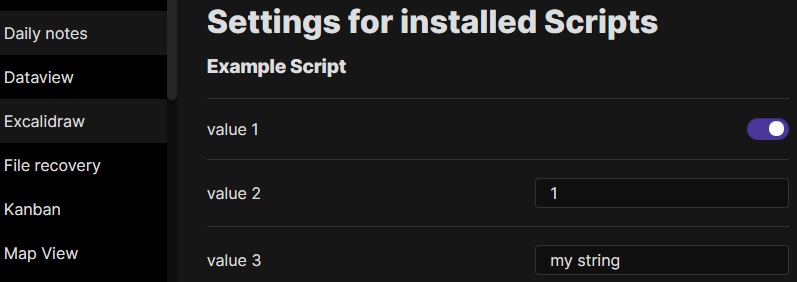
|
||||
- 如果设置是一个对象并遵循以下结构,则可以添加描述和值集。也可以使用 `hidden` 键从用户界面中隐藏值。
|
||||
```javascript
|
||||
ea.setScriptSettings({
|
||||
"value 1": {
|
||||
"value": true,
|
||||
"description": "This is the description for my boolean value"
|
||||
},
|
||||
"value 2": {
|
||||
"value": 1,
|
||||
"description": "This is the description for my numeric value"
|
||||
},
|
||||
"value 3": {
|
||||
"value": "my string",
|
||||
"description": "This is the description for my string value",
|
||||
"valueset": ["allowed 1","allowed 2","allowed 3"]
|
||||
},
|
||||
"value 4": {
|
||||
"value": "my value",
|
||||
"hidden": true
|
||||
}
|
||||
});
|
||||
```
|
||||
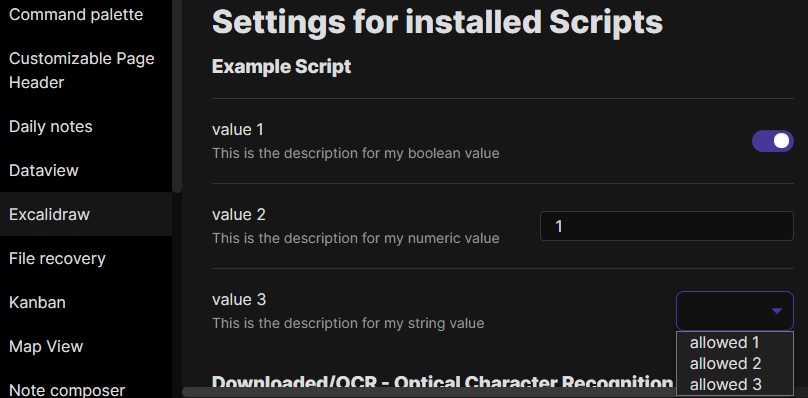
|
||||
|
||||
---------
|
||||
|
||||
## Excalidraw 自动化脚本示例
|
||||
|
||||
这些脚本可以在 GitHub [这个](https://github.com/zsviczian/obsidian-excalidraw-plugin/tree/master/ea-scripts)文件夹 📂 中下载为 `.md` 文件。
|
||||
|
||||
### 为选中元素添加边框
|
||||
|
||||

|
||||
|
||||
此脚本将在 Excalidraw 中当前选中的元素周围添加一个包围框
|
||||
|
||||
```javascript
|
||||
if(!ea.verifyMinimumPluginVersion || !ea.verifyMinimumPluginVersion("1.5.21")) {
|
||||
new Notice("This script requires a newer version of Excalidraw. Please install the latest version.");
|
||||
return;
|
||||
}
|
||||
|
||||
settings = ea.getScriptSettings();
|
||||
//check if settings exist. If not, set default values on first run
|
||||
if(!settings["Default padding"]) {
|
||||
settings = {
|
||||
"Prompt for padding?": true,
|
||||
"Default padding" : {
|
||||
value: 10,
|
||||
description: "Padding between the bounding box of the selected elements, and the box the script creates"
|
||||
}
|
||||
};
|
||||
ea.setScriptSettings(settings);
|
||||
}
|
||||
|
||||
let padding = settings["Default padding"].value;
|
||||
|
||||
if(settings["Prompt for padding?"]) {
|
||||
padding = parseInt (await utils.inputPrompt("padding?","number",padding.toString()));
|
||||
}
|
||||
|
||||
if(isNaN(padding)) {
|
||||
new Notice("The padding value provided is not a number");
|
||||
return;
|
||||
}
|
||||
elements = ea.getViewSelectedElements();
|
||||
const box = ea.getBoundingBox(elements);
|
||||
color = ea
|
||||
.getExcalidrawAPI()
|
||||
.getAppState()
|
||||
.currentItemStrokeColor;
|
||||
//uncomment for random color:
|
||||
//color = '#'+(Math.random()*0xFFFFFF<<0).toString(16).padStart(6,"0");
|
||||
ea.style.strokeColor = color;
|
||||
id = ea.addRect(
|
||||
box.topX - padding,
|
||||
box.topY - padding,
|
||||
box.width + 2*padding,
|
||||
box.height + 2*padding
|
||||
);
|
||||
ea.copyViewElementsToEAforEditing(elements);
|
||||
ea.addToGroup([id].concat(elements.map((el)=>el.id)));
|
||||
ea.addElementsToView(false);
|
||||
```
|
||||
|
||||
----
|
||||
|
||||
### 用箭头连接选中的元素
|
||||
|
||||
|
||||
|
||||
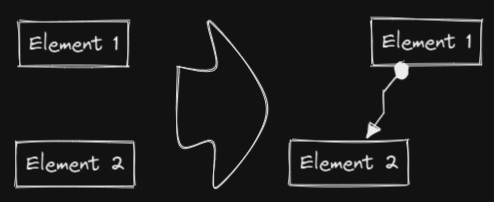
此脚本将用箭头连接两个对象。如果任一对象是一组分组元素(例如,一个文本元素与一个包围它的矩形分组),脚本会识别这些组,并将箭头连接到组中最大的对象(假设你想将箭头连接到文本元素周围的框)。
|
||||
```javascript
|
||||
if(!ea.verifyMinimumPluginVersion || !ea.verifyMinimumPluginVersion("1.5.21")) {
|
||||
new Notice("This script requires a newer version of Excalidraw. Please install the latest version.");
|
||||
return;
|
||||
}
|
||||
|
||||
settings = ea.getScriptSettings();
|
||||
//set default values on first run
|
||||
if(!settings["Starting arrowhead"]) {
|
||||
settings = {
|
||||
"Starting arrowhead" : {
|
||||
value: "none",
|
||||
valueset: ["none","arrow","triangle","bar","dot"]
|
||||
},
|
||||
"Ending arrowhead" : {
|
||||
value: "triangle",
|
||||
valueset: ["none","arrow","triangle","bar","dot"]
|
||||
},
|
||||
"Line points" : {
|
||||
value: 1,
|
||||
description: "Number of line points between start and end"
|
||||
}
|
||||
};
|
||||
ea.setScriptSettings(settings);
|
||||
}
|
||||
|
||||
const arrowStart = settings["Starting arrowhead"].value === "none" ? null : settings["Starting arrowhead"].value;
|
||||
const arrowEnd = settings["Ending arrowhead"].value === "none" ? null : settings["Ending arrowhead"].value;
|
||||
const linePoints = Math.floor(settings["Line points"].value);
|
||||
|
||||
const elements = ea.getViewSelectedElements();
|
||||
ea.copyViewElementsToEAforEditing(elements);
|
||||
groups = ea.getMaximumGroups(elements);
|
||||
|
||||
if(groups.length !== 2) {
|
||||
//unfortunately getMaxGroups returns duplicated resultset for sticky notes
|
||||
//needs additional filtering
|
||||
cleanGroups=[];
|
||||
idList = [];
|
||||
for (group of groups) {
|
||||
keep = true;
|
||||
for(item of group) if(idList.contains(item.id)) keep = false;
|
||||
if(keep) {
|
||||
cleanGroups.push(group);
|
||||
idList = idList.concat(group.map(el=>el.id))
|
||||
}
|
||||
}
|
||||
if(cleanGroups.length !== 2) return;
|
||||
groups = cleanGroups;
|
||||
}
|
||||
|
||||
els = [
|
||||
ea.getLargestElement(groups[0]),
|
||||
ea.getLargestElement(groups[1])
|
||||
];
|
||||
|
||||
ea.style.strokeColor = els[0].strokeColor;
|
||||
ea.style.strokeWidth = els[0].strokeWidth;
|
||||
ea.style.strokeStyle = els[0].strokeStyle;
|
||||
ea.style.strokeSharpness = els[0].strokeSharpness;
|
||||
|
||||
ea.connectObjects(
|
||||
els[0].id,
|
||||
null,
|
||||
els[1].id,
|
||||
null,
|
||||
{
|
||||
endArrowHead: arrowEnd,
|
||||
startArrowHead: arrowStart,
|
||||
numberOfPoints: linePoints
|
||||
}
|
||||
);
|
||||
ea.addElementsToView();
|
||||
```
|
||||
|
||||
----
|
||||
### 反转选中的箭头
|
||||
|
||||

|
||||
|
||||
反转选中元素范围内**箭头**的方向。
|
||||
|
||||
```javascript
|
||||
elements = ea.getViewSelectedElements().filter((el)=>el.type==="arrow");
|
||||
if(!elements || elements.length===0) return;
|
||||
elements.forEach((el)=>{
|
||||
const start = el.startArrowhead;
|
||||
el.startArrowhead = el.endArrowhead;
|
||||
el.endArrowhead = start;
|
||||
});
|
||||
ea.copyViewElementsToEAforEditing(elements);
|
||||
ea.addElementsToView();
|
||||
```
|
||||
|
||||
----
|
||||
|
||||
### 设置选中元素的线条宽度
|
||||
|
||||

|
||||
|
||||
当你缩放自由绘制的草图并想要减小或增加它们的线条宽度时,这个脚本会很有帮助。
|
||||
```javascript
|
||||
let width = (ea.getViewSelectedElement().strokeWidth??1).toString();
|
||||
width = await utils.inputPrompt("Width?","number",width);
|
||||
const elements=ea.getViewSelectedElements();
|
||||
ea.copyViewElementsToEAforEditing(elements);
|
||||
ea.getElements().forEach((el)=>el.strokeWidth=width);
|
||||
ea.addElementsToView();
|
||||
```
|
||||
|
||||
----
|
||||
|
||||
### 设置网格大小
|
||||
|
||||

|
||||
|
||||
Excalidraw 中默认的网格大小是 20。目前通过用户界面无法更改网格大小。
|
||||
```javascript
|
||||
const grid = parseInt(await utils.inputPrompt("Grid size?",null,"20"));
|
||||
const api = ea.getExcalidrawAPI();
|
||||
let appState = api.getAppState();
|
||||
appState.gridSize = grid;
|
||||
api.updateScene({
|
||||
appState,
|
||||
commitToHistory:false
|
||||
});
|
||||
```
|
||||
|
||||
----
|
||||
|
||||
### 设置元素尺寸和位置
|
||||
|
||||

|
||||
|
||||
目前在 Excalidraw 中还没有办法指定对象的精确位置和大小。你可以使用以下简单脚本来解决这个问题。
|
||||
```javascript
|
||||
const elements = ea.getViewSelectedElements();
|
||||
if(elements.length === 0) return;
|
||||
const el = ea.getLargestElement(elements);
|
||||
const sizeIn = [el.x,el.y,el.width,el.height].join(",");
|
||||
let res = await utils.inputPrompt("x,y,width,height?",null,sizeIn);
|
||||
res = res.split(",");
|
||||
if(res.length !== 4) return;
|
||||
let size = [];
|
||||
for (v of res) {
|
||||
const i = parseInt(v);
|
||||
if(isNaN(i)) return;
|
||||
size.push(i);
|
||||
}
|
||||
el.x = size[0];
|
||||
el.y = size[1];
|
||||
el.width = size[2];
|
||||
el.height = size[3];
|
||||
ea.copyViewElementsToEAforEditing([el]);
|
||||
ea.addElementsToView();
|
||||
```
|
||||
|
||||
----
|
||||
|
||||
### 项目符号
|
||||
|
||||

|
||||
|
||||
此脚本会在选中的每个文本元素的左上角添加一个小圆圈,并将文本和"项目符号"组合成一个组。
|
||||
```javascript
|
||||
elements = ea.getViewSelectedElements().filter((el)=>el.type==="text");
|
||||
ea.copyViewElementsToEAforEditing(elements);
|
||||
const padding = 10;
|
||||
elements.forEach((el)=>{
|
||||
ea.style.strokeColor = el.strokeColor;
|
||||
const size = el.fontSize/2;
|
||||
const ellipseId = ea.addEllipse(
|
||||
el.x-padding-size,
|
||||
el.y+size/2,
|
||||
size,
|
||||
size
|
||||
);
|
||||
ea.addToGroup([el.id,ellipseId]);
|
||||
});
|
||||
ea.addElementsToView();
|
||||
```
|
||||
|
||||
----
|
||||
|
||||
### 按行分割文本
|
||||
|
||||
**!!!需要 Excalidraw 1.5.1 或更高版本**
|
||||
|
||||

|
||||
|
||||
将文本块按行分割成单独的文本元素,以便更容易重新组织
|
||||
```javascript
|
||||
elements = ea.getViewSelectedElements().filter((el)=>el.type==="text");
|
||||
elements.forEach((el)=>{
|
||||
ea.style.strokeColor = el.strokeColor;
|
||||
ea.style.fontFamily = el.fontFamily;
|
||||
ea.style.fontSize = el.fontSize;
|
||||
const text = el.text.split("\n");
|
||||
for(i=0;i<text.length;i++) {
|
||||
ea.addText(el.x,el.y+i*el.height/text.length,text[i]);
|
||||
}
|
||||
});
|
||||
ea.addElementsToView();
|
||||
ea.deleteViewElements(elements);
|
||||
```
|
||||
|
||||
----
|
||||
|
||||
### 设置文本对齐方式
|
||||
|
||||

|
||||
|
||||
设置文本块的对齐方式(居中、右对齐、左对齐)。如果你想为选择文本对齐方式设置键盘快捷键,这个脚本会很有用。
|
||||
```javascript
|
||||
elements = ea.getViewSelectedElements().filter((el)=>el.type==="text");
|
||||
if(elements.length===0) return;
|
||||
let align = ["left","right","center"];
|
||||
align = await utils.suggester(align,align);
|
||||
elements.forEach((el)=>el.textAlign = align);
|
||||
ea.copyViewElementsToEAforEditing(elements);
|
||||
ea.addElementsToView();
|
||||
```
|
||||
|
||||
----
|
||||
|
||||
### 设置字体
|
||||
|
||||

|
||||
|
||||
设置文本块的字体(Virgil、Helvetica、Cascadia)。如果你想为选择字体设置键盘快捷键,这个功能会很有用。
|
||||
```javascript
|
||||
elements = ea.getViewSelectedElements().filter((el)=>el.type==="text");
|
||||
if(elements.length===0) return;
|
||||
let font = ["Virgil","Helvetica","Cascadia"];
|
||||
font = parseInt(await utils.suggester(font,["1","2","3"]));
|
||||
if (isNaN(font)) return;
|
||||
elements.forEach((el)=>el.fontFamily = font);
|
||||
ea.copyViewElementsToEAforEditing(elements);
|
||||
ea.addElementsToView();
|
||||
```
|
||||
@@ -5500,19 +5500,19 @@ Adds context menu to file explorer to create a drawing in any folder.
|
||||
|
||||
# 1.0.8-test
|
||||
|
||||
Adds [ExcalidrawAutomate](https://github.com/zsviczian/obsidian-excalidraw-plugin/blob/master/AutomateHowTo.md) a library of functions to generate Excalidraw drawings with Templater.
|
||||
添加了 [ExcalidrawAutomate](https://github.com/zsviczian/obsidian-excalidraw-plugin/blob/master/AutomateHowTo.md),这是一个用于通过 Templater 生成 Excalidraw 绘图的函数库。
|
||||
|
||||
Fixes issue [#37](https://github.com/zsviczian/obsidian-excalidraw-plugin/issues/37).
|
||||
Adds context menu to file explorer to create a drawing in any folder.
|
||||
修复了问题 [#37](https://github.com/zsviczian/obsidian-excalidraw-plugin/issues/37)。
|
||||
在文件浏览器中添加了上下文菜单,可以在任何文件夹中创建绘图。
|
||||
|
||||
|
||||
# 1.0.7
|
||||
|
||||
Added a small tweak to styles.
|
||||
Now you can control if the text wraps around the object or not.
|
||||
Use `|left` to align the image left without text wrapping and `|left-wrap` to wrap text.
|
||||
对样式做了一个小调整。
|
||||
现在你可以控制文本是否环绕在对象周围。
|
||||
使用 `|left` 可以让图片左对齐且不换行,使用 `|left-wrap` 可以实现文本环绕。
|
||||
|
||||
CSS used:
|
||||
CSS 使用:
|
||||
```
|
||||
svg.excalidraw-svg-right-wrap {
|
||||
float: right;
|
||||
@@ -5535,38 +5535,38 @@ div.excalidraw-svg-left {
|
||||
|
||||
# 1.0.6
|
||||
|
||||
Fixes:
|
||||
修复:
|
||||
[#31](https://github.com/zsviczian/obsidian-excalidraw-plugin/issues/31) [#25](https://github.com/zsviczian/obsidian-excalidraw-plugin/issues/25) [#24](https://github.com/zsviczian/obsidian-excalidraw-plugin/issues/24) [#23](https://github.com/zsviczian/obsidian-excalidraw-plugin/issues/23) [#22](https://github.com/zsviczian/obsidian-excalidraw-plugin/issues/22) [#20](https://github.com/zsviczian/obsidian-excalidraw-plugin/issues/20)
|
||||
|
||||
[](https://youtu.be/ipZPbcP2B0M)
|
||||
|
||||
## Export to SVG and PNG
|
||||
- Using the filename and location of the active drawing
|
||||
### Image Settings
|
||||
- Export with background
|
||||
- Export with theme
|
||||
## 导出为SVG和PNG
|
||||
- 使用当前绘图的文件名和位置
|
||||
### 图片设置
|
||||
- 导出时包含背景
|
||||
- 导出时包含主题
|
||||
|
||||
### Triggering export
|
||||
#### Once-off
|
||||
- Buttons to export active drawing
|
||||
- Command palette action to export active drawing
|
||||
#### Automated
|
||||
- Auto export SVG
|
||||
- Auto export PNG
|
||||
- Keep filenames in Sync
|
||||
### 触发导出
|
||||
#### 一次性导出
|
||||
- 导出当前绘图的按钮
|
||||
- 通过命令面板导出当前绘图
|
||||
#### 自动导出
|
||||
- 自动导出SVG
|
||||
- 自动导出PNG
|
||||
- 保持文件名同步
|
||||
|
||||
## Open drawings on a new page or on the current page
|
||||
### Command Palette
|
||||
- Create a drawing on a new page by splitting the currently active pane
|
||||
- Open a drawing on a new page by splitting the currently active pane
|
||||
### Ribbon Button
|
||||
- Click to open in an active pane
|
||||
- CTRL+Click to open on a new page
|
||||
## 在新页面或当前页面打开绘图
|
||||
### 命令面板
|
||||
- 通过拆分当前活动窗格在新页面创建绘图
|
||||
- 通过拆分当前活动窗格在新页面打开绘图
|
||||
### 功能区按钮
|
||||
- 点击在活动窗格中打开
|
||||
- CTRL+点击在新页面打开
|
||||
|
||||
## SVG styling when embedding using a code block
|
||||
- new formatting option for the code block embed
|
||||
- Valid values: left, right, center... but really anything after the last |.
|
||||
- corresponding CSS
|
||||
## 使用代码块嵌入时的SVG样式
|
||||
- 代码块嵌入的新格式选项
|
||||
- 有效值:left(左对齐)、right(右对齐)、center(居中)...实际上最后一个|后的任何内容都可以
|
||||
- 对应的CSS
|
||||
```
|
||||
.excalidraw-svg-left {
|
||||
float: left;
|
||||
@@ -5582,9 +5582,9 @@ Fixes:
|
||||
.excalidraw-svg {
|
||||
}
|
||||
```
|
||||
# How to install
|
||||
Install from Obsidian Community Plugins or ...
|
||||
Copy the following 3 files into your `vault/.obsidian/plugins/obsidian-excalidraw-plugin` folder
|
||||
# 如何安装
|
||||
从Obsidian社区插件安装或...
|
||||
将以下3个文件复制到你的`vault/.obsidian/plugins/obsidian-excalidraw-plugin`文件夹中
|
||||
- main.js
|
||||
- manifest.json
|
||||
- style.css
|
||||
@@ -5596,35 +5596,35 @@ Fixes:
|
||||
|
||||
[](https://youtu.be/TKgveGuA8Eo)
|
||||
|
||||
# Excalidraw 1.0.6 update
|
||||
## Export to SVG and PNG
|
||||
### New settings
|
||||
- Export with background
|
||||
- Export with theme
|
||||
- Auto export SVG
|
||||
- Auto export PNG
|
||||
- Keep filenames in Sync
|
||||
### Command palette action to export active drawing
|
||||
- Using the filename and location of the active drawing
|
||||
- Image types supported
|
||||
# Excalidraw 1.0.6 更新
|
||||
## 导出为 SVG 和 PNG
|
||||
### 新设置
|
||||
- 导出时包含背景
|
||||
- 导出时包含主题
|
||||
- 自动导出 SVG
|
||||
- 自动导出 PNG
|
||||
- 保持文件名同步
|
||||
### 命令面板导出当前绘图的操作
|
||||
- 使用当前绘图的文件名和位置
|
||||
- 支持的图片类型
|
||||
- PNG
|
||||
- SVG
|
||||
## New command palette actions
|
||||
- Create a new drawing in a new pane by splitting the currently active pane
|
||||
- Open drawing in a new pane by splitting the currently active pane
|
||||
### New setting
|
||||
- Configure the ribbon button to
|
||||
- open in a new pane by splitting the current pane
|
||||
- open in the currently active pane
|
||||
## 命令面板新增功能
|
||||
- 通过拆分当前活动面板来在新面板中创建新绘图
|
||||
- 通过拆分当前活动面板来在新面板中打开绘图
|
||||
### 新设置
|
||||
- 配置功能区按钮以
|
||||
- 通过拆分当前面板在新面板中打开
|
||||
- 在当前活动面板中打开
|
||||
|
||||
## SVG styling when embedding using code block
|
||||
### new options
|
||||
## 使用代码块嵌入时的 SVG 样式
|
||||
### 新选项
|
||||
[[drawing.excalidraw|500|left]]
|
||||
|
||||
[[drawing.excalidraw|500x300|right]]
|
||||
|
||||
[[drawing.excalidraw|center]]
|
||||
### corresponding CSS
|
||||
### 对应的 CSS
|
||||
```
|
||||
.excalidraw-svg-left {
|
||||
float: left;
|
||||
@@ -5640,9 +5640,9 @@ Fixes:
|
||||
.excalidraw-svg {
|
||||
}
|
||||
```
|
||||
## Stencil library bug resolved
|
||||
# How to install the test release
|
||||
Copy the following 3 files into your `vault/.obsidian/plugins/obsidian-excalidraw-plugin` folder
|
||||
## 修复模板库错误
|
||||
# 如何安装测试版本
|
||||
将以下3个文件复制到你的 `vault/.obsidian/plugins/obsidian-excalidraw-plugin` 文件夹中
|
||||
- main.js
|
||||
- manifest.json
|
||||
- style.css
|
||||
@@ -5756,6 +5756,31 @@ Excalidraw 0.7.0 还对客户端模板库的处理方式引入了重大变更。
|
||||

|
||||
|
||||
|
||||
# 0.0.1
|
||||
|
||||
## 发布说明:
|
||||
插件可以工作,但我还没有解决在 .md 文件中嵌入(transclusion)的问题。
|
||||
|
||||
## 安装方法:
|
||||
将3个文件 main.js、manifest.json、styles.css 复制到 vault/.obsidian/plugins/obsidian-excalidraw-plugin/ 文件夹中。
|
||||
|
||||
# 1.0.2
|
||||
|
||||
处理反馈:
|
||||
https://github.com/obsidianmd/obsidian-releases/pull/258
|
||||
|
||||
# 1.0.1
|
||||
|
||||
处理代码相关反馈。
|
||||
https://github.com/obsidianmd/obsidian-releases/pull/258
|
||||
|
||||
# 1.0.0
|
||||
|
||||
这是 Obsidian-Excalidraw 插件的首次发布。
|
||||
件夹中。
|
||||

|
||||
|
||||
|
||||
# 0.0.1
|
||||
|
||||
## 发布说明:
|
||||
|
||||
@@ -1,6 +1,8 @@
|
||||
# Excalidraw 自动化使用指南
|
||||
|
||||
【[English](../../readme.md)】
|
||||
> 此说明当前更新至 `e793526`。
|
||||
|
||||
【[English](../../readme.md) | 简体中文】
|
||||
|
||||
使用 ExcalidrawAutomate 可以通过 [ExcalidrawAutomate 脚本引擎](ExcalidrawScriptsEngine.md)、[Templater](https://silentvoid13.github.io/Templater/docs/) 或 [QuickAdd](https://github.com/chhoumann/quickadd) 插件来创建或操作 Excalidraw 绘图,并使用 [DataviewJS](https://blacksmithgu.github.io/obsidian-dataview/docs/api/intro/) 生成嵌入式的 SVG 和 PNG 图像。
|
||||
|
||||
|
||||
@@ -0,0 +1,91 @@
|
||||
# Excalidraw 脚本引擎脚本库
|
||||
|
||||
> 此说明当前更新至 `768aebf`。
|
||||
|
||||
【[English](../../../ea-scripts/README.md) | 简体中文】
|
||||
|
||||
点击观看介绍视频:
|
||||
|
||||
[](https://youtu.be/hePJcObHIso)
|
||||
|
||||
> **警告**
|
||||
> 相比视频中展示的方法,现在有更简单的方式来安装/管理脚本
|
||||
|
||||
查看 [Excalidraw 脚本引擎](../../ExcalidrawScriptsEngine.md) 文档了解更多详情。
|
||||
|
||||
## 如何在 Obsidian 仓库中安装脚本
|
||||
|
||||
安装内置脚本的步骤:
|
||||
|
||||
- 在 Obsidian 中打开一个 Excalidraw 绘图
|
||||
- 在面板下拉菜单中选择"安装或更新 Excalidraw 脚本"
|
||||
- 点击其中一个可用脚本
|
||||
- 点击"安装此脚本"(注意如果脚本已经安装,你会看到更新选项)
|
||||
- 重启 Obsidian 使脚本生效
|
||||
|
||||
注意:默认情况下,脚本会被安装到你仓库中的 `Excalidraw/Scripts/Downloaded` 文件夹
|
||||
|
||||
<details><summary>手动安装脚本</summary>
|
||||
|
||||
打开你感兴趣的脚本,将其保存到你的 Obsidian 仓库中(包括第一行的 `/*`),或者在"Raw"模式下打开并将全部内容复制到 Obsidian 中。
|
||||
|
||||

|
||||
|
||||
</details>
|
||||
|
||||
## 可用脚本列表
|
||||
|
||||
|标题|描述|图标|贡献者|
|
||||
|----|----|----|----|
|
||||
|[添加连接点](../../../ea-scripts/Add%20Connector%20Point.md)|此脚本将在选中文本元素的左上角添加一个小圆圈,并将文本和"圆点"组合成一组。||[@zsviczian](https://github.com/zsviczian)|
|
||||
|[添加现有文件链接并打开](../../../ea-scripts/Add%20Link%20to%20Existing%20File%20and%20Open.md)|提示从保险库(Vault)中选择文件。为选中的元素添加指向所选文件的链接。你可以在设置中控制是在当前活动面板还是相邻面板中打开文件。||[@zsviczian](https://github.com/zsviczian)|
|
||||
|[添加新页面链接并打开](../../../ea-scripts/Add%20Link%20and%20Open%20Page.md)|提示输入文件名。提供创建和打开新的 Markdown 或 Excalidraw 文档的选项。为绘图中选中的对象添加指向新文件的链接。你可以在设置中控制是在当前活动面板或是相邻面板中打开文件。||[@zsviczian](https://github.com/zsviczian)|
|
||||
|[添加流程下一步](../../../ea-scripts/Add%20Link%20to%20New%20Page%20and%20Open.md)|此脚本将提示你输入流程步骤的标题,然后创建带有该文本的便签。如果选中了某个元素,脚本将用箭头将这个新步骤与上一步骤(选中的元素)连接起来。如果没有选中元素,脚本会假定这是流程的第一步,只会输出带有输入文本的便签。|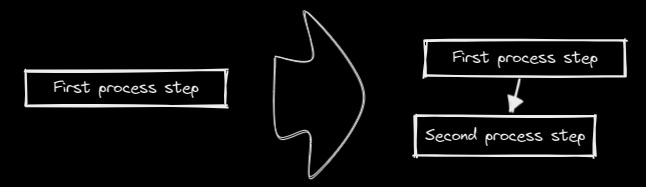|[@zsviczian](https://github.com/zsviczian)|
|
||||
|[分割椭圆](../../../ea-scripts/Boolean%20Operations.md)|使用此脚本可以对形状进行布尔运算。|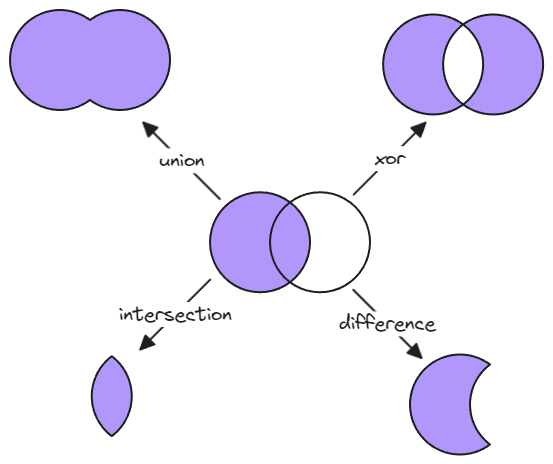|[@GColoy](https://github.com/GColoy)|
|
||||
|[为每个选中的组添加边框](../../../ea-scripts/Box%20Each%20Selected%20Groups.md)|此脚本将为 Excalidraw 中当前选中的每个组添加封装框。|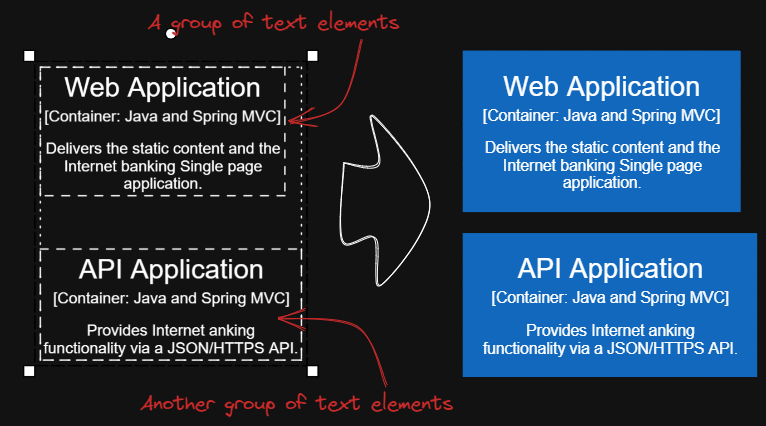|[@1-2-3](https://github.com/1-2-3)|
|
||||
|[为选中元素添加边框](../../../ea-scripts/Box%20Selected%20Elements.md)|此脚本将为 Excalidraw 中当前选中的元素添加一个封装框。||[@zsviczian](https://github.com/zsviczian)|
|
||||
|[更改选中元素的形状](../../../ea-scripts/Change%20shape%20of%20selected%20elements.md)|此脚本允许你更改选中的矩形、菱形和椭圆的形状|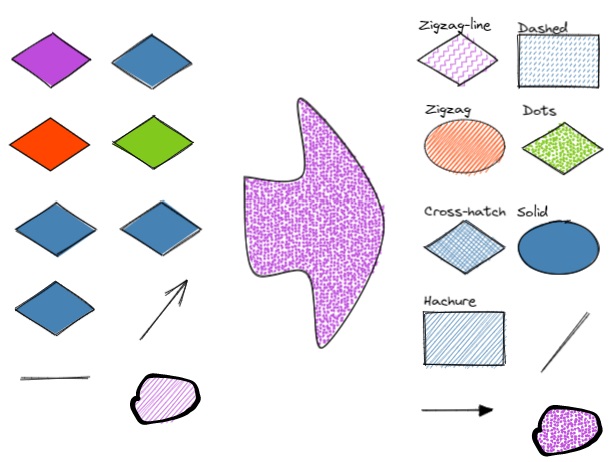|[@zsviczian](https://github.com/zsviczian)|
|
||||
|[连接元素](../../../ea-scripts/Connect%20elements.md)|此脚本将用箭头连接两个对象。如果任一对象是一组分组的元素(例如,与封装矩形分组的文本元素),脚本将识别这些组,并将箭头连接到组中最大的对象(假设你想将箭头连接到文本元素周围的框)。||[@zsviczian](https://github.com/zsviczian)|
|
||||
|[将自由绘制转换为线条](../../../ea-scripts/Convert%20freedraw%20to%20line.md)|将选中的自由绘制对象转换为可编辑的线条。这样你就可以通过拖动线条点来调整绘图,如果是封闭线条还可以选择形状填充。你可以在设置中调整转换点的密度|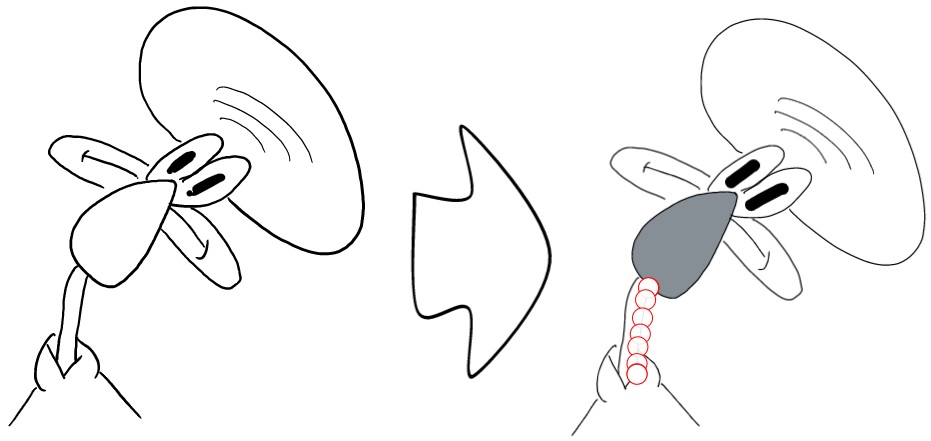|[@zsviczian](https://github.com/zsviczian)|
|
||||
|[将选中的文本元素转换为便签](../../../ea-scripts/Convert%20selected%20text%20elements%20to%20sticky%20notes.md)|将选中的纯文本元素转换为具有透明背景和透明描边颜色的便签。本质上是将文本元素转换为可换行的格式。|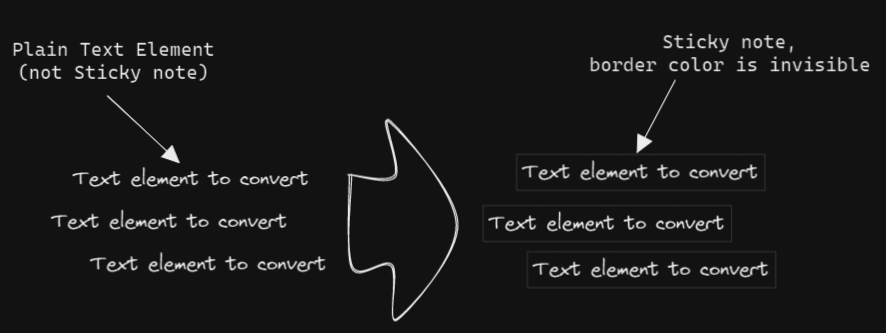|[@zsviczian](https://github.com/zsviczian)|
|
||||
|[将文本转换为带文件夹和别名的链接](../../../ea-scripts/Convert%20text%20to%20link%20with%20folder%20and%20alias.md)|将文本元素转换为指向所选文件夹中文件的链接,并将原始文本设置为别名。脚本会提示用户从保险库(Vault)中选择一个现有文件夹。|`原始文本` => `[[选定文件夹/原始文本\|原始文本]]`|[@zsviczian](https://github.com/zsviczian)|
|
||||
|[将选中元素样式复制到全局](../../../ea-scripts/Copy%20Selected%20Element%20Styles%20to%20Global)|此脚本会将任何选中元素的样式复制到 Excalidraw 的全局样式中。|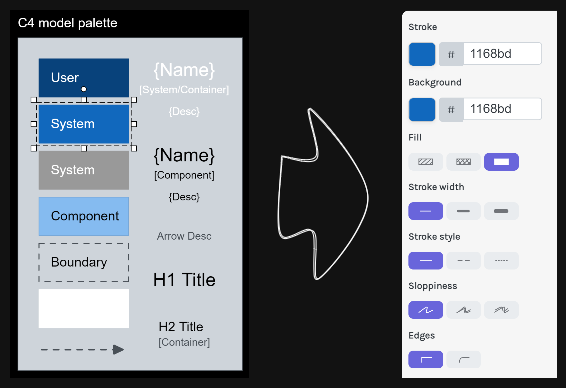|[@1-2-3](https://github.com/1-2-3)|
|
||||
|[创建新的 Markdown 文件并嵌入到当前绘图中](../../../ea-scripts/Create%20new%20markdown%20file%20and%20embed%20into%20active%20drawing.md)|此脚本会提示你输入文件名,然后创建一个具有该文件名的新 Markdown 文档,在相邻面板中打开新的 Markdown 文档,并将该 Markdown 文档嵌入到当前的 Excalidraw 绘图中。|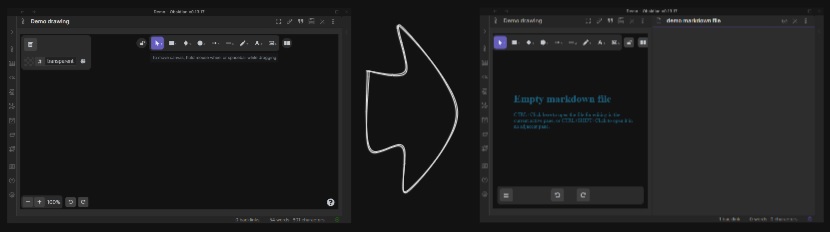|[@zsviczian](https://github.com/zsviczian)|
|
||||
|[加深背景颜色](../../../ea-scripts/Darken%20background%20color.md)|此脚本每次将选中元素的背景颜色加深 2%。你可以多次使用此脚本直到满意为止。建议为此脚本设置快捷键,这样你就可以快速尝试加深和减淡颜色效果。与"修改背景颜色不透明度"脚本相比,其优点是元素的背景颜色不受画布颜色影响,并且颜色值不会以奇怪的 rgba() 形式出现。||[@1-2-3](https://github.com/1-2-3)|
|
||||
|[肘形连接器](../../../ea-scripts/Elbow%20connectors.md)|此脚本将选中的连接器转换为肘形。|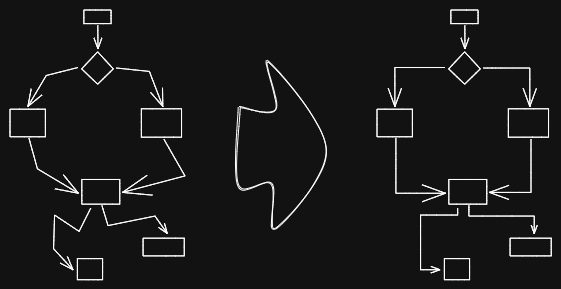|[@1-2-3](https://github.com/1-2-3)|
|
||||
|[水平扩展矩形并保持文本居中](../../../ea-scripts/Expand%20rectangles%20horizontally%20keep%20text20%centered.md)|此脚本会扩展选中矩形的宽度,直到它们都具有相同的宽度,并保持文本居中。||[@1-2-3](https://github.com/1-2-3)|
|
||||
|[水平扩展矩形](../../../ea-scripts/Expand%20rectangles%20horizontally.md)|此脚本会扩展选中矩形的宽度,直到它们都具有相同的宽度。||[@1-2-3](https://github.com/1-2-3)|
|
||||
|[垂直扩展矩形并保持文本居中](../../../ea-scripts/Expand%20rectangles%20vertically%20keep%20text%20centered.md)|此脚本会扩展选中矩形的高度,直到它们都具有相同的高度,并保持文本居中。||[@1-2-3](https://github.com/1-2-3)|
|
||||
|[垂直扩展矩形](../../../ea-scripts/Expand%20rectangles%20vertically.md)|此脚本会扩展选中矩形的高度,直到它们都具有相同的高度。||[@1-2-3](https://github.com/1-2-3)|
|
||||
|[固定中心点水平距离](../../../ea-scripts/Fixed%20horizontal%20distance%20between%20centers.md)|此脚本会以固定的中心点间距水平排列选中的元素。|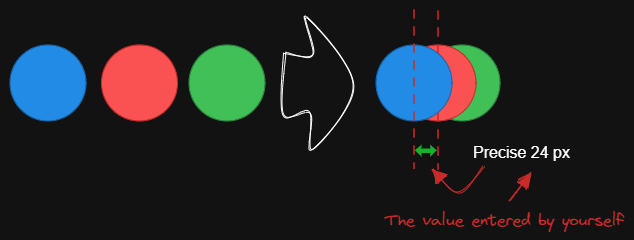|[@1-2-3](https://github.com/1-2-3)|
|
||||
|[固定内部距离](../../../ea-scripts/Fixed%20inner%20distance.md)|此脚本会以固定的内部距离排列选中的元素和组。||[@1-2-3](https://github.com/1-2-3)|
|
||||
|[固定间距](../../../ea-scripts/Fixed%20spacing.md)|此脚本会以固定的间距水平排列选中的元素。当我们创建架构图或思维导图时,经常需要以固定间距排列大量元素。"固定间距"和"固定垂直距离"脚本可以为我们节省大量时间。|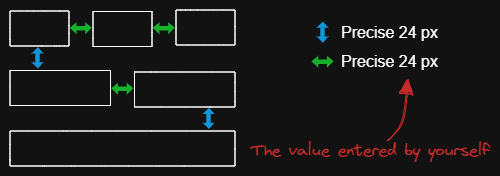|[@1-2-3](https://github.com/1-2-3)|
|
||||
|[固定中心点垂直距离](../../../ea-scripts/Fixed%20vertical%20distance%20between%20centers.md)|此脚本会以固定的中心点间距垂直排列选中的元素。|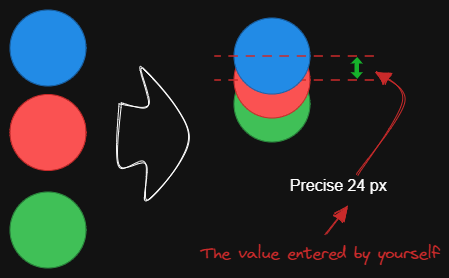|[@1-2-3](https://github.com/1-2-3)|
|
||||
|[固定垂直距离](../../../ea-scripts/Fixed%20vertical%20distance.md)|此脚本会以固定间距垂直排列选中的元素。当我们创建架构图或思维导图时,经常需要以固定间距排列大量元素。`固定间距`和`固定垂直距离`脚本可以为我们节省大量时间。|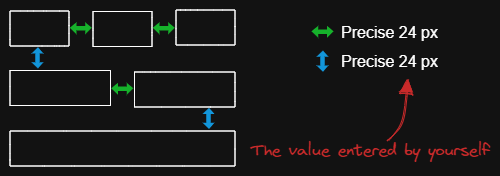|[@1-2-3](https://github.com/1-2-3)|
|
||||
|[减淡背景颜色](../../../ea-scripts/Lighten%20background%20color.md)|此脚本每次将选中元素的背景颜色减淡 2%。你可以多次使用此脚本直到满意为止。建议为此脚本设置快捷键,这样你就可以快速尝试加深和减淡颜色效果。与"修改背景颜色不透明度"脚本相比,其优点是元素的背景颜色不受画布颜色影响,并且颜色值不会以奇怪的 rgba() 形式出现。||[@1-2-3](https://github.com/1-2-3)|
|
||||
|[思维导图连接器](../../../ea-scripts/Mindmap%20connector.md)|此脚本为选中的元素创建类似思维导图的连线(目前仅支持右侧和向下方向)。连线的起点将根据元素的创建时间确定。因此你应该先创建标题元素。|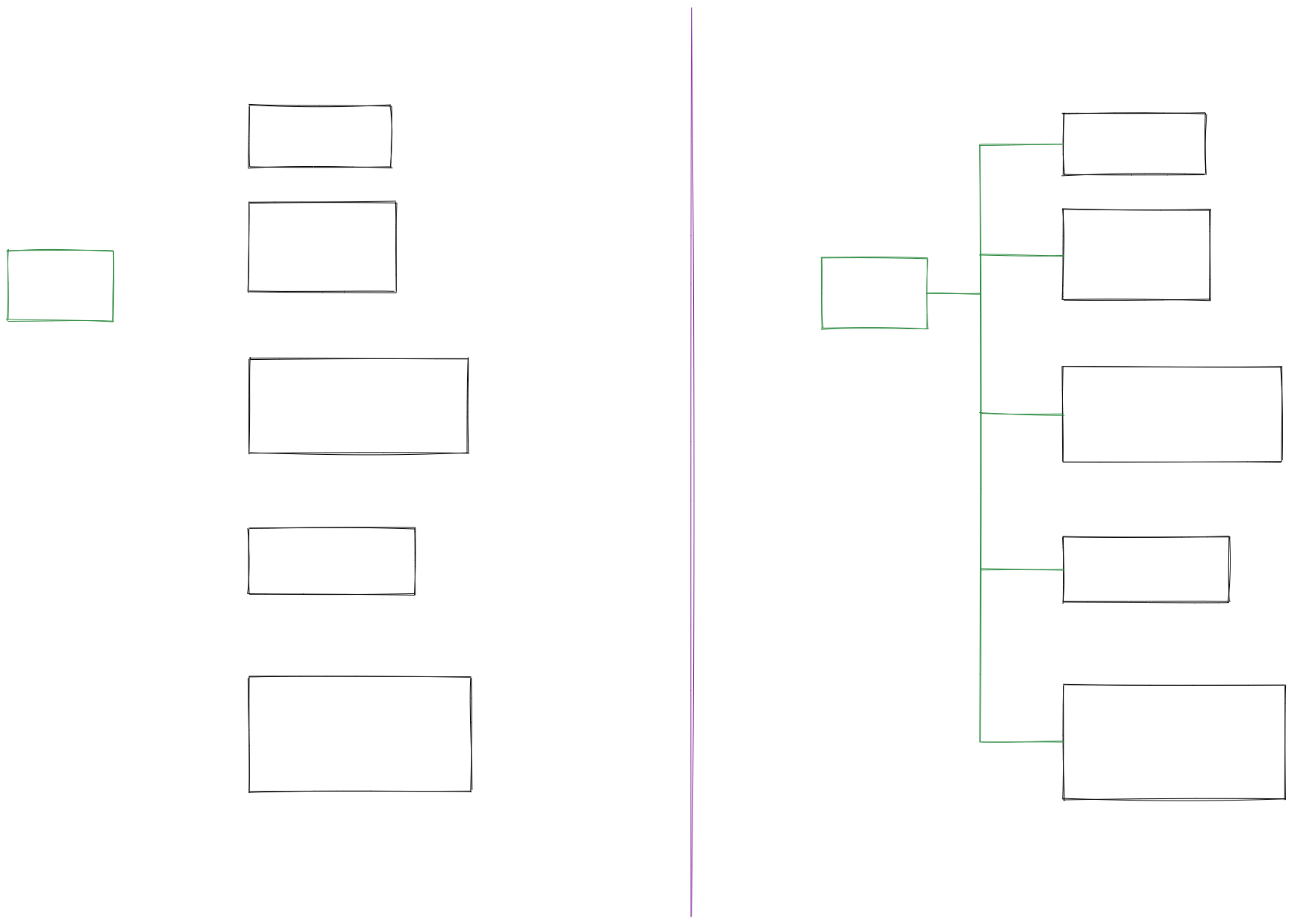|[@xllowl](https://github.com/xllowl)|
|
||||
|[修改背景颜色不透明度](../../../ea-scripts/Modify%20background%20color%20opacity.md)|此脚本会更改选中框的背景颜色不透明度。Excalidraw 中的默认背景颜色太深,导致文字难以阅读。你可以通过设置透明度来使颜色变浅。你可以反复调整透明度直到满意为止。虽然 Excalidraw 在其原生属性设置中有不透明度选项,但它也会改变边框的透明度。使用此脚本可以只更改背景颜色的不透明度而不影响边框。|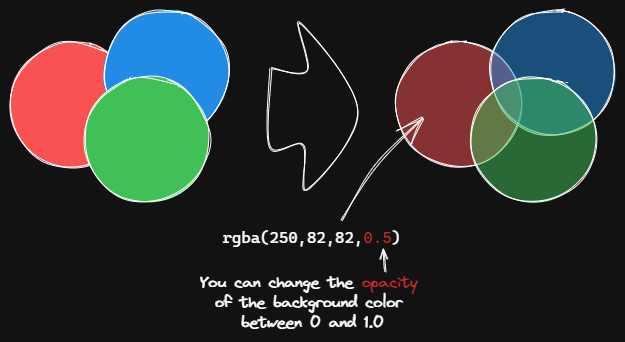|[@1-2-3](https://github.com/1-2-3)|
|
||||
|[标准化选中箭头](../../../ea-scripts/Normalize%20Selected%20Arrows.md)|此脚本将重置选中箭头的起点和终点位置。箭头将指向连接框的中心,并与框保持 8px 的间距。|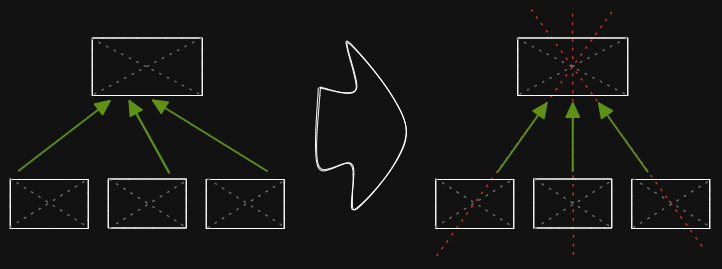|[@1-2-3](https://github.com/1-2-3)|
|
||||
|[OCR - 光学字符识别](../../../ea-scripts/OCR%20-%20Optical%20Character%20Recognition.md)|此脚本将 1) 把选中的图片文件发送到 [taskbone.com](https://taskbone.com) 提取图片中的文字,并 2) 将文字作为文本元素添加到你的绘图中。||[@zsviczian](https://github.com/zsviczian)|
|
||||
|[有机线条](../../../ea-scripts/Organic%20Line.md)|将选中的自由绘制线条转换为从开始到结束笔压逐渐减小的线条。转换后的线条会被放置在图层的最底层,位于所有其他元素之下。在绘制有机思维导图时很有帮助。|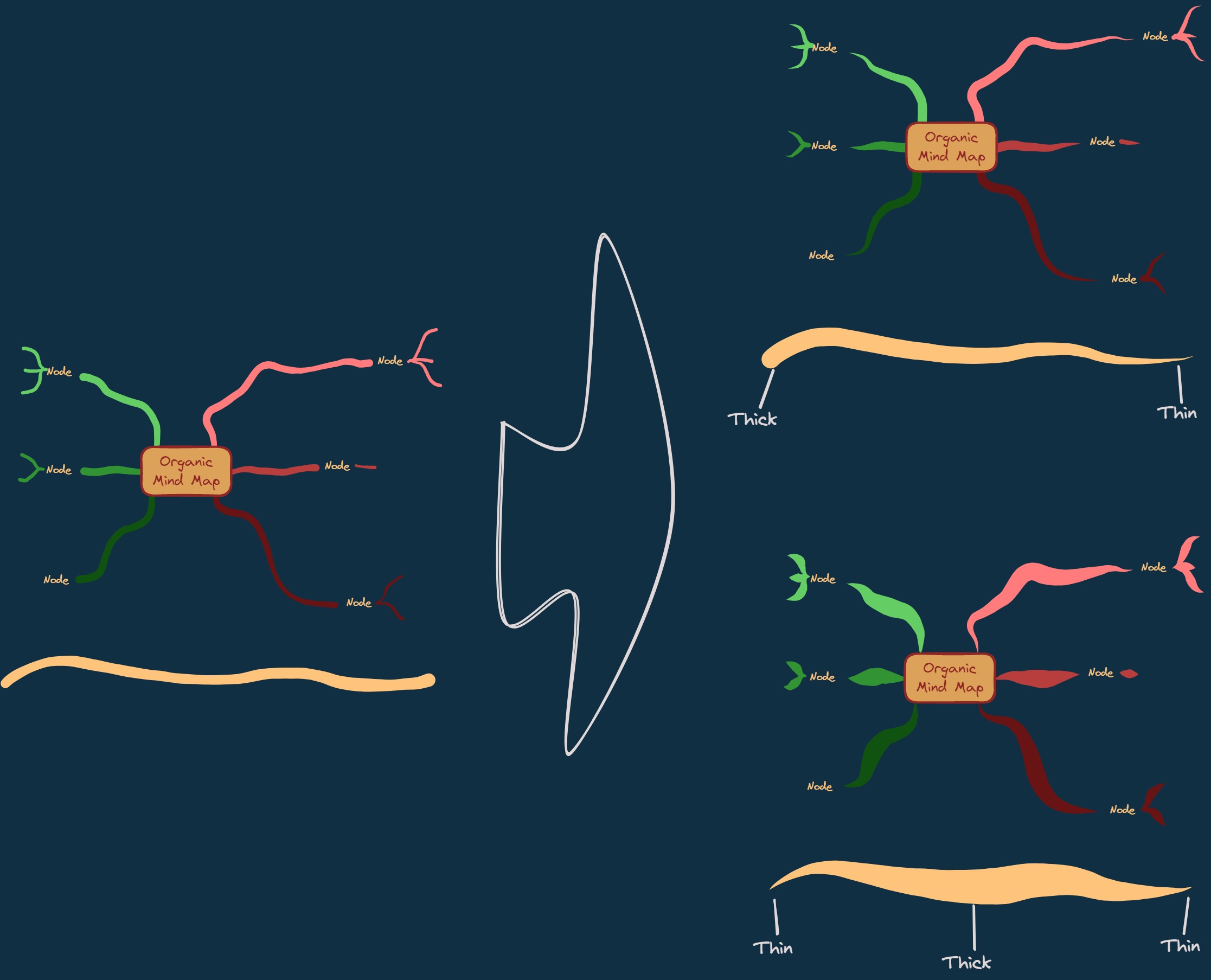|[@zsviczian](https://github.com/zsviczian)|
|
||||
|[重复元素](../../../ea-scripts/Repeat%20Elements.md)|此脚本会检测两个选中元素之间的差异,包括位置、大小、角度、描边和背景颜色,并根据用户输入的重复次数创建多个具有相同差异的元素。|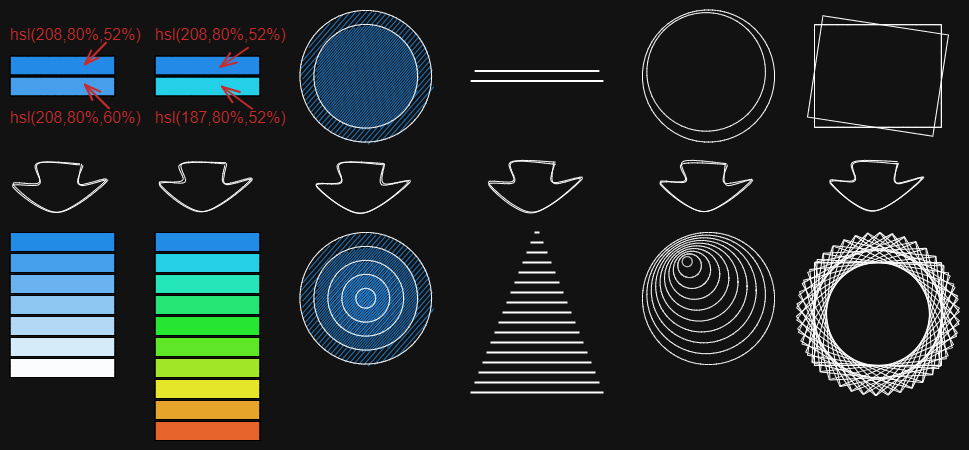|[@1-2-3](https://github.com/1-2-3)|
|
||||
|[重置 LaTeX 大小](../../../ea-scripts/Reset%20LaTeX%20Size.md)|将嵌入的 LaTeX 公式大小重置为默认大小或默认大小的倍数。|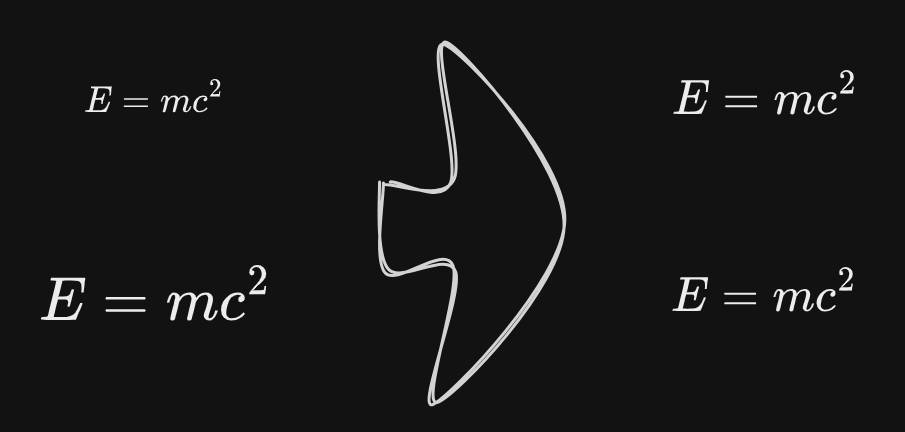|[@firai](https://github.com/firai)|
|
||||
|[反转箭头](../../../ea-scripts/Reverse%20arrows.md)|反转选中元素范围内的**箭头**方向。||[@zsviczian](https://github.com/zsviczian)|
|
||||
|[手写助手](../../../ea-scripts/Scribble%20Helper.md)|iOS 手写助手,用于改善文本元素的手写体验。如果没有选中元素,则会在指针位置创建一个文本元素,你可以使用编辑框通过手写来修改文本。如果选中了文本元素,则会打开输入提示框,你可以在其中通过手写修改文本。||[@zsviczian](https://github.com/zsviczian)|
|
||||
|[选择特定类型元素](../../../ea-scripts/Select%20Elements%20of%20Type.md)|显示当前图像中不同元素类型的列表供选择。只有选定类型的元素会在画布上被选中。如果运行脚本时没有选中任何元素,则脚本会处理画布上的所有元素。如果执行脚本时已选中某些元素,则脚本只会处理这些选中的元素。<br>此脚本在以下情况下很有用,例如,当你想要将所有箭头置于顶层,或想要更改所有文本元素的颜色等。||[@zsviczian](https://github.com/zsviczian)|
|
||||
|[通过添加阴影克隆为未闭合线条对象设置背景颜色](../../../ea-scripts/Set%20background%20color%20of%20unclosed%20line%20object%20by%20adding%20a%20shadow%20clone.md)|使用此脚本为未闭合(即开放)线条对象设置背景颜色,方法是创建对象的克隆。脚本会将克隆的描边颜色设置为透明,并添加一条直线来闭合对象。使用设置来定义默认背景颜色、填充样式和克隆的描边宽度。默认情况下,克隆会与原始对象组合在一起,你也可以在设置中禁用此功能。||[@zsviczian](https://github.com/zsviczian)|
|
||||
|[设置尺寸](../../../ea-scripts/Set%20Dimensions.md)|目前在 Excalidraw 中无法指定对象的确切位置和大小。你可以使用这个简单的脚本来弥补这个不足。||[@zsviczian](https://github.com/zsviczian)|
|
||||
|[设置字体](../../../ea-scripts/Set%20Font%20Family.md)|设置文本块的字体(Virgil、Helvetica、Cascadia)。如果你想为选择字体设置键盘快捷键,这个脚本很有用。||[@zsviczian](https://github.com/zsviczian)|
|
||||
|[设置网格](../../../ea-scripts/Set%20Grid.md)|Excalidraw 中的默认网格大小是 20。目前无法通过用户界面更改网格大小。这个脚本提供了一种方法来弥补这个不足。||[@zsviczian](https://github.com/zsviczian)|
|
||||
|[设置链接别名](../../../ea-scripts/Set20%Link20%Alias.md)|遍历选中文本元素中的所有链接,并提示用户为每个找到的链接设置或修改别名。|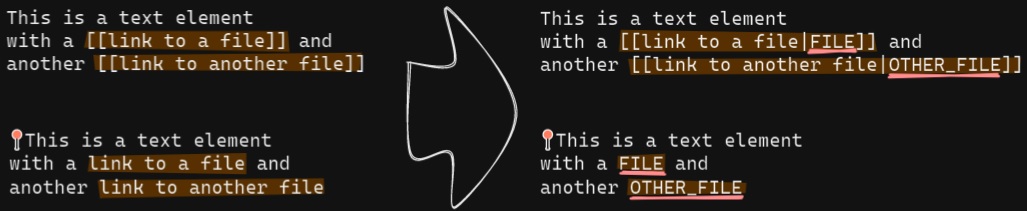|[@zsviczian](https://github.com/zsviczian)|
|
||||
|[设置选中元素的描边宽度](../../../ea-scripts/Set%20Stroke%20Width%20of%20Selected%20Elements.md)|此脚本将设置选中元素的描边宽度。这在缩放自由绘制草图并想要减小或增加其线条宽度时很有用。||[@zsviczian](https://github.com/zsviczian)|
|
||||
|[按行分割文本](../../../ea-scripts/Split%20text%20by%20lines.md)|将文本行分割成单独的文本元素,以便更容易重新组织||[@zsviczian](https://github.com/zsviczian)|
|
||||
|[设置文本对齐方式](../../../ea-scripts/Set%20Text%20Alignment.md)|设置文本块的对齐方式(居中、右对齐、左对齐)。如果你想为选择文本对齐方式设置键盘快捷键,这个脚本很有用。||[@zsviczian](https://github.com/zsviczian)|
|
||||
|[分割椭圆](../../../ea-scripts/Split%20Ellipse.md)|此脚本会在线条与椭圆相交的任何点处分割椭圆。|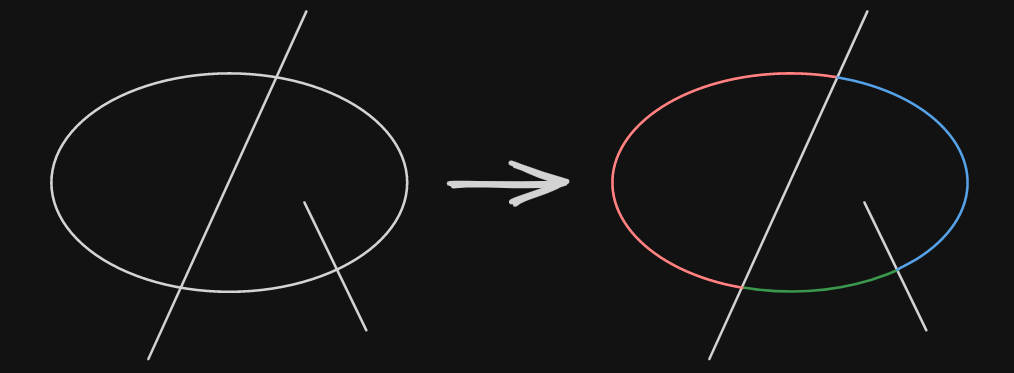|[@GColoy](https://github.com/GColoy)|
|
||||
|[TheBrain导航](../../../ea-scripts/TheBrain-navigation.md)|基于Excalidraw的保险库(Vault)图形用户界面。需要[Dataview插件](https://github.com/blacksmithgu/obsidian-dataview)。生成类似于[TheBrain](https://TheBrain.com)的图形视图。在[YouTube](https://youtu.be/plYobK-VufM)上观看此脚本的介绍。|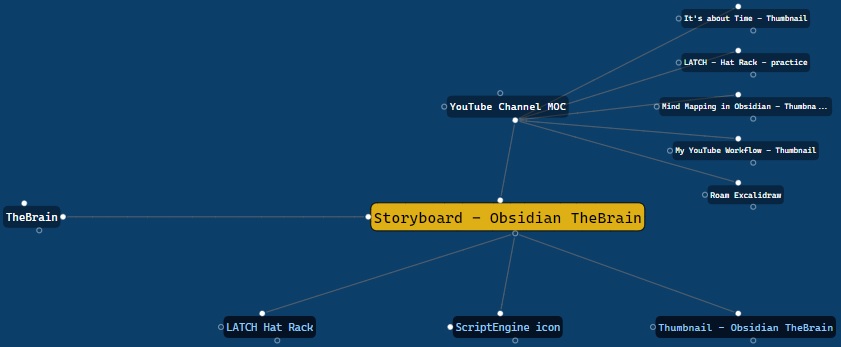|[@zsviczian](https://github.com/zsviczian)|
|
||||
|[移动端切换全屏](../../../ea-scripts/Toggle%20Fullscreen%20on%20Mobile.md)|隐藏Obsidian工作区叶片填充和标题(基于设置中的选项,默认"隐藏标题"=false),这将使Excalidraw全屏显示。⚠ 注意,如果标题不可见,将很难调用命令面板来结束全屏。只有在你有键盘或已经练习过打开命令面板的情况下才隐藏标题!||[@zsviczian](https://github.com/zsviczian)|
|
||||
|[切换网格](../../../ea-scripts/Toggle%20Grid.md)|切换网格的显示与隐藏。||[@GColoy](https://github.com/GColoy)|
|
||||
|[将文本元素转移到Excalidraw markdown元数据](../../../ea-scripts/Transfer%20TextElements%20to%20Excalidraw%20markdown%20metadata.md)|此脚本将从画布中删除选中的文本元素,并将这些文本元素中的文本复制到Excalidraw markdown文件的元数据中。这意味着,文本将不再在绘图中可见,但你可以在Obsidian中搜索文本并找到包含此图像的绘图。||[@zsviczian](https://github.com/zsviczian)|
|
||||
|[缩放以适应选中元素](../../../ea-scripts/Zoom%20to%20Fit%20Selected%20Elements.md)|类似于Excalidraw标准的<kbd>SHIFT+2</kbd>功能:缩放以适应选中元素,但可以缩放到1000%。灵感来源:[#272](https://github.com/zsviczian/obsidian-excalidraw-plugin/issues/272)||[@zsviczian](https://github.com/zsviczian)|
|
||||
|[硬件橡皮擦支持](../../../ea-scripts/Hardware%20Eraser%20Support.md)|允许在支持的笔上使用笔反转/硬件橡皮擦。|[@threethan](https://github.com/threethan)|
|
||||
|[笔的自动绘制](../../../ea-scripts/Auto%20Draw%20for%20Pen.md)|当悬停笔时自动从选择工具切换到绘制工具,然后再切换回来。|[@threethan](https://github.com/threethan)|
|
||||
@@ -69,10 +69,15 @@ const result = polyboolAction({
|
||||
const polygonHierachy = subordinateInnerPolygons(result.regions);
|
||||
drawPolygonHierachy(polygonHierachy);
|
||||
ea.deleteViewElements(elements);
|
||||
setPolygonTrue();
|
||||
ea.addElementsToView(false,false,true);
|
||||
return;
|
||||
|
||||
|
||||
function setPolygonTrue() {
|
||||
ea.getElements().filter(el=>el.type==="line").forEach(el => {
|
||||
el.polygon = true;
|
||||
});
|
||||
}
|
||||
|
||||
function traceElement(element) {
|
||||
const diamondPath = (diamond) => [
|
||||
|
||||
@@ -1,4 +1,7 @@
|
||||
# Excalidraw Script Engine scripts library
|
||||
|
||||
【English | [简体中文](../docs/zh-cn/ea-scripts/README.md)】
|
||||
|
||||
Click to watch the intro video:
|
||||
|
||||
[](https://youtu.be/hePJcObHIso)
|
||||
|
||||
@@ -7,21 +7,27 @@ Scribble Helper can improve handwriting and add links. It lets you create and ed
|
||||
|
||||
```javascript
|
||||
*/
|
||||
if(!ea.verifyMinimumPluginVersion || !ea.verifyMinimumPluginVersion("1.8.25")) {
|
||||
if(!ea.verifyMinimumPluginVersion || !ea.verifyMinimumPluginVersion("2.11.0")) {
|
||||
new Notice("This script requires a newer version of Excalidraw. Please install the latest version.");
|
||||
return;
|
||||
}
|
||||
|
||||
// ------------------------------
|
||||
// Constants and initialization
|
||||
// ------------------------------
|
||||
const helpLINK = "https://youtu.be/BvYkOaly-QM";
|
||||
const DBLCLICKTIMEOUT = 300;
|
||||
const maxWidth = 600;
|
||||
const padding = 6;
|
||||
const api = ea.getExcalidrawAPI();
|
||||
const win = ea.targetView.ownerWindow;
|
||||
|
||||
// Initialize global variables
|
||||
if(!win.ExcalidrawScribbleHelper) win.ExcalidrawScribbleHelper = {};
|
||||
if(typeof win.ExcalidrawScribbleHelper.penOnly === "undefined") {
|
||||
win.ExcalidrawScribbleHelper.penOnly = false;
|
||||
}
|
||||
|
||||
let windowOpen = false; //to prevent the modal window to open again while writing with scribble
|
||||
let prevZoomValue = api.getAppState().zoom.value; //used to avoid trigger on pinch zoom
|
||||
|
||||
@@ -49,8 +55,10 @@ if(typeof win.ExcalidrawScribbleHelper.action === "undefined") {
|
||||
}
|
||||
|
||||
//---------------------------------------
|
||||
// Color Palette for stroke color setting
|
||||
// Helper Functions
|
||||
//---------------------------------------
|
||||
|
||||
// Color Palette for stroke color setting
|
||||
// https://github.com/zsviczian/obsidian-excalidraw-plugin/releases/tag/1.6.8
|
||||
const defaultStrokeColors = [
|
||||
"#000000", "#343a40", "#495057", "#c92a2a", "#a61e4d",
|
||||
@@ -58,7 +66,7 @@ const defaultStrokeColors = [
|
||||
"#087f5b", "#2b8a3e", "#5c940d", "#e67700", "#d9480f"
|
||||
];
|
||||
|
||||
const loadColorPalette = () => {
|
||||
function loadColorPalette() {
|
||||
const st = api.getAppState();
|
||||
const strokeColors = new Set();
|
||||
let strokeColorPalette = st.colorPalette?.elementStroke ?? defaultStrokeColors;
|
||||
@@ -79,18 +87,8 @@ const loadColorPalette = () => {
|
||||
return strokeColors;
|
||||
}
|
||||
|
||||
//----------------------------------------------------------
|
||||
// Define variables to cache element location on first click
|
||||
//----------------------------------------------------------
|
||||
// if a single element is selected when the action is started, update that existing text
|
||||
let containerElements = ea.getViewSelectedElements()
|
||||
.filter(el=>["arrow","rectangle","ellipse","line","diamond"].contains(el.type));
|
||||
let selectedTextElements = ea.getViewSelectedElements().filter(el=>el.type==="text");
|
||||
|
||||
//-------------------------------------------
|
||||
// Functions to add and remove event listners
|
||||
//-------------------------------------------
|
||||
const addEventHandler = (handler) => {
|
||||
// Event handler management
|
||||
function addEventHandler(handler) {
|
||||
if(win.ExcalidrawScribbleHelper.eventHandler) {
|
||||
win.removeEventListner("pointerdown", handler);
|
||||
}
|
||||
@@ -99,40 +97,53 @@ const addEventHandler = (handler) => {
|
||||
win.ExcalidrawScribbleHelper.window = win;
|
||||
}
|
||||
|
||||
const removeEventHandler = (handler) => {
|
||||
function removeEventHandler(handler) {
|
||||
win.removeEventListener("pointerdown",handler);
|
||||
delete win.ExcalidrawScribbleHelper.eventHandler;
|
||||
delete win.ExcalidrawScribbleHelper.window;
|
||||
}
|
||||
|
||||
//Stop the script if scribble helper is clicked and no eligable element is selected
|
||||
let silent = false;
|
||||
if (win.ExcalidrawScribbleHelper?.eventHandler) {
|
||||
removeEventHandler(win.ExcalidrawScribbleHelper.eventHandler);
|
||||
delete win.ExcalidrawScribbleHelper.eventHandler;
|
||||
delete win.ExcalidrawScribbleHelper.window;
|
||||
if(!(containerElements.length === 1 || selectedTextElements.length === 1)) {
|
||||
new Notice ("Scribble Helper was stopped",1000);
|
||||
return;
|
||||
// Edit existing text element function
|
||||
async function editExistingTextElement(elements) {
|
||||
windowOpen = true;
|
||||
ea.copyViewElementsToEAforEditing(elements);
|
||||
const el = ea.getElements()[0];
|
||||
ea.style.strokeColor = el.strokeColor;
|
||||
const text = await utils.inputPrompt({
|
||||
header: "Edit text",
|
||||
placeholder: "",
|
||||
value: elements[0].rawText,
|
||||
//buttons: undefined,
|
||||
lines: 5,
|
||||
displayEditorButtons: true,
|
||||
customComponents: customControls,
|
||||
blockPointerInputOutsideModal: true,
|
||||
controlsOnTop: true
|
||||
});
|
||||
|
||||
windowOpen = false;
|
||||
if(!text) return;
|
||||
|
||||
el.strokeColor = ea.style.strokeColor;
|
||||
el.originalText = text;
|
||||
el.text = text;
|
||||
el.rawText = text;
|
||||
if(el.autoResize) {
|
||||
ea.refreshTextElementSize(el.id);
|
||||
}
|
||||
await ea.addElementsToView(false,false);
|
||||
if(el.containerId) {
|
||||
const containers = ea.getViewElements().filter(e=>e.id === el.containerId);
|
||||
api.updateContainerSize(containers);
|
||||
ea.selectElementsInView(containers);
|
||||
}
|
||||
silent = true;
|
||||
}
|
||||
|
||||
// ----------------------
|
||||
// Custom dialog controls
|
||||
// ----------------------
|
||||
if (typeof win.ExcalidrawScribbleHelper.penOnly === "undefined") {
|
||||
win.ExcalidrawScribbleHelper.penOnly = undefined;
|
||||
}
|
||||
if (typeof win.ExcalidrawScribbleHelper.penDetected === "undefined") {
|
||||
win.ExcalidrawScribbleHelper.penDetected = false;
|
||||
}
|
||||
let timer = Date.now();
|
||||
let eventHandler = () => {};
|
||||
|
||||
const customControls = (container) => {
|
||||
// Custom dialog UI components
|
||||
function customControls (container) {
|
||||
const helpDIV = container.createDiv();
|
||||
helpDIV.innerHTML = `<a href="${helpLINK}" target="_blank">Click here for help</a>`;
|
||||
helpDIV.style.paddingBottom = "0.25em";
|
||||
const viewBackground = api.getAppState().viewBackgroundColor;
|
||||
const el1 = new ea.obsidian.Setting(container)
|
||||
.setName(`Text color`)
|
||||
@@ -152,9 +163,10 @@ const customControls = (container) => {
|
||||
el1.nameEl.style.color = ea.style.strokeColor;
|
||||
el1.nameEl.style.background = viewBackground;
|
||||
el1.nameEl.style.fontWeight = "bold";
|
||||
|
||||
el1.settingEl.style.padding = "0.25em 0";
|
||||
|
||||
const el2 = new ea.obsidian.Setting(container)
|
||||
.setName(`Trigger editor by pen double tap only`)
|
||||
.setDesc(`Trigger editor by pen double tap only`)
|
||||
.addToggle((toggle) => toggle
|
||||
.setValue(win.ExcalidrawScribbleHelper.penOnly)
|
||||
.onChange(value => {
|
||||
@@ -162,13 +174,23 @@ const customControls = (container) => {
|
||||
})
|
||||
)
|
||||
el2.settingEl.style.border = "none";
|
||||
el2.settingEl.style.padding = "0.25em 0";
|
||||
el2.settingEl.style.display = win.ExcalidrawScribbleHelper.penDetected ? "" : "none";
|
||||
}
|
||||
|
||||
//----------------------------------------------------------
|
||||
// Cache element location on first click
|
||||
//----------------------------------------------------------
|
||||
// if a single element is selected when the action is started, update that existing text
|
||||
let containerElements = ea.getViewSelectedElements()
|
||||
.filter(el=>["arrow","rectangle","ellipse","line","diamond"].contains(el.type));
|
||||
let selectedTextElements = ea.getViewSelectedElements().filter(el=>el.type==="text");
|
||||
|
||||
// -------------------------------
|
||||
// Click / dbl click event handler
|
||||
// Main Click / dbl click event handler
|
||||
// -------------------------------
|
||||
eventHandler = async (evt) => {
|
||||
let timer = Date.now();
|
||||
async function eventHandler(evt) {
|
||||
if(windowOpen) return;
|
||||
if(ea.targetView !== app.workspace.activeLeaf.view) removeEventHandler(eventHandler);
|
||||
if(evt && evt.target && !evt.target.hasClass("excalidraw__canvas")) return;
|
||||
@@ -252,7 +274,7 @@ eventHandler = async (evt) => {
|
||||
},
|
||||
{
|
||||
caption: "☱",
|
||||
tooltip: "Add as Wrapped Text (rectangle with transparent border and background)",
|
||||
tooltip: "Add as Wrapped Text",
|
||||
action: () => {
|
||||
win.ExcalidrawScribbleHelper.action="Wrap";
|
||||
if(settings["Default action"].value!=="Wrap") {
|
||||
@@ -266,6 +288,7 @@ eventHandler = async (evt) => {
|
||||
if(win.ExcalidrawScribbleHelper.action !== "Text") actionButtons.push(actionButtons.shift());
|
||||
if(win.ExcalidrawScribbleHelper.action === "Wrap") actionButtons.push(actionButtons.shift());
|
||||
|
||||
// Apply styles from current app state
|
||||
ea.style.strokeColor = st.currentItemStrokeColor ?? ea.style.strokeColor;
|
||||
ea.style.roughness = st.currentItemRoughness ?? ea.style.roughness;
|
||||
ea.setStrokeSharpness(st.currentItemRoundness === "round" ? 0 : st.currentItemRoundness)
|
||||
@@ -281,9 +304,18 @@ eventHandler = async (evt) => {
|
||||
ea.style.verticalAlign = "middle";
|
||||
|
||||
windowOpen = true;
|
||||
const text = await utils.inputPrompt (
|
||||
"Edit text", "", "", containerID?undefined:actionButtons, 5, true, customControls, true
|
||||
);
|
||||
|
||||
const text = await utils.inputPrompt ({
|
||||
header: "Edit text",
|
||||
placeholder: "",
|
||||
value: "",
|
||||
buttons: containerID?undefined:actionButtons,
|
||||
lines: 5,
|
||||
displayEditorButtons: true,
|
||||
customComponents: customControls,
|
||||
blockPointerInputOutsideModal: true,
|
||||
controlsOnTop: true
|
||||
});
|
||||
windowOpen = false;
|
||||
|
||||
if(!text || text.trim() === "") return;
|
||||
@@ -297,8 +329,11 @@ eventHandler = async (evt) => {
|
||||
const textEl = ea.getElement(textId);
|
||||
|
||||
if(!container && (win.ExcalidrawScribbleHelper.action === "Wrap")) {
|
||||
ea.style.backgroundColor = "transparent";
|
||||
ea.style.strokeColor = "transparent";
|
||||
textEl.autoResize = false;
|
||||
textEl.width = Math.min(textEl.width, maxWidth);
|
||||
ea.addElementsToView(false, false, true);
|
||||
addEventHandler(eventHandler);
|
||||
return;
|
||||
}
|
||||
|
||||
if(!container && (win.ExcalidrawScribbleHelper.action === "Sticky")) {
|
||||
@@ -342,36 +377,22 @@ eventHandler = async (evt) => {
|
||||
ea.selectElementsInView(containers);
|
||||
};
|
||||
|
||||
// ---------------------
|
||||
// Edit Existing Element
|
||||
// ---------------------
|
||||
const editExistingTextElement = async (elements) => {
|
||||
windowOpen = true;
|
||||
ea.copyViewElementsToEAforEditing(elements);
|
||||
const el = ea.getElements()[0];
|
||||
ea.style.strokeColor = el.strokeColor;
|
||||
const text = await utils.inputPrompt(
|
||||
"Edit text","",elements[0].rawText,undefined,5,true,customControls,true
|
||||
);
|
||||
windowOpen = false;
|
||||
if(!text) return;
|
||||
|
||||
el.strokeColor = ea.style.strokeColor;
|
||||
el.originalText = text;
|
||||
el.text = text;
|
||||
el.rawText = text;
|
||||
ea.refreshTextElementSize(el.id);
|
||||
await ea.addElementsToView(false,false);
|
||||
if(el.containerId) {
|
||||
const containers = ea.getViewElements().filter(e=>e.id === el.containerId);
|
||||
api.updateContainerSize(containers);
|
||||
ea.selectElementsInView(containers);
|
||||
//---------------------
|
||||
// Script entry point
|
||||
//---------------------
|
||||
//Stop the script if scribble helper is clicked and no eligable element is selected
|
||||
let silent = false;
|
||||
if (win.ExcalidrawScribbleHelper?.eventHandler) {
|
||||
removeEventHandler(win.ExcalidrawScribbleHelper.eventHandler);
|
||||
delete win.ExcalidrawScribbleHelper.eventHandler;
|
||||
delete win.ExcalidrawScribbleHelper.window;
|
||||
if(!(containerElements.length === 1 || selectedTextElements.length === 1)) {
|
||||
new Notice ("Scribble Helper was stopped",1000);
|
||||
return;
|
||||
}
|
||||
silent = true;
|
||||
}
|
||||
|
||||
//--------------
|
||||
// Start actions
|
||||
//--------------
|
||||
if(!win.ExcalidrawScribbleHelper?.eventHandler) {
|
||||
if(!silent) new Notice(
|
||||
"To create a new text element,\ndouble-tap the screen.\n\n" +
|
||||
|
||||
@@ -2,8 +2,8 @@
|
||||
|
||||
This script splits an ellipse at any point where a line intersects it. If no lines are selected, it will use every line that intersects the ellipse. Otherwise, it will only use the selected lines. If there is no intersecting line, the ellipse will be converted into a line object.
|
||||
There is also the option to close the object along the cut, which will close the cut in the shape of the line.
|
||||

|
||||

|
||||

|
||||

|
||||
Tip: To use an ellipse as the cutting object, you first have to use this script on it, since it will convert the ellipse into a line.
|
||||
|
||||
|
||||
@@ -54,6 +54,7 @@ angles.forEach((angle, key) => {
|
||||
|
||||
const lineId = ea.addLine(points);
|
||||
const line = ea.getElement(lineId);
|
||||
if (closeObject && cuttingLine) line.polygon = true;
|
||||
line.frameId = ellipse.frameId;
|
||||
line.groupIds = ellipse.groupIds;
|
||||
});
|
||||
|
||||
@@ -1,49 +0,0 @@
|
||||
/*
|
||||
|
||||
|
||||
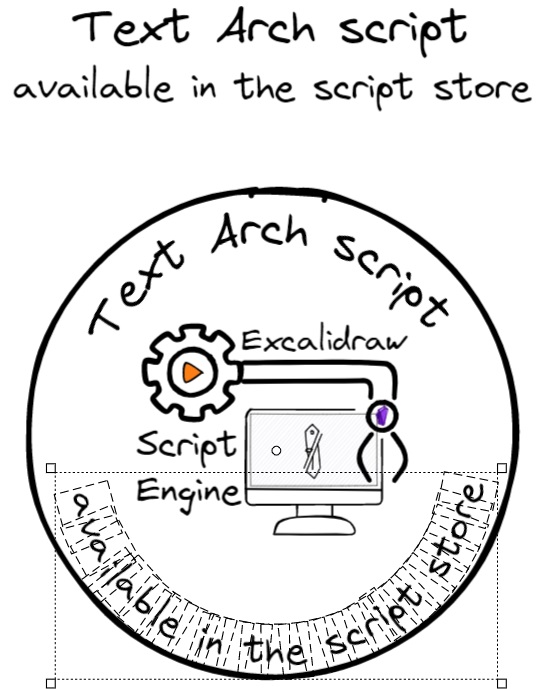
Fit a text to the arch of a circle. The script will prompt you for the radius of the circle and then split your text to individual letters and place each letter to the arch defined by the radius. Setting a lower radius value will increase the arching of the text. Note that the arched-text will no longer be editable as a text element and it will no longer function as a markdown link. Emojis are currently not supported.
|
||||
|
||||
```javascript
|
||||
*/
|
||||
el = ea.getViewSelectedElement();
|
||||
if(!el || el.type!=="text") {
|
||||
new Notice("Please select a text element");
|
||||
return;
|
||||
}
|
||||
|
||||
ea.style.fontSize = el.fontSize;
|
||||
ea.style.fontFamily = el.fontFamily;
|
||||
ea.style.strokeColor = el.strokeColor;
|
||||
ea.style.opacity = el.opacity;
|
||||
|
||||
const r = parseInt (await utils.inputPrompt("The radius of the arch you'd like to fit the text to","number","150"));
|
||||
const archAbove = await utils.suggester(["Arch above","Arch below"],[true,false]);
|
||||
|
||||
if(isNaN(r)) {
|
||||
new Notice("The radius is not a number");
|
||||
return;
|
||||
}
|
||||
|
||||
circlePoint = (angle) => archAbove
|
||||
? [
|
||||
r * Math.sin(angle),
|
||||
-r * Math.cos(angle)
|
||||
]
|
||||
: [
|
||||
-r * Math.sin(angle),
|
||||
r * Math.cos(angle)
|
||||
];
|
||||
|
||||
let rot = (archAbove ? -0.5 : 0.5) * ea.measureText(el.text).width/r;
|
||||
|
||||
let objectIDs = [];
|
||||
for(i=0;i<el.text.length;i++) {
|
||||
const character = el.text.substring(i,i+1);
|
||||
const width = ea.measureText(character).width;
|
||||
ea.style.angle = rot;
|
||||
const [x,y] = circlePoint(rot);
|
||||
rot += (archAbove ? 1 : -1) *width / r;
|
||||
objectIDs.push(ea.addText(x,y,character));
|
||||
}
|
||||
ea.addToGroup(objectIDs);
|
||||
ea.addElementsToView(true, false, true);
|
||||
File diff suppressed because it is too large
Load Diff

|
Before Width: | Height: | Size: 327 B After Width: | Height: | Size: 327 B |
@@ -0,0 +1,476 @@
|
||||
/**
|
||||
* Converts an ellipse element to a line element
|
||||
* @param {Object} ellipse - The ellipse element to convert
|
||||
* @param {number} pointDensity - Optional number of points to generate (defaults to 64)
|
||||
* @returns {string} The ID of the created line element
|
||||
```js*/
|
||||
function ellipseToLine(ellipse, pointDensity = 64) {
|
||||
if (!ellipse || ellipse.type !== "ellipse") {
|
||||
throw new Error("Input must be an ellipse element");
|
||||
}
|
||||
|
||||
// Calculate points along the ellipse perimeter
|
||||
const stepSize = (Math.PI * 2) / pointDensity;
|
||||
const points = drawEllipse(
|
||||
ellipse.x,
|
||||
ellipse.y,
|
||||
ellipse.width,
|
||||
ellipse.height,
|
||||
ellipse.angle,
|
||||
0,
|
||||
Math.PI * 2,
|
||||
stepSize
|
||||
);
|
||||
|
||||
// Save original styling to apply to the new line
|
||||
const originalStyling = {
|
||||
strokeColor: ellipse.strokeColor,
|
||||
strokeWidth: ellipse.strokeWidth,
|
||||
backgroundColor: ellipse.backgroundColor,
|
||||
fillStyle: ellipse.fillStyle,
|
||||
roughness: ellipse.roughness,
|
||||
strokeSharpness: ellipse.strokeSharpness,
|
||||
frameId: ellipse.frameId,
|
||||
groupIds: [...ellipse.groupIds],
|
||||
opacity: ellipse.opacity
|
||||
};
|
||||
|
||||
// Use current style
|
||||
const prevStyle = {...ea.style};
|
||||
|
||||
// Apply ellipse styling to the line
|
||||
ea.style.strokeColor = originalStyling.strokeColor;
|
||||
ea.style.strokeWidth = originalStyling.strokeWidth;
|
||||
ea.style.backgroundColor = originalStyling.backgroundColor;
|
||||
ea.style.fillStyle = originalStyling.fillStyle;
|
||||
ea.style.roughness = originalStyling.roughness;
|
||||
ea.style.strokeSharpness = originalStyling.strokeSharpness;
|
||||
ea.style.opacity = originalStyling.opacity;
|
||||
|
||||
// Create the line and close it
|
||||
const lineId = ea.addLine(points);
|
||||
const line = ea.getElement(lineId);
|
||||
|
||||
// Make it a polygon to close the path
|
||||
line.polygon = true;
|
||||
|
||||
// Transfer grouping and frame information
|
||||
line.frameId = originalStyling.frameId;
|
||||
line.groupIds = originalStyling.groupIds;
|
||||
|
||||
// Restore previous style
|
||||
ea.style = prevStyle;
|
||||
|
||||
return lineId;
|
||||
|
||||
// Helper function from the Split Ellipse script
|
||||
function drawEllipse(x, y, width, height, angle = 0, start = 0, end = Math.PI*2, step = Math.PI/32) {
|
||||
const ellipse = (t) => {
|
||||
const spanningVector = rotateVector([width/2*Math.cos(t), height/2*Math.sin(t)], angle);
|
||||
const baseVector = [x+width/2, y+height/2];
|
||||
return addVectors([baseVector, spanningVector]);
|
||||
}
|
||||
|
||||
if(end <= start) end = end + Math.PI*2;
|
||||
|
||||
let points = [];
|
||||
const almostEnd = end - step/2;
|
||||
for (let t = start; t < almostEnd; t = t + step) {
|
||||
points.push(ellipse(t));
|
||||
}
|
||||
points.push(ellipse(end));
|
||||
return points;
|
||||
}
|
||||
|
||||
function rotateVector(vec, ang) {
|
||||
var cos = Math.cos(ang);
|
||||
var sin = Math.sin(ang);
|
||||
return [vec[0] * cos - vec[1] * sin, vec[0] * sin + vec[1] * cos];
|
||||
}
|
||||
|
||||
function addVectors(vectors) {
|
||||
return vectors.reduce((acc, vec) => [acc[0] + vec[0], acc[1] + vec[1]], [0, 0]);
|
||||
}
|
||||
}
|
||||
|
||||
/**
|
||||
* Converts a rectangle element to a line element
|
||||
* @param {Object} rectangle - The rectangle element to convert
|
||||
* @param {number} pointDensity - Optional number of points to generate for curved segments (defaults to 16)
|
||||
* @returns {string} The ID of the created line element
|
||||
*/
|
||||
function rectangleToLine(rectangle, pointDensity = 16) {
|
||||
if (!rectangle || rectangle.type !== "rectangle") {
|
||||
throw new Error("Input must be a rectangle element");
|
||||
}
|
||||
|
||||
// Save original styling to apply to the new line
|
||||
const originalStyling = {
|
||||
strokeColor: rectangle.strokeColor,
|
||||
strokeWidth: rectangle.strokeWidth,
|
||||
backgroundColor: rectangle.backgroundColor,
|
||||
fillStyle: rectangle.fillStyle,
|
||||
roughness: rectangle.roughness,
|
||||
strokeSharpness: rectangle.strokeSharpness,
|
||||
frameId: rectangle.frameId,
|
||||
groupIds: [...rectangle.groupIds],
|
||||
opacity: rectangle.opacity
|
||||
};
|
||||
|
||||
// Use current style
|
||||
const prevStyle = {...ea.style};
|
||||
|
||||
// Apply rectangle styling to the line
|
||||
ea.style.strokeColor = originalStyling.strokeColor;
|
||||
ea.style.strokeWidth = originalStyling.strokeWidth;
|
||||
ea.style.backgroundColor = originalStyling.backgroundColor;
|
||||
ea.style.fillStyle = originalStyling.fillStyle;
|
||||
ea.style.roughness = originalStyling.roughness;
|
||||
ea.style.strokeSharpness = originalStyling.strokeSharpness;
|
||||
ea.style.opacity = originalStyling.opacity;
|
||||
|
||||
// Calculate points for the rectangle perimeter
|
||||
const points = generateRectanglePoints(rectangle, pointDensity);
|
||||
|
||||
// Create the line and close it
|
||||
const lineId = ea.addLine(points);
|
||||
const line = ea.getElement(lineId);
|
||||
|
||||
// Make it a polygon to close the path
|
||||
line.polygon = true;
|
||||
|
||||
// Transfer grouping and frame information
|
||||
line.frameId = originalStyling.frameId;
|
||||
line.groupIds = originalStyling.groupIds;
|
||||
|
||||
// Restore previous style
|
||||
ea.style = prevStyle;
|
||||
|
||||
return lineId;
|
||||
|
||||
// Helper function to generate rectangle points with optional rounded corners
|
||||
function generateRectanglePoints(rectangle, pointDensity) {
|
||||
const { x, y, width, height, angle = 0 } = rectangle;
|
||||
const centerX = x + width / 2;
|
||||
const centerY = y + height / 2;
|
||||
|
||||
// If no roundness, create a simple rectangle
|
||||
if (!rectangle.roundness) {
|
||||
const corners = [
|
||||
[x, y], // top-left
|
||||
[x + width, y], // top-right
|
||||
[x + width, y + height], // bottom-right
|
||||
[x, y + height], // bottom-left
|
||||
[x,y] //origo
|
||||
];
|
||||
|
||||
// Apply rotation if needed
|
||||
if (angle !== 0) {
|
||||
return corners.map(point => rotatePoint(point, [centerX, centerY], angle));
|
||||
}
|
||||
return corners;
|
||||
}
|
||||
|
||||
// Handle rounded corners
|
||||
const points = [];
|
||||
|
||||
// Calculate corner radius using Excalidraw's algorithm
|
||||
const cornerRadius = getCornerRadius(Math.min(width, height), rectangle);
|
||||
const clampedRadius = Math.min(cornerRadius, width / 2, height / 2);
|
||||
|
||||
// Corner positions
|
||||
const topLeft = [x + clampedRadius, y + clampedRadius];
|
||||
const topRight = [x + width - clampedRadius, y + clampedRadius];
|
||||
const bottomRight = [x + width - clampedRadius, y + height - clampedRadius];
|
||||
const bottomLeft = [x + clampedRadius, y + height - clampedRadius];
|
||||
|
||||
// Add top-left corner arc
|
||||
points.push(...createArc(
|
||||
topLeft[0], topLeft[1], clampedRadius, Math.PI, Math.PI * 1.5, pointDensity));
|
||||
|
||||
// Add top edge
|
||||
points.push([x + clampedRadius, y], [x + width - clampedRadius, y]);
|
||||
|
||||
// Add top-right corner arc
|
||||
points.push(...createArc(
|
||||
topRight[0], topRight[1], clampedRadius, Math.PI * 1.5, Math.PI * 2, pointDensity));
|
||||
|
||||
// Add right edge
|
||||
points.push([x + width, y + clampedRadius], [x + width, y + height - clampedRadius]);
|
||||
|
||||
// Add bottom-right corner arc
|
||||
points.push(...createArc(
|
||||
bottomRight[0], bottomRight[1], clampedRadius, 0, Math.PI * 0.5, pointDensity));
|
||||
|
||||
// Add bottom edge
|
||||
points.push([x + width - clampedRadius, y + height], [x + clampedRadius, y + height]);
|
||||
|
||||
// Add bottom-left corner arc
|
||||
points.push(...createArc(
|
||||
bottomLeft[0], bottomLeft[1], clampedRadius, Math.PI * 0.5, Math.PI, pointDensity));
|
||||
|
||||
// Add left edge
|
||||
points.push([x, y + height - clampedRadius], [x, y + clampedRadius]);
|
||||
|
||||
// Apply rotation if needed
|
||||
if (angle !== 0) {
|
||||
return points.map(point => rotatePoint(point, [centerX, centerY], angle));
|
||||
}
|
||||
|
||||
return points;
|
||||
}
|
||||
|
||||
// Helper function to create an arc of points
|
||||
function createArc(centerX, centerY, radius, startAngle, endAngle, pointDensity) {
|
||||
const points = [];
|
||||
const angleStep = (endAngle - startAngle) / pointDensity;
|
||||
|
||||
for (let i = 0; i <= pointDensity; i++) {
|
||||
const angle = startAngle + i * angleStep;
|
||||
const x = centerX + radius * Math.cos(angle);
|
||||
const y = centerY + radius * Math.sin(angle);
|
||||
points.push([x, y]);
|
||||
}
|
||||
|
||||
return points;
|
||||
}
|
||||
|
||||
// Helper function to rotate a point around a center
|
||||
function rotatePoint(point, center, angle) {
|
||||
const sin = Math.sin(angle);
|
||||
const cos = Math.cos(angle);
|
||||
|
||||
// Translate point to origin
|
||||
const x = point[0] - center[0];
|
||||
const y = point[1] - center[1];
|
||||
|
||||
// Rotate point
|
||||
const xNew = x * cos - y * sin;
|
||||
const yNew = x * sin + y * cos;
|
||||
|
||||
// Translate point back
|
||||
return [xNew + center[0], yNew + center[1]];
|
||||
}
|
||||
}
|
||||
|
||||
function getCornerRadius(x, element) {
|
||||
const fixedRadiusSize = element.roundness?.value ?? 32;
|
||||
const CUTOFF_SIZE = fixedRadiusSize / 0.25;
|
||||
if (x <= CUTOFF_SIZE) {
|
||||
return x * 0.25;
|
||||
}
|
||||
return fixedRadiusSize;
|
||||
}
|
||||
|
||||
/**
|
||||
* Converts a diamond element to a line element
|
||||
* @param {Object} diamond - The diamond element to convert
|
||||
* @param {number} pointDensity - Optional number of points to generate for curved segments (defaults to 16)
|
||||
* @returns {string} The ID of the created line element
|
||||
*/
|
||||
function diamondToLine(diamond, pointDensity = 16) {
|
||||
if (!diamond || diamond.type !== "diamond") {
|
||||
throw new Error("Input must be a diamond element");
|
||||
}
|
||||
|
||||
// Save original styling to apply to the new line
|
||||
const originalStyling = {
|
||||
strokeColor: diamond.strokeColor,
|
||||
strokeWidth: diamond.strokeWidth,
|
||||
backgroundColor: diamond.backgroundColor,
|
||||
fillStyle: diamond.fillStyle,
|
||||
roughness: diamond.roughness,
|
||||
strokeSharpness: diamond.strokeSharpness,
|
||||
frameId: diamond.frameId,
|
||||
groupIds: [...diamond.groupIds],
|
||||
opacity: diamond.opacity
|
||||
};
|
||||
|
||||
// Use current style
|
||||
const prevStyle = {...ea.style};
|
||||
|
||||
// Apply diamond styling to the line
|
||||
ea.style.strokeColor = originalStyling.strokeColor;
|
||||
ea.style.strokeWidth = originalStyling.strokeWidth;
|
||||
ea.style.backgroundColor = originalStyling.backgroundColor;
|
||||
ea.style.fillStyle = originalStyling.fillStyle;
|
||||
ea.style.roughness = originalStyling.roughness;
|
||||
ea.style.strokeSharpness = originalStyling.strokeSharpness;
|
||||
ea.style.opacity = originalStyling.opacity;
|
||||
|
||||
// Calculate points for the diamond perimeter
|
||||
const points = generateDiamondPoints(diamond, pointDensity);
|
||||
|
||||
// Create the line and close it
|
||||
const lineId = ea.addLine(points);
|
||||
const line = ea.getElement(lineId);
|
||||
|
||||
// Make it a polygon to close the path
|
||||
line.polygon = true;
|
||||
|
||||
// Transfer grouping and frame information
|
||||
line.frameId = originalStyling.frameId;
|
||||
line.groupIds = originalStyling.groupIds;
|
||||
|
||||
// Restore previous style
|
||||
ea.style = prevStyle;
|
||||
|
||||
return lineId;
|
||||
|
||||
function generateDiamondPoints(diamond, pointDensity) {
|
||||
const { x, y, width, height, angle = 0 } = diamond;
|
||||
const cx = x + width / 2;
|
||||
const cy = y + height / 2;
|
||||
|
||||
// Diamond corners
|
||||
const top = [cx, y];
|
||||
const right = [x + width, cy];
|
||||
const bottom = [cx, y + height];
|
||||
const left = [x, cy];
|
||||
|
||||
if (!diamond.roundness) {
|
||||
const corners = [top, right, bottom, left, top];
|
||||
if (angle !== 0) {
|
||||
return corners.map(pt => rotatePoint(pt, [cx, cy], angle));
|
||||
}
|
||||
return corners;
|
||||
}
|
||||
|
||||
// Clamp radius
|
||||
const r = Math.min(
|
||||
getCornerRadius(Math.min(width, height) / 2, diamond),
|
||||
width / 2,
|
||||
height / 2
|
||||
);
|
||||
|
||||
// For a diamond, the rounded corner is a *bezier* between the two adjacent edge points, not a circular arc.
|
||||
// Excalidraw uses a quadratic bezier for each corner, with the control point at the corner itself.
|
||||
|
||||
// Calculate edge directions
|
||||
function sub(a, b) { return [a[0] - b[0], a[1] - b[1]]; }
|
||||
function add(a, b) { return [a[0] + b[0], a[1] + b[1]]; }
|
||||
function norm([x, y]) {
|
||||
const len = Math.hypot(x, y);
|
||||
return [x / len, y / len];
|
||||
}
|
||||
function scale([x, y], s) { return [x * s, y * s]; }
|
||||
|
||||
// For each corner, move along both adjacent edges by r to get arc endpoints
|
||||
// Order: top, right, bottom, left
|
||||
const corners = [top, right, bottom, left];
|
||||
const next = [right, bottom, left, top];
|
||||
const prev = [left, top, right, bottom];
|
||||
|
||||
// For each corner, calculate the two points where the straight segments meet the arc
|
||||
const arcPoints = [];
|
||||
for (let i = 0; i < 4; ++i) {
|
||||
const c = corners[i];
|
||||
const n = next[i];
|
||||
const p = prev[i];
|
||||
const toNext = norm(sub(n, c));
|
||||
const toPrev = norm(sub(p, c));
|
||||
arcPoints.push([
|
||||
add(c, scale(toPrev, r)), // start of arc (from previous edge)
|
||||
add(c, scale(toNext, r)), // end of arc (to next edge)
|
||||
c // control point for bezier
|
||||
]);
|
||||
}
|
||||
|
||||
// Helper: quadratic bezier between p0 and p2 with control p1
|
||||
function bezier(p0, p1, p2, density) {
|
||||
const pts = [];
|
||||
for (let i = 0; i <= density; ++i) {
|
||||
const t = i / density;
|
||||
const mt = 1 - t;
|
||||
pts.push([
|
||||
mt*mt*p0[0] + 2*mt*t*p1[0] + t*t*p2[0],
|
||||
mt*mt*p0[1] + 2*mt*t*p1[1] + t*t*p2[1]
|
||||
]);
|
||||
}
|
||||
return pts;
|
||||
}
|
||||
|
||||
// Build path: for each corner, straight line to arc start, then bezier to arc end using corner as control
|
||||
let pts = [];
|
||||
for (let i = 0; i < 4; ++i) {
|
||||
const prevArc = arcPoints[(i + 3) % 4];
|
||||
const arc = arcPoints[i];
|
||||
if (i === 0) {
|
||||
pts.push(arc[0]);
|
||||
} else {
|
||||
pts.push(arc[0]);
|
||||
}
|
||||
// Quadratic bezier from arc[0] to arc[1] with control at arc[2] (the corner)
|
||||
pts.push(...bezier(arc[0], arc[2], arc[1], pointDensity));
|
||||
}
|
||||
pts.push(arcPoints[0][0]); // close
|
||||
|
||||
if (angle !== 0) {
|
||||
return pts.map(pt => rotatePoint(pt, [cx, cy], angle));
|
||||
}
|
||||
return pts;
|
||||
}
|
||||
|
||||
// Helper function to create an arc between two points
|
||||
function createArcBetweenPoints(startPoint, endPoint, centerX, centerY, pointDensity) {
|
||||
const startAngle = Math.atan2(startPoint[1] - centerY, startPoint[0] - centerX);
|
||||
const endAngle = Math.atan2(endPoint[1] - centerY, endPoint[0] - centerX);
|
||||
|
||||
// Ensure angles are in correct order for arc drawing
|
||||
let adjustedEndAngle = endAngle;
|
||||
if (endAngle < startAngle) {
|
||||
adjustedEndAngle += 2 * Math.PI;
|
||||
}
|
||||
|
||||
const points = [];
|
||||
const angleStep = (adjustedEndAngle - startAngle) / pointDensity;
|
||||
|
||||
// Start with the straight line to arc start
|
||||
points.push(startPoint);
|
||||
|
||||
// Create arc points
|
||||
for (let i = 1; i < pointDensity; i++) {
|
||||
const angle = startAngle + i * angleStep;
|
||||
const distance = Math.hypot(startPoint[0] - centerX, startPoint[1] - centerY);
|
||||
const x = centerX + distance * Math.cos(angle);
|
||||
const y = centerY + distance * Math.sin(angle);
|
||||
points.push([x, y]);
|
||||
}
|
||||
|
||||
// Add the end point of the arc
|
||||
points.push(endPoint);
|
||||
|
||||
return points;
|
||||
}
|
||||
|
||||
// Helper function to rotate a point around a center
|
||||
function rotatePoint(point, center, angle) {
|
||||
const sin = Math.sin(angle);
|
||||
const cos = Math.cos(angle);
|
||||
|
||||
// Translate point to origin
|
||||
const x = point[0] - center[0];
|
||||
const y = point[1] - center[1];
|
||||
|
||||
// Rotate point
|
||||
const xNew = x * cos - y * sin;
|
||||
const yNew = x * sin + y * cos;
|
||||
|
||||
// Translate point back
|
||||
return [xNew + center[0], yNew + center[1]];
|
||||
}
|
||||
}
|
||||
|
||||
const el = ea.getViewSelectedElement();
|
||||
switch (el.type) {
|
||||
case "rectangle":
|
||||
rectangleToLine(el);
|
||||
break;
|
||||
case "ellipse":
|
||||
ellipseToLine(el);
|
||||
break;
|
||||
case "diamond":
|
||||
diamondToLine(el);
|
||||
break;
|
||||
}
|
||||
ea.addElementsToView();
|
||||
File diff suppressed because one or more lines are too long
+13
-7
@@ -73,8 +73,8 @@ I would love to include your contribution in the script library. If you have a s
|
||||
|<div><img src="https://raw.githubusercontent.com/zsviczian/obsidian-excalidraw-plugin/master/ea-scripts/Set%20Font%20Family.svg"/></div>|[[#Set Font Family]]|
|
||||
|<div><img src="https://raw.githubusercontent.com/zsviczian/obsidian-excalidraw-plugin/master/ea-scripts/Set%20Text%20Alignment.svg"/></div>|[[#Set Text Alignment]]|
|
||||
|<div><img src="https://raw.githubusercontent.com/zsviczian/obsidian-excalidraw-plugin/master/ea-scripts/Split%20text%20by%20lines.svg"/></div>|[[#Split text by lines]]|
|
||||
|<div><img src="https://raw.githubusercontent.com/zsviczian/obsidian-excalidraw-plugin/master/ea-scripts/Text%20Arch.svg"/></div>|[[#Text Arch]]|
|
||||
|<div><img src="https://raw.githubusercontent.com/zsviczian/obsidian-excalidraw-plugin/master/ea-scripts/Text%20Aura.svg"/></div>|[[#Text Aura]]|
|
||||
|<div><img src="https://raw.githubusercontent.com/zsviczian/obsidian-excalidraw-plugin/master/ea-scripts/Text%20to%20Path.svg"/></div>|[[#Text to Path]]|
|
||||
|<div><img src="https://raw.githubusercontent.com/zsviczian/obsidian-excalidraw-plugin/master/ea-scripts/Text%20to%20Sticky%20Notes.svg"/></div>|[[#Text to Sticky Notes]]|
|
||||
|
||||
## Styling and Appearance
|
||||
@@ -596,18 +596,24 @@ https://raw.githubusercontent.com/zsviczian/obsidian-excalidraw-plugin/master/ea
|
||||
```
|
||||
<table><tr valign='top'><td class="label">Author</td><td class="data"><a href='https://github.com/zsviczian'>@zsviczian</a></td></tr><tr valign='top'><td class="label">Source</td><td class="data"><a href='https://github.com/zsviczian/obsidian-excalidraw-plugin/blob/master/ea-scripts/Split%20text%20by%20lines.md'>File on GitHub</a></td></tr><tr valign='top'><td class="label">Description</td><td class="data">Split lines of text into separate text elements for easier reorganization<br><img src='https://raw.githubusercontent.com/zsviczian/obsidian-excalidraw-plugin/master/images/scripts-split-lines.jpg'></td></tr></table>
|
||||
|
||||
## Text Arch
|
||||
```excalidraw-script-install
|
||||
https://raw.githubusercontent.com/zsviczian/obsidian-excalidraw-plugin/master/ea-scripts/Text%20Arch.md
|
||||
```
|
||||
<table><tr valign='top'><td class="label">Author</td><td class="data"><a href='https://github.com/zsviczian'>@zsviczian</a></td></tr><tr valign='top'><td class="label">Source</td><td class="data"><a href='https://github.com/zsviczian/obsidian-excalidraw-plugin/blob/master/ea-scripts/Text%20Arch.md'>File on GitHub</a></td></tr><tr valign='top'><td class="label">Description</td><td class="data">Fit a text to the arch of a circle. The script will prompt you for the radius of the circle and then split your text to individual letters and place each letter to the arch defined by the radius. Setting a lower radius value will increase the arching of the text. Note that the arched-text will no longer be editable as a text element and it will no longer function as a markdown link. Emojis are currently not supported.<br><img src='https://raw.githubusercontent.com/zsviczian/obsidian-excalidraw-plugin/master/images/text-arch.jpg'></td></tr></table>
|
||||
|
||||
## Text Aura
|
||||
```excalidraw-script-install
|
||||
https://raw.githubusercontent.com/zsviczian/obsidian-excalidraw-plugin/master/ea-scripts/Text%20Aura.md
|
||||
```
|
||||
<table><tr valign='top'><td class="label">Author</td><td class="data"><a href='https://github.com/zsviczian'>@zsviczian</a></td></tr><tr valign='top'><td class="label">Source</td><td class="data"><a href='https://github.com/zsviczian/obsidian-excalidraw-plugin/blob/master/ea-scripts/Text%20Aura.md'>File on GitHub</a></td></tr><tr valign='top'><td class="label">Description</td><td class="data">Select a single text element, or a text element in a container. The container must have a transparent background.<br>The script will add an aura to the text by adding 4 copies of the text each with the inverted stroke color of the original text element and with a very small X and Y offset. The resulting 4 + 1 (original) text elements or containers will be grouped.<br>If you copy a color string on the clipboard before running the script, the script will use that color instead of the inverted color.<br><img src='https://raw.githubusercontent.com/zsviczian/obsidian-excalidraw-plugin/master/images/scripts-text-aura.jpg'></td></tr></table>
|
||||
|
||||
## Text to Path
|
||||
```excalidraw-script-install
|
||||
https://raw.githubusercontent.com/zsviczian/obsidian-excalidraw-plugin/master/ea-scripts/Text%20to%20Path.md
|
||||
```
|
||||
<table><tr valign='top'><td class="label">Author</td><td class="data"><a href='https://github.com/zsviczian'>@zsviczian</a></td></tr><tr valign='top'><td class="label">Source</td><td class="data"><a href='https://github.com/zsviczian/obsidian-excalidraw-plugin/blob/master/ea-scripts/Text%20to%20Path.md'>File on GitHub</a></td></tr><tr valign='top'><td class="label">Description</td><td class="data">This script allows you to fit a text element along a selected path: line, arrow, freedraw, ellipse, rectangle, or diamond. You can select either a path or a text element, or both:<br><br>
|
||||
- If only a path is selected, you will be prompted to provide the text.<br>
|
||||
- If only a text element is selected and it was previously fitted to a path, the script will use the original path if it is still present in the scene.<br>
|
||||
- If both a text and a path are selected, the script will fit the text to the selected path.<br><br>
|
||||
If the path is a perfect circle, you will be prompted to choose whether to fit the text above or below the circle.<br><br>
|
||||
After fitting, the text will no longer be editable as a standard text element or function as a markdown link. Emojis are not supported.<br>
|
||||
<img src='https://raw.githubusercontent.com/zsviczian/obsidian-excalidraw-plugin/master/images/scripts-text-to-path.jpg'></td></tr></table>
|
||||
|
||||
## Toggle Grid
|
||||
```excalidraw-script-install
|
||||
https://raw.githubusercontent.com/zsviczian/obsidian-excalidraw-plugin/master/ea-scripts/Toggle%20Grid.md
|
||||
|
||||

Binary file not shown.
|
After Width: | Height: | Size: 23 KiB |

Binary file not shown.
|
Before Width: | Height: | Size: 95 KiB |
+2
-2
@@ -1,10 +1,10 @@
|
||||
{
|
||||
"id": "obsidian-excalidraw-plugin",
|
||||
"name": "Excalidraw",
|
||||
"version": "2.9.2",
|
||||
"version": "2.12.0",
|
||||
"minAppVersion": "1.1.6",
|
||||
"description": "An Obsidian plugin to edit and view Excalidraw drawings",
|
||||
"author": "Zsolt Viczian",
|
||||
"authorUrl": "https://zsolt.blog",
|
||||
"authorUrl": "https://excalidraw-obsidian.online",
|
||||
"isDesktopOnly": false
|
||||
}
|
||||
|
||||
+2
-2
@@ -1,11 +1,11 @@
|
||||
{
|
||||
"id": "obsidian-excalidraw-plugin",
|
||||
"name": "Excalidraw",
|
||||
"version": "2.9.2",
|
||||
"version": "2.12.0",
|
||||
"minAppVersion": "1.1.6",
|
||||
"description": "An Obsidian plugin to edit and view Excalidraw drawings",
|
||||
"author": "Zsolt Viczian",
|
||||
"authorUrl": "https://www.zsolt.blog",
|
||||
"authorUrl": "https://excalidraw-obsidian.online",
|
||||
"fundingUrl": "https://ko-fi.com/zsolt",
|
||||
"helpUrl": "https://github.com/zsviczian/obsidian-excalidraw-plugin#readme",
|
||||
"isDesktopOnly": false
|
||||
|
||||
Generated
+2053
-1718
File diff suppressed because it is too large
Load Diff
+1
-1
@@ -23,7 +23,7 @@
|
||||
"license": "MIT",
|
||||
"dependencies": {
|
||||
"@popperjs/core": "^2.11.8",
|
||||
"@zsviczian/excalidraw": "0.18.0-3",
|
||||
"@zsviczian/excalidraw": "0.18.0-17",
|
||||
"chroma-js": "^2.4.2",
|
||||
"clsx": "^2.0.0",
|
||||
"@zsviczian/colormaster": "^1.2.2",
|
||||
|
||||
+1
-1
@@ -2,7 +2,7 @@ import "obsidian";
|
||||
//import { ExcalidrawAutomate } from "./ExcalidrawAutomate";
|
||||
//export ExcalidrawAutomate from "./ExcalidrawAutomate";
|
||||
//export {ExcalidrawAutomate} from "./ExcaildrawAutomate";
|
||||
export type { ExcalidrawBindableElement, ExcalidrawElement, FileId, FillStyle, StrokeRoundness, StrokeStyle } from "@zsviczian/excalidraw/types/excalidraw/element/types";
|
||||
export type { ExcalidrawBindableElement, ExcalidrawElement, FileId, FillStyle, StrokeRoundness, StrokeStyle } from "@zsviczian/excalidraw/types/element/src/types";
|
||||
export type { Point } from "src/types/types";
|
||||
export const getEA = (view?:any): any => {
|
||||
try {
|
||||
|
||||
+6
-2
@@ -61,7 +61,7 @@ import {
|
||||
getFontMetrics,
|
||||
} from "../utils/utils";
|
||||
import { foldExcalidrawSection, getExcalidrawViews, setExcalidrawView } from "../utils/obsidianUtils";
|
||||
import { FileId } from "@zsviczian/excalidraw/types/excalidraw/element/types";
|
||||
import { FileId } from "@zsviczian/excalidraw/types/element/src/types";
|
||||
import { ScriptEngine } from "../shared/Scripts";
|
||||
import { hoverEvent, initializeMarkdownPostProcessor, markdownPostProcessor, legacyExcalidrawPopoverObserver } from "./managers/MarkdownPostProcessor";
|
||||
import { FieldSuggester } from "../shared/Suggesters/FieldSuggester";
|
||||
@@ -566,7 +566,7 @@ export default class ExcalidrawPlugin extends Plugin {
|
||||
}
|
||||
}
|
||||
this.packageManager.getPackageMap().forEach(({excalidrawLib}) => {
|
||||
(excalidrawLib as typeof ExcalidrawLib).registerLocalFont({metrics: fontMetrics as any, icon: null}, fourthFontDataURL);
|
||||
(excalidrawLib as typeof ExcalidrawLib).registerLocalFont({metrics: fontMetrics as any}, fourthFontDataURL);
|
||||
});
|
||||
// Add fonts to open Obsidian documents
|
||||
for(const ownerDocument of this.getOpenObsidianDocuments()) {
|
||||
@@ -1078,6 +1078,10 @@ export default class ExcalidrawPlugin extends Plugin {
|
||||
this.eventManager.onActiveLeafChangeHandler(leaf);
|
||||
}
|
||||
|
||||
public setDebounceActiveLeafChangeHandler() {
|
||||
this.eventManager.setDebounceActiveLeafChangeHandler();
|
||||
}
|
||||
|
||||
public registerHotkeyOverrides() {
|
||||
//this is repeated here because the same function is called when settings is closed after hotkeys have changed
|
||||
if (this.popScope) {
|
||||
|
||||
@@ -51,7 +51,7 @@ import {
|
||||
getImageSize,
|
||||
} from "../../utils/utils";
|
||||
import { extractSVGPNGFileName, getActivePDFPageNumberFromPDFView, getAttachmentsFolderAndFilePath, isObsidianThemeDark, mergeMarkdownFiles, setExcalidrawView } from "../../utils/obsidianUtils";
|
||||
import { ExcalidrawElement, ExcalidrawEmbeddableElement, ExcalidrawImageElement, ExcalidrawTextElement, FileId } from "@zsviczian/excalidraw/types/excalidraw/element/types";
|
||||
import { ExcalidrawElement, ExcalidrawEmbeddableElement, ExcalidrawImageElement, ExcalidrawTextElement, FileId } from "@zsviczian/excalidraw/types/element/src/types";
|
||||
import { ReleaseNotes } from "../../shared/Dialogs/ReleaseNotes";
|
||||
import { ScriptInstallPrompt } from "../../shared/Dialogs/ScriptInstallPrompt";
|
||||
import Taskbone from "../../shared/OCR/Taskbone";
|
||||
@@ -64,7 +64,7 @@ import { EmbeddableSettings } from "../../shared/Dialogs/EmbeddableSettings";
|
||||
import { processLinkText } from "../../utils/customEmbeddableUtils";
|
||||
import { getEA } from "src/core";
|
||||
import { ExcalidrawImperativeAPI } from "@zsviczian/excalidraw/types/excalidraw/types";
|
||||
import { Mutable } from "@zsviczian/excalidraw/types/excalidraw/utility-types";
|
||||
import { Mutable } from "@zsviczian/excalidraw/types/common/src/utility-types";
|
||||
import { carveOutImage, carveOutPDF, createImageCropperFile } from "../../utils/carveout";
|
||||
import { showFrameSettings } from "../../shared/Dialogs/FrameSettings";
|
||||
import { insertImageToView } from "../../utils/excalidrawViewUtils";
|
||||
@@ -1038,8 +1038,13 @@ export class CommandManager {
|
||||
x:Math.max(0,centerX - width/2 + view.ownerWindow.screenX),
|
||||
y:Math.max(0,centerY - height/2 + view.ownerWindow.screenY),
|
||||
}
|
||||
|
||||
const focusOnFileTab = this.settings.focusOnFileTab;
|
||||
//override focusOnFileTab for popout windows
|
||||
if(DEVICE.isDesktop) {
|
||||
this.settings.focusOnFileTab = false;
|
||||
}
|
||||
this.plugin.openDrawing(ef.file, DEVICE.isMobile ? "new-tab":"popout-window", true, undefined, false, {x,y,width,height});
|
||||
this.settings.focusOnFileTab = focusOnFileTab;
|
||||
}
|
||||
})
|
||||
|
||||
|
||||
@@ -1,5 +1,5 @@
|
||||
import { WorkspaceLeaf, TFile, Editor, MarkdownView, MarkdownFileInfo, MetadataCache, App, EventRef, Menu, FileView } from "obsidian";
|
||||
import { ExcalidrawElement } from "@zsviczian/excalidraw/types/excalidraw/element/types";
|
||||
import { ExcalidrawElement } from "@zsviczian/excalidraw/types/element/src/types";
|
||||
import { getLink } from "../../utils/fileUtils";
|
||||
import { editorInsertText, getExcalidrawViews, getParentOfClass, isUnwantedLeaf, setExcalidrawView } from "../../utils/obsidianUtils";
|
||||
import ExcalidrawPlugin from "src/core/main";
|
||||
@@ -21,6 +21,7 @@ export class EventManager {
|
||||
private removeEventLisnters:(()=>void)[] = []; //only used if I register an event directly, not via Obsidian's registerEvent
|
||||
private previouslyActiveLeaf: WorkspaceLeaf;
|
||||
private splitViewLeafSwitchTimestamp: number = 0;
|
||||
private debunceActiveLeafChangeHandlerTimer: number|null = null;
|
||||
|
||||
get settings() {
|
||||
return this.plugin.settings;
|
||||
@@ -103,6 +104,15 @@ export class EventManager {
|
||||
this.plugin.registerEvent(this.plugin.app.workspace.on("editor-menu", this.onEditorMenuHandler.bind(this)));
|
||||
}
|
||||
|
||||
public setDebounceActiveLeafChangeHandler() {
|
||||
if(this.debunceActiveLeafChangeHandlerTimer) {
|
||||
window.clearTimeout(this.debunceActiveLeafChangeHandlerTimer);
|
||||
}
|
||||
this.debunceActiveLeafChangeHandlerTimer = window.setTimeout(() => {
|
||||
this.debunceActiveLeafChangeHandlerTimer = null;
|
||||
}, 50);
|
||||
}
|
||||
|
||||
private onLayoutChangeHandler() {
|
||||
getExcalidrawViews(this.app).forEach(excalidrawView=>excalidrawView.refresh());
|
||||
}
|
||||
@@ -164,6 +174,10 @@ export class EventManager {
|
||||
(process.env.NODE_ENV === 'development') && DEBUGGING && debug(this.onActiveLeafChangeHandler,`onActiveLeafChangeEventHandler`, leaf);
|
||||
//https://github.com/zsviczian/obsidian-excalidraw-plugin/issues/723
|
||||
|
||||
if(this.debunceActiveLeafChangeHandlerTimer) {
|
||||
return;
|
||||
}
|
||||
|
||||
//In Obsidian 1.8.x the active excalidraw leaf is obscured by an empty leaf without a parent
|
||||
//This hack resolves it
|
||||
if(this.app.workspace.activeLeaf === leaf && isUnwantedLeaf(leaf)) {
|
||||
|
||||
@@ -130,7 +130,7 @@ export class ObserverManager {
|
||||
return;
|
||||
}
|
||||
if (this.plugin.isExcalidrawFile(f)) {
|
||||
el.insertBefore(
|
||||
el.insertAfter(
|
||||
createDiv({
|
||||
cls: "nav-file-tag",
|
||||
text: this.settings.experimentalFileTag,
|
||||
|
||||
+85
-11
@@ -43,8 +43,10 @@ import { HotkeyEditor } from "src/shared/Dialogs/HotkeyEditor";
|
||||
import { getExcalidrawViews } from "src/utils/obsidianUtils";
|
||||
import { createSliderWithText } from "src/utils/sliderUtils";
|
||||
import { PDFExportSettingsComponent, PDFExportSettings } from "src/shared/Dialogs/PDFExportSettingsComponent";
|
||||
import de from "src/lang/locale/de";
|
||||
|
||||
export interface ExcalidrawSettings {
|
||||
disableDoubleClickTextEditing: boolean;
|
||||
folder: string;
|
||||
cropFolder: string;
|
||||
annotateFolder: string;
|
||||
@@ -199,6 +201,7 @@ export interface ExcalidrawSettings {
|
||||
markdownNodeOneClickEditing: boolean;
|
||||
canvasImmersiveEmbed: boolean,
|
||||
startupScriptPath: string,
|
||||
aiEnabled: boolean,
|
||||
openAIAPIToken: string,
|
||||
openAIDefaultTextModel: string,
|
||||
openAIDefaultVisionModel: string,
|
||||
@@ -226,6 +229,7 @@ export interface ExcalidrawSettings {
|
||||
declare const PLUGIN_VERSION:string;
|
||||
|
||||
export const DEFAULT_SETTINGS: ExcalidrawSettings = {
|
||||
disableDoubleClickTextEditing: false,
|
||||
folder: "Excalidraw",
|
||||
cropFolder: "",
|
||||
annotateFolder: "",
|
||||
@@ -380,6 +384,7 @@ export const DEFAULT_SETTINGS: ExcalidrawSettings = {
|
||||
DYNAMIC_COLOR: true,
|
||||
COLOR: "#000000",
|
||||
OPACITY: 50,
|
||||
GRID_DIRECTION: {horizontal: true, vertical: true},
|
||||
},
|
||||
laserSettings: {
|
||||
DECAY_LENGTH: 50,
|
||||
@@ -400,6 +405,7 @@ export const DEFAULT_SETTINGS: ExcalidrawSettings = {
|
||||
markdownNodeOneClickEditing: false,
|
||||
canvasImmersiveEmbed: true,
|
||||
startupScriptPath: "",
|
||||
aiEnabled: true,
|
||||
openAIAPIToken: "",
|
||||
openAIDefaultTextModel: "gpt-3.5-turbo-1106",
|
||||
openAIDefaultVisionModel: "gpt-4o",
|
||||
@@ -680,6 +686,17 @@ export class ExcalidrawSettingTab extends PluginSettingTab {
|
||||
}),
|
||||
);
|
||||
|
||||
new Setting(detailsEl)
|
||||
.setName(t("TOGGLE_SPLASHSCREEN"))
|
||||
.addToggle((toggle) =>
|
||||
toggle
|
||||
.setValue(this.plugin.settings.showSplashscreen)
|
||||
.onChange((value)=> {
|
||||
this.plugin.settings.showSplashscreen = value;
|
||||
this.applySettingsUpdate();
|
||||
})
|
||||
)
|
||||
|
||||
new Setting(detailsEl)
|
||||
.setName(t("FOLDER_NAME"))
|
||||
.setDesc(fragWithHTML(t("FOLDER_DESC")))
|
||||
@@ -992,6 +1009,27 @@ export class ExcalidrawSettingTab extends PluginSettingTab {
|
||||
cls: "excalidraw-setting-h1",
|
||||
});
|
||||
|
||||
let aiEl: HTMLElement;
|
||||
|
||||
new Setting(detailsEl)
|
||||
.setName(t("AI_ENABLED_NAME"))
|
||||
.setDesc(fragWithHTML(t("AI_ENABLED_DESC")))
|
||||
.addToggle((toggle) =>
|
||||
toggle
|
||||
.setValue(this.plugin.settings.aiEnabled??true)
|
||||
.onChange(async (value) => {
|
||||
aiEl.style.display = value ? "block" : "none";
|
||||
this.plugin.settings.aiEnabled = value;
|
||||
this.applySettingsUpdate();
|
||||
}),
|
||||
);
|
||||
|
||||
detailsEl = detailsEl.createDiv();
|
||||
aiEl = detailsEl;
|
||||
if(!(this.plugin.settings.aiEnabled??true)) {
|
||||
detailsEl.style.display = "none";
|
||||
}
|
||||
|
||||
new Setting(detailsEl)
|
||||
.setName(t("AI_OPENAI_TOKEN_NAME"))
|
||||
.setDesc(fragWithHTML(t("AI_OPENAI_TOKEN_DESC")))
|
||||
@@ -1069,6 +1107,17 @@ export class ExcalidrawSettingTab extends PluginSettingTab {
|
||||
cls: "excalidraw-setting-h1",
|
||||
});
|
||||
|
||||
new Setting(detailsEl)
|
||||
.setName(t("ENABLE_DOUBLE_CLICK_TEXT_EDITING_NAME"))
|
||||
.addToggle((toggle) =>
|
||||
toggle
|
||||
.setValue(!this.plugin.settings.disableDoubleClickTextEditing)
|
||||
.onChange(async (value) => {
|
||||
this.plugin.settings.disableDoubleClickTextEditing = !value;
|
||||
this.applySettingsUpdate();
|
||||
}),
|
||||
);
|
||||
|
||||
const readingModeEl = new Setting(detailsEl)
|
||||
.setName(t("SHOW_DRAWING_OR_MD_IN_READING_MODE_NAME"))
|
||||
.setDesc(fragWithHTML(t("SHOW_DRAWING_OR_MD_IN_READING_MODE_DESC")))
|
||||
@@ -1111,17 +1160,6 @@ export class ExcalidrawSettingTab extends PluginSettingTab {
|
||||
);
|
||||
addIframe(detailsEl, "H8Njp7ZXYag",999);
|
||||
|
||||
new Setting(detailsEl)
|
||||
.setName(t("TOGGLE_SPLASHSCREEN"))
|
||||
.addToggle((toggle) =>
|
||||
toggle
|
||||
.setValue(this.plugin.settings.showSplashscreen)
|
||||
.onChange((value)=> {
|
||||
this.plugin.settings.showSplashscreen = value;
|
||||
this.applySettingsUpdate();
|
||||
})
|
||||
)
|
||||
|
||||
detailsEl = displayDetailsEl.createEl("details");
|
||||
detailsEl.createEl("summary", {
|
||||
text: t("HOTKEY_OVERRIDE_HEAD"),
|
||||
@@ -1380,6 +1418,42 @@ export class ExcalidrawSettingTab extends PluginSettingTab {
|
||||
getExcalidrawViews(this.app).forEach(excalidrawView=>excalidrawView.updateGridColor());
|
||||
};
|
||||
|
||||
const updateGridDirection = () => {
|
||||
getExcalidrawViews(this.app).forEach(excalidrawView=>
|
||||
excalidrawView.updateGridDirection(this.plugin.settings.gridSettings.GRID_DIRECTION));
|
||||
}
|
||||
|
||||
new Setting(detailsEl)
|
||||
.setName(t("GRID_DIRECTION_NAME"))
|
||||
.setDesc(t("GRID_DIRECTION_DESC"))
|
||||
.addToggle((toggle) =>
|
||||
toggle
|
||||
.setTooltip(t("GRID_HORIZONTAL"))
|
||||
.setValue(this.plugin.settings.gridSettings.GRID_DIRECTION?.horizontal ?? true)
|
||||
.onChange((value) => {
|
||||
if(!this.plugin.settings.gridSettings.GRID_DIRECTION) {
|
||||
this.plugin.settings.gridSettings.GRID_DIRECTION = { horizontal: true, vertical: true };
|
||||
} //2.10.1 migration
|
||||
this.plugin.settings.gridSettings.GRID_DIRECTION.horizontal = value;
|
||||
this.applySettingsUpdate();
|
||||
updateGridDirection();
|
||||
}),
|
||||
)
|
||||
.addToggle((toggle) =>
|
||||
toggle
|
||||
.setTooltip(t("GRID_VERTICAL"))
|
||||
.setValue(this.plugin.settings.gridSettings.GRID_DIRECTION?.vertical ?? true)
|
||||
.onChange((value) => {
|
||||
if(!this.plugin.settings.gridSettings.GRID_DIRECTION) {
|
||||
this.plugin.settings.gridSettings.GRID_DIRECTION = { horizontal: true, vertical: true };
|
||||
} //2.10.1 migration
|
||||
this.plugin.settings.gridSettings.GRID_DIRECTION.vertical = value;
|
||||
this.applySettingsUpdate();
|
||||
updateGridDirection();
|
||||
}),
|
||||
);
|
||||
|
||||
|
||||
// Dynamic color toggle
|
||||
let gridColorSection: HTMLDivElement;
|
||||
new Setting(detailsEl)
|
||||
|
||||
+22
-3
@@ -44,7 +44,7 @@ export default {
|
||||
TRANSCLUDE_MOST_RECENT: "Embed the most recently edited drawing",
|
||||
TOGGLE_LEFTHANDED_MODE: "Toggle left-handed mode",
|
||||
TOGGLE_SPLASHSCREEN: "Show splash screen in new drawings",
|
||||
FLIP_IMAGE: "Open the back-of-the-note of the selected excalidraw image",
|
||||
FLIP_IMAGE: "Open the back-of-the-note for the selected image in a popout window",
|
||||
NEW_IN_NEW_PANE: "Create new drawing - IN AN ADJACENT WINDOW",
|
||||
NEW_IN_NEW_TAB: "Create new drawing - IN A NEW TAB",
|
||||
NEW_IN_ACTIVE_PANE: "Create new drawing - IN THE CURRENT ACTIVE WINDOW",
|
||||
@@ -247,6 +247,8 @@ export default {
|
||||
`While the OpenAI API is in beta, its use is strictly limited — as such we require you use your own API key. ` +
|
||||
`You can create an OpenAI account, add a small credit (5 USD minimum), and generate your own API key. ` +
|
||||
`Once API key is set, you can use the AI tools in Excalidraw.`,
|
||||
AI_ENABLED_NAME: "Enable AI features",
|
||||
AI_ENABLED_DESC: "You need to reopen Excalidraw for the changes to take effect.",
|
||||
AI_OPENAI_TOKEN_NAME: "OpenAI API key",
|
||||
AI_OPENAI_TOKEN_DESC:
|
||||
"You can get your OpenAI API key from your <a href='https://platform.openai.com/api-keys'>OpenAI account</a>.",
|
||||
@@ -369,6 +371,7 @@ FILENAME_HEAD: "Filename",
|
||||
DEFAULT_PEN_MODE_NAME: "Pen mode",
|
||||
DEFAULT_PEN_MODE_DESC:
|
||||
"Should pen mode be automatically enabled when opening Excalidraw?",
|
||||
ENABLE_DOUBLE_CLICK_TEXT_EDITING_NAME: "Enable double-click text create",
|
||||
DISABLE_DOUBLE_TAP_ERASER_NAME: "Enable double-tap eraser in pen mode",
|
||||
DISABLE_SINGLE_FINGER_PANNING_NAME: "Enable single-finger panning in pen mode",
|
||||
SHOW_PEN_MODE_FREEDRAW_CROSSHAIR_NAME: "Show (+) crosshair in pen mode",
|
||||
@@ -427,6 +430,10 @@ FILENAME_HEAD: "Filename",
|
||||
GRID_OPACITY_NAME: "Grid opacity",
|
||||
GRID_OPACITY_DESC: "Grid opacity will also control the opacity of the binding box when binding an arrow to an element.<br>" +
|
||||
"Set the opacity of the grid. 0 is transparent, 100 is opaque.",
|
||||
GRID_DIRECTION_NAME: "Grid direction",
|
||||
GRID_DIRECTION_DESC: "The first toggle shows/hides the horizontal grid, the second toggle shows/hides the vertical grid.",
|
||||
GRID_HORIZONTAL: "Render horizontal grid",
|
||||
GRID_VERTICAL: "Render vertical grid",
|
||||
LASER_HEAD: "Laser pointer",
|
||||
LASER_COLOR: "Laser pointer color",
|
||||
LASER_DECAY_TIME_NAME: "Laser pointer decay time",
|
||||
@@ -456,7 +463,7 @@ FILENAME_HEAD: "Filename",
|
||||
|
||||
FOCUS_ON_EXISTING_TAB_NAME: "Focus on Existing Tab",
|
||||
FOCUS_ON_EXISTING_TAB_DESC: "When opening a link, Excalidraw will focus on the existing tab if the file is already open. " +
|
||||
"Enabling this setting overrides 'Reuse Adjacent Pane' when the file is already open.",
|
||||
"Enabling this setting overrides 'Reuse Adjacent Pane' when the file is already open except for the 'Open the back-of-the-note of the selected excalidraw image' command palette action.",
|
||||
SECOND_ORDER_LINKS_NAME: "Show second-order links",
|
||||
SECOND_ORDER_LINKS_DESC: "Show links when clicking on a link in Excalidraw. Second-order link are backlinks pointing to the link being clicked. " +
|
||||
"When using image icons to connect similar notes, second order links allow you to get to related notes in one click instead of two. " +
|
||||
@@ -742,7 +749,7 @@ FILENAME_HEAD: "Filename",
|
||||
"ExcalidrawAutomate is a scripting and automation API for Excalidraw. Unfortunately, the documentation of the API is sparse. " +
|
||||
"I recommend reading the <a href='https://github.com/zsviczian/obsidian-excalidraw-plugin/blob/master/docs/API/ExcalidrawAutomate.d.ts'>ExcalidrawAutomate.d.ts</a> file, " +
|
||||
"visiting the <a href='https://zsviczian.github.io/obsidian-excalidraw-plugin/'>ExcalidrawAutomate How-to</a> page - though the information " +
|
||||
"here has not been updated for a long while -, and finally to enable the field suggester below. The field suggester will show you the available " +
|
||||
"here has not been updated for a long while -, and finally to enable the field suggester below. The field suggester will show you the available " +
|
||||
"functions, their parameters and short description as you type. The field suggester is the most up-to-date documentation of the API.",
|
||||
FIELD_SUGGESTER_NAME: "Enable Field Suggester",
|
||||
FIELD_SUGGESTER_DESC:
|
||||
@@ -954,6 +961,7 @@ FILENAME_HEAD: "Filename",
|
||||
PROMPT_BUTTON_INSERT_SPACE: "Insert space",
|
||||
PROMPT_BUTTON_INSERT_LINK: "Insert markdown link to file",
|
||||
PROMPT_BUTTON_UPPERCASE: "Uppercase",
|
||||
PROMPT_BUTTON_SPECIAL_CHARS: "Special Characters",
|
||||
PROMPT_SELECT_TEMPLATE: "Select a template",
|
||||
|
||||
//ModifierKeySettings
|
||||
@@ -983,6 +991,7 @@ FILENAME_HEAD: "Filename",
|
||||
|
||||
//Utils.ts
|
||||
UPDATE_AVAILABLE: `A newer version of Excalidraw is available in Community Plugins.\n\nYou are using ${PLUGIN_VERSION}.\nThe latest is`,
|
||||
SCRIPT_UPDATES_AVAILABLE: `Script updates available - check the script store.\n\n${DEVICE.isDesktop ? `This message is available in console.log (${DEVICE.isMacOS ? "CMD+OPT+i" : "CTRL+SHIFT+i"})\n\n` : ""}If you have organized scripts into subfolders under the script store folder and have multiple copies of the same script, you may need to clean up unused versions to clear this alert. For private copies of scripts that should not be updated, store them outside the script store folder.`,
|
||||
ERROR_PNG_TOO_LARGE: "Error exporting PNG - PNG too large, try a smaller resolution",
|
||||
|
||||
//modifierkeyHelper.ts
|
||||
@@ -1093,6 +1102,16 @@ FILENAME_HEAD: "Filename",
|
||||
EXPORTDIALOG_PDF_PROGRESS_DONE: "Export complete",
|
||||
EXPORTDIALOG_PDF_PROGRESS_ERROR: "Error exporting PDF, check developer console for details",
|
||||
|
||||
// Screenshot tab
|
||||
EXPORTDIALOG_NOT_AVAILALBE: "Sorry, this feature is only available when the drawing is open in the main Obsidian workspace.",
|
||||
EXPORTDIALOG_TAB_SCREENSHOT: "Screenshot",
|
||||
EXPORTDIALOG_SCREENSHOT_DESC: "Screenshots will include embeddables such as markdown pages, YouTube, websites, etc. They are only available on desktop, cannot be automatically exported, and only support PNG format.",
|
||||
SCREENSHOT_DESKTOP_ONLY: "Screenshot feature is only available on desktop",
|
||||
SCREENSHOT_FILE_SUCCESS: "Screenshot saved to vault",
|
||||
SCREENSHOT_CLIPBOARD_SUCCESS: "Screenshot copied to clipboard",
|
||||
SCREENSHOT_CLIPBOARD_ERROR: "Failed to copy screenshot to clipboard: ",
|
||||
SCREENSHOT_ERROR: "Error capturing screenshot - see console log",
|
||||
|
||||
//exportUtils.ts
|
||||
PDF_EXPORT_DESKTOP_ONLY: "PDF export is only available on desktop",
|
||||
};
|
||||
|
||||
@@ -44,7 +44,7 @@ export default {
|
||||
TRANSCLUDE_MOST_RECENT: "嵌入最近编辑过的绘图(形如 ![[drawing]])到当前 Markdown 文档中",
|
||||
TOGGLE_LEFTHANDED_MODE: "切换为左手模式",
|
||||
TOGGLE_SPLASHSCREEN: "在新绘图中显示启动画面",
|
||||
FLIP_IMAGE: "打开当前所选 excalidraw 图像的“背景笔记”",
|
||||
FLIP_IMAGE: "在弹出窗口中打开当前所选图像的“背景笔记”",
|
||||
NEW_IN_NEW_PANE: "新建绘图 - 于新面板",
|
||||
NEW_IN_NEW_TAB: "新建绘图 - 于新页签",
|
||||
NEW_IN_ACTIVE_PANE: "新建绘图 - 于当前面板",
|
||||
@@ -247,6 +247,8 @@ export default {
|
||||
`目前 OpenAI API 还处于测试中,您需要在自己的。` +
|
||||
`OpenAI 账户中充值至少 5 美元后才能生成 API key,` +
|
||||
`然后就可以在 Excalidraw 中配置并使用 AI。`,
|
||||
AI_ENABLED_NAME : "启用 AI 功能" ,
|
||||
AI_ENABLED_DESC : "您需要重新打开 Excalidraw 才能使更改生效。" ,
|
||||
AI_OPENAI_TOKEN_NAME: "OpenAI API key",
|
||||
AI_OPENAI_TOKEN_DESC:
|
||||
"您可以访问您的<a href='https://platform.openai.com/api-keys'> OpenAI 账户</a>来获取自己的 OpenAI API key。",
|
||||
@@ -369,6 +371,7 @@ FILENAME_HEAD: "文件名",
|
||||
DEFAULT_PEN_MODE_NAME: "触控笔模式(Pen mode)",
|
||||
DEFAULT_PEN_MODE_DESC:
|
||||
"打开绘图时,是否自动开启触控笔模式?",
|
||||
ENABLE_DOUBLE_CLICK_TEXT_EDITING_NAME : "启用双击文本创建",
|
||||
DISABLE_DOUBLE_TAP_ERASER_NAME: "启用手写模式下的双击橡皮擦功能",
|
||||
DISABLE_SINGLE_FINGER_PANNING_NAME: "启用手写模式下的单指平移功能",
|
||||
SHOW_PEN_MODE_FREEDRAW_CROSSHAIR_NAME: "在触控笔模式下显示十字准星(+)",
|
||||
@@ -427,6 +430,10 @@ FILENAME_HEAD: "文件名",
|
||||
GRID_OPACITY_NAME: "网格透明度",
|
||||
GRID_OPACITY_DESC: "网格透明度还将控制将箭头绑定到元素时绑定框的透明度。<br>"+
|
||||
"设置网格的不透明度。 0 表示完全透明,100 表示完全不透明。",
|
||||
GRID_DIRECTION_NAME : "网格方向" ,
|
||||
GRID_DIRECTION_DESC : "第一个开关显示/隐藏水平网格,第二个开关显示/隐藏垂直网格。" ,
|
||||
GRID_HORIZONTAL : "渲染水平网格" ,
|
||||
GRID_VERTICAL : "渲染垂直网格" ,
|
||||
LASER_HEAD: "激光笔工具(更多工具 > 激光笔)",
|
||||
LASER_COLOR: "激光笔颜色",
|
||||
LASER_DECAY_TIME_NAME: "激光笔消失时间",
|
||||
@@ -456,7 +463,7 @@ FILENAME_HEAD: "文件名",
|
||||
|
||||
FOCUS_ON_EXISTING_TAB_NAME: "聚焦于当前标签页",
|
||||
FOCUS_ON_EXISTING_TAB_DESC: "当打开一个链接时,如果该文件已经打开,Excalidraw 将会聚焦到现有的标签页上 " +
|
||||
"启用这个设置会在文件已经打开的情况下覆盖“重用相邻窗格”的设置。",
|
||||
"启用此设置时,如果文件已打开,将覆盖“重用相邻窗格”,但“打开所选 Excalidraw 图像的背影笔记”命令面板操作除外。",
|
||||
SECOND_ORDER_LINKS_NAME: "显示二级链接",
|
||||
SECOND_ORDER_LINKS_DESC: "在 Excalidraw 中点击链接时显示链接。二级链接是指指向被点击链接的反向链接" +
|
||||
"当使用图标连接相似的笔记时,二级链接可以让你直接到达相关笔记,而不需要两次点击。" +
|
||||
@@ -954,6 +961,7 @@ FILENAME_HEAD: "文件名",
|
||||
PROMPT_BUTTON_INSERT_SPACE: "插入空格",
|
||||
PROMPT_BUTTON_INSERT_LINK: "插入内部链接",
|
||||
PROMPT_BUTTON_UPPERCASE: "大写",
|
||||
PROMPT_BUTTON_SPECIAL_CHARS : "特殊字符" ,
|
||||
PROMPT_SELECT_TEMPLATE: "选择一个模板",
|
||||
|
||||
//ModifierKeySettings
|
||||
@@ -983,6 +991,7 @@ FILENAME_HEAD: "文件名",
|
||||
|
||||
//Utils.ts
|
||||
UPDATE_AVAILABLE: `Excalidraw 的新版本已在社区插件中可用。\n\n您正在使用 ${PLUGIN_VERSION}。\n最新版本是`,
|
||||
SCRIPT_UPDATES_AVAILABLE : `脚本更新可用 - 请检查脚本存储。\n\n ${ DEVICE . isDesktop ? `此消息可在控制台日志中查看 ( ${ DEVICE . isMacOS ? "CMD+OPT+i" : "CTRL+SHIFT+i" } )\n\n` : "" } 如果您已将脚本组织到脚本存储文件夹下的子文件夹中,并且存在同一脚本的多个副本,可能需要清理未使用的版本以消除此警报。对于不需要更新的私人脚本副本,请将它们存储在脚本存储文件夹之外。` ,
|
||||
ERROR_PNG_TOO_LARGE: "导出 PNG 时出错 - PNG 文件过大,请尝试较小的分辨率",
|
||||
|
||||
// ModifierkeyHelper.ts
|
||||
@@ -1093,6 +1102,16 @@ EXPORTDIALOG_PDF_PROGRESS_NOTICE: "正在导出 PDF。如果图像较大,可
|
||||
EXPORTDIALOG_PDF_PROGRESS_DONE: "导出完成" ,
|
||||
EXPORTDIALOG_PDF_PROGRESS_ERROR: "导出 PDF 时出错,请检查开发者控制台以获取详细信息" ,
|
||||
|
||||
// Screenshot tab
|
||||
EXPORTDIALOG_NOT_AVAILALBE : "抱歉,此功能仅在绘图在主 Obsidian 工作区打开时可用。",
|
||||
EXPORTDIALOG_TAB_SCREENSHOT : "截图" ,
|
||||
EXPORTDIALOG_SCREENSHOT_DESC : "截图将包括可嵌入的内容,例如 markdown 页面、YouTube、网站等。它们仅在桌面端可用,无法自动导出,并且仅支持 PNG 格式。" ,
|
||||
SCREENSHOT_DESKTOP_ONLY : "截图功能仅在桌面端可用" ,
|
||||
SCREENSHOT_FILE_SUCCESS : "截图已保存到仓库" ,
|
||||
SCREENSHOT_CLIPBOARD_SUCCESS : "截图已复制到剪贴板" ,
|
||||
SCREENSHOT_CLIPBOARD_ERROR : "无法复制截图到剪贴板:" ,
|
||||
SCREENSHOT_ERROR : "截图出错 - 请查看控制台日志" ,
|
||||
|
||||
// exportUtils.ts
|
||||
PDF_EXPORT_DESKTOP_ONLY: "PDF 导出功能仅限桌面端使用" ,
|
||||
};
|
||||
@@ -1,6 +1,6 @@
|
||||
import { ExcalidrawElement, FileId } from "@zsviczian/excalidraw/types/excalidraw/element/types";
|
||||
import { ExcalidrawElement, FileId } from "@zsviczian/excalidraw/types/element/src/types";
|
||||
import { BinaryFileData } from "@zsviczian/excalidraw/types/excalidraw/types";
|
||||
import { Mutable } from "@zsviczian/excalidraw/types/excalidraw/utility-types";
|
||||
import { Mutable } from "@zsviczian/excalidraw/types/common/src/utility-types";
|
||||
import { Notice } from "obsidian";
|
||||
|
||||
import { getEA } from "src/core";
|
||||
|
||||
@@ -1,5 +1,5 @@
|
||||
import { ExcalidrawEmbeddableElement } from "@zsviczian/excalidraw/types/excalidraw/element/types";
|
||||
import { Mutable } from "@zsviczian/excalidraw/types/excalidraw/utility-types";
|
||||
import { ExcalidrawEmbeddableElement } from "@zsviczian/excalidraw/types/element/src/types";
|
||||
import { Mutable } from "@zsviczian/excalidraw/types/common/src/utility-types";
|
||||
import { Modal, Notice, Setting, TFile, ToggleComponent } from "obsidian";
|
||||
import { getEA } from "src/core";
|
||||
import { ExcalidrawAutomate } from "src/shared/ExcalidrawAutomate";
|
||||
@@ -12,6 +12,7 @@ import { getYouTubeStartAt, isValidYouTubeStart, isYouTube, updateYouTubeStartTi
|
||||
import { EmbeddalbeMDFileCustomDataSettingsComponent } from "./EmbeddableMDFileCustomDataSettingsComponent";
|
||||
import { isWinCTRLorMacCMD } from "src/utils/modifierkeyHelper";
|
||||
import { ExcalidrawImperativeAPI } from "@zsviczian/excalidraw/types/excalidraw/types";
|
||||
import { CaptureUpdateAction } from "src/constants/constants";
|
||||
|
||||
export type EmbeddableMDCustomProps = {
|
||||
useObsidianDefaults: boolean;
|
||||
@@ -225,7 +226,6 @@ export class EmbeddableSettings extends Modal {
|
||||
if(dirty) {
|
||||
(async() => {
|
||||
await this.ea.addElementsToView();
|
||||
//@ts-ignore
|
||||
this.ea.viewUpdateScene({appState: {}, captureUpdate: CaptureUpdateAction.NEVER});
|
||||
this.close(); //close should only run once update scene is done
|
||||
})();
|
||||
|
||||
@@ -6,9 +6,11 @@ import { ExcalidrawAutomate } from "src/shared/ExcalidrawAutomate";
|
||||
import ExcalidrawView from "src/view/ExcalidrawView";
|
||||
import ExcalidrawPlugin from "src/core/main";
|
||||
import { fragWithHTML, getExportPadding, getExportTheme, getPNGScale, getWithBackground, shouldEmbedScene } from "src/utils/utils";
|
||||
import { PageOrientation, PageSize, PDFPageAlignment, PDFPageMarginString, exportSVGToClipboard } from "src/utils/exportUtils";
|
||||
import { PageOrientation, PageSize, PDFPageAlignment, PDFPageMarginString, exportSVGToClipboard, exportPNG, exportPNGToClipboard } from "src/utils/exportUtils";
|
||||
import { t } from "src/lang/helpers";
|
||||
import { PDFExportSettings, PDFExportSettingsComponent } from "./PDFExportSettingsComponent";
|
||||
import { captureScreenshot } from "src/utils/screenshot";
|
||||
import { createOrOverwriteFile, getIMGFilename } from "src/utils/fileUtils";
|
||||
|
||||
|
||||
|
||||
@@ -34,7 +36,7 @@ export class ExportDialog extends Modal {
|
||||
public saveToVault: boolean;
|
||||
public pageSize: PageSize = "A4";
|
||||
public pageOrientation: PageOrientation = "portrait";
|
||||
private activeTab: "image" | "pdf" = "image";
|
||||
private activeTab: "image" | "pdf" | "screenshot" = "image";
|
||||
private contentContainer: HTMLDivElement;
|
||||
private buttonContainerRow1: HTMLDivElement;
|
||||
private buttonContainerRow2: HTMLDivElement;
|
||||
@@ -43,6 +45,7 @@ export class ExportDialog extends Modal {
|
||||
public customPaperColor: string = "#ffffff";
|
||||
public alignment: PDFPageAlignment = "center";
|
||||
public margin: PDFPageMarginString = "normal";
|
||||
private scaleSetting:Setting;
|
||||
|
||||
constructor(
|
||||
private plugin: ExcalidrawPlugin,
|
||||
@@ -86,12 +89,28 @@ export class ExportDialog extends Modal {
|
||||
this.containerEl.remove();
|
||||
}
|
||||
|
||||
get isSelectedOnly(): boolean {
|
||||
return this.hasSelectedElements && this.exportSelectedOnly;
|
||||
}
|
||||
|
||||
updateBoundingBox() {
|
||||
if(this.isSelectedOnly) {
|
||||
this.boundingBox = this.ea.getBoundingBox(this.view.getViewSelectedElements());
|
||||
} else {
|
||||
this.boundingBox = this.ea.getBoundingBox(this.ea.getViewElements());
|
||||
}
|
||||
if(this.scaleSetting) {
|
||||
this.scaleSetting.setDesc(this.size());
|
||||
}
|
||||
}
|
||||
|
||||
onOpen(): void {
|
||||
this.containerEl.classList.add("excalidraw-release");
|
||||
this.titleEl.setText(t("EXPORTDIALOG_TITLE"));
|
||||
this.hasSelectedElements = this.view.getViewSelectedElements().length > 0;
|
||||
//@ts-ignore
|
||||
this.selectedOnlySetting.setVisibility(this.hasSelectedElements);
|
||||
this.updateBoundingBox();
|
||||
}
|
||||
|
||||
async onClose() {
|
||||
@@ -113,11 +132,17 @@ export class ExportDialog extends Modal {
|
||||
cls: `nav-button ${this.activeTab === "pdf" ? "is-active" : ""}`
|
||||
});
|
||||
|
||||
const screenshotTab = tabContainer.createEl("button", {
|
||||
text: t("EXPORTDIALOG_TAB_SCREENSHOT"),
|
||||
cls: `nav-button ${this.activeTab === "screenshot" ? "is-active" : ""}`
|
||||
});
|
||||
|
||||
// Tab click handlers
|
||||
imageTab.onclick = () => {
|
||||
this.activeTab = "image";
|
||||
imageTab.addClass("is-active");
|
||||
pdfTab.removeClass("is-active");
|
||||
screenshotTab.removeClass("is-active");
|
||||
this.renderContent();
|
||||
};
|
||||
|
||||
@@ -125,8 +150,17 @@ export class ExportDialog extends Modal {
|
||||
this.activeTab = "pdf";
|
||||
pdfTab.addClass("is-active");
|
||||
imageTab.removeClass("is-active");
|
||||
screenshotTab.removeClass("is-active");
|
||||
this.renderContent();
|
||||
};
|
||||
|
||||
screenshotTab.onclick = () => {
|
||||
this.activeTab = "screenshot";
|
||||
screenshotTab.addClass("is-active");
|
||||
imageTab.removeClass("is-active");
|
||||
pdfTab.removeClass("is-active");
|
||||
this.renderContent();
|
||||
}
|
||||
}
|
||||
|
||||
// Create content container
|
||||
@@ -157,32 +191,62 @@ export class ExportDialog extends Modal {
|
||||
this.buttonContainerRow1.empty();
|
||||
this.buttonContainerRow2.empty();
|
||||
|
||||
if (this.activeTab === "image") {
|
||||
this.createImageSettings();
|
||||
this.createExportSettings();
|
||||
this.createImageButtons();
|
||||
} else {
|
||||
this.createImageSettings();
|
||||
this.createPDFSettings();
|
||||
this.createPDFButton();
|
||||
this.createHeader();
|
||||
switch (this.activeTab) {
|
||||
case "pdf":
|
||||
this.createImageSettings();
|
||||
this.createPDFSettings();
|
||||
this.createPDFButton();
|
||||
break;
|
||||
case "screenshot":
|
||||
if(this.view.isInMainObsidianWorkspace) {
|
||||
this.createImageSettings(true);
|
||||
this.createImageButtons(true);
|
||||
}
|
||||
break;
|
||||
case "image":
|
||||
default:
|
||||
this.createImageSettings(false);
|
||||
this.createExportSettings();
|
||||
this.createImageButtons();
|
||||
break;
|
||||
}
|
||||
}
|
||||
|
||||
private size ():DocumentFragment {
|
||||
const width = Math.round(this.scale*this.boundingBox.width + this.padding*2);
|
||||
const height = Math.round(this.scale*this.boundingBox.height + this.padding*2);
|
||||
return fragWithHTML(`${t("EXPORTDIALOG_SIZE_DESC")}<br>${t("EXPORTDIALOG_SCALE_VALUE")} <b>${this.scale}</b><br>${t("EXPORTDIALOG_IMAGE_SIZE")} <b>${width}x${height}</b>`);
|
||||
}
|
||||
|
||||
private createHeader() {
|
||||
switch (this.activeTab) {
|
||||
case "pdf":
|
||||
this.contentContainer.createEl("h1",{text: t("EXPORTDIALOG_PDF_SETTINGS")});
|
||||
//this.contentContainer.createEl("p",{text: t("EXPORTDIALOG_PDF_DESC")});
|
||||
break;
|
||||
case "screenshot":
|
||||
this.contentContainer.createEl("h1",{text: t("EXPORTDIALOG_TAB_SCREENSHOT")});
|
||||
if(this.view.isInMainObsidianWorkspace) {
|
||||
this.contentContainer.createEl("p",{text: t("EXPORTDIALOG_SCREENSHOT_DESC")})
|
||||
} else {
|
||||
this.contentContainer.createEl("p",{text: t("EXPORTDIALOG_NOT_AVAILALBE")})
|
||||
}
|
||||
break;
|
||||
case "image":
|
||||
default:
|
||||
this.contentContainer.createEl("h1",{text: t("EXPORTDIALOG_IMAGE_SETTINGS")});
|
||||
this.contentContainer.createEl("p",{text: t("EXPORTDIALOG_IMAGE_DESC")})
|
||||
break;
|
||||
}
|
||||
|
||||
}
|
||||
|
||||
private createImageSettings() {
|
||||
let scaleSetting:Setting;
|
||||
private createImageSettings(isScreenshot: boolean = false) {
|
||||
let paddingSetting: Setting;
|
||||
|
||||
this.contentContainer.createEl("h1",{text: t("EXPORTDIALOG_IMAGE_SETTINGS")});
|
||||
this.contentContainer.createEl("p",{text: t("EXPORTDIALOG_IMAGE_DESC")})
|
||||
|
||||
this.createSaveSettingsDropdown();
|
||||
|
||||
const size = ():DocumentFragment => {
|
||||
const width = Math.round(this.scale*this.boundingBox.width + this.padding*2);
|
||||
const height = Math.round(this.scale*this.boundingBox.height + this.padding*2);
|
||||
return fragWithHTML(`${t("EXPORTDIALOG_SIZE_DESC")}<br>${t("EXPORTDIALOG_SCALE_VALUE")} <b>${this.scale}</b><br>${t("EXPORTDIALOG_IMAGE_SIZE")} <b>${width}x${height}</b>`);
|
||||
}
|
||||
|
||||
const padding = ():DocumentFragment => {
|
||||
return fragWithHTML(`${t("EXPORTDIALOG_CURRENT_PADDING")} <b>${this.padding}</b>`);
|
||||
}
|
||||
@@ -196,21 +260,21 @@ export class ExportDialog extends Modal {
|
||||
.setValue(this.padding)
|
||||
.onChange(value => {
|
||||
this.padding = value;
|
||||
scaleSetting.setDesc(size());
|
||||
this.scaleSetting.setDesc(this.size());
|
||||
paddingSetting.setDesc(padding());
|
||||
})
|
||||
})
|
||||
|
||||
scaleSetting = new Setting(this.contentContainer)
|
||||
this.scaleSetting = new Setting(this.contentContainer)
|
||||
.setName(t("EXPORTDIALOG_SCALE"))
|
||||
.setDesc(size())
|
||||
.setDesc(this.size())
|
||||
.addSlider(slider =>
|
||||
slider
|
||||
.setLimits(0.2,7,0.1)
|
||||
.setValue(this.scale)
|
||||
.onChange(value => {
|
||||
this.scale = value;
|
||||
scaleSetting.setDesc(size());
|
||||
this.scaleSetting.setDesc(this.size());
|
||||
})
|
||||
)
|
||||
|
||||
@@ -226,17 +290,19 @@ export class ExportDialog extends Modal {
|
||||
})
|
||||
)
|
||||
|
||||
new Setting(this.contentContainer)
|
||||
.setName(t("EXPORTDIALOG_BACKGROUND"))
|
||||
.addDropdown(dropdown =>
|
||||
dropdown
|
||||
.addOption("transparent", t("EXPORTDIALOG_BACKGROUND_TRANSPARENT"))
|
||||
.addOption("with-color", t("EXPORTDIALOG_BACKGROUND_USE_COLOR"))
|
||||
.setValue(this.transparent?"transparent":"with-color")
|
||||
.onChange(value => {
|
||||
this.transparent = value === "transparent";
|
||||
})
|
||||
)
|
||||
if(!isScreenshot) {
|
||||
new Setting(this.contentContainer)
|
||||
.setName(t("EXPORTDIALOG_BACKGROUND"))
|
||||
.addDropdown(dropdown =>
|
||||
dropdown
|
||||
.addOption("transparent", t("EXPORTDIALOG_BACKGROUND_TRANSPARENT"))
|
||||
.addOption("with-color", t("EXPORTDIALOG_BACKGROUND_USE_COLOR"))
|
||||
.setValue(this.transparent?"transparent":"with-color")
|
||||
.onChange(value => {
|
||||
this.transparent = value === "transparent";
|
||||
})
|
||||
)
|
||||
}
|
||||
|
||||
this.selectedOnlySetting = new Setting(this.contentContainer)
|
||||
.setName(t("EXPORTDIALOG_SELECTED_ELEMENTS"))
|
||||
@@ -247,8 +313,11 @@ export class ExportDialog extends Modal {
|
||||
.setValue(this.exportSelectedOnly?"selected":"all")
|
||||
.onChange(value => {
|
||||
this.exportSelectedOnly = value === "selected";
|
||||
this.updateBoundingBox();
|
||||
})
|
||||
);
|
||||
//@ts-ignore
|
||||
this.selectedOnlySetting.setVisibility(this.hasSelectedElements);
|
||||
}
|
||||
|
||||
private createExportSettings() {
|
||||
@@ -295,14 +364,29 @@ export class ExportDialog extends Modal {
|
||||
).render();
|
||||
}
|
||||
|
||||
private createImageButtons() {
|
||||
private createImageButtons(isScreenshot: boolean = false) {
|
||||
if(DEVICE.isDesktop) {
|
||||
const bPNG = this.buttonContainerRow1.createEl("button", {
|
||||
text: t("EXPORTDIALOG_PNGTOFILE"),
|
||||
cls: "excalidraw-export-button"
|
||||
});
|
||||
bPNG.onclick = () => {
|
||||
this.view.exportPNG(this.embedScene, this.hasSelectedElements && this.exportSelectedOnly);
|
||||
if(isScreenshot) {
|
||||
//allow dialog to close before taking screenshot
|
||||
setTimeout(async () => {
|
||||
const png = await captureScreenshot(this.view, {
|
||||
zoom: this.scale,
|
||||
margin: this.padding,
|
||||
selectedOnly: this.isSelectedOnly,
|
||||
theme: this.theme
|
||||
});
|
||||
if(png) {
|
||||
exportPNG(png, this.view.file.basename);
|
||||
}
|
||||
});
|
||||
} else {
|
||||
this.view.exportPNG(this.embedScene, this.isSelectedOnly);
|
||||
}
|
||||
this.close();
|
||||
};
|
||||
}
|
||||
@@ -312,7 +396,22 @@ export class ExportDialog extends Modal {
|
||||
cls: "excalidraw-export-button"
|
||||
});
|
||||
bPNGVault.onclick = () => {
|
||||
this.view.savePNG(this.view.getScene(this.hasSelectedElements && this.exportSelectedOnly));
|
||||
if(isScreenshot) {
|
||||
//allow dialot to close before taking screenshot
|
||||
setTimeout(async () => {
|
||||
const png = await captureScreenshot(this.view, {
|
||||
zoom: this.scale,
|
||||
margin: this.padding,
|
||||
selectedOnly: this.isSelectedOnly,
|
||||
theme: this.theme
|
||||
});
|
||||
if(png) {
|
||||
createOrOverwriteFile(this.app, getIMGFilename(this.view.file.path,"png"), png);
|
||||
}
|
||||
});
|
||||
} else {
|
||||
this.view.savePNG(this.view.getScene(this.isSelectedOnly));
|
||||
}
|
||||
this.close();
|
||||
};
|
||||
|
||||
@@ -321,10 +420,27 @@ export class ExportDialog extends Modal {
|
||||
cls: "excalidraw-export-button"
|
||||
});
|
||||
bPNGClipboard.onclick = async () => {
|
||||
this.view.exportPNGToClipboard(this.embedScene, this.hasSelectedElements && this.exportSelectedOnly);
|
||||
if(isScreenshot) {
|
||||
//allow dialog to close before taking screenshot
|
||||
setTimeout(async () => {
|
||||
const png = await captureScreenshot(this.view, {
|
||||
zoom: this.scale,
|
||||
margin: this.padding,
|
||||
selectedOnly: this.isSelectedOnly,
|
||||
theme: this.theme
|
||||
});
|
||||
if(png) {
|
||||
exportPNGToClipboard(png);
|
||||
}
|
||||
});
|
||||
} else {
|
||||
this.view.exportPNGToClipboard(this.embedScene, this.isSelectedOnly);
|
||||
}
|
||||
this.close();
|
||||
};
|
||||
|
||||
if(isScreenshot) return;
|
||||
|
||||
if(DEVICE.isDesktop) {
|
||||
const bExcalidraw = this.buttonContainerRow2.createEl("button", {
|
||||
text: t("EXPORTDIALOG_EXCALIDRAW"),
|
||||
@@ -340,7 +456,7 @@ export class ExportDialog extends Modal {
|
||||
cls: "excalidraw-export-button"
|
||||
});
|
||||
bSVG.onclick = () => {
|
||||
this.view.exportSVG(this.embedScene, this.hasSelectedElements && this.exportSelectedOnly);
|
||||
this.view.exportSVG(this.embedScene, this.isSelectedOnly);
|
||||
this.close();
|
||||
};
|
||||
}
|
||||
@@ -350,7 +466,7 @@ export class ExportDialog extends Modal {
|
||||
cls: "excalidraw-export-button"
|
||||
});
|
||||
bSVGVault.onclick = () => {
|
||||
this.view.saveSVG(this.view.getScene(this.hasSelectedElements && this.exportSelectedOnly));
|
||||
this.view.saveSVG(this.view.getScene(this.isSelectedOnly));
|
||||
this.close();
|
||||
};
|
||||
|
||||
@@ -359,7 +475,7 @@ export class ExportDialog extends Modal {
|
||||
cls: "excalidraw-export-button"
|
||||
});
|
||||
bSVGClipboard.onclick = async () => {
|
||||
const svg = await this.view.getSVG(this.embedScene, this.hasSelectedElements && this.exportSelectedOnly);
|
||||
const svg = await this.view.getSVG(this.embedScene, this.isSelectedOnly);
|
||||
exportSVGToClipboard(svg);
|
||||
this.close();
|
||||
};
|
||||
@@ -392,7 +508,7 @@ export class ExportDialog extends Modal {
|
||||
});
|
||||
bPDFExport.onclick = () => {
|
||||
this.view.exportPDF(
|
||||
this.hasSelectedElements && this.exportSelectedOnly,
|
||||
this.isSelectedOnly,
|
||||
this.pageSize,
|
||||
this.pageOrientation
|
||||
);
|
||||
|
||||
@@ -70,7 +70,7 @@ export class InsertPDFModal extends Modal {
|
||||
this.setImageSizeMessage = null;
|
||||
}
|
||||
|
||||
private async getPageDimensions (pdfDoc: any) {
|
||||
private async getPDFPageDimensions (pdfDoc: any) {
|
||||
try {
|
||||
const scale = this.plugin.settings.pdfScale;
|
||||
const canvas = createEl("canvas");
|
||||
@@ -197,7 +197,7 @@ export class InsertPDFModal extends Modal {
|
||||
rangeOnChange(`1-${numPages}`);
|
||||
importButtonMessages();
|
||||
numPagesMessages();
|
||||
this.getPageDimensions(this.pdfDoc);
|
||||
this.getPDFPageDimensions(this.pdfDoc);
|
||||
} else {
|
||||
importButton.setDisabled(true);
|
||||
}
|
||||
|
||||
@@ -11,12 +11,95 @@ Thank you & Enjoy!
|
||||
`;
|
||||
|
||||
export const RELEASE_NOTES: { [k: string]: string } = {
|
||||
Intro: `After each update you'll be prompted with the release notes. You can disable this in plugin settings.
|
||||
Intro: `After each update, you’ll see these release notes (you can turn this off in the plugin settings).
|
||||
|
||||
I develop this plugin as a hobby, spending my free time doing this. If you find it valuable, then please say THANK YOU or...
|
||||
I build this plugin in my free time, as a labor of love. Curious about the philosophy behind it? Check out [📕 Sketch Your Mind](https://sketch-your-mind.com). If you find it valuable, say THANK YOU or…
|
||||
|
||||
<div class="ex-coffee-div"><a href="https://ko-fi.com/zsolt"><img src="https://storage.ko-fi.com/cdn/kofi6.png?v=6" border="0" alt="Buy Me a Coffee at ko-fi.com" height=45></a></div>
|
||||
`,
|
||||
"2.12.0": `
|
||||
<div class="excalidraw-videoWrapper"><div>
|
||||
<iframe src="https://www.youtube.com/embed/-fldh3cE2gs" title="YouTube video player" frameborder="0" allow="accelerometer; autoplay; clipboard-write; encrypted-media; gyroscope; picture-in-picture" allowfullscreen></iframe>
|
||||
</div></div>
|
||||
|
||||
## Fixed
|
||||
|
||||
- Dynamic styling was not working when frames were present in the scene.
|
||||
- Minor fix to the screenshot feature. This also resolves the long-standing issue where window control buttons (close, minimize, maximize) appeared in full-screen mode.
|
||||
- Fixed an issue where ALT/OPT + dragging an embeddable object sometimes failed, resulting in an empty object instead of dragging the element.
|
||||
|
||||
## New
|
||||
|
||||
- **Line Polygons**: Draw a closed line shape, and it will automatically snap into a polygon. [#9477](https://github.com/excalidraw/excalidraw/pull/9477)
|
||||
- Updated the Split Ellipse and Boolean Operations scripts to support this feature.
|
||||
- When entering line editor mode (CTRL/CMD + click), the lock point is now marked for easier editing. You can break the polygon using the polygon action in the elements panel.
|
||||
- **Popout Override**: The "Open the back-of-the-note for the selected image in a popout window" action now overrides the "Focus on Existing Tab" setting and always opens a new popout.
|
||||
- **Text Arch Enhancements**: The Text Arch script now supports fitting text to a wider range of paths and shapes. Text can also be edited and refitted to different paths.
|
||||
- **Improved Unlock UI**: Single-clicking a locked element now shows an unlock button. [#9546](https://github.com/excalidraw/excalidraw/pull/9546)
|
||||
- **Script Update Alerts**: On startup, Excalidraw will notify you if any installed scripts have available updates.
|
||||
`,
|
||||
"2.11.1": `
|
||||
## Fixed:
|
||||
- The new "Screenshot" option in the Export Image dialog was not working properly. [#2339](https://github.com/zsviczian/obsidian-excalidraw-plugin/issues/2339)
|
||||
|
||||
## New from Excalidraw.com
|
||||
- Quarter snap points for diamonds [#9387](https://github.com/excalidraw/excalidraw/pull/9387)
|
||||
- Precise highlights for bindings [#9472](https://github.com/excalidraw/excalidraw/pull/9472)
|
||||
|
||||
`,
|
||||
"2.11.0": `
|
||||
## New
|
||||
- New "Screenshot" option in the Export Image dialog. This allows you to take a screenshot of the current view, including embedded web pages, youtube videos, and markdown documents. Screenshot is only possible in PNG.
|
||||
- Expose parameter in plugin settings to disable AI functionality [#2325](https://github.com/zsviczian/obsidian-excalidraw-plugin/issues/2325)
|
||||
- Enable (disable) double-click text editing option in Excalidraw appearance and behavior (based on request on Discord)
|
||||
- Added two new PDF export sizes: "Match image", "HD Screen".
|
||||
- Switch between basic shapes. Quickly change the shape of the selected element by pressing TAB [#9270](https://github.com/excalidraw/excalidraw/pull/9270)
|
||||
- Updated the Scribble Helper Script. Now controls are at the top so your palm does accidently trigger them. I added a new button to insert special characters. Scribble helper now makes use of the new text element wrapping in Excalidraw.
|
||||
|
||||
## Fixed in the plugin
|
||||
- Scaling multiple embeddables at once did not work. [#2276](https://github.com/zsviczian/obsidian-excalidraw-plugin/issues/2276)
|
||||
- When creating multiple back-of-the-note the second card is not created correctly if autosave has not yet happened.
|
||||
- Drawing reloads while editing the back-of-the-note card in certain cases causes editing to be interrupted.
|
||||
- Moved Excalidraw filetype indicator ✏️ to after filename where other filetype tags are displayed. You can turn the filetype indicator on/off in plugin settings under Miscellaneous.
|
||||
|
||||
## Fixed by Excalidraw.com
|
||||
- Alt-duplicate now preserves the original element. Previously, using Alt to duplicate would swap the original with the new element, leading to unexpected behavior and several downstream issues. [#9403](https://github.com/excalidraw/excalidraw/pull/9403)
|
||||
- When dragging the arrow endpoint, update the binding only on the dragged side [#9367](https://github.com/excalidraw/excalidraw/pull/9367)
|
||||
- Laser pointer trail disappearing on pointerup [#9413](https://github.com/excalidraw/excalidraw/pull/9413) [#9427](https://github.com/excalidraw/excalidraw/pull/9427)
|
||||
`,
|
||||
"2.10.1": `
|
||||
|
||||
## Fixed by Excalidraw.com
|
||||
- Eraser performance improvement regression. Erasing locked elements. [#9400](https://github.com/excalidraw/excalidraw/pull/9400)
|
||||
|
||||
## New
|
||||
- Grid Customization Options in plugin settings (appearance and behavior/grid): You can now selectively show or hide vertical and horizontal grid lines independently. This allows you to create alternative grid styles, such as horizontal-only lined grids instead of the traditional checkered pattern.
|
||||
|
||||
## Fixed in ExcalidrawAutomate
|
||||
- ${String.fromCharCode(96)}ea.createSVG${String.fromCharCode(96)} throws error [#2321](https://github.com/zsviczian/obsidian-excalidraw-plugin/issues/2321)
|
||||
|
||||
---
|
||||
|
||||
## ❤️ Enjoying the plugin?
|
||||
|
||||
Support my work by checking out my new book, now available for pre-order:
|
||||
[Sketch Your Mind: Nurture a Playful and Creative Brain](https://sketch-your-mind.com) is about visual Personal Knowledge Management. It explores the thinking behind Excalidraw and how it helps you structure and evolve ideas visually. It’s the book I wish I had when I began my own PKM journey.
|
||||
|
||||
<div class="ex-coffee-div"><a href="https://sketch-your-mind.com"><img src="https://raw.githubusercontent.com/zsviczian/sketch-your-mind/refs/heads/main/images/cover-mini.jpg" border="0" alt="Pre-order Sketch Your Mind" height="100%"></a></div>
|
||||
`,
|
||||
"2.10.0": `
|
||||
## New from Excalidraw.com
|
||||
- Lasso select [#9169](https://github.com/excalidraw/excalidraw/pull/9169)
|
||||
- Add container to multiple text elements [#9348](https://github.com/excalidraw/excalidraw/pull/9348)
|
||||
|
||||
## Fixed from Excalidraw.com
|
||||
- Rounded diamond edge elbow arrow U route [#9349](https://github.com/excalidraw/excalidraw/pull/9349)
|
||||
- Improved eraser performance [#9352](https://github.com/excalidraw/excalidraw/pull/9352)
|
||||
- Keep arrow label horizontal [#9364](https://github.com/excalidraw/excalidraw/pull/9364)
|
||||
|
||||
## Fixed in ExcalidrawAutomate
|
||||
- ${String.fromCharCode(96)}ea.addText${String.fromCharCode(96)} did not honor the width parameter.
|
||||
`,
|
||||
"2.9.2":`
|
||||
- More minor fix. Toolbars are not responsive when dynamic styling is turned off. [#2287](https://github.com/zsviczian/obsidian-excalidraw-plugin/issues/2287)
|
||||
`,
|
||||
|
||||
@@ -21,6 +21,10 @@ export class PDFExportSettingsComponent {
|
||||
if (!update) this.update = () => {};
|
||||
}
|
||||
|
||||
isOrientationAndTilingVisible() {
|
||||
return !(this.settings.pageSize === "HD Screen" || this.settings.pageSize === "MATCH IMAGE");
|
||||
}
|
||||
|
||||
render() {
|
||||
const pageSizeOptions: Record<string, string> = Object.keys(STANDARD_PAGE_SIZES)
|
||||
.reduce((acc, key) => ({
|
||||
@@ -28,6 +32,8 @@ export class PDFExportSettingsComponent {
|
||||
[key]: key
|
||||
}), {});
|
||||
|
||||
let div: HTMLDivElement;
|
||||
|
||||
new Setting(this.contentEl)
|
||||
.setName(t("EXPORTDIALOG_PAGE_SIZE"))
|
||||
.addDropdown(dropdown =>
|
||||
@@ -36,11 +42,15 @@ export class PDFExportSettingsComponent {
|
||||
.setValue(this.settings.pageSize)
|
||||
.onChange(value => {
|
||||
this.settings.pageSize = value as PageSize;
|
||||
div.style.display = this.isOrientationAndTilingVisible() ? "block" : "none";
|
||||
this.update();
|
||||
})
|
||||
);
|
||||
|
||||
new Setting(this.contentEl)
|
||||
div = this.contentEl.createDiv();
|
||||
div.style.display = this.isOrientationAndTilingVisible() ? "block" : "none";
|
||||
|
||||
new Setting(div)
|
||||
.setName(t("EXPORTDIALOG_PAGE_ORIENTATION"))
|
||||
.addDropdown(dropdown =>
|
||||
dropdown
|
||||
@@ -55,7 +65,7 @@ export class PDFExportSettingsComponent {
|
||||
})
|
||||
);
|
||||
|
||||
new Setting(this.contentEl)
|
||||
new Setting(div)
|
||||
.setName(t("EXPORTDIALOG_PDF_FIT_TO_PAGE"))
|
||||
.addDropdown(dropdown =>
|
||||
dropdown
|
||||
|
||||
+230
-14
@@ -22,8 +22,7 @@ import { MAX_IMAGE_SIZE, REG_LINKINDEX_INVALIDCHARS } from "src/constants/consta
|
||||
import { REGEX_LINK, REGEX_TAGS } from "../ExcalidrawData";
|
||||
import { ScriptEngine } from "../Scripts";
|
||||
import { openExternalLink, openTagSearch, parseObsidianLink } from "src/utils/excalidrawViewUtils";
|
||||
|
||||
export type ButtonDefinition = { caption: string; tooltip?:string; action: Function };
|
||||
import { ButtonDefinition } from "src/types/promptTypes";
|
||||
|
||||
export class Prompt extends Modal {
|
||||
private promptEl: HTMLInputElement;
|
||||
@@ -98,6 +97,9 @@ export class GenericInputPrompt extends Modal {
|
||||
private selectionUpdateTimer: number = 0;
|
||||
private customComponents: (container: HTMLElement) => void;
|
||||
private blockPointerInputOutsideModal: boolean = false;
|
||||
private controlsOnTop: boolean = false;
|
||||
private draggable: boolean = false;
|
||||
private cleanupDragListeners: (() => void) | null = null;
|
||||
|
||||
public static Prompt(
|
||||
view: ExcalidrawView,
|
||||
@@ -111,6 +113,8 @@ export class GenericInputPrompt extends Modal {
|
||||
displayEditorButtons?: boolean,
|
||||
customComponents?: (container: HTMLElement) => void,
|
||||
blockPointerInputOutsideModal?: boolean,
|
||||
controlsOnTop?: boolean,
|
||||
draggable?: boolean,
|
||||
): Promise<string> {
|
||||
const newPromptModal = new GenericInputPrompt(
|
||||
view,
|
||||
@@ -124,6 +128,8 @@ export class GenericInputPrompt extends Modal {
|
||||
displayEditorButtons,
|
||||
customComponents,
|
||||
blockPointerInputOutsideModal,
|
||||
controlsOnTop,
|
||||
draggable,
|
||||
);
|
||||
return newPromptModal.waitForClose;
|
||||
}
|
||||
@@ -140,6 +146,8 @@ export class GenericInputPrompt extends Modal {
|
||||
displayEditorButtons?: boolean,
|
||||
customComponents?: (container: HTMLElement) => void,
|
||||
blockPointerInputOutsideModal?: boolean,
|
||||
controlsOnTop?: boolean,
|
||||
draggable?: boolean,
|
||||
) {
|
||||
super(app);
|
||||
this.view = view;
|
||||
@@ -151,6 +159,8 @@ export class GenericInputPrompt extends Modal {
|
||||
this.displayEditorButtons = this.lines > 1 ? (displayEditorButtons ?? false) : false;
|
||||
this.customComponents = customComponents;
|
||||
this.blockPointerInputOutsideModal = blockPointerInputOutsideModal ?? false;
|
||||
this.controlsOnTop = controlsOnTop ?? false;
|
||||
this.draggable = draggable ?? false;
|
||||
|
||||
this.waitForClose = new Promise<string>((resolve, reject) => {
|
||||
this.resolvePromise = resolve;
|
||||
@@ -173,13 +183,29 @@ export class GenericInputPrompt extends Modal {
|
||||
this.titleEl.textContent = this.header;
|
||||
|
||||
const mainContentContainer: HTMLDivElement = this.contentEl.createDiv();
|
||||
this.inputComponent = this.createInputField(
|
||||
mainContentContainer,
|
||||
this.placeholder,
|
||||
this.input
|
||||
);
|
||||
this.customComponents?.(mainContentContainer);
|
||||
this.createButtonBar(mainContentContainer);
|
||||
|
||||
// Conditionally order elements based on controlsOnTop flag
|
||||
if (this.controlsOnTop) {
|
||||
// Create button bar first
|
||||
this.customComponents?.(mainContentContainer);
|
||||
this.createButtonBar(mainContentContainer);
|
||||
|
||||
// Then add input field and custom components
|
||||
this.inputComponent = this.createInputField(
|
||||
mainContentContainer,
|
||||
this.placeholder,
|
||||
this.input
|
||||
);
|
||||
} else {
|
||||
// Original order: input field, custom components, then buttons
|
||||
this.inputComponent = this.createInputField(
|
||||
mainContentContainer,
|
||||
this.placeholder,
|
||||
this.input
|
||||
);
|
||||
this.customComponents?.(mainContentContainer);
|
||||
this.createButtonBar(mainContentContainer);
|
||||
}
|
||||
}
|
||||
|
||||
protected createInputField(
|
||||
@@ -240,12 +266,8 @@ export class GenericInputPrompt extends Modal {
|
||||
|
||||
private createButtonBar(mainContentContainer: HTMLDivElement) {
|
||||
const buttonBarContainer: HTMLDivElement = mainContentContainer.createDiv();
|
||||
buttonBarContainer.style.display = "flex";
|
||||
buttonBarContainer.style.justifyContent = "space-between";
|
||||
buttonBarContainer.style.marginTop = "1rem";
|
||||
|
||||
buttonBarContainer.addClass(`excalidraw-prompt-buttonbar-${this.controlsOnTop ? "top" : "bottom"}`);
|
||||
const editorButtonContainer: HTMLDivElement = buttonBarContainer.createDiv();
|
||||
|
||||
const actionButtonContainer: HTMLDivElement = buttonBarContainer.createDiv();
|
||||
|
||||
if (this.buttons && this.buttons.length > 0) {
|
||||
@@ -279,6 +301,7 @@ export class GenericInputPrompt extends Modal {
|
||||
this.createButton(editorButtonContainer, "⏎", ()=>this.insertStringBtnClickCallback("\n"), t("PROMPT_BUTTON_INSERT_LINE"), "0");
|
||||
this.createButton(editorButtonContainer, "⌫", this.delBtnClickCallback.bind(this), "Delete");
|
||||
this.createButton(editorButtonContainer, "⎵", ()=>this.insertStringBtnClickCallback(" "), t("PROMPT_BUTTON_INSERT_SPACE"));
|
||||
this.createButton(editorButtonContainer, "§", this.specialCharsBtnClickCallback.bind(this), t("PROMPT_BUTTON_SPECIAL_CHARS"));
|
||||
if(this.view) {
|
||||
this.createButton(editorButtonContainer, "🔗", this.linkBtnClickCallback.bind(this), t("PROMPT_BUTTON_INSERT_LINK"));
|
||||
}
|
||||
@@ -384,16 +407,209 @@ export class GenericInputPrompt extends Modal {
|
||||
);
|
||||
}
|
||||
|
||||
private specialCharsBtnClickCallback = (evt: MouseEvent) => {
|
||||
this.view.ownerWindow.clearTimeout(this.selectionUpdateTimer);
|
||||
|
||||
// Remove any existing popup
|
||||
const existingPopup = document.querySelector('.excalidraw-special-chars-popup');
|
||||
if (existingPopup) {
|
||||
existingPopup.remove();
|
||||
return;
|
||||
}
|
||||
|
||||
// Create popup element
|
||||
const popup = document.createElement('div');
|
||||
popup.className = 'excalidraw-special-chars-popup';
|
||||
popup.style.position = 'absolute';
|
||||
popup.style.zIndex = '1000';
|
||||
popup.style.background = 'var(--background-primary)';
|
||||
popup.style.border = '1px solid var(--background-modifier-border)';
|
||||
popup.style.borderRadius = '4px';
|
||||
popup.style.padding = '4px';
|
||||
popup.style.boxShadow = '0 2px 8px var(--background-modifier-box-shadow)';
|
||||
popup.style.display = 'flex';
|
||||
popup.style.flexWrap = 'wrap';
|
||||
popup.style.maxWidth = '200px';
|
||||
|
||||
// Position near the button
|
||||
const rect = (evt.target as HTMLElement).getBoundingClientRect();
|
||||
popup.style.top = `${rect.bottom + 5}px`;
|
||||
popup.style.left = `${rect.left}px`;
|
||||
|
||||
// Special characters to include
|
||||
const specialChars = [',', '.', ':', ';', '!', '?', '"', '{', '}', '[', ']', '(', ')'];
|
||||
|
||||
// Add character buttons
|
||||
specialChars.forEach(char => {
|
||||
const charButton = document.createElement('button');
|
||||
charButton.textContent = char;
|
||||
charButton.style.margin = '2px';
|
||||
charButton.style.width = '28px';
|
||||
charButton.style.height = '28px';
|
||||
charButton.style.cursor = 'pointer';
|
||||
charButton.style.background = 'var(--interactive-normal)';
|
||||
charButton.style.border = 'none';
|
||||
charButton.style.borderRadius = '4px';
|
||||
|
||||
charButton.addEventListener('click', () => {
|
||||
this.insertStringBtnClickCallback(char);
|
||||
popup.remove();
|
||||
});
|
||||
|
||||
popup.appendChild(charButton);
|
||||
});
|
||||
|
||||
// Add click outside listener to close popup
|
||||
const closePopupListener = (e: MouseEvent) => {
|
||||
if (!popup.contains(e.target as Node) &&
|
||||
(evt.target as HTMLElement) !== e.target) {
|
||||
popup.remove();
|
||||
document.removeEventListener('click', closePopupListener);
|
||||
}
|
||||
};
|
||||
|
||||
// Add to document and set up listeners
|
||||
document.body.appendChild(popup);
|
||||
setTimeout(() => {
|
||||
document.addEventListener('click', closePopupListener);
|
||||
}, 10);
|
||||
}
|
||||
|
||||
onOpen() {
|
||||
super.onOpen();
|
||||
this.inputComponent.inputEl.focus();
|
||||
this.inputComponent.inputEl.select();
|
||||
|
||||
if (this.draggable) {
|
||||
this.makeModalDraggable();
|
||||
}
|
||||
}
|
||||
|
||||
private makeModalDraggable() {
|
||||
let isDragging = false;
|
||||
let startX: number, startY: number, initialX: number, initialY: number;
|
||||
let activeElement: HTMLElement | null = null;
|
||||
let cursorPosition: { start: number; end: number } | null = null;
|
||||
|
||||
const modalEl = this.modalEl;
|
||||
const header = modalEl.querySelector('.modal-titlebar') || modalEl.querySelector('.modal-title') || modalEl;
|
||||
(header as HTMLElement).style.cursor = 'move';
|
||||
|
||||
// Track focus changes to store the last focused interactive element
|
||||
const onFocusIn = (e: FocusEvent) => {
|
||||
const target = e.target as HTMLElement;
|
||||
if (target && (target.tagName === 'SELECT' || target.tagName === 'INPUT' || target.tagName === 'TEXTAREA' || target.tagName === 'BUTTON')) {
|
||||
activeElement = target;
|
||||
// Store cursor position for input/textarea elements (but not for number inputs)
|
||||
if (target.tagName === 'TEXTAREA' ||
|
||||
(target.tagName === 'INPUT' && (target as HTMLInputElement).type !== 'number')) {
|
||||
const inputEl = target as HTMLInputElement | HTMLTextAreaElement;
|
||||
cursorPosition = {
|
||||
start: inputEl.selectionStart || 0,
|
||||
end: inputEl.selectionEnd || 0
|
||||
};
|
||||
} else {
|
||||
cursorPosition = null;
|
||||
}
|
||||
}
|
||||
};
|
||||
|
||||
const onPointerDown = (e: PointerEvent) => {
|
||||
const target = e.target as HTMLElement;
|
||||
|
||||
// Don't allow dragging if clicking on interactive controls
|
||||
if (target.tagName === 'INPUT' ||
|
||||
target.tagName === 'TEXTAREA' ||
|
||||
target.tagName === 'BUTTON' ||
|
||||
target.tagName === 'SELECT' ||
|
||||
target.closest('button') ||
|
||||
target.closest('input') ||
|
||||
target.closest('textarea') ||
|
||||
target.closest('select')) {
|
||||
return;
|
||||
}
|
||||
|
||||
// Allow dragging from header or modal content areas
|
||||
if (!header.contains(target) && !modalEl.querySelector('.modal-content')?.contains(target)) {
|
||||
return;
|
||||
}
|
||||
|
||||
isDragging = true;
|
||||
startX = e.clientX;
|
||||
startY = e.clientY;
|
||||
const rect = modalEl.getBoundingClientRect();
|
||||
initialX = rect.left;
|
||||
initialY = rect.top;
|
||||
|
||||
modalEl.style.position = 'absolute';
|
||||
modalEl.style.margin = '0';
|
||||
modalEl.style.left = `${initialX}px`;
|
||||
modalEl.style.top = `${initialY}px`;
|
||||
};
|
||||
|
||||
const onPointerMove = (e: PointerEvent) => {
|
||||
if (!isDragging) return;
|
||||
|
||||
const dx = e.clientX - startX;
|
||||
const dy = e.clientY - startY;
|
||||
|
||||
modalEl.style.left = `${initialX + dx}px`;
|
||||
modalEl.style.top = `${initialY + dy}px`;
|
||||
};
|
||||
|
||||
const onPointerUp = () => {
|
||||
if (!isDragging) return;
|
||||
isDragging = false;
|
||||
|
||||
// Restore focus and cursor position
|
||||
if (activeElement && activeElement.isConnected) {
|
||||
// Use setTimeout to ensure the pointer event is fully processed
|
||||
setTimeout(() => {
|
||||
activeElement.focus();
|
||||
|
||||
// Restore cursor position for input/textarea elements (but not for number inputs)
|
||||
if (cursorPosition &&
|
||||
(activeElement.tagName === 'TEXTAREA' ||
|
||||
(activeElement.tagName === 'INPUT' && (activeElement as HTMLInputElement).type !== 'number'))) {
|
||||
const inputEl = activeElement as HTMLInputElement | HTMLTextAreaElement;
|
||||
inputEl.setSelectionRange(cursorPosition.start, cursorPosition.end);
|
||||
}
|
||||
}, 0);
|
||||
}
|
||||
};
|
||||
|
||||
// Initialize activeElement with the main input field
|
||||
activeElement = this.inputComponent.inputEl;
|
||||
cursorPosition = {
|
||||
start: this.inputComponent.inputEl.selectionStart || 0,
|
||||
end: this.inputComponent.inputEl.selectionEnd || 0
|
||||
};
|
||||
|
||||
// Set up event listeners
|
||||
modalEl.addEventListener('focusin', onFocusIn);
|
||||
modalEl.addEventListener('pointerdown', onPointerDown);
|
||||
document.addEventListener('pointermove', onPointerMove);
|
||||
document.addEventListener('pointerup', onPointerUp);
|
||||
|
||||
// Store cleanup function for use in onClose
|
||||
this.cleanupDragListeners = () => {
|
||||
modalEl.removeEventListener('focusin', onFocusIn);
|
||||
modalEl.removeEventListener('pointerdown', onPointerDown);
|
||||
document.removeEventListener('pointermove', onPointerMove);
|
||||
document.removeEventListener('pointerup', onPointerUp);
|
||||
};
|
||||
}
|
||||
|
||||
onClose() {
|
||||
super.onClose();
|
||||
this.resolveInput();
|
||||
this.removeInputListener();
|
||||
|
||||
// Clean up drag listeners to prevent memory leaks
|
||||
if (this.cleanupDragListeners) {
|
||||
this.cleanupDragListeners();
|
||||
this.cleanupDragListeners = null;
|
||||
}
|
||||
}
|
||||
}
|
||||
|
||||
|
||||
@@ -947,15 +947,16 @@ export const EXCALIDRAW_AUTOMATE_INFO: SuggesterInfo[] = [
|
||||
export const EXCALIDRAW_SCRIPTENGINE_INFO: SuggesterInfo[] = [
|
||||
{
|
||||
field: "inputPrompt",
|
||||
code: "inputPrompt: (header: string, placeholder?: string, value?: string, buttons?: {caption:string, tooltip?:string, action:Function}[], lines?: number, displayEditorButtons?: boolean, customComponents?: (container: HTMLElement) => void, blockPointerInputOutsideModal?: boolean);",
|
||||
code: "inputPrompt: (opts: {header: string, placeholder?: string, value?: string, buttons?: {caption:string, tooltip?:string, action:Function}[], lines?: number, displayEditorButtons?: boolean, customComponents?: (container: HTMLElement) => void, blockPointerInputOutsideModal?: boolean, controlsOnTop?: boolean});",
|
||||
desc:
|
||||
"Opens a prompt that asks for an input.\nReturns a string with the input.\nYou need to await the result of inputPrompt.\n" +
|
||||
"Editor buttons are text editing buttons like delete, enter, allcaps - these are only displayed if lines is greater than 1 \n" +
|
||||
"Custom components are components that you can add to the prompt. These will be displayed between the text input area and the buttons.\n" +
|
||||
"blockPointerInputOutsideModal will block pointer input outside the modal. This is useful if you want to prevent the user accidently closing the modal or interacting with the excalidraw canvas while the prompt is open.\n" +
|
||||
"controlsOnTop when set to true will move all the buttons to the top of the modal, leaving the text area at the bottom. This feature was developed for Scribble Helper script to avoid your palm pressing buttons while scribbling.\n"+
|
||||
"buttons.action(input: string) => string\nThe button action function will receive the actual input string. If action returns null, input will be unchanged. If action returns a string, input will receive that value when the promise is resolved. " +
|
||||
"example:\n<code>let fileType = '';\nconst filename = await utils.inputPrompt (\n 'Filename',\n '',\n '',\n, [\n {\n caption: 'Markdown',\n action: ()=>{fileType='md';return;}\n },\n {\n caption: 'Excalidraw',\n action: ()=>{fileType='ex';return;}\n }\n ]\n);</code>",
|
||||
after: "",
|
||||
after: `({\n header: "",\n placeholder: undefined, //string\n value: undefined, //string\n buttons: [{ //optional, may leave undefined\n caption: "", //string\n tooltip: undefined, //string\n action: (input)=>{} //Function\n }],\n lines: undefined, //number\n displayEditorButtons: undefined, //boolean\n customComponents: undefined, //(container: HTMLElement) => void\n blockPointerInputOutsideModal: undefined, //boolean\n controlsOnTop: undefined, //boolean\n draggable: undefined, //boolean\n});`,
|
||||
},
|
||||
{
|
||||
field: "suggester",
|
||||
|
||||
@@ -1,7 +1,7 @@
|
||||
//https://stackoverflow.com/questions/2068344/how-do-i-get-a-youtube-video-thumbnail-from-the-youtube-api
|
||||
//https://img.youtube.com/vi/uZz5MgzWXiM/maxresdefault.jpg
|
||||
|
||||
import { ExcalidrawElement, FileId } from "@zsviczian/excalidraw/types/excalidraw/element/types";
|
||||
import { ExcalidrawElement, FileId } from "@zsviczian/excalidraw/types/element/src/types";
|
||||
import { BinaryFileData, DataURL } from "@zsviczian/excalidraw/types/excalidraw/types";
|
||||
import { App, MarkdownRenderer, Notice, TFile } from "obsidian";
|
||||
import {
|
||||
|
||||
@@ -12,7 +12,7 @@ import {
|
||||
RoundnessType,
|
||||
ExcalidrawFrameElement,
|
||||
ExcalidrawTextContainer,
|
||||
} from "@zsviczian/excalidraw/types/excalidraw/element/types";
|
||||
} from "@zsviczian/excalidraw/types/element/src/types";
|
||||
import { ColorMap, MimeType } from "./EmbeddedFileLoader";
|
||||
import { Editor, Notice, OpenViewState, RequestUrlResponse, TFile, TFolder, WorkspaceLeaf } from "obsidian";
|
||||
import * as obsidian_module from "obsidian";
|
||||
@@ -43,7 +43,6 @@ import {
|
||||
arrayToMap,
|
||||
addAppendUpdateCustomData,
|
||||
getSVG,
|
||||
getWithBackground,
|
||||
} from "src/utils/utils";
|
||||
import { getAttachmentsFolderAndFilePath, getExcalidrawViews, getLeaf, getNewOrAdjacentLeaf, isObsidianThemeDark, mergeMarkdownFiles, openLeaf } from "src/utils/obsidianUtils";
|
||||
import { AppState, BinaryFileData, DataURL, ExcalidrawImperativeAPI, SceneData } from "@zsviczian/excalidraw/types/excalidraw/types";
|
||||
@@ -70,7 +69,7 @@ import {ConversionResult, svgToExcalidraw} from "src/shared/svgToExcalidraw/pars
|
||||
import { ROUNDNESS } from "src/constants/constants";
|
||||
import { ClipboardData } from "@zsviczian/excalidraw/types/excalidraw/clipboard";
|
||||
import { emulateKeysForLinkClick, PaneTarget } from "src/utils/modifierkeyHelper";
|
||||
import { Mutable } from "@zsviczian/excalidraw/types/excalidraw/utility-types";
|
||||
import { Mutable } from "@zsviczian/excalidraw/types/common/src/utility-types";
|
||||
import PolyBool from "polybooljs";
|
||||
import { EmbeddableMDCustomProps } from "./Dialogs/EmbeddableSettings";
|
||||
import {
|
||||
@@ -82,7 +81,7 @@ import { EXCALIDRAW_AUTOMATE_INFO, EXCALIDRAW_SCRIPTENGINE_INFO } from "./Dialog
|
||||
import { addBackOfTheNoteCard } from "../utils/excalidrawViewUtils";
|
||||
import { log } from "../utils/debugHelper";
|
||||
import { ExcalidrawLib } from "../types/excalidrawLib";
|
||||
import { GlobalPoint } from "@zsviczian/excalidraw/types/math/types";
|
||||
import { GlobalPoint } from "@zsviczian/excalidraw/types/math/src/types";
|
||||
import { AddImageOptions, ImageInfo, SVGColorInfo } from "src/types/excalidrawAutomateTypes";
|
||||
import { _measureText, cloneElement, createPNG, createSVG, errorMessage, filterColorMap, getEmbeddedFileForImageElment, getFontFamily, getLineBox, getTemplate, isColorStringTransparent, isSVGColorInfo, mergeColorMapIntoSVGColorInfo, normalizeLinePoints, repositionElementsToCursor, svgColorInfoToColorMap, updateOrAddSVGColorInfo, verifyMinimumPluginVersion } from "src/utils/excalidrawAutomateUtils";
|
||||
import { exportToPDF, getMarginValue, getPageDimensions, PageDimensions, PageOrientation, PageSize, PDFExportScale, PDFPageProperties } from "src/utils/exportUtils";
|
||||
@@ -1096,13 +1095,14 @@ export class ExcalidrawAutomate {
|
||||
? "light"
|
||||
: undefined;
|
||||
}
|
||||
if (theme && !exportSettings) {
|
||||
if (!exportSettings) {
|
||||
exportSettings = {
|
||||
withBackground: this.plugin.settings.exportWithBackground,
|
||||
withTheme: true,
|
||||
isMask: false,
|
||||
skipInliningFonts: !embedFont,
|
||||
};
|
||||
}
|
||||
}
|
||||
if (!loader) {
|
||||
loader = new EmbeddedFilesLoader(
|
||||
this.plugin,
|
||||
@@ -1654,7 +1654,8 @@ export class ExcalidrawAutomate {
|
||||
arrayToMap(this.getElements()),
|
||||
originalText,
|
||||
);
|
||||
if(dimensions) {
|
||||
|
||||
if(dimensions && !formatting?.width) {
|
||||
textElement.width = dimensions.width;
|
||||
textElement.height = dimensions.height;
|
||||
textElement.x = dimensions.x;
|
||||
@@ -2605,7 +2606,7 @@ export class ExcalidrawAutomate {
|
||||
viewUpdateScene (
|
||||
scene: {
|
||||
elements?: ExcalidrawElement[],
|
||||
appState?: AppState,
|
||||
appState?: AppState | {},
|
||||
files?: BinaryFileData,
|
||||
commitToHistory?: boolean,
|
||||
storeAction?: "capture" | "none" | "update",
|
||||
|
||||
@@ -44,13 +44,13 @@ import {
|
||||
ExcalidrawImageElement,
|
||||
ExcalidrawTextElement,
|
||||
FileId,
|
||||
} from "@zsviczian/excalidraw/types/excalidraw/element/types";
|
||||
} from "@zsviczian/excalidraw/types/element/src/types";
|
||||
import { BinaryFiles, DataURL, SceneData } from "@zsviczian/excalidraw/types/excalidraw/types";
|
||||
import { EmbeddedFile, MimeType } from "./EmbeddedFileLoader";
|
||||
import { ConfirmationPrompt } from "./Dialogs/Prompt";
|
||||
import { getMermaidImageElements, getMermaidText, shouldRenderMermaid } from "../utils/mermaidUtils";
|
||||
import { DEBUGGING, debug } from "../utils/debugHelper";
|
||||
import { Mutable } from "@zsviczian/excalidraw/types/excalidraw/utility-types";
|
||||
import { Mutable } from "@zsviczian/excalidraw/types/common/src/utility-types";
|
||||
import { updateElementIdsInScene } from "../utils/excalidrawSceneUtils";
|
||||
import { checkAndCreateFolder, getNewUniqueFilepath, splitFolderAndFilename } from "../utils/fileUtils";
|
||||
import { t } from "../lang/helpers";
|
||||
|
||||
+1
-1
@@ -2,7 +2,7 @@
|
||||
import { DataURL } from "@zsviczian/excalidraw/types/excalidraw/types";
|
||||
import ExcalidrawView from "../view/ExcalidrawView";
|
||||
import { FileData, MimeType } from "./EmbeddedFileLoader";
|
||||
import { FileId } from "@zsviczian/excalidraw/types/excalidraw/element/types";
|
||||
import { FileId } from "@zsviczian/excalidraw/types/element/src/types";
|
||||
import ExcalidrawPlugin from "src/core/main";
|
||||
|
||||
declare const loadMathjaxToSVG: Function;
|
||||
|
||||
@@ -3,7 +3,7 @@ import {Notice, requestUrl} from "obsidian"
|
||||
import ExcalidrawPlugin from "../../core/main"
|
||||
import ExcalidrawView, { ExportSettings } from "../../view/ExcalidrawView"
|
||||
import FrontmatterEditor from "src/shared/Frontmatter";
|
||||
import { ExcalidrawElement } from "@zsviczian/excalidraw/types/excalidraw/element/types";
|
||||
import { ExcalidrawElement } from "@zsviczian/excalidraw/types/element/src/types";
|
||||
import { EmbeddedFilesLoader } from "../EmbeddedFileLoader";
|
||||
import { blobToBase64 } from "src/utils/fileUtils";
|
||||
import { getEA } from "src/core";
|
||||
|
||||
+28
-5
@@ -8,13 +8,14 @@ import {
|
||||
import { PLUGIN_ID } from "../constants/constants";
|
||||
import ExcalidrawView from "../view/ExcalidrawView";
|
||||
import ExcalidrawPlugin from "../core/main";
|
||||
import { ButtonDefinition, GenericInputPrompt, GenericSuggester } from "./Dialogs/Prompt";
|
||||
import { GenericInputPrompt, GenericSuggester } from "./Dialogs/Prompt";
|
||||
import { getIMGFilename } from "../utils/fileUtils";
|
||||
import { splitFolderAndFilename } from "../utils/fileUtils";
|
||||
import { getEA } from "src/core";
|
||||
import { ExcalidrawAutomate } from "../shared/ExcalidrawAutomate";
|
||||
import { WeakArray } from "./WeakArray";
|
||||
import { getExcalidrawViews } from "../utils/obsidianUtils";
|
||||
import { ButtonDefinition, InputPromptOptions } from "src/types/promptTypes";
|
||||
|
||||
export type ScriptIconMap = {
|
||||
[key: string]: { name: string; group: string; svgString: string };
|
||||
@@ -271,7 +272,7 @@ export class ScriptEngine {
|
||||
//try {
|
||||
result = await new AsyncFunction("ea", "utils", script)(ea, {
|
||||
inputPrompt: (
|
||||
header: string,
|
||||
header: string | InputPromptOptions,
|
||||
placeholder?: string,
|
||||
value?: string,
|
||||
buttons?: ButtonDefinition[],
|
||||
@@ -279,8 +280,23 @@ export class ScriptEngine {
|
||||
displayEditorButtons?: boolean,
|
||||
customComponents?: (container: HTMLElement) => void,
|
||||
blockPointerInputOutsideModal?: boolean,
|
||||
) =>
|
||||
ScriptEngine.inputPrompt(
|
||||
controlsOnTop?: boolean,
|
||||
draggable?: boolean,
|
||||
) => {
|
||||
if (typeof header === "object") {
|
||||
const options = header as InputPromptOptions;
|
||||
header = options.header;
|
||||
placeholder = options.placeholder;
|
||||
value = options.value;
|
||||
buttons = options.buttons;
|
||||
lines = options.lines;
|
||||
displayEditorButtons = options.displayEditorButtons;
|
||||
customComponents = options.customComponents;
|
||||
blockPointerInputOutsideModal = options.blockPointerInputOutsideModal;
|
||||
controlsOnTop = options.controlsOnTop;
|
||||
draggable = options.draggable;
|
||||
}
|
||||
return ScriptEngine.inputPrompt(
|
||||
view,
|
||||
this.plugin,
|
||||
this.app,
|
||||
@@ -292,7 +308,10 @@ export class ScriptEngine {
|
||||
displayEditorButtons,
|
||||
customComponents,
|
||||
blockPointerInputOutsideModal,
|
||||
),
|
||||
controlsOnTop,
|
||||
draggable
|
||||
);
|
||||
},
|
||||
suggester: (
|
||||
displayItems: string[],
|
||||
items: any[],
|
||||
@@ -336,6 +355,8 @@ export class ScriptEngine {
|
||||
displayEditorButtons?: boolean,
|
||||
customComponents?: (container: HTMLElement) => void,
|
||||
blockPointerInputOutsideModal?: boolean,
|
||||
controlsOnTop?: boolean,
|
||||
draggable: boolean = false,
|
||||
) {
|
||||
try {
|
||||
return await GenericInputPrompt.Prompt(
|
||||
@@ -350,6 +371,8 @@ export class ScriptEngine {
|
||||
displayEditorButtons,
|
||||
customComponents,
|
||||
blockPointerInputOutsideModal,
|
||||
controlsOnTop,
|
||||
draggable
|
||||
);
|
||||
} catch {
|
||||
return undefined;
|
||||
|
||||
@@ -1,6 +1,6 @@
|
||||
import { randomId, randomInteger } from "../utils";
|
||||
|
||||
import { ExcalidrawLinearElement, FillStyle, GroupId, RoundnessType, StrokeStyle } from "@zsviczian/excalidraw/types/excalidraw/element/types";
|
||||
import { ExcalidrawLinearElement, FillStyle, GroupId, RoundnessType, StrokeStyle } from "@zsviczian/excalidraw/types/element/src/types";
|
||||
|
||||
export type Point = [number, number];
|
||||
|
||||
|
||||
@@ -1,4 +1,4 @@
|
||||
import { ExcalidrawElement, ExcalidrawLinearElement, ExcalidrawTextElement, FillStyle, GroupId, RoundnessType, StrokeStyle } from "@zsviczian/excalidraw/types/excalidraw/element/types";
|
||||
import { ExcalidrawElement, ExcalidrawLinearElement, ExcalidrawTextElement, FillStyle, GroupId, RoundnessType, StrokeStyle } from "@zsviczian/excalidraw/types/element/src/types";
|
||||
|
||||
export type PathCommand = {
|
||||
type: string;
|
||||
|
||||
Vendored
+14
-5
@@ -1,11 +1,11 @@
|
||||
import { RestoredDataState } from "@zsviczian/excalidraw/types/excalidraw/data/restore";
|
||||
import { ImportedDataState } from "@zsviczian/excalidraw/types/excalidraw/data/types";
|
||||
import { BoundingBox } from "@zsviczian/excalidraw/types/excalidraw/element/bounds";
|
||||
import { ElementsMap, ExcalidrawBindableElement, ExcalidrawElement, ExcalidrawFrameElement, ExcalidrawFrameLikeElement, ExcalidrawTextContainer, ExcalidrawTextElement, FontFamilyValues, FontString, NonDeleted, NonDeletedExcalidrawElement, Theme } from "@zsviczian/excalidraw/types/excalidraw/element/types";
|
||||
import { FontMetadata } from "@zsviczian/excalidraw/types/excalidraw/fonts/FontMetadata";
|
||||
import { BoundingBox } from "@zsviczian/excalidraw/types/element/src";
|
||||
import { ElementsMap, ExcalidrawBindableElement, ExcalidrawElement, ExcalidrawFrameElement, ExcalidrawFrameLikeElement, ExcalidrawTextContainer, ExcalidrawTextElement, FontFamilyValues, FontString, NonDeleted, NonDeletedExcalidrawElement, Theme } from "@zsviczian/excalidraw/types/element/src/types";
|
||||
import { FontMetadata } from "@zsviczian/excalidraw/types/common/src";
|
||||
import { AppState, BinaryFiles, DataURL, GenerateDiagramToCode, Zoom } from "@zsviczian/excalidraw/types/excalidraw/types";
|
||||
import { Mutable } from "@zsviczian/excalidraw/types/excalidraw/utility-types";
|
||||
import { GlobalPoint } from "@zsviczian/excalidraw/types/math/types";
|
||||
import { Mutable } from "@zsviczian/excalidraw/types/common/src/utility-types";
|
||||
import { GlobalPoint } from "@zsviczian/excalidraw/types/math/src/types";
|
||||
|
||||
interface MermaidConfig {
|
||||
/**
|
||||
@@ -146,6 +146,15 @@ declare namespace ExcalidrawLib {
|
||||
elementsMap: ElementsMap,
|
||||
): ExcalidrawElement[][];
|
||||
|
||||
function getFontMetrics(fontFamily: ExcalidrawTextElement["fontFamily"], fontSize?:number): {
|
||||
unitsPerEm: number,
|
||||
ascender: number,
|
||||
descender: number,
|
||||
lineHeight: number,
|
||||
baseline: number,
|
||||
fontString: string
|
||||
}
|
||||
|
||||
function measureText(
|
||||
text: string,
|
||||
font: FontString,
|
||||
|
||||
@@ -1,7 +1,7 @@
|
||||
// src/types/ExcalidrawViewTypes.ts
|
||||
|
||||
import { WorkspaceLeaf } from "obsidian";
|
||||
import { FileId } from "@zsviczian/excalidraw/types/excalidraw/element/types";
|
||||
import { FileId } from "@zsviczian/excalidraw/types/element/src/types";
|
||||
import { ObsidianCanvasNode } from "../view/managers/CanvasNodeFactory";
|
||||
|
||||
export type Position = { x: number; y: number };
|
||||
@@ -27,6 +27,7 @@ export interface ViewSemaphores {
|
||||
//flag to prevent overwriting the changes the user makes in an embeddable view editing the back side of the drawing
|
||||
embeddableIsEditingSelf: boolean;
|
||||
popoutUnload: boolean; //the unloaded Excalidraw view was the last leaf in the popout window
|
||||
viewloaded: boolean; //onLayoutReady in view.onload has completed.
|
||||
viewunload: boolean;
|
||||
//first time initialization of the view
|
||||
scriptsReady: boolean;
|
||||
|
||||
@@ -0,0 +1,14 @@
|
||||
export type ButtonDefinition = { caption: string; tooltip?:string; action: Function };
|
||||
|
||||
export interface InputPromptOptions {
|
||||
header: string,
|
||||
placeholder?: string,
|
||||
value?: string,
|
||||
buttons?: ButtonDefinition[],
|
||||
lines?: number,
|
||||
displayEditorButtons?: boolean,
|
||||
customComponents?: (container: HTMLElement) => void,
|
||||
blockPointerInputOutsideModal?: boolean,
|
||||
controlsOnTop?: boolean,
|
||||
draggable?: boolean,
|
||||
}
|
||||
Vendored
+1
@@ -18,6 +18,7 @@ export type GridSettings = {
|
||||
DYNAMIC_COLOR: boolean; // Whether the grid color is dynamic
|
||||
COLOR: string; // The grid color (in hex format)
|
||||
OPACITY: number; // The grid opacity (hex value between "00" and "FF")
|
||||
GRID_DIRECTION: {horizontal: boolean, vertical: boolean}; // Whether the grid is horizontal or vertical
|
||||
};
|
||||
|
||||
export type DeviceType = {
|
||||
|
||||
@@ -1,6 +1,6 @@
|
||||
//for future use, not used currently
|
||||
|
||||
import { ImageCrop } from "@zsviczian/excalidraw/types/excalidraw/element/types";
|
||||
import { ImageCrop } from "@zsviczian/excalidraw/types/element/src/types";
|
||||
import { PDFPageViewProps } from "src/shared/EmbeddedFileLoader";
|
||||
|
||||
export function getPDFCropRect (props: {
|
||||
|
||||
@@ -1,10 +1,10 @@
|
||||
import { ExcalidrawEmbeddableElement, ExcalidrawFrameElement, ExcalidrawImageElement } from "@zsviczian/excalidraw/types/excalidraw/element/types";
|
||||
import { Mutable } from "@zsviczian/excalidraw/types/excalidraw/utility-types";
|
||||
import { ExcalidrawEmbeddableElement, ExcalidrawFrameElement, ExcalidrawImageElement } from "@zsviczian/excalidraw/types/element/src/types";
|
||||
import { Mutable } from "@zsviczian/excalidraw/types/common/src/utility-types";
|
||||
import { getEA } from "src/core";
|
||||
import { ExcalidrawAutomate } from "src/shared/ExcalidrawAutomate";
|
||||
import { getCropFileNameAndFolder, getListOfTemplateFiles, splitFolderAndFilename } from "./fileUtils";
|
||||
import { Notice, TFile } from "obsidian";
|
||||
import { Radians } from "@zsviczian/excalidraw/types/math";
|
||||
import { Radians } from "@zsviczian/excalidraw/types/math/src/types";
|
||||
|
||||
export const CROPPED_PREFIX = "cropped_";
|
||||
export const ANNOTATED_PREFIX = "annotated_";
|
||||
|
||||
@@ -1,4 +1,4 @@
|
||||
import { NonDeletedExcalidrawElement } from "@zsviczian/excalidraw/types/excalidraw/element/types";
|
||||
import { NonDeletedExcalidrawElement } from "@zsviczian/excalidraw/types/element/src/types";
|
||||
import { DEVICE, REG_LINKINDEX_INVALIDCHARS } from "src/constants/constants";
|
||||
import { getParentOfClass } from "./obsidianUtils";
|
||||
import { App, Notice, TFile, WorkspaceLeaf } from "obsidian";
|
||||
|
||||
@@ -4,9 +4,8 @@ import { ExcalidrawAutomate } from "src/shared/ExcalidrawAutomate";
|
||||
import ExcalidrawView from "src/view/ExcalidrawView";
|
||||
import { DynamicStyle } from "src/types/types";
|
||||
import { cloneElement } from "./excalidrawAutomateUtils";
|
||||
import { ExcalidrawFrameElement } from "@zsviczian/excalidraw/types/excalidraw/element/types";
|
||||
import { ExcalidrawFrameElement } from "@zsviczian/excalidraw/types/element/src/types";
|
||||
import { addAppendUpdateCustomData } from "./utils";
|
||||
import { mutateElement } from "src/constants/constants";
|
||||
import { CaptureUpdateAction } from "src/constants/constants";
|
||||
|
||||
export const setDynamicStyle = (
|
||||
@@ -176,7 +175,7 @@ export const setDynamicStyle = (
|
||||
) {
|
||||
return;
|
||||
}
|
||||
mutateElement(e,{customData: f.customData});
|
||||
(view.excalidrawAPI as ExcalidrawImperativeAPI).mutateElement(e,{customData: f.customData});
|
||||
});
|
||||
|
||||
view.updateScene({
|
||||
|
||||
@@ -5,7 +5,7 @@ import {
|
||||
ExcalidrawElement,
|
||||
ExcalidrawImageElement,
|
||||
FileId,
|
||||
} from "@zsviczian/excalidraw/types/excalidraw/element/types";
|
||||
} from "@zsviczian/excalidraw/types/element/src/types";
|
||||
import { normalizePath, TFile } from "obsidian";
|
||||
|
||||
import ExcalidrawView, { ExportSettings, getTextMode } from "src/view/ExcalidrawView";
|
||||
@@ -32,7 +32,7 @@ import {
|
||||
} from "src/utils/utils";
|
||||
import { GenericInputPrompt, NewFileActions } from "src/shared/Dialogs/Prompt";
|
||||
import { t } from "src/lang/helpers";
|
||||
import { Mutable } from "@zsviczian/excalidraw/types/excalidraw/utility-types";
|
||||
import { Mutable } from "@zsviczian/excalidraw/types/common/src/utility-types";
|
||||
import {
|
||||
postOpenAI as _postOpenAI,
|
||||
extractCodeBlocks as _extractCodeBlocks,
|
||||
@@ -698,14 +698,14 @@ export const getTextElementsMatchingQuery = (
|
||||
el.type === "text" &&
|
||||
query.some((q) => {
|
||||
if (exactMatch) {
|
||||
const text = el.rawText.toLowerCase().split("\n")[0].trim();
|
||||
const text = el.customData?.text2Path?.text ?? el.rawText.toLowerCase().split("\n")[0].trim();
|
||||
const m = text.match(/^#*(# .*)/);
|
||||
if (!m || m.length !== 2) {
|
||||
return false;
|
||||
}
|
||||
return m[1] === q.toLowerCase();
|
||||
}
|
||||
const text = el.rawText.toLowerCase().replaceAll("\n", " ").trim();
|
||||
const text = el.customData?.text2Path?.text ?? el.rawText.toLowerCase().replaceAll("\n", " ").trim();
|
||||
return text.match(q.toLowerCase()); //to distinguish between "# frame" and "# frame 1" https://github.com/zsviczian/obsidian-excalidraw-plugin/issues/530
|
||||
}));
|
||||
}
|
||||
|
||||
@@ -1,5 +1,5 @@
|
||||
import { ExcalidrawArrowElement, ExcalidrawElement, ExcalidrawTextElement } from "@zsviczian/excalidraw/types/excalidraw/element/types";
|
||||
import { Mutable } from "@zsviczian/excalidraw/types/excalidraw/utility-types";
|
||||
import { ExcalidrawArrowElement, ExcalidrawElement, ExcalidrawTextElement } from "@zsviczian/excalidraw/types/element/src/types";
|
||||
import { Mutable } from "@zsviczian/excalidraw/types/common/src/utility-types";
|
||||
|
||||
|
||||
export function updateElementIdsInScene(
|
||||
|
||||
@@ -4,7 +4,7 @@ import { App, Modal, Notice, TFile, WorkspaceLeaf } from "obsidian";
|
||||
import { ExcalidrawAutomate } from "src/shared/ExcalidrawAutomate";
|
||||
import { REGEX_LINK, REG_LINKINDEX_HYPERLINK, getExcalidrawMarkdownHeaderSection, REGEX_TAGS } from "../shared/ExcalidrawData";
|
||||
import ExcalidrawView from "src/view/ExcalidrawView";
|
||||
import { ExcalidrawElement, ExcalidrawFrameElement, ExcalidrawImageElement } from "@zsviczian/excalidraw/types/excalidraw/element/types";
|
||||
import { ExcalidrawElement, ExcalidrawFrameElement, ExcalidrawImageElement } from "@zsviczian/excalidraw/types/element/src/types";
|
||||
import { getEmbeddedFilenameParts, getLinkParts, isImagePartRef } from "./utils";
|
||||
import { cleanSectionHeading } from "./obsidianUtils";
|
||||
import { getEA } from "src/core";
|
||||
@@ -12,7 +12,7 @@ import { ExcalidrawImperativeAPI } from "@zsviczian/excalidraw/types/excalidraw/
|
||||
import { EmbeddableMDCustomProps } from "src/shared/Dialogs/EmbeddableSettings";
|
||||
import { nanoid } from "nanoid";
|
||||
import { t } from "src/lang/helpers";
|
||||
import { Mutable } from "@zsviczian/excalidraw/types/excalidraw/utility-types";
|
||||
import { Mutable } from "@zsviczian/excalidraw/types/common/src/utility-types";
|
||||
import { EmbeddedFile } from "src/shared/EmbeddedFileLoader";
|
||||
import { CaptureUpdateAction } from "src/constants/constants";
|
||||
|
||||
|
||||
@@ -1,6 +1,8 @@
|
||||
import { Notice } from 'obsidian';
|
||||
import { DEVICE } from 'src/constants/constants';
|
||||
import { t } from 'src/lang/helpers';
|
||||
import { download } from './fileUtils';
|
||||
import { svgToBase64 } from './utils';
|
||||
|
||||
const DPI = 96;
|
||||
|
||||
@@ -54,7 +56,9 @@ export const STANDARD_PAGE_SIZES = {
|
||||
Legal: { width: 816, height: 1344 }, // 8.5 × 14 inches
|
||||
Letter: { width: 816, height: 1056 }, // 8.5 × 11 inches
|
||||
Tabloid: { width: 1056, height: 1632 }, // 11 × 17 inches
|
||||
Ledger: { width: 1632, height: 1056 } // 17 × 11 inches
|
||||
Ledger: { width: 1632, height: 1056 }, // 17 × 11 inches
|
||||
"HD Screen": { width: 1920, height: 1080 },// 16:9 aspect ratio
|
||||
"MATCH IMAGE": { width: 0, height: 0 }, // 0 means use the current screen size
|
||||
} as const;
|
||||
|
||||
export type PageSize = keyof typeof STANDARD_PAGE_SIZES;
|
||||
@@ -69,9 +73,15 @@ export function getMarginValue(margin:PDFPageMarginString): PDFMargin {
|
||||
}
|
||||
}
|
||||
|
||||
export function getPageDimensions(pageSize: PageSize, orientation: PageOrientation): PageDimensions {
|
||||
const dimensions = STANDARD_PAGE_SIZES[pageSize];
|
||||
return orientation === "portrait"
|
||||
export function getPageDimensions(pageSize: PageSize, orientation: PageOrientation, dims?: {width: number, height: number}): PageDimensions {
|
||||
let dimensions:{width: number, height: number};
|
||||
dimensions = STANDARD_PAGE_SIZES[pageSize];
|
||||
|
||||
if (dims && dimensions.width === 0 && dimensions.height === 0) {
|
||||
dimensions = { width: dims.width, height: dims.height };
|
||||
}
|
||||
|
||||
return orientation === "portrait" || pageSize === "MATCH IMAGE" || pageSize === "HD Screen"
|
||||
? { width: dimensions.width, height: dimensions.height }
|
||||
: { width: dimensions.height, height: dimensions.width };
|
||||
}
|
||||
@@ -504,4 +514,30 @@ export async function exportSVGToClipboard(svg: SVGSVGElement) {
|
||||
} catch (error) {
|
||||
console.error("Failed to copy SVG to clipboard: ", error);
|
||||
}
|
||||
}
|
||||
}
|
||||
|
||||
export async function exportPNGToClipboard(png: Blob) {
|
||||
await navigator.clipboard.write([
|
||||
new window.ClipboardItem({
|
||||
"image/png": png,
|
||||
}),
|
||||
]);
|
||||
}
|
||||
|
||||
export function exportPNG(png: Blob, filename: string) {
|
||||
const reader = new FileReader();
|
||||
reader.readAsDataURL(png);
|
||||
reader.onloadend = () => {
|
||||
const base64data = reader.result;
|
||||
download(null, base64data, `${filename}.png`);
|
||||
};
|
||||
}
|
||||
|
||||
export function exportSVG(svg: SVGSVGElement, filename: string) {
|
||||
download(
|
||||
null,
|
||||
svgToBase64(svg.outerHTML),
|
||||
`${filename}.svg`,
|
||||
);
|
||||
}
|
||||
|
||||
|
||||
@@ -404,8 +404,8 @@ export const getAliasWithSize = (alias: string, size: string): string => {
|
||||
}
|
||||
|
||||
export const getCropFileNameAndFolder = async (plugin: ExcalidrawPlugin, hostPath: string, baseNewFileName: string):Promise<{folderpath: string, filename: string}> => {
|
||||
let prefix = plugin.settings.cropPrefix;
|
||||
if(!prefix || prefix.trim() === "") prefix = CROPPED_PREFIX;
|
||||
let prefix = plugin.settings.cropPrefix || "";
|
||||
if(prefix.trim() === "") prefix = CROPPED_PREFIX;
|
||||
const filename = prefix + baseNewFileName + ".md";
|
||||
if(!plugin.settings.cropFolder || plugin.settings.cropFolder.trim() === "") {
|
||||
const folderpath = (await getAttachmentsFolderAndFilePath(plugin.app, hostPath, filename)).folder;
|
||||
@@ -417,8 +417,8 @@ export const getCropFileNameAndFolder = async (plugin: ExcalidrawPlugin, hostPat
|
||||
}
|
||||
|
||||
export const getAnnotationFileNameAndFolder = async (plugin: ExcalidrawPlugin, hostPath: string, baseNewFileName: string):Promise<{folderpath: string, filename: string}> => {
|
||||
let prefix = plugin.settings.annotatePrefix;
|
||||
if(!prefix || prefix.trim() === "") prefix = ANNOTATED_PREFIX;
|
||||
let prefix = plugin.settings.annotatePrefix || "";
|
||||
if(prefix.trim() === "") prefix = ANNOTATED_PREFIX;
|
||||
const filename = prefix + baseNewFileName + ".md";
|
||||
if(!plugin.settings.annotateFolder || plugin.settings.annotateFolder.trim() === "") {
|
||||
const folderpath = (await getAttachmentsFolderAndFilePath(plugin.app, hostPath, filename)).folder;
|
||||
@@ -494,8 +494,11 @@ export const hasExcalidrawEmbeddedImagesTreeChanged = (sourceFile: TFile, mtime:
|
||||
return fileList.some(f=>f.stat.mtime > mtime);
|
||||
}
|
||||
|
||||
export async function createOrOverwriteFile(app: App, path: string, content: string | ArrayBuffer): Promise<TFile> {
|
||||
export async function createOrOverwriteFile(app: App, path: string, content: string | ArrayBuffer | Blob): Promise<TFile> {
|
||||
const file = app.vault.getAbstractFileByPath(normalizePath(path));
|
||||
if (content instanceof Blob) {
|
||||
content = await content.arrayBuffer();
|
||||
}
|
||||
if(content instanceof ArrayBuffer) {
|
||||
if(file && file instanceof TFile) {
|
||||
await app.vault.modifyBinary(file, content);
|
||||
|
||||
@@ -1,4 +1,4 @@
|
||||
import { ExcalidrawElement, ExcalidrawImageElement, ExcalidrawTextElement } from "@zsviczian/excalidraw/types/excalidraw/element/types";
|
||||
import { ExcalidrawElement, ExcalidrawImageElement, ExcalidrawTextElement } from "@zsviczian/excalidraw/types/element/src/types";
|
||||
import { REGEX_LINK, REG_LINKINDEX_HYPERLINK } from "../shared/ExcalidrawData";
|
||||
import ExcalidrawView, { TextMode } from "src/view/ExcalidrawView";
|
||||
import { rotatedDimensions } from "./utils";
|
||||
|
||||
+1
-1
@@ -1,5 +1,5 @@
|
||||
import { THEME } from "../constants/constants";
|
||||
import type { Theme } from "@zsviczian/excalidraw/types/excalidraw/element/types";
|
||||
import type { Theme } from "@zsviczian/excalidraw/types/element/src/types";
|
||||
import type { DataURL } from "@zsviczian/excalidraw/types/excalidraw/types";
|
||||
import type { OpenAIInput, OpenAIOutput } from "@zsviczian/excalidraw/types/excalidraw/data/ai/types";
|
||||
|
||||
|
||||
@@ -1,4 +1,4 @@
|
||||
import { ExcalidrawElement, ExcalidrawImageElement } from "@zsviczian/excalidraw/types/excalidraw/element/types";
|
||||
import { ExcalidrawElement, ExcalidrawImageElement } from "@zsviczian/excalidraw/types/element/src/types";
|
||||
import { requireApiVersion } from "obsidian";
|
||||
|
||||
export function getMermaidImageElements (elements: ExcalidrawElement[]):ExcalidrawImageElement[] {
|
||||
|
||||
@@ -0,0 +1,298 @@
|
||||
import { ExcalidrawImperativeAPI } from "@zsviczian/excalidraw/types/excalidraw/types";
|
||||
import { Notice } from "obsidian";
|
||||
import { DEVICE } from "src/constants/constants";
|
||||
import { getEA } from "src/core";
|
||||
import { t } from "src/lang/helpers";
|
||||
import { ExcalidrawAutomate } from "src/shared/ExcalidrawAutomate";
|
||||
import ExcalidrawView from "src/view/ExcalidrawView";
|
||||
|
||||
export interface ScreenshotOptions {
|
||||
zoom: number;
|
||||
margin: number;
|
||||
selectedOnly: boolean;
|
||||
theme: string;
|
||||
}
|
||||
|
||||
export async function captureScreenshot(view: ExcalidrawView, options: ScreenshotOptions): Promise<Blob | null> {
|
||||
if (!DEVICE.isDesktop) {
|
||||
new Notice(t("SCREENSHOT_DESKTOP_ONLY"));
|
||||
return null;
|
||||
}
|
||||
|
||||
const wasFullscreen = view.isFullscreen();
|
||||
if (!wasFullscreen) {
|
||||
view.gotoFullscreen();
|
||||
}
|
||||
const api = view.excalidrawAPI as ExcalidrawImperativeAPI;
|
||||
api.setForceRenderAllEmbeddables(true);
|
||||
options.selectedOnly = options.selectedOnly && (view.getViewSelectedElements().length > 0);
|
||||
const remote = window.require("electron").remote;
|
||||
const elementsToInclude = options.selectedOnly
|
||||
? view.getViewSelectedElements()
|
||||
: view.getViewElements();
|
||||
const includedElementIDs = new Set(elementsToInclude.map(el => el.id));
|
||||
const savedOpacity: { id: string; opacity: number }[] = [];
|
||||
const ea = getEA(view) as ExcalidrawAutomate;
|
||||
|
||||
// Save the current browser zoom level
|
||||
const webContents = remote.getCurrentWebContents();
|
||||
const originalZoomFactor = webContents.getZoomFactor();
|
||||
|
||||
// Set browser zoom to 100%
|
||||
webContents.setZoomFactor(1.0);
|
||||
await sleep(100); // Give the browser time to apply zoom
|
||||
const devicePixelRatio = window.devicePixelRatio || 1;
|
||||
|
||||
if (options.selectedOnly) {
|
||||
ea.copyViewElementsToEAforEditing(view.getViewElements().filter(el=>!includedElementIDs.has(el.id)));
|
||||
ea.getElements().forEach(el => {
|
||||
savedOpacity.push({
|
||||
id: el.id,
|
||||
opacity: el.opacity
|
||||
});
|
||||
el.opacity = 0;
|
||||
});
|
||||
if (savedOpacity.length > 0) {
|
||||
await ea.addElementsToView(false, false, false, false);
|
||||
}
|
||||
}
|
||||
|
||||
let boundingBox = ea.getBoundingBox(elementsToInclude);
|
||||
boundingBox = {
|
||||
topX: Math.ceil(boundingBox.topX),
|
||||
topY: Math.ceil(boundingBox.topY),
|
||||
width: Math.ceil(boundingBox.width),
|
||||
height: Math.ceil(boundingBox.height)
|
||||
}
|
||||
|
||||
const margin = options.margin;
|
||||
const availableWidth = Math.floor(api.getAppState().width);
|
||||
const availableHeight = Math.floor(api.getAppState().height);
|
||||
|
||||
// Apply zoom to the total dimensions
|
||||
const totalWidth = Math.ceil(boundingBox.width * options.zoom + margin * 2);
|
||||
const totalHeight = Math.ceil(boundingBox.height * options.zoom + margin * 2);
|
||||
|
||||
// Calculate number of tiles
|
||||
const cols = Math.ceil(totalWidth / availableWidth);
|
||||
const rows = Math.ceil(totalHeight / availableHeight);
|
||||
|
||||
// Use exact tile sizes to avoid rounding issues
|
||||
const tileWidth = Math.ceil(totalWidth / cols);
|
||||
const tileHeight = Math.ceil(totalHeight / rows);
|
||||
|
||||
// Adjust totalWidth and totalHeight to be multiples of tileWidth and tileHeight
|
||||
const adjustedTotalWidth = tileWidth * cols;
|
||||
const adjustedTotalHeight = tileHeight * rows;
|
||||
|
||||
// Save and set state
|
||||
const saveState = () => {
|
||||
const {
|
||||
scrollX,
|
||||
scrollY,
|
||||
zoom,
|
||||
viewModeEnabled,
|
||||
linkOpacity,
|
||||
theme,
|
||||
} = api.getAppState();
|
||||
return {
|
||||
scrollX,
|
||||
scrollY,
|
||||
zoom,
|
||||
viewModeEnabled,
|
||||
linkOpacity,
|
||||
theme,
|
||||
};
|
||||
}
|
||||
|
||||
const restoreState = (st: any) => {
|
||||
view.updateScene({
|
||||
appState: {
|
||||
...st
|
||||
}
|
||||
});
|
||||
}
|
||||
|
||||
const savedState = saveState();
|
||||
|
||||
// Switch to view mode for layerUIWrapper to be rendered so it can be hidden
|
||||
view.updateScene({
|
||||
appState: {
|
||||
viewModeEnabled: true,
|
||||
linkOpacity: 0,
|
||||
theme: options.theme,
|
||||
},
|
||||
});
|
||||
|
||||
await sleep(50);
|
||||
|
||||
// Hide UI elements (must be after changing to view mode)
|
||||
const container = view.excalidrawWrapperRef.current;
|
||||
let layerUIWrapperOriginalDisplay = "block";
|
||||
let appBottonBarOriginalDisplay = "block";
|
||||
let layerUIWrapper: HTMLElement | null = null;
|
||||
let appBottomBar: HTMLElement | null = null;
|
||||
|
||||
const originalStyle = {
|
||||
width: container.style.width,
|
||||
height: container.style.height,
|
||||
left: container.style.left,
|
||||
top: container.style.top,
|
||||
position: container.style.position,
|
||||
overflow: container.style.overflow,
|
||||
};
|
||||
|
||||
try {
|
||||
|
||||
container.style.width = tileWidth + "px";
|
||||
container.style.height = tileHeight + "px";
|
||||
container.style.overflow = "visible";
|
||||
|
||||
// Set canvas size and zoom value for capture
|
||||
view.updateScene({
|
||||
appState: {
|
||||
zoom: {
|
||||
value: options.zoom
|
||||
},
|
||||
width: tileWidth,
|
||||
height: tileHeight
|
||||
},
|
||||
});
|
||||
|
||||
await sleep(200); // wait for frame to render
|
||||
|
||||
// Prepare to collect tile images as data URLs
|
||||
const { left,top } = container.getBoundingClientRect();
|
||||
//const { offsetLeft, offsetTop } = api.getAppState();
|
||||
|
||||
const tiles = [];
|
||||
|
||||
for (let row = 0; row < rows; row++) {
|
||||
for (let col = 0; col < cols; col++) {
|
||||
// Calculate scroll position for this tile (adjusted for zoom)
|
||||
const scrollX = boundingBox.topX - margin / options.zoom + (col * tileWidth) / options.zoom;
|
||||
const scrollY = boundingBox.topY - margin / options.zoom + (row * tileHeight) / options.zoom;
|
||||
|
||||
view.updateScene({
|
||||
appState: {
|
||||
scrollX: -scrollX,
|
||||
scrollY: -scrollY,
|
||||
zoom: {
|
||||
value: options.zoom
|
||||
},
|
||||
width: tileWidth,
|
||||
height: tileHeight
|
||||
},
|
||||
});
|
||||
|
||||
await sleep(50);
|
||||
|
||||
//set tileWidth/tileHeight will reset the button bar
|
||||
layerUIWrapper = container.querySelector(".layer-ui__wrapper");
|
||||
appBottomBar = container.querySelector(".App-bottom-bar");
|
||||
if (layerUIWrapper) {
|
||||
layerUIWrapperOriginalDisplay = layerUIWrapper.style.display;
|
||||
layerUIWrapper.style.display = "none";
|
||||
}
|
||||
if (appBottomBar) {
|
||||
appBottonBarOriginalDisplay = appBottomBar.style.display;
|
||||
appBottomBar.style.display = "none";
|
||||
}
|
||||
|
||||
await sleep(50);
|
||||
|
||||
// Calculate the exact width/height for this tile
|
||||
const captureWidth = col === cols - 1 ? adjustedTotalWidth - tileWidth * (cols - 1) : tileWidth;
|
||||
const captureHeight = row === rows - 1 ? adjustedTotalHeight - tileHeight * (rows - 1) : tileHeight;
|
||||
|
||||
const image = await remote.getCurrentWebContents().capturePage({
|
||||
x: left, //offsetLeft,
|
||||
y: top, //offsetTop,
|
||||
width: captureWidth * devicePixelRatio,
|
||||
height: captureHeight * devicePixelRatio,
|
||||
});
|
||||
|
||||
tiles.push({
|
||||
url: "data:image/png;base64," + image.toPNG().toString("base64"),
|
||||
width: captureWidth,
|
||||
height: captureHeight,
|
||||
col: col,
|
||||
row: row
|
||||
});
|
||||
}
|
||||
}
|
||||
|
||||
// Restore original styles
|
||||
Object.assign(container.style, originalStyle);
|
||||
|
||||
// Stitch tiles together using a browser canvas
|
||||
const canvas = document.createElement("canvas");
|
||||
canvas.width = adjustedTotalWidth * devicePixelRatio;
|
||||
canvas.height = adjustedTotalHeight * devicePixelRatio;
|
||||
canvas.style.width = `${adjustedTotalWidth}px`;
|
||||
canvas.style.height = `${adjustedTotalHeight}px`;
|
||||
|
||||
const ctx = canvas.getContext("2d");
|
||||
ctx.scale(1, 1);
|
||||
ctx.imageSmoothingEnabled = true;
|
||||
ctx.imageSmoothingQuality = 'high';
|
||||
|
||||
let y = 0;
|
||||
for (let row = 0; row < rows; row++) {
|
||||
let x = 0;
|
||||
for (let col = 0; col < cols; col++) {
|
||||
const tile = tiles[row * cols + col];
|
||||
const img = new window.Image();
|
||||
img.src = tile.url;
|
||||
await new Promise(res => {
|
||||
img.onload = res;
|
||||
});
|
||||
ctx.drawImage(img, x, y);
|
||||
x += tile.width * devicePixelRatio;
|
||||
}
|
||||
y += tiles[row * cols].height * devicePixelRatio; // Use the height of the first tile in the row
|
||||
}
|
||||
|
||||
// Return the blob for the caller to handle
|
||||
return new Promise<Blob>((resolve) => {
|
||||
canvas.toBlob((blob) => {
|
||||
resolve(blob);
|
||||
}, "image/png");
|
||||
});
|
||||
|
||||
} catch (e) {
|
||||
console.error(e);
|
||||
new Notice(t("SCREENSHOT_ERROR"));
|
||||
return null;
|
||||
} finally {
|
||||
// Restore opacity for selected elements if necessary
|
||||
if (options.selectedOnly && savedOpacity.length > 0) {
|
||||
ea.clear();
|
||||
ea.copyViewElementsToEAforEditing(view.getViewElements().filter(el => !includedElementIDs.has(el.id)));
|
||||
savedOpacity.forEach(x => {
|
||||
ea.getElement(x.id).opacity = x.opacity;
|
||||
});
|
||||
await ea.addElementsToView(false, false, false, false);
|
||||
}
|
||||
|
||||
// Restore browser zoom to its original value
|
||||
webContents.setZoomFactor(originalZoomFactor);
|
||||
|
||||
// Restore UI elements
|
||||
if (layerUIWrapper) {
|
||||
layerUIWrapper.style.display = layerUIWrapperOriginalDisplay;
|
||||
}
|
||||
|
||||
if (appBottomBar) {
|
||||
appBottomBar.style.display = appBottonBarOriginalDisplay;
|
||||
}
|
||||
|
||||
// Restore original state
|
||||
restoreState(savedState);
|
||||
|
||||
if(!wasFullscreen) {
|
||||
view.exitFullscreen();
|
||||
}
|
||||
|
||||
}
|
||||
}
|
||||
+58
-3
@@ -16,14 +16,15 @@ import {
|
||||
getCommonBoundingBox,
|
||||
DEVICE,
|
||||
getContainerElement,
|
||||
SCRIPT_INSTALL_FOLDER,
|
||||
} from "../constants/constants";
|
||||
import ExcalidrawPlugin from "../core/main";
|
||||
import { ExcalidrawElement, ExcalidrawImageElement, ExcalidrawTextElement, ImageCrop } from "@zsviczian/excalidraw/types/excalidraw/element/types";
|
||||
import { ExcalidrawElement, ExcalidrawImageElement, ExcalidrawTextElement, ImageCrop } from "@zsviczian/excalidraw/types/element/src/types";
|
||||
import { ExportSettings } from "../view/ExcalidrawView";
|
||||
import { getDataURLFromURL, getIMGFilename, getMimeType, getURLImageExtension } from "./fileUtils";
|
||||
import { generateEmbeddableLink } from "./customEmbeddableUtils";
|
||||
import { FILENAMEPARTS } from "../types/utilTypes";
|
||||
import { Mutable } from "@zsviczian/excalidraw/types/excalidraw/utility-types";
|
||||
import { Mutable } from "@zsviczian/excalidraw/types/common/src/utility-types";
|
||||
import { cleanBlockRef, cleanSectionHeading, getFileCSSClasses } from "./obsidianUtils";
|
||||
import { updateElementLinksToObsidianLinks } from "./excalidrawAutomateUtils";
|
||||
import { CropImage } from "../shared/CropImage";
|
||||
@@ -33,6 +34,7 @@ import Pool from "es6-promise-pool";
|
||||
import { FileData } from "../shared/EmbeddedFileLoader";
|
||||
import { t } from "src/lang/helpers";
|
||||
import ExcalidrawScene from "src/shared/svgToExcalidraw/elements/ExcalidrawScene";
|
||||
import { log } from "./debugHelper";
|
||||
|
||||
declare const PLUGIN_VERSION:string;
|
||||
declare var LZString: any;
|
||||
@@ -82,8 +84,11 @@ export async function checkExcalidrawVersion() {
|
||||
t("UPDATE_AVAILABLE") + ` ${latestVersion}`,
|
||||
);
|
||||
}
|
||||
|
||||
// Check for script updates
|
||||
await checkScriptUpdates();
|
||||
} catch (e) {
|
||||
errorlog({ where: "Utils/checkExcalidrawVersion", error: e });
|
||||
console.log({ where: "Utils/checkExcalidrawVersion", error: e });
|
||||
}
|
||||
versionUpdateCheckTimer = window.setTimeout(() => {
|
||||
versionUpdateChecked = false;
|
||||
@@ -91,6 +96,56 @@ export async function checkExcalidrawVersion() {
|
||||
}, 28800000); //reset after 8 hours
|
||||
};
|
||||
|
||||
async function checkScriptUpdates() {
|
||||
try {
|
||||
if (!EXCALIDRAW_PLUGIN?.settings?.scriptFolderPath) {
|
||||
return;
|
||||
}
|
||||
|
||||
const folder = `${EXCALIDRAW_PLUGIN.settings.scriptFolderPath}/${SCRIPT_INSTALL_FOLDER}/`;
|
||||
const installedScripts = EXCALIDRAW_PLUGIN.app.vault.getFiles()
|
||||
.filter(f => f.path.startsWith(folder) && f.extension === "md");
|
||||
|
||||
if (installedScripts.length === 0) {
|
||||
return;
|
||||
}
|
||||
|
||||
// Get directory info from GitHub
|
||||
const files = new Map<string, number>();
|
||||
const directoryInfo = JSON.parse(
|
||||
await request({
|
||||
url: "https://raw.githubusercontent.com/zsviczian/obsidian-excalidraw-plugin/master/ea-scripts/directory-info.json",
|
||||
}),
|
||||
);
|
||||
directoryInfo.forEach((f: any) => files.set(f.fname, f.mtime));
|
||||
|
||||
if (files.size === 0) {
|
||||
return;
|
||||
}
|
||||
|
||||
// Check if any installed scripts have updates
|
||||
const updates:string[] = [];
|
||||
let hasUpdates = false;
|
||||
for (const scriptFile of installedScripts) {
|
||||
const filename = scriptFile.name;
|
||||
if (files.has(filename)) {
|
||||
const mtime = files.get(filename);
|
||||
if (mtime > scriptFile.stat.mtime) {
|
||||
updates.push(scriptFile.path.split(folder)?.[1]?.split(".md")[0]);
|
||||
hasUpdates = true;
|
||||
}
|
||||
}
|
||||
}
|
||||
|
||||
if (hasUpdates) {
|
||||
const message = `${t("SCRIPT_UPDATES_AVAILABLE")}\n\n${updates.sort().join("\n")}`;
|
||||
new Notice(message,8000+updates.length*1000);
|
||||
log(message);
|
||||
}
|
||||
} catch (e) {
|
||||
console.log({ where: "Utils/checkScriptUpdates", error: e });
|
||||
}
|
||||
}
|
||||
|
||||
const random = new Random(Date.now());
|
||||
export function randomInteger () {
|
||||
|
||||
+46
-32
@@ -22,7 +22,7 @@ import {
|
||||
ExcalidrawTextElement,
|
||||
FileId,
|
||||
NonDeletedExcalidrawElement,
|
||||
} from "@zsviczian/excalidraw/types/excalidraw/element/types";
|
||||
} from "@zsviczian/excalidraw/types/element/src/types";
|
||||
import {
|
||||
AppState,
|
||||
BinaryFileData,
|
||||
@@ -77,7 +77,6 @@ import {
|
||||
getExcalidrawMarkdownHeaderSection,
|
||||
} from "../shared/ExcalidrawData";
|
||||
import {
|
||||
arrayBufferToBase64,
|
||||
checkAndCreateFolder,
|
||||
createOrOverwriteFile,
|
||||
download,
|
||||
@@ -142,7 +141,7 @@ import { getMermaidText, shouldRenderMermaid } from "../utils/mermaidUtils";
|
||||
import { nanoid } from "nanoid";
|
||||
import { CustomMutationObserver, DEBUGGING, debug, log} from "../utils/debugHelper";
|
||||
import { errorHTML, extractCodeBlocks, postOpenAI } from "../utils/AIUtils";
|
||||
import { Mutable } from "@zsviczian/excalidraw/types/excalidraw/utility-types";
|
||||
import { Mutable } from "@zsviczian/excalidraw/types/common/src/utility-types";
|
||||
import { SelectCard } from "../shared/Dialogs/SelectCard";
|
||||
import { Packages } from "../types/types";
|
||||
import React from "react";
|
||||
@@ -152,7 +151,7 @@ import { getPDFCropRect } from "../utils/PDFUtils";
|
||||
import { Position, ViewSemaphores } from "../types/excalidrawViewTypes";
|
||||
import { DropManager } from "./managers/DropManager";
|
||||
import { ImageInfo } from "src/types/excalidrawAutomateTypes";
|
||||
import { exportToPDF, getMarginValue, getPageDimensions, PageOrientation, PageSize } from "src/utils/exportUtils";
|
||||
import { exportPNG, exportPNGToClipboard, exportSVG, exportToPDF, getMarginValue, getPageDimensions, PageOrientation, PageSize } from "src/utils/exportUtils";
|
||||
import { FrameRenderingOptions } from "src/types/utilTypes";
|
||||
import { CaptureUpdateAction } from "src/constants/constants";
|
||||
|
||||
@@ -316,6 +315,7 @@ export default class ExcalidrawView extends TextFileView implements HoverParent{
|
||||
warnAboutLinearElementLinkClick: true,
|
||||
embeddableIsEditingSelf: false,
|
||||
popoutUnload: false,
|
||||
viewloaded: false,
|
||||
viewunload: false,
|
||||
scriptsReady: false,
|
||||
justLoaded: false,
|
||||
@@ -391,6 +391,10 @@ export default class ExcalidrawView extends TextFileView implements HoverParent{
|
||||
return this.ownerDocument.defaultView;
|
||||
}
|
||||
|
||||
get isInMainObsidianWorkspace(): boolean {
|
||||
return document === this.ownerDocument;
|
||||
}
|
||||
|
||||
setHookServer(ea?:ExcalidrawAutomate) {
|
||||
(process.env.NODE_ENV === 'development') && DEBUGGING && debug(this.setHookServer, "ExcalidrawView.setHookServer", ea);
|
||||
if(ea) {
|
||||
@@ -582,11 +586,7 @@ export default class ExcalidrawView extends TextFileView implements HoverParent{
|
||||
if (!svg) {
|
||||
return;
|
||||
}
|
||||
download(
|
||||
null,
|
||||
svgToBase64(svg.outerHTML),
|
||||
`${this.file.basename}.svg`,
|
||||
);
|
||||
exportSVG(svg, this.file.basename);
|
||||
}
|
||||
|
||||
public async getSVG(embedScene?: boolean, selectedOnly?: boolean):Promise<SVGSVGElement> {
|
||||
@@ -611,8 +611,10 @@ export default class ExcalidrawView extends TextFileView implements HoverParent{
|
||||
return;
|
||||
}
|
||||
|
||||
const scene = this.getScene(selectedOnly);
|
||||
|
||||
const svg = await this.svg(
|
||||
this.getScene(selectedOnly),
|
||||
scene,
|
||||
undefined,
|
||||
false,
|
||||
true
|
||||
@@ -621,20 +623,26 @@ export default class ExcalidrawView extends TextFileView implements HoverParent{
|
||||
if (!svg) {
|
||||
return;
|
||||
}
|
||||
|
||||
|
||||
const boundingBox = this.plugin.ea.getBoundingBox(scene.elements);
|
||||
const margin = getMarginValue(this.exportDialog.margin);
|
||||
const [width, height] = [boundingBox.width, boundingBox.height];
|
||||
|
||||
exportToPDF({
|
||||
SVG: [svg],
|
||||
scale: {
|
||||
zoom: this.exportDialog.scale,
|
||||
fitToPage: this.exportDialog.fitToPage
|
||||
fitToPage: pageSize === "MATCH IMAGE" || pageSize === "HD Screen"
|
||||
? 1
|
||||
: this.exportDialog.fitToPage
|
||||
},
|
||||
pageProps: {
|
||||
dimensions: getPageDimensions(pageSize, orientation),
|
||||
dimensions: getPageDimensions(pageSize, orientation, {width, height}),
|
||||
backgroundColor: this.exportDialog.getPaperColor(),
|
||||
margin: getMarginValue(this.exportDialog.margin),
|
||||
margin,
|
||||
alignment: this.exportDialog.alignment,
|
||||
},
|
||||
filename: this.file.basename,
|
||||
filename: this.file.basename+".pdf",
|
||||
});
|
||||
}
|
||||
|
||||
@@ -678,7 +686,7 @@ export default class ExcalidrawView extends TextFileView implements HoverParent{
|
||||
if (!png) {
|
||||
return;
|
||||
}
|
||||
await createOrOverwriteFile(this.app, filepath, await png.arrayBuffer());
|
||||
await createOrOverwriteFile(this.app, filepath, png);
|
||||
}
|
||||
|
||||
if(this.plugin.settings.autoExportLightAndDark) {
|
||||
@@ -707,11 +715,7 @@ export default class ExcalidrawView extends TextFileView implements HoverParent{
|
||||
//
|
||||
// not await so that we can detect whether the thrown error likely relates
|
||||
// to a lack of support for the Promise ClipboardItem constructor
|
||||
await navigator.clipboard.write([
|
||||
new window.ClipboardItem({
|
||||
"image/png": png,
|
||||
}),
|
||||
]);
|
||||
await exportPNGToClipboard(png);
|
||||
}
|
||||
|
||||
public async exportPNG(embedScene?:boolean, selectedOnly?: boolean):Promise<void> {
|
||||
@@ -724,12 +728,7 @@ export default class ExcalidrawView extends TextFileView implements HoverParent{
|
||||
if (!png) {
|
||||
return;
|
||||
}
|
||||
const reader = new FileReader();
|
||||
reader.readAsDataURL(png);
|
||||
reader.onloadend = () => {
|
||||
const base64data = reader.result;
|
||||
download(null, base64data, `${this.file.basename}.png`);
|
||||
};
|
||||
exportPNG(png, this.file.basename);
|
||||
}
|
||||
|
||||
public setPreventReload() {
|
||||
@@ -749,8 +748,8 @@ export default class ExcalidrawView extends TextFileView implements HoverParent{
|
||||
public async setEmbeddableNodeIsEditing() {
|
||||
(process.env.NODE_ENV === 'development') && DEBUGGING && debug(this.setEmbeddableNodeIsEditing, "ExcalidrawView.setEmbeddableNodeIsEditing");
|
||||
this.clearEmbeddableNodeIsEditingTimer();
|
||||
await this.forceSave(true);
|
||||
this.semaphores.embeddableIsEditingSelf = true;
|
||||
await this.forceSave(true);
|
||||
}
|
||||
|
||||
public clearEmbeddableNodeIsEditingTimer () {
|
||||
@@ -1160,6 +1159,7 @@ export default class ExcalidrawView extends TextFileView implements HoverParent{
|
||||
doc.body.querySelectorAll(`div.workspace-ribbon`).forEach(node=>node.addClass(HIDE));
|
||||
doc.body.querySelectorAll(`div.mobile-navbar`).forEach(node=>node.addClass(HIDE));
|
||||
doc.body.querySelectorAll(`div.status-bar`).forEach(node=>node.addClass(HIDE));
|
||||
doc.body.querySelectorAll(`div.titlebar`).forEach(node=>node.addClass(HIDE));
|
||||
}
|
||||
|
||||
hide(this.contentEl);
|
||||
@@ -1657,8 +1657,8 @@ export default class ExcalidrawView extends TextFileView implements HoverParent{
|
||||
if(!Boolean(this?.plugin?.activeLeafChangeEventHandler)) return;
|
||||
if (Boolean(this.plugin.activeLeafChangeEventHandler) && (this?.app?.workspace?.activeLeaf === this.leaf)) {
|
||||
this.plugin.activeLeafChangeEventHandler(this.leaf);
|
||||
}
|
||||
this.canvasNodeFactory.initialize();
|
||||
}
|
||||
await this.canvasNodeFactory.initialize();
|
||||
this.contentEl.addClass("excalidraw-view");
|
||||
//https://github.com/zsviczian/excalibrain/issues/28
|
||||
await this.addSlidingPanesListner(); //awaiting this because when using workspaces, onLayoutReady comes too early
|
||||
@@ -1695,6 +1695,7 @@ export default class ExcalidrawView extends TextFileView implements HoverParent{
|
||||
this.registerDomEvent(this.ownerWindow, "keyup", onKeyUp, false);
|
||||
//this.registerDomEvent(this.contentEl, "mouseleave", onBlurOrLeave, false); //https://github.com/zsviczian/obsidian-excalidraw-plugin/issues/2004
|
||||
this.registerDomEvent(this.ownerWindow, "blur", onBlurOrLeave, false);
|
||||
this.semaphores.viewloaded = true;
|
||||
});
|
||||
|
||||
this.setupAutosaveTimer();
|
||||
@@ -2360,7 +2361,7 @@ export default class ExcalidrawView extends TextFileView implements HoverParent{
|
||||
}
|
||||
await this.plugin.awaitInit();
|
||||
let counter = 0;
|
||||
while ((!this.file || !this.plugin.fourthFontLoaded) && counter++<50) await sleep(50);
|
||||
while ((!this.semaphores.viewloaded || !this.file || !this.plugin.fourthFontLoaded) && counter++<50) await sleep(50);
|
||||
if(!this.file) return;
|
||||
this.compatibilityMode = this.file.extension === "excalidraw";
|
||||
await this.plugin.loadSettings();
|
||||
@@ -2769,6 +2770,7 @@ export default class ExcalidrawView extends TextFileView implements HoverParent{
|
||||
allowWheelZoom: this.plugin.settings.allowWheelZoom,
|
||||
pinnedScripts: this.plugin.settings.pinnedScripts,
|
||||
customPens: this.plugin.settings.customPens.slice(0,this.plugin.settings.numberOfCustomPens),
|
||||
gridDirection: this.plugin.settings.gridSettings.GRID_DIRECTION ?? {horizontal: true, vertical: true},
|
||||
},
|
||||
captureUpdate: CaptureUpdateAction.NEVER,
|
||||
},
|
||||
@@ -2797,6 +2799,7 @@ export default class ExcalidrawView extends TextFileView implements HoverParent{
|
||||
allowWheelZoom: this.plugin.settings.allowWheelZoom,
|
||||
pinnedScripts: this.plugin.settings.pinnedScripts,
|
||||
customPens: this.plugin.settings.customPens.slice(0,this.plugin.settings.numberOfCustomPens),
|
||||
gridDirection: this.plugin.settings.gridSettings.GRID_DIRECTION,
|
||||
},
|
||||
files: excalidrawData.files,
|
||||
libraryItems: await this.getLibrary(),
|
||||
@@ -3738,6 +3741,9 @@ export default class ExcalidrawView extends TextFileView implements HoverParent{
|
||||
return;
|
||||
}
|
||||
const ef = this.excalidrawData.getFile(selectedImgElement.fileId);
|
||||
if(!ef.file) {
|
||||
return;
|
||||
}
|
||||
if (
|
||||
(ef.isHyperLink || ef.isLocalLink) || //web images don't have a preview
|
||||
(IMAGE_TYPES.contains(ef.file.extension)) || //images don't have a preview
|
||||
@@ -3939,6 +3945,13 @@ export default class ExcalidrawView extends TextFileView implements HoverParent{
|
||||
window.setTimeout(()=>this.updateScene({appState:{gridColor: this.getGridColor(canvasColor, st)}, captureUpdate: CaptureUpdateAction.NEVER}));
|
||||
}
|
||||
|
||||
public updateGridDirection(gridDirection: {horizontal: boolean, vertical: boolean}) {
|
||||
window.setTimeout(()=>this.updateScene({appState:{gridDirection: {
|
||||
horizontal: gridDirection.horizontal,
|
||||
vertical: gridDirection.vertical}
|
||||
}, captureUpdate: CaptureUpdateAction.NEVER}));
|
||||
}
|
||||
|
||||
private canvasColorChangeHook(st: AppState) {
|
||||
(process.env.NODE_ENV === 'development') && DEBUGGING && debug(this.canvasColorChangeHook, "ExcalidrawView.canvasColorChangeHook", st);
|
||||
const canvasColor = st.viewBackgroundColor === "transparent" ? "white" : st.viewBackgroundColor;
|
||||
@@ -4552,6 +4565,7 @@ export default class ExcalidrawView extends TextFileView implements HoverParent{
|
||||
|
||||
public async insertBackOfTheNoteCard() {
|
||||
(process.env.NODE_ENV === 'development') && DEBUGGING && debug(this.insertBackOfTheNoteCard, "ExcalidrawView.insertBackOfTheNoteCard");
|
||||
await this.forceSave(true);
|
||||
const sections = await this.getBackOfTheNoteSections();
|
||||
const selectCardDialog = new SelectCard(this.app,this,sections);
|
||||
selectCardDialog.start();
|
||||
@@ -5481,7 +5495,7 @@ export default class ExcalidrawView extends TextFileView implements HoverParent{
|
||||
libraryReturnUrl: "app://obsidian.md",
|
||||
autoFocus: true,
|
||||
langCode: obsidianToExcalidrawMap[this.plugin.locale]??"en-EN",
|
||||
aiEnabled: true,
|
||||
aiEnabled: this.plugin.settings.aiEnabled??true,
|
||||
onChange: this.onChange.bind(this),
|
||||
onLibraryChange: this.onLibraryChange.bind(this),
|
||||
renderTopRightUI: this.renderTopRightUI.bind(this), //(isMobile: boolean, appState: AppState) => this.obsidianMenu.renderButton (isMobile, appState),
|
||||
|
||||
@@ -1,4 +1,4 @@
|
||||
import { NonDeletedExcalidrawElement } from "@zsviczian/excalidraw/types/excalidraw/element/types";
|
||||
import { NonDeletedExcalidrawElement } from "@zsviczian/excalidraw/types/element/src/types";
|
||||
import ExcalidrawView from "src/view/ExcalidrawView";
|
||||
import { Notice, WorkspaceLeaf, WorkspaceSplit } from "obsidian";
|
||||
import * as React from "react";
|
||||
@@ -185,6 +185,7 @@ function RenderObsidianView(
|
||||
rootSplit.containerEl.style.width = '100%';
|
||||
rootSplit.containerEl.style.height = '100%';
|
||||
rootSplit.containerEl.style.borderRadius = "var(--embeddable-radius)";
|
||||
view.plugin.setDebounceActiveLeafChangeHandler();
|
||||
leafRef.current = {
|
||||
leaf: view.app.workspace.createLeafInParent(rootSplit, 0),
|
||||
node: null,
|
||||
|
||||
@@ -1,7 +1,7 @@
|
||||
import { TFile } from "obsidian";
|
||||
import * as React from "react";
|
||||
import ExcalidrawView from "../../ExcalidrawView";
|
||||
import { ExcalidrawElement, ExcalidrawEmbeddableElement } from "@zsviczian/excalidraw/types/excalidraw/element/types";
|
||||
import { ExcalidrawElement, ExcalidrawEmbeddableElement } from "@zsviczian/excalidraw/types/element/src/types";
|
||||
import { AppState, ExcalidrawImperativeAPI } from "@zsviczian/excalidraw/types/excalidraw/types";
|
||||
import { ActionButton } from "./ActionButton";
|
||||
import { ICONS } from "../../../constants/actionIcons";
|
||||
|
||||
@@ -494,7 +494,7 @@ export class ToolsPanel extends React.Component<PanelProps, PanelState> {
|
||||
display: this.state.minimized ? "none" : "block",
|
||||
}}
|
||||
>
|
||||
<div className="panelColumn">
|
||||
<div className="selected-shape-actions">
|
||||
<fieldset>
|
||||
<legend>Utility actions</legend>
|
||||
<div className="buttonList buttonListIcon">
|
||||
|
||||
@@ -50,17 +50,17 @@ export class CanvasNodeFactory {
|
||||
}
|
||||
|
||||
public async initialize() {
|
||||
//@ts-ignore
|
||||
const app = this.view.app;
|
||||
const canvasPlugin = app.internalPlugins.plugins["canvas"];
|
||||
|
||||
if(!canvasPlugin._loaded) {
|
||||
await canvasPlugin.load();
|
||||
}
|
||||
const doc = this.view.ownerDocument;
|
||||
const rootSplit:WorkspaceSplit = new (WorkspaceSplit as ConstructableWorkspaceSplit)(this.view.app.workspace, "vertical");
|
||||
rootSplit.getRoot = () => this.view.app.workspace[doc === document ? 'rootSplit' : 'floatingSplit'];
|
||||
const rootSplit:WorkspaceSplit = new (WorkspaceSplit as ConstructableWorkspaceSplit)(app.workspace, "vertical");
|
||||
rootSplit.getRoot = () => app.workspace[doc === document ? 'rootSplit' : 'floatingSplit'];
|
||||
rootSplit.getContainer = () => getContainerForDocument(doc);
|
||||
this.leaf = this.view.app.workspace.createLeafInParent(rootSplit, 0);
|
||||
this.leaf = app.workspace.createLeafInParent(rootSplit, 0);
|
||||
this.canvas = canvasPlugin.views.canvas(this.leaf).canvas;
|
||||
this.initialized = true;
|
||||
}
|
||||
|
||||
+42
-1
@@ -349,6 +349,10 @@ label.color-input-container > input {
|
||||
overflow-y: auto;
|
||||
}
|
||||
|
||||
.excalidraw .App-mobile-menu {
|
||||
width: 12.5rem !important;
|
||||
}
|
||||
|
||||
.excalidraw .panelColumn .buttonList {
|
||||
max-width: 13rem;
|
||||
}
|
||||
@@ -734,4 +738,41 @@ textarea.excalidraw-wysiwyg, .excalidraw input {
|
||||
|
||||
.excalidraw .context-menu {
|
||||
height: fit-content;
|
||||
}
|
||||
}
|
||||
|
||||
.excalidraw-prompt-buttonbar-top,
|
||||
.excalidraw-prompt-buttonbar-bottom {
|
||||
display: flex;
|
||||
flex-wrap: wrap;
|
||||
align-items: flex-start; /* keep both rows top‐aligned */
|
||||
row-gap: 0.5em; /* vertical space when wrapped */
|
||||
}
|
||||
|
||||
/* top bar specifics */
|
||||
.excalidraw-prompt-buttonbar-top {
|
||||
padding: 0.5em 0;
|
||||
border-top: 1px solid var(--background-modifier-border);
|
||||
}
|
||||
|
||||
/* bottom bar specifics */
|
||||
.excalidraw-prompt-buttonbar-bottom {
|
||||
margin-top: 1rem;
|
||||
}
|
||||
|
||||
/* make each child a flex row */
|
||||
.excalidraw-prompt-buttonbar-top > div,
|
||||
.excalidraw-prompt-buttonbar-bottom > div {
|
||||
display: flex;
|
||||
}
|
||||
|
||||
/* push the first group to the left */
|
||||
.excalidraw-prompt-buttonbar-top > div:first-child,
|
||||
.excalidraw-prompt-buttonbar-bottom > div:first-child {
|
||||
margin-right: auto;
|
||||
}
|
||||
|
||||
/* push the second group to the right */
|
||||
.excalidraw-prompt-buttonbar-top > div:last-child,
|
||||
.excalidraw-prompt-buttonbar-bottom > div:last-child {
|
||||
margin-left: auto;
|
||||
}
|
||||
|
||||
Reference in New Issue
Block a user